INSTRUCTION MANUAL
MODEL #44316
2 I ENGLISH
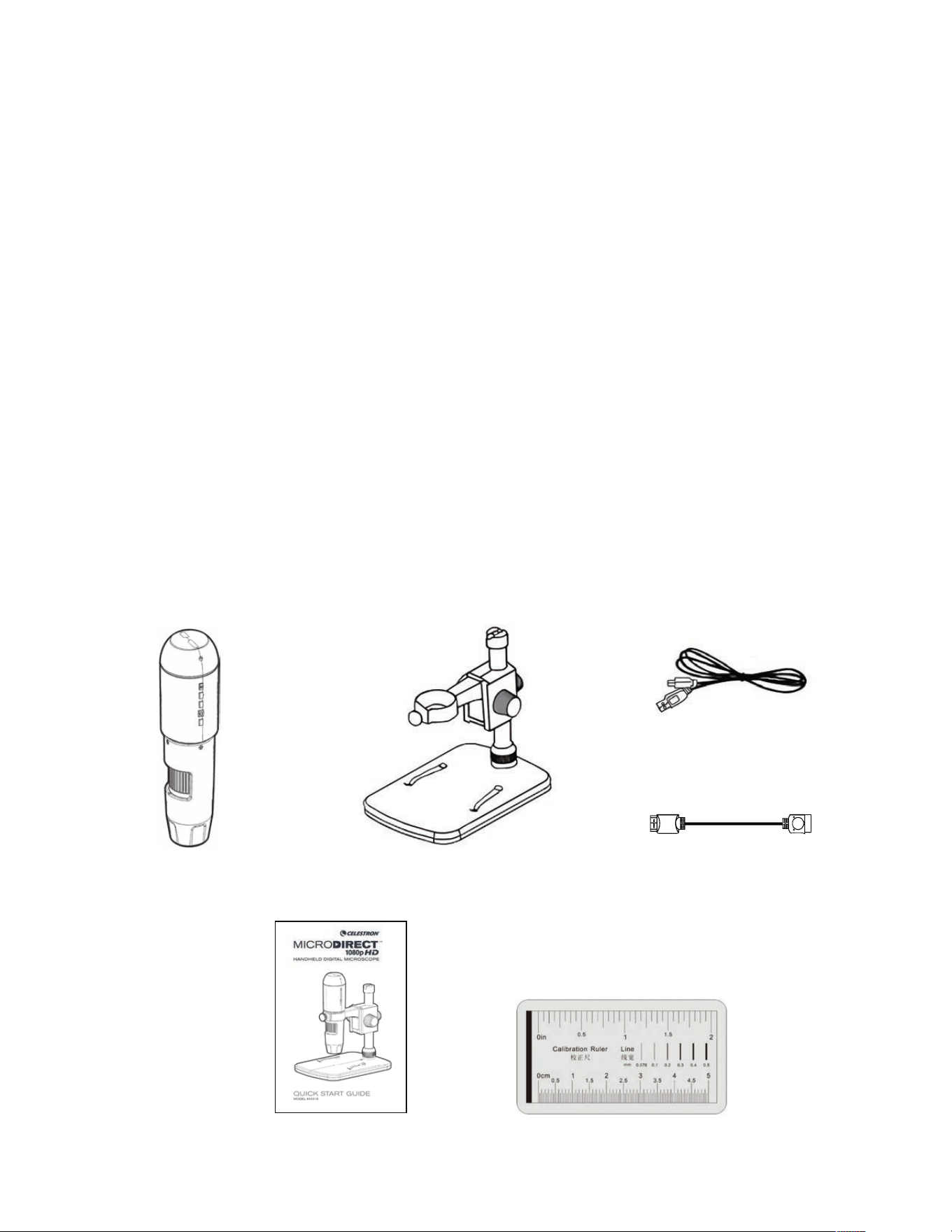
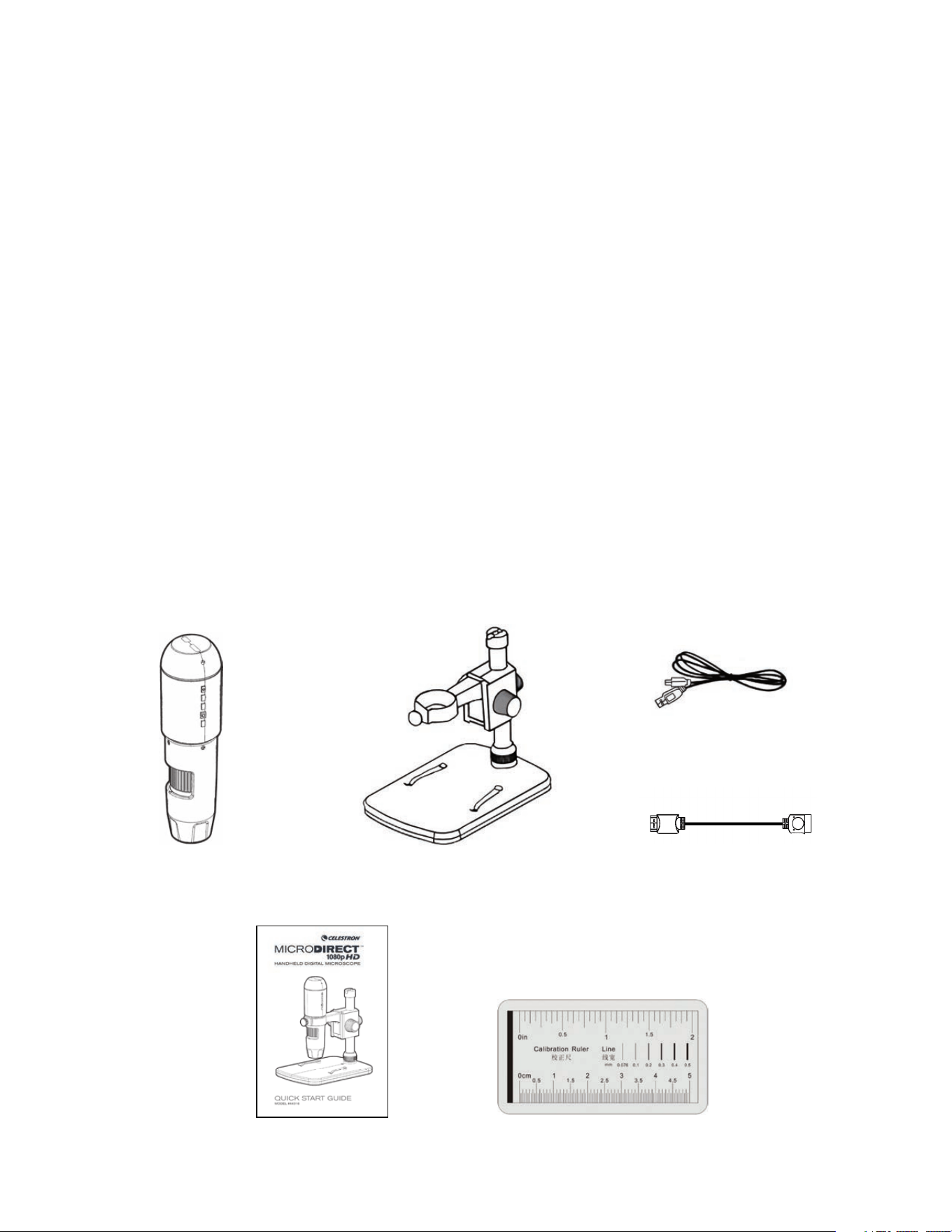
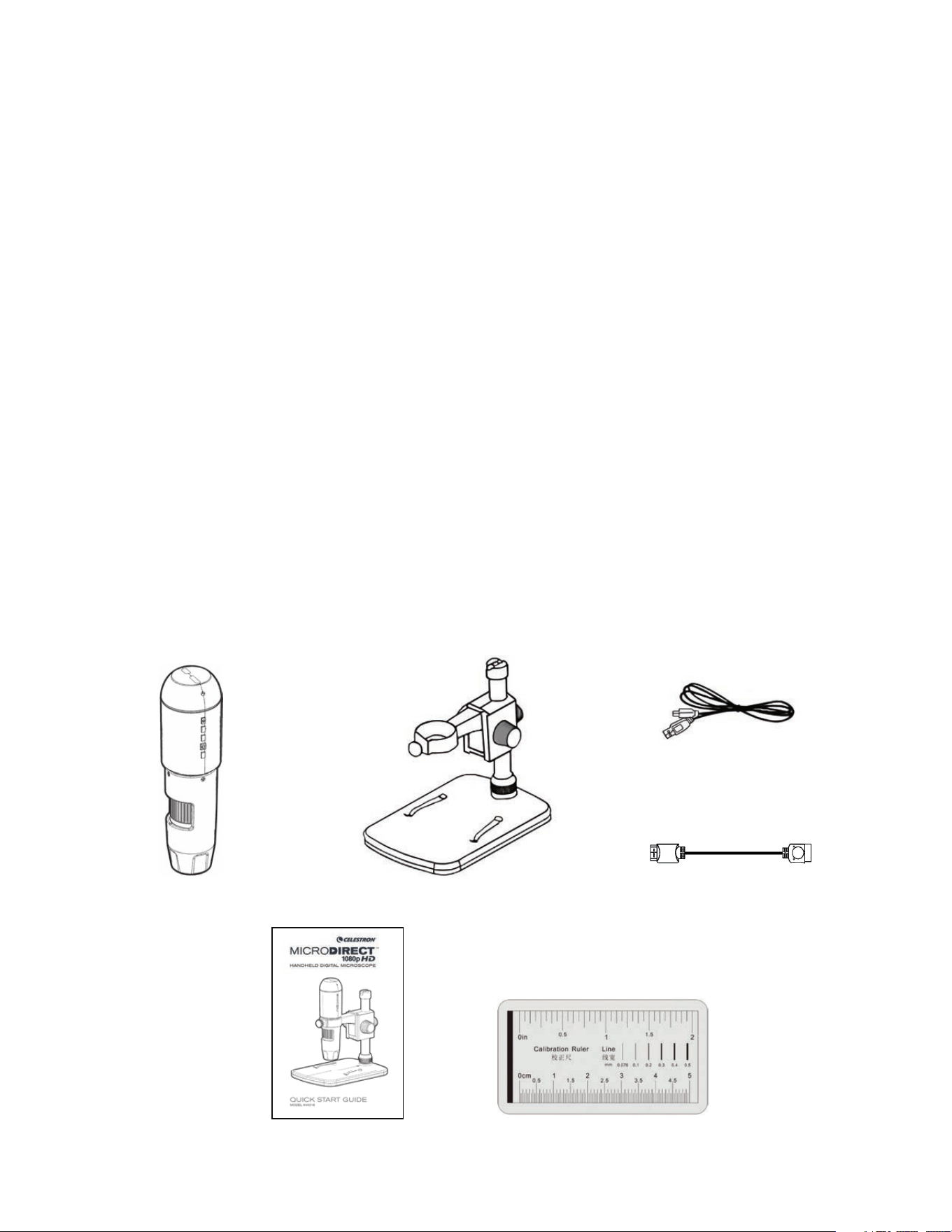
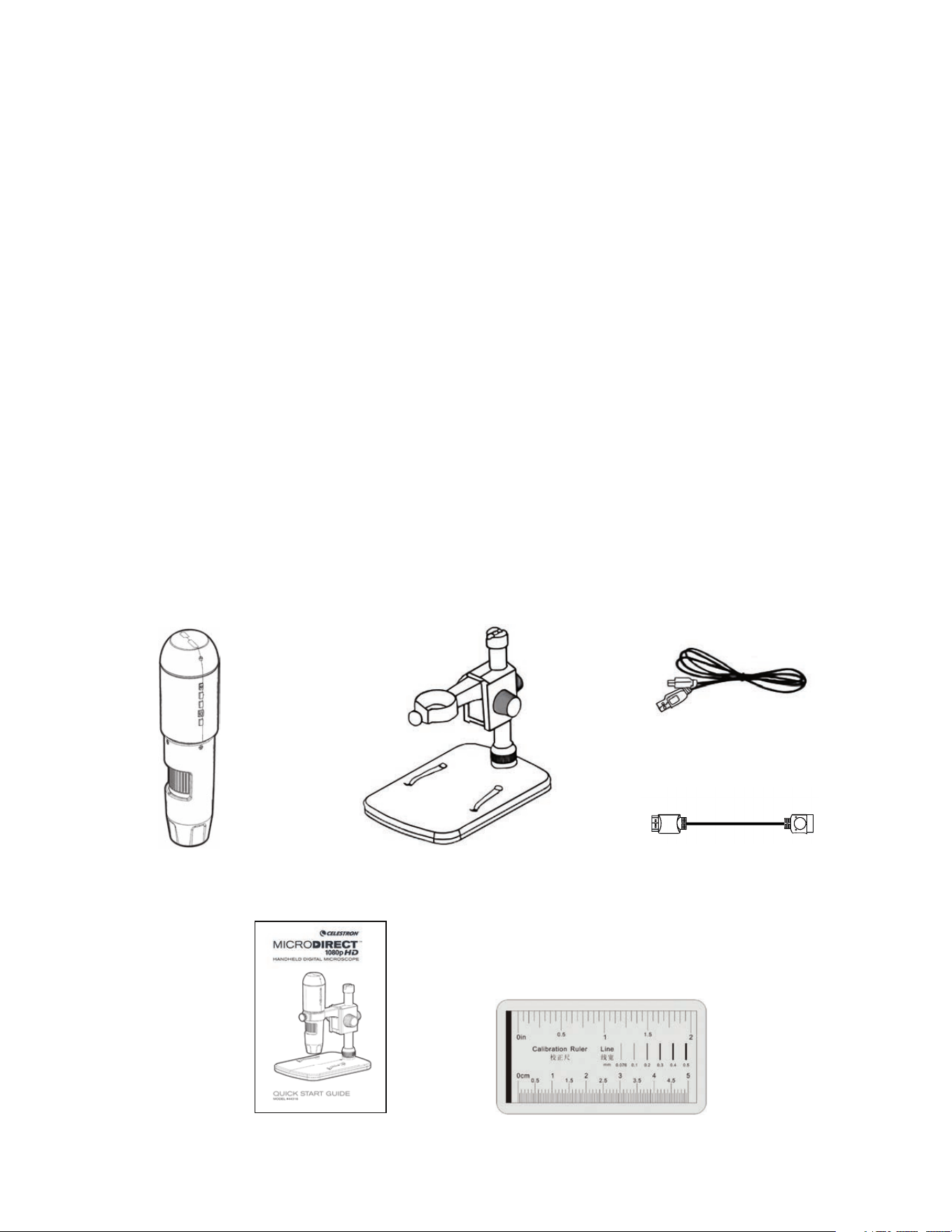
A. WHAT IS IN THE BOX
1. INTRODUCTION
Thank you for purchasing the Celestron MicroDirect
®
1080p HD Handheld Digital Microscope and stand. Your microscope is a
precision optical instrument, made of the highest quality materials to ensure durability and long life. It is designed to give you a lifetime
of viewing pleasure with a minimal amount of maintenance.
Before attempting to use your MicroDirect
®
1080p HD
microscope, please read through the instructions and reference
the diagrams below. Familiarizing yourself with the many
features of the MicroDirect
®
1080p HD microscope will go a
long way to making your experience an enjoyable one.
The MicroDirect
®
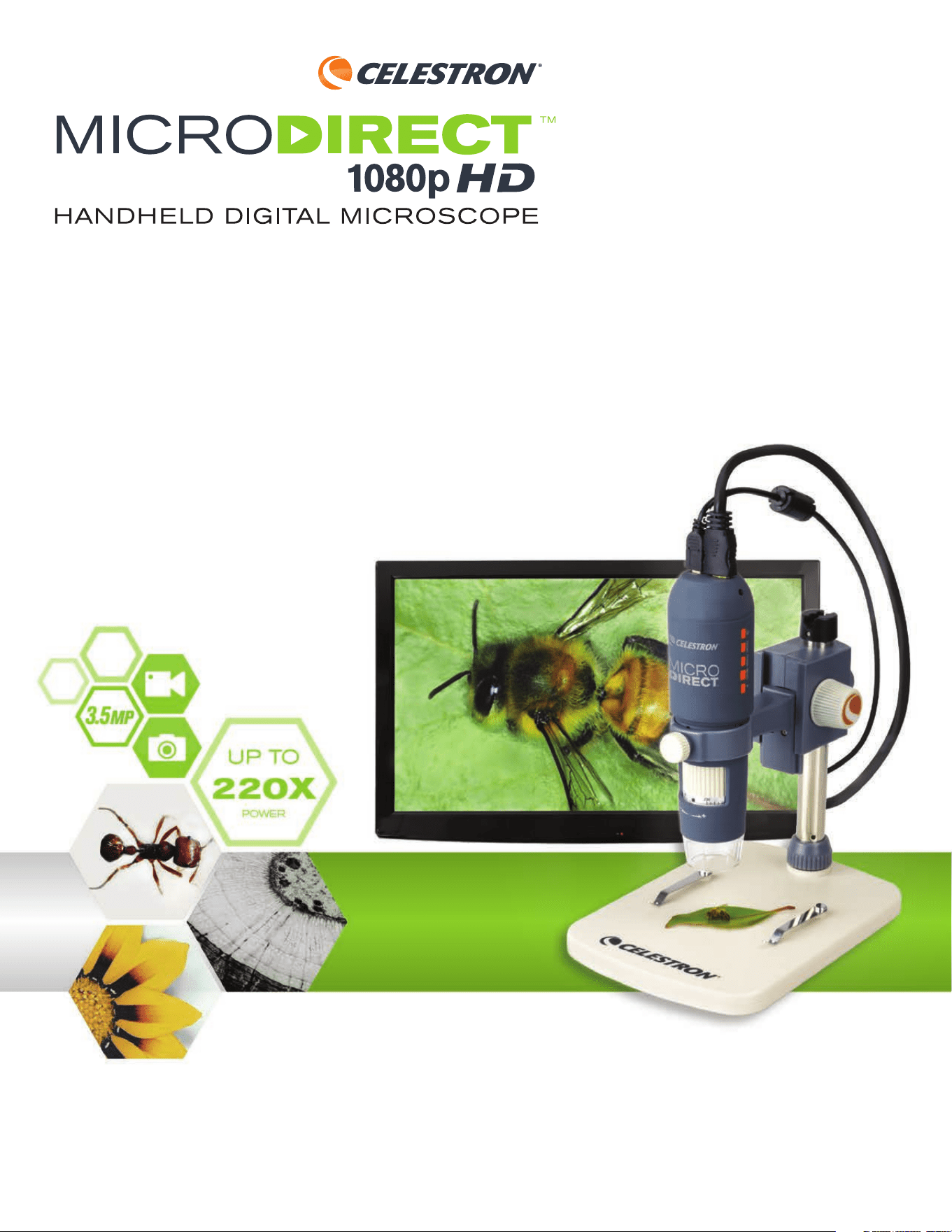
1080p HD microscope is a handheld digital
microscope designed to connect, via the included HDMI cable,
directly to your TV monitor or projector displaying full 1080p
HD streaming video! There is no need for a computer when
using the MicroDirect
®
1080p HD microscope.
This microscope is a low magnifi cation power microscope,
mainly suited for examining specimens like coins, stamps,
rocks, electronics, insects, and other 3D objects. Specimens
on slides can be viewed, but this microscope is not ideal for
this purpose. You can see some of our biological microscopes
more suited to this type of viewing at www.celestron.com.
The Celestron MicroDirect
®
1080p HD microscope does not
use an eyepiece like a traditional microscope. Instead, the
embedded camera sensor acts as the eyepiece, and combined
with the lens assembly, the object is magnifi ed and digitized.
The HDMI connection then sends that digital signal out to
your monitor or projector for incredibly clear 1080p video
streaming. This allows you to view specimens easily and share
the large live streaming image with a room full of people.
Viewing is also more immediate and eye and neck strain are
removed from the equation, unlike traditional microscopes.
You can hold the microscope in your hand while observing
large surfaces away from a normal lab setting, or use the
included professional stand for more precise, hands-free
viewing. Capture still images directly to your MicroSD card for
download later. Record video by connecting the MicroDirect
®
1080p HD microscope directly to you PC using the USB
cable and you are ready to start capturing 720p HD movies.
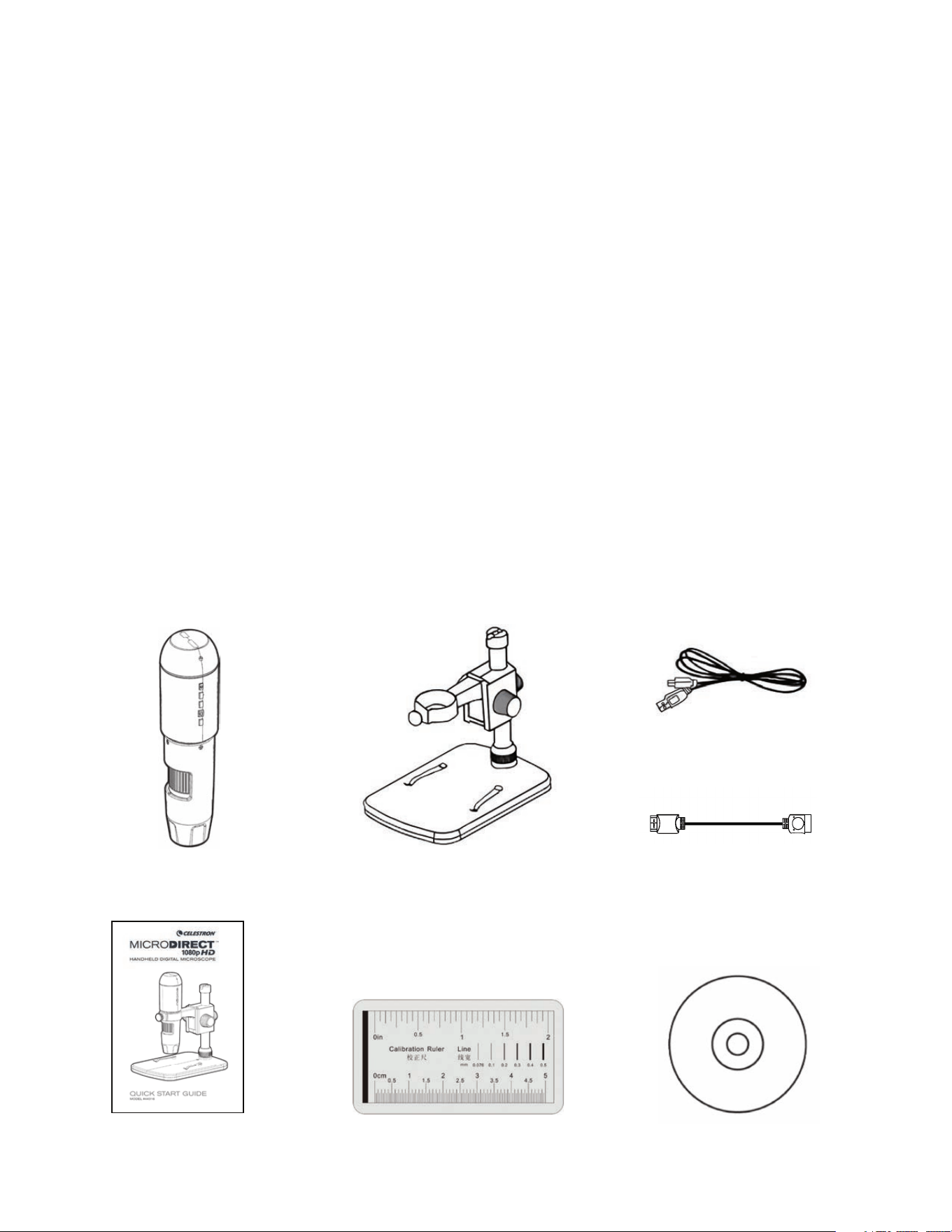
MicroDirect
®
1080p HD Microscope (1)
Stand (1)
Calibration Ruler (1)
Quick Setup Guide (1)
HDMI Cable (1)
USB Cable (1)
ENGLISH I 3
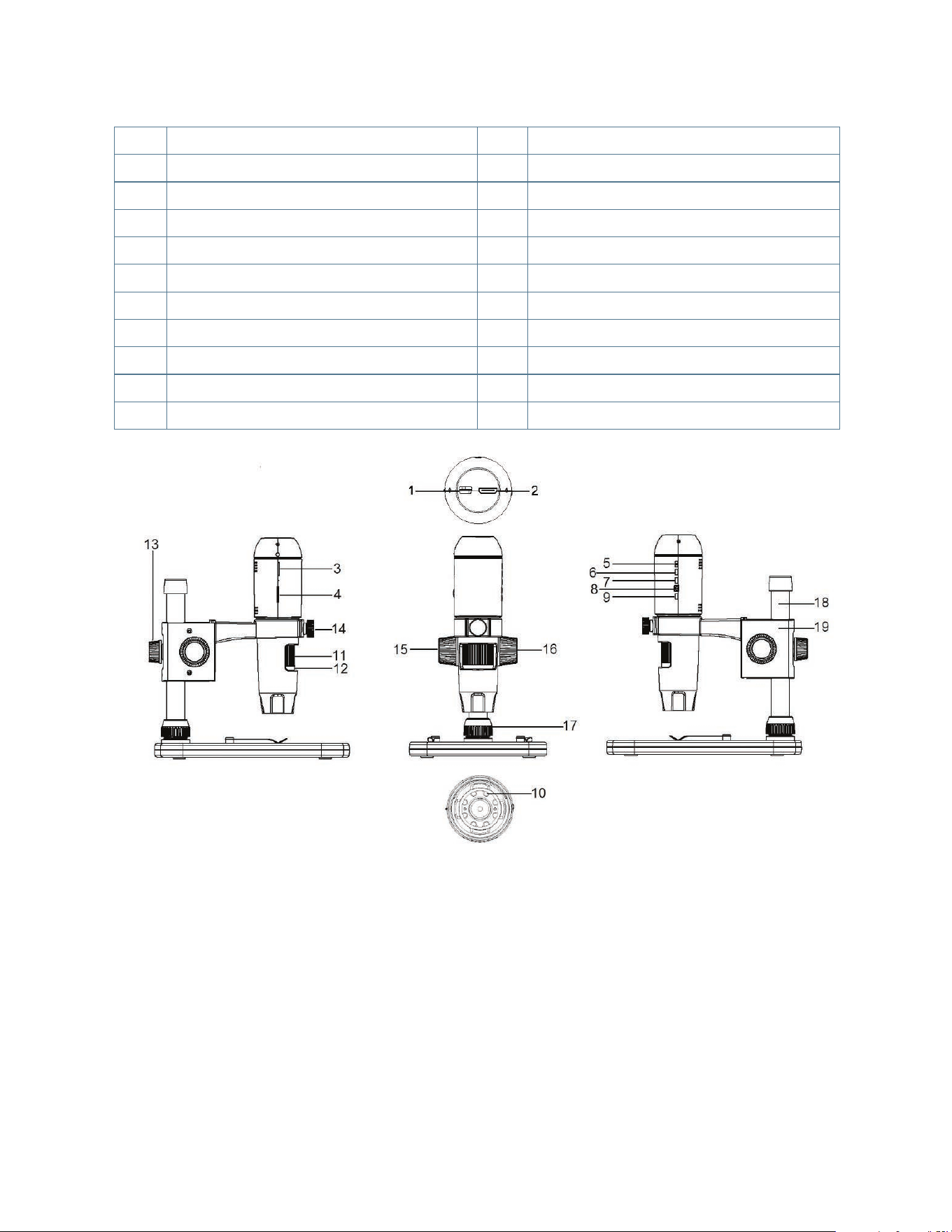
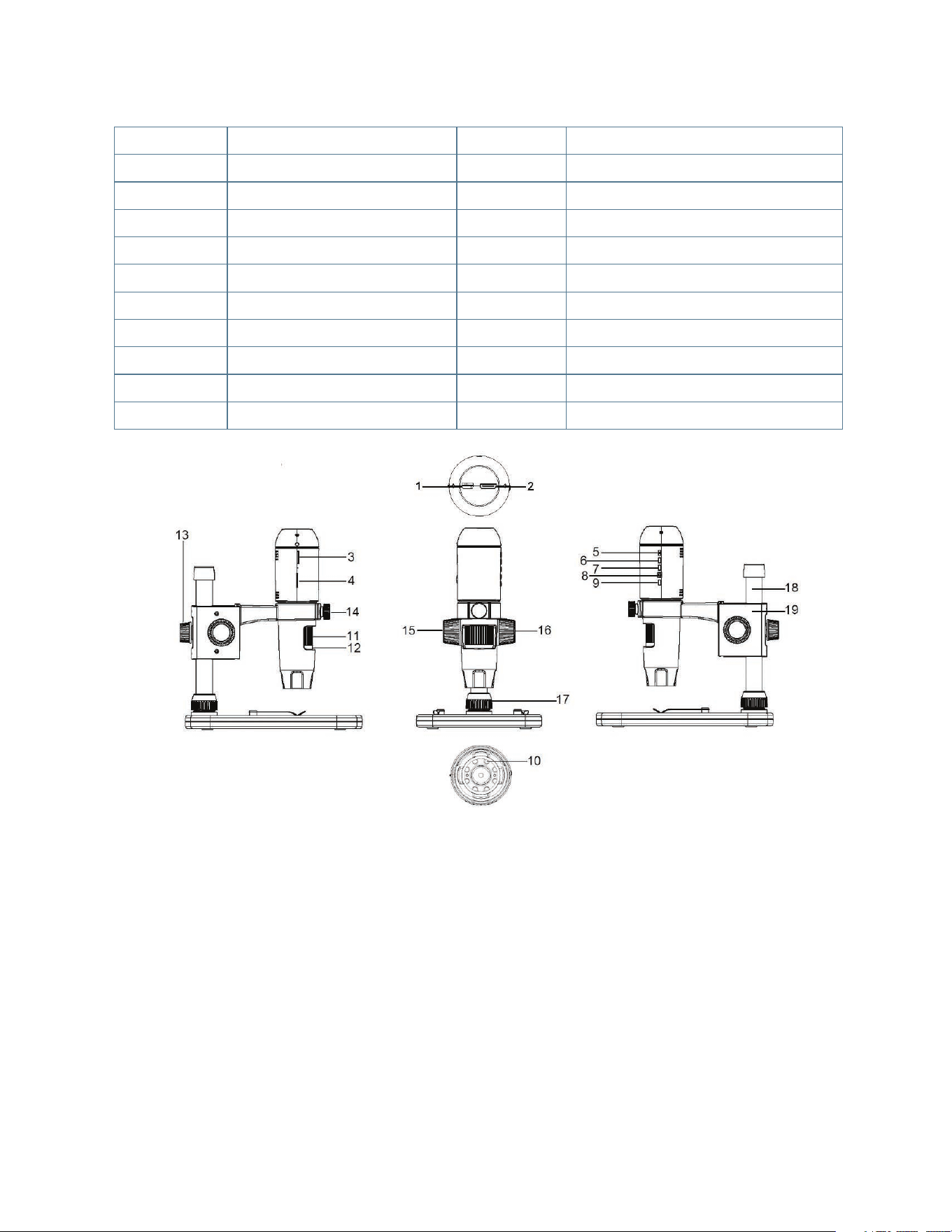
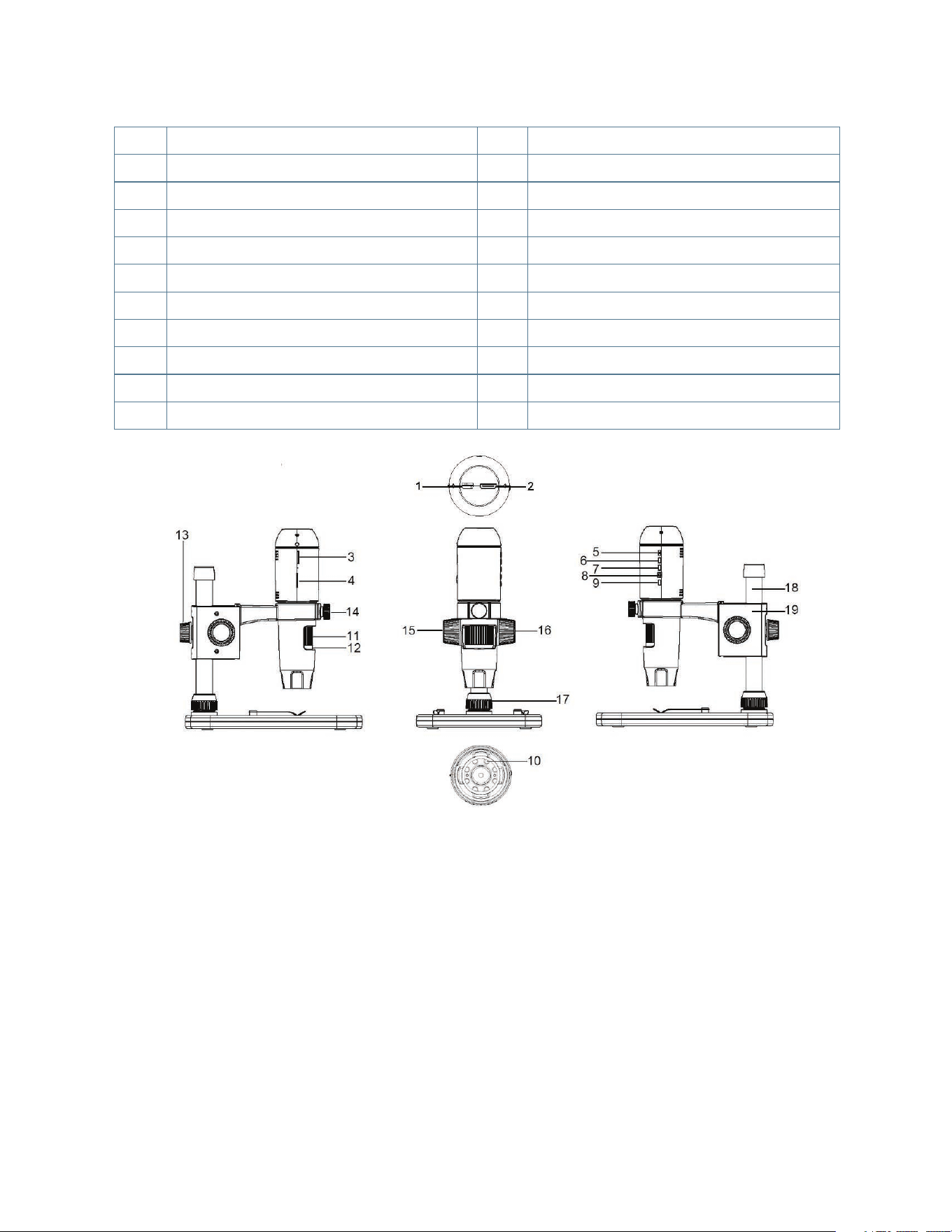
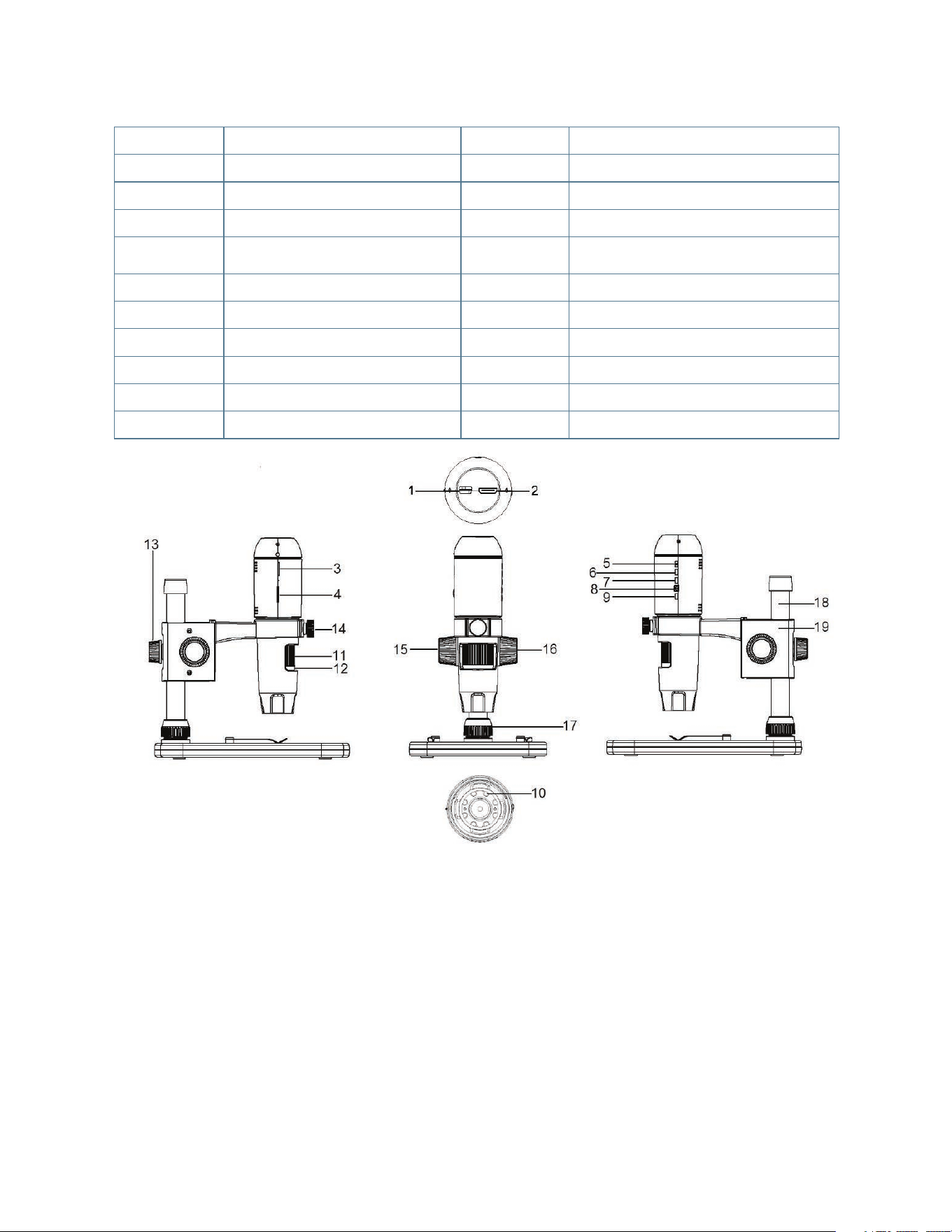
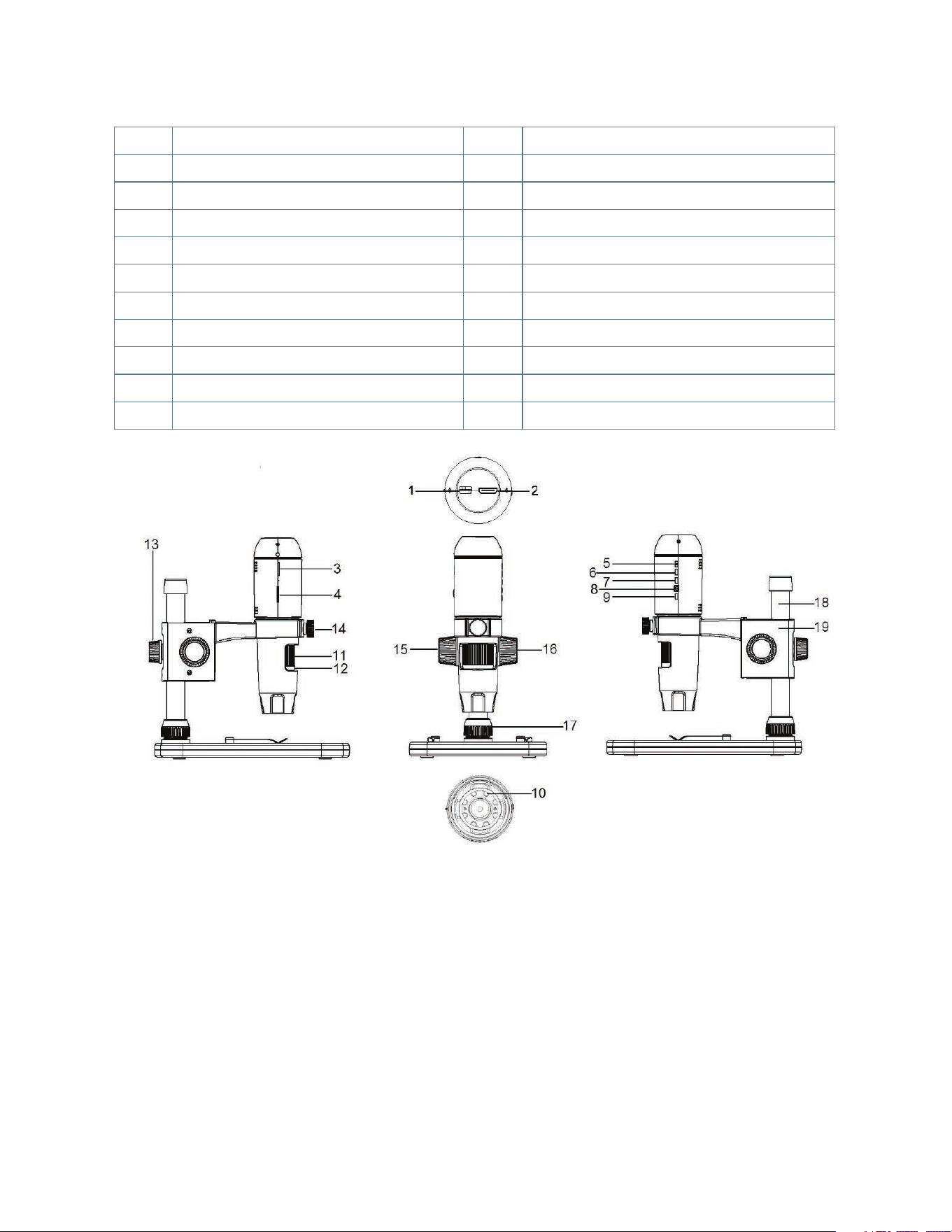
PART FUNCTION PART FUNCTION
1.
Mini USB Port (Power)
11.
Focus Wheel
2.
Mini (Type C) HDMI OUT Port
12.
Magnification Gauge
3.
Micro-SD Card Slot
13.
Height Adjustment Lock Nut
4.
LED Dimmer Switch
14.
Microscope Holder Lock Nut
5.
ON/OFF Button
15.
Lock Wheel
6.
Mode Button
16.
Course Focus Wheel
7.
Menu Button
17.
Shaft Connection Lock Collar
8.
Shutter Trigger/OK Button
18.
Support Shaft
9.
Down Arrow Button
19.
Microscope Holder Assembly
10.
8 LED Ring Illuminator
B. PARTS
C. SYSTEM REQUIREMENTS
1. Monitor or Projector
+
Must have open HDMI port
+
USB with power OUT (optional)
2. PC (Optional)
+
Windows XP/ 7 / 8 / 10
+
P4 1.8 or above
+
RAM: 512M
+
Video Memory: 64M
+
USB port: 2.0
NOTE: Software is downloaded from celestron.com
4 I ENGLISH
D. SPECIFICATIONS
Description MicroDirect
®
1080p HD Handheld Digital Microscope
Sensor 3.5 MP CMOS 1/3” High Speed
Pixel Size 2.2 µm x 2.3 µm
Still Image Capture Resolution 14MP** (5120x2880), 8MP** (3840x2160), 5MP** (3072x1728),
3MP (2304x1296), 2MP (1920x1080), WVGA (848x480)
**Interpolated
Video Capture Resolution 720p (HD) and 640 x 480 (VGA) *Must be connected to computer to record video
Video Format- Streaming HDTV (with HDMI cable): 1080p (1920x1080)@30fps
Video Format- Recording AVI/30fps
Photo Format JPEG
Magnification 24x to 220x (based on 20” screen)
Focus Range (Manual) 0mm to 35mm
Power • USB 2.0 (with compatible USB power OUT port)
• Use any 120V power adapter (5V-1A) if needed
Shutter Trigger On main body and in software
Software MicroDirect
®
Portable Capture Software
Software Compatibility Windows: Windows XP/7/8/10
Languages Supported (12) English, German, Spanish, Russian, Italian, French, Portuguese,
Dutch, Polish, Japanese, Korean, Chinese
Accessories HDMI Cable, Adjustable Stand and Stage, Lens Cloth, Calibration Ruler
Weight 1.3 lb/.59 KG (including stand)
Dimensions Microscope: 155.6x42x42mm (6.125”x1.5”x1.5”)
Stand: 119x171.4x157.2mm (4.68”x6.75”x6.19”)
**
Interpolation refers to software adding pixels to an image to artificially make the image larger. This can be beneficial when printing in larger formats.
2. SETUP
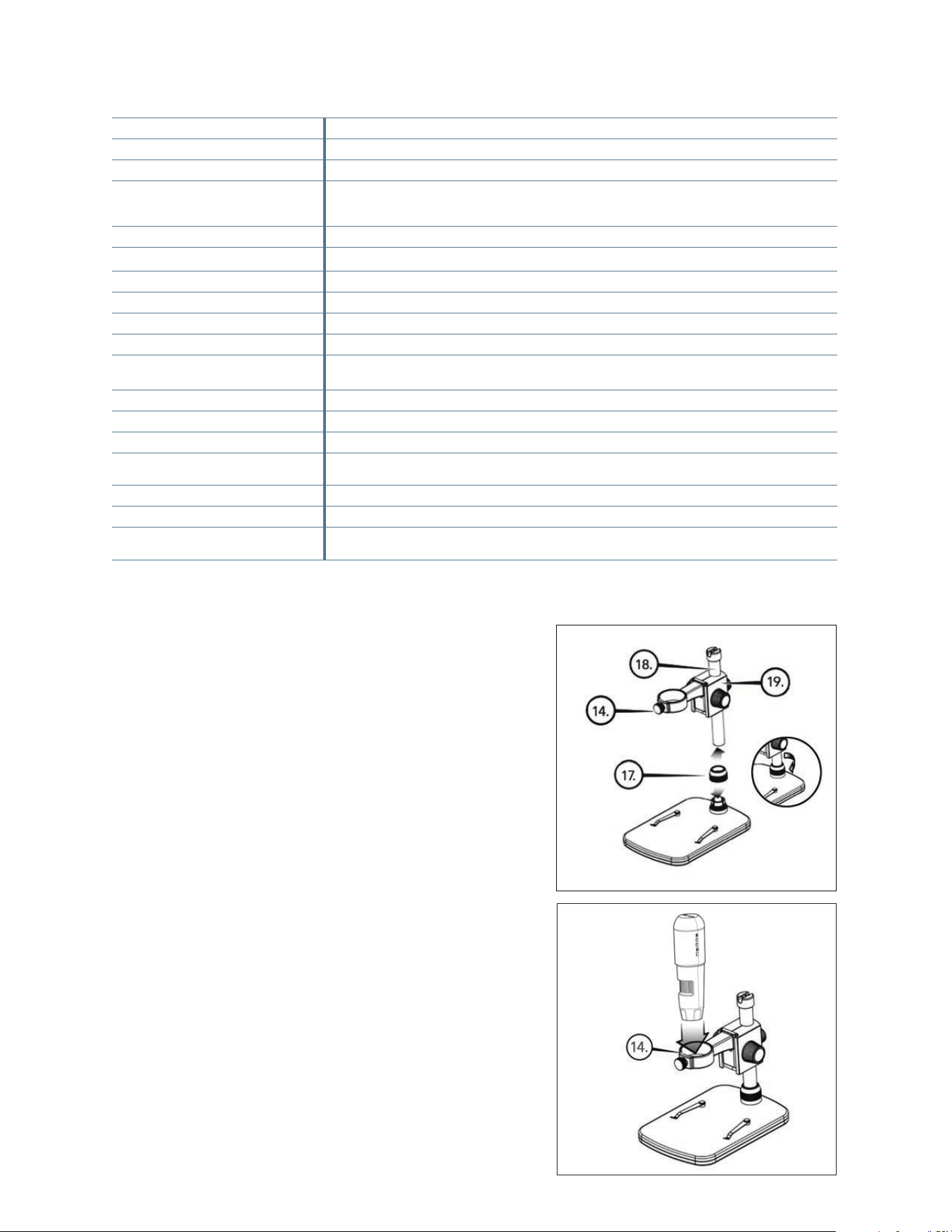
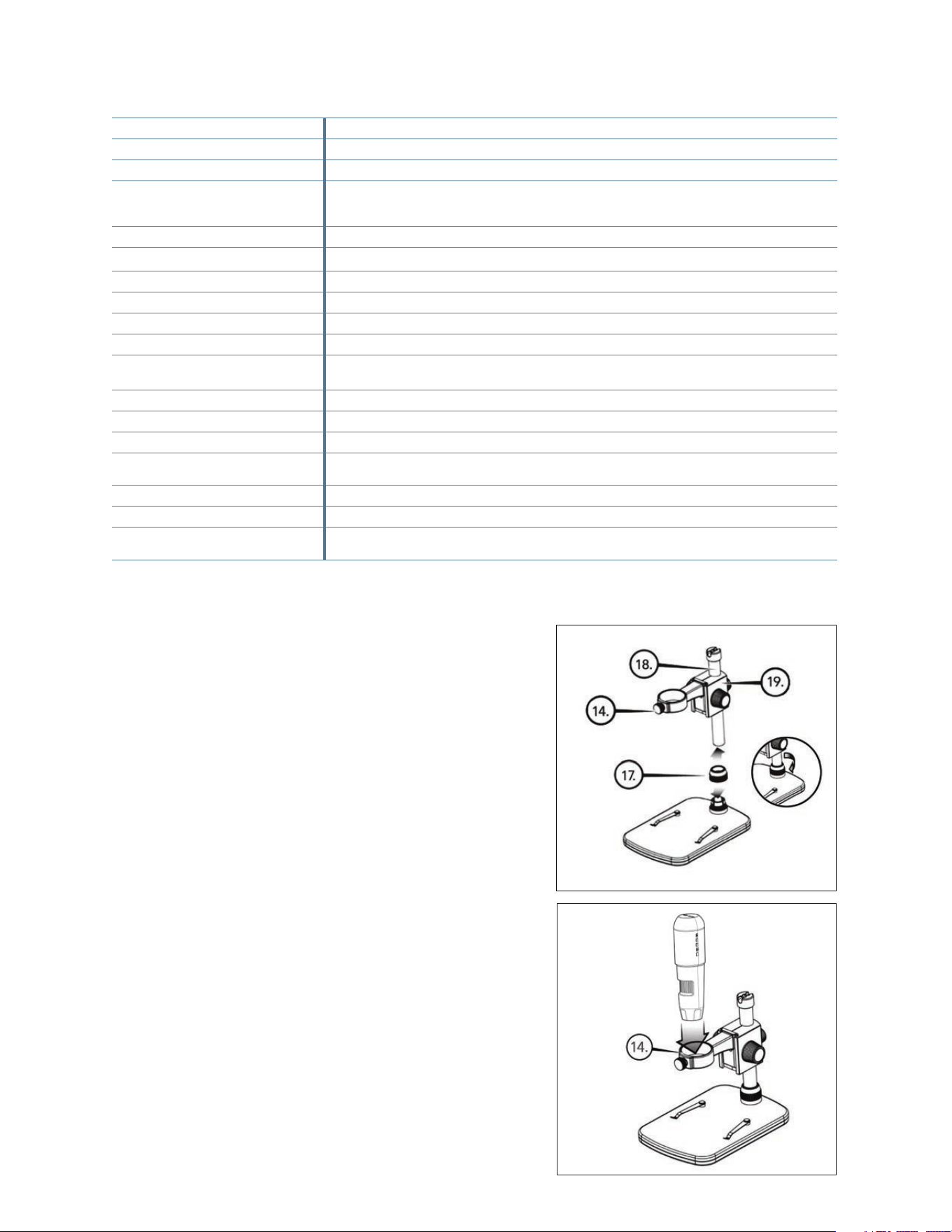
A. ASSEMBLE THE MICROSCOPE
STAND
+
Carefully remove all components from the box.
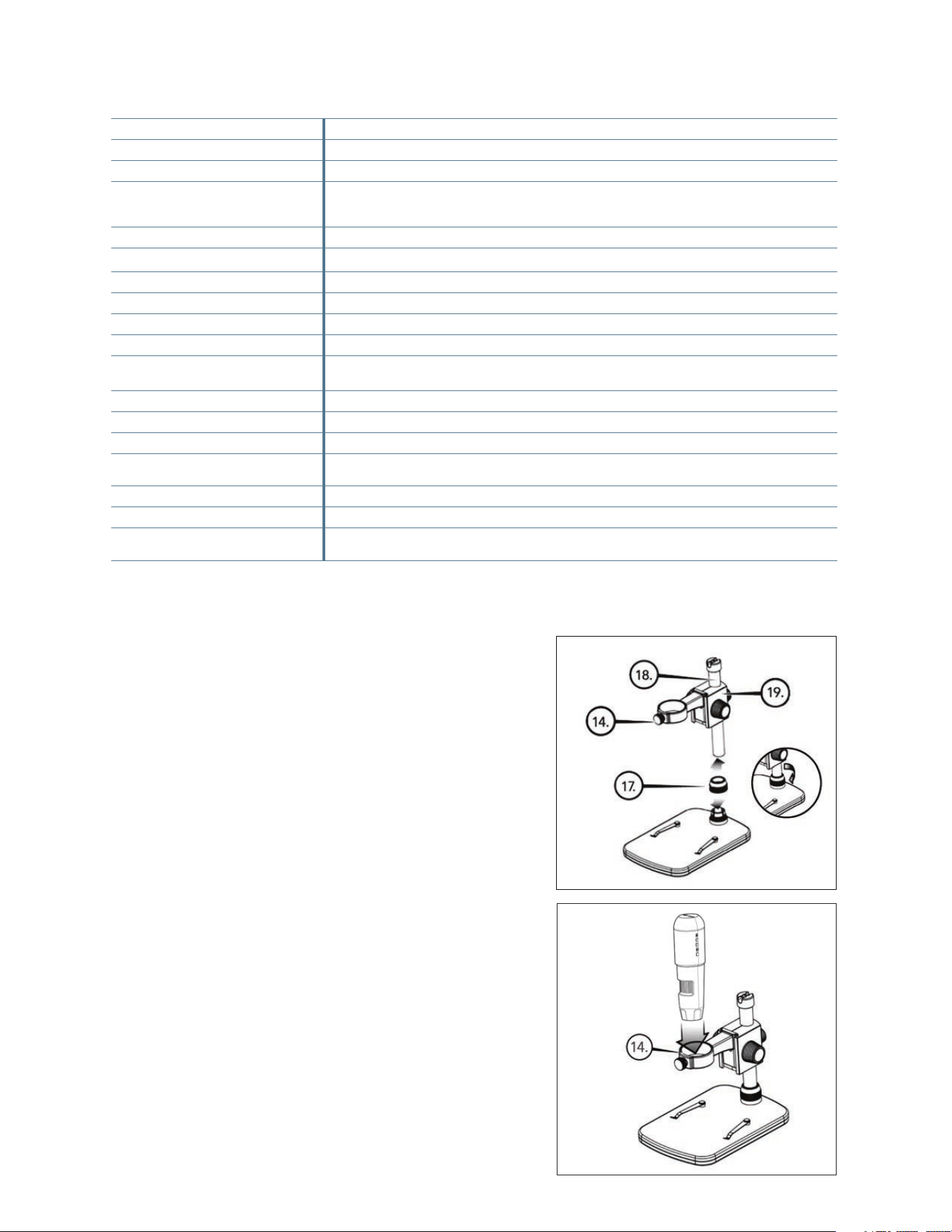
+
The microscope holder assembly (19) should be connected
to the support shaft (18) in the box. If it is not, connect it now.
+
Attach complete assembly (17, 18, 19) to the base threads
and tighten.
B. ATTACH MICROSCOPE TO STAND
+
Insert the microscope in the Microscope Holder
and tighten the Microscope Holder Lock Nut (14) to secure
it in place.
ENGLISH I 5
+
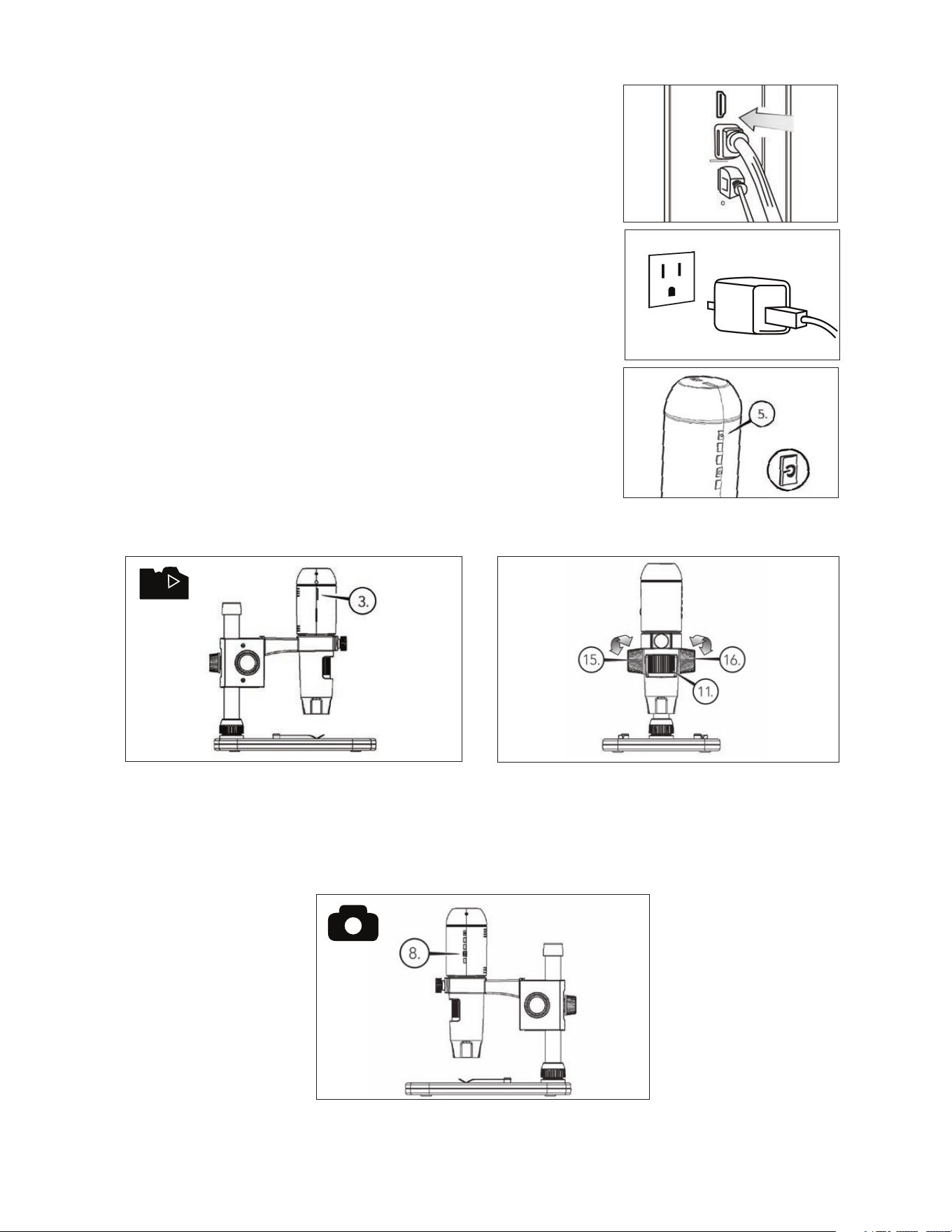
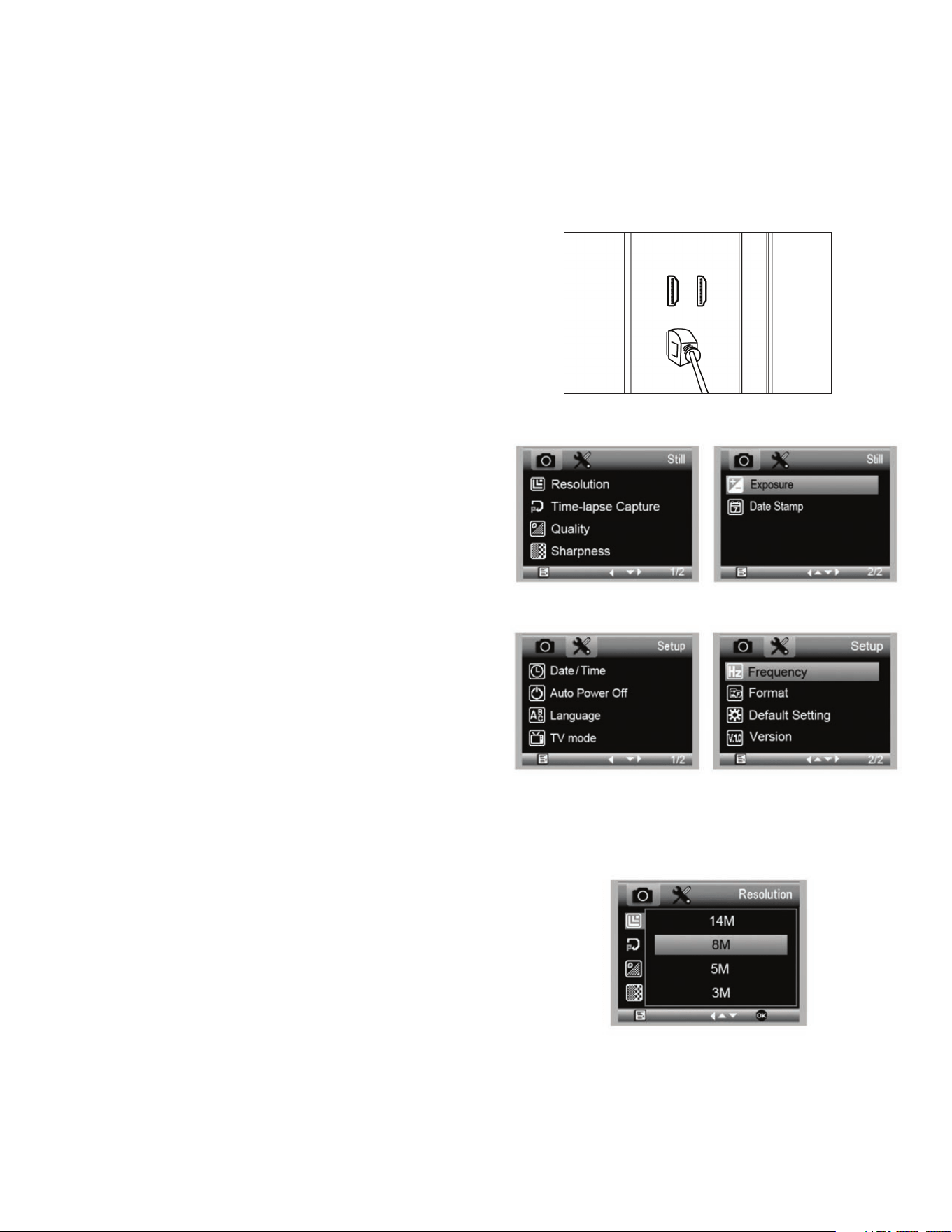
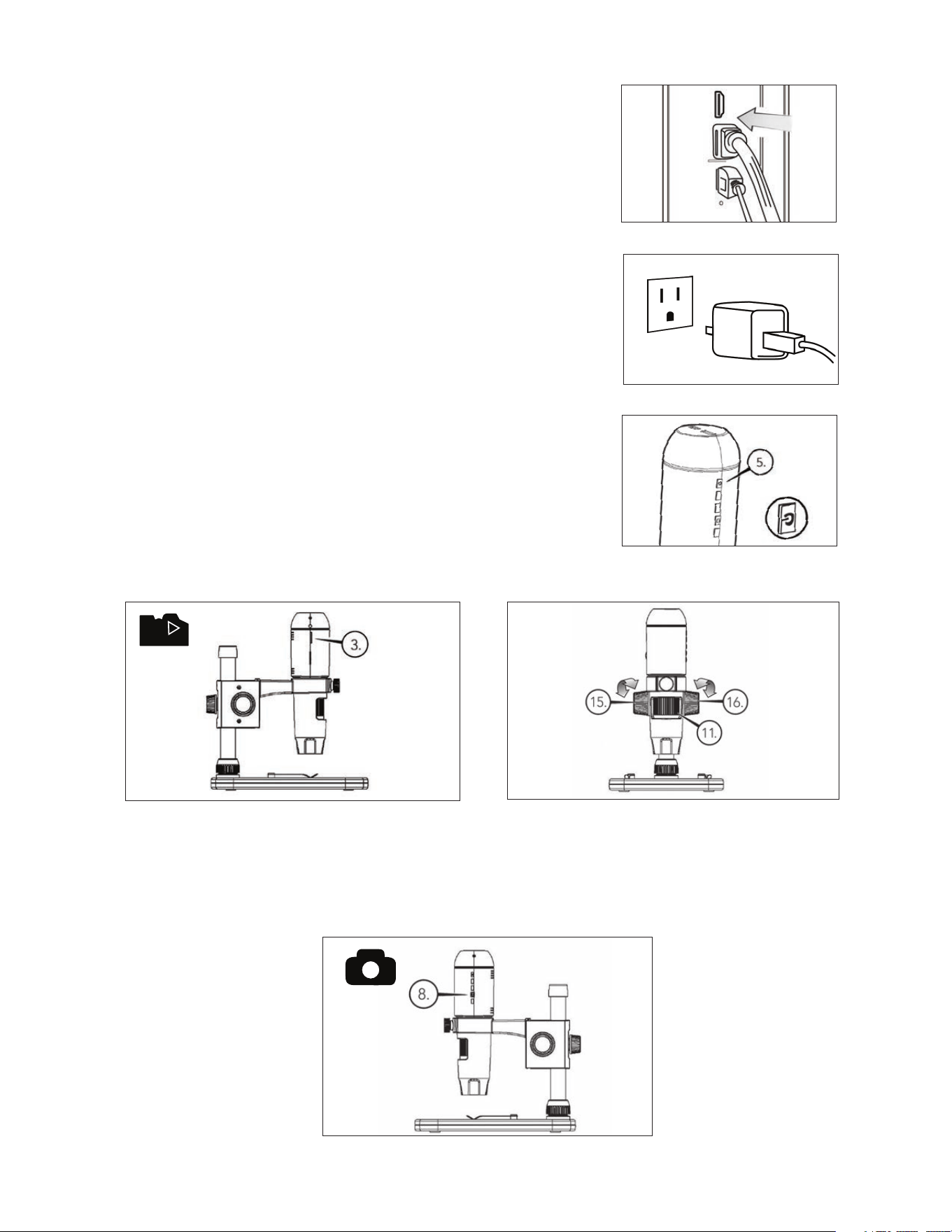
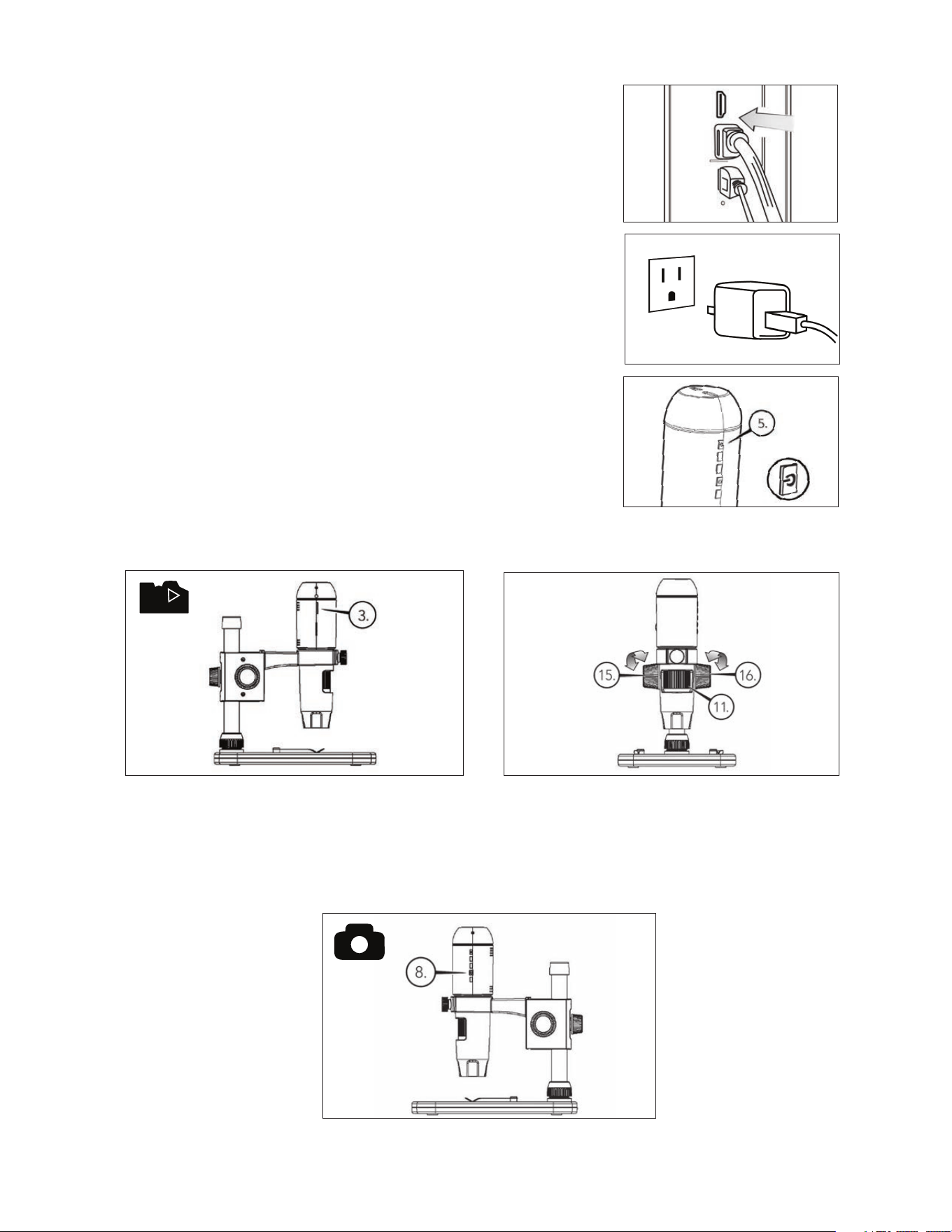
Plug one end of the included HDMI cable into the microscope’s Mini (Type C)
HDMI port and the other end into your monitor’s standard (Type A) HDMI port.
+
Plug the USB cable into the microscope and then into an open USB 2.0 port
on your monitor or projector (if available).
+
If there is no USB 2.0 port on the monitor or projector, use any 5V-1A USB
plug and plug the USB cable into it, and then into an available power outlet.
DO NOT plug the USB cable directly into a desktop or laptop computer as it
will misread the signal from the cable as a storage device and cause a blank
blue screen to appear on the monitor screen.
NOTE: The included USB cable works with all standard USB plugs that come
with many of today’s electronics such as smartphones and tablets.
NOTE: An additional option for power is an external power source such as a
power bank that has a standard USB OUT port. All Celestron Elements
hand warmers and power banks will work for this purpose. You can
find them at celestron.com
+
Power up the microscope by pressing the ON/OFF button (5).
3. USING YOUR MICROSCOPE
A. CONNECT TO A MONITOR OR PROJECTOR
+
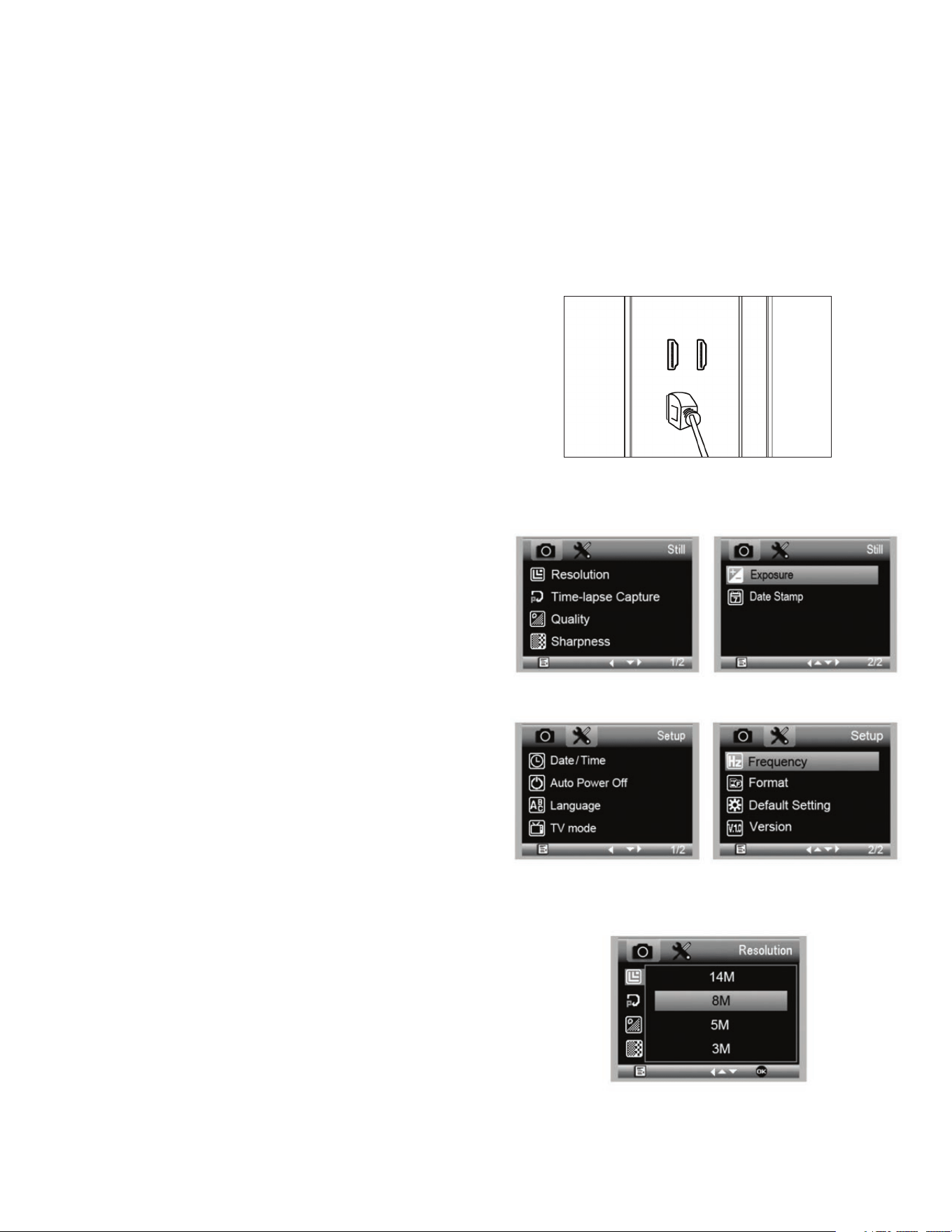
Insert your Micro-SD card in the Micro SD card slot (3) on
the MicroDirect body.
NOTE: Micro SD Card NOT included.
NOTE: SD Card slot supports up to 32G SDHC.
+
Loosen the Lock Wheel (15) adjust the course focus by
rotating the Course Focus wheel (16).
+
Tighten the Lock wheel (15) to hold the assembly in place.
+
Turn the Fine Focus wheel (11) to focus on the specimen.
A
B
C
+
Press the Shutter Trigger button (8) and the captured image
will be saved in the Micro-SD card.
B. TAKE A STILL IMAGE
6 I ENGLISH
4. MENU SETTINGS
A. MAIN MENU
+
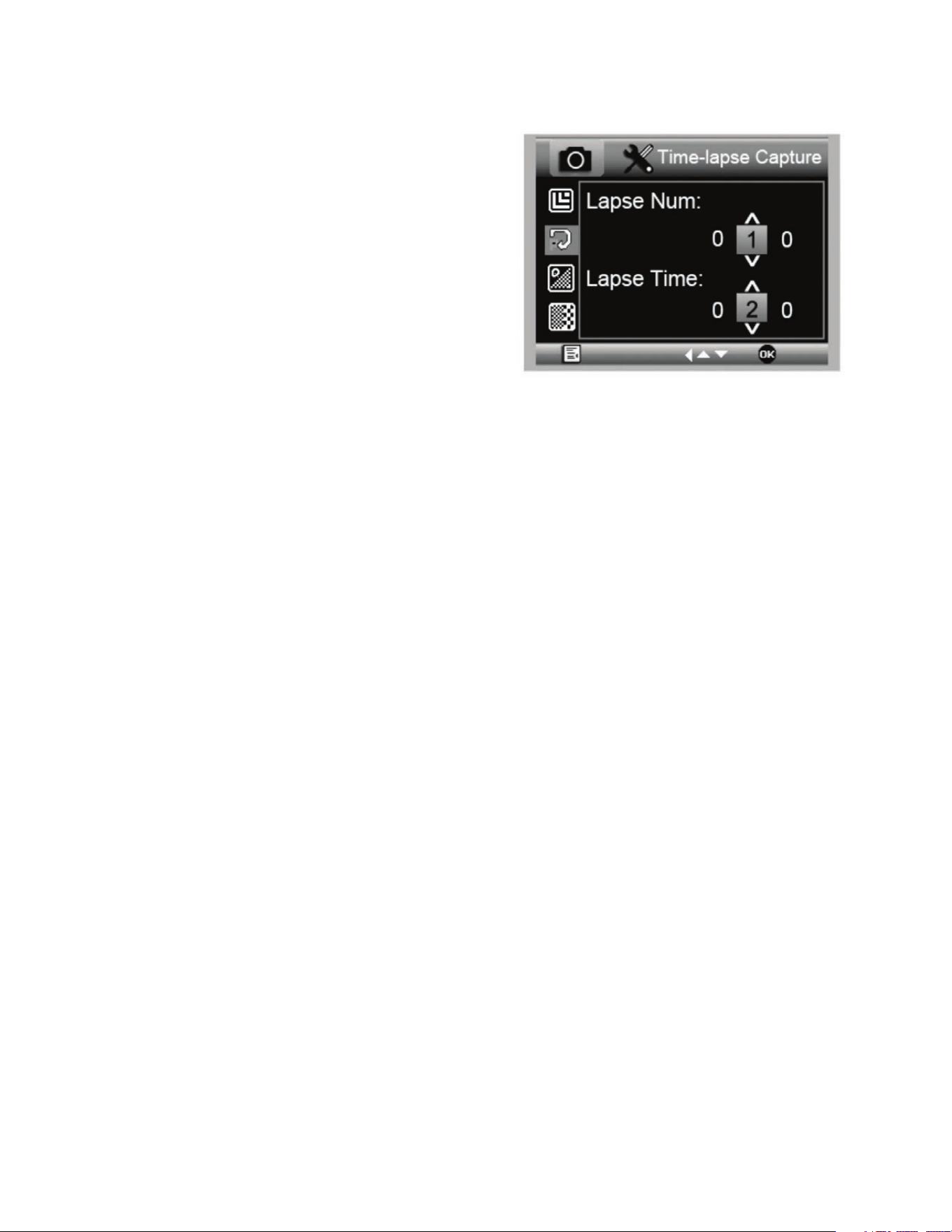
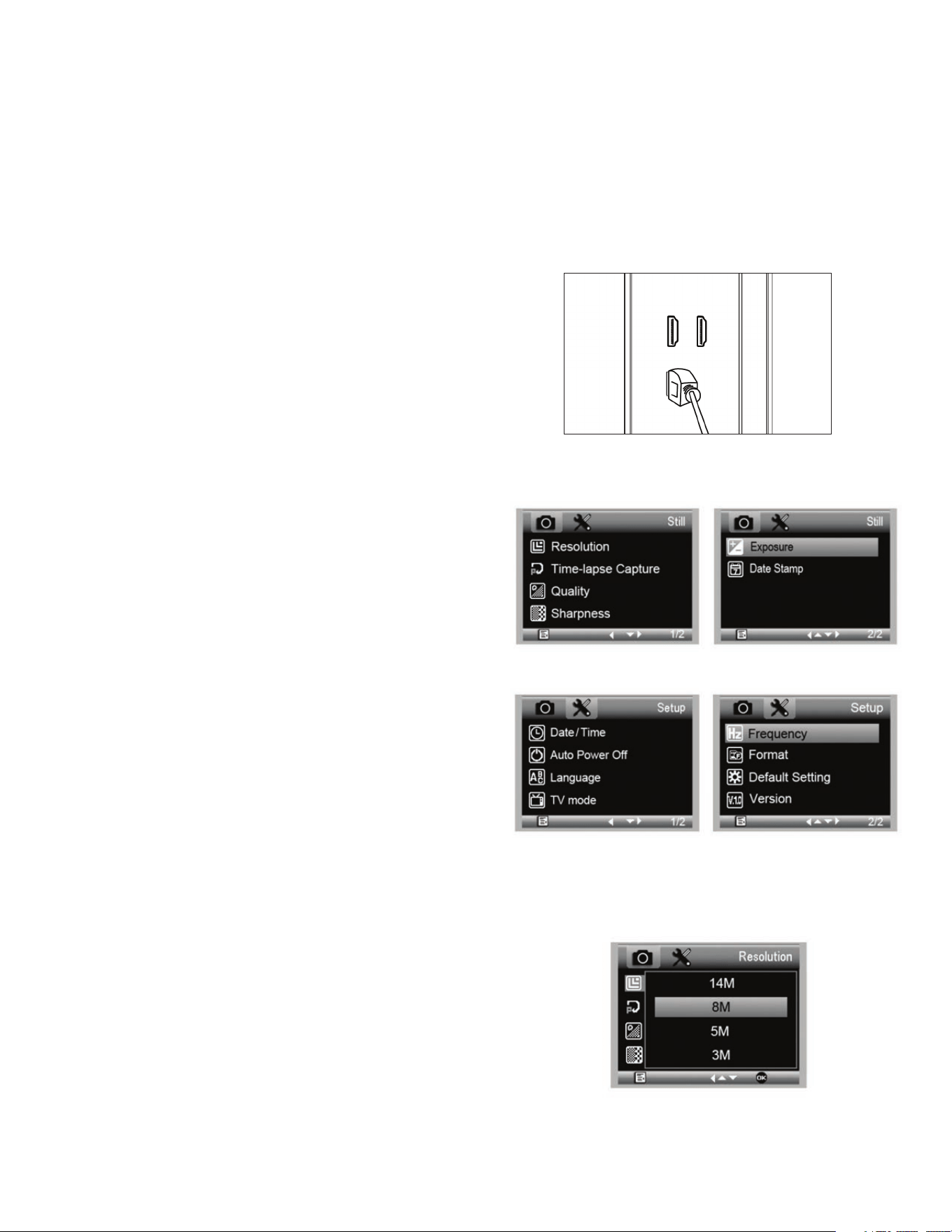
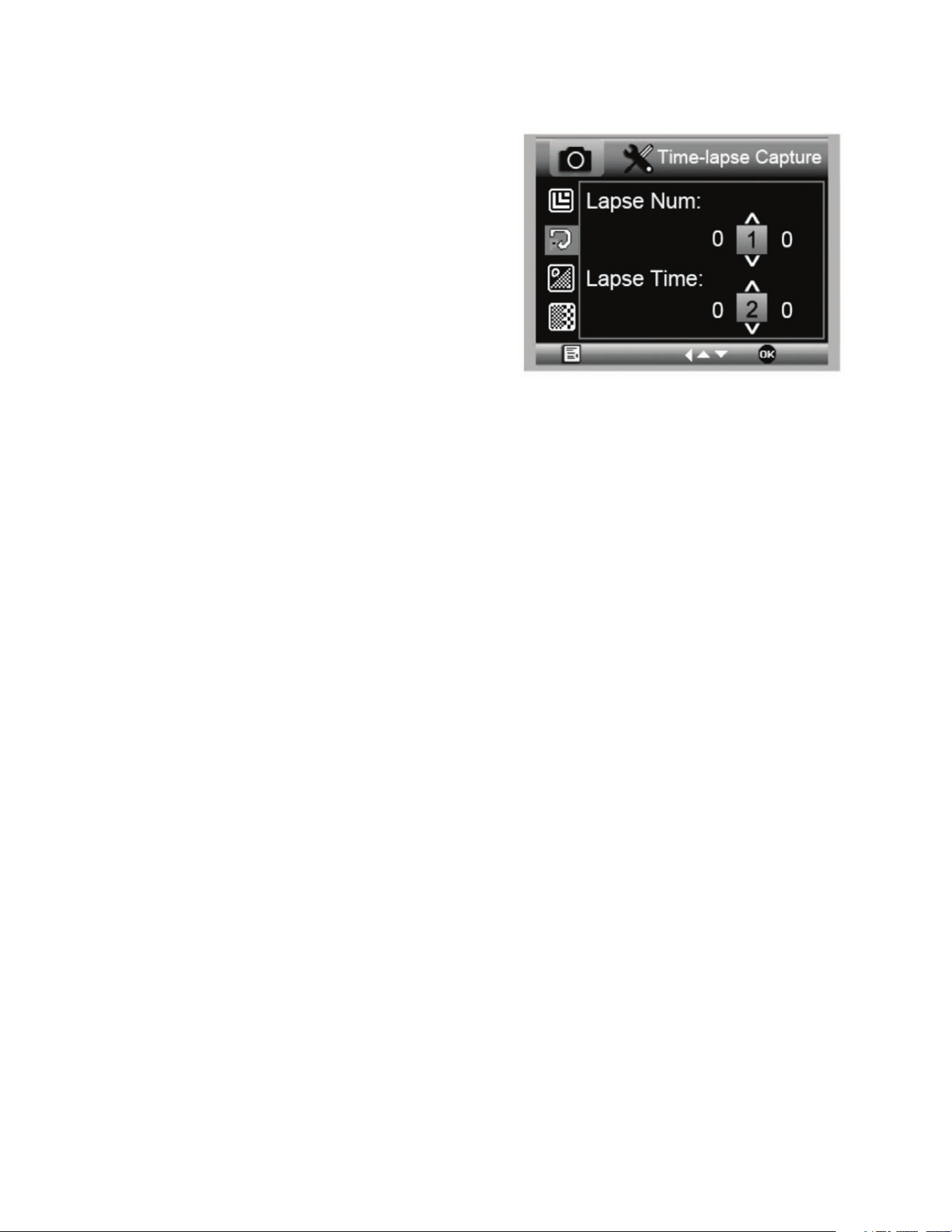
Press Menu button (7) to enter the Main menu.
NOTE: The MAIN MENU consists of 2 main windows. To gain access
to MAIN WINDOW 2 press the Menu button (7) again now.
+
Here you can adjust the Resolution, Image Quality, Sharpness,
Exposure, Choose to have the Date stamp or choose a Time
Lapse option, set the Date and Time, set the Auto Power Off,
Choose a language, set the TV mode and frequency, reformat
your MicroSD card etc.
+
Press the Down button (9) to scroll through your choices.
+
When your setting choice is highlighted, press the Capture/OK
button (8).
B. RESOLUTION
+
Select a resolution setting for your still image.
+
Your choices are: 14M*, 8M*, 5M*, 3M, 2MP or WVGA
NOTE: 14MP, 8MP and 5MP settings are based on interpolation.
Interpolation refers to software adding pixels to an image to
artificially make the image larger. This can be beneficial when
printing in larger formats.
+
With MicroSD card in place in the MicroSD card slot, press the
Mode button (6) to switch to playback mode.
+
Press the Down button (9) to view the previously captured image.
+
Press the Mode button (6) again to return to the streaming image.
D. DOWNLOADING IMAGES TO PC
+
With the MicroSD card in SD card slot, connect the microscope to
your PC via the included USB 2.0 Cable.
+
Your PC should recognize the device as a storage device.
+
Download the images as you would with any digital camera.
C. REVIEW YOUR RECORDED IMAGES
MAIN MENU 1
MAIN MENU 2
ENGLISH I 7
C. TIME-LAPSE CAPTURE
+
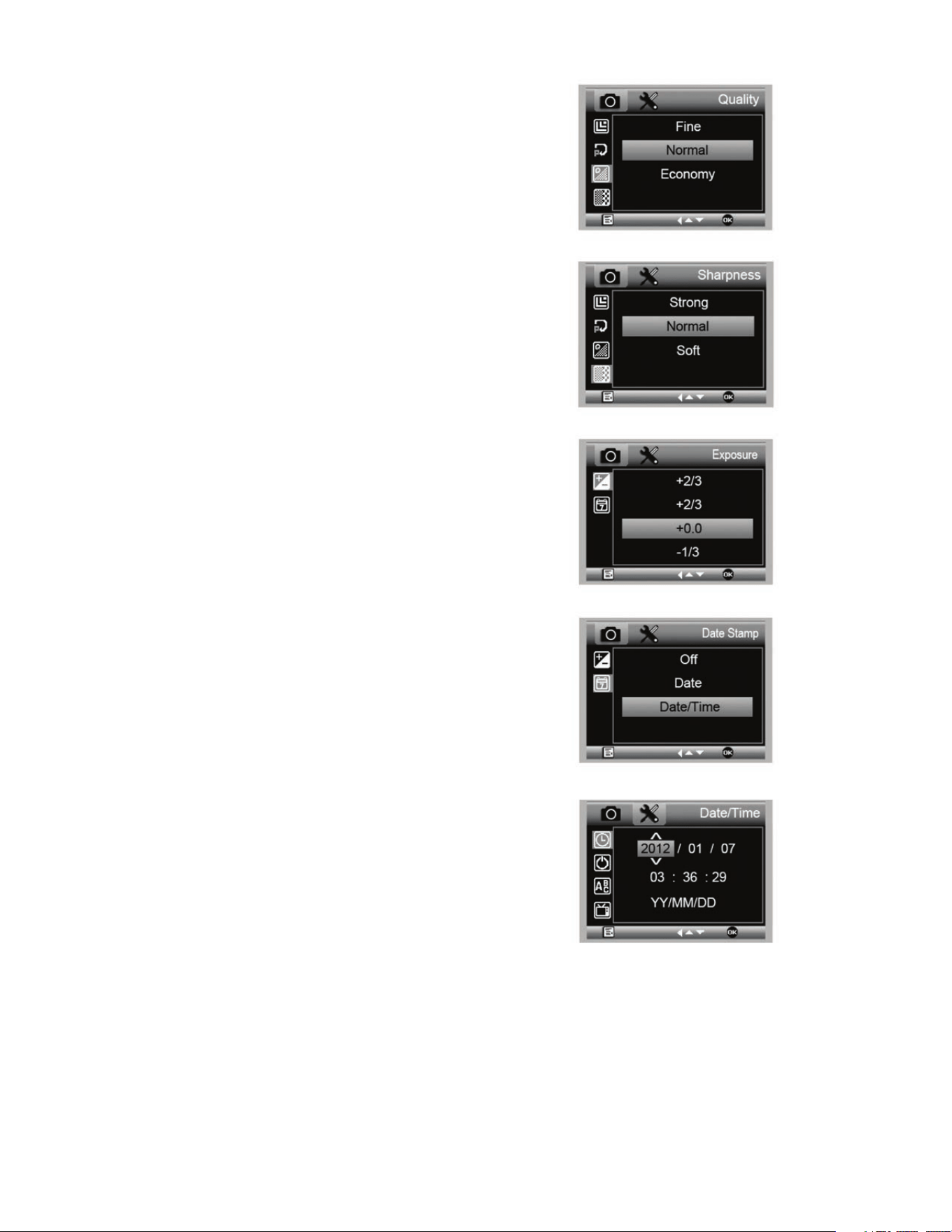
Your MicroDirect allows you to set the device to take images
over a defined time period. This is referred to as Time-Lapse.
+
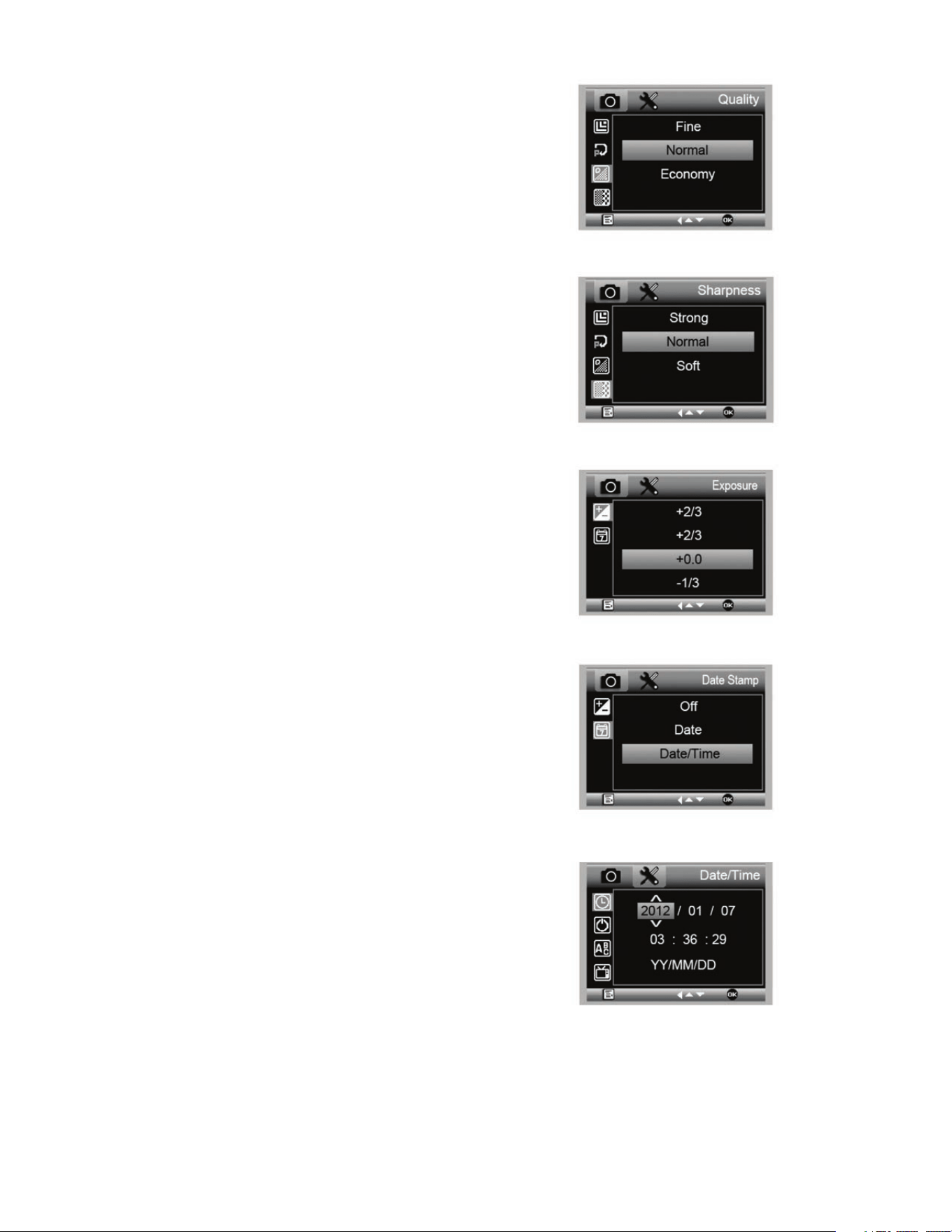
You will first select the number of still images or Lapse
Num you want your device to take. This can range from 2
to 999 images.
+
Use the Down button (9) to scroll through the numbers from
0 to 9. When satisfied with the first digit, press the Mode
button (6) to jump to the next digit.
+
Again, using the Down button (9), set that digit.
+
Once the number of still images has been chosen, press the
Mode button (6) to move to the Lapse Time choice.
+
The Lapse Time determines the amount of time that will
pass between each still image capture.
+
Set these numbers using the same method as above for the
Lapse Num.
+
The choices are in seconds and range from 1 second to 999 seconds.
+
This, along with the number of images, will determine your overall length of time for your time lapse.
+
For example: If you choose to take 999 total images and the interval between each is 999 seconds you will have 277 hours
documented. 999 seconds = 16.65 minutes. Multiply that by 999 (images) =16,633.35 minutes. 16,633.35 / 60 (minutes
per hour)= 277 hours or 11.55 days of documentation.
+
Once you have set your number of images and interval, press the Capture/OK button (8) to confirm.
+
Press the Menu button (7) to return to the streaming image.
+
Press the Capture button (8) to start the time lapse.
+
Once all frames have been taken in the Time Lapse mode, the MicroDirect
®
1080p HD microscope will revert back to the
normal preview mode.
NOTE: The AUTO POWER OFF time needs to be set to a number higher than the set Time Lapse time. See section on AUTO POWER
OFF FEATURE and make sure to do your calculations correctly.
8 I ENGLISH
+
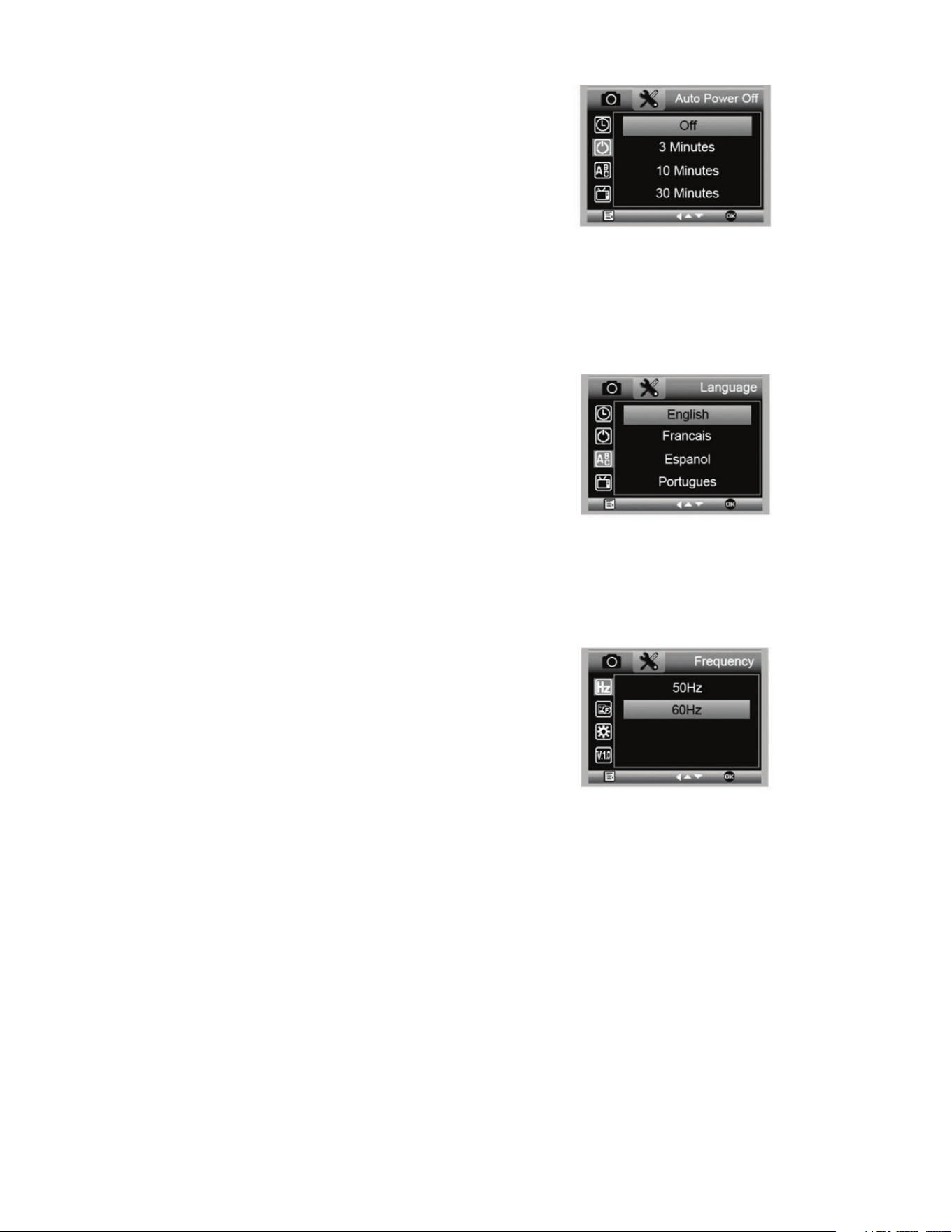
Once in the Image Quality section of the Settings menu,
scroll using the Down button (9) and select either: Fine,
Normal or Economy.
+
The Image Quality will determine the compression ratio of
the image.
+
Once you are satisfied with your Images Quality selection,
press the Capture /OK button (8) to confirm.
D. IMAGE QUALITY
E. SHARPNESS
+
You can adjust the image sharpness here. The choices
are Strong, Normal, Soft.
F. EXPOSURE (BRIGHTNESS)
+
Select the target value by pressing the Down button (9).
+
Confirm choice by pressing Capture/OK button (8).
G. DATE STAMP
+
Choose to have the date stamp display.
1. Off
2. Date only
3. Date/Time
H. DATE/TIME (MAIN MENU 2)
+
Select the target value by pressing the Down button (9).
+
Confirm choice by pressing Capture/OK button (8).
ENGLISH I 9
I. AUTO POWER OFF
+
Here you can set the unit to turn off automatically after no use.
The choices are:
1. OFF (Default)- This will keep your device on until you
manually turn it off.
2. 3 minutes- Will turn off after 3 minutes of continuous
non-use.
3. 10 minutes- Will turn off after 10 minutes of
continuous non-use.
4. 30 minutes- Will turn off after 30 minutes of
continuous non-use.
J. LANGUAGE
+
Here you can choose your preferred language. The choices are:
K. FREQUENCY
+
Here you will select the frequency. The choices are:
1. 50 Hz (Default) (United States)
2. 60 Hz (Most other countries)
NOTE: Research your specific country before setting the Hz setting.
1. English
2. German
3. Spanish
4. Russian
5. Italian
6. French
7. Portuguese
8. Dutch
9. Polish
10. Japanese
11. Korean
12. Chinese
10 I ENGLISH
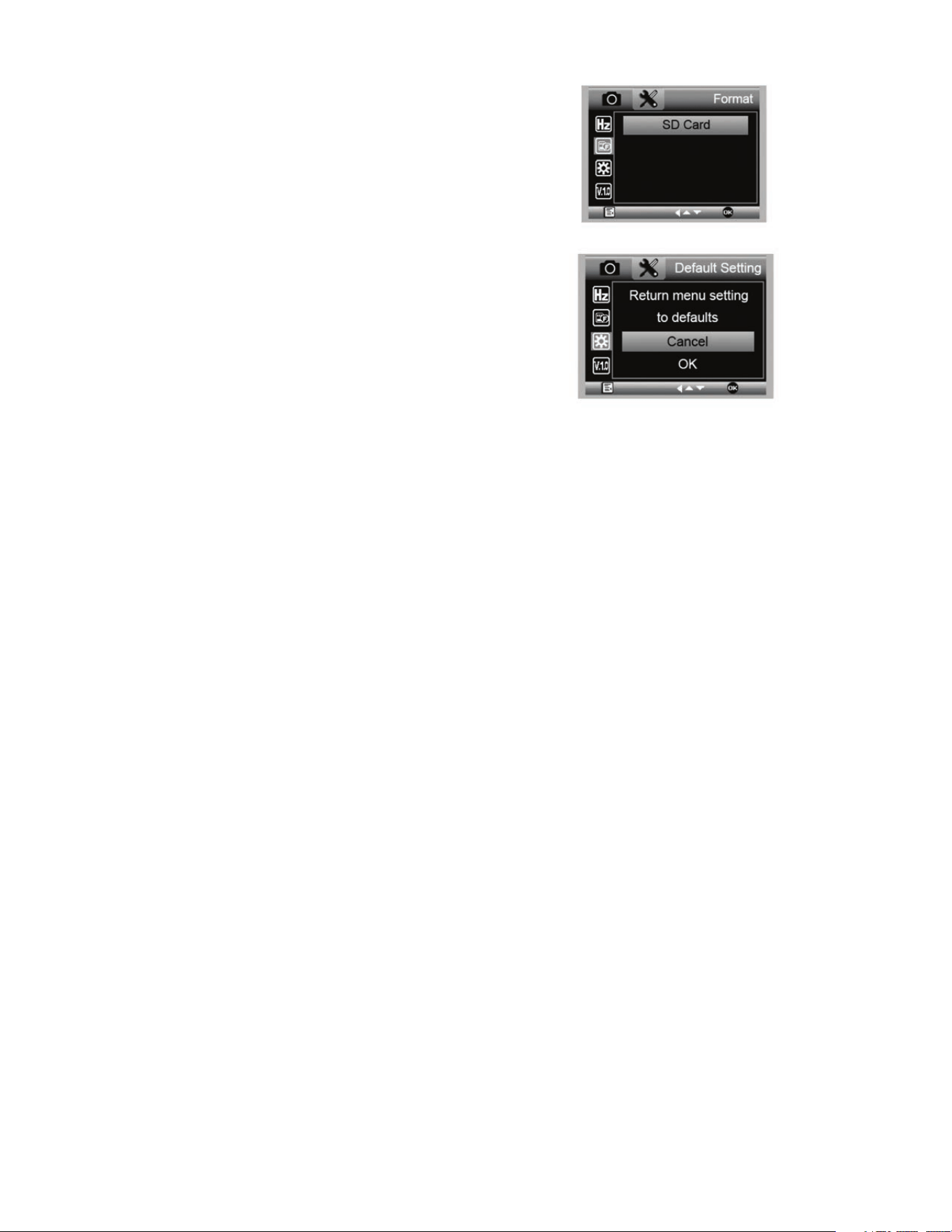
L. FORMAT
+
Here you re-format your MicroSD card.
WARNING: When re-formatting, all the files and information saved
on the MicroSD will be erased.
M. DEFAULT SETTING
+
Here you can choose to reset all the system settings back
to default.
For complete manual with detailed settings and PC connection
option use the included CD/DVD ROM to Download the
manual. If you do not have a CD/DVD ROM drive, go to
www.celestron.com then click on SUPPORT to download.
5. CARE AND MAINTENANCE
Your Celestron MicroDirect
®
1080p HD microscope is a precision optical instrument and should be treated with care
at all times. Follow these suggestions and your microscope will need very little maintenance throughout its lifetime.
+
Store your microscope in a clean, dry place.
+
Never use your microscope where operation of such
devices is restricted. Improper use creates the risk of
serious accident.
+
Only use your microscope within the 23° to 120°F
(-5° to 50° C) temperature range. Try to limit sudden
temperature changes as this may create moisture in
the microscope housing.
+
Do not try to access the internal components of your
microscope or attempt to modify it in any way. Only
authorized technicians should perform maintenance
or repairs.
+
Keep your microscope away from water and other
liquids. Never use it in rain or snow. Moisture creates
the danger of fire and electric shock.
+
If the exterior of your microscope needs cleaning, wipe
it with a moist cloth.
6. WARRANTY
Your Celestron MicroDirect
®
1080p HD microscope has a two year limited warranty. Please visit the Celestron website for
detailed information on all Celestron microscopes.

ENGLISH I 11
NOTES
© 2020 Celestron • All rights reserved
celestron.com/pages/technical-support
2835 Columbia Street • Torrance, CA 90503 USA
FCC Note: This equipment has been tested and found to comply with the limits for a Class B digital device, pursuant to part 15 of the FCC Rules. These limits are designed to provide reasonable protection against
harmful interference in a residential installation. This equipment generates, uses, and can radiate radio frequency energy and, if not installed and used in accordance with the instructions, may cause harmful
interference to radio communications. However, there is no guarantee that interference will not occur in a particular installation. If this equipment does cause harmful interference to radio or television reception,
which can be determined by turning the equipment off and on, the user is encouraged to try to correct the interference by one or more of the following measures:
+ Reorient or relocate the receiving antenna.
+ Increase the separation between the equipment and receiver.
+ Connect the equipment into an outlet on a circuit different from
that to which the receiver is connected.
+ Consult the dealer or an experienced radio/TV technician for help.
This product is designed and intended for use by those 14 years of age and older. Product design and specifications are subject to change without prior notification.
MODE D’EMPLOI
MODÈLE N°. 44316
14 I FRANÇAIS
A. CONTENU DE LA BOÎTE
1. INTRODUCTION
Merci d’avoir acheté le microscope à main MicroDirect
®
1080p HD avec pied de Celestron. Votre microscope est un instrument
optique de précision, fabriqué avec des matériaux de la plus grande qualité afi n de garantir sa durabilité et qu’il vous accompagnera
pendant de longues années. Il est conçu pour vous offrir une vie entière de plaisirs avec un niveau d’entretien minimal.
Avant d’utiliser votre microscope MicroDirect
®
1080p HD
pour la première fois, lisez ces instructions et les schémas
d’illustration ci-dessous dans leur totalité. Vous familiariser
avec les fonctionnalités variées du microscope MicroDirect
®
1080p HD sera d’une grande aide pour garantir une
expérience d’utilisation agréable.
Le microscope MicroDirect
®
1080p HD est un microscope
numérique à main conçu pour se connecter directement via
le câble HDMI inclus avec votre TV ou un projecteur pour
affi cher l’image capturée en 1080p HD directement ! Vous
n’avez pas besoin d’un ordinateur pour utiliser le microscope
MicroDirect
®
1080p HD.
Ceci est un microscope à faible agrandissement, adapté à
l’observation de spécimens tels que des pièces, des timbres,
des minéraux, des composants électroniques, des insectes
et autres objets en 3D. Les spécimens contenus sur des
lames peuvent être observés, mais ce microscope n’est
pas adapté pour ce faire. Vous trouverez nos microscopes
biologiques plus adaptés à ce type d’observation à l’adresse
www.celestron.com.
Le microscope MicroDirect
®
1080p HD de Celestron n’est pas
équipé d’un oculaire comme les microscopes traditionnels. Au
lieu de cela, le capteur vidéo intégré fait offi ce d’oculaire, et en
combinaison avec l’ensemble optique, il agrandit et numérise
l’objet. La connexion HDMI qu’il utilise diffuse le signal
numérique sur votre moniteur ou via un projecteur en détails
incroyablement clairs en résolution 1080p. Cela vous permet
d’observer les spécimens aisément et de partager l’image en
direct avec tout un groupe de personnes. L’observation est
également plus immédiate et la fatigue oculaire et du cou est
supprimée, au contraire des microscopes traditionnels. Vous
pouvez ainsi tenir le microscope à la main tout en observant
de grandes surfaces hors d’un environnement de laboratoire,
ou utiliser le support professionnel livré pour permettre une
observation mains-libres et plus précise. Vous pouvez capturer
des clichés directement sur la carte mémoire Micro SD pour
les télécharger plus tard. Enregistrez la vidéo directement
en connectant le microscope MicroDirect
®
1080p HD
directement à votre PC à l’aide du câble USB en résolution
720p HD.
Microscope MicroDirect
®
1080p HD (1)
Pied (1)
Règle de calibration (1)
Guide de démarrage rapide (1)
Câble USB (1)
Câble HDMI (1)
FRANÇAIS I 15
COMPOSANTS FONCTION COMPOSANTS FONCTION
1.
Port mini USB (Alimentation)
11.
Molette de mise au point
2.
Port Mini HDMI OUT (Type C)
12.
Niveau d’agrandissement
3.
Fente de carte micro SD
13.
Boulon de verrouillage de la hauteur
4.
Variateur de luminosité DEL
14.
Boulon de verrouillage du support du microscope
5.
Interrupteur d’alimentation
15.
Molette de verrouillage
6.
Bouton Mode
16.
Molette de focalisation
7.
Bouton Menu
17.
Collier de verrouillage de connexion de colonne
8.
Bouton Déclencheur/OK
18.
Colonne de support
9.
Bouton Flèche bas
19.
Assemblée Holder Microscope
10.
Illuminateur en anneau à 8 DEL
B. COMPOSANTS
C. CONFIGURATION SYSTÈME REQUISE
1. Moniteur ou Projecteur
+
Doit disposer d’un port HDMI libre
+
Port USB avec alimentation DEHORS (facultatif)
2. PC (facultatif)
+
Windows XP/ 7 / 8 / 10
+
P4 1,8 ou plus récent
+
RAM : 512 Mo
+
Mémoire vidéo : 64 Mo
+
Port USB : 2.0
REMARQUE : Le logiciel téléchargé sur celestron.com.
16 I FRANÇAIS
2. CONFIGURATION
A. ASSEMBLAGE DU PIED DU
MICROSCOPE
+
Retirez avec précaution tous les composants de la boîte.
+
L’ensemble de support de microscope (19 ) doit être connecté
à l’arbre de support (18 ) dans la zone. Dans le cas contraire,
connectez-le maintenant.
+
Attacher ensemble complet (17, 18 , 19) aux fils de base
et serrer.
B. ATTACHER LE MICROSCOPE SUR
LE PIED
+
Insérez le microscope dans le support du microscope puis
serrez le boulon de verrouillage (14) pour le fixer solidement.
D. CARACTÉRISTIQUES
Description Microscope à main numérique MicroDirect
®
1080p HD
Capteur 3,5 Mp CMOS 1/3” haute vitesse
Taille de pixel 2,2 µm x 2,3 µm
Résolution de capture d'une image fixe 14 Mp** (5120x2880), 8 Mp** (3840x2160), 5 Mp** (3072x1728),
3 Mp (2304x1296), 2 Mp (1920x1080), WVGA (848x480)
**Interpolé
Résolution vidéo 720p (HD) et 640 x 480 (VGA) *Doit être connecté à un ordinateur pour enregistrer la vidéo
Format vidéo- Diffusion HDTV (avec câble HDMI): 1080p 1920x1080 30 ips
Format vidéo- Enregistrement AVI/30 ips
Format photo JPEG
Agrandissement 24x à 220x (avec un écran 20")
Distance de focale (Manuel) 0 mm à 35 mm
Alimentation • USB 2.0 (avec port USB capable d'alimenter)
• Compatible avec n'importe quel adaptateur secteur 120V (5V-1A) si nécessaire
Déclencheur Sur le microscope ou via le logiciel
Logiciel Logiciel de capture MicroDirect
®
Portable
Compabilité logicielle Windows : Windows XP/7/8/10
Langues prises en charge (12) Anglais, Allemand, Français, Espagnol, Russe, Italien, Portugais, Néerlandais, Polonais, Japonais,
Coréen et Chinois
Accessoires Câble USB, Pied réglable et platine, Tissu à lentille, Règle de calibration
Poids 1,3 lbs. / 0,59 KG (avec le pied)
Dimensions Microscope : 155,6x42x42 mm (6.125”x1.5”x1.5”)
Pied: 119x171,4x157,2 mm (4.68”x6.75”x6.19”)
** Interpolation réfère à un logiciel ajoute des pixels à une image artificiellement agrandir l’image. Cela peut être bénéfique lors de l’impression de grands formats.
FRANÇAIS I 17
+
Insérez votre carte Micro-SD dans la fente pour Micro SD (3)
dans le boîtier du MicroDirect.
NOTE : Carte Micro SD non incluse.
NOTE : L’appareil prend en charge les cartes SD 32G SDHC
au maximum.
+
Desserrez la molette de verrouillage (15) et réglez la focale
avec la molette de focalisation (16).
+
Serrez le molette de verrouillage (15) pour tenir l’ensemble
en place.
+
Faites tourner le molette de mise au point précise (11) pour
effectuer la mise au point sur le spécimen.
A. CONNECTER À UN MONITEUR OU
PROJECTEUR
+
Branchez une extrémité du câble HDMI inclus au port Mini HDMI (Type
C) du microscope, et l’autre extrémité au port HDMI standard (Type A) de
votre écran.
+
Branchez le câble USB au microscope et son autre extrémité au port USB
2.0 de votre moniteur ou projecteur (si disponible).
+
Si le moniteur ou le projecteur n’est pas équipé d’un port USB 2.0, utilisez
n’importe quelle prise USB 5V-1A et branchez-y une extrémité du câble
USB, et l’autre extrémité du câble à une prise murale. NE BRANCHEZ PAS
le câble USB dans le port d’un ordinateur de bureau ou portable, car ce
dernier le détectera comme un périphérique de stockage USB, ce qui peut
causer l’affichage d’un écran bleu uniquement.
REMARQUE : Le câble USB inclus est compatible avec les chargeurs secteurs
standards inclus avec la majorité des appareils électroniques
du marché, comme les téléphones ou les tablettes.
REMARQUE : Vous pouvez également utiliser le câble USB avec une banque
d'alimentation équipée de ports USB standards. Tous
leschauffe-mais Elements de Celestron pourront être
ainsi utilisés. Vous pouvez les trouver sur celestron.com
+
Allumez le microscope en appuyant sur le bouton d'alimentation (5).
B. CAPTURER UN CLICHÉ
3. UTILISATION DE VOTRE
MICROSCOPE
B
A
C
+
Appuyez sur le déclencheur (8), l’image est enregistrée
sur la carte Micro SD.
18 I FRANÇAIS
4. MENU DES PARAMÈTRES
A. MENU PRINCIPAL
+
Appuyez sur le bouton menu (7) pour afficher le Menu
principal.
REMARQUE : Le menu principal est composé de 2 fenêtres
principales. Pour accéder à la FENÊTRE
PRINCIPALE 2, appuyez sur le bouton menu (7)
à nouveau.
+
Depuis ce menu, vous pouvez régler la résolution, la qualité
d’image, la netteté, l’exposition, choisir l’affichage ou non de
l’horodatage ou choisir une option de capture en accéléré.
Vous pouvez également définir la date et l’heure, l’intervalle
de mise en veille auto, la langue, définir le mode TV et la
fréquence, formater la carte SD, etc.
+
Appuyez sur le bouton bas (9) pour naviguer dans les options.
+
Une fois le choix désiré en surbrillance, appuyez sur le
bouton capture/OK (8).
+
Insérez la carte MicroSD dans la fente pour carte mémoire,
appuyez sur le bouton mode (6) pour basculer en mode lecture.
+
Appuyez sur le bouton bas (9) pour voir le cliché capturé
précédemment.
+
Appuyez sur le bouton mode (6) à nouveau pour revenir à
l’image diffusée en direct.
D. TÉLÉCHARGER DES IMAGES SUR
VOTRE PC
+
Insérez une carte Micro SD dans la fente, puis connectez le
microscope à un PC avec le câble USB 2.0 inclus.
+
Votre PC reconnaîtra le microscope comme périphérique de
stockage.
+
Téléchargez les images comme vous le feriez depuis un
appareil photo numérique.
C. VOIR LES IMAGES ENREGISTRÉES
MENU PRINCIPAL 1
MENU PRINCIPAL 2
B. RÉSOLUTION
+
Choisir une résolution.
+
Les choix disponibles sont: 14 Mp*, 8 Mp*, 5 Mp*, 3 Mp, 2 Mp
ou WVGA
REMARQUE : Paramètres 14MP , 8MP et 5MP sont basés sur
l’interpolation. Interpolation réfère à un logiciel
ajoute des pixels à une image artificiellement
agrandir l’image. Cela peut être bénéfique lors de
l’impression de grands formats.
FRANÇAIS I 19
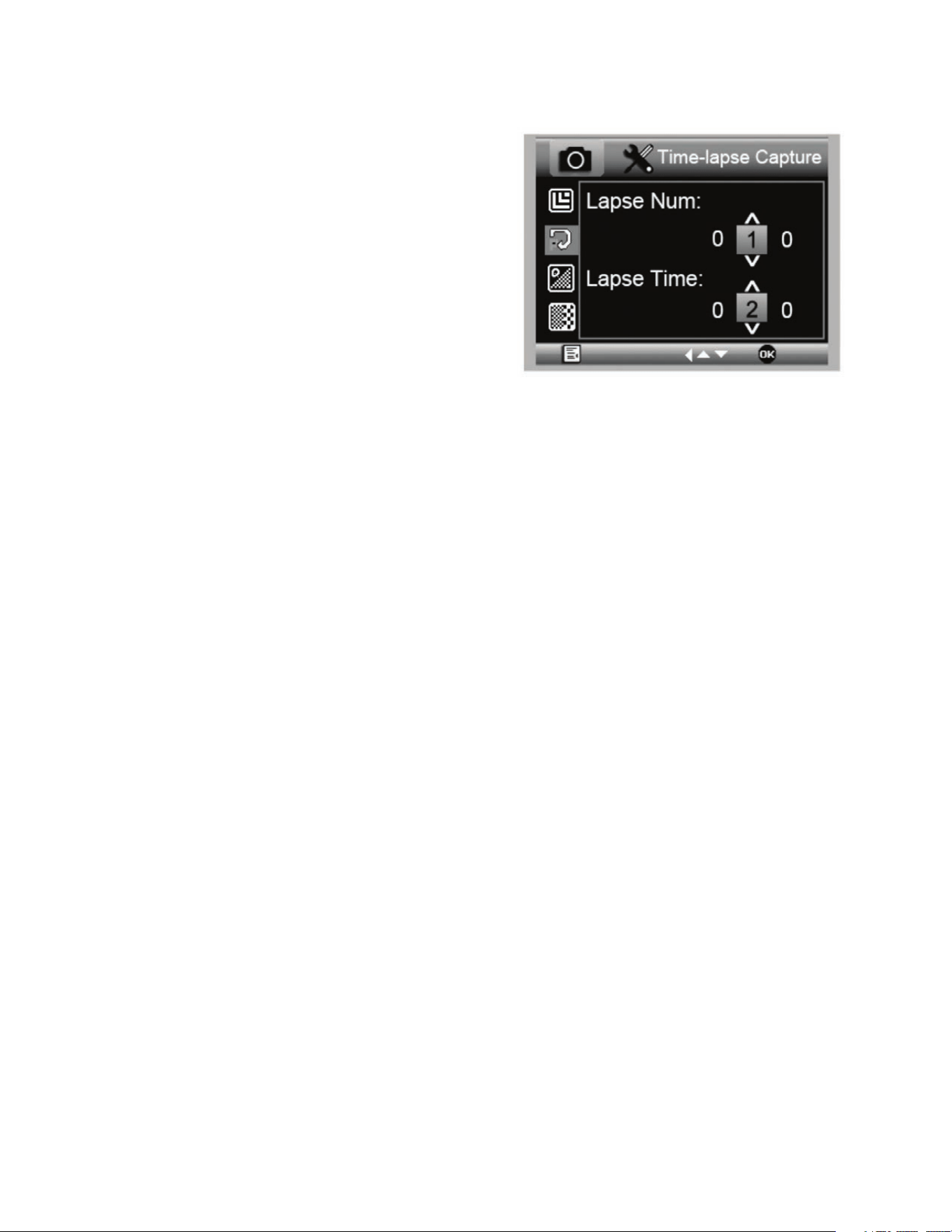
C. CAPTURE EN ACCÉLÉRÉ
+
Votre MicroDirect vous permet de prendre des clichés sur
une période définie. Cela permet la capture dite en accéléré.
+
Vous devez d'abord sélectionner le nombre de clichés ou
« Nombre pour accéléré » désiré. Ce nombre peut se
situer entre 2 et 999.
+
Appuyez sur bas (9) pour faire défiler les chiffres de 0 à 9.
Une fois le premier chiffre saisit, appuyez sur mode (6) pour
passer au chiffre suivant.
+
Cela fait, appuyez sur bas (9) de nouveau, puis réglez le chiffre.
+
Une fois le nombre de clichés choisit, appuyez sur mode (6)
pour passer à la valeur temporelle.
+
La valeur de « Temps accéléré » détermine l'intervalle entre
chaque capture.
+
Définissez cette valeur comme vous l'avez fait ci-dessus.
+
La valeur est exprimée en secondes, entre 1 seconde et 999 secondes.
+
Cette valeur, en combinaison avec le nombre d'images déterminera la durée totale de votre accéléré.
+
Par exemple: Si vous choisissez de prendre 999 clichés, avec un intervalle de 999 secondes, vous disposerez d'un
enregistrement de 277 heures. 999 secondes = 16,65 minutes. Multiplié par 999 (images) =16,633,35 minutes.
16,633,35 / 60 (minutes par heure)= 277 heures soit 11,55 jours d'informations.
+
Une fois le nombre de clichés et l'intervalle définis, appuyez sur le bouton capture/OK (8) pour confirmer.
+
Appuyez sur le bouton menu (7) pour revenir à la diffusion en direct.
+
Appuyez sur le bouton capture (8) pour lancer la capture en accéléré.
+
Une fois tous les clichés capturés par le mode accéléré, le microscope MicroDirect
®
1080p HD reviendra en mode
d'affichage normal.
REMARQUE : Il est nécessaire de définir un intervalle de MISE EN VEILLE AUTO plus long que la durée totale de la capture en
accéléré. Voyez la section MISE EN VEILLE AUTO pour en savoir plus et assurez-vous de calculer la durée correctement.
20 I FRANÇAIS
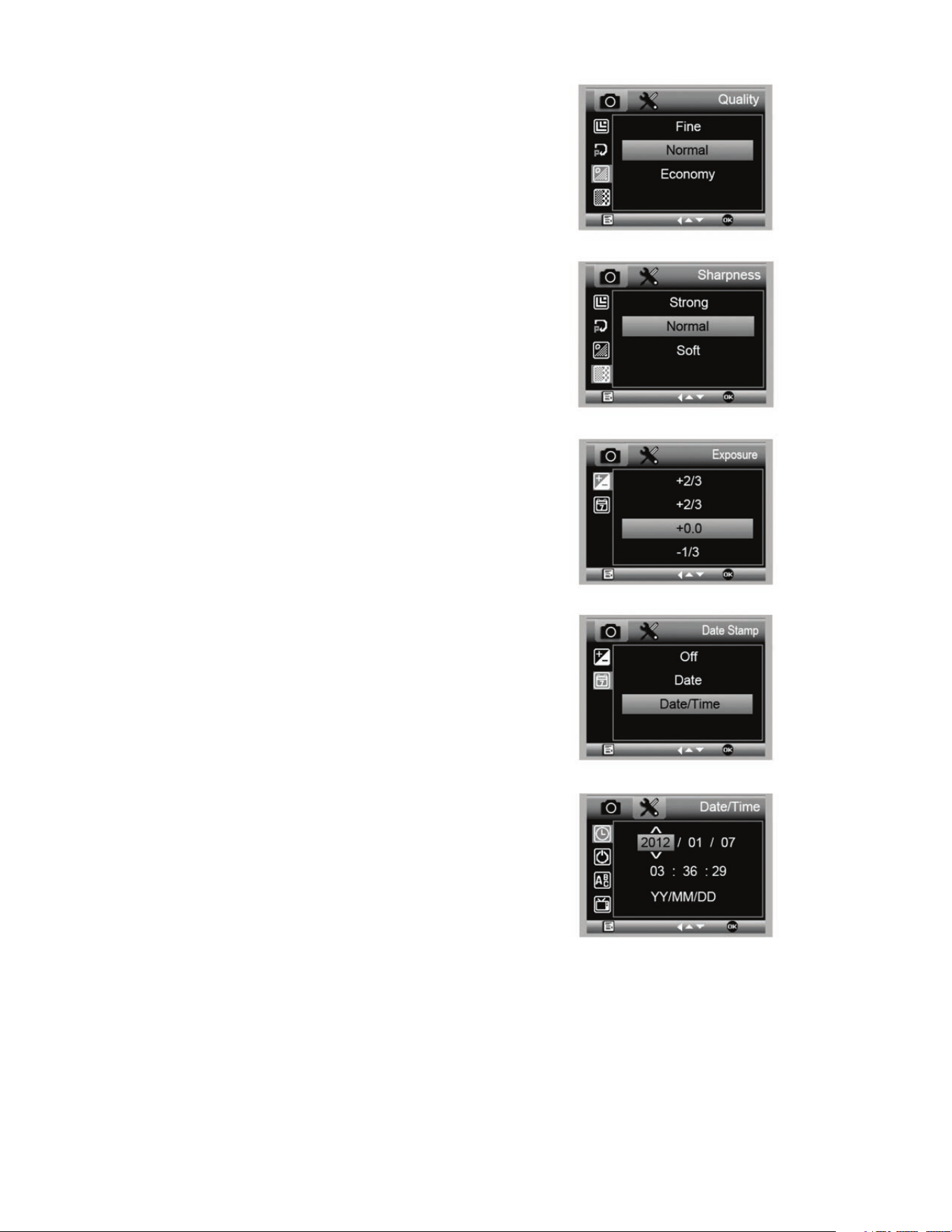
D. QUALITÉ DE L’IMAGE
E. NETTETÉ
+
Vous pouvez régler la netteté depuis ce menu. Les choix
disponibles sont Forte, Normale, Douce.
+
Dans la section Qualité d'image du menu, appuyez sur le
bouton bas (9) pour faire défiler les choix et sélectionnez
soit : Fin, Normal ou Économie.
+
La qualité d'image joue sur le ratio de compression de l'image.
+
Une fois la qualité d'image désirée définie, appuyez sur le
bouton capture/OK (8) pour confirmer.
F. EXPOSITION (LUMINOSITÉ)
+
Sélectionnez la valeur désirée en appuyant sur le bouton
bas (9).
+
Confirmez le choix en appuyant sur le bouton capture/
OK (8).
G. HORODATAGE
+
Pour activer ou non l'horodatage.
1. Désactivé
2. Date seule
3. Date/Heure
H. DATE/HEURE (MENU PRINCIPAL 2)
+
Sélectionnez la valeur désirée en appuyant sur le bouton
bas (9).
+
Confirmez le choix en appuyant sur le bouton capture/
OK (8).
FRANÇAIS I 21
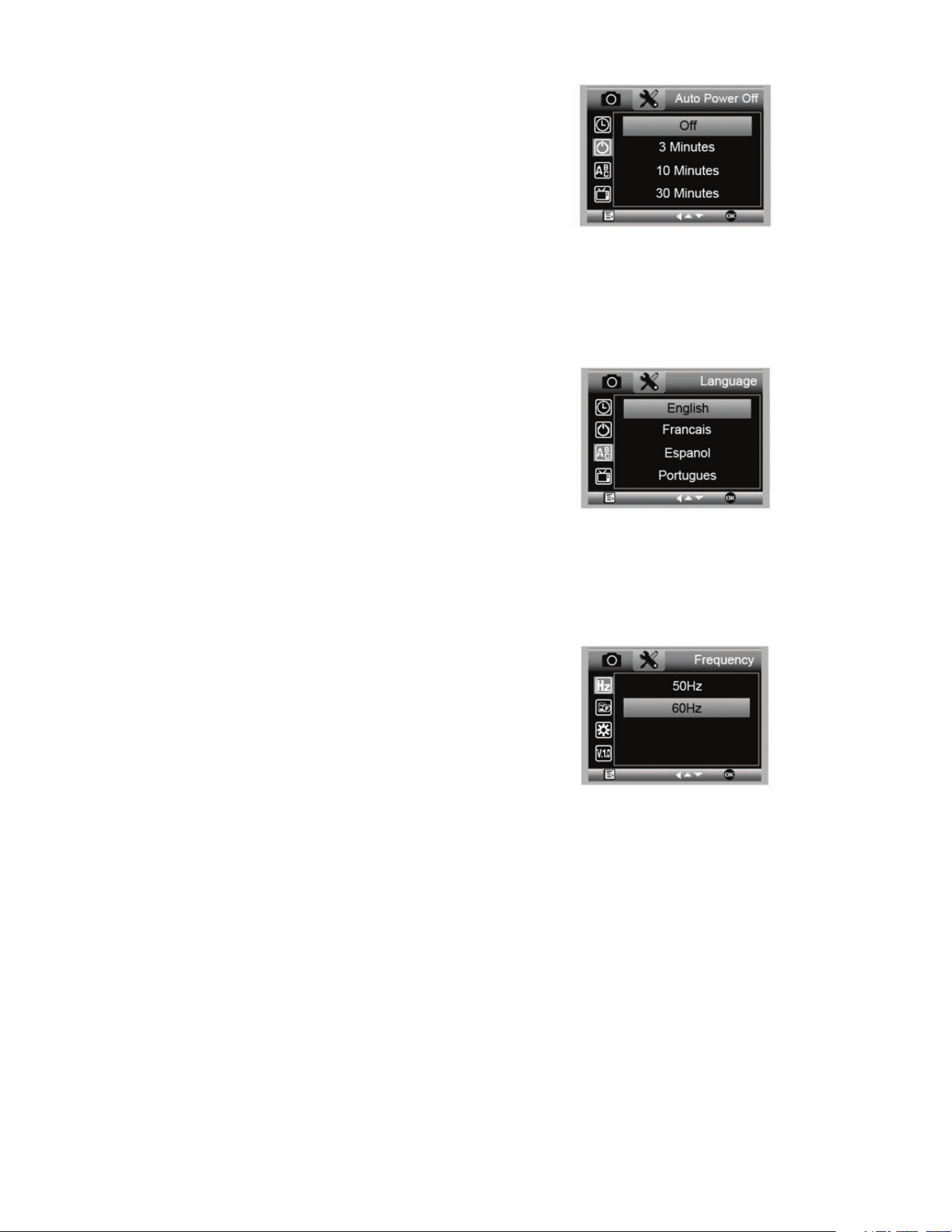
I. MISE EN VEILLE AUTO
+
Vous pouvez ici définir un intervalle d'inactivité après lequel le
microscope s'éteindra automatiquement. Les choix disponibles sont:
1. Désactivé (Défaut)- Le microscope reste allumé
jusqu'à ce que vous l'éteigniez manuellement.
2. 3 minutes- Le microscope s'éteindra après 3 minutes
d'inactivité.
3. 10 minutes- Le microscope s'éteindra après 10
minutes d'inactivité.
4. 30 minutes- Le microscope s'éteindra après 30
minutes d'inactivité.
J. LANGUE
+
Pour choisir la langue d'affichage désirée. Les choix sont :
K. FRÉQUENCE
+
Choisissez ici la fréquence adaptée. Les choix sont :
1. 50 Hz (Défaut) (États-Unis)
2. 60 Hz (La majorité des autres pays)
REMARQUE : Vérifiez quel réglage est adapté à votre pays avant de
régler le paramètres Hz.
1. Anglais
2. Allemand
3. Espagnol
4. Russe
5. Italien
6. Français
7. Portugais
8. Néerlandais
9. Polonais
10. Japonais
11. Coréen
12. Chinois
22 I FRANÇAIS
Pour consulter le mode d’emploi complet et connaître les
paramètres en détails ainsi que le procédé de connexion à un
PC détaillé, utilisez le CD/DVD ROM inclus. Si vous ne disposez
pas d’un lecteur CD/DVD ROM, aller à www.celestron.com
puis cliquez sur SUPPORT à télécharger.
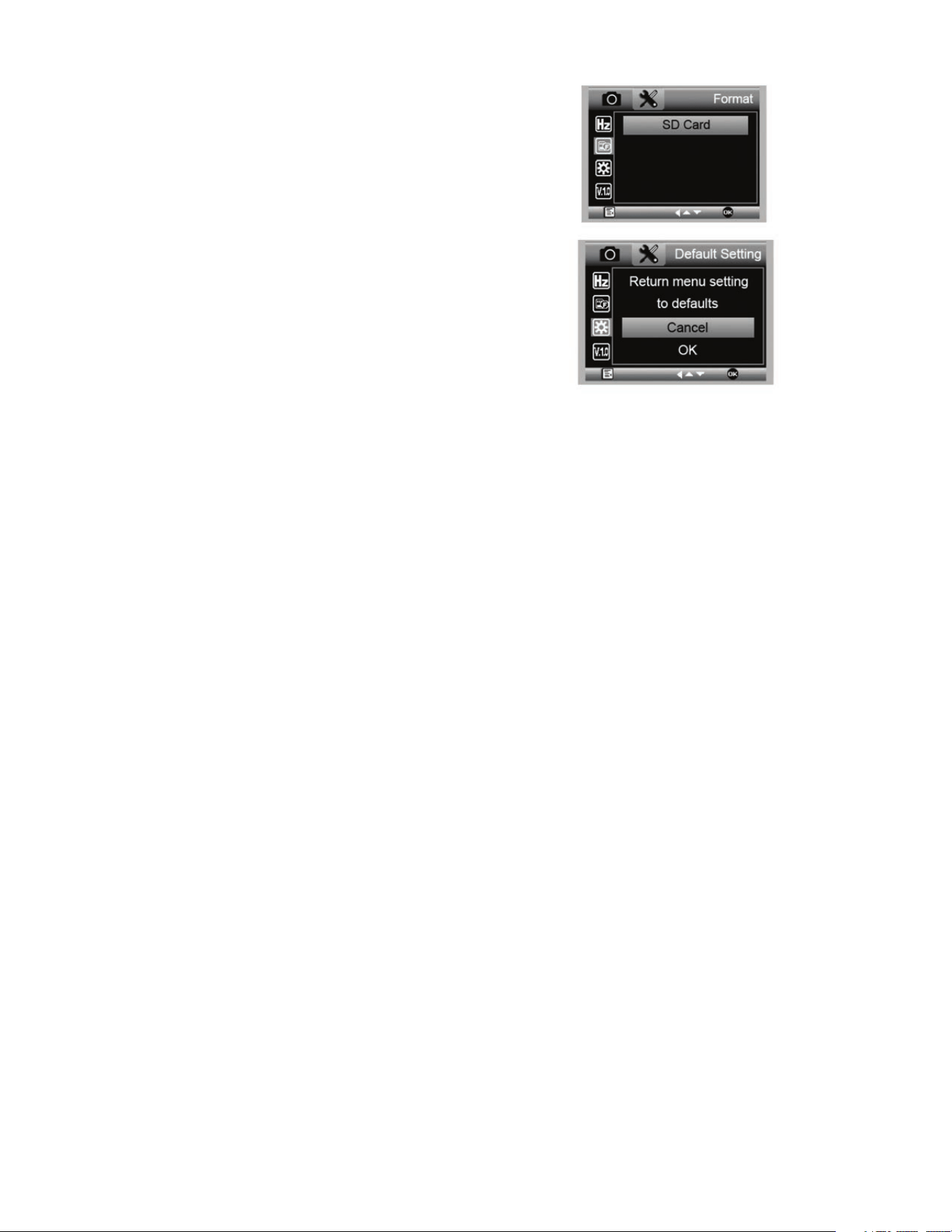
L. FORMATAGE
+
Vous pouvez ici reformater votre carte MicroSD.
AVERTISSEMENT: Le reformatage efface tous les fichiers
contenus sur la carte MicroSD.
M. PARAMÈTRES PAR DÉFAUT
+
Vous pouvez ici réinitialiser tous les paramètres par défaut.
5. NETTOYAGE ET ENTRETIEN
Votre microscope MicroDirect
®
1080p HD Celestron est un instrument optique de précision et doit être manipulé avec soin.
Suivez ces soins et suggestions d'entretien et votre microscope n'aura besoin que de très peu d'entretien tout au long de sa vie.
+
Entreposez votre microscope dans un endroit frais et sec.
+
Ne jamais utiliser votre microscope dans les lieux ou de
tels dispositifs sont interdits. Une utilisation incorrecte peut
entraîner des accidents sérieux.
+
N'utilisez votre microscope que dans des environnements
de température compris entre -5° et 50° C (23° et 120°F).
Essayez d'éviter les changements de température brusques,
car cela pourrait entraîner la formation d'humidité dans le
boîtier du microscope.
+
Ne pas essayer d'atteindre les composants internes de
votre microscope ou essayer de les modifier de quelque
manière que ce soit. Seuls les techniciens qualifiés sont
habilités à effectuer la maintenance ou réparations.
+
Conservez le microscope à distance de l'eau ou autres
liquides. Ne jamais utiliser sous la pluie ou la neige. L'humidité
entraîne des risques d'incendie ou de choc électrique.
+
Si la surface extérieure du microscope doit être nettoyée,
essuyez-la à l'aide d'un tissu humide.
6. GARANTIE
Votre microscope MicroDirect
®
1080p HD Celestron est couvert par une garantie limitée d'un an. Rendez-vous sur le site web
de Celestron pour obtenir des informations détaillées sur tous les microscopes Celestron.

FRANÇAIS I 23
NOTES
© 2020 Celestron • Tous droits réservés
celestron.com/pages/technical-support
2835 Columbia Street • Torrance, CA 90503 USA
Remarque relative à la FCC : Cet équipement a été testé et jugé conforme aux limites établies pour un dispositif numérique de classe B, conformément à la partie 15 de la réglementation de la FCC. Ces
limites ont étés mises en place pour offrir une protection raisonnable contre les interférences dans un complexe résidentiel. Cet équipement génère et peut émettre des fréquences radio et, s'il n'est pas
installé et utilisé conformément aux instructions du manuel, peut causer des interférences nuisibles aux communications radio. Mais il n'existe aucune garantie que des interférences ne seront pas produites
dans une installation particulière. Si cet équipement crée des interférences pour la réception radio ou télévisuelle, ce qui peut être constaté en l'allumant et en l'éteignant, alors il vous est conseillé d'y
remédier d'une des manières suivantes :
+ Réorientez ou déplacez l'antenne de réception.
+ Augmentez la distance séparant l'équipement et le récepteur.
+ Connectez l'équipement à une prise ou à un circuit différent de
celui du récepteur.
+ Consultez le distributeur ou un technicien radio ou TV d'expérience
pour obtenir de l'assistance.
Ce produit a été conçu pour être utilisé par les personnes de 14 ans et plus. La conception et les caractéristiques du produit sont indiquées sous réserve de modifications sans préavis.
BEDIENUNGSANLEITUNG
MODELL-NR. 44316
26 I DEUTSCH
A. LIEFERUMFANG
MicroDirect
®
1080p HD-Mikroscop
Ständer (1)
USB-Kabel (1)
HDMI-Kabel (1)
1. EINLEITUNG
Vielen Dank für den Kauf des digitalen Handmikroskops Celestron MicroDirect
®
1080p HD mit Ständer. Bei Ihrem Mikroskop
handelt es sich um ein präzises optisches Instrument, das aus Materialien höchster Qualität gefertigt wurde, um Haltbarkeit und
Langlebigkeit zu gewährleisten. Es wurde konzipiert, um Ihnen bei minimalem Wartungsaufwand ein Leben lang Freude am
Betrachten zu bereiten.
Bevor Sie Ihr MicroDirect
®
1080p HD-Mikroskop
verwenden, diese Anleitung bitte lesen und die
untenstehenden Abbildung studieren. Machen Sie sich mit
den vielen Funktionen des MicroDirect
®
1080p HD vertraut
und Sie werden erfreuliche Erfahrungen damit machen.
Das digitale MicroDirect
®
1080p HD-Handmikroskop
kann über das enthaltene HDMI-Kabel zum Projizieren
hochaufl ösender 1080p-HD-Streaming-Videos direkt an
Ihren TV-Bildschirm angeschlossen werden. Wenn Sie das
MicroDirect
®
1080p HD-Mikroskop verwenden, benötigen
Sie keinen Computer.
Bei diesem Mikroskop handelt es sich um ein Mikroskop
mit niedriger Vergrößerungsleistung und ist hauptsächlich
für das Untersuchen von Proben wie Münzen, Briefmarken,
Elektronikteilen, Insekten und anderen 3D-Objekte geeignet.
Proben auf Objektträgern können betrachtet werden, doch ist
das Mikroskop für diesen Zweck nicht ideal. Einige Biologie-
Mikroskope, die sich für diese Betrachtungsart besser eignen,
fi nden Sie auf www.celestron.com.
Das Celestron MicroDirect
®
1080p HD verwendet kein
Okular wie herkömmliche Mikroskope. Stattdessen fungiert
die integrierte Kamera als Okular und vergrößert und
digitalisiert zusammen mit der Objektiv-Baugruppe das
Objekt. Über die HDMI-Verbindung wird dieses digitale
Signal für exzellentes Video-Streaming mit 1080p an Ihren
Bildschirm oder Projektor gesendet. Ihre Objektträger können
Sie leicht betrachtet werden und das gestreamte Live-Bild
ist allen Personen im Raum zugänglich. Im Gegensatz zu
herkömmlichen Mikroskopen ist das Betrachten unmittelbarer
und es entfallen die Belastung für Augen und Nacken. Sie
können das Mikroskop während einer Betrachtung außerhalb
eines Labors in der Hand halten oder den inbegriffenen
Profi ständer für eine präzise Freihand-Betrachtung nutzen.
Bilder können direkt auf Ihre MicroSD-Karte aufgenommen
und später heruntergeladen werden. Wenn Sie Ihr
MicroDirect
®
1080p HD-Mikroskop über ein USB-Kabel
direkt an Ihren PC anschließen, können Sie Filme mit 720p
HD aufzeichnen.
Kalibrierungslineal (1)
Kurzanleitung zur Installation (1)
DEUTSCH I 27
TEILE FUNKTION TEILE FUNKTION
1.
Mini USB-Anschluss (Stromversorgung)
11.
Fokussierrad
2.
Mini (Typ C) HDMI Ausgangsanschluss
12.
Vergrößerungsbereich
3.
MicroSD-Kartensteckplatz
13.
Höheneinstellungs-Verriegelungsmutter
4.
LED-Dimmschalter
14.
Mikroskophalterungs-Verriegelungsmutter
5.
AN-/AUS-Knopf
15.
Verriegelungsrad
6.
Modustate
16.
Grobes Fokussierrad
7.
Menü-Taste
17.
Schaftanschluss-Verriegelungskranz
8.
Auslöser/OK-Taste
18.
Halterungsschaft
9.
Pfeiltaste Nach Unten
19.
Mikroskop -Halter Versammlung
10.
Beleuchtung mit 8-LED-Ring
B. TEILE
C. SYSTEMVORAUSSETZUNGEN
1. Bildschirm oder Projektor
+
Ein freier HDMI-Port ist erforderlich
+
USB mit Stromversorgung OUT (optional)
2. PC (optional)
+
Windows XP/ 7 / 8 / 10
+
P4 1.8 oder höher
+
RAM: 512 M
+
Videospeicher: 64 M
+
USB-Port: 2.0
HINWEIS: Die Software wird von celestron.com herunterladen.
28 I DEUTSCH
2. EINSTELLEN
A. MONTAGE DES
MIKROSKOPSTÄNDERS
+
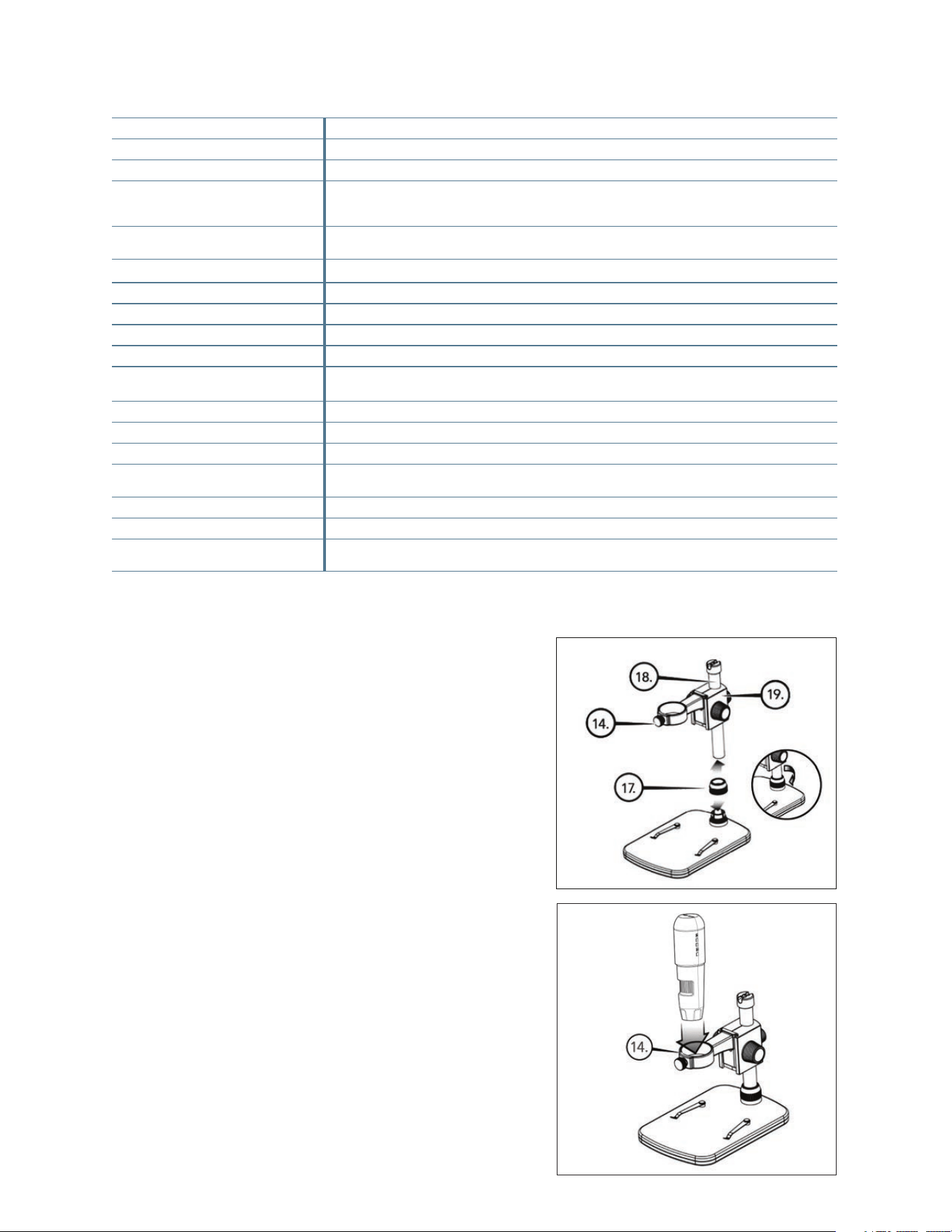
Entnehmen Sie vorsichtig alle Bauteile aus dem Karton.
+
Schieben Sie den Schaftanschluss - Verriegelungskranz (17)
auf den Halterungsschaft (18).
+
Bringen Sie komplette Baugruppe (17, 18, 19) zu den
Basisfäden und festziehen.
D. TECHNISCHE DATEN
Beschreibung Das digitale MicroDirect
®
1080p HD-Handmikroskop
Sensor 3,5 MP CMOS 1/3-Zoll Hochgeschwindigkeitssensor
Pixelgröße 2,2 µm x 2,3 µm
Bildauflösung 14MP** (5120x2880), 8MP** (3840x2160), 5MP** (3072x1728),
3MP (2304x1296), 2MP (1920x1080), WVGA (848x480)
**Interpolatiert
Videoauflösung 720p (HD) und 640 x 480 (VGA) *Videos können nur aufgezeichnet werden, wenn das Gerät an den
Computer angeschlossen ist
Video-Format-Streaming HDTV (mit HDMI-Kabel): 1080p (1920x1080) @ 30fps
Video-Format-Aufzeichnung AVI/30fps
Fotoformat JPEG
Vergrößerung 24- bis 220-fach (basierend auf einem 20-Zoll-Bildschirm)
Fokusbereich (Manuell) 0 mm bis 35 mm
Stromversorgung • USB 2.0 (mit kompatiblem USB-Ausgangsport)
• Nutzen Sie bei Bedarf ein beliebiges Netzteil mit 120 V power adapter (5V-1A)
Auslöser Auf dem Hauptkorpus und in der Software
Software MicroDirect
®
Aufnahmesoftware
Software-Kompatibilität Windows: Windows XP/7/8/10
Unterstützte Sprachen (12) Englisch, Deutsch, Spanisch, Französisch, Russisch, Italienisch, Portugiesisch, Niederländisch, Polnisch,
Japanisch, Koreanisch Chinesisch
Zubehör HDMI-Kabel, einstellbarer Ständer und Tisch, Linsentuch, Kalibrierungslineal
Gewicht 1,3 lbs. / .59 kg (einschließlich Ständer)
Maße Mikroskop: 155,6 x 42 x 42 mm (6,125” x 1,5”x1,5”)
Ständer: 119 x 171,4 x 157,2 mm (4,68”x6,75”x6,19”)
B. DAS MIKROSKOP AM STÄNDER
ANBRINGEN
+
Führen Sie das Mikroskop in die Mikroskophalterung ein und
ziehen Sie die Verriegelungsmutter (14) an, um es zu fixieren.
** Interpolation bezieht sich auf Software Hinzufügen von Pixeln, um ein Bild zu künstlich, um das Bild größer. Dies kann vorteilhaft sein, wenn das Drucken
in größeren Formaten.
DEUTSCH I 29
+
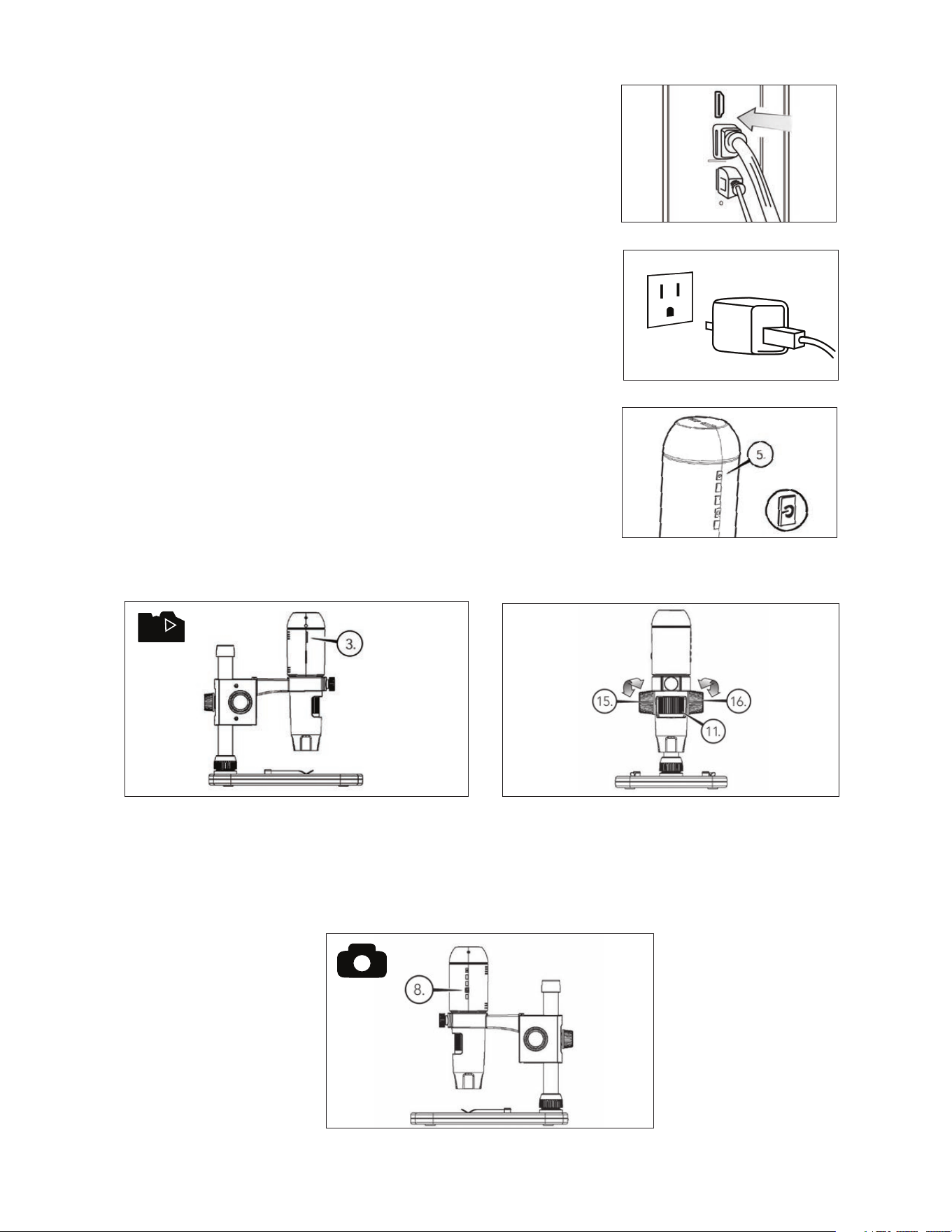
Setzen Sie Ihre MicroSD-Karte in den MicroSD-Kartensteck-
platz (3) des Gerätekorpus des MicroDirect ein.
HINWEIS: Micro -SD-Karte nicht im Lieferumfang enthalten.
HINWEIS: Der SD-Kartensteckplatz unterstützt bis zu 32G SDHC.
+
Lösen Sie das Verriegelungsrad (15) und stellen sie den
groben Fokus ein, indem Sie am Grobfokusrad drehen (16).
+
Befestigen Sie das Verriegelungsrad (15), um die
Baugruppe zu fixieren.
+
Drehen Sie das Feinfokusrad (11), um den Objektträger
scharf zu stellen.
3. VERWENDUNG IHRES MIKROSKOPS
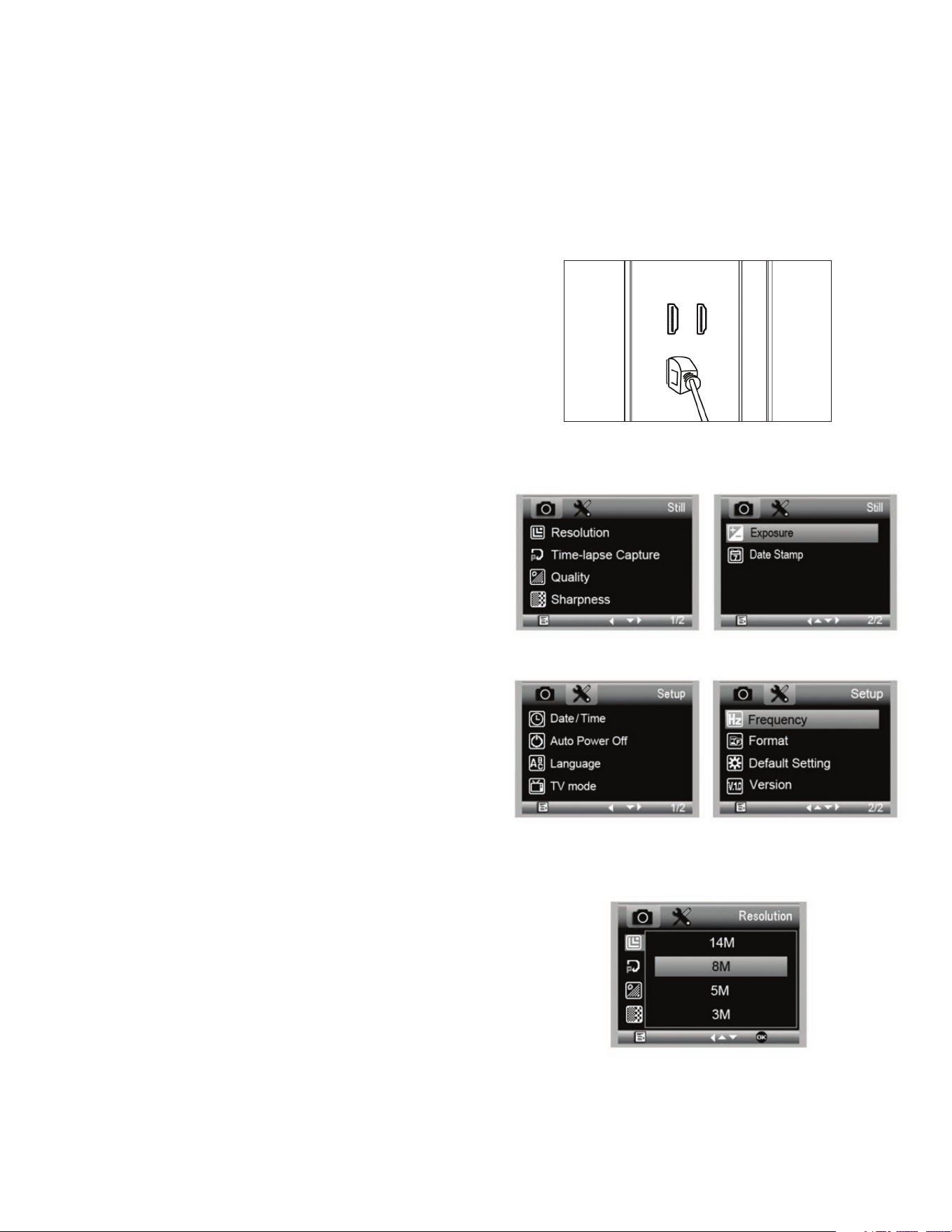
+
Stecken Sie ein Ende des mitgelieferten HDMI-Kabels in den Mini-HDMI-
Anschluss (Typ C) des Mikroskops und das andere Ende in den Standard-
HDMI-Anschluss (Typ A) Ihres Monitors.
+
Verbinden Sie das USB-Kabel mit Ihrem Mikroskop und (falls verfügbar)
mit einem freien USB 2.0-Port Ihres Bildschirms oder Projektors.
+
Wenn kein USB 2.0-Anschluss am Monitor oder Projektor vorhanden ist,
verwenden Sie für das USB-Kabel einen 5V-1A USB-Stecker und stecken
es dann in eine verfügbare Steckdose. Schließen Sie das USB-Kabel NICHT
direkt an einen Desktop- oder Laptopcomputer an, da das Signal vom Kabel
als Speichermedium fehlt und einen leeren blauen Bildschirm auf dem
Monitor erscheinen lässt.
HINWEIS: Das enthaltene USB-Kabel ist mit allen standardmäßigen USB-Steckern
im Lieferumfang heutiger Elektronikartikel wie Smartphones und
Tablets kompatibel.
HINWEIS: Alternativ kann eine externe Stromquelle wie eine Powerbank mit
standardmäßigem USB-Ausgangsport verwendet werden. Diesem
Zweck dienen alle Celestron-Artikel wie Handwärmer und
Powerbanks. Sie finden sie auf celestron.com
+
Schalten Sie das Mikroskop ein, indem Sie auf die AN/AUS-Taste drücken (5).
B. EIN BILD AUFNEHMEN
A. AN EINEN BILDSCHIRM ODER PROJEKTOR
ANSCHLIESSEN
A
B
C
+
Drücken Sie auf den Auslöser (8). Das aufgenommene
Bild wird auf der MicroSD-Karte gespeichert.
30 I DEUTSCH
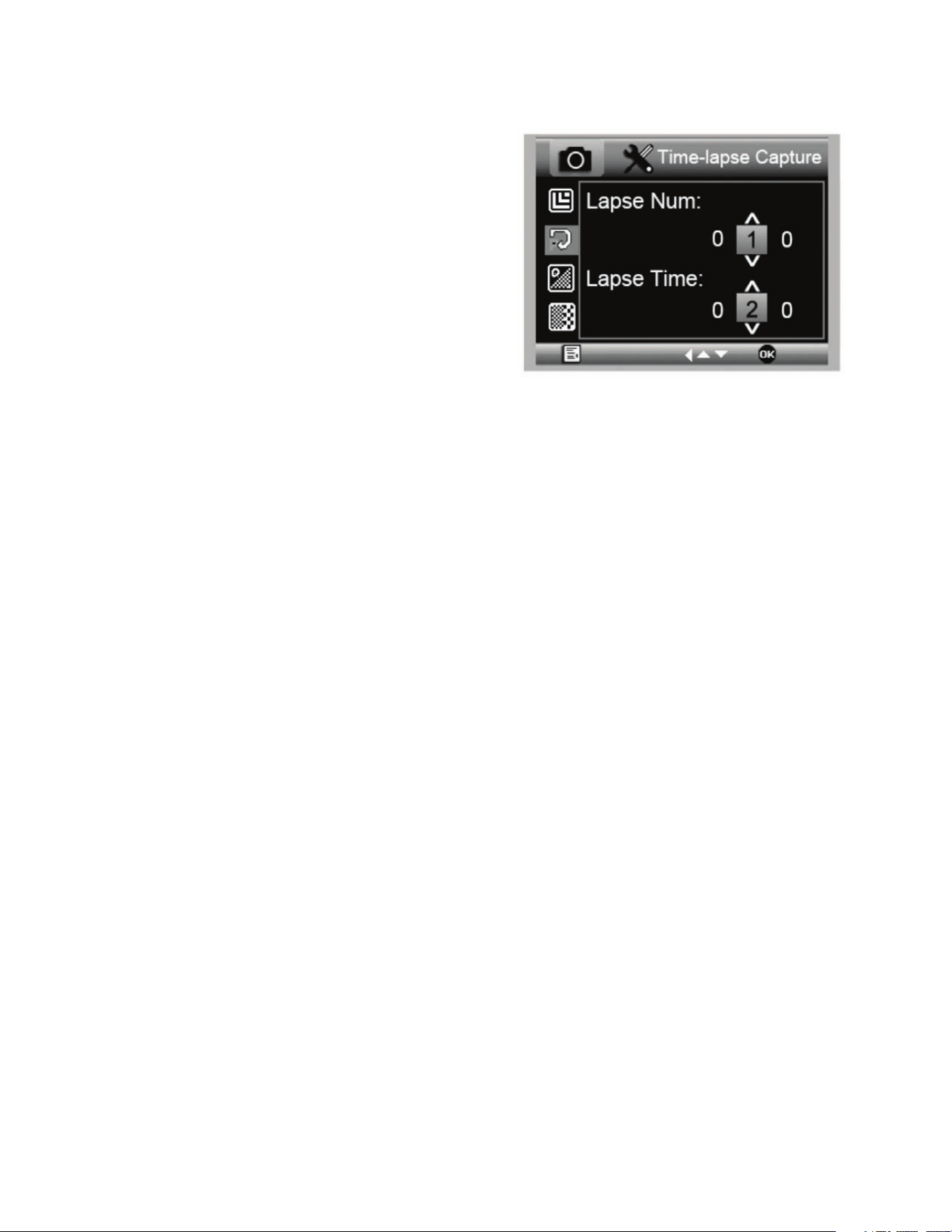
4. MENÜEINSTELLUNGEN
A. HAUPTMENÜ
+
Drücken Sie auf die Menütaste (7), um das Hauptmenü
anzuzeigen.
HINWEIS: Das HAUPTMENÜ besteht aus zwei Fenstern. Um das
zweite HAUPTFENSTER aufzurufen, erneut auf die
Menütaste (7) drücken.
+
Hier können Auflösung, Bildqualität, Schärfe und Belichtung
eingestellt werden. Sie können einen Datumsstempel oder die
Option Zeitraffer auswählen, Datum und Uhrzeit eingeben, die
automatische Abschaltung einstellen, eine Sprache auswählen,
für den Fernseher Modus und Frequenz einstellen und die
MicroSD-Karte formatieren etc.
+
Drücken Sie auf die Abwärtstaste (9), um durch Ihre Auswahl
zu scrollen.
+
Wenn Ihre benötigte Auswahl farblich hervorgehoben ist, auf
den Auslöser/OK-Taste (8) drücken.
B. AUFLÖSUNG
+
Wählen Sie eine Auflösungseinstellung aus.
+
Zur Auswahl stehen: 14M*, 8M*, 5M*, 3M, 2MP oder WVGA
HINWEIS: 14MP, 8MP und 5MP -Einstellungen werden auf
Interpolation berechnet. Interpolation bezieht sich auf
Software Hinzufügen von Pixeln, um ein Bild zu
künstlich, um das Bild größer. Dies kann vorteilhaft
sein, wenn das Drucken in größeren Formaten.
HAUPTMENÜ 1
HAUPTMENÜ 2
+
Mit dem MicroSD-Karte in den MicroSD-Kartensteckplatz
eingelegt, auf die Modustaste (6) drücken, um den
Wiedergabemodus aufzurufen.
+
Auf die Pfeiltaste nach unten (9) drücken, um das zuvor
aufgenommene Bild anzuzeigen.
+
Drücken Sie erneut auf die Modustaste (6), um zum
gestreamten Bild zurückzukehren.
D. BILDER AUF DEN PC HERUNTERLADEN
+
Ist eine MicroSD-Karte in den MicroSD-Kartensteckplatz
eingelegt, das Mikroskop über das enthaltene USB-Kabel an
den PC anschließen.
+
Ihr PC erkennt das Gerät als Speichermedium.
+
Laden Sie die Bilder wie von einer Digitalkamera herunter.
C. AUFZEICHNUNGEN ANSEHEN
DEUTSCH I 31
C. ZEITRAFFER-AUFNAHME
+
Ihr MicroDirect kann Bilder über einen festgelegten Zeitraum
hinweg aufnehmen. Dies nennen wir Zeitraffer.
+
Zuerst legen Sie fest, wie viele Bilder aufgenommen werden
sollen, die Lapse Num . Wählen Sie eine Zahl zwischen 2
und 999.
+
Mit der Pfeiltaste nach unten (9) können Sie durch die Ziffern
von 0 bis 9 scrollen. Ist die erste Ziffernstelle eingestellt,
wechseln Sie mit der Modustaste (6) zur nächsten Stelle.
+
Verwenden Sie erneut die Pfeiltaste nach unten (9), um
diese Stelle anzupassen.
+
Nach dem Einstellen der Bilderanzahl gehen Sie über die
Modustaste (6) zur Zeitraffer-Auswahl.
+
Die Lapse Time legt fest, wie viel Zeit zwischen jeder
Aufnahme verstreichen soll.
+
Stellen Sie diese Ziffern genauso ein, wie die obige Lapse Num.
+
Die Auswahl wird in Sekunden eingegeben und der wählbare Bereich beträgt 1 Sekunde bis 999 Sekunden.
+
Dies zusammen mit der Anzahl der Bilder ergibt die Gesamtlänge Ihrer Zeitraffer-Aufnahme.
+
Zum Beispiel: Wenn Sie eine Bilderanzahl von 999 auswählen und ein dazwischenliegendes Zeitintervall von 999 eingeben,
erhalten Sie 277 Stunden dokumentiertes Material. 999 Sekunden = 16,65 Minuten. Multiplizieren Sie dies mit 999
(Bildern) = 16.633,35 Minuten. 16.633,35/60 (Minuten pro Stunde) = 277 Stunden oder 11,55 Tage Dokumentation.
+
Nachdem Bildanzahl und Intervall eingestellt sind, auf den Auslöser/OK-Taste (8) drücken, um die Auswahl zu bestätigen.
+
Drücken Sie auf die Menütaste (7), um zum gestreamten Bild zurückzukehren.
+
Drücken Sie auf den Auslöser (8), um die Zeitraffer-Aufnahme zu starten.
+
Sobald im Zeitraffer-Modus alle Bilder aufgenommen wurden, kehrt das MicroDirect
®
1080p HD-Mikroskop zum normalen
Vorschaumodus zurück.
HINWEIS: Die Zeit für die AUTOMATISCHE ABSCHALTUNG muss die eingestellte Zeitraffer-Zeit um eine Nummer übersteigen.
Siehe Abschnitt AUTOMATISCHE ABSCHALTUNG und achten Sie auf eine korrekte Berechnung.
32 I DEUTSCH
+
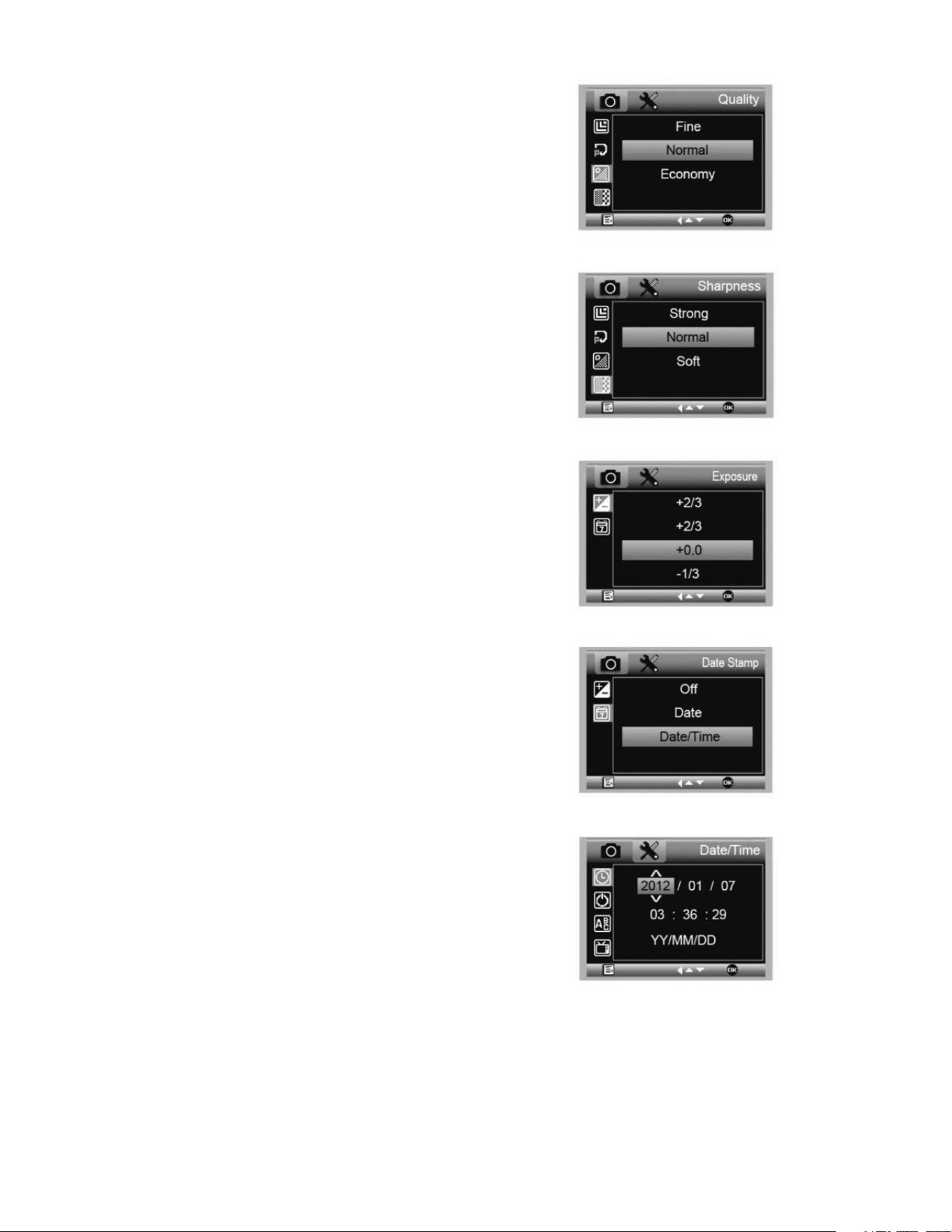
Im Abschnitt Bildqualität des Einstellungsmenüs mit
der Pfeiltaste nach unten (9) scrollen und eine Auswahl
treffen: Fein, normal oder energiesparend.
+
Durch die Bildqualität wird das Kompressionsverhältnis
des Bildes bestimmt.
+
Nachdem die Bildqualität eingestellt ist, auf den Auslöser/
OK-Taste (8) drücken, um die Auswahl zu bestätigen.
D. BILDQUALITÄT
E. SCHÄRFE
+
Hier wird die Bildschärfe eingestellt. Zur Auswahl stehen
“stark, normal und weich”.
F. BELICHTUNG (HELLIGKEIT)
+
Wählen Sie den Zielwert aus, indem Sie auf die Pfeiltaste
nach unten (9) drücken.
+
Bestätigen Sie Ihre Auswahl über die Auslöser/OK-Taste (8).
G. DATUMSSTEMPEL
+
Auswählen, wenn der Datumsstempel angezeigt werden soll.
1. Aus
2. Nur Datum
3. Datum/Uhrzeit
H. DATUM/UHRZEIT (HAUPTMENÜ 2)
+
Wählen Sie den Zielwert aus, indem Sie auf die Pfeiltaste
nach unten (9) drücken.
+
Bestätigen Sie Ihre Auswahl über die Auslöser/OK-Taste (8).
DEUTSCH I 33
I. AUTOMATISCHE ABSCHALTUNG
+
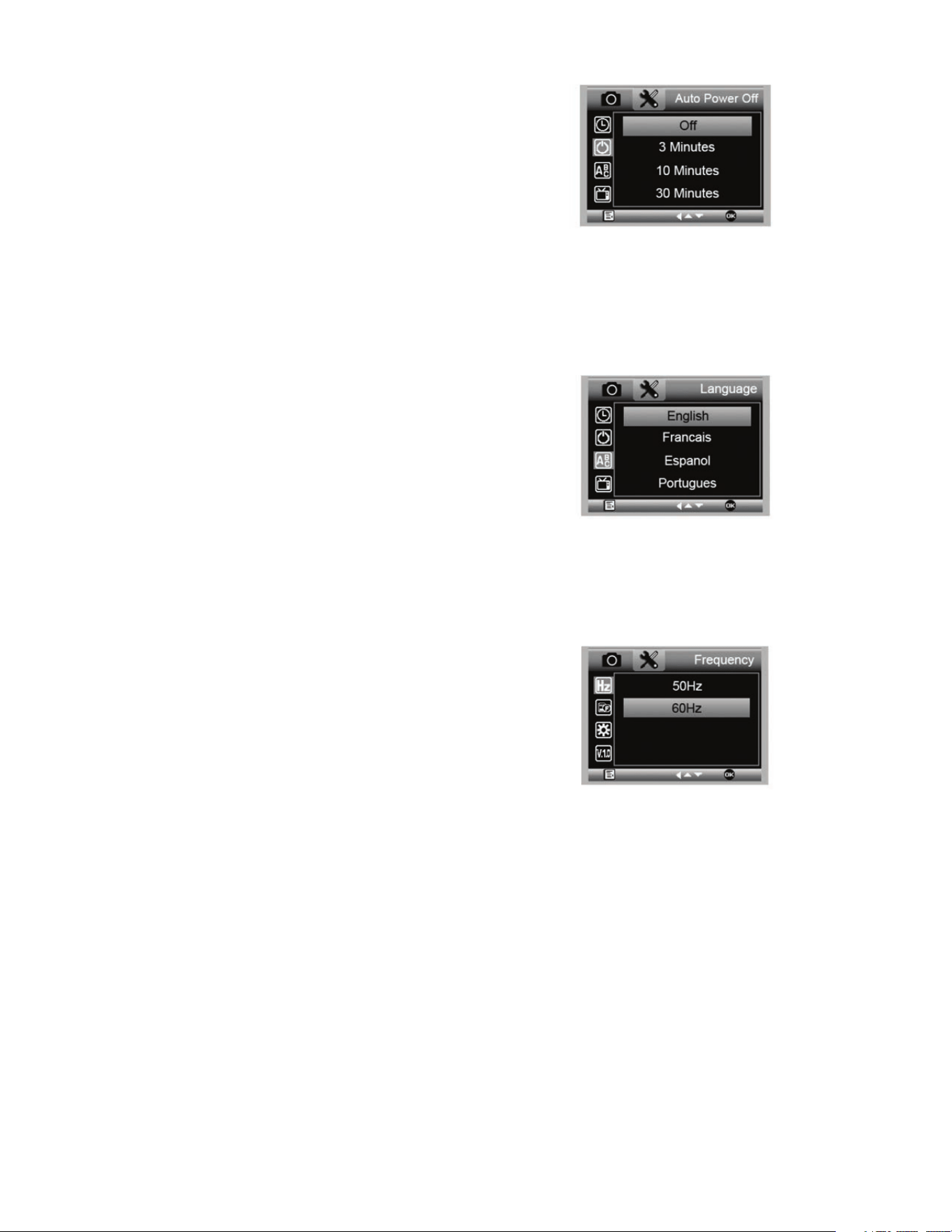
Hier können Sie einstellen, wann das Gerät ohne Bedienschritt
abgeschaltet werden soll. Es steht Folgendes zur Auswahl:
1. AUS (Voreinstellung)- Das Gerät bleibt eingeschaltet,
bis Sie es manuell ausschalten.
2. 3 Minuten - Das Gerät schaltet nach drei Minuten
kontinuierlicher Nichtverwendung aus.
3. 10 Minuten - Das Gerät schaltet nach zehn Minuten
kontinuierlicher Nichtverwendung aus.
4. 30 Minuten - Das Gerät schaltet nach 30 Minuten
kontinuierlicher Nichtverwendung aus.
J. SPRACHE
+
Hier können Sie Ihre bevorzugte Sprache einstellen. Es steht
Folgendes zur Auswahl:
K. FREQUENZ
+
Hier wählen Sie die Frequenz aus. Es steht Folgendes zur
Auswahl:
1. 50 Hz (voreingestellt) (Vereinigte Staaten)
2. 60 Hz (die meisten anderen Länder)
HINWEIS: Vor dem Einstellen der Hertz bitte Ihr Land nachschlagen.
1. Englisch
2. Deutsch
3. Spanisch
4. Russisch
5. Italienisch
6. Französisch
7. Portugiesisch
8. Holländisch
9. Polnisch
10. Japanisch
11. Koreanisch
12. Chinesisch
34 I DEUTSCH
Das vollständige Bedienerhandbuch mit detaillierten Angaben
zu Einstellungen und Optionen für den Anschluss an den PC
können Sie von der enthaltenen CD/DVD ROM herunterladen.
Wenn Sie kein CD/DVD ROM-Laufwerk haben, gehen zu
www.celestron.com dann auf SUPPORT klicken zum
Download bereit.
L. FORMATIEREN
+
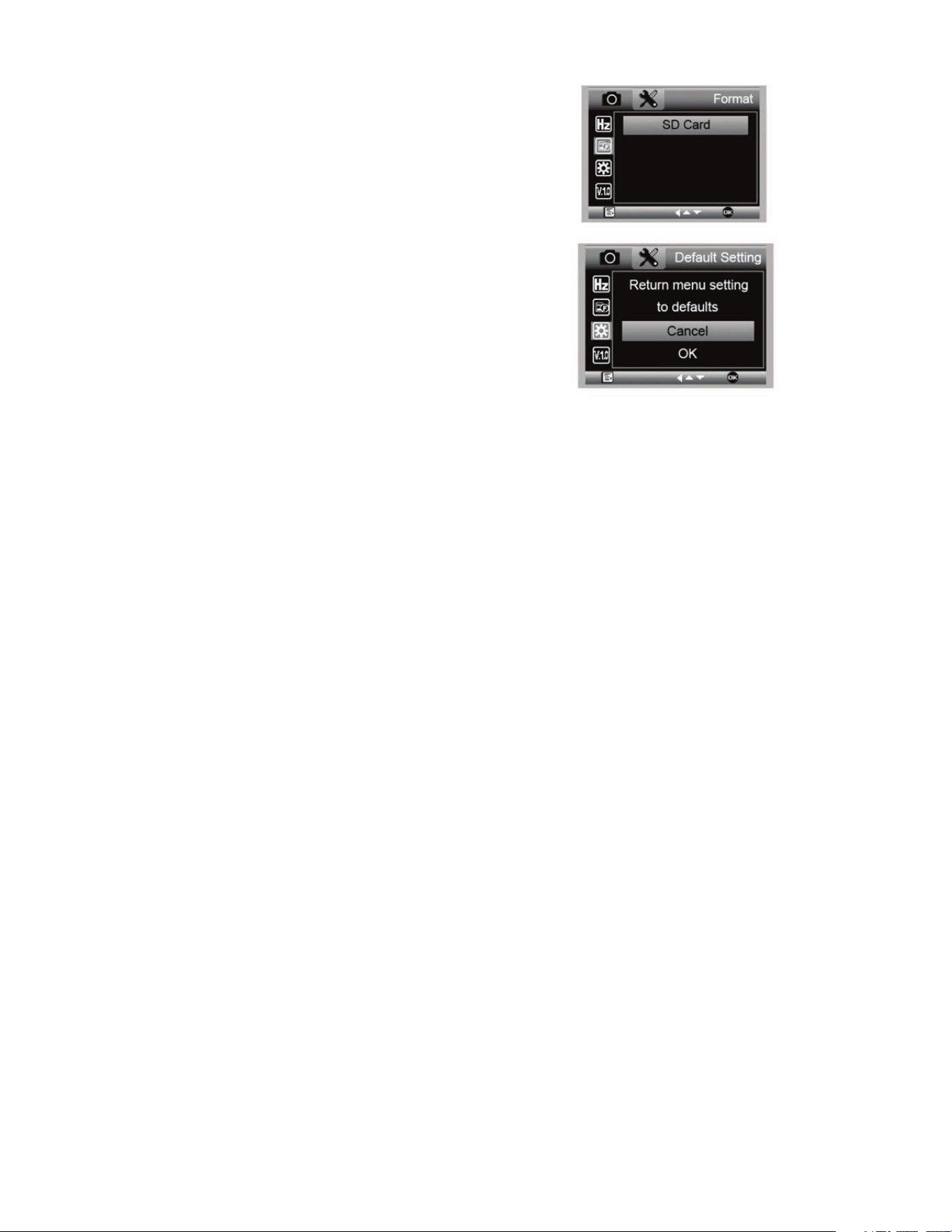
Hier können Sie Ihre MicroSD-Karte formatieren.
WARNUNG: Beim Formatieren der MicroSD-Karte werden
alle auf der MicroSD-Karte gespeicherten Daten
gelöscht.
M. VOREINSTELLUNG
+
Hier können Sie die Werkseinstellungen
wiederherstellen.
5. PFLEGE UND INSTANDHALTUNG
Bei Ihrem Celestron MicroDirect
®
1080p HD-Mikroskop handelt es sich um ein präzises optisches Instrument, das
immer mit äußerster Vorsicht behandelt werden sollte. Befolgen Sie diese Vorschläge, und ihr Mikroskop wird während
seiner Lebensdauer nur sehr wenig Wartung benötigen.
+
Lagern Sie Ihr Mikroskop an einem trockenen und
sauberen Ort.
+
Verwenden Sie Ihr Mikroskop keinesfalls an Orten,
an denen die Bedienung solcher Geräte beschränkt
ist. Unsachgemäße Nutzung führt zur Gefahr von
schweren Unfällen.
+
Nutzen Sie Ihr Mikroskop lediglich in einem Tempera-
turbereich von 23 ° bis 120 °F (-5 ° bis 50 °C). Vermeiden
Sie plötzliche Temperaturveränderungen, da diese
Feuchtigkeit im Mikroskopgehäuse hervorrufen können.
+
Versuchen Sie nicht, an die internen Komponenten
Ihres Mikroskops zu gelangen oder es in irgendeiner
Weise zu modifizieren. Nur autorisierte Techniker soll-
ten Wartungs- oder Reparaturarbeiten vornehmen.
+
Halten Sie Ihr Mikroskop von Wasser und anderen
Flüssigkeiten fern. Verwenden Sie es keinesfalls im
Regen oder Schnee. Feuchtigkeit führt zur Brand-
oder Stromschlaggefahr.
+
Wenn die Außenflächen Ihres Mikroskops gereinigt
werden müssen, können Sie diese mit einem feuchten
Tuch abwischen.
6. GARANTIE
Ihr Celestron MicroDirect
®
1080p HD-Mikroskop hat eine auf zwei Jahre beschränkte Gewährleistung. Besuchen Sie bitte
für weitere Informationen bezüglich Celestron-Mikroskopen die Celestron-Website.

DEUTSCH I 35
AUFZEICHNUNGEN
© 2020 Celestron • Alle Rechte vorbehalten
celestron.com/pages/technical-support
2835 Columbia Street • Torrance, CA 90503 USA
FCC-Erklärung: Dieses Gerät wurde getestet und entspricht den Grenzwerten für digitale Geräte der Klasse B in Übereinstimmung mit Artikel 15 der FCC-Bestimmungen. Diese Grenzwerte
bieten einen angemessenen Schutz vor Störungen in Wohnanlagen. Dieses Gerät erzeugt, verwendet und strahlt Hochfrequenzenergie aus und kann den Funkverkehr stören, wenn es nicht
gemäß den Anweisungen installiert und verwendet wird. Es kann jedoch nicht garantiert werden, dass in einer bestimmten Einrichtung keine Störungen auftreten. Falls dieses Gerät Störungen
des Radio-oder Fernsehempfangs verursacht, was durch ein vorübergehendes Ausschalten des Geräts festgestellt werden kann, wird der Benutzer dazu angehalten, die Störung durch eine oder
mehrere der nachstehenden Maßnahmen zu beheben:
+ Neuausrichtung oder Positionsveränderung der Empfangsantenne.
+ Den Abstand zwischen dem Gerät und dem Empfänger vergrößern.
+ Anschluss des Geräts an eine Steckdose, die nicht am selben
Stromkreis angeschlossen ist, wie die des Empfängers.
+ Den Händler oder einen erfahrenen Radio- und Fernsehtechniker
um Hilfe bitten.
Dieses Produkt wurde für die Verwendung durch Personen von 14 Jahren und darüber entworfen und vorgesehen. Produktdesign und technische Daten können ohne Vorankündigung geändert werden.
MANUALE DI ISTRUZIONI
MODELLO N. 44316
38 I ITALIANO
CD/DVD Con Software e Manuale (1)
Microscopio HD MicroDirect
®
1080p (1)
Piedistallo (1)
Righello di Calibrazione (1)
Guida All’avvio Rapido (1)
Cavo HDMI (1)
Cavo USB (1)
A. CONTENUTO DELLA CONFEZIONE
1. INTRODUZIONE
Grazie per aver acquistato il microscopio digitale portatile HD con piedistallo Celestron MicroDirect
®
1080p. Questo microscopio
è uno strumento ottico di precisione prodotto con i migliori materiali, che gli assicurano una lunga durata. È ideato per fornire un
intrattenimento duraturo con interventi minimi di manutenzione.
Prima di iniziare a utilizzare il microscopio HD MicroDirect
®
1080p, leggere le istruzioni e utilizzare le fi gure illustrate a
continuazione come riferimento. Acquisire familiarità con le
molte funzioni del microscopio HD MicroDirect
®
1080p in
modo da ottenere il massimo dall'utilizzo dello strumento.
il microscopio HD MicroDirect
®
1080p è un microscopio
digitale portatile ideato per essere collegato, mediante il
cavo HDMI in dotazione, direttamente al monitor del TV
o a un proiettore per mostrare un video in streaming full
HD a 1080p. Non occorre un computer quando si utilizza il
microscopio HD MicroDirect
®
1080p.
Il microscopio è uno strumento per piccoli ingrandimenti,
ideale soprattutto per esaminare piccoli oggetti come monete,
francobolli, rocce, componenti elettronici, insetti e altri
oggetti 3D. È possibile osservare anche campioni su vetrini,
tuttavia questo microscopio non è ideale per tale scopo. Per
microscopi biologici più adatti ad analisi di tal genere, visitare
www.celestron.com.
Il microscopio HD MicroDirect
®
1080p non impiega
un oculare come i microscopi tradizionali. Il sensore
integrato della videocamera funge da oculare e, abbinato
al gruppo lente, consente di ingrandire e digitalizzare il
campione. Tramite la connessione HDMI viene quindi
inviato un segnale al monitor o al proiettore per un
video live incredibilmente nitido a 1080p. Ciò consente
di visualizzare in maniera semplice i campioni e di
condividere un'immagine streaming dal vivo in presenza
di un pubblico di persone. La visualizzazione è inoltre
immediata e viene eliminata la fatica a occhi e collo,
tipica dei microscopi tradizionali. È possibile tenere
il microscopio in mano mentre si osservano ampie
superfi ci in ambienti diversi dal normale laboratorio,
oppure utilizzare il piedistallo professionale incluso nella
confezione per analisi a mani libere più precise. Scattare
foto e salvarle direttamente nella scheda MicroSD per
scaricarle in un secondo momento. Registrare video
connettendo il microscopio HD MicroDirect
®
1080p
direttamente al PC utilizzando il cavo USB e iniziare a
registrare video in HD a 720p.
ITALIANO I 39
COMPONENTE FUNZIONE COMPONENTE FUNZIONE
1.
Porta Mini USB (Alimentazione)
11.
Rotella di Messa a Fuoco
2.
Mini porta USCITA HDMI (tipo C)
12.
Misuratore Ingrandimento
3.
Vano Per Scheda MicroSD
13.
Rotella di Blocco della Regolazione Dell’altezza
4.
Interruttore Dimmer LED
14.
Rotella di Blocco Della Staffa di Supporto
del Microscopio
5.
Tasto ON/OFF
15.
Rotella di Blocco
6.
Tasto Modalità
16.
Manopola di Messa a Fuoco Macrometrica
7.
Tasto Menu
17.
Anello di Blocco del Braccio di Supporto
8.
Pulsante Otturatore/Tasto OK
18.
Braccio di Supporto
9.
Pulsante Freccia Giù
19.
Montaggio del Supporto del Microscopio
10.
Anello a 8 LED
B. COMPONENTI
C. REQUISITI MINIMI DI SISTEMA
1. Monitor o proiettore
+
Deve avere una porta HDMI libera
+
USB con alimentazione ESTERNO (opzionale)
2. PC (opzionale)
+
Windows XP/ 7 / 8 / 10
+
P4 1.8 o successivo
+
RAM: 512 MB
+
Memoria video: 64M
+
Porta USB: 2.0
NOTA: Il software viene scaricato da celestron.com
40 I ITALIANO
2. OPERAZIONI PRELIMINARI
A. ASSEMBLE THE MICROSCOPE STAND
+
Estrarre il contenuto dalla confezione con cura.
+
Far scorrere l’anello di blocco del braccio di supporto (17) nel
braccio di supporto (18).
+
Attaccare montaggio completo (17, 18, 19) per i fili di base
e stringere.
B. FISSAGGIO DEL MICROSCOPIO AL
PIEDISTALLO
+
Inserire il microscopio nella staffa di supporto e serrare
l’apposita rotella di blocco (14) per fissarlo in posizione.
**
Interpolazione si riferisce al software aggiungendo pixel di un’immagine da rendere artificialmente l’immagine più grande. Questo può essere utile quando
si stampa in grandi formati.
D. SPECIFICHE
Descrizione Microscopio digitale portatile HD MicroDirect
®
1080p
Sensore Alta velocità 1/3" CMOS 3,5 megapixel
Dimensione pixel 2,2 µm x 2,3 µm
Risoluzione immagine 14 megapixel** (5120x2880), 8 megapixel** (3840x2160), 5 megapixel** (3072x1728),
3 megapixel (2304x1296), 2 megapixel (1920x1080), WVGA (848x480)
**Interpolata
Risoluzione video 720p (HD) e 640 x 480 (VGA) *necessaria connessione a un computer per registrare video
Formato video - streaming HDTV (con cavo HDMI): 1080p (1920x1080)@30 fps
Formato video - registrazione AVI/30 fps
Formato foto JPEG
Ingrandimento 24x to 220x (sulla base di uno schermo da 20”)
Intervallo di messa a fuoco (Manuale) da 0 mm a 35 mm
Alimentazione • USB 2.0 (con porta USCITA alimentazione USB compatibile)
• Utilizzare un qualsiasi adattatore di alimentazione da 120 V (5 V-1 A) se necessario
Tasto otturatore Sul corpo principale e nel software
Software Software acquisizione portatile MicroDirect
®
Compatibilità software Windows: Windows XP/7/8/10
Lingue supportate (12) inglese, tedesco, spagnolo, russo, italiano, francese, portoghese, olandese, polacco, giapponese,
coreano, cinese
Accessori Cavo HDMI, piedistallo e tavolino regolabili, panno per lente, righello di calibrazione
Peso 1,3 libbre / 0,59 kg (compreso piedistallo)
Dimensioni Microscopio: 155,6x42x42 mm (6,125”x1,5”x1,5”)
Piedistallo: 119x171,4x157,2 mm (4,68”x6,75”x6,19”)
ITALIANO I 41
+
Inserire la scheda MicroSD nell’apposito vano (3) sul corpo
del MicroDirect.
NOTA: Micro SD Card non inclusa.
NOTA: Il vano per scheda SD supporta schede fino a 32 GB.
+
Allentare la rotella di blocco (15), regolare la messa a fuoco
macrometrica ruotando l’apposita manopola (16).
+
Serrare la rotella di blocco (15) per tenere il gruppo in posizione.
+
Ruotare la rotella di messa a fuoco (11) per mettere afuoco
il campione.
+
Inserire un’estremità del cavo HDMI in dotazione nella mini porta HDMI
(tipo C) del microscopio e l’altra estremità nella porta standard (tipo A)
del monitor.
+
Collegare il cavo USB al microscopio e a una porta USB 2.0 libera sul
monitor o sul proiettore (se disponibile).
+
Se non esiste una porta USB 2.0 sul monitor o sul proiettore, usare una
presa 5V-1A USB e inserirvi il cavo USB, quindi introdurre in una presa
elettrica disponibile. NON inserire direttamente il cavo USB in un computer
da scrivania o portatile perché leggerà erroneamente il segnale dal cavo
come un dispositivo di archiviazione, determinando la comparsa di una
schermata blu vuota sul monitor.
NOTA: Il cavo USB in dotazione funziona con tutte le spine USB standard fornite
con gli apparecchi elettronici odierni come smartphone e tablet.
NOTA: Un’opzione di alimentazione aggiuntiva può essere una fonte di
alimentazione esterna come un caricatore portatile dotato di porta
USCITA USB. Tutti gli scaldamani e i caricatori portatili Celestron
Elements sono adatti a talescopo. Li puoi trovare su www.celestron.com
+
Accendere il microscopio premendo il tasto ON/OFF (5).
B. ACQUISIZIONE DI UN’IMMAGINE
3. UTILIZZO DEL MICROSCOPIO
A. COLLEGAMENTO A UN MONITOR O A
UN PROIETTORE
A
B
C
+
Premere il pulsante otturatore (8) per salvare l’immagine
nella scheda MicroSD.
42 I ITALIANO
B. RISOLUZIONE
+
Selezionare un’impostazione per la risoluzione.
+
Le opzioni sono: 14M*, 8M*, 5M*, 3M, 2MP o WVGA
NOTA: 14MP, impostazioni 8MP e 5MP si basano su interpolazione.
Interpolazione si riferisce al software l’aggiunta di pixel di
un’immagine per rendere artificialmente l’ immagine ingrandita.
Questo può essere utile quando si stampa in formati più grandi.
MENU PRINCIPALE 1
MENU PRINCIPALE 2
4 IMPOSTAZIONI MENU
A. MENU PRINCIPALE
+
Premere il tasto Menu (7) per accedere al menu principale.
NOTA: Il MENU PRINCIPALE consiste di 2 finestre principali.
Per accedere alla FINESTRA PRINCIPALE 2 premere
nuovamente il tasto Menu (7).
+
Qui è possibile regolare risoluzione, qualità dell'immagine,
nitidezza, esposizione, scegliere di avere la data stampata o la
funzione Time Lapse, impostare data e ora, impostare lo spe-
gnimento automatico, scegliere la lingua, impostare lamodalità
TV e la frequenza, formattare la scheda MicroSD, ecc.
+
Premere il tasto Giù (9) per scorrere tra le opzioni.
+
Una volta evidenziata la voce da selezionare, premere il tasto
Scatto/OK (8).
+
Una volta inserita la scheda MicroSD nell'apposito vano,
premere il tasto Modalità (6) per passare alla modalità di
riproduzione.
+
Premere il tasto Giù (9) per visualizzare l'immagine scattata in
precedenza.
+
Premere il tasto Modalità (6) per tornare all'immagine dal vivo.
D. SCARICARE LE IMMAGINI SUL PC
+
Una volta inserita la scheda MicroSD nell'apposito vano,
collegare il microscopio al PC tramite il cavo USB 2.0 in
dotazione.
+
il PC dovrebbe riconoscere il dispositivo come dispositivo
di archiviazione.
+
Scaricare le immagini come si farebbe da una normale
fotocamera digitale.
C. ACCESSO ALLE IMMAGINI REGISTRATE
ITALIANO I 43
C. ACQUISIZIONE CON TIME-LAPSE
+
Il microscopio MicroDirect può essere impostato per
acquisire immagini in un lasso di tempo definito. Ciò
viene detto Time-Lapse (immagini in sequenza).
+
È necessario selezionare il numero di immagini da scattare
o Lapse Num (Num. immagini). L’intervallo va da 2 a 999
immagini.
+
Mediante il tasto Giù (9) scorrere i numeri da 0 a 9. Quando
la prima cifra è stata selezionata, premere il tasto Modalità
(6) per passare alla cifra successiva.
+
Nuovamente mediante il tasto Giù (9), impostare la cifra.
+
Una volta selezionato il numero di immagini, premere il tasto
Modalità (6) per spostarsi alla scelta del tempo.
+
Lapse Time determina quanto tempo trascorre tra uno
scatto e l’altro.
+
Selezionare le cifre come fatto in precedenza per la selezione del numero di immagini.
+
Le opzioni disponibili in secondi vanno da 1 secondo a 999 secondi.
+
Ciò, insieme al numero di immagini, determina la durata totale del tempo per le immagini in sequenza.
+
Ad esempio: se si sceglie un totale di 999 immagini e l’intervallo tra l’una e l’altra è 999 secondi, verranno documentate
277 ore. 999 secondi = 16,65 minuti. Moltiplicarlo per 999 (immagini) =16.633,35 minuti. 16.633,35/60 (minuti in un’ora) =
277 ore o 11,55 giorni di documentazione.
+
Una volta impostato il numero di immagini e l’intervallo di tempo, premere il tasto Scatto/OK (8) per confermare.
+
Premere il tasto Menu (7) per tornare all’immagine dal vivo.
+
Premere il tasto Scatto (8) per avviare il Time Lapse.
+
Una volta acquisiti i fotogrammi nella modalità Time Lapse, il microscopio HD MicroDirect
®
1080p tornerà alla modalità
anteprima normale.
NOTA: L’ora di SPEGNIMENTO AUTOMATICO deve essere impostata a un numero superiore rispetto a quella del Time Lapse. Consultare
la sezione sulla FUNZIONE DI SPEGNIMENTO AUTOMATICO e assicurarsi di effettuare correttamente i calcoli.
44 I ITALIANO
D. QUALITÀ IMMAGINE
+
Una volta all'interno della sezione Image Quality (Qualità
immagine) del menu Settings (Impostazioni), scorrere
utilizzando il tasto Giù (9) e selezionare una tra le seguenti:
Fine (Buona), Normal (Normale) o Economy (Minima).
+
La qualità dell'immagine determina il grado di compressione
dell'immagine.
+
Una volta impostata la qualità dell'immagine, premere il
tasto Scatto/OK (8) per confermare.
E. NITIDEZZA
+
Qui è possibile regolare la nitidezza dell'immagine. Le
opzioni sono Strong (Forte), Normal (Normale), Soft
(Delicata).
F. ESPOSIZIONE (LUMINOSITÀ)
+
Selezionare il valore target premendo il tasto Giù (9).
+
Confermare la scelta premendo il tasto Scatto/OK (8).
G. DATA
+
Scegliere se avere la data stampata sull'immagine.
1. Off
2. Date only (Solo data)
3. Date/Time (Data/Ora)
H. DATA/ORA
(MENU PRINCIPALE 2)
+
Selezionare il valore target premendo il tasto Giù (9).
+
Confermare la scelta premendo il tasto Scatto/OK (8).
ITALIANO I 45
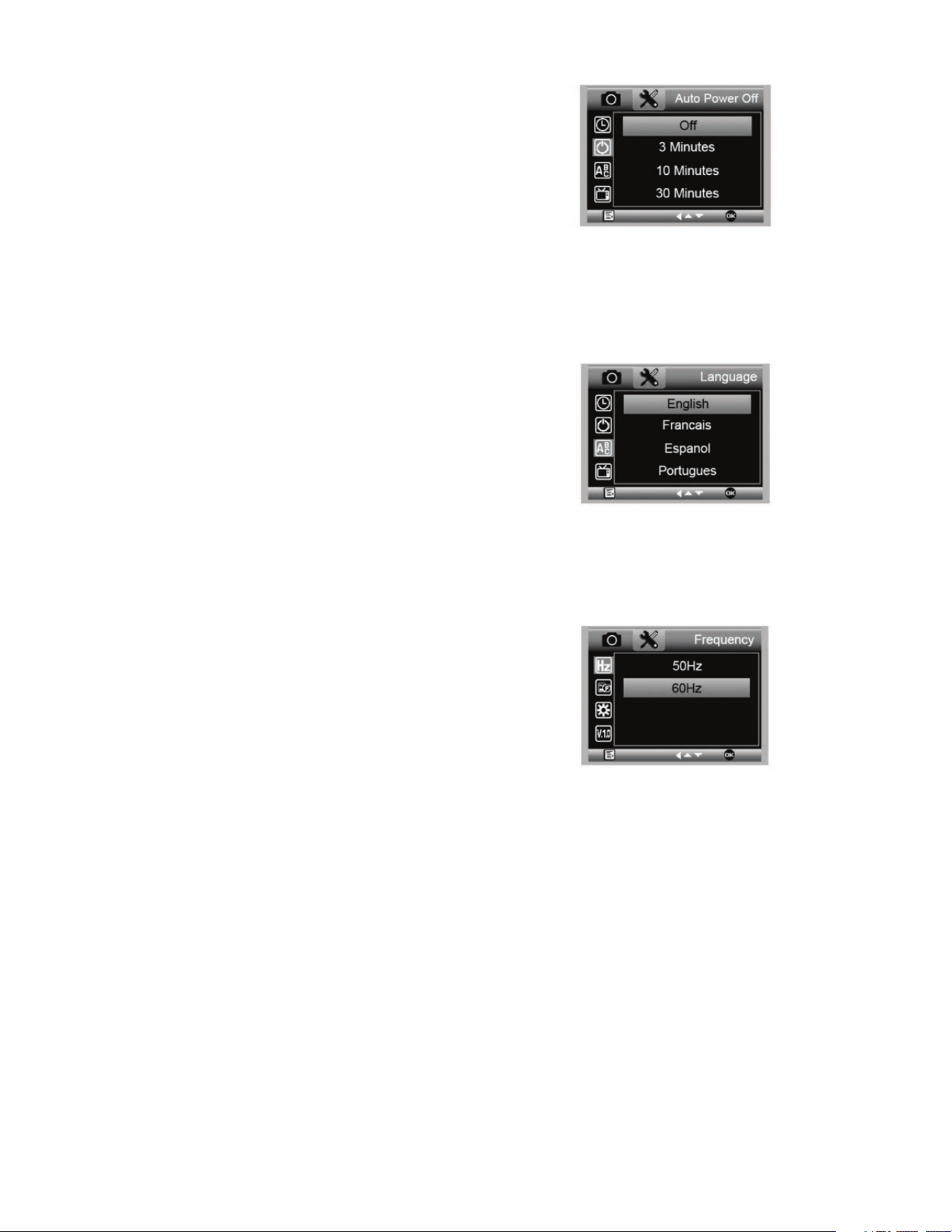
I. SPEGNIMENTO AUTOMATICO
+
Qui è possibile impostare l'unità perché si spenga
automaticamente in caso di inutilizzo. Le opzioni sono:
1. OFF (predefinito)- Questa opzione tiene il dispositivo
acceso fino allo spegnimento manuale.
2. 3 minutes- l'unità si spegne dopo 3 minuti di inutilizzo.
3. 10 minutes- l'unità si spegne dopo 10 minuti di
inutilizzo.
4. 30 minutes- l'unità si spegne dopo 30 minuti di
inutilizzo.
J. LINGUA
+
Qui è possibile scegliere la lingua desiderata. Le opzioni sono:
K. FREQUENZA
+
Qui è possibile selezionare la frequenza. Le opzioni sono:
1. 50 Hz (predefinito) (Stati Uniti)
2. 60 Hz (gran parte degli altri Paesi)
NOTA: Ricercare il proprio Paese prima di impostare la frequenza Hz.
1. Inglese
2. Tedesco
3. Spagnolo
4. Russo
5. Italiano
6. Francese
7. Portoghese
8. Olandese
9. Polacco
10. Giapponese
11. Coreano
12. Cinese
46 I ITALIANO
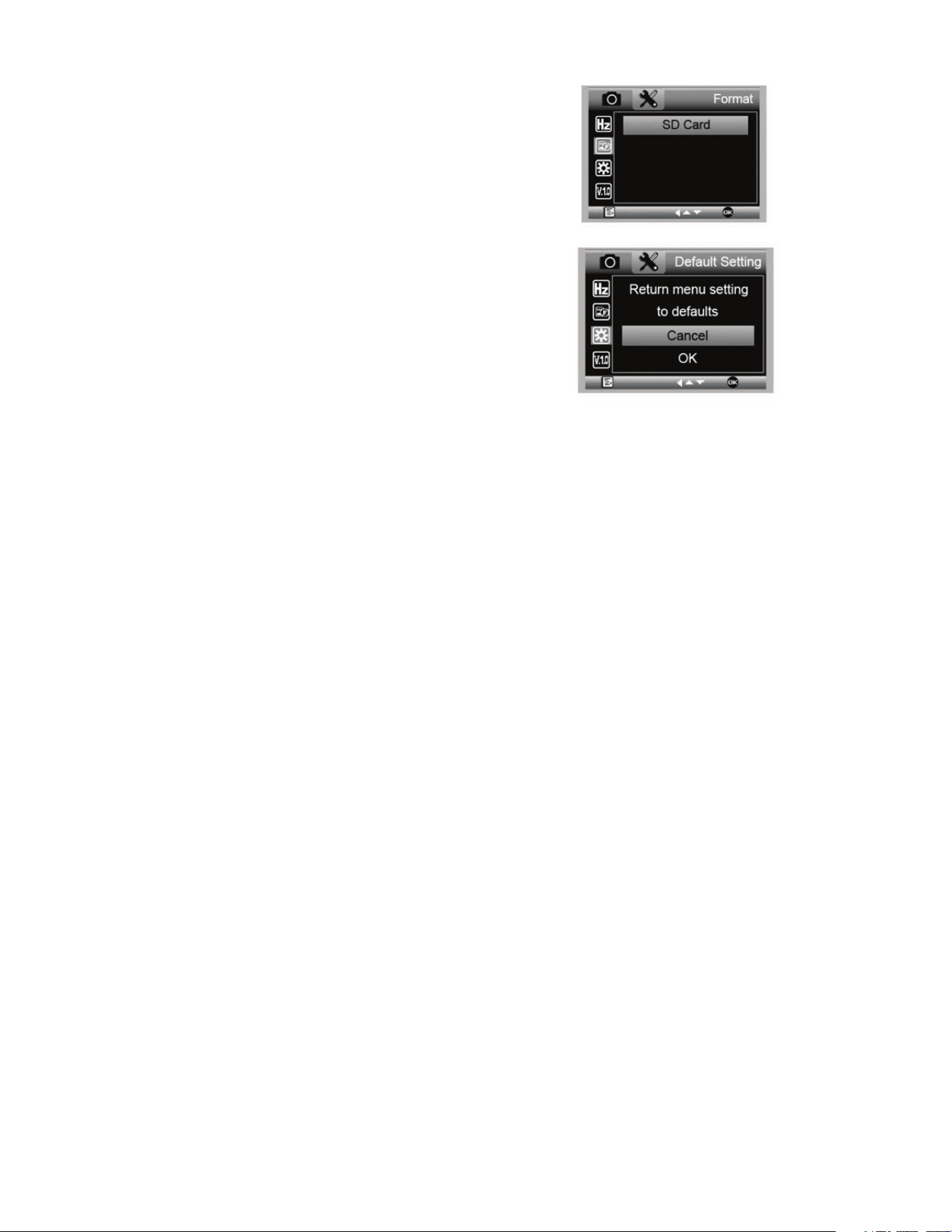
L. FORMATTAZIONE
+
Qui è possibile formattare la scheda MicroSD.
AVVERTENZA: Durante la formattazione tutti i file e le
informazioni presenti nella scheda MicroSD
saranno eliminati.
M. RIPRISTINO DELLE IMPOSTAZIONI
PREDEFINITE
+
Qui è possibile scegliere se ripristinare tutte le impostazioni
del sistema a quelle predefinite.
Per il manuale completo con le impostazioni dettagliate e
l'opzione di collegamento al PC consultare il CD/DVD ROM
in dotazione per scaricare il manuale. Se non si dispone di un
lettore CD/DVD ROM, visitare il sito www.celestron.com e
fare clic su SUPPORT per scaricare il manuale.
5. CURA E MANUTENZIONE
Il microscopio HD Celestron MicroDirect
®
1080p è uno strumento ottico di precisione e deve essere sempre trattato con cura.
Seguendo i consigli di seguito elencati il microscopio richiederà una manutenzione minima lungo il suo ciclo di vita.
+
Riporre sempre il microscopio in un luogo pulito e asciutto.
+
Non utilizzare mai il microscopio in luoghi in cui l'uso ne è
limitato. Un uso non corretto può creare potenziali rischi di
incidenti.
+
Utilizzare il microscopio solo entro l'intervallo di tempera-
tura compreso tra -5 e 50 °C (tra 23 e 120 °F). Cercare di
proteggere il microscopio da sbalzi di temperatura in quanto
si può creare della condensa all'interno del microscopio.
+
Non cercare di accedere ai componenti interni del
microscopio né di modificarlo in alcun modo. Solo tecnici
autorizzati possono eseguire interventi di manutenzione o
riparazione.
+
Tenere il microscopio al riparo da acqua o altri liquidi. Non
utilizzare il microscopio in presenza di pioggia o neve.
L'umidità crea pericoli di incendio e scosse elettriche.
+
Se la superficie del microscopio necessita di pulizia,
utilizzare un panno umido.
6. GARANZIA
Il microscopio HD Celestron MicroDirect
®
1080p è coperto da due anni di garanzia limitata. Per informazioni dettagliate sulla
gamma completa dei microscopi Celestron visitare il sito web Celestron:

ITALIANO I 47
NOTE
© 2020 Celestron • Tutti i diritti riservati
celestron.com/pages/technical-support
2835 Columbia Street • Torrance, CA 90503 USA
Nota FCC: La presente apparecchiatura è stata testata ed è risultata conforme ai limiti imposti per i dispositivi digitali di Classe B, ai sensi della Parte 15 delle Norme FCC. Tali limiti sono stati ideati per fornire
un’adeguata protezione nei confronti di interferenze dannose in installazioni residenziali. La presente apparecchiatura genera, utilizza e può irradiare energia in radio frequenza e, se non installata e utilizzata
conformemente alle istruzioni, può causare interferenze dannose alle radiocomunicazioni. Tuttavia, non esiste alcuna garanzia che l’interferenza non si verifichi in una particolare installazione. Nel caso in cui
la presente apparecchiatura causi interferenze dannose alla ricezione radio o televisiva, il che potrebbe essere determinato dall'accensione e dallo spegnimento dell'apparecchiatura, l'utente è incoraggiato a
tentare di correggere l'interferenza mediante una o più delle misure seguenti:
+ Orientare o posizionare nuovamente l’antenna di ricezione.
+ Aumentare la distanza tra l'apparecchiatura e il ricevitore.
+ Collegare l’apparecchiatura a una presa su un circuito diverso da
quello a cui è collegato il ricevitore.
+ Consultare il rivenditore o un tecnico radio/TV esperto per
richiedere assistenza.
Questo prodotto è progettato per essere utilizzato da persone di età uguale o superiore ai 14 anni. Il design del prodotto e le specifiche sono soggetti a modifiche senza previa notifica.
MANUAL DE INSTRUCCIONES
MODELO #44316
50 I ESPAÑOL
Microscopio MicroDirect
®
1080p HD (1)
Soporte (1)
Cable HDMI (1)
Cable USB (1)
A. CONTENIDO DE LA CAJA
1. INTRODUCCIÓN
Gracias por adquirir el microscopio digital manual y soporte Celestron MicroDirect
®
1080p HD. Su microscopio es un instrumento
óptico de precisión, fabricado con materiales de la mejor calidad para garantizar su resistencia y larga vida útil. Está diseñado para
ofrecerle toda una vida de satisfacción con un mantenimiento mínimo.
Antes de intentar usar su microscopio MicroDirect
®
1080p HD, lea por completo las instrucciones y consulte
los diagramas siguientes. Familiarizarse con las muchas
funciones del MicroDirect
®
1080p HD será de gran ayuda
para disfrutar de su experiencia.
El microscopio MicroDirect
®
1080p HD es un microscopio
manual digital diseñado para conectarse, mediante el cable
HDMI incluido, directamente a su monitor de TV o proyector,
mostrando una emisión de video full HD 1080p. No necesita
ordenador cuando use el microscopio MicroDirect
®
1080p HD.
Este microscopio es un microscopio de baja potencia de
aumento, adecuado para examinar especímenes como
monedas, sellos, minerales, electrónica, insectos y otros
objetos 3D. Los especímenes sobre portamuestras pueden
verse, pero este microscopio no es idóneo para este fi n.
Puede ver algunos de nuestros microscópicos biológicos
más adecuados para este tipo de observación
en www.celestron.com.
El microscopio Celestron MicroDirect
®
1080p HD no usa
un ocular como un microscopio tradicional. En su lugar, el
sensor de cámara integrado actúa como ocular, y junto con
la estructura de lente aumenta y digitaliza el objeto. La
conexión HDMI envía a continuación la señal digital al monitor
o proyector para una emisión de video 1080p increíblemente
clara. Así puede ver especímenes fácilmente y compartir la
imagen de gran tamaño emitida con toda una sala llena de
personas. La observación también es más inmediata, y se
elimina la tensión de cuello y ojos de la ecuación, a diferencia
de los microscopios tradicionales. Puede aguantar el
microscopio con la mano cuando observe superfi cies de gran
tamaño, lejos de un entorno de laboratorio habitual, o usar el
soporte profesional incluido para una observación más precisa
y con las manos libres. Capture imágenes fi jas directamente
en la tarjeta microSD para descargarlas más tarde. Grabe
video conectando el microscopio MicroDirect
®
1080p HD
directamente al PC con el cable USB y estará listo para
comenzar a capturar películas en 720p HD.
Regla de Calibración (1)
Guía de Inicio Rápido (1)
ESPAÑOL I 51
PIEZA FUNCIONES PIEZA FUNCIONES
1.
Puerto Mini USB (Alimentación)
11.
Rueda de Enfoque
2.
Puerto SALIDA Mini (Tipo C) HDMI
12.
Medidor de Aumento
3.
Ranura de tarjeta MicroSD
13.
Rosca de Bloqueo de Ajuste de Altura
4.
Interruptor de Suavizado de LED
14.
Rosca de Bloqueo de Soporte del Microscopio
5.
Botón ENCENDER/APAGAR
15.
Rueda de Bloqueo
6.
Botón De Modo
16.
Mando de Enfoque Aproximado
7.
Botón Menú
17.
Abrazadera de Bloqueo de la Conexión del Eje
8.
Botón del Obturador/Aceptar
18.
Eje de Soporte
9.
Botón de Flecha Abajo
19.
Assamblea del Soporte del Microscopio
10.
8 Iluminadores en Círculo LED
B. PIEZAS
C. REQUISITOS DEL SISTEMA
1. Monitor o proyector
+
Debe tener un puerto HDMI disponible
+
USB con alimentación SALIDA (opcional)
2. PC (Opcional)
+
Windows XP/ 7 / 8 / 10
+
P4 1.8 o superior
+
RAM: 512M
+
Memoria video: 64M
+
Puerto USB: 2,0
NOTA: El software se descarga de celestron.com
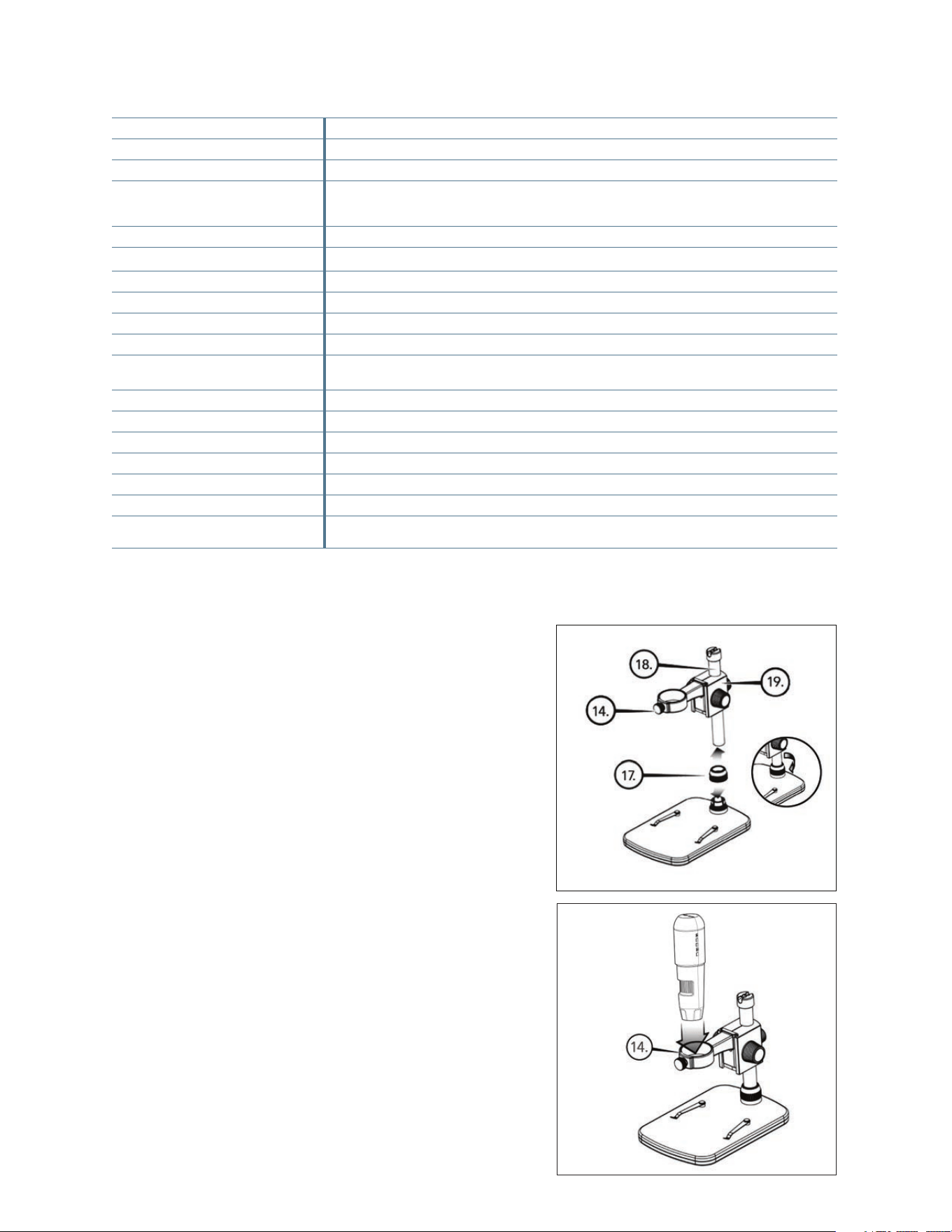
52 I ESPAÑOL
2. INSTALACIÓN
A. MONTAJE DEL SOPORTE DEL
MICROSCOPIO
+
Retire cuidadosamente todos los componentes del
embalaje.
+
La assamblea del soporte del microscopio (19) debe de
estar conctado al eje de soporte (18) en la caja. Si no lo esta,
conectelo ahora.
+
Adjunte la assemblea completa (17, 18, 19) a la base y fijelo.
B. INSTALACIÓN DEL MICROSCOPIO
EN EL PIE
+
Introduzca el microscopio en el soporte y fije la rosca del
soporte del microscopio (14) para fijarlo en posición.
** Interpolación se refiere a software agregando píxeles en una imagen para hacer artificialmente la imagen más grande. Esto puede ser beneficioso cuando
se imprime en formatos más grandes.
D. ESPECIFICACIONES
Descripción Microscopio digital manual MicroDirect
®
1080p HD
Sensor 3.5 MP CMOS 1/3” de alta velocidad
Tamaño de píxel 2.2 µm x 2.3 µm
Resolución de imagen fija 14MP** (5120x2880), 8MP** (3840x2160), 5MP** (3072x1728),
3MP (2304x1296), 2MP (1920x1080), WVGA (848x480)
**Interpolada
Resolución de captura de video 720p (HD) y 640 x 480 (VGA) *Debe conectarse al ordenador para grabar video
Formato video - Emisión HDTV (con cable HDMI): 1080p (1920x1080) a 30fps
Formato video - Grabación AVI/30fps
Formato de foto JPEG
Aumento 24x to 220x (basado en pantalla de 20”)
Distancia focal (Manual) 0mm a 35mm
Alimentación • USB 2.0 (con puerto de salida de alimentación USB)
• Use cualquier adaptador de alimentación de 120V (5V-1A) si es necesario
Activador del obturador En el chasis y software
Software Software de captura portátil MicroDirect
®
Compatibilidad de software Windows: Windows XP/7/8/10
Idiomas soportados (12) Inglés, alemán, español, ruso, italiano, francés, portugués, holandés, polaco, japonés, coreano, chino
Accesorios Cable HDMI, soporte y pie ajustables, gamuza para lente, regla de calibración
Peso 1.3 lbs. / 0,59 KG (pie incluido)
Dimensiones Microscopio: 155.6x42x42 mm (6.125”x1.5”x1.5”)
Pie: 119x171.4x157.2 mm (4.68”x6.75”x6.19”)
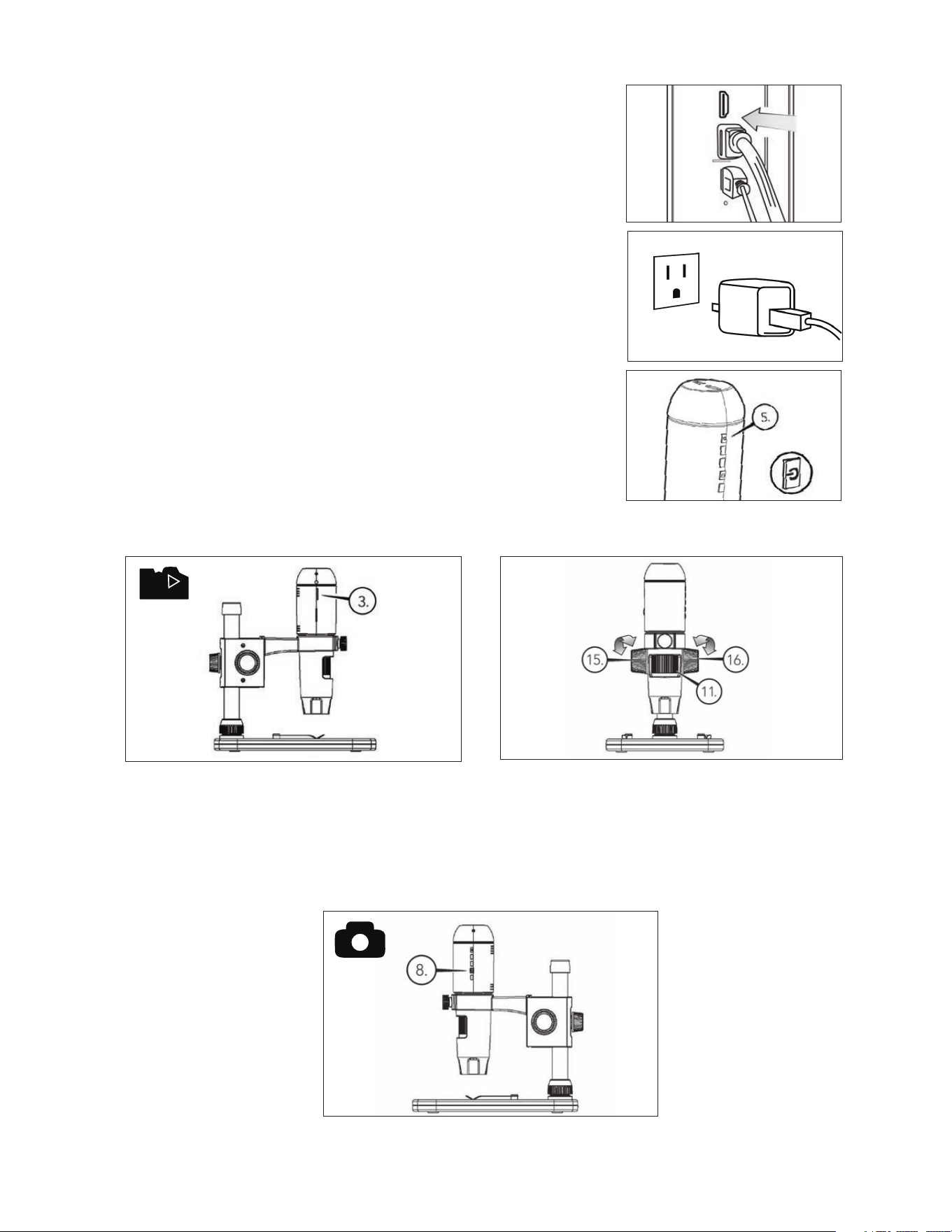
ESPAÑOL I 53
+
Introduzca la tarjeta micro SD en la ranura de tarjeta (3) del
chasis de MicroDirect.
NOTA: Tarjeta Micro SD NO incluido.
NOTA: La ranura de tarjeta SD soporta hasta 32G SDHC).
+
Afloje la rueda de bloqueo (15) y ajuste el enfoque
aproximado girando la rueda de enfoque aproximado (16).
+
Fije la rueda de bloqueo (15) para mantener la estructura
en posición.
+
Gire la ruedade enfoque aproximado (11) para enfocar el
espécimen.
+
Conecte un extremo del cable HDMI incluido en el puerto Mini (Tipo C)
HDMI del microscopio y el otro extremo en el puerto HDMI estándar
(Tipo A) de su monitor.
+
Conecte el cable USB al microscopio y a continuación a un puerto USB
2.0 disponible del monitor o proyector (si existe).
+
Si no dispone de puerto USB 2.0 en el monitor o proyector, use cualquier
toma USB de 5V-1A y conecte el cable USB en él, y a continuación en una
toma de alimentación disponible. NO conecte el cable USB directamente
a un ordenador de torre o portátil, leería incorrectamente la señal del cable
como dispositivo de almacenamiento y haría que apareciera una pantalla
azul en el monitor.
NOTA: El cable USB incluido funciona con cualquier toma USB estándar que se
incorporan a muchos productos electrónicos actuales, como teléfonos
y tabletas.
NOTA: Una opción adicional es una fuente de alimentación externa como un banco
de alimentación con puerto USB estándar. Todos los calentadores de manos
y bancos de alimentación Celestron Elements funcionarán con esta
finalidad. Puede encontrarlos en celestron.com
+
Encienda el microscopio pulsando el botón de ENCENDER/APAGAR (5).
B.CAPTURAR UNA FOTOGRAFÍA
A
B
C
3. USO DEL MICROSCOPIO
A. CONEXIÓN A UN MONITOR O PROYECTOR
+
Pulse el botón del obturador (8) y la imagen capturada se
guardará en la tarjeta micro SD.
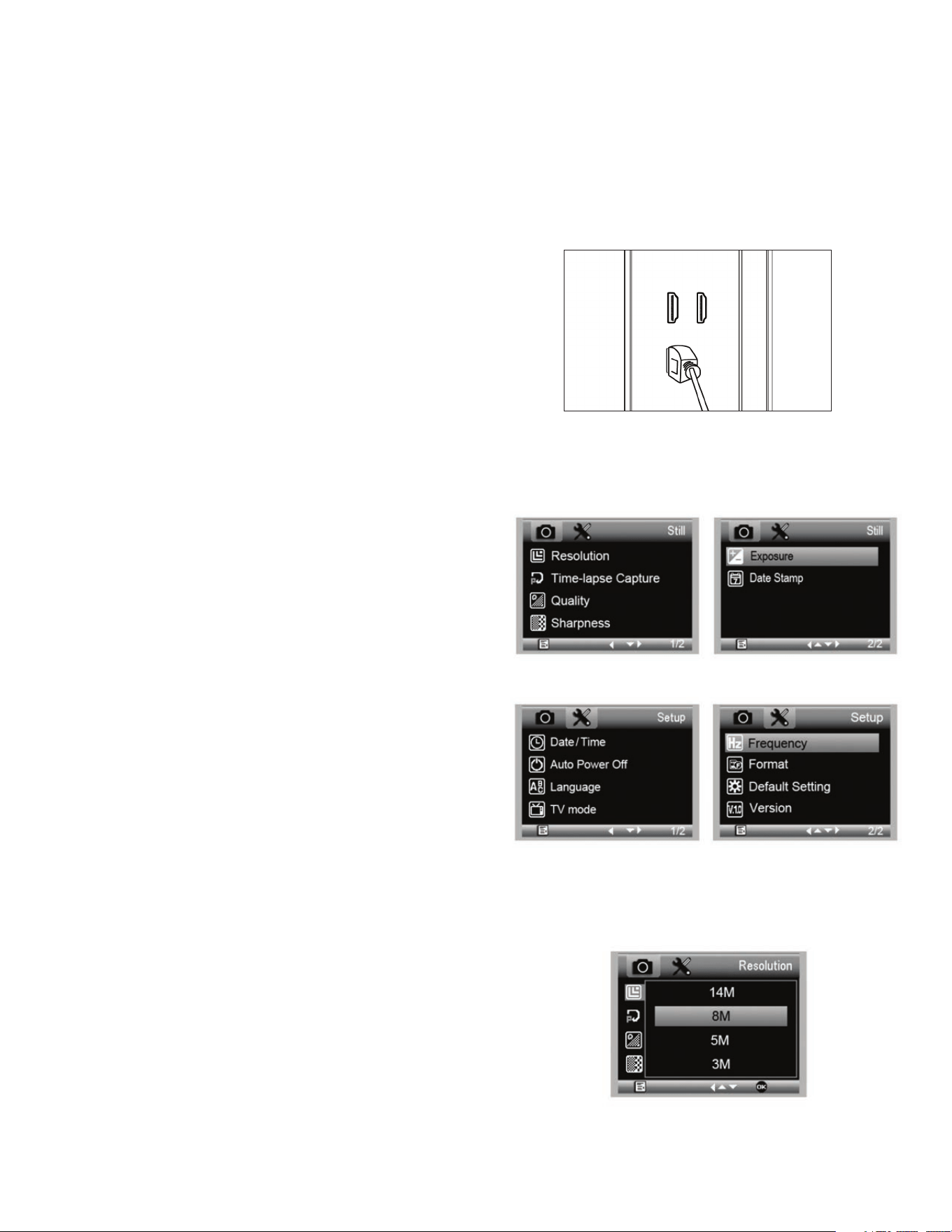
54 I ESPAÑOL
B. RESOLUCIÓN
+
Seleccione una configuración de resolución.
+
Las opciones son: 14M*, 8M*, 5M*, 3M, 2MP o WVGA
NOTA: Configuración de 14MP, 8MP y 5MP se basan en la
interpolación. La interpolación se refiere a software de
añadir píxeles de una imagen para hacer artificialmente la
imagen más grande. Esto puede ser beneficioso cuando
se imprime en formatos grandes.
MENÚ PRINCIPAL 1
MENÚ PRINCIPAL 2
4. CONFIGURACIONES
DE MENÚ
A. MENÚ PRINCIPAL
+
Pulse el botón Menú (7) para acceder al menú principal.
NOTA: El MENÚ PRINCIPAL consiste en 2 ventanas principales.
Para acceder a la VENTANA PRINCIPAL 2 pulse el botón
Menú (7) de nuevo en este momento.
+
Aquí puede ajustar la resolución, calidad de imagen, defini-
ción, exposición, elegir tener la marca de fecha o la opción
de lapso temporal, establecer hora y fecha, configurar el
apagado automático, elegir un idioma, establecer el modo y
frecuencia de TV, volver a formatear la tarjeta micro SD, etc.
+
Pulse el botón Abajo (9) para moverse por las opciones.
+
Cuando la opción de configuración deseada esté marcada,
pulse el botón Captura/Aceptar (8).
+
Con la tarjeta micro SD en la ranura de tarjeta micro SD, pulse
el botón Modo para cambiar a modo reproducción (6).
+
Pulse el botón Abajo (9) para ver la imagen capturada
previamente.
+
Pulse de nuevo el botón Modo (6) para volver a la imagen
emitida en directo.
D. DESCARGAR IMÁGENES AL PC
+
Con la tarjeta micro SD en la ranura de tarjeta SD, conecte
el microscopio al PC con el cable USB 2.0 incluido.
+
El PC debería reconocer el dispositivo como dispositivo de
almacenamiento.
+
Descargue las imágenes como lo haría con cualquier
cámara digital.
C. REVISAR LAS IMÁGENES REGISTRADAS
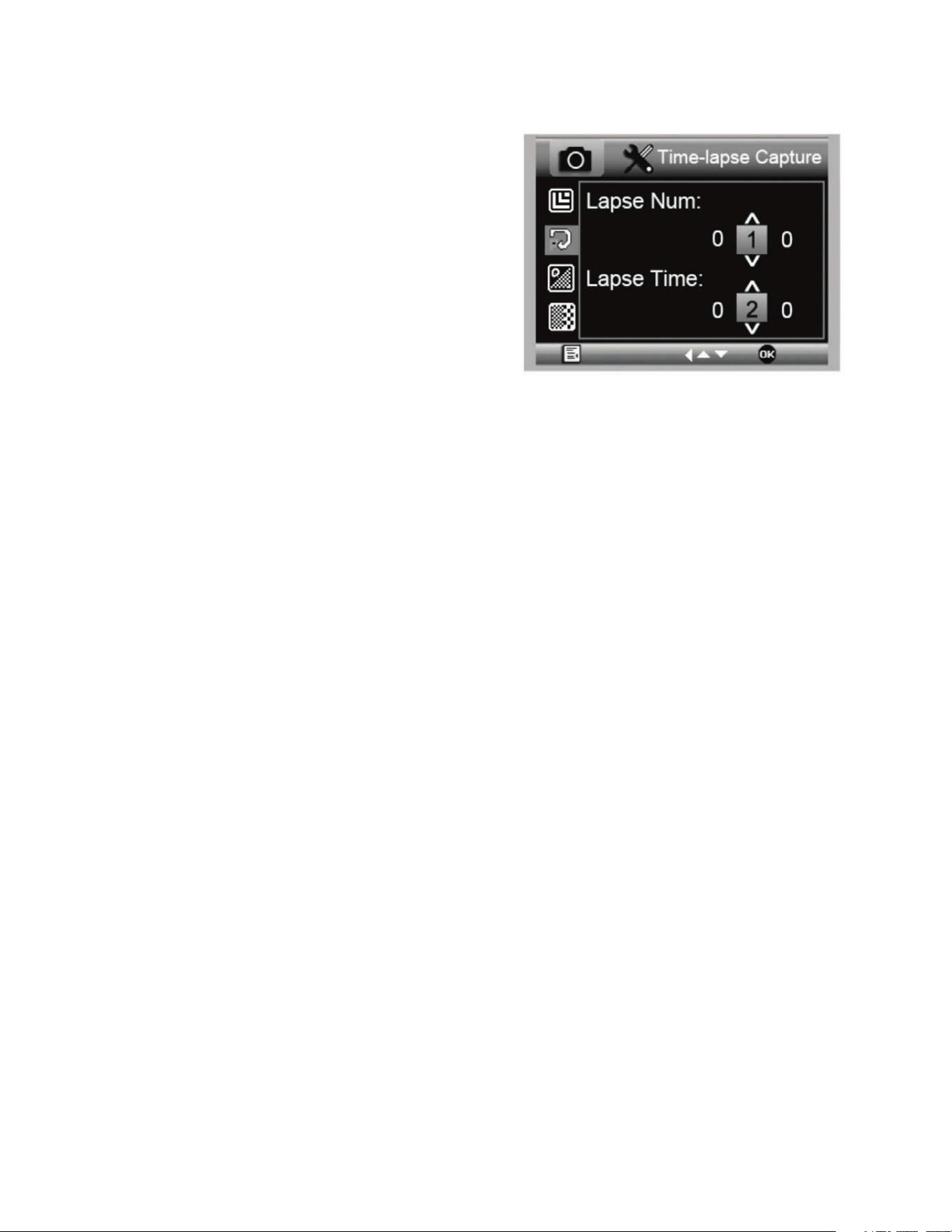
ESPAÑOL I 55
C. CAPTURA CON LAPSO TEMPORAL
+
MicroDirect le permite configurar el dispositivo para capturar
imágenes en un periodo de tiempo definido. A esta captura
se le llama lapso temporal.
+
Seleccionará primero el número de imágenes fijas o Núm.
de lapsos que desea que capture el dispositivo. Puede
variar entre 2 y 999 imágenes.
+
Use el botón Abajo (9) para moverse por los números de 0
a 9. Cuando tenga el primer dígito deseado, pulse el botón
Modo (6) para pasar al dígito siguiente.
+
De nuevo, use el botón Abajo (9) para establecer el dígito.
+
Cuando haya elegido el número de imágenes fijas, pulse el
botón Modo (6) para moverse a la selección de lapso temporal.
+
El lapso temporal determina el tiempo que transcurrirá
entre cada captura de imagen fija.
+
Establezca estos números con el método anterior para el número de lapso.
+
Las opciones se muestran en segundos, y varían entre 1 segundo y 999 segundos.
+
Este valor, junto con el número de imágenes, determinará la duración general del lapso temporal.
+
Por ejemplo: Si elige tomar 999 imágenes con un intervalo entre ellas de 999 segundos, tendrá un total de 277 horas
documentadas. 999 segundos = 16,65 minutos. Multiplíquelo por 999 (imágenes) = 16.633,35 minutos. 16,633.35 / 60
(minutos por hora)= 277 horas o 11,55 días documentados.
+
Cuando haya establecido el número de imágenes y el intervalo, pulse el botón Captura/Aceptar (8) para confirmar.
+
Pulse el botón Menú (7) para volver a la imagen en directo.
+
Pulse el botón Captura (8) para iniciar el lapso temporal.
+
Cuando se hayan capturado todos los fotogramas del modo de lapso temporal, el microscopio MicroDirect
®
1080p HD volverá
al modo de vista preva normal.
NOTA: El tiempo de APAGADO AUTOMÁTICO debe establecerse en un valor superior al tiempo de lapso temporal establecido. Consulte la
sección sobre la FUNCIÓN DE APAGADO AUTOMÁTICO y asegúrese de realizar sus cálculos correctamente.
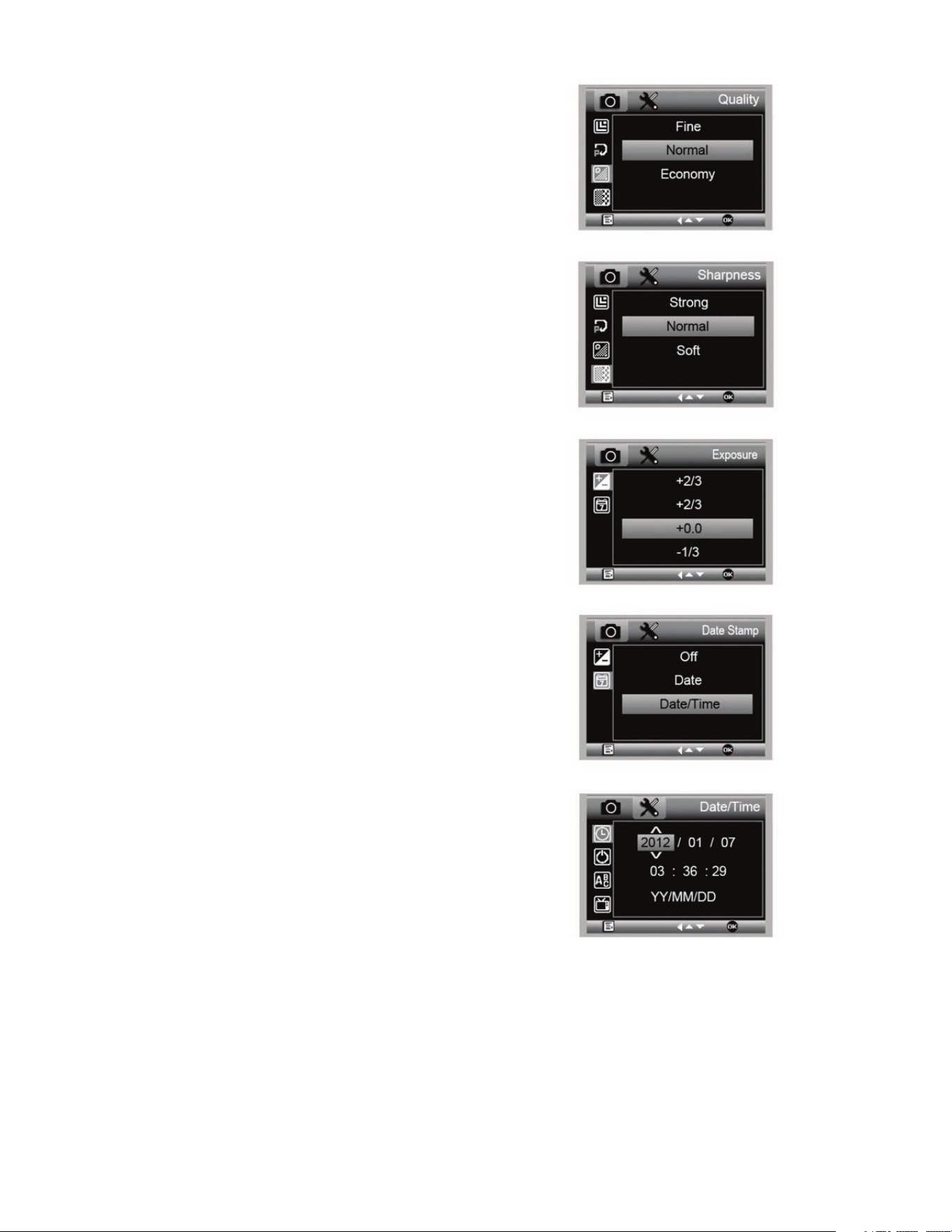
56 I ESPAÑOL
D. CALIDAD DE IMAGEN
+
Cuando esté en la sección de calidad de imagen del menú de
configuración, muévase con el botón Abajo (9) y seleccione:
Bueno, Normal o Economía.
+
La calidad de imagen determinará la relación de compresión
de la imagen.
+
Cuando esté satisfecho con la selección de calidad de
imagen, pulse el botón captura/aceptar (8) para confirmar.
E. DEFINICIÓN
+
Aquí puede ajustar la definición de la imagen. Las opciones
son fuerte, normal, suave.
F. EXPOSICIÓN (BRILLO)
+
Seleccione el valor deseado pulsando el botón Abajo (9).
+
Confirme la selección pulsando el botón captura/aceptar (8).
G. MARCA DE FECHA
+
Elija si se mostrará la marca de fecha.
1. Apagado
2. Solo fecha
3. Fecha/hora
H. FECHA/HORA
(MENÚ PRINCIPAL 2)
+
Seleccione el valor deseado pulsando el botón Abajo (9).
+
Confirme la selección pulsando el botón captura/aceptar (8).
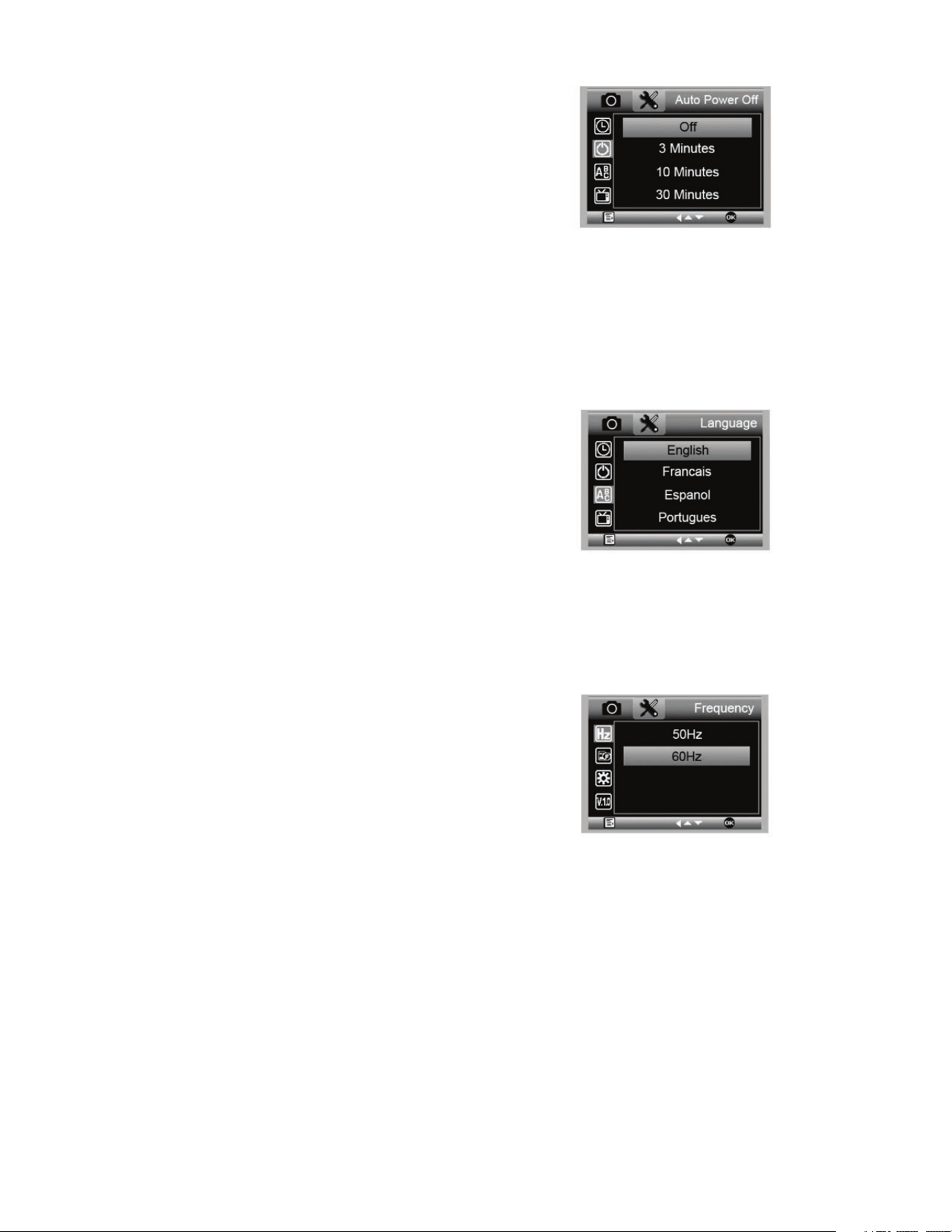
ESPAÑOL I 57
I. APAGADO AUTOMÁTICO
+
Aquí puede configurar la unidad para apagarse automáticamente
cuando esté sin uso. Las selecciones son:
1. APAGADO (por defecto)- Mantendrá encendido el
dispositivo hasta que lo apague manualmente.
2. 3 minutos- Se apagará pasados 3 minutos seguidos
sin uso.
3. 10 minutos- Se apagará pasados 10 minutos
seguidos sin uso.
4. 30 minutos- Se apagará pasados 30 minutos
seguidos sin uso.
J. IDIOMA
+
Aquí puede elegir el idioma preferido. Las selecciones son:
K. FRECUENCIA
+
Aquí puede seleccionar la frecuencia. Las selecciones son:
1. 50 Hz (por defecto) (Estados Unidos)
2. 60 Hz (La mayoría de los demás países)
NOTA: Investigue su país específico antes de configurar los Hz.
1. Inglés
2. Alemán
3. Español
4. Ruso
5. Italiano
6. Francés
7. Portugués
8. Holandés
9. Polaco
10. Japonés
11. Coreano
12. Chino
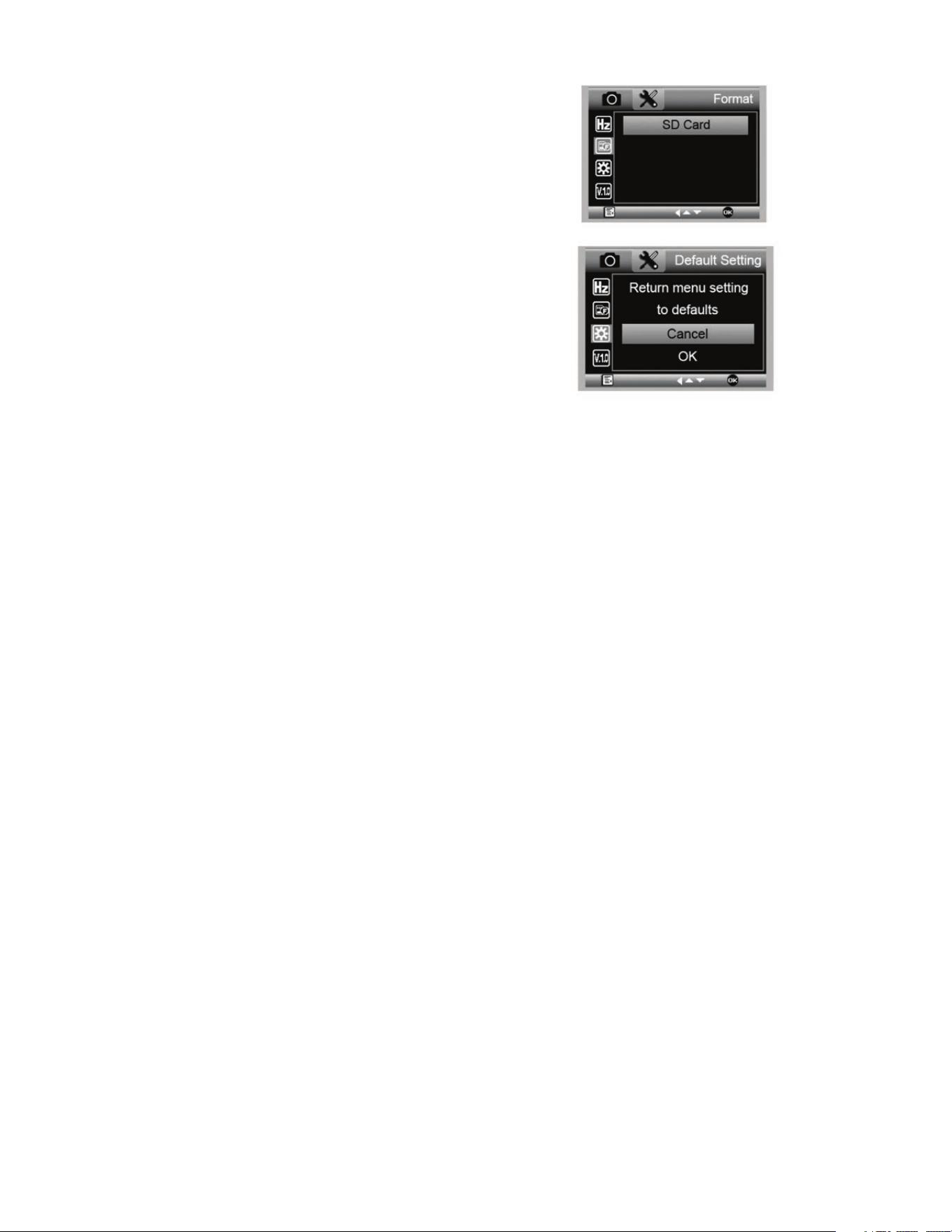
58 I ESPAÑOL
5. CUIDADOS Y MANTENIMIENTO
Su microscopio Celestron MicroDirect
®
1080p HD es un instrumento óptico de precisión y debe tratarse con cuidado
en todo momento. Siga estas recomendaciones de cuidados y mantenimiento y su microscopio necesitará de muy
poco mantenimiento durante su vida útil.
+
Guarde el microscopio en un lugar seco y limpio.
+
No use nunca el microscopio donde esté restringido el
uso de este tipo de dispositivos. Un uso inadecuado
crea riesgos de accidentes graves.
+
Use el microscopio exclusivamente en una gama de
temperatura de 23° a 120°F (-5° a 50° C). Intente limitar
los cambios súbitos de temperatura, podría generar
humedad en el chasis del microscopio..
+
No intente acceder a los componentes internos de su
microscopio ni intente modificarlo en modo alguno. El
mantenimiento y las reparaciones deben ser realizados
exclusivamente por técnicos autorizados.
+
Mantenga su microscopio alejado de agua y otros
líquidos. No lo use nunca en la lluvia o la nieve. La
humedad crea riesgos de incendio y electrocución.
+
Si la superficie exterior del microscopio necesita limpieza,
límpiela con una gamuza humedecida.
6. GARANTÍA
Su microscopio Celestron MicroDirect
®
1080p HD tiene una garantía limitada de dos años. Visite el sitio web de Celestron
para obtener información detallada de todos los microscopios Celestron.
L. FORMATO
+
Aquí puede formatear la tarjeta micro SD.
ADVERTENCIA: Cuando formatee se borrarán todos los archivos e
información guardados en la micro SD.
M. CONFIGURACIÓN POR DEFECTO
+
Aquí puede elegir restablecer la configuración de sistema a
los valores por defecto.
Para obtener un manual completo con la configuración
detallada y las opciones de conexión a PC use el CD/DVD
ROM incluido para descargar el manual. Si no tiene una unidad
de CD/DVD ROM, acceda a www.celestron.com y haga
clic en SUPPORT para descargarlo.

ESPAÑOL I 59
NOTAS
© 2020 Celestron • Todos los derechos reservados
celestron.com/pages/technical-support
2835 Columbia Street • Torrance, CA 90503 EE.UU.
Nota FCC: Este equipo ha sido probado y cumple con los límites de un dispositivo digital de Clase B, según el apartado 15 de las normas FCC. Estos límites están diseñados para proporcionar una protección
razonable contra interferencias dañinas en una instalación doméstica. Este equipo genera, usa e irradia energía de radiofrecuencia y, si no se instala y utiliza de acuerdo con las instrucciones, puede provocar
interferencias dañinas en comunicaciones por radio. Sin embargo, no existe ninguna garantía de que no se produzcan interferencias en una instalación concreta. Si este equipo causa interferencias dañinas en
la recepción de radio o televisión, lo que puede determinarse apagando y encendiendo el equipo, se recomienda al usuario intentar corregir las interferencias con una o varias de las medidas siguientes:
+ Reorientar o recolocar la antena receptora.
+ Aumentar la separación entre el equipo y el receptor
+ Conecte el equipo a una toma de corriente o circuito distinto de
aquél al que esté conectado el receptor.
+ Consultar al vendedor o a un técnico experimentado de radio/TV
para obtener ayuda.
Este producto ha sido diseñado y está pensado para ser usado por personas de 14 años o más de edad. El diseño y las especificaciones del producto están sujetos a cambios sin notificación previa.