Quick Start Guide
Compact IP Power Management - BlueBOLT
®
Enabled
C3-IP

2
Contents
Custom Install Power Management ......................................................3
Important Safety Instructions ...........................................................3
Lights ............................................................................4
Mounting ..........................................................................4
BlueBolt...........................................................................4
Product Features ....................................................................5
Advanced Operations.................................................................6
C3-IP Advanced Operation ..........................................................6
Status .........................................................................6
Password Protection .................................................................7
Password requirements: ............................................................7
Troubleshooting .....................................................................8
General Use .....................................................................8
BlueBOLT/Network Connectivity .........................................................8
C3-IP Specications..................................................................9
Technologies .......................................................................10
Protect-or-Disconnect..............................................................10
Standard Level RFI/EMI Filtration ......................................................10
Over/Under voltage load disconnect ....................................................10
Power Sequencing ................................................................10
IP Monitor and Control .............................................................10
Warranty information .................................................................11
Caution! Warranty Limitation for Internet Purchasers ........................................11
Limited three Year Warranty ............................................................11
What is Covered? .................................................................11
Limitations .....................................................................11
How do I Obtain Warranty Service? ....................................................11
FCC NOTICE........................................................................12
Technical Support ...................................................................12

3
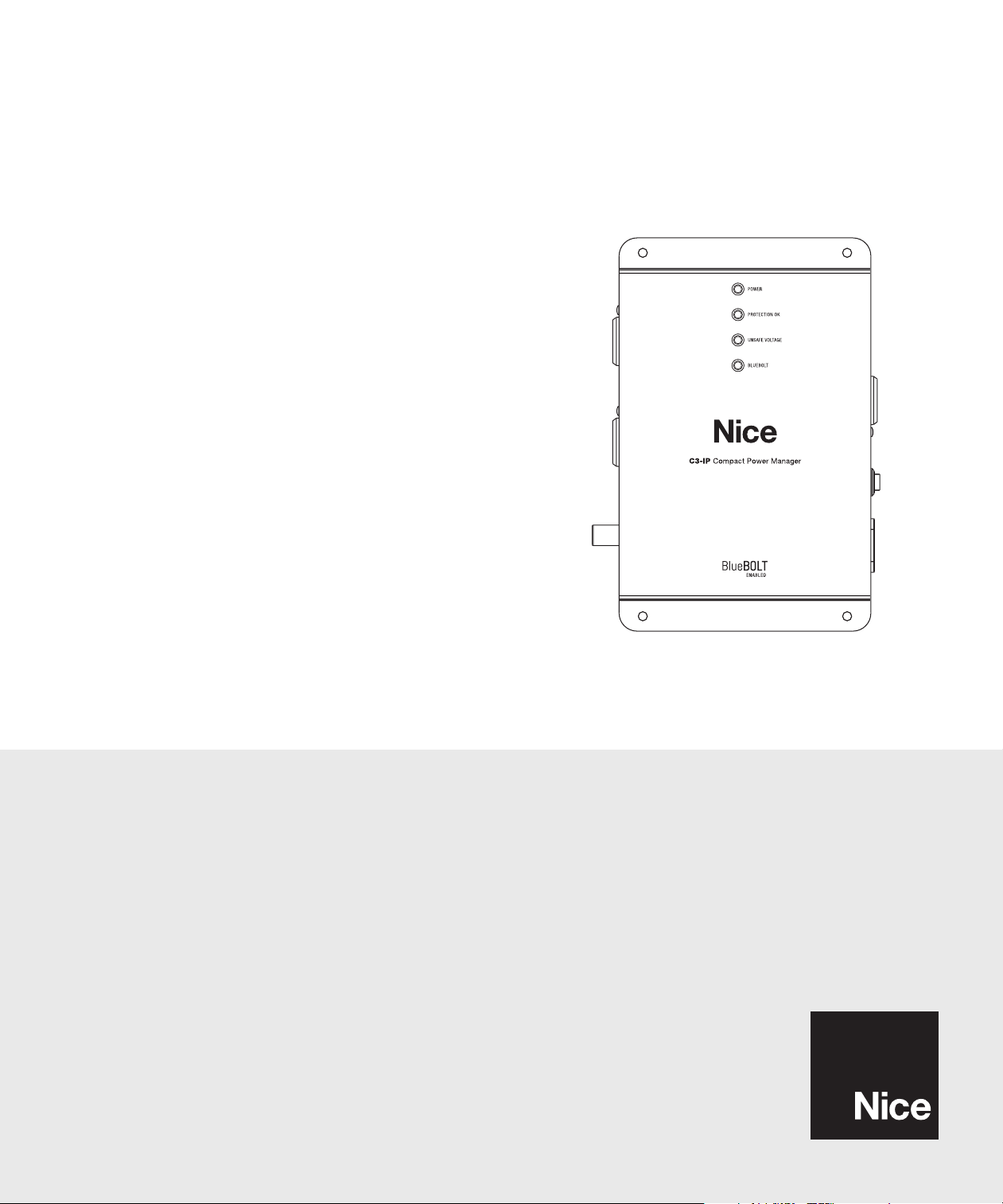
Congratulations on your purchase of the Nice C3-IP BlueBOLT
®
enabled compact power manager. The C3-IP is a full featured power conditioner providing
protection and ltration for maximum longevity and performance of connected equipment. BlueBOLT enabled, the C3-IP allows remote reboot of 3
individually controlled outlets, as well as the ability to monitor energy use, set alerts, program scheduled commands, network pings with conditional reboot
and much more.
IMPORTANT: You will need the C3-IP’s unique MAC Address and Challenge Key (provided on the 2 labels attached to the cover of this guide, as well
as on a label on the bottom of the product) to register the unit for control and monitoring at www.mybluebolt.com. One is permanently adhered and the
other is removable for your convenience.
• Protect-or-Disconnect surge protection
• Standard EMI/RFI Filtration
• Over/Under voltage load disconnect
• Power Sequencing
• IP Monitor & Control - BlueBOLT™ enabled for IP control and monitoring
• 3 individually controlled outlets
• Ground lug to attach Panamax a Nice brand signal-line protection modules
• Compact design with integrated brackets for wall mounting
• 0.5m IEC power cord
• 12A Capacity with circuit breaker
• 3 year limited product warranty
• With the provided power cord, C3-IP must be installed within close proximity of a mains socket outlet
Custom Install Power Management
1. Read these instructions.
2. Keep these instructions.
3. Heed all warnings.
4. Follow all instructions.
5. WARNING: Do not use this apparatus near water. To reduce the risk of re or electric shock, do not expose this apparatus to rain or moisture.
6. CAUTION - Could Contain Always On Receptacles (depending on BlueBOLT programming). To reduce risk of shock - Disconnect C3-IP from power
source before servicing any equipment connected to C3-IP.
7. Clean only with dry cloth.
8. Do not install near any heat sources such as radiators, heat registers, stoves, or other apparatuses that produce heat.
9. Do not defeat the safety purpose of the polarized or grounding type plug. A polarized plug has two blades, with one wider than the other. A
grounding type plug has two blades and a third grounding prong. The wide blade or the third prong is provided for your safety. If the provided plug
does not t into your outlet, consult an electrician for replacement of the obsolete outlet.
10. Protect the power cord from being walked on or pinched, particularly at plugs, convenience receptacles, and the point where they exit from the
apparatus.
11. Only use attachments/accessories specied by the manufacturer.
12. Refer all servicing to qualied service personnel. Servicing is required when the apparatus has been damaged in any way, such as power-supply
cord or plug is damaged, liquid has been spilled or objects have fallen into the apparatus, the apparatus has been exposed to rain or moisture, does
not operate normally, or has been dropped.
13. Where the power cord is used as the main disconnect device, the disconnect device shall remain readily accessible.
14. This device must be connected to a main socket outlet with a protective earthing (ground) connection.
15. With the provided power cord, C3-IP must be installed within close proximity to the mains socket outlet.
Important Safety Instructions
FEATURES
NOTE: You can nd the C3-IP manual on the product page at https://na.niceforyou.com/support/help-center.
4
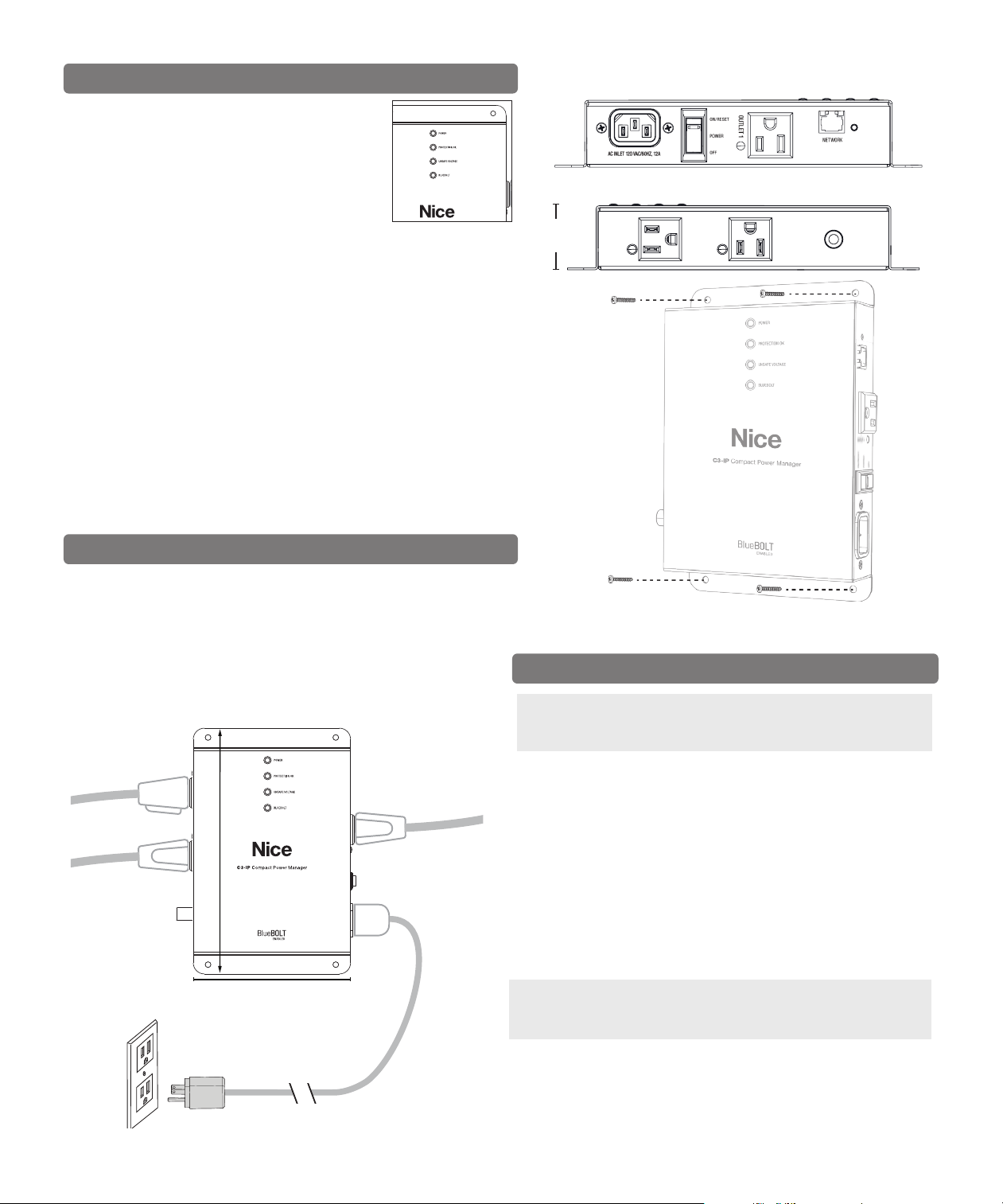
POWER
Blue Flashing quickly: Switch/breaker is off or tripped.
Blue Flashing slowly: Indicates that a power sequence
or power cycle is in progress.
Blue On: Outlets are on.
PROTECTION OK
Green off: Power is on, and the surge protection fuse is intact.
Green off with switch/breaker on indicates that surge protection fuse is
blown OR
Green off with switch/breaker off or during over/undervoltage event:
inconclusive
UNSAFE VOLTAGE
ON during Overvoltage or Undervoltage event.
BLUEBOLT
Green ashing: Acquiring IP address via DHCP.
Green solid: IP address acquired (NOTE: it does not stay in this state very
long before going to establish communication with BlueBOLT.)
Blue ashing: Attempting to establish communication with BlueBOLT.
Blue solid: Communication with BlueBOLT established.
Your C3-IP can be controlled and monitored from anywhere in the world
using the
BlueBOLT cloud.
On-Line Registration – The C3-IP is completely plug-and-play and does
not require any software installation. The online BlueBOLT control interface
is operated through an Internet web browser.
NOTE: Turn off all the equipment being connected to C3-IP until after all
the connections (including AC). It’s recommended to turn the connected
equipment back on sequentially one unit at a time.
The total output of the 3 AC outlets shall not exceed 12A.
Lights
Mounting
Use four #10 size screws to mount the C3-IP to
a wall or within a structured wiring can.
A. Using any Internet connected computer go to www.mybluebolt.com
using a standard Internet browser.
B. Follow the on-screen prompts to add a Location, and then to add a
Device.
NOTE: MAC address information is attached to this Instruction Manual
as well as on the bottom of the C3-IP. It is recommended the spare MAC
address label be adhered to the unit or stored in a secure location.
C. Once you input the MAC address and included Challenge Key, if
BlueBOLT cannot detect your device (please allow up to 20 seconds),
please follow the on-screen troubleshooting guide. Also conrm the
C3-IP is properly connected to your networking equipment.
BlueBolt
The enclosure includes screw-holes to install, as well as mounting brackets
(0.125 inch powder-coated steel) that secure the unit to the vertical posts
of a standard equipment rack. The brackets are able to be attached to the
enclosure in multiple directions in order to accommodate many different
racks and positions.
7.35”
5.5”
7.35”
5.5”
Plan for and allow space for cords, plugs,
wall-warts and transformers.
With the provided power cord, the
C3-IP should be installed within close
proximity to a main socket outlet.
0.5m IEC power cord
1.75”
OUTLET
2
OUTLET
3
GROUND
5
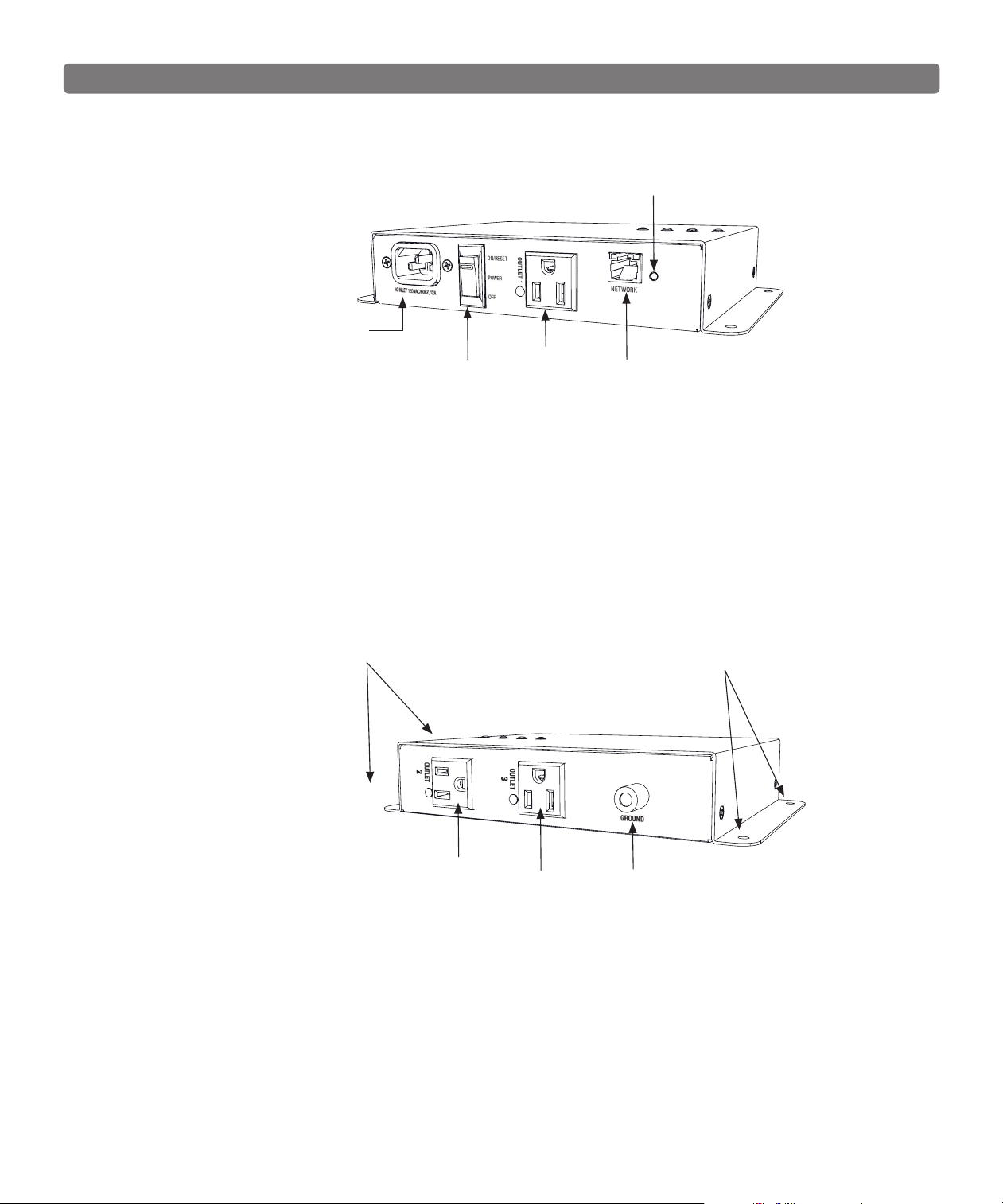
Power Cord Port
Product Features
DETAILED VIEW - RIGHT
DETAILED VIEW - LEFT
Power Switch / Circuit Breaker
When switched off all outlets turn off immediately.
When switch on, outlets turn back on in sequence. The
power switch also acts as the circuit breaker. If the
device is overloaded, the breaker will trip.
Ground Lug
Connect Panamax a Nice brand signal-line
protection modules grounds to this terminal. Protect
data lines as well as AC lines from surges is required
for the connected equipment warranty.
Network Connector
Connect an Ethernet cable (not provided) between the
NETWORK port and an Internet router or modem with
an established Internet connection for remote control
and monitoring.
Outlet 3
Outlet 2
Network Reset Button
Press using a safety pin, ball point pen or other small
object to reset connection to BlueBOLT cloud.
Outlet 1
Mounting Bracket Holes (2)
Mounting Bracket Holes (2)
6
Advanced Operations
C3-IP Advanced Operation
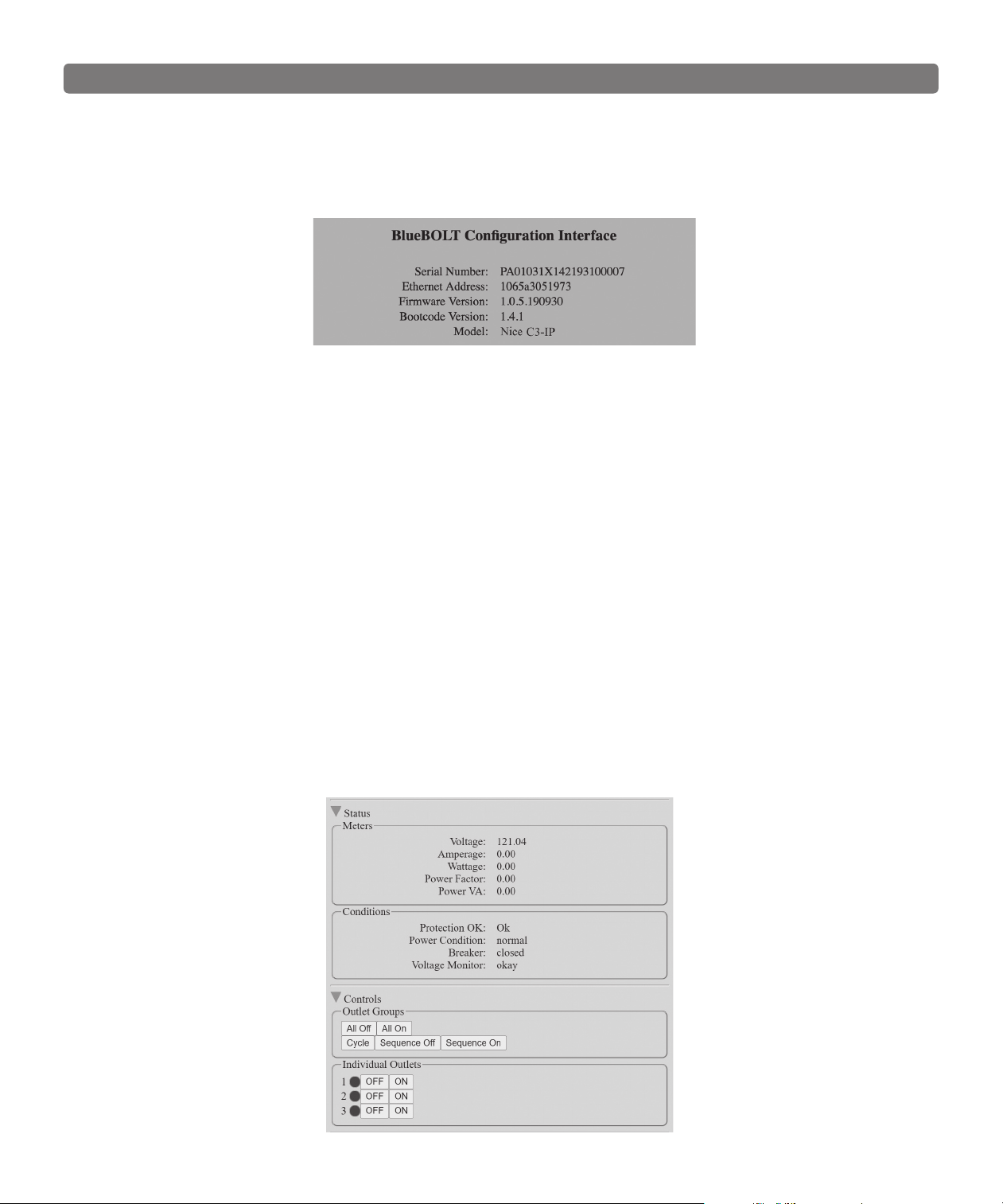
The C3-IP has an embedded web page for users that wish to use the C3-IP on a LAN. The embedded webpage displays the units’ serial number, ethernet
address (MAC ID), rmware version, bootcode version, brand and model number. To nd the C3-IP IP address, you can claim the device in BlueBOLT one
time and look under Device ADMIN for the IP address or you can use your networking devices. In some cases, your ISP modem may be equipped with a tool
to locate the IP address of the C3-IP.
Status
The Status screen shows you the integrity of the power: Voltage, Amperage, Wattage, Power Factor and Power VA. The Conditions screen displays the
Power Condition (detailed below), whether the Breaker is "opened" or "closed" and if the Voltage Monitoring is working.
Power Condition States
Normal = Input voltage is within range
Undervoltage = The voltage is so low that the over/under voltage load disconnect has engaged and all outlets are off.
Overvoltage = The voltage is so high that the over/under voltage load disconnect has engaged and all outlets are off.
Recovery = Recovery
1. Recovering from an over/under voltage load disconnect condition
2. Recovering after the breaker has been tripped and reset
3. Recovering after the switch has been turned off and turned on again or a power cycle
4. Recovery will also be stated when the unit is plugged into a live AC source.
Voltage Monitor States
Voltage Monitor = okay – voltage is within a safe range
Voltage Monitor = fault
1. Either the over/under voltage load disconnect has engaged and all outlets are off.
2. The breaker was tripped turning all outlets off
3. The power switch was turned off, turning all outlets off.
7
Password Protection
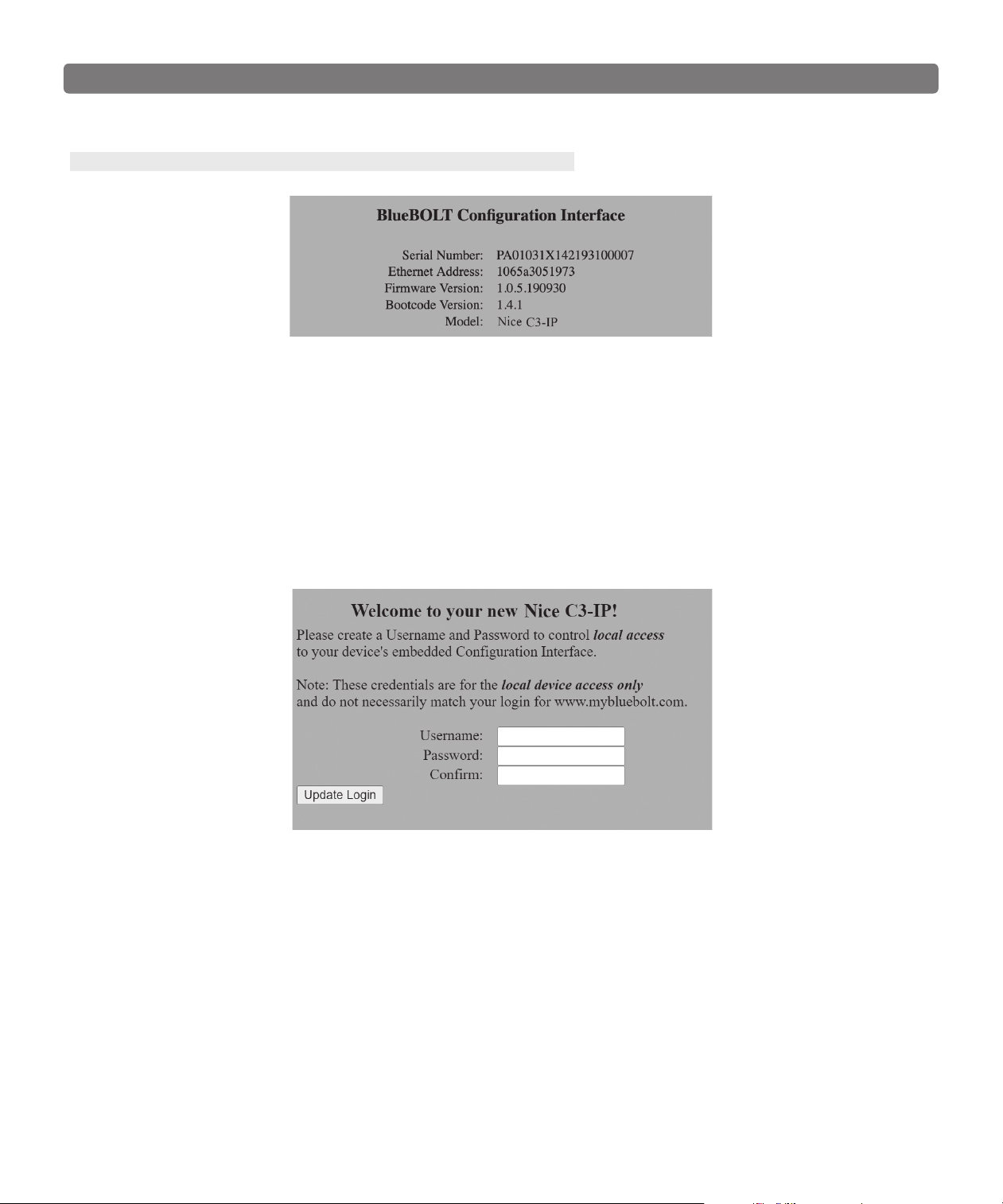
Once you have claimed your C3-IP, you must set up password protection. To do so, enter the Local IP address of the C3-IP into your browser. You can locate
the Local IP Address by clicking on Device Admin within the BlueBOLT user interface. This will take you to the embedded web page of the C3-IP.
NOTE: You must be on the same network as the C3-IP to view the embedded web page.
When you rst access the embedded web page, you will be prompted to create a unique user name and password.
Input a user name and password, and click the “Update Login” button.
Password requirements:
1. Minimum of 4 characters, maximum of 32 characters
2. Case-sensitive
3. Comprised of printable characters
4. The word "password" (upper or lower case) is not a valid password
5. Passwords of ve characters or less may not entirely consist of repetitive characters. For example: 1111, 22222 would be rejected. Example:
Pass12345 or Secure1111 would be accepted.
Once you have enabled the password protection, your browser will prompt you to sign in using the new admin and password. Depending on your browser,
you may need to refresh the page if the log in screen ashes.
8
Troubleshooting
General Use
My equipment doesn’t turn on.
Make sure that the C3-IP is plugged into a working AC outlet. Check all AC
connections. Make sure C3-IP and connected equipment are turned on. Conrm
“POWER ON” and individual outlet status LEDs are illuminated. Check to see if
the circuit breaker on the C3-IP needs to be reset (press in).
The C3-IP circuit breaker disconnects AC power from the
connected equipment.
You have exceeded the ampere rating for your C3-IP. As a temporary x, dis-
connect one or more pieces of equipment. Ask you dealer about additional Nice
products that may be required.
There is no picture or sound on my TV.
Ensure that the TV set is plugged into a powered AC outlet.
Check the appropriate connections to ensure that they are correctly and
securely installed.
BlueBOLT/Network Connectivity
Check these steps when having issues with BlueBOLT connectivity:
Is the C3-IP receiving power? Check the power cable and conrm the unit is ON.
Is the BlueBOLT port on the C3-IP connected to an active
local area network with Internet connectivity?
Check the cables connecting C3-IP to the router/switch, cables between the
router/switch and modem and the cable connecting the modem to the incoming
Internet data jack (coax or DSL)
Are the BlueBOLT Link and Activity lights on?
The “Link” light should be illuminated solid green if connected to a LAN or solid
blue to active LAN and is connected to BlueBOLT, and the “Activity” light should
be blinking intermittently (green).
Is your Internet connection functioning? Can you access
a general web page through a web browser running on a
computer connected to the same local area network?
If you have answered “Yes” to these questions and are still unable to connect
the C3-IP BlueBOLT, please contact customer service at 1-800-421-1587.

9
Product Weights and Dimensions
Length 7.35”
Width 5.5”
Height 1.58”
Weight 2.6lbs
UPC 050616010351
Environmental Specications
Temperature 0° C -+40° C (+32°F - +104°F)
Operating Humidity 0 – 90% non-condensing
External Pollution Degree Pollution Degree 2
AC Power 120Vac 50/60Hz
Total Outlets 3
Operating Control Type 1
Total Current Capacity 12A Maximum
Rated Impulse Voltage 1500V
Voltage Protection Rating (UL1449) L-N 500V
Initial Clamping Level 200V Peak, 141 RMS
Energy Dissipation 1680 Joules
Peak Impulse Current 12,000
Protect-or-Disconnect Yes
Over-voltage load disconnect 140 Vac
Under-voltage load disconnect 90 Vac
Filtration Technology Standard RFI/EMI Filtration
Filtration Rating 10dB @ 10kHz, 17dB @ 30kHz, 33dB @ 100kHz, 55dB @ 1MHz
Thermal Fusing Yes
Cord Length 0,5M IEC cord
C3-IP Specications

10
Technologies
Protect-or-Disconnect
In the event of a catastrophic surge such as lightning, AC power completely disconnects from connected equipment. If such a rare event occurs, the C3-IP
would require service.
Standard Level RFI/EMI Filtration
The standard level RFI/EMI lter employs a tuned lowpass lter to reduce the differential AC noise coming through your AC power line. The lter reduces the
AC line noise on average 10dB @ 10kHz, 17dB @ 30kHz, 33dB @ 100kHz, 55dB @ 1MHz.
Over/Under voltage load disconnect
The Over/Under voltage load disconnect circuit constantly monitors the incoming line voltage. If the incoming line voltage becomes dangerously high, it will
disconnect the load from the AC input. The high threshold is 140 Vac +/- 2 Vac.
If the incoming line voltage becomes dangerously low, it will disconnect the load from the AC input. The low threshold is 90 Vac +/- 2 Vac.
When the incoming voltage returns to a safe level, the C3-IP will automatically turn on and sequence to its original state before the Over/Under voltage
event.
Power Sequencing
Some complicated audio & video systems will require power sequencing. The C3-IP by default is a power sequencer. Power sequencing allows A/V
equipment to be powered up in stages which gives equipment time to stabilize before the next stage of equipment is energized.
When powering down, the sequence order is reversed, which results in a soft landing for your expensive A/V equipment. Power sequencing is also
convenient for network devices that requires network “handshakes” to properly communicate with each other.
After applying power to the AC line input and once you turn the power switch on, outlet 1 will turn on immediately. Outlet 2 will turn on 10 seconds after
outlet 1, and outlet 3 will have a 10 second delay from the power on time of the outlet 2. See defaults below.
Once you claim your C3-IP, you can change the default programing to meet your systems requirements and you have complete exibility.
IP Monitor and Control
The C3-IP can be monitored and controlled via an internal web page for LAN applications, or you can use the BlueBOLT cloud to monitor, control and
program your device from anywhere in the world via your computer or mobile device.
Outlet Sequence Default
Outlet 1 = 1 second turn on delay, 1 second delay off
Outlet 2 = 10 second turn on delay, 10 second delay off
Outlet 3 = 20 second turn on delay, 20 second delay off

11
Warranty information
Caution! Warranty Limitation for Internet Purchasers
Nice products purchased through the Internet do not carry a valid Product Warranty or Connected Equipment Protection Policy unless purchased from an Authorized Nice
Internet Dealer and the original factory serial numbers are intact (they must not have been removed, defaced or replaced in any way). Purchasing from an Authorized
Nice Internet Dealer insures that the product was intended for consumer use, has passed all quality inspections and is safe. Buying through auction sites or unauthorized
dealers may result in the purchase of salvaged, failed and/or products not intended for use in the US. In addition, Authorized Nice Internet dealers have demonstrated
sufcient expertise to insure warranty compliant installations. For a list of Authorized Nice Internet Dealers go to www.niceforyou.com
$5,000,000 Connected Equipment Limited Protection Policy*
Signal-line protection modules are required for the connected equipment policy. You can use other Nice component units or signal-line protection modules. The grounds of
the devices must be terminated together. All Nice Warranties and Connected Equipment Policies are valid only in the United States & Canada.
*Full Warranty and policy Information available at www.niceforyou.com
Limited three Year Warranty
What is Covered?
Nice North America LLC warrants to consumers who purchase this product that the product will be free from defects in materials and workmanship for a period of three
(3) years (terms will vary depending on product) from the date of purchase. It is not transferable.
If a defect exists, NICE NORTH AMERICA will have you ship the defective part or product to us and we will, at our option, either repair or replace it. This warranty does not
cover the cost of labor to remove a defective part or product or to reinstall any repaired or replacement part or product.
This warranty does not cover defects or damages caused by improper handling, maintenance, storage, installation, removal or re-installation, misuse, non-factory
authorized modication or alteration, use of incompatible accessories, impact by foreign objects, accident, re, acts of God, normal wear and tear or shipping damage
other than a shipment from NICE NORTH AMERICA.
Keep your original sales receipt as it will be required to obtain warranty service. This warranty shall not be extended or restarted upon receipt of any repaired or replacement part or
product under this warranty. No person is authorized to extend or otherwise modify this warranty.
Limitations
THE DURATION OF ANY IMPLIED WARRANTY, INCLUDING THE WARRANTIES OF MERCHANTABILITY AND FITNESS FOR A PARTICULAR PURPOSE, SHALL NOT EXCEED THE
WARRANTY PERIOD PROVIDED HEREIN.
Some states do not allow limitations on how long an implied warranty lasts, so the above limitation may not apply to you.
NICE NORTH AMERICA SHALL NOT BE LIABLE FOR ANY INCIDENTAL OR CONSEQUENTIAL DAMAGES RESULTING FROM THE BREACH OF ANY WRITTEN OR IMPLIED
WARRANTY.
Some states do not allow the exclusion or limitation of incidental or consequential damages, so the above limitation or exclusion may not apply to you.
This warranty gives you specic legal rights, and you may also have other legal rights which vary from State to State.
How do I Obtain Warranty Service?
Customers in the United States
To obtain warranty service, email our Returns Department at [email protected]. Include your name, address, telephone number, the model number of your product,
a copy of your original sales receipt, and a description of the problem. Unless we need to discuss the situation further with you, you will be emailed a Return Authorization
Number and shipping instructions. If we need to discuss the situation further with you, we will call or email you. NICE NORTH AMERICA may require troubleshooting on
installed product before a Return Authorization Number is issued. Anything shipped to us without a Return Authorization Number will be automatically returned unopened.
You are responsible for the charges for shipment to us.
Customers outside of the United States
For customers outside of the United States, you are required to address any warranty service requests to the dealer from which you purchased the Nice North America
product or the distributor that supplied such product.
For purchasers whose warranty rights are governed by the consumer protection laws or regulations of a country other than the U.S., the benets conferred by this
warranty are in addition to any conferred by such other laws or regulations, and any limitations of rights stated in this warranty may or may not apply.

Technical Support
Call 800-421-1587
You may also email [email protected]
All equipment being returned for repair must have a Return Merchandise Authorization (RMA) number. To get an RMA number, please call
Nice Tech Support. Before returning any equipment for repair, please be sure that it is adequately packed and cushioned against damage
in shipment, and that it is insured. We suggest that you save the original packaging and use it to ship the product for servicing. Also, please
enclose a note giving your name, address and phone number.
www.niceforyou.com • www.mybluebolt.com
10020705 Rev-F
Niceforyou.com
©2023 Nice North America LLC.
All rights reserved.
Technical Support:
800-421-1587
Technical Support Hours:
M – F, 6am – 4pm PST
Nice North America
c/o Customer Service
5919 Sea Otter Place, Ste. 100
Carlsbad, CA 92010
FCC NOTICE
This equipment has been tested and found to comply with the limits for a Class B Digital Device, pursuant to Part 15 of the FCC Rules. These limits are
designed to provide reasonable protection against harmful interference in residential installation. This equipment generates, uses, and can radiate radio
frequency energy and, if not installed and used in accordance with the instructions, may cause harmful interference to radio communications. However,
there is no guarantee that interference will not occur in a particular installation. If this equipment does cause harmful interference to radio or television
reception, which can be determined by turning the equipment off and on, the user is encouraged to try to correct the interference by one or more of the
following measures:
1. Reorient or relocate the receiving antenna.
2. Increase the separation between the equipment and receiver.
3. Connect the equipment into an outlet on a circuit different from that to which the receiver is connected.
4. Consult the dealer or an experienced radio/TV technician for help. Any special accessories needed for compliance must be specied in the
instruction.
CAUTION: Shielded power cord is not required. However, if after EMC testing we nd that a shielded cord is required, this text will need to be restored.
CAUTION: Any changes or modications not expressly approved by the party responsible for compliance could void the user’s authority to operate the
equipment. If you require technical support or equipment service, please contact Nice.