
INSTANT
®
MAGIC FROTH
™
USER MANUAL
Before using your Instant Magic Froth, read all instructions,
including the Safety Information starting on page 2. Failure to
follow the safeguards and instructions may result in personal injury
and/or property damage. Keep this manual for reference.
to your new Instant Magic Froth!
Now you can transform everyday coffee into your frothy favorites. With
customizations and simple controls, we hope you’ll become your own
barista, right in your home.
Get started with your Magic Froth!
.
Welcome

CONTENTS
Important safeguards 2
What’s in the box 5
Before you froth 6
Using your Instant Magic Froth 7
Frothing milk 11
Care, Cleaning and Storage 16
Troubleshooting 17
Learn more 19
Warranty 20

2
User Manual
IMPORTANT
SAFEGUARDS
Failure to adhere to safety instructions may result in personal
injury and/or property damage and may void your warranty.
READ ALL INSTRUCTIONS
Before using your Instant Magic Froth, please read all instructions,
including the Safety Information below. Keep this manual for reference.
Placement
• DO operate the appliance on a stable, non-combustible, level surface.
• DO NOT place the appliance on or near a gas or electric burner, or
in an oven.
General Use
• DO NOT use this frother outdoors.
• DO NOT let the frother operate without milk.
• DO NOT use the appliance for anything other than its intended use.
Not for commercial use. For household use only.
• DO regularly inspect the appliance and power cord.
• DO NOT leave the appliance exposed to sun, wind, and/or snow.
• DO operate and store the appliance above 32°F / 0°C.
• DO NOT allow children operate the appliance; close supervision
is required when any appliance is used near children.
• DO NOT let children play with this appliance.
• DO NOT open the top cover during the frothing process; liquid
is extremely hot and there is risk of personal injury and/or
property damage.
• DO NOT touch hot surfaces. Use handles or knobs.
The use of an accessory not evaluated for use with this appliance may
cause personal injury or property damage.
IMPORTANT
SAFEGUARDS

3
User Manual
Care and Storage
• DO unplug from outlet when not in use before cleaning. Allow the
appliance to cool before putting on or taking off parts, and before
cleaning the appliance.
• DO NOT store any materials in the frother pitcher when not in use.
Power Cord
A short power-supply cord is used to reduce the risk resulting from
it being grabbed by children, becoming entangled in, or tripping over
a longer cord.
Spilled liquids from this frother can cause serious burns.
Keep appliance and cord away from children.
• DO NOT let the power cord touch hot surfaces or open flame,
including the stovetop.
• DO NOT use with power converters or adapters, timer switches or
separate remote-control systems.
• DO NOT let the power cord hang over the edge of tables or
counters.
• DO unplug your frother by grasping the plug and pull from the
outlet. Never pull from the power cord.
• DO NOT use an extension cord.
This appliance has a polarized plug, with one blade wider than the
other. To reduce the risk of electric shock:
• ONLY plug the power cord into a grounded electrical outlet.
• DO NOT attempt to modify the plug. If it does not fit into the outlet,
contact a qualified electrician.
Electrical Warning
The frother contains electrical components that are an electrical
shock hazard. Failure to follow these instructions may result in electric
shock, personal injury and/or property damage.
To protect against electrical shock, personal injury and/or
property damage:
• DO NOT remove the bottom cover. No user-serviceable parts inside.
Repair should be done by authorized service personnel only.

4
User Manual
• To disconnect, turn any controls to the OFF position and remove
plug from power source. Always unplug when not in use, as well
as before adding or removing parts or accessories, and before
cleaning. To unplug, grasp the plug and pull from the outlet. Never
pull from the power cord.
• DO regularly inspect the appliance and power cord. DO NOT
operate the appliance if the power cord or plug is damaged, or
after the appliance malfunctions or is dropped or damaged in
any manner. For assistance, contact Customer Care by email at
support@instantpot.com.
• DO NOT attempt to repair, replace or modify components of the
appliance, as this may cause electric shock, fire, other personal
injury and/or property damage, and will void the warranty.
• DO NOT tamper with any of the safety mechanisms, as this may
result in personal injury and/or property damage.
• DO NOT immerse power cord, plug or the appliance in water or
other liquid.
• DO plug this appliance into a polarized outlet one way. This
appliance has a polarized plug, and one blade is wider than
the other.
• DO NOT use the appliance in electrical systems other than
120 V ~ 60 Hz for North America.
SAVE THESE INSTRUCTIONS
Failure to adhere to safety instructions may result in personal
injury and/or property damage and may void your warranty.
5
User Manual
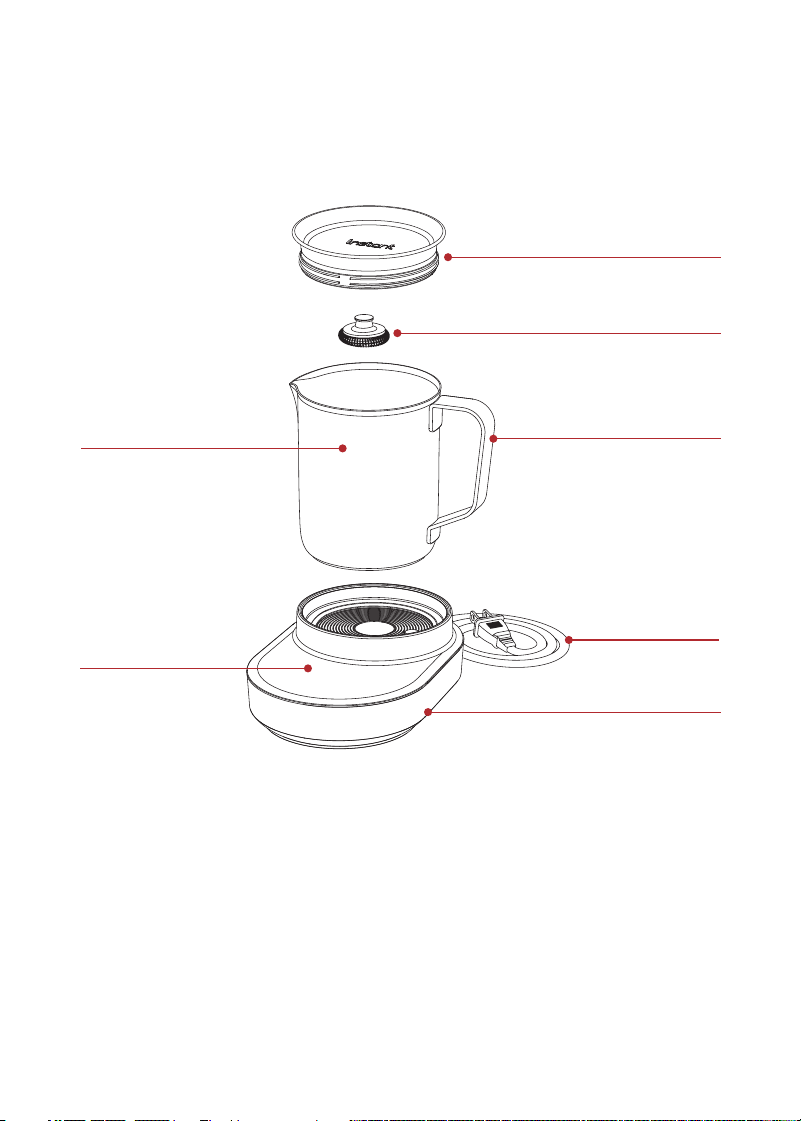
WHAT’S IN THE BOX
Instant Magic Froth
Illustrations are for reference only and may differ from the actual product.
Remember to recycle!
We designed this packaging with sustainability in mind. Please recycle
everything that can be recycled where you live. Be sure to keep this
User Manual for reference.
Power Cord
Control Panel
Stainless Steel Pitcher
Lid
Frothing Whisk
Frothing Base
Stay-cool
Pitcher Handle

6
User Manual
BEFORE YOU FROTH
Initial set up
1. Pull the Instant Magic Froth and all parts out of the box.
2. Remove all packaging materials from within and around the frother.
3. Place your frother on a dry, stable, level surface.
Initial washing
1. Wash the frothing whisk, pitcher and lid in warm soapy water,
then rinse and dry thoroughly. You can also clean these parts on
the top rack of the dishwasher.
2. With a barely damp cloth, wipe down the frother base and
control panel.
7
User Manual
USING YOUR INSTANT MAGIC FROTH
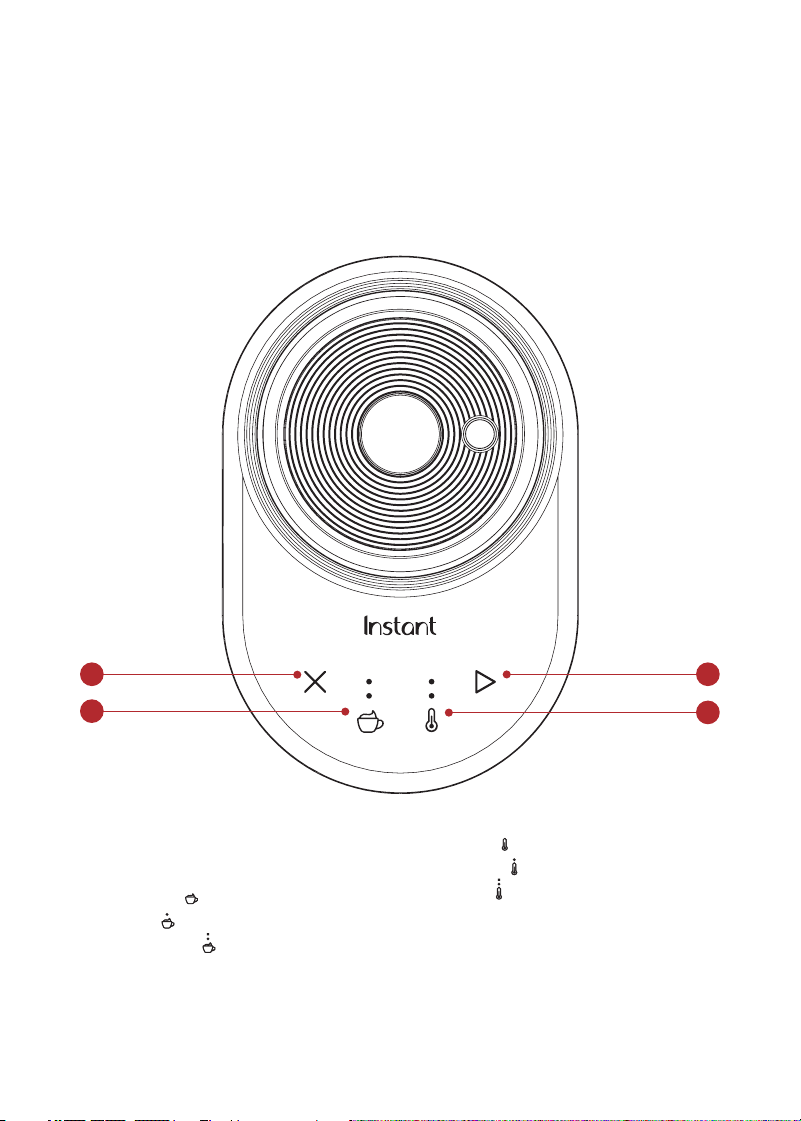
Control panel
Your Instant Magic Froth was designed with an easy-to-use control
panel and 4 simple buttons.
1
3
2
4
1. Cancel
2. Start
3. Foam options
• No Foam
(Stir only)
• Foam
(Low Speed)
• Extra Foam (High Speed)
4. Temperature level
• Cool
(Heat OFF)
• Warm
• Hot

8
User Manual
Plugging in your Instant Magic Froth
Once you’ve followed the initial setup and washing instructions, plug
the frother base power cord into an outlet.
• The control panel buttons will light up then enter Ready mode.
Default settings for Foam and Temperature levels will light up.
• After 5 minutes of inactivity, the frother enters Standby mode. The
control panel will dim.
• To re-enter Ready mode, press any button or place/remove the
frothing pitcher on/from the frother base.
Sound settings
Turn sound off
1. Press and hold and buttons together for 3 seconds.
2. Both and
indicator lights blink once. Sound is turned off and
the frother returns to Ready mode.
Turn sound on
1. Press and hold and buttons together for 3 seconds.
2. Both and indicator lights blink twice. Sound is turned on and
the frother returns to Ready mode.
9
User Manual
Temperature and Foam Settings
Your Instant Magic Froth has been designed to help you personalize
your foam at the touch of a button. The 3 temperature settings and
3 foam settings can be combined to create up to 9 different programs
for your perfect froth.
Temperature
The temperature setting lets you choose whether to froth up warm
foam and heated milk, or create cold foam for iced coffee and matcha.
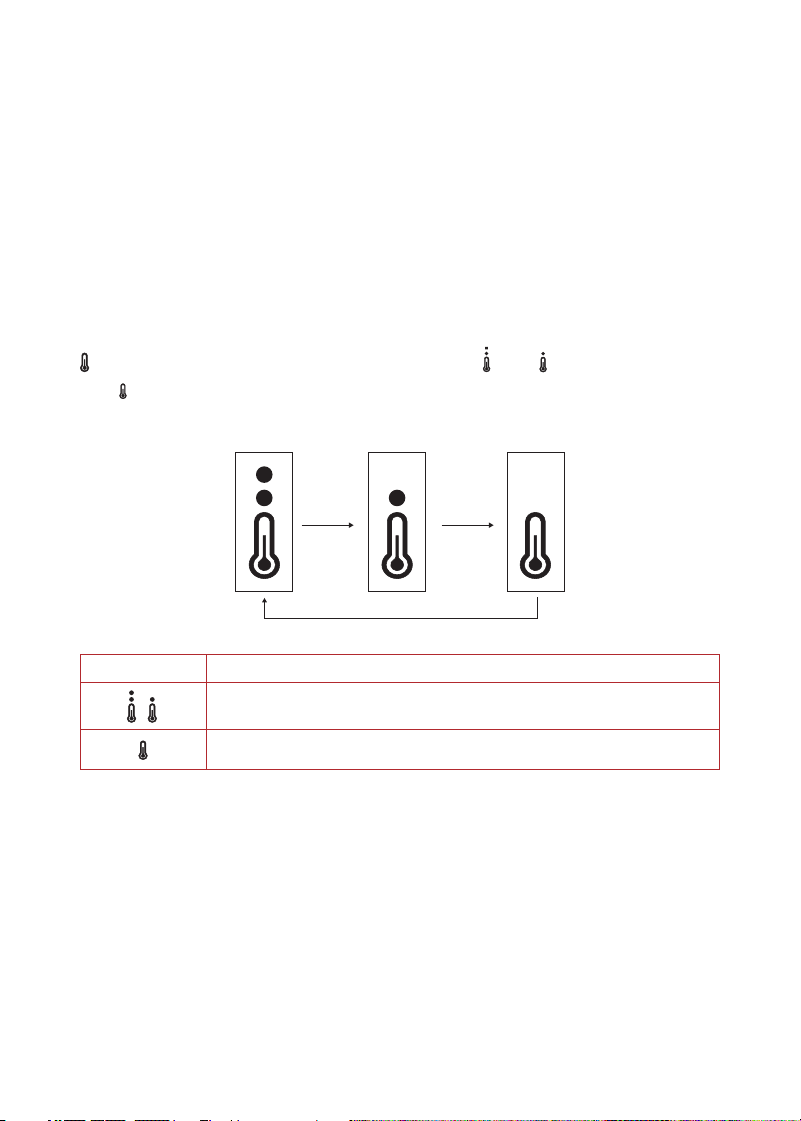
To set or change your temperature level before frothing, press the
button to cycle through the three options:
Hot,
Warm
and OFF/Cold.
Hot Warm OFF/Cold
Temperature Try using it for…
Cappuccino, Latte, Mocha, Flat white, Hot chocolate,
heated milk
Chocolate milk, Iced coffee, Iced matcha
Drinks mentioned are only suggestions. Experiment with different settings and drinks, to your
personal taste.
10
User Manual
Foam level
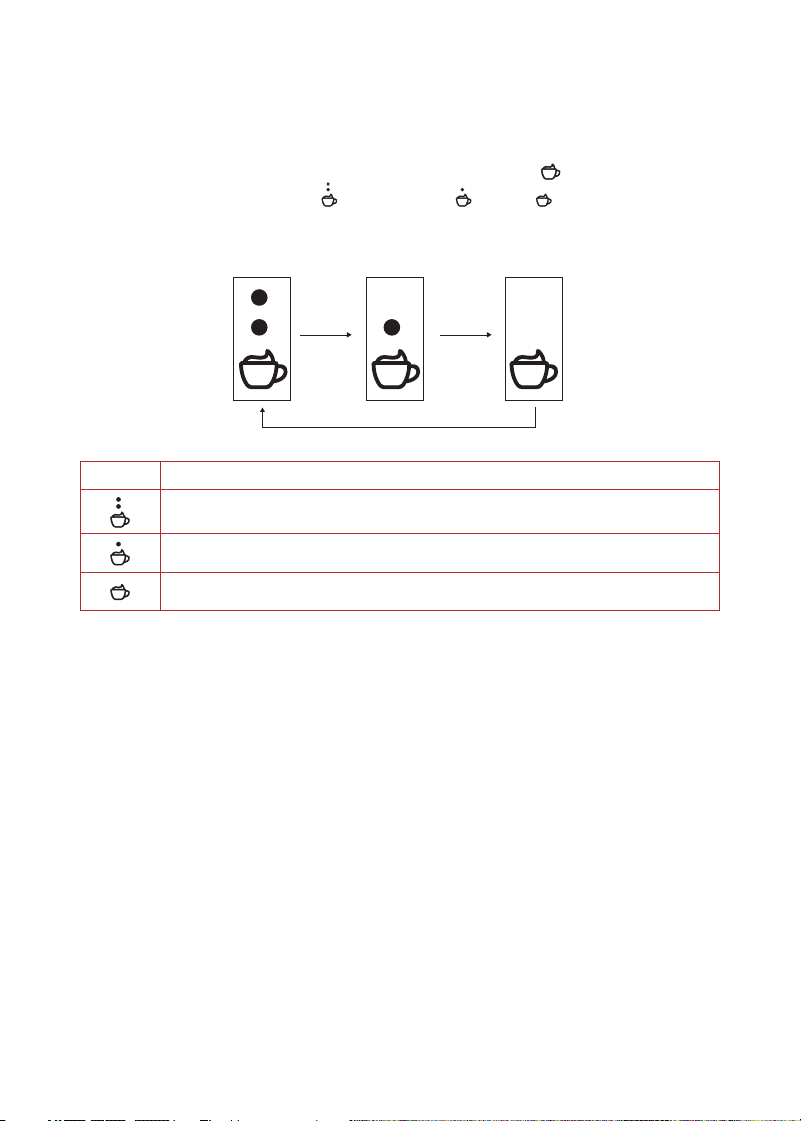
With adjustable foam settings, you can froth up a little foam or a lot,
or turn foaming off to gently stir ingredients into heated milk. To set
or change the foam level before frothing, press the
button to cycle
through the three options:
Extra Foam,
Foam, OFF/Stir Only.
Extra Foam Foam
OFF/Stir Only
Foam Try using it for…
Cappuccino, Macchiato
Latte, Matcha
Hot Chocolate, Chocolate milk, Chai, Flat white, Café au lait
Drinks mentioned are only suggestions. Experiment with different settings and drinks, to your
personal taste.

11
User Manual
FROTHING MILK
1. Place frothing whisk securely into the frothing pitcher. Position
the flat end of the frother whisk over the rod at the bottom of the
frothing pitcher and push down until it is secure.
Do not operate the frother without a frothing whisk installed into the pitcher,
as this can cause uneven heating and burning.
2. Pour fresh, cold milk of choice into the frothing pitcher between
the MIN and MAX frothing indicator lines. See “Milk Measurements”
on page 12.
Do not overfill the pitcher. Overfilling may cause the milk frother to overflow
when using a foam setting.
3. Cover the frothing pitcher with the lid.
4. Place the frothing pitcher securely on the frother base.
5. Press Start button to begin frothing with default or previously
used settings, or
6. Change the and settings and then press . See “Temperature
and Foam Settings” on page 9.
7. The frother will “beep” one time and begin the frothing cycle.
To stop frothing, press the Cancel button or remove the
frothing pitcher.
8. When the milk has reached the correct temperature and thickness
the frother will stop, return to Ready mode and “beep” one time.
9. Carefully remove the frothing pitcher from the frother base using
the stay-cool frother handle. Serve the foam with a spoon or pour
directly from the spout.
10. Enjoy your frothy beverage!
The frothing pitcher must always be in place on the frother base for your
Instant Magic Froth to operate. Removing it at any time before or during use will
automatically stop frothing and the frother returns to Ready mode.
12
User Manual
Be careful: Frothing reaches high temperatures. DO NOT touch the
frother pitcher or frother base during or immediately after the brewing
process as both will be very hot. Touching hot surfaces may result in
burns, other personal injury and/or property damage.
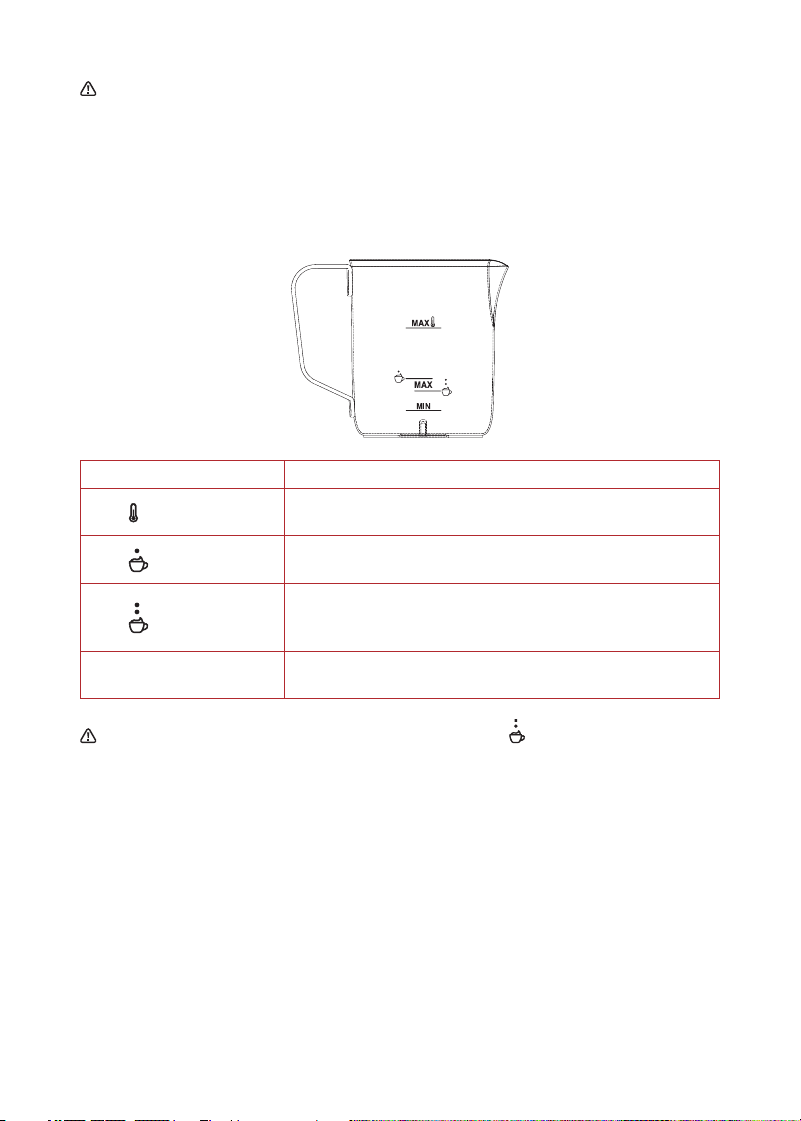
Milk Measurements
Milk Level Marking Components
MAX
17 oz.
Maximum level for heating milk
MAX
8.5 oz.
Maximum level for milk frothing at Foam setting
MAX
6.5 oz.
Maximum level for more milk frothing at
Extra Foam setting
MIN
3.4 oz.
Minimum level for milk heating and frothing
Be careful: To avoid overflow when using the Extra Foam setting,
do not add more than 6.5 oz milk to the frothing pitcher.

13
User Manual
Frothing Tips
Tip Details
Cold milk is best • Using the coldest, freshest milk will almost always
produce the best foam.
• When frothing, millions of tiny air bubbles are
introduced into the liquid. The longer it takes to heat
up, the more air can be infused into the liquid. The
end result is silky rich foam and less chance
of scalding.
Not all dairy-free
milks produce foam
• Milk with lots of fat will form a thick, creamy foam.
• Milk with less fat and more protein will create a light,
airy foam.
• Some plant-based milks are too watery to create the
best results. See “Types of Milk” on the following page.
Infuse your foam
with flavor
• Before frothing, add aromatic spices to the pitcher,
like cinnamon, cardamom or nutmeg, or other
fragrant items like lavender.
Let the frother rest • When frothing up large batches of foam, we suggest
letting your frother rest for 3–4 minutes after every
2 frothing cycles to ensure it continues to perform at
its best.
Creating latte art • As soon as the frother finishes whipping up your
warm foam, lift the pitcher off the base (lid on) and
gently swirl the pitcher. This helps give your latte
foam a glossiness ideal for latte art. Experiment with
different milks for the best results.

14
User Manual
Types of Milk
As you begin using your Instant Magic Froth you will discover that
different milk types and brands produce different types of foam.
Depending on your personal taste and desired results, you can
experiment with dairy, nut and plant-based milks.
Milk Type Froth Description Notes
Dairy Milk —
Whole (3.5% fat)
The ideal overall frothing milk.
Creates a rich, creamy foam
with tiny micro bubbles.
May take a bit longer
to froth. Best if served
immediately as it can
deflate quickly. Good for
latte art.
Dairy Milk — Skim Froths up quickly creating light,
airy foam that holds together a
long time, with larger bubbles.
Ideal for drinks with
a lower milk-to-coffee
ratio. Good for latte art.
Dairy Milk — 2% Performs very similarly to whole
milk, creating rich, stable foam.
Froths up quickly.
A great, lower-fat
substitute to whole milk
froth. Good for latte art.
Oat Milk One of the best dairy-free
options. Creates a very rich,
sweet and creamy foam.
Try different brands to
find the best results.
May work for latte art.
Soy Milk A great dairy-free option.
Froths easily with creamy foam
comparable to dairy.
Froth does not pour
easily. Not ideal for latte
art. May curdle when
added to hot coffee.
Good for cold coffee.
Almond Milk Contains more fat than most
plant-based milks and froths up
well. A dense, but light foam.
Froths best at room
temperature.
Coconut Milk Produces very mixed results.
Will only produce cold foam,
without heat. Some brands froth
well, and others are too watery
to perform.
Choose carton milk over
canned for best results.
Cold foam only but a
great milk for heated
milk drinks.
Rice/Cashew/
Macadamia/
Hemp
Often too watery to produce
good foam or foam that lasts.
Try one of our suggested milks
above or experiment with
different brands to find one that
works best.
Good dairy-free options
for tasty cold or heated
milk beverages without
foam.

15
User Manual
Recipes to try with your Instant Magic Froth
Latte
Pour a single shot of espresso and 2/3 cup of heated milk, then add
a layer of rich milk foam on the top.
Café au lait
Fill a mug 3/4 full with hot coffee, then top with hot frothed milk for
a creamier version of your morning brew.
Hot chocolate
Blend chipped/melted chocolate or cocoa powder with heated milk,
then add sugar or water at your preference.
Cappuccino
Mix 1/3 espresso and 1/3 of heated milk, then finish with 1/3 of creamy
milk foam spooned over top.
Chai tea latte
Add 1/4 cup of heated and foamed milk to spiced masala chai (with
sugar and spices). Top with ground nutmeg or cinnamon.
Flat white
Pour a double shot of espresso into the cup, then add heated milk
to fill the cup and add a dollop of foam to the top layer.
Iced coffee/cold brew/iced chocolate
Mix cold, foamed milk with coffee or cold brew and top with ice cream,
whipped cream, and chocolate chips.

16
User Manual
CARE, CLEANING AND STORAGE
Your Instant Magic Froth pitcher and whisk should be cleaned after
each use to avoid any residue buildup.
Unplug the frother’s power cord from the power outlet and let it cool
to room temperature before cleaning. Never use metal scouring
pads, abrasive powders, or harsh chemical detergents on any of the
frother’s parts.
Let all parts dry thoroughly before each use and before storage.
Parts and accessories Cleaning methods and instructions
Pitcher, lid and whisk Can be removed and washed by hand with dish
soap and warm water or placed in the top rack
of a dishwasher.
Frother base Use a soft damp cloth to clean the outside of
the frother and control panel.
Power cord DO NOT fold power cord when storing.
Be careful: The frother contains electrical components.
To avoid fire, electric shock, other personal injury and/or
property damage:
• DO NOT rinse or immerse the frother base, power cord or plug in
water or other liquids.

17
User Manual
TROUBLESHOOTING
Problem Possible Cause Solution
Milk is not
frothing
The frothing whisk is not
installed correctly.
• Remove the liquid from
the pitcher.
• Position the square end
of the frother whisk over
the rod at the bottom
of the pitcher and push
down until it is secure.
Milk is too hot. • Use cold, freshly opened milk.
• Do not re-foam already
heated milk. Try a different
kind of milk. See “Types
of Milk” on page 14 for
suggestions.
Adding dense ingredients
like thick syrups can
reduce the amount of
foam produced.
• Consider adding these
ingredients to the heated
milk after frothing instead.
The inside of the pitcher
or the frothing paddle
contains milk residue.
• Clean the pitcher and
frothing whisk. See “Care,
Cleaning and Storage”
instructions on page 16.
Different types and brands
of milk and dairy-free
milk alternatives may
froth differently.
• See “Types of Milk” on
page 14 to experiment with
different milks.
Milk is not
heating
The temperature setting
is not correct.
• Make sure the pitcher is
correctly positioned on the
frother base.
• Increase the heating
temperature setting by
pressing the
button
and selecting a higher
temp option.

18
User Manual
Problem Possible Cause Solution
Ingredients are
not melting
Ingredients were added
before the milk was heated.
• For best results, warm milk
to desired temperature
then add ingredients/
chocolate.
Ingredients were too large
to melt.
• Keep the ingredients cut
into small pieces — less
than 1/2 inch diameter.
Milk is burned Milk is not whisking/
frothing/stirring correctly.
• Make sure the frothing
whisk is correctly installed
in the pitcher. Position the
square end of the frother
whisk over the rod at the
bottom of the pitcher and
push down until it is secure.
The pitcher was not cleaned
after last use and the milk
residue has scorched.
• Always clean the pitcher
and whisk thoroughly after
each use for best results.
All four LEDs
blink repeatedly
The unit is defective
or damaged.
• Contact Customer Care.
Frother is
overflowing with
milk/foam
There was too much milk
added for the foam setting.
• Do not add milk beyond the
MAX level markings on the
frothing pitcher. See “Milk
Measurements” guide on
page 12.

19
User Manual
LEARN MORE
There’s a whole world of information about your Instant
®
product just
waiting for you. Here are some of the most helpful resources.
Register your product
Instantpot.com/register
Contact Consumer Care
In the Instant Connect
™
App
Instantpot.com/customer-care-center
support@instantpot.com
Download the Instant Connect
™
App
Discover guided cooking and recipes
Available at iOS and Android app stores
Replacement parts and accessories
Instantpot.com
Join the community
Product specifications
Model Volume Wattage Power
MFM-2000 17oz / 502 mL
pitcher
600 W 120V/
60Hz

20
User Manual
WARRANTY
One (1) Year Limited Warranty
This One (1) Year Limited Warranty applies to purchases made from authorized retailers
of Instant Pot Brands by the original appliance owner and is not transferable. Proof of
original purchase date and, if requested by Instant Pot Brands, return of your appliance,
is required to obtain service under this Limited Warranty. Provided the appliance was
used in accordance with the use & care instructions, Instant Pot Brands will, in its sole
and exclusive discretion, either: (i) repair defects in materials or workmanship; or (ii)
replace the appliance. In the event that your appliance is replaced, the Limited Warranty
on the replacement appliance will expire twelve (12) months from the date of receipt.
Failure to register your product will not reduce your warranty rights. The liability of
Instant Pot Brands, if any, for any allegedly defective appliance or part will not exceed
the purchase price of a comparable replacement appliance.
What is not covered by this warranty?
• Products purchased, used, or operated outside of the United States and Canada.
• Products that have been modified or attempted to be modified.
• Damage resulting from accident, alteration, misuse, abuse, neglect, unreasonable
use, use contrary to the operating instructions, normal wear and tear, commercial
use, improper assembly, disassembly, failure to provide reasonable and necessary
maintenance, fire, flood, acts of God, or repair by anyone unless directed by an
Instant Pot Brands representative.
• Use of unauthorized parts and accessories.
• Incidental and consequential damages.
• The cost of repair or replacement under these excluded circumstances.
EXCEPT AS EXPRESSLY PROVIDED HEREIN AND TO THE EXTENT PERMITTED BY
APPLICABLE LAW, INSTANT POT BRANDS MAKES NO WARRANTIES, CONDITIONS
OR REPRESENTATIONS, EXPRESS OR IMPLIED, BY STATUTE, USAGE, CUSTOM OF
TRADE OR OTHERWISE WITH RESPECT TO THE APPLIANCES OR PARTS COVERED BY
THIS WARRANTY, INCLUDING BUT NOT LIMITED TO, WARRANTIES, CONDITIONS, OR
REPRESENTATIONS OF WORKMANSHIP, MERCHANTABILITY, MERCHANTABLE QUALITY,
FITNESS FOR A PARTICULAR PURPOSE OR DURABILITY.

21
User Manual
Some states or provinces do not allow for: (1) the exclusion of implied warranties of
merchantability or fitness; (2) limitations on how long an implied warranty lasts; and/or
(3) the exclusion or limitation of incidental or consequential damages; so these
limitations may not apply to you. In these states and provinces, you have only the implied
warranties that are expressly required to be provided in accordance with applicable
law. The limitations of warranties, liability, and remedies apply to the maximum extent
permitted by law. This limited warranty gives you specific legal rights, and you may also
have other rights which vary from state to state or province to province.
Product Registration
Please visit
www.instantpot.com/register to register your new Instant Pot Brands
appliance. Failure to register your product will not diminish your warranty rights. You
will be asked to provide the store name, date of purchase, model number (found on
the back of your appliance) and serial number (found on the bottom of your appliance)
along with your name and email address. The registration will enable us to keep you up
to date with product developments and recipes, and contact you in the unlikely event
of a product safety notification. By registering, you acknowledge that you have read
and understand the instructions for use, and warnings set forth in the accompanying
instructions.
Warranty Service
To obtain warranty service, please contact our Consumer Care Department by email
to
support@instantpot.com. You can also create a support ticket online at
www.instantpot.com. If we are unable to resolve the problem, you may be asked to
send your appliance to the Service Department for quality inspection. Instant Pot Brands
is not responsible for shipping costs related to warranty service. When returning your
appliance, please include your name, mailing address, email address, phone number,
and proof of the original purchase date as well as a description of the problem you are
encountering with the appliance.
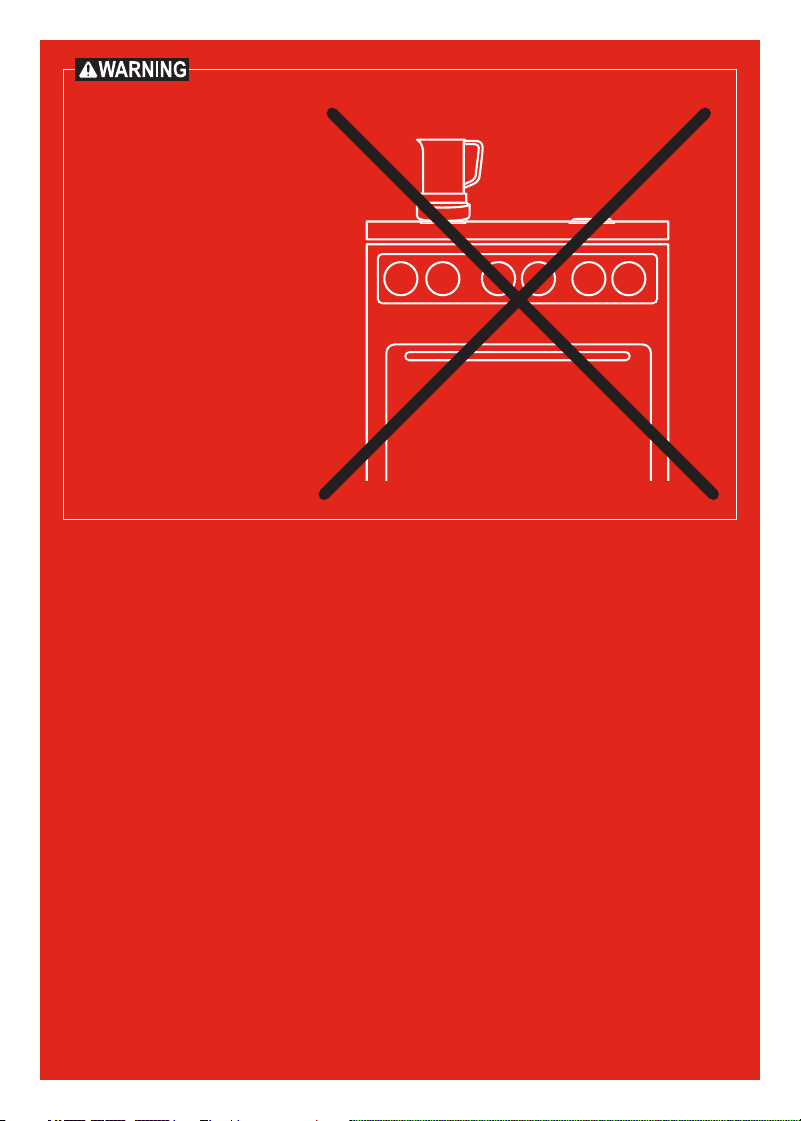
DO NOT place this
appliance on or close to
a gas or electric burner,
or inside an oven. Always
operate this appliance on
a stable, non-combustible,
level surface, such as a
kitchen countertop.
In Canada, distributed by
Instant Pot Brands
199 Bay Street, Suite 4000
Toronto, ON M5L 1A9 Canada
In U.S., distributed by
Instant Pot Brands
3025 Highland Parkway, Suite 700
Downers Grove, IL 60515 U.S.
instantpot.com
© 2024 Instant Pot Brands
140-3457-01
Art release date
04/23/2024
INSTANT is a registered trademark
of Instant Pot Brands