Camera Tips
©2024 Cobra Electronics Corporation Version D
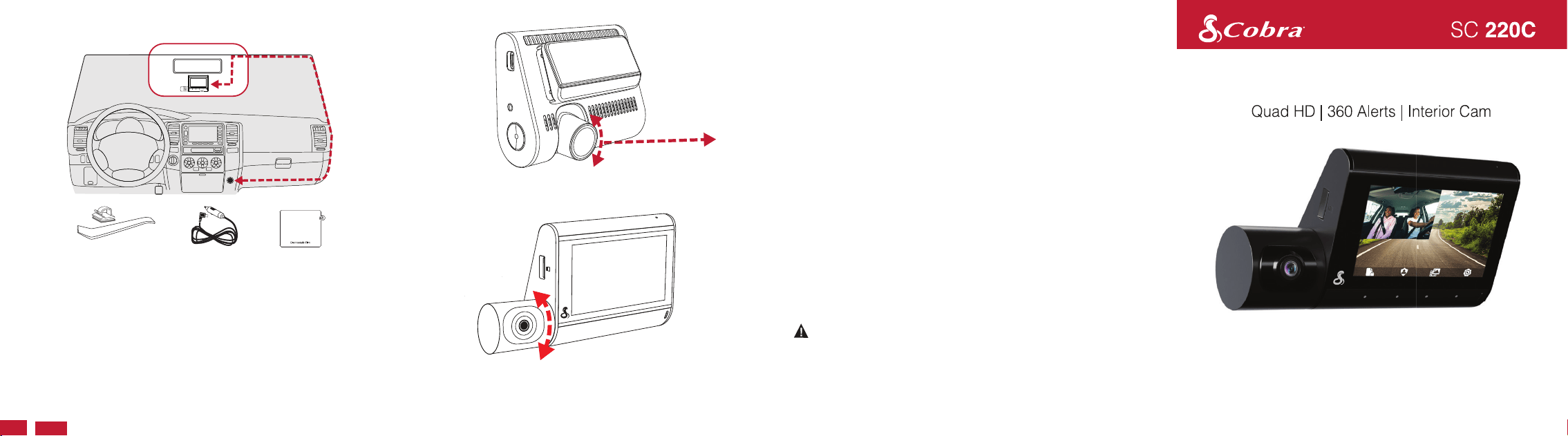
• Find an area on your vehicle's windshield that is centrally located and
close to the top of the windshield. Make sure the mounting area on
the windshield is clean. The dash cam should be mounted so the
display is easily visible to the driver.
(Optional: Place the included electrostatic film on the desired location
for a semi-permanent install).
• Plug the power cable into the dash cam and then route the power
cable along the headliner using the included tool and cable routing
clips as needed.
Windshield Mounting
Vehicle Charger
Electrostatic Film
Rotate front camera lens so that it is parallel with the road.
6 Wire Clips &
Cable Routing Tool
Rotate the interior cam so that it captures a view of the
driver and passengers.
QUICK START GUIDE
• Your dash cam features continuous loop recording, which deletes your
oldest videos on the included SD card to make space for new recordings.
Save your favorite clips from being overwritten by pressing the Action
Button.
• If you need to format the SD card, please do so in the camera itself within
the settings menu. Do not format the SD card on your PC.
• The dash cam may occasionally prompt you to format your SD card. This
is done to ensure continuous recording operation, but this action will
delete your saved footage. Before formatting, download and save your
favorite clips using the Drive Smarter
®
app or by connecting the camera
to your PC with the included data cable.
• Parking Mode requires a hardwire connection to the vehicle's battery or
OBD-II port to power the camera while the vehicle is off (Hardwire Kit
available on Cobra.com).
• Parking Live View requires an internet connection for the camera
(in-vehicle hotspot or nearby WiFi access point) in order to stream a live
feed from the camera to the account holder's Drive Smarter app. Please
consult the owner's manual for more details.
If upgrading your SD card, please visit Cobra.com for a list of compatible
cards.
Protection, Inside and Out
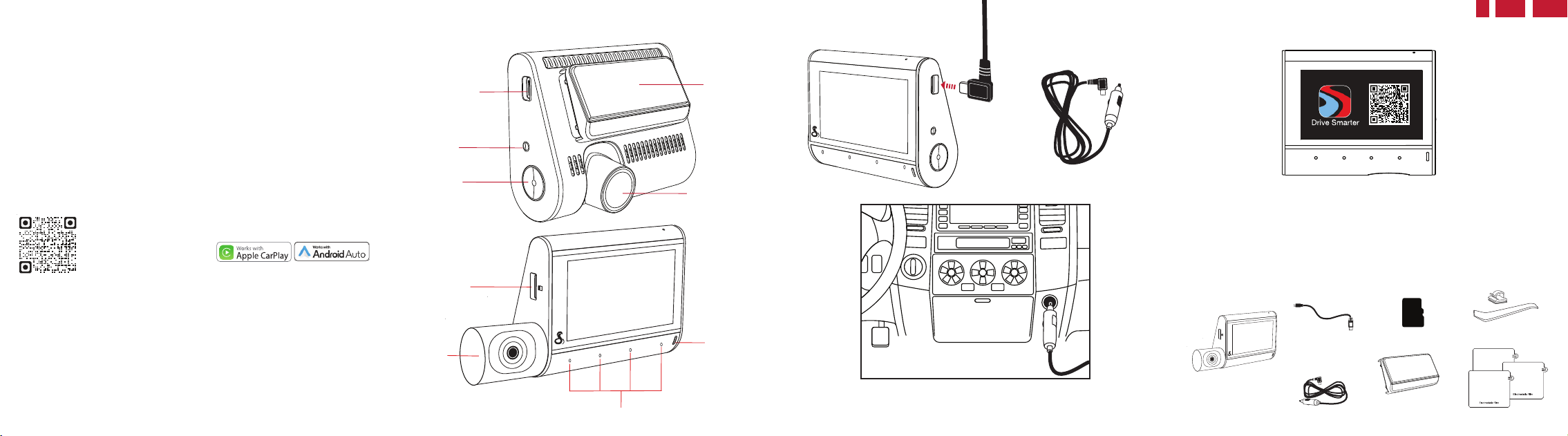
SC 220C Features
USB-C Power Input
Reset Button
Action Button
Slide-Out Mount
Powering Up the SC 220C
Connect the USB-C cable into the dash cam and
plug the power adapter into the vehicle’s 12V port
Vehicle Charger
Drive Smarter
®
App
• Once the dash cam is powered on, follow the on-screen setup
instructions to download and connect to the Drive Smarter
®
app.
• A connection to the Drive Smarter
®
app is required in order to access
features like 360 Alerts, Mayday Alert, Parking Mode Notifications, and
Live View.
What’s Included
SC 220C Dash Cam
with Interior Camera
Micro SD Card
Vehicle Charger
USB-C Data Cable
6 Wire Clips &
Cable Routing Tool
Slide-Out Mount
(Pre-mounted on camera)
3 Electrostatic Films
DRIVE SMARTER
®
APP FEATURES:
360 Alerts
Radar, speed, and red light camera alerts
Heads-Up Navigation
Plan routes and easily view upcoming turns
Cloud Video Management
Manage and share footage from your phone
Over-The-Air Updates
Update your camera with the latest firmware and features
Full manual available at: www.cobra.com/manuals
Download
Drive Smarter®
Adjustable Front Lens
16
GB
Your Cobra
®
SC 220 pairs with
the Drive Smarter
®
app.
FCC ID:BBOSC220, IC#906A-SC220, HVIN: SC220 can be found on device display by:
1. Power on the device.
2. Select the Settings icon on the bottom right.
3. Navigate to and select the About menu item.
SD Card Slot
Touch Navigation Buttons
LED Status
Light
Interior
Camera
©2024 Cobra Electronics Corporation. Cobra and the snake design are proprietary trademarks of Cobra Electronics
Corporation, USA. Other trademarks and trade names are those of their respective owners.
Cobra Electronics Corporation™ is a trademark of Cobra Electronics Corporation, USA.
Drive Smarter® is a registered trademark of Cedar Electronics Corporation.
Apple and the Apple logo are trademarks of Apple Inc. Registered in the U.S. and other countries. App Store is a
service mark of Apple Inc. Android and Android Auto are trademarks of Google LLC. Compatible Android phone and
compatible active data plan required. The Bluetooth® word mark and logos are registered trademarks of Bluetooth
SIG, Inc. and any use of such marks by Cobra Electronics Corporation is under license.Features, Specifications and
prices subject to change without notice. The Driver Awareness Alert display feature is subject to US Patent Numbers
8,842,004 and 8,970,422 and additional pending US Patent Applications.