Operating and installation
instructions
Cooker hood
To prevent the risk of accidents or damage to the appliance, it is
essential to read these instructions before it is installed and used for
the first time.
en-GB M.-Nr. 12 574 481

Contents
2
Warnings and safety notes ......................................................................................... 5
Sustainability and environmental protection.......................................................... 13
Familiarisation................................................................................................................ 14
Guide to the cooker hood .............................................................................................
14
Components ...................................................................................................................
15
Grease filters and panel........................................................................................... 15
Charcoal filter ............................................................................................................ 15
Hob lighting ............................................................................................................... 15
Ambient lighting........................................................................................................ 16
Functions.........................................................................................................................
16
Fan power levels ....................................................................................................... 16
Run-on function ........................................................................................................ 17
Operating hours counter.......................................................................................... 17
Miele@home............................................................................................................. 17
Adaptive Con@ctivity .............................................................................................. 17
Power management ................................................................................................. 17
Commissioning.............................................................................................................. 18
Selecting extraction mode or recirculation mode......................................................
18
Setting up Miele@home...............................................................................................
19
Performing Scan & Connect................................................................................... 19
Signing off WiFi and remote control ...................................................................... 20
Setting up Con@ctivity .................................................................................................
20
Activating Con@ctivity3.0 via the home WiFi network..................................... 20
Activating Con@ctivity3.0 via a direct WiFi connection................................... 20
Reattempting the connection ................................................................................. 21
Preparing the remote control........................................................................................
21
Signing on the remote control......................................................................................
21
Signing off the remote control ................................................................................ 21
Operation (automatic).................................................................................................. 22
Cooking with Con@ctivity over an electric hob ........................................................
22
Cooking with Con@ctivity over a gas hob..................................................................
22
Leaving automatic mode temporarily..........................................................................
23
Operation (manual)....................................................................................................... 24
Cooking without Con@ctivity (Manual mode) ..........................................................
24
Switching on the fan ......................................................................................................
24
Selecting the power level..............................................................................................
24
Selecting the second Booster level ....................................................................... 24
Selecting the run-on time .............................................................................................
24
Switching the fan off......................................................................................................
24
Run-on in Plug&Play operation .............................................................................. 24
Switching the hob lighting on/off.................................................................................
25

Contents
3
Dimming the hob lighting..............................................................................................
25
Switching the ambient lighting on/off .........................................................................
25
Adjusting settings ......................................................................................................... 26
Intervals for the grease filter operating hours counter..............................................
26
Changing the intervals for the grease filter operating hours counter................ 26
Intervals for the charcoal filter operating hours counter ..........................................
26
Altering or deactivating the charcoal filter operating hours counter intervals . 26
Safety switch-off....................................................................................................... 27
Energy saving tips......................................................................................................... 28
Cleaning and care ......................................................................................................... 29
Cleaning the casing........................................................................................................
29
Grease filters and panel for edge extraction ..............................................................
29
Condensation on the panel ..................................................................................... 30
Inserting the panel.................................................................................................... 32
Resetting the grease filter operating hours counter............................................ 32
Replacing the grease filters ..................................................................................... 32
Charcoal filter..................................................................................................................
32
Resetting the charcoal filter operating hours counter......................................... 33
Disposing of charcoal filters.................................................................................... 33
Remote control ...............................................................................................................
33
Inserting/replacing batteries .................................................................................. 33
Cleaning the remote control ................................................................................... 33
Customer Service Department.................................................................................. 34
Contact in the event of a fault......................................................................................
34
Position of the data plate ..............................................................................................
34
Warranty ..........................................................................................................................
34
Copyrights and licences ................................................................................................
34
Installation...................................................................................................................... 35
Before installation ..........................................................................................................
35
Protective foil ..................................................................................................................
35
Coating the panel ...........................................................................................................
35
Installation materials......................................................................................................
35
Appliance dimensions....................................................................................................
36
Safety distance between hob and cooker hood (S) ..................................................
41
Installation notes............................................................................................................
42
Plug&Play mode.............................................................................................................
42
Connection for air extraction ........................................................................................
43
Non-return flap.......................................................................................................... 43
Condensation............................................................................................................ 44
Silencer ...................................................................................................................... 44
Electrical connection .....................................................................................................
45

Contents
4
Technical data................................................................................................................ 46
Optional accessories for recirculation mode..............................................................
46
EU Conformity declaration............................................................................................
47
UK Conformity declaration ...........................................................................................
47

Warnings and safety notes
5
This cooker hood complies with all relevant local and national
safety requirements. Inappropriate use can, however, lead to
personal injury and material damage.
Read the operating and installation instructions carefully before
using the cooker hood. They contain important information on its
safety, installation, use and maintenance. This prevents both
personal injury and damage to the cooker hood.
In accordance with standard IEC60335-1, Miele expressly and
strongly advises that you read and follow the instructions in the
chapter on installing the appliance as well as the safety instructions
and warnings.
Miele cannot be held liable for injury or damage caused by non-
compliance with these instructions.
Keep these instructions in a safe place and pass them on to any
future owner.
Correct application
This cooker hood is intended for use in domestic households and
similar working and residential environments.
The cooker hood is not intended for outdoor use.
It must only be used as a domestic appliance to extract vapours
and remove odours from cooking.
Any other usage is not supported by the manufacturer and could be
dangerous.
Where a recirculation cooker hood is fitted above a gas hob, please
ensure that there is an adequate supply of fresh air into the room in
which it is installed. Please seek the advice of a qualified gas fitter
(e.g. GasSafe in the UK) for more information if necessary.

Warnings and safety notes
6
The cooker hood can only be used by people with reduced
physical, sensory or mental capabilities, or lack of experience and
knowledge, if they are supervised whilst using it, or have been shown
how to use it in a safe way and recognise and understand the
consequences of incorrect operation.
Safety with children
Children under 8 years of age must be kept away from the cooker
hood unless they are constantly supervised.
Children aged 8 and older may only use the cooker hood without
supervision if they have been shown how to use it and are able to do
so in a safe manner. Children must be able to understand and
recognise the possible dangers caused by incorrect operation.
Children must not be allowed to clean or maintain the cooker hood
unsupervised.
Please supervise children in the vicinity of the cooker hood and do
not let them play with it.
The hob lighting is very intensive.
Ensure, in particular, that babies/small children do not look at the
light.
Danger of suffocation! Whilst playing, children may become
entangled in packaging material (such as plastic wrapping) or pull it
over their head with the risk of suffocation. Keep packaging material
away from children.
Keep the battery for the remote control out of the reach of
children.

Warnings and safety notes
7
Technical safety
Unauthorised installation, maintenance and repairs can pose a
considerable risk to the user. Installation, maintenance and repairs
must only be carried out by a Miele authorised technician.
A damaged appliance can be dangerous. Check it for visible signs
of damage. Do not use a damaged appliance.
The electrical safety of this appliance can only be guaranteed when
correctly earthed. It is essential that this standard safety requirement
is met. If in any doubt please have the electrical installation tested by
a qualified electrician.
Temporary or permanent operation on an autonomous power
supply system or a power supply system that is not synchronised
with the mains power supply (e.g. island networks, back-up systems)
is possible. A prerequisite for operation is that the power supply
system complies with the specifications of EN50160 or an
equivalent standard.
The function and operation of the protective measures provided in
the domestic electrical installation and in this Miele product must
also be maintained in isolated operation or in operation that is not
synchronised with the mains power supply, or these measures must
be replaced by equivalent measures in the installation. As described,
for example, in the current version of BS OHSAS 18001–2 ISO
45001.
The connection data (voltage and frequency) on the data plate of
the cooker hood must match the mains electricity supply in order to
avoid the risk of damage to the cooker hood
Compare this before connecting the appliance to the mains. Consult
a qualified electrician if in any doubt.
Do not connect the appliance to the mains electricity supply by a
multi-socket unit or an extension lead. These are a fire hazard and do
not guarantee the required safety of the appliance.
EXT/EXTA model cooker hoodsare connected to their external
motor using a special connection cable and plug connectors.
These appliances may only be combined with a Miele external motor.
For safety reasons, this appliance may only be used after it has
been built in.
The cooker hood must not be used in a non-stationary location
(e.g. on a ship).

Warnings and safety notes
8
Touching electrical components and tampering with electrical and
mechanical parts is highly dangerous to the user and can cause
operational faults.
Only open the housing as described in the instructions given in the
installation sheet and in the Cleaning and care section of this booklet.
Under no circumstances should any other parts of the housing be
opened.
The manufacturer's warranty will be invalidated if the appliance is
not repaired by a Miele authorised technician.
If the electrical connection cable is faulty it must only be replaced
by a Miele authorised technician to protect the user from danger.
The lamps are a built-in component of the lighting. Replacement
lamps may only be fitted by a Miele authorised technician or by the
Miele Customer Service Department.
During installation, maintenance and repair work, the appliance
must be disconnected from the mains electricity supply.
Important information on handling the remote control battery:
- Do not short circuit or recharge the battery, or throw it into a fire.
Danger of explosion.
- Do not throw old batteries away with your general household
waste. Please dispose of them in a designated battery collection
and recycling system.
- Used batteries must be kept away from children while awaiting
disposal and must be disposed of in a safe manner.
Warnings and safety notes
9
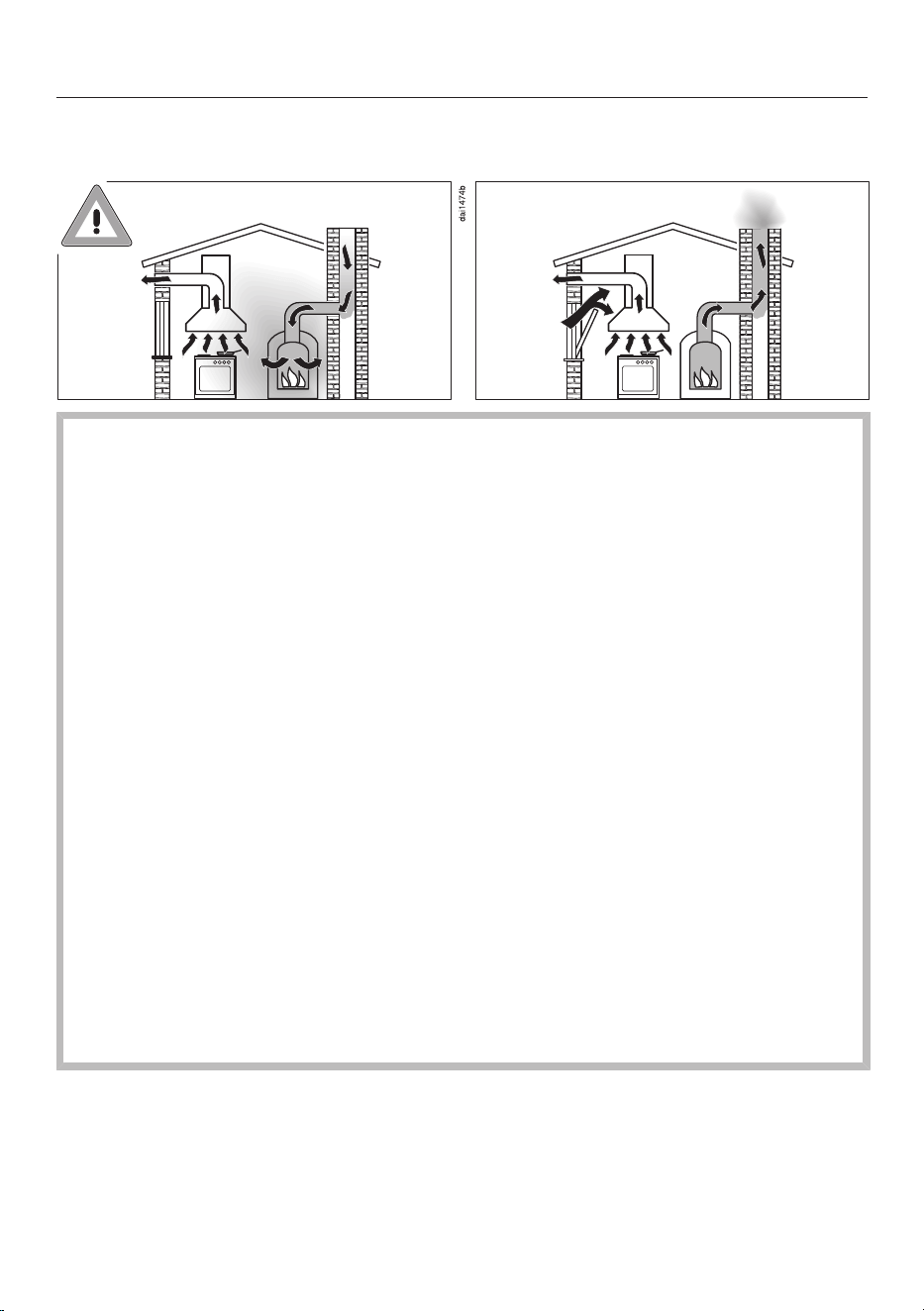
Using at the same time as another heating appliance that depends on the air
from the room
Danger of toxic fumes!
Great care should be taken when using the cooker hood in the
same room or the same area of the house at the same time as
another heating appliance that depends on the air from the room.
Such heating appliances draw in air from the room and duct
exhaust gases out through a chimney or extraction ducting. They
include gas, oil, wood and coal-fired boilers and heaters,
continuous flow or other water heaters, gas hobs and ovens.
The cooker hood draws in air from the kitchen and from
neighbouring rooms. This applies to the following modes of
operation:
– extraction mode
– extraction mode with an external motor
– recirculation mode with a recirculation box installed outside the
room
If there is insufficient air, negative pressure will occur. The heating
appliance may be starved of oxygen. This impairs combustion.
Harmful gases could be drawn from the chimney or extraction
ducting back into the room.
Risk of death!

Warnings and safety notes
10
In order to ensure safe operation and to prevent gases given off by
the heating appliance from being drawn back into the room when
the cooker hood and the heater are both operated simultaneously,
an underpressure in the room of 0.04mbar (4Pa) is the maximum
permissible.
Sufficient ventilation can be maintained by air inlets which cannot
be blocked, e.g. in windows, doors and outside wall vents. The
cross-section of the inlet openings must enable sufficient
ventilation. A ventilation brick alone is not generally sufficient to
ensure safe ventilation.
The overall ventilation condition of the dwelling must be taken into
account. If in any doubt, seek the advice of a competent building
regulations inspector or qualified gas fitter (GasSafe in the UK).
If the cooker hood is being operated in recirculation mode, whereby
the air is redirected into the room in which it is installed, the above
restrictions do not apply.
Correct use
Open flames are a fire hazard.
The use of an open flame under the cooker hood is not permitted. To
avoid the danger of fire, do not flambé or grill over an open flame.
When switched on, the cooker hood could draw flames into the filter.
Fat deposits could ignite, presenting a fire hazard.
The cooker hood can become damaged when exposed to
excessive heat.
- When using the cooker hood over a gas hob, ensure that any
burners in use are always covered by a pan. Switch the cooking
zone off when a pan is removed, even for a short time.
- Select a pan which is suitable for the size of the burner.
- Regulate the flame so that it does not burn up the sides of the pan.
- Avoid overheating the pan (e.g. when cooking with a wok).
Always switch the cooker hood on when a cooking zone is in use,
otherwise condensation may collect in the hood, which could cause
corrosion.

Warnings and safety notes
11
Overheated oil and fat can ignite, causing fire damage to the
cooker hood.
When cooking with oil or fat, chip pans and deep fat fryers, etc, do
not leave the pans unattended. Similarly, never leave an open grill
unattended when grilling.
Do not use the cooker hood without the filters in place. This way
you will avoid the risk of grease and dirt getting into the appliance
and hindering its smooth operation.
The cooker hood can get very hot during cooking due to heat rising
from the hob.
Do not touch the housing or the grease filters until the cooker hood
has cooled down.
Proper installation
To determine whether a cooker hood may be operated above your
cooking appliance, please refer to the information provided by the
appliance’s manufacturer.
Safety regulations prohibit the fitting of a cooker hood over solid
fuel stoves.
An insufficient safety distance between the hob and the cooker
hood can result in damage to the cooker hood.
The minimum safety distances between the top of the hob and the
bottom of the cooker hood given in the “Installation” section of this
manual must be observed, unless the hob manufacturer states that a
greater safety distance is required.
If more than one cooking appliance is fitted beneath the cooker hood,
and they have different minimum safety distances to the cooker
hood, select the greater distance.
The information provided in “Installation” must be observed when
fixing the ventilation hood.
Components can have sharp edges which may cause injury.
Wear gloves to protect your hands from being cut.
Exhaust ducting must be of non-inflammable material. Suitable
material is available from Miele specialist dealers or the Miele Spares
Dept.
The appliance must not be connected to a chimney or flue which is
in use. Neither should it be connected to ducting which ventilates
rooms with fireplaces.

Warnings and safety notes
12
If exhaust air is to be extracted into a chimney or ventilation duct
no longer used for other purposes, seek professional advice.
Cleaning and care
There is a risk of fire if the cooker hood is not cleaned as described
in these operating instructions.
Do not use a steam cleaning appliance to clean this appliance.
The steam could reach electrical components and cause a short
circuit.
Accessories and spare parts
Only use genuine original Miele accessories and spare parts with
this appliance. Using accessories or spare parts from other
manufacturers will invalidate the warranty and Miele cannot accept
liability.
Miele can only guarantee the safety of the appliance when genuine
original Miele replacement parts are used. Faulty components must
only be replaced by Miele spare parts.
Miele will guarantee to supply functional spare parts for a
minimum of 10years and up to 15years following the discontinuation
of your vapour extraction unit.
Sustainability and environmental protection
13
Disposing of the packaging
material
The packaging material is used for
handling and protects the appliance
from transport damage. The packaging
material used is selected from materials
which are environmentally friendly for
disposal and can generally be recycled.
Recycling the packaging material
reduces the use of raw materials. Use
material-specific collection points for
valuable materials and take advantage
of return options. Your Miele dealer will
take the packaging material away.
Disposing of your old appliance
Electrical and electronic appliances
contain many valuable materials. They
also contain certain materials,
compounds and components which
were essential for their correct
functioning and safety. These could be
hazardous to human health and to the
environment if disposed of with
household waste or if handled
incorrectly. Please do not, therefore,
dispose of your old appliance with
household waste.
Instead, please make use of officially
designated collection and disposal
points to dispose of and recycle
electrical and electronic appliances in
your local community, with your dealer
or with Miele, free of charge. By law, you
are solely responsible for deleting any
personal data from the old appliance
prior to disposal. You are legally obliged
to remove any old batteries which are
not securely enclosed by the appliance
and to remove any lamps without
destroying them, where this is possible.
These must be taken to a suitable
collection point where they can be
handed in free of charge. Please ensure
that your old appliance poses no risk to
children while being stored for disposal.
Disposing of old batteries
In many cases, electrical and electronic
appliances contain batteries which must
not be disposed of with household
waste after use. You are legally obliged
to remove any old batteries which are
not securely enclosed by the appliance
and take them to a suitable collection
point (e.g. retailer) where they can be
handed in free of charge. Insulate the
metal contacts with adhesive tape to
prevent short circuits. Batteries may
contain substances which can be
hazardous to human health and the
environment.
The labelling on the battery will provide
further information. For example,
batteries containing lithium are marked
“Li-ion”. The bin symbol with a cross
through it means that the batteries
must not be disposed of in household
waste. We are also required to inform
you that a bin with a cross through it
which also has one or more chemical
symbols on it indicates that the battery
contains lead (Pb), cadmium (Cd) and/
or mercury (Hg).
3E&G+J
Old batteries contain valuable raw
materials which can be recycled.
Disposing of batteries separately makes
them easier to handle and recycle.
Familiarisation
14
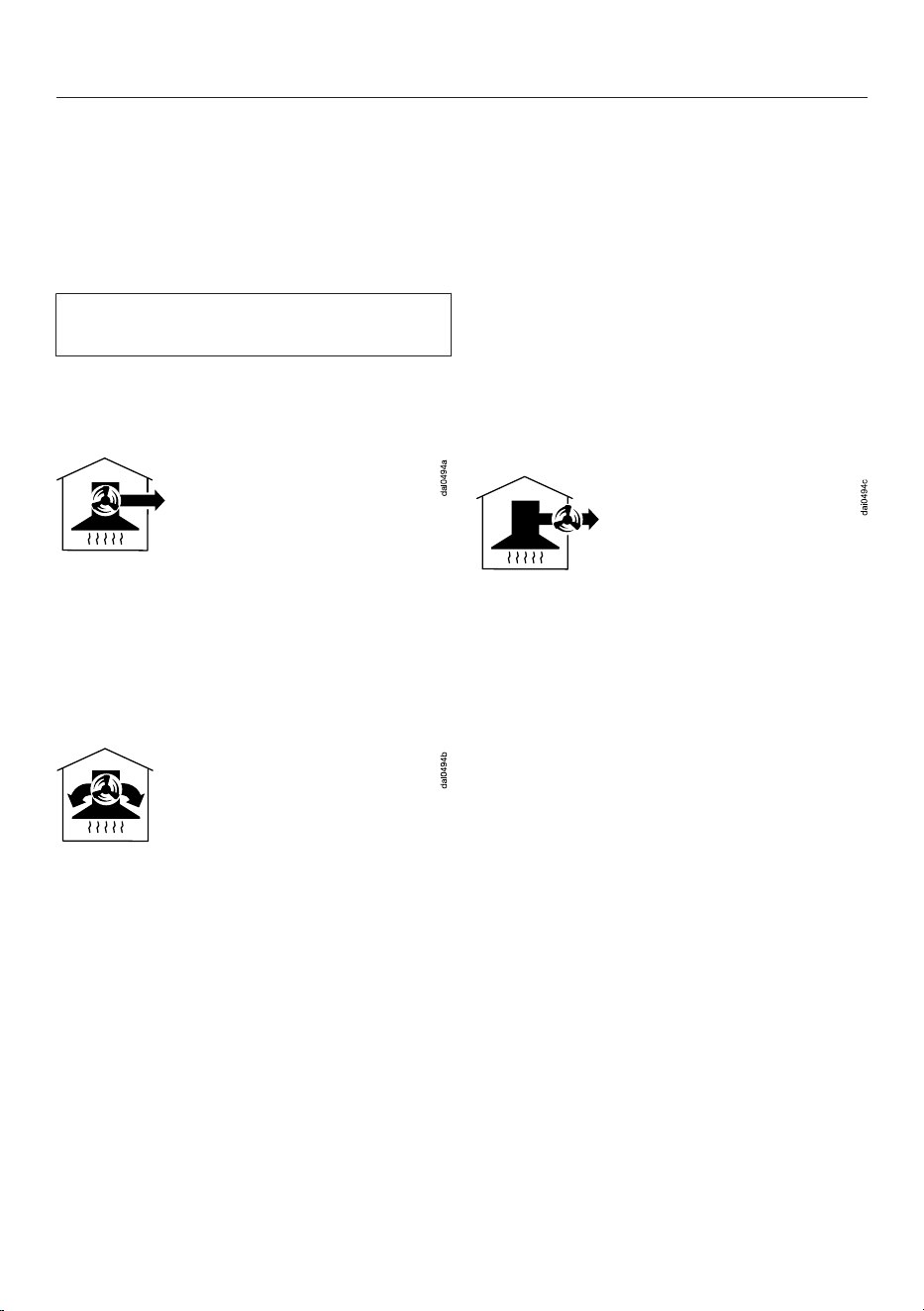
Guide to the cooker hood

Familiarisation
15
a
Exhaust duct
Exhaust air can be directed to the
left-hand side, to the rear or to the
front.
b
Hob lighting and ambient lighting
c
Ventilation grille for recirculation
mode
d
Charcoal filter
Disposable or reactivatable charcoal
filter
Optional accessory for recirculation
mode
e
Edge extraction panel
f
Control elements
g
Grease filters
h
Control for switching the lighting on
and off and for dimming the lighting
i
Button for switching the ambient
lighting on and off
j
Control for switching the fan on and
off
k
Controls for setting the fan power
level
l
Control for the run-on function
m
Control for the operating hours
counter
n
Inoperative control
o
Controls for dimming the hob lighting
p
Indicator light
Components
Grease filters and panel
The edge extraction panel and the re-
usable metal grease filters in the
appliance remove solid particles
(grease, dust, etc.) from the kitchen
vapours, preventing soiling of the cooker
hood.
Risk of fire
Oversaturated grease filters are a fire
hazard.
Clean the grease filters at regular
intervals.
Heavily soiled grease filters hinder the
extraction power and will lead to
increased levels of soiling in the cooker
hood and in the kitchen.
Charcoal filter
With recirculation mode and Plug&Play
recirculation mode, a charcoal filter
must be fitted in addition to the grease
filters. The charcoal filter is designed to
absorb cooking odours.
It is available as an optional accessory.
There are charcoal filters available that
need to be replaced at the end of their
service life and others that can be
reactivated.
Hob lighting
The hob lighting can be switched on and
off and dimmed independently of the
fan.
If you are using Miele@home, you can
adjust the light temperature to match
your kitchen lighting via the Miele app
(Miele DynamicWhite).
Familiarisation
16
Ambient lighting
You can switch the ambient lighting on
and off independently of the fan.
If you use Miele@home, you can
change the brightness and light colour
using the Mieleapp.
You cannot use the ambient lighting at
the same time as the hob lighting.
Functions
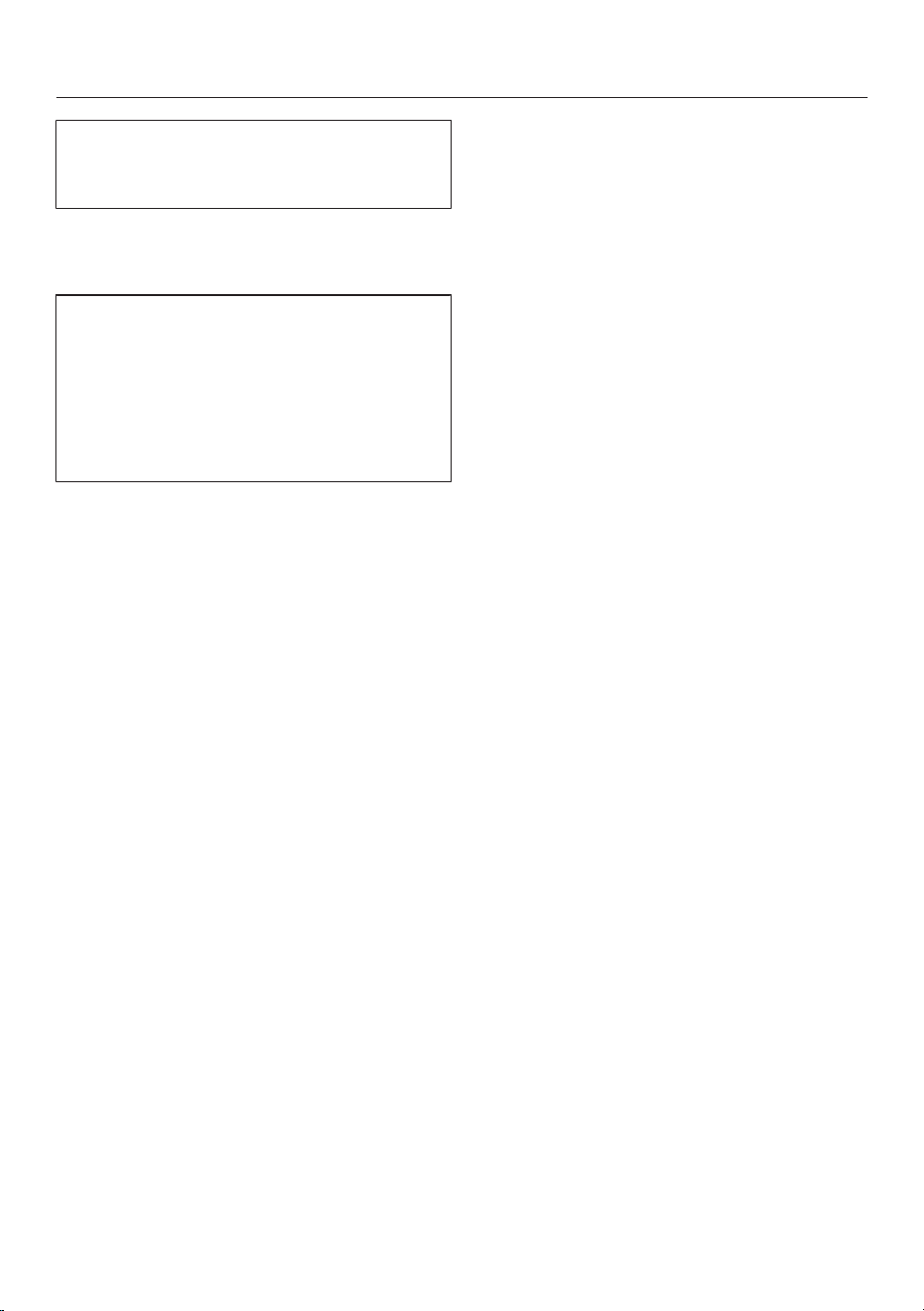
Extraction mode
The air is drawn in and cleaned by the
grease filters and directed outside.
Recirculation mode
A charcoal filter is required. Please
purchase separately. See “Technical
data”.
The air is drawn in and cleaned first by
the grease filters and then by a charcoal
filter. The cleaned air is then recirculated
back into the kitchen.
Plug&Play recirculation mode
The air is drawn in and cleaned first by
the grease filters and then by a charcoal
filter. Without an air duct through the
ceiling, the air is then circulated back
into the kitchen. Please follow the
instructions in “Installation”.
Kitchen ventilation
Ensure that the kitchen is well ventilated
when operating the cooker hood.
In extraction mode, the efficiency of the
cooker hood is improved by the
incoming air.
In recirculation mode, the moisture
produced during cooking remains in the
kitchen. Ventilation helps to dissipate
moisture.
Operation with an external fan
(EXTA model cooker hoods)
Cooker hoods designed for use with an
external fan have to be connected to a
Miele external fan located in a position
of your choice outside the room. The
external fan is connected to the cooker
hood by means of a control cable and is
operated via Con@ctivity, by the control
elements on the cooker hood, or by the
remote control.
Fan power levels
Select power levels 1 to 3 for light to
heavy cooking vapours, odours or heat.
Increase the power level as the level of
vapours, odours or heat increases.
For short periods of cooking food with
intensive vapours, odours or heat, e.g.
when searing meat, select Booster level
B or B. The fan will automatically
switch back from the Booster levels
after a few minutes.

Familiarisation
17
Run-on function
The run-on function enables the cooker
hood to continue running for a pre-
determined time before switching itself
off automatically.
This helps to remove any lingering
vapours and odours from the air after
cooking. It also reduces the risk of
residues accumulating in the cooker
hood and any resultant odours.
Operating hours counter
The cooker hood registers the length of
time for which it has been operated.
When the grease filter symbol lights
up, the grease filters must be cleaned.
When the charcoal filter symbol
lights up, the charcoal filter must be
replaced or reactivated (if suitable for
reactivating).
You can set the operating hours counter
intervals to suit the type of cooking you
do.
Deactivate the operating hours counter
for the charcoal filter if you are operating
the cooker hood in extraction mode.
Miele@home
You can connect the cooker hood to
your home WiFi network and operate it
using the Miele app on your mobile
device.
If your Miele hob is also connected to
your WiFi network, the Con@ctivity
function will be activated automatically.
Adaptive Con@ctivity
With the Con@ctivity function, the
cooker hood is automatically controlled
in conjunction with the hob. The cooker
hood and Miele hob must be connected
to the home WiFi network or have a
direct WiFi connection.
The cooker hood can also be operated
manually at any time during automatic
operation.
If you regularly select a higher power
level, for example, automatic operation
will adapt to your behaviour (Miele
Con@ctivity Plus).
Power management
The cooker hood is fitted with a power
management system. Power
management helps to save energy. It
ensures that the fan power level is
reduced automatically and that the
lighting is switched off.
- The second Booster level switches
back to the first Booster level after
2minutes.
The first Booster level switches back
to level 3 after 5minutes.
- From fan power levels 3, 2 or 1, the
power will be reduced by one level
after 2hours and then in 30-minute
stages until the fan finally switches
off.
- The hob lighting will switch off
automatically after 12hours.
Commissioning
18
Settings are made via the cooker hood
control panel, not via the remote
control.
Selecting extraction mode or
recirculation mode
The cooker hood is suitable for both
extraction mode and recirculation
mode. The power of the fan is adapted
to suit the selected operating mode.
The cooker hood is delivered set up for
recirculation mode. It has to be reset
for extraction mode.
To reset it for extraction mode, the
operating hours counter for the charcoal
filter(s) has to be deactivated.
Switch off the fan and the lighting.
Press the control and the operating
hours control at the same time.
The charcoal filter symbol and one of
the fan power levels will flash.
Press and hold the control until the
B indicator starts to flash.
Confirm your choice with the
operating hours control.
All the indicator lights will go out.
Extraction mode has now been set.
If you do not confirm your selection
within 4minutes, the cooker hood will
automatically revert to the original
setting.
Activating/deactivating
Plug&Play
Switch off the fan and the lighting.
Press the run-on control for
approx. 10seconds until 1 lights up.
Then press in turn:
- The control
- The lighting control and
- The lighting control again
When Plug&Play is deactivated, 1 and 3
will flash.
When Plug&Play is activated, 1 and 3
will light up constantly.
Press the control to activate Power
Management.
1 and 3 will light up constantly.
To deactivate it, press the control.
1 and 3 will flash.
Confirm the setting with the run-on
control.
All the lights will go out.
Commissioning
19
Setting up Miele@home
Requirements:
- A WiFi network
- The Miele app
- A Miele user account You can
create a user account via the Miele
app.
Before installing the cooker hood in
its final location, ensure that the
signal of your WiFi network is strong
enough.
Miele@home availability
The ability to use the Miele app
depends on the availability of the
Miele@home service in your country.
The Miele@home service is not
available in every country.
For information about availability, please
visit www.miele.com.
Performing Scan & Connect
Scan the QR code.
If you have installed the Miele app and
have a user account, you will be taken
directly to the networking steps.
If you have not yet installed the Miele
app, you will be taken to the Apple App
Store
®
or the Google Play Store™.
Install the Miele app and set up a user
account.
Scan the QR code again.
The Miele app will guide you through
the setup process.
Commissioning
20
Signing off WiFi and remote control
To set up a new WiFi connection or a
connection with a remote control, the
existing connections must be
disconnected first.
The sign-off process will always sign
off the WiFi and a connected remote
control at the same time.
Switch the cooker hood off.
Press and hold the control.
Touch the lighting control at the
same time.
If a WiFi connection exists, 2 and 3 will
light up constantly.
If a remote control is signed on, B will
also light up.
Touch the control.
2 will light up constantly, 3 will flash.
After a few seconds, 2 and 3 will flash.
The connection has now been
disconnected.
Quit signing-off mode on the cooker
hood by pressing the run-on
control.
Press the B and controls on the
remote control at the same time.
All connections have been
disconnected. You can establish a new
connection.
Setting up Con@ctivity
Activating Con@ctivity3.0 via the
home WiFi network
Requirements:
- Home WiFi network
- WiFi-enabled Miele hob
Connect the cooker hood and hob to
your home WiFi network (see “Setting
up Miele@home”).
The Con@ctivity function will be
activated automatically.
Activating Con@ctivity3.0 via a direct
WiFi connection
Rather than connecting to the home
network, you can establish a direct
connection between the hob and the
cooker hood.
Requirements:
- WiFi-enabled Miele hob
Switch the cooker hood off.
Press and hold the control.
Press the control at the same time.
2 will light up constantly, 3 will flash.
The cooker hood will be ready for
connection for the next 2minutes.
Start the WiFi connection on the hob.
For further details, see the hob
operating instructions.
When successfully connected, 2 and 3
will light up constantly.
Quit connection mode on the cooker
hood by pressing the run-on
control.
Con@ctivity is now activated.

Commissioning
21
With a direct WiFi connection, it is not
possible to connect the hob and the
cooker hood to a home network.
Should this be required at a later date,
the WiFi connection between the hob
and the cooker hood must be
disconnected (see “Signing off WiFi”).
Reattempting the connection
If it is not possible to connect, 2 and 3
flash or the cooker hood cancels the
process.
Disconnect the connection to the
cooker hood (see “Signing off WiFi”)
and to the hob.
Attempt to make the connection
again.
Preparing the remote control
Insert the batteries into the remote
control, see “Cleaning and care –
Inserting/replacing batteries”.
Signing on the remote control
Press and hold the control on the
cooker hood for approx. 10seconds.
2 will light up constantly, 3 will flash.
Press the 1 and 3 controls on the
remote control at the same time until
the indicator starts flashing red.
The sign-on process starts.
The indicator light will briefly flash green
if the sign-on process is successful.
2 and 3 will light up constantly on the
cooker hood.
Confirm the setting on the cooker
hood with the run-on control.
If the sign-on process was not
successful, 2 and 3 will flash.
In this case, repeat the process.
Signing off the remote control
For information about the sign-off
process, see “Commissioning –
Signing off WiFi and remote control”.
Operation (automatic)
22
Cooking with Con@ctivity over
an electric hob
Switch a cooking zone on at the
desired power level.
The hob lighting will come on.
After a few seconds the fan will come
on, first at power level 2, then it will
switch immediately to power level 1.
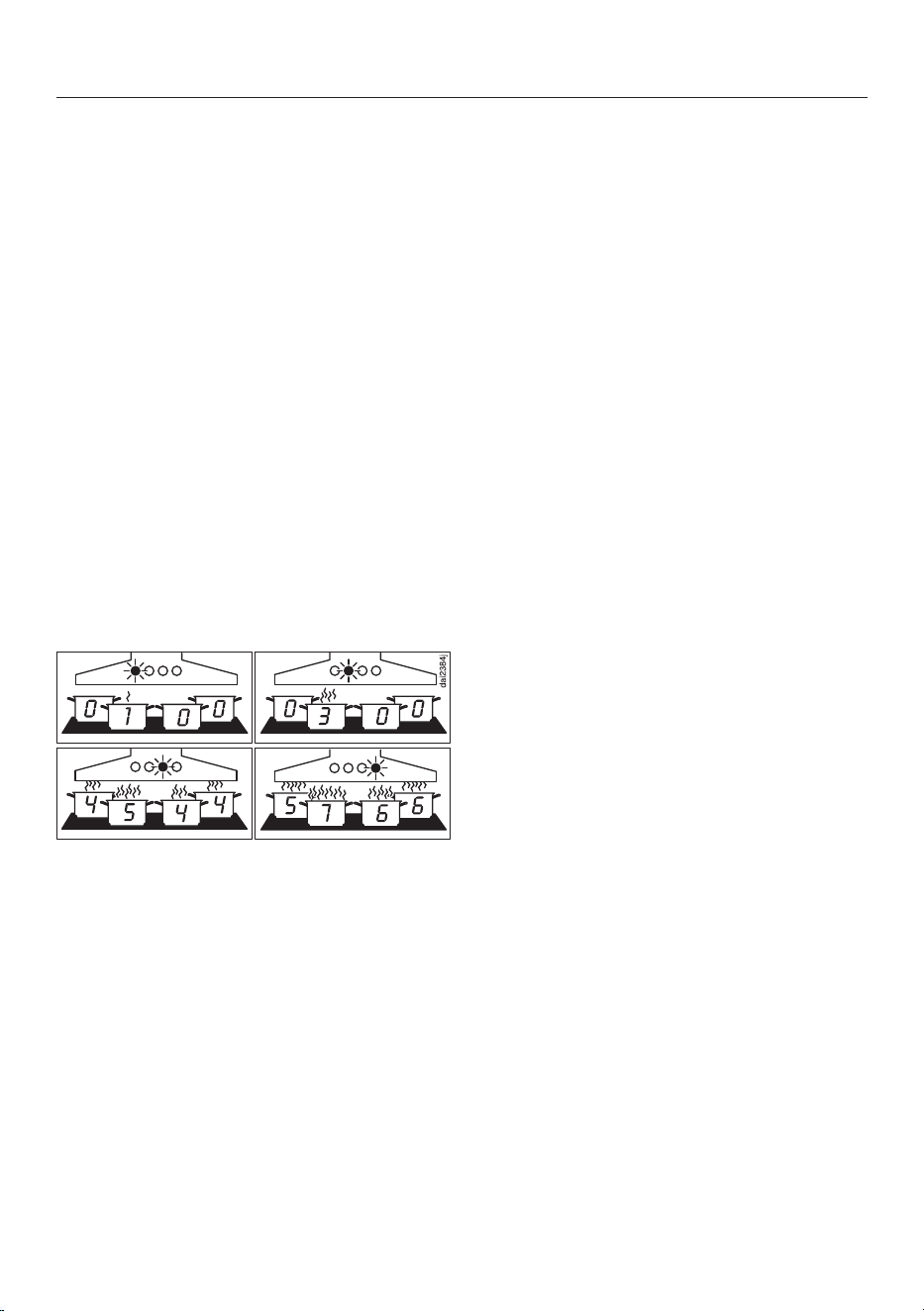
The cooker hood selects the required
fan power level automatically during
cooking. The power level selected by
the cooker hood depends on the
number of cooking zones being used
and their power levels.
The cooker hood responds with a delay.
This takes into account the fact that
changing the power level at the hob
does not increase or decrease the
cooking vapours straight away.
Examples for power levels 1 to B
Switch off all cooking zones after
cooking.
The cooker hood fan will reduce its
power level in stages over the next few
minutes and will then switch itself off.
This helps to neutralise any lingering
vapours and odours in the air.
After another 30seconds, the hob
lighting switches off.
Frying with Con@ctivity
For example, you switch on a cooking
zone at the highest power level to
heat cookware for frying. You reduce
the power level after approx.
10seconds to 4minutes (60seconds
to 5minutes for a HiLight hob).
The cooker hood recognises a frying
process.
The cooker hood switches itself on and
when the hob power level has been
reduced, the hood switches to fan
power level 3 and remains at that level
for approx. 5minutes.
After that, the cooker hood power level
is determined automatically by the
Con@ctivity function.
You can select another power level
manually before then.
Cooking with Con@ctivity over
a gas hob
Switch a cooking zone on at the
desired power level.
The hob lighting will come on.
After a few seconds, the fan will come
on at power level 2.
Regardless of the selected cooking
level, the fan remains at power level 2.
Switch off all cooking zones after
cooking.
The run-on function is activated. The 5
on the run-on control will light up.
After 5minutes, the fan and the hob
lighting will switch off.
This helps to neutralise any lingering
vapours and odours in the air.

Operation (automatic)
23
Leaving automatic mode
temporarily
To leave automatic mode temporarily:
Manually select a different fan power
level, or
Manually switch the cooker hood off, or
Activate the run-on function, or
Operate the hob lighting (only in
combination with a gas hob)
If you switch off the fan manually in
Plug&Play mode, it continues to run at
level 1 (see “Operation (Manual
mode)” – “Switching off the fan”).
Returning to automatic mode
In combination with an electric hob:
- If the cooker hood has not been used
for approx. 5minutes after selecting a
fan power level manually, or
- If the manually selected fan power
level corresponds to the automatic
one again, or
- The cooker hood fan and the hob have been
switched off for at least 30seconds.
Automatic mode will resume the next time
the hob is switched on.
In combination with a gas hob:
- The cooker hood fan and the hob have been
switched off for at least 30seconds.
Automatic mode will resume the next time
the hob is switched on.
Leaving automatic mode for the entire
cooking process
Switch the fan on before the hob.
Con@ctivity is deactivated until the
cooker hood is switched off.
If the cooker hood fan and the hob have
been switched off for at least
30seconds after cooking, automatic
mode will resume next time the hob is
switched on.

Operation (manual)
24
Cooking without Con@ctivity
(Manual mode)
The cooker hood can be operated
manually if:
- The Con@ctivity function is not
activated.
- You have temporarily deactivated the
Con@ctivity function (see “Operation
(Manual operation)” – “Leaving
automatic mode temporarily”).
Switching on the fan
Press the On/Off switch.
The fan will come on at power level 2.
Selecting the power level
Use the or controls to select the
power level required.
Selecting the second Booster level
When you select the Booster level,
the B symbol lights up. To increase
the power level further, touch the
control again.
B flashes.
The second Booster level is activated.
The air throughput is increased for a
short time.
Switching back the Booster levels
The second Booster level switches back
to the first Booster level after 2minutes.
The first Booster level switches back to
level 3 after 5minutes.
Selecting the run-on time
After you have finished cooking, press
the run-on control while the fan is
still running:
- Once: the fan will switch itself off
after 5minutes (5 lights up).
- Twice: the fan will switch itself off
after 15minutes (15 lights up).
- If you touch the run-on control
again, the fan will remain on ( will
go out).
Switching the fan off
Press the On/Off control to switch
the fan off.
The symbol will go out.
Run-on in Plug&Play operation
If you switch off the fan in Plug&Play
mode, it will run on at level1.
Run-on ensures that the ceiling is
ventilated after cooking.
Depending on the last active fan level,
run-on lasts between 2 and 30minutes.
You can switch off the fan immediately
during run-on by pressing 1 or the On/
Off switch.
This function is independent of the run-
on function.
Operation (manual)
25
Switching the hob lighting on/
off
Press the lighting control briefly to
switch it on or off.
The lighting will switch on at maximum
brightness.
If the ambient lighting is switched on,
it is switched off when the hob lighting
is switched on.
Dimming the hob lighting
With the lighting switched on, press
and hold the lighting control. The
brightness will gradually dim until you
release the control.
Press and hold the lighting control
again to increase the brightness to
the level required and then release it.
Alternatively, you can use the up
and down controls on the remote
control.
Switching the ambient lighting
on/off
Press the control for the ambient
lighting on the remote control to
switch it on.
The lighting will come on at the
brightness level and light colour used
previously.
Press the control for the ambient
lighting to switch it off.
If the hob lighting is switched on, it is
switched off when the ambient lighting
is switched on.

Adjusting settings
26
Settings are made via the cooker hood
control panel, not via the remote
control.
Intervals for the grease filter
operating hours counter
The factory default setting is a cleaning
interval of 30hours.
- Select a shorter interval of 20hours if
you fry food regularly.
- A shorter cleaning interval is also
recommended if you only cook
occasionally. This is to prevent grease
hardening on the filter(s) and making
cleaning more difficult.
- Select a longer interval of 40 or
50hours if you use very little fat for
cooking.
Changing the intervals for the grease
filter operating hours counter
Switch off the fan and the lighting.
Press the run-on control and the
operating hours control at the
same time.
The grease filter symbol and one of
the fan power level indicators will flash.
Fan power level indicators 1 to B show
the time set:
Indicator 1................................... 20hours
Indicator 2 .................................. 30hours
Indicator 3 .................................. 40hours
Indicator B.................................. 50hours
Press the control for a shorter
operating time, or for a longer
operating time.
Confirm your choice with the
operating hours control.
All the lights will go out.
If you do not confirm your selection
within 4minutes, the cooker hood will
automatically revert to the original
setting.
Intervals for the charcoal filter
operating hours counter
The factory default setting is an interval
of 180hours.
- If you frequently cook dishes with
strong odours, we recommend
shortening the interval to 120hours.
- If you rarely cook dishes with strong
odours, you can extend the interval to
240hours.
Altering or deactivating the charcoal
filter operating hours counter intervals
Switch off the fan and the lighting.
Press the control and the operating
hours control at the same time.
The charcoal filter symbol and one of
the fan power levels will flash.
Fan power level indicators 1 to B show
the time set:
Indicator 1................................. 120hours
Indicator 2 ................................ 180hours
Indicator 3 ................................ 240hours
Indicator B............................. deactivated
Select the duration you want with the
or control.
Confirm your choice with the
operating hours control.
All the indicator lights will go out.
If you do not confirm your selection
within 4minutes, the cooker hood will
automatically revert to the original
setting.

Adjusting settings
27
Activating/deactivating power
management
Keep in mind that deactivating this
function may increase energy
consumption.
Switch off the fan and the lighting.
Press the run-on control for
approx. 10seconds until 1 lights up.
Then press in turn:
- The lighting control
- The control, and then
- The lighting control again
When power management is activated,
1 and B light up constantly.
When it is deactivated, 1 and B flash.
Press the control to deactivate
Power Management.
1 and B will flash.
Press the control to activate Power
Management.
1 and B will light up constantly.
Confirm the setting with the run-on
control.
Safety switch-off
If Power management has been
deactivated, the cooker hood will switch
itself off automatically after 12hours if it
has been left on (fan and hob lighting).
To switch it on again press the On/
Off control or the lighting
control.

Energy saving tips
28
This cooker hood operates very
efficiently and economically. The
following will help you to save even
more energy when using it:
- Ensure that there is sufficient
ventilation in the kitchen when
cooking. In extraction mode, if there is
insufficient air flow the cooker hood
cannot operate efficiently and this
causes increased operating noise
levels.
- Always cook with the lowest possible
setting. This produces fewer cooking
vapours, so you can use a lower
cooker hood power level and therefore
benefit from reduced energy
consumption.
- Clean or change the filters at regular
intervals. Heavily soiled filters reduce
performance, increase the risk of fire
and are unhygienic.
- Use the Con@ctivity function. The
cooker hood will switch on and off
automatically at the optimum power
level for the cooking you are doing,
which ensures low energy
consumption.
- If you are operating the cooker hood
manually, please note the following:
– Check the power level selected on
the cooker hood. A low power level
is usually sufficient. Only use the
Booster setting when necessary.
– When a large volume of cooking
vapours are being produced,
switch to a high power level in
good time. This is more efficient
than operating the cooker hood for
longer to try to capture cooking
vapours which have already been
distributed throughout the kitchen.
– Make sure that you switch the
cooker hood off after use.
If cooking vapours and odours still
need to be removed from the
kitchen air after cooking, use the
run-on function. The fan will switch
off automatically after the selected
run-on time.
Cleaning and care
29
Before proceeding with any
maintenance or cleaning task, the
cooker hood must be disconnected
from the power supply (see “Warning
and Safety instructions”).
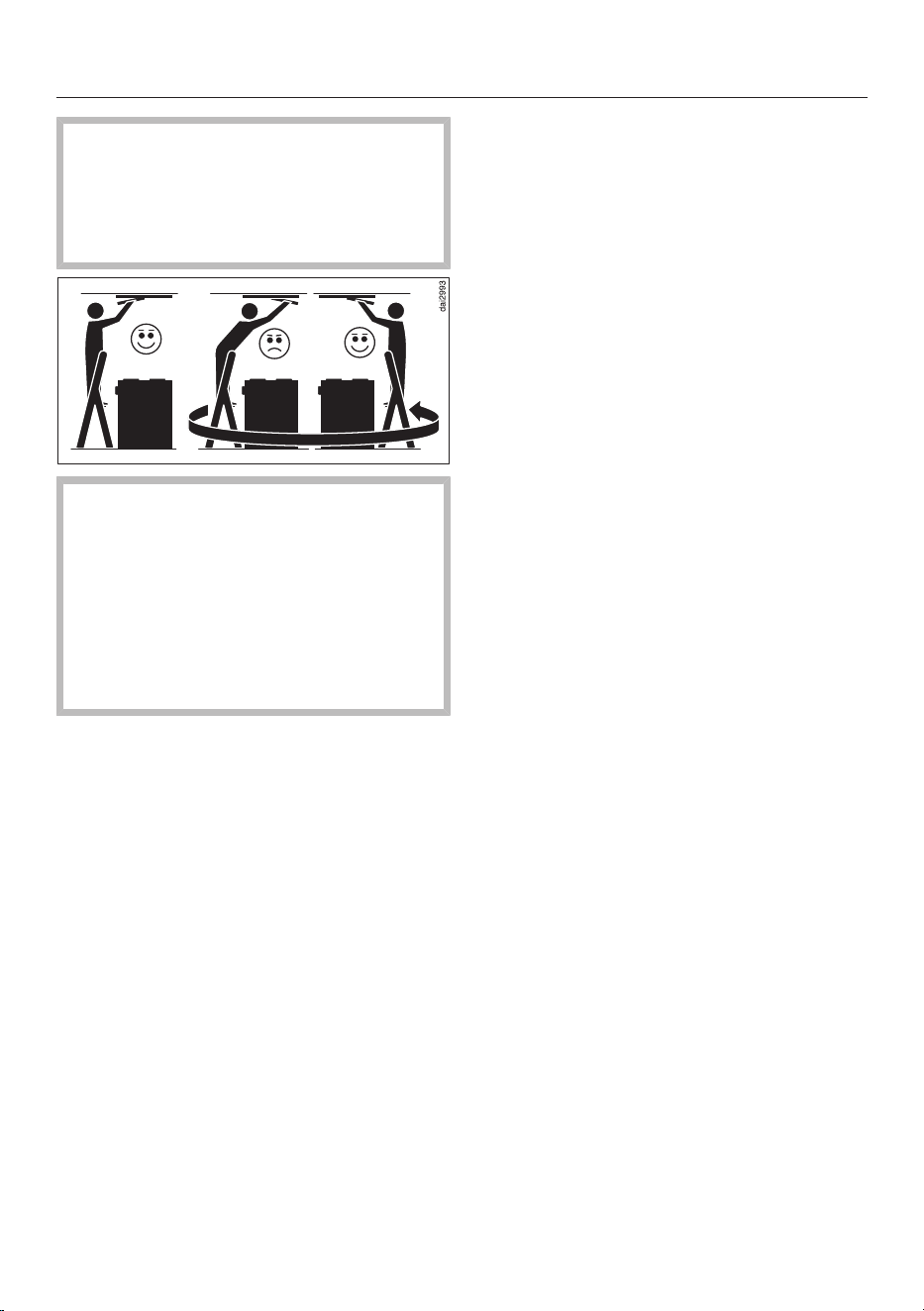
When cleaning the cooker hood,
please note the following:
Use a stable ladder.
Make sure that you have a secure
footing on the ladder.
Do not lean over the hob.
Do not stand on the worktop or the
hob.
Cleaning the casing
Clean all surfaces and control
elements with a sponge cloth and a
solution of warm water and washing-
up liquid.
Remove the grease filters and clean
any grease residues from the
accessible parts of the casing. Doing
so will prevent a fire hazard.
After cleaning, wipe the surfaces dry
using a soft cloth.
In addition, stainless steel surfaces
can be cleaned using a non-abrasive
stainless steel cleaner (not suitable
for the controls).
To prevent the surfaces from quickly
becoming dirty again, we recommend
treating them with a stainless steel
care product (available from Miele).
Important information on
cleaning the casing
Unsuitable cleaning agents can damage
the surfaces.
Do not use any of the following cleaning
agents:
- Cleaning agents containing soda,
acids, chlorides or solvents
- Abrasive cleaning agents, e.g. powder
cleaners or cream cleaners and
abrasive sponges, as well as pot
scourers or sponges which have been
used previously with abrasive cleaning
agents
Minor scratches on the surface are
inevitable when cleaning coloured parts
of the casing; they may be visible
depending on the lighting in the kitchen.
Grease filters and panel for
edge extraction
Cleaning interval for grease filters and
panel
After a preset operating time, the grease
filter symbol will light up to remind
you to clean the grease filters and the
panel.
Clean the grease filters and the panel
every 3 to 4weeks at the latest, even if
the grease filter symbol has not lit up
yet. Accumulated grease solidifies over
a longer period of time and makes
cleaning more difficult.
Cleaning and care
30
Condensation on the panel
Condensation is forming on the panel
during cooking and evaporating once
cooking is complete. Wait
approximately 2hours after finishing
cooking before removing the panel. This
will allow time for the condensation to
evaporate and avoid dripping water.
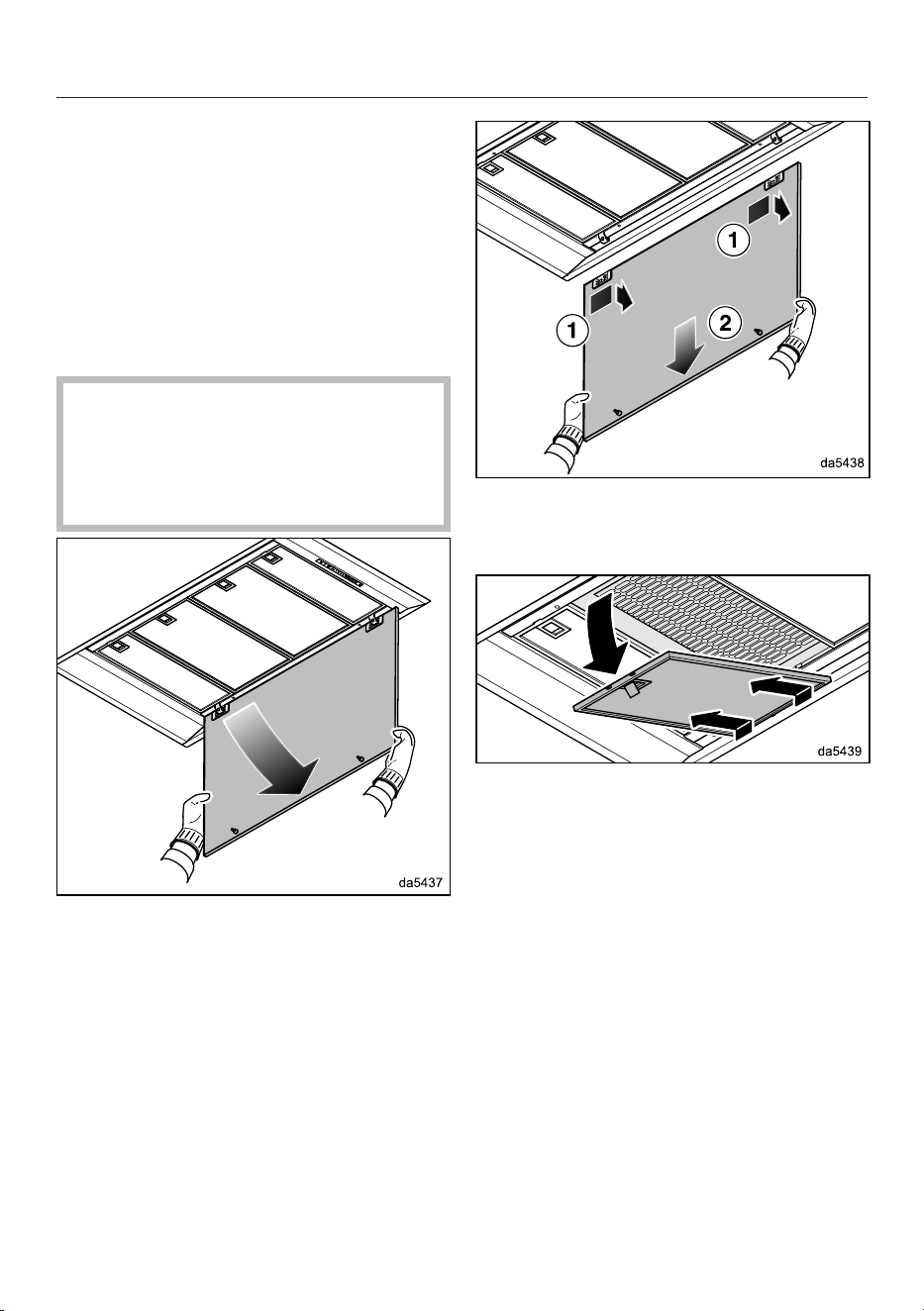
Removing the panel and grease filters
If the panel or a grease filter falls
down, this can result in damage.
Make sure you hold the panel and
filters securely at all times when
handling them.
Pull the front edge of the panel down
out of the locking clips and lower it.
Push the panel slightly to the right,
then remove it by pulling it out to the
rear.
Release the locking clip on the grease
filter and lower the filter by approx.
45°. Unhook the grease filter and
remove it.
Cleaning the panel
For cleaning purposes, follow the
instructions provided under “Cleaning
the casing”.
Cleaning and care
31
Cleaning the grease filters by hand
Clean the grease filters with a soft
nylon brush in a mild solution of hot
water and a little washing-up liquid.
Do not use concentrated washing-up
liquid.
After cleaning, leave the filters to dry
on an absorbent surface before
replacing them.
Important information on cleaning by
hand
Unsuitable cleaning agents may damage
the filter surfaces if used regularly.
Do not use any of the following cleaning
agents:
- Cleaning agents containing descaling
agents
- Powder cleaners and cream cleaners
- Aggressive all-purpose cleaners and
degreasing sprays
- Oven spray
Cleaning the grease filters in the
dishwasher
Place the grease filters upright or at a
slight angle in the lower basket.
Ensure the spray arm is not
obstructed.
Use a standard household cleaning
agent.
Select a programme with a maximum
wash temperature of 65°C.
Important information on cleaning in a
dishwasher
Excessively high temperatures may
cause the grease filters to become
unusable, if they become deformed, for
example. Select a programme that does
not exceed the recommended
temperature.
Also follow the information provided in
the operating instructions for the
dishwasher.
Depending on the cleaning agent used,
the internal filter surfaces may become
discoloured. This will not affect the
functioning of the grease filters in any
way.
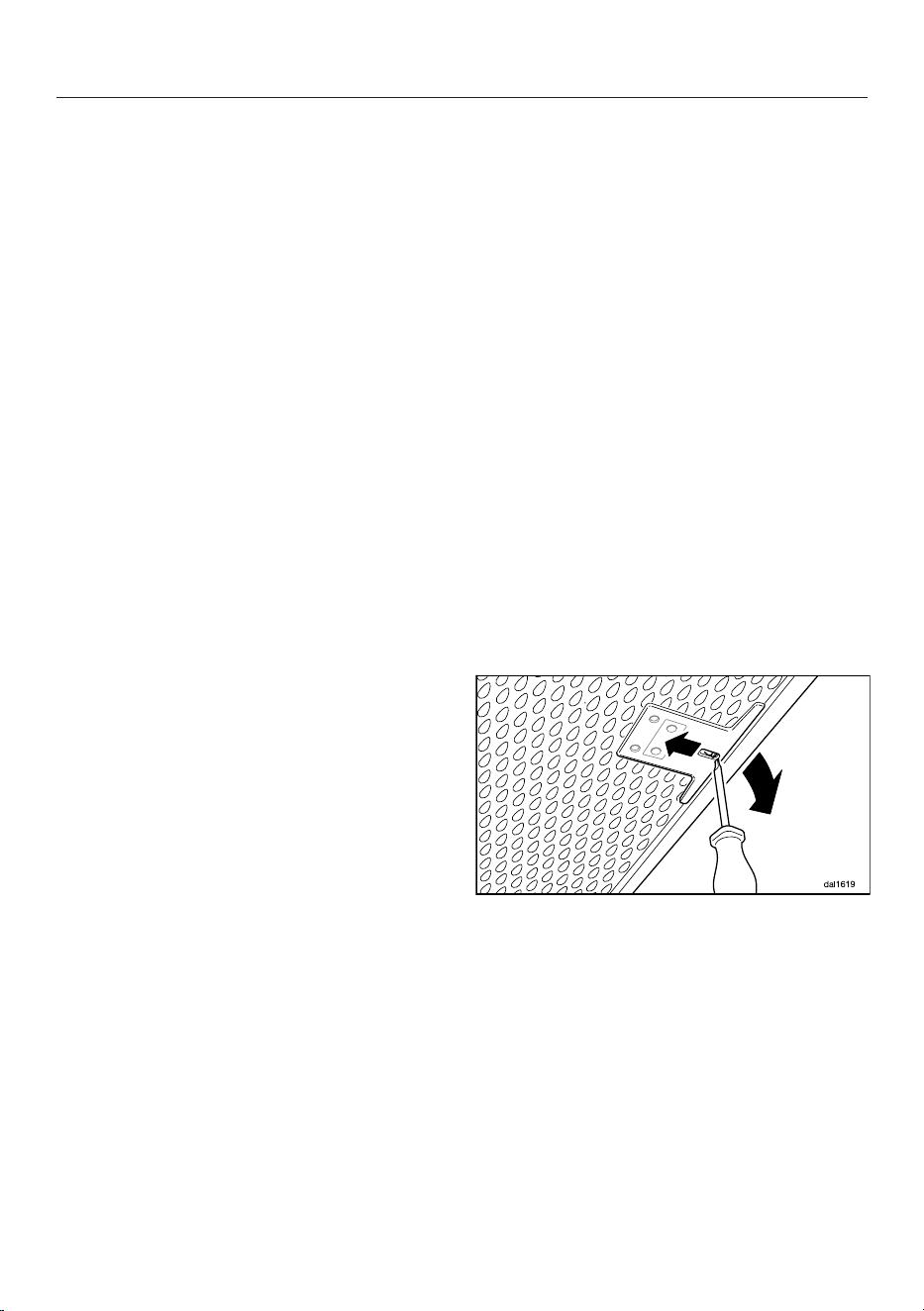
Fitting the grease filters
Insert the grease filters. When
inserting the grease filters, make sure
that the locking clip faces outwards.
If the grease filters were inadvertently
fitted upside down, insert a small
screwdriver blade into the slit to
disengage the clip.
Cleaning and care
32
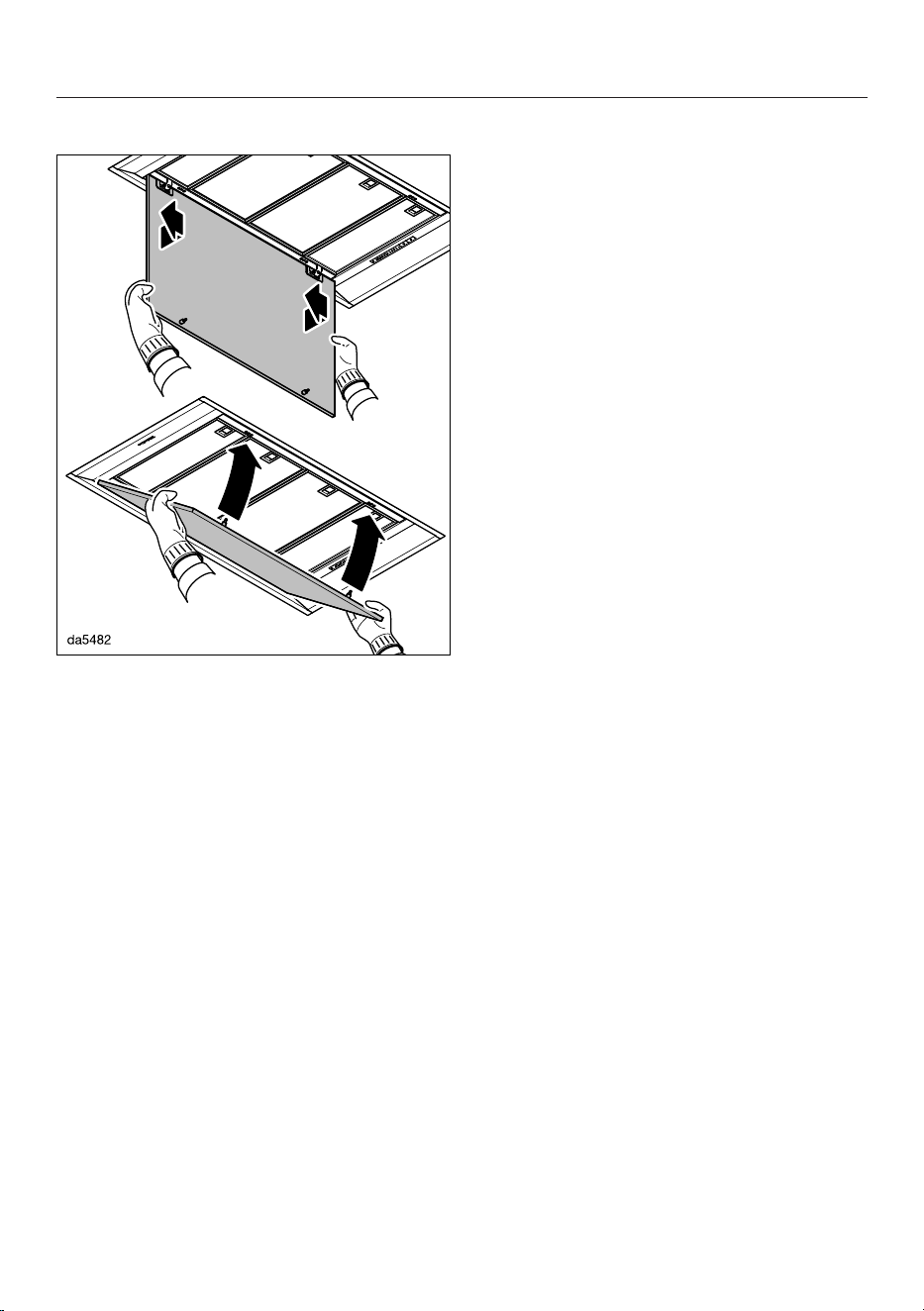
Inserting the panel
Hook the panel into the hinges from
behind and slide the panel to the left.
Lift the panel upwards and press it
into the locking clips.
Resetting the grease filter operating
hours counter
After cleaning, the operating hours
counter needs to be reset via the
controls on the cooker hood.
With the fan switched on, press the
operating hours control for
approximately 3seconds until only 1
is flashing.
The grease filter symbol goes out.
If you want to clean the grease filters
before the operating hours counter has
reached its maximum:
Press the operating hours
control for approximately
6seconds until only 1 is flashing.
Replacing the grease filters
Regular usage and cleaning can cause
the filter surfaces to become worn or
brittle.
If you identify any damage, replace the
grease filters.
Grease filters are available to order via
the Miele Customer Service
Department (see end of these operating
instructions for contact details) or from
your Miele dealer.
Charcoal filter
Replacement interval for the charcoal
filter
Replace the charcoal filter when it no
longer absorbs kitchen odours
effectively.
After an operating time of 180hours, the
charcoal filter symbol will light up to
remind you to replace the charcoal filter.
We recommend replacing the charcoal
filter after 6months at the latest.
Reactivation interval for the charcoal
filter
If you are using a reactivatable charcoal
filter (Miele DKF...-R), the reactivation
interval is the same as the replacement
interval (see “Replacement interval for
the charcoal filter”).
Please refer to the charcoal filter
operating instructions for information on
reactivation.
Fitting/replacing charcoal filters
Remove the panel and the grease
filters.
Take the charcoal filter out of its
packaging.
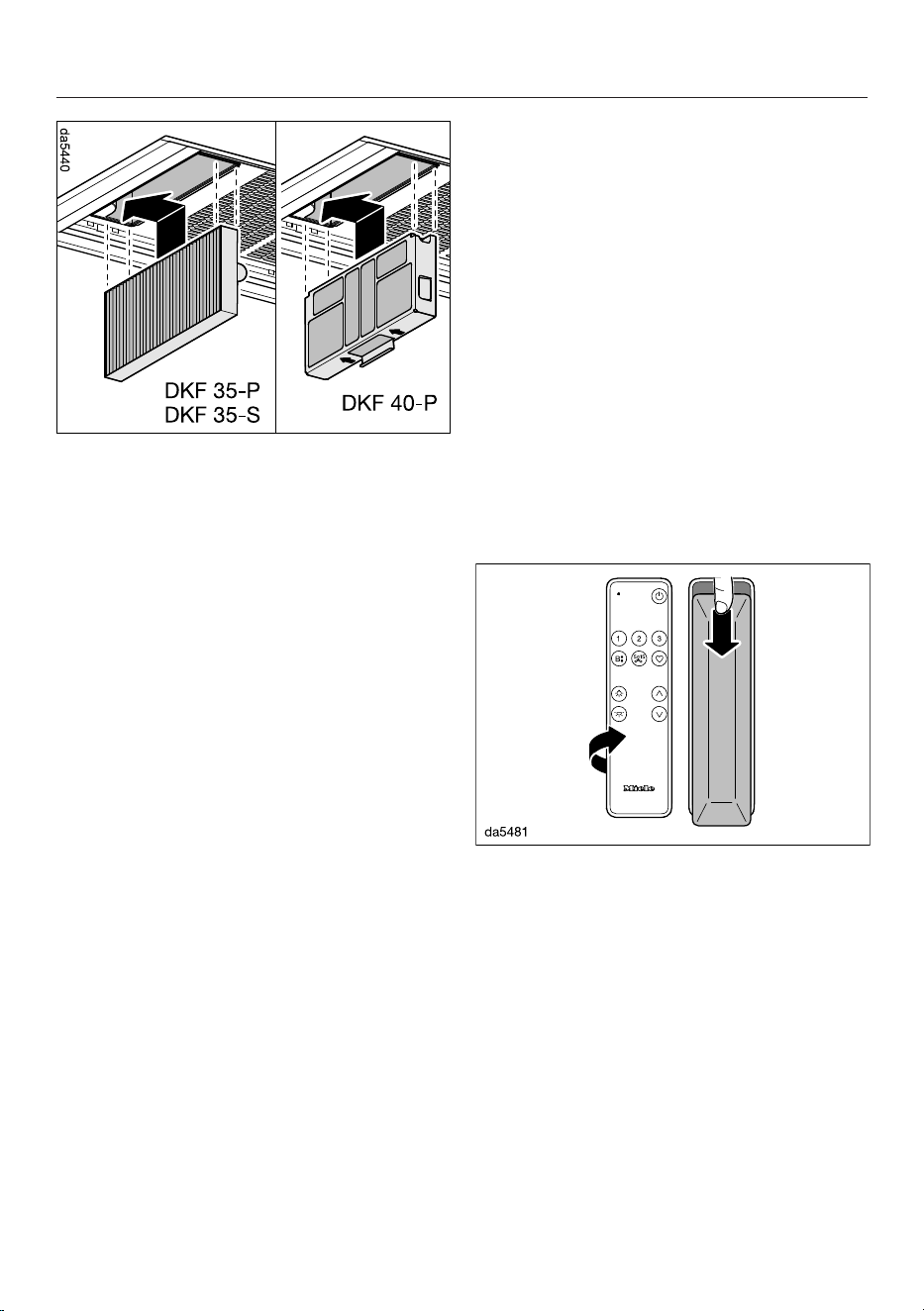
Cleaning and care
33
Insert the charcoal filter in its
compartment and push it to the left
into the holder.
Refit the grease filters and the panel.
Resetting the charcoal filter operating
hours counter
After changing or reactivating the
charcoal filter, the operating hours
counter needs to be reset.
To do this, with the fan switched on,
press the operating hours
control twice, then hold it for
approx. 3seconds, until only 1 is
flashing.
The charcoal filter symbol will go out.
If you want to replace the charcoal filter
before the operating hours counter has
reached its maximum:
Press the operating hours
control twice and hold it for
approximately 6seconds until only 1
is flashing.
Disposing of charcoal filters
Used charcoal filters can be disposed
of with normal household waste.
Remote control
Inserting/replacing batteries
The remote control requires 2batteries,
1.5V, type AAA. The batteries are
supplied with the remote control and
must be inserted before using for the
first time.
The batteries must be replaced if cooker
hood functions can no longer be
selected using the remote control. The
indicator light on the remote control no
longer lights up or only lights up weakly
when a button is pressed.
Cooker hood functions can still be
selected using the controls on the
cooker hood.
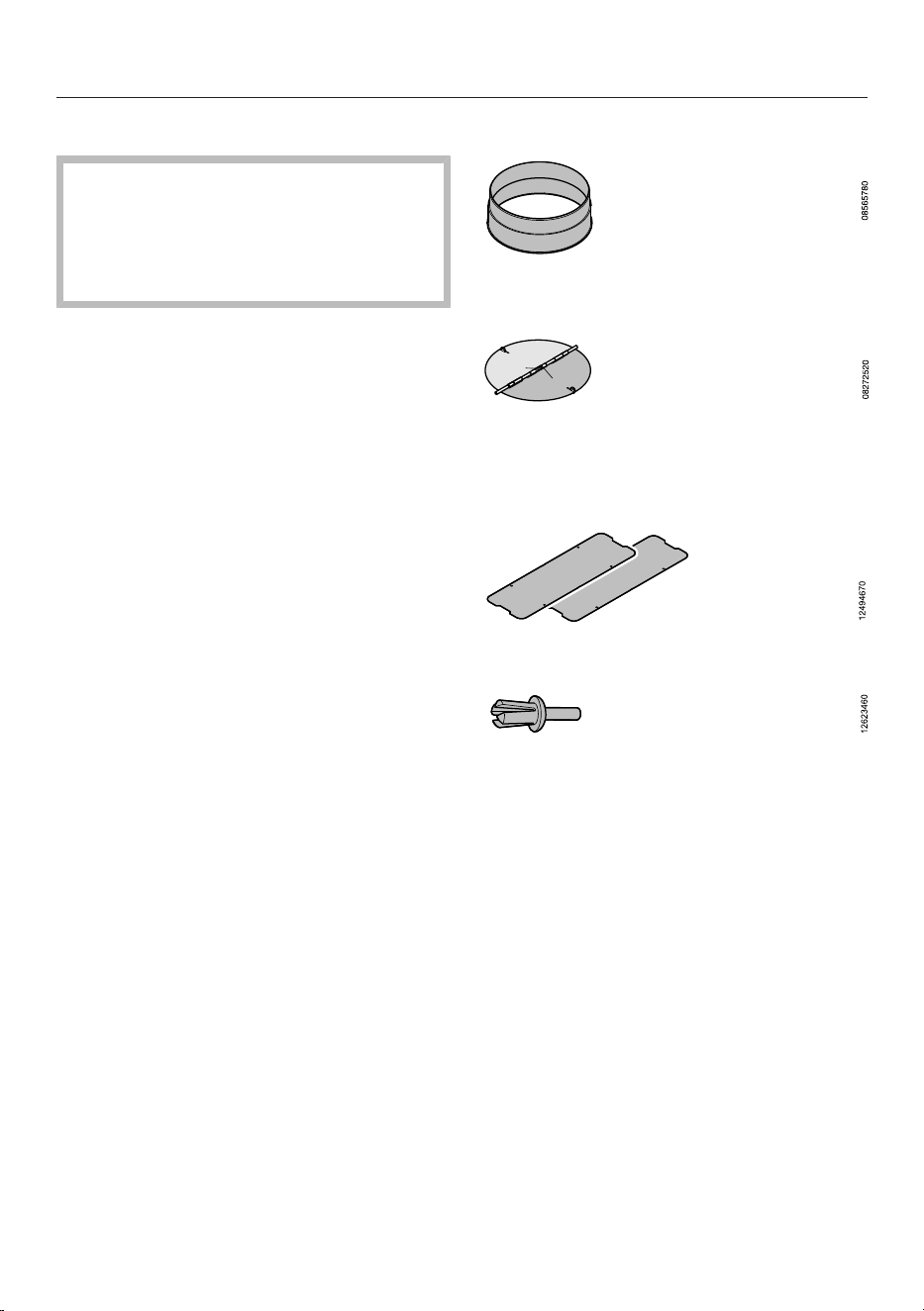
Slide the cover on the back down
slightly and remove it.
Insert the batteries. Make sure the
polarity is correct.
Refit the cover and slide it upwards.
Cleaning the remote control
The surface should only be wiped
with a damp cloth. Do not use too
much water to prevent moisture
getting into the housing.

Customer Service Department
34
Information to help you rectify faults
yourself and about Miele spare parts can be
found at www.miele.com/service.
Contact in the event of a fault
In the event of any faults which you
cannot remedy yourself, please contact
your Miele dealer or the Miele
Customer Service Department.
You can book a Miele Customer
Service Department call-out online at
www.miele.com/service.
Contact information for the Miele
Customer Service Department can be
found at the end of this document.
Please quote the model identifier and
serial number of your appliance (Fabr./
SN/Nr.) when contacting the Miele
Customer Service Department. This
information can be found on the data
plate.
Please note that telephone calls may be
monitored and recorded for training
purposes and that a call-out charge will
be applied to service visits where the
problem could have been resolved as
described in this booklet.
Position of the data plate
The data plate is visible after removing
the grease filter(s).
Warranty
For information on the appliance
warranty specific to your country please
contact Miele. See back cover for
address.
In the UK, your appliance warranty is
valid for 2 years from the date of
purchase. However, you must activate
your cover by calling 0330 160 6640 or
registering online at www.miele.co.uk.
Copyrights and licences
For the purpose of operating and
controlling the communication module,
Miele uses proprietary or third-party
software that is not covered by open
source licensing terms. This software/
these software components are
protected by copyright. The copyrights
held by Miele and third parties must be
respected.
Furthermore, the communication
module integrated in the appliance
contains software components which
are distributed under open source
licence conditions. The open source
components contained in the appliance
along with the corresponding copyright
notices, copies of the licensing terms
valid at the time and any further
information can be accessed locally by
IP via a web browser (http[s]://<IP
address>/Licenses). The liability and
warranty arrangements for the open
source licences displayed in this
location only apply in relation to the
respective rights holders.
Installation
35
Before installation
Before installation, it is important
to read the information given on the
following pages as well as the
“Warning and Safety instructions” at
the beginning of this booklet.
Protective foil
The housing components have
protective foil around them to protect
them from transport damage.
Please remove this foil before fitting
the housing components. It can be
peeled off easily.
Coating the panel
The visible surfaces of the edge
extraction panel can be coated for
decoration.
The surfaces can be laminated,
varnished or painted.
When selecting the coating, bear in
mind that the panel is exposed to heat,
moisture and soiling from the rising
vapours.
Coatings are not recommended when
the panel is installed over a gas hob due
to the high temperatures involved.
Have specialists carry out the coating
process.
Clean the panel at regular intervals.
Follow the cleaning instructions
provided by the manufacturer of the
coating used.
Miele does not guarantee the durability
of the coating.
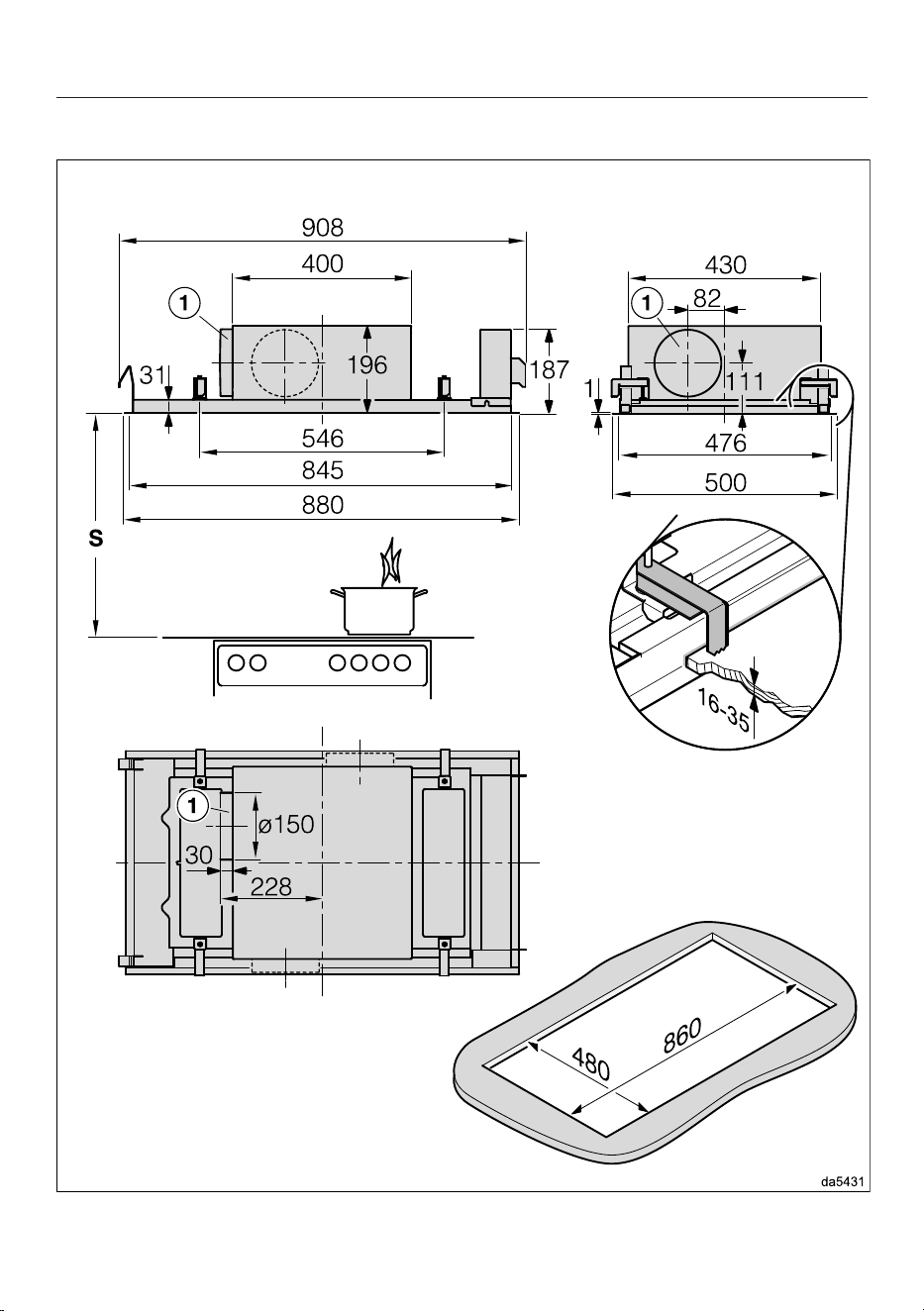
Installation materials
1vent connection
for exhaust ducting 150mm.
1 non-return flap
for fitting into the exhaust socket on the
motor unit (not needed for recirculation
mode).
2 lids
8rivets
for securing the lids.
Installation
36
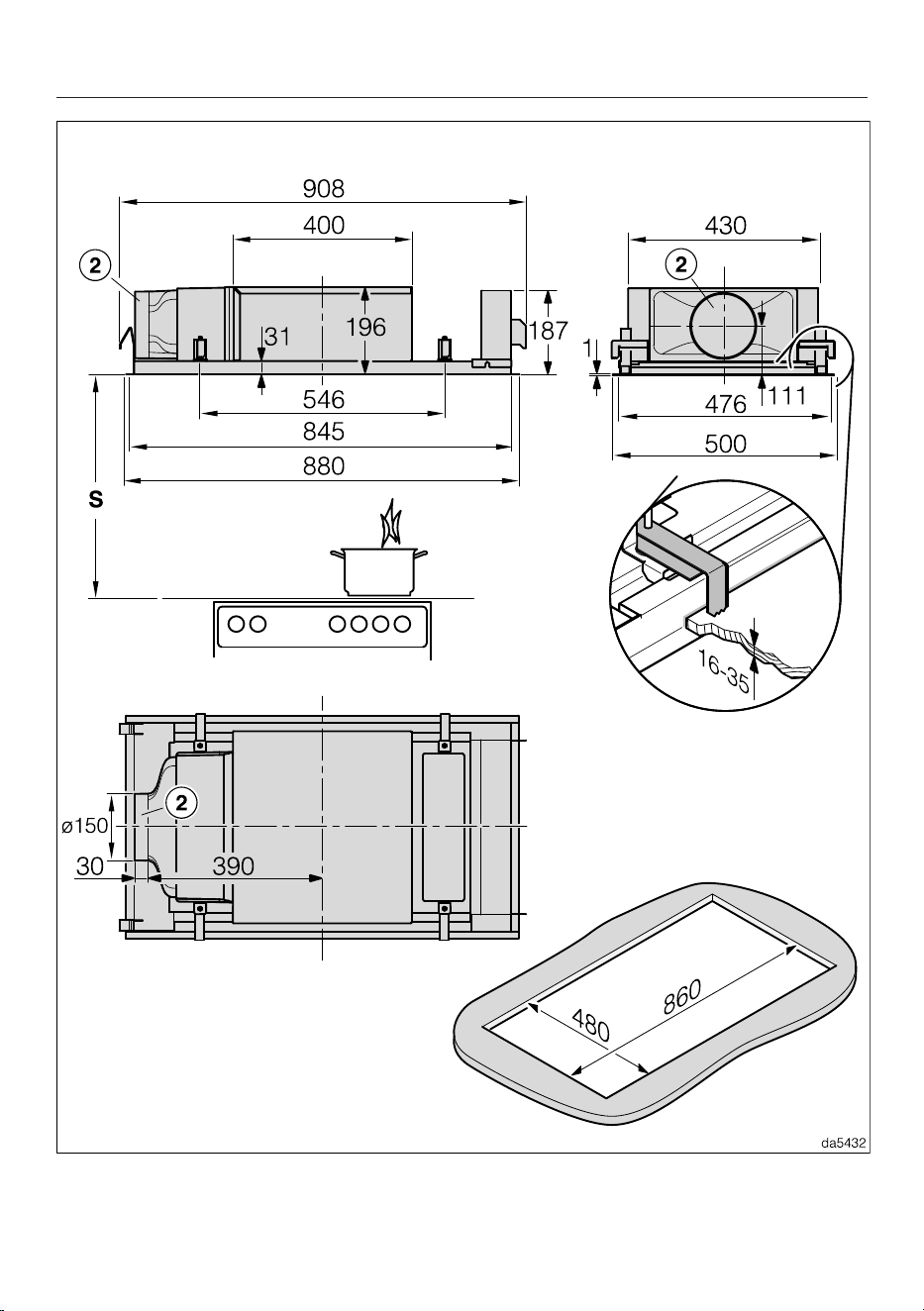
Appliance dimensions
DAC4940 in extraction mode, DAC4943EXTA
Installation
37
DAC4940 in recirculation mode and Plug&Play recirculation mode
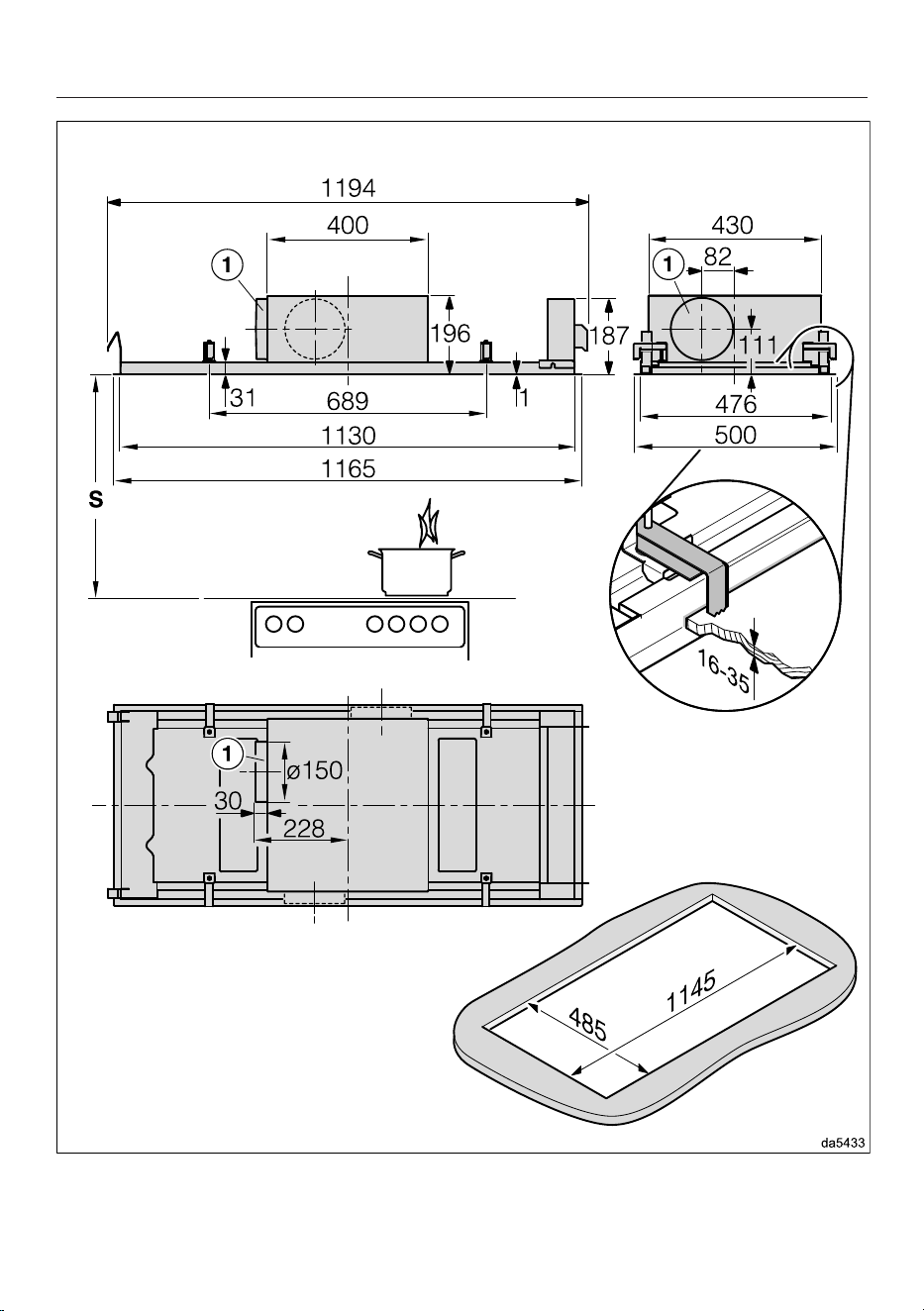
Installation
38
DAC4240 in extraction mode
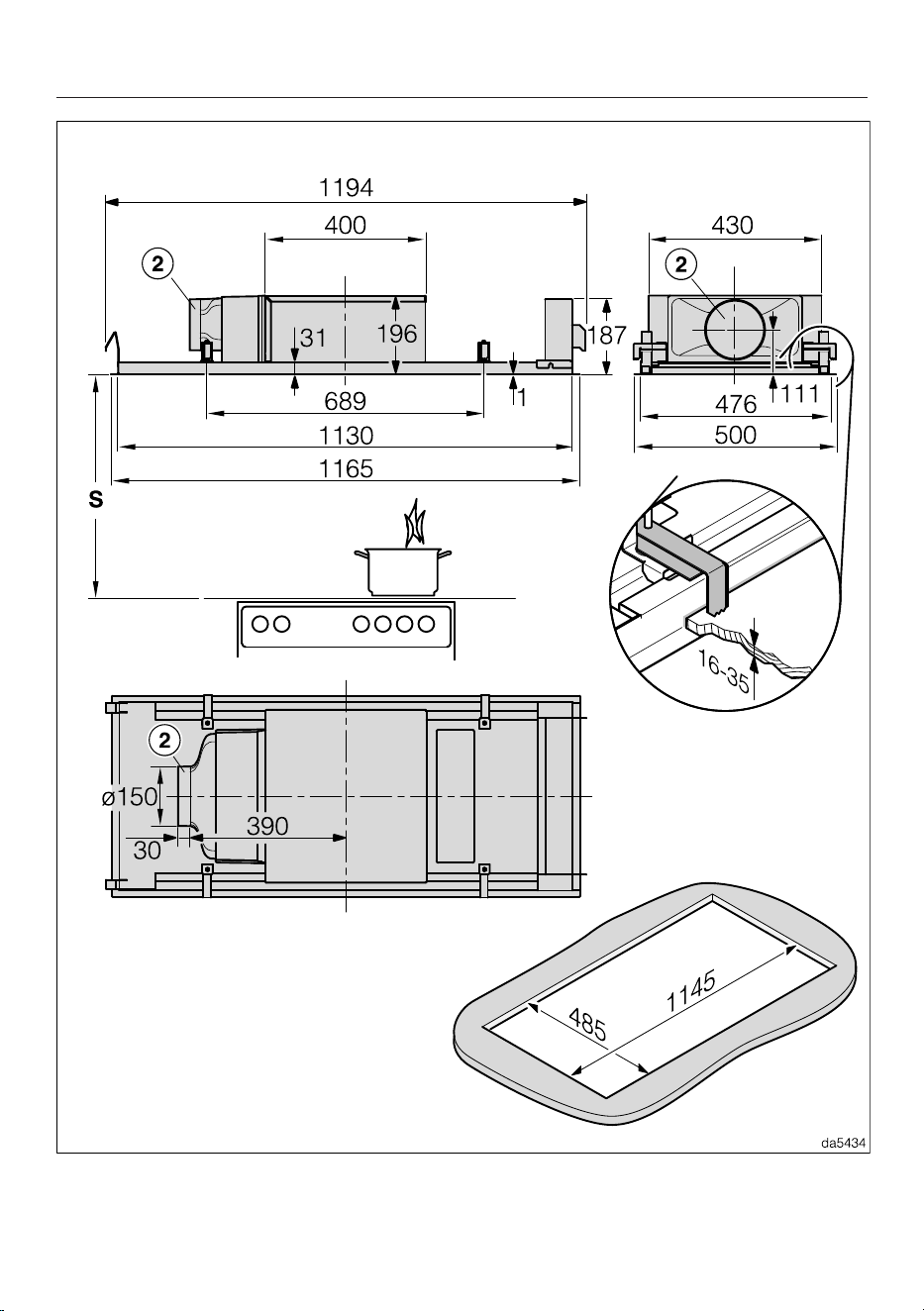
Installation
39
DAC4240 in recirculation mode and Plug&Play recirculation mode

Installation
40
a
Exhaust duct 150mm
The duct is fitted on the left-hand side at the factory.
– If you want to install the duct at the front or rear, you can rotate the fan casing
by 90° during installation. To rotate the casing, there must be a clearance of
100mm in the ceiling in front of and behind the ceiling cut-out.
– If you want to install the duct on the right-hand side, rotate the cooker hood
by 180° during installation. To ensure that the panel still opens to the front,
you must convert the panel hinges.
b
Duct 150mm, as air vent in Plug&Play mode or for the connection of an air
duct in ducted recirculation mode
The duct is fitted on the left-hand side at the factory.
– It is not possible to convert the duct to the front or rear.
– If you want to install the duct on the right-hand side, rotate the cooker hood
by 180° during installation. To ensure that the panel still opens to the front,
you must convert the panel hinges.
The required installation steps are described in the installation sheet.
Installation
41
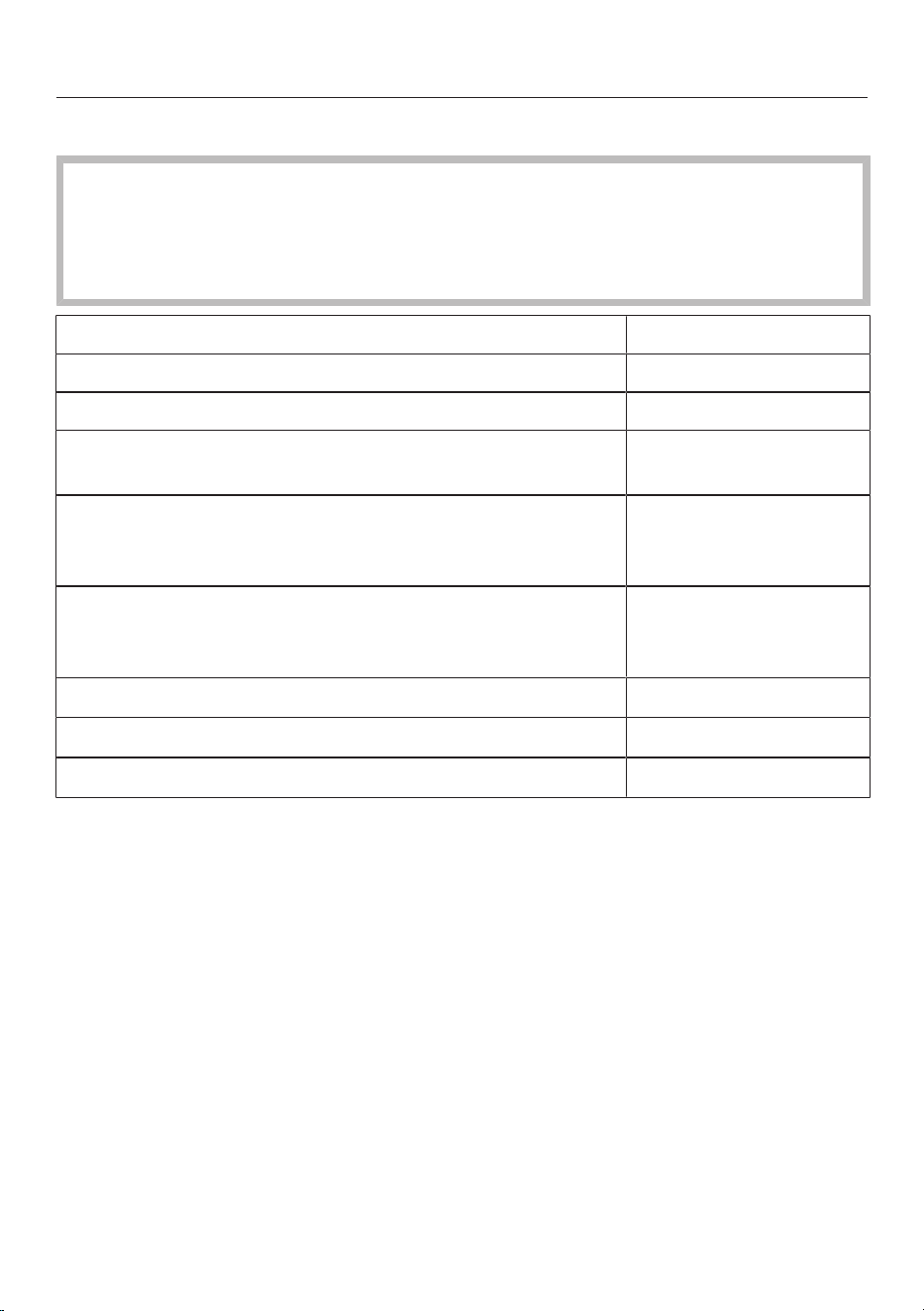
Safety distance between hob and cooker hood (S)
When planning the installation height of your cooker hood, the minimum safety
distance between the top of a cooker or hob and the bottom of the cooker hood
is as follows, unless a greater distance is specified by the manufacturer of your
cooking appliance.
See “Warning and Safety” instructions for further information.
Cooking appliance Minimum distance S
Electric hob 450mm
Electric grill, deep fat fryer (electric) 650mm
Multi-burner gas hob,
total output ≤ 12.6 kW, no burner > 4.5 kW
650mm
Multi-burner gas hob,
total output > 12.6 kW and ≤ 21.6 kW,
no burner > 4.8 kW.
760mm
Multi-burner gas hob,
total output > 21.6 kW,
or multi-burner gas hob where one burner > 4.8 kW.
Not possible
Single burner gas hob, output ≤ 6 kW. 650mm
Single burner gas hob, output > 6 kW and ≤ 8.1 kW. 760mm
Single burner gas hob, output > 8.1 kW Not possible
Installation
42
Installation notes
- We recommend a minimum distance
of 700mm and a maximum distance
of 1300mm between the hob and the
cooker hood.
Please be aware that if positioned too
high, vapour extraction will be
inefficient.
- To achieve optimum vapour
extraction, the cooker hood must be
centred over the hob, not to the side
or behind it.
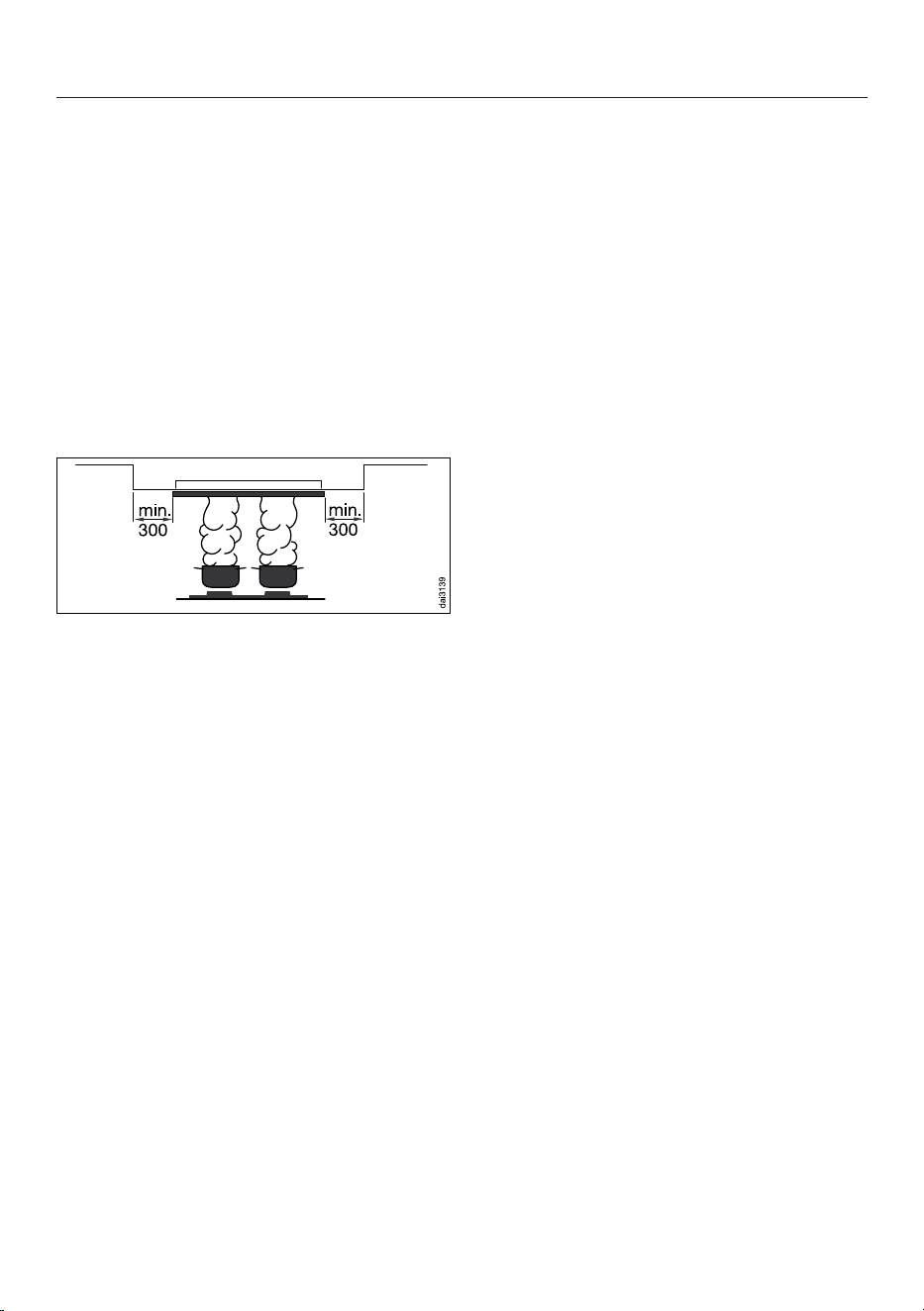
- If the cooker hood is being installed in
a suspended ceiling, the installation
surface all around the cooker hood
must be at least 300mm larger than
the cooker hood itself.
- As far as possible, the hob should be
narrower than the cooker hood. The
hob should be no wider than the
cooker hood.
- The cooker hood must also be freely
accessible and located such that it
can be dismantled in the event of
future service requirements. This
should be taken into consideration
when planning the position of
cabinets, shelves, ceilings or features
in the vicinity of the cooker hood.
- The cooker hood is fastened in the
cut-out using clamps. A solid
installation surface, e.g. made of
wood, is required. Make sure that the
structure can support the load.
Around the clamps, components such
as supports and ducting must be at
least 25mm from the cut-out.
- If you install the appliance in a place
that is used on a daily basis, e.g. in a
cabinet, the top of the appliance must
not be accessible. Close the
installation space in the cabinet, e.g.
with additional walls and shelves.
Plug&Play mode
- The air must be able to circulate freely
into the ceiling. Components in the
ceiling must be at least 30cm away
from the exhaust ducting.
- Ensure sufficient ventilation of the
ceiling area, e.g. through exhaust
grilles, gaps or shadow gaps. The
cross-section of the openings must be
at least 600cm² in total.
- The ceiling and adjacent walls that
come into contact with the exhaust air
must not exceed a heat transfer
coefficient of 0.5W/(m²K).
- The electronic module for vapour
extraction must be switched to
Plug&Play mode, see
“Commissioning”, “Activating/
Deactivating Plug&Play”.
Installation
43
Connection for air extraction
If the cooker hood is used at the
same time as a heating appliance
that relies on oxygen from the same
room, there is a risk in certain
circumstances of toxic fumes
building up.
It is essential that the “Warning and
Safety” instructions are observed.
The cooker hood should be installed
according to local and national
building regulations. Seek approval
from the building inspector where
necessary.
Only use smooth pipes or flexible
exhaust ducting made from approved
non-flammable materials for exhaust
ducting.
Use rigid exhaust ducting for...EXT/
EXTA model cooker hoods. The
external motor can cause an
underpressure which can result in the
exhaust ducting distorting.
To achieve the most efficient air
throughput with the lowest noise levels,
please note the following:
- The diameter of the exhaust ducting
must not be smaller than the cross-
section of the exhaust duct (see
“Appliance dimensions”). This applies
in particular when using flat ducting.
- The exhaust ducting should be as
short and straight as possible.
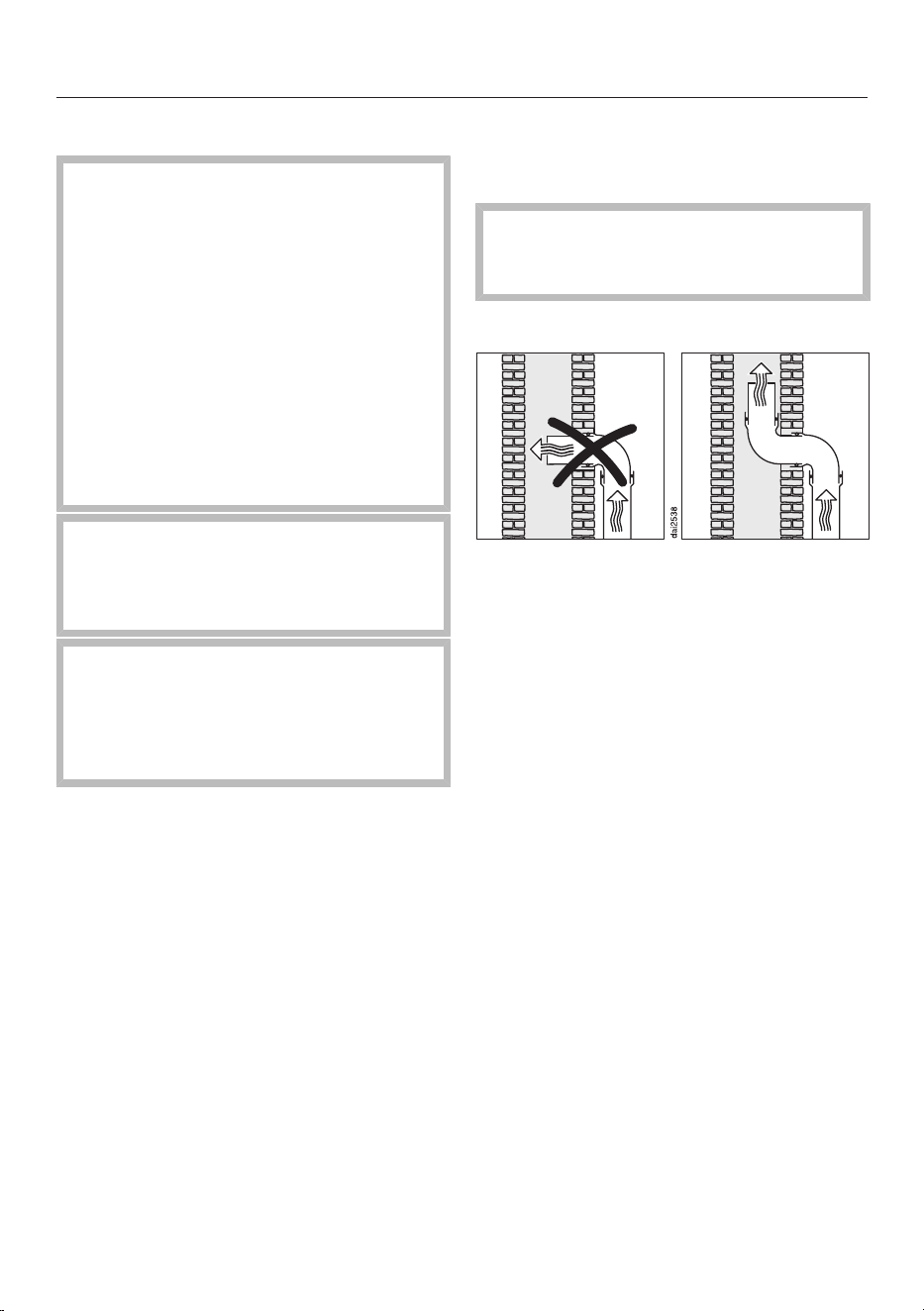
- Only use wide radius bends.
- The exhaust ducting must not be
kinked or compressed.
- All connections must be strong and
airtight.
- If the exhaust ducting has flaps, these
must be opened whenever the cooker
hood is switched on.
Any constriction of the air throughput
will reduce extraction performance
and increase operating noise.
Flue
If the exhaust air is to be ducted into a
flue, the ducting must be directed in the
flow direction of the flue.
If the flue is used by several ventilation
units, the cross-section of the flue must
be large enough.
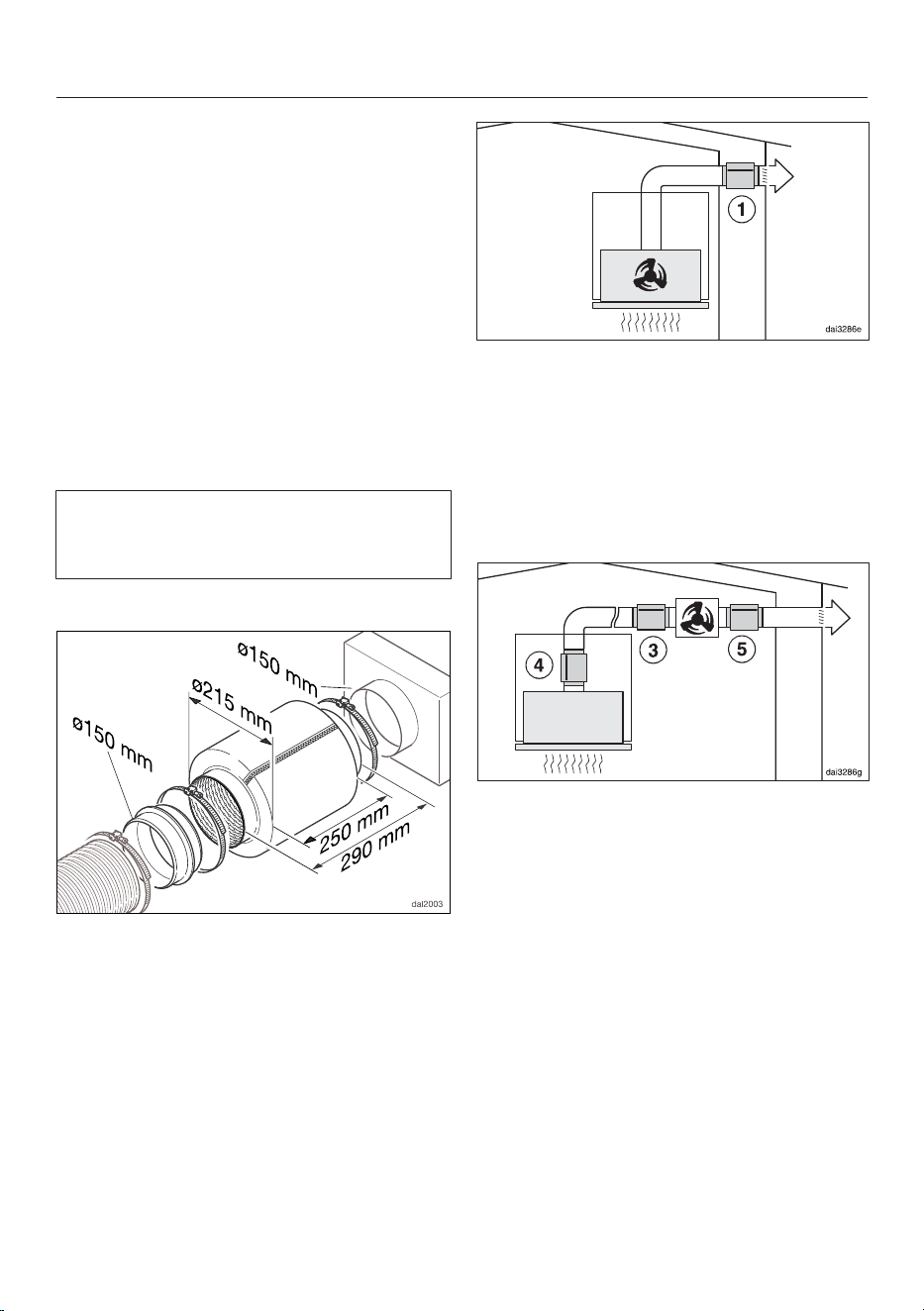
Non-return flap
Use a non-return flap in the exhaust
system.
A non-return flap ensures that when the
cooker hood is not in operation, the
duct is closed to prevent unwanted
exchange of room air and outside air.
If the exhaust is ducted through an
outside wall, a Miele wall vent or roof
vent (available as an optional accessory)
is recommended. Both of these have a
built-in non-return flap.
If the on-site ventilation system does
not have a non-return flap, one is
supplied with the cooker hood.
The non-return flap is fitted in the
exhaust socket of the fan.
Installation
44
Condensation
If the exhaust ducting is to run through
cool rooms or ceiling space, for
example, the significant variations in
temperature between the different
areas can cause condensation to form.
Insulate the exhaust ducting to reduce
temperature variations.
If the exhaust ducting is to be laid
horizontally, it must be laid with a
downwards sloping gradient of at least
1cm per meter. This is to ensure that
condensation cannot drain back into the
cooker hood.
Miele shall not accept warranty claims
for any functional defects or damage
caused by inadequate exhaust ducting.
Silencer
To reduce noise levels even further, a
silencer (optional accessory) can be
installed in the exhaust ducting.
In extraction mode, the silencer not only
reduces noise from the fan outside the
house, but also sounds originating
outside reaching the kitchen through the
exhaust ducting (e.g. traffic noise). For
this reason, the silencer must be
positioned as close as possible to the
ducting exit.
For operation with an external motor,
noise from the motor outside the house
and inside the kitchen can be
minimised.
Positioning the silencer in front of the
external motor reduces noise inside
the kitchen. If the exhaust ducting is
long, the silencer needs to be
positioned at the exhaust duct in the
ducting above the cooker hood itself.
For an external motor installed inside
the house, noise from the motor outside
the house can be reduced by
positioning the silencer behind the
external motor.

Installation
45
Electrical connection
The cooker hood is supplied with a
mains cable with moulded plug ready
for connection to a suitable earthed
socket.
If the socket is not easily accessible or a
fixed connection is envisaged, ensure
that a suitable means of disconnection
is provided on the installation side for
each pole.
Risk of fire from overheating.
Connecting the cooker hood to multi-
socket adapters or extension cables
can overload the cables.
For safety reasons, do not use an
extension cable or multi-socket
adapter.
The electrical system must comply with
local and national safety regulations
(BS7671 in the UK).
For safety reasons, we recommend
using a type residual current device
(RCD) in the relevant electrical
installation for connecting the cooker
hood.
If the mains connection cable is
damaged, it must only be replaced with
a specific mains connection cable of the
same type (available from the Miele
Customer Service Department). For
safety reasons, such replacement may
only be carried out by a qualified
specialist or the Miele Customer
Service Department.
These operating instructions and the
data plate indicate the nominal power
consumption and the appropriate fuse
rating. Compare this information with
the data of the on-site electrical
connection.
If in any doubt, consult a qualified
electrician.
Temporary or permanent operation on
an autonomous power supply system or
a power supply system that is not
synchronised with the mains power
supply (e.g. island networks, back-up
systems) is possible. A prerequisite for
operation is that the power supply
system complies with the specifications
of EN50160 or an equivalent standard.
The function and operation of the
protective measures provided in the
domestic electrical installation and in
this Miele product must also be
maintained in isolated operation or in
operation that is not synchronised with
the mains power supply, or these
measures must be replaced by
equivalent measures in the installation.
As described, for example, in the current
version of VDE-AR-E 2510-2.
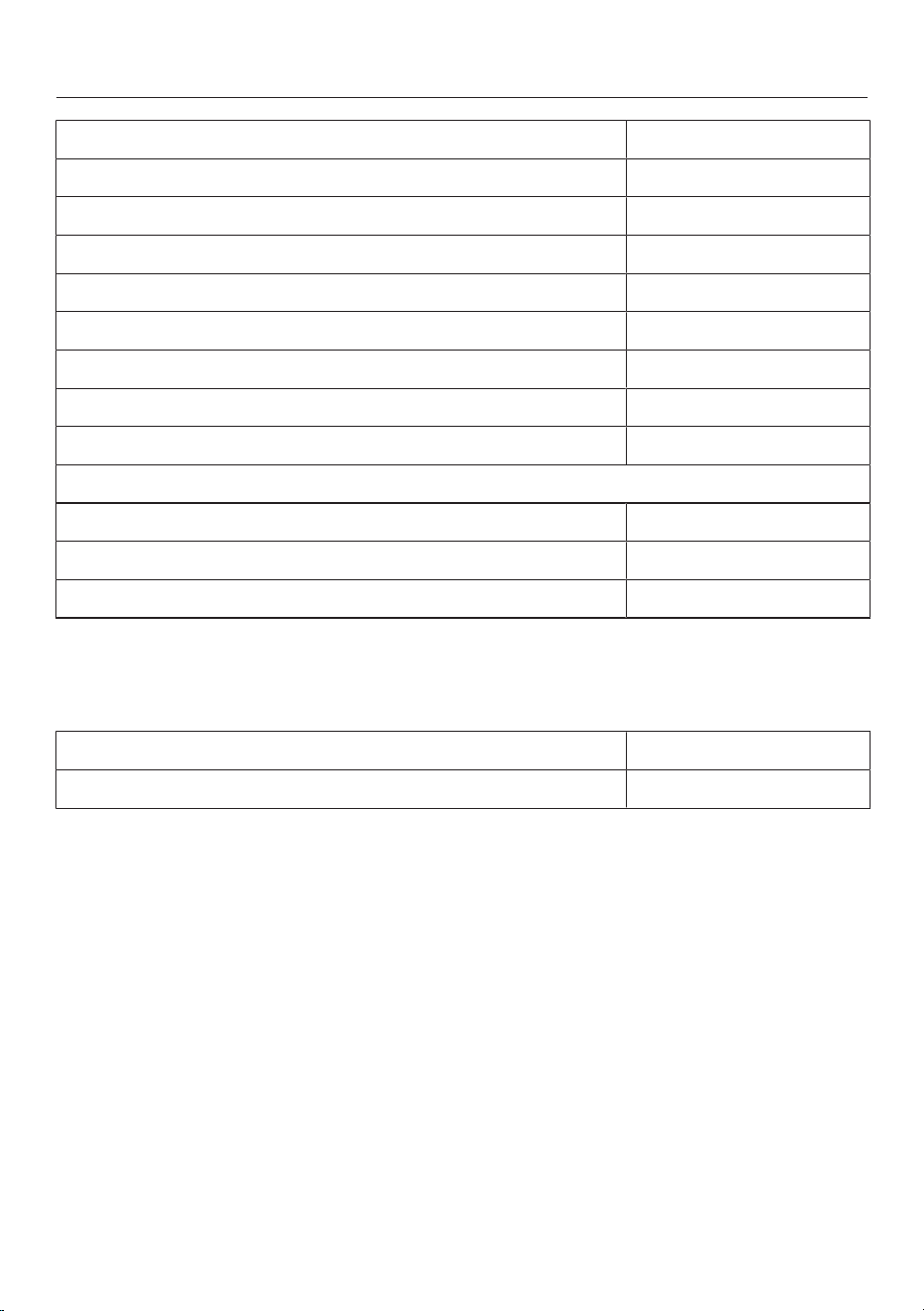
Technical data
46
Fan motor* 180W
Hob lighting 2x7.2W
Ambient lighting 2x9W
Total rated load* 198W
Preset light temperature for the hob lighting 3500K
Adjustable light temperature for the hob lighting 2700–6500K
Mains voltage, frequency AC230V, 50Hz
Fuse rating 10A
Length of mains connection cable 1.35m
Weight
DAC4940 17.7kg
DAC4240 21.4kg
DAC4943EXTA 15.2kg
* For EXTA models, the rated load will depend on the type of external fan fitted.
Length of connection cable to external fan: 1.3m
WiFi module
Frequency band 2.400–2.4835GHz
Maximum transmission power <100mW
Optional accessories for recirculation mode
One DKF35-P, DKF35-S or DKF40-R charcoal filter (reactivatable)

Technical data
47
EU Conformity declaration
Miele hereby declares that this cooker hood complies with Directive 2014/53/EU.
The complete text of the EU declaration of conformity is available from one of the
following internet addresses:
- Products, Download from www.miele.ie
- For service, information, operating instructions etc: go to
https://miele.co.uk/manuals and enter the name of the product or the serial
number
UK Conformity declaration
Miele hereby declares that this cooker hood complies with UK Radio Equipment
Regulations 2017, as amended.
The complete text of the UK declaration of conformity is available from one of the
following internet addresses:
- Products, Download from www.miele.co.uk
- For service, information, operating instructions etc: go to https://miele.co.uk/
manuals and enter the name of the product or the serial number
ThisStatement of Compliance confirms this Miele product fully complies with the
Product Security and Telecommunications Infrastructure (Security Requirements
for Relevant Connectable Products) Regulations 2023.
1) Household Appliance –
2)
Manufactured by: Miele & Cie KG,
Carl Miele Street 29, 33332 Gutersloh Germany
Imported by and contact point: Miele Company Ltd, Fairacres, Marcham Road,
Abingdon, Oxon, OX14 ITW Great Britain
The defined support period at the time of first supply is 10 years
3)
To report vulnerabilities and cybersecurity issues please contact: [email protected]4)
5) Signature
Name: Paul Wright
Company Position: Head of Technical Management
Date of signature: 19th March 2024
Place of signature:
Abingdon, Oxfordshire
Cooker Hood DAC 2940, DAC 4940
Note for test institutes
Energy efficiency must be calculated using extraction mode. The cooker hood is set
up ex-works for recirculation mode. To re-set it for extraction mode the operating
hours counter for the charcoal filter(s) has to be deactivated (see “Before using for
the first time”).
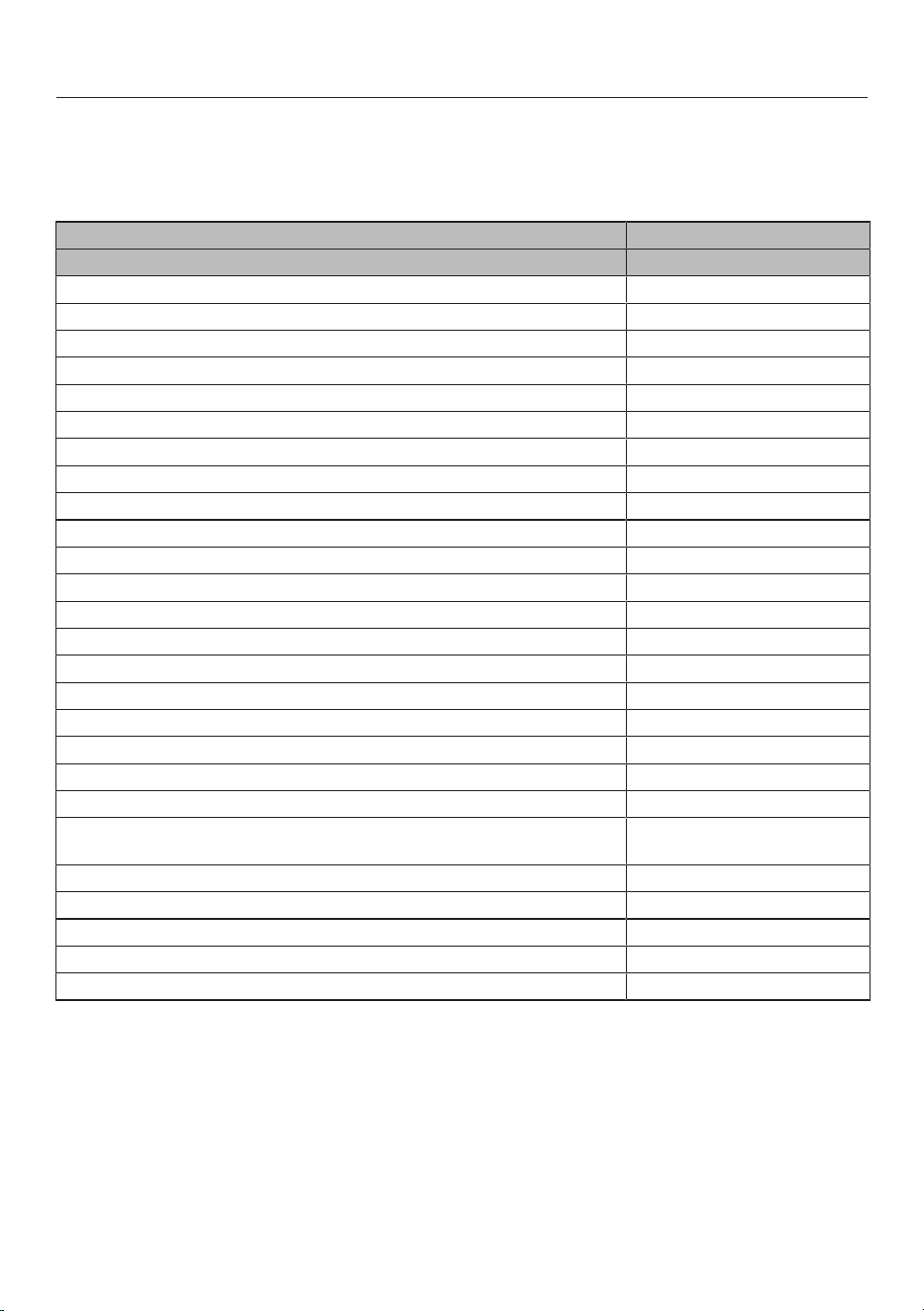
Technical data
48
Data sheet for household cooker hoods
In acc. with delegated regulation (EU) No. 65/2014 and regulation (EU) No.
66/2014
MIELE
Model name/identifier DAC 4940 Stella Ambient
Annual Energy Consumption (AEC
hood
) 32,0 kWh/year
Energy efficiency class A++
Energy efficiency index (EEI
hood
) 36,4
Fluid Dynamic Efficiency (FDE
hood
) 41,1
Fluid Dynamic Efficiency class
A (most efficient) to G (least efficient) A
Lighting Efficiency (LE
hood
) 32,6 lx/W
Lighting Efficiency class
A (most efficient) to G (least efficient) A
Grease Filtering Efficiency 81,5%
Grease Filtering Efficiency class
A (most efficient) to G (least efficient) C
Airflow at best efficiency point 370,4 m
3
/h
Air flow (min. speed) 237 m
3
/h
Air flow (max. speed) 506 m
3
/h
Air flow (intensive or boost setting) 757 m
3
/h
Max. air flow (Q
max
) 757,0 m
3
/h
Air pressure at best efficiency point 470 Pa
Airborne acoustical A-weighted sound power emissions (min. speed) 42 dB
Airborne acoustical A-weighted sound power emissions (max. speed) 59 dB
Airborne acoustical A-weighted sound power emissions (intensive or
boost setting)
68 dB
Electrical power input at best efficiency point 117,8 W
Power consumption in standby mode (P
s
) 0,26 W
Nominal power of lighting system 14,4 W
Average illumination of the lighting system on the cooking surface 470 Ix
Time increase factor 0,5
Technical data
49
Data sheet for household cooker hoods
In acc. with delegated regulation (EU) No. 65/2014 and regulation (EU) No.
66/2014
MIELE
Model name/identifier DAC 4240 Stella Ambient
Annual Energy Consumption (AEC
hood
) 31,2 kWh/year
Energy efficiency class A++
Energy efficiency index (EEI
hood
) 36,4
Fluid Dynamic Efficiency (FDE
hood
) 41,0
Fluid Dynamic Efficiency class
A (most efficient) to G (least efficient) A
Lighting Efficiency (LE
hood
) 30,6 lx/W
Lighting Efficiency class
A (most efficient) to G (least efficient) A
Grease Filtering Efficiency 80,5%
Grease Filtering Efficiency class
A (most efficient) to G (least efficient) C
Airflow at best efficiency point 355,4 m
3
/h
Air flow (min. speed) 239 m
3
/h
Air flow (max. speed) 513 m
3
/h
Air flow (intensive or boost setting) 754 m
3
/h
Max. air flow (Q
max
) 754,0 m
3
/h
Air pressure at best efficiency point 471 Pa
Airborne acoustical A-weighted sound power emissions (min. speed) 43 dB
Airborne acoustical A-weighted sound power emissions (max. speed) 60 dB
Airborne acoustical A-weighted sound power emissions (intensive or
boost setting)
68 dB
Electrical power input at best efficiency point 113,4 W
Power consumption in standby mode (P
s
) 0,25 W
Nominal power of lighting system 14,4 W
Average illumination of the lighting system on the cooking surface 440 Ix
Time increase factor 0,5
Technical data
50
Data sheet for household cooker hoods
In acc. with delegated regulation (EU) No. 65/2014 and regulation (EU) No.
66/2014
MIELE
Model name/identifier DAC 4943 EXTA Stella
Ambient
Annual Energy Consumption (AEC
hood
) 116,8 kWh/year
Energy efficiency class C
Energy efficiency index (EEI
hood
) 79,8
Fluid Dynamic Efficiency (FDE
hood
) 20,1
Fluid Dynamic Efficiency class
A (most efficient) to G (least efficient) C
Lighting Efficiency (LE
hood
) 32,6 lx/W
Lighting Efficiency class
A (most efficient) to G (least efficient) A
Grease Filtering Efficiency 81,5%
Grease Filtering Efficiency class
A (most efficient) to G (least efficient) C
Airflow at best efficiency point 446,7 m
3
/h
Air flow (min. speed) 354 m
3
/h
Air flow (max. speed) 603 m
3
/h
Air flow (intensive or boost setting) 716 m
3
/h
Max. air flow (Q
max
) 716,0 m
3
/h
Air pressure at best efficiency point 363 Pa
Airborne acoustical A-weighted sound power emissions (min. speed) 49 dB
Airborne acoustical A-weighted sound power emissions (max. speed) 60 dB
Airborne acoustical A-weighted sound power emissions (intensive or
boost setting)
64 dB
Electrical power input at best efficiency point 223,9 W
Power consumption in standby mode (P
s
) 0,26 W
Nominal power of lighting system 14,4 W
Average illumination of the lighting system on the cooking surface 470 Ix
Time increase factor 1,3
The above values were determined in combination with the MieleABLG202
external motor.

United Kingdom
Miele Co. Ltd., Fairacres, Marcham Road, Abingdon, Oxon, OX14 1TW
Tel: 0330 160 6600, Internet: www.miele.co.uk, E-mail: [email protected]
Australia
Miele Australia Pty. Ltd.
ACN 005 635 398
ABN 96 005 635 398
Level 4, 141 Camberwell Road
Hawthorn East, VIC 3123
Tel: 1300 464 353
E-mail: [email protected]
Internet: www.miele.com.au
Miele Electrical Appliances Co. Ltd.
No. 82, Shimenyi Road, JingAn District
Shanghai, China, P.R.C
Post Code: 200040
Phone: +86 21 6157 3500
Fax: +86 21 6157 3511
E-mail: info@miele.cn
Internet: www.miele.cn
China Mainland
Miele (Hong Kong) Ltd.
41/F - 4101, Manhattan Place
23 Wang Tai Road
Kowloon Bay, Hong Kong
Tel: (852) 2610 1025
Fax: (852) 3579 1404
E-mail:
Website: www.miele.hk
Hong Kong, China
Miele India Pvt. Ltd.
1st Floor, Copia Corporate Suites,
Commercial Plot 9, Mathura Road,
Jasola, New Delhi - 110025
E-mail: customercare@miele.in
Website: www.miele.in
India
Miele Ireland Ltd.
2024 Bianconi Avenue
Citywest Business Campus
Dublin 24
Tel: (01) 461 07 10
Fax: (01) 461 07 97
E-mail: [email protected]
Internet: www.miele.ie
Ireland
Malaysia
Miele Sdn Bhd
Suite 12-2, Level 12
Menara Sapura Kencana
Petroleum
Solaris Dutamas No. 1
Jalan Dutamas 1
50480 Kuala Lumpur, Malaysia
Phone: +603-6209-0288
Fax: +603-6205-3768
Miele New Zealand Limited
IRD 98 463 631
8 College Hill
Freemans Bay, Auckland 1011
Tel: 0800 464 353
Internet: www.miele.co.nz
New Zealand
Miele Pte. Ltd.
29 Media Circle
#11-04 ALICE@Mediapolis
Singapore 138565
Tel: +65 6735 1191
Fax: +65 6735 1161
E-mail: [email protected]
Internet: www.miele.sg
Singapore
Miele (Pty) Ltd.
63 Peter Place, Bryanston 2194
Tel: (011) 875 9000
Fax: (011) 875 9035
E-mail: [email protected]
Internet: www.miele.co.za
South Africa
Miele Appliances Ltd.
Showroom 1, Eiffel 1 Building
P.O. Box 114782 - Dubai
Tel. +971 4 3044 999
Fax. +971 4 3418 852
800-MIELE (64353)
E-mail: [email protected]
Website: www.miele.ae
United Arab Emirates
Manufacturer: Miele & Cie. KG, Carl-Miele-Straße 29, 33332 Gütersloh, Germany
Thailand
Miele Appliances Ltd.
BHIRAJ TOWER at EmQuartier
43rd Floor Unit 4301-4303
689 Sukhumvit Road
North Klongton Sub-District
Vadhana District
Bangkok 10110, Thailand
Sheikh Zayed Road, Umm Al Sheif
E-mail: customercare@miele.co.nz
P.O. Box 69434, Bryanston 2021

M.-Nr. 12 574 481 / 02en-GB
DAC4940, DAC4240, DAC4943EXTA