WIRELESS
MUSIC RECEIVER
MPOW WIRELESS AUDIO
MODEL : BH408A
User Manual
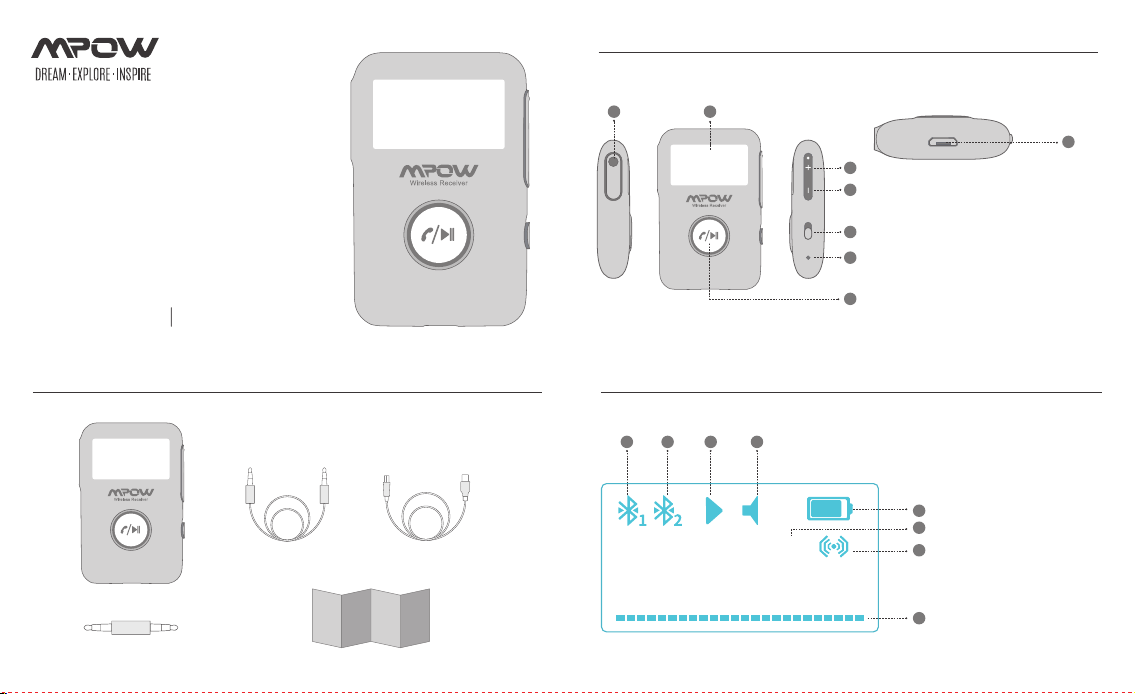
Icons displayed on the screen
1 2 3 4
5
6
7
8
X1
X1
X1
X1
X1
Package List
AUX
Diagram
1. Stereo audio output port
2. Screen
3. Previous track / Volume up
4. Next track / Volume down
5. Power switch
6. The microphone
7. The multifunctional button (MFB)
(Play / Pause; Answer / Hang up.)
8. USB charging port
1 2
3
4
5
6
8
7
OFF ON
1. Wireless Device 1
2. Wireless Device 2
3. Play / Pause
4. Volume
5. Battery
6. Device Name
7. Surround Sound
8. Music Signal Spectrum
MPOW BH408
10
Settings
DEVICES
MPOW BH408
Connected
User Manual
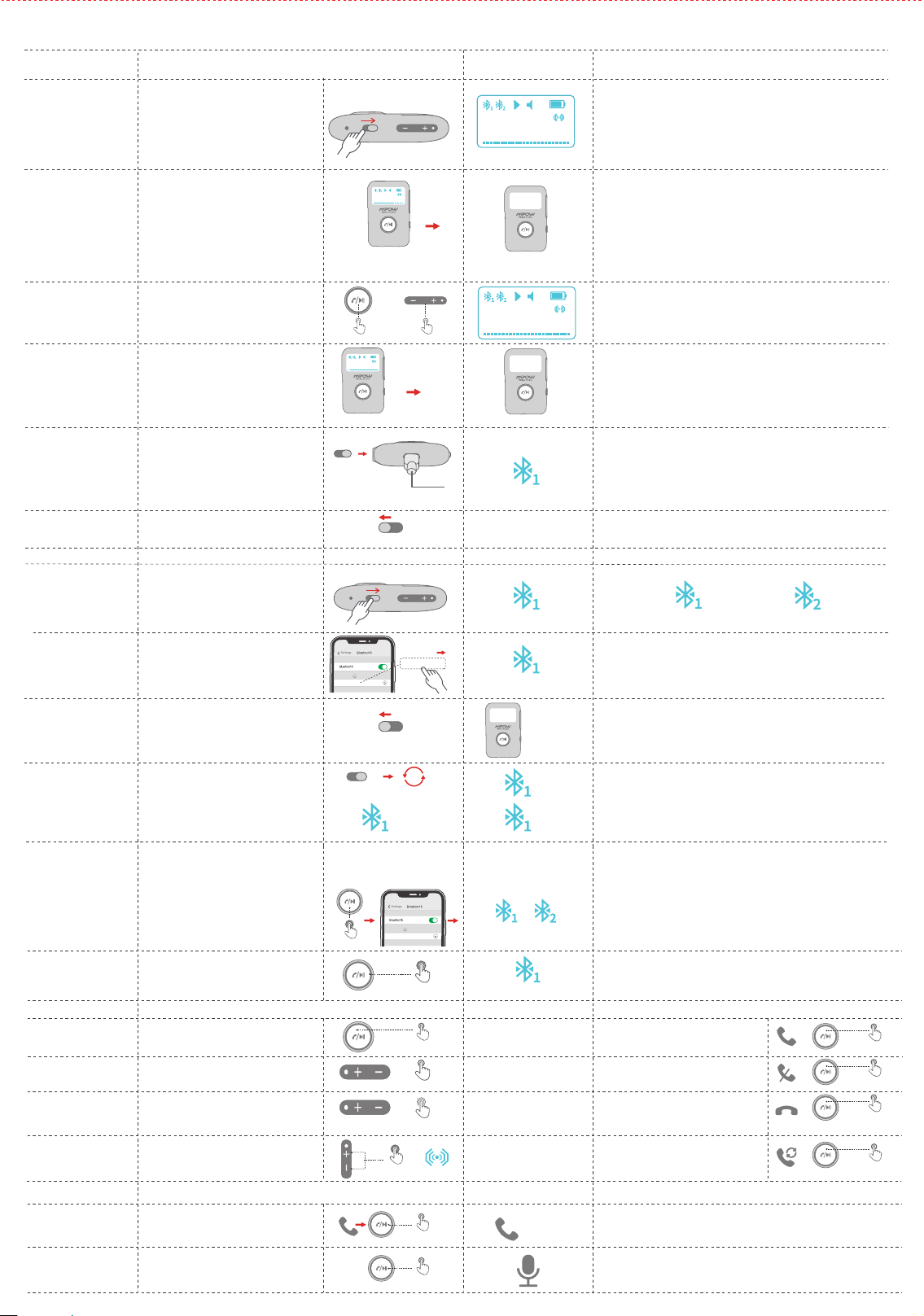
Functions
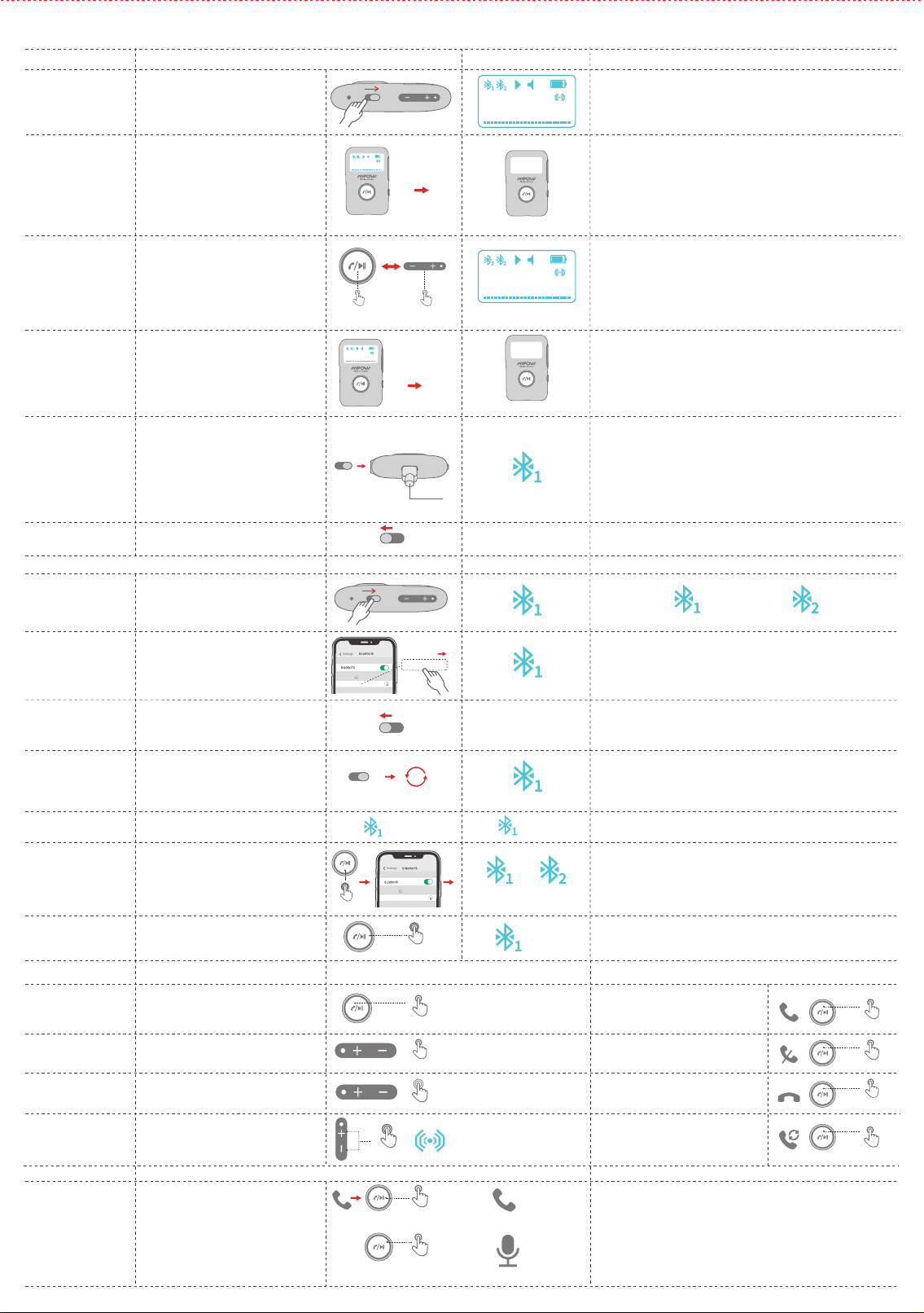
Power on
Screen turns off
Wake up screen
Slide the switch to "ON"
The screen turns off automatically after
60 seconds to save power.
Short press the MFB or volume up/down
button to wake up the screen.
Slide the switch to "OFF"
The icon of Wireless Device 1 starts flashing
when power on and the product begins
reconnecting or pairing.
Auto power-off
Power off
Wireless pairing
Turn on the wireless on your phone,
search and connect to "MPOW BH408".
Wireless
connected
The product shuts down.
Wireless
disconnected
When the product is switched on, the device
is back to the wireless connecting range in
10 minutes.
Auto reconnection
The device is out of the wireless signal range.
Abnormal cut off
Auto power on
when charger
connected
The product automatically shuts down
when not connecting to any devices
more than 10 minutes.
Screen turns on
Operations
Screen Display
Notes
EN
1. Make sure the intervals between power on and off longer
than 5 seconds.
2. Fully charge the battery before use.
3. The music signal spectrum varies with music and volume.
Switch on to wake the product.
It is not highly recommended to use the product while charging,
since the voltage difference may interfere with the sound quality.
1. The icon of Wireless Device 1 is still, indicating the product is
connected.
2. The connected wireless device's name is MPOW BH408 on
your phone.
In shut down status (when the switch is slid
to ON), the product automatically turns
on when the USB charger is connected.
(e.g. start your car when the product is
connected to the charger, it automatically
turns on and starts reconnecting or
pairing )
OFF
ON
Auto power-on
MPOW BH408
OFF ON
60s
Screen turns offScreen turns on
Screen turns off
Screen turns off
Screen turns off
OFF ON
OR
Click Once
Click Once
>10 minutes
Without Bluetooth connection
Flashing
Flashing
Wireless Pairing
Flashing---Not connected
Still---Connected
Flashing
Still
Still---Connected
Power ON
OFF ON
OFF ON
OFF
ON
<10 minutes
①
>12m
MPOW BH408
10
MPOW BH408
10
MPOW BH408
10
MPOW BH408
10
Settings
DEVICES
MPOW BH408
Connected
Long press the MFB for 8 seconds when
power on, and wait till the screen shuts off.
Short press the MFB to play music while the
device is connected.
Short press the MFB to pause music.
Short press the MFB to answer calls.
Long press the MFB to reject calls.
Short press the MFB to end calls.
Click the MFB twice to redial the last call.
Short press "+".
Short press "-".
Long press "+" (15 adjustable volume levels)
Long press "-" (15 adjustable volume levels)
Press "+" and "-" simultaneously for 2 seconds.
Reset Wireless
Connection
Play / Pause Answer
Reject
Hang up
Redial
Previous track/
Next track
Volume Up/
Volume Down
Surround Sound
On/Off
After connected to the first device, long press
the MFB for 3 seconds till the icon of Wireless
Device 2 starts flashing, then search and connect
" MPOW BH408" on the second device.
Connect to 2
devices
1. It requires your phone having a voice assistant.
2. When connecting to 2 phones, this operation can only wake
the voice assistant on the first paired phone.
The 2 icons stay still when both devices are connected to the
product.
The icon of Wireless Device 1 flashes and starts to pair.
Music
Still Still
②
Hold on 3s
Hold on 8s
Hold on 2s
Flashing
Operations Calls Operations
Click Once
Click Once
Press and Hold
Hold on 1s
Double click
X2
Click Once
Click Once
Operations Screen Display NotesCalls
Long press the MFB for 1 second to take the call
on your phone.
Switch to the phone
Long press the MFB for 1 second to wake voice
assistant while connecting to your phone.
Activate voice
assistant
Hold on 1s
xxxxxxxxxxx
Hold on 1s
(Is enabled only during music playing)
Drücken Sie kurz die MFB, um Musik abzuspielen,
während das Gerät angeschlossen ist.
Drücken Sie kurz die MFB, um die Musik
anzuhalten.
Drücken Sie kurz die MFB, um Anrufe
anzunehmen.
Halten Sie die MFB-Taste gedrückt, um
Anrufe abzuweisen.
Drücken Sie kurz die MFB, um die Anrufe
zu beenden.
Klicken Sie zweimal auf den MFB, um
den letzten Anruf erneut zu wählen.
Drücken Sie kurz „+".
Drücken Sie kurz „-".
Langes Drücken von „+" (15 einstellbare
Lautstärkestufen)
Langes Drücken von „-" (15 einstellbare
Lautstärkestufen)
Drücken Sie gleichzeitig „+" und „-" für 2 Sekunden.
abspielen / Pause
Antworten
Ablehnen
Auflegen
Wahlwiederholung
Vorheriges Lied/
Nächster Titel
Lautstärke erhöhen/
Lautstärke runter
Surround Sound
Ein / Aus
Musik
Hold on 2s
Operationen Anrufe Operationen
Click Once
Click Once
Press and Hold
Hold on 1s
Double click
X2
Click Once
Click Once
1. Voraussetzung ist, dass Ihr Handy über einen Sprachassistenten verfügt.
2. Bei der Verbindung mit 2 Handys kann durch diesen Vorgang der
Sprachassistent nur auf dem ersten gekoppelten Handy aktiviert
werden.
Operationen Bildschirmanzeige NotesAnrufe
Halten Sie die MFB 1 Sekunde lang gedrückt,
um den Anruf auf Ihrem Handy anzunehmen.
Zum Telefon
wechseln
Halten Sie die MFB 1 Sekunde lang gedrückt,
um den Sprachassistenten zu aktivieren,
während Sie eine Verbindung zu Ihrem Handy
herstellen.
Sprachassistent
aktivieren
Hold on 1s
xxxxxxxxxxx
Hold on 1s
(Ist nur während der Musikwiedergabe aktiviert)
Settings
DEVICES
MPOW BH408
Connected
Settings
DEVICES
MPOW BH408
Connected
Benutzerhandbuch
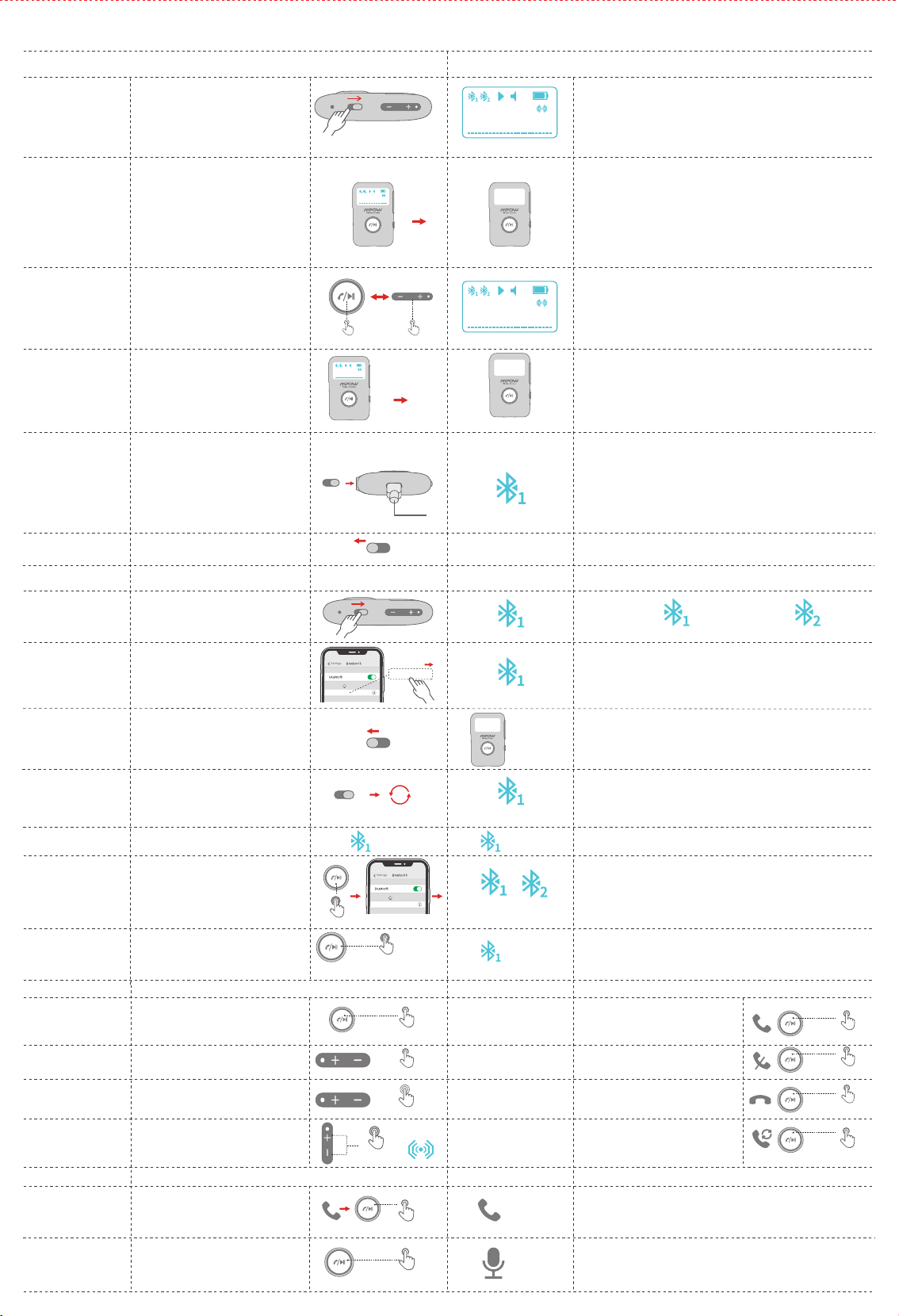
Funktionen
Ein
Bildschirm schaltet
sich aus
Bildschirm
aufwachen
Schieben Sie den Schalter auf „ON"
Der Bildschirm schaltet sich nach 60
Sekunden automatisch aus, um Strom
zu sparen.
Drücken Sie kurz die Taste MFB oder
Lauter / Leiser, um den Bildschirm
aufzuwecken.
Schieben Sie den Schalter auf „OFF"
Das Symbol von Kabelloser Empfänger-
Gerät 1 beginnt zu blinken, wenn das
Gerät eingeschaltet und die Verbindung
wiederhergestellt oder die Verbindung
hergestellt wird.
Automatische
Abschaltung
Ausschalten
Kabelloser
Empfänger-Kopplung
Schalten Sie Kabelloser Empfänger Gerät
auf Ihrem Handy ein, suchen Sie und stellen
Sie eine Verbindung zu ,,MPOW BH408" her.
Kabelloser
Empfänger verbunden
Das Produkt wird heruntergefahren.
Kabelloser
Empfänger getrennt
Wenn Ihr Kabelloser Empfänger Gerät
ausgeschaltet wird und innerhalb von
10 Minuten in den Verbindungsbereich
zurückkehrt, während der BH408A eingeschaltet
bleibt, stellt der BH408A automatisch die
Verbindung zu Ihrem Gerät wieder her.
Automatische
Wiederverbindung
Das Gerät befindet sich außerhalb des
Bluetooth-Signalbereichs.
Abnormal
abgeschnitten
Halten Sie den MFB beim Einschalten 8
Sekunden lang gedrückt und warten Sie,
bis sich der Bildschirm ausschaltet.
Kabelloser Empfänger -
Verbindung
zurücksetzen
Halten Sie nach dem Anschließen an das erste
Gerät den MFB 3 Sekunden lang gedrückt,
bis das Symbol von Kabelloser Empfänger -
Gerät 2 zu blinken beginnt. Suchen Sie dann
nach ,,MPOW BH408" auf dem zweiten
Gerät und stellen Sie eine Verbindung her.
Stellen Sie eine
Verbindung zu 2
Geräten her
Automatisches
Einschalten, wenn
das Ladegerät
angeschlossen ist
Das Produkt wird automatisch
heruntergefahren, wenn länger als
10 Minuten keine Verbindung zu einem
Gerät hergestellt wird.
Bildschirm schaltet sich ein
Operationen Bildschirmanzeige Anmerkungen
DE
1. Stellen Sie sicher, dass die Intervalle zwischen dem Ein- und
Ausschalten länger als 5 Sekunden sind.
2. Laden Sie den Akku vor dem Gebrauch vollständig auf.
3. Das Musiksignalspektrum variiert mit Musik und Lautstärke.
Schalten Sie das Gerät ein, um es zu aktivieren.
Es wird nicht dringend empfohlen, das Produkt während des
Ladevorgangs zu verwenden, da der Spannungsunterschied die
Klangqualität beeinträchtigen kann.
1. Das Symbol von Kabelloser Empfänger -Gerät 1 leuchtet weiterhin
und zeigt an, dass das Produkt verbunden ist.
2. Der Name des verbundenen BKabelloser Empfänger -Geräts lautet
MPOW BH408 auf Ihrem Handy.
The 2 icons stay still when both devices are connected to the
product.
Das Symbol von Kabelloser Empfänger -Gerät 1 blinkt und beginnt
zu koppeln.
Im ausgeschalteten Zustand (wenn der
Schalter auf ON gestellt ist) schaltet sich das
Produkt automatisch ein, wenn das USB-
Ladegerät angeschlossen wird.(z. B. starten
Sie Ihr Auto, wenn das Produkt an das
Ladegerät angeschlossen ist, es schaltet sich
automatisch ein und beginnt, die Verbindung
wiederherzustellen oder eine Verbindung
herzustellen.)
OFF
ON
MPOW BH408
OFF ON
60s
Bildschirm schaltet sich ein Bildschirm schaltet sich aus
Bildschirm schaltet sich aus
Bildschirm schaltet sich aus
Bildschirm schaltet sich aus
OFF ON
Click Once
Click Once
Blinkt
Blinkt
Kabelloser Empfänger-Kopplung
Blinkend --- nicht verbunden noch --- verbunden
Blinkt
Blinkt
Immer noch
Immer noch
Immer noch
Immer noch
Ein
OFF ON
OFF ON
OFF
ON
<10 Minuten
②
Hold on 3s
①
Hold on 8s
>12m
>10 Minuten
MPOW BH408
10
MPOW BH408
10
MPOW BH408
10
MPOW BH408
10
Appuyer brièvement sur le MFB pour écouter de la
musique lorsque l'appareil est connecté.
Appuyer brièvement sur le MFB pour mettre la
musique en pause.
Appuyer brièvement sur le BMF pour
répondre aux appels.
Appuyer longuement sur le MFB pour
rejeter les appels.
Appuyer brièvement sur le BMF pour
mettre fin aux appels.
Cliquez deux fois sur le BMF pour
recomposer le dernier appel.
Appuyer brièvement sur "+".
Appuyer brièvement sur "-".
Appuyer longuement sur "+" (15 niveaux de
volume réglables)
Appuyer longuement sur "-" (15 niveaux de
volume réglables)
Appuyer simultanément sur "+" et "-" pendant
2 secondes.
Jouer / Pauser
Décrocher
Rejeter l'appel
Raccrocher
Rappel
Volume +/ Volume -
Chanson précédente/
Chanson suivante
Son Surround activé /
désactivé
Musik
Opérations Appels Opérations
Appuyer une fois
Appuyer une fois
Press and Hold
Double click
X2
Appuyer une fois
Appuyer une fois
1. Votre téléphone doit avoir un assistant vocal.
2. Lors de la connexion à 2 téléphones, cette opération ne peut
réveiller l'assistant vocal que sur le premier téléphone couplé.
Opérations
Écran d'affichage
RemarquesAppels
Cliquez deux fois sur le BMF pour recomposer
le dernier appel.
Tourner appel privé
Appuyer longuement sur le BMF pendant
1 seconde pour réactiver l'assistant vocal lors
de la connexion à votre téléphone.
Activer l'assistant
vocal
Appuyer pendant 1s
Appuyer
pendant 2s
Appuyer pendant 1s
Appuyer pendant 1s
xxxxxxxxxxx
(N’est utilisé que pendant la lecture de musique)
Settings
DEVICES
MPOW BH408
Connected
Settings
DEVICES
MPOW BH408
Connected
L'écran s'éteint
Réveil de l'écran
L'écran s'éteint automatiquement après 60
secondes pour économiser de l'énergie.
Appuyer brièvement sur le bouton MFB
ou le bouton d'augmentation / de
diminution du volume pour réactiver l'écran.
Glisser le commutateur sur "OFF"
L'icône de l'appareil Récepteur sans fil 1
commence à clignoter à la mise sous tension
et le produit commence à se reconnecter ou
à s'associer.
Arrêt automatique
Arrêt
Appariement
Récepteur sans fil
Activer le Récepteur sans fil sur votre
téléphone, rechercher et connecter
"MPOW BH408".
Récepteur sans fil
connecté
Le produit s'arrête.
Récepteur sans fil
déconnecté
Dans l'état où le produit est allumé, si votre
appareil Récepteur sans fil est retiré de la
plage de connexion et qu'il revient dans la
plage de connexion dans 10 minutes, le
BH408A se reconnectera automatiquement
à votre appareil.
Reconnexion
automatique
L'appareil est en dehors de la plage de signal
Récepteur sans fil.
Anormal coupé
À l'état allumé, maintenez le bouton
multifonction enfoncé pendant 8 secondes.
L'achage redémarre une fois l'écran éteint.
Réinitialiser la
connexion Récepteur
sans fil
Une fois connecté au premier appareil,
appuyer longuement sur le MFB pendant
3 secondes jusqu'à ce que l'icône du
périphérique Récepteur sans fil 2 commence
à clignoter, puis rechercher et connecter
"MPOW BH408" sur le deuxième appareil.
Connecter deux
appareils
Mise en marche
automatique lorsque
le chargeur est
connecté
Le produit s'éteint automatiquement lorsqu'il
ne se connecte à aucun appareil plus de
10 minutes.
Réveil de l'écran
Glisser le commutateur sur "on" pour réactiver le produit
Il n'est pas vivement recommandé d'utiliser le produit pendant le
chargement car la différence de tension peut affecter la qualité
du son.
1. L'icône du périphérique Récepteur sans fil 1 est toujours allumé,
indiquant que le produit est connecté.
2. Le nom du périphérique Récepteur sans fil connecté est MPOW
BH408 sur votre téléphone.
Les 2 icônes restent allumés lorsque les deux appareils sont
connectés au produit.
L'icône du périphérique Récepteur sans fil 1 clignote et commence
à apparier.
En état d'arrêt (lorsque le commutateur est mis
sur ON), le produit s'allume automatiquement
lorsque le chargeur USB est connecté.
(par exemple, démarrer votre voiture lorsque
le produit est connecté au chargeur, il
s'allume automatiquement et commence
à se reconnecter ou à apparier)
OFF
ON
MPOW BH408
60s
Réveil de l'écran L'écran s'éteint
L'écran s'éteint
L'écran s'éteint
L'écran s'éteint
OFF ON
Appuyer une fois
>10 minutes
Clignotant
Clignotant
Appariement
Récepteur sans fil
Clignotant ---Non connecté Allumé ---Connecté
Clignotant
Clignotant
Allumé
Allumé Allumé
Allumé
Marche
OFF ON
OFF ON
OFF
ON
>12m
<10 Minutes
②
Appuyer pendant 3s
①
Appuyer pendant 8s
FRManuel d'utilisation
Fonction
Marche
Glisser le commutateur sur "ON"
Opérations Écran d'affichage Remarques
1. Assurez-vous que les intervalles entre l'alimentation et l'extinction
sont supérieurs à 5 secondes.
2. Charger complètement la batterie avant utilisation.
3. Le spectre du signal musical varie avec la musique et le volume
OFF ON
MPOW BH408
10
MPOW BH408
10
MPOW BH408
10
MPOW BH408
10
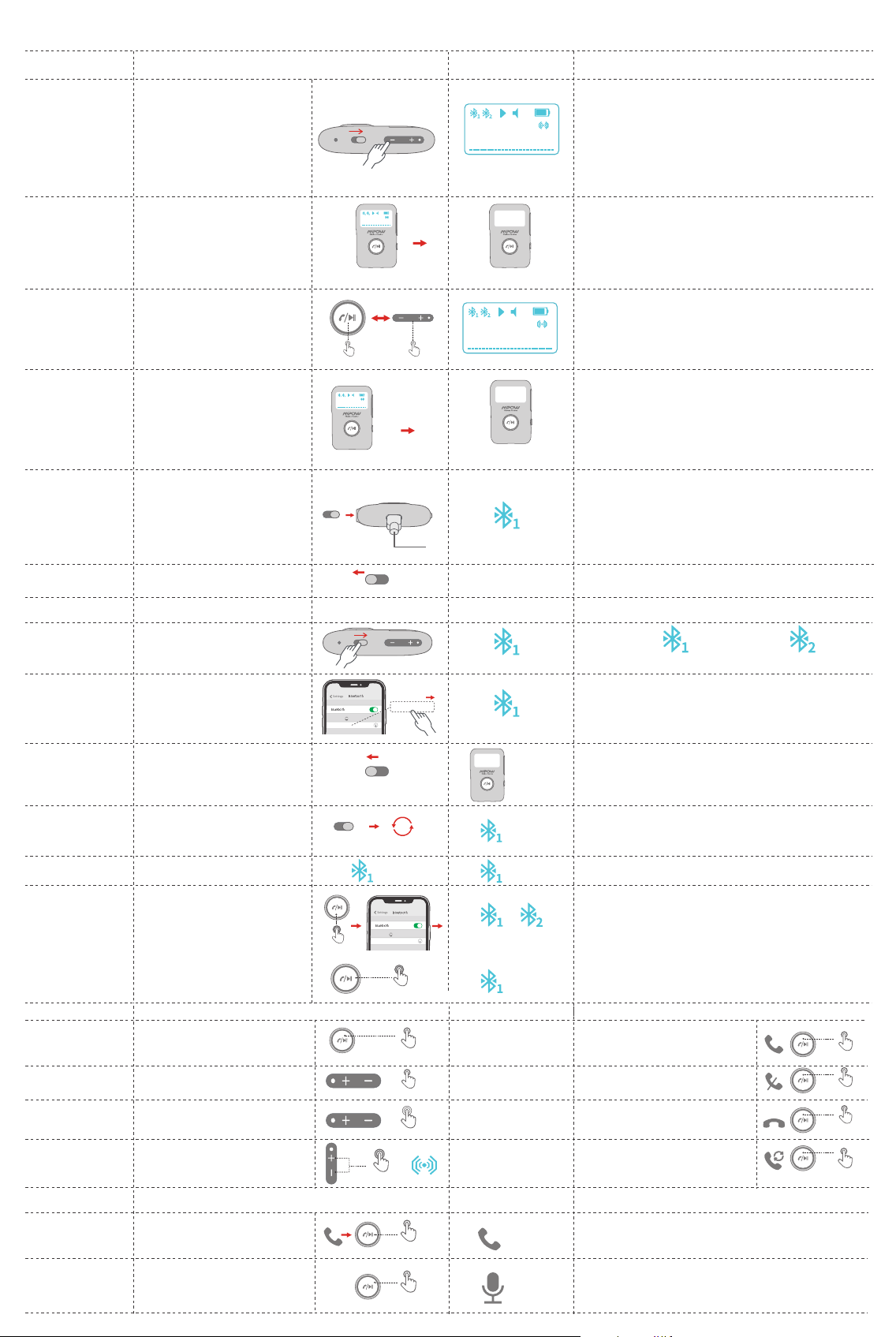
La pantalla se apaga
Activación de la
pantalla
La pantalla se apaga automáticamente
después de 60 segundos para ahorrar
energía.
Presione brevemente el botón MFB o subir /
bajar volumen para activar la pantalla.
Apagado automático
El producto se apaga automáticamente
cuando no se conecta a ningún dispositivo
durante más de 10 minutos.
La pantalla se enciende
Encienda otra vez para activar el producto.
60s
La pantalla se enciende La pantalla se apaga
La pantalla se apaga
Click Once Click Once
>10 minutos
La pantalla se enciende
ESManual de usuario
Funciones
Encendido
Deslice el interruptor a "ON"
Operaciones
Visualización de la
pantalla
Notas
1. Asegúrese de que los intervalos entre el encendido y el apagado
sean superiores a 5 segundos.
2. Cargue completamente la batería antes de usarla.
3. El espectro de la señal musical varía con la música y el volumen.
OFF ON
Deslice el interruptor a "OFF"
El icono del dispositivo 1 comienza a
parpadear cuando se enciende y el producto
comienza a reconectarse o emparejarse.
Apagado
Emparejamiento
Encienda el en su teléfono, busque y
conéctese a "MPOW BH408".
Conectado
El producto se apaga.
Desconectado
Si su dispositivo desconecta y
vuelve al rango de conexión en 10 minutos
mientras BH408A se mantiene encendido,
entonces BH408A se volvería a conectar
automáticamente a su dispositivo.
Reconexión
automática
El dispositivo está fuera del rango de señal de
Bluetooth.
Corte anormal
Mantenga presionado el MFB durante
8 segundos cuando se enciende y espere
hasta que la pantalla se reinicia.
Restablecer conexión
Después de conectarse al primer dispositivo,
mantenga presionado el MFB durante 3
segundos hasta que el icono del dispositivo
2 comience a parpadear, luego busque y
conecte "MPOW BH408" en el segundo
dispositivo.
Conectarse a 2
dispositivos
Encendido
automático cuando
el cargador está
conectado
No es muy recomendable usar el producto mientras se carga, ya
que la diferencia de voltaje puede interferir con la calidad del sonido.
1. El ícono del dispositivo 1 todavía está fijo, lo que indica que el
producto está conectado.
2. El nombre del dispositivo conectado es MPOW BH408 en su
teléfono.
Los 2 iconos permanecen quietos cuando ambos dispositivos están
conectados al producto.
El icono del dispositivo 1 parpadea y comienza a
emparejarse.
En estado apagado (cuando el interruptor se
desliza a ON), el producto se enciende a
utomáticamente cuando se conecta el
cargador USB.(por ejemplo, encienda su
automóvil cuando el producto esté conectado
al cargador, se enciende automáticamente y
comienza a reconectarse o emparejarse)
OFF
ON
MPOW BH408
La pantalla se apaga
La pantalla
se apaga
OFF ON
Brillante
Todavía
Emparejamiento
Parpadeando --- No conectado Todavía --- Conectado
Brillante
Brillante
Todavía
Todavía Todavía
Brillante
Encendido
OFF ON
Settings
Bluetooth
Bluetooth
DEVICES
MPOW BH408
Connected
Settings
DEVICES
MPOW BH408
Connected
Settings
DEVICES
MPOW BH408
Connected
OFF ON
OFF
ON
<10 minutos
②
Presiona 3s
①
Presiona 8s
>12m
Presione brevemente el MFB para reproducir
música mientras el dispositivo está conectado.
Presione brevemente el MFB para pausar la
música.
Presione brevemente el MFB para contestar
llamadas.
Mantenga presionado el MFB para rechazar
llamadas.
Presione brevemente el MFB para finalizar
las llamadas.
Haga clic en el MFB dos veces para volver a
marcar la última llamada.
Presione brevemente "+".
Presione brevemente "-".
Mantenga presionado "+" (15 niveles de
volumen ajustables)
Mantenga presionado "-" (15 niveles
de volumen ajustables)
Presione "+" y "-" simultáneamente durante
2 segundos.
Jugar / Pausa
Responder
Rechazar
Colgar
Rellamada
Sube el volumen/
Bajar volumen
Pista anterior/
Siguiente pista
Sonido envolvente
activado / desactivado
Música
Presiona 2s
Operaciones Llamadas Operaciones
Haga clic una vez
Haga clic una vez
Press and Hold
Presiona 1s
Double click
X2
Haga clic una vez
Haga clic una vez
1. Requiere que su teléfono tenga un asistente de voz.
2. Cuando se conecta a 2 teléfonos, esta operación solo puede
activar el asistente de voz en el primer teléfono emparejado.
Operaciones
Visualización de la
pantalla
Notas
Llamadas
Mantenga presionado el MFB durante
1 segundo para atender la llamada en
su teléfono.
Cambiar al teléfono
Mantenga presionado el MFB durante
1 segundo para activar el asistente
de voz mientras se conecta a su teléfono.
Activar asistente
de voz
Presiona 1s
xxxxxxxxxxx
Presiona 1s
(Solo se activa durante la reproducción de música)
MPOW BH408
10
MPOW BH408
10
MPOW BH408
10
MPOW BH408
10
IT
Settings
DEVICES
MPOW BH408
Connected
Settings
DEVICES
MPOW BH408
Connected
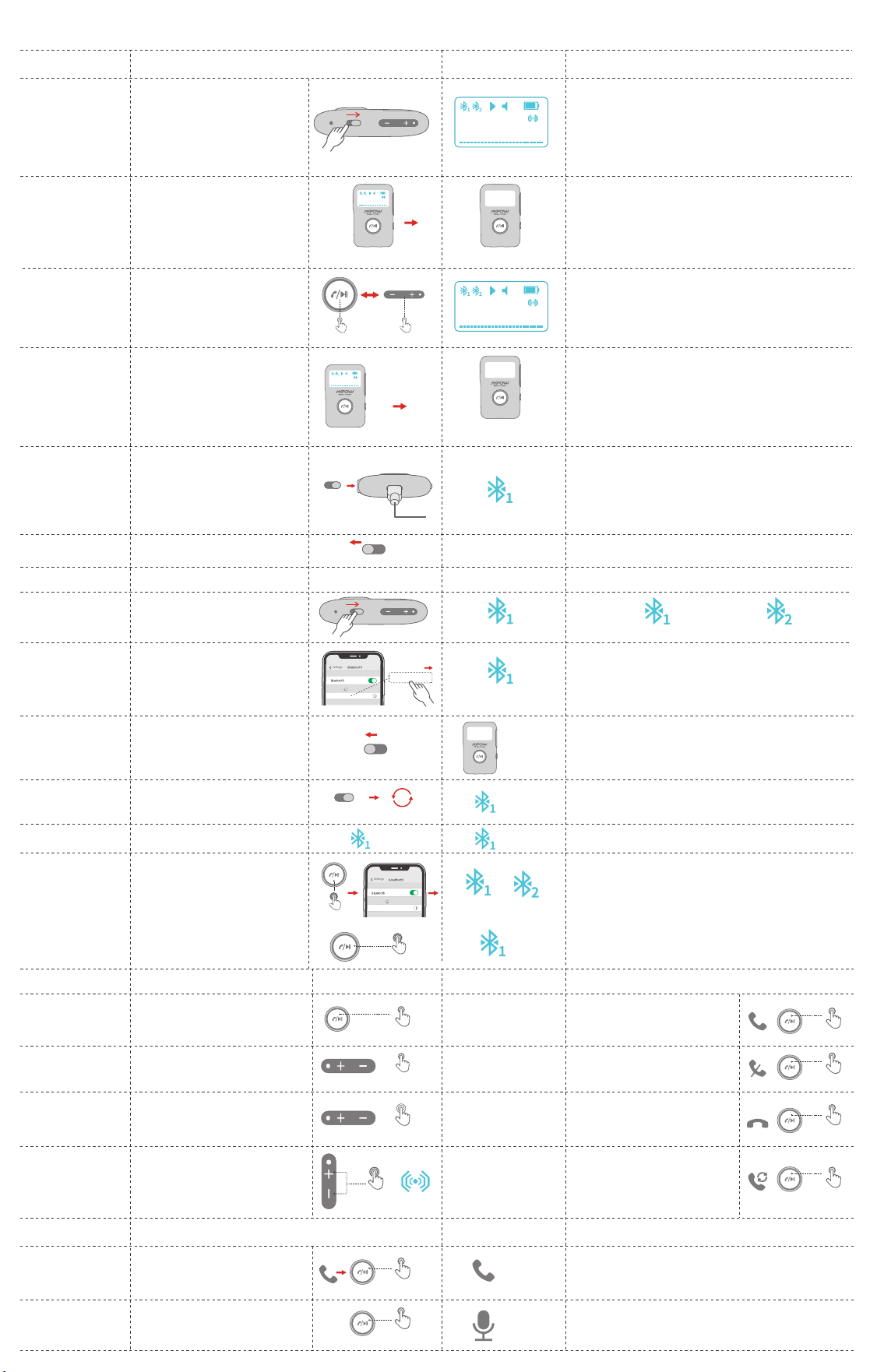
Il prodotto si spegne.
Ricevitore wireless
disconnesso
Riconnessione
automatica
Il dispositivo supera l'ambito del segnale
Bluetooth.
Dismissione
anormale
Premere a lungo l'MFB per 8 secondi per
accendere e attendere fino allo spegnimento
dello schermo.
Cancellare
connessione
Ricevitore wireless
Dopo aver effettuato il collegamento al primo
dispositivo, premere a lungo l'MFB per
3 secondi fino a quando l'icona del dispositivo
Ricevitore wireless 2 inizia a lampeggiare, poi
cercare e collegare "MPOW BH408" sul secondo
dispositivo.
Connette a 2
dispositivi
Le 2 icone rimangono luminose quando entrambi i dispositivi sono
collegati al prodotto.
L'icona del dispositivo Ricevitore wireless 1 lampeggia e inizia ad
accoppiarsi.
Lo schermo
si spegne
Lampeggiante
Lampeggiante
Ancora
Ancora Ancora
OFF ON
OFF
ON
<10 minuti
②
Hold on 3s
Hold on 8s
Lo schermo si spegne
Si sveglia lo schermo
Lo schermo si spegne automaticamente
dopo 60 secondi per risparmiare l'energia.
Premere brevemente il pulsante MFB o il
volume su / giù per riattivare lo schermo.
Spegnere
automaticamente
Il prodotto si spegne automaticamente
quando non viene collegato a nessun
dispositivo per più di 10 minuti.
Lo schermo si accende
Accendere per riattivare il prodotto.
60s
Lo schermo si accende La pantalla se apaga
Lo schermo si spegne
Click Once Click Once
>10 minutos
Lo schermo si accende
Manuale d'uso
Funzioni
Accensione
Spostare l'interruttore su "ON"
0perazioni Schermo Note
1. Assicurarsi che gli intervalli tra accensione e spegnimento siano
superiori a 5 secondi.
2. Caricare completamente la batteria prima dell'uso.
3. Lo spettro del segnale musicale varia in base alla musica e al volume.
OFF ON
Spostare l'interruttore su "OFF"
L'icona del dispositivo Ricevitore wireless
1 inizia a lampeggiare, il prodotto entra lo
stato dell'accensione e inizia a riconnettersi
o accoppiarsi.
Si spegne
Ricevitore wireless
connesso
Attiva il Ricevitore wireless sul telefono,
cerca e connettiti a "MPOW BH408".
Ricevitore wireless
connesso
Accendere
automaticamente
quando il
caricabatterie è
collegato
Non consigliamo che utilizza il prodotto durante la ricarica, poiché
la differenza di tensione potrebbe interferire con la qualità del suono.
1. L'icona del dispositivo Ricevitore wireless 1 rimane luminosa a
indicare che il prodotto è collegato.
2. Il nome del dispositivo Ricevitore wireless collegato è MPOW
BH408 sul telefono.
In stato di spegnimento (quando l'interruttore
è su ON), il prodotto si accende
automaticamente quando è collegato il
caricatore USB.(per esempio: avviare la
macchina quando il prodotto è collegato al
caricabatterie, si accende automaticamente
e si inizia a ricollegarsi o accoppiarsi)
OFF
ON
MPOW BH408
Lo schermo si spegne
OFF ON
Lampeggiante
Lampeggiante
Accoppiamento del
ricevitore wireless
Lampeggiante --- Non collegato Ancora --- Connesso
Ancora
Accensione
OFF ON
①
>12m
Se il dispositivo Ricevitore wireless viene rimosso,
ma ritorna al raggio di connessione in 10 minuti
mentre BH408A rimane acceso, BH408A si
riconnetterà automaticamente al dispositivo.
Hold on 2s
Click Once
Click Once
Press and Hold
Hold on 1s
Hold on 1s
Premere brevemente l'MFB per trasmettere la
musica mentre il dispositivo è collegato.
Premere brevemente l'MFB per mettere in
pausa la musica.
Premere brevemente l'MFB per rispondere
alle chiamate.
Premere a lungo l'MFB per rifiutare le
chiamate.
Premere brevemente l'MFB per terminare
le chiamate.
Fare clic due volte sul MFB per ricomporre
l'ultima chiamata.
Premere brevemente "+".
Premere brevemente "-".
Premere a lungo "+" (15 livelli di volume
regolabili )
Premere a lungo "-" (15 livelli di volume
regolabili)
Premere "+" e "-" contemporaneamente per
2 secondi.
Giocare / Pausa
Rispondere
Rifiutare
Appendere
Ricomporre
Aumenta volume/
Volume basso
Traccia precedente/
Prossima traccia
Accendere / Spegnere
audio surround
Musica 0perazioni Chiamate 0perazioni
Hold on 1s
Double click
X2
Click Once
Click Once
1. Richiede che il tuo telefono abbia un assistente vocale.
2. Quando ci si collega a 2 telefoni, questa operazione può solo
riattivare l'assistente vocale sul primo telefono accoppiato.
0perazioni Schermo NoteLlaChiamateadas
Premere a lungo l'MFB per 1 secondo per
rispondere alla chiamata sul telefono.
Passa al telefono
Premere a lungo l'MFB per 1 secondo per
riattivare l'assistente vocale durante la connessione
del telefono.
Attiva l'assistente
vocale
xxxxxxxxxxx
(È usato solo quando la musica è trasmessa)
MPOW BH408
10
MPOW BH408
10
MPOW BH408
10
MPOW BH408
10
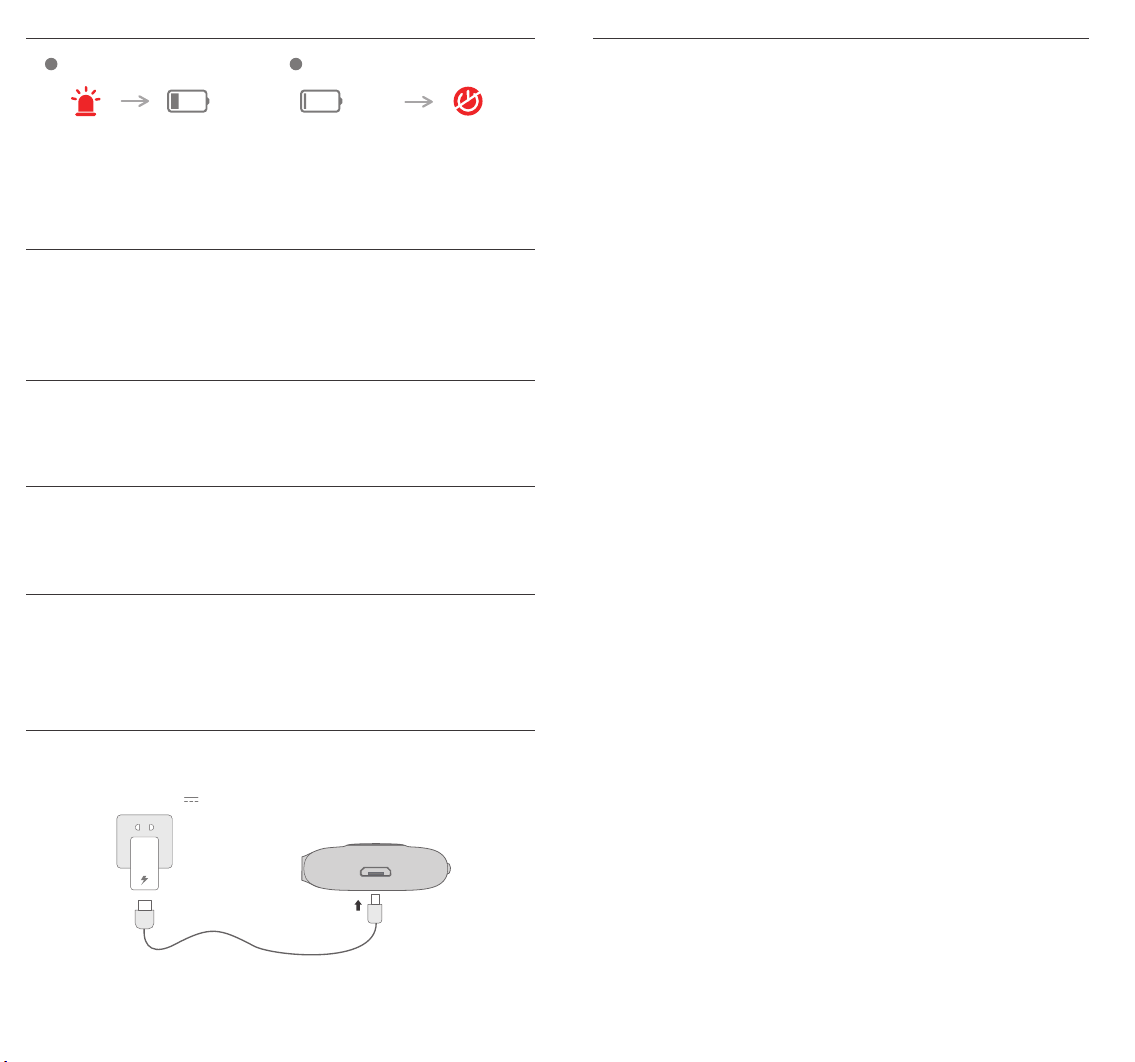
Low Battery Alarm EN
Alarm bei schwacher Batterie DE
Slow Flash
1 2
<3.0V
LED
Notes: The product will shut down in about 10 minutes.
Notas: El producto se apagará en unos 10 minutos.
Note: Il prodotto si spegnerà tra circa 10 minuti.
1. The icon of the battery slowly flashes and the product makes the alarm sound in around 50
seconds intervals till it's powered up.
2. When the battery power is less than 3V, it will automatically shut down.
1. El icono de la batería parpadea lentamente y el producto hace sonar la alarma en intervalos
de aproximadamente 50 segundos hasta que se enciende.
2. Cuando la energía de la batería es inferior a 3 V, se apagará automáticamente.
1. L'icona della batteria lampeggia lentamente e il prodotto fa suonare l'allarme a intervalli di circa
50 secondi fino ad accendere.
2. Quando la carica della batteria è inferiore a 3 V, si spegne automaticamente.
Power OFF
Notes: Das Produkt wird in ca. 10 Minuten heruntergefahren.
1. Das Batteriesymbol blinkt langsam und der Alarm ertönt alle 50 Sekunden, bis das Gerät
eingeschaltet wird
2. Wenn die Batterieleistung weniger als 3 V beträgt, wird sie automatisch heruntergefahren..
Alarma de batería baja
ES
Allarme batteria scarica IT
Alarme de batterie faible FR
Remarques: Le produit va s'arrêter dans environ 10 minutes.
1. L'icône de la batterie clignote lentement et le produit déclenche l'alarme toutes les 50 secondes
environ, jusqu'à la mise sous tension.
2. Lorsque la batterie est inférieure à 3V, elle s’éteindra automatiquement.
Charge
Output : 5V 1A
Any Changes or modifications not expressly approved by the party responsible for
compliance could void the user’s authority to operate the equipment.
This device complies with part 15 of the FCC Rules. Operation is subject to the following two
conditions:
(1) This device may not cause harmful interference, and (2) This device must accept any
interference received, including interference that may cause undesired operation.
FCC Radiation Exposure Statement:
This equipment complies with FCC radiation exposure limits set forth for an uncontrolled
environment.This equipment should be installed and operated with minimum distance
20cm between the radiator& your body.
FCC Statement
Copyright © MPOW Inc. All rights reserved.
www.xmpow.com | support@xmpow.com
MPOW TECHNOLOGY CO.,LIMITED