Use and
Care Manual
For “NoFrost” Combined
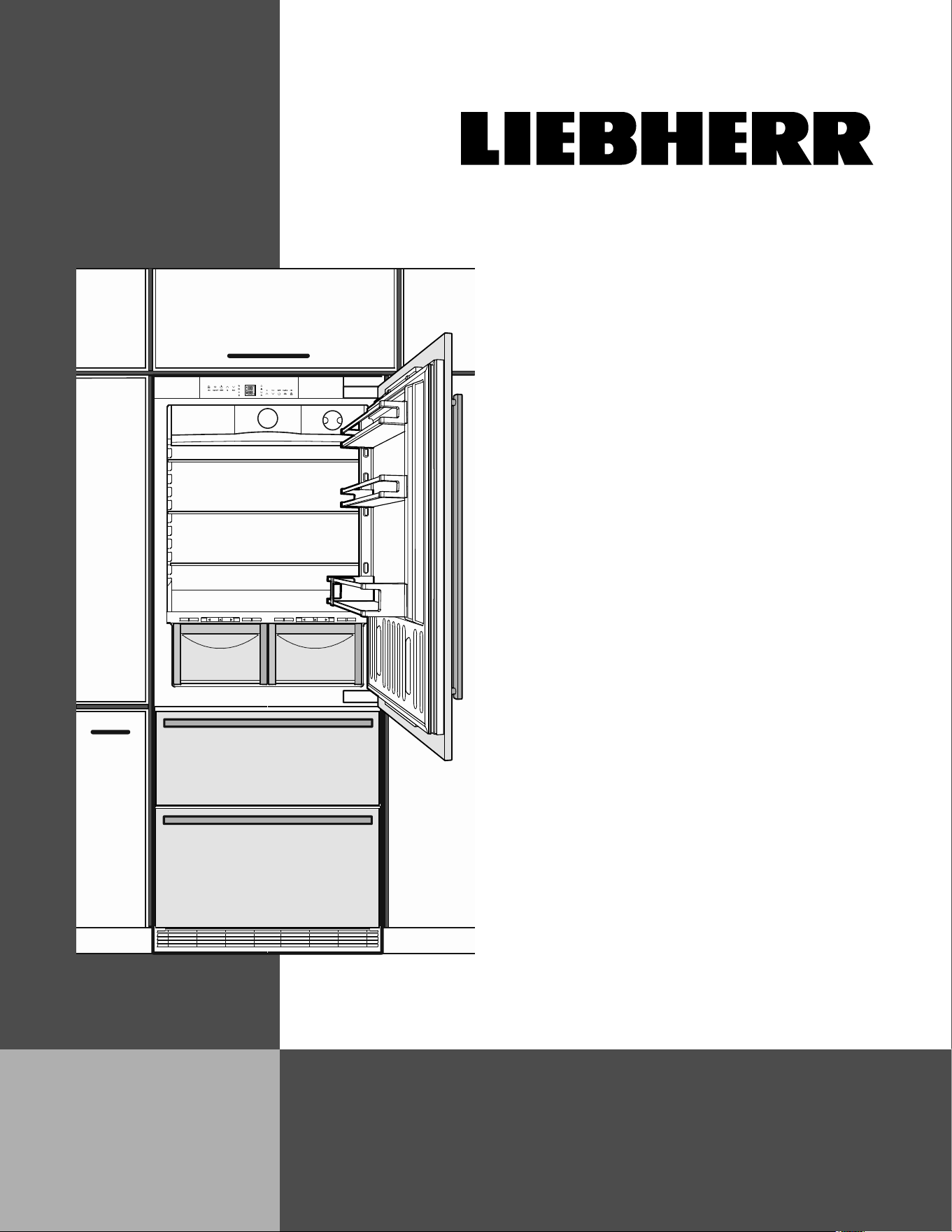
Refrigerator-Freezers with IceMaker
HCB 1590G / HCB 1591G
7083 452-00
V: 12_2024

2
Congratulations on your purchase. Choosing this appli-
ance means you want all the benefits of state-of-the-art
refrigeration technology, guaranteeing you top quality, a
long appliance life span and excellent reliability.
The features on your appliance have been designed to
ensure maximum conven-ience - day in, day out.
This appliance has been manufactured with recyclable
materials using an environmentally friendly process, so
together we’re making an active contribution to the pres-
ervation of our environment.
To get to know all the benefits of your new appliance,
please read the information contained in these operat-
ing instructions carefully.
Contents Page
Please Read and Follow these Instructions .................. 3
California Proposition 65 ................................................ 3
Disposal of Old Appliance ............................................. 3
Disposal of this Appliance ............................................. 3
Disposal of Packaging Material ..................................... 4
Important Safety Information ......................................... 4
R600a Refrigerant.......................................................... 6
Electrical Safety ............................................................. 6
Safety Regulations ......................................................... 6
Water Filter ..................................................................... 7
Description of Appliance and Equipment ...................... 8
Operating and Control Elements ................................... 9
Turning the Appliance On and Off ................................10
Setting the Temperature ...............................................10
Temperature Display ..................................................... 11
Power Failure/Frost-control Display ..............................11
Audible Alarm Signal ....................................................11
SuperCool .....................................................................11
Setup Mode ...................................................................12
Setup Mode ...................................................................14
Arranging Food .............................................................16
Shelf Arrangement ........................................................16
Interior Light ..................................................................18
BioFresh Compartment ................................................18
Storage Times ............................................................... 19
Freezer Compartment Description .............................. 20
Removing the Freezer Compartment Containers ....... 20
Freezing ........................................................................21
Freezing with SuperFrost ..............................................21
Freezing and Storage....................................................21
Safety Instructions and Warnings for the Automatic Ice
Maker .......................................................................... 22
Turning the Ice Maker On and Off ............................... 22
Ice Maker Description ................................................ 22
Defrosting ..................................................................... 23
Cleaning ....................................................................... 23
Cleaning the Air Filter ....................................................24
Vacation Tips ............................................................... 25
Troubleshooting ........................................................... 26
Ice Maker Troubleshooting .......................................... 27
Customer Service ........................................................ 27
Appliance Information .................................................. 27
Additional Benefits
• CFC-free
• Energy-optimized refrigerant circuit
• Energy-efficient insulation
• Low energy consumption
• User-friendly electronic controls
• Display of functions switched on
• Temperature can be controlled within climate rating
range, regardless of room temperature
• Refrigerator and freezer compartments defrost
automat-ically - no need to spend time defrosting
• Big net refrigerator capacity
• Variable and practical features
• Safety-glass storage shelves
• Big net freezer capacity
• Automatic ice maker
• Water filter for good water quality ice production
• Freezer temperature increase alarm
• Audible door open alarm
• Power failure/“frost-control” display
• Fresh food can be fast-frozen as required
• All drawers suitable for fast freezing
• Integrated transport grips on appliance housing
• Transport castors
• Easy to clean
• This unit is certified as Sabbath compliant by the
Star-K organization, thus allowing the appliance to be
used during religious holidays. For more information,
please visit Star-K on the web at www.star-k.org.
IMPORTANT
All types and models are subject to continuous
improvement. The manufacturer reserves the right
to make modifications to the shape, equipment, and
technology.
T
able
of
C
onTenTs
3
s
afeTy
Please Read and Follow these
Instructions
These instructions contain Danger, Warning, and
Caution notes.
This information is important for safe and efficient instal-
lation and operation.
Always read and comply with all Danger, Warning, and
Caution notes!
DANGER!
Danger indicates a hazard which
will cause serious injury or death if
precautions are not followed.
WARNING!
Warning indicates a potentially hazardous
situation which, if not avoided, could
result in death or serious injury.
CAUTION!
Caution indicates a potentially hazardous
situation which, if not avoided, may result
in minor or moderate injury.
IMPORTANT
This indicates information that is especially relevant
to a problem-free installation and operation.
California Proposition 65
- WARNING: This product can expose you to
chemicals including Diisononyl Phthalate
(DINP), which is known to the State of
California to cause cancer, and Di-isodecyl
Phthalate (DIDP), which is known to the State
of California to cause birth defects or other
reproductive harm. For more information, go
to www.P65Warnings.ca.gov
Disposal of this Appliance
This appliance contains flammable gases within
the refrigeration circuit and insulation foam.
Contact the municipality or disposal company
in your area for information on approved
recycling or disposal.
Disposal of Old Appliance
WARNING!
Risk of child entrapment.
Child entrapment and suffocation are not problems of
the past.
Junked or abandoned refrigerators are still dangerous –
even if they will sit for “just a few days.”
If you are getting rid of your old refrigerator, please
follow these instructions to help prevent accidents.
Before you discard old appliances:
• Take off the doors.
• Leave the shelves in place so that children
may not easily climb inside.
• Cut off the power cord from the discarded
appliance. Discard separately from the
appliance.
• Be sure to follow your local requirements for
disposal of appliances.
Contact the trash collection agency in
your area for additional information.
4
s
afeTy
Disposal of Packaging Material
The packaging is designed to protect the appliance and
individual components during transport and is made of
recyclable materials.
WARNING!
Keep packaging materials away from
children. Polythene sheets and bags can
cause suffocation!
If possible, please recycle packaging material at a recy-
cling facility.
Important Safety Information
• WARNING: Keep ventilation openings, in the
appliance enclosure or in the built-in struc-
ture, clear of obstruction.
• WARNING: Do not use mechanical devices
or other means to accelerate the defrosting
process, other than those recommended by
the manufacturer.
• WARNING: Do not damage the refrigerant
circuit.
• WARNING: The power cord must not be
damaged while installing the appliance.
• WARNING: Multi-sockets or distributor strips
and other electronic devices (such as halo-
gen transformers) must not be positioned
and operated at the rear of appliances.
• WARNING: Danger of injury through electric
shock! There are live parts under the cover.
Only have the interior LED light replaced or
repaired by customer service staff or trained
personnel.
• WARNING: Risk of injury from the LED lamp.
The light intensity of the LED light complies
with risk group RG 2. If the cover is defective,
do not look directly at the light through optical
lenses from close distance. This may dam-
age your eyes.
• WARNING: This appliance must be secured
as described in the Use and Care Manual
(Installation Instructions) to rule out any
potential risks due to its instability.
• WARNING: Do not use electrical appliances
inside the food storage compartments of the
appliance, unless they are of the type recom-
mended by the manufacturer.
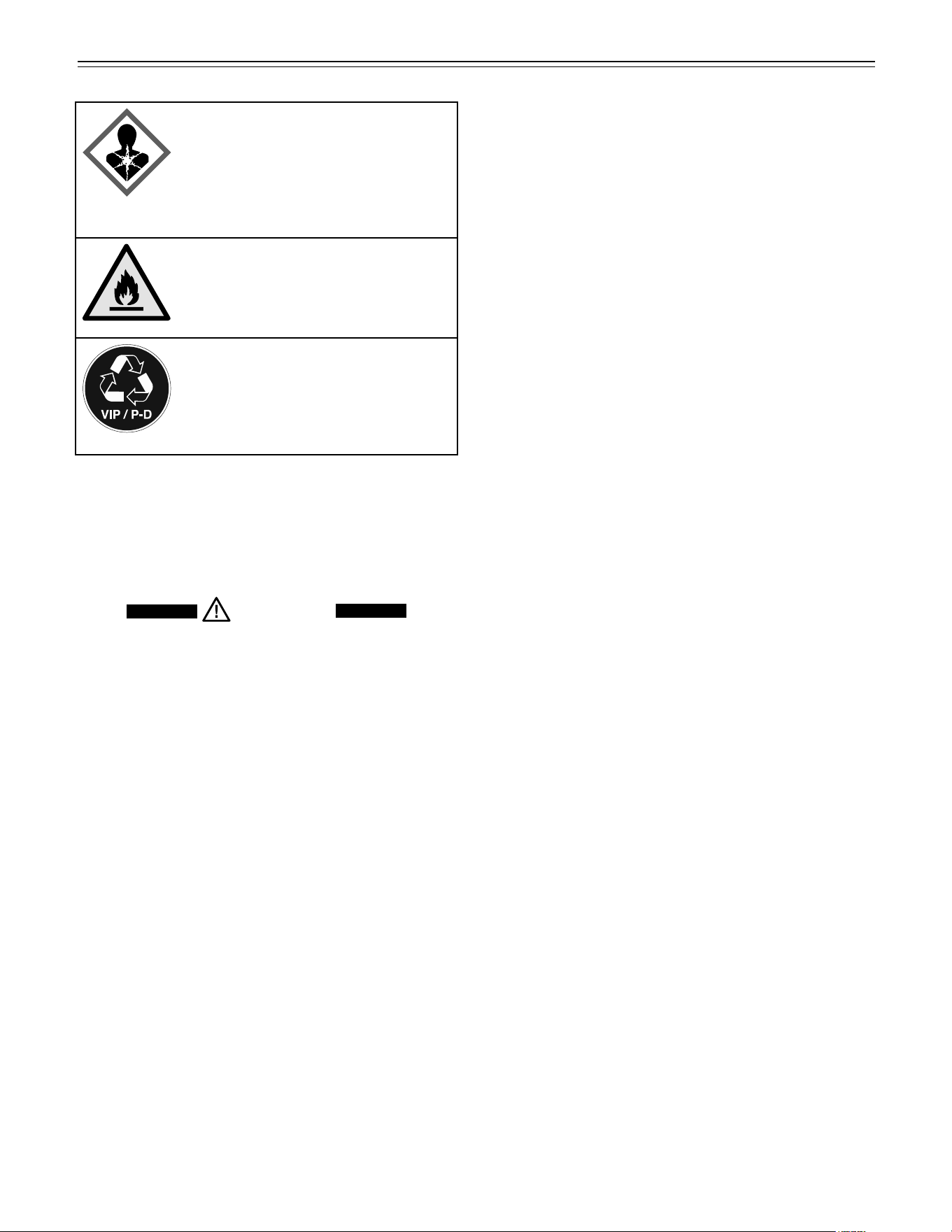
The symbol may be located on the
compressor. It refers to the oil in the
compressor and refers to the follow-
ing danger: Can be fatal if swallowed
or inhaled. This notice only applies for
recycling. There is no danger during
normal operation.
WARNING: Risk of fire / flammable
materials. The symbol is located on
the compressor and indicates the
danger from flammable materials. Do
not remove the label.
This label or a similar one can be locat-
ed on the rear of the appliance. It refers
to the foamed-in panels in the door
and/or the housing. This notice only
applies for recycling. Do not remove
the label.

5
s
afeTy
• Any repairs and work on the appliance
should only be performed by the customer
service department. Unauthorized work may
be dangerous to the user. The power source
cable should only be changed or replaced
by the customer service department.
Component parts and power cords shall be
replaced with like components performed by
factory authorized service personnel only.
• Do not stand on the toe kick, drawers or
doors or use them to support anything else.
• This appliance is not intended for use by per-
sons (including children) with reduced physi-
cal, sensory or mental capabilities or lack of
experience and knowledge unless they have
been given initial supervision or instruction
concerning use of the appliance by a person
responsible for their safety. Children should
be supervised to ensure that they do not play
with the appliance.
• Do not store explosive substances such as
aerosol cans with a flammable propellant in
this appliance.
• To prevent injury and damage to property,
the appliance should only be installed by four
people.
• Check the appliance for signs of damage
after unpacking. Contact the supplier if it is
damaged. Do not connect the appliance to
the mains power supply.
• Avoid prolonged skin contact with cold sur-
faces (e.g., chilled/frozen products). If neces-
sary, take safety action (e.g., gloves).
• Do not consume food which has been stored
for too long; it could cause food poisoning.
• Any repairs and work on the appliance
should only be performed by the customer
service department or other trained person-
nel. The same applies to changing the power
cord.
• Only perform repair and other work on the
appliance when the plug has visibly been dis-
connected.
• Only install, connect, and dispose of the
appliance as described in this Use and Care
Manual.
• In the event of a fault, pull out the plug or
switch off the fuse.
• When disconnecting the appliance from the
power source, pull it out by the plug, never
pull on the cable.
• If you have a lockable appliance, do not keep
the key near the appliance or within reach of
children.
• The appliance is designed for use in
enclosed rooms. Do not operate the appli-
ance outdoors or in areas where there is
moisture or splashing water.
• Do not use the interior LED light to light the
room. The interior LED light is only designed
to illuminate the interior of the appliance.
• Do not allow naked flames or ignition sources
to enter the appliance.
• Alcoholic drinks or other vessels containing
alcohol should be sealed tightly for storage.
6
s
afeTy
R600a Refrigerant
WARNING!
The refrigerant R600a contained within
the appliance is environmentally friendly,
but flammable. Leaking refrigerant can
ignite.
Safety Regulations
This appliance is intended to be used in household and
similar applications.
This includes, for example, use
- in staff kitchenettes, bed and breakfast establish-
ments,
- by guests in cottages, hotels, motels and other forms
of accommodation,
- in catering and similar services in the wholesale
trade.
IMPORTANT
The appliance is not intended for outdoor use.
The appliance is manufactured to operate within spe-
cific ambient temperature limits according to its climate
rating.
The climate rating indicates the ambient temperature
at which the appliance may be operated in order to
achieve full refrigeration performance.
Climate Rating Ambient Temperature
SN-T 50°F to 109°F (10°C to 43°C)
IMPORTANT
Do not operate the appliance outside the
specified ambient temperature range.
- The refrigerant circuit has been tested for leaks.
- The appliance complies with current safety regula-
tions
CAN/CSA C22.2 No. 60335-2-24 / UL 60335-2-24
CAN/CSA C22.2 No. 60335-1 / UL 60335-1
We recommend cleaning the appliance before turning it
on for the first time. See „Cleaning“.
Turn on the appliance several hours before loading it.
WARNING!
Do not allow children to play with the
appliance. Children must not climb, sit or
stand on the shelves or door.
Failure to follow these instructions may
result in death or serious injury.
Electrical Safety
Connect this appliance to a 15 amp or 20 amp, 110-
120 VAC, circuit which is grounded and protected by a
circuit breaker or fuse.
We recommend using a dedicated circuit for this appli-
ance to prevent circuit overload and the chance of inter-
ruption to the appliance.
This appliance is equipped with a three-prong (ground-
ing) polarized plug for your protection against possible
shock hazards.
Where a two-prong wall receptacle is encountered,
contact a qualified electrician and have it replaced with
a properly grounded three-prong receptacle in accor-
dance with all local codes and ordinances.
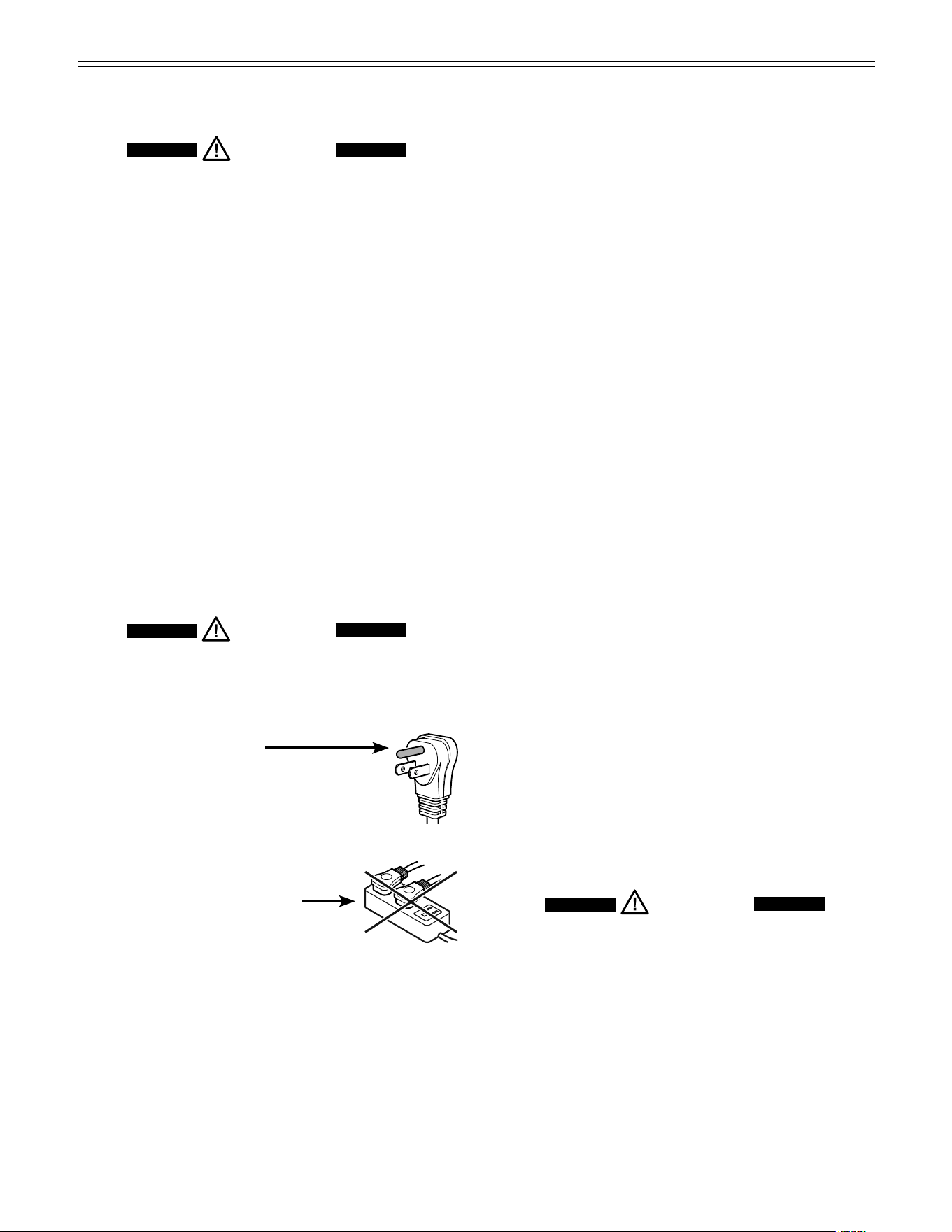
WARNING!
Electrocution hazard.
Electrical grounding required.
•
Do not remove the round grounding
prong from the plug.
•
Do not use extension cords or
ungrounded (two prong) adapters.
• Do not use a power cord that is
frayed or damaged.
•
Do not use a power strip.
Failure to follow these instructions may
result in fire, electrical shock or death.
7
W
aTer
f
ilTer
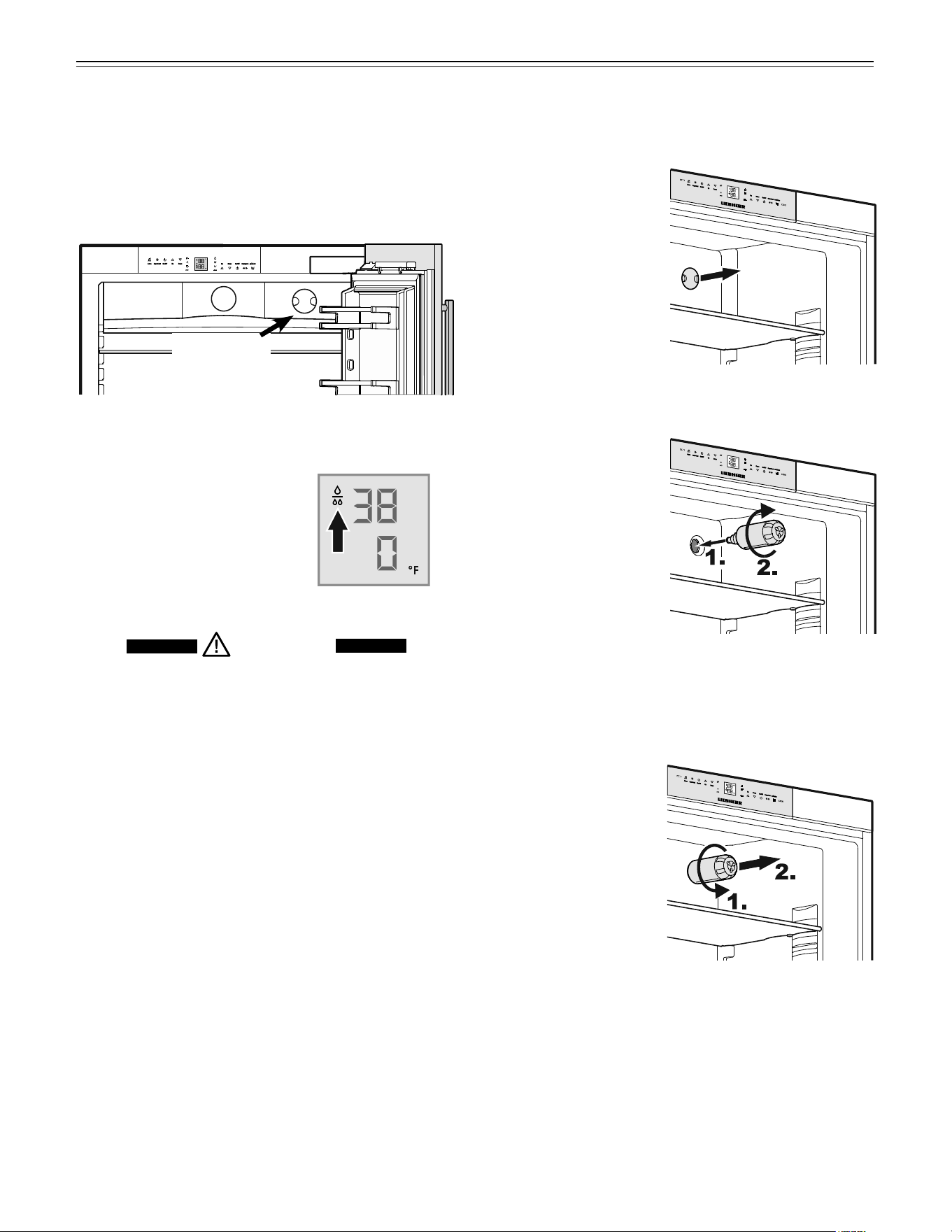
Water Filter - Figure 1
Before turning on the appliance install the water filter
provided in the interior rear wall of the refrigerator com-
partment. This ensures good ice cube quality and keeps
the water circuit free of solids such as sand.
Water filter
location
Installing the water filter - Figures 2, 3
1. Remove cover of the
filter socket.
2. Insert the filter and
turn it 90° clockwise.
Removing the water filter - Figure 4
3. Turn the filter 90°
counterclockwise and
remove.
Figure 1
Figure 2
Figure 3
Figure 4
IMPORTANT
It is not necessary to turn off the water supply when
removing or installing the water filter.
Replace the filter when the drop
symbol appears on the tempera-
ture display.
Filters can be obtained from your
Liebherr Dealer or Distributor.
WARNING!
To avoid the risk of bacteria growth, the
water filter must be changed when the
waterdrop symbol appears on the display!
8
f
eaTures
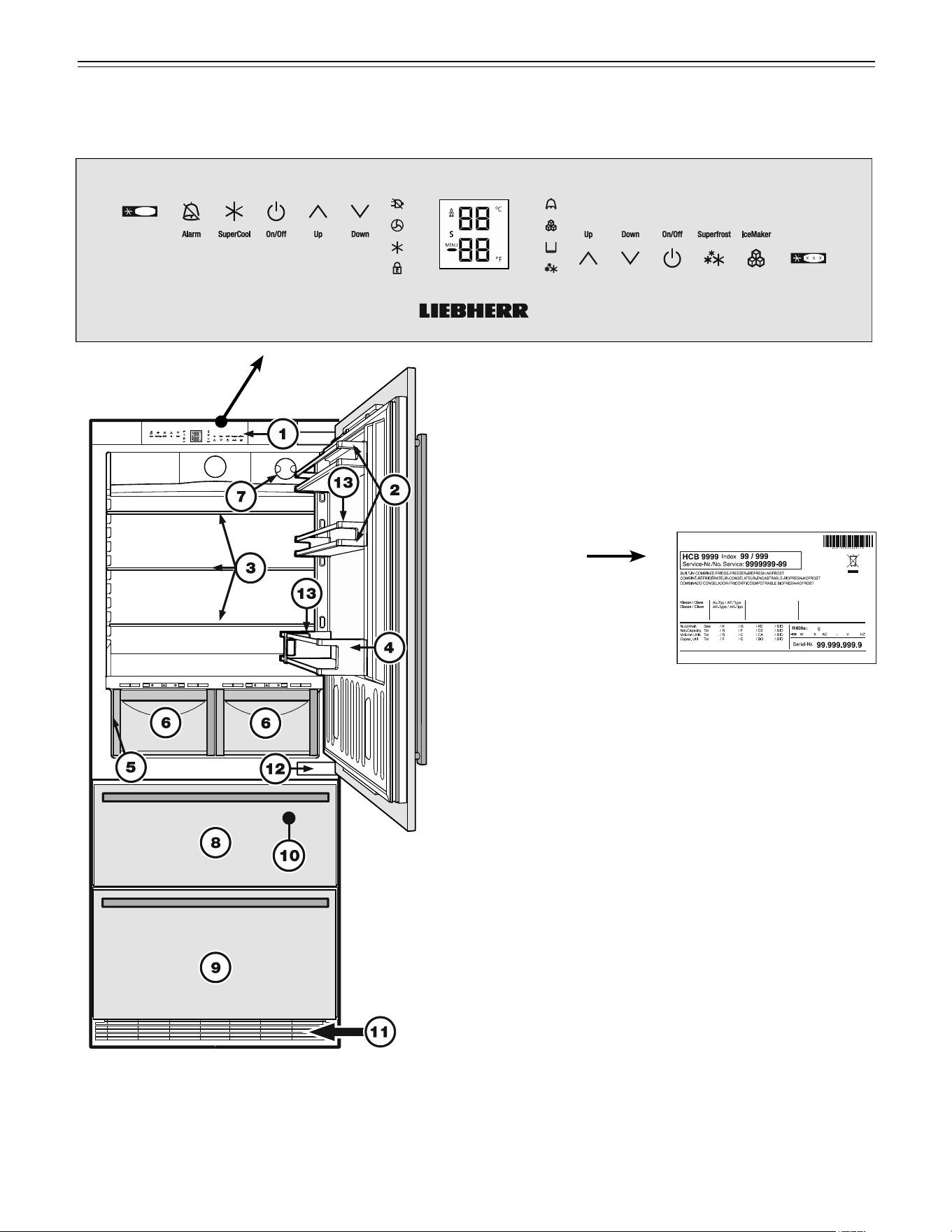
Figure 5
Description of Appliance and Equipment - Figure 5
Description of refrigerator
(1) Operating and control elements
(2) Adjustable door racks
(3) Adjustable shelves
(4) Gallon rack
(5) Model plate
(behind the BioFresh
drawer on the left hand
side)
(6) BioFresh drawers
(7) Water filter
Description of freezer
(8) Upper freezer drawer
(9) Lower freezer drawer
(10) Ice maker (in the interior of the upper freezer drawer)
(11) Ventilation grille
(12) Lower hinge
(13) Bottle holder
9
f
eaTures
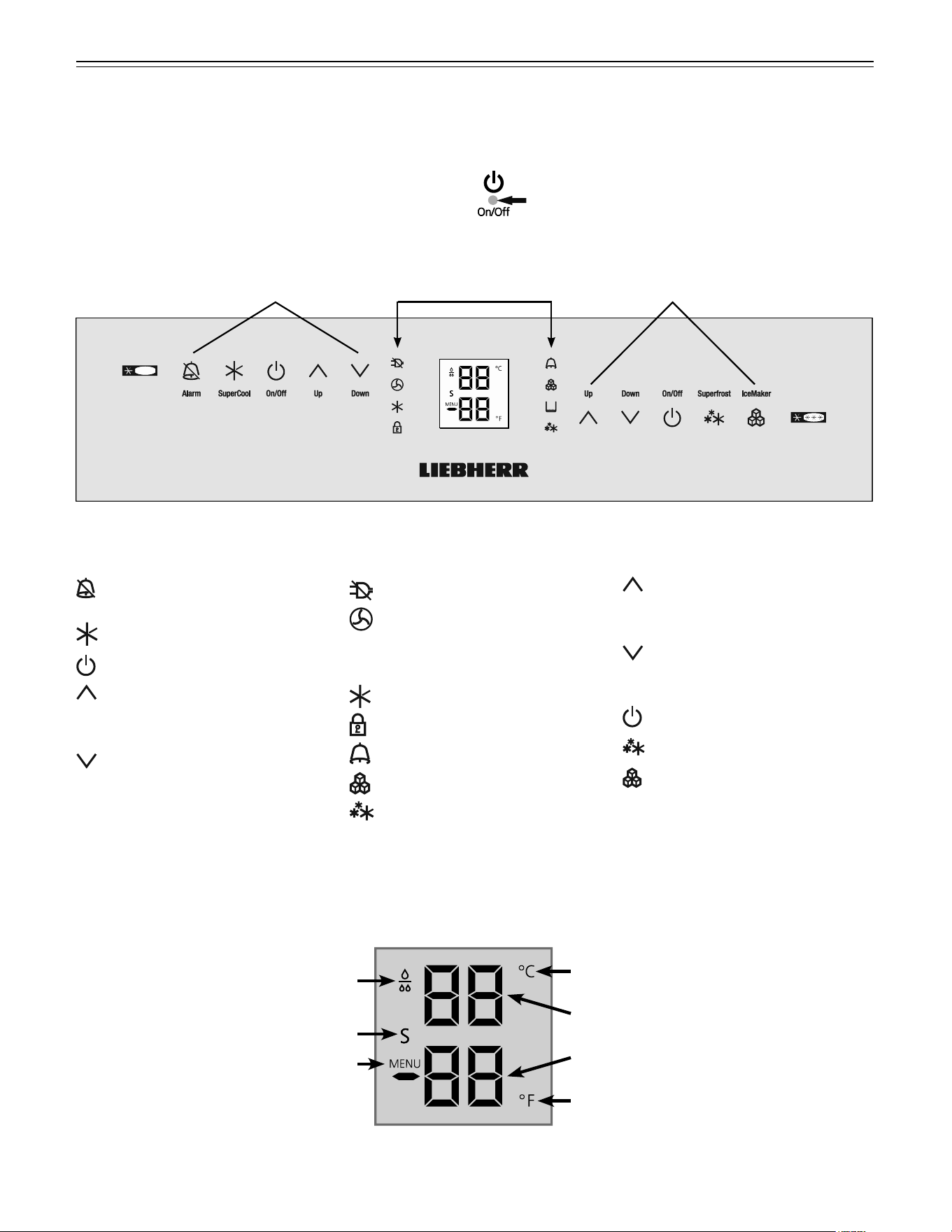
Freezer operating icons
Temperature Up control (to
increase the freezer tempera-
ture)
Temperature Down control (to
reduce the freezer tempera-
ture)
Freezer On/Off
SuperFrost
IceMaker On/Off
Figure 6
Refrigerator operating icons
Alarm mute (refrigerator and
freezer)
SuperCool
Refrigerator On/Off
Temperature Up control (to
increase the refrigerator tem-
perature)
Temperature Down control (to
reduce the refrigerator tem-
perature)
Refrigerator
operating icons
Appliance
control icons
Freezer
operating icons
Temperature and control display
Figure 7
Display mode degrees Celsius
Display mode degrees Fahrenheit
Refrigerator temperature display
Freezer temperature display
Water filter has to be changed
Sabbath mode is activated
Menu mode is activated
(for setting additional functions)
Operating and Control Elements - Figure 6, Figure 7
The electronic control panel uses touch capacitance technology. Any function can be activated by a fingertip on the
symbol of the operating icons.
The exact contact point is between the symbol and its label
Appliance control icons
Power Failure LED
Air Filter LED
When this LED lights up the air
filter in the toe kick area has to
be cleaned.
SuperCool LED
Child lock LED
Alarm LED
IceMaker On LED
SuperFrost LED
10
Turning the Appliance On and Off -
Figure 8
Clean the appliance before turning it on for the first time.
See Cleaning.
Do not place frozen food in the freezer until the tem-
perature shows at least 0°F / -18°C. The refrigerator and
freezer compartments can be operated separately.
Turning on
Touch the Refrigerator On/Off icon and the Freezer On/
Off icon so the Temperature Displays light up.
Turning off
To turn off the refrigerator or freezer, touch the corre-
sponding On/Off icon for approximately 3 seconds so
the temperature display and interior lights go out.
o
peraTion
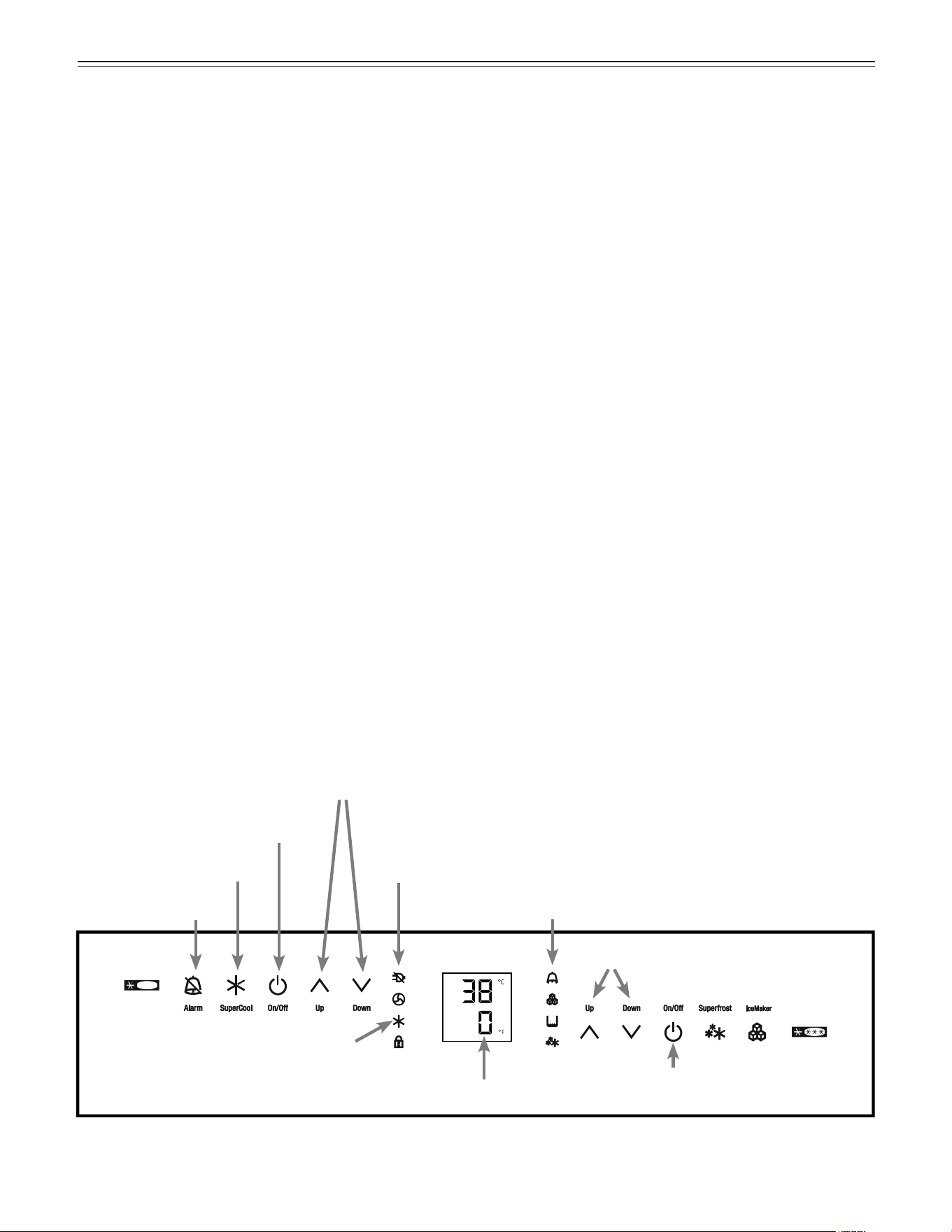
Setting the Temperature - Figure 8
We recommend temperatures of 38°F (3°C) in the refrig-
erator and 0°F (-18°C) in the freezer.
To reduce the temperature
Touch the Down icon on the left to reduce the refrig-
erator temperature and the Down icon on the right to
reduce the freezer temperature.
To increase the temperature
Touch the Up icon on the left to increase the refrigera-
tor temperature and on the right to increase the freezer
temperature.
• While you are entering the temperature, the set
temperature will flash on the display.
• When you touch the temperature setting icons for the
first time, the most recent setting is displayed.
• You can change the settings in increments of 1°F
(1°C) by briefly touching the icons again.
• Approximately five seconds after the icon has been
released, the display will automatically show the
actual freezing or cooling temperature.
You can change the temperatures:
• In the refrigerator – between 37°F and 45°F (3°C
and 7°C) and
• In the freezer – between -15°F and 7°F
(-27°C and -14°C).
Figure 8
Refrigerator On/Off icon
Freezer On/Off icon
Temperature control icons - Refrigerator
Temperature control icons - Freezer
Alarm icon
Alarm LED
Freezer temperature display
Power failure LED
SuperCool icon
SuperCool LED
11
o
peraTion
Temperature Display - Figure 8
In normal operation, the following settings will be
displayed:
• the average refrigerator temperature
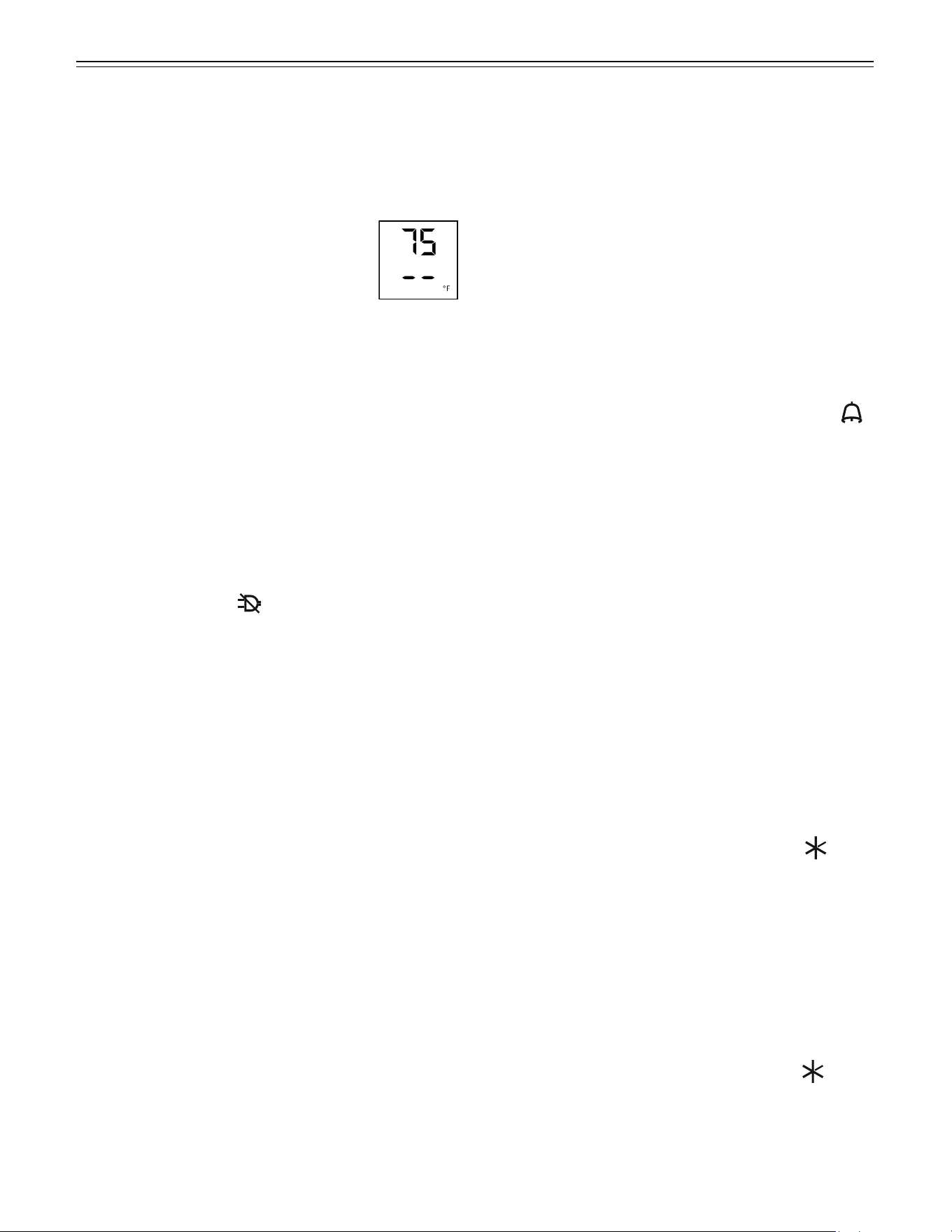
• the warmest frozen food temperature.
When starting up for the first time or when
the appliance is warm, dashes will appear
in the freezer temperature display until the
temperature in the freezer compartment is
32°F (0°C).
It will take between three and eight hours for the
required temperature, 0°F or 38°F (-18°C or 3°C) to
be reached and displayed permanently in the display,
depending on the ambient conditions and the tempera-
ture setting.
If F1 to F5 appears in the display, the appliance has a
fault. Have the fault number available when you contact
the customer service department.
Power Failure/Frost-control Display -
Figure 8
If the power failure LED is lit, this means the freezer
temperature has risen too high during the last few hours
or days due to a power failure. The freezer temperature
display flashes at the same time.
• If you touch the Alarm icon now, the highest tem-
perature registered during the power failure will be
displayed.
• Check the quality of the food in case it has become
too warm or even defrosted.
• The highest temperature will appear for approximate-
ly one minute. After that, the actual temperature in the
freezer will reappear.
The display can be turned off by touching the Alarm
icon again.
Audible Alarm Signal - Figure 8
The audible alarm signal helps to protect frozen food
and to save energy.
The audible alarm signal is switched o by touching the
Alarm icon.
Audible door alarm
This sounds when the door has been left open for lon-
ger than about 180 seconds. The sound switch-off func-
tion is active as long as the door is left open. The alarm
automatically switches back to standby when the door
is shut.
Audible/visual temperature alarm
It always sounds if the freezer temperature is not low
enough. The temperature display and the alarm LED
flash at the same time.
This can be caused by:
- warm, fresh food being placed in the freezer;
- too much warm air from the outside entering when re-
arranging or removing frozen food,
- a fault in the appliance.
The temperature display will continue to flash until the
cause of the alarm has been rectified. It will then stop
flashing and light up continually. The audible warning
signal is now automatically reset.
SuperCool - Figure 8
Touching the SuperCool icon switches the refrigerator
compartment to maximum cooling. It is recommended
particularly if you wish to cool large quantities of food,
drinks, freshly baked goods or meals rapidly.
Turning on
Touch the SuperCool icon briefly so the LED turns
on. The refrigerator temperature will drop to its lowest
value.
IMPORTANT
The SuperCool function uses slightly more
energy. After approximately six hours, however,
the refrigerator switches back automatically to
normal energy-saving operation. If required, the
SuperCool function can be turned off sooner.
Turning off
Touch the SuperCool icon again until the LED turns
off.
12
o
peraTion
= Sabbath mode
This feature considers the Religious requirements on
Sabbath or Holidays. When the Sabbath mode is active
some functions of the electronic controls are switched
off.
• The lighting remains off.
• The cooling fan remains in its actual state: If it is on it
remains on, if it is off it remains off.
• There is no door alarm.
• There is no temperature alarm.
• Defrost cycles are independent of the number of
times and length of door openings.
• The unit will return into Sabbath Mode after a power
failure.
How to activate the Sabbath mode
• Activate the setup mode by touching the SuperFrost
icon for 5 seconds.
- the display shows
• Touch the SuperFrost icon
- the display shows
• Touch the SuperFrost icon again
- the display shows
- the Sabbath mode is activated.
• Exit setup mode by touching the
freezer compartment On/Off icon.
Sabbath mode switches off automatically after
120 hours if it is not manually switched off beforehand.
How to deactivate the Sabbath mode
• Activate the setup mode by touching the SuperFrost
icon for 5 seconds.
- the display shows
• Touch the SuperFrost icon
- the display shows
• Touch the SuperFrost icon again
- the
symbol in the display disappears, the Sabbath
mode is deactivated.
• Exit setup mode by touching the freezer compartment
On/Off icon.
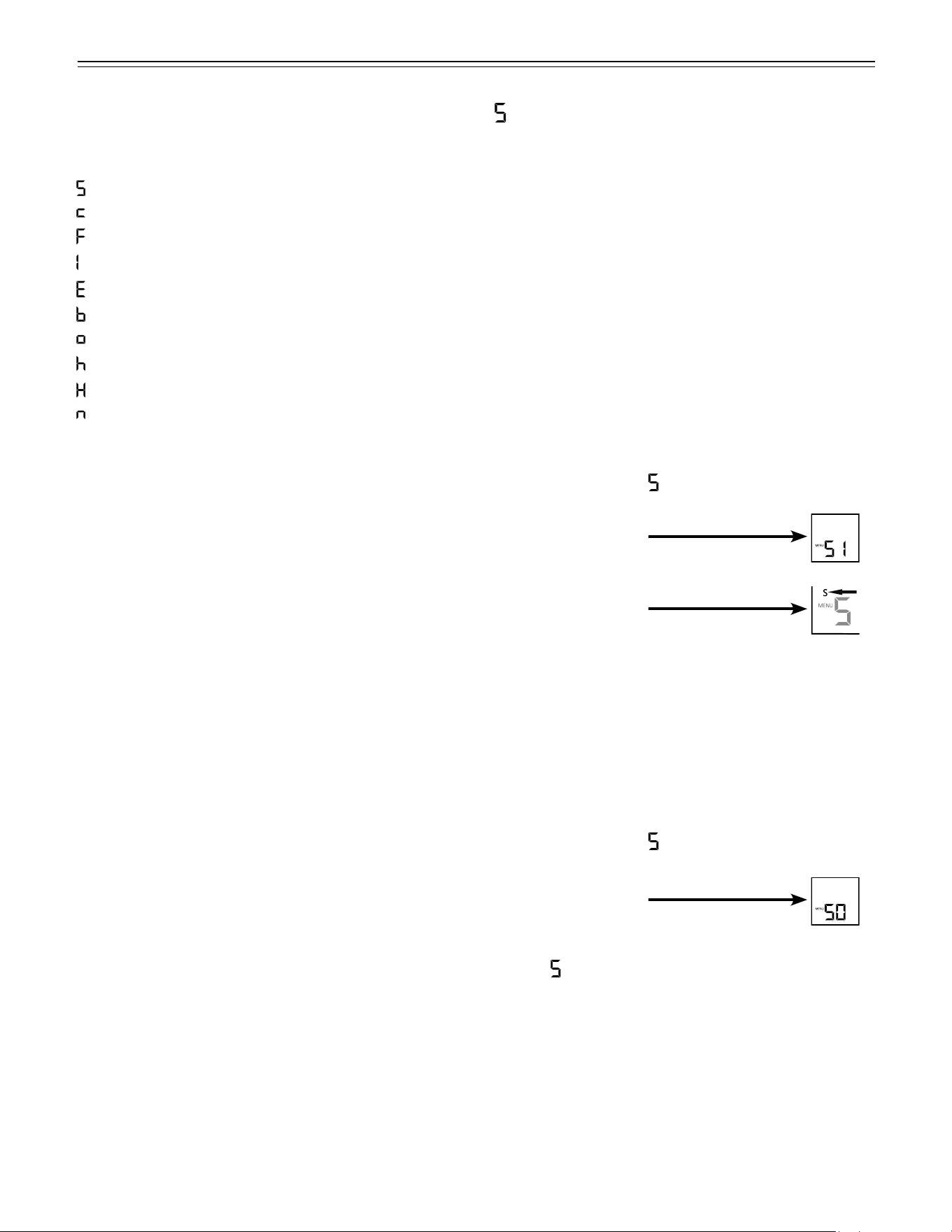
Setup Mode
In the setup mode you can activate the following func-
tions:
= Sabbath mode
= Child lock
= Drop symbol reset
= Ice maker function test (for service personnel only)
= Water quantity for ice cube tray
= BioFresh temperature adjustment
= Temperature display mode
= Display brightness
= Lower hinge heating control
= Reset air filter LED
13
o
peraTion
Figure 9
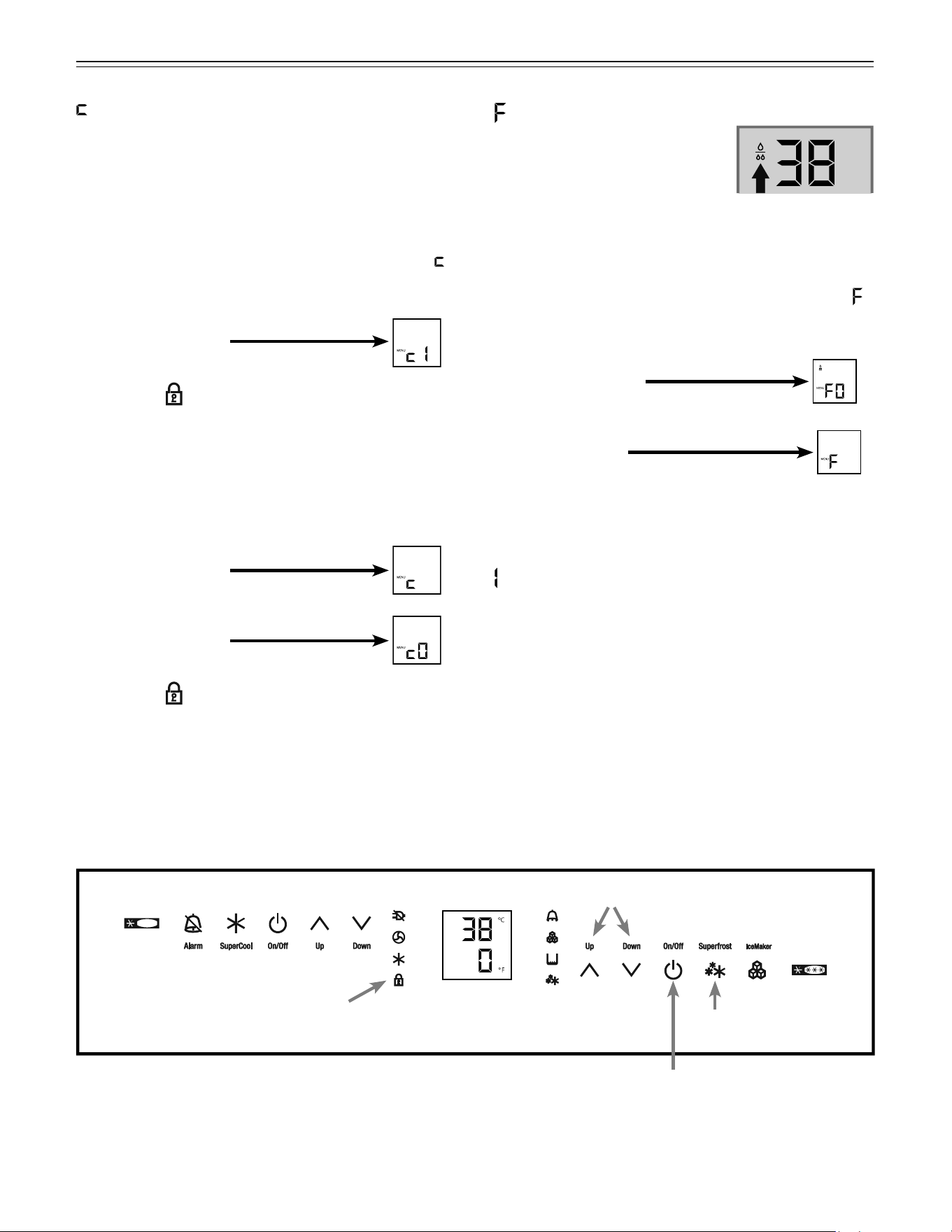
= Child lock
The child lock is designed to protect the appliance from
being turned off accidentally.
How to activate the child lock
• Activate the setup mode by touching the SuperFrost
icon for 5 seconds.
• Touch the freezer compartment Down icon until
appears in the freezer temperature display.
• Touch the SuperFrost icon
- the display shows
• Touch the SuperFrost icon again
- the LED
is lit and the child lock is activated.
• Exit setup mode by touching the freezer compartment
On/Off icon.
How to deactivate the child lock
• Activate the setup mode by touching the SuperFrost
icon for 5 seconds.
- the display shows
• Touch the SuperFrost icon
- the display shows
• Touch the SuperFrost icon again
- the LED
goes out. The child lock is deactivated.
• Exit setup mode by touching the freezer compartment
On/Off icon.
= Drop symbol reset
After the water filter has been
changed the drop symbol on the
display must be reset.
How to reset the drop symbol
• Activate the setup mode by touching the SuperFrost
icon for 5 seconds.
• Touch the freezer compartment Down icon until
appears in the freezer temperature display.
• Touch the SuperFrost icon
- the display shows
• Touch the SuperFrost icon again
- the display shows
• The drop symbol disappears.
• Exit setup mode by touching the freezer compartment
On/Off icon.
= Ice maker function test
Activation by service personnel only.
Freezer On/Off icon
Freezer compartment Up/Down icons
SuperFrost icon
Child lock LED
14
= Temperature display mode
You can choose the unit of temperature for the display
in degrees Fahrenheit or degrees Celsius.
The factory setting is degrees Fahrenheit.
How to change the temperature display to
degrees Celsius
• Activate the setup mode by touching the SuperFrost
icon for 5 seconds.
• Touch the freezer compartment Down icon until
appears in the freezer temperature display.
• Touch the SuperFrost icon
- the display shows
• Touch the SuperFrost icon again
- the temperature reading is now displayed in
degrees Celsius.
• Exit setup mode by touching the freezer compartment
On/Off icon.
Note
To change the temperature display back to degrees
Fahrenheit, follow the steps above.
o
peraTion
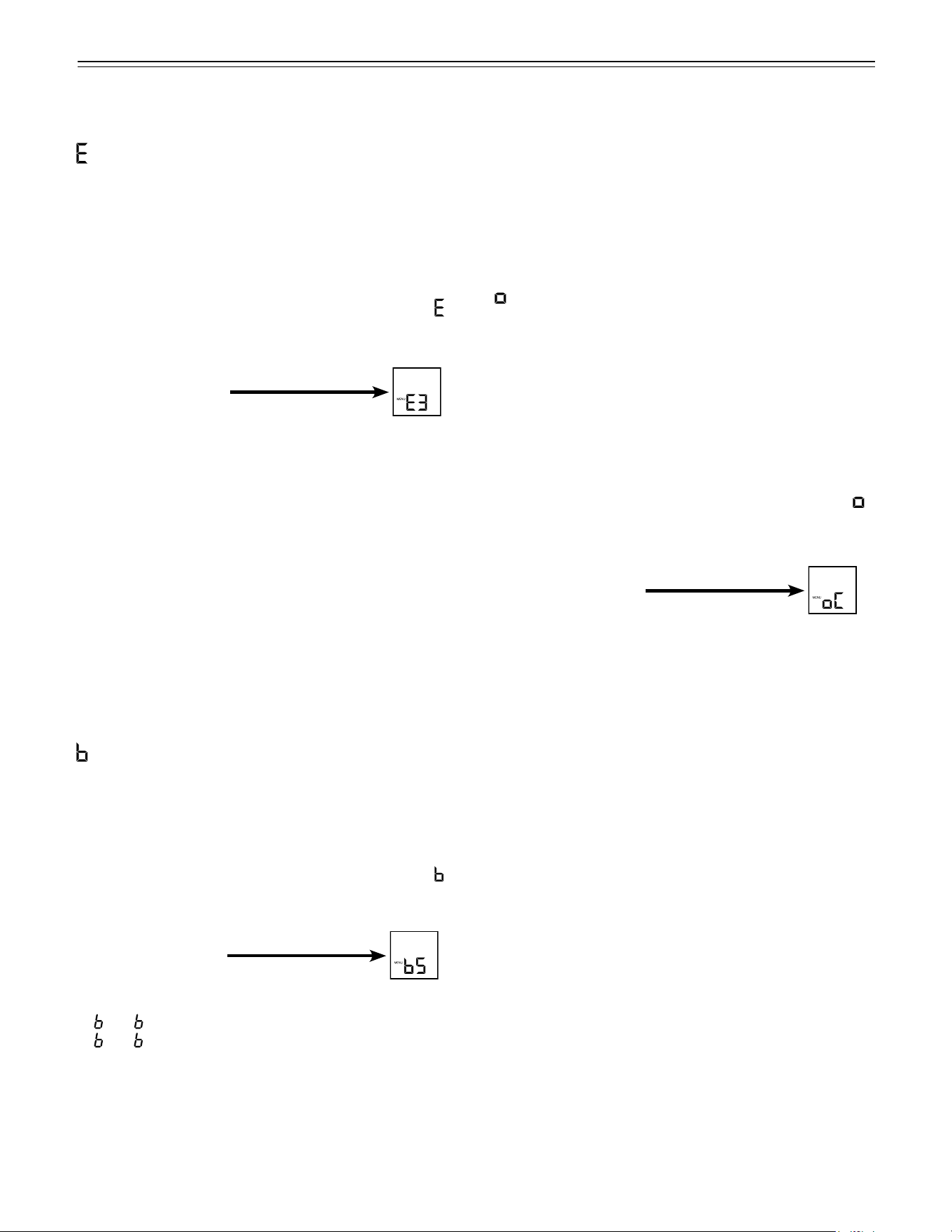
= Water quantity for ice maker
If the ice cubes produced by the ice maker are too
small, the inflowing water quantity can be adjusted.
How to adjust the water quantity
• Activate the setup mode by touching the SuperFrost
icon for 5 seconds.
• Touch the freezer compartment Down icon until
appears in the freezer temperature display.
• Touch the SuperFrost icon
- the display shows
• Touch the freezer compartment Up icon
once only so E 4 appears in the display.
IMPORTANT
Do not increase for more than one step. If the
adjusted value is too high, the ice cube tray of the
ice maker could overflow.
• Touch the SuperFrost icon again.
• Exit setup mode by touching the freezer compartment
On/Off icon.
Check the ice cube size within the next days. If the ice
cubes are still smaller than desired, follow the steps
above again.
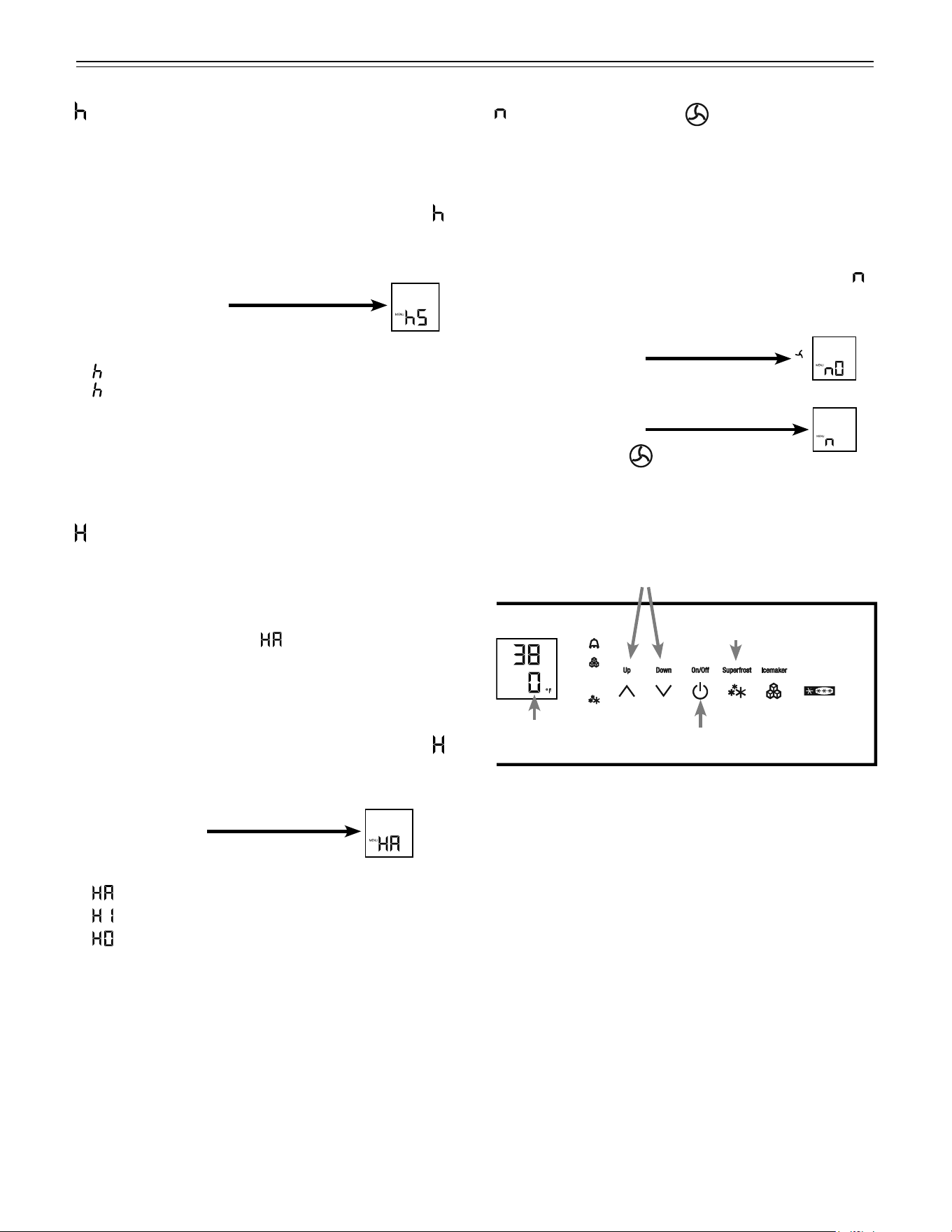
Setup Mode - Figure 10
= Biofresh temperature adjustment
You can adjust the temperature in the BioFresh drawers.
How to adjust the Biofresh temperature
• Activate the setup mode by touching the SuperFrost
icon for 5 seconds.
• Touch the freezer compartment Down icon until
appears in the freezer temperature display.
• Touch the SuperFrost icon
- the display shows
• Touch freezer compartment
Up/Down icons to select
6 - 9 to increase the temperature,
4 - 1 to reduce the temperature.
IMPORTANT
At values b4 - b1 the temperature in the drawers can
drop below 32°F (0°C). Stored goods could freeze.
• Touch the SuperFrost icon at the desired value.
• Exit setup mode by touching the freezer compartment
On/Off icon.
15
o
peraTion
Figure 10
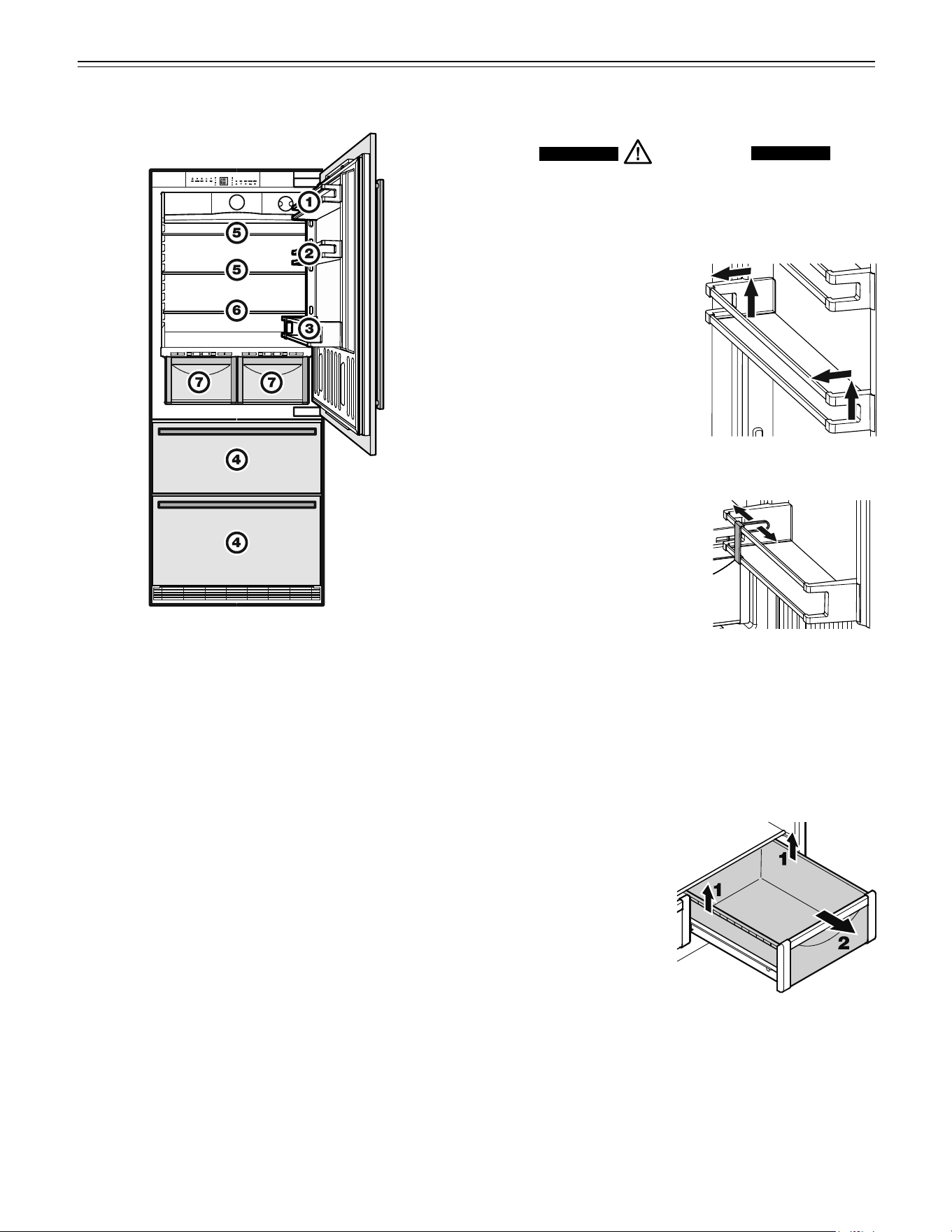
= Reset air filter LED
After the air filter in the toe kick area has been cleaned
the air filter LED must be reset. For how to clean the air
filter refer to chapter “Cleaning”.
How to reset the air filter LED
• Activate the setup mode by touching the SuperFrost
icon for 5 seconds.
• Touch the freezer compartment Down icon until
appears in the freezer temperature display.
• Touch the SuperFrost icon
- the display shows
• Touch the SuperFrost icon again
- the display shows
• The air filter LED disappears.
• Exit setup mode by touching the freezer compartment
On/Off icon.
= Lower hinge heating control
If condensed water appears in the lower hinge area
or on the base plate between refrigerator and freezer
compartment, increase the output of the heating located
behind the base plate.
The factory setting is set to
= medium output
How to change the heating output
• Activate the setup mode by touching the SuperFrost
icon for 5 seconds
• Touch the freezer compartment Down icon until
appears in the freezer temperature display.
• Touch the SuperFrost icon
- the display shows
• Touch freezer compartment
Up/Down icons to select
= at slight condensation
= at heavy condensation
= heating off
• Touch the SuperFrost icon at the desired value.
• Exit setup mode by touching the freezer compartment
On/Off icon.
Note
With normal ambient conditions no condensation
will appear. With high humidity and low ambient
temperature this feature helps to prevent
condensation.
SuperFrost icon
Freezer On/Off icon
Freezer compartment Up/Down icons
Freezer temperature
display
= Display brightness
How to adjust the display brightness
• Activate the setup mode by touching the SuperFrost
icon for 5 seconds.
• Touch the freezer compartment Down icon until
appears in the freezer temperature display.
• Touch the SuperFrost icon
- the display shows
• Touch the freezer compartment
Up/Down icons to select
0 = minimum to
5 = maximum brightness
• Touch the SuperFrost icon at the desired value.
• Exit setup mode by touching the freezer compartment
On/Off icon.
16
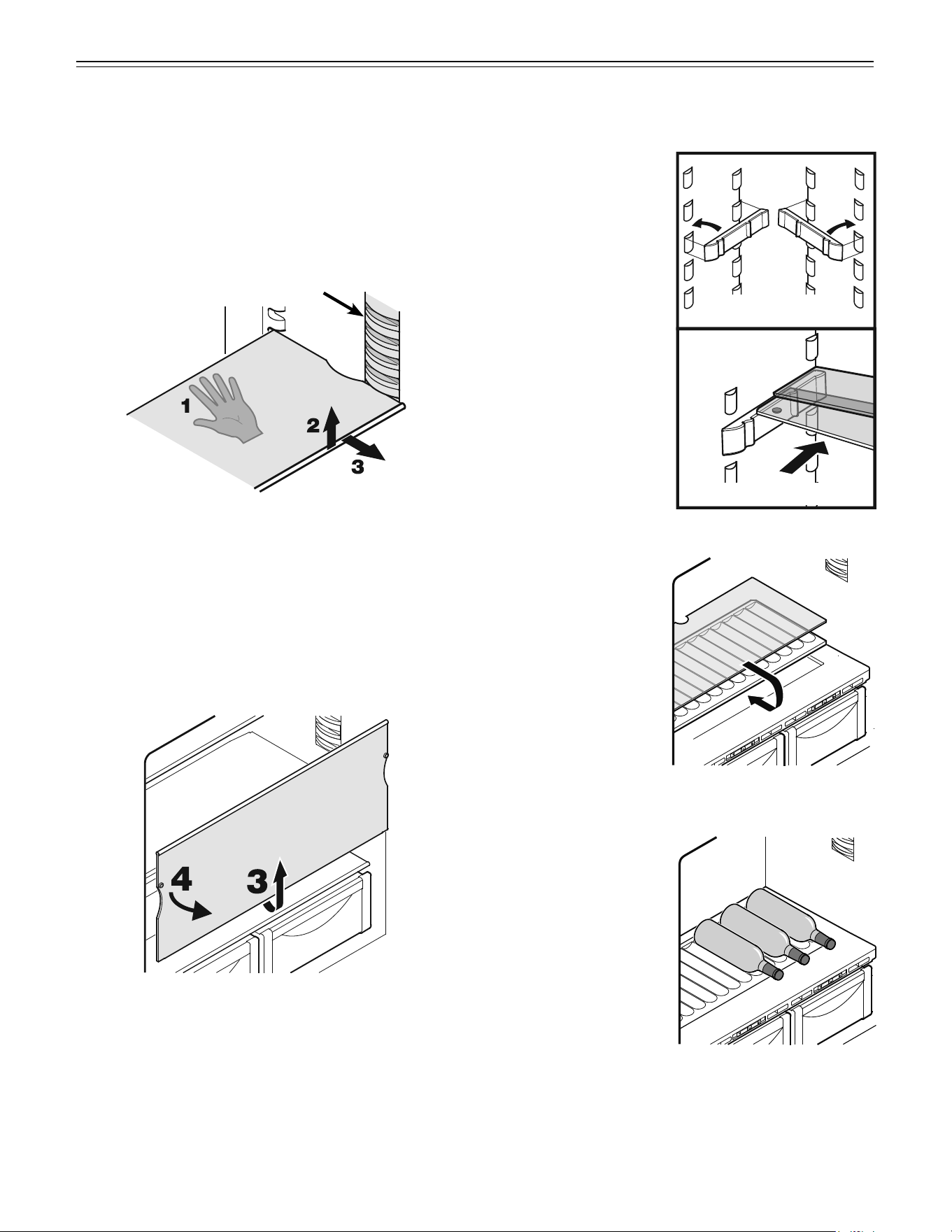
Shelf Arrangement
CAUTION!
To avoid possible injury, only adjust an
empty shelf or door rack. Do not attempt to
adjust a shelf or door rack with food on it.
You can rearrange the height
of the shelves and door racks
as required.
Repositioning the door
racks - Figure 12
Slide the door rack up, pull
out toward you and replace in
reverse order.
Bottle holder - Figure 13
You can protect the bottles
from falling over when the door
is opened and closed.
Move the bottle holder to the
desired position. Always hold
at the front for moving.
r
efrigeraTor
C
omparTmenT
To remove the BioFresh drawer
Pull the drawer straight out, grip at the back and lift out -
Figure 14.
To install the BioFresh drawer
Place the drawer on
the rails. The rails must
be fully extended and
aligned with the front
of the drawer. Slide the
drawer in.
Arranging Food - Figure 11
Figure 12
Figure 14
(1) Butter, cheese
(2) Eggs
(3) Gallon containers, cans, drinks, bottles
(4) Frozen food, ice cubes
(5) Meat and sausage products, dairy products
(6) Baked goods, pre-cooked meals
(7) Fruit, vegetables, salad (at high humidity setting)
Meat and sausage products, dairy products (at
low humidity setting). Refer to chapter “Biofresh
Compartment” for explanation.
IMPORTANT
• Liquids and food which give off or absorb odors and
flavors should always be stored covered or in closed
containers.
• High-percentage alcohols should be tightly sealed
and stored upright.
Figure 11
Figure 13
17
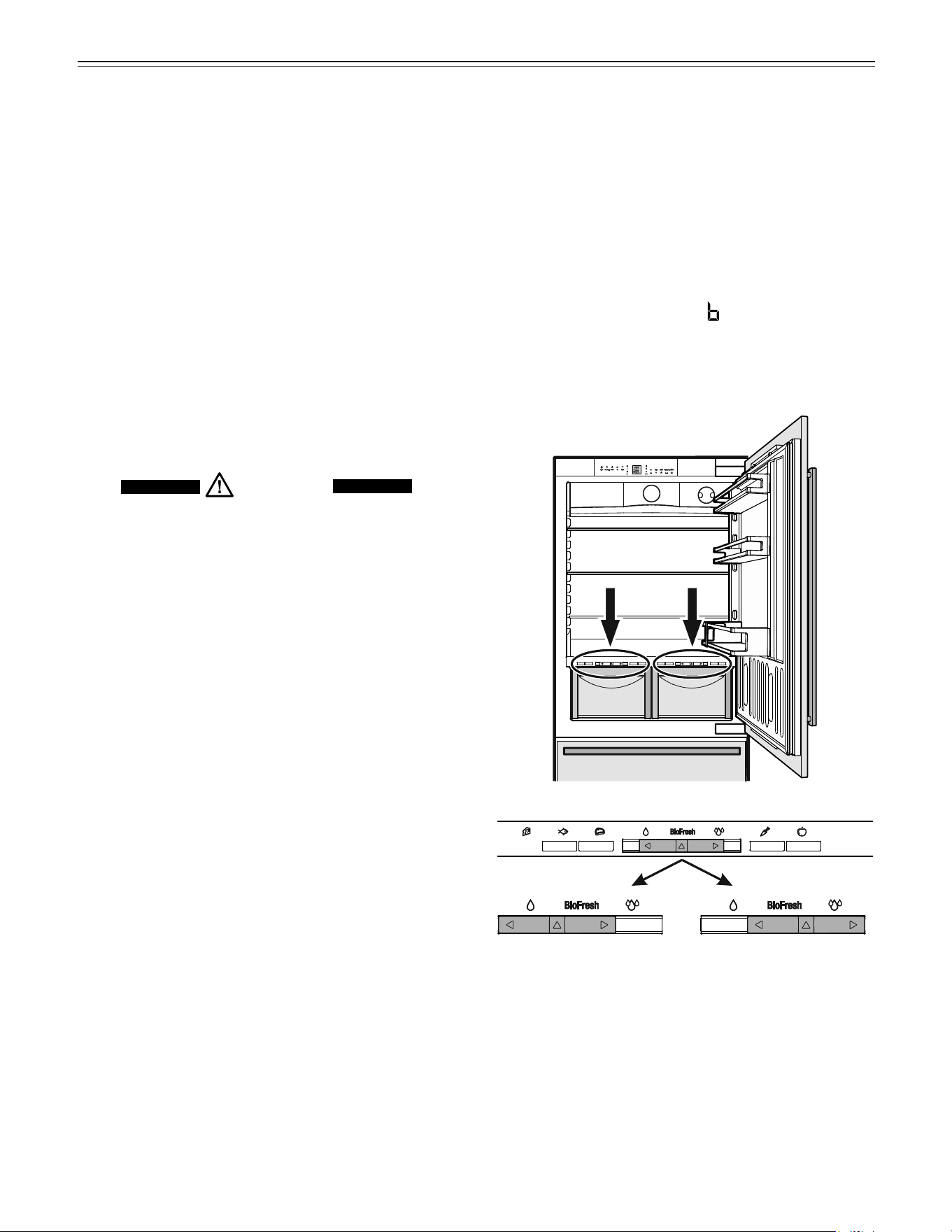
Bottle tray
The tray above the
BioFresh compartment
can be used for storing
bottles horizontally.
Remove glass plate and
reinsert under the tray -
Figure 19.
r
efrigeraTor
C
omparTmenT
Figure 19
Figure 20
The cavities in the plate
ensures secure place-
ment of the bottles -
Figure 20.
IMPORTANT
When storing tall
bottles horizontally, the
gallon rack must be
relocated to a higher
position.
If you need space for large bottles and con-
tainers.
Place the shelf rails pro-
vided on the supports
on the left and right at
the desired height -
Figure 17.
Insert the glass shelves
as shown in figure 18.
The glass shelf with the
raised edge must go at
the back.
If you need to make
space for tall containers,
simply slide the front
half of the sectioned
glass shelf carefully
underneath the back half
- Figure 18.
Removing the shelves - Figure 16
1. Follow the first three steps in the chapter above.
2. Lift the shelf down and stop just over the upper veg-
etable bin.
3. Move the front of the shelf upwards until the shelf is in
a vertical position.
4. Turn the shelf out at left and remove.
Repositioning the shelves - Figure 15
Remove all transport packaging.
1. Hold the shelf underneath with your hand to avoid
from tipping down backwards when removing.
2. Lift the shelf at the front.
3. Remove the shelf forward until the circular cutout of
the shelf is in line with the interior light cover.
4. Lift the shelf up or down and replace in the desired
position.
Figure 15
Interior light cover
Figure 16
Figure 17
Figure 18
18
b
io
f
resh
C
omparTmenT
BioFresh Compartment - Figure 21
The BioFresh compartment maintains food freshness up
to 3 times longer than in standard refrigerators.
The constant temperature just above 32°F (0°C) and the
adjustable humidity provides the ideal storage condi-
tions for different types of food.
The temperature of the BioFresh compartment (simulta-
neously) can be adjusted.
Refer to chapter Setup Mode -
= Biofresh tem-
perature adjustment
Figure 21
Humidity selection
Slide control to left
This setting is suitable for
dry or wrapped food like
dairy products, meat, fish,
cold cuts.
Slide control to right
This setting is suitable for
storing unwrapped food
with a high moisture con-
tent such as salad, veg-
etables and fruit.
Interior Light
The interior light is located at the left and right in the
refrigerator and BioFresh compartment and above each
drawer in the freezer compartment.
It turns on if the refrigerator door or one freezer drawer
is opened.
The light turns off automatically if the refrigerator door or
one freezer drawer has been opened for approximately
15 minutes. The audible alarm sounds at the same time.
The light intensity of the LED light corresponds to
laser class 1/1M.
IMPORTANT
The light cover may only be removed by customer
service staff.
CAUTION!
If the cover is removed, do not look
directly at the light through optical lenses
from close distance.

19
b
io
f
resh
C
omparTmenT
Notes
• The humidity in the compartment depends on the
moisture content of the food and the frequency a
drawer is opened.
• The fresher the product and the higher its quality, the
longer the storage life.
• Unwrapped food should be stored separately. Wrap
food if there is not enough space in the drawers.
To avoid bacterial spoilage, different types of meat
should not come into contact with each other. Keep
meat packed separately.
• The following products should not be stored in the
BioFresh compartment: hard cheese, potatoes, cold-
sensitive vegetables such as cucumber, eggplant,
avocados, semi-ripe tomatoes, zucchini, and all cold-
sensitive tropical fruits such as pineapple, bananas,
grapefruit, melons, mangoes, papaya, etc.
Humid setting
Vegetables, salad
artichokes up to 21 days
asparagus up to 14 days
broccoli up to 14 days
Brussels sprouts up to 30 days
cabbage up to 180 days
carrots up to 150 days
cauliower up to 21 days
celery up to 30 days
chicory up to 30 days
Chinese cabbage up to 14 days
curly kale up to 14 days
fennel up to 21 days
garlic up to 180 days
green onions up to 7 days
herbs up to 30 days
iceberg salad, endives,
lamb’s lettuce up to 21 days
kohlrabi up to 14 days
leeks up to 60 days
lettuce up to 10 days
mushrooms up to 7 days
peas up to 10 days
radicchio up to 21 days
radishes up to 14 days
savoy cabbage up to 60 days
spinach up to 7 days
Fruit
apples up to 180 days
apricots up to 14 days
bilberries up to 14 days
blackberries up to 8 days
cherries up to 14 days
black and red currants up to 21 days
dates (fresh) up to 60 days
gs (fresh) up to 7 days
gooseberries up to 21 days
grapes up to 90 days
kiwi fruits up to 120 days
peaches up to 30 days
pears up to 120 days
plums up to 21 days
quinces up to 90 days
raspberries up to 5 days
rhubarb up to 21 days
strawberries up to 5 days
Storage Times
for food in the BioFresh compartment:
Dry setting
butter up to 30 days
cheese, soft up to 30 days
milk, fresh up to 7 days
sausage, cold cuts up to 7 days
sh up to 4 days
shellsh up to 3 days
poultry up to 5 days
pork
large portions up to 7 days
cut up up to 5 days
beef up to 7 days
game up to 7 days
20
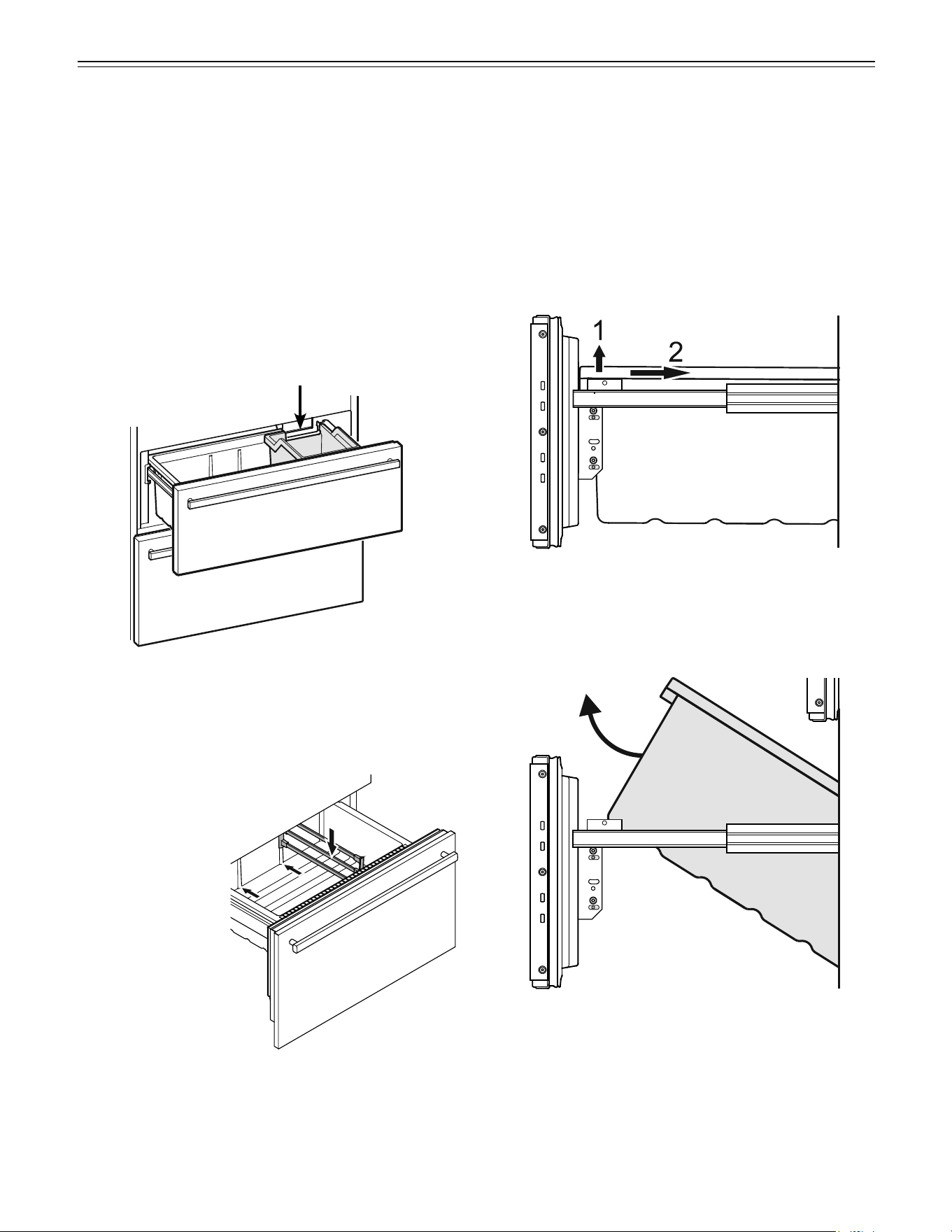
Bottom drawer partition - Figure 23
If desired, insert the partition grid provided with the
accessories pack.
Open the bottom freezer drawer
and insert the partition on
the left or right in the
drawer.
f
reezer
C
omparTmenT
Freezer Compartment Description
The ice maker is located in the upper drawer on the right
side.
The ice cubes fall out of the ice maker into the drawer.
If you need the whole upper drawer for freezing and
storing food, turn off the ice maker (see chapter “Turning
the Ice Maker On and Off”).
The bottom drawer is intended for freezing and storing
food. Ice cubes can also be stored in this drawer.
Figure 22
Removing the Freezer Compartment
Containers
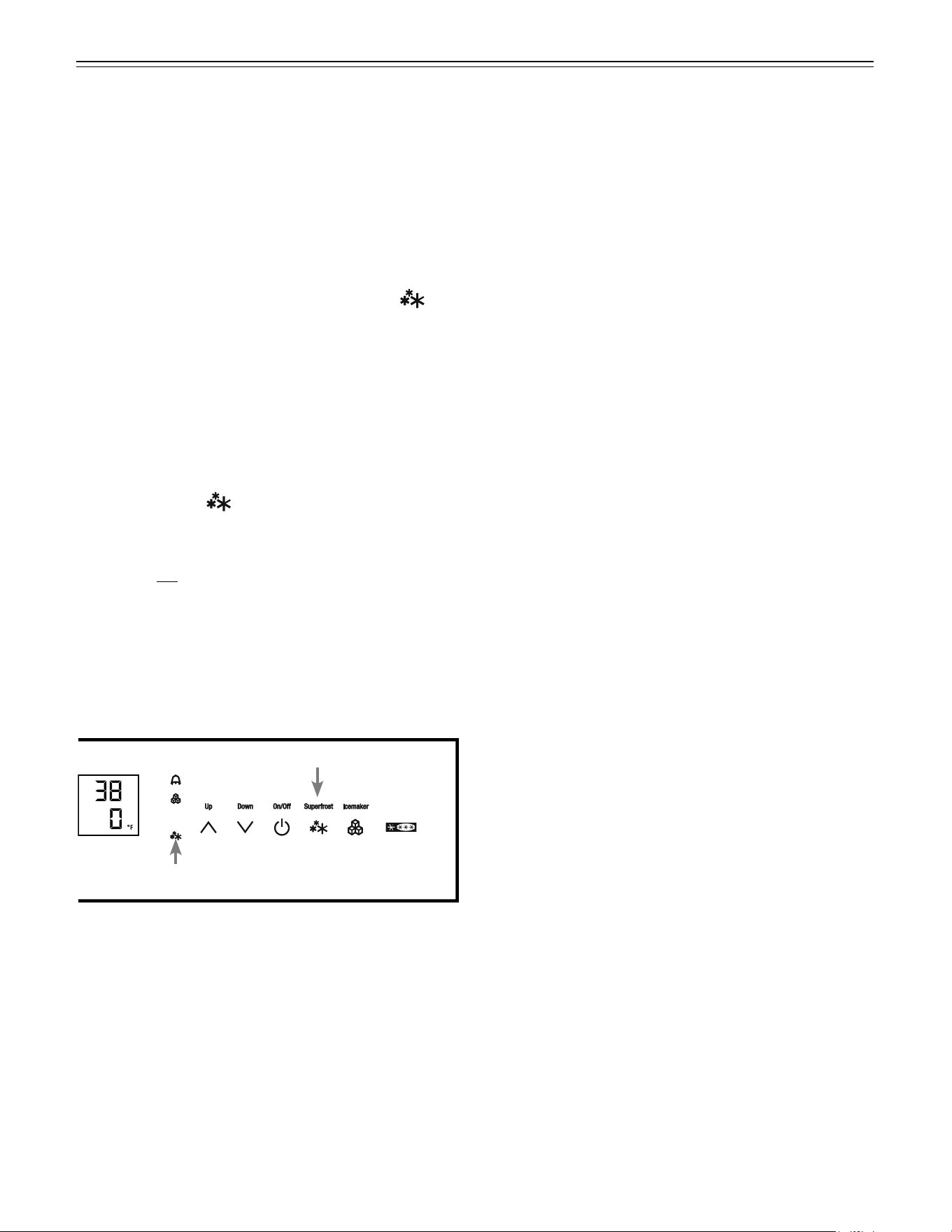
The containers of both freezer drawers can be removed.
• Unlatch the container on the left and right corners by
pulling upwards (1) - Figure 24.
• Slide the container backwards (2) - Figure 24.
Figure 24
• Tilt the container at an angle and remove -
Figure 25.
Install the container in the reverse order.
Figure 25
Figure 23
Space for ice cubes
21
f
reezer
C
omparTmenT
Freezing and Storage
• Pack frozen food in standard freezer bags or reusable
plastic, metal or aluminum containers.
• Do not allow fresh food which is to be frozen to come
into contact with food already frozen. Always keep
packages dry in order to avoid them sticking together.
• Always write the date and contents on the package
and do not exceed the stated storage time for the
food. This prevents spoiling.
• Pack food which you are freezing yourself in quantities
right for your household. To ensure the food freezes
right through quickly, the following quantities should
not be exceeded per package:
- fruit, vegetables: up to 2-1/4 lbs (1 kg);
- meat: up to 5-1/2 lbs (2.5 kg).
• Do not freeze bottles and cans which contain
carbonated drinks as they might burst. Drinks can be
cooled down quickly, but take the bottles out of the
freezer compartment after an hour at the most.
• Only take out as much food as needed for thawing.
Cook food which has been thawed as quickly as
possible.
Frozen food can be thawed in the following ways:
- in a microwave oven
- in the refrigerator: the safer way to thaw food because
there is less chance of bacteria growth. Use this
method for high density food such as roasts or poultry.
Freezing
Fresh food should be frozen completely and as rapidly
as possible. This is provided by the SuperFrost feature
and ensures that the nutritional value, appearance and
flavor of the food remains intact.
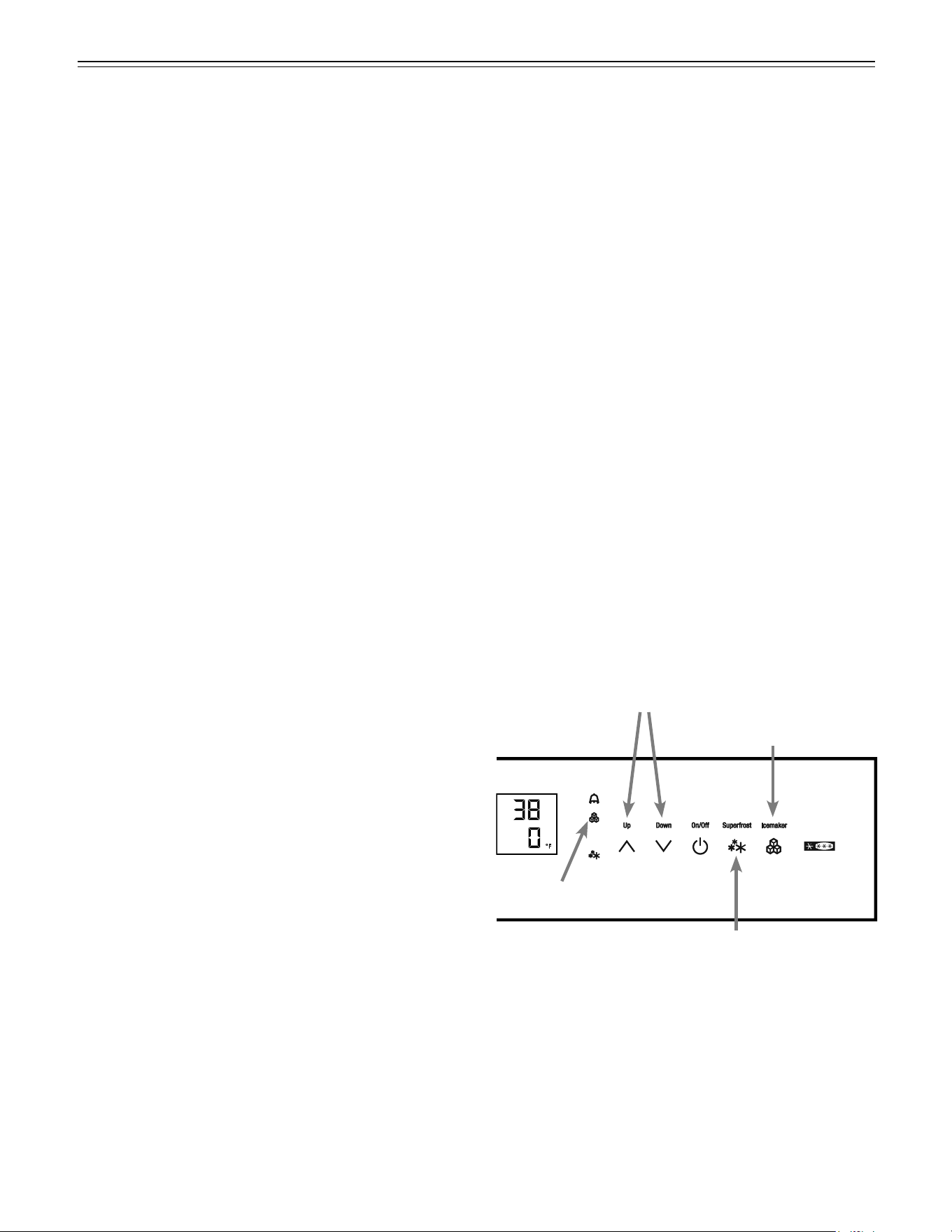
Freezing with SuperFrost - Figure 26
• Touch the SuperFrost icon briefly so the LED
turns on.
• Wait 24 hours.
• Then place the fresh food inside the freezer.
• The SuperFrost function turns off automatically.
Depending on the quantity of food placed in the
freezer, this will normally be between 30 and a maxi-
mum of 65 hours.
The freezing process is now complete; the
SuperFrost LED
will turn off, and the freezer will
change back to normal energy-saving operation.
IMPORTANT
You should not turn on the SuperFrost function:
• when placing frozen food in the freezer;
• when freezing up to approximately 4-1/2 lbs (2 kg)
fresh food daily.
Figure 26
SuperFrost LED
SuperFrost icon
22
i
Ce
m
aker
Safety Instructions and Warnings for
the Automatic Ice Maker
• The ice maker is designed exclusively to make ice
cubes in quantities needed by a household.
• All repairs and work on the ice maker may only be
done by customer service personnel or other appro-
priately trained personnel.
• Do not consume or use the first three batches
of ice. This applies both to using the appliance
for the first time and also using it after it has not
been used for a long period of time.
• The manufacturer cannot accept liability for
damage caused by equipment or water lines
between the solenoid valve and the water sup-
ply.
• The ice maker will only make ice cubes if the freezer
compartment is operating and both freezer drawers
are completely closed.
Ice Maker Description
After you start the ice maker for the first time, it may take
up to 24 hours before the first ice cubes are ready.
The ice cubes fall out of the ice maker into the drawer
(see chapter “Freezer compartment description”).
IMPORTANT
The first three batches of ice must not be consumed
or used.
When the ice reaches a certain level in the drawer, the
appliance stops producing ice automatically.
The production capacity is 100 - 120 ice cubes in
24 hours at a temperature of 0°F (-18°C) inside the
freezer compartment.
To have the maximum capacity of approx. 150 ice cubes
in 24 hours, activate the SuperFrost function.
Be aware that this increases the energy consump-
tion because the compressor will run constantly.
Note
If the IceMaker LED flashes, the ice maker is not
being supplied with water. Check if the shut off valve
of the water supply is opened.
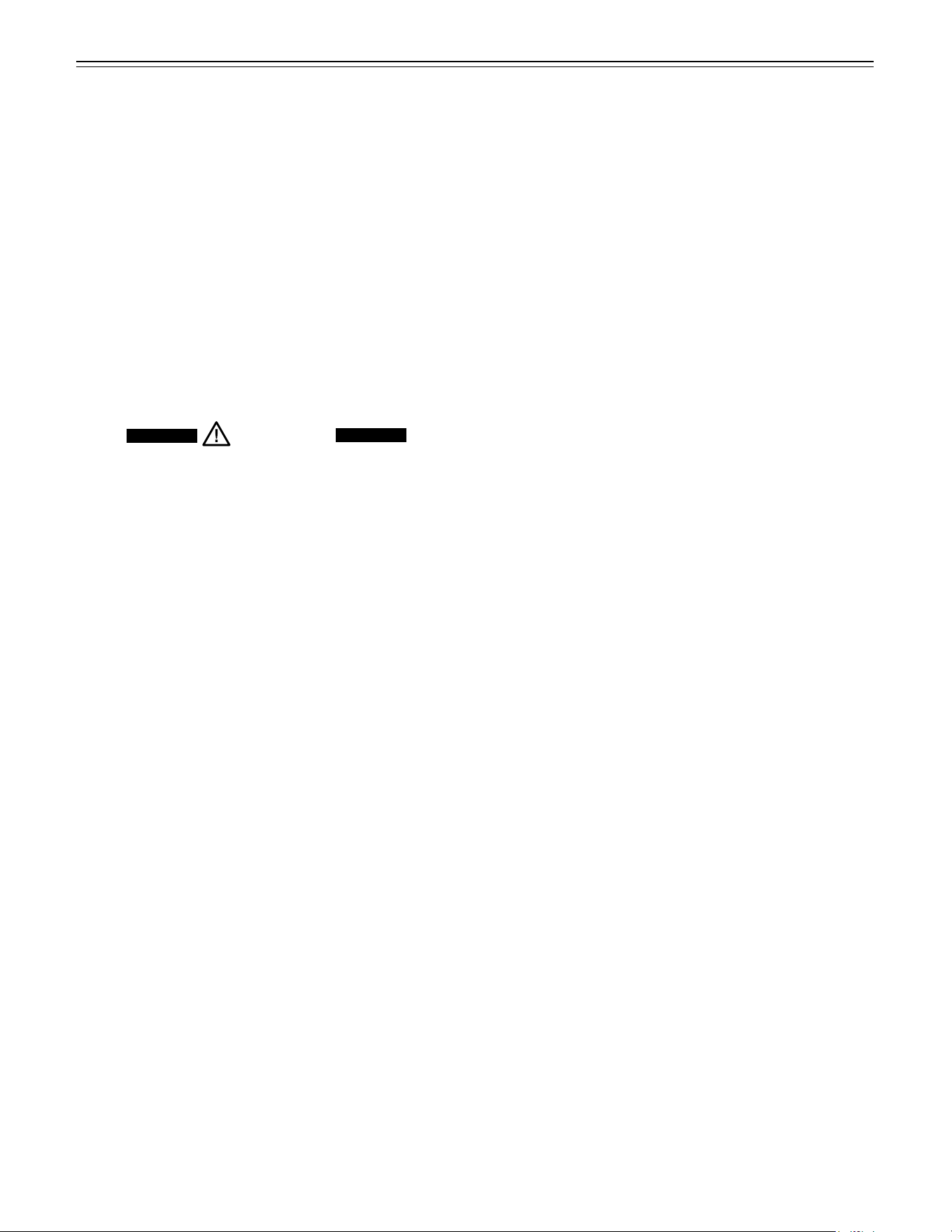
Figure 27
SuperFrost icon
Freezer compartment Up/Down icons
IceMaker icon
IceMaker LED
Turning the Ice Maker On and Off
(Figure 27)
To turn the ice maker on
• Touch the IceMaker icon so the IceMaker LED
comes on.
To turn the ice maker off
If you do not need any ice cubes, the ice maker can be
turned off independently of the freezer compartment.
• Touch the IceMaker icon so the IceMaker LED goes
out.
Ice maker at vacations
See chapter “Vacation tips”
23
D
efrosTing
/ C
leaning
Defrosting
Refrigerator compartment
The refrigerator compartment defrosts automatically.
The water that forms on the rear wall drains into a res-
ervoir at the back of the appliance and evaporates auto-
matically through the compressor heat.
Freezer compartment
The NoFrost system automatically defrosts the freezer
compartment. Any moisture will collect on the evapora-
tor and freeze. It will periodically defrost and evaporate.
Cleaning
WARNING!
• To prevent possible injury due to an
electrical shock, be sure to disconnect the
power cord or turn off the circuit breaker
before cleaning the appliance.
• To avoid injury or damage, do not use steam
cleaning equipment to clean the appliance.
• To avoid short-circuits, ensure no cleaning
water penetrates into the electrical
components when cleaning the appliance.
Do not use a sponge or cloth that is overly
wet.
Do not use abrasive or scouring sponges. Do not use
concentrated cleaning agents. Never use abrasive or
acid cleaners or chemical solvents.
• Remove all food from the refrigerator and freezer
compartments and store in a cool place temporarily.
Store frozen food in other freezers if available.
• Remove the door racks as shown in Figure 12.
• Remove BioFresh drawers as shown in Figure 14.
• Remove glass shelves as shown in Figure 16.
• Remove the freezer drawer containers as shown in
Figure 24 and Figure 25.
• A compound of lukewarm water and dishwasher
detergent is recommended for cleaning the appliance
and equipment parts.
IMPORTANT
Do not clean the equipment parts in a dishwasher.
Strips of these parts could get loose.
• Dry all parts well with a cloth.
• Do not damage or remove the model plate on the
inside of the appliance. It is very important for servic-
ing your appliance.
• Install all equipment parts and replace the food in the
appliance.
• Turn the appliance on.
Cleaning instructions for stainless steel
panels
Keep your stainless steel looking new by cleaning with
a good quality stainless steel cleaner or polish monthly.
High quality stainless steel cleaners and conditioners
are commercially available.
Do not clean with steel wool pads or abrasive
pads. Do not use cleaners that are not for use on
stainless steel, such as glass, tile or counter clean-
ers. These types of cleaners can damage the sur-
face permanently.
24
C
leaning
Figure 28
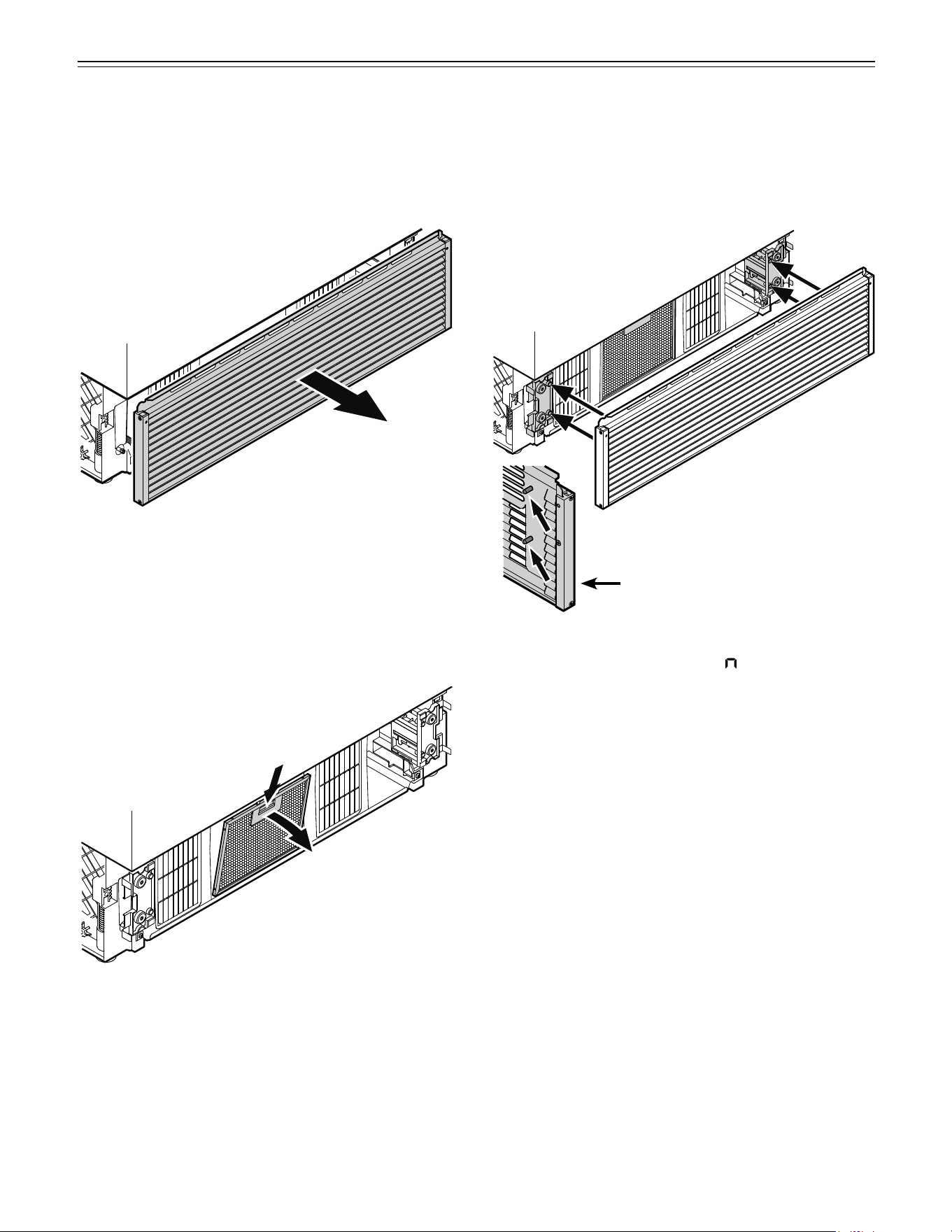
• Open the bottom freezer drawer and remove the ven-
tilation grille by pulling forwards - Figure 28. The grille
is supported magnetically so no tool is required for
removing.
Cleaning the Air Filter
Figure 29
• Push down the button of the air filter, tilt to the front
and remove - Figure 29.
• Clean the filter in a dishwasher or by hand with luke-
warm water and dishwasher detergent.
• Install the air filter in the reverse order.
• Install the ventilation grille.
The grille has bolts on the inside (see detail in
Fig. 30). These bolts must be inserted into the holes
of the supports.
Figure 30
Detail Figure 30
• Reset the air filter LED.
Refer to chapter Setup Mode - = Reset air filter
LED.
25
V
aCaTion
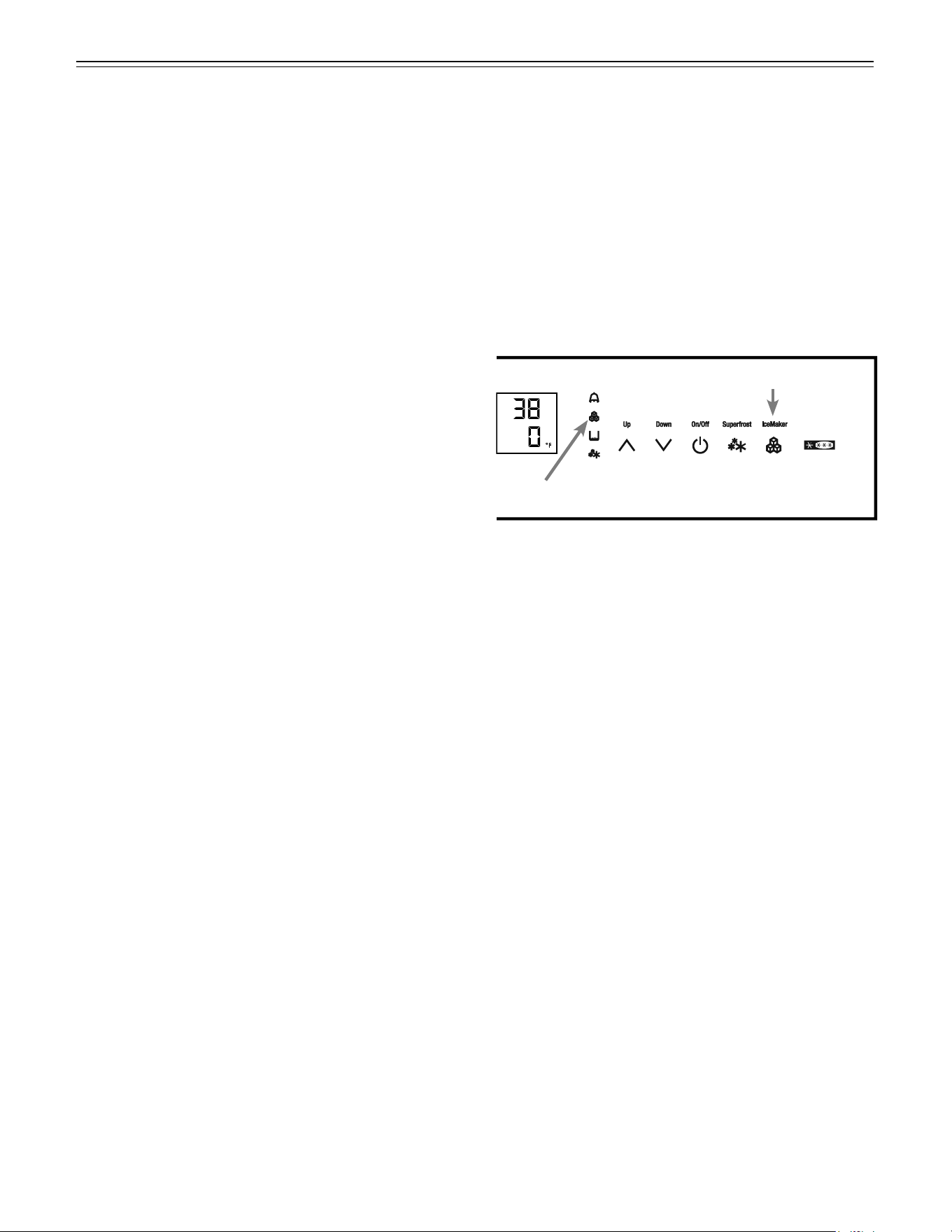
Vacation Tips (Figure 31)
Short vacations
It is not necessary to turn off the refrigerator and freezer
if you will be away for less than four weeks.
• Shut off the water supply to the ice maker.
> When the IceMaker LED starts blinking, the remain-
ing water in the supply line is in the ice maker.
• Leave the ice maker on and working for one day so
that the remaining ice cubes are ejected.
• Touch the IceMaker icon so that the IceMaker LED
goes out.
• Transfer all ice cubes to the right part of the drawer or
to the bottom drawer.
• Use all perishables.
• Freeze other items.
Long vacations
If you will be away for a month or more:
• Shut off the water supply to the ice maker.
> When the IceMaker LED starts blinking, the remain-
ing water in the supply line is in the ice maker.
• Leave the ice maker on and working for one day so
that the remaining ice cubes are ejected.
• Touch the IceMaker icon so that the IceMaker LED
goes out.
• Remove all ice cubes from the drawer and dispose of
them.
• Remove all food from the refrigerator and freezer
compartments.
• Turn off the refrigerator and freezer compartments.
• Clean the appliance. Refer to Cleaning.
• Leave the door and both freezer drawers open to pre-
vent unpleasant odors. This will also keep mold from
building up.
Turning on the ice maker after vacation
• Open the water suppy to the ice maker.
• Touch the IceMaker icon so that the IceMaker LED
comes on.
IMPORTANT
Do not consume or use the first three batches of
ice after the ice maker has not been used for longer
than one week.
Figure 31
IceMaker icon
IceMaker LED
26
T
roubleshooTing
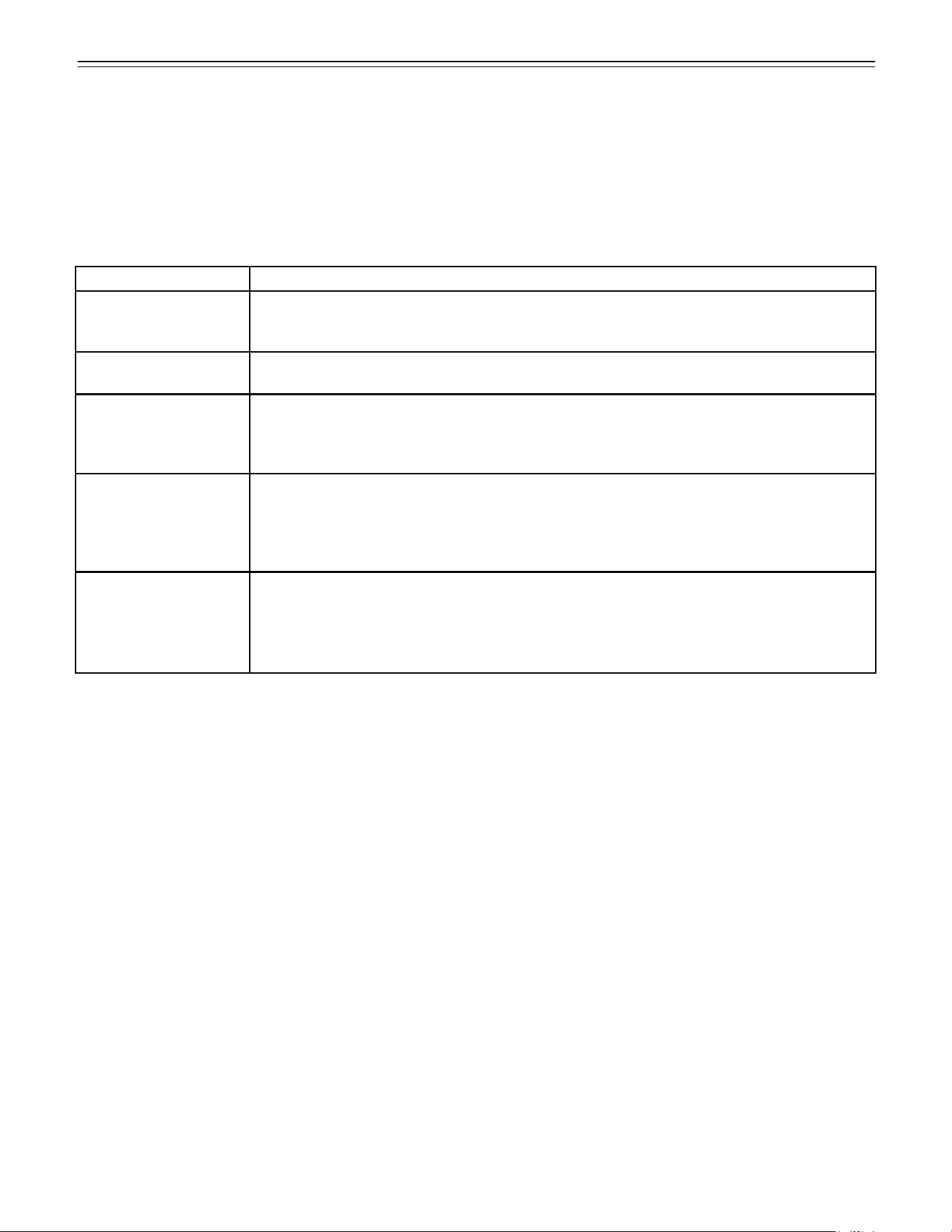
Problem Possible Cause and Remedy
Appliance does not
work, display is off
- Is the appliance turned on properly?
- Is the power cord properly inserted in the outlet?
- Is the circuit breaker or fuse in operating condition?
The interior light does
not come on
- Is the appliance turned on?
Motor seems to
run too long
- Is the ambient temperature too hot? See Safety Regulations.
- Has the appliance been opened too often or left open too long?
- A large amount of food has been added.
- Unit is in SuperCool mode. Verify unit is in normal operation mode.
The temperature is
not cold enough
- Is the temperature setting correct? See Setting The Temperature.
- Has an excessive amount of fresh food been placed in the appliance?
- Does a separately installed thermometer show the correct reading?
- Is the ventilation system working properly?
- Is the appliance set up too close to a heat source?
Freezer temperature
display shows two
dashes ’’- -”.
The freezer temperature display will only show temperatures that are below freezing.
When initially starting the freezer, it will not be below freezing. It will take three to five hours
(depending on ambient conditions) for freezing temperatures to be achieved and thus dis-
played numerically.
This may also occur after a power failure.
Troubleshooting
Your appliance is designed and manufactured for a long life and reliable operation.
If a problem occurs during operation, check whether it is due to an operating error. Please note that even during the
warranty period, some repair costs may be your responsibility.
You may be able to correct the following faults by checking the possible causes yourself:
27
Customer Service
If none of the above possible causes apply, and you
can not rectify the fault yourself, contact your nearest
customer service representative.
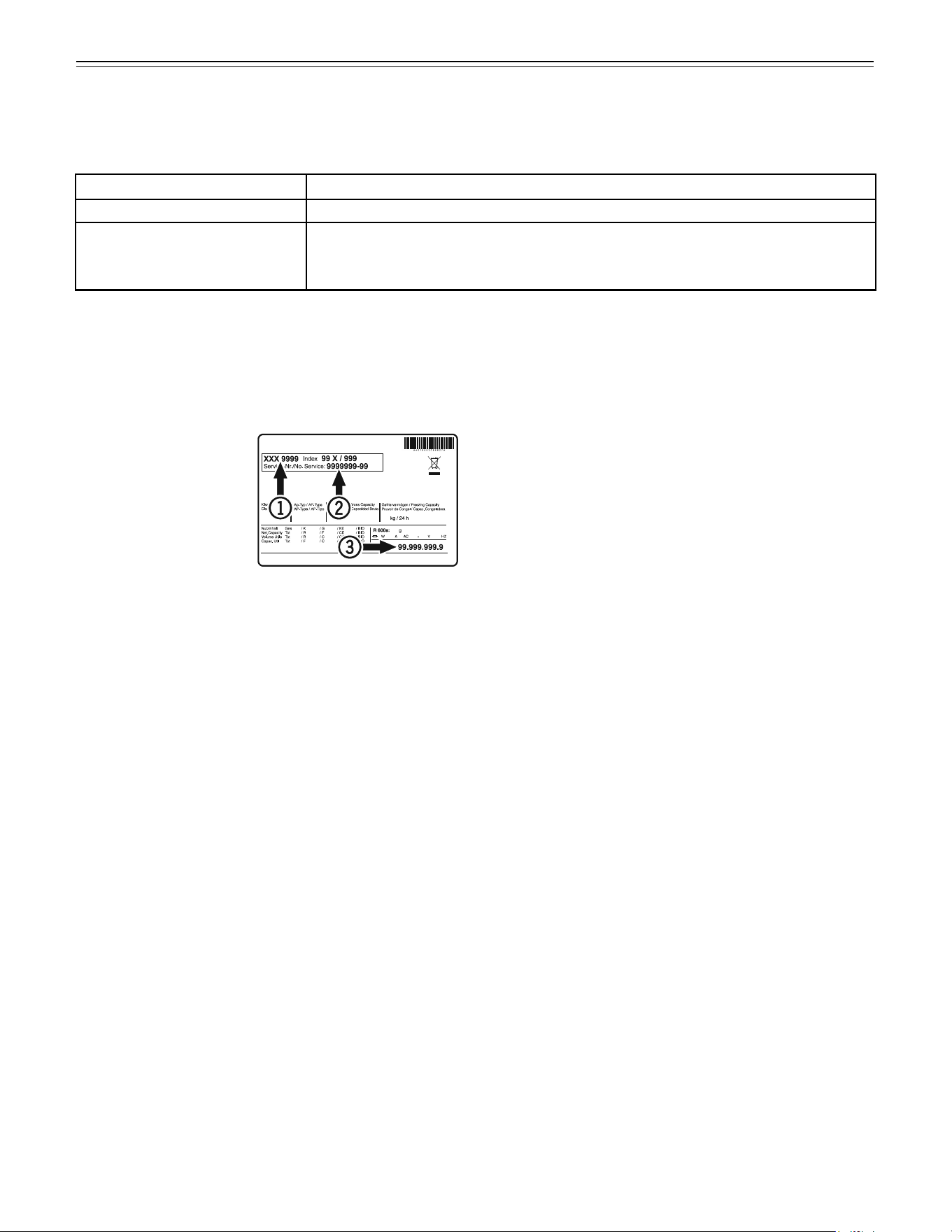
Indicate the type (1) of
appliance, service num-
ber (2) and the appliance
/ serial number (3) as
indicated on the model
plate.
The position of the model plate is shown in the section
entitled Description of the Appliance.
Appliance Information
Record this information when the appliance is installed.
Type Designation: _____________________________
Service Number: ______________________________
Appliance / Serial Number: ______________________
Date of Purchase: _____________________________
Where Purchased: _____________________________
Ice Maker Troubleshooting
You may be able to correct the following faults yourself:
T
roubleshooTing
Problem Possible Cause and Remedy
Ice maker cannot be turned on - Is the appliance connected to the electrical outlet?
Ice maker is not making any ice - Is the ice maker turned on?
- Is the water supply line open?
- Are both freezer drawers closed properly?
For Service in the U.S.
Liebherr Service Center
Toll Free: 1-866-LIEBHER or 1-866-543-2437
Email: Service-appliances.us@liebherr.com
PlusOne Solutions, Inc.
3501 Quadrangle Blvd, Suite 120
Orlando, FL 32817
For Service in Canada
Liebherr Service Center
Toll Free: 1-888-LIEBHER or 1-888-543-2437
www.euro-parts.ca
EURO-PARTS CANADA
39822 Belgrave Road
Belgrave, Ontario, N0G 1E0
Phone: (519) 357-3320
Fax: (519) 357-1326
www.liebherr-appliances.com
*708345200*
