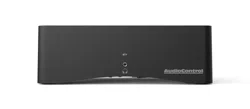
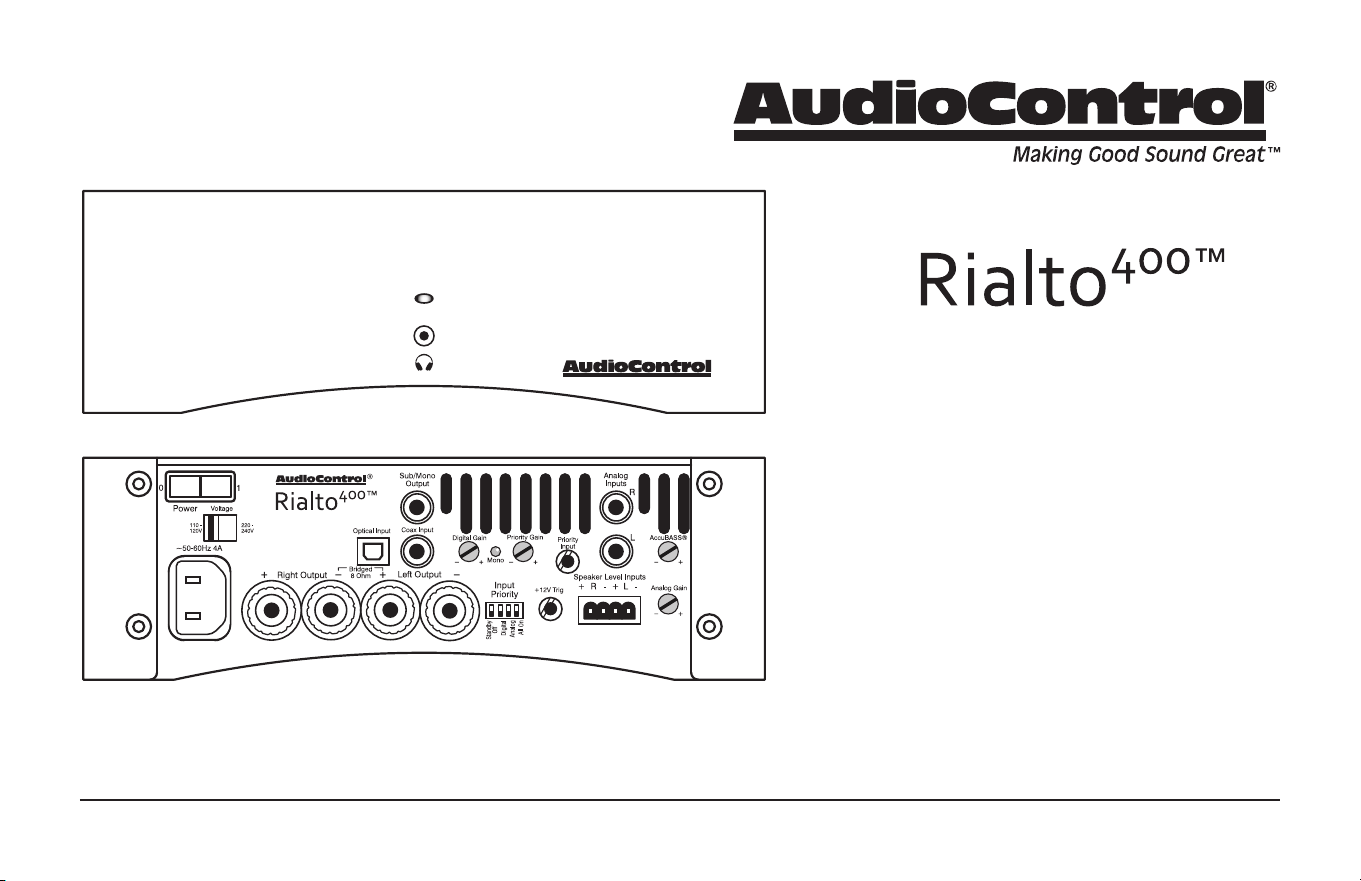
High Power Audiophile Amplier and DAC
Perfect for Streaming Audio Systems
Installation Manual
2
Installation Manual
Important Safety Instructions
1. Read these instructions.
2. Keep these instructions.
3. Heed all warnings.
4. Follow all instructions.
5. Do not use this apparatus near water.
6. Clean only with a dry cloth.
7. Do not block any ventilation openings. Install in accordance with the
manufacturer’s instructions.
8. Do not install near any heat sources such as radiators, stoves or any other
apparatus (including ampliers) that produce heat.
9. Protect the power cord from being walked on or pinched particularly at
plugs, convenience receptacles, and the point where they exit from the
apparatus.
10. Only use attachments/accessories specied by the manufacturer.
11. Do not ‘Hot Plug’. When changing inputs or outputs, switch the Rialto 400
o before making changes. Once changes have been made, then switch
the Rialto 400 back on.
12. Unplug this product during lightning storms or when unused for long
periods of time which we hope will be rarely!
13. Refer all servicing to qualied service personnel. Servicing is required
when the apparatus has been damaged in any way, such as power-sup-
ply cord or plug is damaged, liquid has been spilled or objects have
fallen into the apparatus, the apparatus has been exposed to rain or
moisture, does not operate normally, or has been dropped.
14. This apparatus shall not be exposed to dripping or splashing, and no
object lled with liquids, such as vases or glasses, shall be placed on the
apparatus.
15. Exposure to high sound pressure levels may lead to permanent hearing
loss. Take every precaution to protect your hearing.
16. The remote control comes with a non-rechargable Lithium battery in-
stalled. Take every precaution when handling and installing new Lithium
batteries, and follow all local and state guidelines for safe disposal of old
batteries. Keep all batteries away from children.
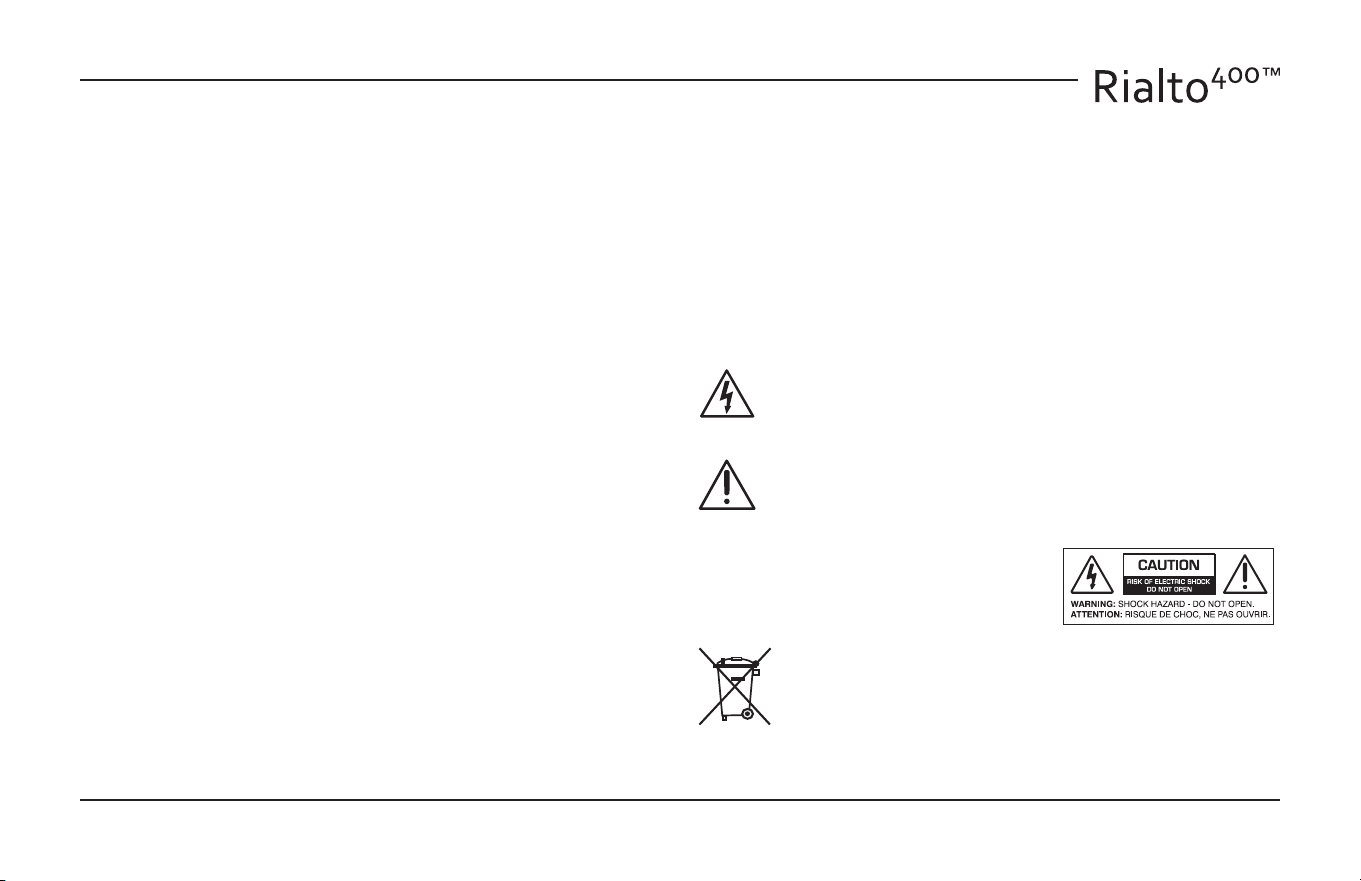
The lightning ash with arrowhead symbol within an equilateral
triangle is intended to alert the user to the presence of uninsulated
“dangerous voltage” within the product’s enclosure, that may be of
sucient magnitude to constitute a risk of electric shock to persons.
The exclamation point within an equilateral triangle is intended to
alert the user of the presence of important operating and mainte-
nance (servicing) instructions in the literature accompanying the
appliance.
Caution: to reduce the risk of electric shock, do
not disassemble the apparatus. There are no
user-serviceable parts inside. Refer servicing to
qualied personnel.
Recycling notice: If the time comes and this apparatus has fullled
its destiny, do not throw it out into the trash. It has to be carefully
recycled for the good of mankind, by a facility specially equipped
for the safe recycling of electronic apparatii. Please contact your
local or state recycling leaders for assistance in locating a suitable
nearby recycling facility. Or, contact us and we might be able to
repair it for you.
3
Table of Contents
©2018 AudioControl Inc All rights reserved.
Important Safety Instructions ....................................2
Chapter 1: Introduction ...........................................4
Introduction ...................................................4
Ready to Rumble! - A Quick Look at the Rialto 400 ...............5
Chapter 2: Quick Start Guide .....................................6
Quick View .....................................................6
Quick Start .....................................................7
Chapter 3: Hookup Diagrams .....................................8
Typical Three-Source Setup .....................................8
2.1 Speaker Setup and 4.1 Parallel Speaker Setup ................9
Using the Speaker-Level Inputs ................................10
Stereo and Mono Passive Subwoofer Speaker Setup ............11
Chapter 4: Installation ...........................................12
Installation ....................................................12
Speaker Connections ..........................................13
Chapter 5: Features ..............................................14
Front Panel Features ...........................................14
Rear Panel Features ............................................15
Voice-Enabled Device Example ................................19
Additional Features and Support ...............................20
Chapter 6: Adjustments. . . . . . . . . . . . . . . . . . . . . . . . . . . . . . . . . . . . . . . . . .21
Adjusting the AccuBASS® ......................................21
Chapter 7: Troubleshooting .....................................22
Troubleshooting ..............................................22
Chapter 8: Specications ........................................23
Specications .................................................23
Chapter 9: Service ...............................................24
Service ........................................................24
Chapter 10: Please Remain Calm .................................25
The Warranty ..................................................25
Legalese Section ..............................................26
4
Installation Manual
Thank you and congratulations for purchasing your AudioControl
Rialto 400. This installation manual is your guide to installing and
using the Rialto 400 Amplier and DAC, including information on its
more advanced features. The table of contents will help you navigate
to the area of the manual you are looking for. It is a good idea to read
the whole manual in order to acclimatize yourself with the full work-
ings and features of the Rialto 400, and to keep the technical writer’s
Mom happy!
Established in Seattle four decades ago, we have always been
dedicated to designing, engineering and building world-class audio
products from the ground up. In the process, we’ve earned a reputa-
tion worldwide for operating at the highest levels of reliability and
performance with a mission of ‘Making Good Sound Great’.
We trust that you will get many years of satisfying and trou-
ble-free operation from your Rialto 400. If you require more in-
formation about this or any of our AudioControl products, please
visit our website at www.audiocontrol.com or contact us at
sound.great@audiocontrol.com. In addition, do not hesitate to talk to
our dealers worldwide, or contact us directly at our Seattle base in the
misty rainforests of the Pacic Northwest, USA. The days can be rainy
and cold but there is always a warm welcome and a hot cup of coee
available all year round.
Contents
• Rialto 400
• AC Power Cord
• Optical Cable
• RCA to 1/8” adapter
• 4 stick-on feet
• 4-pin speaker connector (attached to unit)
• This installation manual
• A shipping box full of fresh air from the wooded slopes of
Mountlake Terrace, WA
Introduction
Chapter 1: Introduction
5
Ready to Rumble! - A Quick Look at the Rialto 400
The Rialto 400 has been updated to combine its legendary high-pow-
ered, audiophile performance and features, with an input stage
devoted to voice-enabled devices, such as Amazon’s Echo® or Google
Home®. This allows super-fast, accurate signal-sense switching when
you expect it, while going about your daily activities.
For example, if you are listening to music (from the digital input
source) or watching TV (from the analog input source) but you need
to add something to your shopping list. Have your voice-enabled
device connected to the rear panel 3.5 mm jack (which is always
prioritized). Ask your question, and the Rialto 400 will auto-magically
switch to the voice-enabled device to answer your question or
conrm your addition to the list. Then it immediately switches back to
your music, just as smooth as (insert your favorite analogy here).
The Rialto 400 is in its own class of compact, high-powered ampliers,
with a built-in audiophile-grade DAC designed specically to provide
greater performance and higher sound quality for all analog and
digital systems, including streaming audio components like Sonos®
home entertainment.
The Rialto 400’s powerful amplier delivers 100 Watts of power
per channel into 8 Ohms and 200 Watts per channel into 4 Ohms.
Additionally, the Rialto 400 can be bridged to perform as a 400 Watt
mono-block amplier.
Chapter 1: Introduction
The state of the art Rialto 400 features a built-in high-performance
Wolfson® DAC (digital to analog converter) that dramatically improves
audio quality and performance.
Digital and analog audio-systems can now reach their full potential
across the whole house whether the speakers are free-standing, in-
wall, in-ceiling, invisible, desktop, gaming, in the garden shed etc.
Equipped with AudioControl’s unique patented AccuBASS® circuitry,
the Rialto 400 also rejuvenates the bass response lost in most digital
compression schemes. This results in a richer and fuller audio perfor-
mance with better bass and mid-bass response.
The net eect is that you will enjoy a more complete listening experi-
ence and hear music with a richness and vibrancy much closer to the
way the artist intended their music to be enjoyed.
6
Installation Manual
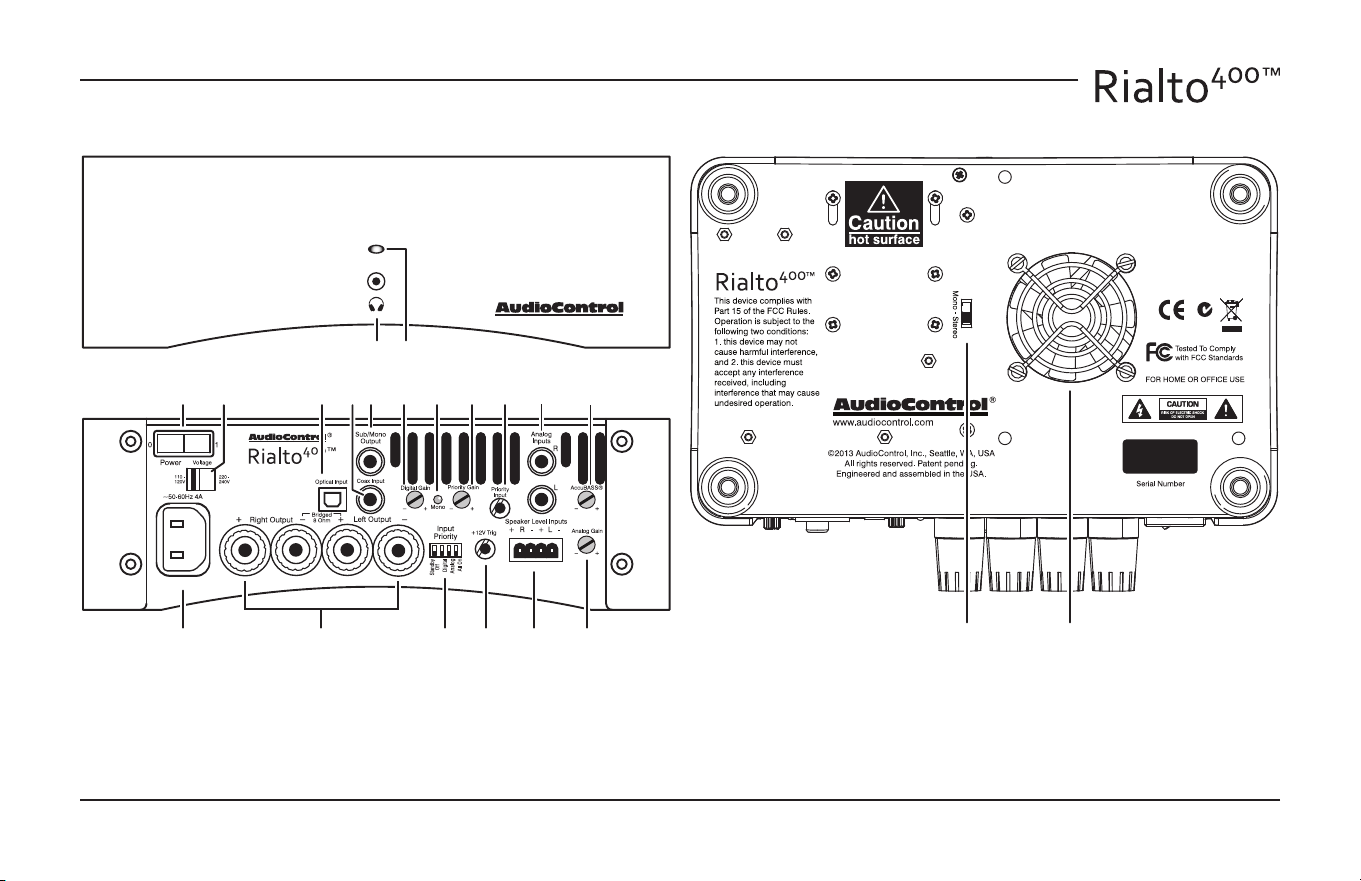
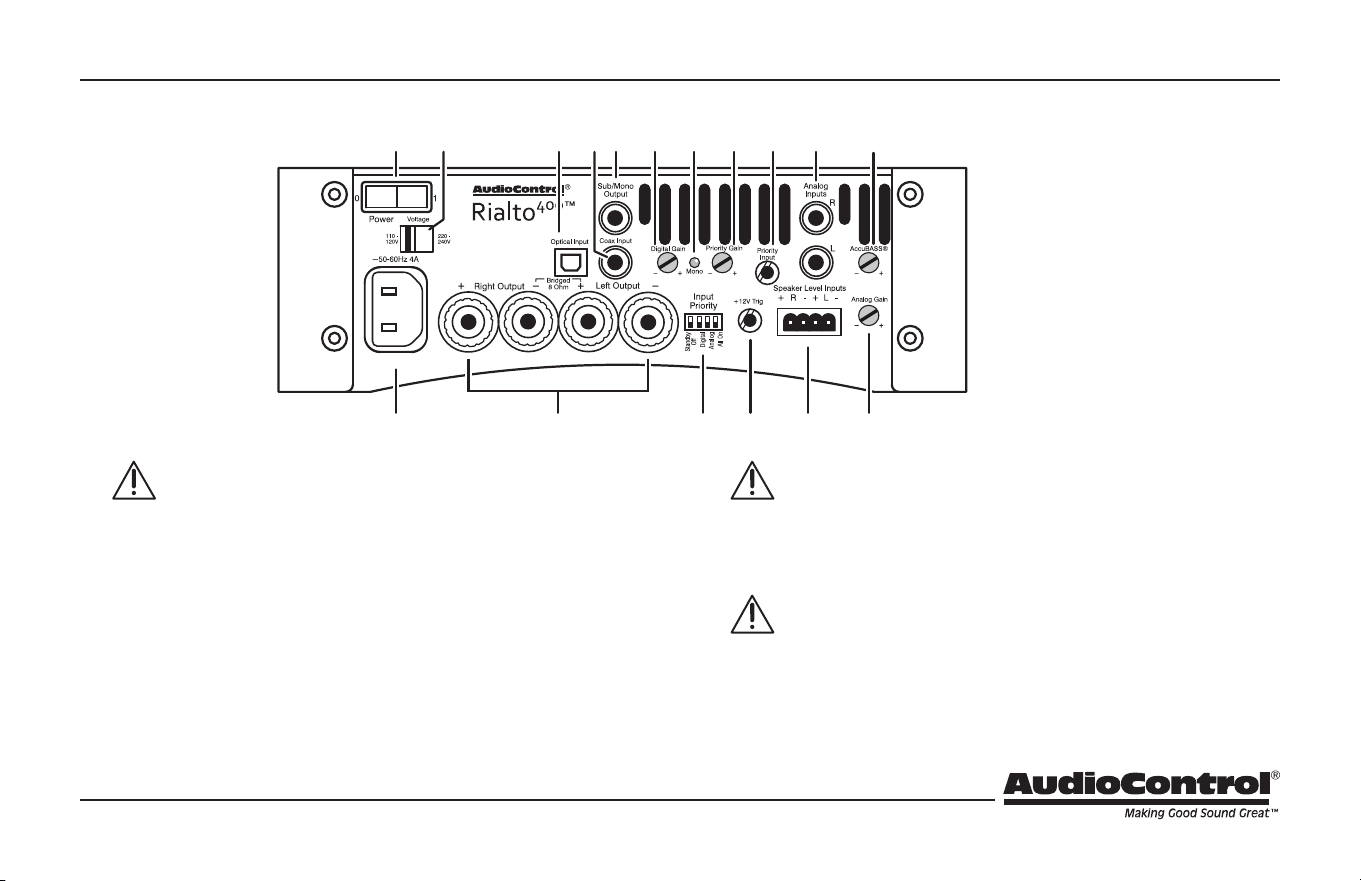
Quick View
Chapter 2: Quick Start Guide
1. Headphone Output
2. Power LED
3. Power On/O Switch
4. AC Voltage Selector
5. AC Input
6. Speaker Outputs
7. Control Switches
8. +12V Trigger Output
9. Speaker Level Inputs
10. Analog Gain
1 2
3 4 1211 13 14 17 18
19
15 16
5
109876
20 21
11. Optical Digital Input
12. Coaxial Digital Input
13. Sub/Mono Output
14. Digital Gain
15. Mono LED
16. Priority Gain
17. Priority Input
18. Analog Input L/R
19. AccuBASS® Level
20. Mono Switch
21. Cooling Fan
7
Quick Start
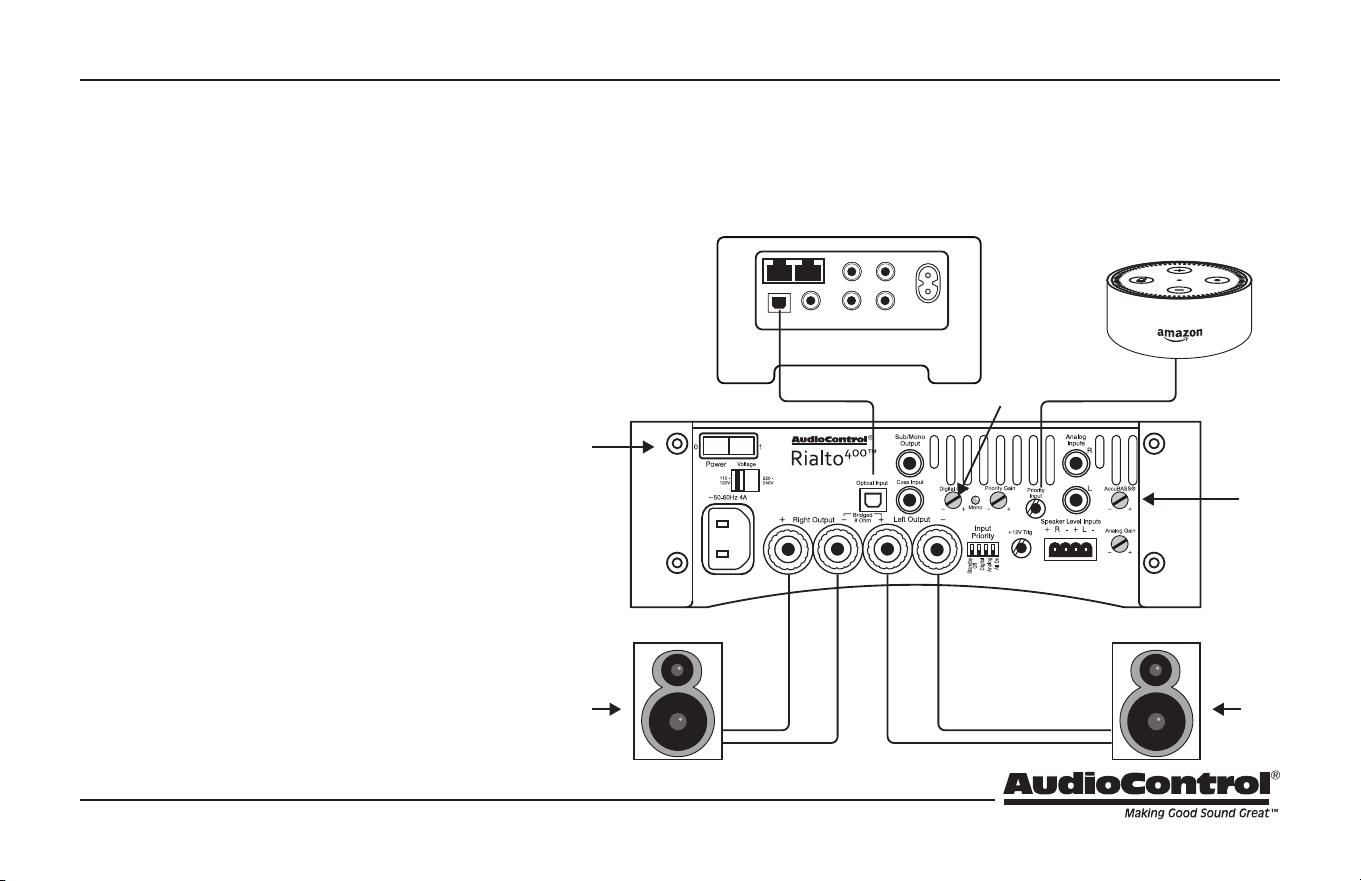
It takes just a few steps to get your AudioControl Rialto 400 up and running. The steps below are explained in more
detail throughout this manual. This example shows a typical single-source digital setup and a voice-enabled device.
(The numbers in the illustration correspond to the numbers in the procedure steps.)
Chapter 2: Quick Start Guide
1. Connect one source component (for example
a digital music player, SONOS™ CONNECT,
television, receiver, CD player, Xbox, etc.) to the
digital input of the Rialto 400.
2. Connect a voice-enabled device to the 3.5 mm
Priority Input. (For best results, the device’s
volume level should be set to 50% or more.)
3. Connect a pair of your favorite speakers to the
Rialto 400, ensuring that the polarity matches.
4. After all connections have been made, turn on
power to all devices, with the Rialto 400 last.
5. Before playing your music, turn down the Rialto
400 gain controls. Then play your music and
increase the gain for the desired volume level.
6. Adjust the AccuBASS® control to the desired
amount of bass response to add bass and rich-
ness back to your music.
7. Pour sonic goodness into your room, and enjoy
“Making Good Sound Great!”
4
1
5
3
2
7 7
+
+ +
+
6
8
Installation Manual
Chapter 3: Hookup Diagrams
Typical Three-Source Setup
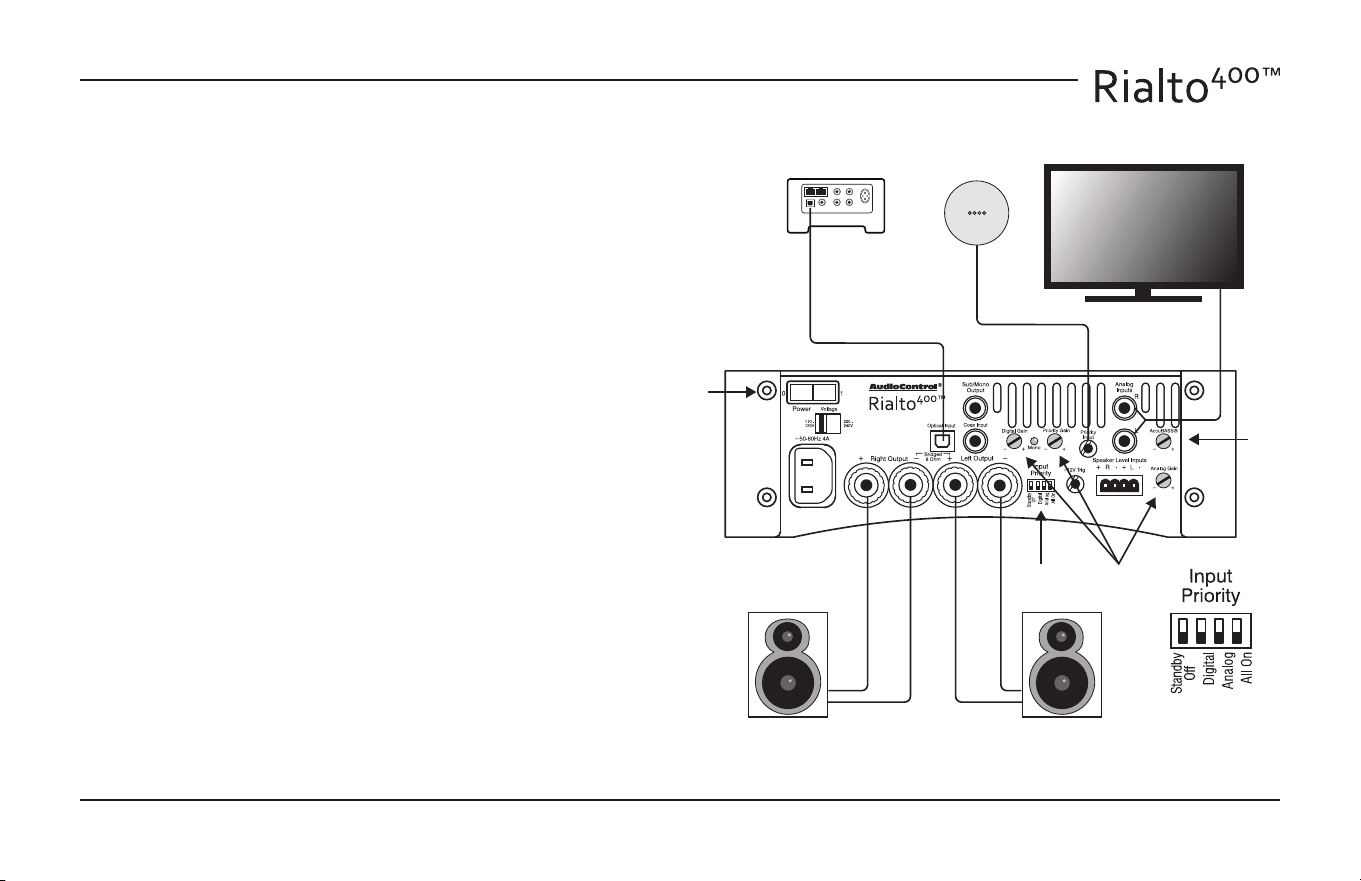
The Rialto 400 allows multiple sources to be connected to the various
L/R analog inputs, the digital input (coax or optical) and the priority
3.5 mm input.
1. Connect a digital source to the Rialto 400 using the digital input
(coaxial or optical).
2. Connect an analog source to the Rialto 400 using the right (R)
and left (L) analog input RCA jacks.
3. Connect a voice-enabled device such as a Google Home® to the
3.5 mm Priority Input. (For best results, the device’s volume level
should be set to 50% or more.)
4. Connect a pair of your favorite speakers to the Rialto 400, ensur-
ing that the polarity matches.
5. Set the priority switches to Analog, Digital, or All, depending on
your preference.
6. After all connections have been made, turn on power to all
devices, with the Rialto 400 last.
7. Before playing your music, turn down the Rialto 400 gain con-
trols. Then play your music and increase the gains for the desired
volume level.
8. Adjust the AccuBASS® control to the desired amount of bass
response to add bass and richness back to your music.
9. Enjoy “Making Good Sound Great!”
6
2
1
3
4
+
+
75
8
9
Chapter 3: Hookup Diagrams
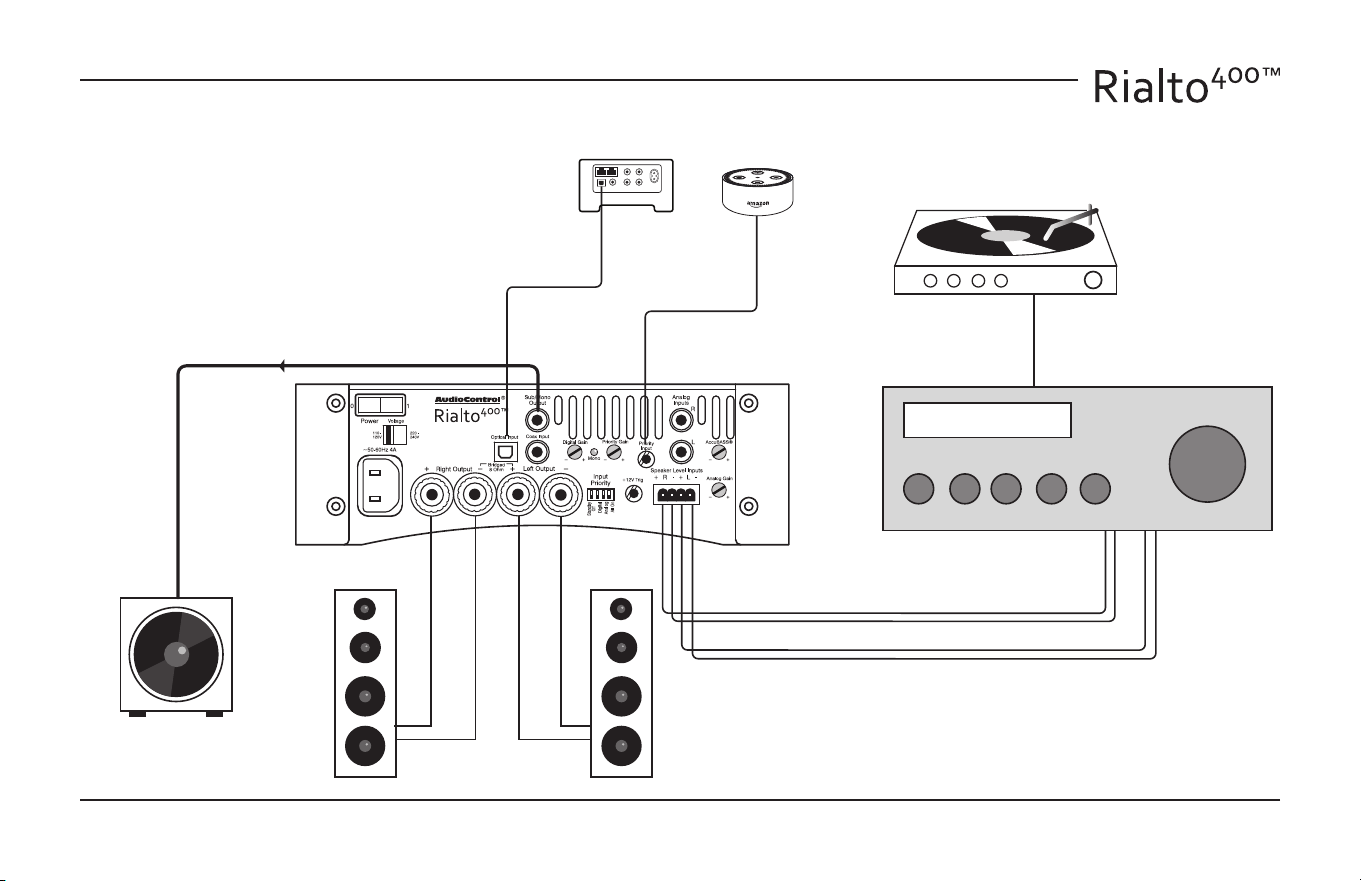
4 or 8 Ohms 4 or 8 Ohms Powered Subwoofer
+
+
2.1 Speaker Setup and 4.1 Parallel Speaker Setup
8 Ohms8 Ohms 8 Ohms 8 Ohms Powered Subwoofer
+
++
+
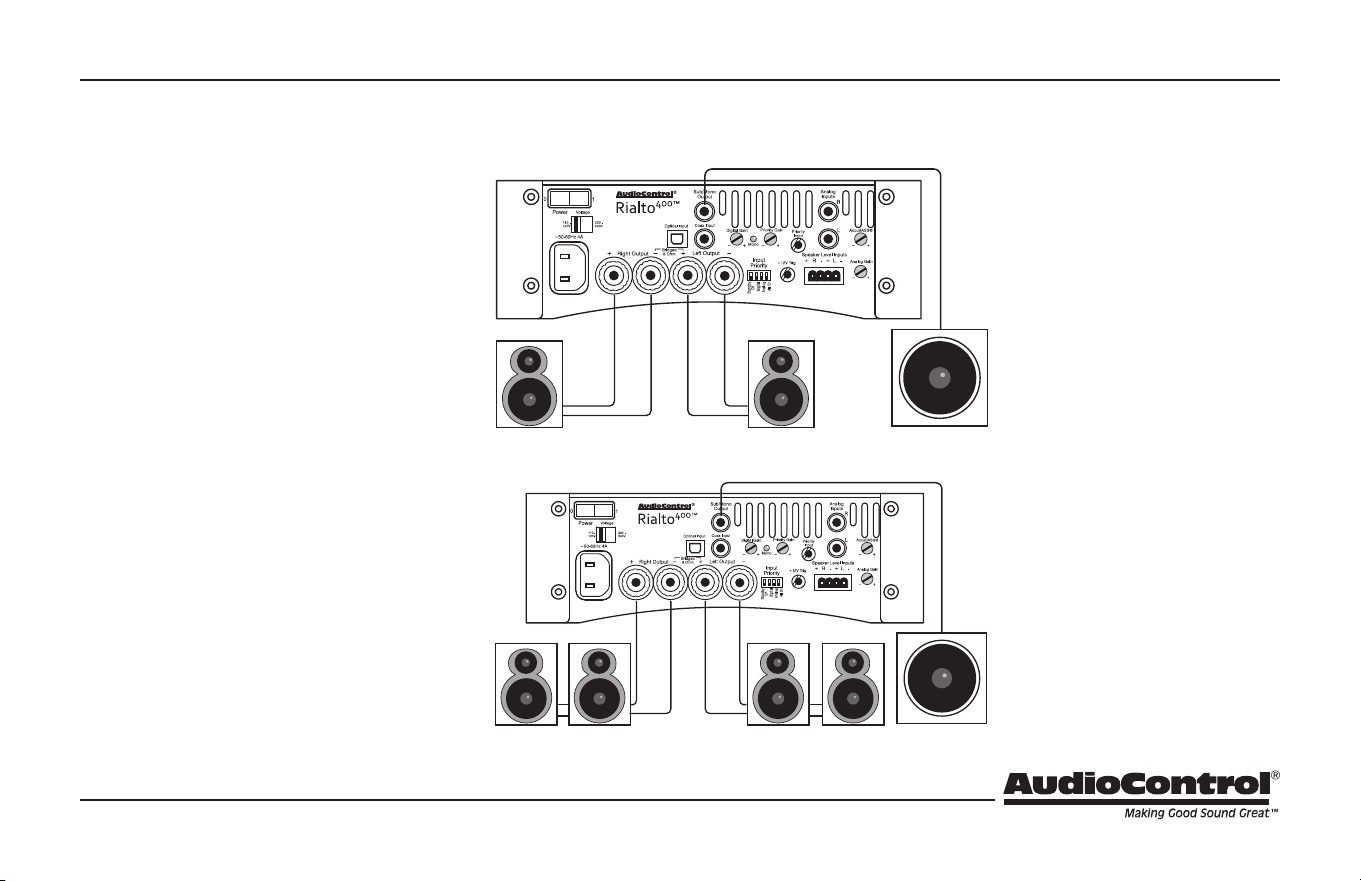
The Rialto 400 has been designed to equalize
and improve the performance of all speaker
set-ups. The power of the amplier combined
with the audio performance and quality of
AudioControl’s Wolfson-engineered, digital to
analog converter (DAC) results in a dramatic
improvement in the performance of all speak-
er set-ups throughout the house.
Shown on the right are just two of the many
types of speaker congurations that the Rialto
400 can work with. The 4.1 speaker set-up
takes advantage of the Rialto 400 amplier’s
stability at 4 Ohms powering four speakers.
In addition, the Rialto 400 can be used as an
incredible Mono amplier with power ratings
up to 400 Watts (see page 11).
In both systems shown, the mono subwoofer
output sends the line-level audio to a pow-
ered subwoofer.
2.1 Speaker
Set-up
The standard set-up for a 2.1
speaker system with two 4 or
8 Ohm speakers plus a pow-
ered subwoofer.
4.1 Speaker
Set Up
The standard set-up where
four 8 Ohm speakers are con-
nected in parallel to form a 4
Ohm load per channel. (The
minimum speaker imped-
ance for this conguration is
8 Ohms.)
10
Installation Manual
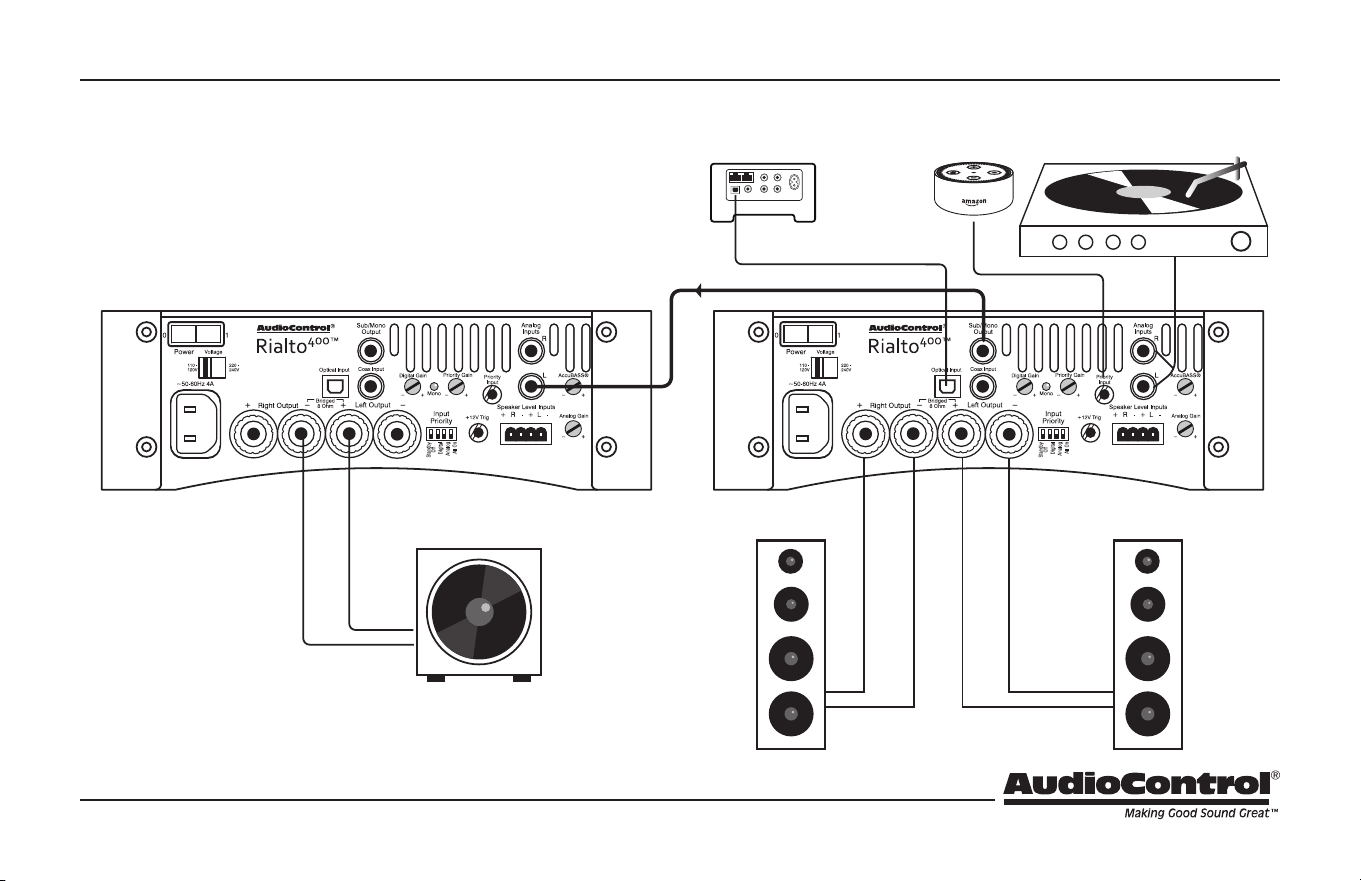
Using the Speaker-Level Inputs
Chapter 3: Hookup Diagrams
This example shows a Rialto 400 and a
receiver. If the receiver has no line-level out-
puts, then its speaker wires can be connected
to the speaker-level inputs of the Rialto 400 as
shown. The massive power ampliers within
the Rialto 400 are then used to run the speak-
ers instead of the 10 Watt receiver.
Powered
Subwoofer
Digital
Voice-Enabled
Device
+
4 or 8 Ohms
Speaker Level
Receiver
+
+
R L
+
94.2
11
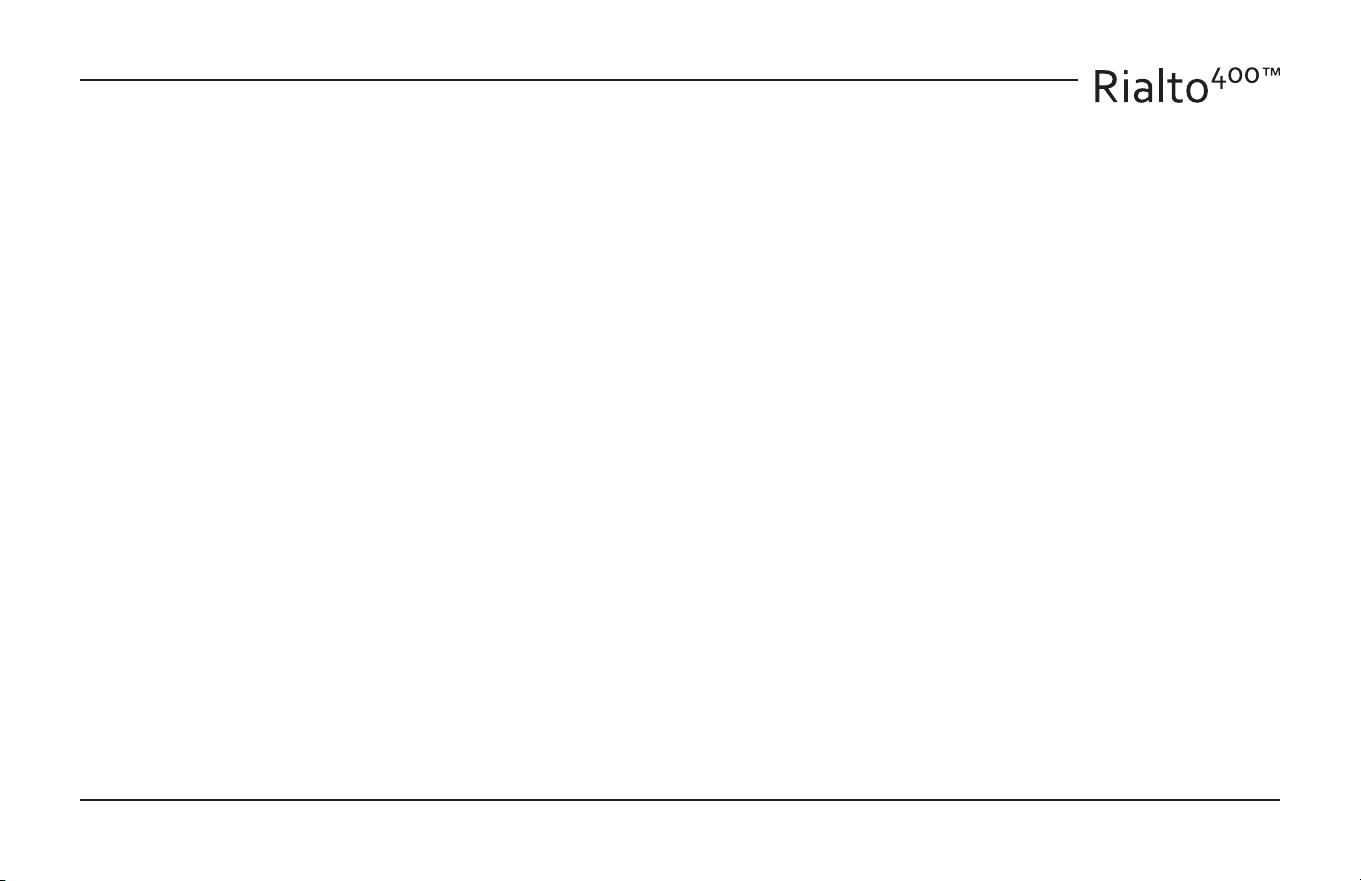
Stereo and Mono Passive Subwoofer Speaker Setup
This system shows one Rialto 400 being
used in stereo, and the second being
used in bridged mono to power a pas-
sive subwoofer.
Chapter 3: Hookup Diagrams
Passive
Subwoofer
Switch to MONO
(switch on bottom panel)
8 Ohms
Line- Level
Digital
+
+
4 or 8 Ohms
+
12
Installation Manual
Installation
The Rialto 400 is a compact yet high performance amplier and au-
diophile DAC. As such, it delivers incredible sound performance.
• Care should be taken in finding the best location to place the
unit for optimal performance.
• The Rialto 400 loves speakers and can be situated to fit in with
any speaker set up from the most powerful free-standing speak-
ers to the smallest desktop conguration.
• As with all products made in the USA by AudioControl, the Rialto
400 should not be deep fried or sautéed!
Placement
This may be as good a time as any to have “the talk” about ventilation.
The Rialto 400 features cool-running ecient switch mode power
supplies and Class D amplifiers. It is still an amplier, and therefore
requires good ventilation to cool.
• Place the Rialto 400 on a level, firm surface, avoiding direct sun-
light and sources of heat and damp.
• Do not place the Rialto 400 on top of another power amplifier or
other source of heat.
• Do not place the Rialto 400 in an enclosed space such as a book-
case or closed cabinet unless there is good provision for ventila-
tion. The Rialto 400 will run warm during normal operation.
Chapter 4: Installation
• Do not obstruct the ventilation vents on the bottom and rear
panels of the unit. “It likes to breathe.”
• Do not place the unit on carpeting, a large sleeping dog or any
thick material that could block the vents.
Cables
We recommend the use of high-quality analog and/or digital cables.
All cables should be kept as short as practically possible. Power ca-
bling should be kept as far away as possible from audio cables.
Speakers
The Rialto 400 is designed to work with all 8 Ohm and 4 Ohm speaker
setups. The Rialto 400 is versatile and flexible and works with the
following speaker installations and more!
• Free-standing speakers
• Invisible speakers – in-wall and in-ceiling
• Extra zone speakers including outdoor
• Televisions and sound bars
• Desktop speakers and gaming speakers
And more……. The Rialto 400 loves speakers and speakers love the
Rialto 400! See the next page for more speaker details.
13
Speaker Connections
Establish a standard connection color code and stick with it. One
conductor of the speaker wire is normally marked by a dierent color
(silver versus copper) or there is ribbing on one side. Typically this
marked conductor is used for the positive (+) speaker leads. Really
good wire has Positive and Negative printed right onto the wire
jacket.
Match the polarity markings on the unit with the polarity markings
on your speakers.
Speaker and Wiring Impedance
Speakers, like other resistors, if wired in parallel “show” lower values
than the individual components. The important thing is to make sure
your speakers are 4 Ohms or greater per channel in stereo or 8 Ohms
or greater when connected in bridged mono mode.
Here is an example for calculating speakers wired in parallel:
Calculating Impedance
For two 8 Ohm speakers wired in parallel (pluses connected to
pluses) the impedance is 1/8 + 1/8 = 2/8
Then take the inverse or 8/2 = 4 Ω
Often the real world is more complicated than theory, and for speak-
ers this is the case. An 8 Ohm speaker is not 8 Ohms at all frequencies.
Plus passive crossover networks add their own changing conditions.
Be aware of speakers that have signicant dips from “nominal” values
in portions of their frequency range, and speakers that are rated at
unusual impedances, for example 3.5 Ohms. The Rialto 400 is tolerant
of impedance loads down to 4 Ohms, however, all good designs use
some margin of error.
Your choice of speaker wire gauge and the length of the runs, also
aects the speaker impedance load presented to the ampliers. Even
fairly short speaker runs can have signicant resistance if you use a
smaller wire gauge. The downside of this wire resistance is that you
waste some part of the total power available to the speakers.
Note: Do not use the Rialto 400 in systems that are
“common-grounded,” where the negative left and negative right
speaker terminals are joined together.
Chapter 4: Installation
14
Installation Manual
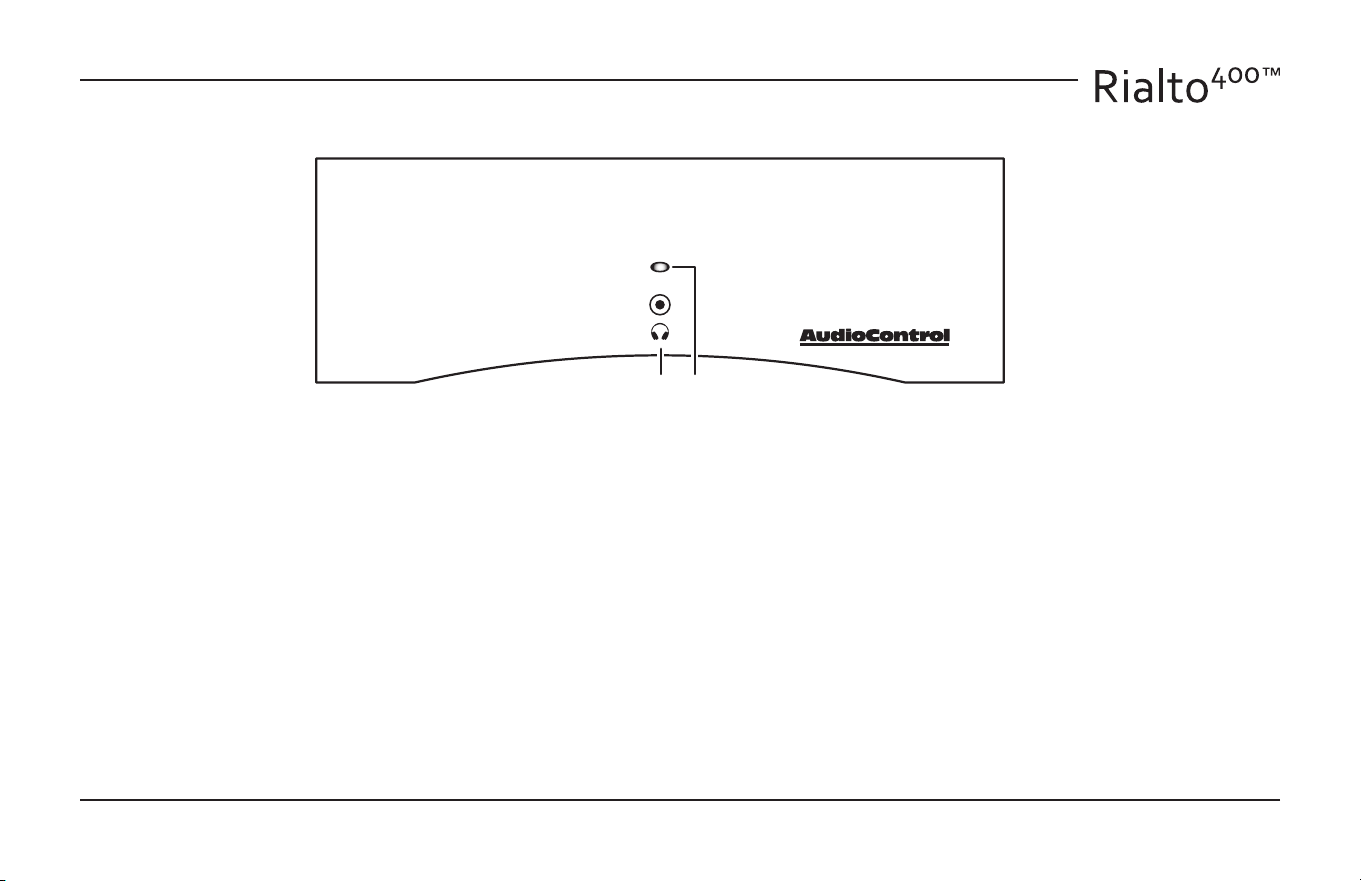
1. Headphone Connection – This 3.5 mm TRS stereo output allows
you to connect your favourite headphones.
Warning: To reduce the possibility of damage to your hearing,
please make sure that the volume is turned down before putting
on your headphones, or turning on your system. Bring up the
volume to a safe and reasonable listening level.
2. On/Standby LED –
Blue – Normal Operation
Dim Red – Standby Mode
Bright Red – Amplier in Protection Mode
Flashing Red – Speaker Fault
Green – Coee brewed
Front Panel Features
Chapter 5: Features
1 2
15
Chapter 5: Features
Rear Panel Features
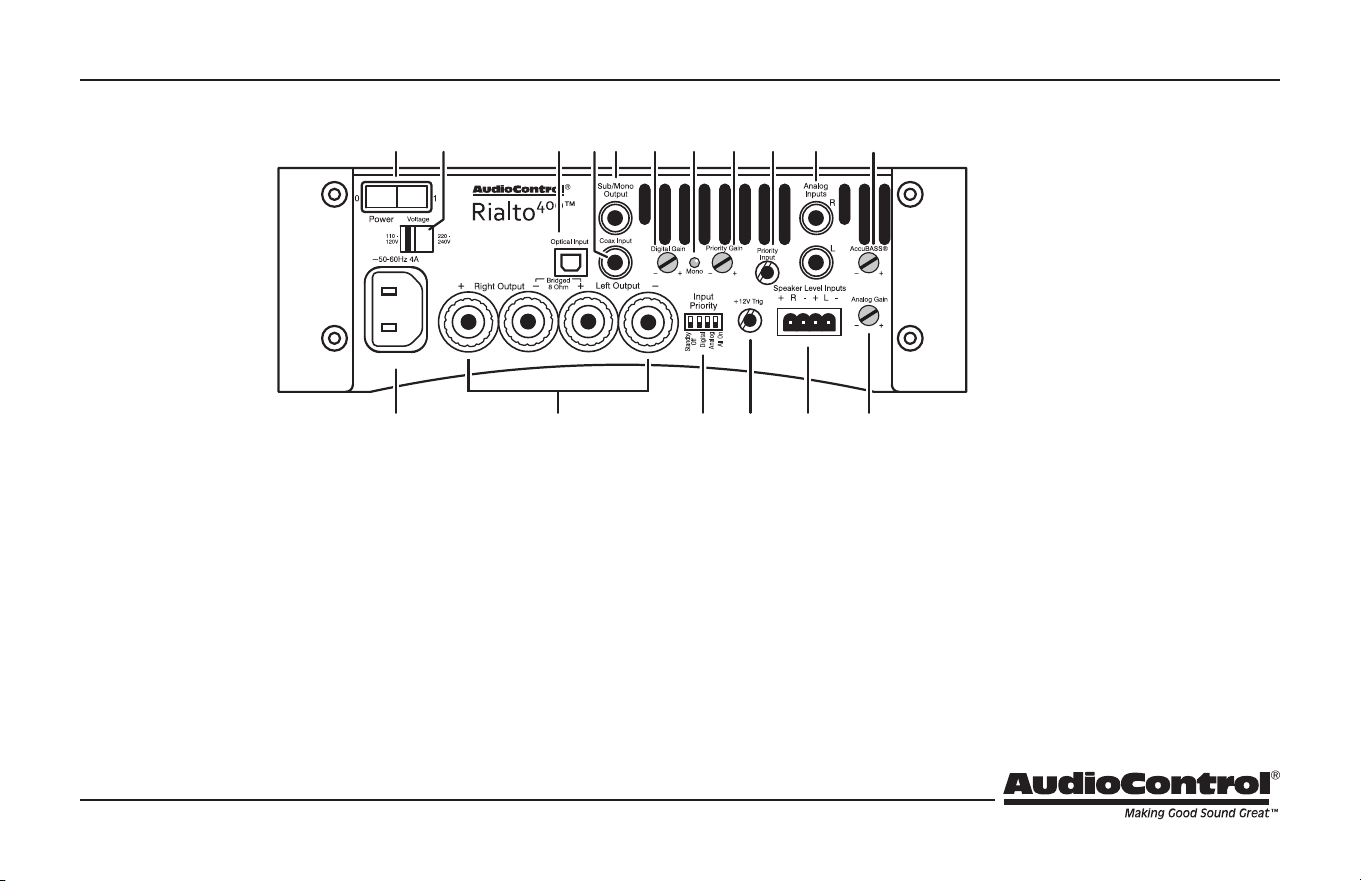
3. Power Switch – In the OFF position, the AC line voltage is
disconnected from all internal circuits, and no amount of
audio input signals playing, telepathy, or loud yelling will
turn it back on. Turn o the power switch when you are not using
the amplier for long periods of time, such as a nice two-week
vacation to a golden sandy beach somewhere (sigh), or during
lightning storms, electrical power outages, or zombie apocalypse.
Keep the amplier turned o when making connections or when
disconnecting.
The Rialto 400 can only be used in the ON position, where it will
be a lot more useful and fun, and not just a pleasant white brick in
your living room. Do not turn it on until all connections have been
made, and you are sure the voltage selection switch is set to the
correct local AC voltage.
4. Voltage Selection Switch – This slide switch allows you to
set the amplier to your local AC voltage. WARNING: Al-
ways make sure it is in the correct position before connect-
ing the AC power cord, as the incorrect setting will damage
the amplier.
5. AC Input – This is where you connect the supplied AC
power cord. First make sure that the power switch is o,
and the voltage selection switch is in the correct position,
and then push in the power connector rmly to make a
secure connection.
3 4 1211 13 14 17 18
19
15 16
5
109876
16
Installation Manual
Chapter 5: Features
6. Speaker Connector – This is where joy meets world: the speak-
er-level output of the amplier connects to the wiring of your
speakers. Make a note of the polarity markings and make sure
they match those of your speakers (positive to positive or red
speaker terminal, negative to negative or black speaker terminal).
If wired incorrectly, then there will be phase cancellation and
disappointing bass performance.
In mono operation (with the bottom-panel switch set to Mono)
the power of both internal ampliers is combined to power a
single speaker. In this case, only the 2 inner speaker posts are
used. Observe the markings for the correct polarity.
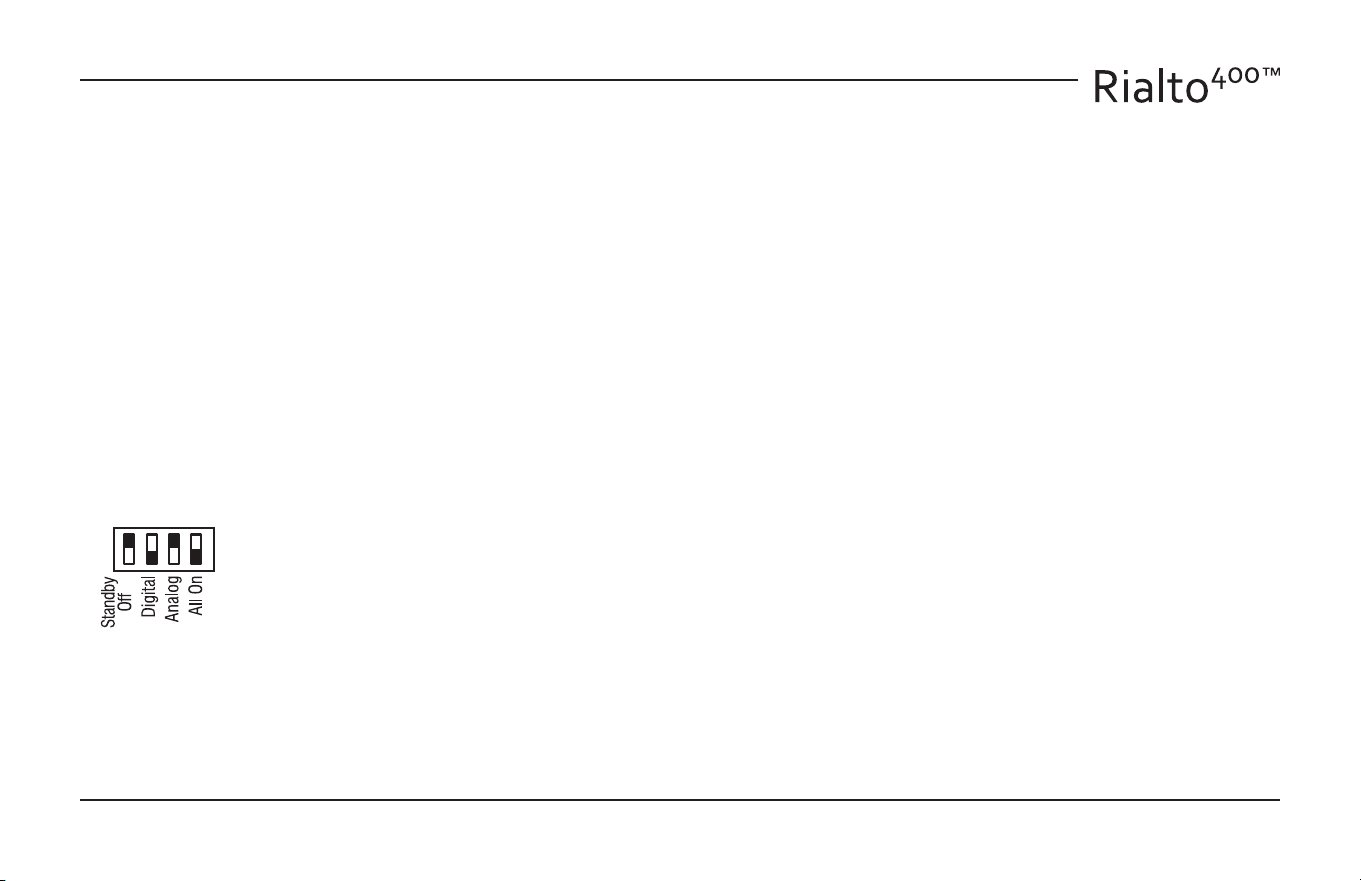
7. Control Switches of Destiny – The Rialto 400 features the
AudioControl SMART Input Priority feature that allows it to priori-
tize certain source inputs for a variety of operational conditions.
These 4 DIP switches allow you to set up the am-
plier just the way you like it. Well, it is not going
to put the kettle on, make your morning tea, and
then wake you up with soothing waking-up music.
That would be your mom.
The ON position is when the little white switch is down. The four
settings are as follows:
Standby O/Sleep – In the ‘on’ position the Rialto 400 will not
switch automatically into standby/sleep mode and will remain on
continuously.
Digital – In the ‘on’ position the Rialto 400 will prioritize a digital
signal input ahead of an analog signal. If the digital signal stops,
the Rialto 400 will switch back to an incoming analog signal if
present.
Analog – In the ‘on’ position the Rialto 400 will prioritize an analog
signal input ahead of a digital signal. If the analog signal stops, the
Rialto 400 will switch back to an incoming digital signal if present.
All On – In the ‘on’ position the Rialto will have no overriding pri-
ority and all inputs will play. Play back should be controlled by the
various sources, as ‘All-On’ could result in both digital and analog
sources being heard as no prioritization has been set.
The optimal set-up for the Rialto 400 is as a single-source or two-
source set-up with one digital and/or one analog input allowing
for prioritization between the two inputs depending on what is
required for your desired set-up. The addition of a voice-enabled
device allows it to play and take priority over the currently-playing
analog or digital program.
Notes:
Turn OFF the power switch before changing the switches.
Various switches can be ON at the same time.
The 3.5 mm priority input is not aected by the switches. It will
always take priority over the analog or digital sources when an
audio signal is detected at the priority input.
Use great care when moving the switches, using a small tool such
as a toothpick or a jeweler’s at screwdriver.
17
Chapter 5: Features
8. 12V Output – This 1/8” TS 12 Volt output is useful for triggering
external sub-woofers etc.
9. Speaker-Level Inputs – These inputs allow you to connect the
speaker level outputs from an old receiver (for example) to the
Rialto 400. In this way you can connect your speakers to the Rialto
400 and it will play whatever the receiver is tuned to. This allows
you keep the lovely features of your receiver, such as input switch-
ing, volume control, FM tuner, and have the powerful ampliers of
the Rialto 400 run your speakers with eciency.
10. Analog Gain – This rotary control is used to vary the level of the
analog inputs. Use this in addition to our analog source’s volume
control to create the best listening levels.
11. Digital Input (Optical) – The optical input accepts digital signals
from the digital optical output of your source equipment. Alterna-
tively, you can use the coaxial digital input if your source has no
optical output. Do not connect both at the same time.
12. Digital Input (Coaxial) – The RCA input accepts coaxial S/PDIF
digital signals from the digital output of your source equipment.
Alternatively, you can use the optical input, if you have that op-
tion. Do not connect both at the same time.
The Rialto 400’s high-quality digital to analog converter (DAC)
converts the incoming stream of digital data into left and right
analog audio signals.
3 4 1211 13 14 17 18
19
15 16
5
109876
18
Installation Manual
Chapter 5: Features
13. Sub/Mono Out – This RCA line-level output is used to send a
mono output to feed either a powered subwoofer or a subwoofer
amplier/passive subwoofer combination. The output is a line-lev-
el gently-mono mix of the left and right currently-selected input,
and it is aected by the volume level and AccuBass® level.
14. Digital Gain – Adjust this to vary the level of the digital input. Use
this to create the best listening levels and balance between the
digital and analog sources.
15. MONO LED – Ths LED will come on when the MONO switch on
the bottom panel is set to Mono. In normal stereo use, it is o.
16. Priority Gain – This adjusts the signal level coming into the
priority input. Use this in addition to your voice-enabled device’s
volume control to create the best listening levels when the device
is on. We recommend having the voice-enabled device’s volume
set to 50% or more. Adjust this priority gain control until a clear
and comfortable level is reached when activated.
17. Priority Input – Ths 3.5mm input connects to the line-level audio
output from a voice-enabled device. Any audio coming in here
will automatically take priority over anything currently playing.
Then it will quickly revert to the previous program when the
announcement is over.
18. Analog Inputs – These RCA line-level inputs accept the left and
right analog inputs from your source equipment, such as a CD
player, DVD player, MP3 player, or a computer or mobile/cell
phone’s headphone output.
Make sure that you use high-quality connection cables, but not
those that need a three-ton press to get on or o. Some need a
little twisting action, like we did last summer.
If you are using the Rialto 400 in Mono mode (with the bottom
panel Mono switch on) then only the Left RCA input is used.
19. AccuBASS® Gain – Increase the AccuBass® level by slowly turning
the gain clockwise until the amount of bass being restored meets
your own personal preferences. You will hear the bass being
restored to the music as you increase the level, and the richness of
the audio will steadily improve as bass frequencies are restored.
Bottom Panel (not shown)
20. Mono Switch – In the Mono position, the two internal power am-
pliers are combined in bridged-mono to run large and powerful
speakers. The MONO LED will come on, as if by magic.
21. Fan – The cooling fan is always on, to provide cooling ventilation
to the power ampliers. Do not obstruct the fan and vents.
19
Chapter 5: Features
Voice-Enabled Device Example
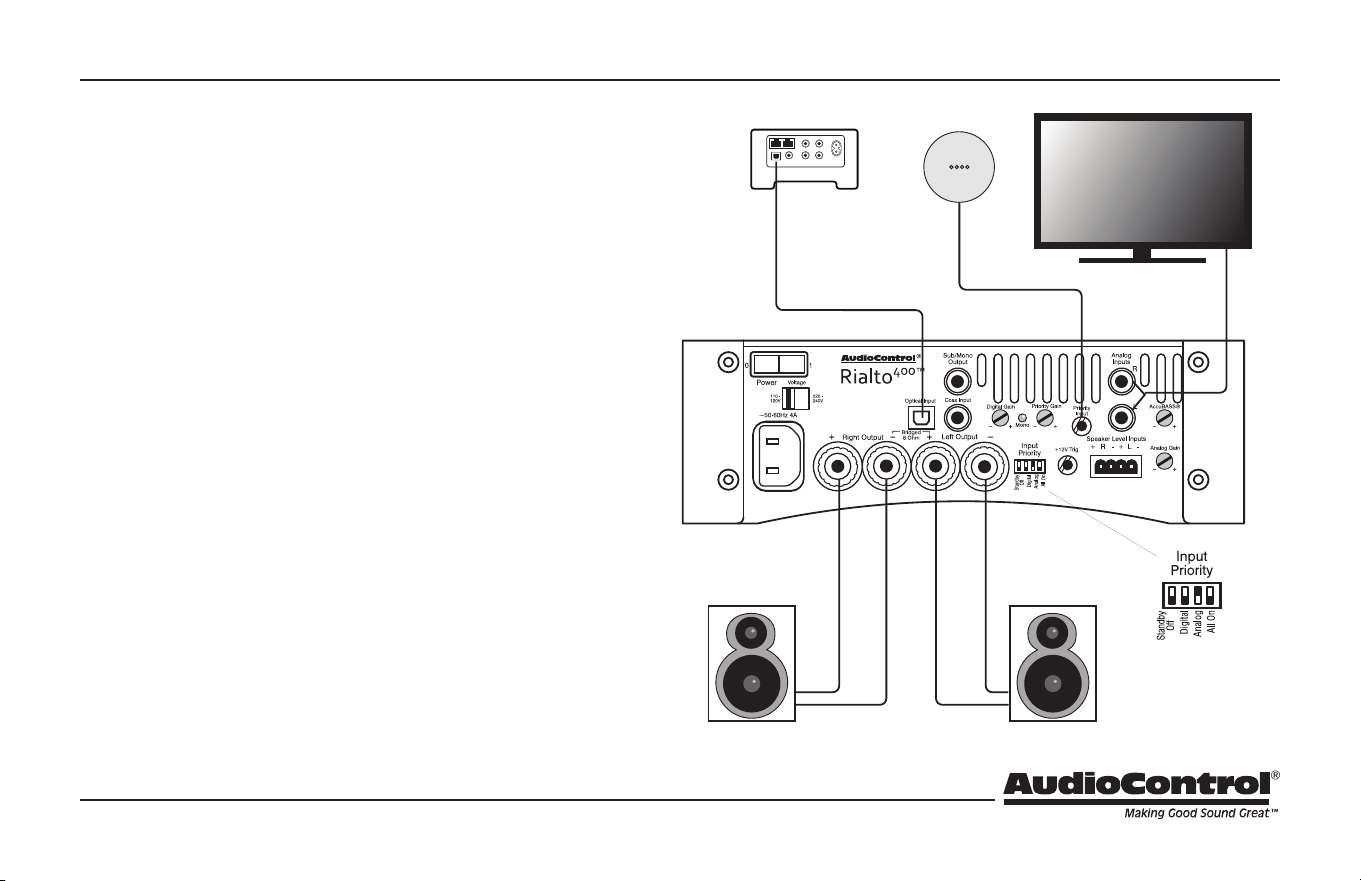
In this example, there is a digital input source/Sonos® and an analog
input source from a TV. The analog input source is set as the prior-
itized input, using the dip switches. A voice-enabled device is con-
nected to the Priority jack.
Let’s pretend the following:
1. You are cooking a healthy jumbo-monster-clam TV dinner, while
listening to the Sonos/digital device.
2. You nish cooking and sit down at the TV while the music is still
playing.
3. When the TV turns on, the Rialto 400 senses the analog TV signal,
and automatically switches over to the analog input.
4. You munch away, enjoying the clams and the show, until you
notice something familiar and say “Alexa, where was this show
lmed?”
5. Within the rst syllable of the rst word from Alexa, the Rialto
400 will switch from the analog source to the priority input.
6. Alexa tells you where the show was lmed (nowhere familiar)
and you focus back on the TV. The Rialto 400 now quickly switch-
es back to the previously prioritized input – analog TV audio.
7. The clams and the show are done, then you turn the TV o, and
the Rialto 400 switches back to the digital input where music
resumes.
Voice-enabled
device
Analog
input priority
20
Installation Manual
Additional Features and Support
Additional information on the features below, as well as great support
and hints and tips on the Rialto 400 can be found on our website:
www.audiocontrol.com (navigate to the download section of the
Rialto 400 product page).
Alternatively, email our team at sound.great@audiocontrol.com for
further information or to have a chat over a cup of coee!
Sleep Mode
The unit will go into standby if an audio signal is not detected after
approximately 8 minutes. It will come back on when an audio signal
is detected. Additional information on the sleep mode and the variety
of options this allows can be found on our website.
12V Trigger Output
The rear panel 12V Trigger output is useful for triggering external
sub-woofers etc.
Chapter 5: Features
21
Adjusting the AccuBASS®
AccuBASS® Bass Level Adjustment
AudioControl's AccuBASS® circuit is designed to help recover the
bass that goes missing in compressed music files, or when volume
is increased and the bass frequencies roll away. The AccuBASS® is
adjusted using the rear panel control to give your system great bass
at all volume levels, and add back in an incredible-sounding richness
to your music.
1. Start playing some dynamic bass-rich music, and adjust the
amount of AccuBASS® by rotating the rear panel control to adjust
and maintain bass dynamics in your music.
2. You will hear bass and richness being restored to the music as you
increase the level of AccuBASS®, as well as hearing and experienc-
ing the richness of the audio steadily improve as bass frequencies
are restored.
3. Continue to fine tune the AccuBASS® level to adjust to your per-
sonal preferences..
4. You’re done! You will have smooth, seamless bass and richness to
your music and you can even adjust the AccuBASS® level to give
a little (or a lot!) of extra boost to the bass if you like more bass in
your music. It’s your music your way and the way the artist intend-
ed it to be heard!
Chapter 6: Adjustments
22
Installation Manual
Troubleshooting
Many problems can be eliminated by re-checking the wiring and
settings of the unit. If a problem cannot be solved using the guide
below, please call the AudioControl team for further assistance, or
e-mail us at sound.great@audiocontrol.com
1. No Sound
a. Check the unit is plugged in and the front panel On/Standby
LED is blue. When it is dim red, the unit is in standby mode, and
if it is bright red, it is in protection mode.
b. Check all cables are securely connected.
c. Check the source unit is on and playing.
d. Check the speaker connections are secure, and not shorted
together by loose wire strands or a puddle the cat left behind.
2. In Protection
The amplier in the Rialto 400 will protect itself if it experi-
ences an unusually large power surge, overheats, experiences
a short in the speaker wires or the speakers, or detects an
accordion solo. The protection circuit helps prevent damage
to the Rialto 400 and speakers. Turn down the volume and the
unit will normally resume playing after a short period of time
to cool down. A ashing red LED on the front of the unit indi-
cates that the unit is operating at its ‘current limit’ and in dan-
ger of going into protection. In this situation you may have too
many speakers attached, you are driving the amplier too hard,
or the speaker impedance is below 4 Ohms and you may need
to reduce the load. Check the speaker wiring and speakers for
any short circuits. Make sure that there is plenty of ventilation
available.
3. Signal Sensing
If the unit does not sense an input signal, it will switch to
standby mode after approximately 8 minutes of silence. It will
turn back on again as soon as an input signal is detected.
During quiet passages, or lengthy silent spaces in music or a TV
program, the Rialto 400 may believe that the audio signal has
stopped and may sulk and go into standby mode.
More Troubleshooting
For additional troubleshooting, support and technical advice,
please visit our website at www.audiocontrol.com and navi-
gate to the Rialto 400 product page.
Chapter 7: Troubleshooting
23
Specications
As technology advances, AudioControl reserves the right to continuously change our specications, like our Pacic Northwest weather, although we are
working on changing that as well.
Chapter 8: Specications
Digital Inputs . . . . . . . . . . . . . . . . . . 1 x Optical Toslink and 1 x Coax SPDIF
Analog Inputs. . . . . . . . . . . . . . . . . . . . . . . . . . . . Stereo L/R RCA unbalanced
Speaker Level Outputs ..............5-way gold plated binding posts
Sub/Mono Output ...........................Single RCA unbalanced
Headphone Output .................................. 1/8” TRS stereo
Power Output. . . . . . . . . . . . . . . . . . . . 100 Watts per channel into 8 Ohms
. . . . . . . . . . . . . . . . . . . . . . . . . . . . . . . . . . 200 Watts per channel into 4 Ohms
. . . . . . . . . . . . . . . . . . . . . . . . . . . . . . . . . . . . . . . 400 Watts into 8 Ohms (mono)
Minimum Speaker Load .............4 Ohms (stereo), 8 Ohms (mono)
Power Consumption, Typical Listening. . . . . . . . . . . . . . . . . . . . . . .40 Watts
Power Consumption, Maximum ........................... 520 Watts
AC Line Voltage ......100-120 VAC/200-240 VAC Manually Switchable
Signal to Noise Ratio ......................................... >95dB
Total Harmonic Distortion . . . . . . . . . . . . . . . . . . . . . . . . . . . . . . . . . . . . . 0.09%
Minimum Voltage to Drive Max Power
RCA Analog inputs: . . . . . . . . . . . . . . . . . . . . . . . . . . . . . . . . . . . . . . . . 230 mV
Speaker level inputs:. . . . . . . . . . . . . . . . . . . . . . . . . . . . . . . . . . . . . . . . . . . . 2 V
Signal Sense Trigger Minimum
RCA Analog Inputs ..........................................10 mV
Digital Inputs. . . . . . . . . . . . . . . . . . . . . . . . . . . . . . . . . .10 mV (DAC output)
Bass Adjustment . . . . . . . . . . . . . . . . . . . . . . . . . . . AudioControl AccuBASS®
Digital Analog Converter (DAC). . . . . . . . . . . Wolfson High Performance
. . . . . . . . . . . . . . . . . . . . . . . . . . . . . . . . . . . . . . . . . . . . . . . . 32-192 kHz, 16/24 Bit
Weight .......................................................4.5 lbs
Dimensions .................................. 8.5” W x 5.4” D x 2.9” H
AudioControl Power Rating ...............................Awesome!
Country of Origin . . . . . . . . . . . . . . . . . . . USA Engineered and Assembled
. . . . . . . . . . . . . . . . . . . . . . . . . . . . . in the great Pacific Northwest Rainforest
Limited Warranty . . . . . . . . . . . . . . . . . . . . . . . . . . . . . . . . . . . . . . . . . . . . 5 Years
For additional specifications, technical details, and downloads, please
visit www.audiocontrol.com
This manual was written, designed, printed and carefully placed right
side up into the box in the USA on a wet and rainy day by a team of
music lovers dedicated to making good sound great.
© AudioControl 2018, All Rights Reserved. AudioControl®, Rialto 400™
and AccuBASS® are trademarks of AudioControl Inc.
Additional copies of this installation manual are available on our
website, or by contacting AudioControl.
24
Installation Manual
AudioControl has a reputation for providing some of the best support
and service in our industry. Our technical team takes pride in ensuring
we respond to any customer needs, by providing support through
our website and live on the phone from our base here in Seattle, USA.
If the unit needs service, rst contact your local dealer or international
distributor for advice. You can also contact our tech support team
either by email or phone from 8am-5pm Pacic Standard Time (PST).
We will verify if there is anything that you can correct yourself.
If we ask you to return the unit, please include the following items:
1. A copy of your proof of purchase. No originals please. We cannot
guarantee returning them to you.
2. A brief explanation of the trouble you are having with the unit.
(You’d be surprised how many people forget this.) If you can
supply a really detailed description of the problem, this would be
so much better, and our service technicians may add you to their
Christmas Card list. Please include any notes about the system
and other components you are using. Is it an intermittent prob-
lem, or all the time?
3. A return street address. (No PO Boxes, please).
4. A daytime phone number in case our technicians have a ques-
tion about the problem you are having, or if they are just feeling
lonely.
5. Package the unit in the original packaging if you still have it, and
if the children have not used it for art supplies or an ant farm. Use
great care and plenty of good packing materials to protect the
unit and prevent it from moving about inside the box. Do not use
loose materials like packing peanuts or real peanuts, $5 notes etc.
You are responsible for the freight charges to us, but we’ll pay the
return freight back as long as the unit is under warranty. We match
whatever shipping method you use to send it to us, so if you return
the unit overnight freight, we send it back overnight. We recommend
United Parcel Service (UPS) for most shipments.
Repair service is available at:
Attention: Service Department
22410 70th Avenue West,
Mountlake Terrace,
WA 98043 USA
Phone 425-775-8461
FAX 425-778-3166
e-mail: sound.great@audiocontrol.com
Service
Chapter 9: Service
25
The Warranty
People are confused by warranties! Lots of ne print. Months of wait-
ing around. Well, fear no more AudioControl is here. Our warranty is
designed to make you rave about AudioControl. It’s a warranty that
looks out for our customers, plus helps you resist the temptation to
have your friend, “who is good with electronics”, try to repair your
AudioControl product. So go ahead, read this warranty, then register
your AudioControl product at www.audiocontrol.com/product-regis-
tration.
Our warranty has conditional conditions! “Conditional” doesn’t mean
anything ominous. The Federal Trade Commission tells all manu-
facturers to use the term to indicate that certain conditions have to
be met before they’ll honor the warranty. If you meet all of these
conditions, AudioControl will, at its discretion, repair or replace any
AudioControl products that exhibit defects in materials and/or work-
manship during the warranty on your product for ve (5) years from
the date you bought it, and we will x or replace it, at our option,
during that time.
Here are the conditional conditions:
1. You must fully register your purchase within 15 days of the pur-
chase date by going to the AudioControl product registration
page at www.audiocontrol.com/product-registration. Failure to
register your product will negate the warranty.
2. You need to hold on to your sales receipt! All warranty service
requires original sales receipt documentation. The warranty only
applies to the original purchaser from an authorized AudioCon-
trol dealer. Note: Products purchased from unauthorized dealers
are not covered under warranty.
3. If an authorized AudioControl dealer installs your AudioControl
product, the warranty is ve years, otherwise the warranty is
limited to one year.
4. Our warranty covers AudioControl products that have been
installed according to the instructions in the owner’s manual.
5. You cannot let anybody who isn’t: (A) the AudioControl factory; or
(B) somebody authorized in writing by AudioControl service your
AudioControl product. If anyone other than (A), or (B) messes
with your AudioControl product, the warranty is void.
6. The warranty is void if the serial number is altered, defaced or
removed, or if your product has been used improperly. Now that
may sound like a big loophole, but here is what we mean by this:
Unwarranted abuse is: (A) physical damage (don’t use your prod-
uct to level your dining room table); (B) improper connections
(120 volts into the RCA jacks can fry the poor thing); (C) sadistic
things! This is the best product we know how to build, but for
example if you mount it to the front bumper of your car, drop it
over the Niagara Falls or use it for Clay Pigeon shooting practice,
something will go wrong.
Assuming you conform to 1 through 6, and it really isn’t all that hard
to do, we get the option of xing your product or replacing it with a
new one at our discretion.
In the event that your product is out of warranty or not covered under
our warranty you may request to have any damage repaired at our
normal “Out of Warranty” repair cost.
Chapter 10: Please Remain Calm
26
Installation Manual
Legalese Section
This is the only warranty issued by AudioControl. This warranty gives
you specic legal rights, and you may also have rights that vary from
state to state. Promises of how well your AudioControl product will
work are not implied by this warranty. Other than what we’ve said
we’ll do in this warranty, we have no obligation, express or implied.
We make no warranty of merchantability or tness for any particular
purpose. Also neither we nor anyone else who has been involved in
the development or manufacture of the unit will have any liability of
any incidental, consequential, special or punitive damages, including
but not limited to any lost prots or damage to other parts of your
system by hooking up to the unit (whether the claim is one for breach
of warranty, negligence of other tort, or any other kind of claim).
Some states do not allow limitations of consequential damages.
Chapter 10: Please Remain Calm
27
28
Installation Manual PN 913-133-0 Rev B
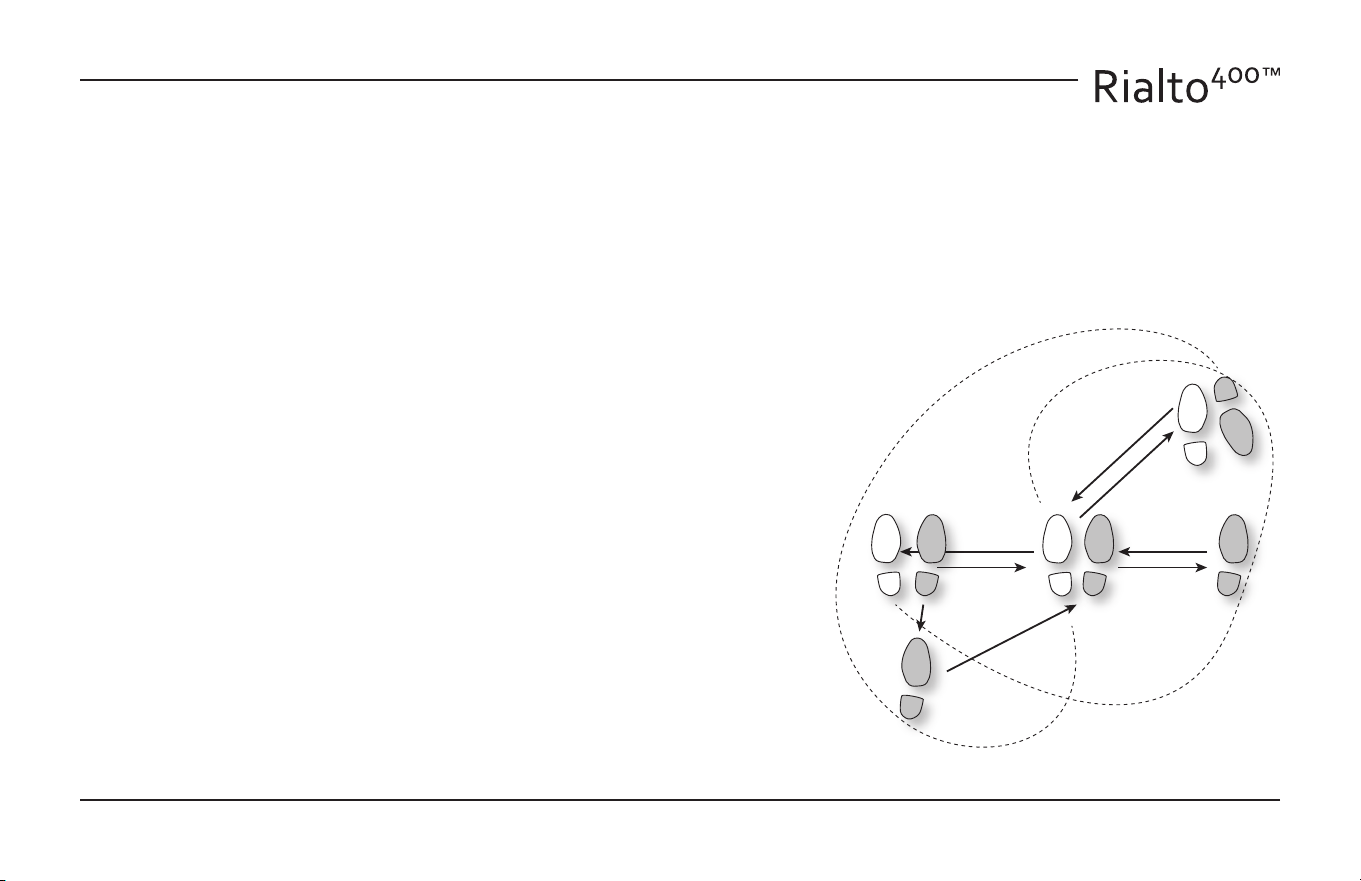
Foot Notes
The Rialto Rag!
2 2
START
9
8
5
1
4 3 7
10
6