V1.2-2502
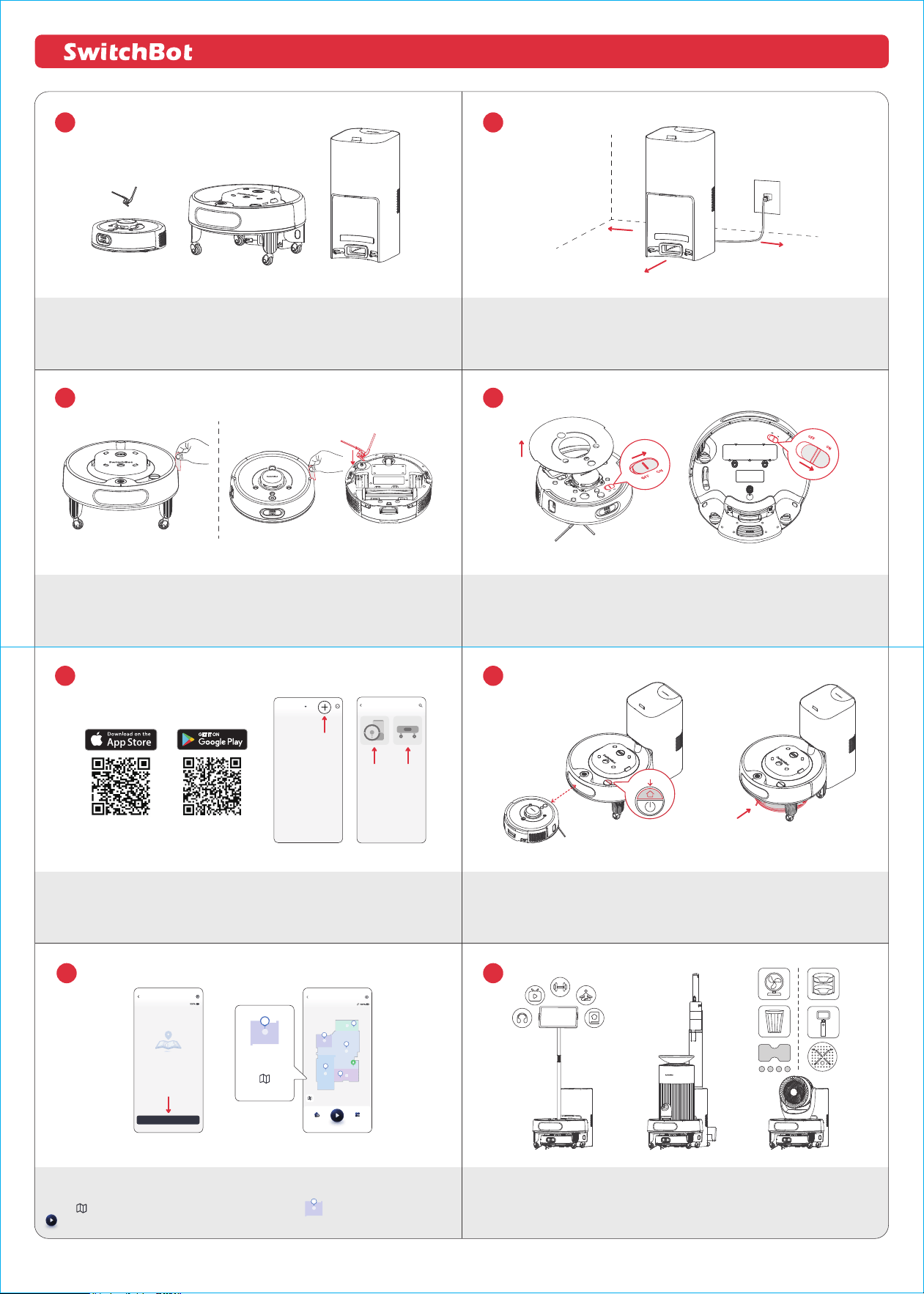
Unpack and take out the displayed parts.
Remove foam strips from the robot and Mobile Base and install the Side Brush.
Power on the product.
① Remove the faceplate of the robot and flip the power switch to "ON".
② Turn the Mobile Base upside down and flip the power switch to "ON".
Place the Dual Empty Station on a level and hard surface. Then connect the power
cord.
Multitasking Household Robot K20+ Pro Quick Start Guide
Download the SwitchBot app.
① Add your Robot Vacuum K20+ to the app.
② Add your Mobile Base to the app.
③ Pair them up as prompted.
④ Check that their indicator lights are steady white.
Dock your Mobile Base to the station and fully charge it. Then, place your robot
within 20 cm (7.9 in.) in front of the Mobile Base, press the Dock button on the
Mobile Base for 2s. Wait for the robot to dock with the base.
With the included Velcro tapes, you can customize and mobilize your everyday items
using our Mobile Base. To purchase compatible SwitchBot devices, please visit our official
website at www.switch-bot.com.
1 m (3.3 ft.)
0.5 m (1.6 ft.)
0.5 m (1.6 ft.)
7
8
1
2
3 4
5 6
Mobile Base
No maps available.
On standby
Create Maps
Mobile Base
Charging
Dock Switch Mode
C
D
B
A
E
B
Mobile Base's
waypoint
"Edit Map" icon
My Home
< 20 cm/7.9 in.
2s
① After your robot is docked to the Mobile Base, please follow the on-screen prompts
to create a map.
② Tap to add Waypoints. Tap to select a waypoint on the map, and then hit
to initiate a transport task.
B
Add Device