

English

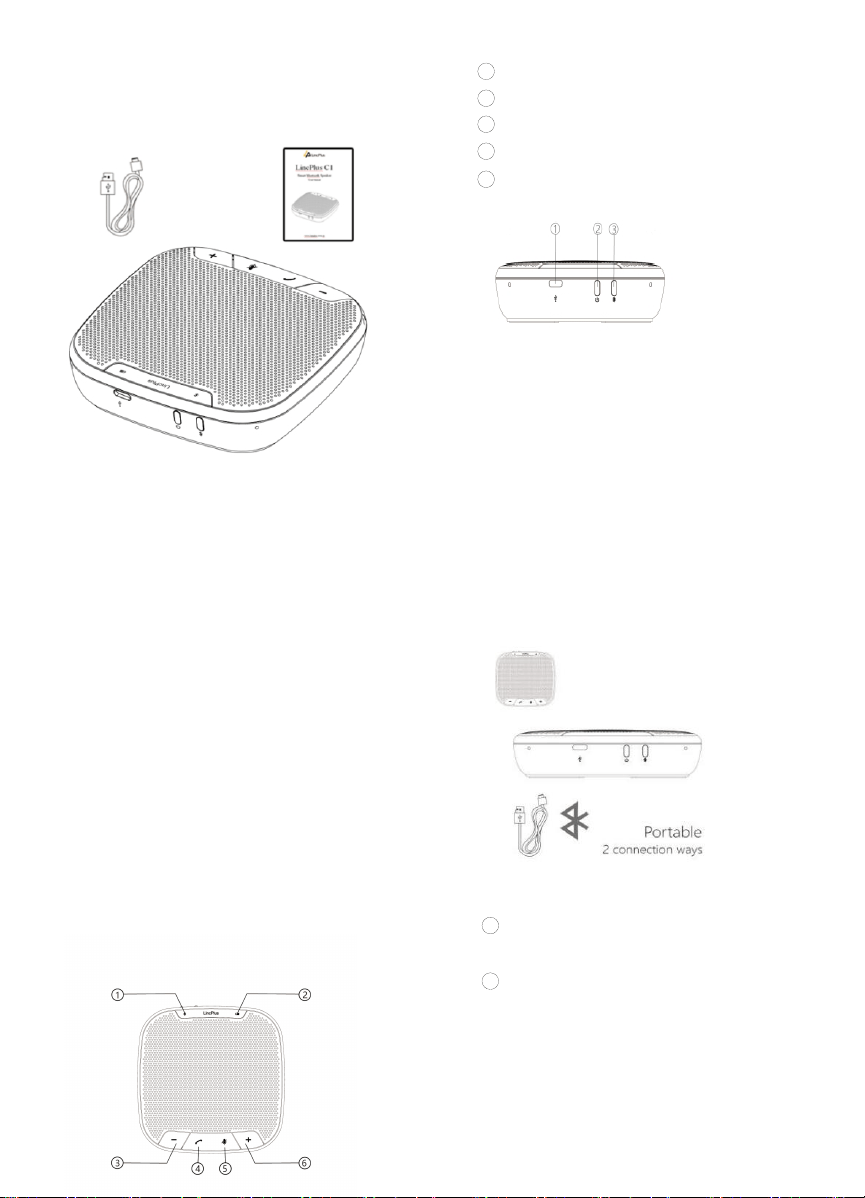
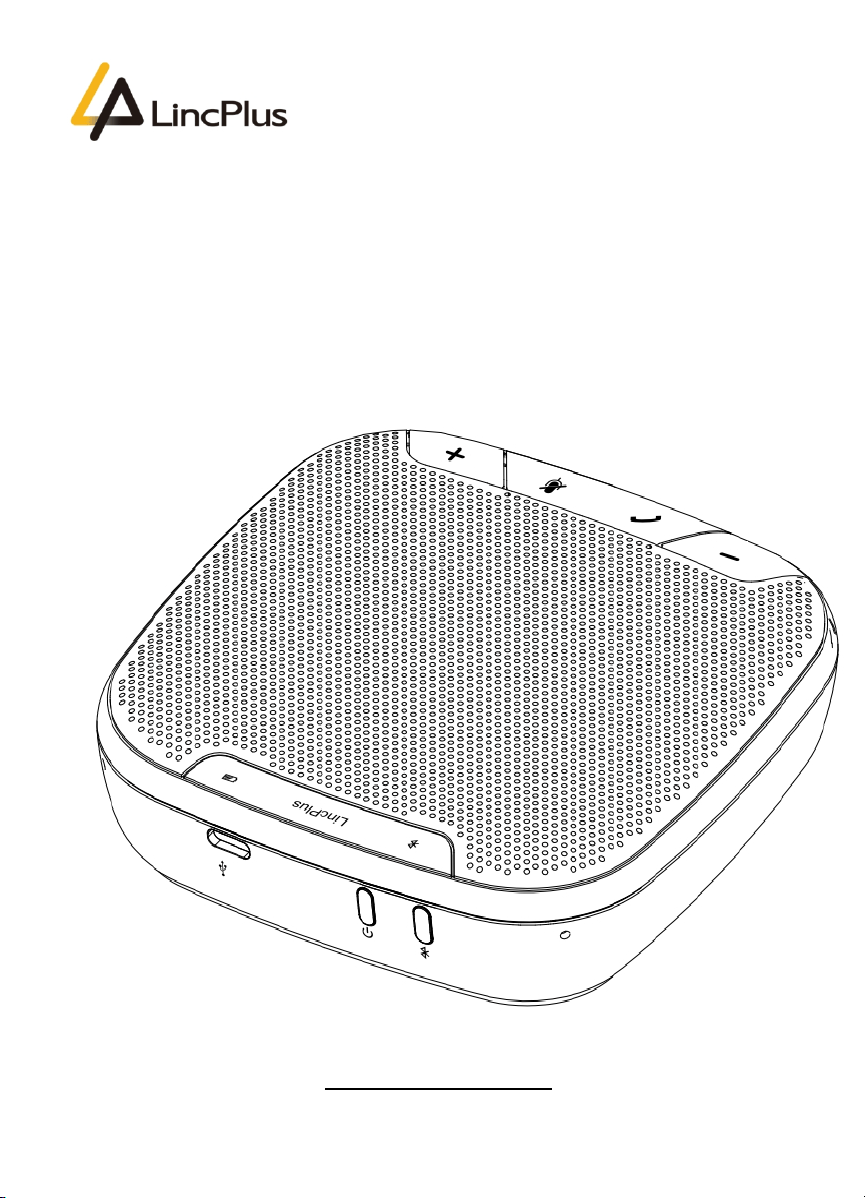
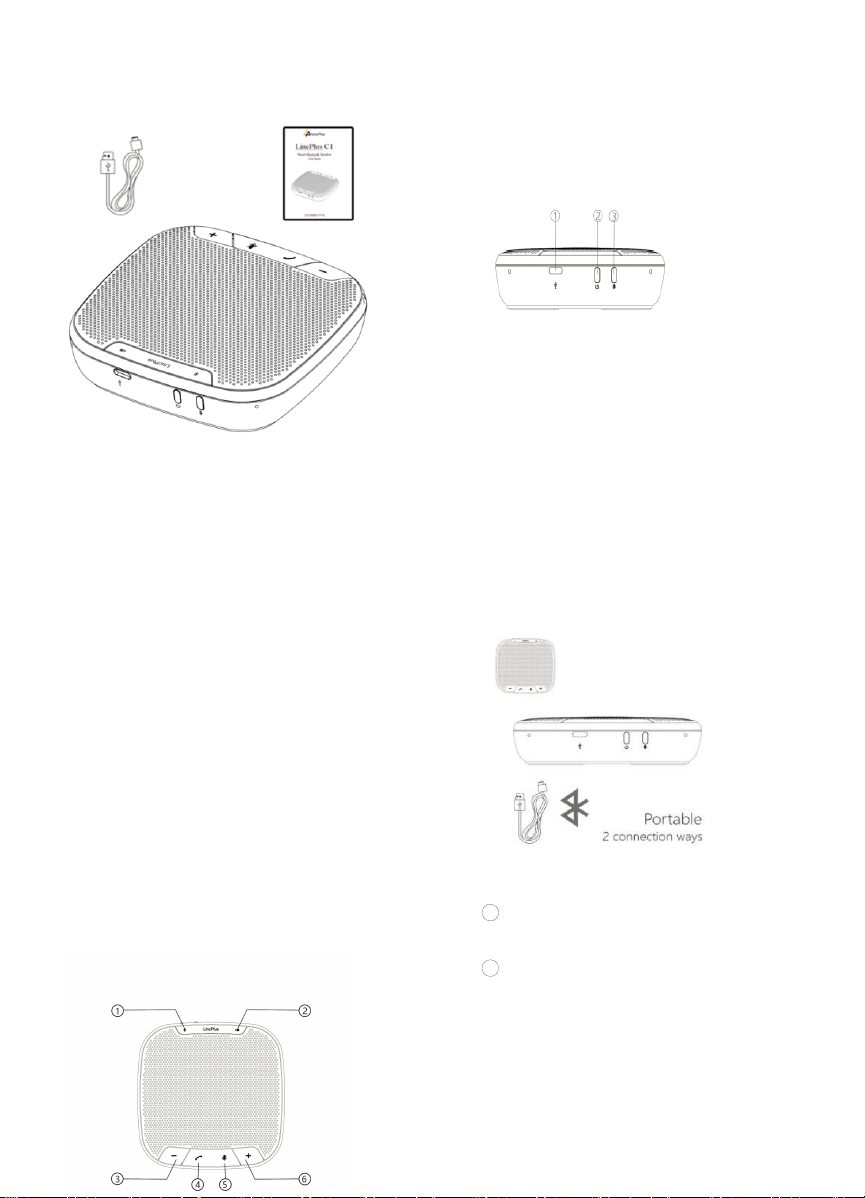
Packaging contents
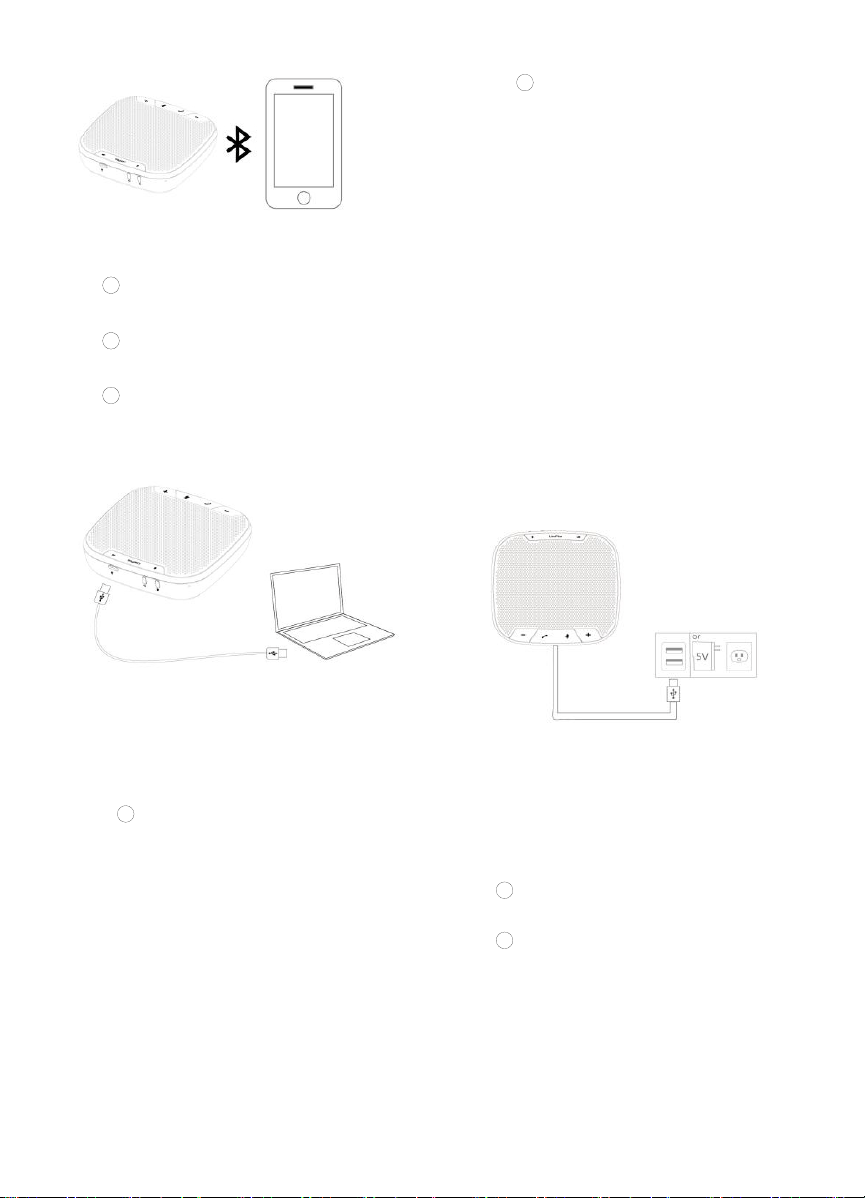
1
Bluetooth Status
2
Power Status
3 Volume Down
4 Answer/End(Only for calls)
5
Mute ⑥Volume Up
①Type-C Port ②On/off
③Bluetooth/USB Switch Botton
Product description
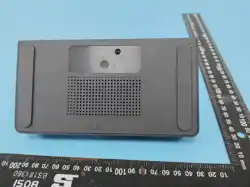
LincPlus C1 is a smart device designed for audio
and video conferencing.It supports many
connection methods, which enables it to satisfy
various demands under different circumstances.
Distinguished is its superb human voice tailored
woofer and microphones algorithms, which have
the best in class AEC and ANS without
sacrificing its AGC functionality.All of them are
introduced to bring in a delightful meeting
experience. Included in the package is a
LincPlus C1, a USB Type-C Cable and an User
Manual.
How to use
1、On/off
Press the button for three seconds to
activate or shut down the device.
2、Bluetooth/USB Switch Button.
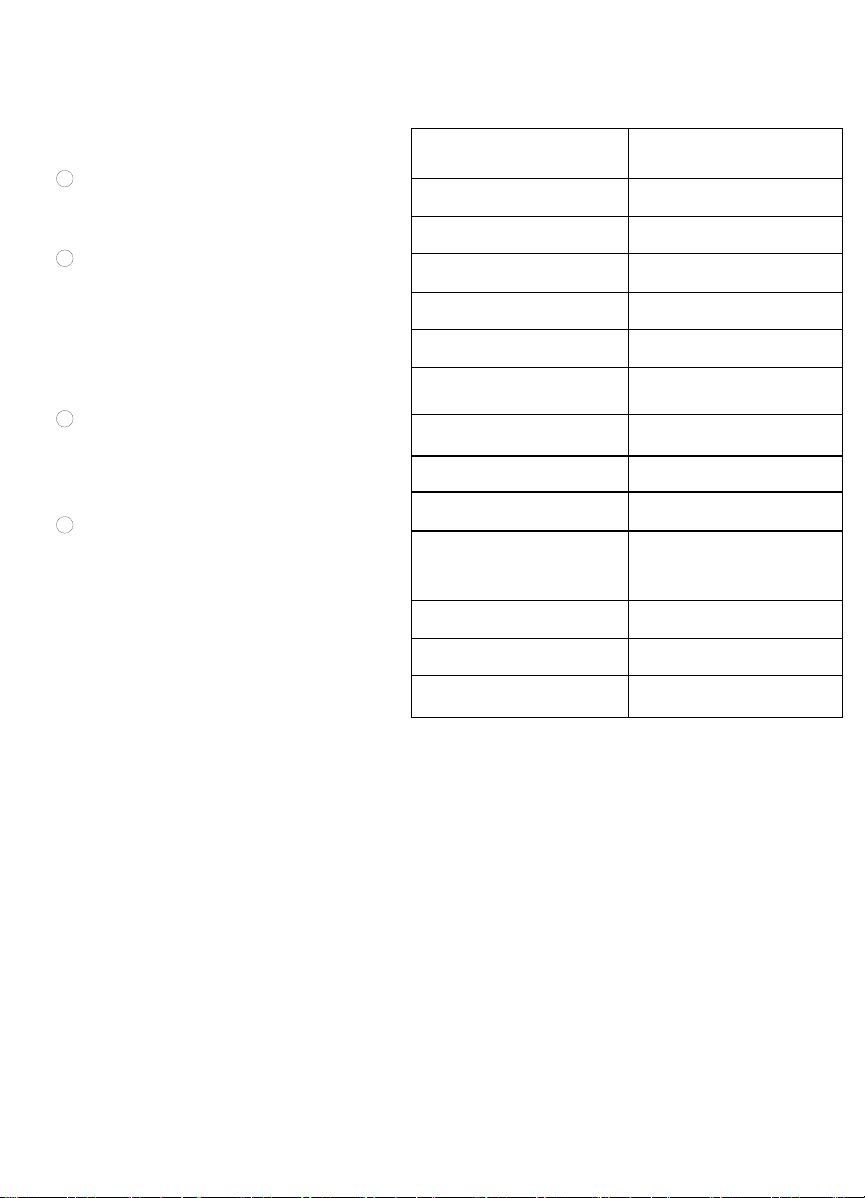
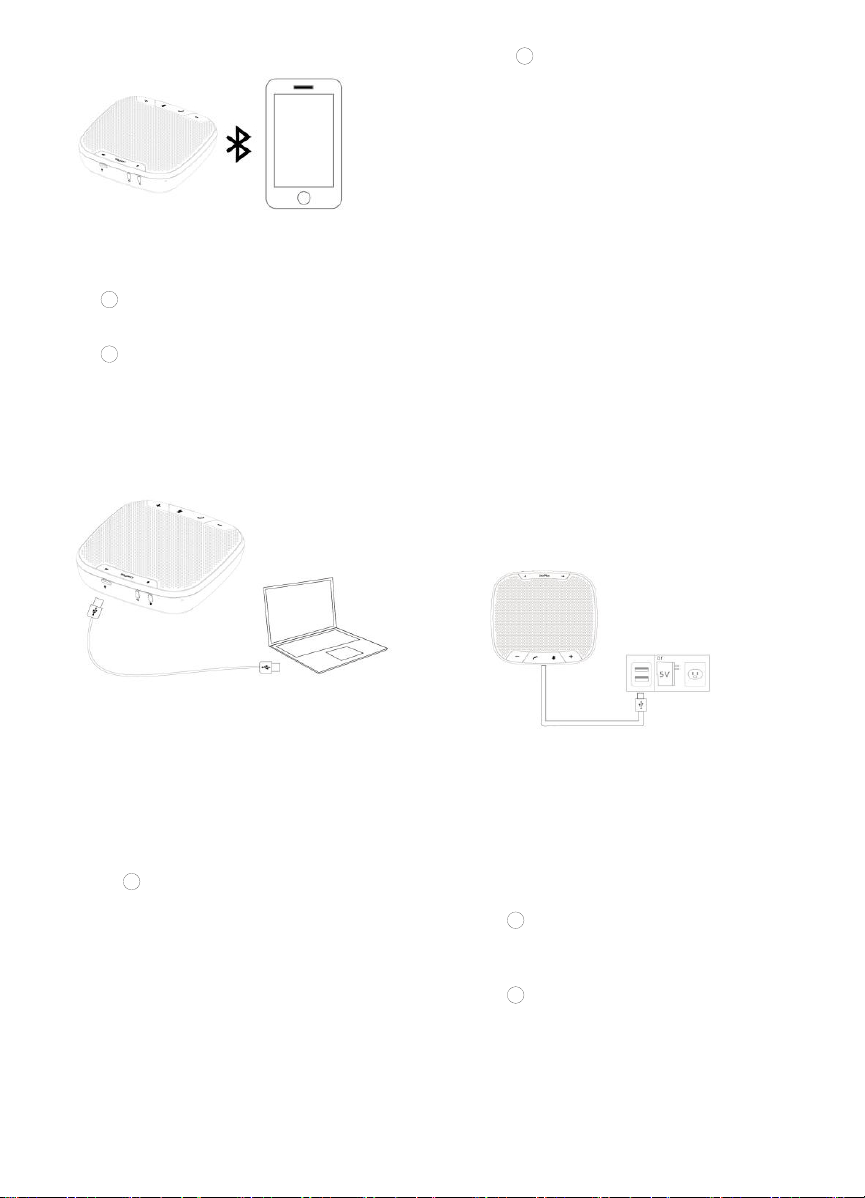
2.1 Bluetooth connection:
1 Press the power button for 3 seconds to
activate the device.
2
During Bluetooth connection mode,
Bluetooth status light would be RED when not
connected to any Bluetooth device, during which
the name LincPlus Speakerphone can be found
via Bluetooth. The status light would turn BLUE
when the device is paired successfully.
Function display
4、
Power status button
1
When the Type-C cable is not
connected to a computer or an adaptor, a
WHITE light would appear when the battery
is sufficient, a shimmering RED light is
introduced to warn users when the battery is
low.
3、Activation status
A white status light is introduced to inform
users when the device is activated.
2
When the Type-C cable is
connected to a computer or an adaptor, the
Power status button would always appear
RED until the battery is fully charged, during
which the light would appear White.
Press the button to mute all
microphones when using, and the light
would remain RED until the button is
pressed again.
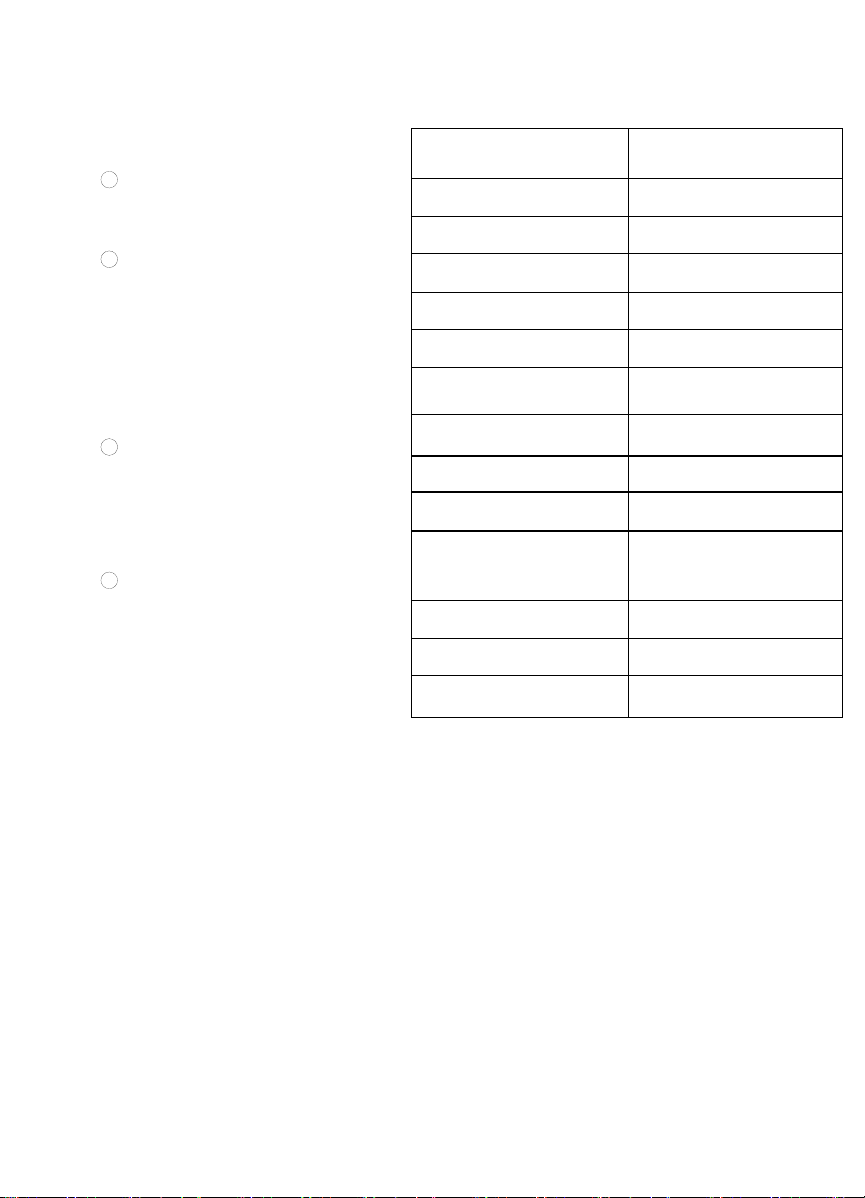
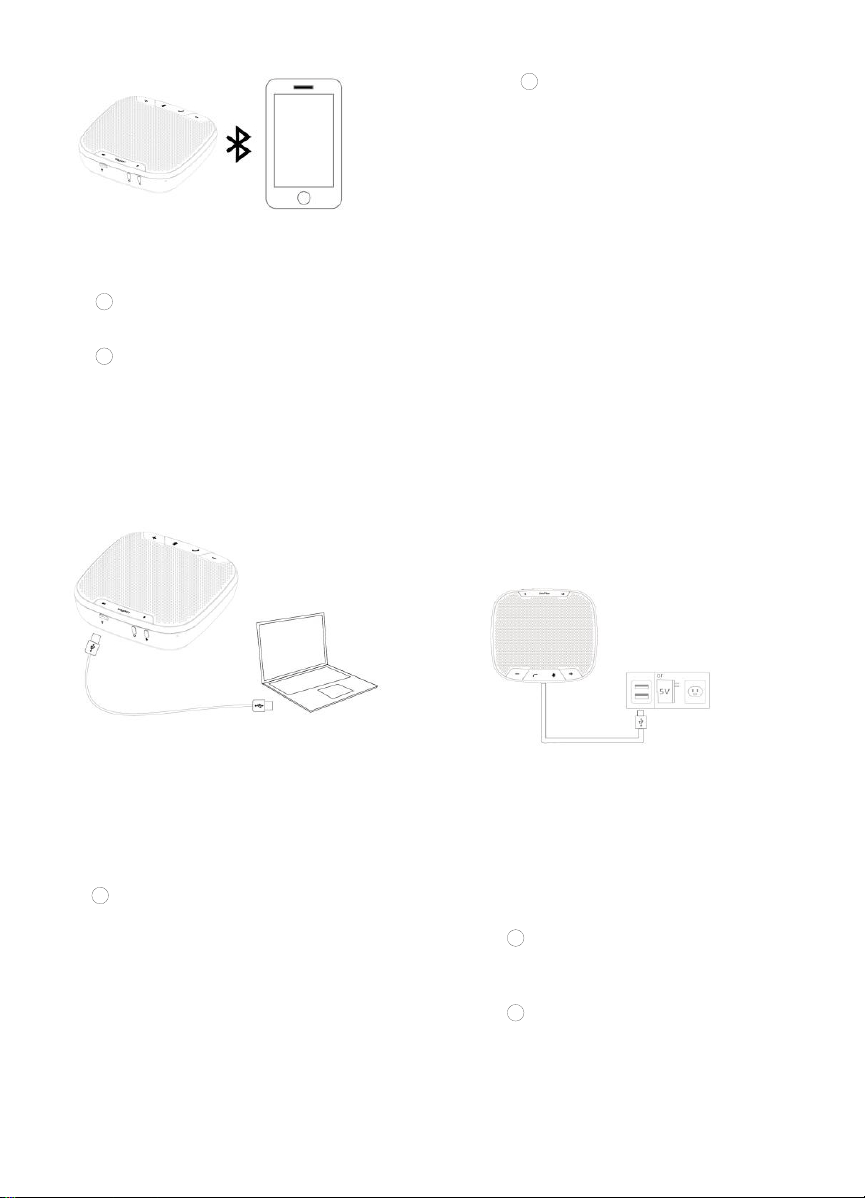
8、PreCharge the LincPlus Speak
erphone
1
Via a computer. Simply connect this
device to a computer by using a Type-C cable
2
Via an adaptor. Connect this device to
any adaptor with an output of 5V/2A.
6、Mute
5、Answer/End Calls
Press the button to answer or end a call,
during which a GREEN light would appear.
7、Volume
Press + or – to increase or decrease the
volume.
2.2 USB connection:
1
Press the power button for 3 seconds to
activate the device.
2 The USB connection is enabled when
the light of Bluetooth status bar is turned off.
3 When the status light is RED or BLUE,
press the button for 3 seconds to switch to The
USB connection mode.
Notes
1 Do not place the battery in direct sunlight
or fire exposure places..
2
If the batter is improperly replaced, there
might be a chance of explosion. Only
authorized technicians or engineers can
replace the battery of the same or
equivalent type.
3
This device along with its accessories
should be replace in dry areas where
raindrops and water can be avoided.
4
To protect the environment, please put
any discarded component into designated
trash bins and do not discard directly.
Speaker output rating
3W RMS
Frequency response
20Hz~20KHz(±1dB)
SNR
>80dB
Bluetooth version
V5.0
Bluetooth distance
20m
Microphone sensitivity
-26dB
Microphone
frequency response
100Hz~8KHz
Microphone directivity
360 degree omnidirectional
Battery specification
3.7V/2600mAh
Charge time
2hours
Usage time
Talk time: 12
hours(Depending on the
usage, the talk time varies)
Charge specification
5V/2A
Size
125x125x35mm
Weight
300g


Deutsche
3
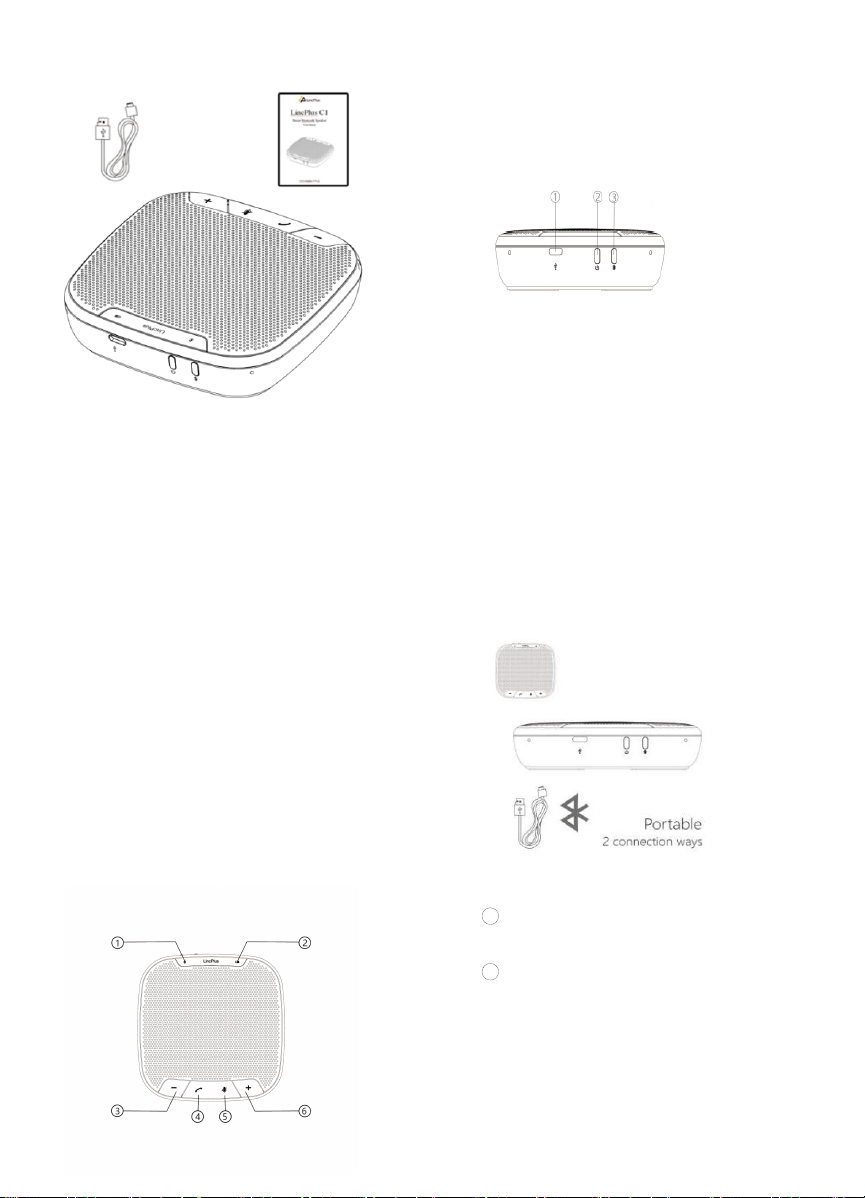
Verpack ungsinhalt
①Bluetooth Status ②Strom status
③Lautstärke runter ④Annehmen / Beenden
(nur für Anrufe)
⑤Stumm ⑥Lautstärke erhöhen
①Typ-C-Anschluss ②Ein / Aus
③Bluetooth / USB-Schaltertaste
Product description
LincPlus-C1 ist ein intelligentes Gerät für Audio-
und Videokonferenzen. Es unterstützt viele
Verbindung smethoden, wodurch es ermöglicht
wird, verschiedene Anforderungen unter
verschiedenen Umständen zu erfüllen.
Hervorzuheben sind die hervorragenden, auf die
menschliche Stimme zugeschnittenen Tieftöner
und Mikrofone, die die besten AEC- und
ANS-Werte ihrer Klasse aufweisen, ohne die
AGC-Funktionalität zu beeinträchtigen. Alle
werden eingeführt, um ein angenehmes
Meeting-Erlebnis zu ermöglichen. Im
Lieferumfang enthalten sind eine LincPlus-C1,
ein USB-Typ-C-Kabel und ein
Benutzerhandbuch.
Wie benutzt man
1. Ein / Aus
Drücken Sie die Taste drei Sekunden lang,
um das Gerät zu aktivieren oder
herunterzufahren.
2. Bluetooth /USB-Schaltertaste
2.1 Bluetooth-Verbindung:
1
Drücken Sie den Netzschalter 3
Sekunden lang, um das Gerät zu aktivieren.
2
Im Bluetooth-Verbindungsmodus ist die
Bluetooth-Statusanzeige ROT, wenn keine
Verbindung zu einem Bluetooth-Gerät besteht.
Während dieser Zeit kann der Name LincPlus
Speakerphone über Bluetooth gefunden werden.
Die Statusanzeige wird BLAU, wenn das Gerät
erfolgreich gekoppelt wurde.
Function display
6、Stumm
2
Wenn das Typ-C-Kabel an
einen Computer oder einen Adapter
angeschlossen ist, wird die Stromstatus
Taste immer ROT angezeigt, bis der
Akku vollständig aufgeladen ist.
Währenddessen wird das Licht weiß
4、
Power status button
1
Wenn das Typ-C-Kabel nicht an
einen Computer oder einen Adapter
angeschlossen ist, wird bei ausreichender
Batterie ein WEISSES Licht angezeigt. Ein
rot schimmerndes Licht wird eingeführt, um
Benutzer zu warnen, wenn die Batterie
schwach ist..
Eine weiße Statusanzeige informiert
die Benutzer, wenn das Gerät aktiviert
ist.wird. seen.
Drücken Sie die Taste, um alle Mikrofone
stummzuschalten, und das Licht bleibt
ROT, bis die Taste erneut gedrückt wird.
8、Laden Sie die LincPlus-Freispre
cheinrichtung vor
1 Über einen Computer. Schließen Sie
dieses Gerät einfach mit einem Typ-C-Kabel an
einen Computer an
2
Über einen Adapter. Schließen Sie
dieses Gerät an einen Adapter mit 5 V / 2A an.
5、Anrufe entgegennehmen /
beenden
Drücken Sie die Taste, um einen Anruf
anzunehmen oder zu beenden, während
dessen ein GRÜNES Licht erscheint.
3. Aktivierungsstatus
7、Volumen
Drücken Sie + oder -, um die Lautstärke zu
erhöhen oder zu verringern.
2.2 USB-Verbindung:
1
Drücken Sie den Netzschalter 3
Sekunden lang, um das Gerät zu aktivieren.
2 Die USB-Verbindung wird aktiviert,
wenn das Licht der Bluetooth-Statusleiste
ausgeschaltet wird. Wenn die Statusanzeige
ROT oder BLAU ist, drücken Sie die Taste 3
Sekunden lang, um in den
USB-Verbindungsmodus zu wechseln.
Anmerkungen
1 Stellen Sie den Akku nicht
direktem Sonnenlicht oder Feuer ausgesetzt.
2
Wenn der Teig nicht
ordnungsgemäß ausgetauscht wird, besteht
Explosionsgefahr. Nur autorisierte Techniker
oder Ingenieure können die Batterie des
gleichen oder eines gleichwertigen Typs
ersetzen.
3
Dieses Gerät sollte zusammen mit
dem Zubehör in trockenen Bereichen
ausgetauscht werden, in denen Regentropfen
und Wasser vermieden werden können.
4
Um die Umwelt zu schützen, legen
Sie alle weggeworfenen Komponenten in
dafür vorgesehene Mülleimer und entsorgen
Sie sie nicht direkt.
Lautsprecherausgangsleistu
ng
3W RMS
Frequency response
20Hz~20KHz(±1dB)
SNR
>80dB
Bluetooth Version
V5.0
Bluetooth Entfernung
20m
Mikrofonemp findlichkeit
-26dB
Mikrofon Frequenzgang
100Hz~8KHz
Mikrofonrichtwirkung
360 Grad omnidirektional
Batteriespezifikation
3.7V/2600mAh
Aufladezeit
2 hours
Nutzungszeit
Gesprächszeit: 12 Stunden
(Je nach Verwendung
variiert die Gesprächszeit)
Ladungsspezifikation
5V/2A
Größe
125x125x35mm
Gewicht
300g

Français
10
Affichage des fonctions
Contenu de l'emballage
①Statut Bluetooth ②État de l'alimentation
③Baisser le volume ④Répondre / terminer
(uniquement pour les
appels)
⑤Mute ⑥Monter le son
①Port de type C ②Port de type C
③Bouton de commutation Bluetooth / USB
Produkt beschreibung
LincPlus-C1 ist ein intelligentes Gerät für Audio-
und Videokonferenzen. Es unterstützt viele
Verbindungsmethoden, wodurch es ermöglicht
wird, verschiedene Anforderungen unter
verschiedenen Umständen zu erfüllen.
Hervorzuheben sind die hervorragenden, auf die
menschliche Stimme zugeschnittenen Tieftöner
und Mikrofone, die die besten AEC- und
ANS-Werte ihrer Klasse aufweisen, ohne die
AGC-Funktionalität zu beeinträchtigen. Alle
werden eingeführt, um ein angenehmes
Meeting-Erlebnis zu ermöglichen. Im
Lieferumfang enthalten sind eine LincPlus-C1,
ein USB-Typ-C-Kabel und ein
Benutzerhandbuch.
Comment utiliser
3、marche / arrêt
Appuyez sur le bouton pendant trois
secondes pour activer ou éteindre l'appareil.
4、Bluetooth/USB Switch Button.
2.1 Connexion Bluetooth:
1
Appuyez sur le bouton d'alimentation
pendant 3 secondes pour activer l'appareil.
2
Pendant le mode de connexion
Bluetooth, le voyant d'état Bluetooth serait
ROUGE lorsqu'il n'est connecté à aucun appareil
Bluetooth, pendant lequel le nom LincPlus
Speakerphone peut être trouvé via Bluetooth. Le
voyant d'état devient BLEU lorsque l'appareil est
couplé avec succès.
4、
Bouton d'état de l'alimentation
1
Lorsque le câble de type C n'est pas
connecté à un ordinateur ou à un adaptateur, un
voyant BLANC apparaît lorsque la batterie est
suffisante, un voyant ROUGE chatoyant est
introduit pour avertir les utilisateurs lorsque la
batterie est faible.
2
Lorsque le câble de type C
est connecté à un ordinateur ou à un
adaptateur, le bouton d'état de
l'alimentation apparaîtra toujours en
ROUGE jusqu'à ce que la batterie soit
complètement chargée, au cours de
laquelle le voyant apparaîtra blanc.
3、état d'activation
Un voyant d'état blanc est introduit pour
informer les utilisateurs lorsque l'appareil est activé.
Appuyez sur le bouton pour couper tous les
microphones lors de l'utilisation, et le voyant
restera ROUGE jusqu'à ce que le bouton
soit à nouveau enfoncé.
8、Préchargez le haut-parleur
LincPlus
1
Via un ordinateur. Connectez
simplement cet appareil à un ordinateur à l'aide
d'un câble de type C
2 Via un adaptateur. Connectez cet
appareil à n'importe quel adaptateur avec un hors
6、Mute
.
5、Répondre / terminer les appels
Appuyez sur le bouton pour répondre ou
mettre fin à un appel, pendant lequel un
voyant VERT apparaît.
Appuyez sur + ou - pour augmenter ou
diminuer le volume.
2.2 Connexion USB:
1
Appuyez sur le bouton d'alimentation
pendant 3 secondes pour activer l'appareil.
2 The La connexion USB est activée
lorsque le voyant de la barre d'état Bluetooth est
éteint. Lorsque le voyant d'état est ROUGE ou
BLEU, appuyez sur le bouton pendant 3
secondes pour passer en mode de connexion
USB.
7、Le volume
10
Remarques
1
Ne placez pas la batterie à la
lumière directe du soleil ou dans des endroits
exposés au feu.
2
Si la pâte n'est pas remplacée
correctement, il peut y avoir un risque
d'explosion. Seuls les techniciens ou
ingénieurs agréés peuvent remplacer la
batterie de type identique ou équivalent.
3
Cet appareil ainsi que ses
accessoires doivent être remplacés dans les
zones sèches où les gouttes de pluie et l'eau
peuvent être évitées.
4
Pour protéger l'environnement,
veuillez mettre tout composant mis au rebut
dans des poubelles désignées et ne pas le
jeter directement.
Puissance de sortie des
enceintes
3W RMS
Fréquence de réponse
20Hz~20KHz(±1dB)
SNR
>80dB
Version Bluetooth
V5.0
Distance Bluetooth
20m
Sensibilité du microphone
-26dB
Réponse en fréquence du
microphone
100Hz~8KHz
Directivité du microphone
360 degree omnidirectional
Spécification de la batterie
3.7V/2600mAh
Temps de charge
2 hours
Temps d'utilisation
Temps de conversation: 12
heures (selon l'utilisation, le
temps de conversation varie)
Spécification de charge
5V/2A
Taille
125x125x35mm
Poids
300g

LincPlus Limited warrants to the end user that this product will be free from defects in materials
and workmanship, in the course of normal use for a period of 12 months (1 year) from the date of
purchase. This warranty covers breakdowns due to manufacturing or design faults. If a genuine
manufacturing fault is found, LincPlus Limited will provide after-sale service.
The warranty is subject to the following provisions:
>The warranty does not cover accidental damage, wear and tear, or negligence;
>The warranty will be rendered invalid if the product is resold or is damaged through any
adjustment, modification or repair not authorized by us;
>Specifications are subject to change without notice;
>Should you have a problem with your unit please email us at:
info@lincplus.com.cn
LincPlus Limited garantiert dem Endbenutzer, dass dieses Produkt während des normalen
Gebrauchs für einen Zeitraum von 12 Monaten (1 Jahr) ab Kaufdatum frei von Material- und
Verarbeitungsfehlern ist. Diese Garantie deckt Ausfälle aufgrund von Herstellungs- oder
Konstruktionsfehlern ab. Wenn ein echter Herstellungsfehler festgestellt wird, bietet LincPlus
Limited einen Kundendienst an.
Die Garantie unterliegt folgenden Bestimmungen:
> Die Garantie deckt keine versehentlichen Schäden, Verschleiß oder Fahrlässigkeit ab.
> Die Garantie erlischt, wenn das Produkt weiterverkauft oder durch von uns nicht autorisierte
Einstellungen, Änderungen oder Reparaturen beschädigt wird.
> Technische Daten können ohne vorherige Ankündigung geändert werden.
> Sollten Sie ein Problem mit Ihrem Gerät haben, senden Sie uns bitte eine E-Mail an:
info@lincplus.com.cn
LincPlus Limited garantit à l'utilisateur final que ce produit sera exempt de défauts de matériaux
et de fabrication, dans le cadre d'une utilisation normale pendant une période de 12 mois (1 an)
à compter de la date d'achat. Cette garantie couvre les pannes dues à des défauts de fabrication
ou de conception. Si un véritable défaut de fabrication est détecté, LincPlus Limited fournira un
service après-vente.
La garantie est soumise aux dispositions suivantes:
> La garantie ne couvre pas les dommages accidentels, l'usure ou la négligence;
> La garantie sera invalidée si le produit est revendu ou endommagé par tout ajustement,
modification ou réparation non autorisé par nous;
> Les spécifications peuvent être modifiées sans préavis;
> Si vous avez un problème avec votre appareil, veuillez nous
10
E2EURO Consulting HUNGARY (for Prodsg authorities only)
Hoferstrasse 9b, 71636 Ludwigsburg Germany
CET PRODUCT SERVICE LTD. (for authorities only)
Beacon House Stokenchurch Business Park,
Ibstone Rd, Stokenchurch
High Wycombe HP14 3FE UK
This device complies with part 15 of the FCC Rules. Operation is subject
to the following two conditions:
(1) This device may not cause harmful interference, and
(2) this device must accept any interference received, including interference that may cause
undesired operation.
ShenZhen LincPlus Technology Co., Inc
5F, No.2 Building, District D2,TCL international E City, NO.1001 Zhongshanyuan Road,
Nanshan District, ShenZhen , P.R.China
www.lincplus.com.cn
Facebook:@lincplus.sz
E-mail:info@lincplus.com.cn