

1
Contents
Safety Instructions
All rights reserved
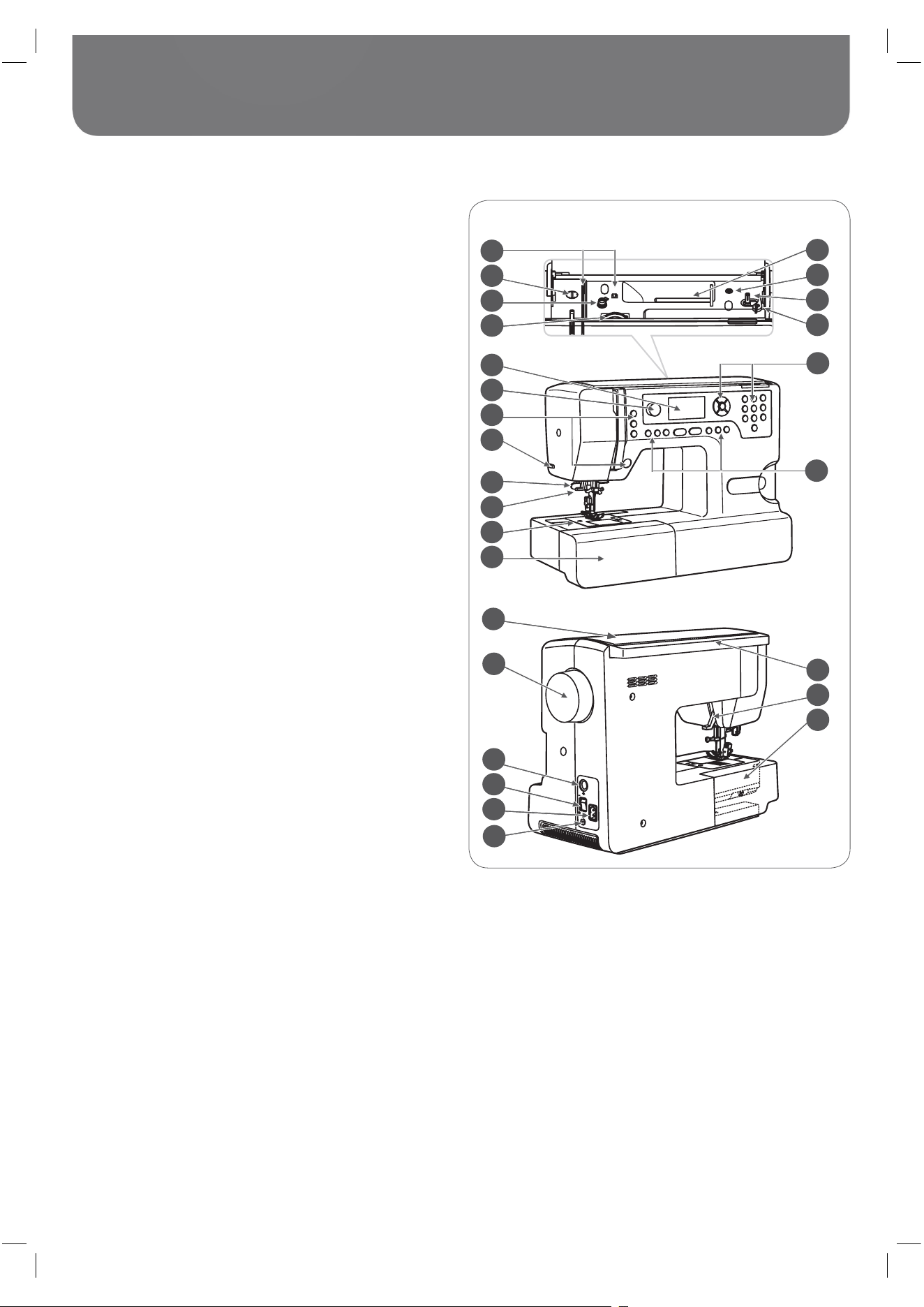
Machine Overview 5
Details of the sewing machine 5
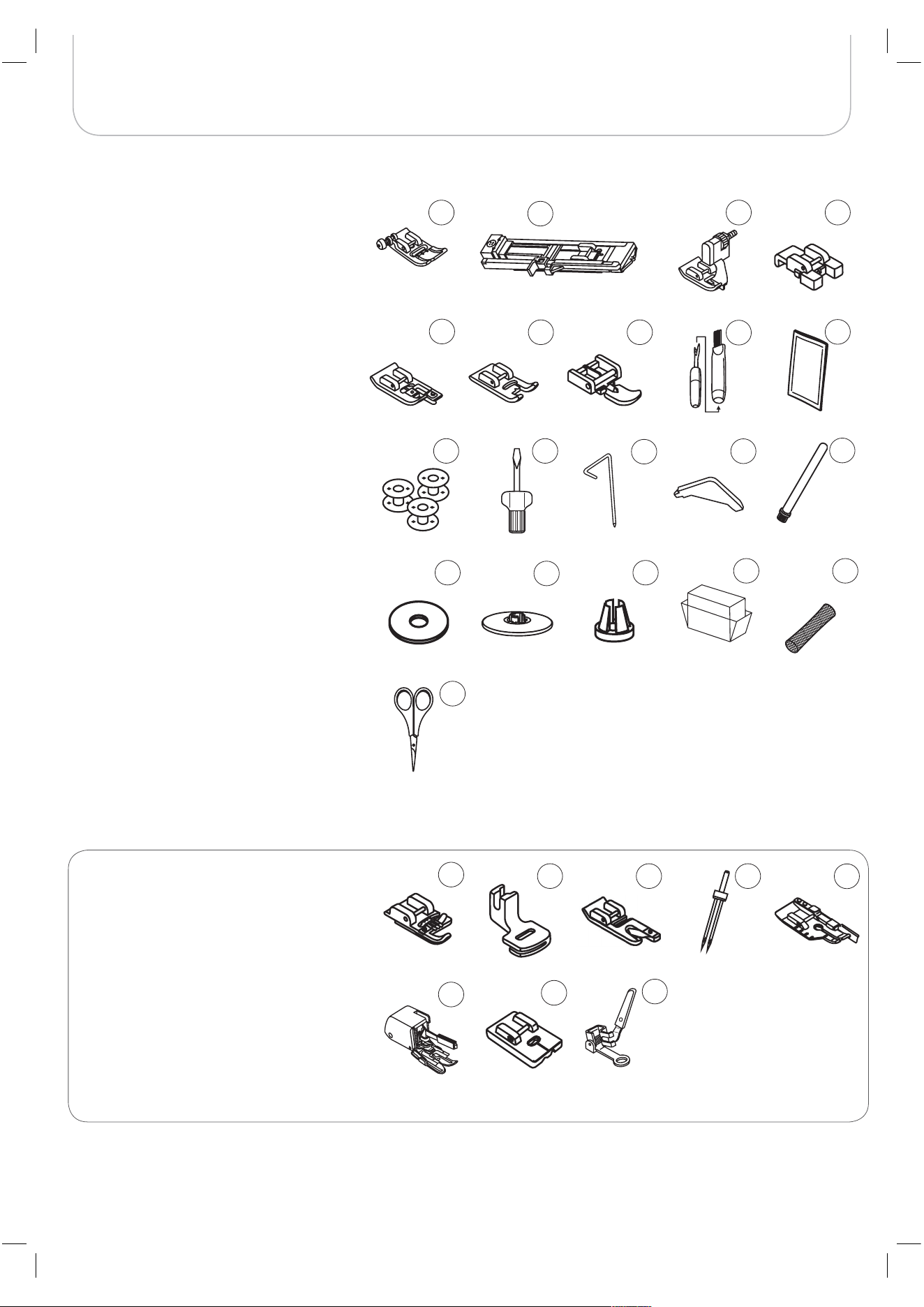
Accessories 6
– Optional 6
Machine Setup 7
Connecting the Machine 7
– Polarized plug information 7
Foot Control 7
Sewing Table 8
Winding the Bobbin 9
Inserting the Bobbin 11
Threading the Upper Thread 12
Needle Threader 14
Replacing the Needle 15
Thread Cutter 15
Thread Tension 16
Altering Presser Foot Pressure 17
Raising or Dropping the Feed dog 17
Changing the Presser Foot 18
Two-Step Presser Foot 18
Important Sewing Information 19
Needle, Fabric, Thread Selection Guide 19
Presser Foot Application Chart 21
Display Explanation & Operating Functions 22
Buttons Explanation 22
Information on the LCD Display 23
– Normal Mode 23
– Memory Mode 24
Function Buttons 25
– Start/Stop button 25
– Reverse 25
– Auto-Lock 25
– Needle up/down button 26
– Speed Dial 26
– Arrow buttons 27
– OK button 27
– Direct pattern selection 27
– Number buttons 27
– Mirror image button 28
– Elongation 28
– Twin needle 28
– Stitch length adjustment 29
– Stitch width adjustment 29
– Memory 30
– Clear/Return button 30
– Pattern group selection 30
How to select a stitch 31
Stitches Overview 32
Stitches 32
Basic Sewing Procedures 35
Reverse 35
Free arm 35
Sewing corners 35
Sewing on the heavy fabric 36
Straight Stitches and Needle Position 37
– Changing the needle position 37
– Altering the stitch length 37
Zig-zag Stitches 37
– Altering the stitch width 37
– Altering the stitch length 37
Triple Straight Stretch Stitch 38
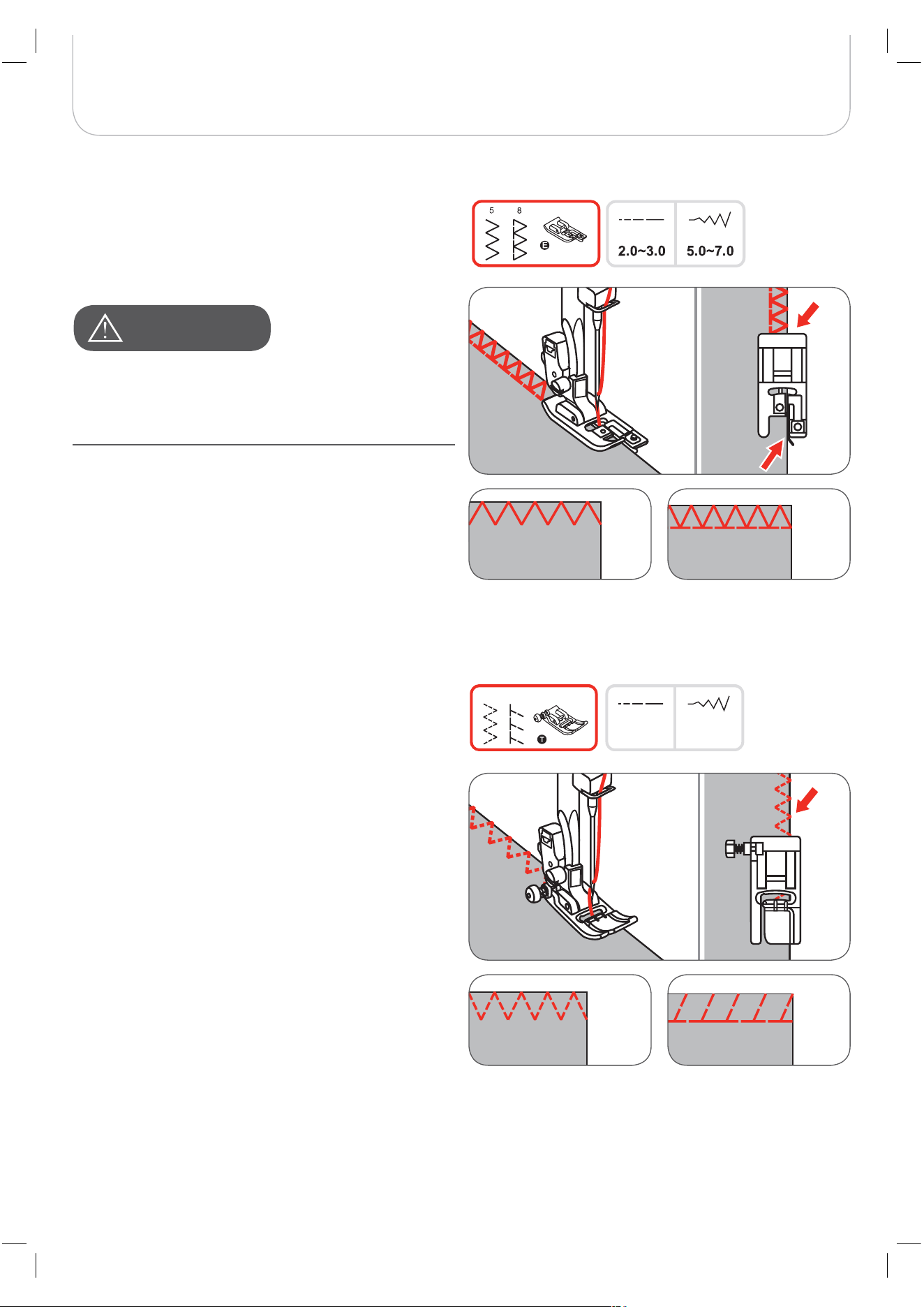
Overlock Stitches 39
Using the Zigzag foot 39
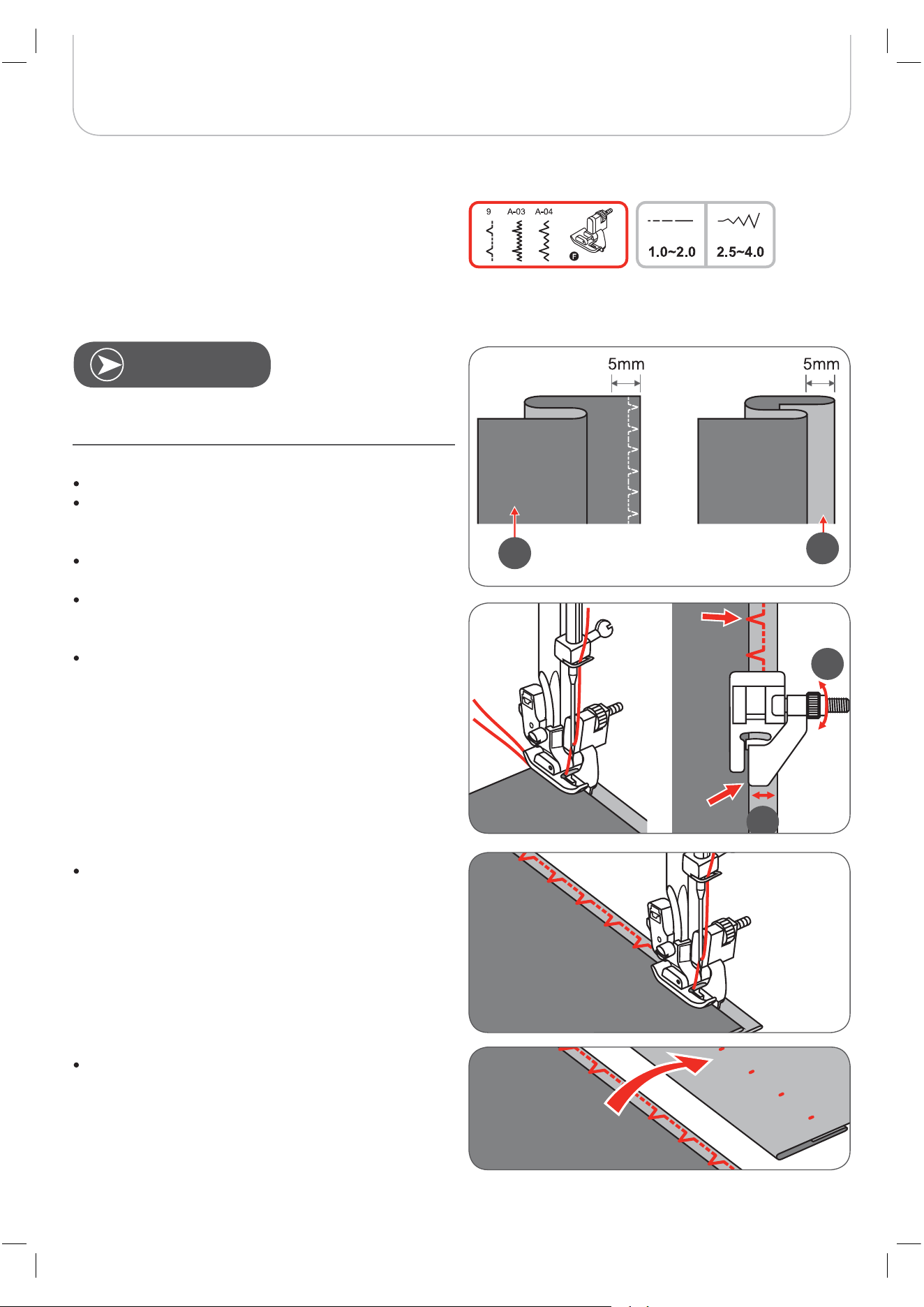
Blind Hem 40
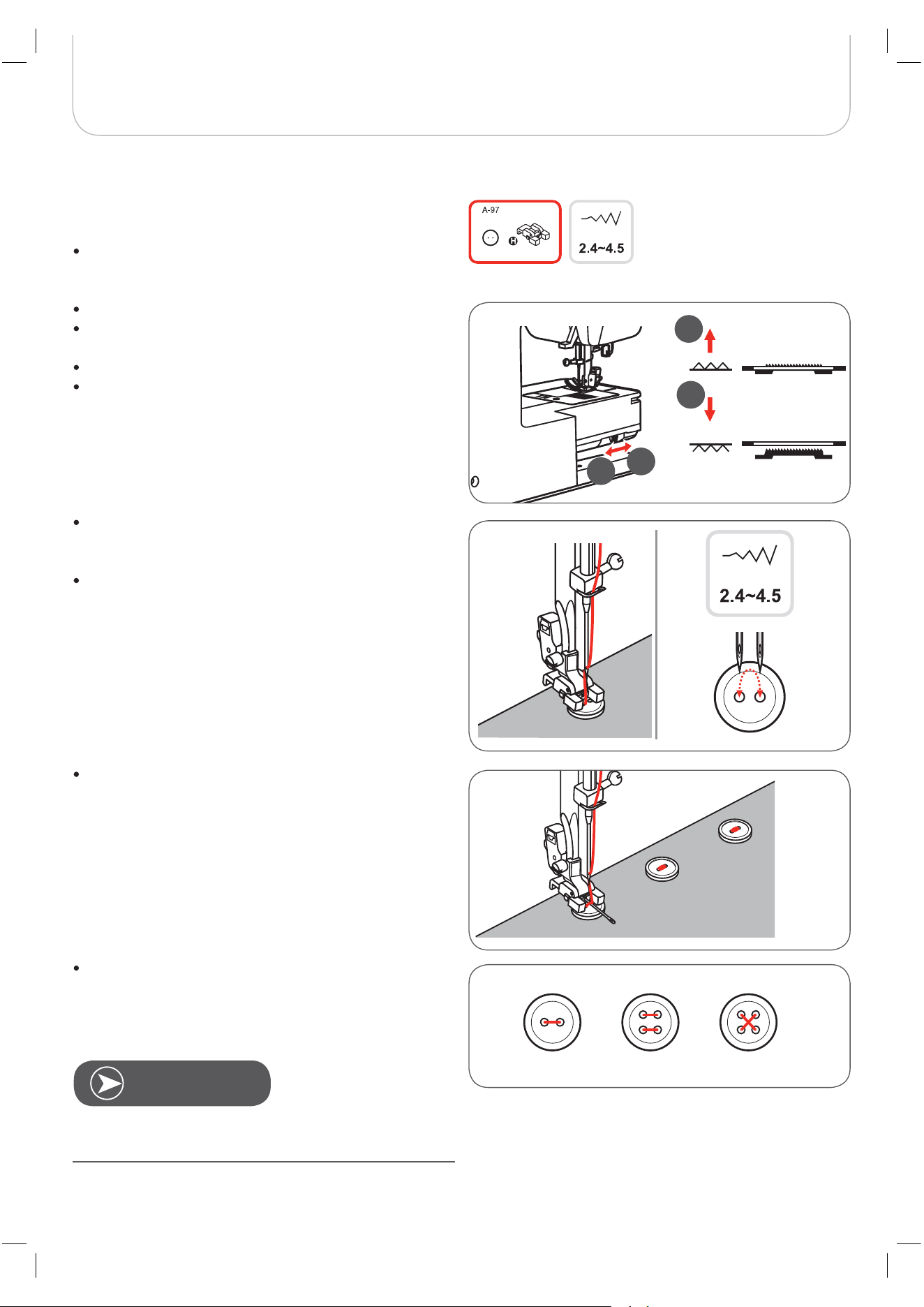
Button Sewing-on 41
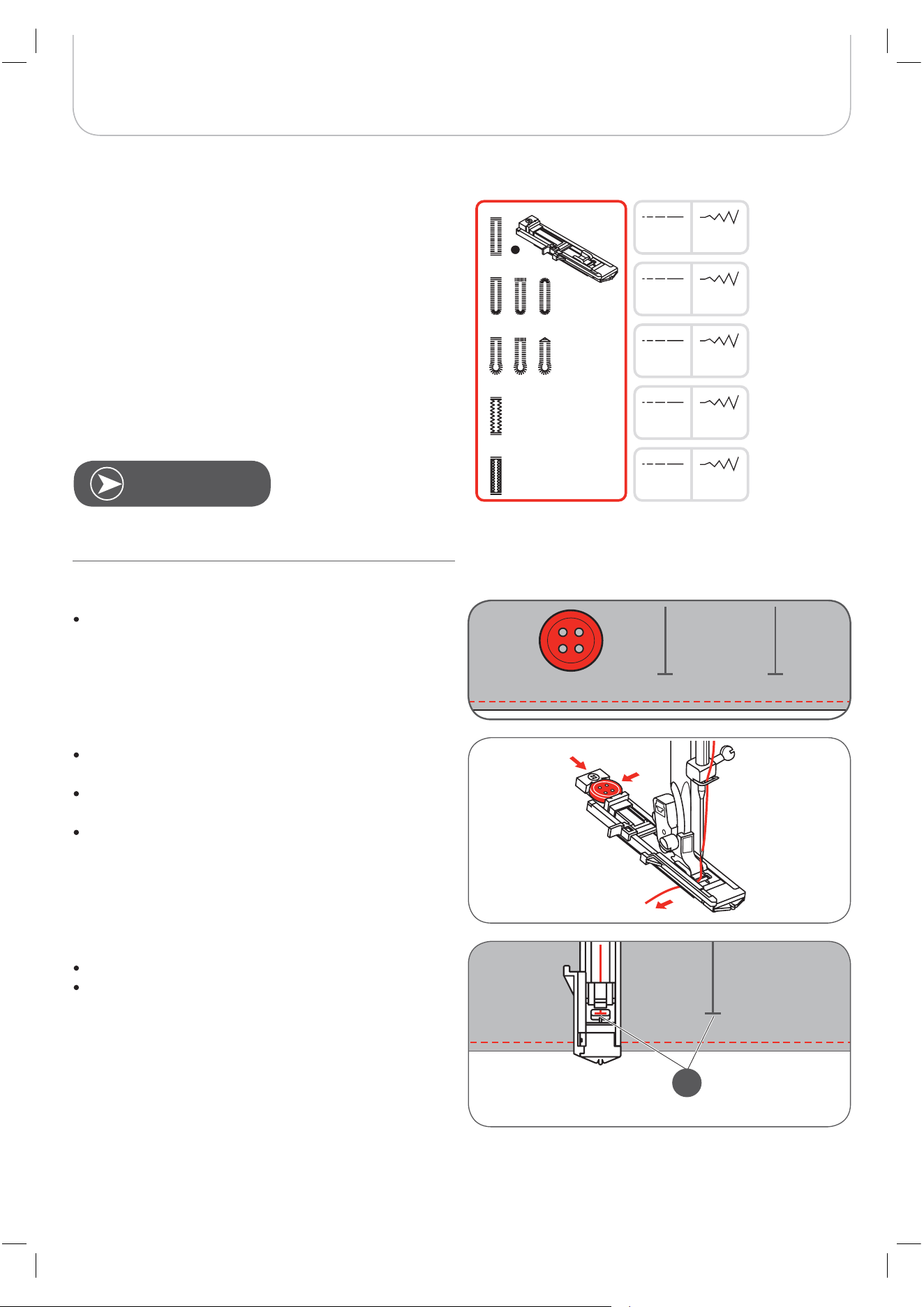
Buttonhole Stitching 42
– Buttonholes on stretch fabrics 46
– Bartack stitch 47
Eyelet Stitch 48
Darning Stitch 49
Zipper Insertion* 51
– Inserting a centered zipper 51
– Inserting a side zipper 52
– Invisible zipper insertion 53
Narrow Hemming 54
Cording 55
– Single cording 55
– Triple cording 55
Satin Stitch Sewing 56
Quilting 57
– Patchwork stitching 57
– Hand look quilting 58
– Blanket (Quilting Applique) 58
– Patchwork stitching 58
Fagoting 59
Scallop Stitch 59
Gathering 60
– Gathered fabric 60
– To gather and attach gathered fabric in one step 60
– Smocking 61
Free Motion Darning, Embroidery and Monogramming 62
– Darning 62
– Embroidery 63
– Monogramming 63

2
Contents
Twin Needle
Walking Foot 64
Special Functions 65
Mirror image stitch pattern 65
Elongation 66
Sewing 67
Memory 69
Overview Memory Enter Mode 70
– Enter a sequence of stitch patterns in Memory
Enter Mode 70
Overview Memory Review/Edit Mode 73
– Review stored stitches 73
Switch from Memory Mode to the Normal Mode 75
– Sew memorized patterns 75
Memory Editing functions - Add a sequence of stitches 76
Memory Editing functions - Change a stored stitch
or its parameters 78
Memory Editing functions - Insert an additional stitch 79
Memory Editing functions - Delete a stored stitch 81
Memory Editing functions - Delete ALL 82
Warnings 83
Warning functions 83
– Warning message 83
– Warning display 83
– Warning sound 85
Maintenance 86
Cleaning the display 86
Cleaning the sewing machine surface 86
Cleaning the hook 86
Environmental protection 87
Trouble Shooting 88
Trouble shooting guide 88
Stitches Overview 92
A - Group Stitches 92
B - Group Stitches 95

Safety Instructions
IMPORTANT
When using an electrical machine, basic safety precautions should always be followed, inclu-
ding the following:
Please read the instruction manual carefully before using this machine.
Keep the instruction manual at a suitable place with the machine and hand it over if you give
the machine to a third party.
When the machine is not in use or left unattended, always disconnect the machine from
the power supply system. Unplug it from the outlet.
DANGER!
To reduce the risk of electric shock:
1. Never leave the machine unattended when it is plugged in.
2. Always unplug this machine from the electric outlet immediately after using and before
cleaning.
3. LED RADIATION: Do not view directly with optical instruments Class.
WARNING!
To reduce the risk of burns, fi re, electric shock or injury to persons:
1. The machine mustn’t be used by children under 8 or by people with reduced physical,
sensory or mental capabilities or if there is a lack of experience and knowledge how to
operate the machine. Unless they have been given instruction concerning the use of the
machine and the involved risks by a person who is responsible for their safety.
2. Do not use this machine as a toy. Close attention is necessary when this machine is used
by children, near children or people with reduced sensation.
3. Use this machine only for its intended use as described in this manual. Use only acces-
sories recommended by the manufacturer.
4. Children should be supervised to ensure that they do not play with the machine.
5. Never operate this machine if it has a damaged cord or plug, if it is not working properly,
if it has been dropped or damaged, or dropped into water. Return the machine to the
nearest authorized dealer or service centre for examination, repair, electrical or mechani-
cal adjustment.
6. Never operate the machine with any air openings blocked. Keep ventilation openings of
the machine and the foot control free from accumulation of lint, dust, and loose cloth.
7. Keep fi ngers away from all moving parts. Special care is required around the machine
needle.
8. Always use the proper stitch plate. The wrong plate can cause needle
9. Do not use bent needles.
10. Do not pull or push the fabric while sewing. This can result in needle breakage.

Safety Instruction
11. Switch the machine off (”O”) when making any adjustments in the needle area, such as
threading or changing the needle, threading the bobbin, or changing the presser foot, and
the like.
12. Always unplug the machine when performing cleaning or maintenance work such as
replacing the sewing light or when making any other user maintenance adjustments men-
tioned in the instruction manual (disconnect the power plug). Cleaning and maintenance
work must not be carried out by children without supervision.
13. Never drop or insert any object into any openings.
14. Use this machine only in dry and protected areas. Never operate the machine in a damp
or wet environment.
15. Do not operate the machine where aerosol spray products are being used or where oxy-
gen is being administered.
16. To disconnect, turn the power switch to (”O”)(off), then remove the plug from the outlet.
Do not unplug by pulling the cord, instead grasp the plug to pull it from the outlet.
17. If the supply cord of the foot control is damaged, it must be replaced by the manufacturer
or an appropriate service agent or a similar qualifi ed person in order to avoid endanger-
ment.
18. Never place anything on the foot control.
19. When replacing the light bulb, always use the same type.
20. The machine may only be used in combination with a foot control of the type C-9000.
21. The sound pressure level during normal operation is lower than 75dB(A).
22. This machine is provided with double insulation (except U.S.A/Canada). Use only identical
replacement parts. See instructions for Servicing of double-insulated products.
SERVICING OF DOUBLEINSULATED PRODUCTS
In a double-insulated product, two systems of insulation are provided instead of grounding. No
grounding means is provided on a double-insulated product nor should a means for grounding
be added to the product. Servicing a doubleinsulated product requires extreme care and
knowledge of the system and should only be done by qualified service personnel. Replace-
ment parts for a double-insulated product must be identical to those parts in the product. A
double insulated product is marked with the words ”DOUBLE INSULATION” or ”DOUBLE
INSULATED”.
The symbol may also be marked on the product.
SAVE THESE INSTRUCTIONS!
A
TTENTION
!
• This machine is intended for household use only. If used intensively or commercially, regular cleaning and
especially attentive care is required.
• Signs of wear and tear owing to intensive or commercial use are not covered automatically, even if they occur
within the warranty period. The decision on how to deal with any such cases rests with the local authorised
servicing staff.
N
OTE
If the machine is stored in a cold room, it should be brought to a warm room about one hour before use.
All rights reserved
For technical and product improvement reasons, the machine’s features, parts and accessory are subject to
unannounced changes and alterations at any time. The accessory included can differ from country to country.
Environmental protection
BERNINA is committed to the protection of the environment. We strive to minimize the environmental
impact of our products by continuously improving product Design and our technology of manufactu-
ring. Do not dispose of electrical machines as unsorted municipal waste, use separate collection
facilities. Contact your local government for information regarding the collection systems available.
If electrical machines are disposed of in landfills or dumps, hazardous substances can leak into the
groundwater and get into the food chain, damaging your health and well-being.
When replacing old machines with new ones, the retailer is legally obligated to take back your old
machine for professional disposal free of charge.

Safety Instruction
5
Machine Overview
Details of the sewing machine
1 Thread guide
2 Presser foot pressure
3 Bobbin winder pre-tension
4 Thread tension dial
5 Spool pin
6 Hole for second spool pin
7 Bobbin winder spindle
8 Bobbin winder stopper
9 LCD display
10 Speed dial
11 Operation buttons
12 Thread cutter
13 One-step buttonhole lever
14 Needle threader
15 Stitch plate
16 Sewing table and accessory box
17 Selection buttons
18 Function buttons
19 Top cover
20 Handwheel
21 Embroidery module connector
22 Power switch
23 Power cord
24 Foot control connector
25 Handle
26 Presser foot lever
27 Feed dog lever
1
3
4
2
9
11
12
10
13
15
16
14
5
6
7
8
17
18
20
19
22
23
24
21
25
27
26
6
Machine Overview
Accessories
Zigzag foot (T)
Buttonhole foot (D)
Blindstitch foot (F)
Button-sew-on foot (H)
Overlock foot (E)
Embroidery foot (A)
Zipper foot (I)
Brush & Seam ripper
Needle Set (3x)
Bobbin cases (3x)
1
2
3
4
5
6
7
8
9
10
11 Screwdriver
12 Seam guide
13 L-Screw driver
14 Spool pin long (V)
15 Spool pin felt
16 Spool holder (large)
17 Spool holder (small)
18 Dust Cover
19 Spool net (2x)
20 Scissors
22
27
21
23 25
26
24
1 4
10
14
18
3
6
8
12
16
7
9
13
17
2
5
11
15
19
20
28
Optional
21 Cording foot (M)
22 Gathering foot
23 Hemmer foot (K)
24
25
26 Walking foot
27 Invisible Zipper foot
28 Darning/Embroidery foot
Twin needle
Quilting foot ¼“
7
Machine Setup
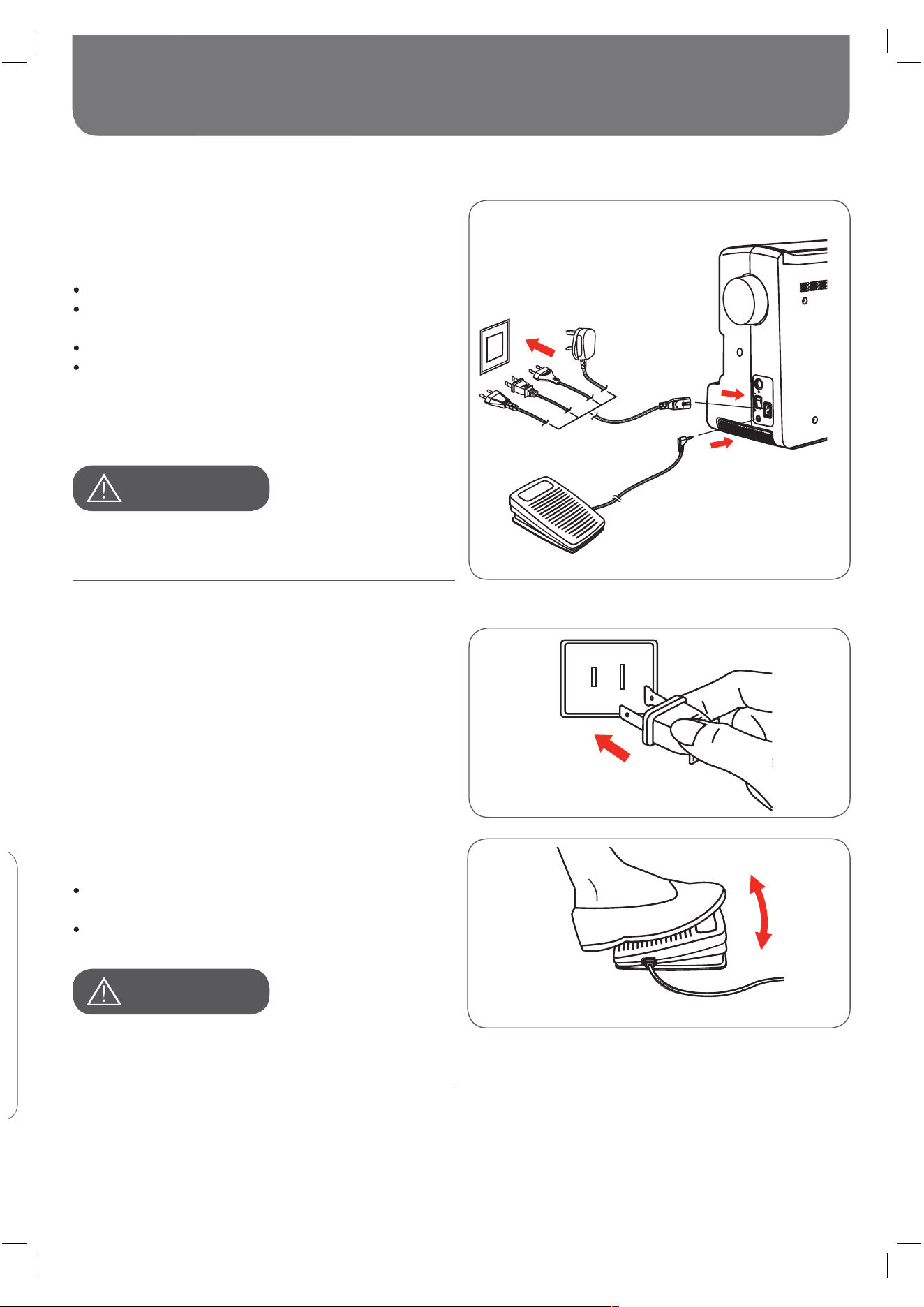
Connecting the Machine
Before connecting the power supply, make sure that the volt-
age and frequency shown on the rating plate is conforming
with your mains power.
Place the machine on a stable table.
Connect the power line cord to the machine by insert-
ing the 2-hole plug into the mains plug socket.
Connect the power line plug to the wall outlet.
Turn on the power switch.
– The sewing lamp will light up when the switch is
turned on.
Polarized plug information
This appliance has a polarized plug (one blade wider than the
other), to reduce the risk of electrical shock; this plug will fit in
a polarized outlet only one way. If the plug does not fit fully in
the outlet, reverse the plug. If it still does not fit, contact a
qualified electrician to install the proper outlet. Do not modify
the plug in any way.
Foot Control
With the sewing machine turned off, insert the foot control
plug into its connector on the sewing machine.
Turn on the sewing machine, and then slowly depress
the foot control to start sewing.
Release the foot control to stop the sewing machine.
A
TTENTION
!
Always make sure that the machine is unplugged from
power source and the main switch is on «O». When the
machine is not in use and before inserting or removing parts.
Consult a qualified electrician if in doubt as how to connect
the machine to the power source. Unplug the power cord
when the machine is not in use.
A
TTENTION
!
8
Machine Setup
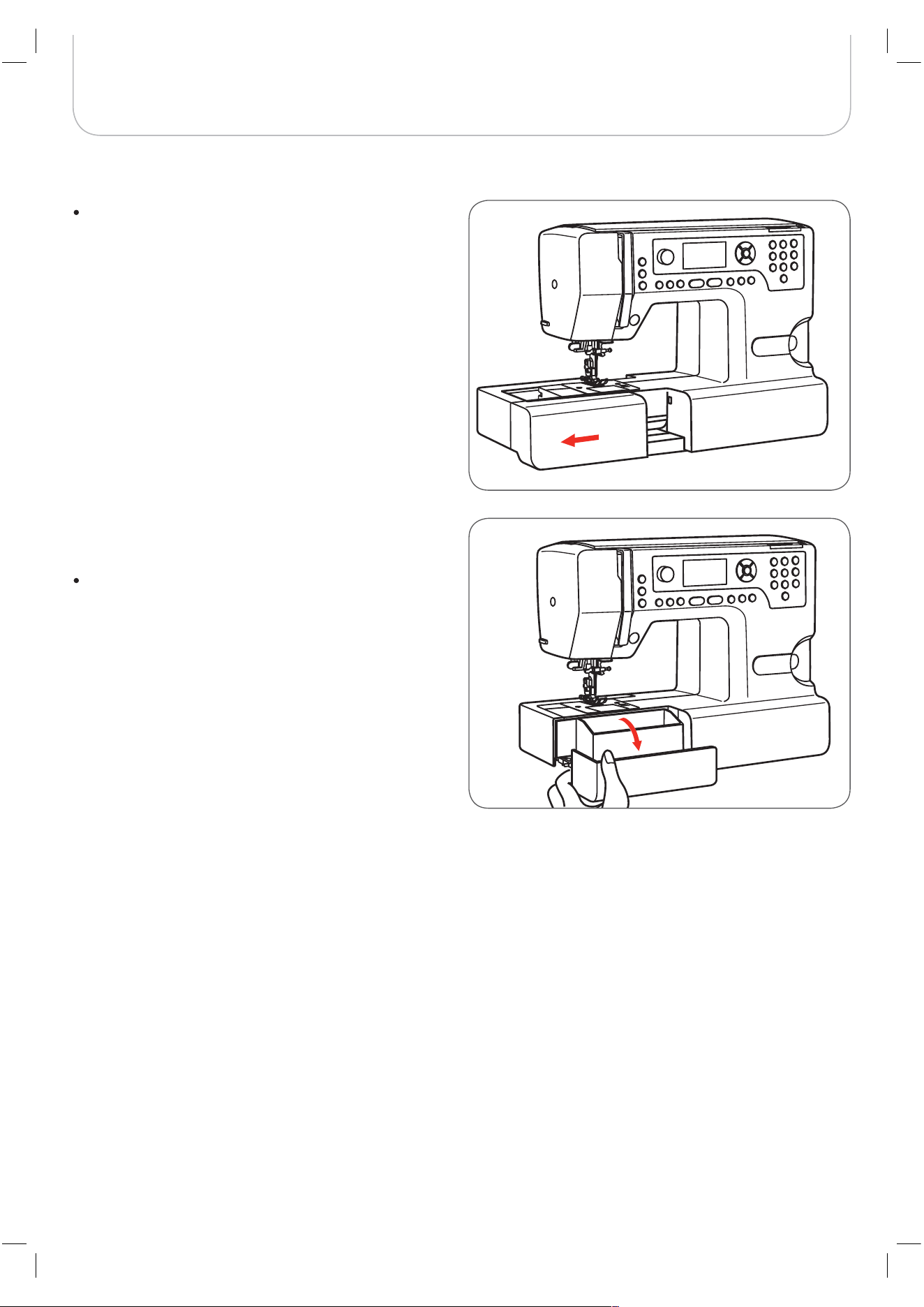
Sewing Table
Keep the snap-in sewing table horizontal, and pull it in
the direction of the arrow.
The inside of the snap-in sewing table is used as an acces-
sory box.
To open the accessory box, tilt the cover towards you.
9
Machine Setup
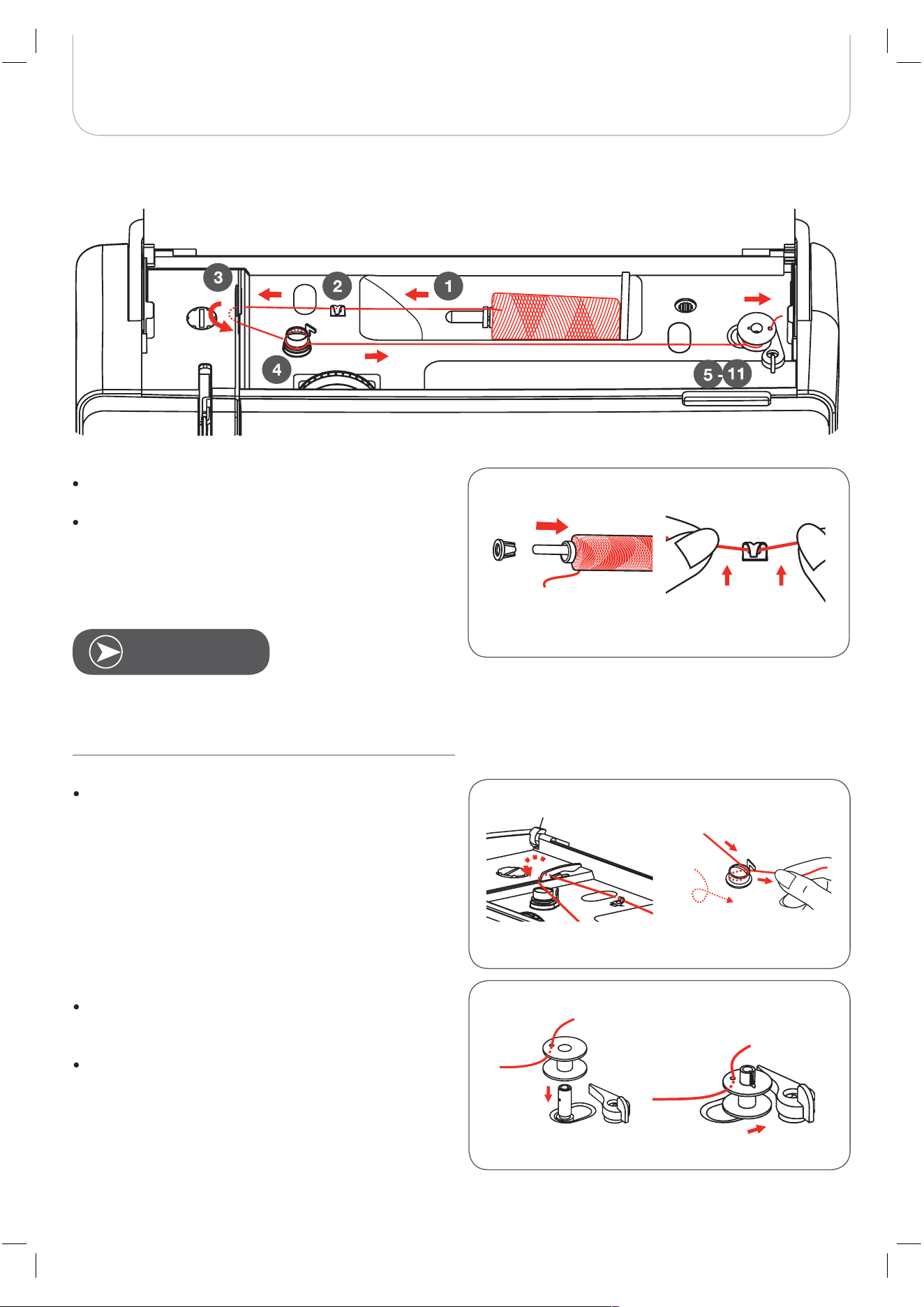
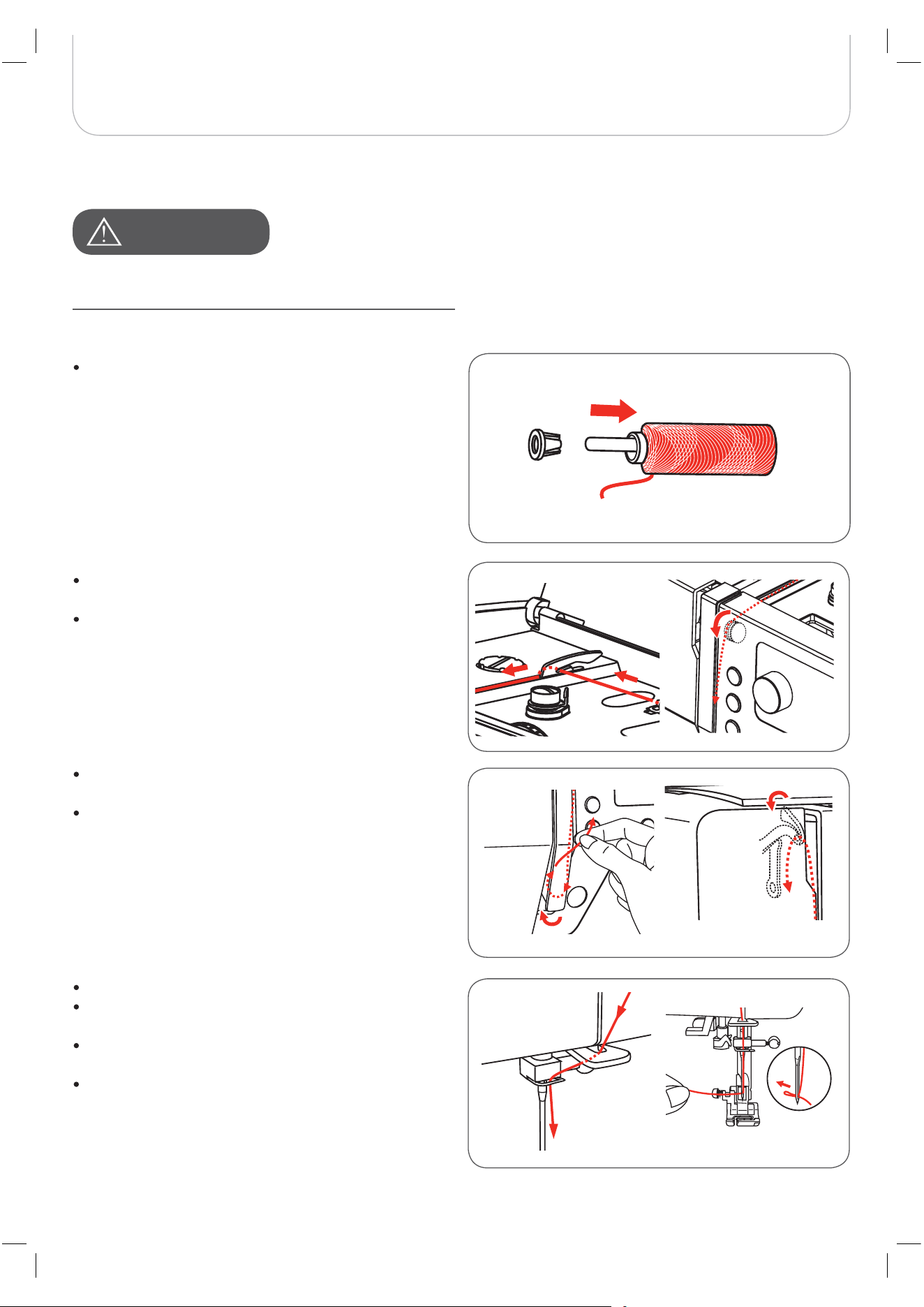
Wind the thread clockwise around the bobbin winder
tension disc.
Insert the thread end through one of the inner holes in
the bobbin as illustrated and place the empty bobbin
on the spindle.
Push the bobbin to right.
N
OTE
If using special thread which winds quickly off the spool
attach a net to the spool before using and use the larger
spool holder. Reduce the thread tension if necessary.
Winding the Bobbin
Place the thread and spool holder onto the spool pin.
For smaller spools of thread use the small spool holder.
Snap the thread into the upper thread guide.
10
Machine Setup
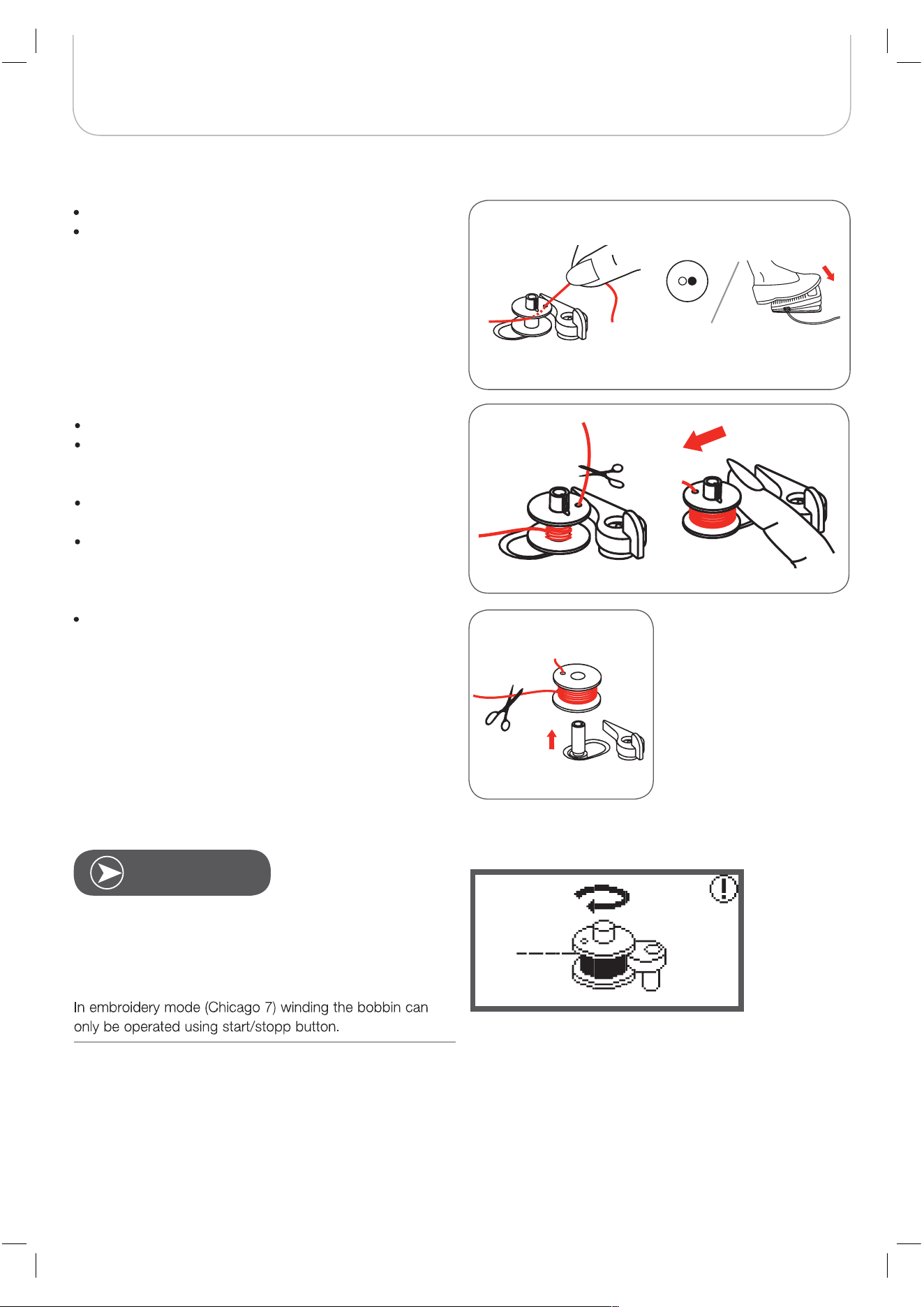
When the bobbin winder spindle is pushed to the right
(bobbin winding position), this message is shown on the
LCD display. It will disappear from the LCD display when the
bobbin winder spindle is pushed back to the left into the
sewing position.
Cut the thread near the hole of the bobbin.
Continue filling the bobbin until it is full.
– The motor stops automatically when the bobbin is
full.
Press the Start/Stop button or release the foot control
to stop the machine.
Push the bobbin winder spindle to left.
Cut the thread and then remove the bobbin.
Hold the thread tail securely in one hand.
Press on the foot control or the Start/Stop button to
start winding the bobbin.
– After the bobbin has wound a few turns, stop the
machine.
N
OTE
11
Machine Setup
Inserting the Bobbin
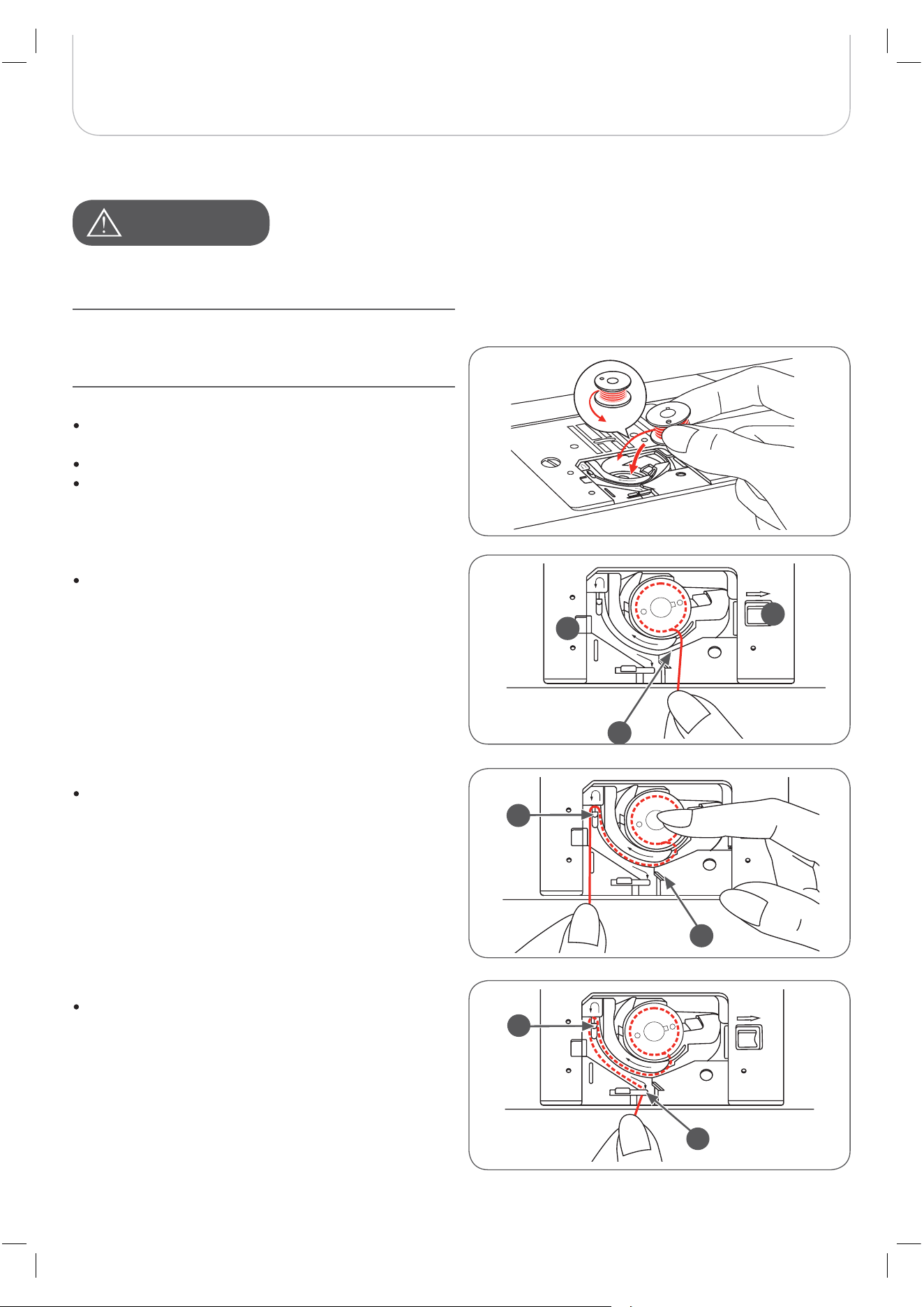
When pushing the locking knob (1), the bobbin cover
opens.
The bobbin cover can be pulled out of the guide (2).
Inserting the bobbin in the bobbin holder with the
thread running in counter-clockwise direction.
A
TTENTION
!
Turn power switch to «O» before threading or unthreading
the machine.
The thread take-up lever must be in the highest position
when threading. Incorrect threading can cause damages to
the machine!
A
1
2
A
B
C
B
To make sure that the thread is pulled into the tension
spring of the bobbin holder, press a finger slightly onto
the bobbin while pulling. As a check you must feel a
resistance in the thread feed.
Pull the thread at the arrow markings into the stitch
plate thread guide from (B) to (C).
– To cut off excess thread pull the thread back over
the cutting-off blade at point (C).
– When closing, insert the lid in the guide (2) on the
left. Afterwards press down on the right until the
locking knob (1) engages.
Pull the thread along the arrow marking through the slit
under the finger (A) as far as the pulley (B).
A
TTENTION
!
12
Machine Setup
Threading the Upper Thread
It is important to carry out the threading correctly as by not
doing so several sewing problems can occur.
N
OTE
6
5
7
13
Machine Setup
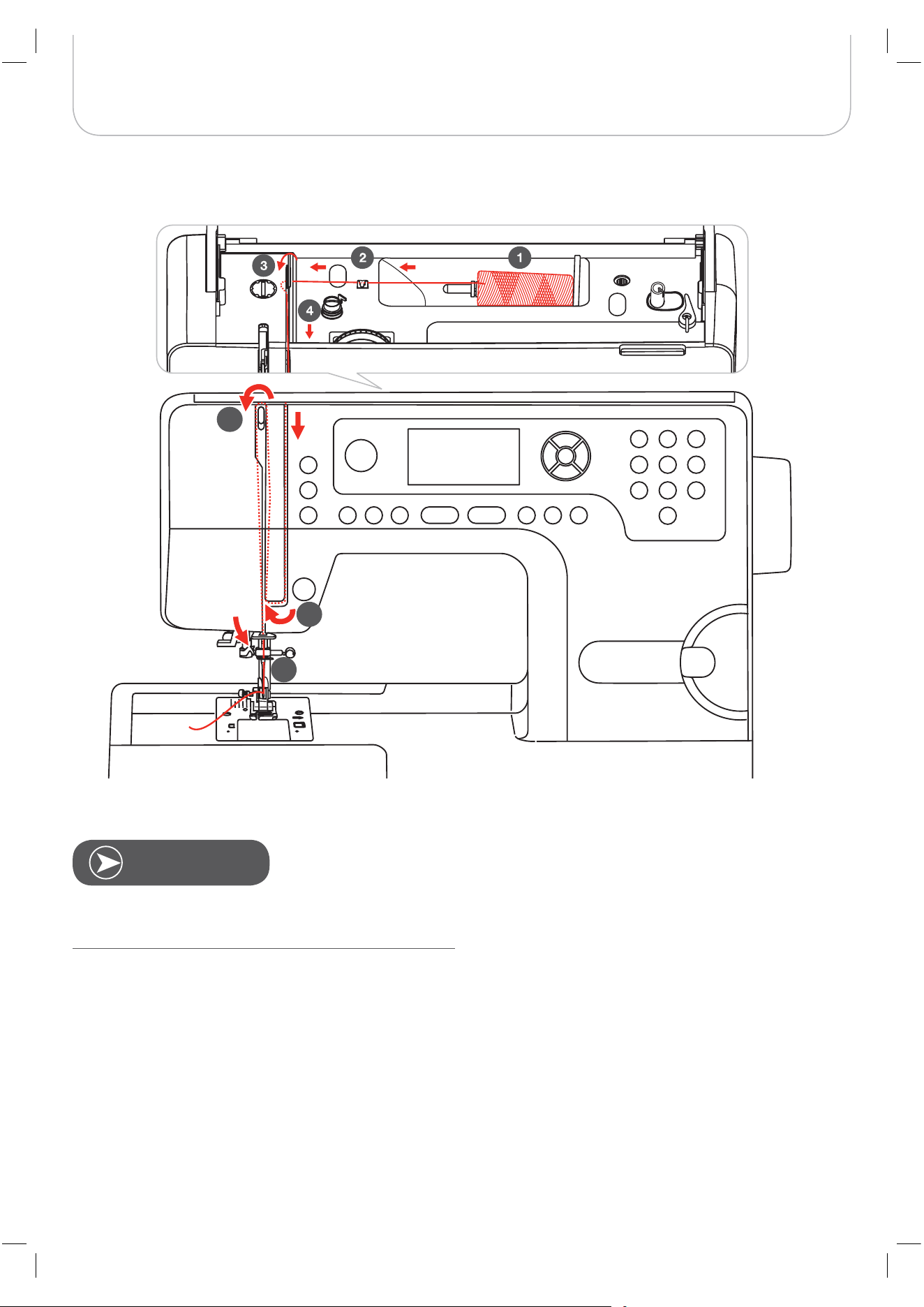
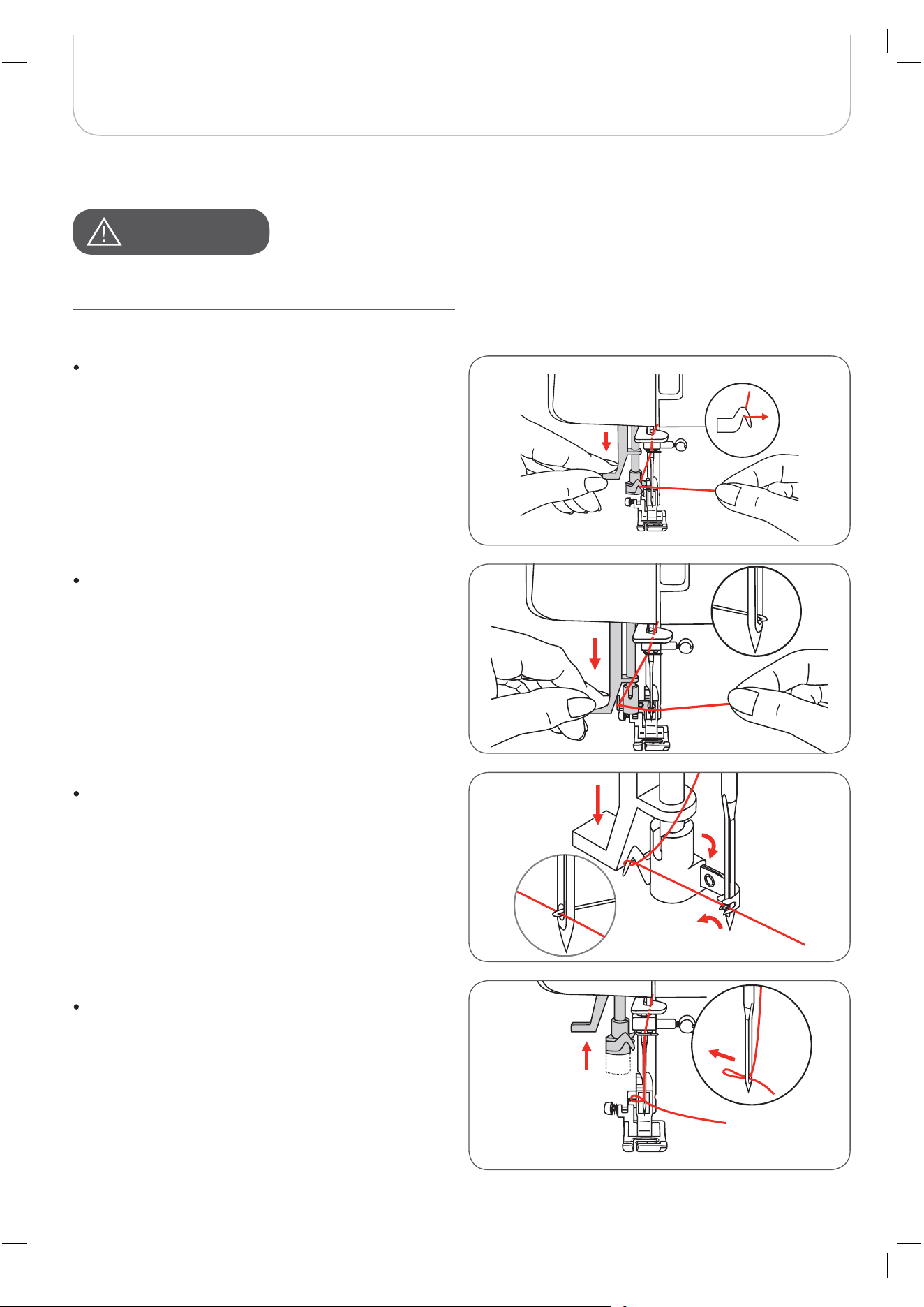
Place the thread spool on the spool pin so that the
thread comes from the front of the spool, then place
the spool cap at the end of the spool pin.
Start by raising the needle to its highest point, and also raise
the presser foot to release the tension discs.
Pull the thread from the spool through the upper thread
guide.
Guide the thread around the thread guide pulling the
thread through the pre-tension spring as illustrated
Then lead it further down and around the bottom part
of the take-up lever cover.
Pull it up and insert the thread from the right to the left
through the slotted eye of the take-up lever and then
take it downwards again.
Guide the thread through the wire loop.
Pull the end of the thread through the needle from the
front to the rear, and pull out about 10 cm of thread.
Use the face plate thread cutter to cut excess needle
thread.
Use the needle threader to thread the needle (refer to
next page for instruction).
A
TTENTION
!
14
Machine Setup
Needle Threader
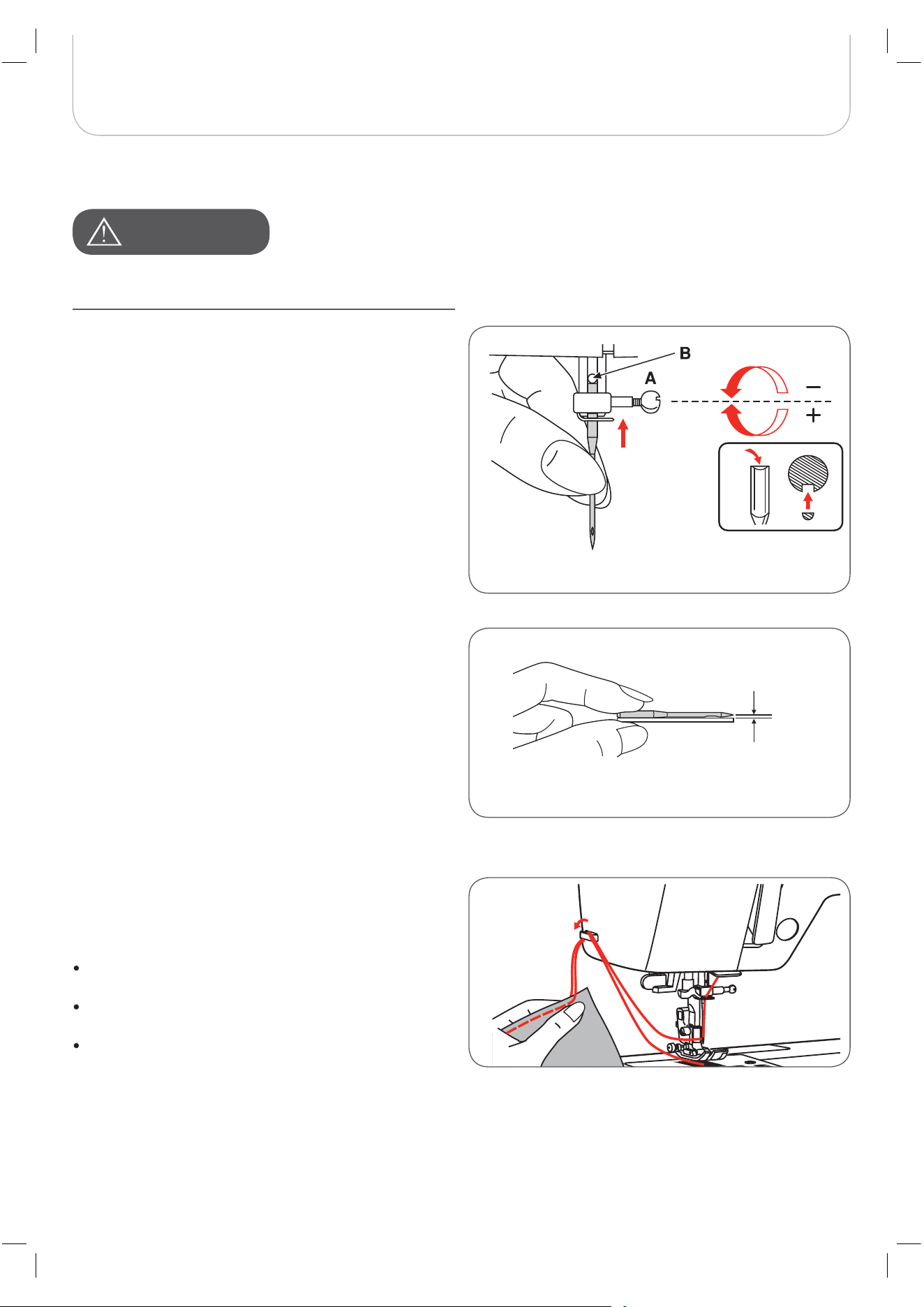
Lower the needle threader lever slowly and pull the
thread through the thread guide as illustrated and then
to the right.
A
TTENTION
!
Raise the needle to its highest position and lower the
presser foot.
Turn power switch to the off position «O»!
The needle threader automatically turns to the thread-
ing position and the hook pin passes through the
needle eye.
Pull the thread to the right, guiding it to the front of the
needle
Hold the thread loosely and release the lever slowly.
– The hook will turn and pass the thread through the
needle eye forming a loop.
– Pull the thread through the needle eye.
A
TTENTION
!
15
Machine Setup
Replacing the Needle
Thread Cutter
Change the needle regularly, especially if it is showing signs of
wear and tear or of it is causing problems.
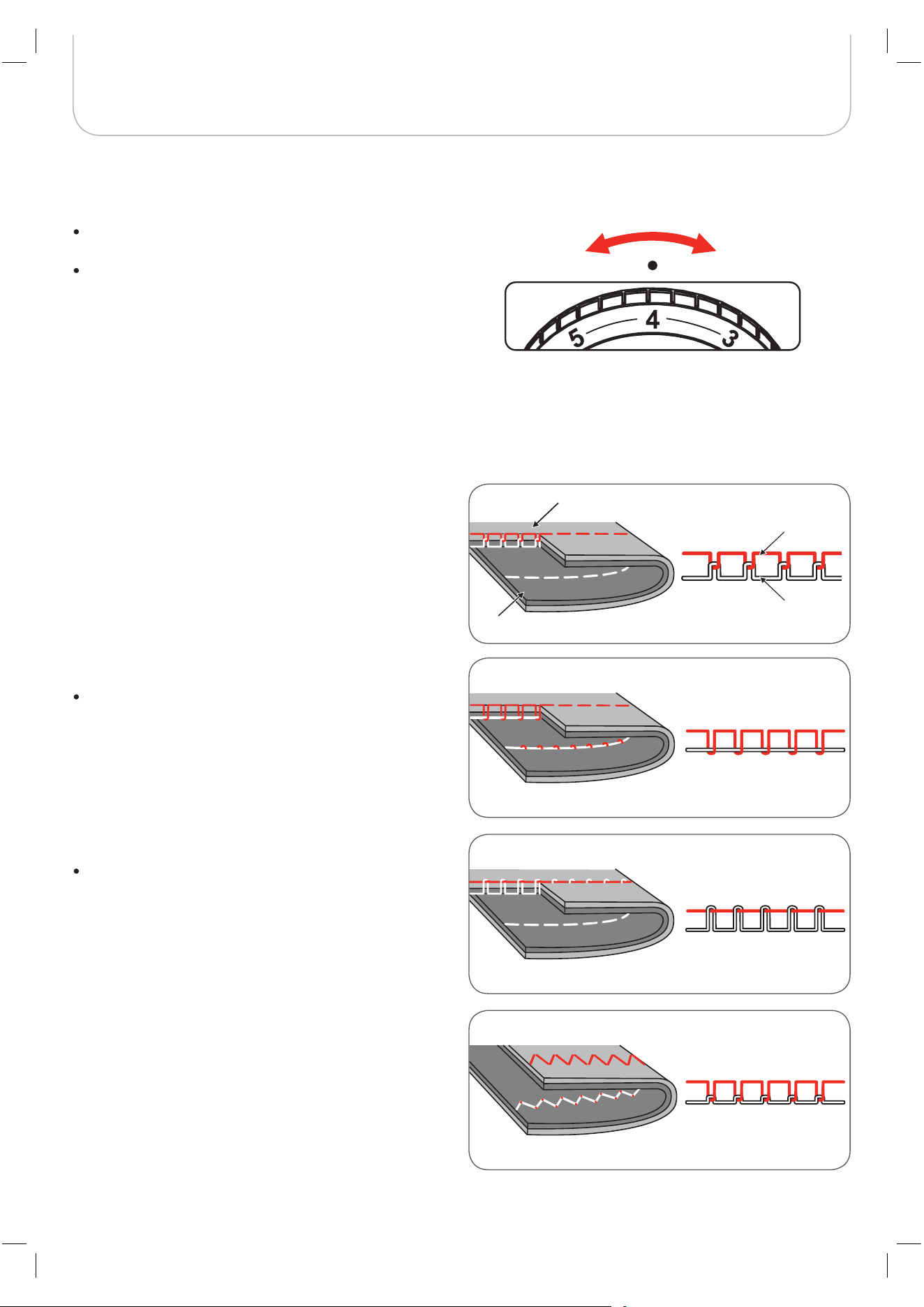
Insert the needle following the illustrated instructions.
A Loosen the needle clamp screw and tighten it again
after inserting the new needle. The flat side of the shaft
must be at the back.
B Insert the needle as far up as it will go.
The thread cutter serves two purposes:
1. Cut the thread after threading the needle
2. Cut the thread after finishing a seam.
To cut the thread after completing your work raise the
presser foot.
Remove the fabric, draw the threads to the left side of
the face cover and cut using the thread cutter.
The threads are cut at the proper length to start the
next seam.
Needles must be in perfect condition
Problems can occur with:
– Bent needles
– Blunt needles
– Damaged points
Turn power switch to off («O») when carrying out the
following operation!
A
TTENTION
!
16
Machine Setup
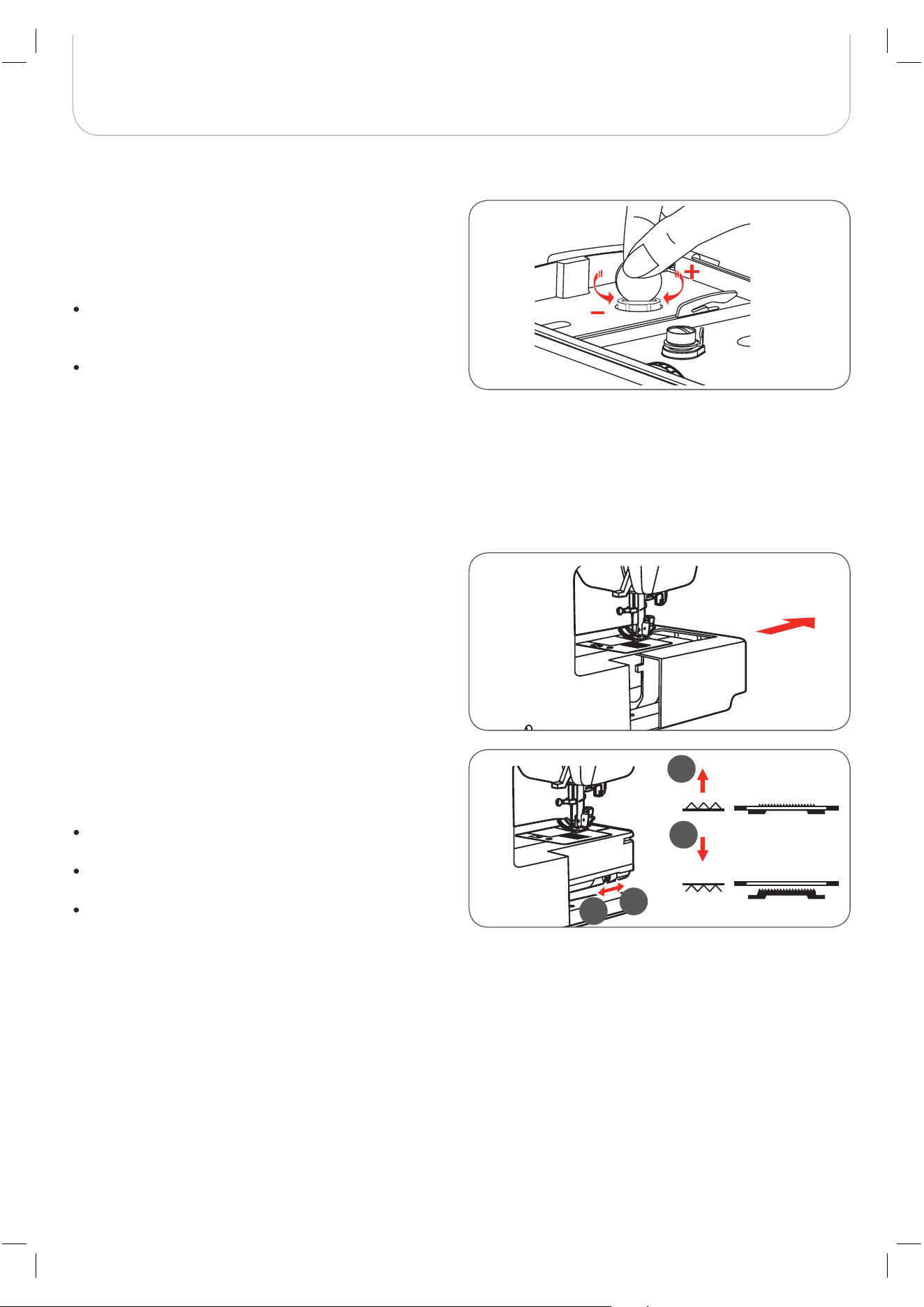
Thread Tension
Normal thread tension for straight stitch sewing.
Basic thread tension setting: «4»
To increase the tension, turn the dial to the next num-
ber up.
To reduce the tension, turn the dial to the next number
down.
Appropriate setting of tension is important to good sew-
ing.
With any decorative sewing you will always obtain a nicer
stitch formation and less fabric puckering when the upper
thread appears on the wrong side of your fabric.
Thread tension is too loose for straight stitch sewing.
Turn dial to higher number.
Normal thread tension for zig-zag and decorative sew-
ing.
Thread tension is too tight for straight stitch sewing.
Turn dial to lower number.
loose
tight
Upper thread
Bobbin thread
Surface
Reverse side
17
Machine Setup
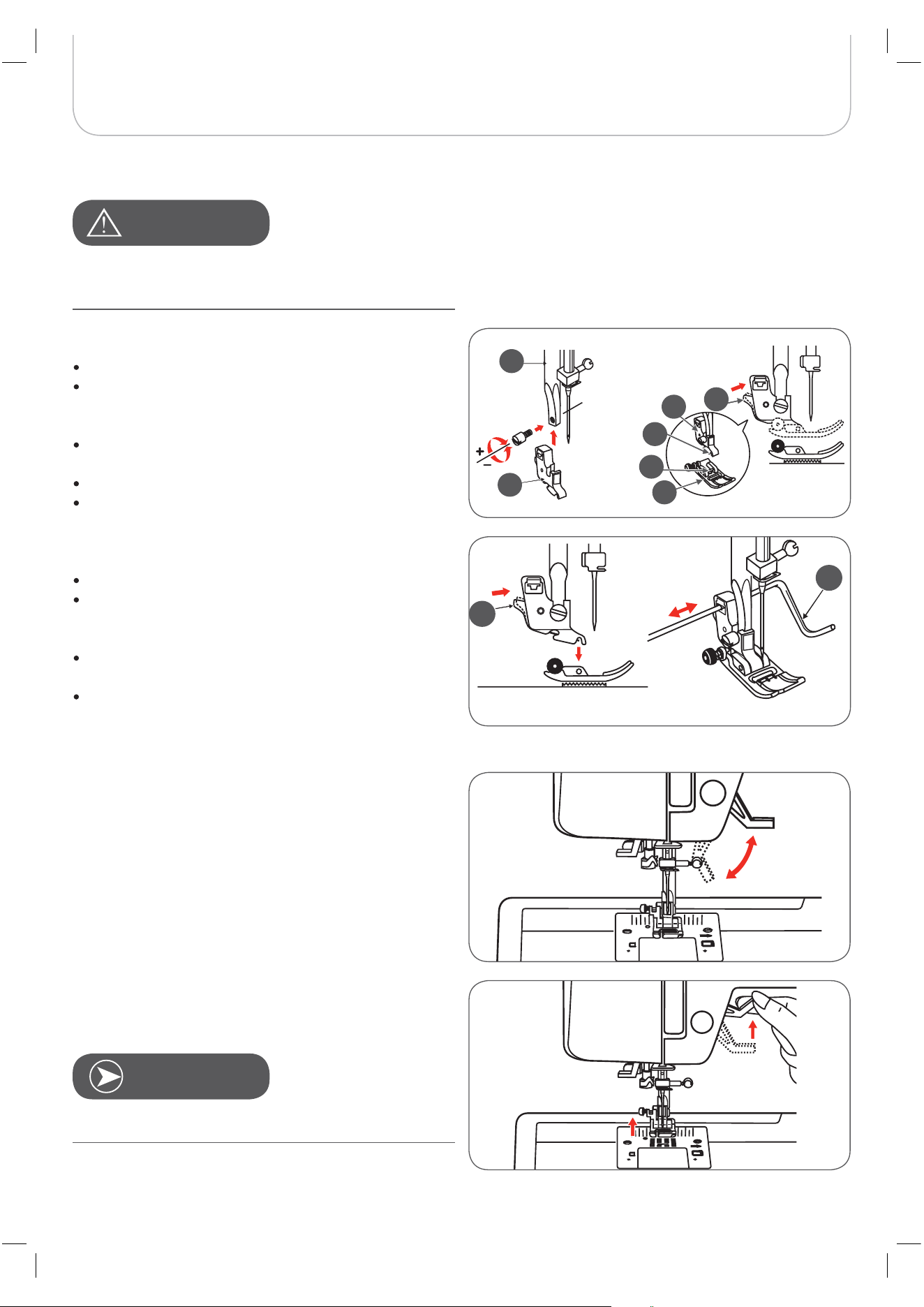
Raising or Dropping the Feed dog
With the sewing table detached, the feed dog lever can be
located on the back of the free arm.
Sliding the lever to position (a) will raise the feed dog.
Sliding the lever to position (b) will lower the feed dog, for
example during button sewing or freehand embroidery.
If you wish to continue sewing normally, slide the lever
to position (a) in order to raise the feed dog.
The feed dog will not be raised if you do not turn the
handwheel, even if the lever is slid to the right.
Make a complete turn to raise the feed dog.
Altering Presser Foot Pressure
The presser foot pressure of the machine has been pre-set
and requires no particular re-adjustment according to the type
of fabric (light-or-heavy weight).
However, if you need to alter the presser foot pressure, turn
the presser foot pressure adjusting screw using a coin.
For sewing very thin fabric, loosen the pressure by
turning the screw counter-clockwise, and for heavy
fabric, tighten by turning it clockwise.
To return to initial pressure foot setting turn the presser
foot pressure adjusting screw to become flush with the
face cover.
b
a
b
a
18
Machine Setup
Changing the Presser Foot
Two-Step Presser Foot
There are two raising levels of the presser foot. Lifting the foot
up to the first level is used to place the fabric under the foot
for sewing.
The second level is only used in embroidery mode to remove
the hoop easily.
Turn power switch to off («O») when carrying out any of the
following operations!
Attaching the presser foot holder
Raise the presser foot bar (a).
Attach the presser foot holder (b) as illustrated.
Attaching the presser foot
Lower the presser foot holder (b) until the cut-out (c) is
directly above the pin (d).
Press the black lever (e).
Lower the presser foot holder (b) and the presser foot
(f) will engage automatically.
Removing the presser foot
Raise the presser foot.
Press the black lever (e) and the foot will disengages.
Attaching the edge/quilting guide
Attach the edge/quilting guide (g) in the slot as illus-
trated.
Adjust according to the need for hems, pleats, etc.
A
TTENTION
!
N
OTE
The needle must always be at the highest position.
a
b
b
d
c
f
e
e
g

19
Important Sewing Information
Needle, Fabric, Thread Selection Guide
The thread is chosen according to the purpose. For a perfect sewing result, thread and fabric quality play an important role.
It is recommended to use quality brands.Care must be taken when choosing needle and thread. The correct needle size
depends on the selected thread and fabric. The fabric weight and type determine the thread weight, needle size and point
form.
Needle size Fabrics Thread
9-11/65-75
Light-weight fabrics such as thin cottons,
voile, serge, silk, muslin, Qiana, interlocks,
cotton knits, tricots, jerseys, crepes, woven
polyester, shirt & blouse fabrics.
Light-weight thread in cotton, nylon or
polyester.
12/80 Medium-weight fabrics such as cotton, satin,
kettleclote, sailcloth, double knits, lightweight
woolens.
Most threads sold are medium size and
suitable for these fabrics and needle
sizes.
Use polyester threads on synthetic
materials and cotton on natural woven
fabrics for best results.
Always use the same thread for upper
and lower thread.
14/90 Medium-weight fabrics-cotton duck, woolen,
heavier knits, toweling, denims.
16/100 Heavy-weight fabrics such as canvas,
woolens, outdoor tent and quilted fabrics,
denims, upholstery material (light to medium).
18/110 Heavy woolens, overcoat fabrics, upholstery
fabrics, some leathers and vinyls.
Heavy-weight thread, carpet thread. (Use
heavy foot pressure with large numbers.)
N
OTE

20
Important Sewing Information
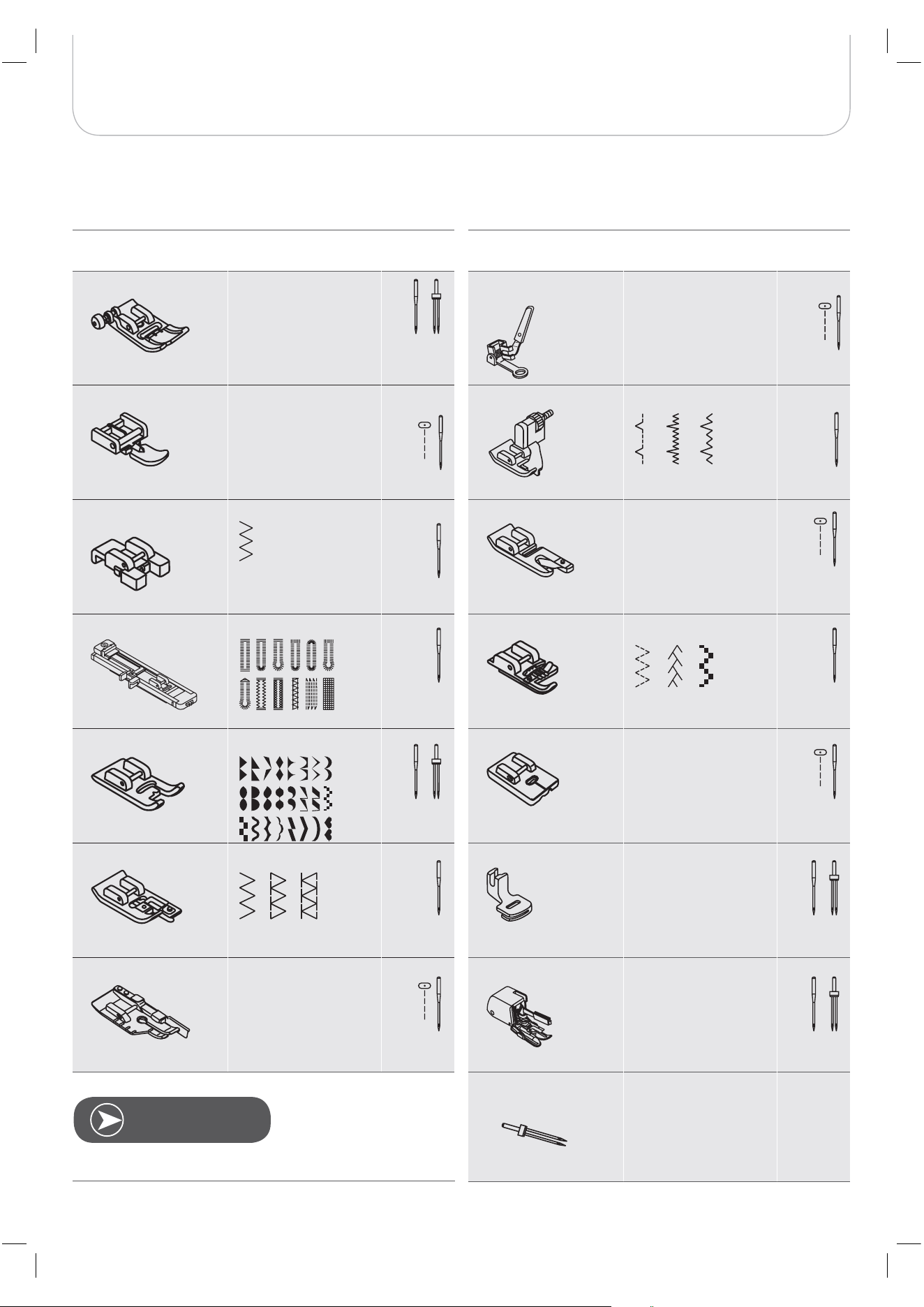
s can be purchased for utility and decorative work. European needles show sizes 65, 70, 80 etc. American and
Japanese needles show size 9, 11, 12 etc.Replace needle regularly (approximately after every second garment ) and/or
when thread breakage or skipped stitches occur.
Needles Explanation Type of fabric
HA x 1
15 x 1
Standard sharp needles.
Sizes range thin to large.
9 (65) to 18 (110)
Natural woven fabrics-wool, cotton, silk,
etc. Qiana. Not recommended for double
knits.
15 x 1/130/ 705H
Semi-ball point needle, large eye.
9 (65) to 18 (110)
Natural and synthetic woven fabrics,
polyester blends. Knits-polyesters,
interlocks, tricot, single and double knits.
Can be used instead of 15 x 1 for sewing
all fabrics.
15 x 1/ 130/705H (SUK)
Full ball point needle.
9 (65) to 18 (110)
Sweater knits, Lycra, swimsuit fabric,
elastic.
130PCL/705H-LR/LL
Leather needles.
12 (80) to 18 (110)
Leather, vinyl, upholstery. (Leaves smaller
hole than standard large needle.
N
OTE
Twin needle
21
Important Sewing Information
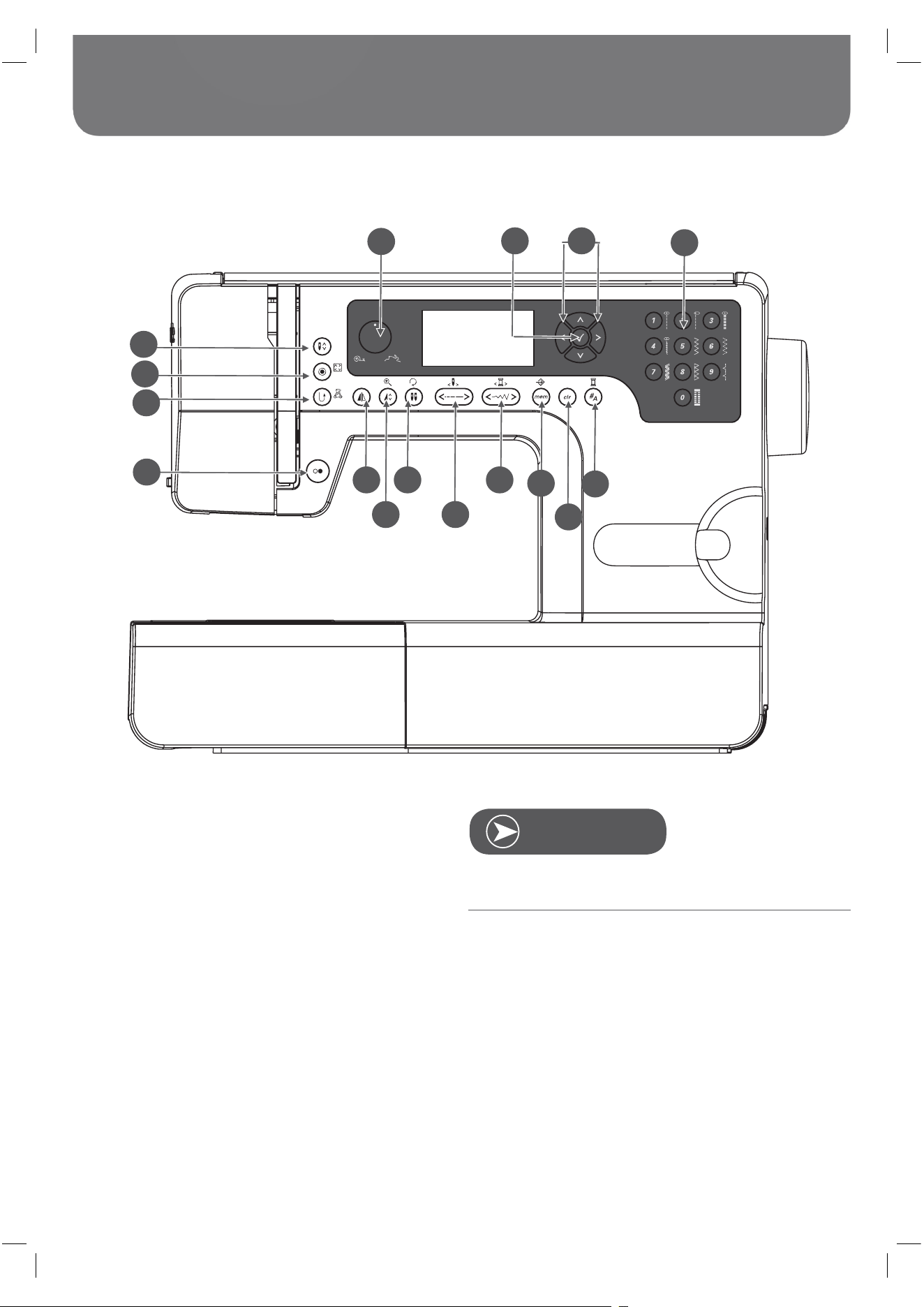
Presser Foot Application Chart
The is being suggested with certain stitches for more creativity
Presser Foot Application Needle
General sewing,
Patchwork stitches,
Decorative stitching,
Smoking, Fagoting,
etc.
Zipper foot (I) Inserting zippers
Button sewing-on
Buttonhole foot (D) Buttonhole sewing
(A) Satin stitch sewing
foot (E) Overcasting
* Quilting and Patch-
work sewing
Presser Foot Application Needle
Darning/Embroidery
foot*
Darning, Free
embroidery Mono-
gramming
Blind hem stitching
Hemmer foot (K)*
Narrow hemming
Cording foot (M)*
Cording
Invisible Zipper foot*
Inserting invisible
zippers
Gathering foot*
Gathering
Walking foot*
This foot helps to
prevent uneven
feeding with very
delicate fabrics
*
* Available as optional accessories
N
OTE
twin needle
Zigzag foot (T)
foot (F)Blindstitch
Button sew-on foot
(H)
Embroidery foot
Overlock
Quilting foot 1/4“
Twin needle
22
Display Explanation & Operating Functions
Buttons Explanation
1 Start/Stop button
2 Reverse/Exit button
3 Auto-lock/Trace button
4 Needle up/down button
5 Speed dial
6 OK button
7 Arrow buttons
8 Direct pattern selection and Number buttons
9 Mirror image button
10 Elongation/Resize button
11 /Rotate button
12 Stitch length adjustment/Stitch forward/back button
13 Stitch width adjustment/Colour forward/back button
14 Memory/Setup button
15 Clear/Return button
16 Pattern group selection/Colour setup button
The icon on the button is for sewing mode, and the icon on
the side of the button is for embroidery mode.
N
OTE
1
3
4
2
5
6 7
8
9
11 13
14
16
10 12
15
Twin needle
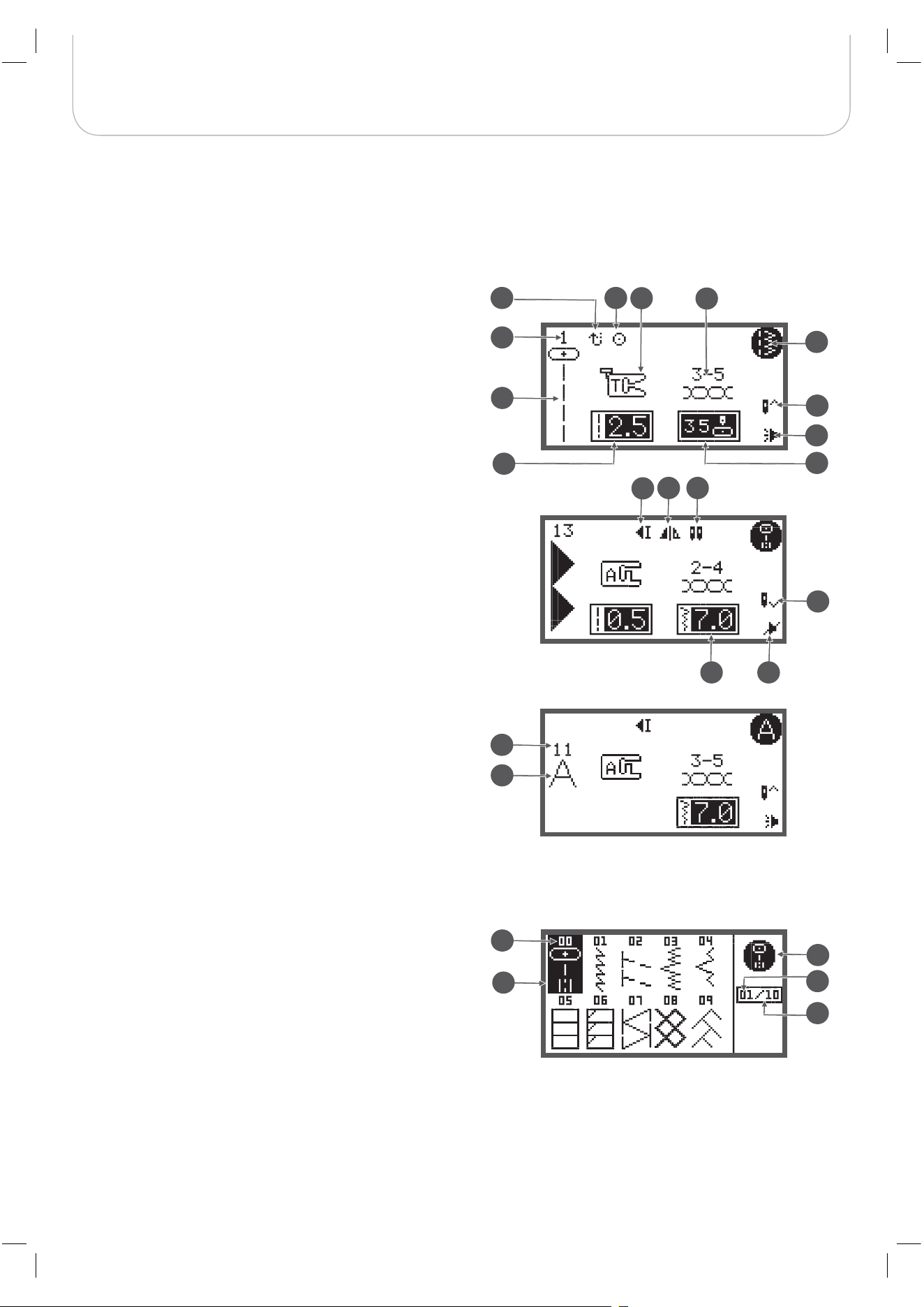
23
Display Explanation & Operating Functions
Information on the LCD Display
Normal mode display
1 Pattern
2 Pattern number
3 Reverse
4 Auto-lock
5 Recommended presser foot
6 Recommended tension
7 Pattern group
8 Needle up position
9 Stitch length
10 Needle position
11 Sound on
12 Auto-stop
13 Mirror image
14
15 Needle down position
16 Stitch width
17 Sound off
18 Alphabet number
19 Alphabet
Normal Mode
1
21
20
18
19
2
4
8
15
22
5
11
7
10
6
9
3
17
16
1413
12
24
23
Normal Mode display - pattern browser display
20 Pattern
21 Pattern number
22 Pattern group
23 Current page
24 Total page
Twin needle
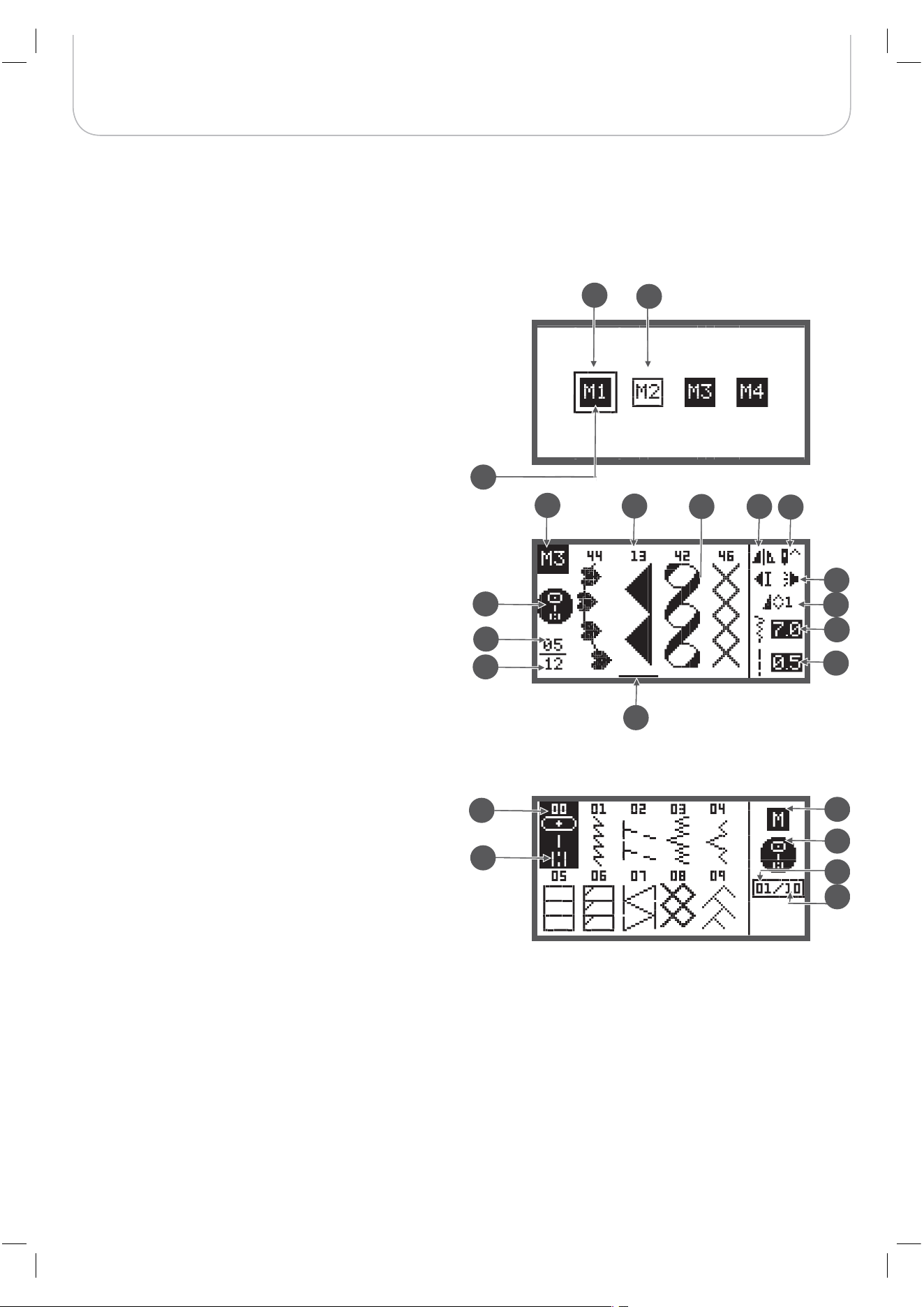
24
Display Explanation & Operating Functions
Memory mode display
1 Selected memory (framed)
2 Memory containing stitches
3 Empty memory
4 Current memory
5 Pattern number and pattern
6 Auto-stop
7 Mirror image
8 Needle up position
9 Sound on
10 Elongation
11 Stitch width
12 Stitch length
13 Pattern group
14 Current memory unit
15 Total of memory units
16 Memory cursor
Memory Mode
Memory Mode display - pattern browser display
17 Pattern
18 Pattern number
19 Memory model
20 Pattern group
21 Current page
22 Total page
13
14
15
18
17
9
11
19
10
4
2
12
16
7
8
65
21
22
20
1
3
25
Display Explanation & Operating Functions
Function Buttons
Start/Stop button
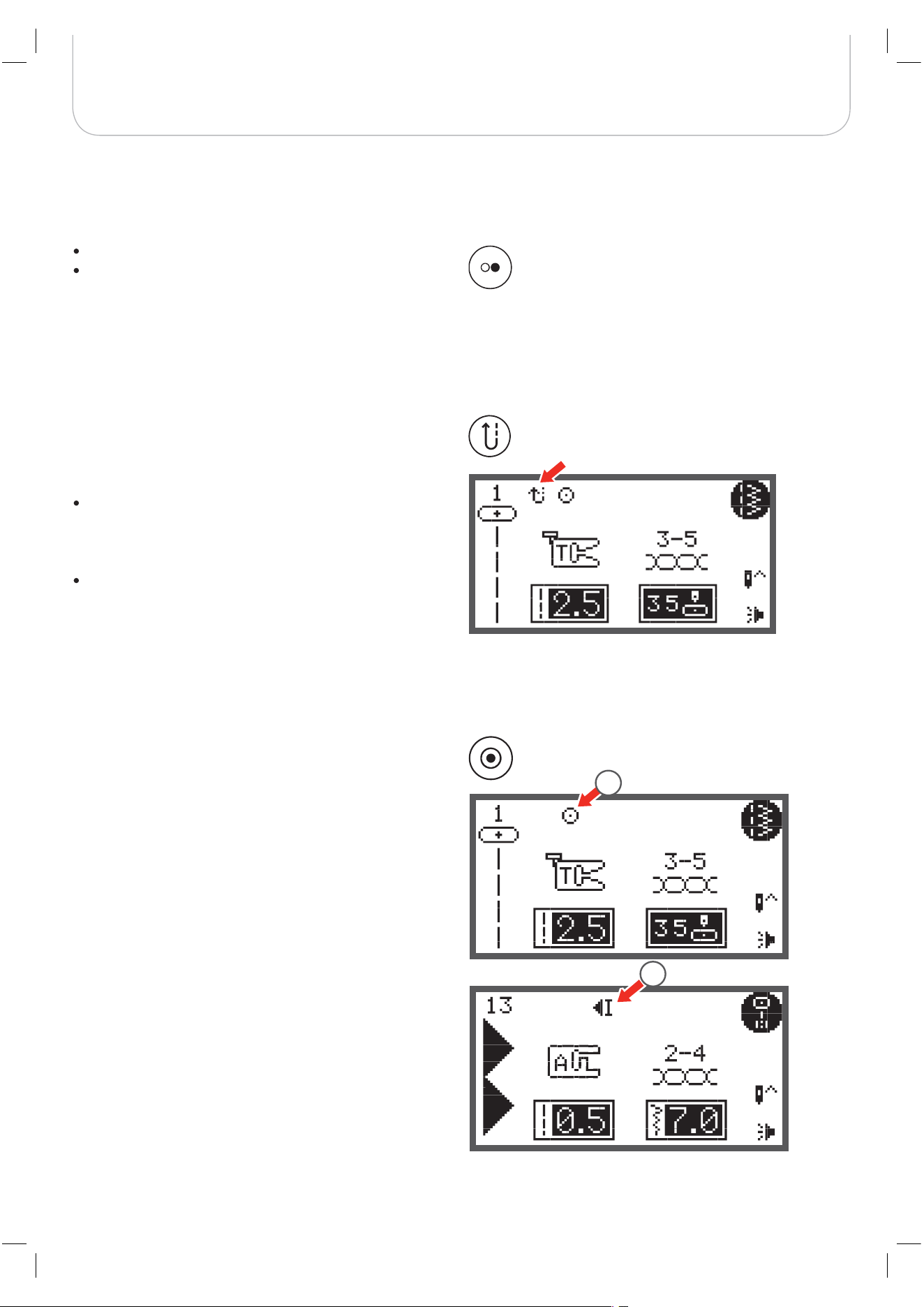
Reverse
Auto-Lock
Press the Start/Stop button to start the machine.
Press again to stop it. The machine will move slowly at
the start of sewing.
– This way you may operate the machine without foot
control.
Reverse is pressed to sew in reverse.
The icon «Reverse» on the LCD indicates reverse sewing.
Only the Direct Group Patterns 1 – 5 and A Group Patterns
00 can be sewn in reverse.
If you press the Reverse/Exit button before starting to
sew
– the machine will permanently sew in reverse. Press
the button again to sew forward.
If you press the reverse button during sewing
– it will sew in reverse as long as the reverse buttons
is pressed.
are selected, the machine will immediately sew 3 securing
stitches when the Auto-Lock button is pressed, then it will
stop automatically.
1 The LCD display shows the symbol until the machine is
stopped.
press the Auto-Lock button, the machine will sew
3 securing stitches at the end of the current pattern and then
stop automatically.
2 The LCD display shows the symbol until the machine is
stopped.
The function will be cancelled if you press the button once
again or select another pattern.
1
2
When the Direct Group Patterns 1-4 and A Group Patterns 00
Except for Direct Group Patterns 0-4 and A Group Patterns
00, 86-99,
26
Display Explanation & Operating Functions
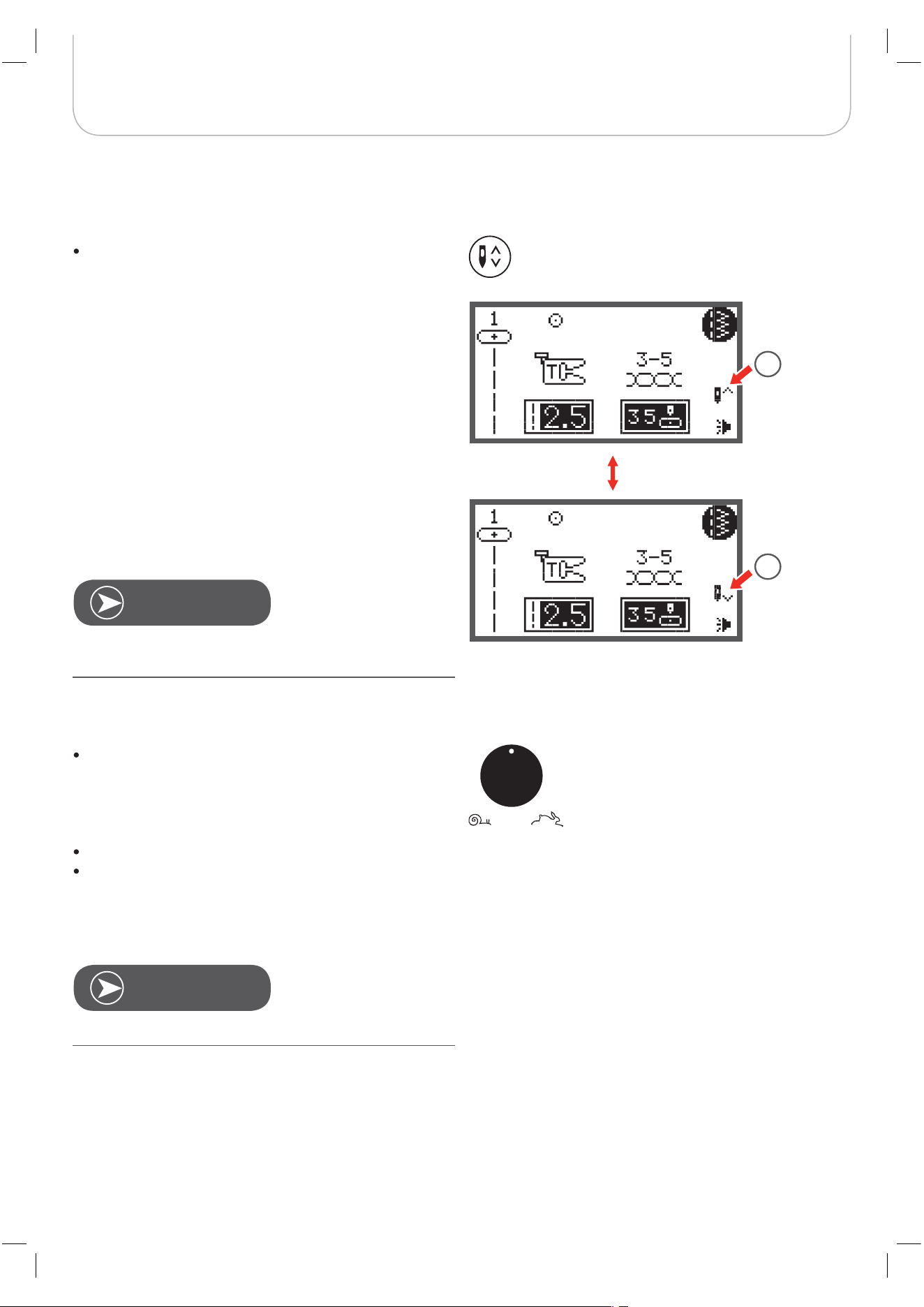
Speed Dial
By adjusting the position of the speed dial
– the top speed during sewing may be limited.
The position of the speed dial defines the sewing speed when
the foot control is pressed down completely.
For higher speed: Turn the dial clockwise
For slower speed: Turn the dial counter-clockwise
When the machine is run via the Start/Stop button the posi-
tion of the speed dial defines the actual sewing speed.
Needle up/down button
By pressing the needle up/down button
– the needle will either stop in the up position or in the
material when stop sewing.
1 Press the button so the arrow on the LCD points
upward
– the needle moves to the highest position and will
stop there after sewing.
2 Press the button so the arrow on the LCD points
downwards
– the needle moves to the lowest position and will
stop there after sewing.
During sewing, press the needle up/down button, the
machine will stop automatically.
Speed setting is applied exclusively in sewing mode.
N
OTE
N
OTE
1
2
27
Display Explanation & Operating Functions
Direct pattern selection
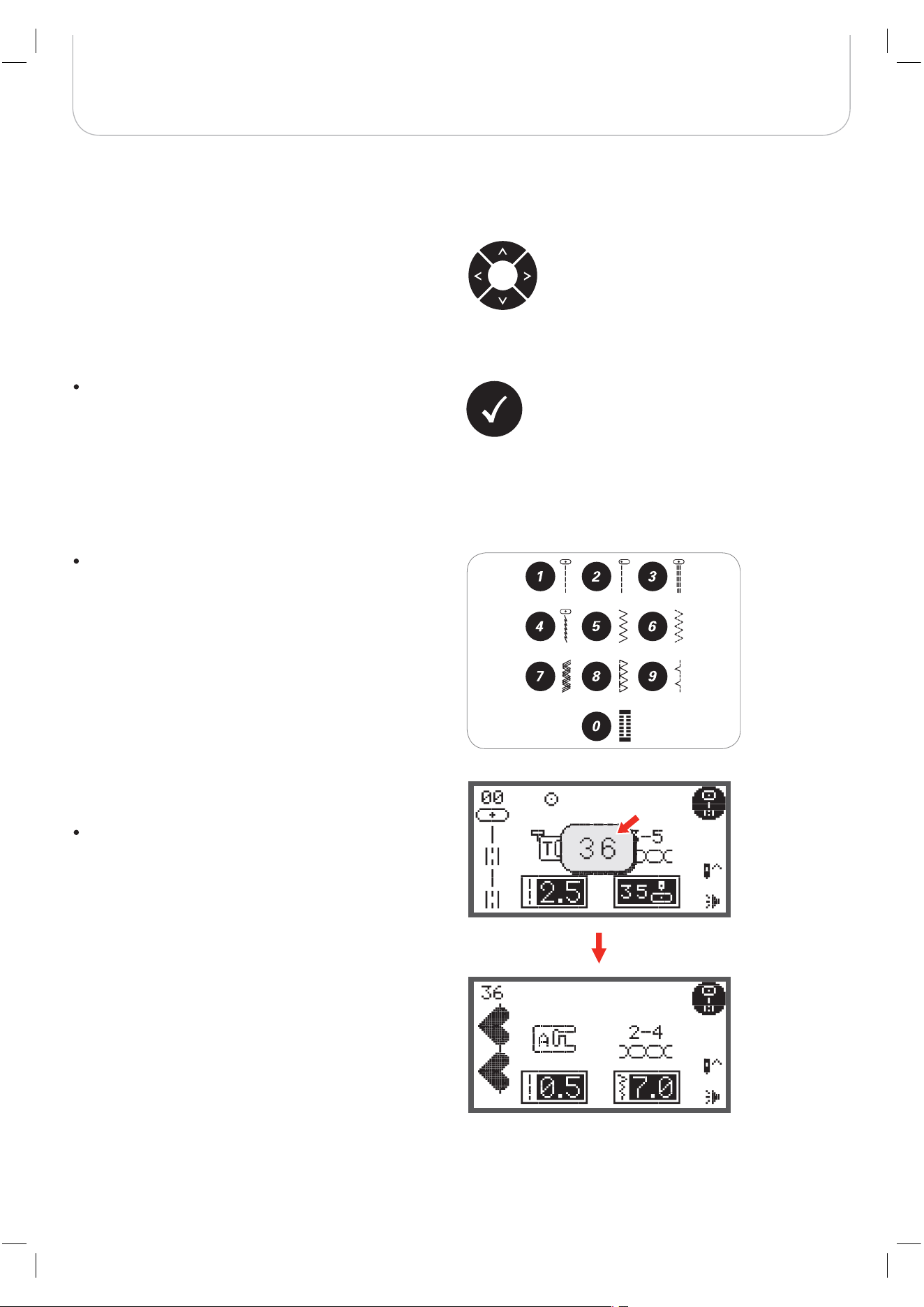
Press the buttons to select the practical stitch patterns
shown beside the numbers when the Direct Mode is
set.
Number buttons
Press the buttons to select the practical stitch patterns
at set Pattern Group directly.
Arrow buttons
Use the buttons to select desired pattern, function… etc.
OK button
Press this button to confirm the selection.
– In the Normal Mode press the button to enter the
pattern browser.
– In the Memory Mode press the button to enter the
pattern browser.
28
Display Explanation & Operating Functions
Elongation
A Group Patterns 13-36 can be elongated up to five
times its normal length by pressing the elongation but-
ton.
When the width or length of the stitch is changed, a greater
variety of patterns is available.
Except for the Direct Group Patterns 0 and the A Group pat-
terns 86-99, the patterns can be sewn in two parallel lines of
the same stitch using the .
Press the button and the machine auto-
matically reduces the maximum width for
sewing.
Press the button again to return to single needle sew-
ing.
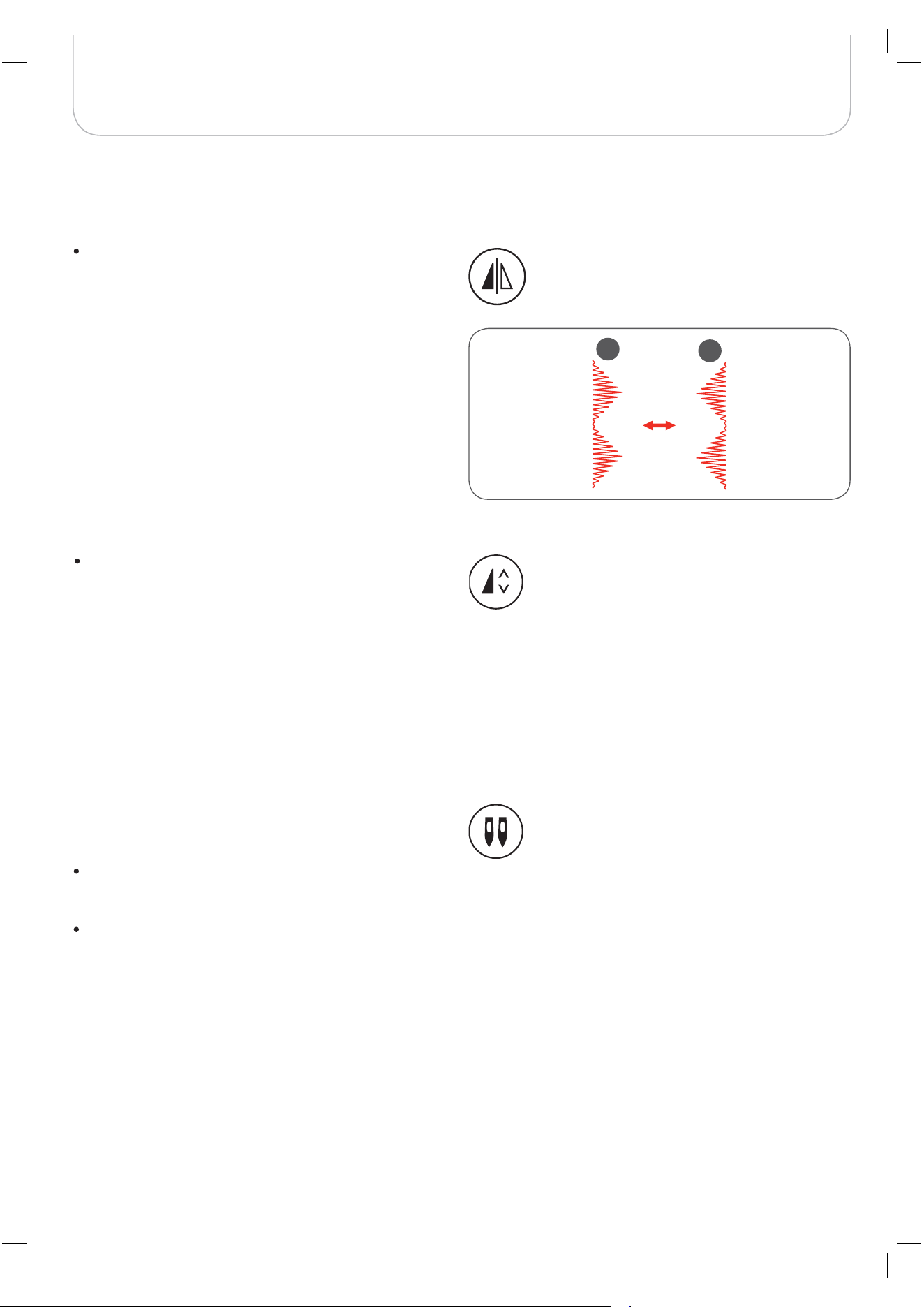
Mirror image button
Except for Direct Group Pattern 0 and the A Group
patterns 86-99, the other patterns can be mirror-
imaged by pressing the mirror immage button.
– The machine will continue to sew the mirrored pat-
tern until the mirror button is pressed again.
– The mirror function will also be canceled if the pat-
tern is changed.
A Normal pattern
B Mirror-imaged pattern
B
A
Twin needle
twin needle
twin needle
twin needle
29
Display Explanation & Operating Functions
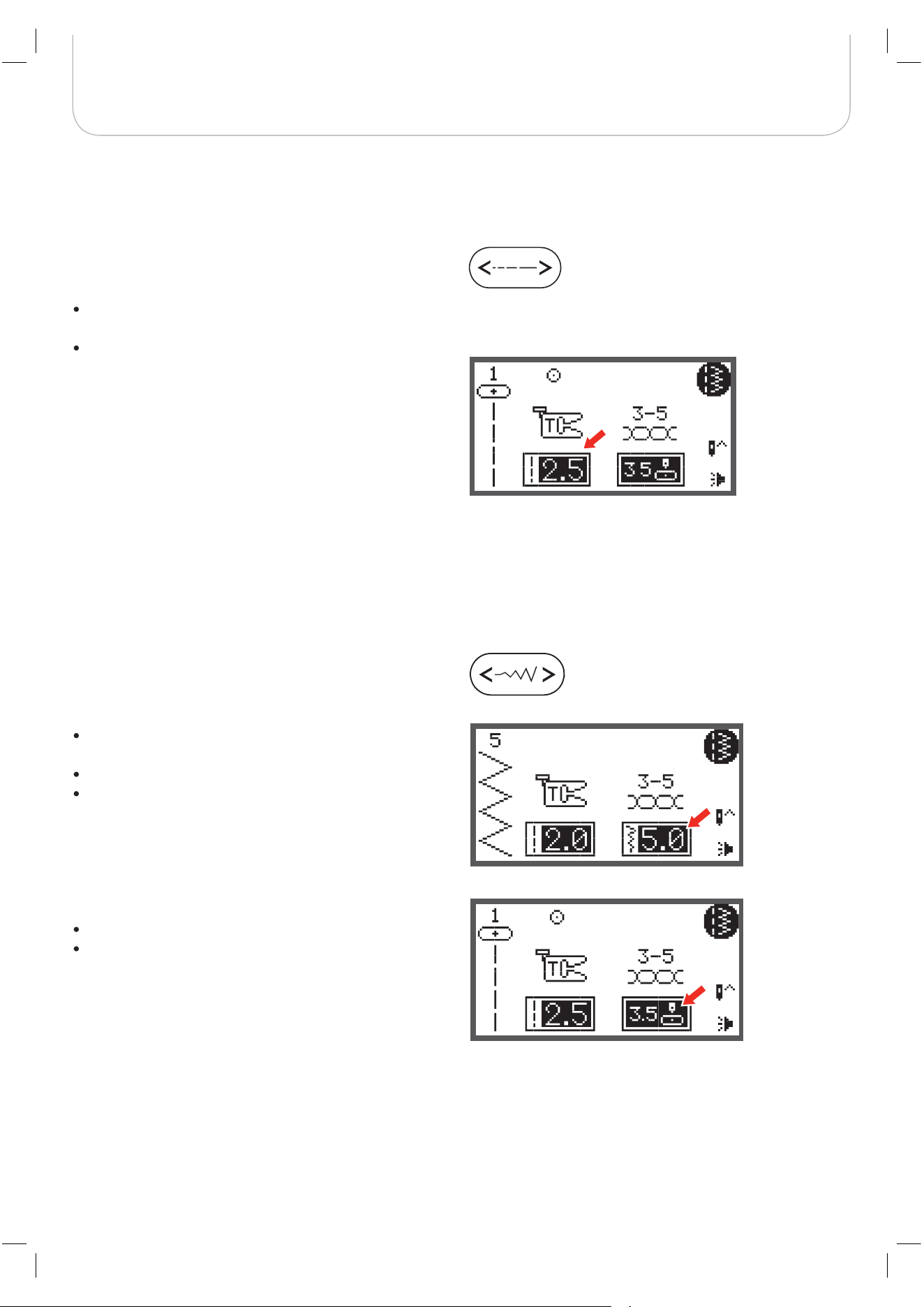
Stitch width adjustment
When selecting a stitch, the machine will automatically set the
recommended stitch width, which will be indicated by num-
bers on the LCD display.
The stitch width can be regulated by pressing the stitch
width adjustment button.
For a narrower stitch, press the button left.
For a wider stitch, press the button right.
– The stitch width can be altered from «0.0 to 7.0».
Certain stiches have a limited stitch width.
When Direct Patterns 1-4 and A Group Pattern 00 are
selected, the needle position is regulated by the stitch width
adjustment buttons.
Press the button left and the needle moves to the left.
Press the button right and the needle moves to the
right.
– The number will be changed from left position «0.0»
to extreme right position «7.0».
– The pre-set center needle position will be indicated
as «3.5».
Stitch length adjustment
When you select a stitch, the machine will automatically set
the recommended stitch length which will be indicated by
numbers on the LCD display.
The stitch length can be altered by pressing the stitch
length adjustment button.
To shorten the stitch length, press the «-» button (left).
For a longer stitch length, press the «+» button (right).
The stitch length can be altered from «0.0 to 4.5». Cer-
tain stitches have a limited stitch length.
30
Display Explanation & Operating Functions
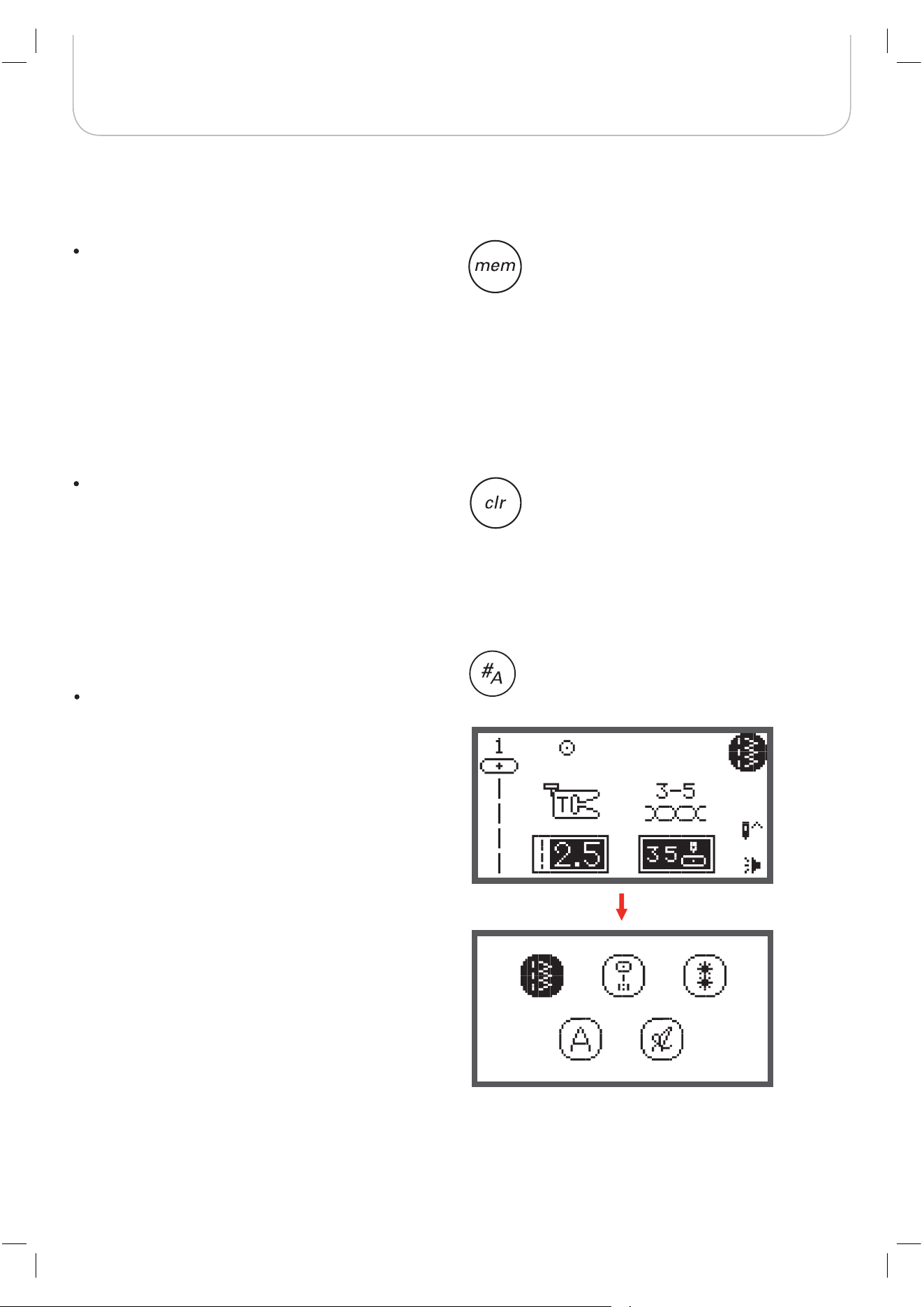
Pattern group selection
The LCD display shows the Direct Group Patterns when you
turn on the machine.
Press the pattern group selection button, the LCD dis-
play enters the pattern group selection display auto-
matically. Use the arrow buttons to select the desired
group of stitches.
– Direct Group Patterns
– A Group Patterns
– B Group Patterns
– C1 Group Patterns: Block Style Alphabet
– C2 Group Patterns: Script Style Alphabet
Memory
Press the memory button to enter the Memory Mode
and program the combinations of characters or deco-
rative stitches.
– The Direct Group Patterns and the A Group pat-
terns 86-99 can’t be programed.
Clear/Return button
If an incorrect pattern or memory file is selected, press
this button to clear it or to return to the previous dis-
play.
31
Display Explanation & Operating Functions
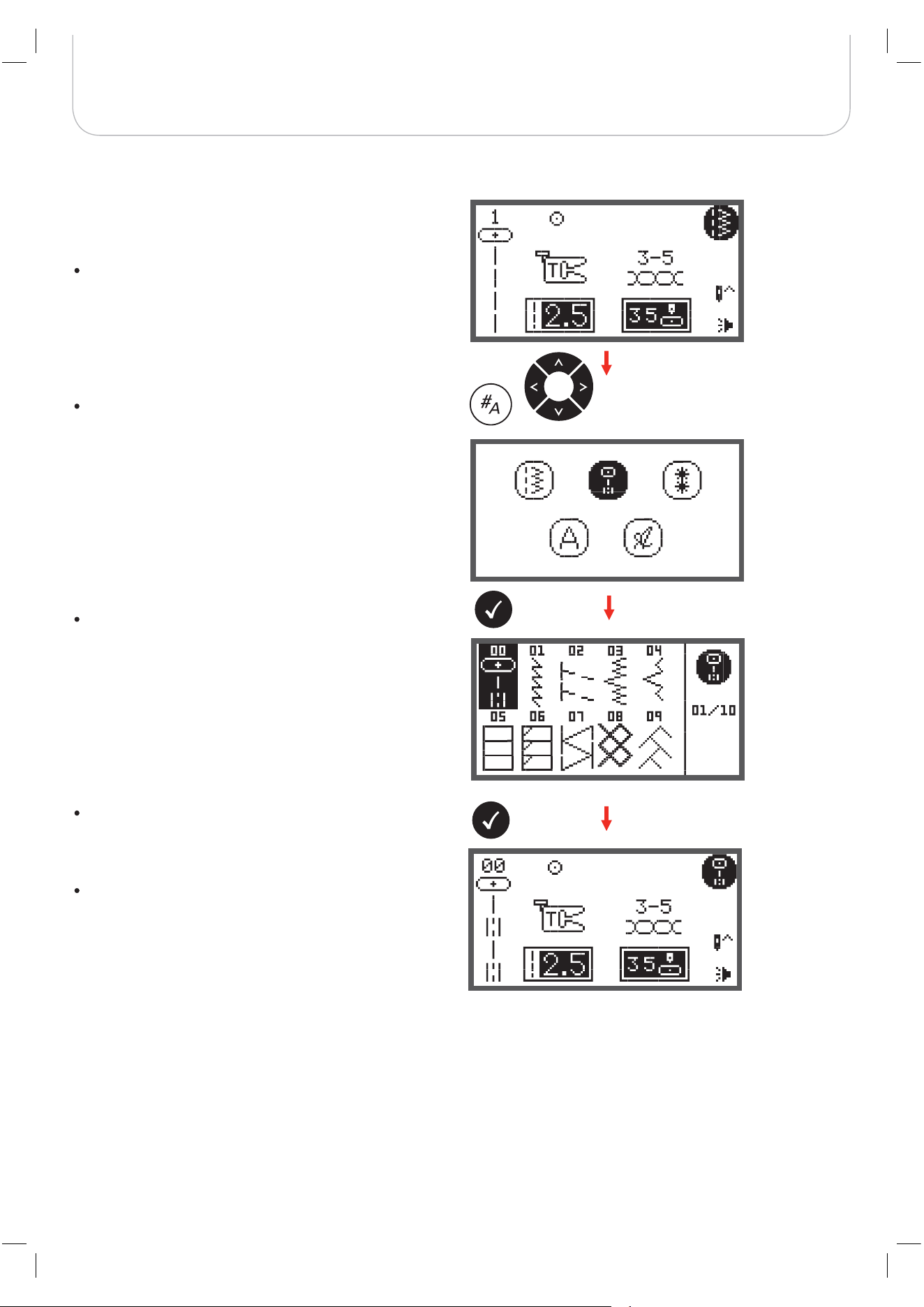
The LCD display shows the Direct Group Patterns when
switching on the machine.
Press number buttons to select a pattern shown next
to the number buttons or press the pattern group
selection button to select the desired pattern group.
Use the arrow buttons to select the desired pattern
group and press the OK button.
Use either the arrow buttons or the number buttons to
select the desired pattern.
When using the arrow buttons, press the OK button
after the desired stitch was selected to go back to
Sewing Mode.
When using the number buttons, the machine will
automatically set the stitch and go back to Sewing
Mode.
How to select a stitch
32
Stitches Overview
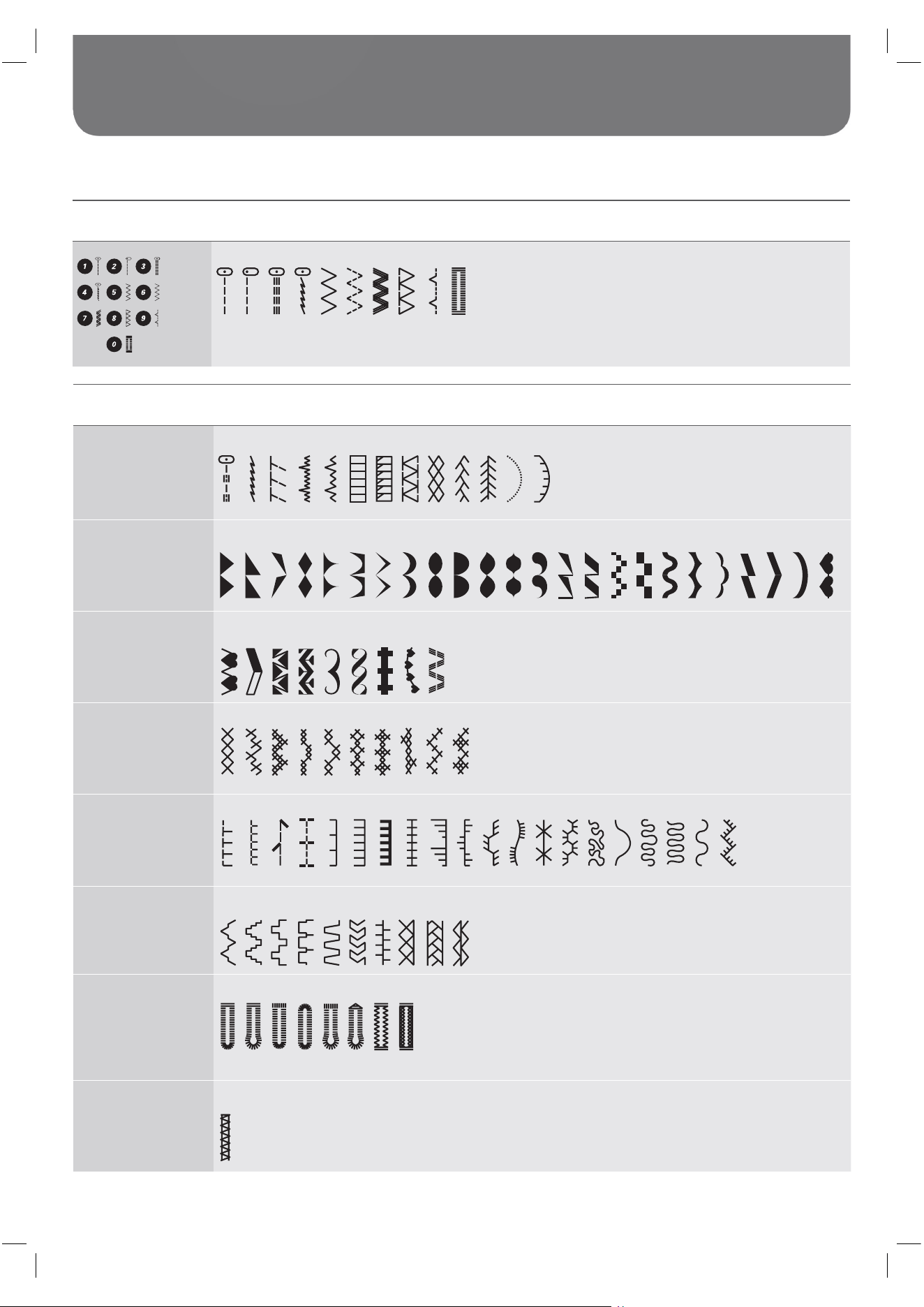
Stitches
Direct Patterns
1 3
4
5 6 7 8 9
0
2
A - Group Patterns
Utility stitches
00 02 03 04 05 06 07 08 09 10 1101 12
Satin stitches
29 30 31 32 33 34 35 36282713 14
15
16 17 18
19 20 21 22 23 24 25 26
Decorative Satin
stitches
37
38
39 40
41
42
43
44
45
Cross stitches
51
52
53
54
55
46
47
48
49
50
Quilt stitches
56 57
58
59
72
62
63
64
65
66
67
68
69
70
71
60
61
75
74
73
Decorative stitches
78
79
80
81
82
83
4
8
6
7
77
85
Buttonhole stitches
90
91
92
93
86
87
88
89
Bar tack stitches
94
33
Stitches Overview
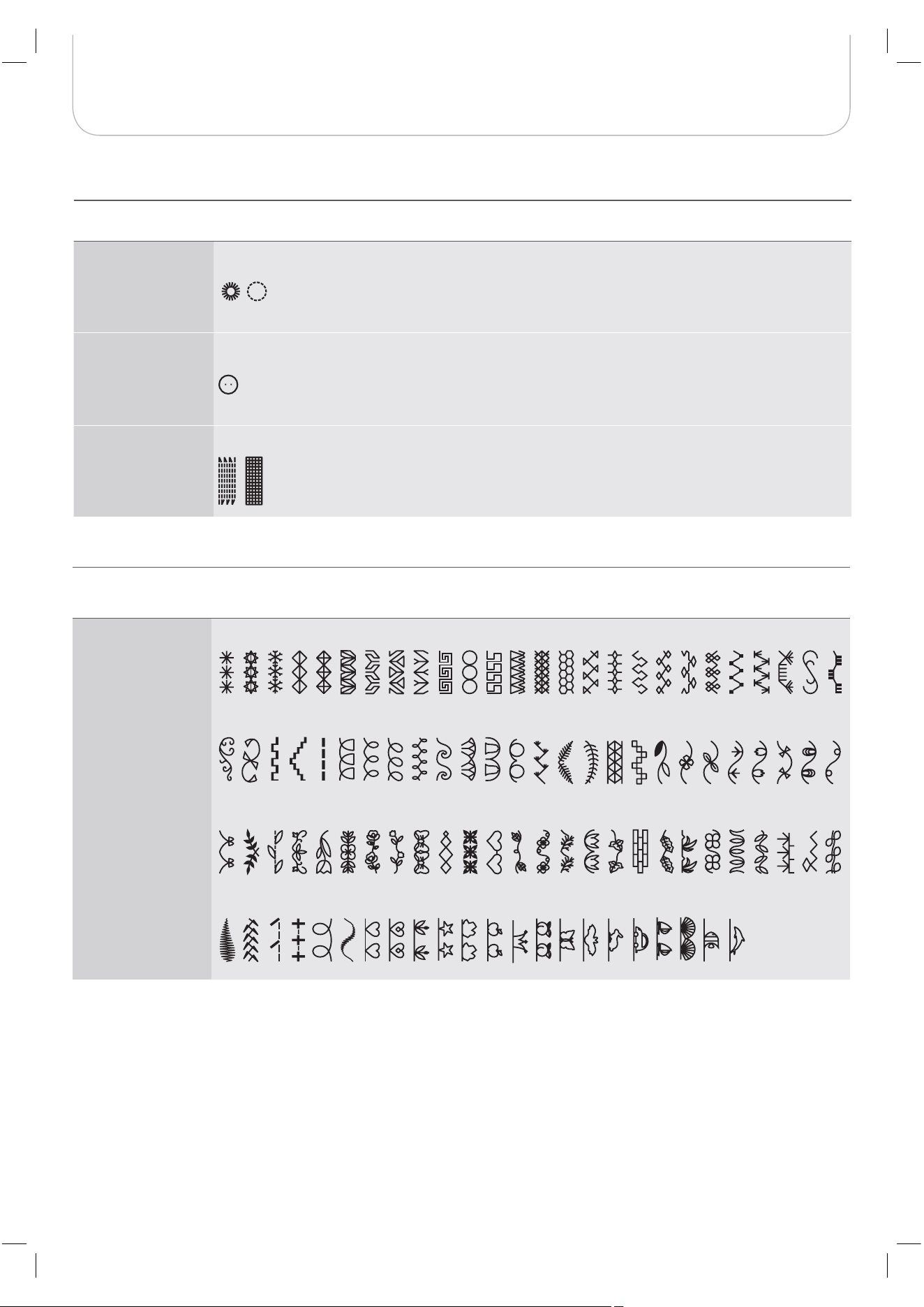
A - Group Patterns
Eyelet stitches
6959
Button sewing
stitches
79
Darning stitches
9
9
8
9
B - Group Patterns
Decorative stitches
12 13 14 15 16 17 18 19 20 21 22 23 24 2500 02 03 04 05 06 07 08 09 10
11
01
30 32 41 42 43 44 45 46 47 48 49 50 5133 34 35 36 37 38 39
40
3126 27 28 29
86 87 88 89
7260 62 63 64 65 66 67 68 69 70
71
61
73 74 75 76 77
9190
92 93 94 95 96 97 98 99
78 79 80 81 82 83 84 85
52 54 55 56 57 58 5953
34
Stitches Overview
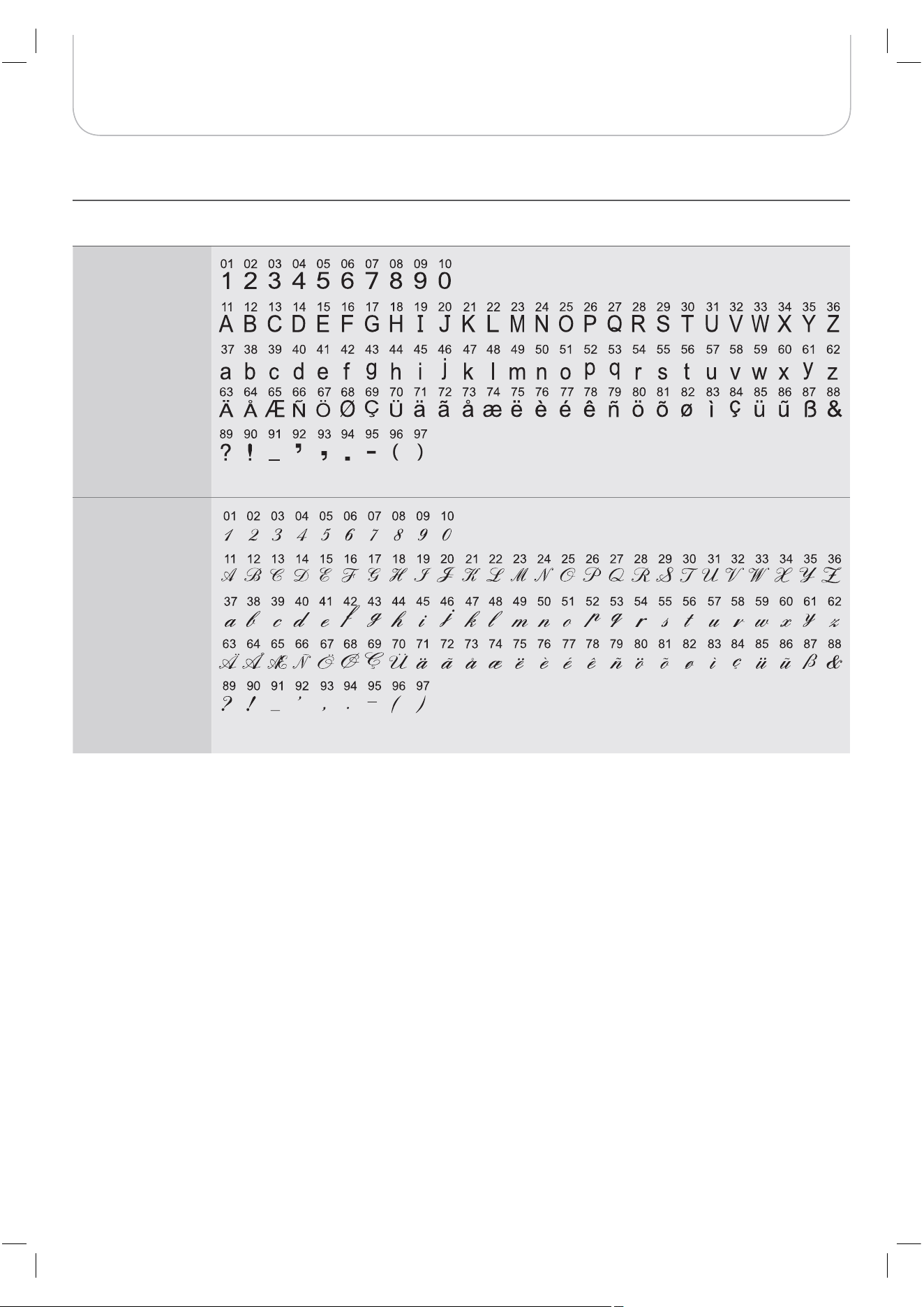
C - Group Patterns
C1 Group Patterns:
Block Style Alphabet
C2 Group Patterns:
Script Style Alphabet
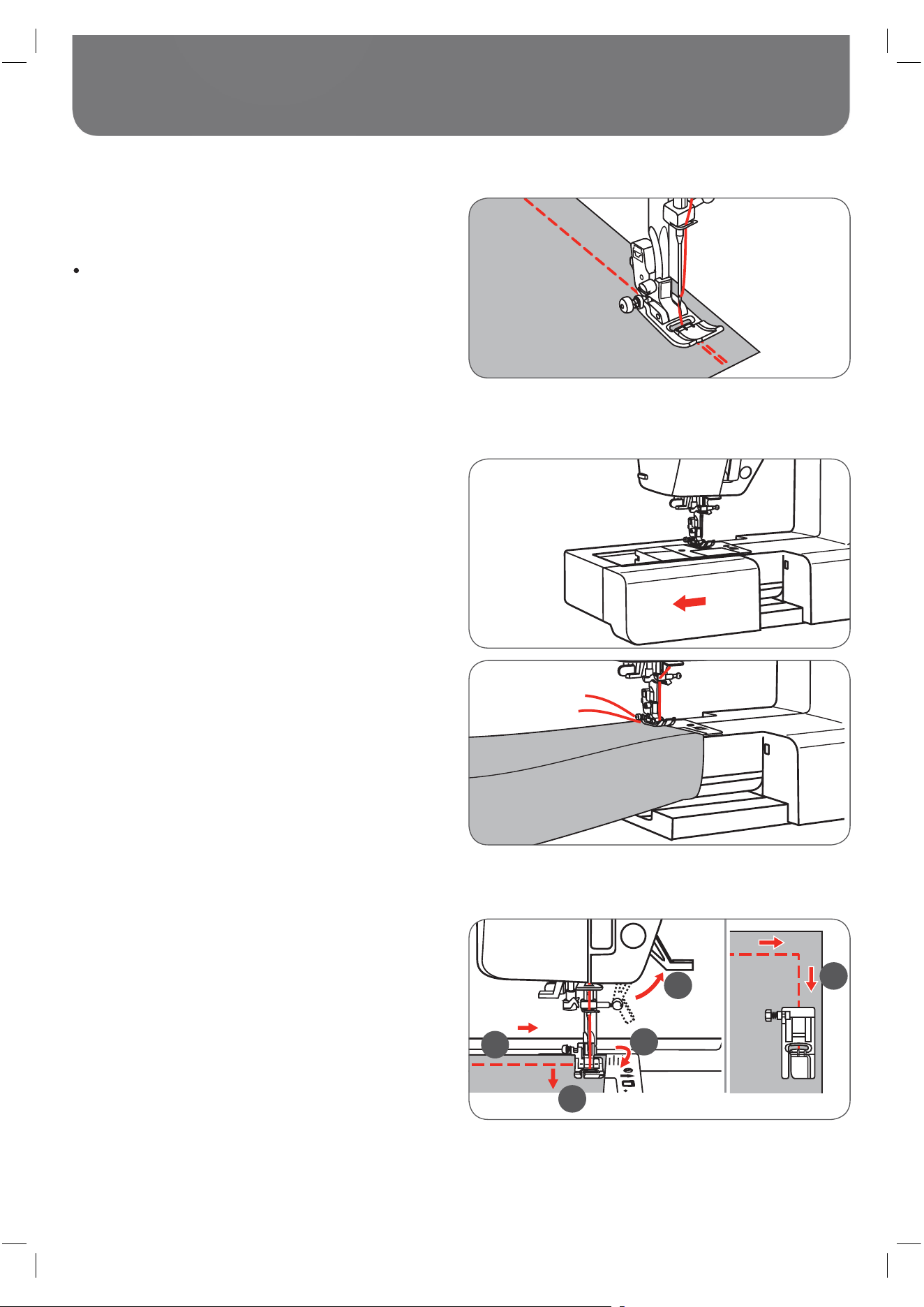
35
Basic Sewing Procedures
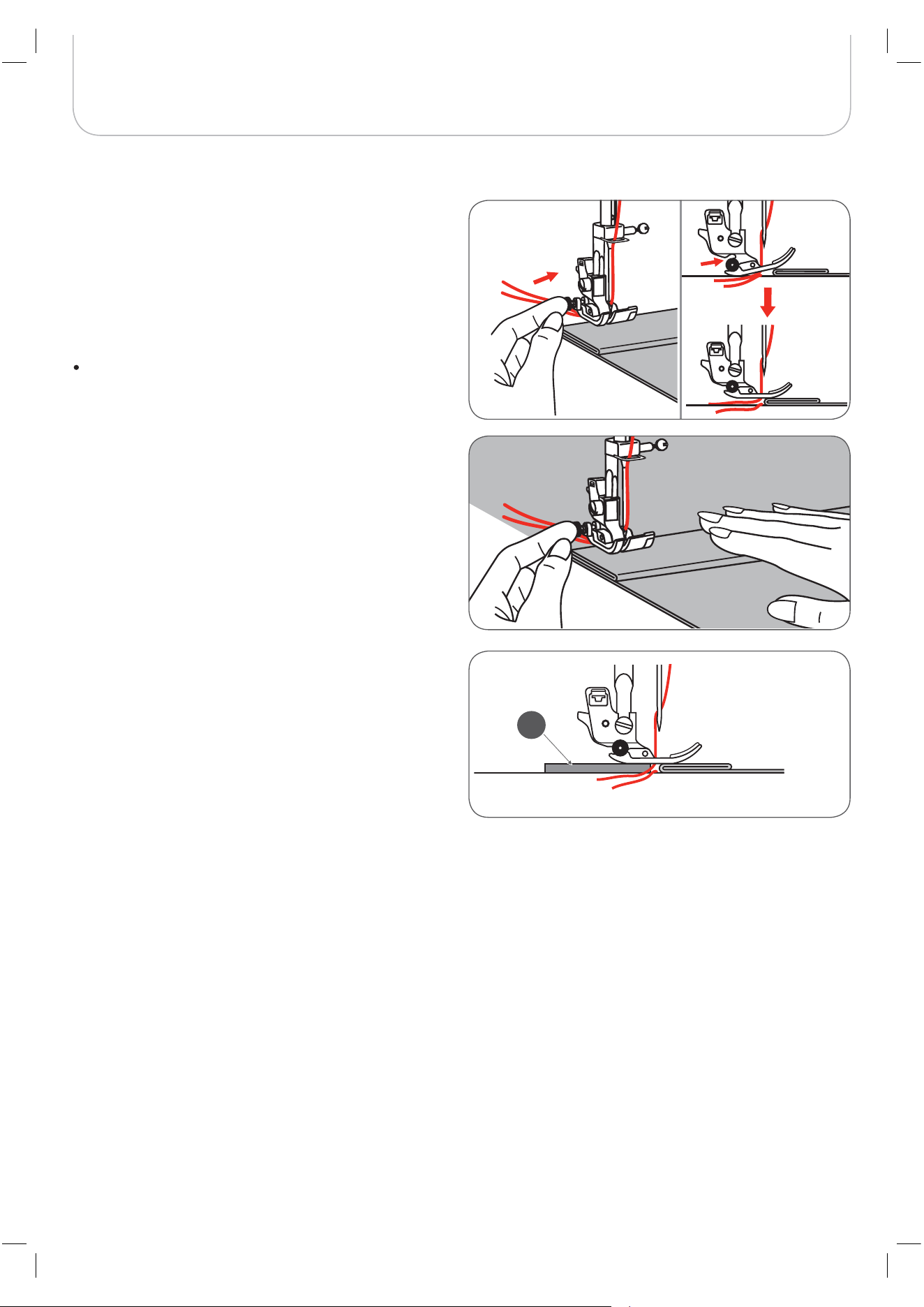
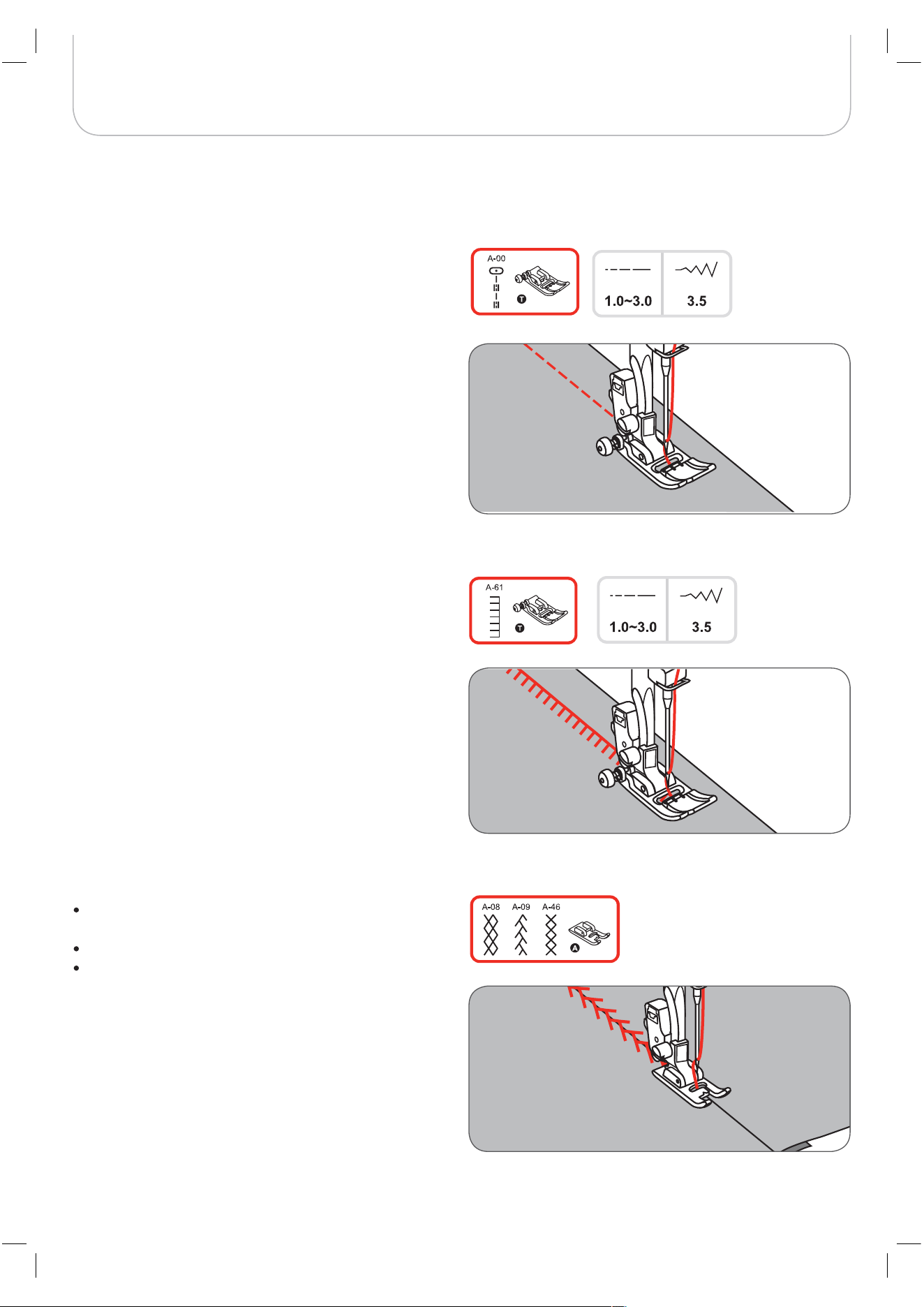
Reverse
Sewing corners
Free arm
Reverse stitching is used to secure the threads at the begin-
ning and at the end of a seam.
Press the reverse button and sew 4-5 stitches.
– The machine will sew forward when the button is
released.
1 Stop the sewing machine when you reach a corner.
2 Lower the needle into the fabric manually or by press-
ing the needle up/ down button once.
3 Raise the presser foot.
4 Use the needle as a pivot and turn the fabric.
5 Lower the presser foot and resume sewing.
Free-arm sewing is convenient for sewing tubular areas such
as pant hems and cuffs.
1
2
3
4
5
36
Basic Sewing Procedures
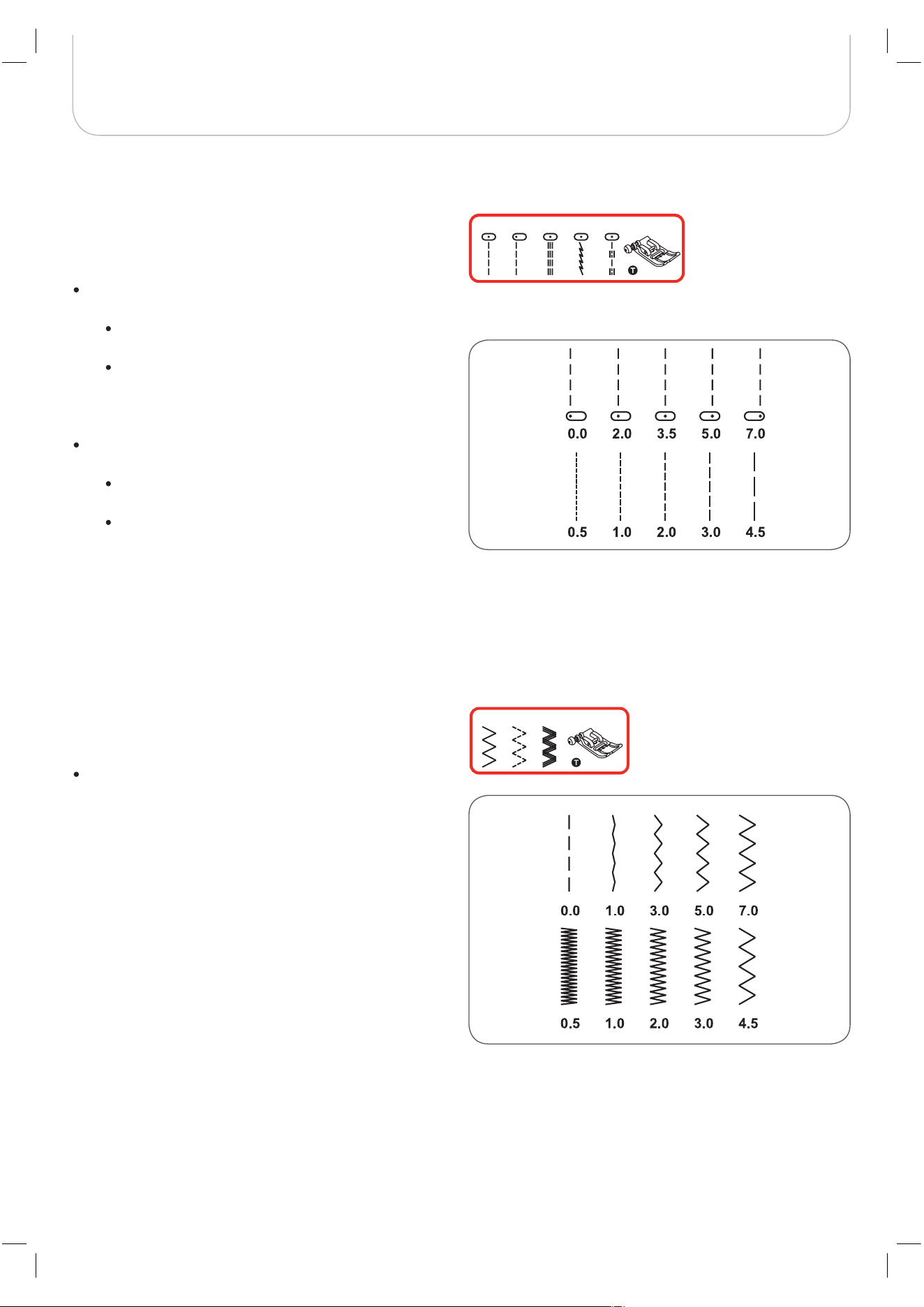
Sewing on the heavy fabric
The black button on the left side of the presser foot will lock
the presser foot in a horizontal position if you push it in before
lowering the presser foot. This ensures even feeding at the
beginning of a seam and helps when sewing multiple layers of
fabric such as sewing over seams when hemming jeans.
When you reach the point of an increased thickness, lower
the needle and raise the presser foot.
Press the toe of the foot and push in the black button,
then lower the foot and continue sewing.
The black button releases automatically after sewing few
stitches.
You can also place another piece of fabric with the same
thickness at the back of the seam. Or support the presser
foot while feeding by hand and sewing towards the folded
side.
A Cardboard or thick fabric
A
37
Basic Sewing Procedures
Straight Stitches and Needle Position
Zig-zag Stitches
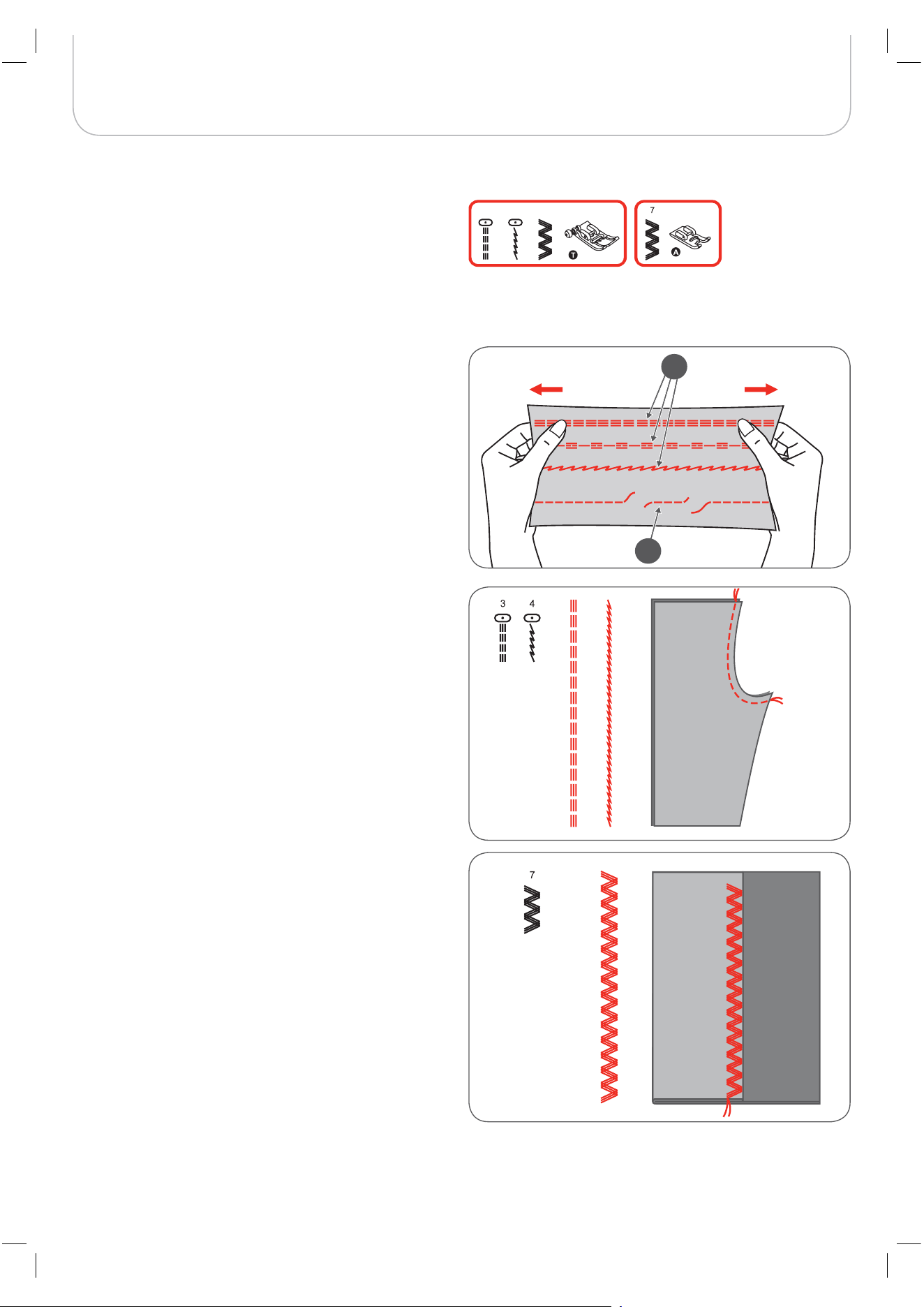
Changing the needle position
These settings apply to the Direct Group Pattern 1-4 and the
A Group Pattern 00 only.
The pre-set position is «3.5», center position.
Press the stitch width button to enter the stitch width
adjustment mode.
When you turn the selector wheel counter-clock-
wise, the needle position will move to the left.
When you turn the selector wheel clockwise, the
needle position will move to the right.
Altering the stitch length
Press the stitch length button to enter the stitch length
adjustment mode.
To shorten the stitch length, turn the selector
wheel counter-clockwise.
For a longer stitch length, turn the selector wheel
clockwise.
In general, the thicker the fabric, thread and needle, the longer
the stitch should be.
Altering the stitch width
The maximum zig-zag stitch width for zig-zag stitching is
«7.0»; however, the width can be reduced with any patterns.
Press the stitch width button to enter the stitch width
adjustment mode,
– the stitch width can be altered from «0.0 to
7.0mm».
Altering the stitch length
The density of zig-zag stitches increase- as the setting of
stitch length approaches «0.3».
Neat zig-zag stitches are usually achieved at «1.0-2.5».
Closed up zig-zag stitches (close together) look like satin
stitches.
4 A-001 2 3
5 6 7
38
Basic Sewing Procedures
The triple straight stretch stitch is strong and flexible and
ensures a durable seam without breaking.
Suitable for highly elastic and knit fabrics but also for heavy
fabrics such as denim.
These stitches can also be used as a decorative top stitching.
The triple straight stretch stitch is used to add triple reinforce-
ment to stretch and hardwearing seams.
The triple zig-zag stretch stitch is suitable for firm fabrics like
denim, poplin, duck, etc.
Triple Straight Stretch Stitch
3 4 7
1
2
1 Triple straight stretch stitch
2 Straight stitch
39
Basic Sewing Procedures
Change the presser foot to the overlock foot (E).
Sew the fabric with the fabric edge against the guide of the
overlock foot.
Overlock Stitches
Change the presser foot to the Zigzag foot (T).
When sewing the overlock using the Zigzag foot, sew along
the edge of the fabric so that the needle drops over the edge
of the fabric on the right side.
Using the Zigzag foot
The overlock foot should be used to sew with Direct Group
Patterns 5 and 8 only. Do not set the stitch width narrower
than «5.0». It is possible that the needle could hit the presser
foot and break when sewing other patterns and width.
A
TTENTION
!
2.5~4.52.0-3.0
6 A-02
40
Basic Sewing Procedures
Place the fabric under the foot.
Turn the handwheel forward manually until the needle
swings fully to the left.
– It should just pierce the fold of the fabric.
If it does not, adjust the stitch width accordingly.
Adjust the guide (b) by turning the knob (a) so that the
guide just rests against the fold.
Sew slowly, guiding the fabric carefully along the edge
of the guide.
Sew slowly, guiding the fabric carefully along the edge
of the guide.
Turn over the fabric.
9 : Blind hem/ lingerie for firm fabrics
A-03 : Blind hem for stretch fabrics
A-04 : Blind hem for stretch fabrics
Fold the fabric as illustrated with the wrong side up.
First perform an overlock stitch as shown in left picture.
Blind Hem
A Wrong side of the fabric
B Right side of the fabric
It takes practice to sew blind hem. Always sew a test
sample first.
A
B
a
b
N
OTE
41
After having finished the work, move the feed dog control (a)
to raise the feed dog.
Basic Sewing Procedures
Change the presser foot to the button sewing-on foot.
Move the feed dog control to lower the feed dog (b).
Position the work under the foot.
Place the button in the desired position, lower the foot.
Select zig-zag pattern.
Adjust the stitch width to «2.5-4.5» according to the
distance between the two holes of the button.
Turn the handwheel to check that the needle goes
cleanly into the left and right holes of the button.
Before sewing, press the Auto-lock button to sew
securing stitches automatically at the beginning and at
the end of the stitch.
If a shank is required, place a darning needle on top of
the button and sew.
For buttons with 4 holes, sew the front two holes first,
push the work forward and then sew the back two
holes.
Button Sewing-on
N
OTE
b
a
b
a
42
Basic Sewing Procedures
Buttonhole Stitching
0 : For thin or medium fabric
A-86 : For thin or medium fabric
A-87 : For suits or overcoats
A-88 : For horizontal buttonholes on thick fabrics
A-89 : For thin or medium fabric
A-90 : For thick coats
A-91 : For jeans or trousers
A-92 : For jeans or stretch fabric with a coarse weave
: For stretch fabric
Mark the positions of the buttonhole on the fabric.
The maximum buttonhole length is 3cm (1 3/16 inch). (Total of
diameter + thickness of button.)
Attach the buttonhole foot, then pull out the button
holder plate and insert the button.
The size of the buttonhole is determined by the button
inserted in the button plate.
The thread should be passed through the hole in the
presser foot, then be placed under the foot.
Select the buttonhole stitch.
Adjust the stitch width and the stitch length to the
desired width and density.
A Starting point
Before sewing a buttonhole on your project, practice on a
scrap piece of the same type of fabric.
N
OTE
0
A-87 A-91
A-92
A-93
A-90
A-86
A-88
A-89
2.5~7.00.3~1.0
2.5~5.5
5.5~7.0
3.0~7.01.0~2.0
3.0~7.01.0~3.0
0.3~1.0
0.3~1.0
DD
A
A-93
43
Basic Sewing Procedures
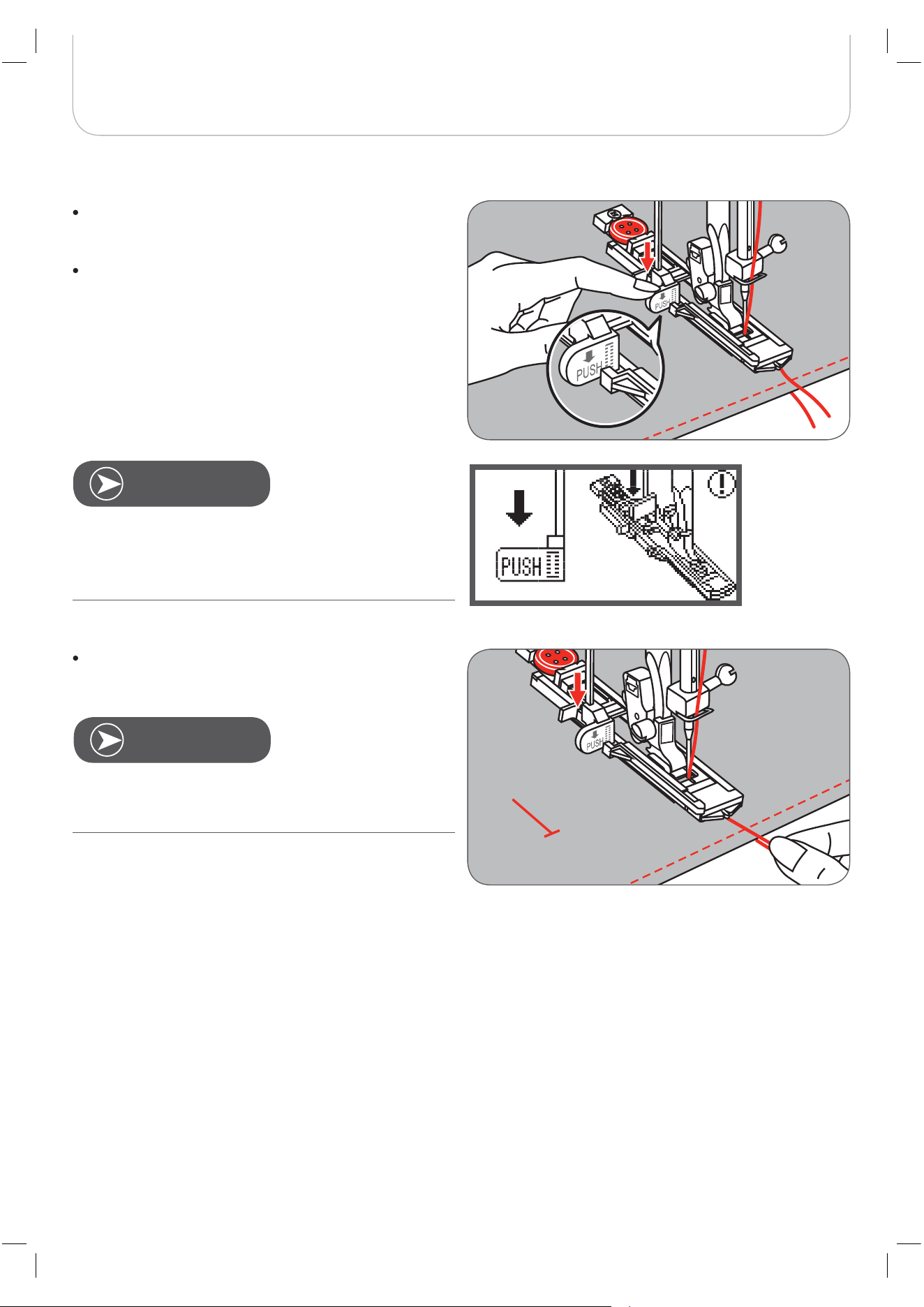
Position the fabric under the presser foot so that the
centerline‘s mark is aligned with the center of the but-
tonhole foot.
Lower the buttonhole lever.
Hold the upper thread slightly and start sewing.
Gently feed the fabric by hand. Before stopping, the
machine will automatically sew a securing stitch after the
buttonhole is sewn.
The buttonhole stitch was selected and the Start/Stop
button was pressed while the buttonhole lever is raised, the
LCD will display the warning massage to remind you to
lower the buttonhole lever.
N
OTE
N
OTE
44
Basic Sewing Procedures
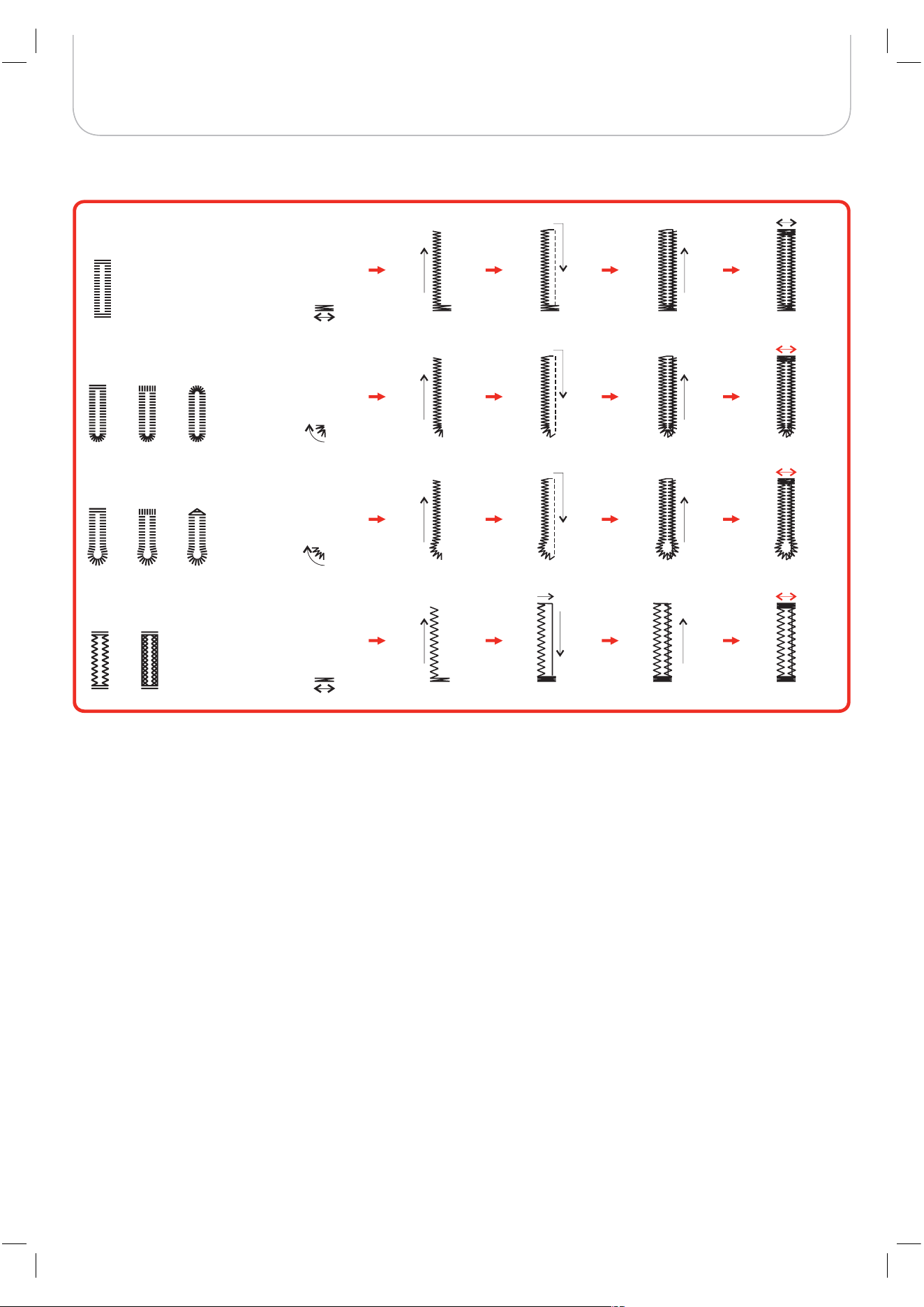
Buttonholes are sewn from the front of the presser foot to the back, as shown.
A-87
A-91
A-90
A-92 A-93
A-86 A-88 A-89
0
45
Basic Sewing Procedures
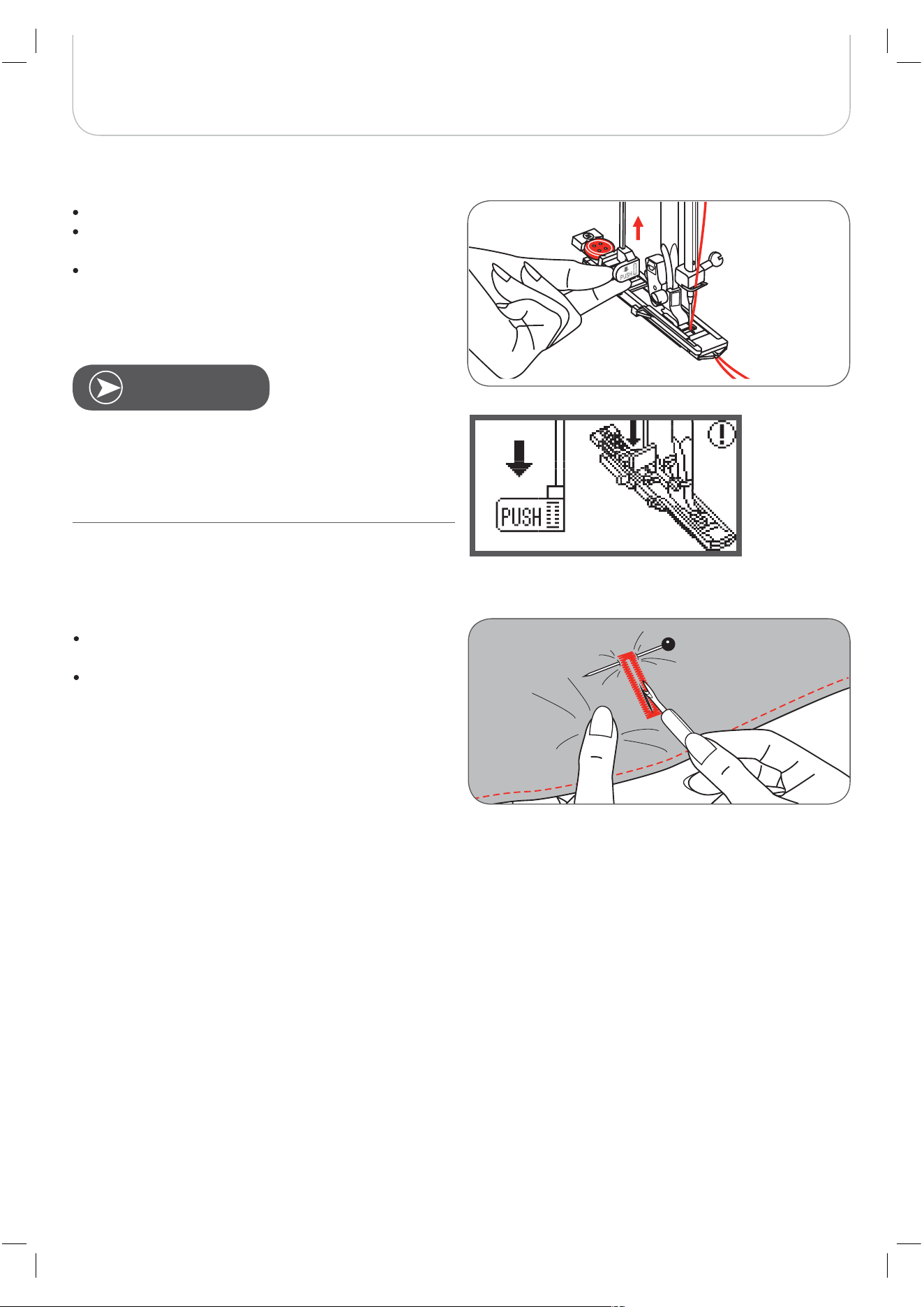
Raise the presser foot and cut the thread.
To sew over same buttonhole, raise the presser foot (it
will return to original position).
After sewing the buttonhole, raise the buttonhole lever
until it stops.
Cut the slit of the buttonhole being careful not to cut
any stitches on either side.
Use a pin as a stopper at the bartack so you do not cut
too much.
When having finishing and another stitch is selected (other
than the buttonhole, bartack or darning stitch) and the Start/
Stop button is pressed while the buttonhole lever is lowered,
the LCD will display the warning message which reminds
you to raise the buttonhole lever.
N
OTE
46
Basic Sewing Procedures
Buttonholes on stretch fabrics
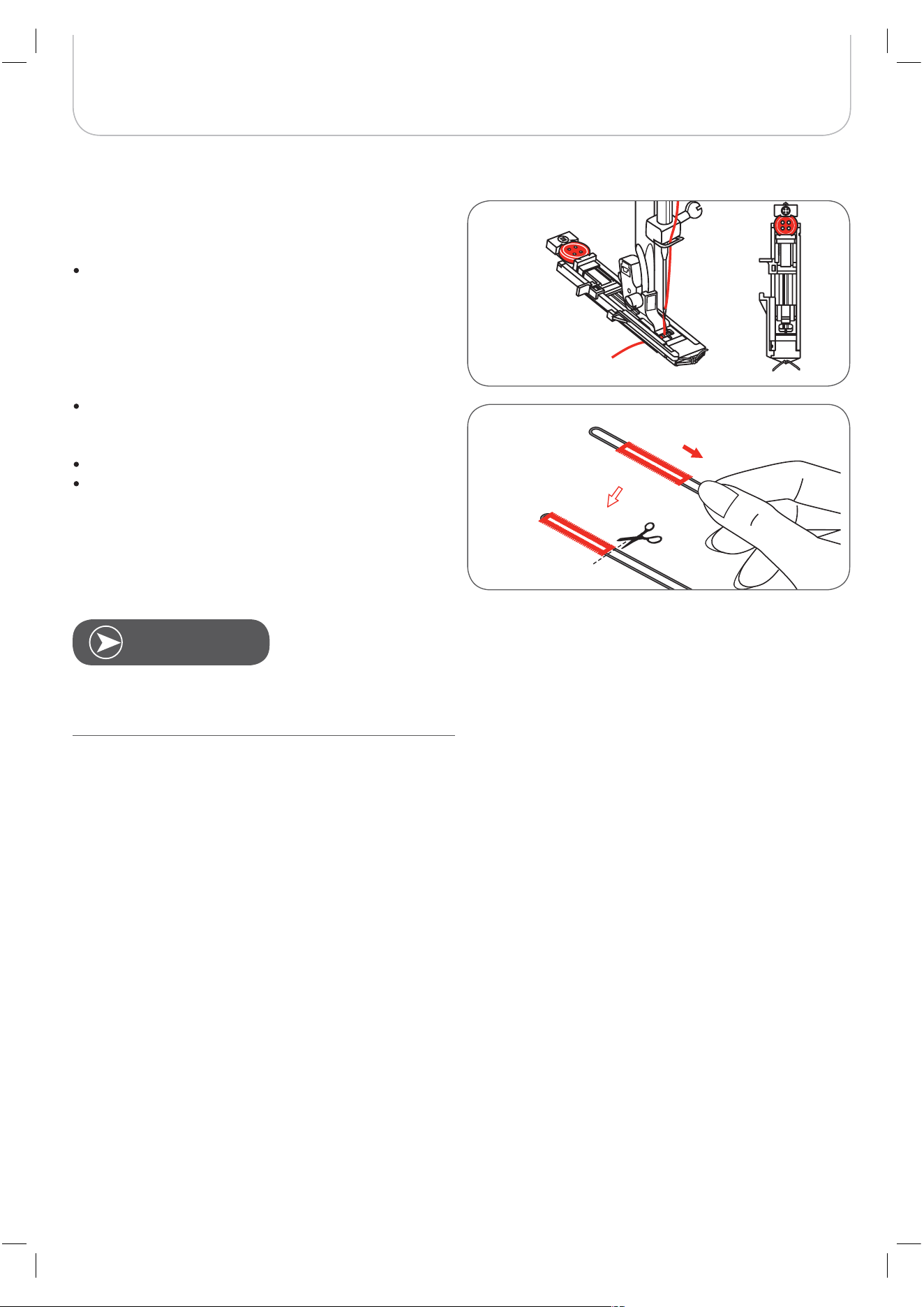
When sewing buttonholes on stretch fabric, hook a heavy
thread or a cord under the buttonhole foot.
Attach the buttonhole foot and hook the cord at the
back of the presser foot.
Bring the two cord ends to the front of the foot and
insert them in the grooves, then temporarily tie them
there. Lower the presser foot and start sewing.
Set the stitch width to match the diameter of the cord.
Once the sewing is completed, pull the cord gently to
remove any loose parts, then trim off any excess.
It is recommended to use stabilizer on the backside of the
fabric.
N
OTE
47
Basic Sewing Procedures
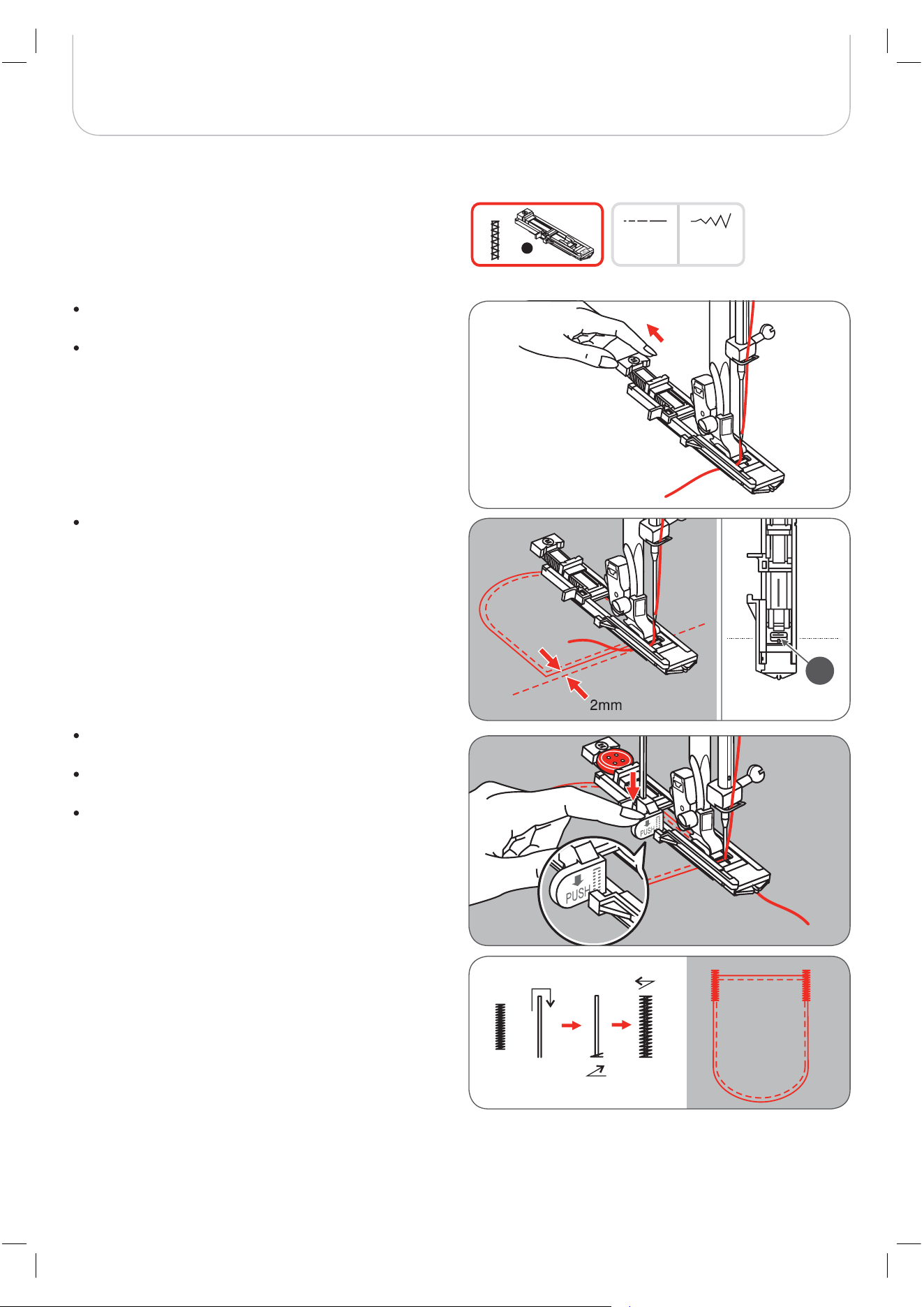
Extend the button guide plate and set to the desire
bartack length.
Adjust the stitch width and stitch length to personalize
the stitches.
Position the fabric so that the needle is 2mm (1/16
inch) in front of the pocket opening and then lower the
presser foot lever.
A Starting point
Lead the upper thread down through the hole in the
presser foot.
Pull down the buttonhole lever and position it behind
the bracket on the buttonhole foot.
Gently hold the end of the upper thread in your left
hand and start sewing.
Sewing procedure for bartack is illustrated.
This is an example of sewn bartacks at pocket corners.
1.0~3.00.4~1.0
A-94
D
A
Bartack stitch
48
Basic Sewing Procedures
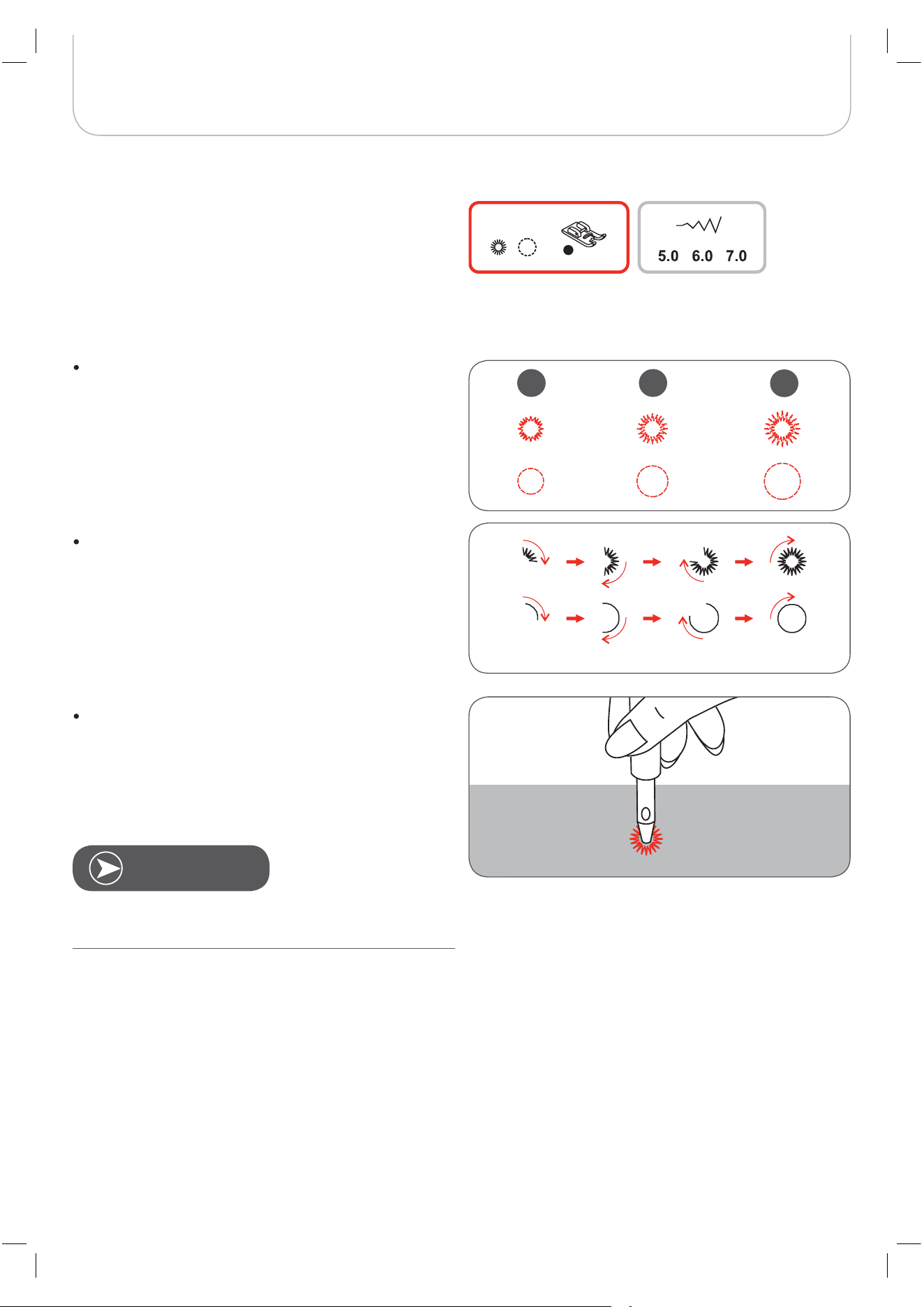
Press the «-» or «+» stitch width adjustment button to
select the eyelet size.
Size of eyelet:
A Small: 5.0mm (3/16 inch)
B Medium: 6.0mm (15/64 inch)
C Large: 7.0mm (1/4 inch)
Position the needle in the fabric at the beginning of the
stitching, and then lower the presser foot lever.
– Once the sewing is completed, the machine sews
the securing stitches automatically, then stopps.
Make a hole at the center using an eyelet punch tool.
* The eyelet punch tool is not included with the machine.
Select pattern 60 to obtain the eyelet stitch.
Attach the satin stitch foot (A).
Eyelet Stitch
If thin thread is used, the stitching may be too loose. If this
occurs, sew the eyelet twice one on top of the other.
A
A-95 A-96
A B
C
N
OTE
49
Basic Sewing Procedures
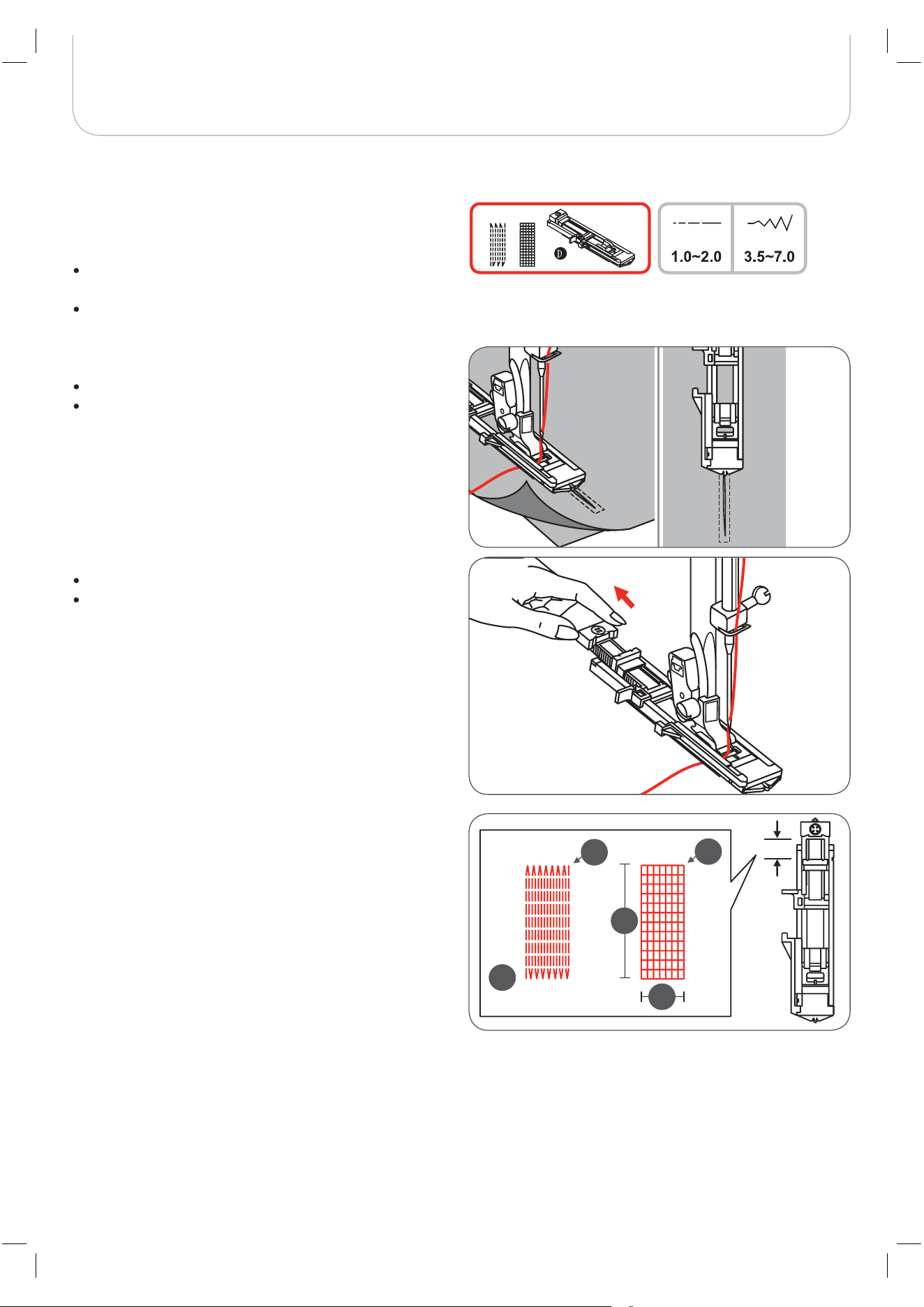
A-98: Simple darning stitch in thin and medium fabrics
A-99: Reinforced darning stitch in heavy fabrics
Select the A Group Patterns 98 or 99 to obtain the
darning stitch.
Change to the buttonhole foot.
Baste the upper fabric and the under fabric together.
Select the needle position.
Lower the presser foot over the center of the tear.
Pull the button holder to rear.
Adjust the button guide plate on the buttonhole foot to
the desired length.
The size of one darning sequence is variable.
However, the maximum sewing length is 2.6cm (1 inch) and
the maximum sewing width is 7mm (9/32 inch).
A The length of sewing.
B The width of sewing.
C Start
D Stop
Darning Stitch
A-98 A-99
A
B
C
D
D
50
Basic Sewing Procedures
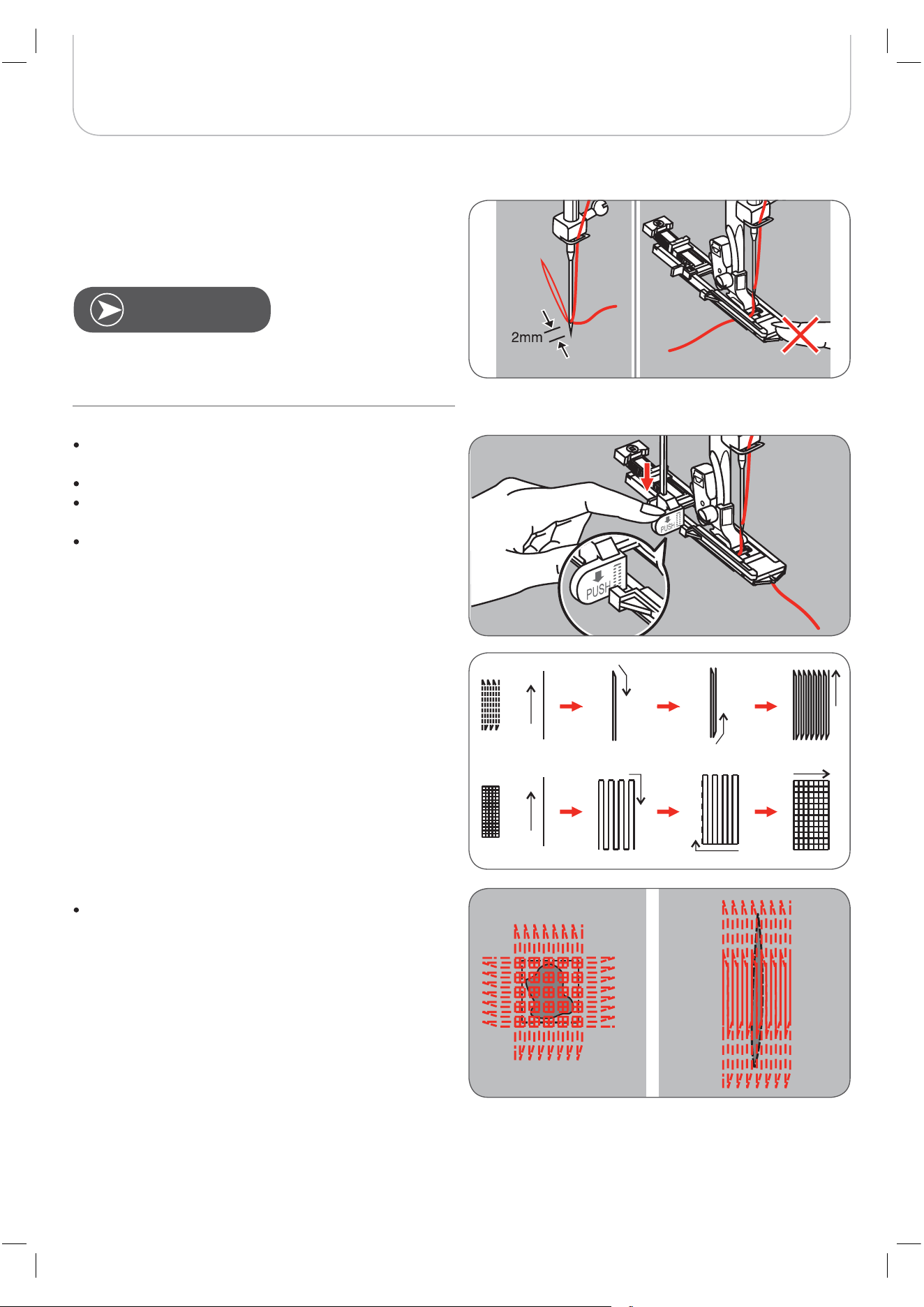
Lead the upper thread down through the hole in the
presser foot.
Pull down the buttonhole lever.
The buttonhole lever is positioned behind the bracket
on the buttonhole foot.
Gently hold the end of the upper thread in your left
hand, and then start sewing.
Darning stitches are sewn from the front of the presser foot to
the back, as shown.
If the sewing range is too big to sew,
– then we recommend to sew the area several times
(or cross sew) to get better sewing result.
Position the fabric so that the needle is 2mm (1/16 inch) in
front of the area to be darned, and then lower the presser
foot.
When lowering the presser foot, do not push the front of the
presser foot, otherwise the darning will not be sewn in the
correct size.
N
OTE
51
Basic Sewing Procedures
Zipper Insertion*
Inserting a centered zipper
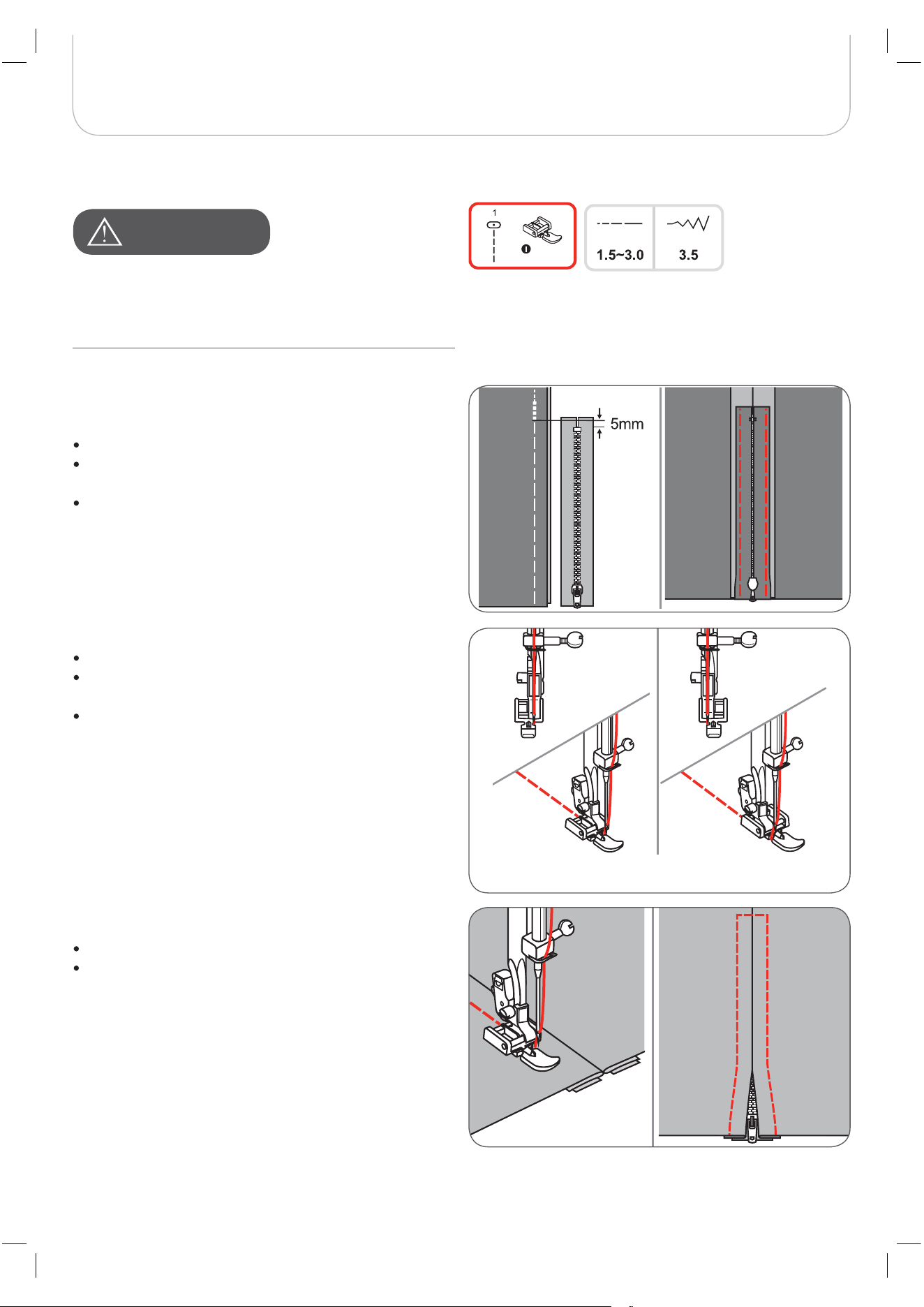
Baste the zipper opening on the garment.
Press open the seam allowance.
Place the zipper face down on the seam allowance
with the coils against the seam line.
Baste the zipper tape.
Attach the zipper foot.
Attach the right side of the presser foot pin to the
holder when sewing the left side of the zipper.
Attach the left side of the presser foot pin to the
presser foot holder when sewing the right side of the
zipper.
Stitch the left side of the zipper from top to bottom.
Stitch across the lower end and right side of the zipper.
Remove the basting and close the zipper.
The zipper foot should be used for sewing with center
needle position, straight stitch only. It is possible that the
needle could hit the presser foot and break when sewing
other patterns.
A
TTENTION
!
52
Basic Sewing Procedures
Inserting a side zipper
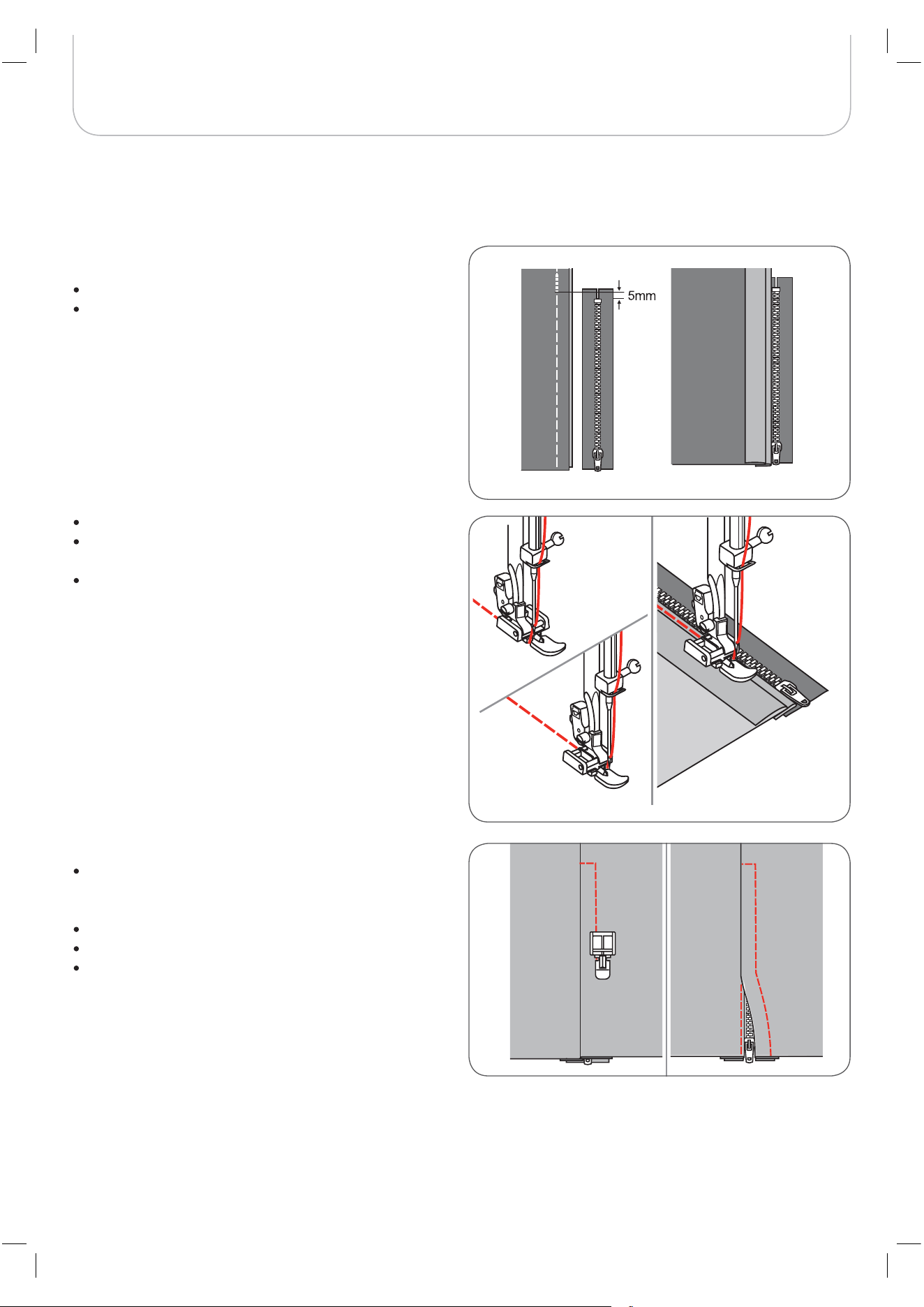
Baste the zipper opening on the garment.
Fold seam allowance back to the left.
Form a 3mm-fold of the right seam allowance.
Attach the zipper foot.
Attach the right side of the presser foot pin to the
holder when sewing the left side of the zipper.
Attach the left side of the presser foot pin to the
presser foot holder when sewing the right side of the
zipper.
Stitch the left side of zipper from the bottom to the top.
Turn the fabric right side out, stitch across the lower
end and right side of zipper.
Stop about 5cm (2 inches) from the top of zipper.
Remove the basting and open the zipper.
Stitch the remaining seam.
53
Basic Sewing Procedures
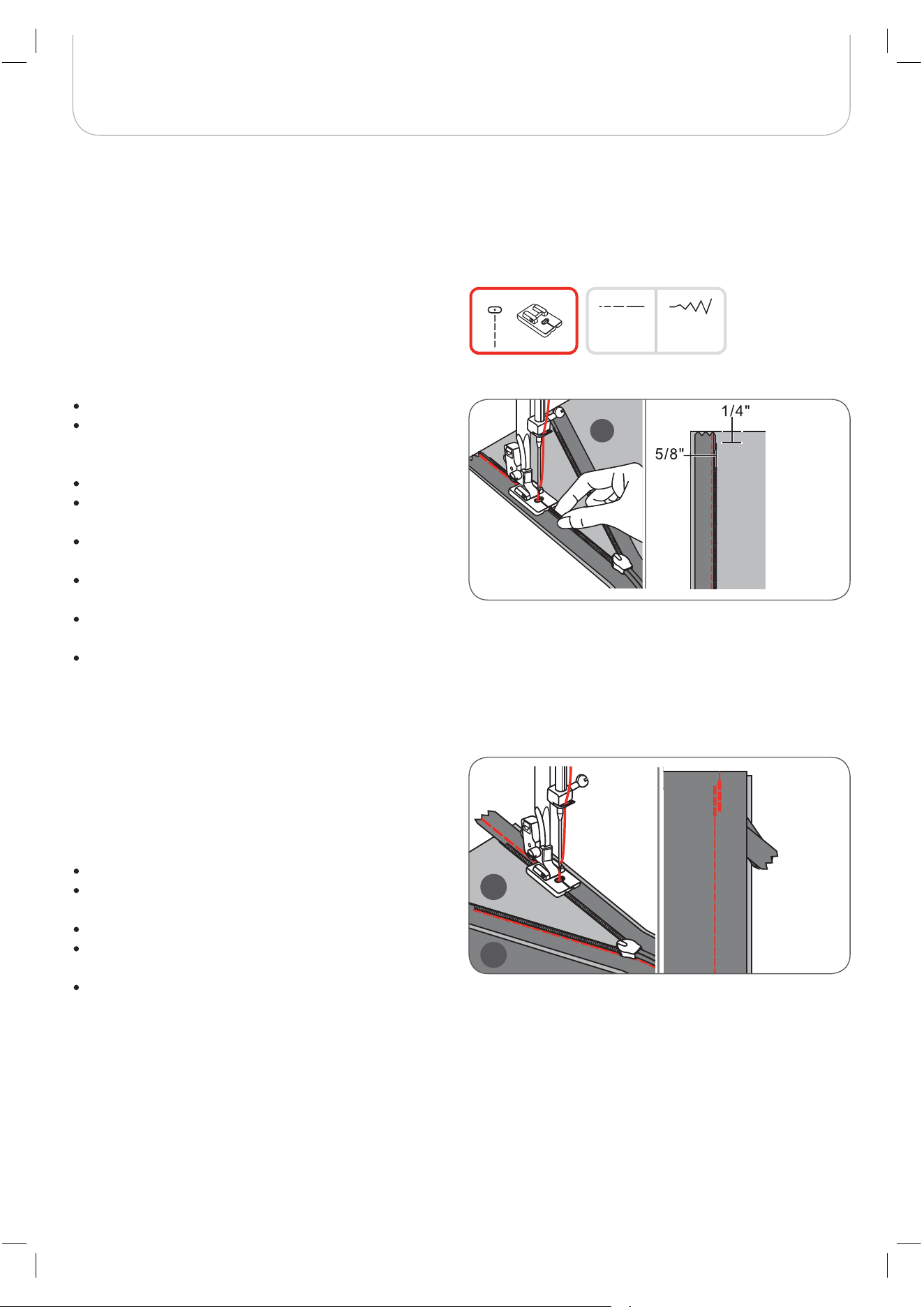
Attach the invisible zipper foot to the machine.
Adjust needle center position and select the straight
stitch.
– The stitch length depends on the fabric.
Vary from 1,0 to 3,0mm.
Place the open zipper face - down on right side of
fabric as shown in the picture.
Align the fabric edge with the 5/8 inch marking line on
the stitch plate.
Place the zipper 6mm (1/4 inch) below raw edge of
garment.
With right-hand groove of the foot over the zipper coils,
sew along the zipper until the foot hits the zipper pull.
Remove the garment from the machine.
To attach the other half of the zipper, align the fabric edge with
the 5/8 inch marking line on the stitch plate as shown in the
picture.
With the left-hand groove of the foot over the zipper coils, sew
along the zipper until the foot hits the zipper pull.
Close zipper.
Fold the fabric that the zipper is on the right hand side
out of the way as shown in the picture.
Use a pin to fix the fabric.
Change to the regular sewing foot and sew along the
zipper as closely as possible using straight stitch.
At last secure with some forward and reverse stitches.
A Right side of the fabric
B Wrong side of the fabric
This foot is used to insert invisible zippers so that they are
covered by the seam, and therefore hidden.
* The invisible zipper foot accessory is optional. It is not included with this machine.
Invisible zipper insertion
1.0~3.0 3.5
1
A
B
A
54
Basic Sewing Procedures
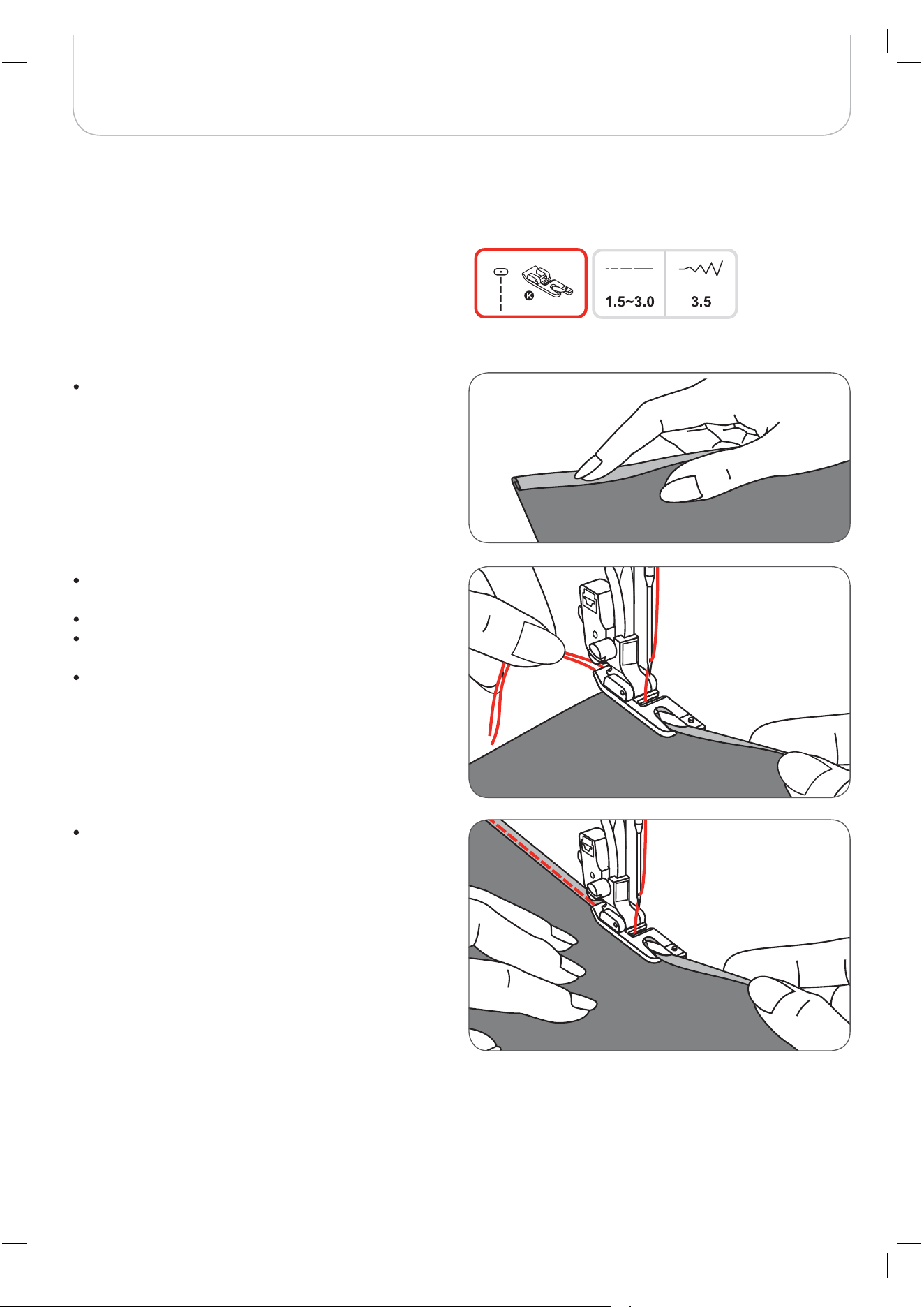
Fold the edge of the fabric over about 3mm, then fold
it over again 3mm for about 5cm along the edge of the
fabric.
Position the needle in the fold by turning the handwheel
towards you, and lower the presser foot.
Sew several stitches and raise the presser foot.
Insert the fabric fold into the spiral opening of the hem-
mer foot.
Move the fabric back and forth until the fold forms a
scroll shape.
Lower the presser foot and start sewing slowly guiding
the raw edge of the fabric in front of the hemmer foot
evenly into the opening of the foot.
* The hemmer foot accessory is optional. It is not included with this machine.
Narrow Hemming
55
Basic Sewing Procedures
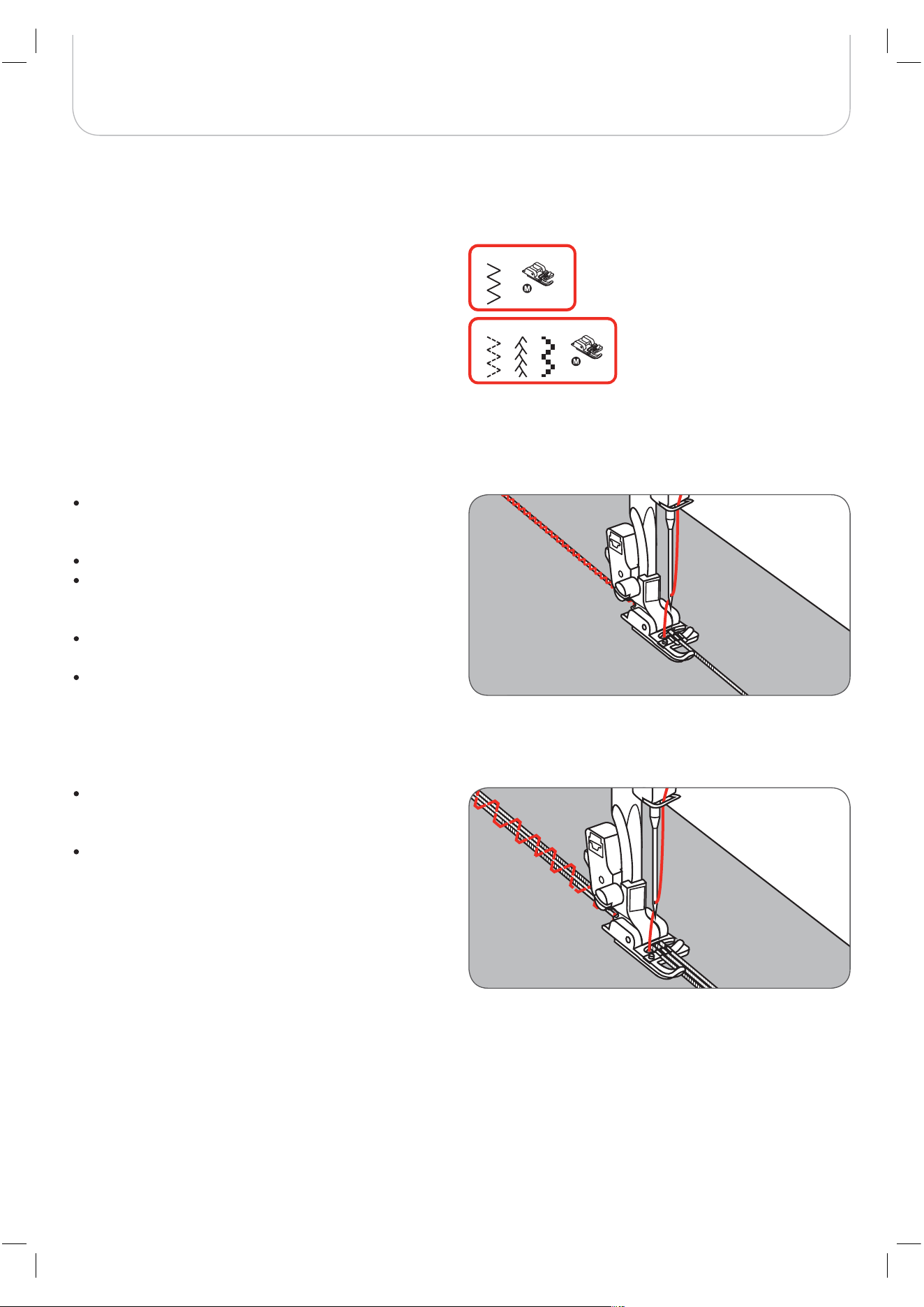
Single cording
Mark the design on the fabric. Insert the cord in the
center groove of the cording foot from the right side
opening.
Pull the cord about 5cm (2 inches) behind the foot.
The grooves under the foot will hold the length of the
cord in place while the stitches are being formed over
the cord.
Select the stitch and adjust the stitch width so that the
stitches just cover the cord.
Lower the foot and sew slowly, guiding the cord over
the design.
Sew over one strand of cording to create a pretty swirled
design on a jacket or vest or sew over three strands of cord-
ing for border trims. Pearl cotton, knitting yarn, embroidery
floss, lace thread, fine wool or lily yarn can be used for cord-
ing.
* The cording foot accessory is optional. It is not included with this machine.
Cording
Triple cording
Push the sewing thread to the left and insert three
cords into the grooves of the foot and pull about 5cm
(2 inches) of the cords behind the foot.
Select the desired pattern and adjust the stitch width
so that the stitches just cover the cords. Lower the foot
and sew slowly guiding the cords.
5
6 A-09 A-28
56
Basic Sewing Procedures
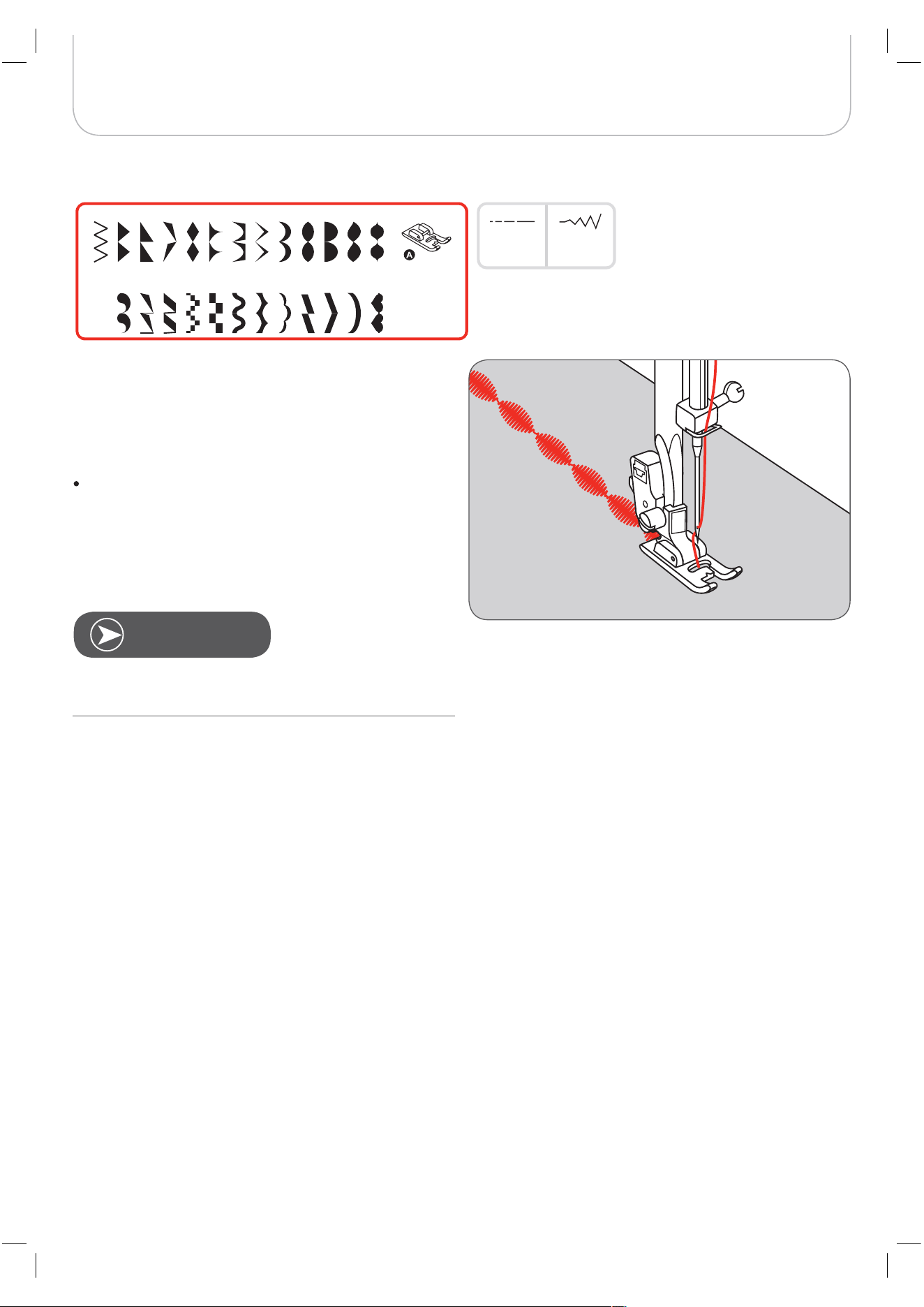
Use the satin stitch foot for satin stitching and sewing decora-
tive stitches. This foot has a full indentation on the sole which
allows both easy sewing over the thickness of the stitches
formed by closely spaced zig-zag stitches and even feeding
of the fabric.
To tailor the satin or decorative stitch pattern, you may
adjust the length and width of the pattern by pressing
the stitch length and width adjustment buttons.
– Experiment with fabric scraps until you get the
desired length and width.
Satin Stitch Sewing
0.3~2.0
A-15 A-16 A-17 A-18 A-19 A-20 A-21 A-22 A-23 A-24
A-25 A-26 A-27 A-28 A-29 A-30 A31 A-32 A-33 A-34 A-35 A-36
31-A 41-A
2.5~7.0
5
When working with thin fabrics it is recommended to
reinforce the wrong side using a stabilizer.
N
OTE
57
Basic Sewing Procedures
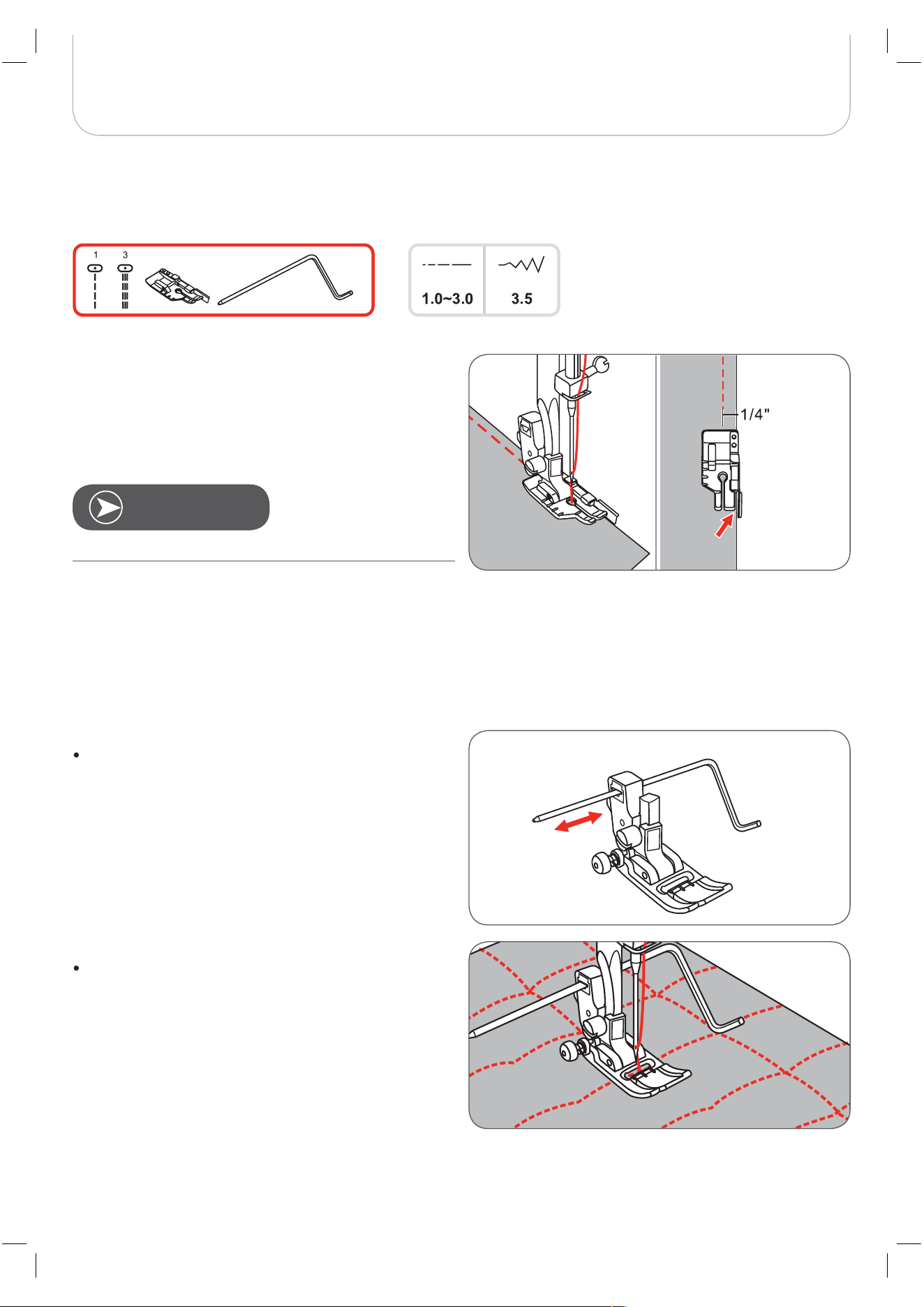
Patchwork stitching
Align the edges of the fabric with the inside edge of the guide
on the side of the foot for accurate 1/4“ piercing of the needle.
Using the edge/quilting guide
Insert the edge/quilting in the presser foot holder as
illustrated and set the space as you desire.
Sew the first row and move over the fabric to sew sub-
sequent rows with the guide riding along the previous
row of stitching.
The inside of the toes provides an accurate 1/8“ seaming
guide.
The foot has 1/4“ markings both behind the needle and in
front of the needle for accurate pivoting of corners.
Quilting
* The 1/4“ quilting foot accessory is optional. It is not included with this machine.
Only the straight stitch in center position can be used.
N
OTE
58
Basic Sewing Procedures
Hand look quilting
You can imitate the look of a hand look quilt stitch by using
monofilament thread in the needle, 30 or 40 weight cotton
thread in the bobbin, and by increasing the thread tension.
The thread tension depends on the thickness of your batting.
Blanket (Quilting Applique)
For all fabrics and all types of work.
Patchwork stitching
Place the two pieces of fabric with the right side
together and sew with the straight stitch.
Open the seam allowance and press it flat.
Place the center of the presser foot on the seam line of
the joined pieces of fabric and sew over the seam.
59
Basic Sewing Procedures
Separate the folded edges of the fabric pieces with a gap of
4mm (1/8 inch) and baste them onto a piece of thin paper or
water-soluble stabilizer sheet.
Align the center of the presser foot with the center of the two
pieces of fabric and begin sewing.
After sewing, remove the paper.
A Thin paper
B Basting
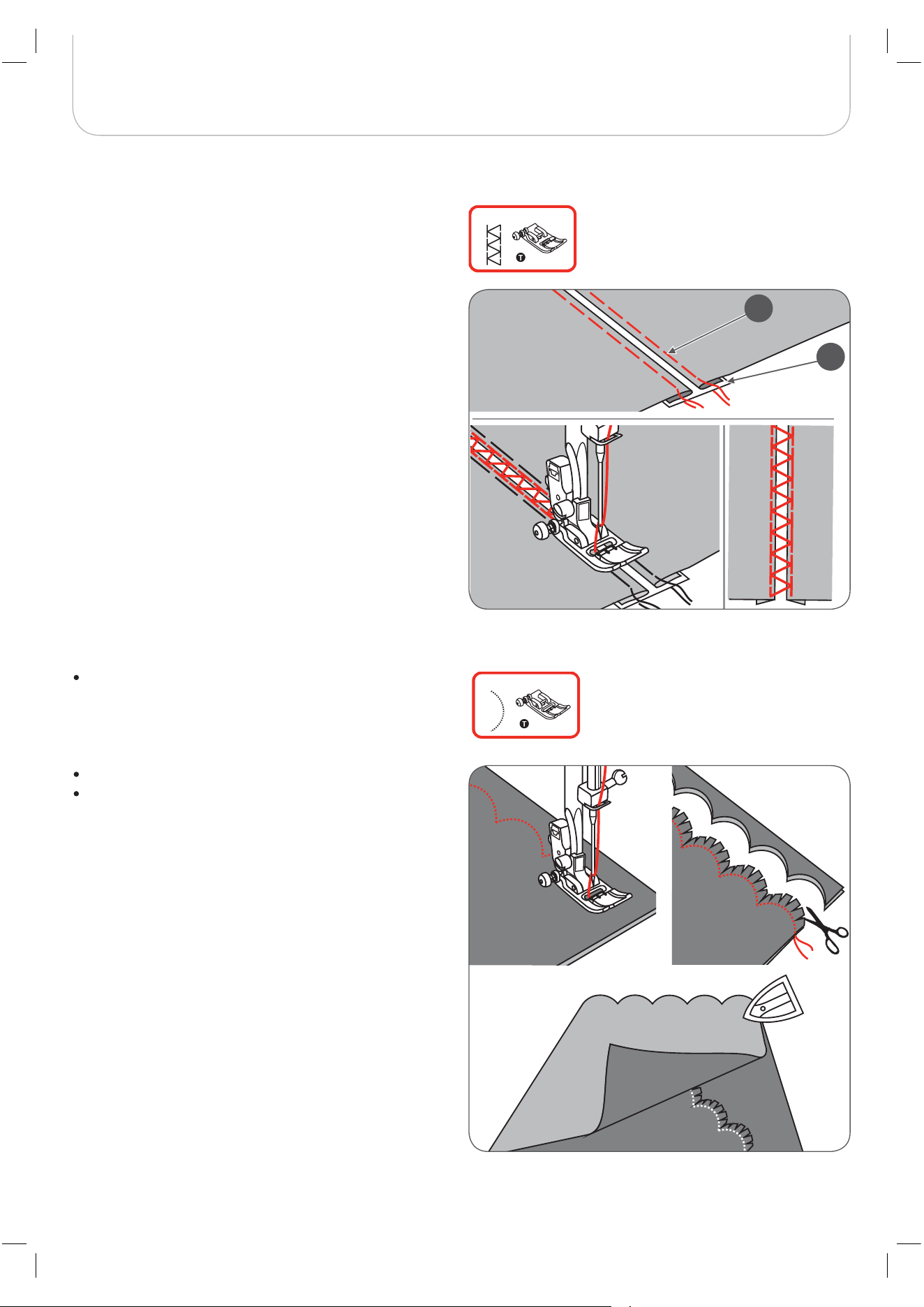
Stitch along the edge of the fabric, making sure not to
sew directly on the edge of the fabric.
– For better results, apply spray starch onto the fabric
and press with a hot iron before it is sewn.
Trim along the stitches.
Be careful not to cut the stitches.
Fagoting
Scallop Stitch
A-07
A-11
A
B
60
Basic Sewing Procedures
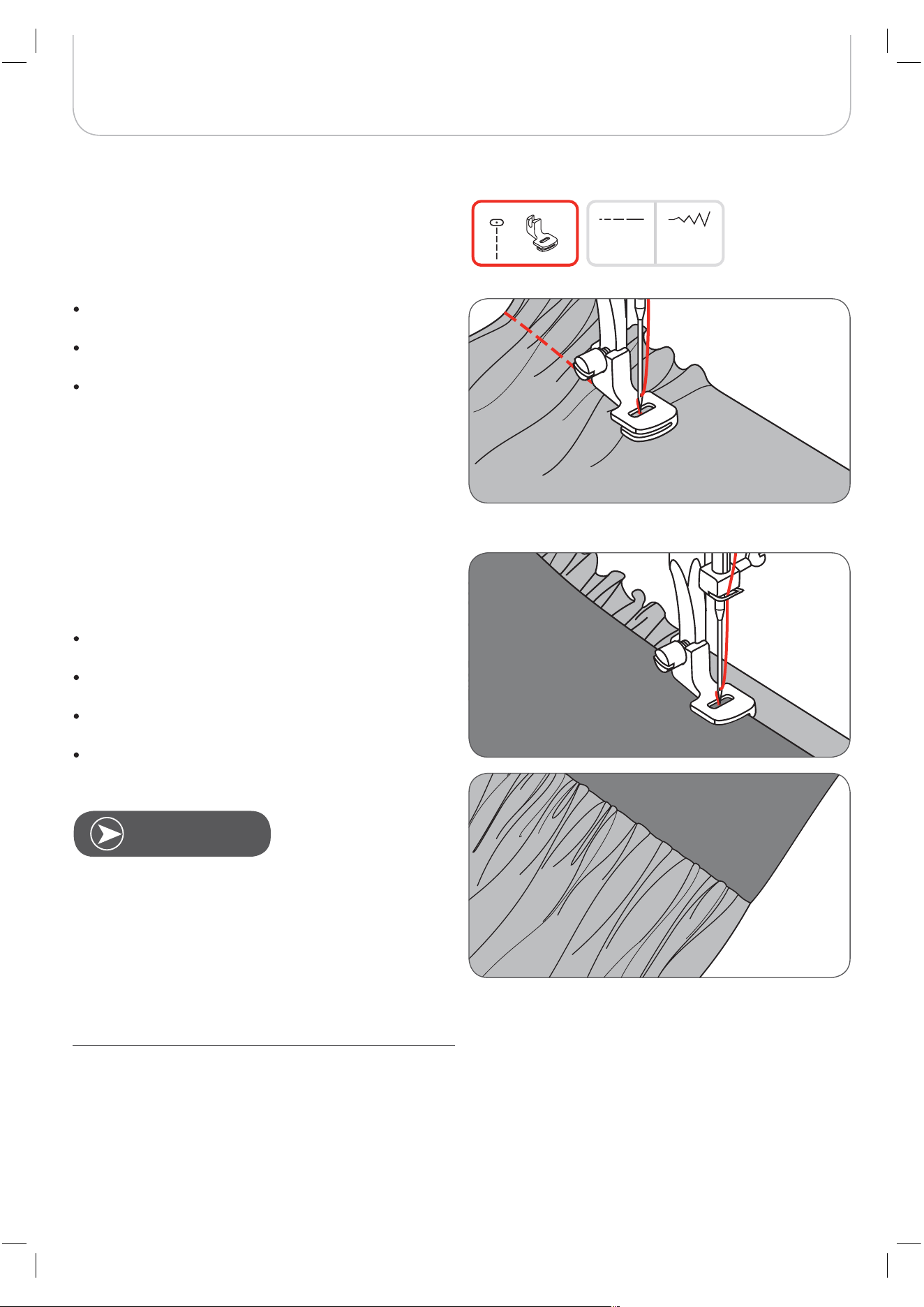
Gathered fabric
Remove the presser foot holder and attach the gather-
ing foot, lowering the tension setting to below 2.
Place the fabric to be thered under presser foot to the
right of the presser foot.
Sew a row of stitches, keeping the raw edge of fabric
aligned with the right edge of the foot.
– The stitches make the fabric gather automatically.
– Suitable for light to medium weight fabrics.
To gather and attach gathered fabric in one
step
Look closely at the gathering foot to see a slot on the bottom.
When using the slot, you can gather the bottom layer of the
fabric while attaching it to a flat top layer, such as the waist-
band on a dress bodice.
Remove the presser foot holder and attach the gather-
ing foot.
Place the fabric to be gathered with the right side up
under the foot.
Place the top layer of the fabric with the right side down
in the slot.
Guide the two layers as illustrated.
* The gathering foot accessory is optional. It is not included
with this machine.
Gathering
When testing the machine for adjustments to achieve
desired density, work with an extra 10“ allowance of the
fabric, trims or elastic.This makes it easier to determine the
necessary adjustments and how much change is needed for
your project. Always test on your project fabric and on the
same grainline which will be used in your finished project.
Using the crossgrain of the fabric will make prettier pleats
than the straight of grain.Sew at slow to medium speed for
better fabric control.
N
OTE
3.54.5
1
61
Basic Sewing Procedures
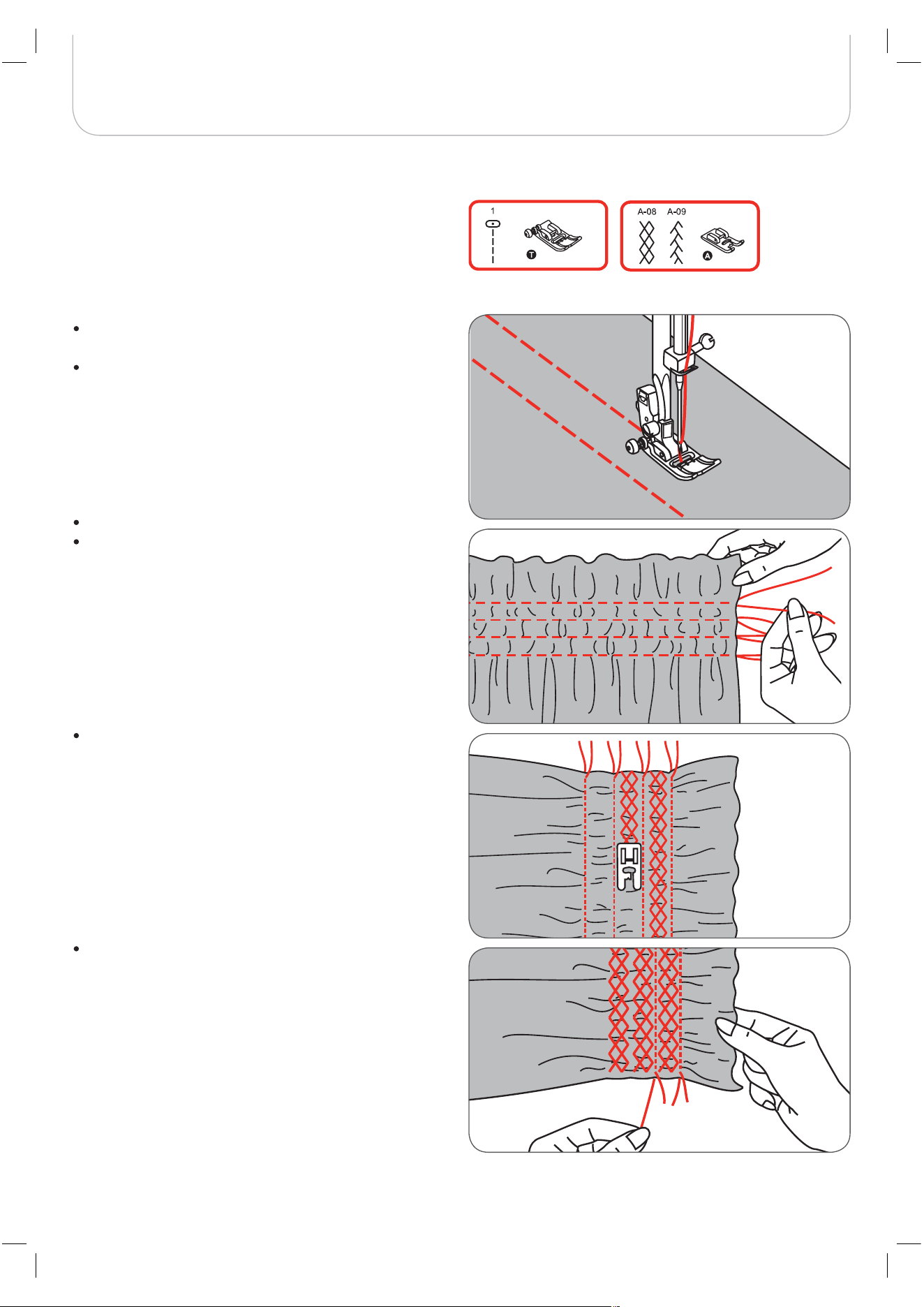
Smocking
Adjust the stitch length to 4mm and loosen the thread
tension.
Use the Zigzag foot to sew straight lines 1cm (3/8 inch)
apart from each other, across the area to be smoked.
Knot the threads along one edge.
Pull the bobbin thread and spread the pleats evenly.
Secure the threads at the other end.
Reduce the tension, if necessary and sew decorative
pattern stitches between the straight seams.
Pull out the gathering stitches.
62
Basic Sewing Procedures
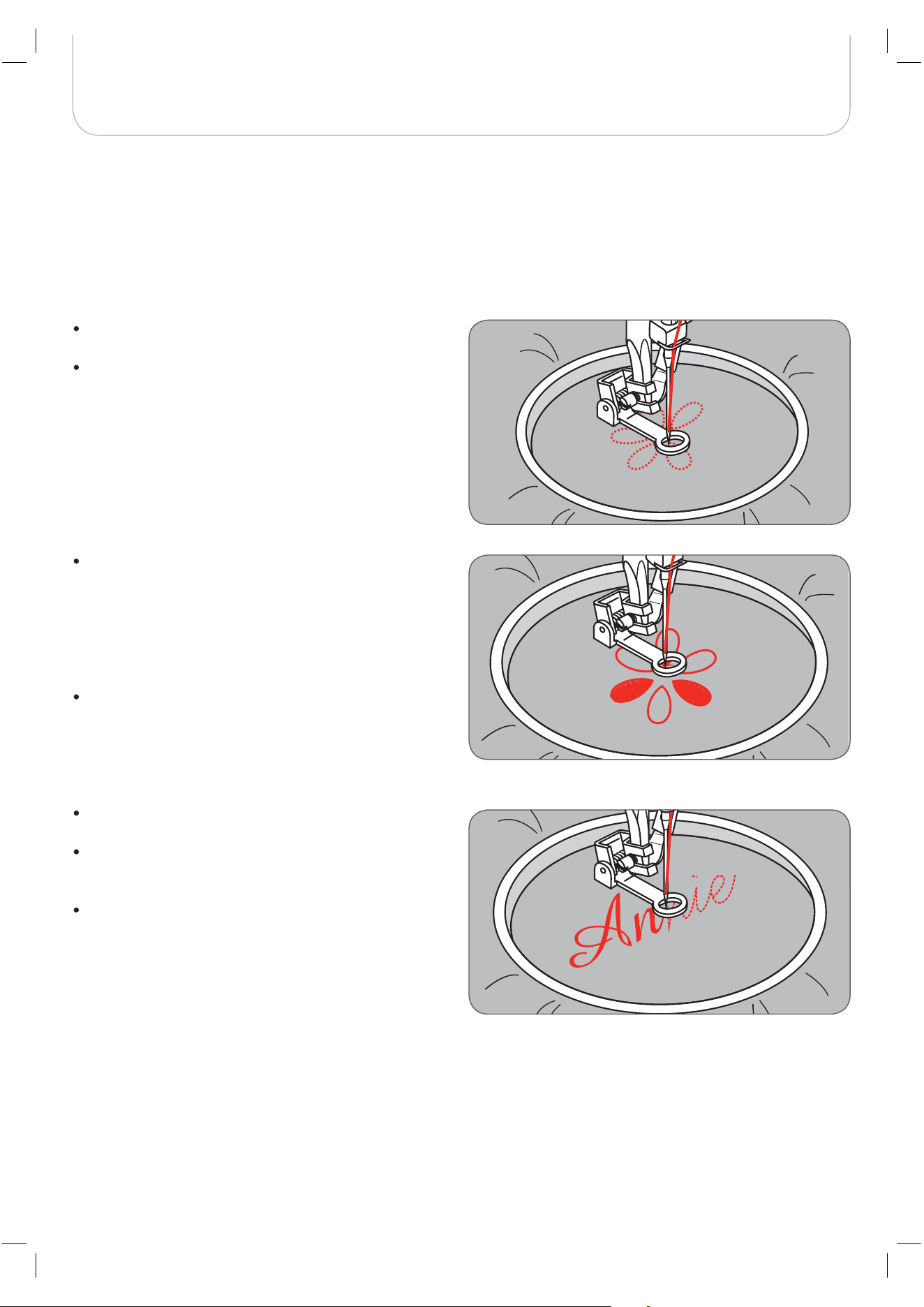
Free Motion Darning, Embroidery and Monogramming
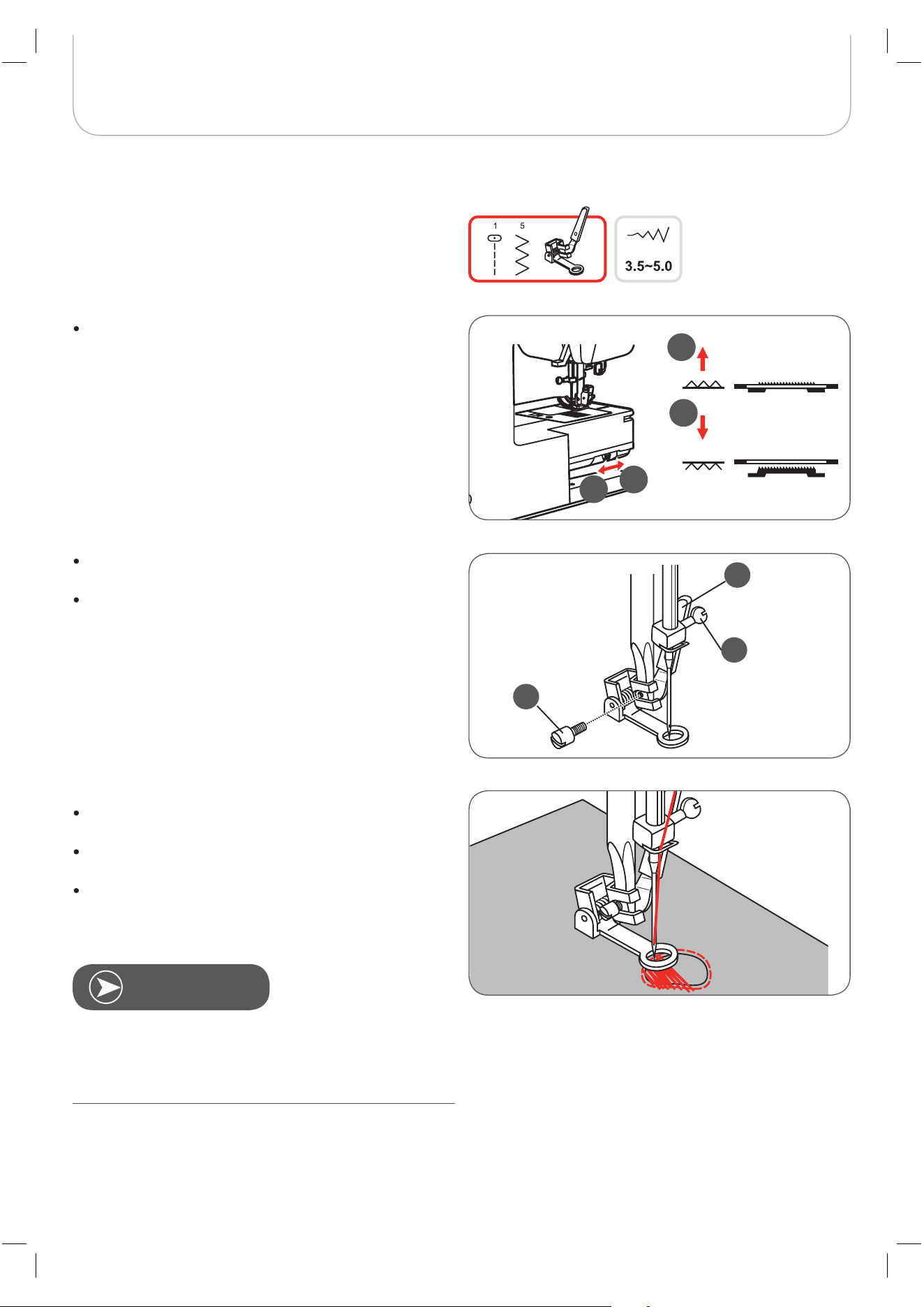
Darning
First sew around the edges of the hole (to secure the
threads).
Working from left to right, sew over the hole in a con-
stant and continuous movement.
Turn the work by 1/4 (90°) and sew over the first stitch-
ing moving the work slowly over the hole to separate
the rows and to avoid big gaps between them.
Remove the presser foot holder, and attach the darning
foot to the presser foot holder bar.
The lever (a) should be behind the needle clamp screw
(b). Press the darning foot on firmly from behind with
your index finger and tighten the screw (c).
Move the feed dog control to lower the feed dog (b).
Free motion darning is accomplished without the internal
feed system of the sewing machine. The movement of the
fabric is controlled by the operator. It is necessary to
coordinate sewing speed and movement of fabric.
N
OTE
b
c
a
b
a
b
a
63
Basic Sewing Procedures
Monogramming
Select the zig-zag stitch pattern and alter the stitch
width as desired.
Sew at a constant speed, moving the hoop slowly
along the lettering.
When the letter is finished, finish with securing stitches
at the end by pressing the Auto-lock button.
Fill in the pattern working from the outline towards the
inside.
– Keep the stitches close together.
You will get longer stitches by moving the hoop faster and
shorter stitches by moving the hoop slower.
Finish with securing stitches at the end by pressing the
Auto-lock button.
Embroidery
Select the zig-zag stitch pattern and alter the stitch
width as desired.
Stitch along the outline of the pattern by moving the
embroidery hoop.
– Make sure to maintain a constant speed.
* The embroider hoop is not included with the machine.
64
Basic Sewing Procedures
It is easier to guide the fabric and you have a better view of
the seam when using the standard, regular foot on your
machine.
Your sewing machine offers excellent stitch quality on a wide
range of fabrics from delicate chiffons to multiple layers of
denim.
The Walking foot accessory equalizes the feeding of the upper
and lower layers of fabric and improves the matching of
plaids, stripes and patterns. It also helps to prevent uneven
feeding of very delicate fabrics.
Lift the presser foot lifter to raise the presser foot bar.
Remove the presser foot holder by unscrewing the
presser foot bar attaching screw counter-clockwise.
Always try to sew without the walking foot accessory first
as it should be used only when necessary.
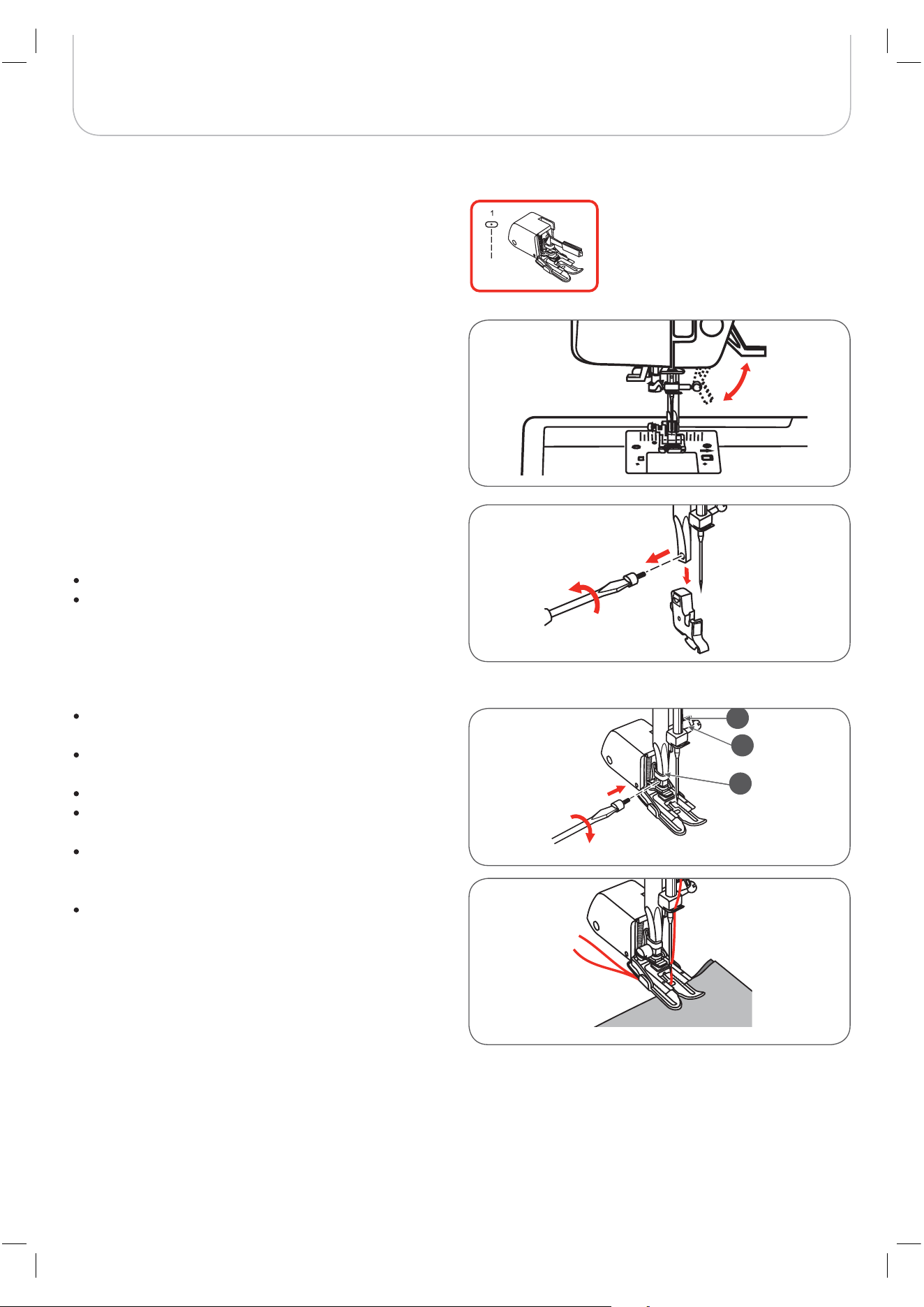
Attach the Walking foot to the machine as follows:
The arm (a) should fit into the needle attaching screw
and clamp (b) above.
Slide the plastic attaching head (c) from the left to the
right so that it fits into the presser foot bar.
Lower the presser foot bar.
Replace and tighten (clockwise) the presser bar attach-
ing screw.
Make sure both the needle attaching screw and the
presser foot bar attaching screw are tightly fixed.
Draw the bobbin thread up and place both the bobbin
thread and the needle thread behind the walking foot
attachment.
Walking Foot
* The walking foot accessory is optional. It is not included with
this machine.
a
b
c
65
Special Functions
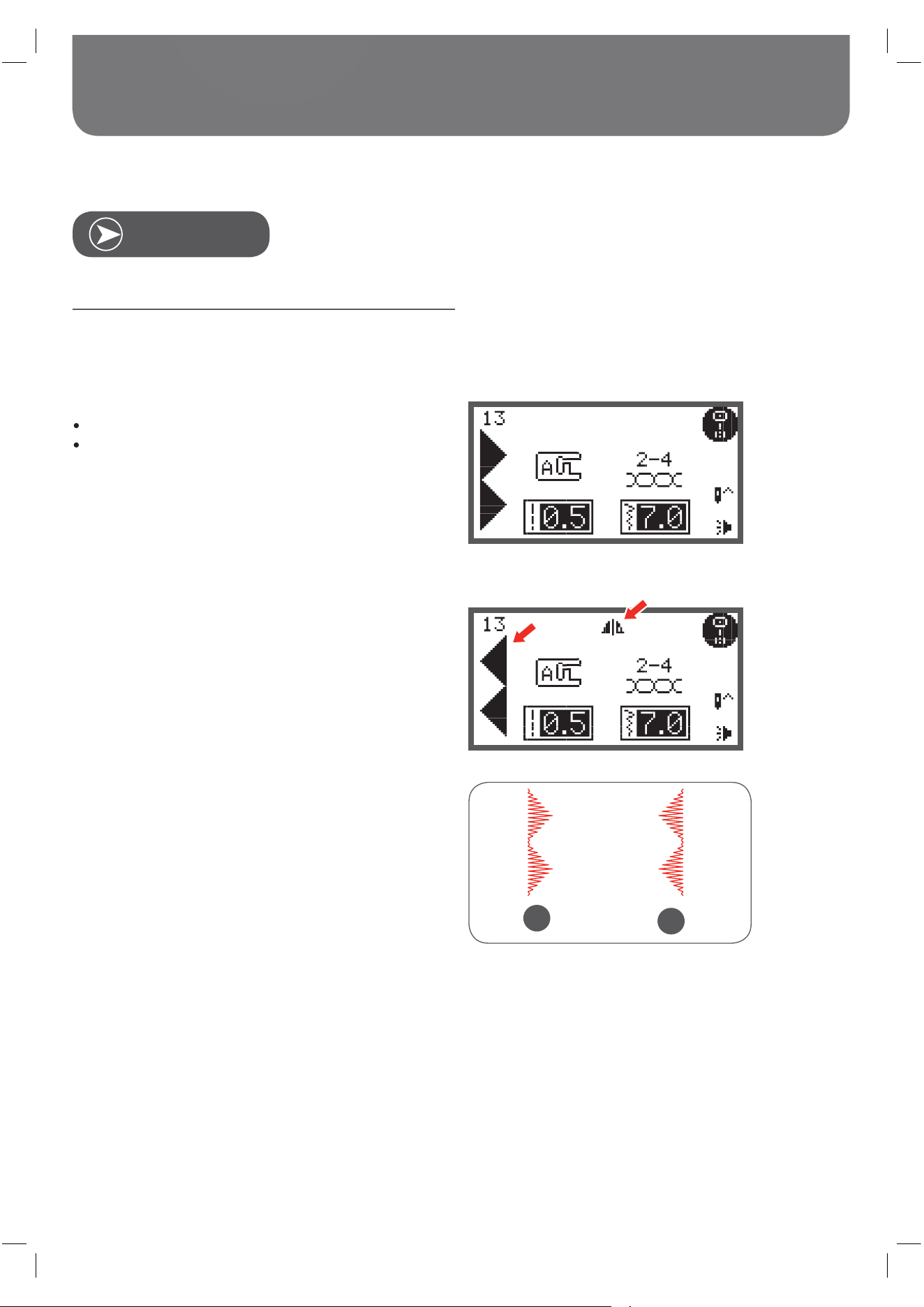
Mirror image stitch pattern
Direct Group Pattern 0 and A Group Patterns 86-99 can’t
be mirrored.
Select the desired pattern.
Press the mirror image button.
– The symbol for mirroring appears on the LCD dis-
play.
The machine will continue to sew the displayed pattern mir-
rored until the mirror image button is pressed again or the
pattern is changed.
A Normal pattern sewing
B Mirror pattern sewing
N
OTE
A
B
66
Special Functions
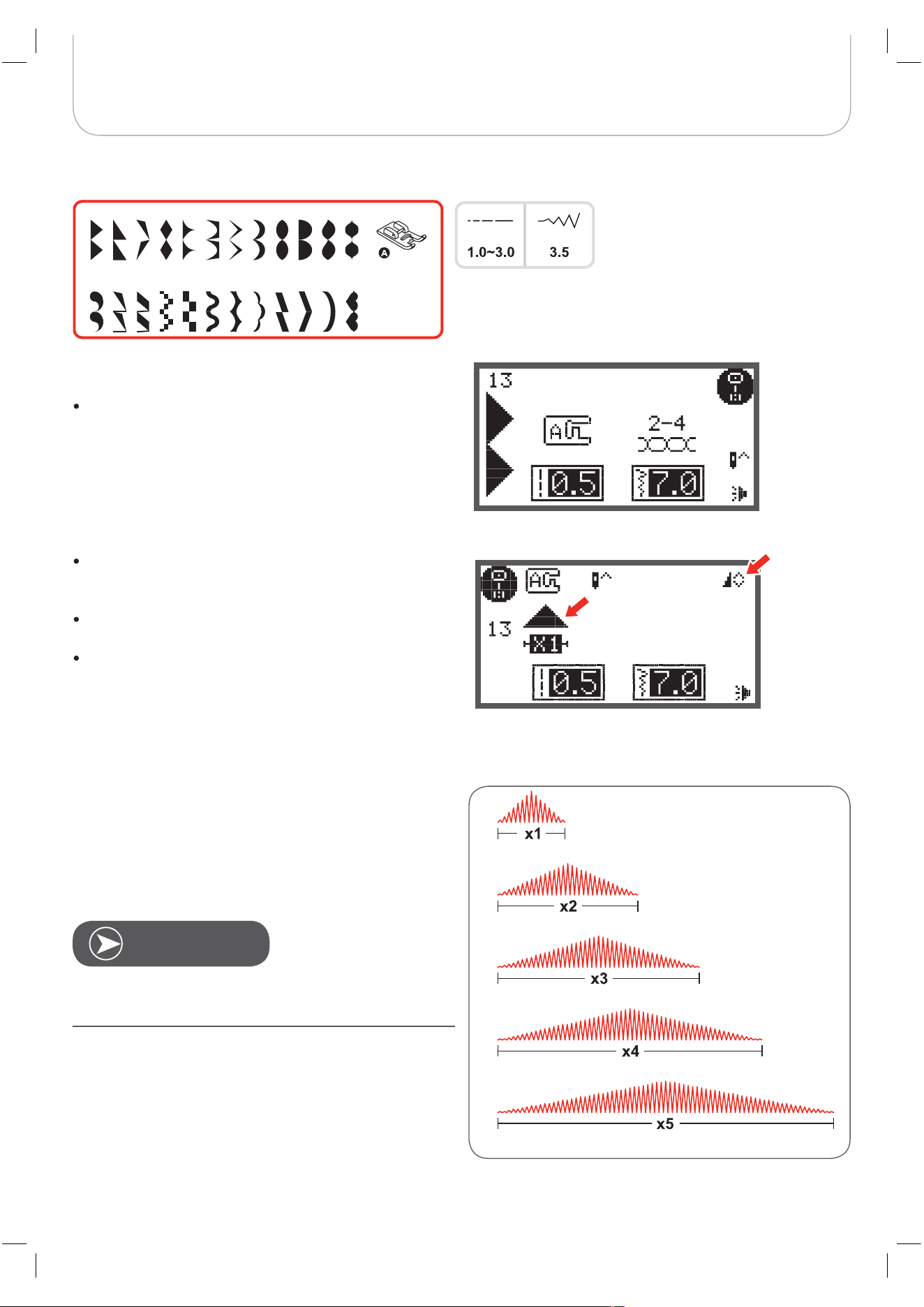
Elongation
A-15 A-16 A-17 A-18 A-19 A-20 A-21 A-22 A-23 A-24
A-25 A-26 A27 A-28 A-29 A-30
A-31
A-32 A-33 A-34 A-35 A-36
31-A 41-A
A Group Patterns 13-36 can be elongated and mirrored
simultaneously.
The stitch can be elongated up to five times its normal length
by pressing the elongation button.
Select the desired pattern.
Press the elongation button.
– The symbol for elongation appears on the LCD
display.
Press the elongation button several times to adjust the
elongation as desired.
The machine will continue to sew the displayed pattern
until the elongation button is pressed again or the pat-
tern is changed.
When the width or length of the stitch is changed, a larger
variety of patterns are available.
N
OTE
67
Special Functions
Sewing
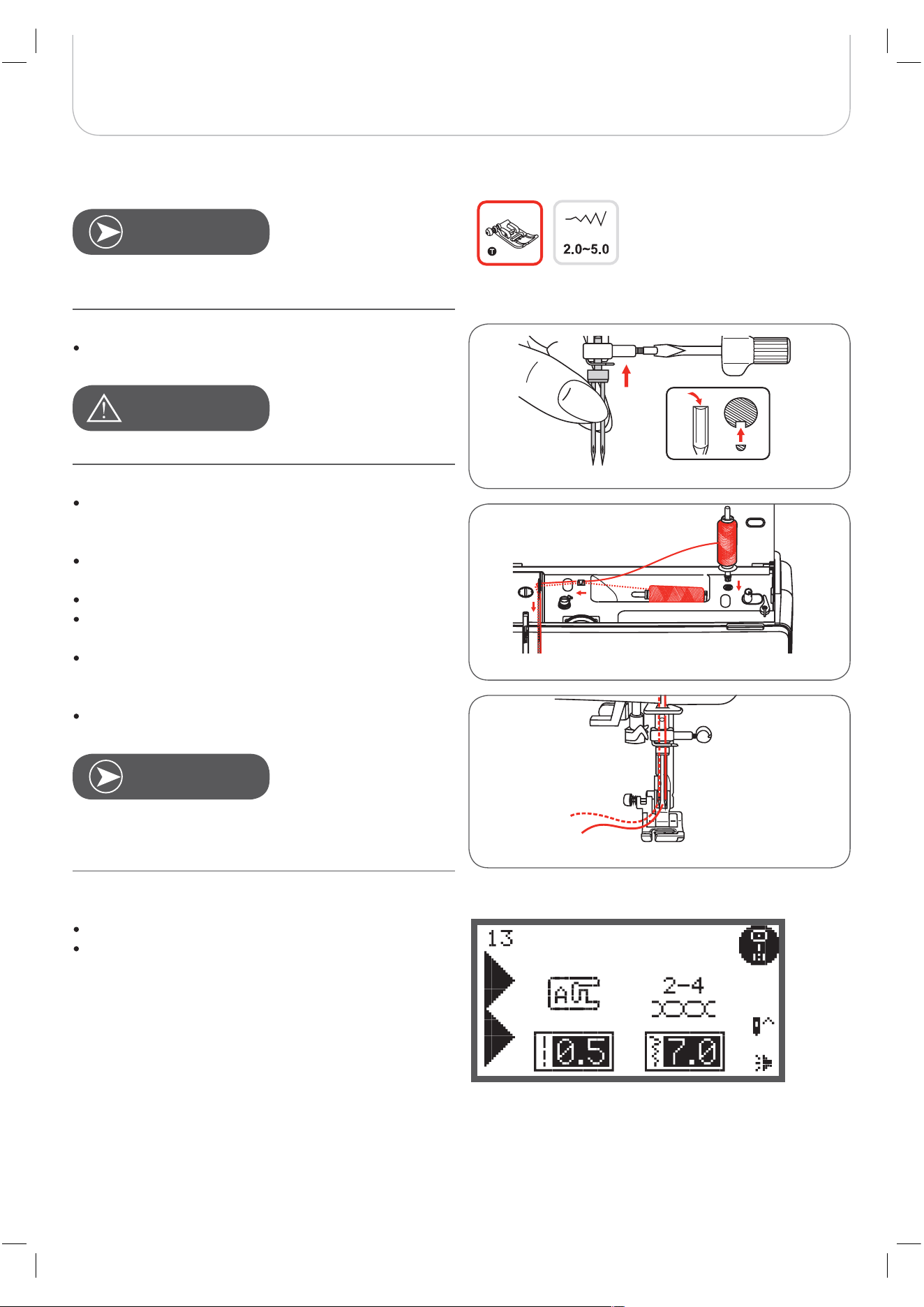
s must be purchased separately. They are not
include with this machine.
Make sure that the two threads used to thread the
are of the same weight.You can use one or two
colors.
Insert the .
Use only assemblies with max. 2mm
needle distance (i.e. bernette part number
502020.62.91).
Follow the instructions for single-needle threading
using the horizontal spool pin.
Thread through the left needle.
Insert the spool pin (included with the accessories) in
the hole on the top of the machine.
Thread along the same path, and make sure NOT to
omit the thread guide above the needle and pass
thread through the right needle.
Thread each needle separately.
Select a pattern. (E.g. A Groupe Pattern 13)
All stitch patterns can be used with except
for Direct Group Patterns 0 and A Group Patterns
86-99.
When using , use the Zigzag foot.
N
OTE
A
TTENTION
!
N
OTE
Twin Needle
Twin needle
Twin needle
Twin needles
Twin needle
Twin
needle
Twin Needle
68
Special Functions
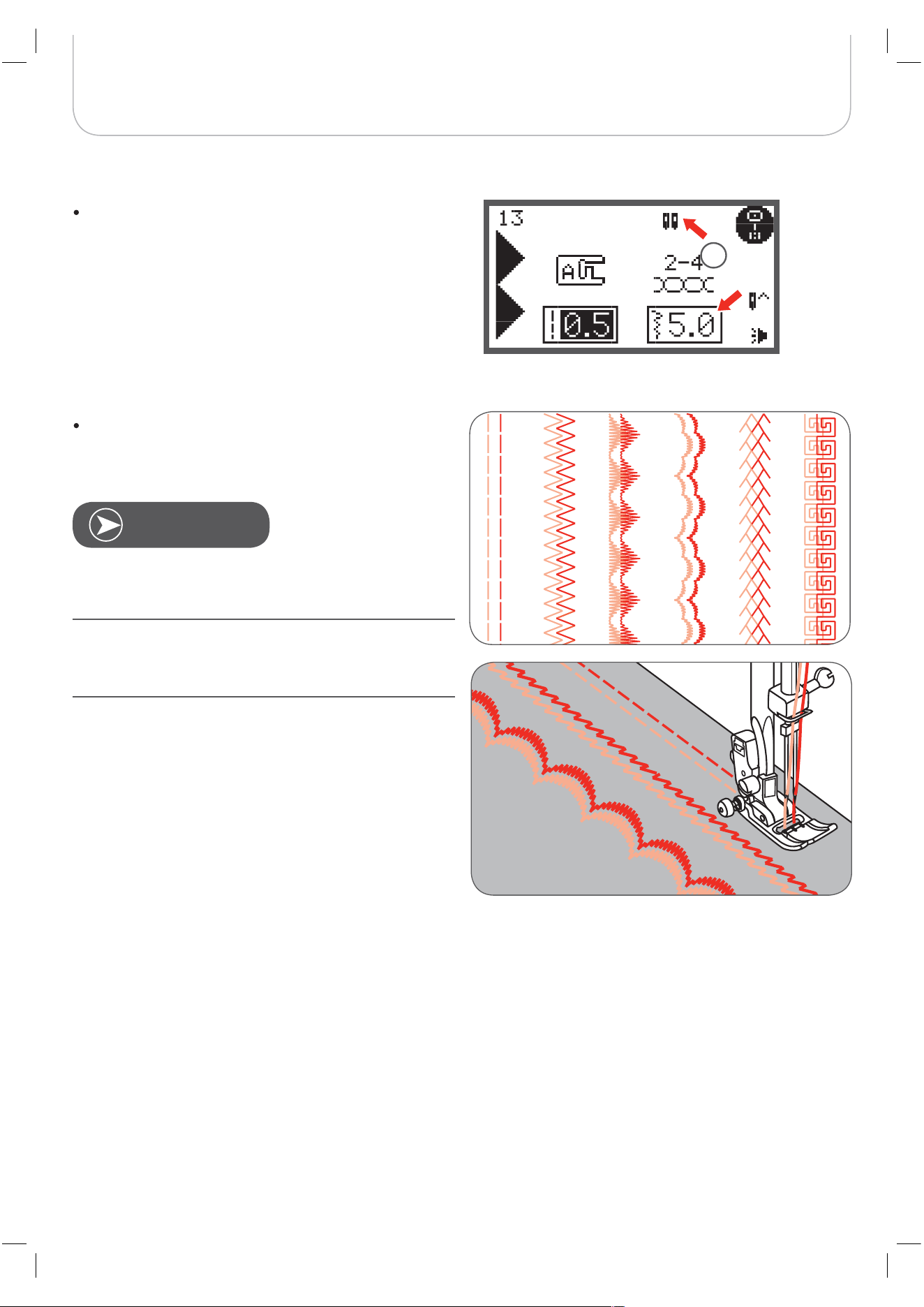
Press the button.
– The LCD display shows the symbol (1)
and the machine reduces the maximum stitch
width for sewing to 2mm automatically.
Start to sew and two lines of stitches are sewn parallel
to each other.
When sewing with the , always proceed slowly
and make sure to maintain a low speed to ensure a good
stitch formation.
When sewing has been selected, it will remain
active even the stitch pattern is changed. To deactivate
sewing press the button again.
N
OTE
1
twin needle
twin needle
twin needle
twin needle
twin needle
twin needleneedle
twin
69
Special Functions
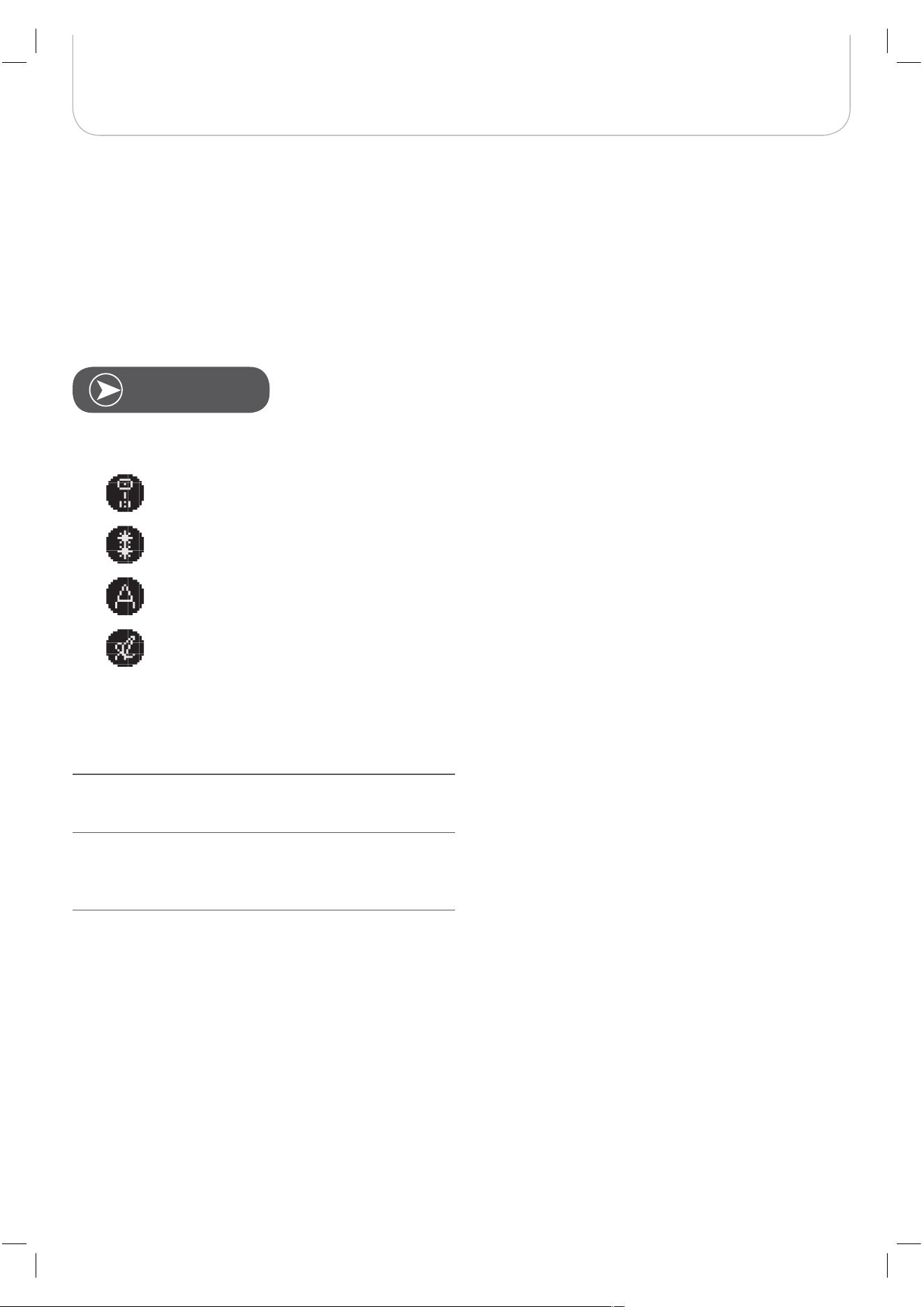
Several stitch patterns can be combined in one sewing
sequence using the memory function.
– These pattern sequences can be stored for later
use.
– Even when the sewing machine is switched off the
memory contents are retained.
Memory
Multiple patterns selecting from pattern groups can be com-
bined together.
A Group Patterns
B Group Patterns
Block Style Alphabet (C1-Group Patterns)
Script Style Alphabet (C2-Group Patterns)
Direct Group Patterns and A Group Patterns 86-99 can’t be
stored in the memory.
This machine has 4 memories and each of them can store
up to 20 stitches.
All the units in the memory can be edited in their functions
such as stitch length, stitch width, elongation, mirror image
and Auto-Lock, except when sewing with the .
N
OTE
twin needle
70
Special Functions
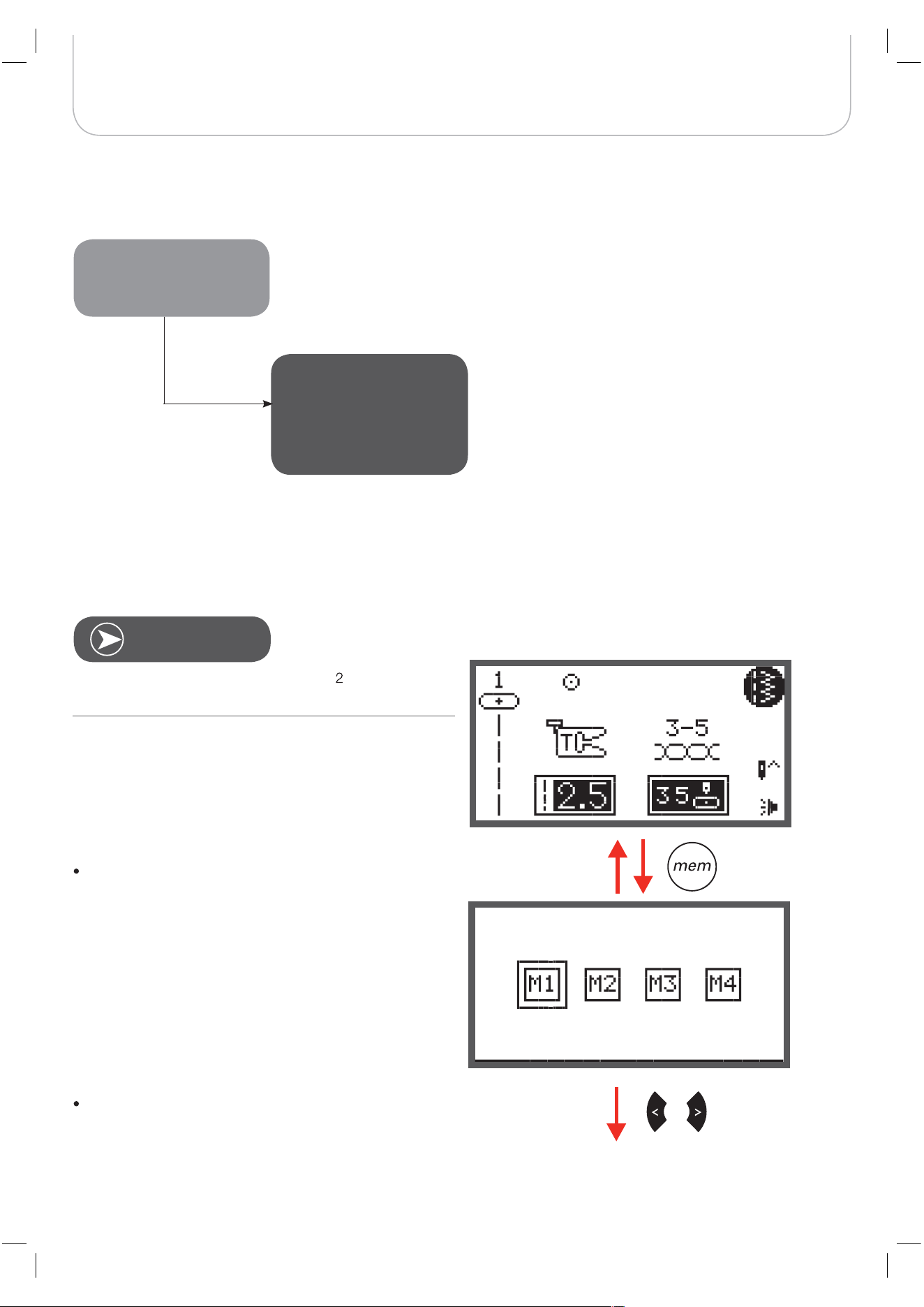
Overview Memory Enter Mode
Enter a sequence of stitch patterns in Memory Enter Mode
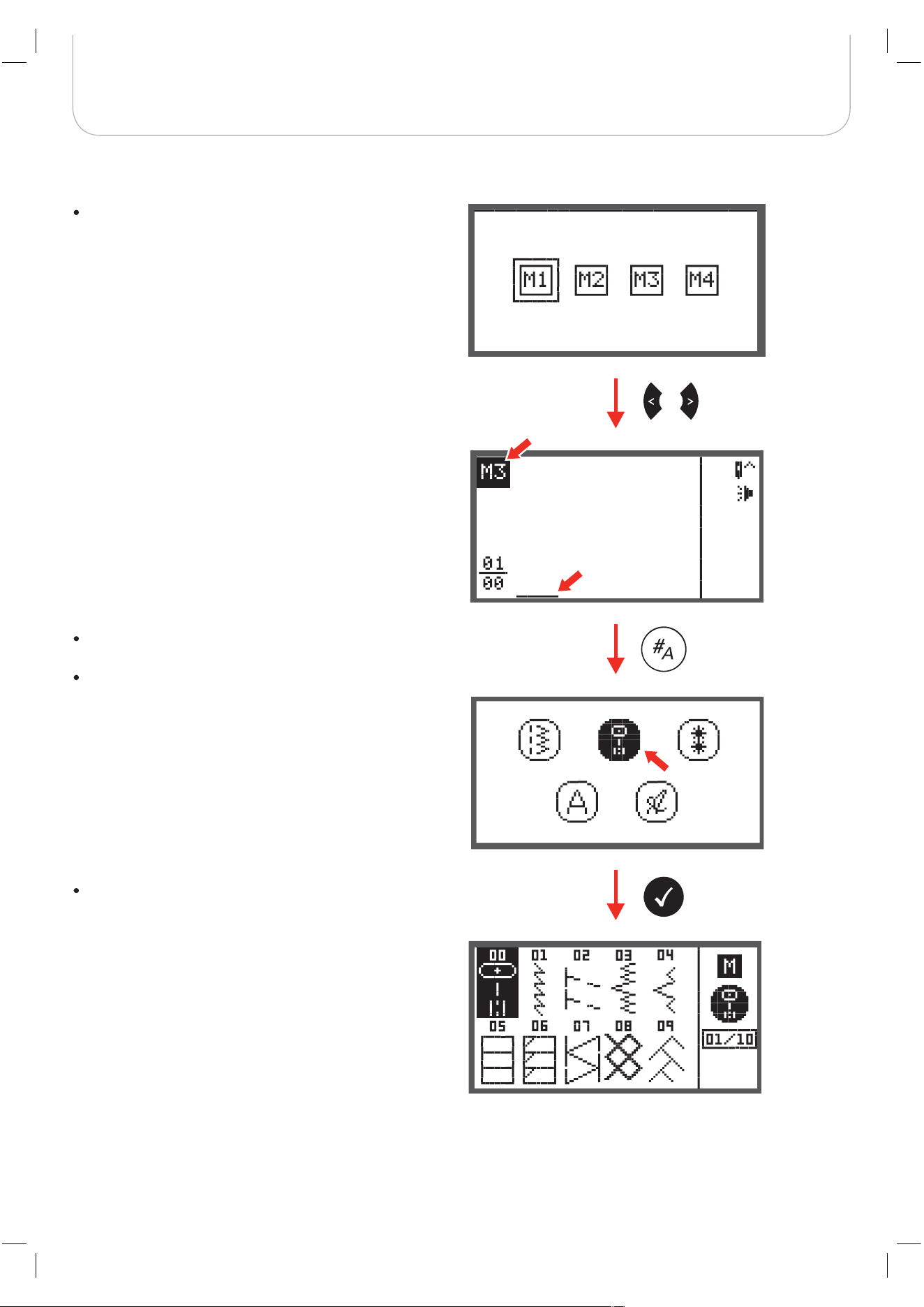
Press the memory button to enter the Memory Enter
Mode.
Use the arrow buttons to select the number of the
Memory file.
Requirement: Empty Memory (see page 8 to clear
Memory).
Mem
Enter Mode
Enter a sequence of stitch
patterns & sew memo-
rized patterns
N
OTE
71
Special Functions
Press the OK button to enter the selected Memory
Module. The cursor is at first memory position for the
first pattern to be programmed.
The upper left corner of LCD display shows the number of the
Memory file.
Press the pattern group selection button to enter the
pattern group selection display.
Select the desired pattern group. (E.g. for A Group Pat-
terns)
Press the OK button to enter the pattern browser and
the various stitches in the selected pattern group
appear.
72
Special Functions
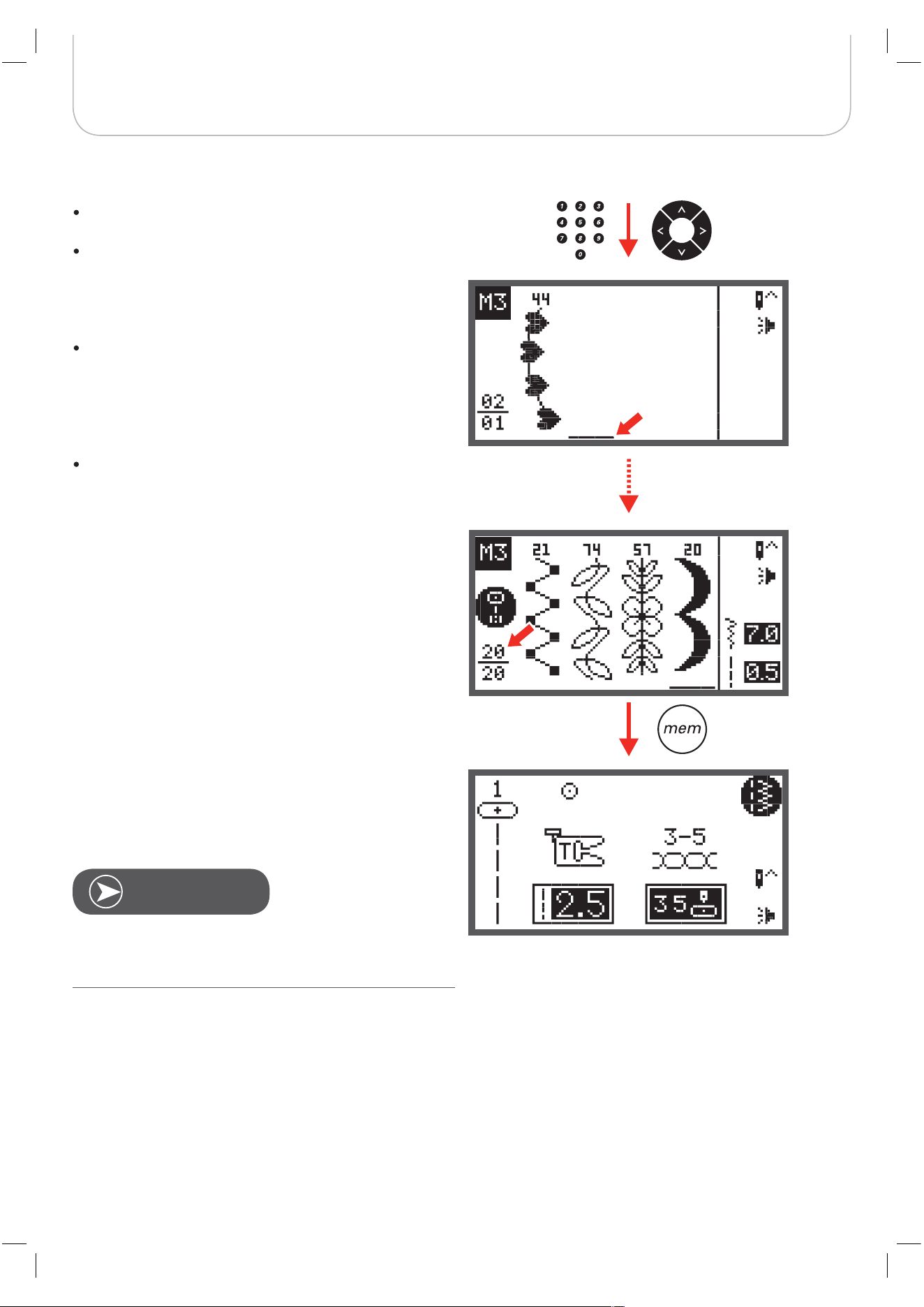
Press the desired pattern number or use the arrow but-
tons to select the desired pattern.
When using the arrow buttons, press the OK button to
store the selected stitch.
– The selected pattern appear on the LCD display
and the cursor moves to the next position.
When pressing the number buttons the machine will
automatically store the selected stitch which appears
on the LCD display and the cursor moves to next posi-
tion.
Repeat the steps for more patterns to be stored in the
memory.
After 20 patterns have been selected, the memory is full. If
another pattern is selected when the memory is already full
the machine will beep to make you aware of it.
To sew the memorized patterns press Start/Stop button or
touch the foot control.
The selected pattern will be cleared from the Memory file
when the machine ist turned off without having pressed the
memory button again after the completed selection.
N
OTE
73
Special Functions
Review stored stitches
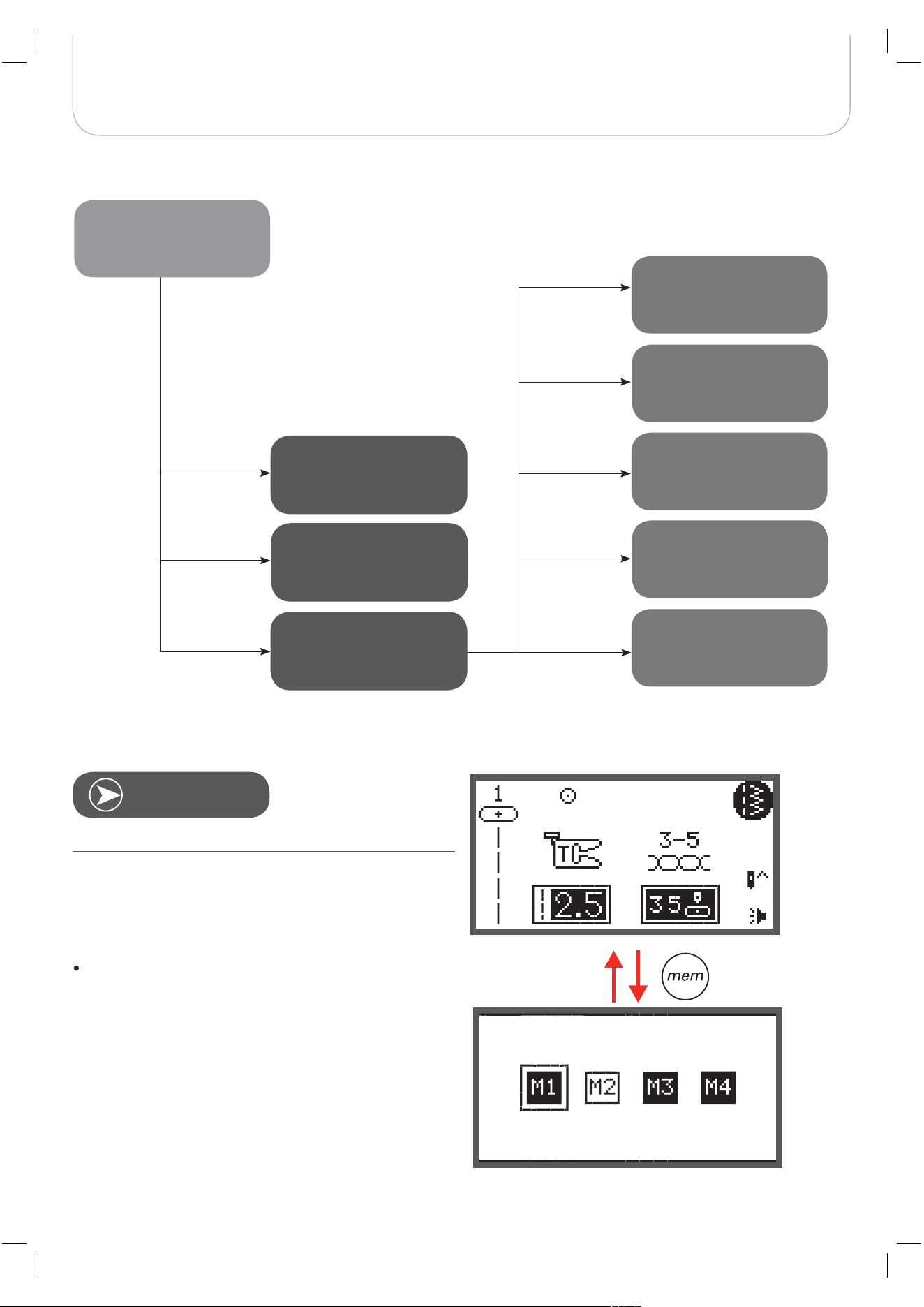
Press the memory button to enter the Memory Mode.
Requirement: with existing patterns in Memory.
Overview Memory Review/Edit Mode
Mem
Review/Edit Mode
Review stored stitches
page 73
Insert an additional
stitch page 79-80
Enter Mode) page 76
page 75
page 81
page 78
76-82
Delete ALL page 82
Add a sequence of
stitches (Switch to Mem
Switch to Normal Mode &
Sew memorized patterns
Delete a stored stitch
Change a stored stitch
or its parameters see
Editing functions page
N
OTE
74
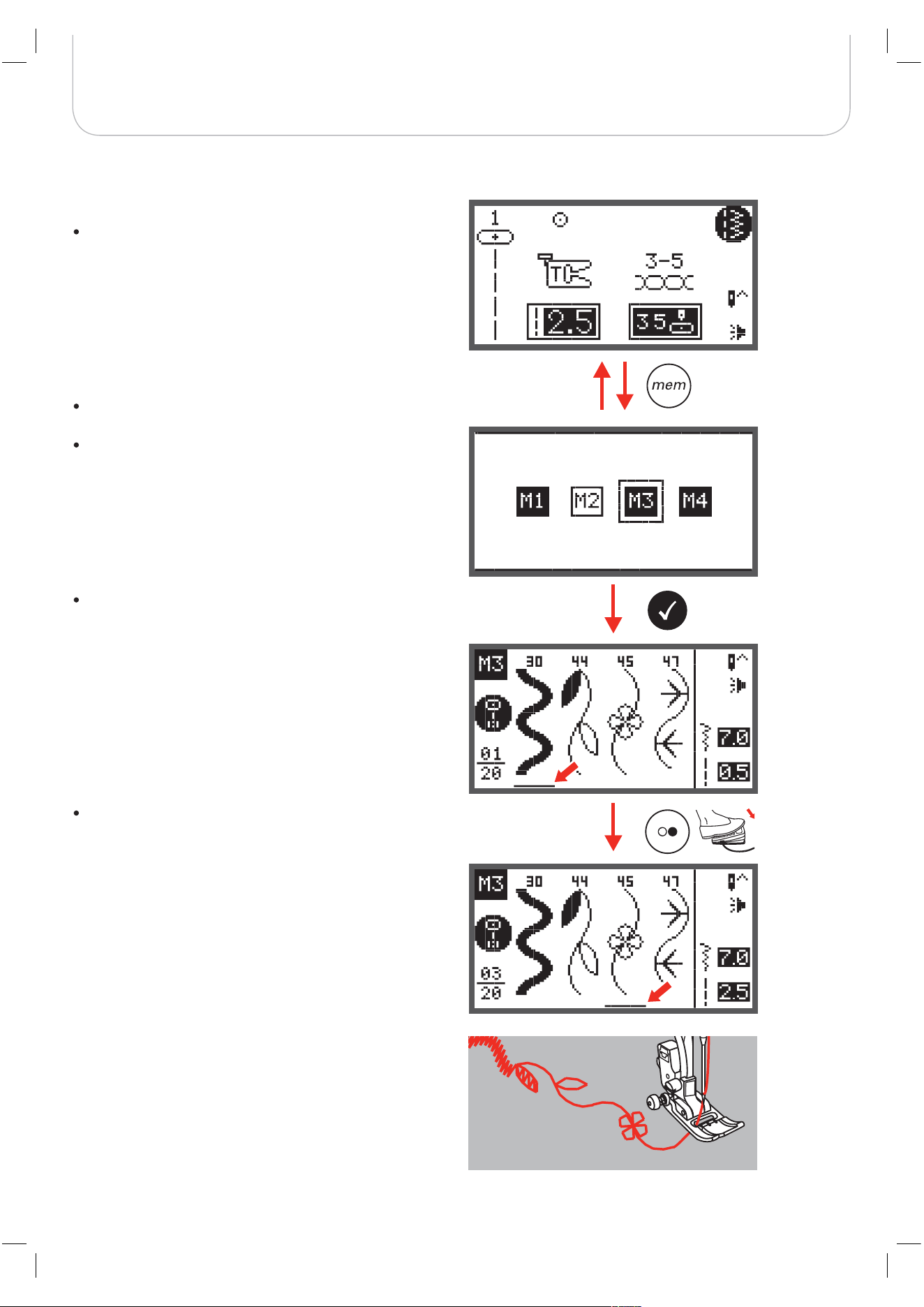
Special Functions
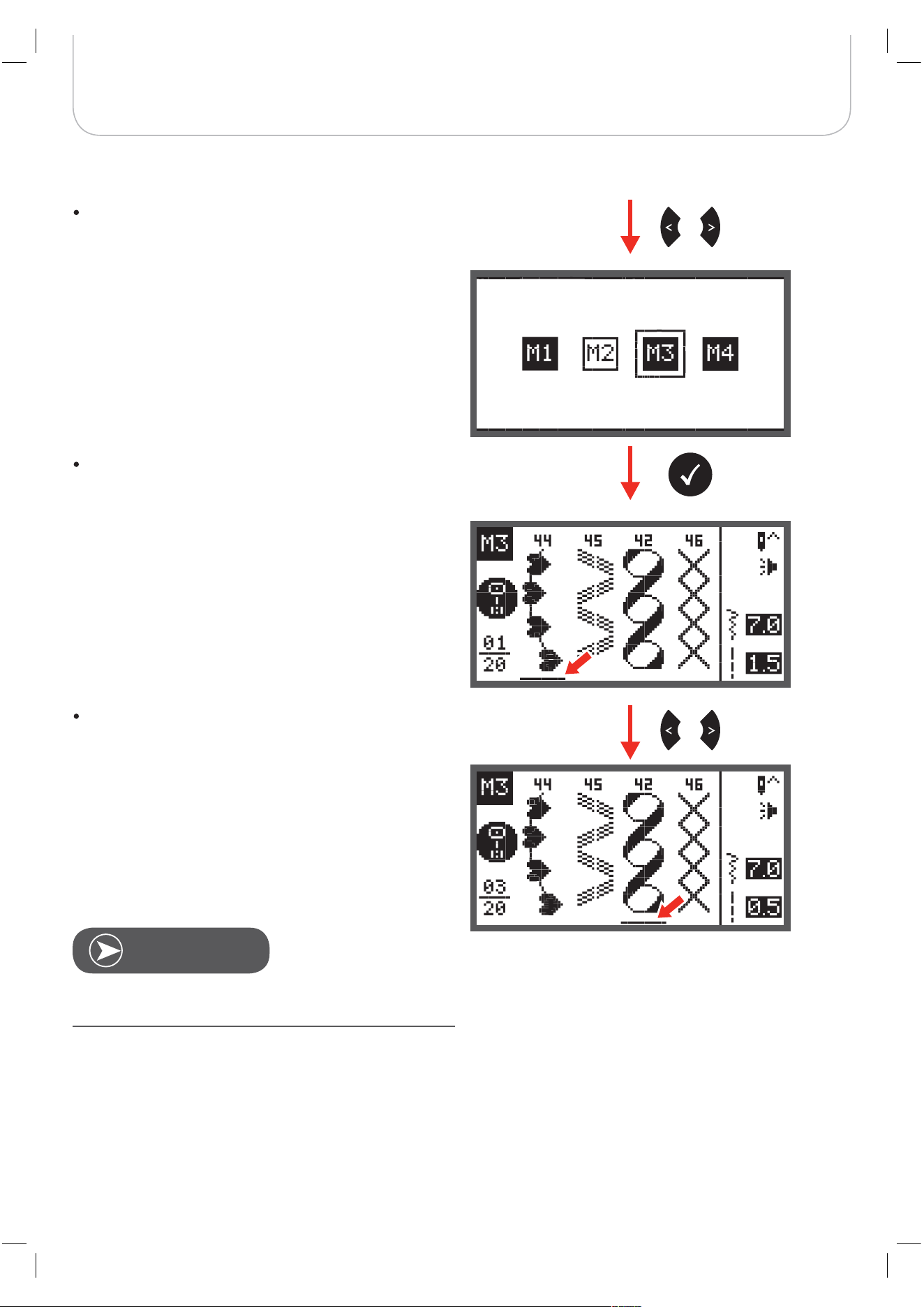
Use the arrow buttons to choose the desired Memory
file.
Press OK button to enter the selected Memory file. The
cursor stays at the first position.
Use the arrow buttons to move from position to posi-
tion.
Press Start/Stop button or touch the foot control to start the
continuous sewing from the current position in the memory.
N
OTE
75
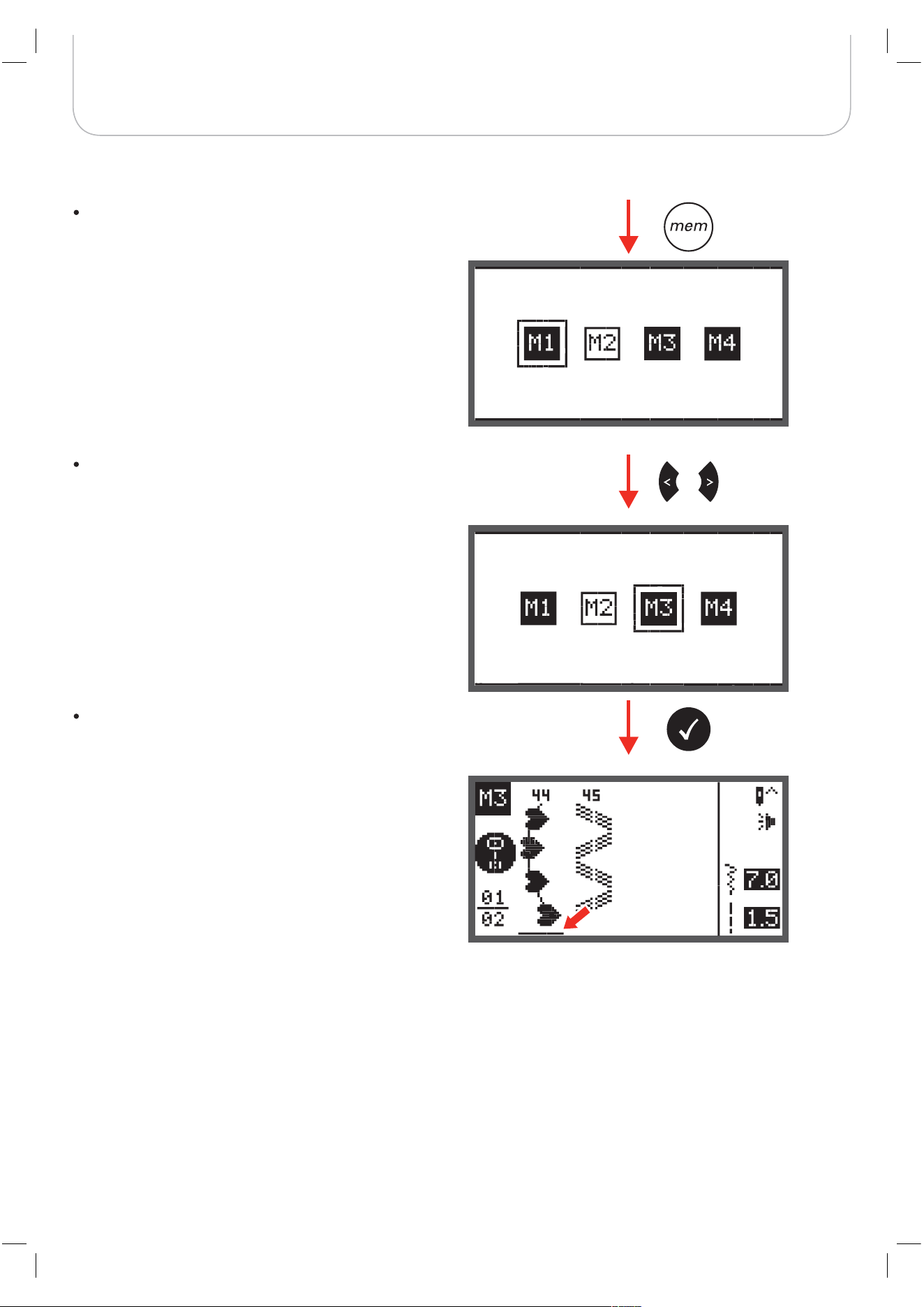
Special Functions
Switch from Memory Mode to the Normal Mode
Sew memorized patterns
When Memory Mode is active.
Press the memory button to leave the Memory Mode
and return to the Normal Mode.
Press the memory button to enter the Memory Mode.
Use the arrow buttons to choose the desired Memory
file.
Press OK button to enter the selected Memory file.
– The cursor stays at the first position.
Press the Start/Stop button or touch the foot control to
sew the stored stitches.
76
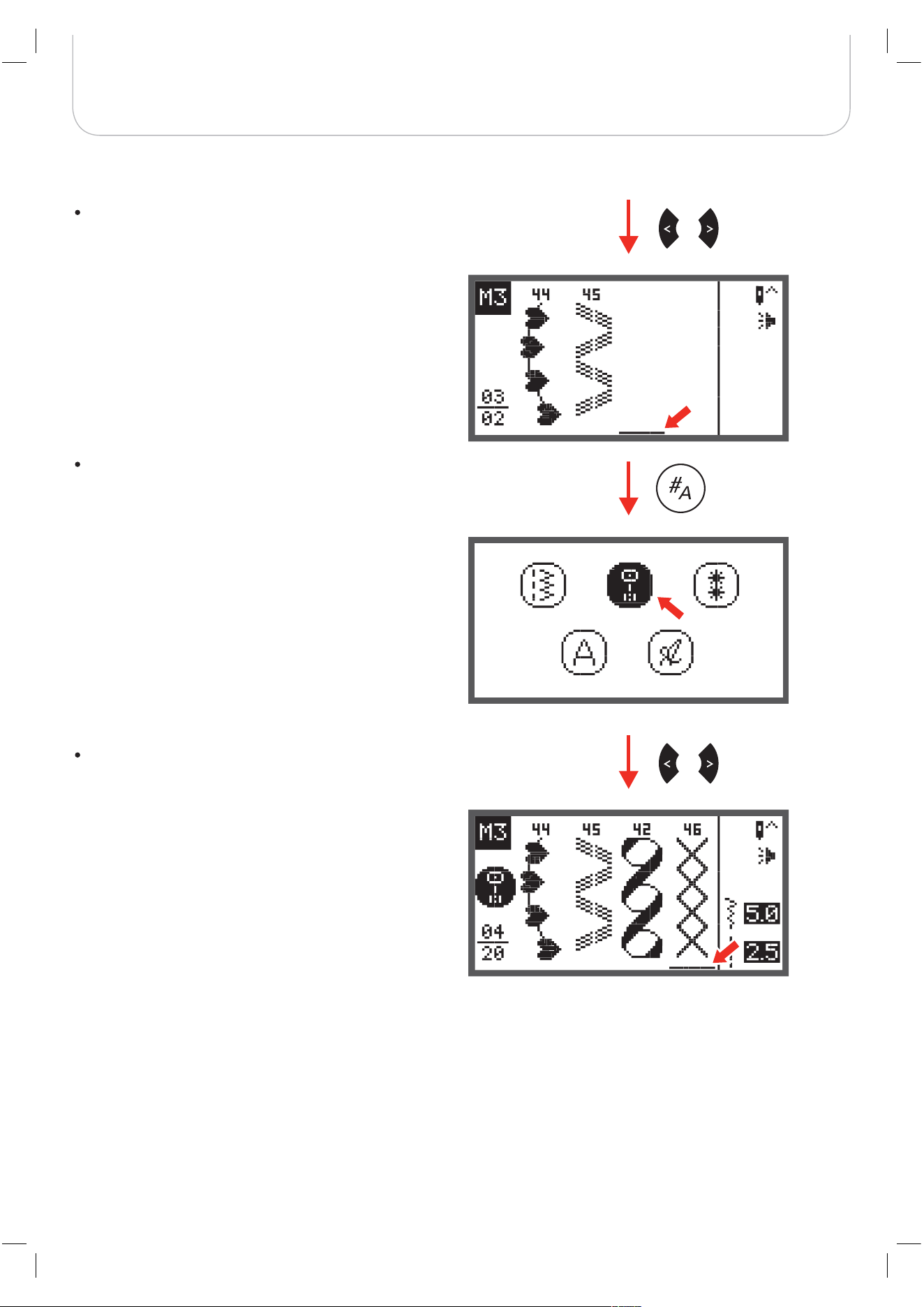
Special Functions
Memory Editing functions - Add a sequence of stitches
Press the memory button to enter the Memory Mode.
Use the arrow buttons to select the number of the
Memory file (e.g. M3).
Press the OK button to enter the selected Memory file
and the cursor stays at the first position.
77
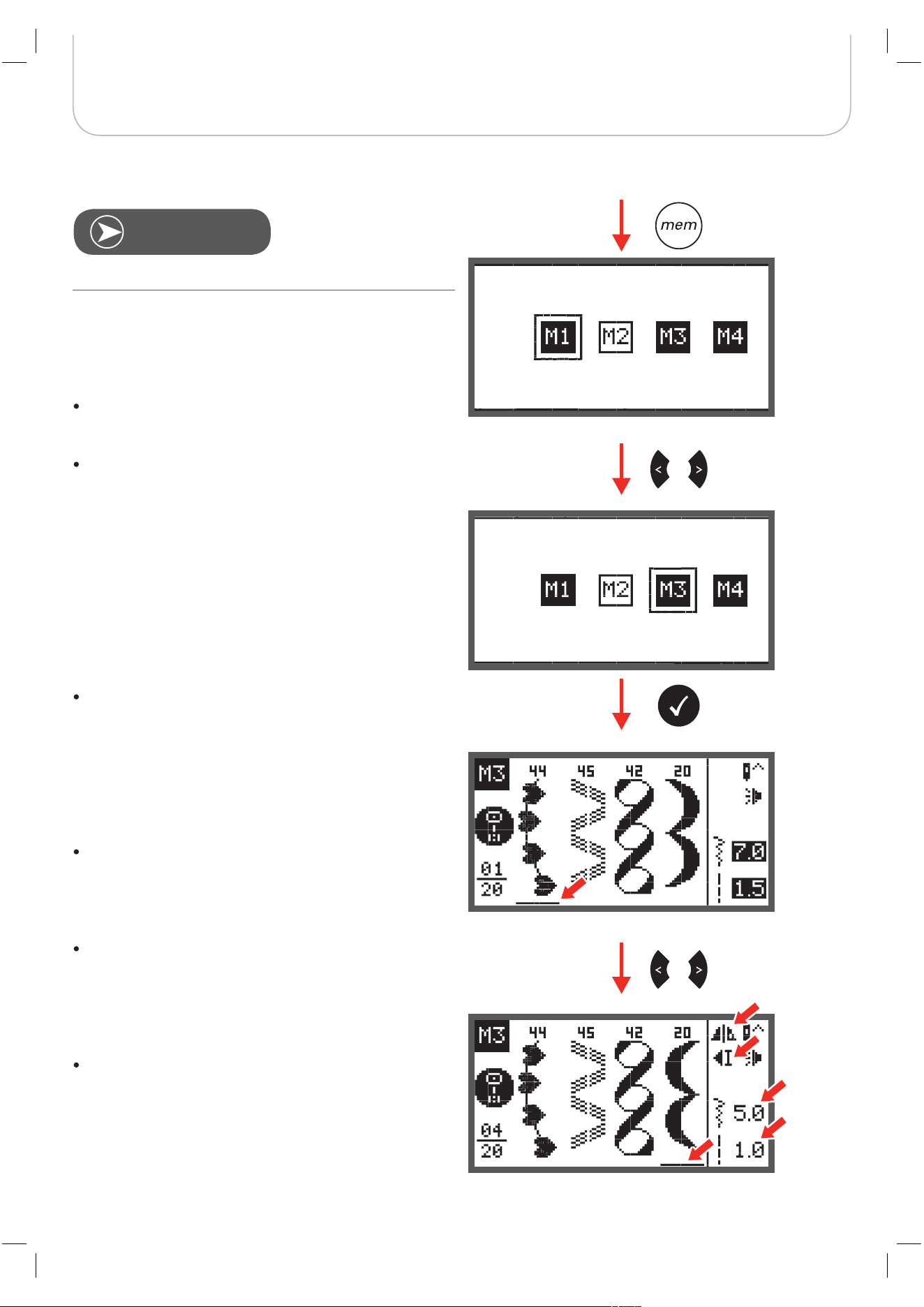
Special Functions
Use the arrow buttons to move the cursor to next
empty position.
Press the pattern group selection button to enter the
pattern group selection display.
Proceed according to page 73 to add multiple new
stitches.
78
Special Functions
Press the memory button to enter the Memory Mode.
Use the arrow buttons to choose the desired Memory
file.
Press the OK button to enter the selected Memory file.
– The cursor stays at the first position.
Use the arrow buttons to select the stitch that should
be replaced or have its parameters changed.
To change the stitch press the clr button and then
press the pattern group selection button to choose a
new stitch.
To change its parameters press the stitch length, stitch
width, mirror image, or elongation button.
Memory Editing functions - Change a stored stitch or its parameters
Requirement: with existing patterns in Memory.
N
OTE
twin needle
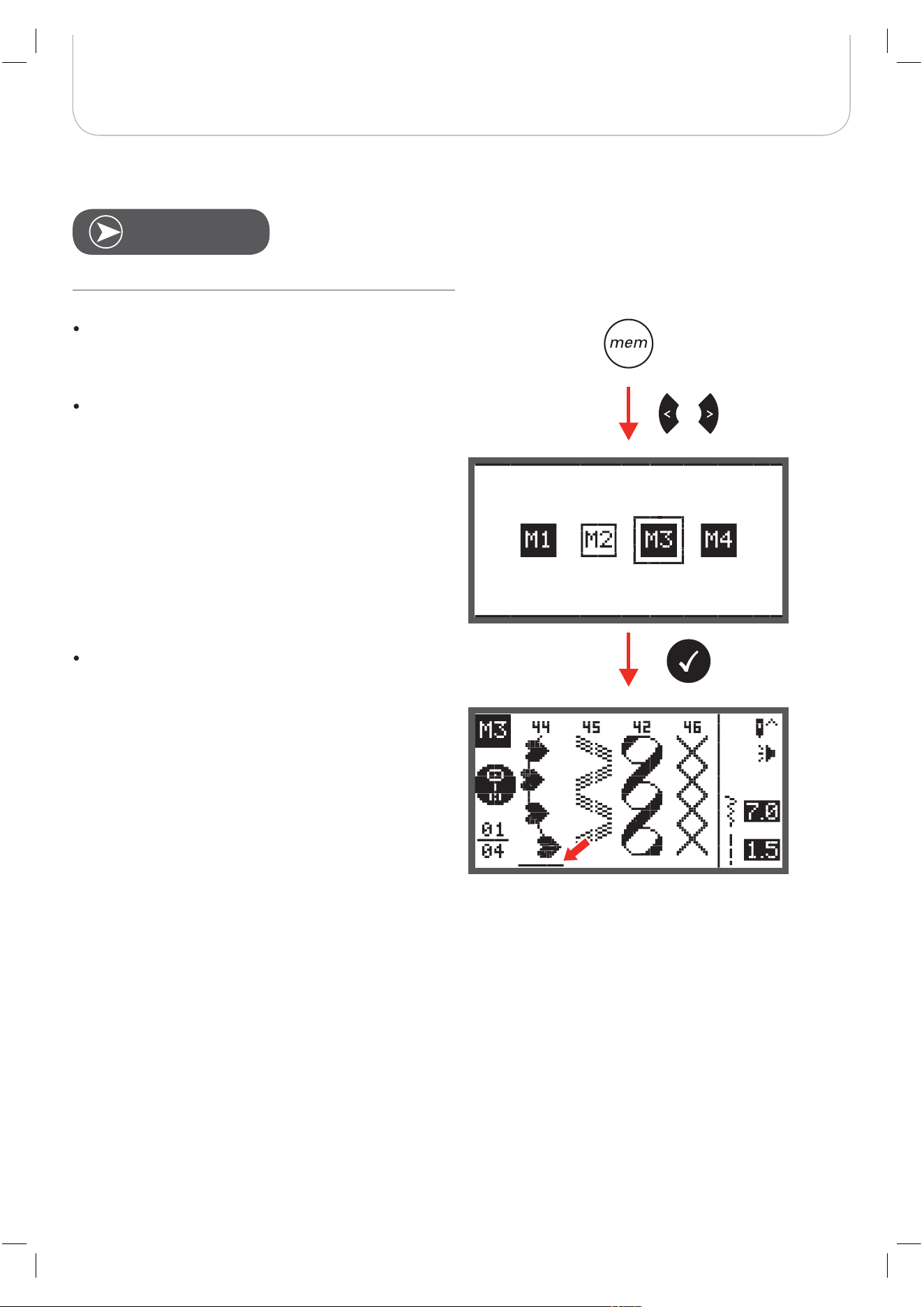
79
Special Functions
Memory Editing functions - Insert an additional stitch
Press the memory button to enter the Memory Mode.
Use the arrow buttons to choose the desired Memory
file.
Press the OK button to enter the selected Memory file.
– The cursor stays at the first position.
Requirement: with existing patterns in Memory.
N
OTE
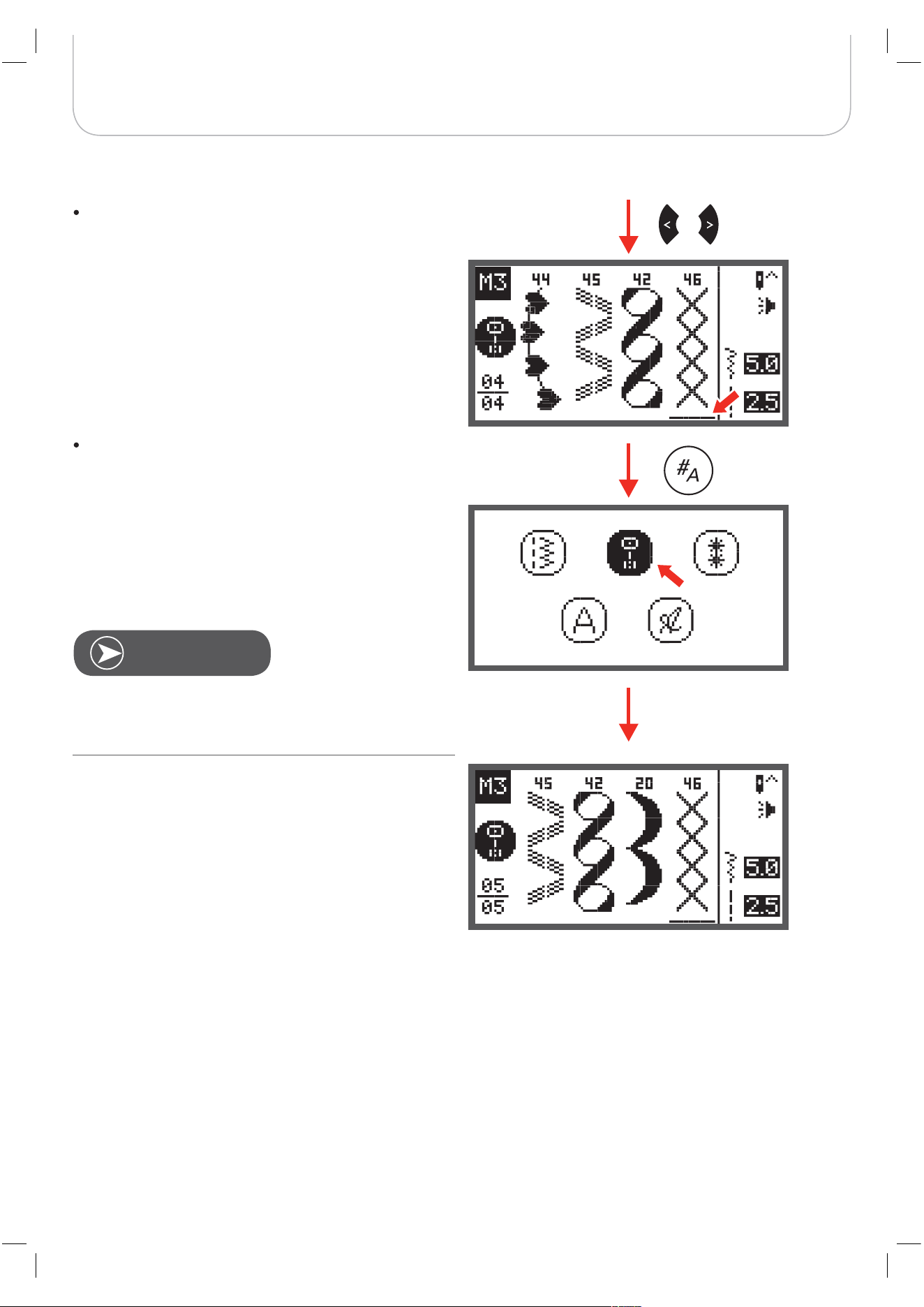
80
Special Functions
Use the arrow buttons to move the cursor to the posi-
tion where you want to insert a new stitch.
Press the pattern group selection button to enter the
pattern group selection browser and choose a new
stitch.
The parameters of the selected stitch, such as stich length,
stitch width, mirror image, and elongation can
be altered by pressing the respective button.
N
OTE
twin needle
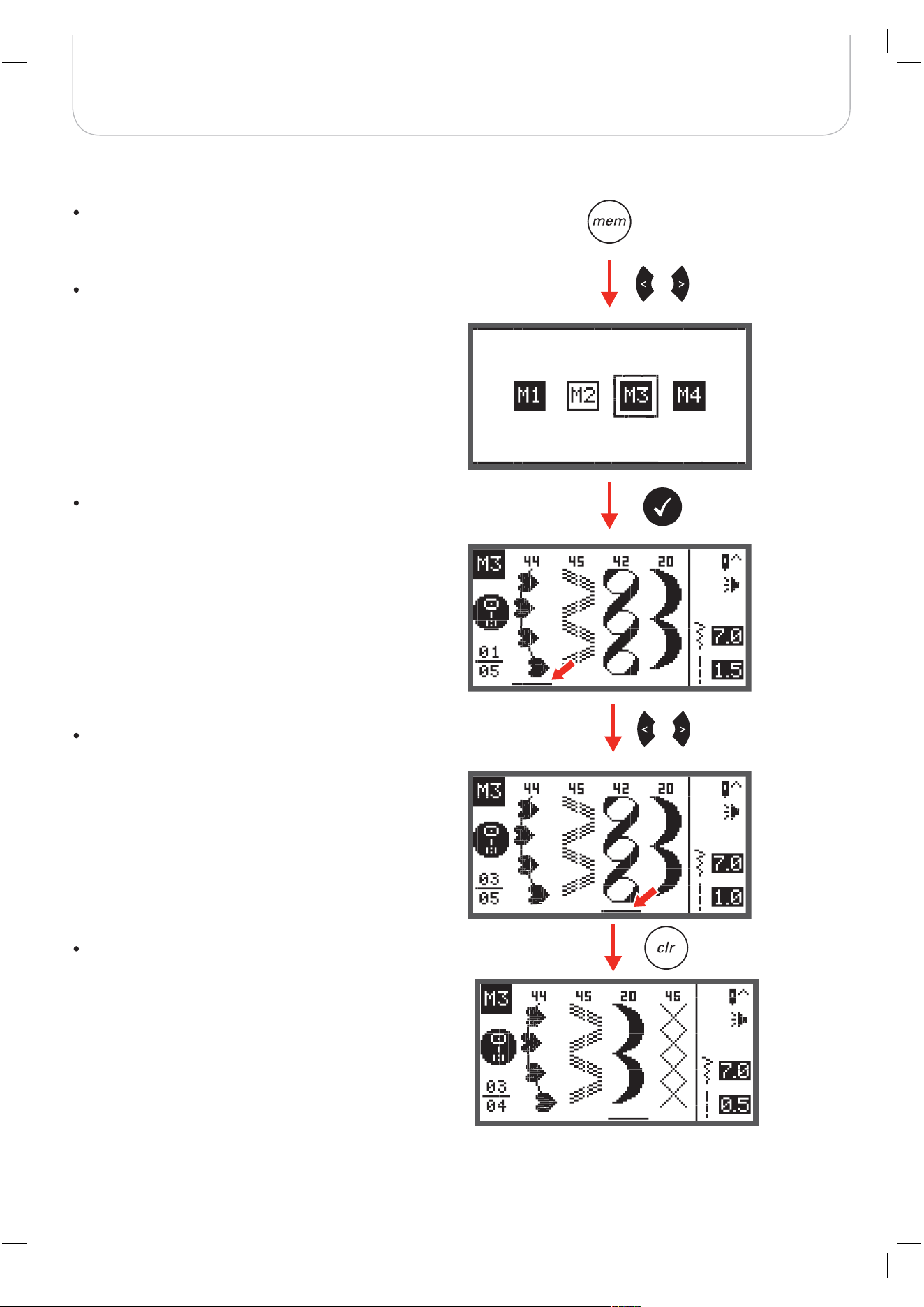
81
Special Functions
Memory Editing functions - Delete a stored stitch
Press the memory button to enter the Memory Mode.
Use the arrow buttons to choose desired Memory file.
Press the OK button to enter the selected Memory file.
– The cursor stays at the first position.
Use the arrow buttons to select the stitch that should
be deleted.
Press the clr button to delete the pattern and all pat-
terns that come next will move one position forward.
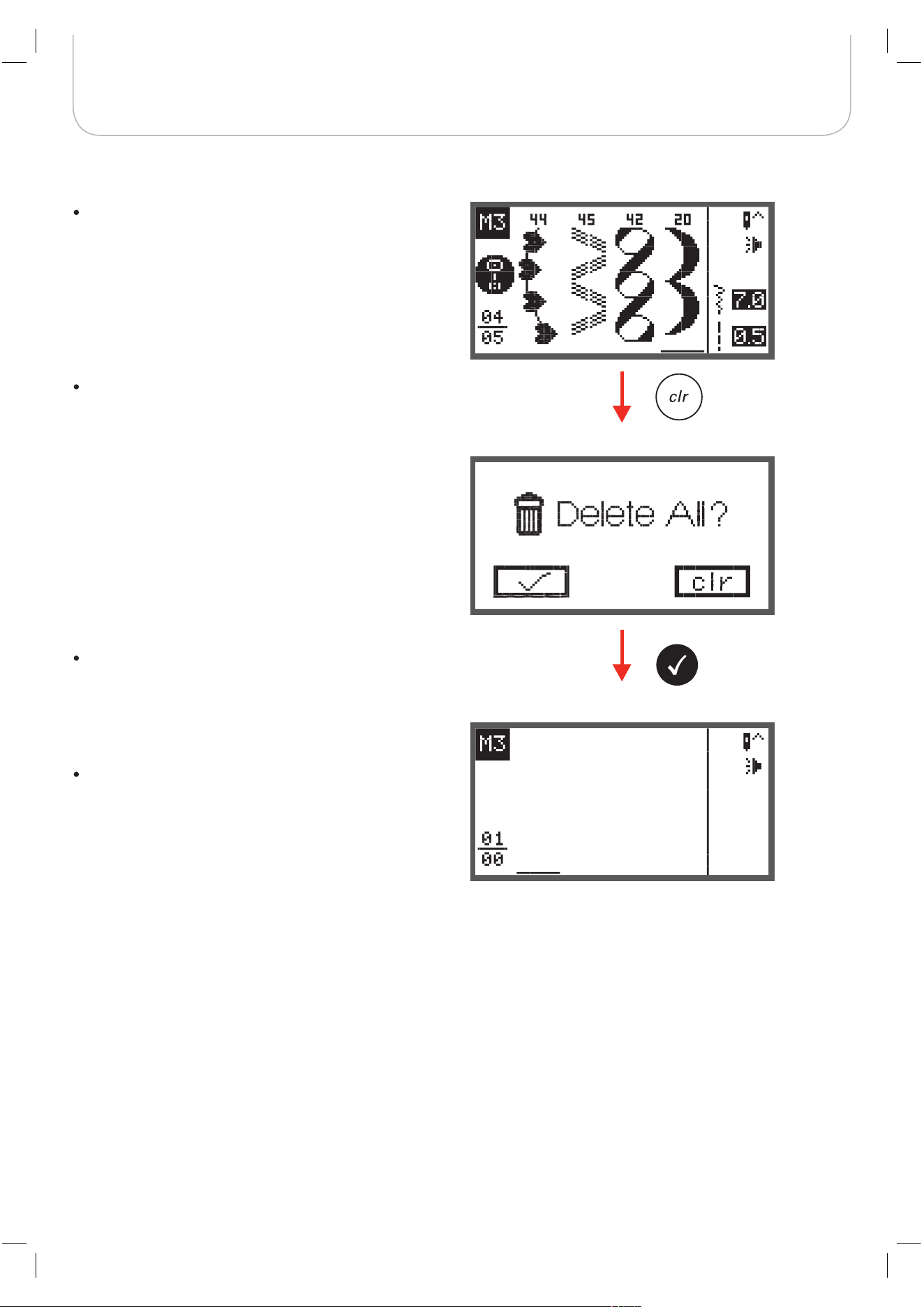
82
Special Functions
Memory Editing functions - Delete ALL
Repeat steps from «Delete a stored stitch».
When pressing the clr button keep it pressed for a few
seconds until the machine asks again if everything
should be deleted.
Press the OK button if all patterns should be deleted
and the machine returns to the previous Memory file
which is empty now.
Press the clr button if they shouldn’t be deleted and the
machine returns to the previous Memory file with all
stored patterns.
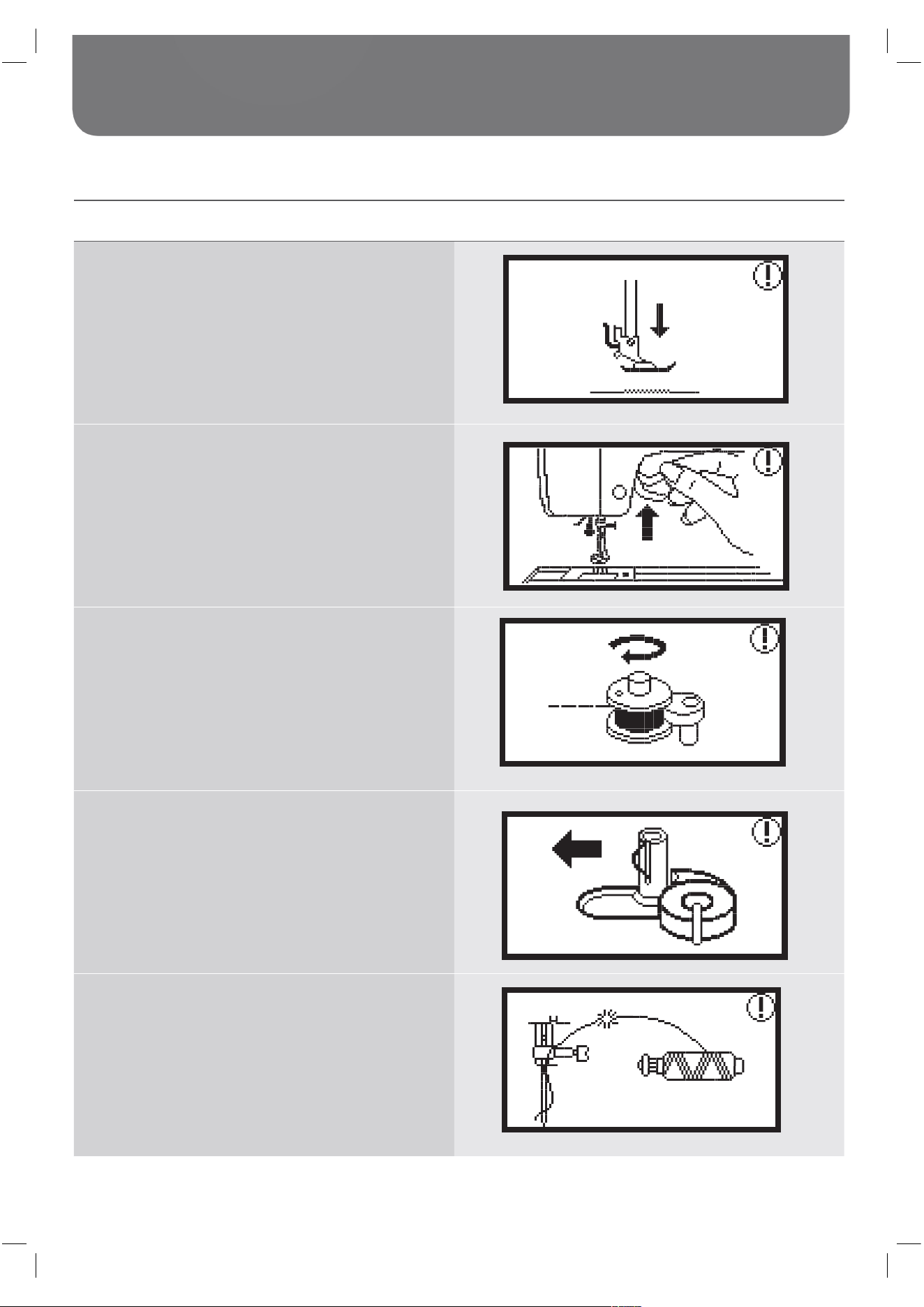
83
Warnings
Warning functions
Warning message Warning display
Presser foot is not lowered
This message is displayed when the Start/stop button or
the needle up/down position button is pressed while the
presser foot is raised.
Presser foot is not raised
This message is displayed when the embroidery module
will initialize while the embroidery foot is lowered.
Bobbin winding
This message is displayed when the bobbin winder is
winding the bobbin
Push the bobbin winder spindle to the left
This message is displayed when the bobbin winder
spindle is still positioned to the right.
The upper thread is broken
This message is displayed when the upper thread is
broken.
Please check and rethread the upper thread.
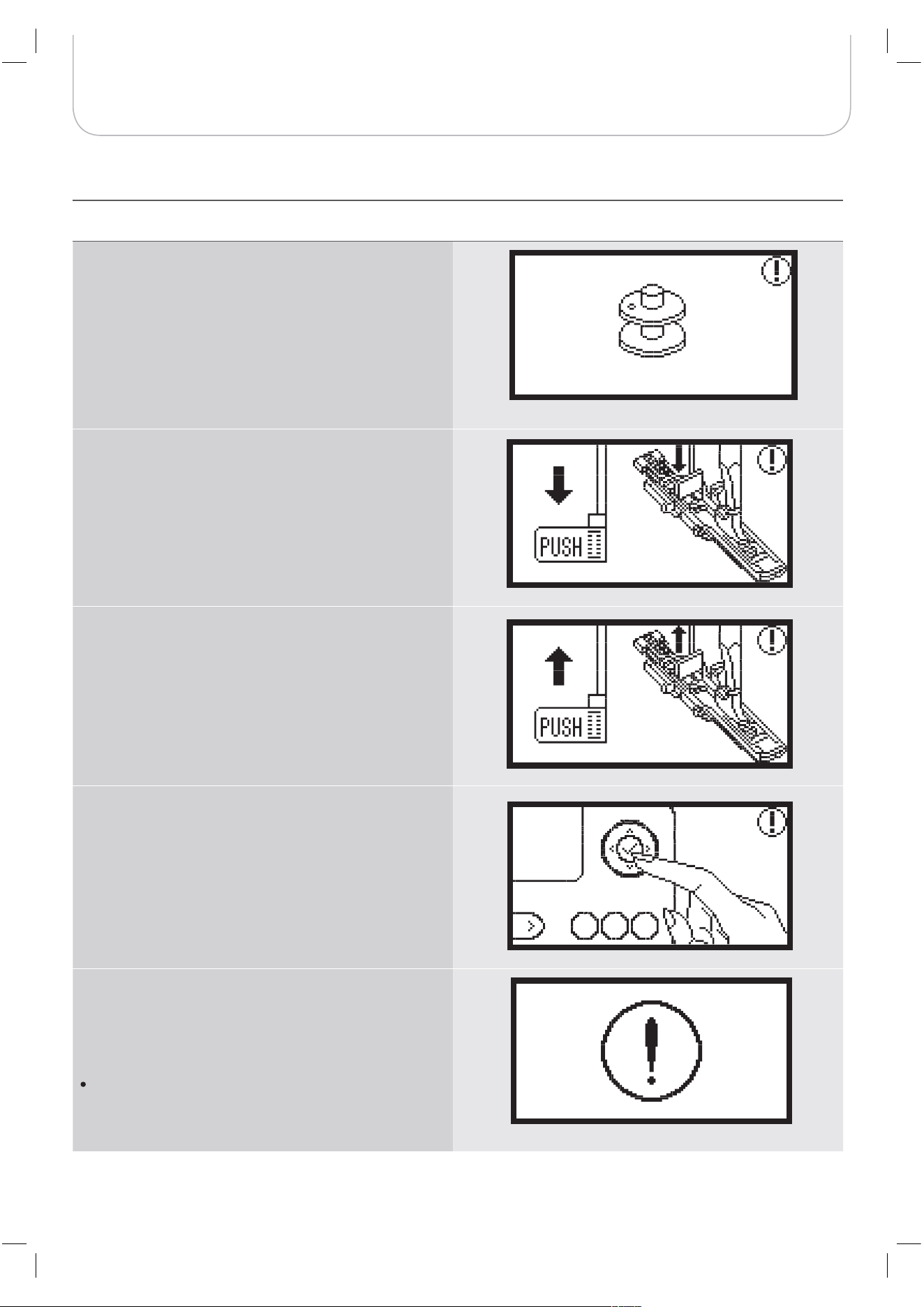
84
Warnings
Warning message Warning display
Bobbin thread is low
This message is displayed when the bobbin thread is
running out.
BH lever is not lowered
This message is displayed when the buttonhole or
darning stitch was selected and the start/stop button
was pressed while the buttonhole lever is raised.
BH lever is not lifted
This message is displayed when the stitch other than the
buttonhole or darning stitch was selected and the start/
stop button was pressed while the buttonhole lever is
down.
Press the OK button to confirm
The sewing machine is blocked
The exclamation message means that the thread is
twisted or jammed or the fabric is too thick and the hand
wheel cannot move.
Please look through the «Trouble shooting guide» on
page 88-90 to resolve the problem.
85
Warnings
Warning sound
When operating correctly:
1 beep
When the memory is full with 20 units of designs:
– 3-short beeps
When operating incorrectly:
– 3-short beeps
When the sewing machine is in trouble and can‘t sew:
– 3-short beeps
It means that the thread is twisted or jammed and the hand
wheel axle can‘t move. Please look through the «Trouble
shooting guide» to find the solution. After the problem has
been solved, the machine will continue sewing.
If the problem is still not solved, please contact your local
dealer.
During sewing, if the thread get jammed inside the hook
stopping the needle from moving and you continue pressing
the foot control, the security switch will stop the machine
completely. In order to restart the sewing machine, you will
have to turn the on/off switch to the OFF position and then
ON again.
N
OTE
A
TTENTION
!
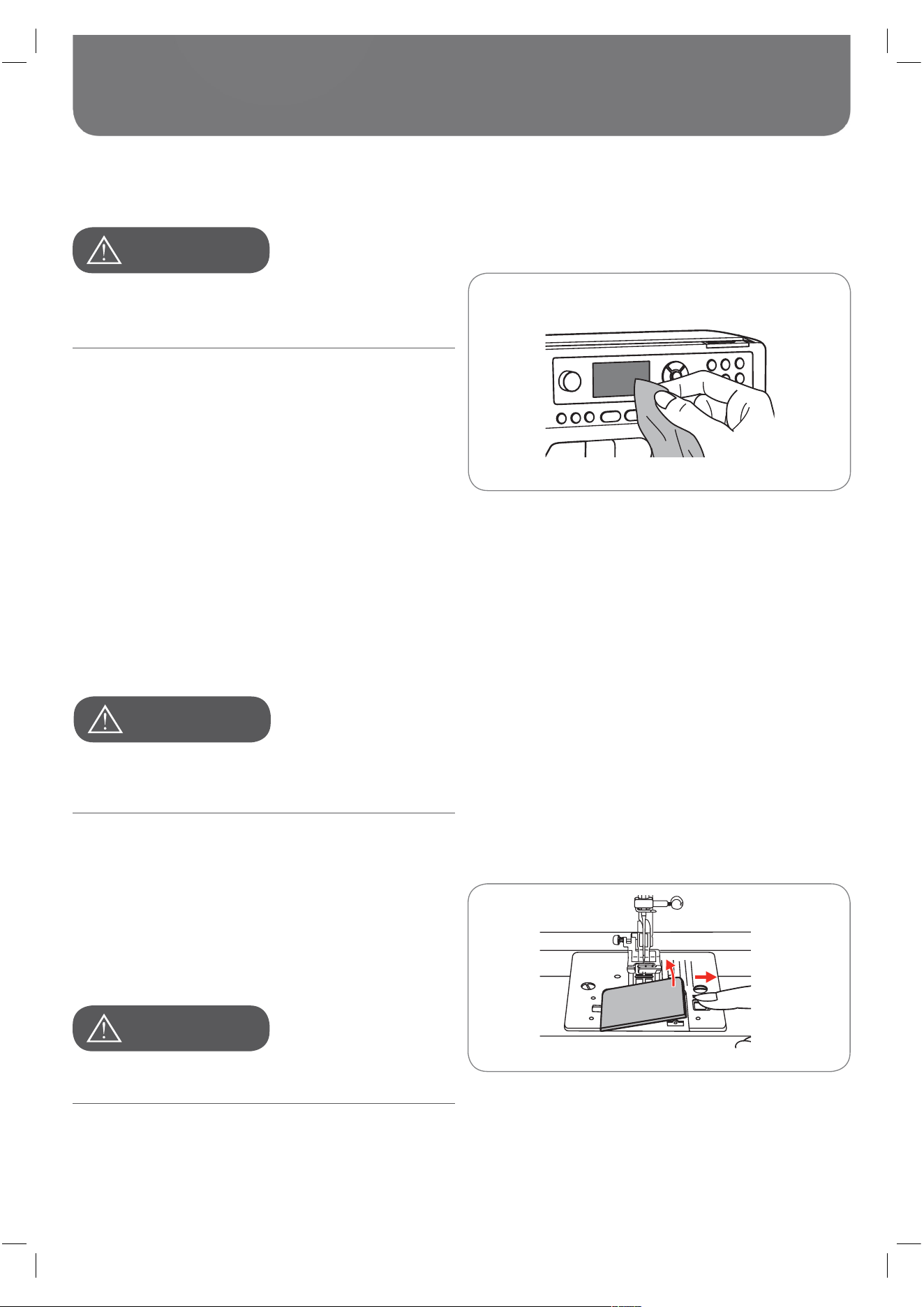
86
Maintenance
Cleaning the display
Cleaning the sewing machine surface
Cleaning the hook
Disconnect the power cord from the wall socket before
cleaning the display and the sewing machine surface,
otherwise injury or electrical shock may result.
This machine is equipped with a 100mW LED lamp. If lamp
replacement is needed, please contact the nearest autho-
rized retailer.
Disconnect the machine from the wall outlet before carrying
out any maintenance.
If the front panel is dirty, wipe it gently with a soft, dry cloth.
Do not use any organic solvents or detergents.
If the surface of the sewing machine is dirty, lightly soak a
cloth in mild detergent, squeeze it out firmly and then wipe the
surface. After cleaning it once in this way, wipe the surface
again with a dry cloth.
If lint and bits of thread accumulate in the hook, this will inter-
fere with the smooth operation of the machine. Check regu-
larly and clean the stitching mechanism when necessary.
A
TTENTION
!
A
TTENTION
!
A
TTENTION
!
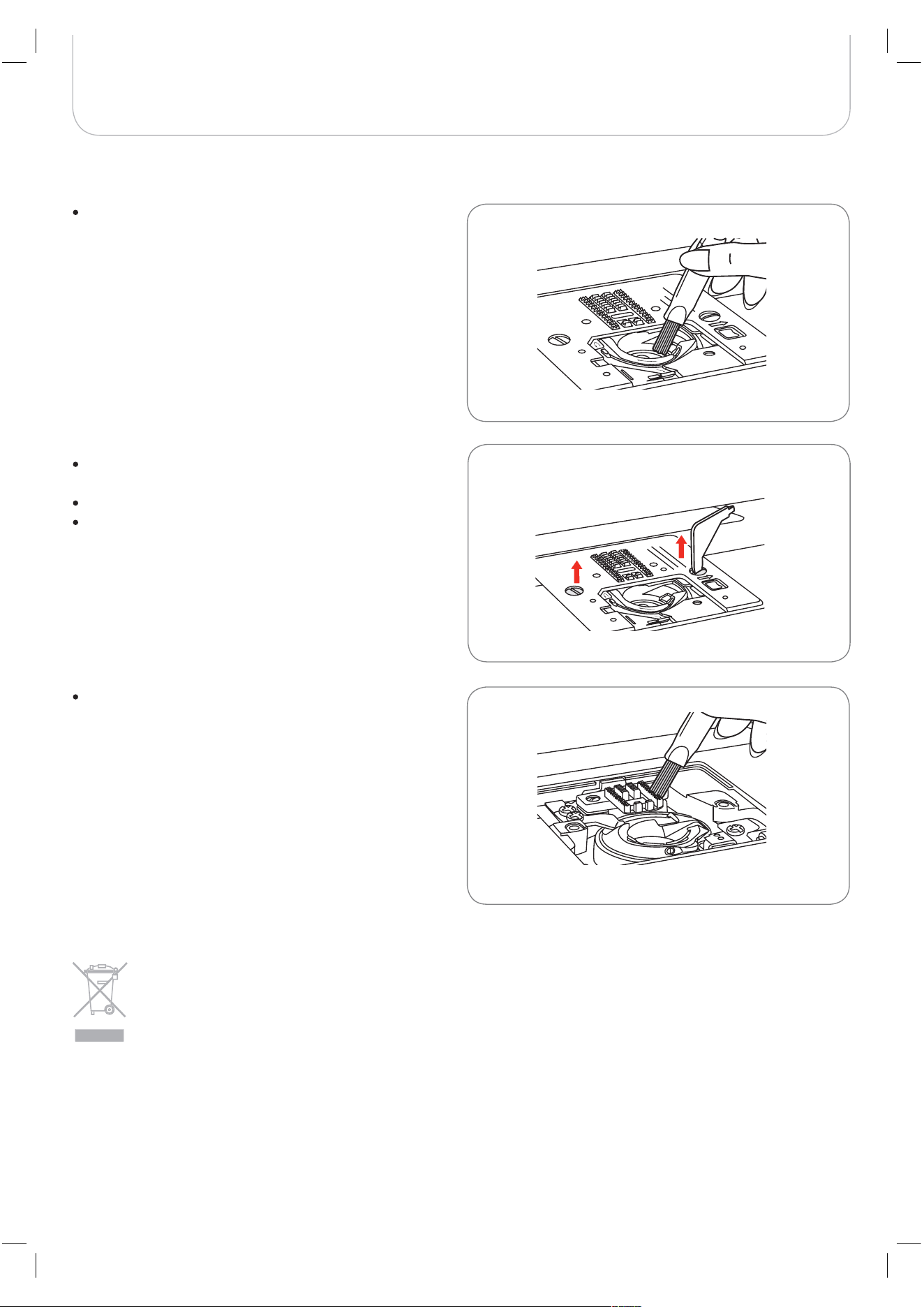
87
Maintenance
Clean the bobbin holder with a brush.
Remove the needle, presser foot and presser foot
holder.
Remove the bobbin cover plate.
Remove the screw holding the stitch plate and remove
the stitch plate.
Clean the feed dog and bobbin case with a brush. Also
clean them, using a soft, dry cloth.
BERNINA is committed to the protection of the environment. We strive to minimize the environmental impact
of our products by continuously improving product Design and our technology of manufacturing. Do not dis-
pose of electrical appliances as unsorted municipal waste, use separate collection facilities. Contact your local
government for information regarding the collection systems available.
If electrical appliances are disposed of in landfills or dumps, hazardous substances can leak into the ground-
water and get into the food chain, damaging your health and well-being.
When replacing old appliances with new ones, the retailer is legally obligated to take back your old appliance
for disposal at least for free of charge.
Environmental protection
88
Trouble Shooting
Trouble shooting guide
Before calling for service, check the following items. If the problem can't be solved, contact the place of purchase or your
nearest authorized dealer.
Problem Cause Correction Reference
Upper thread breaks
The machine is not threaded correctly. – Rethread the machine.
12
The thread tension is too tight. – Reduce the thread tension. (Lower
number).
16
The thread is too thick for the needle. – Select a larger needle.
19
The needle is not inserted correctly. – Remove and reinsert the needle (flat
side towards the back).
15
The thread is wound around the spool
pin.
– Remove the spool and wind thread
onto spool.
12
The needle is damaged. – Replace the needle.
15
Lower thread
breaks
The bobbin case is not inserted cor-
rectly.
– Remove and reinsert the bobbin case
and pull on the thread. The thread
should run easily.
11
The bobbin case is threaded incor-
rectly.
– Check both bobbin and bobbin case.
11
Skipped stitches
The needle is not inserted correctly. – Remove and reinsert needle (flat side
towards the back).
15
The needle is damaged. – Insert a new needle.
15
The wrong size needle has been used. – Choose a needle to suit the thread.
19/20
The foot is not attached correctly. – Check and attach correctly.
92-97
The machine is not threaded correctly. – Rethread the machine.
12
The presser foot pressure is not strong
enough.
– Adjust the presser foot pressure.
17
89
Trouble Shooting
Problem Cause Correction Reference
Needle breaks
The needle is damaged. – Insert a new needle.
15
The needle is not correctly inserted. – Insert the needle correctly (flat side
towards the back).
15
Wrong needle size for the fabric. – Choose a needle to suit the thread
and fabric.
19/20
The wrong foot is attached. – Select the correct foot.
21
The needle clamp screw is loose. – Use the screwdriver to tighten the
screw firmly.
15
The presser foot which is attached is
not appropriate for the selected type of
stitch pattern.
– Attach the presser foot that is appro-
priate for the selected type of stitch.
21
The upper thread tension is too tight. – Loosen the upper thread tension.
16
Loose stitches
The machine is not correctly threaded. – Check the threading.
12
The bobbin case is not correctly
threaded.
– Thread the bobbin case as illustrated.
11
Needle/fabric/thread combination is
wrong.
– The needle size must suit the fabric
and thread.
19/20
Thread tension is wrong. – Correct the thread tension.
16
Seam gathers or
puckers
The needle is too thick for the fabric. – Select a finer needle.
19/20
The stitch length is adjusted incor-
rectly.
– Readjust the stitch length.
29
The thread tension is too tight. – Loosen the thread tension.
16
90
Trouble Shooting
Problem Cause Correction Reference
Seam puckering
The upper thread tension is too tight. – Loosen the thread tension.
16
The upper thread is not threaded cor-
rectly.
– Rethread the machine.
12
The needle is too heavy for the fabric
being sewn.
– Choose a needle to suit the thread
and fabric.
19/20
The stitch length is too long for the
fabric.
– Adust the stitch length.
29
The presser foot pressure is not cor-
rectly adjusted.
– Adjust the presser foot pressure.
17
Patterns/Designs
are distorted
The correct presser foot is not used. – Select the correct foot.
92-97
The upper thread tension is too tight. – Loosen the thread tension.
16
The machine
jams
Thread is caught in the hook. – Remove the upper thread and the
bobbin case, turn the handwheel
backwards and forwards by hand
and remove the thread remnants.
86-87
The feed dog is packed with lint.
The machine is noisy
Lint has collected on the hook or nee-
dle bar.
– Clean the hook and feed dog as
described.
86-87
The needle is damaged. – Replace the needle.
15
Slight humming sound coming from
internal motor.
– Remove the upper thread and the
bobbin case, turn the handwheel
backwards and forwards by hand
and remove the thread remnants.
86-87
Thread is caught in the hook.
The feed dog is packed with lint.
Uneven stitches,
uneven feed
Poor quality thread. – Select a better quality thread.
19/20
The bobbin case is threaded incor-
rectly.
– Remove the bobbin case, thread and
reinsert correctly.
11
Fabric has been pulled. – Do not pull the fabric while sewing, let
it be fed by the machine.

91
Trouble Shooting
Problem Cause Correction Reference
The sewing
machine
doesn't
operate
The machine is not turned on. – Turn on the machine.
7
The machine is not plugged in. – Connect the power line plug to the
power outlet.
7
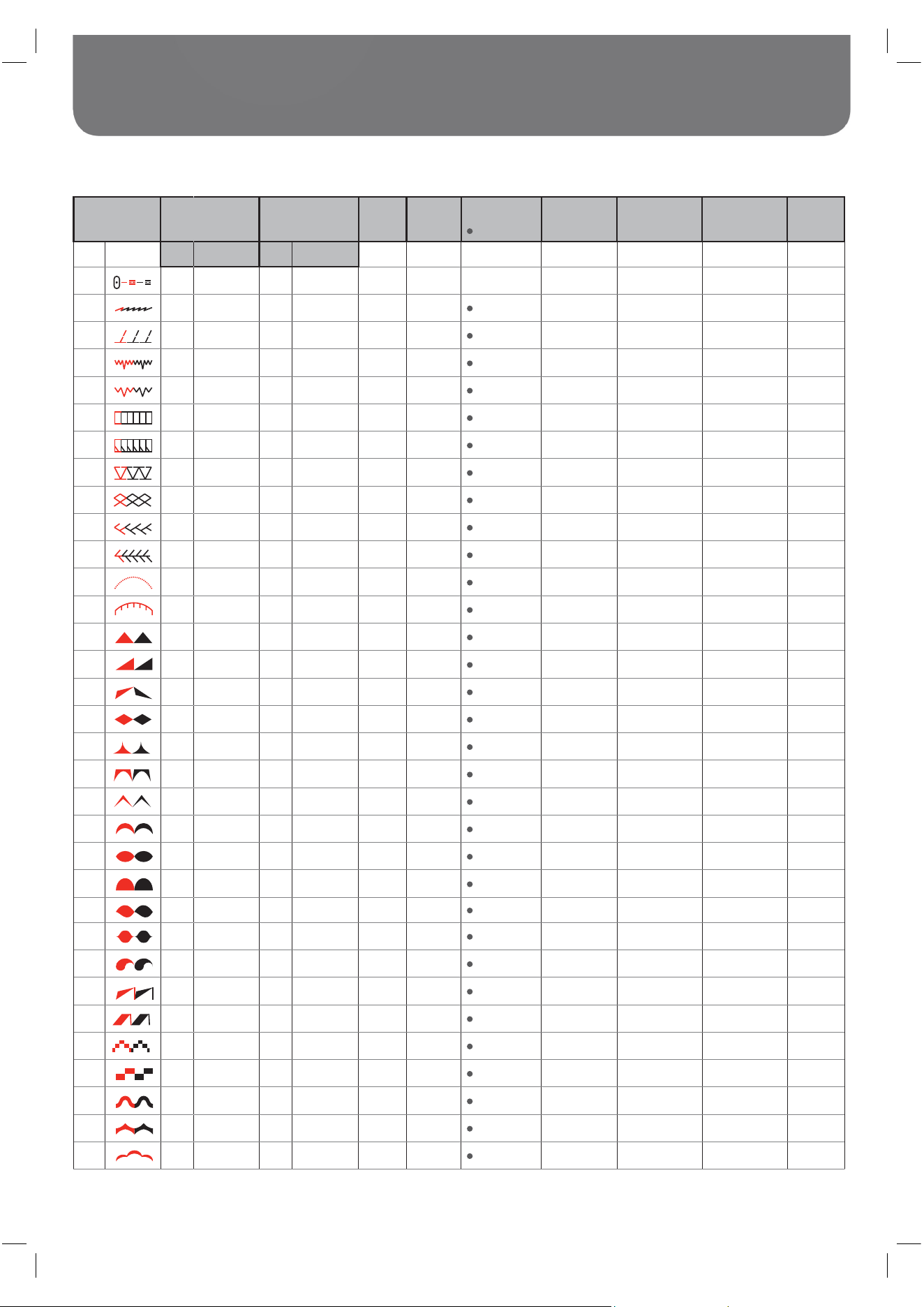
92
Stitches Overview
Stitch Pattern Width (mm) Length (mm) Tension Presser
Foot
Reverse
Tie off
Auto-Lock (L)
Auto-Stop (S)
Mirror Width
T Presser foot
Twin needle /
T Presser foot
MEM
Auto Manual Auto Manual
00 3.5 0.0~7.0 (0.5) 2.5 1.5~3.0 (0.5) 3 - 5 T
L
2.0~5.0 (0.5)
01 2.0 1.0~7.0 (0.5) 2.5 1.0~3.0 (0.5) 3 - 5 T S
3.0~4.0 (0.5)
02 5.0 2.5~7.0 (0.5) 2.5 1.0~3.0 (0.5) 3 - 5 T S
2.5~5.0 (0.5)
03 3.5 2.5~7.0 (0.5) 1.0 0.5~4.5 (0.5) 3 - 5 F S
/ T 2.5~5.0 (0.5) /T
04 3.5 2.5~7.0 (0.5) 1.5 0.5~4.5 (0.5) 3 - 5 F S
/ T 2.5~5.0 (0.5) /T
05 5.0 2.5~7.0 (0.5) 2.5 1.5~3.0 (0.5) 3 - 5 T S
2.5~5.0 (0.5)
06 5.0 2.5~7.0 (0.5) 3.0 2.0~3.0 (0.5) 3 - 5 A S
2.5~5.0 (0.5)
07 5.0 2.5~7.0 (0.5) 2.5 1.0~3.0 (0.5) 3 - 5 T S
2.5~5.0 (0.5)
08 7.0 2.5~7.0 (0.5) 2.5 1.0~3.0 (0.5) 3 - 5 A S
2.5~5.0 (0.5)
09 5.0 2.5~7.0 (0.5) 2.5 1.0~3.0 (0.5) 3 - 5 A S
2.5~5.0 (0.5)
10 5.0 2.5~7.0 (0.5) 2.0 1.5~3.0 (0.5) 3 - 5 A S
2.5~5.0 (0.5)
11 7.0 2.5~7.0 (0.5) 1.5 1.0~3.0 (0.5) 3 - 5 T S
2.5~5.0 (0.5)
12 7.0 2.5~7.0 (0.5) 2.5 1.0~4.5 (0.5) 3 - 5 T S
2.5~5.0 (0.5)
13 7.0 2.5~7.0 (0.5) 0.5 0.3~1.0 (0.1) 2 - 4 A S
2.5~5.0 (0.5)
14 7.0 2.5~7.0 (0.5) 0.5 0.3~1.0 (0.1) 2 - 4 A S
2.5~5.0 (0.5)
15 7.0 2.5~7.0 (0.5) 0.5 0.3~1.0 (0.1) 2 - 4 A S
2.5~5.0 (0.5)
16 7.0 2.5~7.0 (0.5) 0.5 0.3~1.0 (0.1) 2 - 4 A S
2.5~5.0 (0.5)
17 7.0 2.5~7.0 (0.5) 0.5 0.3~1.0 (0.1) 2 - 4 A S
2.5~5.0 (0.5)
18 7.0 2.5~7.0 (0.5) 0.5 0.3~1.0 (0.1) 2 - 4 A S
2.5~5.0 (0.5)
19 7.0 2.5~7.0 (0.5) 0.5 0.3~1.0 (0.1) 2 - 4 A S
2.5~5.0 (0.5)
20 7.0 2.5~7.0 (0.5) 0.5 0.3~1.0 (0.1) 2 - 4 A S
2.5~5.0 (0.5)
21 7.0 2.5~7.0 (0.5) 0.5 0.3~1.0 (0.1) 2 - 4 A S
2.5~5.0 (0.5)
22 7.0 2.5~7.0 (0.5) 0.5 0.3~1.0 (0.1) 2 - 4 A S
2.5~5.0 (0.5)
23 7.0 2.5~7.0 (0.5) 0.5 0.3~1.0 (0.1) 2 - 4 A S
2.5~5.0 (0.5)
24 7.0 2.5~7.0 (0.5) 0.5 0.3~1.0 (0.1) 2 - 4 A S
2.5~5.0 (0.5)
25 7.0 2.5~7.0 (0.5) 0.5 0.3~1.0 (0.1) 2 - 4 A S
2.5~5.0 (0.5)
26 7.0 2.5~7.0 (0.5) 0.5 0.3~1.0 (0.1) 2 - 4 A S
2.5~5.0 (0.5)
27 7.0 2.5~7.0 (0.5) 0.5 0.3~1.0 (0.1) 2 - 4 A S
2.5~5.0 (0.5)
28 7.0 2.5~7.0 (0.5) 0.5 0.3~1.0 (0.1) 2 - 4 A S
2.5~5.0 (0.5)
29 7.0 2.5~7.0 (0.5) 0.5 0.3~1.0 (0.1) 2 - 4 A S
2.5~5.0 (0.5)
30 7.0 2.5~7.0 (0.5) 0.5 0.3~1.0 (0.1) 2 - 4 A S
2.5~5.0 (0.5)
31 7.0 2.5~7.0 (0.5) 0.5 0.3~1.0 (0.1) 2 - 4 A S
2.5~5.0 (0.5)
32 7.0 2.5~7.0 (0.5) 0.5 0.3~1.0 (0.1) 2 - 4 A S
2.5~5.0 (0.5)
A - Group Stitches
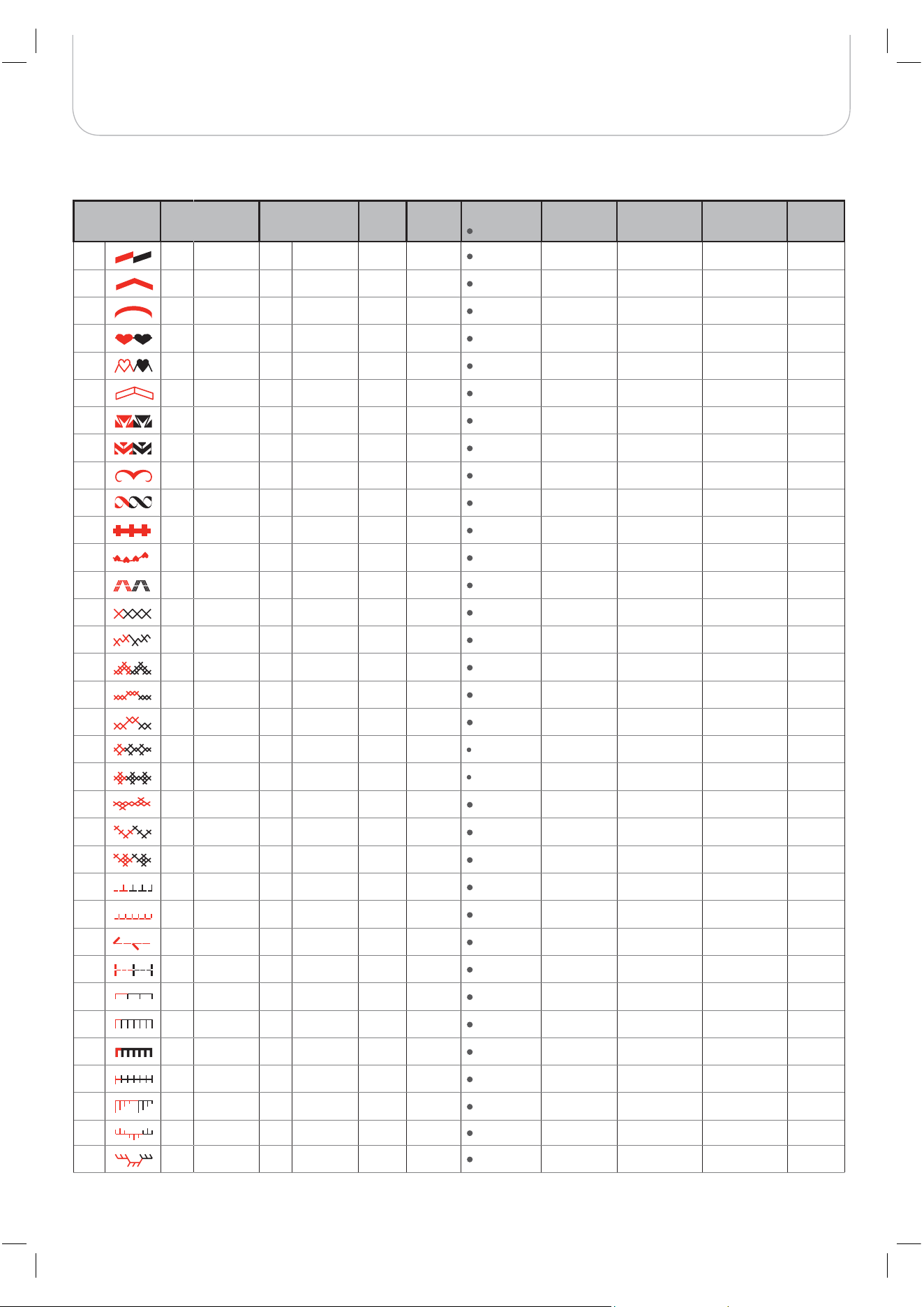
93
Stitches Overview
Stitch Pattern Width (mm) Length (mm) Tension Presser
Foot
Reverse
Tie off
Auto-Lock (L)
Auto-Stop (S)
Mirror Width
T Presser foot
Twin needle /
T Presser foot
MEM
33 7.0 2.5~7.0 (0.5) 0.5 0.3~1.0 (0.1) 2 - 4 A S
2.5~5.0 (0.5)
34 7.0 2.5~7.0 (0.5) 0.5 0.3~1.0 (0.1) 2 - 4 A S
2.5~5.0 (0.5)
35 7.0 2.5~7.0 (0.5) 0.5 0.3~1.0 (0.1) 2 - 4 A S
2.5~5.0 (0.5)
36 7.0 2.5~7.0 (0.5) 0.5 0.3~1.0 (0.1) 2 - 4 A S
2.5~5.0 (0.5)
37 7.0 2.5~7.0 (0.5) 0.5 0.3~1.0 (0.1) 2 - 4 A S
2.5~5.0 (0.5)
38 7.0 2.5~7.0 (0.5) 1.5 1.5~3.0 (0.5) 2 - 4 A S
2.5~5.0 (0.5)
39 7.0 2.5~7.0 (0.5) 1.5 1.5~2.0 (0.5) 2 - 4 A S
2.5~5.0 (0.5)
40 7.0 4.0~7.0 (0.5) 1.5 1.5~3.0 (0.5) 2 - 4 A S
4.0~5.0 (0.5)
41 7.0 2.5~7.0 (0.5) 1.5 1.5~3.0 (0.5) 2 - 4 A S
2.5~5.0 (0.5)
42 7.0 2.5~7.0 (0.5) 1.0 1.0~2.0 (0.5) 2 - 4 A S
2.5~5.0 (0.5)
43 7.0 2.5~7.0 (0.5) 0.5 0.3~1.0 (0.1) 2 - 4 A S
2.5~5.0 (0.5)
44 7.0 3.5~7.0 (0.5) 1.5 1.0~3.0 (0.5) 2 - 4 A S
3.5~5.0 (0.5)
45 7.0 3.0~7.0 (0.5) 1.5 1.5~3.0 (0.5) 2 - 4 A S
3.0~5.0 (0.5)
46 5.0 2.5~7.0 (0.5) 2.5 1.0~3.0 (0.5) 3 - 5 A S
2.5~5.0 (0.5)
47 6.0 3.0~7.0 (0.5) 1.0 1.0~3.0 (0.5) 3 - 5 A S
3.0~5.0 (0.5)
48 6.0 2.5~7.0 (0.5) 1.0 1.0~3.0 (0.5) 3 - 5 A S
5.0 (0.5)
49 4.0 3.0~7.0 (0.5) 1.0 1.0~3.0 (0.5) 3 - 5 A S
3.0~5.0 (0.5)
50 4.0 3.0~7.0 (0.5) 1.0 1.0~3.0 (0.5) 3 - 5 A S
3.0~5.0 (0.5)
51 6.0 3.0~7.0 (0.5) 1.0 1.0~3.0 (0.5) 3 - 5 A S
3.0~5.0 (0.5)
52 6.0 5.0~7.0 (0.5) 1.0 1.0~3.0 (0.5) 3 - 5 A S
5.0 (0.5)
53 6.0 3.0~7.0 (0.5) 1.5 1.0~3.0 (0.5) 3 - 5 A S
3.0~5.0 (0.5)
54 6.0 3.0~7.0 (0.5) 1.0 1.0~3.0 (0.5) 3 - 5 A S
3.0~5.0 (0.5)
55 6.0 5.0~7.0 (0.5) 1.0 1.0~3.0 (0.5) 3 - 5 A S
5.0 (0.5)
56 5.0 4.0~7.0 (0.5) 2.5 1.0~4.5 (0.5) 3 - 5 T S
4.0~5.0 (0.5)
57 3.0 2.0~7.0 (0.5) 3.0 3.0~4.5(0.25) 3 - 5 T S
2.0~5.0 (0.5)
58 5.0 2.5~7.0 (0.5) 2.0 1.0~4.5 (0.5) 3 - 5 T S
2.5~5.0 (0.5)
59 4.0 2.5~7.0 (0.5) 2.0 1.0~4.5 (0.5) 3 - 5 T S
2.5~5.0 (0.5)
60 3.5 2.5~7.0 (0.5) 2.5 1.5~3.0 (0.5) 3 - 5 T S
2.5~5.0 (0.5)
61 3.5 2.5~7.0 (0.5) 2.5 1.5~3.0 (0.5) 3 - 5 T S
2.5~5.0 (0.5)
62 3.5 2.5~7.0 (0.5) 2.5 1.5~3.0 (0.5) 3 - 5 A S
2.5~5.0 (0.5)
63 3.5 2.5~7.0 (0.5) 2.5 1.5~3.0 (0.5) 3 - 5 T S
2.5~5.0 (0.5)
64 6.0 3.0~7.0 (0.5) 2.0 1.0~4.5 (0.5) 3 - 5 T S
3.0~5.0 (0.5)
65 7.0 3.0~7.0 (0.5) 1.5 1.0~4.5 (0.5) 3 - 5 T S
3.0~5.0 (0.5)
66 6.0 3.0~7.0 (0.5) 2.0 1.0~3.0 (0.5) 3 - 5 T S
3.0~5.0 (0.5)
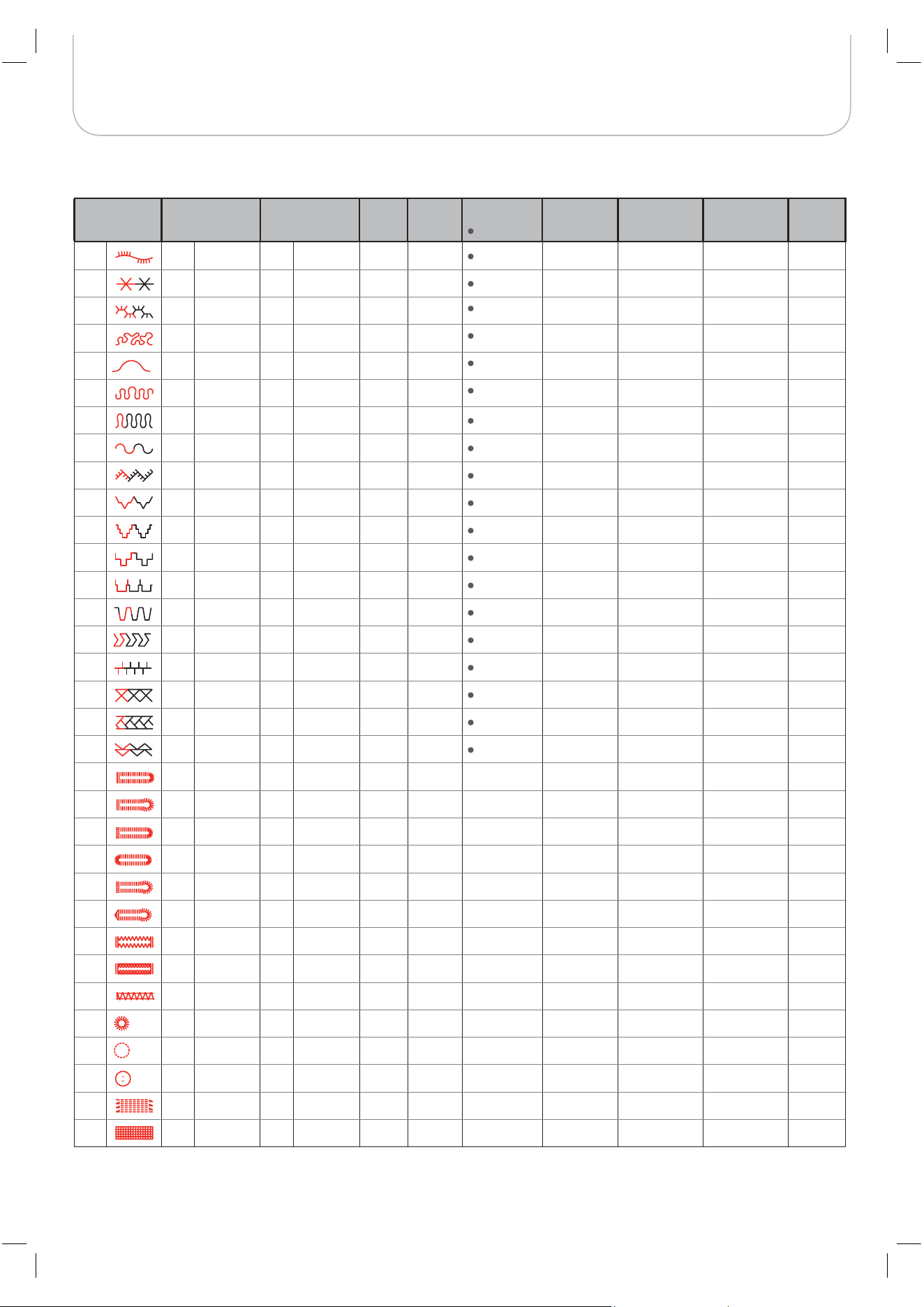
94
Stitches Overview
Stitch Pattern Width (mm) Length (mm) Tension Presser
Foot
Reverse
Tie off
Auto-Lock (L)
Auto-Stop (S)
Mirror Width
T Presser foot
Twin needle /
T Presser foot
MEM
67 5.0 3.0~7.0 (0.5) 2.0 1.0~3.0 (0.5) 3 - 5 T S
3.0~5.0 (0.5)
68 4.0 2.5~7.0 (0.5) 1.5 1.0~3.0 (0.5) 3 - 5 T S
2.5~5.0 (0.5)
69 6.0 3.5~7.0 (0.5) 1.5 1.0~3.0 (0.5) 3 - 5 T S
3.5~5.0 (0.5)
70
5.0 3.5~7.0 (0.5) 1.5 1.5~3.0 (0.5) 3 - 5 A S
3.5~5.0 (0.5)
71 7.0 1.0~7.0 (0.5) 2.0 1.0~4.0 (0.5) 3 - 5 A S
2.5~5.0 (0.5)
72 6.0 3.0~7.0 (0.5) 1.5 1.0~3.0 (0.5) 3 - 5 T S
3.0~5.0 (0.5)
73 6.0 2.5~7.0 (0.5) 1.0 1.0~3.0 (0.5 3 - 5 T S
2.5~5.0 (0.5)
74
5.0 2.5~7.0 (0.5) 1.0 1.0~4.5 (0.5) 3 - 5 T S
2.5~5.0 (0.5)
75 7.0 2.5~7.0 (0.5) 1.5 1.0~3.0 (0.5 3 - 5 A S
2.5~5.0 (0.5)
76 6.0 2.5~7.0 (0.5) 1.5 1.0~3.0 (0.5 3 - 5 T S
2.5~5.0 (0.5)
77 4.5 2.5~7.0 (0.5) 2.0 1.0~3.0 (0.5 3 - 5 T S
2.5~5.0 (0.5)
78 7.0 2.5~7.0 (0.5) 2.0 1.0~3.0 (0.5 3 - 5 T S
2.5~5.0 (0.5)
79 7.0 2.5~7.0 (0.5) 2.5 1.5~3.0 (0.5) 3 - 5 T S
2.5~5.0 (0.5)
80 5.0 2.5~7.0 (0.5) 2.0 1.0~3.0 (0.5 3 - 5 T S
2.5~5.0 (0.5)
81 6.0 2.5~7.0 (0.5) 3.0 1.0~3.0 (0.5 3 - 5 T S
2.5~5.0 (0.5)
82 5.0 2.5~7.0 (0.5) 2.0 1.0~3.0 (0.5 3 - 5 T S
2.5~5.0 (0.5)
83 4.0 2.5~7.0 (0.5) 2.0 1.0~3.0 (0.5 3 - 5 T S
2.5~5.0 (0.5)
84 5.0 2.5~7.0 (0.5) 2.0 1.0~3.0 (0.5) 3 - 5 A S
2.5~5.0 (0.5)
85 5.0 4.0~7.0 (0.5) 2.5 1.5~3.0 (0.5) 3 - 5 A S
4.0~5.0 (0.5)
86 5.0 2.5~5.5 (0.5) 0.5 0.3~1.0 (0.1) 2 - 4 D –– –– –– –– ––
87 7.0 5.5~7.0 (0.5) 0.5 0.3~1.0 (0.1) 2 - 4 D –– –– –– –– ––
88 5.0 2.5~5.5 (0.5) 0.5 0.3~1.0 (0.1) 2 - 4 D –– –– –– –– ––
89 5.0 2.5~5.5 (0.5) 0.5 0.3~1.0 (0.1) 2 - 4 D –– –– –– –– ––
90 7.0 5.5~7.0 (0.5) 0.5 0.3~1.0 (0.1) 2 - 4 D –– –– –– –– ––
91 7.0 5.5~7.0 (0.5) 0.5 0.3~1.0 (0.1) 2 - 4 D –– –– –– –– ––
92 6.0 3.0~7.0 (0.5) 1.0 1.0~2.0 (0.5) 2 - 4 D –– –– –– –– ––
93 6.0 3.0~7.0 (0.5) 1.5 1.0~3.0 (0.5) 2 - 4 D –– –– –– –– ––
94 2.0 1.0~3.0 (0.5) 0.5 0.5~1.0 (0.1) 2 - 4 D –– –– –– –– ––
95 7.0 7.0, 6.0, 5.0 –– –– 2 - 4 A –– –– –– –– ––
96 7.0 7.0, 6.0, 5.0 –– –– 2 - 4 A –– –– –– –– ––
97 3.5 3.5~4.5 (0.5) –– –– 2 - 4 H –– –– –– –– ––
98 7.0 3.5~7.0 (0.5) 2.0 1.0~2.0 (0.5) 3 - 5 D –– –– –– –– ––
99 7.0 3.5~7.0 (0.5) 2.0 1.0~2.0 (0.5) 3 - 5 D –– –– –– –– ––
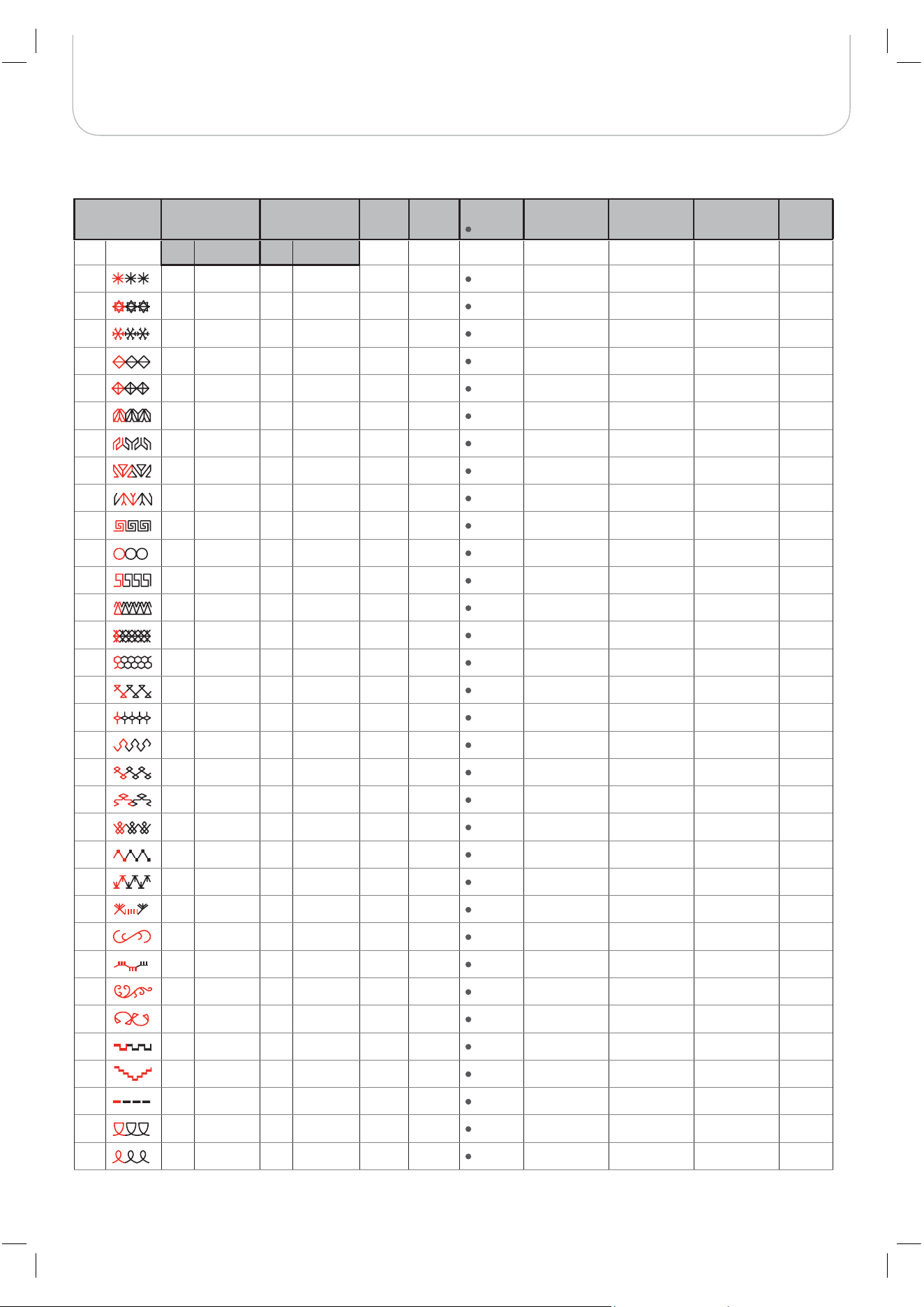
95
Stitches Overview
Stitch Pattern Width (mm) Length (mm) Tension Presser
Foot
Reverse
Tie off
Auto-Lock (L)
Auto-Stop (S)
Mirror Width
T Presser foot
Twin needle /
T Presser foot
MEM
Auto Manual Auto Manual
00 7.0 3.0~7.0 (0.5) 3.0 1.5~3.0 (0.5) 3 - 5 A S –– 3.0~5.0 (0.5)
01 6.0 4.5~7.0 (0.5) 2.5 1.5~3.0 (0.5) 3 - 5 A S –– 4.5~5.0 (0.5)
02 7.0 4.0~7.0 (0.5) 2.5 1.5~3.0 (0.5) 3 - 5 A S –– 4.0~5.0 (0.5)
03 5.0 2.5~7.0 (0.5) 2.5 1.0~3.0 (0.5) 3 - 5 T S –– 2.5~5.0 (0.5)
04 6.0 2.5~7.0 (0.5) 3.0 1.5~3.0 (0.5) 3 - 5 T S –– 2.5~5.0 (0.5)
05 5.0 3.5~7.0 (0.5) 2.0 1.5~3.0 (0.5) 3 - 5 A S –– 3.5~5.0 (0.5)
06 7.0 2.5~7.0 (0.5) 2.0 1.0~3.0 (0.5) 3 - 5 T S –– 2.5~5.0 (0.5)
07 7.0 2.5~7.0 (0.5) 2.5 1.5~3.0 (0.5) 3 - 5 T S –– 2.5~5.0 (0.5)
08 7.0 2.5~7.0 (0.5) 2.5 1.5~3.0 (0.5) 3 - 5 T S –– 2.5~5.0 (0.5)
09 5.0 2.5~7.0 (0.5) 2.5 1.5~3.0 (0.5) 3 - 5 T S –– 2.5~5.0 (0.5)
10 7.0 4.0~7.0(0.5) 1.5 1.5~3.0 (0.5) 3 - 5 A S –– 4.0~5.0 (0.5)
11 5.0 2.5~7.0 (0.5) 2.5 1.5~3.0 (0.5) 3 - 5 T S –– 2.5~5.0 (0.5)
12 6.0 3.5~7.0 (0.5) 2.0 1.5~3.0 (0.5) 3 - 5 A S –– 3.5~5.0 (0.5)
13 6.0 3.5~7.0 (0.5) 1.5 1.5~3.0 (0.5) 3 - 5 A S –– 3.5~5.0 (0.5)
14 7.0 3.0~7.0 (0.5) 2.0 2.0~3.0 (0.5) 3 - 5 T S –– 3.0~5.0 (0.5)
15
5.0 2.5~7.0 (0.5) 2.5 1.0~3.0 (0.5) 3 - 5 T S –– 2.5~5.0 (0.5)
16 6.0 4.0~7.0 (0.5) 2.0 1.5~3.0 (0.5) 3 - 5 A S –– 4.0~5.0 (0.5)
17 5.0 4.0~7.0 (0.5) 2.0 1.5~3.0 (0.5) 3 - 5 T S –– 4.0~5.0 (0.5)
18 5.0 2.5~7.0 (0.5) 1.5 1.0~3.0 (0.5) 3 - 5 T S –– 2.5~5.0 (0.5)
19
6.0 3.5~7.0 (0.5) 2.0 1.5~3.0 (0.5) 3 - 5 A S –– 3.5~5.0 (0.5)
20 6.0 4.5~7.0 (0.5) 1.5 1.0~3.0 (0.5) 3 - 5 A S –– 4.5~5.0 (0.5)
21 5.0 3.0~7.0 (0.5) 2.0 2.0~3.0 (0.5) 3 - 5 A S –– 3.0~5.0 (0.5)
22 5.0 4.0~7.0 (0.5) 1.5 1.0~3.0 (0.5) 3 - 5 A S –– 4.0~5.0 (0.5)
23 7.0 4.0~7.0 (0.5) 3.0 2.0~3.0 (0.5) 3 - 5 A S –– 4.0~5.0 (0.5)
24 7.0 2.5~7.0 (0.5) 2.0 1.5~3.0 (0.5) 3 - 5 T S –– 2.5~5.0 (0.5)
25 7.0 5.0~7.0 (0.5) 2.0 1.5~4.5( 0.5) 3 - 5 A S –– 5.0 (0.5)
26 7.0 3.5~7.0 (0.5) 3.0 2.0~3.0 (0.5) 3 - 5 A S –– 3.5~5.0 (0.5)
27 7.0 4.0~7.0 (0.5) 2.0 1.0~3.0(0.5) 3 - 5 A S –– 4.0~5.0 (0.5)
28 3.0 1.5~7.0 (0.5) 3.0 1.5~3.0 (0.5) 3 - 5 A S –– 2.0~5.0 (0.5)
29 6.0 4.0~7.0 (0.5) 2.5 1.0~3.0 (0.5) 3 - 5 A S –– 4.0~5.0 (0.5)
30 3.5 0.0~7.0 (0.5) 2.0 1.0~3.0 (0.5) 3 - 5 A S –– 2.0~5.0 (0.5)
31 5.0 3.5~7.0 (0.5) 2.0 2.0~3.0 (0.5) 3 - 5 T S –– 3.5~5.0 (0.5)
32 5.0 2.5~7.0 (0.5) 1.5 1.0~3.0 (0.5) 3 - 5 T S –– 2.5~5.0 (0.5)
B - Group Stitches
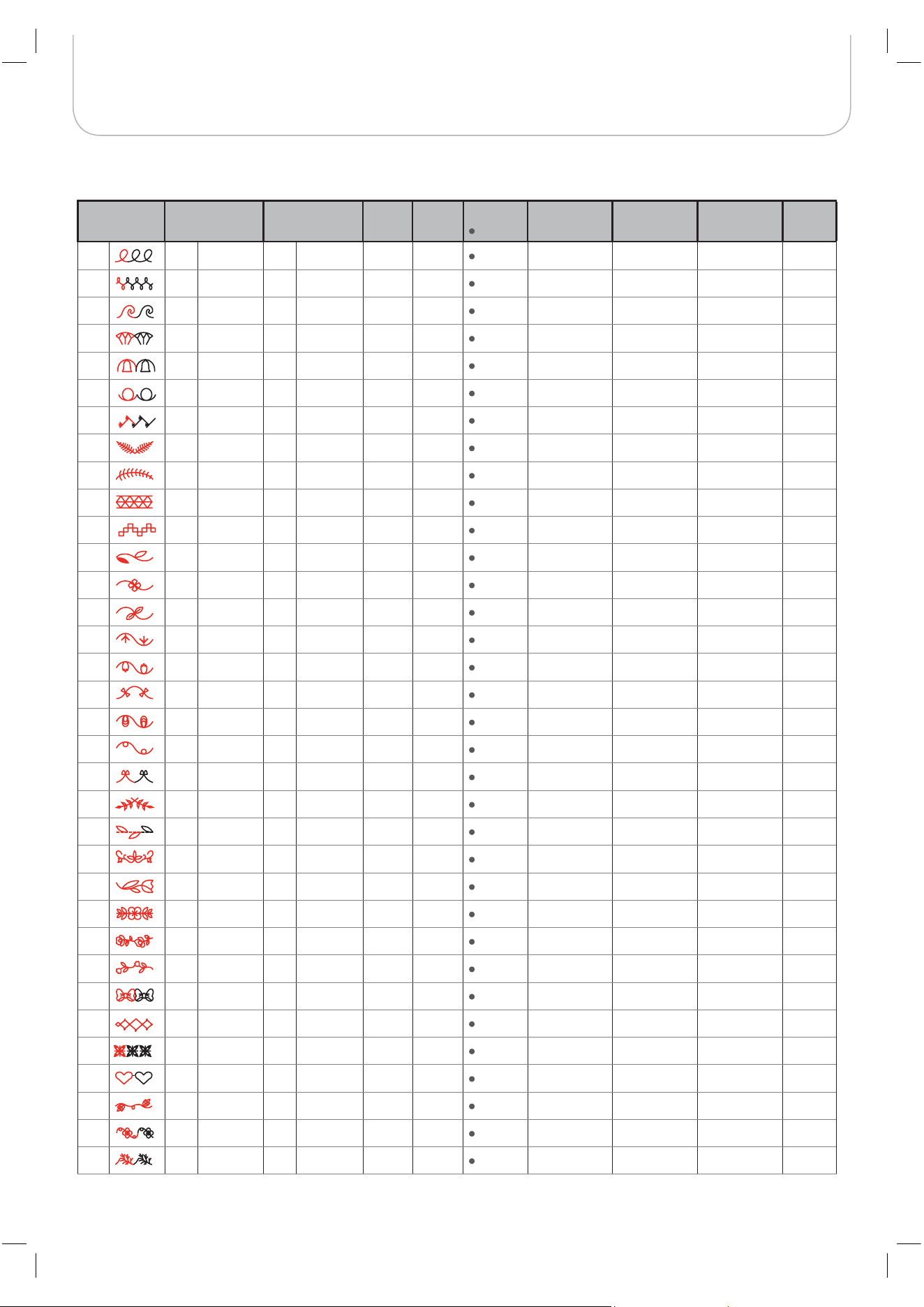
96
Stitches Overview
Stitch Pattern Width (mm) Length (mm) Tension Presser
Foot
Reverse
Tie off
Auto-Lock (L)
Auto-Stop (S)
Mirror Width
T Presser foot
Twin needle /
T Presser foot
MEM
33 5.0 2.5~7.0 (0.5) 2.0 1.0~3.0 (0.5) 3 - 5 T S –– 2.5~5.0 (0.5)
34 7.0 3.5~7.0 (0.5) 2.0 1.0~3.0 (0.5) 3 - 5 T S –– 3.5~5.0 (0.5)
35 7.0 3.5~7.0 (0.5) 1.0 1.0~3.0 (0.5) 3 - 5 A S –– 3.5~5.0 (0.5)
36
5.0 2.5~7.0 (0.5) 2.0 2.0~3.0 (0.5) 3 - 5 A S –– 2.5~5.0 (0.5)
37 5.0 2.5~7.0 (0.5) 2.0 1.5~3.0 (0.5) 3 - 5 T S –– 2.5~5.0 (0.5)
38 5.0 3.0~7.0 (0.5) 1.5 1.5~3.0 (0.5) 3 - 5 T S –– 3.0~5.0 (0.5)
39 7.0 2.5~7.0 (0.5) 2.0 1.0~3.0 (0.5) 3 - 5 A S –– 2.5~5.0 (0.5)
40
7.0 2.5~7.0 (0.5) 3.0 1.5~3.0 (0.5) 3 - 5 A S –– 2.5~5.0 (0.5)
41 7.0 2.5~7.0 (0.5) 2.0 1.5~3.0 (0.5) 3 - 5 A S –– 2.5~5.0 (0.5)
42 7.0 4.0~7.0(0.5) 2.5 1.5~3.0 (0.5) 3 - 5 A S –– 4.0~5.0 (0.5)
43 6.0 4.0~7.0(0.5) 2.0 2.0~3.0 (0.5) 3 - 5 A S –– 4.0~5.0 (0.5)
44 7.0 2.5~7.0 (0.5) 2.5 1.5~3.0 (0.5) 3 - 5 A S –– 2.5~5.0 (0.5)
45 7.0 3.5~7.0 (0.5) 2.5 1.5~3.0 (0.5) 3 - 5 T S –– 3.5~5.0 (0.5)
46 7.0 3.5~7.0 (0.5) 2.0 1.5~3.0 (0.5) 3 - 5 T S –– 3.5~5.0 (0.5)
47 7.0 3.0~7.0 (0.5) 2.5 1.0~3.0 (0.5) 3 - 5 T S –– 3.0~5.0 (0.5)
48 7.0 2.5~7.0 (0.5) 2.0 1.5~3.0 (0.5) 3 - 5 T S –– 2.5~5.0 (0.5)
49 7.0 3.0~7.0 (0.5) 2.5 1.0~3.0 (0.5) 3 - 5 T S –– 3.0~5.0 (0.5)
50 7.0 3.5~7.0 (0.5) 1.5 1.0~3.0 (0.5) 3 - 5 T S –– 3.5~5.0 (0.5)
51 5.0 3.0~7.0 (0.5) 1.5 1.0~3.0 (0.5) 3 - 5 T S –– 3.0~5.0 (0.5)
52 7.0 3.5~7.0 (0.5) 1.5 1.0~3.0 (0.5) 3 - 5 T S –– 3.5~5.0 (0.5)
53 7.0 5.0~7.0 (0.5) 2.5 2.0~3.0 (0.5) 3 - 5 A S –– 5.0 (0.5)
54 7.0 3.0~7.0 (0.5) 2.0 1.5~3.0 (0.5) 3 - 5 A S –– 3.0~5.0 (0.5)
55 7.0 3.0~7.0 (0.5) 2.0 1.5~3.0 (0.5) 3 - 5 A S –– 3.0~5.0 (0.5)
56 5.0 3.5~7.0 (0.5) 1.5 1.0~3.0 (0.5) 3 - 5 A S –– 3.5~5.0 (0.5)
57 7.0 4.0~7.0 (0.5) 3.0 2.5~3.0 (0.5) 3 - 5 A S –– 4.0~5.0 (0.5)
58 7.0 4.5~7.0 (0.5) 2.0 2.0~3.0 (0.5) 3 - 5 A S –– 4.5~5.0 (0.5)
59 7.0 3.5~7.0 (0.5) 1.5 1.5~3.0 (0.5) 3 - 5 A S –– 3.5~5.0 (0.5)
60 7.0 3.0~7.0 (0.5) 2.0 1.5~3.0 (0.5) 3 - 5 A S –– 3.0~5.0 (0.5)
61 7.0 5.0~7.0 (0.5) 3.0 2.0~3.0 (0.5) 3 - 5 A S –– 5.0 (0.5)
62 7.0 4.0~7.0 (0.5) 2.5 1.5~3.0 (0.5) 3 - 5 A S –– 4.0~5.0 (0.5)
63 7.0 4.0~7.0 (0.5) 1.5 1.5~3.0 (0.5) 3 - 5 A S –– 4.0~5.0 (0.5)
64 7.0 4.5~7.0 (0.5) 2.0 1.5~3.0 (0.5) 3 - 5 A S –– 4.5~5.0 (0.5)
65 7.0 4.0~7.0 (0.5) 2.0 1.5~3.0 (0.5) 3 - 5 A S –– 4.0~5.0 (0.5)
66 7.0 3.0~7.0 (0.5) 2.0 1.5~3.0 (0.5) 3 - 5 A S –– 3.0~5.0 (0.5)
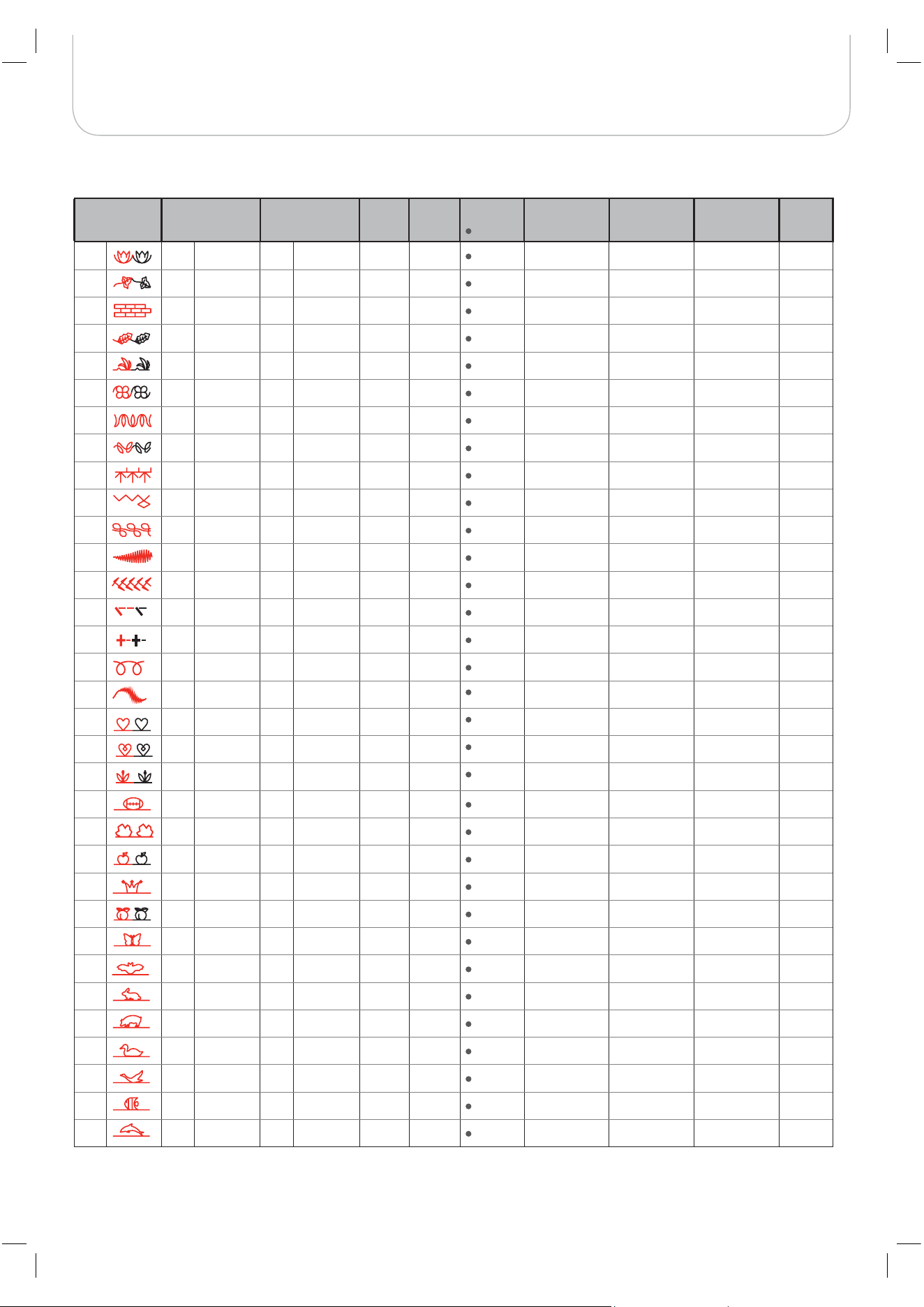
97
Stitches Overview
Stitch Pattern Width (mm) Length (mm) Tension Presser
Foot
Reverse
Tie off
Auto-Lock (L)
Auto-Stop (S)
Mirror Width
T Presser foot
Twin needle /
T Presser foot
MEM
67 7.0 3.0~7.0 (0.5) 3.0 1.0~3.0 (0.5) 3 - 5 T S –– 3.0~5.0 (0.5)
68 7.0 4.0~7.0 (0.5) 2.0 1.5~3.0 (0.5) 3 - 5 A S –– 4.0~5.0 (0.5)
69 7.0 5.0~7.0 (0.5) 2.5 2.0~3.0 (0.5) 3 - 5 A S –– 5.0 (0.5)
70 7.0 3.5~7.0 (0.5) 2.0 1.5~3.0 (0.5) 3 - 5 A S –– 3.5~5.0 (0.5)
71 6.0 3.0~7.0 (0.5) 3.0 1.5~3.0 (0.5) 3 - 5 A S –– 3.0~5.0 (0.5)
72 7.0 3.0~7.0 (0.5) 2.0 1.5~3.0 (0.5) 3 - 5 A S –– 3.0~5.0 (0.5)
73 7.0 2.5~7.0 (0.5) 1.5 1.0~3.0 (0.5) 3 - 5 A S –– 2.5~5.0 (0.5)
74 5.0 3.5~7.0 (0.5) 1.0 1.0~3.0 (0.5) 3 - 5 A S –– 3.5~5.0 (0.5)
75 7.0 4.0~7.0 (0.5) 2.5 2.0~3.0 (0.5) 3 - 5 A S –– 4.0~5.0 (0.5)
76 7.0 4.0~7.0 (0.5) 1.5 1.0~3.0 (0.5) 3 - 5 A S –– 4.0~5.0 (0.5)
77 7.0 4.0~7.0 (0.5) 2.0 1.5~2.5 (0.5) 3 - 5 A S –– 4.0~5.0 (0.5)
78 7.0 5.0~7.0( 0.5) 0.5 0.3~1.0 (0.1) 3 - 5 A S –– 5.0 (0.5)
79 6.0 2.5~7.0 (0.5) 1.5 1.0~2.5 (0.5) 3 - 5 A S –– 2.5~5.0 (0.5)
80 3.5 1.5~7.0 (0.5) 3.0 2.0~3.0 (0.5) 3 - 5 A S –– 2.0~5.0 (0.5)
81 5.0 2.0~7.0 (0.5) 2.5 1.5~2.5 (0.5) 3 - 5 A S –– 2.0~5.0 (0.5)
82 7.0 3.0~7.0 (0.5) 2.0 1.0~2.0 (0.5) 3 - 5 T S –– 3.0~5.0 (0.5)
83 7.0 4.0~7.0 (0.5) 1.5 1.5~4.0 (0.5) 3 - 5 T S –– 4.0~5.0 (0.5)
84 5.0 2.5~7.0 (0.5) 2.0 1.0~3.0 (0.5) 3 - 5 T S –– 2.5~5.0 (0.5)
85 5.0 4.0~7.0 (0.5) 2.0 1.5~3.0 (0.5) 3 - 5 T S –– 4.0~5.0 (0.5)
86 7.0 5.0~7.0 (0.5) 3.0 2.0~3.0 (0.5) 3 - 5 T S –– 5.0 (0.5)
87 5.0 2.5~7.0 (0.5) 2.0 1.0~3.0 (0.5) 3 - 5 A S –– 2.5~5.0 (0.5)
88 5.0 4.0~7.0 (0.5) 2.5 1.5~2.5 (0.5) 3 - 5 A S –– 4.0~5.0 (0.5)
89 5.0 3.5~7.0 (0.5) 3.0 1.5~3.0 (0.5) 3 - 5 T S –– 3.5~5.0 (0.5)
90 5.0 2.5~7.0 (0.5) 2.0 1.5~3.0 (0.5) 3 - 5 T S –– 2.5~5.0 (0.5)
91 6.0 5.0~7.0 (0.5) 2.5 2.0~3.0 (0.5) 3 - 5 A S –– 5.0 (0.5)
92 5.0 2.5~7.0 (0.5) 3.0 1.5~3.0 (0.5) 3 - 5 A S –– 2.5~5.0 (0.5)
93 5.0 2.5~7.0 (0.5) 2.0 1.5~3.0 (0.5) 3 - 5 T S –– 2.5~5.0 (0.5)
94 5.0 4.5~7.0 (0.5) 2.0 2.0~3.0 (0.5) 3 - 5 T S –– 4.5~5.0 (0.5)
95 7.0 5.0~7.0 (0.5) 2.0 2.0~3.0 (0.5) 3 - 5 T S –– 5.0 (0.5)
96 7.0 4.5~7.0 (0.5) 3.0 1.5~3.0 (0.5) 3 - 5 T S –– 4.5~5.0 (0.5)
97 7.0 3.5~7.0 (0.5) 2.5 2.0~2.5 (0.5) 3 - 5 T S –– 3.5~5.0 (0.5)
98 6.0 3.5~7.0 (0.5) 2.5 2.0~3.0 (0.5) 3 - 5 T S –– 3.5~5.0 (0.5)
99 5.0 3.5~7.0 (0.5) 2.0 1.5~3.0 (0.5) 3 - 5 T S –– 3.5~5.0 (0.5)

98