User Manual


Table of Contents
2023-06 EN 5020077.40A.04
3
Table of Contents
IMPORTANT SAFETY INSTRUCTIONS .................. 6
Important Information ........................................ 9
1 My bernette ......................................................... 11
1.1 Overview Machine .................................................. 11
Overview front controls ............................................... 11
Overview front ............................................................ 14
Overview Top .............................................................. 15
Overview back ............................................................ 15
1.2 Accessory ............................................................... 16
Included accessories .................................................... 16
Overview presser feet .................................................. 17
1.3 Overview User Interface .......................................... 18
Overview System Settings ............................................ 18
Overview Functions/Visual Information ........................ 18
Overview Functions and Views .................................... 18
1.4 Needle, Thread, Fabric ............................................ 19
Overview Needles ........................................................ 19
Example for Needle Description ................................... 22
Thread Selection ......................................................... 22
Needle/Thread Combination ........................................ 22
2 Sewing Preparation ............................................. 23
2.1 Connection and Switching On ................................ 23
Connecting the Machine ............................................. 23
Use of the Power Cable (only USA/Canada) ................. 23
Connecting the Foot Control ....................................... 23
Attaching the Knee Lifter of the Free Hand System ...... 24
Switching the Machine On .......................................... 24
Fixing the Touch Screen Pen ........................................ 25
Regulating the Speed via the Foot Control .................. 25
Raising/Lowering the Needle ....................................... 25
Programming the Foot Control Individually .................. 25
2.2 Spool Pin ................................................................ 25
Horizontal Spool Pin .................................................... 25
Second Spool Pin ........................................................ 26
2.3 Freearm .................................................................. 27
2.4 Sewing Table and Accessory Box ............................. 27
2.5 Raising or Lowering the Feed Dog ........................... 28
2.6 Using the Slide-on Table ......................................... 28
2.7 Presser Foot ............................................................ 29
Adjusting the Presser Foot Position via the Knee Lifter
of the Free Hand System ............................................. 29
Changing the Presser Foot .......................................... 29
Having the presser foot sole displayed in the user
interface ..................................................................... 30
Setting the Presser Foot Pressure ................................ 31
2.8 Needle and Stitch Plate .......................................... 31
Changing the Needle .................................................. 31
Selecting the Needle in the User Interface ................... 32
Needle Stop Up/Down (Permanent) ............................ 32
Changing the Stitch Plate ........................................... 32
Checking the Stitch Plate in the User Interface ............ 33
2.9 Threading .............................................................. 34
Preparing the Threading ............................................. 34
Threading the Upper Thread ....................................... 34
Threading the Twin Needle ......................................... 37
Winding the Bobbin Thread ........................................ 39
Threading the Bobbin Thread ..................................... 41
3 Setup Program .................................................... 43
3.1 Sewing Settings ..................................................... 43
Adjusting the Upper Thread Tension ........................... 43
Adjusting the Maximum Sewing Speed ....................... 43
Programming Securing Stitches .................................. 43
Adjusting the Hovering Height of the Presser Foot ...... 44
Programming the Button «Securing» .......................... 44
Programming the Button «Thread Cutter» .................. 45
Adjusting the Presser Foot Position with Needle Stop
Down ......................................................................... 45
Programming the Button «Quick Reverse» .................. 46
Programming the "Needle Up/Down" Button ............. 46
Programming the Foot Control Individually ................. 47
Fabric Thickness Measurement ................................... 47
Adjusting the General Balance .................................... 48
3.2 Selecting Personal Settings ..................................... 48
3.3 Monitoring Functions ............................................. 48
Activating the Upper Thread Indicator ........................ 48
Activating the Bobbin Thread Indicator ....................... 49
3.4 Sound On/Off ........................................................ 49
3.5 Machine Settings ................................................... 49
Adjusting the Brightness of the Display ....................... 49
Adjusting the Sewing Light ......................................... 49
Calibrating the Display ................................................ 50
Back to basic settings ................................................. 50
Checking the Firmware Version .................................. 50
Reviewing the Total Number of Stitches ...................... 51

Table of Contents
4
2023-06 EN 5020077.40A.04
4 System Settings ................................................... 52
4.1 Using eco Mode ..................................................... 52
4.2 Calling up the Creative Consultant ......................... 52
4.3 Cancelling Any Alterations with «clr» ..................... 53
5 Creative Sewing ................................................... 54
5.1 Overview Selection Menu Sewing ........................... 54
Selecting a Stitch Pattern ............................................. 54
5.2 Dual feed ................................................................ 55
Application of the Dual Feed ....................................... 55
Use the Dual Feed ....................................................... 55
5.3 Regulating the Speed .............................................. 56
5.4 Adjusting the Upper Thread Tension ....................... 56
5.5 Editing Stitch Patterns ............................................. 56
Changing the Stitch Width .......................................... 56
Changing the Stitch Length ......................................... 57
Correcting the Balance ................................................ 57
Programming Pattern Repeat ...................................... 58
Mirror Image of Stitch Patterns .................................... 58
Edit Stitch Pattern Length ............................................ 58
Permanent Quick Reverse ............................................ 59
Backstepping .............................................................. 59
5.6 Combining Stitch Patterns ...................................... 60
Overview Combi Mode ............................................... 60
Creating Stitch Pattern Combinations .......................... 60
Editing a Single Stitch Pattern ...................................... 60
Deleting a Single Stitch Pattern ................................... 61
Adding a Single Stitch Pattern ..................................... 61
Mirroring a Stitch Pattern Combination ....................... 62
Programming Pattern Repeat ...................................... 62
Securing a Stitch Pattern Combination ........................ 62
Saving a Stitch Pattern Combination ........................... 63
Loading a Stitch Pattern Combination ......................... 63
Overwriting a Stitch Pattern Combination ................... 63
Deleting a Stitch Pattern Combination ......................... 63
5.7 Administering Stitch Patterns .................................. 64
Saving Stitch Patterns in Personal Memory .................. 64
Overwriting Stitch Patterns from the Personal Memory 64
Loading Stitch Patterns from the Personal Memory ...... 64
Deleting Stitch Patterns from the Personal Memory ..... 64
6 Practical Stitches .................................................. 65
6.1 Overview Practical Stitches ...................................... 65
6.2 Sewing Straight Stitch ............................................. 67
6.3 Securing with the Automatic Securing Program ...... 67
6.4 Sewing in the Zipper ............................................... 68
6.5 Sewing Triple Straight Stitch .................................. 69
6.6 Sewing Triple Zigzag .............................................. 69
6.7 Manual Darning ..................................................... 70
6.8 Reinforced Darning, Automatic .............................. 70
6.9 Finishing Edges ...................................................... 72
6.10 Sewing Double Overlock ........................................ 73
6.11 Sewing Vari Overlock ............................................. 73
6.12 Edgestitching Using the Seam Guide ...................... 73
6.13 Sewing a Narrow Hem ........................................... 74
6.14 Sewing Blind Hems ................................................ 75
6.15 Sewing Visible Hems .............................................. 76
6.16 Sewing Basting Stitches ......................................... 76
6.17 Sew Thick Areas .................................................... 76
6.18 Sewing Corners ..................................................... 77
7 Decorative Stitches ............................................. 78
7.1 Overview Decorative Stitches ................................. 78
7.2 Altering the Stitch Density ..................................... 79
7.3 Sewing Cross Stitches ............................................ 79
8 Alphabets ............................................................ 80
8.1 Overview Alphabet ................................................ 80
8.2 Creating Lettering .................................................. 80
9 Buttonholes ......................................................... 82
9.1 Overview Buttonholes ............................................ 82
9.2 Marking Buttonholes ............................................. 83
9.3 Sewing a Buttonhole Automatically ....................... 84
9.4 Reinforce Buttonhole ............................................. 86
9.5 Sewing On Buttons ................................................ 87
9.6 Sewing Eyelets ....................................................... 88
10 Quilting ................................................................ 89
10.1 Overview Quilt Stitches .......................................... 89
10.2 Quilting, Securing Program .................................... 90
10.3 Sewing Hand-look Quilt Stitches ............................ 90
10.4 Guiding the Quilt Work Freely ................................ 91
11 Maintenance and Cleaning ................................ 92
11.1 Cleaning and Maintenance Intervals ...................... 92
11.2 Cleaning the Display .............................................. 92
11.3 Cleaning the Feed Dog .......................................... 92

Table of Contents
2023-06 EN 5020077.40A.04
5
11.4 Cleaning the Hook .................................................. 93
11.5 Oiling the Needle Bar .............................................. 94
12 Errors and Faults .................................................. 95
12.1 Troubleshooting ..................................................... 95
12.2 Error messages ....................................................... 97
13 Technical data ...................................................... 100
14 Appendix .............................................................. 101
14.1 Overview Stitch Patterns ......................................... 101
Practical Stitches ......................................................... 101
Buttonholes ................................................................ 101
Decorative stitches ...................................................... 101
Quilt Stitches ............................................................... 103
Index ..................................................................... 104

IMPORTANT SAFETY INSTRUCTIONS
6
2023-06 EN 5020077.40A.04
IMPORTANT SAFETY INSTRUCTIONS
Please be aware of the following basic safety instructions when using your
machine. Before using this machine, read instruction manual carefully.
DANGER
To protect against electric shock, the following instructions must be observed.
• Never leave the machine unattended when it is connected to the power
supply.
• Immediately after use and before cleaning, switch off the machine and
disconnect the power cable from the outlet.
In order to protect against injury, the following instructions must be adhered to.
• Do not look directly into the LED lamp with optical instruments
(e.g.magnifying glass).
• If the LED lamp is damaged or defective, have the LED lamp checked or
repaired at your local authorized bernette dealer.
• Switch off the machine before working in the needle area.
• Before starting the machine, close all covers.
WARNING
To reduce the risk of burns, fire, electric shock or injury to persons, the following
instructions must be observed.
General Facts
• This machine may only be used for the purpose described in this instruction
manual.
Working Environment
• Do not use the machine outdoors.
• Only use the machine in dry rooms.
• Do not use the machine in a humid area.
• Do not use the machine in rooms where aerosol products (sprays) are being
used.
• Do not use the machine in rooms where oxygen is dispensed.
Technical Condition
• Never use the machine when it is damp.
• Do not use the machine if it is not working properly.

IMPORTANT SAFETY INSTRUCTIONS
7
2023-06 EN 5020077.40A.04
• Do not use the machine if a cable or the plug is damaged.
• Do not use the machine if it has been dropped, damaged or has fallen into
water.
• If the machine is damaged or does not work properly, have the machine
checked or repaired by your local authorized bernette dealer.
• Keep all ventilation openings of the machine and the foot control free of
lint, dust and loose cloth.
• Do not use the machine if the ventilation openings are blocked.
Accessories and Supplies
• Only use the accessories recommended by the manufacturer.
• Always use the original bernette Stitch Plate.
An incorrect stitch plate can result in needle breakage.
• Use only straight needles of good quality.
Bent or damaged needles can cause needle breakage.
• This machine is double-insulated (except for USA, Canada and Japan).
Use only identical replacement parts. See instructions for Servicing of
double-insulated products.
• To lubricate the machine, only use oil recommended by bernette.
Safety Instructions
• While operating the machine, all protective inserts must be in place and all
covers must be closed.
Appropriate Use
• The machine may be used, cleaned and maintained by children older than
eight or by people with reduced physical, sensory or mental capabilities or if
there is a lack of experience and knowledge as long as they have been given
instructions.
• Furthermore, these persons must be supervised while working with the
machine, and/or they must know the safe operation of the machine and be
aware of the resulting hazards.
• Children are not allowed to play with the system.
• Special care should be taken when the machine is operated by or in the
presence of children.
• Only use the machine with the supplied power cable.
• USA and Canada only: Do not connect power plug NEMA 1-15 to circuits
exceeding 150 volt-to-ground.
• Only use this machine with the supplied foot control of type FC-210.
• Do not insert any objects into the openings of the machine.

IMPORTANT SAFETY INSTRUCTIONS
8
2023-06 EN 5020077.40A.04
• Do not place any objects on the foot control.
• While sewing, guide the fabric gently.
Pulling and pushing the fabric can cause needle breakage.
• Keep fingers away from all moving parts.
• Special care is required in the needle area.
• For activities in the needle area - such as threading the needle, changing the
needle, threading the looper or changing the presser foot - switch off the
machine.
• To switch off, set the power switch to «0».
• When protective covers are removed, when the machine is oiled or when
other cleaning and maintenance operations mentioned in this instruction
manual are carried out, switch off the machine and disconnect the power
plug from the outlet.
• Pull the plug out of the outlet by pulling on the plug. Do not pull on the
cable.

Important Information
9
2023-06 EN 5020077.40A.04
Important Information
Availability of the Instruction Manual
The short manual is part of the machine.
• Keep the short manual of the machine in a suitable place near the machine and have it ready for
reference.
• The latest version of the detailed instruction manual can be downloaded at www.bernette.com.
• When passing on the machine to a third party, enclose the short manual of the machine.
Proper Use
Your bernette machine is conceived and designed for private household use. It is intended for sewing fabrics
and other materials as described in this instruction manual. Any other use is not considered proper. BERNINA
assumes no liability for consequences resulting from improper use.
Equipment and Scope of Delivery
Example images are used in these instructions for the purposes of illustration. The machines shown in the
images and the accessories shown therefore do not always match the actual items included with your
machine. The supplied accessory can vary depending on the country of delivery. You can acquire any
accessories mentioned or shown that are not included in the scope of delivery as optional accessories from a
specialist bernette dealer. Further accessories can be found at www.bernette.com.
For technical reasons and in order to improve the product, changes may be made to the equipment of the
machine and the scope of delivery at any time and without prior notice.
Servicing of Double-insulated Products
In a double-insulated product two systems of insulation are provided instead of grounding. No grounding
means is provided on a double-insulated product nor should a means for grounded be added to the product.
Servicing a double-insulated product requires extreme care and knowledge of the system and should only be
done by qualified service personnel. Replacement parts for a double-insulated product must be identical to
the original parts in the product. A double insulated product is marked with the words: «Double-Insulation»
or «double-insulated».
The symbol may also be marked on the product.
Environmental Protection
BERNINA International AG is committed to environmental protection. We strive to minimize the
environmental impact of our products by continuously improving product design and our technology of
manufacturing.
The machine is labeled with the symbol of the crossed-out wastebin. This means that the machine should
not be disposed of in household waste when it is no longer needed. Improper disposal can result in
dangerous substances getting into the groundwater and thus into our food chain, damaging our health.
The machine must be returned free of charge to a nearby collection point for waste electrical and electronic
equipment or to a collection point for the reuse of the machine. Information on the collection points can be
obtained from your local administration. When purchasing a new machine, the dealer is obliged to take back
the old machine free of charge and dispose of it properly.
If the machine contains personal data, you are responsible for deleting the data yourself before returning the
machine.

Important Information
10
2023-06 EN 5020077.40A.04
Explanation of Symbols
DANGER
Designates a danger with a high risk which can lead to serious injuries or even death unless it is avoided.
WARNING
Designates a medium-risk hazard which can lead to serious injuries if not avoided.
CAUTION
Designates a low-risk hazard which can lead to minor or moderate injuries if not avoided.
NOTICE
Designates a hazard which can lead to material damage if not avoided.
My bernette
11
2023-06 EN 5020077.40A.04
1 My bernette
1.1 Overview Machine
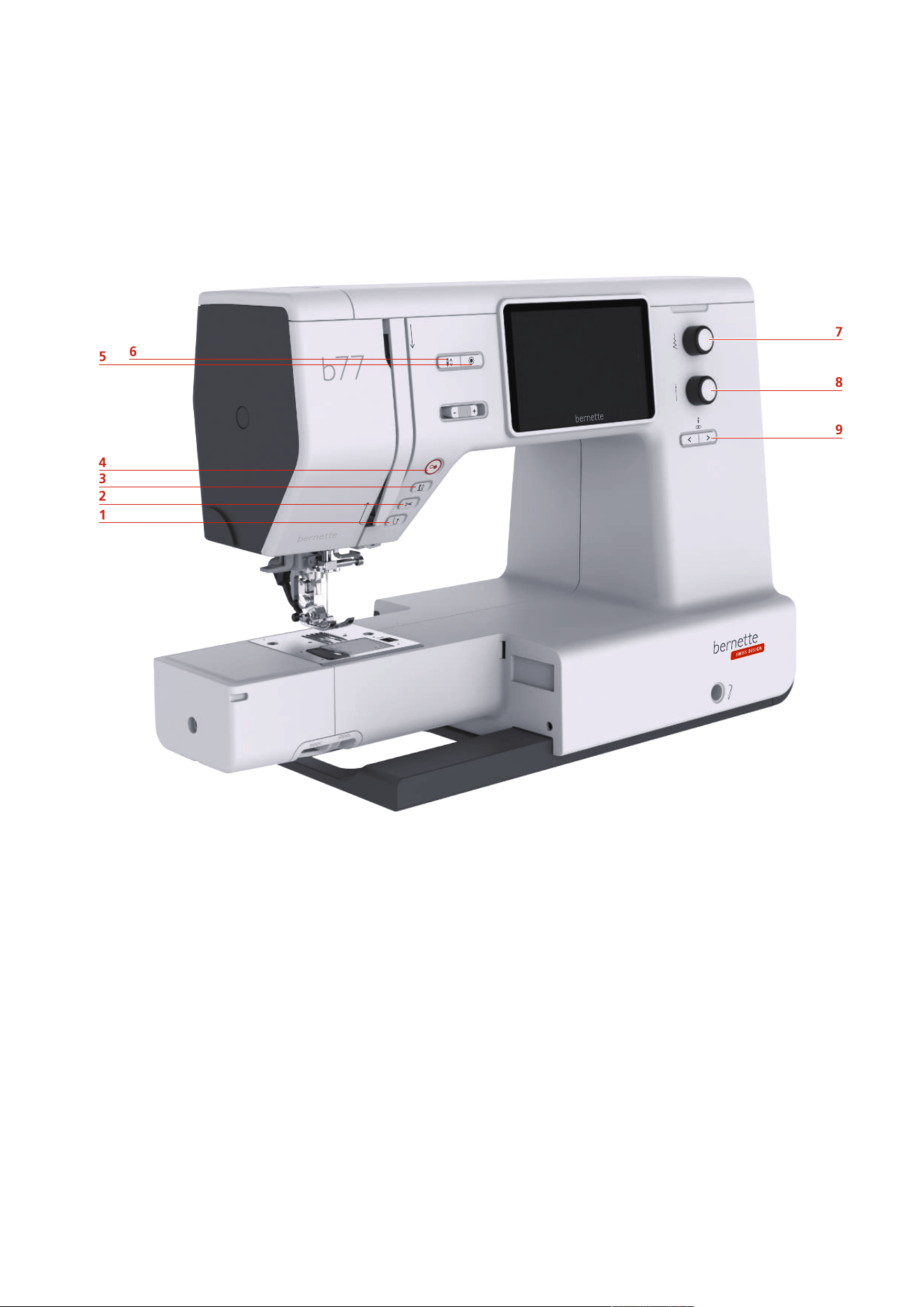
Overview front controls
1
2
3
4
5
6
7
8
9
1 Quick Reverse 6 Needle Up/Down
2 Thread Cutter 7 Upper Multi-function Knob
3 Presser Foot Up/Down 8 Lower Multi-function Knob
4 Start/Stop 9 Needle Left/Right
5 Securing Stitches
My bernette
12
2023-06 EN 5020077.40A.04
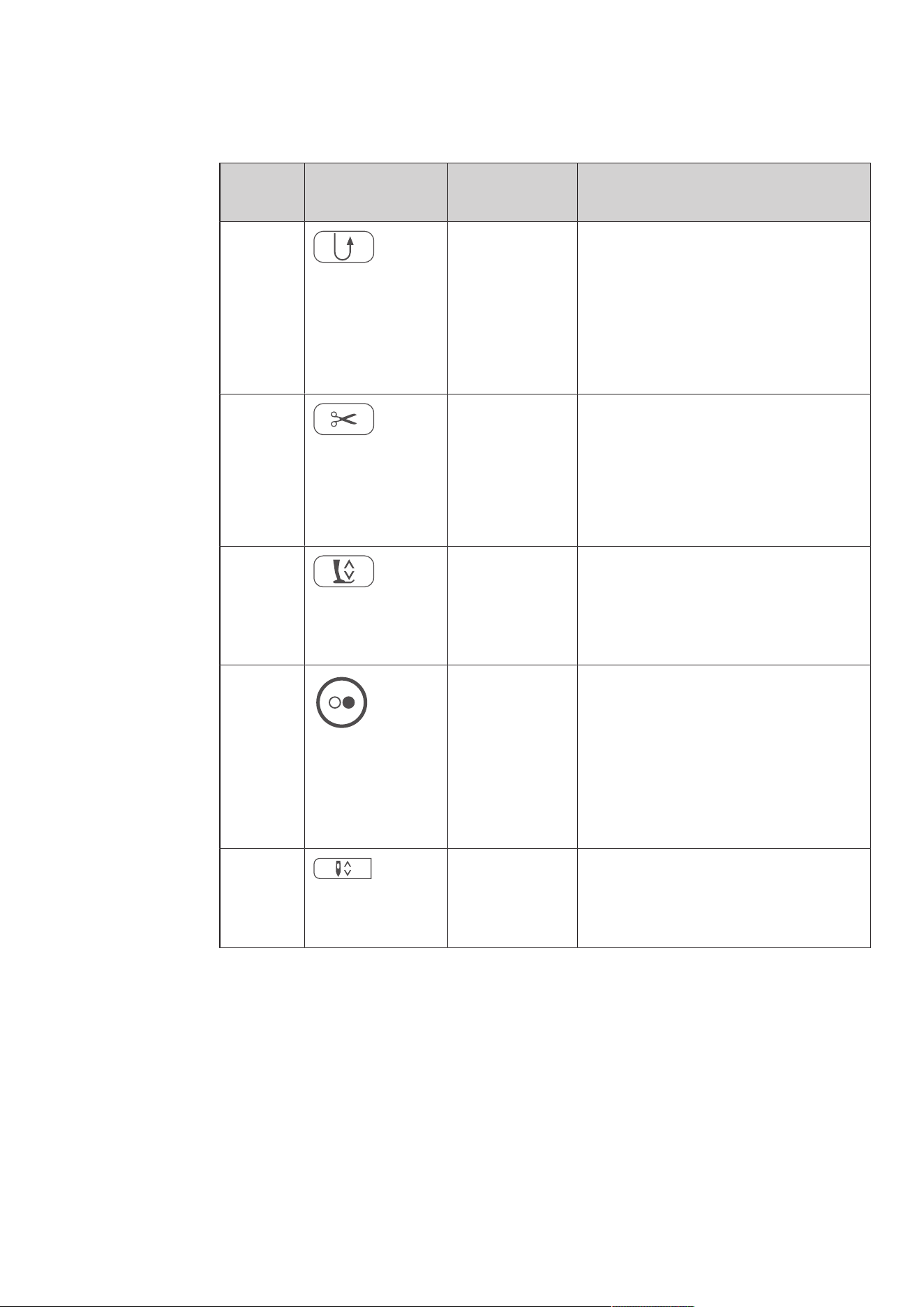
Operating Components
Number Operating
Component
Name Purpose
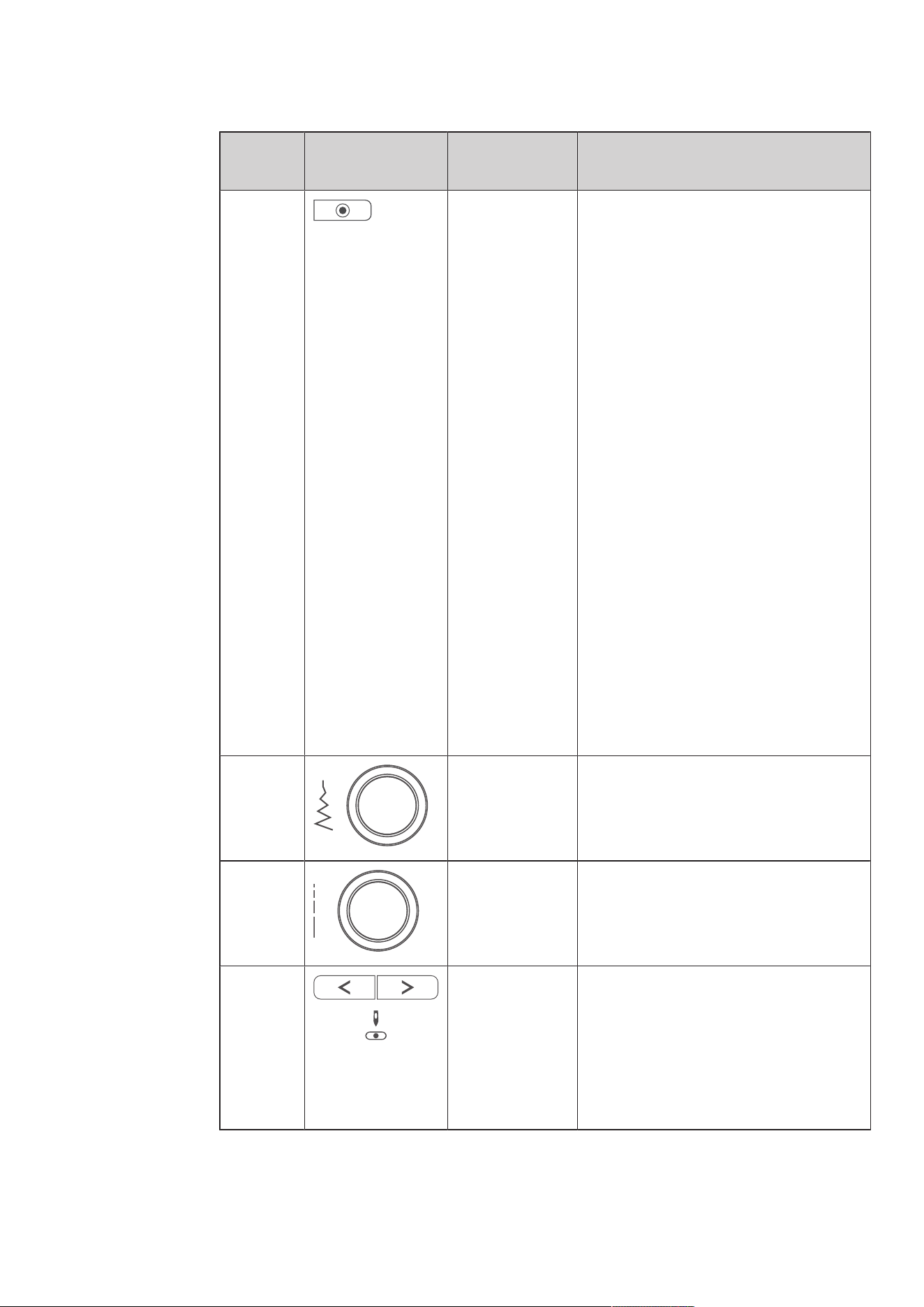
1 Quick Reverse > To sew backward, press the «Quick
Reverse» button.
> To sew backward permanently, keep the
«Quick Reverse» button pressed.
The «Quick Reverse» button does not work
for stitch patterns 22–24 and for buttonhole
patterns 51–71.
2 Thread Cutter > To cut the upper thread and the lower
thread automatically, press the «Thread
Cutter» button.
2-6 securing stitches can be programmed in
the Setup-Program. They are sewn before the
thread is cut.
3 Presser Foot Up/
Down
> Press the «Presser Foot Up/Down» button
to raise the presser foot into a hovering
position.
> Press the button «Presser Foot Up/Down »
to raise the presser foot.
4 Start/Stop The button «Start/Stop» is used to change
the presser foot position and to start the
machine.
> To start the machine, keep the button
«Start/Stop» pressed for 2 seconds.
> Press the button «Presser Foot Up/Down»
briefly to raise the presser foot into
hovering position.
5 Needle Up/Down > Push the button «Needle Up/Down» to
lower the needle.
> Push the «Needle Up/Down» button
again to raise the needle.
My bernette
13
2023-06 EN 5020077.40A.04
Number Operating
Component
Name Purpose
6 Securing Stitches The function «Securing at Sewing Start» is
activated in the Setup by default and can be
deactivated by pressing the button
«Securing».
When the function «Securing at Sewing
Start» is not activated in the Setup, it can be
programmed by pressing the button
«Securing».
A securing icon which appears on the display
during sewing indicates that the function is
activated.
The number of securing stitches can be
programmed in the Setup-Program.
> To sew the securing stitches first, press
the button «Securing» before you start
sewing.
> To sew the securing stitches at the
pattern end, press the button «Securing»
while sewing.
> To sew securing stitches within a stitch
pattern combination, press the button
«Securing».
– The selected pattern of the
combination is secured according to
the setting.
7 Upper Multi-
function Knob
Settings can be changed with the «Upper
Multifunctional knob» and the Lower
Multifunctional knob.
8 Lower Multi-
function Knob
Settings can be changed with the «Lower
Multifunctional knob» and the Lower
Multifunctional knob.
9 Needle Left/Right There is a total of 15 needle positions. The
needle position is indicated by the needle
position number in the display.
> Press the «Needle Left» button to move
the needle to the left.
> Press the «Needle Right» button to move
the needle to the right.
My bernette
14
2023-06 EN 5020077.40A.04
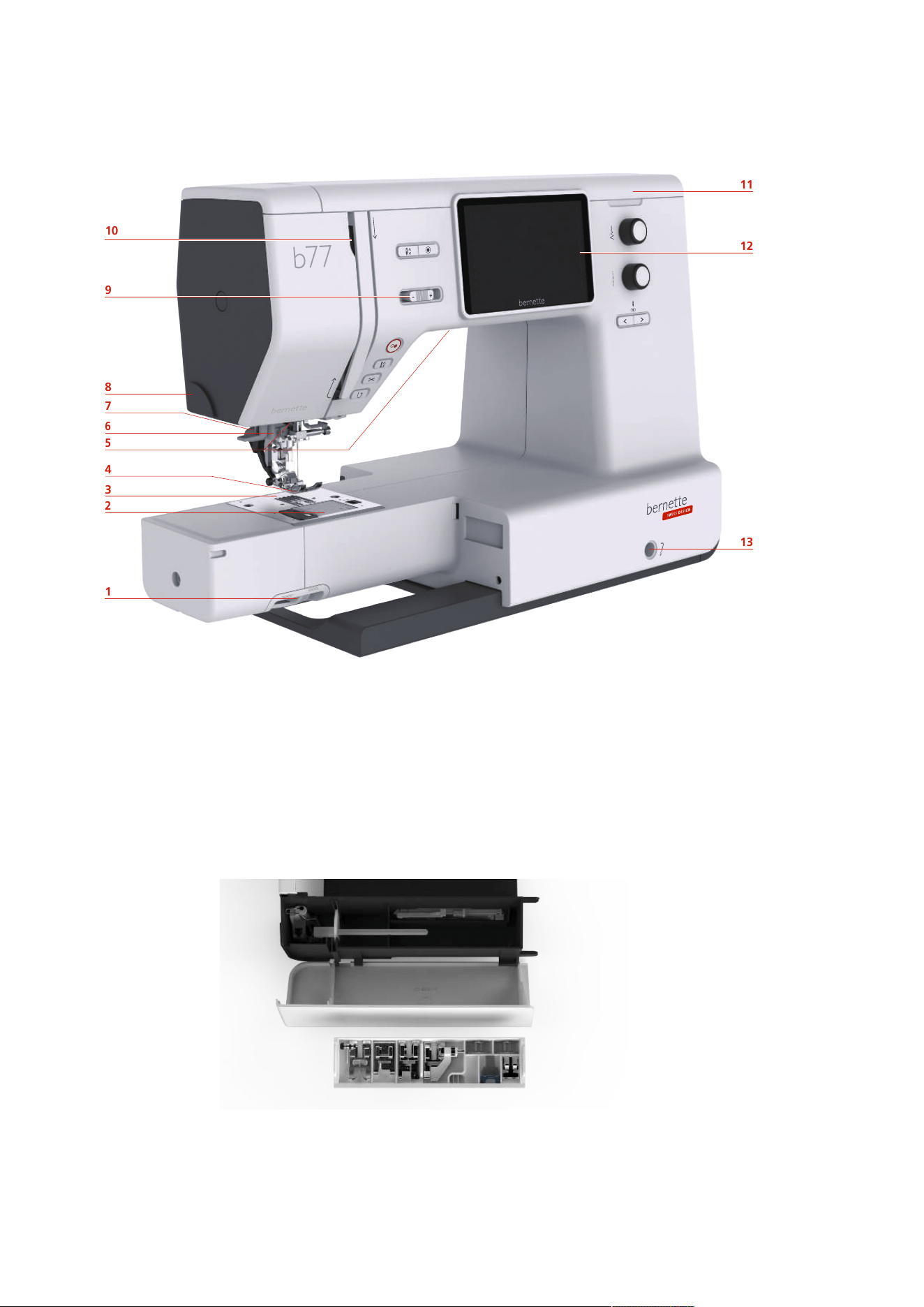
Overview front
2
1
3
4
6
8
7
9
10
13
12
11
5
1 Feed dog lever 8 Thread cutter
2 Stitch plate cover 9 Slide speed control
3 Stitch plate 10 Thread take-up lever
4 Presser foot 11 Top cover
5 Sewing light 12 LCD Display
6 Needle threader 13 Connection for Free Hand System
7 Buttonhole lever 14 Sewing table and accessory box
14
My bernette
15
2023-06 EN 5020077.40A.04
Overview Top
3
2
1
4
5
7
6
8
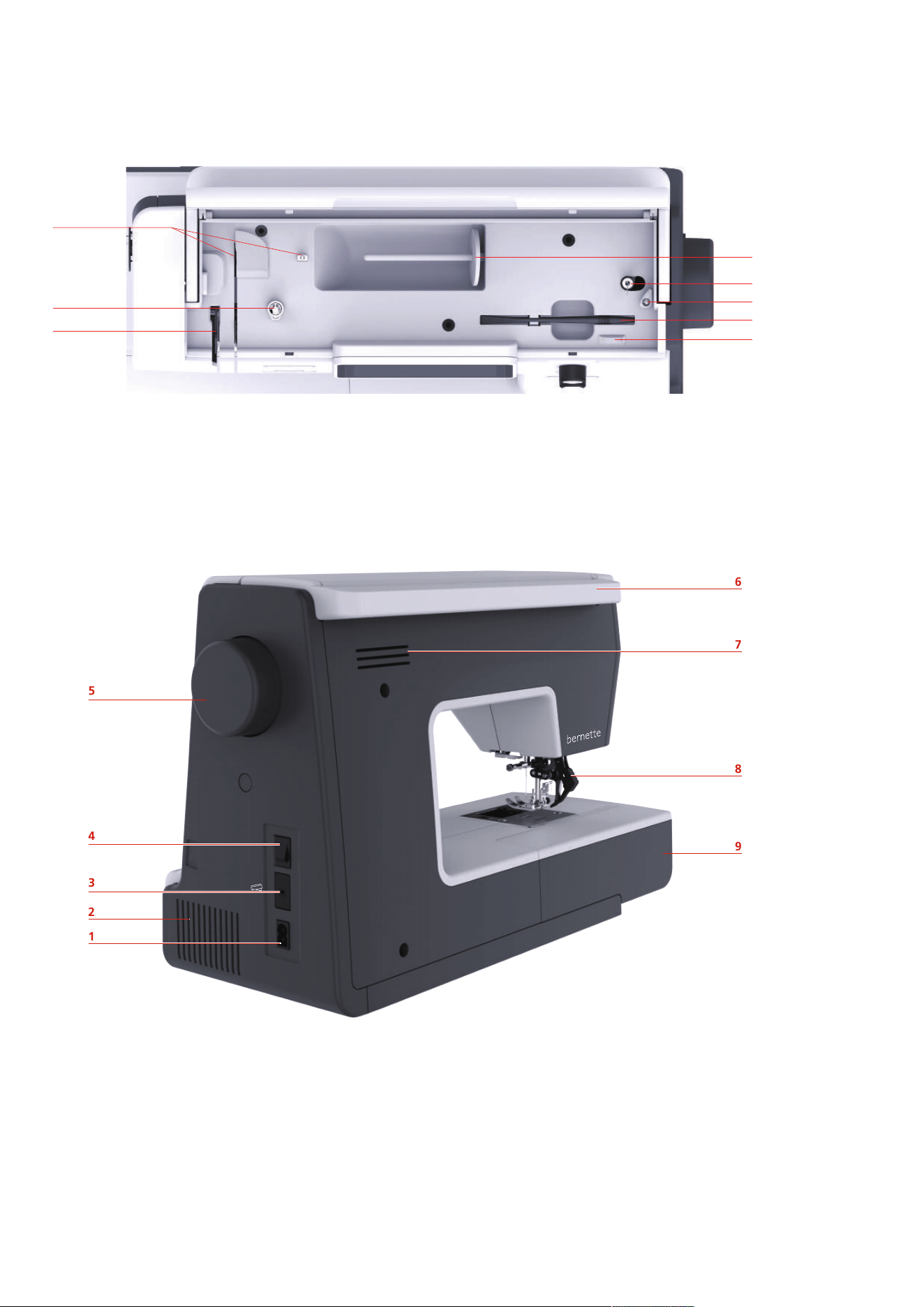
1 Thread Take-up Lever 5 Winding Unit and Holder for Second Spool Pin
2 Bobbin Winder Pretension 6 Stopper Winding Unit
3 Thread Guide 7 Touchscreen Pen
4 Spool Pin 8 Thread Cutter
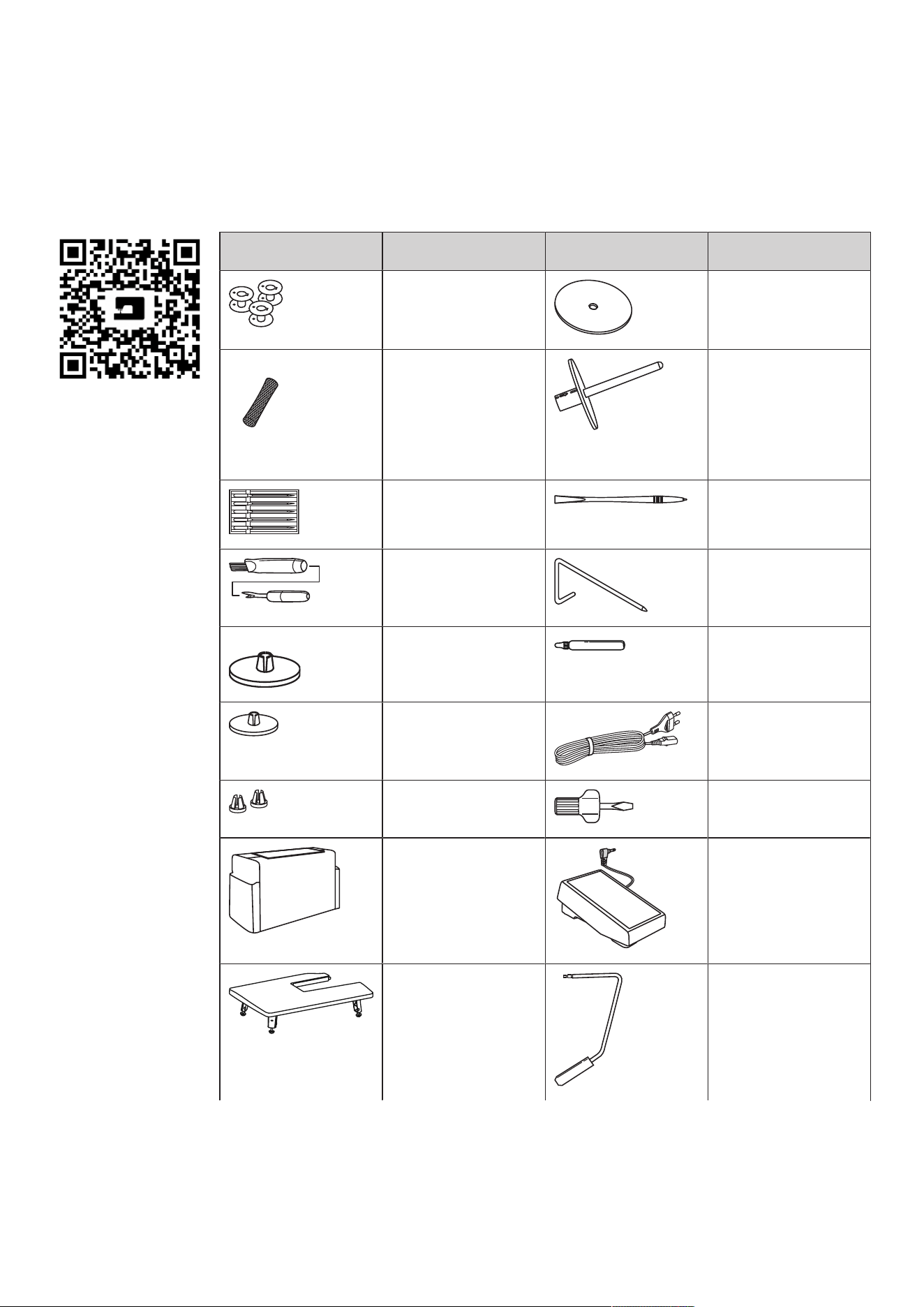
Overview back
1
2
3
4
5
6
7
8
9
1 Connection for power cable 6 Carrying handle
2 Air vents 7 Air vents
3 Connection for foot control 8 Dual Feed (DF)
4 Power switch 9 Sewing table and accessory box
5 Handwheel
My bernette
16
2023-06 EN 5020077.40A.04
1.2 Accessory
Included accessories
Visit www.mybernette.com/accessories for more accessory information.
Illustration Name Illustration Name
Bobbin (3x) Felt disc
Spool net Second spool pin
Selection of needles Touchscreen pen
Brush/ Seam ripper Seam guide
Spool disc large Lubricator
Spool disc middle (1x) Power cable
Spool disc small Screwdriver
Dust cover Foot control
Slide-on table Free Hand System
My bernette
17
2023-06 EN 5020077.40A.04
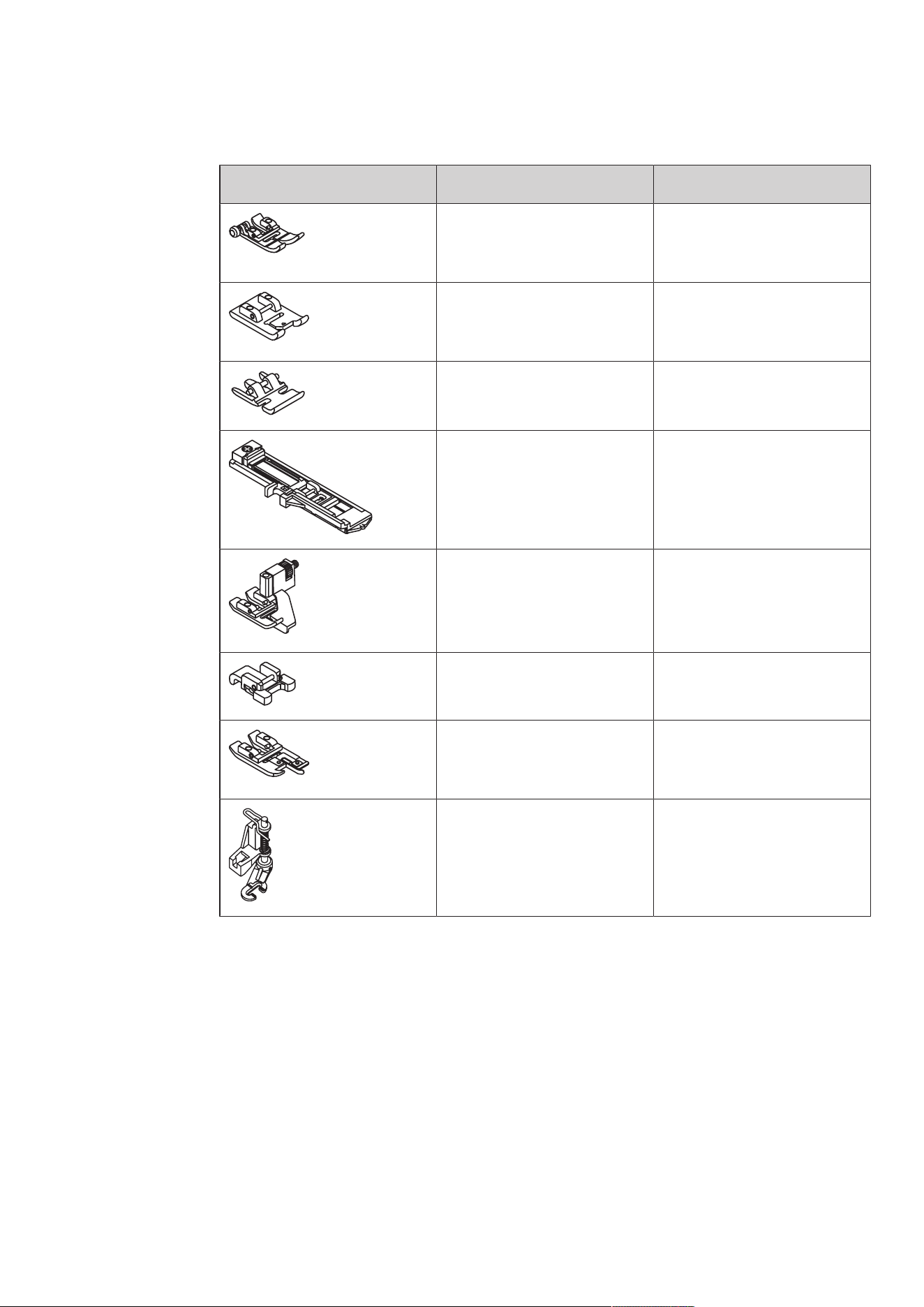
Overview presser feet
Illustration Name Purpose
Zigzag Foot (DA) For sewing different practical,
decorative stitches and hems
with Dual Feed.
Embroidery Foot (JK) For sewing satin stitches,
applications and decorative
patterns.
Zipper Foot (JB) For sewing with Dual Feed. For
sewing in the zipper.
Buttonhole Foot with Slide (RJ) For sewing buttonholes.
Blindstitch Foot (DM) For sewing blind-stitch hems
with Dual Feed.
Button Sew-On Foot (RC) For sewing on buttons.
Overlock Foot (DI) For sewing with Dual Feed. For
sewing overlock stitches over the
fabric edge.
Free-motion Embroidery Foot
(RX)
For embroidering, darning and
freehand quilting.
My bernette
18
2023-06 EN 5020077.40A.04
1.3 Overview User Interface
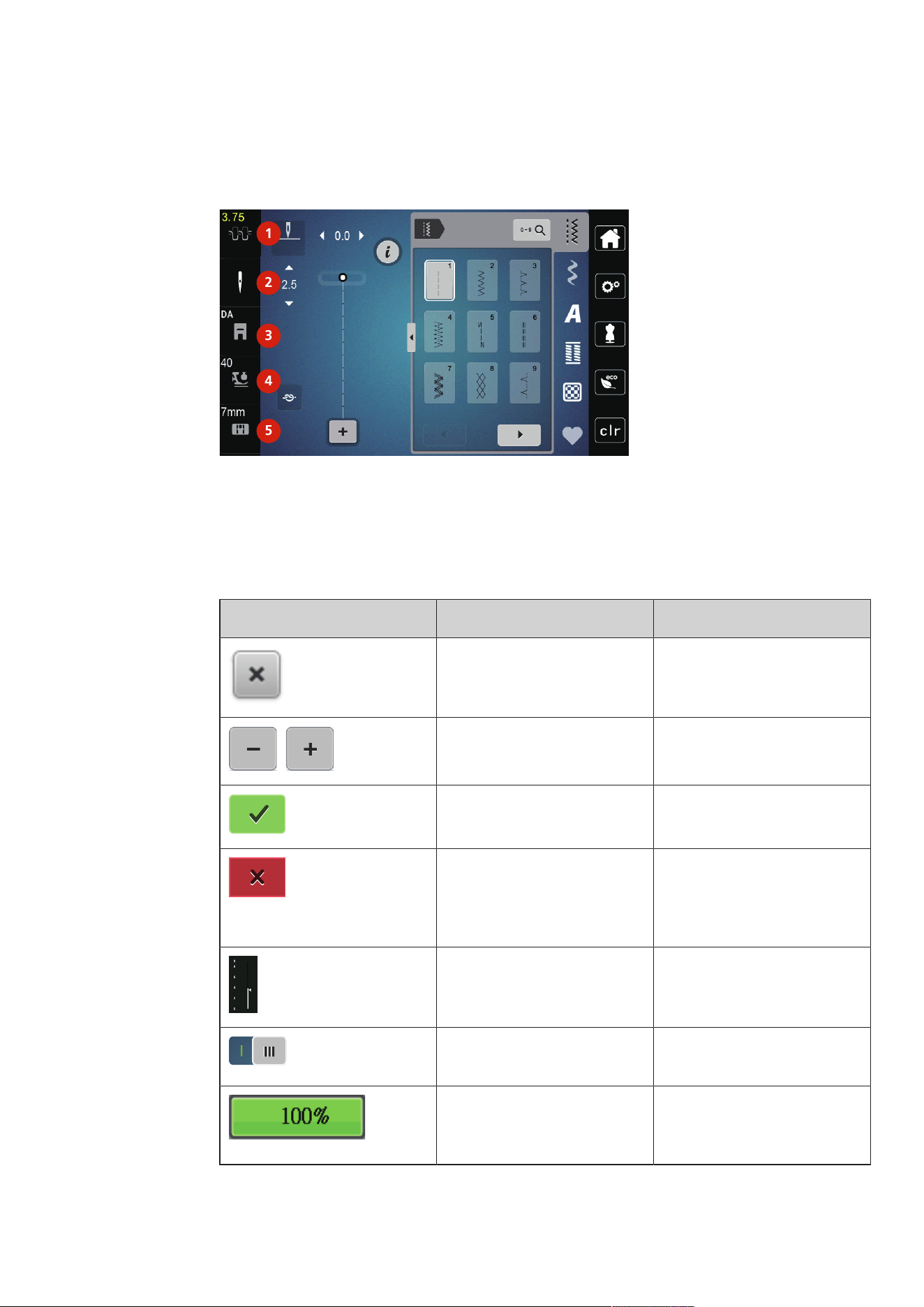
Overview Functions/Visual Information
1
2
3
4
5
1 Upper Thread Tension 4 Foot Pressure
2 Needle Selection 5 Stitch Plate Selection
3 Presser Foot Display/Presser Foot Selection
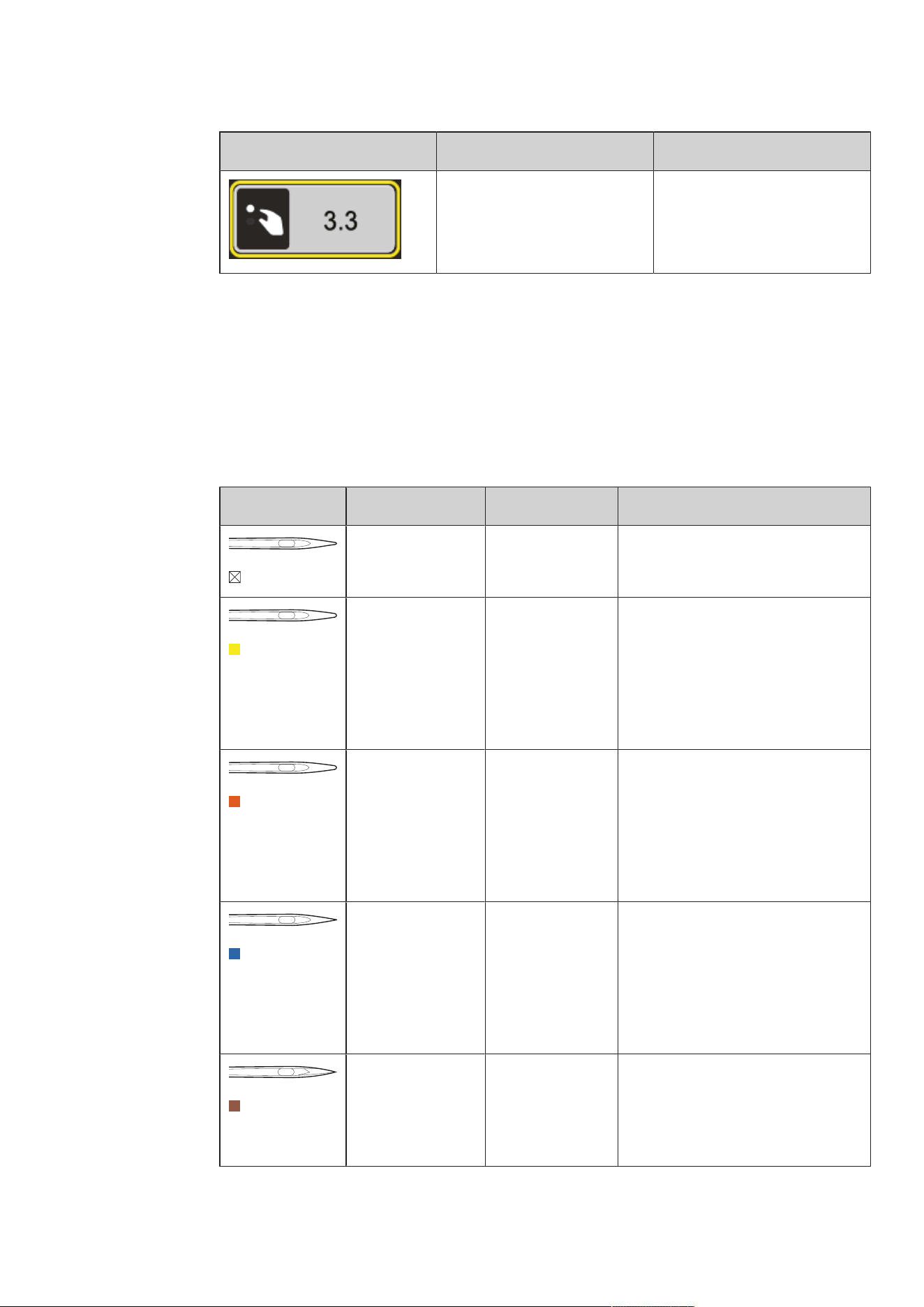
Overview Functions and Views
Illustration Name Purpose
Close The display is closed and the
previously made adjustments are
saved.
«Plus» / «Minus» Change setting values.
Confirm Confirms the previously adjusted
alterations. The display is closed.
Cancel The process is canceled. The
display is closed and the
previously made adjustments are
not saved.
Slide By moving the slide the setting
values are changed.
Switch Activates or deactivates
functions.
USB Storage Space The percentage of used USB
storage (%) will be displayed in
the green bar icon.
My bernette
19
2023-06 EN 5020077.40A.04
Illustration Name Purpose
Yellow-framed Icon Tap the yellow-framed icon to
reset the changes to the default
setting.
1.4 Needle, Thread, Fabric
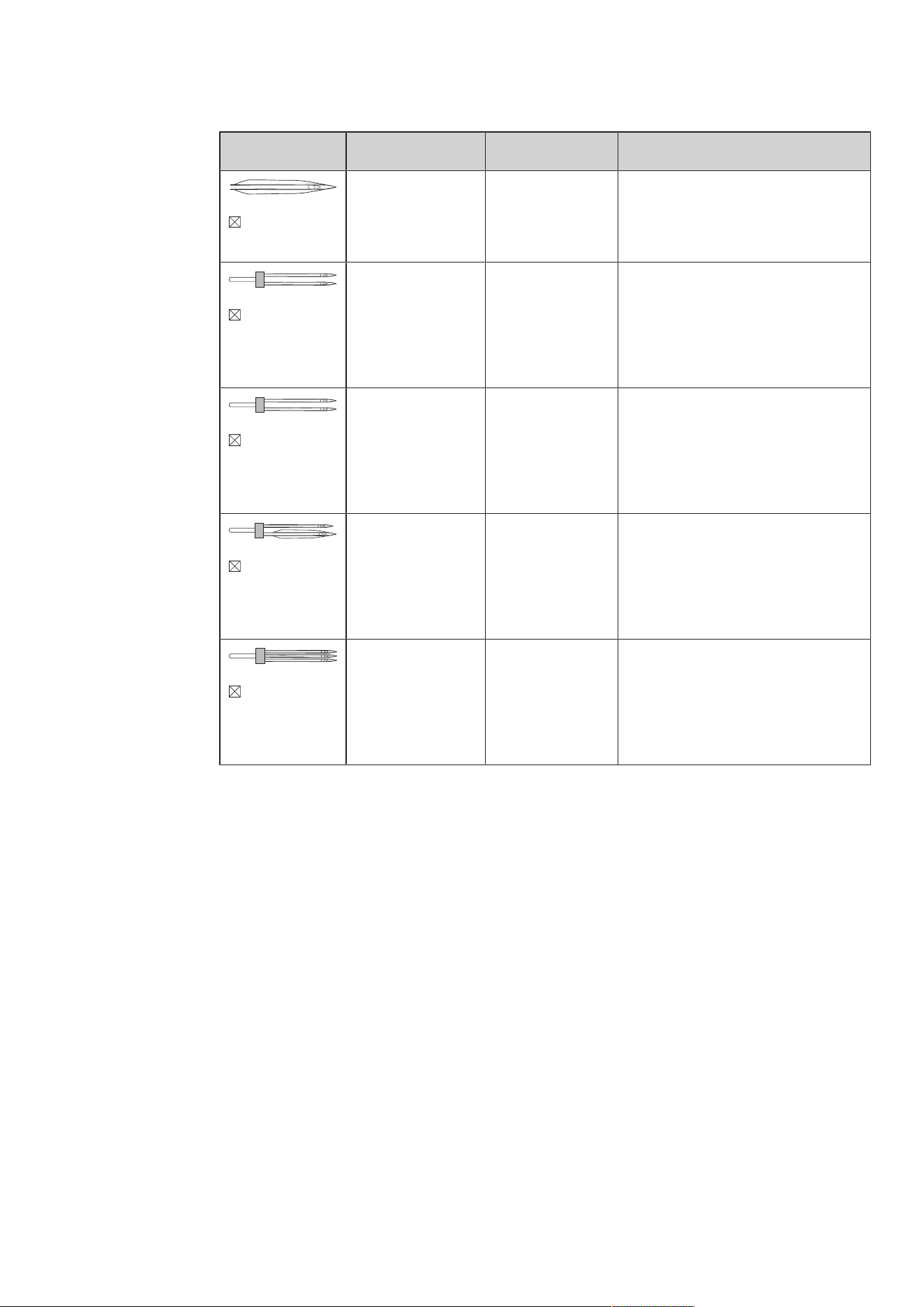
Needles will wear down over time. Therefore, the needle should be replaced regularly. Only a perfect point
results in a good stitching result. In general, the thinner the fabric, the finer the needle. The illustrated
needles are either standard or optional accessory, depending on the machine.
• Needle sizes 70, 75: for light-weight fabrics.
• Needle sizes 80, 90: for medium fabrics.
• Needle sizes 100: for heavy fabrics.
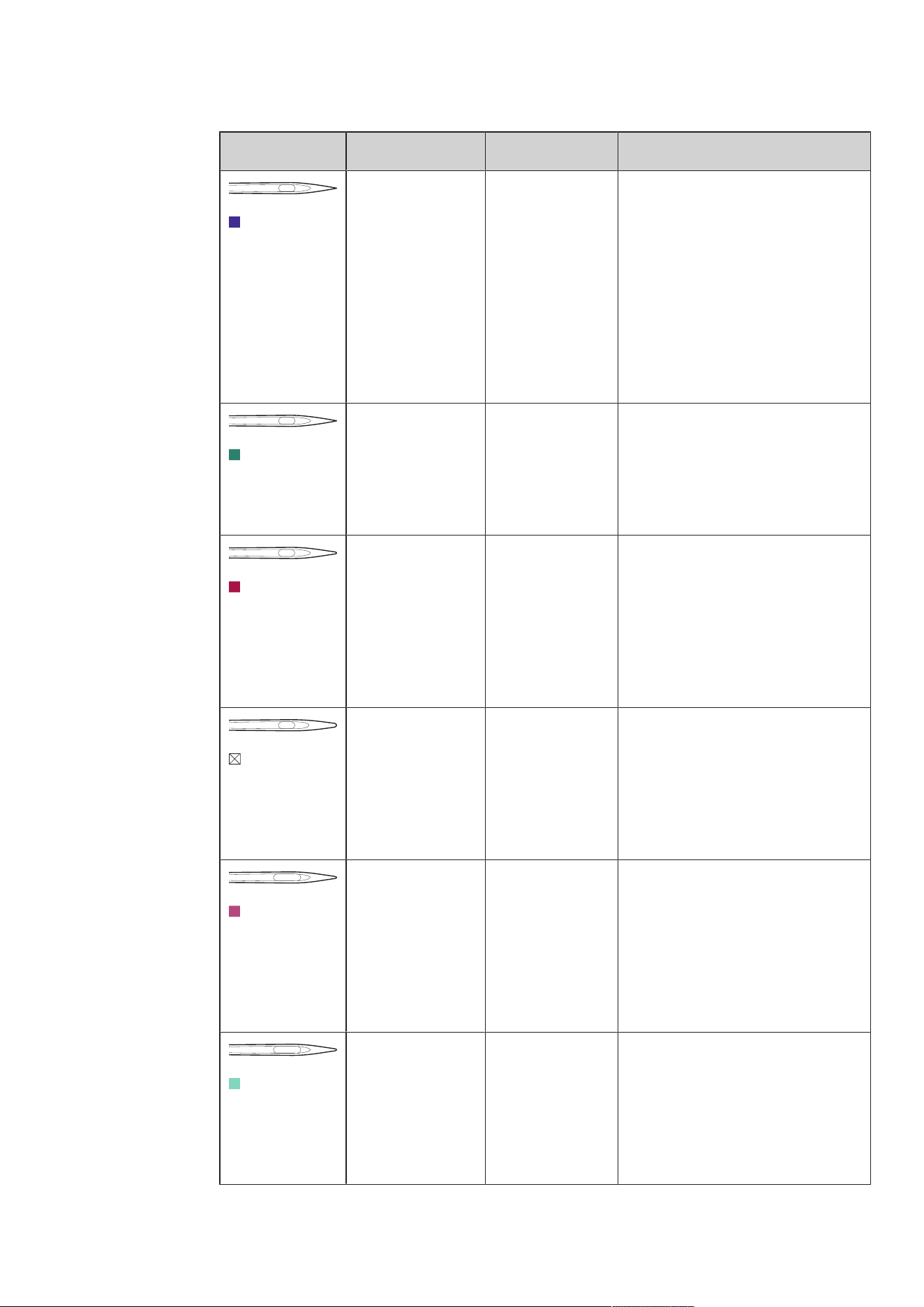
Overview Needles
Illustration Needle Name Needle Description Purpose
Universal Needle
130/705 H 60-110
Slightly rounded
point.
For nearly all natural and synthetic
fabrics (woven and knitted).
Stretch Needle
130/705H-S
75/11 – 90/14
With a medium
ball point.
For knitwear (jersey, tricot, knit and
stretch material).
For general sewing, sewing on buttons
and buttonholes, zippers, hems and
topstitching, decorative sewing,
embroidery.
Jersey/
Embroidery
Needle
130/705HSUK
80/12
With a medium
ball point.
For woven fabrics (light, medium,
heavy-weight), knitwear, plastic.
For general sewing, sewing on buttons
and buttonholes, zippers, hems and
topstitching, decorative sewing,
embroidery.
Jeans Needle
130/705H-J
80/12 – 110/18
With slim,
particularly acute
point.
Woven fabrics (light, medium, heavy-
weight), leather, jeans/denim.
For general sewing, sewing on buttons
and buttonholes, zippers, hems and
topstitching, decorative sewing,
embroidery, patchwork, quilting.
Leather Needle
Leather Needle
90/14, 100/16
With a cutting
point (LR=special
point to sew
leather).
For leather, imitation leather and other
similar materials.
For zippers, hems and topstitching,
materials that tend to stick.
My bernette
20
2023-06 EN 5020077.40A.04
Illustration Needle Name Needle Description Purpose
Microtex Needle
130/705H-M
60/8 – 110/18
With a particularly
pointed and
slender tip.
For woven fabrics (light, medium,
heavy), artificial materials and materials
that are difficult to work with. For silk,
microfibre fabrics, foils, coated and
hard-sliding materials.
For sewing in general, sewing on
buttons and buttonholes, zips, hems
and topstitching and decorative
sewing. For ultra straight stitches when
topstitching edges.
Quilting Needle
130/705H-Q
75/11 – 90/14
With a very slim,
slightly rounded
point.
For woven fabrics (light, medium and
heavy-weight).
Decorative sewing, patchwork,
quilting. For stitching/topstitching
tasks, such as quilting and patchwork.
Embroidery
Needle
130/705H-E
75/11 – 90/14
With a light ball
point and a
particularly wide
eye and wide
groove.
For woven fabrics (light, medium,
heavy-weight), knitwear. For
voluminous and woolen threads.
For general sewing, sewing on buttons
and buttonholes, zippers, hems and
topstitching, decorative sewing,
embroidery.
Fine Fabrics
Needle
130/705HSES
70/10 – 90/14
With a light ball
point.
For fine, delicate materials, such as
velvet.
For general sewing, sewing on buttons
and buttonholes, zippers, hems and
topstitching, decorative sewing,
embroidery, patchwork, quilting.
Metafil Needle
130/705HMETAFIL
80/12
With medium ball
point and long eye
(2mm).
For woven fabrics (light, medium,
heavy-weight), knitwear. For sewing
with special effects and fancy threads,
especially metallic threads.
For embroidery with metallic thread.
For hems and topstitching, decorative
sewing and embroidery.
Topstitch Needle
130/705H-N
80/12 – 100/16
With medium ball
point and long eye
(2mm).
For woven fabrics (light, medium and
heavy-weight).
For hems and topstitching, decorative
sewing and embroidery. For decorative
and quilting work with several sewing
threads and also for embroidery.
My bernette
21
2023-06 EN 5020077.40A.04
Illustration Needle Name Needle Description Purpose
Hemstitch Needle
130/705 H WING
100–110
Wing-like widened
needle shaft (wing)
To sew blind stitches.
Universal Twin
Needle
130/705HZWI
70-100
Needle distance:
1.0/1.6/2.0/2.5/3.0
/4.0/6.0/8.0
For visible hems in stretch fabrics,
pintucks, decorative sewing.
Stretch Twin
Needle
130/705H-SZWI
75
Needle distance:
2.5/4.0
For visible hems in stretch fabrics,
pintucks, decorative sewing.
Hemstitch Twin
Needle
130/705HZWIHO
100
Needle distance:
2.5
For special effects with hemstitch
embroidery.
Universal Triple
Needle
130/705HDRI
80
Needle distance:
3.0
For visible hems in stretch fabrics,
decorative sewing.
My bernette
22
2023-06 EN 5020077.40A.04
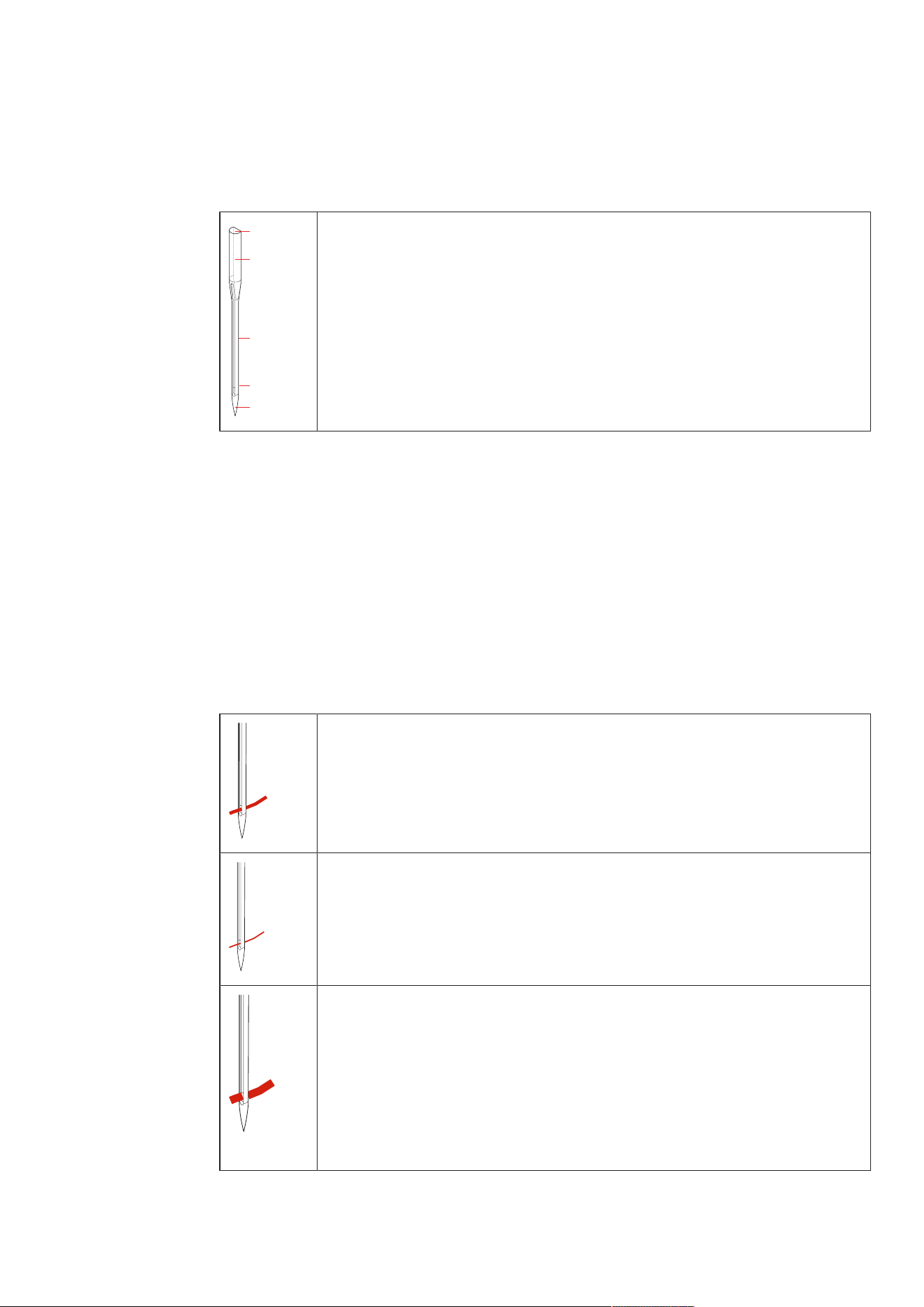
Example for Needle Description
The 130/705 system, which is the most common for household machines, is explained by the following
picture of a Jersey/Stretch needle.
2
1
5
3
4
130/705 H-S/70
130 = Shank length (1)
705 = Flat shank (2)
H = Needle scarf (3)
S = Needle point (here medium ball point) (4)
70 = Needle size 0.7mm (5)
Thread Selection
For a perfect sewing result, thread and fabric quality play an important role.
We recommend purchasing quality threads to achieve good sewing results.
• Cotton threads have the advantage of being a natural fiber and therefore are especially suitable for
sewing cotton fabrics.
• Mercerized cotton threads have a slight sheen that is not lost with washing.
• Polyester threads have a high tensile strength and is particularly colorfast.
• Polyester threads are more flexible and are recommended where a strong and elastic seam is required.
• Rayon threads are made of natural fibers and have a brilliant sheen.
• Rayon threads are suitable for decorative stitches and achieve a more beautiful effect.
Needle/Thread Combination
The needle/thread combination is correct, when the thread fits perfectly into the long
groove and goes easily through the needle eye. The thread can be optimally sewn.
The thread can break and skipped stitches can occur when there is too much clearance in
the long groove and the needle eye.
The thread can break and get stuck when the thread scrapes against the edge of the long
groove not fit well into the needle eye optimally.
Sewing Preparation
23
2023-06 EN 5020077.40A.04
2 Sewing Preparation
2.1 Connection and Switching On
Connecting the Machine
To ensure safe operation of the machine, only the supplied mains cable may be used. The supplied power
cable is designed for the voltage range applicable in the country of use. If the machine is to be used in a
country other than the country of origin, the power cable suitable for that country must be obtained from
the Authorized bernette dealer.
The power cable for the USA and Canada has a polarized power plug (one contact is wider than the other).
To reduce the risk of an electric shock, the plug can only be inserted into the socket in one way. If the power
plug does not fit in the socket, reverse then insert the power plug. If the reversed power plug still does not
fit, an electrician must install an appropriate socket. Do not modify the power plug in any way.
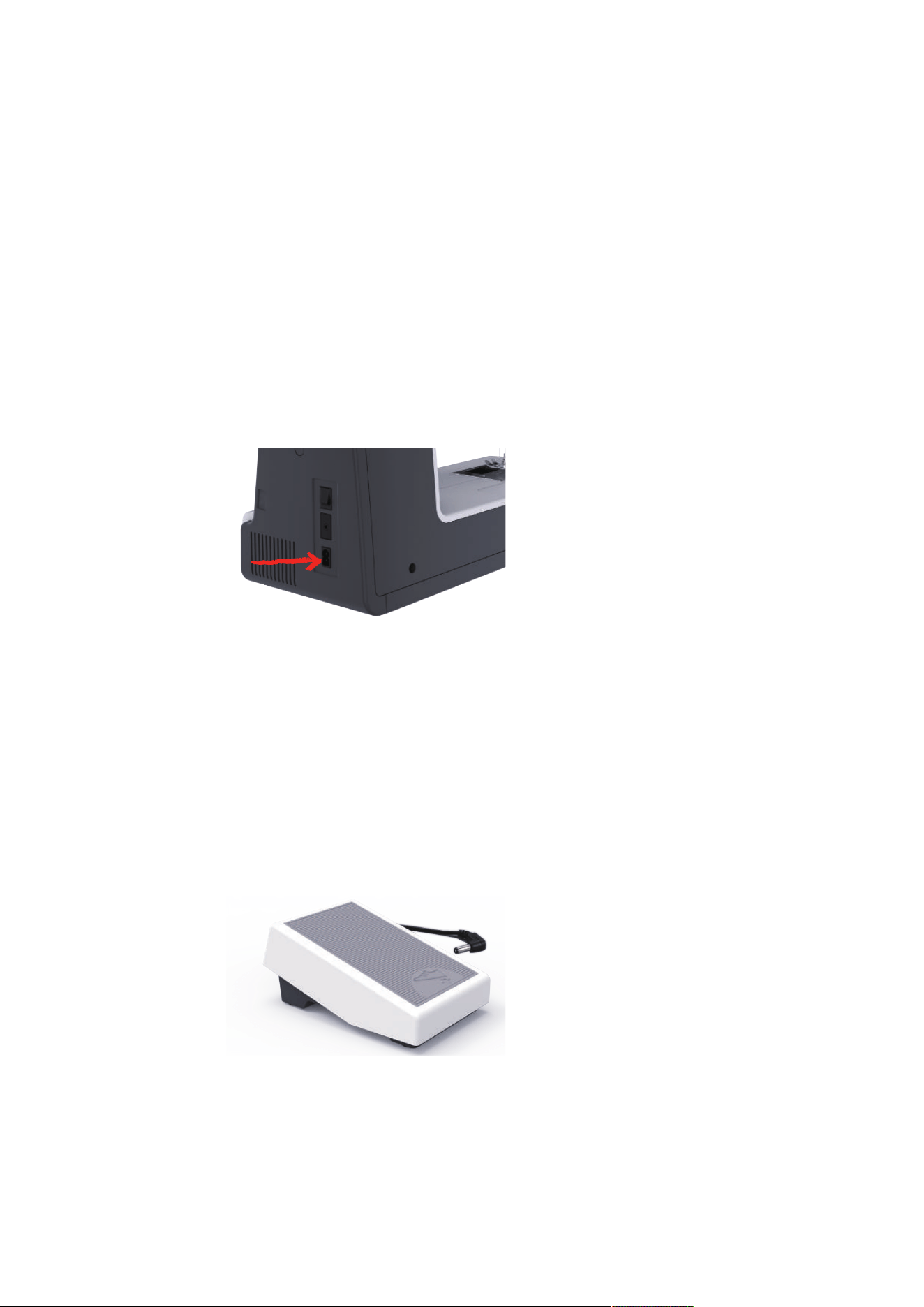
> Insert the device connector of the power cable into the machine's power cable connection.
> Insert the power plug of the power cable into the socket.
Use of the Power Cable (only USA/Canada)
The machine has a polarized plug (one contact is wider than the other). To reduce the risk of electric shock,
the plug can only be plugged into the socket in one way. If the plug does not fit into the socket, turn the
plug. If it still does not fit, an electrician needs to be called to install an appropriate outlet. Do not modify the
plug in any way.
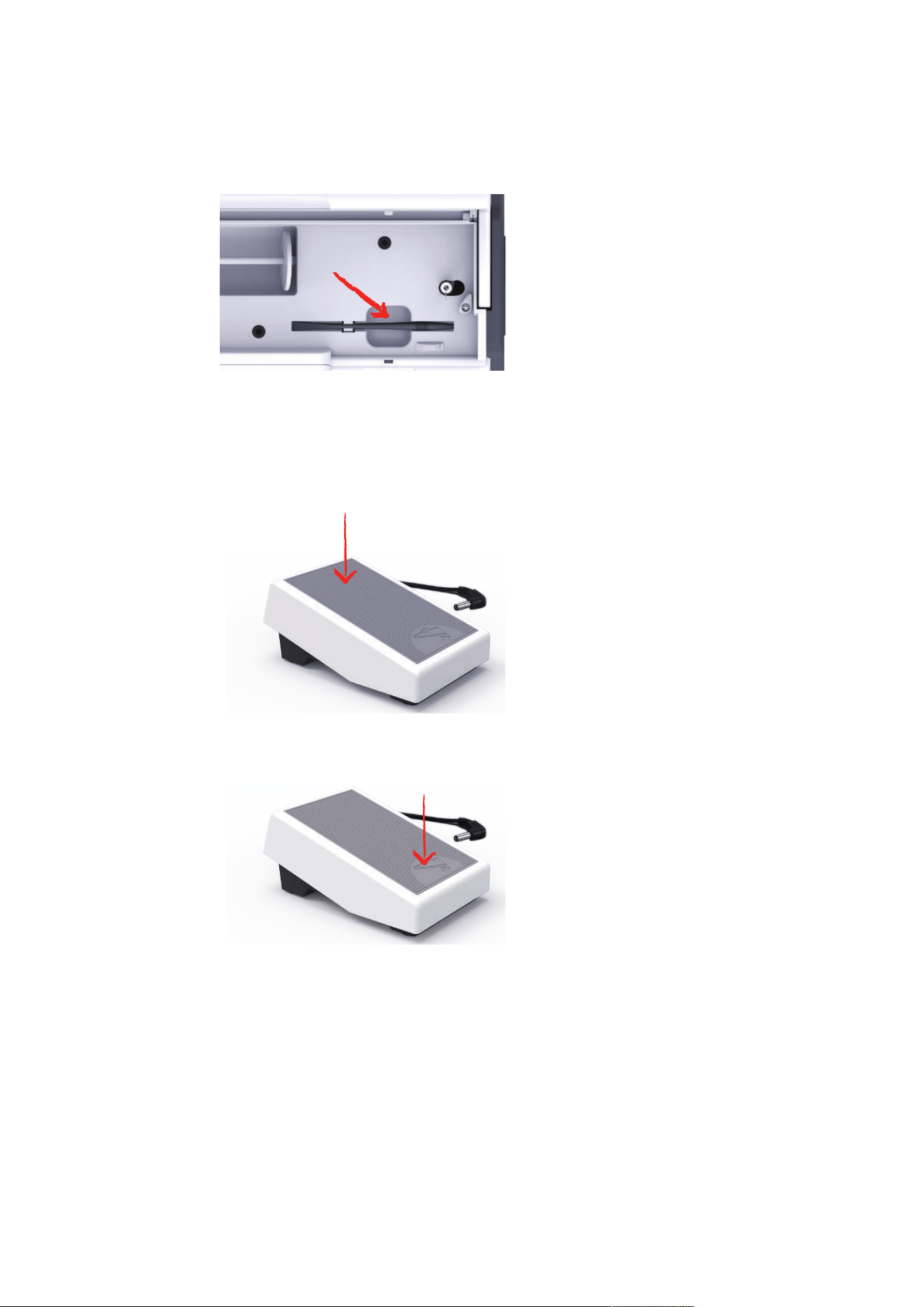
Connecting the Foot Control
The cable of the foot control is rolled up on its underside.
> Unroll the cable of the foot control to the desired length and fix it in the cable holders of the foot
control.
Sewing Preparation
24
2023-06 EN 5020077.40A.04
> Insert the plug of the cable into the foot control socket of the machine.
> Place the foot control under the table.
> If the cable is too long, roll up the excess length and fix it in the cable holders of the foot control.
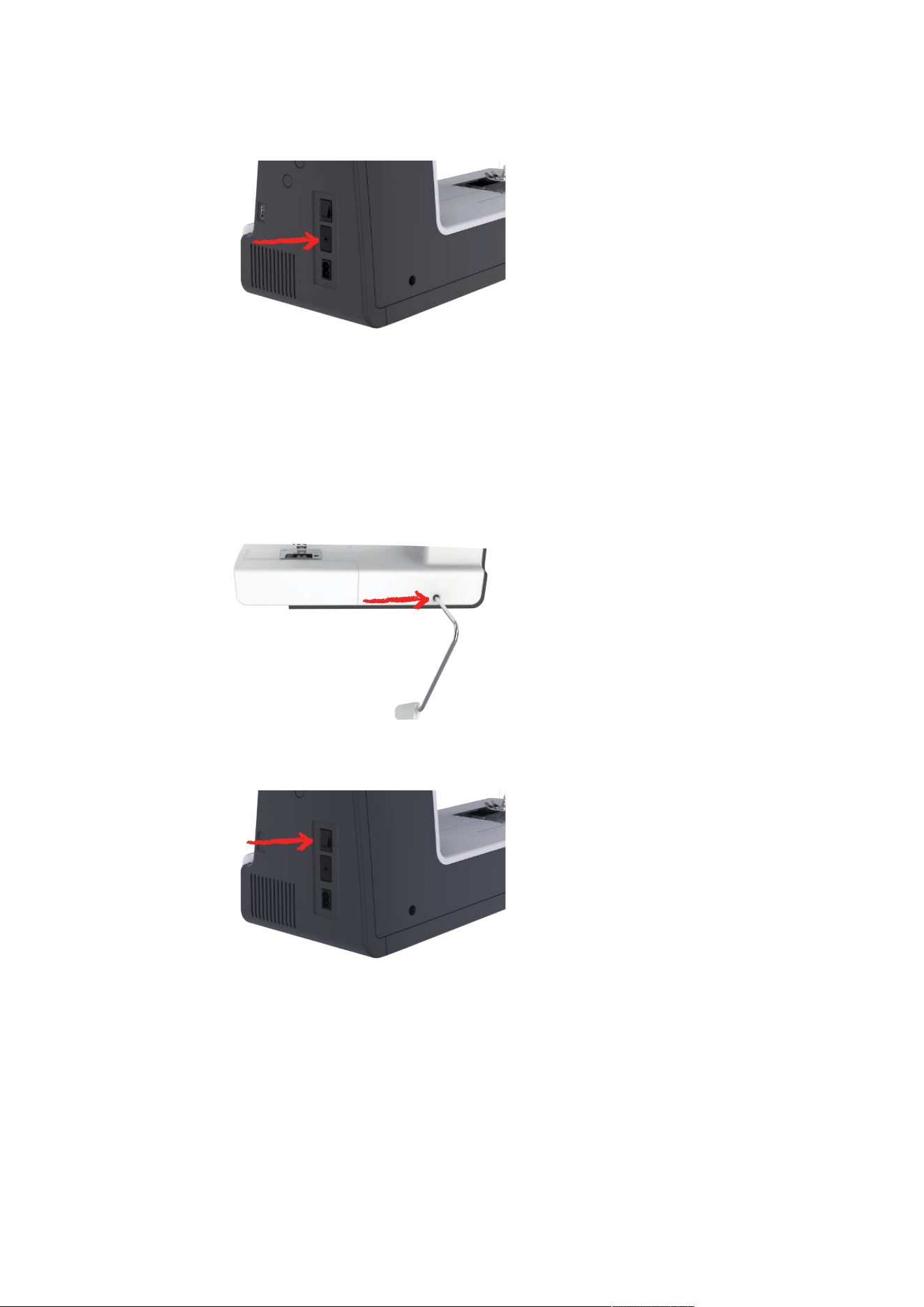
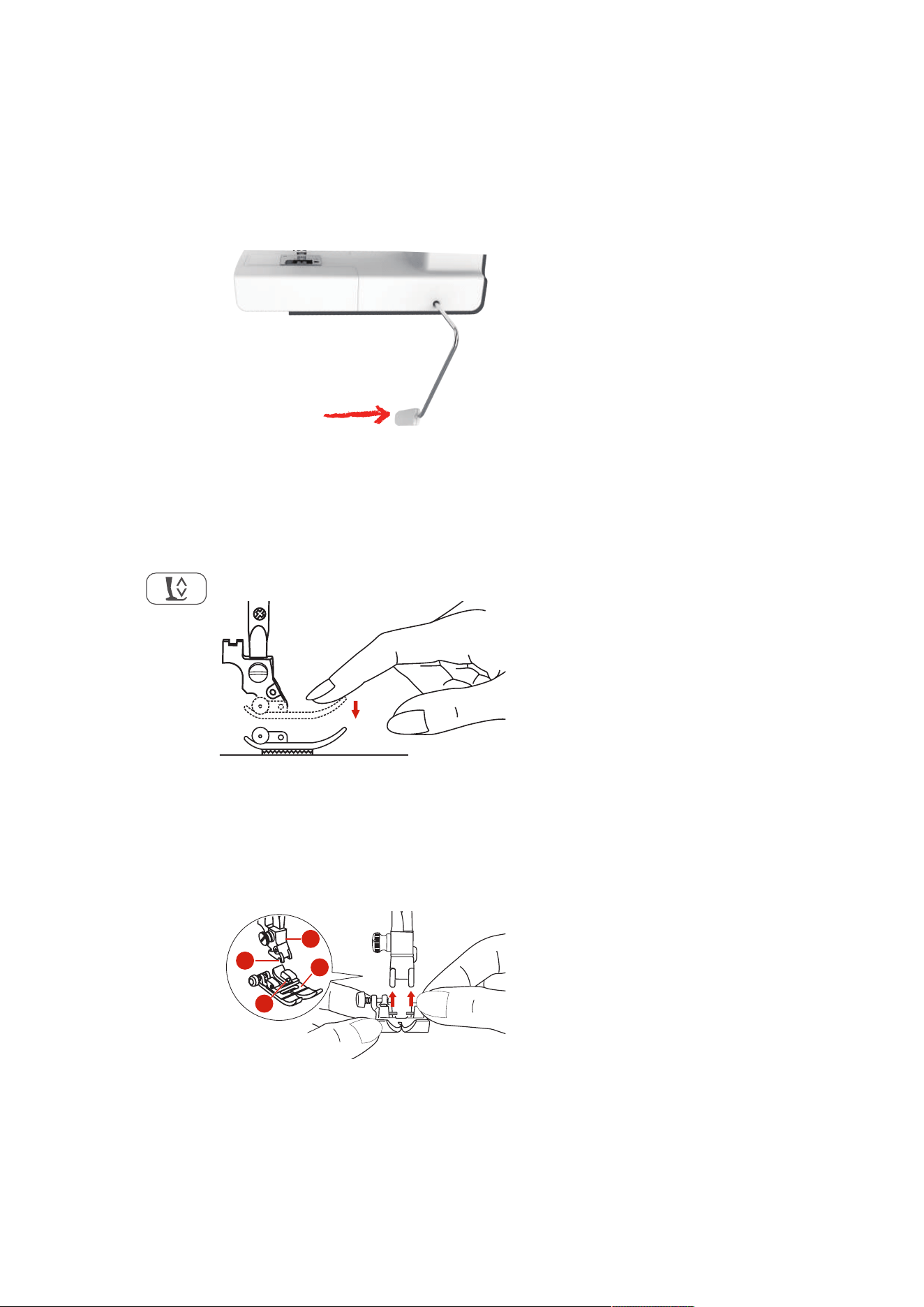
Attaching the Knee Lifter of the Free Hand System
The presser foot may be raised and lowered with the Free Hand System. The knee lifter is extremely helpful
when sewing appliqué, patchwork and quilting since it allows you to handle the fabric while your knee
controls the presser foot.
> Insert the knee lifter into the opening at the front side of the machine.
> Adjust the sitting height so that the knee lifter can be operated with the knee.
Switching the Machine On
> Set the power switch to «I».
Sewing Preparation
25
2023-06 EN 5020077.40A.04
Fixing the Touch Screen Pen
> Store the touchscreen pen on the top holder.
Regulating the Speed via the Foot Control
Via the foot control the speed can be adjusted infinitely variable.
> Press the foot control down carefully to start the machine.
> To sew more quickly, press the foot control further down.
> Release the foot control to stop the machine.
Raising/Lowering the Needle
> Sink the heel back on the foot control to raise/lower the needle.
Programming the Foot Control Individually
The foot control can be programmed individually.
2.2 Spool Pin
Horizontal Spool Pin
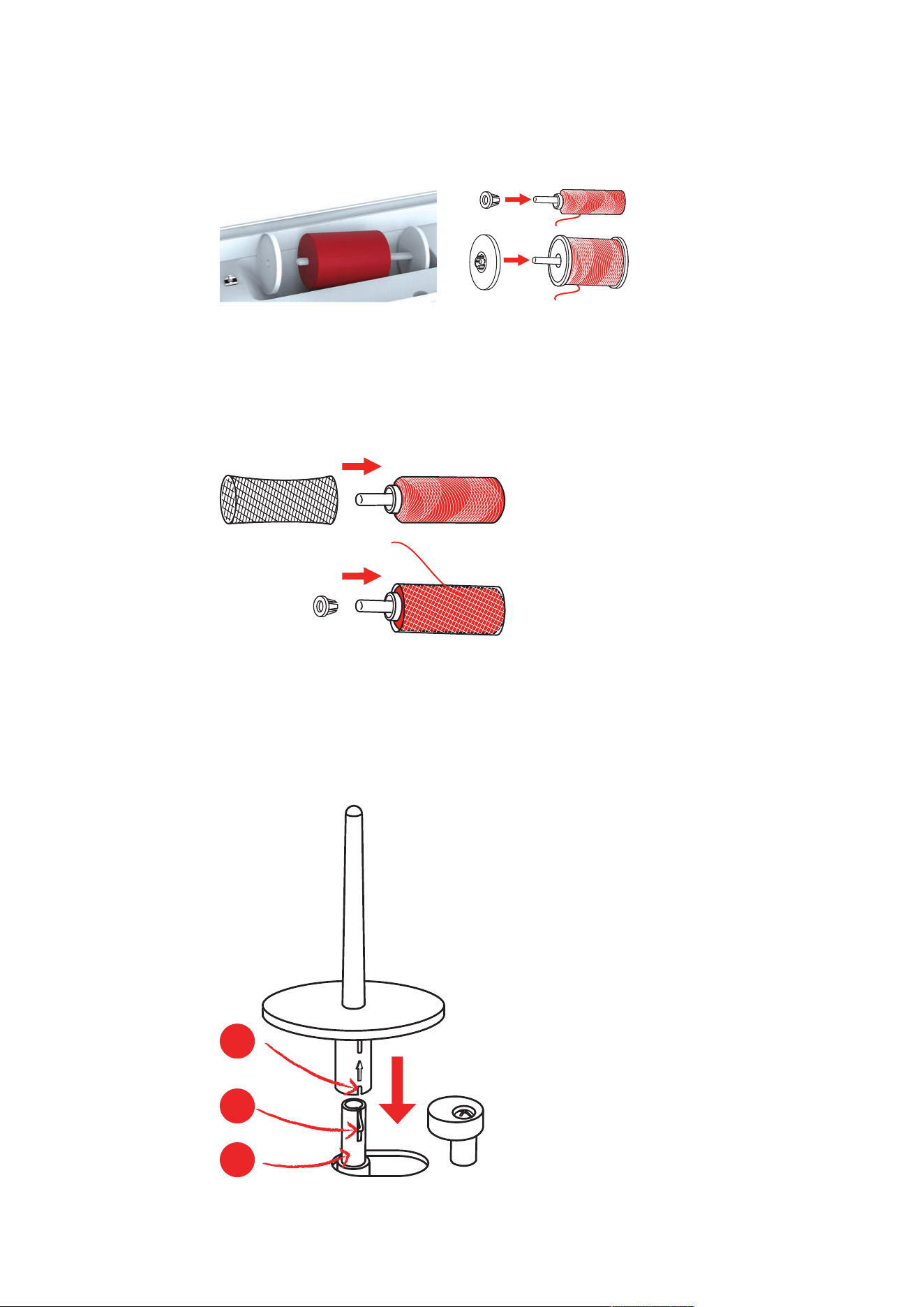
Placing the Thread Spool and the Spool Cap
Spool caps hold the thread spool in place for proper release of thread from the spool.
> Place the thread spool on the spool pin.
Sewing Preparation
26
2023-06 EN 5020077.40A.04
> Position the appropriate spool cap on the spool pin so that there is no space between the spool cap and
the thread spool.
Using the Spool Net
The spool net holds the thread on the thread spool and prevents the thread from knotting and breaking. The
spool net is only used with the horizontal spool holder.
> Pull the spool net over the thread spool. Ensure when doing so that the spool net does not slip off the
thread spool, e.g. double-insert the net over the thread spools or insert a part of the net into the thread
spool at the rear.
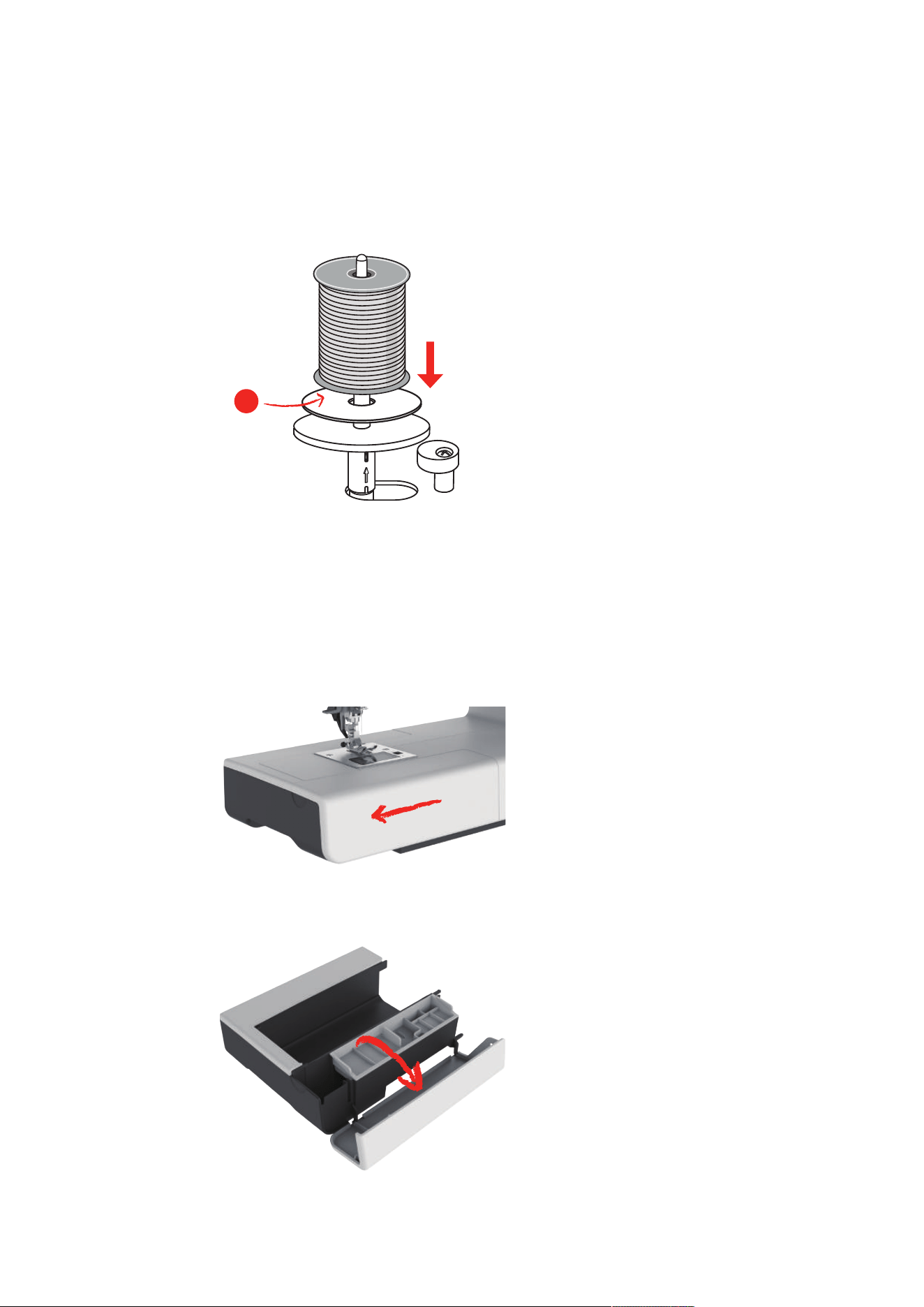
Second Spool Pin
Installing the Second Spool Pin
The second spool pin is necessary when several threads are sewn.
> Insert the second spool pin onto the end of the bobbin winding unit (1).
> Align the notch (2) with the spring (3) on the bobbin winding unit.
1
2
3
Sewing Preparation
27
2023-06 EN 5020077.40A.04
Inserting Thread Spool
The felt disc prevents the thread from sticking to the spool pin.
> Place the felt disc (1) on the second spool pin.
> Place the thread spool on the second spool pin.
1
2.3 Freearm
The bernette b77 provides a solidly freearm which offers a lot of space for large project on the right of the
needle.
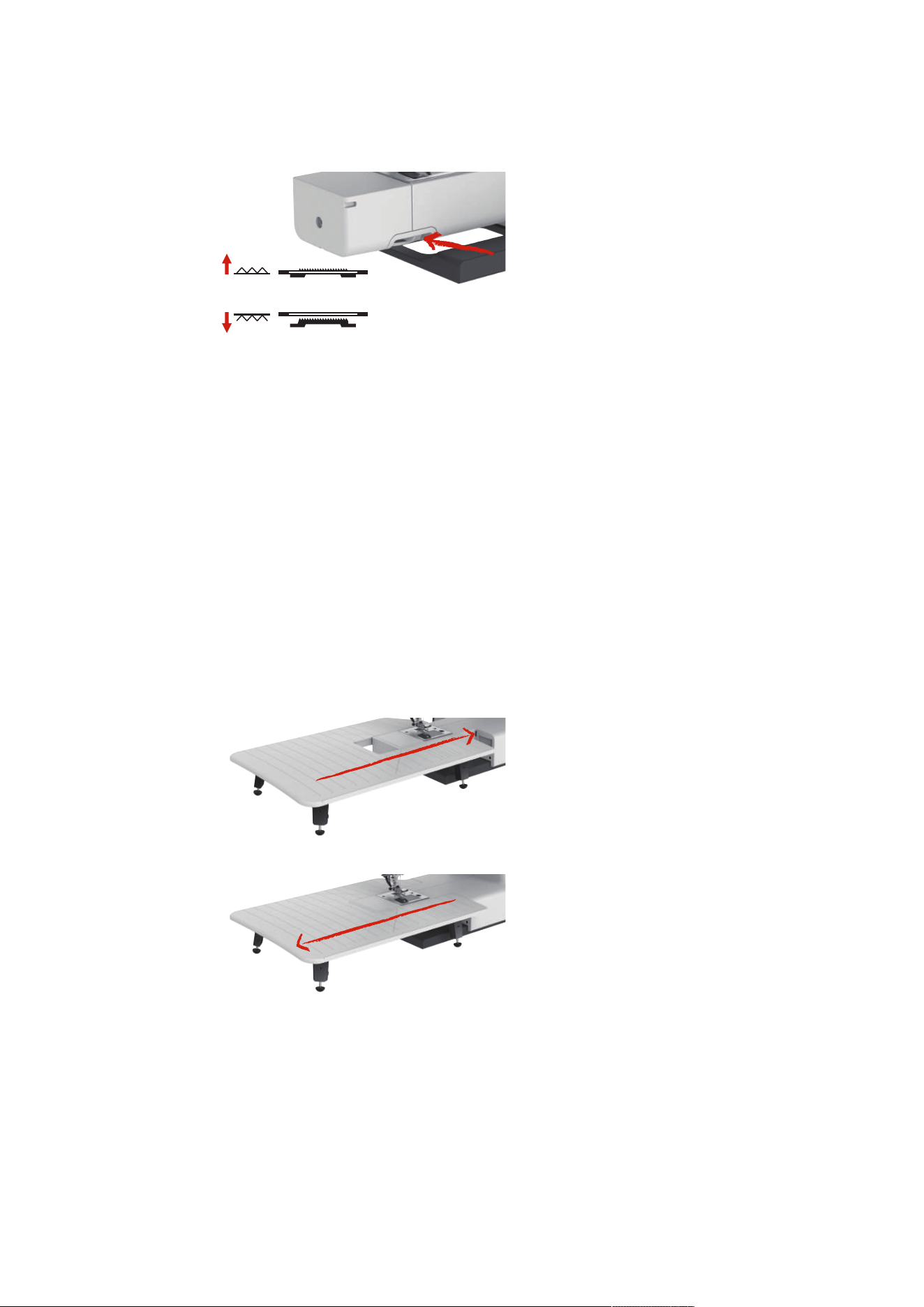
2.4 Sewing Table and Accessory Box
The sewing table is used as an accessory box.
> To remove the sewing table, hold the sewing table by the handle on the left and pull in the direction of
the arrow.
> To open the accessory box, tilt the cover towards you.
> To close the accessory box, tilt the cover backwards until it clicks into place.
Sewing Preparation
28
2023-06 EN 5020077.40A.04
2.5 Raising or Lowering the Feed Dog
> To raise the feed dog, push the feed dog lever to the right.
– The feed dog is raised when the first stitch is sewn.
> Slide the «Feed Dog Lever» left to lower the feed dog.
– The feed dog is lowered.
2.6 Using the Slide-on Table
The Slide-on Freearm Extension Table, attached to the freearm, enables the available sewing area to be
extended.
The height of the extension table can be adjusted by turning the adjustable feet.
Prerequisite:
• The sewing table is removed.
> Raise the needle.
> Raise the presser foot.
> Switch off the machine.
> Unfold the feet on the extension table.
> Push the Slide-on Freearm Extension Table from the left to the right over the freearm until it engages.
> To remove the slide-on table, pull the slide-on table over the freearm to the left.
Sewing Preparation
29
2023-06 EN 5020077.40A.04
2.7 Presser Foot
Adjusting the Presser Foot Position via the Knee Lifter of the Free Hand System
> Adjust the sitting height so that the knee lifter can be operated with the knee.
> Move the knee lifter with the knee to the right to raise the presser foot.
– Simultaneously the thread tension is released.
> Release the knee lifter slowly to lower the presser foot.
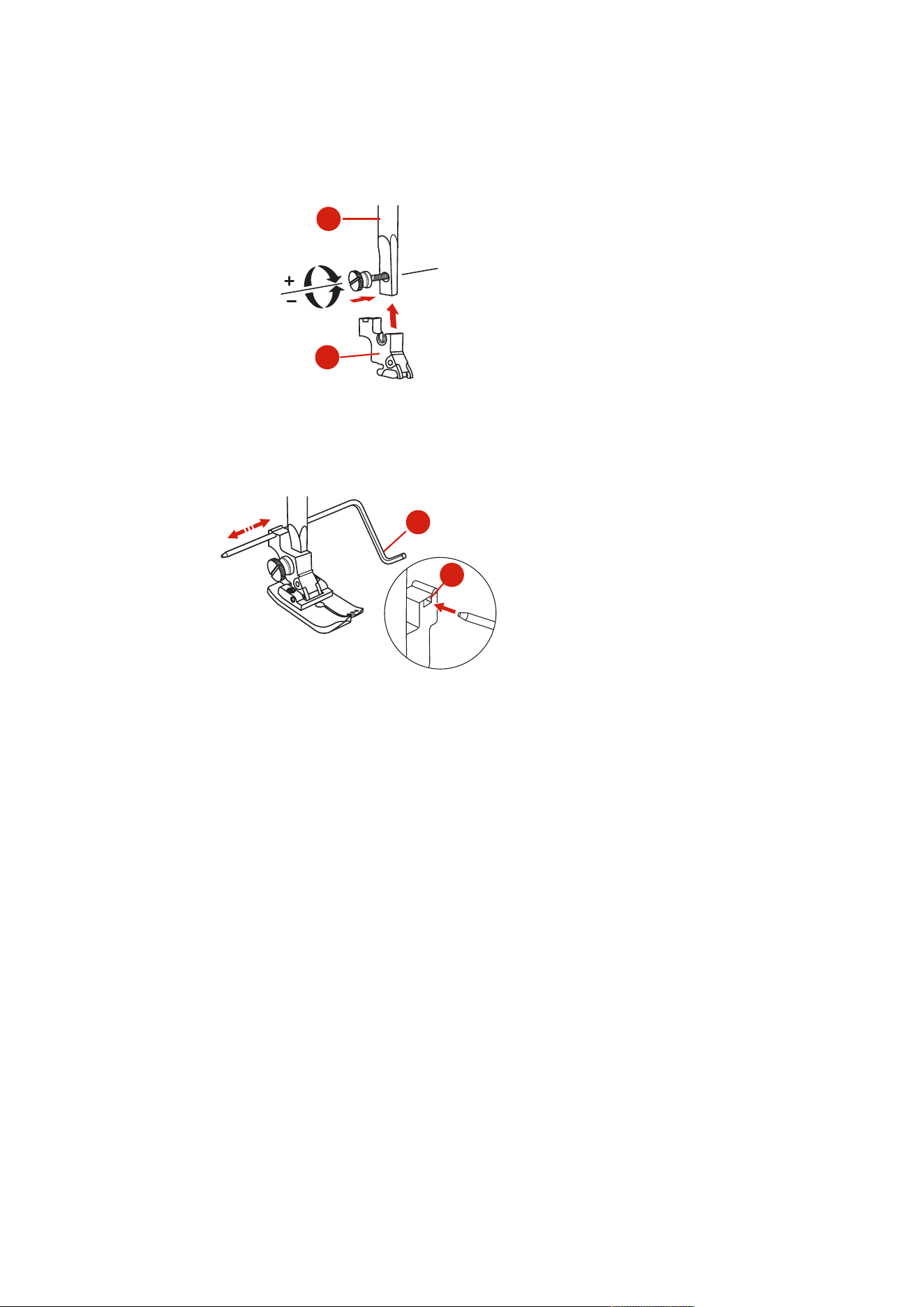
Changing the Presser Foot
Removing the Presser Foot Sole
> Raise the presser foot.
> With the finger press the front edge of the presser foot.
Attaching the Presser Foot Sole
> Raise the presser foot (1).
> Place the presser foot sole (2) under the shaft groove (3) so that the shaft groove is above the presser
foot sole pin (4).
> Then push the new presser foot sole upward until it engages.
3
2
4
1
Removing and Inserting the Presser Foot Holder
Prerequisite:
• The presser foot sole is removed.
> Raise the presser foot.
Sewing Preparation
30
2023-06 EN 5020077.40A.04
> Align the presser foot holder (1) with the presser foot bar (2) underneath and to the left.
> Hold the presser foot holder firmly and screw in the screw by hand.
> Tighten the screw using the screwdriver.
1
2
Attaching the Seam Guide
The seam guide is suitable for sewing parallel lines.
> Insert the seam guide (1) in the slot (2).
> Set the required distance to the adjacent seam.
2
1
Having the presser foot sole displayed in the user interface
The recommended presser foot sole for the selected stitch is displayed. Moreover, other optimal presser foot
soles can be displayed.
> Switch the machine on.
> Select a stitch pattern.
– The recommended presser foot sole with letter designation is displayed in the «Presser Foot Indicator/
Presser Foot Selection» field.
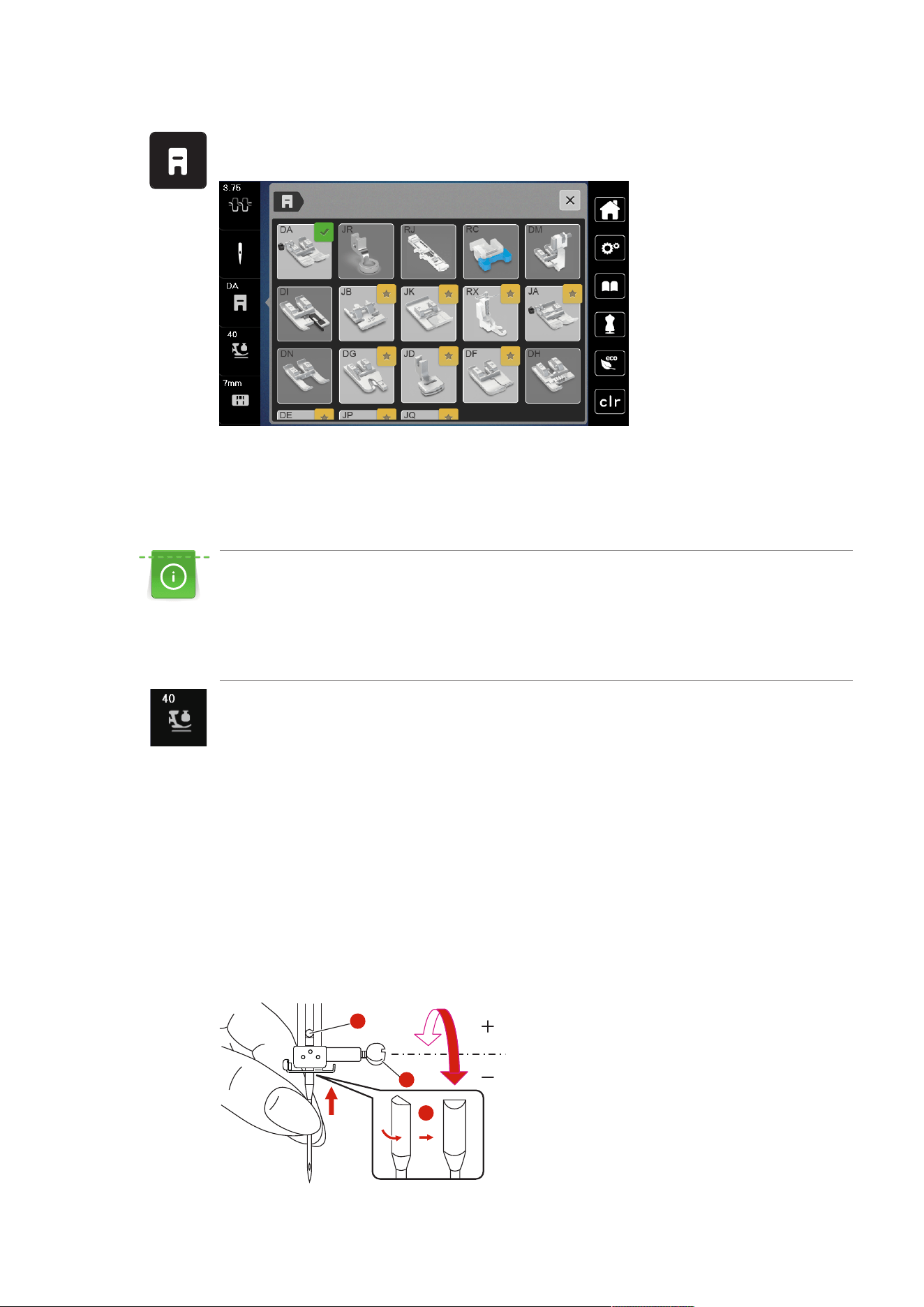
Sewing Preparation
31
2023-06 EN 5020077.40A.04
> Tap «Presser Foot Indicator/Presser Foot Selection».
– Any presser foot soles are displayed.
– A green tick indicates the recommended presser foot sole.
– A yellow star indicates the presser foot soles which can also be used for this stitch for special
purposes.
Setting the Presser Foot Pressure
The presser foot pressure is designed to adjust the pressure of the presser foot optimally to the fabric
thickness. When working with thick fabrics, it is recommended to reduce the presser foot pressure. This
provides the advantage that the fabric can be moved more easily. When the presser foot pressure is set
below 0, the presser foot even lifts to give more space to the thick fabric. When working with thin
fabrics, it is recommended to increase the presser foot pressure. This provides the advantage that the
fabric cannot be moved too easily under the presser foot.
> Tap «Presser Foot Pressure».
> Adjust the presser foot pressure.
2.8 Needle and Stitch Plate
Changing the Needle
> Raise the presser foot.
> Raise the needle.
> Switch the machine off and disconnect it from the power supply system.
> Loosen the fixing screw (1) with the screwdriver.
> Pull the needle down to remove.
> Hold the new needle (2) with the flat side to the rear. Push the needle upwards into the needle holder as
far as it will go (3).
> Tighten the fixing screw with the screwdriver.
1
3
2
Sewing Preparation
32
2023-06 EN 5020077.40A.04
Selecting the Needle in the User Interface
After changing the needle, you can check whether it can be used with the selected stitch plate.
> Tap «Needle Selection» or «Stitch Plate/Needle Selection».
> Select the attached needle.
– When the selected needle matches the selected stitch plate and the presser foot, sewing can be
started.
– If the selected needle does not match with the stitch plate, a red exclamation mark will appear on the
display.
Needle Stop Up/Down (Permanent)
> To set the needle stop position permanently, tap «Needle Stop Up/Down».
– The machine stops with needle position down as soon as the foot control is released or the button
«Start/Stop» has been pushed.
> Tap «Needle Stop Up/Down» again.
– The machine stops with needle position up as soon as the foot control is released or the button
«Start/Stop» has been pushed.
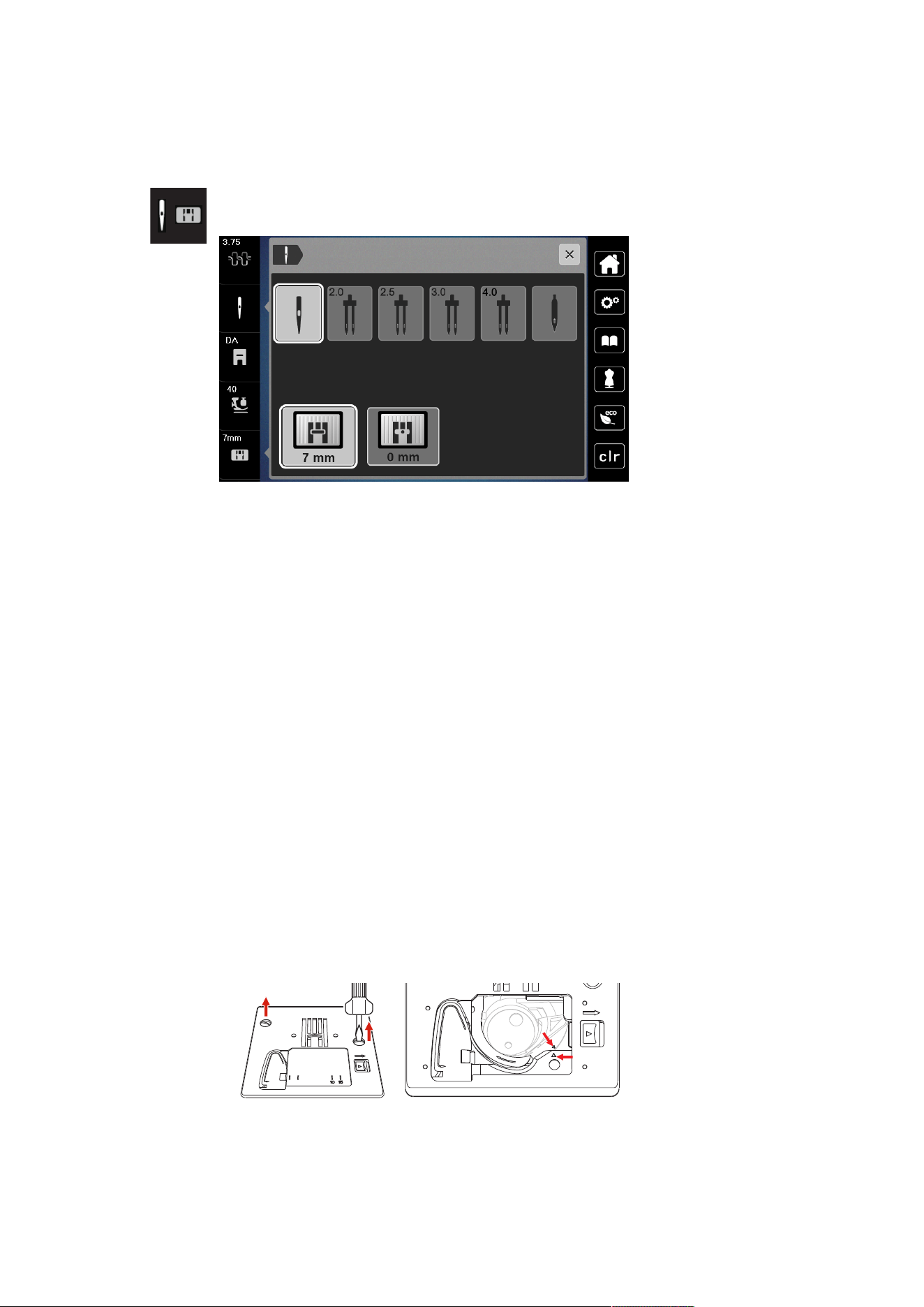
Changing the Stitch Plate
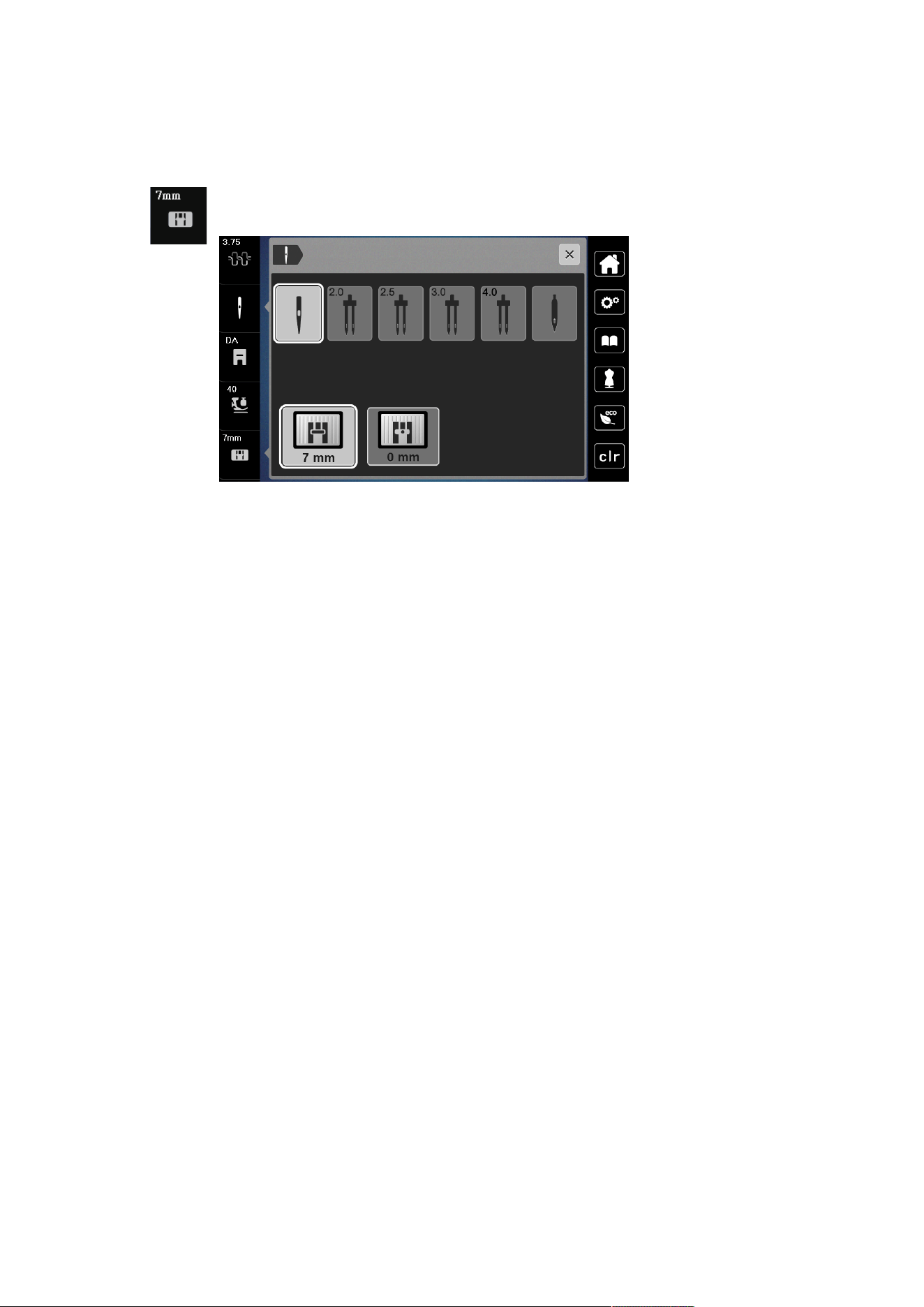
The stitch plate is marked with vertical, horizontal and diagonal lines in millimeters (mm) and inches (inch).
These markings are helpful for sewing or precise top-stitching. Please Note: The markings of the bobbin
case and the stitch plate must be aligned identically.
Prerequisite:
• The feed dog is lowered.
• The machine is switched off and disconnected from the power supply system.
• The bobbin cover, the needle and the presser foot are removed.
> Remove the screws of the stitch plate with the screwdriver.
> Remove the stitch plate.
> Position new stitch plate and tighten screws with screwdriver.
Sewing Preparation
33
2023-06 EN 5020077.40A.04
Checking the Stitch Plate in the User Interface
After changing the stitch plate, you can check whether it can be used with the selected needle.
> Tap «Stitch Plate/Needle Selection».
– The mounted stitch plate is automatically detected and shown in the display.
– If the selected stitch plate is suitable to be used in combination with the needle, sewing can begin.
– The stitch width is automatically set to the permissible value.
– If the selected needle does not match with the stitch plate, a red exclamation mark will appear on the
display.
Sewing Preparation
34
2023-06 EN 5020077.40A.04
2.9 Threading
Preparing the Threading
> Press the button «Presser Foot Up/Down » to raise the presser foot.
> Raise the presser foot.
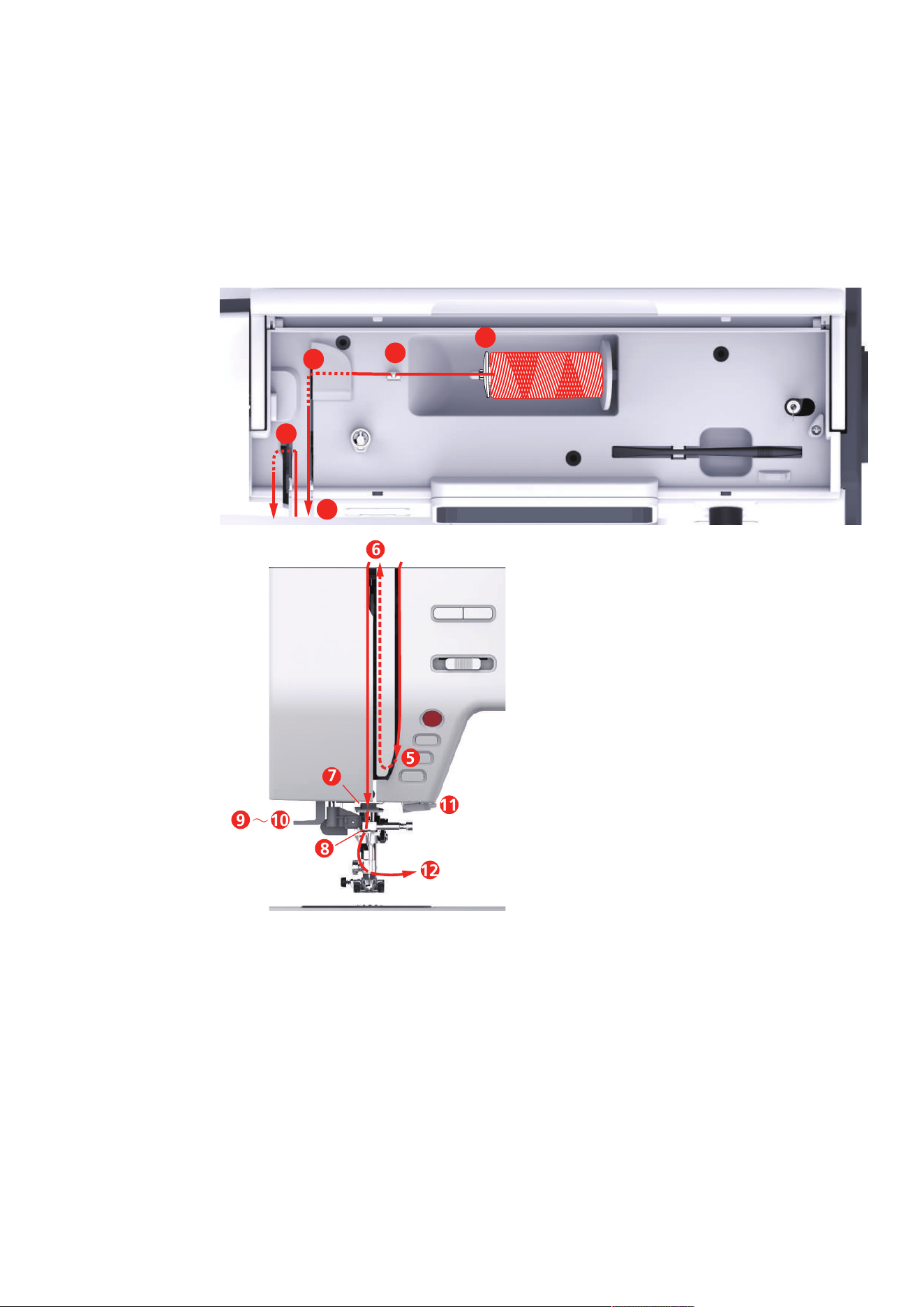
Threading the Upper Thread
1
2
4
6
3
5
6
9 10
12
11
7
8
∼
1 Spool Cap 7 Guide
2 Thread Guide 8 Guide
3 Thread Pretension 9 Thread Lever
4 Thread Tensions Discs 10 Wire Hook
5 Thread Take-up Lever Cover 11 Thread Cutter
6 Thread Take-up Lever 12 Thread
> Place the thread spool on the spool pin so that the thread unwinds clockwise.
> Fit the spool cap suitable for the spool.
Sewing Preparation
35
2023-06 EN 5020077.40A.04
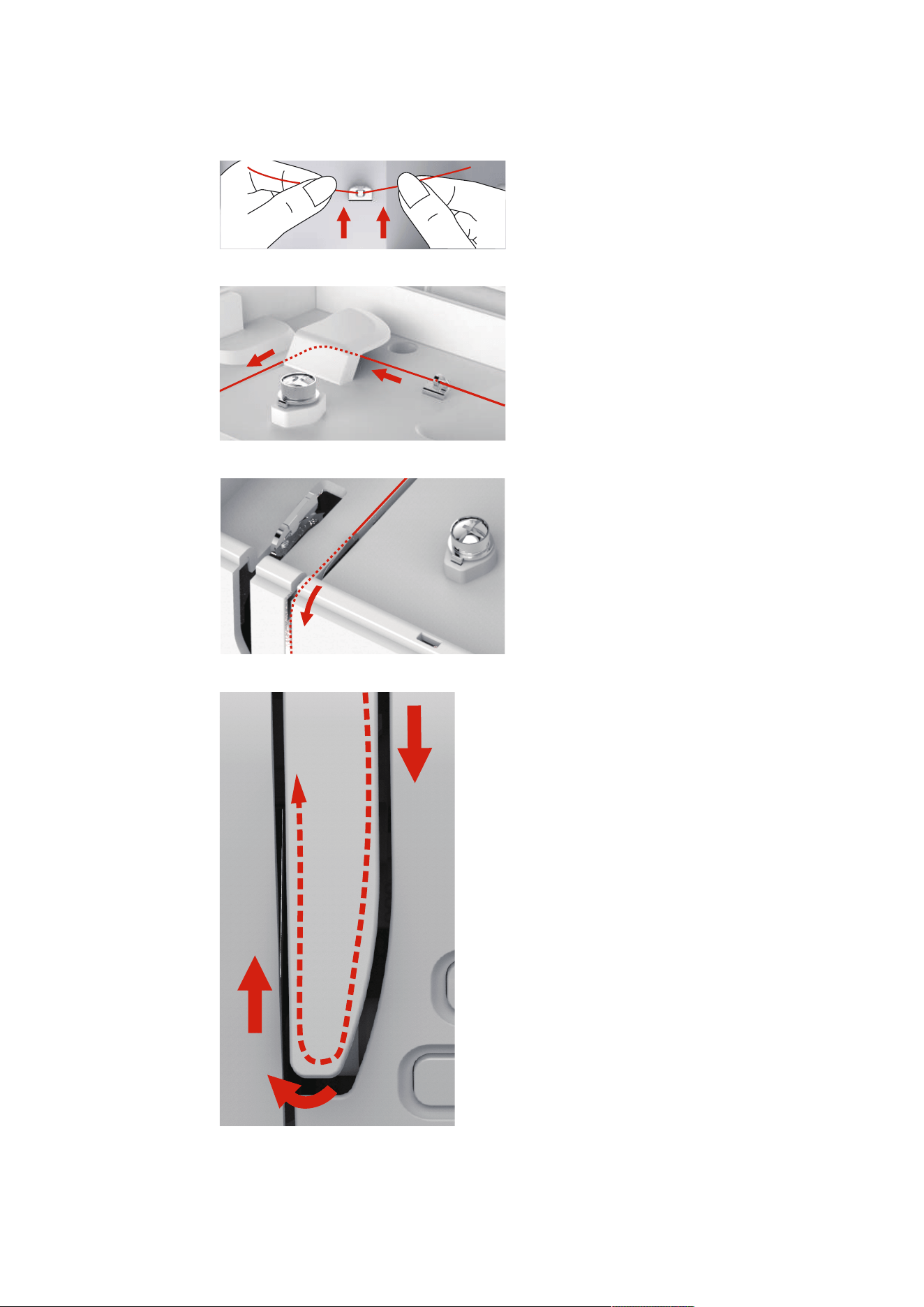
> Feed the thread through the thread guide.
> Guide the thread through the thread pretension.
> Place the end of the thread down along the duct.
> Guide the htread downwards around the thread take-up lever cover.
Sewing Preparation
36
2023-06 EN 5020077.40A.04
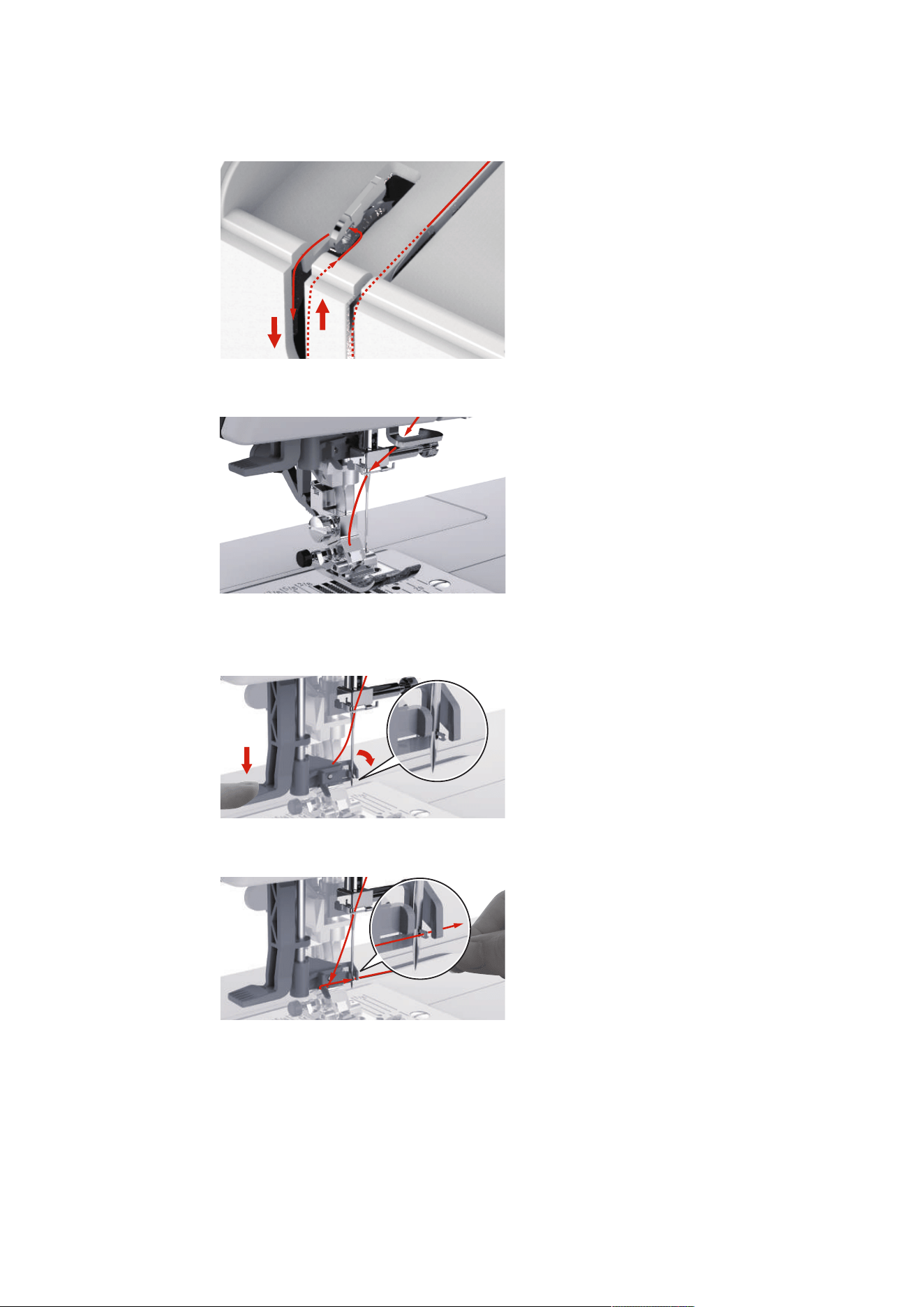
> Guide the thread at the top from rigth to the left through the thread take-up lever and then down again.
> Guide the thread through the guides above the needle.
> Lower the presser foot.
> Press the threading lever down until it clicks into place.
– The wire hook goeas through the eye of the needle.
– To prevent damage to the threader, the presser foot is lowered automatically.
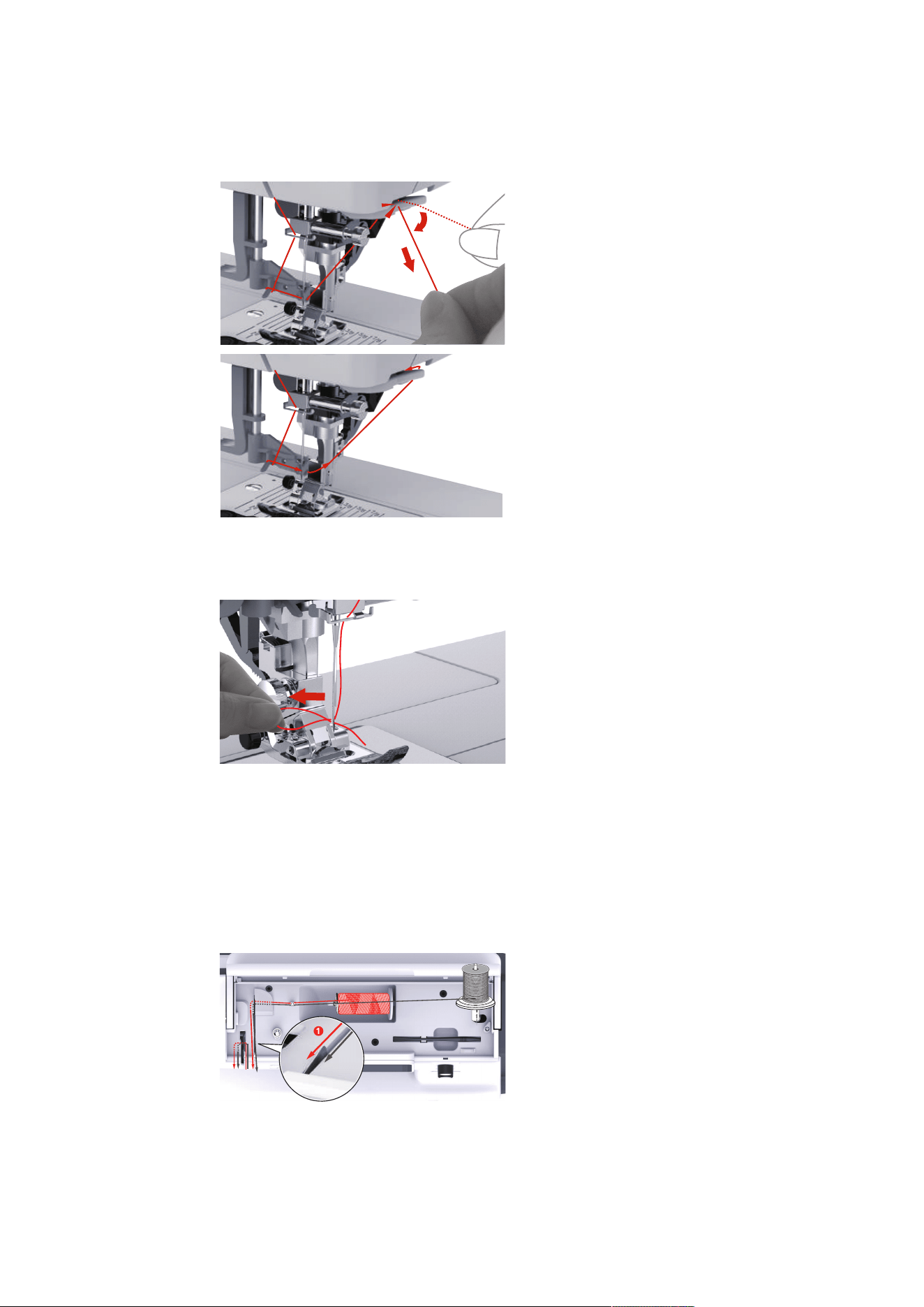
> Feed the thread around the thread guide.
> Guide the thread in front of the needle and underneath the wire hook and hold it.
Sewing Preparation
37
2023-06 EN 5020077.40A.04
> To cut off excess thread, take the thread end and carefully pull it over the thread cutter. Please Note:
Use the right thread cutter only when threading.
> To thread the needle, lift the needle-threading lever. Keep the thread loose when doing so.
– The wire hook moves backwards and pulls the thread through the needle eye into a loop.
> Pull the thread completely through the eye of the needle.
Threading the Twin Needle
Prerequisite:
• The zigzag foot is fitted.
• The twin needle is inserted.
• The second spool pin, felt disc and second spool are fitted.
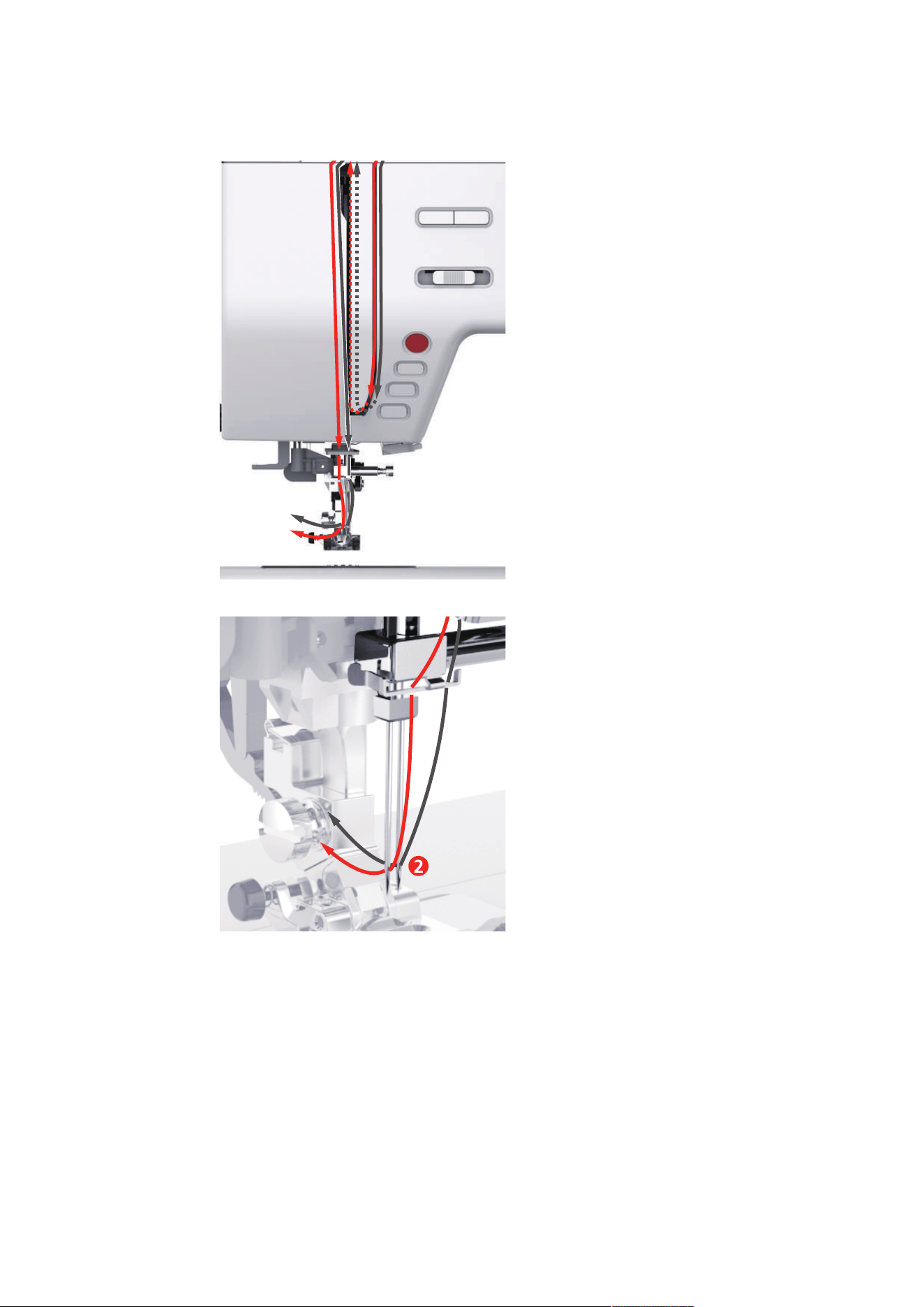
> Guide the thread from the horizontal spool pin (red) in the direction of the arrow to the left side of the
thread tension disc (1).
1
Sewing Preparation
38
2023-06 EN 5020077.40A.04
> Guide the thread to the thread guide above the needle.
> Thread the thread into the left needle manually.
2
> Guide the thread from the vertical spool pin (blue) in the direction of the arrow to the right side of the
thread tension disc (1).
> Guide the thread to the thread guide above the needle.
> Thread the thread into the right needle manually.
Sewing Preparation
39
2023-06 EN 5020077.40A.04
NOTICE
Needle Breakage Caused by Incorrect Presser Foot, Stitch or Needle Position
If the presser foot, stitch or needle position is incorrect, the needle can collide with the presser foot or stitch
plate and break.
> Fit the zigzag foot.
> Set a straight stitch.
> Set the needle to the center position.
Winding the Bobbin Thread
1
2
4
3
1 Spool Cap 3 Bobbin Winder Pretension
2 Thread Guide 4 Spool Pin
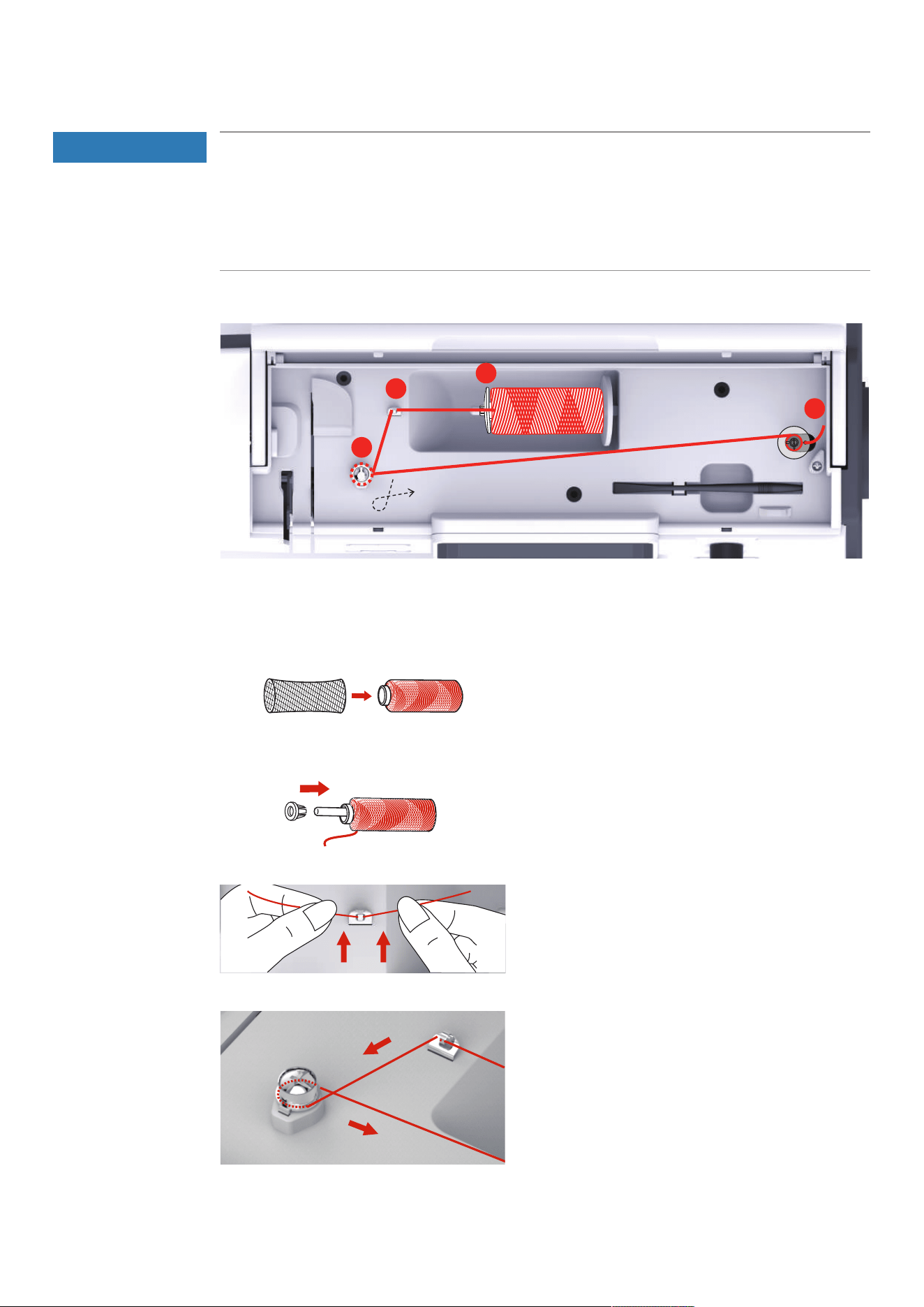
> To prevent slippery threads from catching or breaking, pull the spool net over the spool.
> Place the thread spool and the appropriate spool cap on the spool holder. Use the small spool cap on the
spool holder.
> Feed the thread through the thread guide.
> Guide the thread around the bobbin winder pre-tension in the direction of the arrow.
Sewing Preparation
40
2023-06 EN 5020077.40A.04
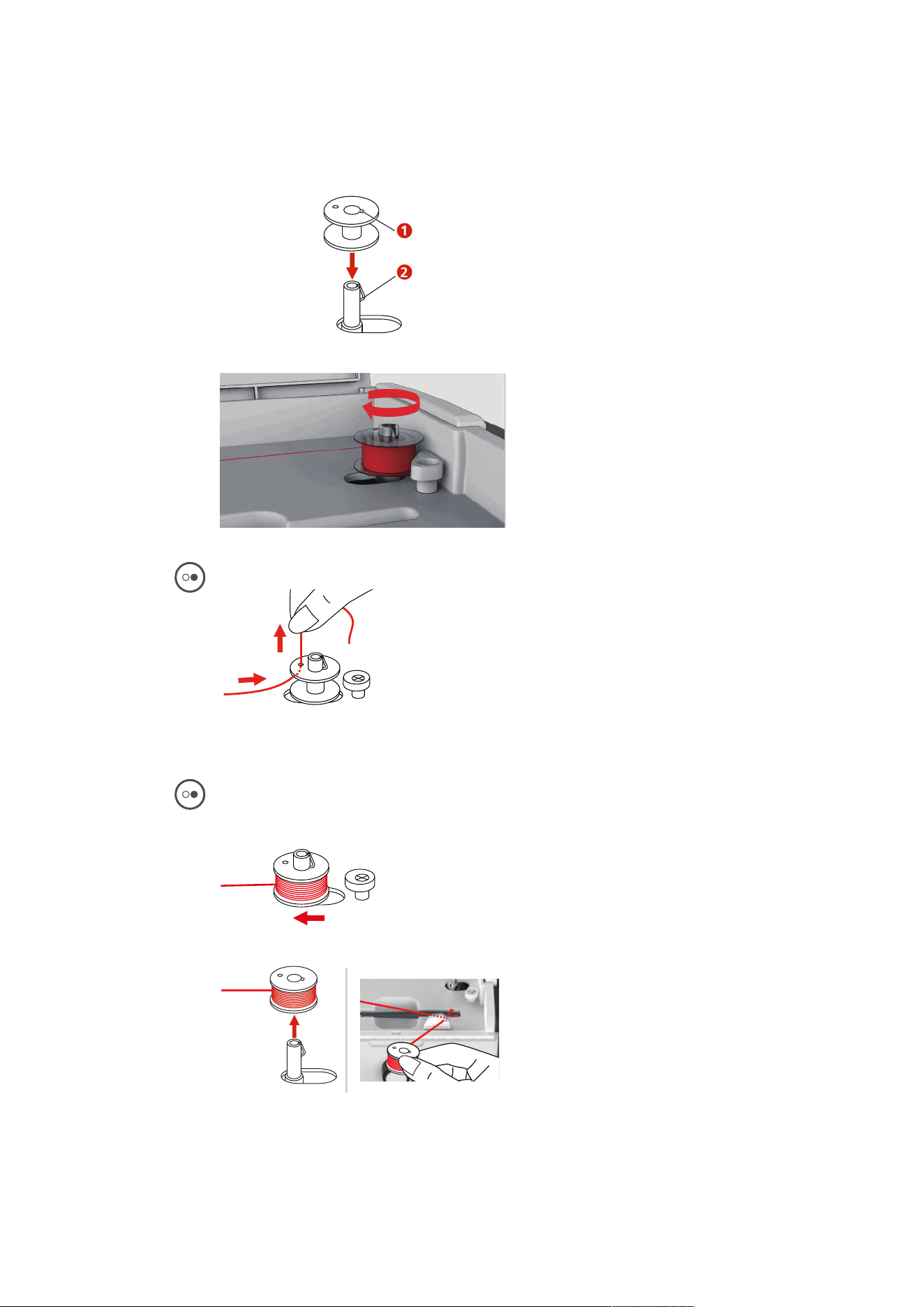
> Pull the end of the thread through one of the inner holes on the bobbin and place the empty bobbin on
the bobbin winding unit.
1
2
> Push the bobbin to the rigth-hand position.
– The button «Start/Stop» flashes and the display for winding appears.
> Hold the end of the thread tightly with one hand.
> To start the winding process for a few rotations and then stop, push the button «Start/Stop», so that the
thread is held tight on the bobbin.
> Cut the end of the thread above the inner hole.
> To continue the winding process, push the button «Start/Stop».
> To stop the winding process, push the button «Start/Stopp».
> Push the bobbin winding unit to the left into the starting position.
> Remove the bobbin and cut the thread.
Sewing Preparation
41
2023-06 EN 5020077.40A.04
Threading the Bobbin Thread
NOTICE
Needle Breakage Caused by Unevenly Wound Bobbins
Unevenly wound bobbins can lead to incorrect thread tension or cause needles to break.
> Only use evenly wound bobbins.
Prerequisite:
• The needle is raised.
• The presser foot is raised.
• The machine is switched off.
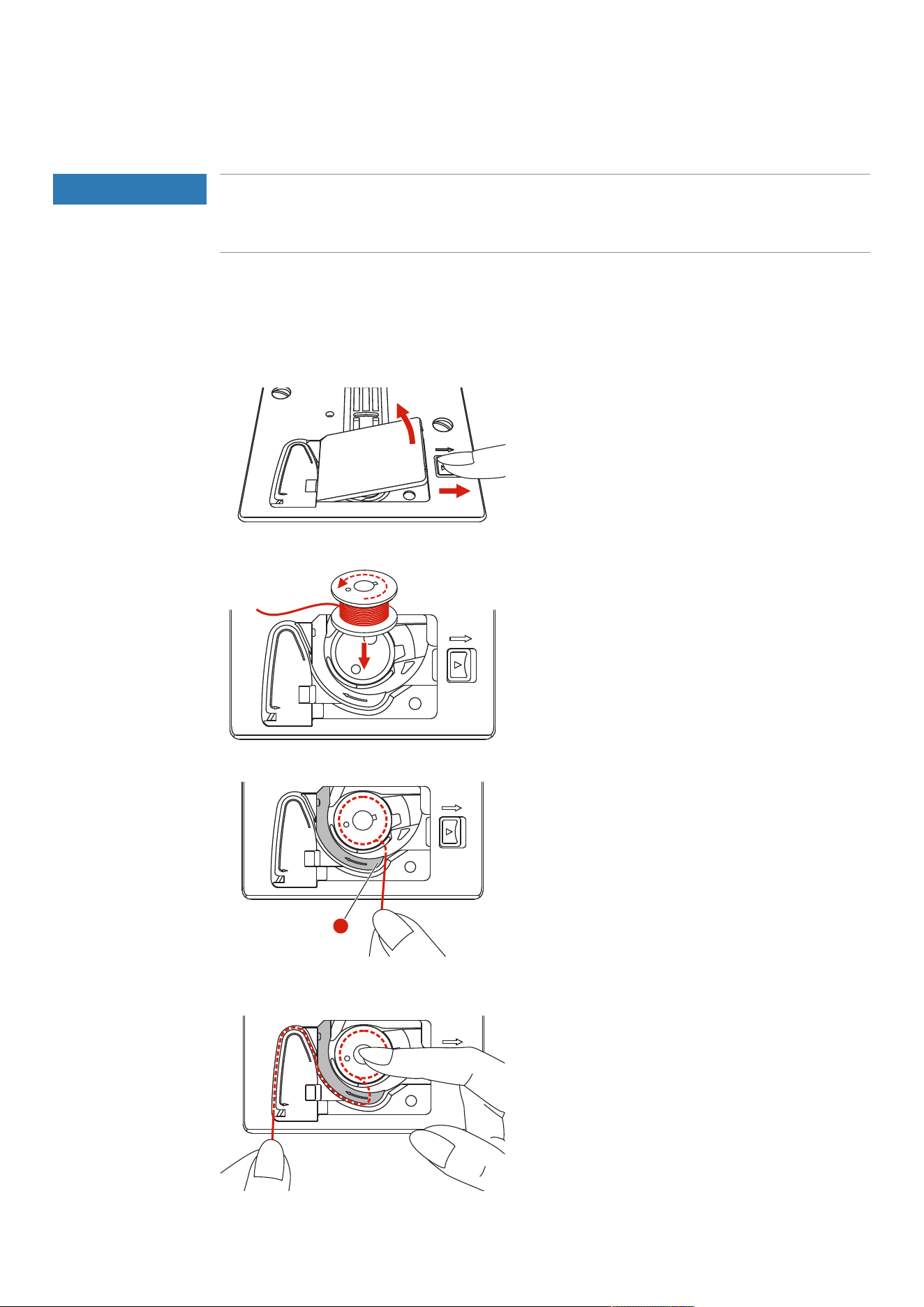
> To open the bobbin cover, push the handle to the right and remove the bobbin cover.
> Insert a new bobbin so that the thread is wound anti-clockwise.
> Pull the thread into the slit (1).
1
> Press gently on the bobbin.
> Follow the arrow markings to bring the thread into the bobbin thread guide.

Sewing Preparation
42
2023-06 EN 5020077.40A.04
> To cut off excess thread, take the end of the thread and pull it over the thread cutter (2).
2
> Attach the bobbin cover.
Setup Program
43
2023-06 EN 5020077.40A.04
3 Setup Program
3.1 Sewing Settings
Adjusting the Upper Thread Tension
Changes to the upper thread tension in the Setup Program affect all of the stitch patterns. The setting in the
setup is retained after the machine is switched off.
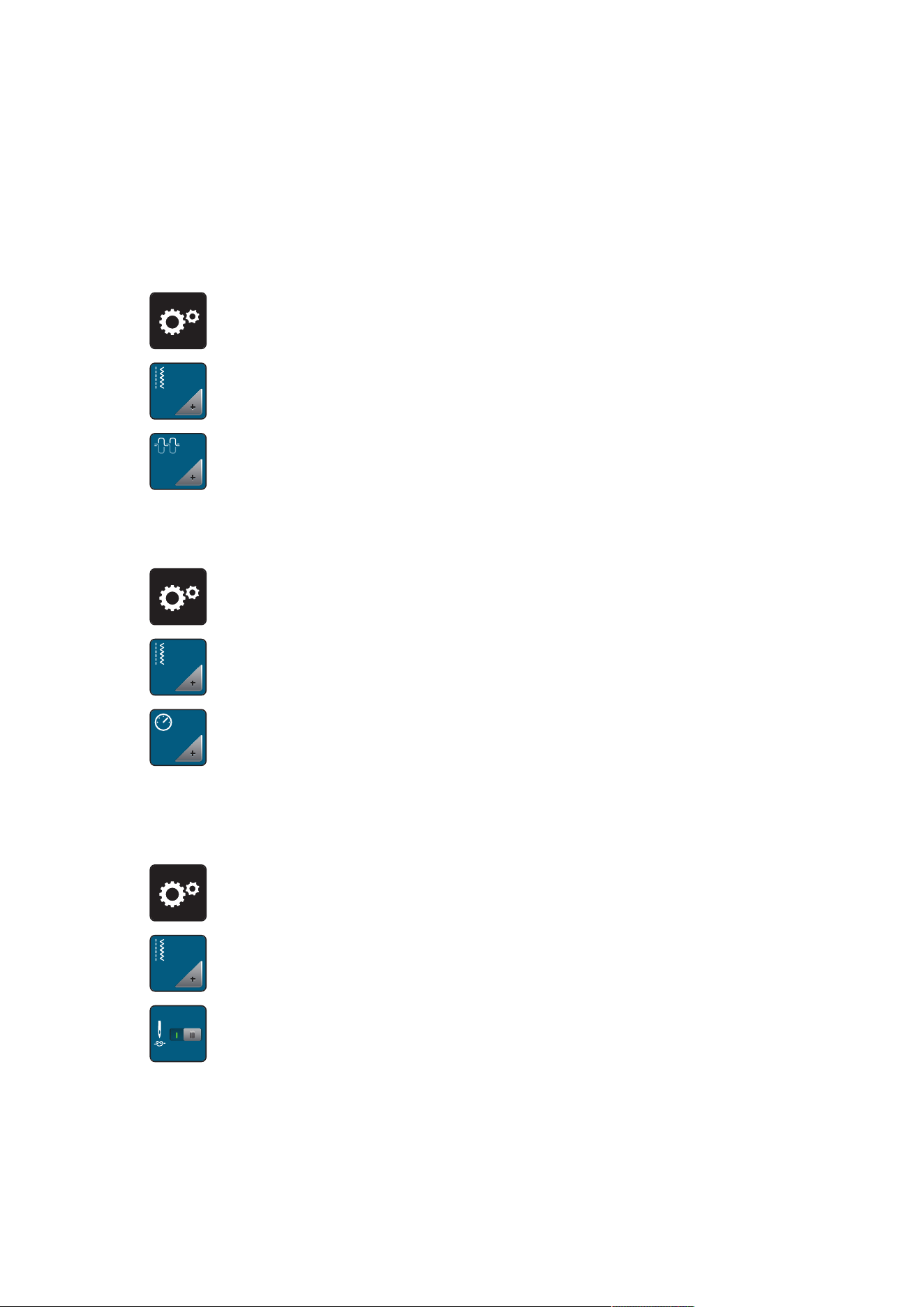
> Tap «Setup Program».
> Tap «Sewing Settings».
> Tap «Adjusting the Upper Thread Tension».
> Adjust the upper thread tension.
Adjusting the Maximum Sewing Speed
The maximum speed can be reduced by this function.
> Tap «Setup Program».
> Tap «Sewing Settings».
RPM
> Tap «Maximum Sewing Speed».
> Set the maximum sewing speed.
Programming Securing Stitches
If the function is switched on, at the start of the pattern, 4 securing stitches are automatically sewn after the
thread cut.
> Tap «Setup Program».
> Tap «Sewing Settings».
> Switch «Securing Stitches at the Start of the Pattern» on or off.
Setup Program
44
2023-06 EN 5020077.40A.04
Adjusting the Hovering Height of the Presser Foot
The hovering height of the presser foot can be adjusted according to the fabric thickness from 1 to maximal
6mm.
> Tap «Setup Program».
> Tap «Sewing Settings».
> Tap «Programming Buttons and Icons».
> Tap «Programming the Hovering Height of the Presser Foot».
> To set the distance between the stitch plate and the presser foot, turn the «Upper Multi-function Knob»
or «Lower Multi-function Knob», or tap «Plus»/«Minus».
Programming the Button «Securing»
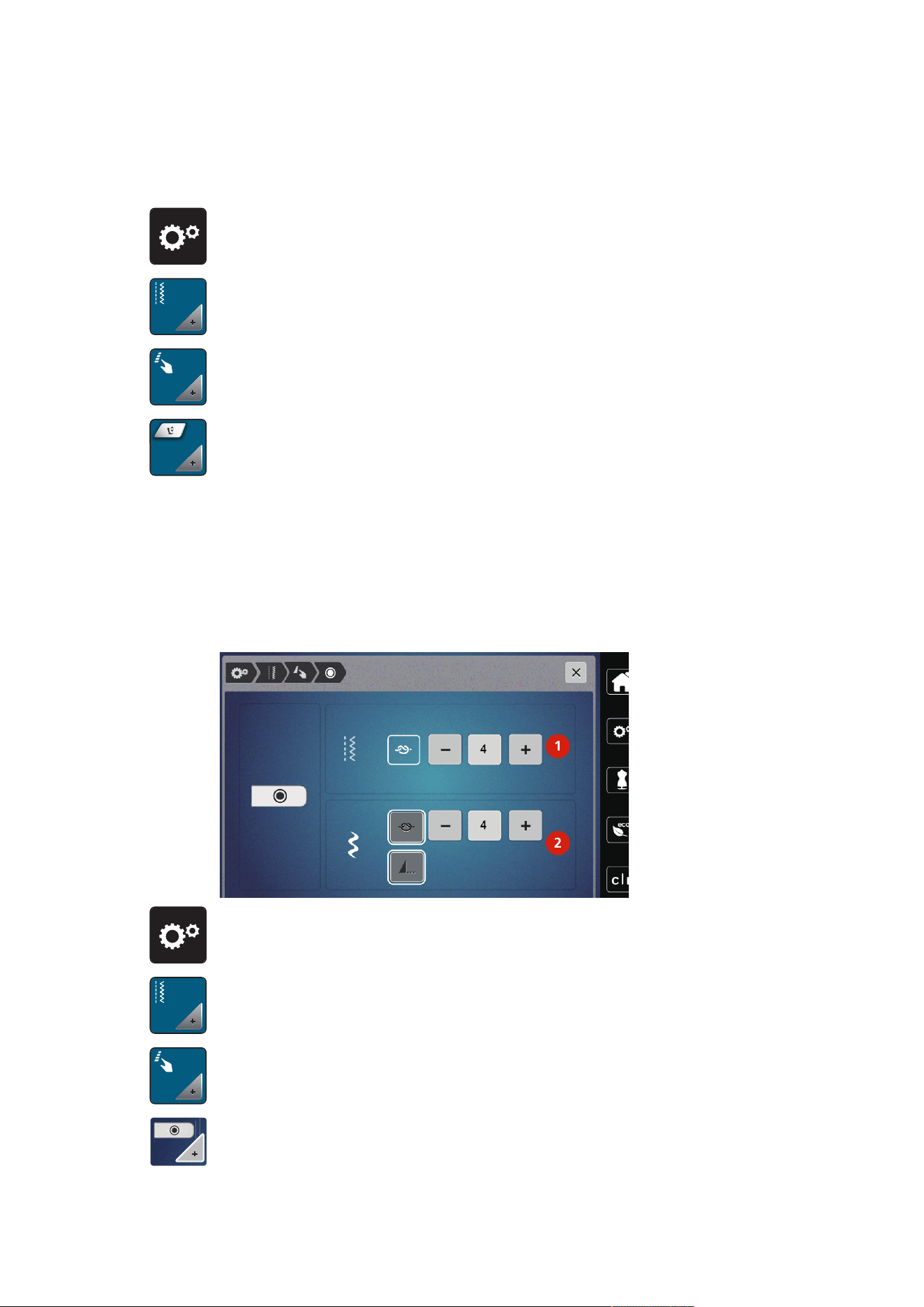
Number and type of securing stitches can be programmed.
The number of securing stitches for practical stitches can be programmed in the upper section of the display
(1).
Securing of decorative stitches or stitch pattern combinations can be programmed in the lower section of the
display (2).
1
2
> Tap «Setup Program».
> Tap «Sewing Settings».
> Tap «Programming Buttons and Icons».
> Tap «Programming the Button Securing».
> To program the number of securing stitches for practical stitches, tap «Plus» or «Minus» in the upper
section of the display (1).
Setup Program
45
2023-06 EN 5020077.40A.04
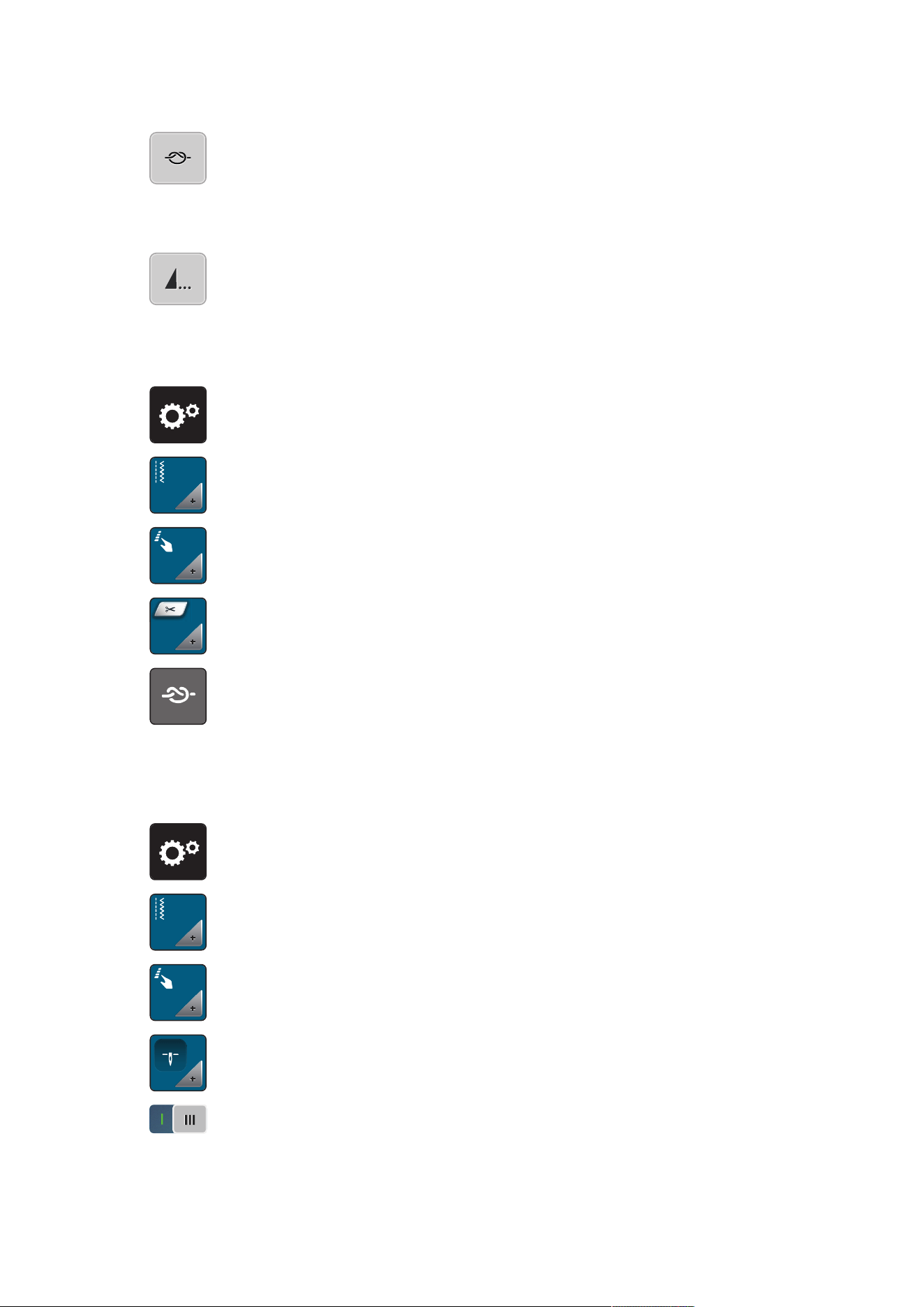
> To activate automatic securing for decorative stitches and stitch pattern combinations, tap «Securing
Stitches».
> To program the number of securing stitches at short intervals, tap «Plus» or «Minus» in the lower section
of the display (2).
> To deactivate automatic securing for decorative stitches and stitch pattern combinations, tap «Securing
Stitches» again.
> To activate securing for the selected pattern at the end, tap «Pattern End».
– The machine secures and stops at the end of the pattern.
> To deactivate securing at the end of the pattern, tap «Pattern End» again.
Programming the Button «Thread Cutter»
The automatic securing can be programed before the thread cut takes place.
> Tap «Setup Program».
> Tap «Sewing Settings».
> Tap «Programming Buttons and Icons».
> Tap «Programming the Button Thread Cutter».
> To sew four securing stitches before cutting, tap «Securing Stitches».
> To program the number of securing stitches, tap «Minus» or «Plus».
> To deactivate automatic securing, tap «Securing Stitches» again.
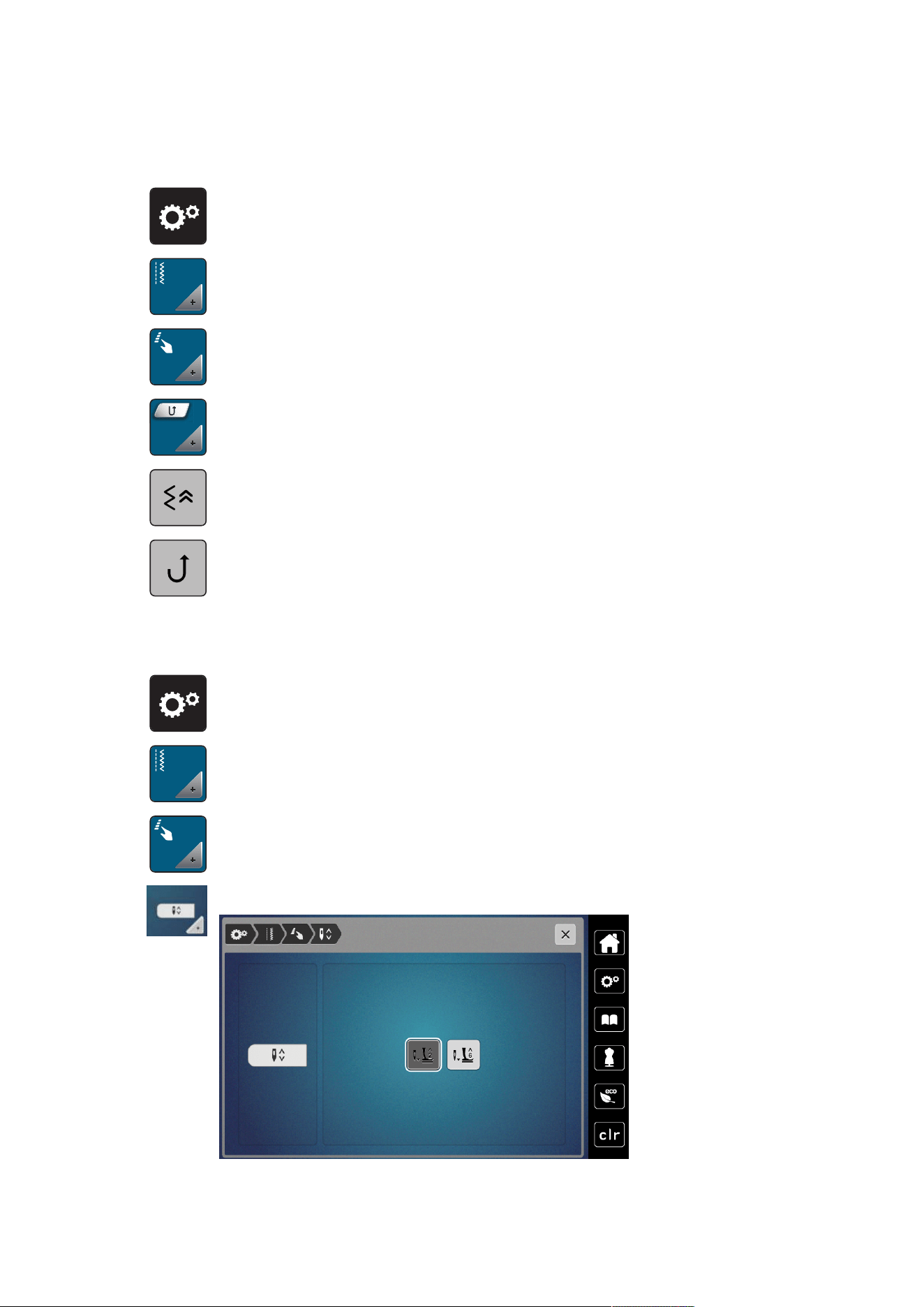
Adjusting the Presser Foot Position with Needle Stop Down
With lowered needle, the presser foot is raised to hovering position when the needle is programmed in the
down position.
> Tap «Setup Program».
> Tap «Sewing Settings».
> Tap «Programming Buttons and Icons».
> Tap «Pressure Foot Position with Needle Stop Down».
> To activate the presser foot raised in the hovering position with needle stop downward, tap the switch.
> To deactivate the presser foot raised in the hovering position with needle stop downward, tap the switch
again.
Setup Program
46
2023-06 EN 5020077.40A.04
Programming the Button «Quick Reverse»
You can choose between «Reverse Sewing» and «Stitch-specific Reverse Sewing».
> Tap «Setup Program».
> Tap «Sewing Settings».
> Tap «Programming Buttons and Icons».
> Tap «Programming the Button Quick Reverse».
> To activate stitch-precise reverse sewing, tap «Back Stepping».
> To activate reverse sewing, tap «Quick Reverse».
Programming the "Needle Up/Down" Button
The hovering height of the presser foot can be set for the sewing stop with the lower needle.
> Tap «Setup Program».
> Tap «Sewing Settings».
> Tap «Programming Buttons and Icons».
> Tap «Programming the Needle Up/Down Button».
Setup Program
47
2023-06 EN 5020077.40A.04
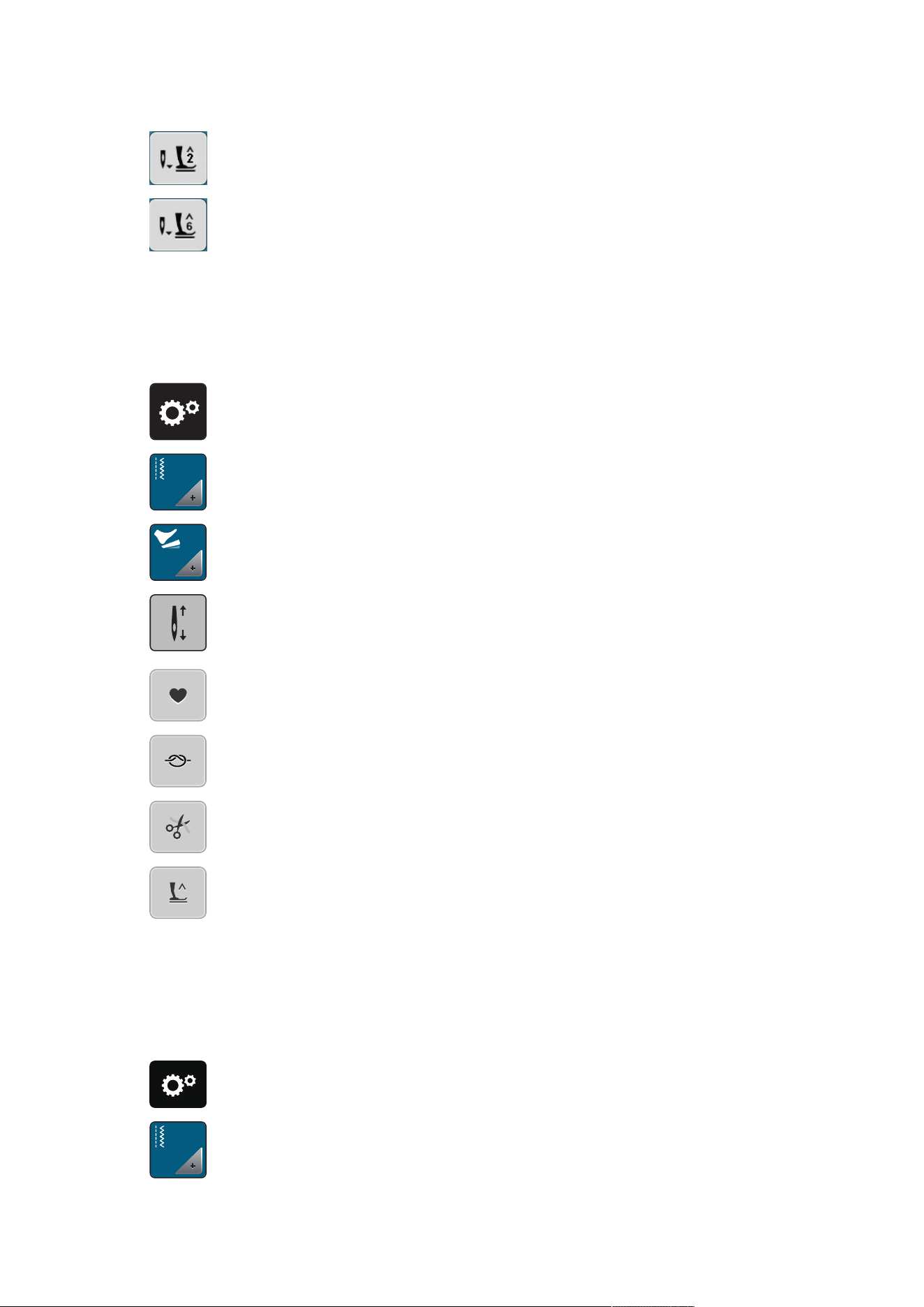
> To set the hovering height of the lower needle to 2mm, tap «Presser Foot Hovering Height 2».
> To set the hovering height of the lower needle to 6mm, tap «Presser Foot Hovering Height 6».
NOTICE!If the ruler foot is being used, the presser foot hovering height may be maximum 2mm,
in order to avoid a collision with the needle holder.
Programming the Foot Control Individually
If «Needle Up/Down» is activated, the needle is raised or lowered with the back-kick on the foot control.
Alternatively, the presser foot can be positioned, the thread can be cut and the automatic securing can be
programmed.
> Tap «Setup Program».
> Tap «Sewing Settings».
> Tap «Programming the Foot Control».
– «Needle Up/Down» is activated in the default setting.
– The back-kick on the foot control raises or lowers the needle.
51
> To program the Back-kick, tap «Programming the Back-kick».
> To activate automatic securing via the back-kick, tap «Securing Stitches».
> To program the number of securing stitches, tap «Plus» or «Minus».
> To deactivate automatic securing via the back-kick, tap «Securing Stitches» again.
51
> To activate automatic thread-cutting via the back-kick, tap «Automatic Thread Cutter».
> To deactivate automatic thread-cutting via the back-kick, tap «Automatic Thread Cutter» again.
51
> To keep the lowered position of the presser foot via the Back-kick, tap «Needle Up/Down».
> To keep the raised position of the presser foot via the Back-kick, tap «Needle Up/Down» again.
– If only «Needle Up/Down» without «Automatic Thread Cutter» and «Securing Stitches» is activated,
the function can move the presser foot into the hovering position or into the highest position (12
mm).
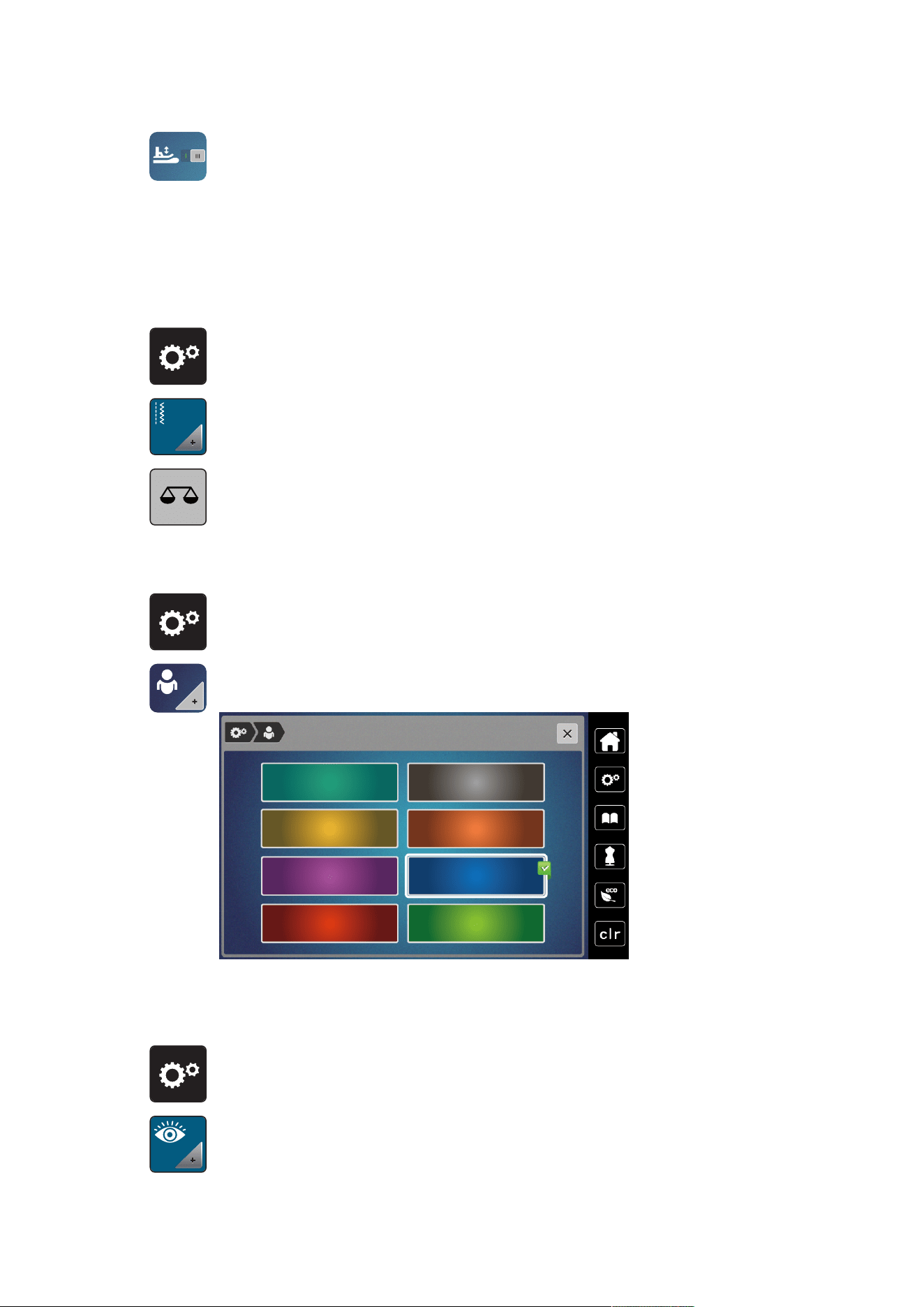
Fabric Thickness Measurement
While sewing, the machine continuously checks the current fabric thickness and adjusts a proper presser foot
pressure in time to keep a smooth feed of the fabric.
> Tap «Setup Program».
> Tap «Sewing Settings».
Setup Program
48
2023-06 EN 5020077.40A.04
> To activate the automatic foot pressure compensation, tap «Fabric Thickness Measurement».
> To deactivate the automatic foot pressure compensation, tap «Fabric Thickness Measurement» again.
Adjusting the General Balance
Different fabrics, threads and stabilizers can affect the programmed stitch patterns so that they cannot be
sewn out correctly. The electronic balance can correct these deviation and the stitch pattern can be adjusted
optimally to the selected fabric.
> Select a stitch pattern or alphabet.
> Tap «Setup Program».
> Tap «Sewing Settings».
> Tap «Balance».
– A preview of the stitch pattern is displayed.
> To correct the longitudinal direction of the stitch pattern, turn the «Multi-function Knob» until the
preview of the stitch pattern matches the stitch pattern sewn on the fabric.
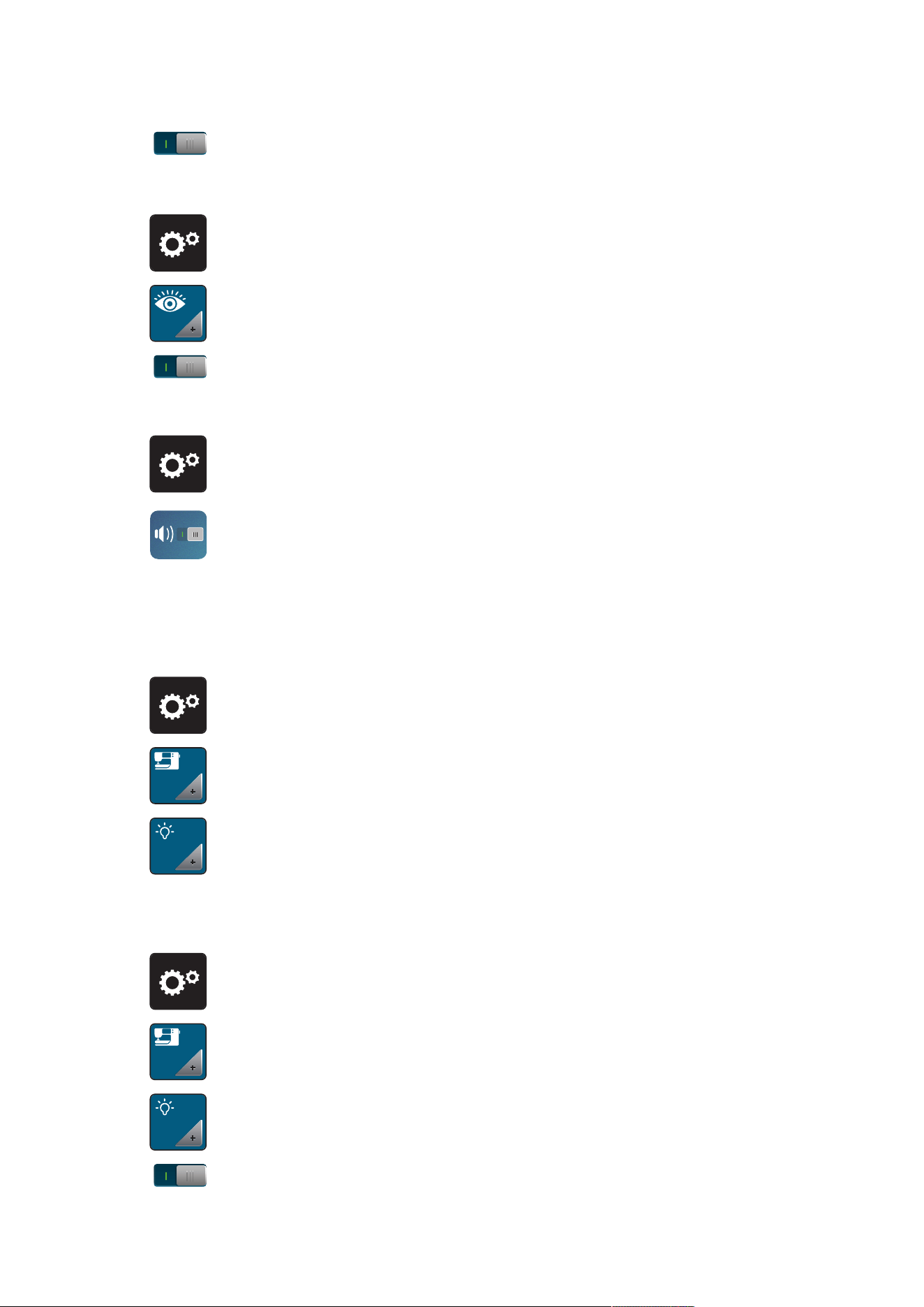
3.2 Selecting Personal Settings
> Tap «Setup Program».
> Tap «Personal Settings».
> Select the desired display color.
3.3 Monitoring Functions
Activating the Upper Thread Indicator
> Tap «Setup Program».
> Tap «Monitoring Functions».
Setup Program
49
2023-06 EN 5020077.40A.04
> Tap the switch in the upper section of the display to deactivate the upper thread indicator.
> Tap the switch again to activate the upper thread indicator.
Activating the Bobbin Thread Indicator
> Tap «Setup Program».
> Tap «Monitoring Functions».
> Tap the switch in the lower section of the display to deactivate the bobbin thread indicator.
> Tap the switch again to activate the bobbin thread indicator.
3.4 Sound On/Off
> Tap «Setup Program».
> To switch off all sounds, tap «Switching Sounds On/Off».
> To switch on all sounds, tap «Switching Sounds On/Off» again.
3.5 Machine Settings
Adjusting the Brightness of the Display
The brightness of the display can be set to meet your individual needs.
> Tap «Setup Program».
> Tap «Machine Settings».
> Tap «Display Settings».
> Adjust the brightness of the display in the upper section of the screen.
Adjusting the Sewing Light
The brightness of the sewing light can be adjusted corresponding to the personal preferences.
> Tap «Setup Program».
> Tap «Machine Settings».
> Tap «Display Settings».
> Adjust the brightness of the sewing light in the lower section of the screen.
> Tap the switch to switch the sewing light off.
Setup Program
50
2023-06 EN 5020077.40A.04
> Tap the switch again to switch the sewing light on.
Calibrating the Display
Please find further information on this topic in the chapter attachment below troubleshooting at the end of
the instruction manual.
> Tap «Setup Program».
> Tap «Machine Settings».
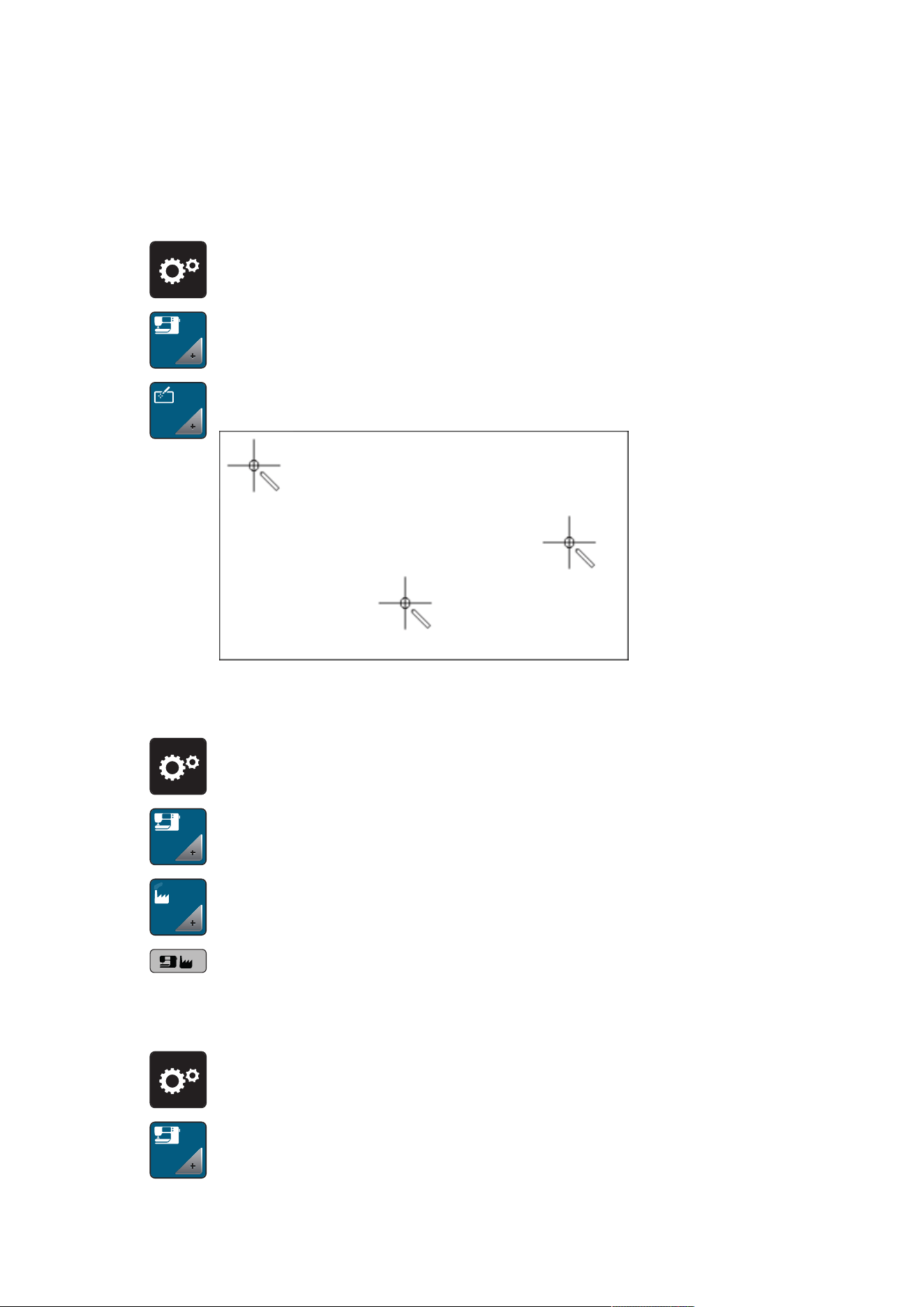
> Tap «Calibrating the Screen».
> Touch the crosses in sequence using the touchscreen pen.
Back to basic settings
ATTENTION: Using this function will delete all individually made settings.
> Tap «Setup Program».
> Tap «Machine Settings».
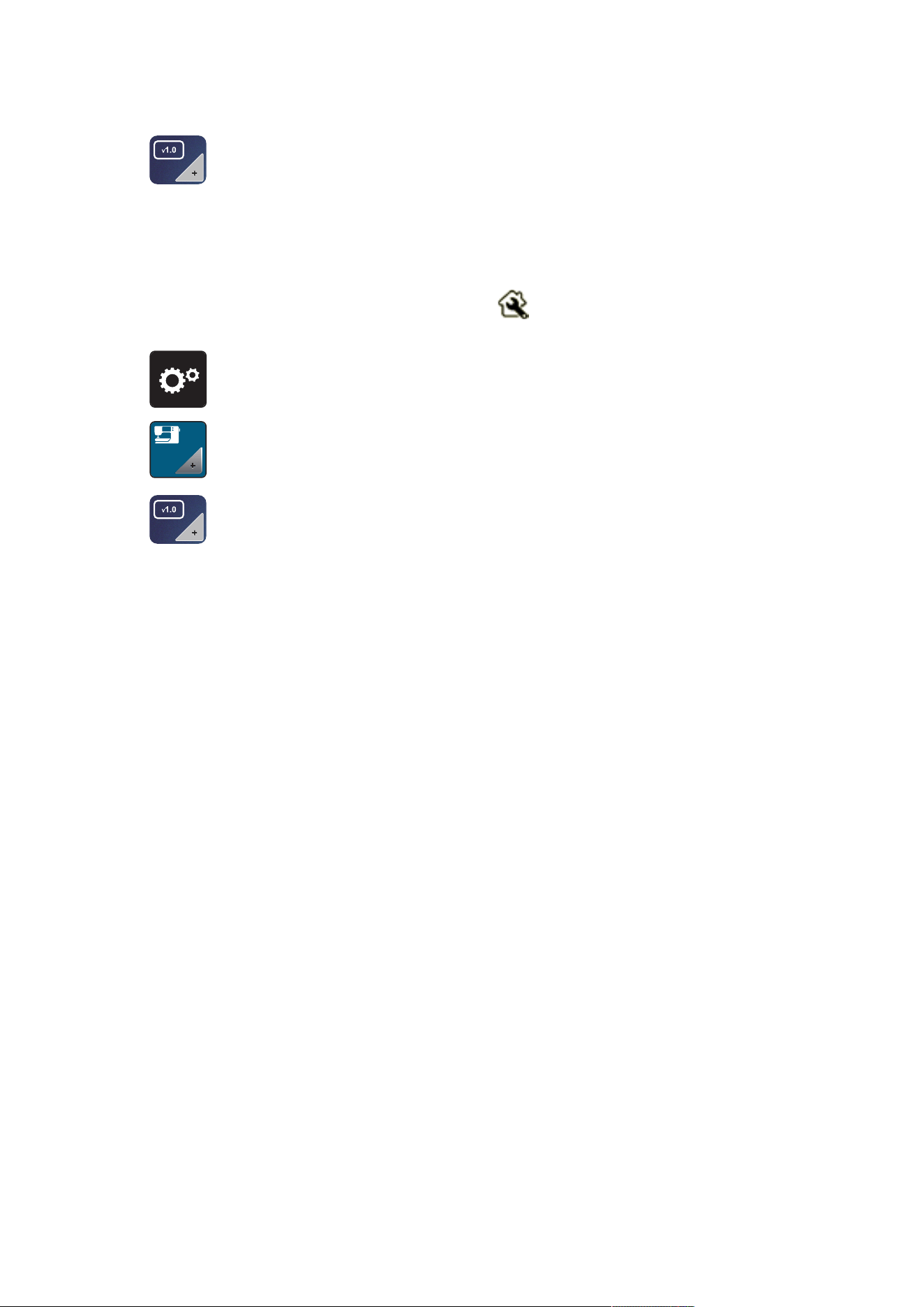
> Tap «Factory Setting».
> Tap the «Default Setting Machine», confirm and start the machine again.
Checking the Firmware Version
The firmware version of the machine is displayed.
> Tap «Setup Program».
> Tap «Machine Settings».
Setup Program
51
2023-06 EN 5020077.40A.04
> Tap «Machine Data».
Reviewing the Total Number of Stitches
The total stitch count of the machine and the number of stitches since the last service performed by a
bernette dealer are displayed.
Four millon stitches after a service, the symbol recommends maintenance by specialized bernette
dealer.
> Tap «Setup Program».
> Tap «Machine Settings».
> Tap «Machine Data».
System Settings
52
2023-06 EN 5020077.40A.04
4 System Settings
4.1 Using eco Mode
If work is interrupted for an extended period, the machine can be put into energy-saving mode. Nothing can
be selected in the display and the machine cannot be started.
> Tap «eco Mode».
– The display goes to sleep. The power consumption is reduced and the sewing light is off.
> Tap «Eco mode» in the display.
– The machine is ready for use.
4.2 Calling up the Creative Consultant
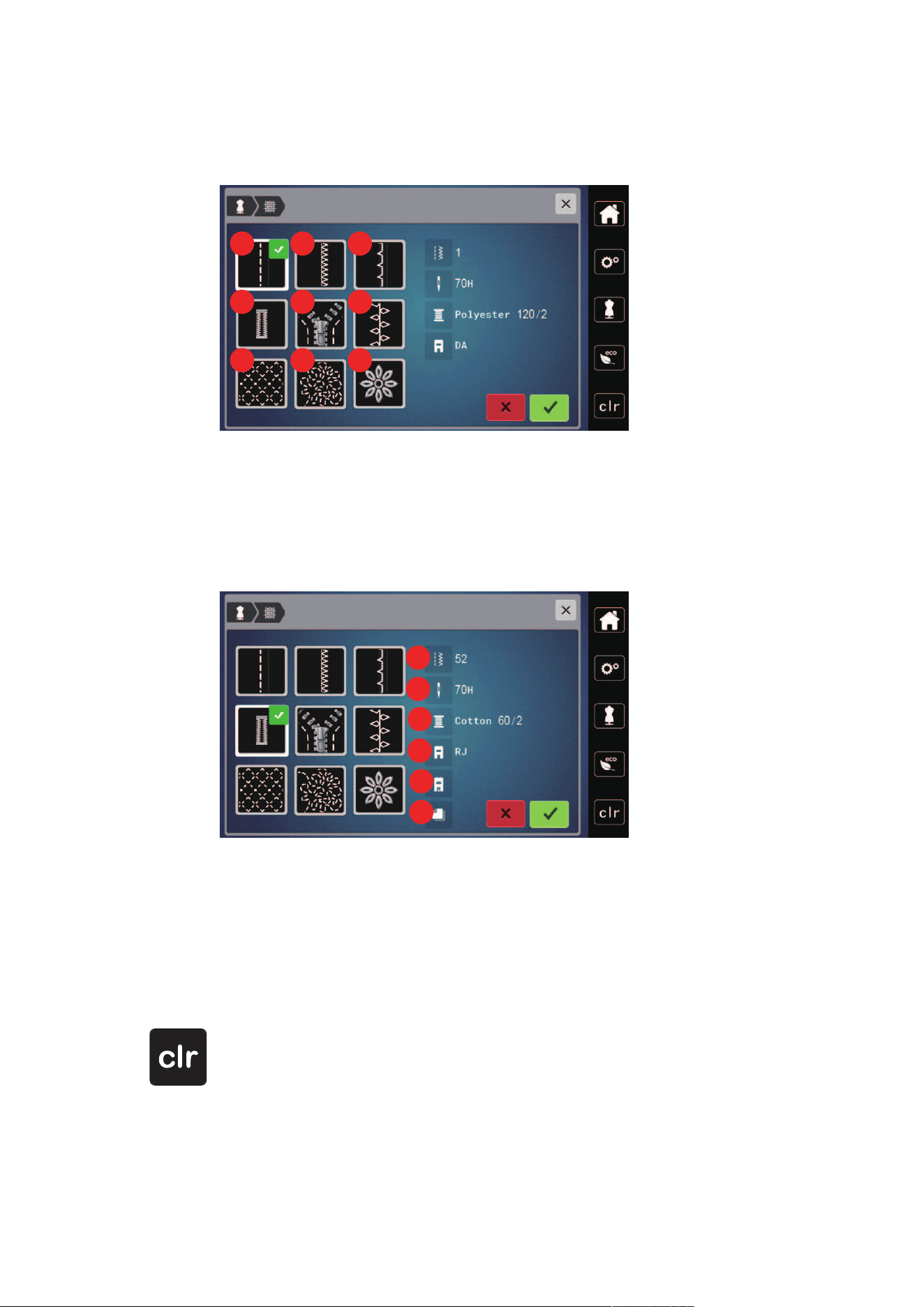
The Creative Consultant provides decision support for sewing projects. After entering the fabric and the
desired sewing project, suggestions for suitable needles, presser feet etc. are displayed.
> Tap «Creative Consultant».
> Select the fabric to be sewn.
1 2 3
4
5 6 7
8
9
10 11
12
1 Light-weight Woven 7 Heavy Knits
2 Medium-weight Woven 8 Fur/Imitation Fur
3 Heavy-weight Woven 9 Toweling
4 Jeans 10 Fabric with a Piled Texture
5 Light Knits 11 Leather and Vinyl
6 Medium-weight Knits 12 Net and Lace
System Settings
53
2023-06 EN 5020077.40A.04
> Select the sewing project.
– The stitch is changed automatically, but all other settings must be done by the user.
1
2
3
4
5
6
7 8 9
1 Seams 6 Decorative Sewing
2 Finishing Edges 7 Machine Quilting
3 Blindstitch Hem 8 Free Motion Sewing
4 Buttonholes 9 Appliqués
5 Zips
1
2
3
4
5
6
1 Recommended Stitch Number 4 Recommended Presser Foot
2 Recommended Needle 5 Reinforced Buttonhole
3 Recommended Thread 6 Stabilizer Recommended
> Make the settings of the machine according to the instructions.
4.3 Cancelling Any Alterations with «clr»
Any alterations to designs can be reset to basic setting. Exceptions are saved designs which have been filed
in the personal memory and monitoring functions.
> Tap «Clear Settings».
Creative Sewing
54
2023-06 EN 5020077.40A.04
5 Creative Sewing
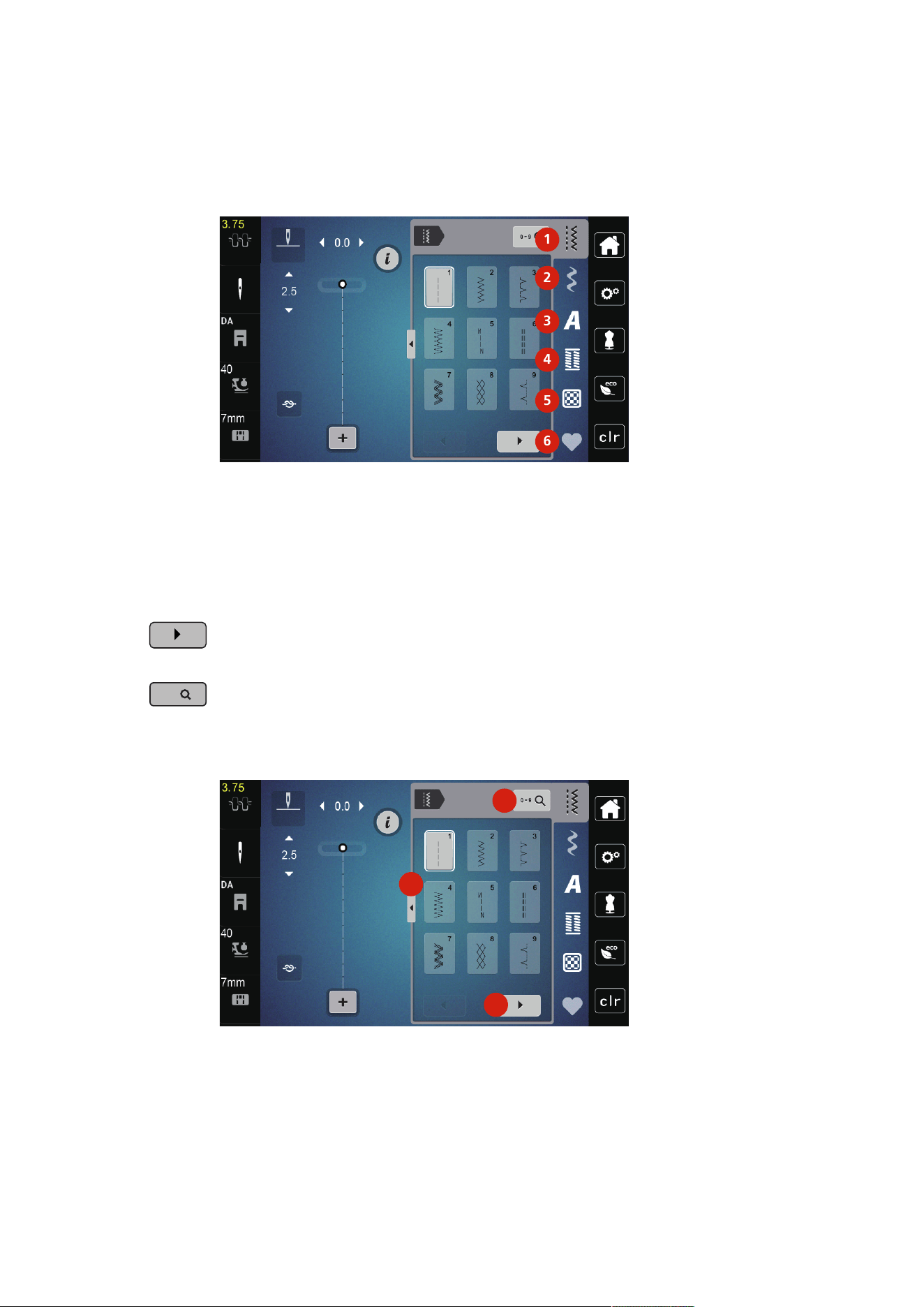
5.1 Overview Selection Menu Sewing
1
2
3
4
5
6
1 «Practical Stitches» 4 «Buttonholes»
2 «Decorative Stitches» 5 «Quilt Stitches»
3 «Alphabets» 6 «Personal Memory»
Selecting a Stitch Pattern
> Select a stitch pattern, alphabet or buttonhole.
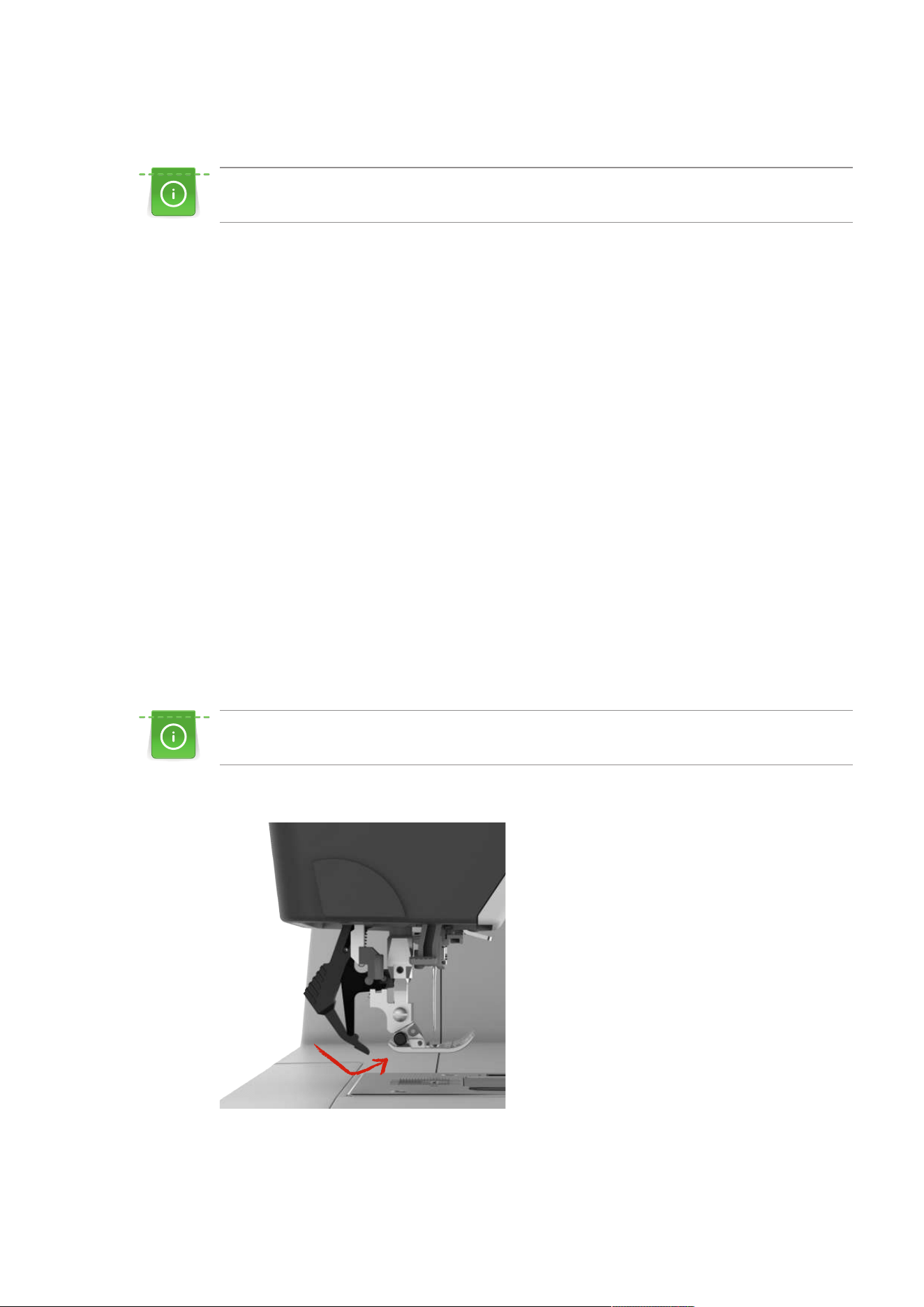
> To display further stitch patterns, scroll to the right (1).
> To increase the view, tap «Increasing/Decreasing the Display Size»(2).
> To minimize the stitch pattern view, tap «Increasing/Decreasing the Display Size» (2) again.
0-9
> To select the stitch pattern by inputting the stitch number, tap «Select Stitch Pattern by Number» (3).
– If «!!!» appear when entering the stitch pattern, the stitch pattern cannot be used in the Combi
mode.
– If «???» appear when entering the stitch pattern, the stitch pattern doesn't exist.
2
1
3
Creative Sewing
55
2023-06 EN 5020077.40A.04
5.2 Dual feed
It is recommended to match the presser foot pressure with the fabric. The thicker the fabric, the lower
the presser foot pressure.
The Dual Feed feeds the fabric from above and from beneath simultaneously. This provides an even and
careful feed forward even for smooth and thin materials. Striped and checkered patterns can be matched
perfectly by even feeding.
Application of the Dual Feed
In general, the Dual Feed is used for the following sewing projects:
• Sewing: All sewing applications with difficult fabrics such as for seams, zippers.
• Patchwork: With accurate stripes, blocks and with decorative stitches up to a stitch width of 7 mm.
• Appliqués: sewing appliques, ribbons and bias binding.
Difficult-to-work-with fabrics are:
• Velvet, normally sewn with the grain
• Toweling
• Jersey, especially when sewing it crosswise to knit
• Fake fur or coated fake fur
• Fleece-types of fabrics
• Batted fabrics
• Stripes and checks
• Curtain fabrics with pattern repeats
«Sticky» fabrics are:
• Imitation leather, coated fabrics
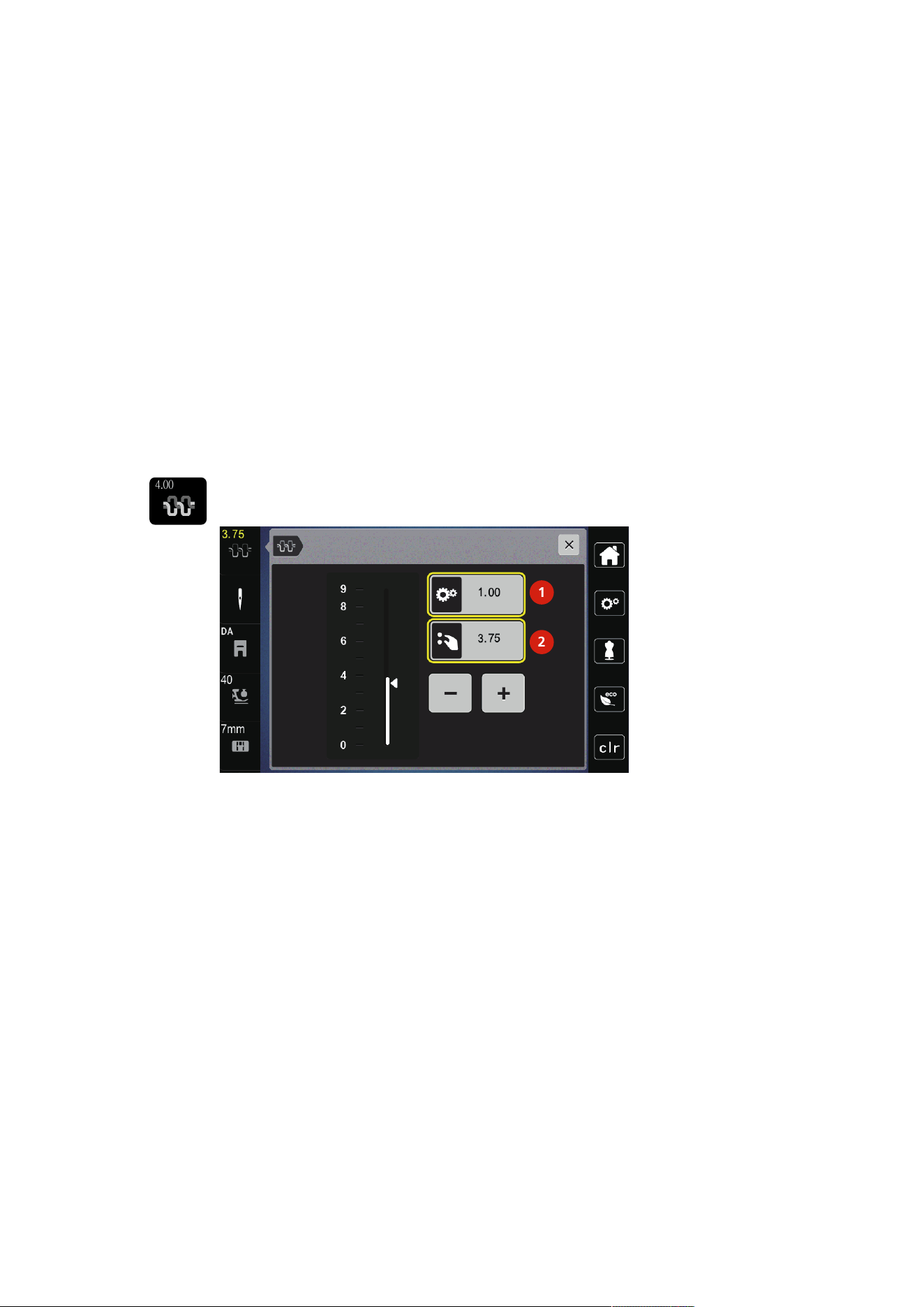
Use the Dual Feed
When working with the Dual Feed, only use presser feet with the rear opening.
> Raise the presser foot.
> Swing the DF mechanism forward under the back of the presser foot until it clicks in position.
> Raise the presser foot.
> Pull down the DF mechanism and swing it to the rear to disengage.
Creative Sewing
56
2023-06 EN 5020077.40A.04
5.3 Regulating the Speed
The sewing speed can be adjusted infinitely variable with the slide.
> Move the slide to the left to reduce the sewing speed.
> Move the slide to the right to increase the sewing speed.
5.4 Adjusting the Upper Thread Tension
The default setting of the upper thread tension is set automatically as soon as a stitch pattern is selected.
When using different types of sewing threads, the upper thread tension may vary. It may therefore be
necessary to adjust the upper thread tension individually according to the sewing project as well as the
desried stitch.
The higher the upper thread tension is set, the tighter the upper thread is tensioned, and the bobbin thread
is pulled deeper into the fabric. When the upper thread tension is low, the upper thread is less tightened,
and the bobbin thread is pulled up less into the fabric.
Alteration of the upper thread tension affect the currently stitch pattern. Permanent alterations of the upper
thread tension for the sewing can be made in the Setup Program.
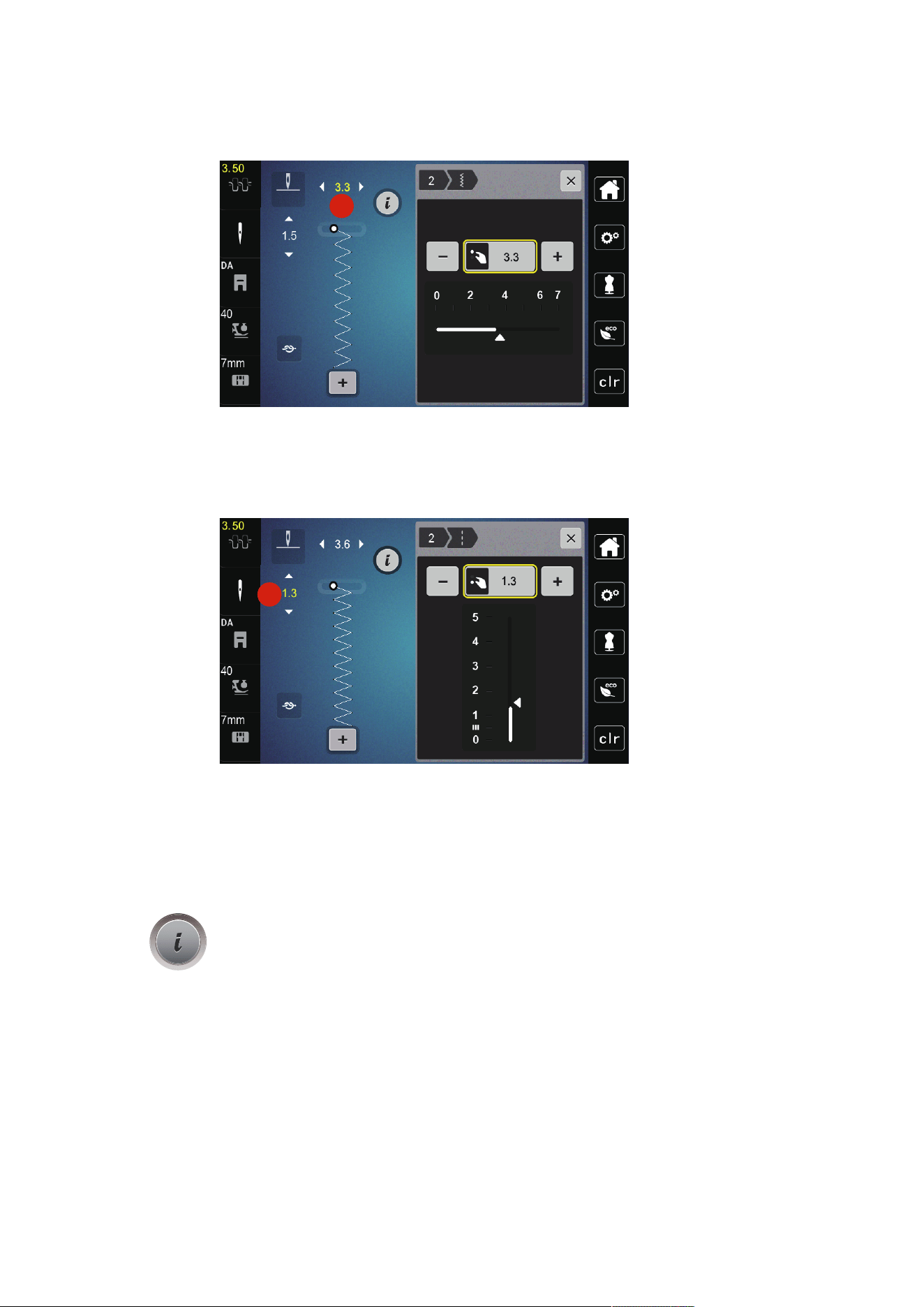
4.00
> Tap «Upper Thread Tension».
> To increase or decrease the upper thread tension, move the slider.
2
1
1 Permanent Alteration of Thread Tension
2 Thread Tension of the Current Embroidery
Design
5.5 Editing Stitch Patterns
Changing the Stitch Width
> Turn the «Upper Multi-function Knob» to the left to narrow the stitch width.
> Turn the «Upper Multi-function Knob» to the right to widen the stitch width.
Creative Sewing
57
2023-06 EN 5020077.40A.04
> To call up further setting options, tap the icon «Stitch width» (1).
1
Changing the Stitch Length
> Turn the «Lower Multi-function Knob» to the left to shorten the stitch length.
> Turn the «Lower Multi-function Knob» to the right to elongate the stitch length.
> To call up other setting options, tap «Stitch Length»(1).
1
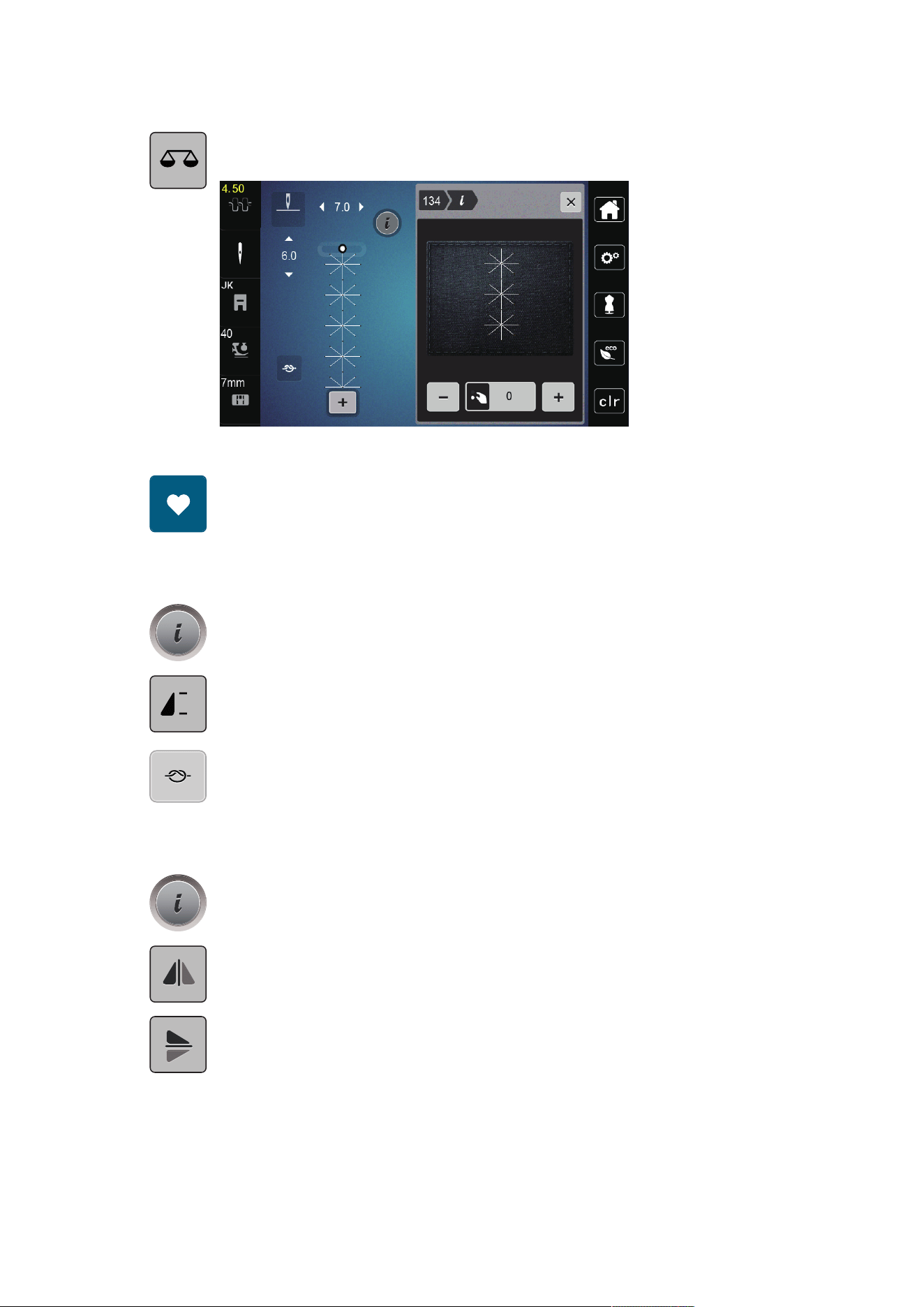
Correcting the Balance
Different fabrics, threads and stabilizers can affect the programmed stitch patterns so that they cannot be
sewn out correctly. The electronic balance can correct these deviation and the stitch pattern can be adjusted
optimally to the selected fabric.
> Select a stitch pattern or alphabet.
> Sewing stitch pattern.
> Tap «i-Dialog».
Creative Sewing
58
2023-06 EN 5020077.40A.04
> Tap «Balance».
– A preview of the stitch pattern is displayed.
> To correct the longitudinal direction of the stitch pattern, turn the «Lower Multi-function Knob» until the
preview of the stitch pattern matches the stitch pattern sewn on the fabric.
> Altered Balance settings can be saved for each stitch in the «Personal Memory» .
> Altered Balance settings only remain valid until the «Clear Settings» is pushed or the machine is switched
off.
Programming Pattern Repeat
> Select a stitch pattern or alphabet.
> Tap «i-Dialog».
x
> To repeat the stitch pattern, tap «Pattern Repeat» once.
> To repeat the stitch pattern up to nine times, tap «Pattern Repeat» two to nine times.
– The machine stops automatically after the programmed number of patterns has been sewn.
> To secure a backstitch at the end of sewing, «Securing Stitches» is activated.
> To deactivate securing, tap «Securing Stitches».
Mirror Image of Stitch Patterns
> Select a stitch pattern or alphabet.
> Tap «i-Dialog».
> To mirror the stitch pattern from left to right, tap «Mirror Image Left/Right».
> To mirror the stitch pattern in sewing direction, tap «Mirror Image Up/Down».
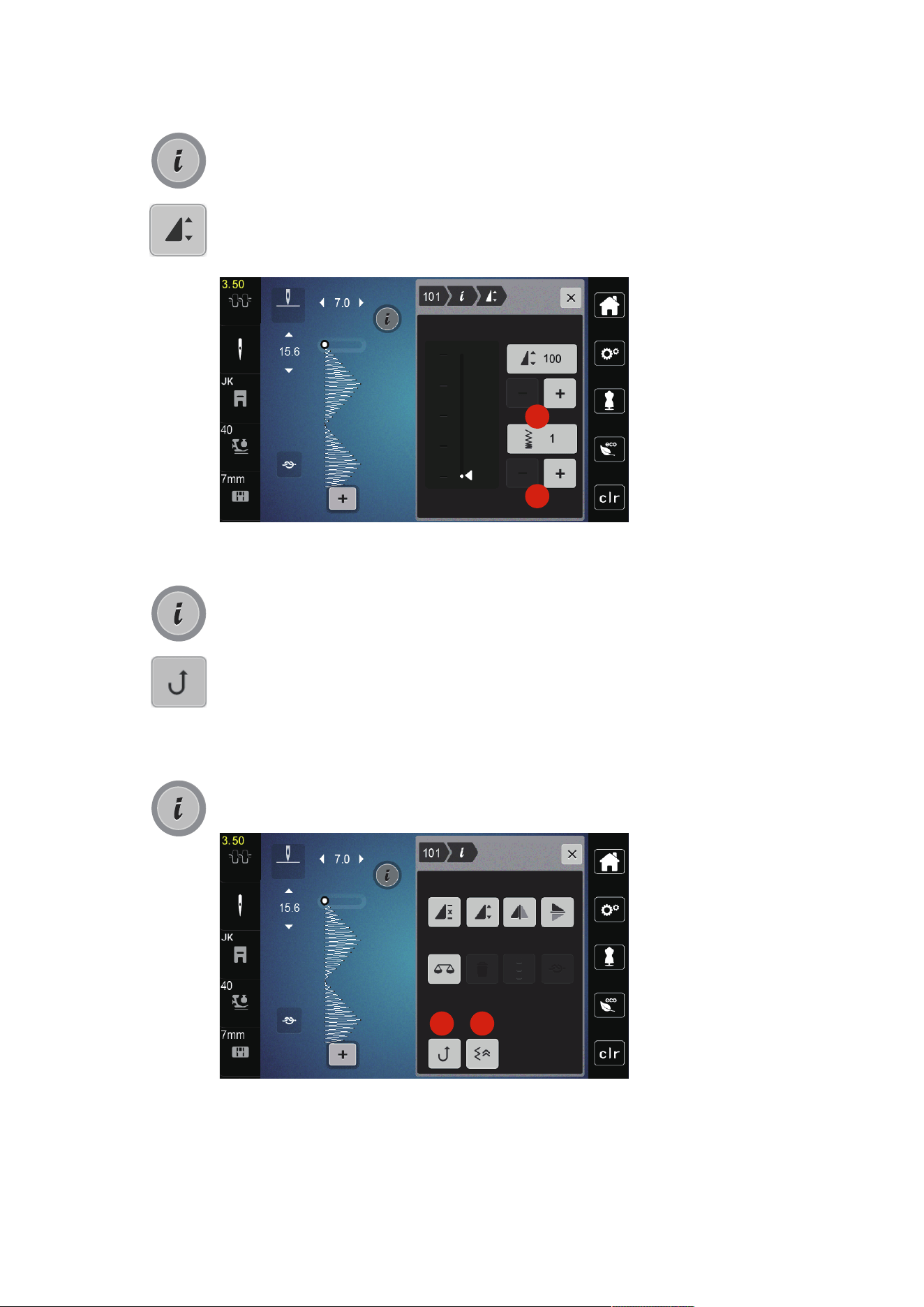
Edit Stitch Pattern Length
Stitches from category satin stitch pattern can be lengthwise extended or shortened.
> Select a stitch pattern.
Creative Sewing
59
2023-06 EN 5020077.40A.04
> Tap «i-Dialog».
> Tap «Edit Stitch Pattern Length».
> To set the stitch pattern length, push the slide or tap «Plus»/«Minus» (1).
> To determine the density of the stitch pattern, tap «Plus»/«Minus» (2).
1
2
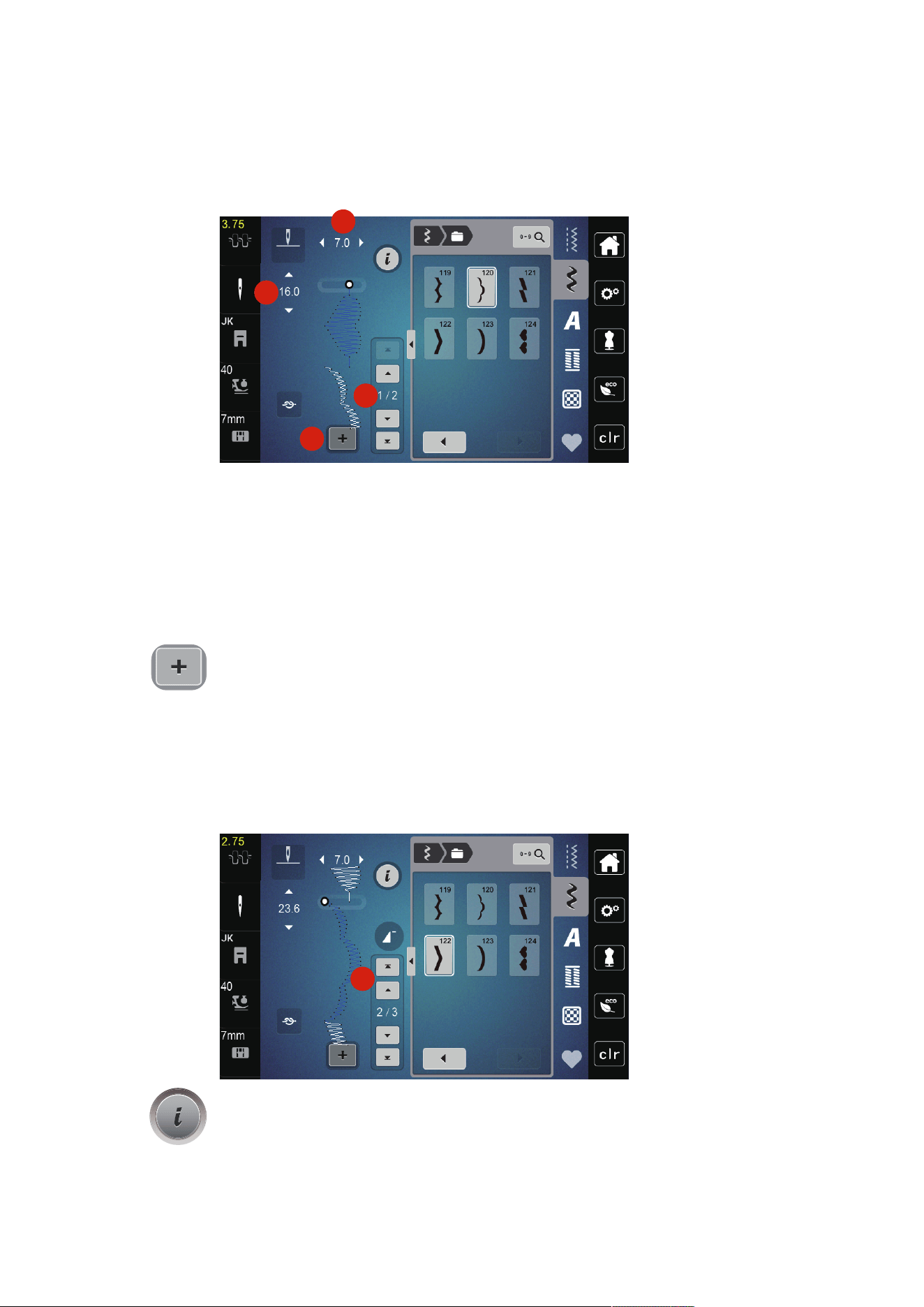
Permanent Quick Reverse
> Select a stitch pattern or alphabet.
> Tap «i-Dialog».
> To sew backward permanently, tap «Quick Reverse» (1).
Backstepping
> Select a stitch pattern, alphabet or buttonhole.
> Tap «i-Dialog».
> For stitch-precise reverse sewing, tap «Back Stepping» (2).
1 2
Creative Sewing
60
2023-06 EN 5020077.40A.04
5.6 Combining Stitch Patterns
Overview Combi Mode
1
2
3
4
1 «Stitch Width» 3 «Combination Mode/Single Mode»
2 «Stitch Length» 4 Individual Stitch Pattern within the Combination
Creating Stitch Pattern Combinations
In the Combi mode stitch patterns and alphabets can be combined according to your wish. Each
combination can hold up to 20 stitches. Patterns created in the Stitch Designer cannot be integrated in the
pattern combinations.
> Tap «Combination Mode/Single Mode»(3).
> Select the desired stitch patterns.
> To get back to the Single Mode, tap «Combination Mode/Single Mode» again.
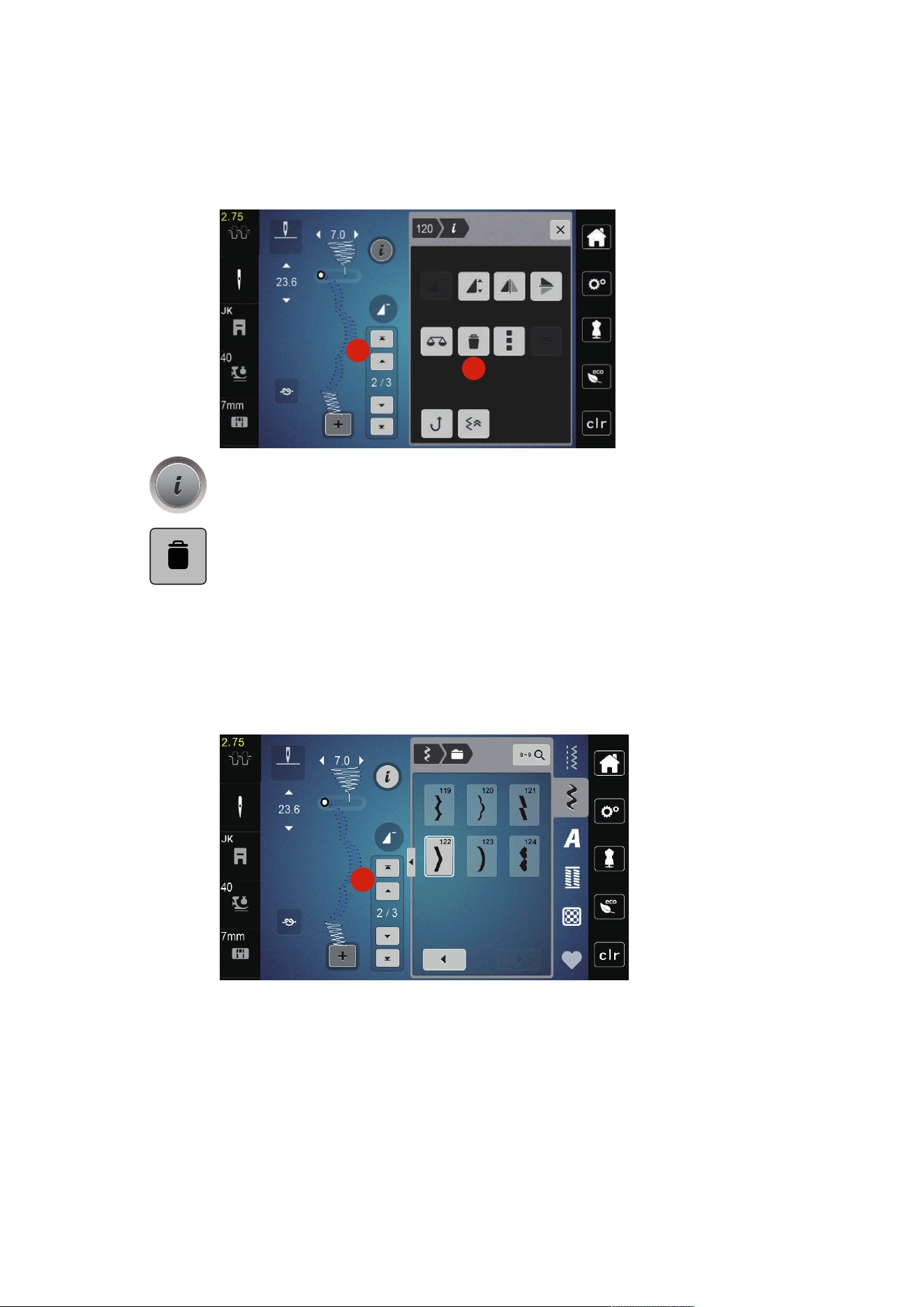
Editing a Single Stitch Pattern
Prerequisite:
• A stitch pattern combination has been created.
> To select a single stitch pattern, tap the desired position(1) within the stitch pattern combination.
1
> To edit the single stitch pattern, tap «i-Dialog».
Creative Sewing
61
2023-06 EN 5020077.40A.04
Deleting a Single Stitch Pattern
> Create a stitch pattern combination.
> To select a single stitch pattern, tap the desired position(1) within the stitch pattern combination.
1
2
> Tap «i-Dialog».
> To delete the single stitch pattern, tap «Deleting».
Adding a Single Stitch Pattern
> To add a stitch pattern at the start, go right to the front of the stitch pattern group and tap the second
upper arrow (1).
– Both upper arrows are inactive.
> Add a new stitch pattern.
1
> Create a stitch pattern combination.
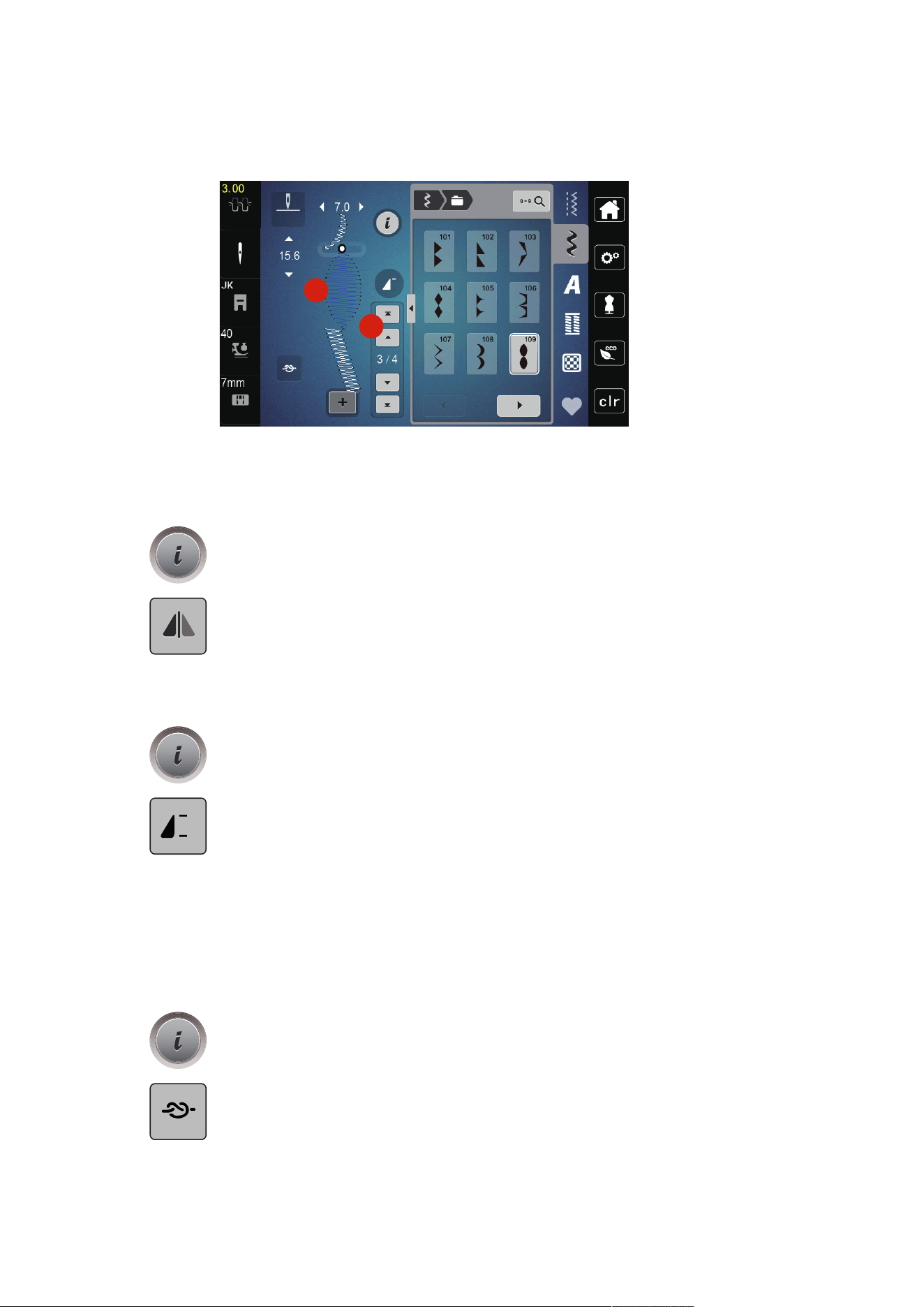
Creative Sewing
62
2023-06 EN 5020077.40A.04
> To select a new stitch pattern according to the selected stitch pattern, tap the desired position(2) within
the stitch pattern combination or use the arrow(3).
2
3
Mirroring a Stitch Pattern Combination
Prerequisite:
• A stitch pattern combination has been created.
> Tap «i-Dialog».
> Tap «Edit Entire Combination».
> To mirror the whole stitch pattern combination from left to right, tap, «Mirror Image Left/Right».
> To reset the changes and revert to the default settings, tap «Mirror Image Left/Right».
Programming Pattern Repeat
> Create a stitch pattern combination.
> Tap «i-Dialog».
> Tap «Edit Entire Combination».
x
> To repeat the stitch pattern combination, tap «Pattern Repeat» once.
– «Securing» at the final end of the combination is activated.
> To repeat the stitch pattern combination up to nine times, tap «Pattern Repeat» again.
> To switch off the pattern repetition, press and hold «Pattern Repeat» until an «X» appears in place of a
number.
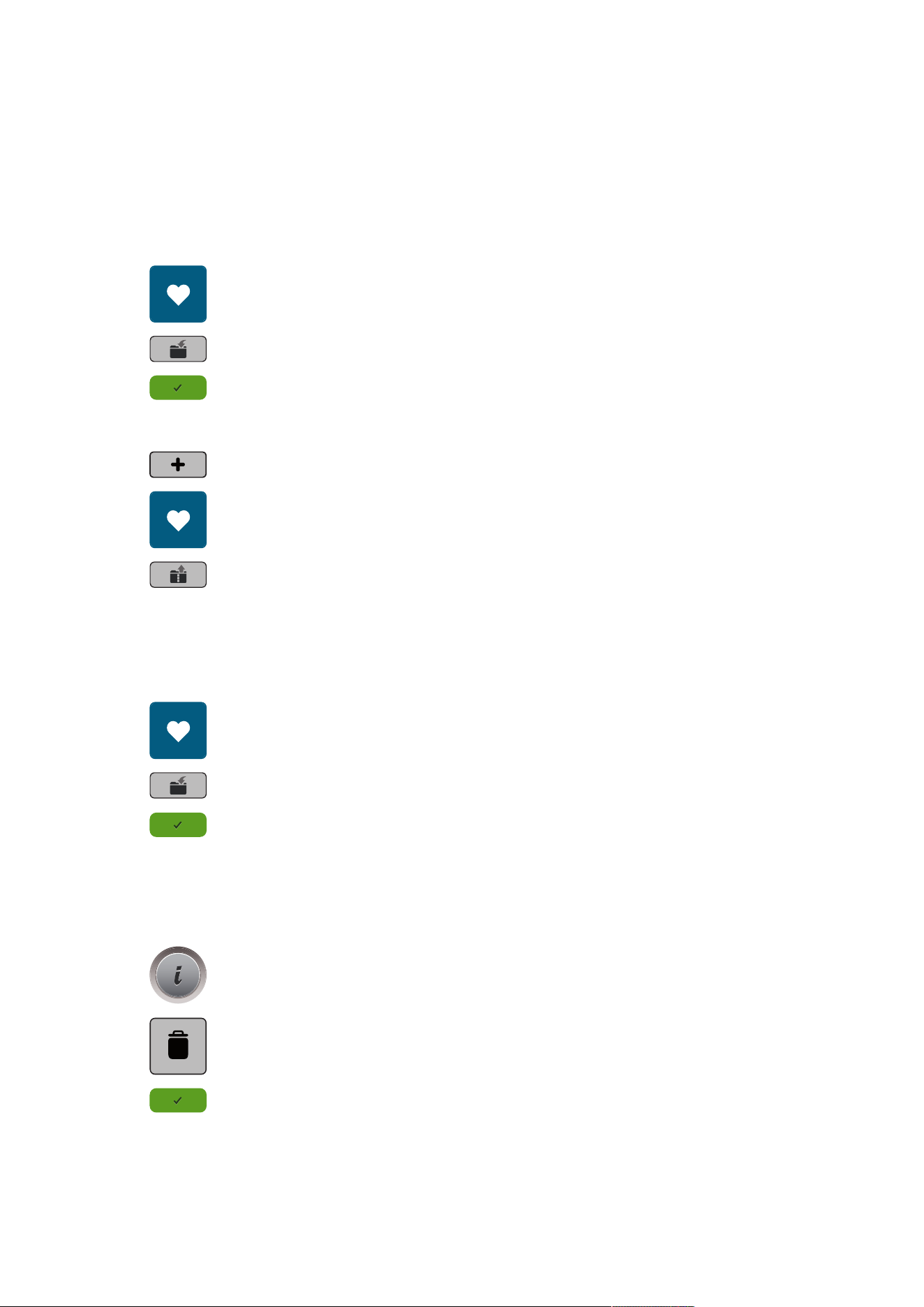
Securing a Stitch Pattern Combination
Securing at the end of the stitch pattern combination is deactivated. To activate securing at the end of the
stitch pattern combination:
> Create a stitch pattern combination.
> Tap «i-Dialog».
> Tap «Edit Entire Combination».
> Tap «Securing Stitches».
Creative Sewing
63
2023-06 EN 5020077.40A.04
Saving a Stitch Pattern Combination
To use an individually created stitch pattern combinations again, they can be saved in the folder «Personal
Memory».
Prerequisite:
• A stitch pattern combination has been created.
> Tap «Personal Memory».
> Tap «Save Stitch Pattern».
> To save the stitch pattern combination, tap «Confirm».
Loading a Stitch Pattern Combination
> Tap «Combination Mode/Single Mode».
> Tap «Personal Memory».
> Tap «Loading a Stitch Pattern Combination».
> Select a stitch pattern combination.
Overwriting a Stitch Pattern Combination
Prerequisite:
• A stitch pattern combination has been created.
> Tap «Personal Memory».
> Tap «Save Stitch Pattern».
> Select the stitch pattern combination which is to be overwritten.
> To overwrite the stitch pattern combination, tap «Confirm».
Deleting a Stitch Pattern Combination
Prerequisite:
• A stitch pattern combination has been created.
> Tap «i-Dialog».
> Tap «Edit Entire Combination».
> Tap «Deleting».
> Tap «Confirm».
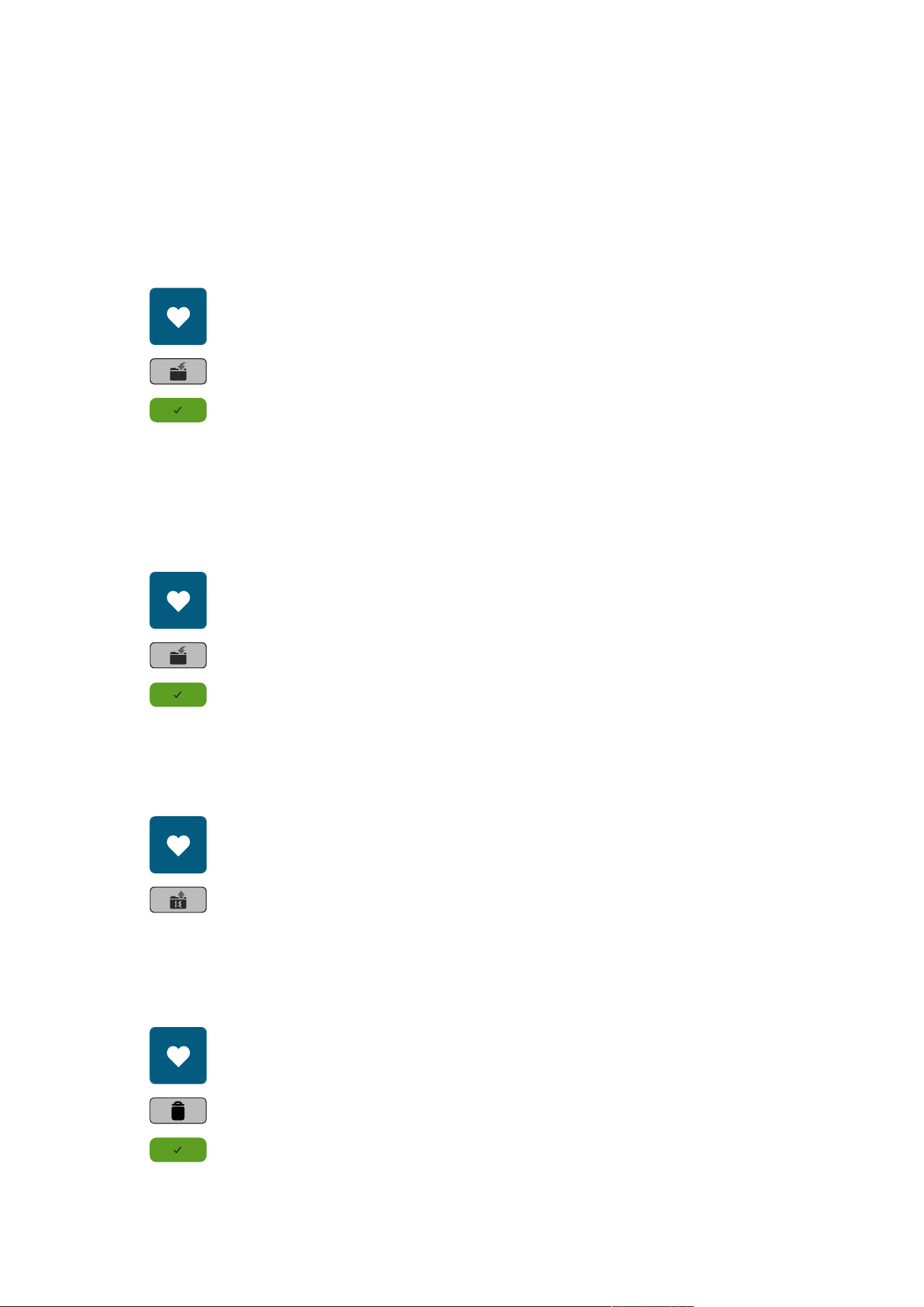
Creative Sewing
64
2023-06 EN 5020077.40A.04
5.7 Administering Stitch Patterns
Saving Stitch Patterns in Personal Memory
In the filing system «Personal Memory» any stitch patterns, also those which have been individually edited,
can be saved.
> Select a stitch pattern, alphabet or buttonhole.
> Edit the stitch pattern.
> Tap «Personal Memory».
> Tap «Save Stitch Pattern».
> Tap «Confirm».
Overwriting Stitch Patterns from the Personal Memory
Prerequisite:
• The stitch pattern is saved in the personal memory.
> Select a stitch pattern, alphabet or buttonhole.
> Edit the stitch pattern.
> Tap «Personal Memory».
> Tap «Save Embroidery Design».
> Select the stitch pattern which should be overwritten.
> Tap «Confirm».
Loading Stitch Patterns from the Personal Memory
Prerequisite:
• The stitch pattern is saved in the personal memory.
> Tap «Personal Memory».
> Tap «Load Embroidery Design».
> Select a stitch pattern.
Deleting Stitch Patterns from the Personal Memory
Prerequisite:
• The stitch pattern is saved in the personal memory.
> Tap «Personal Memory».
> Tap «Deleting».
> Select a stitch pattern.
> Tap «Confirm».
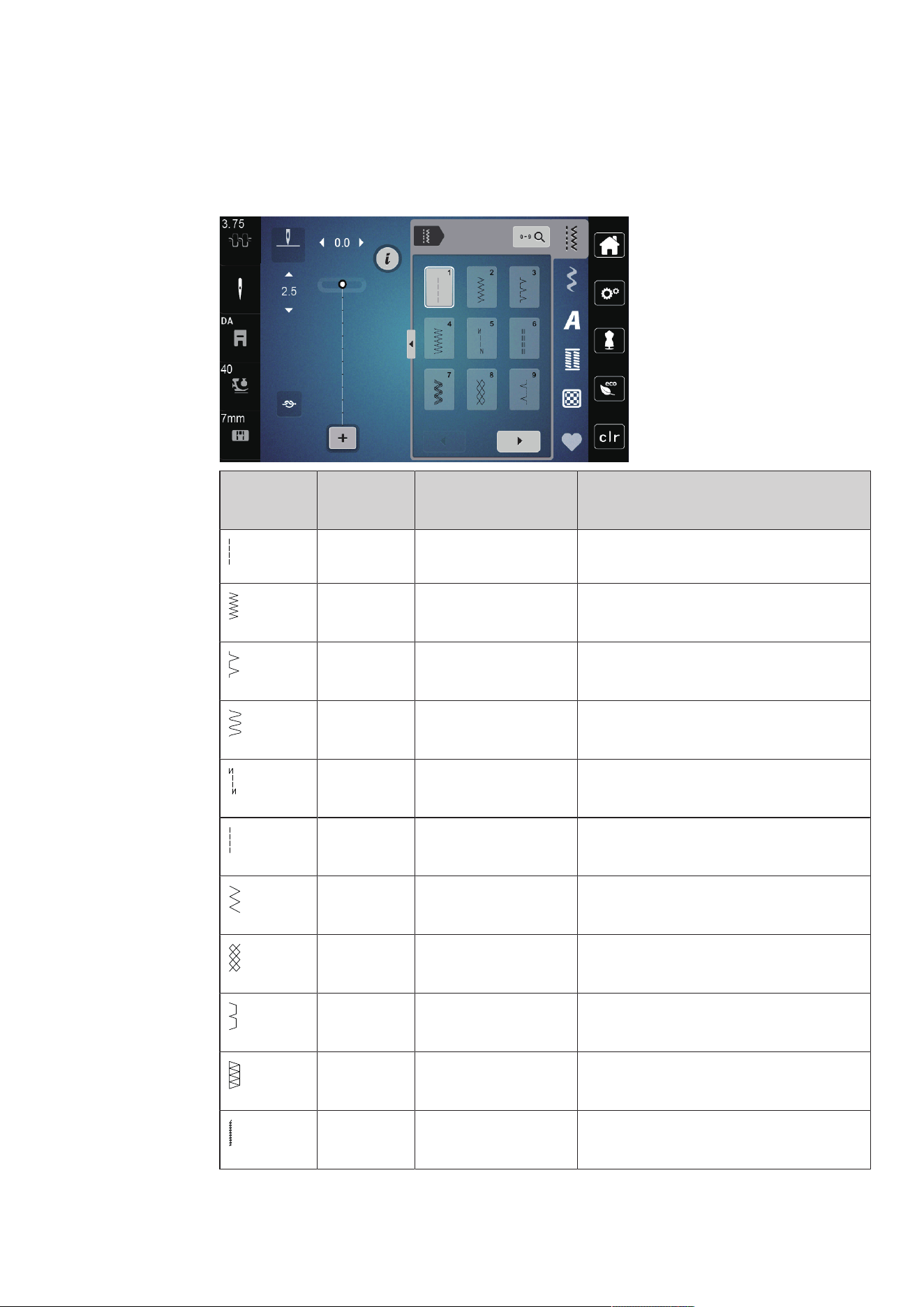
Practical Stitches
65
2023-06 EN 5020077.40A.04
6 Practical Stitches
6.1 Overview Practical Stitches
Stitch
Pattern
Stitch
Number
Name Description
1 Straight Stitch Seams and topstitching.
2 Zigzag Reinforcing seams, overcasting edges, sewing
elastic seams and attaching lace.
3 Vari-Overlock Sewing and finishing in one step of elastic
fabrics.
4 Running Stitch Darning with running stitch, mending fabrics,
reinforcing edges.
5 Securing Program Securing starts and ends of seams by straight
stitching.
6 Triple Straight Stitch Reinforced seams in heavy fabrics; visible
hems and seams.
7 Triple Zigzag Reinforced seams in heavy fabrics; visible
hems and seams.
8 Honeycomb Stitch For stretch fabrics and hems. Is also used with
elastic thread in the bobbin.
9 Blind Stitch Blind hems, shell edging effect on soft jerseys
and fine material, decorative seams.
10 Double Overlock Sewing and finishing in one step of elastic
fabrics.
11 Superstretch Stitch For highly stretch open seams. For all types of
clothing.
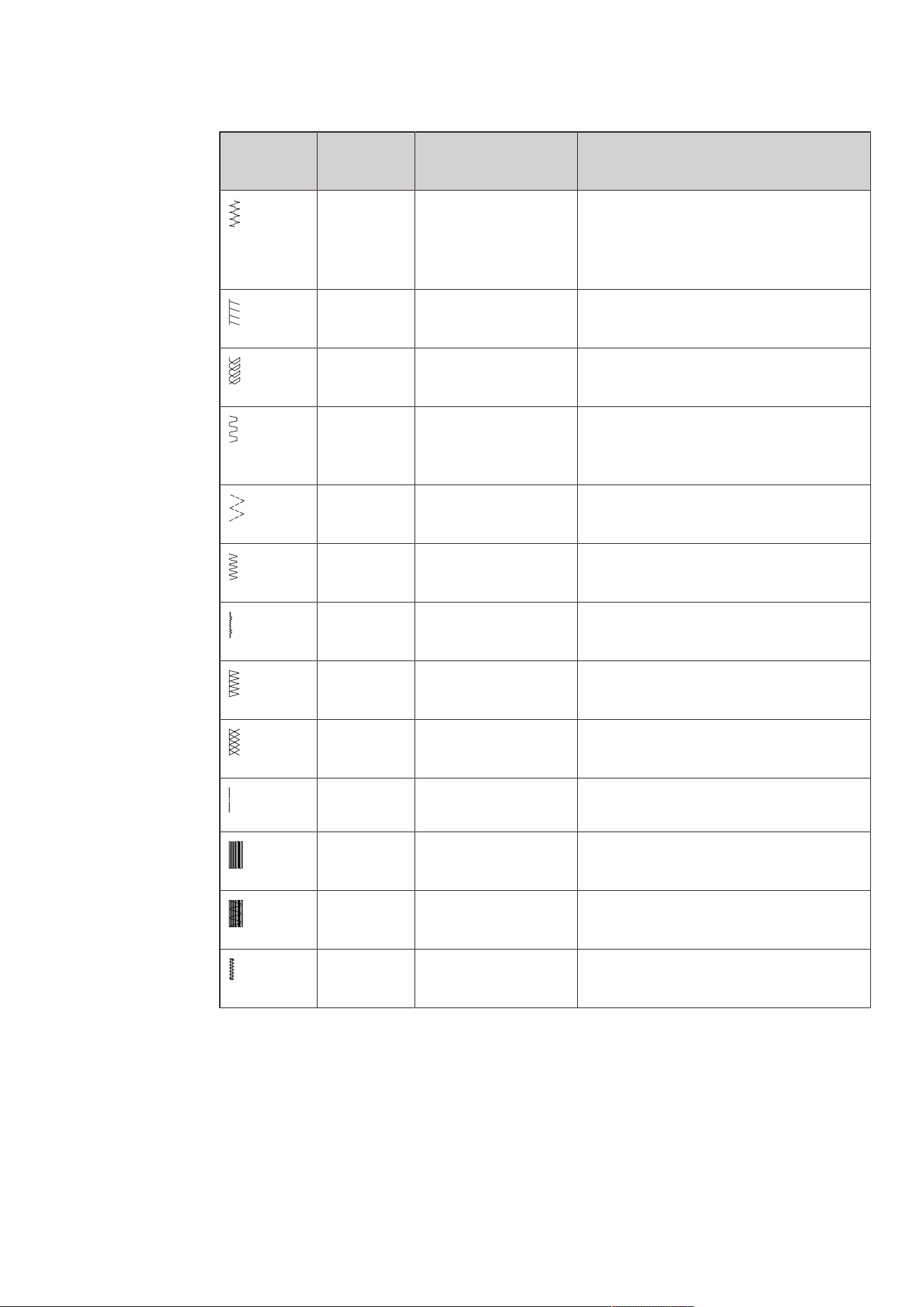
Practical Stitches
66
2023-06 EN 5020077.40A.04
Stitch
Pattern
Stitch
Number
Name Description
12 Gathering Stitch Most types of fabric; gathering with shirring
elastic, butted seams = butting two pressed
edges and sewing together, decorative
stitches.
13 Stretch Overlock Sewing and finishing in one step of elastic
fabrics.
14 Tricot Stitch Visible hems, visible seams in lingerie,
sweaters, mending jersey.
15 Universal Stitch For firm fabrics such as felt and leather. Flat
joining seams, visible seams, attaching elastic,
decorative seams.
16 Sewn-out Zigzag Edge finishing and reinforcing, attaching
elastic, decorative seam.
17 Lycra Stitch For lycra fabrics; flat joining seams and hems,
reinforced seaming on underwear.
18 Stretch Stitch For highly stretch fabrics; open seam for
sportswear.
19 Reinforced Overlock For medium-weight knitware and toweling.
Overlock seams, flat joining seams.
20 Knit Overlock Sewing and finishing in one step of hand and
machine knitten fabrics.
21 Basting Stitch For seams and hems.
22 Simple Darning
Program
Darning of holes and damaged fabric.
23 Reinforced Darning
Program
Reinforcing darning holes and damaged
fabric.
24 Bartack Program Reinforcing pocket openings, sewing belt
loops.
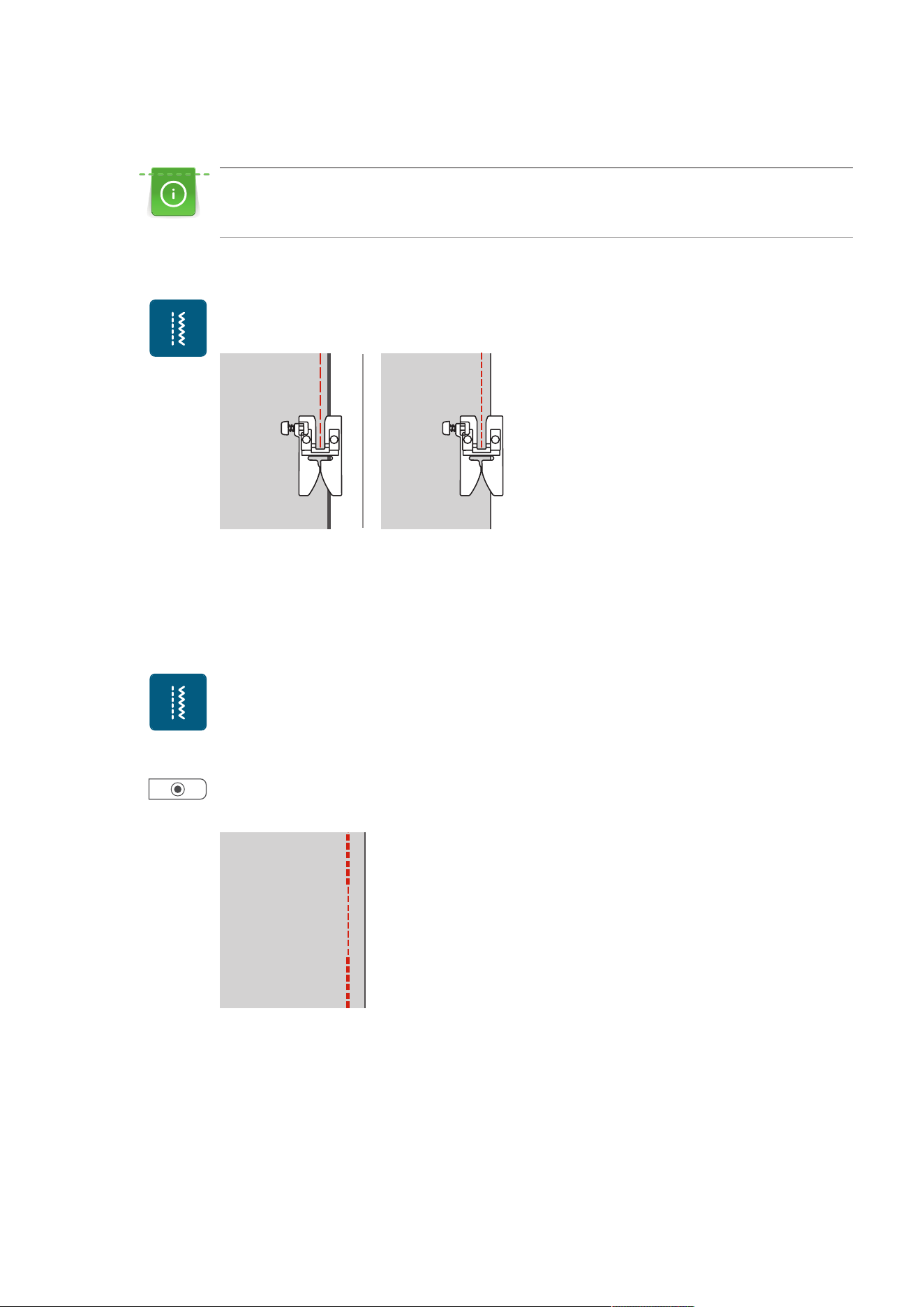
Practical Stitches
67
2023-06 EN 5020077.40A.04
6.2 Sewing Straight Stitch
Adjust the stitch length for the sewing project, e.g. a long stitch for denim (approx. 3–4mm) and a
short stitch for delicate fabric (approx. 2–2.5mm). Adjust the stitch length depending on the thread
thickness, e.g. a long stitch (approx. 3–5mm) for top-stitching with gimp.
Prerequisite:
• The Zigzag Foot (DA) is attached.
> Tap «Practical Stitches».
> Select Straight Stitch No.1.
6.3 Securing with the Automatic Securing Program
Due to a determined number of 6 stitches sewn forwards and 6 stitches sewn in reverse, the securing is
regular.
Prerequisite:
• The Zigzag Foot (DA) is attached.
> Tap «Practical Stitches».
> Select the Securing Program No.5.
> Press the foot control.
– The machine secures automatically.
> Sew the seam in the desired length.
> Push the button «Securing Stitches».
– The machine secures automatically and stops at the end of the securing program.
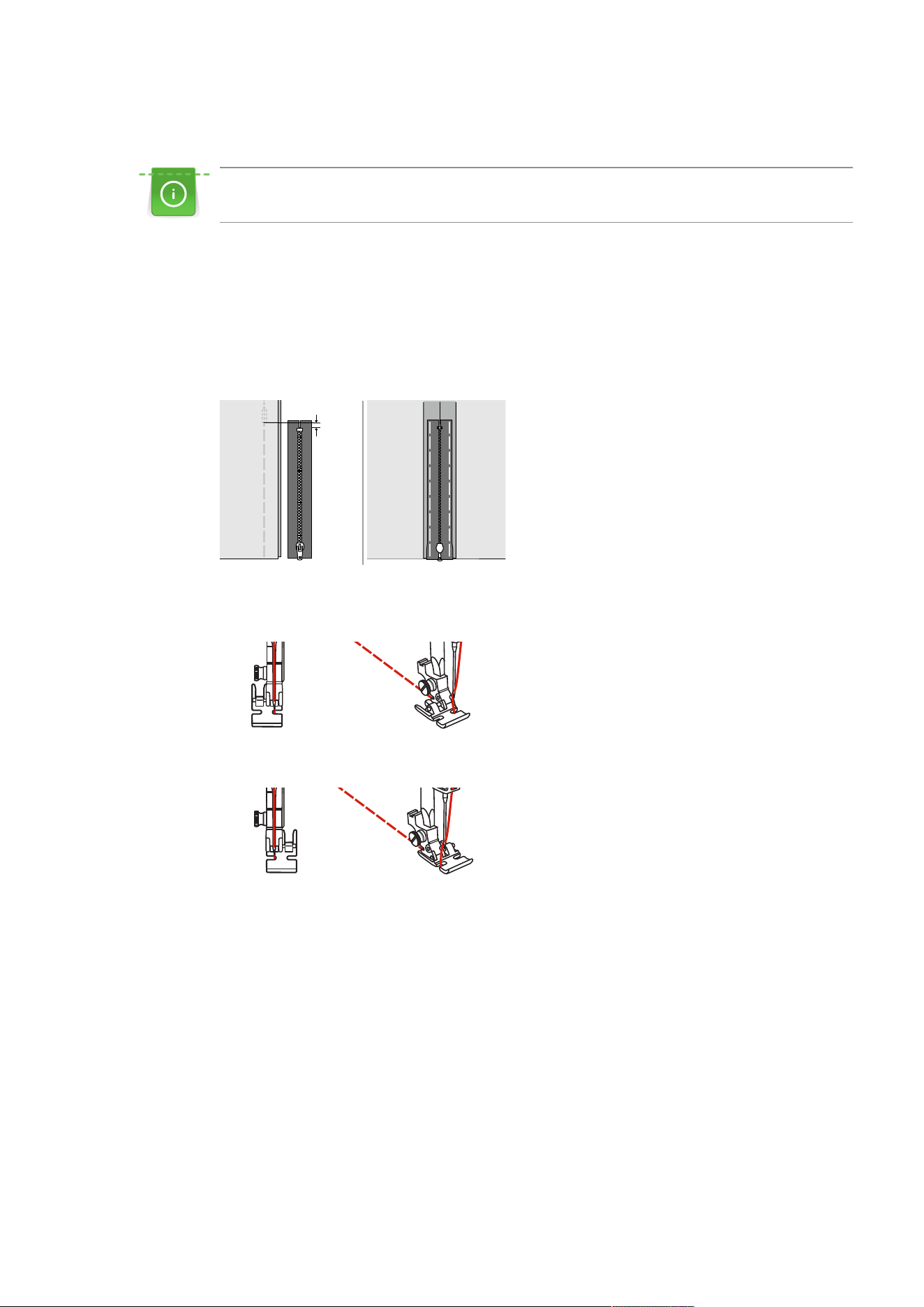
Practical Stitches
68
2023-06 EN 5020077.40A.04
6.4 Sewing in the Zipper
As the fabric feed can be difficult when starting to sew, it is recommended to hold the threads firmly or
to pull the fabric slightly to the back for a few stitches or to sew 1–2cm reverse first.
> Attach the Zigzag Foot (DA).
> Tap «Practical Stitches».
> Select Straight Stitch No.1.
> Close the zipper length with long stitches.
> Finish the seam allowances individually.
> Iron the seam apart.
> Open the zipper length.
> Baste the zipper under the fabric so that the fabric folded edges meet over the center of the zipper.
> Attach the Zipper Foot (JB).
> When sewing the left-hand side of the zipper, secure the right-hand side of the presser foot pin using the
holder.
> When sewing the right-hand side of the zipper, secure the left-hand side of the presser foot pin using the
holder.
> Sew the left-hand side of the open zipper from top to bottom.
> Close the zipper up to approx. 5cm from the end.
> Sew over the lower end and the right-hand side of the zipper.
> Stop before the zipper slider.
> Move the needle into the lower position.
> Raise the presser foot.
> Open the zipper.
> Finish sewing the right side.
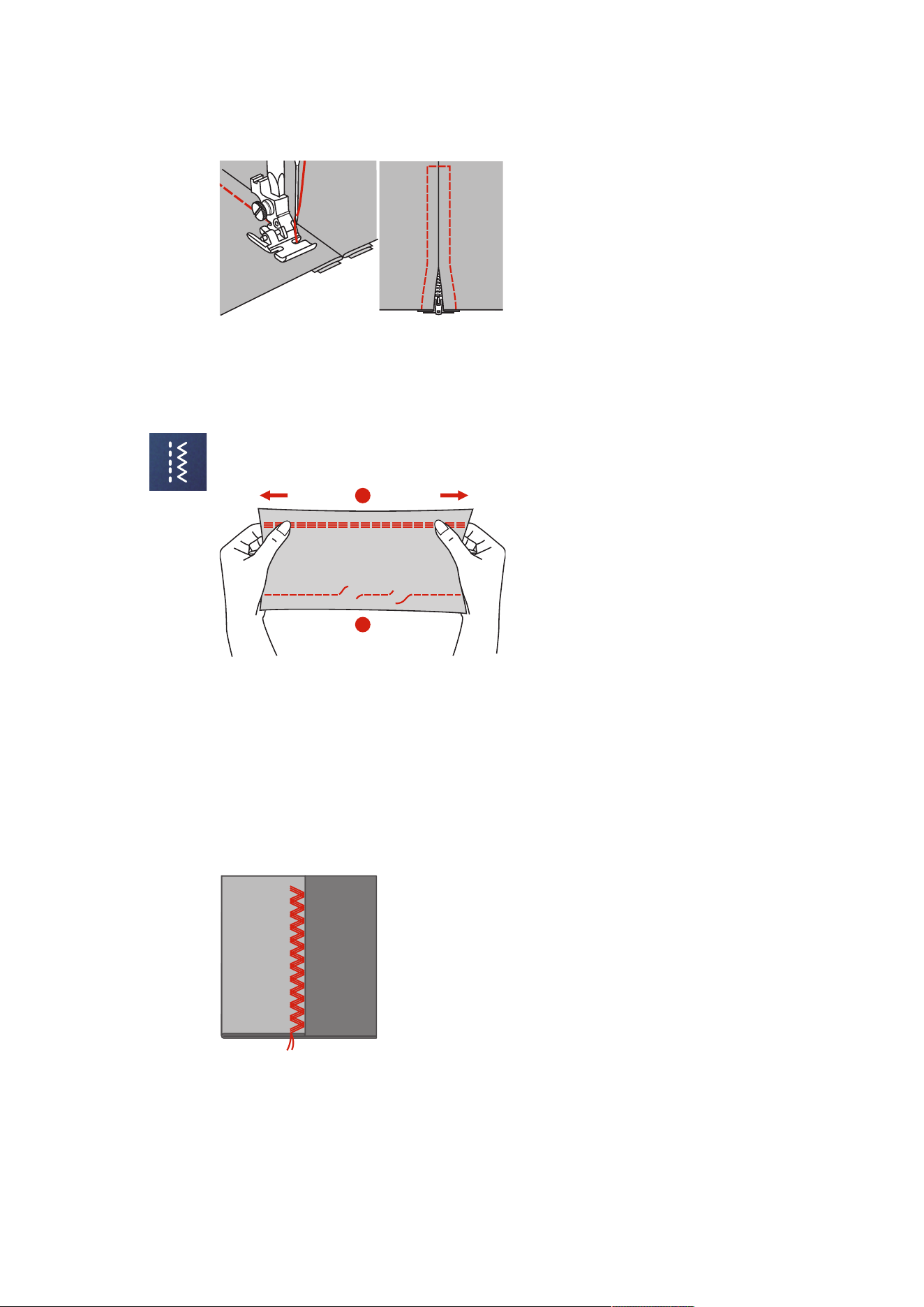
Practical Stitches
69
2023-06 EN 5020077.40A.04
> Remoce the tacked seam.
6.5 Sewing Triple Straight Stitch
The triple straight stitch is especially suitable for durable seams and for firm, densely woven fabrics such as
denim and corduroy.
> Attach the Zigzag Foot (DA).
> Tap «Practical Stitches».
> Select the Triple Straight Stitch No.6.
2
1
1 Straight Stitch 2 Triple Straight Stitch
6.6 Sewing Triple Zigzag
In firm fabrics, particularly for denim fabrics, deckchair covers, awnings. Hems on items that are frequently
washed. Finish the seam edges first.
> Attach the Zigzag Foot (DA).
> Tap «Practical Stitches».
> Select the Triple Zigzag No.7.
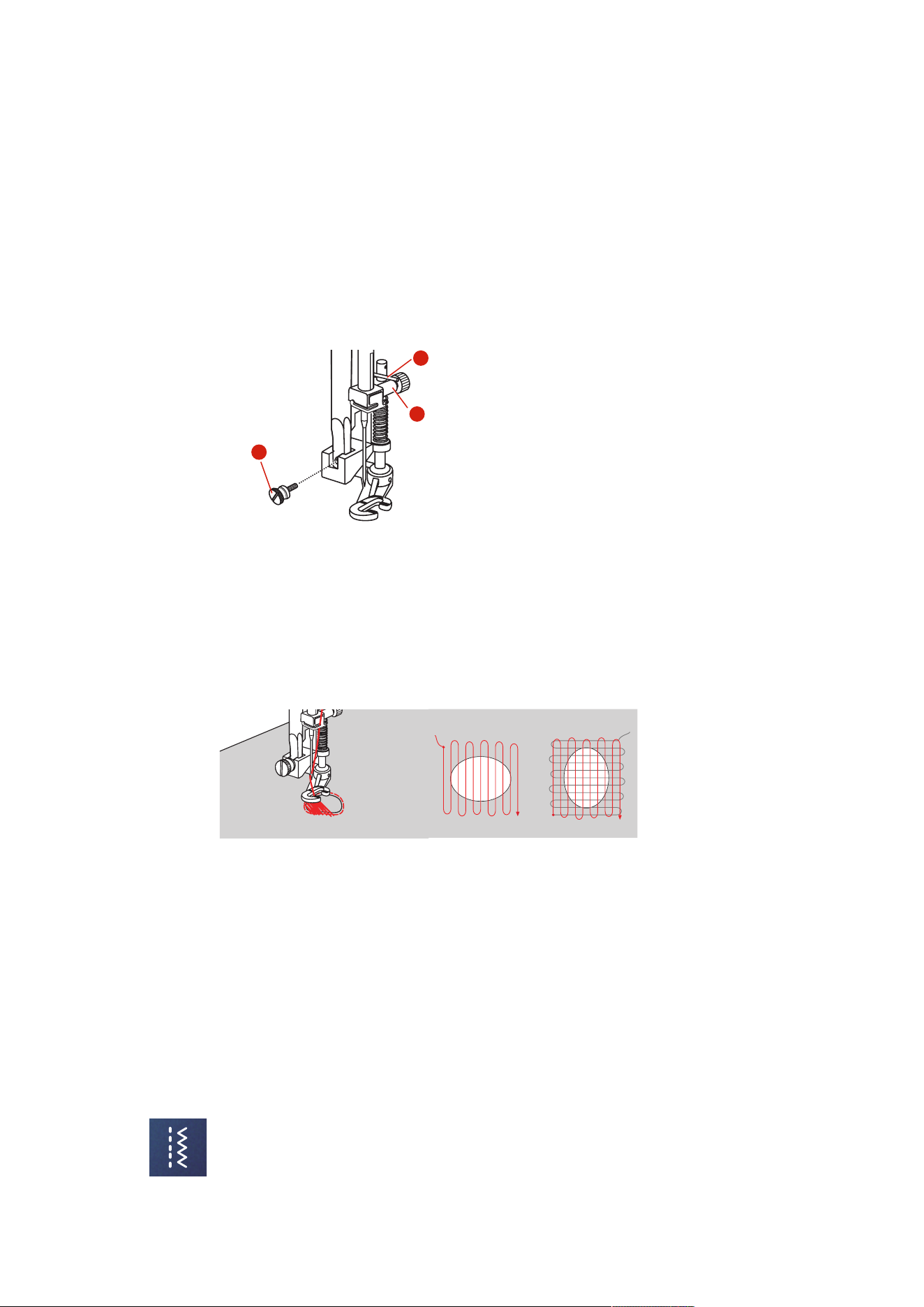
Practical Stitches
70
2023-06 EN 5020077.40A.04
6.7 Manual Darning
Used for darning holes or worn areas in all fabric types.
If the thread is lying on top and a poor stitch formation results, slow down the movement of the sewing
project. If there are knots on the wrong side of the fabric, move the sewing project faster. When the thread
breaks, guide the sewing project more consistently.
> Remove the presser foot holder and attach the free motion foot (RX) to the presser foot holder bar.
– The pin (1) should rest on the upper side of the needle clamping screw (2).
> Press the Free-motion Embroidery Foot (RX) firmly from below with your index finger and tighten the
screw (3).
3
2
1
> Tap «Practical Stitches».
> Select Straight Stitch No.1.
> Lower the feed dog.
> Attach the Slide-on Freearm Extension Table.
> Hoop the sewing project in the round embroidery hoop (optional accessory).
– The darning area remains evenly stretched and cannot be deformed.
> Sew from the left to the right, guide the fabric evenly by hand without using pressure.
> Move in curves when changing the direction to avoid holes and thread breakage.
6.8 Reinforced Darning, Automatic
The simple Darning Program No.22 is especially suitable for quick darning of worn or damaged areas. It is
recommended to use fine material as a backing for the worn and damaged areas or to stick an adhesive
interlining. The simple Darning Program No.22 replaces threads along the lengthwise grain in all materials. If
the darning area becomes distorted, correct with the balance.
The reinforced Darning Program No.23 is especially suitable for quick darning of worn or damaged areas.
The reinforced Darning Program No.23 replaces threads along the lengthwise or transverse grain in all
materials.
Prerequisite:
• The underlay material is fixed with basting stitches.
> Attach the Buttonhole Foot with Slide (RJ).
> Tap «Practical Stitches».
> Select the reinforced Darning Program No.23.
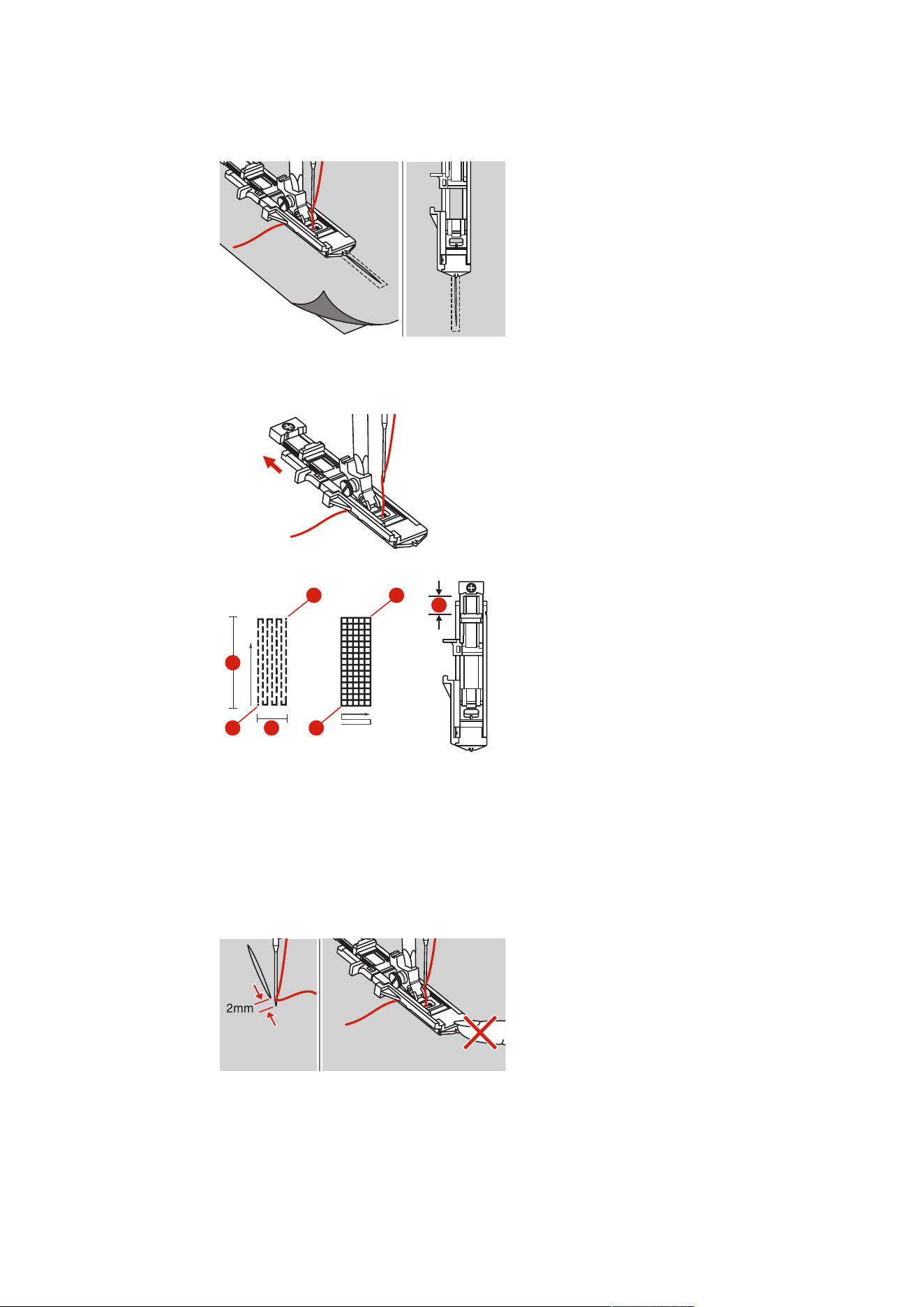
Practical Stitches
71
2023-06 EN 5020077.40A.04
> Lower the presser foot over the center of the tear.
> Adjust the button holder on the buttonhole foot to the desired length. The size of one darning sequence
is variable.
– The maximum sewing length is 2.6cm (1inch) and the maximum sewing width is 7mm (9/32inch).
3 32
1
1
4 4
1 The Length of Sewing 3 Start
2 The Width of Sewing 4 Stop
> Position the fabric so that the needle is 2mm (1/16inch) in front of the area to be darned.
> Lower the presser foot.
When lowering the presser foot, do not push the front of the presser foot, otherwise the darning will not be
sewn in the correct size.
> Lead the upper thread down through the hole in the presser foot.
> Pull down the buttonhole lever as far as possible.
– The buttonhole lever is positioned behind the bracket on the buttonhole foot.
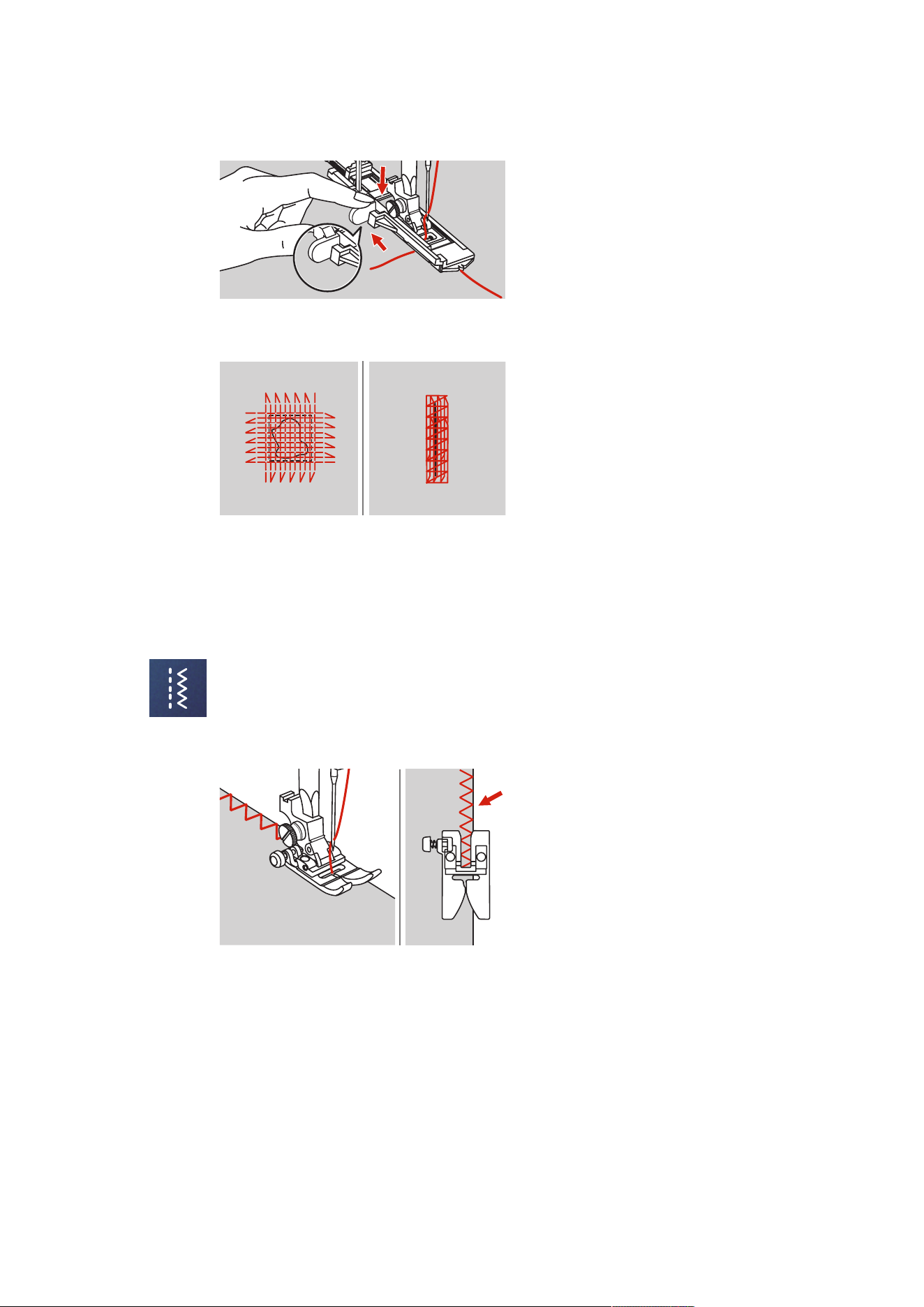
Practical Stitches
72
2023-06 EN 5020077.40A.04
> Hold the upper thread to the left side vertically to the Buttonhole Foot with Slide and start sewing.
> If the sewing range is too big to sew, then we recommend to sew the area several times (or cross sew) to
get better sewing result.
6.9 Finishing Edges
The zigzag stitch is suitable for finishing all types of fabric. Use darning thread for fine materials.
Prerequisite:
• The edge of the fabric should lie flat and not roll.
> Attach the Zigzag Foot (DA).
> Attach the Zigzag Foot (DA).
> Tap «Practical Stitches».
> Neither select too wide a stitch nor too long a stitch.
> Guide the edge of the fabric into the center of the presser foot, so that the needle goes into the fabric
on one side and over the edge into the air on the other side.
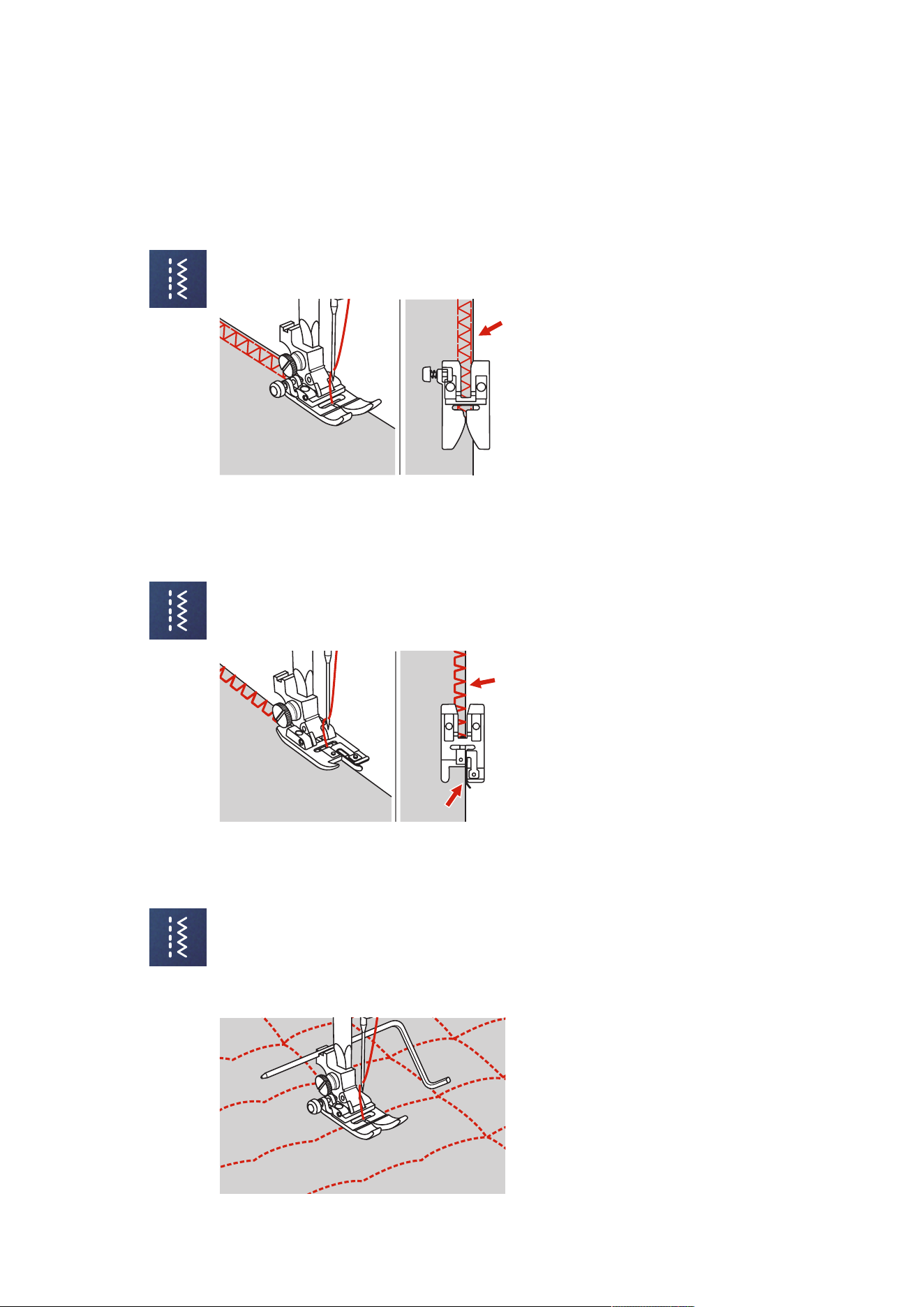
Practical Stitches
73
2023-06 EN 5020077.40A.04
6.10 Sewing Double Overlock
A double overlock seam is suitable for looser knit fabric and for cross seams in woven fabric. When working
with jersey, a jersey needle should be used to prevent damaging the knit fabric. When sewing stretch
materials, use a stretch needle.
> Attach the Zigzag Foot (DA).
> Tap «Practical Stitches».
> Select the Double Overlock No.10.
6.11 Sewing Vari Overlock
Sewing overcasting stitches along the edges of fabric to prevent them from fraying. When sewing stretch
materials, use a stretch needle.
> Attach the Overlock Foot (DI).
> Tap «Practical Stitches».
> Select the Double Overlock No.3.
> Sew the fabric with the fabric edge against the guide of the foot.
6.12 Edgestitching Using the Seam Guide
When sewing parallel wide top-stitching lines, we recommend guiding the seam guide along a sewn line.
> Attach the Zigzag Foot (DA).
> Tap «Practical Stitches».
> Select Straight Stitch No.1.
> Insert the seam guide into the hole of the presser foot.
> Sew the first row and move over the fabric to sew subsequent rows with the guide riding along the
previous row of stitching.
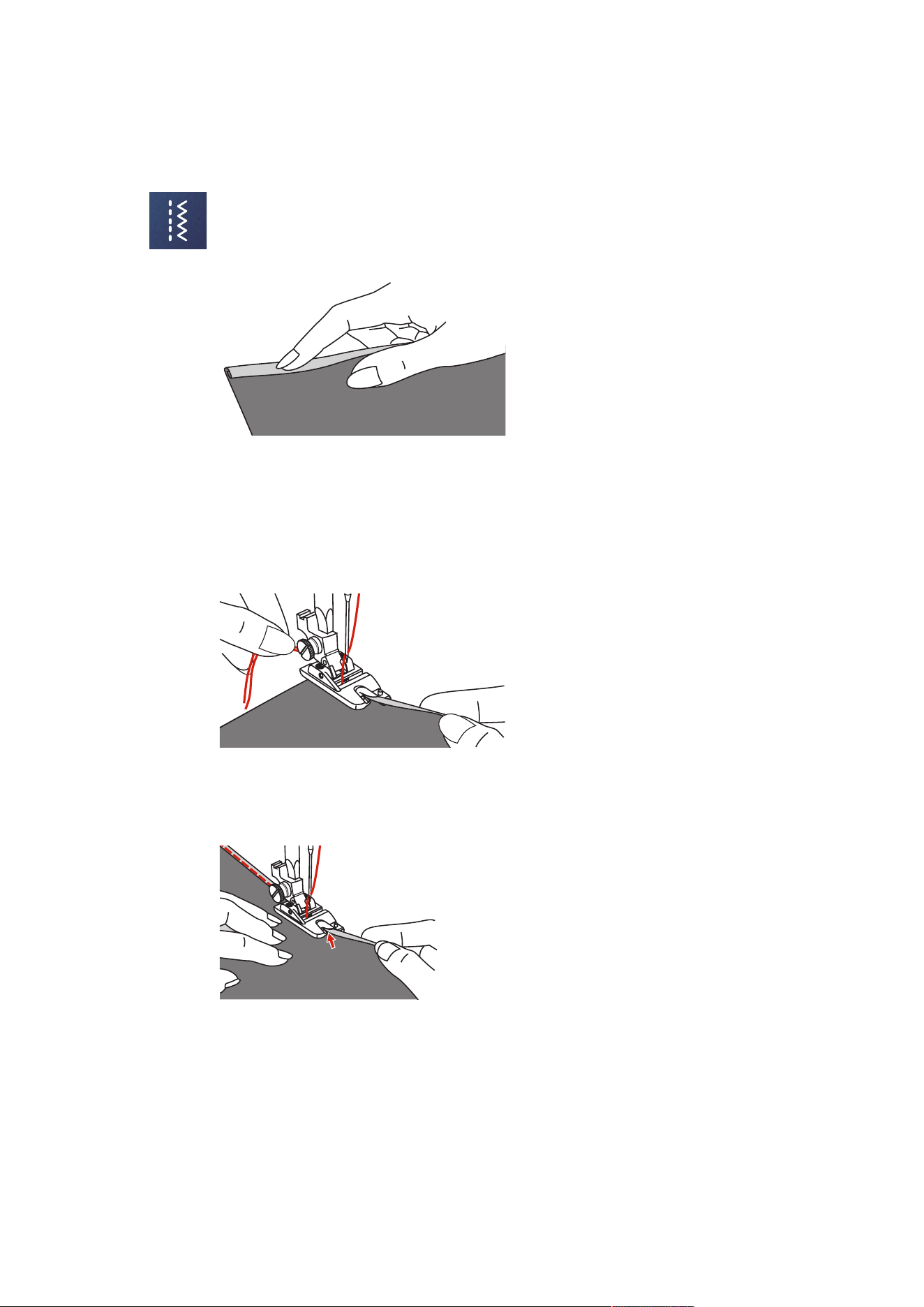
Practical Stitches
74
2023-06 EN 5020077.40A.04
6.13 Sewing a Narrow Hem
> Attach the Hemmer Foot (DG) optional accessory.
> Tap «Practical Stitches».
> Select Straight Stitch No.1.
> Fold the edge of the fabric over about 3mm, then fold it over again 3mm for about 5cm along the
edge of the fabric.
> Place the edge of the fabric with the left-hand side of the fabric facing up under the presser foot. The
fabric under the presser foot should be just less than the width of the presser foot.
> Sew 4–5 stitches.
> Raise the needle and presser foot.
> Pull the fabric backwards by about 10–15cm. Do not cut the thread.
> Hold the 4 threads in your left hand. Pull the edge of the fabric into the spiral guide on the hemmer foot
using your right hand.
> Lower the presser foot.
> Continue sewing slowly while slightly folding the cut edge of the fabric in front of the hemmer foot and
holding it to the left. Guide the edge of the fabric evenly into the spiral guide on the hemmer foot and
sew.
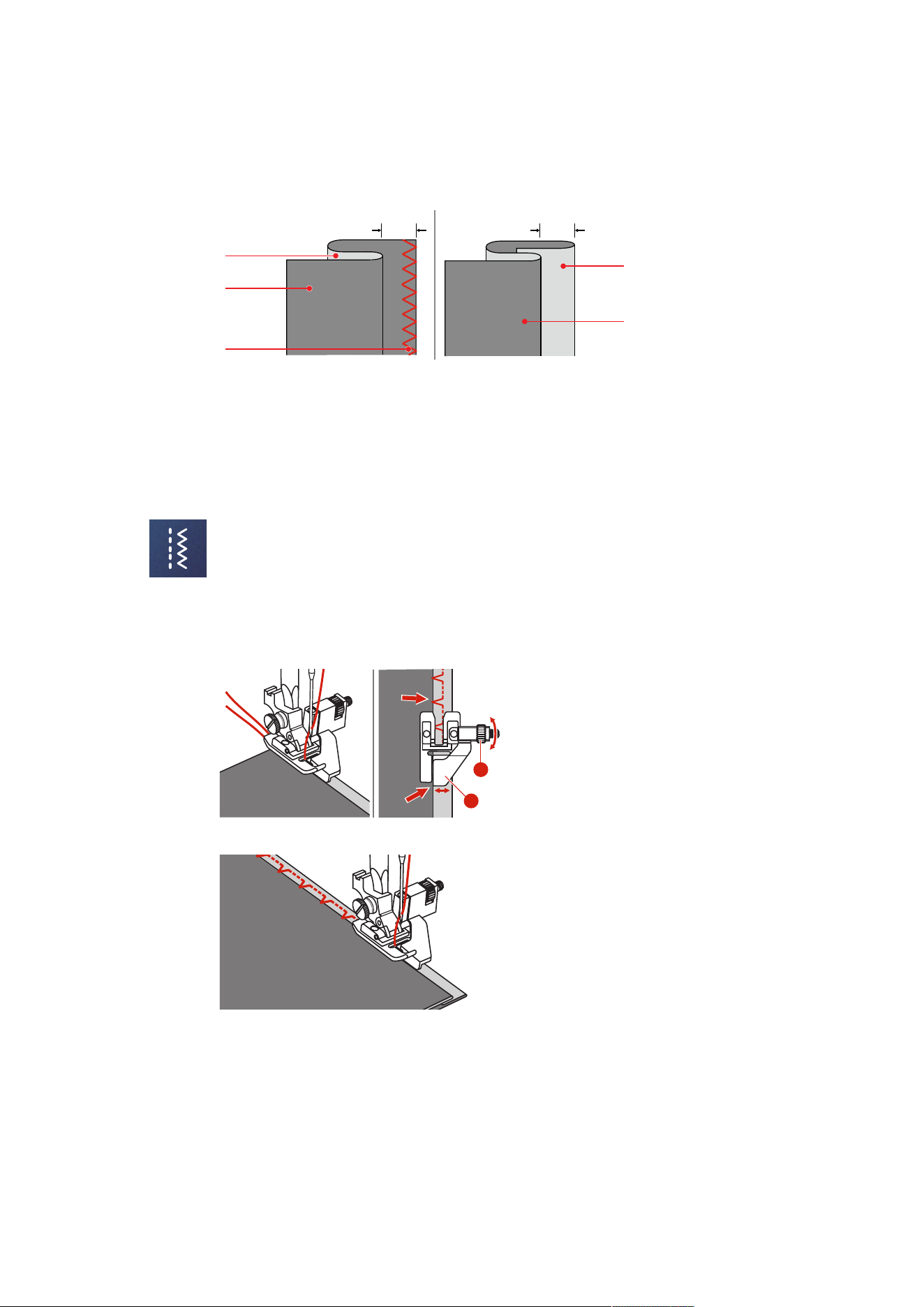
Practical Stitches
75
2023-06 EN 5020077.40A.04
6.14 Sewing Blind Hems
For invisible hems in medium to heavy weight cotton, wool and blended materials.
Heavy/medium-weight Fabrics Light Fabrics
5mm
5mm
2
3
1
3
2
1 Finishing Seam 3 Right-hand Fabric Side
2 Left-hand Fabric Side
Prerequisite:
• The fabric edges are finished.
> Attach the Blindstitch Foot (DM).
> Tap «Practical Stitches».
> Select the Blindstitch No.9.
> Fold the fabric as illustrated with the wrong side up.
> Place the fabric beneath the presser foot.
> Turn the handwheel anti-clockwise until the needle is all the way to the left.
The needle should just pierce the fold in the fabric (3). If it does not, adjust the stitch width accordingly.
> Adjust the guide (2) by turning the dial (1) so that the guide is positioned directly against the fold.
2
1
> Sew slowly while guiding the fabric carefully along the edge of the guide.
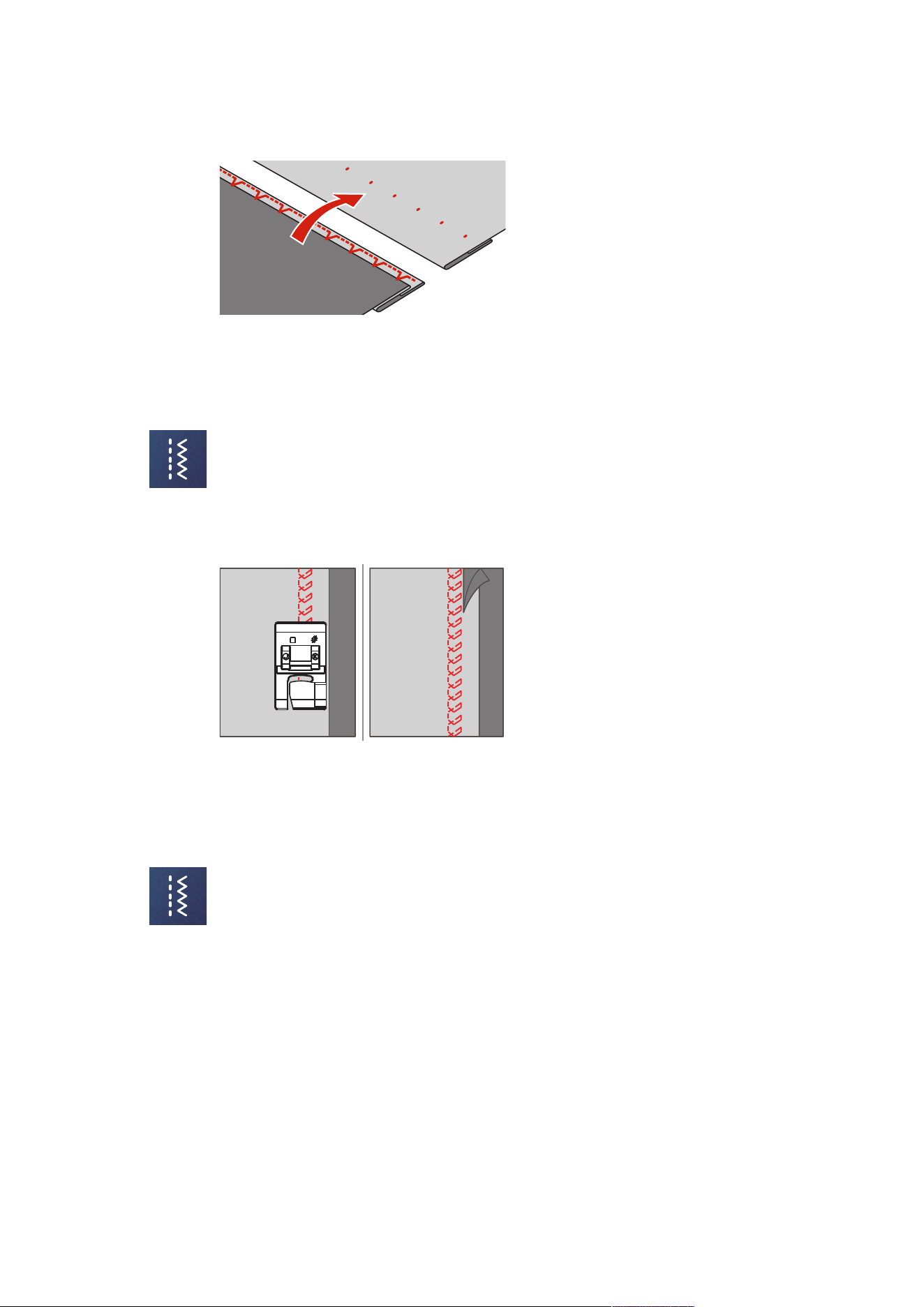
Practical Stitches
76
2023-06 EN 5020077.40A.04
> Turn over the fabric.
6.15 Sewing Visible Hems
The visible hem is particularly suitable for elastic seams in tricot made of cotton, wool, synthetic and mixed
fibers.
> Attach the Embroidery Foot (JK).
> Tap «Practical Stitches».
> Select the Tricot Stitch No.14.
> Iron the hem and baste if necessary.
> Reduce the presser foot pressure if necessary.
> Sew the hem in the desired depth on the right side of the fabric.
> Trim off the remaining fabric on the wrong side of the fabric.
6.16 Sewing Basting Stitches
When sewing basting stitches, it is recommended to use a fine darning thread. This is easier to remove. The
longest stitch possible is 5mm. The recommended stitch length is 3.5–5mm. The basting stitch is suitable
or sewing projects where a very long stitch length is required.
> Attach the Zigzag Foot (DA).
> Tap «Practical Stitches».
> Select the Basting Stitch No.21.
> Select the stitch length.
> Pin the fabric layers at a right angle to basting direction to prevent the layers from slipping.
> Sew 3–4 securing stitches at the beginning and at the end.
6.17 Sew Thick Areas
> Attach the Zigzag Foot (DA).
– The black button on the left side of the presser foot will lock the presser foot in a horizontal position if
you push it in before lowering the presser foot (1). This ensures even feeding at the beginning of a
seam and helps when sewing multiple layers of fabric such as sewing over seams when hemming
jeans.
> Once the highest point has been reached, lower the needle and raise the presser foot.
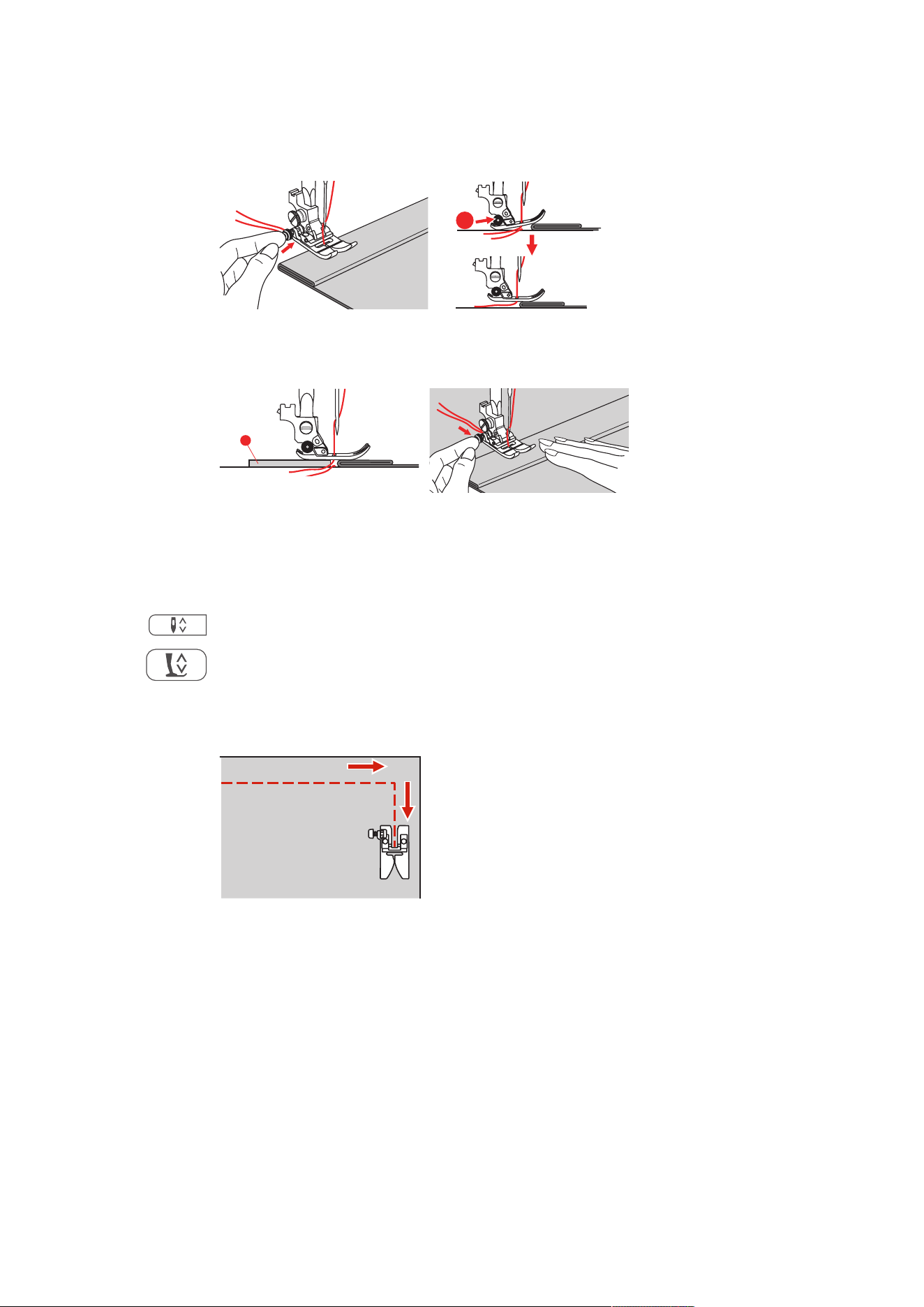
Practical Stitches
77
2023-06 EN 5020077.40A.04
> Press the foot tip and the black knob, lower the presser foot and continue sewing.
– The black button releases automatically after sewing few stitches.
1
> To support the presser foot when manually guiding the fabric and sewing from the folded side, place
one, two or three small plates from the height compensating tool (1) behind the needle under the
presser foot.
1
1 Height Compensating Tool
6.18 Sewing Corners
> Stop the machine when the corner is reached.
> Pierce the needle into the fabric.
> Raise the presser foot.
> Use the needle as a pivot and turn the fabric.
> Lower the presser foot and continue sewing.
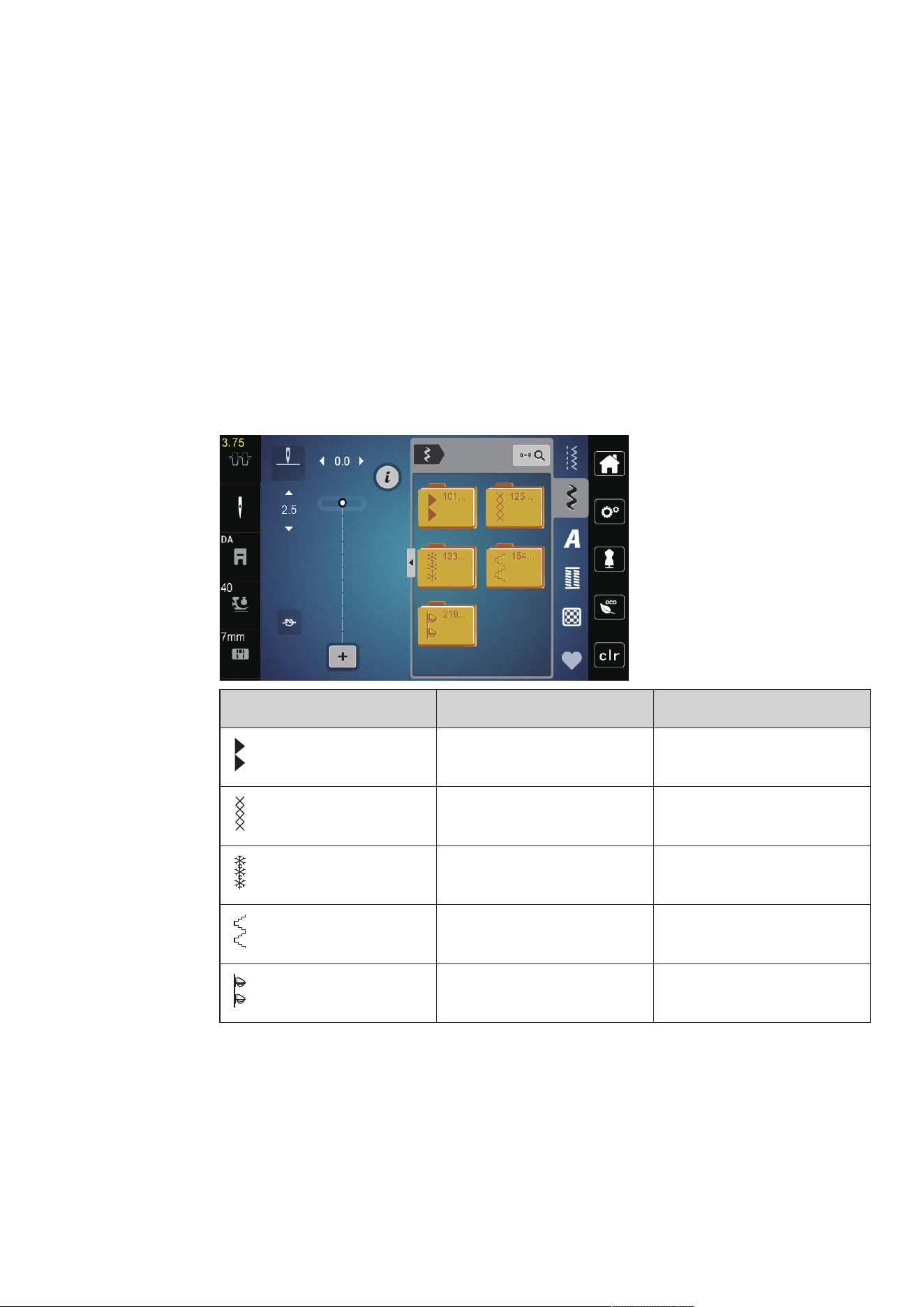
Decorative Stitches
78
2023-06 EN 5020077.40A.04
7 Decorative Stitches
7.1 Overview Decorative Stitches
Easier or more difficult decorative stitches come into their own depending on the type of fabric.
• Decorative stitches which are programmed with simple straight stitches are particularly appropriate for
light-weight materials, e.g. the Decorative stitch No. 142.
• Decorative stitches which are programmed with triple straight stitches or with a few satin stitches are
particularly appropriate for medium-weight materials, e.g. Decorative stitch No. 152.
• Decorative stitches which are programmed with satin stitches are particularly appropriate for medium-
weight materials, e.g. Decorative stitch No. 101.
For a perfect stitch formation, it is of advantage to use the same thread color for upper and bobbin thread
and a stabilizer. With pile or longfiber materials, it is recommended to use an additional water-soluble
stabilizer, which can be easily removed after sewing, on the right side of the fabric.
Decorative Stitch Stitch Number Name
101-124 Satin Stitches
125-132 Cross Stitches
133-153 Nature Stitches
154-218 Geometric Stitches
219-233 Children Stitches
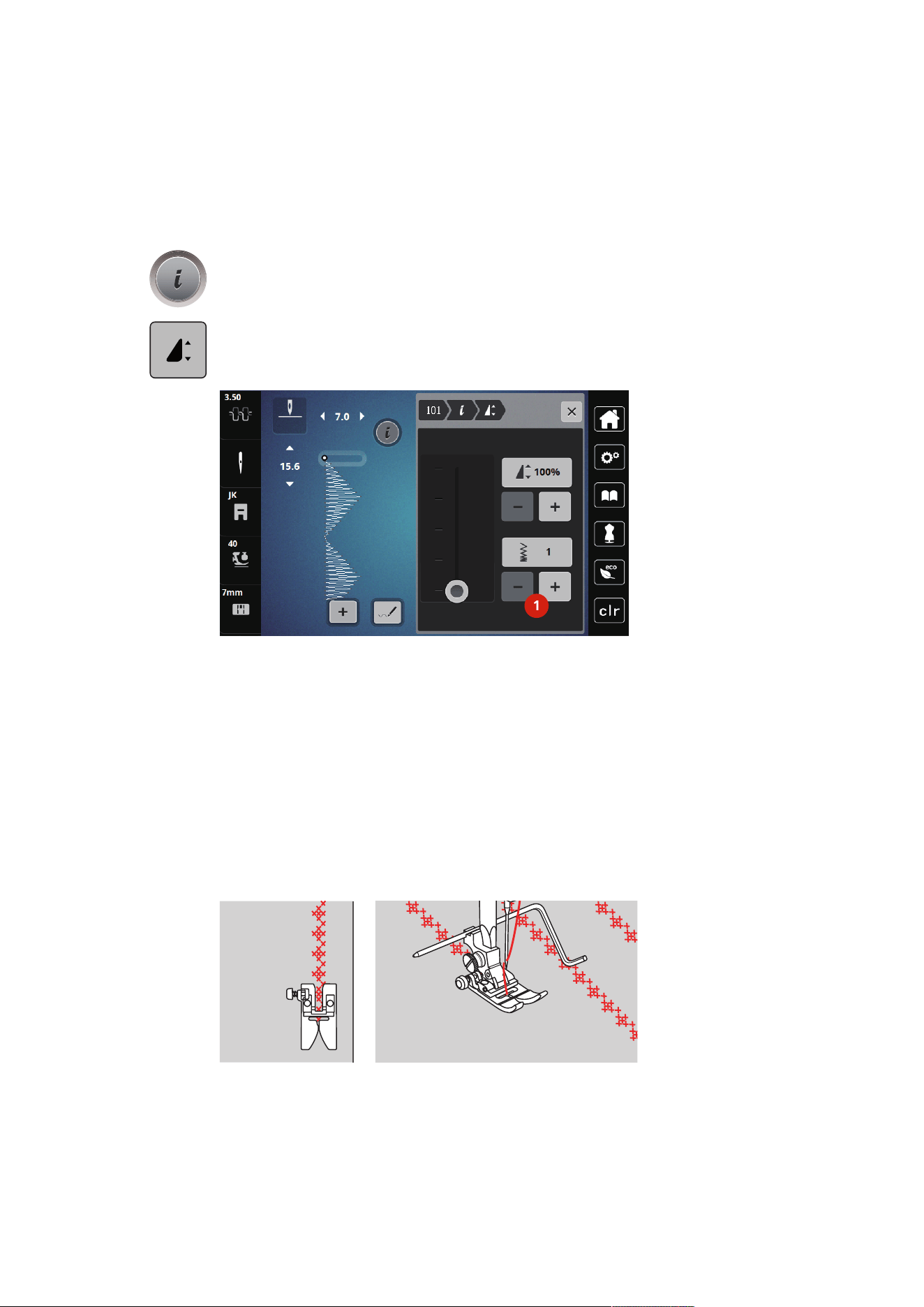
Decorative Stitches
79
2023-06 EN 5020077.40A.04
7.2 Altering the Stitch Density
With satin stitches (e. g. No.101) the stitch density can be altered. A larger number means a larger stitch
distance, i.e. the stitch is sewn less densely. For a high stitch density, the number must be decreased. Stitch
density 1 is the minimum. The set stitch pattern length is not changed by altering the stitch density.
> Select the satin stitch.
> Tap «i-Dialog».
> Tap «Altering the Pattern Length/Stitch Density».
> To increase the stitch density, tap (1) «Minus».
> To reduce the stitch density, tap (1) «Plus».
1
7.3 Sewing Cross Stitches
Cross stitch embroidery is a traditional technique and an addition to the other decorative stitches. If the cross
stitches are sewn on fabrics with a linen structure, they look as if they were hand-stitched. When cross
stitches are sewn with embroidery yarn, the stitch pattern appears fuller. Cross stitches are particularly used
for home furnishing, trimmings on garments and embellishing in general. As every following line refers to
the first row, it is important to stitch the first row in a straight line.
> Attach the Zigzag Foot (DA) or the Embroidery Foot (JK) or the Open embroidery Foot (DN) (optional
accessory).
> Select a cross stitch of the Decorative stitch No. 125-132 and combine it as desired.
> Stitch the first row using the seam guide to sew a straight line.
> Stitch the second row next to the first at a distance of one presser foot‘s width or using the seam guide.
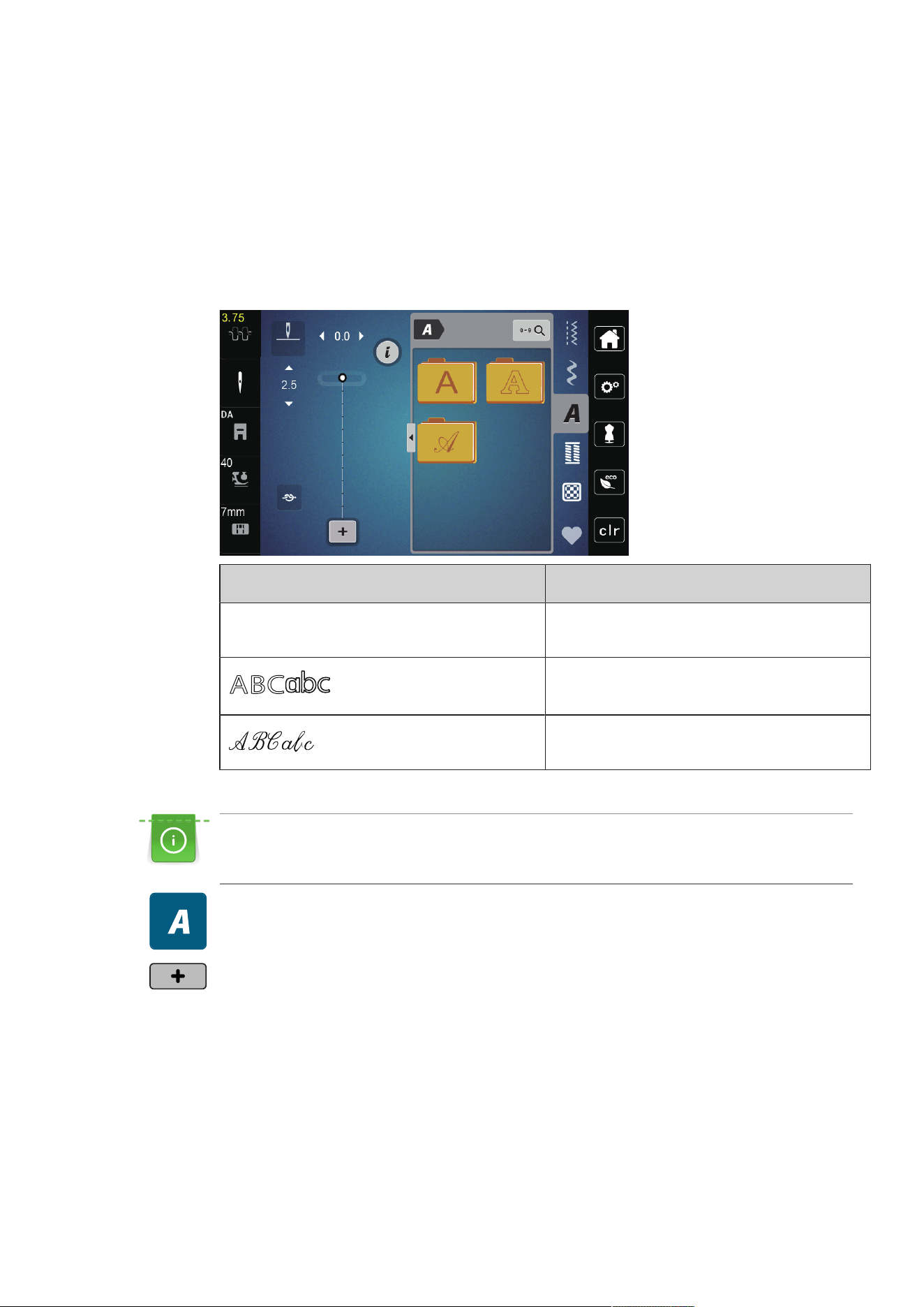
Alphabets
80
2023-06 EN 5020077.40A.04
8 Alphabets
8.1 Overview Alphabet
Block, Double block and Script alphabets can be sewn in two different sizes, in upper and lower case letters.
For a perfect stitch formation, it is recommended to use the same thread color for upper and bobbin threads.
The fabric can be reinforced with embroidery stabilizer on the wrong side. Use an additional, water-soluble
stabilizer on the right side of pile or napped fabrics.
Stitch Pattern Name
A
B
C
a
b
c
Block alphabet
Double-Block
Script (Italics)
8.2 Creating Lettering
Sewing a test sample with the thread, the actual fabric and stabilizer you intend to use is recommended.
Make sure that the fabric is fed evenly and lightly, ensuring that it cannot push against or catch on
anything. The fabric shouldn't be pulled, pushed or held back.
> Select «Alphabets».
> Select the font.
> To create a combination, tap «Combination Mode/Single Mode» (1).
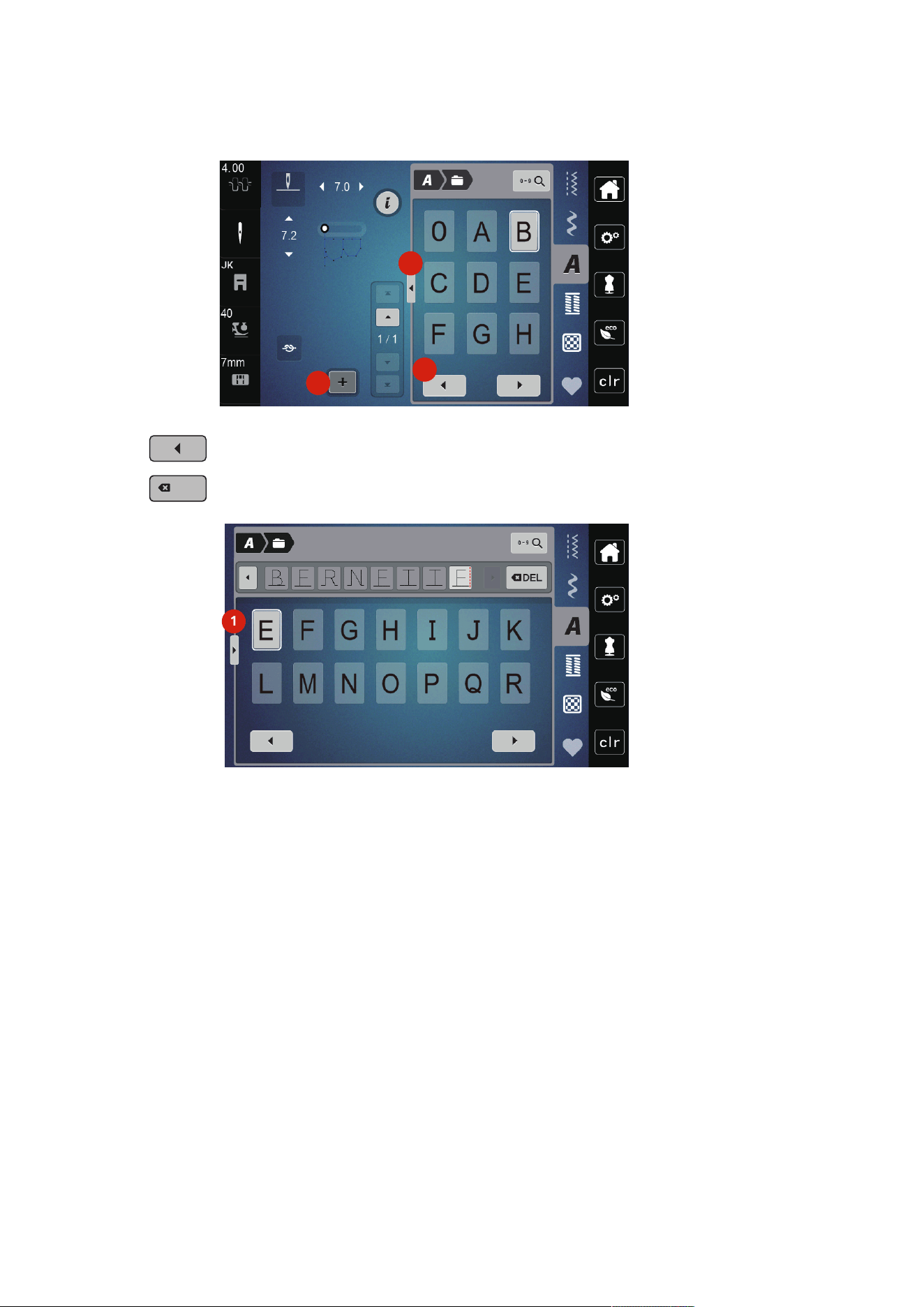
Alphabets
81
2023-06 EN 5020077.40A.04
> To open the expanded input mode, tap «Show Alphabet» (2).
3
2
1
> Select the letters.
> To display further letters, tap «Scroll Left» (3).
DEL
DEL
> To delete single letters of the entered text, tap «Deleting».
> To close the expanded input mode, tap «Show Alphabet» (1) again.
1
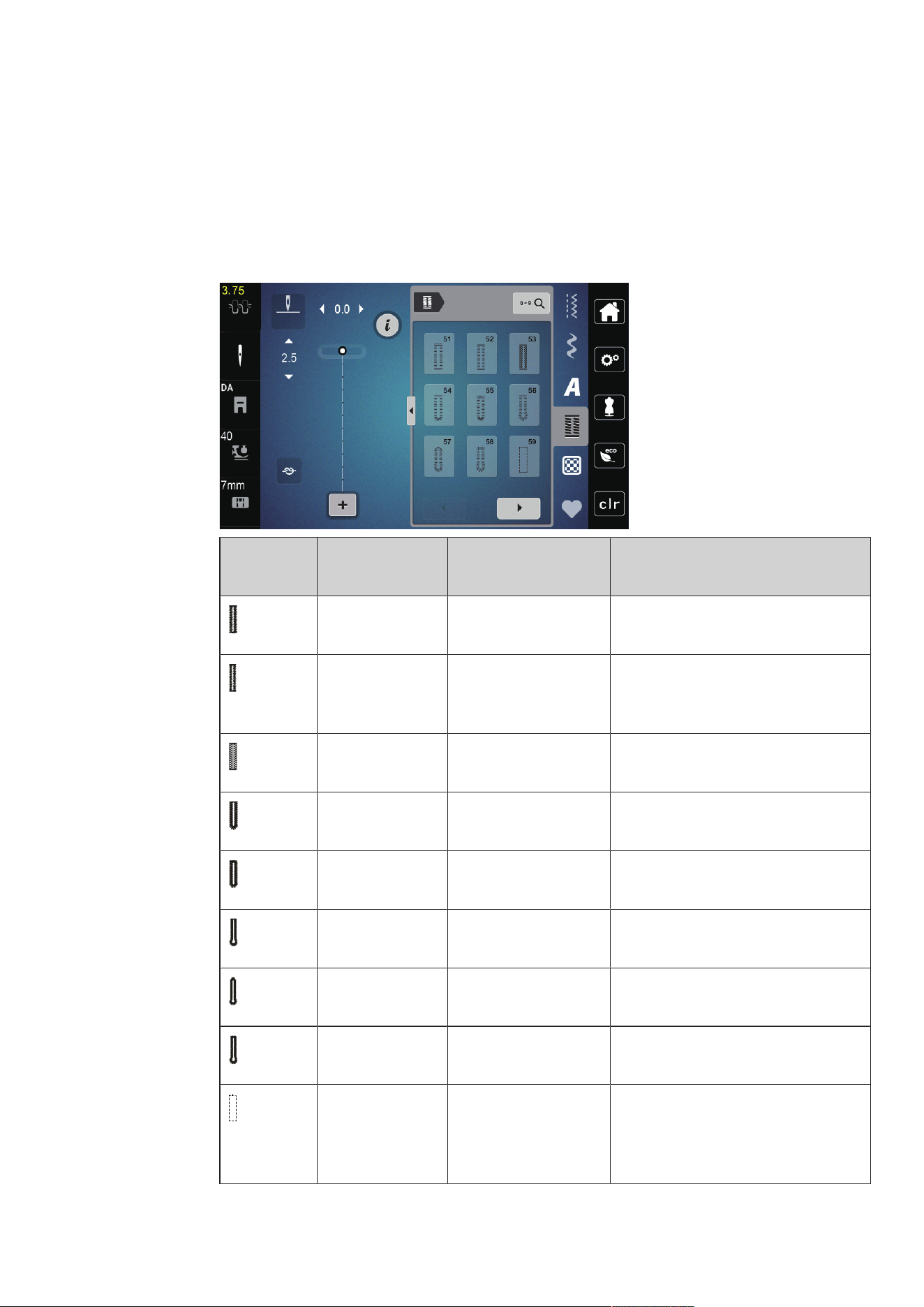
Buttonholes
82
2023-06 EN 5020077.40A.04
9 Buttonholes
9.1 Overview Buttonholes
To be able to create the right buttonhole for every button, every purpose and also for every garment, the
bernette b77 comes with an extensive collection of buttonholes. The corresponding button can be sewn on
automatically. Eyelets can also be sewn.
Buttonhole Buttonhole
Number
Name Description
51 Standard Buttonhole For light to medium-weight fabrics. e.g.
blouses, dresses and bed linen.
52 Standard Buttonhole
Narrow
For light to medium-weight fabrics. e.g.
blouses, dresses, chlidren's and baby
clothes, crafts.
53 Stretch Buttonhole For any highly elastic jersey made from
cotton, wool, silk and synthetic fibers.
54 Round Buttonhole with
Normal Bartack
For medium-weight to heavy fabrics,
dresses, jackets, coats and rainwear.
55 Round Buttonhole with
Horizontal Bartack
For medium to heavy weight fabrics:
dresses, jackets, coats, rainwear.
56 Keyhole Buttonhole For firmer, non-stretch fabrics, jackets,
coats, leisure wear.
57 Keyhole Buttonhole
with Pointed Bartack
For firmer, non-stretch fabrics, jackets,
coats, leisure wear.
58 Keyhole Buttonhole
with Horizontal Bartack
For firm, non-stretch fabrics: jackets,
coats, leisure wear.
59 Straight Stitch
Buttonhole
Program for staystitching buttonholes,
for pocket openings, reinforcing
buttonholes, especially for buttonholes
in leather and imitation leather.
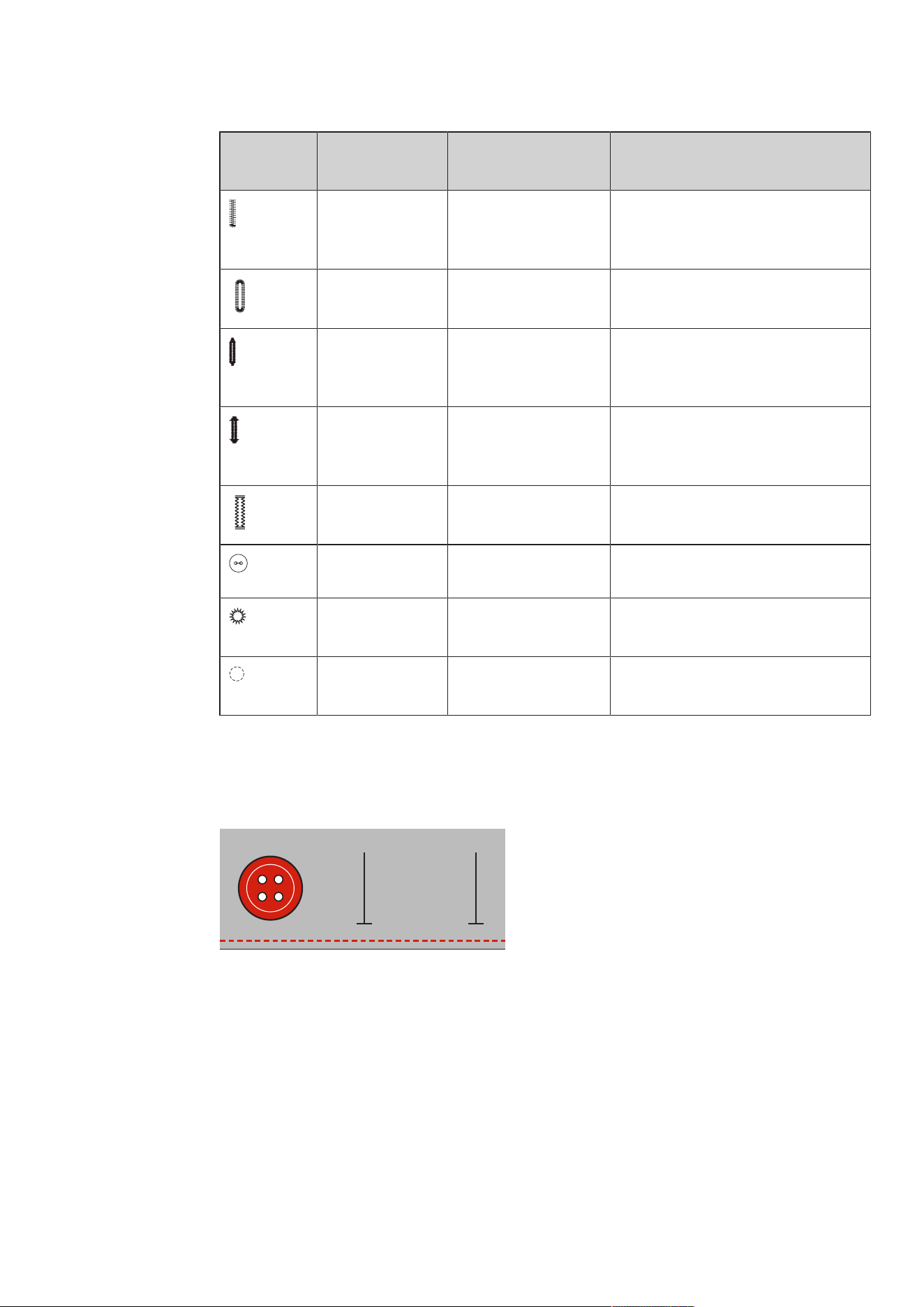
Buttonholes
83
2023-06 EN 5020077.40A.04
Buttonhole Buttonhole
Number
Name Description
63 Heirloom Buttonhole For light to medium-weight woven
fabrics; blouses, dresses, leisure wear,
bedlinen.
64 Double-rounded
Buttonhole
For medium to heavy-weight fabrics in
all kinds of different materials.
66 Buttonhole with Double
Pointed Bartack,
Narrow
Decorative buttonhole for medium
weight fabrics; blouses, dresses, jackets.
69 Decorative Buttonhole
with Double Pointed
Bartack
For decorative buttonholes in firmer,
non-elastic fabrics.
71 Stretch Buttonhole For jeans or stretch fabric with a coarse
weave.
60 Button Sew-on Program For buttons with 2 and 4 holes.
61 Eyelet with Small Zigzag Openings for cords and narrow ribbons,
for decorative work.
62 Eyelet with Straight
Stitch
Openings for cords and narrow ribbons,
for decorative work.
9.2 Marking Buttonholes
> Mark the positions of the buttonhole on the fabric.
– The maximum buttonhole length is 3cm (1 3/16inch). (Total of diameter + thickness of button.)
> The size of the buttonhole is determined by the button inserted in the buttonholder plate.
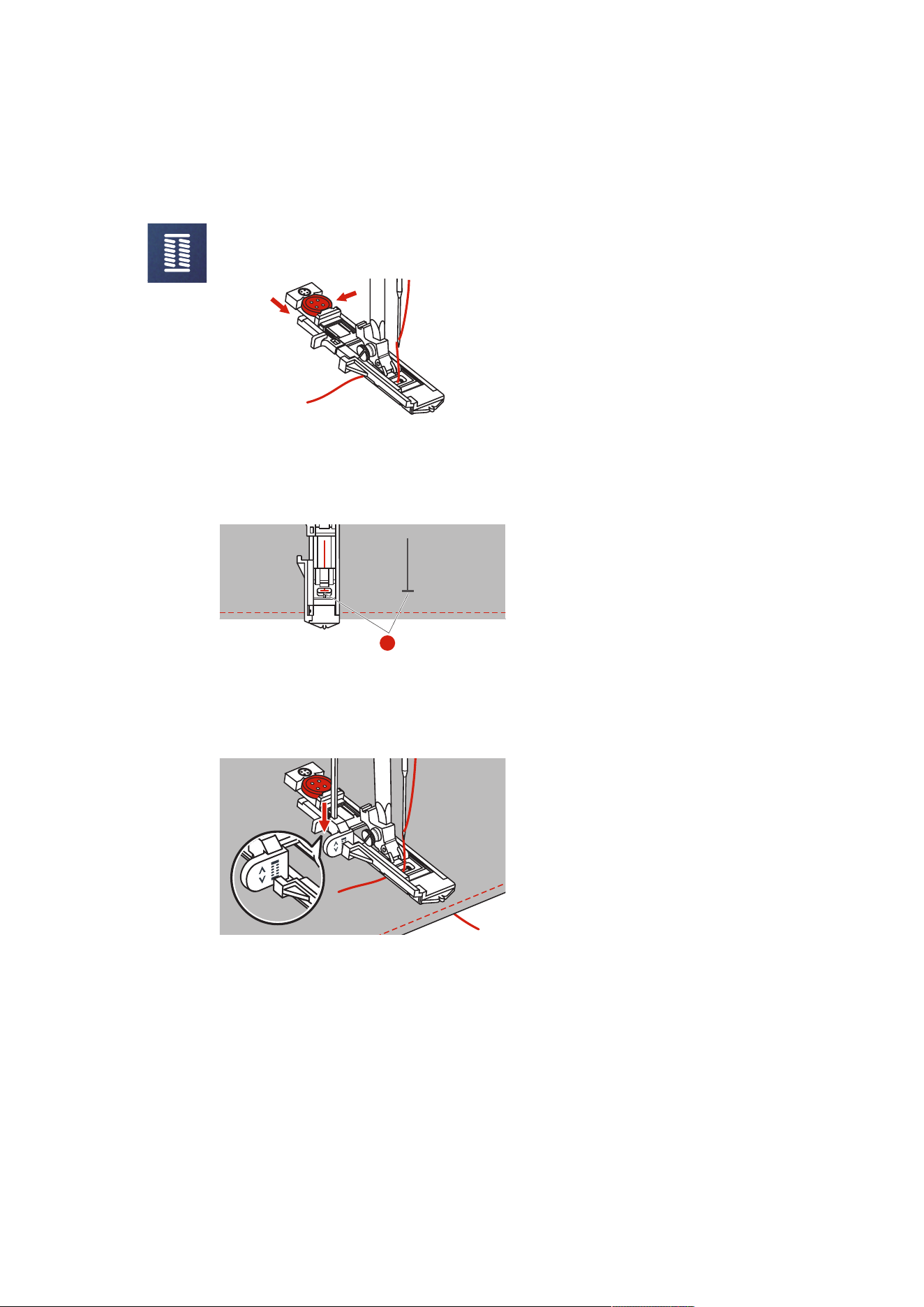
Buttonholes
84
2023-06 EN 5020077.40A.04
9.3 Sewing a Buttonhole Automatically
> Attach the Buttonhole Foot with Slide (RJ).
> Pull out the button holder plate and insert the button.
> Pass the thread through the hole in the presser foot and then place it under the foot.
> Tap «Buttonholes».
> Select the buttonhole stitch.
> Adjust the stitch width and stitch length to the desired width and density.
> Position the fabric under the presser foot so that marking of the centerline is aligned with the starting
point (1).
> Make sure that there is no gap between the presser foot tip and the plastic part.
1
> Push the button «Start/Stop».
– While the buttonhole lever is raised, the display shows an error message to lower the buttonhole
lever.
> Pull the buttonhole lever down as far as possible until it clicks into place.
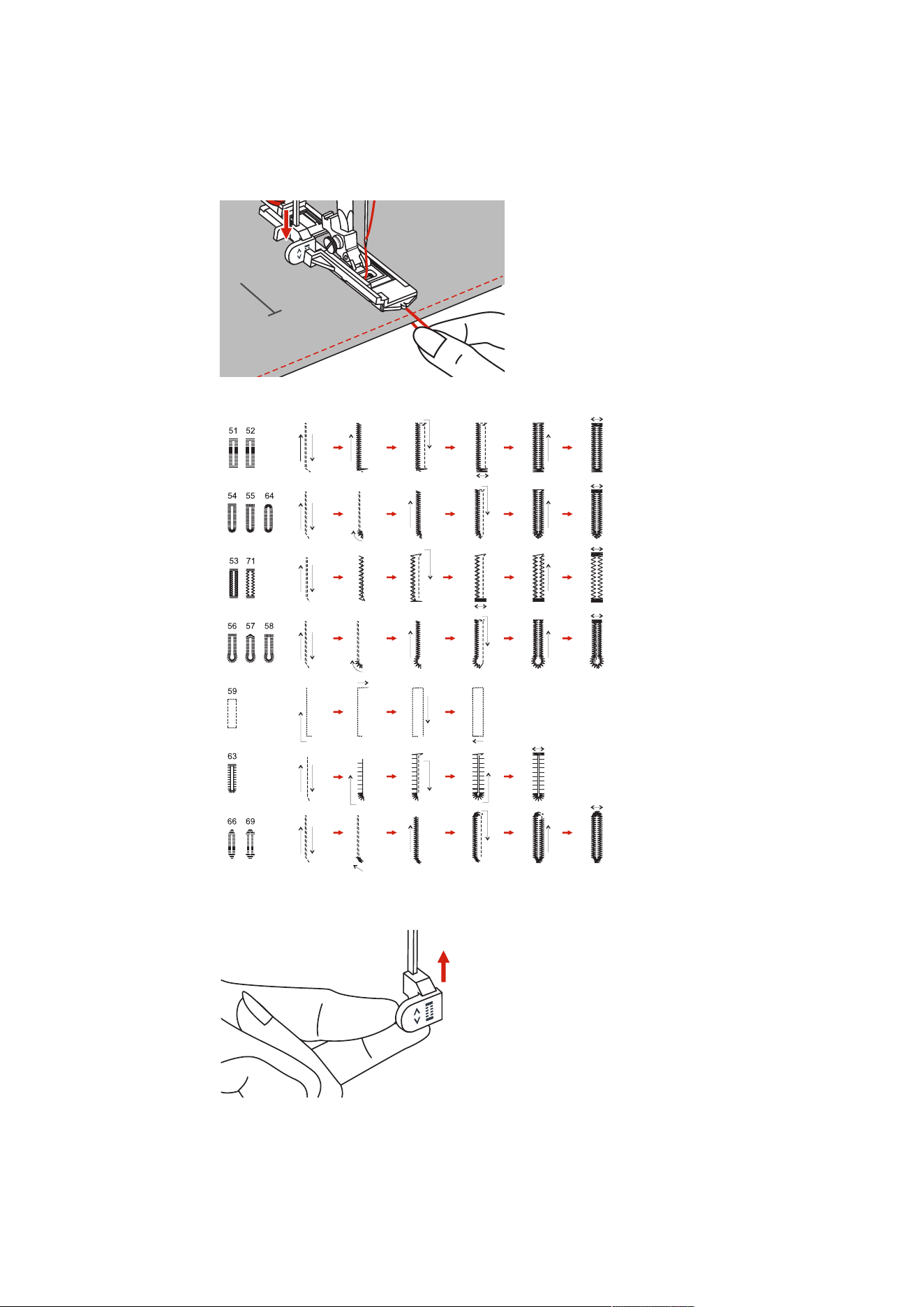
Buttonholes
85
2023-06 EN 5020077.40A.04
> Hold the upper thread vertically to the buttonhole foot with slide and start sewing.
– After the buttonhole has been sewn, the machine automatically sews a securing stitch before
stopping.
– The buttonholes are sewn backwards from the front of the presser foot as illustrated.
> Raise the sewing foot and cut the thread.
> After sewing the buttonhole, raise the buttonhole lever to the stop.
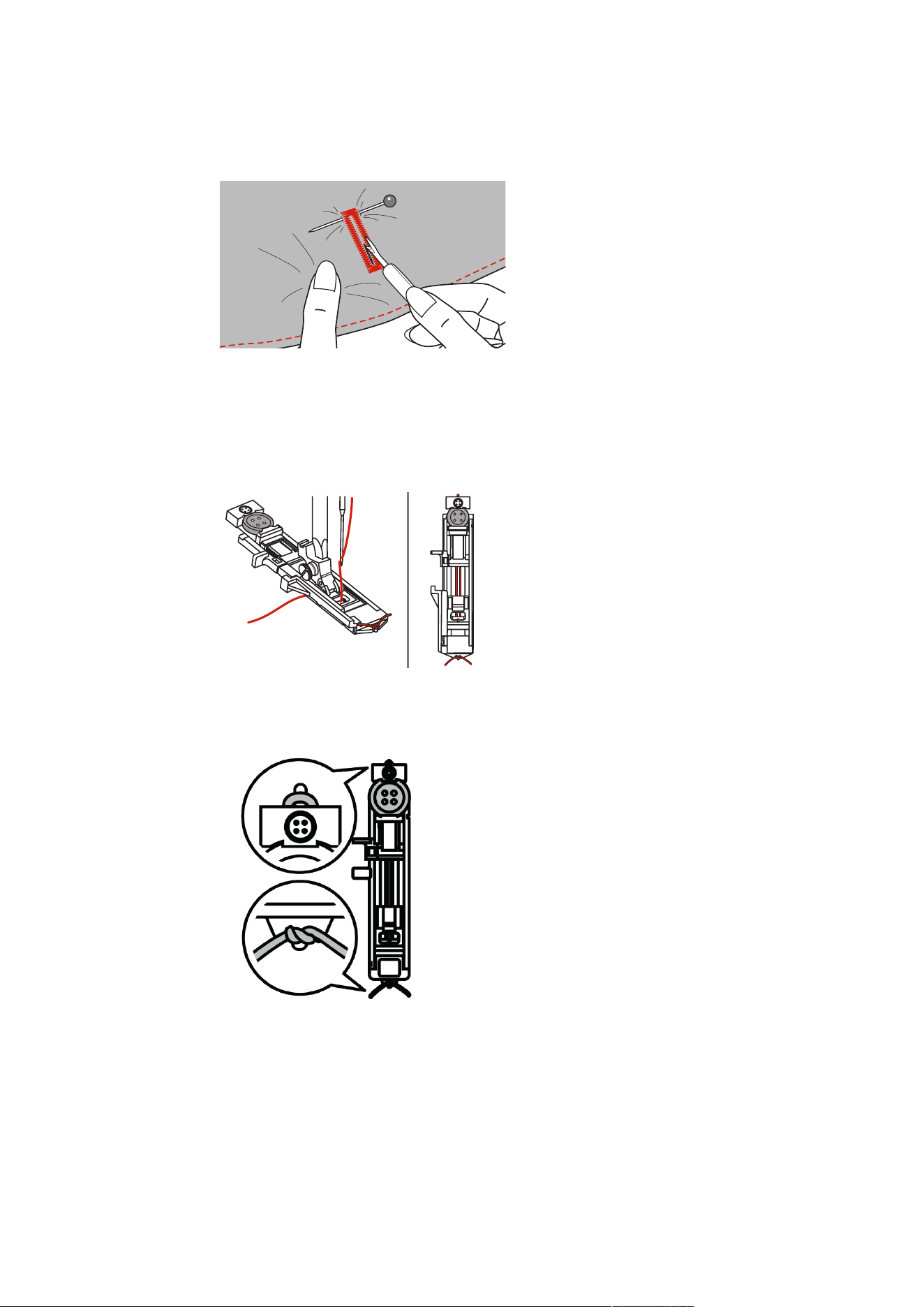
Buttonholes
86
2023-06 EN 5020077.40A.04
> Cut the buttonhole open and make sure that the beads are not cut on either side. Use a pin as a stop at
the bartack to avoid cutting too far.
9.4 Reinforce Buttonhole
When sewing buttonholes on stretch fabric, hook a heavy thread or a cord under the buttonhole foot.
> Attach the Buttonhole Foot with Slide (RJ).
> Pull out the button holder plate and insert the button.
> Pass the thread through the hole in the presser foot and then place it under the foot.
> Bring the two cord ends to the front of the foot and insert them in the grooves, then temporarily tie
them there.
> The stitch width and stitch length has to be adjusted before the sewing starts.
> Lower the presser foot an sew the buttonhole.
– The buttonhole will sew over the cord, covering it.
> Pull the cord loop until the loop disappears in the bartack.
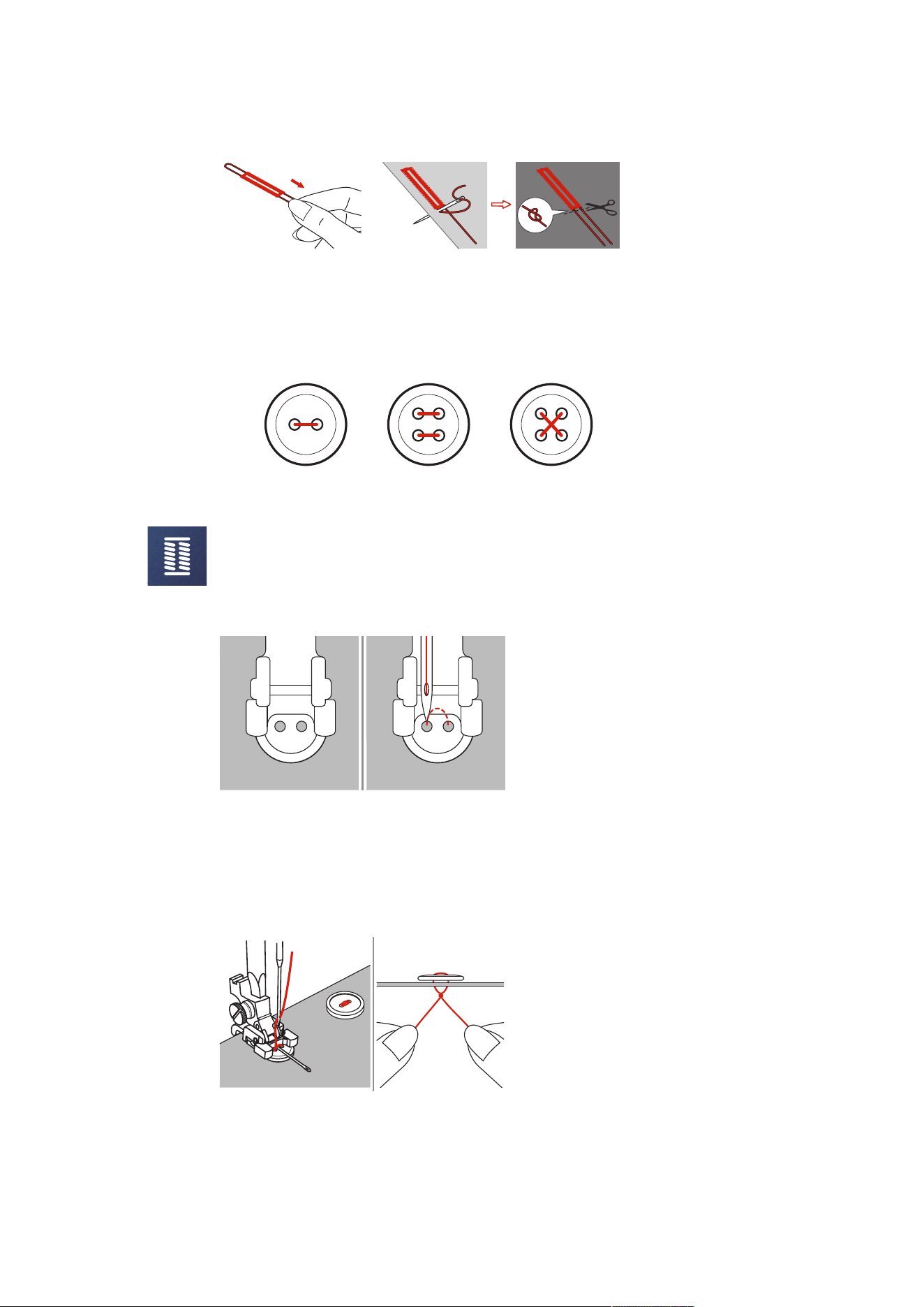
Buttonholes
87
2023-06 EN 5020077.40A.04
> Pull the cord ends with the sewing needle to the back and knot or secure them.
9.5 Sewing On Buttons
The Button Sew-on Program can be used to sew on buttons with two or four holes, press studs or snap
fasteners. To enhance the stability, the Button Sew-on Program always stitches into the left hole of the
button. As for a button with 4 holes, the two front holes should be sewn first.
The first securing stitch of the Button Sew-on Program alwasy stitches into the left hole of the button.
> Attach the Button Sew-on Foot (RC).
> Tap «Buttonholes».
> Lower the feed dog.
> Select the Button Sew-on Program No.60.
> Fit the button into the sewing project.
> Check distances between holes with the handwheel. If necessary, alter the stitch width.
> Hold the threads when starting to sew.
– The machine sews the buttonhole program and stops automatically.
– When a stem is needed, place a darning needle on the buttonhole and sew.
> Pull the two bobbin threads until the thread ends of the upper threads are visible on the wrong side of
the fabric.
> Tie the threads manually.
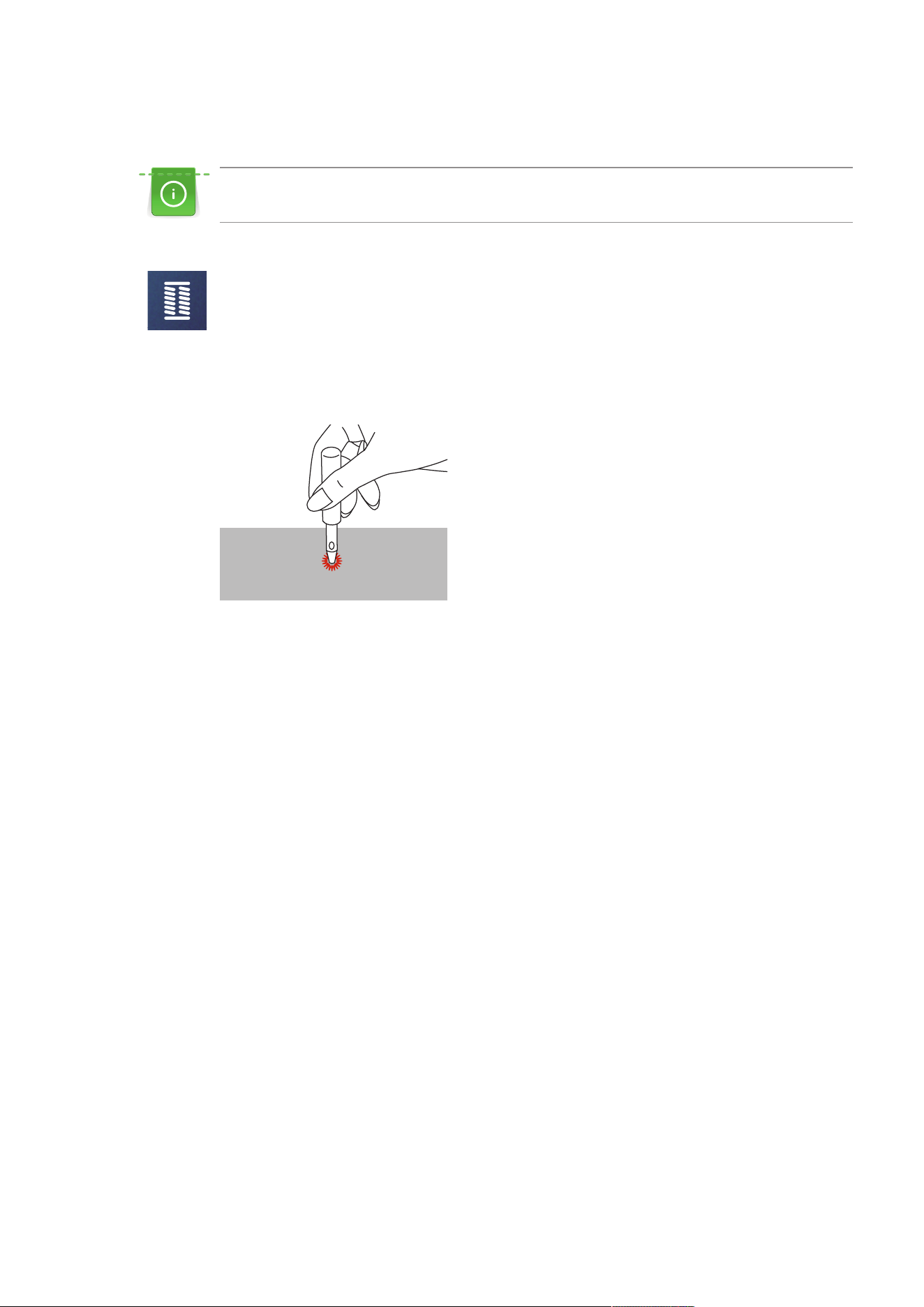
Buttonholes
88
2023-06 EN 5020077.40A.04
9.6 Sewing Eyelets
For increased stability sew the eyelet twice. Adjust stitch with the balance if necessary.
> Attach the Zigzag Foot (DA) or the Embroidery Foot (JK) or the Open embroidery Foot (DN) (optional
accessory).
> Tap «Buttonholes».
> Select the Eyelet Program No.61 or No.62.
> To alter the size of the eyelet, turn the «Upper Multi-function Knob» or the «Lower Multi-function
Knob».
> Sew the Eyelet Program.
– The machine stops automatically at the end of the Eyelet Program.
> Use an awl, punch pliers or a hole punch to open the eyelet.
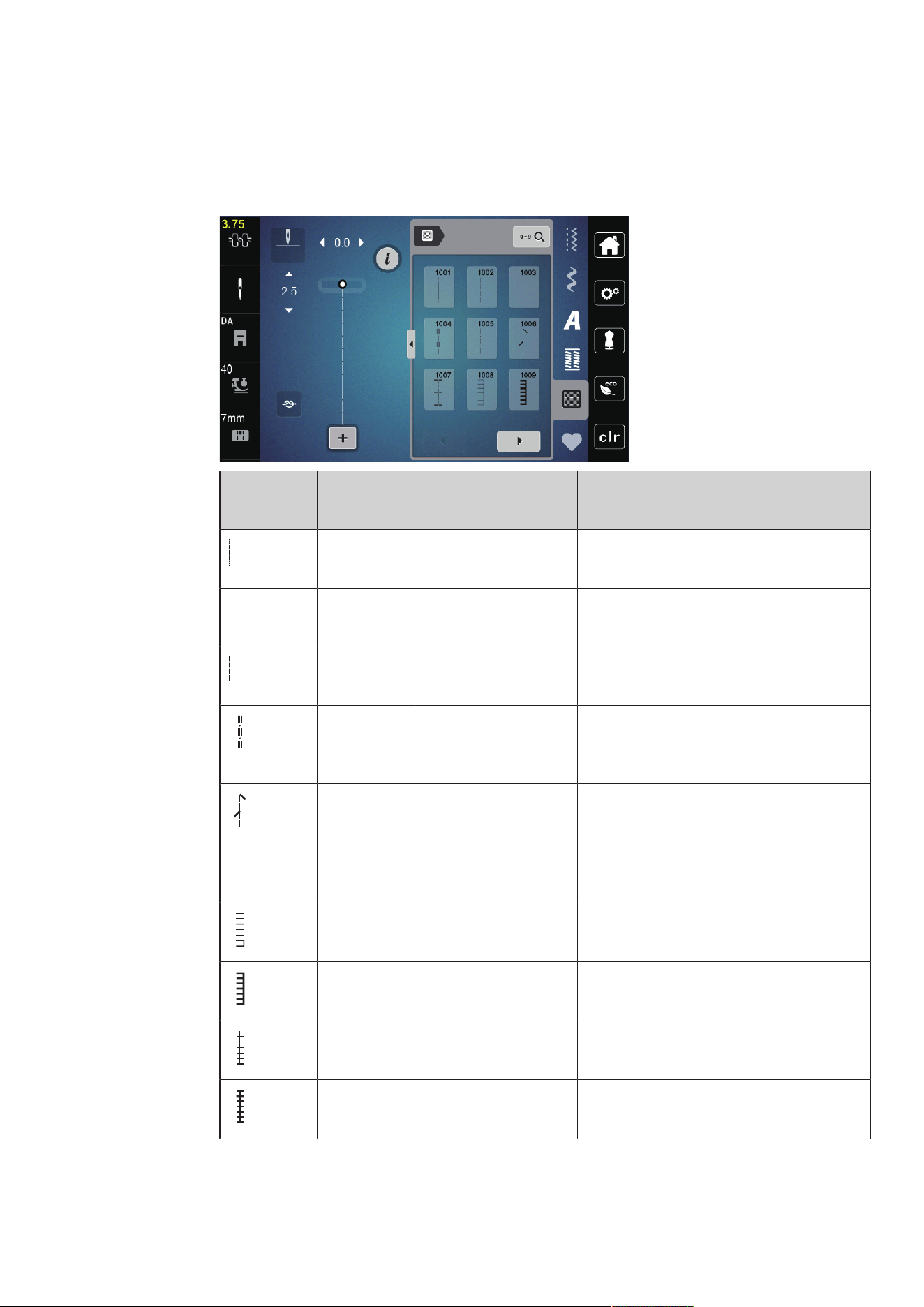
Quilting
89
2023-06 EN 5020077.40A.04
10 Quilting
10.1 Overview Quilt Stitches
Stitch
Pattern
Stitch
Number
Name Description
1001 Quilting, Securing
Program
To secure at the sewing start and sewing end
with short stitches forward.
1002 Quilting, Straight Stitch Straight stitch 2mm stitch length, to join
patchwork parts.
1003 Piecing Stitch/Straight
Stitch
Straight stitch at 3mm stitch length.
1004 Handlook Quilt Stitch
1005, 1030, 1034,
1035
Imitation of handlook quilt stitch with
monofilament.
1006 Decorative Quilt Stitch
Variations
1007, 1010-1012,
1015-1019,
1025-1027, 1031-1032
For "Crazy Patchwork" and embellishing.
1008 Blanket Stitch For appliqué and sewing on ribbons.
1009 Double Blanket Stitch For appliqué and sewing on ribbons.
1013 Dual Blanket Stitch To edgestitch between two appliqués, "Crazy
Patchwork".
1014 Double Blanket Stitch
Dual
To edgestitch between two appliqués, "Crazy
Patchwork".
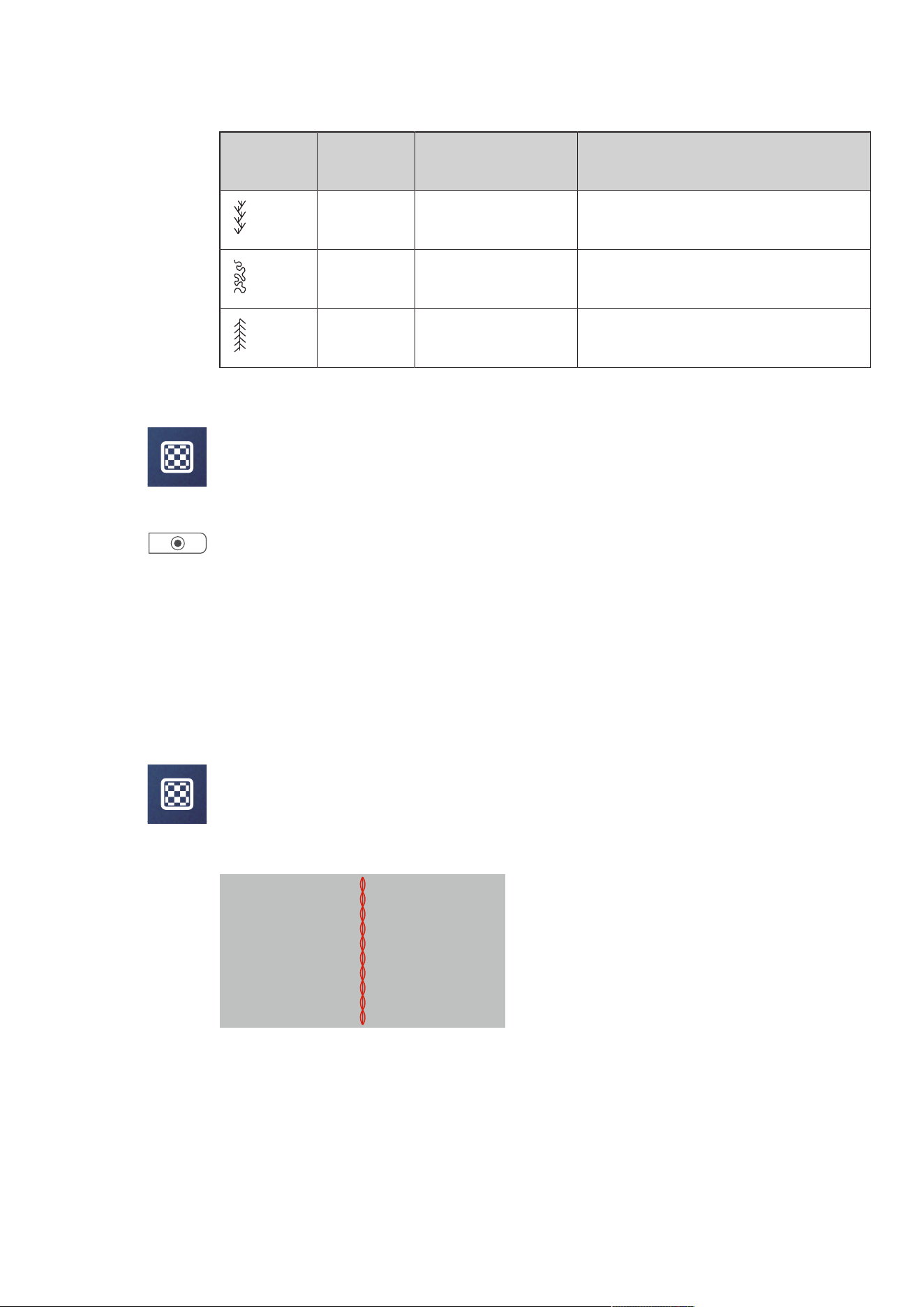
Quilting
90
2023-06 EN 5020077.40A.04
Stitch
Pattern
Stitch
Number
Name Description
1020 Feather Stitch Variations
1021-1023
For "Crazy Patchwork" and embellishing.
1024 Stippling Stitch/
Stippling Quilt Stitch
Imitation of stipple quilting.
1029 Feather Stitch
1028, 1033
For "Crazy Patchwork" and embellishing.
10.2 Quilting, Securing Program
> Attach the Zigzag Foot (DA).
> Tap «Quilt Stitches».
> Select Quilt Stitch Pattern No.1001.
> Press the foot control.
– The machine sews 5 stitches forward automatically when sewing is started.
> Sew the seam in the desired length.
> Push the button «Securing Stitches».
– The machine sews 5 stitches forward automatically and stops automatically at the end of the Securing
Program.
10.3 Sewing Hand-look Quilt Stitches
Hand-look quilt stitches are suitable for all fabrics and sewing projects that should look like hand-sewn. It is
recommended to use a monofilament thread for the upper thread and a cotton embroidery thread for the
bobbin thread. The sewing speed should be moderate to prevent the monofilament from breaking. If
required, the upper thread tension and the balance can be adjusted to the sewing project and the desired
quilt stitch.
> Attach the Embroidery Foot (JK) / Zigzag Foot (DA).
> Tap «Quilt Stitches».
> Select the Hand Quilt Stitch No.1004 or 1005.
> If necessary, adjust the upper thread tension and the balance to suit the sewing project and the desired
quilt stitch.
> To start the machine, press the foot control or push the button «Start/Stop».
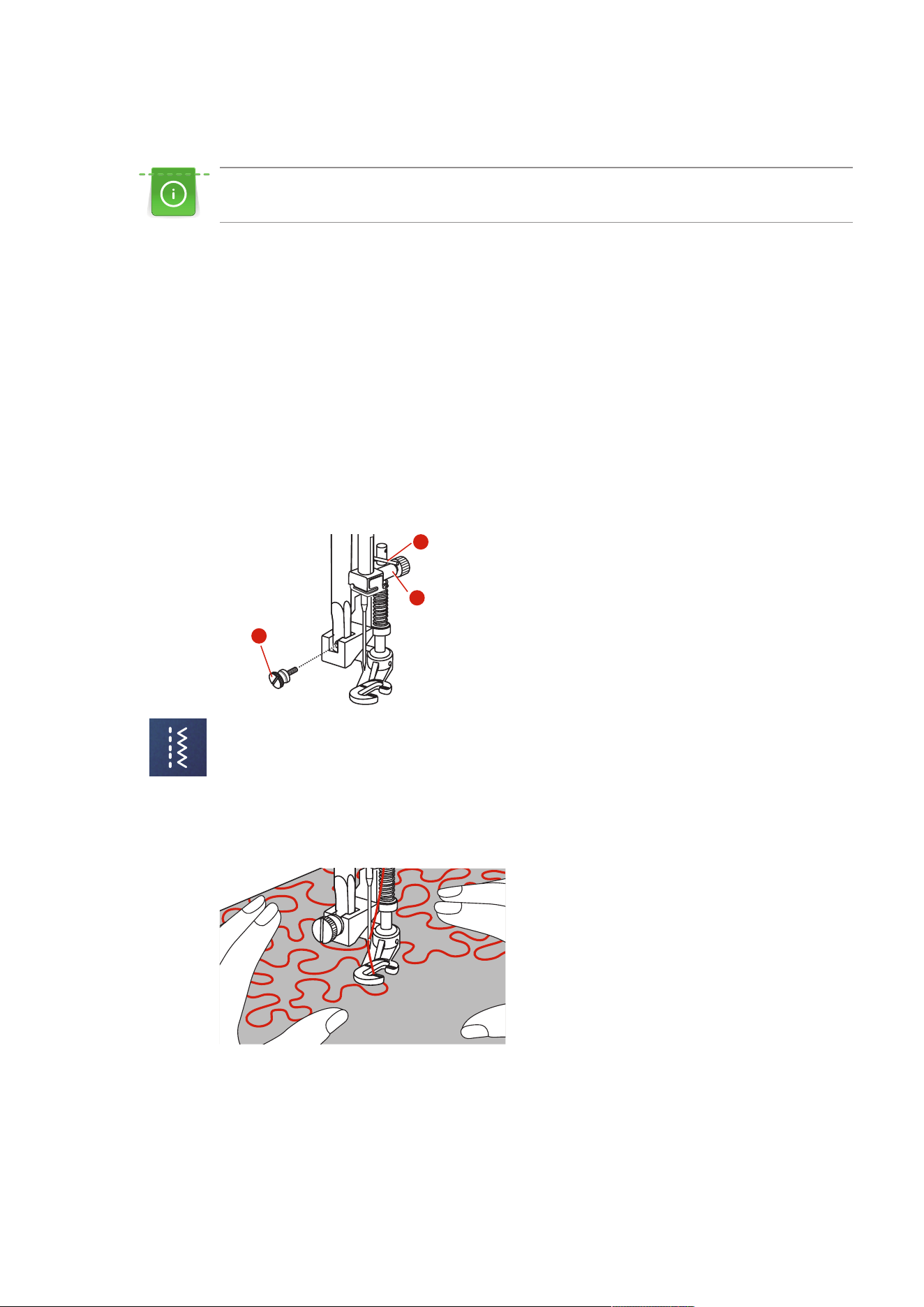
Quilting
91
2023-06 EN 5020077.40A.04
10.4 Guiding the Quilt Work Freely
Quilting gloves with rubber nubs make it easier to guide the fabric.
It is recommended to use the extension table (optional accessory) and the Free Hand System. With free
motion quilting, it is of advantage to quilt from the center outwards and to guide the fabric using smooth,
round movements to form the design of your choice. Free motion quilting and darning are based on the
same free motion principles.
With stipple quilting, entire surfaces of the fabric are filled with quilt stitches. The single lines of stitching are
rounded and never cross one another.
Prerequisite:
• The top layer, the batting and the backing are pinned together or basted.
> Lower the feed dog.
> Attach the Free-motion Embroidery Foot (RX) to the presser foot holder bar.
– The pin (1) should rest on the upper side of the needle clamping screw (2).
> Press the Free-motion Embroidery Foot (RX) firmly from below with your index finger and tighten the
screw (3).
3
2
1
> Tap «Practical Stitches».
> Select Straight Stitch No.1.
> If necessary adjust the upper thread tension according to the sewing project.
> To start the machine, press the foot control or push the button «Start/Stop».
> Hold both hands close to the presser foot like an embroidery hoop to guide the fabric.
> If the thread is lying on top of the fabric, slow down the movement.
> If there are knots on the wrong side of the fabric, move the fabric more quickly.
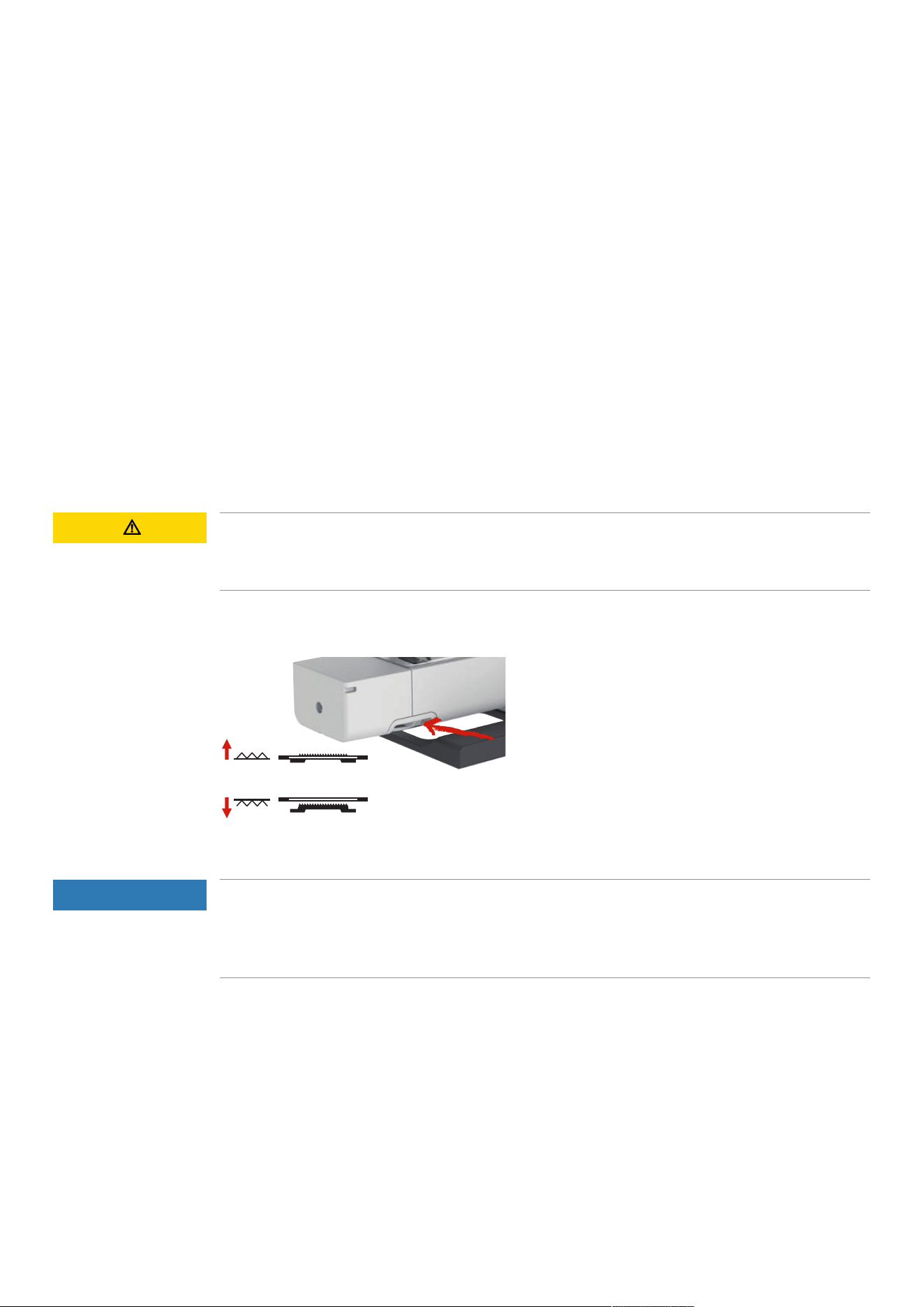
Maintenance and Cleaning
92
2023-06 EN 5020077.40A.04
11 Maintenance and Cleaning
11.1 Cleaning and Maintenance Intervals
To ensure the functionality and sewing quality of the machine, the machine must be cleaned and maintained
regularly. The intervals for cleaning and maintenance of the machine depend on various factors, such as the
fabrics and threads used.
As an advice to clean the machine, a message appears after 500,000 stitches.
As an advice to have the machine maintained, a message appears when 4,000,000 stitches have been sewn
after a service.
11.2 Cleaning the Display
> Clean the display when it is switched off with a soft slightly damp microfiber cloth.
11.3 Cleaning the Feed Dog
Remaining threads under the stitch plate must occasionally be removed.
> Raise the needle and presser foot.
CAUTION
Electronically Driven Components
Risk of injury near the needle and the hook.
> Switch the machine off and disconnect it from the power supply system.
> Remove the needle and presser foot.
> Lower feed dog.
> Remove the stitch plate.
NOTICE
Dust and Thread Residues Inside the Machine
Damage to mechanical and electronic components.
> Use a brush or a soft cloth.
> Do not use compressed air spray.
> Clean the feed dog with the brush.
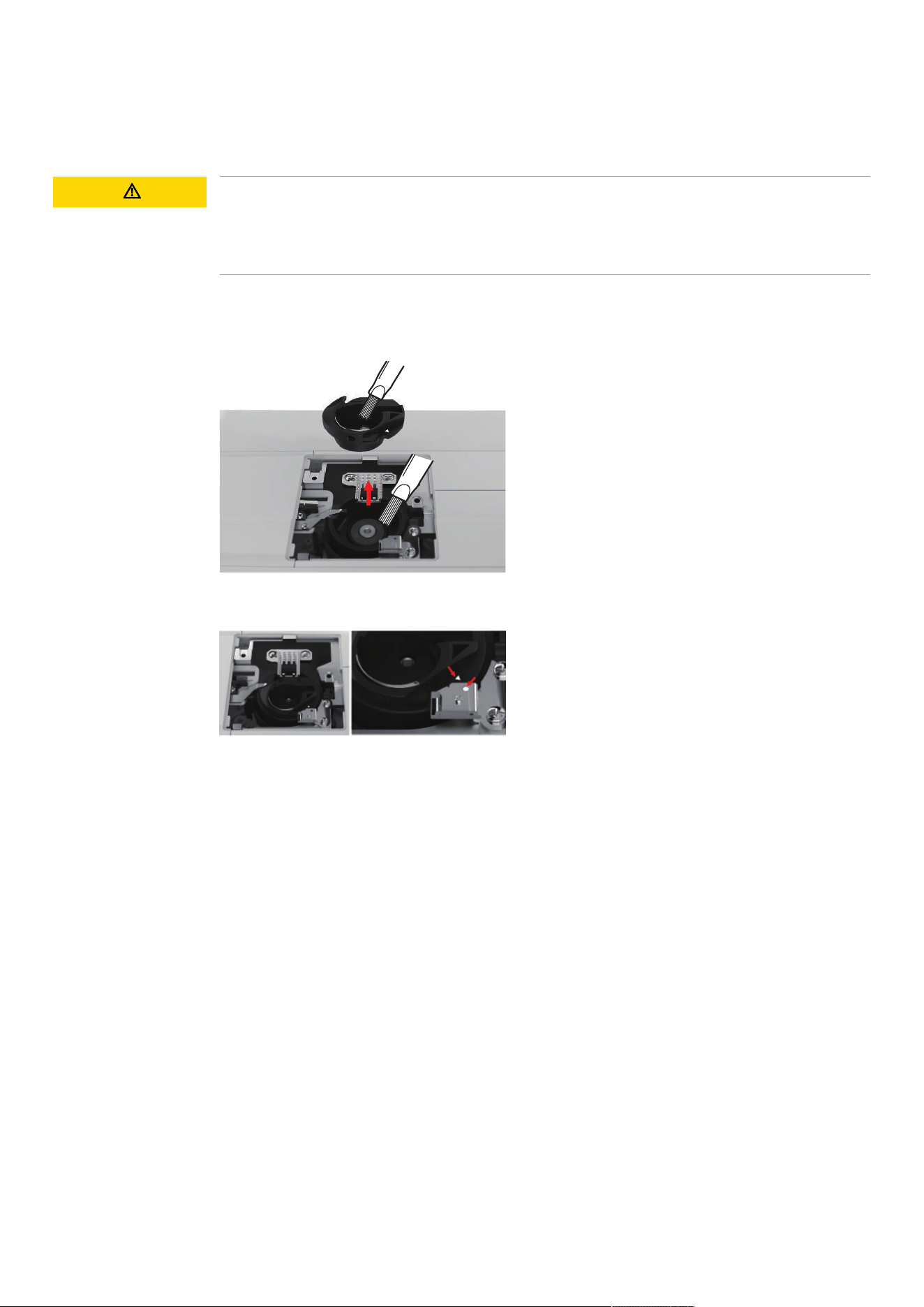
Maintenance and Cleaning
93
2023-06 EN 5020077.40A.04
11.4 Cleaning the Hook
CAUTION
Electronically Driven Components
Risk of injury near the needle and the hook.
> Raise the presser foot.
> Switch the machine off and disconnect it from the power supply system.
> Remove the presser foot and the needle.
> Remove the stitch plate.
> Clean the bobbin case with the brush.
> Set needle to topmost position.
> Remove the bobbin case.
> Clean the shuttle race with the brush.
> Insert the boobin case.
Note: The markings of the bobbin case and the stitch plate must be aligned identically.
> Fit the stitch plate.
> Fit the bobbin cover.
> Fit the needle and presser foot.
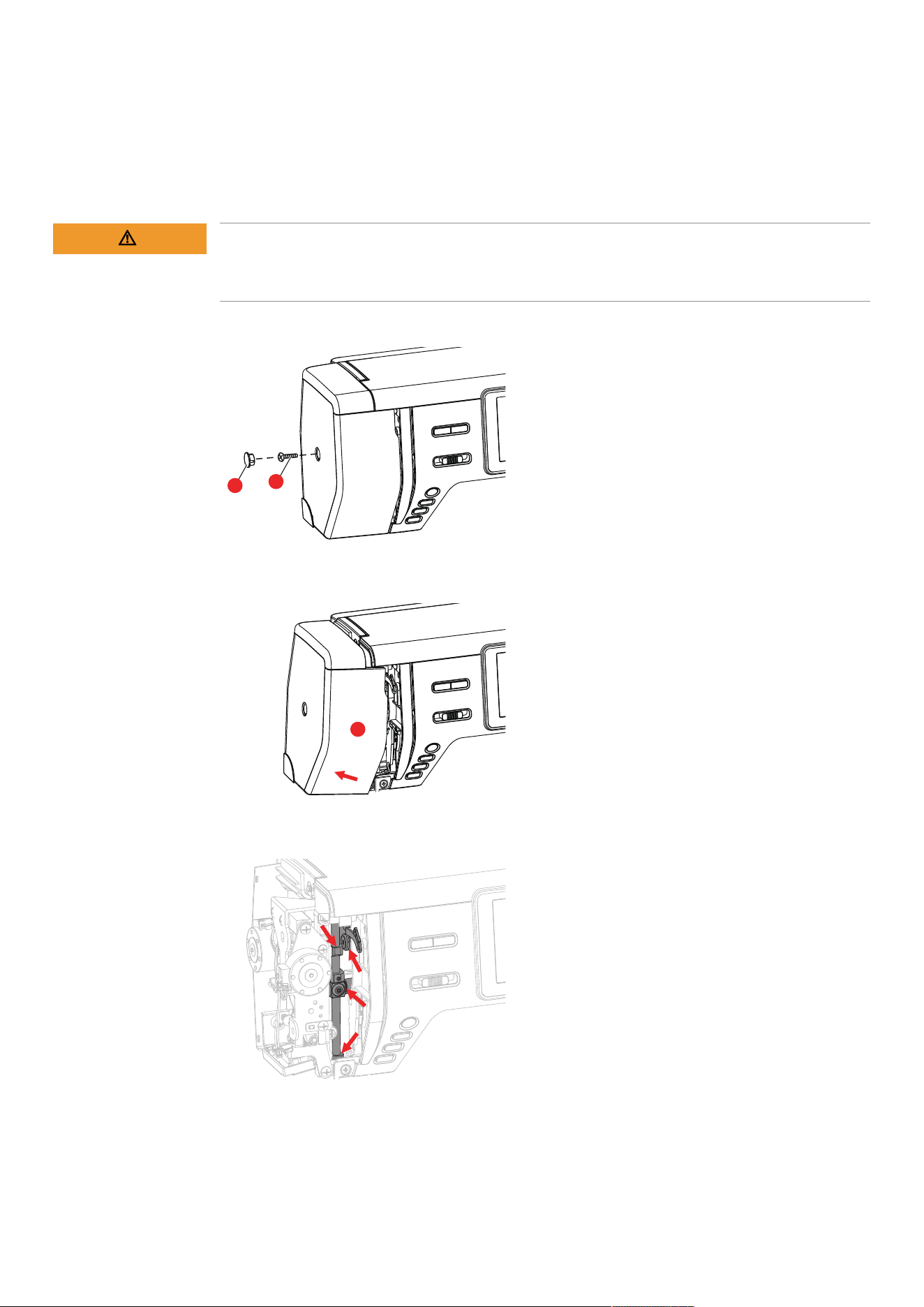
Maintenance and Cleaning
94
2023-06 EN 5020077.40A.04
11.5 Oiling the Needle Bar
The needle bar may not move smoothly without lubrication. If the machine is used frequently, the needle bar
should be oiled every 6 months to prevent blocking.
WARNING
Electronically Driven Components
Risk of injury near the needle bar.
> Switch the machine off and disconnect it from the power supply system.
> Remove the protective cap (1) and screw (2).
1
2
> Remove the headframe cover (3).
– After removing the headframe cover, pay attention to the moving parts.
3
> Apply a drop of oil to the movement mechanism of the needle bar, including the connecting rod/needle
bar, needle bar holder and needle bar holder (apply oil to the points marked with an arrow).
> Remove the presser foot.
> Turn the handwheel a few times and remove any excess oil with a cloth.
> Attach the headframe cover again.

Errors and Faults
95
2023-06 EN 5020077.40A.04
12 Errors and Faults
12.1 Troubleshooting
Fault Cause Repair
Uneven Stitch Formation
Upper thread too tight or too
loose.
> Adjust the upper thread tension.
Needle blunt or bent. > Replace the needle, make sure that a new BERNINA
quality needle is used.
Poor quality needle. > Use a new BERNINA quality needle.
Poor quality thread. > Use quality thread.
Incorrect needle/thread
combination.
> Match the needle with the thread size.
Incorrectly threaded. > Rethread.
The fabric has been pulled. > Feed the fabric evenly.
Dust or thread remnants under
the tension spring of the bobbin
case.
> Remove any dust or thread remnants from under the
tension spring of the bobbin case.
Skipped Stitches
Incorrect needle. > Use the needle system 130/705H.
Needle blunt or bent. > Replace the needle.
Poor quality needle. > Use a new BERNINA quality needle.
The needle is incorrectly inserted. > Insert the needle with the flat side to the back as far up
as it will go into the needle holder and tighten the
screw.
Incorrect needle point. > Match the needle point to the texture of the material.
Faulty Stitching
Thread remnants between the
thread tension discs.
> Fold a piece of thin material and slide the folded edge
(not the raw edges) between the thread tension discs.
Incorrectly threaded. > Rethread.
Thread is caught in the hook. > Remove the upper thread and the bobbin case, turn the
handwheel backwards and forwards by hand and
remove the thread remnants.
Incorrect needle/thread
combination.
> Check the needle/thread combination.

Errors and Faults
96
2023-06 EN 5020077.40A.04
Fault Cause Repair
Upper Thread Breaks
Incorrect needle/thread
combination.
> Match the needle with the thread size.
Upper thread is too tight. > Reduce the upper thread tension.
Incorrectly threaded. > Rethread.
Poor quality thread. > Use quality thread.
The stitch plate or the hook tip is
damaged.
> Contact a specialized bernette dealer to have the
damages repaired.
> Replace the stitch plate.
Lower Thread Breaks
The bobbin is not inserted
correctly.
> Remove and reinsert the bobbin and pull on the thread.
– The thread should run easily.
Bobbin is wound incorrectly. > Check bobbin and thread correctly.
The stitch hole in the stitch plate
is damaged.
> Contact a specialized bernette dealer to have the
damages repaired.
> Replace the stitch plate.
Needle blunt or bent. > Replace the needle.
Needle Breaks
The needle is incorrectly inserted. > Insert the needle with the flat side to the back as far up
as it will go into the needle holder and tighten the
screw.
The fabric has been pulled. > Feed the fabric evenly.
Thick fabric has been pushed. > Use the appropriate presser foot, e.g. Jeans foot No. 8
for thick material.
> Use the height compensating tool when sewing over a
thick seam.
Knotted thread. > Use quality thread.
Display is Inactive
Incorrect calibrating data. > Switch the machine off.
> Switch the machine on and simultaneously press and
hold down the buttons «Needle Left/Right».
> Recalibrate the display.
The eco Mode is active. > Tap «eco Mode».
Stitch Width Not Adjustable
The selected needle and stitch
plate cannot be used in
combination.
> Replace the needle.
> Replace the stitch plate.
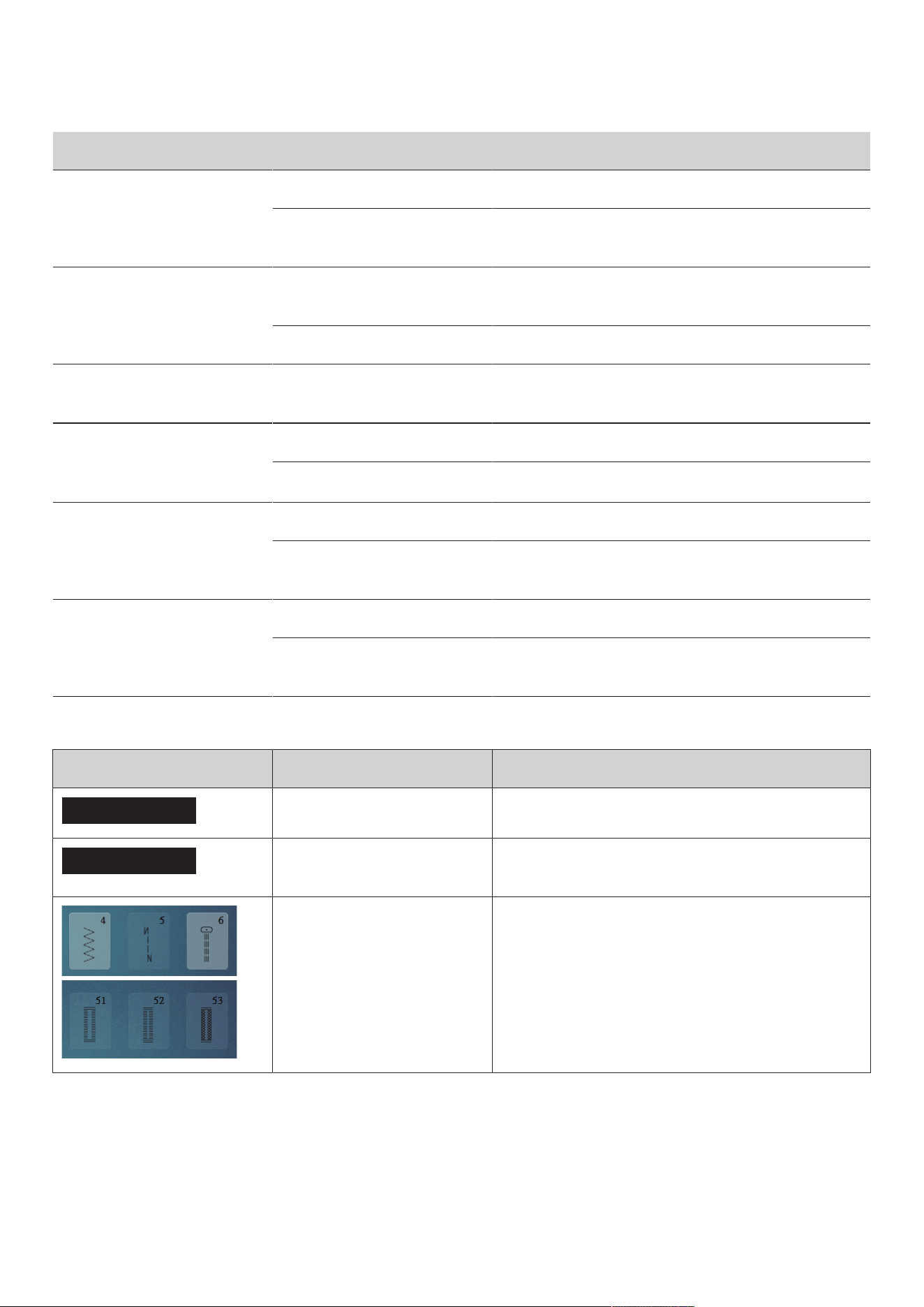
Errors and Faults
97
2023-06 EN 5020077.40A.04
Fault Cause Repair
Speed Too Low
Unfavorable room temperature. > Place the machine in a warm room one hour before use.
Settings in the Setup Program. > Adjust the sewing speed in the Setup Program.
> Adjust the slide.
The Machine doesn't Start
Unfavorable room temperature. > Place the machine in a warm room one hour before use.
> Connect the machine and switch it on.
The machine is damaged. > Contact the specialized bernette dealer.
The Light of the Button
«Start-/Stop» doesn't Light Up
Light is defect. > Contact the specialized bernette dealer.
Neither the Sewing Light Nor
the Light on the Freearm
Lights Up
Settings in the Setup Program. > Activate it in the Setup Program.
The sewing light is defect. > Contact the specialized bernette dealer.
Upper Thread Indicator Fails
to Respond
Settings in the Setup Program. > Activate it in the Setup Program.
The upper thread indicator is
defect.
> Contact the specialized bernette dealer.
Bobbin Thread Indicator
doesn't React
Settings in the Setup Program. > Activate it in the Setup Program.
The bobbin thread indicator is
defect.
> Contact the specialized bernette dealer.
12.2 Error messages
Message on the Display Cause Repair
???
This stitch number does not exist. > Check the entry and enter the new number.
!!!
Selection of stitch patterns not
possible in combi-mode.
> Check the entry and enter the new number.
The stitch number cannot be
selected in combi mode.
> Select other stitches.
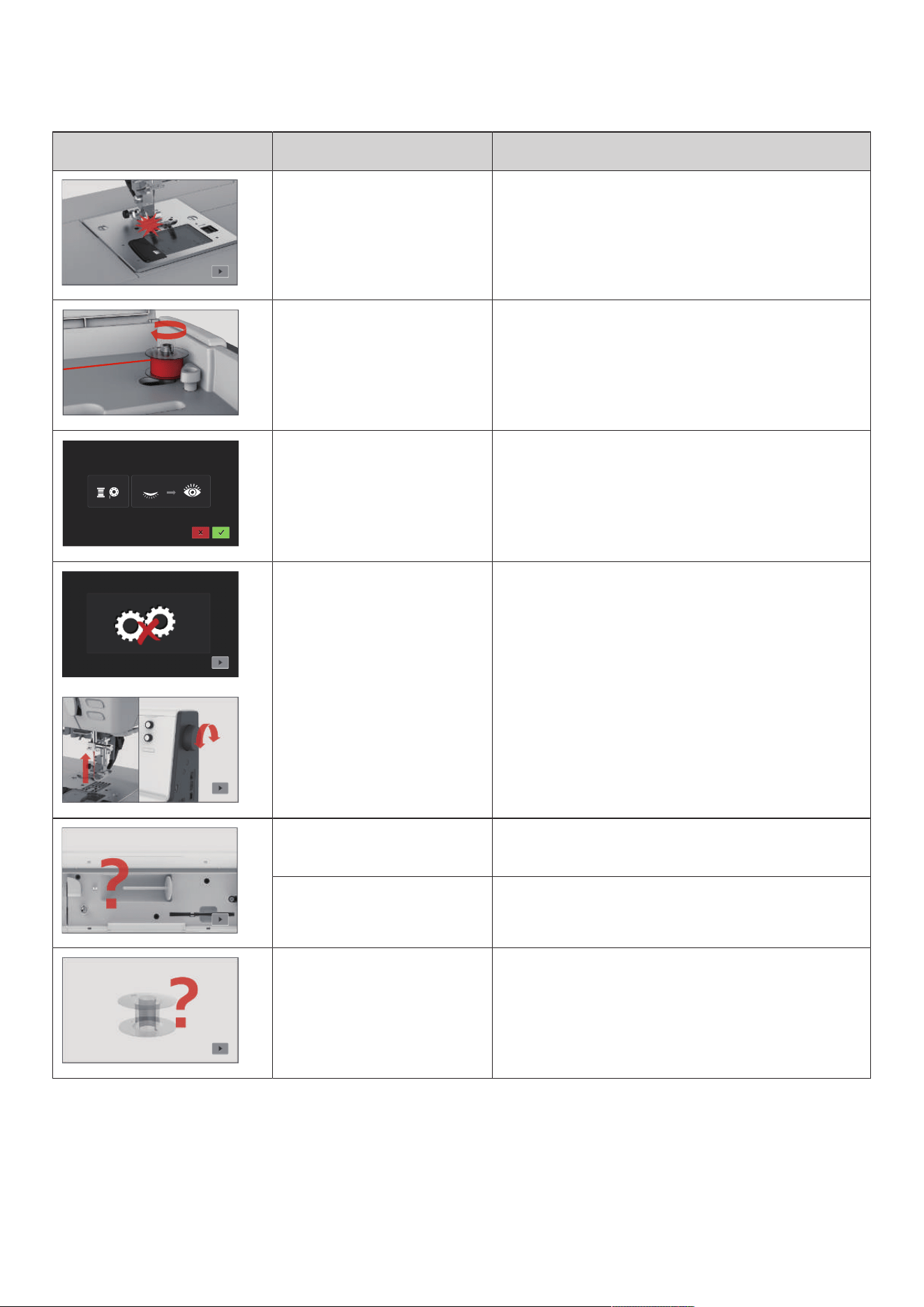
Errors and Faults
98
2023-06 EN 5020077.40A.04
Message on the Display Cause Repair
The selected needle and stitch
plate cannot be used in
combination.
> Check whether the correct needle and stitch plate are
attached.
> Exchange the needle and select it in the user interface.
> Exchange the stitch plate and select it in the user
interface.
The winding unit is activated. > Deactivate the winding unit.
The thread indicator is
deactivated.
> To switch on both thread indicators, tap «Confirm».
> To keep the thread indicators switched off, tap
«Cancel».
The main motor is not running. > Turn the handwheel clockwise until the needle is at its
top position.
> Remove the stitch plate.
> Remove the thread remnants.
> Clean the hook.
> Remove the hook and make sure that there are no
pieces of broken needle points on the magnetic back of
the hook.
The upper thread is used up. > Insert a new thread spool.
> Rethread.
The upper thread has broken. > Rethread.
The bobbin thread is used up. > Remove the empty bobbin, wind it again and reinsert it.
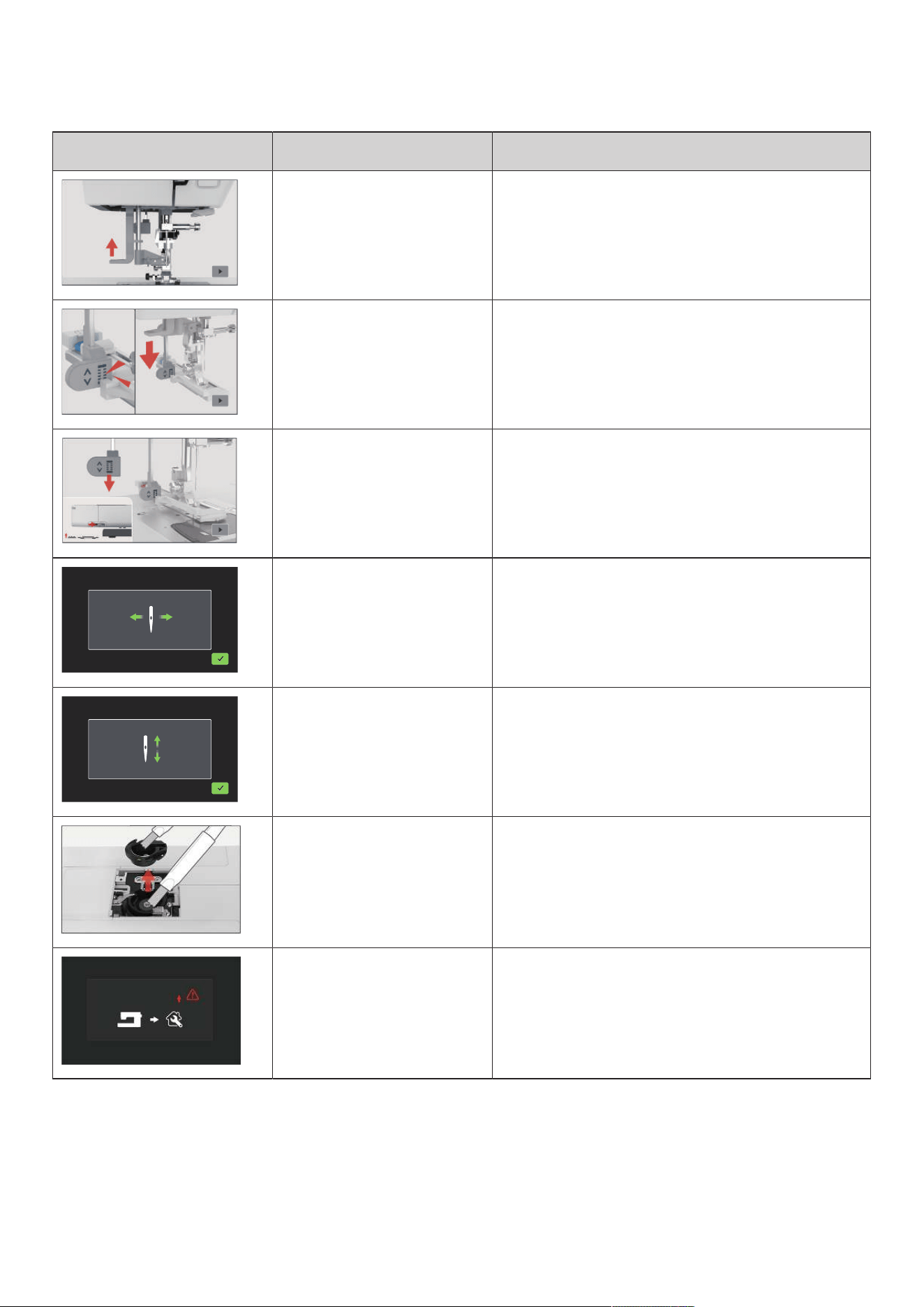
Errors and Faults
99
2023-06 EN 5020077.40A.04
Message on the Display Cause Repair
The threader lever is not raised. > Raise the threader lever.
The buttonhole lever does not
touch the buttonhole foot with
slide (RJ).
> Pull the buttonhole lever down as far as possible until it
engages behind the bracket.
The buttonhole lever is not pulled
down.
The feed dog is lowered.
> Pull the buttonhole lever down as far as possible until it
engages behind the bracket.
> Raise the feed dog.
The needle moves sideways. When the stitch plate is exchanged, this illustration appears
because the needle is likely to move.
The needle moves upwards. > Check whether there are any external objects near the
stitch plate.
> To raise the needle, tap «Confirm».
500,000 stitches have been sewn
with the machine since the last
cleaning advice.
> Clean the machine.
> For reference to cleaning to be made again after
switching on the machine, tap «Cancel».
The machine has reached a stitch
count of 4,000,000 since the last
maintenance by a bernette
dealer.
> Contact your specialized bernette dealer to have the
machine maintained.
> For reference to maintenance to be made again after
switching on the machine, tap «Cancel».
Technical data
100
2023-06 EN 5020077.40A.04
13 Technical data
Designation Value Unit
Sewign Light (LED) 300, 2 mA, Watt
Maximum Speed Sewing Mode: 1000 Stitches per Minute
Measurements (w × d × h) 509 x 200 x 315 mm
Weight Machine: 9.21
Accessory Box: 0.46
kg
Energy Consumption 90 W
Input Voltage 100 – 240 V
Protection Class (Electrical Engineering) Protection Class II
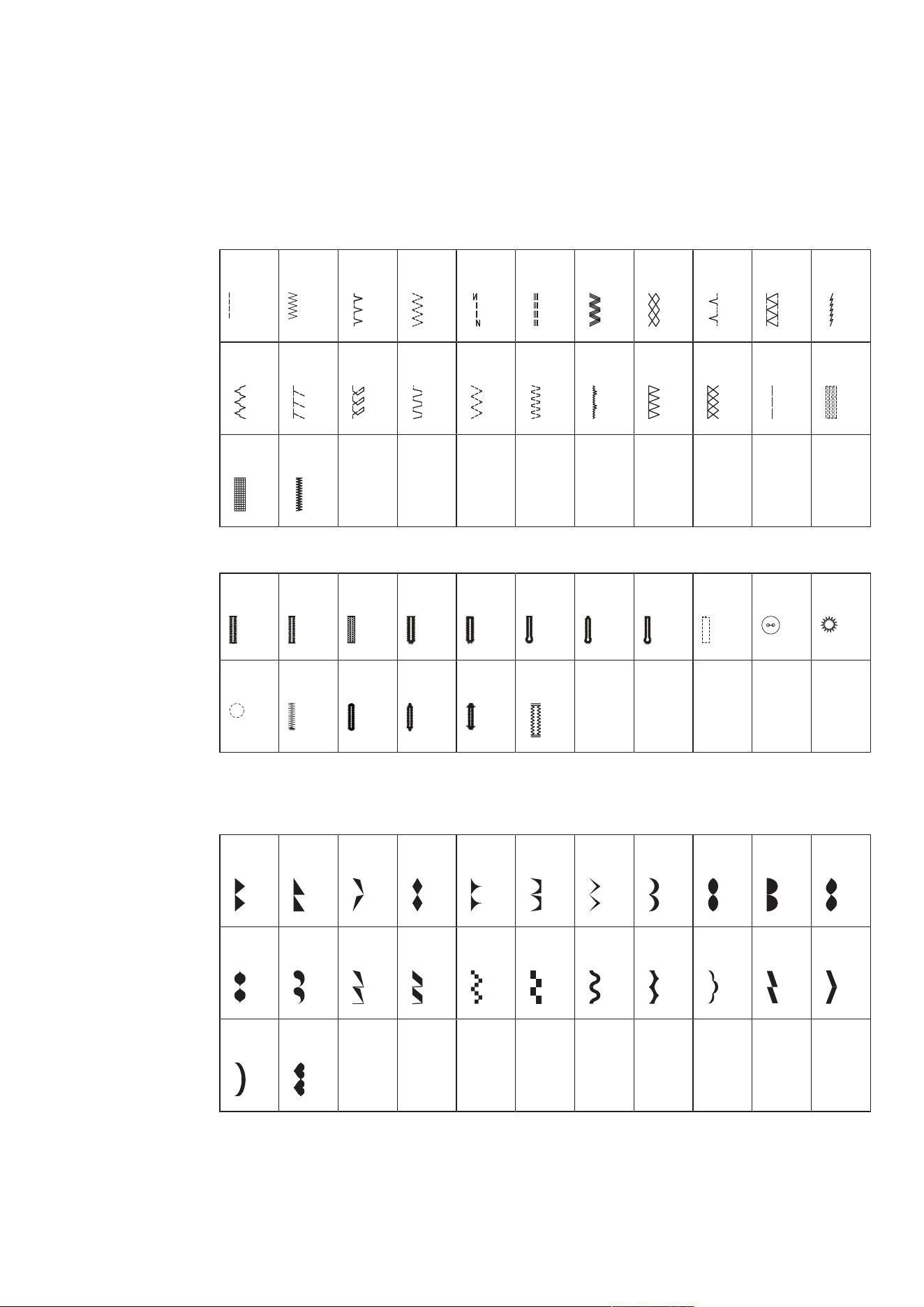
Appendix
101
2023-06 EN 5020077.40A.04
14 Appendix
14.1 Overview Stitch Patterns
Practical Stitches
1 2 3 4 5 6 7 8 9 10 11
12 13 14 15 16 17 18 19 20 21 22
23 24
Buttonholes
51 52 53 54 55 56 57 58 59 60 61
62 63 64 66 69 71
Decorative stitches
Satin Stitches
101 102 103 104 105 106 107 108 109 110 111
112 113 114 115 116 117 118 119 120 121 122
123 124
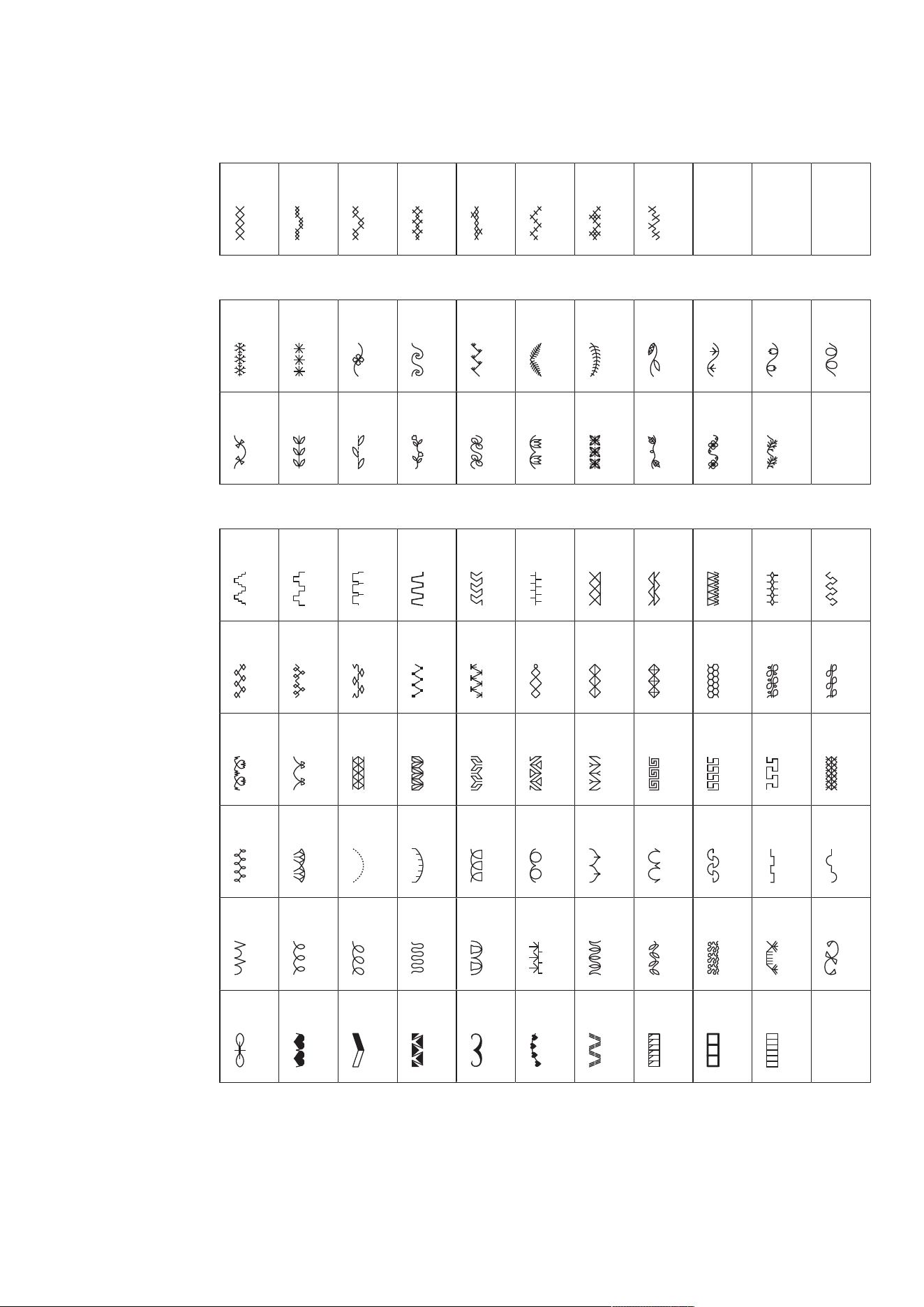
Appendix
102
2023-06 EN 5020077.40A.04
Cross Stitches
125 126 127 128 129 130 131 132
Nature Stitches
133 134 135 136 137 138 139 140 141 142 143
144 145 146 147 148 149 150 151 152 153
Geometric Stitches
154 155 156 157 158 159 160 161 162 163 164
165 166 167 168 169 170 171 172 173 174 175
176 177 178 179 180 181 182 183 184 185 186
187 188 189 190 191 192 193 194 195 196 197
198 199 200 201 202 203 204 205 206 207 208
209 210 211 212 213 214 215 216 217 218
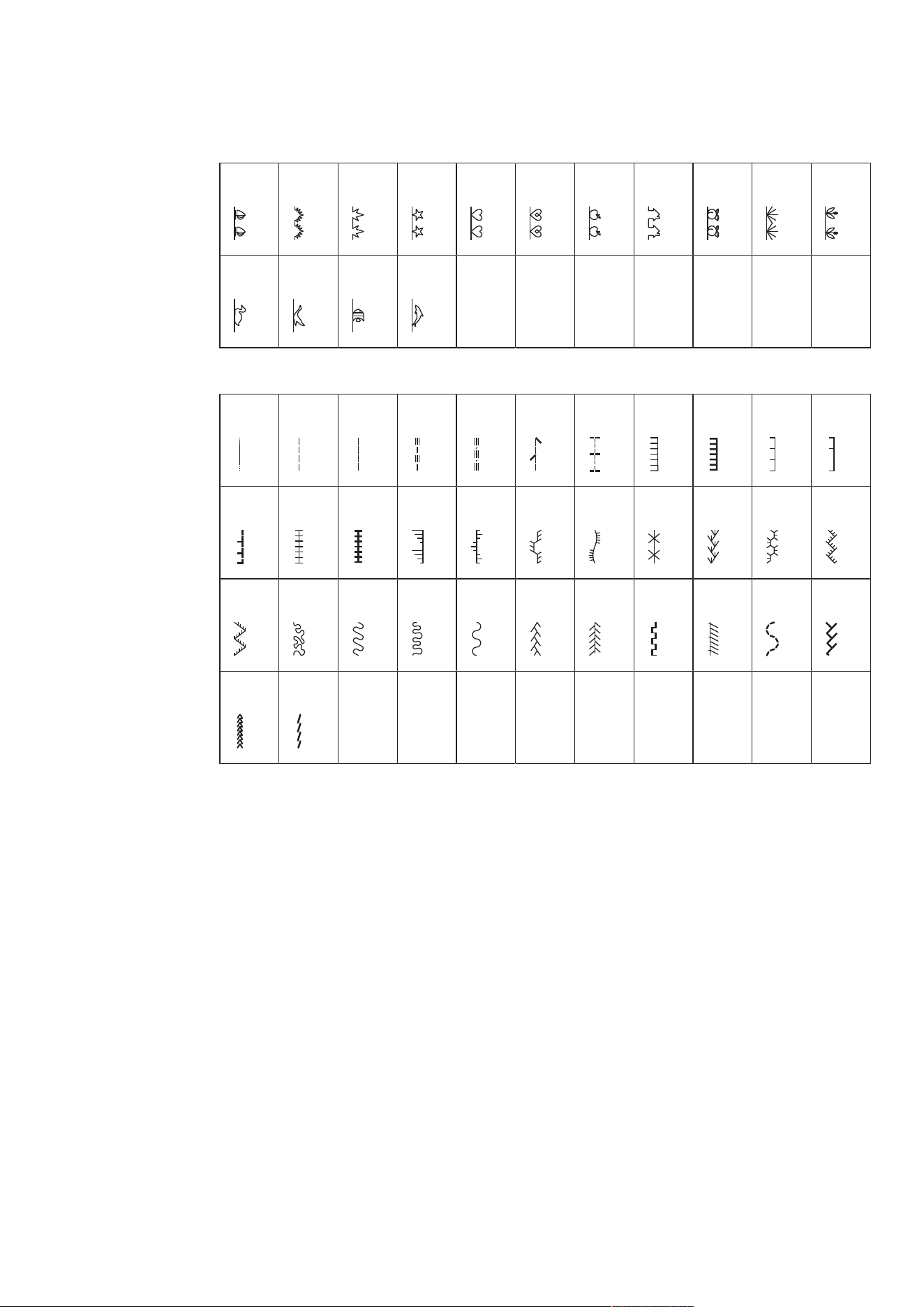
Appendix
103
2023-06 EN 5020077.40A.04
Children Stitches
219 220 221 222 223 224 225 226 227 228 229
230 231 232 233
Quilt Stitches
1001 1002 1003 1004 1005 1006 1007 1008 1009 1010 1011
1012 1013 1014 1015 1016 1017 1018 1019 1020 1021 1022
1023 1024 1025 1026 1027 1028 1029 1030 1031 1032 1033
1034 1035

Index
104
2023-06 EN 5020077.40A.04
Index
A
Adjusting the Presser Foot Position via the Knee Lifter of the Free
Hand System................................................................... 29
Adjusting the Upper Thread Tension ..................................... 43
Alphabets ............................................................................. 80
Attaching the Knee Lifter of the Free Hand System ............... 24
Attaching the Presser Foot Sole............................................. 29
Attaching the Seam Guide.................................................... 30
B
Buttonholes .......................................................................... 82
C
Calibrating the Display.......................................................... 50
Calling up the Creative Consultant........................................ 52
Changing the Needle............................................................ 31
Changing the Presser Foot .................................................... 29
Changing the Presser Foot Holder......................................... 29
Changing the Stitch Plate...................................................... 32
Checking the Firmware Version............................................. 50
Checking the Stitch Plate in the User Interface ...................... 33
Cleaning the Feed Dog ......................................................... 92
Cleaning the Hook................................................................ 93
Combination Mode............................................................... 60
D
Decorative Stitches................................................................ 78
Dual Feed ............................................................................. 55
E
Environmental Protection........................................................ 9
Error Messages ..................................................................... 97
Explanation of Symbols......................................................... 10
F
Fabric Thickness Measurement.............................................. 47
Feed Dog Up/Down .............................................................. 28
Foot Control
Connecting ..................................................................... 23
H
Height Compensating Tool ................................................... 76
I
Indicating the Presser Foot Sole in the User Interface............. 30
Inserting the Spool................................................................ 27
Inserting the Spool Cap ........................................................ 25
M
Maintenance and Cleaning ................................................... 92
N
Needle Stop Up/Down (Permanent)....................................... 32
Needle, Thread, Fabric .......................................................... 19
Needle/Thread Combination ................................................. 22
Needles Overview ................................................................. 19
O
Overview of the Stitch Patterns ........................................... 101
P
Power Cable ......................................................................... 23
USA/Canada ................................................................... 23
Practical Stitches ................................................................... 65
Preparing the Threading ....................................................... 34
Removing the Presser Foot Sole ............................................ 29
Programming the Securing Stitches....................................... 43
Q
Quilting ................................................................................ 89
R
Raising/Lowering the Needle................................................. 25
Regulating the Speed..................................................... 25, 56
Restoring the default settings ............................................... 50
Reverse Sewing..................................................................... 46
S
Safety Instructions .................................................................. 6
Saving a Stitch Pattern Combination ..................................... 63
Second Spool Pin .................................................................. 26
Selecting a Stitch Pattern ...................................................... 54
Setting the Display Brightness ............................................... 49
Setting the Display Color ...................................................... 48
Setting the Lower Thread Indicator ....................................... 49
Setting the Presser Foot Pressure........................................... 31

Index
105
2023-06 EN 5020077.40A.04
Setting the Sewing Light....................................................... 49
Setting the Upper Thread Indicator ....................................... 48
Sewing Corners .................................................................... 77
Slide-on Freearm Extension Table.......................................... 28
Sound On/Off ...................................................................... 49
T
Technical Specifications....................................................... 100
Threading the Bobbin Thread................................................ 41
Threading the Twin Needle ................................................... 37
Threading the Upper Thread ................................................. 34
Troubleshooting.................................................................... 95
U
Using eco Mode.................................................................... 52
Using the Spool Net.............................................................. 26
W
Winding the Bobbin Thread .................................................. 39
www.mybernette.com/b77
© BERNINA International AG
Steckborn CH, www.bernina.com
2023-06 EN
5020077.40A.04