User Manual
VAC02
Cordless Vacuum Cleaner

EN
1.
support@smoture.com
Content
1. WARNING 2
2. PACKAGE LIST 3
3. KNOW THE PRODUCT 4
3.1 Product Details 4
3.2 Digital Touch Screen 5
3.3 Accessories Function 5
4. PRODUCT ASSEMBLY 6
4.1 Install Vacuum Cleaner 6
4.2 Install Wall Mount 7
5. HOW TO USE 8
5.1 Charging 8
5.2 Operating 9
6. MAINTENANCE 11
6.1 Clean the Main Body 11
6.2 Clean the Dust Cup/Filters 11
6.3 Wash Dust Cup and Filters 12
6.4 Disassemble and Replace the Aromatic Tablet 14
6.5 Clean the Brush Roller 14
7. SPECIFICATION 16
8. TROUBLESHOOTING 16
9. WARRANTY 17

support@smoture.com
EN
2.
1. WARNING
Thank you for purchasing the SMOTURE VAC02 cordless vacuum cleaner. Before using this machine, please read the following safety warning first and take
safety protection measures to avoid malfunctions caused by improper operation.
Note: The vacuum cleaner adopted thermal protection technology to prevent overheating, will stop working when the item is over heated.
①
This SMOTURE appliance is not intended for use by persons (including children) with reduced physical, sensory or mental capabilities, or lack of
experience and knowledge, unless they have been given supervision or instruction by a responsible person concerning use of the appliance to ensure that
they can use it safety.
②
Suitable for dry locations only. Do not use or store outdoors with wet surfaces. Do not handle any part of the plug or appliance with wet hands. Store
properly in a dry place indoors.
③
Do not use a damaged cable or plug. If the device or charger does not work properly, dropped, damaged, missed or dropped into water, please contact
support@smoture.com , SMOTURE after sales team for support.
④
Do not vacuum flammable or combustible liquids, such as petrol, or use in areas where liquids may be present.
⑤
Turn off the power switch before plug or unplug the adapter.
⑥
Do not vacuum anything that is burning or smoking, such as cigarettes, matches or hot ashes.
⑦
Do not use without filters or dust cup to avoid damaging the motor and contaminating the air. Wash hands after using the vacuum cleaner.
⑧
FIRE WARNING: Do not place this product on or near a cooker or any other hot surface and do not incinerate this appliance even if it is severely
damaged. The battery might catch fire or explode.
⑨
Unplug the charger from the power outlet before performing routine cleaning or maintenance.
⑩
Battery leaks may occur under extreme conditions. If any liquid gets on your skin wash quickly with soap and water. f liquid gets into your eyes, rinse with
water for at least 15 minutes immediately. Seek medical attention immediately.
⑪
Charge the unit with the charger we provided.
⑫
Avoid using this product to vacuum hard, sharp objects, as this may cause damage.
EN
3.
support@smoture.com
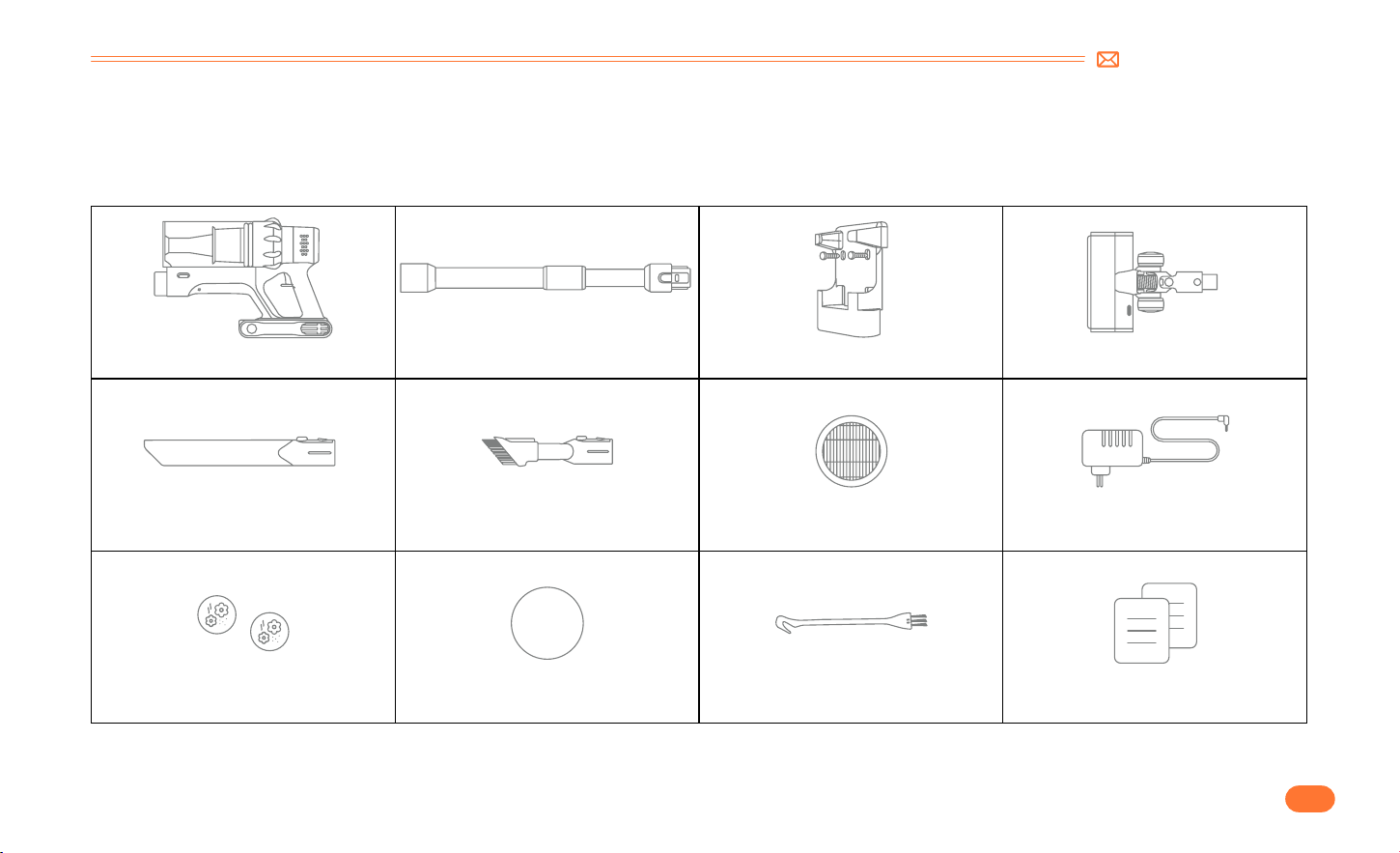
Main Body*1 Adjustable Extension Tube*1 Wall Mount*1 Motorized Floor Brush*1
Long Crevice Nozzle *1 2 in 1 Upholstery Brush*1 Extra Hepa Filter*1 Charger*1
Aromatic Tablet Extra sponge Filter*1 Mini Cleaning Brush*1 Quick User Guide*1
2. PACKAGE LIST
Please check and confirm the accessories and parts according to the following sheet before using.
support@smoture.com
EN
4.
3. KNOW THE PRODUCT
3.1 Product Details
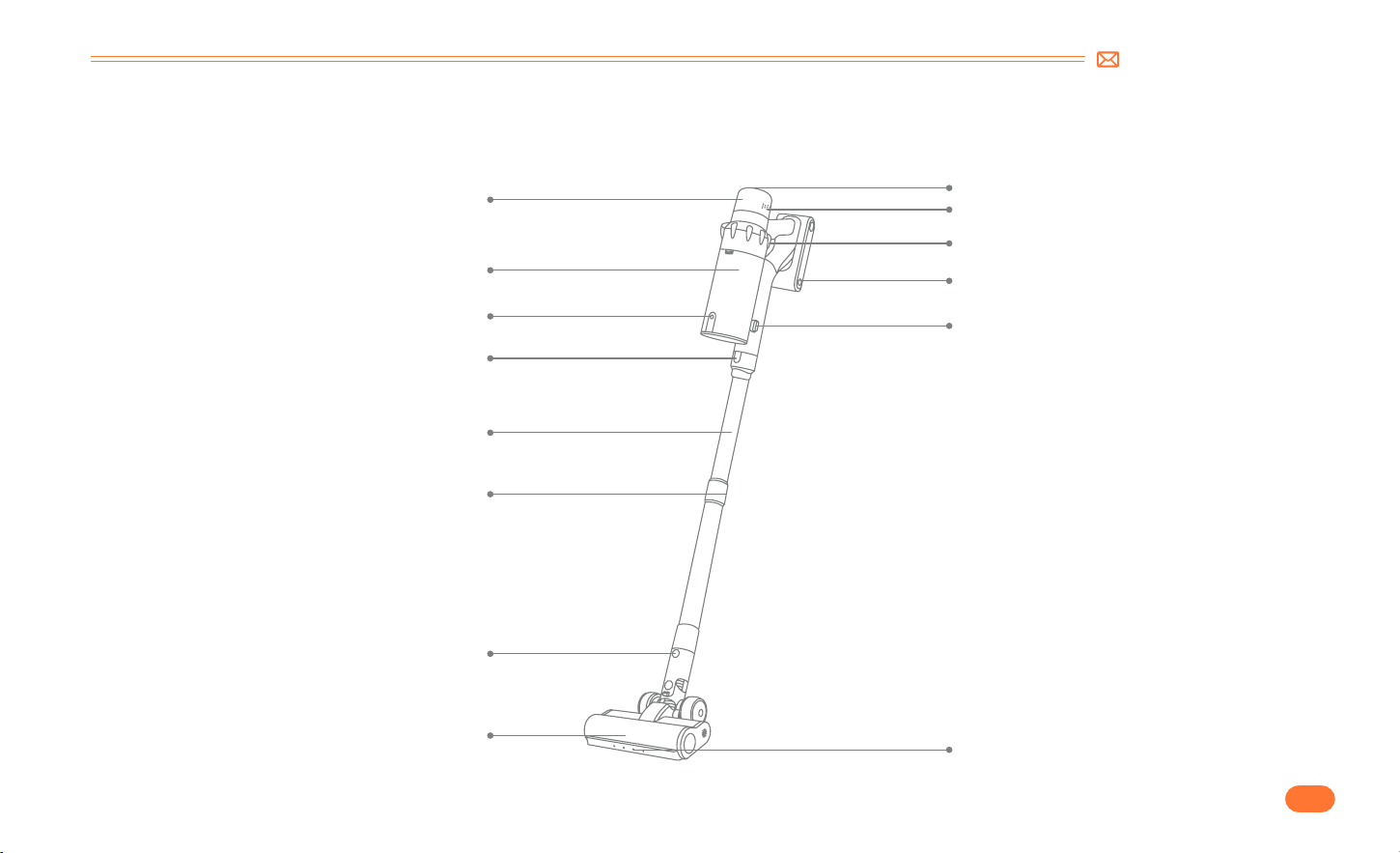
Aromatic Tablet
Digial Touch Screen
Air Outlet
Battery Pack Release Button
Switch Button
Dust Cup Release Button
LED Light
Dust Cup
Dust Empty Button
Tube Release Button
Telescopic Tube
Length Adjustment Button
Upright Motorized Brush
Motorized Brush Release Button
EN
5.
support@smoture.com
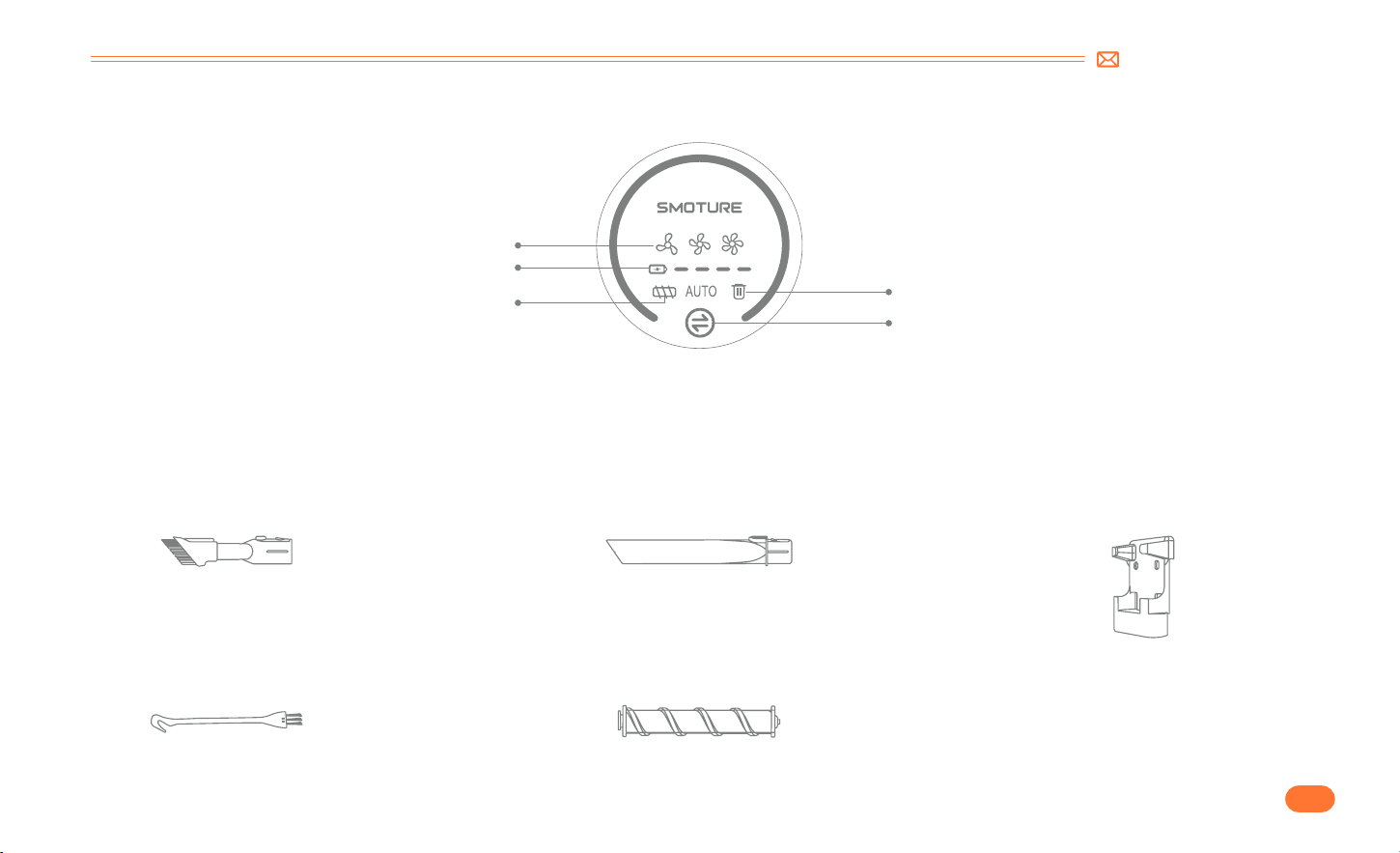
3.2 Digital Touch Screen
3.3 Accessories Function
Battery Power Indicator
Clean Dust Cup Indicator
Suction Adjustment Button
Suction Level Indicator Light
Blockage Indicator
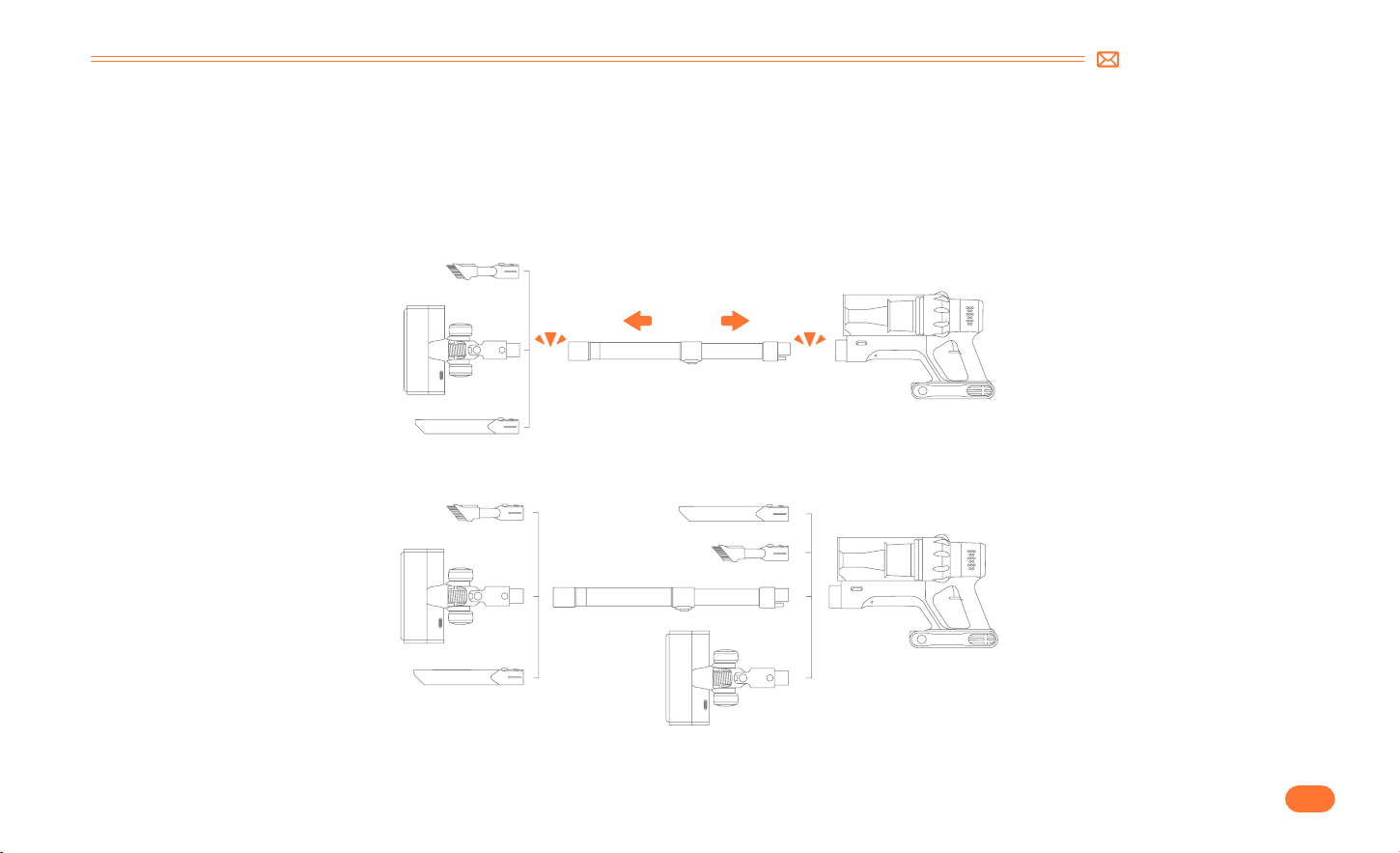
2 in 1 Upholstery Brush
Mini Cleaning Brush Multi fuction Rolling Brush
Wall MountLong Crevice Nozzle
Easy to snap on design,can help you
remove dust and hair on the carpet.
Remove hair, rubbish, and micro dust on
the accessories or filters.
Remove dust, debris, and hair from all
kinds of floors, carpets, and velvet.
Fix the vacuum cleaner and accessories
on the wall hanger for easy storage.
Remove dust on the hard to reach areas
like windows, bed feet, gaps between sofa,
etc.
support@smoture.com
EN
6.
4. PRODUCT ASSEMBLY
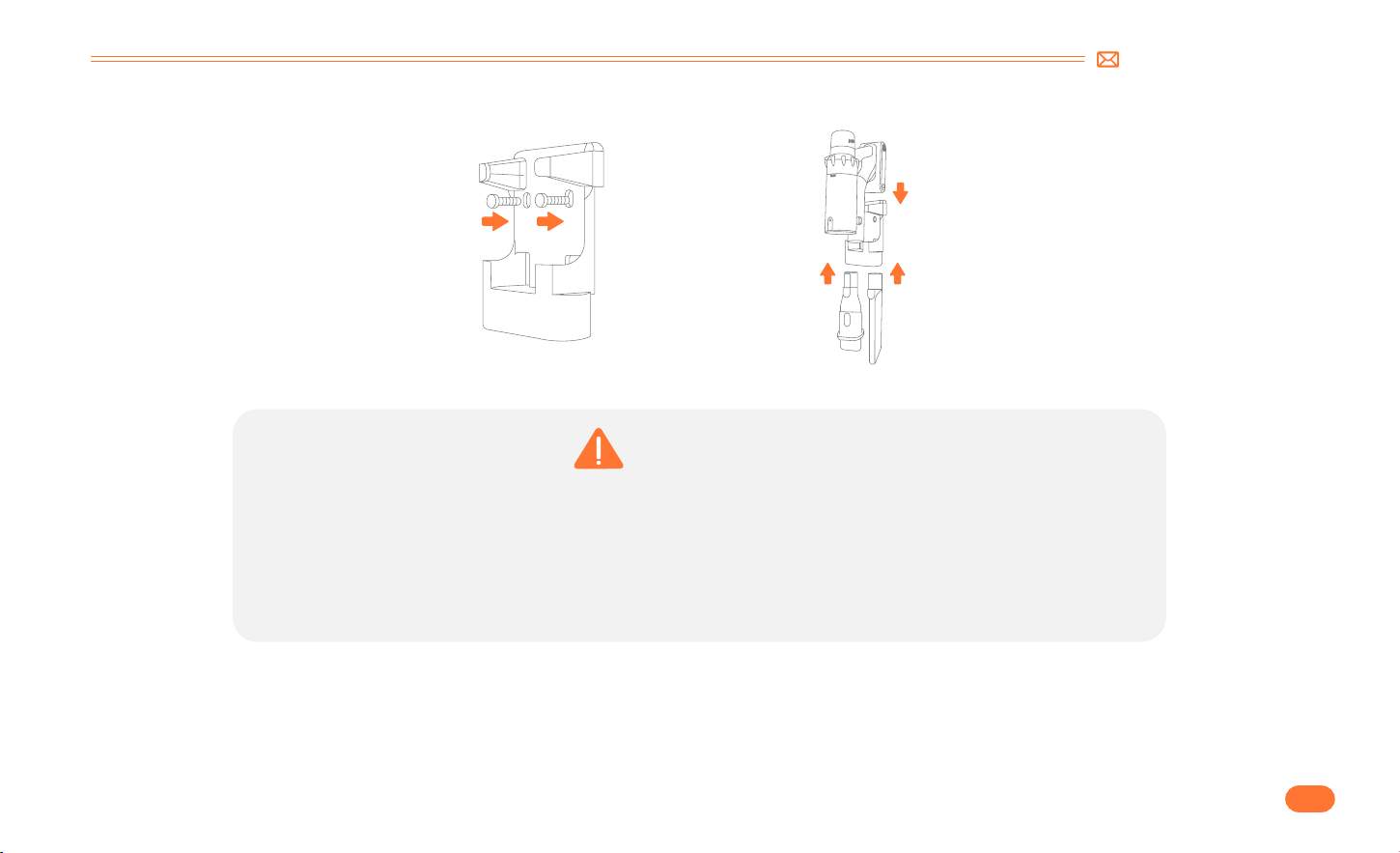
4.1 Install Vacuum Cleaner
•
Directly Install Cleaning Accessories
•
Install Extension Tube & Cleaning Accessories
Click
Click
EN
7.
support@smoture.com
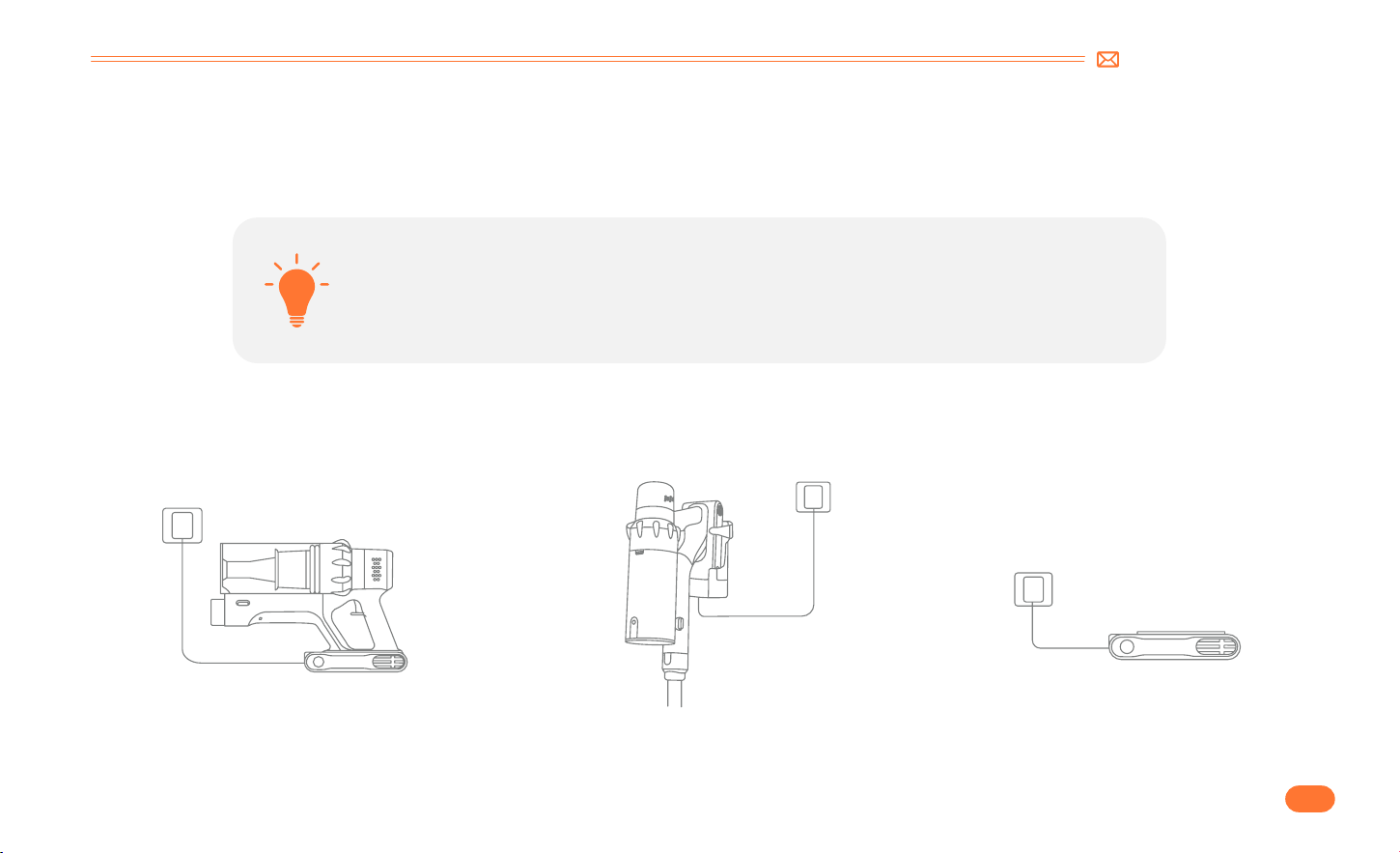
4.2 Install Wall Mount
WARNING
•
Please make sure there is no gas, water, or electrical cables and wires behind the mounting area.
•
To avoid the dock dropping down, please make sure it must be installed firmly.
•
Store appropriately indoors in a dry place. Do not expose the machine to sunlight or freezing
temperature. Recommended temperature range: 39.2°F (4°C) 104°F(40°C).
support@smoture.com
EN
8.
5. HOW TO USE
5.1 Charging
•
Charging Methods
①
Connect the main body to charge.
②
Hang on the wall mount to charge.
•
When using a new battery or using it for the first time after long term storage, please fully
charge the battery first.
•
When storing and not using the vacuum cleaner for a long time, please ensure that it is charged
and discharged at least once every three months.
Red light flashing(Charging)
Green light(Fully Charged)
③
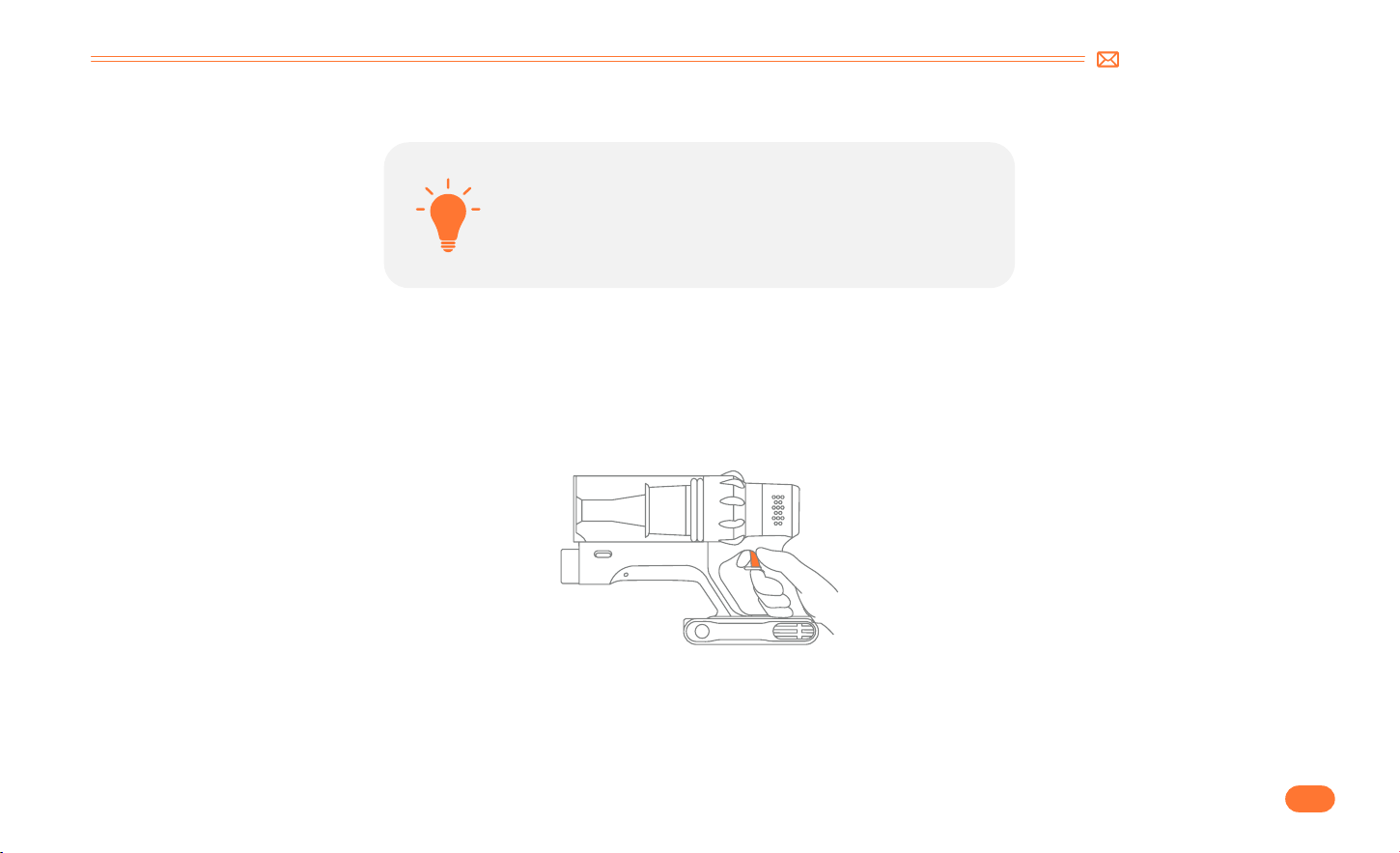
Charge the battery directly
EN
9.
support@smoture.com
5.2 Operating
•
Start To Work
•
The battery is fully charged, and fixed in place.
•
The dust cup and filters are cleaned, and fixed in place.
Before each use, make sure that
Press the switch button to turn it on, and it will start MANUAL mode.
support@smoture.com
EN
10.
•
Select Cleaning Mode
•
Abnormal Indicator
①
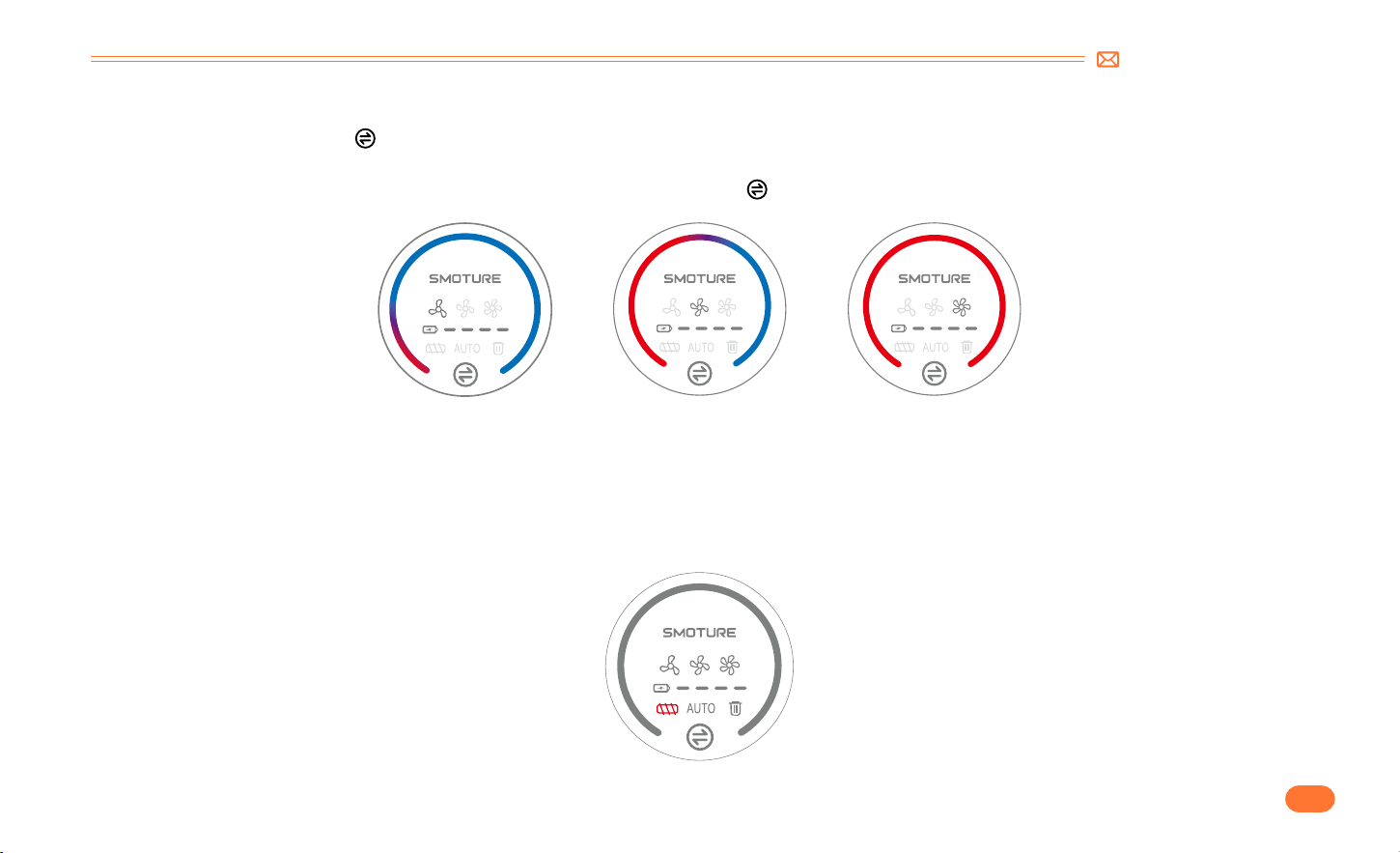
In MANUAL mode, touch the " " button to switch suction level. With the adjustment of the suction mode, the suction indicator light will change from
gradient color to red in turn: MIN>MID>MAX.
②
After switching to the highest suction level in manual mode, continue press the " " button to switch to AUTO mode.
When the red light flashing and the motorized floor brush does not work, it means that the motorized floor brush/telescopic tube/dust cup is blocked,
please clean it immediately. When the floor brush is blocked, the red lock rotor prompt light will always be on, and when the ventilation port is blocked, the
red lock rotor prompt light will flash 5 times. At the same time, the floor brush will stop working and the main motor will continue to operate.
MIN MID MAX
EN
11.
support@smoture.com
6. MAINTENANCE
Tip: Please clean the vacuum cleaner regularly to extend its lifespan.
•
Turn off the power before cleaning the body.
•
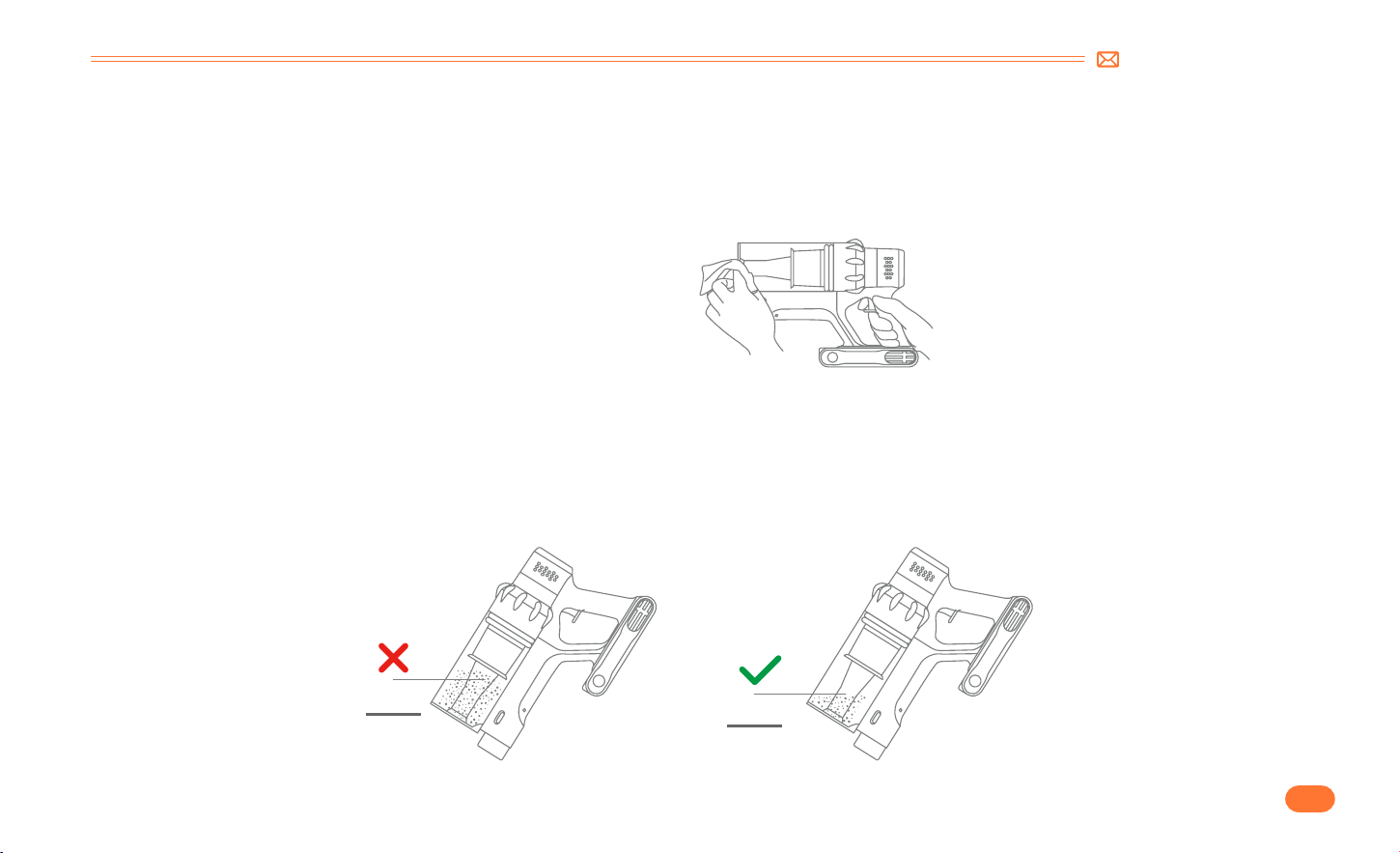
Please use a neutral detergent, wipe the body with half wet cloth.
•
Please avoid sun exposure and store in a cool and dry place.
6.1 Clean the Main Body
6.2 Clean the Dust Cup/Filters
•
Empty Dust Cup
When using, if the garbage in the dust cup exceeds MAX Line, please empty it in time.
MAX
MAX
support@smoture.com
EN
12.
•
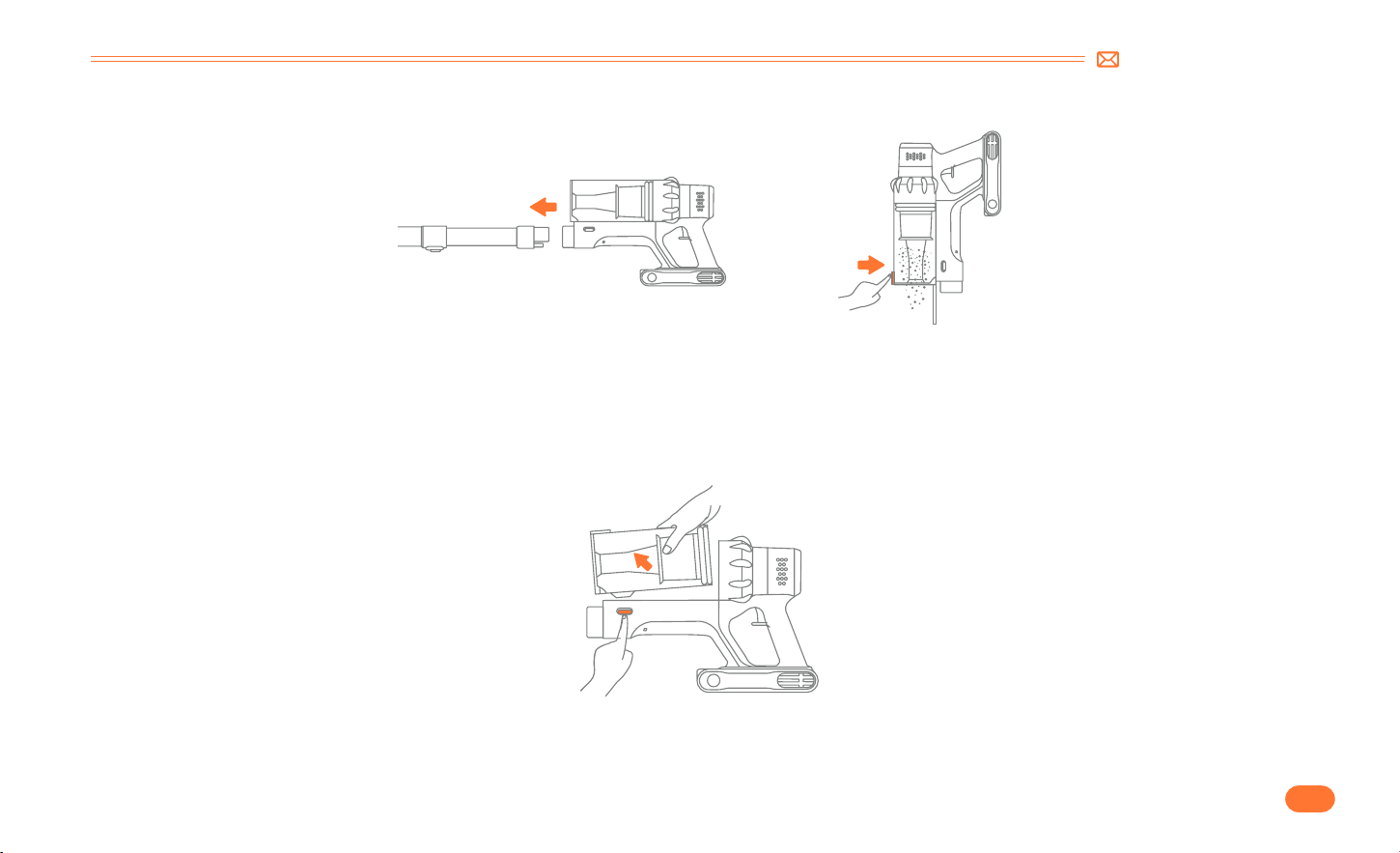
Press the dust empty button to empty the dust.
•
1. Remove dust cup from main body.
Press the dust cup release button on the main body, then get the dust cup released from the main body.
6.3 Wash Dust Cup and Filters
EN
13.
support@smoture.com
•
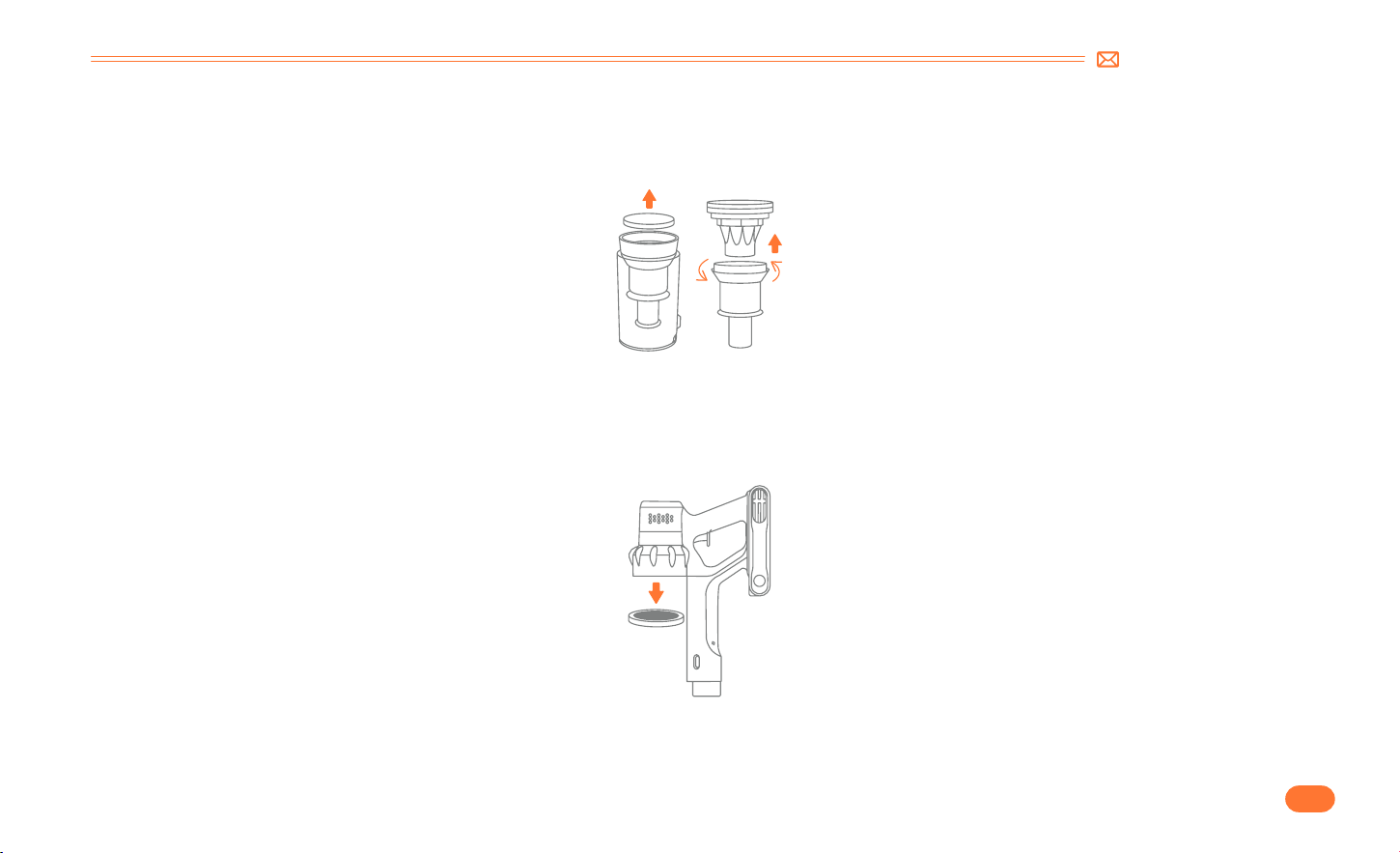
2. Remove filters from dust cup.
•
3. Remove HEPA filter from main body.
First lift up the sponge filter, then lift up the entire cyclone filter, including the multi cone filter.
First lift up the sponge filter, then lift up the entire cyclone filter, including the multi cone filter.
support@smoture.com
EN
14.
•
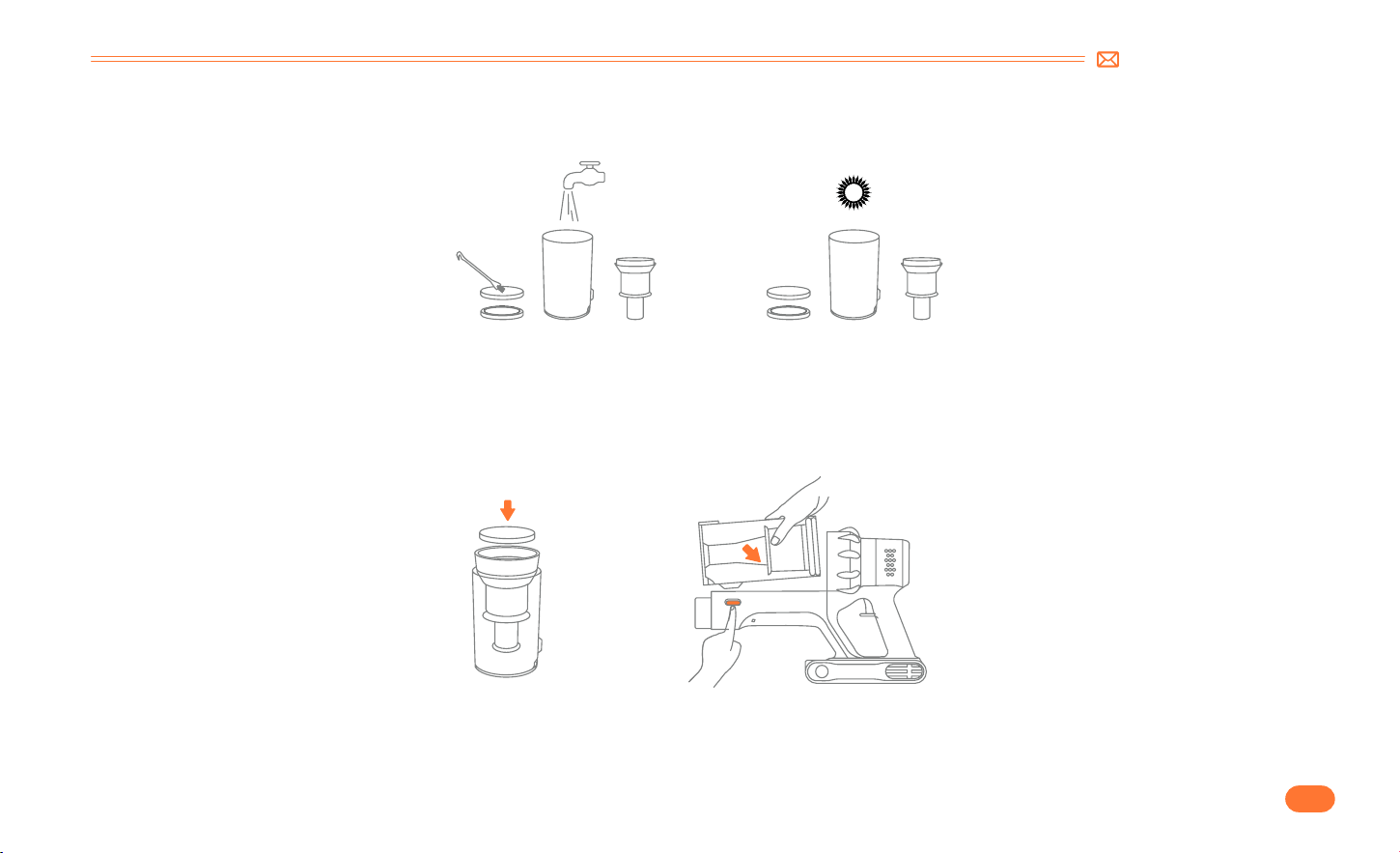
4. Clean dust cup and filters with water. Make sure that the dust cup and filters have dried before use.
•
5. Install the multi cone filter and HEPA filter clockwise, aligning the clips to install the cyclone filter. Then Install the sponge filter and dust cup.
EN
15.
support@smoture.com
•
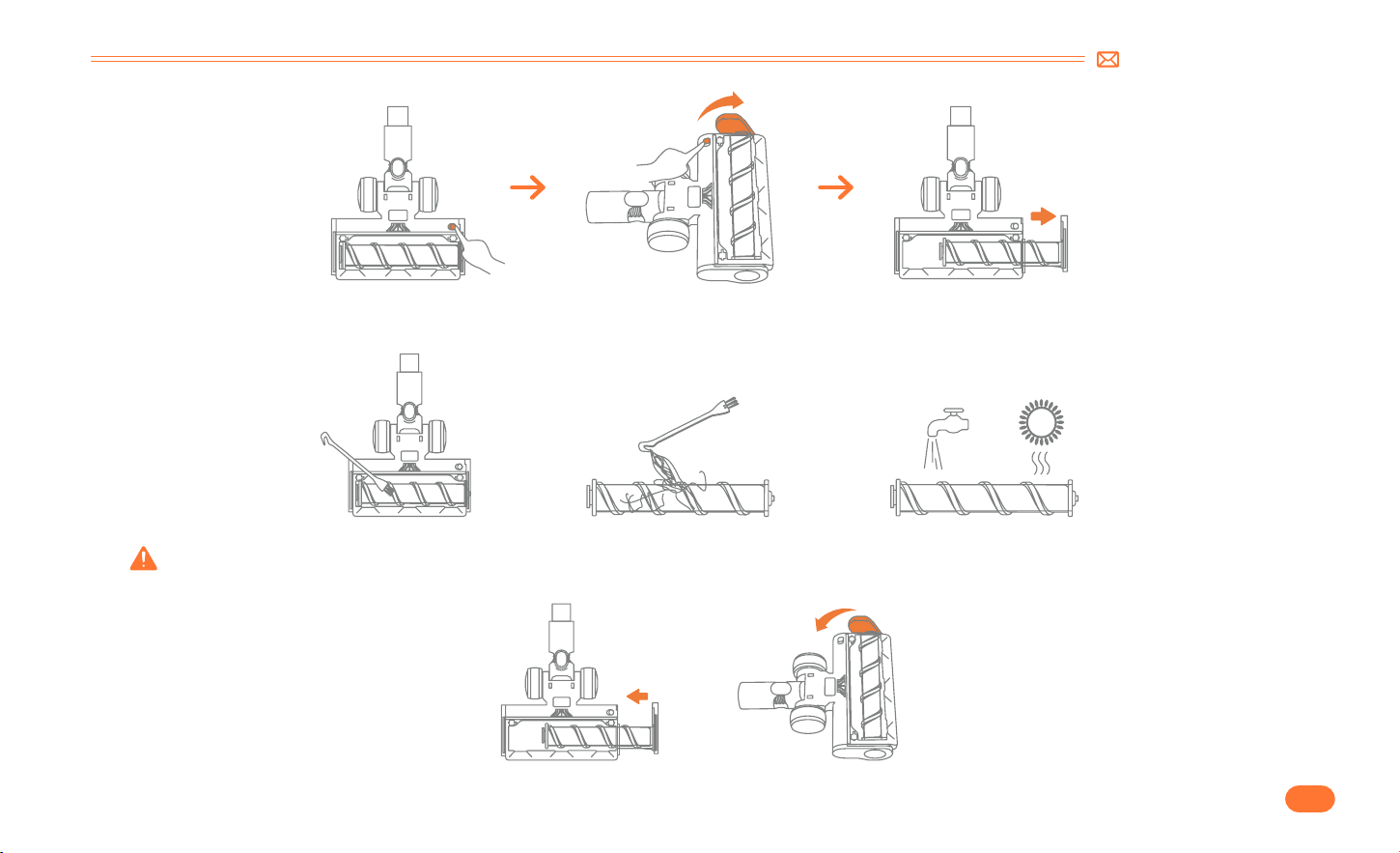
Take out the roller brush.
6.5 Clean the Roller Brush
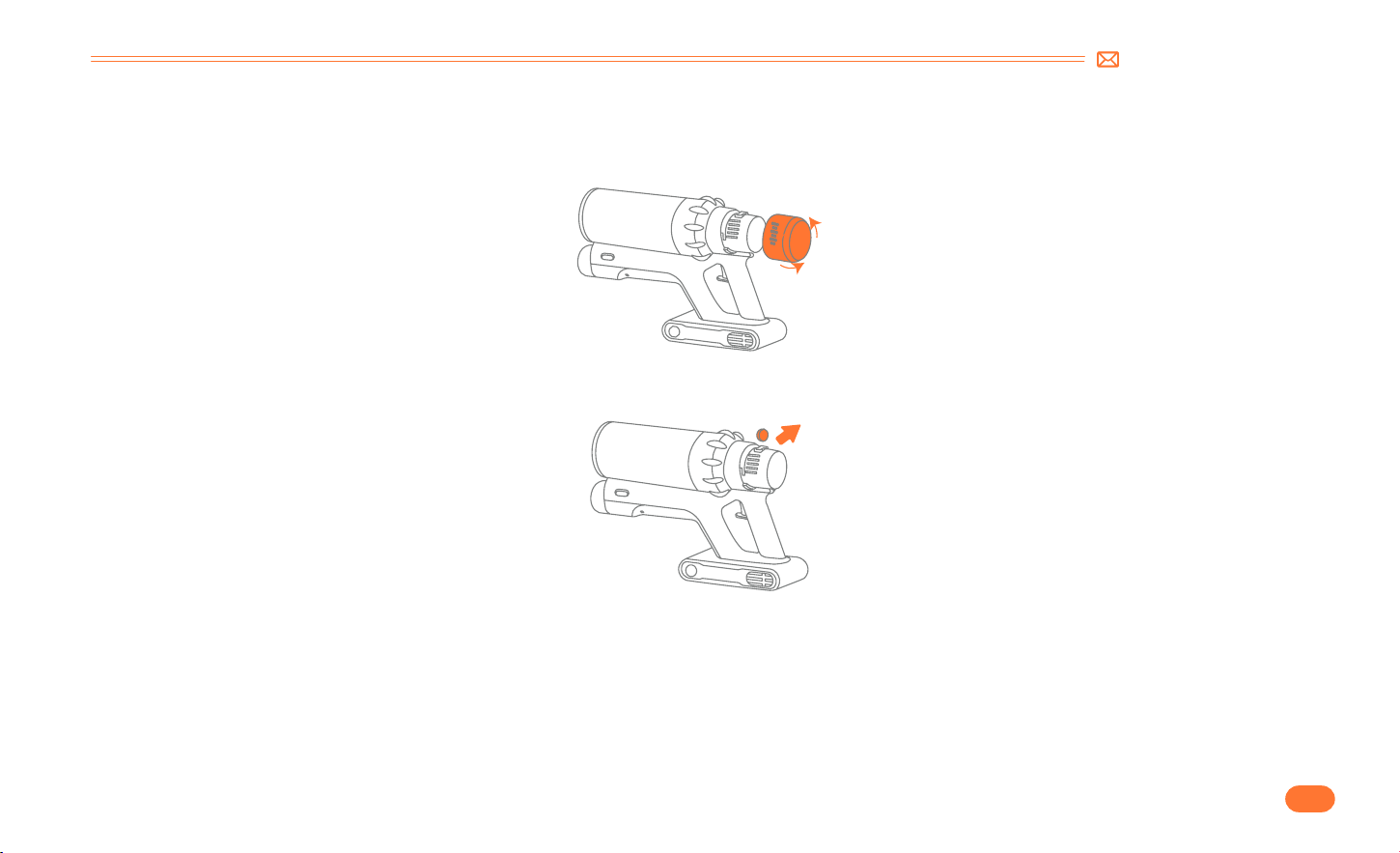
6.4 Disassemble and Replace the Aromatic Tablet
•
Rotate counterclockwise to remove the air outlet cover.
•
Lift upwards to remove the aromatherapy sheet for replacement.
support@smoture.com
EN
16.
•
Remove any hair of fibers that have been wrapped around it. Using the mini cleaning brush to clean it.
•
Install the roller brush.
You can clean it with or without water. Please remember to use the roller after it is completely dry.

EN
17.
support@smoture.com
7. SPECIFICATION
8. TROUBLESHOOTING
Product Cordless Vacuum Cleaner
Model VAC02
Rated Voltage DC 29.6V
Suction level Min Mid Max
Charge time 4 5H
ISSUE CAUSE SOLUTION
Vacuum cleaner not work
•
Out of power.
•
Battery pack not installed in place or has failed.
•
Motor has failed.
•
Full charge the vacuum cleaner.
•
Battery pack installed in place.
•
Contact SMOTURE Team via email for replacing the battery or
motor.
Weak suction
•
Dust cup is full of garbage.
•
Motorized floor brush, tube or filters is clogged
with garbage.
•
Low battery power.
•
Dust cup or filter are not installed correctly.
•
Empty the dust cup.
•
Clear out any garbage that is blocking the motorized floor brush,
tube or filters.
•
Full charge the vacuum cleaner.
•
Install the multi cone filter, HEPA filter and dust cup according to
the instruction correctly.

support@smoture.com
EN
18.
ISSUE CAUSE SOLUTION
Charging is not normal
•
Charger is not correctly connected.
•
Battery pack or charger has failed.
•
Charger is not original.
•
Make sure the charger are fully plugged in socket.
•
Contact SMOTURE Team via email for replacing the battery or
charger.
•
Use the original charger provided by SMOTURE only.
Insufficient use time after charging
•
Insufficient charging time.
•
Motorized floor brush, dust cup, tube or filters is
clogged with garbage.
•
Battery aging.
•
Full charge the vacuum cleaner.
•
Clear out any garbage that is blocking the motorized floor brush,
dust cup, tube or filters.
•
Contact SMOTURE Team via email for replacing the battery.
Motorized floor brush stops with four
indicators on the battery pack flashing
•
Motorized floor brush is clogged with garbage.
•
Clear out any garbage that is blocking the motorized floor brush.
9. WARRANTY
9.1 The 2 Year Warranty
•
Our SMOTURE machine has a 2 year warranty against original defects in material and workmanship, when used for private household purposes in
accordance with the SMOTURE Instruction Manual.
•
This warranty provides, at no extra cost to you, all labor and parts necessary to ensure your machine is in proper operating condition during the warranty
period.

EN
19.
support@smoture.com
9.3 How to claim?
Please keep your proof of purchase. To make a claim under our warranty, you need to provide your original purchase receipt with the purchase date and
order number on it.
If your machine is not functioning properly, or you still have any questions after reading this manual carefully, please feel free to contact
us, we will reply to you in 24 hours and try our best to provide you with a satisfactory solution.
Email Our Customer Service : support@smoture.com
9.2 What is covered?
Only applies to purchases made from authorized retailers of SMOTURE.
This warranty will only be valid if the machine is used in the country in which it was sold.

Federal Communication Commission Interference Statement
Correct Disposal of this product
NOTE: This equipment has been tested and found to comply with the limits for a Class B digital device, pursuant to part 15 of the FCC Rules. These limits are
designed to provide reasonable protection against harmful interference in a residential installation. This equipment generates, uses and can radiate radio
frequency energy and, if not installed and used in accordance with the instructions,may cause harmful interference to radio communications. However,
there is no guarantee that interference will not occur in a particular installation. If this equipment does cause harmful interference to radio or television
reception, which can be determined by turning the equipment off and on, the user is encouraged to try to correct the interference by one or more of the
following measures:
• Reorient or relocate the receiving antenna.
• Increase the separation between the equipment and receiver.
• Connect the equipment into an outlet on a circuit different from that to which the receiver is connected.
• Consult the dealer or an experienced radio/TV technician for help.
Caution: Changes or modifications not expressly approved by the party responsible for compliance could void the user’s authority to operate this
equipment.
This device complies with part 15 of the FCC Rules. Operation is subject to the
following two conditions:
( 1 ) This device may not cause harmful interference, and
( 2) This device must accept any interference received, including interference that may cause undesired operation.
This marking indicates that this product should not be disposed with other household wastes throughout the EU. To prevent possible harm
to the environment or human health from uncontrolled waste disposal, recycle it responsibly to promote the sustainable reuse of material
resources. To return your used device, please use the return and collection systems or contact the retailer where the product was purchased.
They can take this product for environmental safe recycling.

Declaration of Conformity
We (the manufacturer responsible for this declaration)
Shenzhen Narisa Technology Co., Ltd.(Company name)
No.5 Huancheng South Rd Bantian,; Rm401, 4/F, BldgB,Bantian Guoji Center,; 518100 Longgang, Shenzhen(Company address)
Declare under our sole responsibility that the product
Trade name: SMOTURE
Equipment: Vacuum Cleaner
Model No. : VAC02
To which this declaration relates is in conformity with the essential requirement set out in the Council Directive on the Approximation of the laws of the
Member States relating to LVD Directive(2014/35/EU) & EMC Directive(2014/30/EU) & RoHS(2011/65/EU) product is responsible to affix CE marking, the
following standards were applied:
EN 60335 2 2:2010+A11:2012+A1:2013
EN 60335 1:2012+A11:2014+A13:2017+A1:2019+A14:2019+A2:2019
EN 62233:2008
EN 55014 1:2021
EN 55014 2:2021
EN IEC 61000 3 2:2019+A1:2021
IEC62321 3 1:2013
IEC62321 4:2013
IEC62321 5:2013
IEC62321 6:2015
IEC62321 7 1:2015
IEC62321 7 2:2017
IEC62321 8:2017
Full Name: George.wang Position: Approbation Manager
Signature: George.wang Place/Date: Shenzhen,China/Jun.27 2022

support@smoture.com
