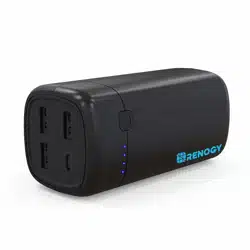
SKU: RPB-72000PD
72000MAH/266WH
HIGH-CAPACITY
POWER BANK
Manual
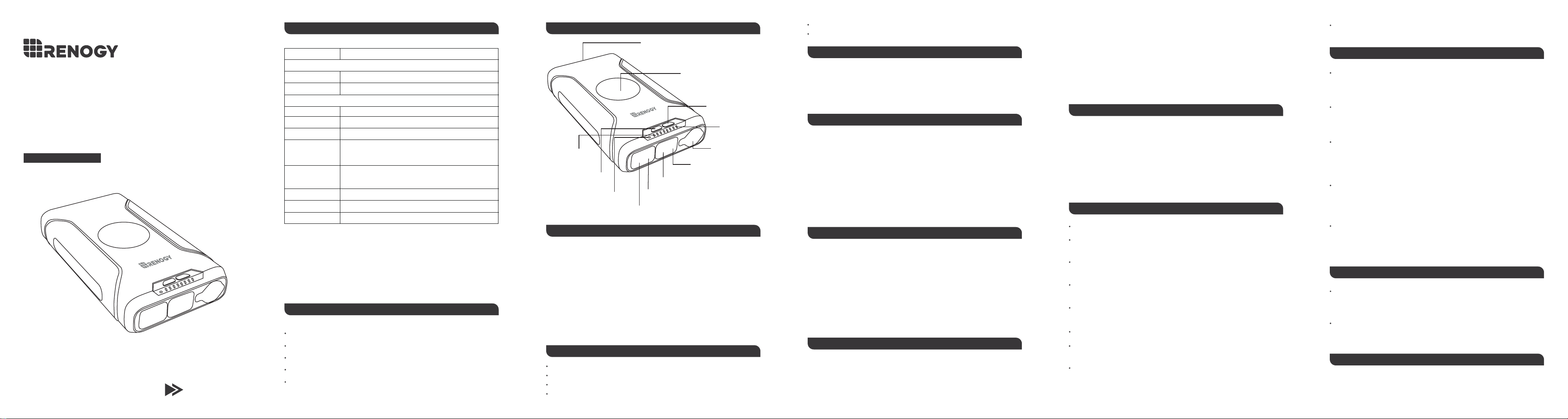
SPECIFICATIONS IDENTIFYING PARTS
CHARGING LAPTOPS
PACKAGE INCLUDES
Capacity
DC
USB-C (1)
18-24V/4A
DC5V/3A, 9V/3A, 12V/3A, 15V/3A, 20V/3A
Input
DC
Cigarette lighter
USB-A
USB-C (1)
USB-C (2)
Wireless charging
Size
N.W
12V/5A, 16.5V/4A, 20V/3.5A, 24V/2A
12V/15A Max
5V/4.5A, 4.5V/5A, 9V/2A, 12V/1.5A
DC5V/3A, 9V/3A, 12V/3A, 15V/3A, 20V/3A , 60W Max per
port
DC5V/3A, 9V/2A, 12V/2.25A (PPS: 3.3-11V/3A), 27W Max
per port
10W
9.0 x 4.9 x 1.7 inch
3.3 lb
Output
266Wh/[email protected]
Note:
1. You can either use the USB-C (1) port or the DC port at a time. They cannot be used
simultaneously.
CHARGING POWER BANK
1. Charge the power bank via the two-way DC port using the included 40W AC adapter.
2. Charge the power bank via the two-way USB-C (1) port using a USB-C to USB-C cable
(not included).
CIGARETTE LIGHTER
USB-A & USB-C PORTS
WIRELESS CHARGING
1. Use the cigarette lighter port to power devices under 150W, such as car refrigerators,
tire inflators, outdoor camping lights, fans, etc.
Compatible with smartphones, tablets, digital cameras, and other mobile devices.
2. WARNING: please check the specifications of your devices before plugging them into
this power bank.
The 4th LED blinks: the power level is within 75%~99%
All LED indicators stay solid when the power bank is fully charged.
3. DC input (via solar panels): 80W, approx. 3-4 hours
USB-C input: 60W, approx. 5-6 hours
2. When the USB-A port and the USB-C (2) port are used at the same time, they can only
deliver 16W Max. power in total.
Note:
1. The USB-C (1) port and the DC port cannot be used simultaneously.
2. This power bank can be recharged by 100W solar panels. Please purchase necessary
adapters/connectors separately.
Note:
Note:
1. The USB-C (1) port supports two-way charging* while the USB-C (2) port and the
USB-A port can only charge in one direction (output only).
2. The green indicator will light up. Then, please place compatible devices on the
charging pad for wireless charging.
1. Short press the power button to turn on the power bank and initiate the wireless
charging feature.
1.
The wireless charging does not support AirPods (with Wireless Charging Case ),
AirPods Pro, Apple Watch, and other low-power devices.
1. This power bank is not able to charge laptops that are rated over 23V.
2. Do not choose 24V as the charging voltage when you are going to charge
a laptop with this power bank.
2. The green indicator stays lit during wireless charging. When devices are taken
away from the charging pad, the green indicator will be off in a minute.
1. Choose the power adaptor that is compatible with your laptop.
2. Press the power button once to turn on the power bank. Then press and hold the
voltage switch until the red DC voltage indicator flashes. Next, you can short press the
voltage switch to select the desired voltage.
To reset the charging voltage:
1. Unplug your laptop.
2. Then long press the switch again for 3s. When the indicator flashes, short press the
switch choose the charging voltage.
3. Use the power cable to connect the power bank and your laptop.
LED FLASHLIGHT & EMERGENCY LIGHT
FAQ
LED flashlight:
1. Double click the power button to turn on the white LED light.
2. Tap on the power button again and the white LED light dim to 50%.
Emergency light:
Press and hold the power button to turn on/off the red emergency light.
3. Double click the power button to turn off the LED light.
Two-way charging: also known as bilateral charging. The device can charge and get
charged via a single port.
2. Please check the specifications of your devices before plugging them into this power
bank.
1 * Power bank
1 * 40W AC adaptor
1 * User manual
1 * Laptop power cable (DC to DC)
1 * Laptop power adaptors (8 pieces)
LED BATTERY INDICATORS
From left to right:
The 1st LED blinks: the power level is below 25%
The 2nd LED blinks: the power level is within 25%~50%
The 3rd LED blinks: the power level is within 50%~75%
MAINTENANCE
Do not use the DC port and the USB-C (1) port at the same time.
When using the USB-A port and the USB-C (2) port simultaneously, the fast charging
will not work.
To prevent battery capacity of the power bank from decreasing, please unplug the AC
plug after a full charge.
Keep the product away from extreme ambient temperatures, flammable substances, or
damp places.
Let your power bank complete a full charge cycle every four months to prevent battery
lifespan from shortening.
Do not charge and discharge your power bank simultaneously, which may damage the
battery and shorten its lifespan.
The charging conversion rate of this power bank is around 80%-90% (the 10%-20%
conversion loss is due to the heat generation when power is transferred in batteries
and charging cables). We kindly advise you to charge devices with the original charging
cables for optimal charging.
Avoid exposing your device to ambient temperatures higher than 104°F/40℃ or lower
than 32°F/0℃, which can permanently damage battery capacity.
No. The DC port and the USB-C (1) port cannot be used simultaneously.
As for the DC port and the USB-C (1) port, can I use one to recharge the power
bank while the other one to charge my devices?
WARRANTY
CUSTOMER SUPPORT
RENOGY products are covered by a 12-month limited warranty from the original
purchase date. If any problems occur, please contact us for assistance. Refer to the
last page of User Guide for contact information.
We only provide after-sales services for products that are sold by RENOGY or retailers
and distributors authorized by RENOGY. If you have purchased your unit from other
channels, please contact your seller for more information about return and warranty.
Check the connection between power bank, AC adaptor and AC power supply. The AC
power supply needs to be 100-240V.
Why does my power bank fail to recharge itself?
Check the connection between power bank, cable and devices. Make sure the output
of the power bank meets the requirements of your devices. (Please refer to the user
manuals or labels of your devices and check the specifications.)
Why does the power bank fail to charge other devices?
Yes. However, you can only use the USB-A port and the USB-C (2) port to charge your
devices when you use either the DC port or the USB-C (1) port to recharge the power
bank.
Can I recharge the power bank when it is charging other devices?
The power bank can be charged by 100W-120W solar panels and the charging speed
can reach up to 80W. It takes around 3-4 hours to fully charge the power bank in direct
sunlight.
Can I use solar panels to charge this power bank?
Store your power bank half-charged (power level: 50%) when you store it long term.
*
WARNING:
For any other questions or concerns, please send us an email at
USB-C
OUT
USB
OUT
USB-C
IN/OUT
DC
IN/ OUT
OUT
12V/15A
USB-C
OUT
USB
OUT
USB-C
IN/OUT
DC
IN
/OU T
OUT
12V/15A
LED flashlight & emergency light
Wireless charging pad
DC voltage switch
DC voltage
indicators
12V Cigarette
lighter output
DC port (input & output)
USB-C (1) port (input & output)
USB-A port (output only)
USB-C (2) port (output only)
LED battery
indicators
Wireless charger indicator
Power button
SKU: RPB-72000PD
72000MAH/266WH
大容量モバイルバッテリー
ようこそ
商品仕様 製品一覧図 LED電力残量表示ランプ
ラップトップに充電するについて
パッケージ内容
容量
DC
USB-C (1)
18~24V/4A (84W 最大)
DC5V/3A, 9V/3A, 12V/3A, 15V/3A, 20V/3A
入力
DC
シガーソケット
USB-A
USB-C (1)
USB-C (2)
ワイヤレス出力
寸法
重量
12V/5A, 16.5V/4A, 20V/3.5A, 24V/2A
12V/15A 最大
5V/4.5A, 4.5V/5A, 9V/2A, 12V/1.5A
DC5V/3A, 9V/3A, 12V/3A, 15V/3A, 20V/3A , 60W 最大
DC5V/3A, 9V/2A, 12V/2.25A (PPS: 3.3-11V/3A), 27W 最大
10W
22.86 x 12.46 x 4.31cm
1.5kg
出力
266Wh/72000mAh
ご注意:
1.
USB-C(1)ポートまたはDCポートのいずれかを別々に使用してください、 同時に
使用することはできません。
モバイルバッテリーに充電するについて
1.
付属の40W ACコンセントを使用して、出入力仕様のDCポート経由でRenogy
72000mAhモバイルバッテリーを充電します。
2.
USB-Cケーブルを使用して、出入力仕様のUSB-Cポート経由でRenogy 72000mAhモバ
イルバッテリーを充電します。(USB-Cケーブルは付属していません。)
シガーソケット
USB-A & USB-Cポート
ワイヤレス充電
1.
シガーソケットを使用して、車載冷蔵庫、タイヤインフレータ、キャンプライト、
ファンなど、150W未満のデバイスに電力を供給することが可能となります。
スマートフォン、タブレット、デジタルカメラ、その他のモバイルデバイスと互換性が
あります。
2.
モバイルバッテリーに接続する前に、どうぞデバイスの充電仕様を確認してくださ
い。
左から右へ
1番目のLEDランプが点滅:電力残量は25%未満です。
2番目のLEDランプが点滅:電力残量は25%~50%以内です。
3番目のLEDランプが点滅:電力残量は50%~75%以内です。
4番目のLEDランプが点滅:電力残量は75%~99%以内です。
モバイルバッテリーが完全に充電された場合、すべてのLED電力残量表示ランプが
点灯したままになる状態です。
3.
DCポート経由で充電するの場合、最大入力80Wをサポートし、約3~4時間で充電完
了されます。 USB-Cポート経由で充電するの場合、最大入力60Wをサポートし、約
5~6時間で充電完了されます。
2.
USB-AポートとUSB-C(2)ポートを同時に使用すると、安全性のため合計の出力は
16Wに制限されます。
ご注意:
1.
USB-C(1)ポートまたはDCポートのいずれかを別々に使用してください、 同時に
使用することはできません。
2.
本製品は、100Wのソーラーパネルでの入力をサポートしています。ソーラー充電の
場合、 必要なアダプタ/コネクタは別途ご購入ください。
ご注意:
ご注意:
1.
USB-C(1)ポートは出力と入力の両方をサポートしていますが、USB-C(2)ポー
トとUSB-Aポートは出力のみサポートしています。
2.
1.
緑のライトが点灯すると互換性のあるデバイスをモバイルバッテリーの上に置いて
ワイヤレス充電が始めています。
1.
本製品を接続する前にどうぞラップトップの充電仕様をご確認ください。
2.
ラップトップを充電する場合は、目的の充電電圧として24Vを選択しないで
ください。
1.
電源ボタンを押してモバイルバッテリーをオンにし、ワイヤレス充電機能を起動し
ています。
ご注意:
1.
ラップトップと互換性のあるラップトップ用交換プラグを選択してください。
2.
電源ボタンを押してモバイルバッテリーをオンにします、そして赤の電圧指示ラン
プが点滅するまで電圧スイッチを長押しします、この後電圧スイッチを押して、目
的の電圧を選択できます。
充電電圧をリセットするには:
1.
ラップトップのプラグを抜きます。
2.
スイッチをもう一度3秒間長押しします。 赤の電圧指示ランプが点滅したら、スイ
ッチを押して目的の電圧を選択可能となります。
3.
電源ケーブルを使用してラップトップをモバイルバッテリーに接続します。
LEDフラッシュライト&SOSライ
FAQ
LEDフラッシュライト:
1.
二回目で電源ボタンを押して白色光のLEDライトをオンにします。
2.
もう一回電源ボタンボタンを押してLEDライトの光が50%まで暗くなります。
SOSライト:
電源ボタンボタンを長押しすると赤色光のSOSライトをオン/オフにします。
3.
再度二回目で電源ボタンを押してLEDライトをオフにします。
出入力仕様: デバイスは、単一のポートを介して入力および出力可能となります。
2.
モバイルバッテリーに接続する前に、デバイスの充電仕様を確認してください。
1 x Renogy 72000mAh大容量モバイルバッテリー
1 x 40W ACコンセント
1 x 日本語取扱説明書
1 x ラップトップ用DCケーブル(DC出入力仕様)
1 x ラップトップ用変換プラグ(8枚)
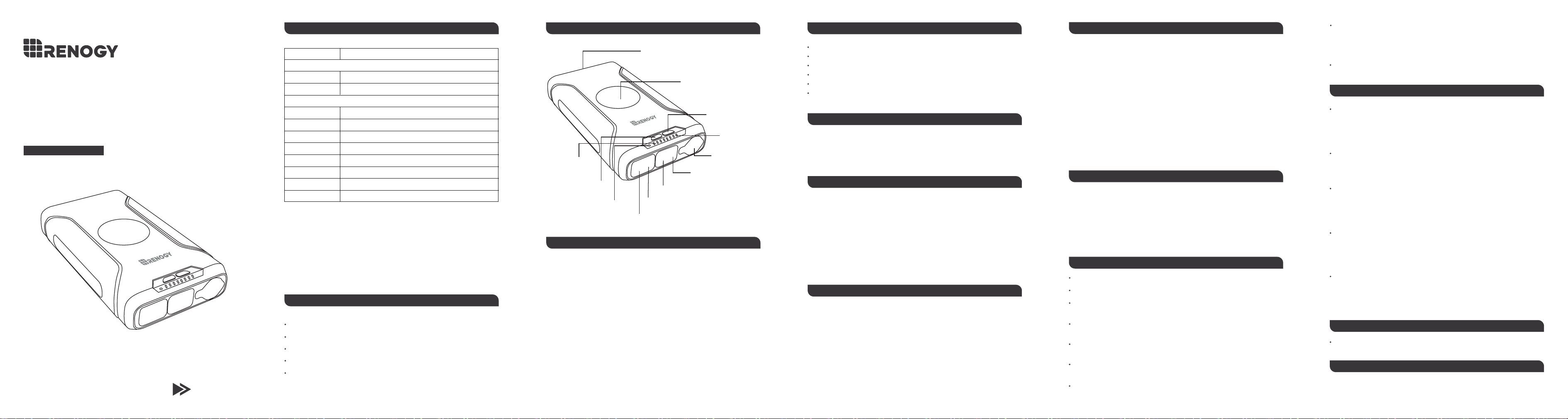
USB-C
OUT
USB
OUT
USB-C
IN/OUT
DC
IN
/OU T
OUT
12V/15A
LEDフラッシュライト&SOSライト
ワイヤレス充電エリア
DC電圧スイッチ
DC電圧指示
ランプ
12V出力シガ
ーソケット
DCポート(出入力仕様)
USB-C (1)ポート(出入力仕様)
USB-A (1)ポート(出力仕様)
USB-C (2)ポート(出力仕様)
LED電力残量
表示ランプ
ワイヤレス充電表示ランプ
電源ボタン
注意事項
DCポートとUSB-C (1)ポートを同時に使用しないでください。
USB-AポートとUSB-C(2)ポートを同時に使用すると、急速充電が機能できません。
モバイルバッテリーの電池容量が損傷されないために、フル充電後はACプラグを抜
いてください。
温度極端的な環境や、可燃性物質、または湿気のある場所で本製品を保管しないで
ください。
バッテリーの使用期限が延べるために、本製品を4か月ごとにフル充電することを完
了させてください。
モバイルバッテリーの充電と放電を同時に行うことをお勧めしていません。そうす
るとバッテリーが損傷し、使用期限が短くなる可能性があります。
本製品の充電変換率は約80%~90%です(10%~20%の変換損失は、バッテリーか
ら充電ケーブルへの電力が転送されるときの発熱によるものです)。 充電時電力の
損失を減らすために、オリジナルの充電ケーブルでデバイスを充電することをお勧
めします。
本製品を40℃より高いまたは0℃より低いのような極端的な環境に置いていないくだ
さい。バッテリー容量が永遠に損傷する可能性があります。
ダメです、モバイルバッテリーを充電しても放電しても同時にDCポートとUSB-C(1)
ポートを使用することができません。
DCポートとUSB-C(1)ポートについて、一方を使用してモバイルバッテリーに充電し、もう一方
を使用してデバイスに充電することができますか。
品質保証について
カスタマーサポート
当社は本製品の購入日から、12ヶ月の品質保証期間を提供しております。製品に何
か問題がございましたら、サポートチームにお気軽に問い合わせください。
モバイルバッテリー、ACコンセント、AC電源の接続を確認してください。AC電源
は100-240Vである必要があります。
モバイルが充電に失敗するのはなぜですか。
モバイルバッテリー、ケーブル、デバイスの接続を確認してください。モバイルバ
ッテリーの出力がデバイスの要件を満たしていることを確認してください。(デバ
イスの取扱説明書またはラベルを参照して、仕様を確認してください。)
モバイルバッテリーが他のデバイスの充電に失敗するのはなぜですか。
はい、できます。しかし、DCポートまたはUSB-C(1)ポートのいずれかを使用して
モバイルバッテリーを再充電する場合は、USB-AポートとUSB-C(2)ポートしかを
使用してデバイスを充電できません。
他のデバイスを充電しているときにモバイルバッテリーを再充電できますか。
100W~120Wのソーラーパネルを介してモバイルバッテリーに充電可能となります、
最大入力は80Wに達することができます。 直射日光の当たる場所でモバイルバッテ
リーを完全に充電するには、約3~4時間かかります。
ソーラーパネルを使用してモバイルバッテリーを充電できますか。
長期間使用しないの場合は、モバイルバッテリーを半充電(電力レベル:50%)し
たままに保管してください。
*
ワイヤレス充電の場合、AirPods(ワイヤレス充電ケース付き)、AirPods Pro
、Apple Watch、およびその他の低出力デバイスをサポートしていません。
2.
ワイヤレス充電中の間には、緑のライトが点灯したままになります。 デバイ
スをワイヤレス充電エリアから取り外すと、緑のライトが1分後でオフになり
ます。
本製品に何か不明な点ございましたら、ご連絡をいただきますようにお願いします。
Eメール:[email protected]
USB-C
OUT
USB
OUT
USB-C
IN/OUT
DC
IN/ OUT
OUT
12V/15A