customer service phone:213-4467172 or 661-4358826
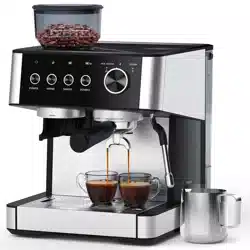
COFFEE MAKER
ModeI No.: CM5431D-UL
Item No.: CM8031-BLACK-CS
CM8031-BLACK
1.IMPORTANT SAFEGUARDS

��
Tel: 223-4467172 / 661-4358826
�
Tel: 213-4467172 / 661-4358826
1.IMPORTANT SAFEGUARDS

�
Tel: 223-4467172 / 661-4358826Tel: 213-4467172 / 661-4358826

�
Tel: 223-4467172 / 661-4358826Tel: 213-4467172 / 661-4358826
�
Tel: 223-4467172 / 661-4358826Tel: 213-4467172 / 661-4358826
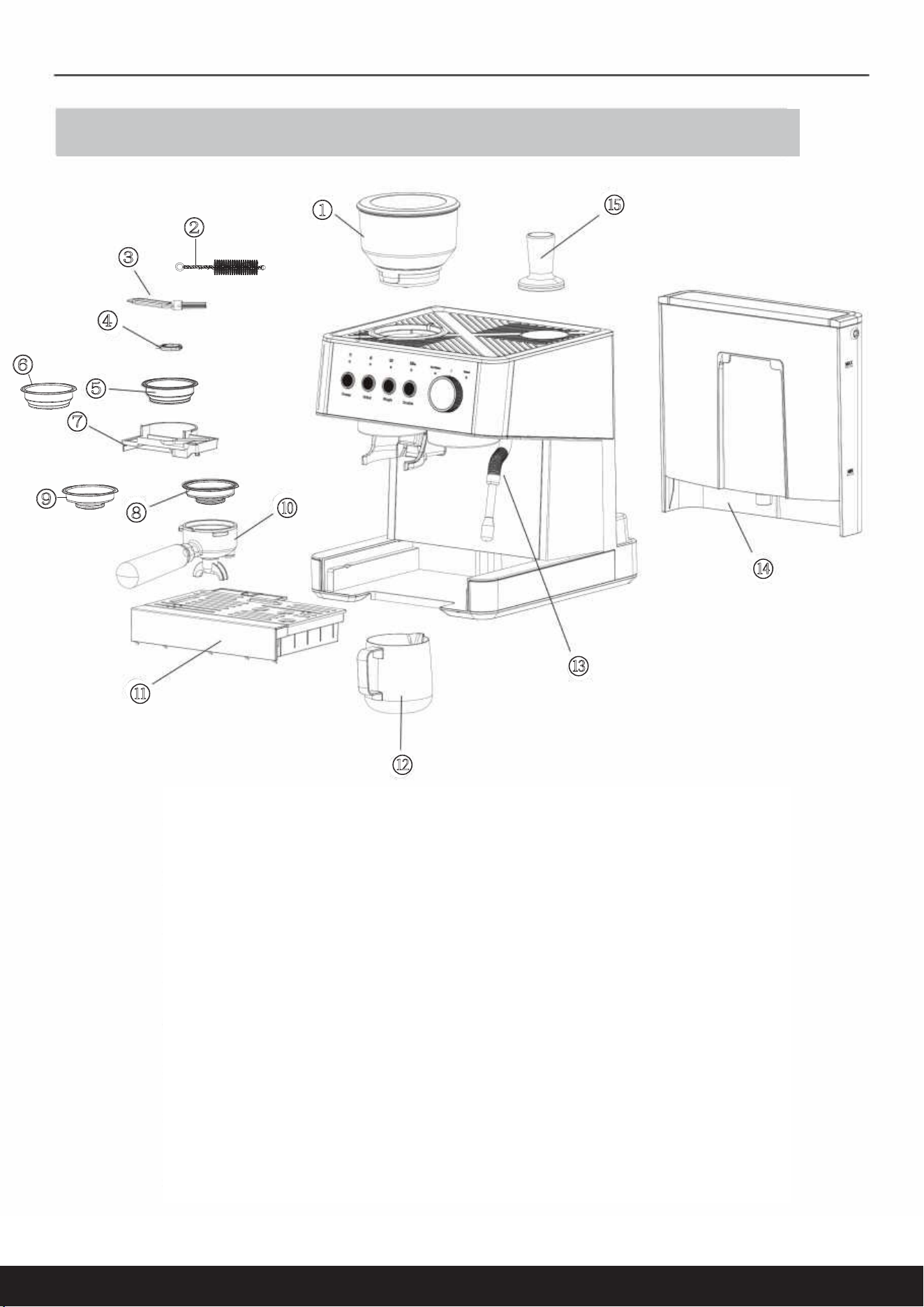
①Bean box
②Straw cleaning brush
③Cleaning brush
④Cleaning pin
⑤2 Cup single wall filter
⑥2 Cup double wall filter
⑦Tool box
⑧1 Cup single wall filter
⑨1 Cup double wall filter
⑩Portafilter
⑪Drip tray
⑫Milk jug
⑬Steam tube
⑭Water tank
⑮Tamper
②
①
③
④
⑤
⑥
⑦
⑧
⑨
⑩
⑪
⑫
⑬
⑭
⑮
2.KNOW YOUR GRIND&BREW COFFEE MAKER
�
Tel: 223-4467172 / 661-4358826Tel: 213-4467172 / 661-4358826
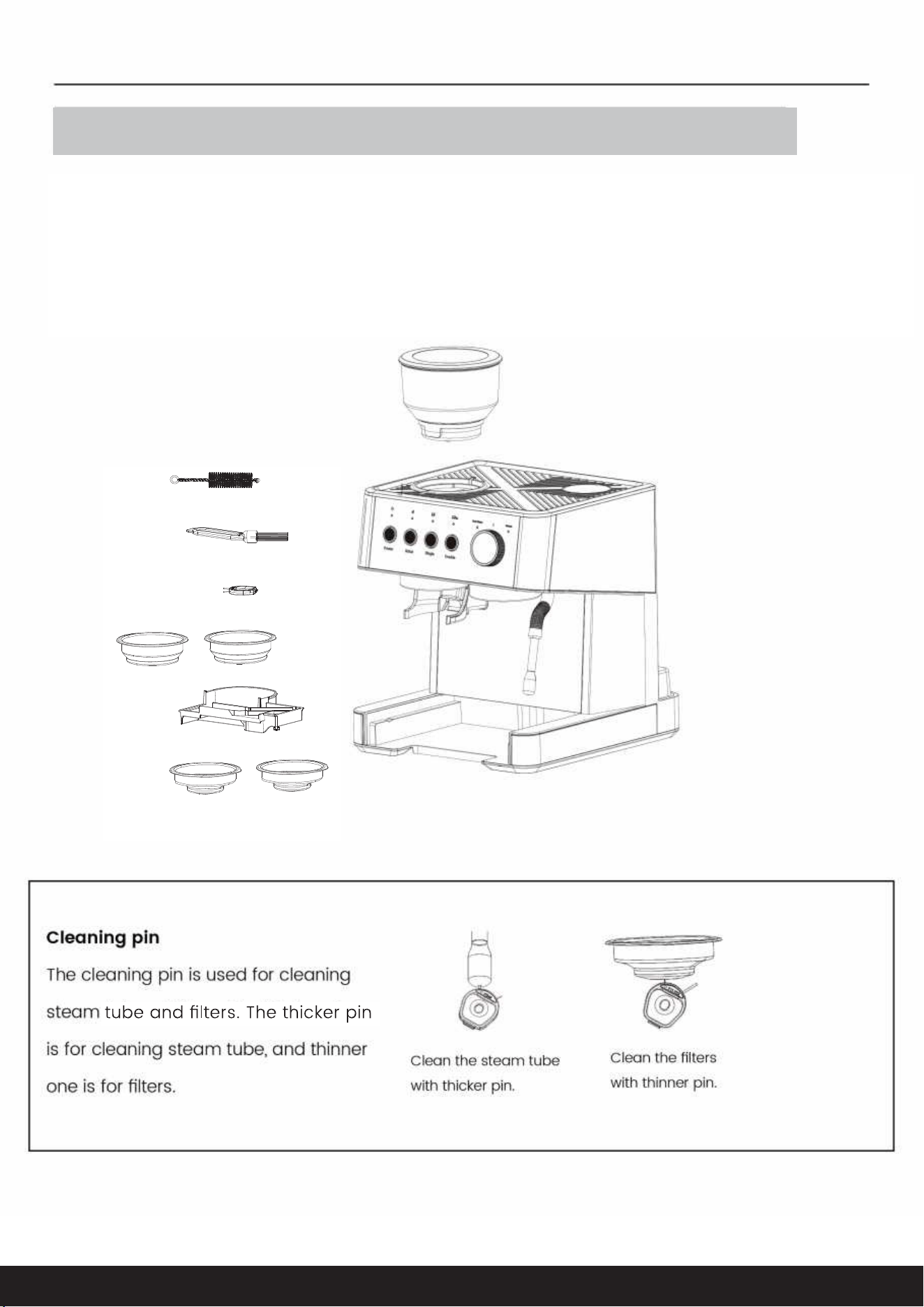
The machine is equipped with tool box which is used for storing cleaning pin and cleaning
brush. Filters can be stored in the tool box as well. The tool box is placed to the lower right
corner of the machine, and you can see it when you remove drip tray from the machine.
3.ACCESSORY INSTRUCTIONS

�
Tel: 223-4467172 / 661-4358826
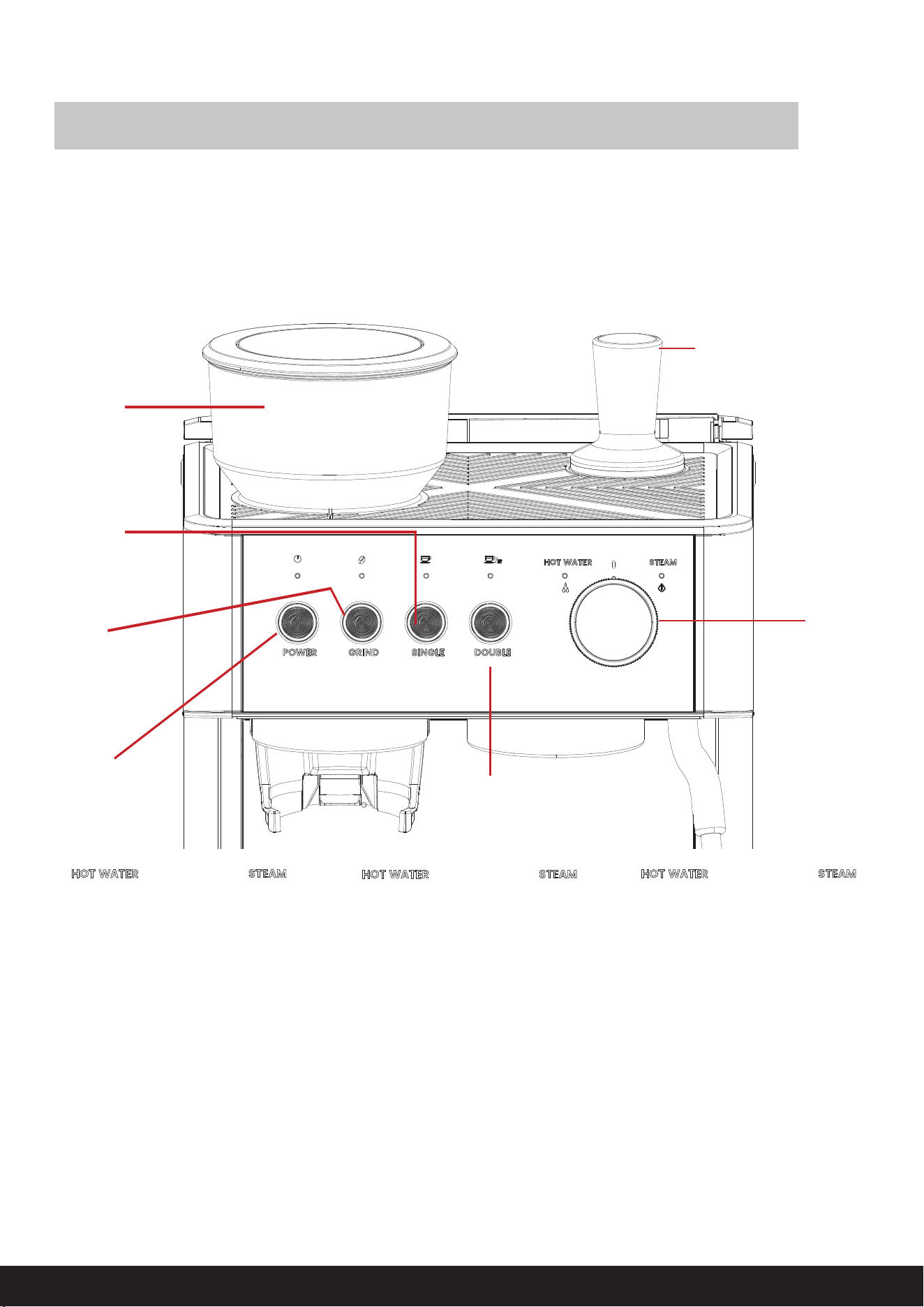
The cleaning brush is used for cleaning
the grinding system. Clean the grinder
after removing the bean box and grinding
wheel, you can use the cleaning brush to
clean the grinding chamber and the
powder-dispensing channel.
Tel: 213-4467172 / 661-4358826
�
Tel: 223-4467172 / 661-4358826Tel: 213-4467172 / 661-4358826
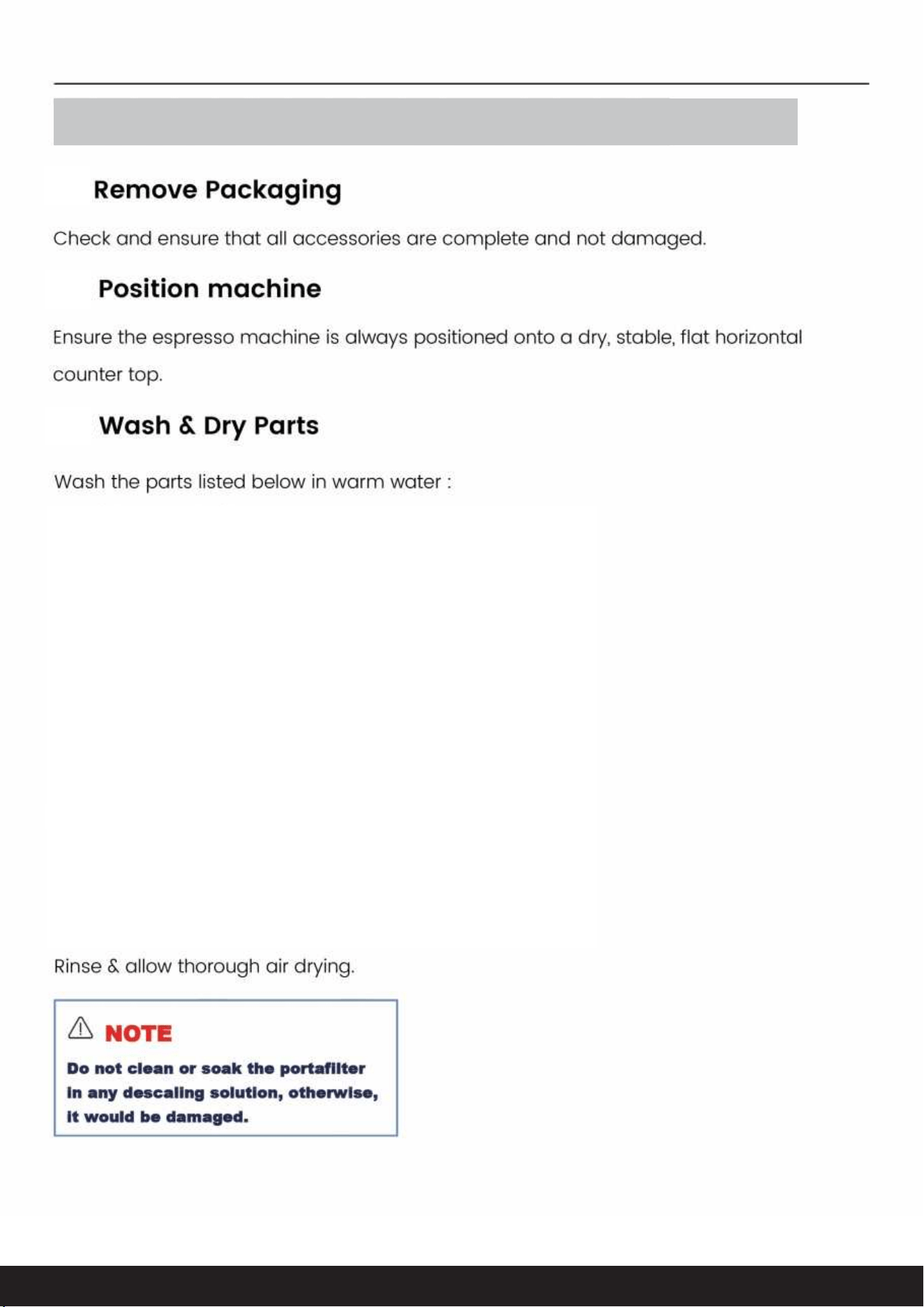
4.CONTROL PANEL/FUNCTIONS
4.1
4.2
4.3
①
②
③
④
⑤
⑥
⑦
�
Tel: 223-4467172 / 661-4358826Tel: 213-4467172 / 661-4358826
5.BEFORE THE FIRST USE
-Stainless steel Milk Jug
-Portafilter
-Stainless steel single & Double Wall Filters (1 cup & 2 cup)
-58mm Stainless Steel & Aluminum Tamper
-Cleaning Brush
-Straw Cleaning Brush
-Cleaning Pin
-Room Saving Tool box
-Drip Tray
-Removable Water Tank
5.1
5.2
5.3

�
Tel: 223-4467172 / 661-4358826Tel: 213-4467172 / 661-4358826
5.4.1
5.4

�
�
��
Tel: 223-4467172 / 661-4358826Tel: 213-4467172 / 661-4358826
5.4
�
�
SINGLE,DOUBLE buttons and HOT WATER light is always on in
white, the machine is in the READY state for all features
5.4.2 Insert Beam Hopper
5.4.3 Power
.

��
Tel: 223-4467172 / 661-4358826Tel: 213-4467172 / 661-4358826
- Turn the knob to hot water position, the water should start flowing from the steam
wand. Allow water to run through until the machine stops.
5.4.4 Insert Portafilter
5.4.5 Cleaning

��
Tel: 223-4467172 / 661-4358826
fewer and fewer coffee grinds would be
ground coffee
Therefore,
Tel: 213-4467172 / 661-4358826
6.GRINDING GUIDE
6.1 prepare the Beans
��

��
Tel: 223-4467172 / 661-4358826
and
“ ”
“ ”
Tel: 213-4467172 / 661-4358826
6.2 Setting the Grind size
6.2

will flash white light
the grinder will start immediately and then it will automatically stop .
��
Tel: 223-4467172 / 661-4358826Tel: 213-4467172 / 661-4358826
6.3 Grind Dose
6.2
6.3
6.3
6.3
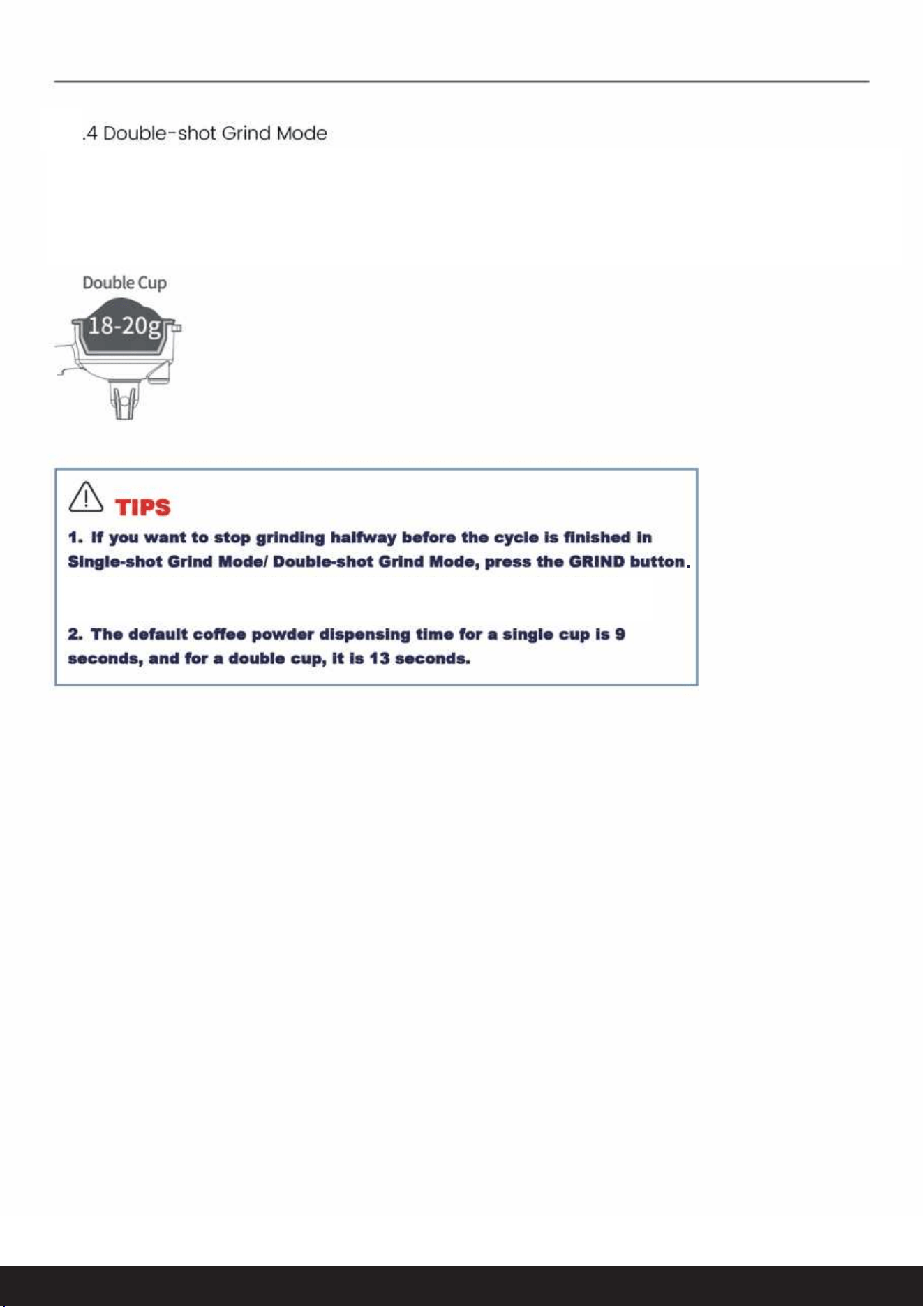
Press the GRIND button twice within �s and the double-shot grind indicator will flash white light,
the grinder will start immediately and then it will automatically stop.
��
Tel: 223-4467172 / 661-4358826Tel: 213-4467172 / 661-4358826
6.3

��
Tel: 223-4467172 / 661-4358826Tel: 213-4467172 / 661-4358826
7.ESPRESSO MAKING GUIDE
7.1
7.1
7.1
7.1.1 Bean Requirement

��-��kg
��-��
��
Tel: 223-4467172 / 661-4358826Tel: 213-4467172 / 661-4358826
7.1
7.1
7.1

SINGLE, DOUBLE HOT WATER buttons are always on in white.
��ml�
��ml
�
��
Tel: 223-4467172 / 661-4358826
after
Tel: 213-4467172 / 661-4358826
7.1
7.1
7.1
Before brewing, make sure that the pre-heating process finishes. At this point, the POWER,
GRIND,SINGLE, DOUBLE AND HOT WATER indicators are always on in white.

�
��
��
Tel: 223-4467172 / 661-4358826Tel: 213-4467172 / 661-4358826
7.1
7

��
Tel: 223-4467172 / 661-4358826Tel: 213-4467172 / 661-4358826

��
Tel: 223-4467172 / 661-4358826Tel: 213-4467172 / 661-4358826
8.OPERATIONAL INSTRUCTIONS
8.1

��
Tel: 223-4467172 / 661-4358826Tel: 213-4467172 / 661-4358826
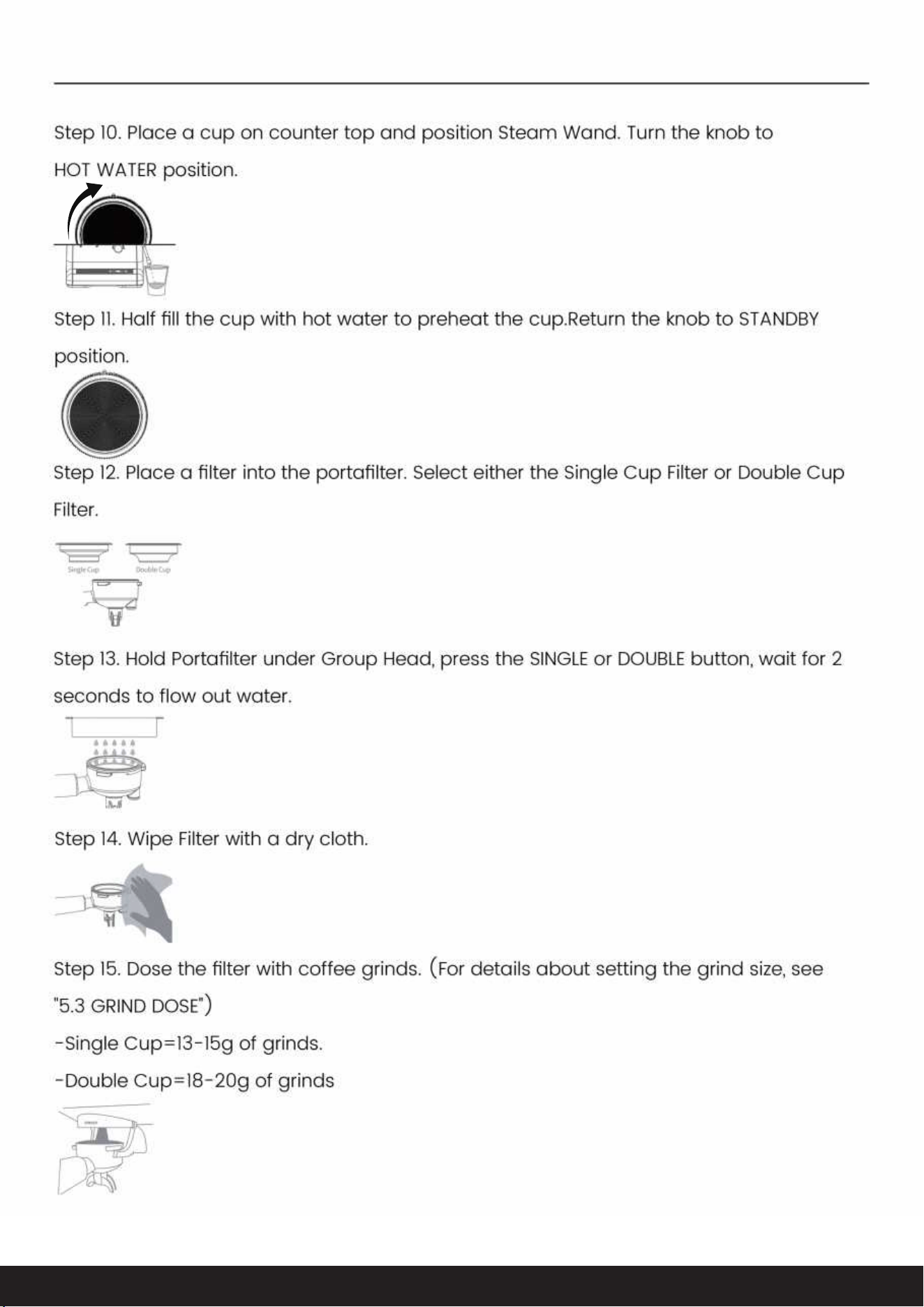
HOT WATER
��
Tel: 223-4467172 / 661-4358826Tel: 213-4467172 / 661-4358826
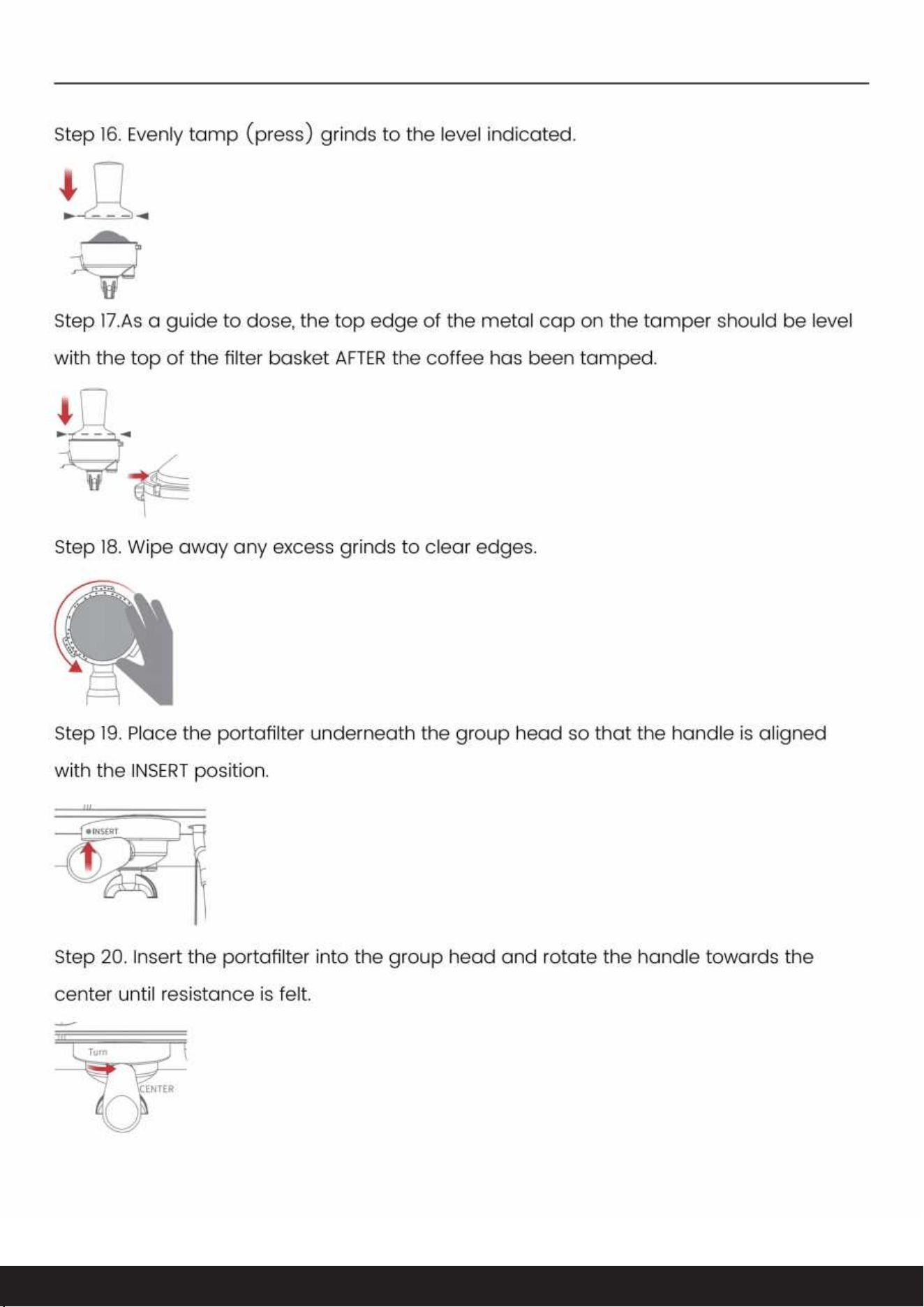
��
Tel: 223-4467172 / 661-4358826Tel: 213-4467172 / 661-4358826
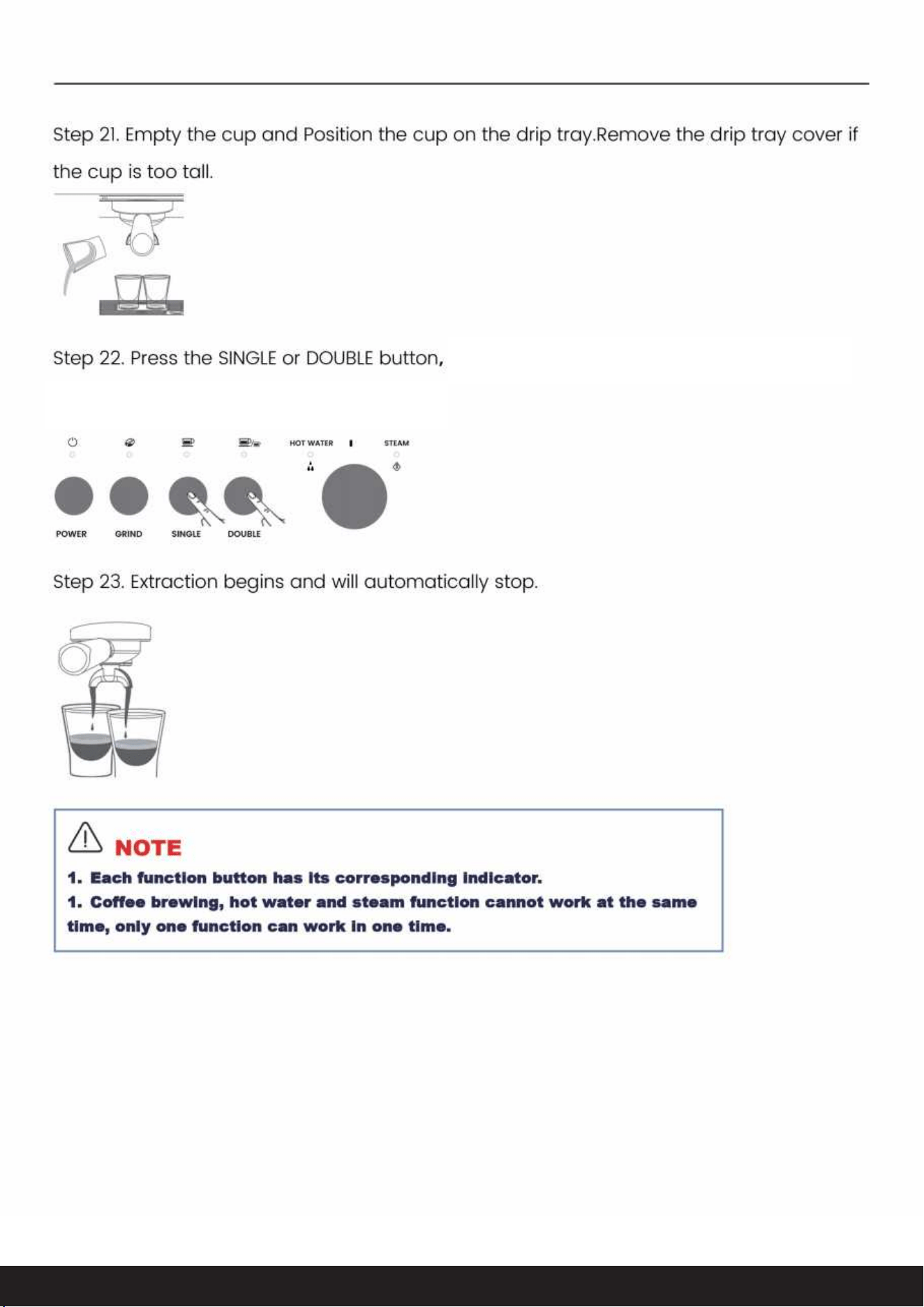
the machine will start brewing automatically.
��
Tel: 223-4467172 / 661-4358826Tel: 213-4467172 / 661-4358826
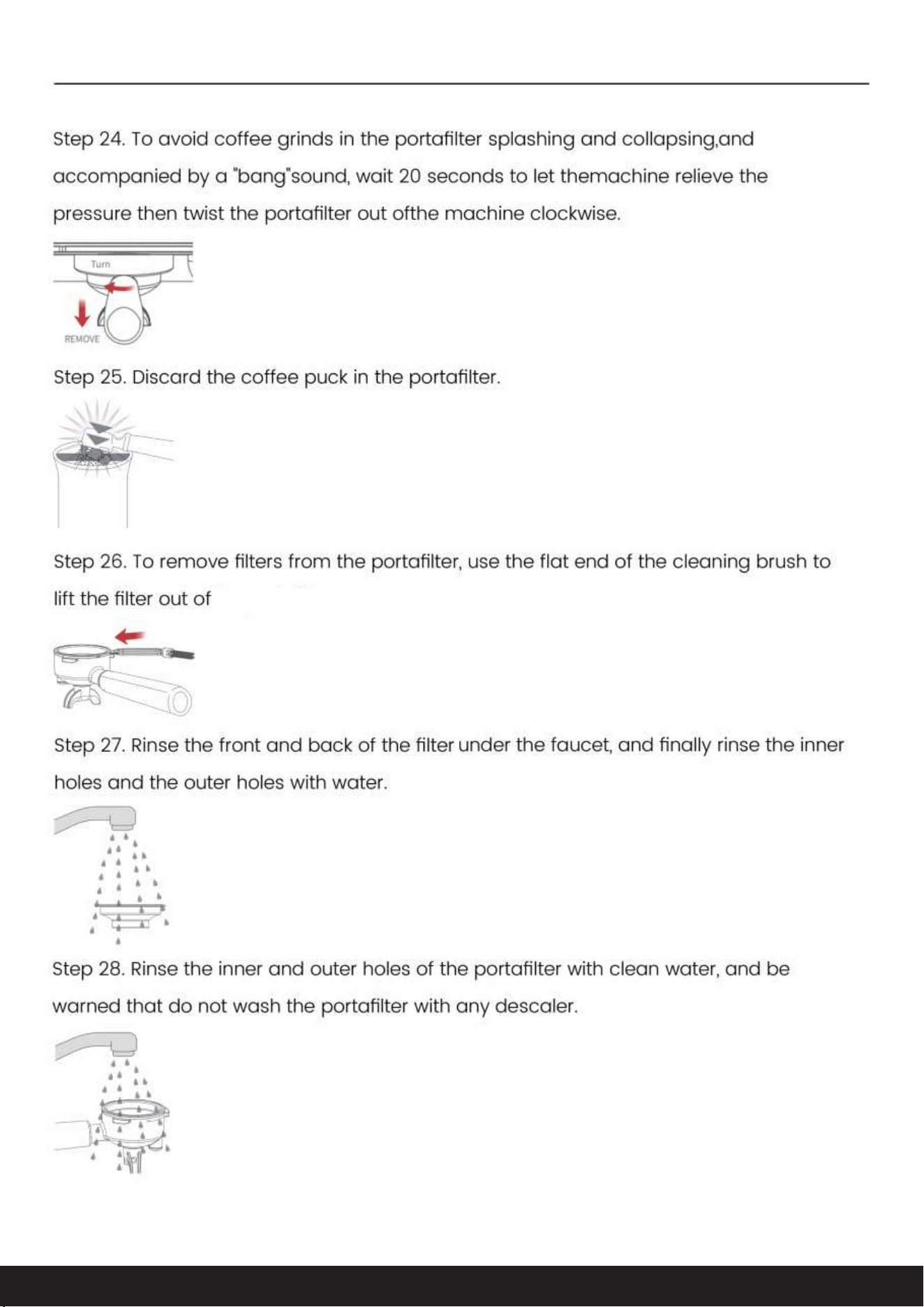
��
Tel: 223-4467172 / 661-4358826
the portafilter.
Tel: 213-4467172 / 661-4358826
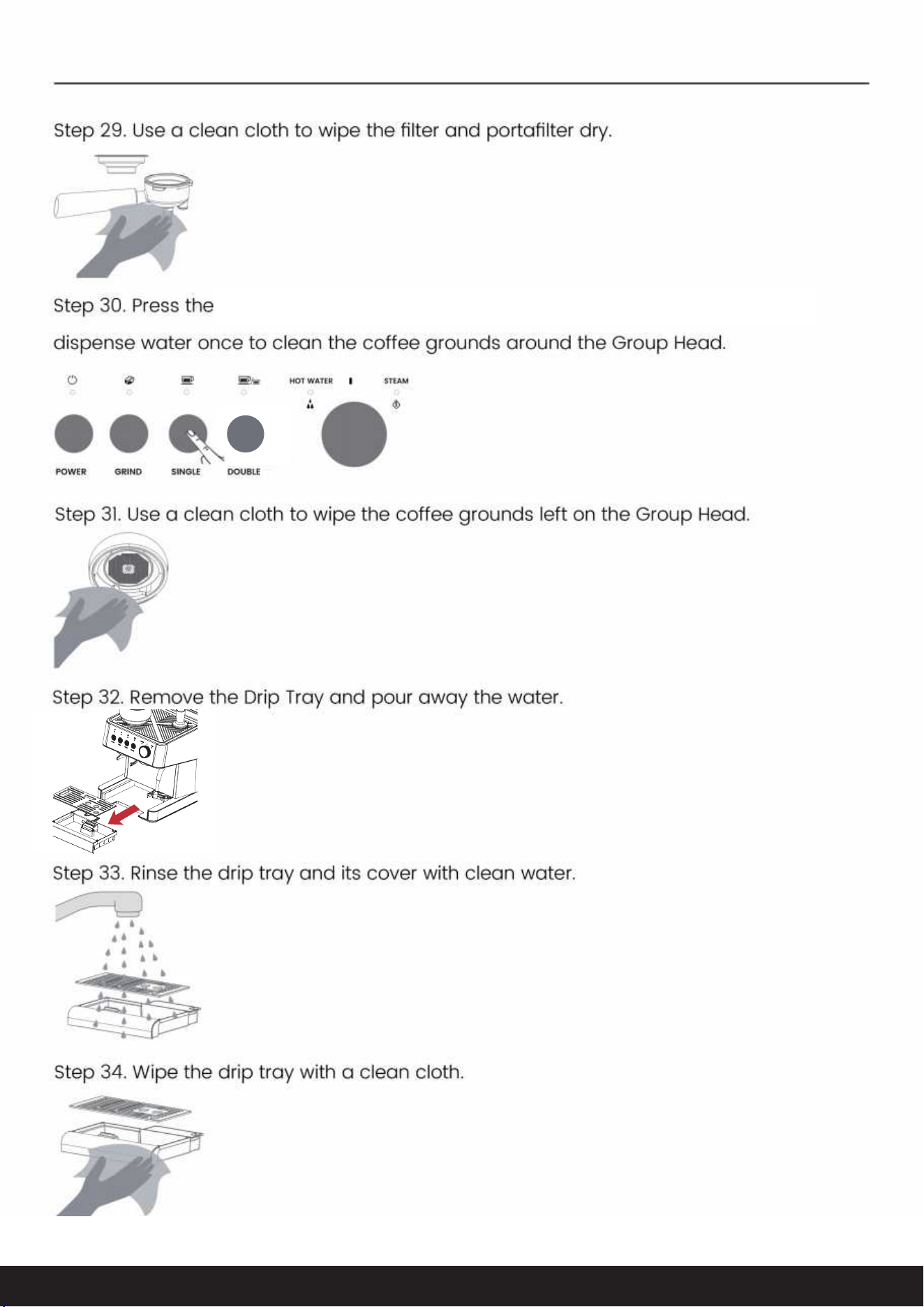
��
Tel: 223-4467172 / 661-4358826Tel: 213-4467172 / 661-4358826
SINGLE Button to select Single-shot Mode, and wait 2 seconds to
��
Tel: 223-4467172 / 661-4358826Tel: 213-4467172 / 661-4358826

170ML
5.75oZ
��
Tel: 223-4467172 / 661-4358826Tel: 213-4467172 / 661-4358826
8.2
8.3
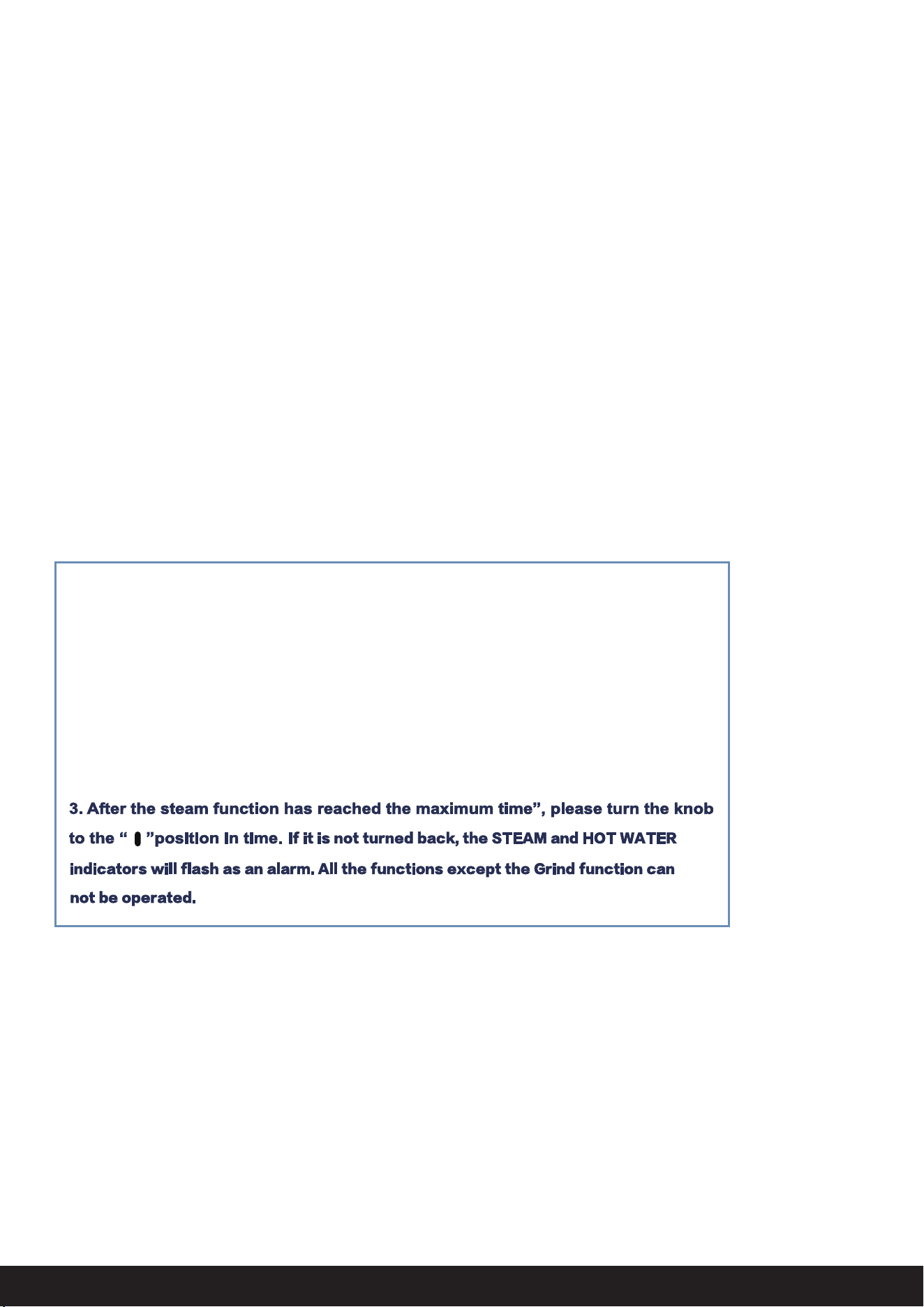
the steam and hot water
��
Tel: 223-4467172 / 661-4358826Tel: 213-4467172 / 661-4358826
8.4

flashs and the coffee machine starts to dispense coffee.
��
Tel: 223-4467172 / 661-4358826Tel: 213-4467172 / 661-4358826
8.5
8.6
8.7
8.8
coffee powder volume is reached, the

Tel: 223-4467172 / 661-4358826Tel: 213-4467172 / 661-4358826
8.9
8.9
8.9
��
Press the Power button to save the set time, the buzzer sounds once

��
Tel: 223-4467172 / 661-4358826Tel: 213-4467172 / 661-4358826
9.CARE & CLEANING
9.1 Clean the Grinder
9.1.1 Cleaning Method for Grinder:

��
Tel: 223-4467172 / 661-4358826Tel: 213-4467172 / 661-4358826
9.2
9.3
9.4

��
Tel: 223-4467172 / 661-4358826Tel: 213-4467172 / 661-4358826
10.DESCALING INSTRUCTION
After regular use, hard water can cause mineral build up in and on many of the inner
functioning components, reducing the brewing flow, brewing temperature, power of the
machine and taste of the espresso.
It is recommended to descale the machine every 4-6 months and especially when you
are not using the machine for an extended period (such as going on vacation).
When the system detects that the flow amount of the whole machine reaches 15 liters,
the indicators of single-cup, double-cup, steam and hot water will flash at the same
time as a descaling reminder.
10.1 Descaling reminder
when the red float exceeds the drip pan grid.
Especially
9.5

��
Tel: 223-4467172 / 661-4358826Tel: 213-4467172 / 661-4358826
10.2 Descaling preparation
NOTE:
1. You can exit the cleaning program at any time by pressing the Power Button.
2. If the descaling doesn't start within 1 minute, the appliance will exit the descaling
cycle and return to standby mode.
10.2.2 Place container
10.2.1 Add the solution to the water tank(choose one of three methods)
10.2.3 Empty the drip tray and install it in place.
10.2.4 Turn on the machine and make it stay under the standby mode.

��
Tel: 223-4467172 / 661-4358826Tel: 213-4467172 / 661-4358826
10.3 Descaling operation
Step 1. Standby mode
Under the standby mode, hold and press the Grind, Single-cup and Double-cup
button for 5 seconds to start the descaling process, at that time, the power indicator
flashes, the hot water and steam indicator illuminate solidly, the single-cup and
double-cup indicator extinguish, and other indicators keep their original states.
Step 2. Descaling cycle
Step 3. Cleanup cycle
Turn the knob to steam position.
The steam indicator flashes, other indicators keep their original states. The pump
starts to work, the hot water will go through from the brewing head and steam tube.
When hot water dispensing is stopped, the power indicator flashes slowly, the steam
and hot water indicators flash quickly, single-cup and double-cup indicators and
other lights keep their original states.
Turn the knob to " " position, the steam and hot water indicator will illuminate solidly,
and other indicators will keep their original states.
Important: Allow up to 5 minutes to complete the following steps before exiting
the descaling cycle: Clean the water tank; Fill the water tank; Empty the
containers.The steam tube and brewing head need to be cleaned with fresh
water to remove the descaling solution as the steps shown below:
1. Turn the knob to hot water position;
2. The hot water indicator will flash, other indicators will keep their original states.
The pump starts to work, the hot water will go through from the brewing head and
steam tube. When the hot water dispensing is stopped, the hot water and the steam
indicators will flash,the Power and Grind indicators illuminate solidly, single-cup and
double-cup indicators extinguish.

will flash,the Power and Grind indicators illuminate
solidly, single-cup and double-cup indicators extinguish
the hot water and the steam indicators
��
Tel: 223-4467172 / 661-4358826Tel: 213-4467172 / 661-4358826
Step 4. Descaling completed
The power indicator stops flashing.Turn the knob to the “ ", the descaling cycles
will becleared, and the machine will return to standby state.
11.2 WATER SHORTAGE REMINDER
11.CLEANING AND MAINTENANCE
11.1 Cleaning
NOTE:The machine is equipped with tool box which is used for storing cleaning pin and
cleaning brush. Single-cup filter and Double-cup filter can be stored in the tool box
as well. The tool box is placed to the lower right corner of the machine, and you can
see it when you remove drip tray from the machine.

��
Tel: 223-4467172 / 661-4358826Tel: 213-4467172 / 661-4358826
11.CLEANING AND MAINTENANCE
11.1 Cleaning
NOTE:The machine is equipped with tool box which is used for storing cleaning pin and
cleaningbrush. Single-cup filter and Double-cup filter can be stored in the tool box
as well. The toolbox is placed to the lower right corner of the machine, and you can
see it when you removedrip tray from the machine.
11.2.2 Restore To Factory Settings
11.2.3 Winter Storage Care
11.2.1 Water Shortage Reminder
11.2 Maintenance

��
Tel: 223-4467172 / 661-4358826Tel: 213-4467172 / 661-4358826
12.TROUBLESHOOTING

��
Tel: 223-4467172 / 661-4358826Tel: 213-4467172 / 661-4358826

��
Tel: 223-4467172 / 661-4358826Tel: 213-4467172 / 661-4358826
��

15
Thank you for purchasing this product! If you have any questions about
the product, such as missing parts, damaged products, product
assembling, and operation
,
please contact us via customer service num
ber: 21 3-4467172 or 661-4358826
IMPORTANT
Please call our customer service department for any consulting:
213-4467172
661-4358826
(8:30am - 5:30pm P.S.T.)
DATED PROOF OF PURCHASE IS REQUIRED FOR WARRANTY
SERVICE.
AVIS
Veuillez appeler le service à la clientèle pour toutes questions au:
213-4467172
661-4358826
(8:30am - 5:30pm P.S.T.)
PREUVE D’ACHAT ORIGINALE REQUISE POUR SERVICE DE
GARANTIE.
IMPORTANTE
Sólo hay que llamar nuestro departamento de servicio
al cliente en caso de tener preguntas o i
nquietudes:
213-4467172
661-4358826
(8:30am - 5:30pm P.S.T.)
SE REQUIERE PRUEBA DE COMPRA CON FECHA PARA SERVICIO
BAJO GARANTÍA.
Tel: 223-4467172/661-4358826
Address : 9733 Topanga C anyon Blvd. APT310, Chatswor th, CA 91311
��
Tel: 213-4467172 / 661-4358826