Service Manual
for
Cube Ice Machine with storage
models HISU050, HISU070 and HISU090

August 2014
Page 1
Service Manual for Models HISU050, HISU070 and HISU090
Introduction
The design of this product is the result of years
of experience in developing commercial ice cube
machines. It has been designed for simple operation
in a wide range of locations. Please follow the
instructions for installation and maintenance to get the
most use from this ice machine.
Observe the Caution and Warning notices. They are
indicators of important safety information. Keep this
manual for future reference.
Table of Contents
Important Details .....................2
Pre-Installation. . . . . . . . . . . . . . . . . . . . . . .3
Cabinet Layout, HISU050 and HISU070...4
Cabinet Layout, HISU090 ..............5
Component Location ..................6
Connect the water supply ..............7
Connect the power ...................8
Control Panel and Adjustments ..........9
Initial Start Up .......................10
Use and Operational Notes .............11
Maintenance ........................12
Electrical Sequence ...................14
Components ........................15
Performance ........................16
Thermistor Values ....................17
Controller Use .......................18
Anti-Slush ..........................19
Service Diagnosis ....................21
Service Diagnosis ....................22
Service Diagnosis ....................23
Removal and Replacement .............24
Removal and Replacement .............25
Removal and Replacement .............26
Controller ...........................27
Cabinet Removal for Service ............28
115/60/1 Wiring Diagram ...............29
Service Manual for Models HISU050, HISU070 and HISU090
August 2014
Page 2
Important Details
The machine is designed for use indoors in a
controlled environment. It must be kept dry, not
overheated or subjected to excessive cold. The water
and power supply must be maintained or the machine
will stop making ice.
There are limits to how hot or cold the room it’s in can
be.
• Minimum air temperature: 50
o
F or 10
o
C
• Maximum air temperature: 100
o
F or 38
o
C.
There are also limits to how hot or cold the water
supply can be:
• Minimum water temperature: 40
o
F or 4.5
o
C
• Maximum water temperature: 100
o
F or 38
o
C.
There are limits to the voltage supply to the unit,
voltages vary by model:
Voltage
115 (-1)
Minimum 104
Maximum 126
Water supply must be potable by the localities
denition.
There are limits to the water pressure supplied to the
unit:
• Maximum pressure. static: 80 psi or 5.5 bar
• Minimum pressure, dynamic: 15 psi or 1 bar
A drain will be needed for melted ice and rinse water.
Warranty:
The warranty statement for this product is provided
separately from this manual. Refer to it for applicable
coverage. In general warranty covers defects
in material or workmanship. It does not cover
maintenance, corrections to installations, or situations
when the machine is operated in circumstances that
exceed the limitations printed above.
This is a commercial model, if installed in a residence
some commercial service companies may not be able
to service it on site.
The manufacturer has designed and produced this
machinewiththenestinmaterials.Themanufacturer
assumes no liability for units that have been altered in
any way. Alterations or part substitutions will void the
warranty.Specicationsanddesignsaresubjectto
change without notice.
Options:
Therearetwooormountingkitsavailable:
•KADA15A: for 15” models
•KADA20A: for 20” model
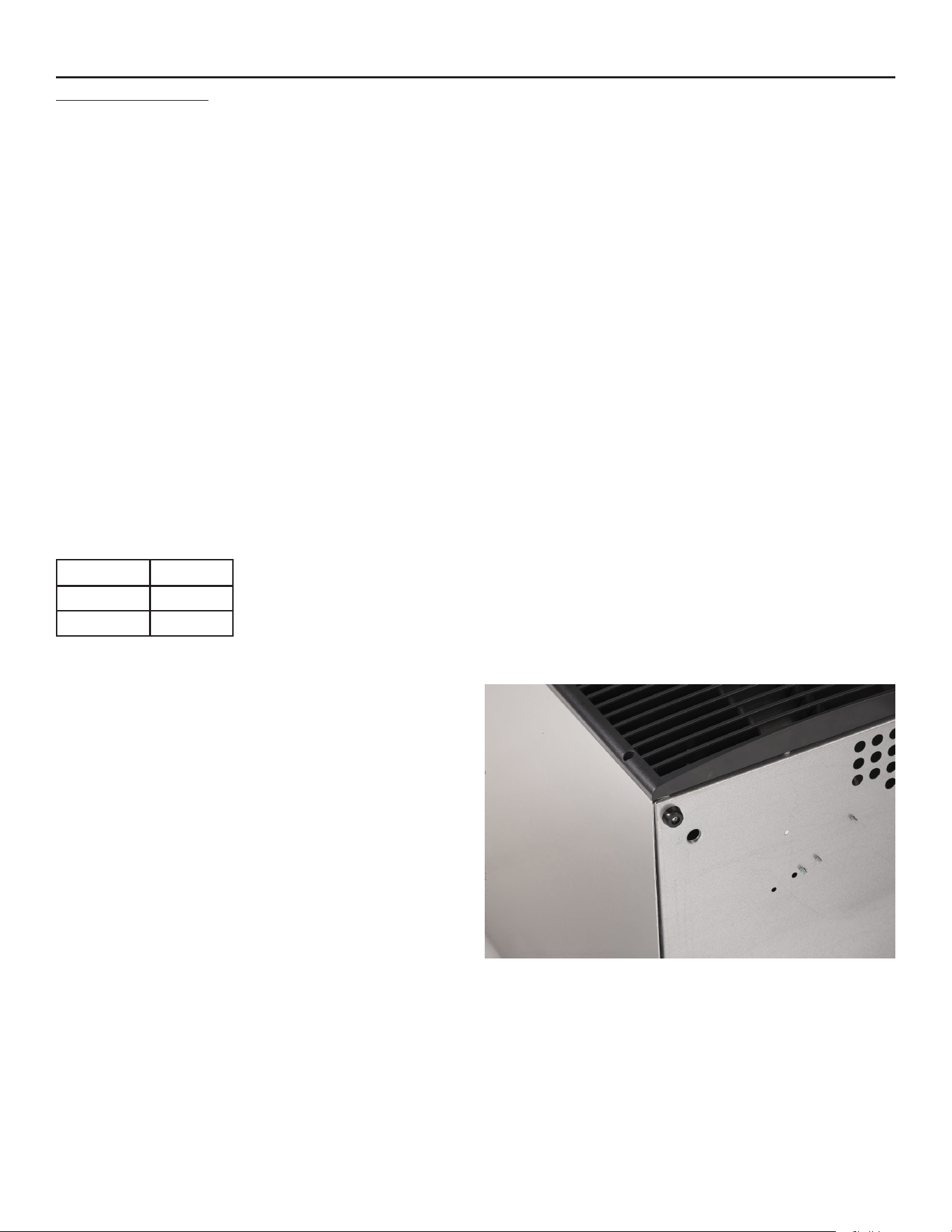
Bottom of Cabinet, showing bumper. Cabinet height
includes bumper.
August 2014
Page 3
Service Manual for Models HISU050, HISU070 and HISU090
Pre-Installation
This appliance is intended to be used in commercial
applications including:
• Restaurant kitchens
• Bars
• Hotels
Dimensions and Electrical:
Location:
Theunitcanbebuiltintoacabinetastheairow
is in and out the front. The front of the machine
must not be blocked. Certain maintenance or
repairprocedureswillrequireremovalofthetop,
back and side panels, so plan ahead for service and
maintenance needs.
Spacing:
Noadditionalspacingisrequiredatthetoporsides.
However,suggestedminimumsideclearancefor
installation is 1/8 inch or 3 mm and suggested
minimum top clearance is 1/4 inch or 7 mm.
Allow4inches(100mm)minimumspaceattheback
for the utility connections. Do not block louvers at the
front of the cabinet.
Unpacking and setup
Remove all shipping and packing materials that may
be in the ice storage bin.
Theunitcanbeinstalledwithorwithoutlegs.The
cabinetisequippedwithsmallbumpersonthebase
toallowplacementwithoutlegs.Anoptionaloor
mountingkitisalsoavailabletollthegapbetween
themachineandoorifnotusinglegs.Ifusinglegs,
carefully tip the machine and install the legs by
screwingthemintothelegsocketsinthebottomof
the machine. For reference, the thread size is 5/8 –
11.Ifthemachinehasbeentippedontoitssideor
backallow1hourbeforestartingtheunitfortheoilin
the refrigeration system to return to the compressor.
Place the machine in its intended location and level it
fronttobackandlefttoright.Ifusinglegs,adjusttheir
feet in and out to level the cabinet.
Iflegsarenotusedthebottomedgesofthecabinet
mustbesealedtotheoor.
Ifbuiltintoacabinet,theadjacentcabinetwallswill
provide the means for containment. There are no
means for attachment to the cabinet.
Be sure to remove the plastic covering the exterior panels,
ifleftonitwillbemuchhardertoremovelater.
Model Electrical
(volts/Hz/Phase
Width
(in/cm)
Depth
(in/cm)
Height(w/olegs)
(in/cm)
Total Load
Amps
HISU050 115/60/1 15 / 38 23.7 / 60.3 31.94 / 81.1 8
HISU070 115/60/1 15 / 38 23.7 / 60.3 31.94 / 81.1 8
HISU090 115/60/1 20 / 51 23.7 / 60.3 31.94 / 81.1 8
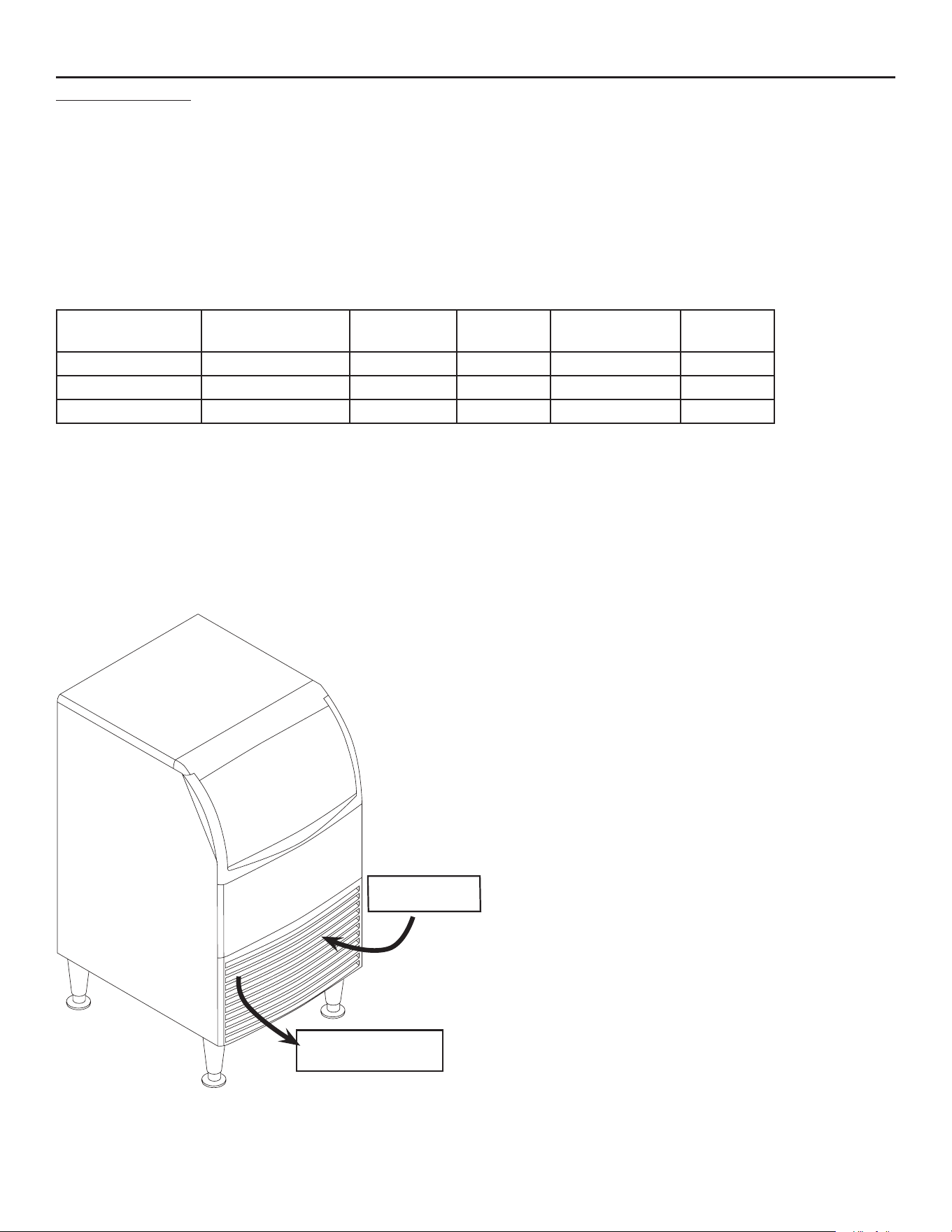
AirIN
Air OUT
Service Manual for Models HISU050, HISU070 and HISU090
August 2014
Page 4
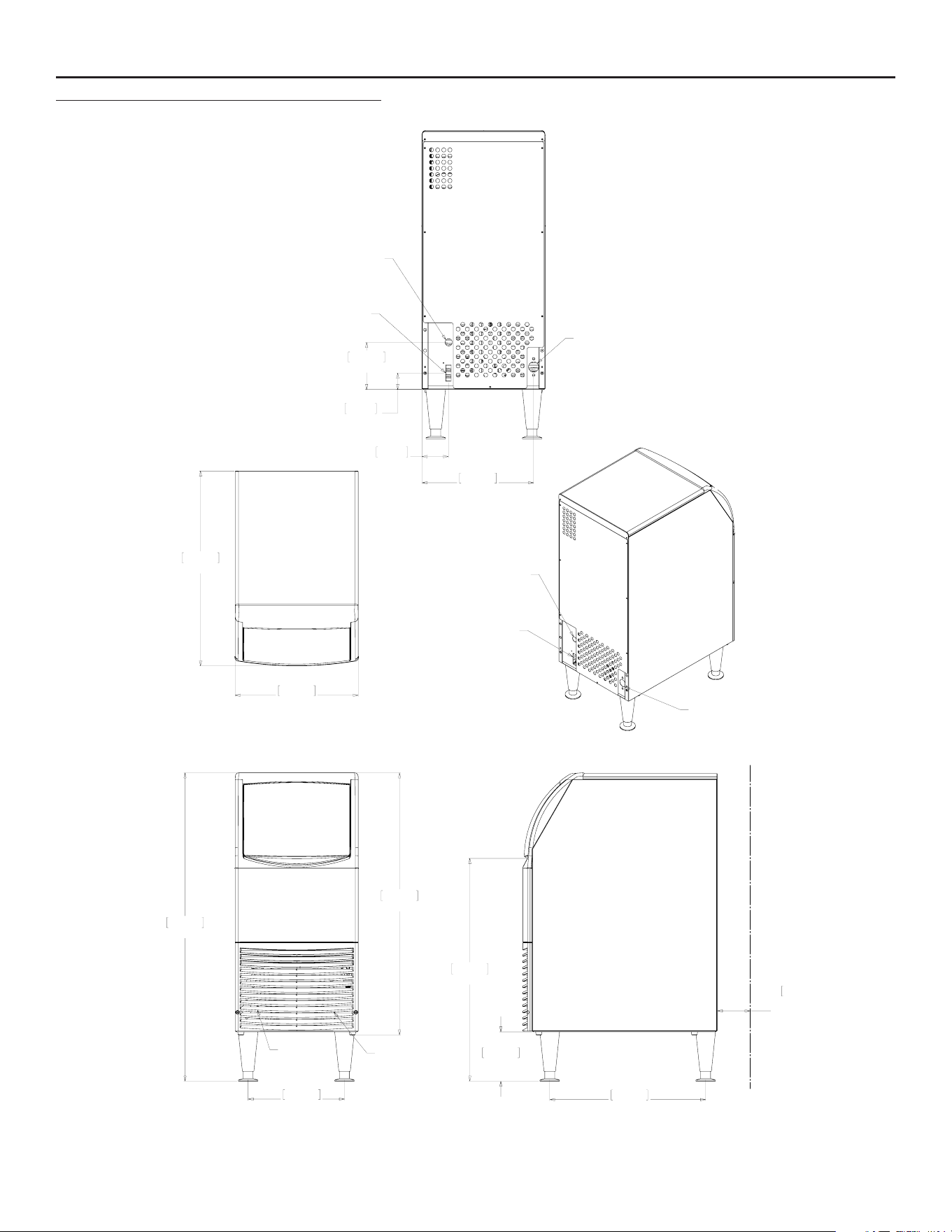
Cabinet Layout, +,68DQG+,68
95.4cm
37.6in
81.1cm
31.9in
29.8cm
11.8in
AIR
OUTLET
AIR
INLET
48.3cm
19.0in
68.9cm
27.1in
15.2cm
6.0in
10.2cm
MINIMUM
UTILITY
CLEARENCE
60.3cm
23.7in
38.1cm
15.0in
34.5cm
13.6in
14.6cm
5.8in
5.1cm
2.0in
8.2cm
3.2in
POWER CORD
POTABLE
WATER INLET
1/4" OD. PLASTIC
TUBING (5ft)
DRAIN
3/4" FPT
DRAIN
3/4" FPT
POTABLE
WATER INLET
1/4" OD. PLASTIC
TUBING (5ft)
POWER CORD
August 2014
Page 5
Service Manual for Models HISU050, HISU070 and HISU090
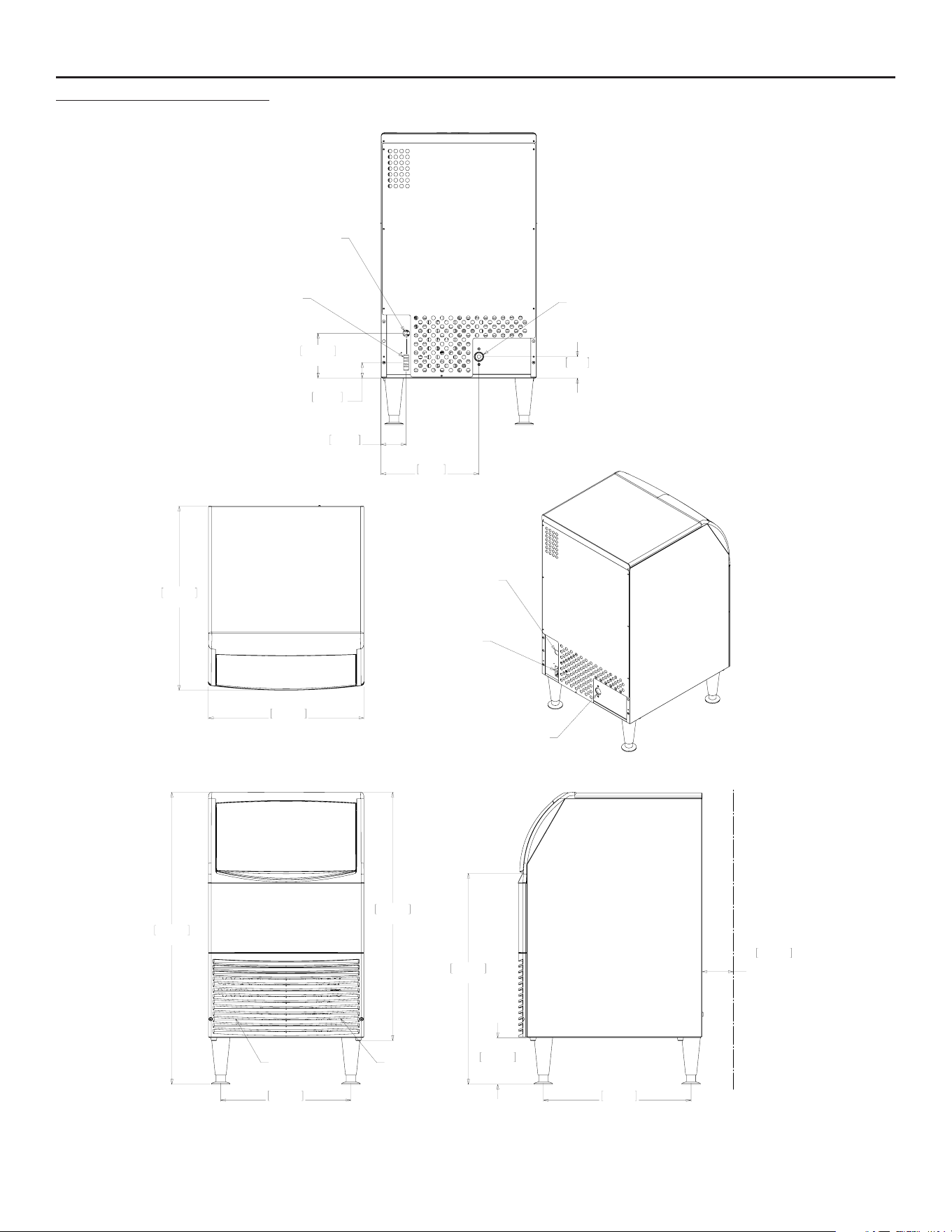
Cabinet Layout, +,68
95.4cm
37.56in
42.5cm
16.75in
81.1cm
31.94in
AIR
INLET
AIR
OUTLET
48.3cm
19.00in
68.9cm
27.13in
15.2cm
6.00in
10.2cm
4.00in
MINIMUM
UTILITY
CLEARENCE
DRAIN
3/4" FPT
POWER CORD
50.8cm
20.00in
60.1cm
23.67in
POWER CORD
POTABLE
WATER INLET
1/4" OD. PLASTIC
TUBING (5ft)
DRAIN
3/4" FPT
32cm
12.60in
14.6cm
5.75in
7cm
2.75in
8.2cm
3.23in
5.1cm
2.00in
POTABLE
WATER INLET
1/4" OD. PLASTIC
TUBING (5ft)
Service Manual for Models HISU050, HISU070 and HISU090
August 2014
Page 6
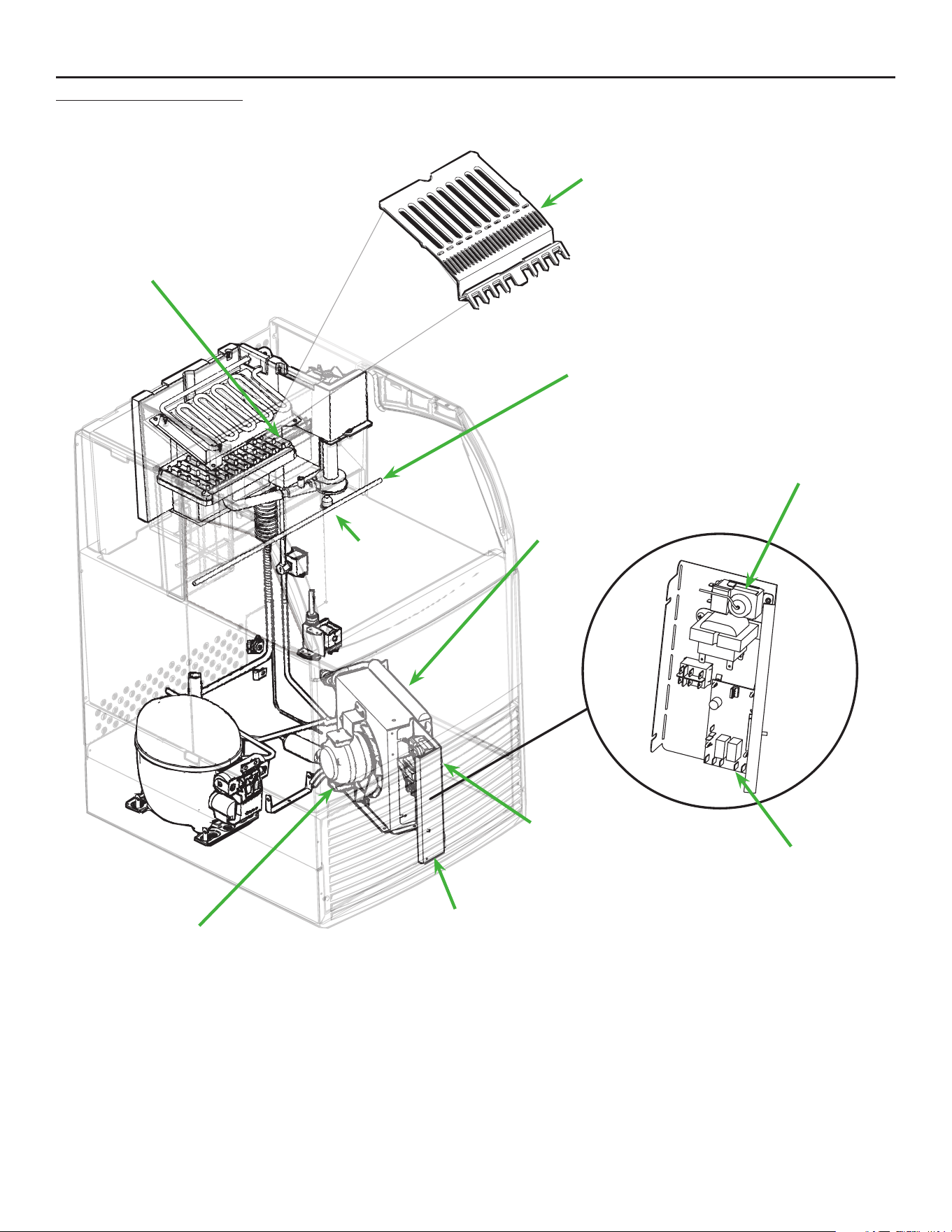
Component Location
Bin Thermostat Adjustment
Condenser Fins
Control Area
Drain Plug
Bin
Thermostat
Sensing
Point
Curtain
Condenser Fan
Thermostat
Controller
CubeDeector
August 2014
Page 7
Service Manual for Models HISU050, HISU070 and HISU090
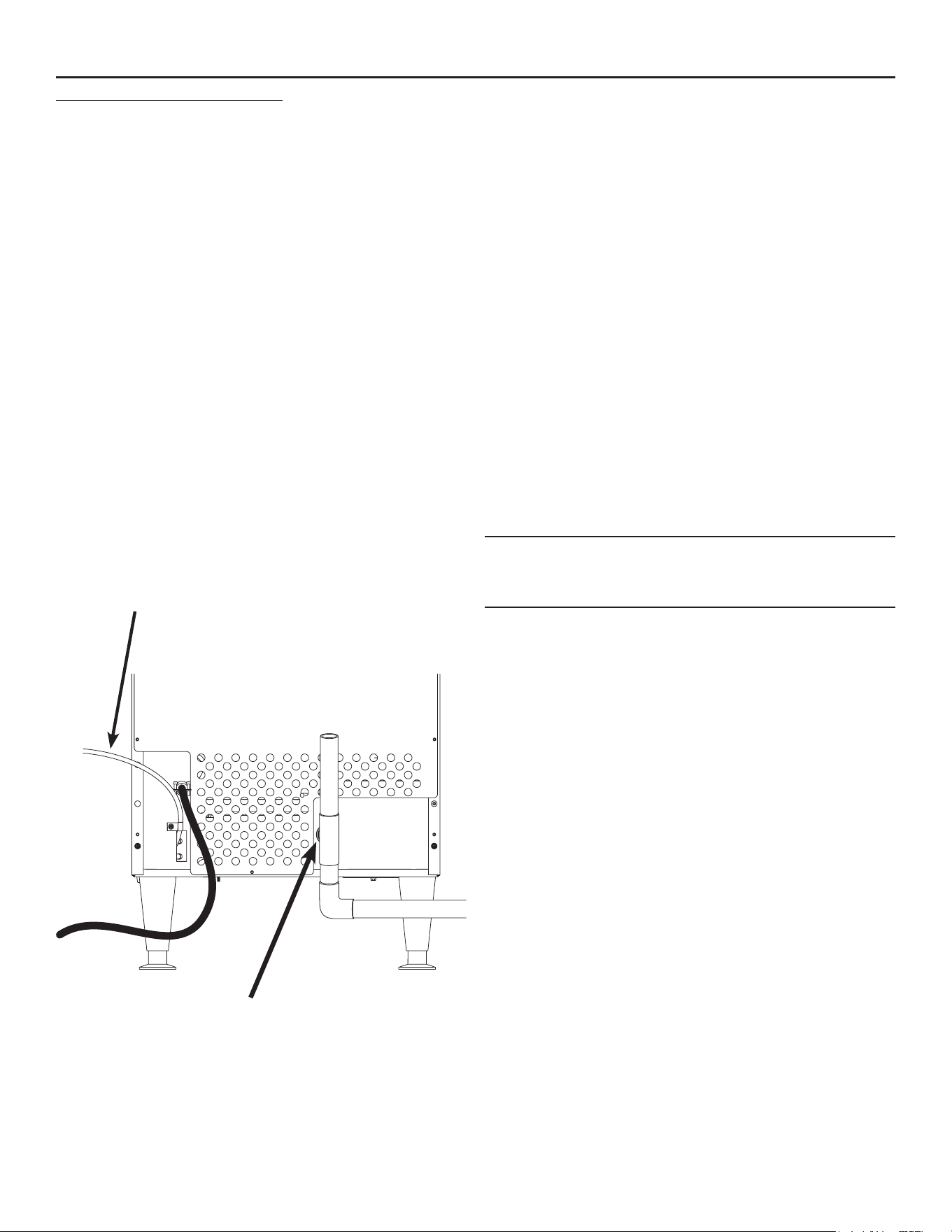
Connect the water supply
Plumbing information:
• The water supply connection is at the back panel. It
is a 5’ (1.5 meter) 1/4 inch (6.35 mm) OD plastic tube.
• A hand actuated valve within site of the machine is
required to isolate the unit when it’s being serviced.
•
Themachinehasabuilt-inbackowpreventer(an
air gap between the end of the water inlet hose and
thetopofthereservoirwater),noadditionalbackow
preventer is needed.
•
Waterowrateintomachineis.25GPM/.94LPM.
Units that are built into a cabinet:
Include a loop or coil of tubing between the water
supply and the connection on the ice machine. When
the machine is pushed back into the cabinet the
tubing will coil and not kink.
Connection Information:
WARNING:connecttopotablewatersupplyonly.
Important: Open the hand water valve to ush
water through the connection point before
connecting to the ice machine.
1. Cut cable ties securing hose and power cord to
unit.
2. Connect to cold, potable water using the
necessary adapters for the 1/4 inch OD plastic
tube.
•
Ifusingcompressionttingstheyrequireaferruleor
sleeve and insert.
• A female 3/8 compression adapter x 1/4 OD
compression allows connection to a typical 3/8 OD
compression angle valve.
• Another connection method is by quick connect
ttings.
Note: Do not use a piercing-type saddle valve to
connect to the building’s water supply. Valves of
that type restrict water ow and clog easily.
Connect the drain
Thedrainconnectionisatthebackpanel.Thetting
size is ¾ FPT.
1. Connectrigidtubingtothisttingandventitatthe
machine, use an 8 inch or 200 mm vertical tube
for the vent.
2. Slope drain tubing down from the ice machine to
the building drain and the slope must be at least ¼
inch per foot or 20 mm per meter.
3. Insulate the drain tubing to reduce condensation
and is recommended for environments that have
high humidity.
Due to the potential for leaks, condensate pumps are
not recommended.
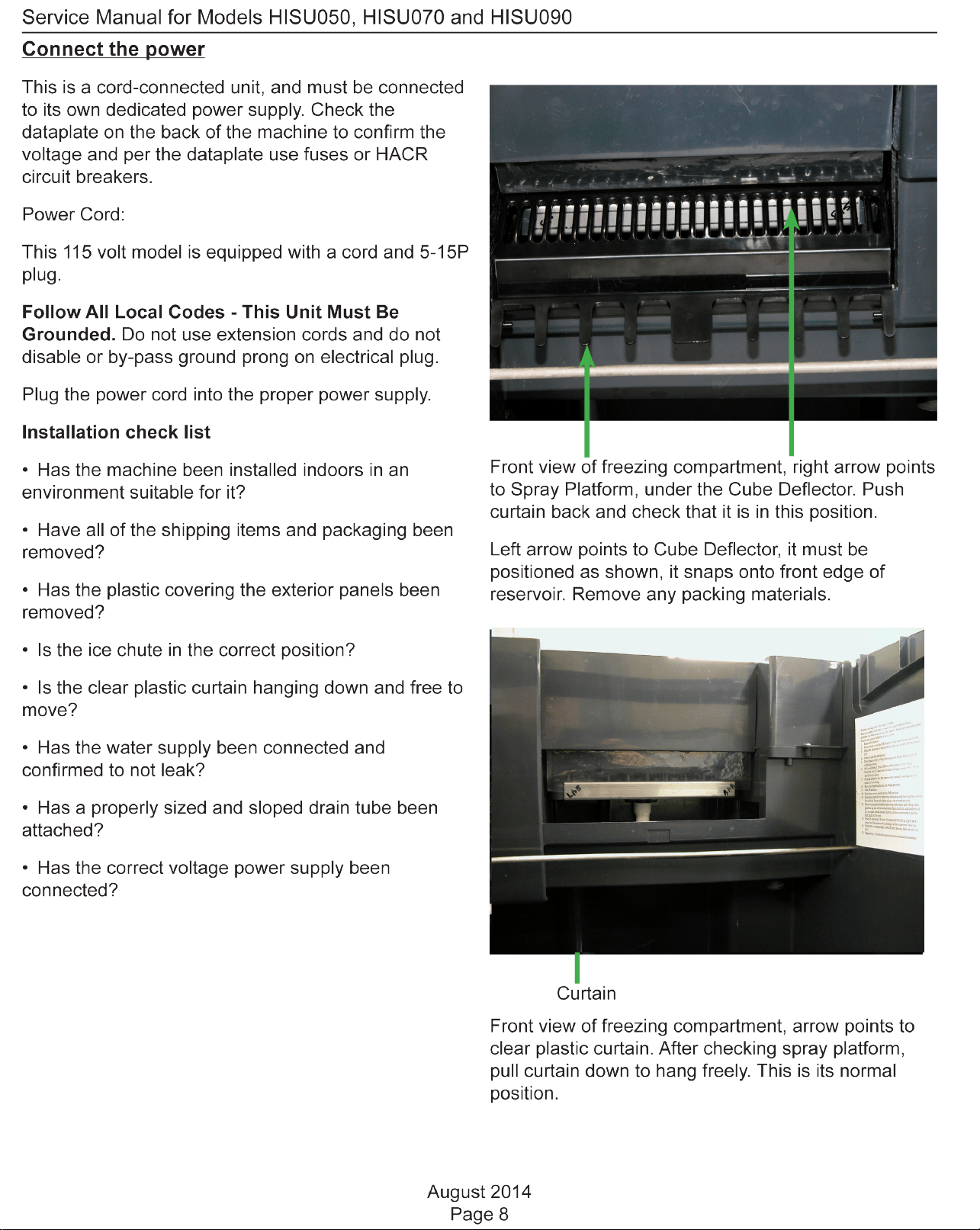
Drain Fitting, 3/4 FPT
Potable Water Inlet Tube
August 2014
Page 9
Service Manual for Models HISU050, HISU070 and HISU090
Ice Bridge Thickness Adjustment Area
Master Switch. Move to ON (left side depressed) to make ice, OFF
(centered) to shut off and WASH (right side depressed) for use in
cleaning.
Harvest Time Adjustment Area
Indicator Light Area.
Freeze Mode light is ON when unit is in a Freeze cycle.
Timer On light is ON when trigger point temperature is reached in
Freeze or Harvest.
Harvest Cycle Time Adjustment
After ice has formed in the inverted mold, it must be
released so it can be deposited in the storage bin
section. The harvest cycle is when that occurs, and
must be long enough for the ice to release. While the
harvest cycle length is self adjusting it can also be
manually adjusted if needed.
Proper harvest time is when the ice falls into the
bin and there is about 10 seconds extra harvest
time (pump and fan are off) before the freeze cycle
restarts.
If the harvest time is too short to release the ice,
the time may be increased by pushing the + sign on
the harvest time adjustment section of the control
panel. Operate the machine for another cycle to
conrmthattheadjustmentwascorrect.Notethattoo
much harvest time will slightly decrease making ice
capacity.
Control Panel and Adjustments
Adjustment Indicator Lights
Each push and release of the + or - button will change
the lights that glow or blink indicating a change in ice
size or harvest time. Example: pushing + one time
changes a blinking light to steady on type. If the lights
are on steady a single push of + will add one more
light to the right and it will blink. There are 10 settings.
All 5 lights on steady is the maximum setting and one
blinking light is the minimum.
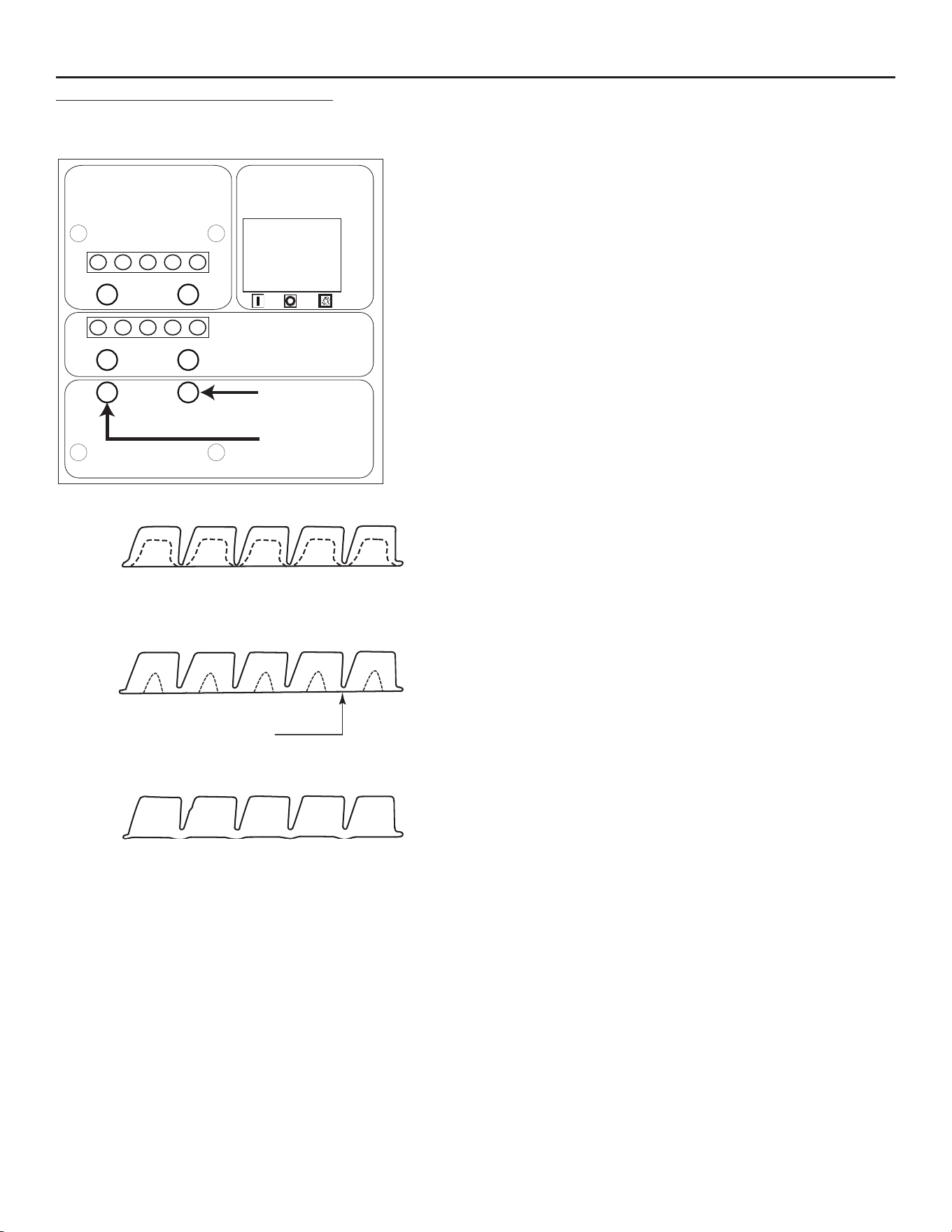
Ice Too Thin
Ice Too Thick
Ice Just Right
Bridge Thickness
Ice Thickness Diagram
Ice Bridge Thickness Adjustment
Refer to the Ice Thickness Diagram for proper ice
size.
Adjust by pushing the + sign or – sign on the ice
bridge adjustment section of the control panel.
Changing bridge thickness should be a one-time
adjustment as the machine will automatically maintain
that ice thickness.
-
+
-
+
Ice Bridge Thickness Adjustment
Réglage de l'épaisseur du pont de glace
Ajuste del espesor del puente de hielo
Regolazione spessore ponte di ghiaccio
Anpassung der Eisbrückendicke
Harvest Time Adjustment
Réglage du temps de récolte
Ajuste del tiempo de cosecha
Regolazione orario di raccolta
Anpassung der Erntezeit
ON / OFF / WASH
MARCHE / ARRÊT / LAVAGE
ENCENDIDO / APAGADO / LAVADO
ON / OFF / LAVAGGIO
EIN / AUS / WASCHEN
Freeze Mode
Mode de congélation
Modo de congelamiento
Modalità congelamento
Gefriermodus
Timer On
Minuterie allumée
Cronómetro encendido
Timer attivato
Timer eingeschaltet
17-3386-01
Service Manual for Models HISU050, HISU070 and HISU090
August 2014
Page 10
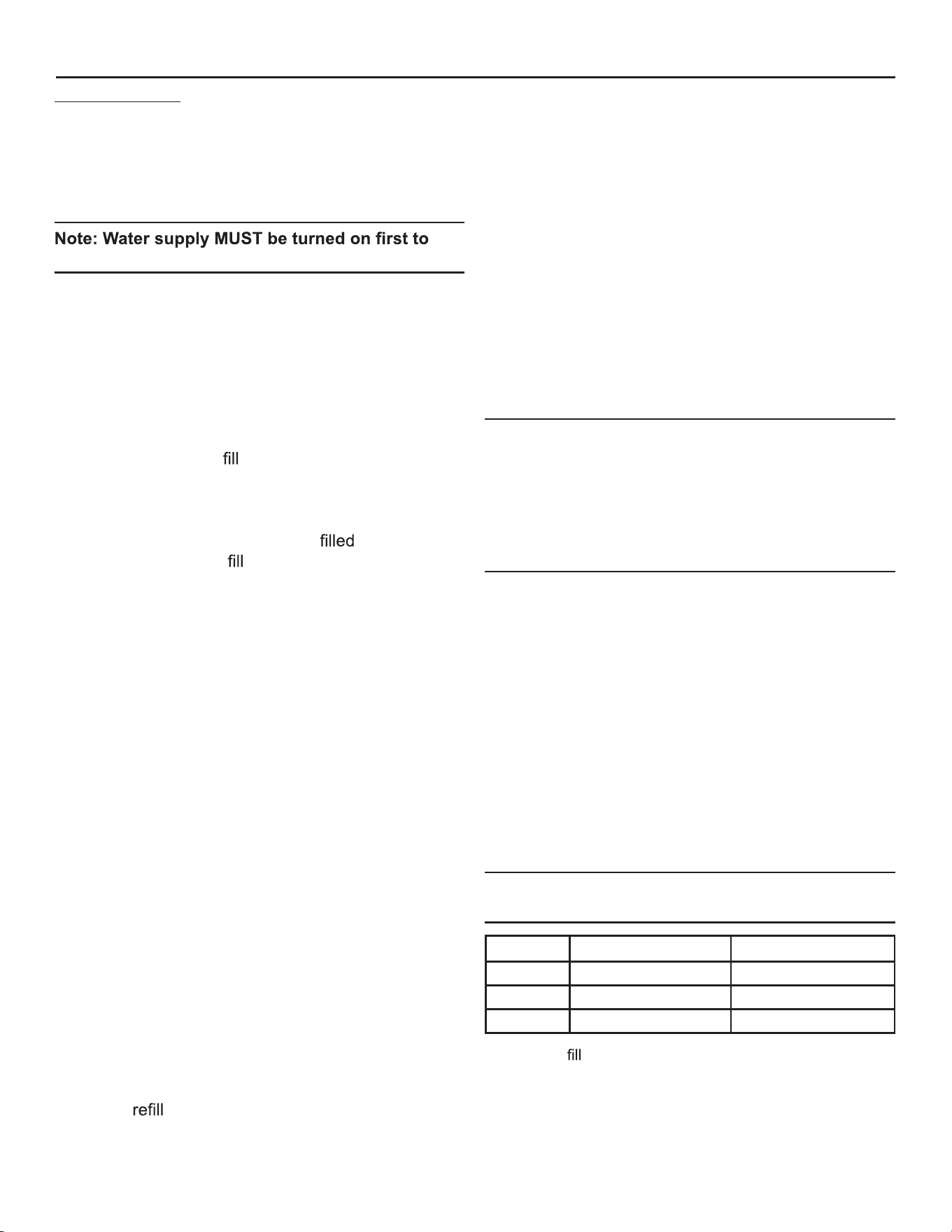
Initial Start Up
1. Remove the front panel by removing the two
screws holding it to the cabinet and pulling the
panel down and off the machine.
2. Turn on the water supply, correct any leaks.
allow water to enter the machine properly.
3. Locate the On/Off/Wash master switch.
4. Move the switch to the On position.
5. Ice bridge thickness and harvest time indicator
lights will switch on. They will not change unless
the cube size or harvest times are manually
adjusted. The timer light will also be on.
6. The unit begins to
the reservoir with water.
Two streams of water can be seen behind the
curtain. The compressor and hot gas valve will be
energized, but the fan motor and pump will be off.
After a time the water will have
the reservoir
but will continue to
and excess water will drain
from the machine. This is normal and helps the
machine from forming excessive mineral scale.
7. After 2 minutes the water and hot gas valves will
close and the pump and fan motors will start. A
blue light in the control panel will glow indicating
the beginning of the freeze cycle.
8. Warm air will begin to blow out the left front of the
machine and water will spray up at the inverted
ice making mold. It is normal for a small amount of
water to drip from the ice making area.
When the water temperature reaches a pre-set point
the water pump will stop for about 30 seconds then
resume.
Freezing then continues for many minutes until the
temperature of the refrigeration system drops to a
set point, indicated by a yellow light glowing on the
control panel. In colder rooms the fan motor may
turn on and off. After the yellow light switches on the
freeze cycle continues for seven more minutes. At that
time the unit changes to the ice release or harvest
cycle. During the ice harvest the hot gas valve and
inlet water valve are open, while the pump and fan
motors will stop. The blue and yellow lights will go out.
Water will
the reservoir.
9. Within a minute or so the ice formed in the mold
will fall down and slide into the ice storage bin.
The ice will release as a group so all of the ice
formed will fall at once and the next freeze cycle
will begin in a few seconds. The timer light may
switch on at the end of the harvest cycle.
10. Check the thickness of the ice connecting the
cubes to each other, that connection is known as
a bridge and it should be about 1/8 inch or 3 to 4
mm thick. It is preset from the factory and should
be satisfactory.
Adjustments:
If the ice bridge is too big or too small, the thickness
may be adjusted.
Note: The bridge thickness adjustment is used
to obtain the CORRECT size, not to adjust to
individual preferences. Do NOT make the ice
bridge too thick or too thin, as either will reduce
ice making capacity. Do NOT attempt to adjust the
machine to release individual cubes. There is only
ONE correct size.
11. Ice making will continue until the ice level reaches
the metal tube in the storage bin, when ice
contacts that tube the machine will stop making
ice. This can occur in any part of any cycle.
12. Removing ice from the ice storage bin will restart
the ice making process.
13. Check for and correct any water leaks from the
unit or drain system.
14. Return the front panel to its normal position and
secure it to the cabinet with the original screws.
Typical Cycle Times (minutes)
Note: First cycle after any restart will be longer
than listed here.
70/50
o
F. (21/10
o
C.) 90/70
o
F. (32/21
o
C.)
HISU050 28-30 34-37
HISU070 16-18 23-26
HISU090 14-16 17-19
The time to
a warm storage bin from empty varies by
cabinet temperature and cycle time, but will take about 10-
12 hours.
August 2014
Page 11
Service Manual for Models HISU050, HISU070 and HISU090
Use and Operational Notes
To use, simply lift the door by its bottom edge and
slide it up and into the top of the machine. Use the
scoop to remove ice and close the door.
The machine will make the most ice if it has plenty
of room to breathe. This is an air cooled product and
it must be able to take in room air and discharge
air heated by the ice making process. Blockage of
vents or exposure to excessive heat will reduce the
ice making and storage capacity. The storage bin is
insulated but not refrigerated, so ice will melt during
use. That is normal and assures that fresh ice is
available in the bin.
The fan will make some noise during operation,
however rattles and other vibrations are not normal
and should be attended to. When the air temperature
surrounding the machine is cold, the fan might cycle
on and off during the freeze mode.
If the machine is in a space colder than the minimums
listed it will not switch on to make ice.
Minor adjustments may be made to compensate for
local conditions by rotating the adjustment screw
visible above the control area. If in a cold room, CW
rotationchangesthecontroltoCOLDERtollthebin
higher.
If installed at an altitude greater than 2000 ft or 610
meters above sea level, the bin thermostat may need
internal adjustment. The adjustment screw is behind
the front of the control, accessed through a hole for it.
Bin Thermostat Altitude Adjustment Table:
Altitude (ft) Altitude (meters) Degree of
adjustment
0 0 11 CCW
500 150 none
1000 300 11 CW
2000 600 31 CW
3000 900 52 CW
4000 1200 72 CW
5000 1500 92 CW
6000 1800 111 CW
7000 2100 128 CW
No Step
Do not stand on the machine.
Severe damage can occur.
This appliance is not intended for use by persons
(including children) with reduced physical, sensory
or mental capabilities, or lack of experience and
knowledge, unless they have been given supervision
or instruction concerning use of the appliance by a
person responsible for their safety.
Children should be supervised to ensure that they do
not play with the appliance.
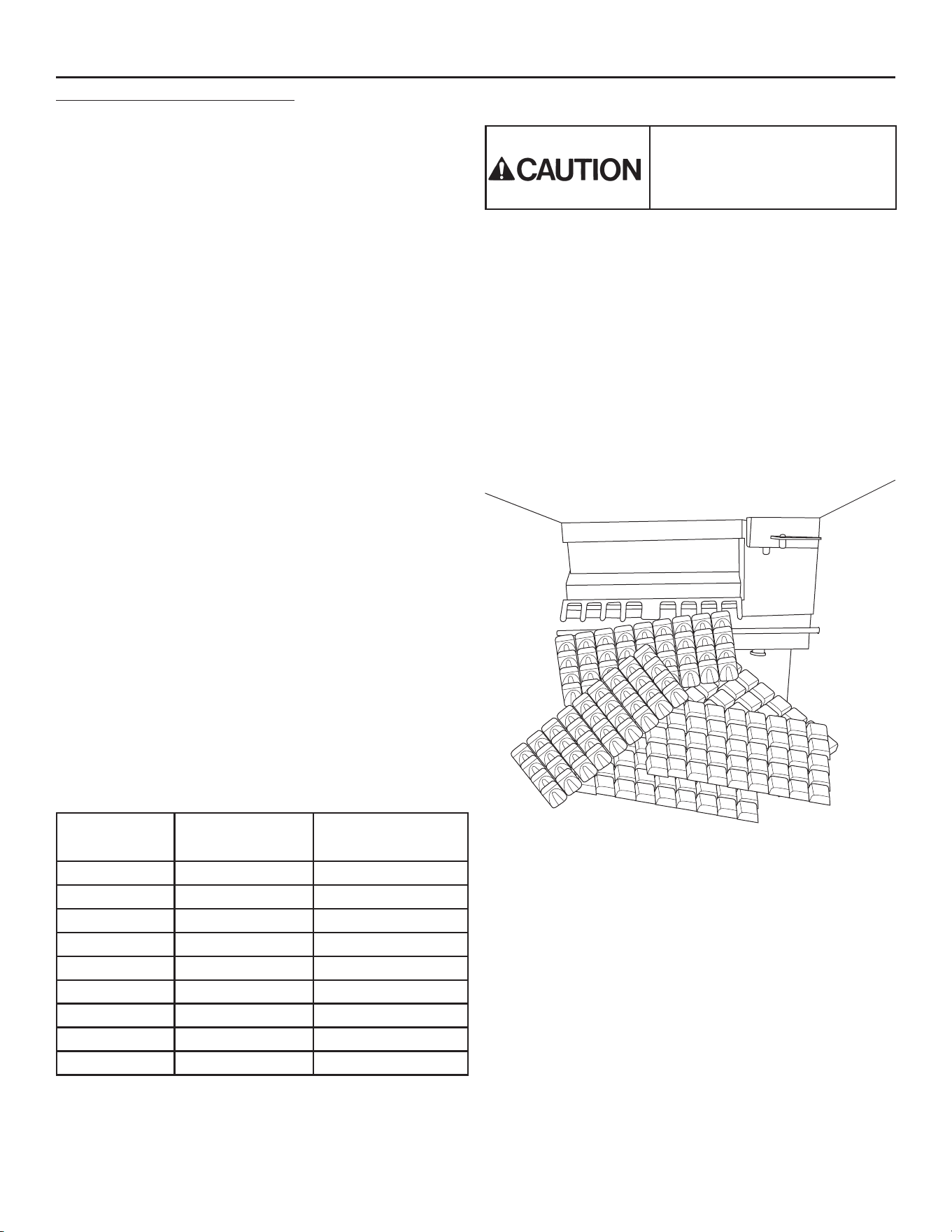
Typical Full Bin
Service Manual for Models HISU050, HISU070 and HISU090
August 2014
Page 12
Maintenance
Regularly vacuum the right side of the air cooled
condenser with a brush to remove all loose dust and
dirt. Be careful not to damage the
Cubed ice machines of this type make ice that is
more pure than the water supplied to it. Since the ice
has fewer impurities, the water that remains in the
reservoir has more. The water system dilutes that
concentration but eventually it does build up and need
to be removed. Over the years it has been determined
that the typical scale removal frequency is about 2
times per year.
To remove scale from the water system.
Materials needed:
Food grade, nickel safe scale remover for ice
machines, also known as ice machine cleaner.
• Sanitizer
• Hand tools.
• Clean bucket
• Clean cloths
• Rubber or plastic gloves
1. Remove front panel.
2. Move master switch to Off, wait a minute and then
move it to On.
3. When the freeze cycle begins (blue light on),
switch the machine to Off.
4. Remove and discard the ice.
5. Drain reservoir by pulling drain plug and return
drain plug to its original position.
6. Pre-mix nickel safe ice machine cleaner with
warm water according to label instructions
on container.
7. Pour the solution into the reservoir by carefully
adding it at the reservoir’s front lip.
8. Move the master switch to the Wash position.
9. Wait 10 minutes.
10. Move the master switch to the Off position.
11. Drain the reservoir by removing drain plug and
draining the solution into the bin. Return the drain
plug to its normal position.
12. Remove spray platform by removing cube chute
and lifting spray platform up and off its connection.
If needed open platform and
all jets are
open. Rinse out any debris, reclose and return it
and the cube chute to the unit. Be sure gasket is
positioned correctly - narrow side faces up toward
jets.
13. Pour 2.5 quarts or 2.4 liters of warm (95
o
F/35
o
C to
115
o
F./46
o
C) water into the reservoir by adding it
at the reservoirs’ front lip.
14. Switch the master switch to Wash for 1 minute,
then switch it to Off.
15. Repeat step 11. Go to the next process to sanitize
the machine.
Sanitize Water System – after completing prior scale
removal and stopping at the end of its steps.
1. Mix a 1 gallon or 4 liter solution of locally
approved sanitizer and clean, warm (95
o
F/35
o
C
to 115
o
F./46
o
C) water. Use an EPA approved
food equipment sanitizer at the solution mix
recommended by the sanitizer manufacturer.
2. Pour about half of the sanitizer mix into the
reservoir.
3. Remove the cube chute and spray platforms and
wash them with the sanitizer, then return them to
the ice machine.
4. Move the master switch to the Wash position.
5. Circulate the sanitizer for 2 minutes.
6. Move the master switch to Off.
Ice machine scale remover
contains acids. Acids can
cause burns.
If concentrated cleaner comes
in contact
with
skin,
with
water. If swallowed, do NOT
induce
vomiting. Give
large
amounts of water or milk. Call
Physician immediately. Keep
out of the reach of children.

August 2014
Page 13
Service Manual for Models HISU050, HISU070 and HISU090
7. Drain the reservoir into the storage bin by
removing the drain plug. Return the drain plug to
its normal position.
8. Wash all interior surfaces of the ice machine
storage bin, reservoir surface and inside of the
door with the remaining sanitizer solution.
9. Pour any excess sanitizer down the ice machine
bin drain.
10. Pour 2.5 quarts or 2.4 liters of warm (95
o
F/35
o
C to
115
o
F./46
o
C) water into the reservoir by adding it
at the reservoirs’ front lip.
11. Move the master switch to the Wash position for 1
minute, then switch it to Off.
12. Drain the reservoir by removing the drain plug and
draining the solution into the bin. Return the drain
plug to its normal position.
13. Move switch to the On position. The machine will
resume normal ice making.
14. Return the front panel to its original position and
secure it with the original screws.
Cleaning the Condenser
1. Remove the front panel.
2. Switch the machine to OFF.
3. Vacuumthesurfaceofthecondenserns,
carefully brush off any loose dirt. If grease is
imbedded use coil cleaner to wash it out.
4. Switch the machine to ICE.
5. Return the front panel to its original position.
Service Manual for Models HISU050, HISU070 and HISU090
August 2014
Page 14
Electrical Sequence
Proper voltage must be supplied and the bin
thermostat closed and calling for ice or the control
system will not have power.
Initial power up: Moving the master switch from OFF
to ON starts the machine in a harvest mode, the
compressor is operating with the inlet water solenoid
valve and the hot gas valve energized, water enters
themachineatthetopoftheevaporator,owingdown
into the reservoir.
After a set time of 2 minutes the inlet water valve
shuts off, the hot gas valve closes and the pump,
compressor and fan motor start operation. A blue light
indicates the freeze cycle mode.
Early in the freeze cycle, when the reservoir water
temperature falls enough to cause the resistance of
the water temperature thermistor to change to a pre-
set point, the controller will shut the water pump off for
30 seconds. When it is shut off a red light on the back
of the controller will be ON.
As the freezing cycle continues the suction line
temperature will fall, changing the resistance of the
thermistor attached to it. At a pre-set resistance a
timerinthecontrollerwillstarttonishthefreezing
cycle. A yellow light switches on and the freeze cycle
will continue for 7 more minutes.
The Harvest or Defrost mode begins. The yellow and
blue lights switch off. The pump and fan motor switch
off. The hot gas valve and inlet water solenoid valve
are switched on. The compressor is on any time the
unit is in ice making mode.
Harvest continues until the thermistor attached to the
suction line warms up, changing its resistance to a
pre-set point. At that time the yellow timer light will
switch on. Harvest time equals the minimum harvest
time plus the time it takes to change the thermistor’s
resistanceplusanaltimer.Whenalltimersare
satised,harvestiscompleteandthefreezecycle
restarts.
The unit will shut off any time the bin thermostat is
open, including while the unit is in a freeze or harvest
cycle.
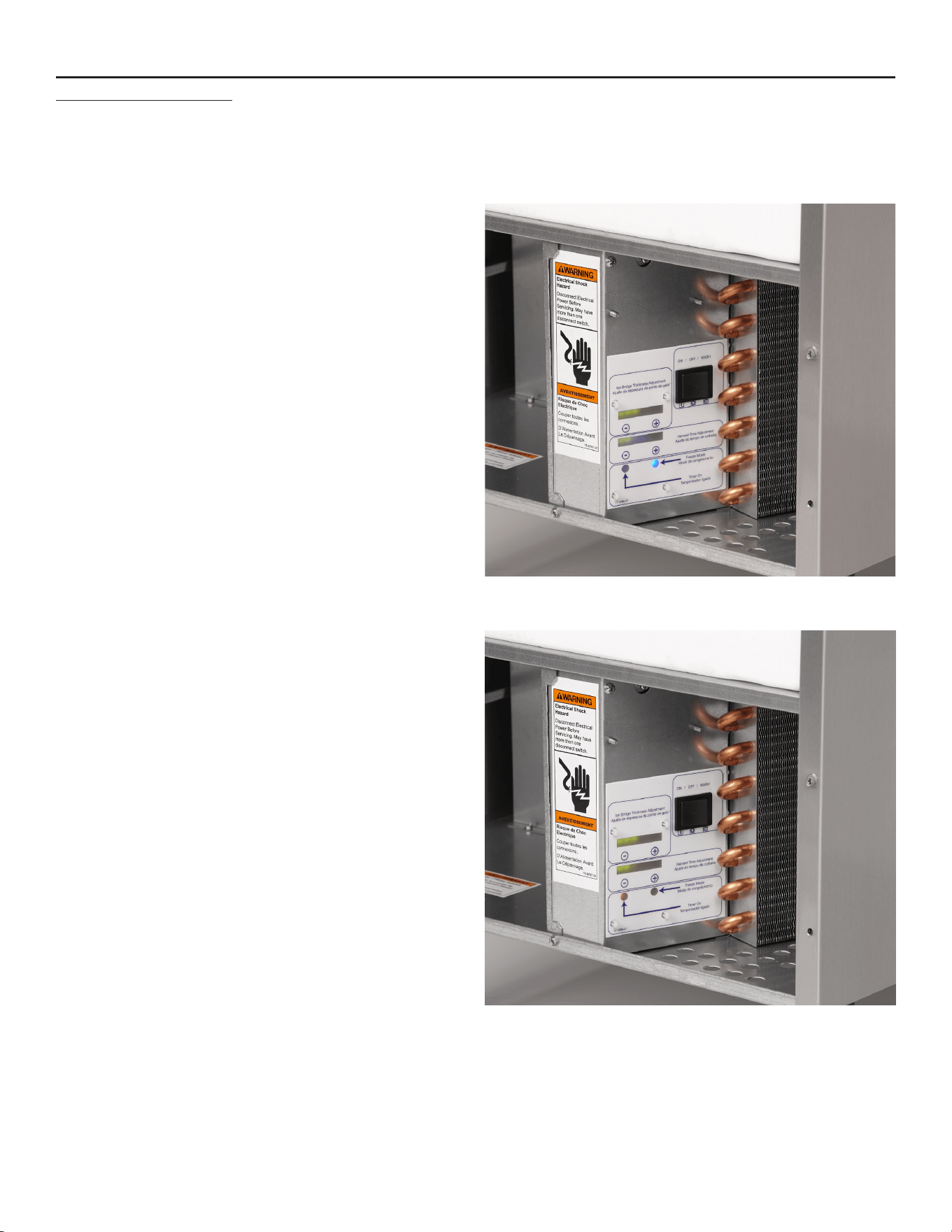
Unit in ice making mode, freeze mode indicator light
is on.
Unit in ice making mode, timer indicator light is on.
August 2014
Page 15
Service Manual for Models HISU050, HISU070 and HISU090
Components
Compressors, three capacities
Type: Hermetic
Brand: Embraco
Condenser: air cooled forced draft, copper and
aluminum.
Evaporator: Nickel plated copper, inverted grid
Ice: Medium / Full Dice cube. 5 x 9 per cycle, about 1
lb per cycle
Metering device: Capillary tube
Refrigerant: R-134a.
Refrigerant Charge: 8 ounces, all models. No access
valves.
Fan motor
: Unit motor, HISU050 and HISU070 are
2.3 watts; HISU090 is 6 watt. Fan motor may cycle
during freeze, should be off during harvest as the
discharge
pressurewillbebelow100PSIG.
Fan blade: Molded
Fan pressure control switch:
Opensat100PSIG,
closesat150PSIG.
Water pump: OEM
Hot gas valve: Ported, line voltage coil
Inlet water solenoid valve
:.275GPMow,line
voltage coil
Transformer: Output 12 volt AC
Controller: Microprocessor operated relays for fan
and pump. Internal electronic timer. Bridge thickness
and harvest time adjustable on controller. Indicator
lights for bridge thickness and harvest time. No
maximum or minimum time limits or error codes.
Lights for timer, freeze mode and anti-slush mode.
Thermistor failure indicated by all Bridge Thickness
and Harvest Time green lights blinking. Unit continues
tooperateonaxedtimedfreezeandharvestcycle.
Sensors: Thermistor for suction line temperature,
Thermistor for reservoir water temperature.
Bin Thermostat: Opens on temperature fall, must be
closed to power control system. Operates compressor
directly.
Master switch. On, Off, or Wash. DPDT, not a service
disconnect.
On: When contacts 2-1 are closed power is connected
to the bin thermostat, allowing it to automatically
switch the machine on and off.
At the same time contacts 5-4 are closed, making a
circuit to the pump common and fan motor pressure
control.
Off: all contacts open.
Wash: Contacts 2-3 provide a connection to contacts
5-6, connecting power to the pump common. Only
the pump operates when the switch is in the Wash
position.
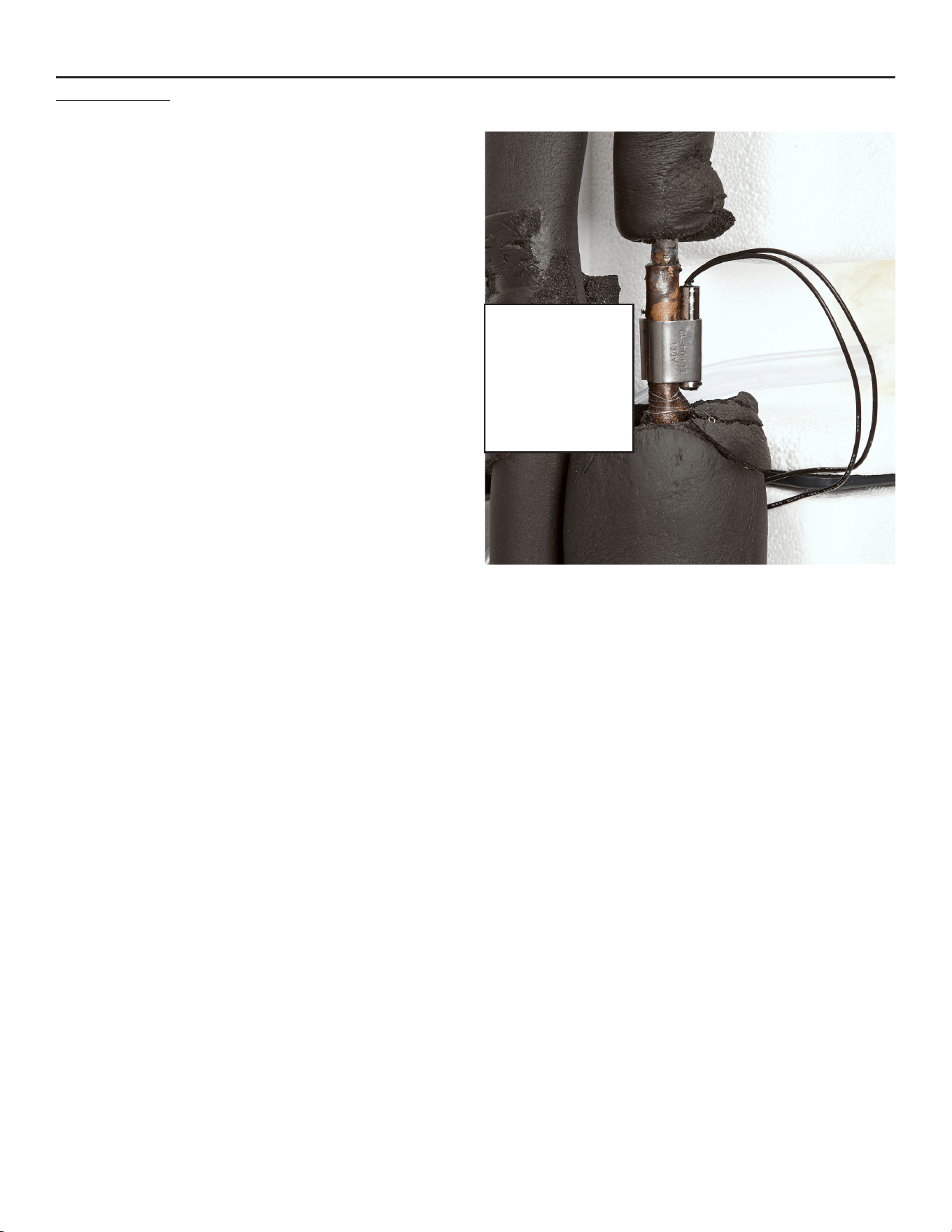
Evaporator
Thermistor
Mounted above
accumulator,
clipped to suction
line.

Service Manual for Models HISU050, HISU070 and HISU090
August 2014
Page 16
Performance
+,68
Compressor amp draw, 115 volt
• Freeze, 5 minutes in: 1.8 to 1.9
• Overall Freeze cycle amps, begin at 1.9 decline to 1.7.
• Harvest: 1.9 - 1.8
Compressor dome is normally warm.
Drain water per cycle at standard harvest setting: about 1.4 quarts, at shorter setting drain water reduced to 1
quart.*
+,68
Compressor amp draw, 115 volt
• Freeze, 5 minutes in: 2.6
• Overall Freeze cycle amps, begin at 2.7 decline to 2.5
• Harvest: 2.9 - 3.2
Drain water per cycle at standard harvest setting: about 1 quart, at shorter setting drain water reduced slightly.*
+,68
Compressor amp draw, 115 volt
• Freeze, 5 minutes in: 3.1
• Overall Freeze cycle amps, begin at 3.5 decline to 2.9
• Harvest: 3.3 - 3.7
Drain water per cycle at standard harvest setting: about 2 quarts, at shorter setting drain water reduced to 1.7
quarts.*
* Drain water is directly affected by harvest time, these numbers will vary with air and water temperature
changes.

August 2014
Page 17
Service Manual for Models HISU050, HISU070 and HISU090
Thermistor Values
0 85325
1 82661
2 80090
3 77607
4 75210
5 72896
6 70660
7 68501
8 66415
9 64400
10 62453
11 60571
12 58752
13 56995
14 55296
15 53653
16 52065
17 50529
18 49043
19 47607
20 46217
21 44872
22 43571
23 42313
24 41094
25 39915
26 38774
27 37669
28 36600
29 35564
30 34561
31 33590
32 32649
33 31738
34 30855
35 30000
36 29171
37 28368
38 27589
39 26835
40 26104
41 25395
42 24707
43 24041
44 23394
45 22767
46 22159
47 21569
48 20997
49 20442
50 19903
51 19381
52 18873
S3 18381
54 17903
55 17439
56 16988
57 16551
58 16126
59 15714
60 15313
61 14924
62 14546
63 14179
64 13823
65 13476
66 13139
67 12812
68 12494
69 12185
70 11884
71 11592
72 11308
73 11031
74 10763
75 10502
76 10247
77 10000
78 9760
79 9526
80 9299
81 9077
82 8862
83 8652
84 8448
85 8250
86 8056
87 7868
88 7685
89 7507
90 7333
91 7164
92 6999
93 6839
94 6683
95 6530
96 6382
97 6238
98 6097
99 5960
100 5826
101 5696
102 5569
103 5446
104 5325
105 5208
106 5093
107 4981
108 4872
109 4766
110 4663
111 4562
112 4463
113 4367
114 4273
115 4182
116 4093
117 4006
118 3921
119 3838
120 3757
121 3678
122 3601
123 3526
124 3452
125 3381
126 3311
127 3243
128 3176
129 3111
130 3047
131 2985
132 2924
133 2865
134 2807
135 2751
136 2696
137 2642
138 2589
139 2537
140 2487
141 2438
142 2390
143 2343
144 2297
145 2252
146 2208
147 2165
148 2123
149 2082
150 2042
151 2003
152 1965
153 1927
154 1890
155 1855
156 1819
157 1785
158 1752
159 1719
160 1687
161 1655
162 1624
163 1594
164 1565
165 1536
166 1508
167 1480
168 1453
169 1427
170 1401
171 1375
172 1350
173 1326
174 1302
175 1279
176 1256
177 1234
178 1212
179 1190
180 1169
181 1149
182 1129
183 1109
184 1090
185 1071
186 1052
187 1034
188 1016
189 998
190 981
191 965
192 948
193 932
194 916
195 901
196 885
197 871
198 856
199 842
200 828
201 814
202 800
203 787
204 774
205 761
206 749
207 737
208 724
209 713
210 701
211 690
212 679
213 668
214 657
215 646
216 636
217 626
218 616
219 606
220 597
221 587
222 578
223 569
224 560
225 551
226 543
227 534
228 526
229 518
230 510
231 502
232 495
233 487
234 480
235 472
236 465
237 458
238 451
239 444
240 438
241 431
242 425
243 419
244 412
245 406
246 400
247 394
246 389
249 383
250 377
Deg. F Ohms Deg. F Ohms Deg. F Ohms Deg. F Ohms Deg. F Ohms
Service Manual for Models HISU050, HISU070 and HISU090
August 2014
Page 18
Controller Use
When in a Freeze cycle or mode, a
blue light will glow.
The upper line of LED lights are
indictions of the adjustment for Bridge
Thickness. More lights = more freeze
time and a bigger bridge.
The lower level line of LED lights are
indicators of the adjustment for Harvest
Time. More lights = more harvest time
and more water rinse.
At the end of the freeze cycle a yellow
Timer light will switch on, indicating that
there are 7 minutes left until Harvest.
During the end of Harvest the Timer
light may also switch on.
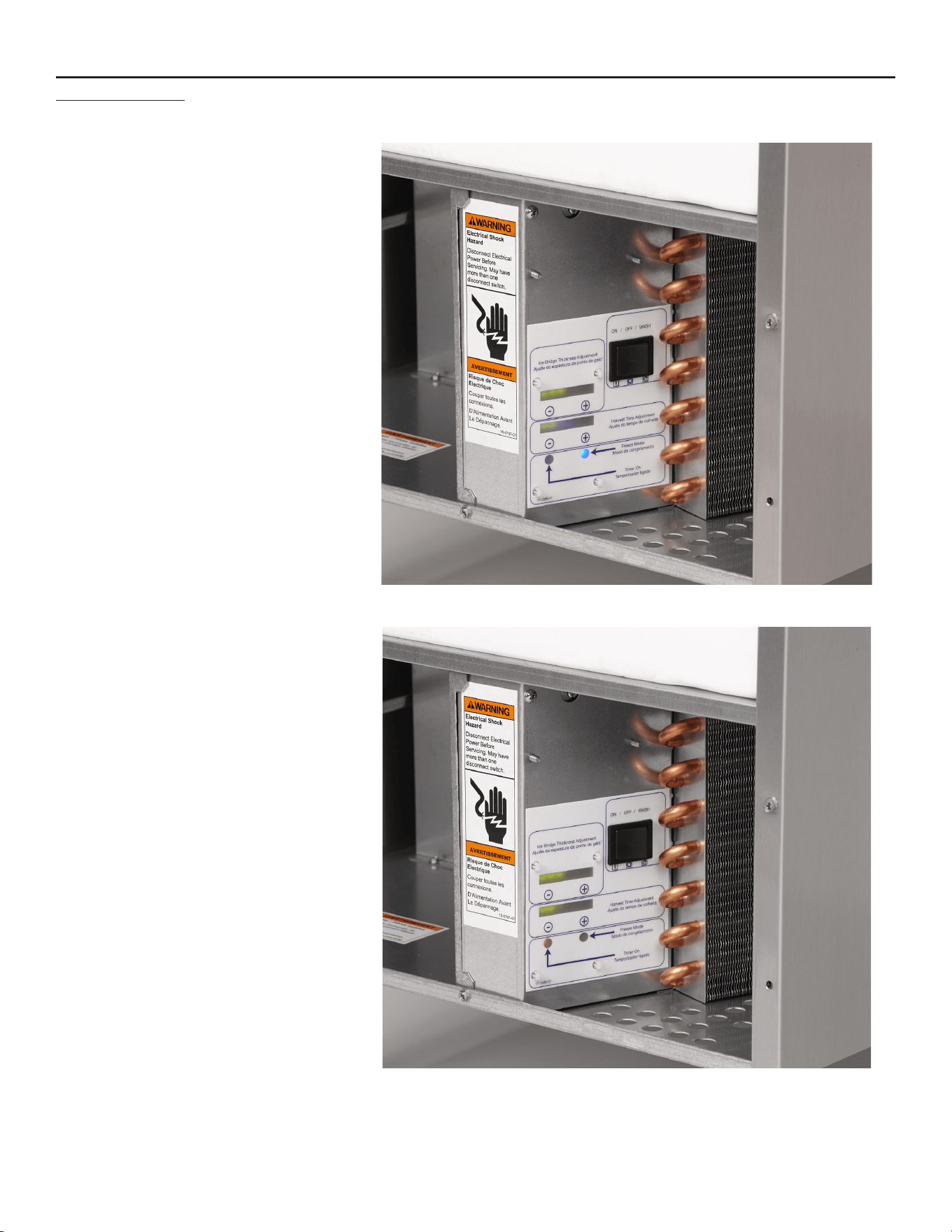
Unit in ice making mode, freeze mode indicator light is on.
Unit in ice making mode, timer indicator light is on.
August 2014
Page 19
Service Manual for Models HISU050, HISU070 and HISU090
Anti-Slush
Slushinthereservoirrestrictspumpow,causes
excessively long freeze cycles and is something this
machine is designed to prevent.
It does that by shutting off the water spray to the
evaporator at a critical time.
The critical time is when the water temperature is near
the freezing point. The controller measures the water
temperature using a thermistor probe in the pump
discharge hose. At the correct temperature it cuts
power to the water pump for 30 seconds. This allows
the water left on the evaporator surface to securely
freeze to the evaporator surface. When the pump
restarts the freeze cycle will continue until harvest.
The indication that the unit is in a anti-slush mode is a
light on the back of the controller.
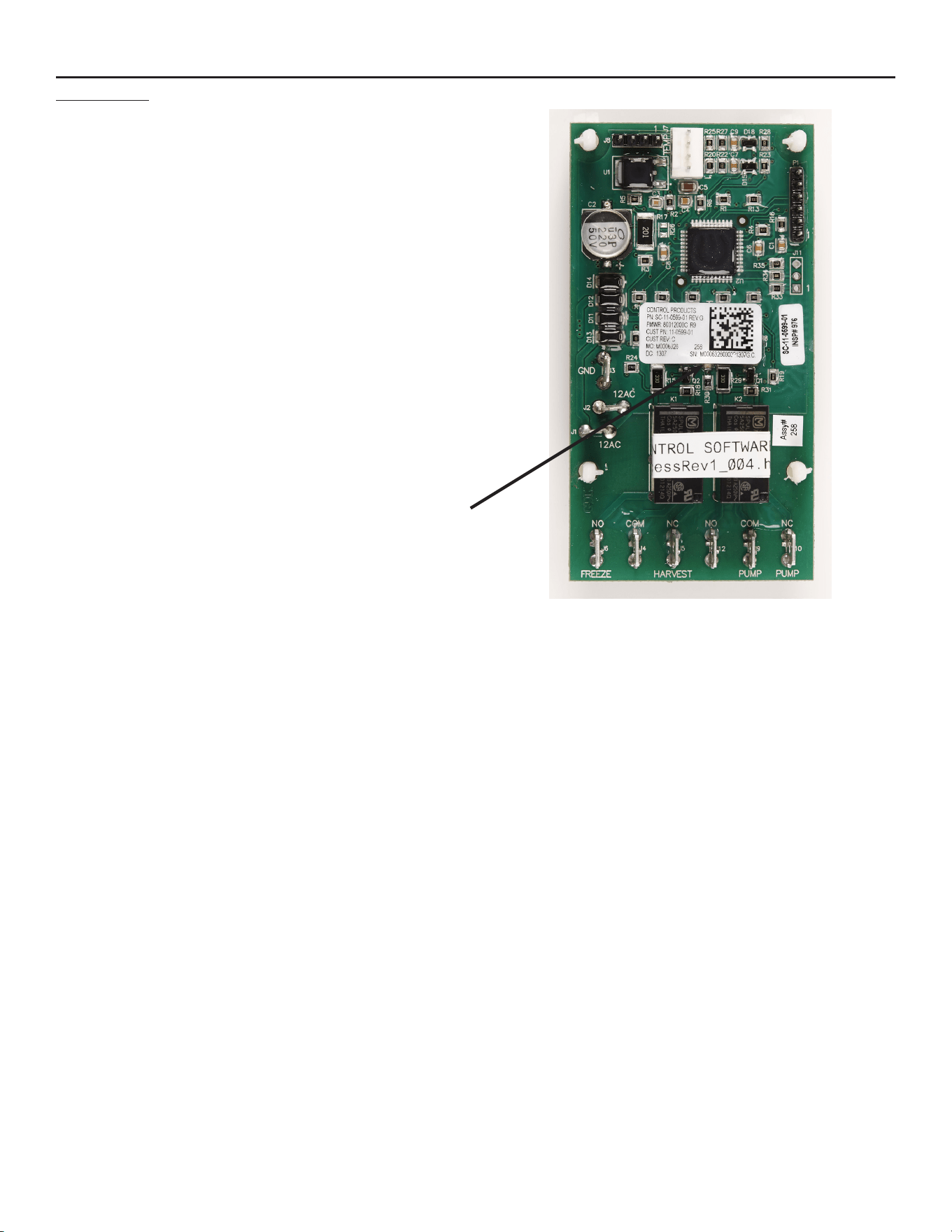
Anti-Slush Pump Light
August 2014
Page 20
Controller Self Test
Control Board Self-Test Routine. Begin with unit
unplugged and no ice touching the bin control.
1. Remove top and back panels to access thermistor
on suction line (above accumulator).
2. Remove the thermistor probe from the suction
line.
3. Shut water supply off.
4. Remove front panel to access control.
5. Place evaporator thermistor probe in ice water, ice
water temperature should be 0 C or 32 F.
6. Plug unit in, master switch in the ON position.
5 minutes or more after the freeze cycle starts
check reservoir water temperature. When it and
the evaporator thermistor’s ice water are at 32 F,
hold BOTH upper left - button and lower right +
button in for at least 5 seconds, then release the
buttons.
7. The green level LEDs will turn off and the yellow
Timer LED will turn on for two seconds once you
have entered the test mode.
8. Press upper left - button and the evaporator
thermistor temperature test will begin. The
yellow Timer LED will turn on for 2 seconds if the
evaporator thermistor temperature is 32 F +/- 2
degrees.
9. Press upper left - again and the sump thermistor
temperature test will begin. The yellow Timer LED
will turn on for 2 seconds if the sump thermistor
temperature is 32 F +/- 2 degrees. Note:
Pressing - repeatedly will toggle between testing
the two thermistor temperatures.
10. Press upper right + button and the Freeze relay
will close and the blue Freeze LED will turn on for
5 seconds. Compressor, fan motor and pump will
start. If not, the controller has failed.
11. Press upper right + again and the Pump relay will
switch, the pump will stop and red LED (on back
side of the board) will turn on for 5 seconds. Note:
Pressing + repeatedly will toggle between testing
the two relays.
12. Press and hold lower left - button and it will turn
on each of the green LEDs, one at a time. Hold
lower left – button in until all of the green LEDs
are tested.
13. Press lower right + button to test the EEPROM
read and write. The yellow Timer LED will turn
on for 2 seconds if the EEPROM read and write
operations were successful.
Power down the board to exit the test mode.
Test Results:
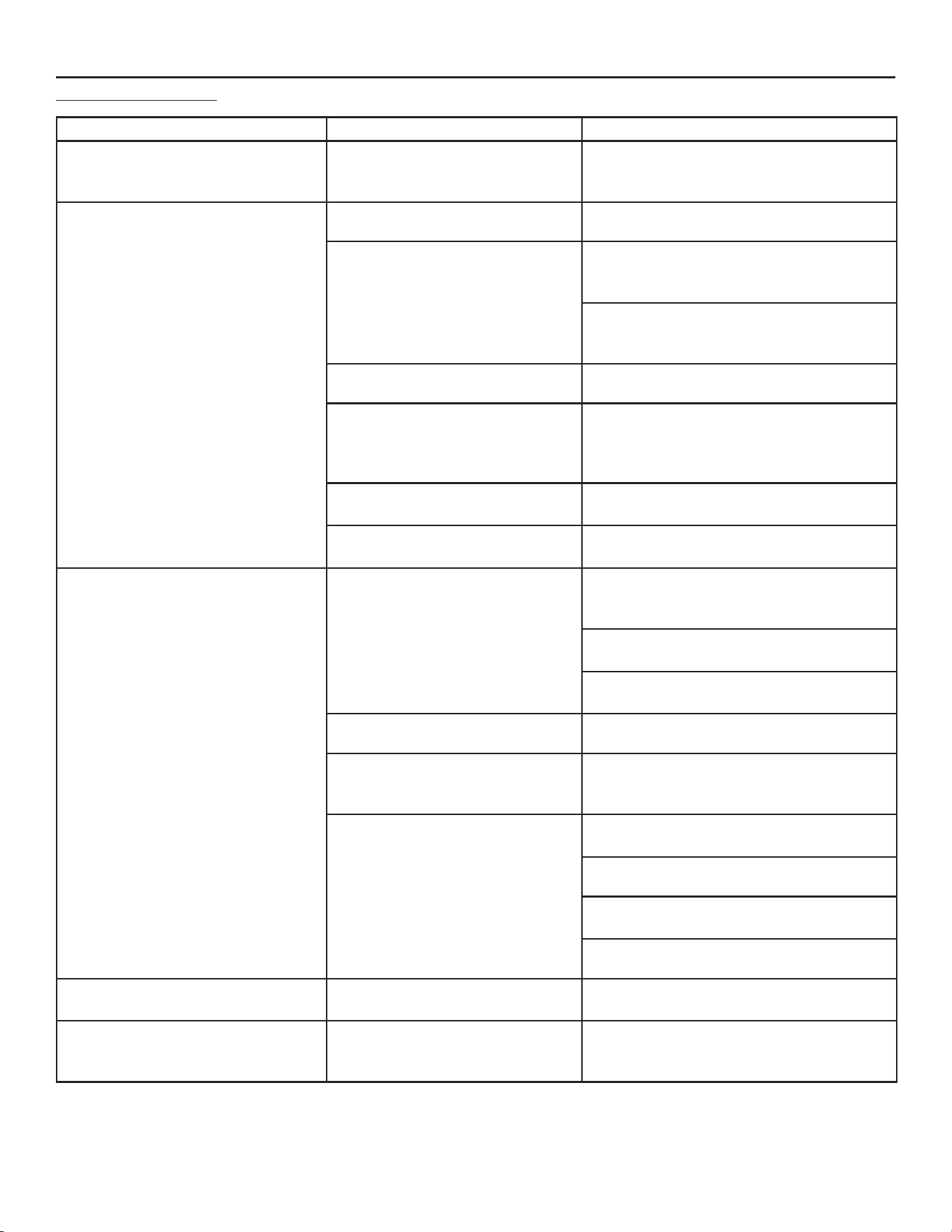
Step Pass Fail Action if Failed
8 Yellow Timer LED
switches ON
No timer
light
Replace
thermistor set
9 Yellow Timer LED
switches ON
No timer
light
Replace
thermistor set
10 Compressor, fan
motor and pump
start
Either
compressor
or pump do
not start
Check voltage
to compressor
or pump, If
no voltage
to one or
both, replace
controller.
11 Water pump
stops
Pump does
not stop
Replace
controller
12 All green LEDs
light up
Some do not
illuminate
Replace
controller
13 Yellow Timer LED
switches ON
No timer
light
Replace
controller
If the controller passes all tests, there is nothing
wrong with it and the issue is in something else.
1. Reattach evaporator thermistor to the suction line
at the same place it was mounted and re-insulate
it.
2. Reconnect water supply, restart unit and return all
panels to their original positions.
August 2014
Page 21
Service Manual for Models HISU050, HISU070 and HISU090
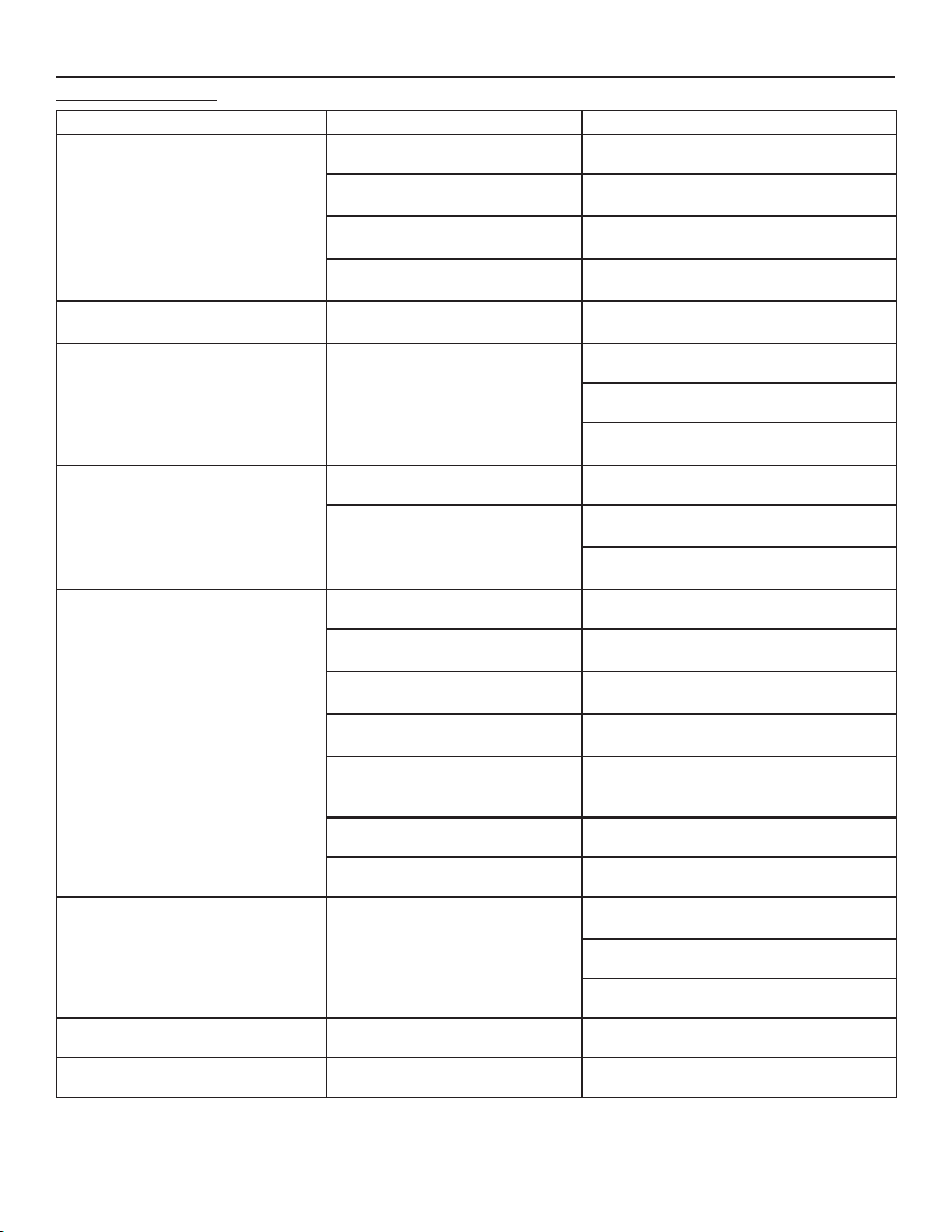
Service Diagnosis
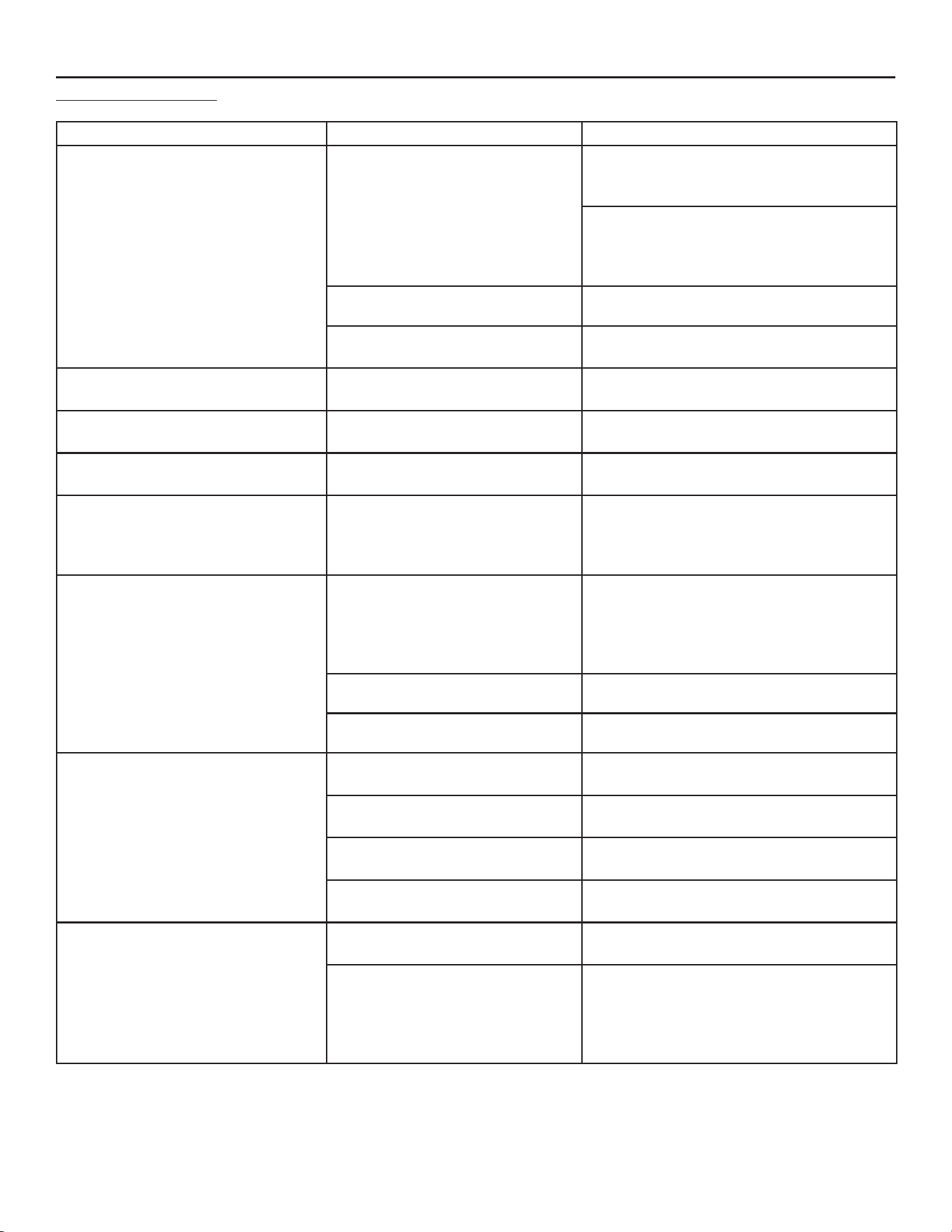
Problem Possible Cause Probable Correction
No ice No water to ice machine
Checkwaterlters,checkwaterpressure.
Pressurelowerthan10psiowingmaynot
llreservoirenough.
No ice, nothing operating No power to ice machine Check power, restore if needed.
Open contacts in bin thermostat Check cabinet temperature, thermostat will
be open if cabinet is too cold. Advise user
to operate unit in proper conditions.
Check bin thermostat contacts, if open
at bin temperature above 45 degrees F.,
replace thermostat
Master switch in OFF position Move switch to ON
Transformer failure Check transformer output voltage, must be
12 volts at J1 - J2 of controller. If correct
line voltage is supplied but output is too low,
replace transformer.
Controller failure, some lights
visible
Check controller, use self test on prior
page.
Controller failure, 12 volts to it, no
lights visible
Replace controller
No ice, compressor and fan on,
pump not spraying water
No or low water in reservoir
Checkwaterlters,checkwaterpressure.
Pressurelowerthan10psiowingmaynot
llreservoirenough.
Check inlet water solenoid valve for proper
operation
Check drain plug for leaks, correct as
needed.
Pump hose disconnected Check hose at spray platform and pump
Pump motor not working Check voltage to pump. If none and blue
freeze mode light is ON, wait 30 seconds. If
still none, replace controller.
Pump motor overheated Check cabinet temperature, if too hot
relocate unit. If not, replace pump.
Voltage too high.
Pump jammed, check inlet for debris,
remove and retry.
Pump failed, replace pump
No ice, pump spraying, fan motor
and compressor off
Master switch in Wash position Move switch to ON position
No ice, pump spraying, compressor
on, fan motor not turning
Fan motor open, no power or stuck Check blade for free rotation - correct by
clearing debris jamming blade or replace
motor if blade is not jammed
Service Manual for Models HISU050, HISU070 and HISU090
August 2014
Page 22
Service Diagnosis
Problem Possible Cause Probable Correction
No ice, fan motor not turning No power to it Check controller Freeze NO terminal to
COM for proper voltage. If blue freeze light
is on and no voltage, replace controller
Check fan pressure control, if air
temperature is over 70 degrees F, the
pressure control should be closed when in
freeze mode.
Open windings Check motor for continuity, replace if open
Inlet water valve on all the time Low voltage to machine, do not operate
with wrong voltage
No ice, everything operating, poor
spray to evaporator
Spray platform leaking Check seams of spray platform, be sure it is
sealed together.
No ice, everything operating, good
spray to evaporator
Too much water Check inlet water valve for leaking thru and
overllingreservoir,replacevalveifleaking
No ice, everything operating, water in
reservoir is hotter than supply water
Hot gas valve not shutting off Check body of hot gas valve, if hot, replace
valve.
No ice, everything operating Not enough refrigeration Check suction line temperature. When blue
freeze mode light is on, suction line should
begintogetcold.Ifnot,conrmcompressor
is operating.
No ice in bin, evaporator mold forms
ice properly
No heat for harvest, ice does not
release
Hot gas valve does not open. Check water
valve, if it adds water during harvest and
the hot gas valve does not open, replace
the hot gas valve. If both are not opening,
replace the controller.
Very cold water supply Increase harvest time.
Damaged evaporator Check plating and replace if needed
No ice, compressor is off Compressor relay not working Check current relay for proper operation,
replace if not working
Compressor overload open, will
not reset
Check / replace overload
Compressor windings open Check compressor windings, replace
compressor if motor is open
Compressor overheated Check refrigeration system for proper
charge
Makes ice but ice is cloudy or not
completely formed
Spray jets restricted by mineral
scale
Clean ice machine water system
Lack of rinse water due to hot
room temperature
Harvest time affects how much water is
used to rinse the reservoir, if harvest time is
short and mineral scale builds up fast adjust
controller for more harvest time to add more
rinse water.
August 2014
Page 23
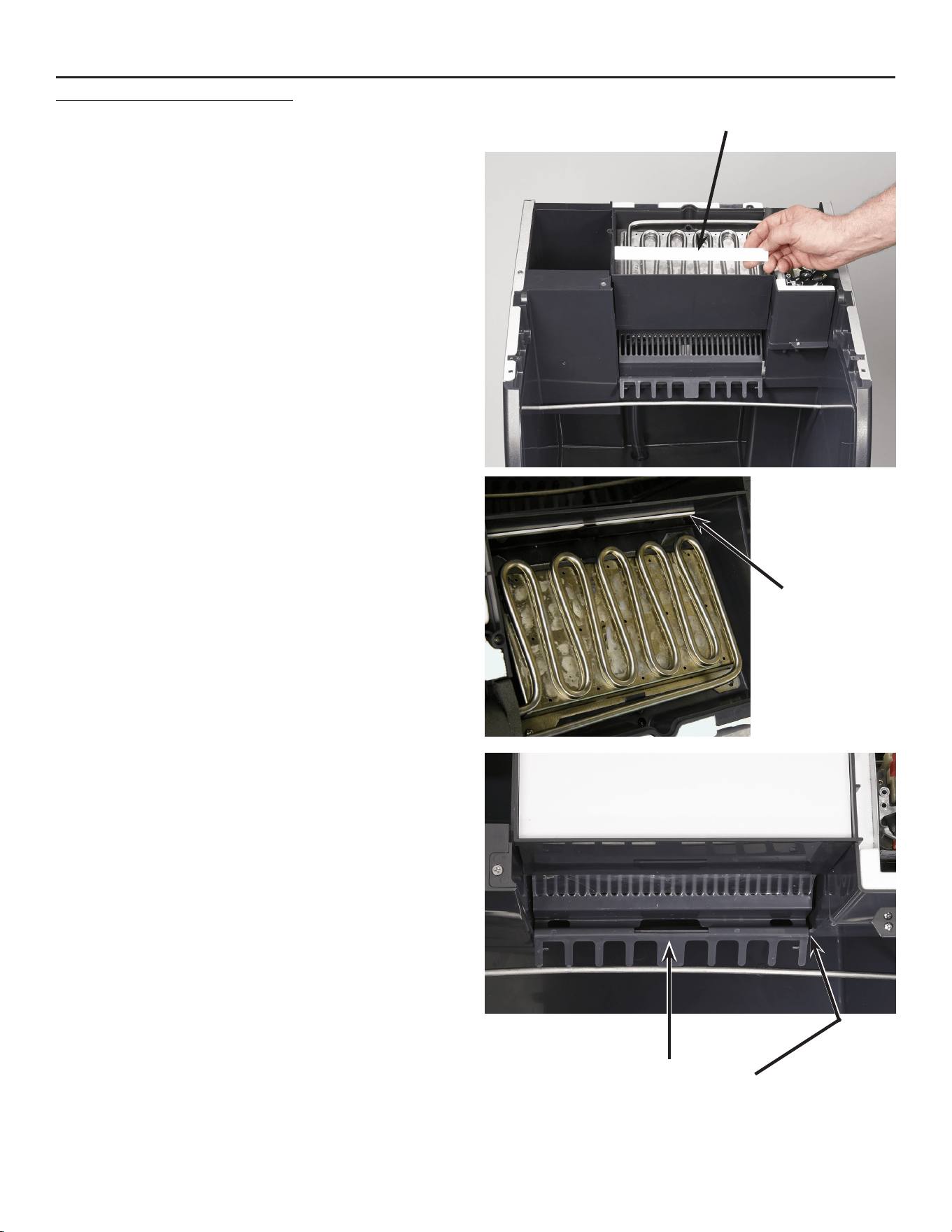
Service Manual for Models HISU050, HISU070 and HISU090
Problem Possible Cause Probable Correction
Makes ice but makes blocks or shells Ice bridge wrong size Adjust to proper size
Evaporator thermistor out of
calibration, adjustment erratic
Check thermistor resistance to chart,
replace if incorrect
Poor thermal contact of evaporator
thermistor to suction line
Check clip holding probe, must have metal-
to-metal contact and covered with insulation
Thermistor failure, unit operating
on timed cycles
Check controller for all green lights blinking,
if all blinking change thermistor set.
Makes ice but does not hold bridge
setting, gradually increases over time
Evaporator temperature taking
longer to get to cut in point
Refrigerant leak, check refrigeration
system.
Makesicebutdoesnotllthebin Bin thermostat opens and shuts
machine off before bin is full
Unit in cold room, check conditions.
Thermostat out of calibration, replace
Unit at high altitude, adjust compensation
screw
Unit makes ice but it is wet Normal Fresh ice will be wet
Water dripping / spraying on it Check curtain, may be torn or not in
position
Checkthatcubedeectoriscorrectly
positioned
Makes ice but is slow, cannot keep
up
Air cooled condenser is dirty
Cleancondenserns
Too much water Slight leak from inlet water solenoid valve,
check/replace valve
Airowtocabinetrestricted Conrmnothingblockingfrontlouvers;unit
cannot operate in a closet
Room air hot Hot air slows ice making and increases bin
meltage
Restricted drain Water in bottom of bin melts ice, correct
drain so all water drains including the water
from harvest cycle
Ice on top of evaporator Drain slots plugged, clean water system
Slush in reservoir Do controller self check
Makes ice but is loud Some noise is normal, the fan,
pump and compressor all produce
sound
Check for fan blade touching debris or
shroud.
Check that all panel fasteners are on tight.
Identify loud part and replace it.
Door binds opening or closing Roller or pin is broken Check / replace door roller
Binoverlls Bin thermostat does not open Replace thermostat
Service Diagnosis
Service Manual for Models HISU050, HISU070 and HISU090
August 2014
Page 24
Removal and Replacement
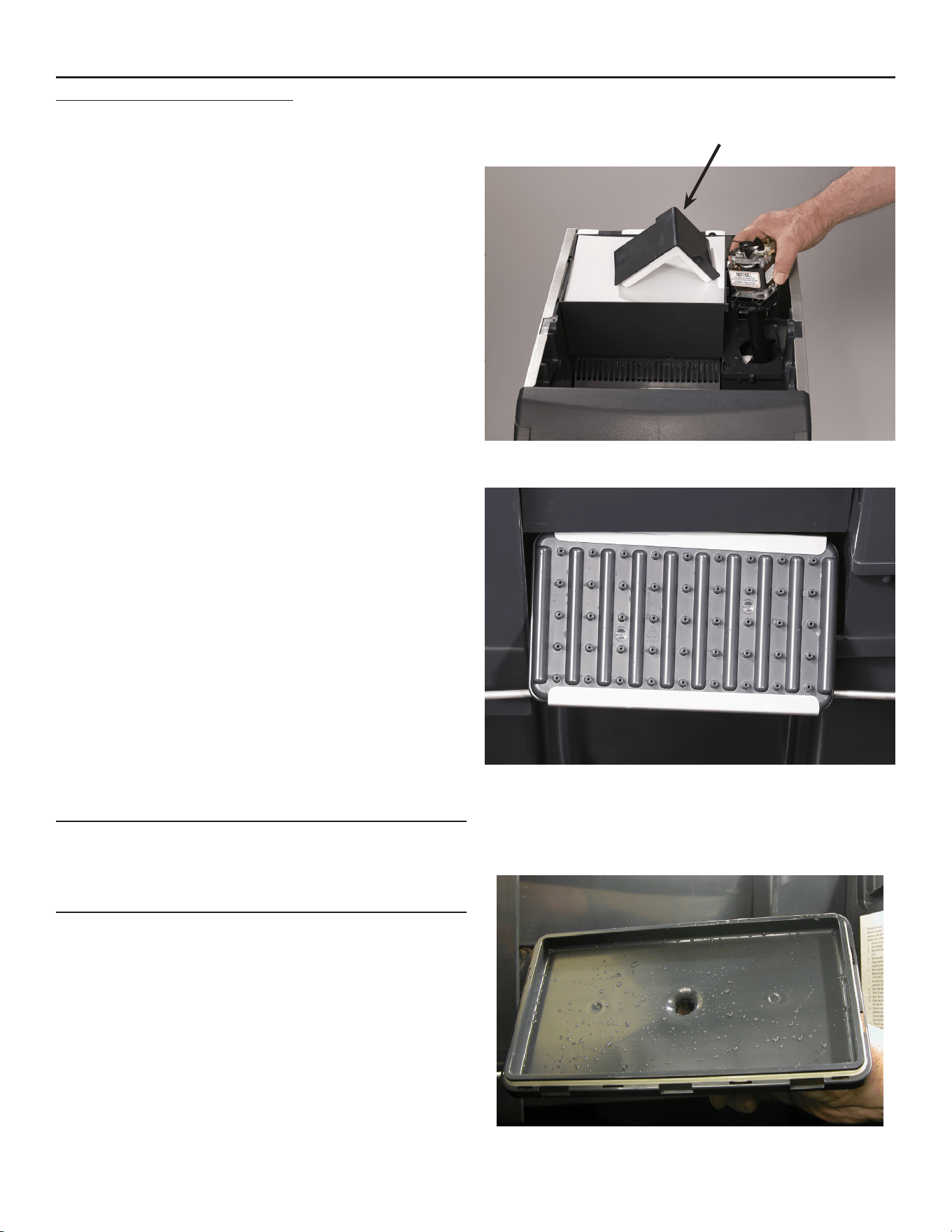
Curtain
1. Remove front panel and switch unit Off.
2. Remove top panel.
3. Remove evaporator cover.
4. Locate white curtain top at front of evaporator, pull
up on it and remove from the unit.
5. Slide new curtain down in same place as original,
into the slot between the plastic evaporator frame
and the front of the reservoir. Push curtain down
into the slot as far as it will go.
6. Check that curtain hangs freely and reassemble
the parts removed.
Cube Deector
1. Remove front panel.
2. Shut unit off.
3. Opendoor,liftoriginalcubedeectorup,twist
slightly and pull forward, out of the reservoir.
4. Installnewdeectorinreservoir,besuredeector
issnappeddownatthefront,ittstightlyonthe
reservoir edge.
5. Switch unit on and observe spray pattern, be sure
deectorisnotinterferingwithwaterspray.
CubeDeectorMustSnap
Onto Reservoir Wall Edge
Curtain Top Edge
Curtain
Top Edge
August 2014
Page 25
Service Manual for Models HISU050, HISU070 and HISU090
Removal and Replacement
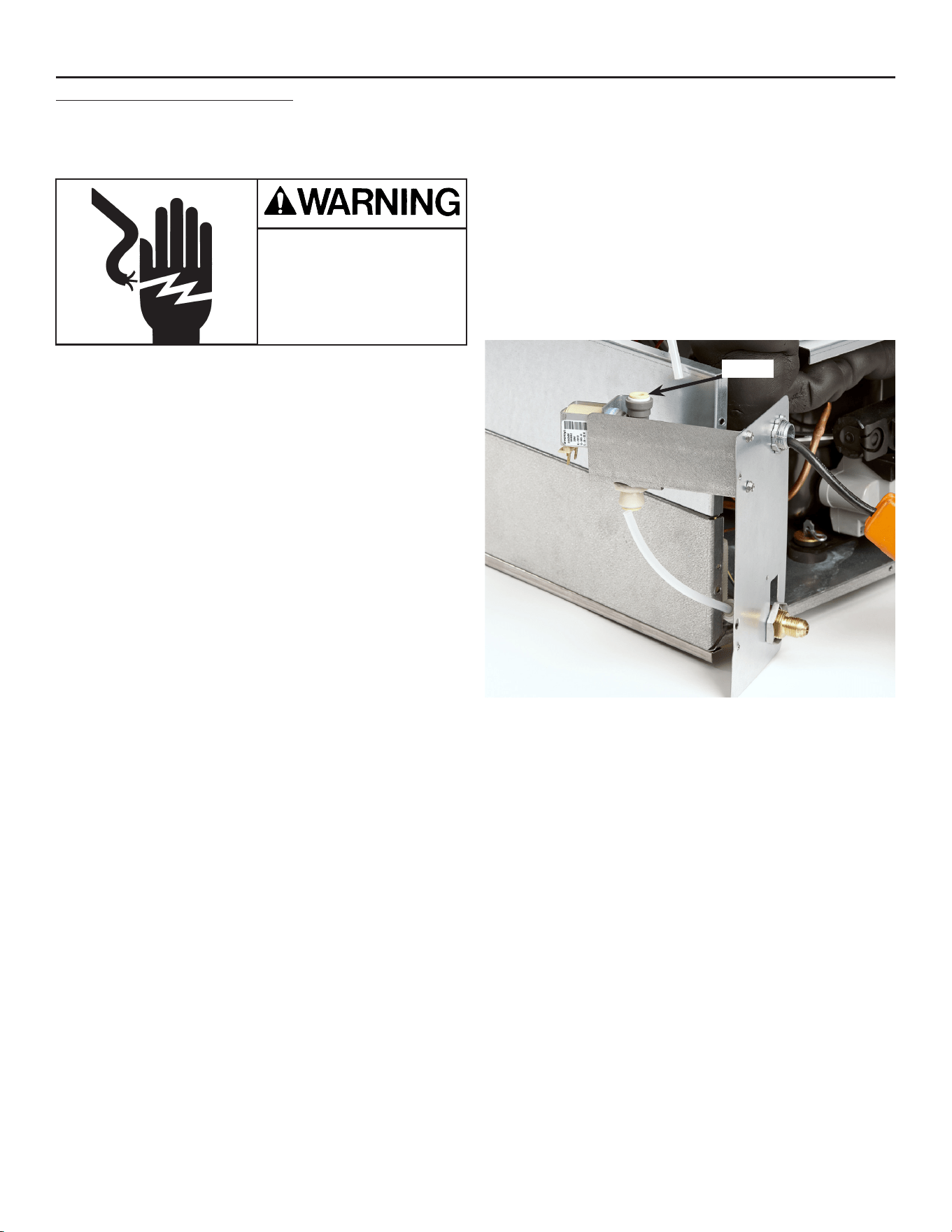
Pump
1. Disconnect electrical power.
2. Remove top panel.
3. Remove wall panel covering pump.
4. Disconnect wires from pump motor.
5. Removecubedeectorandpullhoseoffwater
pump outlet.
6. Rotate pump slightly CW and lift pump up and out
of the ice machine.
7. Install new pump in reverse order of the removal
steps.
Spray Platform
1. Remove front panel.
2. Shut unit off.
3. Opendoor,removecubedeectorbyliftingitup,
twisting slightly and pulling out.
4. Pull spray platform forward unit it releases from its
snap, and remove pump hose from platform.
5. Remove platform from the unit. Replace or service
and then reinstall it.
6. Reconnect pump hose.
7. Slide platform back into reservoir.
Note: Bottom of platform has a raised area that
ts only on the left side. Be sure platform is
placed all the way back in the reservoir and is
snapped in place.
8. Reinstallcubedeector,besureitissnappedonto
the reservoir wall.
9. Switch unit on, check spray pattern.
Wall Panel
Spray Platform Service
The two halves may be separated by removing the
clips and pulling it apart. Be sure gasket is intact and
installed correctly.
Service Manual for Models HISU050, HISU070 and HISU090
August 2014
Page 26
Removal and Replacement
Bin Thermostat
1. Disconnect electrical power.
2. Remove front panel.
3. Remove top panel.
4. Remove left side panel.
5. Remove tape covering cap tube and pull cap tube
out of the sensing tube.
6. Remove back cover of control box.
7. Remove bin thermostat from control box and
disconnect wires from it.
8. Removesheetmetalairbafefrominfrontof
compressor.
9. Pull cap tube and bin thermostat from unit.
10. Route new bin thermostat’s cap tube thru notch in
left side of unit and up to the hole in the left side of
the bin.
11. Insert cap tube into sensing tube.
12. Connect wires to bin thermostat.
13. Mount bin thermostat to control box.
14. Reinstallairbafeandcontrolboxback.
15. Reinstall left side panel. Be sure master switch is
in the ON position.
16. Reinstall all panels.
17. Reconnect electrical power.
Inlet Water Solenoid Valve
1. Disconnect Electrical Power
2. Pull unit out to get back access.
3. Remove front panel.
4. Remove top panel.
5. Remove right side panel.
6. Remove back panel.
7. Shut water off to unit.
8. Remove utility panel, lower left corner viewed from
the back. Valve bracket is attached to panel.
9. Locate inlet water solenoid valve.
10. Push in collets to release inlet and outlet tubing
connections.
11. Disconnect electrical wires from valve.
12. Remove two screws holding valve to bracket and
pull valve from unit.
13. Reconnect inlet and outlet tubing by pushing them
into the replacement valve until they bottom out.
14. Re-attach wires to valve.
15. Re-attach valve to bracket.
16. Switch water on and check for leaks. Correct as
needed.
17. Reconnectelectricalpowerandconrmnoleak
while water valve is on.
18. Return all parts to their original positions.
Collet
Electrical Shock Hazard
Disconnect electrical
power before beginning
August 2014
Page 27
Service Manual for Models HISU050, HISU070 and HISU090
Controller
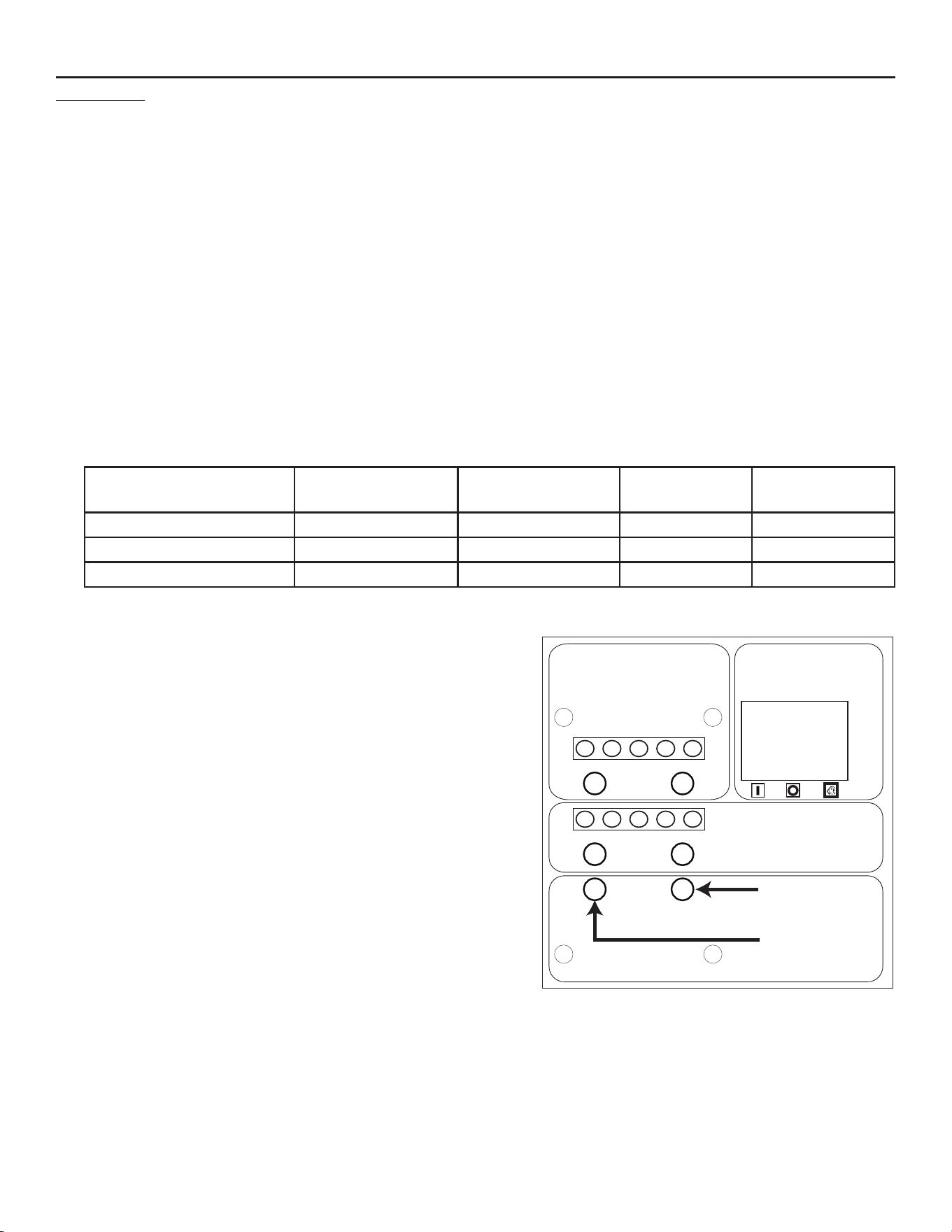
The controller ships set for HISU070 and must be adjusted for other models. Please review these instructions
prior to installation.
1. Disconnect electrical power.
2. Remove front panel.
3. Remove control box back cover
4. Disconnect all wires from controller, squeeze standoffs together to release from bracket and remove
controller from the ice machine.
5. Touch the metal base of the ice machine before touching the new controller to discharge static electricity.
6. Mount the new controller onto the sheet metal bracket of the control box.
7. Connect all wires per the wiring diagram.
8. Reconnect electrical power and adjust the controller per this table (bin thermostat must be warm):
Model Ice Bridge Lights
On Steady
Ice Bridge Lights
Blinking
Harvest Lights
On Steady
Harvest Lights
Blinking
HISU050 1 1 3 1
HISU070 2 0 3 1
HISU090 2 1 3 0
9. Return control box back and front panel to their normal positions.
-
+
-
+
Ice Bridge Thickness Adjustment
Réglage de l'épaisseur du pont de glace
Ajuste del espesor del puente de hielo
Regolazione spessore ponte di ghiaccio
Anpassung der Eisbrückendicke
Harvest Time Adjustment
Réglage du temps de récolte
Ajuste del tiempo de cosecha
Regolazione orario di raccolta
Anpassung der Erntezeit
ON / OFF / WASH
MARCHE / ARRÊT / LAVAGE
ENCENDIDO / APAGADO / LAVADO
ON / OFF / LAVAGGIO
EIN / AUS / WASCHEN
Freeze Mode
Mode de congélation
Modo de congelamiento
Modalità congelamento
Gefriermodus
Timer On
Minuterie allumée
Cronómetro encendido
Timer attivato
Timer eingeschaltet
17-3386-01
Ice Bridge Thickness Adjustment
Adjust by pushing the + sign or – sign on the ice bridge
adjustment section of the control panel until the correct
number of lights are on steady or blinking. That is the factory
setting. The ice bridge may be adjusted further if needed, but
do NOT adjust too thin. Ice must release as a unit.
Harvest Cycle Time Adjustment
Adjust by pushing the + or - sign on the harvest time
adjustment section of the control panel until the correct
number of lights are on steady or blinking. That is the factory
setting.
Proper harvest time is when the ice falls into the bin and there
is about 10 seconds extra harvest time (pump and fan are off)
before the freeze cycle restarts.
If the harvest time is too short to release the ice, or if more
water must be purged in high ambient conditions, increase
the time by pushing the + sign on the harvest time adjustment
section of the control panel. Operate the machine for another
cycletoconrmthattheadjustmentwascorrect.Notethattoo
much harvest time will slightly decrease making ice capacity.
Service Manual for Models HISU050, HISU070 and HISU090
August 2014
Page 28
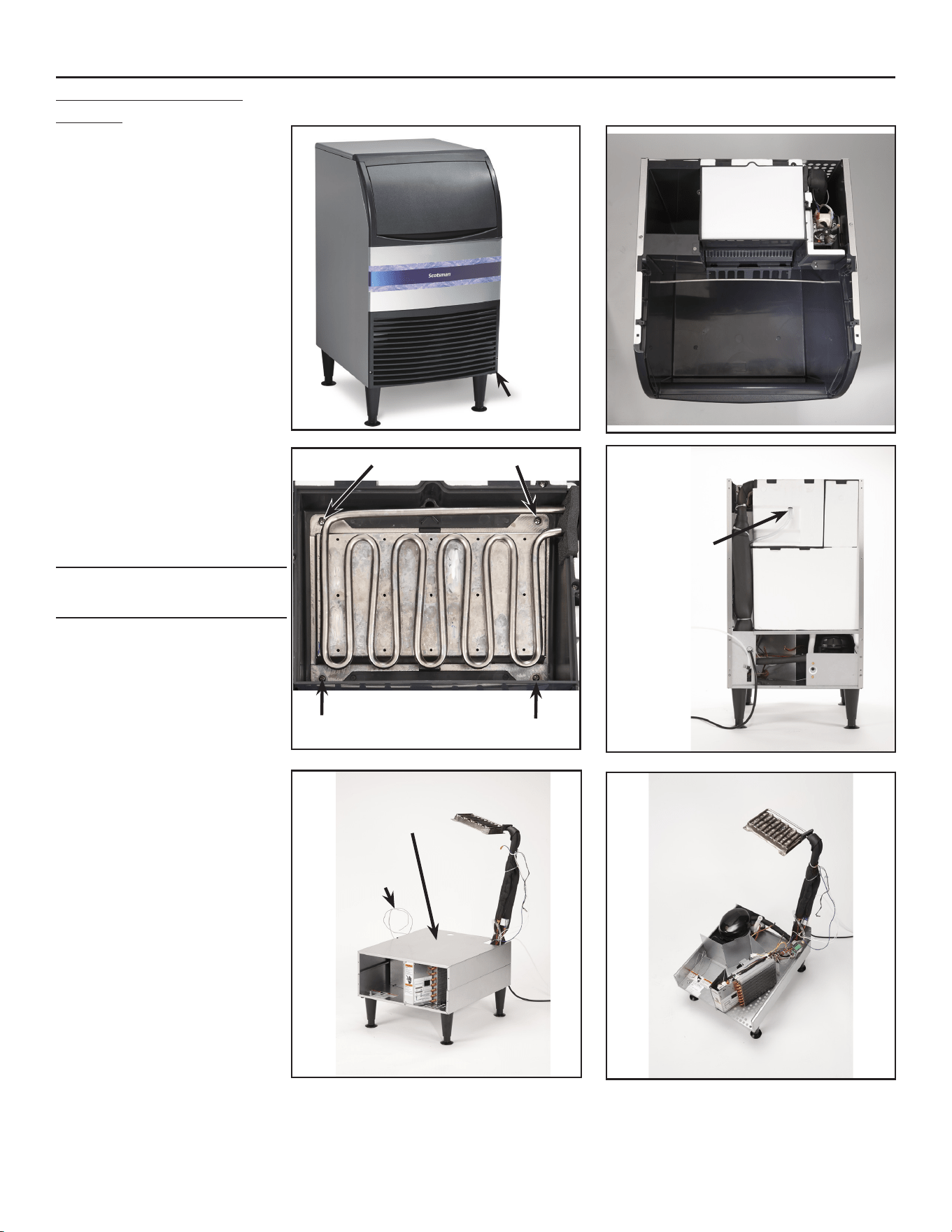
Cabinet Removal for
Service
1. Remove front panel.
2. Remove top panel.
3. Remove door.
4. Drain water from reservoir.
5. Disconnect water and
drain and electrical power.
6. Remove back and side
panels.
7. Pull bin thermostat cap
tube from tube in bin.
8. Remove evaporator cover.
9. Remove screws holding
evaporator to its frame, lift
evaporator up out of the
way.
Note: Support evaporator as
needed to prevent damage.
10. Disconnect electrical wires
from water pump.
11. Remove thermistor from
pump hose and reservoir.
12. Disconnect bin drain.
13. Disconnect water supply
hose from evaporator
platen.
14. Lift bin with reservoir off of
deck.
15. Remove deck cover.
Evaporator Screws
Deck Cover
Water
Supply
Hose
Thermostat
Cap Tube
Remove
Remove
August 2014
Page 29
Service Manual for Models HISU050, HISU070 and HISU090
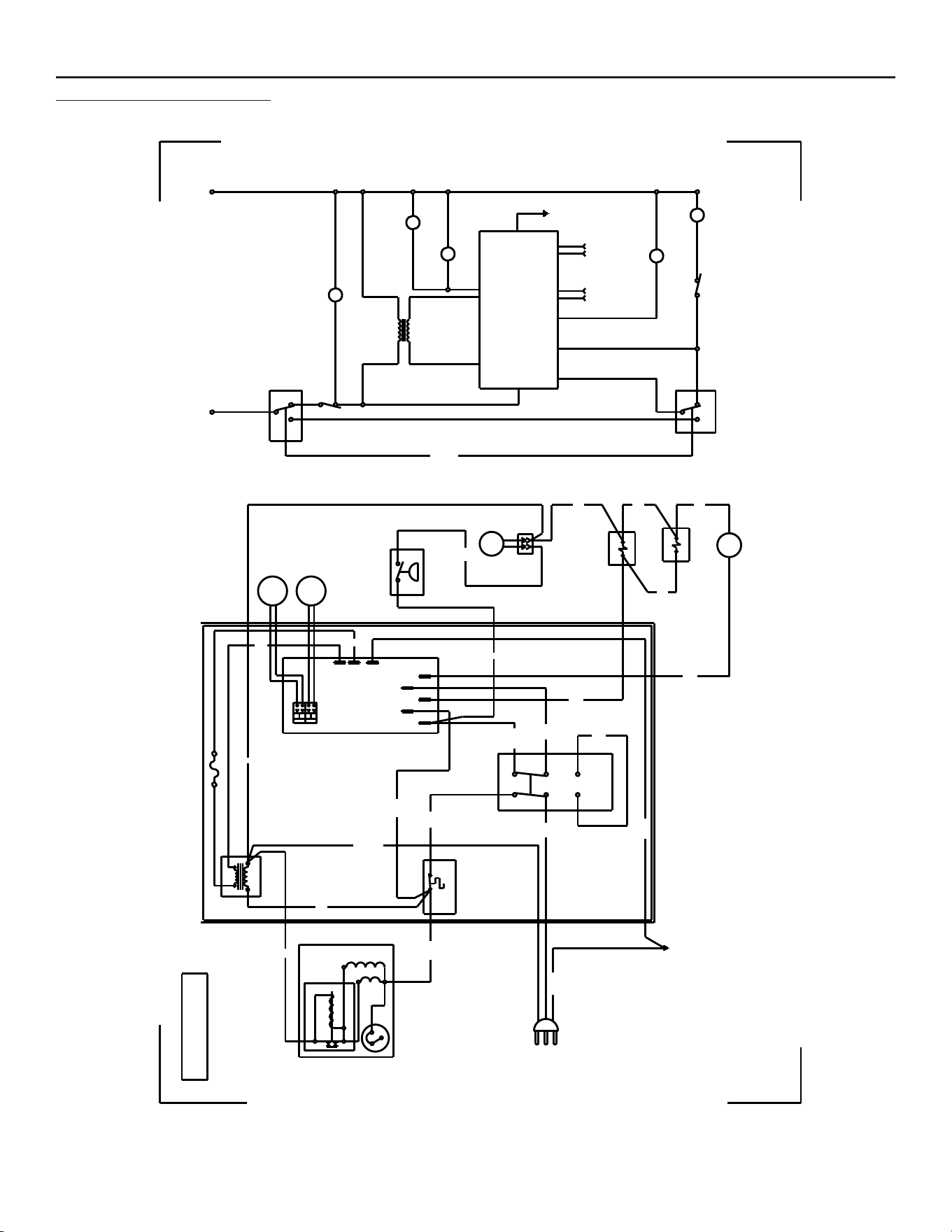
115/60/1 Wiring Diagram
REV. A
FUSE (3A) (50Hz only)
Y
R
W
W
W
BU
GN/Y
BK
or
BL
Y
BU/W
B/W
B/W
W
or
BN
B/W
B/W
W
V
O
FREEZE
NO
AC
PWR
COM
GN/Y
POWER IN
CONTROL
BIN
LEVEL
SOLENOID
HOT GAS
FAN
MOTOR
SOLENOID
WATER
PUMP
MOTOR
1
3
S
M
2
OVERLOAD
RELAY - CURRENT
COMPRESSOR
EARTH
GROUND
OFF
DOUBLE POLE
3 WAY SWITCH
(CENTER OFF)
FAN
CONTROL
ON
WASH
BIN STAT
WATER
TEMP
SENSOR
ELECTRONIC
CONTROL
ELECTRONIC CONTROL
EVAPORATOR
TEMP SENSOR
FAN
MOTOR
HOT GAS
SOLENOID
TRANSFORMER
12V
LINE
N or L2
L1
34
WATER
SOLENOID
WATER
PUMP
COMPRESSOR
SWITCHES ON THIS UNIT
SHOWN IN FREEZE CYCLE
LINE
LOAD
TRANSFORMER
EARTH
GROUND
ON
WASH
3-WAY
SWITCH
WASH
ON
FAN
CONTROL
PUMP
COM
A/C PWR
(COM)
NC =
HARVEST
BN/W
W
WATER
TEMP
SENSOR
FREEZE
NO
PUMP
NC
3
2
1
5
6
4
6
5
2
3
4
1
PUMP
COM
HARV
NC
PUMP
NC
BU
R
2 1
EVAPORATOR
TEMP
SENSOR
12V
12V
GND
THIS UNIT MUST
BE GROUNDED
17-3439-01
* SEE NAMEPLATE FOR
PROPER VOLTAGE REQUIREMENTS
AND MAXIMUM FUSE SIZE
CAUTION:
MORE THAN ONE DISCONNECT MEANS MAY BE
REQUIRED TO DISCONNECT ALL POWER TO UNIT

ICE-O-MATIC
11100 East 45th Ave.
Denver, CO. 80239
USA
303-371-3737
800-423-3367
www.iceomatic.com