EDH90******
EN User Manual
2Tumble Dryer
2 ENGLISH
CUSTOMER CARE AND SERVICE
Get usage advice, brochures, troubleshooter, service information, buy
accessories & spare parts, online product registration.
www.electrolux.com
Welcome to Electrolux! Thank you for choosing our appliance.
We recommend the use of original spare parts. When contacting Service, ensure
that you have the following data available. The information can be found on the
rating plate. Model, PNC, Serial Number.
Warning / Caution-Safety information.
General information and tips.
Environmental information.
Subject to change without notice.
CONTENT
1. SAFETY INFORMATION . . . . . . . . . . . . . . . . . . . . . . . . . . . . . . . . . . . . . . . . . . . . . . .3
2. SAFETY INSTRUCTIONS . . . . . . . . . . . . . . . . . . . . . . . . . . . . . . . . . . . . . . . . . . . . . . . . . .7
3. PRODUCT DESCRIPTION . . . . . . . . . . . . . . . . . . . . . . . . . . . . . . . . . . . . . . . . . . . . . . . . .9
4. TECHNICAL DATA . . . . . . . . . . . . . . . . . . . . . . . . . . . . . . . . . . . . . . . . . . . . . . . . . . . . . . . .9
5. INSTALLATION . . . . . . . . . . . . . . . . . . . . . . . . . . . . . . . . . . . . . . . . . . . . . . . . . . . . . . . . . 10
6. CONTROL PANEL . . . . . . . . . . . . . . . . . . . . . . . . . . . . . . . . . . . . . . . . . . . . . . . . . . . . . . . 12
7. DIAL AND BUTTONS . . . . . . . . . . . . . . . . . . . . . . . . . . . . . . . . . . . . . . . . . . . . . . . . . . . . 13
8. DISCOVER YOUR APPLIANCE . . . . . . . . . . . . . . . . . . . . . . . . . . . . . . . . . . . . . . . . . . . . 15
9. FIRST TIME START-UP . . . . . . . . . . . . . . . . . . . . . . . . . . . . . . . . . . . . . . . . . . . . . . . . . . . . 16
10. WIFI - CONNECTIVITY SETUP . . . . . . . . . . . . . . . . . . . . . . . . . . . . . . . . . . . . . . . . 17
11. PROGRAMMES . . . . . . . . . . . . . . . . . . . . . . . . . . . . . . . . . . . . . . . . . . . . . . . . . . . . . . . . 21
12. OPTIONS . . . . . . . . . . . . . . . . . . . . . . . . . . . . . . . . . . . . . . . . . . . . . . . . . . . . . . . . . . . . .26
13. MACHINE SETTINGS . . . . . . . . . . . . . . . . . . . . . . . . . . . . . . . . . . . . . . . . . . . . . . . . . . .32
14. STEAM FUNCTION . . . . . . . . . . . . . . . . . . . . . . . . . . . . . . . . . . . . . . . . . . . . . . . . . . . . 35
15. BEFORE FIRST USE . . . . . . . . . . . . . . . . . . . . . . . . . . . . . . . . . . . . . . . . . . . . . . . . . . . . .37
16. DAILY USE . . . . . . . . . . . . . . . . . . . . . . . . . . . . . . . . . . . . . . . . . . . . . . . . . . . . . . . . . . . 38
17. HINTS AND TIPS . . . . . . . . . . . . . . . . . . . . . . . . . . . . . . . . . . . . . . . . . . . . . . . . . . . . . . .42
18. CARE AND CLEANING . . . . . . . . . . . . . . . . . . . . . . . . . . . . . . . . . . . . . . . . . . . . . . . . 43
19. TROUBLESHOOTING . . . . . . . . . . . . . . . . . . . . . . . . . . . . . . . . . . . . . . . . . . . . . . . . . . 48
20. ENVIRONMENT CONCERNS . . . . . . . . . . . . . . . . . . . . . . . . . . . . . . . . . . . . . . . . . . . . 51
ENGLISH 3
1. SAFETY INFORMATION
• This appliance is not intended for use by persons
(including children) with reduced physical, sensory,
or mental capabilities, or lack of experience and
knowledge unless they have been given supervision
or instruction concerning the use of the appliance by
a person responsible for their safety. Children should
be supervised to ensure that they do not play with the
appliance.
• Do not let children play with the appliance.
WARNING!
Risk of suffocation, injury or permanent disability.
1.1 Children and vulnerable people safety
Before the installation and use of the appliance,
carefully read the supplied instructions.
The manufacturer is not responsible if an incorrect
installation and use causes injuries and damage.
Always keep the instructions with the appliance for
future reference.
Read the instructions.
WARNING: Flammable materials/Risk of fire.
The appliance contains flammable gas, propane
(R290), a gas with a high level of environmental
compatibility. Keep fire and ignition sources away from
the appliance.
Be careful not to cause damage to the refrigerant circuit
containing propane.

4 ENGLISH
• Keep all packaging away from children and dispose
of it appropriately.
• Keep detergents away from children.
• Keep children and pets away from the appliance
when the door is open.
• If the appliance has a child safety device, it should be
activated.
• Children shall not carry out cleaning and user
maintenance of the appliance without supervision.
• Do not change the specification of this appliance.
• The appliance can be installed as free-standing or
below a kitchen counter with correct space (refer to
the Installation chapter).
• Do not install the appliance behind a lockable door,
a sliding door or a door with a hinge on the opposite
side, that would prevent the appliance door from
being fully open.
• The ventilation opening in the base must not be
covered by a carpet, mat, or any floor covering.
• Connect the mains plug to the mains socket only at
the end of the installation process. Make sure that the
mains plug is accessible after installation.
• Ensure good air ventilation in the room where the
appliance is installed to avoid the back flow of
unwanted gases into the room from appliances
burning gas or other fuels, including open fires.
• If the mains power supply cable is damaged, it must
be replaced by the manufacturer, its Authorized
Service Centre or similarly qualified persons to avoid
an electrical hazard.
1.2 General Safety

ENGLISH 5
• Do not exceed the maximum load (refer to the
"Programme chart" chapter in User manual).
• Do not use the appliance if items have been soiled
with industrial chemicals.
• Wipe away lint or packaging debris that has
accumulated around the appliance.
• Do not run the appliance without a filter. Clean the lint
filter before or after each use.
• Do not dry unwashed items in the tumble dryer.
• Items that have been soiled with substances such as
cooking oil, acetone, alcohol, petrol, kerosene, spot
removers, turpentine, waxes and wax removers should
be washed in hot water with an extra amount of
detergent before being dried in the tumble dryer.
• Items containing foam rubber (also known as latex
foam), similarly textured rubber, or materials e.g.
shower caps, waterproof textiles, rubber-backed
articles, and clothes or pillows fitted with foam rubber
pads should not be dried in the machine on a heat
setting. Foam rubber materials can produce fire by
spontaneous combustion when heated.
• Fabric softeners, or similar products, should only
be used as specified by the product manufacturer’s
instructions.
• Oil-affected items can ignite spontaneously,
especially when exposed to heat sources such as in
a tumble dryer. The items become warm, causing an
oxidation reaction in the oil. Oxidation creates heat.
If the heat cannot escape, the items can become hot
enough to catch fire. Piling, stacking or storing oil-
affected items can prevent heat from escaping and
create a fire hazard.
6 ENGLISH
• If it is unavoidable that fabrics that contain vegetable
or cooking oil or have been contaminated by hair
care products be placed in a tumble dryer they should
first be washed in hot water with extra detergent. This
will reduce, but not eliminate, the hazard.
• Remove all objects from items that could be a source
of fire ignition such as lighters or matches.
• Before any maintenance operation, deactivate the
appliance and disconnect the mains plug from the
socket.
• Pre-treatment sprays and stain remover can damage
plastic components on your machine. If you use pre-
treatment sprays or stain removers, apply them to the
clothing well away from your machine.
The appliance is intended to be used in household and
similar applications such as:
• farm houses;
• by clients in hotels, motels, bed & breakfast and other
residential type environments;
• areas for communal use in blocks of flats or in
launderettes.
1.3 CONDITIONS OF USE
WARNING!
• The appliance must not be supplied through an
external switching device, such as a timer, or
connected to a circuit that is regularly switched on
and off by a utility.
• Do not damage the refrigerant circuit.
• Never stop a tumble dryer before the end of the
drying cycle unless all items are quickly removed and
spread out so that the heat is dissipated.
ENGLISH 7
2. SAFETY INSTRUCTIONS
2.1 Installation
WARNING!
• Do not install the appliance in an
environment with no air exchange.
• In the appliance enclosure or in the
built-in structure, keep ventilation
opening clear of obstruction.
WARNING!
Risk of fire and electric shock.
• Remove all the packaging.
• Do not install or use a damaged
appliance.
• Follow the installation instructions
supplied with the appliance.
• Always take care when moving the
appliance as it is heavy. Always use
safety gloves and enclosed footwear.
• Do not install or use the appliance
where the temperature can be lower
than 5°C or higher than 35°C.
• The floor area on which the appliance
is to be installed must be flat, stable,
heat resistant and clean.
• Make sure that there is air circulation
between the appliance and the floor.
• Always keep the appliance vertical
when it is being moved.
• The rear surface of the appliance must
be put against a wall.
• When the appliance is in its
permanent position, check if it is
levelled correctly with the aid of a
spirit level. If it is not, adjust the feet
accordingly.
2.2 Electrical connection
• Connect the mains plug to the
mains socket only at the end of the
installation. Make sure that there is
access to the mains plug after the
installation.
• The appliance must be earthed.
2.3 Use
WARNING!
Risk of injury electric shock, fire, burns
or damage to the appliance.
• Make sure that the parameters on the
rating plate are compatible with the
electrical ratings of the mains power
supply.
• Always use a correctly installed
shockproof socket.
• Do not use multi-plug adapters and
extension cables.
• Do not pull the mains cable to
disconnect the appliance. Always pull
the mains plug.
• Do not touch the mains cable or the
mains plug with wet hands.
• This appliance is for household
(indoors) use only.
• Do not dry damaged (torn, frayed)
items that contain padding or fillings.
• If laundry has been washed with a
stain remover, carry out an additional
rinse cycle before starting a drying
cycle.
• Dry only fabrics that are suitable
to dry in the appliance. Follow the
cleaning instruction on the item label.
• Do not drink or prepare food with the
condensed water/distilled water. It can
cause health problems to people and
pets.
• Do not sit or step on the open door of
the appliance.
• Do not dry dripping wet clothes in the
appliance.
• Fill steam generators only with
liquids specified by the manufacturer.
(Available for model EDH***R9**)
8 ENGLISH
2.5 Compressor
2.6 Disposal
WARNING!
Risk of damage to the appliance.
WARNING!
Risk of injury or suffocation.
• The compressor and its system in the
tumble dryer is filled with a special
agent which is free from fluoro-chloro-
hydrocarbons. This system must stay
tight. Damage of the system can cause
a leakage.
• Disconnect the appliance from the
mains electrical and water supplies.
• Cut off the mains electrical cable
close to the appliance and dispose
of it.
• The appliance contains flammable
gas (R290). Contact your municipal
authority for information on how
to discard the appliance correctly.
Remove the door latch to prevent
accidental access by children or pets
and getting trapped inside the drum.
• Dispose of the appliance in
accordance with local requirements
for the disposal of Waste Electrical
and Electronic Equipment (WEEE).
2.7 Care and cleaning
2.4 Internal lighting (Available for
model EDH***R7**, EDH***R9**)
WARNING!
Risk of injury or damage to the
appliance.
WARNING!
Risk of injury.
• Do not use water spray and steam to
clean the appliance.
• Clean the appliance with a moist soft
cloth. Use only neutral detergents.
Do not use abrasive products,
abrasive cleaning pads, solvents or
metal objects.
• Be careful when you clean the
appliance to prevent damage to the
cooling system.
• Visible LED radiation, do not look
directly into the beam.
• The LED lamp is dedicated to drum
lighting. This lamp cannot be reused
for other lighting purposes.
• To replace the internal lighting,
contact the Authorized Service Centre.
• For more detailed information about
recycling this product, Please contact
your local city office, your household
waste disposal service, or the shop
where you purchased the product.
ENGLISH 9
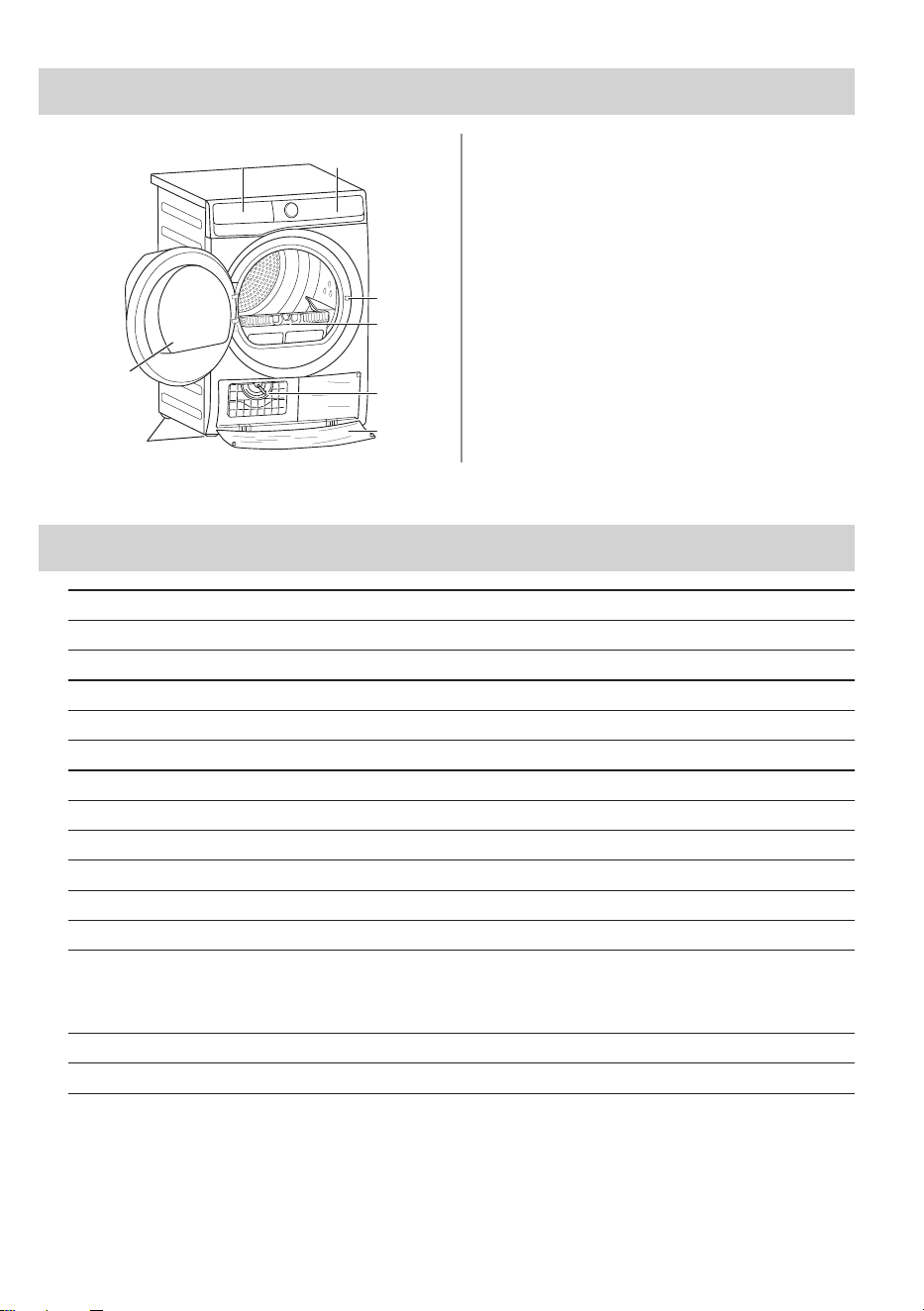
3. PRODUCT DESCRIPTION
A B
C
D
E
G
H
F
A
Water Container
B
Control Panel
C
Door Lock
D
Filter
E
Heat Exchanger lid
F
Heat Exchanger cover
G
Adjustable Feet
H
Appliance Door
Model Name EDH902R9SC
Height x Width x Depth 850 x 596 x 662 mm
Max. depth with the appliance door open 1107 mm
Max. width with the appliance door open 958 mm
Adjustable height 850 mm (+ 15 mm - feet adjustment)
Drum volume 113 l
Maximum load 9 kg
Voltage 220-240 V
Frequency 50 Hz
Total power 1600 W
Type of use Household
Permitted ambient temperature + 5°C to + 35°C
Level of protection against ingress of solid
particles and moisture ensured by the protective
cover, except where the low voltage equipment
has no protection against moisture
IPX4
Gas designation R290
Gas weight 0.149 kg
4. TECHNICAL DATA
10 ENGLISH
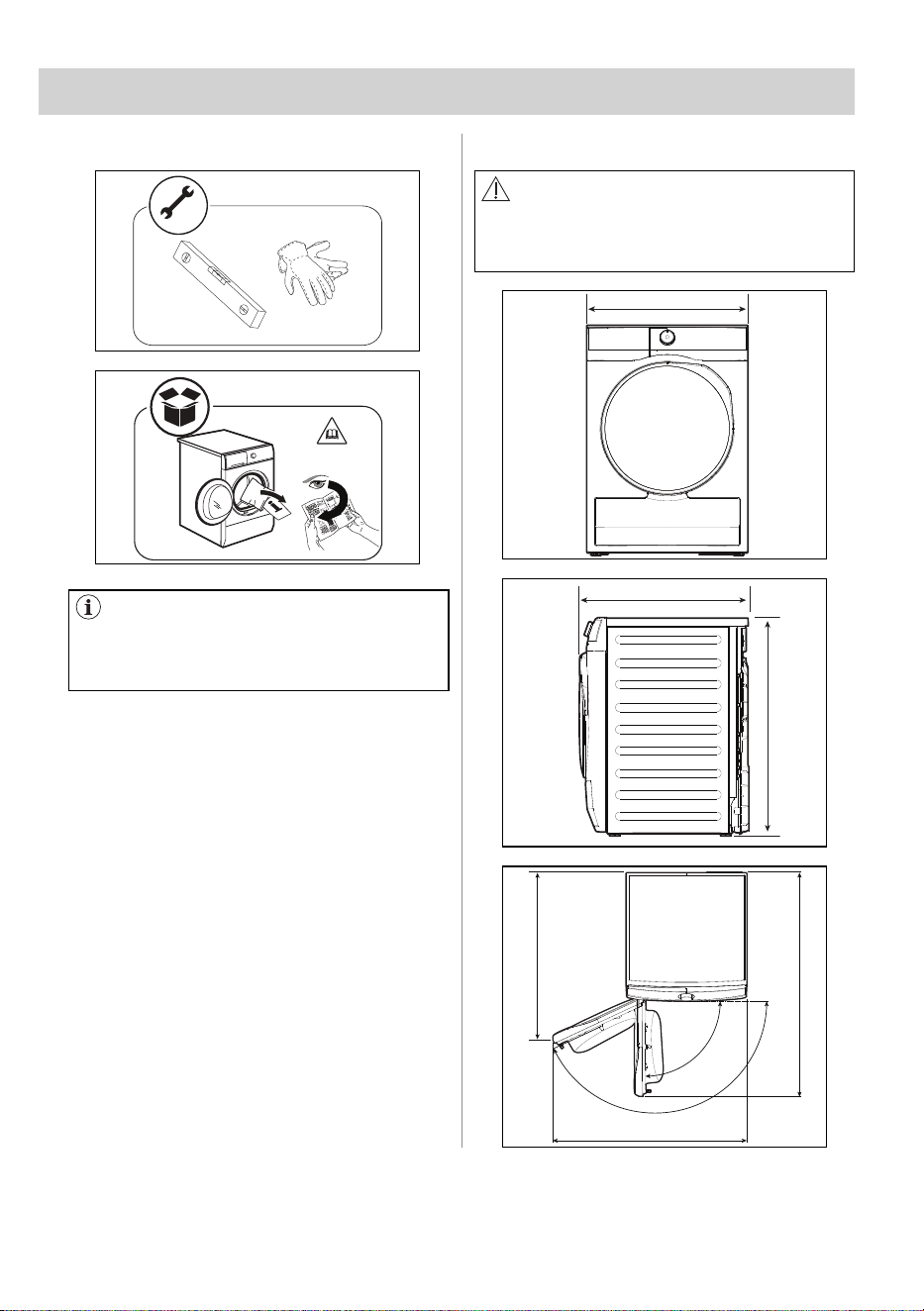
Unpacking Installation
WARNING!
Before proceeding with installation,
read the safety information, and
dimension preferred.
596 mm
662 mm
850 mm
958 mm
1107 mm
824 mm
155°
90°
The rear drum locks are removed
automatically when the dryer is
activated for the first time. Possible to
hear some noise.
5. INSTALLATION
ENGLISH 11
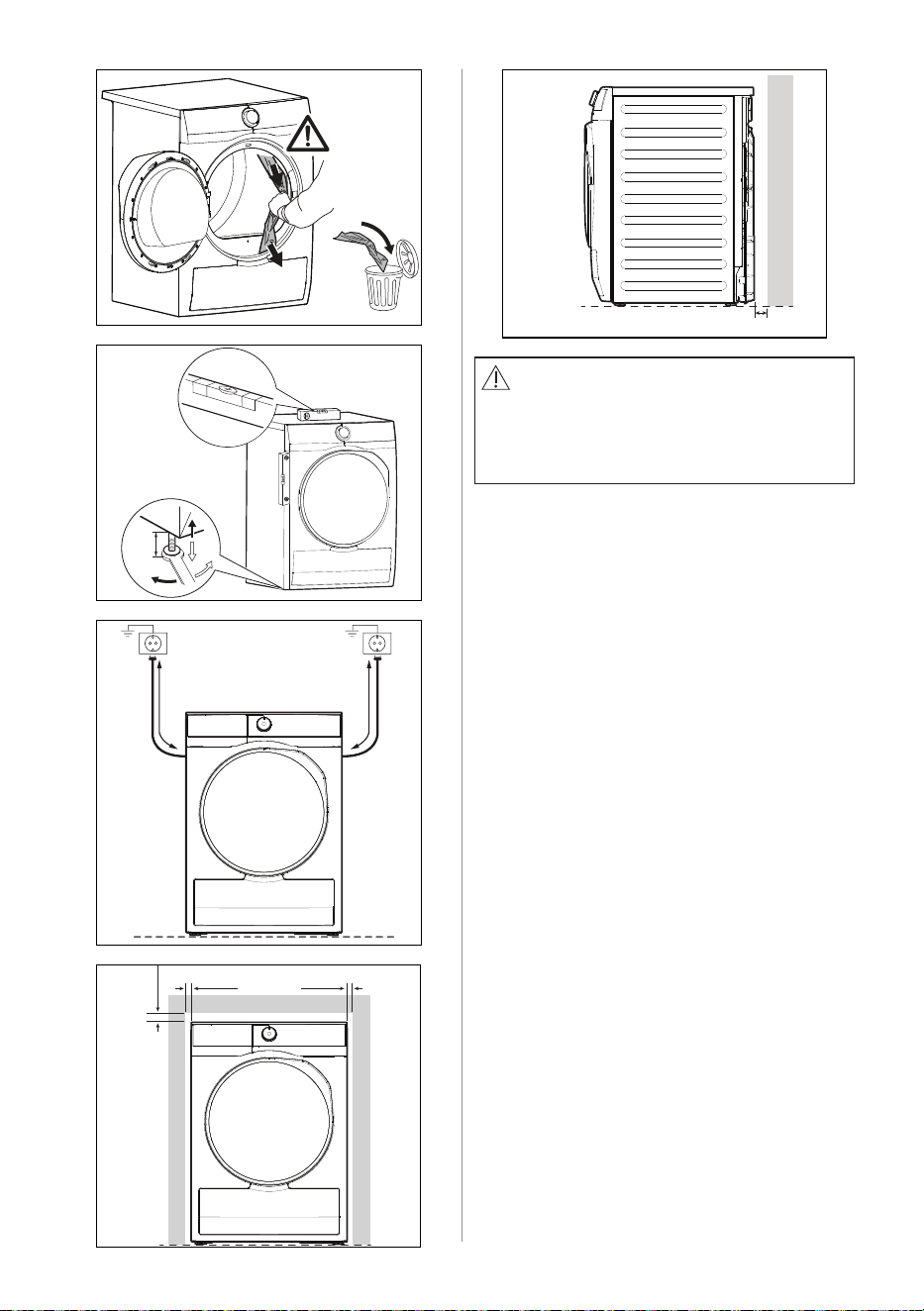
15 mm
810 mm 1250 mm
10 mm 10 mm
wall
30 mm
WARNING!
The tumble dryer cannot be placed on
top of a washing machine.
For more information, please contact
authorized dealer.
12 ENGLISH
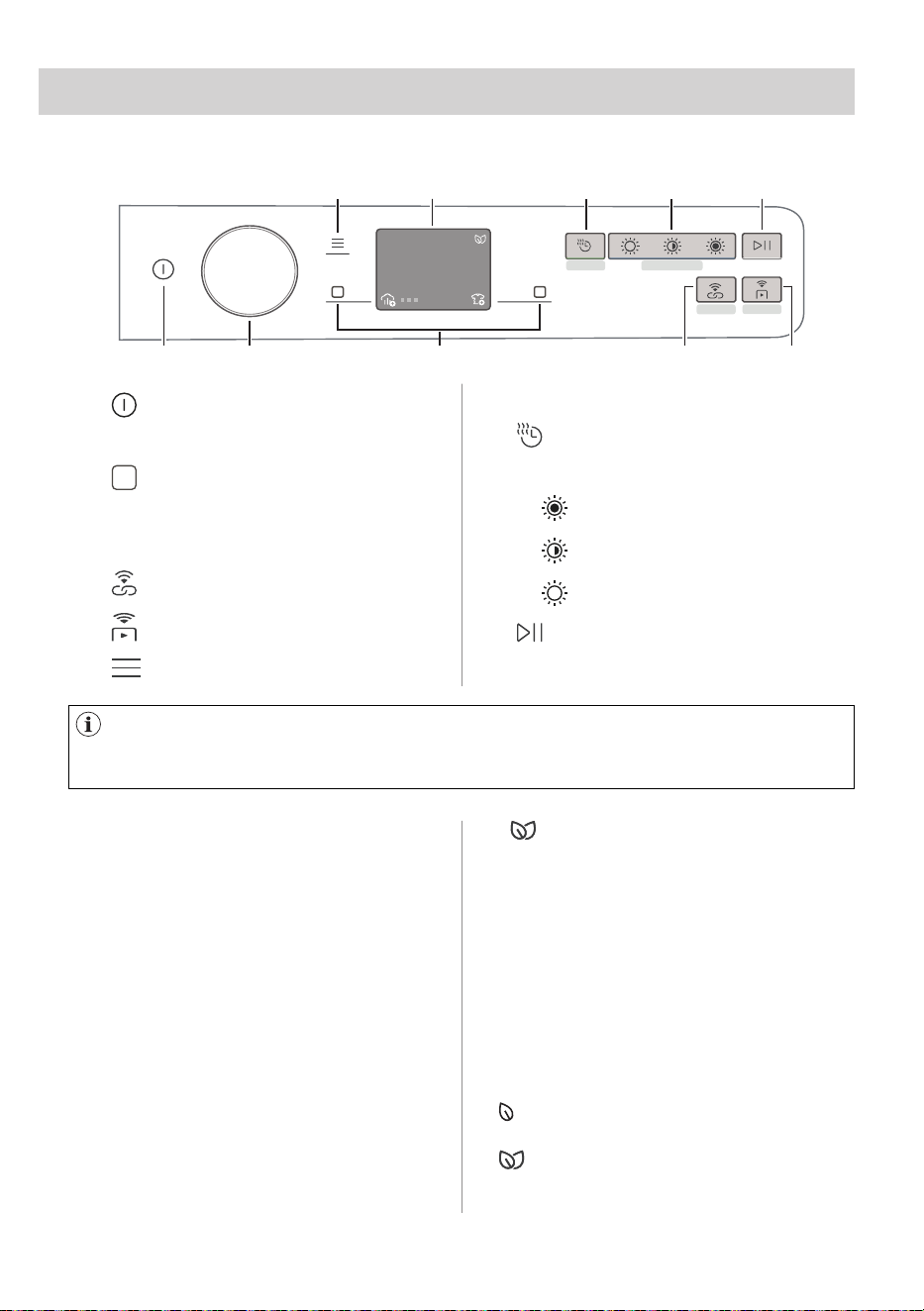
6.1 Control Panel Description
6.3 SmartLeaf feedback
6.2 SmartSelect
A
B C D E
F G H I J
1 31
h min
max 3kg
Fast 3kg
A
On/Off button
B Programme knob
C
Soft key
• Right Soft key
• Left Soft key
D
SyncDry touch key
E
Remote Start touch key
F
Menu touch key
6. CONTROL PANEL
Press the touch buttons with your finger in the area with the symbol or name of
the option. Do not wear gloves when you operate the control panel. Make sure that
the control panel is always clean and dry.
SmartLeaf guides the consumer toward
a more energy-efficient clothes drying,
based on energy consumption weighted
on programme’s rated capacity.
There are three different level of
SmartLeaf indicated by the leaf icon
(green colour) :
1. No leaf lit on the display or App
indicates an average consumption
level or no indication possible (for
Time based cycles).
2. one leaf indicates a good energy
consumption level.
3. two leaves indicate the best
consumption level.
This new feature has been created with
the aim of improving the sustainability of
drying cycles, the care and maintenance
of fabrics and consumer experience.
This new interface area is designed
with the aim of guiding the user through
sustainable choices, and providing an
improved and direct way of selecting
the most indicated cycles and options
with minimum effort. An indication on the
sustainability will be given through the
SmartLeaf indicator (see chapter Control
Panel: SmartLeaf feedback ).
The drying temperature adapts to each
SmartSelect level according to the selected cycle
to ensure the best performance, without the need
to change the temperature manually.
G Display
H
Time Dry touch key
I
Automatic dry touch key
• Extra Dry
• Cupboard Dry
• Iron Dry
J
Start/Pause touch key
ENGLISH 13
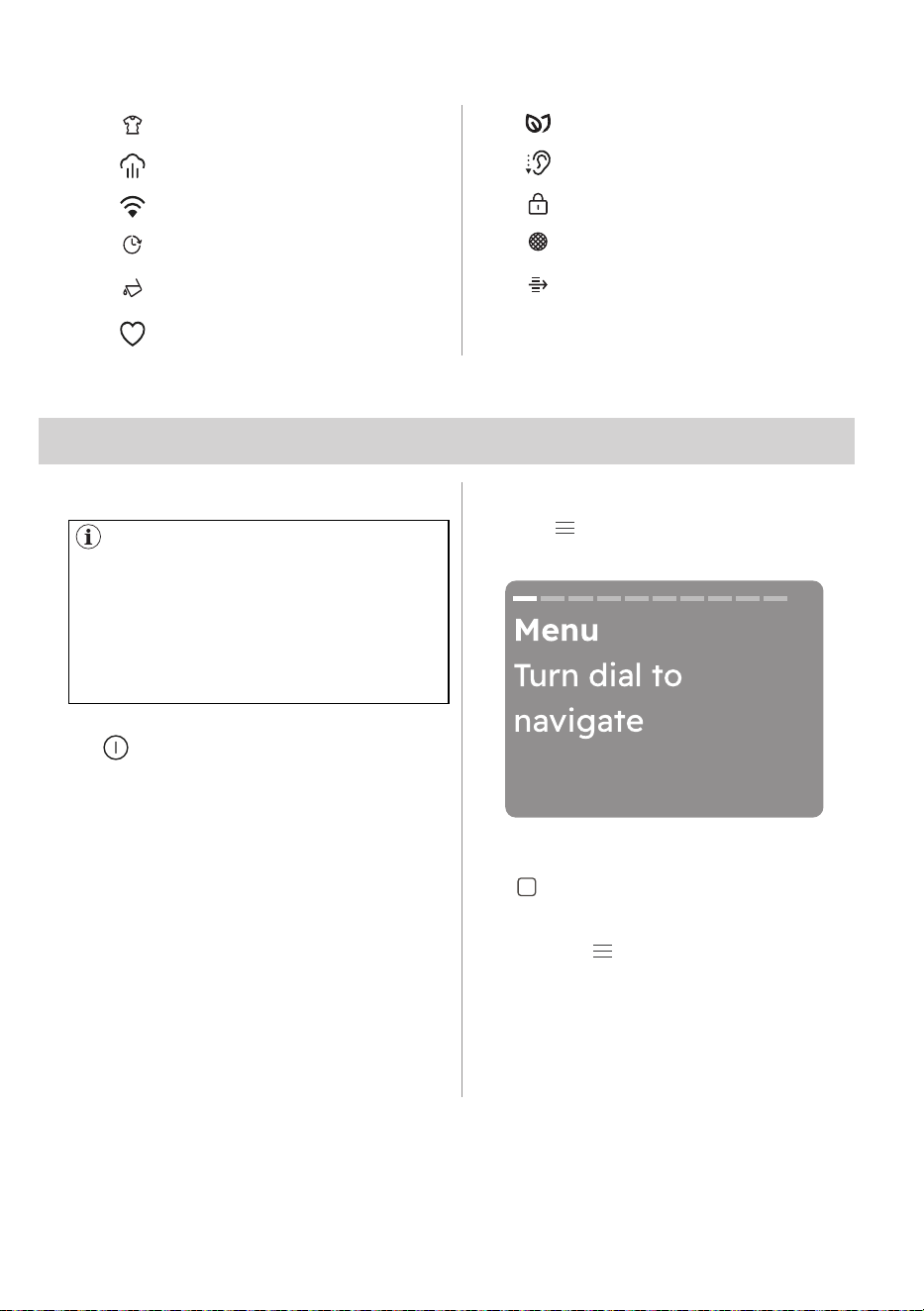
6.4 Symbols
Indicator : Anticrease phase
Indicator : Steam
Indicator : WiFi
Finish In icon
Indicator : Drain the water
container
Indicator : Favourite
SmartLeaf icon
Indicator : Extra silent
Child lock icon
Indicator : Clean filter
Indicator : Check heat
exchanger
7.1 Introduction
7.2 On/Off button
7.3 Programme dial
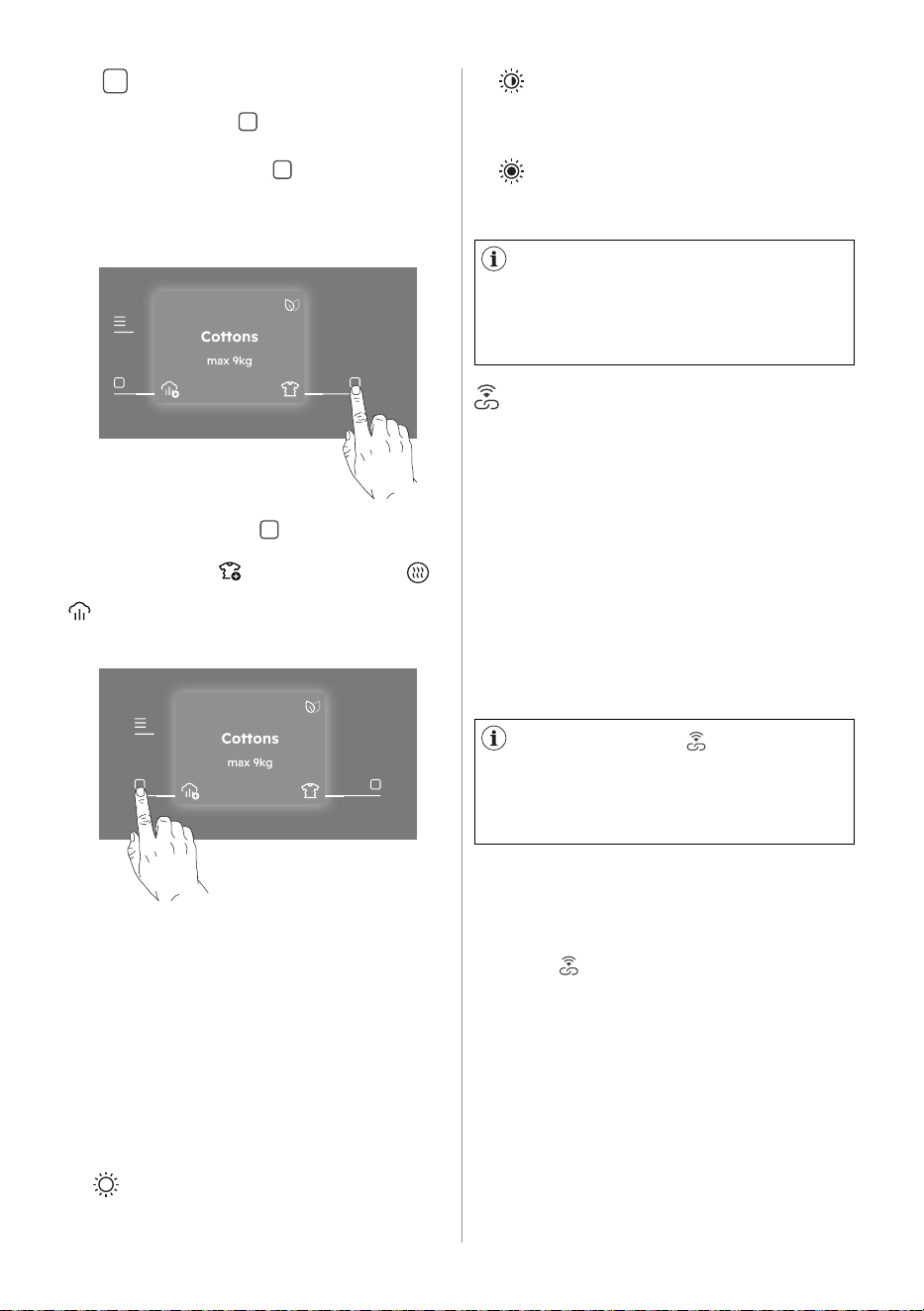
7.4 Menu
Press and hold briefly this button for a
few seconds to activate or deactivate
the appliance. A dedicated jingle sound
while switching the appliance on or off,
lights and display switches on and Start/
Pause button led pulse.
During the first switch on of the
appliance, the system shall require to
setup the appliance
By rotating the programme dial it
is possible to select the desired
programme.
Tap the " " touch key to enter inside the
option.
Turn the dial to navigate. To activate/
deactivate an option tap the right soft
key " ".
7. DIAL AND BUTTONS
The options are not available with
all drying programmes. Check the
compatibility between options and
drying programmes in the "Programme
options compatibility". An option can
exclude another one, in this case the
appliance doesn't allow you to set
incompatible options.
To exit the menu user shall:
• Press the " " touch key again.
• Wait a time out of 10 seconds.
14 ENGLISH
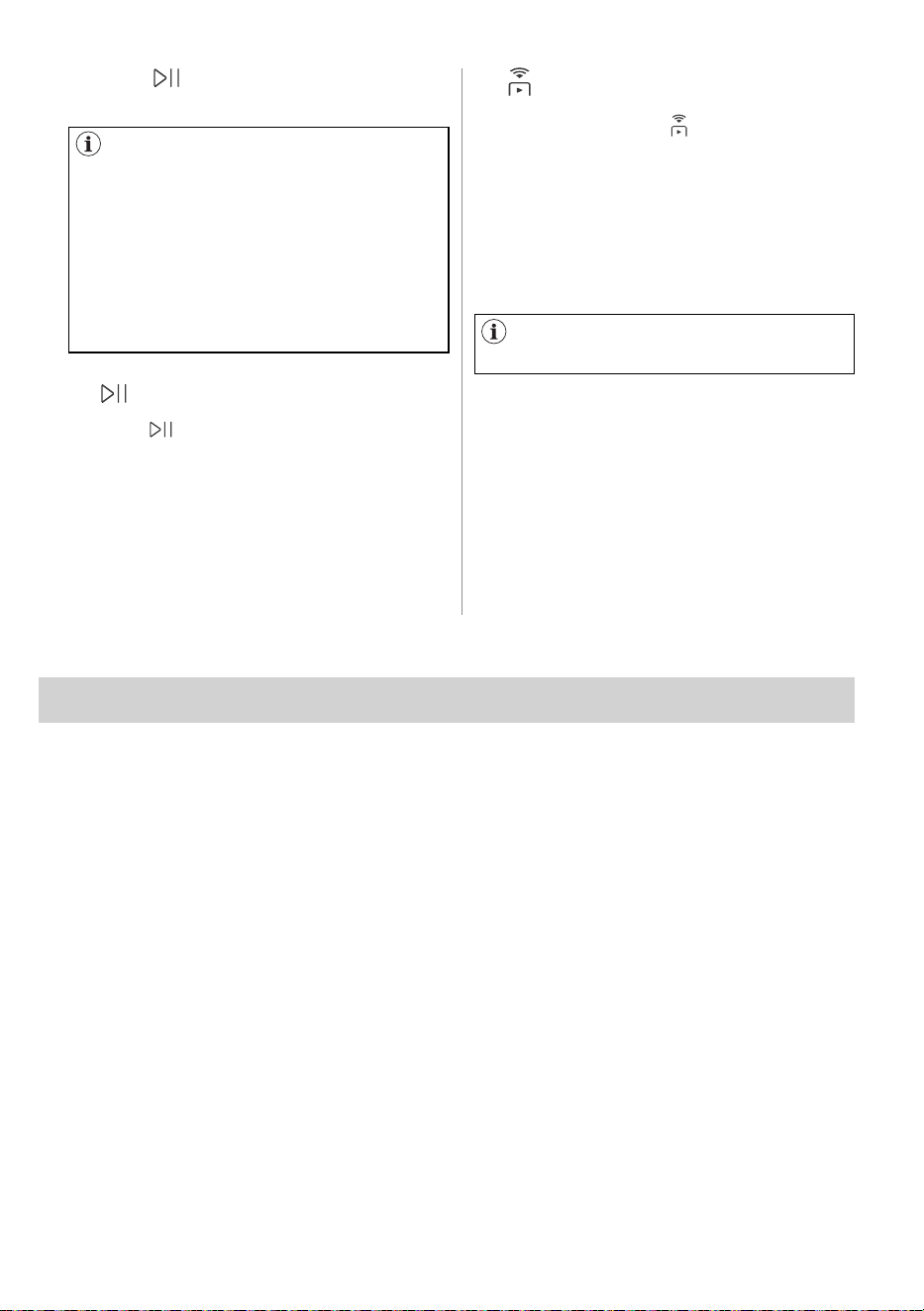
7.5 Right/Left soft keys
The two soft keys " " are located on the
right and the left of the display.
Tap the right soft key " " to prompt the
action that appears on the right bottom
of the display (ex. Finish In, go back in
the menu,..).
Tap the left soft key " " to prompt the
action that appears on the left bottom of
the display (e.g. Extra Anticrease,
Final dryness level for Wool programme,
Stem Level, activate or deactivate an
option.) the menu,..).
218h min
218h min
7.6 SmartSelect
Dryness Levels
SyncDry
This new feature has been created with
the aim of improving the sustainability of
drying cycles, the care and maintenance
of fabrics and consumer experience.
This feature lets your tumble dryer to
automatically set the most appropriate
programme that matches the last
washing program recently executed.
All you need to do is start the drying
programme once your tumble dryer is
loaded. No other programme settings or
options are required on the tumble dryer.
Once the washing programme has come
to an end, the washing machine transfers
the programme data via the home router
WiFi to the Electrolux Cloud, as well as to
your tumble dryer.
Easy direct access to dryness level with
one simple touch.
For drying the three possible choices are:
1. Iron Dry
This option is recommended to dry
garments suitable for ironing.
To activate one of this options
turn the dial to select the desired
programme.
The default dryness level icon light on.
To change it tap on the related icon.
In order to use the SyncDry
function, the Electrolux tumble dryer
and washing machine must be
connected to the same home network
and paired with our app.
To activate the function:
1. Once the wash cycle has come to an
end, place the clean laundry in the
tumble dryer.
2. Press " SyncDry" touch key.
3. All display symbols will stay lighted
off except WiFi icon and ProSense
bars that run an animation for a few
seconds as the appliance is retrieving
data from the cloud.
4. Display will update itself automatically
with the suggested programme.
After 10 seconds, if data retrieving
is unsuccessful, the button LED is
switched off and the machine gives an
acoustic error signal. Then previously
selected programme is restored.
2. Cupboard Dry
It is the default drying level selected
for most programme, and it is
indicated for items to be stored.
3. Extra Dry
This option is recommended for
towelling materials.
ENGLISH 15
7.7 Start/Pause
7.8 Remote Start
If the door is open, the Remote Start
is deactivated.
When SyncDry programme is set,
user is still allowed to change options
or select another program by rotating
knob or using APP. In such cases
SyncDry touch key LED will turn off
to indicate that the programme is not
anymore the suggested one; SyncDry
automatic programme can be selected
again by pressing related touch key
until data is available on Cloud.
Tap the " Start/Pause" touch key
to start and pause the appliance or
interrupt a running programme.
A quick touch of this " " activates the
Remote Start function that allows you
to start, pause and stop the appliance
remotely.
Activating the Remote Start the machine
goes in a stand-by status.
To exit this state, preaa again the button
and turn it off.
5. Press " Start/Pause" touch key to
begin drying process.
Press and hold this button for longer time
to provide two other functions:
• hold it down for 5 seconds as long as
a click sounds: the WiFi is turned on
and off.
• hold it down for 10 seconds as long
as a double beep sounds to reset
network credentials and fallowing
message pops up: Reset network
credentials?
The first time you turn the appliance on, the display guided through some information
related to the appliance.
If user skipped it during first power on, it will show again on the next power up after
start up. If user has press skipped for the second time, do not show anymore.
8. DISCOVER YOUR APPLIANCE
16 ENGLISH
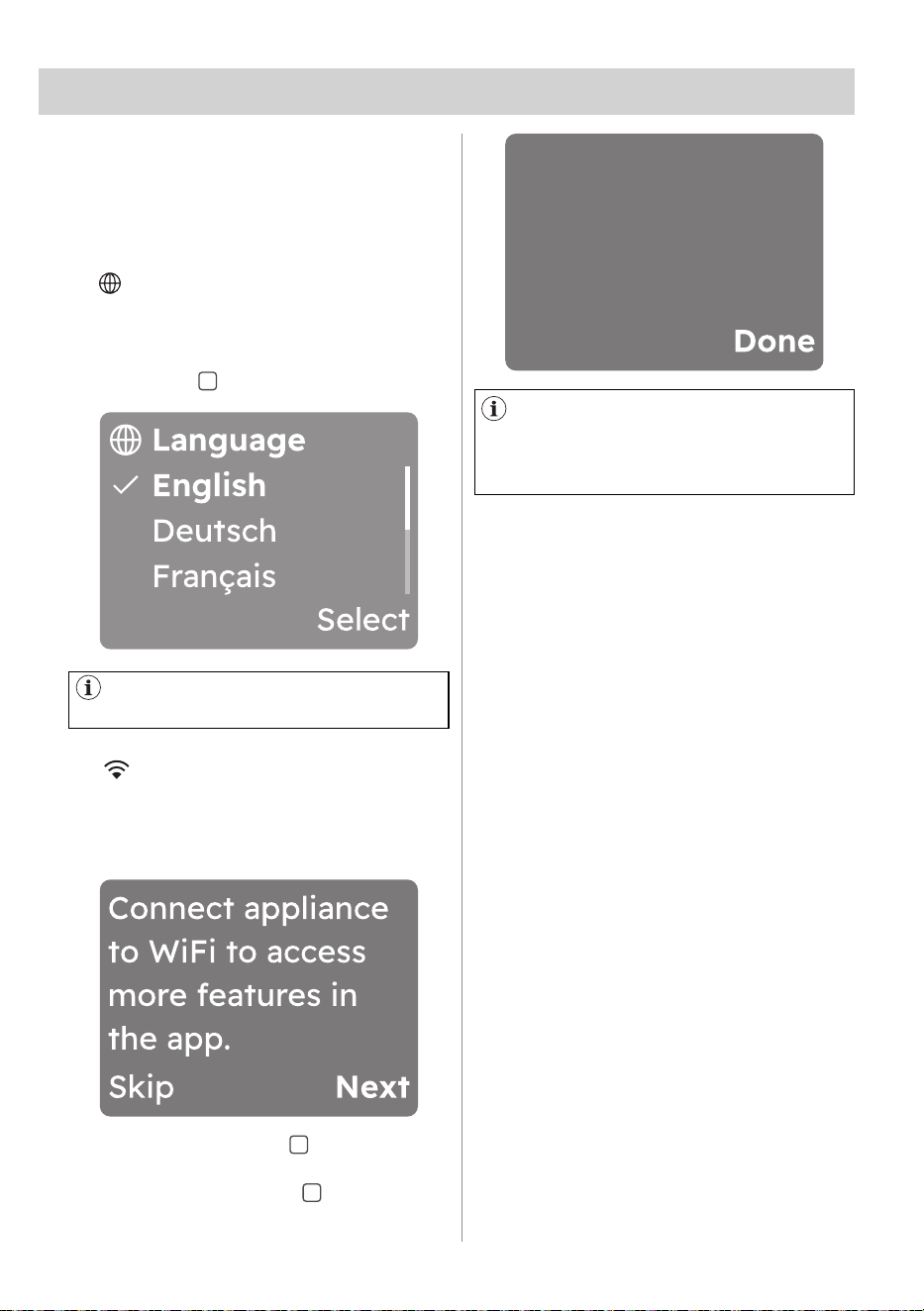
9.1 Language setup
9.2 WiFi setup
Each time you turn the appliance on,
the Start-up Screen appears on the
touch screen. The first time you turn the
appliance on, after the Start-up Screen
you are guided through the initial setup
procedure.
At first power on, the display indicates to
connect your appliance to the WiFi.
The following window pops up:
Scroll through the list of languages by
rotating the knob to find the desired
language and select it by pressing the
right soft key " " .
9. FIRST TIME START-UP
By turning the knob the selected
language will be visible in bold.
Tap on the left soft key " " to skip this
action and go back to the previous view.
Tap on the right soft key " " to pass to
next stage and follow the prompts. The
following window pops up:
Follow the app
instructions to
connect to WiFi.
To link the appliance to mobile
devices, download the App and other
features refer to "WiFi - Connectivity
Setup" chapter.
ENGLISH 17
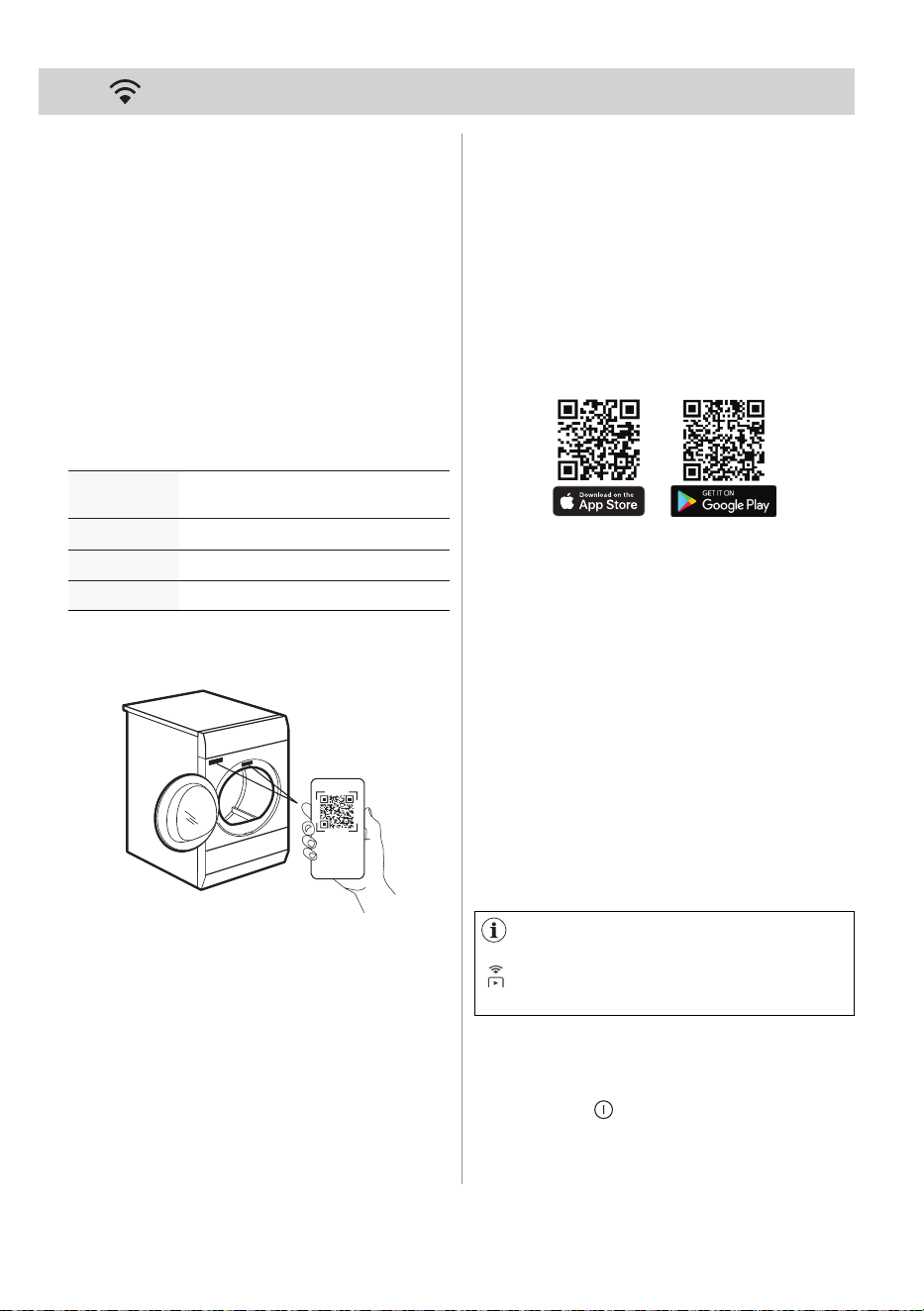
10. WIFI - CONNECTIVITY SETUP
This chapter describes how to connect
the smart appliance to the WiFi network
and to link it to a mobile device.
By this functionality you can receive
notifications, monitor and control your
tumble dryer from your mobile devices.
The WiFi functionality is off as factory
default setting.
To connect the appliance to enjoy the full
range of features and services you need:
• Wireless network at home with internet
connection enabled.
• Mobile device connected to wireless
network.
When connecting the tumble dryer to the
application, stand near it with Your smart
device.
Make sure that your smart device is
connected to the wireless network.
1. Go to the App Store/Play Store on
your smart device or scan QR code
(see chapter "QR code on rating
plate").
QR code can be used in two ways:
• Scan the QR code with the built-in
camera app to download our app
from the App store on your smart
device and follow the required steps.
• Pairing your smart device with
appliance to simplify the process.
Scan the QR code with QR code
scanner built-in our app.
Frequency
2.412 - 2.472 GHz for European
market
Protocol
IEEE 802.11b/g/n
Max power < 20dBm
Encryption WPA, WPA2, WPA3
10.1 QR code on rating plate
10.2 Installing our app
SCANNING...
2. Download and install our app.
3. Make sure you started a WiFi
connection in the dryer. If not go to
the section below.
4. Start the application. Select the
country and language and login with
Your email and password. If you do
not have an account, create a new
one following the instructions in our
app.
You can also configure the dryer
wireless connection by press the
" Remote Start" touch jey about 5
second.
Have our app downloaded and installed
on your smart device.
10.3 Configuring the dryer
wireless connection
1. In our app - tap on Add appliance
and follow the instructions on the App
for appliance connection.
2. Press the " On/Off" button for a few
seconds to activate the appliance.
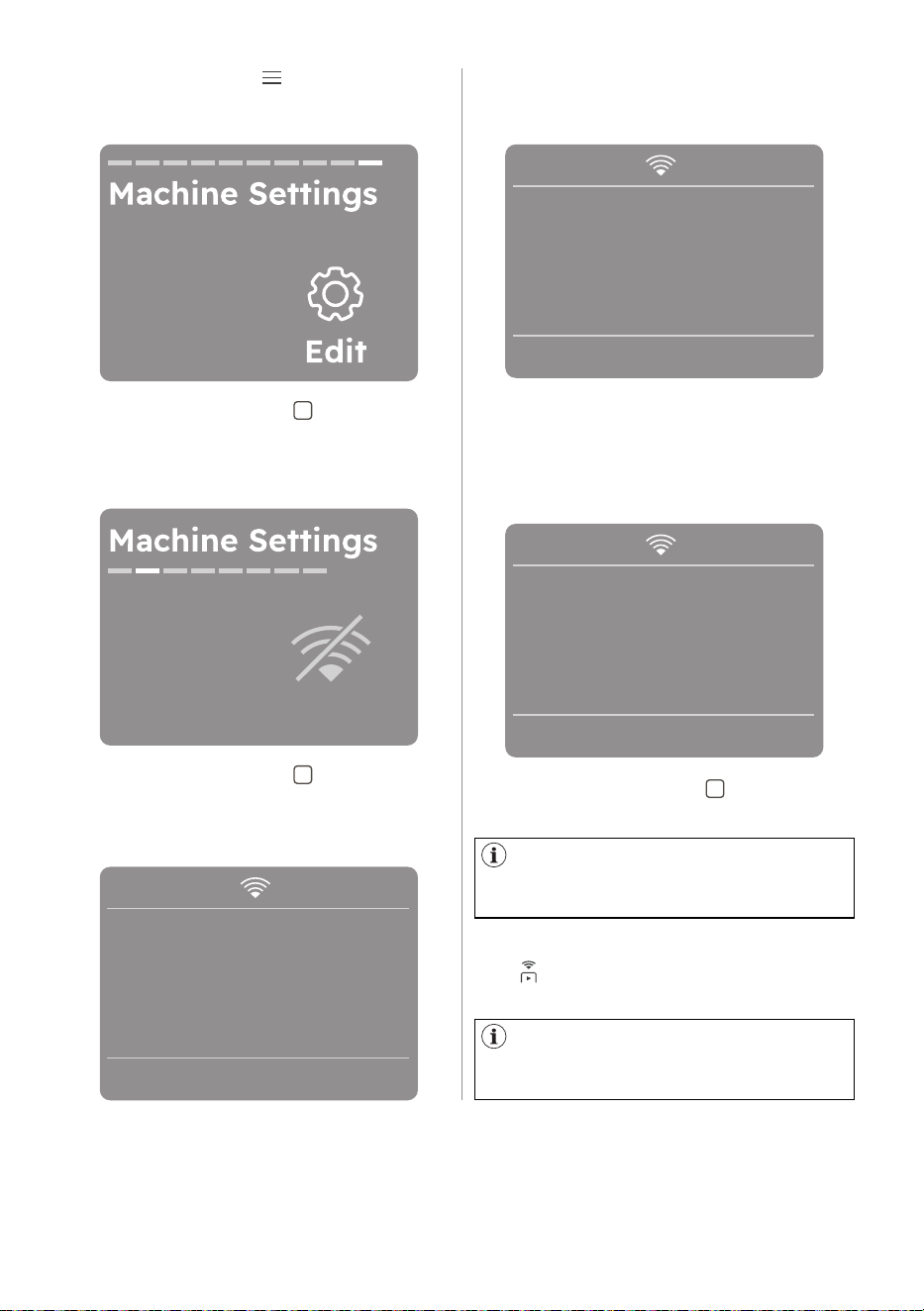
18 ENGLISH
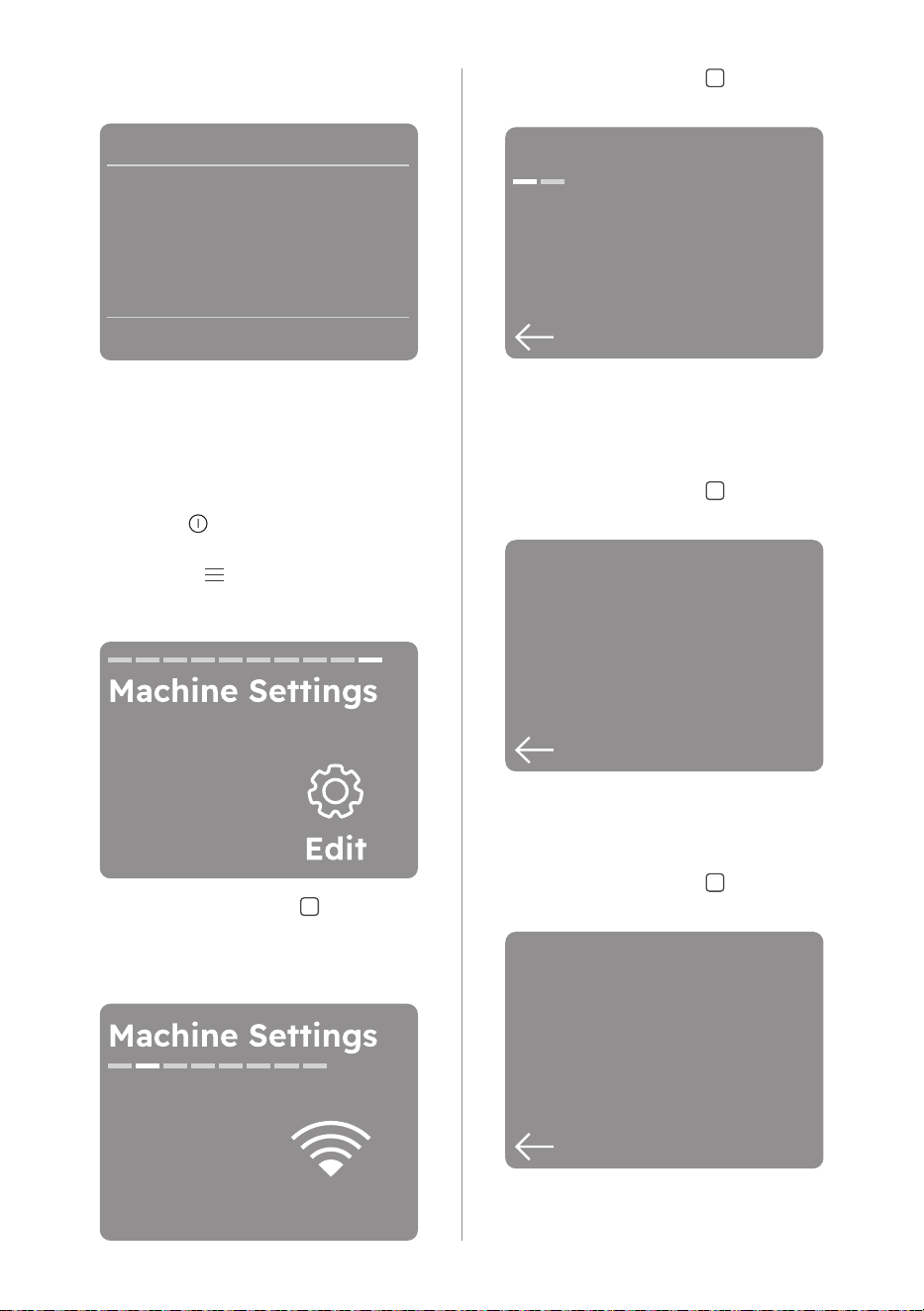
4. Tap the right soft key to enter to the
machine settings.
5. Rotate the dial until the display shows
"WiFi".
6. Tap the right soft key to set up
WiFi connection. The wireless module
begins starting up. It may takes about
10 seconds before it is ready.
Set up
WiFi
When the wireless module is ready the
following screen pops up (Ready to
connect):
Starting up...
Cancel
The access point will be open for
about 5 minutes.
7. Configure our app on your smart
device.If the connectivity is configured
following screen pops up
8. Tap the right soft key " " (OK) to get
back to home screen.
Ready to connect
Cancel
Connected
OK
Every time you switch the appliance
on, the appliance takes 10 seconds to
connect to the network automatically.
After the connectivity is configured,
Tap " Remote Start" touch key for
ON/OFF function.
If you switch the appliance off and
on again, the wireless connection is
automatically off.
3. Tap on the Menu " " soft key, rotate
the dial until the display shows
"Machine Settings".
ENGLISH 19
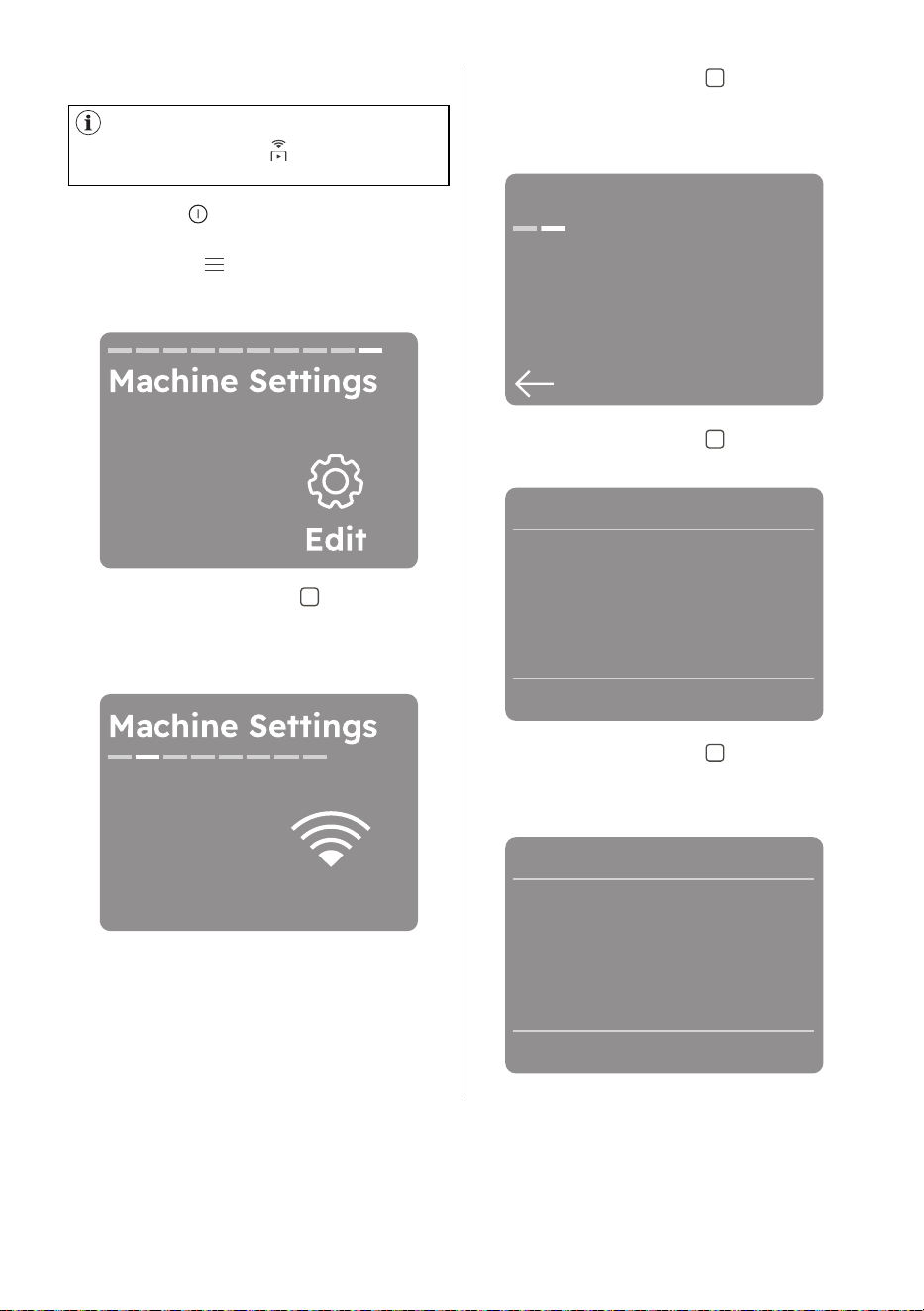
You can also reset network
credentials by press " Remote Start"
touch key about 10 second.
10.4 Reset network credentials
1. Press the " on/off" button for a few
seconds to activate the appliance.
2. Tap on the " " Menu soft key, rotate
the dial until the display shows
Machine Settings.
3. Tap the right soft key " " to enter to
the machine settings.
4. Rotate the dial until the display shows
"WiFi".
5. Tap the right soft key " "to edit WiFi
connection.
6. Rotate the dial until the display shows
Reset Network screen.
Edit
WiFi
7. Tap the right soft key " ". The
following screen pops up.
Next
WiFi
Reset Network
Reset network
credentials?
Cancel
Reset
8. Tap the right soft key " " to confirm
your choice.
The network credentials begins resetting.
Re setting
network...
20 ENGLISH
10.5 Network information
Network is reset
When the App is installed and the
wireless connection is complete, you
can check a few information regarding
connection and network.
1. Press the " on/off" button for a few
seconds to activate the appliance.
2. Tap on the " " Menu soft key, rotate
the dial until the display shows
"Machine Settings".
3. Tap the right soft key " " to enter to
the machine settings.
4. Rotate the dial until the display shows
"WiFi".
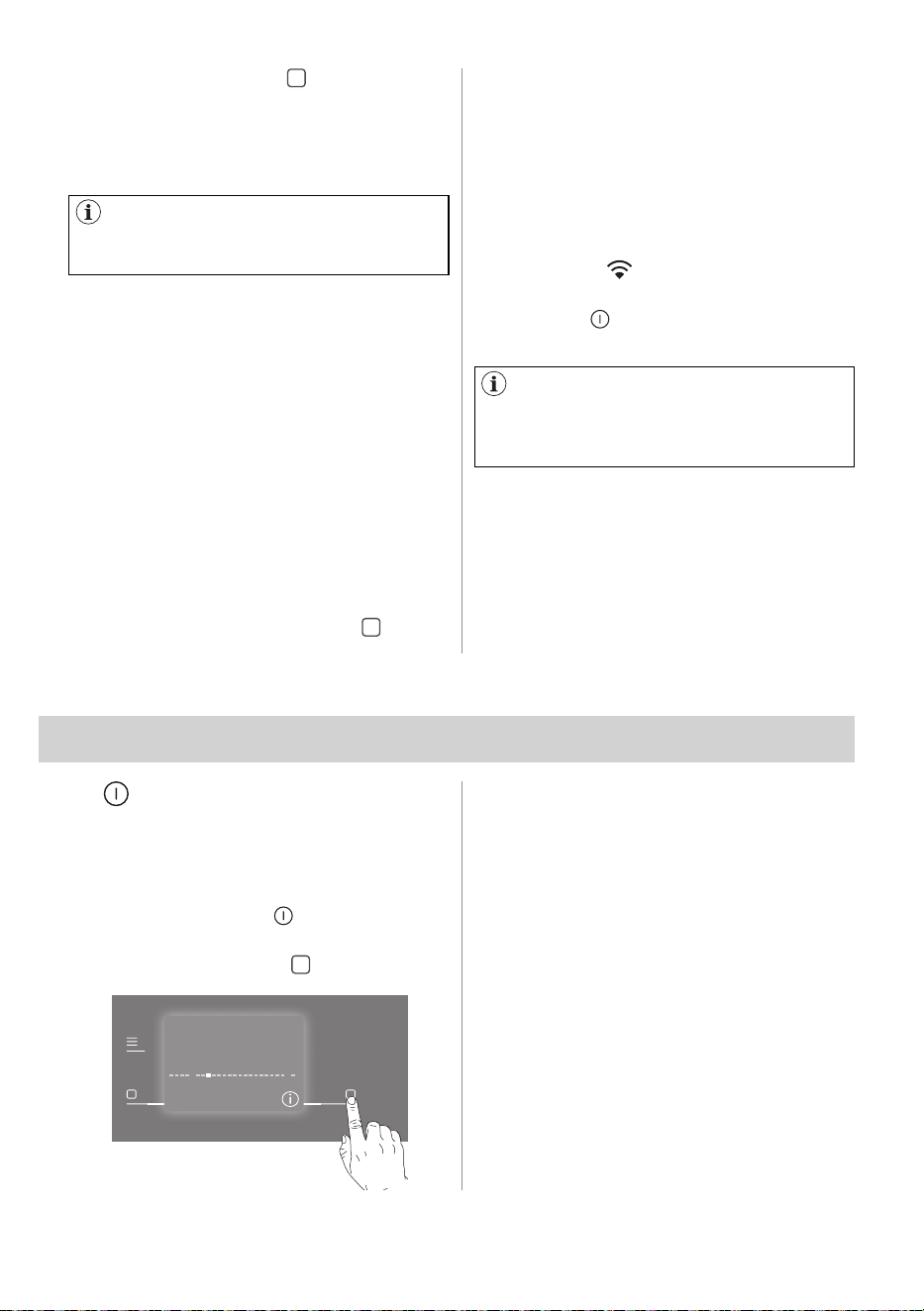
5. Tap the right soft key " " to enter the
following screen:
Edit
WiFi
here you can check:
• Status of connection ( e.g Starting
up..., Not connected, Connected)
• Signal strength
6. Tap the right soft key " " to enter the
following screen:
Info
WiFi
Signal: 5/5
Connected
here you can check:
• Network name
• IP address of your dryer
7. Tap the right soft key " " to enter the
following screen:
Next
Network name:
IP: 192.168.10.85
My_home_networ...
MAC:
48:c2:9a:37:41:d3
After a few seconds the following screen
pops up:
here you can check:
• MAC address of your dryer
ENGLISH 21
8. Tap the left soft key " " a few times
to go back to the machine settings
screen.
10.6 Over-the-air update
10.7 WiFi Always On
During the update it is highly
recommended to not turn off or unplug
the appliance.
The WiFi Always On function may
affect your energy consumption. WiFi
Always On function is disabled by
default.
The App may propose an update for
downloading new features.
The update is accepted via App only.
If a programme is running, the App
notifies that the update will start at the
end of the programme.
During the update, the fallowing
message pops upon the display: Don't
turn off the appilance.
The appliance will be usable again
at the end of the update, without any
notification about successful update.
If an error occurs, , the fallowing
message pops upon the display: Update
failed. Press (OK) right soft key " " to
return to normal use.
The WiFi Always On function can be
activated only via our app.
This feature keeps the appliance
connected to the network even when
the appliance is turned off, so that it
can always be woken up and managed
remotely from your device.
The indicator " " goes on.
It is possible to turn the appliance on by
pressing the on/off button or through
the App.
11. PROGRAMMES
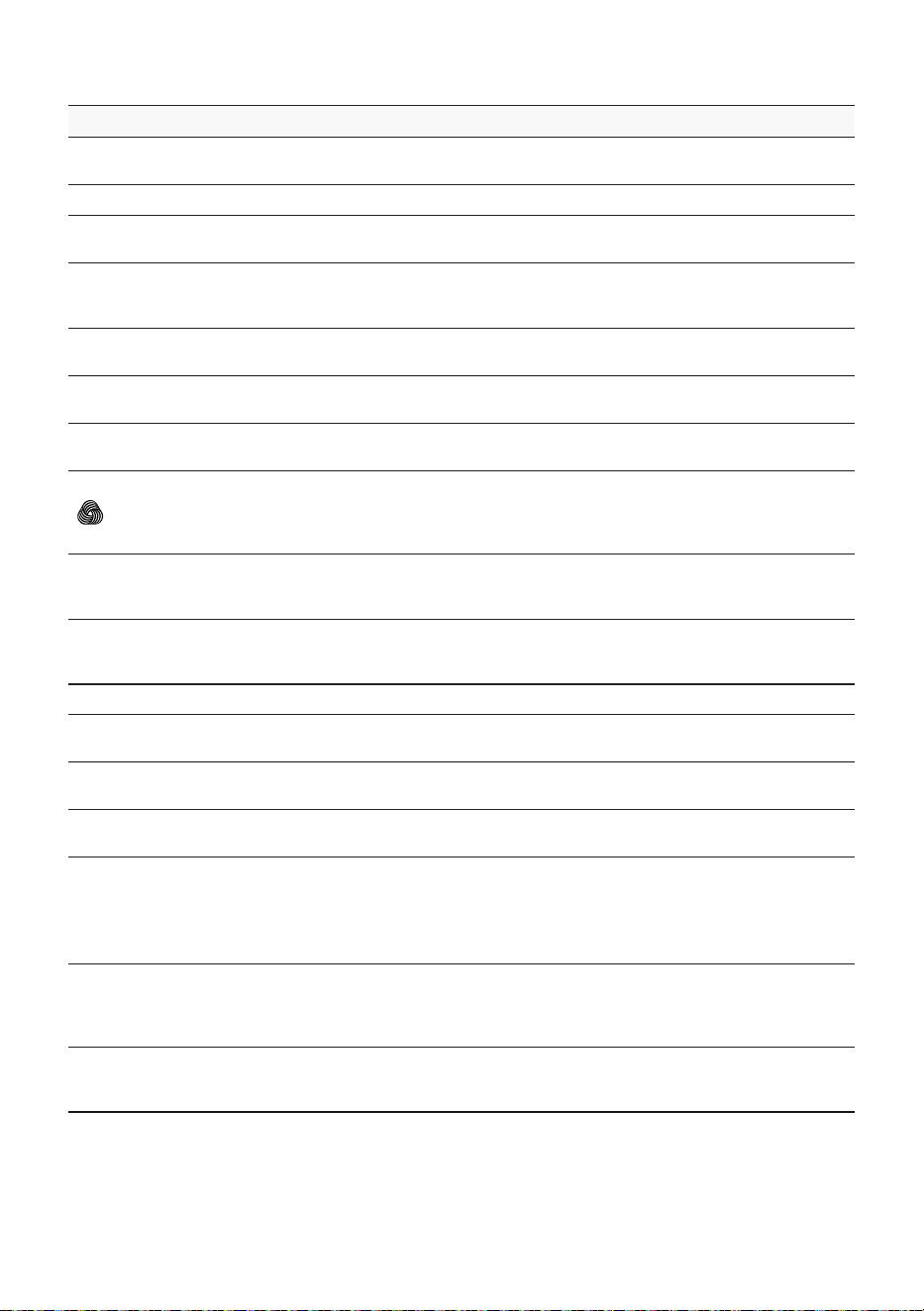
By rotating the programme dial to
select a desired programme, there is
a possibility to display the programme
information screen. If there is information
on a programme, the " " info icon is
visible in the bottom right corner.
• Tap the right soft key "
If there are two pages, the first will show
Next and the second will show OK, which
dismiss the screen and move on to the
home screen. If there is only one page,
the right soft key will be OK. There is a
5s timeout that automatically dismisses
the information page (this timer is reset if
there are two pages and the user presses
Next).
11.1 Programme Information
Program
Cottons
22 ENGLISH
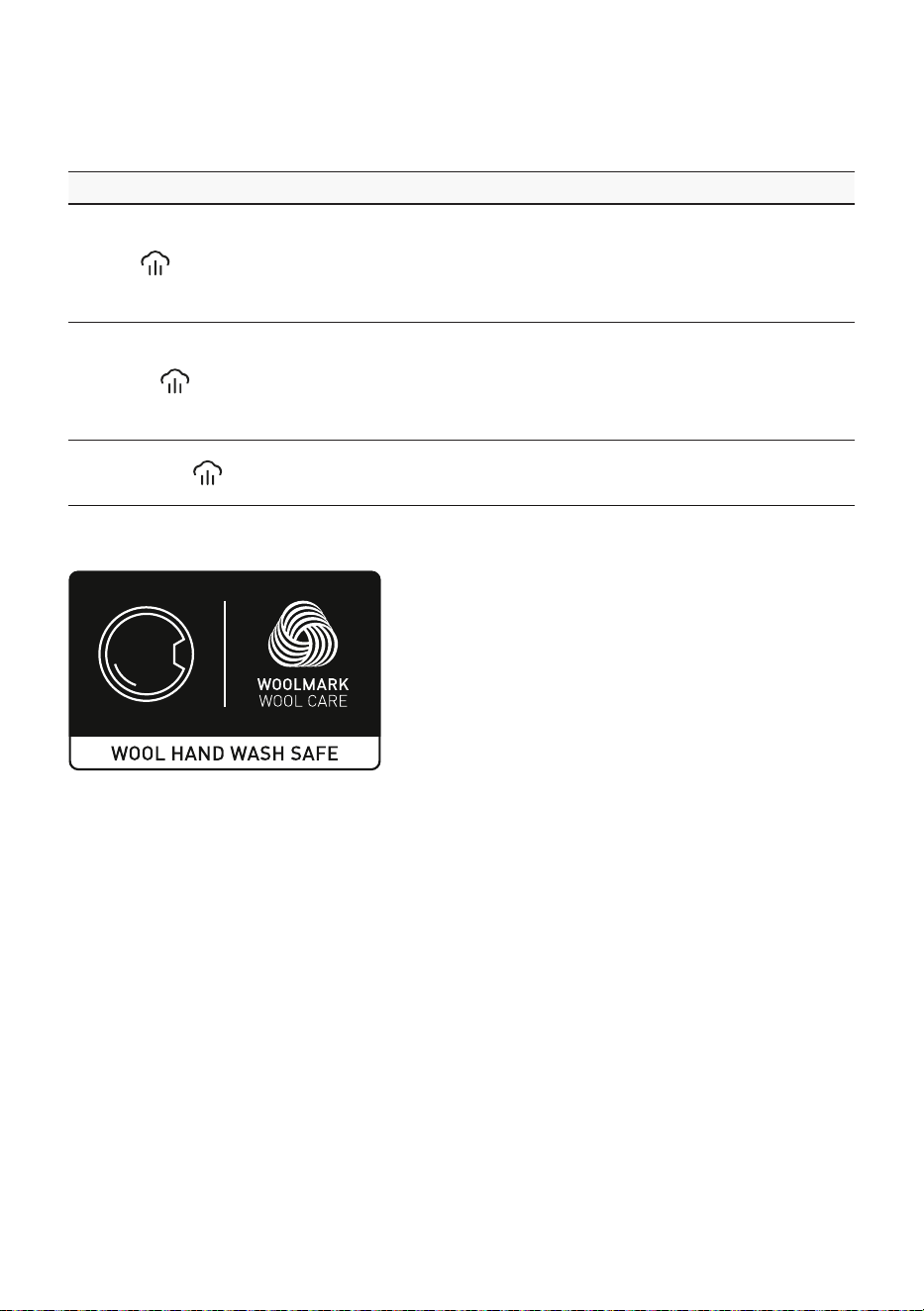
Programme Load
1)
Properties / Fabric type
Cottons Max
White and colored cotton fabrics program. The default setting is
for ready-to-store dryness level.
Eco Cottons
2)
Max Cotton fabrics programme designed for maximum energy saving.
Fast 3kg 3 kg
Fast cycle for everyday clothes made of cotton, cotton-synthetic
blends and synthetic. Ideal for light items.
MixedDry 5 kg
Designed for routine drying of what you wash without sorting.
Dries evenly clothes made of cotton, cotton-synthetic blends and
synthetic.
Synthetics 4 kg
Blended garments containing mostly synthetic fibres like
polyester, polyamide, etc.
Delicates 2 kg
Recommended for generic delicate fabrics such as viscose, rayon,
acrylic and their blends.
Denim 4 kg
Deeply dries jeans and other denim garments, even in thick parts
like pockets, seams, and cuffs reducing entanglement.
Wool
1 kg
Gently dries machine and hand-washable woollens. Tumbling
is minimized as the fast drum speed motion makes the garment
lie flat on the inside of the drum walls replicating flat drying.
Approved by Woolmark.
Linen 2 kg
Gently dries linens and reduces the formation of creases for easier
ironing. It is suggested to remove the clothes as soon as the
drying cycle is finished.
Silk 0.5 kg
Preserves the shape of delicate machine and hand-washable
silk clothes, minimizing creases by using gentle warm air and soft
movements.
Bedding+ 4.5 kg Up to three bed linen sets, one of which can be double size.
Duvet 3 kg
Ensures proper drying of inner parts through single or double
duvets, pillows, and padded blankets.
Sports+ 4 kg
Dries generic sportswear made with synthetic fibres including
polyester, elastane blends, and polyamide.
Towels 5 kg
Ensures softer results and optimal drying of cotton towels and
bathrobes.
Hygiene 5 kg
Dries and sanitizes your garments and other items maintaining the
temperature above 60°C over time, removing 99.99% of bacteria
and viruses.
3)
Note: This cycle should only be used for wet items. Not suitable
for delicate items.
Easy Iron 2 kg
Limits creases on small loads of cotton, synthetic and mixed-
fabric garments for easy ironing. Features two drying levels: Iron
leaves garments slightly damp for ironing or hanging; Cupboard
fully dries items.
Steam Refresh 2 kg
For dry clothes only. Short low temperature cycle that helps in
removing odours from a small amount of garments. Indicated also
for dry clothes that were in storage for long time.
11.2 Programme table
1) Maximum capacity depends on model of dryer.
2) The Program "Eco Cottons" (rpm, capacity, temperatuyre, oiptions) is recommened
for normally soiled full load of cotton and is the program for energy and water label,
tested according to AS/NZS2040.1 and labeled according to AS/NZS2040.2 and
AS/NZS 6400
ENGLISH 23
Steam programmes
Programme Load Properties / Fabric type
Cottons
2 kg
Helps to remove the creases from the cottons pieces of
clothing. Programme duration is automatically adjusted
to dry the load up to the optimal humidity level for steam
action. Frequently it is not necessary to iron the clothes after
steam programme. In this case clothes must be hang on the
clothes hanger or folded.
Synthetics
2 kg
Helps to remove the creases from the synthetics pieces of
clothing. Programme duration is automatically adjusted
to dry the load up to the optimal humidity level for steam
action. Frequently it is not necessary to iron the clothes after
steam programme. In this case clothes must be hang on the
clothes hanger or folded.
Steam Refresh
2 kg
For dry clothes only. Also applicable to remove odours. The
clothes become soft and cosy. We recommend to remove
and hang the clothes immediately after the programme end.
Woolmark Apparel Care - Blue
The wool drying cycle of this machine has
been tested and approved by The Woolmark
Company. The cycle is suitable to dry wool
garments which are labelled "hand wash"
provided that the garments are washed in a
Woolmark endorsed hand washing cycle and
dried according to the instructions issued by
the manufacturer. M2140.
3) Tested for Candida albicans, MS2 Bacteriophage and Escherichia coli in external
test performed by Swissatest Testmaterialien AG in 2021 (Test Report No. 20212038).
24 ENGLISH
Programme names are subject
to change depending on market
requirements without notice. The App
will give you a complete description of
each programme.
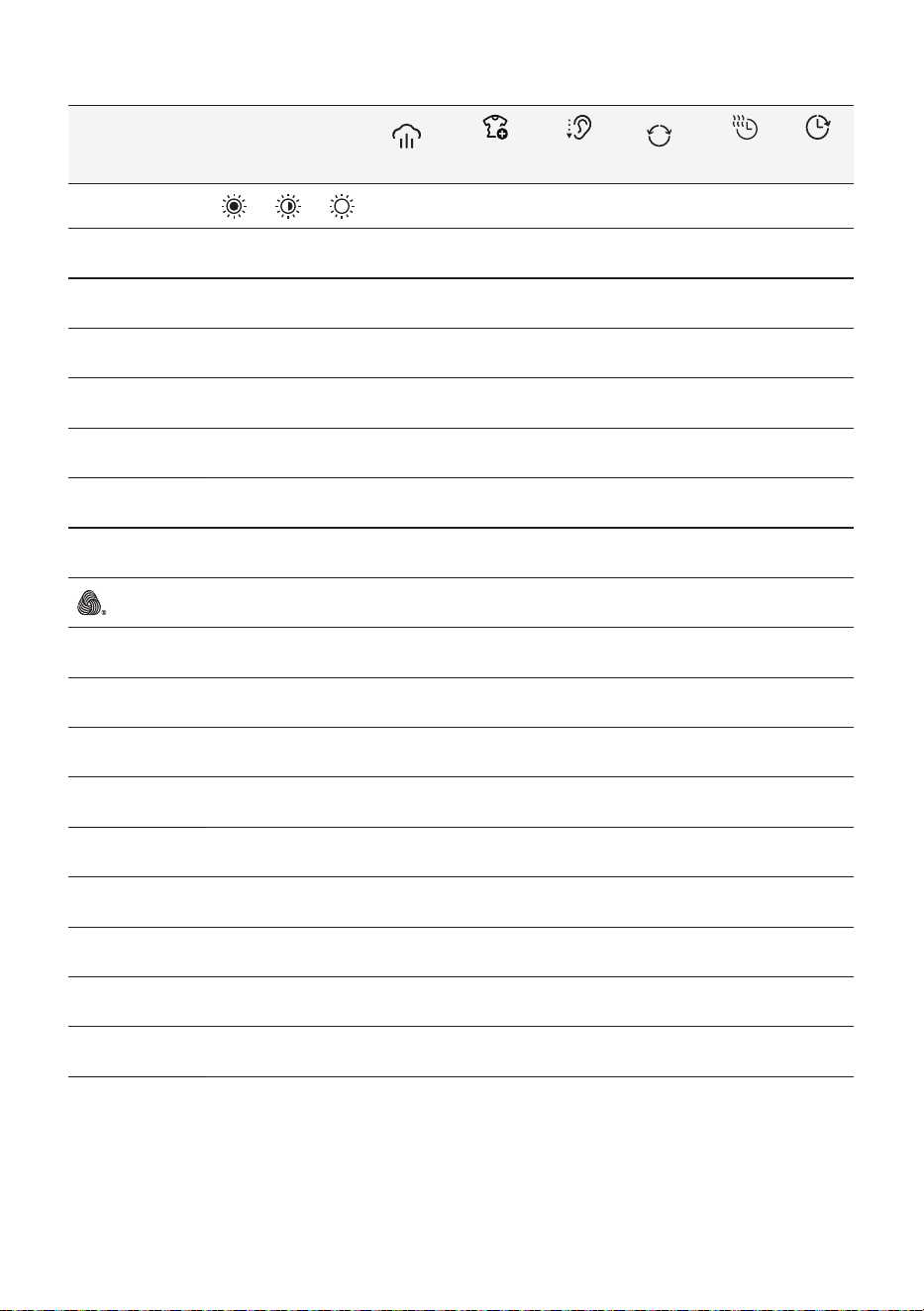
Baby Care ,Outdoor ,Curtains ,Anti
Allergy ,Drying Rack ,Running Shoes
,Down Jacket ,Daily Training ,Ski Gear
,Football/Rugby ,Pillow ,Pet Hair.
Reset additional programme list to
factory default.
At the end of the more programmes list, if
the user has customised the programme
list in the app, there is an option to reset
it to the factory default list.
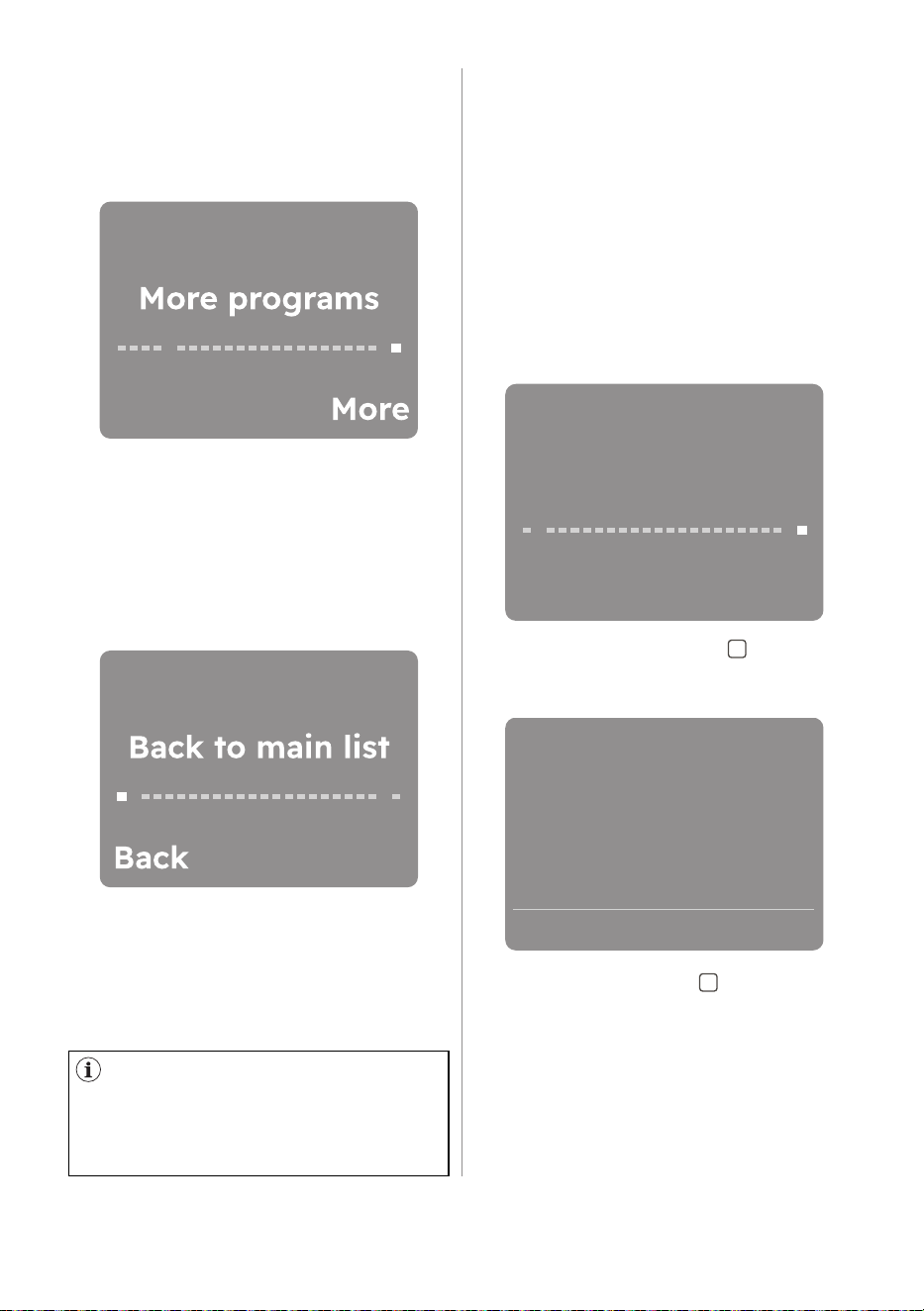
1. Rotate the dial to the end of More
programs screen. The display shows
Reset list screen.
Reset list
Reset
2. Taping the right soft key (Reset) will
bring up a dialogue asking to cancel
or confirm.
3. Tap the right soft key (OK) to reset
the additional programme list to the
factory default.
Reset programe list
to factory default?
Cancel OK
11.3 Additional Programmes
At the end of the programme list, there
is a single position where it is possible
to navigate to the secondary list called
More programs.
Press the right soft key next to More
indication to enter the extra programs
list. Navigating this list works just like
navigating the main list.
List of default additional programmes.
Our app provides you with a wide choice
of additional programmes. Connect the
appliance to our app and you will be
able to choose the programme that suits
your needs most.
To go back to the main list, turn the
rotary to the left to the Back to main list
position and press the left soft key next
to Back indication.
ENGLISH 25
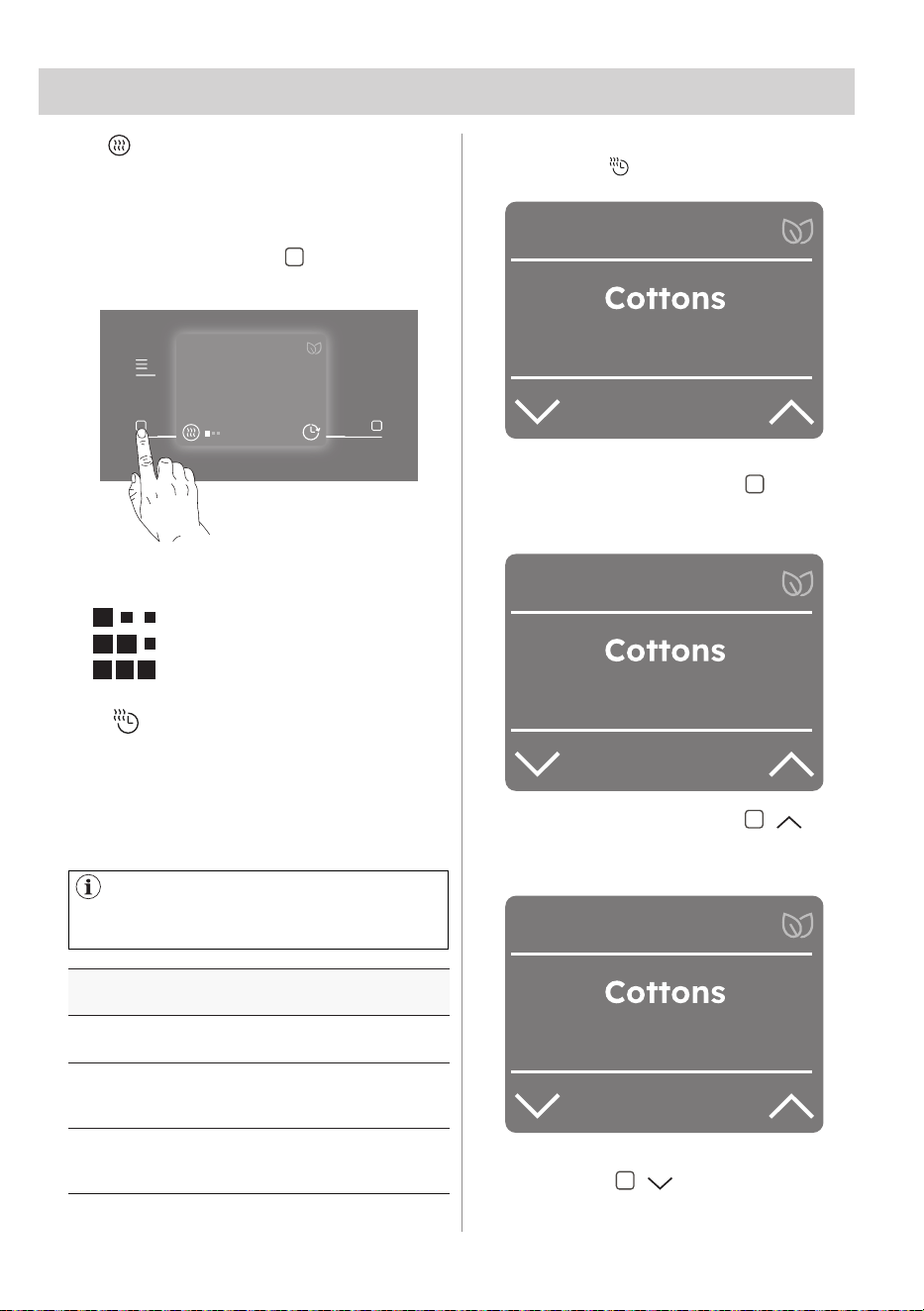
1) Together with the programme you can set 1 or more options. To activate or
deactivate them, press the related touch button.
11.4 Programme options compatibility
Programme
1)
Dryness Level
Stream
Extra
Anticrease
Extra
Silent
Reversplus
Time
Dry
Finish
In
Cottons
Eco Cottons
Fast 3kg
MixedDry
Synthetics
Delicates
Denim
Wool
Linen
Silk
Bedding+
Duvet
Sports+
Towels
Hygiene
Easy Iron
Steam Refresh
26 ENGLISH
TIME DRYING RECOMMENDATION
10 - 20 mins.
action of cool air only (no
heater).
20 - 40 mins.
additional drying to improve
dryness after previous drying
cycle.
>40 mins.
full drying of the small laundry
loads up to 4 kg, well spun
(>1200 rpm).
12.1 Final dryness level for Wool
programme.
12. OPTIONS
Option suitable for Wool programme to
adjust final dryness level.
• Tap the left soft key " " to set desired
dryness level for Wool programme.
There are three default dryness levels
available.
• Standard
• Extra
• Maximum
Wool
max 1kg
2
h
2
min
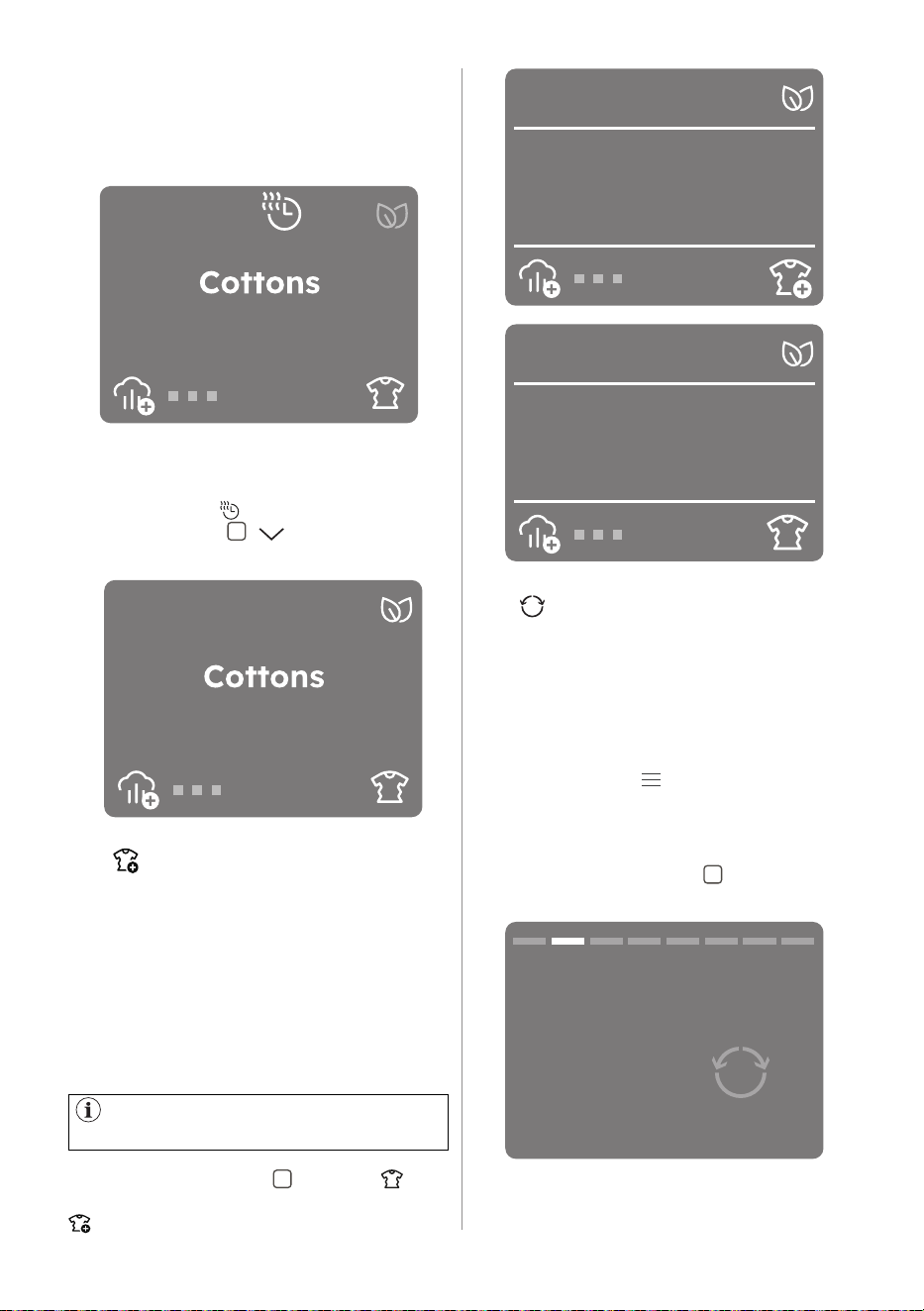
12.2 Time Dry
You can set the programme duration,
from a minimum of 10 minutes to a
maximum of 2 hours. The required
duration is related to the quantity of
laundry in the appliance.
We recommend that you set a short
duration for small quantities of laundry
or for only one item.
To activate this option:
• Tap on the " Time Dry" option.
10
min
Time dry
• You can activate this option by
pressing the right soft key " ". The
display shows the minutes or hours of
the time drying.
2
h
Time dry
1
h
Time dry
• Pressing the right soft key " " it
is possible to increase the time by 10
minutes with each tap, up to 2 hours.
• If you want to decrease time tap the
left soft key " " , the duration will
be reduced by 10 minutes with each
tap.
ENGLISH 27
1
h
To remove the time drying option,
select another programme by rotating
the programme dial or reduce the time
by pressing the " Time Dry" again
and left soft key " " until display to
programme time.
This option extends the anti-crease
phase by 90 minutes at the end of the
drying cycle. This function reduces
creases. The laundry can be removed
during the anti-crease phase.
To activate/deactivate this option there
are two possibilities.
Tap the right soft key " " and the icon
(standard anti-crease) will change to the
icon (extra anti-crease).
12.3 Extra Anticrease
By taping right soft key
if the option available for a selected
programme on the home screen.
218
h min
max 9kg
12.4 Reverse Plus
Increase drum reversing frequency to
reduce items twisting and entanglement.
To increase uniformity of drying result
and help reduce creases. Recommended
for large or long items (e.g. sheets,
trousers, long dresses).
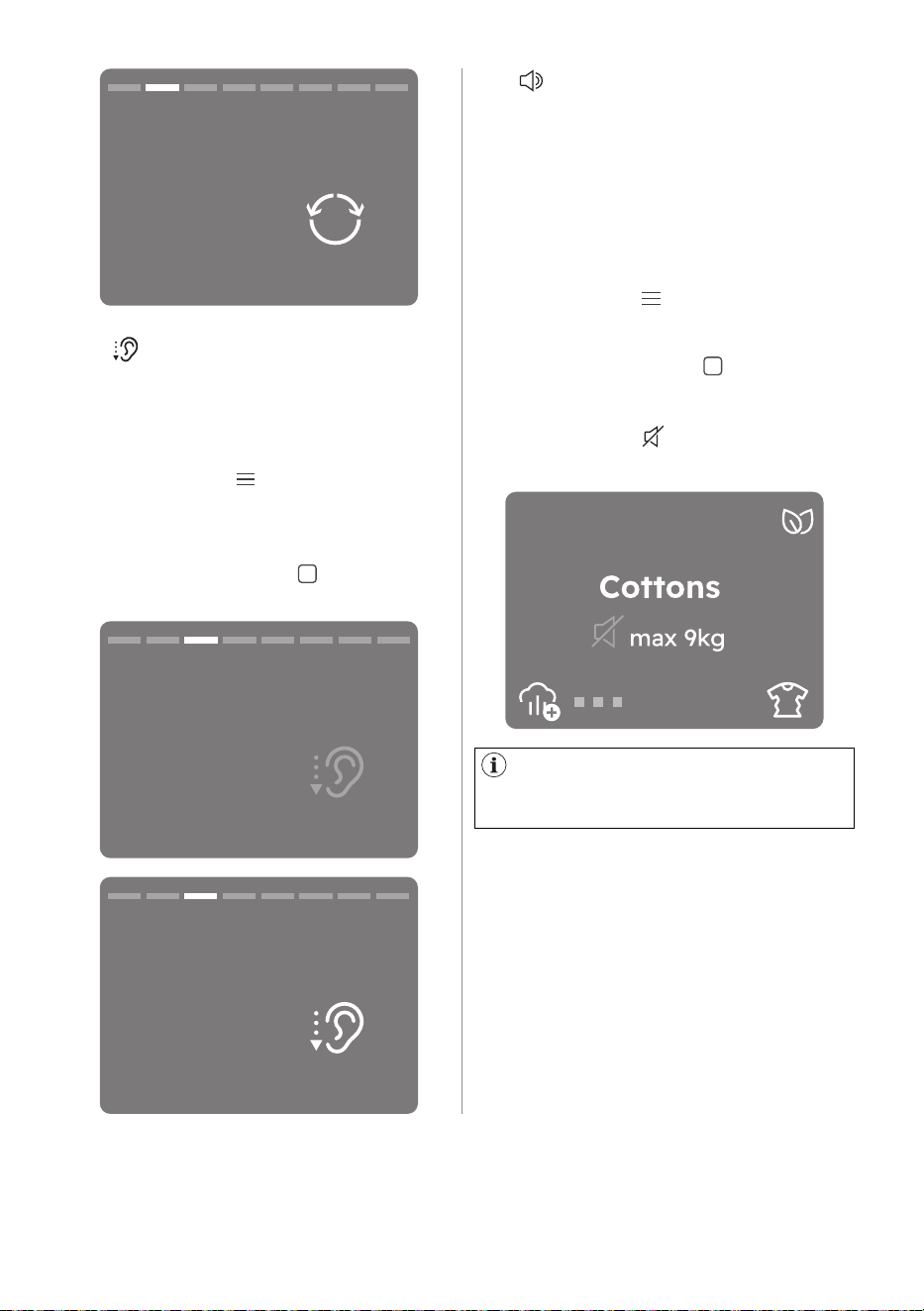
Tap on the Menu " " soft key, rotate the
dial until the display shows the
"Reverse Plus" option.
To activate/deactivate this option:
• Tap the right soft key " " and the
relevant indicator will turn ON/OFF.
• Once you have selected the desired
timer wait 3 seconds you will be
redirected to the home screen where
at the top of the display you will be
able to see the time drying.
218
h min
ON
Extra anti-crease
218
h min
OFF
Extra anti-crease
Reverse plus
OFF
28 ENGLISH
If the Cycle End Alarm is OFF (see
Machine Settings menu), End Alert
option is not available.
12.5 Extra Silent
12.6 End Alert
The appliance operates with low noise
without effect on the drying quality. The
appliance operates slowly with longer
cycle time.
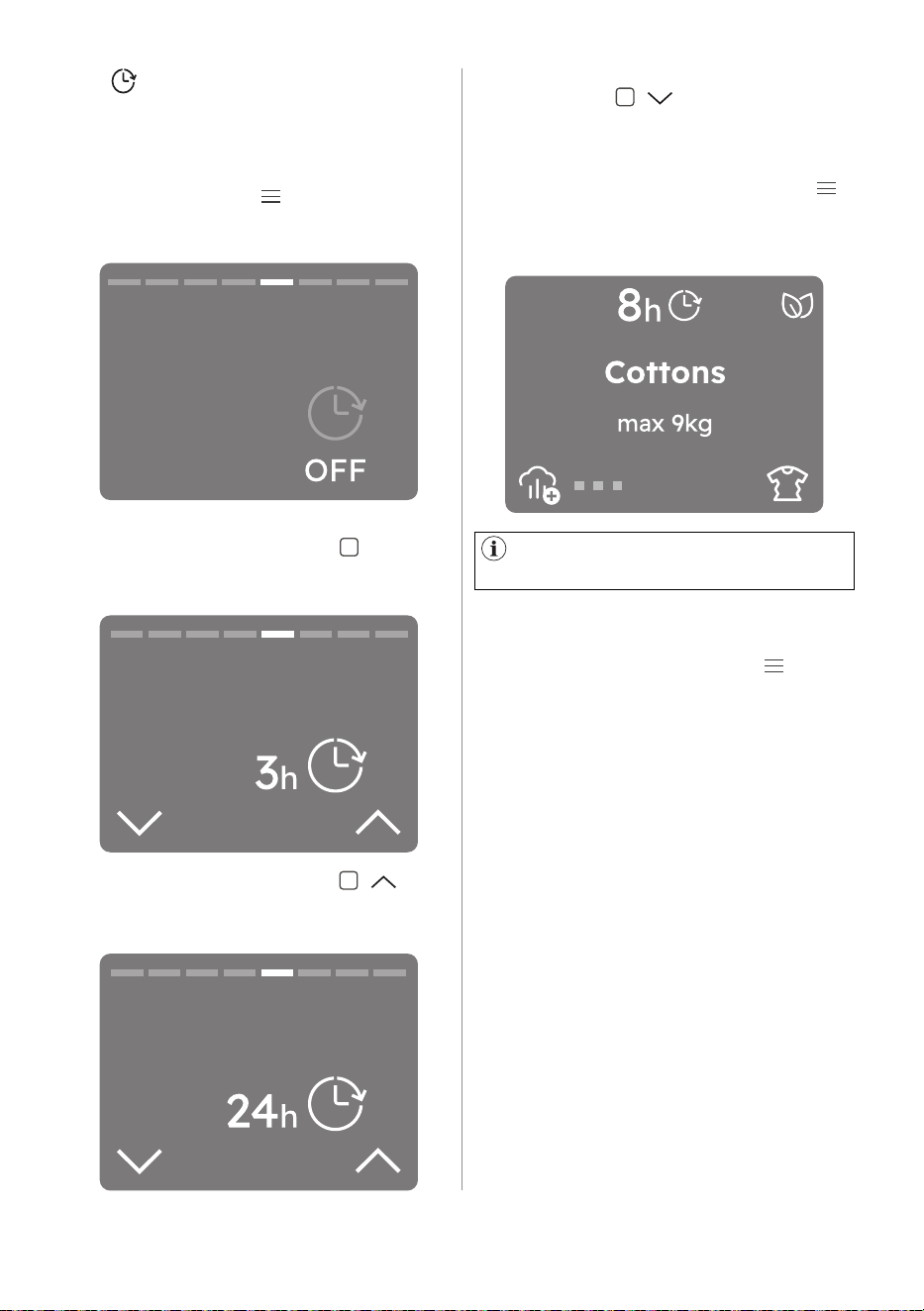
Tap on the Menu " " soft key, rotate the
dial until the display shows the
"Extra Silent" option.
To activate/deactivate this option:
• Tap the right soft key " " and the
relevant indicator will turn ON/OFF.
The buzzer sounds at the:
• cycle end
• start and end of the anti-crease phase
• cycle interruption The buzzer option is
by default always on.
You can use this option to activate or
deactivate the sound.
Tap on the Menu " " soft key, rotate the
dial until the display shows the
"End alert" option.
• Tap the right soft key " " and the
relevant indicator will turn ON/OFF.
If End Alert option is deactivated, the
display shows the End Alert off icon.
218
h min
Reverse plus
ON
Extra silent
OFF
Extra silent
ON
ENGLISH 29
• If you want to decrease time tap the
left soft key " " , the duration will
be reduced by one hour with each
tap.
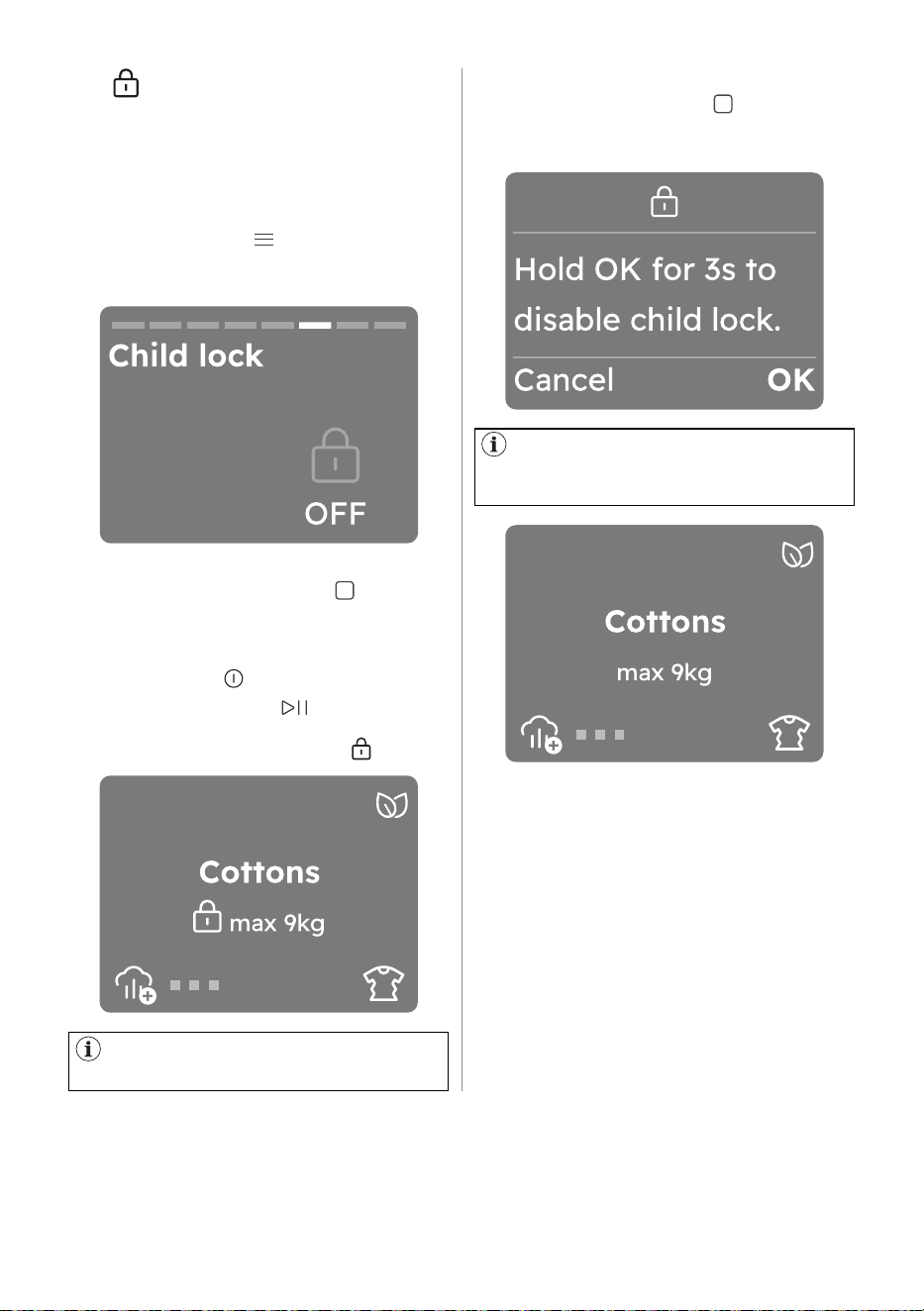
• Once you have selected the desired
timer wait 3 seconds or tap Menu " "
and you will be redirected to the home
screen where at the top of the display
you will be able to see the countdown.
The appliance keeps the selection
of this option after you switch it off.
To remove the Set Timer to Finish In
option:
• Navigate through the Menu " " to the
"Set Timer to Finish In" option.
• Reduce the time by pressing the left
soft key until the display shows "OFF"
12.7 Finish In
With this option you can set the time to
end of the selected cycle.
To activate/deactivate this option:
• Tap on the Menu " " soft key, rotate
the dial until the display shows the Set
Timer to Finish In option.
• You can activate this option by
pressing the right soft key " " . The
display shows the hours of the time to
end starting from 1 hours.
Set timer to finish
in
Set timer to finish
in
• Pressing the right soft key " " it is
possible to increase the time by one
hour with each tap, up to 24 hours.
Set timer to finish
in
30 ENGLISH
The appliance keeps the selection
of this option after you switch it off.
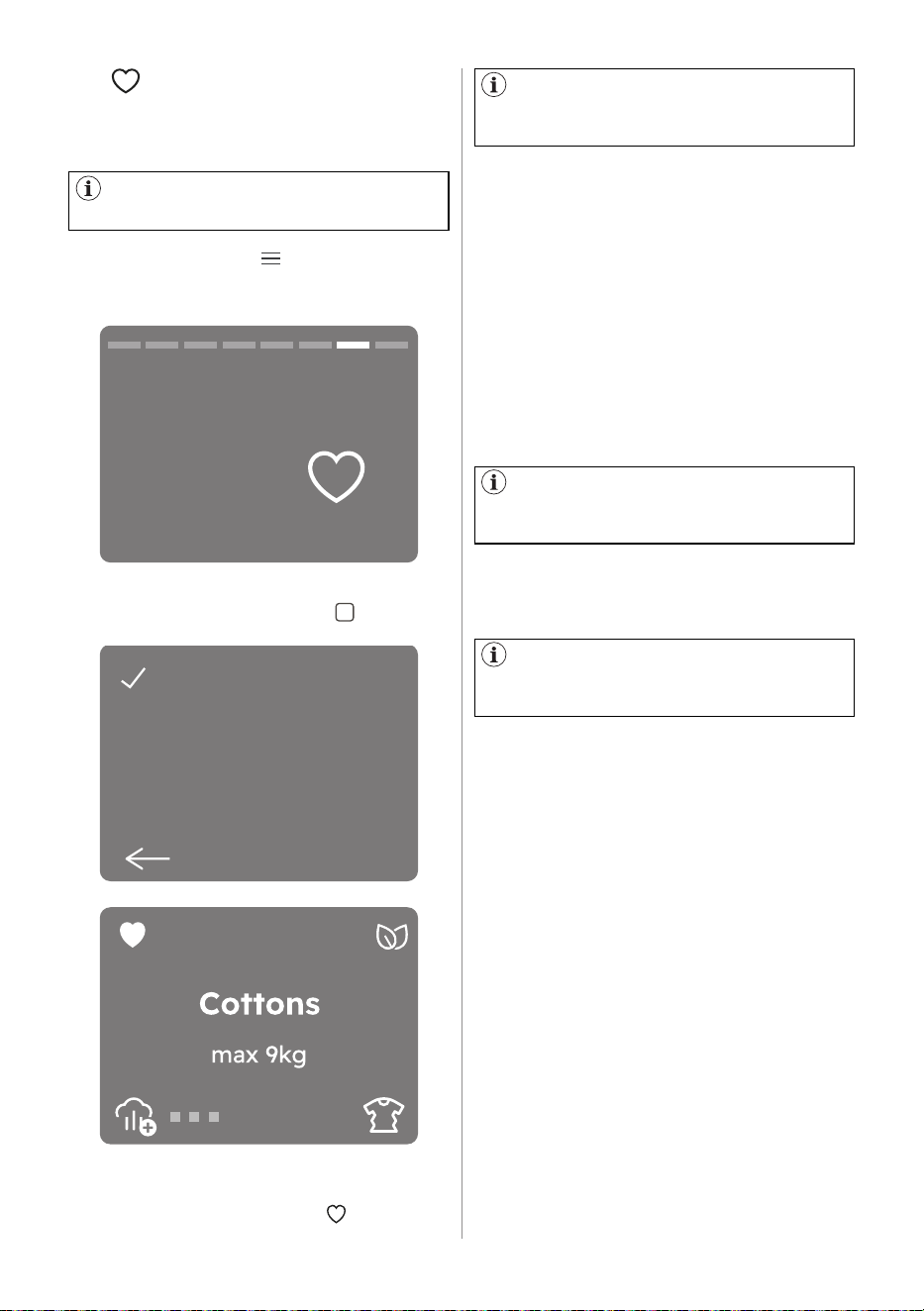
• You can activate this option by
tapping the right soft key " ".
• After you have activated the child lock
all touch buttons are deactivated. It is
possible to turn the appliance off by
means of the " On/Off" button.
• Before pressing the " Start/Pause"
touch key the appliance cannot start.
The display shows the icon " ".
218
h min
To deactivate this option:
• Hold the right soft key " " for 3
seconds. A countdown will be visible
in the display in the lower right corner.
218
h min
Once the option is deactivated the
display will show the information as
before activation,
With this option you can prevent the
children from accidentally operating the
appliance.
To activate this option:
12.8 Child lock
• Tap on the Menu soft key, rotate the
dial until the display shows the "Child
lock" option.
ENGLISH 31
When you want to save the next
favourite the first empty slot will be
indicated automatically.
In order to delete favourites it is
necessary to perform a factory reset of
the appliance or by the app.
If the fields are occupied the first
favourite cycle will be displayed, then
the second and eventually the third.
How to replace a favourite cycle It is
possible to replace favourites:
• Turn dial to select one of the three
fields to be overwritten.
• Confirm the choice by tapping the
right soft key.
• After two seconds, the display will
show the selected cycle as a favourite
recognizable by a heart at the top of
the screen.
It is not possible to delete you favourite
cycle on the appliance.
How to access the favourites cycle To
access the favourites from programmes
list rotate the dial to the left.
How to set a favourite cycle Up to three
favourite cycles can be saved.
12.9 Favourite
There are no favourite cycles saved
by default.
• Tap on the Menu " " soft key, rotate
the dial until the display shows "Save
as favourite"
Save
Save as favourite
1 : (Empty)
2 : (Empty)
3 : (Empty)
Select
218
h min
• Select one of the three empty fields by
tapping the right soft key " ".
• After two seconds, the display will
show the selected cycle as a favourite
recognizable by a heart " " at the top
of the screen.
32 ENGLISH
By turning the knob the selected
language will be visible in bold.
This may be necessary since
the dryness results are impacted by
many conditions, e.g. the water type,
the supply voltage or the ambient
temperature etc.
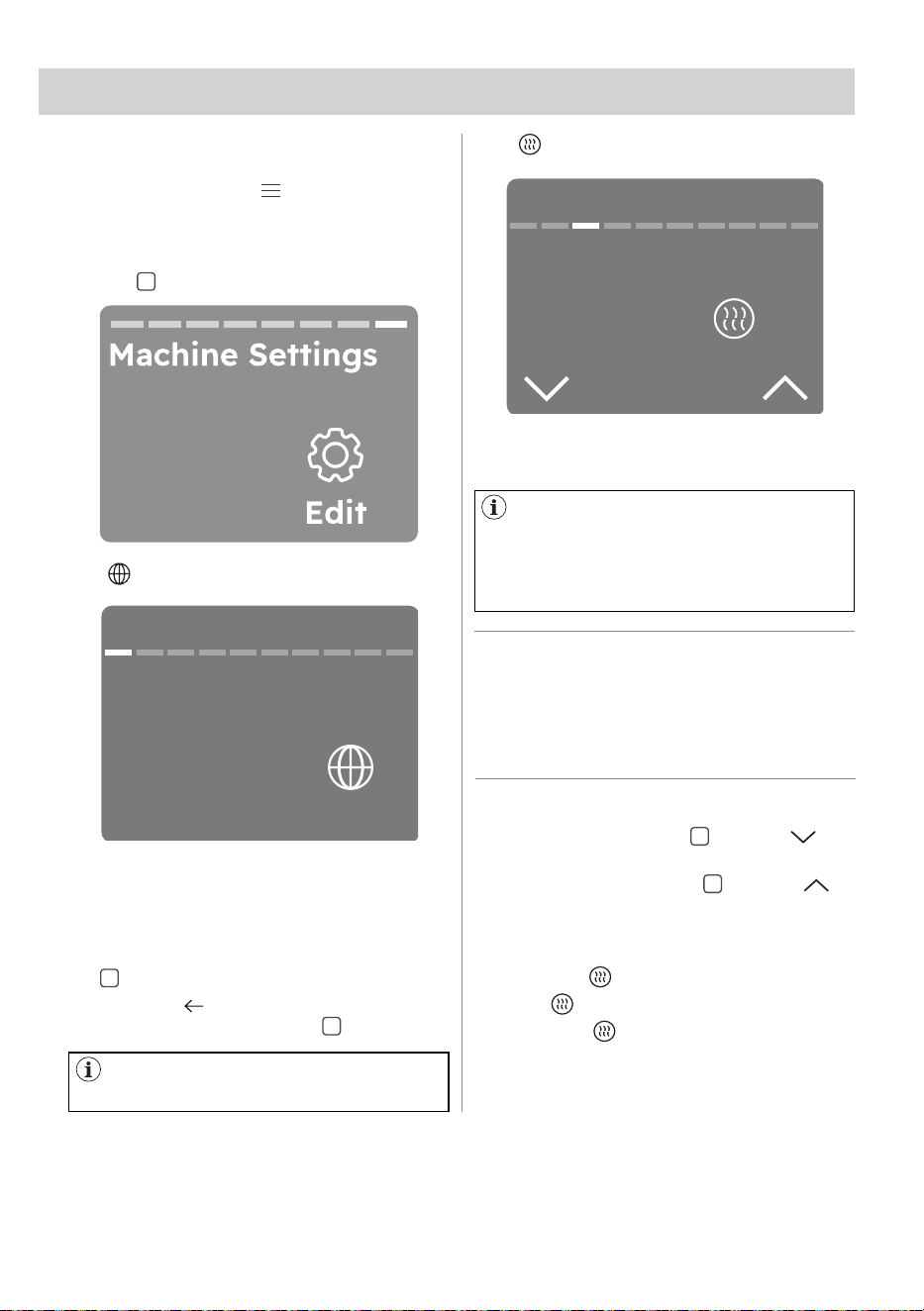
In this part are explained the main
settings of the appliance.
• Tap on the Menu " " soft key, rotate
the dial until the display shows the
"Machine setting" option.
• Select "Edit" by tapping the right soft
key " ".
It is possible to change the display
language by scrolling through the list
rotating the knob to find the desired
language.
• Select it by tapping the right soft key
" ".
• Go back " " to the previous view by
tapping the left soft key " ".
With this setting you can change the
default dryness.
To modify the level:
• Tap the left soft key " " next to
indicator to decrease default dryness.
• Tap the right soft key " " next to
indicator to increase default dryness.
There are three default dryness levels
available.
• Standard
• Extra
• Maximum
Rotate the dial to move to the next
setting.
HOW TO ACHIEVE A PERFECT DRYING:
1. Try to adjust the dryness level options (see "Dial and
buttons" SmartSelect -Dryness Level " option ).
2. If you want to further increase the laundry dryness
results, you can modify the default dryness setting
(see below). This adjustment will act on most
programmes, except Eco, Wool, Duvet, Down Jacket,
Refresh programmes if available on the machine.
13. MACHINE SETTINGS
Machine settings
Default dryness
Standard
Edit
Machine settings
Language
13.1 Language setup
13.2 Default Dryness
ENGLISH 33
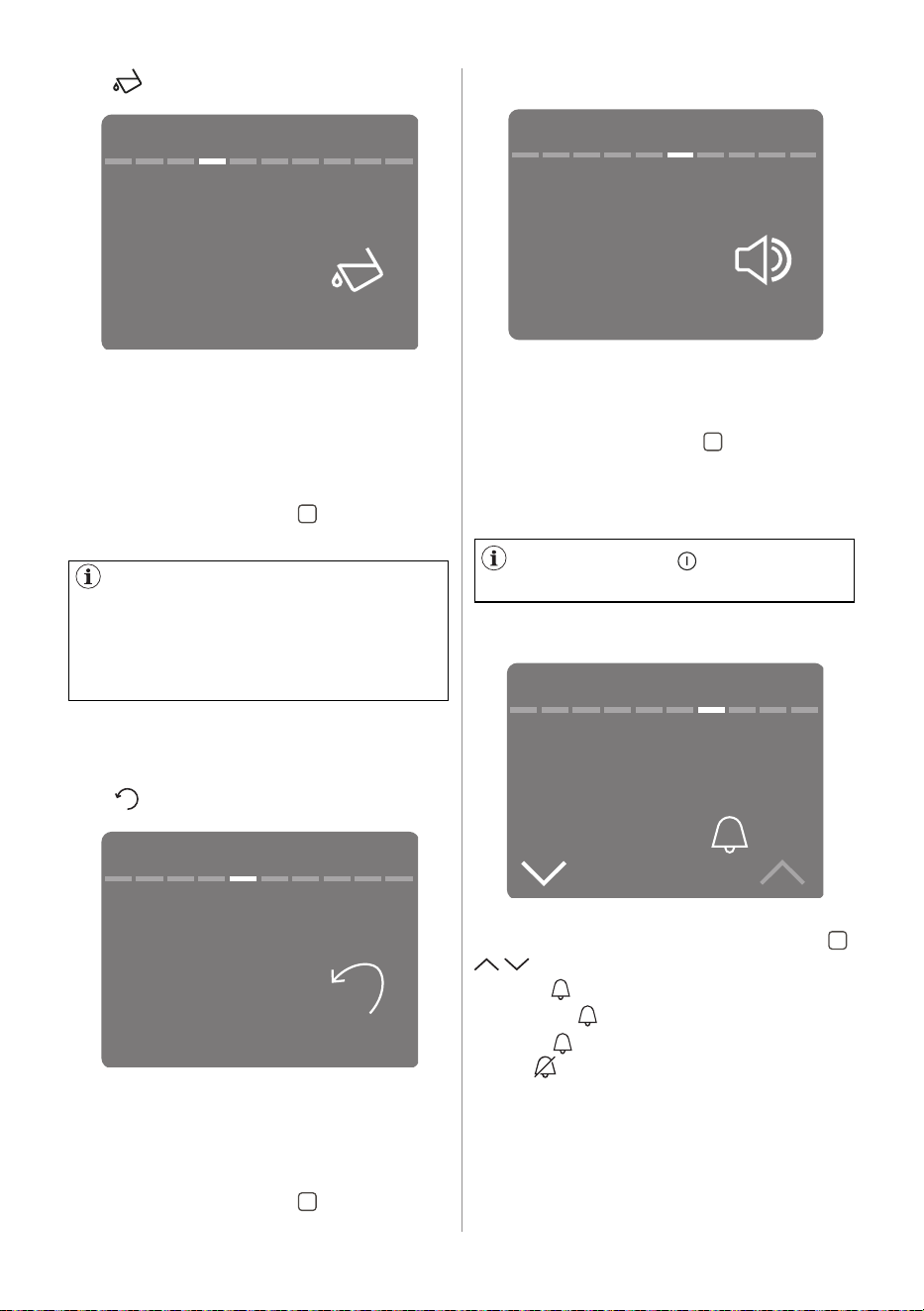
13.5 Button sounds
13.6 Cycle end alarm
With this setting you can turn off the
sound of the buttons.
To activate/deactivate the sounds:
• Tap the right soft key " " and the
relevant indicator will turn ON/OFF .
Rotate the dial to move to the next
setting.
With this setting you can change the
cycle end alarm tap the right soft key " "
, to edit the option:
• Long
• Medium
• Short
• Off
The sound of the " on/off" button
cannot be disabled.
If a draining kit is installed
(additional accessory), the appliance
automatically drains the water from
the water container. In this case we
recommend that you deactivate the
indicator of the water container.
With this setting you can turn activate/
deactivate the tank remainder.
By default, the tank remainder indicator
is on It comes on when the programme
is completed or when it is necessary to
empty the water container.
• Tap the right soft key " " to ON/OFF
the tank remainder.
Rotate the dial to move to the next
setting.
If this setting is active, the most recently
used programme and options are saved
on the beginning of programmes list
(in slot last used) next to favourites
programmes.
• Tap the right soft key " " to activate/
deactivate the Save last used setting.
13.3 Tank reminder
13.4 Save last used
ON
Machine settings
Tank reminder
ON
Machine settings
Button sound
Long
Machine settings
End alert
ON
Machine settings
Save last used
34 ENGLISH
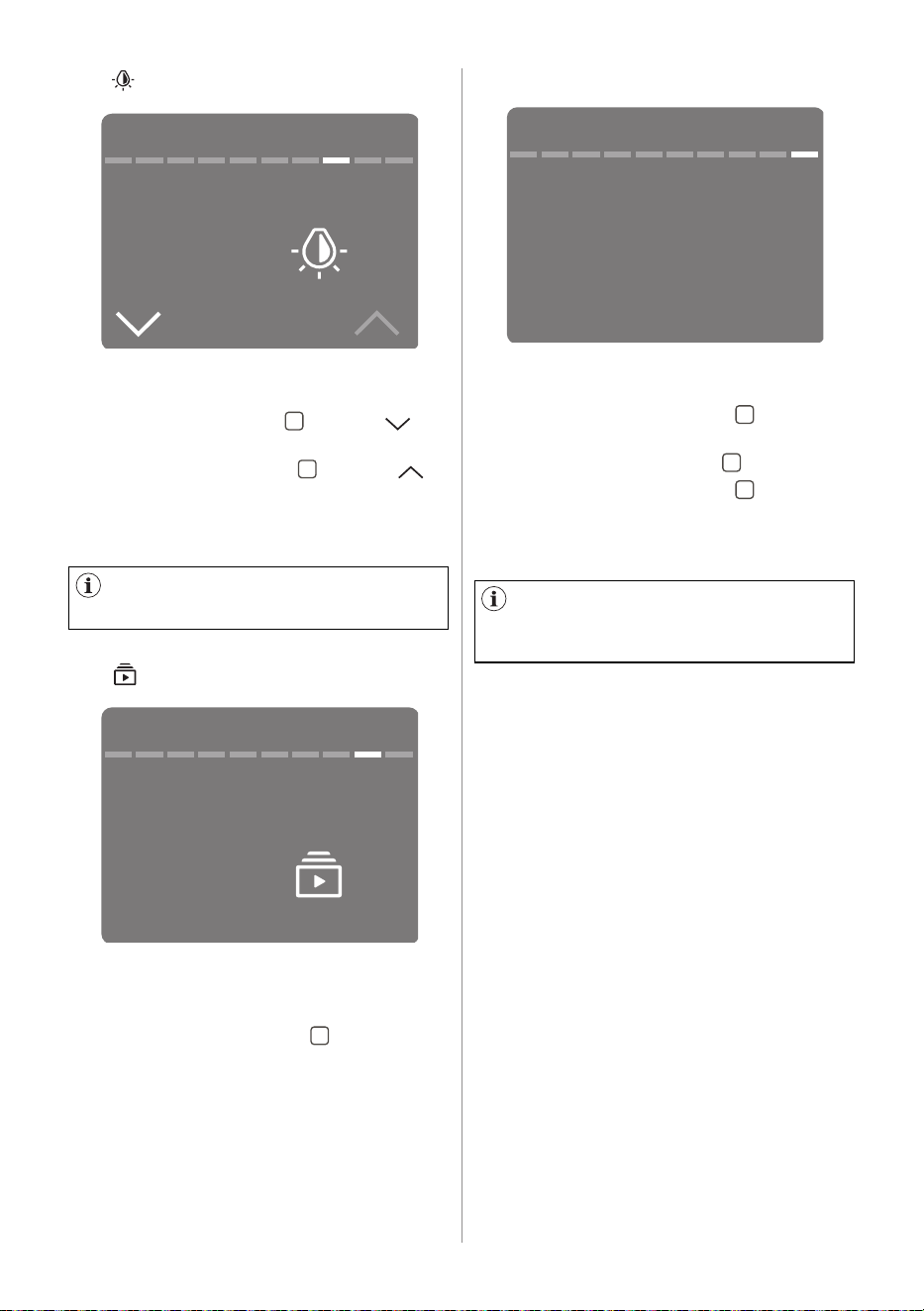
13.7 Display Brightness
With this setting you can change the
display brightness to modify the level:
• Tap the left soft key " " next to
indicator to decrease brightness.
• Tap the right soft key " " next to
indicator to increase brightness.
Rotate the dial to move to the next
setting.
There are five brightness levels
available.
Reset to factory settings deletes
permanents options and favourites
saved.
13.8 Guides
13.9 Reset to Factory Settings
With this option you can see brief
explanations of some features.
Rotate the programme dial and select by
tapping the right soft key " " one of the
following option:
• Introduction: information about the
control panel, the SmartSelect, Steam
programmes, menu, soft keys and
Remote Start.
• WiFi : information about the
onboarding.
With this setting you can reset your
appliance to the factory settings.
1. Tap on the right soft key
" "
to enter
the option.
2. Tap on the left soft key
" "
to Cancel.
3. Tap on the right soft key
" "
to
confirm the Reset.
Performing the reset will take a few
seconds
5
Machine settings
Display brightness
Machine settings
Setting reset to
factory default
Next
Machine settings
Guides
Select
ENGLISH 35
At the start, because of wide types
of fabrics, apply small steam level. You
easily get the experience, which helps
you to use the sufficient steam level.
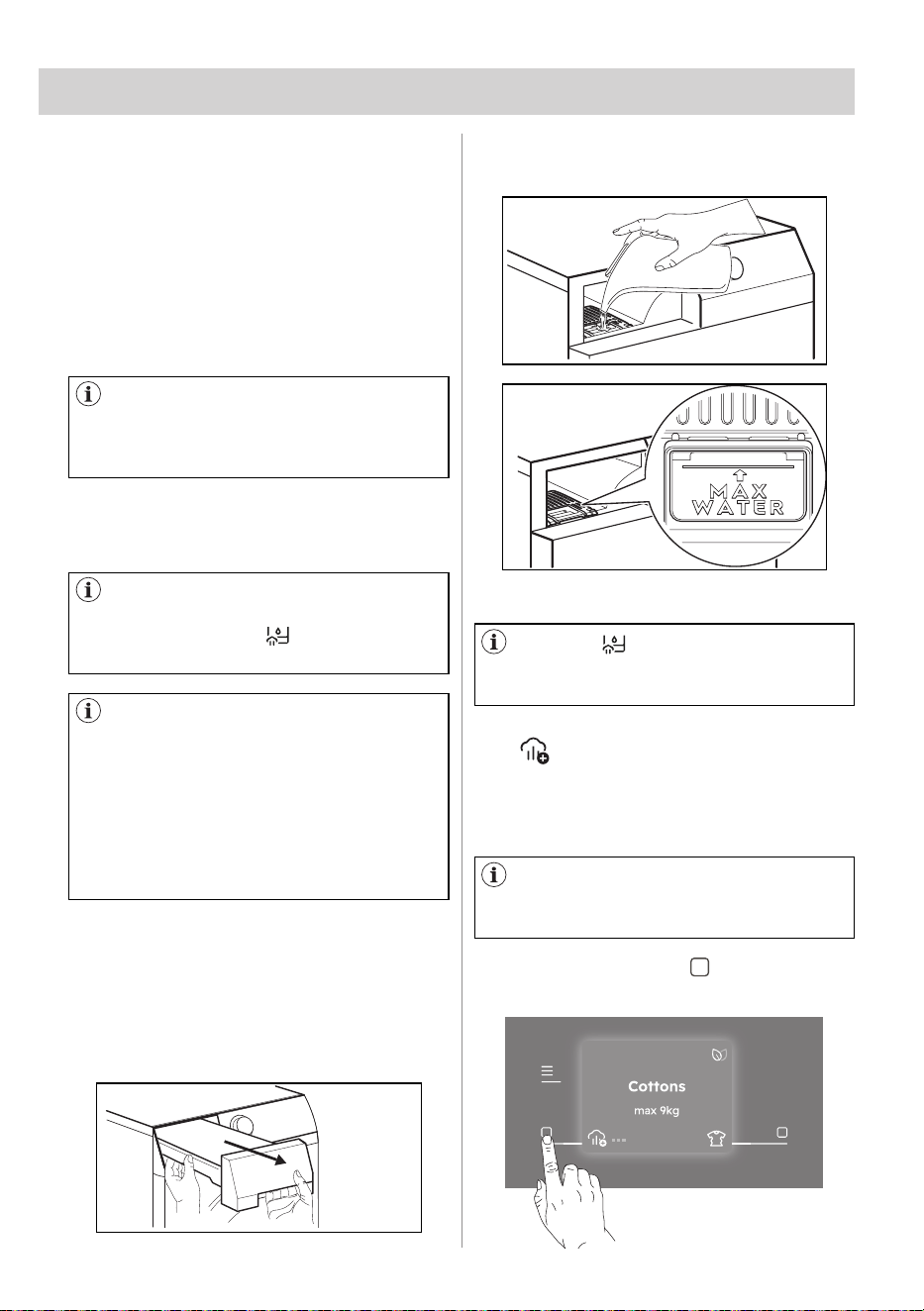
Use only distilled or demineralized
water. Always when the container is
empty the indicator " " is on and you
cannot start the steam programmes.
Water container for steam system
is automatically refilled if you dry with
standard and steam programmes. If
the water tank is empty you can fill
it manually. The condensed water is
also applicable for steam system. The
condensate water must be filtered e.g.
with a coffee filter to remove small
pieces of fluff.
14. STEAM FUNCTION
Steam helps to remove odours like the
outdoor air.
Decreases or removes creases. Makes
the pieces of clothing more flexible.
The pieces of clothing after steam
programme are easy to iron.
At the end of the steam cycles clothes
come out with a residual humidity
appropriate for ironing.
If clothes are not ironed immediately
hang them until they are completely dry.
14.1 How to fill water container for
steam system
14.2 Steam Level
To fill water container:
1. Turn on the appliance.
2. Set 1 of the programmes with steam
option to check the water level.
3. Pull the water container. Keep it in
horizontal position.
4. Fill the water until it reaches the "Max"
level.
The icon " " alerts you when the
steam tank is empty. In this case steam
functions can not be activated.
5. Put the water container.
This option is to set the required steam
level. It depends on the: type, weight and
volume of the laundry.
• Tap the left soft key " " to select
desired steam level.
This option is available only for
Cottons,Synthetics and Steam Refresh
programmes.
218
h min
36 ENGLISH
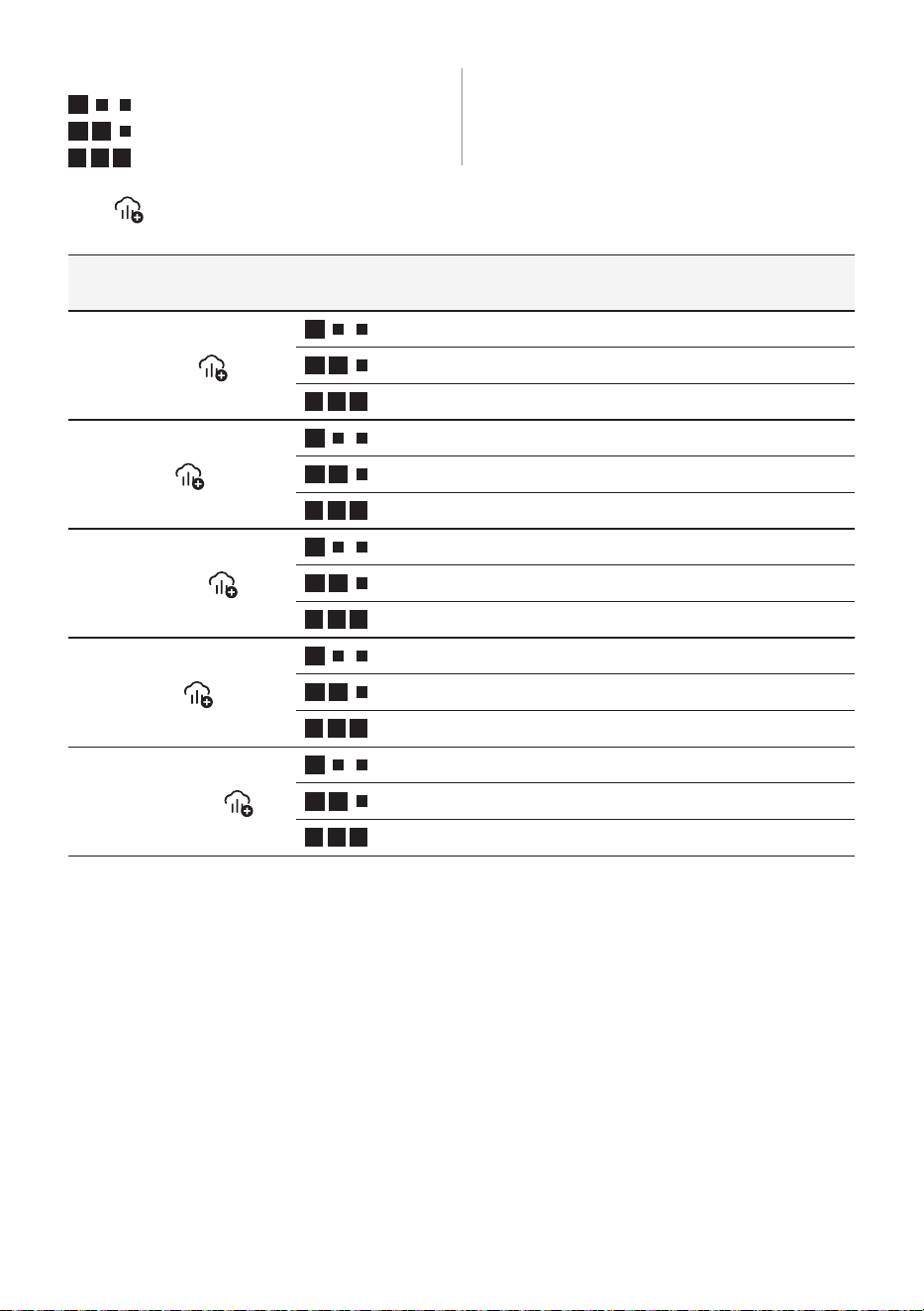
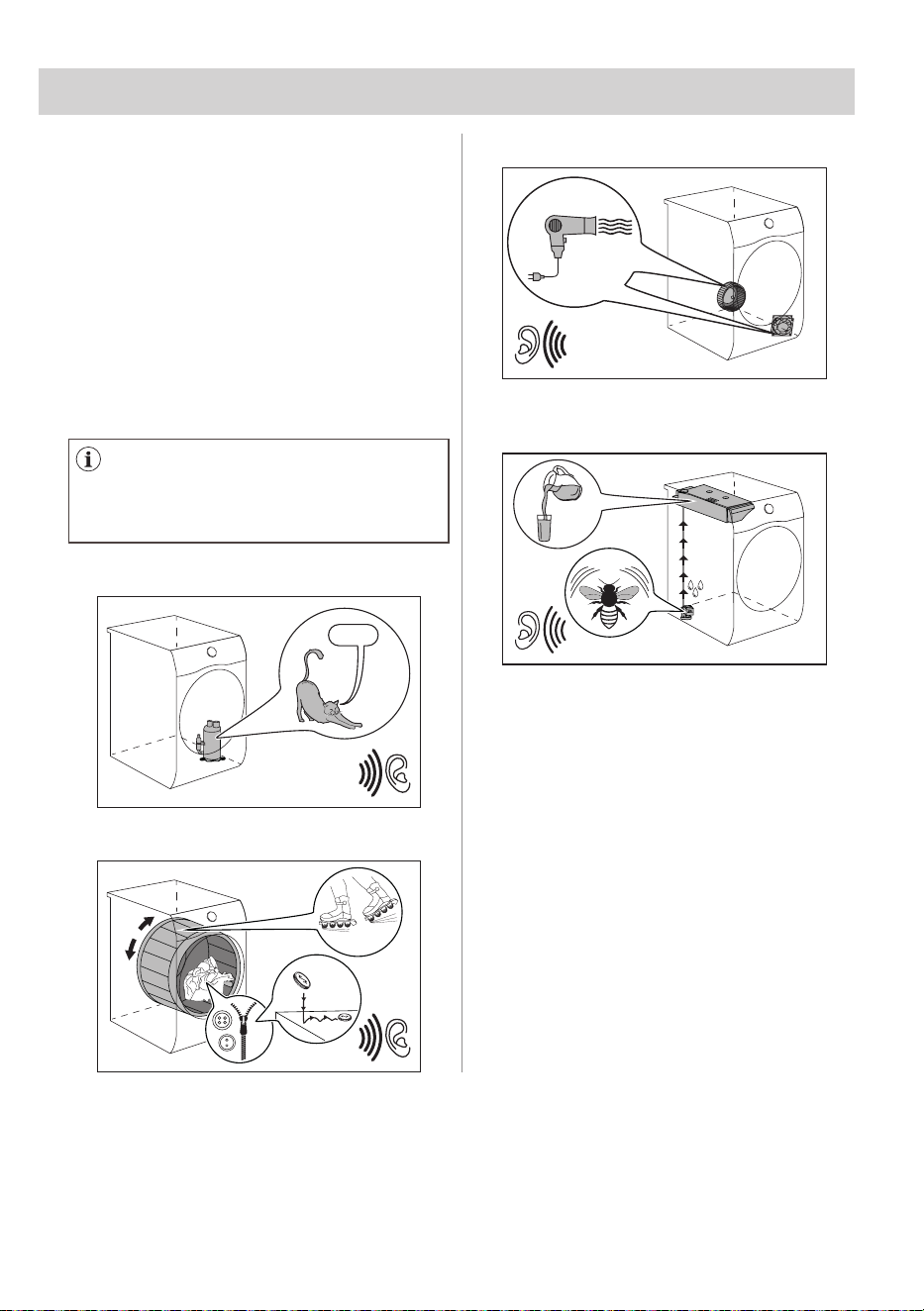
14.3 Steam Level chart
There are 3 possible selections:
Standard
Extra
Maximum
Programmes / types of the
clothes
Steam Level Load
cottons
minimum level
0.5 - 1 kg
moderate level
1 - 1.5 kg
maximum level
1.5 - 2 kg
Cottons / shirts
minimum level
1 - 2 items
moderate level
3 - 4 items
maximum level
5 items
Synthetics
minimum level
0.5 - 1 kg
moderate level
1 - 1.5 kg
maximum level
1.5 - 2 kg
Synthetics / shirts
minimum level
1 - 2 items
moderate level
3 - 4 items
maximum level
5 items
Steam Refresh
minimum level
0.5 kg
moderate level
1 kg
maximum level
2 kg
ENGLISH 37
15. BEFORE FIRST USE
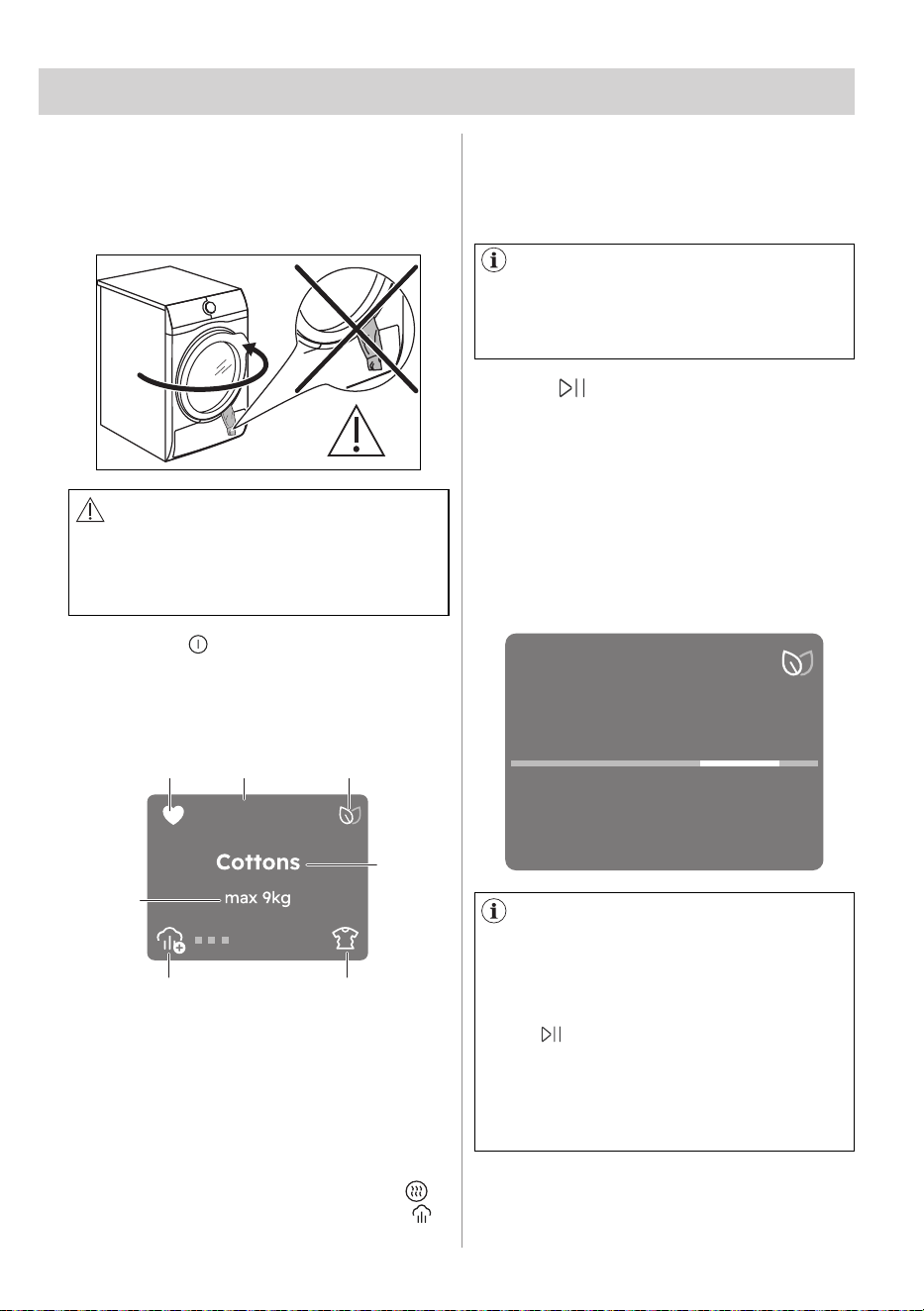
Different noises may be heard at
different times during the drying cycle.
They are perfectly normal operating
sounds.
15.1 Unusual smell
15.2 Noises
The appliance is tightly packed.
After product unpacking you can feel an
unusual smell. This is normal for brand
new products.
Appliance is built of several different
types of material which all together can
generate unusual smell.
Over usage time, after few drying cycles
unusual smell gradually disappears.
Working compressor.
Brrrr
Rotating drum.
Working fans.
Working pump and transferring
condensation to the tank.
38 ENGLISH
16.1 Start a programme without
Finish In option
1. Prepare the laundry and load the
appliance.
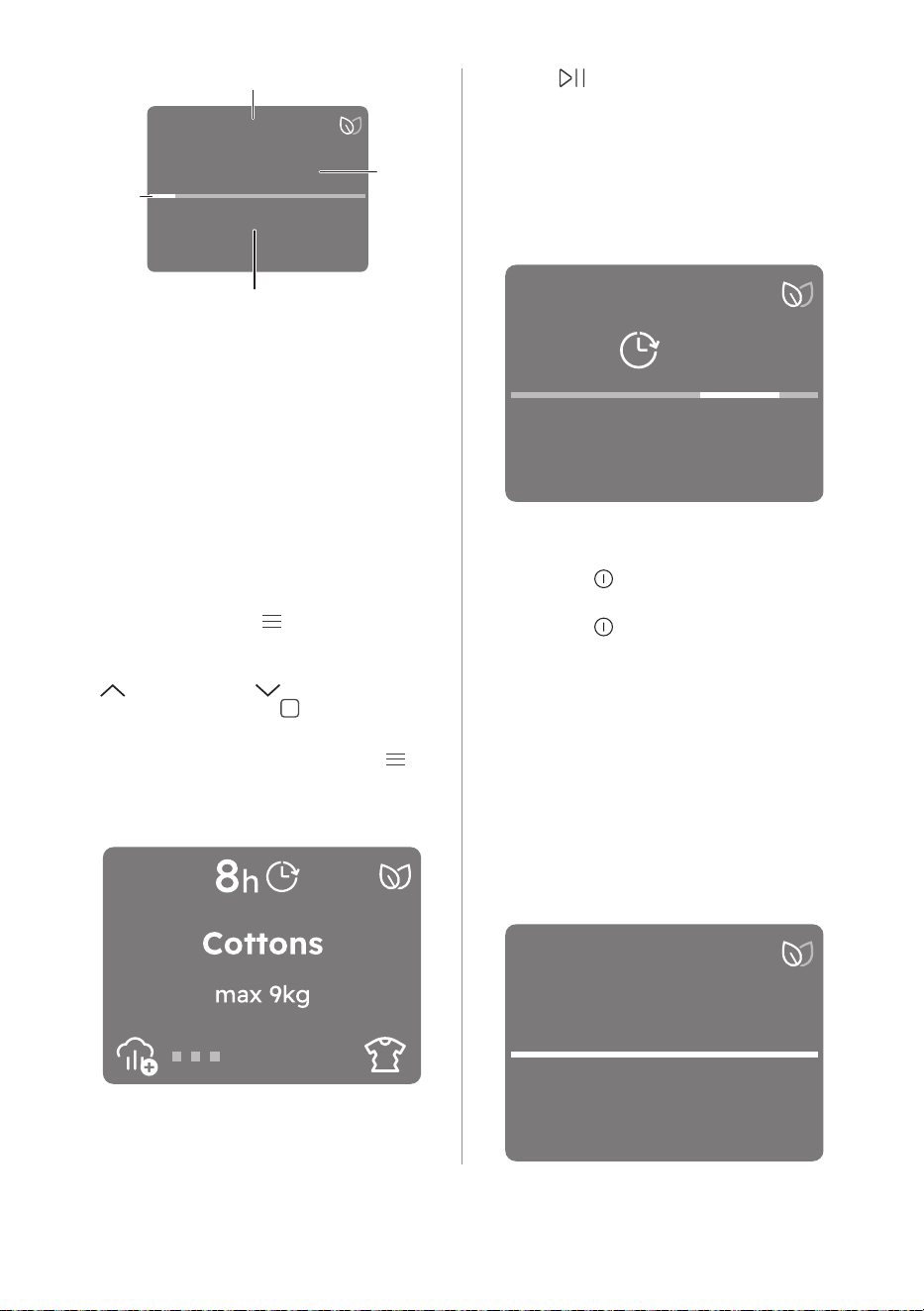
CAUTION!
Make sure that when you close the
door, the laundry does not get caught
between the appliance door and the
rubber seal.
2. Press the " on/off" touch key to
activate the appliance.
After a few seconds the display shows
programme summary view with the
following information:
16. DAILY USE
3. Set the correct programme and
options for the type of load.
ba c
e
d
g
f
218
h min
a Favourite, if already saved.
b Programme duration
c Eco feedback
d Selected programme
e Anticrease phase.
f
Depends on selected programme ( e.g.
Final dryness level for Wool programme,
Stem Level,)
g
Maximum programme load.
4. Press " Start/Pause" touch key.
The programme starts and during the
first minutes of the cycle, the machine
estimates the quantity of loaded laundry
to better adapt the cycle profile and
duration to effective load.
The ProSense progress bar moves back
and forth to communicate that estimation
is in progress, if foreseen in the selected
programme.
Real drying time will depend
on type of the load (quantity and
composition), the room temperature
and the initial moisture after spinning
phase of your laundry.
After the ProSense accomplished
estimates the quantity of loaded laundry
the appliance starts selected programme
and display shows following information:
2
h
18
min
Weighing load
Cottons
In case of drum overload, the
maximum declared load the fallowing
indicator comes on Overweight ,
during these 30 seconds, it is possible
to open the door and remove the
exceeding garments. Once removed,
press " Start/Pause" touch key to
start the programme again. If the
laundry amount will not be reduced, the
programme starts anyway. In this case,
it will be not possible to guarantee the
best results.
ENGLISH 39
16.2 Starting the programme with
Finish In option
16.3 Change a programme
16.4 At the end of the programme
1. Set the correct programme and
options for the type of load.
2. Tap on the Menu " " soft key, rotate
the dial until the display shows the
"Set timer to finish In" option.
3. " " Increase or " " decrease time
by taping soft keys " "
Once you have selected the desired
timer wait 5 seconds or tap Menu " "
and you will be redirected to the home
screen where at the top of the display
you will be able to see the countdown.
1h 50min
Drying
Cottons
a
b
d
c
a Selected programme
b Remaining phase time
c
The phase of a cycle (e.g. drying, cooling,
steam)
d Progress bar
4. Press " Start/Pause" touch key.
The drum starts rotating to perform the
ProSense estimation, if foreseen in the
selected programme.
5. The appliance starts the countdown
to the end of the programme and
the programme will start at the right
moment for ending.
1. Press the " on/off" button to
deactivate appliance
2. Press the " on/off" button to activate
the appliance.
3. Set the programme.
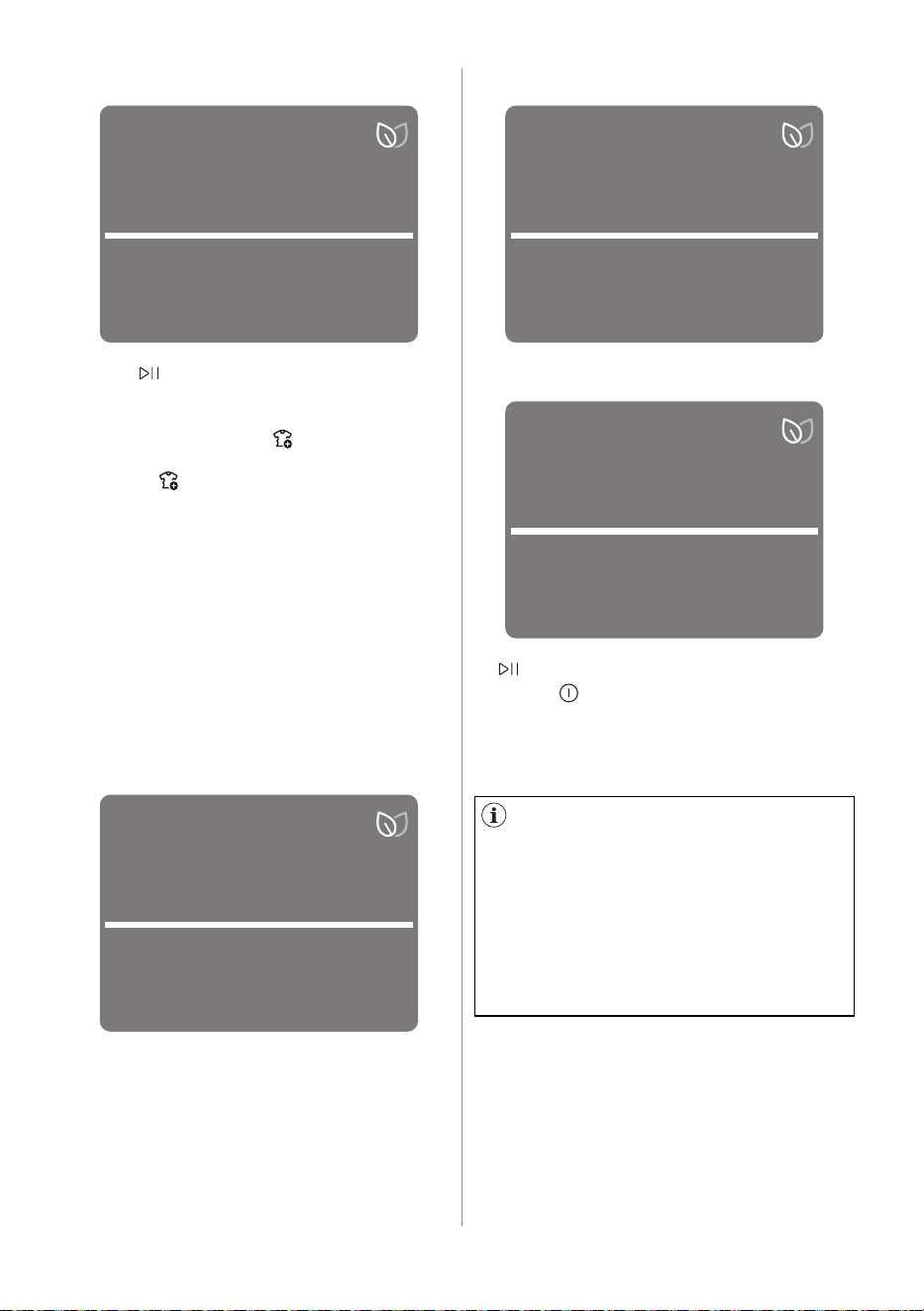
When the programme is completed:
• An intermittent acoustic signal
operates.
• The display shows the completely
filled progress bar and alternately
messages pops up:
Remove items
Done
Remove items
Cottons
5
h
Calculating start
time
Cottons
40 ENGLISH
Done
Anti-crease
Cottons
Done
Clean lint filter
Cottons
Done
Empty water tank
Cottons
Done
Remove items
Cottons
Anti-crease
• The " Start/Pause" indicator is on.
The appliance continues to operate with
the anti-crease phase for approximately
30 minutes or more if " Extra
Anticrease" option was set (see chapter
Option - " Extra Anticrease" ).
The anti-crease phase reduces creasing.
You can remove the laundry before
the anticrease phase is completed. We
recommend, for better results, that you
remove the laundry when the phase is
almost completed.
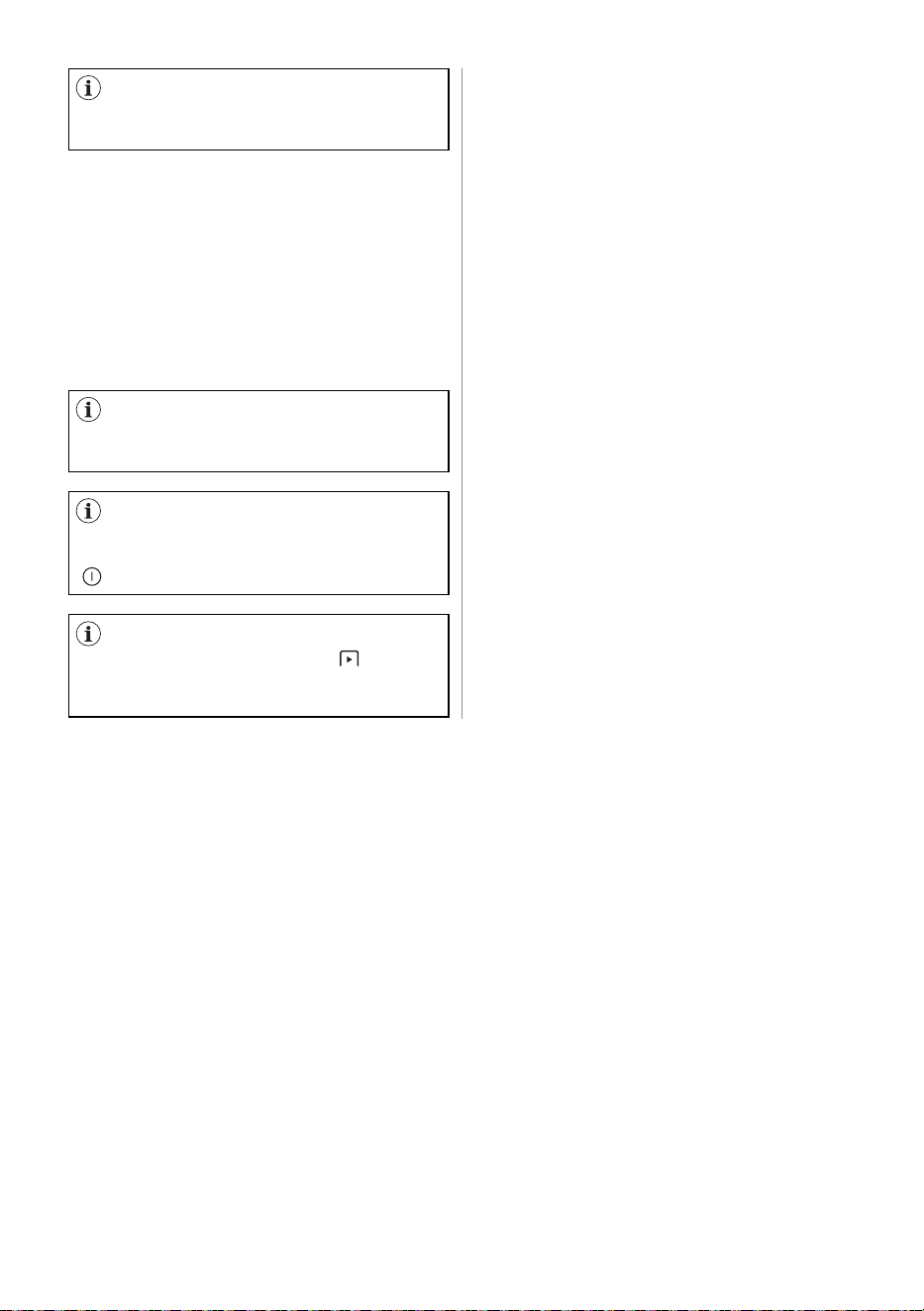
When the anti-crease phase is
completed:
• The display shows the completely
filled progress bar and alternately
messages pops up:
Remove items
Clean filter
Empty water tank
• Start/Pause indicator goes off.
1. Press " on/off" touch key to
deactivate the appliance.
2. Open the appliance door.
3. Remove the laundry.
To keep the effects of the Steam
treatment, clothes must be removed
one garment at a time during
the anticrease phase and hung
immediately on a clothes hanger to dry
(for minimum 5-15 min, depending on
fabric and selected steam level). Do up
the buttons and tug the garment into
shape, paying particular attention to
cuffs and seams.
Possible causes of unsatisfactory drying
results:
• Inadequate default dryness level
settings. See chapter OPTIONS:
Dryness Level - Adjustment of the
target final moisture
• Room temperature is too low or too
high. Optimal room temperature is
between 18°-25°C.
ENGLISH 41
To reduce energy consumption, this
function automatically deactivates the
appliance:
• After 5 minutes if you do not start the
programme.
• After 5 minutes from the end of the
programme or anticrease phase.
Always clean the filter and empty
the water container when a programme
is completed.
The time is reduced to 30 seconds if
the selector knob is pointing to "Reset"
position.
When the appliance goes in low
power mode, the display and icons turn
off. You can reactivate it by pressing
" on/off" touch key
.
If WiFi is on and remote control
is enabled, the remote start " " icon
remains also when the appliance goes
on low power mode.
16.5 Low power mode
42 ENGLISH
17.1 Preparing the laundry
To assure proper drying process:
• Close the zips.
• Close the fasteners of duvet covers.
• Do not dry ties or ribbons loose (e.g.
apron ribbons). Tie them before you
start a programme.
• Remove all items from pockets.
• Turn items with the internal layer made
of cotton inside out. Cotton layer must
be faced outwards.
• Always set the programme suitable for
the type of laundry.
• Do not put light and dark colours
together.
• Use suitable programme for cottons,
jersey and knitwear to reduce
shrinkage.
• Do not exceed the maximum load
stated in the programmes chapter or
shown on the display.
• Dry only the laundry that is suitable for
tumble drying. Refer to the fabric label
on the items.
• Do not dry large and small items
together. Small items can be trapped
inside the large items and remain wet.
• Shake the large clothes, fabrics before
placing in the tumble dryer. It is to
avoid moist places inside the fabric
after the drying cycle.
Steam function hints
• Do not use steam programmes for
wool not suitable to dry in the tumble
dryers, leather, textiles with large
metal, wooden or plastic parts, textiles
with rusting metal parts, oilskins or
wax cotton garments.
• Sort and dry together textiles with
similar size, weight, material and
colour.
• Do not dry new, coloured textiles
together with light-coloured laundry
items. Colours may fade (check colour
fastness of fabric when damp in an
inconspicuous area).
• Do not use dry cleaning sets
in combination with the steam
programmes.
• Remove stains by washing or using
localised stain removal before the
steam programme use.
• For best drying results turn items with
double-layered fabrics inside out (e.g.
with cotton lined anoraks, the cotton
layer should be outermost).
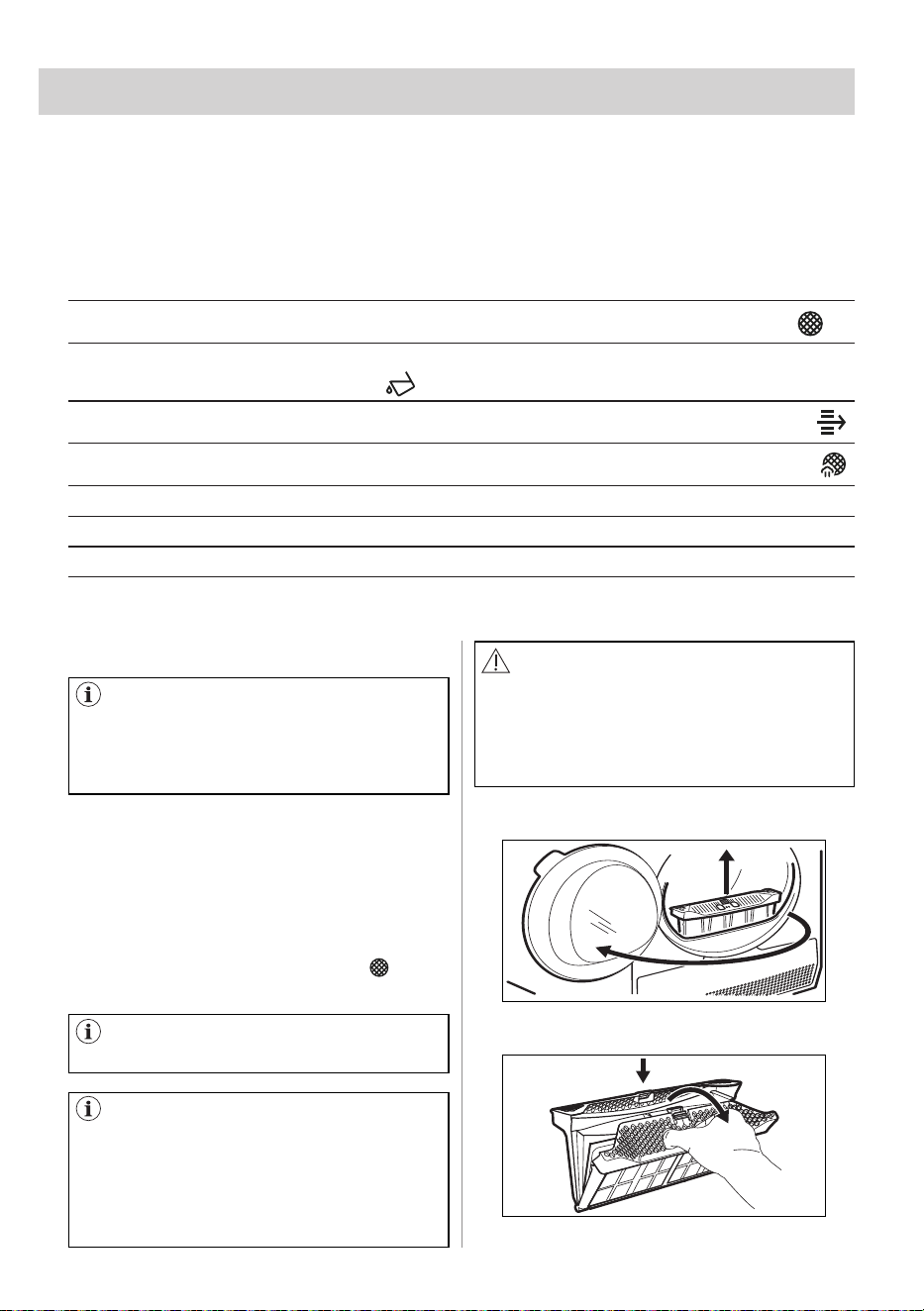
Fabric label Description
Laundry is suitable for tumble drying.
Laundry is suitable for tumble drying at higher temperatures.
Laundry is suitable for tumble drying at low temperatures only.
Laundry is not suitable for tumble drying.
17. HINTS AND TIPS
Loading the drum up to the
maximum capacity indicated for the
respective programmes will contribute
to the energy saving.
ENGLISH 43
18.1 Periodic cleaning schedule
1
2
1
2
18. CARE AND CLEANING
Periodic cleaning helps to extend the life
of your appliance.
If the appliance is not used for a long
time unplug the appliance.
Indicative periodic cleaning schedule:
Remove any foreign items that you may
find in the drum after the drying cycle
(e.g. metal clips, buttons, coins, etc).
At the end of each cycle the message or
symbol pops up: Clean lint filter " " and
you must clean the filter.
The following paragraphs explain how you should clean each part.
Cleaning the filter
When the message or symbol pops up: Clean lint filter
Empty the water container
When the message or symbol pops up: Empty water tank
Clean the Heat Exchanger
When the message or symbol pops up: Clean condenser
Clean the steam system filter
When the message or symbol pops up: Clean steam filter
Clean drum Every two months
Clean the control panel and housing Every two months
Clean the airflow slots Every two months
18.2 Removing the foreign items
18.3 Cleaning the filter
Make sure that the pockets are
empty and all loose elements are tied
up before running the drying cycle.
Refer to the "Preparing the laundry"
section.
The filter collects the lint during the
drying cycle.
To achieve the best drying
performance clean the filter regularly.
The clogged filter causes the longer
drying cycle and as a consequence
the energy consumption increase.
Clean the filter by hand. Use a vacuum
cleaner if necessary.
CAUTION!
When cleaning the filters, the lint should
be thrown in the garbage bin and not
washed through the drain in order to
avoid spreading microplastics in the
used water system.
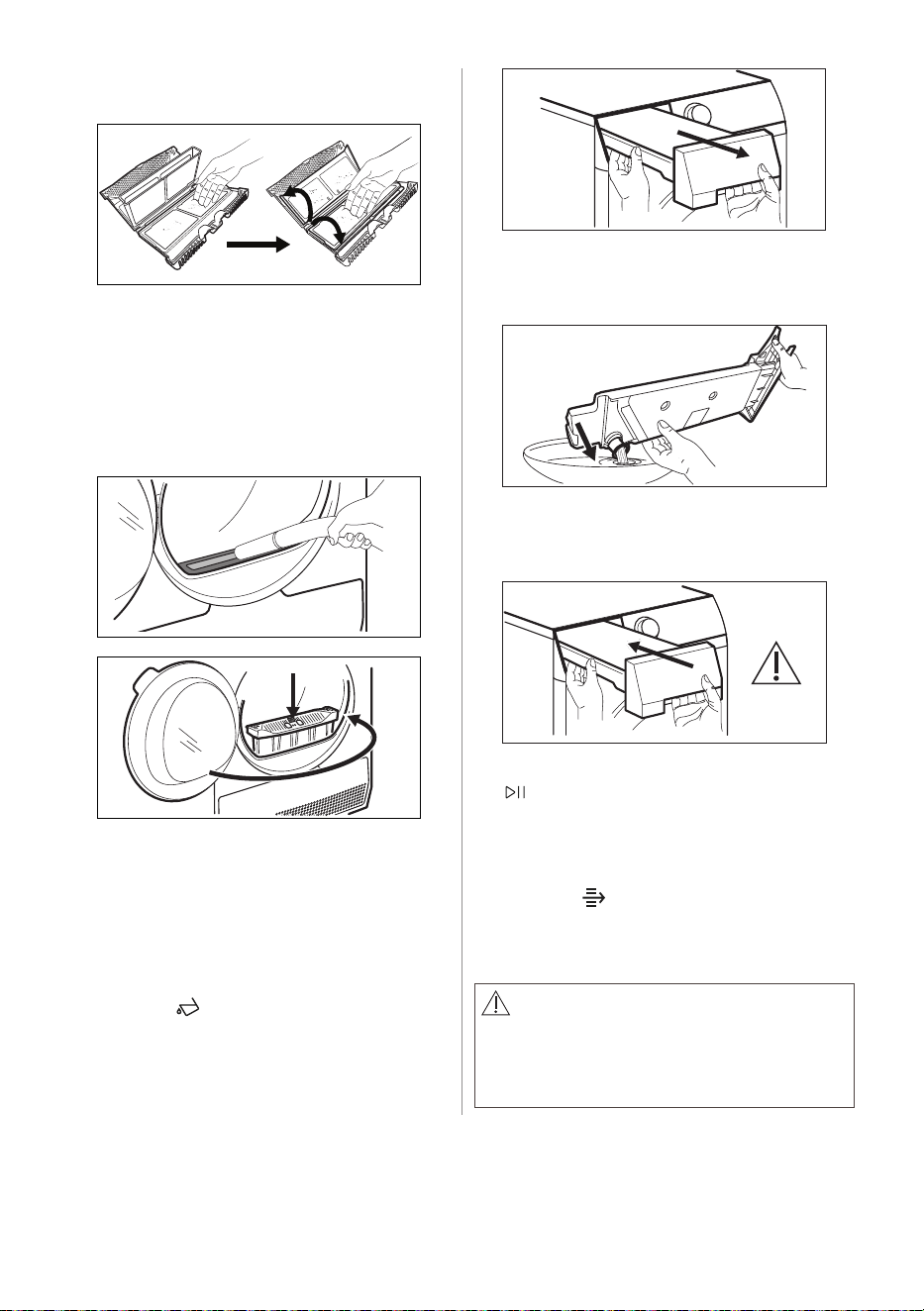
1. Open the door. Pull the filter up.
2. Push the hook to open the filter.
44 ENGLISH
3. Gather lint with hand from both
internal parts of the filter.
Throw the lint in the dustbin.
4. If necessary, clean the filter with a
vacuum cleaner.
5. If necessary, remove lint from the filter
socket and gasket. You can use a
vacuum cleaner. Place the filter back
inside the filter socket.
2
1
18.4 Emptying the water container
18.5 Cleaning the condenser
Empty the condensed water container
after each drying cycle.
If the condensed water container is full,
the programme stops automatically.
The message or symbol pops up: Empty
water tank " " on the display and you
must empty the water container.
To empty the water container:
If the message or symbol pops up: Clean
condenser " " on the display, inspect
the condenser and its compartment. If
it is dirty, clean it. Do the check not less
than once a 6 months.
1. Pull the water container out keeping it
in a horizontal position.
2. Pull the plastic connection out
and drain the water into a basin or
equivalent
3. Push the plastic connection back in
and place the water container back
into position.
4. To continue the programme press the
" Start/Pause" touch key.
WARNING!
Do not touch the metal surface with
bare hands. Risk of injury. Wear
protective gloves. Clean carefully to
avoid damaging the metal surface.
ENGLISH 45
1
2
1
1
1
2
2
2
2
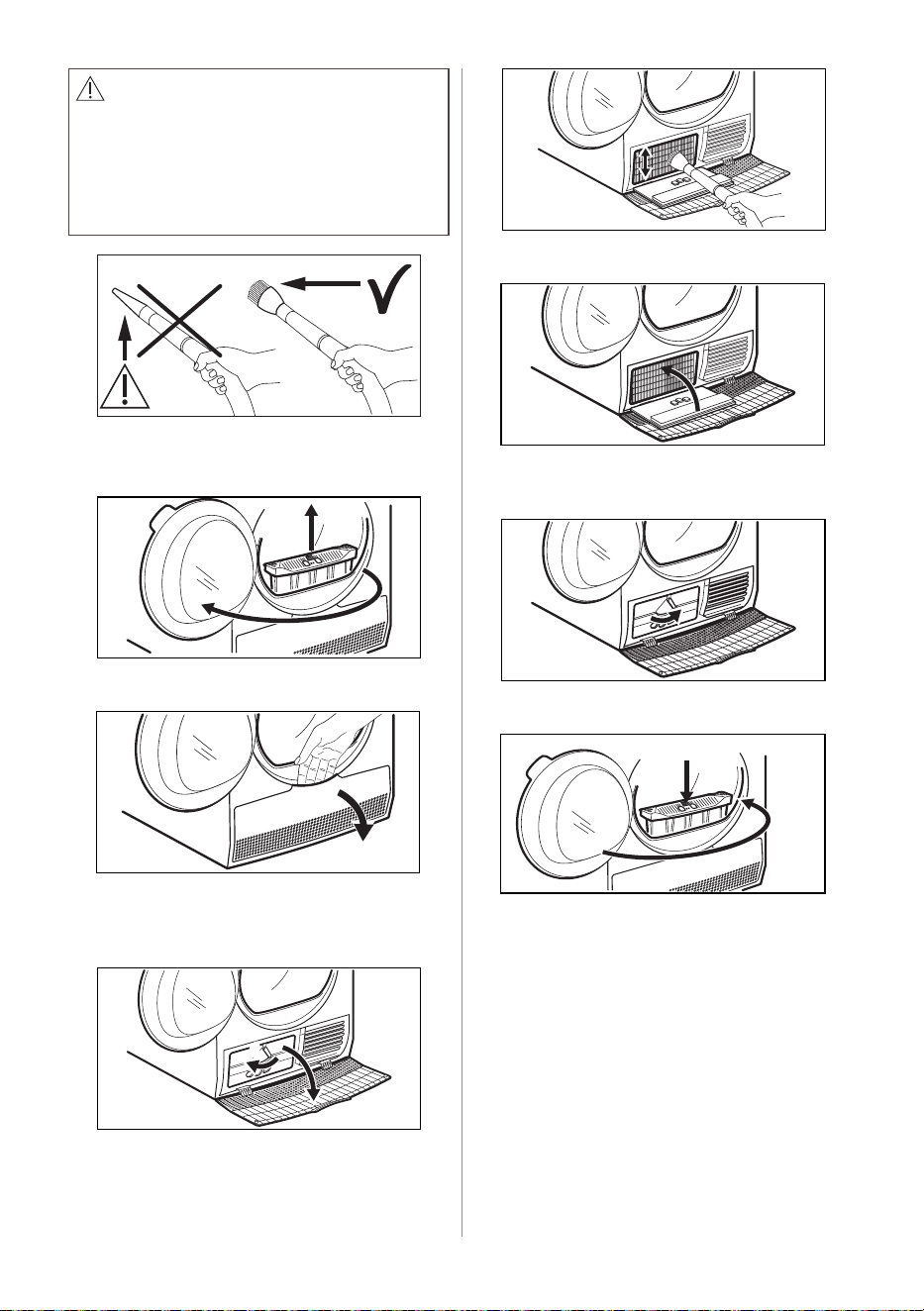
WARNING!
Do not use vacuum cleaner with a hard
attachment to remove the fluff from the
condenser, it may damages the ribs
of the condenser, with leads to lower
performance of the appliance and
longer time drying.
To inspect:
1. Open the door. Pull the filter up.
2. Open the condenser cover.
3. Turn the levers to unlock the
condenser lid and lower the
condenser lid.
4. If necessary, remove the fluff from
the condenser and its compartment.
You can use a vacuum cleaner with a
brush attachment.
5. Close the condenser lid.
6. Turn the levers until it clicks into
position.
7. Put the filter back.
2
1
46 ENGLISH
CAUTION!
Do not use the steam programmes
without the steam system filter or with
damaged or blocked filter.
18.6 Cleaning the steam system filter 18.7 How to drain the water from the
steam system container
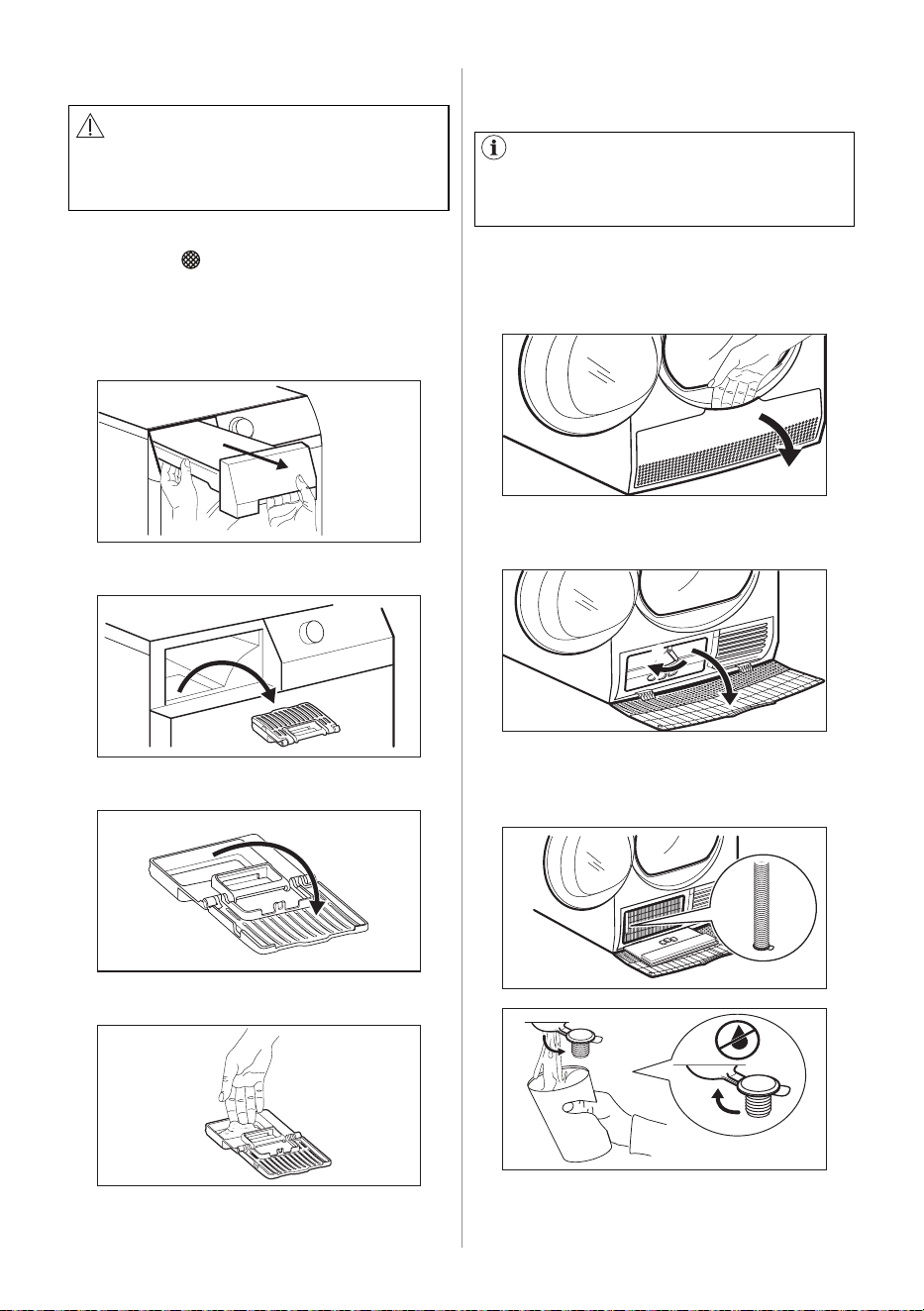
If the message or symbol pops up: Clean
steam filter " " on the display you must
clean the filter.
To clean the steam system filter:
1. Pull the water container. Keep it in
horizontal position.
To drain the water:
1. Open the door.
2. Open the condenser cover.
2. Pull the filter.
3. Open the filter.
4. Use a moist hand to clean the filter.
1
1
1
2
2
2
2
5. Put the filter inside the filter socket.
6. Put the water container.
The quality of the water in the
container can get worse. If you will not
use the appliance for long period drain
the water from the container.
3. Turn the lever to unlock the condenser
lid and lower the condenser lid.
4. Take the pipe placed on the left wall
of the compartment. Open the cap to
drain the water.
5. Close the cap.
6. Place the pipe back on its seat.
ENGLISH 47
CAUTION!
Do not use abrasive materials or steel
wool to clean the drum.
CAUTION!
Do not use furniture cleaning agents
or cleaning agents which can cause
corrosion.
WARNING!
Disconnect the appliance before you
clean it.
18.8 Cleaning the drum
18.9 Cleaning the control panel and
housing
Use a standard neutral soap detergent to
clean the inner surface of the drum. Dry
the cleaned surfaces with a soft cloth.
Use a vacuum cleaner to remove fluff
from the airflow slots.
Use a standard neutral soap detergent to
clean the control panel and housing.
Use a moist cloth to clean. Dry the
cleaned surfaces with a soft cloth.
7. Close the condenser lid.
8. Turn the lever to lock the condenser
lid and close the condenser cover.
18.10 Cleaning the airflow slots
48 ENGLISH
19.1 Error Codes
The appliance does not start or it stops during operation.
First try to find a solution to the problem (refer to the table). If the problem persists,
contact the Authorised Service Centre.
In case of major problems, the acoustic signals operate, Start/Pause button may
flash continuously:
WARNING!
Refer to Safety chapters.
WARNING!
Deactivate the appliance before carrying out any check.
Malfunction Possible cause Solution
• The programme was not
complete
• Appliance motor
overloaded. Too much
laundry or entrap in the
drum.
• The programme was not
completed. Remove the laundry
from the drum, set the programme
and restart the cycle.
• Machine does not start • The mains supply is unstable. • Wait until main supply is stable
then press start. If the appliance
pause the cycle without any
indication then press the cycle
start. If the warning will occur
check the power cord /socket
integrity or main supply.
• Machine does not start
the steam programmes.
• Possible empty steam tank,
steam heater failure.
• Fill water container for steam
system, Switch the appliance off
and on again. If the error code
appears again, contact the
Authorised Service Centre.
• Machine does not start
*Connected models
• Internal fail. No
communication between
electronic elements of the
appliance.
• The programme was not finished
properly or the appliance
stopped too early. Switch the
appliance off and on again. If
the error code appears again,
contact the Authorised Service
Centre.
19. TROUBLESHOOTING
ENGLISH 49
If the display shows other error codes, deactivate and activate the appliance. If the
problem continues, contact the Authorised Service Centre.
In case of different problem with the tumble dryer check the table below for possible
solutions.
Problem Possible solution
You cannot activate the appliance. Make sure that the mains plug is connected to the
mains socket.
Check fuse in fuse box (domestic installation).
The programme does not start.
Press " Start/Pause".
Make sure that the appliance door is closed.
Steam programme does not start. The steam
water container indicator lights up.
Fill water container.
Clean the steam water filter
After a steam programme, clothes are not
sufficiently smooth.
Note the composition of the fabric.
Set a higher steam level.
Load the machine with fewer clothes, or only
equivalent ones.
Remove clothes quickly one at a time from the
machine as soon as possible after the start of the
anticrease phase.
Hang clothes on clothes hangers, do up buttons
and tug clothes into shape.
Reshape multilayered clothes by ironing after
they come out of the machine.
After a steam programme, there are wet spots on
clothes.
Incorrect steam level selection. Set suitable
steam level (see steam guide for reference).
Clean the filter (see chapter CARE AND
CLEANING) before performing the steam cycle.
Even after several drying cycle the steam water
tank is empty.
Clean the steam water filter.
The appliance door does not close. Make sure that the installation of the filter is correct.
Make sure that the laundry is not caught between
the appliance door and the rubber seal.
The appliance stops during operation. Make sure that the water container is empty. Press
" Start/Pause" to start the programme again.
Load is too small, increase the load or use the Time
Drying programme.
50 ENGLISH
Problem Possible solution
The cycle time is too long or unsatisfactory
drying result.
1)
Make sure that the weight of the laundry is suitable
for the duration of the programme.
Make sure that the filter is clean.
The laundry is too wet. Spin the laundry in the
washing machine again.
Ensure that the room temperature is higher than +5°C
and lower than +35°C. Optimal room temperature is
18°C to 25°C.
Set the " Time Dry" or the " Extra Dry"
programme.
2)
The App cannot connect to the dryer.
Check if your smart device is connected to the
wireless network.
Check your home network and router.
Restart the router.
Contact your wireless service provider if there are
problems with the wireless network.
The dryer, the smart device, or both, need to be
configured again.
The App frequently cannot connect to the dryer. Try to move the home router as near the dryer as
possible or consider purchasing a wireless range
extender.
Turn the microwave off. Avoid using the microwave
and the Remote Control of the dryer at the same
time. The microwaves disrupt the WiFi signal.
1) After maximum 5 hours, the programme ends automatically.
2) It can happen that some area remains humid when drying big items (e.g. bed
sheets ).
ENGLISH 51
20. ENVIRONMENT CONCERNS
The materials marked with the symbol are recyclable.
>PE<=polyethylene
>PS<=polystyrene
>PP<=polypropylene.
This means that they can be recycled by disposing them properly in appropriate
collection containers.
Use authorized disposal sites for your old appliance. Help to keep your country tidy!
The symbol on the product or on its packaging indicates that this product may not
be treated as household waste.
Instead it shall be handed over to the applicable collection point for the recycling of
electrical and electronic equipment. By ensuring this product is disposed of correctly,
you will help prevent potential negative consequences for the environment and
human health, which could otherwise be caused by inappropriate waste handling of
this product.
For more detailed information about recycling of this product, please contact your
local city office, your household waste disposal service or the shop where you
purchased the product.
20.1 Packaging Materials
20.2 Old Machine

electrolux.com
G0044656-001-A28646706