電熱水瓶
TP-25DR2UHK(W)
使用說明書

......................................................................................................................................
......................................................................................................................................
......................................................................................................................................
......................................................................................................................................
..............................................................................................................................
.......................................................................................................................
......................................................................................................................................
......................................................................................................................................
.......................................................................................................................................
..........................................................................................................................
..................................................................................................................................
.......................................................................................................
............................................................................................
......................................................................................................................................
05
06
06
07
10
10
11
12
07
07
08
08
09
錄 目
安全警示
產品簡介
使用説明
清潔保養
服務指南
安全警示
部件名稱
使用注意事項
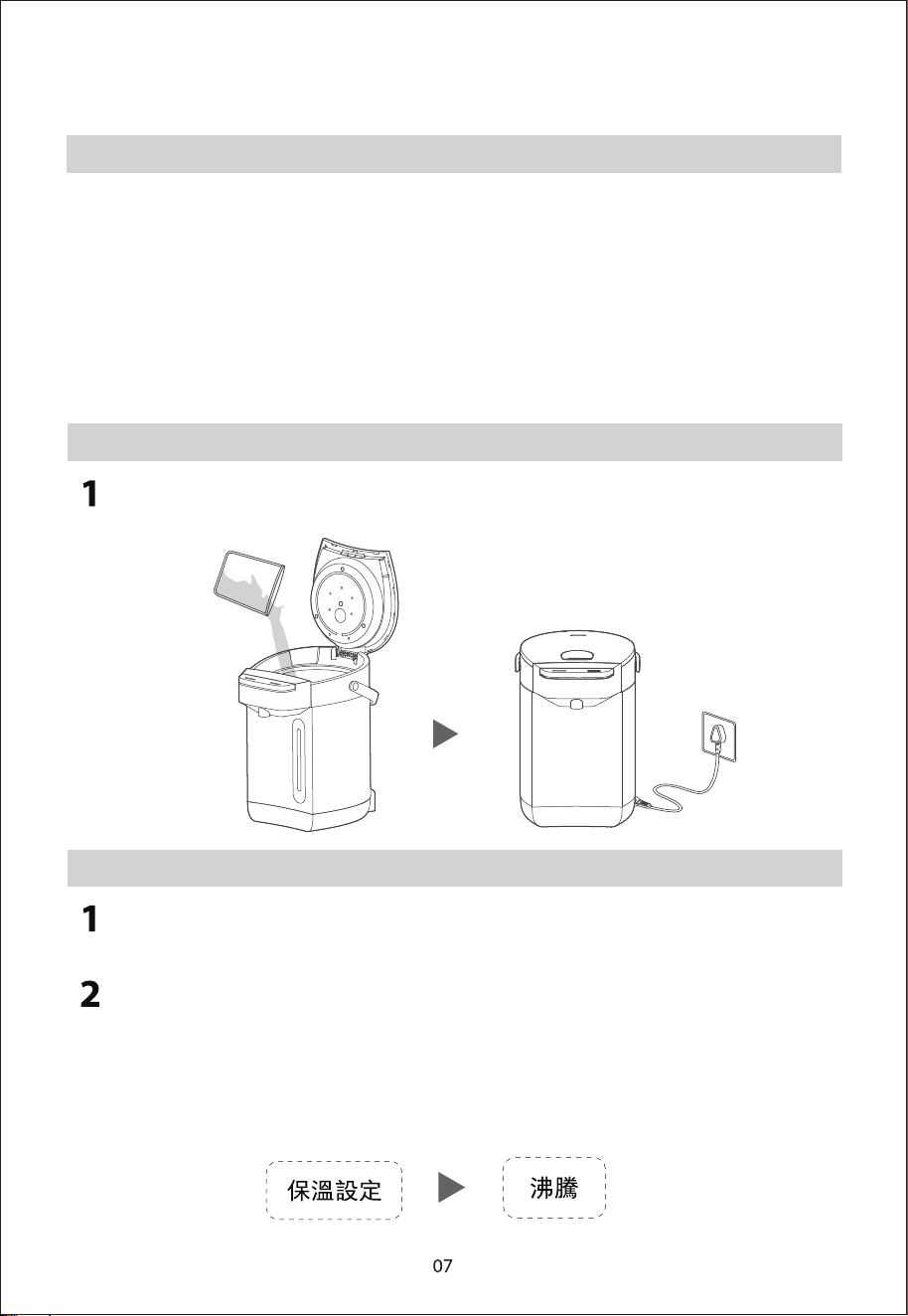
加水並通電
沸腾後保温(自來水/純淨水)
直接保溫 (純淨水等可直接飲用水)�
出水飲用
瓶蓋拆卸與安装
產品規格
控制面板
清潔保養注意事項
除垢清潔
故障自檢
日常清潔
為確保使用安全,避免對您或他人造成傷害和財產損失, 請您務遵守以下安全
注意事項。
標示符號的說明
表示可能會導致死亡或重傷的安全事項
警告
注意
溫馨提示
表示可能會導致輕傷或財產損害的安全事項
表示可能影響使用體驗的其他事
【警告】重點安全注意事項
不遵守安全警告錯誤使用時可能導致事故發生。
如果電源線損壞,必須由製造商、其服務代理或專業人士 更換,以避免危險。
本產品未考慮到無人照看的幼兒和殘疾人對器具的使用、幼兒玩耍器具的情
況,該情況有可能導致事故發生。
禁止將本産品浸入水中。
如果加入太多水到電熱水瓶中,可能會冒出滾水。
請勿在戶外使用。
本産品供家居及類似環境使用,如:
-店鋪內的員工厨房區域、辦公室及其他工作環境;
-農舍;
-供客戶於酒店、汽車旅館及其他住宅類型環境;
-食宿型酒店。
兒童,身體感觀或心智慧力較弱或缺乏經驗和 知識的人員,必須在接受安全使用本産品
的方法的監督或指導,並瞭解所涉及的危險後方可使用本産品。
應監督兒童,以避免其玩耍本産品。
未經監督,兒童不得進行清潔和用戶維護。
警告:誤用可能導致潛在傷害。
在清潔、維護或重新放置之前以及不使用時,請關閉並拔 下電器插頭。
警告:避免讓水濺到插頭上。
使用後,加熱元件表面會有餘熱。
產品簡介
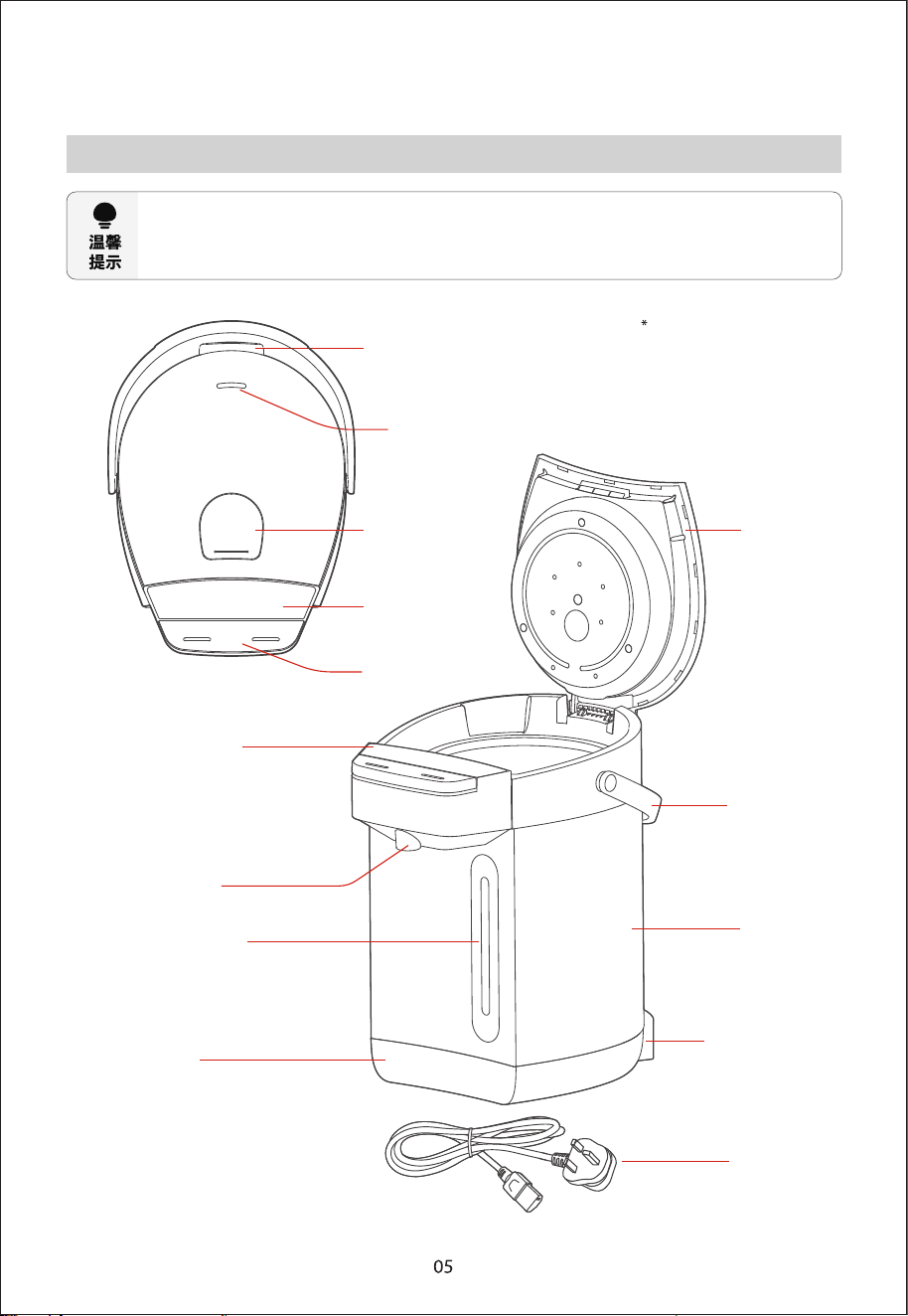
部件名稱
使用產品前請先了解以下內容,以便您快速掌握產品使用
由於我們的產品在不斷的升級,如實物與下圖存在差異,請以實物為準。
此產品為桌面式產品,禁止用作嵌入式。
拆蓋鎖扣
蒸氣口
開蓋按鈕
操作面板
出水按鍵
瓶蓋
操作面板
出水口
水尺視窗
底座
電源線
電源接口
外殼
提手
加熱時注意防燙,請勿觸摸
控制面板
因產品外觀各有差異,下圖僅供參考,具體以包裝箱內實物為準。
產品規格
額定容量
額定電壓
額定頻率 額定功率 產品重量
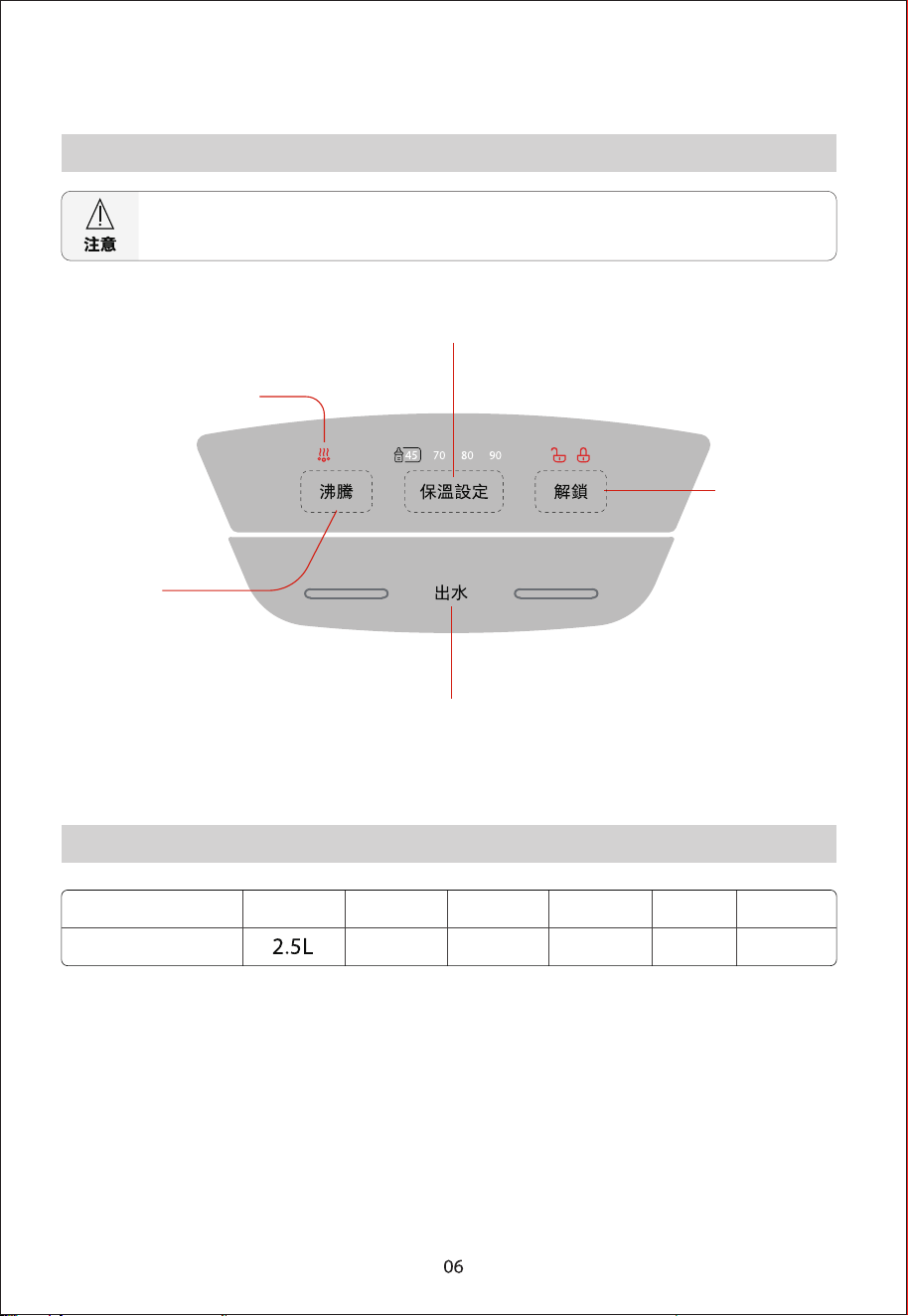
保溫設定鍵
沸騰除氯指示燈
沸騰鍵
出水鍵
號 型
解鎖鍵
TP-25DR2UHK(W)
產品尺寸
(W x D x H)
215x279x308
(mm)
2.50kg
220-240V~
50/60Hz 1500-1800W
使用說明
使用注意事項
第一次出水因為要排出管道空氣所以會出現出水不順暢,屬於正常現象。
,膽內潔清便以,次 2~1 開燒後 L2-1 量容膽內至水加應,後用使有沒間時長者或前用使次一第
此時的開水不宜飲用!
加水時請注意不要淋濕瓶身。
保溫設定可以在煮水時進行,也可以水開後進行。
防止乾燒:在產品通電時,水瓶內水量低於加水刻度或無水,為防止機器乾燒故障,請及時加水。
產品保溫過程中,如果4 8小時後用戶無按鍵操作,產品將進入待機狀態。
加水並通電
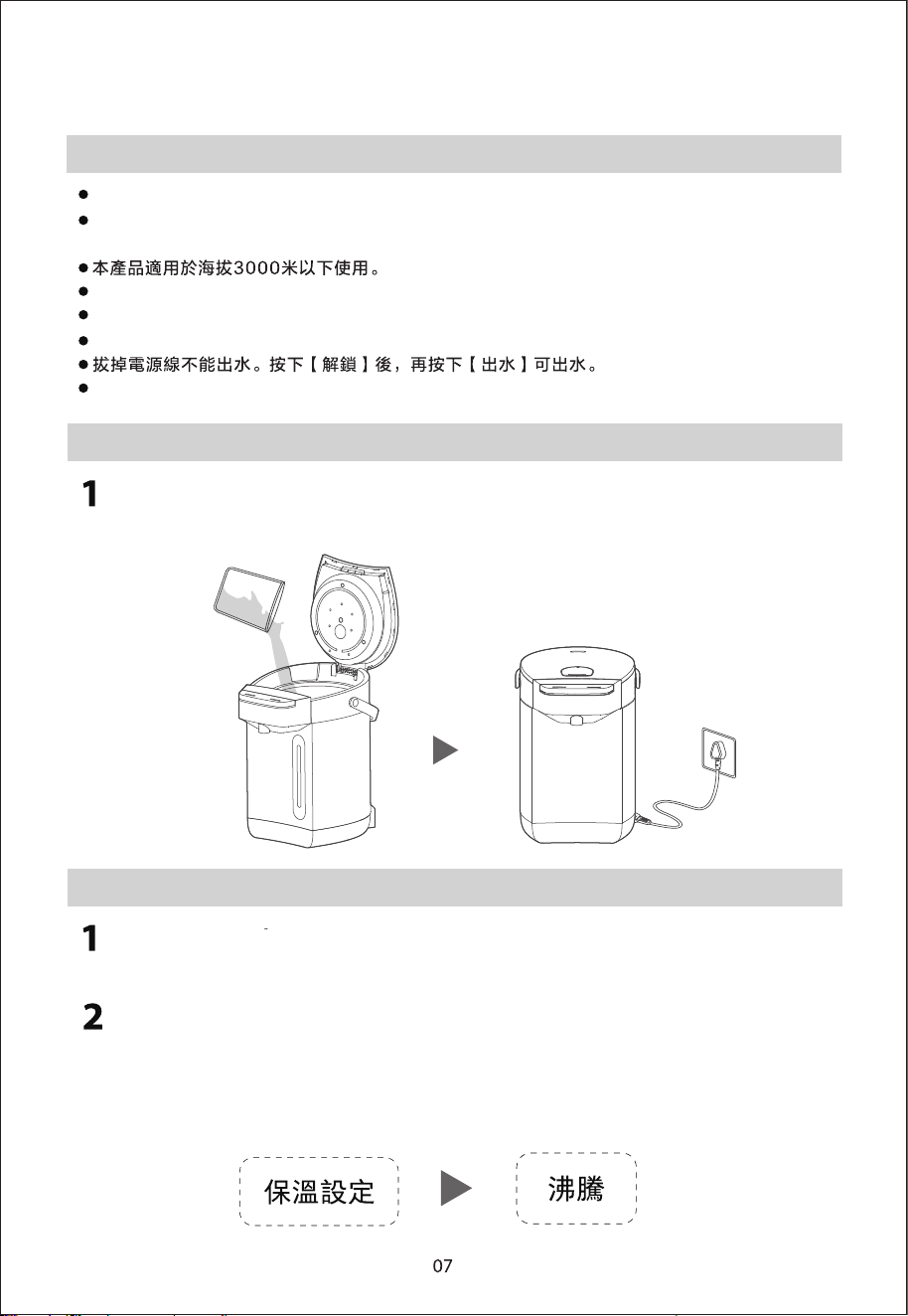
,源電通接,蓋上閉關)線位水大最過超得不量水加( ,水清入加內瓶向
電熱水瓶進入待機狀態
沸騰後保溫 (自來水/純淨水)
直接按【沸騰】鍵煲水,如沒有選擇保溫溫度,電熱水瓶沸騰除氯後,
溫度自然冷卻至45℃保溫。�
如需設定保溫,先按【保溫設定】至所需溫度【45℃】、【70℃】、�
【80℃】、【90℃】或不保溫(完全沒有溫度亮燈),
選定後,再按【沸騰】。�電熱水瓶沸騰除氯,
溫度自然冷卻至選定溫度保溫。�
保溫工作時,若48小時內無任何操作,電熱水瓶停止保溫,進入待機狀態。
直接保溫 (純淨水等可直接飲用水)�
直接保溫只能煲水至選擇的保溫溫度,不能加熱至沸騰,請使用純凈水、
過濾水等直飲水。
、】 ℃07【、】℃54【按,】定設溫保【下按續連,下態狀機待
【80℃】、【90℃】、【取消】順序循環選擇。選定溫度後,
電熱水瓶煲水至選擇溫度後維持保溫
保溫工作時,若48小時內無任何操作,電熱水瓶停止保溫,進入待機狀態。
出水飲用
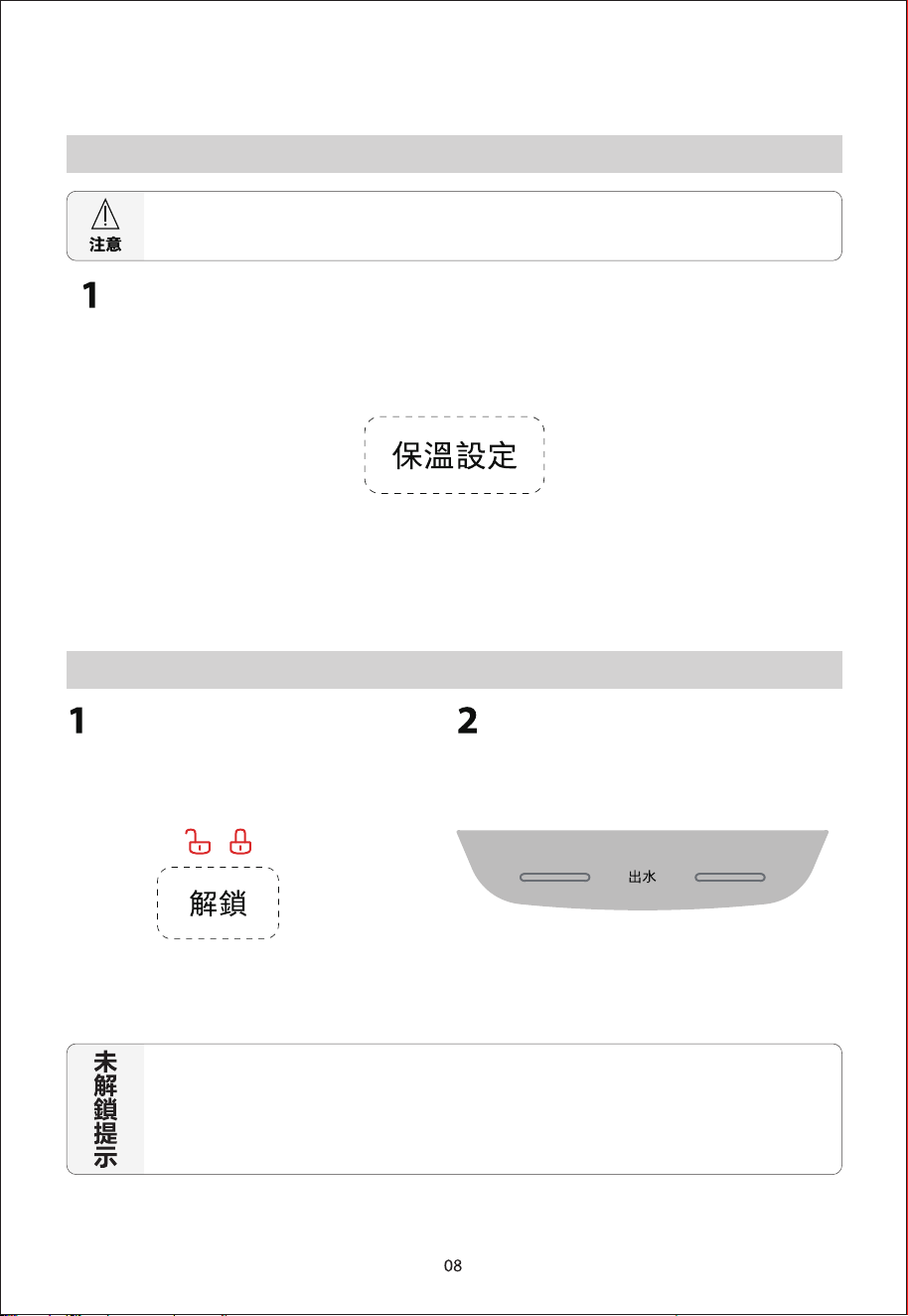
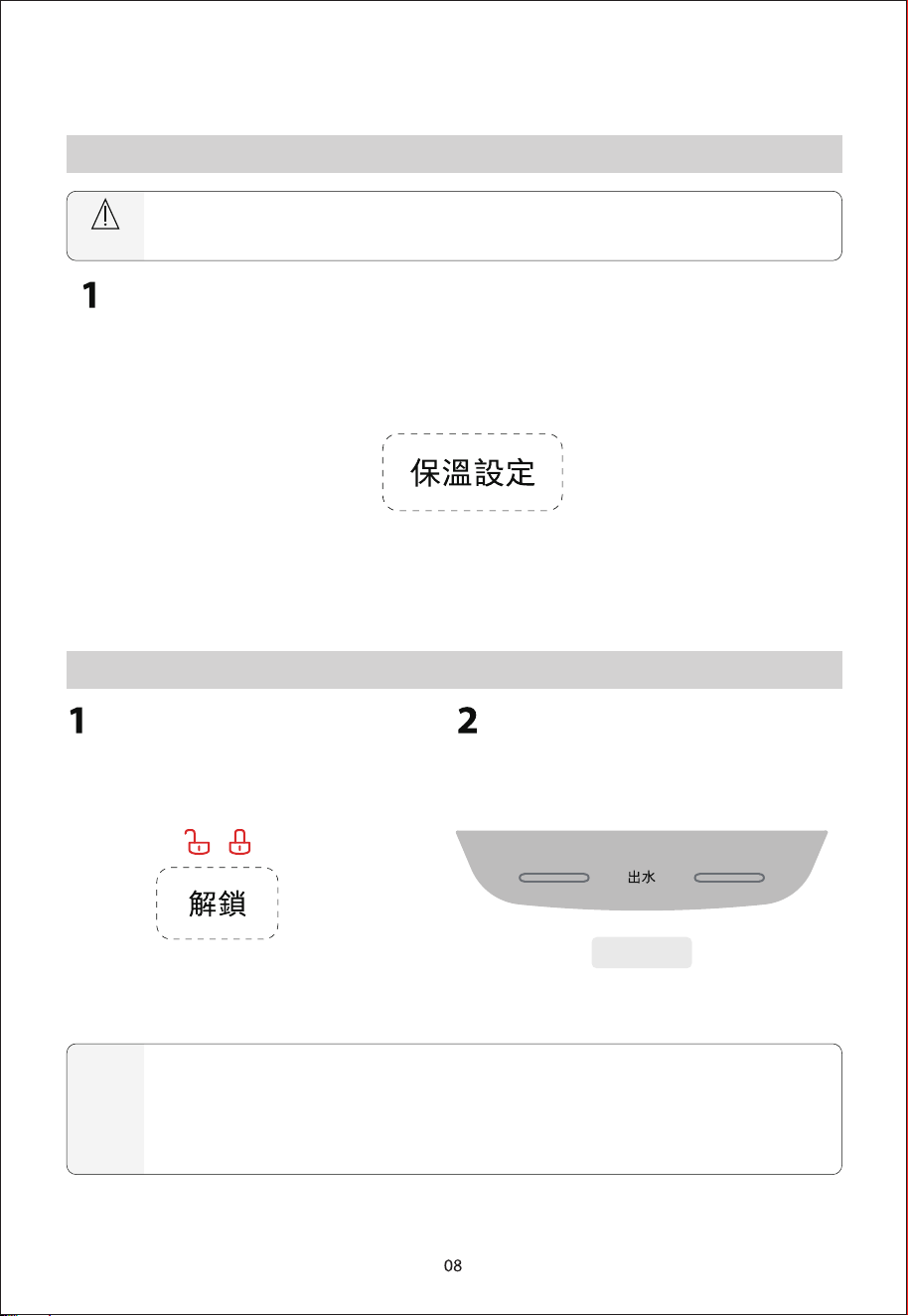
出水鎖定解除按下【解鎖】,
解鎖指示燈亮起
長按【出水】,電熱水瓶出水口出水
如果沒有按下【解鎖】解鎖機器,按下【出水】後電熱水瓶不出水,
鎖定指示燈閃爍5次,提示用戶解鎖。
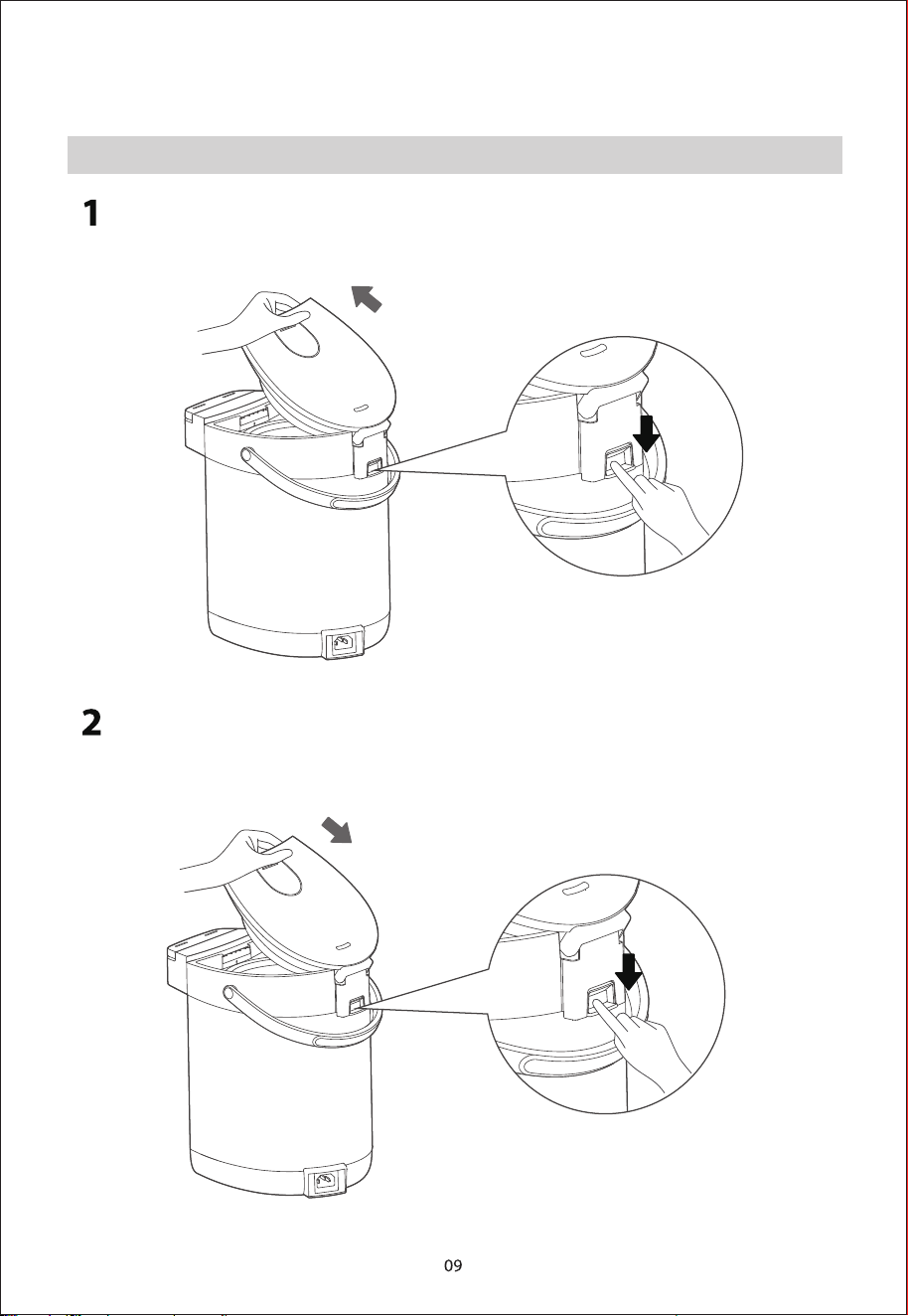
瓶蓋拆卸與安裝
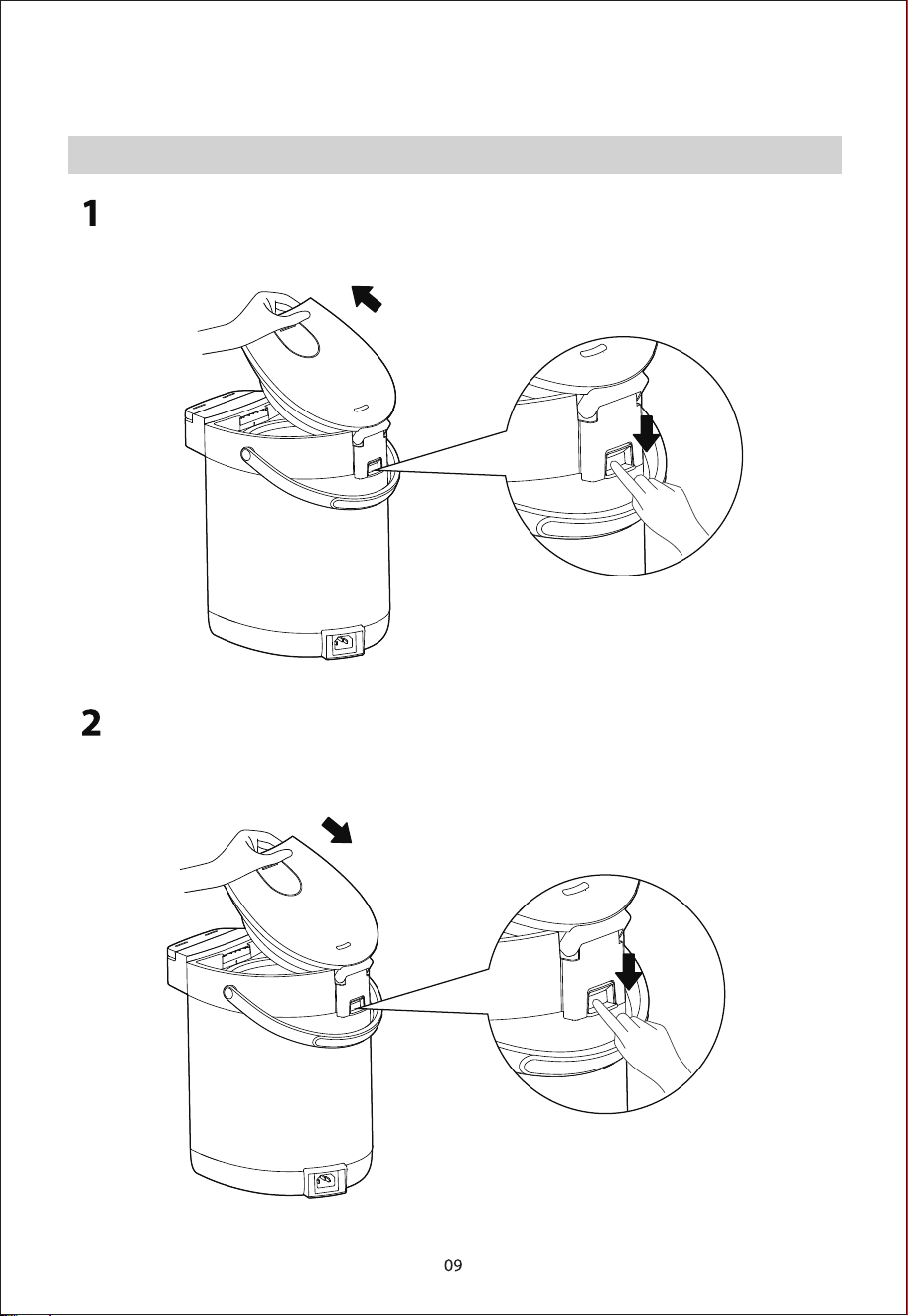
拆卸瓶蓋:打開瓶蓋,瓶蓋與水平面呈20~30度,用手扶住瓶蓋,另一只
手下壓後座扣,即可拆下瓶蓋
下壓
後座扣
安裝瓶蓋:一只手下壓後座扣,另一只手將瓶蓋與連接軸對準,放置於卡槽
中,然後松開後座扣即可固定瓶蓋,完成瓶蓋安裝
下壓
後座扣
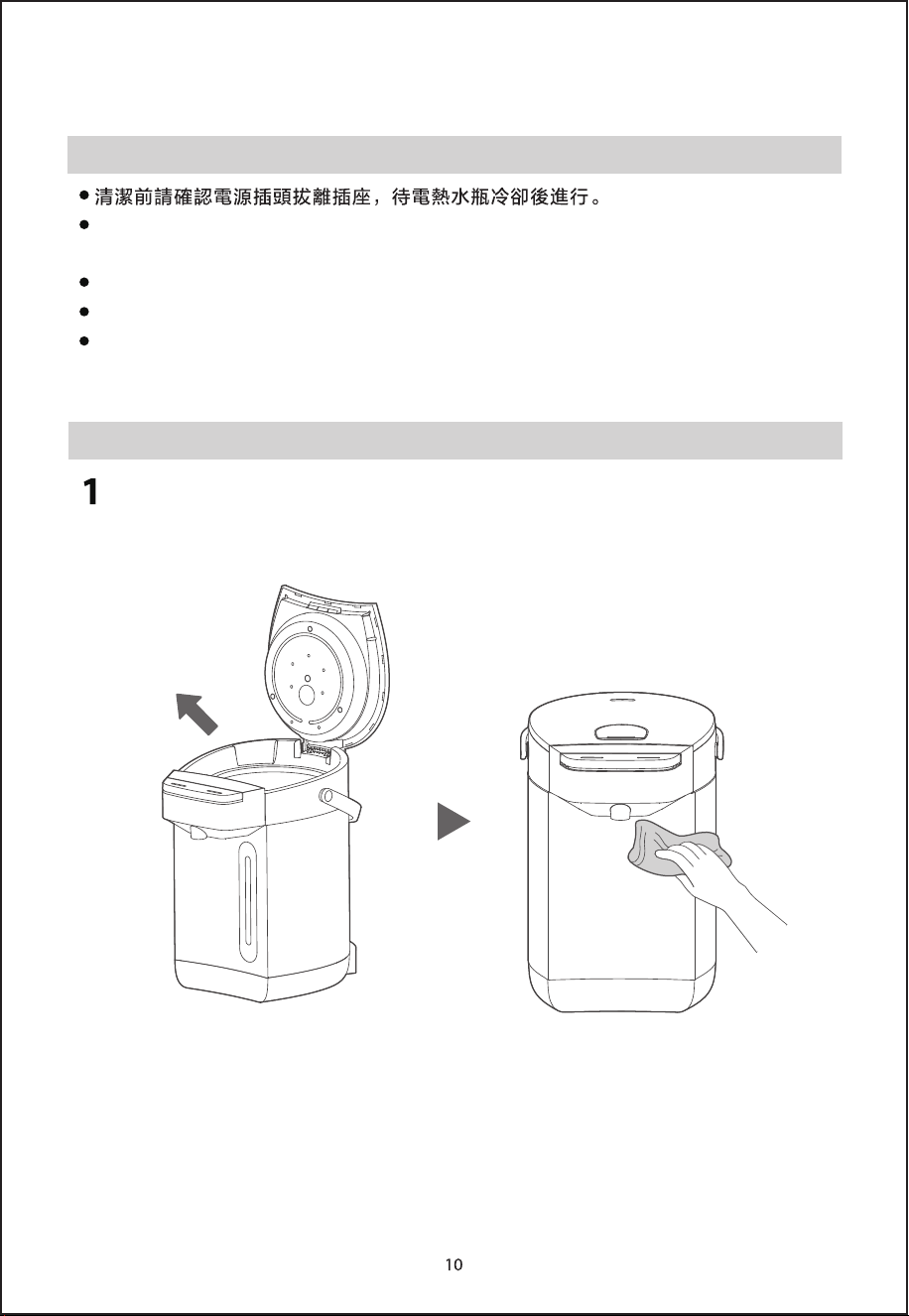
清潔保養
清潔保養注意事項
為延長電熱水瓶使用壽命,應定期清潔水瓶內的礦物沈澱物(水垢),可用除垢劑
(如白醋、檸檬酸)清洗。
除垢清潔後會有少量異味,加入清水,將內膽沖洗幾次,可除去殘留的除垢劑異味。
瓶體外部嚴禁用水沖洗,切勿用鋼絲球及任何化學的或研磨粉狀的清潔劑來清洗。
內膽用含水的塑料海綿擦拭,不要使用去汙粉、草刷、尼龍刷。不可用洗碗機或烘乾
機烘烤,否則電熱水瓶會變形損壞。
日常清潔
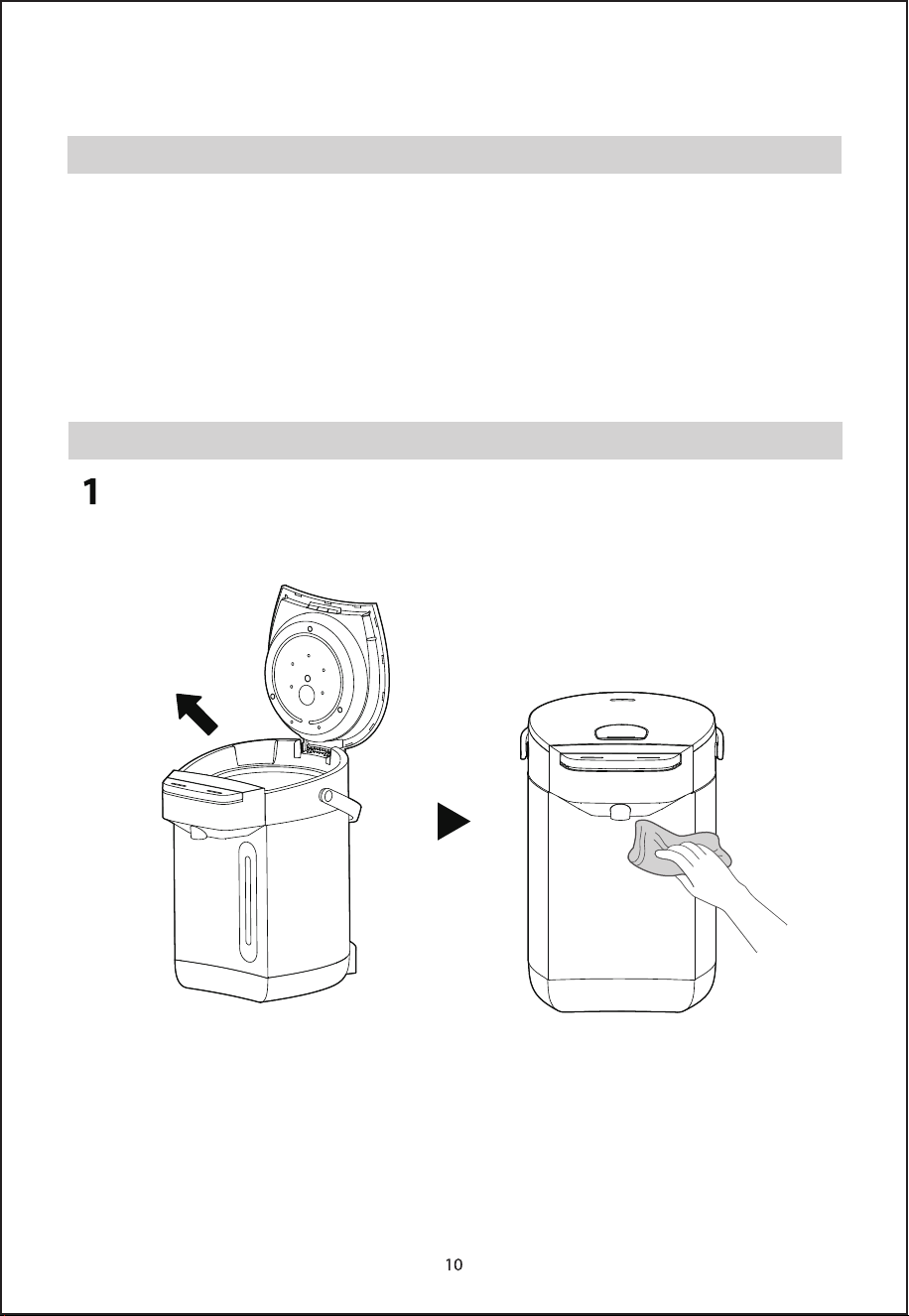
拔下電源插頭,排凈瓶內的水,用幹毛巾擦幹水跡。瓶身外部用擰乾水的
濕毛巾擦乾凈,以備下次使用
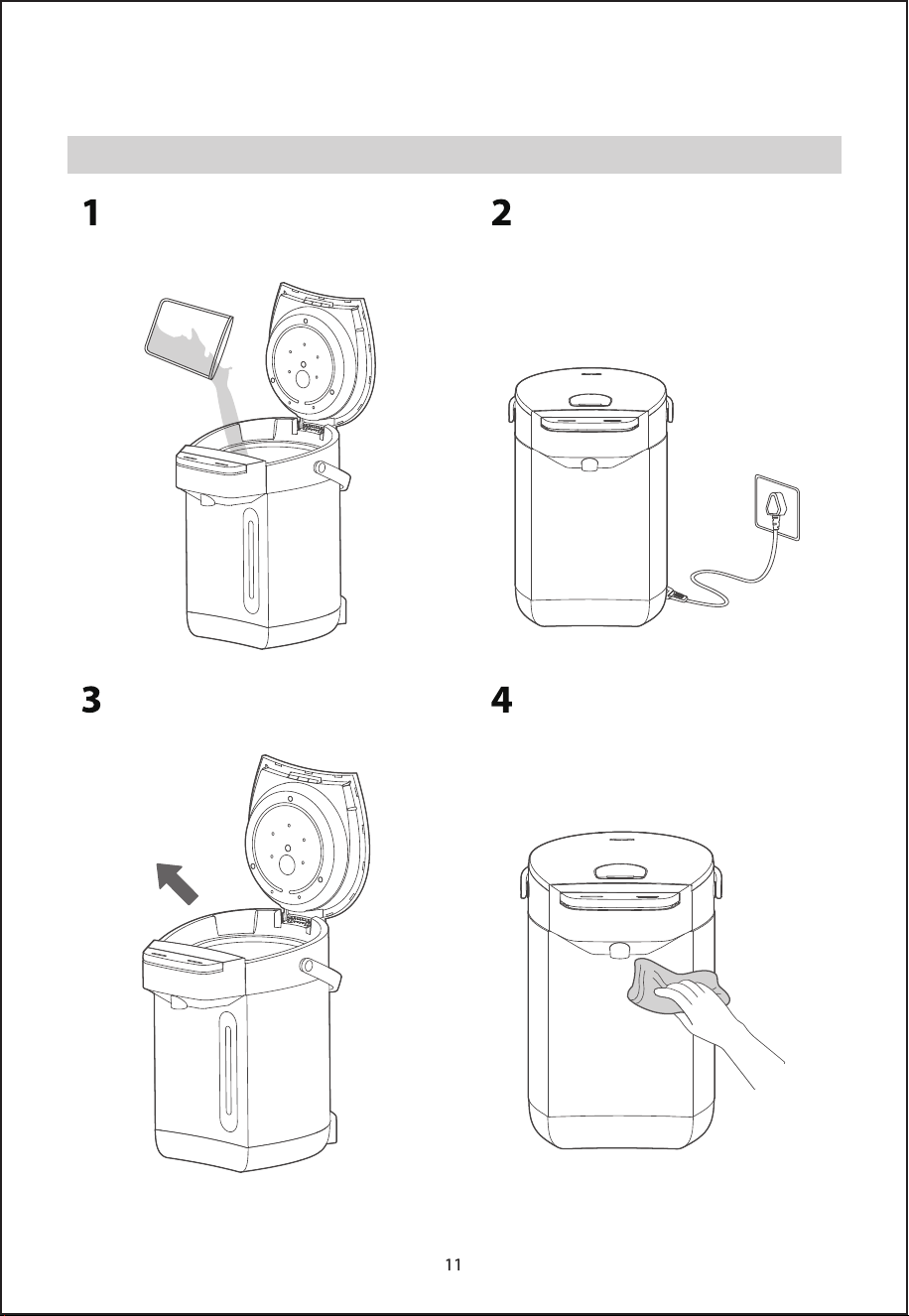
除垢清潔
斷開電源,向電熱水瓶加入除
垢劑和清水
接通電源將除垢劑溶液加熱至
沸騰
靜置一段時間後倒掉除垢劑溶液
用清水將內膽沖洗乾凈,並
用乾凈的軟布擦乾
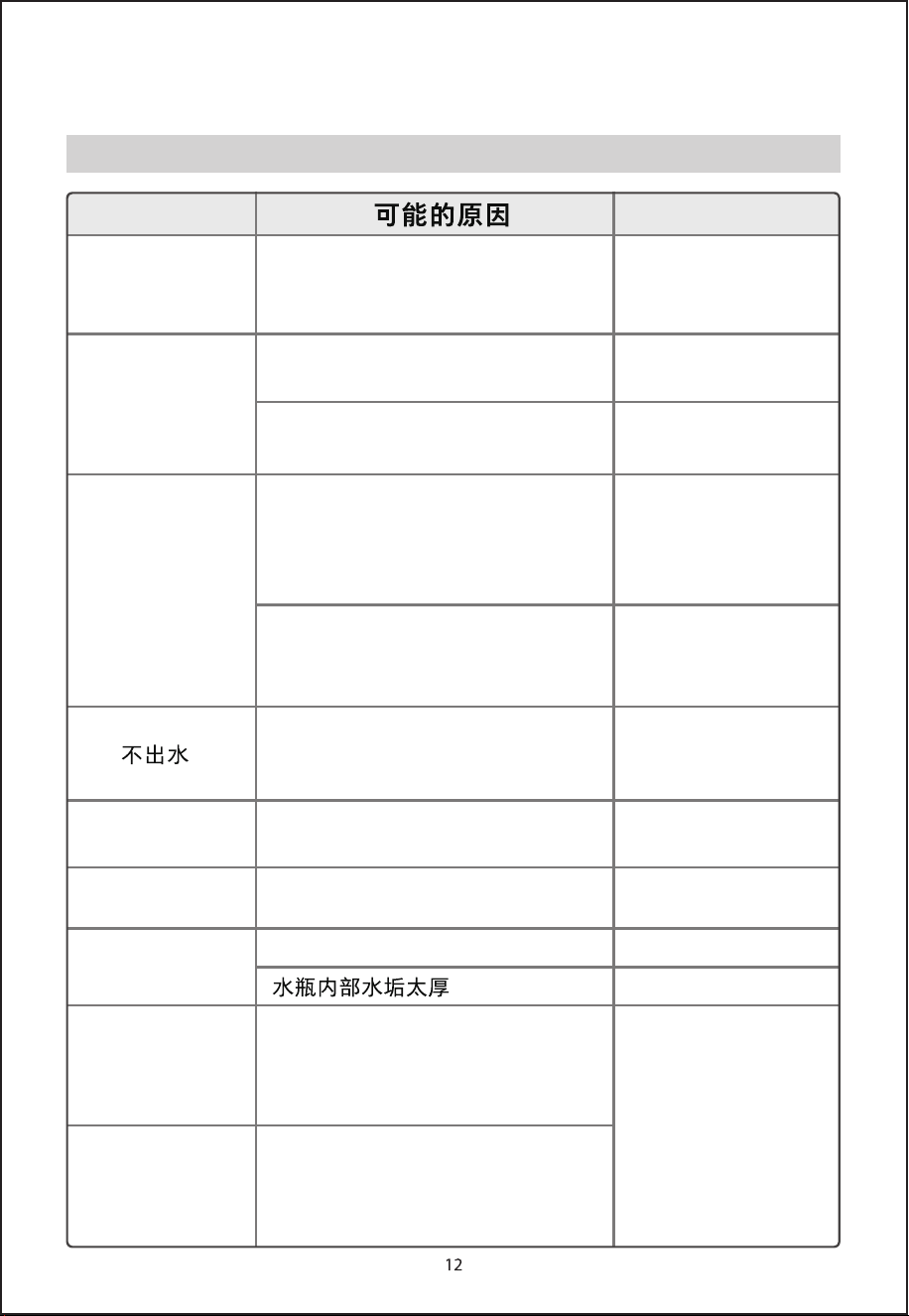
故障自檢
服務指南
故障自檢
異常現象 處理方法
熱水中有白色或
閃光的懸浮物
脫落的水垢,礦物質多的水(礦泉
水、離子凈水器處理的水)易產生
水垢,附在內膽上或浮於水中
請按除垢清潔步驟
清除水垢
熱水有異味
自來水中含有較多的消毒用
氯,會產生氯味
首次使用時產品有少量塑料的異
味,使用幾次後異味會消失
水燒開口自動除氯,
可除去氯味
非異常情況
出水不暢
過濾網網孔被水垢堵塞
加入檸檬酸煮沸清
洗。用刷子清洗網
孔,讓網孔通暢
水燒開後一段時間內,產生的氣泡
進入泵中,有時難以壓出熱水
先打開上蓋,約1分
鐘不再冒泡後,
再操作出水
按【解鎖】選擇水量
後,再長按【出水】
方可出水
電熱水瓶上鎖狀態
瓶內水自然流出
瓶內水量超過最大水位線
將瓶內水量降至最
大水位線以下
機身外殼發熱
由於電熱水瓶在高溫下保溫,
室溫高時機身外殼可達60℃
非異常情況
水燒不開或煲
水長時間不停
機器故障 送售後服務點檢修
清潔水垢
解鎖圖標、鎖定
圖標、45℃圖標
閃爍,蜂鳴器鳴
叫10聲
傳感器開路
傳感器短路
解鎖圖標、鎖定
圖標、70℃圖標
閃爍,蜂鳴器持
續短鳴
斷開電源後重新上
電,若仍顯示異常請
送售後服務點檢修
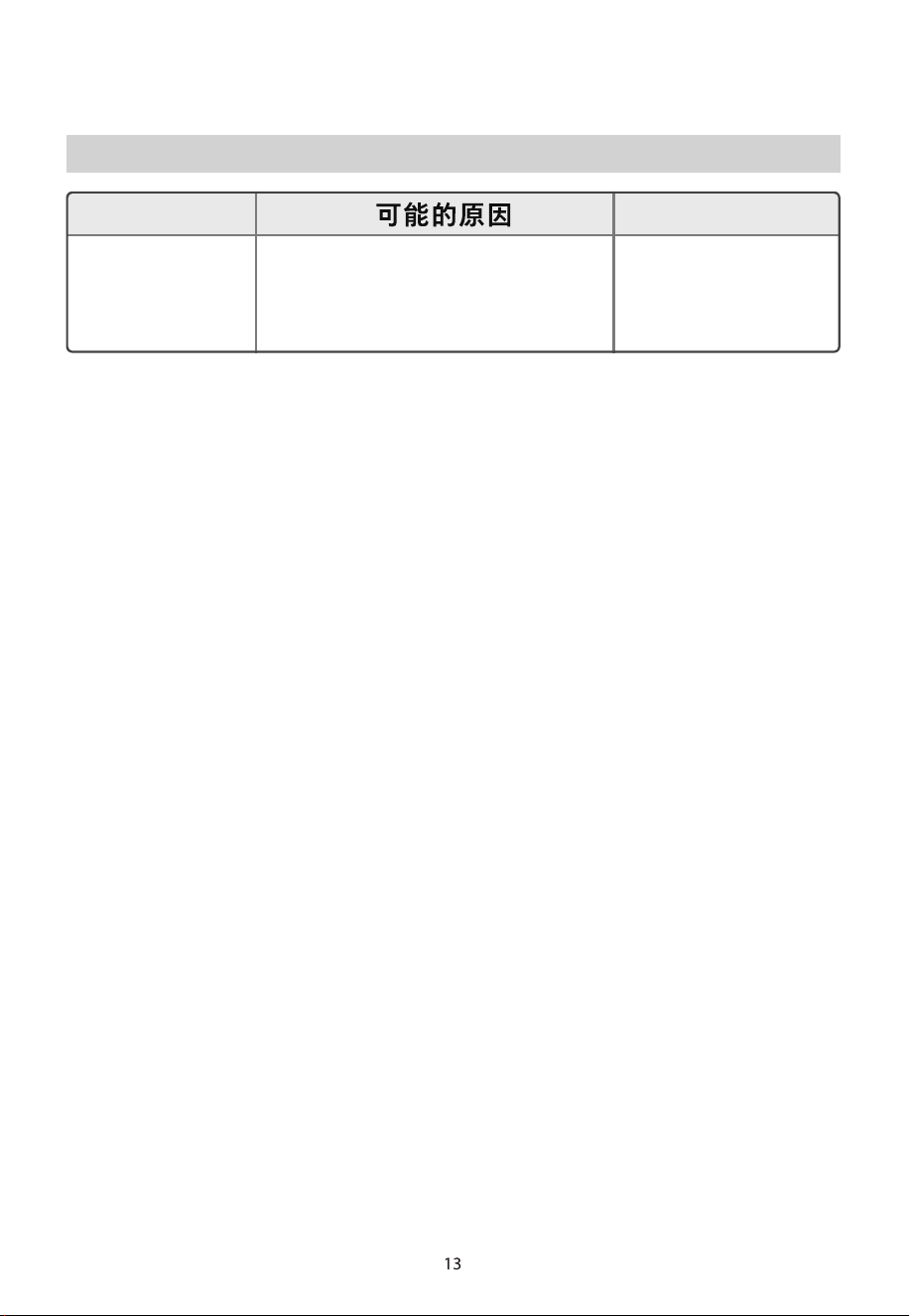
故障自檢
異常現象 處理方法
解鎖圖標、鎖定
圖標、80℃圖標
閃爍,蜂鳴器鳴
叫10聲
水泵檢測保護
斷開電源後重新上
電,若仍顯示異常
請送售後服務點檢
修

#DetailsMatter
https://www.toshiba-lifestyle.com/hk

USER
MANUAL
THERMO POT
TP-25DR2UHK(W)


Contents
Safety Warnings
Safety Warnings ...........................................................................................................................................................................04
Overview
Part Name ......................................................................................................................................................................................05
Control Panel ................................................................................................................................................................................06
Parameters.....................................................................................................................................................................................06
Instructions for Use
Precautions for Use.....................................................................................................................................................................07
Adding Water and Power On...................................................................................................................................................07
Boiling and Keeping Warm (Tap Water/Purified Water)............................................................................................... 07
Direct Keep Warm (For Purified or Ready-to-Drink Water)..........................................................................................08
Dispensing Water........................................................................................................................................................................08
Lid Removal and Installation...................................................................................................................................................09
Cleaning and Maintenance
Cleaning and Maintenance Precautions.............................................................................................................................10
Daily Cleaning ..............................................................................................................................................................................10
Descaling........................................................................................................................................................................................11
Service Guide
Fault Self-test ................................................................................................................................................................................12
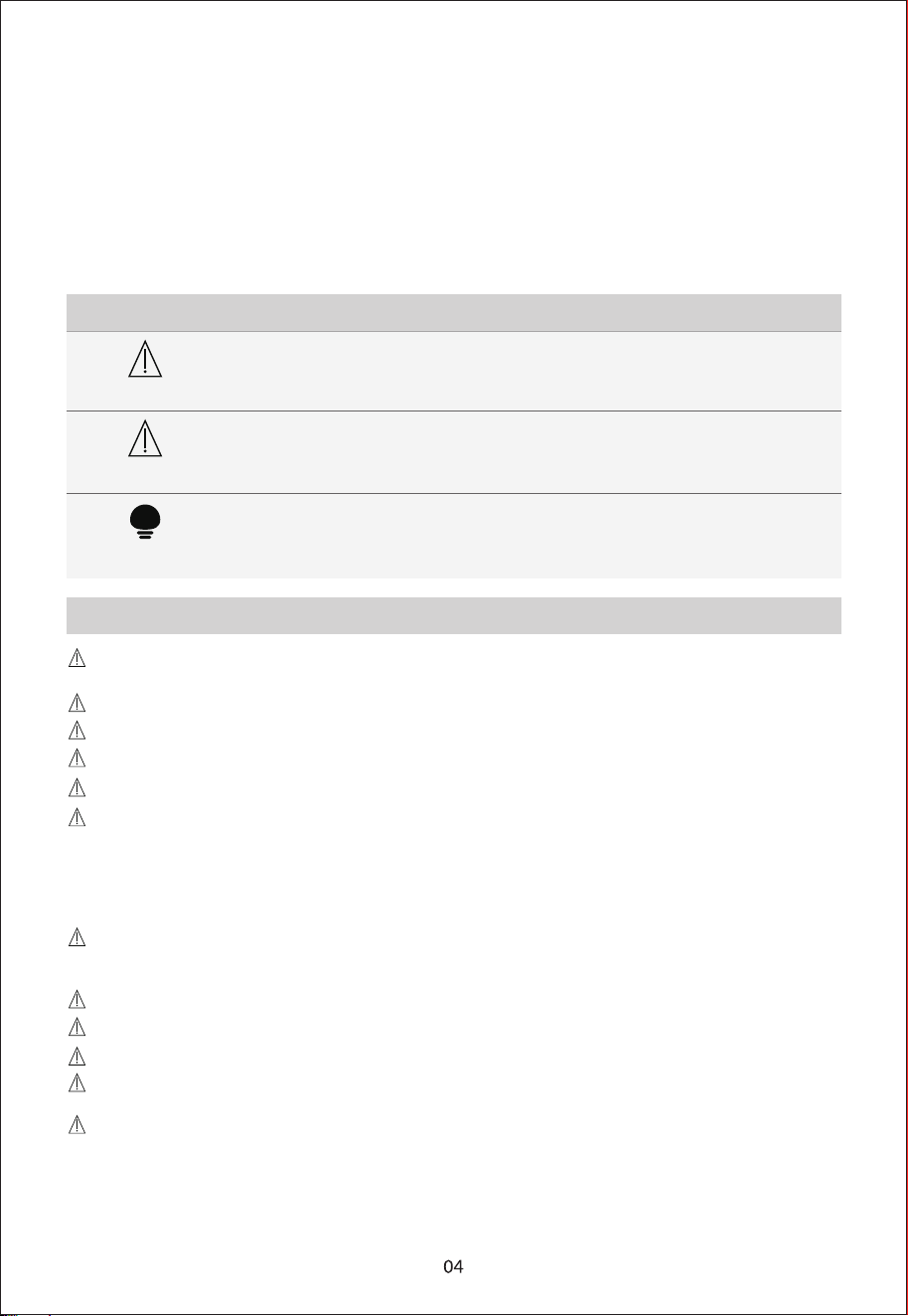
Safety Warnings
Warning
Note
Tip
Explanation of Marking Symbols
[Warning] Important Safety Precautions
Indicates safety matters that may cause death or serious injury
Indicates safety matters that may cause minor injuries or property damage
Indicates other matters that may affect the user experience
■ To ensure safe use and avoid injury and property loss to you or others, please be sure to
observe the following safety precautions.
■ Failure to observe safety warnings and incorrect use may cause accidents.
■ This appliance does not take into account the use of the appliance by unattended young
children and disabled people, and the situation of young children playing with the
If the supply cord is damaged, it must be replaced by the manufacturer, its service agent or similarly
qualified persons in order to avoid a hazard.
appliance, which may cause accidents.
The appliance must not be immersed.
The heating element surface is subject to residual heat after use.
If the THERMO POT is overfilled, boiling water may be ejected.
Do not use outdoors.
The appliance is intended to be used in household and similar applications such as:
- staff kitchen areas in shop, offices and other
working environments;
- farm houses;
- by clients in hotels, motels and other residential type environments;
- bed and breakfast type environments.
This appliance is not intended for use by persons (including children) with reduced physical, sensory or
mental capabilities, or lack of experience and knowledge, unless they have been given supervision or
instruction concerning use of the appliance by a person responsible for their safety.
Children should be supervised to ensure that they do not play with the appliance.
Cleaning and user maintenance shall not be made by children without supervision.
WARNING: Misuse may cause potential injury.
Please turn off and unplug the appliance before cleaning, maintenance or relocation and whenever it is
not in use.
Warning: Avoid spillage on the connector.
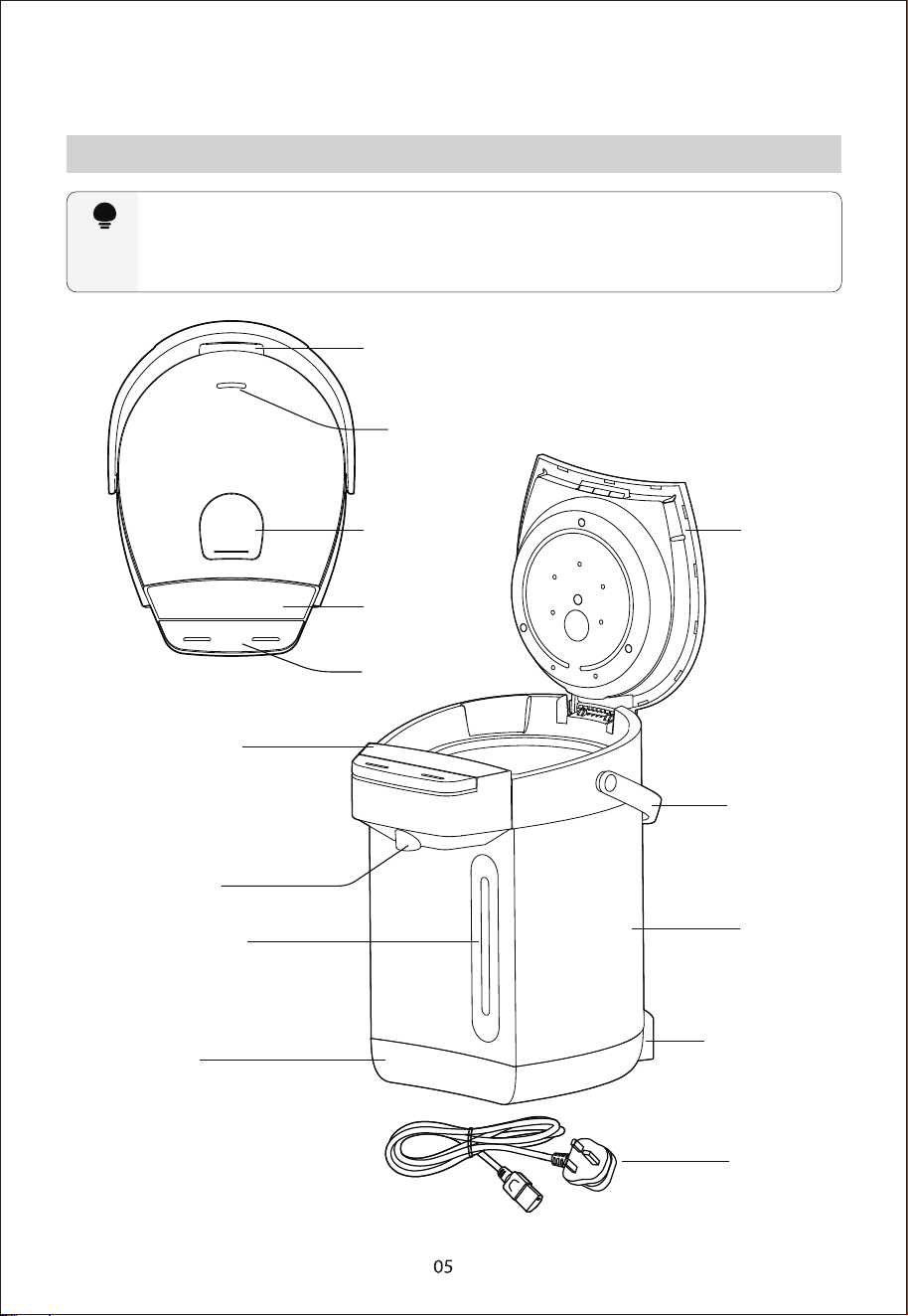
Overview
Part Name
Tip
Please understand the following before using the appliance so that you can quickly master
the appliance usage
Due to the continuous upgrading of our appliance s, if there is a difference between the actual
appliance and the picture below, please refer to the actual appliance.
This appliance is a desktop appliance and is not allowed to be used as an embedded appliance.
*Be careful not to touch when heating
Lid latch
Steam outlet
Lid opening
button
Operation
panel
Dispense
button
Operation
panel
Water outlet
Water gauge
window
Base
Thermo Pot
lid
Handle
Casing
Power interface
Power cord
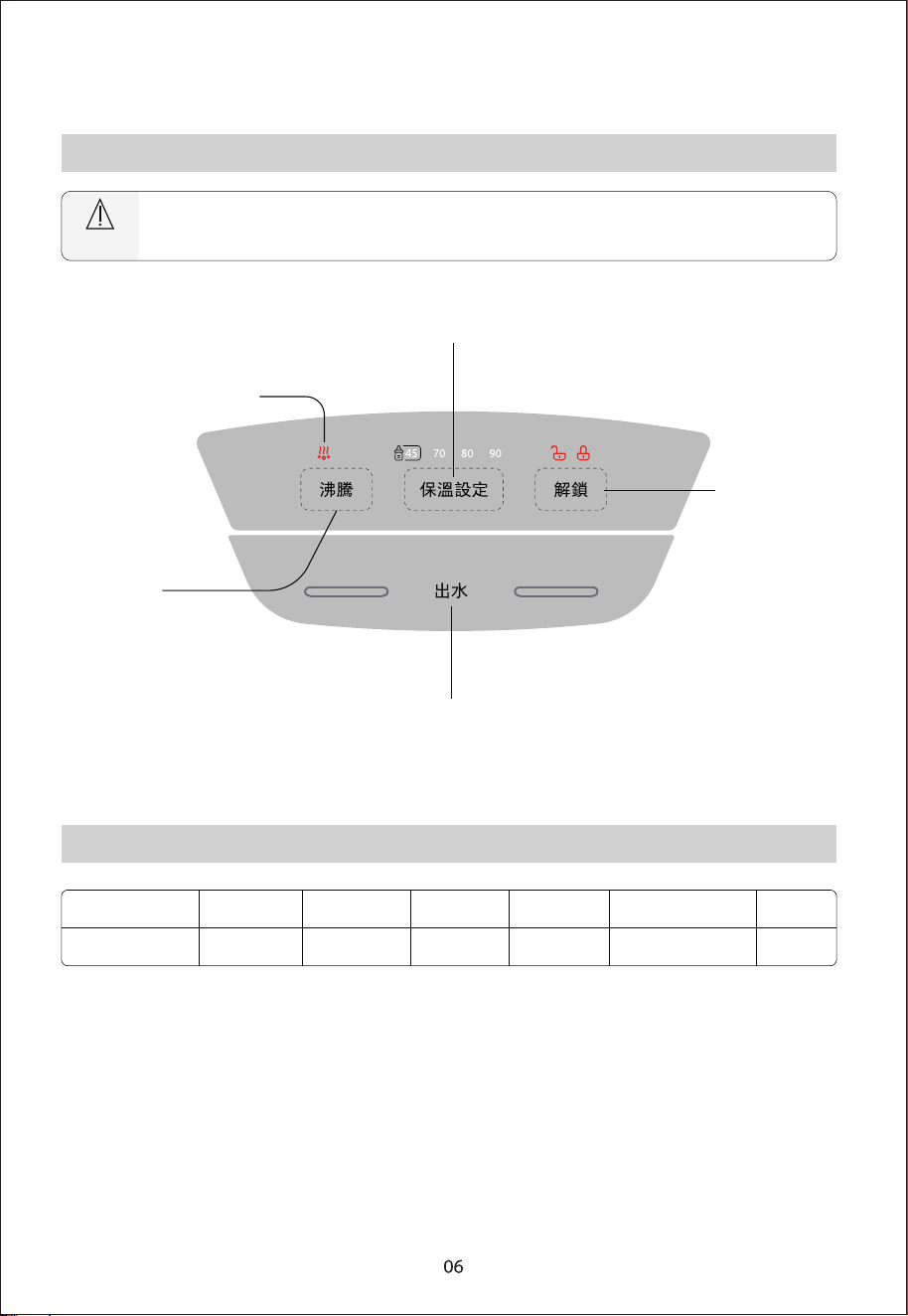
Control Panel
Parameters
Note
Due to the difference in appliance appearance, the following picture is for reference only.
Please refer to the actual appliance in the packaging box.
Model
Rated
capacity
Rated
voltage
Rated
frequency
Rated
power
Product Size
(W x D x H)
Product
Weight
TP-25DR2UHK(W) 2.5L 220-240V~ 50/60Hz 1500-1800W 215x279x308(mm) 2.50kg
Keep-warm setting key
Dispense key
Boiling dechlorination
indicator light
Boil key
Unlock key
Instructions for Use
Adding Water and Power On
Boiling and Keeping Warm (Tap Water/Purified Water)
Precautions for Use
Add clean water to the thermo pot (the amount of water added must not exceed the maximum water
scale line), close the lid, turn on the power, and the thermo pot will enter standby mode
Press the [沸騰/Boiling] button to start boiling water. If no keep-warm temperature is selected,
the electric water boiler will boil, dechlorinate, and naturally cool down to 45°C to maintain
the temperature.
If you need to set a keep-warm temperature, press the [保溫設定/Keep Warm Setting] button to
select the desired temperature 45°C, 70°C, 80°C, 90°C or no keep-warm function (no temperature
indicator light will be on). �After selecting, press [沸騰/Boiling] . The electric water boiler will boil,
dechlorinate, and naturally cool down to the selected temperature to maintain it.
When in keep-warm mode, if no operation is performed within 48 hours, the electric water boiler
will stop keeping warm and enter standby mode.
• It is normal if the first water dispense is not smooth because the air in the pipe needs to be discharged.
• Before the first use or after a long period of non-use, water should be added to 1-2L of the inner tank
capacity and then boiled to clean the inner tank. The boiled water at this time is not suitable for drinking!
• This appliance is suitable for use below 3000 meters above sea level.
• Be careful not to wet the thermo pot when adding water.
• The keep-warm setting can be performed while boiling water or after the water is boiled.
• Prevent dry heating: If the water volume in the thermo pot is lower than the water filling scale or there is no water
when the appliance is powered on, please add water in time to prevent the appliance from dry heating
failure.
• Water cannot be dispensed if the power cord is unplugged. Press [Unlock], and then press [Dispense] to
dispense water.
• During the keep-warm process, if the user does not press any button in 48 hours, the appliance will enter
standby mode.
Direct Keep Warm (For Purified or Ready-to-Drink Water)
Dispensing Water
If [Unlock] is not pressed to unlock the machine, the thermo pot will not dispense water
when [Dispense] is pressed, and the lock indicator will flash 5 times, prompting the user to
unlock.
While in standby mode, press the[保溫設定/Keep Warm Setting] button repeatedly to cycle through
the options in the following order: 45°C, 70°C, 80°C, 90°C, or Cancel. After selecting the desired
temperature, the electric water boiler will heat the water to the selected temperature and maintain
it.When in keep-warm mode, if no operation is performed within 48 hours, the electric water boiler
will stop keeping warm and enter standby mode.
Press [Unlock], the unlock indicator light
will light up, and the water dispensing
lock will be released
Hold [Dispense], and water will flow out of the
water outlet of the thermo pot
Note
Unlock Tip
The direct keep-warm function only heats water to the selected keep-warm
temperature without boiling. Please use purified, filtered, or other
ready-to-drink water.
長按出水
Lid Removal and Installation
Removing the lid: Open the lid, keep the lid at 20~30° with the horizontal plane, hold the lid
with one hand, and press the back seat buckle with the other hand to remove the lid
Installing the lid: Press the back seat buckle with one hand, align the lid with the connecting
shaft with the other hand, place it in the slot, and then release the back seat buckle to fix the lid
and complete the lid installation
Press the
back seat
buckle
Press the
back seat
buckle
Cleaning and Maintenance
Cleaning and Maintenance Precautions
Daily Cleaning
Unplug the power plug, drain the water in the thermo pot, and wipe off the water marks with a dry
towel. Wipe the outside of the thermo pot with a wet towel that has been wrung out of water for next
use
• Please make sure that the power plug is unplugged from the socket before cleaning, and wait until the
thermo pot cools down before cleaning.
• To extend the service life of the thermo pot, the mineral deposits (scale) in the water thermo pot should be
cleaned regularly, and descaling agents (such as white vinegar, citric acid) can be used for cleaning.
• There will be a small amount of odor after descaling and cleaning. Add clean water and rinse the inner tank
several times to remove the residual descaling agent odor.
• It is strictly forbidden to rinse the outside of the thermo pot with water. Do not use steel wool or any chemical or
abrasive powder detergent to clean it.
• Use a plastic sponge with water to clean the inner tank. Do not use detergent powder, straw brush, or nylon
brush. Do not use a dishwasher or dryer to bake, or the thermo pot will be deformed and damaged.
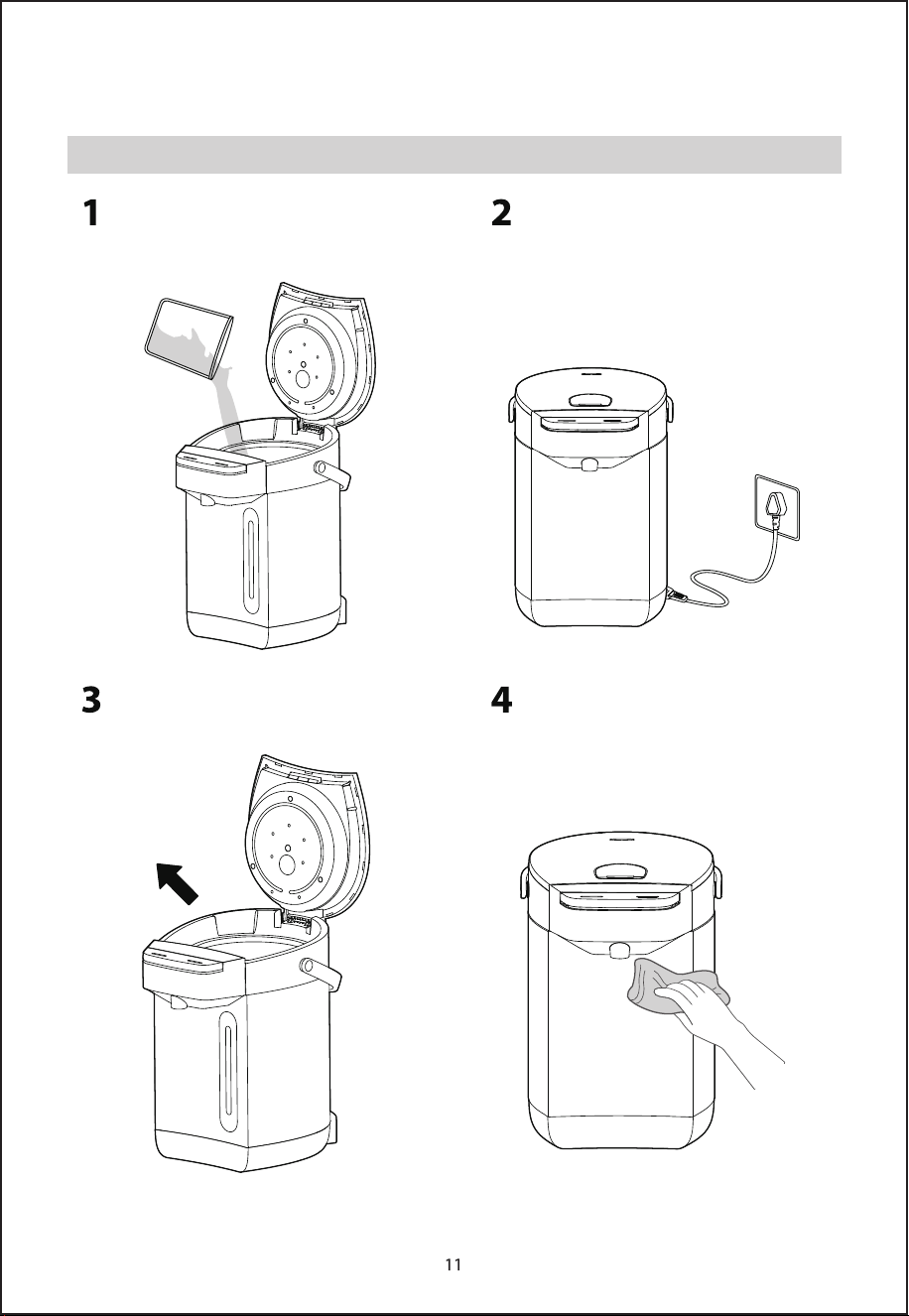
Descaling
Disconnect the power supply and add
descaling agent and clean water to the
thermo pot
Turn on the power supply and boil the
descaling agent solution
Pour out the descaling agent solution after
standing for a while
Rinse the inner tank with clean water and
wipe it dry with a clean soft cloth
Service Guide
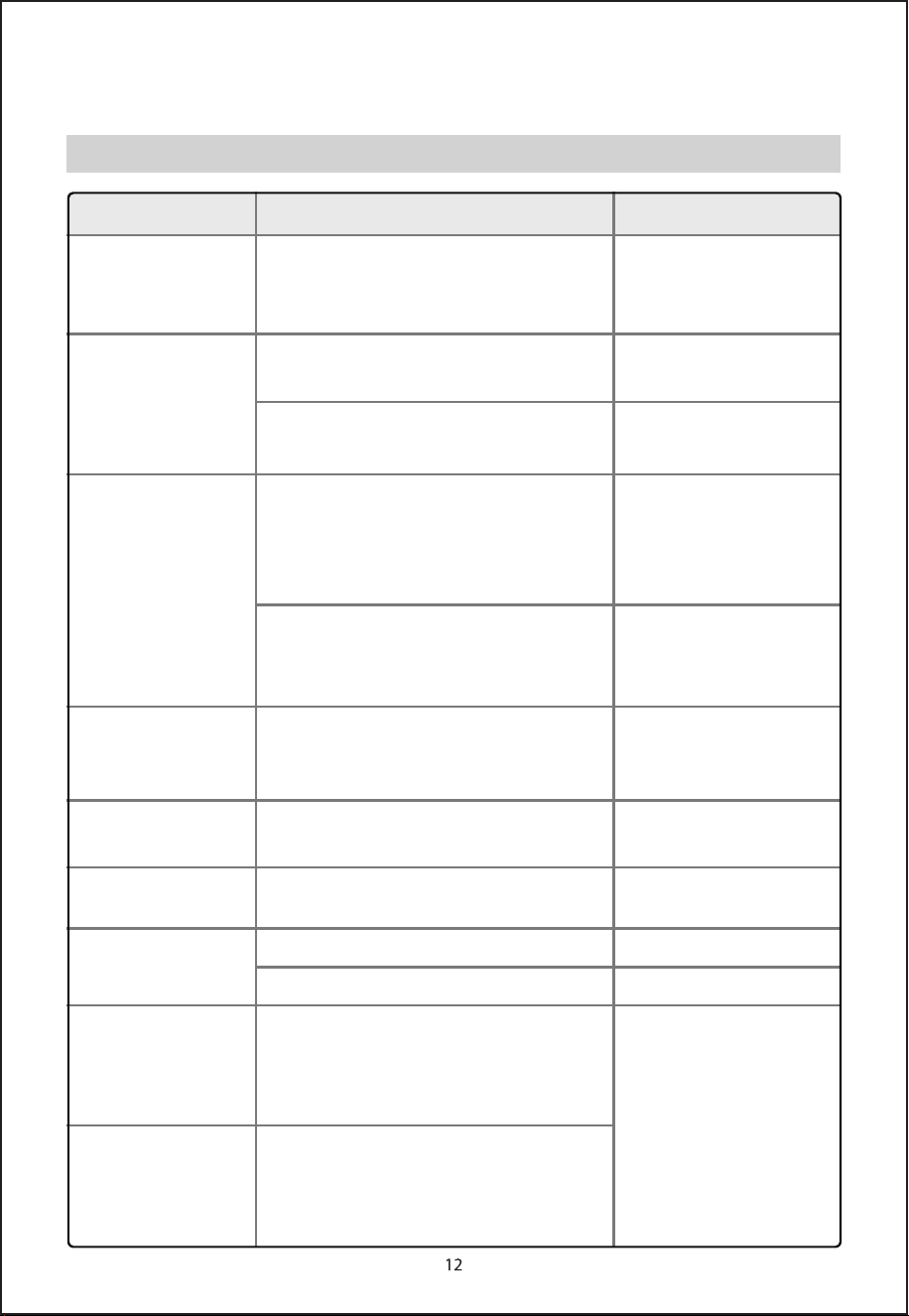
Fault Self-test
Fault Possible cause Treatment method
There are white or shiny
suspended matters in
the hot water
The scale that falls off, water with a lot of minerals
(mineral water, water treated by ion water purifier)
is easy to produce scale, attached to the inner tank
or floating in the water
Tap water contains more chlorine for disinfection,
which will produce a chlorine smell
The appliance has a small amount of plastic odor
when used for the first time, and the odor will
disappear after a few uses
The filter mesh is blocked by scale
After the water boils for a period of time, the
bubbles generated enter the pump, and
sometimes it is difficult to squeeze out hot water
The thermo pot is locked
The water volume in the thermo pot exceeds the
maximum water level
Machine failure
The scale inside the water thermo pot is too thick
Sensor open circuit
Sensor short circuit
Because the thermo pot is keeping warm at high
temperature, the body shell can reach 60°C when
the room temperature is high
Please follow the descaling
steps to remove the scale
The water is automatically
dechlorinated when it is boiled,
which can remove the chlorine
smell
This is normal
Add citric acid and boil to
clean. Use a brush to clean the
mesh to make it unobstructed
Open the lid first, wait for
about 1 minute until no
bubbles appear before
dispensing water
Press [Unlock], select the water
volume, and then hold
[Dispense] to dispense water
Reduce the water volume in the
thermo pot to below the
maximum water level
Send to after-sales service
center for inspection
Clean the scale
Disconnec
t the power supply
and then power it on again. If
the abnormality is still
displayed, please send to
after-sales service center for
repair
This is normal
Hot water has a peculiar
smell
Poor water dispensing
No water dispensing
The water in the thermo pot
flows out naturally
The body shell is hot
The water cannot be
boiled or the water is
boiled for a long time
Unlock icon, lock icon,
and 45°C icon flash, and
the buzzer beeps 10
times
Unlock icon, lock icon,
and 70°C icon flash,
buzzer keeps beeping
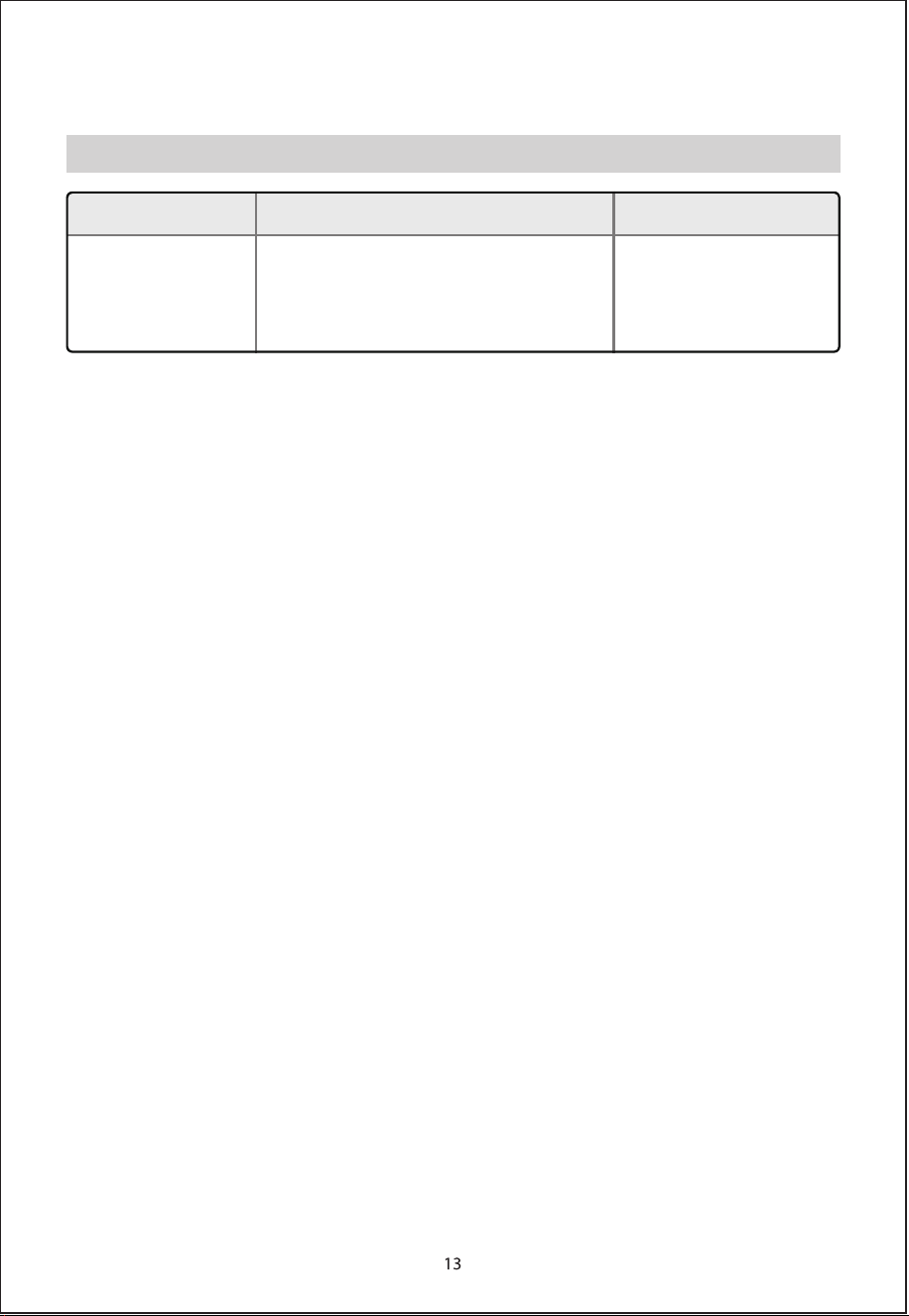
Fault Self-test
Unlock icon, lock icon,
80°C icon flash, buzzer
beeps 10 times
Water pump protection
Disconnect power and then
power on again. If
abnormality is still displayed,
send to after-sales service
center for repair
Fault Possible cause Treatment method

#DetailsMatter
https://www.toshiba-lifestyle.com/hk