844.402.4348
TOUCHLESS MIST SANITIZER
SET-UP GUIDE
VISIT QR CODE TO
WATCH SET-UP
VIDEO
SNAPPYSCREEN
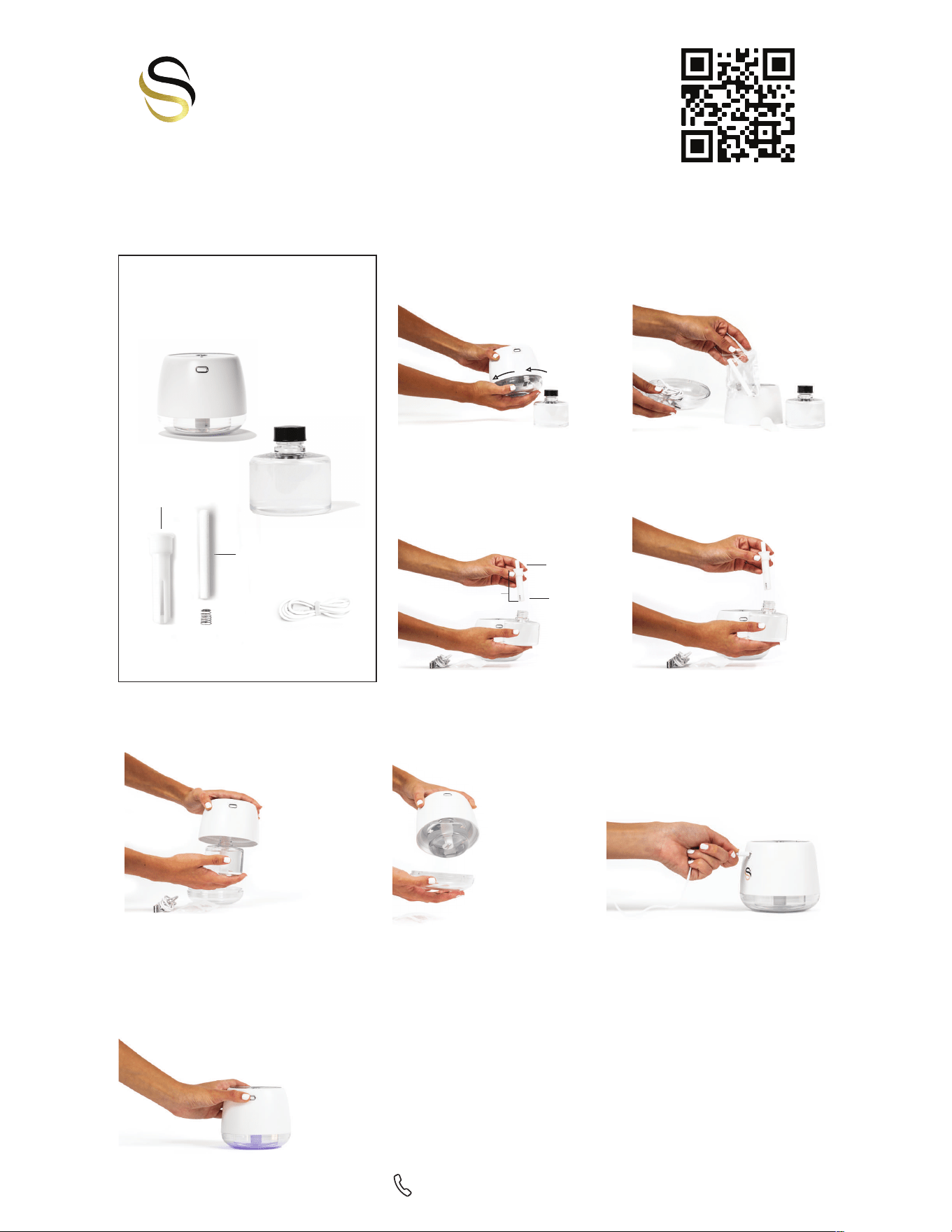
ITEMS INCLUDED IN YOUR
TOUCHLESS MIST SANITIZER
Sanitizer Tank
PART B
Charger
PART F
Tank Insert
PART C
Cotton Wick
PART E
Spring
PART D
Touchless Mist Sanitizer
PART A
STEP 1
Remove clear plastic base on the
bottom of PART A. Twist
counterclockwise to open.
STEP 2
Remove all of the items stored inside of
the base (Includes PARTS C, D, E, & F).
STEP 4
Remove black cap from PART B (sanitizer tank).
Then place fully assembled insert from step 3
(PART C) into the sanitizer tank (PART B).
STEP 3
Remove PART D and PART E from the small
ziplock bag. Hold PART C upright as shown. First
insert PART D (spring) into PART C with the
closed coil side facing upwards. After, place
PART E (wick) on top of PART D (spring). The
wick should bounce on top of the spring when
placed inside of PART C.
PART D
PART E
PART C
STEP 6
Take the clear plastic piece of
PART A and place on the bottom
covering the tank. Twist clockwise
until the clear bottom locks into
place.
STEP 7
Unravel charger (PART F). Insert the small
end into the charging port located above
the logo *only 1 way to insert*. Take the USB
end and insert into a charging cube or USB
charging port. Charge device overnight
(6-8 hours). The tiny red blinking light below
the logo on back indicates charging.
STEP 5
Twist the white top portion of the device
(PART A) onto the fully assembled sanitizer
tank (PART B).
STEP 8
After fully charging, double click the power
button to turn the device on. Hold your hand
above the device until it dispenses a fine mist
of sanitizer.
When turning off, hold down the power button
for 3 seconds. Charge nightly for best use.
NEED ASSISTANCE?
Unit does not respond. No power.
• Plug device into power with provided USB charging cord. Charge for 6-8 hours (tiny red blinking light
indicates charging).
• To power on, ‘double-click’ rapidly. Do not delay between clicks. If double click does not do the trick,
hold power button until LED light appears.
Unit does not spray.
• Ensure spring is properly in place — Take out the cartridge & check to see if spring is below white wick.
Make sure the wick bounces freely up & down on top the spring when touched. If not, try reversing the
direction of spring.
• Make sure unit has charged overnight.
Unit sprays continually.
• Spring may be stuck — Remove cartridge & check that the wick is bobbing freely on the spring & is not
stuck. If stuck, remove wick & pop out spring, then replace properly.
• Sensor on top may be blocked — Ensure nothing is blocking the silver circle or either of the 2 sensors
on top. Gently wipe the top with soft cloth dampened with Windex or warm water.