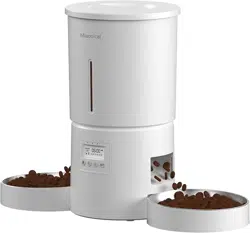
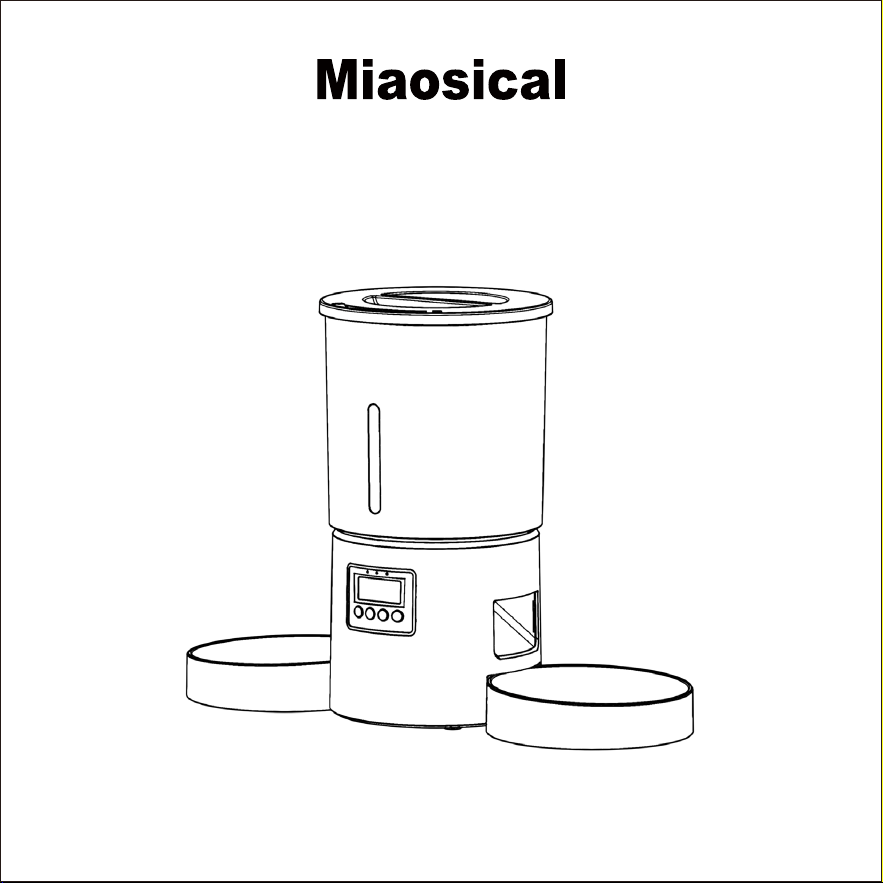
User Manual
Dual Pets Automatic Feeder
Model:SC-A80K
Please read this manual carefully before using

Hello,dear customer,
Hope you and your family (including your furry friends!) are doing great.
I offer my sincerely thank you for your purchasing our dual pets automatic
feeder.
How I choose a good name for my brand when I decide to make pet feeders?
I hope that every kitty meows like musical happily in every pet owners’
home,that’s the brand name MIAOSICAL’s meaning.
I love cats,dogs and small animals as you do.I hope our pet feeder help you
keep your pets healthy and happy,while free your time and hands.
I have a small request: If you like our pet feeder,could you share your
happy experience with us or other pet owners? If you don’t like it,could
you please contact us before return the product ? I and my team are
always ready to provide excellent help to you.Our customer support will make
you 100% satisfied.
Thank you again for your time.
Best regards,
Brand Owner:Rihao Zhang
www.miaosical.com
Brand Owner To You

CONTENTS
Warranty
Safety Warning
Package List
Product Structure
LED Display Panel
Before Using
Assemble The Feeder Procedure
Feeding Schedule Setting
Cleaning and Maintenance
How To Use the Stopper
Suggested Feeding Amount
Automatic Pet Feeder Specifications
1
1
4
5
6
7
8
12
16
20
22
23
Do you have any better ideas to improve our manual?
Don't hesitate to contact us.
We offer 1 year limited after sales warranty since your purchase day.For more
information of warranty policy,please visit our website warranty page at
www.miaosical.com/warranty.
As users of our product,you don’t worry any problems,our customer support
team can be reached in 24 hours of any day:[email protected]
For better serve your need,could you please register your purchased product
on our website:www.miaosical.com/warranty/warranty-register, or scan below
QR code on your mobile browser:
For Pet Use Only – This feeder is designed for cats,small dogs,and small
animals. Do not use it for large dogs or other animals or livestock.
Warranty
Safety Warning

Indoor Use Only – Keep the feeder in a dry, indoor environment. Do not
expose it to rain, moisture, or extreme temperatures.
Supervise Initial Use – Monitor your pets when first using the feeder to
ensure they interact with it safely.
Use Appropriate Food – Dry pet food only in the food container. Do not
place wet food, raw food, or treats that could clog the dispenser to the
food container.Wet food, raw food, water or treats can be manual placed
in the bowls only.
Power Safety – If using an adapter, ensure it is properly plugged in. If
using 3 D cell batteries,replace them every 4-6 months to prevent power
failure.We suggest alkaline batteries.
Secure Placement – Place the feeder on a flat, stable surface to prevent
falling off or spilling.
Do Not Submerge in Water –The machine main unit is not waterproof,do
not clean it with water.
Regular Maintenance – Clean the feeding bowls and food compartment
regularly to prevent contamination.

Keep Small Parts Away from Children & Pets – Some components may
pose a choking hazard.
Desiccant Bag is Inedible –Don’t break up the desiccant bag or mix it with
pet food.Replace the desiccant bag every month to keep pet food Dry and
Fresh.
Do not disassemble the feeder main body by yourself.Do not modify feeder
base inside units.
Before cleaning the product,please unplug the power plug.
In case of power outage,for your pet’s safety, please use both the power
plug and D cell batteries simultaneously.If you use D cell batteries only ,check
the remaining battery level periodically.If traveling for a long time, please
replace the batteries with new ones.
Failure to follow these safety instructions may result in malfunction, injury,
or damage to the product.
If you experience any issues, discontinued use,please contact our custom-
er support [email protected].
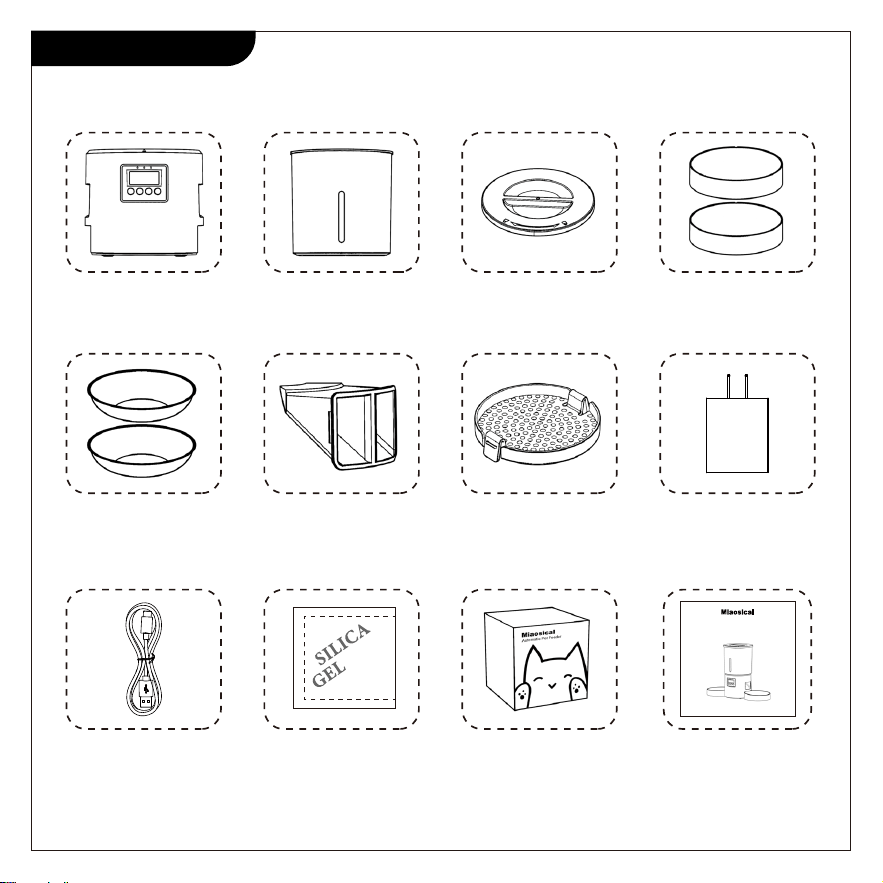
Package List
Feeder Base
x 1
Lid
x1
ABS Bowl
x2
Stainless Steel Bowl
(Optional) x2
Power Adapter
x1
Stopper
x1
Dessicant Bag
x1
Dessicant Bag Cover
x1
Charging Cable
x1
Package Box
x1
User Manual
x1
Pet Food Container
x1
User Manual
Dual Pets Automatic Feeder
Model:SC-A80K
Please read this manual carefully before using
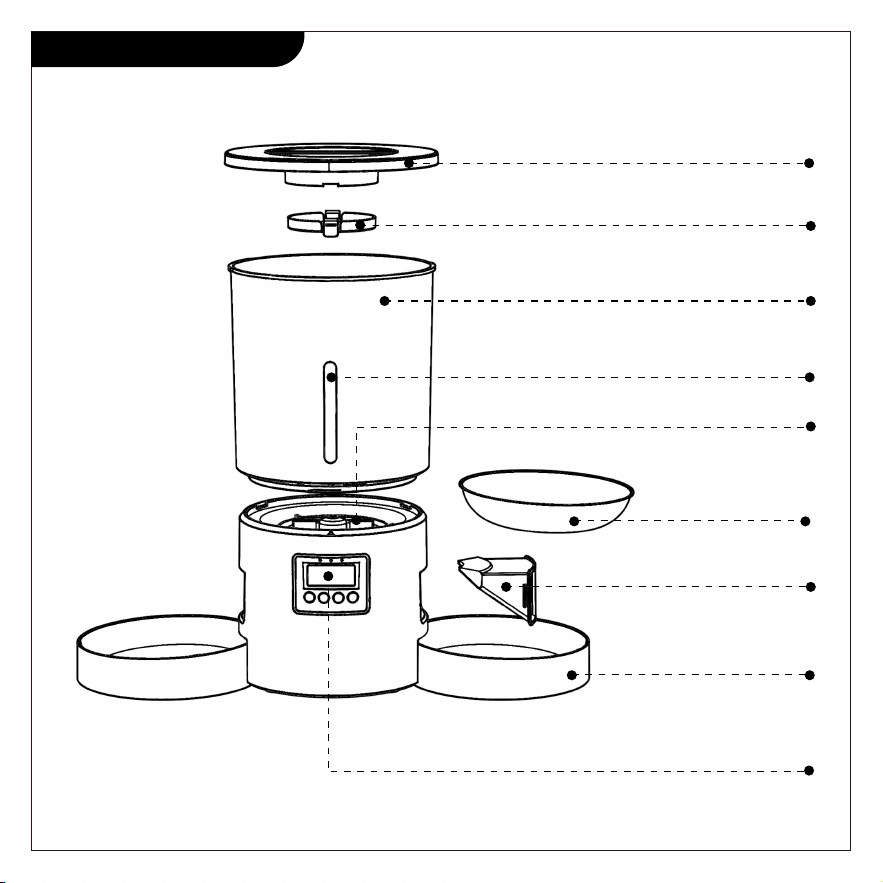
Product Structure
Safe-Lock Lid
Desiccant Bag Holder
4.2L Container
Stopper
Anti-clog Rotor
+Stainless
Steel Bowl
(optional)
Pet-safe
ABS Bowl
Transparent Strip
Press Panel
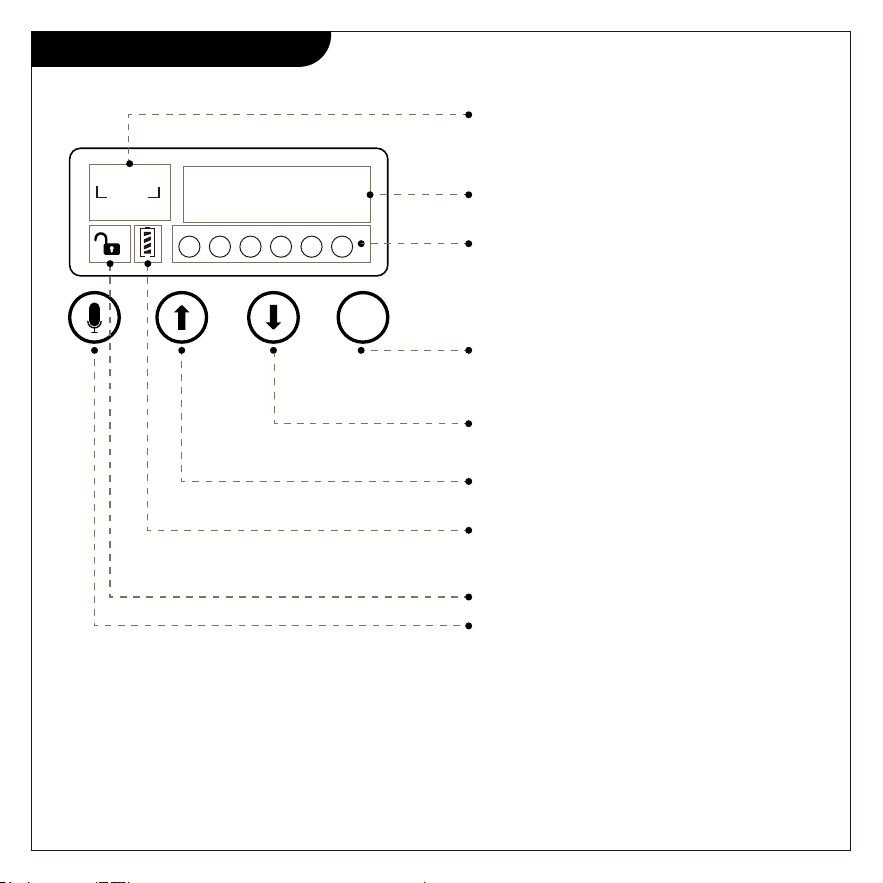
Feeding schedule setting steps:
firstly set the current time→secondly set feeding meals quantity each day→
thirdly set feeding time for each meal→fourthly set quantity of portions for
each meal→fifthly set the meal call voice.
LED Display Panel
PORTION
AM
PM
1 2 3 4 5 6
06:00
16
Current time or feeding time
The number of portions/servings to
feed your pet at one meal
SET
The number of meals to feed each
day.You can set 1-6 meals per day
Power display.Only show battery
remaining power when using batteries
as the power supply
Manual feed or setting
hours/minutes/meals/portions to minus
Setting hours/minutes/meals/portions
to add ,or view setting schedual
Press 3 seconds to unlock.In setting
status,short press once:confirm;long
press 3 seconds:back to homepage
Lock/unlock
Press 3 seconds to record your voice
(up to 10 seconds)
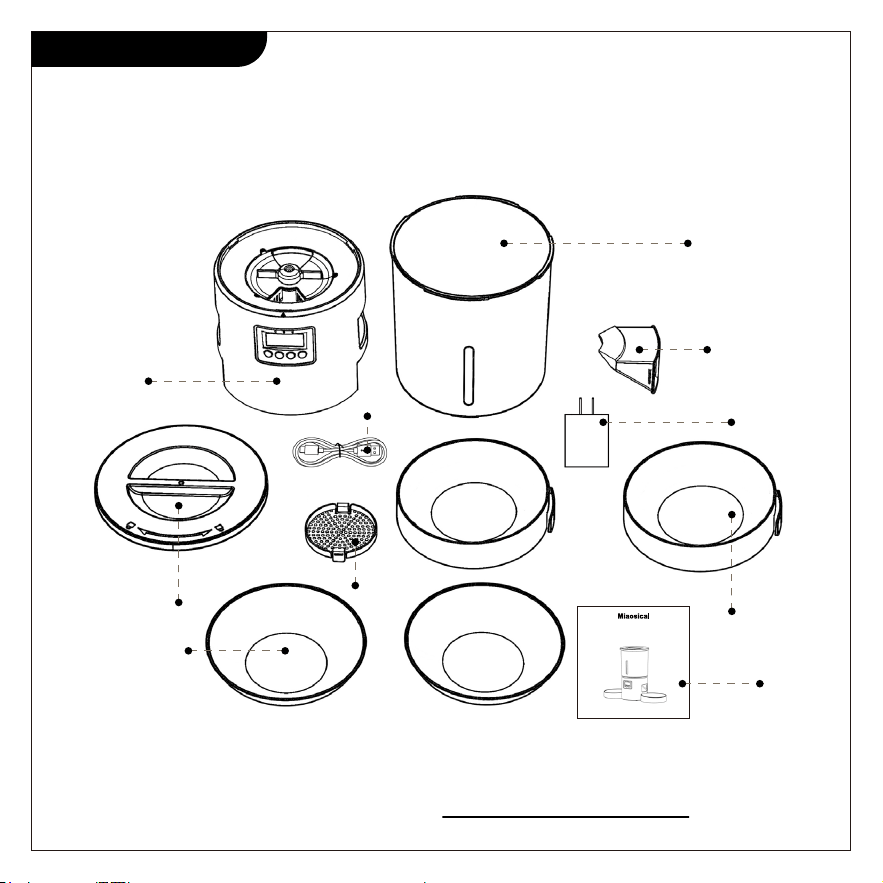
When you receive the feeder product,don’t hurry to use.
Take out all units and check no parts missing.
If you find some parts missing or the feeder had been used before,
contact us immediately: [email protected]
Before Using
X 1
X 1
X 1
X 1
X 1
X 1
X 2
X 2(optional)
X 2
User Manual
Dual Pets Automatic Feeder
Model:SC-A80K
Please read this manual carefully before using
X 1
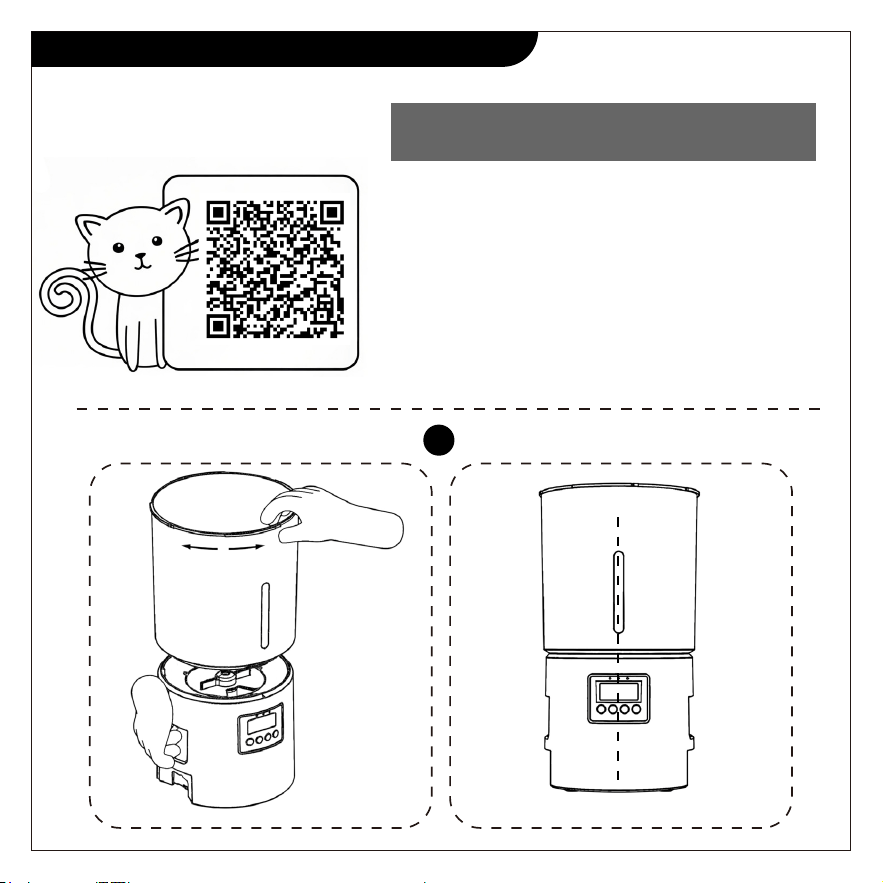
Hold the feeder main body in one hand,hold
the food bucket on another hand,then
rotate the food bucket in the feeder main
body until they are locked together.
Note:food bucket transparent strip and
the display panel is on the same
horizontal line.
Assemble The Feeder Procedure
Scan below QR code to
watch this step video:
1
1. Assemble the Feeder Main Body
with Food Bucket
2
3
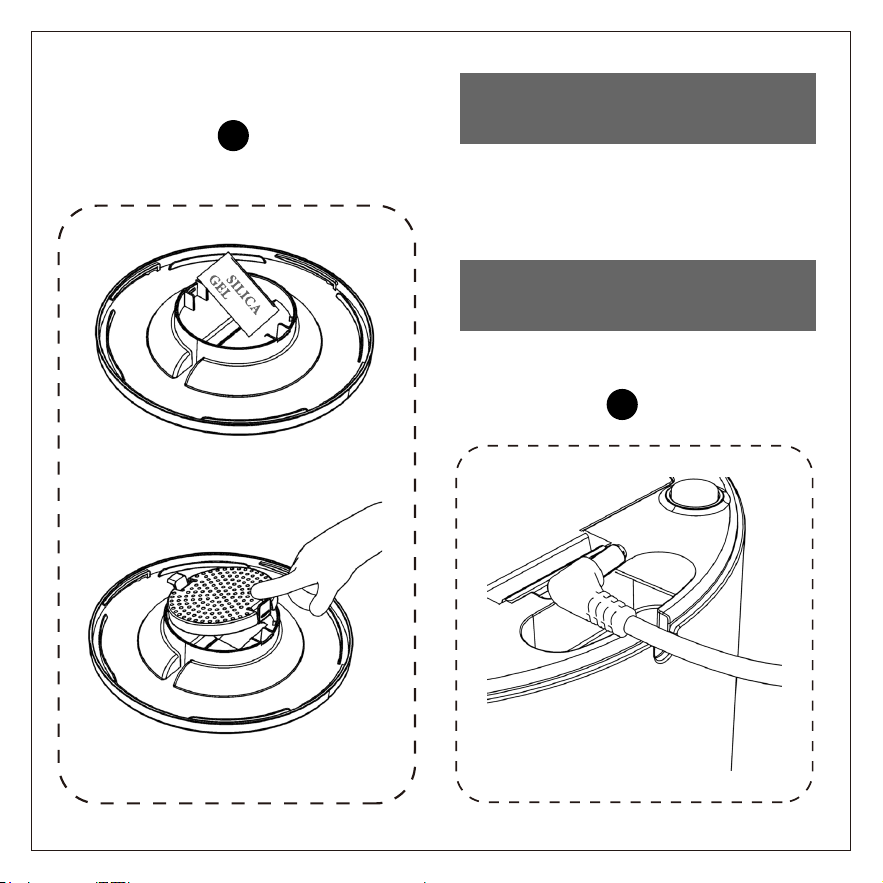
Place the desiccant bag into the
lid,press cover both sides with your
fingers.
2. Assemble the Lid with the
Desiccant Bag Holder
3. Install the Power Cord and
Batteries
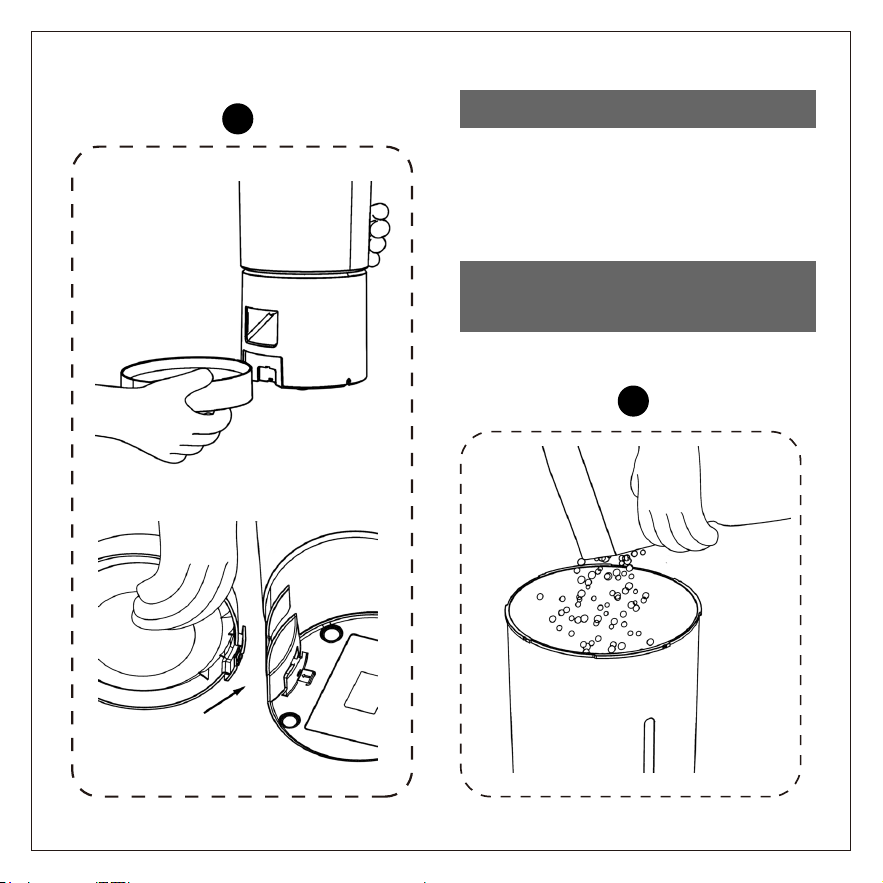
Hold the feeder main body upside
down in one hand,then place the
bowls into the lock position with
another hand.
4
5
4. Assemble the Bowls
5. Pour Dry Pet Food into the
Food bucket
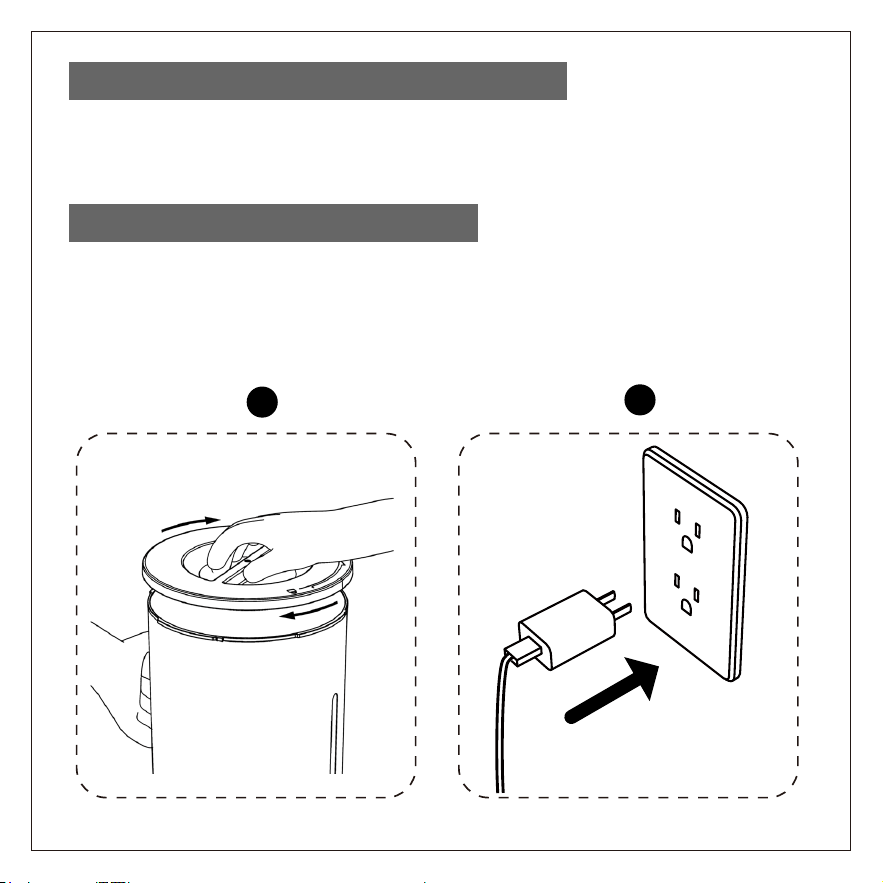
Hold tightly the food bucket in one hand,hold the lid on another
hand,then rotate the lid to the lock location.
Plug the USB power adapter into your power outlet,the panel display will
light up automatically,indicating that the feeder is ready to use,then
begin to next setting.
6
7
6. Assemble the Lid into the Food Bucket
7. Connecting the Power Supply
Feeding Schedule Setting
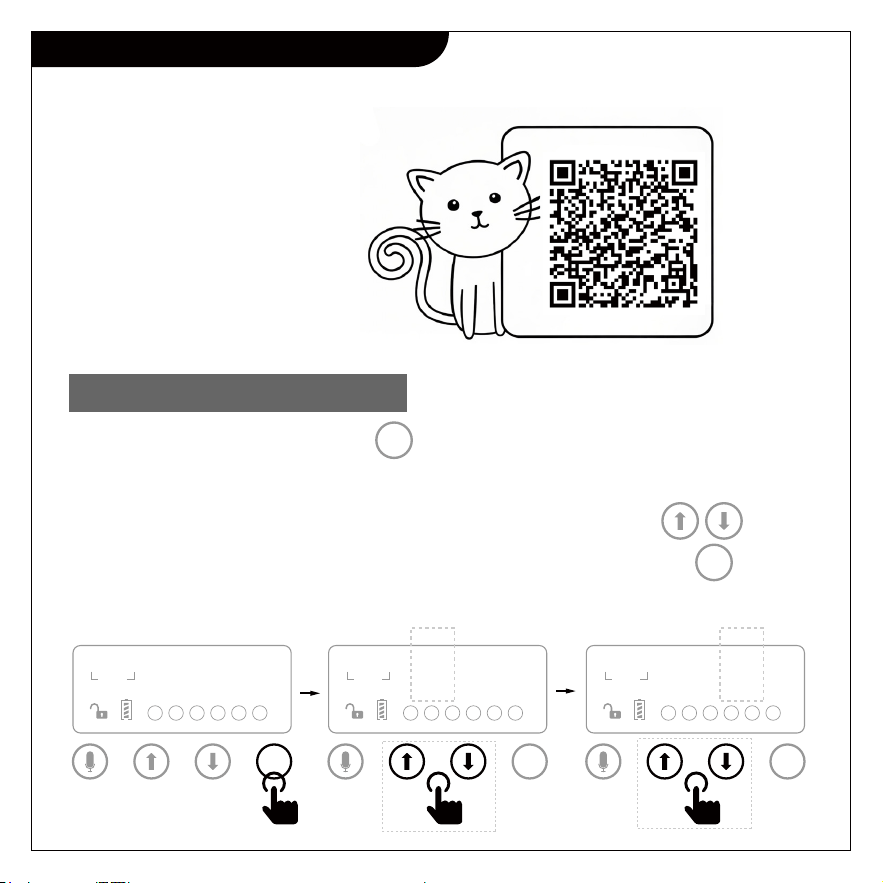
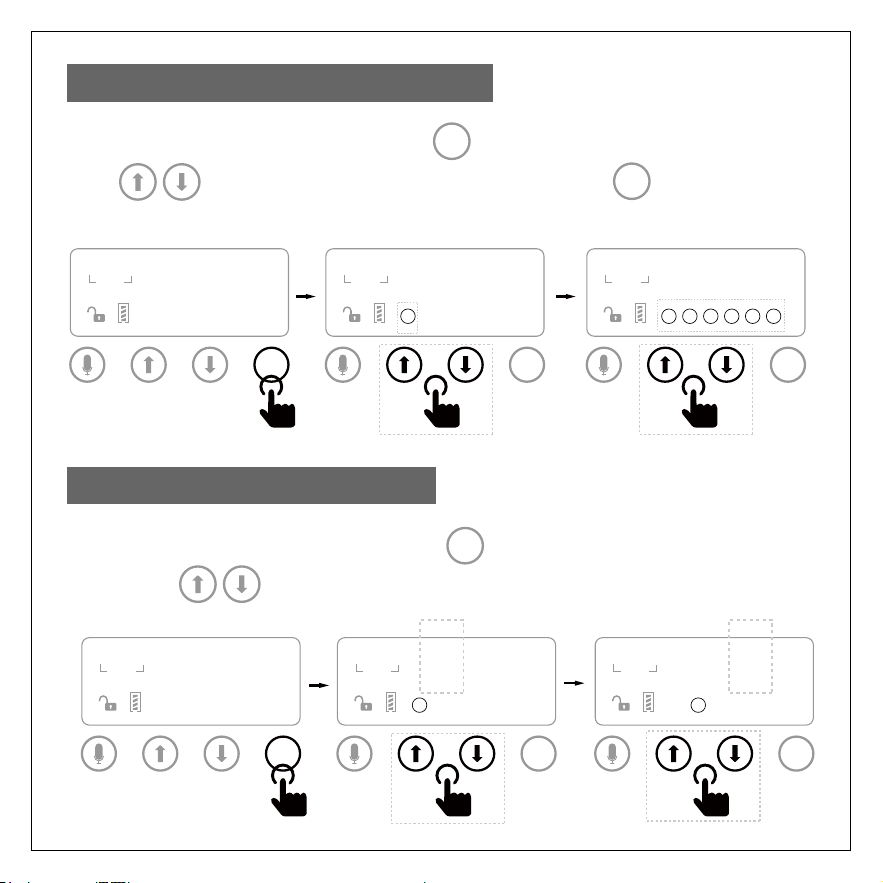
After power on,long press the button into unlocked status,then begin
schedule setting.
In unlocked status,the numbers field will flash,then press to set
the current time hour,after setting hour 1-12 ,AM or PM,press button
to set minute 00-59.
SET
SET
1. Current Time Setting
PORTION
AM
PM
1 2 3 4 5 6
00:00
00
SET
PORTION
AM
PM
1 2 3 4 5 6
06:00
00
SET
PORTION
AM
PM
1 2 3 4 5 6
06:30
00
SET
Scan the right QR code
to watch this step video:
After setting the meals number,press button to set meal time for each
meal. Use button to set each meal time hour and minute.
SET
After setting the current time,press button to set 1-6 meals daily.
Use button to set meals number,then press button.
SET
SET
2. Daily Meals Number Setting
3. Each Meal Time Setting
PORTION
AM
PM
06:00
00
SET
PORTION
AM
PM
1
06:00
16
SET
PORTION
AM
PM
1 2 3 4 5 6
06:30
16
SET
PORTION
AM
PM
00:00
00
SET
PORTION
AM
1
05:30
16
SET
PORTION
PM
2
08:30
16
SET
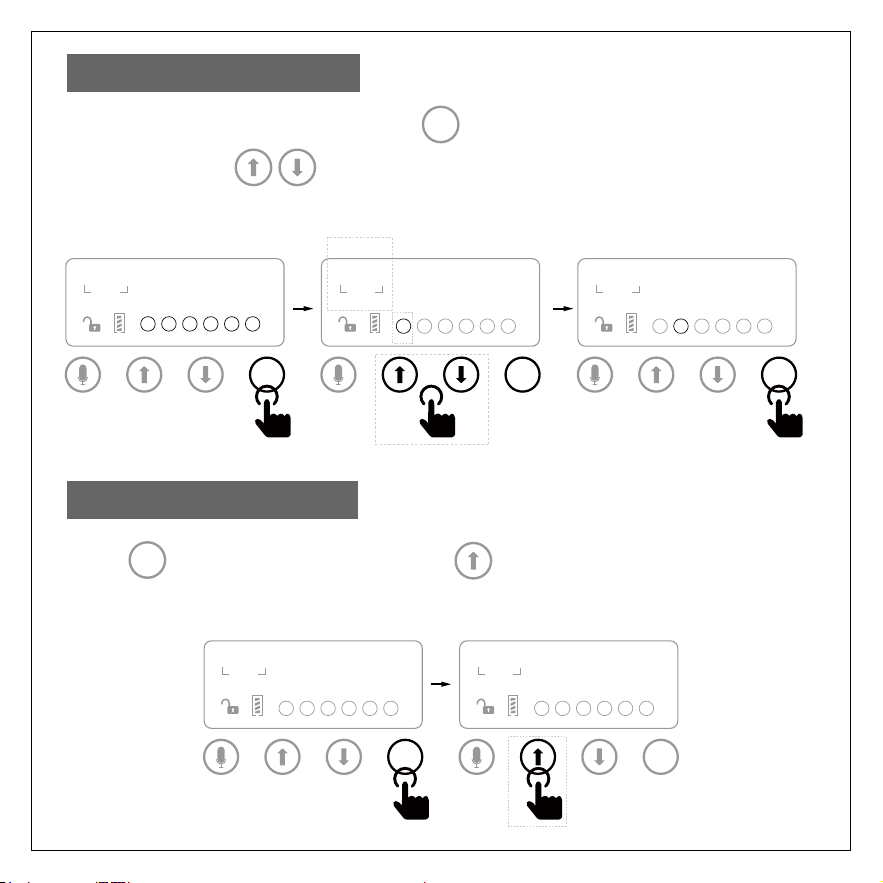
After setting the meals time,press button to set portions number for
each meal,Use button to set portions for each meal ( each
portion/serving is 6g±2g).
SET
4. Portions Setting
Press button to unlock,then press button to manually feed
1 portion/serving.
SET
5. Manual Feeding
1 2 3 4 5 6
PORTION
AM
PM
06:00
00
SET
PORTION
AM
PM
1 2 3 4 5 6
06:00
05
SET
PORTION
AM
PM
1 2 3 4 5 6
08:00
16
SET
PORTION
AM
PM
1 2 3 4 5 6
06:00
16
SET
PORTION
AM
PM
1 2 3 4 5 6
06:00
16
SET
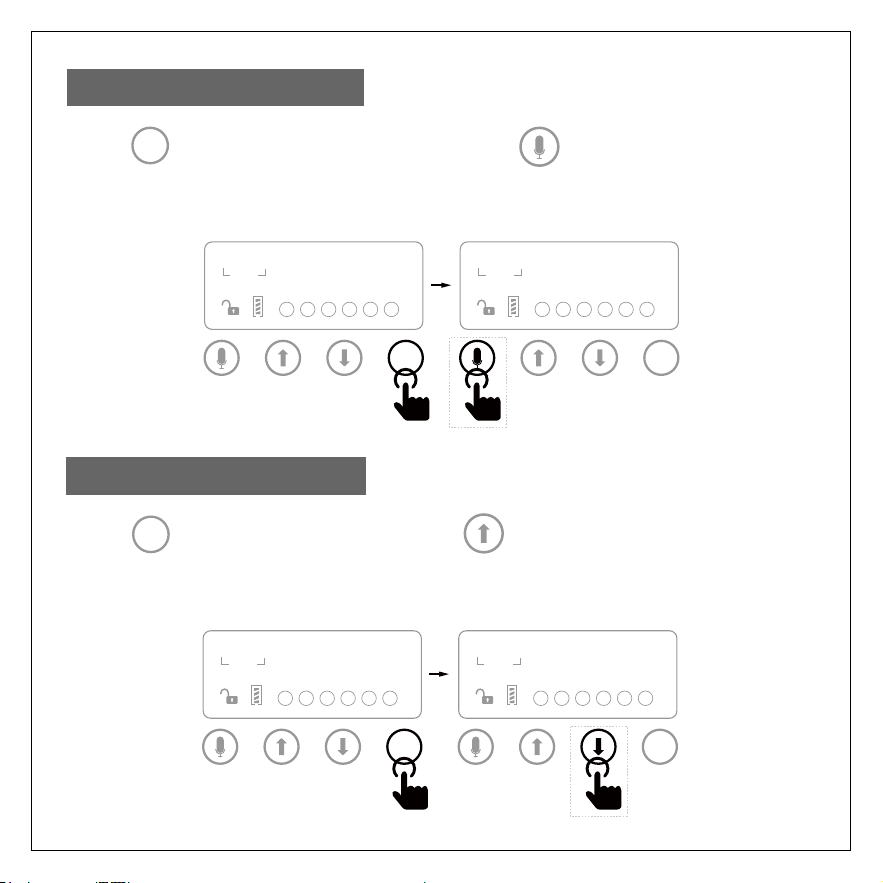
Press button to unlock,then short press button for 3 seconds,
the red light will flash,then begin recording (up to 10 seconds).
SET
6. Voice Recording
PORTION
AM
PM
1 2 3 4 5 6
06:00
16
SET
PORTION
AM
PM
1 2 3 4 5 6
06:00
16
SET
Press button to unlock,then press button you can see all
your settings.
SET
7. View Your Setting
PORTION
AM
PM
1 2 3 4 5 6
06:00
16
SET
PORTION
AM
PM
1 2 3 4 5 6
06:00
16
SET
(How to disassemble the machine)
Cleaning and Maintenance
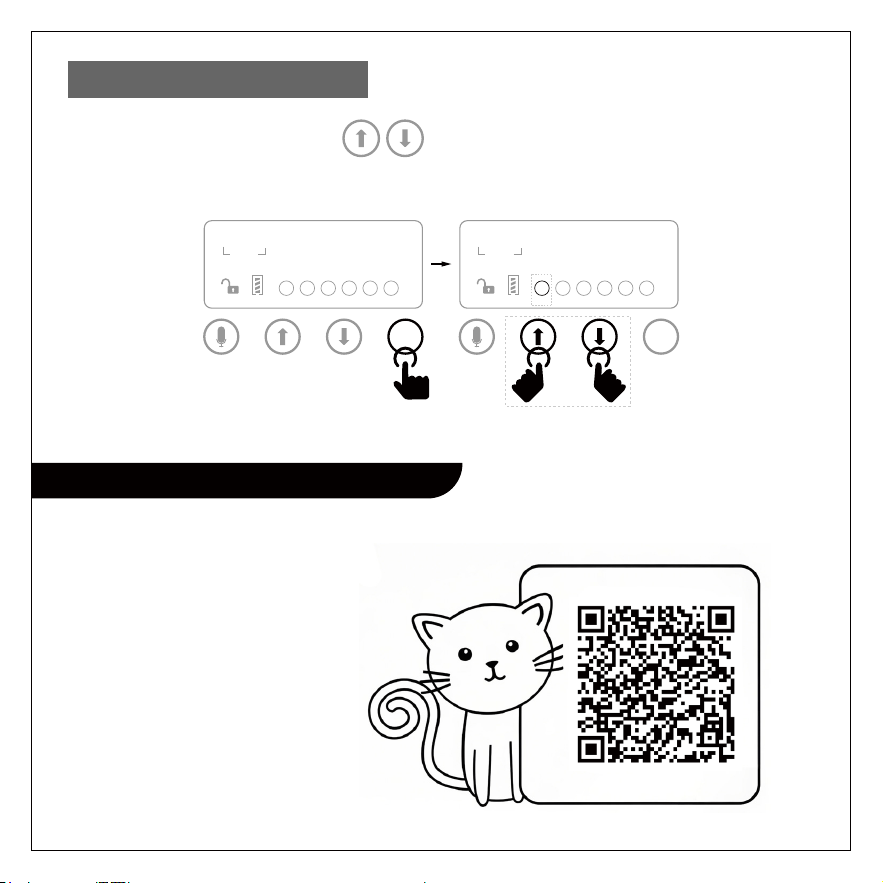
In the locked status,press both buttons for 6 seconds
to reset all settings.
8. Reset All Settings
PORTION
AM
PM
1 2 3 4 5 6
06:00
16
SET
PORTION
AM
PM
1 2 3 4 5 6
06:00
16
SET
Scan the right QR code
to watch this step video:
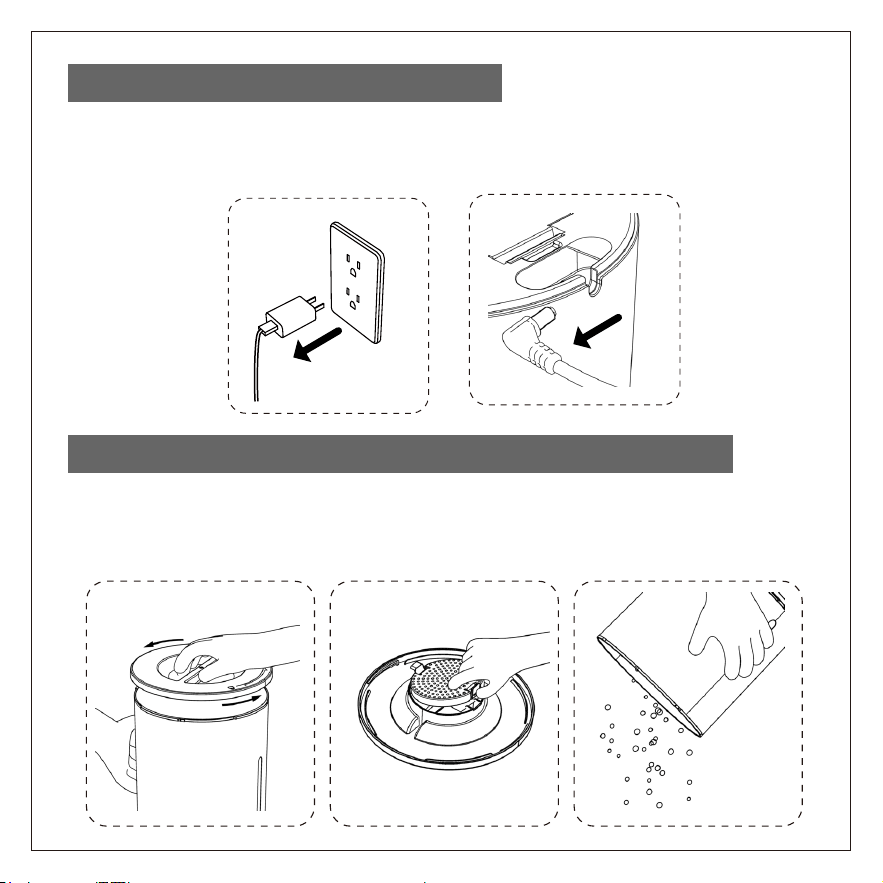
Before you disassemble or clean the feeder,you must always
disconnect the power supply from power outlet.
Rotate the lid to unlock,then remove the lid,then take out the desiccant
bag from the lid holder,and pour out the remaining pet food.
1. Disconnect the Power Supply
2. Remove the Lid,Pour out the Remaining Pet Food
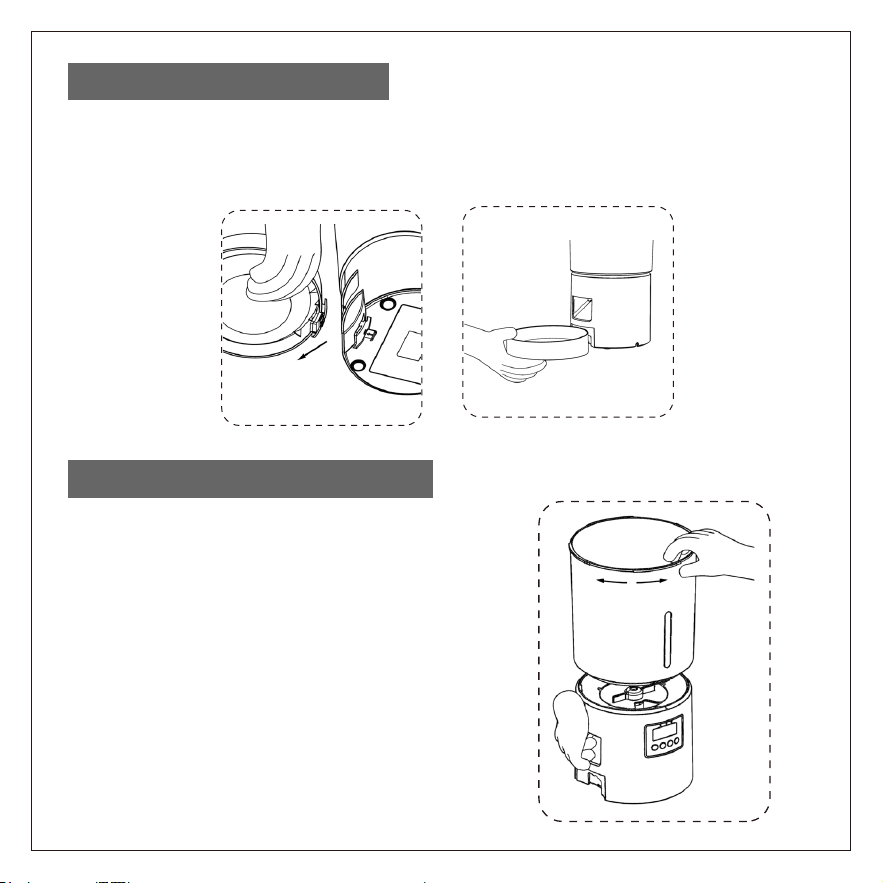
Hold tightly and raise the feeder on one hand,remove the bowls one
by one on another one hand from the bowl lock position.
3. Remove Both Bowls
Hold tightly the feeder main unit on one
hand,hold the food bucket top on anoth-
er hand,then rotate the food bucket
counter-clockwise to remove it.
4. Remove the Food Bucket
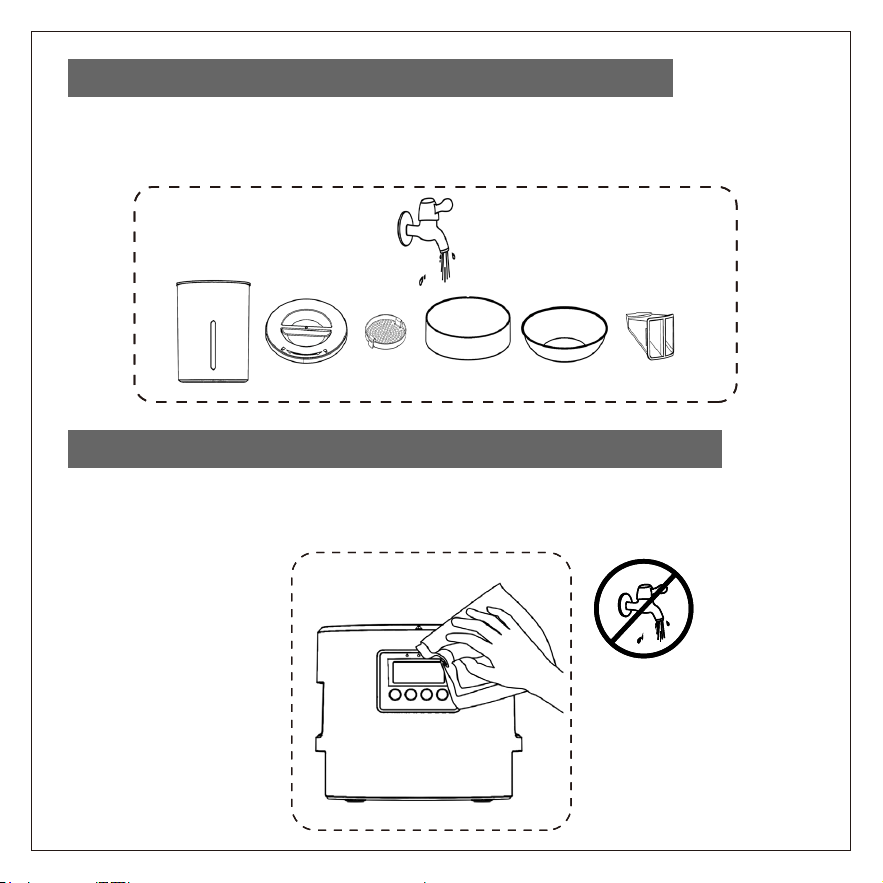
You can wash the parts on the faucet,but the feeder main unit
cannot be washed.
Be careful:you can clean the feeder main unit with dry towel only,do not
use any water or liquid or solvent,it will damage the main unit.
5. Wash the Disassembled Parts on the Faucet
6. Clean the Feeder Main Unit with Dry Towel Only
You can wash the parts on the faucet,but the feeder main unit
cannot be washed.
Be careful:you can clean the feeder main unit with dry towel only,do not
use any water or liquid or solvent,it will damage the main unit.
5. Wash the Disassembled Parts on the Faucet
6. Clean the Feeder Main Unit with Dry Towel Only
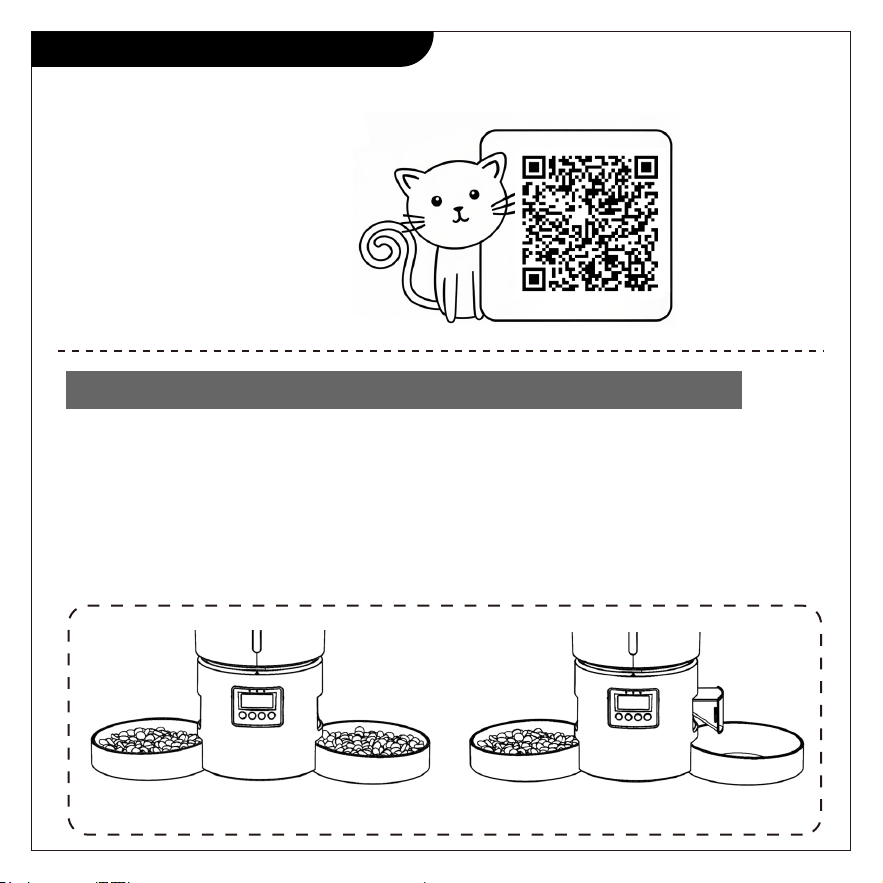
The stopper’s main function is to stop the pet food to flow out to one
bowl,so that only one bowl to feed dry pet food for one pet.
If you feed two or more pets,please remove the stopper.
Note:There is only ONE stopper in the package,Not Two.When you receive
one stopper in the package,that is original packing.
(make the dual feeder to be single feeder)
How To Use the Stopper
1. If You Feed Both Pets,Remove or Don’t Use the Stopper
Dual feeding Single feeding
Scan the right QR code
to watch this step video:
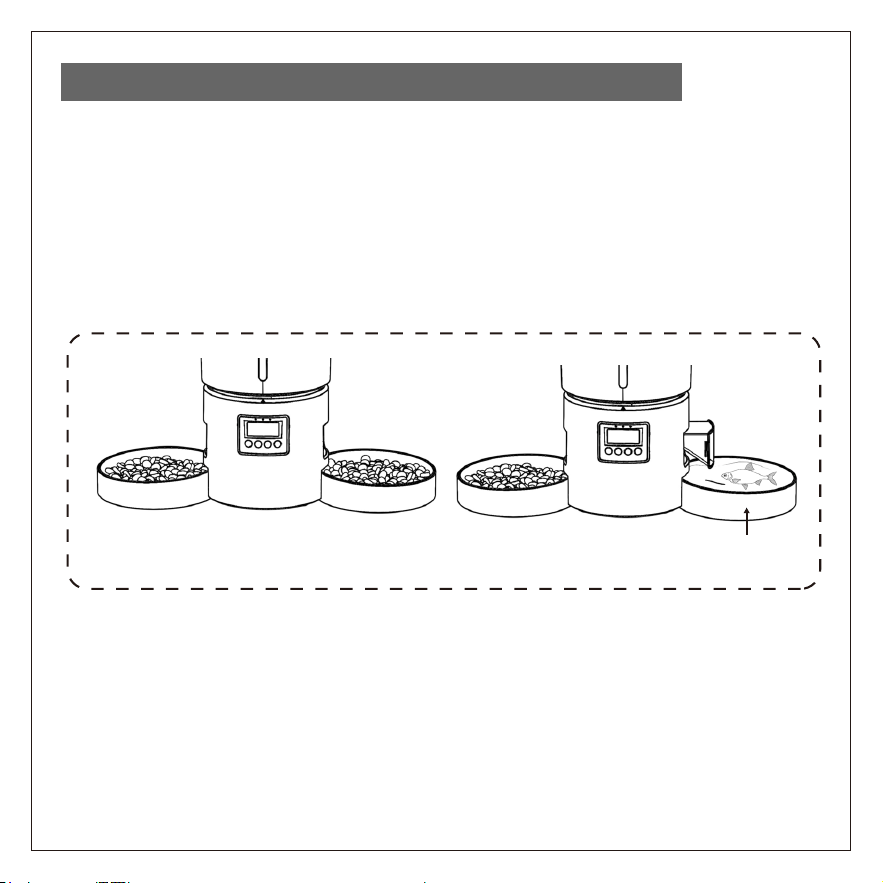
If you feed one pet,you can insert the stopper,then the pet food will flow out
to only one bowl from the food bucket.
With the stopper,you can auto feed dry pet food in one bowl,while manual
feed water or fish or snack or large kibble in another bowl.
2. Insert the Stopper,Use It as Single Feeder
Dual feeding
Feed Water or Fish or Snack

Suggested Feeding Amount
Cat Weight (kg)
Kitten Weight (kg)
2
3
4
5
6
7+
60
85
95
100
105
-
40
75
85
95
100
-
-
-
70
80
90
90
Light Weight (gram/day)
Light Weight (gram/day)
Normal (gram/day)
Normal (gram/day)
Overweight (gram/day)
Overweight (gram/day)
Feeding Amount for Kitten
2
3
4
5
6
7+
55
80
90
95
100
-
35
70
80
90
95
-
-
-
65
75
85
85
This is for reference only.You should test the real amount for your
pet,according to your pet's appetite,weight,age,health
Feeding Amount for Adult Cat
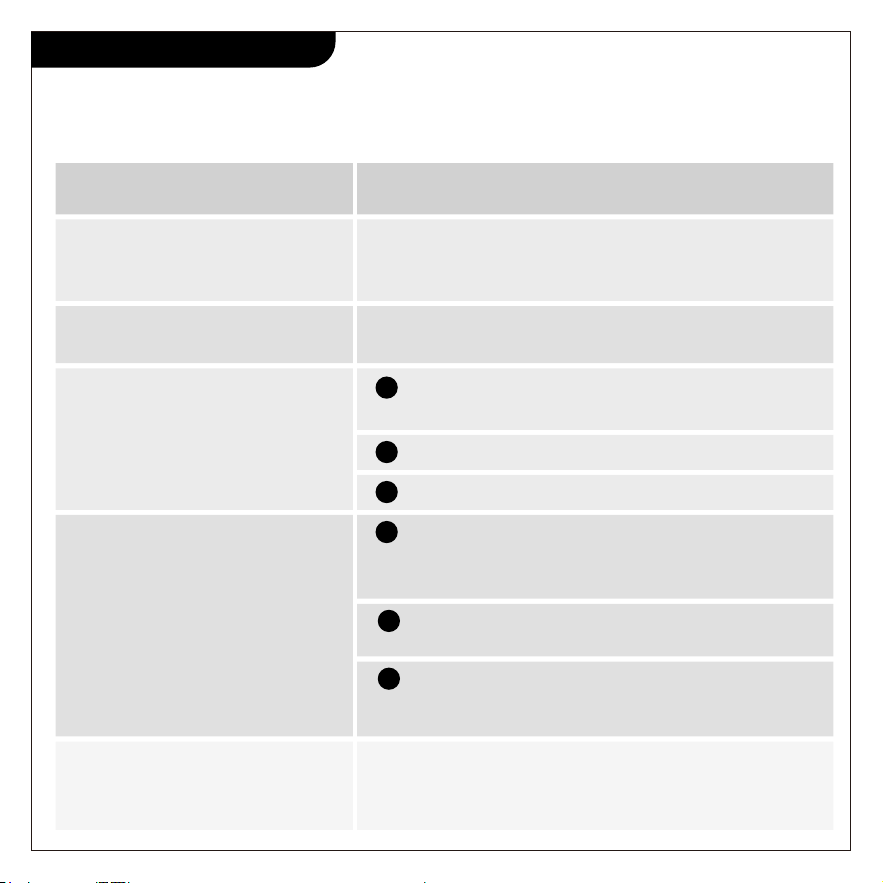
Troubleshooting
Problems
Buttons can't be pressed
Forget the feeding schedule
Pet food don't come out
Screen don't show
Can't hear recorded voice
Check if the batteries power are low
Check if the power adapter is connected
Check if the batteries power are low or power
adapter is connected
Solutions
Please send your trouble issues to support@miaosical,
you will get quick help in 24 hours.
The panel automatically locks without operation for
20 seconds.Please press set button for 3 seconds to
unlock the screen.
Unlock the screen,press set button,then press to
view your setting history.
Please pour in the dry pet food,make sure the
dry food diameter is between 2-10 mm
The panel automatically locks without operation
for 20 seconds.Please press set button for 3
seconds to unlock the screen.
Make sure you have recorded your voice--unlock
screen,press button to check.If you still don't hear
the voice,please record again
If the batteries or power adapter is no
problem,please contact customer support:
1
2
3
1
2
3

Dear customer,
Pick up your mobile phone,
Take photos and videos of feeding your pets by our product,
Share your using experience on social media (X/Twitter,Facebook,
Instagram,YouTube,TikTok,Snapchat,Reddit,Pinterest,LinkedIn etc.),and
send email to us :
Or fill in a form on page: miaosical.com/contact/kol
Or scan below QR code:
Share Using Experience On Social Media
Get One More Feeder
Calle Antonio Salvador N99.1,28026
Madrid,Spain
+34 916321624
EU001736066607335MiIC
VAT SPEED SL
EU
REP
Office 101 32 Threadneedle Street,
London,United Kingdom,EC2R 8AY
[email protected] +44 2076494690
EVATOST CONSULTING LTD
UK001735625789703wEvi
UK
REP
MADE IN CHINA
Handle With Care
UP Moisture
Fragile
Don’t Press
Manufacturer: Shenzhen Sanchong Technology Co.,Ltd
Address: 206,2nd Floor,No.25-3 Wulian Road,Longxi Community,Long-
gang Street,Longgang District,Shenzhen,Guangdong,China 518116
Email: [email protected] Website: www.miaosical.com