Owner’s Manual
Printed in Vietnam
U01UT435ZZA(0)
®
880FM
© 2023 Uniden America Corporation
Flower Mound, Texas


CONTENTS
SAFETY NOTICE .......................................................................... 5
UNPACKING ................................................................................ 5
DESCRIPTION ............................................................................. 5
EMERGENCY OPERATION ......................................................... 6
CONTROLS AND FUNCTIONS .................................................... 6
INSTALLATION ............................................................................ 9
MOBILE INSTALLATION .............................................................................. 9
Mobile Antenna ........................................................................................... 9
Connecting the Power Cords ...................................................................... 9
Ground Information ................................................................................. 10
INSTALL 6-PIN TO 4-PIN ADAPTER ........................................................... 10
MARINE INSTALLATION ............................................................................. 10
USING YOUR BEARCAT 880FM................................................ 11
CB MODE ...................................................................................................... 11
BASIC SETTINGS......................................................................................... 11
ALL CHANNEL SCAN ................................................................................... 11
WEATHER MODE (WX MODE) .................................................................... 12
Set Weather Scan Mode ............................................................................ 12
Set Weather Alert Mode ............................................................................ 13
MEMORY Mode .......................................................................................... 13
Save Channels Into Memory ..................................................................... 13
Scan Channels in Memory ........................................................................ 13
Listen to Channels in Memory .................................................................. 13
Clear Channels from Memory ................................................................... 13
MENUS ......................................................................................................... 14
Select Backlight Color ............................................................................... 14
Set LCD Contrast ....................................................................................... 15
Set Brightness ........................................................................................... 15
Set Beep Tone ............................................................................................ 15
Diagnostic Menus ..................................................................................... 15
EXIT Menu .................................................................................................. 17

Uniden is a registered trademark of Uniden America Corporation.
Bearcat is a registered trademark of Uniden America Corporation.
Features, specications, and availability of optional accessories are all subject to
change without notice.
OTHER FEATURES ....................................................................................... 17
S/RF/CAL/SWR Meter ................................................................................ 17
Calibrate Standing Wave Ratio (SWR) ..................................................... 17
PREVENTIVE MAINTENANCE .................................................. 17
MAINTENANCE ......................................................................... 18
TROUBLESHOOTING ............................................................... 18
SERVICING YOUR TRANSCEIVER ........................................... 19
SPECIFICATIONS ....................................................................... 19
FCC PART 15 AND ISED COMPLIANCE ................................... 21
FCC PART 15 COMPLIANCE ........................................................................ 21
AVIS DE LA LARTICLE 15 DE LA FCC .......................................................... 22
FCC 20 CM STATEMENT .............................................................................. 23
DÉCLARATION DE LA FCC 20 CM ............................................................... 23
ISED ANTENNA STATEMENT ...................................................................... 23
ÉNONCÉ D’ANTENNE ISED ......................................................................... 24
ONE-YEAR LIMITED WARRANTY............................................. 24
RADIO CODE DEFINITIONS ..................................................... 26

5
SAFETY NOTICE
The antenna used for this radio must be properly installed and
maintained and must provide a separation distance of at least 16.9 inches
(43 cm) from all persons and must not be collocated or operated in
conjunction with any other antenna or transmitter. Never transmit if any
person is closer than the specified distance to the antenna.
Note that Uniden does not specify or supply any antenna with this
transceiver. While a 0 dBi gain antenna is normal for a typical installation,
the above limit applies to any antenna with up to 3 dBi gain.
UNPACKING
Your Bearcat 880FM contains the following:
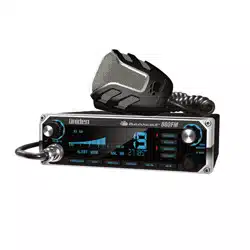
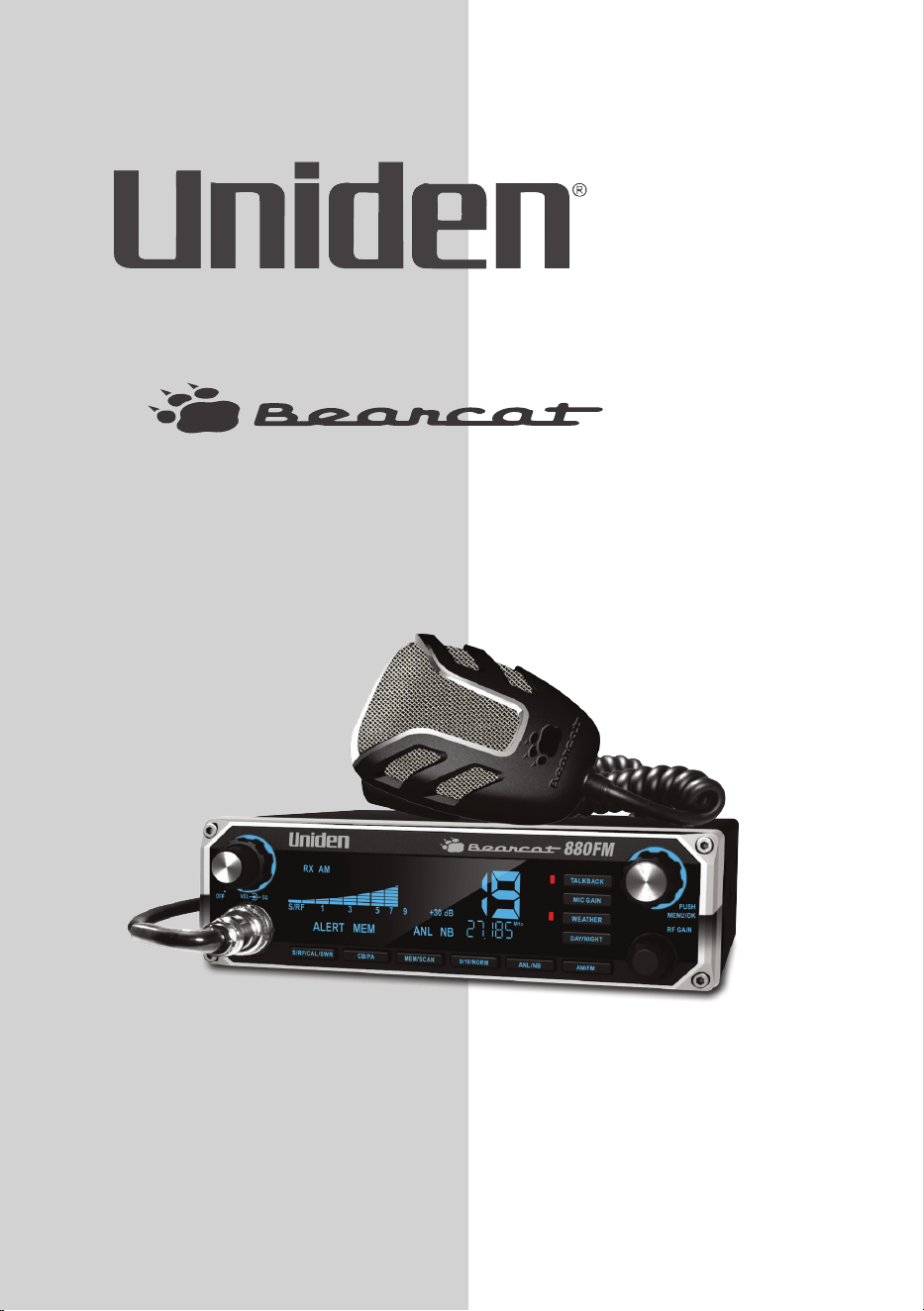
Bearcat 880FM CB 2-way mobile radio
Microphone
Mounting Bracket Kit
DC Power Cord
6-pin to 4-pin microphone adapter
Reference Guide
Part 95 Subpart D (FCC Rules)
If any items are missing or damaged, contact your place of purchase
immediately.
DESCRIPTION
Your Uniden Bearcat 880FM represents the highest quality
communications device designed for use in the Citizens Band Radio
Service. It will operate on any of the 40 AM or FM frequencies authorized
by the Federal Communications Commission (FCC).
The Citizens Band Radio Service is under the jurisdiction of the Federal
Communications Commission (FCC). Any adjustments or alterations which would
alter the performance of the transceiver's original FCC type acceptance, or which
would change the frequency determining method, are strictly prohibited.
Replacement or substitution of crystal, transistors, ICs, regulator diodes, or any
other part of a unique nature, with parts other than those recommend by Uniden,
6
may cause violations of the technical regulations in Part 95 of the FCC Rules or in
violation of type acceptance requirements in Part 2 of the rules.
EMERGENCY OPERATION
1. Press 9/19/NORM or turn Channel Selector knob to Channel 9.
2. Press PTT and speak clearly.
3. If there is no response, select an active channel and ask that party
to relay your emergency broadcast on Channel 9.
All channels except Channel 9 may be used for normal communication. The FCC
reserves Channel 9 for emergencies involving the immediate safety of individuals
or protection of property. Use Channel 9 to render assistance to a motorist.
This is an FCC rule and applies to all CB radio operators.
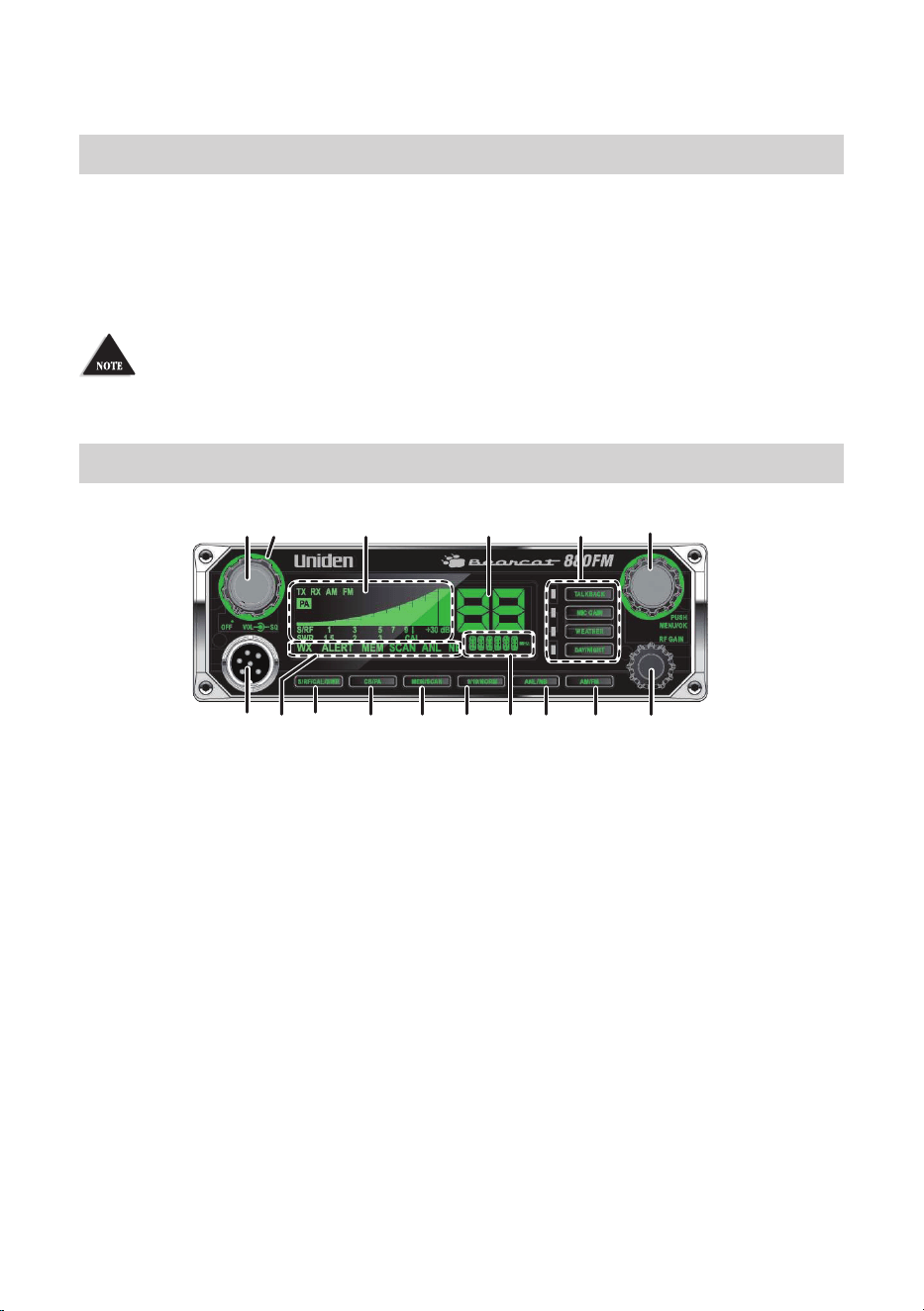
CONTROLS AND FUNCTIONS
1 42 5 6
7
151413
111098
12
3
16
1. Volume Control knob with Power On/O. Turn the knob
clockwise until it clicks to turn power on or counterclockwise until
it clicks to turn power o.
2. SQUELCH knob: Reduces background noise when there is no
incoming signal.
3. S/RF/CAL/SWR Meter: Displays Send/Receive signal strength, RF
Power, and SWR reading.
4. Channel Number display.
5. Operation buttons and associated LEDs:
Talkback: Talkback lets you monitor yourself when transmitting.
Press Talkback to activate the function (LED = on). With Talkback
active, press PTT and adjust the volume with the Channel
Selector/MENU/OK knob. (Levels 00 - 15)
MIC Gain: Adjusts microphone sensitivity. Delivers up to 100%
modulation. With MIC Gain active, press PTT and adjust the gain
7
levels with the Channel Selector/MENU/OK knob. (Levels 00 - 04)
If Talkback is on when MIC Gain is also on, Talkback volume increases.
Weather: Press to toggle between Weather and CB channels. Turn
Channel Selector to cycle through the 7 weather channels. (LED
o = CB channels; LED on = Weather channels)
Press and hold to turn Weather Alert on and o. ALERT displays.
Day/Night: Adjusts LCD backlight sensitivity between Day and
Night modes. (LED o = Day; LED on = Night)
6. Channel Selector/MENU/OK. Press the inner MENU/OK button to
select a menu option or other selection. Turn the outer Channel
Selector knob to:
Select channels
Select menu modes
Change scan resume direction (up or down)
Control Talkback volume
Control Mic gain level
Control Calibration volume
All channels except Channel 9 may be used for normal communication. The FCC
reserves Channel 9 for emergencies involving the immediate safety of individuals
or protection of property. Use Channel 9 to render assistance to a motorist.
This is an FCC rule and applies to all CB operators.
7. Microphone socket.
8. Indicators turn on when the function is turned on.
9. S/RF/CAL/SWR: Push to to check RF signal strength, calibration,
and SWR reading.
10. CB/PA: Selects CB (Citizens Band) or PA (Public Address).
Do not use the PA function unless an external speaker is connected.
11. MEM/SCAN: Press to start or stop scanning modes [All Channel
Scan (see page 11) and Memory Scan (see page 13)]. Press
and hold to set or clear channel memory while in Memory mode.
12. 9/19/NORM: Press to switch between emergency channel 9,
channel 19, and standard CB channels.
8
13. Frequency Display: Displays the MHz of the selected channel. Also
displays menu options.
14. ANL/NB: Turns ANL (Automatic Noise Limiter) and NB (Noise
Blanker) features on and o. ANL reduces external noise and NB
reduces interference from vehicle ignition systems. Press ANL/NB
to turn ANL and NB on or o in the following congurations:
From ANL OFF/NB OFF
Press once. ANL on/NB o
Press twice. ANL o/NB on
Press three times. ANL on/NB on
Press four times. ANL o/NB o
15. AM/FM: Change AM/FM modulation. Press AM/FM to toggle
between AM or FM modulation.
NOTE: AM/FM does not switch when the Bearcat 880FM is in Weather (WX) mode.
16. RF Gain knob: Improves reception in strong signal areas.
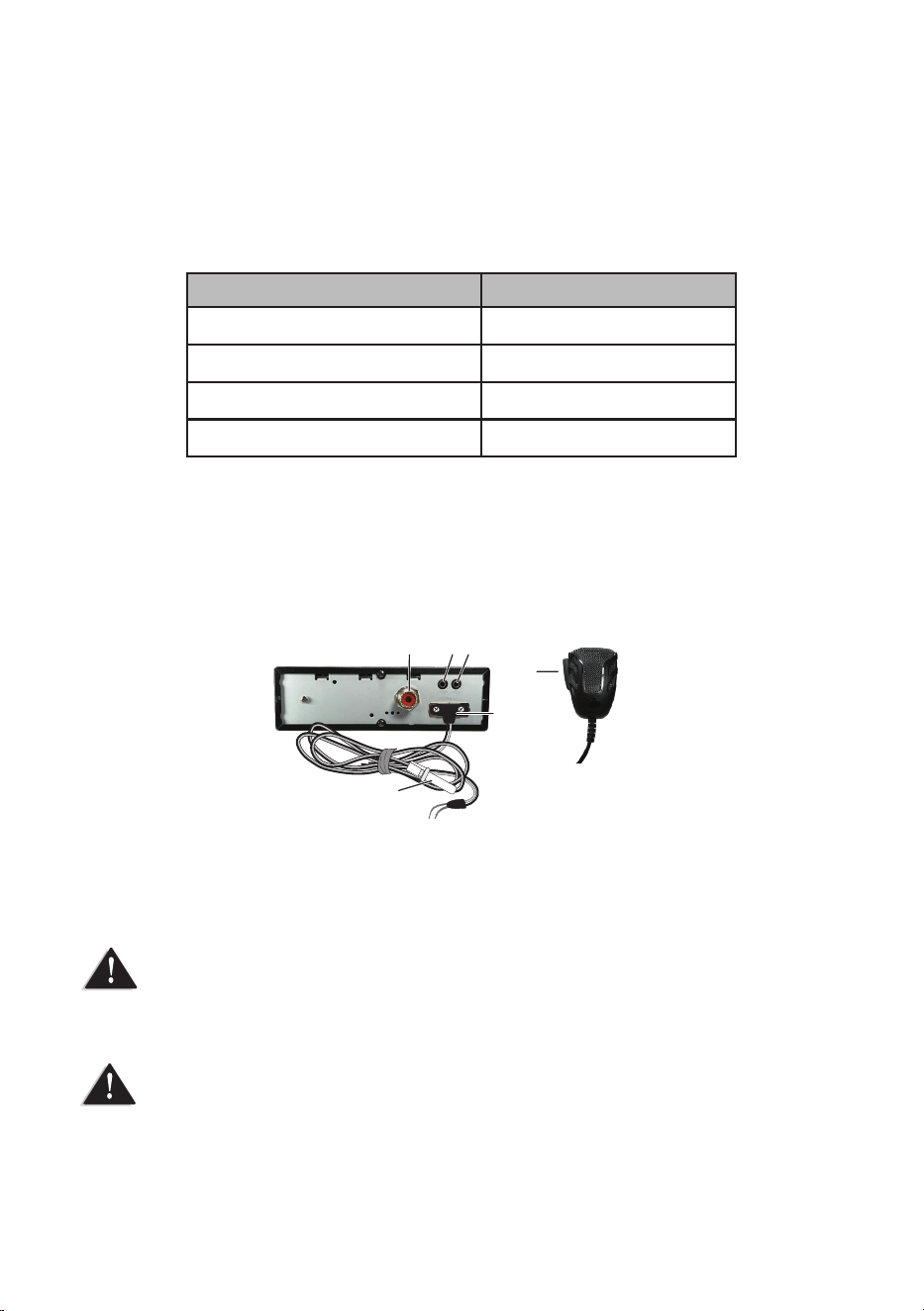
17 18 19
20
21
22
17. Antenna socket: Connects antenna to the unit.
18. PA SP: Connects optional external 8-ohm, 4-watt speaker for use
as a public address system.
To prevent acoustic feedback, separate the microphone from the speaker when
operating the PA at high output levels.
19. EXT. SP: Connects an 8-ohm 4-watt speaker to remotely monitor
the receiver.
When the external speaker is plugged in, the internal speaker is o.
20. POWER: Connects DC power to transceiver.
21. Fuse.

9
22. PTT: Push-to-Talk.
INSTALLATION
MOBILE INSTALLATION
Plan the location of the transceiver and microphone bracket before beginning
installation.
1. Select a location that is convenient for operating the radio but
does not interfere with the driver or passenger.
2. Install bracket with self-tapping screws provided.
3. Connect power cords (see page 9).
4. Attach the microphone bracket to side of the radio.
5. Attach radio to bracket.
Mobile Antenna
Because the maximum power output of the transmitter is limited by
the FCC, the quality of your antenna is very important. To achieve the
maximum transmission distance, Uniden strongly recommends that you
install only a high quality antenna. You have just purchased a superior
transceiver - don't diminish its performance by installing an inferior
antenna.
Only a properly matched antenna system will allow maximum power
transfer from the 50 ohm transmission line to the radiating element.
Your Uniden dealer is qualified to help you select the proper antenna for
your requirements. A whip style antenna may be used for automobile
installation.
A short ‘loaded’ whip antenna is easier to install on an automobile, but its
efficiency is less than that of a full quarter-wave whip antenna.
Connecting the Power Cords
Uniden recommends connecting the power lead to the Ignition Switch
Accessory Terminal. This way, the transceiver is automatically turned off
when the ignition switch is turned off.
10
As an alternative, the power cord may be connected to an available
terminal on the fuse block or to a point in the wiring harness. However,
caution must be taken to prevent a short circuit. If in doubt, contact your
vehicle dealer for information.
Ground Information
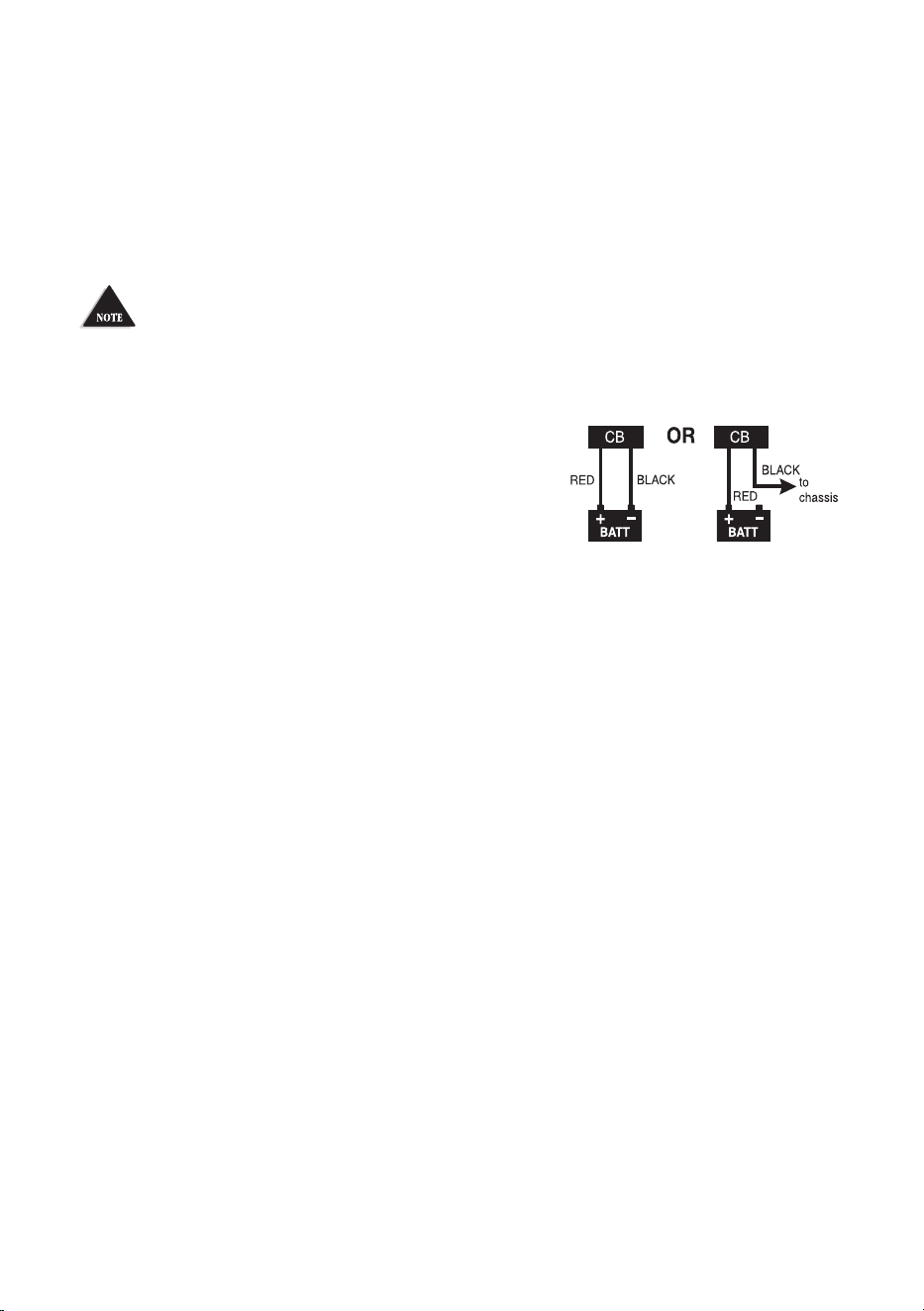
This transceiver may be installed and used in any 12-volt DC negative ground
system vehicle.
Negative Ground System
With a negative ground system, the negative (-) battery terminal is
usually connected to the vehicle motor block.
Connect the red DC power cord from the
transceiver to the positive (+) battery terminal
or other convenient point. Then connect the
black power cord to the vehicle chassis or negative (-) battery terminal.
INSTALL 6-PIN TO 4-PIN ADAPTER
The Bearcat 880FM is pre-configured for Uniden’s 6-pin wireless, noise-
cancelling technology. Your Bearcat 880FM comes with an adapter
to connect the radio’s 6-pin microphone to a current standard 4-pin
microphone.
1. Insert the 6-pin side of the adapter into the Bearcat 880FM 6-pin
microphone connection.
2. Plug a standard 4-pin microphone connector into the 4-pin side
of the adapter.
MARINE INSTALLATION
Consult your dealer for information regarding marine installation. It is
important to adequately ground the system and to prevent electrolysis
between the fittings in the hull and the water.

11
USING YOUR BEARCAT 880FM
CB MODE
Be sure that the power source, antenna, and microphone are properly connected
before proceeding.
BASIC SETTINGS
1. Turn unit on. Set volume to a comfortable level.
2. Select mode (AM or FM).
3. Select channel.
4. Set noise limitations as desired (ANL/NB).
5. Adjust Squelch.
• Turn SQUELCH fully clockwise so only strong signals can get
through.
• Turn SQUELCH fully counterclockwise until you hear a hiss.
Everything gets through - noise, weak signals, and strong signals.
• Turn SQUELCH back clockwise until the hiss stops. Only clearer
signals get through.
Set SQUELCH only when the radio is not receiving a strong signal.
5. Turn RF Gain to set RF gain sensitivity.
6. Press MIC Gain to toggle microphone sensitivity between High
and Low. (LED on = High; LED o = Low)
7. Set Backlight color (see page 14).
8. Set LCD Contrast (see page 15).
9. Set Brightness (see page 15).
ALL CHANNEL SCAN
When All Channel Scan is on, the radio scans channels until it receives
a signal. It will move to the next channel if no signal is received after 3
seconds.
1. Press MEM/SCAN once if in CB mode (twice if in Memory mode).
SCAN displays.
2. The radio begins scanning upward through the channels.
• To skip the channel the radio has stopped on, turn Channel
Selector clockwise to move to the next channel or counter-

12
clockwise to move to the previous channel. The radio continues
scanning in the selected direction.
• To change to Memory Channel Scan mode, press MEM/SCAN
while in All Channel Scan mode (see page 13).
3. To exit All Channel Scan mode, press PTT, 9/19/NORM, WEATHER,
or CB/PA.
WEATHER MODE (WX MODE)
Your radio combines a CB radio with a Weather radio and a Weather Alert
system. The Weather Alert system sounds a seven-second signal in the
event of severe weather when you are in CB mode. The Weather radio
continually broadcasts weather conditions when you are in Weather
mode.
1. Press WEATHER. Your radio is now in Weather radio mode.
2. Select 1 of 7 weather channels using Channel Selector.
You cannot change ANL, NB, or AM/FM settings while in WX mode. The radio will
sound an alert tone.
Set Weather Scan Mode
Weather Scan mode allows the radio to move to the next weather
channel if no signal is detected after 3 seconds. Set Weather Scan mode
to ON or OFF through the menus.
1. Press MENU/OK to activate the menus. COLOR displays.
2. Turn the Channel Selector knob to cycle through the menu
options until WXSCAN displays.
3. Press MENU/OK. ON displays.
4. Press MENU/OK to set Weather Scan mode to ON or turn the
selection knob until OFF displays and then press MENU/OK to set
it. WXSCAN displays again.
If Weather Scan is ON when you turn o the radio, it remains ON.
Left at these setting (WX mode, WX Scan), you will hear only
weather broadcasts and Weather Alert signals. To use your CB radio
normally while monitoring weather alerts, press WEATHER again.

13
Set Weather Alert Mode
Weather Alert mode only operates when you are in CB mode; it does not
operate in Weather mode. In CB mode, the radio sounds an alert tone
when it detects a 1050Hz tone on a weather channel.
Press and hold WEATHER to turn Weather Alert on. The WEATHER LED
turns on.
MEMORY MODE
You can select channels to store into memory and then scan only those
channels.
Save Channels Into Memory
1. Tune to a channel in CB mode.
2. Press and hold MEM/SCAN until SAVE appears (about 2 seconds).
3. Release MEM/SCAN.
4. The radio stays on the saved channel.
Scan Channels in Memory
1. From All Channel Scan mode (see page 11), press MEM/SCAN
until MEM SCAN displays; the radio scans memory channels only.
2. Press MEM/SCAN again to return to Memory mode or the last
channel scanned.
Listen to Channels in Memory
1. Press MEM/SCAN until MEM displays.
2. Turn the Channel Selector knob and only saved channels will be
heard.
Clear Channels from Memory
1. In Memory mode, select a channel.
2. Press and hold MEM/SCAN until CLEAR displays.
3. Release MEM/SCAN. The radio plays the next channel in memory.

14
MENUS
Access menus by pressing MENU/OK. The first menu, COLOR, displays.
Turn the Channel Selector knob to cycle through the other menus:
LCD COLOR (DAY) - Backlight color
LCD CONT (DAY) - LCD Contrast
LCD BRIGHT (DAY) - Brightness
LCD COLOR (NIGHT) - Backlight color
LCD CONT (NIGHT) - LCD Contrast
LCD BRIGHT (NIGHT) - Brightness
WXSCAN - Weather Scan mode
BEEP - KEYBEEP (ON/OFF)
DIAG - Diagnostics
– Battery Check
– Antenna Mismatch Check
– RF Power Check
Exit
Select Backlight Color
1. Press MENU/OK to activate the menus. Turn Channel Selector
until COLOR displays.
2. Press MENU/OK. Turn Channel Selector until DAY displays.
3. Press MENU/OK. DAY blinks.
4. Turn Channel Selector to cycle through the available backlight
colors or OFF. The selection number for that color displays in that
color. The available colors are:
Option
No:
Color
Option
No:
Color
0 None (O) 4 Red
1 Blue 5 Magenta
2 Green 6 Yellow
3 Cyan 7 White

15
5. Press MENU/OK to select that color. COLOR displays.
6. Repeat these procedures to set the NIGHT backlight color.
Set LCD Contrast
1. Press MENU/OK to activate the menus. Turn Channel Selector
until CONT displays.
2. Press MENU/OK. Turn Channel Selector until DAY displays.
3. Press MENU/OK. DAY blinks.
4. Turn Channel Selector to cycle through the contrast options.
(Lowest = 00; Highest = 15)
5. Press MENU/OK to select the one you want. CONT displays again.
6. Repeat these procedures to set the NIGHT contrast level.
Set Brightness
1. Press MENU/OK to activate the menus. Turn Channel Selector
until BRIGHT displays.
2. Press MENU/OK. DAY displays.
3. Press MENU/OK. DAY blinks.
4. Turn Channel Selector to cycle through the brightness options.
(Lowest = 00; Highest = 15)
5. Press MENU/OK to select the one you want. BRIGHT displays
again.
6. Repeat these procedures to set the NIGHT brightness level.
Set Beep Tone
1. Press MENU/OK to activate the menus. Turn Channel Selector
until BEEP displays.
2. Press MENU/OK. The current setting, ON or OFF, displays.
3. Turn the Channel Indicator to select ON or OFF.
4. Press MENU/OK to accept the setting; BEEP displays again.
NOTE: WX Alert tone sounds even if Beep tone is turned o.
Diagnostic Menus
1. Press MENU/OK to activate the menus.
2. Turn Channel Selector until DIAG displays.
3. Press MENU/OK to enter the DIAG level.

16
From the DIAG level, you can check battery power levels, RF power
levels, and antenna mismatch.
Battery Check
Check the DC power levels if you feel your radio is not performing
properly.
1. Once DIAG displays, press MENU/OK; VOLT displays.
2. Press MENU/OK; the battery voltage displays for 2 seconds and
then the battery voltage condition displays:
– PASS - Voltage is good.
– FAILLO - Voltage is too low.
– FAILHI - Voltage is too high.
3. Press MENU/OK to return to the DIAG level.
RF Power Check
RF alerts indicate that the transmission levels are not acceptable.
1. Once DIAG displays, press MENU/OK; VOLT displays.
2. Turn Channel Selector until RF OUT displays.
3. Press MENU/OK. GO PTT displays.
4. Press and hold PTT. The RF power condition, PASS or FAIL,
displays. (If FAIL displays, refer to the Troubleshooting section,
page 18.)
5. Release PTT: GO PTT displays.
6. Press MENU/OK to return to the DIAG level.
Antenna Mismatch Check
An antenna mismatch indicates that reception quality may be impaired.
1. Once DIAG displays, press MENU/OK; VOLT displays.
2. Turn Channel Selector until ANT displays.
3. Press MENU/OK. GO PTT displays.
4. Press and hold PTT. The Antanna Mismatch condition, PASS or
FAIL, displays.
5. Release PTT and press MENU/OK to return to the DIAG level.

17
EXIT Menu
Exit the menus from the main menu levels (COLOR, CONT, BRIGHT,
WXSCAN, and DIAG). From this level, turn
Channel Selector until EXIT
displays. Press MENU/OK. The radio returns to the last operating
mode and channel.
OTHER FEATURES
S/RF/CAL/SWR Meter
You can check your incoming and outgoing signal strength and wattage
as you use your Bearcat 880FM. The 12-column LCD display (refer to
item number 3 on page 6) displays this data. Press and hold PTT on
the microphone to see the RF output power levels. Release PTT to see
incoming signal strengh.
Calibrate Standing Wave Ratio (SWR)
Check and calibrate the SWR to ensure that you are using power
effectively.
1. Press S/RF/CAL/SWR until CAL appears.
2. Press and hold PTT, then rotate the channel selector until the bar
graph meter is at the CAL point.
3. Press S/RF/CAL/SWR until SWR appears.
4. Press PTT and note the SWR reading and release PTT. If the
reading is >1.5, follow your antenna’s instructions to adjust the
antenna length. Then, repeat this step.
PREVENTIVE MAINTENANCE
Every six months:
1. Check the SWR.
2. Be sure all electrical connections are tight.
3. Inspect antenna coaxial cable for wear or breaks in shielding.
4. Be sure all screws and mounting hardware are tight.
18
MAINTENANCE
The Bearcat 880FM is designed to give you years of trouble-free service.
There are no user-serviceable parts inside. Except for the fuse in the DC
power cord, no maintenance is required.
To replace a blown fuse:
1. Press ends of the fuse holder together. Twist to open. Carefully
separate the two pieces.
2. Remove the fuse and inspect. If blown, replace with the same
type fuse.
Use only the fuse specied for your Bearcat 880FM. Failure to do so may void your
warranty.
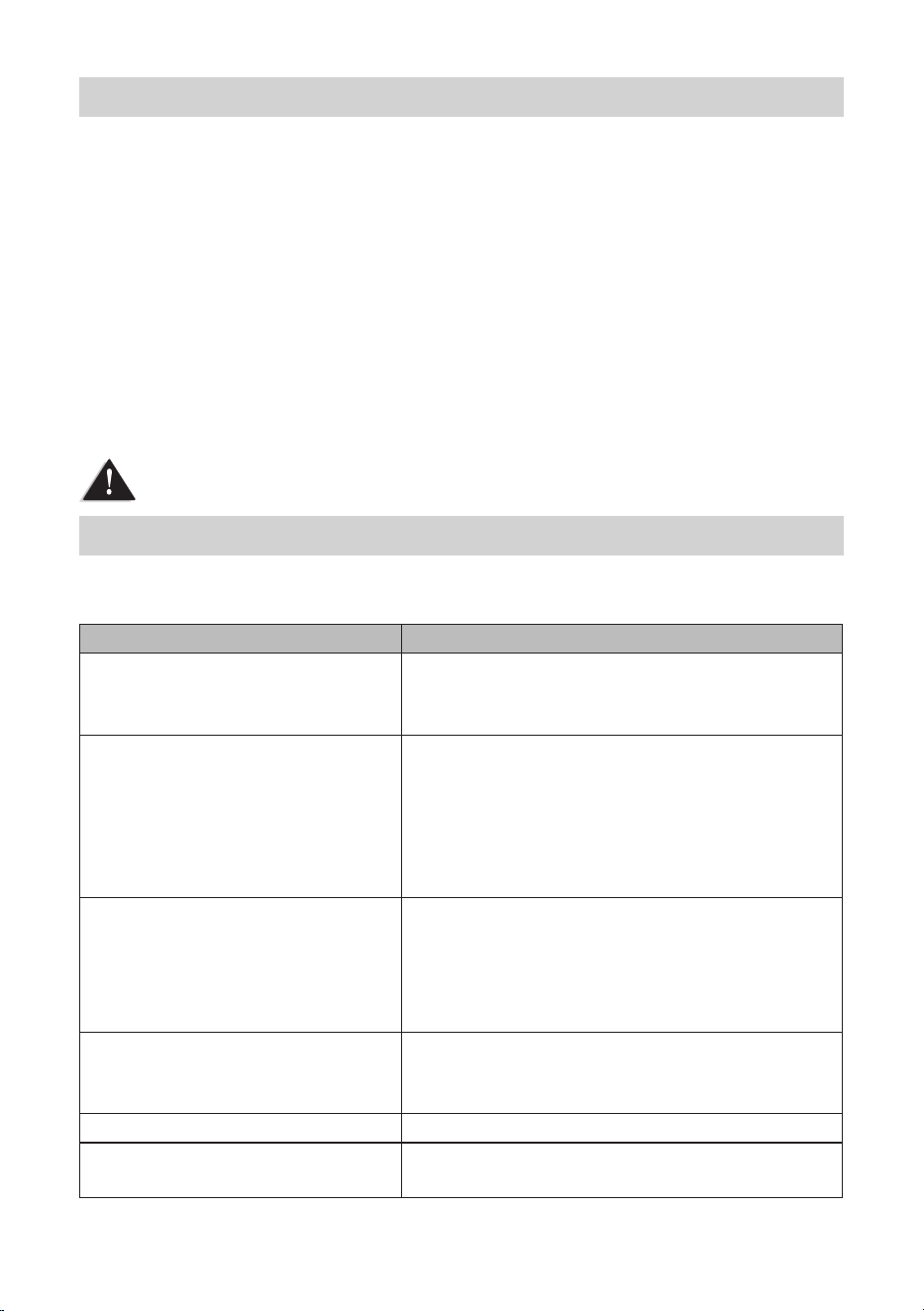
TROUBLESHOOTING
In the event of system malfunction, perform the following procedures:
Problem Suggestion
Unit does not power up Check power cord connections.
Check fuse.
Check vehicle electrical system.
No reception Check microphone connection.
Set CB/PA to CB.
Check VOLUME and SQUELCH.
Check antenna.
Check antenna connection.
Adjust RF Gain.
Poor Reception Verify that modes between Bearcat 880FM and
other radio match (AM - AM or FM - FM).
Check VOLUME and SQUELCH.
Be sure antenna SWR is normal.
Adjust RF Gain.
No Transmission Set CB/PA switch to CB.
Check microphone connection.
Adjust MIC Gain.
Low Transmission Adjust MIC Gain.
Using MEM/SCAN does not
access channels in memory
Verify that there are channels saved into
memory.
19
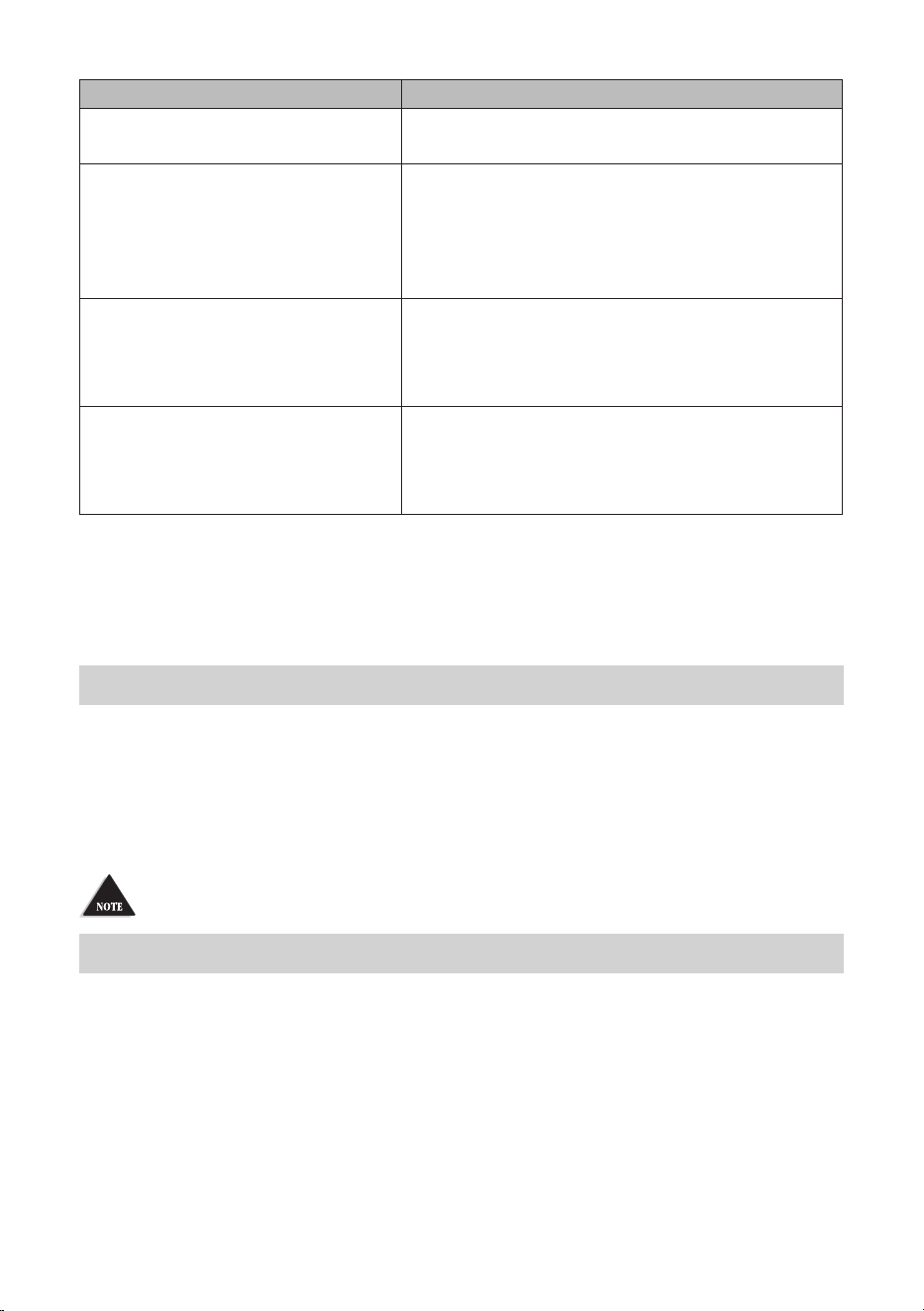
Problem Suggestion
Unit does not work as well as
previously.
Turn the power o then back on. The channels
will reset.
Battery power check returned
FAILLO or FAILHI.
Make sure your power wires have a good
connection.
Check your battery charge; it needs to be fully
charged. Lower voltage will cause a failure.
Check your alternator.
Antenna check returned
FAIL.
Make sure your antenna ground is good.
Check for damage to the antenna.
Check the SWRs at a CB shop. High SWRs will
damage the radio.
RF power diagnosis check
returned
FAIL.
Make sure your antenna ground is good.
Check for damage to your antenna.
Check the antenna connection on the back of
the radio. Be sure it is tight.
If you do not get satisfactory results after performing these checks, visit
the Uniden website (www.uniden.com) for troubleshooting and FAQ
information.
SERVICING YOUR TRANSCEIVER
It is the user's responsibility to see that this radio is operating at all times
in accordance with the FCC Citizens Radio Service regulations. We highly
recommend that you consult a qualified radio/telephone technician for
servicing and aligning this CB radio product.
When ordering parts, be sure to specify the correct model number and serial
number of the unit.
SPECIFICATIONS
GENERAL
Channel:
CB
Weather
40
7
Frequency Range:
CB
Weather (RX Only)
26.965 - 27.405 MHz
162.400 - 162.550 MHz
Frequency Control: PLL Synthesizer

20
Antenna Impedance: 50 ohms
Power Input: 13.8VDC
Current Drain
TX: AM Full Modulation: 2.2A (max)
FM 1.7A (max)
RX: At no signal: 650mA
Operating Temperature: -22°F to 140°F (-30°C to 60°C)
Accessories: DC Power Cord
Microphone
Microphone Hanger
Mounting Bracket
6-4 Pin Microphone Adapter
Owner’s Manual
Part 95 Subpart D (FCC Rules)
Size (W x D x H): 7.25 in. x 7.5 in. x 2.25 in. (without knobs
and jacks)
(184.149 mm x 190.50 mm x 57.15 mm)
Weight: 2.2 Pounds
TRANSMITTER
Output Power: 4 watts
Emission Type: AM/FM
Hum and Noise: AM 46dB FM 38dB
Frequency Tolerance: ±0.002%
Spurious Harmonics Emission: -70 dBc
Output Impedance: 50 ohm, unbalanced
RECEIVER
Sensitivity
(AM) at 10 dB S+N/N:
(FM)12dB SINAD:
-110dBm
-118dBm
Maximum Sensitivity (AM): -113dBm
Squelch Threshold: -120dBm
Antenna Impedance: 50 ohms
Squelch Tight: -47dBm
Signal Meter S-9: -67dBm
Audio Output Power (max.): 5.5 watts
Audio Output (10% Dist.): 4.2 watts
Adjacent Channel Rejection: AM 56dB
FM 65dB

21
Image Rejection: 1st: 66dB; 2nd: 58dB
Internal Speaker Impedance: 16 ohms
External Speaker Impedance: 8 ohms
PUBLIC ADDRESS
Output Power at 10% Distortion: 4.7 watts
WEATHER CHANNELS
Sensitivity 12dB SINAD: -115dBm
Audio Output Power (max): 5.5 watts
Specications shown are typical and subject to change without notice.
FCC PART 15 AND ISED COMPLIANCE
Changes or modifications not expressly approved by the party
responsible for compliance could void the user’s authority to operate the
equipment.
Les changements ou modifications qui ne sont pas expressément
approuvés par la partie responsable de la conformité peuvent annuler
l’autorité de l’utilisateur à utiliser l’équipement.
FCC PART 15 COMPLIANCE
This device complies with Part 15 of the FCC rules. Operation is subject
to the following two conditions: (1) This device may not cause harmful
interference, and (2) this device must accept any interference received,
including interference that may cause undesired operation.
Changes or modifications not expressly approved by the party
responsible for compliance could void your authority to operate the
equipment.
Note: This equipment has been tested and found to comply with the limits for a
Class B digital device, pursuant to Part 15 of the FCC Rules.
These limits are designed to provide reasonable protection against
harmful interference in a residential installation.
This equipment generates, uses, and can radiate radio frequency energy,
and if not installed and used in accordance with the instructions, may

22
cause harmful interference to radio communications. However, there is
no guarantee that interference will not occur in a particular installation.
If this equipment does cause harmful interference to radio or television
reception, which can be determined by turning the equipment off and
on, the user is encouraged to try to correct the interference by one or
more of the following measures:
Reorient or relocate the receiving antenna.
Increase the separation between the equipment and receiver.
Connect the equipment into an outlet on a circuit dierent from
that to which the receiver is connected.
Consult the dealer or an experienced radio/TV technician for help.
CONFORMITÉ À L’ARTICLE 15 DE LA FCC
Cet appareil est conforme à l’article 15 des règlementss de la FCC. Son
fonctionnement est soumis aux deux conditions suivantes : (1) cet
appareil ne doit pas causer d’interférences nuisibles, et (2) cet appareil
doit accepter toute interférence reçue, y compris les interférences
pouvant causer un fonctionnement indésirable.
Les changements ou modifications qui ne sont pas expressément
approuvés par la partie responsable de la conformité peuvent annuler
votre droit d’utiliser l’équipement.
Remarque : Cet équipement a été testé et déclaré conforme aux limites d’un
appareil numérique de classe B, conformément à l’article 15 des règlements de la
FCC.
Les limites sont conçues pour fournir une protection raisonnable contre
les interférences nuisibles dans une installation résidentielle.
Cet équipement génère, utilise et peut émettre de l’énergie de fréquence
radio, et s’il n’est pas installé et utilisé conformément aux instructions,
il peut causer des interférences nuisibles aux communications radio.
Cependant, il n’y a aucune garantie que des interférences ne se
produiront pas dans une installation particulière.
Si cet équipement provoque des interférences nuisibles à la réception de
la radio ou de la télévision, ce qui peut être déterminé en éteignant et en

23
allumant l’équipement, l’utilisateur est encouragé à essayer de corriger
les interférences par une ou plusieurs des mesures suivantes :
Réorienter ou déplacer l’antenne de réception.
Augmentez la distance entre l’équipement et le récepteur.
Connecter l’équipement à une prise sur un circuit diérent de
celui auquel le récepteur est connecté.
Consulter le revendeur ou un technicien radio/TV expérimenté
pour obtenir de l’aide.
ISED COMPLIANCE
This device complies with Industry Canada license-exempt RSS
standard(s). Operation is subject to the following two conditions: (1)
This device may not cause harmful interference, and (2) this device must
accept any interference received, including interference that may cause
undesired operation.
Operation is subject to the following two conditions: (1) This device
may not cause harmful interference, and (2) this device must accept any
interference received, including interference that may cause undesired
operation.
FCC 20 CM STATEMENT
This equipment complies with FCC radiation exposure limits set forth
for an uncontrolled environment. This equipment should be installed
and operated with a minimum distance of 20cm between the radio
and your body. This transmitter must not be co-located or operating in
conjunction with any other antenna or transmitter.
DÉCLARATION DE LA FCC 20 CM
Cet équipement est conforme aux limites d’exposition aux radiations
fixées par la FCC pour un environnement non contrôlé. Cet équipement
doit être installé et utilisé avec une distance minimale de 20 cm entre la
radio et votre corps. Cet émetteur ne doit pas être installé ou utilisé en
conjonction avec une autre antenne ou un autre émetteur.
ISED ANTENNA STATEMENT

24
This radio transmitter IC: 513C-UT435 has been approved by Innovation,
Science and Economic Development Canada to operate with the antenna
types listed below, with the maximum permissible gain indicated.
Antenna types not included in this list that have a gain greater than the
maximum gain indicated for any type listed are strictly prohibited for use
with this device.
The following antenna types can be used at the maximum 3 dBi gain with
a 50 Ohm impedance is required for each antenna type:
Whip
Fiberglass
Base
ÉNONCÉ D’ANTENNE ISED
Cet émetteur radio IC : 513C-UT434 a été approuvé par Innovation,
Science et Développement économique Canada pour fonctionner avec
les types d’antennes listés ci-dessous, avec le gain maximum autorisé
indiqué Les types d’antennes non inclus dans cette liste qui ont un gain
supérieur au gain maximum indiqué pour tout type listé sont strictement
interdits d’utilisation avec cet appareil.
Les types d’antennes suivants peuvent être utilisés avec un gain maximal
de 3 dBi et une impédance de 50 Ohms est requise pour chaque type
d’antenne :
Fouet
Fibre de verre
Base
ONE-YEAR LIMITED WARRANTY
Important: Evidence of original purchase is required for warranty service.
WARRANTOR: UNIDEN AMERICA CORPORATION (“Uniden”)
ELEMENTS OF WARRANTY: Uniden warrants, for one year, to the original retail owner,
this Uniden Product to be free from defects in materials and craftsmanship with only the
limitations or exclusions set out below.

25
WARRANTY DURATION: This warranty to the original user shall terminate and be of
no further effect one year after the date of original retail sale. The warranty is invalid if
the Product is (A) damaged or not maintained as reasonable or necessary, (B) modified,
altered, or used as part of any conversion kits, subassemblies, or any configurations
not sold by Uniden, (C) improperly installed, (D) serviced or repaired by someone other
than an authorized Uniden service center for a defect or malfunction covered by this
warranty, (E) used in any conjunction with equipment or parts or as part of any system
not manufactured by Uniden, or (F) installed or programmed by anyone other than as
detailed by the owner’s manual for this product.
STATEMENT OF REMEDY: In the event that the product does not conform to this
warranty at any time while this warranty is in effect, warrantor will either, at its option,
repair or replace the defective unit and return it to you without charge for parts,
service, or any other cost (except shipping and handling) incurred by warrantor or
its representatives in connection with the performance of this warranty. Warrantor,
at its option, may replace the unit with a new or refurbished unit. THE LIMITED
WARRANTY SET FORTH ABOVE IS THE SOLE AND ENTIRE WARRANTY PERTAINING TO THE
PRODUCT AND IS IN LIEU OF AND EXCLUDES ALL OTHER WARRANTIES OF ANY NATURE
WHATSOEVER, WHETHER EXPRESS, IMPLIED OR ARISING BY OPERATION OF LAW,
INCLUDING, BUT NOT LIMITED TO ANY IMPLIED WARRANTIES OF MERCHANTABILITY
OR FITNESS FOR A PARTICULAR PURPOSE. THIS WARRANTY DOES NOT COVER OR
PROVIDE FOR THE REIMBURSEMENT OR PAYMENT OF INCIDENTAL OR CONSEQUENTIAL
DAMAGES.
Some states do not allow this exclusion or limitation of incidental or consequential
damages so the above limitation or exclusion may not apply to you.
LEGAL REMEDIES: This warranty gives you specific legal rights, and you may also have
other rights which vary from state to state. This warranty is void outside the United
States of America.
PROCEDURE FOR OBTAINING PERFORMANCE OF WARRANTY: If, after following the
instructions in the owner’s manual you are certain that the Product is defective, pack the
Product carefully (preferably in its original packaging). The Product should include all
parts and accessories originally packaged with the Product. Include evidence of original
purchase and a note describing the defect that has caused you to return it. The Product
should be shipped freight prepaid, by traceable means, to warrantor at:
Uniden America Service
301 International Parkway, Suite 460
Flower Mound, TX 75022

26
RADIO CODE DEFINITIONS
The following list contains common “10-Codes” used by CB radio
operators for faster communication and better understanding.
Code Meaning Code Meaning
10-1 Received poorly 10-34 Trouble at this station
10-2 Receiving well 10-35 Condential information
10-3 Stop transmitting 10-36 Correct time is
10-4 OK, message received 10-37 Wrecker needed at
10-5 Relay message 10-38 Ambulance needed at
10-6 Busy, stand by 10-39 Your message is delivered
10-7 Out of service, leaving air 10-41 Please turn to channel
10-8 In service, subject to call 10-42 Trac accident at
10-9 Repeat message 10-43 Trac tie up at
10-10 Transmission completed,
standing by
10-44 I have a message for you
10-11 Talking too rapidly 10-45 All units within range please
report
10-12 Visitors present 10-50 Break channel
10-13 Advise Weather/ Road
conditions
10-60 What is next message number
10-16 Make pickup at 10-62 Unable to copy, use phone
10-17 Urgent business 10-63 Net directed to
10-18 Anything for us? 10-64 Net clear
10-19 Nothing for you, return to
base
10-65 Awaiting your next message/
assignment
10-20 My location is 10-67 All units comply
10-21 Call by telephone 10-70 Fire at
10-22 Report in person to 10-71 Proceed with transmission in
sequence
10-23 Stand by 10-77 Negative contact
10-24 Completed last assignment 10-81 Reserve hotel room for
10-25 Can you contact 10-82 Reserve room for
10-26 Disregard last information 10-84 My telephone number is

27
Code Meaning Code Meaning
10-27 I am moving to channel 10-85 My address is
10-28 Identify your station 10-91 Talk closer to microphone
10-29 Time is up for contact 10-93 Check my frequency on this
channel
10-30 Does not conform to FCC
rules
10-94 Please give me a long count
10-32 I will give you a radio check 10-99 Mission completed, all units
secure
10-33 EMERGENCY TRAFFIC 10-200 Police needed at