
- 1 -
Item No. 209486
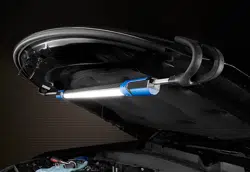
LED RECHARGEABLE UNDERHOOD WORK LIGHT
User Guide
Thank you for purchasing the LED Rechargeable Underhood Work Light. Please retain this
manual for safety guidelines, assembly instructions, operation details, inspection procedures,
maintenance, and cleaning instructions.

- 2 -
SPECIFICATIONS
Battery Li-ion
Battery Rating 3.65V, 4000mAH
Kelvin Rating 6500k
Charge Time 4.5 hours
Run Time 6 hours (low setting), 2 hours (high setting)
To prevent serious injury, fire, and explosion:
• Keep dry. Do not open, drop, short-circuit, incinerate, or expose to temperatures higher than 140°F. Do
not charge/use if damaged.
• Do not submerge the light in water.
• Do not operate the light in explosive environments, such as in the presence of flammable liquids, gases,
or dust.
• Please consult your physician(s) if you have a pacemaker before use. Electromagnetic fields in close
proximity to a heart pacemaker could cause pacemaker interference or failure.
• This is not a toy. Keep out of the reach of children.
• Contains a Li-ion battery. Battery must be recycled or disposed of properly. Do not open, crush or heat
above 140°F or incinerate.
CHARGING INSTRUCTIONS
1. Insert the end of the adaptor cord into the charging port located on one of the handgrips.
2. Insert the USB-C cable into a 5V2A charger.
3. The charge light indicator will light up during charging. After approximately 2 hours all 4 lights on the
charge light indicator should be lit up, indicating the work light has been fully charged and ready for use.
4. Unplug the adaptor.
NOTE: Do not leave the battery in a discharged state. Charge the battery every 3 months if the work
light is not in use. This will keep the battery from wearing down and add to its life. Do not charge the
work light at temperatures below 40°F.

- 3 -
The SHARPER IMAGE® name and logo are registered trademarks.
©Sharper Image. All Rights Reserved.
OPERATING INSTRUCTIONS
NOTE: Before using the work light for the first time, fully charge the battery
1. Press the On/OFF switch once to turn the light on. The light will turn on in low brightness mode.
2. Press the On/OFF switch a second time to change the light to high brightness.
3. Press the On/OFF switch a third time to turn the light off.
4. The length can be adjusted by pulling on the hooks. Maximum length is 85”. Use the hooks to attach
the light to the desired position, such as a lifted car hood.
5. When finished using the work light, store indoors away from children.
WARRANTLY/CUSTOMER SERVICE
This item from Sharperimage.com includes a 1-year limited replacement warranty. If you have any
questions not covered in tis guide, please call our Customer Service department at 1 (877) 210-3449.
Customer Service agents are available Monday though Friday, 9:00 a.m. to 6:00 p.m. ET.