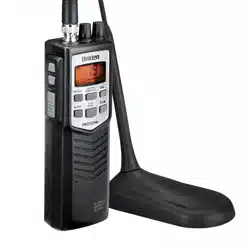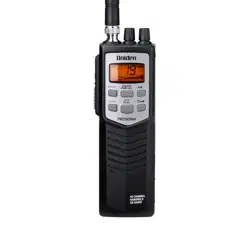
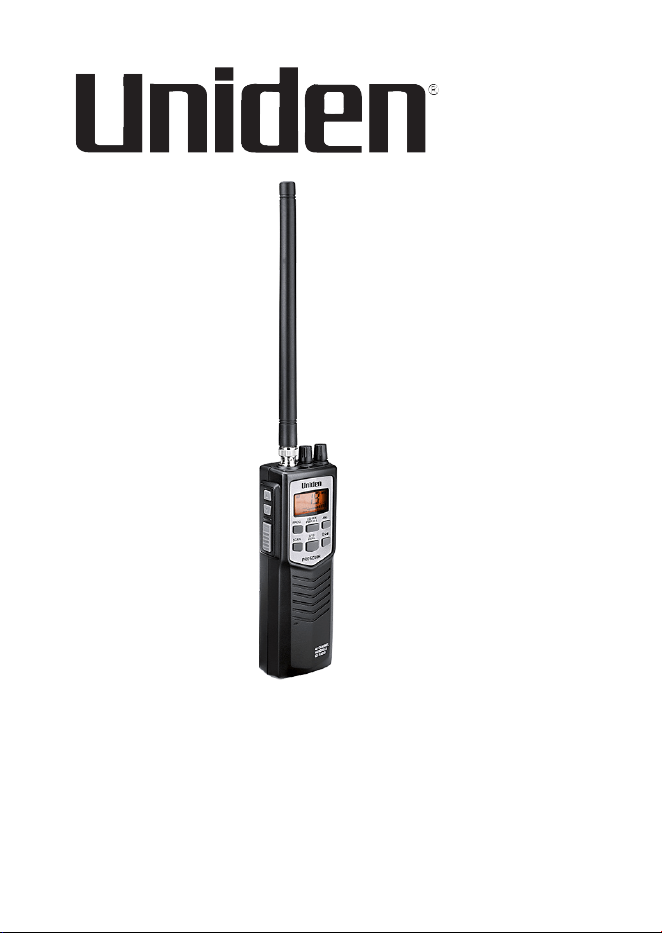
PRO501HH
Handheld CB Radio
Printed in Vietnam
U01UT422ZZZ(0)
© 2019 Uniden America Corp.
Irving, Texas


CONTENTS
INTRODUCTION .............................................................................5
FEATURES ..................................................................................5
SAFETY NOTICE ........................................................................6
UNIDEN CONTACT INFORMATION ...........................................6
INCLUDED IN YOUR PACKAGE ...................................................6
PARTS OF THE RADIO ..................................................................7
LCD .................................................................................................9
SETUP ...........................................................................................10
INSTALL ANTENNA .................................................................. 10
CONNECT TO POWER.............................................................10
DC Power ............................................................................. 10
Battery Power ....................................................................... 10
Charge the Radio ................................................................. 11
Low Power Indication ........................................................... 11
CONNECT EXTERNAL SPEAKER ...........................................11
OPERATION .................................................................................12
KEY BASICS .............................................................................12
BASIC OPERATION ..................................................................13
CB OPERATION ........................................................................14
CB Communication Codes ................................................... 14
EMERGENCY OPERATION ...................................................... 15
DUAL WATCH ...........................................................................15
Programming Dual Watch Channels .................................... 16
AUTOMATIC NOISE LIMITER ..................................................16
WEATHER .................................................................................16
MAINTENANCE ............................................................................16
TROUBLESHOOTING ..................................................................17
SERVICE AND REPAIR INFORMATION...................................17
FREQUENCY LISTS .....................................................................17
CB CHANNEL FREQUENCY LIST ............................................17
WEATHER CHANNEL FREQUENCY LIST ...............................19

4
SPECIFICATIONS .........................................................................20
GENERAL .................................................................................. 20
TRANSMITTER .........................................................................20
RECEIVER ................................................................................20
FCC PART 15 & IC COMPLIANCE ..............................................21
ONE-YEAR LIMITED WARRANTY ..............................................22

5
INTRODUCTION
The PRO501HH radio is a mobile radio designed for use in the
Citizens Band (CB) Radio Service. It will operate on any of the 40 AM
frequencies authorized by the Federal Communications Commission
(FCC). Your radio features a superheterodyne circuit with Phase
Locked Loop techniques to assure precise frequency control.
FEATURES
► 40 AM channels
► 10 Weather channels
► Dual Channel Watch
► Full Channel Scan
► Instant Channel 9/19
► High/Low power saver switch (HI = 4W; LOW = 1W)
► Key lock
► Backlight On/Off
► Condenser microphone.
► Ceramic lter: Delivers greater selectivity and reduces adjacent
channel interference.
► AGC (Automatic Gain Control) for a constant sound level.
► Automatic modulation control for a constant audio transmit
modulation level.
► Low distortion IC audio circuit.
► Automatic noise limiter to reduce pulse noise.
► Antenna with BNC connector.
► External speaker jack and external MIC jack
► Jack for external power source and battery charger.
► Rechargeable (9 AA Ni-MH) or Alkaline (9 AA) batteries (not
included)
6
SAFETY NOTICE
► Do not expose the PRO501HH to water or extreme temperatures.
► Do not leave batteries installed over a long period of time as
leakage may occur and cause damage to the radio.
► Never use different batteries from the ones suggested.
► Never use harsh chemicals to clean this radio. Use a damp soft
cloth.
UNIDEN CONTACT INFORMATION
You can get answers 24/7 at our website: www.uniden.com.
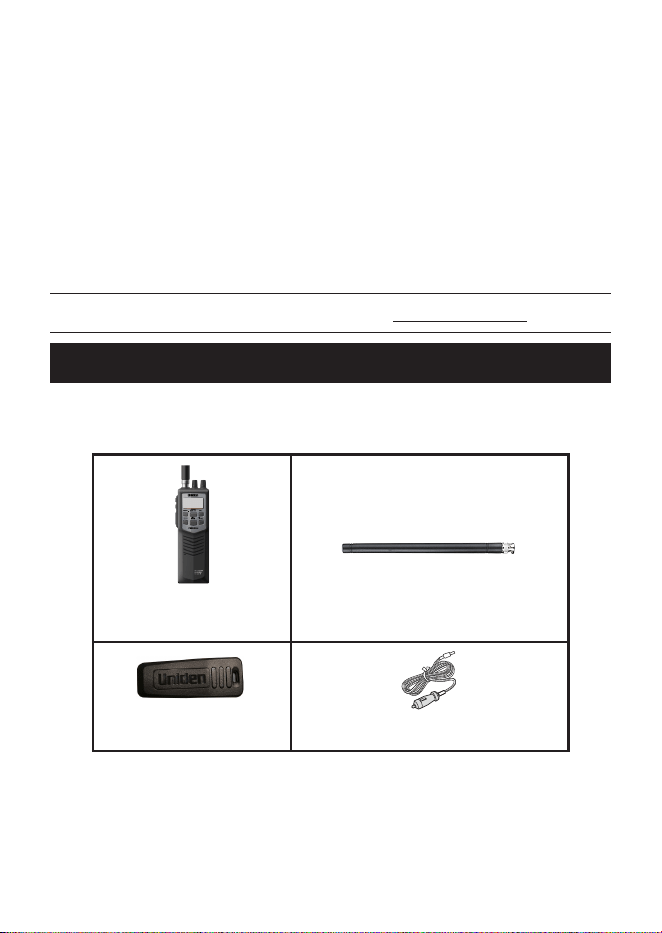
INCLUDED IN YOUR PACKAGE
If any of these items are missing or damaged, immediately contact
your place of purchase or www.uniden.com.
PRO501HH Radio
Antenna
Belt Clip
DC Power Cable
Not shown: Wrist Strap, Charge Adapter
7
PARTS OF THE RADIO
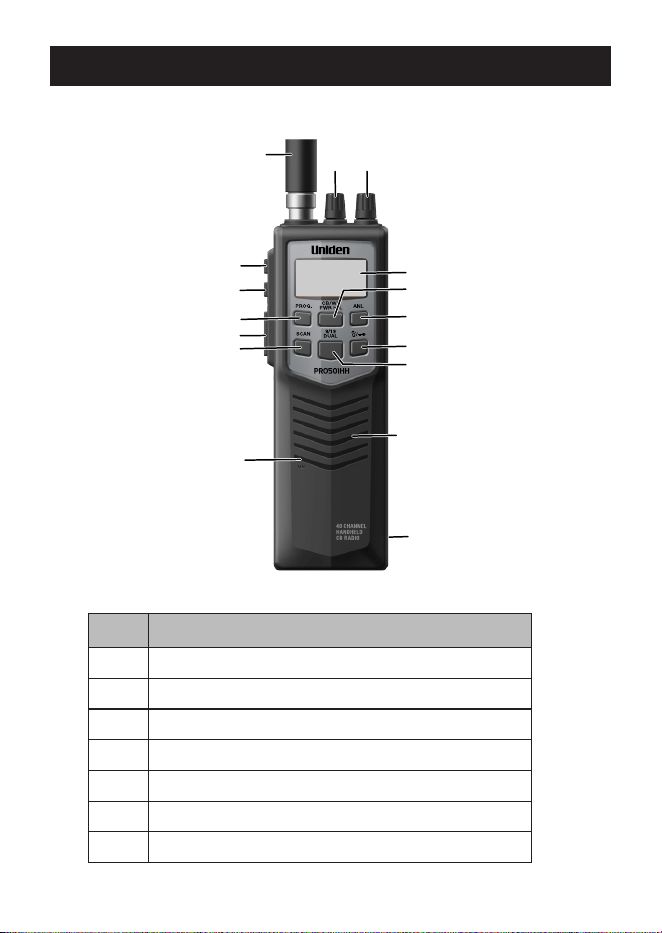
NO. DESCRIPTION
1 Antenna
2 Channel Up ( ▲ )
3 Channel Down ( ▼ )
4 PROG.
5 Push-to-Talk
6 Scan
7 Microphone
1
15
16
8
6
5
4
3
2
10
11
12
13
14
9
7
8
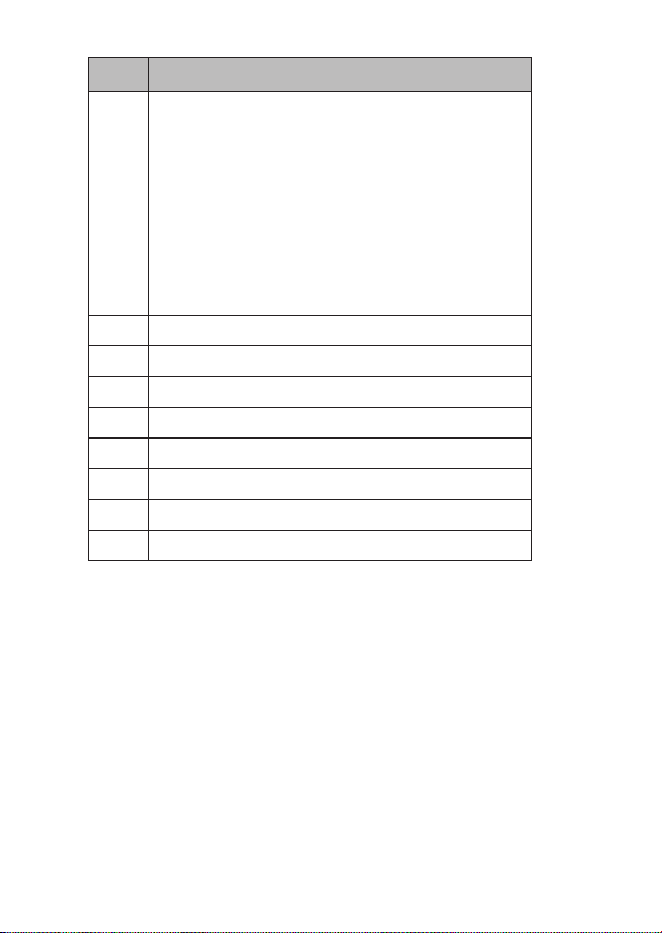
NO. DESCRIPTION
8 Jacks/LED Area
– External speaker jack
– External mic jack
– Charge jack
– DC power supply jack
– Charge LED (Red: Charging; Green: Full
Charge; Blinking Red: Abnormal charge
state)
9 Speaker
10 9/19, DUAL
11 Backlight/Key Lock
12 Automatic Noise Limiter (ANL)
13 CB/WX PWR H/L
14 LCD Screen
15 Squelch knob
16 Power/Volume Knob
NOTE: FCC rules reserve Channel 9 for motorist assistance
and other emergency communications. Channel 9 should only
be used in( situations where there is immediate danger to the
safety of individuals or the protection of property.
Make sure you have read and understood part 95 of the FCC
rules and regulations before using the transmitter.
9
LCD
TX
PROG
WX DW
PWR LO
EMG
ANL
SCAN
SIGNAL
POWER
1
3
5
9
+30
0.5
1 2 3 4
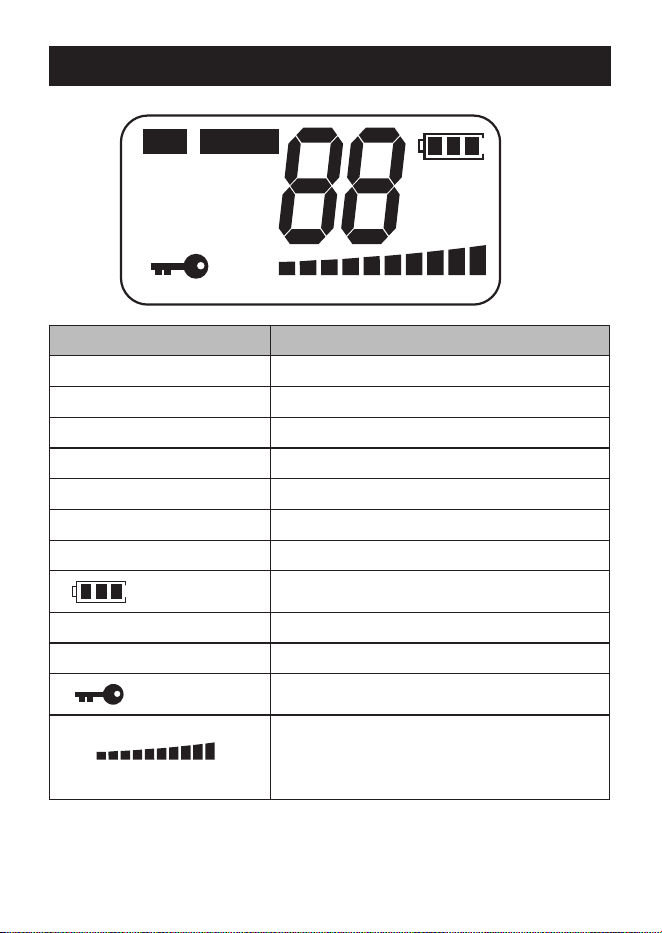
LCD ITEM MEANING
TX Transmitting
PROG Program key is active.
WX Weather Channel
DW Dual Watch
PWR LO Transmit Power Low
EMG Emergency channel indicator
88 Channel Number
Battery Strength (4 steps)
ANL Automatic Noise Limiter
SCAN Scan function active
Key lock function active
SIGNAL
POWER
1
3
5
9
+30
0.5
1 2 3 4
SRF meter
Strength of incoming signal/Strength of
outgoing transmission
10
SETUP
INSTALL
Install the included rubber antenna onto the radio.
CAUTION: Make sure the SWR is less than 2:1 before using the
radio. An SWR higher than 2:1 can damage the transmitter.
This radio transmitter 513C-UT422 has been approved by
Innovation, Science and Economic Development Canada to operate
with the antenna types listed below, with the maximum permissible
gain indicated. Antenna types not included in this list that have a
gain greater than the maximum gain indicated for any type listed are
strictly prohibited for use with this device.
ANTENNA TYPE MAX GAIN IMPEDANCE
All antenna types 3 dBi 50Ω
CONNECT TO POWER
Your PRO501HH can operate on DC power or batteries.
DC Power
1 Plug DC power cable into the PRO501HH.
2 Plug the other end into your vehicle’s cigarette lighter/DC power
conversion plug.
Battery Power
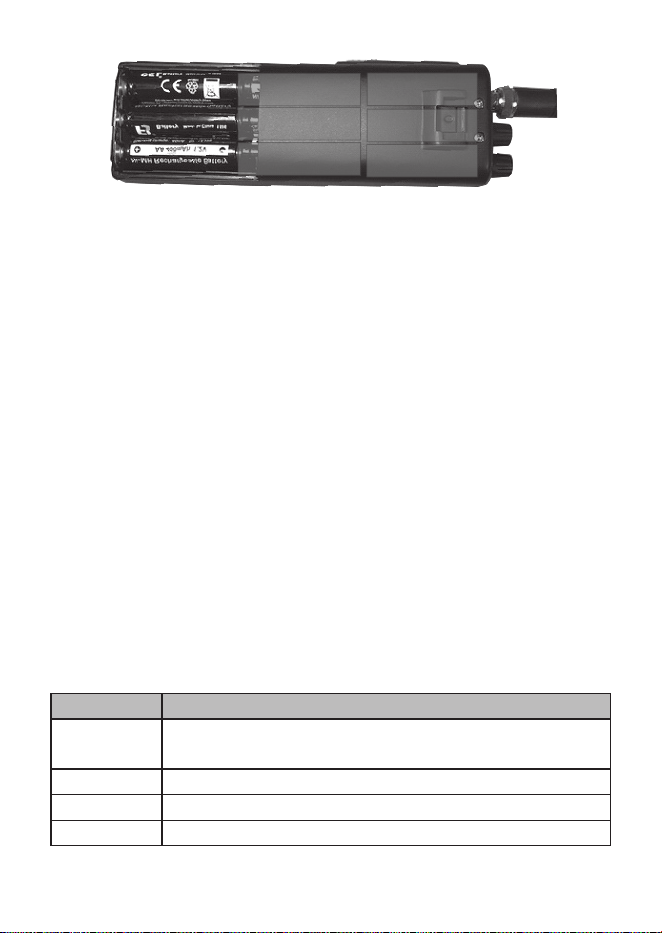
You can use either 9 non-rechargeable alkaline batteries or 9
rechargeable Ni-MH batteries (not included) with this unit.
1 Open battery cover.
2 Insert the 9 batteries according to the directions indicated inside
the battery compartment.
11
3 Close battery cover.
Charge the Radio
NiMH rechargeable batteries are not fully charged when rst installed
in the radio. After installing the rechargeable NiMH batteries for the rst
time, place the radio in the charge adapter. Let it charge for about 12
hours or until the LED on the charge adapter turns green.
Regardless of which type of batteries you use in this radio, the battery
icon ashes when power is low. Replace the alkaline batteries or
recharge the unit if using the rechargeable NiMH batteries.
Low Power Indication
The battery icon shows a reduced power level and its outline ashes.
Connect the DC power cable to a power source and to the radio to
continue to use it until you can recharge/replace the batteries.
CONNECT EXTERNAL SPEAKER
Your radio supports an external speaker for remote monitoring. The
external speaker is sold separately.
EXTERNAL SPEAKER
Function Remote receiver monitoring or substitution for internal
speaker
Impedance 8 Ohms
Rating 1 Watt
Connect to EXT.SP. jack (⅛-in/3.5 mm)
12
EXTERNAL SPEAKER
Notes The internal speaker is disabled when an external
speaker is connected.
OPERATION
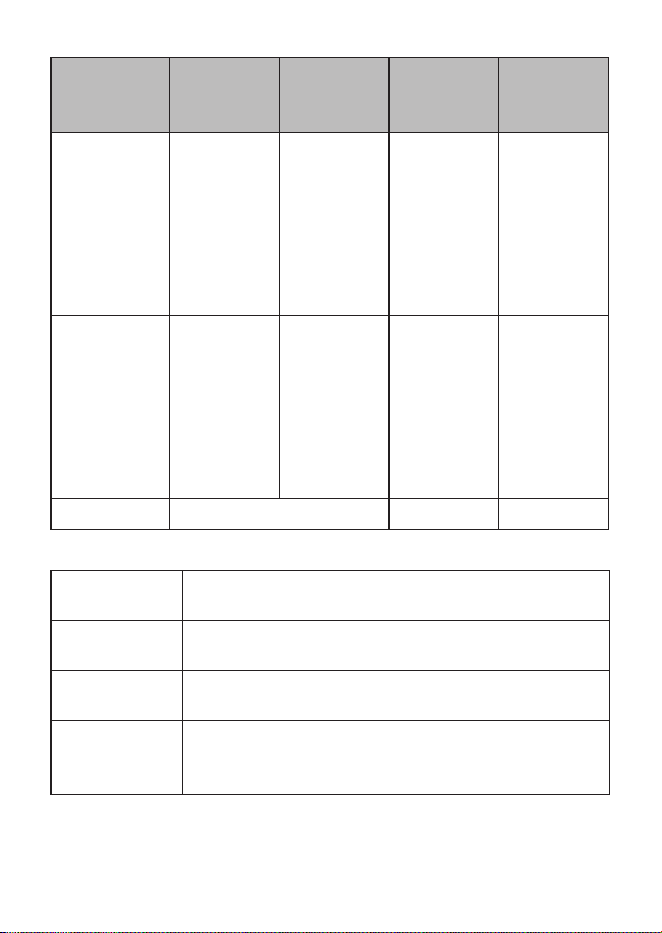
KEY BASICS
KEY PRESS
PRESS/
HOLD
PRESS+
PROG
PRESS/
HOLD+
PROG
PROG Turn on/off. NA NA NA
CB/WX
PWR H/L
Change
WX to CB
channel/
back,
NA Change TX
power to HI
or LO.
NA
ANL Turn ANL
on/off.
NA NA NA
SCAN Start/stop
scanning
channels
NA NA NA
9/19
DUAL
Recall
instant
CH9/CH19
NA Start/stop
Dual Watch
Enter
DW CH
Program
Mode
LIGHT
LOCK
Backlight
on/off
Key Lock
on/off
NA NA
13
KEY PRESS
PRESS/
HOLD
PRESS+
PROG
PRESS/
HOLD+
PROG
▲ (UP) Channel
Selection
Resume
Scan
Change
Scan
direction
Channel
Scroll
Channel
selection to
CH1
NA
▼ (DOWN) Channel
Selection
Resume
Scan
Change
Scan
direction
Channel
Scroll
Channel
selection to
CH21
NA
PTT Push to talk NA NA
BASIC OPERATION
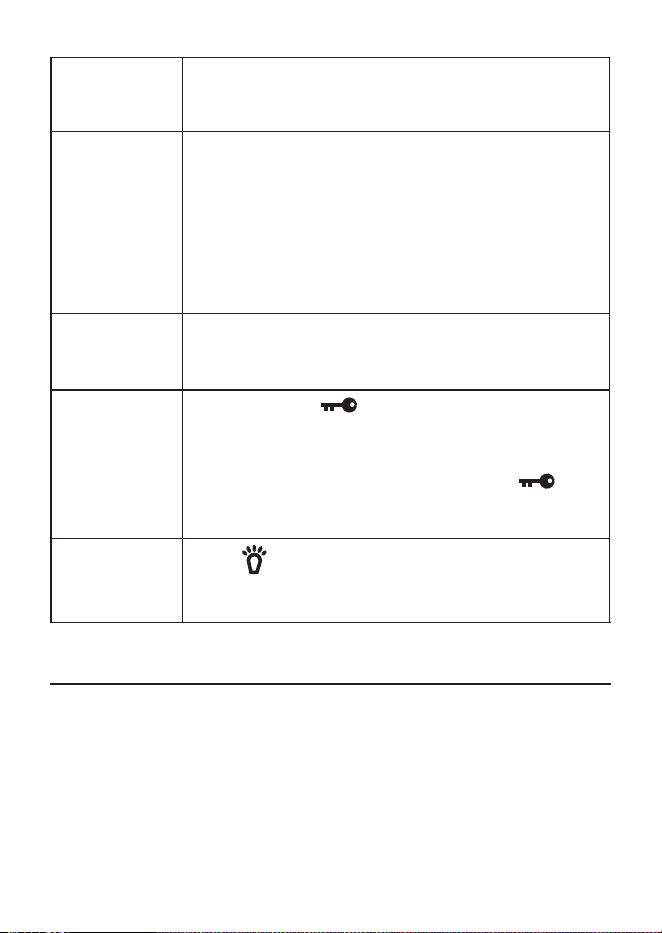
Turning the
radio on
Turn the Volume knob clockwise until it clicks and
the LCD display turns on.
Turning the
radio off
Turn the Volume knob counter-clockwise until it
clicks and the LCD display turns off.
Adjusting
Squelch
Turn the Squelch knob counter-clockwise to open
squelch or clockwise to close it.
Selecting a
channel
Press the ▲ or ▼ button on the side to move up or
down the channel list. Press and hold the buttons to
move quickly through the channels.
14
Changing the
volume
After turning the radio on, turn the Volume knob
clockwise to increase the volume; turn it counter-
clockwise to decrease the volume.
Transmitting
– Tune the radio to the channel you want to
transmit on, and listen to make sure the channel
is clear.
– Press and hold the PTT button.
– Hold the microphone about 2 inches away from
your mouth and speak in a normal voice.
– Release the PTT button to listen for a response.
Scanning
channels
Press SCAN in CB mode; the radio scans the
channels, stopping when it receives a transmission.
Press SCAN again to stop scanning
Lock keys
to prevent
accidental
activation.
Press and hold to actiate key lock; the Lock
icon displays. Only PTT, LIGHT, and LOCK keys
and the VOLUME and SQUELCH knobs are active.
With Key Lock activated, press and hold to
deactiate key lock; the Lock icon goes away and all
keys are now active.
Turn backlight
on and off
Press to turn the LCD backlight on for 10
seconds. Press it again while the backlight is on to
turn it off.
NOTE: Make sure you have read and understood part 95 of the
FCC rules and regulations before using the transmitter.
CB OPERATION
CB Communication Codes
The “10” code allows you to communicate easier in noisy
environments. The following table lists some of the most common
codes and their meaning.

15
CODE MEANING
10-1 Receiving poorly
10-2 Receiving well
10-3 Stop transmiting
10-4 OK - Understood
10-6 Busy - Stand By
10-7 Out of service - Leaving air
10-8 In service - Subject to call
10-9 Please repeat
10-10 Transmission completed - Standing by
10-13 Road advice - Weather conditions
10-20 What is your location?
10-33 Emergency trafc
10-36 Exact time
10-41 Switch to channel
10-62 Cannot receive - use phone
10-70 Fire at __________
10-200 Police needed at __________
EMERGENCY OPERATION
The Pro501HH provides instant access to emergency channels 9 and
19. Press 9/19 DUAL once for channel 9; press it twice for channel 19.
Press 9/19 DUAL a third time to return to the original channel.
DUAL WATCH
Dual Watch lets you monitor two channels at the same time for
incoming transmissions.

16
Programming Dual Watch Channels
1 Select a channel using the ▲ or ▼ keys.
2 Press and release PROG key. The Program icon displays.
3 Press and hold DUAL key until the radio beeps. The Program icon
disappears and the DW icon ashes.
4 Select another channel using the ▲ or ▼ keys.
5 Press and release DUAL; the radio beeps and the DW icon stays
on.
6 The LCD switches between the two channels selected as it
monitors both for transmissions.
7 Press ▲ or ▼ to exit Dual Watch mode.
AUTOMATIC NOISE LIMITER
Automatic Noise Limiter (ANL) suppresses white noise. Press ANL to
turn it on.
ANL does not function when the radio is in WX mode.
WEATHER
The PRO501HH accesses 10 weather channels.
1 Press and release CB/WX key. The WX icon and the current
weather channel display.
2 Select a different weather channel using the ▲ or ▼ keys.
3 Press and release CB/WX key to return to normal CB operation.
The WX icon disappears.
MAINTENANCE
Clean the unit with a damp cloth only; never use harsh chemicals.
17
TROUBLESHOOTING
If your radio is not performing to your expectations, please try these
simple steps. If these steps don’t solve your problem, visit the Uniden
website (www.uniden.com) for troubleshooting and FAQ information.
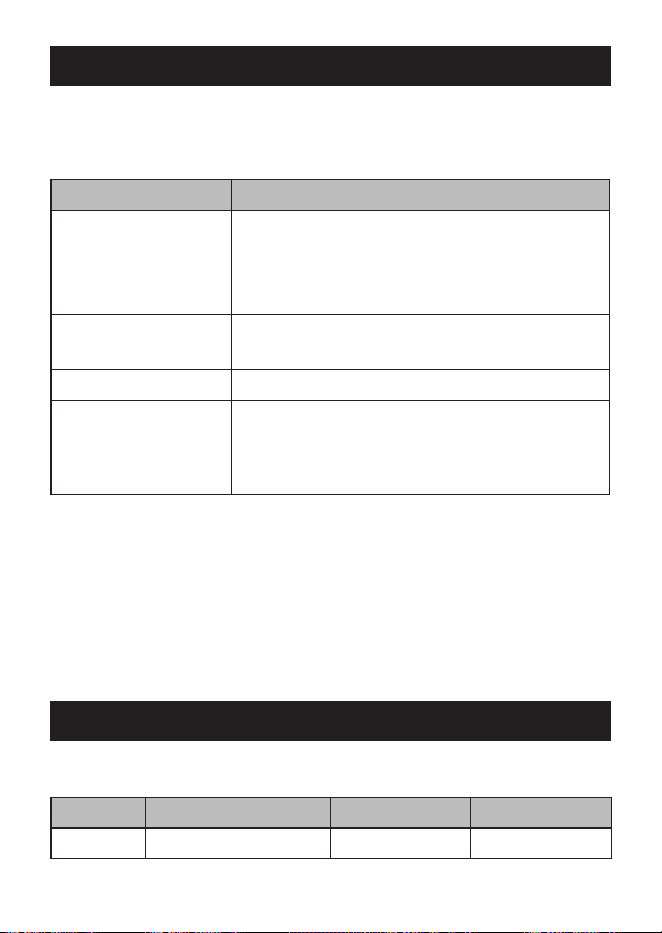
PROBLEM: THINGS TO TRY:
Radio won’t turn on
(no power)
Check the radio’s power cord and all
connections.
Check the fuse in the radio’s power cord.
Check your vehicle’s electrical system.
Poor reception
Adjust the squelch level (See page 13).
Check the antenna, cable and connectors.
Background noise Adjust the squelch level (See page 13).
Weak transmission
Check the antenna, cable and connectors.
Check the antenna grounding.
Check for corrosion on the connectors.
SERVICE AND REPAIR INFORMATION
► Save your purchase receipt for proof of warranty.
► When ordering parts, it is important to specify the correct model
number of this radio (PRO501HH).
► It is the user’s responsibility to make sure the radio is operating in
accordance with the FCC Citizens Radio Service regulations at all
times.
FREQUENCY LISTS
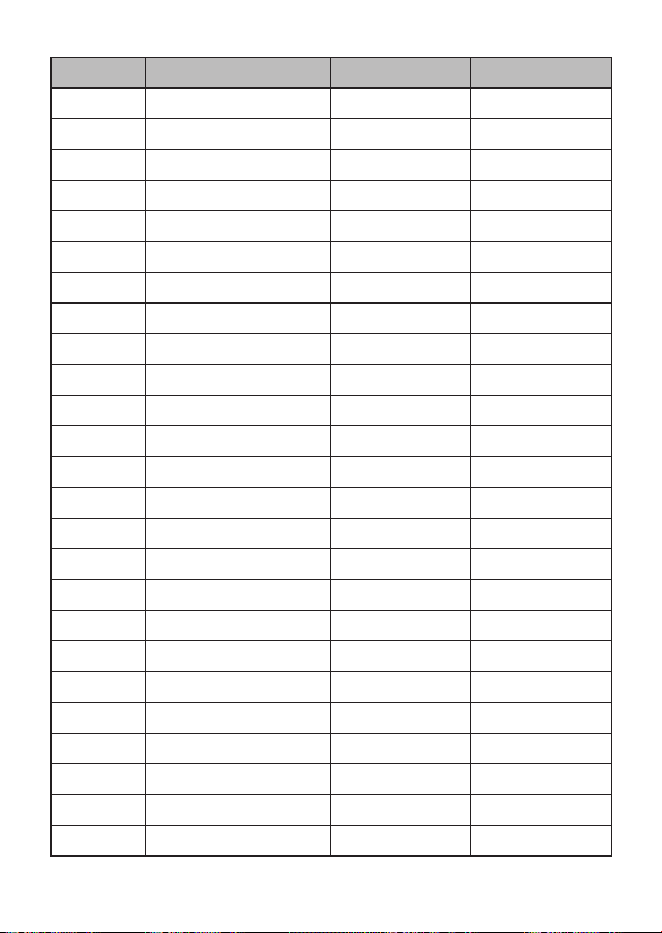
CB CHANNEL FREQUENCY LIST
CH NO. FREQ. (MHZ) AM RX AM TX
1 26.965 O O
18
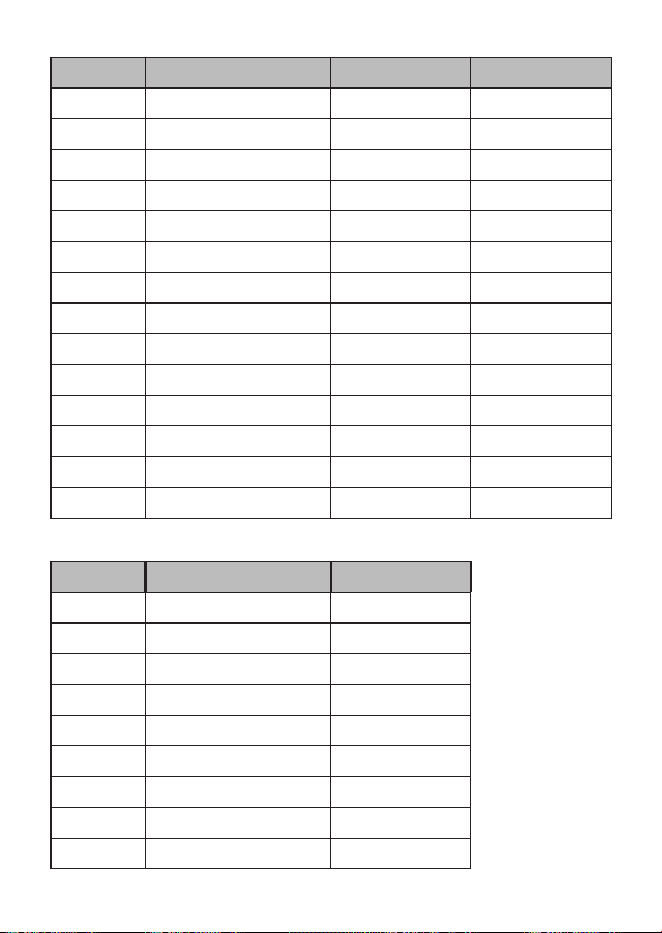
CH NO. FREQ. (MHZ) AM RX AM TX
2 26.975 O O
3 26.985 O O
4 27.005 O O
5 27.015 O O
6 27.025 O O
7 27.035 O O
8 27.055 O O
9 27.065 O O
10 27.075 O O
11 27.085 O O
12 27.105 O O
13 27.115 O O
14 27.125 O O
15 27.135 O O
16 27.155 O O
17 27.165 O O
18 27.175 O O
19 27.185 O O
20 27.205 O O
21 27.215 O O
22 27.225 O O
23 27.255 O O
24 27.235 O O
25 27.245 O O
26 27.265 O O
19
CH NO. FREQ. (MHZ) AM RX AM TX
27 27.275 O O
28 27.285 O O
29 27.295 O O
30 27.305 O O
31 27.315 O O
32 27.325 O O
33 27.335 O O
34 27.345 O O
35 27.355 O O
36 27.365 O O
37 27.375 O O
38 27.385 O O
39 27.395 O O
40 27.405 O O
WEATHER CHANNEL FREQUENCY LIST
CH NO. FREQ. (MHZ) FM RX
WX01 162.550 O
WX02 162.400 O
WX03 162.475 O
WX04 162.425 O
WX05 162.450 O
WX06 162.500 O
WX07 162.525 O
WX08 161.650 O
WX09 161.775 O
20
CH NO. FREQ. (MHZ) FM RX
WX010 163.275 O
SPECIFICATIONS
GENERAL
Channels 40 AM
Frequency Range 26.965 to 27.405 MHz
Frequency Control Phase Locked Loop (PLL) synthesizer
Frequency Tolerance ±0.005%
Operating Temperature 14ºF to 131ºF (-10ºC to +55ºC)
Microphone Electret Type
Input Voltage 13.8 V DC nom, 10.9VDC – 15.6VDC
Current Drain TX full mod., 1.7A
RX @RX max. audio 0.4A
Size 2.3 x 7.04 x 1.67 in (58.5 x 179 x 42.5
mm)
Weight 0.56 lbs (255 g).
TRANSMITTER
Power Output 4 Watts @13.8 VDC
Modulation 85% - 95%
Freq. Response 400 Hz – 2.5 KHz
Output Impedance 50 ohms, unbalanced
RECEIVER
Sensitivity <1 μV for 10 dB; (S + N) /N typical
Selectivity 6 dB @ 7kHz, 70 dB @ 10kHz typical
I.F. Frequency Double Conversion Superheterodyne
1st - 10.695 MHz
2nd - 455 kHz

21
Automatic Gain Control
(AGC)
less than 10dB change in audio output
for inputs from 10 to 50,000 microvolts
Squelch Adjustable; threshold less than 1μV
Audio Output Power 0.5 watts max. @ 8 ohms
Freq. Response 300 to 2000 Hz
Distortion less than 8% at 1KHz
Internal Speaker 8 ohms, 1 watts
Specications and features are subject to change without notice.
FCC PART 15 & IC COMPLIANCE
FCC Compliance Statement: This device complies with Part 15 of the
FCC rules. Operation is subjected to the following two conditions: (1)
this device may not cause harmful interference, and (2) this device
must accept any interference received, including interference that may
cause undesired operation.
This device complies with Industry Canada license-exempt RSS
standard(s). Operation is subject to the following two conditions: (1)
this device may not cause interference, and (2) this device must accept
any interference, including interference that may cause undesired
operation of the device.
Changes or modications not expressly approved by the party
responsible for compliance could void your authority to operate the
equipment.
Avis de conformité à la FCC : Ce dispositif a été testé et s’avère
conforme à l’article 15 des règlements de la Commission fédérale
des communications (FCC). Ce dispositif est soumis aux conditions
suivantes: 1) Ce dipositif ne doit pas causer d’interférences nuisibles
et; 2) Il doit pouvoir supporter les parasites qu’il reçoit, incluant les
parasites pouvant nuire à son fonctionnement.
Cet appareil est conforme aux normes RSS exemptes de
licences d’Industrie Canada. Son fonctionnement est soumis

22
aux deux conditions suivantes : (1) cet appareil ne doit pas
causer d’interférences nuisibles et (2), il doit pouvoir accepter les
interférences, incluant celles pouvant nuire à son fonctionnement
normal.
Tout changement ou modication non approuvé expressément par
la partie responsable pourrait annuler le droit à l’utilisateur de faire
fonctionner cet équipement.
ONE-YEAR LIMITED WARRANTY
WARRANTOR: UNIDEN AMERICA CORPORATION (“Uniden”)
ELEMENTS OF WARRANTY: Uniden warrants, for one year, to the original retail
owner, this Uniden Product to be free from defects in materials and craftsmanship
with only the limitations or exclusions set out below.
WARRANTY DURATION: This warranty to the original user shall terminate
and be of no further effect 12 months after the date of original retail sale.
The warranty is invalid if the Product is (A) damaged or not maintained as
reasonable or necessary, (B) modied, altered, or used as part of any conversion
kits, subassemblies, or any congurations not sold by Uniden, (C) improperly
installed, (D) serviced or repaired by someone other than an authorized
Uniden service center for a defect or malfunction covered by this warranty, (E)
used in any conjunction with equipment or parts or as part of any system not
manufactured by Uniden, or (F) installed or programmed by anyone other than as
detailed by the owner’s manual for this product.
STATEMENT OF REMEDY: In the event that the product does not conform to
this warranty at any time while this warranty is in effect, warrantor will either,
at its option, repair or replace the defective unit and return it to you without
charge for parts, service, or any other cost (except shipping and handling)
incurred by warrantor or its representatives in connection with the performance
of this warranty. Warrantor, at its option, may replace the unit with a new or
refurbished unit. THE LIMITED WARRANTY SET FORTH ABOVE IS THE
SOLE AND ENTIRE WARRANTY PERTAINING TO THE PRODUCT AND IS
IN LIEU OF AND EXCLUDES ALL OTHER WARRANTIES OF ANY NATURE
WHATSOEVER, WHETHER EXPRESS, IMPLIED OR ARISING BY OPERATION
OF LAW, INCLUDING, BUT NOT LIMITED TO ANY IMPLIED WARRANTIES
OF MERCHANTABILITY OR FITNESS FOR A PARTICULAR PURPOSE. THIS

23
WARRANTY DOES NOT COVER OR PROVIDE FOR THE REIMBURSEMENT
OR PAYMENT OF INCIDENTAL OR CONSEQUENTIAL DAMAGES. Some
states do not allow this exclusion or limitation of incidental or consequential
damages so the above limitation or exclusion may not apply to you.
LEGAL REMEDIES: This warranty gives you specic legal rights, and you may
also have other rights which vary from state to state. This warranty is void outside
the United States of America.
PROCEDURE FOR OBTAINING PERFORMANCE OF WARRANTY: If, after
following the instructions in the owner’s manual you are certain that the Product
is defective, pack the Product carefully (preferably in its original packaging). The
Product should include all parts and accessories originally packaged with the
Product. Include evidence of original purchase and a note describing the defect
that has caused you to return it. The product should be shipped freight prepaid,
by traceable means, to warrantor at:
Uniden America Service
C/O Saddle Creek
743 Henrietta Creek Rd., Suite 100
Roanoke, TX 76262