
THERMADOR.COM
Use and care
GUIDE
Professional Series Pro Grand
®
Ranges


Page. 3
Home Connect
TM
user’s information
Wi-Fi
®
module
FCC/IC statements
Model: COM2
FCC ID: 2AHES-COM2
IC: 21152-COM2
The Home Connect module is a communication
device designed to provide communication between
appliances and smart devices.
This module is integrated at the factory, under direct control of BSH Home
Appliances Corporation, and is not user serviceable or upgradable.
At least 20 cm separation distance should be maintained from device to user.
FCC COMPLIANCE STATEMENT
CAUTION: Changes or modifications not expressly approved could void your authority to use
this equipment.
This device complies with Part 15 of the FCC Rules. Operation to the following two conditions:
(1) This device may not cause harmful interference, and (2) This device must accept any
interference received, including interference that may cause undesired operation.
INDUSTRY CANADA STATEMENT
This device complies with Industry Canada licence-exempt RSS standard(s). Operation is
subject to the following two conditions: (1) this device may not cause interference, and (2) this
device must accept any interference, including interference that may cause undesired
operation of the device.
Operation in the band 5150-5250 MHz is only for indoor use to reduce the potential for harmful
interference to co-channel mobile satellite systems.
Le présent appareil est conforme aux CNR d’Industrie Canada applicables aux appareils radio
exempts de licence. L’exploitation est autorisée aux deux conditions suivantes : (1) l’appareil
ne doit pas produire de brouillage, et (2) l’utilisateur de l’appareil doit accepter tout brouillage
radioélectrique subi, même si le brouillage est susceptible d’en compromettre le
fonctionnement.
Le fonctionnement dans la plage de 5150 à 5250 MHz est uniquement pour une utilisation intérieure afin
de réduire le potentiel d’interférences nuisibles aux systèmes de satellites mobiles sur les canaux.

Page. 4
Congratulations!
Congratulations on your recent Thermador purchase! Whether you are a dedicated chef or simply a connoisseur of the
art of cooking, owning a Thermador kitchen is the ultimate expression of personal style, good taste and an appreciation
for the complete culinary experience. Our award-winning products have been empowering culinary enthusiasts for more
than eleven decades.
Before you begin using your new Thermador product, please take a moment to review the Use and Care Guide. You will
find the answers to all of your questions as well as some very important safety information. Pay special attention to the
Important Safety Instructions located at the beginning of the manual. Your Thermador product is ready and waiting to be
used for your next gourmet creation!
Our products are handcrafted with the highest quality authentic materials to ensure years of reliable service. In the
unlikely event that you have a service question, please have your model and serial numbers of your product available (see
the “Before calling for service” section for location).
We realize that you have made a considerable investment in your kitchen. Please feel free to share your Thermador
kitchen photos and remodeling stories with us. Follow us on Twitter or post your kitchen photos on Facebook. We would
love to hear from you!
Thermador wishes you many years of creative cooking.
Page. 5
This THERMADOR
®
appliance is made by
BSH Home Appliances Corporation
1901 Main Street, Suite 600
Irvine, CA 92614
Questions?
1-800-735-4328
www.thermador.com
We look forward to hearing from you!
Tabl e o f
CONTENTS
Safety ...................................................................................... 6
Important safety instructions........................................... 6
Description ............................................................................. 12
Appliance identification .................................................. 12
Before you begin ................................................................... 17
Getting started ............................................................... 17
Using the rangetop ................................................................ 19
Sealed STAR
®
burners .................................................... 19
ExtraLow
®
burners ......................................................... 20
POWERBOOST
®
............................................................ 20
Electric griddle ................................................................ 26
Electric grill...................................................................... 29
Using the oven........................................................................ 32
Symbols and descriptions................................................ 32
Initial start-up................................................................... 33
Setting the oven(s)........................................................... 34
Timers
..................................................... 34
Panel lock ................................................................... 35
Multi-point meat probe ............................................. 35
Sabbath ..................................................................... 36
Remote start .............................................................. 37
Getting the most out of your appliance ................................. 38
Oven rack positions......................................................... 38
Bake ........................................................................... 38
Broil ........................................................................... 39
Convection broil ........................................................ 40
Convection bake ........................................................ 42
True convection ......................................................... 42
Proof .......................................................................... 42
Roast .......................................................................... 42
Convection roast ....................................................... 42
Warm ......................................................................... 43
Fine tuning the oven........................................................ 43
Setting up Home Connect
TM
.................................................. 44
Setup ............................................................................... 44
Care and maintenance ........................................................... 46
Self-clean (some models) ........................................... 46
Appliance cleaning tips .................................................. 47
Do-it-yourself maintenance ....................................................52
Oven light bulb replacement ..........................................52
Before calling for service ........................................................53
Troubleshooting ..............................................................53
Service information .........................................................54
Remote costumer service connection ........................54
Product registration.........................................................54
Statement of limited product warranty ..................................55
Support, accessories, and parts.................................back page
Safety
DEFINITIONS
9 WARNING
This indicates that death or serious injuries may occur as a
result of non-observance of this warning.
9 CAUTION
This indicates that minor or moderate injuries may occur as a
result of non-observance of this warning.
NOTICE: This indicates that damage to the appliance or
property may occur as a result of non-compliance with this
advisory.
Note: This alerts you to important information and/or tips.
Page. 6
Safety
9 IMPORTANT SAFETY INSTRUCTIONS
READ AND SAVE THESE INSTRUCTIONS
Please read carefully
Installer: Please leave this guide with this unit for the
owner.
Owner: Please retain this guide for future reference. Use
appliance only for its intended purpose as described in
this manual.
WARNING
When properly cared for, your new appliance has been
designed to be safe and reliable. Read all instructions
carefully before use. These precautions will reduce the
risk of burns, electric shock, fire, and injury to persons.
When using kitchen appliances, basic safety
precautions must be followed, including these in the
following pages.
WARNING
DANGER OF TIPPING:
All ranges can tip and injury can result. To
prevent accidental tipping of the range, attach
it to the floor, wall, or cabinet by installing the
anti-tip bracket supplied.
A child or adult can tip the range over and be
killed or seriously injured. Verify that the anti-
tip bracket is securely installed. Ensure the anti-
tip bracket is engaged when the range is
moved.
DO NOT operate the range
without the anti-tip bracket in
place. Failure to follow the
instructions in this manual can
result in death or serious burns to
children and adults.
If the range is pulled away from the wall for cleaning,
service, or any other reason, ensure that the anti-tip
bracket is properly reengaged when the range is
pushed back against the wall. In the event of
abnormal usage (such as a person standing, sitting, or
leaning on an open door), failure to take this
precaution can result in tipping of the range. Personal
injury might result from spilled hot liquids or from the
range itself.
Check for proper installation and use of anti-tip
bracket. Carefully tip range forward pulling from the
back to ensure that the anti-tip bracket engages the
range and prevents tip-over. Range should not move
more than 1'' (2.5 cm).
WARNING
Improper installation, adjustment, alteration, service
or maintenance can cause injury or property damage.
Refer to this manual. For assistance or additional
information consult a qualified installer, service
agency, manufacturer or the gas supplier.
WARNING
To provide proper ventilation of the range DO NOT
remove range feet.
WARNING
If the information in this manual is
not followed exactly, a fire or
explosion may result causing
property damage, personal injury or
death.
-- DO NOT store or use gasoline or other
flammable vapors and liquids in the
vicinity of this or any other appliance.
-- WHAT TO DO IF YOU SMELL GAS
• DO NOT try to light any appliance.
• DO NOT touch any electrical switch.
• DO NOT use any phone in your
building.
• Immediately call your gas supplier
from a neighbor’s phone. Follow the
gas supplier’s instructions.
• If you cannot reach your gas supplier,
call the fire department.
-- Installation and service must be
performed by a qualified installer, service
agency or the gas supplier.
Page. 7
9 IMPORTANT SAFETY INSTRUCTIONS
READ AND SAVE THESE INSTRUCTIONS
WARNING
Before servicing or cleaning the unit, switch power off
at service panel and lock service panel. This will
prevent power from being switched on accidentally.
When the service panel cannot be locked, securely
fasten a prominent warning device, such as a tag to
the service panel.
Gas type verification
Natural gas – 7 in. column water (17.4 mb) min., 14 in.
(34.9 mb) maximum
Propane gas – 11 in. water column (27.4 mb) min., 14 in.
(34.9 mb) maximum
Verify the type of gas supplied to the location. Ensure that
the appliance is connected to the type of gas for which it
is certified. Refer to the data rating label.
WARNING
If a gas conversion kit is used, the kit shall be installed
by qualified technician in accordance with the
manufacturer’s instructions and all applicable codes
and requirements of the authority having jurisdiction.
If the information in the instructions is not followed
exactly, a fire, explosion or production of carbon
monoxide may result causing property damage,
personal injury or loss of life. The qualified technician
is responsible for the proper installation of the kit. The
installation is not proper and complete until the
operation of the converted appliance is checked as
specified in the manufacturer’s instructions supplied
with the kit.
CAUTION
When connecting the unit to propane gas, make
certain the propane gas tank is equipped with its own
high-pressure regulator in addition to the pressure
regulator supplied with the appliance. The maximum
gas pressure to this appliance must not exceed 14.0''
water column (34.9 mb) from the propane gas tank to
the pressure regulator.
For Massachusetts installations:
1. Installation must be performed by a qualified or
licensed contractor, plumber or gas fitter qualified or
licensed by the state, province or region where this
appliance is being installed.
2. Shut-off valve must be a “T” handle gas cock.
3. Flexible gas connector must not be longer than 36''
(914 mm).
Ensure proper installation and servicing. Follow the
Installation Manual provided with this product. Have the
appliance installed and electrically grounded by a
qualified technician.
In the event a burner goes out and gas escapes, open a
window or a door. DO NOT attempt to use the appliance
until the gas has had time to dissipate. Wait at least 5
minutes before using the appliance.
DO NOT repair or replace any part of the appliance unless
specifically recommended in this manual. All servicing
should be referred to an authorized servicer.
Electrical requirements
WARNING
IN CASE OF AN ELECTRICAL FAILURE
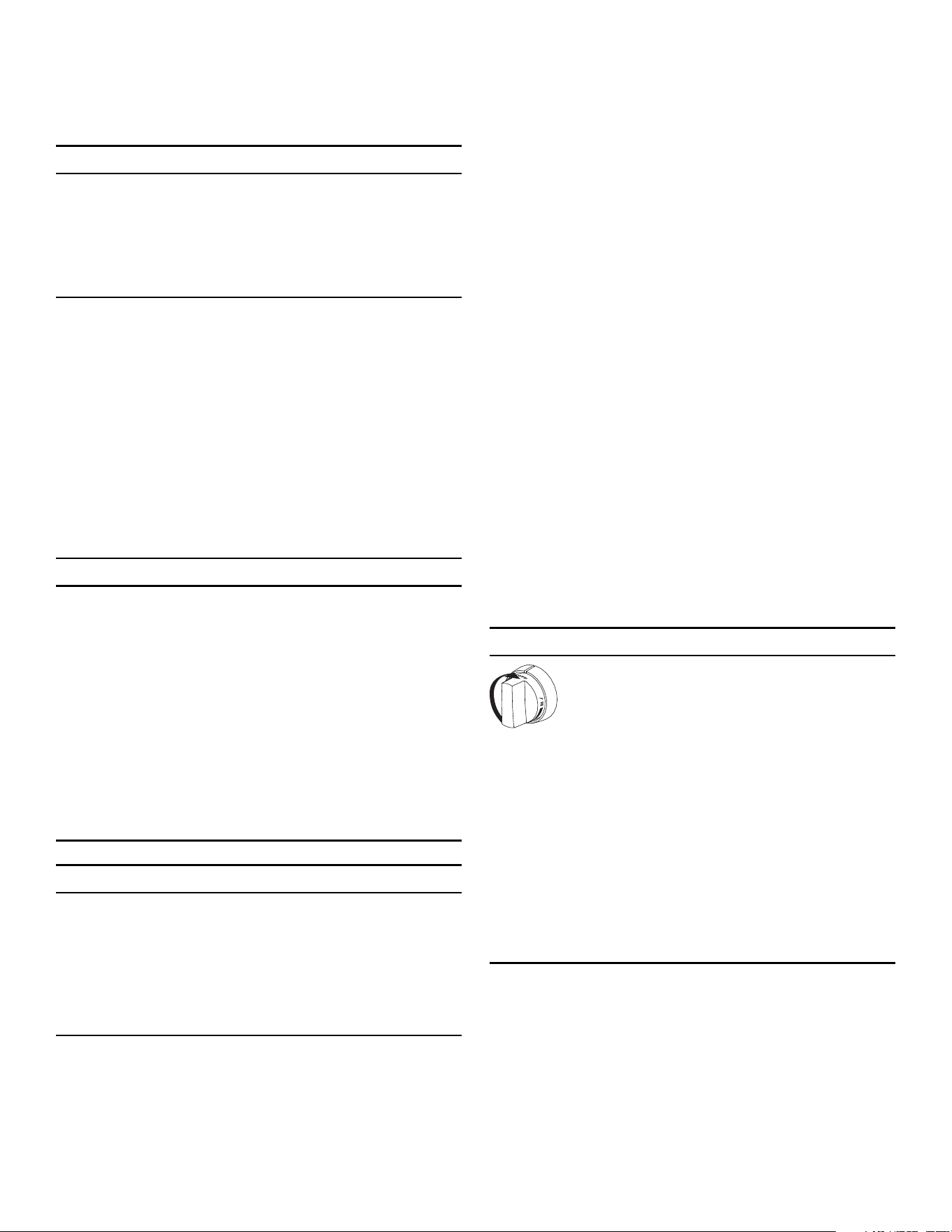
If for any reason a gas control knob is turned
ON and there is no electrical power to operate
the electronic igniters on the burners, turn OFF
the gas control knob and wait 5 minutes for the
gas to dissipate before lighting the burner
manually.
To light the burners manually, carefully hold a
lighted match to the burner ports and turn the
gas control knob to HI
. During a power failure,
you can use the standard burners, but each
must be lit with a match.
DO NOT attempt to light the XLO
®
burners
manually. These burners are equipped with the
ExtraLow
®
feature and cannot be lit manually.
The appliance must be electrically grounded in
accordance with local codes or, in the absence of local
codes, with the National Electrical Code, NFPA 70 or the
Canadian Electric Code, CSA C22.1-02.

Page. 8
9 IMPORTANT SAFETY INSTRUCTIONS
READ AND SAVE THESE INSTRUCTIONS
It is the personal responsibility and obligation of you, the
user, to have this appliance connected to the electrical
power supply by a qualified electrician, in accordance with
the National Electrical Code and/or applicable local codes
and ordinances.
Service should only be done by an authorized servicer.
Always disconnect the electrical plug from the wall
receptacle before servicing this unit.
See the Installation Manual for electrical requirements and
grounding instructions.
Have the installer show you where the electric circuit
breaker and the gas supply shut off valve are located so
you know how and where to turn off the gas and electricity
to the appliance.
Installation and maintenance must be carried out correctly.
Follow the instructions in the Installation Manual supplied
with the product. Make sure that a qualified electrician
installs and performs grounding of the appliance.
This appliance complies with the following Safety
Codes and Standards:
• UL 858, The Standard for the Safety of Household
Electric Ranges
• ANSI Z21.1, The American National Standard for
Household Cooking Gas Appliances
• CAN1-1.1-M81, Domestic Gas Ranges
• CSA C22.2 No. 61, Household Cooking Ranges
Installation must conform with local codes or, in the
absence of local codes, with the National Fuel Gas Code,
ANSI Z223.1/NFPA 54 or, in Canada, the Natural Gas and
Propane Installation Code, CSA B149.1.
Installation of appliances designed for manufactured
(mobile) home installation must conform with the
Manufactured Home Construction and Safety Standard,
Title 24 CFR, Part 3280 [formerly the Federal Standard for
Mobile Home Construction and Safety, Title 24, HUD (Part
280)] or with local codes where applicable.
Installation of appliances designed for recreational park
trailers must conform with state or other codes or, in the
absence of such codes, with the Standard for Recreational
Park Trailers, ANSI A119.5.
Clearances from non-combustible materials are not part of
the ANSI Z21.1 scope and are not certified by
CSA. Clearances under 6 inches should be approved by
the local codes and/or by the local authority having
jurisdiction.
It is the responsibility of the owner and the installer to
determine if additional requirements and/or standards
apply to specific installations.
The maximum depth of cabinets installed above cooking
surface must be 13'' (330 mm).
Child safety
WARNING
DO NOT store items of interest to children above or
at the back of the appliance. If children should climb
onto the appliance to reach these items, they could be
seriously injured.
When children become old enough to use the appliance,
it is the responsibility of the parents or guardians to ensure
that they are instructed in safe operation of the appliance
by qualified persons.
DO NOT allow anyone to climb, stand, lean, sit, or hang
on any part of an appliance. This can damage the
appliance, and the unit may tip over, potentially causing
severe injury.
DO NOT allow children to use this appliance unless
closely supervised by an adult.
Children and pets should not be left alone or unattended
in the area where the appliance is in use. They should
never be allowed to play in its vicinity, whether or not the
appliance is in use.
General safety
State of California Proposition 65 Warning:
: WARNING
This product can expose you to chemicals including
vinyl chloride, which is known to the State of California
to cause cancer and birth defects or other
reproductive harm. For more information go to
www.P65Warnings.ca.gov.

Page. 9
9 IMPORTANT SAFETY INSTRUCTIONS
READ AND SAVE THESE INSTRUCTIONS
WARNING
To reduce the risk of injury to persons, in the event
of a range top grease fire, observe the following:
• Smother flames with a close-fitting lid, cookie
sheet, or other metal tray, then turn off the gas
burner or the electric element. Be careful to
prevent burns. If the flames do not go out
immediately, evacuate and call the fire
department.
• Never pick up a flaming pan. You may be burned.
• DO NOT use water, including wet dish cloths or
towels, to extinguish flames – a violent steam
explosion will result.
• Use an extinguisher ONLY if:
• You know you have a class ABC extinguisher
and you already know how to operate it.
• The fire is small and contained in the area
where it started.
• The fire department is being called.
• You can fight the fire with your back to an exit.
WARNING
To eliminate risk of burns or fire caused by reaching
over heated surface units, cabinet storage located
above the surface units should be avoided.
WARNING
TO REDUCE THE RISK OF A GREASE FIRE:
• Never leave surface units unattended at high
settings. Boilovers cause smoking and greasy
spillovers that may ignite. Heat oils slowly on low
or medium settings.
• Always turn hood ON when cooking at high heat
or when flambéing food (i.e. Crepes Suzette,
Cherries Jubilee, Peppercorn Beef Flambé).
• Clean hood filters frequently. Grease should not
be allowed to accumulate on fan or filter.
• Use proper pan size. Always use cookware
appropriate for the size of the appliance burner.
NEVER use any part of the appliance for storage.
Flammable materials can catch fire and plastic items may
melt or ignite. DO NOT hang articles from any part of the
appliance. Some fabrics are quite flammable and may
catch on fire.
If the appliance is near a window, be certain the curtains
do not blow over or near the appliance burners; they
could catch on fire.
ALWAYS have a working smoke detector near the kitchen.
In the event that personal clothing or hair catches fire,
drop and roll immediately to extinguish flames.
Have an appropriate fire extinguisher available nearby,
highly visible, and easily accessible near the cooking
appliance.
Smother flames from food fires, other than grease fires,
with baking soda. Never use water on cooking fires.
Whenever possible, do not operate the ventilation system
during a fire. However, DO NOT reach through fire to turn
it off.
NEVER let clothing, potholders, or other flammable
materials come in contact with or too close to any burner
or burner grate until it has cooled. Fabric may ignite and
result in personal injury.
Use only dry potholders: moist or damp potholders on hot
surfaces may cause burns from steam. DO NOT use a
towel or other bulky cloth in place of potholders. DO NOT
let potholders touch hot burners or burner grates.
For personal safety, wear proper apparel. Loose fitting
garments or hanging sleeves should never be worn while
using this appliance. Some synthetic fabrics are highly
flammable and should not be worn while cooking.
DO NOT use aluminum foil to line any part of the
appliance. Use of a foil liner could result in a shock or fire
hazard, or the obstruction of the flow of combustion and
ventilation air. Foil is an excellent heat insulator and heat
will be trapped beneath it. This will upset the cooking
performance and can damage the finish of the appliance.
WARNING
The appliance is for cooking. Based on safety
considerations, never use the appliance to warm or
heat a room. Doing so may result in carbon monoxide
poisoning and overheating of the unit. Also, such use
can damage the appliance parts.
When using the appliance: DO NOT TOUCH THE
BURNER GRATES OR THE IMMEDIATE SURROUNDING
AREA. Areas adjacent to the burners may become hot
enough to cause burns.
Page. 10
9 IMPORTANT SAFETY INSTRUCTIONS
READ AND SAVE THESE INSTRUCTIONS
Never leave the appliance unattended when using high
flame settings. Boil overs cause smoking and greasy
spillovers that may ignite. Also, if the burner flames and
igniter are smothered with spillage, unburned gas will
escape into the room. See page 6 regarding gas leaks.
Only certain types of glass, heatproof glass-ceramic,
ceramic, earthenware, or other glazed cookware are
suitable for cooking on the burners. This type of cookware
may break with sudden temperature changes. Use only on
low or medium heat settings according to the utensil
manufacturer’s directions.
DO NOT heat or warm unopened food containers. Build-
up of pressure may cause the container to burst and cause
injury.
WARNING
During cooking, set the burner control so that the
flame heats only the bottom of the pan and does not
extend beyond the bottom of the pan. This instruction
is based on safety considerations.
Use caution to ensure that drafts like those from forced air
vents or fans do not blow flammable material toward the
flames or push the flames so that they extend beyond the
edges of the pot.
Always use pots and pans that have flat bottoms large
enough to cover the burner. The use of undersized pots
and pans could expose a portion of the flame and may
result in ignition of clothing.
WARNING
Avoid using high flame setting with a pan larger than
the grate or with one that spans more than one
burner, such as a griddle, for prolonged periods of
time. This can result in poor combustion that
generates harmful by-products.
DO NOT use pots or pans on the grill plate accessory
(purchased separately). Bakeware, such as large casserole
pans, cookie sheets, etc., should never be used on the
accessory.
DO NOT use flammable cleaners to clean the appliance.
Remove the optional cutting board or griddle cover
accessory, which is stored on top of the griddle plate,
before operating the griddle or any adjacent burners.
GREASE IS FLAMMABLE. Let hot grease cool before
attempting to handle it. Avoid letting grease deposits
collect. Clean after each use.
For proper lighting and performance of the burners, keep
the igniter ports clean. It is necessary to clean the ports
when there is a boil over or when the burner does not light
even though the electronic igniters activate.
Clean the appliance with caution. Avoid steam burns; DO
NOT use a wet sponge or cloth to clean the appliance
while it is hot. Some cleaners produce noxious fumes if
applied to a hot surface. Follow directions provided by the
cleaner manufacturer.
WARNING
After a spill or boil over, turn off the burner and using
caution due to possible hot surfaces, clean around the
burner and burner ports. After cleaning, check for
proper operation.
Be sure all controls are turned off and the appliance is cool
before using any type of aerosol cleaner on or around the
appliance. The chemical that produces the spraying action
could, in the presence of heat, ignite or cause metal parts
to corrode.
WARNING
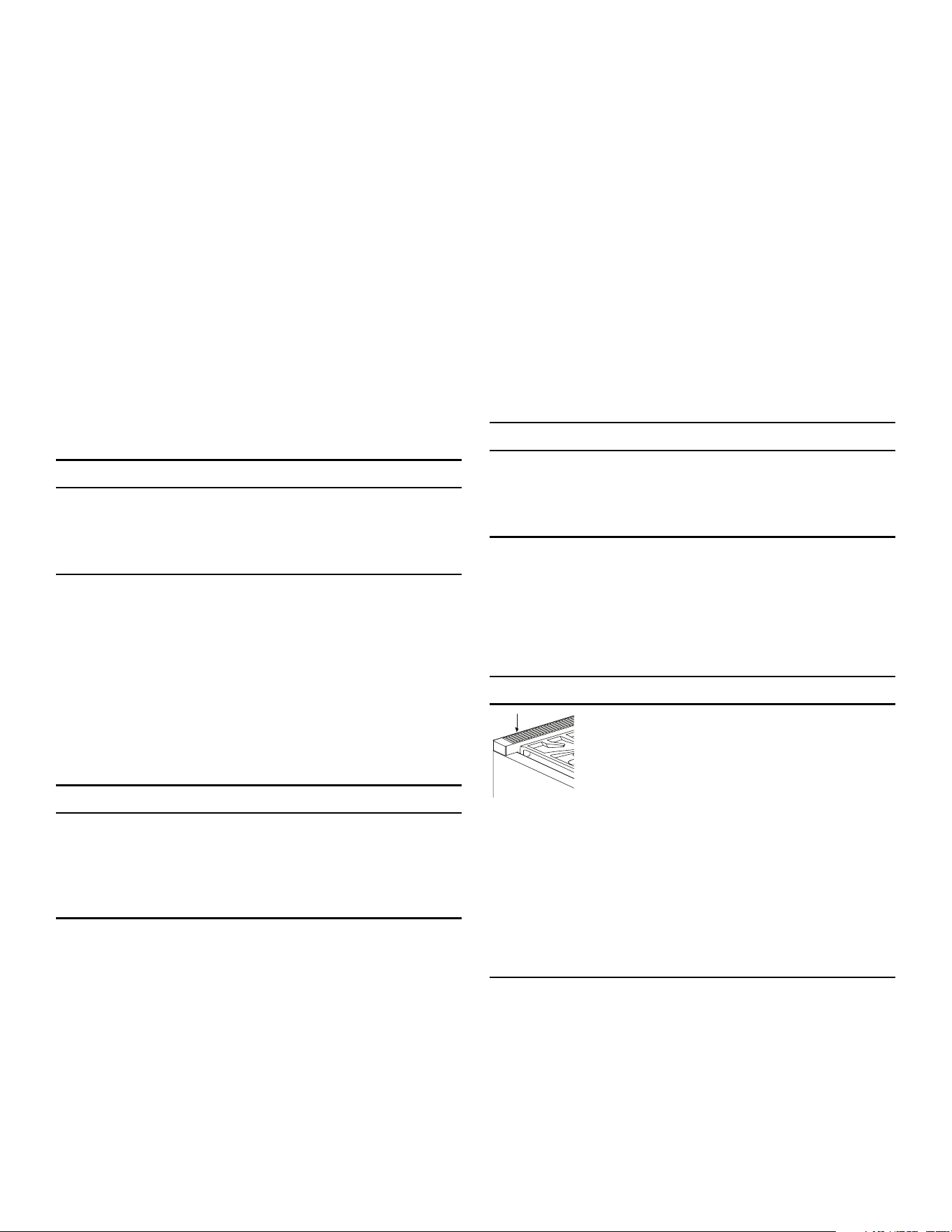
DO NOT block or obstruct the flow of air
through the ventilation openings. The vent is
located at the back of the appliance. The
vent needs to be unobstructed and open to
provide necessary airflow that is important
for proper performance.
DO NOT touch vent area while the appliance is on
and for several minutes after the appliance is off.
Some parts of the vent and surrounding areas become
hot enough to cause burns. Allow appliance sufficient
time to cool before touching or cleaning vent areas.
DO NOT position plastic or other heat-sensitive items
on or near the vent. These items could melt or ignite.
DO NOT obstruct the flow of combustion or ventilation
air.
DO NOT use the grill plate accessory for cooking
excessively fatty meats or products which promote flare-
ups.

Page. 11
9 IMPORTANT SAFETY INSTRUCTIONS
READ AND SAVE THESE INSTRUCTIONS
When cooking fatty or oily foods on burners, the grill, or
the griddle, adjacent gas burners can ignite airborne
fumes. Use caution to avoid burns.
To avoid a fire hazard, grease accumulation must be
prevented by frequently cleaning the ventilation hood and
filters.
In case of fire or when intentionally “flaming” liquor or
other spirits on the appliance, follow manufacturer’s
instructions. Use caution when cooking foods with high
alcohol content (e.g. rum, brandy, bourbon). Alcohol
evaporates at high temperatures. There is a risk of burning
as the alcohol vapors may catch fire. Use only small
quantities of alcohol in foods.
DO NOT store or use corrosive chemicals, vapors,
flammables, or nonfood products in or near this appliance.
It is specifically designed for use when heating or cooking
food. The use of corrosive chemicals while heating or
cleaning will damage the appliance and could result in
injury.
WARNING
DO NOT leave food or cooking utensils, etc, in oven
during the self-cleaning mode of operation.
Before self-cleaning the oven (select models), remove
the broiler pan, oven racks, and any other utensils,
and excess spillage.
WARNING
This appliance should not be installed with a
ventilation system that directs air in a downward
direction toward the appliance. This type of
ventilation system may cause ignition and combustion
problems with the appliance resulting in personal
injury, property damage, or unintended operation.
Ventilating systems that direct the air upwards do not
have any restriction.
An air curtain or other overhead range hood, which
operates by blowing a downward airflow onto a
range, shall not be used in conjunction with a gas
range unless the hood and range have been designed
and tested in accordance with the Standard for
Domestic Gas Ranges, ANSI Z21.1 • CSA 1.1, and
listed by an independent testing laboratory for
combination use.
IMPORTANT: There is a possibility to discolor the back
wall under certain cooking conditions.
DO NOT clean, rub, damage, move or remove the door
gasket. It is essential for a good seal during baking. If the
gasket becomes worn or excessively soiled with food
particles, replace gasket to assure a tight seal.
Protect the self-cleaning feature. Clean only those parts
indicated in this booklet. DO NOT use commercial oven
cleaners or oven liner protective coatings of any kind in or
around the self-cleaning oven.
Place oven racks in desired position while oven is cool. If a
rack must be moved while the oven is hot, do not let the
potholders contact the broiler element.
DO NOT TOUCH HEATING ELEMENTS OR INTERIOR
SURFACES OF OVEN – Heating elements may be hot
even though they are dark in color. Interior surfaces of an
oven become hot enough to cause burns. During and
after use, do not touch, or let clothing or other flammable
materials contact heating elements or interior surfaces of
oven until they have had sufficient time to cool. Other
surfaces of the appliance may become hot enough to
cause burns - among these surfaces are oven vent
openings and surfaces near these openings, oven doors,
and windows of oven doors.
WARNING
NEVER cover any slots, holes or passages in the oven
bottom or cover an entire rack with materials such as
aluminum foil. Doing so blocks air flow through the
oven and may cause carbon monoxide poisoning.
Aluminum foil linings may also trap heat, causing a fire
hazard.
Use care when opening the oven door; let hot air or steam
escape before removing or replacing foods.
Please note that some pets or humans can be sensitive to
the odors created during the self-cleaning process
whether it is a manufacturing residue burn off or food. It is
recommended that those potentially affected be removed
from the kitchen area during the self-clean process.
Page. 12
Description
Appliance identification
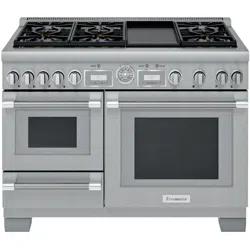
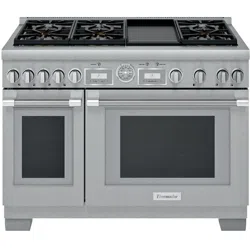
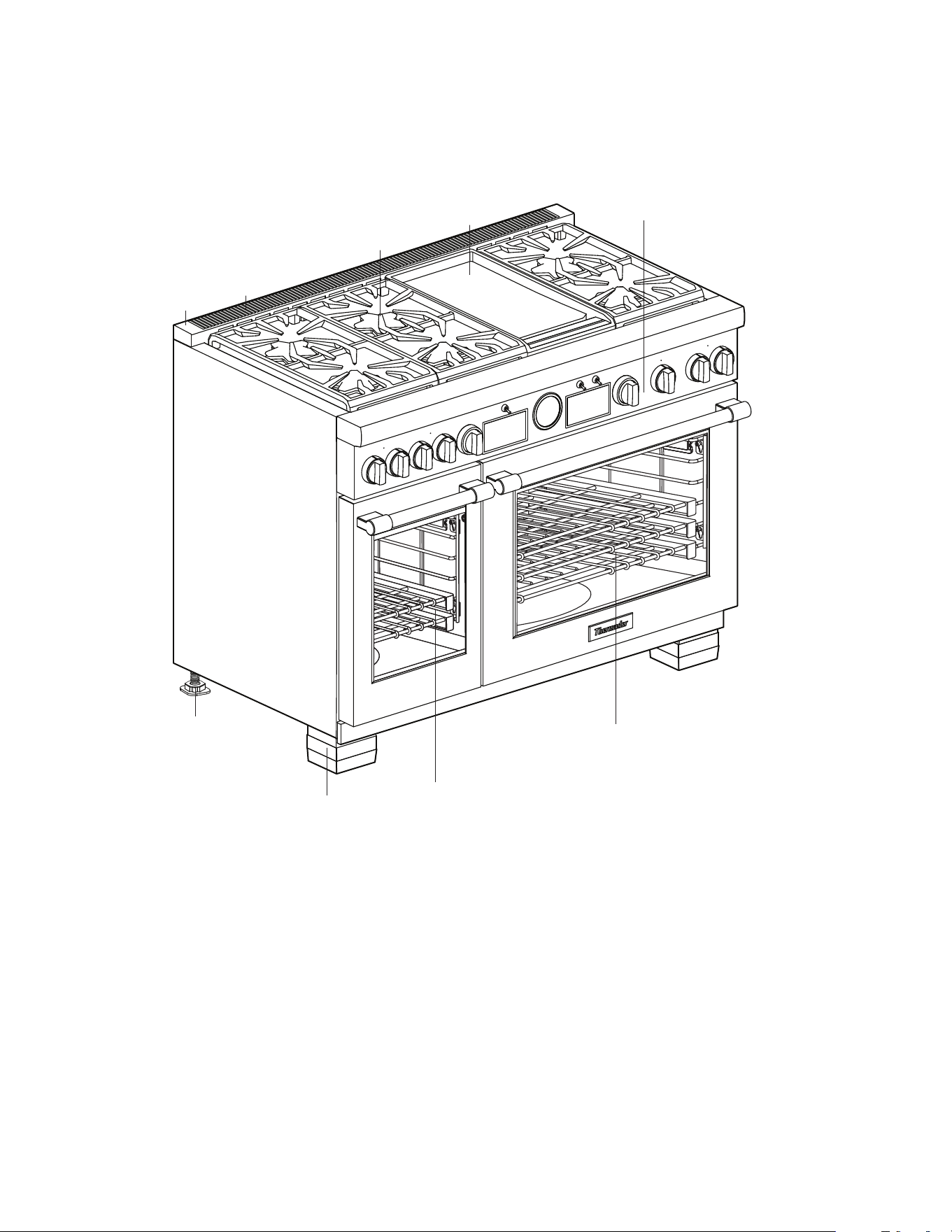
Model shown is 48'' with griddle option (features will vary).
1 Island Trim included or Low Backguard ordered separately
(See Warning concerning spacing behind the range when using the range with the Island Trim.)
2 Oven vent (DO NOT obstruct!)
3STAR
®
burners and grates
4 Griddle option (options will vary)
5 Control panel
6 Main oven
7 Secondary auxiliary oven (select models)
8Leg covers
(If additional leg covers are required, they may be ordered from the service center by calling 1–800–735–4328 at
no charge for up to one year after purchase date of the appliance.)
9Range feet
1
2
3
5
4
7
8
6
9
Page. 13
Oven interior identification
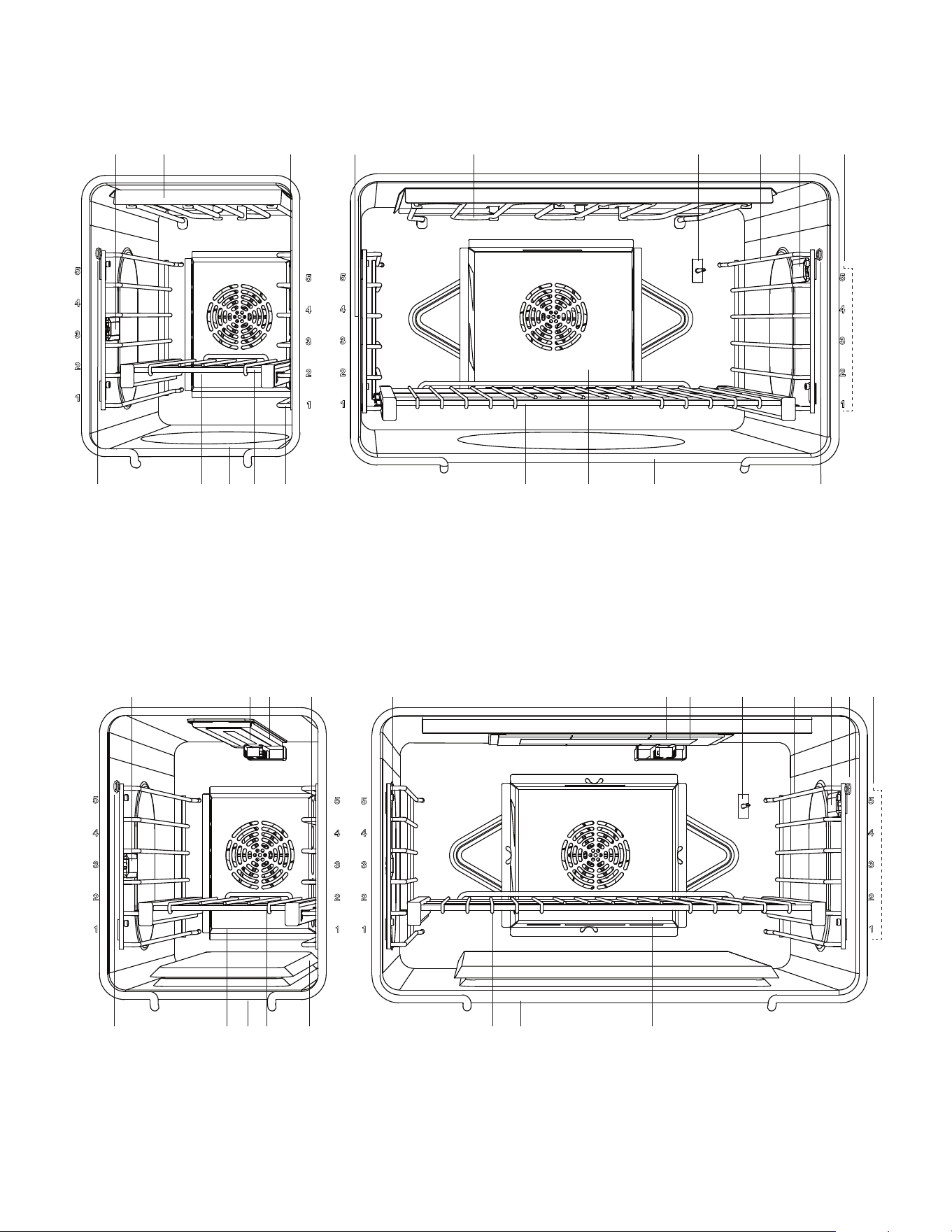
DUAL FUEL oven interior
GAS oven interior
1 Oven interior light
2 Broil element
3 Oven thermostat
4Rack guides
5 Oven racks
6 Bake element (hidden)
7 Convection fan cover
8 Meat probe outlet
9Rack positions
12 3
467565
7 8
8
12 341 9
1 Oven interior light
2 Broil igniter
3 Infrared broil burner
4 Oven thermostat
5Rack guides
6 Meat probe outlet
7Rack positions
8 Convection fan cover
9 Bake burner (hidden)
10 Oven racks
124
659 8
3
10 9108
612453 1 7
Page. 14
Control panel identification
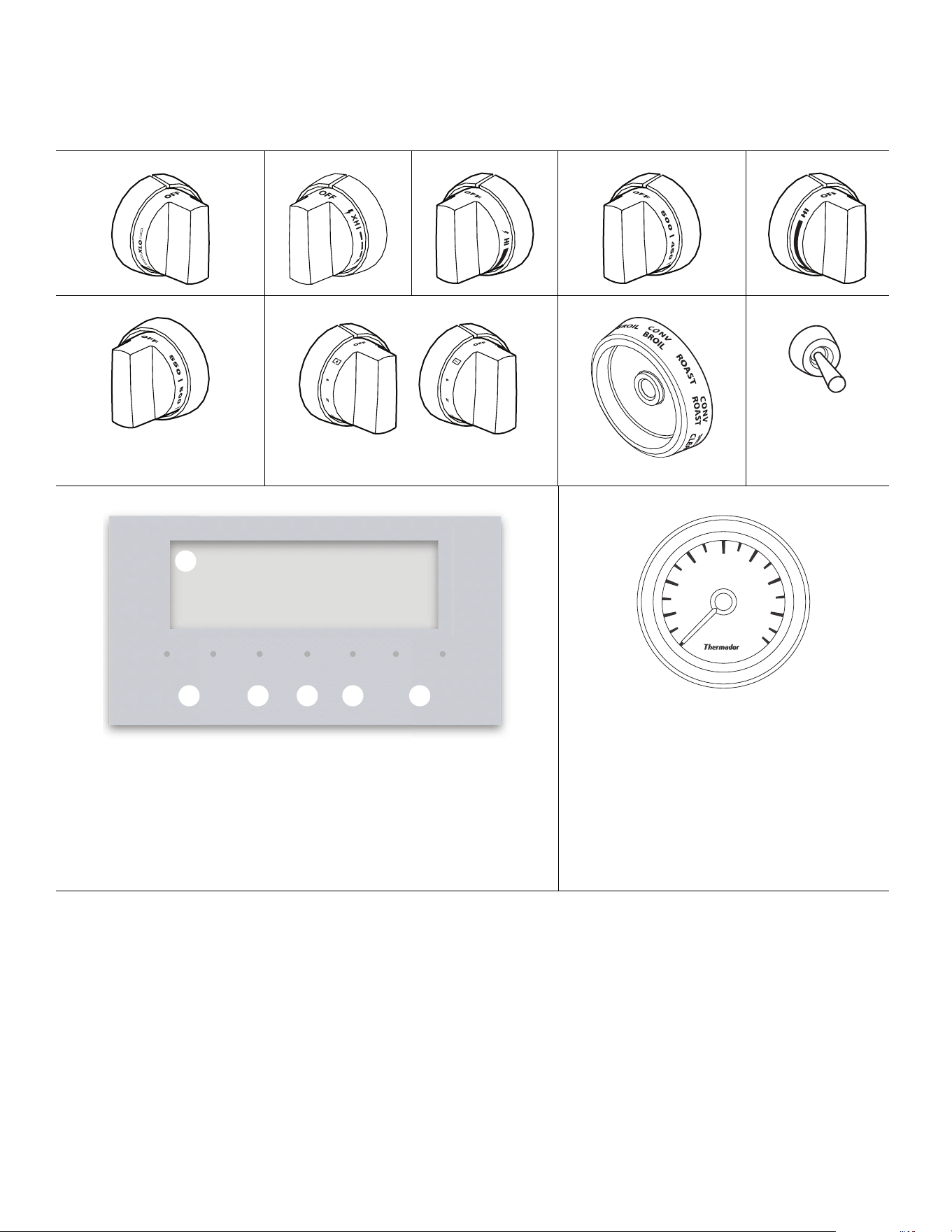
NOTE: Not all knobs, modes, and features are available to
all models.
ExtraLow
®
POWERBOOST
®
Standard Griddle Grill
Oven temp selector Induction Mode selector Oven light switch
Oven digital display
1 Digital display screen
2 Left navigation buttons
3 Access multiple timers
4 Access user settings
5 Confirm an entry
6 Right navigation buttons
Oven temp gauge
OFF
OFF
TIMERS
SETTINGS ENTER
06:30
1
2 3 4 65
300
250
200
100
BROIL
CLEAN
400
450
500
350
Page. 15
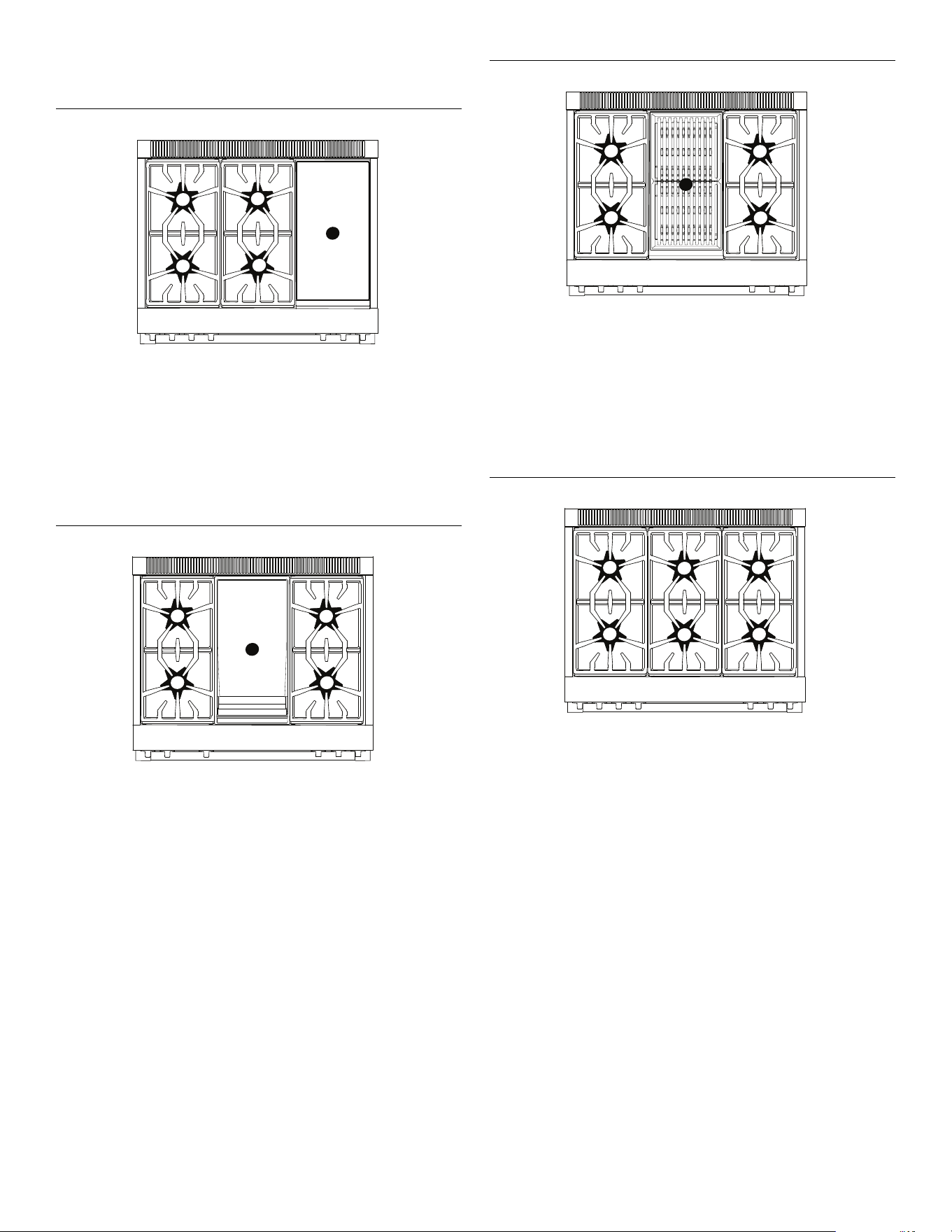
Top surface identification
Model 364 with induction
1 ExtraLow burner Natural 15000, LP 12000 BTU
2 ExtraLow and
PowerBoost burner
Natural 22000, LP 18000 BTU
3 Standard burner Natural 15000, LP 12000 BTU
4 Standard burner Natural 18000, LP 15000 BTU
5 Induction 3,600W
Model 364 with griddle
1 ExtraLow burner Natural 15000, LP 12000 BTU
2 ExtraLow and
PowerBoost burner
Natural 22000, LP 18000 BTU
3 Griddle 1,630W
4 Standard burner Natural 15000, LP 12000 BTU
5 Standard burner Natural 18000, LP 15000 BTU
55
44
11
22
33
33
55
11
22
44
Model 364 with grill
1 ExtraLow burner Natural 15000, LP 12000 BTU
2 ExtraLow and
PowerBoost burner
Natural 22000, LP 18000 BTU
3 Grill 815W x 2
4 Standard burner Natural 15000, LP 12000 BTU
5 Standard burner Natural 18000, LP 15000 BTU
Model 366
1 ExtraLow burner Natural 15000, LP 12000 BTU
2 ExtraLow and
PowerBoost burner
Natural 22000, LP 18000 BTU
3 Standard burner Natural 15000, LP 12000 BTU
4 Standard burner Natural 18000, LP 15000 BTU
5 Standard burner Natural 15000, LP 12000 BTU
6 Standard burner Natural 18000, LP 15000 BTU
33
55
11
22
44
33
44
66
11
22
55
Page. 16
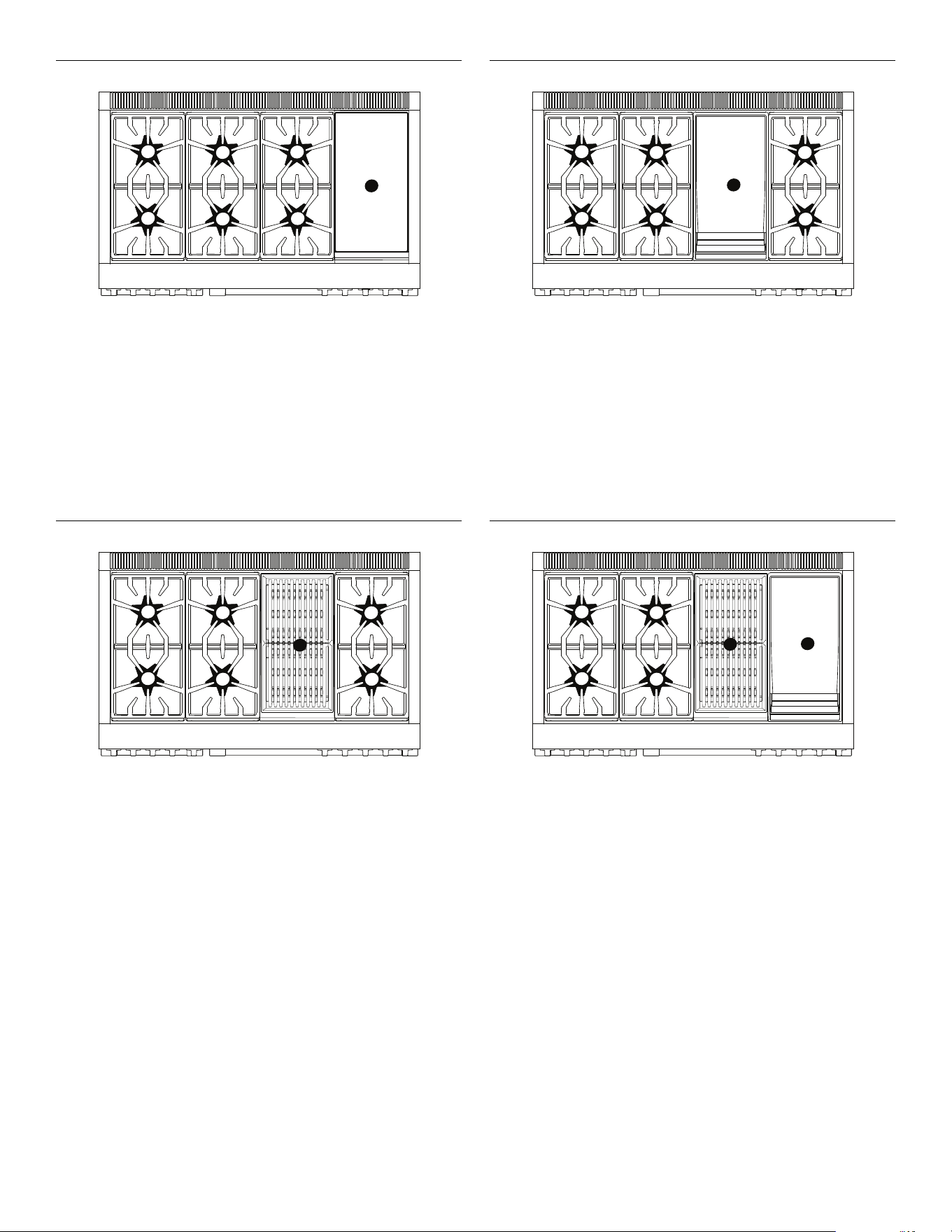
Model 486 with induction
1 ExtraLow burner Natural 15000, LP 12000 BTU
2 ExtraLow and
PowerBoost burner
Natural 22000, LP 18000 BTU
3 Standard burner Natural 15000, LP 12000 BTU
4 Standard burner Natural 18000, LP 15000 BTU
5 Standard burner Natural 15000, LP 12000 BTU
6 Standard burner Natural 18000, LP 15000 BTU
7 Induction 3,600W
Model 486 with grill
1 ExtraLow
®
burner Natural 15000, LP 12000 BTU
2 ExtraLow and
PowerBoost burner
Natural 22000, LP 18000 BTU
3 Standard burner Natural 15000, LP 12000 BTU
4 Standard burner Natural 18000, LP 15000 BTU
5 Grill 815W x 2
6 Standard burner Natural 15000, LP 12000 BTU
7 Standard burner Natural 18000, LP 15000 BTU
33
44
66
11
22
55
77
33
44
77
11
22
66
55
Model 486 with griddle
1 ExtraLow burner Natural 15000, LP 12000 BTU
2 ExtraLow and
PowerBoost burner
Natural 22000, LP 18000 BTU
3 Standard burner Natural 15000, LP 12000 BTU
4 Standard burner Natural 18000, LP 15000 BTU
5 Griddle 1,630W
6 Standard burner Natural 15000, LP 12000 BTU
7 Standard burner Natural 18000, LP 15000 BTU
Model 486 with grill and griddle
1 ExtraLow burner Natural 15000, LP 12000 BTU
2 ExtraLow and
PowerBoost burner
Natural 22000, LP 18000 BTU
3 Standard burner Natural 15000, LP 12000 BTU
4 Standard burner Natural 18000, LP 15000 BTU
5 Grill 815W x 2
6 Griddle 1,630W
33
44
77
11
22
66
55
33
44
11
22
55
66
Page. 17
Before you begin
Getting started
Data rating label
• Record the model and serial number on page 54.
• The model and serial number must be provided when
calling customer support for assistance.
• Register your BSH product to ensure timely service
and access to your product related information. For
product registration information see page 54.
Surface burners
1. Ensure that the burner caps are correctly seated on
the burner bases of the range's cooktop (see
page 19).
2. Turn on each burner to check for proper flame color
(see “Flame description” on page 21 for details).
Oven racks
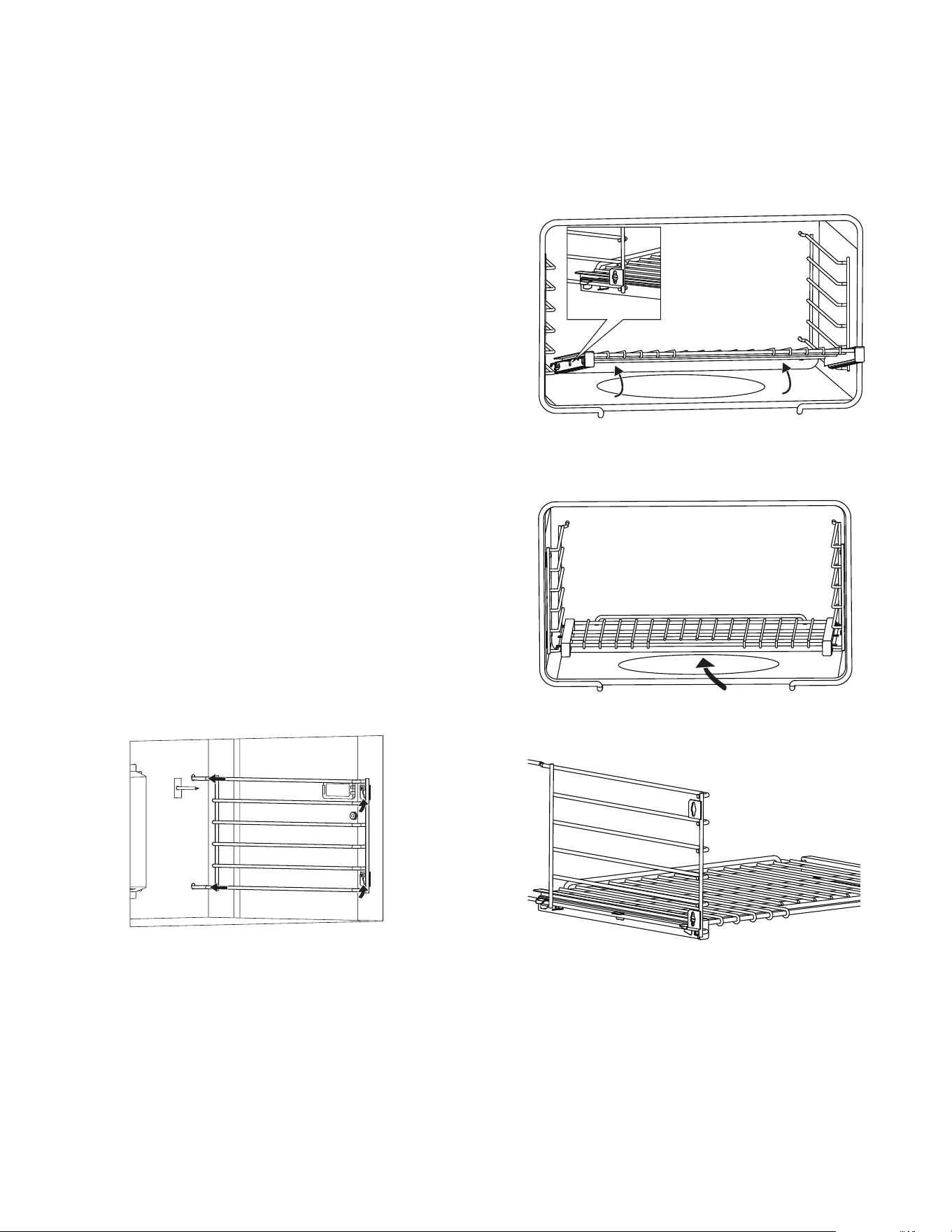
To install rack guides
1. Push the two rails in the holes in the back of the oven
cavity.
2. Slide the guide's key slots over the shoulder bolts.
3. At the front of the oven cavity press down on the front
of rack guide to clear the heads of the two shoulder
bolts.
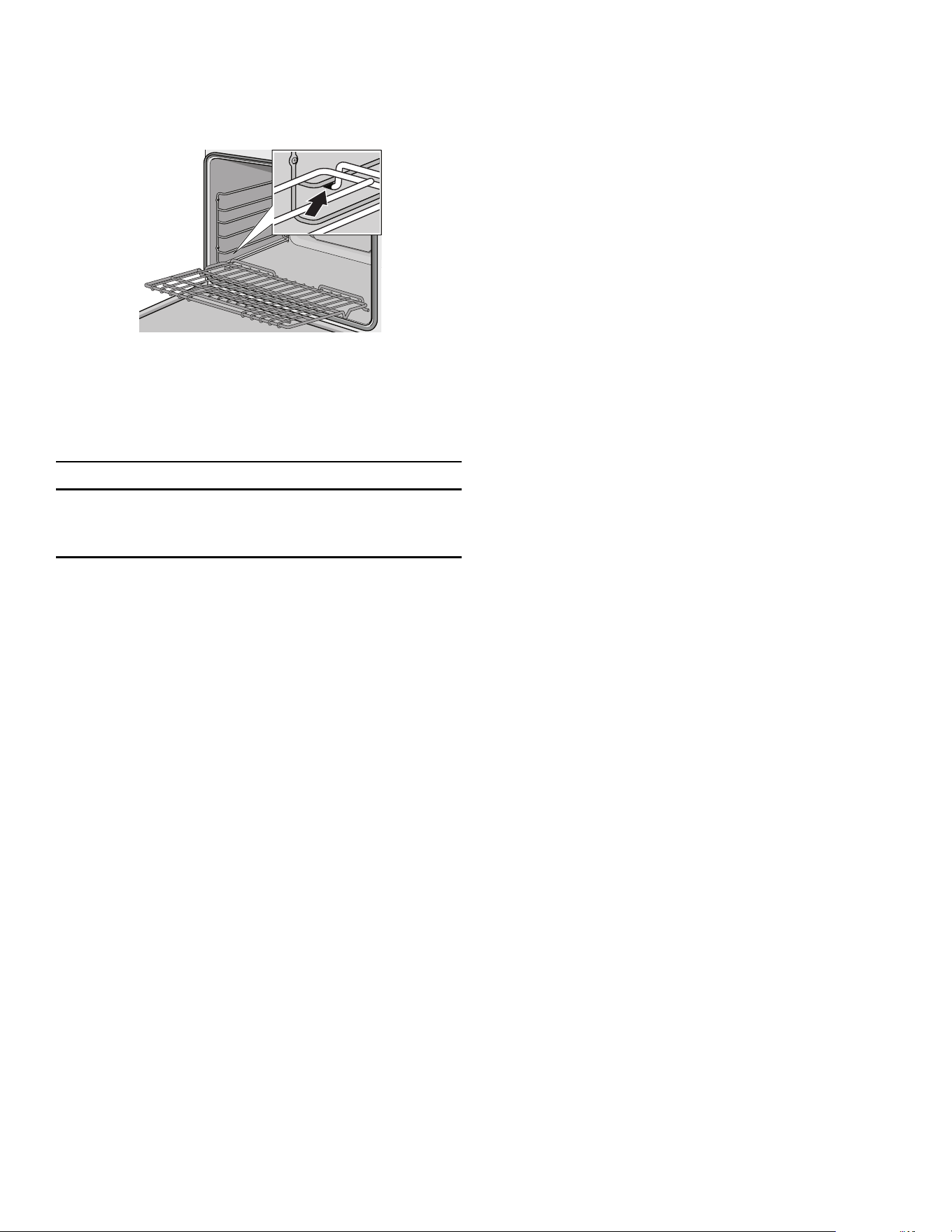
To install Full Access
®
racks:
1. Hold the rack on a slight angle and place the safety
hooks under the front of the rack guides.
2. Push the rack into the oven, lifting the rack stops
over the front of the rack guides.
3. Hold the rack straight.
4. Push the rack in completely.
5. Engage the rack’s front hooks on the rack guides.
IMPORTANT: When placing the gliding rack in the oven,
make sure the front supports on the rack guides rest in
the large slots at the front corners of the rack. This is
necessary to keep the rack in the correct position while
fully inserted into the oven.
Page. 18
To install flat racks
1. Grasp rack firmly on both sides and insert rack.
2. Tilt rack up to allow stop into rack guide.
Oven operation
Positioning the oven racks
9 WARNING
To help prevent burns, never remove or reposition the
oven racks while the oven is ON or while the oven is
cooling.
• The correct rack position depends on the recipe and
the cooking mode.
• The rack positions are numbered from the bottom of
the oven, like an elevator.
• Rack position 3 is the most frequently used position.
• Place rack(s) in the proper position before turning on
the oven.
Initial start-up
Before baking or broiling, the oven and broiler should be
turned on to burn off the manufacturing oils using one of
the two following methods:
1. Turn on kitchen ventilation (or if vent hood is a
recirculation type open a window).
2. Turn the oven on to 450ºF (230ºC) for 20 to 30
minutes; then turn the broiler to broil for the same
length of time.
or
1. Turn on kitchen ventilation (or if vent hood is a
recirculation type open a window).
2. Remove oven racks.
3. Set oven to self-clean (select models).
The range occasionally has an odor or smoke when first
used. These odors or smoke comes from the burning off of
manufacturing residues and is typical of any new oven
regardless of manufacturer.
IMPORTANT: ALWAYS remove the oven racks before self-
cleaning the oven. If the gliding racks remain in the oven
during self-clean, lubricants in the glide mechanisms of
each rack will be lost and the finish will discolor.
Automatic operation of the cooling fan
The cooling fan runs during all cooking modes. The fan
can be heard when it is running, and warm air may be felt
as it is released from the oven vent. The fan may also run
after the oven is off.
Oven vent
The oven vent is located at the back of the unit. Warm air
may be released from the vent before, during and after
cooking. It is normal to see steam escaping from the vent,
and condensation may collect in this area. This area may
be warm when the oven is in use. Do not block the vent,
since it is important for air circulation.
Convection fan
The convection fan operates during all convection modes.
When the oven is operating in a convection mode, the fan
turns off automatically when the door is opened. The
convection fan may also run during self-clean.
Page. 19
Using the rangetop
Sealed STAR
®
burners
9 WARNING
To prevent flare-ups and avoid the creation of harmful
by-products, do not use the cooktop without all
burner caps and all burner grates properly positioned.
9 WARNING
To prevent burns, do not touch burner caps or grates
while hot. Turn the cooktop off and allow the burners
to cool.
The burner caps must be properly placed on the burner
bases for the cooktop to function properly. If the burner
cap is not properly placed, one or more of the following
problems may occur:
• Burner flames are too high.
• Flames shoot out of burners.
• Burners do not ignite.
• Burner flames light unevenly.
• Burner emits gas odor.
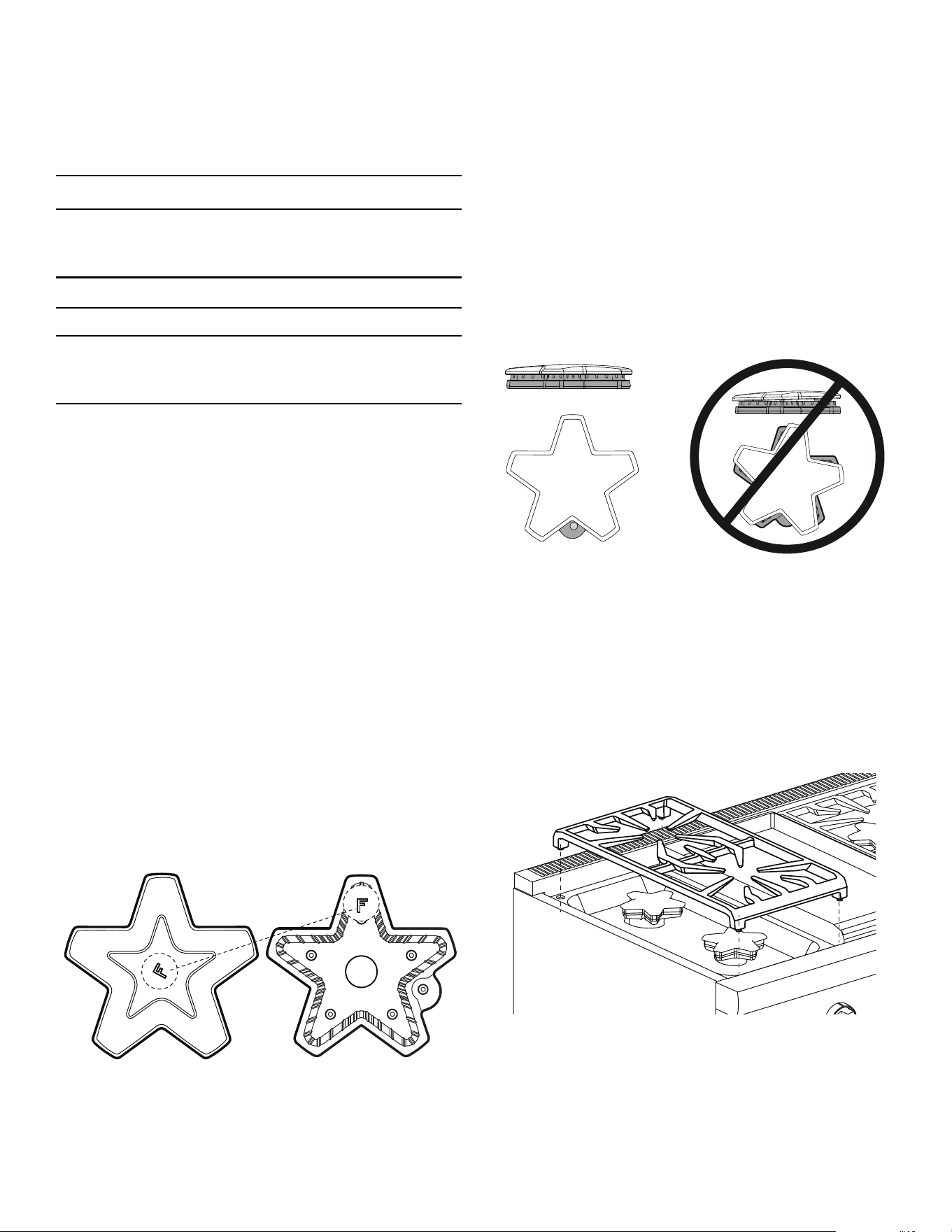
Burner cap placement
Each cap has a letter (B, D, or F) cast in the underside of
the cap that corresponds to a letter (B, D, or F) cast in the
burner base that is attached to the appliance.
To place the burner caps
1. Place each burner cap on its correct burner base per
its corresponding letter designation.
2. Place burner cap gently on top of base so that the
prongs of the burner base fit snugly into the groove of
the burner cap.
Checking the burner cap placement
• Check each burner to make sure there is no gap
between the burner cap and burner base.
• You may gently try to move the burner caps from side
to side to check if the caps are properly placed on the
burner bases.
• When properly placed, each burner cap will rest flat
on top of its burner base, and completely cover the
star-shape of the burner base when viewed from the
top as shown below.
Burner grate placement
To install the burner grates
1. Place grates flat-side down and align into the
rangetop recess.
2. Grates should rest flush against each other and
against the sides of the recess.
Page. 20
Control knobs
The control knobs for two sealed gas burners, one in front
and one in the rear, are located directly in front of and
below the pair of burners on the control panel.
Operation of the burners
To turn on the burners
1. Press in on the knob and turn it counter-clockwise HI.
– The igniter for the selected burner clicks and
sparks.
– After burner ignition, the igniter stops clicking.
2. Rotate the knob to any flame setting between HI and
LO.
LED panel light (select models)
Positioned below the bullnose, the LED panel light
provides task lighting with a theatrical ambiance.
The panel light toggle switch on the control panel turns
the light ON and OFF.
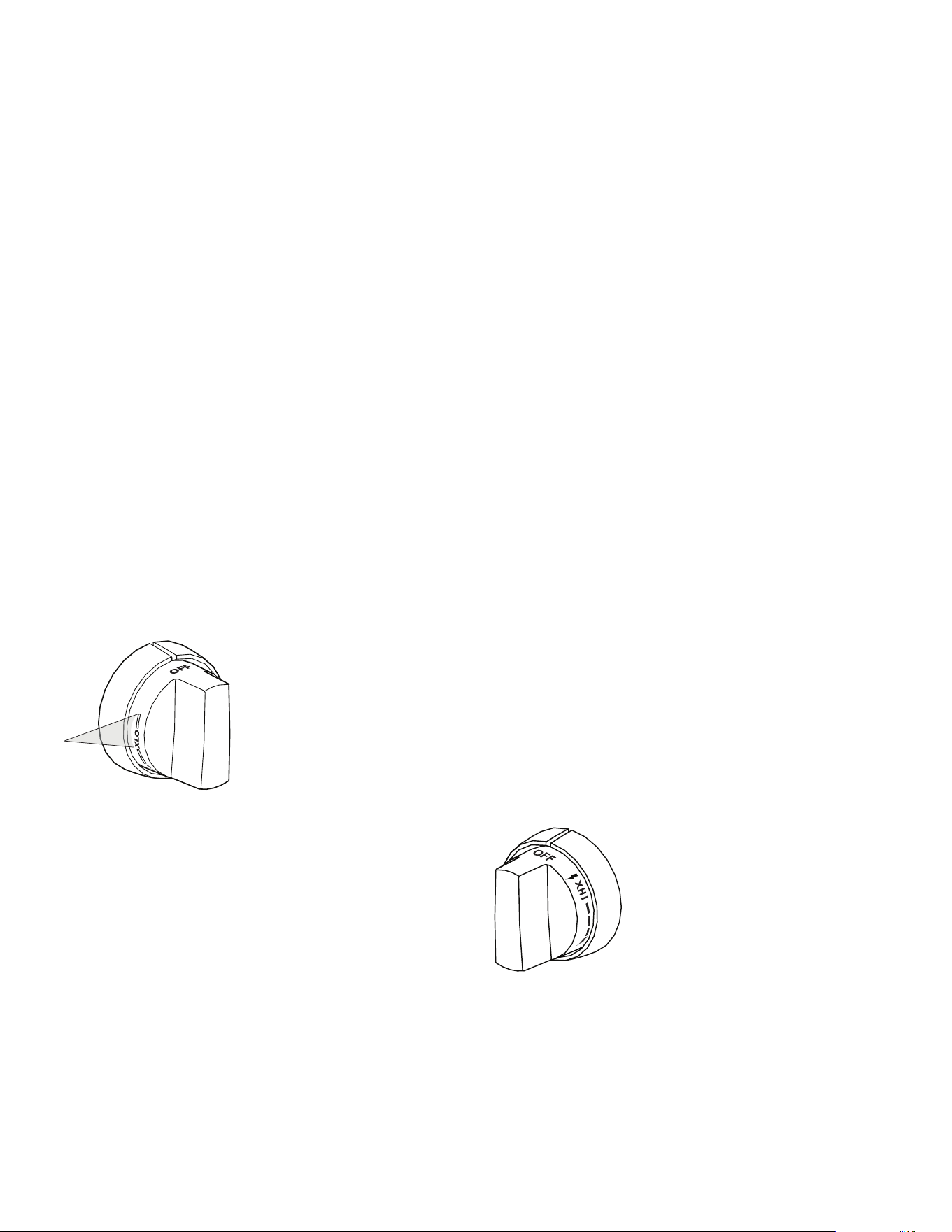
ExtraLow
®
burners
The drawing shows that the control knob has an additional
range after the XLO setting. When the knob is set within
this range, the flame cycles off and on.
By varying the length of time the flame is off and on, the
heat is reduced even further to cook delicate foods. For
example, these very low settings are suitable for
simmering and poaching, melting chocolate and butter,
holding cooked foods at temperatures without scorching
or burning, etc.
Operation of the ExtraLow
®
burners
• XLO, the very lowest setting, is achieved by cycling
the flame on for approximately 10 seconds and off for
50 seconds of each minute.
• When the knob is set just below the XLO setting, the
flame will cycle on for approximately 50 seconds and
off for 10 seconds of each minute.
• To vary the amount of low heat to suit the food and
quantity, the control can be set anywhere within the
XLO range marked on the knob.
ExtraLow
®
techniques
• To maintain a low or simmer heat, bring food to a
rolling boil. Stir well, then cover the pan and lower the
heat to a setting just below XLO.
• If a large pan is used, the simmer action may occur
mainly in the center of the pan. To equalize the
temperature throughout the food, stir the food
around the outer edges of the pan into the food in the
center.
• It is normal to stir food occasionally while simmering.
This is especially important when simmering for
several hours, such as for a homemade spaghetti
sauce or beans.
• If the setting is too low to hold a simmer, bring the
food back to a boil before re-setting to a higher heat.
• There may be bubbling when the flame cycles on and
no bubbles when the flame is off. Even when the flame
is off, there will be steam and a slight quiver on the
liquid’s surface.
POWERBOOST
®
(select
models)
The controls for the
ExtraLow burners have flame
settings even lower than the
standard low settings.
The POWERBOOST, or XHI, offers
the convenience to quickly boil
water, sear steaks, stir-fry
vegetables, etc. Use of the SIM
and XLO remains the same as the
other XLO knobs.
Page. 21
Automatic re-ignition
Each burner has its own electronic igniter that sparks
when the burner is turned on. Each burner should light in
4 seconds or less. If a burner does not light, check to see
that the cap is positioned correctly on the base.
If any one or more burners blow out, the electronic igniter
automatically activates to re-light the flame. Do not touch
the burners when the igniters are active.
9 CAUTION
DO NOT touch the burners when the igniters are
sparking.
IMPORTANT
• For proper combustion do not use the rangetop
without the burner grates in place.
• There is a slight sound associated with gas
combustion and ignition. This is a normal condition.
• On rangetops using propane gas (LP), a slight “pop”
sound may be heard at the burner ports a few seconds
after the burner has been turned off.
Power failure
9 WARNING
In the event of a power failure, turn all knobs to the
OFF position. Only the standard burners can be lit
manually.
• In the event of a power failure, only the standard
burners can be manually lit. It is necessary to light
each one individually.
• If the rangetop is being used when the power failure
occurs, turn all knobs to the OFF position.
• The standard burners can be lit by holding a match at
the ports and turning the control knob to the HI
position. Wait until the flame is burning all around the
burner cap before adjusting the flame to the desired
height.
• The burners with the ExtraLow
®
feature cannot be
used during a power failure. Be sure to turn them off.
• If a burner with ExtraLow is on when a power failure
occurs, it cannot be turned back on until the knob is
first turned off.
• If you smell gas, refer to safety precautions listed in
the Safety chapter.
Flame height
• The correct flame height depends on 1) size and
material of pan being used; 2) food being cooked; and
3) amount of liquid in the pan.
• Never extend the flame beyond the base of the pan.
• Use a low or medium flame for pan materials that
conduct the heat slowly, such as porcelain coated
steel or glass-ceramic.
Flame description
• If the flame is completely or mostly yellow, verify that
the regulator is set for the correct fuel. After
adjustment, retest.
• Some orange-colored streaking is normal during the
initial start-up.
• Allow unit to operate 4-5 minutes and re-evaluate
before making adjustments.
• The burner flame color should be blue with no yellow
on the tips. It is not uncommon to see orange in the
flame color; this indicates the burning of airborne
impurities in the gas and will disappear with use.
• With propane (LP) gas, slight yellow tips on the
primary cone are normal.
• The flame should burn completely around the burner
cap. If it doesn’t, check that the cap is positioned
correctly on the base and that the ports are not
blocked.
• The flame should be stable with no excessive noise or
fluttering.
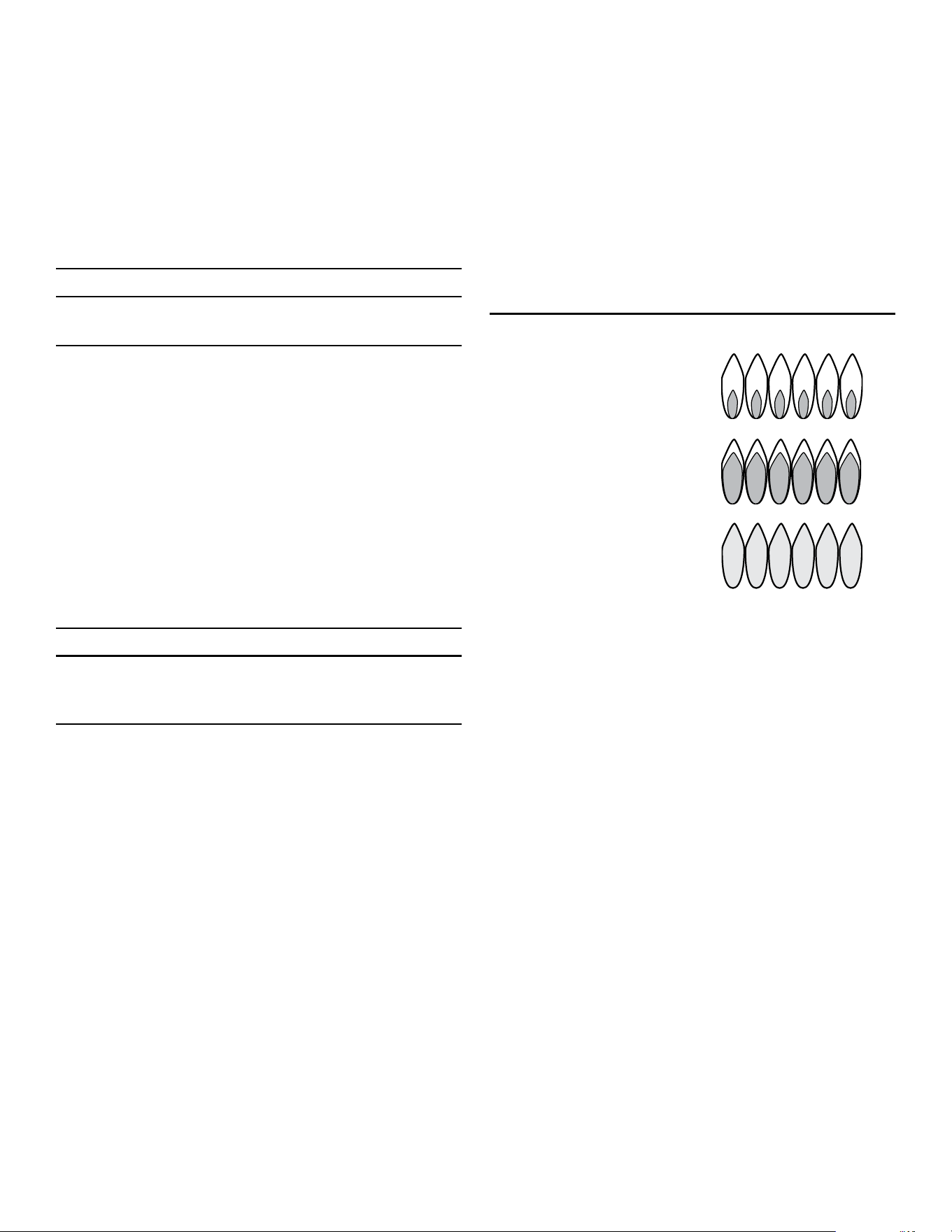
Flame characteristics
Yellow flames:
Further adjustment is
required.
Yellow tips on outer cones:
Normal for LP Gas
Soft blue flames:
Normal for natural gas
Page. 22
Cookware recommendations
9 WARNING
To avoid risk of serious injury, damage to appliance or
cookware, please observe the following:
• Bakeware, such as large casserole pans, cookie sheets,
etc. should never be used on the rangetop.
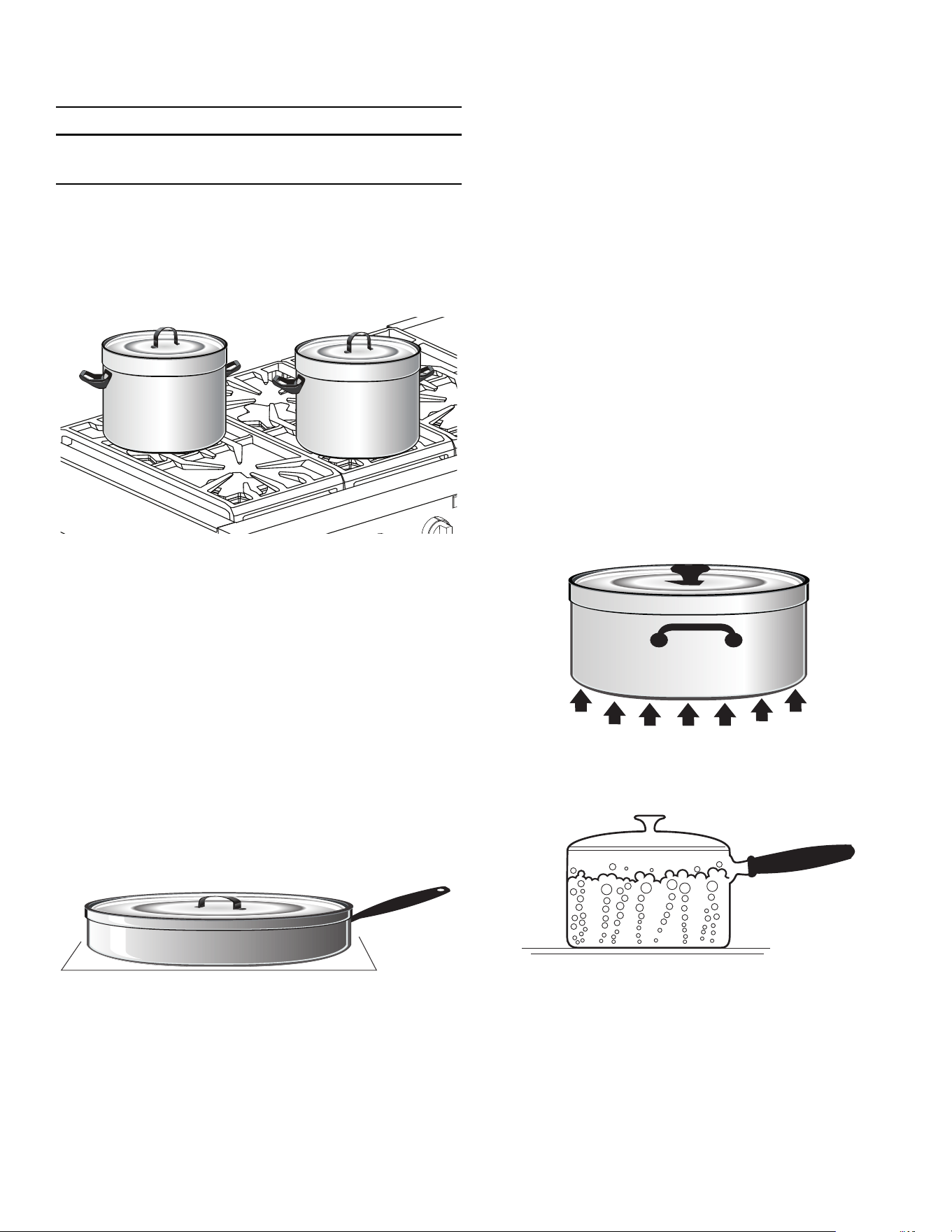
• Placement of large stock pots should be staggered
when used on the rangetop.
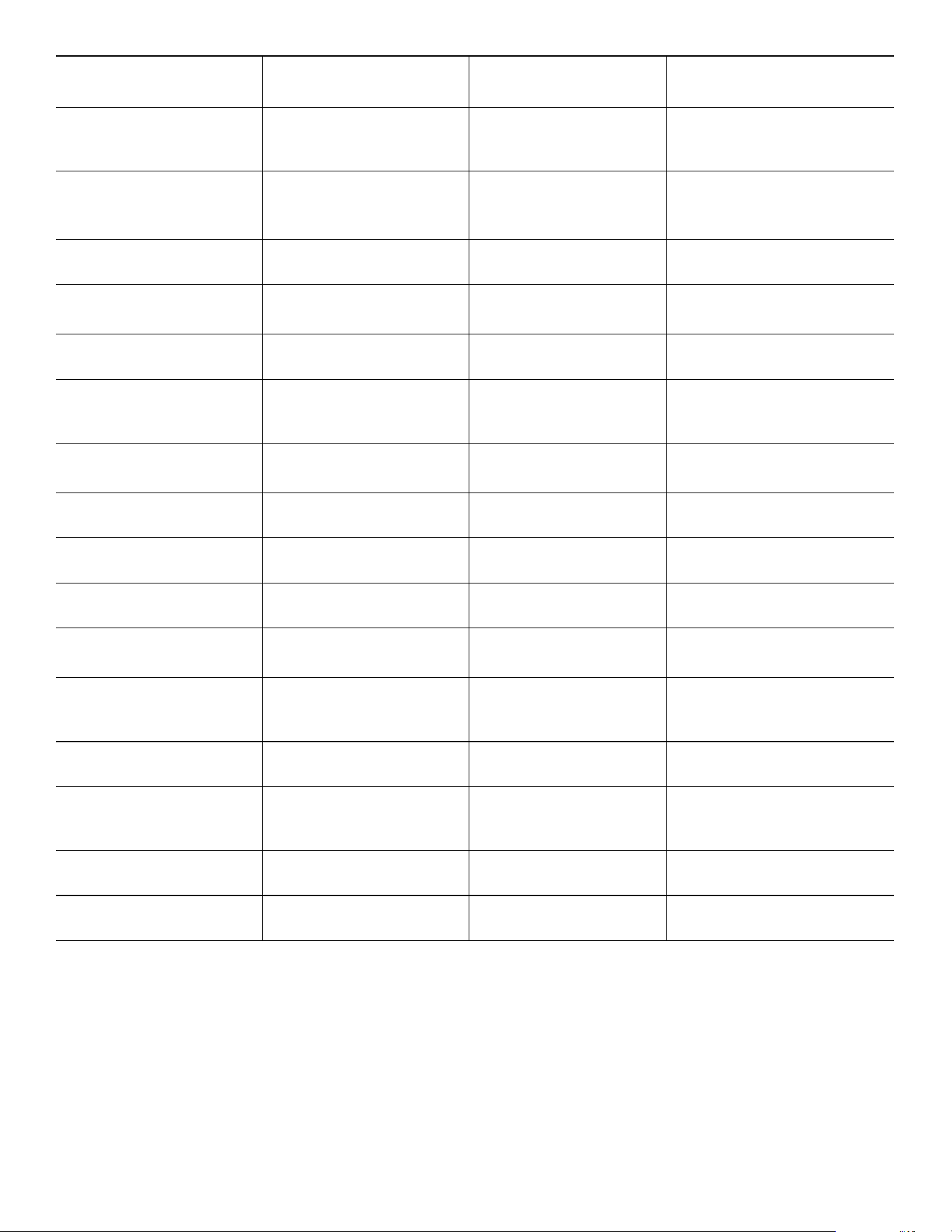
• Select the base diameter to match the diameter of the
flame. The diameter of the flame should be the same
size as the pan base or slightly smaller. Oversize or
under size pans sacrifice cooking performance. A 5½''
(140 mm) base size is generally the smallest
recommended.
• Avoid using high flame setting with a pan larger than
the grate or with one that spans more than one
burner, such as a griddle, for prolonged periods of
time. This can result in poor combustion that
generates harmful by-products.
• Balance is important for stability and even cooking.
The handle must not be heavier than the pan and tilt it
unevenly. A pan must sit level on the grate without
rocking or wobbling.
• Food packaged in aluminum foil should not be placed
directly on the burner grate. Aluminum foil can melt
during cooking.
• DO NOT let plastic, paper, or cloth come in contact
with a hot burner grate. They may melt or catch fire.
• Professional quality pans with metal handles are
recommended because plastic handles can melt or
blister if the flame extends up the side of the pan.
• All cookware should have these characteristics: good
heat conductivity, good balance, correctly sized base
diameter, a heavy, flat base, and a proper fitting lid.
• For best cooking results, the flame should be
contained under the bottom of the pan.
• Aluminum and copper are pan materials that conduct
the heat quickly and evenly. These metals are
sometimes attached to the base or in the core
between stainless steel.
• A heavy, flat base is more apt to remain flat when
heated. Pan bases that are warped, dented, ridged or
too lightweight will heat unevenly. Heat and cool pans
gradually to avoid sudden temperature changes which
tend to distort cookware. DO NOT add cold water to
a hot pan.
• A properly fitting lid will shorten cooking time and
make it possible to use lower heat settings.

Page. 23
Specialty cookware
Woks
• Either flat-based or round-bottom woks with the
accessory ring can be used on all models. Round
bottom woks must be used with a support ring.
• The wok pan and the porcelain-coated cast iron wok
support ring must be purchased separately.
Canners and stock pots
• Select one with a base diameter that extends no more
than 2'' (51 mm) beyond the grate.
Standard size water bath canner
• 21 to 22 quarts (19.95 to 20.9 liters), with an 11'' to
12'' base (279 – 305 mm) and a 9'' to 11'' depth
(229 – 279 mm).
Standard size pressure canner
• 8 to 22 quarts (7.6 to 20.9 liters), with an 8'' to 11''
base (203 – 279 mm) and a 6½'' to 12'' depth
(165 – 305 mm).
Canning tips
• A flat base pan is preferred to one with a concave,
convex or rippled base.
• When using two canners at the same time, use
staggered burners. DO NOT block air to the burners.
A flame needs the right amount of air for complete
combustion.
• Use a cover on the canner when bringing the contents
to a boil.
• Once the contents have reached a boil on HI, use the
lowest flame possible to maintain the boil or pressure.
• Canning produces a large amount of steam. Take
precautions to prevent burns.
Suggestions for using the surface burner
cooking recommendations
• Use the chart beginning on page 24 as a guide. The
settings you use will vary depending on the pans
selected and the starting temperature of the food.
• On the chart, the “Finish setting” has been separated
for the standard and ExtraLow
®
burners. There may or
may not be a change between the two burner
settings.
• The ExtraLow setting can be either a cooking or a
holding setting.
• Raise or lower the flame setting gradually. Allow time
for the pan and the food to adjust to the new setting.

Page. 24
Surface burner cooking recommendations
Food Start setting
Finish setting
standard burners
Finish setting XLO
®
burners
Beverages
Cocoa
MED – heat milk, cover LO – finish heating XLO – keep warm, cover
Breads
French toast, pancakes,
grilled sandwiches
MED – preheat skillet LO to MED – cook Same as for Standard Burners
Butter
Melting
LO – to start melting Allow 5 – 10 minutes to melt
Cereals
Cornmeal, grits,
oatmeal
HI – cover, bring water to a
boil, add cereal
LO to MED – finish
cooking according to
package directions
Same as for Standard Burners
XLO – to hold, cover
Chocolate
Melting
XLO – may be stirred to
hasten melting
XLO – allow 10 – 15 minutes to
melt
XLO – to hold
Desserts
Candy
LO to MED – cook following
recipe
LO to MED Same as for Standard Burners
Pudding and pie filling
mix
LO to MED LO
– cook
according to package
directions
LO Same as for Standard Burners
Pudding LO to MED LO – bring milk
to a boil
LO Same as for Standard Burners
Eggs
Cooked in shell
MED HI – cover eggs with
water, add lid, bring to boil
Fried, scrambled LO to MED – melt butter,
add eggs
LO finish cooking Same as for Standard Burners
XLO – to hold for a short
period
Poached HI – bring water to the
boiling point, add eggs
LO to MED – finish heating Same as for Standard Burners
Meat, fish, poultry
bacon, sausage patties
MED HI – until meat starts
to sizzle
LO to MED – finish
cooking
Same as for Standard Burners
Braising: Swiss steak,
pot roast, stew meat
MED HI – melt fat, then
brown on MED HI, add
liquid, cover
XLO – Simmer until tender
Quick frying: Breakfast
steaks
MED HI – preheat skillet MED HI – fry quickly Same as for Standard Burners
Frying: Chicken MED HI – heat oil, then
brown on MED
LO – cover, finish cooking Same as for Standard Burners
Deep frying: Shrimp MED HI – heat oil MED to MED HI – to
maintain temperature
Same as for Standard Burners
Pan frying: Lamb chops,
thin steaks,
hamburgers, link
sausage
MED HI – preheat skillet MED – brown meat Same as for Standard Burners
XLO – to hold
Poaching: Chicken,
whole or pieces, fish
MED HI – Cover, bring
liquids to a boil
To finish cooking
Page. 25
Simmering: Stewed
chicken, corned beef,
tongue, etc.
HI – cover, bring liquid to a
boil
XLO – to simmer slowly
XLO – to hold, cover
Pastas
Macaroni, noodles,
spaghetti
HI – bring water to a boil,
add pasta
MED HI to HI – to maintain
a rolling boil
Same as for Standard Burners
Popcorn (use a heavy, flat
bottom pan)
HI – cover, heat until kernels
start to pop
MED HI – finish popping Same as for Standard Burners
Pressure cooker
Meat
MED HI to HI – build up
pressure
LO to MED – maintain
pressure
Same as for Standard Burners
Vegetables HI – build up pressure LO to MED – maintain
pressure
Same as for Standard Burners
Rice HI – cover, bring water and
rice to a boil
LO – to maintain Low Boil.
Cover and cook until water
is absorbed
Same as for Standard Burners
XLO – to hold, cover
Sauces
Tomato base
MED HI – cook meat/
vegetables, follow recipe
LO – to maintain simmer XLO – simmer to thicken sauce,
uncovered
White cream, béarnaise MED – melt fat, follow
recipe
LO – finish cooking XLO – to hold, cover
Hollandaise XLO XLO – to hold, lowest setting
for short period, stir frequently
Soups, stock HI – cover, bring liquid to a
boil
LO to maintain simmer Simmer XLO – to hold, cover
Vegetables
Fresh
HI – cover, bring water and
vegetables to a boil
LO to MED – cook 10
minutes, or until tender
Same as for Standard Burners
XLO – to hold, cover
Frozen HI – cover, bring water and
vegetables to a boil
LO to MED – cook
according to package
directions
Same as for Standard Burners
Deep frying HI – heat oil MED to MED HI – maintain
frying temperature
Same as for Standard Burners
In pouch HI – bring water and pouch
to a boil
LO to MED – cook
according to package
directions
Same as for Standard Burners
Sauté HI – heat oil or melt butter,
add vegetables
LO to MED – cook to
desired doneness
Same as for Standard Burners
Stir fry HI – heat oil, add
vegetables
HI to MED HI – finish
cooking
Same as for Standard Burners
Food Start setting
Finish setting
standard burners
Finish setting XLO
®
burners
Page. 26
Electric griddle
NOTE: Not available on all models.
Description
Griddle widths vary.
A maple chopping block and stainless steel cover are
available as accessories and are purchased separately. The
maple chopping block and stainless steel cover must be
removed before turning the griddle on.
9 CAUTION
The griddle element is hot after use. Allow sufficient
time for griddle components to cool before cleaning.
9 WARNING
To avoid risk of injury, never operate the griddle
without the griddle plate installed. Never use the
griddle in a manner that is not prescribed by the Use
and Care Guide.
The griddle plate must always be in place when the
griddle is turned on.
The griddle is electronically controlled with temperatures
marked on the knob from 150° – 500°F (66° – 260°C).
There are no fixed settings on the knob.
The 24'' griddle models have two heating elements that
can be regulated separately; one element for the left side
of the griddle and another for the right side. This allows
you to cook food with different temperature requirements
at the same time.
Preparing the griddle
To prepare the griddle
1. The griddle plate should be washed with warm soapy
water then rinsed with clear water prior to use.
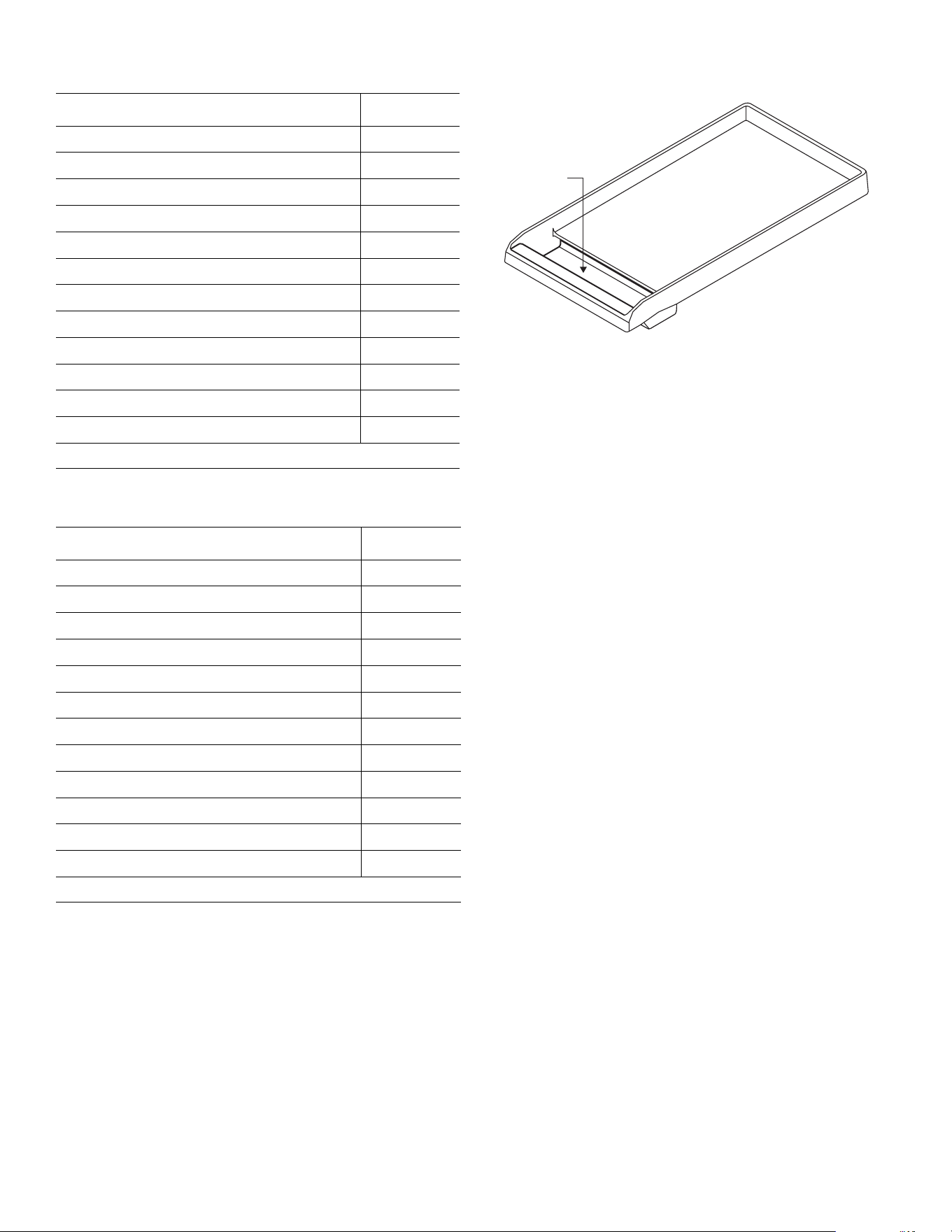
2. Check the griddle plate adjustment by pouring two
tablespoons of water on the back of the griddle plate.
-- The water should slowly roll into the grease tray.
3. If water does not flow to the front of the griddle,
move the griddle plate to the side.
4. Adjust the two screws under the back of the plate.
Start with one half turn counterclockwise of the screws
(below).
5. Further adjustment should be made by one-quarter
turn until water slowly flows into the grease tray.
The griddle may be used without any butter, margarine or
oil. However, a very small amount may be used to flavor
foods.
DO NOT use metal utensils on the griddle surface. Care
should be taken that the surface is not gouged when
utensils are used. DO NOT cut directly on the griddle
plate.
NOTICE: Performance may vary if there is an excessive
amount of airflow in the vicinity of the appliance. The
excessive airflow could be from an air-conditioning
register or ceiling fan blowing at the rangetop. This could
create longer than normal heat-up time, or it could cause
the temperature to be higher or lower than the knob
setting.
NOTE: Having a properly installed ventilation hood is not
considered a source of excessive airflow.
Cooking on the griddle
To cook on the griddle
1. Press and turn the knob clockwise to the appropriate
cooking temperature to preheat the griddle.
2. Preheat the griddle.
3. Add butter, margarine, oil or shortening if desired.
Use the lowest cooking temperature possible. Recipes
may need to be modified as the non-stick coating browns
and sears at lower temperatures.
Page. 27
12'' griddle cooking recommendations
24'' griddle cooking recommendations
Griddle grease tray
• Clean the tray after every use. When removing the
tray, use care when tipping it so that the contents do
not spill.
• The grease tray is dishwasher safe.
• After cooling, pour the grease into a grease-resistant
container for disposal.
Care and cleaning the griddle plate
• NEVER flood a hot griddle plate with cold water. This
can damage the griddle plate.
• DO NOT clean the griddle plate in a self-cleaning
oven.
• DO NOT heat cookware on the griddle surface.
• Care should be taken to avoid scratching or gouging
the surface.
• DO NOT cut food directly on the griddle plate.
• DO NOT use metal utensils.
• Use plastic or wood utensils to avoid scratching
the non-stick surface.
• The griddle plate is dishwasher safe, however, hand
washing the griddle plate is recommended.
Food * Setting
Eggs 325° – 350°F
Bacon, breakfast sausage 450° – 475°F
Toasted sandwiches 375° – 400°F
Boneless chicken breasts 425° – 450°F
Boneless pork chops, 1" (25.4 mm) 425° – 450°F
Steaks, 1'' (25.4 mm) thick 450° – 475°F
Ground beef patties, 6 ounces 450° – 475°F
Ground turkey patties, 6 ounces 450° – 475°F
Hot dogs 350° – 375°F
Ham slices, ½'' (12.7 mm) thick 350° – 375°F
Pancakes, French toast 400° – 425°F
Potatoes, hash browns 400° – 425°F
* Level foods to a uniform thickness to ensure even cooking.
Food * Setting
Eggs 275° – 300°F
Bacon, breakfast sausage 400° – 450°F
Toasted sandwiches 350° – 375°F
Boneless chicken breasts 400° – 425°F
Boneless pork chops, 1'' (25.4 mm) 400° – 425°F
Steaks, 1'' (25.4 mm) 425° – 450°F
Ground beef patties, 6 ounces 400° – 425°F
Ground turkey patties, 6 ounces 400° – 425°F
Hot dogs 300° – 350°F
Ham slices, ½'' (12.7 mm) thick 350° – 375°F
Pancakes, French toast 350° – 375°F
Potatoes, hash browns 400° – 425°F
* Level foods to a uniform thickness to ensure even cooking.
Page. 28
Seasoning the griddle plate
If the griddle plate seems to lose its non-stick abilities over
time, the following instructions should help regain the
griddle’s non-stick properties. For optimal performance
and long life of your griddle plate, follow these simple
cleaning and seasoning instructions.
NOTE: 24'' griddles will not fit in the oven cavity for
seasoning. Therefore, care should be taken not to
overheat and damage their non-stick coatings while
preheating and cooking.
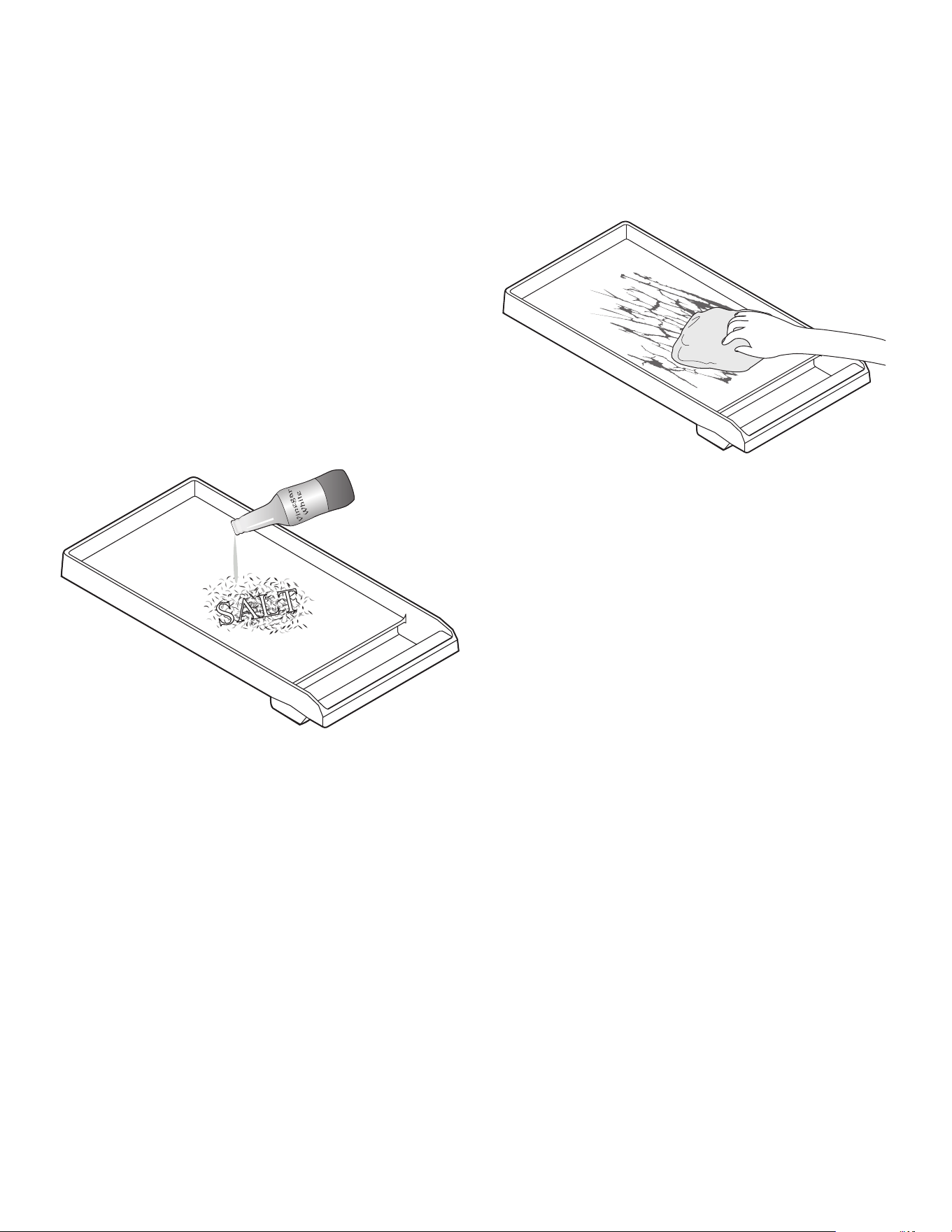
To prepare the griddle for seasoning
The griddle plate must be clean and all residue removed
before the griddle plate is seasoned.
1. Use a mixture of coarse salt and a small amount of
white vinegar to buff off any residue from the griddle
plate.
2. Rinse well with clean water.
3. Dry the griddle plate thoroughly.
To season the griddle
Seasoning is a process by which a layer of animal fat or
vegetable oil is applied and baked into the cookware. The
seasoning layer provides a non-stick surface for cooking.
1. Use a paper towel to apply a thin, even coating of
lard, Crisco
®
, or olive oil to the griddle surface.
2. Bake the griddle plate in a 350°F oven for 1 hour.
3. Remove the griddle plate from the oven and allow to
cool to room temperature.
4. Apply a second layer of fat or oil and bake at 350°F for
1 hour.
5. Repeat process at least one additional time – making
3 coats of oil or fat.
After seasoning
1. After cooking on your seasoned griddle, allow to cool
and wipe clean with a damp cloth. Allow to dry.
2. Add a thin coating of oil or fat before storing your
griddle in a cool, dry place.
3. Repeating this process will season the griddle and
maintain non-stick properties. Performance will
improve over time with more seasoning.
4. To strip the griddle to re-season, a mixture of salt and
vinegar should be used to remove any oil layers from
the previous seasoning process.
Page. 29
Electric grill
Description
NOTE: Not available on all models.
9 WARNING
• To avoid risk of injury, NEVER operate grill without
the grates or griddle plate accessory installed.
• NEVER leave grill unattended while cooking.
• Observe caution with oils and fats. Overheated
oils and fats can easily cause fires.
• DO NOT use wood chips, lava rocks, or charcoal
briquettes. Only use recommended ceramic
briquettes (PABRICKBKN).
• DO NOT use dishes, pans, pots, or other
cookware on the grill.
• NEVER use aluminum foil to cover the grates or to
line the grill. It can damage the grill and cause a
fire hazard if heat is trapped under it.
• Check drip tray before each use. Too much grease
in the tray may cause a fire hazard.
• If flames appear, grease should be cleaned from
grates, drip tray, briquette basket and other
surfaces.
• Grease build up encourages flame and smoke
development while cooking.
• Ceramic briquettes must be replaced when they
begin to turn black. This means that they are
saturated with fat and may smoke heavily during
operation or the fat may catch fire.
The built-in grill is made of restaurant-quality cast iron
grates. This produces a surface with even heat that is easy
to clean.
A non-stick cast iron griddle plate is available as an
accessory and may be purchased separately. See the
instructions that come with the griddle plate accessory for
more details.
Assembling the grill
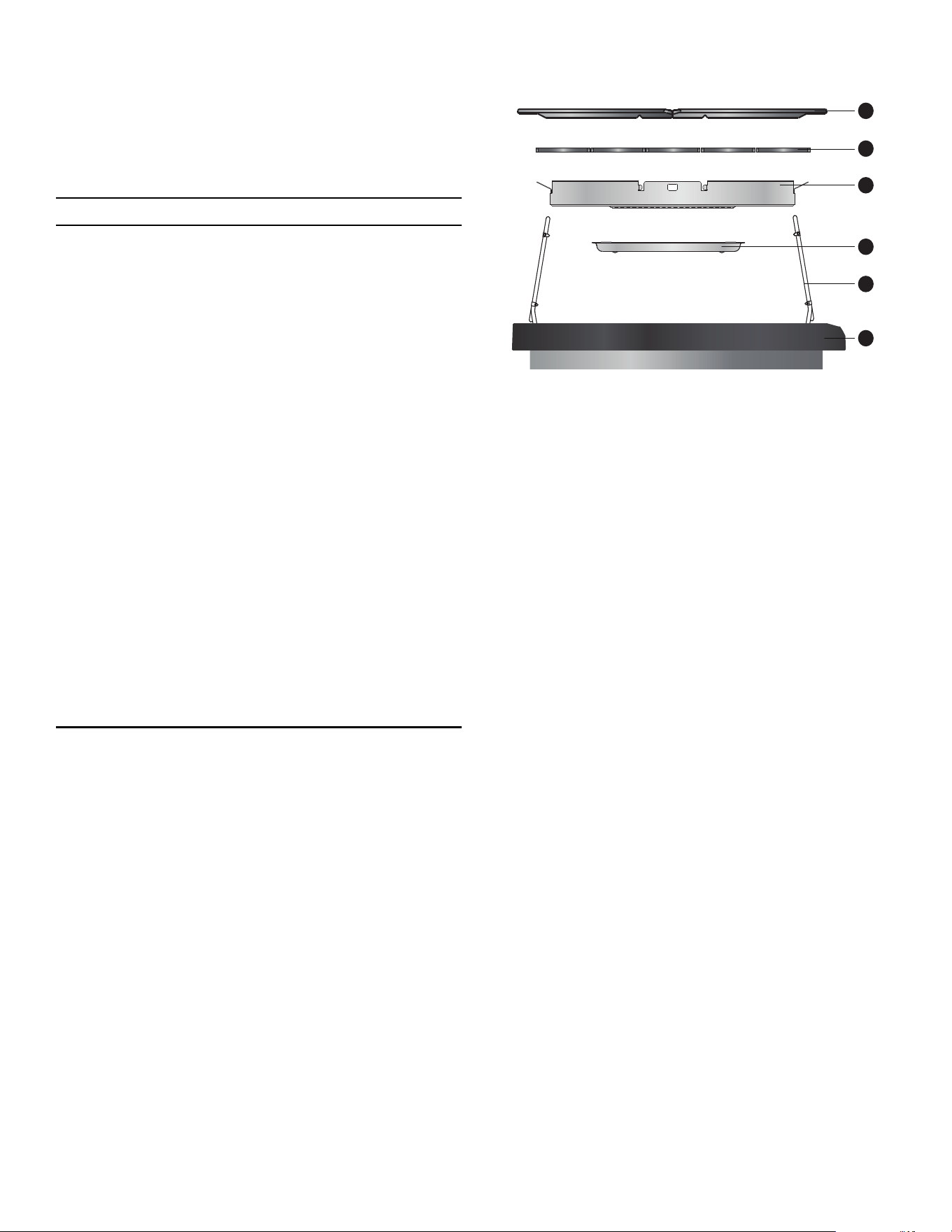
To assemble the grill
1. Rotate heating elements (5) up and remove the
briquette basket (3) stored inside the grill housing (1).
2. Place the drip tray (2) in the bottom of the grill
housing (1). (Drip tray is packaged in the large
cardboard box that was on top of the range.) Align
the embosses of the drip tray (2) with the depressions
on the bottom of the grill housing (1).
3. Place the briquette basket (3) in the grill housing (1).
4. Arrange the ceramic briquettes (4) on the briquette
basket (3), in a single layer. The ceramic briquettes
should not contact the heating elements.
5. Fold both grill heating elements (5) down. The grill
heating elements must lie flat. Supports should rest
inside of side notches.
6. Install the grill grates (6). Ensure grates are seated
level inside the grill housing (1).
1 Grill housing
2 Drip tray
3 Briquette basket
4 Ceramic briquettes
5 Heating element (x2)
6 Grill grate (x2)
2
5
3
1
4
6

Page. 30
Operating the grill
IMPORTANT:
• If flames appear while grilling, turn off heat and
remove the food. Use caution to avoid any
potential injury while removing food.
• Often, such flames will extinguish themselves
within a few minutes once grease drippings have
burned up. DO NOT leave the grill unattended
until all flames are extinguished. If desired, flames
can be extinguished by generously shaking baking
soda or salt over them to smother the fire.
• If flames appear, ceramic briquettes should be
replaced and grease should be cleaned from
grates, grease tray, briquette basket, and other
surfaces before using the grill again. Built up
grease which is allowed to remain encourages
flame and smoke development while cooking.
• Moist food should be dried, before placing on
grill.
• Marinated food may cause more smoke to be
produced!
• During grilling, dripping fat may flare up briefly.
9 WARNING
TO AVOID RISK OF BURNS:
• Use proper utensils with long handles that allow
the chef plenty of clearance from the heat and
potential flare ups.
• DO NOT wear loose clothing while cooking.
• Never leave grill unattended while cooking.
• After each use, remove grease buildup from the
grill surfaces and the trays below the grill to avoid
risk of fire. Ventilation hoods should also be
cleaned periodically as needed and as
recommended by the Use and Care Guide as well
as surrounding surfaces.
• Keep a fire extinguisher nearby and accessible.
Operation
To operate the grill
1. Start overhead ventilation system 10 minutes prior to
grilling to begin air movement.
2. The grill grates should be washed with warm soapy
water then rinsed with clear water prior to use.
3. Before turning on, make sure that there are ceramic
briquettes in the appliance and both grill grates are
correctly fitted. Turn on ventilation hood.
4. Press and turn the knob to the desired temperature
setting.
• The two grill heating elements can be regulated
separately. This allows you to grill food with
different temperature requirements at the same
time, or you can use one area to grill and the
other to keep warm.
5. During the initial use, heat the grill for about 10
minutes to eliminate manufacturing residues and
smells.
6. For best results, allow the grill grates to preheat
before placing food on them.
9 CAUTION
Clean the grill after each use. Allow the appliance to
cool before cleaning.
Grilling tips
• The grill should be preheated a minimum of 10
minutes before cooking. Depending on browning
preference and the types of food being prepared, as
much as 15 minutes of preheat time may be required.
• Soak wooden skewers in water a minimum 20 minutes
before placing on the grill.
• Prior to grilling, you can coat the food with heat-
resistant oil (e.g. peanut oil) or marinate it. Make sure
not to use too much oil/marinade, as otherwise it may
catch fire and generate thick smoke.
• Lay the food directly on the grill grates. DO NOT use
aluminum foil or grill trays.
• Cured meat, such as ham or smoked pork chops, is
not suitable for grilling. Unhealthy chemical
compounds may form.
• To prevent flare-ups, remove excess fat from foods
prior to grilling.
• DO NOT use cleaners on the heating elements. Allow
grease to burn off the heating elements.
• To soak up fat on the grill plate, sprinkle coarse salt
onto the grilling surface after use.

Page. 31
Grill cooking recommendations
IMPORTANT:
• GRILL SHOULD NOT BE OPERATED WITHOUT PROPER VENTILATION.
• Foods with excessive fat or grease should not be prepared on an indoor grill. Grilling foods with high fat content
(certain types of ground beef, sausage, etc) increases the chances of smoke and flames.
Food* Setting**
Cook time
(minutes)
Notes
Beef
Hamburgers, ¾'' (2 cm) (medium) High 12 – 14 Ready to turn once juices appear on the
surface.
T-Bone steak, 1½'' (4 cm) (medium) High 20 – 22 Remove excess fat.
Ribeye or sirloin, 1'' (3 cm) (medium) High 10 – 12 Remove excess fat.
Kebabs, steak (medium) High 24 – 28 Turn occasionally.
Pork
Pork chops, ¾'' (2 cm) High 16 – 20 Remove excess fat.
Sausages or bratwurst Med high 16 – 20 Pierce before grilling.
Hot dogs High 6 – 8 Place on grill horizontally.
Poultry
Legs and thighs Med high 34 – 38 Turn occasionally, remove excess skin.
Chicken wings, whole Med high 18 – 22 Turn occasionally.
Chicken breasts, ½'' (1 cm), boneless Med high 20 – 24 Pound to an even thickness before cooking.
Kebabs, chicken High 30 – 33 Turn occasionally.
Seafood
Fish steak, 2'' (6 cm) Med high 18 – 20 Brush with oil before grilling.
Fish fillet, ¾'' (2 cm) Med high 16 – 20 Brush with oil before grilling.
Shrimp skewers Med high 10 – 14 Turn occasionally.
Produce
Portobello mushrooms High 8 – 10 Brush with oil.
Bell peppers, quartered High 8 – 10 Turn occasionally.
Eggplant, sliced, ½'' (1 cm) High 8 – 10 Brush lightly with oil.
Tomatoes, halves High 8 – 10 Brush with oil.
Pineapple, sliced High 4 – 6 —
Peaches, halves High 4 – 6 —
Other
Hamburger or hot dog buns Med high 4 – 6 Brush with butter.
Tofu, extra firm, sliced Med high 8 – 12 Skewer for easier grilling.
* Level foods to a uniform thickness to ensure even cooking.
** The values in the settings table should only be regarded as guidelines, since more or less heat may be required
depending on the type and condition of the food.
Page. 32
Using the oven
Symbols and descriptions
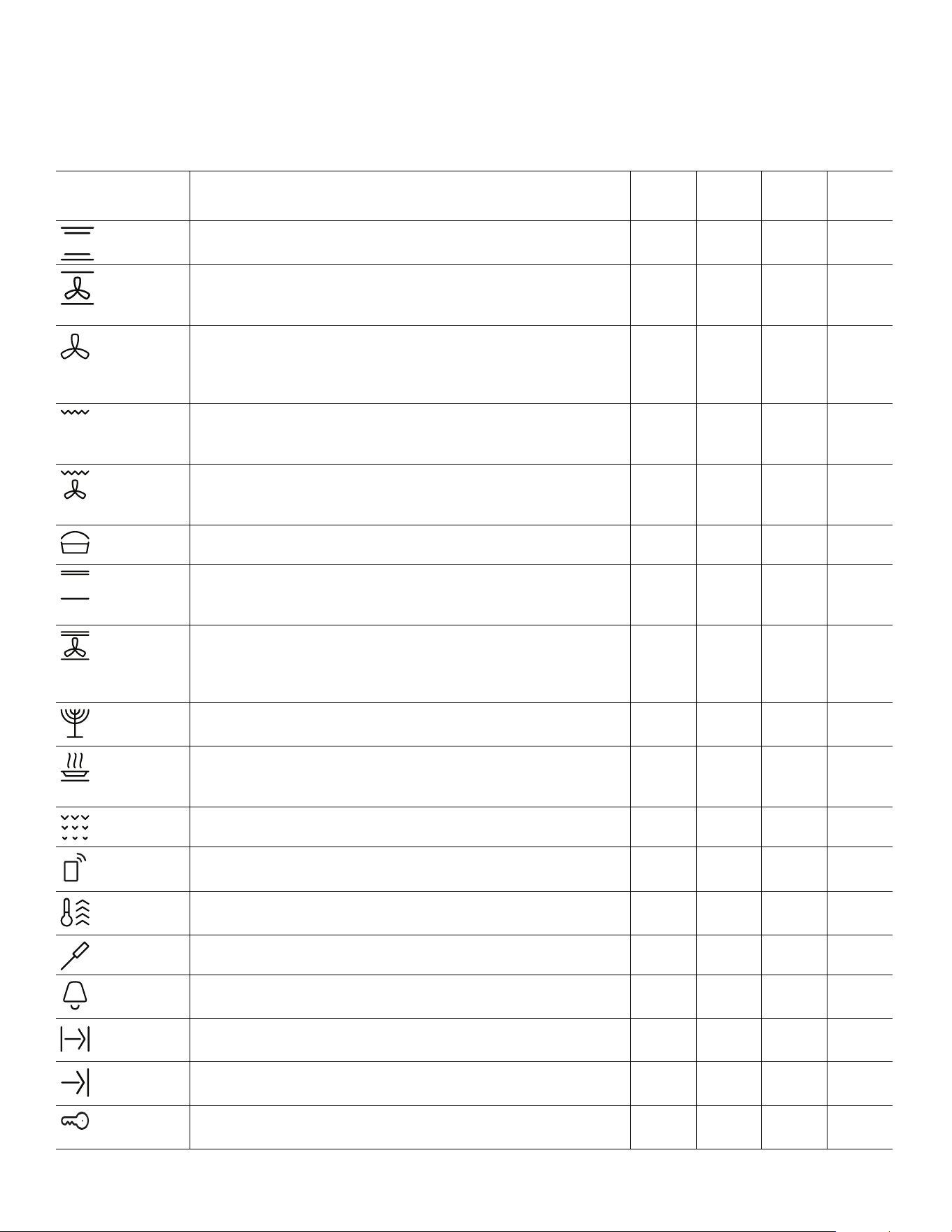
Symbol/mode Definitions and recommendations
Electric
main
Gas
main
Electric
aux.
Gas
aux.
Bake Cooks with dry, heated air. Variety of foods, such as cakes,
cookies, pastries, quick breads, quiche and casseroles.
Conv bake Similar to bake, but air is circulated by a fan at the back of the
oven. Best for baked goods such as cakes, cornbread, pies,
quick breads, tarts, and yeast breads.
True conv Cooks with heat from a third element at the back of the oven.
The heat is circulated throughout the oven by the convection
fan. Well suited for cooking individual serving-sized foods
such as cookies and pastries.
Broil Uses intense heat radiated from the upper element. Use for
tender cuts of meat (1'' or less), poultry, browning bread and
casseroles.
Conv broil Combines intense heat from upper element with fan
circulation. Tender cuts of meat (more than 1''), poultry and
fish. Not for browning.
Proof Proof (raises) yeast dough and sourdough.
Roast Uses more intense heat from upper element, more browning
of exterior. Best suited for meats, poultry, less tender cuts of
meats and roasting vegetables.
Conv roast Uses lower and more intense heat from upper element than
convection bake with air circulated by a fan. Use for tender
cuts of meat and poultry and roasting vegetables. Meats are
more juicy and moist than results with Roast mode.
Sabbath This cooking mode is for assisting the user for compliance to
Sabbath principles.
Warm* Maintains a low temperature in order to keep food hot. Best
for baked goods such as cakes, cornbread, pies, quick breads,
tarts, and yeast breads.
Self-clean The oven reaches a high temperature to burn off food soil.
Remote
start
Allows user to start, pause, and abort oven programs
remotely via the Home Connect
TM
app on a mobile device.
Preheat
symbol
Symbol is displayed when oven is preheating.
Temp probe Appears when a probe is detected.
Kitchen
timer
The kitchen timer runs independently of the other appliance
functions.
Cook time Shows the amount of time that the oven mode will run before
turning off automatically.
End time Used when delaying the start of a timed oven mode. Shows
the time of day that the oven mode will automatically end.
Panel lock Prevents the oven from being turned on or its settings from
being changed accidentally.
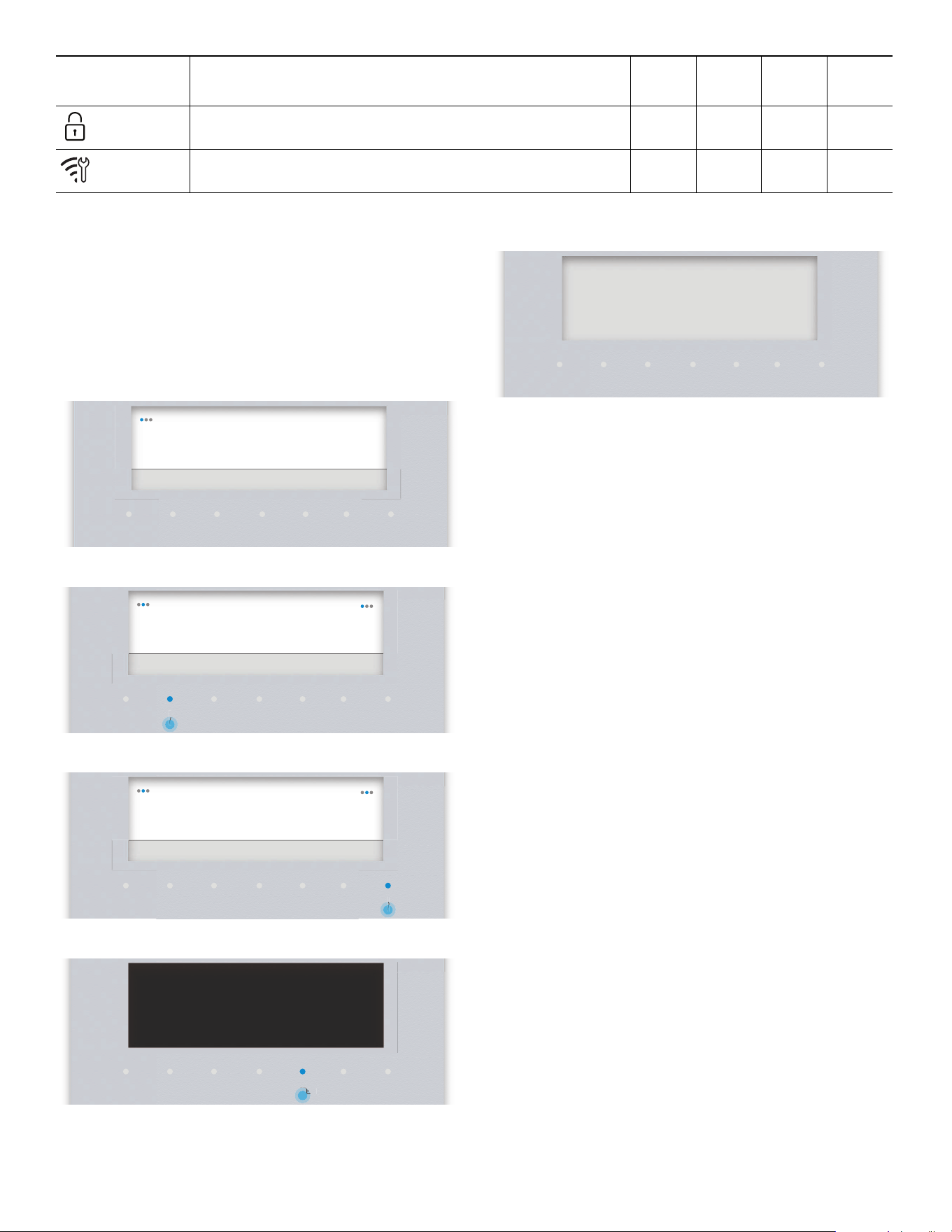
Page. 33
Initial start-up
Start-up settings
The time of day, language and time display settings may
be accessed at any time by pressing SETTINGS while the
appliance is in Standby mode.
1. Connect the appliance to the power supply.
2. Select a setting with the left
( or ).
3. Change the setting parameter with the right ( or ).
4. Press ENTER.
– The screen changes to Standby mode.
Home Connect
TM
assistant
About Home Connect
The Home Connect wizard is a part of the initial
installation of the appliance on certain models. If the
Home Connect is not installed during the first start-up of
the appliance it may be accessed in the settings menu.
The Home Connect app must first be successfully installed
on a mobile device. See the section “Setting up Home
Connect™” on page 44 for full instructions on how to
install the Home Connect app.
About data protection
When your appliance is connected for the first time to a
WLAN network, which is connected to the Internet, your
appliance transmits the following categories of data to the
Home Connect server (initial registration):
• Unique appliance identification (consisting of
appliance codes as well as the MAC address of the
installed Wi-Fi communication module).
• Security certificate of the Wi-Fi communication
module (to ensure a secure IT connection).
• The current software and hardware version of your
domestic appliance.
• Status of any previous resetting to factory settings.
This initial registration prepares the Home Connect
functions for use and is only required when you want to
use these Home Connect functions for the first time.
Door
locking
Symbol is displayed during and after the self-clean mode
when the door is locked.
Remote
service
Symbol is displayed if customer service is connected during
remote access.
Symbol/mode Definitions and recommendations
Electric
main
Gas
main
Electric
aux.
Gas
aux.
TIMERS
SETTINGS ENTER
06:30Time of Day
Press Enter to save
TIMERS
SETTINGS ENTER
englishLanguage
Press Enter to save
TIMERS
SETTINGS ENTER
frenchLanguage
Press Enter to save
TIMERS
SETTINGS ENTER
finished
fi8d
First start up
NTE
NTE
TIMERS
SETTINGS ENTER
06:30
Page. 34
Setting the oven(s)
Setting the cooking mode and temperature
1. Place rack in desired rack position and shut the door.
2. Turn the MODE knob to BAKE, for example.
3. Turn the TEMPERATURE knob.
– The temperature gauge will start to move toward
the temperature setting. The temperature gauge
reflects the temperature setting.
– The needle of the temperature gauge will move to
the new selected temperature setting if the
temperature setting is increased or decreased.
The gauge is for reference only.
– The blue preheating bar moves to the right as the
oven heats up.
– After the oven has finished preheating, the
preheating bar and symbol fade out.
4. After oven has preheated, place food inside.
Kitchen timer
About the kitchen timer
• The kitchen timer can be set for up to 12 hours.
• It can be used despite whether the range is in
operation and independently of all other functions.
• The appliance does not switch on and off
automatically.
Oven timer
About the oven timer
• After the set time has elapsed, the appliance switches
off automatically when the desired cooking time is
complete.
• The oven timer function is available for all of the
primary cooking modes except for Self-Clean mode
and if a temperature probe is in use.
To set the kitchen or oven timer
1. Press TIMERS.
2. Press the left
( or ) to select your desired timer and
ENTER.
3. Press the right
( or ) to set your desired time and press
the ENTER.
– A beep sounds when the timer ends. Press ENTER
to terminate the beep and timer.
To change a running timer
1. Press TIMERS.
2. Press the right
( or ) to set your desired time and press
ENTER.
End timer
You can delay the cooking time end to a later time.
Example: it is 4:00 PM. The dish requires a cooking time of
40 minutes. You want it to be ready at 5:30. Enter the
cooking time and delay the cooking time end until 5:30.
The appliance starts automatically at 4:50 and switches off
at 5:30.
Bear in mind that food which spoils easily should not be
left in the oven for too long.
To set the end timer
1. Set the desired cooking mode and oven temperature.
2. Press TIMERS.
3. Press the left
( or ) and select OVEN TIMER.
4. Press the right ( or ) to set the oven time.
5. Press the left ( or ) and select END TIME.
6. Press the right
( or ) to set the end time and press
ENTER.
– After confirming the end time the waiting time
notification appears.
– After the waiting period the oven starts heating.
TIMERS SETTINGS ENTER
Bake
06:30
°
— — —
TIMERS
SETTINGS ENTER
Bake
06:30
°
350
°
TIMERS
SETTINGS ENTER
Bake
06:30
°
350
°
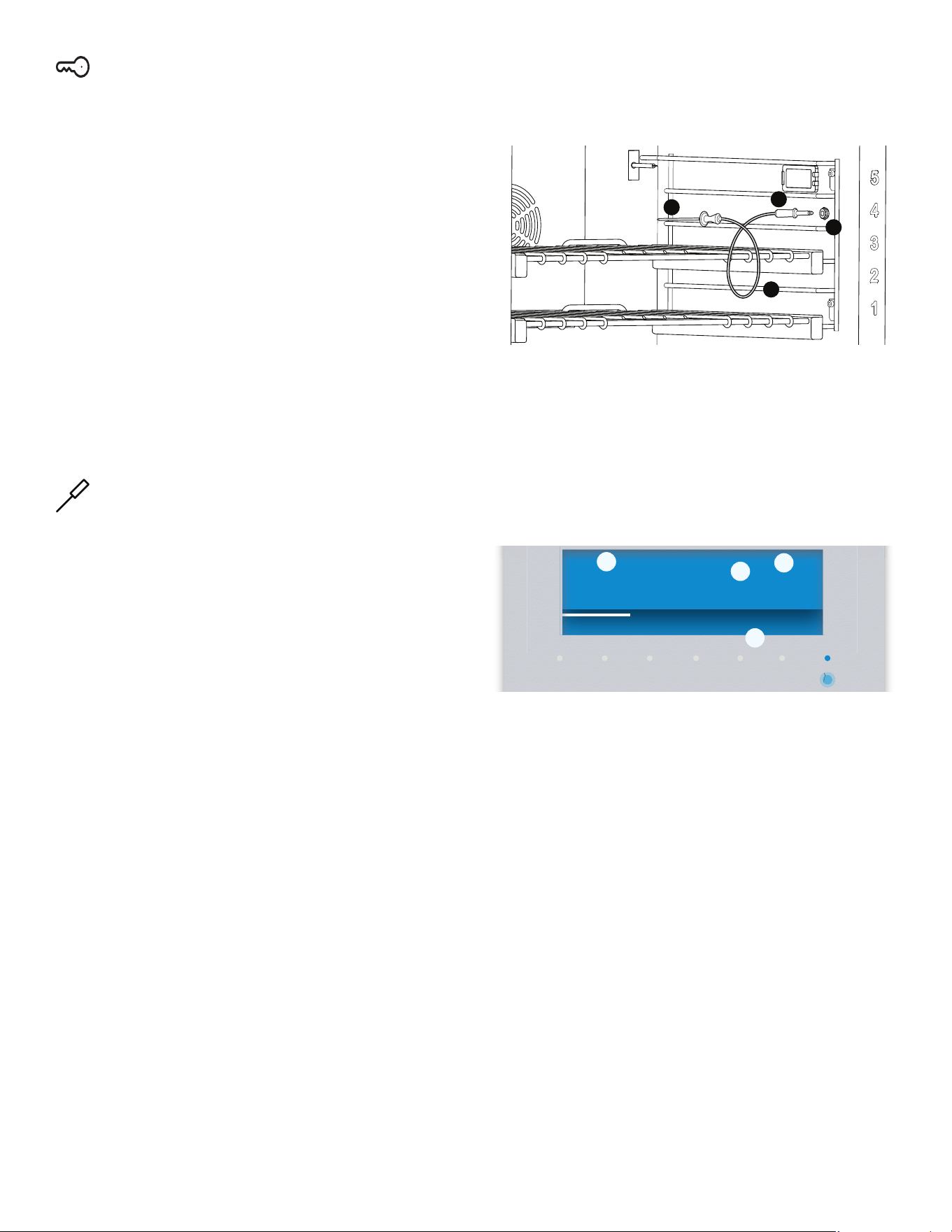
Page. 35
Panel lock
About the panel lock
• The panel lock is a child safety mechanism to prevent
children from accidentally turning on the oven or
changing an oven setting.
• Panel lock can only be activated in Standby.
• When panel lock is activated, all keys are locked
except for the cook timer, timer and on/off.
To set the panel lock
1. Press and hold TIMERS for four seconds.
– The panel lock symbol F and PANEL LOCKED
will appear in the display.
To deactivate the panel lock
1. Press and hold the TIMERS button for four seconds.
– The F icon in the display will disappear.
Multi-point meat probe
About the multi-point meat probe
The probe allows you more control over how your foods
are cooked by automatically disabling the specified
cooking mode when a dish's desired temperature, defined
by the cook, has been reached. The probe expresses the
current temperature of the meat as it cooks.
The following are the heating modes that work with the
temperature probe:
•Bake
• Convection bake
•Roast
•Convection roast
The temperature probe will not work with the oven timer
or with the end timer.
For best results
• To avoid damaging the probe, ensure that the meat is
fully defrosted before inserting the probe.
• Insert the probe until its tip is rested in the center of
the thickest, meatiest portion of the meat. Ensure that
the probe does not touch bone, fat, or gristle.
• For poultry, the meat probe should be inserted into
the interior thigh muscle.
• The probe should not touch any part of the cooking
dish or parts of the oven, as this will affect the
accuracy of the results.
To program the multi-point meat probe
1. Insert the plug end into the probe outlet in the oven
wall and insert probe end into the meat.
2. Close the oven door.
3. Turn the MODE and TEMPERATURE knobs to your
desired settings.
4. Press the right
( or ) to the desired internal
temperature.
– The oven display indicates the current
temperature of the meat as it cooks.
– The white progress bar moves to the right as the
internal cooking temperatures increase. When the
actual probe temperature reaches the desired set
temperature, the cooking mode will be finished
and the “end of cook timer” will beep to indicate
that the cooking process has concluded.
IMPORTANT:
• To avoid damaging your probe, DO NOT pull on the
cable when trying to remove it from a dish.
• DO NOT use tongs or other instruments to pry on the
probe when removing it or to ‘hammer’ the probe into
a food dish.
• To prevent possible burns, wait until the oven has
cooled before trying to remove the probe from the
outlet.
• DO NOT store the probe inside the oven.
a. Probe
b. Plug
c. Outlet d. Cable
a. Cooking mode b. Current probe temp
c. Set shut-off temp d. Set oven temp
a
b
c
d
TIMERS
SETTINGS ENTER
Bake
05:40
Oven temperature 375°
°
150
70°/
ƒ
¥
a
b
c
d
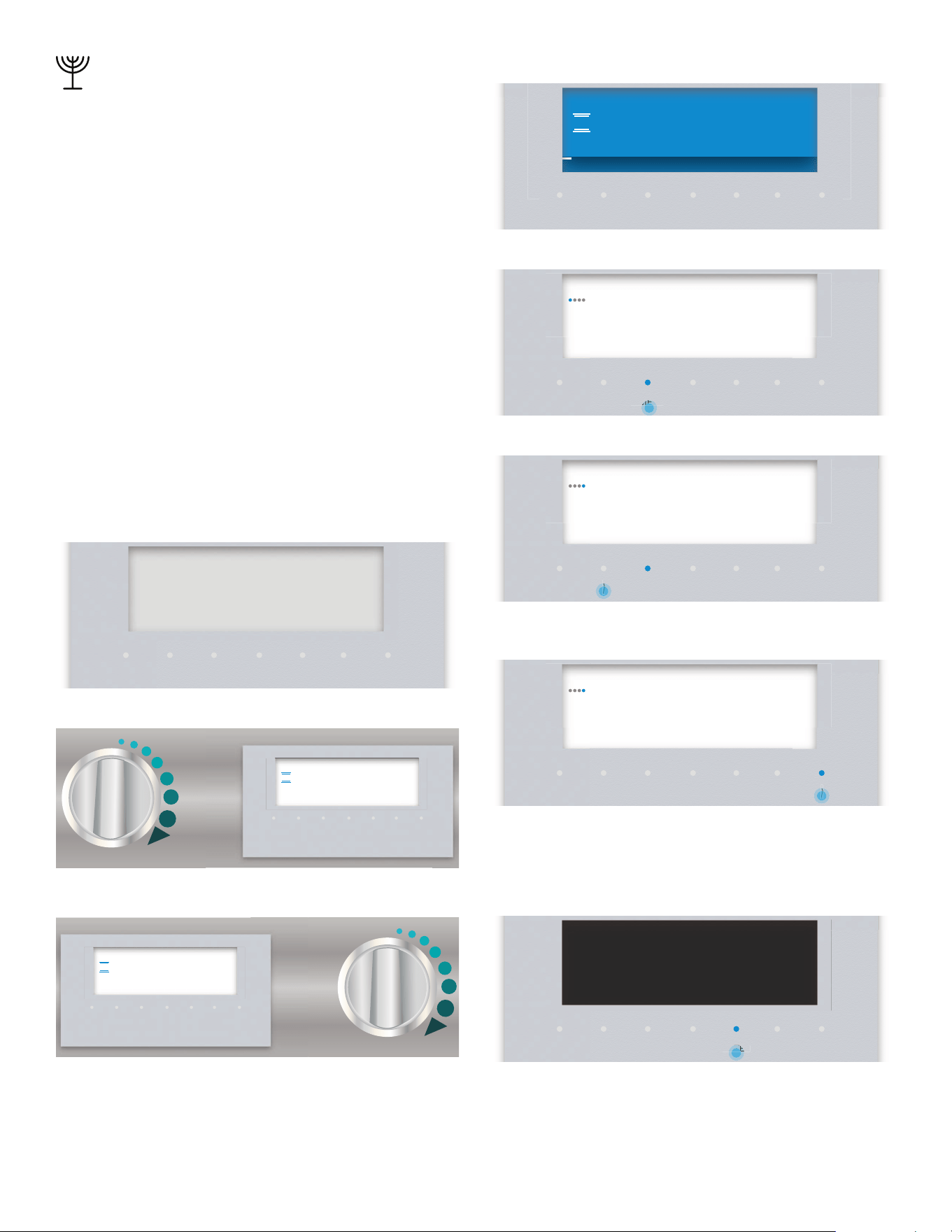
Page. 36
Sabbath
About Sabbath mode
• With this function, the appliance maintains a constant
temperature between 150°F and 475°F (66°C and
246°C) with the BAKE heating function.
• You can keep dishes warm for up to 74 hours without
needing to switch the appliance on or off for
compliance to Sabbath “no work” principles. Please
note that easily perishable foodstuffs must not be left
in the oven for too long.
• The oven lamp is disabled in Sabbath mode to
prevent any action from occurring at any time the
door is opened.
• The gas burners and griddle on the cooktop are still
fully functional during Sabbath Mode.
• Sabbath Mode is only available when the appliance is
not already in another active mode.
• Temperature may not be adjusted for the duration of
the Sabbath mode.
To set Sabbath mode
1. Begin from the STANDBY mode.
2. Turn the mode knob to BAKE.
3. Turn the temperature knob to the desired temp.
– After a few seconds the oven begins preheating.
4. Press TIMERS.
5. Press the left
( or ) and select SABBATH TIMER.
6. Press the right ( or ) and enter the DURATION TIME in
30 minute increments.
-- The default time is 25 hours. The minimum time is 30
minutes and the maximum time is 74 hours.
7. Press ENTER.
– A delay notification appears.
TIMERS
SETTINGS ENTER
06:30
TIMERS SETTINGS ENTER
Bake
06:30
°
— — —
TIMERS
SETTINGS ENTER
06:30
°
200
°
Bake
TIMERS
SETTINGS ENTER
06:30
°
°
200
Bake
TIMERS
SETTINGS ENTER
––min––sKitchen Timer
U
06:30
MER
ME
TIMERS
SETTINGS ENTER
––min––sSabbath Timer
›
06:30
TIMERS
SETTINGS ENTER
25h 00minSabbath Timer
›
06:30
TIMERS
SETTINGS ENTER
04min 59s
›
Sabbath Mode will start in:
NTE
NTE
Page. 37
– During this time the user can adjust the
parameters. After the countdown the oven starts
heating. All buttons are disabled.
– After the countdown is completed a notification
appears.
8. Turn knobs to OFF.
Remote start
About remote start
Remote start allows you to start, pause, and abort oven
programs remotely via the Home Connect
TM
app on a
mobile device. Some operating modes can only be started
on the oven itself.
The remote start can only be employed if the Home
Connect app has been successfully installed on a mobile
device. See the section “Setting up Home Connect™” on
page 44 for instructions on how to install the Home
Connect app.
If the appliance is not connected to the home network,
the appliance functions in the same way as an oven with
no network connection and can still be operated via the
appliance.
The availability of the Home Connect function depends on
the availability of Home Connect services in your country.
Home Connect services are not available in every country.
You can find more information on this at www.home-
connect.com
Remote start is automatically deactivated in the
following situations:
• The oven door is opened 15 minutes after Remote
Start is activated.
• The oven door is opened 15 minutes after the oven
operation has ended.
• 24 hours after Remote Start has been activated.
IMPORTANT:
• Ensure that you follow the safety instructions in this
instruction manual and that you comply with these
even when you are away from home and are operating
the appliance via the Home Connect app. You must
also follow the instructions in the Home Connect app.
• Operating the appliance directly from the appliance
always has priority. During this time, it is not possible
to operate the appliance using the Home Connect
app.
• We are constantly working to improve the Home
Connect app, which may lead to differences in the
setup steps. Please rely on the instructions in the
latest version of the Home Connect app to guide you
through the setup process.
To set remote start
1. Turn the mode knob to REMOTE START.
– DO NOT rotate the temperature knob to any
setting (leave in the OFF position).
– The displays turns to the Standby screen and
C
appears in the display.
2. Place the food in the oven and then close the door.
3. Continue with the Home Connect app installed on
your mobile device.
When you start the oven operation on the appliance,
Remote Start is automatically activated. You can then
make changes from your mobile device or start a new
operation.
TIMERS
SETTINGS ENTER
24h 59minSabbath
›
06:31
TIMERS
SETTINGS ENTER
completed
›
Sabbath
TIMERS
SETTINGS ENTER
06:30
TIMERS
SETTINGS ENTER
switched on
F
Remote Start
TIMERS
SETTINGS ENTER
06:30
F
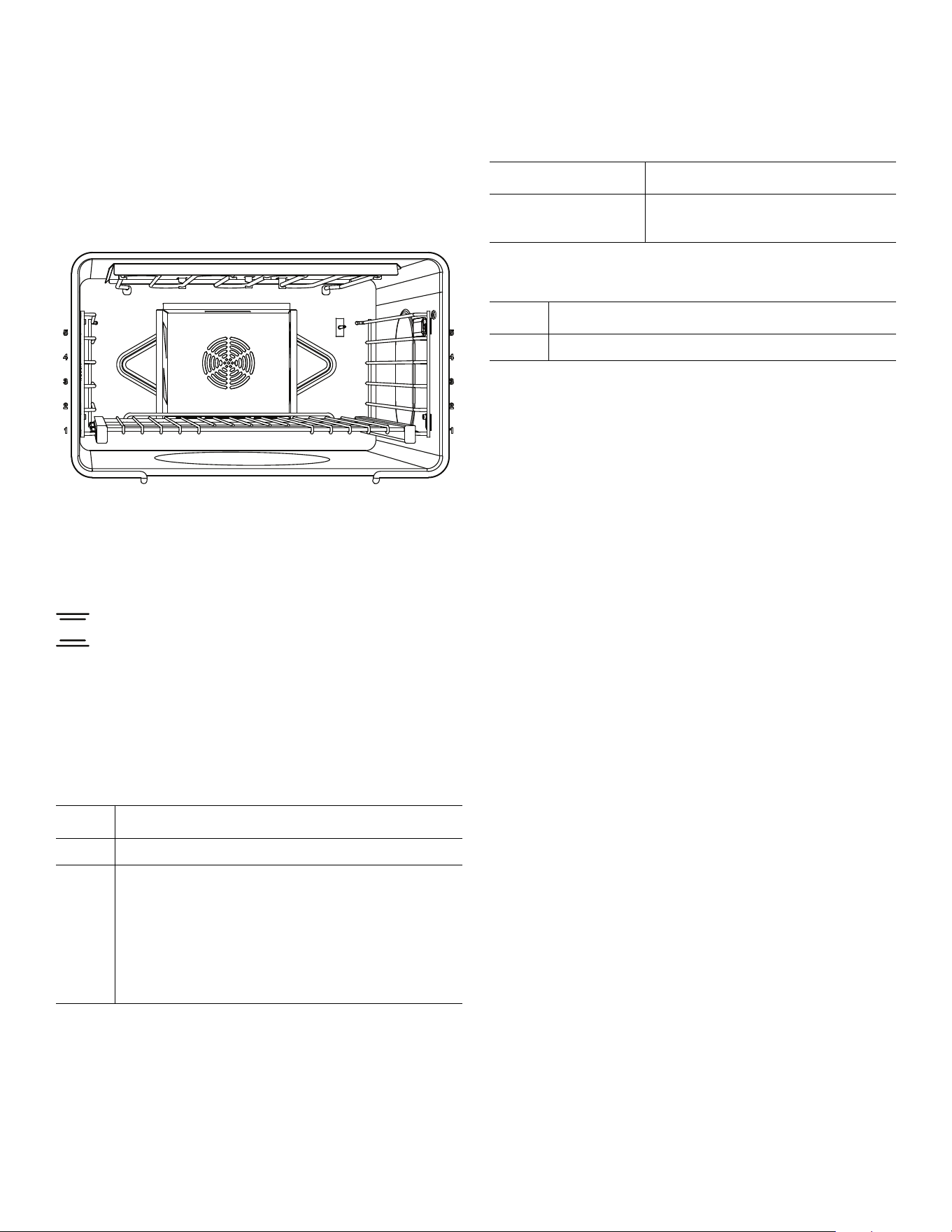
Page. 38
Getting the most out of your appliance
Oven rack positions
Rack level positions in the oven are numbered on the front
frame like an elevator. Number one level is the lowest and
number five level is at the top.
NOTE: Rack positions are general recommendations for
baking; however, if a recipe calls for a different rack
position than those given, then the recipe or package
directions should be followed.
Bake
Bake is cooking with dry, heated air. Both the upper and
lower elements cycle to maintain the oven temperature.
The bake mode can be used to prepare a variety of food
items, from pastries to casseroles. Refer to recipe or
package directions for oven temperature and baking time.
Main oven one rack baking
Main oven two rack baking
Secondary oven (48" models)
Main oven three rack baking
If three-rack baking is desired, the Convection Bake mode
is best.
Getting the best results
• Minimize opening the oven door(s).
• Use the rack position recommended by the recipe.
• Use the bakeware recommended in the recipe.
• Store the broiler pan(s) outside the oven. An extra pan
without food affects the browning and cooking.
• The type of pan used affects the browning:
• For tender, golden brown crusts, use light
non-stick/anodized or shiny metal pans.
• For brown crisp crusts, use dark non-stick/
anodized or dark, dull metal pans or glass
bakeware. These may require lowering the bake
temperature 25°F.
Preheating the oven
• Most cooking times in recipes are designed for a
preheated oven and require that the oven already be
at a certain temperature before cooking starts. Refer
to your recipe for preheating recommendations
.
• Preheating time depends on the temperature setting
and the number of racks in the oven.
Bakeware type
• Metal bakeware (with or without a non-stick finish),
heat-proof glass, glass-ceramic, pottery, or other
utensils are suitable for the oven.
• Suitable cookie sheets have a small lip on one side.
Heavy sheets or those with more than one side may
affect the baking time.
Level Bake mode
3 -- Best used for most baked items.
2 -- If the item is tall, such as an angel food cake.
-- Pies are best baked on rack level 2 to make
certain the bottom of the crust is done
without over-browning the top.
-- When large pieces of meat or poultry are
roasted, such as a prime rib of beef or a
turkey.
Levels Bake or conv bake mode
2 and 5 dual fuel
2 and 4 gas
-- Casserole dishes
Level Bake mode
1 -- Best used for most baked items.
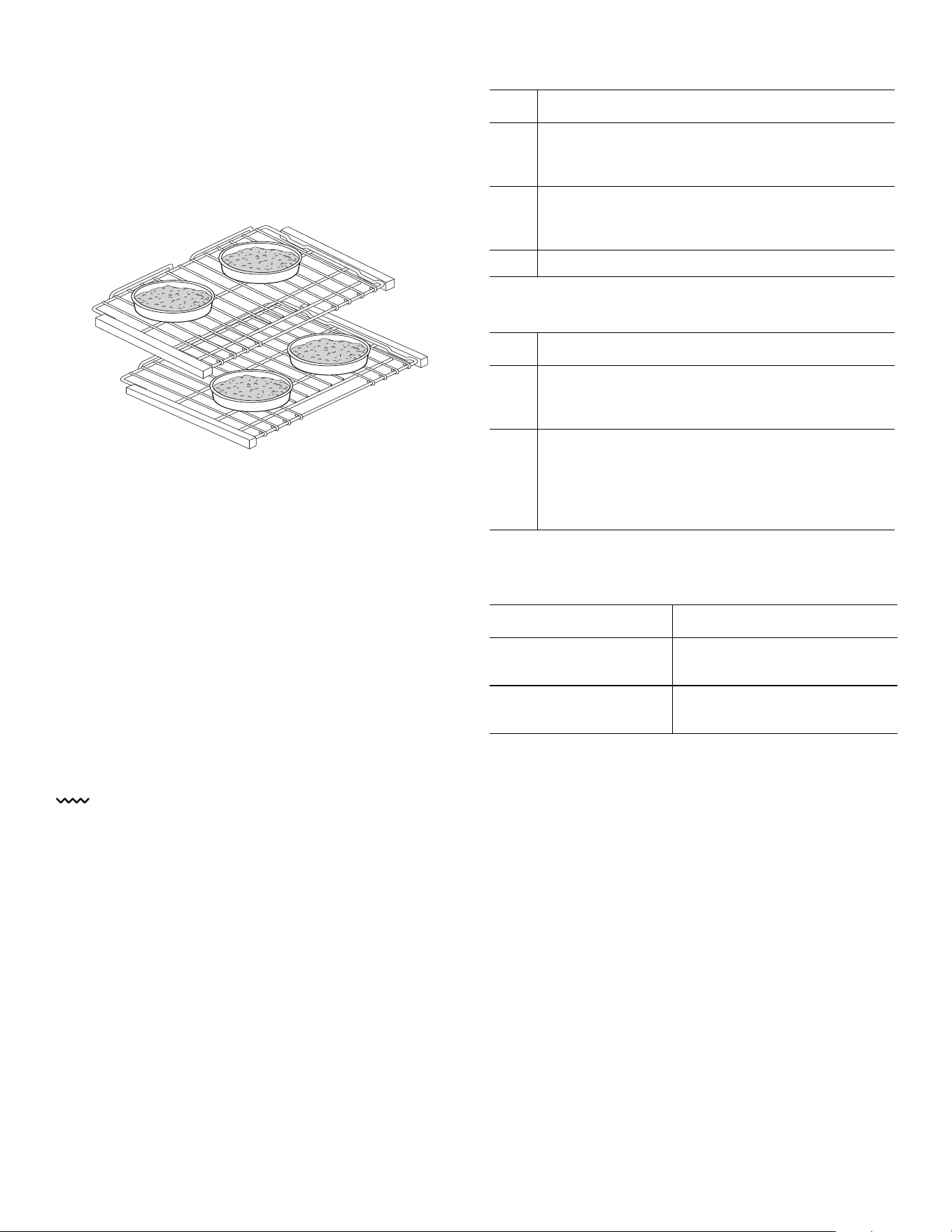
Page. 39
Pan placement
• Allow at least 1'' (25.4 mm) of space between the pans
and the oven walls so heat can circulate around each
pan.
• Stagger bakeware so that one is not directly above
another. Allow 1½'' (38 mm) above and below each
pan.
High altitude baking
When cooking at high altitudes, recipes and cooking times
will vary. For accurate information, write the Extension
Service, Colorado State University, Fort Collins, Colorado
80521. There may be a cost for the guides. Specify which
high altitude food preparation guide you prefer: general
information, cakes, cookies breads, etc.
Condensation
It is normal for a certain amount of moisture to evaporate
from the food during any cooking process. The amount
depends on the moisture content of the food. The
moisture will condense on any surface cooler than the
inside of the oven, such as the control panel.
Broil
Before turning on the oven, place the rack in the desired
position. After preheating the broiler, center the broil pan
under the broil element.
Only the upper element heats in the Broil mode.
Successful broiling requires constant exposure to high,
intense heat.
Dual fuel main oven broil rack recommendations
Gas main oven broil rack recommendations
Secondary oven broil rack recommendations (48"
models only)
Getting the best broil results
Tips:
• Defrost food before broiling.
• Door is to be closed during broiling.
• It is recommended that you preheat the broil element
before starting to cook. Preheat for 3 minutes then
place food in oven.
• Steaks should be more than 1'' (25.4 mm) thick if rare
meat is desired. Use convection broil if steaks are over
1½'' (38 mm) thick.
• Turn foods over only once, after half the total cooking
time. It is not necessary to turn very thin foods (ham
slices, fillets of fish, etc.). Liver slices must be turned
over regardless of thickness.
• Center foods directly under the broiling element for
best browning.
Level Dual fuel broil mode
5 -- Beef steaks, ground meat patties, ham steak
and lamb chops 1'' (25.4 mm) or less in
thickness. Also use when top browning foods.
4 -- Meat 1-1/8'' (29 mm) or more in thickness or
fish, poultry, pork chops and ham steaks 1''
(25.4 mm) or more in thickness.
3 -- Chicken quarters or halves.
Level Gas broil mode
4 -- Beef steaks, ground meat patties, ham steak
and lamb chops 1'' (25.4 mm) or less in
thickness.
3 -- Meat 1-1/8'' (29 mm) or more in thickness or
fish, poultry, pork chops and ham steaks 1''
(25.4 mm) or more in thickness. Use this rack
when broiling chicken quarters or halves. Also
use when top browning foods.
Levels Secondary broil mode
3, 4, or 5 – dual fuel
1, 3, or 4 – gas
-- Depending upon the type
and thickness of the food.
5 – Dual fuel
3 – Gas
-- Top browning of foods.
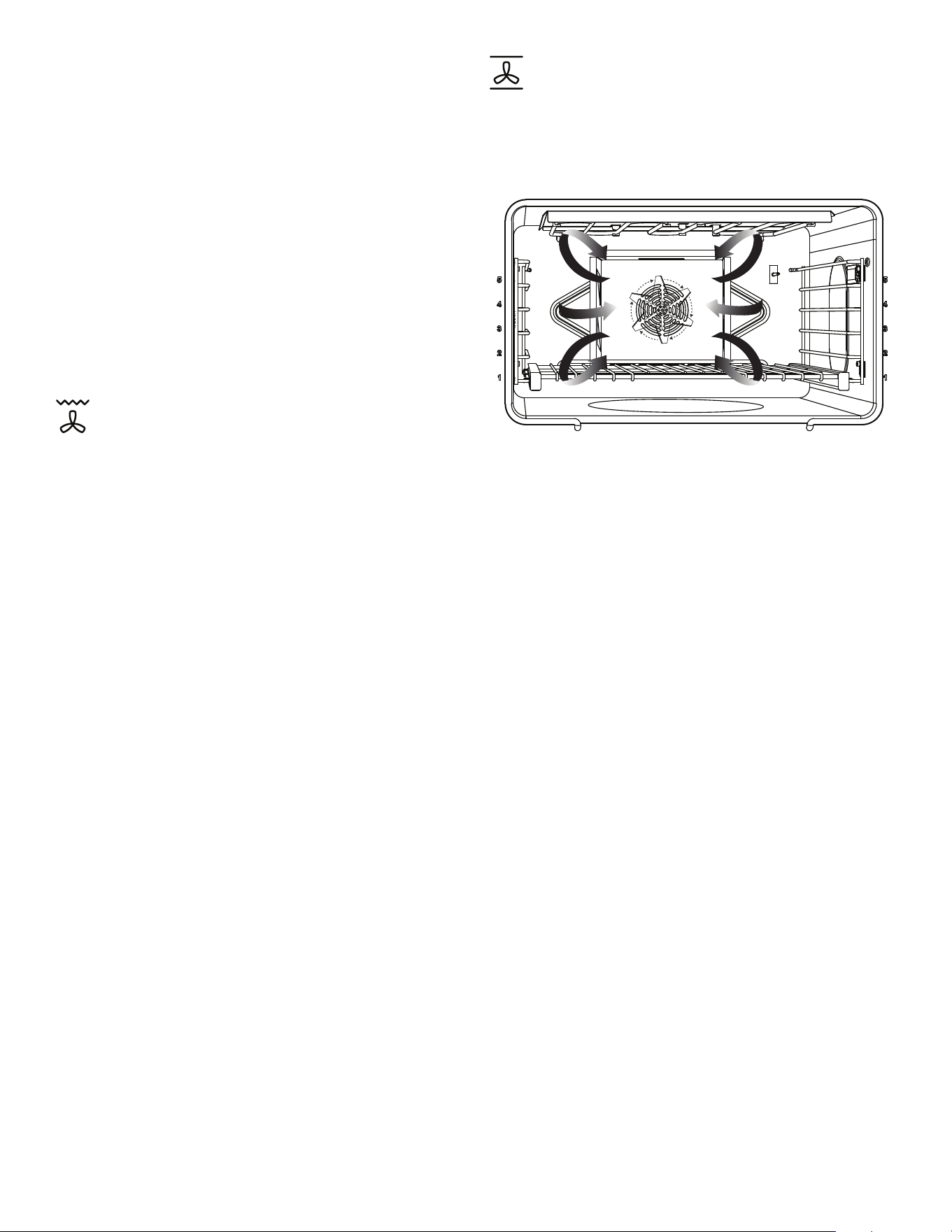
Page. 40
Utensils
• Your appliance comes with a large two-piece broiler
pan. The slotted grid allows drippings to flow into the
lower pan, away from the intense heat of the broil
element, minimizing spattering, smoking, and the
chance of a grease fire. DO NOT cover the slotted
grid (top) with aluminum foil.
• Use metal or glass-ceramic bakeware when top
browning casseroles, main dishes, or bread.
• DO NOT use heat-proof glass or pottery. This type of
glassware cannot withstand the intense heat of the
broil element.
NOTE: It is not possible to use the bake mode and broil
mode simultaneously. When one mode is on, the other
mode cannot be turned on.
Convection broil
Convection broil is similar to broil. It combines intense
heat from the upper element with heat circulated by a
convection fan.
Convection broil mode is well suited for cooking thick,
tender cuts of meat, poultry and fish. Convection broil is
not recommended for browning breads, casseroles and
other foods. Always use convection broil with the door
closed.
In addition to the benefits of standard broiling, convection
broiling is faster.
Tips:
• Preheat oven 3-4 minutes. Do not preheat for more
than 5 minutes.
• Meat should be at least 1½'' thick. Use the broil pan
and grid included with your oven.
• Do not cover the broil grid with foil. It is designed to
drain fats and oils away from the cooking surface to
prevent smoking and spattering.
• Turn meats (other than fish) once during the
recommended cook time.
Convection bake
Convection bake is similar to bake. Heat comes from the
lower heating element. The main difference in convection
baking is that the heat is circulated throughout the
appliance by the convection fan.
Tips:
• To convert most recipes for baked items (cookies,
cakes, pies, etc.); reduce the oven temperature by
25°F.
• For meats and poultry, the temperature should not be
reduced. The same temperature recommended in
recipes and cooking charts for meats and poultry
should be used.
• Low, shallow bakeware should be used with
convection cooking. This allows the heated air to
circulate around the food.
• When baking on more than one rack, cookie sheets
should not be staggered; round cake pans should be
staggered.
• Any food cooked uncovered will brown evenly and
form a nice crust. Foods in covered dishes (casseroles,
pot roast) or delicate custards do not benefit from
convection cooking.
• For small items such as cookies, check to see if they
are done one to two minutes before the recipe time.
For larger baked items such as cakes, check five to six
minutes before the time indicated on the recipe.
• Large meat or poultry items may cook up to 30
minutes less than the suggested time so check them
so they will not be over baked.

Page. 41
One rack convection baking
Two rack convection baking
Three rack convection baking
Dehydrating foods with convection bake
Use the convection bake to dry and preserve fruits and
vegetables.
Tips:
• Drying times vary depending on the moisture and
sugar content of the food, the size of the pieces, the
amount being dried and the humidity in the air.
• Dry most fruits and vegetables at 150°F (66°C).
• Check food at the minimum drying time.
• It is best to use drying racks (not included) so that air
can flow around the food. Do not place food directly
on a baking sheet or pan. Food needs to be elevated
to ensure even drying.
• Multiple drying racks can be used simultaneously.
• Racks 2 and 4 or 1, 3 and 5 can be used for multiple
rack dehydrating. Use rack 3 if only dehydrating one
rack.
• Dehydrating meat is not recommended due to food
safety concerns.
• Consult a food preservation book, county Cooperative
Extension Office or library for additional information.
Convection bake dehydration recommendations
Level Conv bake mode
3 -- When baking on one rack, best results are
obtained in the bake mode.
2 -- Roasting a turkey or a large piece of meat.
Levels Conv bake mode
2 and 4 -- Use for cakes, cookies, biscuits, and other
baked goods. Cake pans should be
staggered. Cookie sheets should be placed
on rack 2 directly under the one on rack 4.
-- To bake several casseroles, frozen pies, or
cakes.
-- These two racks can also be used for a large
oven meal.
Levels Conv bake mode
1, 3, and 5
Dual Fuel
Gas
see note
-- When several sheets of cookies are to
be baked. Place the baking sheets
directly above each other on the
respective racks to allow air to flow
around the baking sheets.
-- Gas range rack levels for:
Cookies: 2, 3, and 4
Other foods: 1, 3, and 5
Food Preparation
Approx.
time
(hrs)
Doneness
test
Apple, ¼''
slices
Dipped in ¼ cup
lemon juice and 2
cups water
8 – 15 Slightly
pliable
Bananas, ¼''
slices
Dipped in ¼ cup
lemon juice and 2
cups water
8 – 15 Slightly
pliable
Cherries Wash and towel
dry. For fresh
cherries, remove
pits
7 – 18 Pliable
leathery,
chewy
Orange peels Orange part of
skin thinly peeled
from oranges.
1 – 4 Dry and
brittle
Orange slices ¼'' slices of
orange
9 – 16 Skins are
dry and
brittle, fruit
is slightly
moist
Pineapple
rings
Towel dried 7 – 12 Soft and
pliable
Strawberries Wash and towel
dry. Sliced ½''
thick, skin down
on rack
9 – 17 Dry and
brittle
Peppers Wash and towel
dry. Remove
membrane of
peppers, 1''
coarsely chopped
pieces
13 – 17 Leathery
with no
moisture
inside
Mushrooms Wash and towel
dry. Cut thin slices,
1/8'' thick
5 – 12 Tough and
leathery,
dry
Tomatoes Wash and towel
dry. Cut thin slices,
1/8'' thick, drain
well
5 – 12 Dry, brick
red color
Page. 42
True convection
About true convection
True convection cooks with heat from a third element
behind the back wall of the oven. The heat is circulated
throughout the oven by the convection fan.
True convection is well suited for cooking individual
serving-sized foods such as cookies and pastries. It is also
good for cooking on multiple racks (2 or 3) at the same
time.
Tips:
• Reduce recipe temperature by 25°F.
• Place food in low-sided, uncovered pans such as
cookie sheets without sides.
• If baking more than one pan on a rack, allow at least
1'' to 1½'' of air space around the pan.
Proof
About proof
The proof feature maintains the warm, non-drafty
environment needed for proofing yeast leavened
products.
It is best to start with a cool oven when using the proofing
function.
To set the oven for proof
1. Allow dough to thaw if frozen.
2. Place dough in dish and loosely cover.
3. Use any rack level that accommodates the size of the
bowl or pan. Close the door.
4. Turn the mode knob to PROOF. DO NOT turn the
oven temperature knob.
The ideal temperature for proofing will be maintained
until the mode knob is turned off.
Dough has “proofed” when it has doubled in size.
Do not open the oven door unnecessarily. Opening the
door will lower the temperature of the air in the oven and
lengthen the proofing time. Use the oven light to check
the rising of the dough.
Proofing time may be decreased when using the large
oven at the same time you are proofing. Check bread
product early to avoid over-proofing. If you are using the
large oven for extended periods of time we recommend,
for optimum results, that you complete the proofing
before using the large oven.
Roast
About roast
Roast uses both the upper and lower elements to maintain
the oven temperature. Roasting uses more intense heat
from the upper element than the lower element. This
results in more browning of the exterior while the inside
remains especially moist. Roast is best suited for large cuts
of meat and poultry.
Tips:
• Use a high-sided broil pan, or cover dish with a lid or
foil.
• Add liquids, such as water, juice, wine, bouillon or
stock for flavor and moisture.
• Roasting bags are suitable for use in this mode.
• When roasting whole chicken or turkey, tuck wings
behind back and loosely tie legs with kitchen string.
Roasting recommendations
Convection roast
About convection roast
Convection roast uses heat from the top and bottom
elements as well as heat circulated by the convection fan.
The convection roast mode is well suited for preparing
tender cuts of meat and poultry. The benefits of
convection roast mode include:
Size Time
Loaf, 1 lb (0.45 kg) 60 – 75 minutes
Rolls, 0.1 lb (0.05 kg) 30 – 45 minutes
Meat and poultry Temperature Level
Beef
Pot roast, 3 – 4 lbs.
Beef brisket
Beef chuck
Meatloaf
350°F (180°C)
350°F (180°C)
350°F (180°C)
350°F (180°C)
1
2
1
3
Poultry
Chicken, whole
Chicken, pieces
Turkey, whole
375°F (190°C)
375°F (190°C)
325°F (165°C)
2
2
2
Pork
Shoulder
Smoked ham, half
325°F (165°C)
325°F (165°C)
1
1

Page. 43
• As much as 25% faster cooking than non-convection
modes.
• Rich, golden browning.
Tips:
• Use the same temperature as indicated in the recipe.
• Check doneness early, since roasting time may
decrease.
• Do not cover meat or use cooking bags.
• Use the broil pan and grid provided with the oven for
roasting. A shallow, uncovered pan can also be used.
• Use a meat thermometer to determine the internal
temperature of the meat.
• If the meat is browned to your liking, but is not yet
done, a small strip of foil can be placed over the meat
to prevent over-browning.
• Let meat stand covered with foil 10-15 minutes after
removing it from the oven.
Warm
About warm
• The Warm mode will keep hot, cooked foods at
serving temperature. ALWAYS start with hot food. DO
NOT use this mode to heat cold food other than for
crisping crackers, chips and dry cereal.
• Serving dishes, plates and cups may be kept warm
with this mode.
• Warm mode temperatures range from 140°–150°F /
60°–66°C. Food should be at serving temperature
(above 140°F / 60°C) before being placed in the oven.
• Food may be kept hot in its cooking container or
transferred to a heat-safe serving dish.
• Aluminum foil may be used to cover food. Use only
heat-safe dishes.
• DO NOT open the oven door unnecessarily. Opening
the door will reduce the temperature of the oven.
• When keeping cooked food warm, allow time for the
oven to preheat before placing the item in the oven.
To set the warm mode
1. Turn the mode knob to WARM. DO NOT turn the
oven temperature knob.
2. Place warmed dish in the oven and close the door.
Minimum internal cooking temperatures
The minimum internal temperatures that foods must reach
to be considered safe to eat, as determined by the U. S
Department of Agriculture Food Safety and Inspection
Service, are as follows:
Fine tuning the oven
About offset
The offset feature allows the cook to further fine-tune
their cooking parameters to their own personal optimal
settings by allowing them to adjust the temperature offset
of the oven by +/-25°F in increments of 5°F.
For example, if the cook judges the oven temperature as
too hot and wants to lower it by 5°F, press the “
( ” button.
To increase the temperature by 5°F, press the “
) ”. This
feature is useful if you find that food is consistently either
too brown or too light for your tastes.
• The oven must be turned off in order to set an offset
value.
• The offset feature is available for all modes except
self-clean.
• By default, the temperature is set at 0°.
• The unit will continue to run the input offset value
indefinitely until the user manually changes it, or until
the unit loses power, in which case offset will need to
be reset.
To set offset
1. Press SETTINGS.
2. Press the left
( or ) and select OFFSET.
3. Press the right
( or ) to set the temperature.
4. Press ENTER.
Egg dishes, casseroles 160°F (72°C)
Leftovers 165°F (74°C)
Ground beef, veal, lamb, or pork 160°F (72°C)
Beef, veal, lamb roasts, steaks, or chops
Medium rare
Medium
Well done
145°F (63°C)
160°F (71°C)
170°F (77°C)
Pork roasts, steaks, or chops
Medium
Well done
160°F (72°C)
170°F (77°C)
Ham
Cook before eating
Fully cooked, to reheat
160°F (72°C)
140°F (60°C)
Poultry
Ground chicken, turkey
Whole chicken, turkey
Breasts, roasts
Thighs and wings
Stuffing (cooked alone or in bird)
165°F (74°C)
180°F (82°C)
170°F (77°C)
180°F (82°C)
165°F (74°C)

Page. 44
Setting up Home Connect™
With Home Connect™, the appliance is Wi-Fi capable and
can be remotely controlled using a mobile device (e.g.
tablet or smartphone). The Home Connect app offers
additional functions which are a perfect complement to
the networked appliance.
Home Connect does not work over Wi-Fi networks that
require browser registration, i.e. a user name and
password entered via a web browser.
You should have a stable wireless network with good
reception and access to the internet.
If the appliance is not connected to the WLAN network
(home network), it functions in the same way as a typical
appliance with no network connection and can be
operated as usual.
NOTE: Please ensure that you follow the safety
instructions given at the beginning of this instruction
manual and that these are also observed when operating
the appliance via the Home Connect app and when away
from home. Please also follow the instructions in the
Home Connect app.
NOTE: Operation on the appliance itself always takes
priority, and during this time it is not possible to operate
the appliance using the Home Connect app.
Setup
To implement settings via Home Connect you must have
installed the Home Connect app on a mobile device (e.g.
tablet or smartphone). Please observe the supplied Home
Connect documents that came with your appliance with
regard to this feature.
Follow the steps specified by the app to implement the
settings.
What do you need to connect your
appliance to Home Connect™?
1. Your appliance must be installed properly.
2. A smartphone or tablet equipped with the latest
version of iOS or Android operating system.
3. Your home appliance within the Wi-Fi signal of your
home network.
4. The name of your Wi-Fi network (SSID) and its
password (key).
IMPORTANT INFORMATION ABOUT DATA SECURITY:
The transfer of data is always encrypted. Home Connect
meets the highest security standards, which are
continuously reviewed. For further information visit
www.home-connect.com.
Information:
We are constantly working to improve the Home
Connect app, which may lead to differences in the
setup steps. Please rely on the instructions in the
latest version of the Home Connect app to guide you
through the setup process.
Step 1: Download the Home Connect app
and create a user account
1. Open the App Store (Apple
®
devices) or Google
Play™ store (Android™ devices) on your smartphone
or tablet.
2. Search for the HOME CONNECT app in the store's
search and install it.
3. Open the app and register to create a Home Connect
account.
4. Write down your Home Connect account credentials
(user account and password). You will need them later.
Save your Home Connect login details here:
Network name
(SSID):............................................................................
Password
(Key):..............................................................................
The app will guide you through the steps of adding
your appliance to Home Connect.
Step 2: Connect your appliance to your
home network
1. Your appliance must be installed properly.
2. Open your Home Connect app to add an appliance.
3. Please follow the directions in the app and refer to this
guide only when prompted by the app.
The Home Connect app:

Page. 45
Step 2.1: Connect your appliance to your
home network with WPS
Please enter step 2.1 only when prompted to by the app.
The following steps describe operations at the appliance
itself.
1. Press SETTINGS and select HOME CONNECT.
2. Press ENTER.
-- A request to press the WPS button on the router
within 2 minutes appears in the display.
3. Press the WPS button on your router.
-- Please consult your router's manual to locate the
WPS button.
-- The app will get notified once your appliance has
been successfully connected to your Wi-Fi
network.
4. Press ENTER.
-- A message will appear in the display informing the
user if the network was connected successfully.
5. Press START PAIRING in the Home Connect app.
6. Follow the directions in the app.
Information:
If the connection could not be established within 5
minutes, make sure your appliance is within the range
of your Wi-Fi network.
Step 2.2: Connect your appliance to your
home network step-by-step
Please enter step 2.2 only when prompted by the app.
The following steps describe operations at the appliance
itself.
1. Select SETTINGS and scroll to HOME CONNECT.
2. Press ENTER.
– A request to press the WPS button on the router
within 2 minutes appears in the display.
3. Press ENTER.
4. Select CONNECT MANUALLY.
– Have your mobile device ready for manual
connection to network.
5. Press CONTINUE.
-- The appliance will open a temporary Wi-Fi
network called “HomeConnect” with the
password “HomeConnect” for 2 minutes.
-- The app provides your home Wi-Fi network name
(SSID) and its password via this temporary Wi-Fi
network to the appliance enabling the appliance
to connect to your home Wi-Fi network.
6. Follow the directions in the app.
Step 3: Connect your appliance to the
Home Connect™ app
Please enter step 3 only when prompted by the app. The
following steps describe operations at the appliance itself.
1. Launch the app on your mobile device and follow the
instructions in the app.
2. The login process is complete once PAIRING
SUCCESSFUL is shown on the oven display.
3. Follow the directions in the app.
You have successfully connected your appliance. You can
now benefit from all the advantages of the Home
Connect™ app!
Information:
If the connection could not be established within 5
minutes, make sure your appliance is within the range
of your Wi-Fi network.
Software update
Using the software update function, your appliance's
software can be updated (e.g. for the purpose of
optimization, troubleshooting or security updates). To do
this, you need to be a registered Home Connect™ user,
have installed the app on your mobile device, and be
connected to the Home Connect™ server.
As soon as a software update is available, you will be
informed through the Home Connect™ app and will be
able to start the software update via the app.
Once the update has been successfully downloaded, you
can start installing it via the Home Connect™ app if you
are on your local area network.
The Home Connect™ app will inform you once installation
is complete.
Notes:
• You can continue to use your appliance as normal
while updates are downloading.
• Depending on your personal settings in the app,
software updates can also be set to download
automatically.
• We recommend that you install security updates as
soon as possible.

Page. 46
Care and maintenance
9 WARNING
• Children should not be left alone or unattended in
an area where appliances are in use.
• During the self-clean cycle, exterior surfaces may
become hotter than usual. Parts of the appliance
may become potentially harmful to children, and
to persons who lack adult knowledge of
appliances and lack adult reactions to potentially
harmful conditions. Keep these individuals away
during self-clean and while the appliance is in use.
• The elimination of soil during self-cleaning may
facilitate the emission of small amounts of
chemicals or other substances that may be
harmful upon sufficient exposure. To minimize
exposure to these substances, provide good
ventilation with an open window, or use a
ventilation fan or hood.
• For the self-cleaning cycle of your range, remove
small animals and birds from the kitchen and
surrounding areas. Open a nearby window for
additional ventilation. During self-clean, fumes are
released that may be harmful.
Brand names
• The use of brand names is intended only to indicate a
type of cleaner. This does not constitute an
endorsement.
• The omission of any brand name cleaner does not
imply its adequacy or inadequacy.
• Many products are regional in distribution and can be
found in local markets.
• It is imperative that all cleaning products be used in
strict accordance with the instructions on its package.
About self-clean
• The self-cleaning mode of your new range features
pyrolytic self-cleaning. When set to the self clean
mode, the oven reaches a high temperature,
approximately 850°F (454°C), that burns off the food
soil.
• When the oven is set for self clean, the standard
rangetop burners and the electric griddle and grill
may be used. The burners having the ExtraLow
®
feature cannot be used.
• It is common to see smoke and/or flames during the
clean cycle, depending on the content and amount of
soil remaining in the oven. If a flame persists, turn off
the oven and allow it to cool before opening the door
to wipe up the excessive food soil.
• At the end of the clean cycle, some gray ash or
burned residue may remain inside the oven. This is a
mineral deposit that does not burn or melt. The
amount of ash depends on how heavily soiled the
oven was before it was cleaned. When the oven is
cold, it is easily removed using a damp paper towel,
sponge, or cloth.
Before self-cleaning the oven
DO NOT USE OVEN CLEANERS – No commercial oven
cleaner or oven liner protective coating of any kind should
be used in or around any part of the oven.
To reduce flare ups and excess smoke wipe out puddles of
grease and any loose soil that can be easily removed.
Remove any soil that is outside the door seal area. This
appliance is designed to clean the oven interior and the
portion of the door that is inside the oven. The outer
edges of the door and the frame surrounding the front of
the oven are not in the cleaning zone. Wipe this area
clean.
BEFORE SETTING THE OVEN TO SELF-CLEAN
• Remove all utensils.
• Remove racks and rack guides.
• Clean the oven front frame and outer door edges.
• Wipe up large spillovers and grease.
• Be sure the light bulbs and glass covers are in place.
• Turn on the ventilator hood above the range and leave
it on until the oven has completed the self-clean cycle.
Self-clean
Self-cleaning (select models)
To set self-clean on 30'' dual fuel Harmony series
models
1. Remove all utensils, racks, and rack guides. Ensure the
oven door is shut.
2. Turn the mode knob to CLEAN.
3. Turn the temperature knob to CLEAN.
– Self-clean duration is 2 hours.
To set self-clean on dual fuel models with a display
1. Remove all utensils, racks, and rack guides. Ensure the
oven door is shut.
2. Turn the mode knob to CLEAN and the temperature
knob to CLEAN.

Page. 47
3. Press the right ) to set the desired clean level and
press ENTER.
4. After the information text, press ENTER.
NOTE: The door closing process takes
approximately 20 seconds to complete, at which
time the door becomes locked. Check to make
certain the door is locked.
At the end of the clean cycle
9 CAUTION
The interior of the oven will still be at baking
temperatures when the automatic lock cycles to its
open position and the oven door can be opened.
The door latch will open automatically when the oven is
below 500°F (260°C) and the automatic Door Lock
completes its 20 second cycle to the open position.
1. Turn the mode knob to OFF.
2. Turn the temperature knob to OFF.
To set end time of self-clean
1. Remove all utensils, racks, and rack guides. Ensure the
oven door is shut.
2. Turn the mode knob to CLEAN.
3. Press the right
( or ) to set the desired clean level and
press ENTER.
4. Press TIMERS, press the left ( or ), and select END
TIME.
5. Press the right
( or ) to set the END TIME, and press
ENTER.
6. After the information text, press ENTER.
NOTES:
• After self-clean completes its cycle, the self-clean
function will be prevented from running again for a
period of 24 hours.
• If the user tries to enable a self-clean function in an
oven where the self-clean function has been
restricted, the oven lights will blink on and off in 2-
second intervals to indicate to the user that the
function is not available. User must turn the knobs to
OFF to cease the blinking lights.
Appliance cleaning tips
9 CAUTION
Avoid cleaning any part of the range while it is hot.
• The porcelain enamel finish is acid resistant, but not
acid proof. Acidic foods, such as citrus juices,
tomatoes, rhubarb, vinegar, alcohol or milk, should be
wiped up and not allowed to bake onto the porcelain
during the next use.
• The heating elements in the oven do not require
cleaning. The elements burn themselves clean when
the oven is in use.
When cleaning this appliance
• Use the mildest cleaning procedure that will do the
job efficiently and effectively. Some cleaners of the
same type are harsher than others. Try on a small
inconspicuous area first.
• Always rub metal finishes in the direction of the polish
lines for maximum effectiveness and to avoid marring
the surface.
• Use only clean soft cloths, sponges, paper towels,
fibrous brushes, plastic, non-metal or steel wool soap
pads for cleaning and scouring, as recommended on
the chart.
• Most exterior parts of this appliance can be cleaned
with hot sudsy water (except the various items
specifically identified otherwise). When rinsing is
required, rinse thoroughly.
• Always wipe dry immediately to avoid water marks.
• DO NOT USE CHLORINE BASED CLEANERS.
Soil level Duration (excluding cool off)
Light 1 ½ hours
Heavy 3 hours

Page. 48
Cleaning recommendations
Part/material Cleaning notes
Burner base / brass
Burner cap / cast iron
• A stiff nylon bristle tooth brush can be used to clean port openings.
• After cleaning, make sure that the burner cap is correctly seated on the burner base.
• DO NOT scratch or gouge the port openings of burner cap.
• Suggested cleaners; rinse and dry immediately:
-- Hot water and detergent
-- Bon-ami
®
-- Barkeepers Friend
®
-- Wright's
®
All Purpose Brass Polish
-- Kleen King
®
Bezels and control
Knobs / chrome, metal
• DO NOT soak knobs.
• DO NOT force knobs onto wrong valve shaft.
• Suggested cleaners; rinse and dry immediately:
-- Hot water and detergent
Broil pan / porcelain
enamel
• To loosen cooked on food, squirt with liquid detergent and cover with wet paper towels.
Allow to stand.
• Suggested cleaners; rinse and dry immediately:
-- Hot water and detergent
-- Vinegar and water
-- Dishwasher safe
-- Bar Keeper’s Friend
®
-- Soft Scrub
®
-- Bon-ami
®
-- Soap-filled fiber or steel wool pads
Ceramic briquettes,
briquette basket, and
grill drip tray
• Suggested cleaning for ceramic briquettes;
1) Gently place grease-saturated ceramic briquettes in a 6 quart or larger pot.
2) Fill the pot with clean water so that all ceramic briquettes are covered at least ½''
deep.
3) Bring the water to a steady boil. Once reaching a steady boil, continue to boil for 10
minutes.
4) Remove heat and allow ceramic briquettes to cool to a safe temperature.
5) Pour water off of ceramic briquettes and pat them dry on old towels or paper towels.
6) Allow ceramic briquettes to air dry for at least two hours. Some visible grease stains
may remain on briquettes after cleaning.
7) Reassemble clean, dry briquettes back into the grill before using the grill again.
• New ceramic briquettes can be purchased from the Thermador eShop (order number
PABRICKBKN). See the back cover for support information.
9 CAUTION:
Ceramic briquettes must be replaced when they begin to turn black. This means that
they are saturated with fat and may smoke heavily during operation or the fat may catch
fire.
• Suggested cleaners for basket and drip tray; rinse and dry immediately:
-- Hot water and detergent
-- Dishwasher safe
Door(s) / stainless steel • Use care to keep cleaners and water away from the door vents. If water or cleaners spill
into the vents, water may streak the glass inside.

Page. 49
Exterior finish / stainless
steel
• Stainless steel resists most food stains and pit marks providing the surface is kept clean
and protected. Never allow food stains or salt to remain on stainless steel for any length
of time.
• Wipe off any smoke residue that remains on the front frame with Fantastik
®
or Bar
Keeper’s Friend
®
cleaners. If stain remains, use a mild liquid cleanser. The amount of
smoke stain is directly related to the amount of food soil left in the oven at the time of
self-cleaning. Clean the oven often.
• Rub lightly in the direction of polish lines.
• Chlorine or chlorine compounds in some cleaners are corrosive to stainless steel. Check
ingredients on label.
• Suggested cleaners; rinse and dry immediately:
-- Hot water and detergent
-- Fantastik
®
-- Siege
®
Stainless Steel and Aluminum Cleaner
-- Kleen King
®
Stainless Steel Liquid Cleaner
-- Cleaner polish: Stainless Steel Magic
®
to protect the finish from staining and pitting;
enhances appearance.
-- Thermador Stainless Steel Conditioner (00576697)
-- For hard water spots use household vinegar.
• For heat discoloration; rinse and dry immediately:
-- Barkeepers Friend
®
-- Wright's
®
All Purpose Brass Polish
Grates / porcelain
enamel on cast iron
• The grates are heavy; use care when lifting. Place on a protected surface. DO NOT clean
grates in a self-cleaning oven.
• The rough texture of the grate can sometimes remove aluminum deposits from the
bottom of pans and fill in areas between the high spots on the surface of the grate. Use
special care when cooking with copper and aluminum pots and pans as this type of
cookware can sometimes leave metal deposits on the grates.
• Blisters/ crazing/ chips are common due to the extreme temperatures on grate fingers
and rapid temperature changes.
• Acidic and sugar-laden spills deteriorate the enamel. Remove soil immediately once the
grate has cooled.
• Abrasive cleaners, used too vigorously or too often can eventually mar the enamel.
• Suggested cleaners; rinse and dry immediately:
-- Hot water and detergent
-- Fantastik
®
-- Bon-ami
®
-- Soft Scrub
®
• Stubborn stains; rinse and dry immediately:
-- Soap-filled steel wool pad
-- Lestoil
®
-- Other degreaser
• Metal deposits:
-- Scotch Brite
TM
scrub sponge
-- Course steel wool pad
Part/material Cleaning notes

Page. 50
Griddle / aluminum with
non-stick coating
• NEVER flood a hot griddle with cold water. This can warp or crack the aluminum plate.
• DO NOT clean any part of the griddle in a self-cleaning oven.
• Wipe griddle surface with warm soapy water then rinse with warm water. Wipe dry with a
soft cloth.
• If food particles stick to the griddle plate, remove with a mild abrasive cleaner such as
Soft Scrub
®
.
• Suggested cleaners; rinse and dry immediately:
-- Hot water and detergent
-- Dishwasher safe
-- Soft Scrub
®
Griddle grease tray • Remove tray after grease has cooled. Be careful not to fill it so full that tipping to remove
it spills the grease. Discard grease into a grease resistant container for disposal.
• Clean the grease tray after each use.
• Suggested cleaners; rinse and dry immediately:
-- Hot water and detergent
-- Dishwasher safe
-- Soft Scrub
®
Grill grates / porcelain
enamel on cast iron
• Clean the grates after each use.
• Place the grill grate into a sink and pour boiling hot water over the grate. Lay a dish towel
on top of the grate and pour more hot water over the towel. Allow the water to soak into
the residue. Scrape away debris with a soap-filled scouring pad.
• Stubborn soil: Soft Scrub
®
.
• Suggested cleaners; rinse and dry immediately:
-- Hot water and detergent
-- Dishwasher safe
-- Soft Scrub
®
-- Soft brass wire brush for stubborn residues. Hard steel wire brushes could scratch the
porcelain grate coating and cause premature oxidation of the grate.
• Stubborn stains; rinse and dry immediately:
-- Soap-filled steel wool pad
-- Lestoil
®
-- Other degreaser
Igniters / ceramic • DO NOT use sharp tools to scrape the igniters. The igniters are fragile. If an igniter is
damaged, it may not light the burner.
• Suggested cleaners:
-- Cotton swab dampened with soapy water
-- Fantastik
®
Part/material Cleaning notes

Page. 51
Oven cavity / porcelain
enamel on steel
• Porcelain enamel is acid resistant, but not acid proof. Acid foods such as citrus juices,
tomatoes, rhubarb, vinegar, alcohol or milk, should be wiped up and not allowed to bake
onto the porcelain during the next use. Over a period of time, the porcelain may craze
(get fine hairlike lines), this will not affect oven performance.
• Apply cleaner to a damp sponge or cloth. Rub lightly. Rinse thoroughly and dry. If food
has burned onto the oven and is difficult to remove, the spots can be soaked with a cloth
saturated in a suggested cleaner. Close the door and allow it to soak until the food soil
can be easily removed with a damp soapy cloth or mild abrasive.
• Suggested cleaners; rinse and dry immediately:
-- Hot water and detergent
-- Bar Keeper’s Friend
®
-- Vinegar and water
-- Soft Scrub
®
-- Bon-ami
®
Oven racks and rack
guides
• Some commercial oven cleaners cause darkening and discoloration. Test the cleaner on a
small part of the rack and check for discoloration before cleaning the entire rack.
• Oven racks will discolor if left in oven during self clean.
• If the racks do not slide easily after being cleaned, dampen a paper towel with a small
amount of cooking oil and rub it lightly over the side rails.
• Suggested cleaners; rinse and dry immediately:
-- Hot water and detergent
-- Vinegar and water
-- Dishwasher safe
-- Bar Keeper’s Friend
®
-- Soft Scrub
®
-- Bon-ami
®
• Stubborn stains; rinse and dry immediately:
-- Soap-filled fiber or steel wool pad
Surface spill trays /
porcelain enamel
• The porcelain enamel finish is acid resistant, but not acid proof. Acidic foods, such as
citrus juices, tomatoes, rhubarb, vinegar, alcohol or milk, should be wiped up and not
allowed to bake onto the porcelain during the next use.
• If mild abrasive cleaners are used, rub lightly as these cleansers may scratch the finish.
• For burned on foods, soap filled fiber or steel wool pads may be used but care must be
taken as these may scratch the finish.
• Suggested cleaners; rinse and dry immediately:
-- Hot water and detergent
-- Soft Scrub
®
-- Bar Keeper’s Friend
®
-- Bon-ami
®
• Stubborn stains; rinse and dry immediately:
-- Soap-filled fiber or steel wool pad
Seal / door gasket • Spray on cleaner and blot dry with a cloth. DO NOT rub. Do not move, remove or
damage mesh.
• Suggested cleaners; rinse and dry immediately:
-- Hot water and detergent
-- Fantastik
®
Part/material Cleaning notes
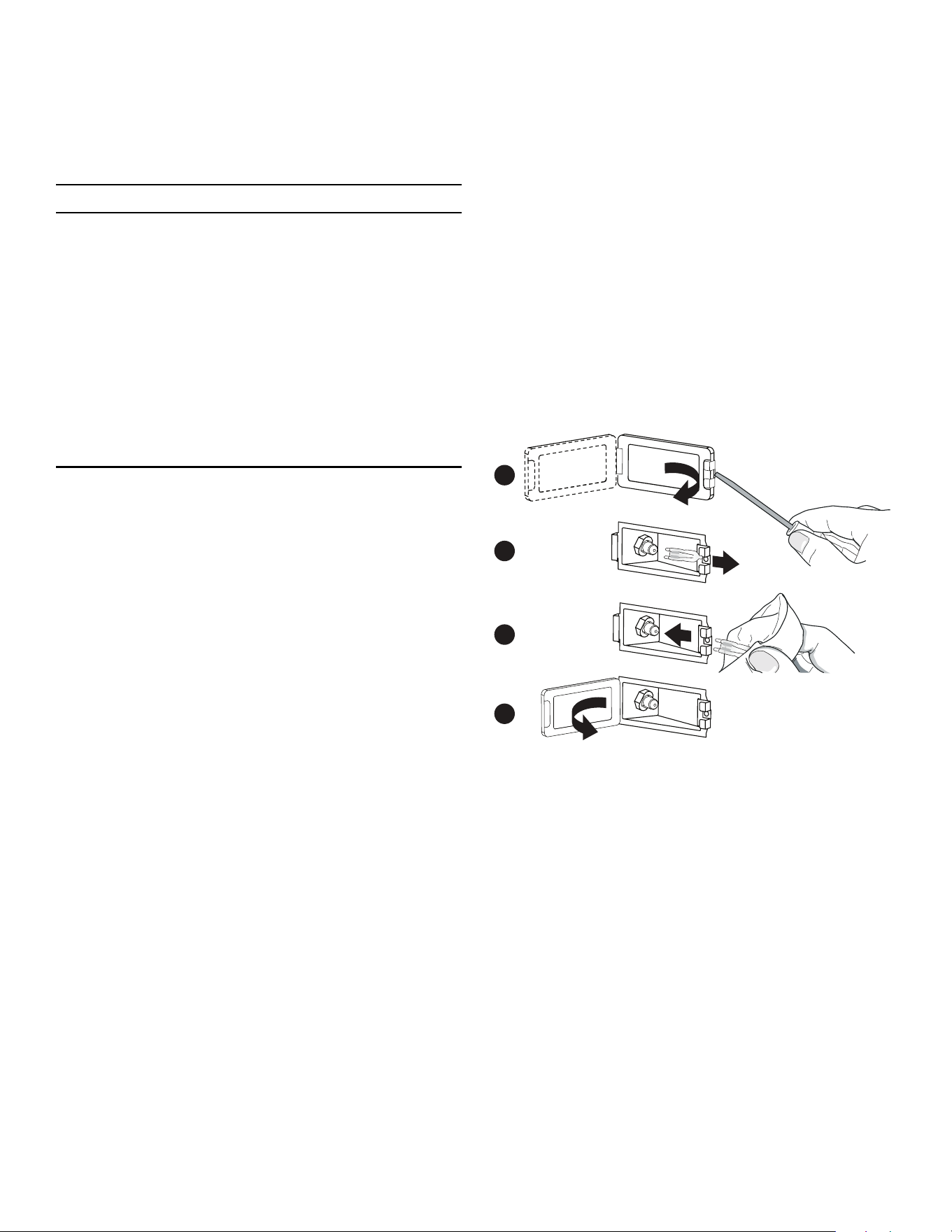
Page. 52
Do-it-yourself maintenance
Oven light bulb replacement
9 CAUTION
• Make sure the appliance and lights are cool and
power to the appliance has been turned off
before replacing the light bulb(s). Failure to do so
could result in electrical shock or burns.
• The covers must be in place when using the
appliance.
• The covers serve to protect the light bulb from
breaking.
• The covers are made of glass. Handle carefully to
avoid breaking. Broken glass could cause an
injury.
• The light socket is live when the door is open.
Replace only with a recommended light bulb designed for
appliance oven use. DO NOT use a standard household
light bulb in any oven. Call Thermador Customer Care
Center at 1-800-735-4328 or your nearest Thermador
dealer to determine the proper replacement bulb for your
range. You will need to know your range’s model number
and serial number.
To replace the light bulb
Use only 10W, 12V G4 light bulbs. Use a clean, dry cloth to
handle halogen light bulbs. This will increase the life of the
bulb.
1. Turn off circuit breaker.
2. Remove the oven racks.
3. Slide the tip of a flat blade screw driver between the
holder clip and the lamp housing (figure, A).
4. Support the glass lens cover with fingers along the
bottom edge to prevent the cover from falling to the
bottom of the oven. Gently twist the flat blade screw
driver to loosen the glass lens cover.
5. Remove the glass lens cover.
6. Remove the bulb by grasping and sliding the bulb
straight back until the two prongs have cleared the
ceramic holder (figure, B).
7. DO NOT touch the glass of the new replacement bulb
with your fingers. It may cause the bulb to fail when it
first lights. Grasp the replacement bulb with a clean
dry cloth. Locate the two prongs in the ceramic
holder, gently poking until the two prongs locate in
the ceramic socket.
8. Press down to seat the bulb (figure, C).
9. Slide the protective lens into the holder clip and push
the other end until the fixing clip snaps back into the
housing (figure, D).
10. Turn on circuit breaker.
A
B
C
D

Page. 53
Before calling for service
Before calling for service, check the following to avoid
unnecessary service charges.
Troubleshooting
Symptom Possible cause Remedy
Intermittent igniter sparking • Ceramic igniter is wet or dirty. • Carefully dry or clean igniter.
• Burner ports are clogged. • Clean ports on burner cap with a wire, a
needle or straightened paper clip.
More than four clicks of
igniter before lighting
• Improper fit of burner cap onto
burner base.
• Align burner cap properly on burner
base.
Constant igniter sparking • Range is not properly grounded.
• Electrical power supply is
incorrectly
polarized.
• Refer to the Installation Instructions. Have
a qualified electrician ground the range
properly.
Igniters sparking but no
flame ignition.
• Gas supply valve is in “OFF” position. • Restore gas supply to the unit.
Range will not operate
(lights, oven, and surface
burners will not come on)
• No power to the unit. • Check for open circuit breaker.
• Check that power supply line connection
is connected to the proper voltage.
• Oven is in Sabbath Mode. • Verify that the oven is not in sabbath
mode. See the ''Using the oven'' section
of the Use and Care Guide.
Oven operates on bake but
fails to operate on timed
bake
• Timer improperly set. • Set timer as outlined in the Use and Care
Guide.
Oven light fails to come on. • Oven light burned out. • Replace the oven light as outlined in the
Use and Care Guide.
Door will not open. • Oven is still in self-clean mode. • If oven is hot, door latch will release when
safe temperature is reached.
Foods in oven are not
cooking sufficiently.
• Rack position is incorrect. • See the ''Using the oven'' section of the
Use and Care Guide.
• Improper cookware. • Refer to ''Cookware recommendations''
in the Use and Care Guide.
• Oven door may not be sealing
properly.
• Clean the oven door gasket. Replace if
worn.
• Appliance not level. • Refer to the Installation Instructions for
instructions on how to level the
appliance.
Hot air is coming from the
appliance.
• It is normal for the cooling process to
push heated air out into the room
when the oven is on.
• During different modes the fan
speed will increase and decrease.
• This is normal.
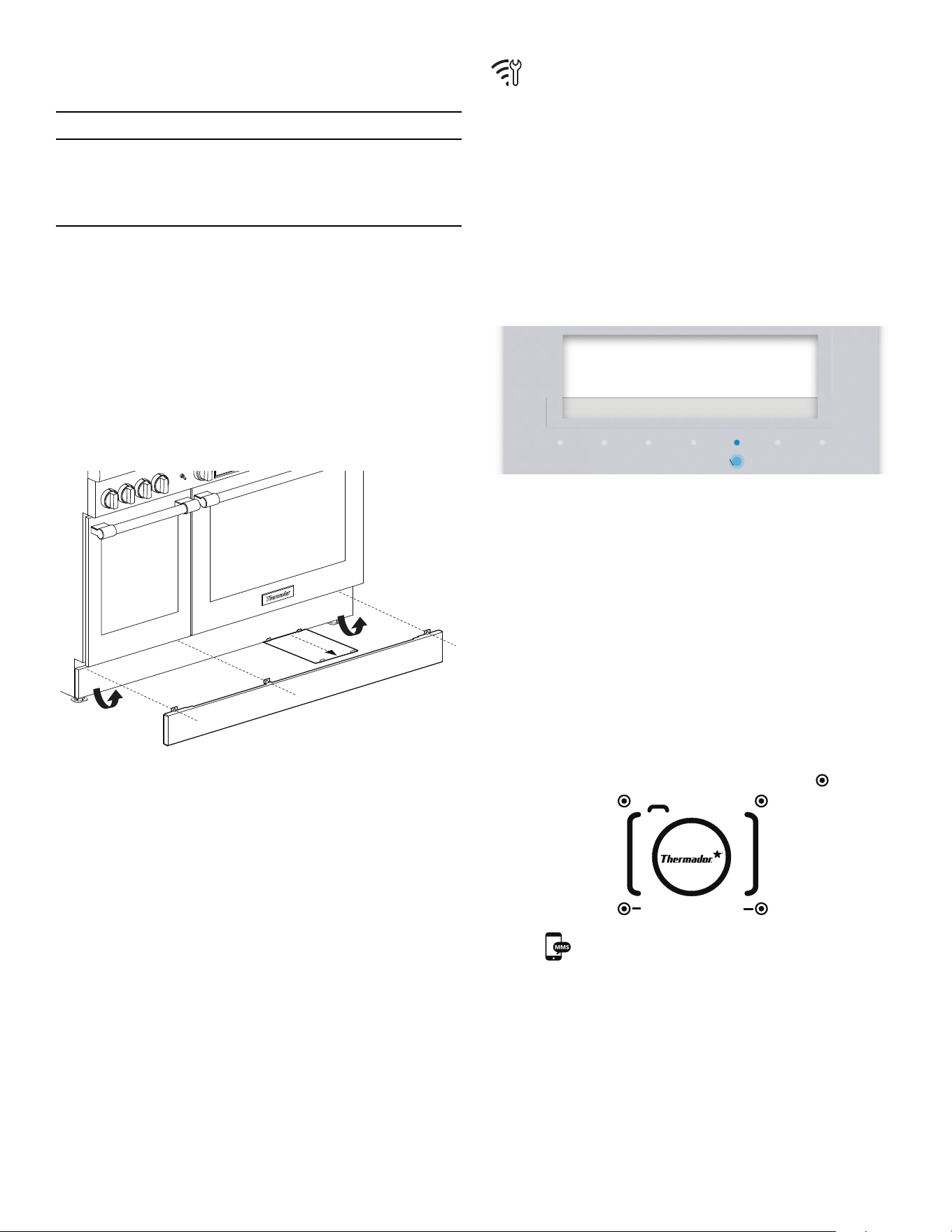
Page. 54
Service information
9 CAUTION
Before removing the toe kick panel, disconnect the
range from the electrical power supply. Reinstall the
toe kick panel before reconnecting the range to the
power supply and operating the range.
Electric wiring diagrams and schematics
The electric wiring diagrams and schematics are attached
behind the toe kick, and should not be removed except by
a service technician, then replaced after service.
Data rating label
The data rating label shows the model and serial number
of your appliance. The slide-out plate can be accessed by
first removing the kick panel, as shown below.
For handy reference, copy the information below from the
data rating label. Keep your invoice for Warranty
validation.
Model number _____________________________________
Serial number______________________________________
Date of purchase____________________________________
Remote costumer service
connection
It is possible for customer service to access the appliance
via the Home Connect
TM
connection in the event of an
error.
To grant customer service access to the appliance
1. Contact customer support (see back page). Follow the
instructions given to you by the technician.
– The display screen as customer support tries to
gain access to the appliance.
2. Press ENTER to allow the customer support access.
– Once connection is established the Wi-Fi icon is
shown in the status bar.
Product registration
Register your BSH product to ensure timely service and
access to your product related information.
You may register your product through one of the
following ways:
• Register with your phone (USA only).
1. Take a photo of the camera icon on the
registration card, including the points ( ).
2. Text the photo to 21432. (USA only, text and
data rates may apply.)
• Mail in the completed product registration card to the
address printed on the card.
• Register your product online at www.thermador.com.
• Call Thermador customer service at 1-800-735-4328.
TIMERS
SETTINGS ENTER
Do you want to grant access to
customer service?
Allow with Enter
NTE
NTE
PHOTOREGISTER
SM
THERMADOR

Page. 55
Statement of limited product warranty
What this warranty covers and who it
applies to
The limited warranty provided by BSH Home Appliances
("Thermador") in this Statement of Limited Product
Warranty applies only to the Thermador appliance sold to
you, the first using purchaser, provided that the Product
was purchased:
• For your normal, household (non-commercial) use,
and has in fact at all times only been used for normal
household purposes.
• New at retail (not a display, “as is”, or previously
returned model), and not for resale, or commercial
use.
• Within the United States or Canada, and has at all
times remained within the country of original
purchase.
The warranties stated herein apply to the original
purchaser of the product warranted herein and to each
succeeding owner of the product purchased for ordinary
home use during the term of the warranty.
Please make sure to return your registration card; while
not necessary to effectuate warranty coverage, it is the
best way for Thermador to notify you in the unlikely event
of a safety notice or product recall.
How long the warranty lasts
Thermador warrants that the Product is free from defects
in materials and workmanship for a period of seven
hundred and thirty (730) days from the date of purchase.
The foregoing timeline begins to run upon the date of
purchase, and shall not be stalled, tolled, extended, or
suspended, for any reason whatsoever.
This Product is also warranted to be free from cosmetic
defects in material and workmanship (such as scratches of
stainless steel, paint/porcelain blemishes, chips, dents, or
other damage to the finish) of the Product, for a period of
sixty (60) days from the date of purchase or closing date
for new construction. This cosmetic
warranty excludes
slight color variations due to inherent differences in
painted and porcelain parts, as well as differences caused
by kitchen lighting, product location, or other similar
factors. This cosmetic
warranty specifically excludes any
display, floor, "As Is", or "B" stock appliances.
Repair/replace as your exclusive remedy
During this warranty period, Thermador or one of its
authorized service providers will repair your Product
without charge to you (subject to certain limitations stated
herein) if your Product proves to have been manufactured
with a defect in materials or workmanship. If reasonable
attempts to repair the Product have been made without
success, then Thermador will replace your Product
(upgraded models may be available to you, in
Thermador’s sole discretion, for an additional charge). All
removed parts and components shall become the
property of Thermador at its sole option. All replaced and/
or repaired parts shall assume the identity of the original
part for purposes of this warranty and this warranty shall
not be extended with respect to such parts.
Thermador's sole liability and responsibility hereunder is
to repair manufacturer-defective Product only, using a
Thermador authorized service provider during normal
business hours.
For safety and property damage concerns, Thermador
highly recommends that you do not attempt to repair the
Product yourself, or use an unauthorized servicer;
Thermador will have no responsibility or liability for repairs
or work performed by a non-authorized servicer. If you
choose to have someone other than an authorized service
provider work on your Product, THIS WARRANTY WILL
AUTOMATICALLY BECOME NULL AND VOID. Authorized
service providers are those persons or companies that
have been specially trained on Thermador products, and
who possess, in Thermador's opinion, a superior
reputation for customer service and technical ability (note
that they are independent entities and are not agents,
partners, affiliates or representatives of Thermador).
Notwithstanding the foregoing, Thermador will not incur
any liability, or have responsibility, for the Product if it is
located in a remote area (more than 100 miles from an
authorized service provider) or is reasonably inaccessible,
hazardous, threatening, or treacherous locale,
surroundings, or environment; in any such event, if you
request, Thermador would still pay for labor and parts and
ship the parts to the nearest authorized service provider,
but you would still be fully liable and responsible for any
travel time or other special charges by the service
company, assuming they agree to make the service call.

Page. 56
Out of warranty product
Thermador is under no obligation, at law or otherwise, to
provide you with any concessions, including repairs, pro-
rates, or Product replacement, once this warranty has
expired.
Warranty exclusions
The warranty coverage described herein excludes all
defects or damage that are not the direct fault of
Thermador, including without limitation, one or more of
the following:
• Use of the Product in anything other than its normal,
customary and intended manner (including without
limitation, any form of commercial use, use or storage
of an indoor product outdoors, use of the Product in
conjunction with air or water-going vessels).
• Any party's willful misconduct, negligence, misuse,
abuse, accidents, neglect, improper operation, failure
to maintain, improper or negligent installation,
tampering, failure to follow operating instructions,
mishandling, unauthorized service (including self-
performed “fixing” or exploration of the appliance's
internal workings).
• Adjustment, alteration or modification of any kind.
• A failure to comply with any applicable state, local,
city, or county electrical, plumbing and/or building
codes, regulations, or laws, including failure to install
the product in strict conformity with local fire and
building codes and regulations.
• Ordinary wear and tear, spills of food, liquid, grease
accumulations, or other substances that accumulate
on, in, or around the Product.
• Any external, elemental and/or environmental forces
and factors, including without limitation, rain, wind,
sand, floods, fires, mud slides, freezing temperatures,
excessive moisture or extended exposure to humidity,
lightning, power surges, structural failures surrounding
the appliance, and acts of God.
In no event shall Thermador have any liability or
responsibility whatsoever for damage to surrounding
property, including cabinetry, floors, ceilings, and other
structures or objects around the Product. Also excluded
from this warranty are products on which the serial
numbers have been altered, defaced, or removed; service
visits to teach you how to use the Product, or visits where
there is nothing wrong with the Product; correction of
installation problems (you are solely responsible for any
structure and setting for the Product, including all
electrical, plumbing or other connecting facilities, for
proper foundation/flooring, and for any alterations
including without limitation cabinetry, walls, floors,
shelving, etc.); and resetting of breakers or fuses.
TO THE EXTENT ALLOWED BY LAW, THIS WARRANTY
SETS OUT YOUR EXCLUSIVE REMEDIES WITH RESPECT
TO PRODUCT, WHETHER THE CLAIM ARISES IN
CONTRACT OR TORT (INCLUDING STRICT LIABILITY, OR
NEGLIGENCE) OR OTHERWISE. THIS WARRANTY IS IN
LIEU OF ALL OTHER WARRANTIES, WHETHER EXPRESS
OR IMPLIED. ANY WARRANTY IMPLIED BY LAW,
WHETHER FOR MERCHANTABILITY OR FITNESS FOR A
PARTICULAR PURPOSE, OR OTHERWISE, SHALL BE
EFFECTIVE ONLY FOR THE PERIOD THAT THIS EXPRESS
LIMITED WARRANTY IS EFFECTIVE. IN NO EVENT WILL
THE MANUFACTURER BE LIABLE FOR
CONSEQUENTIAL, SPECIAL, INCIDENTAL, INDIRECT,
“BUSINESS LOSS”, AND/OR PUNITIVE DAMAGES,
LOSSES, OR EXPENSES, INCLUDING WITHOUT
LIMITATION TIME AWAY FROM WORK, HOTELS AND/
OR RESTAURANT MEALS, REMODELLING EXPENSES IN
EXCESS OF DIRECT DAMAGES WHICH ARE
DEFINITIVELY CAUSED EXCLUSIVELY BY THERMADOR,
OR OTHERWISE. SOME STATES DO NOT ALLOW THE
EXCLUSION OR LIMITATION OF INCIDENTAL OR
CONSEQUENTIAL DAMAGES, AND SOME STATES DO
NOT ALLOW LIMITATIONS ON HOW LONG AN IMPLIED
WARRANTY LASTS, SO THE ABOVE LIMITATIONS MAY
NOT APPLY TO YOU. THIS WARRANTY GIVES YOU
SPECIFIC LEGAL RIGHTS, AND YOU MAY ALSO HAVE
OTHER RIGHTS WHICH VARY FROM STATE TO STATE.
No attempt to alter, modify or amend this warranty shall
be effective unless authorized in writing by an officer of
BSH.

1901 MAIN STREET, SUITE 600, IRVINE, CA 92614 // 800-735-4328 // WWW.THERMADOR.COM
© 2018 BSH Home Appliances Corporation
9001227760
Support
Thank you for being a Thermador
customer!
Thermador is dedicated to
supporting you and your appliance
so you have many years of creative
cooking. Please don't hesitate to
contact us if you have any questions.
We're happy to help you with
cleaning and care instructions,
cooking tips, accessories,
troubleshooting, and more.
USA:
1-800-735-4328
thermador.com/customer-care
Canada:
1-800-735-4328
thermador.ca/support
Accessories and parts
Filters, Thermador cleaners,
teppanyaki pans, griddles,
replacement parts, and more can be
purchased in our online accessories
store.
USA:
store.thermador.com/us
Canada:
Filters, parts and accessories can be
purchased through our distributors.
Marcone: 1-800-287-1627
Reliable Parts: 1-800-663-6060
Soutien
Merci d'être un client Thermador!
Thermador s'engage à offrir tout le
tout le support dont vous et votre
appareil avez besoin afin que vous
puissiez en profiter pleinement.
N'hésitez pas à communiquer avec
nous pour toute question. Nous
serons heureux de vous aider avec
des directives concernant le
nettoyage et les soins, des conseils
de cuisson, des accessoires, le
dépannage et plus encore.
É.-U. :
1-800-735-4328
thermador.com/customer-care
Canada :
1-800-735-4328
thermador.ca/support
Accessoires et pièces
Vous trouverez dans notre magasin
d'accessoires en ligne des filtres, des
produits nettoyants Thermador, des
poêles teppanyaki, des plaques à
frire, des pièces de rechange et plus
encore.
É.-U. :
store.thermador.com/us
Canada :
Les filtres, pièces et accessoires
peuvent être achetés auprès de nos
distributeurs.
Marcone: 1-800-287-1627
Reliable Parts: 1-800-663-6060
Soporte
¡Gracias por ser un cliente
Thermador!
Thermador se dedica a apoyarlo a
usted y a su aparato para que tenga
muchos años para cocinar
creativamente. No dude en
contactarnos si tuviera preguntas.
Nos encantará ayudarlo con las
instrucciones de limpieza y cuidado,
consejos para cocinar, accesorios,
solución de problemas y más.
EEUU:
1-800-735-4328
thermador.com/customer-care
Canadá:
1-800-735-4328
thermador.ca/support
Accesorios y piezas
Los filtros, limpiadores Thermador,
sartenes de teppanyaki, planchas,
piezas de refacción y más se pueden
comprar en nuestra tienda de
accesorios en línea.
EEUU:
store.thermador.com/us
Canadá:
Los filtros, piezas y accesorios se
pueden comprar a través de nuestros
distribuidores.
Marcone: 1-800-287-1627
Reliable Parts: 1-800-663-6060