Quick Start Manual
THINKCAR T-Wand 200
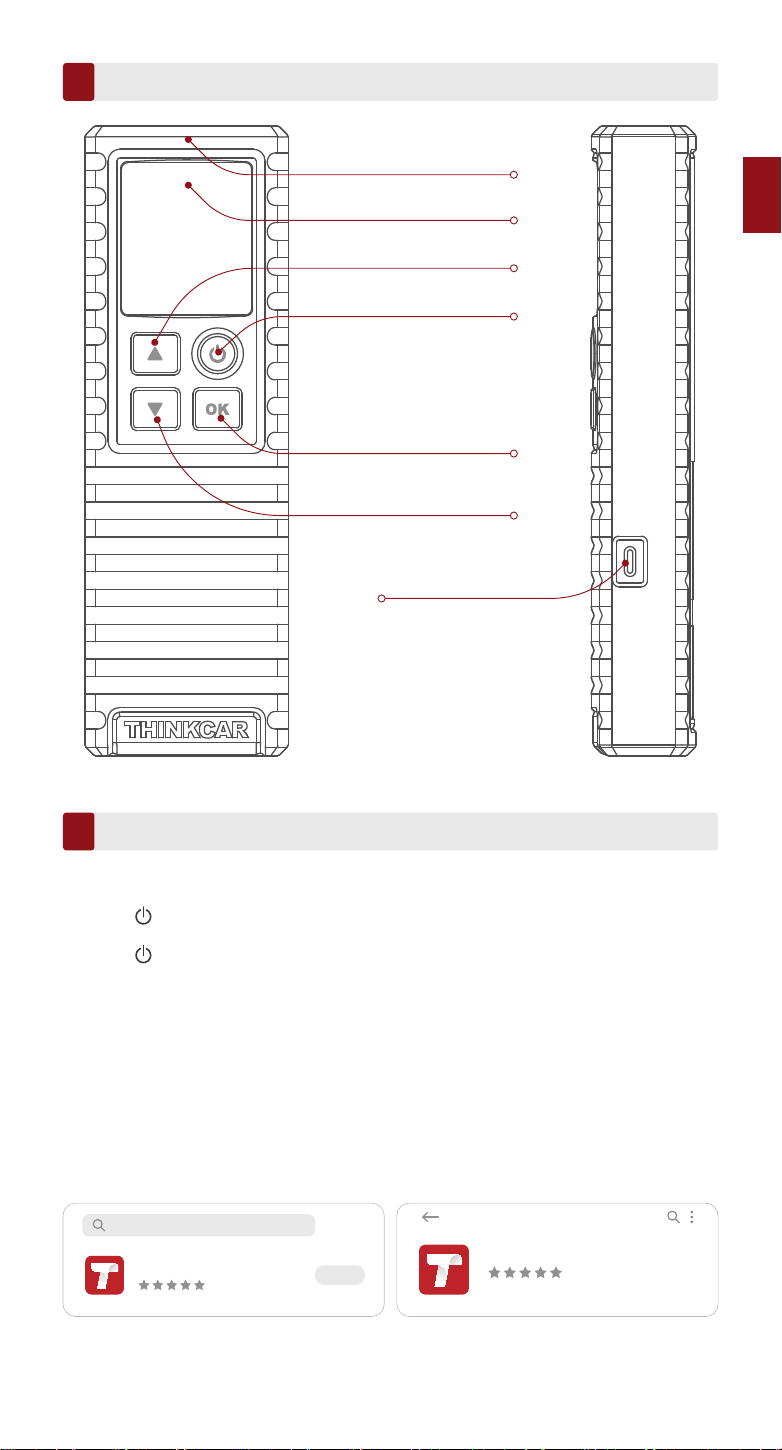
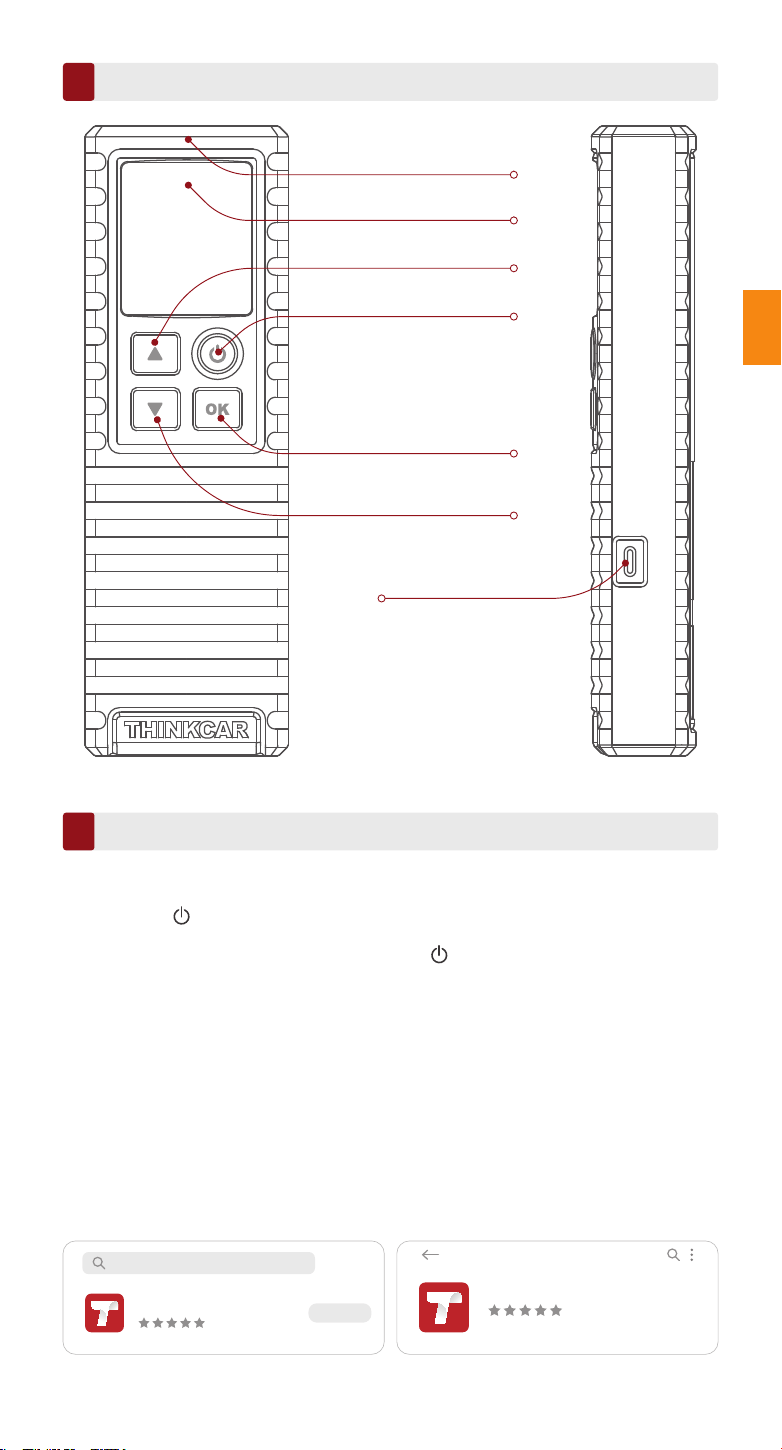
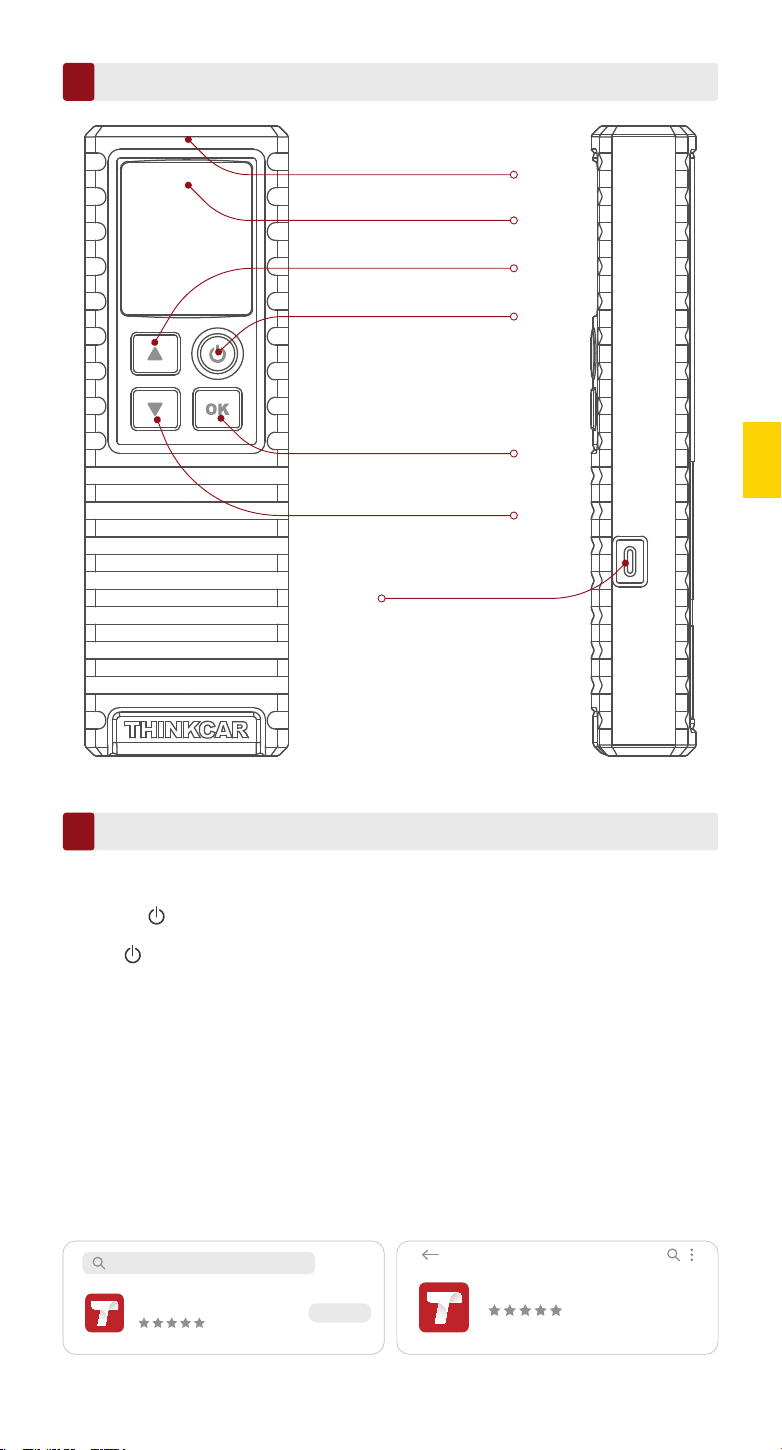
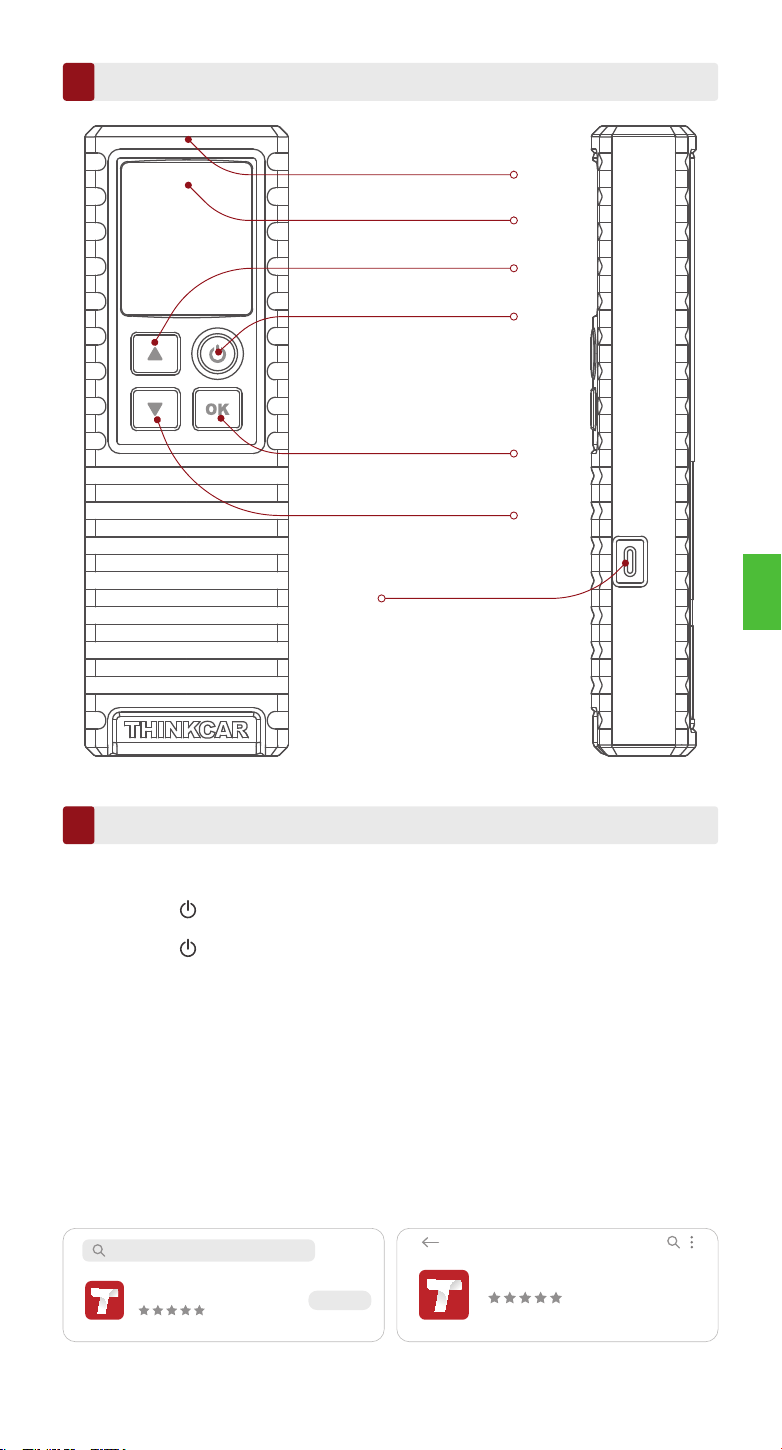
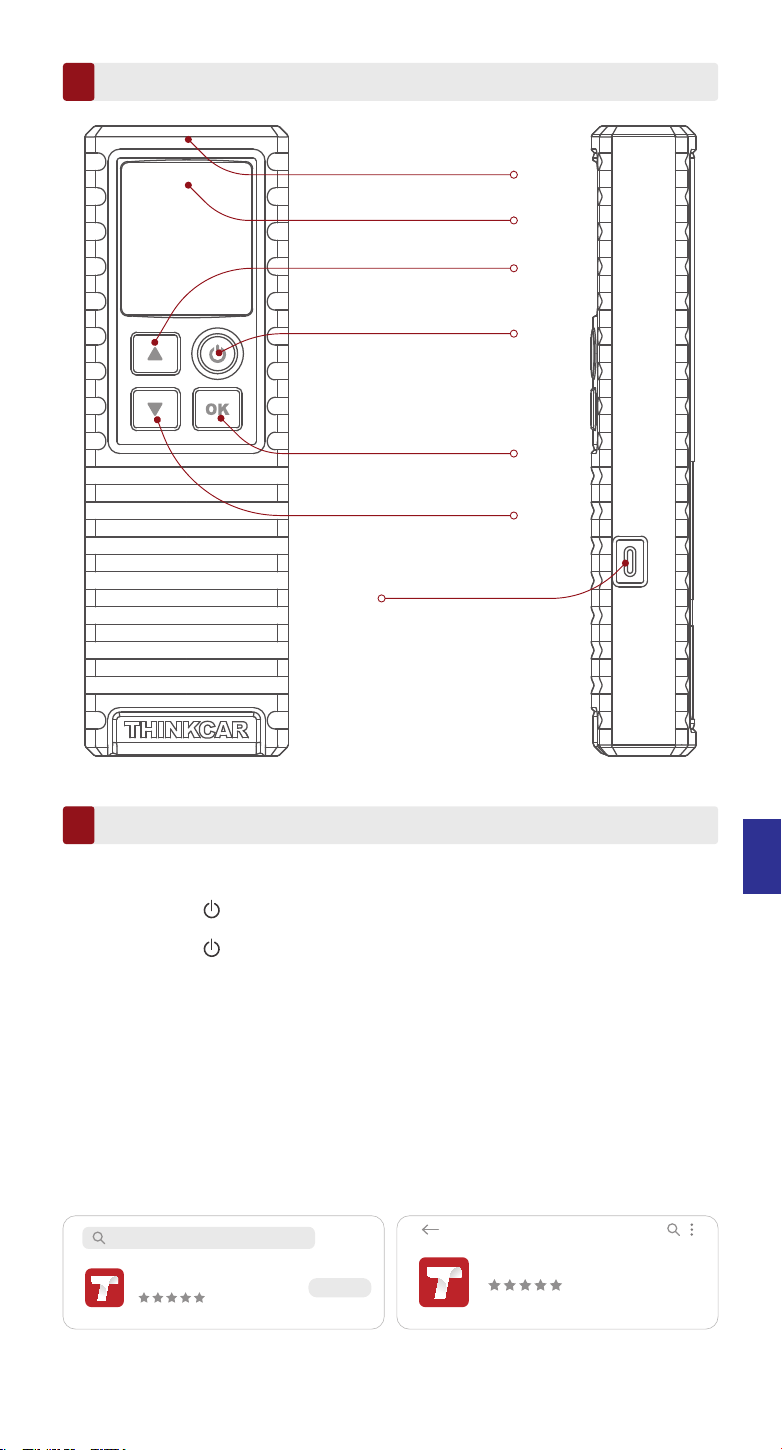
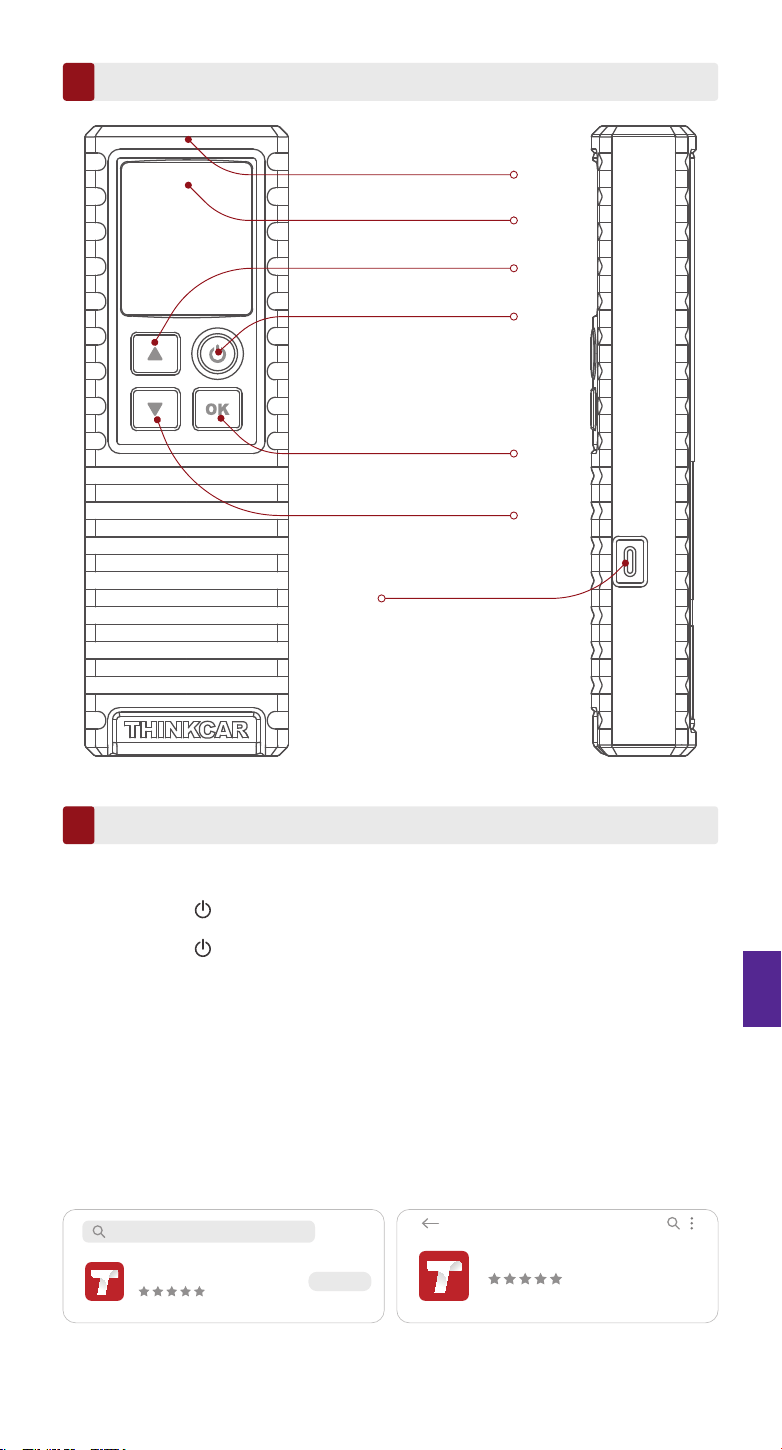
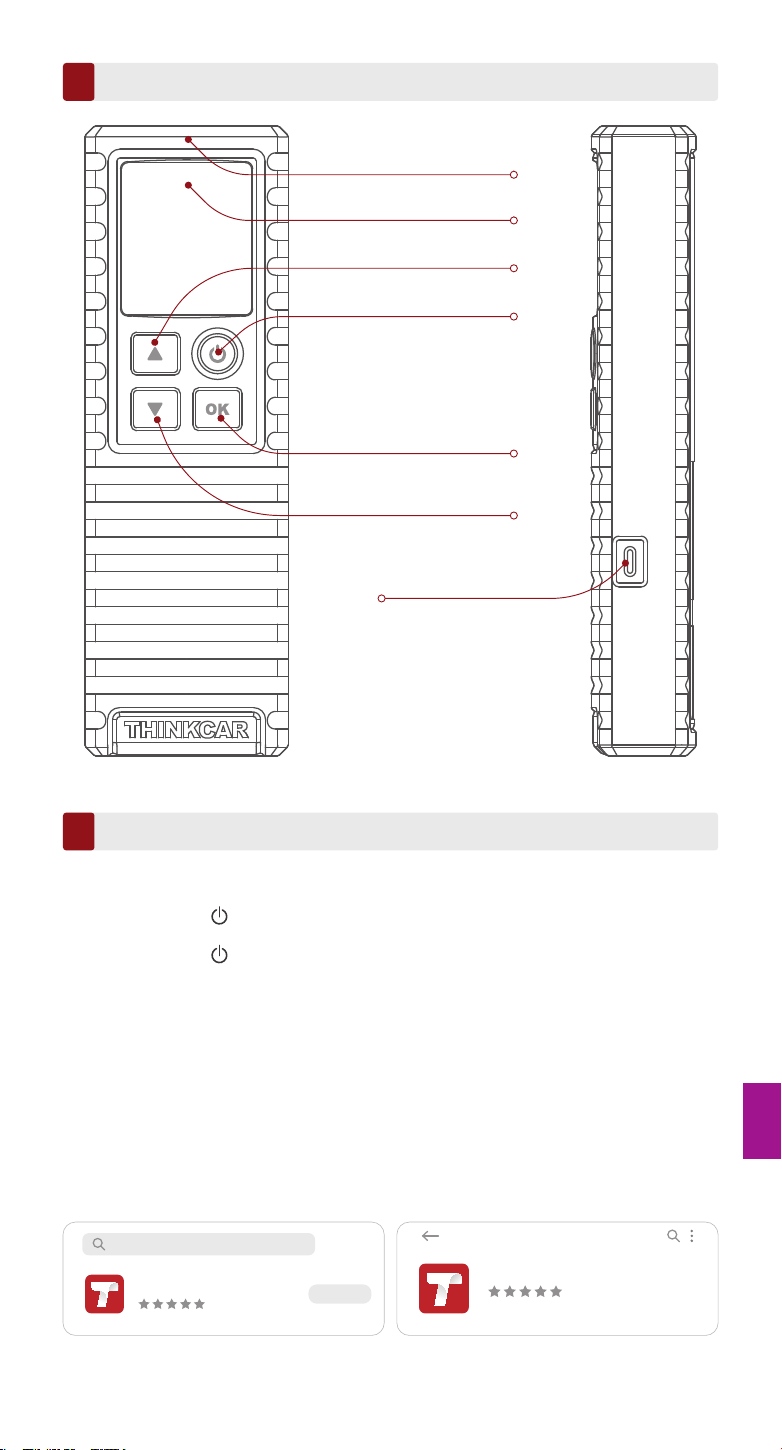
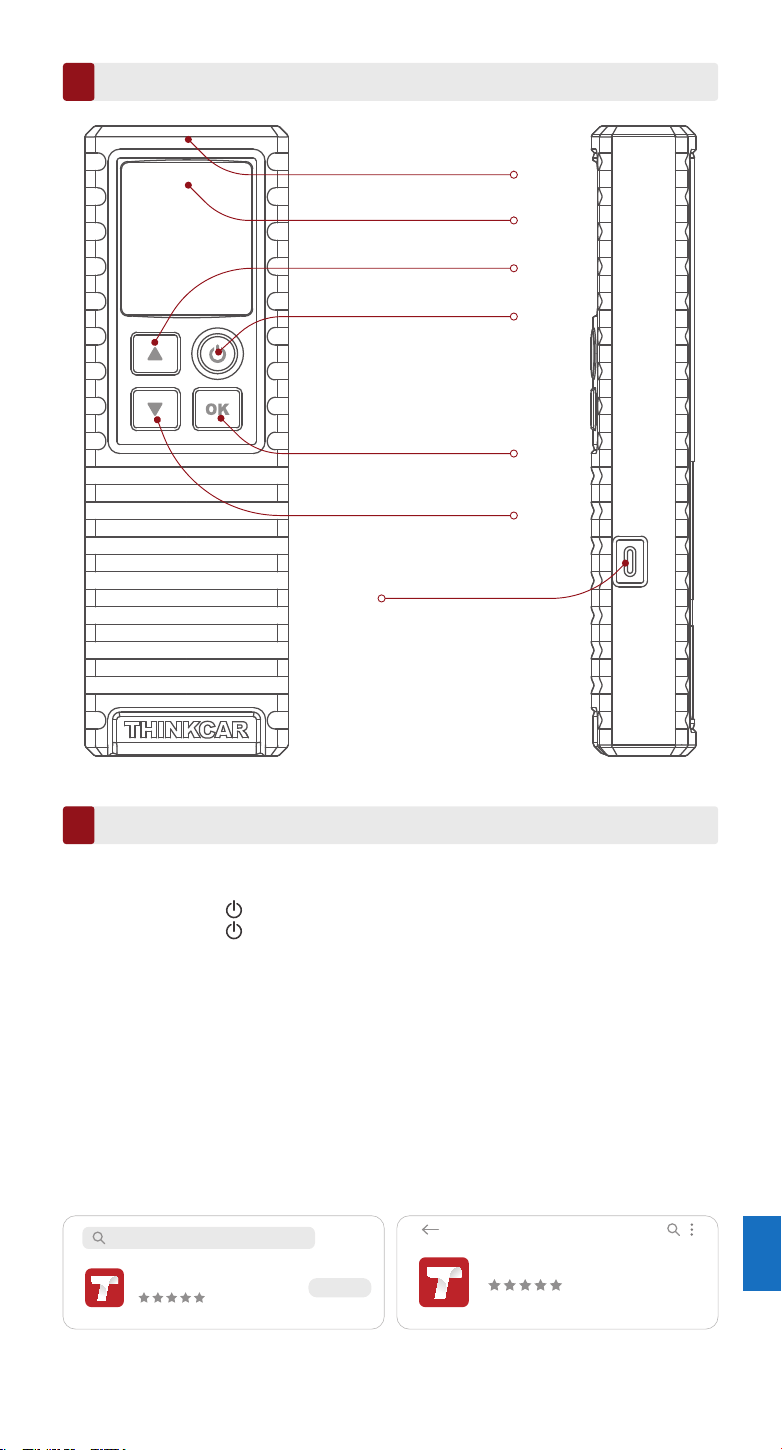
TPMS Antenna
Display Screen
Power Button
UP Button
OK (Confirm) Button
Down Button
Charging Port
Product Introduction
EN
1
How to Use
Powering On/Off
1. How to use the mobile APP
2
Notes:
If you haven't used it for a long time, please charge it first.While being charged, the LED illuminates red. Once the LED
changes into green, it indicates the charging is complete.
Tips: THINKCAR T-Wand 200 can be used in conjunction with diagnostic equipment through
the mobile APP.
Press the button for about 3 seconds to turn it on. A beep will sound and the screen will
light up.
Press the button for about 3 seconds to turn it off.
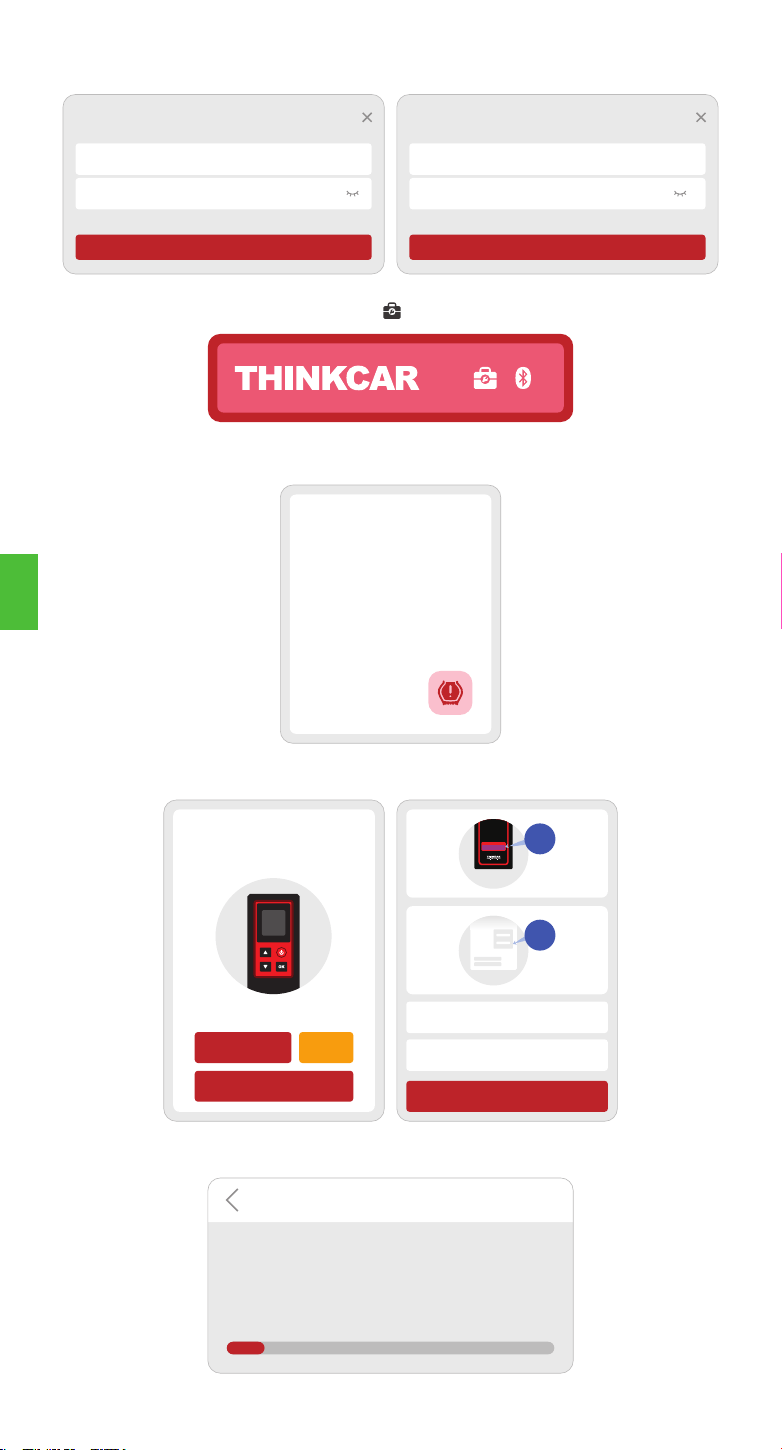
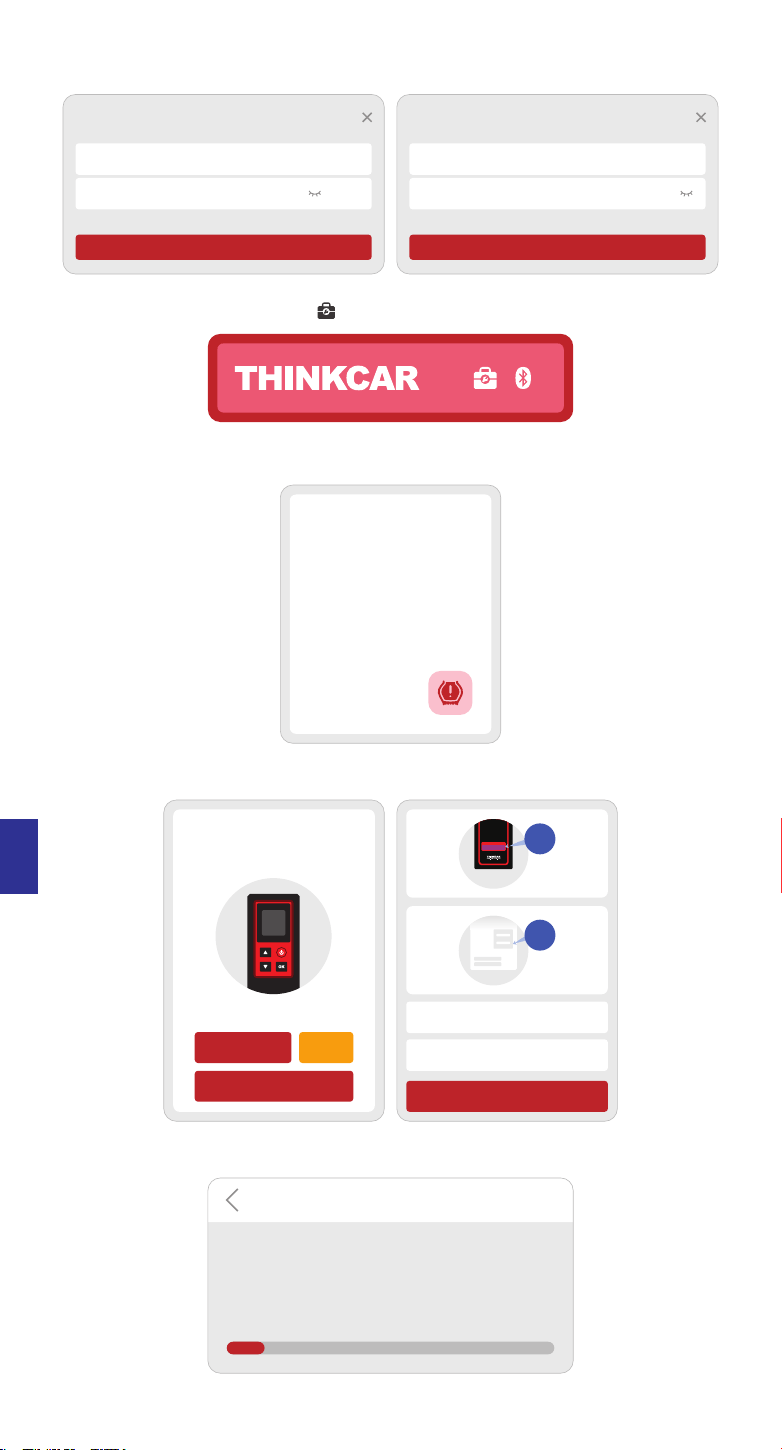
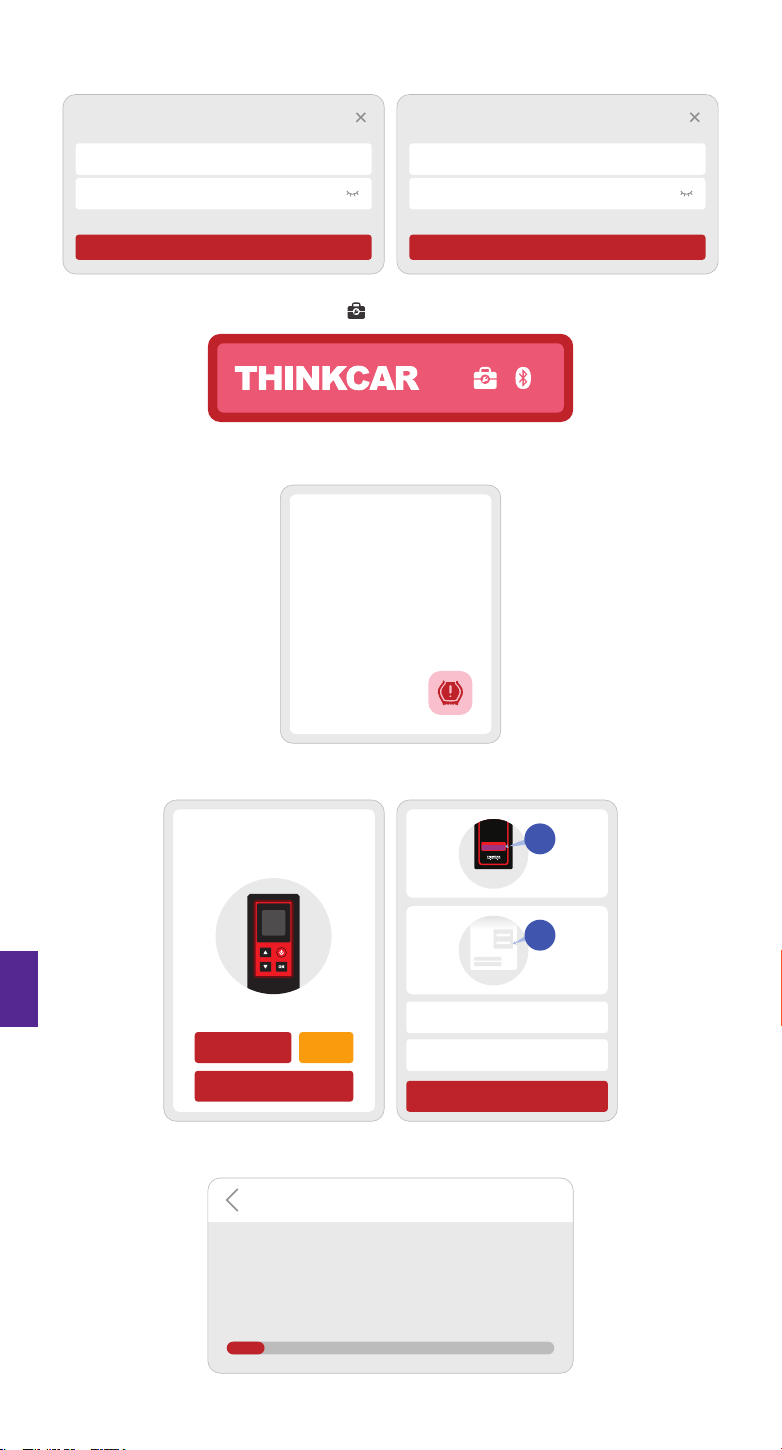
1.1 Search for “ThinkDiag+”in GooglePlay, “ThinkDiag” in App store. The ThinkDiag+ App is
FREE to download. (as shown in the figure below)
5
ThinkDiag+
(iOS) (Android)
ThinkDiag
ThinkDiag
5
Cancel
OPEN
EN
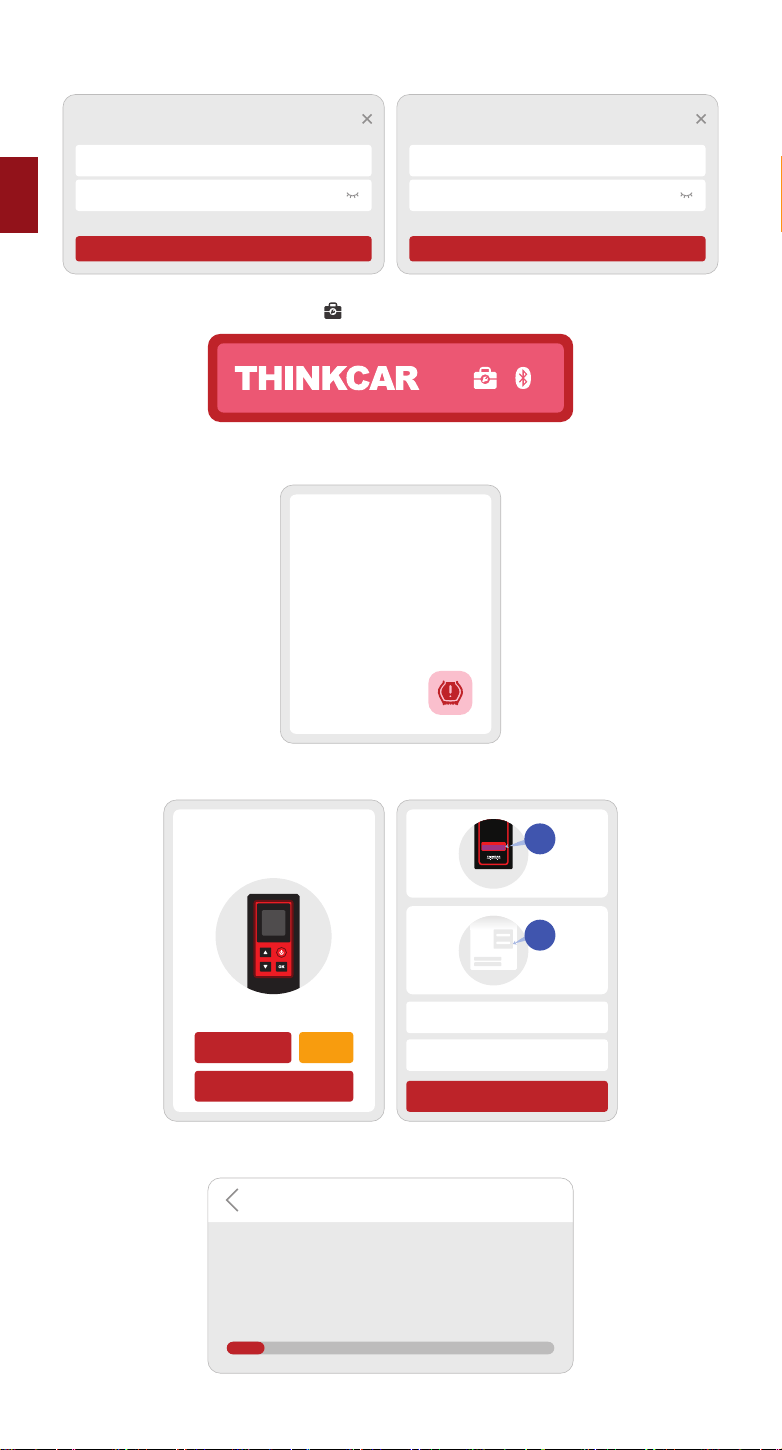
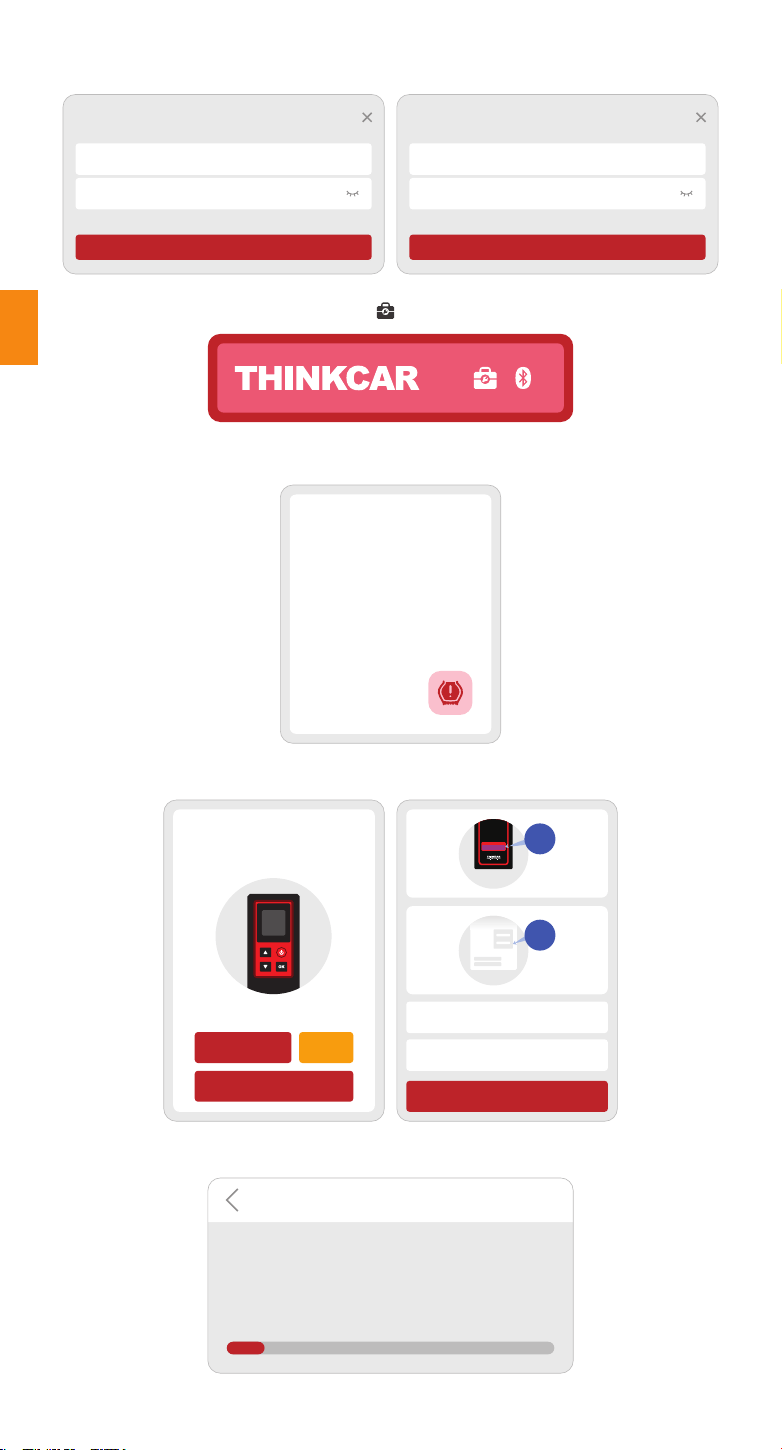
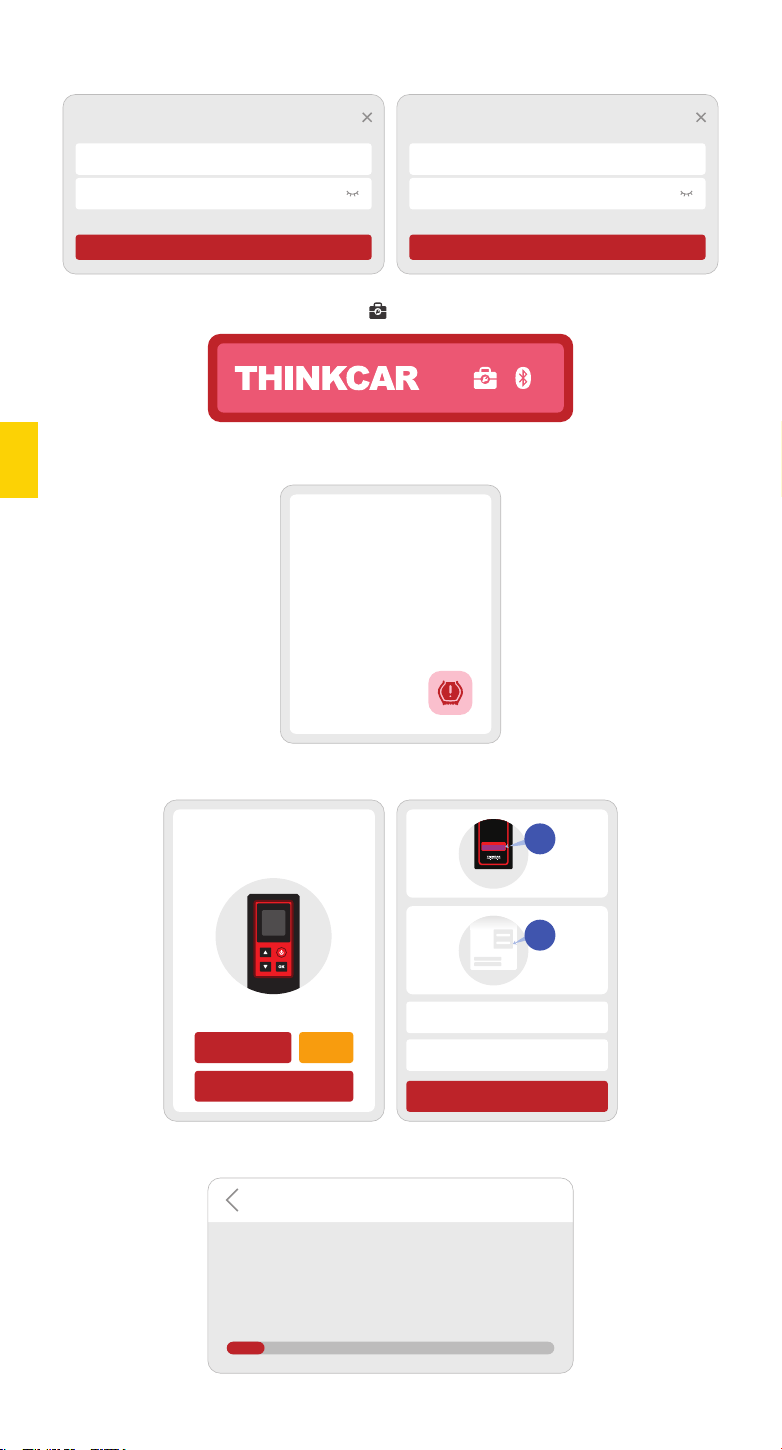
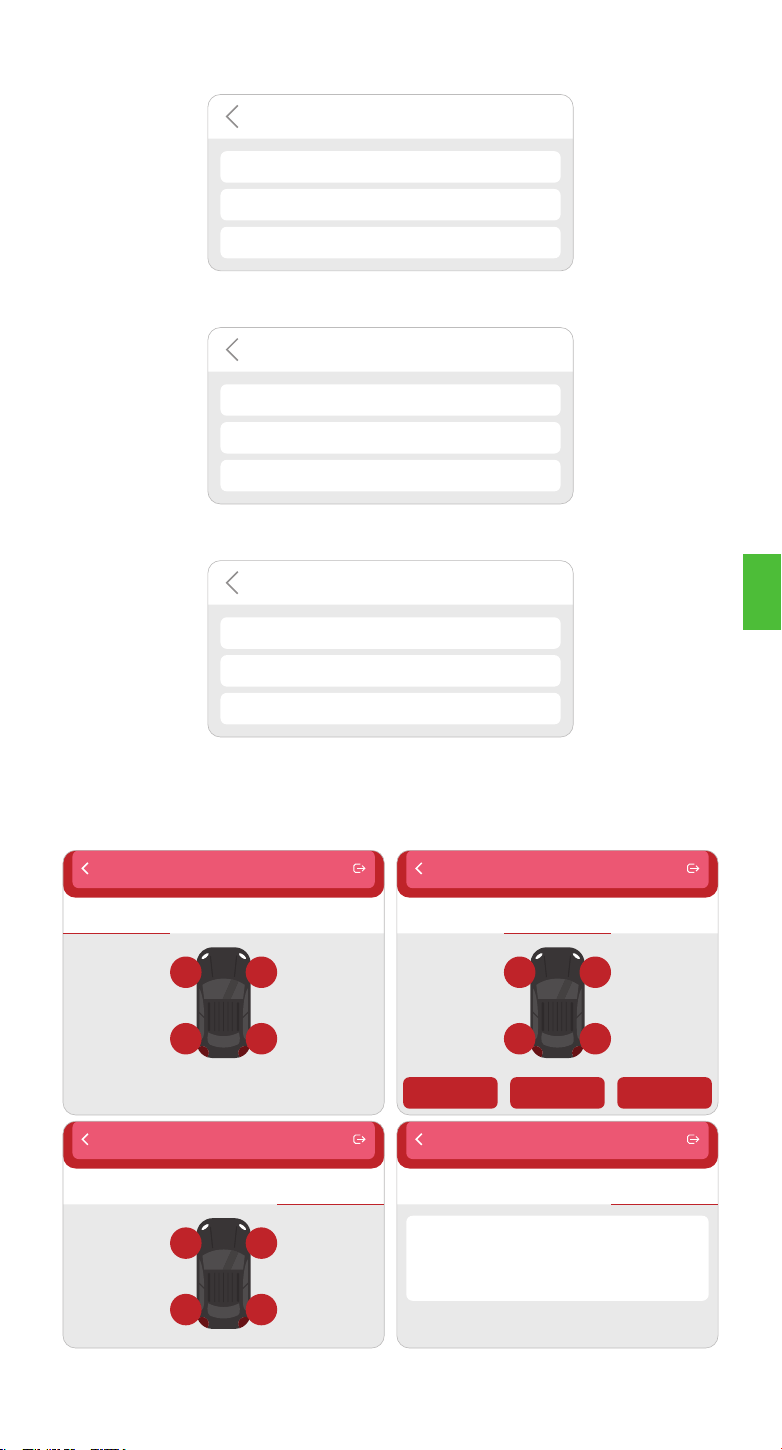
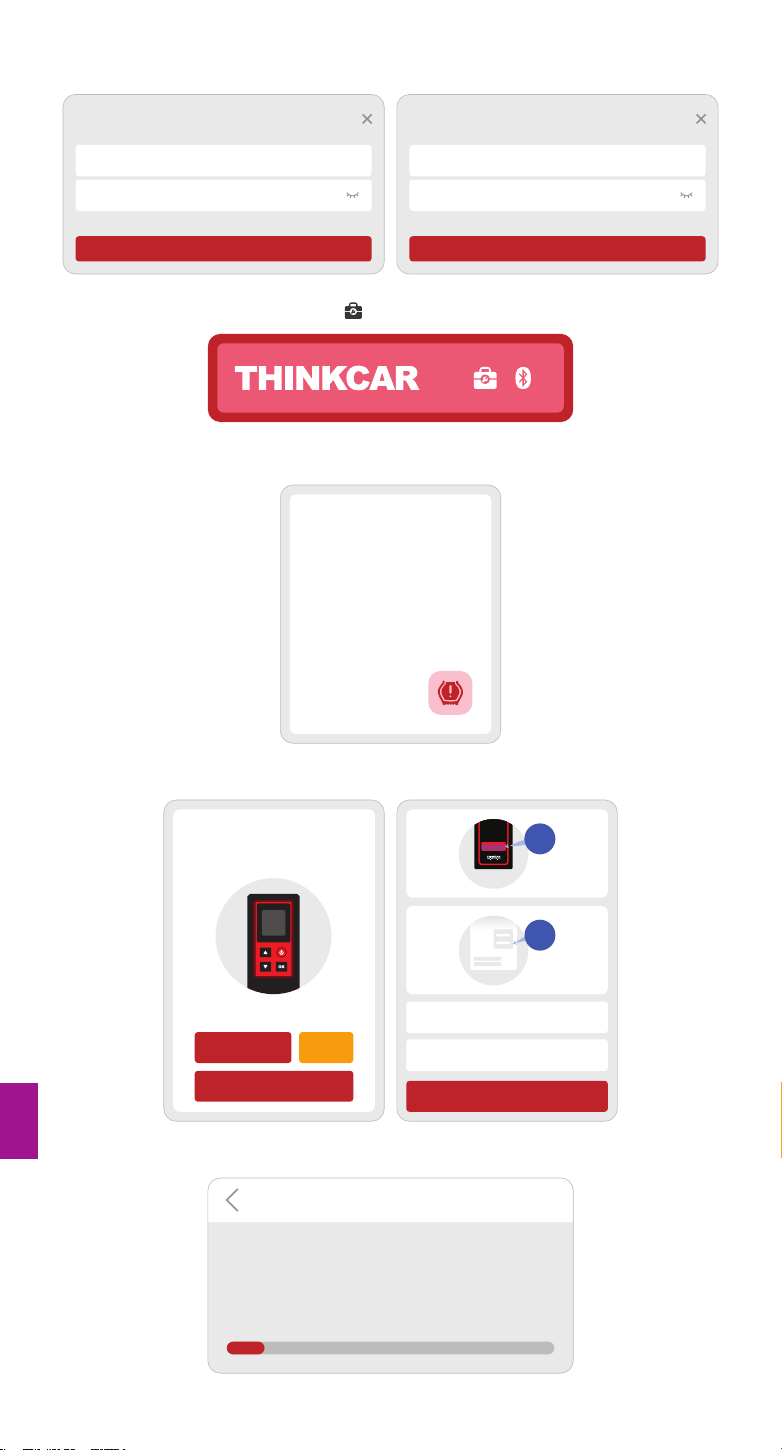
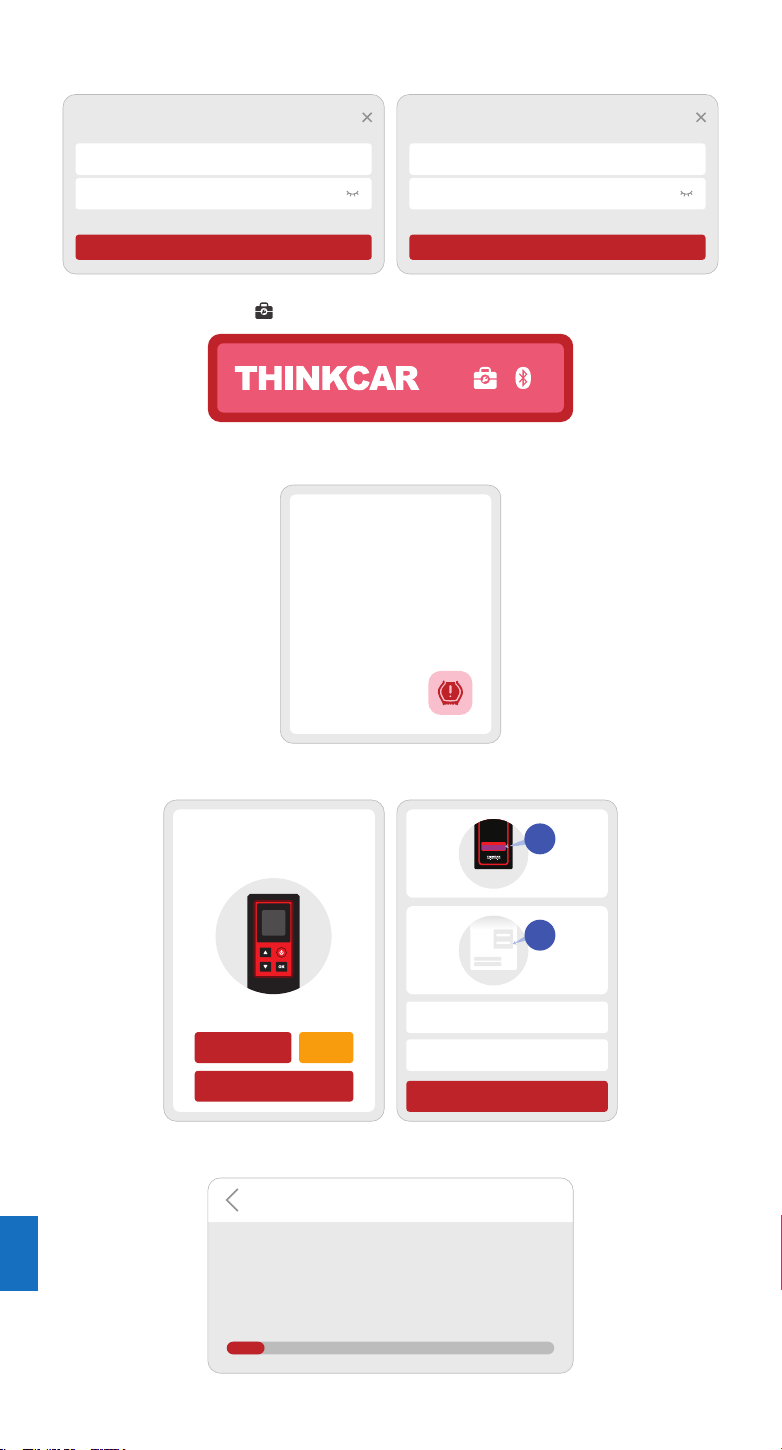
1.2 Email account registration
1.3 Go to the home page and select “ ”
1.4 Select the THINKTPMS module
1.5 Enter the SN number and activation code to bind the device
1.6 After the binding is successful, the program will be automatically updated
Login
Your email address
Password
Sign Up Forgot Password
Login
Sign Up
Enter 2-20 letters user name
Please enter your password
Have an Account?
Next
THINKTPMS
Read sensor ID,
pressure,
temperature.
Read battery level
condition. Prog...
Activate
Serial Mumber
Activation code
ATTIVAZIONE
CODICE
SN
SN
Activate
Try Demo
Buy now
Diagnostic function is not available yet, activate
the device with your account now.
ACTIVATION
Software Update
Download Diagnostic Software
Professional diagnostic software will be downloaded for
your vehicle. Please be patient.
10%
EN
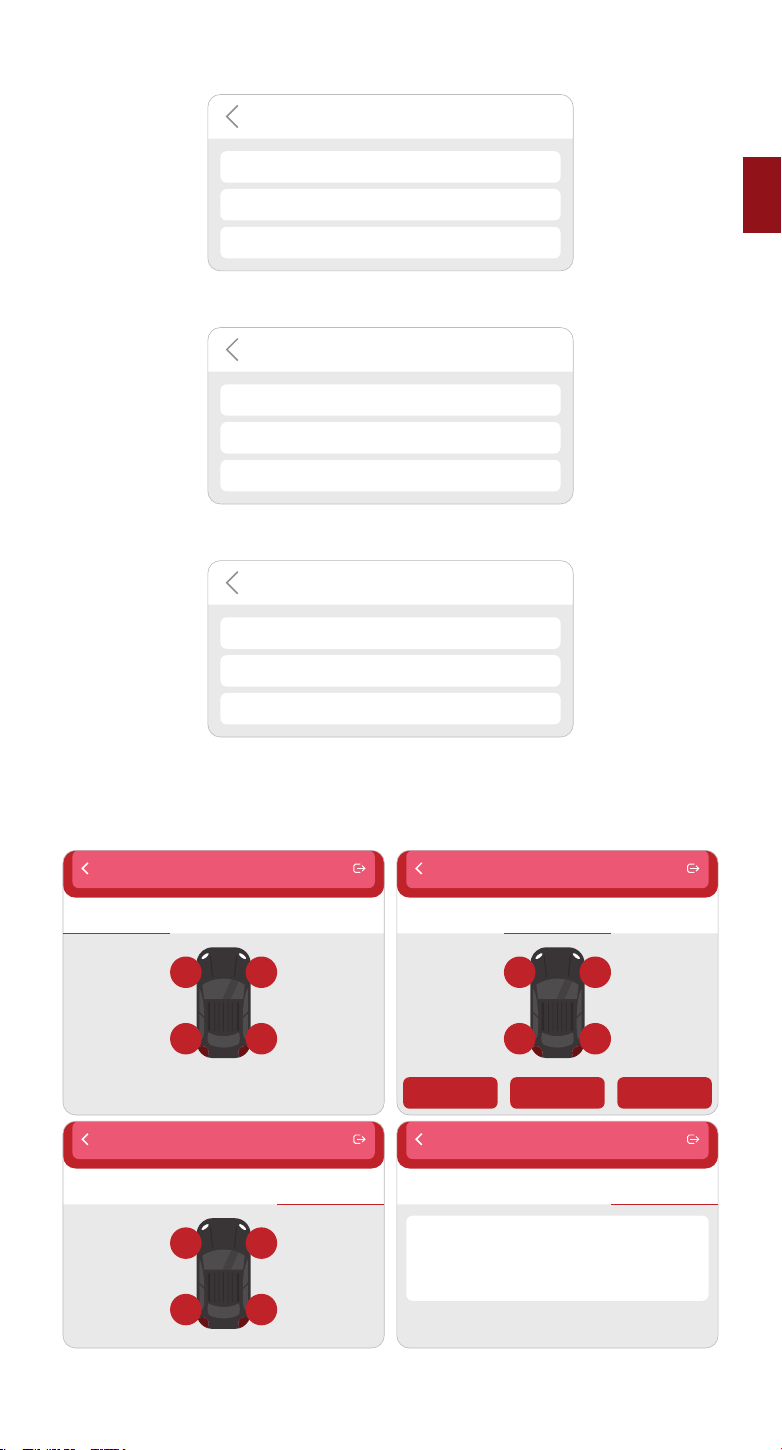
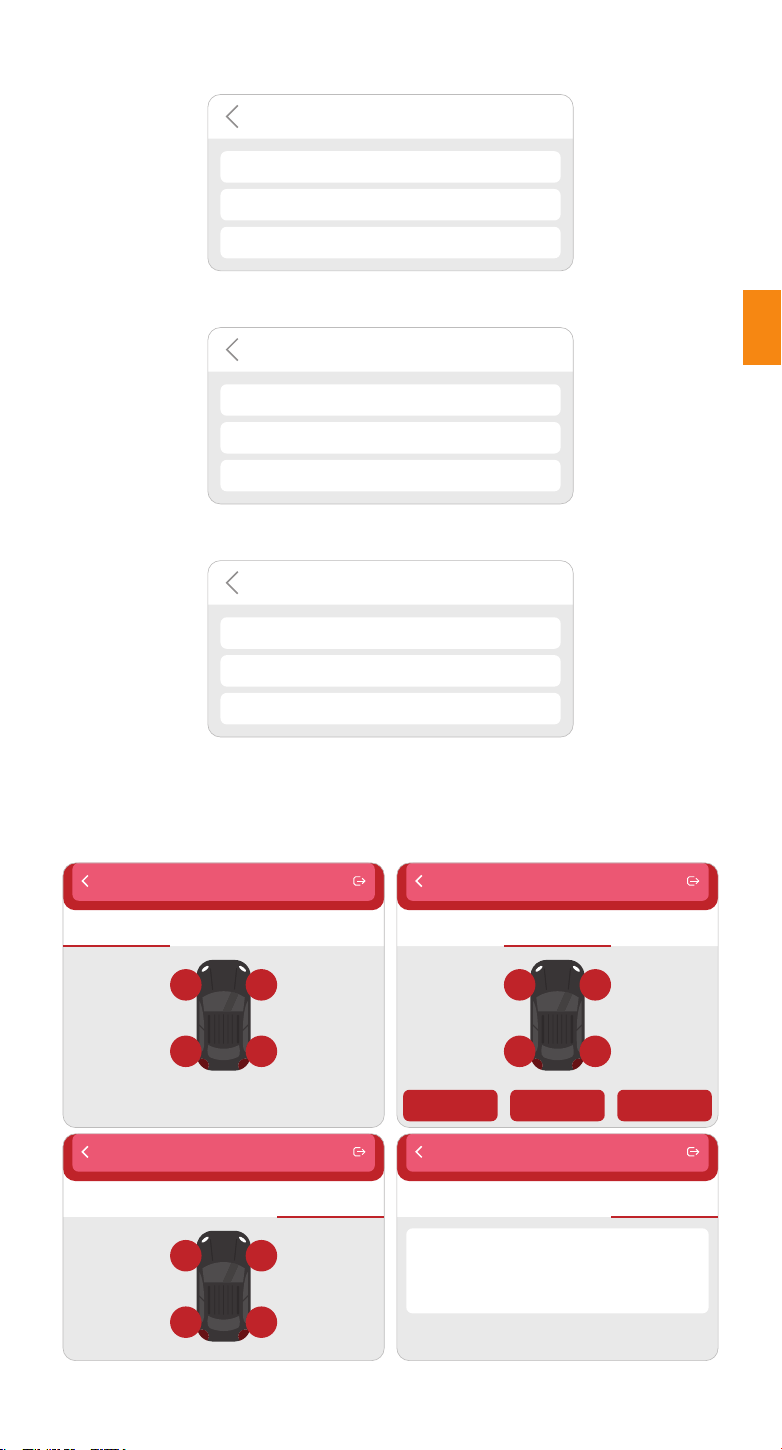
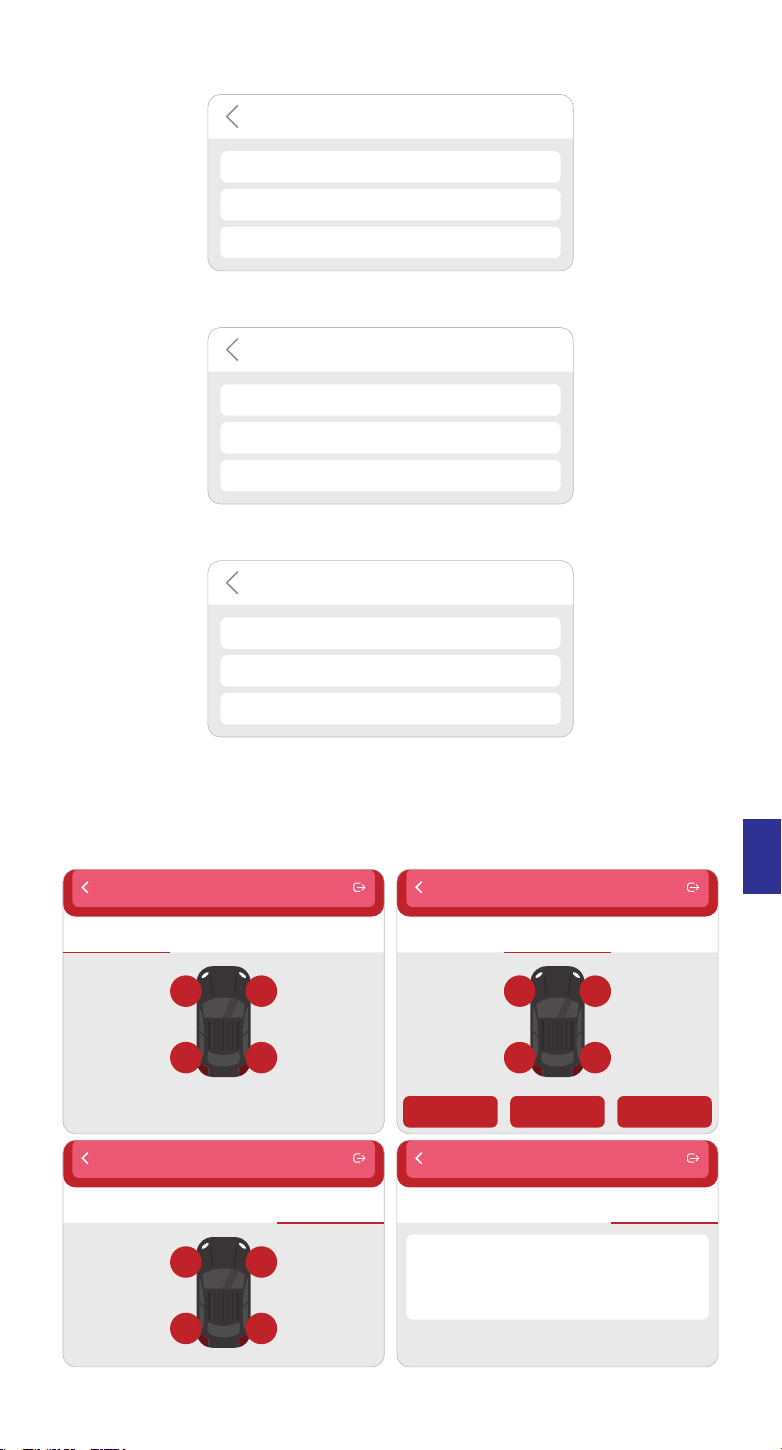
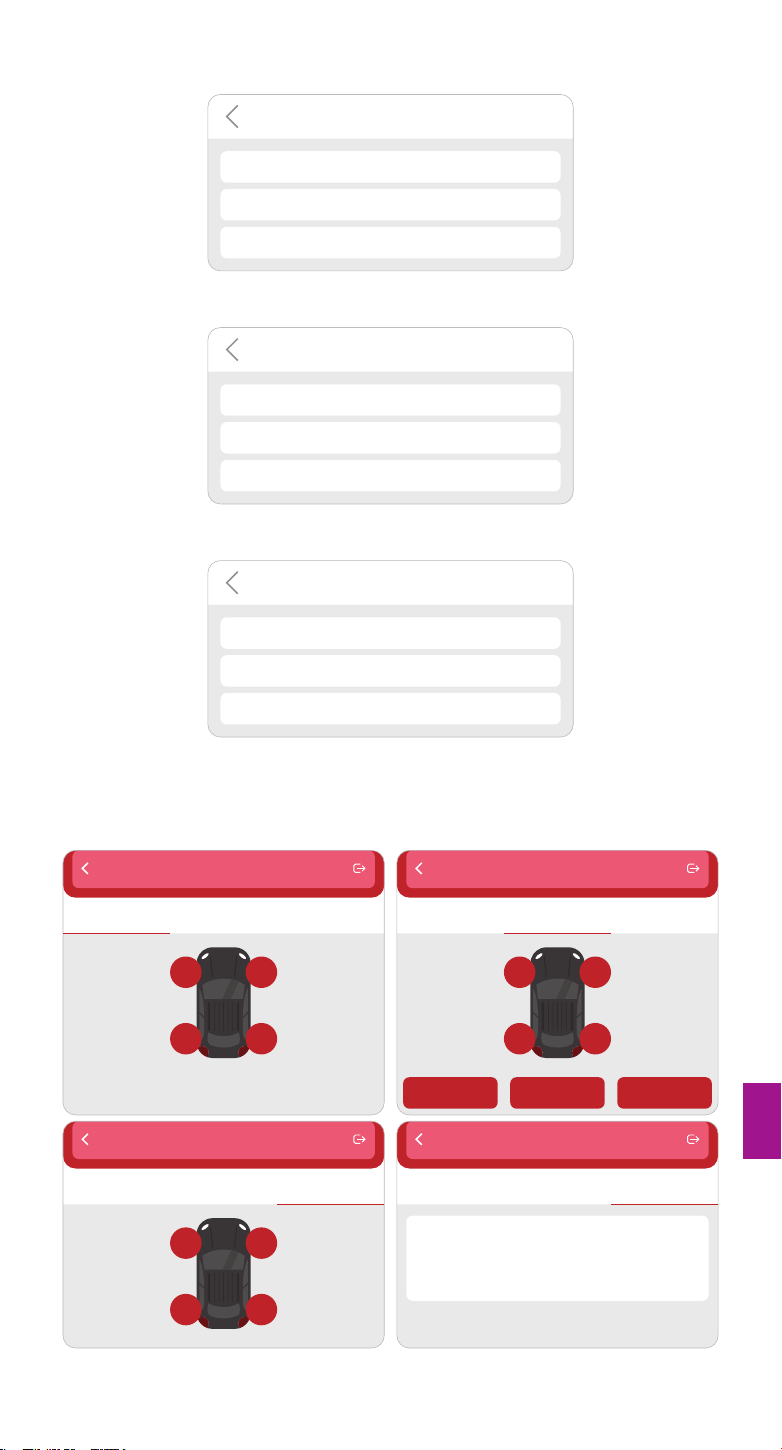
1.7 Select models brand
Functions
ABARTH
ACURA
Alfa Romeo
1.8 Select models
Functions
A1
A2
A3
1.9 Select the year frequency band of the tire pressure sensor
Functions
2002/10 - 2004/04(433MHz)
2004/05 - 2009/05(433MHz) 4B
2009/01 - 2011/12(Indirect)
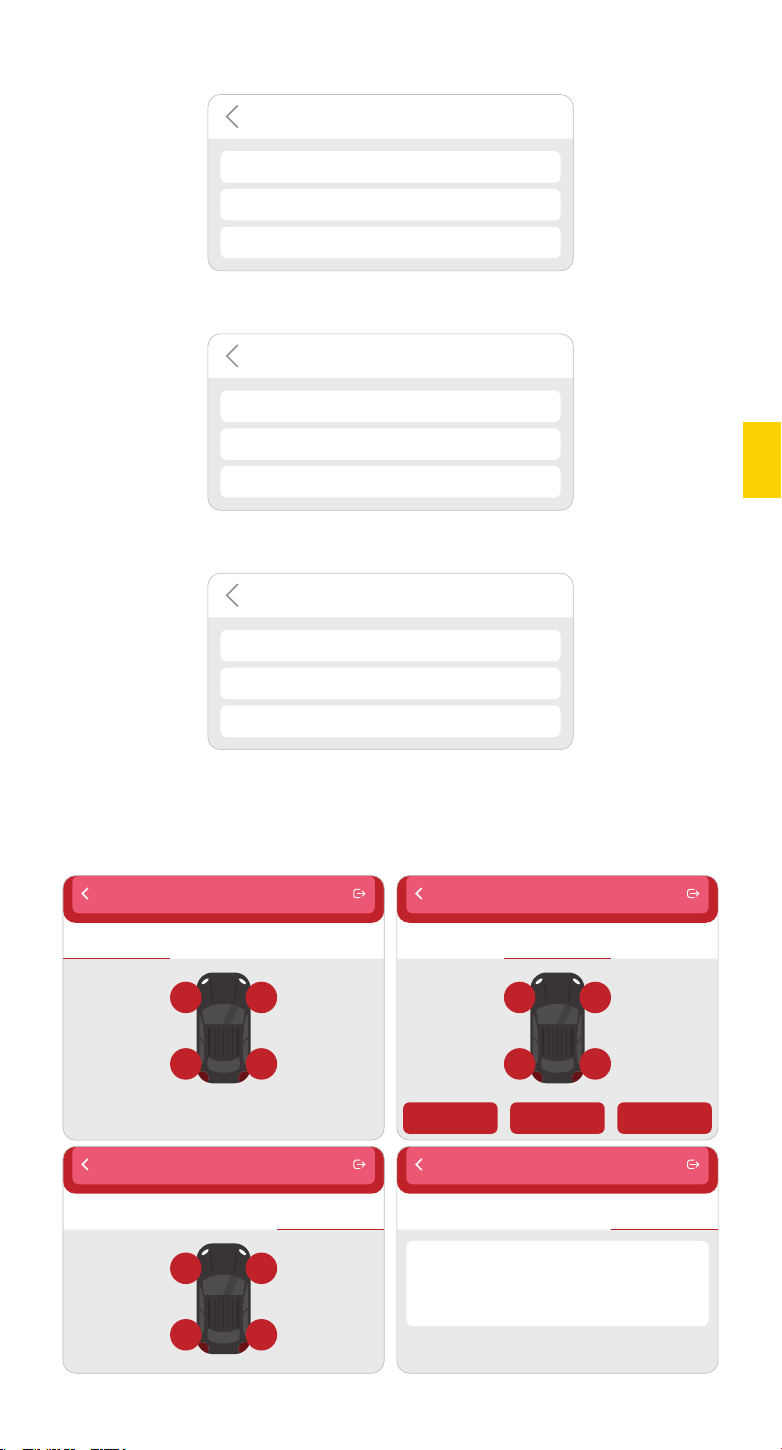
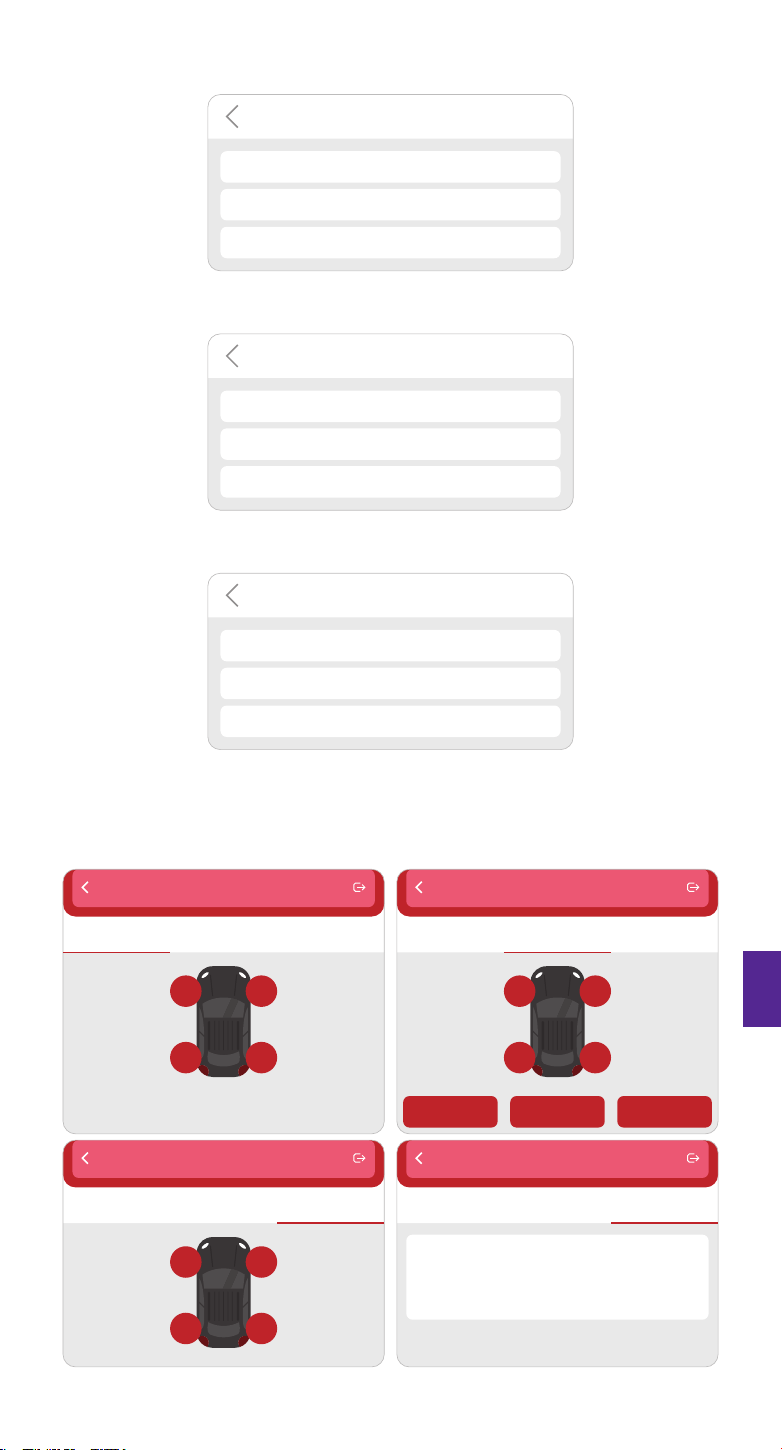
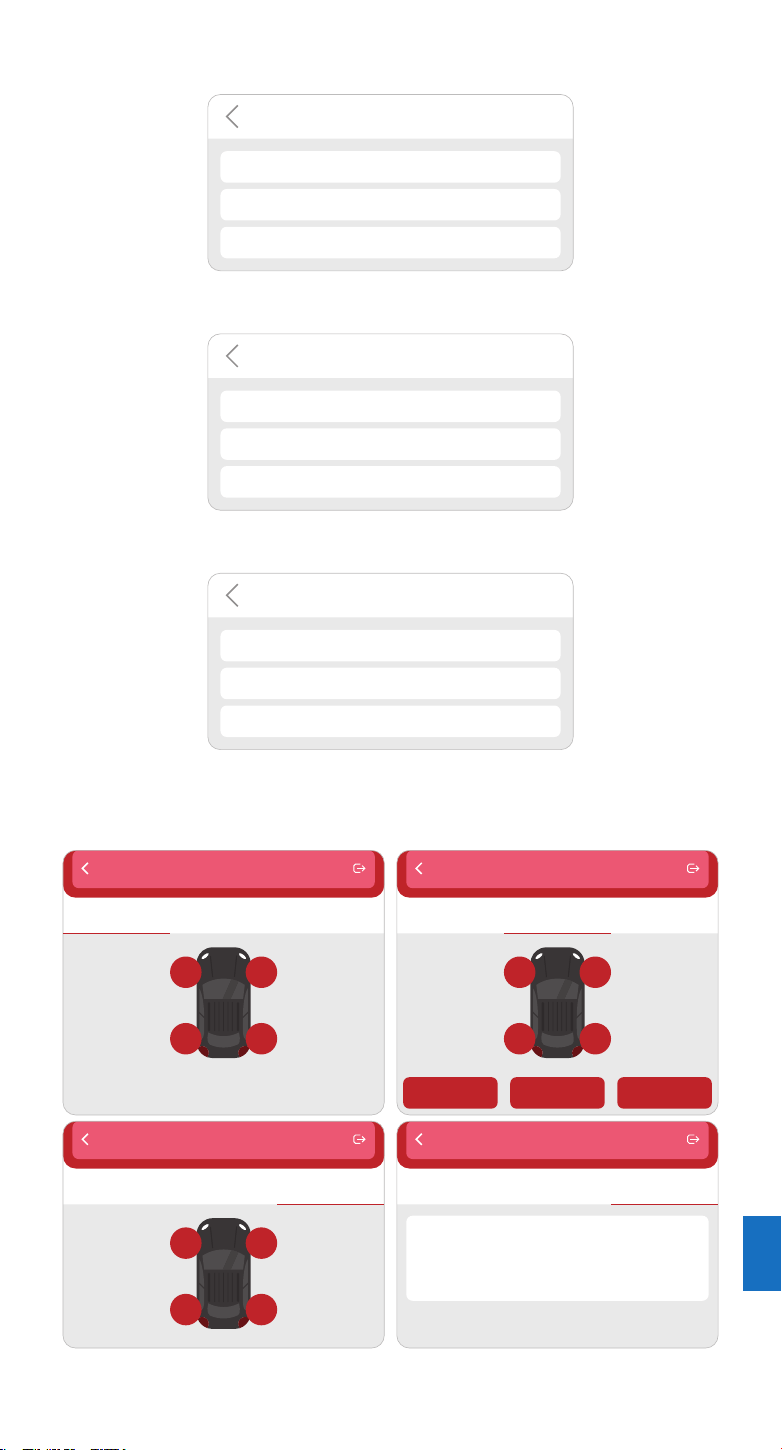
1.10 Using THINKCAR T-Wand 200, it supports activating the tire pressure sensor, reading the
version number, and reading the tire pressure value. For online programming function and
tire pressure learning function, please purchase THINKDIAG connector or other
THINKCAR diagnostic equipment.
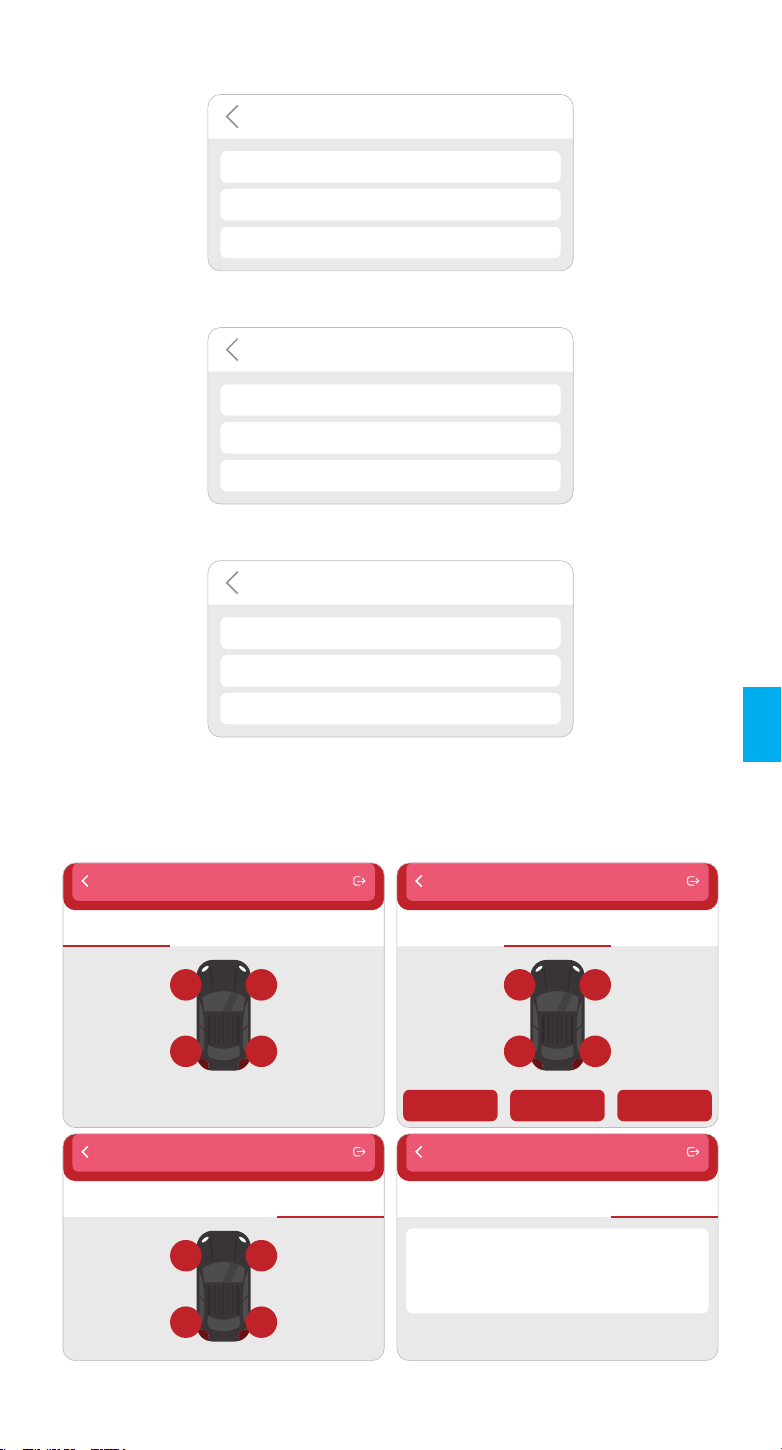
TPMS
Active Programming Learning
FL FR
RL RR
TPMS
Active Programming Learning
FL FR
RL RR
Auto Manual Replication
TPMS
Active Programming Learning
FL FR
RL RR
TPMS
Active
Sensor Manufacture: Huf/Beru
Sensor frequency: 433MHz
Sensor part number: 4F0907275D
Print No.: RDE011
Programming Learning
EN
If you need to know the diagnostic tools that support the tire pressure function, Please contact
Online Customers Service via the order interface.
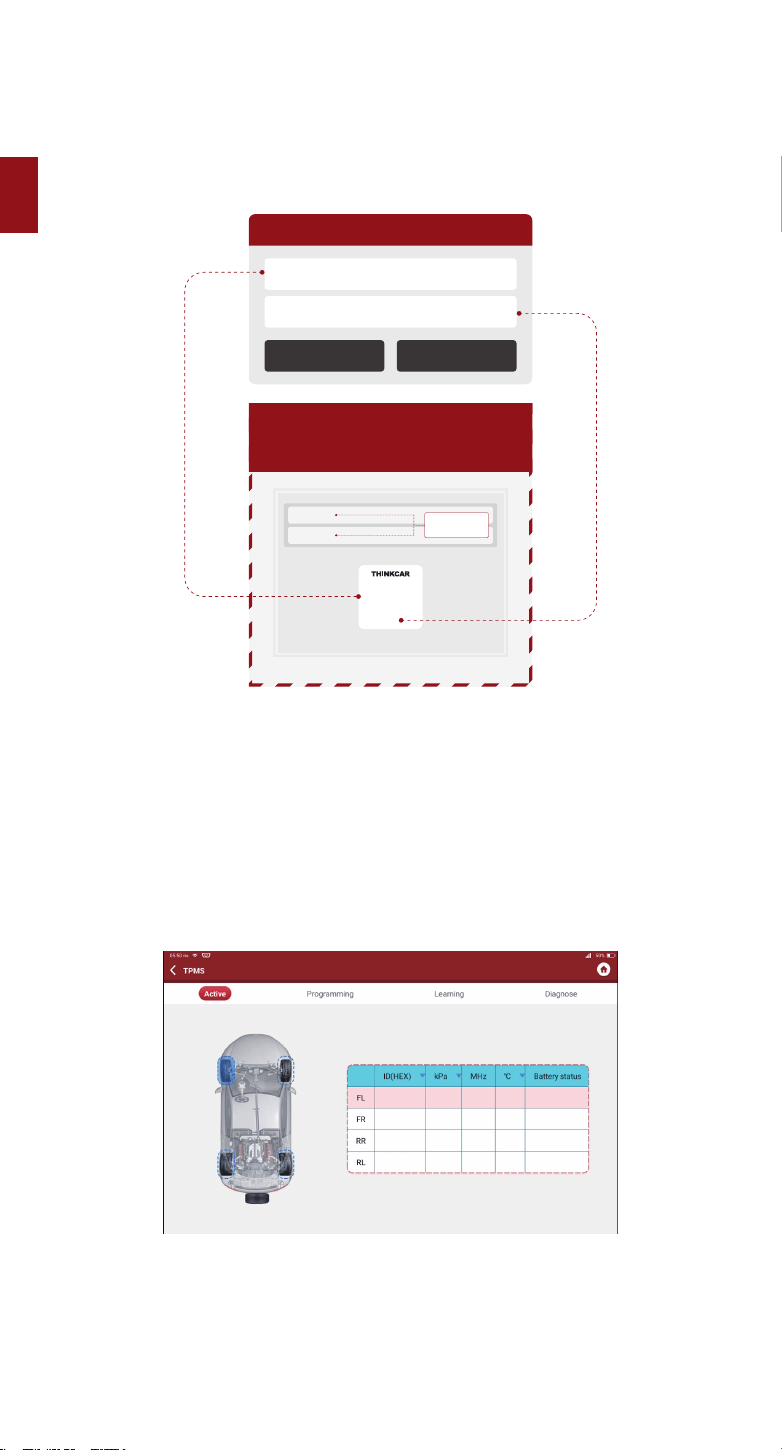
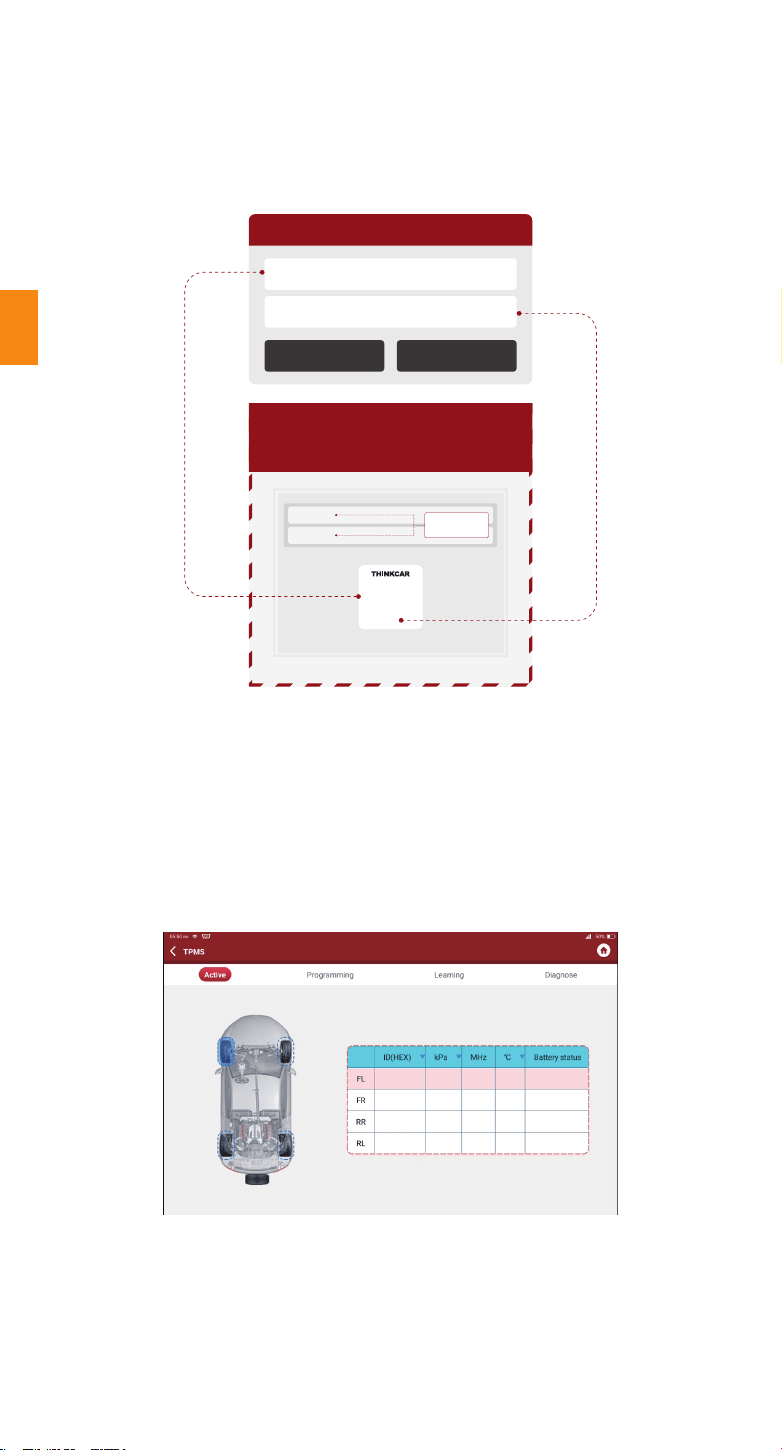
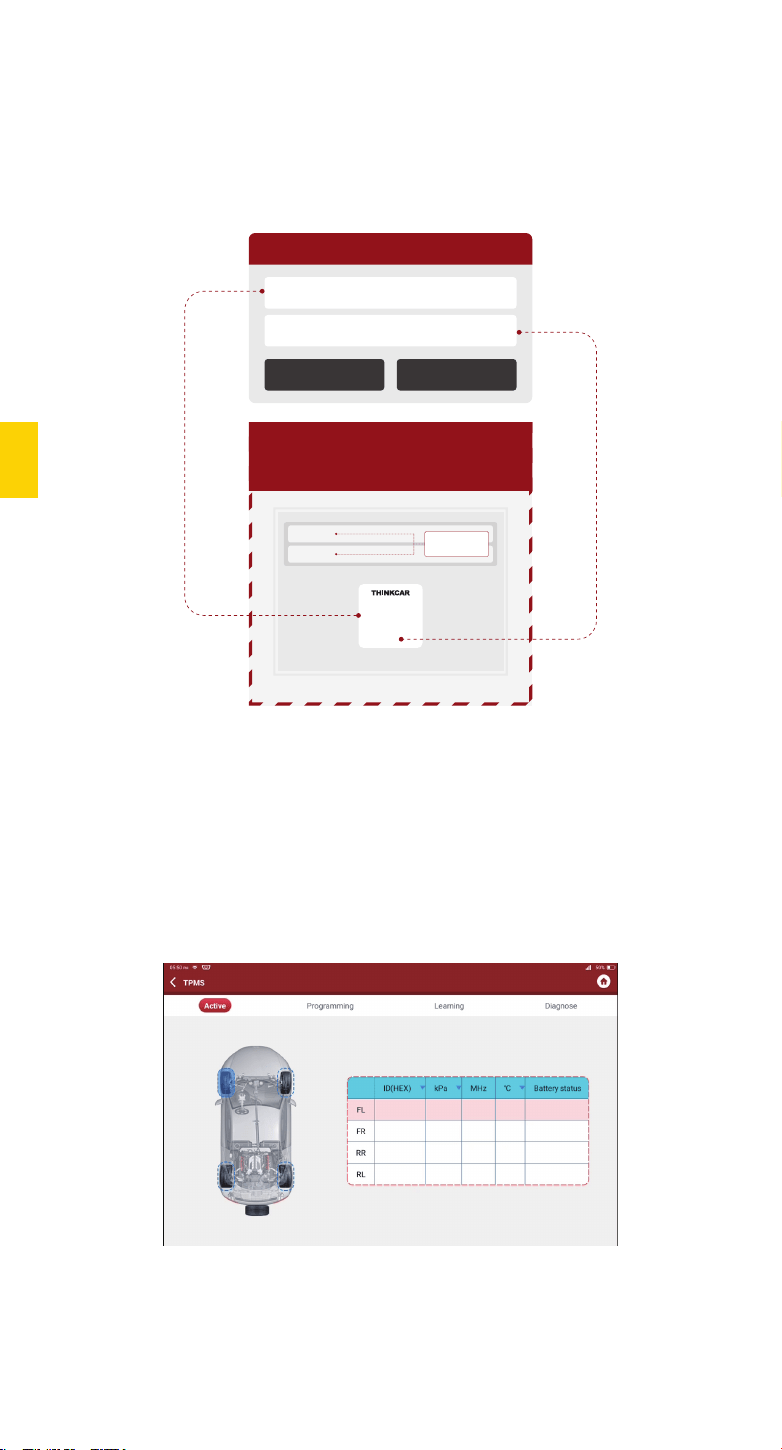
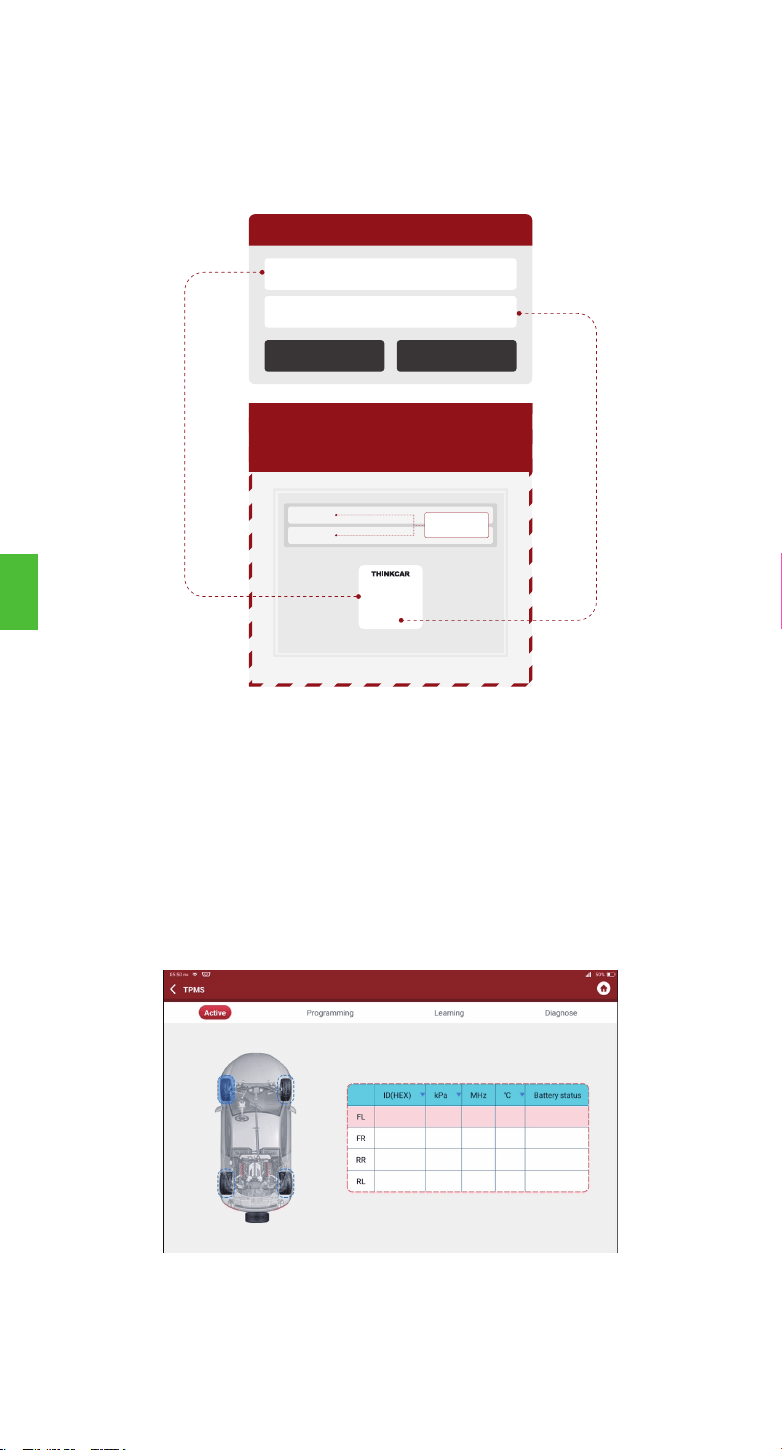
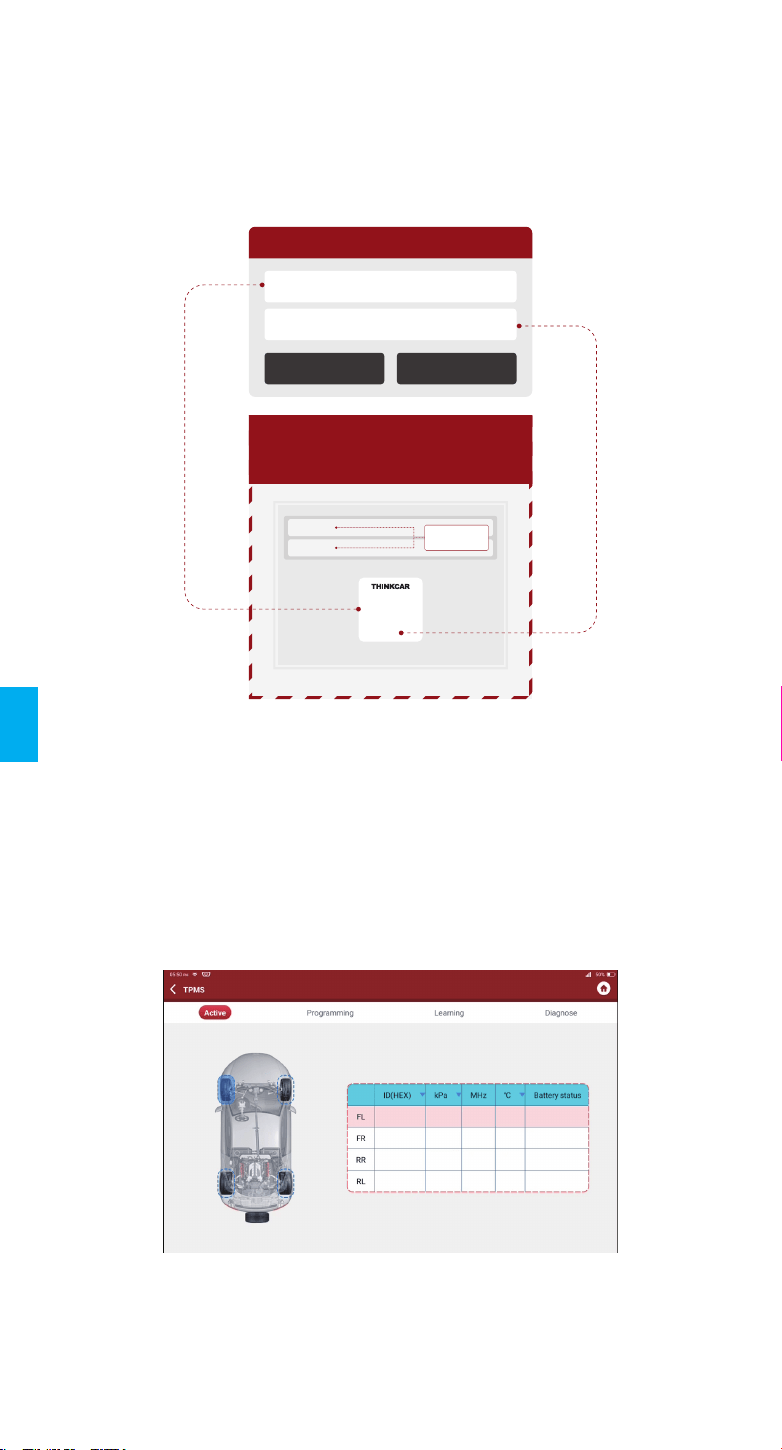
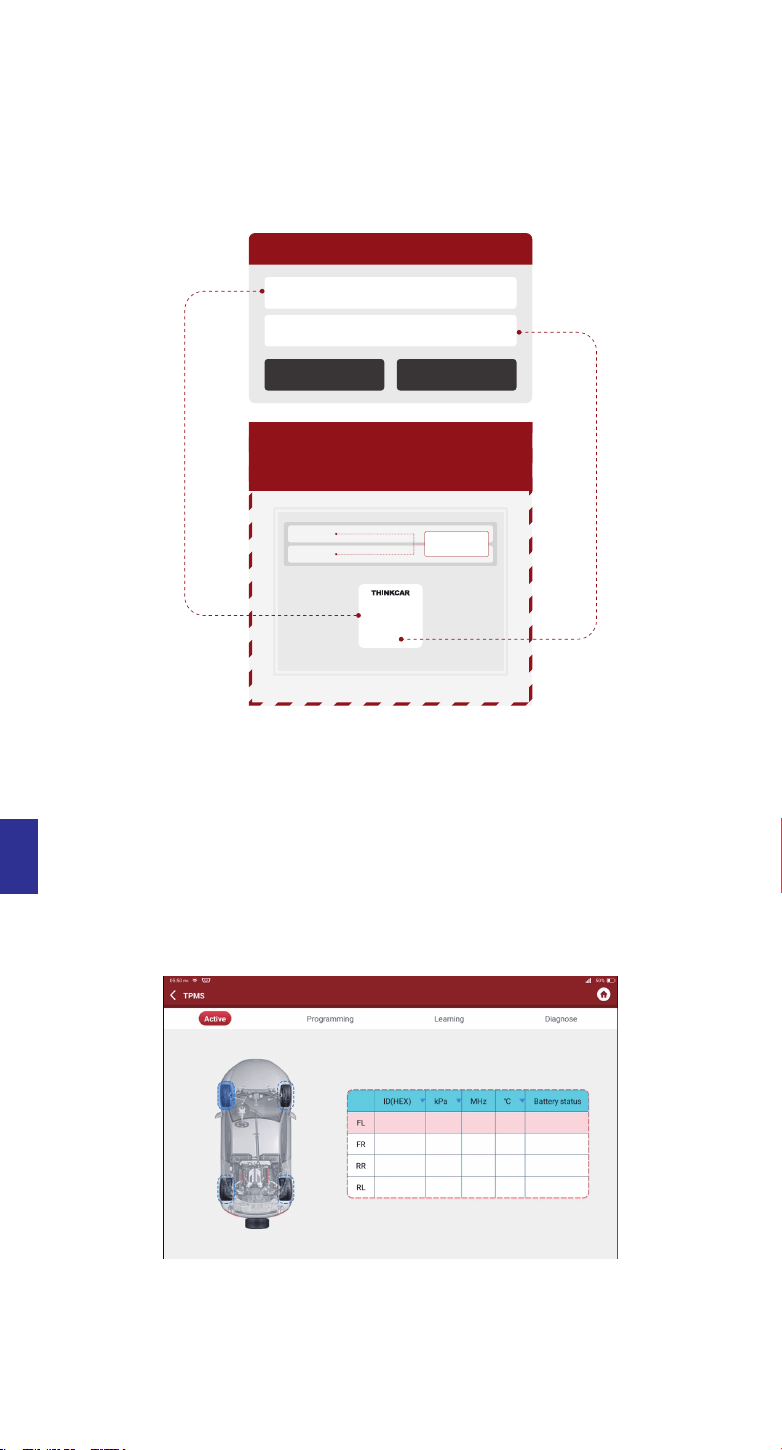
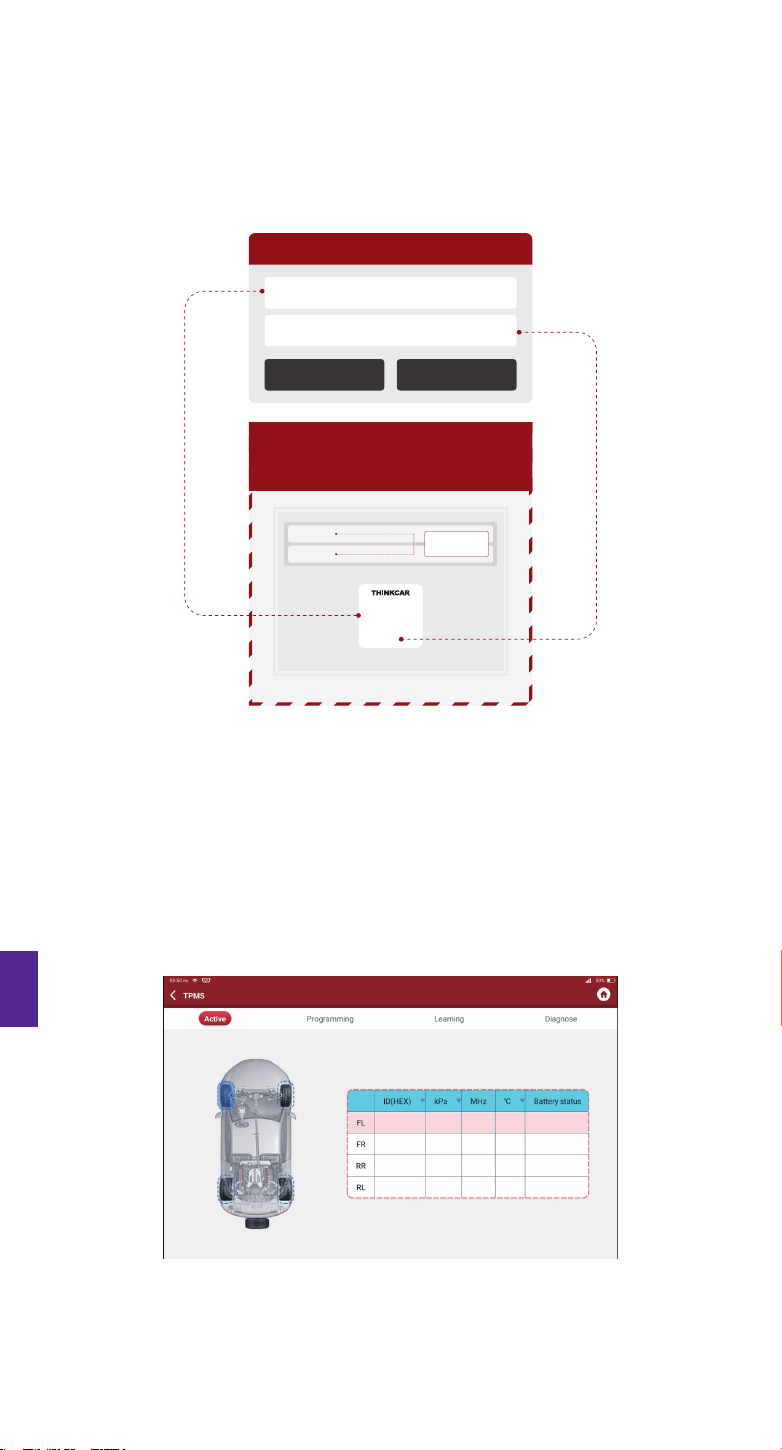
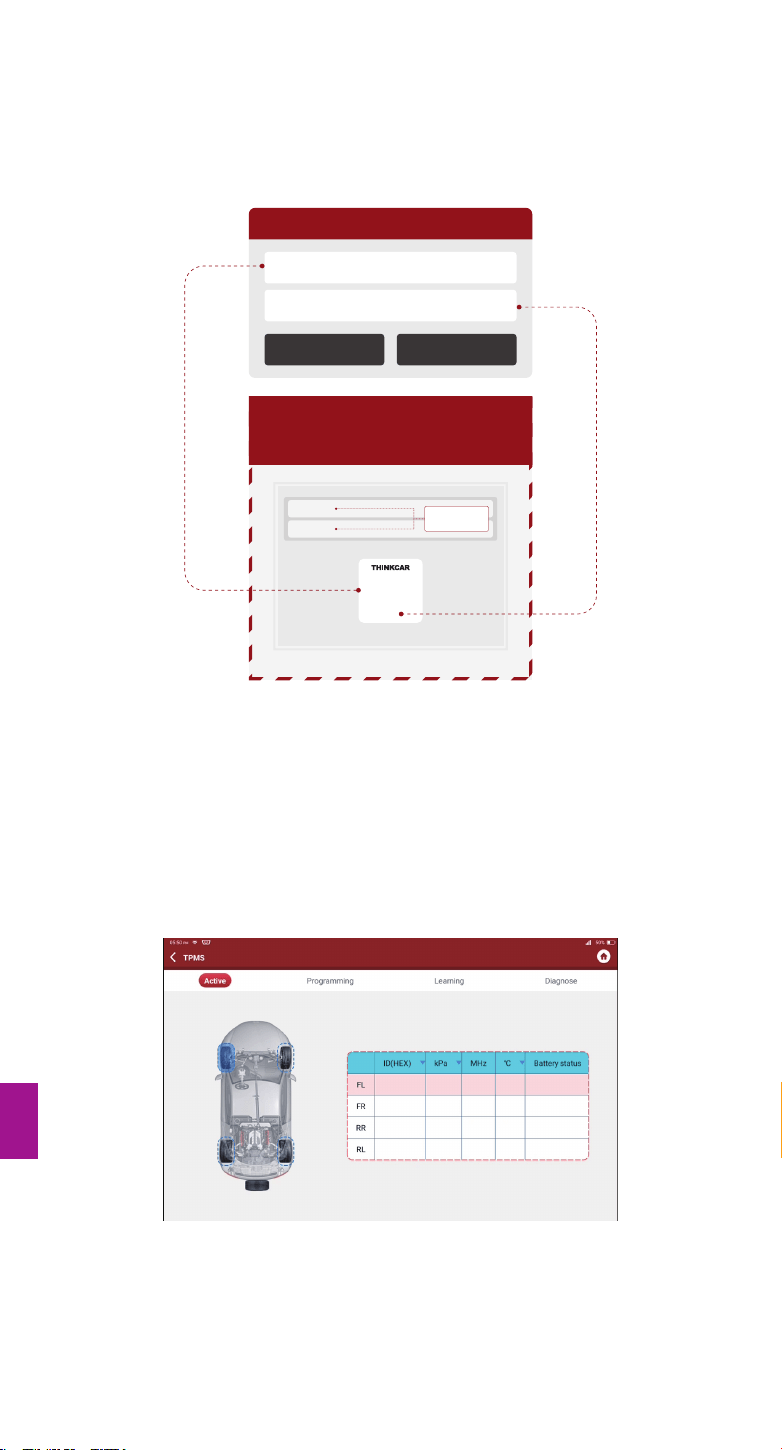
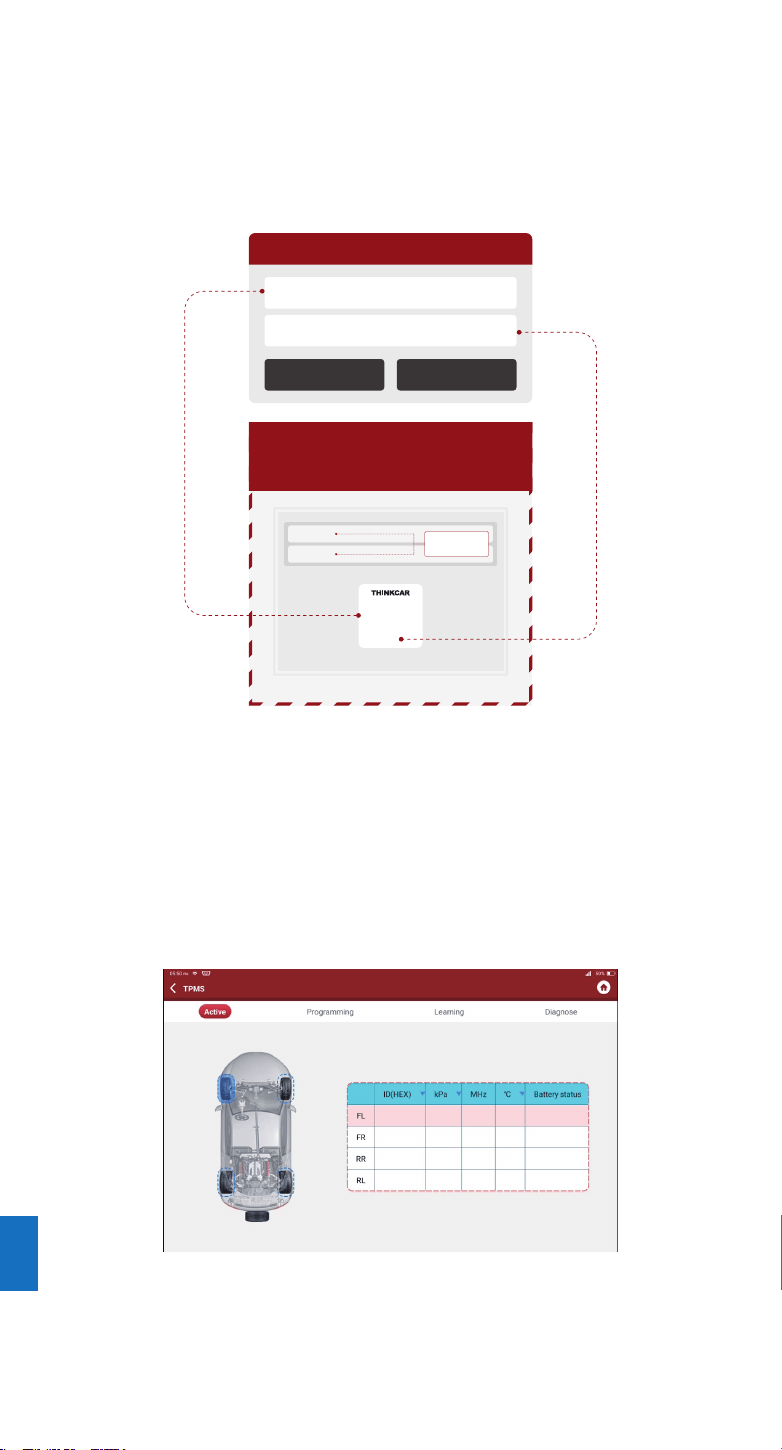
(1) Tap TPMS on "Homepage" or "Module" of diagnostic tool.
(2) Tap Bind.
(3) The following screen will pop up.
2. How to use with diagnostic equipment
Notes:
1. The serial number is on the nameplate on the back of the device.
2. The activation code is in the “PASSWORD LETTER”.
Serial Mumber
Notes
Cancel Bind
Activation code
Serial Number
Activation Code
Enter SN and Activation Code
to activate your device
Serial Number:
989xxxxxxxxx
xxxxxxxx
Activation Code:
PASSWORD LETTER
Thinkcar Tech Inc
This step shall apply when multiple THINKCAR T-Wand 200 devices are bound to the
diagnostic tool. If only one THINKCAR T-Wand 200 is bound to the diagnostic tool, keep the
device ON and tap OK to ignore this step. If it is your first time using the THINKCAR T-Wand
200, please bind it before doing any TPMS operations.
2.1 TPMS Operation
EN
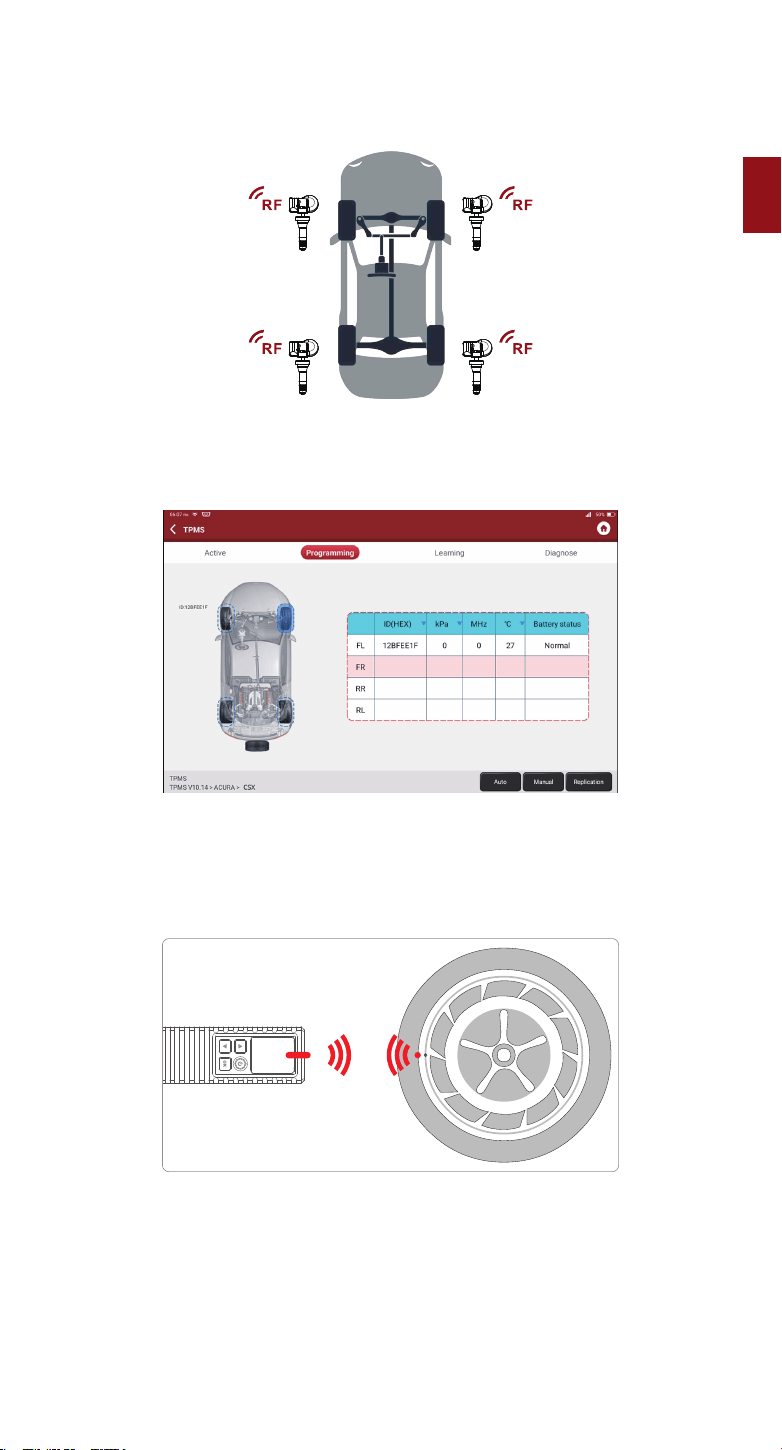
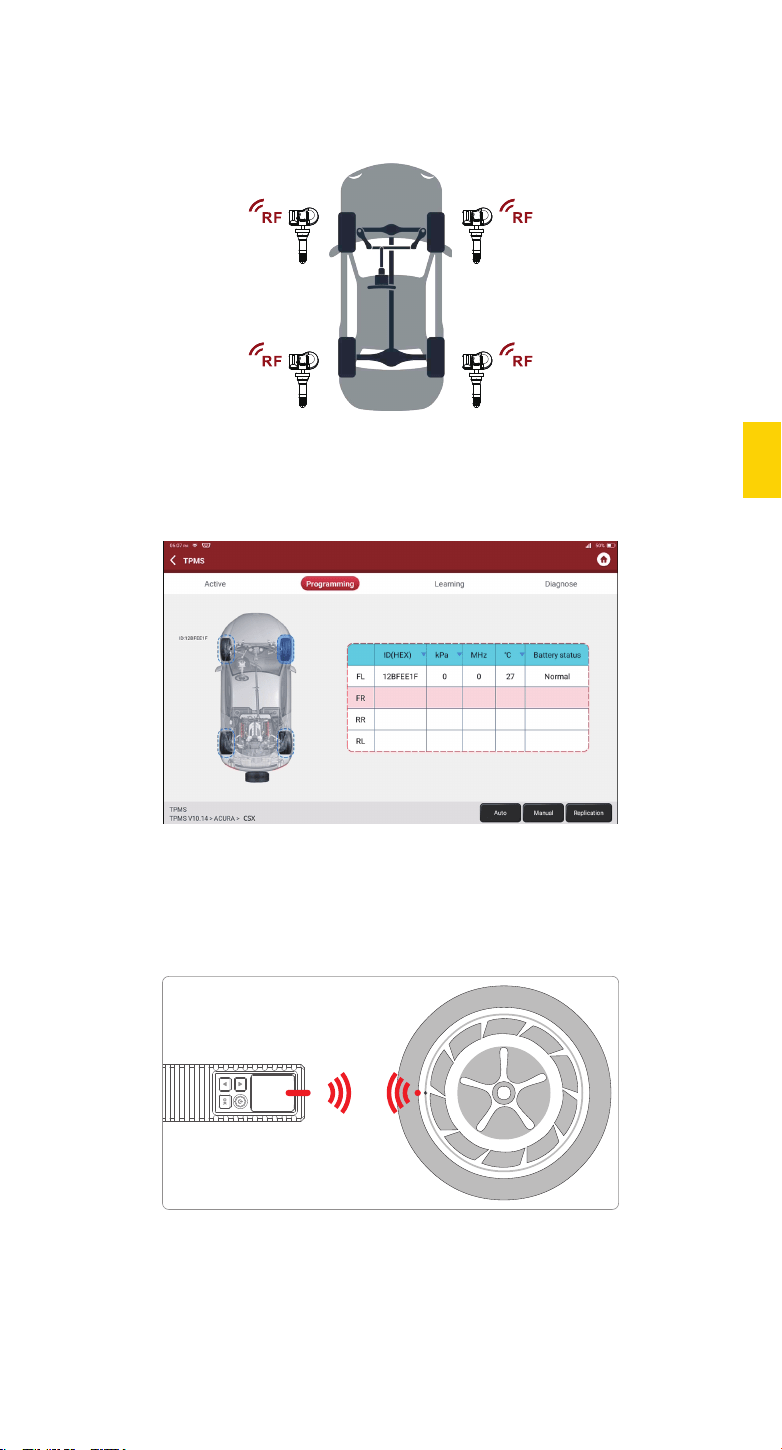
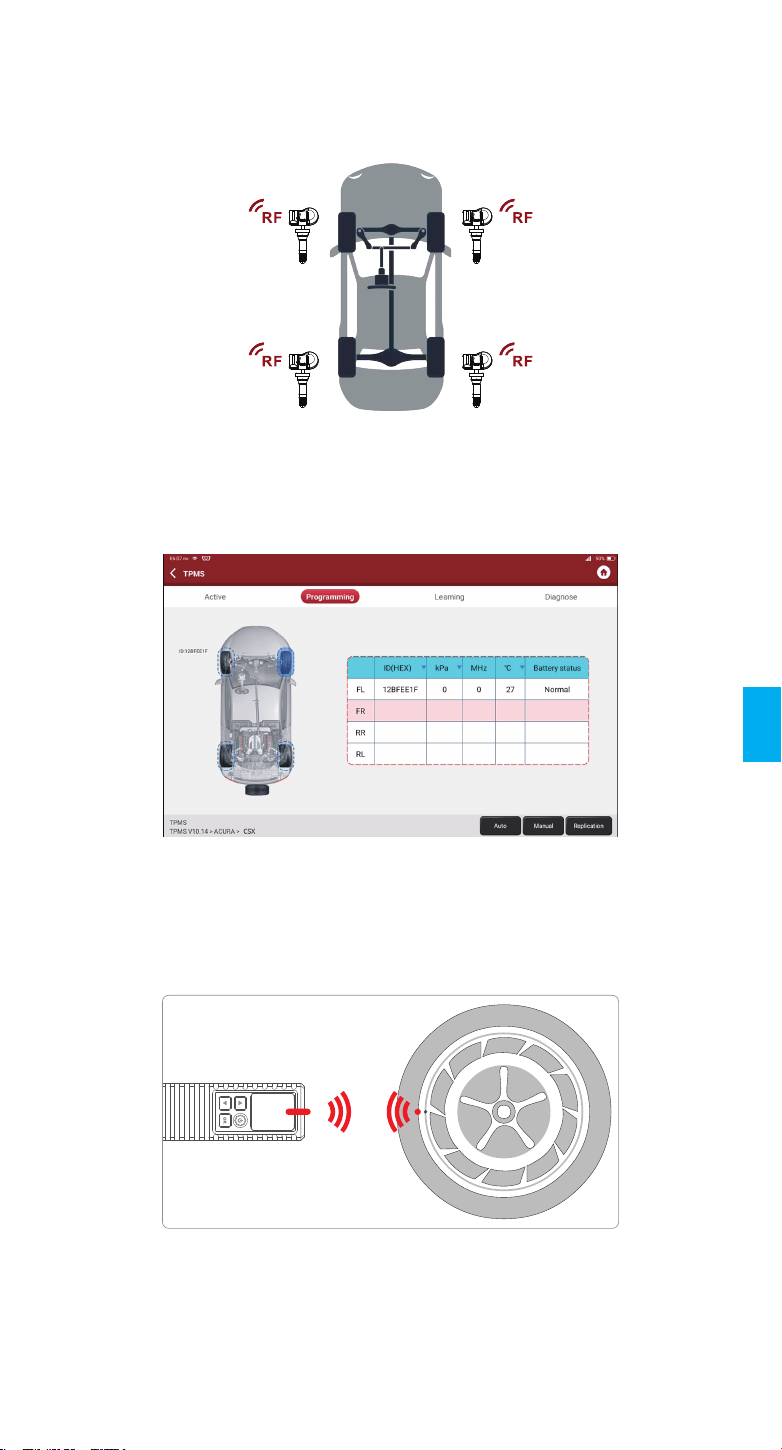
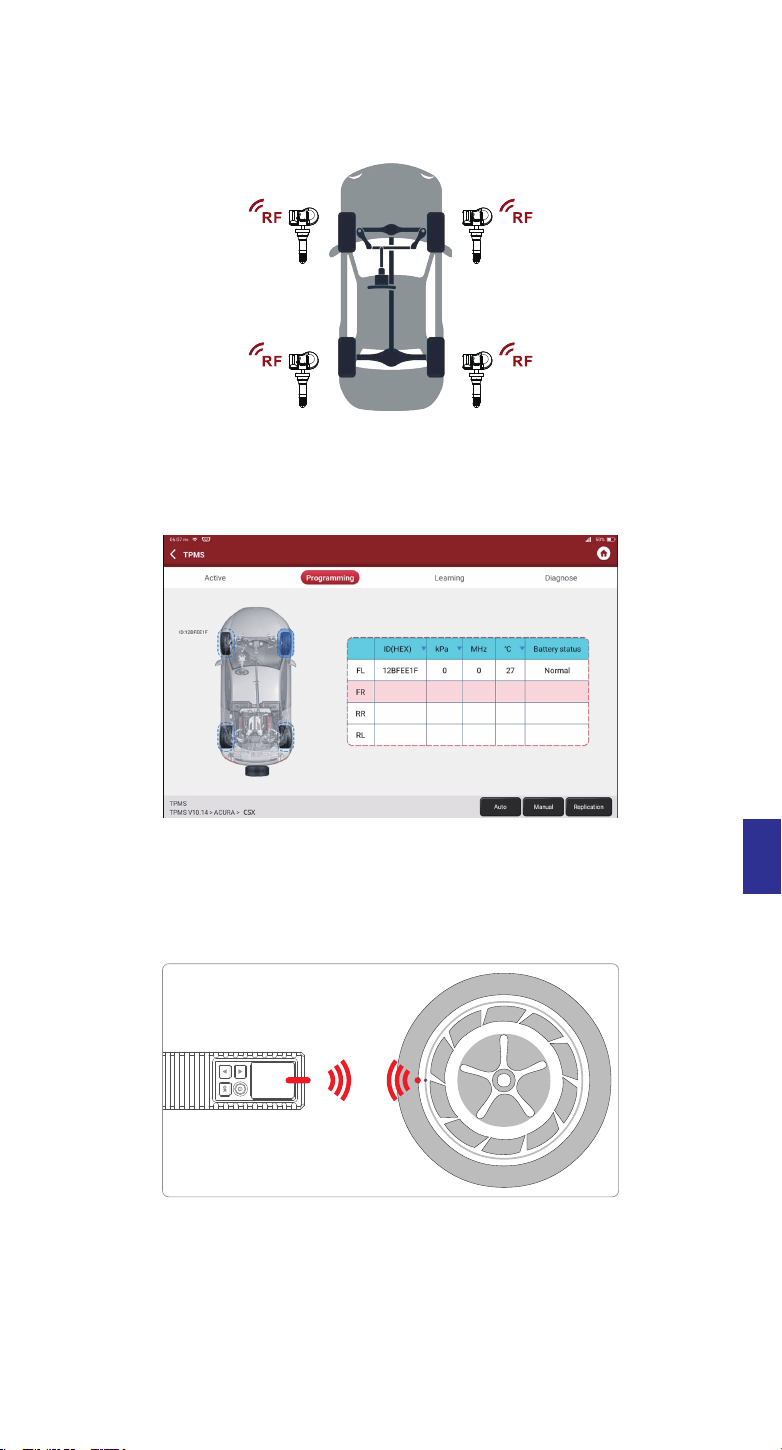
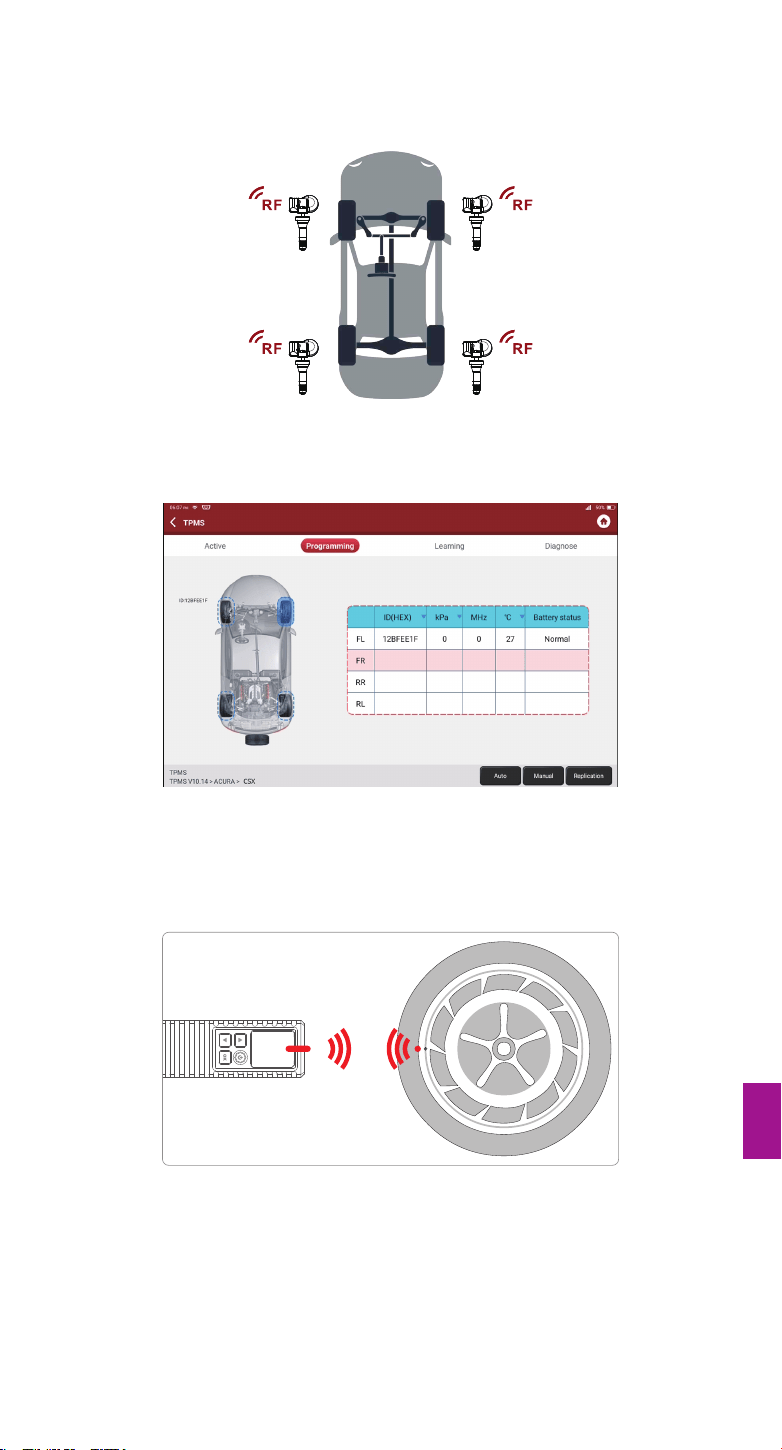
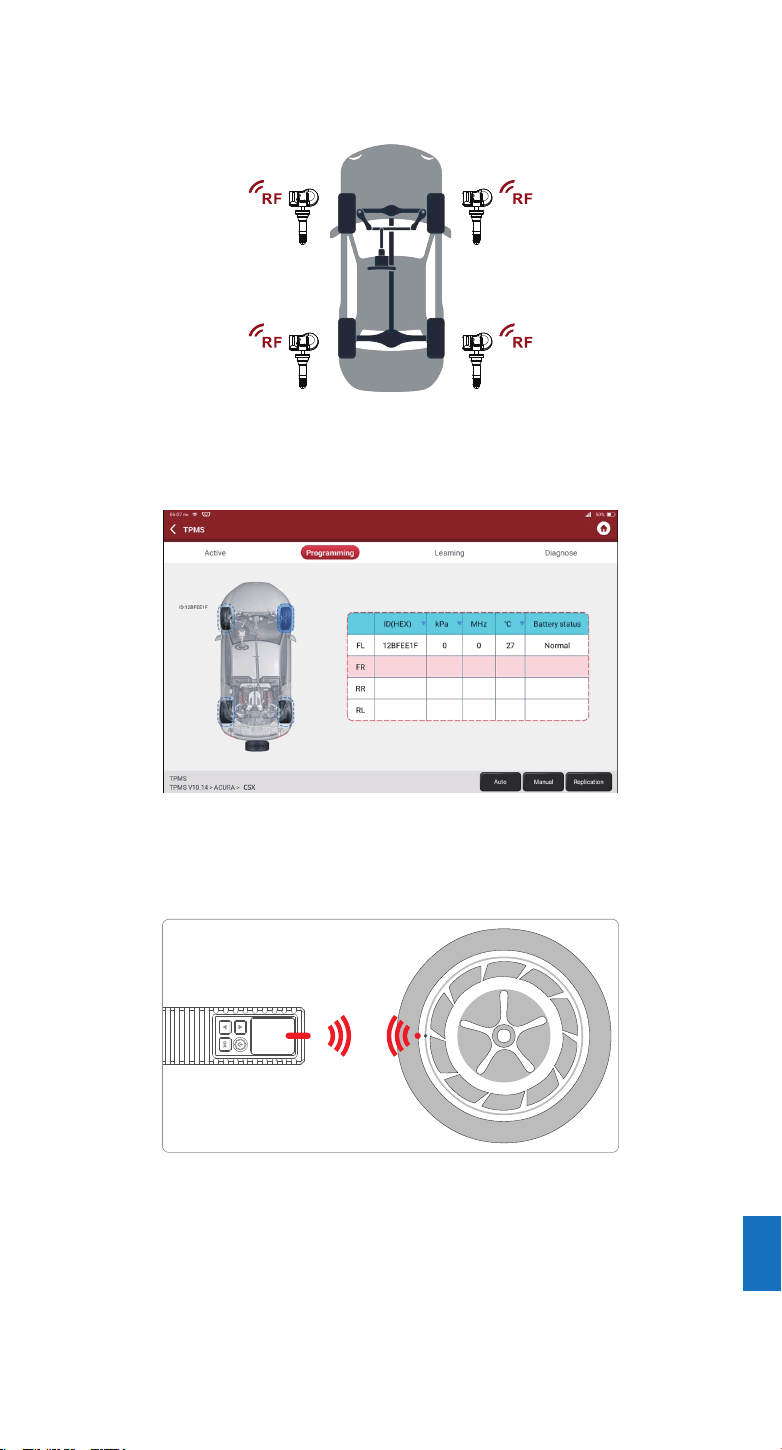
For universal sensors, place the THINKCAR T-Wand 200 alongside the valve stem, point
toward the sensor location, and press the OK button. Once the sensor is successfully activated
and decoded, THINKCAR T-Wand 200 will vibrate slightly and the screen will display the
sensor data.
Notes:
1. For early magnet-activated sensors, place the magnet over the stem and then place the THINKCAR T-Wand 200
alongside the valve stem.
2. If the TPMS sensor requires tire deflation (of the order of 10PSI), then deflate the tire and place the THINKCAR
T-Wand 200 alongside the stem while pressing the OK button.
Note:
The tool will do TPMS test in a sequence of FL (Front Left), FR (Front Right), RR (Rear Right), LR (Rear Left) and
SPARE, if the vehicle has the option for the spare. Or, you can use the▲/▼button to move to the desired wheel for testing.
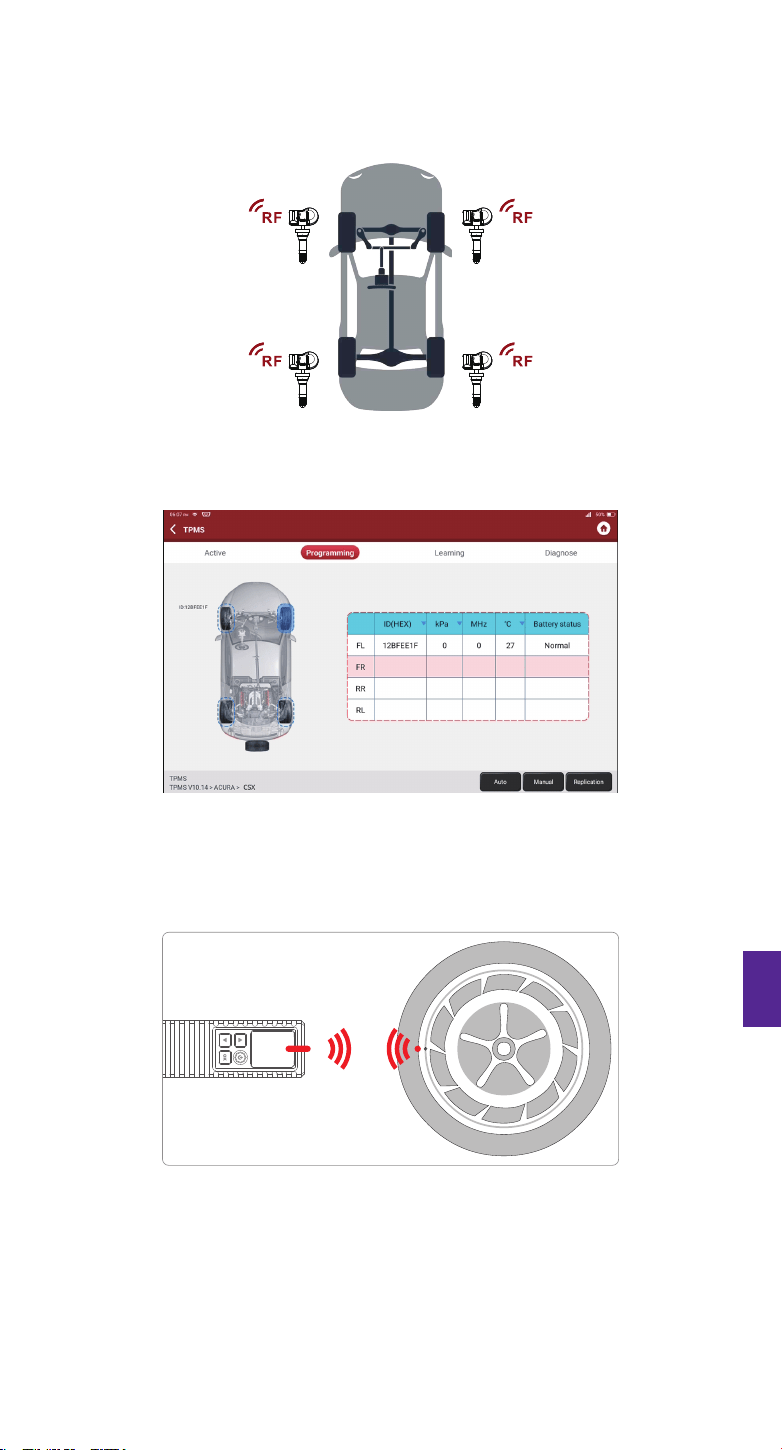
This function allows users to activate TPMS sensor to view sensor data such as sensor ID, tire
pressure, tire frequency, tire temperature and battery condition.
2.2 Activate Sensor
EN
Warranty Terms
3
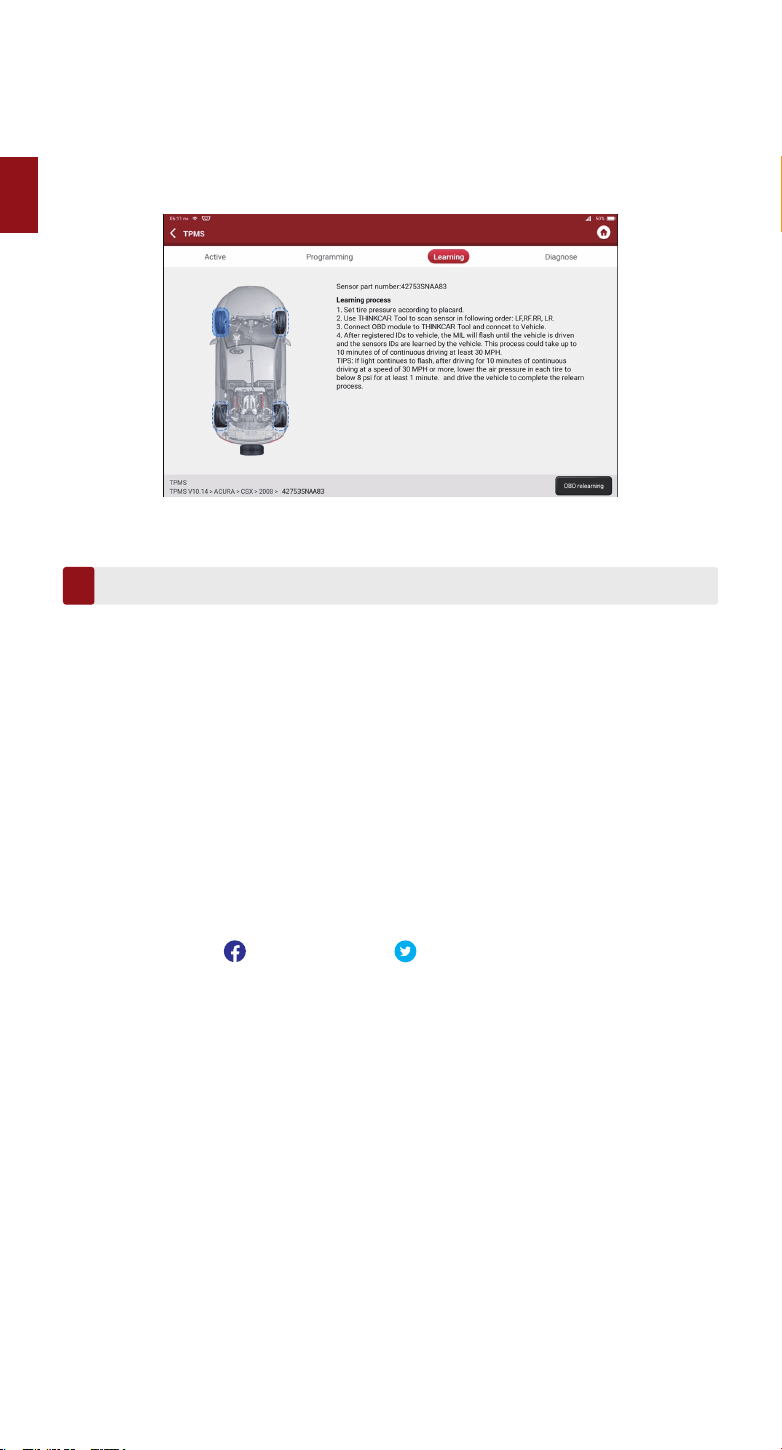
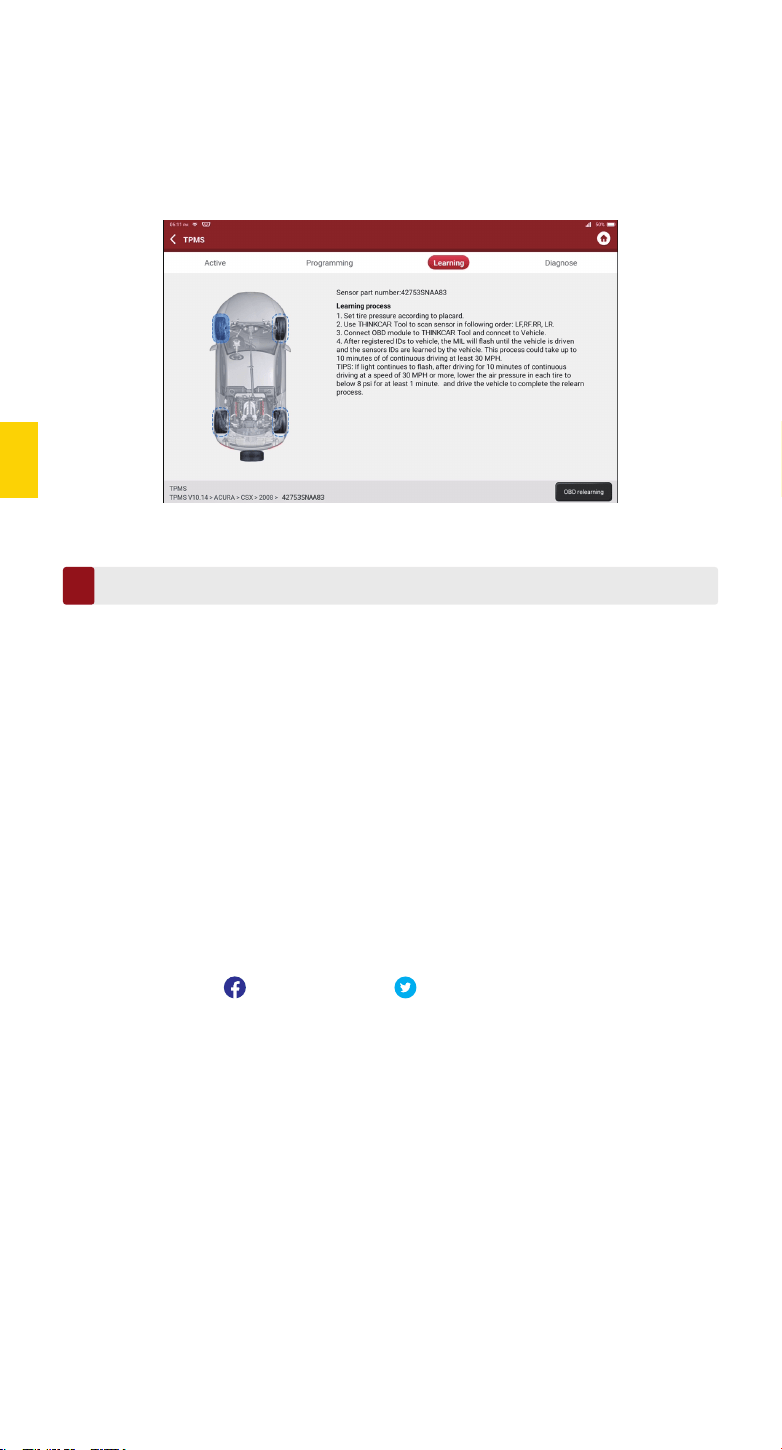
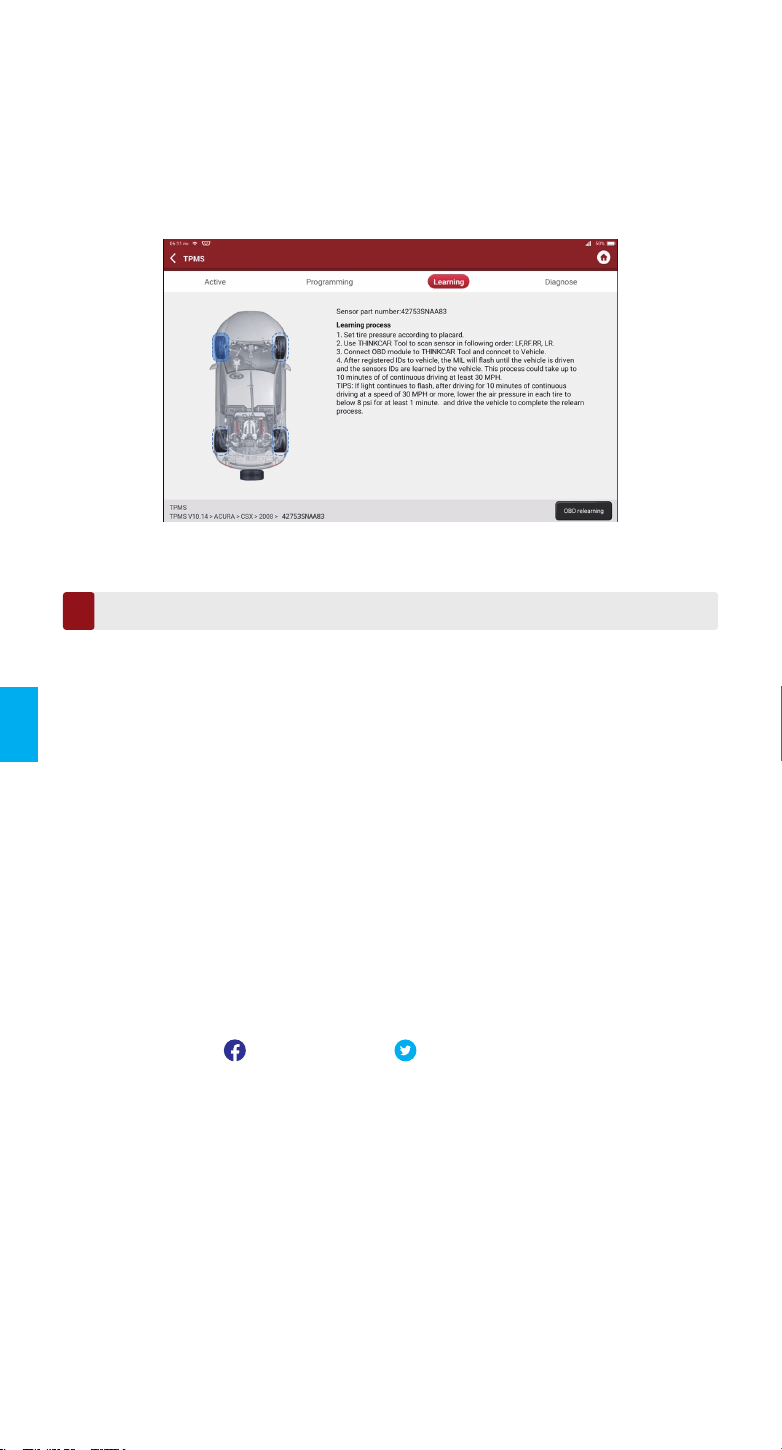
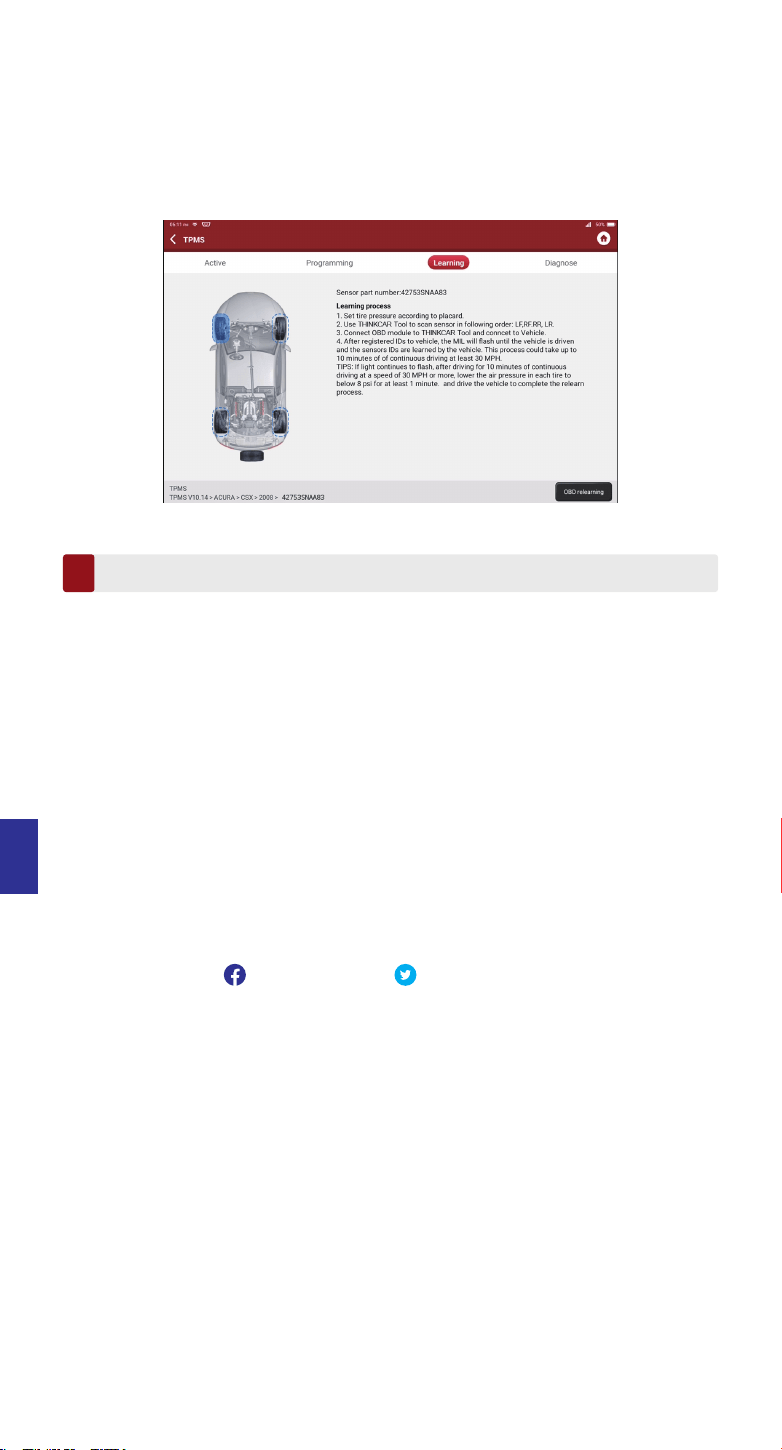
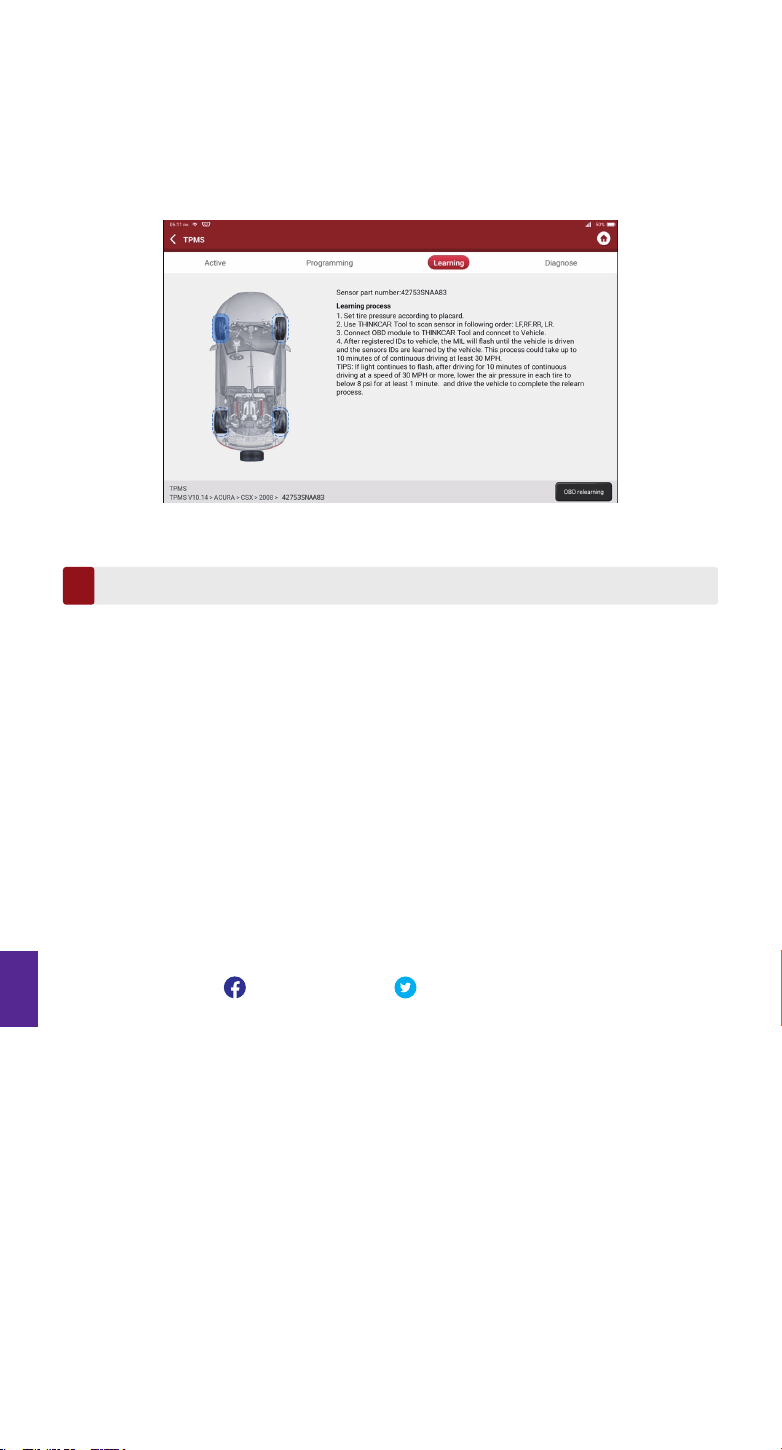
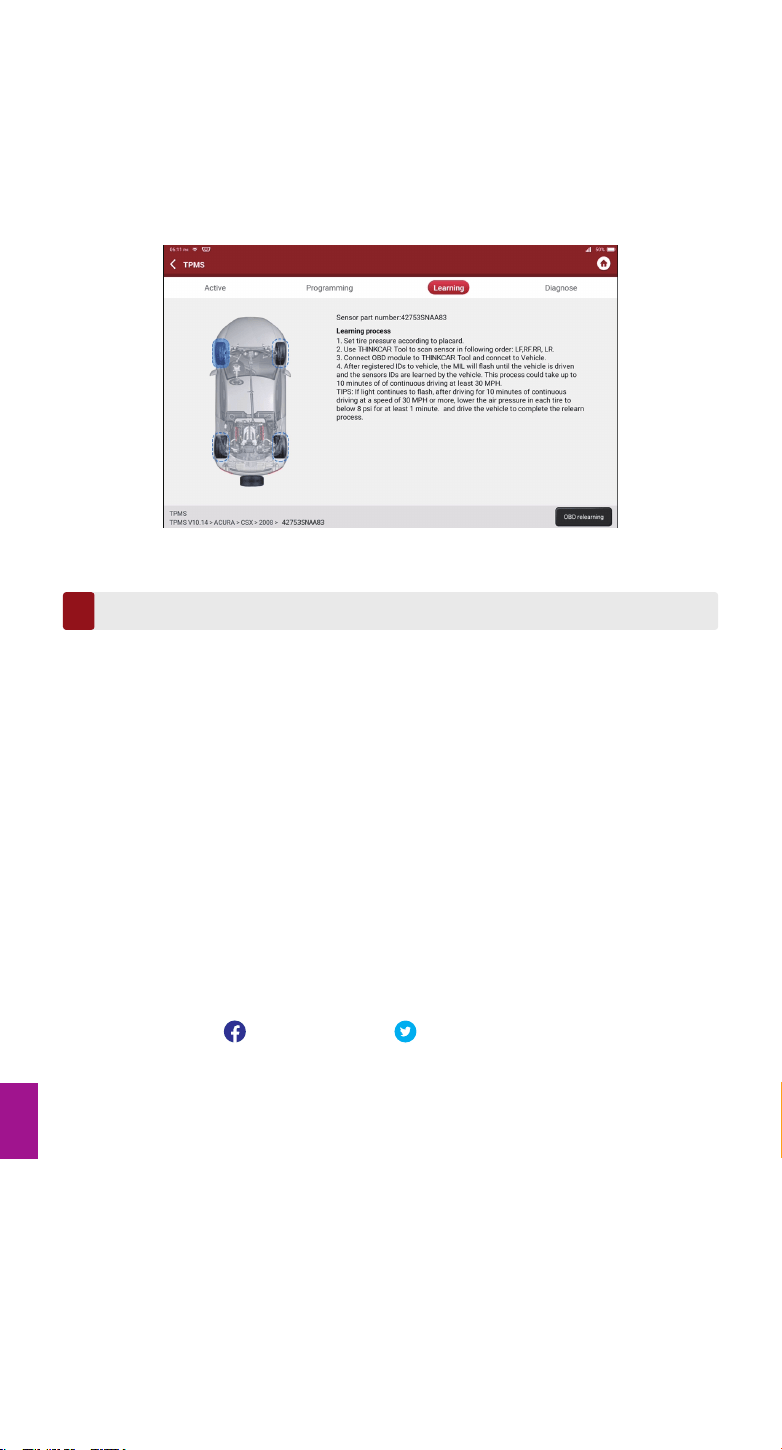
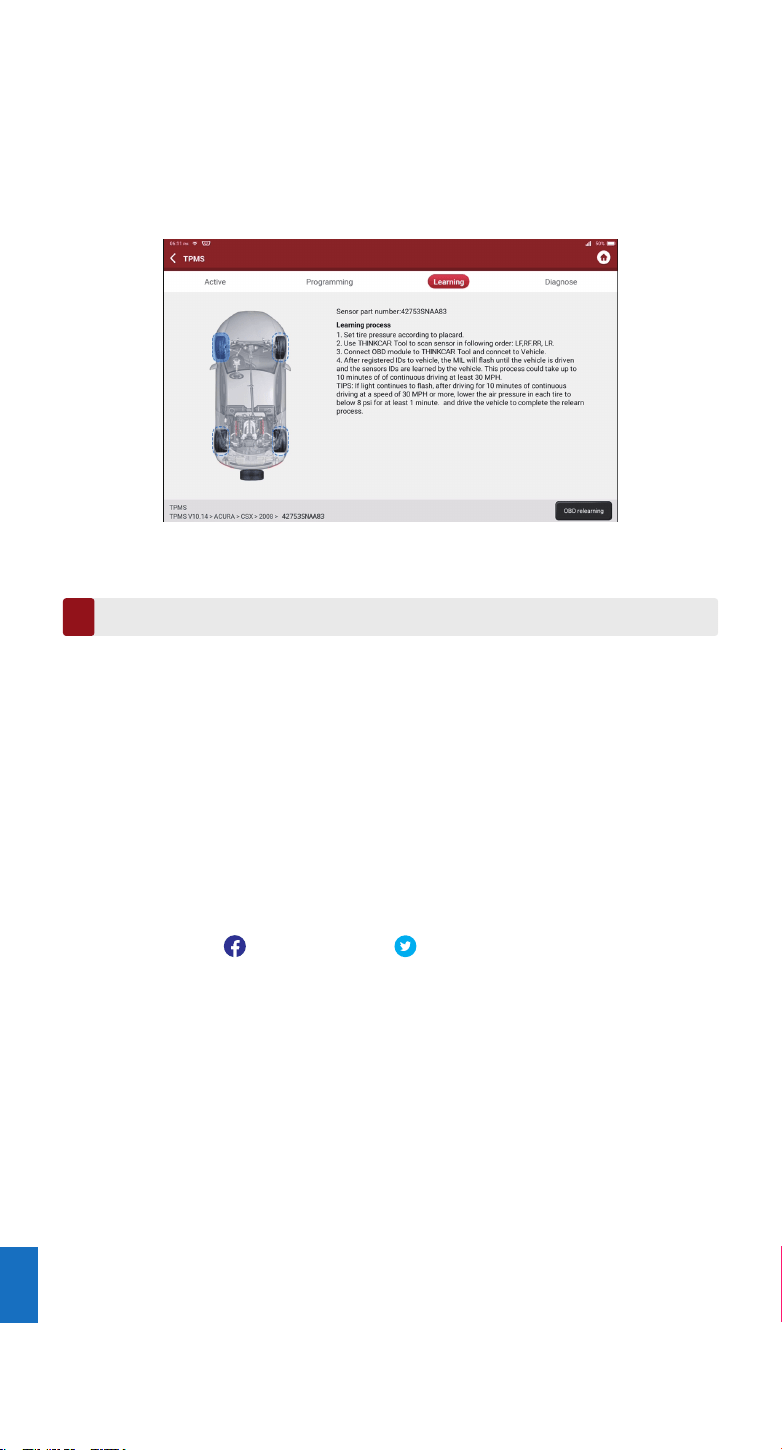
1. This function is used to write the newly programmed sensor IDs into the vehicle’s ECU for
sensor recognition.
2. Relearn operation applies only when the newly programmed sensor IDs are different from
the original sensor IDs stored in the vehicle’s ECU.
3. There are three ways available for Relearn: Static Learning, Self-Learning and Relearn by
OBD.
2.3 TPMS Relearn
This warranty applies only to users and distributors who purchase THINKCAR TECH INC
www.thinkcar.com THINKCAR T-Wand 200 products through normal procedures. Provide free
warranty within one year. THINKCAR TECH warrants its electronic products for damages
caused by defects in materials or workmanship. Damages to the equipment or components
caused by abusing, unauthorized modification, using for non-designed purposes, operation in a
manner not specified in the instructions, etc.are not covered by this warranty. The compensa-
tion for dashboard damage caused by the defect of this equipment is limited to repair or
replacement. THINKCAR TECH does not bear any indirect and incidental losses. THINKCAR
TECH will judge the nature of the equipment damage according to its prescribed inspection
methods. No agents, employees or business representatives of THINKCAR TECH are
authorized to make any confirmation, notice or promise related to THINKCAR TECH products.
Service Line: 1-909-757-1959
Customer Service Email: support@thinkcar.com
Official Website: www.thinkcar.com
Products tutorial, videos, FAQ and coverage list are available on Thinkcar official website.
Follow us on
@thinkcar.official @ObdThinkcar
Conseils: THINKCAR T-Wand 200 peut être utilisé avec un équipement de diagnostic via
l'application mobile.
Antenne TPMS
Écran d'affichage
Bouton d'alimentation
Bouton haut
Bouton OK (bouton
de confirmation)
Bouton bas
Port de chargement
Présentation du produit
1
Mode d'emploi
Mise sous/Hors tension
2
Remarques :
Veuillez d'abord charger l’instrument si vous ne l'avez pas utilisé pendant une longue période. Pendant la charge, le
voyant LED s'allume en rouge. Lorsqu’il passe au vert, cela indique que la charge est terminée.
Appuyez sur le bouton d’alimentation pendant environ 3 secondes pour allumer le
dispositif. Un bip sonore retentit et l'écran s'allume.
Pour éteindre le dispositif, appuyez à nouveau sur le bouton d’alimentation pendant
environ 3 secondes.
FR
1. Comment utiliser l'application mobile
1.1 Recherchez « ThinkDiag+ » dans GooglePlay, « ThinkDiag » dans l'App Store. L'applica-
tion ThinkDiag+ est téléchargeable GRATUITEMENT. (comme le montre la figure
ci-dessous)
ThinkDiag
ThinkDiag
5
Annuler
OUVERT
5
ThinkDiag+
(iOS) (Android)
FR
1.2 Enregistrement du compte de messagerie
1.3 Allez à la page d'accueil et sélectionnez “ ”
1.4 Sélectionnez le module THINKTPMS
1.5 Entrez le numéro SN et le code d'activation pour lier l'appareil
1.6 Une fois la liaison réussie, le programme sera automatiquement mis à jour
THINKTPMS
Lire l'ID du capteur, la
pression, la tempéra-
ture. Lire l'état du
niveau de la batterie.
Programme...
Activer
Numéro de Série
Code d'activation
ATTIVAZIONE
CODICE
SN
SN
Activer
Essayez la démo
Acheter
maintenant
La fonction de diagnostic n'est pas encore disponible,
activez l'appareil avec votre compte maintenant.
ACTIVATION
Mise à jour logicielle
Télécharger le logiciel de diagnostic
Un logiciel de diagnostic professionnel sera téléchargé
pour votre véhicule. S'il vous plaît soyez patient.
10%
Connexion
Votre adresse e-mail
Mot de passe
S'inscrire Oublié le mot de passe
Connexion
S'inscrire
Entrez un nom d'utilisateur de 2 à 20 lettres
Veuillez saisir votre mot de passe
Vous avez un compte?
Suivant
FR
1.7 Sélectionnez la marque des modèles
Les fonctions
ABARTH
ACURA
Alfa Romeo
1.8 Modèles sélectionnés
Les fonctions
A1
A2
A3
1.9 Sélectionnez la bande de fréquence annuelle du capteur de pression des pneus
Les fonctions
2002/10 - 2004/04(433MHz)
2004/05 - 2009/05(433MHz) 4B
2009/01 - 2011/12(Indirect)
1.10 À l'aide de THINKCAR T-Wand 200, il prend en charge l'activation du capteur de pression
des pneus, la lecture du numéro de version et la lecture de la valeur de la pression des
pneus. Pour la fonction de programmation en ligne et la fonction d'apprentissage de la
pression des pneus, veuillez acheter un connecteur THINKDIAG ou un autre équipement
de diagnostic THINKCAR.
TPMS
Active La programmation Apprentissage
FL FR
RL RR
TPMS
Active La programmation Apprentissage
FL FR
RL RR
Auto Manual Réplication
TPMS
Active La programmation Apprentissage
FL FR
RL RR
TPMS
Active
Fabrication du capteur : Huf/Beru
Fréquence du capteur : 433MHz
Numéro de pièce du capteur : 4F0907275D
N° d'impression : RDE011
La programmation Apprentissage
Serial Mumber
Notes
Cancel Bind
Activation code
Serial Number
Activation Code
Enter SN and Activation Code
to activate your device
Serial Number:
989xxxxxxxxx
xxxxxxxx
Activation Code:
PASSWORD LETTER
Thinkcar Tech Inc
Cette étape s'applique lorsque plusieurs dispositifs THINKCAR T-Wand 200 sont reliés à l'outil
de diagnostic. Si un seul THINKCAR T-Wand 200 est relié à l'outil de diagnostic, gardez le
dispositif allumé et appuyez sur OK pour ignorer cette étape. Si vous utilisez le THINKCAR
T-Wand 200 pour la première fois, veuillez le relier avant d'effectuer toute opération TPMS.
2.1 Opérations du TPMS
Remarques:
1. Le numéro de série se trouve sur la plaque signalétique à l'arrière du dispositif.
2. Le code d'activation se trouve dans la “PASSWORD LETTER”.
Pour connaître les outils de diagnostic qui prennent en charge la fonction de pression des
pneus, veuillez contacter le service client en ligne via l'interface de commande.
(1) Appuyez sur TPMS sur "Page d'accueil" ou "Module" de l'outil de diagnostic.
(2) Appuyez sur Relier.
(3) L'écran suivant s'affiche.
2. Comment utiliser avec un équipement de diagnostic
FR
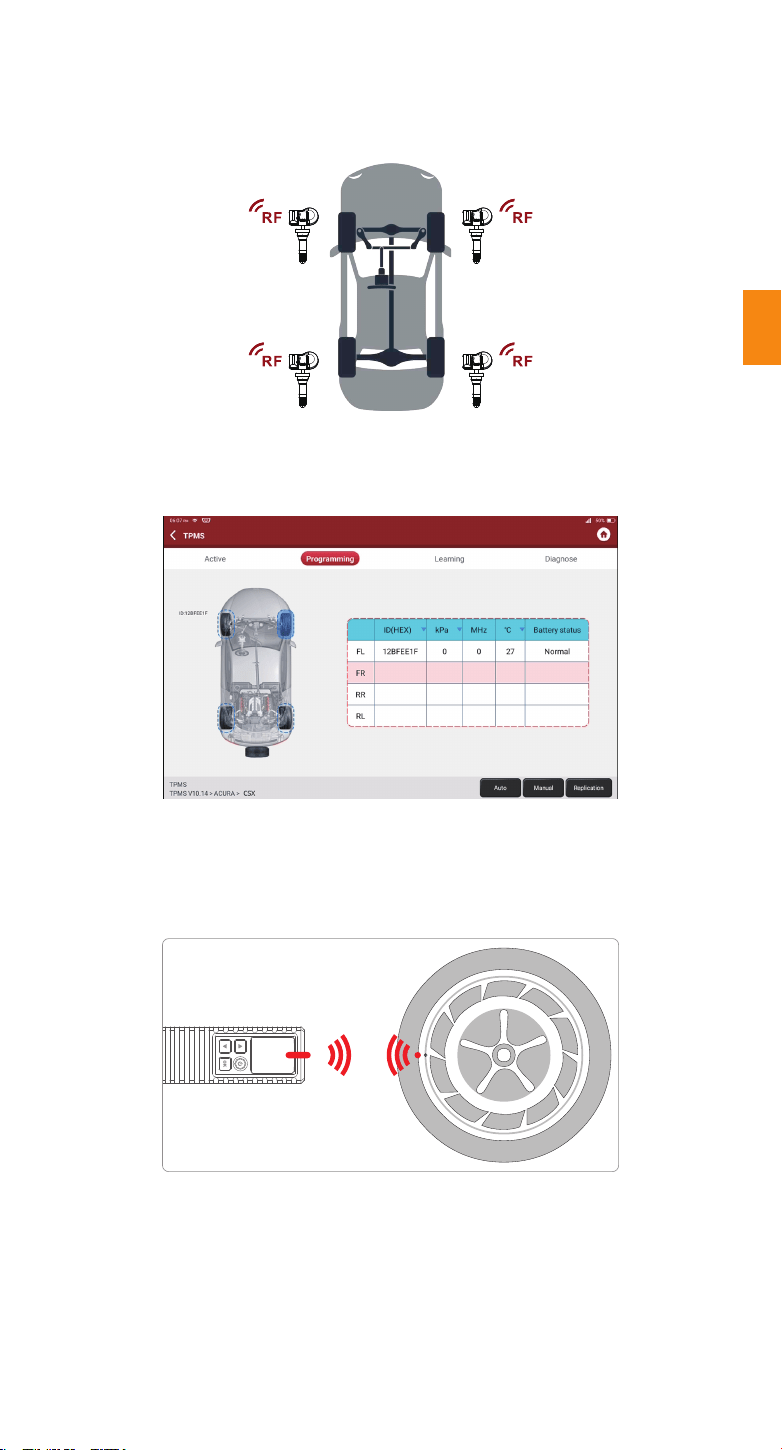
Pour les capteurs universels, placez le THINKCAR T-Wand 200 le long de la tige de soupape,
pointez-le vers l'emplacement du capteur et appuyez sur le bouton OK. Une fois le capteur
activé et décodé avec succès, le THINKCAR T-Wand 200 vibrera légèrement et l'écran
affichera les données du capteur.
Cette fonction permet aux utilisateurs d'activer le capteur TPMS pour visualiser des données
telles que l'identifiant (ID) du capteur, la pression, la fréquence et la température des pneus,
ainsi que l'état de la batterie.
2.2 Activation du capteur
Remarques:
L'outil fera le test TPMS dans une séquence de AG (avant gauche), AD (avant droit), ArD (arrière droit), ArG (arrière
gauche) et RECHANGE, si le véhicule a l'option pour la roue de secours. Ou bien, vous pouvez utiliser le bouton▲/▼
pour vous déplacer vers la roue souhaitée pour le test.
FR
Remarques :
1. Pour les premiers capteurs activés par aimant, placez l'aimant sur la tige, puis placez le THINKCAR T-Wand 200
le long de la tige de soupape.
2. Si l’utilisation du capteur TPMS nécessite un dégonflage du pneu (de l'ordre de 10PSI), dégonflez le pneu et placez le
THINKCAR T-Wand 200 le long de la tige tout en appuyant sur le bouton OK.
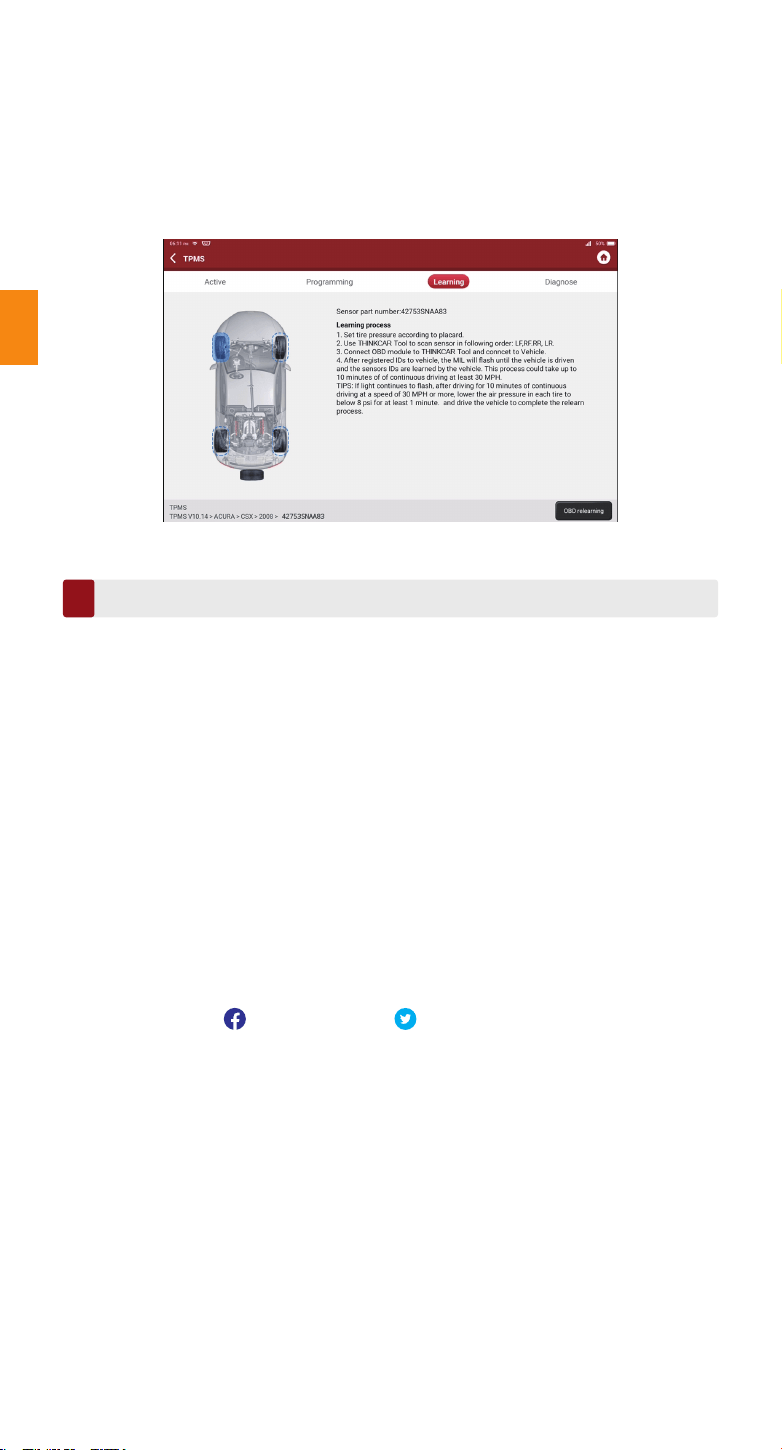
1. Cette fonction est utilisée pour écrire les identifiants (ID) des capteurs nouvellement
programmés dans le calculateur du véhicule pour la reconnaissance des capteurs.
2. L'opération de réapprentissage s'applique uniquement lorsque les identifiants (ID) de
capteurs nouvellement programmés sont différents de ceux des capteurs d'origine stockés
dans le calculateur du véhicule.
3. Le réapprentissage peut se faire de trois manières différentes : apprentissage statique,
auto-apprentissage et réapprentissage par OBD.
2.3 Réapprentissage du TPMS
Conditions de garantie
3
Cette garantie s'applique uniquement aux utilisateurs et aux distributeurs qui achètent des
produits THINKCAR TECH INC www.thinkcar.com THINKCAR T-Wand 200 selon les
procédures normales. Dans un délai d'un an à compter de la date de livraison, THINKCAR
garantit ses produits électroniques contre les dommages causés par des défauts de matériaux
ou de fabrication. Les dommages à l'équipement ou aux composants dus à un abus, une
modification non autorisée, une utilisation à des fins non conçues, un fonctionnement non
spécifié dans les instructions, etc. ne sont pas couverts par cette garantie. L'indemnisation des
dommages au tableau de bord causés par le défaut de cet équipement est limitée à la
réparation ou au remplacement. THINKCAR TECH ne supporte aucune perte indirecte et
accidentelle. THINKCAR TECH jugera la nature des dommages matériels selon ses méthodes
d'inspection prescrites. Aucun agent, employé ou représentant commercial de THINKCAR
TECH n'est autorisé à faire une confirmation, un avis ou une promesse concernant les produits
THINKCAR TECH.
Ligne de service: 1-909-757-1959
Courriel du service clientèle: support@thinkcar.com
Site Web officiel: www.thinkcar.com
Le didacticiel sur les produits, les vidéos, la FAQ et la liste de couverture sont disponibles sur
le site Web officiel de Thinkcar.
Abonnerz-vous sur
@thinkcar.official @ObdThinkcar
FR
Consejos: THINKCAR T-Wand 200 se puede utilizar junto con equipos de diagnóstico a través
de la aplicación móvil.
Antena TPMS
Pantalla de visualización
Botón de encendido
Botón de arriba
Botón OK (Confirmar)
Botón Abajo
Puerto de carga
Introducción del producto
1
Cómo utilizar
Encendido / Apagado
2
Notas:
Si no lo ha utilizado durante mucho tiempo, cárguelo primero. Mientras se carga, el LED se ilumina en rojo. Una vez que
el LED cambia a verde, indica que la carga está completa.
Presione el botón durante unos 3 segundos para encenderlo. Sonará un pitido y la pantalla
se iluminará.
Pulse el botón durante unos 3 segundos para apagarlo.
ES
1. Cómo utilizar la aplicación móvil
1.1 Busque "ThinkDiag +" en GooglePlay, "ThinkDiag" en la tienda de aplicaciones. La
aplicación ThinkDiag + se puede descargar GRATIS. (como se muestra en la figura
siguiente)
ThinkDiag
ThinkDiag
5
Cancelar
ABIERTO
5
ThinkDiag+
(iOS) (Android)
ES
1.2 Registro de cuenta de correo electrónico
1.3 Vaya a la página de inicio y seleccione “ ”
1.4 Seleccione el módulo THINKTPMS
1.5 Ingrese el número SN y el código de activación para vincular el dispositivo
1.6 Después de que el enlace sea exitoso, el programa se actualizará automáticamente
THINKTPMS
Leer ID de sensor,
presión, temperatura.
Lea el estado del nivel
de la batería.
Programación...
Activar
Número de serie
Código de activación
ATTIVAZIONE
CODICE
SN
SN
Activar
Prueba Demo
Compra
ahora
La función de diagnóstico aún no está disponible,
activar el dispositivo con su cuenta ahora.
ACTIVACIÓN
Actualización de software
Descargar software de diagnóstico
Se descargará un software de diagnóstico profesional
para su vehículo. Por favor sea paciente.
10%
Iniciar sesión
Su dirección de correo electrónico
Contraseña
Registrarse Olvidar contraseña
Iniciar sesión
Registrarse
Ingrese el nombre de usuario de 2-20 letras
Por favor, introduzca su contraseña
¿Tener una cuenta?
Próximo
ES
1.7 Seleccione los modelos de la marca
Funciones
ABARTH
ACURA
Alfa Romeo
1.8 Seleccione modelos
Funciones
A1
A2
A3
1.9 Seleccione la banda de frecuencia del año del sensor de presión de neumáticos
Funciones
2002/10 - 2004/04(433MHz)
2004/05 - 2009/05(433MHz) 4B
2009/01 - 2011/12(Indirect)
1.10 Usando THINKCAR T-Wand 200, admite la activación del sensor de presión de los
neumáticos, leyendo la versión número y lectura del valor de presión de los neumáticos.
Para función de programación en línea y neumático función de aprendizaje de presión,
compre el conector THINKDIAG u otro THINKCAR equipo de diagnóstico.
TPMS
Activa Programación Aprendiendo
FL FR
RL RR
TPMS
Activa Programación Aprendiendo
FL FR
RL RR
Auto Manual Replicación
TPMS
Activa Programación Aprendiendo
FL FR
RL RR
TPMS
Activa
Fabricación de sensores: Huf / Beru
Frecuencia del sensor: 433 MHz
Número de pieza del sensor: 4F0907275D
Número de impresión: RDE011
Programación Aprendiendo
Serial Mumber
Notes
Cancel Bind
Activation code
Serial Number
Activation Code
Enter SN and Activation Code
to activate your device
Serial Number:
989xxxxxxxxx
xxxxxxxx
Activation Code:
PASSWORD LETTER
Thinkcar Tech Inc
Este paso se aplicará cuando varios dispositivos THINKCAR T-Wand 200 estén vinculados a
la herramienta de diagnóstico. Si solo unoTHINKCAR T-Wand 200 está vinculado a la
herramienta de diagnóstico, mantenga el dispositivo encendido y toque Aceptar para ignorar
este paso. Si se es la primera vez que utiliza el THINKCAR T-Wand 200, vincúlelo antes de
realizar cualquier operación de TPMS.
2.1 Operaciones de TPMS
Notas:
1. El número de serie está en la placa de identificación en la parte posterior del dispositivo.
2. El código de activación está en la “PASSWORD LETTER”.
Si necesita conocer las herramientas de diagnóstico que admiten la función de presión de los
neumáticos, comuníquese con el Servicio de Clientes en Línea a través de la interfaz de
pedido.
(1) Toque TPMS en "Página de inicio" o "Módulo" de la herramienta de diagnóstico.
(2) Appuyez sur Relier.
(3) L'écran suivant s'affiche.
2. Cómo usar con equipo de diagnóstico
ES
Para sensores universales, coloque el THINKCAR T-Wand 200 junto al vástago de la válvula,
apunte hacia la ubicación del sensor y presione el botón OK. Una vez que el sensor se haya
activado y decodificado con éxito, THINKCAR T-Wand 200 vibrará ligeramente y la pantalla
mostrará los datos del sensor.
Esta función permite a los usuarios activar el sensor TPMS para ver los datos del sensor,
como la identificación del sensor, la presión de las llantas, la frecuencia de las llantas, la
temperatura de las llantas y el estado de la batería.
2.2 Activar sensor
Notas:
La herramienta realizará la prueba TPMS en una secuencia de FL (Delantero Izquierdo), FR (Delantero Derecho), RR
(Trasero Derecho), LR (Trasero Izquierdo) y REPUESTO, si el vehículo tiene la opción de repuesto. O puede usar el
botón ▲ / ▼ para moverse a la rueda deseada para la prueba.
ES
Notas:
1. Para los primeros sensores activados por imán, coloque el imán sobre el vástago y luego coloque el THINKCAR
T-Wand 200 junto al vástago de la válvula.
2. Si el sensor TPMS requiere desinflar la llanta (del orden de 10PSI), desinfle la llanta y coloque el THINKCAR T-Wand
200 junto al vástago mientras presiona el botón OK.
1. Esta función se utiliza para escribir las ID de sensor recién programadas en la ECU del
vehículo para el reconocimiento del sensor.
2.La operación de Reaprendizaje se aplica solo cuando las ID de sensor recién programadas
son diferentes de las ID de sensor originales almacenadas en la ECU del vehículo.
3. Hay tres formas disponibles para el reaprendizaje: aprendizaje estático, autoaprendizaje y
reaprendizaje por OBD.
2.3 Reaprendizaje de TPMS
Términos de garantia
3
Esta garantía se aplica únicamente a los usuarios y distribuidores que compren productos
THINKCAR TECH INC www.thinkcar.com THINKCAR T-Wand 200 mediante procedimientos
normales. En el plazo de un año a partir de la fecha de entrega, THINKCAR TECH garantiza
sus productos electrónicos por daños causados por defectos de materiales o mano de obra.
Los daños al equipo o componentes debido a abuso, modificación no autorizada, uso para
propósitos no diseñados, operación de una manera no especificada en las instrucciones, etc.,
no están cubiertos por esta garantía. La compensación por daños en el tablero de instrumen-
tos causados por el defecto de este equipo se limita a la reparación o reemplazo. THINKCAR
TECH no soporta pérdidas indirectas e incidentales. THINKCAR TECH juzgará la naturaleza
del daño del equipo de acuerdo con sus métodos de inspección prescritos. Ningún agente,
empleado o representante comercial de THINKCAR TECH está autorizado a realizar ninguna
confirmación, aviso o promesa relacionada con los productos de THINKCAR TECH.
Línea de servicio: 1-909-757-1959
Correo electrónico de servicio al cliente: support@thinkcar.com
Sitio web oficial: www.thinkcar.com
Tutorial de productos, videos, preguntas frecuentes y lista de cobertura están disponibles en el
sitio web oficial de Thinkcar.
Síganos en
@thinkcar.official @ObdThinkcar
ES
TPMS-Antenne
Bildschirm
Einschalttaste
Aufwärts-Taste
OK-Taste (Bestätigen)
Abwärts-Taste
Aufladestation
Produkteinführung
1
Verwendung
Einschalten/Ausschalten
2
Anmerkungen:
Wenn Sie das Gerät längere Zeit nicht benutzt haben, laden Sie es bitte zuerst auf. Während des Ladevorgangs leuchtet die
LED rot. Sobald die LED grün leuchtet, ist der Ladevorgang abgeschlossen.
Drücken Sie die Taste etwa 3 Sekunden lang, um das Gerät einzuschalten. Es ertönt ein
Signalton und der Bildschirm leuchtet auf.
Drücken Sie die Taste etwa 3 Sekunden lang, um das Gerät auszuschalten.
DE
ThinkDiag
ThinkDiag
5
Stornieren
ÖFFNEN
1. So verwenden Sie die mobile APP
Tipps: THINKCAR T-Wand 200 kann in Verbindung mit Diagnosegeräten über die mobile APP
verwendet werden.
1.1 Suchen Sie nach „ThinkDiag+“ in GooglePlay, „ThinkDiag“ im App Store. Die ThinkDiag+
App kann KOSTENLOS heruntergeladen werden. (wie in der Abbildung unten gezeigt)
5
ThinkDiag+
(iOS) (Android)
DE
1.2 Registrierung des E-Mail-Kontos
1.3 Gehen Sie zur Startseite und wählen Sie „ “
1.4 Wählen Sie das THINKTPMS-Modul
1.5 Geben Sie die SN-Nummer und den Aktivierungscode ein, um das Gerät zu binden
1.6 Nach erfolgreicher Bindung wird das Programm automatisch aktualisiert
Aktivieren
Seriennummer
Aktivierungscode
ATTIVAZIONE
CODICE
SN
SN
Aktivieren
Demo ausprobieren
Kaufe jetzt
Diagnosefunktion ist noch nicht verfügbar,
aktivieren das Gerät jetzt mit Ihrem Konto.
AKTIVIERUNG
Software-Update
Diagnosesoftware herunterladen
Professionelle Diagnosesoftware wird für Ihr Fahrzeug
heruntergeladen. Bitte haben Sie Geduld.
10%
THINKTPMS
Sensor-ID, Druck,
Temperatur lesen.
Lesen Sie den
Ladezustand des
Akkus ab.
Programmierung...
Einloggen
Ihre E-Mail Adresse
Passwort
Registrieren Passwort vergessen
Einloggen
Registrieren
Nutzernamen eingeben (2-20 Buchstaben)
Bitte geben Sie Ihr Passwort ein
Haben Sie ein Konto?
Nächst
DE
1.7 Modellmarke auswählen
Funktionen
ABARTH
ACURA
Alfa Romeo
1.8 Modelle auswählen
Funktionen
A1
A2
A3
1.9 Wählen Sie das Jahresfrequenzband des Reifendrucksensors
Funktionen
2002/10 - 2004/04(433MHz)
2004/05 - 2009/05(433MHz) 4B
2009/01 - 2011/12(Indirect)
1.10 Mit THINKCAR T-Wand 200 unterstützt es die Aktivierung des Reifendrucksensors, das
Auslesen der Versionsnummer und das Auslesen des Reifendruckwertes. Für die
Online-Programmierfunktion und die Reifendruck-Lernfunktion kaufen Sie bitte den
THINKDIAG-Stecker oder ein anderes THINKCAR-Diagnosegerät.
TPMS
Aktiv Programmierung Lernen
FL FR
RL RR
TPMS
Aktiv Programmierung Lernen
FL FR
RL RR
Auto Handbuch Reproduzieren
TPMS
Aktiv Programmierung Lernen
FL FR
RL RR
TPMS
Aktiv
Sensorhersteller: Huf/Beru
Sensorfrequenz: 433MHz
Sensor-Teilenummer: 4F0907275D
Druck-Nr.: RDE011
Programmierung Lernen
Serial Mumber
Notes
Cancel Bind
Activation code
Serial Number
Activation Code
Enter SN and Activation Code
to activate your device
Serial Number:
989xxxxxxxxx
xxxxxxxx
Activation Code:
PASSWORD LETTER
Thinkcar Tech Inc
Dieser Schritt ist erforderlich, wenn mehrere THINKCAR T-Wand 200-Geräte an das
Diagnosetool angeschlossen sind. Wenn nur ein THINKCAR T-Wand 200 mit dem Diagnose-
tool verbunden ist, lassen Sie das Gerät eingeschaltet und tippen Sie auf OK, um diesen
Schritt zu ignorieren. Wenn Sie das THINKCAR T-Wand 200 zum ersten Mal benutzen,
verbinden Sie es bitte, bevor Sie irgendwelche TPMS-Vorgänge durchführen.
2.1 TPMS-Betrieb
Anmerkungen:
1. Die Seriennummer befindet sich auf dem Typenschild auf der Rückseite des Geräts.
2. Der Aktivierungscode befindet sich auf “PASSWORD LETTER”.
Wenn Sie wissen möchten, welche Diagnosetools die Reifendruckfunktion unterstützen,
wenden Sie sich bitte über die Bestellfunktion an den Online-Kundendienst.
(1) Tippen Sie auf TPMS auf "Startseite" oder "Modul" des Diagnosetools.
(2) Tippen Sie auf Verbinden.
(3) Der folgende Bildschirm wird angezeigt.
2. Verwendung mit Diagnosegeräten
DE
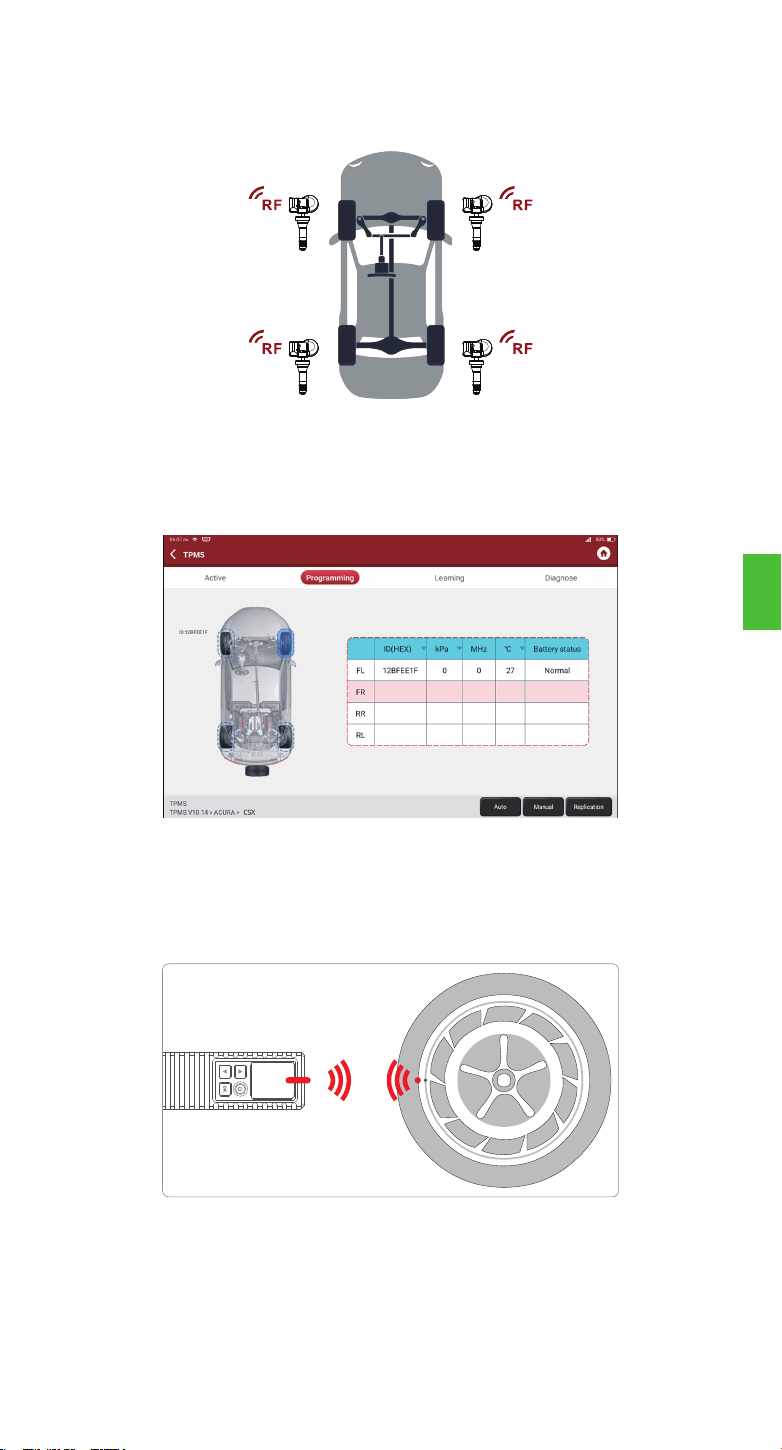
Anmerkungen:
1. Für frühe magnetaktivierte Sensoren platzieren Sie den Magneten über dem Schaft und platzieren dann das THINKCAR
T-Wand 200 neben dem Ventilschaft.
2. Wenn der TPMS-Sensor einen Luftablass des Reifens erfordert (in der Größenordnung von 10 PSI), dann lassen Sie die
Luft aus dem Reifen ab und platzieren Sie das THINKCAR T-Wand 200 neben dem Vorbau, während Sie die OK-Taste
drücken.
Bei Universalsensoren platzieren Sie das THINKCAR T-Wand 200 neben dem Ventilschaft,
zeigen auf die Sensorposition und drücken die OK-Taste. Sobald der Sensor erfolgreich
aktiviert und dekodiert wurde, vibriert das THINKCAR T-Wand 200 leicht und der Bildschirm
zeigt die Sensordaten an.
Mit dieser Funktion kann der Benutzer den TPMS-Sensor aktivieren, um Sensordaten wie
Sensor-ID, Reifendruck, Reifenfrequenz, Reifentemperatur und Batteriezustand anzuzeigen.
2.2 Sensor aktivieren
Hinweis:
Das Gerät führt die TPMS-Prüfung in der Reihenfolge FL (Vorne links), FR (Vorne rechts), RR (Hinten rechts), LR
(Hinten links) und SPARE (Ersatzrad) durch, wenn das Fahrzeug die Option für das Ersatzrad hat. Sie können auch die
▲/▼-Taste verwenden, um das gewünschte Rad für die Prüfung auszuwählen.
DE
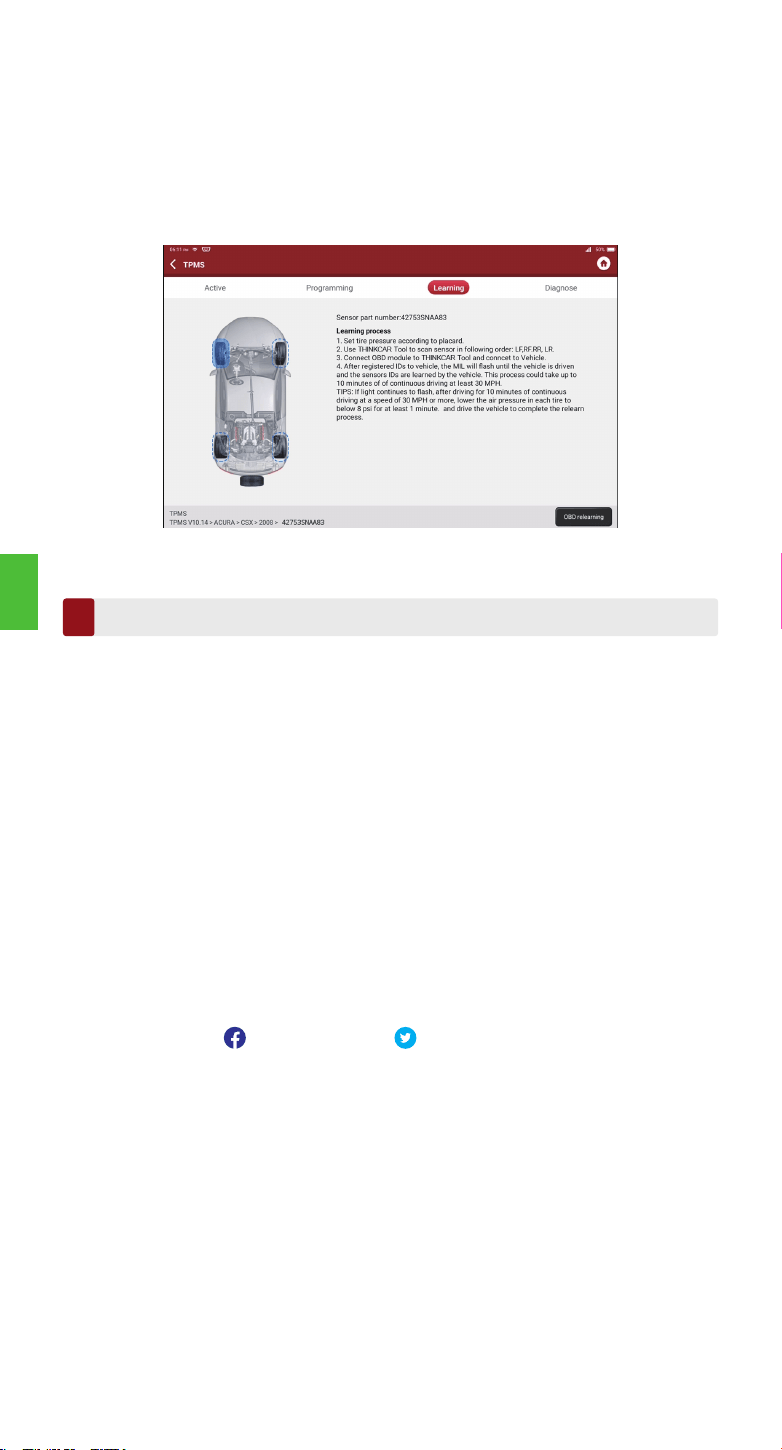
1. Mit dieser Funktion werden die neu programmierten Sensor-IDs zur Sensorerkennung in die
ECU des Fahrzeugs geschrieben.
2. Die Neulernfunktion wird nur angewendet, wenn sich die neu programmierten Sensor-IDs
von den ursprünglichen Sensor-IDs unterscheiden, die in der ECU des Fahrzeugs
gespeichert sind.
3. Es gibt drei Möglichkeiten für das Neulernen: Statisches Lernen, Selbstlernen und
Freifahren per OBD.
2.3 TPMS neu einlernen
Términos de garantia
3
Diese Garantie gilt nur für Benutzer und Händler, die THINKCAR TECH INC www.thinkcar.com
THINKCAR T-Wand 200-Produkte auf normalem Wege erwerben. THINKCAR TECH gewährt
innerhalb eines Jahres ab Lieferdatum eine Garantie auf seine elektronischen Produkte für
Schäden, die auf Material- oder Verarbeitungsfehler zurückzuführen sind. Schäden am Gerät
oder an den Komponenten aufgrund von Missbrauch, unbefugter Modifikation, Verwendung für
nicht vorgesehene Zwecke, Betrieb in einer Weise, die nicht in der Anleitung angegeben ist,
etc. werden von dieser Garantie nicht abgedeckt. Die Entschädigung für Schäden am
Armaturenbrett, die durch einen Defekt dieses Geräts verursacht wurden, ist auf die Reparatur
oder den Ersatz beschränkt. THINKCAR TECH trägt keine indirekten und zufälligen Schäden.
THINKCAR TECH wird die Art des Geräteschadens nach seinen vorgeschriebenen Prüfmetho-
den beurteilen. Keine Agenten, Angestellten oder Handelsvertreter von THINKCAR TECH sind
befugt, irgendwelche Bestätigungen, Mitteilungen oder Versprechungen in Bezug auf
THINKCAR TECH Produkte abzugeben.
Service-Hotline: 1-909-757-1959
Kundendienst-E-Mail: support@thinkcar.com
Offizielle Website: www.thinkcar.com
Produktanleitungen, Videos, FAQ und Abdeckungsliste finden Sie auf der offiziellen Thinkcar
Website.
Folgen Sie uns auf
@thinkcar.official @ObdThinkcar
DE
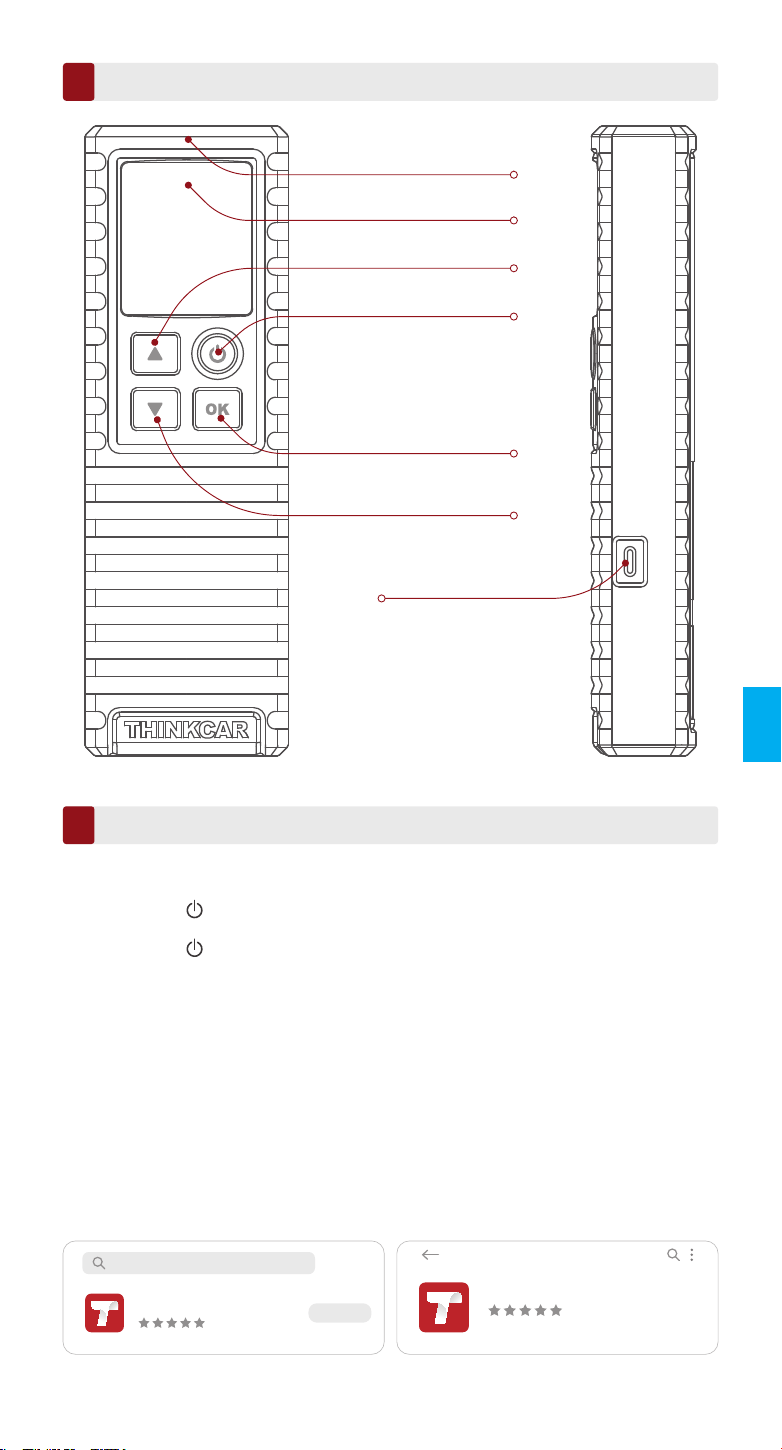
Антенна TPMS
Экран монитора
Кнопка питания
Кнопка вверх
Кнопка OK
(Подтвердить)
Кнопка вниз
Порт зарядки
Премьера продукта
1
Как использовать
Включение / выключение питания
2
Примечания:
Если вы не использовали его в течение длительного времени, сначала зарядите его. Во время зарядки светодиод
горит красным. цвет светодиода изменится на зеленый, это означает, что зарядка завершена.
Нажмите кнопку примерно на 3 секунды, чтобы включить его. Раздастся звуковой
сигнал, и экран загорится.
Нажмите кнопку примерно на 3 секунды, чтобы выключить его.
RU
Conseils: THINKCAR T-Wand 200 peut être utilisé avec un équipement de diagnostic via
l'application mobile.
1. Как использовать мобильное приложение
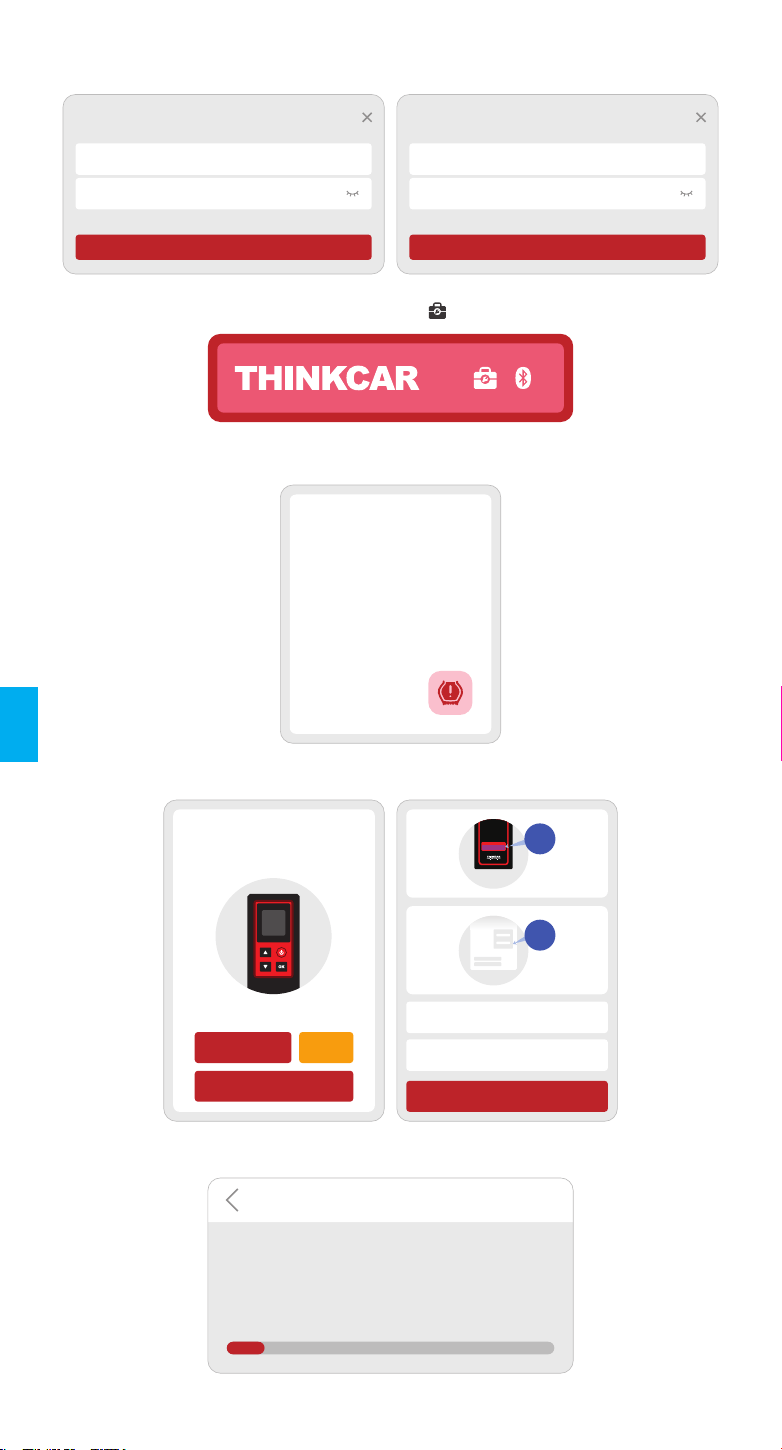
1.1 Найдите «ThinkDiag +» в GooglePlay, «ThinkDiag» в магазине приложений.
Приложение ThinkDiag + можно загрузить БЕСПЛАТНО. (как показано на рисунке
ниже)
ThinkDiag
ThinkDiag
5
Отмена
ОТКРЫТО
5
ThinkDiag+
(iOS) (Android)
RU
1.2 Регистрация учетной записи электронной почты
1.3 Перейдите на главную страницу и выберите « »
1.4 Выберите модуль THINKTPMS
1.5 Введите номер SN и код активации для привязки устройства
1.6 После успешной привязки программа обновится автоматически
THINKTPMS
Считайте
идентификатор
датчика, давление,
температуру.
Считайте уровень
заряда батареи.
Программирование ...
Активировать
Серийный номер
Код активации
ATTIVAZIONE
CODICE
SN
SN
Активировать
Попробовать демо
Купи
сейчас
Функция диагностики пока недоступна, активируйте
устройство с вашей учетной записью сейчас.
АКТИВАЦИЯ
Обновление программного обеспечения
Скачать диагностическое программное
обеспечение
Для вашего автомобиля будет загружено
профессиональное диагностическое программное
обеспечение. Пожалуйста, проявите терпение.
10%
Зарегистрированный
Введите имя пользователя из 2-20 букв
Пожалуйста, введите пароль
Иметь аккаунт?
Следующий
Войдите
Ваша электронная почта
Пароль
Зарегистрированный Forgot Password
Войдите
RU
1.7 Выберите марку моделей
Функции
ABARTH
ACURA
Alfa Romeo
1.8 Выберите модели
Функции
A1
A2
A3
1.9 Выберите годовой диапазон частот датчика давления в шинах
Функции
2002/10 - 2004/04(433MHz)
2004/05 - 2009/05(433MHz) 4B
2009/01 - 2011/12(Indirect)
1.10 Используя THINKCAR T-Wand 200, он поддерживает активацию датчика давления в
шинах, считывание версии число и считывание значения давления в шинах. Для
функции онлайн-программирования и шины функция обучения давлением,
пожалуйста, приобретите разъем THINKDIAG или другой THINKCAR
диагностическое оборудование.
TPMS
Активный Программирование Обучение
FL FR
RL RR
TPMS
Активный Программирование Обучение
FL FR
RL RR
Авто Руководство Репликация
TPMS
Активный Программирование Обучение
FL FR
RL RR
TPMS
Активный
Производитель датчика: Huf / Beru
Частота датчика: 433 МГц
Номер детали датчика: 4F0907275D
Номер печати: RDE011
Программирование Обучение
Serial Mumber
Notes
Cancel Bind
Activation code
Serial Number
Activation Code
Enter SN and Activation Code
to activate your device
Serial Number:
989xxxxxxxxx
xxxxxxxx
Activation Code:
PASSWORD LETTER
Thinkcar Tech Inc
Этот шаг применяется, когда к диагностическому прибору привязано несколько устройств
THINKCAR T-Wand 200. Если бы только один THINKCAR T-Wand 200 привязан к
диагностическому инструменту, оставьте устройство включенным и нажмите «ОК», чтобы
пропустить этот шаг. Если оновы впервые используете THINKCAR T-Wand 200,
пожалуйста, привяжите его перед выполнением каких-либо операций TPMS.
2.1 Операции TPMS
Примечания:
1. Серийный номер указан на паспортной табличке на задней панели устройства.
2. Код активации находится в «PASSWORD LETTER».
Если вам нужно знать диагностические инструменты, поддерживающие функцию
давления в шинах, обратитесь в онлайн-службу поддержки клиентов через интерфейс
заказа.
(1) Нажмите на инструмент диагностики «Домашняя страница» или «модуль» в TPMS.
(2) Нажмите «Привязать».
(3) Появится следующий экран.
2. Как использовать с диагностическим оборудованием
RU
Для универсальных датчиков поместите THINKCAR T-Wand 200 рядом со штоком
клапана, направьте в сторону датчика и нажмите кнопку OK. Как только датчик будет
успешно активирован и декодирован, THINKCAR T-Wand 200 будет слегка вибрировать, и
на экране будут отображаться данные датчика.
Эта функция позволяет пользователям активировать датчик TPMS для просмотра
данных датчиков, таких как идентификатор датчика, давление в шинах, частота шин,
температура в шинах и состояние аккумулятора.
2.2 Активировать датчик
Примечание:
Инструмент будет выполнять проверку TPMS в последовательности FL (передний левый), FR (передний правый),
RR (задний правый), LR (задний левый) и ЗАПАСНОЙ, если в автомобиле есть опция для запасного. Или вы
можете использовать кнопку ▲ / ▼, чтобы перейти к желаемому колесу для тестирования.
Примечания:
1. Для датчиков с ранней активацией магнитом поместите магнит на шток, а затем поместите THINKCAR
T-Wand 200.рядом со штоком клапана.
2. Если датчик TPMS требует спуска воздуха из шины (порядка 10 фунтов на квадратный дюйм), спустите
воздух из шины и поместите THINKCAR T-Wand 200 рядом со штоком, одновременно нажимая кнопку OK.
RU
1. Эта функция используется для записи новых запрограммированных идентификаторов
датчиков в ЭБУ автомобиля.для распознавания датчика.
2.Операция повторного обучения применяется только в том случае, если новые
запрограммированные идентификаторы датчиков отличаютсяиз исходных
идентификаторов датчиков, хранящихся в ЭБУ автомобиля.
3. Существует три способа повторного обучения: статическое обучение, самообучение и
повторное обучение. по OBD.
2.3 Повторное изучение TPMS
Гарантийные Условия
3
Настоящая гарантия распространяется только на пользователей и дистрибьюторов,
приобретающих THINKCAR TECH INC www.thinkcar.com Продукты THINKCAR T-Wand 200
проходят через обычные процедуры. В течение одного года с момента поставки
THINKCAR TECH гарантирует свои электронные продукты на случай повреждений,
вызванных дефектами материалов или изготовления. Настоящая гарантия не
распространяется на повреждения оборудования или компонентов из-за
злоупотреблений, несанкционированной модификации, использования в
неустановленных целях, эксплуатации способом, не указанным в инструкции, и т.д.
Компенсация за повреждение приборной панели, вызванное дефектом данного
оборудования, ограничивается ремонтом или заменой. THINKCAR TECH не несет
никаких косвенных и случайных потерь. THINKCAR TECH будет судить о характере
повреждения оборудования в соответствии с предписанными методами проверки.
Никакие агенты, сотрудники или представители бизнеса THINKCAR TECH не
уполномочены делать какие-либо подтверждения, уведомления или обещания,
связанные с продуктами THINKCAR TECH.
Телефонная линия обслуживания: 1-909-757-1959
Электронная почта поддержки клиентов: support@thinkcar.com
Веб-сайт: www.thinkcar.com
Учебный курс, видео, FAQ доступны на официальном сайте Thinkcar.
Подпишитесь на нас на
@thinkcar.official @ObdThinkcar
RU
Suggerimenti: THINKCAR T-Wand 200 può essere utilizzato in combinazione con apparecchia-
ture diagnostiche tramite l'APP mobile.
Antenna TPMS
Schermo del display
Pulsante di Accensione/
Spegnimento
Pulsante SU
Pulsante OK (Conferma)
Pulsante GIÙ
Porta di ricarica
Introduzione al prodotto
1
Modalità d’uso
Accensione/Spegnimento
2
Note:
Se l’unità è rimasta inutilizzata per lungo tempo, ricaricarla. Durante la ricarica, la spia LED si illumina di rosso.
Quando la spia LED diventa verde, la carica è completa.
Premere il pulsante per 3 secondi circa per accendere lo strumento. Verrà emesso un
segnale acustico e lo schermo si accenderà.
Premere il pulsante per 3 secondi circa per spegnere l’unità.
IT
1. Come utilizzare l'APP mobile
1.1 Cerca "ThinkDiag+" in GooglePlay, "ThinkDiag" nell'App Store. Il download dell'app
ThinkDiag+ è GRATUITO. (come mostrato nella figura sottostante)
ThinkDiag
ThinkDiag
5
Annulla
APERTO
5
ThinkDiag+
(iOS) (Android)
IT
1.2 Registrazione dell'account e-mail
1.3 Vai alla home page e seleziona “ ”
1.4 Selezionare il modulo THINKTPMS
1.5 Immettere il numero SN e il codice di attivazione per associare il dispositivo
1.6 Dopo che il binding è andato a buon fine, il programma verrà aggiornato automaticamente
Attivare
Numero di serie
Codice di attivazione
ATTIVAZIONE
CODICE
SN
SN
Attivare
Prova la demo
La funzione diagnostica non è ancora disponibile,
attiva il dispositivo con il tuo account ora.
ATTIVAZIONE
Acquista
ora
Aggiornamento software
Scarica il software diagnostico
Il software diagnostico professionale verrà scaricato
per il tuo veicolo. Per favore sii paziente.
10%
THINKTPMS
Leggere l'ID del
sensore, la pressione,
la temperatura.
Leggere le condizioni
del livello della batteria.
Programmazione...
Accedi
Il tuo indirizzo email
Password
Register Password dimenticata
Accedi
Register
Inserisci 2-20 lettere nome utente
Si prega di inserire la password
Hai un account?
Prossimo
IT
1.7 Seleziona la marca dei modelli
Funzioni
ABARTH
ACURA
Alfa Romeo
1.8 Seleziona i modelli
Funzioni
A1
A2
A3
1.9 Selezionare la banda di frequenza dell'anno del sensore di pressione dei pneumatici
Funzioni
2002/10 - 2004/04(433MHz)
2004/05 - 2009/05(433MHz) 4B
2009/01 - 2011/12(Indirect)
1.10 Utilizzando THINKCAR T-Wand 200, supporta l'attivazione del sensore di pressione dei
pneumatici, la lettura del numero di versione e la lettura del valore della pressione dei
pneumatici. Per la funzione di programmazione online e la funzione di apprendimento
della pressione dei pneumatici, acquistare il connettore THINKDIAG o altre apparecchia-
ture diagnostiche THINKCAR.
TPMS
Attiva Programmazione Apprendimento
FL FR
RL RR
TPMS
Attiva Programmazione Apprendimento
FL FR
RL RR
Auto Manuale Replica
TPMS
Attiva Programmazione Apprendimento
FL FR
RL RR
TPMS
Attiva
Fabbricazione del sensore: Huf/Beru
Frequenza del sensore: 433 MHz
Codice sensore: 4F0907275D
Stampa n.: RDE011
Programmazione Apprendimento
Serial Mumber
Notes
Cancel Bind
Activation code
Serial Number
Activation Code
Enter SN and Activation Code
to activate your device
Serial Number:
989xxxxxxxxx
xxxxxxxx
Activation Code:
PASSWORD LETTER
Thinkcar Tech Inc
Questo passaggio si applica quando più dispositivi THINKCAR T-Wand 200 sono associati allo
strumento diagnostico. Se solo un dispositivo THINKCAR T-Wand 200 è associato allo
strumento diagnostico, mantenere il dispositivo attivo (ON) e toccare OK per ignorare questo
passaggio. Se questa è la prima volta che si utilizza il dispositivo THINKCAR T-Wand 200,
associarlo prima di effettuare operazioni TPMS.
2.1 Operazioni con l’unità TPMS
Note:
1. Il numero di serie si trova sulla targhetta nominale presente sul retro del dispositivo.
2.Il codice di attivazione si trova sulla “PASSWORD LETTER”.
Se è necessario conoscere gli strumenti diagnostici che supportano la funzionalità di lettura
della pressione degli pneumatici, contattare il Servizio di assistenza clienti tramite l’interfaccia
per gli ordini.
(1) Tocca TPMS su "Homepage" o "Modulo" dello strumento diagnostico.
(2) Toccare Bind (Associa).
(3) Comparirà la seguente schermata.
2. Come utilizzare con apparecchiature diagnostiche
IT
Per i sensori di tipo universale, posizionare il THINKCAR T-Wand 200 lungo lo stelo della
valvola, puntare verso la posizione del sensore e premere OK. Una volta che il sensore è
correttamente attivato e decodificato, il THINKCAR T-Wand 200 vibrerà leggermente e sullo
schermo saranno visualizzati i dati del sensore.
Questa funzione consente agli utenti di attivare il sensore TPMS per visualizzare i dati del
sensore come: ID, pressione pneumatico, frequenza pneumatico, temperatura pneumatico e
condizioni della batteria.
2.2 Attivazione del sensore
Nota:
Lo strumento effettuerà un test TPMS in una sequenza FL (Anteriore sinistro), FR (Anteriore destro), RR (Posteriore
destro), LR (Posteriore sinistro) e SPARE (Riserva), se il veicolo dispone dell’opzione per la riserva. Oppure, è possibile
utilizzare il pulsante ▲/▼ per spostarsi sulla ruota desiderata per il test.
IT
Note:
1. Per i sensori precedenti attivati tramite magnete, collocare il magnete sopra lo stelo, quindi posizionare il THINKCAR
T-Wand 200 lungo lo stelo della valvola.
2. Se il sensore TPMS richiede uno sgonfiaggio dello pneumatico, (dell’ordine di 10PSI), sgonfiare lo pneumatico e
posizionare il THINKCAR T-Wand 200 lungo lo stelo, quindi premere il pulsante OK.
1. Questa funzione è utilizzata per scrivere gli ID di un sensore appena programmati nella
centralina (ECU) del veicolo per il riconoscimento del sensore.
2. La funzione di riapprendimento si applica solo quando gli ID del sensore appena program-
mati sono differenti dagli ID del sensore originale memorizzati nella ECU del veicolo.
3. Sono disponibili tre modalità di riapprendimento. Static Learning (Apprendimento statico),
Self-Learning (Auto-apprendimento) e Relearn (Riapprendimento) da OBD.
2.3 Riapprendimento TPMS
Termini di garanzia
3
Questa garanzia si applica solo agli utenti e ai distributori che acquistano i prodotti THINKCAR
TECH INC www.thinkcar.com THINKCAR T-Wand 200 attraverso le normali procedure. Entro
un anno dalla data di consegna, THINKCAR TECH garantisce i suoi prodotti elettronici per
danni causati da difetti di materiali o di lavorazione. I danni all'apparecchiatura o ai componenti
causati da abuso, modifiche non autorizzate, utilizzo per scopi non previsti, funzionamento in
un modo non specificato nelle istruzioni, ecc. Non sono coperti dalla presente garanzia. Il
risarcimento per danni al cruscotto causati dal difetto di questa apparecchiatura è limitato alla
riparazione o alla sostituzione. THINKCAR TECH non sostiene alcuna perdita indiretta e
incidentale. THINKCAR TECH giudicherà la natura del danno all'apparecchiatura secondo i
metodi di ispezione prescritti. Nessun agente, dipendente o rappresentante aziendale di
THINKCAR TECH è autorizzato a fare alcuna conferma, avviso o promessa relativa ai prodotti
THINKCAR TECH.
Línea de servicio: 1-909-757-1959
Correo electrónico de servicio al cliente: support@thinkcar.com
Sitio web oficial: www.thinkcar.com
Tutorial de productos, videos, preguntas frecuentes y lista de cobertura están disponibles en el
sitio web oficial de Thinkcar.
Síganos en
@thinkcar.official @ObdThinkcar
IT
Antena TPMS
Tela de exibição
Botão de energia
Botão PARA CIMA
Botão OK (Confirmar)
Botão para baixo
Porto de
carregamento
Introdução de Produto
1
Como usar
Ligando / Desligando
2
Notas:
Se você não o usa há muito tempo, carregue-o primeiro. Enquanto estiver sendo carregado, o LED ficará vermelho.
Quando o LED muda para verde, indica que o carregamento foi concluído.
Pressione o botão por cerca de 3 segundos para ligá-lo. Um bipe soará e a tela se
iluminará.
Pressione o botão por cerca de 3 segundos para desligá-lo.
PT
Dicas: THINKCAR T-Wand 200 pode ser usado em conjunto com equipamentos de diagnósti-
co por meio do APP móvel.
ThinkDiag
ThinkDiag
5
Cancelar
ABRIR
1. Como usar o APP móvel
1.1 Pesquise “ThinkDiag +” no GooglePlay, “ThinkDiag” na App store. O download do
aplicativo ThinkDiag + é GRATUITO. (conforme mostrado na figura abaixo)
5
ThinkDiag+
(iOS) (Android)
PT
1.2 Registro de conta de e-mail
1.3 Vá para a página inicial e selecione “ ”
1.4 Selecione o módulo THINKTPMS
1.5 Digite o número SN e o código de ativação para ligar o dispositivo
1.6 Depois que a vinculação for bem-sucedida, o programa será atualizado automaticamente
Ativar
Número de série
Código de ativação
ATTIVAZIONE
CODICE
SN
SN
Ativar
Experimente a demonstração
A função de diagnóstico ainda não está disponível,
ative o dispositivo com sua conta agora.
ATIVAÇÃO
Compre
Agora
Atualização de software
Baixar software de diagnóstico
O software de diagnóstico profissional será baixado
para o seu veículo. Por favor, seja paciente.
10%
THINKTPMS
Leia a ID do sensor,
pressão, temperatu-
ra. Leia a condição
do nível da bateria.
Programação...
Fazer login
Seu endereço de email
Senha
Registre-se Esqueceu a senha
Fazer login
Registre-se
Digite 2-20 letras nome de usuário
Digite sua senha
Ter uma conta?
Próximo
PT
1.7 Selecione a marca de modelos
Funções
ABARTH
ACURA
Alfa Romeo
1.8 Modelos selecionados
Funções
A1
A2
A3
1.9 Selecione a faixa de frequência do ano do sensor de pressão dos pneus
Funções
2002/10 - 2004/04(433MHz)
2004/05 - 2009/05(433MHz) 4B
2009/01 - 2011/12(Indirect)
1.10 Usando o THINKCAR T-Wand 200, ele suporta a ativação do sensor de pressão do pneu,
leitura do número da versão e leitura do valor da pressão do pneu. Para a função de
programação online e função de aprendizagem da pressão dos pneus, adquira o
conector THINKDIAG ou outro equipamento de diagnóstico THINKCAR.
TPMS
Ativa Programação Aprendendo
FL FR
RL RR
TPMS
Ativa Programação Aprendendo
FL FR
RL RR
Auto Manual Replicação
TPMS
Ativa Programação Aprendendo
FL FR
RL RR
TPMS
Ativa
Fabricante do sensor: Huf / Beru
Frequência do sensor: 433 MHz
Número da peça do sensor: 4F0907275D
Imprimir nº: RDE011
Programação Aprendendo
Serial Mumber
Notes
Cancel Bind
Activation code
Serial Number
Activation Code
Enter SN and Activation Code
to activate your device
Serial Number:
989xxxxxxxxx
xxxxxxxx
Activation Code:
PASSWORD LETTER
Thinkcar Tech Inc
Esta etapa deve ser aplicada quando vários dispositivos THINKCAR T-Wand 200 estão
vinculados à ferramenta de diagnóstico. Se apenas um O THINKCAR T-Wand 200 está
vinculado à ferramenta de diagnóstico, mantenha o dispositivo LIGADO e toque em OK para
ignorar esta etapa. Se isso é a primeira vez que usa o THINKCAR T-Wand 200, ligue-o antes
de fazer qualquer operação TPMS.
2.1 Operações de TPMS
Notas:
1. O número de série está na placa de identificação na parte traseira do dispositivo.
2. O código de ativação está na “PASSWORD LETTER”.
Se você precisar conhecer as ferramentas de diagnóstico que suportam a função de pressão
dos pneus, entre em contato com o Atendimento ao Cliente Online por meio da interface do
pedido.
(1) Toque em TPMS em "Página inicial" ou "Módulo" da ferramenta de diagnóstico.
(2) Toque em Vincular.
(3) A tela a seguir aparecerá.
2. Como usar com equipamentos de diagnóstico
PT
Para sensores universais, coloque o THINKCAR T-Wand 200 ao lado da haste da válvula,
aponte em direção ao local do sensor e pressione o botão OK. Assim que o sensor for ativado
e decodificado com sucesso, o THINKCAR T-Wand 200 vibrará ligeiramente e a tela exibirá os
dados do sensor.
Esta função permite aos usuários ativar o sensor TPMS para visualizar os dados do sensor,
como ID do sensor, pressão do pneu, frequência do pneu, temperatura do pneu e condição da
bateria.
2.2 Ative o sensor
Nota:
A ferramenta fará o teste TPMS em uma sequência de FL (Dianteira Esquerda), FR (Dianteira Direita), RR (Traseira
Direita), LR (Traseira Esquerda) e SOBRESSALENTE, caso o veículo tenha a opção de sobressalente. Ou você pode usar
o botão ▲ / ▼ para mover para a roda desejada para teste.
PT
Notas:
1.Para os primeiros sensores ativados por ímã, coloque o ímã sobre a haste e, em seguida, coloque o THINKCAR T-Wand
200 ao lado da haste da válvula.
2.Se o sensor TPMS exigir o esvaziamento do pneu (da ordem de 10 PSI), esvazie o pneu e coloque o THINKCAR T-Wand
200 ao lado da haste enquanto pressiona o botão OK.
1. Esta função é usada para gravar os IDs de sensor recém-programados na ECU do veículo
para reconhecimento do sensor.
2. A operação de reaprendizagem se aplica apenas quando os IDs de sensor recém-pro-
gramados são diferentes dos IDs de sensor originais armazenados na ECU do veículo.
3. Há três maneiras disponíveis para Reaprender: Aprendizado Estático, Autoaprendizagem e
Reaprender por OBD.
2.3 TPMS Reaprender
Termos de garantia
3
Esta garantia se aplica apenas a usuários e distribuidores que compram produtos THINKCAR
TECH INC www.thinkcar.com THINKCAR T-Wand 200 por meio de procedimentos normais. No
prazo de um ano a partir da data de entrega, a THINKCAR TECH garante seus produtos
eletrônicos por danos causados por defeitos de materiais ou de fabricação. Danos ao
equipamento ou componentes devido a abuso, modificação não autorizada, uso para fins não
projetados, operação de maneira não especificada nas instruções, etc. não são cobertos por
esta garantia. A compensação por danos ao painel causados por defeito deste equipamento é
limitada ao reparo ou substituição. A THINKCAR TECH não assume quaisquer perdas
indiretas e acidentais. A THINKCAR TECH julgará a natureza dos danos ao equipamento de
acordo com seus métodos de inspeção prescritos. Nenhum agente, funcionário ou represen-
tante comercial da THINKCAR TECH está autorizado a fazer qualquer confirmação, aviso ou
promessa relacionada aos produtos da THINKCAR TECH.
Linha de serviço: 1-909-757-1959
E-mail de atendimento ao cliente: support@thinkcar.com
site oficial: www.thinkcar.com
Tutorial de produtos, vídeos, perguntas frequentes e lista de cobertura estão disponíveis no
site oficial da Thinkcar.
Siga-nos em
@thinkcar.official @ObdThinkcar
PT
Antena TPMS
Wyświetlacz
Przycisk Zasilania
Przycisk Góra
Przycisk OK
(Zatwierdzenia)
Przycisk Dół
Port ładowania
Introdução de Produto
1
Użytkowanie
Włączenia/Wyłączenie
2
Uwagi:
Jeśli nie korzystałeś z urządzenia przez dłuższy czas, najpierw je naładuj. Podczas ładowania lampa LED świeci na
czerwono. Gdy lampa LED zacznie świecić na zielono, oznacza to że ładowanie dobiegło końca.
Przytrzymaj przycisk na około 3 sekundy aby włączyć. Usłyszysz Usłyszysz sygnał a ekran
się podświetli.
Przytrzymaj przycisk na około 3 sekundy aby wyłączyć.
PL
Wskazówki: THINKCAR T-Wand 200 może być używany w połączeniu ze sprzętem diagnosty-
cznym za pośrednictwem aplikacji mobilnej.
1. JJak korzystać z aplikacji mobilnej
1.1 Wyszukaj „ThinkDiag+” w Google Play, „ThinkDiag” w App Store. Aplikację ThinkDiag+
można pobrać BEZPŁATNIE. (jak pokazano na poniższym rysunku)
ThinkDiag
ThinkDiag
5
Anuluj
OTWARTY
5
ThinkDiag+
(iOS) (Android)
PL
1.2 Rejestracja konta e-mail
1.3 Przejdź do strony głównej i wybierz „ ”
1.4 Wybierz moduł THINKTPMS
1.5 Wprowadź numer SN i kod aktywacyjny, aby powiązać urządzenie
1.6 Po pomyślnym wiązaniu program zostanie automatycznie zaktualizowany
THINKTPMS
Odczytaj ID czujnika,
ciśnienie, temperaturę.
Odczytaj stan
naładowania baterii.
Programowanie...
Aktywuj
Numer seryjny
Kod aktywacyjny
ATTIVAZIONE
CODICE
SN
SN
Zaloguj sie
Twój adres email
Hasło
Zapisać się Zapomniałeś hasła
Zaloguj sie
Zapisać się
Wpisz nazwę użytkownika o długości 2-20 liter
Wprowadź hasło
Mieć konto?
Następny
Aktualizacja oprogramowania
Pobierz oprogramowanie diagnostyczne
Do Twojego pojazdu zostanie pobrane profesjonalne
oprogramowanie diagnostyczne. Proszę być
cierpliwym.
10%
Aktywuj
Wypróbuj demo
Kup Teraz
Funkcja diagnostyczna nie jest jeszcze dostępna,
aktywuj urządzenie z Twoim kontem teraz.
AKTYWACJA
PL
1.7 Wybierz markę modeli
Funkcje
ABARTH
ACURA
Alfa Romeo
1.8 Wybierz modele
Funkcje
A1
A2
A3
1.9 Wybierz pasmo częstotliwości rocznej czujnika ciśnienia w oponach
Funkcje
2002/10 - 2004/04(433MHz)
2004/05 - 2009/05(433MHz) 4B
2009/01 - 2011/12(Indirect)
1.10 Za pomocą THINKCAR T-Wand 200 obsługuje aktywację czujnika ciśnienia w oponach,
odczyt numeru wersji i odczyt wartości ciśnienia w oponach. Aby uzyskać funkcję
programowania online i funkcję uczenia się ciśnienia w oponach, kup złącze THINKDIAG
lub inny sprzęt diagnostyczny THINKCAR.
TPMS
Aktywny Programowanie Uczenie się
FL FR
RL RR
TPMS
Aktywny Programowanie Uczenie się
FL FR
RL RR
Automatyczny Podręcznik Replikacja
TPMS
Aktywny Programowanie Uczenie się
FL FR
RL RR
TPMS
Aktywny
Produkcja czujnika: Huf/Beru
Częstotliwość czujnika: 433 MHz
Numer części czujnika: 4F0907275D
Nr druku: RDE011
Programowanie Uczenie się
Serial Mumber
Notes
Cancel Bind
Activation code
Serial Number
Activation Code
Enter SN and Activation Code
to activate your device
Serial Number:
989xxxxxxxxx
xxxxxxxx
Activation Code:
PASSWORD LETTER
Thinkcar Tech Inc
Krok ten będzie mieć zastosowanie, gdy więcej niż jedno urządzenie THINKCAR T-Wand 200
powiązane zostanie z narzędziem diagnostycznym. Jeśli z narzędziem diagnostycznym
powiązane jest tylko jedno THINKCAR T-Wand 200, pozostaw urządzenie WŁĄCZONE i
naciśnij OK, aby pominąć ten krok. Jeśli korzystasz z THINKCAR T-Wand 200 po raz pierwszy,
przypisz je zanim wykonasz jakiekolwiek operacje TPMS.
2.1 Operacje TPMS
Uwagi:
1. Numer seryjny podany jest na tabliczce z nazwą na tyle urządzenia.
2. Kod aktywacyjny podany jest na „PASSWORD LETTER”.
Jeśli chcesz poznać narzędzia diagnostyczne które wspierają funkcję ciśnienia w oponach,
skontaktuj się z Działem Obsługi Klienta Online za pomocą interfejsu zamówień.
(1) Napauta TPMS „Kotisivu” tai „Moduuli” diagnostiikkatyökalu.
(2) Naciśnij Powiąż.
(3) Pojawi się kolejny ekran.
2. Jak korzystać ze sprzętu diagnostycznego
PL
Uwagi:
1. W przypadku czujników wcześnie aktywowanych magnesem, umieść magnes nad trzpieniem, a następnie umieść
THINKCAR T-Wand 200 wzdłuż trzonka zaworu.
2. Jeśli czujnik TPMS wymagać będzie spuszczenia powietrza z opon (rzędu 10PSI), spuść powietrze z danej opony, a
następnie umieść THINKCAR T-Wand 200 wzdłuż trzpienia, jednocześnie wciskając przycisk OK.
Aby przetestować czujniki uniwersalne, umieść THINKCAR T-Wand 200 wzdłuż trzpienia
zaworu, w kierunku położenia czujnika i naciśnij przycisk OK. Po tym jak czujnik pomyślnie
aktywowany i zdekodowany, THINKCAR T-Wand 200 lekko zawibruje, a na ekranie wyświet-
lone zostaną dane czujnika.
Funkcja ta umożliwia aktywację sensora TPMS w celu przeglądania danych sensora, takich jak
ID sensora, ciśnienie opon, częstotliwość opon, temperatura opon oraz stan baterii.
2.2 Aktywacja Sensora
Uwaga:
Narzędzie przeprowadzać będzie test TPMS w sekwencji FL (Lewy Przód), FR (Prawy Przód), RR (Prawy Tył), LR (Lewy
Tył) oraz SPARE (zapasowe), jeśli pojazd posiada opcję zapasową. Możesz też użyć przycisków ▲/▼ aby przejść do
danego kołu w celu jego przetestowania.
PL
1. Funkcja ta służy do zapisywania nowo zaprogramowanych identyfikatorów czujników w ECU
pojazdu, w celu rozpoznawania czujników.
2. Operacja ponownego zapamiętywania ma zastosowanie jedynie wtedy, gdy nowo
zaprogramowane identyfikatory czujników różnią się od oryginalnych identyfikatorów
czujników przechowywanych w ECU pojazdu.
3. Są trzy sposoby Ponownego Zapamiętywania: Zapamiętywanie Statyczne, Samozapamięty-
wania, oraz Ponowne Zapamiętywanie za pomocą OBD.
2.3 TPMS Reaprender
Warunki gwarancji
3
Niniejsza gwarancja dotyczy wyłącznie użytkowników i dystrybutorów, którzy kupują produkty
THINKCAR TECH INC www.thinkcar.com THINKCAR T-Wand 200 zgodnie z normalnymi
procedurami. Zapewnij bezpłatną gwarancję w ciągu jednego roku. THINKCAR TECH udziela
gwarancji na swoje produkty elektroniczne na szkody spowodowane wadami materiałowymi
lub wykonawczymi. Uszkodzenia sprzętu lub komponentów spowodowane nadużyciem,
nieautoryzowaną modyfikacją, użytkowaniem niezgodnym z przeznaczeniem, działaniem w
sposób nie określony w instrukcji itp. nie są objęte niniejszą gwarancją. Odszkodowanie za
uszkodzenie deski rozdzielczej spowodowane wadą tego sprzętu ogranicza się do naprawy lub
wymiany. THINKCAR TECH nie ponosi żadnych pośrednich i przypadkowych strat. THINKCAR
TECH oceni charakter uszkodzenia sprzętu zgodnie z zalecanymi metodami kontroli. Żaden
agent, pracownicy ani przedstawiciele biznesowi THINKCAR TECH nie są upoważnieni do
składania jakichkolwiek potwierdzeń, zawiadomień ani obietnic związanych z produktami
THINKCAR TECH.
Linia serwisowa: 1-909-757-1959
E-mail obsługi klienta: support@thinkcar.com
Oficjalna strona internetowa: www.thinkcar.com
Samouczek dotyczący produktów, filmy, często zadawane pytania i lista zasięgu są dostępne
na oficjalnej stronie internetowej Thinkcar.
Śledź nas na
@thinkcar.official @ObdThinkcar
PL
TPMSアンテナ
カラー液晶画面表示
電源キー
上キー
確認キー
下キー
充 電 ポート
製品紹介
1
使い方
電源のオン/オフ
2
注:
長期間使用されていない場合は、最初に充電してください。充電中は、LEDが赤く点灯します。 LEDが緑色に変わる
と、充電 が完 了したことを示します
ボタンを約3秒間押して、 電源を入れます。 ビープ音が鳴り、画面が点灯します。
ボタンを約3秒間押して、 電源を切ります。
JP
ヒント:THINKCAR T-Wand 200は、モバイルAPPを介して診断機器と組み合わせて使用できます。
1. モバイルアプリの使い方
1.1 GooglePlayで「ThinkDiag +」を検索し、AppStoreで「ThinkDiag」を検索します。 ThinkDiag +ア
プリは無料でダウンロードできます。 (次の図のように)
ThinkDiag
ThinkDiag
5
キャンセル
開いた
5
ThinkDiag+
(iOS) (Android)
JP
1.2 メールアカウント登録
1.3 ホームページに移動し、「 」を選択します
1.4 THINKTPMSモジュールを選択します
1.5 SN番号とアクティベーションコードを入力してデバイスをバインディングします
1.6 バインディングが成功すると、プログラムは自動的に更新されます
ATTIVAZIONE
CODICE
SN
SN
アクティベ ート
シリアルナンバ ー
アクティベ ーションコ ード
診断機能は利用できませんまだ、今お使いのアカウ
ントでデバイスを有効にします。
活性化
アクティベ ート
デモを試す
今買う
ソフトウェア の 更 新
診 断 ソフトウェア を ダ ウン ロ ードする
あなたの車のために専門の診断ソフトウェアがダウンロー
ド さ れ ま す 。 し ば ら く お 待 ち く だ さ い 。
10%
THINKTPMS
センサーID、圧力、温度
を 読 み 取 り ま す 。 バ ッ テ
リーレベルの状態を読み
取 り ま す 。 プ ロ グ ラ ミ ン
グ...
ログイン
メールアドレス
パスワード
登錄 パスワードを忘 れた
ログイン
登錄
2~20文字のユーザー名を入力してください
パスワードを入力してください
ア カウントを 持ってい ます?
次へ
JP
1.7 車ブランドモデルを選択 します
機能
ABARTH
ACURA
Alfa Romeo
1.8 モデルを選択 します
機能
A1
A2
A3
1.9 タイヤ空気圧センサーの年次周波数を選んでください
機能
2002/10 - 2004/04(433MHz)
2004/05 - 2009/05(433MHz) 4B
2009/01 - 2011/12(Indirect)
1.10 THINKCAR T-Wand 200を使用して、空気圧センサーの起動、バージョン番号の読み取り、空気
圧値の読み取りに対応します。オンラインプログラミング機能とタイヤ空気圧学習機能が必要
な場合は、THINKDIAGコネクタまたは他のTHINKCAR診断装置を購入してください。
TPMS
アクティブ プロ グラミング 学ぶ
FL FR
RL RR
TPMS
アクティブ プロ グラミング 学ぶ
FL FR
RL RR
自動 マニュアル レプリケ ー ション
TPMS
アクティブ プロ グラミング 学ぶ
FL FR
RL RR
TPMS
アクティブ
センサー製造:Huf / Beru
センサー周波数:433MHz
センサー部品番号:4F0907275D
印刷番号:RDE011
プロ グラミング 学ぶ
Serial Mumber
Notes
Cancel Bind
Activation code
Serial Number
Activation Code
Enter SN and Activation Code
to activate your device
Serial Number:
989xxxxxxxxx
xxxxxxxx
Activation Code:
PASSWORD LETTER
Thinkcar Tech Inc
この手順は、複数のTHINKCAR T-Wand 200デバイスが診断ツールにバインドされている場合に適用
されます。 1つだけの場合THINKCAR T-Wand 200は診断ツールにバインドされています。デバイスを
オンのままにし、[OK]をタップしてこの手順を無視します。 それであればTHINKCAR T-Wand 200を初
めて使用する場合は、TPMS操作を実行する前にバインドしてください。
2.1 TPMS操作
注:
�.シリアル番号は、デバイスの背面にあるネームプレートに記載されています。
�.アクティベーションコードは「PASSWORD LETTER」にあります。
タイヤ空気圧機能をサポートする診断ツールについて知る必要がある場合は、注文インターフェース
からオンラインカスタマーサ ー ビスに お 問 い 合 わ せください。
(1) 診断ツールの「ホームページ」または「モジュール」でTPMSをタップします。
(2) [バインド]をタップします。
(3) 次の画面が表示されます。
1. ユーザーはTHINKCAR T-Wand 200を診断ツールにバインドする必要があります。
JP
ユニバーサルセンサーの場合、THINKCAR T-Wand 200をバルブステムの横に配置し、センサーの位
置を指して、[OK]ボタンを押します。 センサーが正常にアクティブ化およびデコードされると、
THINKCAR T-Wand 200がわずかに振動し、画面にセンサーデータが表示されます。
この機能により、ユーザーはTPMSセンサーをアクティブにして、センサーID、タイヤ空気圧、タイヤ周
波数、タイヤ温度、バッテリー状態などのセンサーデータを表示できます。
2.2 センサーをアクティブにします
注:
車両にスペアのオプションがある場合、ツールはFL(左前)、FR(右前)、RR(右後)、LR(左後)、スペアの順序でTPMS
テストを実行します。 または、▲/▼ボタンを使用して、テストする目的のホイールに移動することもできます。
注:
�.初期の磁石作動センサーの場合、ステムの上に磁石を配置してから、バルブステムの横にTHINKCAR T-Wand ���
を配 置します。
�. TPMSセンサーがタイヤの収縮(��PSIのオーダー)を必要とする場合は、タイヤを収縮させ、OKボタンを押しながら
ステムの横にTHINKCAR T-Wand ���を配置します
JP
1. この機能は、新しくプログラムされたセンサーIDを車両のECUに書き込むために使用されますセン
サー認識用。
2. 再学習操作は、新しくプログラムされたセンサーIDが異なる場合にのみ適用されます車両のECU
に保存されている元のセンサーIDから。
3. 再学習には、静的学習、自己学習、OBDによる再学習の3つの方法があります。
4. TPMS再学習
保証条項
3
この保証は、正規の手続きで THINKCAR TECH INC www.thinkcar.com THINKCAR T-Wand 200製
品を購入する顧客にのみ適用されます。THINKCAR TECH は、納品日から1年以内に、材料又は製造
上の欠陥によって引き起こされた損傷に対して、製品の電子部品を提供することを保証します。乱用、
不正な変更、設計以外の目的での使用、マニュアルに違反するの操作などで、引き起こされた機器本
体、又は内部コンポーネントの損傷が本保証の対象外です。機器の故障によって、引き起こされたダ
ッシュボードの損傷に対する補償は、修理又は交換に限定されます。THINKCAR TECHは間接的、及
び偶発的な損失については責任を負いません。THINKCAR TECH は、所定の検査方法に従って、機器
の損傷性質を判断しております。THINKCAR TECHの代理人、従業員、またはビジネス担当者は、
THINKCAR TECH製品の確認、通知、または約束を行う権利を有しません。
サービス・ホット・ライン: 1-909-757-1959
カスタマー・サービス・Eメール: support@thinkcar.com
公式サイト: www.thinkcar.com
製品の教程、ビデオ、Q&A、及びカバレッジリストは、Thinkcarの公式サイトに載せてあります。
フォロ ーする
@thinkcar.official @ObdThinkcar
JP

IC Requirement
This device contains licence-exempt transmitter(s)/receiver(s) that comply with Innovation,-
Science and Economic Development Canada’ s licence-exempt RSS(s). Operation is subject to
the following two conditions:
(1)This device may not cause interference.
(2)This device must accept any interference,including interference that may cause undesired
operation of the device.
L'émetteur/récepteur exempt de licence contenu dans le présent appareil est conforme aux
CNR d'Innovation,Sciences et Développement économique Canada applicables aux appareils
radio exempts de licence. L 'exploitation est autorisée aux deux conditions suivantes:
1)L'appareil ne doit pas produire de brouillage;
2)L'appareil doit accepter tout brouillage radioélectrique subi, même si le brouillage est
susceptible d'en compromettre le fonctionnement.
IC WARNING
Cet équipement est conforme aux limites d’exposition aux rayonnements ISED établies pour
un environnement non contrôlé. L’utilisateur fi nal doit suivre les instructions spécifi ques pour
satisfaire les normes. Cet émetteur ne doit pas être co-implanté ou fonctionner en conjonction
avec toute autre antenne ou transmetteur.
Le dispositif portatif est conçu pour répondre aux exigences d’exposition aux ondes radio
établie par ledéveloppement énergétique DURABLE. Ces exigences un SAR limite de 1,6
W/kg en moyenne pour un gramme de tissu. La valeur SAR la 0.733W/kg plus élevée signalée
en vertu de cette norme lors de la certifi cation de produit à utiliser lorsqu’il est correctement
porté sur le corps.

FCC WARNING
This equipment complies with FCC radiation exposure limits set forth for an uncontrolled
environment. End user must follow the specifi c operating instructions for satisfying RF
exposure compliance. This transmitter must not be co-located or operating in conjunction with
any other antenna or transmitter.
The mobile device is designed to meet the requirements for exposure to radio waves
established by the Federal Communications Commission (USA). These requirements set a
SAR limit of 1.6 W/kg averaged over one gram of tissue. The highest SAR value reported
under this standard during product certifi cation for use when properly worn on the body is
0.733 W/kg.
For body operation, this device has been tested and meets FCC RF exposure guidelines when
used with any accessory that contains no metal and that positions a minimum of 15mm from
the body. Use of other accessories may not ensure compliance with FCC RF exposure
guidelines.
FCC Requirement
Changes or modifications not expressly approved by the party responsible for compliance
could void the user’s authority to operate the equipment. This device complies with Part 15 of
the FCC Rules.
Operation is subject to the following two conditions:
(1) this device may not cause harmful interference, and
(2) this device must accept any interference received, including interference that may cause
undesired operation.
Note: This equipment has been tested and found to comply with the limits for a Class B digital
device, pursuant to Part 15 of the FCC Rules. These limits are designed to provide reasonable
protection against harmful interference in a residential installation. This equipment generates,
uses, and can radiate radio frequency energy, and if not installed and used in accordance with
the instructions, may cause harmful interference to radio communications. However, there is no
guarantee that interference will not occur in a particular installation. If this equipment does
cause harmful interference to radio or television reception,
which can be determined by turning the equipment off and on, the user is encouraged to try to
correct the interference by one or more of the following measures:
– Reorient or relocate the receiving antenna.
– Increase the separation between the equipment and receiver.
– Connect the equipment into an outlet on a circuit different from that to which the receiver is
connected.
– Consult the dealer or an experienced radio/TV technician for help.

Thinkcar Tech Inc
Follow us on
@thinkcar.official @ObdThinkcar