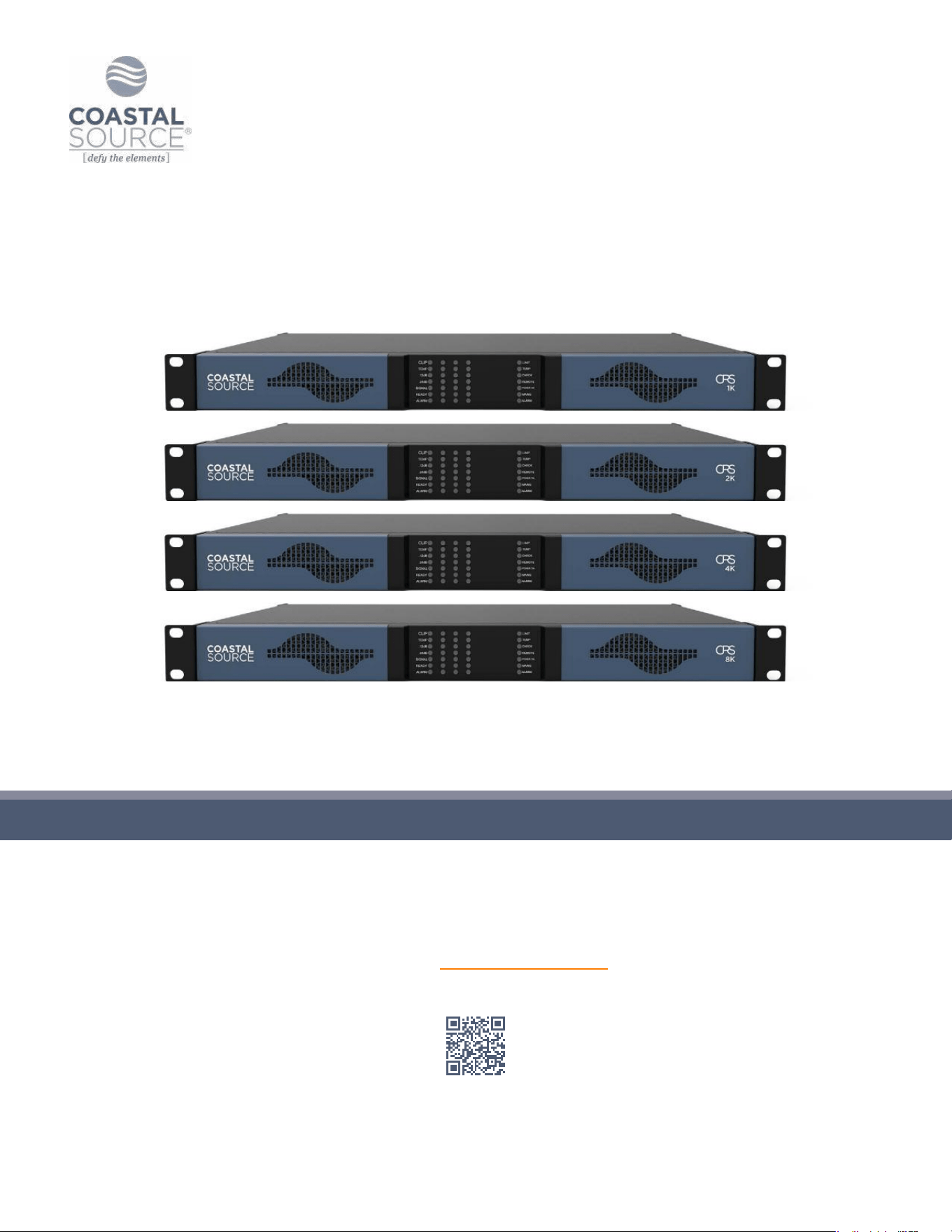
USER
GUIDE
CRS1K/2K/4K/8K
Scan for Specications
Keep this manual for future reference © 2025 Coastal Source

CRS1K/2K/4K/8K User Guide | CoastalSource.com 1
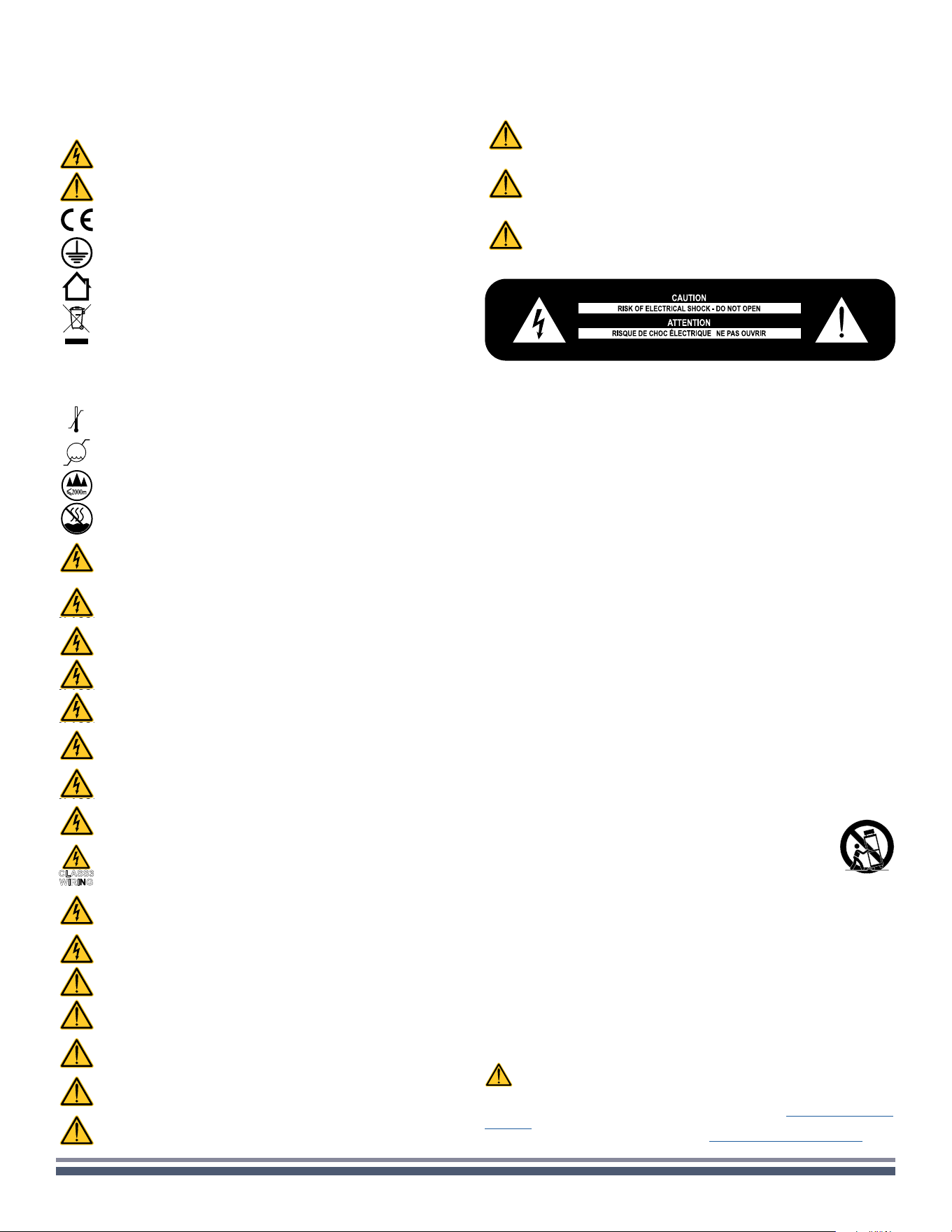
IMPORTANT SAFETY INSTRUCTIONS
SAFETY WARNINGS
+30 °C
0 °C
OPERATING TEMPERATURE RANGE: 32°F TO +122°F - DERATING ABOVE
95°F.
10%
85%
%
STORAGE RELATIVE HUMIDITY RANGE: 10% TO 85% HUMIDITY (NON
CONDENSING).
DO NOT USE THE UNIT AT ALTITUDES ABOVE 6500 FT.
DO NOT USE THE UNIT IN TROPICAL ENVIRONMENT.
CLASS3
TO REDUCE THE RISK OF ELECTRIC SHOCK, DO NOT ATTEMPT TO OPEN
ANY PART OF THE UNIT. NO USER-SERVICEABLE PARTS INSIDE. REFER
SERVICING TO QUALIFIED SERVICE PERSONNEL.
CLASS3
CONNECTION TO THE MAINS SHALL BE DONE ONLY BY A
ELECTROTECHNICAL SKILLED PERSON ACCORDING TO THE NATIONAL
REQUIREMENTS OF THE COUNTRIES WHERE THE UNIT IS SOLD.
CLASS3
DO NOT USE THIS AMPLIFIER IF THE ELECTRICAL POWER CORD IS
FRAYED OR BROKEN.
CLASS3
TO AVOID ELECTRICAL SHOCK, DO NOT TOUCH ANY EXPOSED SPEAKER
WIRING WHILE THE AMPLIFIER IS OPERATING.
CLASS3
DO NOT SPILL WATER OR OTHER LIQUIDS INTO OR ON THE AMPLIFIER.
CLASS3
THIS DEVICE MUST BE POWERED EXCLUSIVELY BY EARTH CONNECTED
MAINS SOCKETS IN ELECTRICAL NETWORKS COMPLIANT TO THE IEC 364
OR SIMILAR RULES
CLASS3
DISCONNECT THE AC MAINS SOURCE BEFORE ATTEMPTING TO CLEAN
ANY PART OF THE AMPLIFIER
CLASS3
COASTAL SOURCE SUGGESTS TO PLUG THE CRS SERIES INTO A 15 A
RATING, C OR D CURVE, BREAKER
CLASS3
WIRING
OUTPUT TERMINALS ARE HAZARDOUS: WIRING CONNECTION TO THESE
TERMINALS REQUIRES INSTALLATION BY AN INSTRUCTED PERSON AND
THE USE OF READY MADE LEADS.
CLASS3
PROPERLY FIT THE AC MAINS PLUG TO THE AMPLIFIER INLET.
BEFORE POWERING THIS AMPLIFIER, VERIFY THAT THE CORRECT
VOLTAGE RATING IS BEING USED.
CLASS3
TAKE CARE TO LOCK THE OUTPUT TERMINAL BEFORE SWITCHING THE
DEVICE ON.
VERIFY THAT YOUR MAINS CONNECTION IS CAPABLE OF SATISFYING
THE POWER RATINGS OF THE DEVICE.
NO NAKED FLAME SOURCES SUCH AS LIGHTED CANDLES SHOULD BE
PLACED ON THE AMPLIFIER.
IT IS HIGHLY RECOMMENDED TO UNPLUG THE OUTPUT CONNECTORS
BEFORE PROCEEDING WITH THE SELF CHECK PROCEDURE
THE TESTING SIGNALS MIGHT CAUSE LOUDSPEAKER IMPAIRMENTS.
TO PREVENT INJURY, THIS APPARATUS MUST BE SECURELY RACK
MOUNTED IN ACCORDANCE WITH THE INSTALLATION INSTRUCTIONS.
COMMON SYMBOLS AND MEANINGS
CLASS3
THE TRIANGLE WITH THE LIGHTNING BOLT IS USED TO ALERT THE USER TO
THE RISK OF ELECTRIC SHOCK.
THE TRIANGLE WITH THE EXCLAMATION POINT IS USED TO ALERT THE
USER TO IMPORTANT OPERATING OR MAINTENANCE INSTRUCTIONS.
THE CE-MARK INDICATES THE COMPLIANCE OF THE PRODUCT TO ALL THE
APPLICABLE EUROPEAN DIRECTIVES
SYMBOL FOR EARTH/GROUND CONNECTION.
SYMBOL INDICATING THAT THE EQUIPMENT IS FOR INDOOR USE ONLY.
SYMBOL FOR CONFORMITY WITH DIRECTIVE 2012/19/EC OF THE
EUROPEAN PARLIAMENT ON WASTE ELECTRICAL AND ELECTRONIC
EQUIPMENT (WEEE).
Please read and keep all safety and use instructions.
This product is intended for installation by professional installers only!
This document is intended to provide professional installers with basic
installation and safety guidelines for this product in typical xed-installation
systems. Please read this document and all safety warnings before
attempting installation.
1. Read these instructions.
2. Keep these instructions.
3. Heed all warnings.
4. Follow all instructions.
5. Do not use this equipment near water.
6. Clean only with a dry cloth.
7. Do not block any ventilation openings. Install in accordance with the
manufacturer’s instructions.
8. Do not install near any heat sources such as radiators, heat registers,
stoves, or other apparatus that produce heat.
9. Do not defeat the safety purpose of the polarized or grounding-type
plug. A polarized plug has two blades with one wider than the other.
A grounding-type plug has two blades and a third grounding prong.
The wide blade or the third prong are provided for your safety. If the
provided plug does not t into your outlet, consult an electrician for
replacement of the obsolete outlet.
10. Protect the power cord from being walked on or pinched particularly
at plugs, convenience receptacles, and the point where they exit from
the apparatus.
11. Only use attachments/accessories specied by the manufacturer.
12. Use only with the cart, stand, tripod, bracket, or table
specied by the manufacturer, or sold with the apparatus.
When a cart is used, use caution when moving the cart/
apparatus combination to avoid injury from tip-over.
13. Unplug this apparatus during lightning storms or when unused for
long periods of time.
14. Refer all servicing to qualied service personnel. Servicing is required
when the apparatus has been damaged in any way, such as power-
supply cord or plug is damaged, liquid has been spilled or objects have
fallen into the apparatus, the apparatus has been exposed to rain or
moisture, does not operate normally, or has been dropped.
WARRANTY AND TECHNICAL SERVICE
This product is covered by a limited warranty.
This Coastal Source product contains no user-serviceable parts. All
warranty repairs must be carried out by Coastal Source.
Contact Coastal Source For Ordinary And Extraordinary Maintenance.
To learn more about warranty terms and conditions, visit
coastalsource.com/
warranty
For any service related inquiry, please visit coastalsource.com/warranty
THIS EQUIPMENT SHALL BE MOUNTED AT A MAXIMUM HEIGHT OF 6.5 FT.
THE MANUFACTURER CANNOT BE HELD RESPONSIBLE FOR DAMAGES
CAUSED TO PERSONS, THINGS OR DATA DUE TO AN IMPROPER OR
MISSING GROUND CONNECTION.
IT IS ABSOLUTELY NECESSARY TO VERIFY THESE FUNDAMENTAL
REQUIREMENTS OF SAFETY AND, IN CASE OF DOUBT, REQUIRE AN
ACCURATE CHECK BY QUALIFIED PERSONNEL.

CRS1K/2K/4K/8K User Guide | CoastalSource.com 2
Location
Install your CRS Amplier in well ventilated rack cabinets.
Secure both front and rear brackets to the rack.
Connect the AC Mains connector to a circuit breaker.
Install the amplier far from EMF emitting devices.
Avoid placing the amplier close to heat generating sources.
Package list
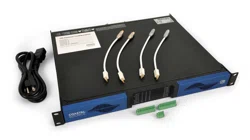
The box contains the following:
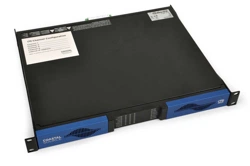
1x CRS amplier.
1x Phoenix MC 1,5/4-ST-3,81 - 1803594 plug
2x Phoenix MC 1,5/12-ST-3,81 - 1803675 plug
1x Pair RCA Input Adapter Cables
1x Phoenix PC 5/8-STF1-7,62 - 177891 plug
3x IEC power cord
1x Quick Start guide
PRELIMINARY OPERATIONS
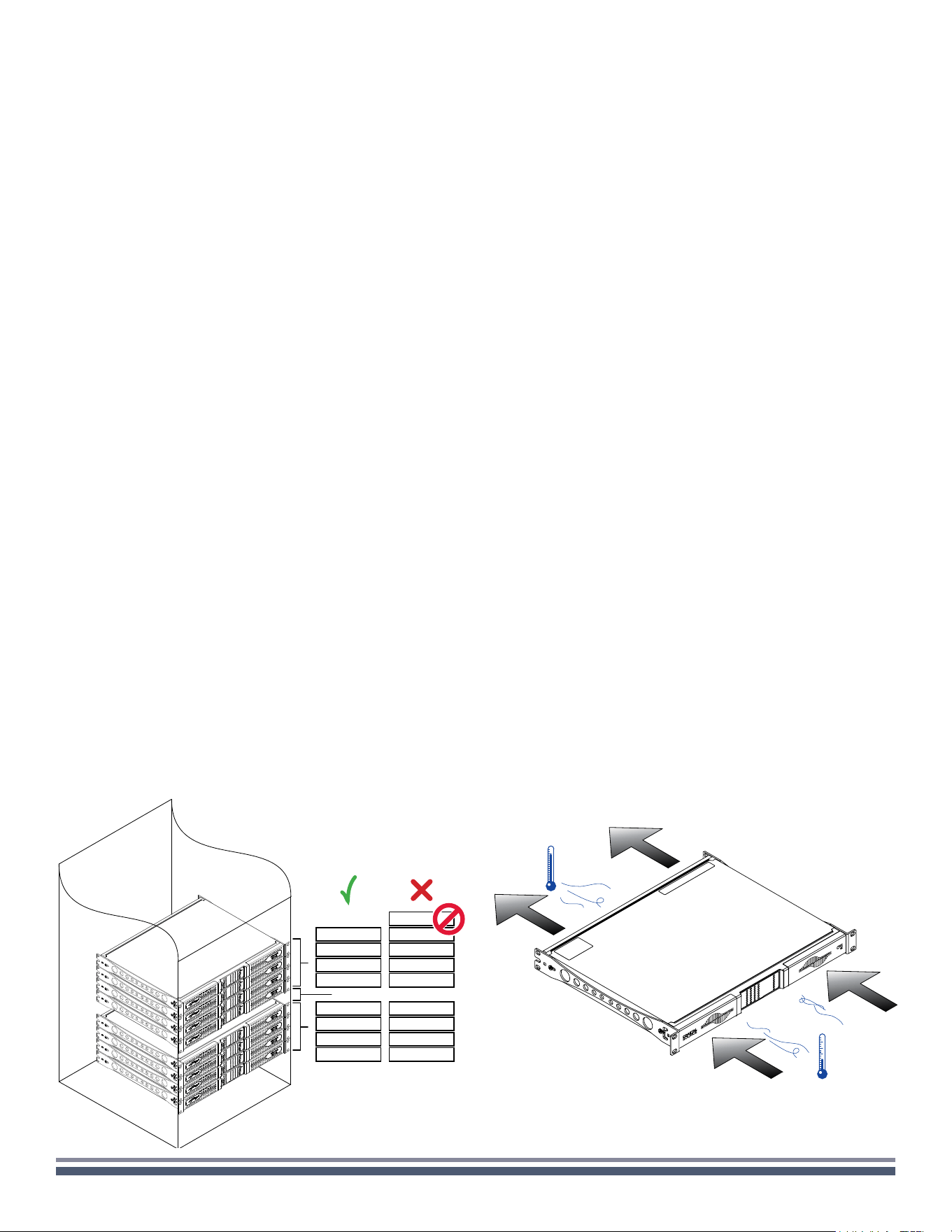
The ventilation openings must not be impeded by any item,
keep a distance of at least 50 cm from the front and rear
ventilation openings of the amplier.
CRS ampliers implement a forced-air cooling system to
maintain constant operating temperatures. Air enters from
the front panel, exiting at the back of the amplier.
The cooling system features variable-speed DC fans controlled
by the heat sink mounted sensors. This ensures that fan noise
and internal dust accumulation are kept to a minimum.
In the rare event of overheating, sensing circuits shut down
all channels until the amplier cools down to a safe operating
temperature. Normal operation is resumed automatically
without the need for user intervention.
CRS ampliers can be stacked one on top of the other, leave
one rack unit empty every four to guarantee adequate air ow.
Use a dry cloth for cleaning the chassis and the front panel.
Air lter cleaning should be scheduled in accordance with the
dust levels in the amplier’s operating environment.
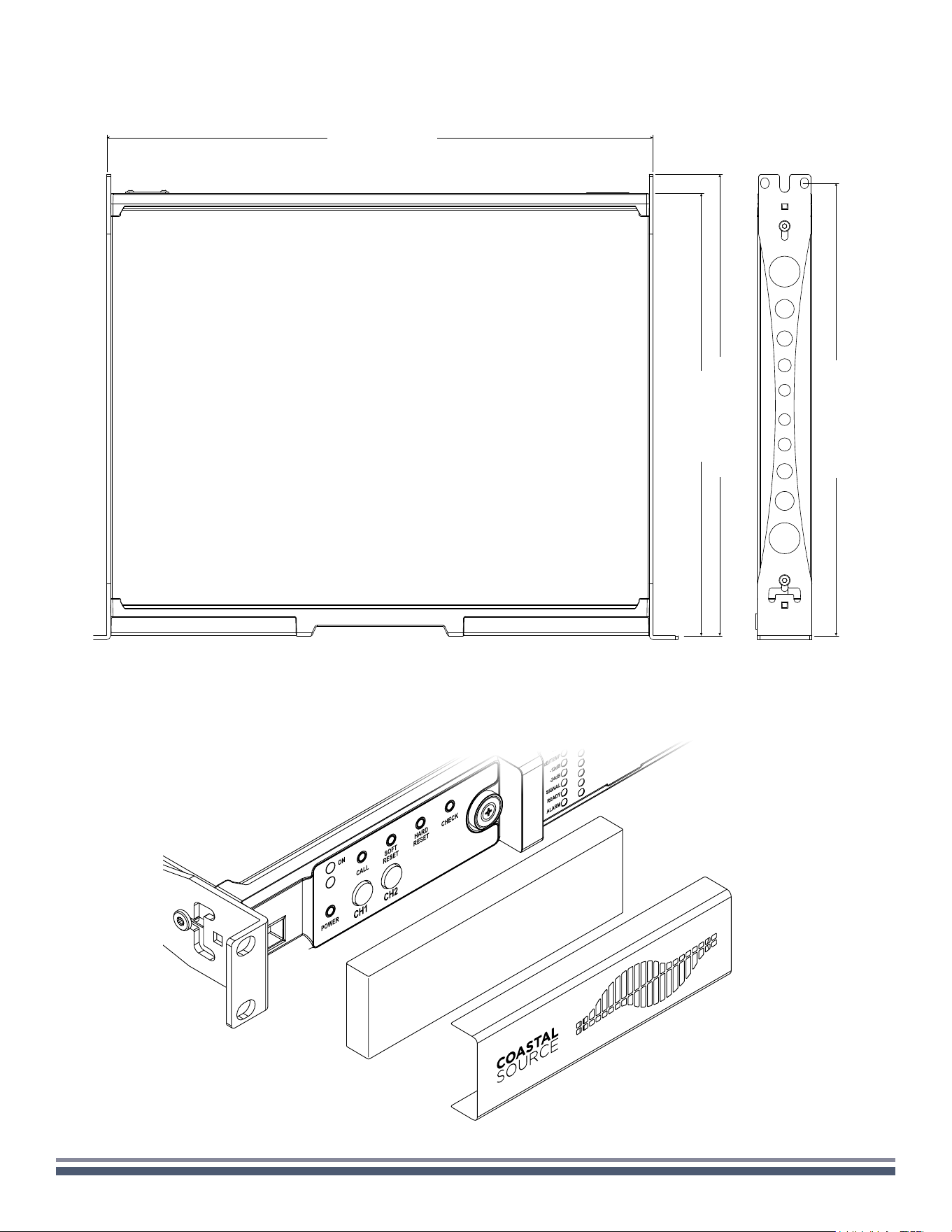
In order to clean the vent lters remove the front cover by rmly
gripping the outermost silver panels and pull them outwards
Use compressed air to remove the dust from lters, or
wash it with clean water (let the lter dry thoroughly before
reinstalling them).
Once properly powered (power cord inserted, sectioning
breaker closed), the system can be either ON or in
STANDBY mode depending on its state at latest power off.
In order to toggle the amplier between ON and STANDBY
keep pressed the power button for 3 seconds. Please
consider that the operating condition can be modied by the
REMOTE ON and REMOTE OFF conguration.
The Smart Rails Management technology implemented in the
power supply unit allows to reduce the power consumption
when the input signal falls under a dened threshold.
When On, Energy Save is active on each channel
independently.
If the signal is missing for more than 30 minutes on all
channels, the auto standby is applied and the main PSU
is turned off to further save energy. Normal operation is
resumed in a matter of milliseconds when an incoming signal
is detected.
In order to activate the Energy Save feature, operate the NRG
SAVE dip switch on the rear panel.
This feature may be activated when the power grid is unable
to provide enough current to continuously drive the loads, or
when the number of amplier connected to the same outlet
is such that one can reach the critical power absorption of
the line.
When activated, the Breaker Save halves the maximum
continuous current absorption from the mains. This slightly
reects on the overall performance of the system, reducing
the available output power.
In order to activate the Breaker Save feature, locate the BRK
SAVE switch on the rear panel.
Cooling
Cleaning
AC Mains Supply
Switching the amplier On and Off
Energy Save
Breaker Save
CRS ampliers implement an universal switching mode
power supply with power factor correction operating in the
range from 100 VAC up to 240 VAC ±10%.
AC mains connection is in the rear panel through the IEC
C20 inlet, the approved power cord is provided.
Remote ON/OFF is available through the dedicated
terminals on the rear panel.
Both terminals respond to the differential voltage between
the contacts: a voltage difference in the range 5 VDC -
24 VDC triggers the control. Any voltage exceeding 28VDC
may damage the input circuitry.
The couple of terminals act depending on the actual state of
the amplier, in accordance with the following table.
Remote On/Off
REMOTE ON REMOTE OFF AMPLIFIER STATE
Vdiff ≥ 5V Any Force Turn ON
Vdiff < 3V Vdiff ≥ 5V Force Turn OFF
Vdiff < 3V Vdiff < 3V
No Change
(Keep either standby or in current state)

CRS1K/2K/4K/8K User Guide | CoastalSource.com 3
The CRS ampliers can operate with different gain applied
to the input signal. This feature is designed to match the
voltage of the input signal.
A proper combination of the position of two GAIN switches
on the rear panel sets the operating gain of the amplier
Output connections are made via the Phoenix PC5/4-STF1-
7,62 177859 port.
CRS amplifiers provide a pair of paralleled general
purpose output connections per channel: one Normally
Open NO and one Normally Closed NC.
The connections are available on the back panel via the
6-pin Phoenix MC 1.5/6-ST-3.81 5447900 connector.
When the amplifier is in normal operating condition the
NO contacts are closed, whilst the NC contacts are open,
and vice-versa.
These contacts are used to report potentially dangerous
faults or generally unsafe operation conditions by
toggling alarm switches relative to the following events,
and any fault preventing the normal operation of an
output channel:
No AC mains (i.e. system shutdown);
Thermal stress: the system temperature is too high and
the thermal protection is engaged;
Short circuit in output wiring: either the loudspeaker or
the line is in short;
Amplifier is in Standby
Any channel of can drive 70V/100V (Hi-Z) distributed line
loudspeakers. In order to connect any channel’s output to
a 70V/100V line, the rear panel DIP switch corresponding
to the channel must be set.
Coastal Source recommends to use the built-in HPF (High
Pass Filter) when the amplier is set to drive a distributed
line to prevent loudspeaker transformer saturation,
which can considerably degrade sound performance.
The HPF can be activated by means of the DIP switch
corresponding to the channel, two cutting frequency are
available 35 Hz and 70 Hz.
The self check procedure tests the amplier status and
reports the user in case of failures.
After few minutes, at the end of the self check procedure, a
combination of lit LED in the LED panel provides information
about the amplier status.
In order to exit the self check test and resume normal
operations, press once the self check push button
6
.
If self check cannot be started because of a fault, the check
LED will blink fast, whilst a reassuring slow blink is an
indication of a completed self check procedure.
There is no ground switch or terminal on the CRS
ampliers. The unit’s signal grounding system is automatic.
In order to limit hum and/or interference entering the signal
path, use balanced input connections.
In the interests of safety, the unit MUST always operate
with electrical safety earth connected to the chassis via the
dedicated Protective Earth
wire.
The level of each channel can be remotely adjusted by
means of a linear 10 kΩ potentiometer connected to the
input LEVEL connector.
When the CH1 MSTR switch is in the OFF position the
remote level potentiometers work independently on each
separate channel.
When the CH1 MSTR switch is in the ON position the
remote level potentiometer of channel 1 acts as a master
level, controlling the volume of both channels.
The remote level controls are in series with the level
adjustment knobs in the front panel.
CRS1K/2K/4K/8K ampliers feature AES67 and accept
two input streams from the dedicated audio over IP port.
Cabling must comply to TIA/EIA-568-B and adopt the
T568B scheme pinout.
The port labelled Ethernet is designed to remotely control
the amplier via an Ethernet connection through a personal
computer and Powersoft ArmoníaPlus software.
Powersoft recommend the use of Ethernet Cat5 straight
through – patch – cables with pin/pair assignments TIA/
EIA-568-B, i.e. T568B.
Analog input connections are made via the Phoenix MC
1,5/6-ST-3,81 5447900 connector.
Gain selection
Output connections
Diagnostics - GPO - Alarms
Hi-Z 70V/100V operations
Self Check
Signal Grounding
Remote Level adjustment
Digital Audio Input connection
Ethernet connection
Analog Audio Input connections
CONNECTIONS
Any mixed conguration of low and high impedance output
loads can be made: in order to set the load conguration,
each channel is provided with four DIP switches.
CRS1K/2K/4K/8K User Guide | CoastalSource.com 4
The detection of a mismatch in the input pilot tone
parameters (frequency and voltage level) can be used to
trigger the backup policy and activate an alert through the
general purpose output switch.
The output pilot tone detection relies on an external signal
passing through the amplier or the internal post DSP pilot
tone generator; in both cases any mismatch between the
detected signal and the set thresholds triggers the general
purpose output switches.
In CRS it is possible to select among two input signal sources
per channel: analog and AES67 streams. ArmoníaPlus
software provides an interface to select the input source.
Furthermore CRS ampliers implement a backup policy
aimed to improve reliability against signal fault. By assigning
a bus priority to the two different input sources per channel,
the system is able to automatically switch to a reliable input
connection in case of signal drop or pilot tone mismatch.
Through the ArmoníaPlus software it is possible to set
the thresholds on the load impedance, at given frequency,
that trigger the general purpose output of any channel in
CRS amplifiers.
Pilot Tone monitoring
Input selection and Backup Policy
Output Load monitoring
Factory default network settings are DHCP/AutoIP.
Inorder for the amplier to self-congure when connected
to an existing LAN or PC. Fixed IP policy can also be adopted
and congured through ArmoníaPlus.
If a DHCP server is not active within the network, the
amplier platform initiates a stateless address auto-
conguration (i.e. Zero-conguration networking
methodology– Zeroconf): it self assigns a local numeric
network address (of the type 169.254.x.y – 172.31.*.* for
the secondary network ifpresent– with a subnet mask
255.255.0.0) and automatically distributes and resolves the
host names of the networking devices.
Both Armonia and the CRS must belong to the same subnet.
If a DHCP server is present on the network and a CRS
amplier is in AUTO IP, networking may become unstable.
Signal Grounding
NETWORKING
ARMONÍAPLUS
CRS ampliers support star network topology via the
Ethernet port and AES67 dedicated AoIP port.
ArmoníaPlus is the default conguring interface that allows
system setting and customization of the CRS ampliers.
Armonía can be installed on a PC running Windows (XPSP3
and higher).
Download ArmoníaPlus for free from the dedicated website:
https://coastalsource.com/outdoor-audio/armoniaplus
As a rule of thumb, turn the DHCP
server on before connecting the ampliers.
IP addressing of a CRS amplier is established during the
bootstrap: when the amplier discovers a DHCP server on
the network during the startup, it negotiates the networking
parameters. If the CRS does not reveal a DHCP server on the
network during the startup, it set itself in AUTO IP mode.
1 1
1 RU
1 RU
1 RU
1
1
2 2
2 2
3 3
3 3
4 4
4 4
5
CoolingLocation
CRS1K/2K/4K/8K User Guide | CoastalSource.com 5
Exposing the Control Panel
Dimensions
44.2 cm
19.0 in
14.0 in
37.3 cm
14.7 in
35.7 cm
36.5 cm
14.4 in
CRS1K/2K/4K/8K User Guide | CoastalSource.com 6
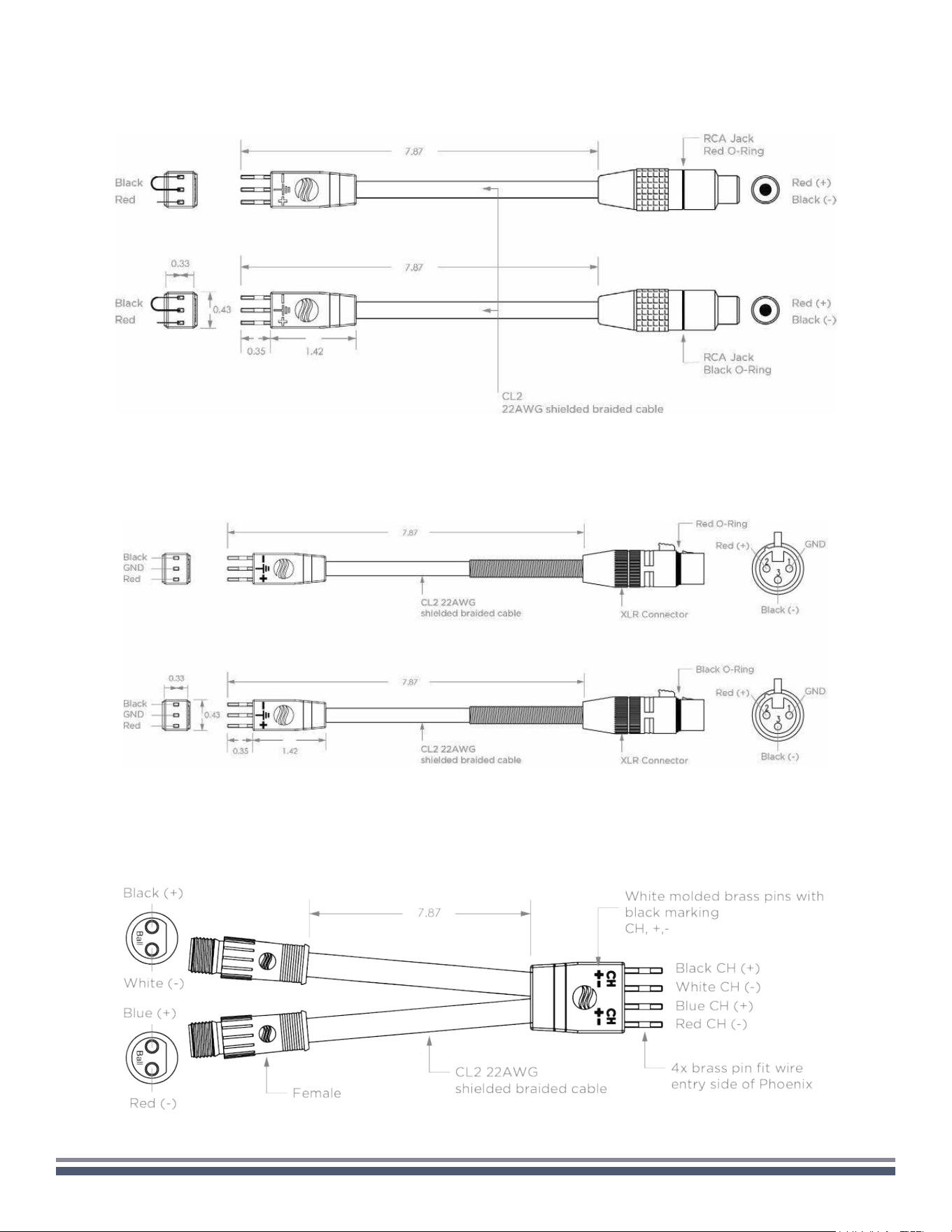
RCA INPUT CABLE ADAPTERS
1 pair included with each CRS Amplier
XLR INPUT CABLE ADAPTERS
sold separately (in pairs) for balanced inputs
CC OUTPUT CABLE ADAPTERS
sold separately (in pairs) for Coastal Connector outputs
CRS1K/2K/4K/8K User Guide | CoastalSource.com 7
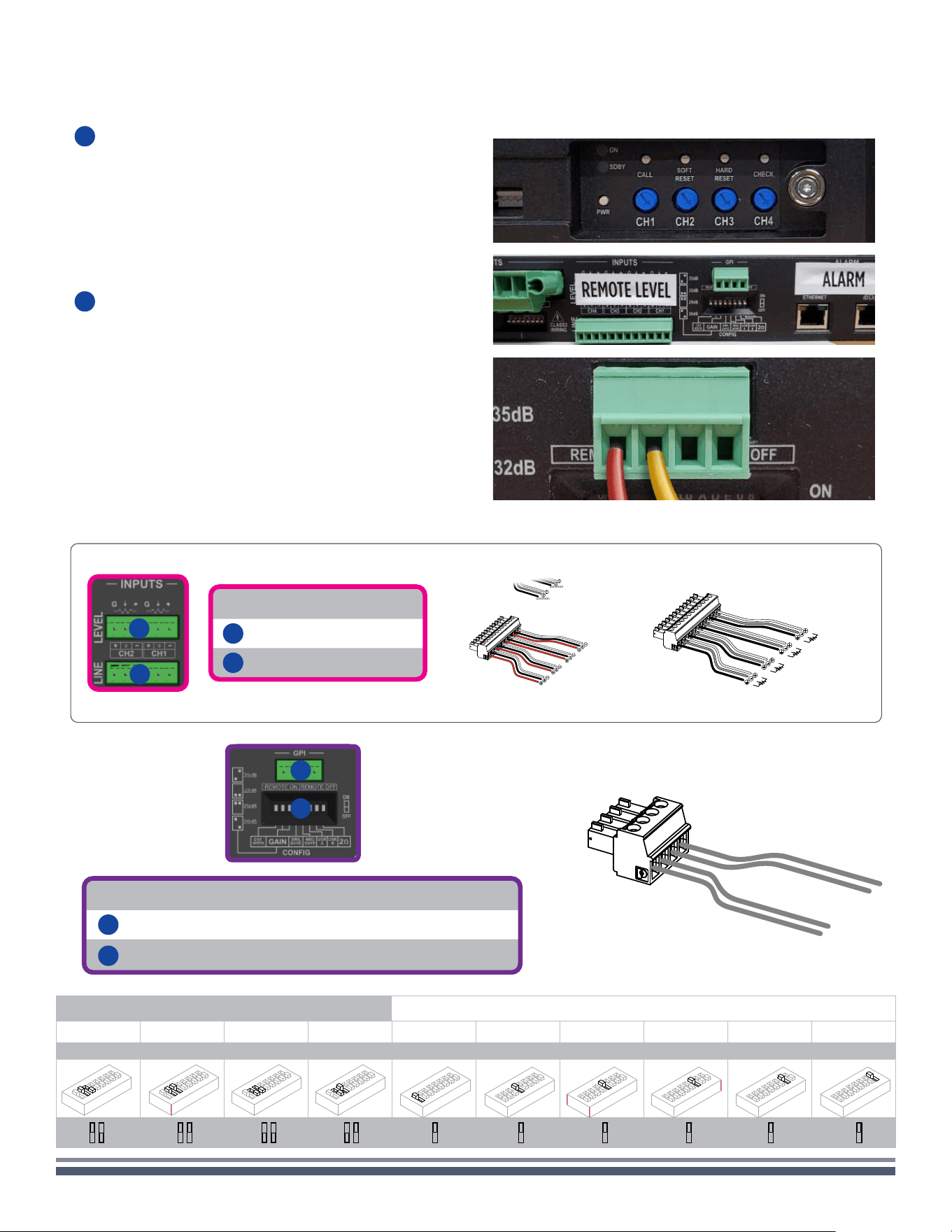
Input section
12
Remote Level connector
13
Line Input connector
12
13
Remote Level
Ch 1
(Or Master)
common
common
Input
Ch 4
Ch 4
Ch 3
Ch 3
Ch 2
Ch 2
Ch 1
Remote On/Off
Remote On/Off - Conguration dip switches
14
Remote On/Off connector (Phoenix MC 1,5/4-ST-3,81 1803594)
15
System Conguration dip switches
14
15
Input Gain Selection
26 dB 29 dB 32 dB 35 dB
CH1 Master BRK Save NRG Save USR A USR B 2 Ω*
2-3 2-3 2-3 2-3 1 4 5 6 7 8
1 2 3 4 5 6 7 8
2 3
Ω
1 2 3 4 5 6 7 8
2 3
Ω
1 2 3 4 5 6 7 8
2 3
Ω
1 2 3 4 5 6 7 8
2 3
Ω
1
1 2 3 4 5 6 7 8
Ω
4
1 2 3 4 5 6 7 8
Ω
5
1 2 3 4 5 6 7 8
Ω
6
1 2 3 4 5 6 7 8
Ω
7
1 2 3 4 5 6 7 8
Ω
8
1 2 3 4 5 6 7 8
Ω
2 3
Ω
2 3
Ω
2 3
Ω
2 3
Ω
1
Ω
4
Ω
5
Ω
6
Ω
7
Ω
8
Ω
With your CRS amplifier plugged in and turned on, press
and hold the power button to put the amplifier into
standby mode. Once in standby mode, the EQ meters
will flash orange at 6 dB/Temp.
Note: to access these controls, remove magnetically
attached faceplate and foam.
With the CRS amplifier in standby, you can wire in your
trigger using the phoenix connector on the rear panel of
the amplifier.
Use the left two terminals of the phoenix connector.
Since this is a DC connection, it is essential to use the
proper polarity. In this connector, the left-most terminal
is positive.
With the connection now complete, the amplifier will
turn on when it detects power via the trigger.
1
Standby Mode
2
Wiring
12V POWER TRIGGER SETUP
+ -
CRS1K/2K/4K/8K User Guide | CoastalSource.com 8
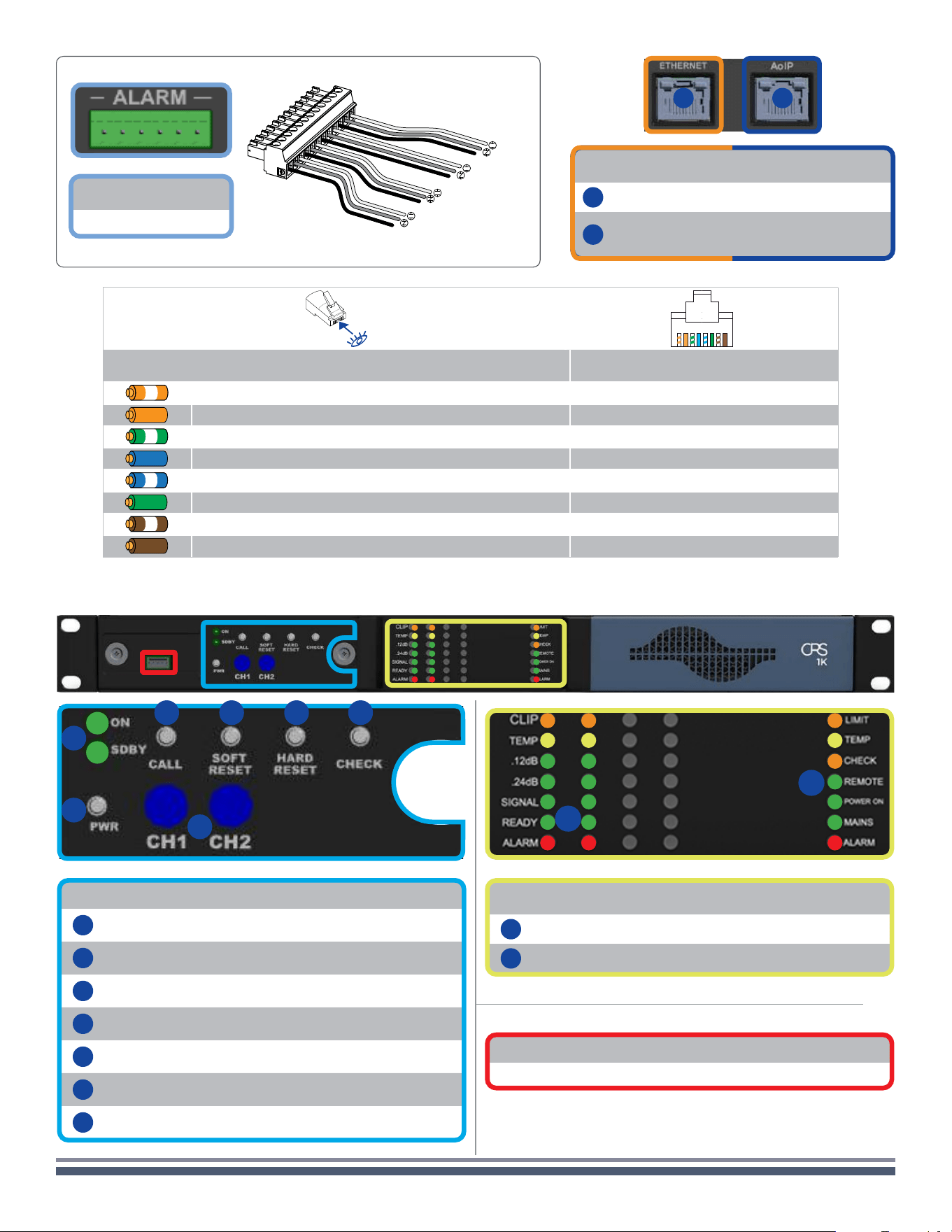
Alarm
GPO/Alarm connector
1 2 3 4 5 6 7 8
Color code (TIA/EIA-568-B) Pin
ORANGE / WHITE 1
ORANGE 2
GREEN / WHITE 3
BLUE 4
BLUE / WHITE 5
GREEN 6
BROWN / WHITE 7
BROWN 8
RJ45
Ethernet and AES67 ports
16
Ethernet port (RJ45)
17
AES67 port (RJ45) - DSP+D
& DSP+ versions only
16 17
common
common
common
common
Ch 4
Ch 3
Ch 2
Ch 1
1
3 4 5 6
7
2
Front Panel
LED Panel
8
Channel Status LED meters
9
System Status LEDs
Serial Port
Reserved for service operations.
Control Panel
1
Operating Mode LEDs (ON/STANDBY)
2
Power pushbutton
3
Armonía Callback pushbutton
4
Soft Reset pushbutton
5
Hard Reset pushbutton
6
Self Check pushbutton
7
CH1, CH2, CH3, CH4 attenuators
8
9
CRS1K/2K/4K/8K User Guide | CoastalSource.com 9
B
1 2 3 4 5 6 7 8
70V
lo-Z
35Hz
HPF Off
100V
hi-Z
70Hz
HPF On
E
1 2 3 4 5 6 7 8
70V
lo-Z
35Hz
HPF Off
100V
hi-Z
70Hz
HPF On
C
1 2 3 4 5 6 7 8
70V
lo-Z
35Hz
HPF Off
100V
hi-Z
70Hz
HPF On
F
1 2 3 4 5 6 7 8
70V
lo-Z
35Hz
HPF Off
100V
hi-Z
70Hz
HPF On
D
1 2 3 4 5 6 7 8
70V
lo-Z
35Hz
HPF Off
100V
hi-Z
70Hz
HPF On
G
1 2 3 4 5 6 7 8
70V
lo-Z
35Hz
HPF Off
100V
hi-Z
70Hz
HPF On
A
1 2 3 4 5 6 7 8
70V
lo-Z
35Hz
HPF Off
100V
hi-Z
70Hz
HPF On
Low-Z High-Z 100V 70V HPF @ 35 Hz HPF @ 70 Hz
A
•
B
• •
C
• • •
D
• • •
E
• •
F
• • •
G
• • •
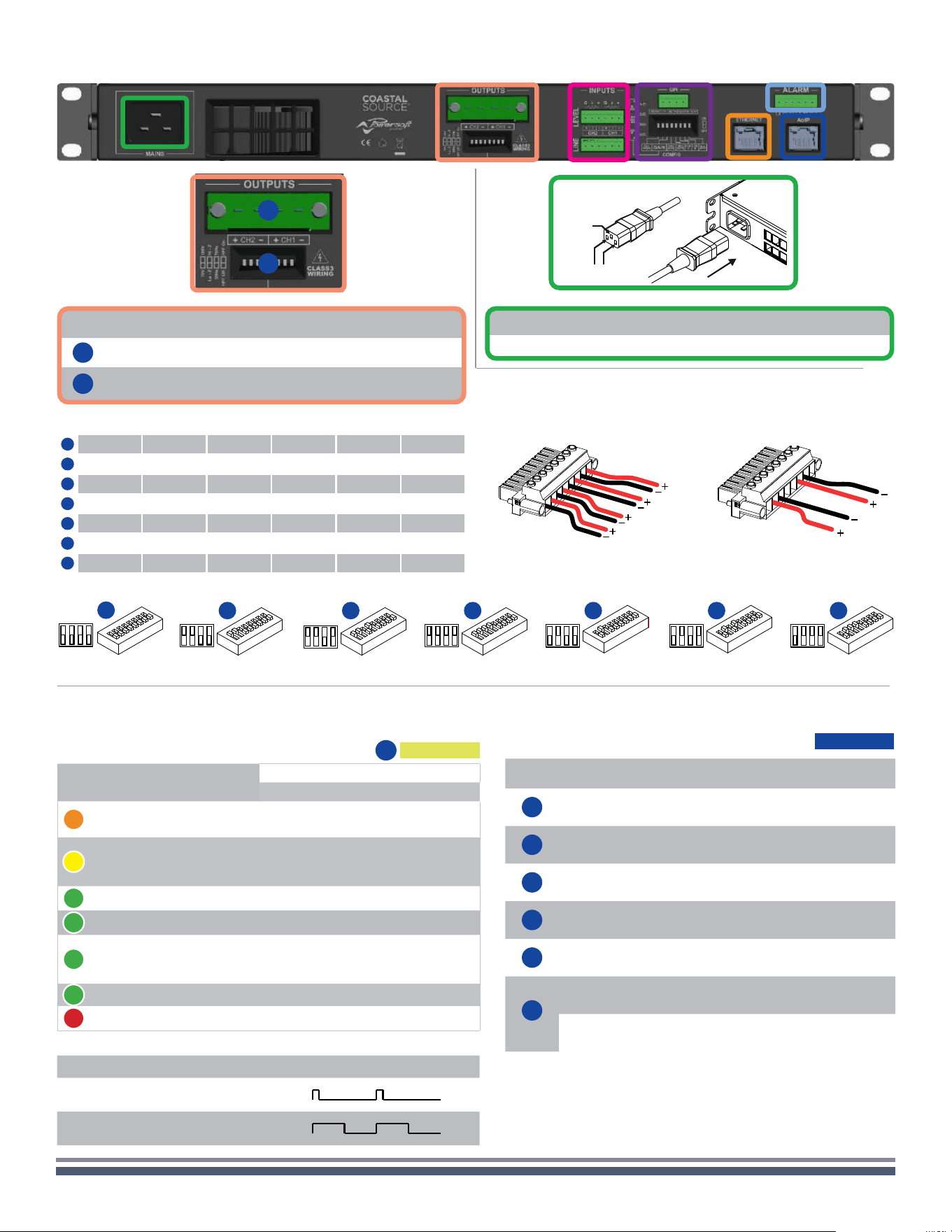
Rear Panel
10
11
Output section
10
Output connector
11
Output conguration Dip Switches
AC Mains Connector
IEC C19
ground
mains
(Flipped view)
Bridged
Single Ended
(Flipped view)
Ch 1
Ch 3
Ch 2
Ch 4
LED CHARTS
Label Label Type Action Description
2
POWER Pushbutton
keep pressed
for 3 seconds
Toggle system ready/
standby mode
3
CALL Pushbutton press
Highlight the amplier
in the Armonía
workspace
4
SOFT
RESET
1
Pushbutton
keep pressed
for 3 seconds
Reset network
parameters to factory
default
5
HARD
RESET
1
Pushbutton
keep pressed
for 3 seconds
Reboot the system
6
CHECK Pushbutton
keep pressed
for 3 seconds
Start the self-checking
procedure*
7
CH1
2
Potentiometer
turn counter-
clockwise
Attenuate the output
level of the signal on
channel 1
CH2
2
Potentiometer
turn counter-
clockwise
Attenuate the output
level of the signal on
channel 2
The push-buttons are disabled when connected to Armonía.
1. Keep pressed both the SOFT RESET button and the HARD RESET button for at least 3
seconds to completely reset the amplier to its factory default conguration (this won’t
delete any preset stored in the internal memory).
2. The potentiometer is in series with the remote level control so it can be used to limit
the output volume regardless to any remote adjustment.
*Press again to resume normal operations
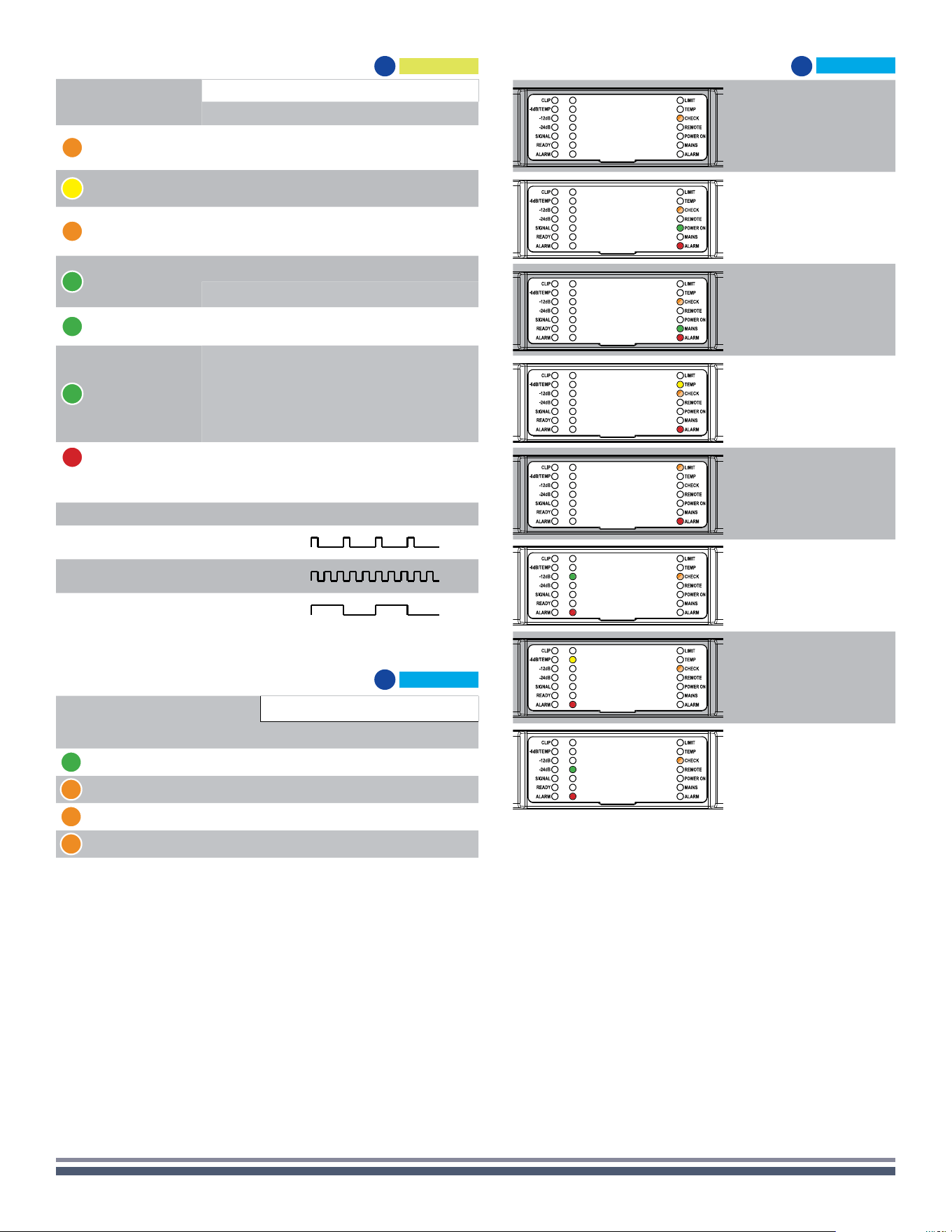
Control Panel
Color Signal Metering
WARNINGS
Lighting Description
ORANGE
Clipping
*DSP+D User Limiter
— —
YELLOW -6dB
SOLID ON
Thermal warning
Thermal protection engaged
FLASHING Auto Standby
GREEN -12dB — —
GREEN -24dB — —
GREEN -60dB
SOLID ON Signal presence
BLINKING Channel muted
GREEN — SOLID ON Channel ready
RED — SOLID ON Channel fault
1
1
Red LED lights on in case of any kind of channel fault that prevents the normal channel operating.
LED Bars, signal metering
8
Lighting Timings Description
FLASHING
100 ms ON
900 ms OFF
BLINKING
500 ms ON
500 ms OFF
CRS1K/2K/4K/8K User Guide | CoastalSource.com 10
Color Name
OPERATING MODE
Standby Power On
GREEN POWER ON — SOLID ON
ORANGE STANDBY SOLID ON —
ORANGE AUTO STANDBY BLINKING —
ORANGE ERROR CODE BLINK COUNTER —
Operating mode LEDs
1
Self Check
6
System OK.
Power supply fault
AC Mains voltage
out of range
(over/under voltage)
PSU temperature
out of range
Fan Error
Channel#
Output Waveform
non-conformity
Channel#
Temperature
out of range
Channel#
Output current measurement
non-conformity
1
1. An 8Ω dummy load is needed to measure the output current. If the dummy load is
not applied the system reports a fault.
Lighting Timings Description
FLASHING
100 ms ON
400 ms OFF
FAST BLINKING
100 ms ON
100 ms OFF
BLINKING
500 ms ON
500 ms OFF
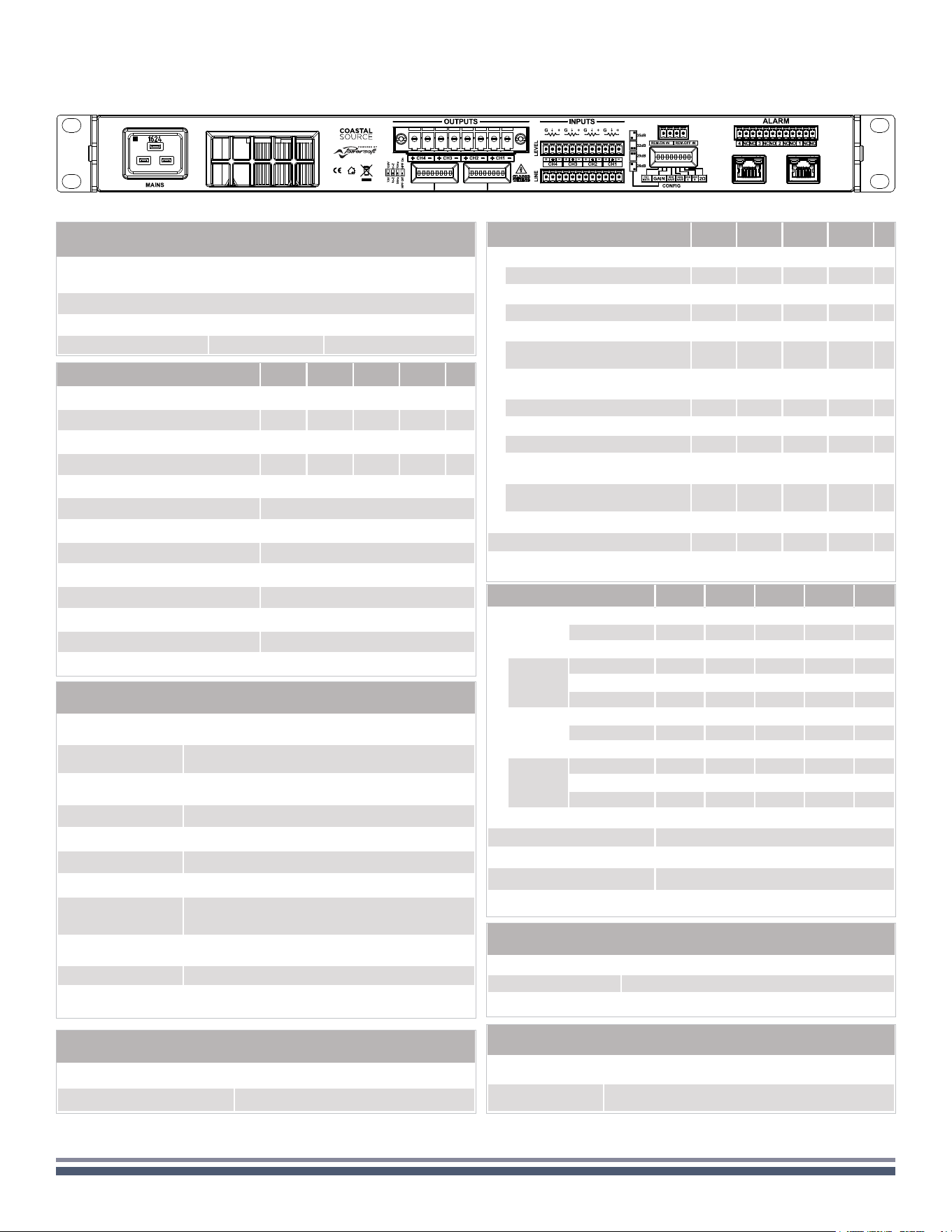
Color Name
WARNINGS
Lightning Description
ORANGE LIMIT
FLASHING Breaker Save Enabled
SOLID ON Breaker Save limiting power draw
YELLOW TEMP SOLID ON
Thermal warning
Thermal protection engaged
ORANGE CHECK
SOLID ON System self checking
BLINKING Self check completed
FAST BLINKING Self Check Unavailable
GREEN REMOTE
SOLID ON Connected to Armonía Pro Audio
OFF Not connected to Armonía Pro Audio
GREEN POWER ON
SOLID ON System ready
OFF System off
GREEN MAINS
SOLID ON
AC mains voltage within the operating
range
OFF Undervoltage
FLASHING Over/Undervoltage Warning
FAST BLINKING Overvoltage
BLINKING Mains FUSES blown
RED ALARM SOLID ON
PSU fault
1
OR Critical Faults
1
Red LED lights on in case of any kind of PSU fault that prevents normal operating.
LED Bar, system status
9
CRS1K/2K/4K/8K User Guide | CoastalSource.com 11
SPECIFICATIONS
AoIPEthernet
Networking
Standards compliance auto-sensing Fast Ethernet (IEEE 802.3u, 100 Mbit/s)
Supported topologies Star
Remote interface ArmoníaPlus™, Powersoft Cloud
DSP
AD converters
24 Bit Tandem™ @ 48 kHz
typical 125 dB-A Dynamic Range - 0.005 % THD+N
DA converters
4 Bit Tandem™ @ 48 kHz
typical 117 dB-A Dynamic Range - 0.003 % THD+N
Sample rate converter
24 Bit @ 44.1 kHz to 96 kHz
typical 140 dB Dynamic Range - 0.0001 % THD+N
Internal precision 32 bit oating point
Latency 2.5 ms xed latency architecture
Memory/Presets 49 amplier snapshots, virtually unlimited speaker presets
Delay 2 s (input) + 100 ms (output) for time alignment
Equalizer
Raised-cosine, custom FIR, parametric IIR:
peaking, hi/lo-shelving, all-pass,
band-pass, band-stop, hi/lo-pass
Crossover
linear phase (FIR), Butterworth,
Linkwitz-Riley, Bessel: 6 dB/oct to 48 dB/oct (IIR)
Limiters TruePower™, RMS voltage, RMS current, Peak limiter
Damping control
Active DampingControl™ and
LiveImpedance™ measurement
Channel Handling
Number of output channels
4 Hi-Z or Lo-Z
(bridgeable per ch. pair)
Phoenix PC 5/8-STF1-7,62
Number of input channels
Analog 4 Phoenix MC 1,5/12-ST-3,81
AES67 4 1 x RJ45
Construction
Dimensions 19.0 x 1.75 x 14.1 in
Weight 15.4 lbs (7 kg)
Power & Thermal
CRS1K CRS2K CRS4K CRS8K
@ 115 V
Idle
Power 31.1 31.1 31.3 34 W
Current Draw 0.45 0.45 0.47 0.56 A
rms
Thermal Loss 106 106 107 116 BTU/h
1/8
Max Power
@ 4Ω
Power 227 405 823 1702 W
Current Draw 2.1 3.7 7.7 15.6 A
rms
Thermal Loss 261 360 760 1713 BTU/h
@ 230 V
Idle
Power 31.5 31.5 31.6 34 W
Current Draw 0.25 0.25 0.27 0.37 A
rms
Thermal Loss 107 107 108 117 BTU/h
1/8
Max Power
@ 4Ω
Power 251 405 840 1676 W
Current Draw 1.4 2.1 4.3 8.2 A
rms
Thermal Loss 344 360 818 1624 BTU/h
Power supply Universal regulated switch mode with PFC, SRM
Nominal voltage (±10%) 100-240 VAC @ 50-60Hz
Operating Voltage 90-264 VAC
AC Mains connector
IEC C20 inlet (20 A max)
region-specic power cord provided
Typical use case power consumption is expected to be at least 20% lower (likely more than 50% lower)
Audio
CRS1K CRS2K CRS4K CRS8K
Input sensitivity @ 8 Ω with 26 dB Gain 2.48 3.54 4.91 5.72 Vrms
Input sensitivity @ 8 Ω with 29 dB Gain 1.76 2.51 3.48 4.06 Vrms
Input sensitivity @ 8 Ω with 32 dB Gain 1.24 1.78 2.46 2.86 Vrms
Input sensitivity @ 8 Ω with 35 dB Gain 0.88 1.26 1.74 2.03 Vrms
SNR (20 Hz - 20 kHz @ 8 Ω - Typical) 104 108 110 112 dB(A)
Max input level 20 dBu
Frequency Response 20 Hz - 20 kHz ±1.0 dB, 1 W @ 8 Ω
Crosstalk (1 kHz) typical -70 dB
Input impedance 20 kΩ balanced
THD+N (from 0.1 W to Half Power) < 0.1% (typical < 0.05%)
SMPTE IMD (from 0.1 W to Half Power) < 0.1% (typical < 0.05%)
Slew Rate > 50 V/µs @ 8 Ω, input lter bypassed
Output impedance at 100 Hz 26 mΩ
Environmental
Operating temperature range 0°C to +50°C (derating above 35°C)
Storage relative humidity range 10% to 85% humidity (non condensing)
Output Stage
CRS1K CRS2K CRS4K CRS8K
Maximum output power
per channel @ 8 Ω (symmetrical)* 250 500 1000 1600 W
per channel @ 4 Ω (symmetrical)* 250 500 1000 2400 W
per channel @ 2 Ω (symmetrical)* 330 660 1250 1800 W
@ 4 Ω Bridged (symmetrical)* 660 1320 2500 3600 W
@ 8 Ω Bridged (symmetrical)* 500 1000 2000 4800 W
@ Hi-Z distributed line 100 V
(symmetrical)*
250 500 1000 2000 W
@ Hi-Z distributed line 70 V
(symmetrical)*
250 500 1000 2000 W
per channel @ 8 Ω (asymmetrical)** 1000 1100 1100 1800 W
per channel @ 4 Ω (asymmetrical)** 1000 1400 2200 3500 W
per channel @ 2 Ω (asymmetrical)** 1000 1320 1500 1800 W
@ Hi-Z distributed line 100 V
(asymmetrical)**
1000 1250 1800 3000 W
@ Hi-Z distributed line 70 V
(asymmetrical)**
1000 1400 1750 2100 W
Maximum unclipped output voltage @ 8 Ω 70 V
peak
100 V
peak
139 V
peak
175 V
peak
Maximum output current 33 A
peak
45 A
peak
45 A
peak
55 A
peak
*: All channels driven with the same burst power
**: Maximum power-sharing capacity per channel
Data subject to change without notice