
Your Security System
Owner’s Manual
®
Have questions? Call 1-800-297-1605 Have questions? Call 1-800-297-1605
B C
If you need assistance with installation,
visit simplisafe.co.uk/contact-us or call 0800 456 1789.
Table of Contents
SYSTEM SETUP
ACTIVATE ALARM MONITORING
USING YOUR SYSTEM
2-20
25-26
21-22
KEYPAD WARNINGS
26
COMMON QUESTIONS
28-29
PRODUCT SAFETY INFORMATION
30-31
TERMS AND CONDITIONS
32-42
SYSTEM DETAILS
43-44
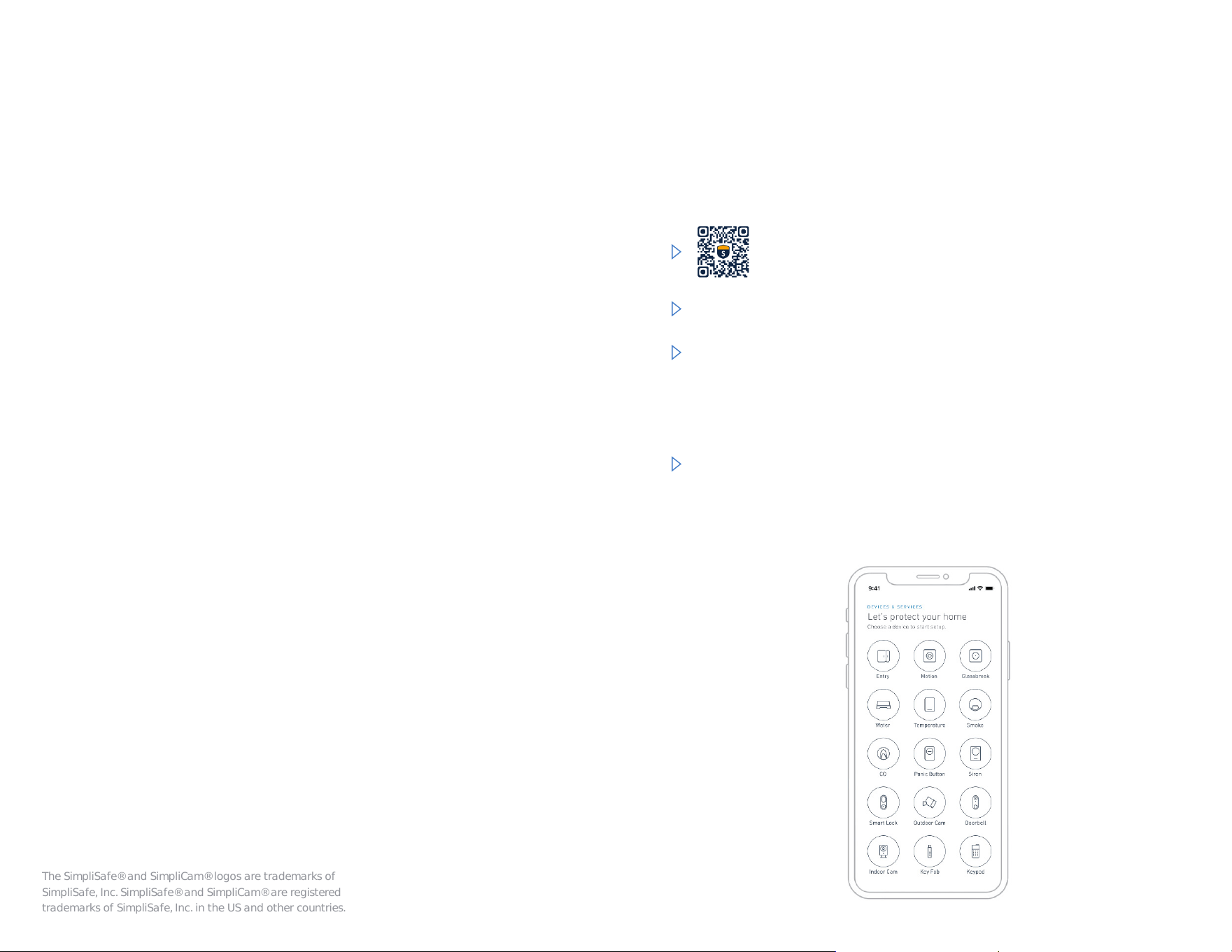
Download the SimpliSafe
®
App to install your system
Create an account or sign in with one you’ve already made.
We recommend installing your SimpliSafe
®
system using our
mobile app. We’ll guide you through the installation step by
step with helpful photos and videos so you can save the rest
of this manual for later.
The SimpliSafe® and SimpliCam® logos are trademarks of
SimpliSafe, Inc. SimpliSafe® and SimpliCam® are registered
trademarks of SimpliSafe, Inc. in the US and other countries.
Scan with the camera or QR code reader
on your mobile device.
Start here
After setup is complete, you can use the SimpliSafe
®
App
to arm and disarm your system, view your camera feeds,
check your system health and more.

Your app will guide you
through the rest of the
install process.
Not a smartphone user?
Use this guide to install instead.
Use a damp towel or alcohol wipe to clean the
install surface. Once dry, use the included adhesives
to secure each device.
2
Before you install your devices
Tip: If you have battery powered cameras,
please begin charging them now.
Have questions? Visit simplisafe.co.uk/contact-us
5
4
3
Not a smartphone user?
Use this guide to install instead.
Make sure your
Base Station is NOT:
When you plug in your
Base Station for the
Hrst timeP you will hear
“Welcome to SimpliSafe
®
.”
In a closet or cabinet
On the Ioor
Next to your fridge, cable
box, router, modem, or TV
Around dense materials
(such as granite, concrete
or metal).
Install your Base Station
Place your Base Station in a central location in your
home. A table or shelf works best.
Pull the battery tab, and plug the Base Station into a
power outlet using the included power cord.
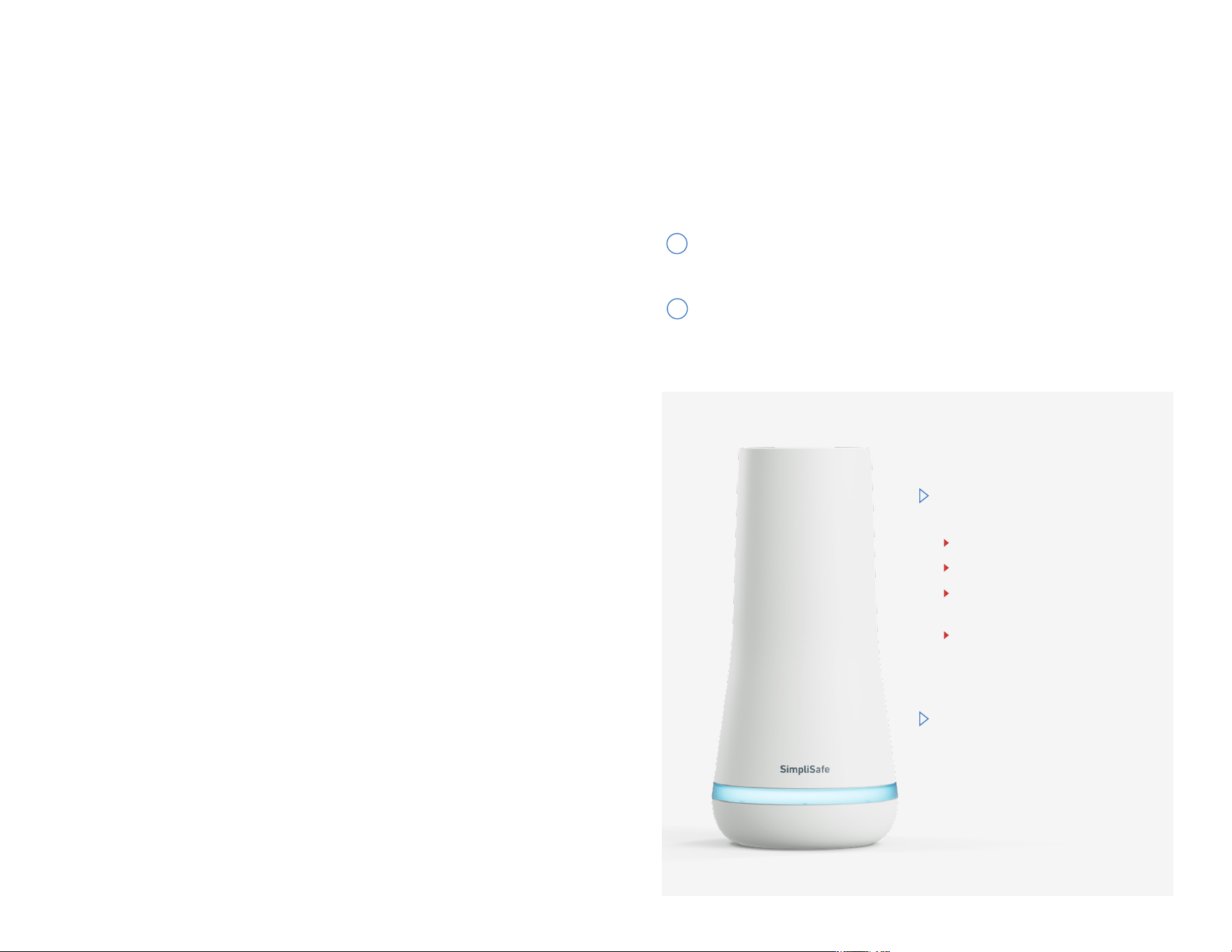
The Base Station is the brains and primary siren of your system.
In an emergency, it sends a signal to the professional monitoring
centre if you have a plan.
1
2
Have questions? Visit simplisafe.co.uk/contact-us Have questions? Visit simplisafe.co.uk/contact-us
5 6
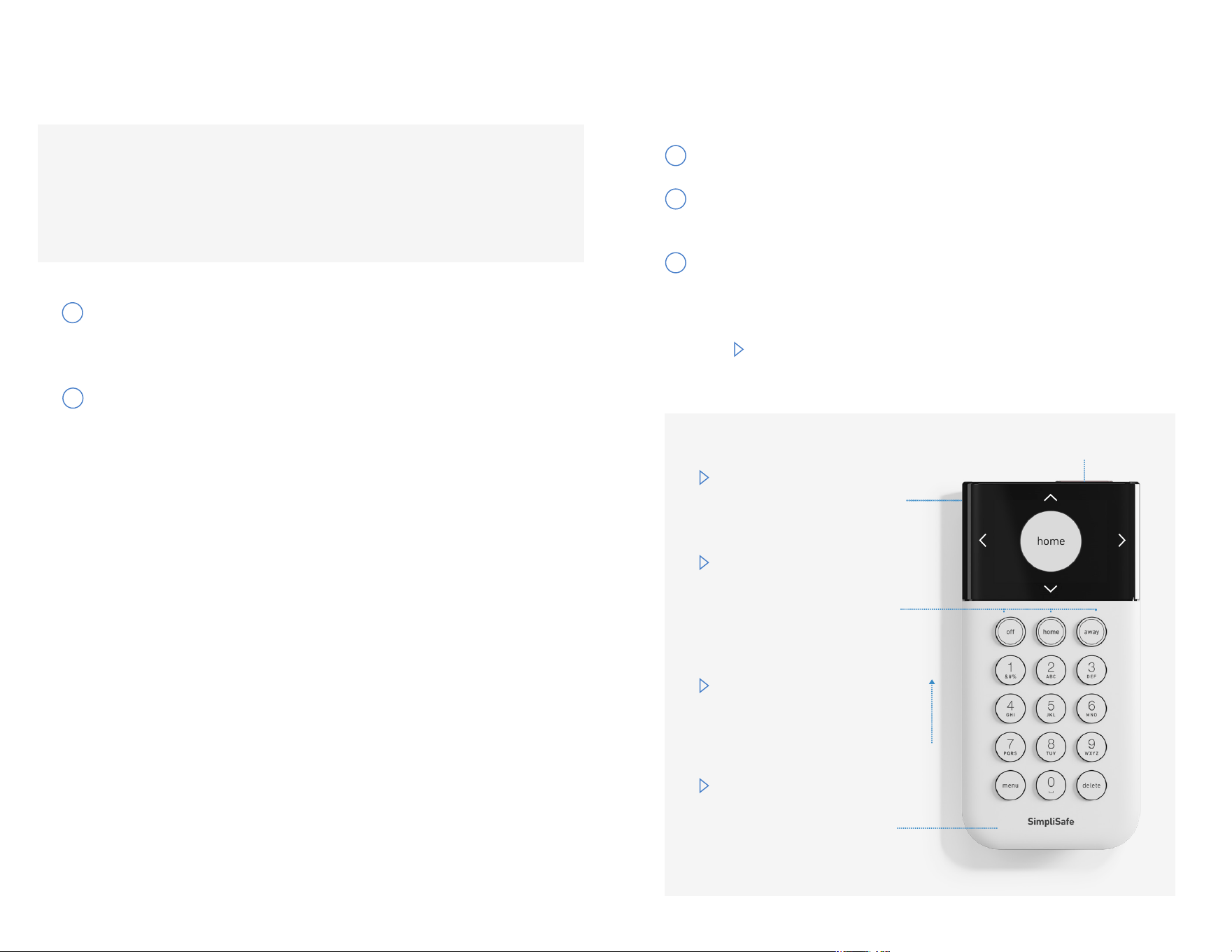
Your system has 3 modes:
Off, Home, and Away.
Pressing Home or Away
will arm your system and
pressing Off will disarm it.
Press down on the sides
of the screen to navigate
the Keypad menus.
Slide the Keypad up and
off its bracket to bring
it with you as you install
the rest of your devices.
You can “wake up” the
Keypad by touching the
body of the Keypad.
Panic Button
Install your Keypads
If you’re installing your system with the mobile app, it will
walk you through making a PIN and installing your devices.
After you pair the Keypad, you can set it aside and continue
with the SimpliSafe® App.
Follow the onscreen instructions for setting your PIN.
Remember your PIN, as you will need it to disarm
your system in the event of an alarm.
Choose a place for the Keypad on a wall by your
main entrance. Use a damp towel or alcohol wipe
to clean the install surface. Once dry, peel off the
adhesive backingO Press Hrmly on the edges of the
Keypad and hold for 30 seconds. If you make a
mistake, see “How do I move a device?” on page 30.
1
2
Setting up your WiFi will make your system more secure
update faster and enhance performance. Only 2.4ghz WiFi
networks are compatible.
Your Keypad will display a list of available WiFi networks.
Scroll to the WiFi network you’d like to connect to and
press the right side of the Keypad screen to select it.
Enter your WiFi network password. The Base Station
will attempt to connect to the network and the Keypad
will notify you of the result.
If unsuccessful, you will be asked to verify your
password by re-entering it.
3
4
5
Note: You can take the Keypad with you to name your devices as you install them.
After you adhere the Keypad to the wall, just slide it up and off its bracket.
Have questions? Visit simplisafe.co.uk/contact-us Have questions? Visit simplisafe.co.uk/contact-us

Have questions? Call 1-800-297-1605
8
Choose from the list of names on
the Keypad, and then follow the
instructions for installing the device on
the following pages.
Name Device
Living Room
Kitchen
Basement
Press button
on a device
to test and name
done
set
How to add and
name your devices
with the Keypad.
1
When the Keypad prompts you,
remove the battery tab on the
device you want to install, then
press its Test Button.
2
Note: If setting up with the SimpliSafe® App, ignore this message on
the Keypad and keep installing devices with your mobile device.
Note: Many of our devices can be installed with adhesives.
To ensure they adhere properly, clean the install surface
with a damp towel or alcohol wipe. Once dry, use the
included adhesives to secure each device—making sure
to press Hrmly for PM secondsO
To install each device,
please view the instructions
on the following pages.
ENTRY SENSORS
MOTION SENSORS
PANIC BUTTONS
GLASSBREAK SENSORS
11
13
10
12
SMOKE DETECTORS
14
EXTRA SIRENS
WATER / TEMPERATURE SENSORS
17-18
16
CAMERAS
19-20
Note: If you have trouble installing a device, please ensure your
system is updated. See page 9 for details.
BELL BOX
15
10
Install your Motion Sensors
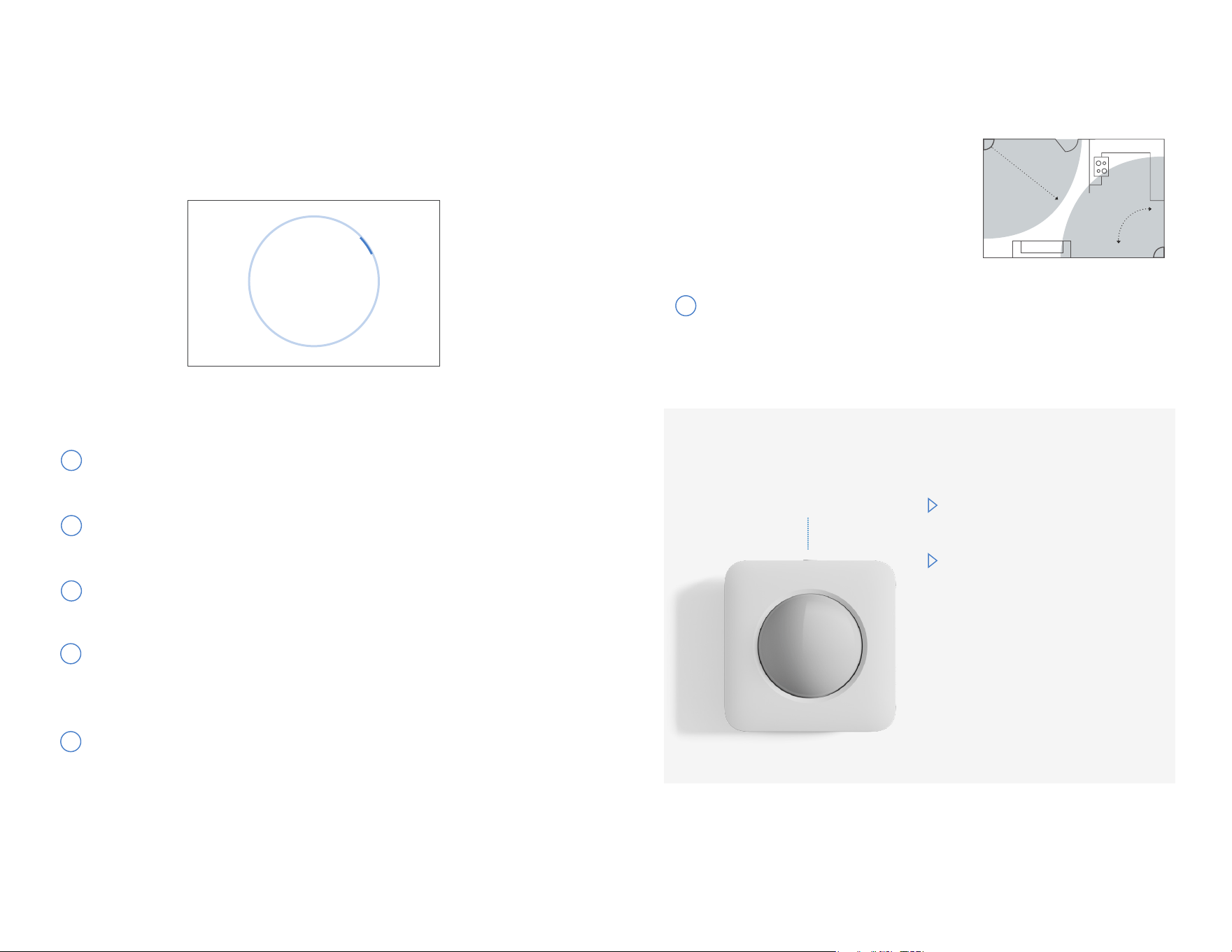
Motion Sensors detect motion
within 35 feet. They look straight
ahead with a 90° field of view as
well as downward at a 45° angle.
Mount it in a corner for maximum
coverage of your room.
Pet Owners: Use the “Pet
Mode” setting within the app.
Test Button:
Install with
button facing
upwards
Adhere your Motion Sensor to a wall, approximately 6
feet off the ground. Avoid placing the sensor near a
radiator, lamp, or electronics (such as a WiFi router).
By default, Motion Sensors
are only active in Away
Mode. In Home Mode, you
can move freely about your
home without setting off
an alarm. These settings
can be adjusted in the
SimpliSafe
®
App.
90°
35 feet
System Updates
After you’ve finished setting up your devices, please
select “done.”
Press the Menu button on your Keypad and enter
your PIN.
Press the right side of the Keypad screen to enter the
System Settings page.
Scroll up to “Check for Updates” then press the right
side of the screen to select it.
If there is an update available, you’ll see “Install
Update” as an option. If you see this, press the right
side of the Keypad screen again to begin installation.
Allow the system to install and reboot.
9
1
2
3
4
1
5
Note: While updating, the Base Station light will be amber and the Keypad screen
will show the percentage of the update that has downloaded.
Now, check your Keypad for updates.
Press button
on a device
to test and name
done
Have questions? Visit simplisafe.co.uk/contact-us Have questions? Visit simplisafe.co.uk/contact-us
11 12
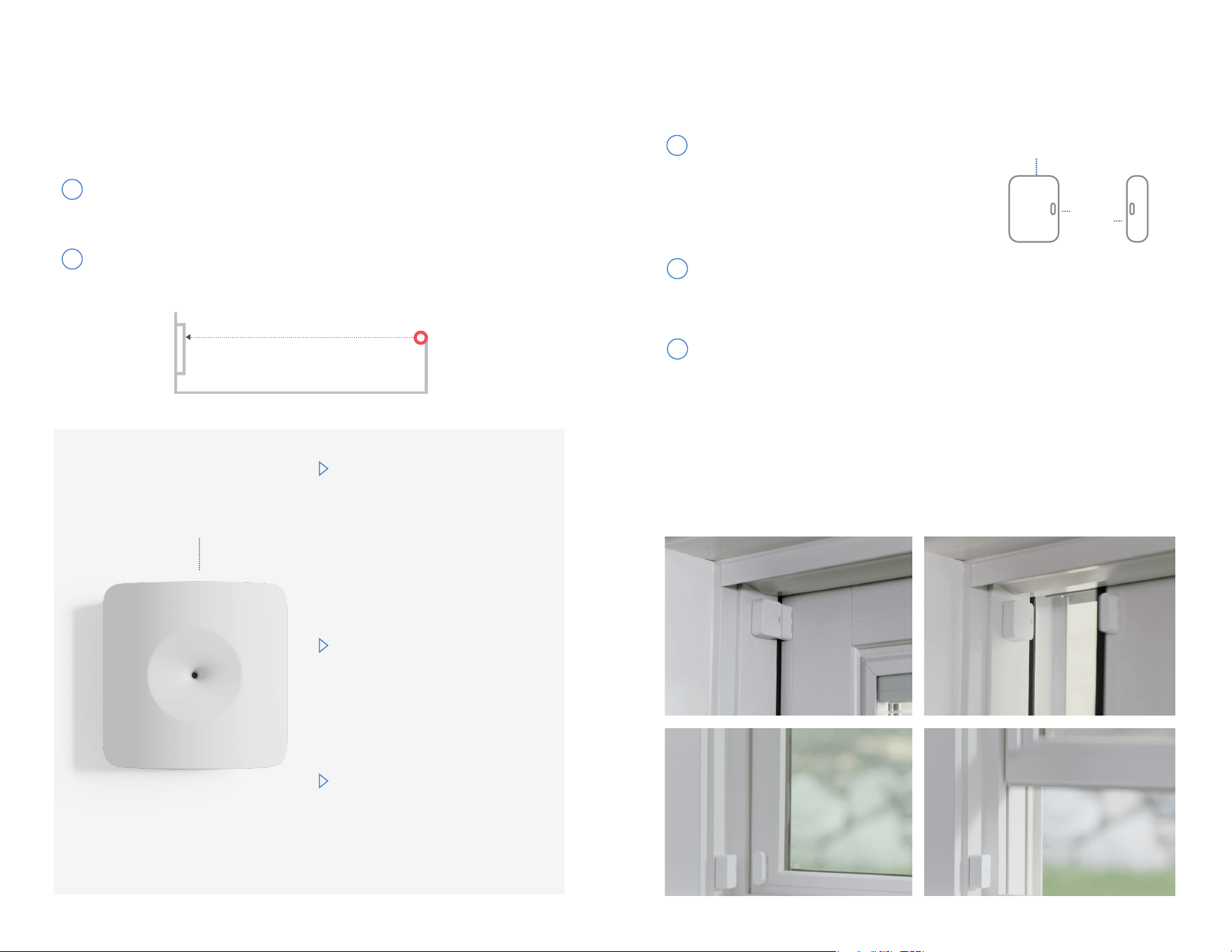
Glassbreak Sensors are programmed to “listen” for the
specific frequency of glass breaking.
Install your Glassbreak Sensors
Place the Glassbreak Sensor on a shelf or adhere to a wall
less than 20 feet from the windows you’d like to protect.
from window
less than 20 feet
Curtains can dull the sound
of glass breaking. If your
windows are covered with
heavy curtains, place your
Glassbreak Sensor within 6
feet of your windows.
If you experience false alarms,
consider moving the switch on
the back of your Glassbreak
Sensor from “high” sensitivity
to “medium” or “low.”
Adjust the sensitivity of the
Glassbreak Sensor using
the switch on the back,
below the batteries. Reduce
the sensitivity if placing it
in your kitchen as glasses
knocking into each other
could trigger a false alarm.
Test Button
1
If you’d like to test your Glassbreak Sensor, simply clap
your hands when the device is in test mode.
2
Install your Entry Sensors
Use a damp towel or alcohol wipe to clean the mounting
surface. Once dry, peel off the adhesive, and adhere the
sensor to the door and the magnet to the doorframe, or
the other way around. There is no “right side up.” Press
and hold for 30 seconds. Then, give your device a name.
To decrease the risk of false alarms, do not place the Entry Sensor where a child may be
able to reach it.
Note: For tighter spaces, slim magnets can replace your Entry Sensor’s original magnet.
Contact us if you need one.
Test the alignment before you adhere each piece. The
blue light should Iash once when the door or window
opens and twice when it closes.
Line up the magnet and sensor
on the door or window so that the
grooves align and the pieces are
less than 2 inches apart when the
door or window is closed.
EXAMPLES:
2 inches
or less
Test Button
Entry Sensors alert you when a door or window is opened.
1
2
3
CLOSED
CLOSED
OPEN
OPEN
CLOSED
CLOSED
OPEN
OPEN
Have questions? Visit simplisafe.co.uk/contact-us Have questions? Visit simplisafe.co.uk/contact-us
13 14
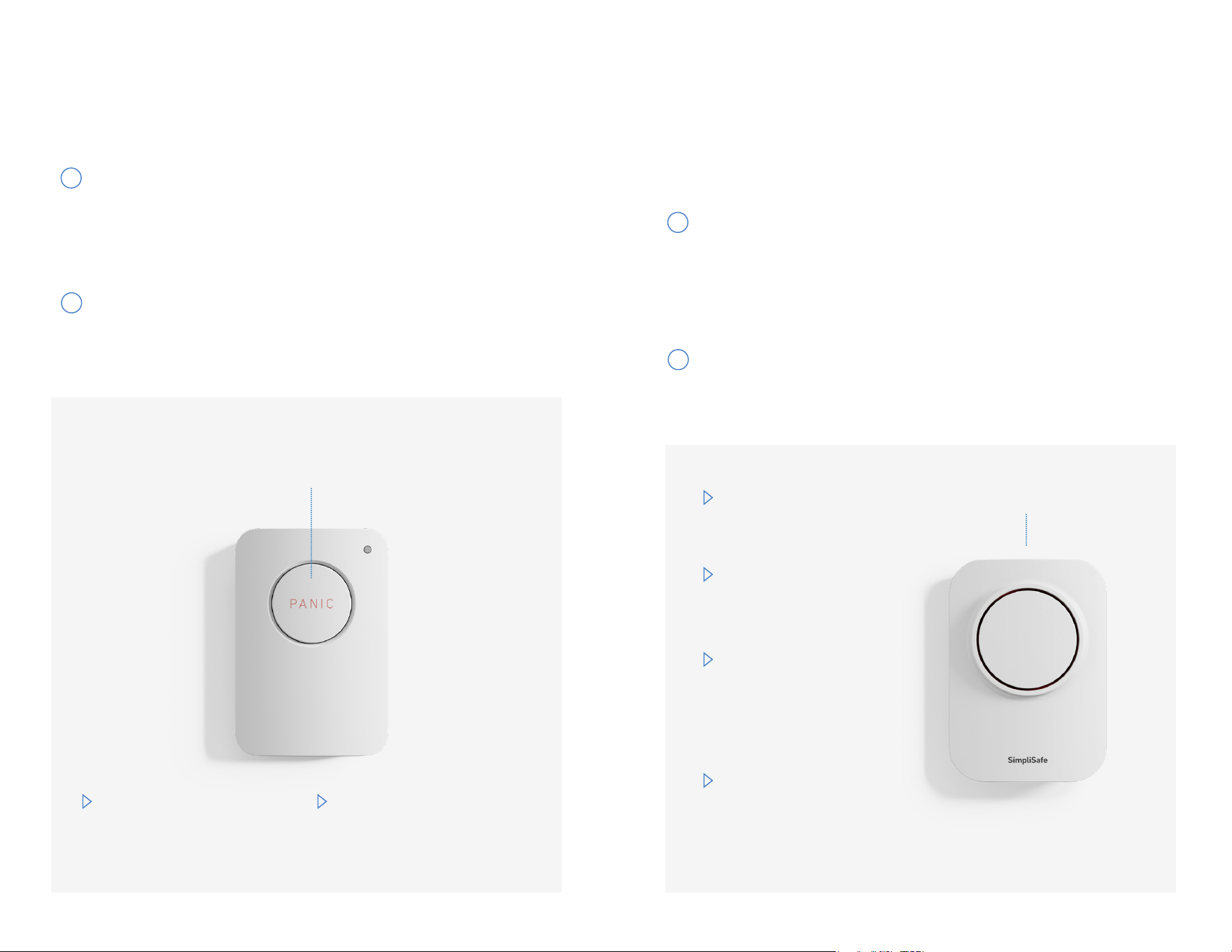
Install your Panic Buttons
Panic Buttons will trigger an alarm when you hold down the
button for 2 full seconds.
Place your Panic Button on a wall where it’s easy to
reach. Use a damp towel or alcohol wipe to clean the
install surface.
Once dry, peel off the adhesive backing and adhere the
Panic Button. Press and hold for 30 seconds. Then, give
your device a name.
The red LED in the top right
corner will Iash when your
panic signal has been sent.
When you’ve put your system
in test mode, the Panic Button
itself becomes its test button.
Test and Pairing Button
Hold for 2 seconds
To decrease the risk of false alarms, do not place the Panic Button where children
may be able to reach it.
1
2
Install your Extra Sirens
Place your Siren on a wall within 100 feet of your Base
Station. Use a damp towel or alcohol wipe to clean
the install surface. Once dry, peel off the adhesive and
adhere the Siren. Press and hold for 30 seconds. Then,
give your device a name.
For permanent installation, push up on the Siren to
remove it from its bracket. Then screw the bracket
into the wall with the included screws.
Your Base Station already has a 95dB Siren. In case of a
break-in, an extra Siren can be used to scare intruders or
alert your neighbours to an emergency.
Be cautious when
testing your 105 dB
Siren. Prolonged
exposure can cause
hearing damage.
Install your Siren by
the front door to
scare away intruders.
Your Siren is weatherised
for installation in
sheltered areas outdoors.
Use your SimpliSafe
®
App or Keypad menu to
conHgure your Sirenos
volume and settings.
Test Button
1
2
Have questions? Visit simplisafe.co.uk/contact-us Have questions? Visit simplisafe.co.uk/contact-us
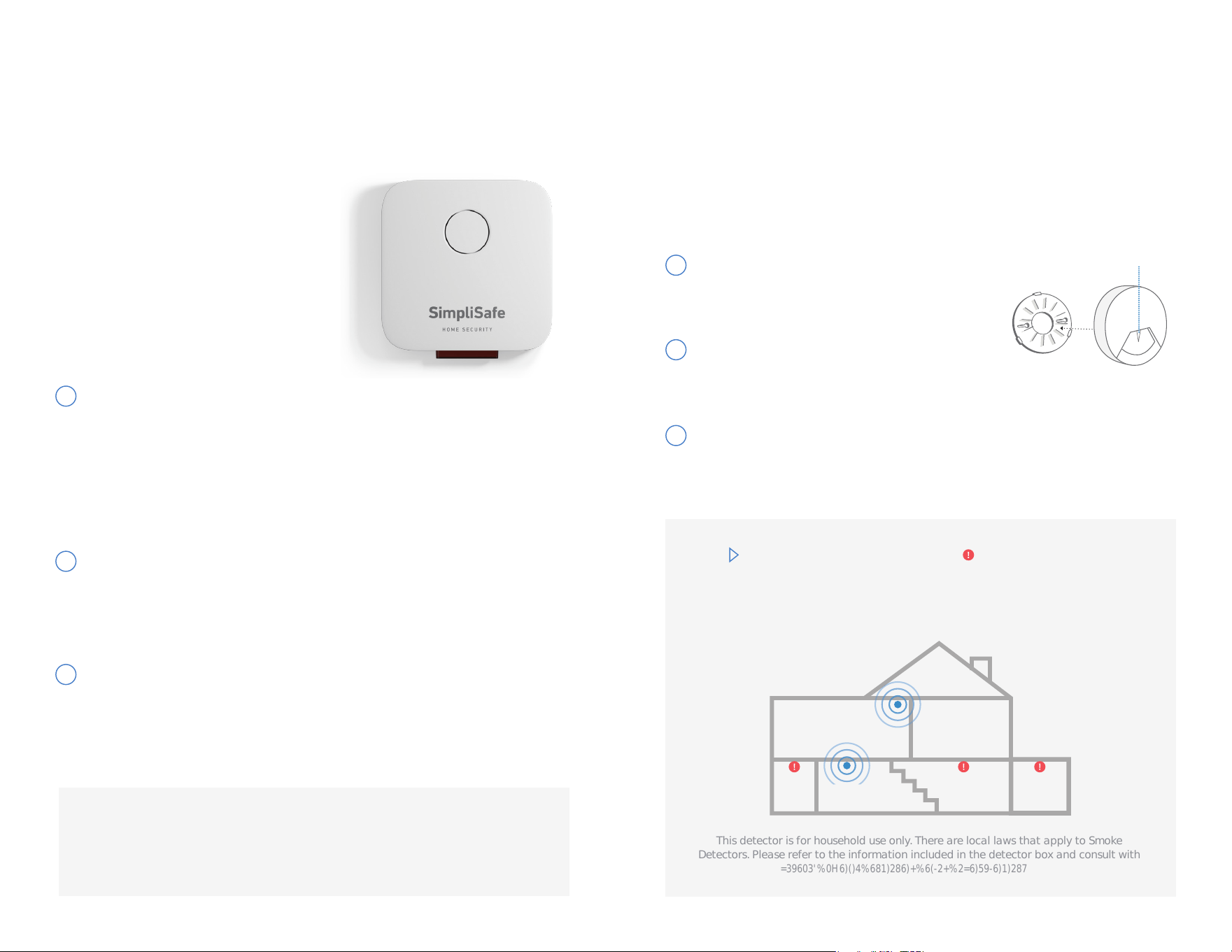
Remove mounting bracket
from the detector by rotating it
counterclockwise.
Install the bracket on the wall or
ceiling using the included screws and
wall anchors.
Install your Smoke Detectors
Place Smoke Detectors
near your sleeping
areas. For maximum
protection, place one on
each level of your home.
Do not install near
your furnace, stove,
HreplaceP kitchenP
garage, or bathroom
with a shower.
Push the Smoke Detector against the mounting bracket
and rotate it clockwise until it snaps into place. A solid
yellow light means it is not snapped in place.
This detector is for household use only. There are local laws that apply to Smoke
Detectors. Please refer to the information included in the detector box and consult with
your local Hre department regarding any requirementsO
BEDROOM
KITCHENLIVING ROOM
BATH
BEDROOM
LIVING
FURN ACE
Test Button
1
2
3
15 16
Smoke Detectors sound an alarm to alert you of smoke in your
home. With a professional monitoring plan, we are notified and
will request fire response upon visual verification.
Note: Please read the Smoke Detector owner’s manual carefully before
installation and use.
Update your system
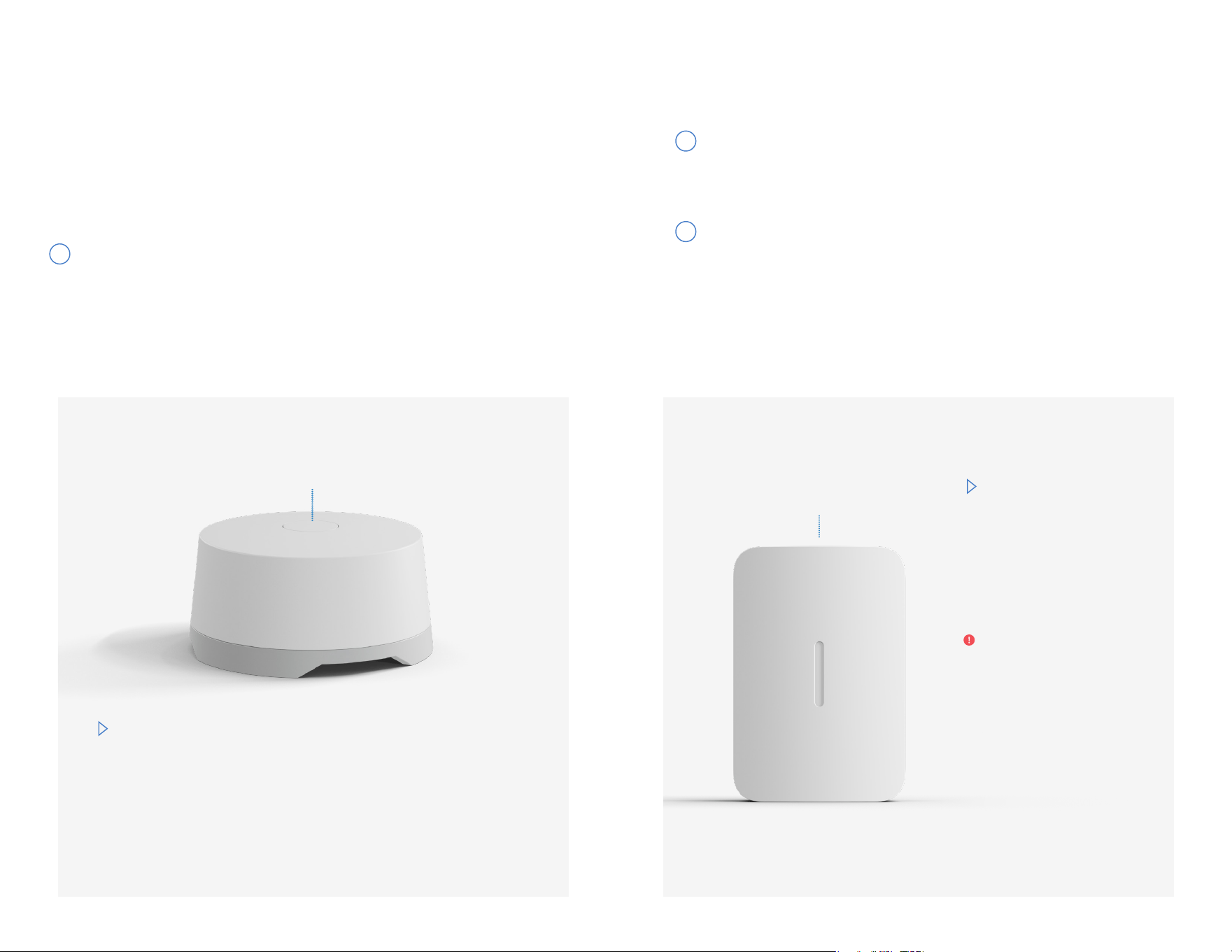
Attach the mounting plate to your home
Slide the Bell Box onto the mounting plate
Please check your Keypad. If you see the gear icon, it’s
time to update your Base Station software. These are the
tools you will need to install your Bell Box: Phillips head
screwdriver, hammer, drill and 7 mm drill bit.
Push the mounting plate Hrmly down towards the LED
light to removeO Drill O holes into a Iat surfaceO Insert wall
anchors if needed.
Ensure all 4 prongs are hooked and secure. You’ll know
itos mounted correctly if the Bell Box is Iush with the
mounting plate.
Install Your Bell Boxes
Quick note: Before setting
up your Bell Box, make sure
your system is up to date.
Check in the system settings
on your Keypad to find out if
it’s time to update your Base
Station software.
1
All set! A blinking LED will indicate that your
Bell Box is ready to go.
Have questions? Visit simplisafe.co.uk/contact-us Have questions? Visit simplisafe.co.uk/contact-us
Note: Once your system is updated, you can pair your Bell Box
2
3
The Bell Box’s loud siren is designed to stop intruders in their
tracks and alert your neighbours and emergency services of
an incident.
17 18
Test Button
Install your Water Sensors
Simply place your Water Sensor on the Ioor
underneath any potential leaks.
Water Sensors are designed to detect leaks and floods.
You can place one in the drip pan of your water heater or
washing machine, or near bathroom pipes to detect any
leaks, overflows or broken plumbing.
Your Water Sensor does not need to be adhered, but if you
choose to adhere it using the extra adhesive tabs, make
sure not to cover up any of the 6 metal contact points on
the bottom of the device.
Install your Temperature Sensors
Adhere the Temperature Sensor on the wall near
your home’s main thermostat or near any exposed
plumbing that’s vulnerable to burst during a freeze.
Use a damp towel or alcohol wipe to clean the
install surface. Once dry, peel off the adhesive and
adhere the sensor. Press and hold for 30 seconds.
Then, give your device a name.
You can change the
sensor’s temperature
thresholds in the
device settings in the
SimpliSafe® App or
Keypad menu.
Test Button
When placed in the
boiler room, this
sensor will only detect
overheating. Place the
Temperature Sensor
in a different part of
your house to detect
freeze failures.
1
Note: Avoid placing this sensor in rooms with frequent temperature changes.
1
2
Have questions? Visit simplisafe.co.uk/contact-us Have questions? Visit simplisafe.co.uk/contact-us
19 20
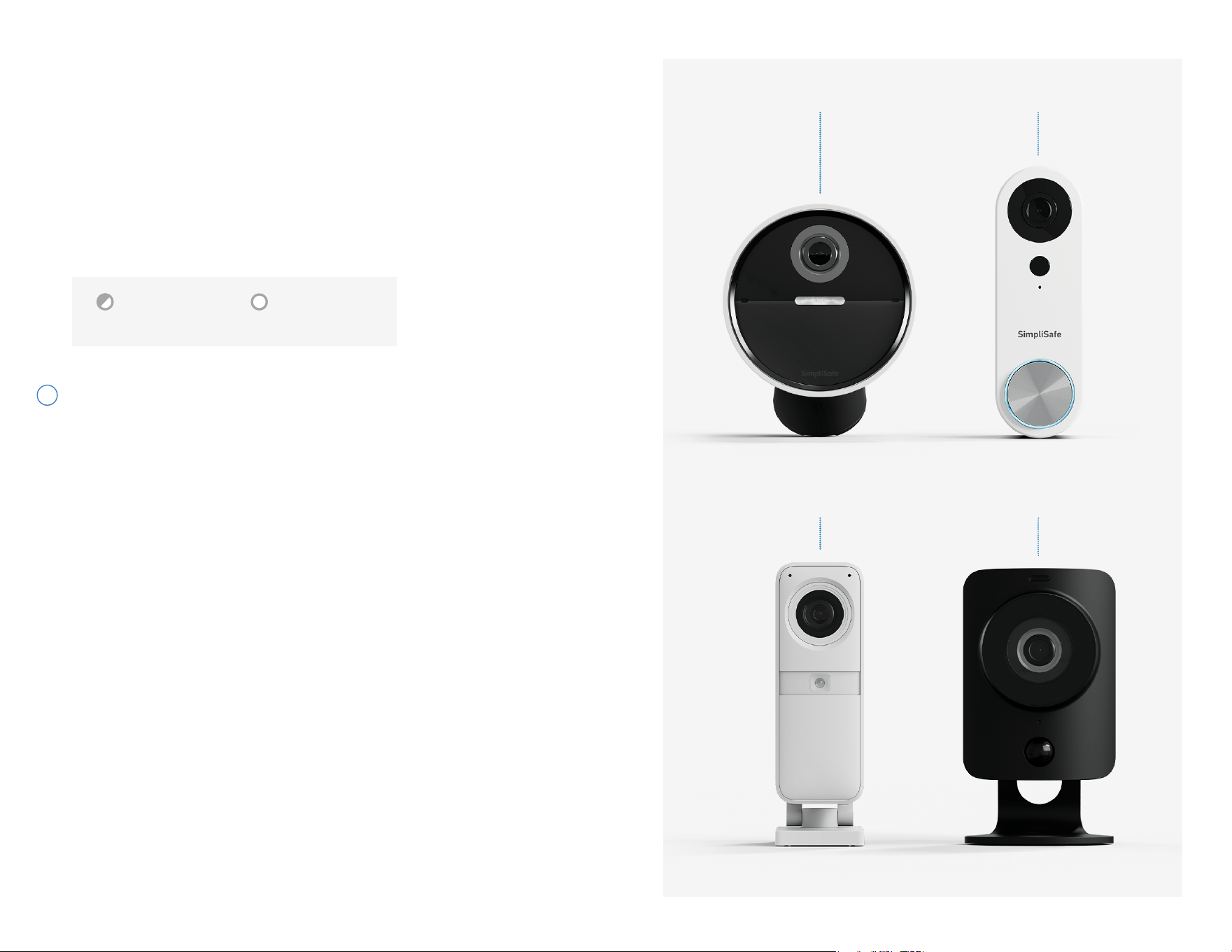
Flashing White Solid White
fully charged
If your camera has a battery, it will need to be fully
charged before installation. Use the supplied USB
cable to charge the battery.* It may take up to 6
hours to fully charge.
To set up your camera, follow the instructions in the
SimpliSafe® App.
1
Adding your Security Cameras
Note: *We recommend that you charge the battery even if you plan on using a different power source.
Wireless Outdoor Camera
Video Doorbell Pro
SimpliCam® Wired
Indoor Camera
Smart Alarm Wireless
Indoor Camera
Have questions? Visit simplisafe.co.uk/contact-us Have questions? Visit simplisafe.co.uk/contact-us
21 22
In the event of an emergency, a professional monitoring
agent will contact you and request police or Hre dispatch
upon visual veriHcationO This service is not available until you
activate your professional monitoring plan.
After you activate your subscription, your system will
be in Practice Mode for 72 hours while you get used
to using your alarm. The alarm will function normally,
but request of police and Hre response will not be
active. While in Practice Mode you can get to know
your system by practicing arming and disarming it, as
well as triggering an alarm. After 72 hours, you will be
notiHed that request of police and Hre response is liveO
Activate Alarm Monitoring
Write your Base Station serial number
here (located on the bottom of your
Base Station) so you have it handy
during activation.
SERIAL #:
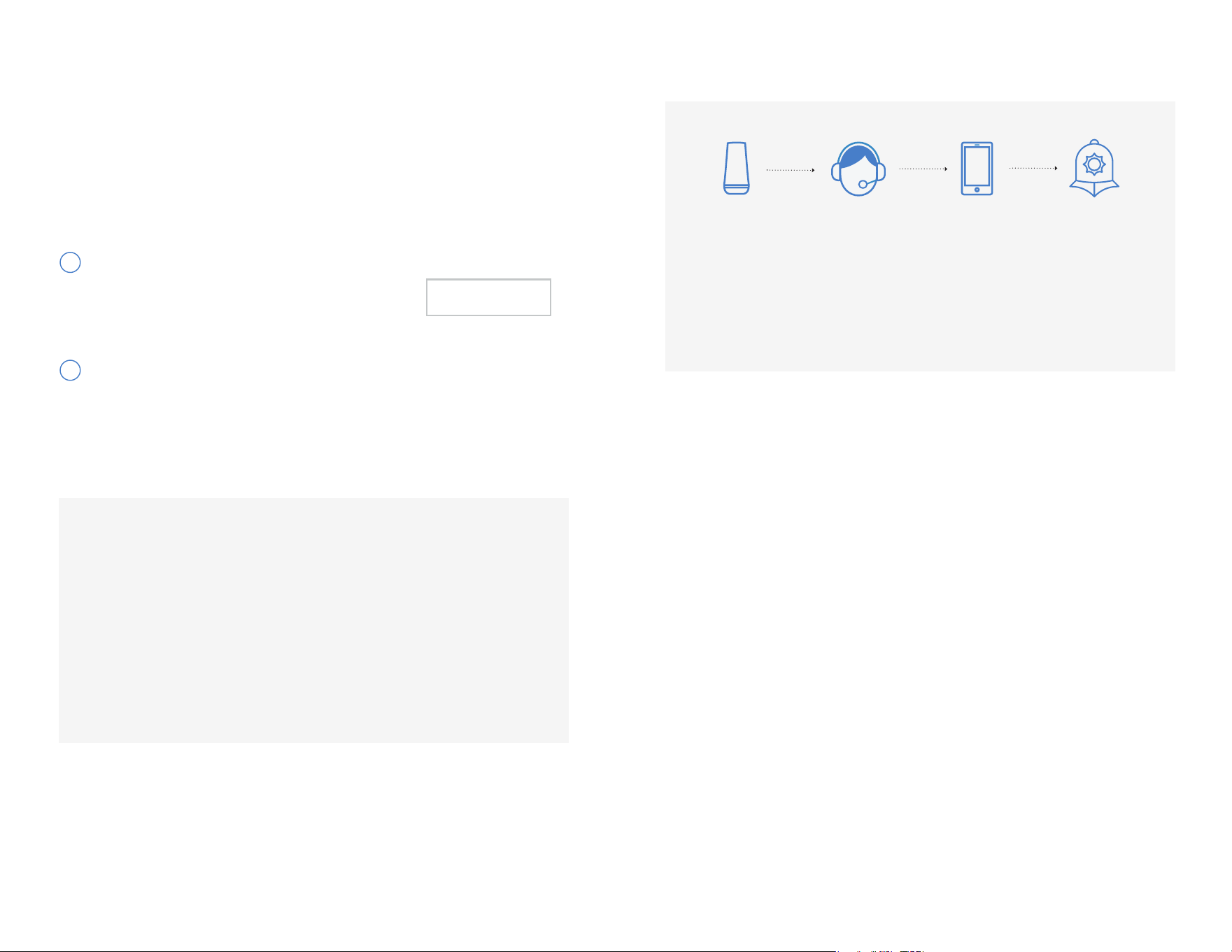
The siren
sounds when
one of your
sensors is
triggered.
A monitoring
agent will
contact you
and others you
designate.
Unless you
cancel the
alarm, the
agent will
request
emergency
dispatch.
Your Base
Station sends
your alarm
signal to our
monitoring
centre.
1. When your alarm is on and one of your sensors is triggered, the Keypad
will start beeping and prompt you for your PIN. You have 30 seconds
to turn the alarm off. This time is called the Entry Delay and can be
customised in the SimpliSafe
®
App or Keypad menu.
2. If the alarm is not turned off within the set Entry Delay period,
SimpliSafe® will sound a siren and send an alert signal to our monitoring
centre. (You must activate a Professional Monitoring plan in your online
account for this service to function.)
3. Upon receiving the signal, a monitoring agent will attempt to contact you.
4. If it was a false alarm and the alarm is cancelledP police and Hre response
will not be requested.
5. If the incident has been visually veriHedP they will request police or Hre
response to your location. The professional monitoring centre can also
dispatch one of their guards to investigate the premises.
6. Following an alarm, your system will automatically re-arm. Please note,
however, that the sensor that triggered your alarm will not reset until you
disarm and re-arm your system.
How Monitoring Works
What happens when a sensor is triggered?
Practice Mode
1
2
Activate using the the SimpliSafe
®
App
Have questions? Visit simplisafe.co.uk/contact-us Have questions? Visit simplisafe.co.uk/contact-us

Have questions? Call 1-800-297-1605 Have questions? Call 1-800-297-1605
24 25
Congratulations!
USING YOUR SYSTEM
KEYPAD WARNINGS
COMMON QUESTIONS
BASE STATION LED
STATUS LIGHT COLORS
25-26
28-29
26
27
Setup is complete, and you can now start using
your SimpliSafe® system. Feel free to read on
for more information about your system.
TERMS AND CONDITIONS
32-42
SYSTEM UPDATES
30
PRODUCT SAFETY INFORMATION
30-31
UL INFORMATION
43-44

Have questions? Call 1-800-297-1605
25
Using your System
SimpliSafe? will warn you of potential problems with a Iashing red light on the
Base Station and/or a displayed on the Keypad. Access these messages by
pressing the right arrow on your Keypad screen. Here are some common warnings:
Entry Sensor Open
SimpliSafe® is warning you that you may have left a door or
window open. If they are already closed, make sure each Entry
Sensor and its magnet are less than 2 inches apart.
Low Battery
Slide the sensor up and off of the wall (the bracket will remain
adhered to the wall) and replace the batteries.
Keypad Out of
Range
If you see this message frequently, your Keypad and
Base Station may be too far apart for reliable wireless
communication. Try moving them closer together.
Sensor Error
A wireless sensor is not responding. Move the sensor and Base
Station closer together or replace the sensor’s battery. If the
sensor displayed on your Keypad is not one of your sensors or it
is not installed, remove that sensor from your system (page 29).
Power Outage
Your Base Station will function as usual for up to 24 hours on its
rechargeable backup battery. If your home has not lost power,
make sure the wall plug is securely inserted into your power
outlet and the Base Station.
No Link to
Dispatcher
SimpliSafe® cannot communicate with the monitoring centre,
for one of the following reasons:
• Your monitoring service is not active. Please check your
account in our app.
• Your WiFi is not set up or has encountered a problem. Check
WiFi settings in your app.
• Your Base Station is positioned in a way that prevents a
strong connection. Try to position your Base Station in an
open area near the centre of your home, such as a bookshelf
or counter, rather than in a utility area or near other
electronics.
Compliance
Warning
This message will appear when you attempt to change a system
setting that impacts compliance with UL 985 or UL 1023. Read
the message to understand the new system behavior during
normal, alarm, and trouble conditions. If you wish to accept the
changes, press “Set” on the right side of the screen.
Keypad Warnings
Entry Sensors: Open and close protected doors and windows. The Base
Station will announce that they have been detected.
Panic Buttons: Hold the Panic Button down for 2 seconds. The Base Station
will announce that it has been detected.
Smoke Detectors: Hold the Test Button on the front of the sensor for 4
seconds. The sensor will beep 3-4 times.
Extra Siren, Water and Temperature Sensors: Press and release the Test
Button on the top of each sensor. The Base Station will announce that it has
been detected.
We recommend you test your system annually and after making any changes.
• In “menu” select “Test Mode”
• Follow the instructions below and on the Keypad to test your devices. The Base
Station will announce the sensor type to conHrm that it has received the signalO
• Press the left arrow to exit Test Mode.
• If you have a professional monitoring plan, you will receive an automated
phone call conHrming the testO
Use the same method to turn off your alarm, whether it’s in Home or Away Mode.
• Press “off” on your app or Key Fob, or press “off” on your Keypad followed by
your 4 digit PIN.
Put your system into Away Mode
Put your system into Home Mode
Turn your system Off
If a sensor is triggered
Putting your system into Test Mode
Use this mode when you are leaving. All of your sensors, including Motion
Sensors, will be active.
• Press “away” on your app, Key Fob, or Keypad.
• You have 60 seconds to exit before the alarm is active. To cancel during
the exit delay, simply press “off”.
Use this mode when you are staying home. By default, all of your sensors will be
active except for Motion Sensors. Cameras will have their privacy shutters closed.
• Press “home” on your app, Key Fob, or Keypad.
Motion Sensors: Press the Test Button on the top of the Motion Sensor. For an
accurate test, leave the room for the sensor you are testing then wait 15 seconds.
Re-enter the room and the Base Station will say “Motion Sensor.”
Glassbreak Sensors: Press Test Button on the top of the sensor then clap your
hands loudly near your windows. In Test Mode, the Glassbreak Sensor will be
activated by all loud sounds. When the system is armed, the sensor will only
react to glass breaking.
If a sensor is triggered, there will be a 30 second Entry Delay by default, before
the alarm siren sounds and our monitoring centre is notiHedO You can adjust the
Entry and Exit delay in the App)
Have questions? Visit simplisafe.co.uk/contact-us Have questions? Visit simplisafe.co.uk/contact-us
26

27
How do I move a device?
To move a device, push up on the front of the device in the direction of the test
button—the back will stay on the wall and the white adhesive tape tab will be
visible. Pull down (not out) slowly on the tab until the back is removed from the wall.
When you are ready to re-adhere the device in a new location, use a fresh piece
of adhesive tape (extras have been included). Use a damp towel or alcohol wipe to
clean the install surface prior to adhering.
What if I have a door or window open when I turn on the alarm?
Your SimpliSafe® Base Station will announce that a door or window is open when
you turn the alarm on. Open doors or windows will not be protected until they are
closed. Once they are closed, the Base Station will start monitoring them.
What happens if I accidentally trigger an alarm? How do I avoid false alarms?
Disarm your system from the app or enter your PIN on the Keypad or press “off” on
the app or Key Fob to stop the siren. Depending on when you cancel the alarm, a
monitoring agent may still call the numbers you provided to conHrm the false alarmO
You can cancel the alarm on the phone with the agent by providing your Safeword.
To avoid the most common causes of false alarms:
• Do not place Motion Sensors near a heater or air conditioner, or facing an open
window. If you have large pets, please refer to the instructions on page 10.
• Make sure that a rattling window or door does not trigger an Entry Sensor.
Each magnet should be as close as possible to the Entry Sensor.
If you’re still having trouble with false alarms, please contact SimpliSafe® support.
Can I get a discount on my home insurance?
Some insurance companies will offer you a discount for having a professionally
monitored home security system like SimpliSafe, but this is something you would
need to discuss with your provider.
How can I test my professional monitoring service?
Once Practice Mode has ended, select “Test Mode” in your Keypad menu
and follow the prompts. This will cause your Base Station to send a test signal to
our Monitoring Centre. An automated call from the Monitoring Centre will let you
know the test signal was successfully received.
Common Questions
The lights listed below are the only colors that the Base Station will display.
If you are seeing a color that is not listed try changing the lighting in the
room, as this can affect the look of the colored lights.
LED Status Description
No Light System is Unarmed. Wall power light will stay on when Base
Station is plugged in.
Blue System is Armed, Home or Away.
Amber Update Downloading/Installing to Keypad.
Amber “Circling
Light”
Base Station Update Installing.
Slow Red Pulse
(every 8-10 seconds)
Minor Error: Check Keypad for details. Examples include
radio interference.
Continuous Red
Pulse
Recent Alarm. Pulses for 1-2 minutes before turning solid red.
Solid Red Recent AlarmO Remains solid until the alarm notiHcation is
dismissed on the Keypad, or the system is disarmed and
re-armed.
White Accessing menu via Keypad, Test mode.
Double White Blink ConHrmationO For exampleP when a Keypad setting is
changed.
White “Circling
Light”
Setup and Naming Mode or Base Station is searching for
nearby WiFi networks.
Always On Single,
White LED
This setting can be toggled on or off in the Base Station
Settings.
Flashing Yellow Ring Indicates a system fault, such as a battery function warning
for the Base Station or a low battery warning for one or
more of your sensors.
Flashing Green
(lasts 3-5 seconds)
Video Doorbell Pro is currently ringing
Base Station LED Status Light Colour
Have questions? Visit simplisafe.co.uk/contact-us Have questions? Visit simplisafe.co.uk/contact-us
28

29 30
Warning: Changes or modiHcations to this unit not expressly approved by
SimpliSafe ltd could void the user’s authority to operate the equipment.
Use only approved batteries and the supplied UL/ULC/EN approved power
adapter with your SimpliSafe Home Security System. Any tampering with the
product or other unauthorized use will void your limited warranty. To prevent
a Hre hazard or electrical shockP do not expose the Base Station SSBSPY
or other components to water or operate the System while you are wet or
standing in water. Be sure that electrical and telephone cords used are not
frayed or placed in a location where they can pose a danger.
Caution: To ensure proper operation, this equipment must be installed
according to the enclosed installation instructions. To verify that the
equipment is operating properly and can successfully report an alarm, this
equipment must be tested immediately after installation, and periodically
thereafter, according to the enclosed test instructions (pages 19-20).
Caution: Please verify periodically that components remain Hrmly adheredO
A falling component could harm a passing person. Also, swallowing a small
piece, such as a magnet or battery could be harmful. Please keep them away
from children.
Caution: Risk of explosion if battery is replaced by an incorrect type. Displose
of used batteries according to the instructions. Risk of Explosion/Fire. Do not
improperly dispose of batteriesO Do not expose the battery to HreP extreme
heat, low air pressure, crushing forces, or cutting forces. Exposure to these
condition"forces may result in HreP explosionP or leakage of Iammable
substances.
For the purpose of LVD Directive: Importer/Manufacturer: SimpliSafe ltd
Address: Link 665 Business Centre Todd Hall Road Haslingden Rossendale
BB4 5HU
Product Safety Information
Your system will occasionally receive system updates to add features,
functionality, and to enhance your experience with your SimpliSafe
®
system.
If your system is connected to WiFi and there is an update available, you will
see a gear symbol on the left side of your Keypad’s screen. Press “off” to
refresh your Keypad’s screen to determine if an update is available. To accept
the update, follow the prompts and wait for your Base Station and Keypad to
reboot. The update process may take between 10 and 20 minutes, during which
your system will be ofIineO After the update is completeP you will have to select
the gear icon on each additional Keypad you own to update them as well.
System Updates
Will SimpliSafe
®
work in the event of a power outage?
Yes. Most of our sensors are battery powered and the Base Station has a
built-in rechargeable backup battery that provides power for up to 24 hours
during a power outage.
How do I add components?
If you need additional components, purchase more online at
simplisafe.co.uk/alarm-sensors. Once you’ve received your devices, install using
the SimpliSafe® App. Alternatively, open the Menu on your Keypad and select
“Devices,” then “Add device” and follow the instructions.
How do I remove components?
• In the SimpliSafe? AppQ Open Device SettingsP Hnd the device youod like to
remove in the list and select “Remove Device”
• Alternatively, open the menu on your Keypad and select “Devices”
• Find the device you’d like to remove in the list and select it using
the right arrow
• Scroll to the bottom of the list and select the option “remove” with
the right arrow
• Press “off” to exit the menu
Can I use SimpliSafe® without a Professional Monitoring plan?
Yes, but we don’t recommend it. Without Professional Monitoring, no authorities
will be called.” It’s easy to enroll in a SimpliSafe
®
Professional Monitoring plan.
There are no long-term contracts and you can call to cancel at any time.
How do I change the batteries?
Voice prompts will warn you when your batteries are low (battery life is
approximately 1 year for a Keypad and up to 5 years for all other sensors). To
change batteries, remove the component from the wall as described above.
Replace the batteries behind the back panel and slide the component back into
place. The Base Station backup battery is rechargeable and does not normally
need to be replaced.
What happens if my Key Fob is lost or stolen?
Your Key Fob will work for anyone who has it in their possession. If you lose your
Key Fob, you should disable it by going into the menu and removing it from your
list of devices (you can easily add it back later). If you are concerned about the
security of your Key Fob, you can disable its ability to turn the alarm on and off
in the device settings. You will still be able to use it as a portable Panic Button
within your home.
Note: Before removing any components, please ensure your system is in “off” mode
Have questions? Visit simplisafe.co.uk/contact-us Have questions? Visit simplisafe.co.uk/contact-us

The following Terms of Sale are relevant based on the country in which you purchased your products.
US Customer Terms Last updated: April 2024
Please review these Terms of Sale carefully as these terms govern your purchase of the products in your
order (the “System”) from SimpliSafe, Inc. (“SimpliSafe”) and set out your rights and obligations with
respect to your purchases, including important limitations and exclusions, such as those contained in our
product warranties. These are the Terms of Sale under which we are willing to provide you with the System
and require the use of binding arbitration to resolve disputes rather than jury trials or class actions
(described in detail below). Please be certain you understand them.
The Complete Terms of Sale are available at simplisafe.com/terms-sale. They include provisions relating
to U.S. and End User sales only, payment methods, prices, sales tax, gift cards and promotions, shipping,
services including monitoring services, software license and use of the camera and installation of
detectors, etc.
By purchasing the System and/or using the System, you agree that you have read these Terms of Sale,
and the Complete Terms of Sale available online, and are legally bound by these collective Terms of Sale,
including the disclaimers, limitations of liability and indemnity obligations below.
If this product is purchased directly online from SimpliSafe, either through our company store on an
online retailer platform such as the SimpliSafe store on AmazonY or the SimpliSafe websiteP any conIict
between (i) the online Terms of Sale provided at the time of your online purchase (available at simplisafe.
com/terms-sale) and (ii) any written Terms of Sale provided with the print copy Set-up Guide, shall be
governed by the online terms. To the extent permissible by law, if this product is purchased directly from
an authorized retailer and then you create an online account and agree to any applicable online terms,
any conIict between iY the online Terms of Sale provided at the time of your online account creation and
(ii) any written Terms of Sale, shall be governed by the online terms.
Limited Hardware Warranty
SimpliSafe warrants to you, the initial purchaser of the System from SimpliSafe or an authorized retailer,
that each of the new or refurbished SimpliSafe branded products you purchase directly from SimpliSafe
or from an authorized retailer that make up your SimpliSafe System (“Covered Products”) will be free from
defects in materials and workmanship under normal use and service for one (1) year from the date that
you purchase the Covered Products. This limited hardware warranty is non-transferrable. As a condition
of this warranty, SimpliSafe may require that you provide proof of purchase during the warranty period
and/or return the defective Covered Product. If SimpliSafe requires the return of the defective Covered
Product, return shipping costs will be paid for by SimpliSafe.
SimpliSafe may also offer additional hardware or subscription related product protection plans that are
supplemental to this original limited hardware warrantyO Unless speciHed otherwiseP these supplemental
programs would not go into effect until after the original limited hardware warranty expires; and where
programs run concurrently, this initial limited hardware warranty would take precedence over any other
programs during the initial limited hardware warranty period. Within this and any other warranty periods,
SimpliSafe’s sole obligations shall be limited to accepting return of the defective product or part of the
Covered Product and providing one or more of the following remedies, to be determined at SimpliSafe’s
sole discretion:
Replacement of Covered Products: For valid warranty claims made during the warranty period in respect
to Covered Products, SimpliSafe may provide you with a substantially functional equivalent product or
part to replace the defective item. Replacement products may be new, repaired or reconditioned, at
the sole option of SimpliSafe. SimpliSafe warrants any replacement products for a one (1) year limited
warranty period from the date the replacement parts are delivered to you. SimpliSafe may, in its sole
discretion, provide substantially functionally equivalent replacement products for a Covered Product or
another component in your System, such as where certain products or components become discontinued
for any reason. See online Terms of Sale for more details.
Refund or Credit: At SimpliSafe’s sole discretion, in lieu of replacing the defective Covered Product,
SimpliSafe may offer to refund or credit you the original purchase price you paid to SimpliSafe or an
authorized retailer for the Covered Product.
UKCA/CE RED DoC: Hereby, SimpliSafe declares that the radio equipment described in this manual
is in compliance with Directive 2014/53/EU.
The full text of the EU declaration of conformity is available at the following
internet address: simplisafe.com/regulatory-information
RF Exposure
Warning:
This equipment must be installed and operated in accordance with provided
instructions and the antenna(s) used for this transmitter must be installed to
provide a separation distance of at least 20 cm from all persons.
Power Supply: Input: 100-240 VAC, 50/60Hz, 0.4A Max, Output: 6.5VDC, 1.6A
DONGGUAN GANGQI ELECTRONIC CO LTD, GQ12-065160-AB
Batteries: Base Station: Four(4) Eneloop BK-3MCCA, 1.2V min 1900mAh OR FB 1000, 1.2V,
1000mAh, NiMh (Note: NiMh batteries must be recycled or disposed of properly).
Keypad: four 1.5V Alkaline, size AA.
Motion, Glassbreak Sensors: one 3V Lithium, size CR123A.
Panic Button, Freeze, Water Sensors, Entry Sensors: one 3V Lithium, size CR2032.
Bell Box: four 3V Lithium, size CR123A
The Base Station backup battery is rechargeable and does not normally need
to be replaced. If you do replace the batteries ONLY rechargeable batteries
should be used. Alkaline batteries are dangerous if inserted. We reccomend
contacting our support centre for further instructions.
SimpliSafe Global Print Terms of Sale
Have questions? Visit simplisafe.co.uk/contact-us Have questions? Visit simplisafe.co.uk/contact-us
Base Station: Model SSBS3 Operating Temperature 0°C to 40°C, 90% Max. Humidity
Keypad: Model SSKP3 Operating Temperature 0°C to 60°C, 90% Max. Humidity
Keyfob: Model SSKF3 Operating Temperature 0°C to 60°C, 90% Max. Humidity
Entry Sensor: Model SSES3 Operating Temperature 0°C to 60°C, 90% Max. Humidity
Motion Sensor: Model SSMS3 Operating Temperature 0°C to 60°C, 90% Max. Humidity
Panic Button: Model SSPB3 Operating Temperature 0°C to 60°C, 90% Max. Humidity
Glassbreak Sensor: Model SSGB3 Operating Temperature 0°C to 60°C, 90% Max. Humidity
Smoke Detector: Model SSSD3-0 Operating Temperature 0°C to 60°C, 90% Max. Humidity
Carbon Monoxide Detector: Model SSCO3-0 Operating Temperature 0°C to 60°C, 90% Max. Humidity
Water Sensor: Model SSWT3 Operating Temperature 0°C to 60°C, 90% Max. Humidity
Freeze Sensor: Model SSFS3 Operating Temperature 0°C to 60°C, 90% Max. Humidity
Extra Siren: Model SSWS3 Operating Temperature 0°C to 60°C, 90% Max. Humidity
SimpliCam: Model SSCM1 Operating Temperature -10°C to 40°C, 90% Max. Humidity
Bell Box: Model CA003 Operating Temperature -25 C to 60 C, 100% Max. Humidity
Operating Temp:
31 32

33 34
Have questions? Visit simplisafe.co.uk/contact-us Have questions? Visit simplisafe.co.uk/contact-us
For warranty service, please contact SimpliSafe Customer Support at 1-888-95-SIMPLI (957-4675) or visit
support.simplisafe.com and click on “Contact Us.” If SimpliSafe is unable to address the issue that you
are facing, SimpliSafe will, subject solely to its discretion, determine the appropriate warranty remedy, as
listed above.
TO THE MAXIMUM EXTENT PERMITTED BY LAW, THIS LIMITED WARRANTY IS EXCLUSIVE AND EXPRESSLY
IN LIEU OF ALL OTHER WARRANTIES, OBLIGATIONS OR LIABILITIES, WHETHER WRITTEN, ORAL, EXPRESS
OR IMPLIED, INCLUDING ANY IMPLIED WARRANTY OF MERCHANTABILITY OR FITNESS FOR A PARTICULAR
PURPOSE, OR OTHERWISE. SIMPLISAFE DISCLAIMS ALL STATUTORY AND IMPLIED WARRANTIES
TO THE EXTENT PERMITTED BY LAW. INSOFAR AS SUCH WARRANTIES CANNOT BE DISCLAIMED,
SIMPLISAFE LIMITS THE DURATION AND REMEDIES OF SUCH WARRANTIES TO THE DURATION OF THE
LIMITED WARRANTY DESCRIBED ABOVE OR THE SHORTEST PERIOD ALLOWED BY LAW. IN NO CASE
SHALL SIMPLISAFE OR ANY OF ITS AFFILIATES, DIRECTORS, OFFICERS, SHAREHOLDERS, EMPLOYEES,
SUBCONTRACTORS, AGENTS OR REPRESENTATIVES (EACH, A “SIMPLISAFE PARTY” AND COLLECTIVELY, THE
“SIMPLISAFE PARTIES”) BE LIABLE TO YOU OR ANYONE ELSE FOR ANY CONSEQUENTIAL OR INCIDENTAL
DAMAGES FOR BREACH OF THIS LIMITED WARRANTY OR ANY OTHER WARRANTIES WHATSOEVER. THIS
WARRANTY GIVES YOU SPECIFIC LEGAL RIGHTS. YOU MAY ALSO HAVE OTHER RIGHTS WHICH VARY FROM
STATE TO STATE. SOME STATES DO NOT ALLOW LIMITATIONS ON HOW LONG AN IMPLIED WARRANTY
LASTS AND DO NOT ALLOW THE EXCLUSION OR LIMITATION OF INCIDENTAL OR CONSEQUENTIAL
DAMAGES. THEREFORE, THE ABOVE LIMITATIONS OR EXCLUSIONS MAY NOT APPLY TO YOU.
SimpliSafe does not represent that the System may not be compromised or circumvented; that the
System will prevent any personal injury or property loss; or that the System will in all cases provide
adequate warning or protection. You understand that the System may be interrupted, circumvented,
unavailable (for a limited or extended time period) or otherwise compromised, including as a result
of equipment designed or used by a third party for the purpose of causing false alarms or gaining
unauthorized access to or otherwise affecting or controlling the System (including any Camera, Smart
Lock, or other peripheral SimpliSafe System component). Furthermore, the SimpliSafe Smart Lock is not an
ANSI or BHMA certiHed door lock or deadboltP and it must be correctly installed and used with a certiHed
door lock that is operating in good condition; and used in environmental conditions that fall within the
SimpliSafe Smart Lock speciHcations speciHed below or in the corresponding user manualP which shall
control in the event of any discrepancy). You assume all risk associated with the suitability, installation
and performance of the door lock and other third-party components, hardware, software and services
that you select.
CONSEQUENTLY, NO SIMPLISAFE PARTY, AS DEFINED ABOVE, SHALL HAVE ANY LIABILITY FOR ANY LOSS,
DAMAGE OR EXPENSE (COLLECTIVELY, “LOSSES”), INCLUDING ANY PROPERTY DAMAGE, PERSONAL INJURY
(INCLUDING DEATH), ECONOMIC LOSSES OR ANY OTHER FORM OF LOSS, DAMAGE OR EXPENSE ARISING
OUT OF OR IN CONNECTION WITH, DUE TO, OR CAUSED IN WHOLE OR IN PART BY A CLAIM THE SYSTEM
FAILED TO GIVE WARNING. HOWEVER, IF ANY SIMPLISAFE PARTY, AS DEFINED ABOVE, IS HELD LIABLE,
WHETHER DIRECTLY OR INDIRECTLY, FOR ANY LOSS ARISING OUT OF OR IN CONNECTION WITH, DUE
TO, OR CAUSED IN WHOLE OR IN PART BY THIS LIMITED WARRANTY OR OTHERWISE, THE AGGREGATE
LIABILITY OF ALL SIMPLISAFE PARTIES, AS DEFINED ABOVE, SHALL BE LIMITED TO THE PURCHASE PRICE
OF THE SYSTEM, WHICH SHALL BE THE COMPLETE AND EXCLUSIVE REMEDY AGAINST THE SIMPLISAFE
PARTIES, AS DEFINED ABOVE. YOU ACKNOWLEDGE AND AGREE THAT IT IS IMPRACTICAL AND EXTREMELY
DIFFICULT TO DETERMINE THE ACTUAL DAMAGES, IF ANY, THAT MAY RESULT FROM A FAILURE OF THE
SYSTEM TO GIVE WARNING. THIS AGREED-UPON AMOUNT (THE PURCHASE PRICE OF THE SYSTEM) IS NOT
A PENALTY, AND IS THE SOLE REMEDY.
A copy of the complete Limited Warranty can be found at simplisafe.com/terms-sale or by contacting
SimpliSafe at 1-888-95-SIMPLI (957-4675). By purchasing from SimpliSafe, you acknowledge that you
have had an opportunity to review SimpliSafe’s COMPLETE warranty terms, have done so to the degree
you feel you need to be familiar with them, and you accept their terms and conditions, including the
limitations, exclusions, and disclaimers.
Satisfaction Guarantee
Unless speciHed otherwiseP any satisfaction guarantee or money back guarantee offers are made on
an item by item basisO The term for any satisfaction guarantee is limited to SM days unless speciHed
otherwise and the start date for any such guarantee is the date of delivery of that speciHc item for
items ordered directly from SimpliSafe, or the purchase date for any items purchased from an authorized
retailer. Any Satisfaction Guarantees only apply to the initial purchaser, purchasing directly from
SimpliSafe or through an authorized retailer, and are non-transferable.
Critical Product, Component and Software Updates & Replacements
If, at the Company’s sole and reasonable discretion, certain critical product, component and/or Software
updates or replacements are needed to maintain reliable performance of your System or any components
thereof, and the Company makes corresponding hardware or software updates available (collectively,
“Critical Updates & Replacements”), upon notice the Customer agrees to take reasonable steps and
follow provided instructions to effectuate such Critical Updates & Replacements, and to cooperate as
reasonably requested to help schedule, coordinate or arrange for such Critical Updates & Replacements
to be installed, delivered or implemented.
Insurance
THE PRICE OF THE SYSTEM IS UNRELATED TO THE VALUE OF PROPERTY LOCATED ON OR NEAR THE
PREMISES AT WHICH THE SYSTEM IS LOCATED. NO PORTION OF THE PURCHASE PRICE IS FOR INSURANCE
OR SHALL BE DEEMED OR CONSIDERED INSURANCE PREMIUMS. YOU ACKNOWLEDGE AND AGREE THAT
SIMPLISAFE IS NOT AN INSURER AND SHALL NOT PROVIDE INSURANCE COVERAGE AGAINST ANY LOSSES,
AS DEFINED ABOVE. TO THE EXTENT YOU WISH TO HAVE ANY INSURANCE COVERAGE FOR LOSSES,
AS DEFINED ABOVE, IT IS YOUR RESPONSIBILITY TO PROCURE AND MAINTAIN SEPARATE INSURANCE
POLICIES FROM AN INSURANCE COMPANY OR COMPANIES, SOLELY AT YOUR COST AND EXPENSE, FOR
COVERAGE AGAINST ALL LOSSES, AS DEFINED ABOVE, INCLUDING BUT NOT LIMITED TO THOSE ARISING
OUT OF OR IN CONNECTION WITH, DUE TO, OR CAUSED IN WHOLE OR IN PART BY (I) THESE TERMS OF
SALE, INCLUDING ANY BREACH OF ANY REPRESENTATION, WARRANTY, COVENANT OR OBLIGATION
ARISING HEREUNDER (II) THE SYSTEM, (III) THE ACTIVE OR PASSIVE SOLE, JOINT OR SEVERAL NEGLIGENCE
OF ANY KIND OR DEGREE, (IV) THE IMPROPER OPERATION OR NON-OPERATION OF THE SYSTEM, (V)
BREACH OF CONTRACT, EXPRESS OR IMPLIED, WHICH OCCURS BEFORE OR AFTER THE SIGNING OF THIS
AGREEMENT (VI) BREACH OF WARRANTY, EXPRESS OR IMPLIED, (VII) PRODUCT OR STRICT LIABILITY (VIII)
LOSS OR DAMAGE TO OR MALFUNCTION OF FACILITIES NECESSARY TO OPERATE THE SYSTEM, TRANSMIT
ANY SIGNAL TO OR RECEIVE SIGNALS AT ANY MONITORING FACILITY, (IX) A CLAIM FOR SUBROGATION,
INDEMNIFICATION OR CONTRIBUTION, OR (X) A VIOLATION OF ANY APPLICABLE CONSUMER PROTECTION
LAW OR ANY OTHER THEORY OF LIABILITY OR ALLEGED FAULT ON THE PART OF ANY SIMPLISAFE PARTY,
AS DEFINED ABOVE (COLLECTIVELY, THE “COVERED CLAIMS”). RECOVERY FOR ANY LOSS, AS DEFINED
ABOVE, SHALL BE LIMITED TO THE INSURANCE YOU PURCHASE SEPARATELY FROM AN INSURANCE
COMPANY, IF ANY.
Limitations of Liability and Release
SimpliSafe does not accept liability for Systems purchased hereunder beyond the remedies set forth
herein and in SimpliSafe’s Limited Warranty. In particular, as described in SimpliSafe’s Limited Warranty,
SimpliSafe does not represent that the System may not be compromised or circumvented; that the
System will prevent any personal injury or property loss; or that the System will in all cases provide
adequate warning or protection. You understand that the System may be interrupted, circumvented,
unavailable (for a limited or extended time period) or otherwise compromised, including as a result
of equipment designed or used by a third party for the purpose of causing false alarms or gaining
unauthorized access to or otherwise affecting or controlling the System (including any Camera). You
understand that a properly installed and maintained alarm may only reduce the risk of a burglary,
robbery or other events occurring without providing an alarm, but it is not an insurance or a guarantee
that such will not occur or that there will be no personal injury or property loss as a result.
BY AGREEING TO THESE TERMS, YOU ARE RELEASING EACH SIMPLISAFE PARTY, AS DEFINED ABOVE, ON
YOUR BEHALF AND ON BEHALF OF ALL OTHERS WHO MAKE CLAIMS UNDER THE TERMS OF SALE FROM
ALL LOSSES, AS DEFINED ABOVE, ARISING OUT OF OR IN CONNECTION WITH, DUE TO, OR CAUSED IN
WHOLE OR IN PART BY ANY COVERED CLAIM, AS DEFINED ABOVE. UNDER NO CIRCUMSTANCES WILL
ANY SIMPLISAFE PARTY, AS DEFINED ABOVE, BE RESPONSIBLE OR LIABLE TO YOU FOR CONSEQUENTIAL
OR INCIDENTAL DAMAGES INCLUDING WITHOUT LIMITATION, DAMAGES FOR PERSONAL INJURY, DEATH
OR DAMAGES TO PROPERTY. NOTWITHSTANDING THE FOREGOING, EVEN IF A SIMPLISAFE PARTY, AS
DEFINED ABOVE, IS FOUND LIABLE FOR ANY LOSSES, AS DEFINED ABOVE, ARISING OUT OF OR IN
CONNECTION WITH, DUE TO, OR CAUSED IN WHOLE OR IN PART BY ANY COVERED CLAIM, AS DEFINED
ABOVE, ANY SUCH LIABILITY IN THE AGGREGATE OF ALL SIMPLISAFE PARTIES, AS DEFINED ABOVE, SHALL
BE LIMITED TO THE PURCHASE PRICE OF THE SYSTEM, WHICH SHALL BE THE COMPLETE AND EXCLUSIVE
REMEDY AGAINST ALL SIMPLISAFE PARTIES, AS DEFINED ABOVE. SOME STATES DO NOT ALLOW THE
EXCLUSION OR LIMITATION OF INCIDENTAL OR CONSEQUENTIAL DAMAGES, SO THE ABOVE LIMITATION
OR EXCLUSION MAY NOT APPLY TO YOU.

35 36
Have questions? Visit simplisafe.co.uk/contact-us Have questions? Visit simplisafe.co.uk/contact-us
Life Safety Notice
If your System includes Smoke Detectors or Carbon Monoxide Detectors, or if you add Smoke Detectors
or Carbon Monoxide Detectors at a later timeP there may be speciHc requirements or standards for the
installation and location of such detectors. You should contact your local authority having jurisdiction or
consult a qualiHed professional to assist in the installationP maintenance and location of such detectorsO
You have sole responsibility for complying with any and all codes, laws and standards that may apply to
the installation, placement, and maintenance of the System.
Privacy
Please refer to SimpliSafe’s privacy policy at simplisafe.com/privacy-policy for important information
about our collection, use and sharing of your personal information.
Dispute Resolution and Arbitration
PLEASE READ THIS SECTION CAREFULLY. FOLLOW THE INSTRUCTIONS BELOW IF YOU WISH TO OPT
OUT OF THE REQUIREMENT OF ARBITRATION ON AN INDIVIDUAL BASIS. Certain portions of this section
are deemed to be a “written agreement to arbitrate” pursuant to the Federal Arbitration Act. You and
SimpliSafe agree that SimpliSafe intends that this section satisHes the nwritingp requirement of the
Federal Arbitration Act. In the event of any dispute or disagreement between the parties, or claim or
question by a party, arising from or relating to these Terms of Sale or the breach hereof (collectively, a
“Dispute”), the parties hereto shall use their best efforts to settle the Dispute. To this effect, the parties
shall consult and negotiate with each other in good faith and, recognizing their mutual interests, attempt
to reach a just and equitable solution satisfactory to both parties. If the parties do not reach such
solution within a period of 60 days then, upon notice by either party to the other, such Dispute shall be
Hnally settled by arbitration administered by the American Arbitration Association in accordance with
the provisions of its Consumer Arbitration Rules. Once the Dispute is submitted to the AAA for arbitration,
each party must pay the appropriate Hling feesO All expenses of the arbitrator and any AAA expenses
shall be borne by SimpliSafe. The parties will remain individually responsible for their own attorney
costs or other non-AAA required costs, including but not limited to the expenses of witnesses for either
side, which shall be borne by the party producing such witnesses. If an in-person arbitration hearing
is requiredP then it will be conducted at an American Arbitration Association ofHce that is reasonably
convenient for both parties. If the parties are unable to agree on a location, a determination on location
shall be made by the Independent ADR Institution or the neutral arbitrator.
The arbitration will be heard and determined by a single neutral arbitrator selected by the AAA who is a
retired judge or a lawyer with not less than 15 years of experience as a practicing member of the bar in
the substantive practice area related to the Dispute, who will administer the proceedings in accordance
with the AAA’s Consumer Arbitration Rules. The arbitrator will apply applicable law and the provisions
of these Terms of Sale and will determine any Dispute according to the applicable law and facts based
upon the record and no other basis. The arbitrator’s decision must consist of a written statement stating
the disposition of each claim of the DisputeP and must provide a statement of the essential Hndings and
conclusions on which the decision and any award (if any) is based. Judgment on the award rendered by
the arbitrator may be entered in any court having jurisdiction thereof.
You can obtain the AAA procedures, rules, and fee information as follows: AAA: 800.778.7879, http://www.
adr.org/
In arbitration, as with a court, the arbitrator must honor the terms of these Terms of Sale and can award
the prevailing party damages and other relief (including attorneys’ fees). However, WITH ARBITRATION
(A) THERE IS NO JUDGE OR JURY, (B) THE ARBITRATION PROCEEDINGS AND ARBITRATION OUTCOME
ARE SUBJECT TO CERTAIN CONFIDENTIALITY RULES, AND (C) JUDICIAL REVIEW OF THE ARBITRATION
OUTCOME IS LIMITEDO The parties agree that the arbitration shall be conHdentialO All parties to the
arbitration will have the right, at their own expense, to be represented by an attorney or other advocate
of their choosing.
TO THE FULLEST EXTENT PERMITTED BY APPLICABLE LAW, IF YOU OR SIMPLISAFE WANT TO ASSERT
A DISPUTE AGAINST THE OTHER, THEN YOU OR SIMPLISAFE MUST COMMENCE IT (BY DELIVERY OF
WRITTEN NOTICE AS SET FORTH IN THE SECTION ENTITLED “OTHER TERMS AND CONDITIONS”) WITHIN 1
YEAR AFTER THE DISPUTE ARISES -- OR IT WILL BE FOREVER BARRED.
NOTWITHSTANDING THE FOREGOING, THIS ARBITRATION AGREEMENT DOES NOT APPLY TO ANY CLAIM
SEEKING DAMAGES IN TORT FOR BODILY INJURY, INCLUDING EMOTIONAL OR PSYCHOLOGICAL INJURY, OR
PROPERTY DAMAGE OF ANY KIND, INCLUDING CLAIMS FOR LOSS OF USE OR DIMINUTION IN VALUE
OF PROPERTY. IN ADDITION, THERE SHALL BE NO RIGHT OR AUTHORITY FOR ANY DISPUTE TO BE
ARBITRATED ON A CLASS ACTION BASIS OR ON ANY BASIS INVOLVING ANY DISPUTE BROUGHT IN A
PURPORTED REPRESENTATIVE CAPACITY ON BEHALF OF THE GENERAL PUBLIC, OTHER PERSONS OR
ENTITIES DOING BUSINESS WITH SIMPLISAFE, OR OTHER PERSONS OR ENTITIES SIMILARLY SITUATED.
FURTHERMORE, ANY DISPUTE BROUGHT BY OR AGAINST SIMPLISAFE MAY NOT BE JOINED OR
CONSOLIDATED IN THE ARBITRATION WITH CLAIMS BROUGHT BY OR AGAINST ANY OTHER SIMPLISAFE
SUBSCRIBER, UNLESS OTHERWISE AGREED BY THE PARTIES. FURTHER, THE PARTIES ACKNOWLEDGE THAT
THEY WAIVE ANY RIGHT TO PARTICIPATE IN A REPRESENTATIVE CAPACITY OR AS A MEMBER OF ANY
CLASS OF CLAIMANTS PERTAINING TO ANY DISPUTE SUBJECT TO ARBITRATION.
Further, unless all parties agree in writing otherwise (including, but not limited to, as set forth in the
procedures below regarding Mass Arbitration), the arbitrator may not consolidate more than one
Customer’s dispute, and may not otherwise preside over any form of a representative or class proceeding.
SUBJECT TO THE PRIOR PARAGRAPH, IN THE EVENT THAT MASS ARBITRATION (which means 25 or more
arbitration demands thatQ iY are Hled within NUM days of each otherP iiY allege similar or identical claims
or causes of action, and (iii) either (a) the parties to those arbitration demands seek to simultaneously or
collectively administer and"or arbitrate togetherP or bY are Hled by the same counsel or in coordination
with each other) IS ATTEMPTED OR SOUGHT, SUCH ARBITRATION SHALL BE ADMINISTERED PURSUANT TO
THE FOLLOWING RULES.
1. In the event that Mass Arbitration is attempted or sought involving 250 arbitration demands or less,
we agree the arbitration provider shall: (i) group the arbitration demands into batches of no less than
25 arbitration demands per group; and (ii) provide for resolution of each group or batch as a single
arbitration with one set of Hling and administrative fees and a single arbitrator assigned per group or
batch.
2. In the event that Mass Arbitration is attempted or sought involving over 250 arbitration demands, we
agree that the arbitration provider shall: (i) group the arbitration demands into batches of no less than
250 arbitration demands per group; and (ii) provide for resolution of each group or batch as a single
arbitration with one set of Hling and administrative fees and a single arbitrator assigned per group or
batch.
3. All Mass Arbitration shall be subject to the substantive and procedural terms contained in this
Agreement.
4. We agree to cooperate in good faith with the arbitration provider to implement the aforementioned
protocol for Mass Arbitration with regard to resolution, fees, and administration.
5. If any part of this paragraph related to Mass Arbitration is found to be unenforceable, the
unenforceable portion shall be stricken, and the remainder of this paragraph and this Agreement shall be
enforced to the maximum extent permitted by law.
6. If the arbitration provider is unwilling or unable to follow the procedures set forth in this paragraph
with regard to Mass Arbitration, the parties may attempt to retain a different, mutually agreeable and
widely-recognized arbitration organization that will agree to follow the procedures set forth herein.
If the parties are unable to retain or agree to such an alternative arbitration provider, the alternative
dispute resolution provisions set forth in this Agreement shall not apply to those disputes within the Mass
Arbitration.
YOU SHALL HAVE THE RIGHT TO OPT OUT OF THIS AGREEMENT TO ARBITRATE BY PROVIDING WRITTEN
NOTICE OF YOUR INTENTION TO DO SO BY EMAILING TOS@SIMPLISAFE.COM WITHIN 60 DAYS OF
THESE TERMS OF SALE BECOMING BINDING UPON YOU FOR THE FIRST TIME. OPTING OUT OF THIS
AGREEMENT TO ARBITRATE HAS NO EFFECT ON ANY PREVIOUS, OTHER, OR FUTURE ARBITRATION
AGREEMENT(S) THAT YOU MAY HAVE WITH SIMPLISAFE. IF THIS AGREEMENT TO ARBITRATE BECOMES
BINDING, YOU CANNOT CHANGE, MODIFY OR REVOKE IT (INCLUDING BY ATTEMPTING TO OPT OUT IN
CONNECTION WITH ANY CONFIRMATION OF THE THESE TERMS OF SALE, AS AMENDED FROM TIME TO
TIME) WITHOUT AN AGREEMENT IN WRITING SIGNED BY SIMPLISAFE. IN THE EVENT THAT YOU OPT
OUT OF THIS AGREEMENT TO ARBITRATE IN ACCORDANCE WITH THIS SECTION: YOU AND SIMPLISAFE
EACH HEREBY IRREVOCABLY AGREE THAT ANY SUIT, ACTION OR OTHER LEGAL PROCEEDING (“SUIT”)
ARISING OUT OF OR IN CONNECTION WITH OR DUE TO ANY CLAIM OR DISPUTE THAT HAS ARISEN OR
MAY ARISE BETWEEN YOU AND SIMPLISAFE MUST BE RESOLVED EXCLUSIVELY BY A STATE OR FEDERAL
COURT LOCATED IN BOSTON, MASSACHUSETTS; YOU AND SIMPLISAFE EACH CONSENT TO THE EXCLUSIVE
JURISDICTION AND VENUE OF EACH SUCH COURT IN ANY SUCH SUIT AND WAIVE ANY OBJECTION THAT
YOU OR SIMPLISAFE MAY HAVE TO JURISDICTION OR VENUE OF ANY SUCH SUIT; YOU AND SIMPLISAFE

37 38
Have questions? Visit simplisafe.co.uk/contact-us Have questions? Visit simplisafe.co.uk/contact-us
EACH CONSENT TO SERVICE OF PROCESS IN ACCORDANCE WITH THE NOTICE PROVISIONS OF THIS
AGREEMENT; AND YOU AND SIMPLISAFE EACH HEREBY WAIVE ANY RIGHT TO TRIAL BY JURY IN ANY
SUCH SUIT.
State Licensure
State speciHc company licensing information can be found online at simplisafeOcom"termsasaleO
THE PARTIES ACKNOWLEDGE THAT THE AGREEMENT WAS NOT ENTERED INTO IN SUBSCRIBER’S HOME OR
OTHER FACE-TO-FACE TRANSACTION BETWEEN THE PARTIES, AND THEREFORE NO FEDERAL OR STATE
RIGHT OF CANCELLATION IS INTENDED TO APPLY TO THIS TRANSACTION.
Other Terms and Conditions
Returns of Systems purchased at retail, or through other third-party resellers, are subject to the respective
retailers’ or resellers’ policies and terms. Unless otherwise agreed by the retailer or reseller, return policies
or terms for purchases made direct from SimpliSafe will not apply. Check with your retailer or reseller to
conHrm its applicable return policies and termsO
All claims, actions or proceedings against SimpliSafe must be commenced in court within one (1) year
after the cause of action has accrued, without judicial extension of time, or such claim, action or
proceeding is barred. The time period in this paragraph must be complied with strictly.
As part of SimpliSafe’s sustainability efforts, we reserve the option of using reclaimed, recycled or
otherwise reconditioned parts as component parts in any new or refurbished products sold or provided to
consumers. Any purchase of new products or request for replacement parts by the consumer is transacted
with that understanding, agreement, and acknowledgment between the parties.
See the online Terms of Sale for Smart Lock SpeciHcationsO
UK Customer Terms and Conditions – Direct Sales & Auth 3P Sales
Last updated: April 2024
Thank you for purchasing the SimpliSafe product (the “Product”) with which these Terms and Conditions
are provided. Please review these Terms and Conditions carefully as they set out your rights and
obligations with respect to the Product, including important warranty information, limitations and
exclusions.
1. Information about SimpliSafe and how to contact us
We are SimpliSafe Ltd. (“SimpliSafe”), a company registered in England and Wales under registration
number NMTVRNOS and with our registered ofHce at BauhausP OT Quay StreetP ManchesterP MP PGYO Our
registered VAT number is 287 6084 60. Contact us by calling 0800 920 2420, writing to us at our registered
ofHceP or by email to customerasupportAsimplisafeOcoOukO If we have to contact youP we will do so by
telephone, or by writing to you at the email or postal address you provided in your order.
2. How these terms apply
We have provided you with these Terms and Conditions because you have either: a) purchased your
SimpliSafe Products directly from our website, or b) purchased your SimpliSafe Product from a third party
authorised by us to stock and sell our Products (an “Auth 3P”). If you purchased Products from SimpliSafe,
your purchase is governed by the Terms and Conditions at simplisafe.co.uk/terms-sale. Online Terms of
Sale will govern in the event of any contradiction with these printed terms at the time of your purchase
or subsequent account creation.
These terms further set out the extent of your relationship with us – they do not affect your relationship
with any Auth 3P you may have obtained your SimpliSafe Products from. Any interactions you had with
Auth 3Ps will continue to be governed by the terms which you entered into with that Auth 3P when you
purchased the Product (the “Auth 3P Terms”).
These terms are only valid where you have purchased the Product for use in the UK and you use the
Product exclusively in the UK. If you use the Product outside the UK, your rights under these terms will not
apply to such use. To the extent permissible under local law, any unauthorized resale of these Products,
hereby subjects the reseller to assume SimpliSafe’s obligations set forth in these Terms and Conditions.
These terms are personal to you, as the purchaser of the Product. If you sell, gift or otherwise transfer the
Product to any other person, that person will have no rights under these terms.
3. Use of Products
You must not use any Product for any illegal or unlawful purpose.
4. Our Products
Our Products are described on our website at simplisafe.co.uk/wireless-home-security-feature-overview.
This sets out important features relating to your Product. Please note that the Product only performs in
the manner set out on our website and there is no guarantee that the Product may not be compromised
or circumventedO The Product is designed to provide a speciHed response in given situationsO Where
your Product is or forms part of one of our security systems, there is no guarantee that the Product will
prevent unauthorised intrusion onto the premises, or that the Product will in all cases provide adequate
warning or protection. Where your Product is or forms any part of our smoke detection systems, there is
no guarantee that the Product will prevent any personal injury or property loss or any other emergency
conditionP including HreP smokeP COP medical emergencies or water damageP or that the Product will
in all cases provide adequate warning or protection. The Product may be interrupted, circumvented,
unavailable (for a limited or extended time) or otherwise compromised, including as a result of equipment
designed or used by a third party for the purpose of causing false alarms or gaining unauthorised access
to or otherwise affecting or controlling the Product.
5. Limited Warranty and Goodwill Guarantee
SimpliSafe warrants to you that any SimpliSafe branded Product you purchase will be free from defects
in materials and workmanship (“Covered Product”) under normal use and service for 1 year from the date
that you purchase the Product (“Limited Warranty”). SimpliSafe’s obligation and liability under the Limited
Warranty is limited to accepting return of the defective part of the Covered Product and providing (a)
and/or (b) below, to be determined at SimpliSafe’s sole option:

39 40
Have questions? Visit simplisafe.co.uk/contact-us Have questions? Visit simplisafe.co.uk/contact-us
a. Providing an equivalent replacement Product or parts during the warranty period
Replacement Products or parts may be new or reconditioned, at the sole option of SimpliSafe. SimpliSafe
warrants any replacement Product or part for 1 year from the time of replacement. Ownership of any
returned Product or part transfers to SimpliSafe on receipt.
b. Offering a refund of the original purchase price of the Covered Product
Our ability to offer you this remedy is subject to you providing SimpliSafe with proof of the original
purchase price (SimpliSafe will not necessarily know this, as you have purchased the Product from an
Auth 3P). As well as offering you a refund, SimpliSafe may, at its sole option, offer you the alternative
option of store credit in an amount equal to or greater than the value of that refund, which may be
applied towards such other SimpliSafe Products or services and will be valid for such period as SimpliSafe
may specify.
For service under the Limited Warranty, please contact SimpliSafe Customer Support at 0800 920 2420 or
visit simplisafe.co.uk/support and click on “Contact Us.” If SimpliSafe is unable to address the issue that
you are facing, SimpliSafe will send you a postage prepaid return slip for your defective Covered Product.
You must return such Covered Product to SimpliSafe using this slip.
Additional warranties or product protection plans may be offered if you purchase SimpliSafe Products
through an authorised retailer. These ancillary warranties are not provided by SimpliSafe and you should
contact the authorised retailer from where you made your purchase to understand the terms of their
offer and any protections.
This Limited Warranty does not apply where damage is caused to a Covered Product by failure to follow
installation or operating instructions, misuse, alteration, abuse, accident or tampering, damage or non-
performance resulting from use of any item or repair services not provided by SimpliSafe or to business
users, by Act of God, natural disaster, labor dispute, war, terrorism, civil strife, or other cause beyond
SimpliSafe’s control. Battery replacement and adhesive tapes are excluded from the Limited Warranty.
Covered Products that are tested and found to be in good working condition are not covered by this
Limited Warranty.
In addition to the Limited Warranty you may return the Product to us at any time within 60 days of
your order delivery and receive a full refund (“Goodwill Guarantee”). SimpliSafe will send you a postage
prepaid return slip, and you must return the Products to SimpliSafe using such slip. This Goodwill
Guarantee only applies in circumstances where you do not have a right to a refund from the Auth 3P
under either: (a) the Auth 3P Terms; or (b) under UK consumer law. This might be because any such right
which you may have had has already expired.
For consumers, the Limited Warranty and Goodwill Guarantee do not affect your legal rights under the
Consumer Rights Act 2015 or your general rights relating to faulty or misdescribed Products.
6. Responsibility for loss or damage suffered by you
If either you or we are in breach of our agreement, you or we shall be liable to the other for foreseeable
loss and damage caused by the breach and not for any losses that are not a foreseeable consequence of
the breach or for indirect losses which happen as a side effect of the main loss or damage and which are
not foreseeable by you and us.
We are responsible to you for foreseeable loss and damage caused by us. If we fail to comply with these
terms, we are responsible for loss or damage you suffer that is a foreseeable result of our breaking
this contract or our failing to use reasonable care and skill. Loss or damage is foreseeable if either it
is obvious that it will happen or if, at the time the contract was made, both we and you knew it might
happen, for example, if you discussed it with us during the sales process. We are not liable to you for loss
that was not foreseeable, was not caused by us, or business loss.
We do not exclude or limit in any way our liability to you where it would be unlawful to do so. This
includes liability for death or personal injury caused by our negligence or the negligence of our
employees, agents or subcontractors; for fraud or fraudulent misrepresentation; for breach of your legal
rights in relation to the Products and for defective Products under Consumer Protection Act 1987.
If you use the Product for any business, commercial purpose or resell the Product we will (i) have no
liability to you for any loss howsoever arising (whether in contract, tort (including negligence), breach
of statutory duty or otherwiseY that relates to a businessP such as any loss of proHtP loss of businessP
business interruption, or loss of business opportunity, in each case whether that loss is direct, indirect or
consequential, and (ii) our total liability to you (whether in contract, tort (including negligence), breach of
statutory duty or otherwise) shall not exceed the total cost of the Product purchased by you.
7. Monitoring Services
Monitoring services will not be provided in connection with your purchase of the Product unless you
activate such services online through simplisafe.co.uk or by calling SimpliSafe Customer Support (and
as and when this feature becomes available in your location, through the SimpliSafe mobile app).
Monitoring services will be provided in accordance with SimpliSafe’s Terms of Service which can be
found at simplisafe.co.uk/terms-of-service and no other terms will apply to such services.
8. Services Provided Without Monitoring Subscription
If you activate service offerings made available in connection with the Product that do not require a
monitoring subscription (such as motion-detected alerts, cloud-based video recording and storage,
and/or video streaming services which may be made available, from time to time, in connection with
a SimpliSafe security camera without a monitoring subscription), such services shall be provided in
accordance with the Terms of Service applicable to such services which can be found at simplisafe.co.uk/
terms-of-service. Such services will not be provided unless or until you activate them online through the
SimpliSafe mobile app or by calling SimpliSafe Customer Support.
9. Insurance
The price of the Product is unrelated to the value of property located on or near the premises at which
the Product is located. No portion of the purchase price is for insurance or is an insurance premium.
10. If there is a problem with a Product
If you have questions or complaints about a Product, please contact us as explained in para. 1, above.
11. Software
Software embedded within the Product is licensed to you on a non-exclusive and limited basis and is not
sold. You may use such software only in connection with the Product in which it is embedded, and may
not modify, distribute, copy or reverse engineer such software. All rights with respect to such software
not licensed to you under this contract are fully reserved by SimpliSafe and/or its licensors. You may
transfer your rights to the Software only.
12. Camera and other recording devices
If the Product includes any camera or any other video-related and/or audio-related equipment
(“Camera”), (i) the Camera is intended to assist you and any monitoring facility used to provide you
with a service in the veriHcation of alarm events at your premisesP not to reduce or eliminate any risk
of loss, (ii) the Camera is not intended to detect or prevent unauthorised intrusion onto the premises
or any other emergency conditionP including HreP smokeP carbon monoxideP medical emergencies or
water damage, (iii) you must use the Camera solely in connection with lawful recording practices on
or near your premises that at all times comply with the Privacy Policy and Terms of Service which can
be found at simplisafe.co.uk/terms-of-service, and no other purpose, (iv) you must not use the Camera,
or permit the use of the Camera, for any illegal or unlawful purpose, (v) you must not use or permit the
use of a Camera installed with a view where any person may have a reasonable expectation of privacy,
including restrooms, dressing or changing areas, locker rooms or similar areas, (vi) you must instruct
all persons who may use the Camera of any limitations with respect to the Camera, (vii) shall notify
any person whose oral communication may be intercepted, recorded or transmitted by the Camera
of any such interception, recording or transmission, and (viii) when and to the extent restricted or
otherwise prohibited by applicable laws, YOU MUST NOT INTERCEPT, RECORD OR TRANSMIT ANY ORAL
COMMUNICATION OF ANY PERSON WITHOUT HAVING SUCH PERSON’S PERMISSION TO DO SO. Please
refer to the SimpliSafe Privacy Policy at simplisafe.co.uk/privacy for important information regarding the
recording of audio and video.
13. Responsibility for the operation of the Product
You are responsible for the operation of the Product and must comply with all applicable laws relating
to its use. These may include laws relating to data protection and privacy (including as set out in the
Terms of Service), CCTV and surveillance, and the operation of security alarms. In the UK, these laws may
include the General Data Protection Regulation, the Data Protection Act 2018, the Clean Neighbourhoods
and Environment Act 2005, the Protection of Freedoms Act 2012, and the Regulation of Investigatory
Powers Acts 2000 and 2016.
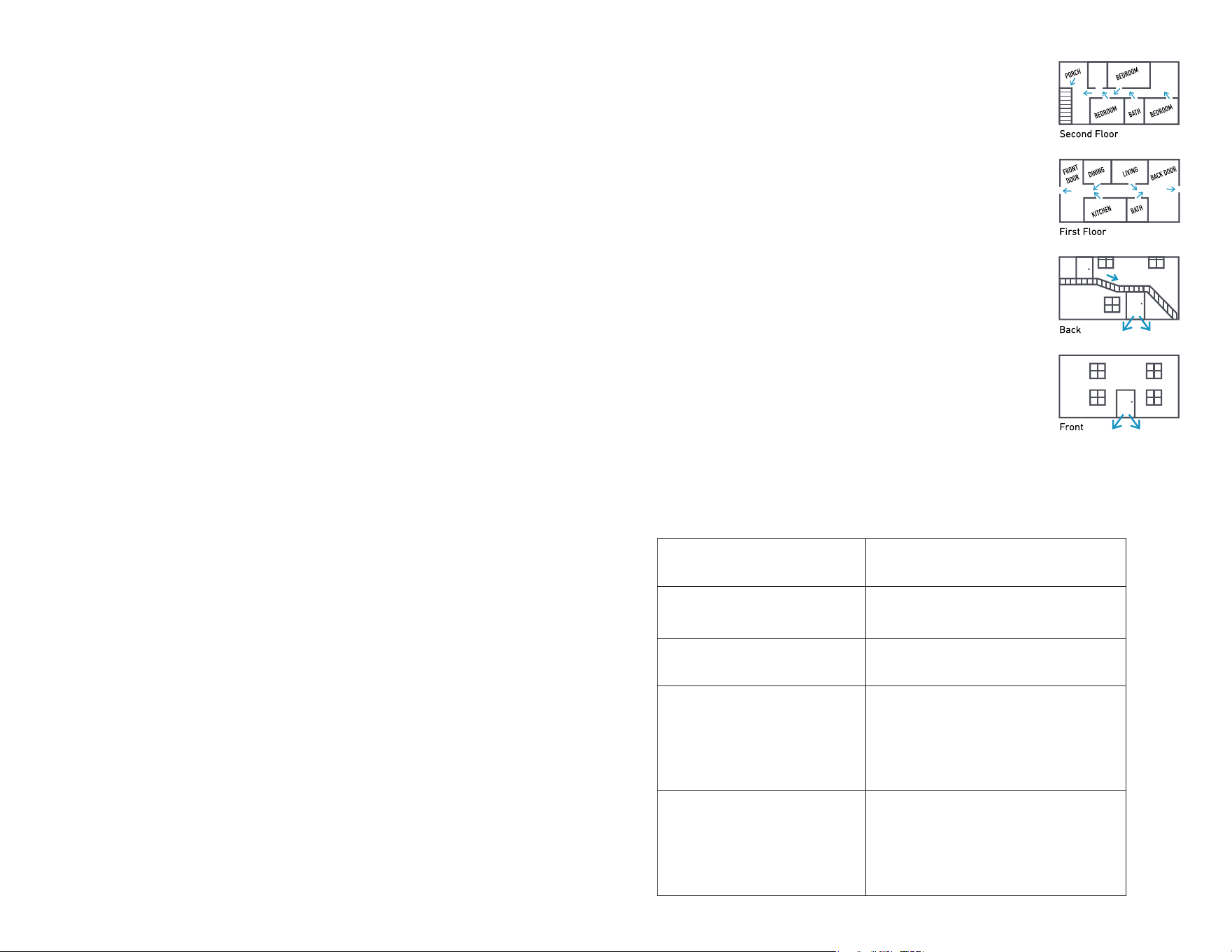
41 42
Have questions? Visit simplisafe.co.uk/contact-us Have questions? Visit simplisafe.co.uk/contact-us
15. Privacy
Please refer to SimpliSafe’s privacy policy (simplisafe.co.uk/privacy) for important information about our
collection, use and sharing of your personal information. We will only use your personal information as set
out in our privacy policy.
16. Other Terms
Which laws apply to this contract and where you may bring legal proceedings. These terms are governed
by the laws of England and Wales and you can bring legal proceedings in respect of the products in the
courts of England and Wales. If you live in Scotland, you can bring legal proceedings in respect of the
Products in either the Scottish courts or the courts of England and Wales. If you live in Northern Ireland,
you can bring legal proceedings in respect of the Products in either the Northern Irish courts or the courts
of England and Wales.
Even if we delay in enforcing this contract, we can still enforce it later. If we do not insist immediately that
you do anything you are required to do under these Terms and Conditions, or if we delay in taking steps
against you in respect of your breaking this contract, that will not mean that you do not have to do those
things and it will not prevent us taking steps against you at a later date.
If a court finds part of this contract illegal, the rest will continue in force. Each of the paragraphs of these
terms operates separately.
Nobody else has any rights under this contract (except someone you pass your Limited Warranty on to).
This contract is between you and us. No other person shall have any rights to enforce any of its terms.
Notices. Unless otherwise expressly provided herein, (i) all notices required to be given to SimpliSafe
shall be deemed to have been duly given if in writing and mailed by regular mail, postage prepaid,
or overnight delivery, by a reputable, national overnight delivery service to SimpliSafe’s then current
principal place of business and (ii) all notices required to be given to Subscriber shall be deemed to have
been duly given if in writing and sent to the email address Subscriber provided to SimpliSafe.
Assignment. We may transfer our rights and obligations under these Terms and Conditions to another
organization. We will contact you to let you know if we plan to do this. If you are a consumer and you
are unhappy with the transfer, you may contact us to end the contract within 30 days of us telling you
about it and we will refund you any payments you have made in advance for Products not provided. You
may only transfer your rights or your obligations under these Terms and Conditions to another person
if we agree to this in writing or in conjunction with the transfer of the Product in accordance with this
agreement.
Satisfaction Guarantee. Unless speciHed otherwiseP any satisfaction guarantee or money back guarantee
offers are made on an item by item basis (whether the item is purchased alone or as part of a larger
order and the start date for any such guarantee is the date of delivery of that speciHc item for items
ordered directly from SimpliSafe, or the purchase date for any items purchased from an authorised
retailer. To the extent permissible by law, Satisfaction Guarantees only apply to initial purchasers,
purchasing directly from SimpliSafe or through an authorised retailer, and are non-transferable. As a
condition of this guarantee, SimpliSafe may require that the customer produce proof of purchase to
conHrm the purchase dateO
Critical Product, Component and Software Updates & Replacements. If, at the Company’s sole and
reasonable discretion, certain critical product, component and/or Software updates or replacements
are needed to maintain reliable performance of your system or any components thereof during your
ownership of your system, and the Company makes corresponding hardware or software updates
available (collectively, “Critical Updates & Replacements”), upon notice the Customer agrees to take
reasonable steps and follow provided instructions to effectuate such Critical Updates & Replacements,
and to cooperate as reasonably requested to help schedule, coordinate or arrange for such Critical
Updates & Replacements to be installed, delivered or implemented. Such Critical Updates & Replacements
can include updated labelling, replacements of batteries, replacement of Wi-Fi or cellular modules, and
even replacements of discontinued products.
Reconditioned parts. As part of SimpliSafe’s sustainability efforts, we reserve the option of using
reclaimed, recycled or otherwise reconditioned parts as component parts in any new or refurbished
products sold or provided to consumers. Any purchase of new products or request for replacement parts
by the consumer is transacted with that understanding, agreement, and acknowledgment between the
parties.
Emergency Evacuation Plan
Establish and regularly practice a plan of escape in the event of HreO
The following steps are recommended by the National Fire Protection
Association:
• Position your detector or your interior and/or exterior sounders so that
they can be heard by all occupants.
• Determine two means of escape from each room. One path of escape
should lead to the door that permits normal exit from the building. The
other may be a window, should your path be impassable. Station an
escape ladder at such windows if there is a long drop to the ground.
• Sketch a Ioor plan of the buildingO Show windowsP doorsP stairsP and
rooftops that can be used to escape. Indicate escape routes for each
room. Keep these routes free from obstruction and post copies of the
escape routes in every room.
• Assure that all bedroom doors are shut while you are asleep. This will
prevent deadly smoke from entering while you escape.
• Try the door. If the door is hot, check your alternate escape route. If the
door is cool, open it cautiously. Be prepared to slam the door if smoke or
heat rushes in.
• When smoke is present, crawl on the ground. Do not walk upright, since
smoke rises and may overcome youO Clearer air is near the IoorO
• Escape quickly; don’t panic.
• Establish a common meeting place outdoors, away from your house,
where everyone can meet and then take steps to contact the authorities
and account for those missing. Choose someone to assure that nobody
returns to the house — many die going back.
BT LE frequency
2402MHz to 2480MHz
BT LE power
6.67 dBm EIRP
2.4G WiFi frequency
2412MHz to 2472MHz
2.4G WiFi power
16.62 dBm EIRP
SRD frequency
433.92MHz
SRD power
3.6 dBm ERP
4G LTE eMTC frequency:
LTE-M Band 1: 2110-2170MHz
LTE-M Band 3: 1805-1880MHz
LTE-M Band 5: 869-894MHz
LTE-M Band 8: 925-960MHz
LTE-M Band 20: 791-821MHz
LTE-M Band 28: 758-803MHz
4G eMTC max output power:
LTE-M Band 1: 20.91dBm(Conducted)
LTE-M Band 3: 20.68dBm(Conducted)
LTE-M Band 5: 21.02dBm(Conducted)
LTE-M Band 8: 21.43dBm(Conducted)
LTE-M Band 20: 21.31dBm(Conducted)
LTE-M Band 28: 21.28dBm(Conducted)
4G NB-IoT frequency:
NB-IoT Band 1: 2110-2170MHz
NB-IoT Band 3: 1805-1880MHz
NB-IoT Band 5: 869-894MHz
NB-IoT Band 8: 925-960MHz
NB-IoT Band 20: 791-821MHz
NB-IoT Band 28: 758-803MHz
4G NB-IoT max output power:
NB-IoT Band 1: 21.69dBm(Conducted)
NB-IoT Band 3: 21.74dBm(Conducted)
NB-IoT Band 5: 21.35dBm(Conducted)
NB-IoT Band 8: 21.52dBm(Conducted)
NB-IoT Band 20: 21.26dBm(Conducted)
NB-IoT Band 28: 21.49dBm(Conducted)
UK Wireless communication frequency bands and power
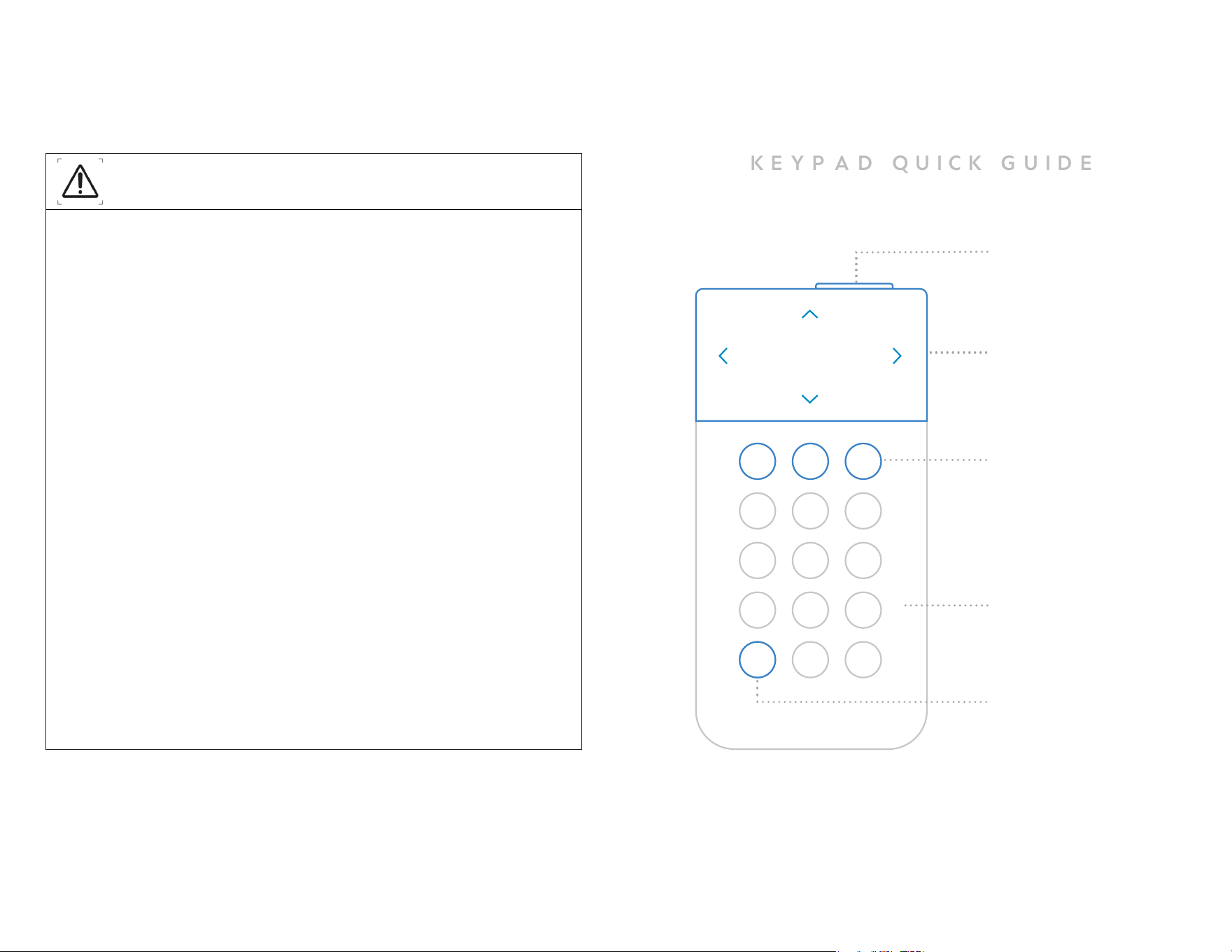
43 44
Menu
To adjust settings press
the menu button.
Menu Navigation
Press down on the
sides of the screen to
navigate the menu.
Panic Button
Panic Buttons will trigger an
alarm when you hold down
the button for 2 full seconds.
Touch to Wake
You can “wake up” the Key-
pad by touching the body
of the Keypad.
K E Y P A D Q U I C K G U I D E
Off, Home, Away
Your system has 3 modes:
Off, Home, and Away.
Pressing Home or Away
will arm your system and
pressing Off will disarm it.
All lights
This option allows for quick setting changes to all light functions on your Base Station. By default this
is set to “ON.” The Power, System Mode, and Trouble light settings on your Base Station demonstrate
that your system remains connected to power and fully operational. Altering these settings may cause
you to miss important information about your Base Station or overall system status.
System mode lights
This option changes the behavior of your Base Station’s light ring in response to the system being
placed in Off, Home, or Away modes. When the system is set to “Home” or “Away” the light ring on the
Base Station will be blue. By default this is set to “ON.”
Power light
This light conHrms that your Base Station is connected to power via the power cordO The light ring will
be lit blue when the Base Station is plugged into an outlet with power. By default this is set to “ON.”
The power light shows that your Base Station is plugged in and receiving power at a glance. If the
power light setting is set to noffp you will need to check via the Keypad or App to conHrm the system is
receiving power.
Trouble light
This light indicates a malfunction in your systemO Check the Keypad for details on the speciHc
malfunction. Changing these settings will make your system non-compliant with UL 985 and UL 1023.
The trouble light shows you that there is a malfunction in your system at a glance. If the trouble light
setting is set to noffp you will need to check via the Keypad or app to conHrm the system is not in a
trouble state, such as a sensor having a low battery.
Trouble signal
This tone indicates a malfunction in your systemO Check the Keypad for details on the speciHc
malfunction. By default this is set to “ON.” The trouble signal noise is designed to alert you of a
malfunction in your system if you are in a different room from the Base Station, or cannot see it for
some reason. If the trouble signal setting is set to “off” you will need to check via the Keypad or app
to conHrm the system is not in a trouble stateP such as a sensor having a low batteryO
Entry/Exit delays
The entry delay is the amount of time that the system will count down before beginning an alarm
after an intrusion sensor is tripped. By default the entry delay is set to 30 seconds. The exit delay
is the amount of time the system will wait to enter a fully armed state after it is set to Home/Away
mode. By default the exit delay is set to 60 seconds and can be set to a maximum of 4 minutes and
15 seconds.
If your entry delay exceeds 45 seconds or exit delay exceeds 2 minutes, it is more likely that an
intruder could enter and exit the home prior to raising an alarm, or enter the home before security is
fully in place when you arm the system.
Have questions? Visit simplisafe.co.uk/contact-us Have questions? Visit simplisafe.co.uk/contact-us

SimpliSafe Ltd.
196 Deansgate, Manchester, M3 3NE
0800 456 1789
SimpliSafe.com
Owners Manual 2024.
STR-10064-00
ART-11001-00
Mar/2024
®