Instruction Manual
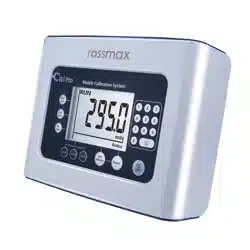
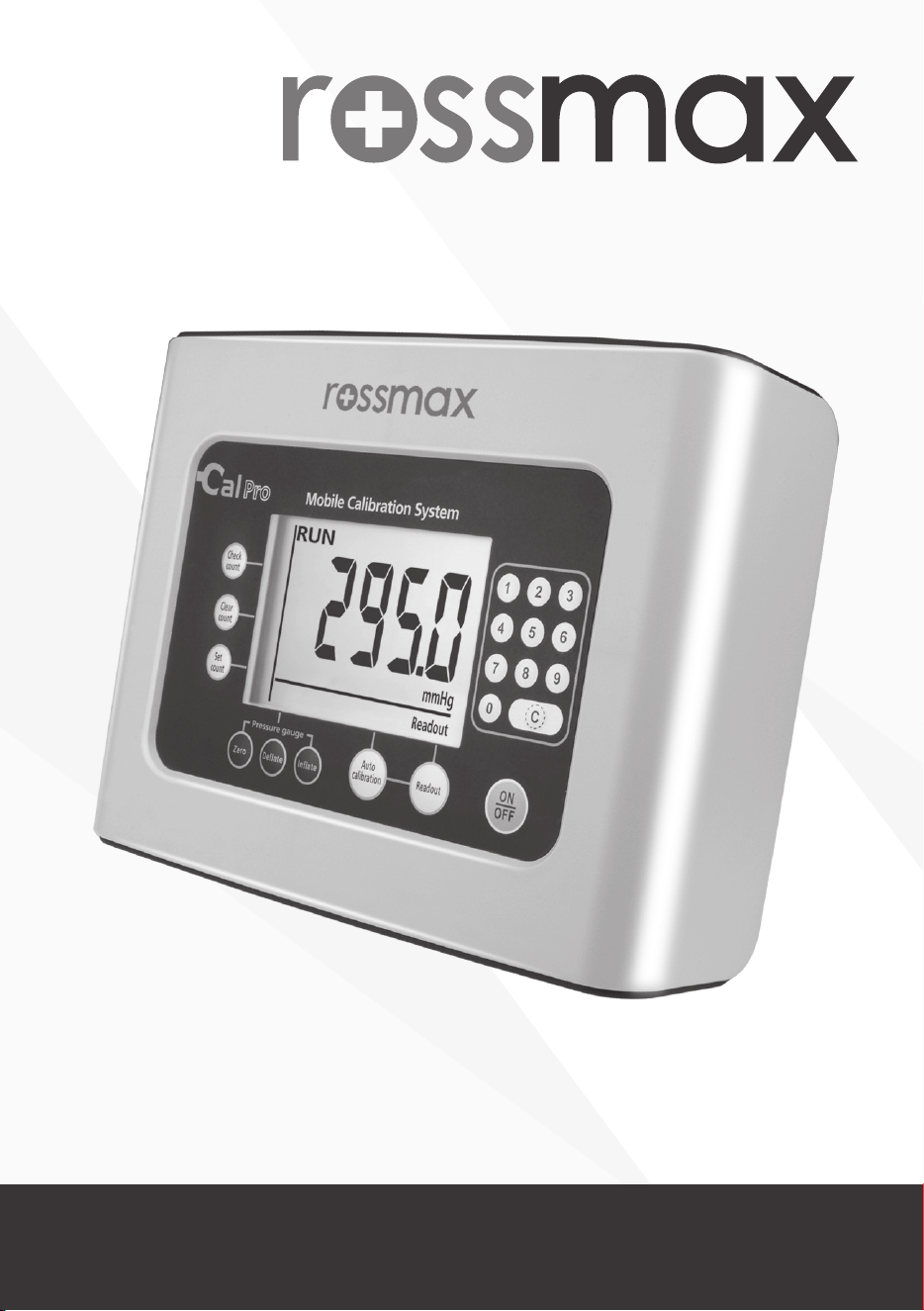
Model: CalPro
Mobile Calibration System
for Blood Pressure Monitor

2
Table of Contents:
Introduction ...................................................................................... 3
Preliminary Remarks ........................................................................... 3
Cautionary Notes ............................................................................... 3
Name/Function of Each Part ............................................................ 4,5
LCD Display Explanations ................................................................... 6
Using the AC Adapter ........................................................................ 7
Connect Methods ........................................................................... 8,9
Operation Procedures
1. Data link status operation ......................................................... 10
2. Readout Mode .......................................................................... 11
3. Auto Calibration Mode ............................................................. 19
4. Measurement Count Display Mode ........................................... 21
5. Measurement Count Clearance Mode ....................................... 22
6. Calibration Reminder Setting Mode .......................................... 23
7. Pressure Gauge Mode .......................................................... 24-26
Change "mmHg" to "kPa" ............................................................. 27
Error Messages ................................................................................ 28
Specications ................................................................................... 29
Safety Certications ......................................................................... 30
USA FCC Class B ............................................................................. 30
Maintenance of ROSSMAX Calibrator .............................................. 30

3
Introduction
The calibration system developed by Rossmax Reasearch and Develop-
ment is equipped with the following features :
● Automatic device pressure checking
● Automatic device pressure calibration
● Measurement count check and reset
● Digital manometer
Which helps our partners to offer on-site and prompt calibration service
to end users as well as signicantly enhance customer satisfaction!
Preliminary Remarks
The quality of the device has been veried and conforms to the provi-
sions of the Electromagnetic Compatibility EMC Directive 2014/30/EU;
Low Voltage Directive (LVD) 2014/35/EU and EN/IEC 61010-1 :2010 Safe-
ty requirements for electrical equipment for measurement, control, and
laboratory use - Part 1: General requirements.
Cautionary Notes
1. The unit contains high-precision assemblies. Therefore, avoid extreme
temperatures, humidity, and direct sunlight. Avoid dropping or strong-
ly shocking the main unit, and protect it from dust.
2. The unit should not be operated by children so to avoid hazardous
situations.
3. If the unit is stored near freezing, allow it to acclimate at room tem-
perature before use.
4. This unit is not eld serviceable. You should not use any tool to open
the device nor should you attempt to adjust anything inside the de-
vice. If you have any problems, please contact the store or the doctor
from whom you purchased this unit or please contact Rossmax Inter-
national Ltd.
5. Dispose of device, batteries, components and accessories according to
local regulations.
6. Data link can only be connected with Rossmax blood pressure monitor
and calibrator. It cannot be used for any other purpose.
7. Clean the device carefully with a slightly damp, soft cloth.
4
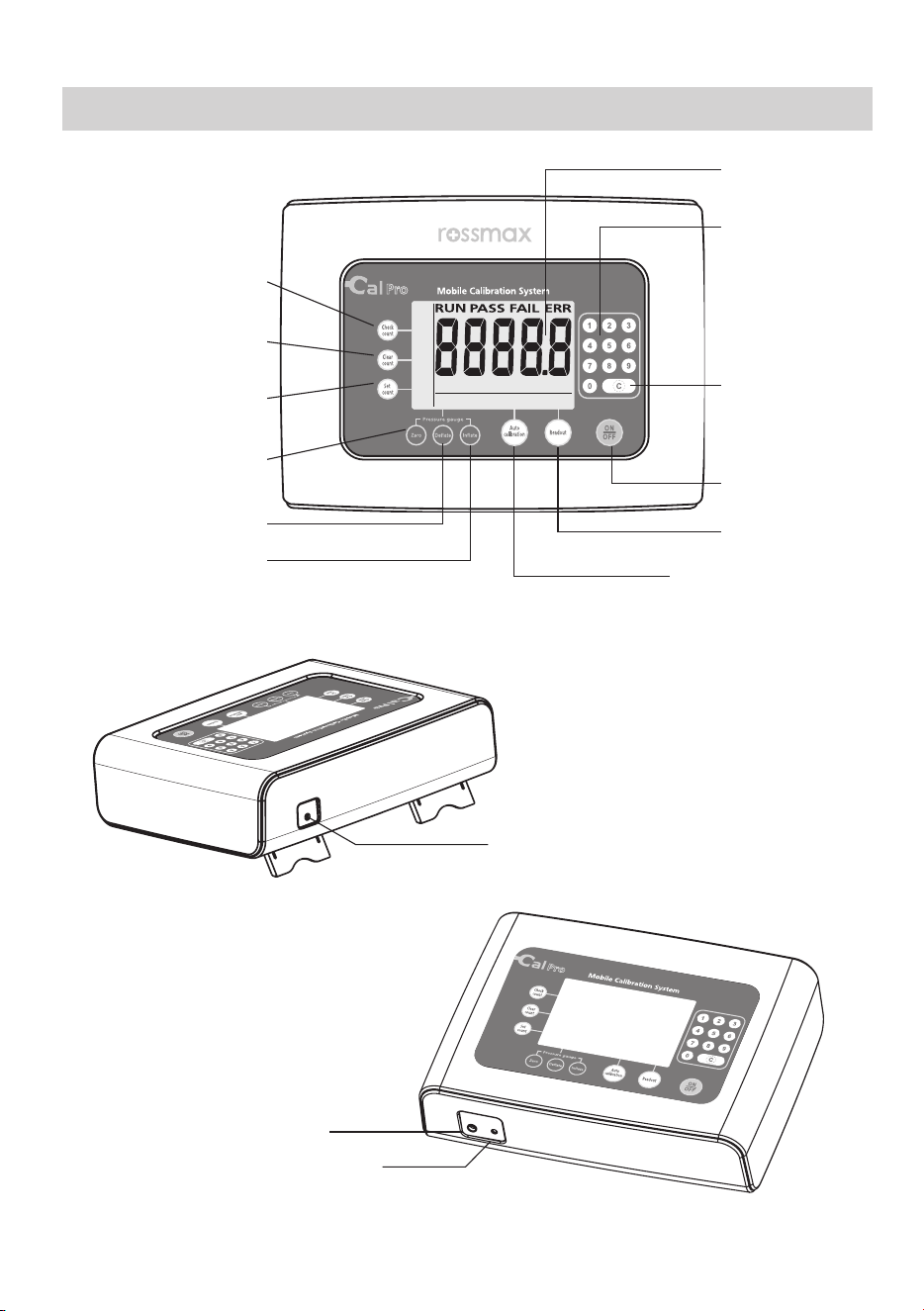
Name/Function of Each Part
kPa mmHg
ReadoutAuto calibrationPressure gauge
Check
count
Clear
count
Set
count
LCD Display
Number
Entry key
Clear key
ON/OFF key
Readout key
Auto Calibration
key
Zero key
Deate key
Inate key
Check Count key
Clear Count key
Set Count key
Air tube socket
Data Link Port
AC Adapter Jack
5
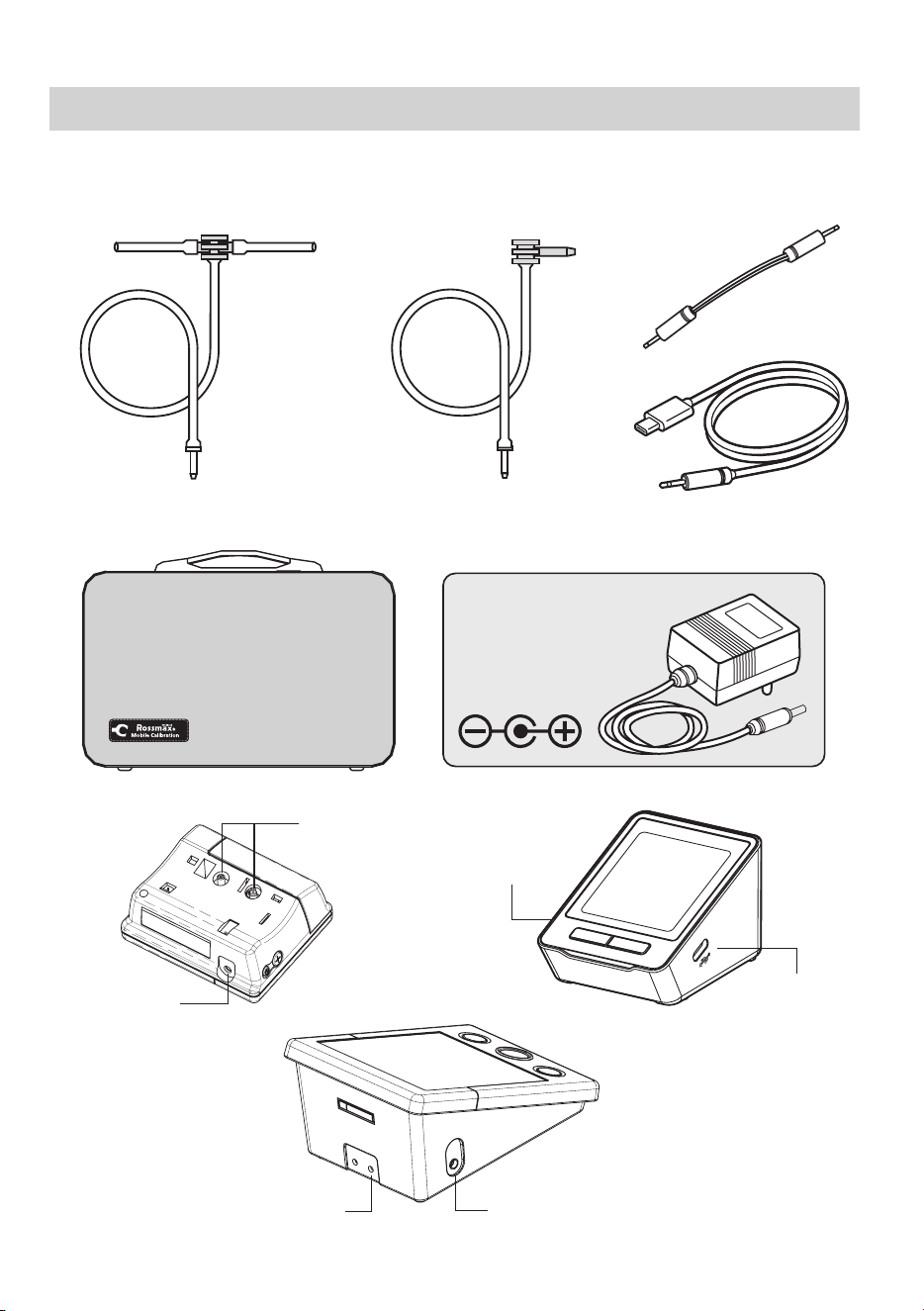
Data Link CableAir Tube and Connector
for Wrist Monitors
Air Tube and Connector
for Upper Arm Monitors
Carrying Bag
AC Adapter
Output: 600mA
(Ø3.8/Ø1.3)
Name/Function of Each Part
Air Outlet
Data Link
Socket
Data Link
Socket
Air Outlet
Data Link
Socket
Air Outlet
6
1
2
3
5
6
4
kPa mmHg
ReadoutAuto calibrationPressure gauge
Check
count
Clear
count
Set
count
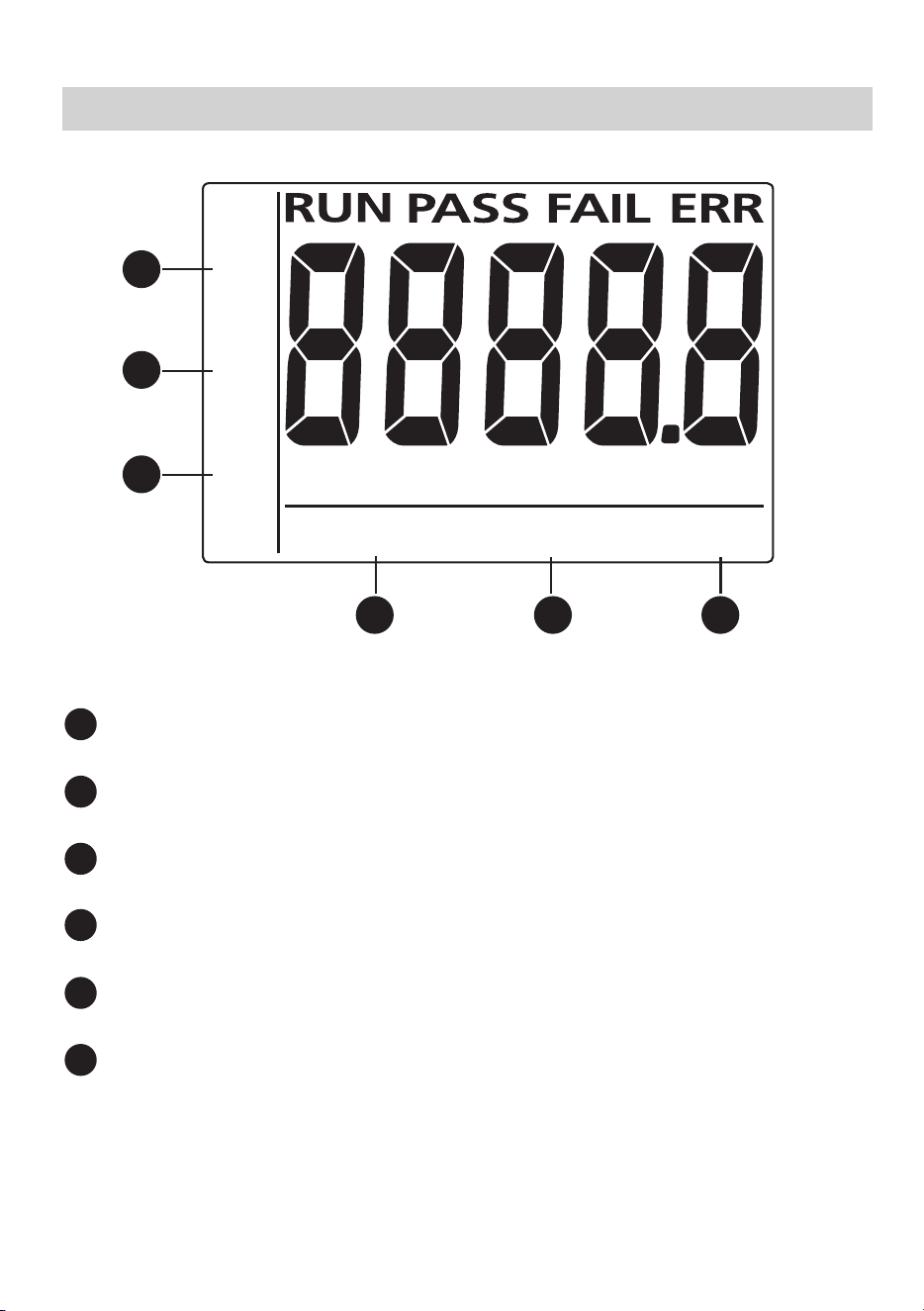
LCD Display Explanations
1
2
3
5
6
4
Readout Mode: Automatic device pressure checking
1
2
3
5
6
4
Auto Calibration Mode: Automatic device pressure calibration
1
2
3
5
6
4
Pressure Gauge Mode: Digital Manometer feature
1
2
3
5
6
4
Measurement Count Display Mode: Check number of uses
1
2
3
5
6
4
Measurement Count Clearance Mode: Zero setting of uses
1
2
3
5
6
4
Calibration Reminder Setting Mode: Re-set number of use cali-
bration reminder
7
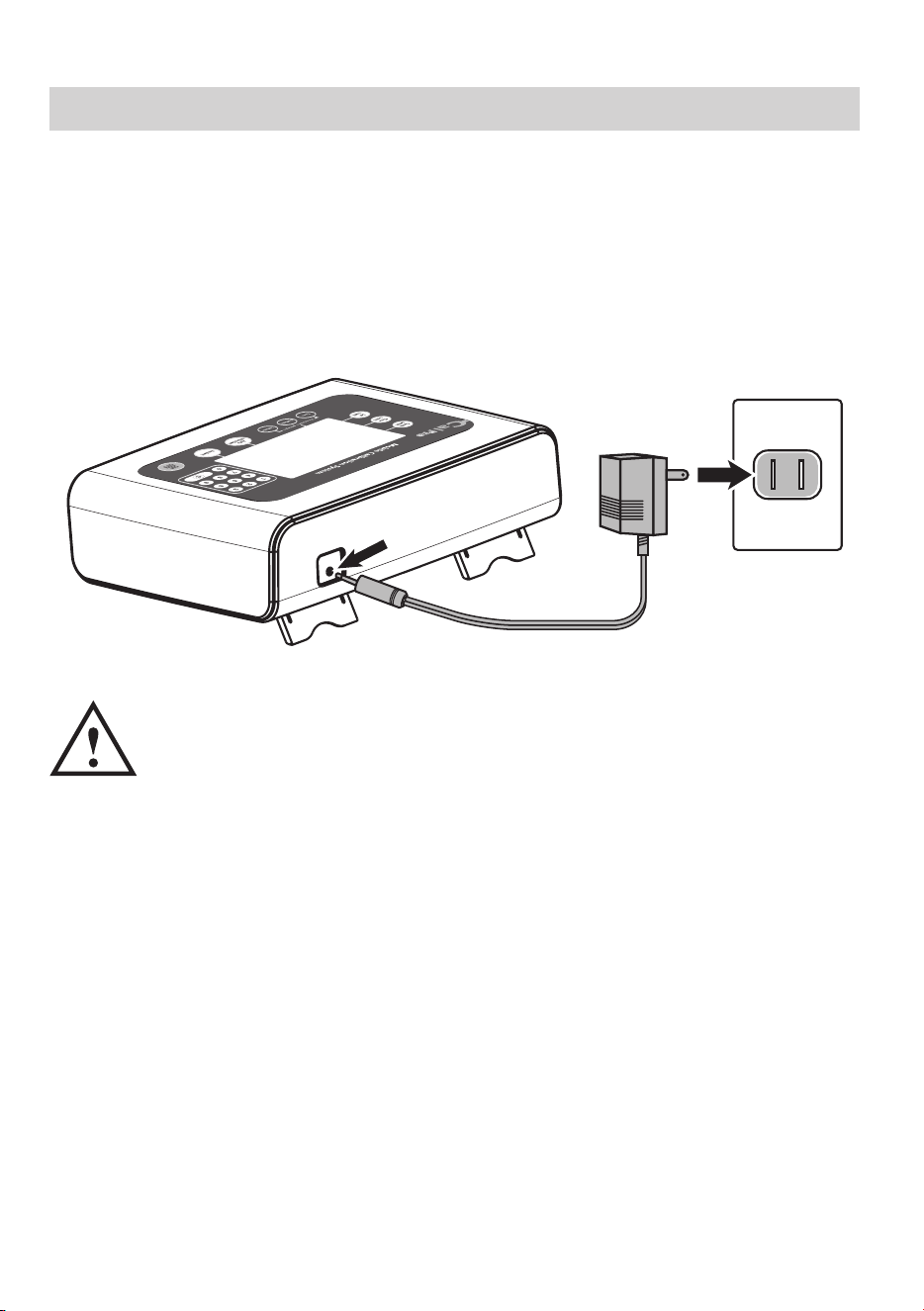
Using the AC Adapter
1. Connect the AC adapter with the AC adapter jack in the back of the
calibrator.
2. Plug the AC adapter into the socket. Use the compatible AC adapters.
(AC adapters with required voltage and current indicated near the AC
adapter jack.)
• Do not plug or unplug the AC adapter into the electrical
outlet with wet hands.
• Unplug the AC adapter from the electrical outlet after using
the device.
8
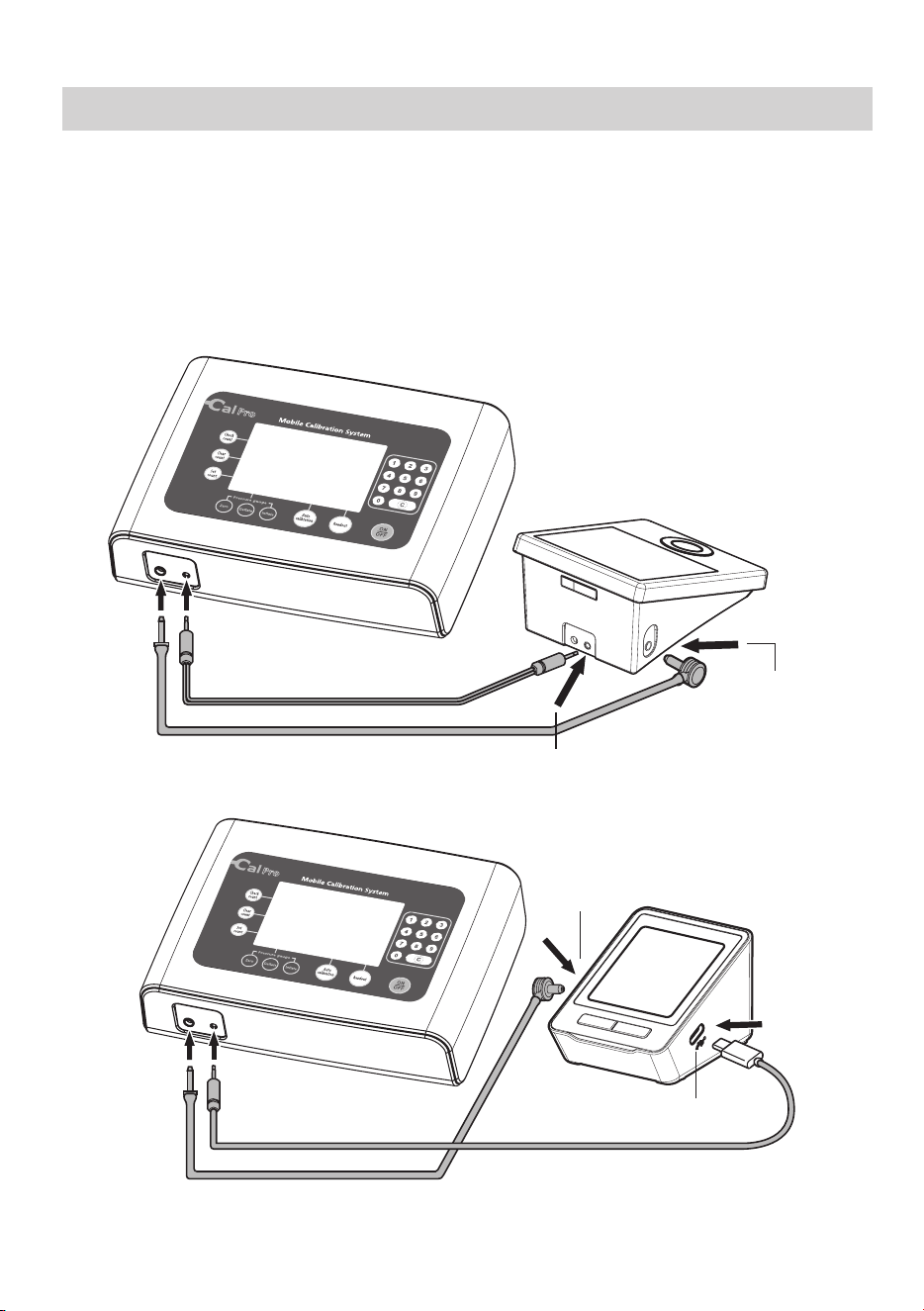
Connection Methods
Upper Arm Blood Pressure Monitor:
1. Connect the tube between the calibrator and the monitor to the air
tube socket.
2. Then connect the data link cable between the calibrator and the moni-
tor to the data link port.
Data Link Cable
Air Tube
Date Link Port
Air Tube
Socket
Data Link Cable
Air Tube
Date Link Port
Air Tube
Socket
9
Cuff Screw
Connection Methods
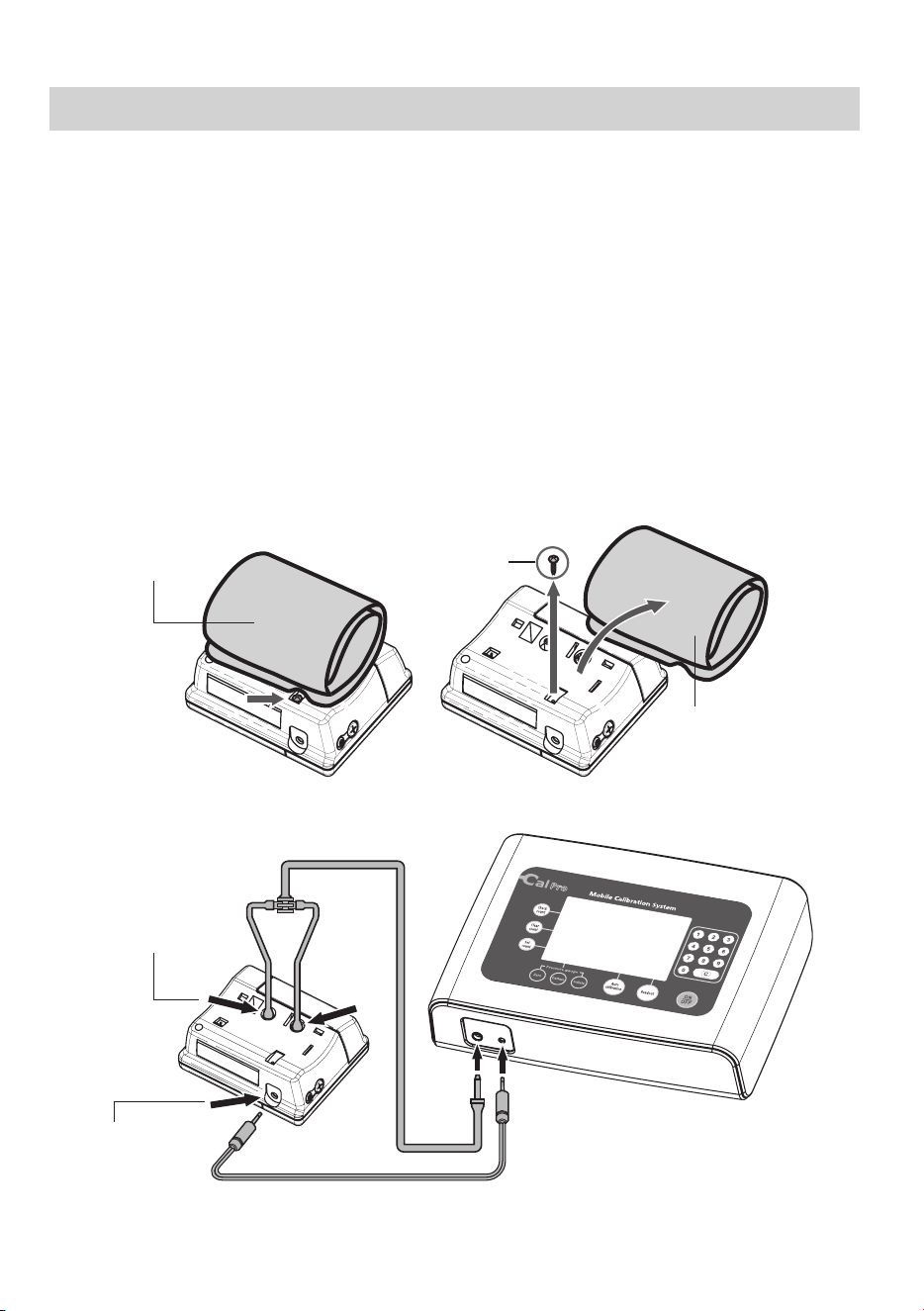
Wrist Blood Pressure Monitor:
1. Loosen the screw that secures the cuff to the monitor.
2. Remove the cuff from the monitor.
a. Push cuff to the screw direction.
b. Slightly pull cuff to remove the cuff from the monitor.
3. Connect the tube between the calibrator and the monitor to the air
outlet.
4. Connect the data link cable between the calibrator and the monitors
data link port.
Data Link Cable
Air Tube
Date Link Port
Air Tube Socket
Wrist Cuff
Wrist Cuff
10
kPa mmHg
ReadoutAuto calibrationPressure gauge
Check
count
Clear
count
Set
count
Operation Procedures
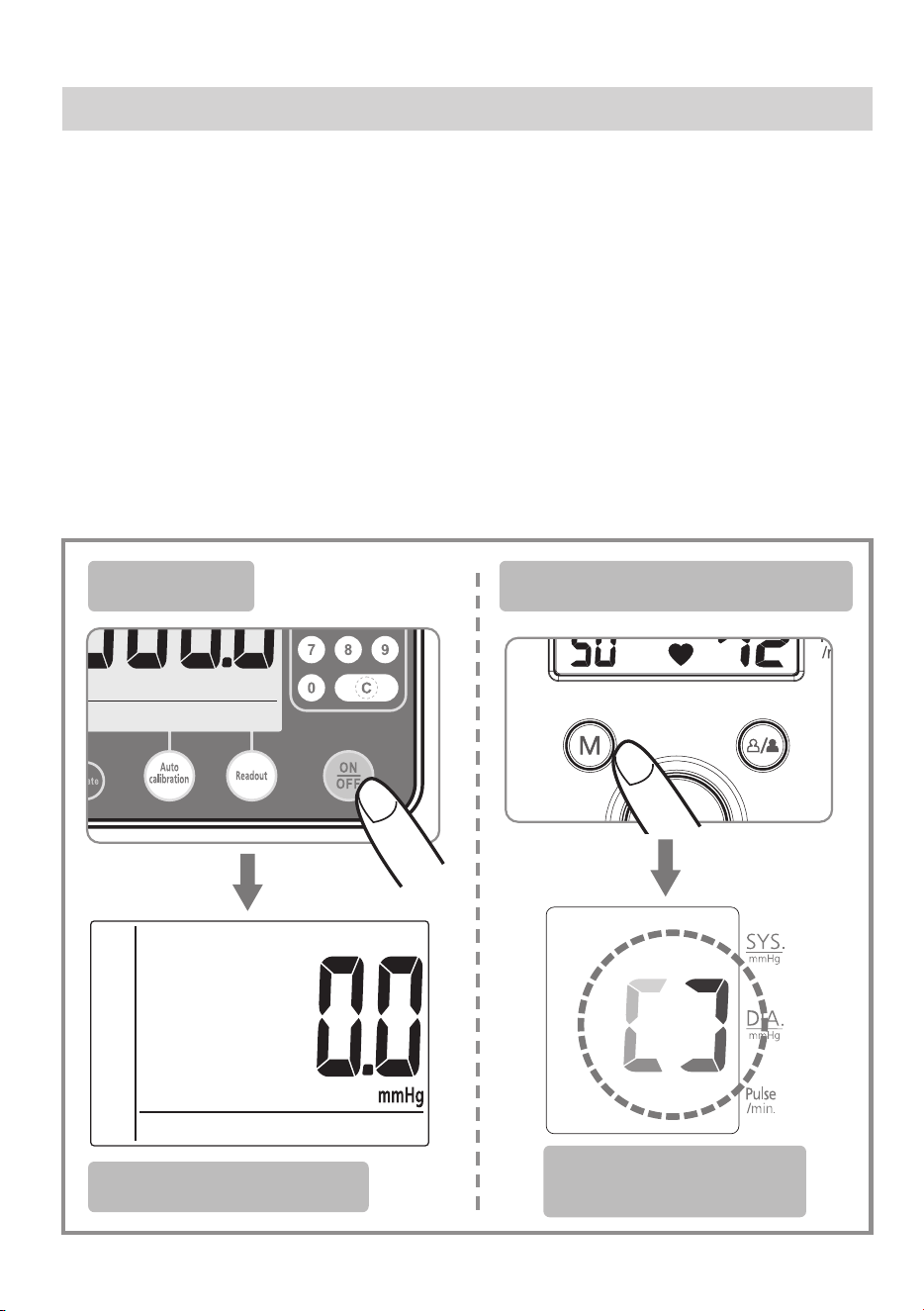
1. Data link status operation
Before operation, make sure the air tube and the data link cable are
securely connected to the calibrator and the blood pressure monitor.
Press the ON/OFF key of the calibrator, then press the M key of the
blood pressure monitor.
Note: If there is no M key on the blood pressure monitor, please press
the ON/OFF key instead.
A loop will appear on the LCD display of the Blood Pressure Monitor,
indicating the data link status.
Calibrator
Blood Pressure Monitor
Calibrator Screen
Blood Pressure
Monitor Screen
11
2. Readout Mode
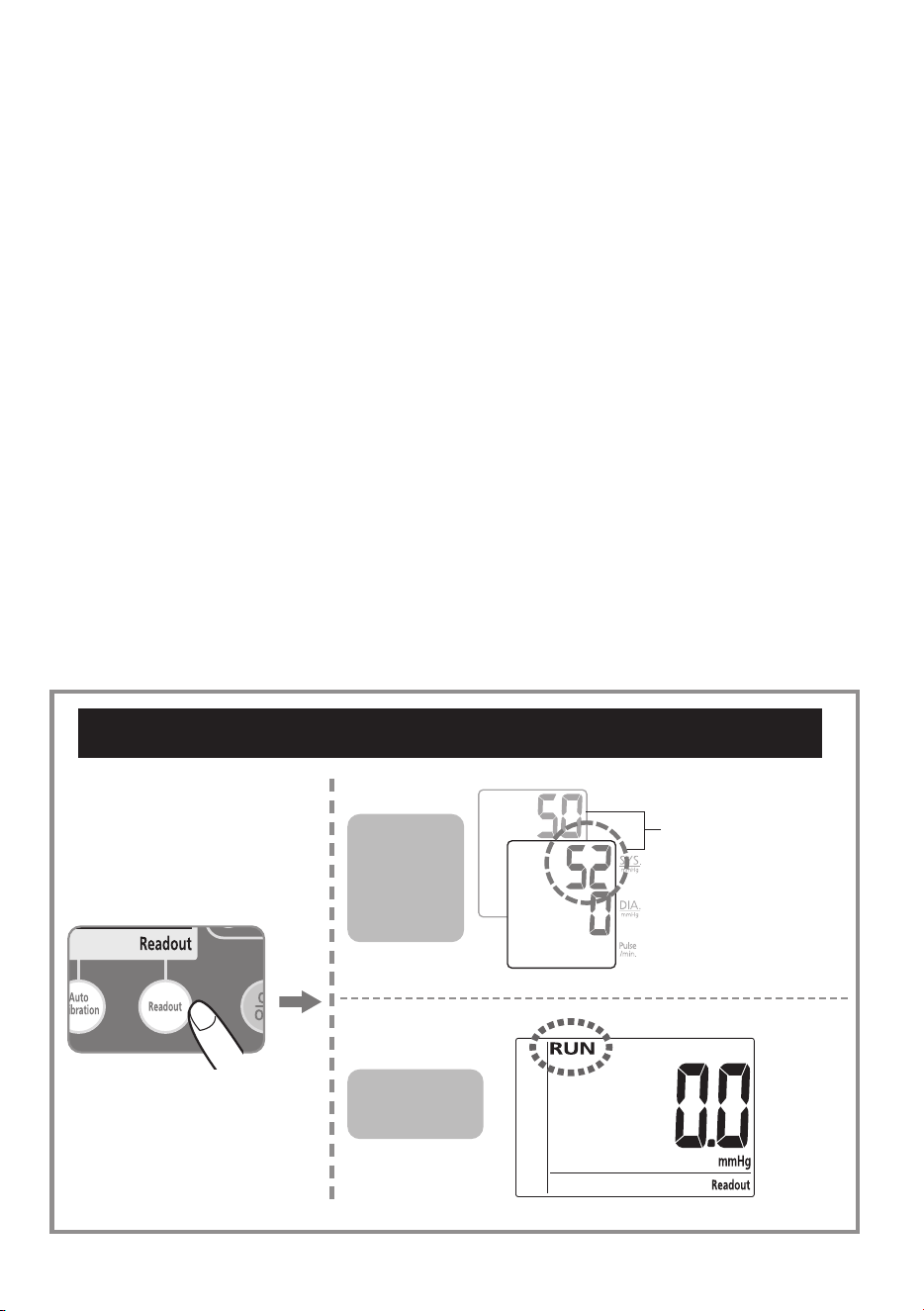
This feature checks monitor pressure, if you would like to ignore
pressure checking , skip to "Auto Calibration Mode"(page 18) directly.
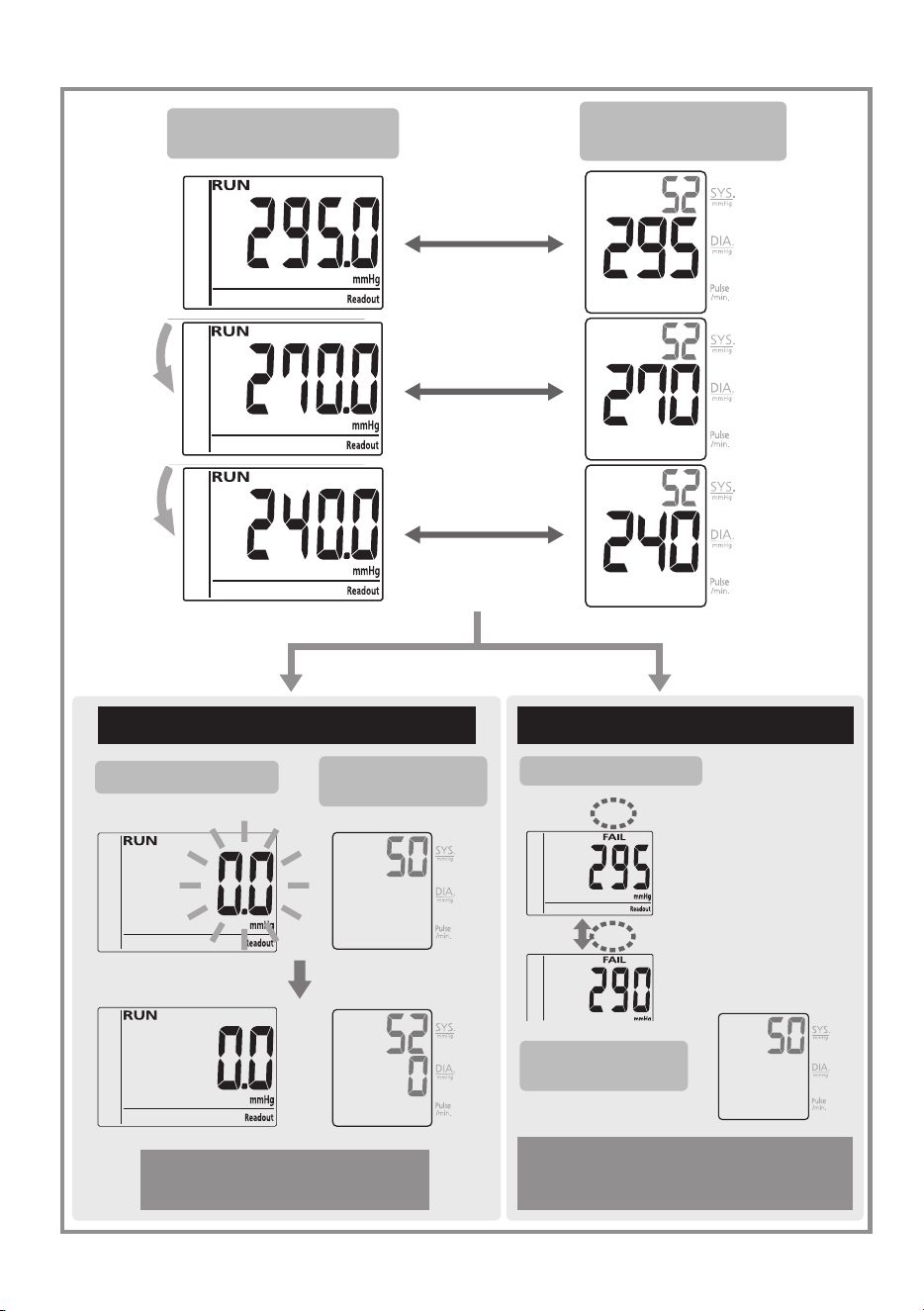
Press “Readout” to start. “RUN” will appear on LCD and pressure is
checked at 0/295/270/240 mmHg points. If the pressure difference
at 0/295/270/240 mmHg is within ± 3mmHg, the calibrator will rapid
exhaust to 0 mmHg, then go on checking 2nd points. If "FAIL" appears
, the faulty pressure points will be shown (both the default pressure
check point and the actual pressure measured will appear alternatively.).
If "FAIL" appears, press the "Auto calibration" key for re-calibration.
After this process is complete, press the "Readout" key to verify
calibration was successful.
Calibrator
Screen
Blood
Pressure
Monitor
Screen
Check First Pressure Points (295/270/240 mmHg)
Link Code
(Reference Only)
12
check point on
Calibrator
check point from Blood
Pressure Monitor
If deviation under ±3mmHg If deviation over ±3mmHg
Automatic Check 2nd
Pressure Points
Calibrator Screen
Blood Pressure
Monitor Screen
Calibrator Screen
Blood Pressure
Monitor Screen
Press Auto Calibration Mode
(follow instructions on Page 18)
Calibrator Screen
Blood Pressure
Monitor Screen
13
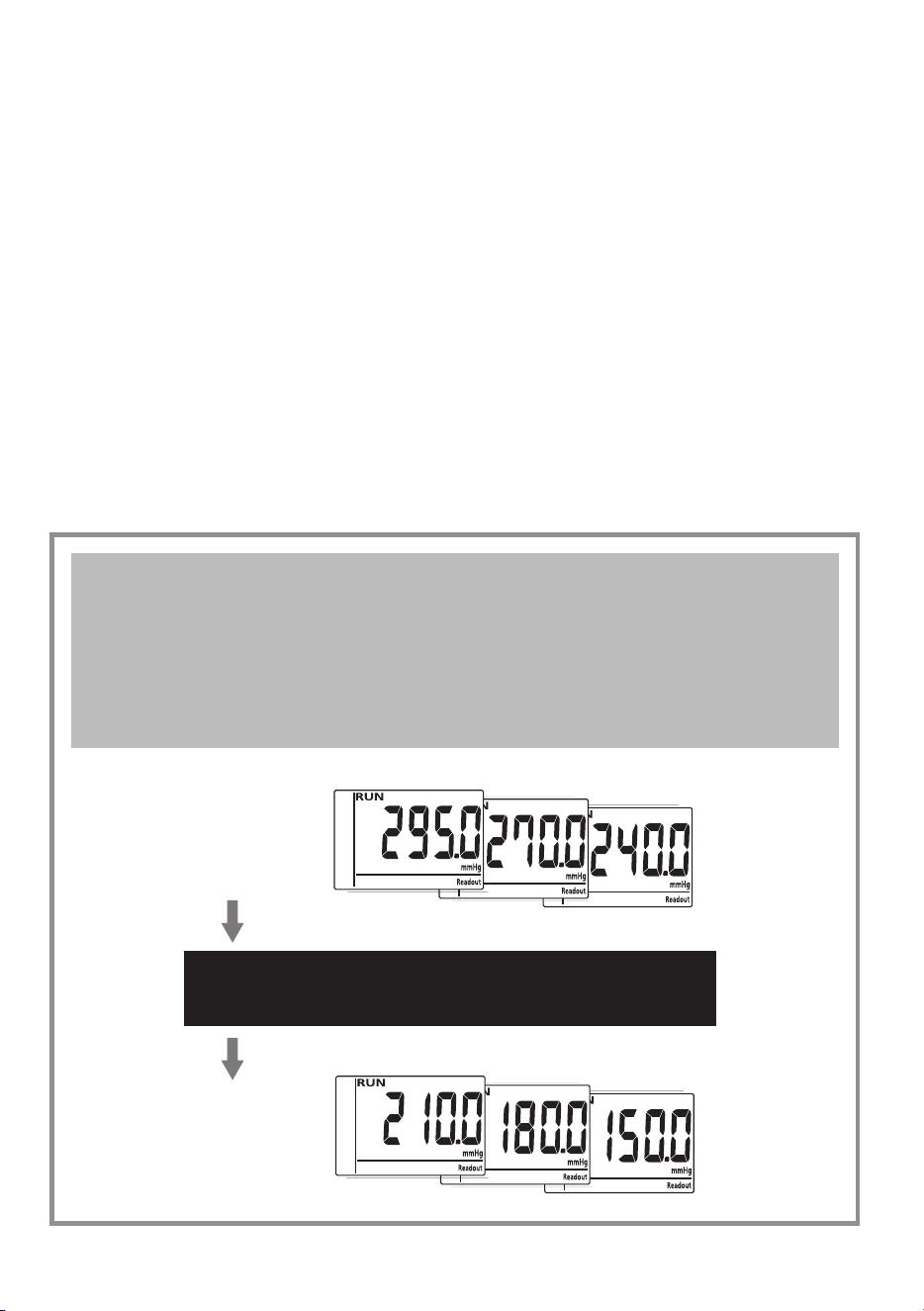
To check the second pressure levels. “RUN” will appear on LCD and
pressure is checked at 0/210/180/150 mmHg points. If the pressure
difference at 0/210/180/150 mmHg is within ± 3mmHg, the calibrator
will rapid exhaust to 0 mmHg, then go on checking 3rd points. if "FAIL"
appears, the faulty pressure points will be shown (both the default
pressure check point and the actual pressure measured will appear
alternatively.).
If "FAIL" happens, press the "Auto calibration" key for re-calibration.
After this process is complete, press the "Readout" key for double
check.
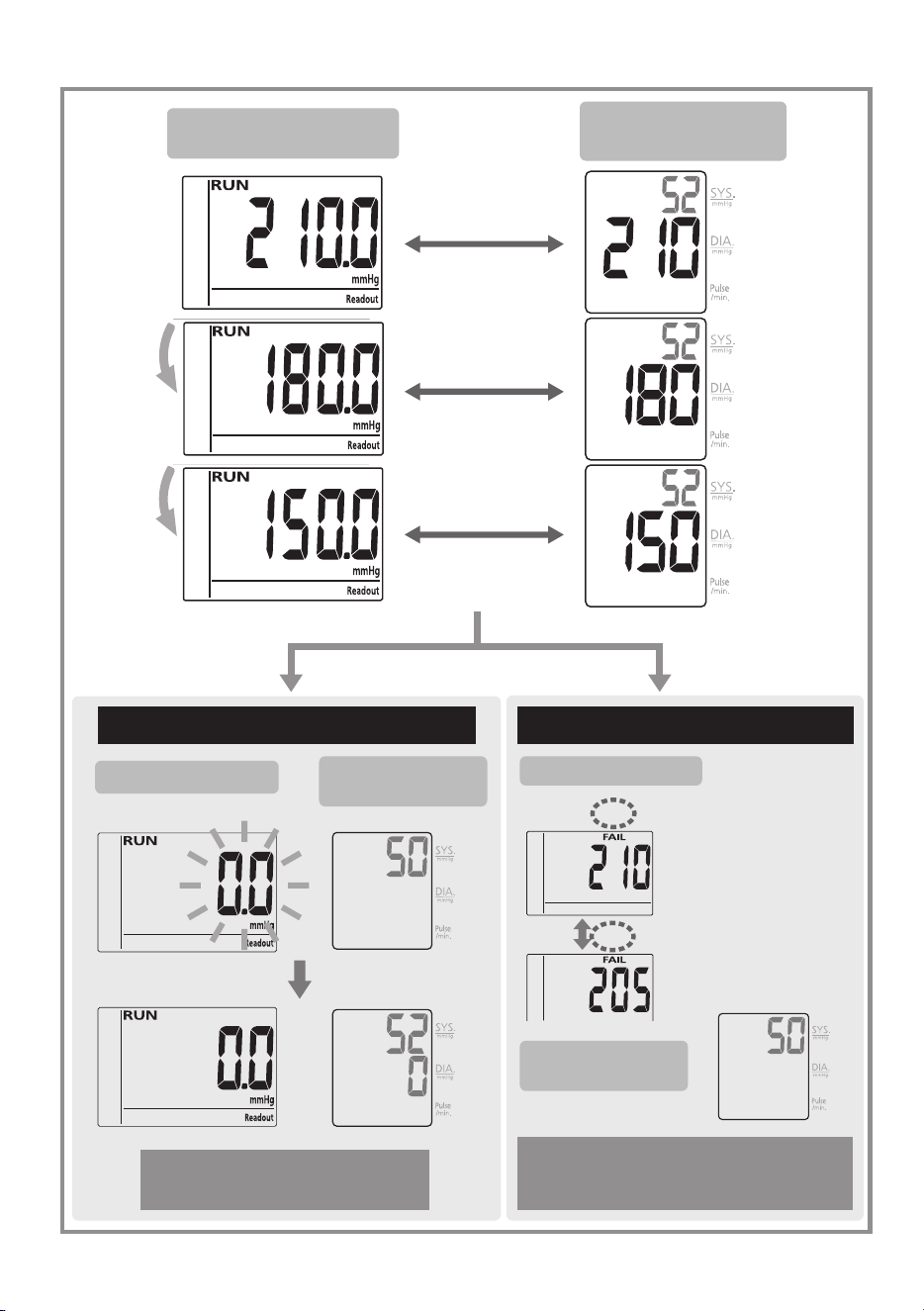
Checking the pressures between calibrator and
monitor. If the deviation of First Pressure Points is
under ±3mmHg, the calibrator will automatically
check Second Pressure Points (210/180/150 mmHg)
First
Pressure
Points
If deviation between calibrator and
monitor is under ±3mmHg
Second
Pressure
Points
14
check point on
Calibrator
check point from Blood
Pressure Monitor
If deviation under ±3mmHg If deviation over ±3mmHg
Automatic Check 3rd
Pressure Points
Calibrator Screen
Blood Pressure
Monitor Screen
Calibrator Screen
Blood Pressure
Monitor Screen
Press Auto Calibration Mode
(follow instructions on Page 18)
Calibrator Screen
Blood Pressure
Monitor Screen
15
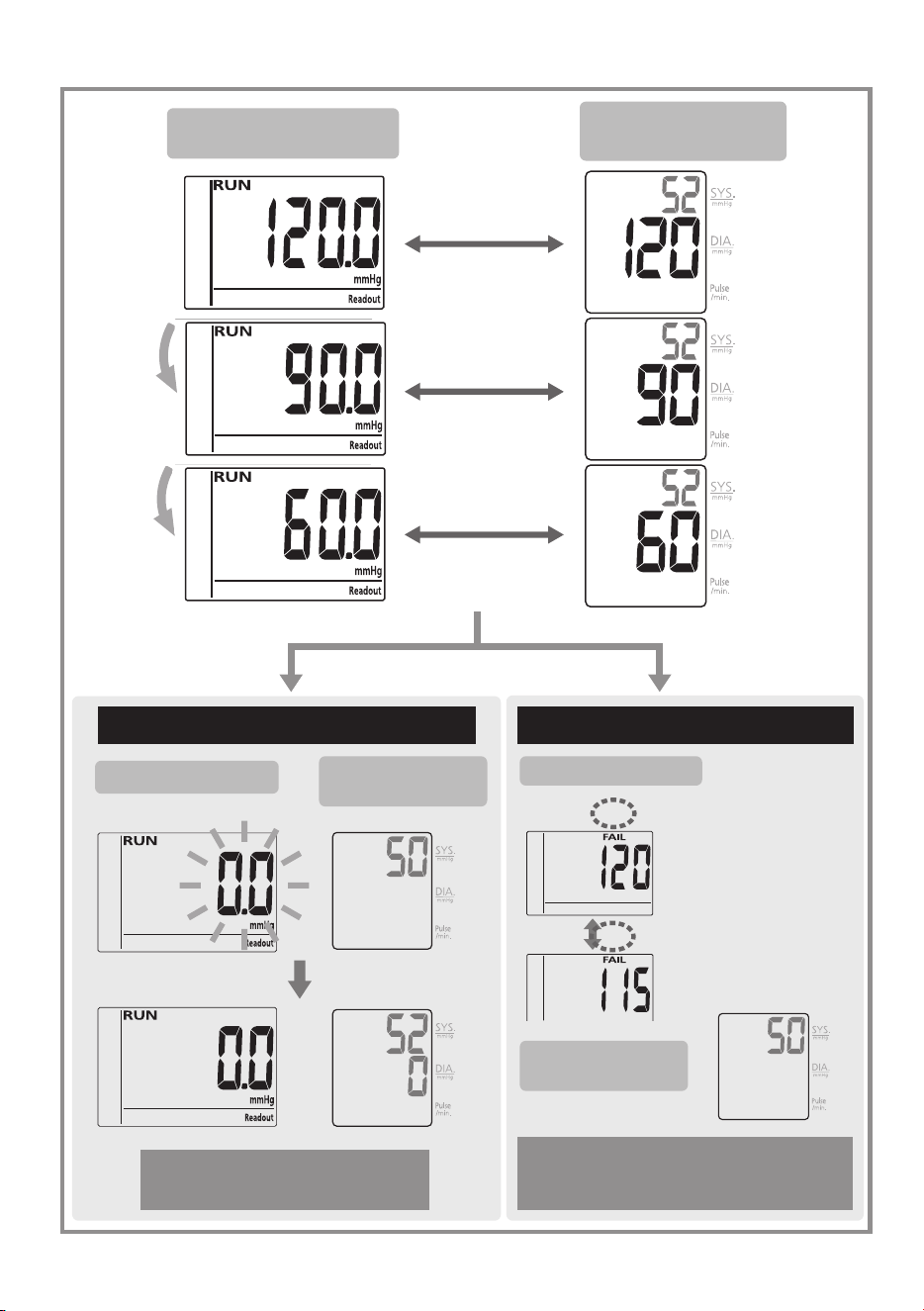
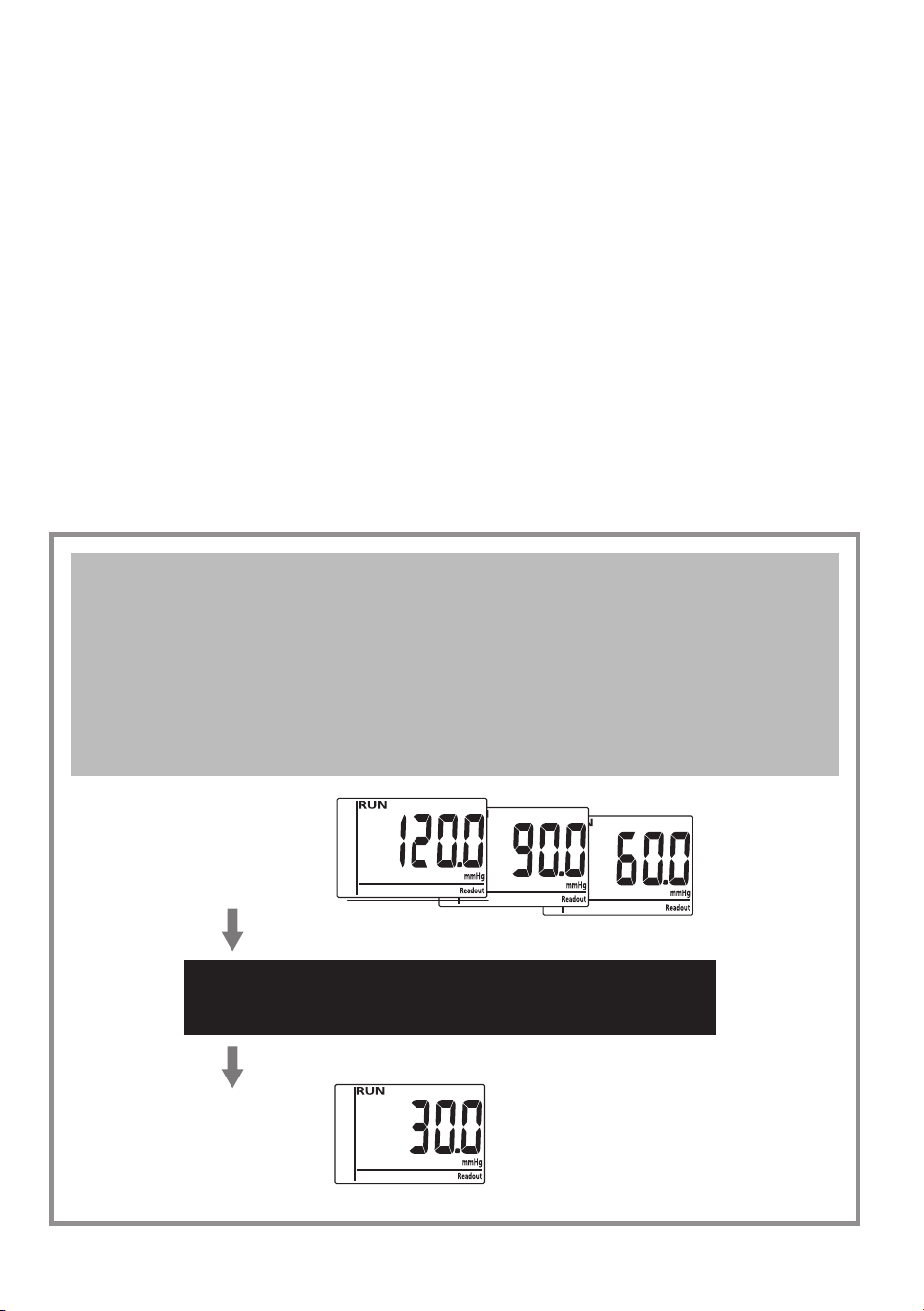
To check the third pressure levels. “RUN” will appear on LCD and
pressures is checked at 0/120/90/60 mmHg points. If the pressure
difference at 0/120/90/60 mmHg is within ± 3mmHg, the calibrator will
rapid exhaust to 0 mmHg, then go on checking 3rd points. If "FAIL"
appears, the faulty pressure points will be shown (both the default
pressure check point and the actual pressure measured will appear
alternatively.).
If "FAIL" happens, press the "Auto calibration" key for re-calibration.
After this process is complete, press the "Readout" key for double
check.
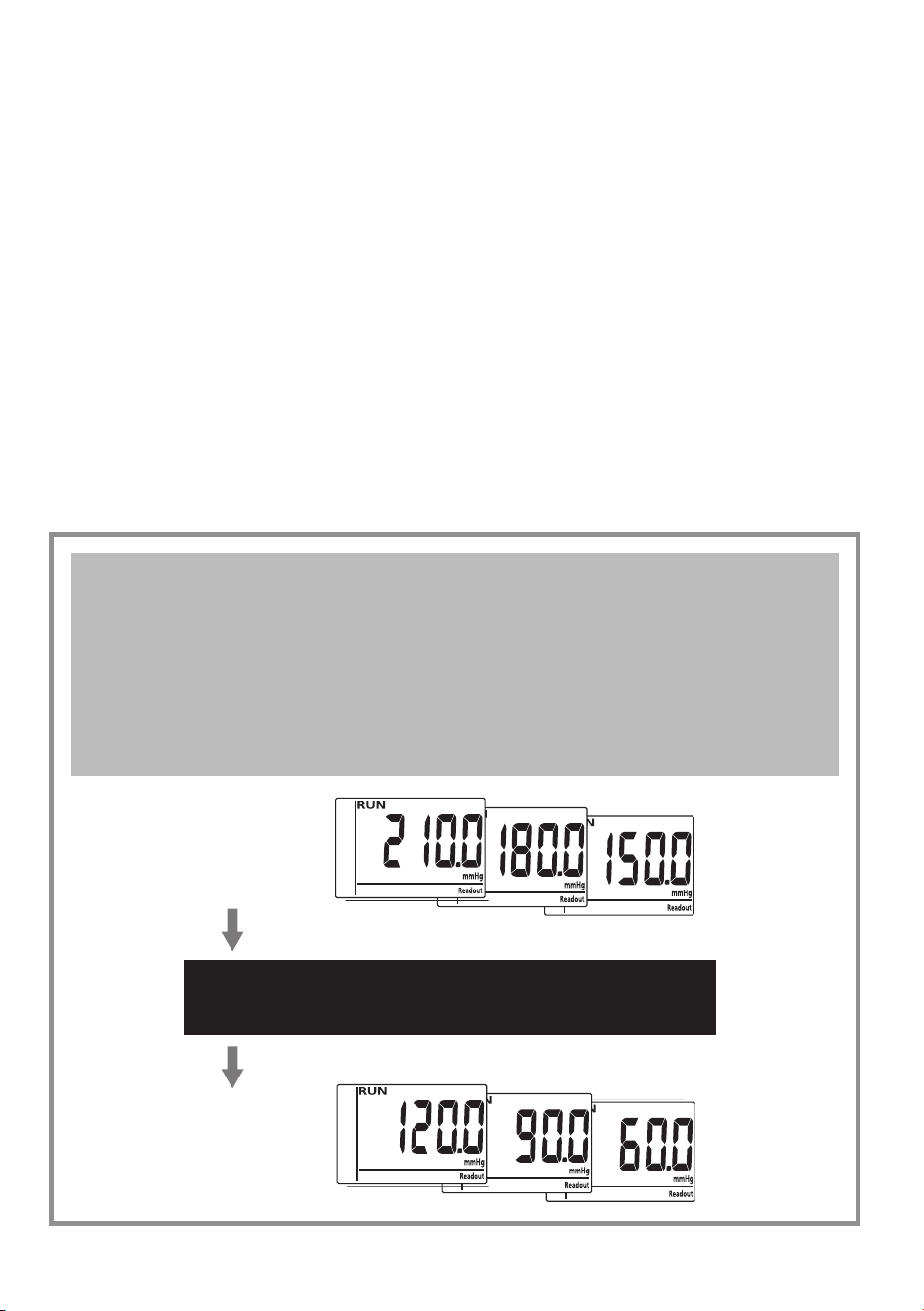
Checking the pressures between calibrator and
monitor. If the deviation of Second Pressure Points
is under ±3mmHg, the calibrator would
automatic check Third Pressure Points
(120/90/60 mmHg)
Second
Pressure
Points
If deviation between calibrator and
monitor is under ±3mmHg
Third
Pressure
Points
16
check point on
Calibrator
check point from Blood
Pressure Monitor
If deviation under ±3mmHg If deviation over ±3mmHg
Automatic Check 4th
Pressure Points
Calibrator Screen
Blood Pressure
Monitor Screen
Calibrator Screen
Blood Pressure
Monitor Screen
Press Auto Calibration Mode
(follow instructions on Page 18)
Calibrator Screen
Blood Pressure
Monitor Screen
17
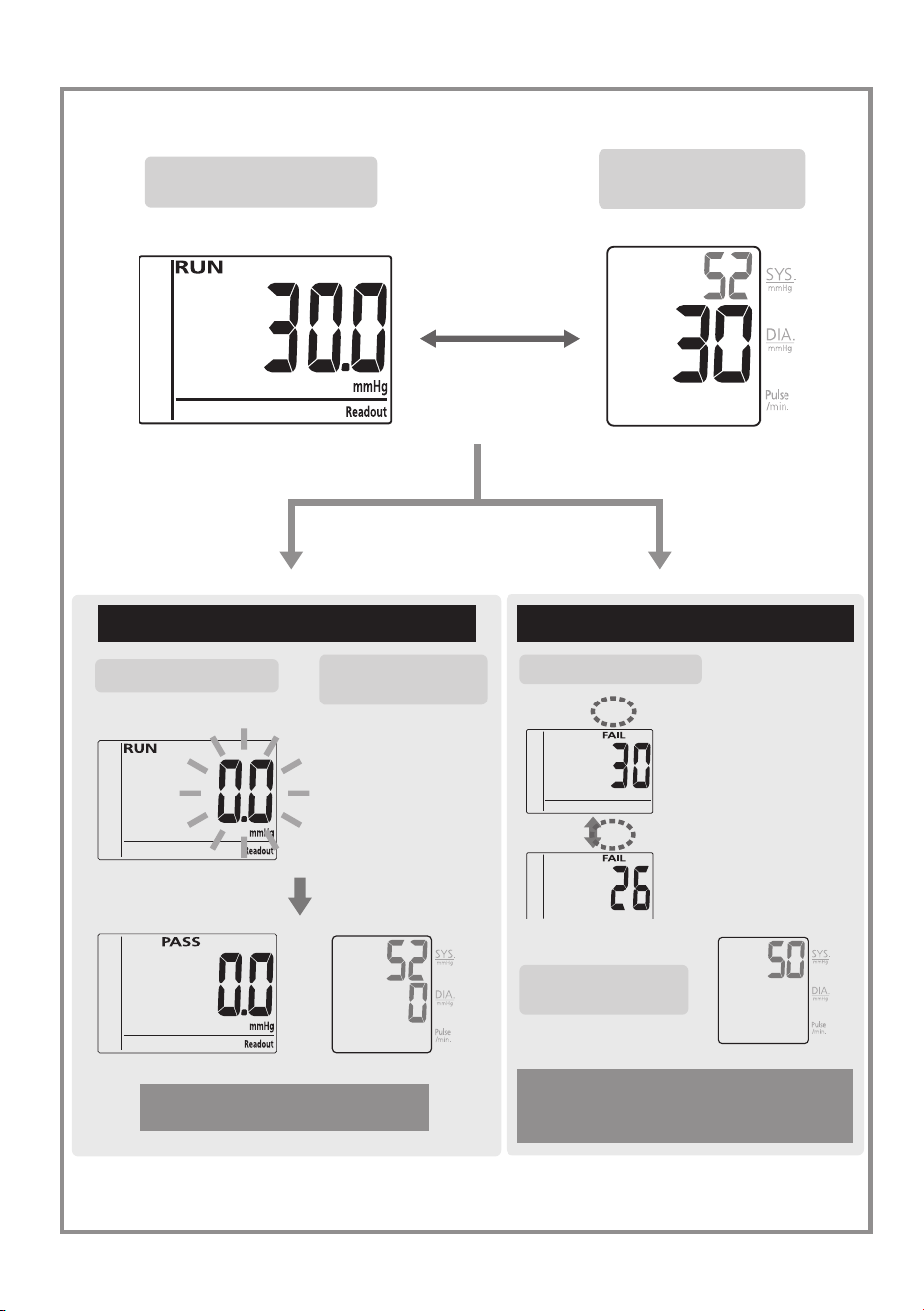
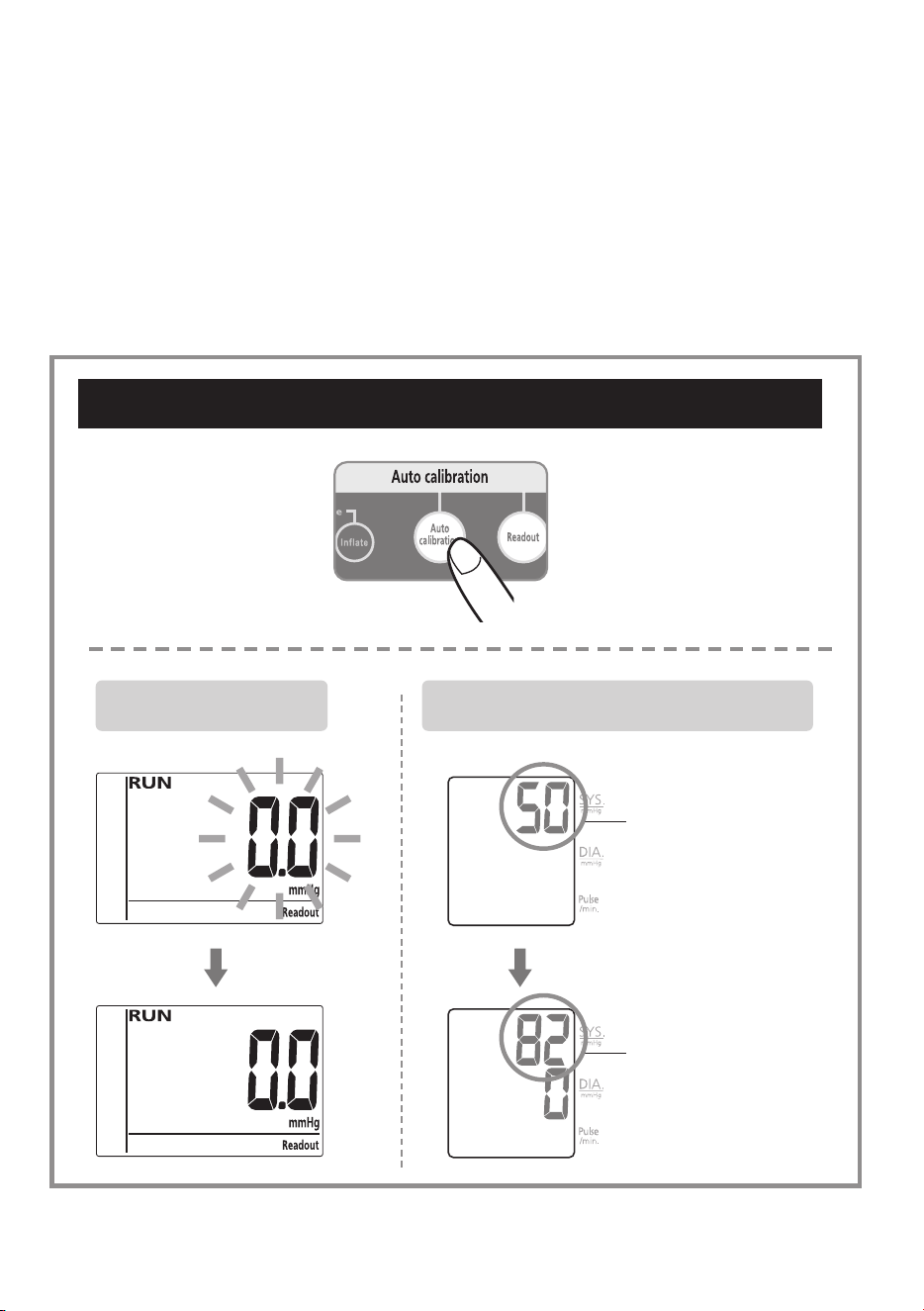
The forth step of checking leves. “RUN” will appear on LCD and
pressures are checked at 0/30 mmHg. If the pressure difference at 0/30
mmHg is within ± 3mmHg, the calibrator shows "PASS". If "FAIL"
appears, the faulty pressure points will be shown (both the default
pressure check point and the actual pressure measured will appear
alternatively.).
If "FAIL" happens, press the "Auto calibration" key for re-calibration.
After this process is complete, press the "Readout" key for double
check.
Checking the pressures between calibrator and
monitor. If the deviation of Third Pressure Points
is under ±3mmHg, the calibrator would
automatic check Forth Pressure Points
(0/30 mmHg)
Third
Pressure
Points
If deviation between calibrator and
monitor is under ±3mmHg
Forth
Pressure
Points
18
check point on
Calibrator
check point from Blood
Pressure Monitor
If deviation under ±3mmHg If deviation over ±3mmHg
Readout Check is OK
Calibrator Screen
Blood Pressure
Monitor Screen
Calibrator Screen
Blood Pressure
Monitor Screen
Press Auto Calibration Mode
(follow instructions on Page 18)
Calibrator Screen
Blood Pressure
Monitor Screen
19
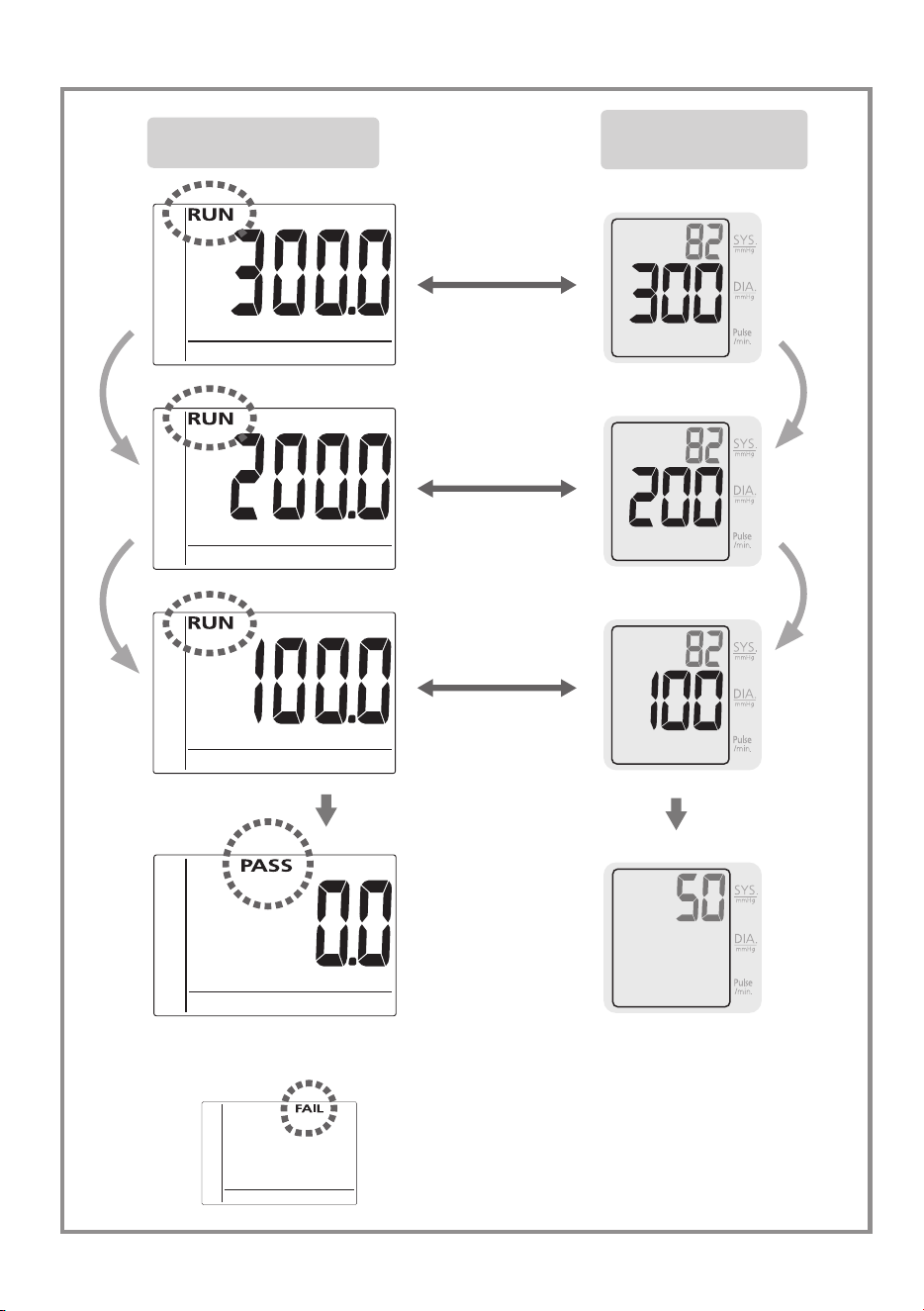
3. Auto Calibration Mode
If "Readout Mode" result is FAIL, Press “Auto calibration” key to
start. “RUN” appears on LCD, and pressure values are programmed at
0/300/200/100 mmHg. If the programming is successful, “PASS” will
appear. Otherwise “FAIL” will appear. If "FAIL" continues to appear,
return the monitor to the manufacturer for service.
Auto Calibration Mode
Calibrator Screen Blood Pressure Monitor Screen
Link Code
(Reference Only)
Link Code
(Reference Only)
20
mmHg
Auto calibration
mmHg
Auto calibration
mmHg
Auto calibration
mmHg
Auto calibration
or
Calibrator Screen
Blood Pressure
Monitor Screen
21
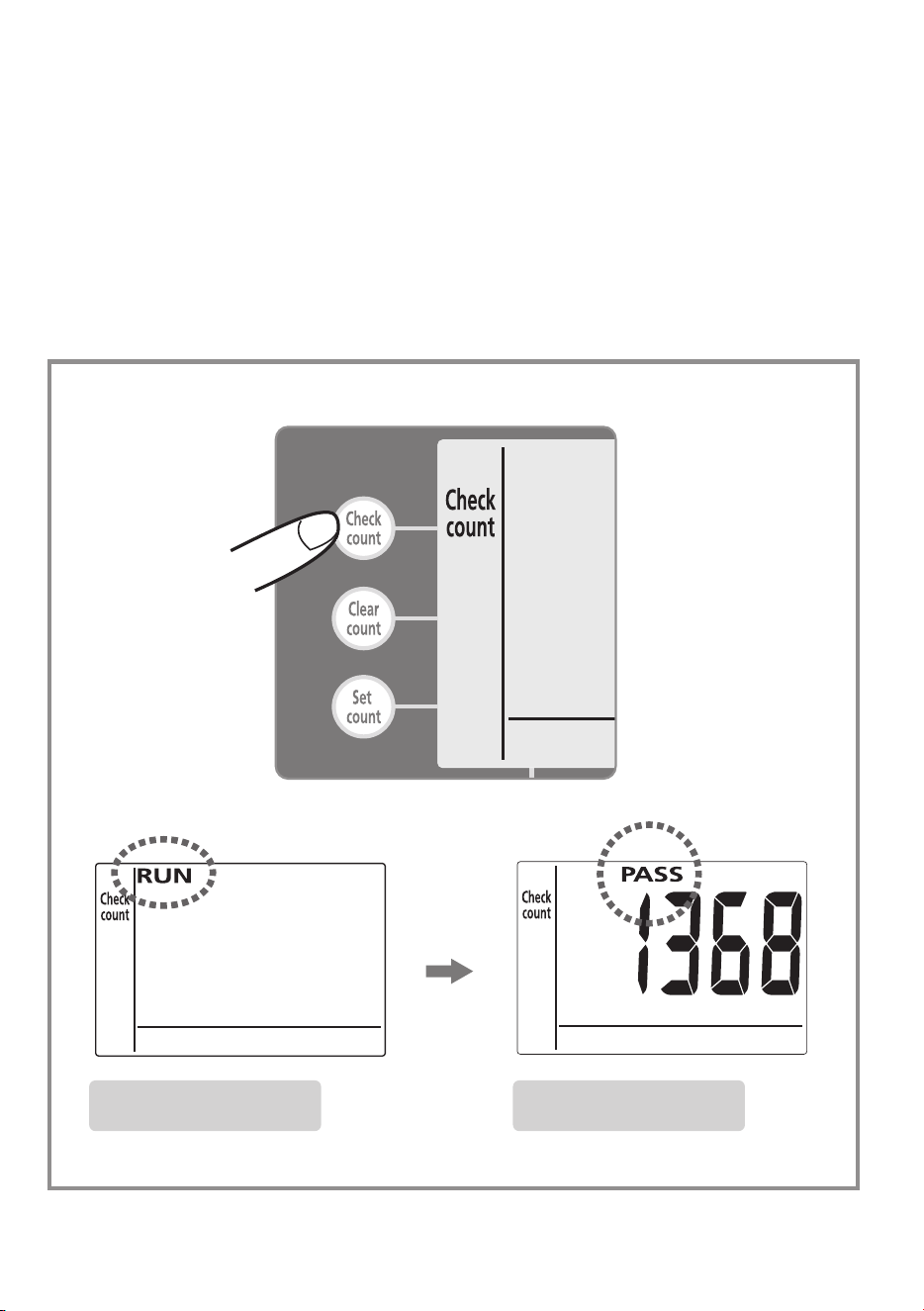
4. Measurement Count Display Mode
Press “Check count” to start. “RUN” appears on LCD, and the
measurement cycles (count, number of uses) of the monitor will be
calculated. If the calculation is successful, “PASS” will appear and the
number of uses appears. Otherwise “FAIL” will appear.
Calibrator Screen Calibrator Screen
22
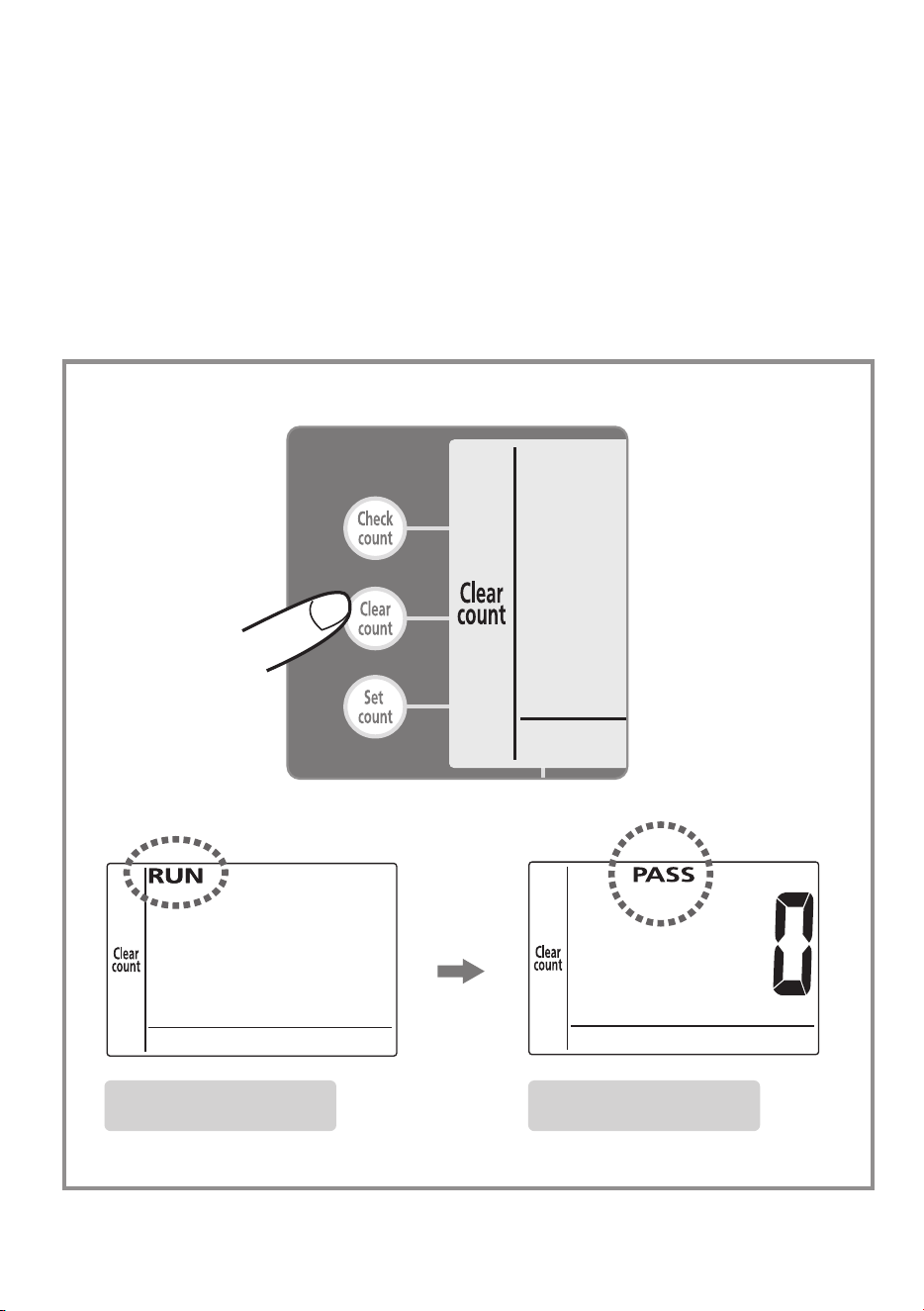
5. Measurement Count Clearance Mode
Press “Clear count” to start. “RUN” appears on LCD, and the
measurement cycles (count, number of uses) of the monitor will
be zeroed. If the zeroing is successful, “PASS” and “0” will appear.
Otherwise “FAIL” will appear.
Calibrator Screen Calibrator Screen
23
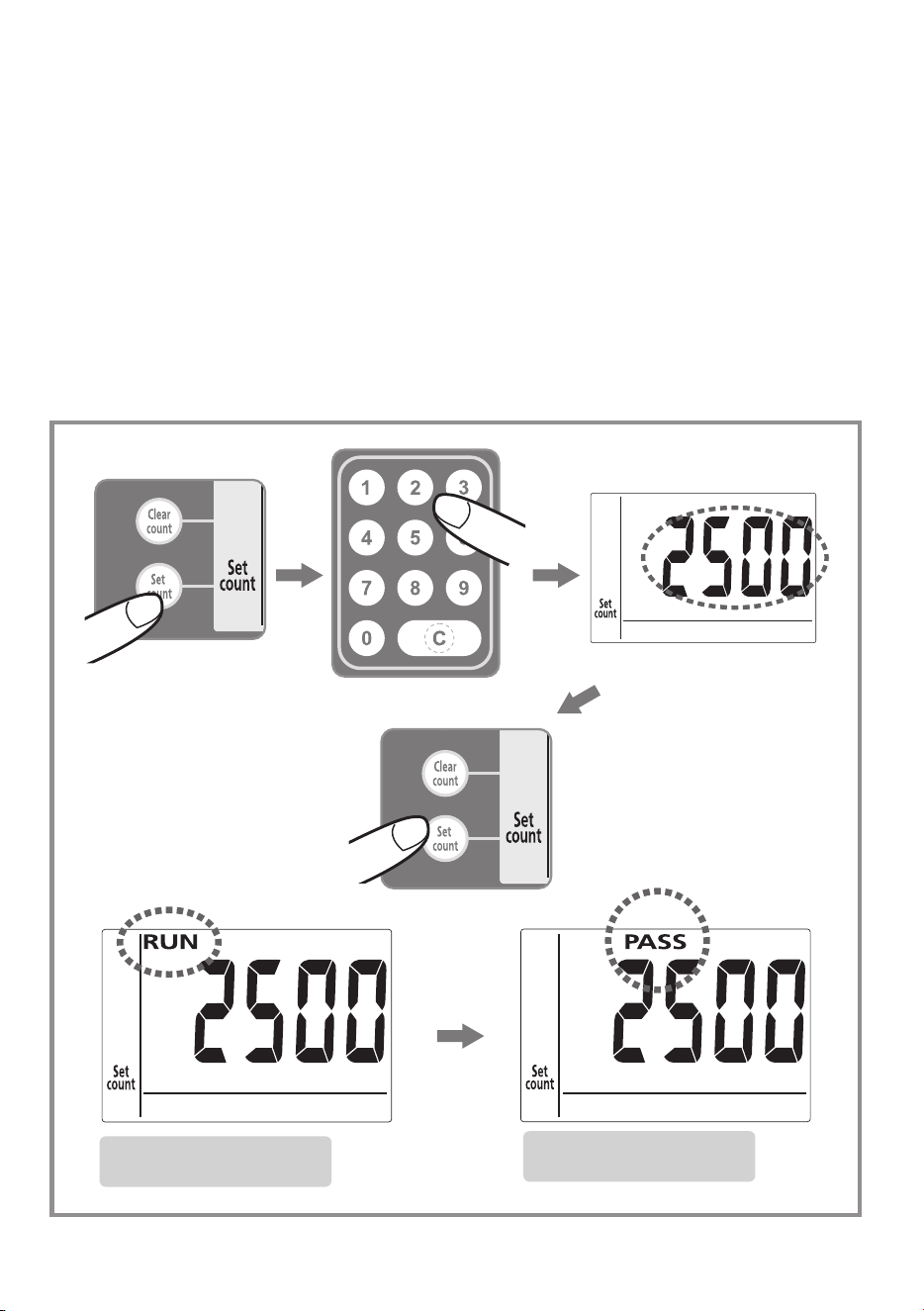
6. Calibration Reminder Setting Mode
Enter your desired count (number of uses) for the monitor so the CA (the
recalibration reminder) will appear on the display every time you turn on
the monitor (after reaching the number of desired uses). If the number
needs to be changed, press “C” and enter again. Then press “set
count” again to confirm the entry. “RUN” will appear on LCD. If the
entry is successful, “PASS” and the count (number of uses) will appear.
Otherwise “FAIL” will appear.
Calibrator Screen
Calibrator Screen
24
7. Pressure Gauge Mode
This feature is for static pressure checking of Rossmax digital
manometer. Before entering this mode set the monitor to Test Mode.
To set your monitor to Test Mode:
7.1: Remove 1 battery (If using adapter as a power source, disconnect
the adapter).
7.2: Press the M or ON/OFF key of monitor a number of times in a row
to delete the remaining electricity.
7.3: Put the battery back in or plug in adapter.
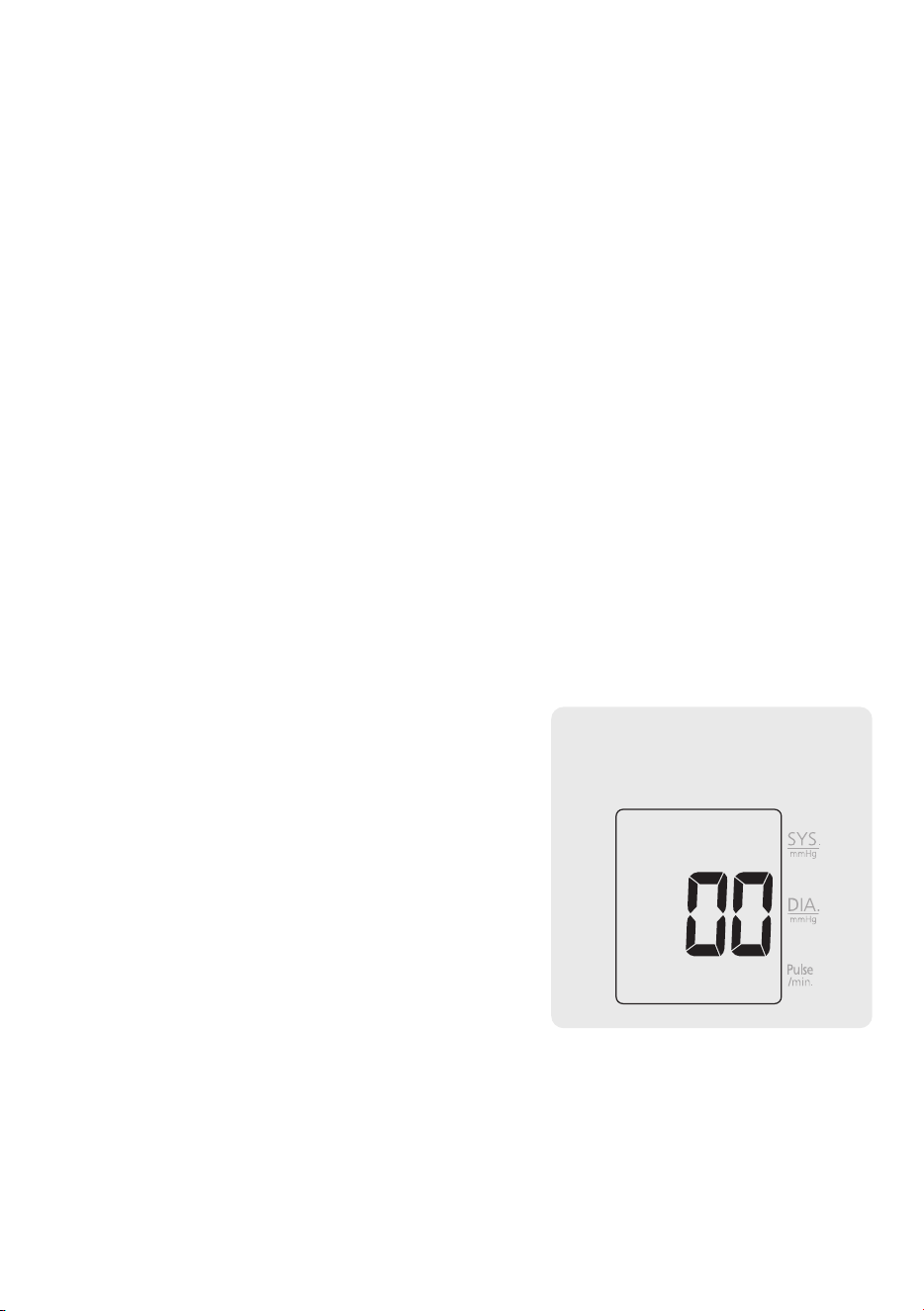
7.4: When the LCD fully lights up, press the ON/OFF key, 3 times in a
row.
7.5: "00" appears and the monitor is in
Test Mode.
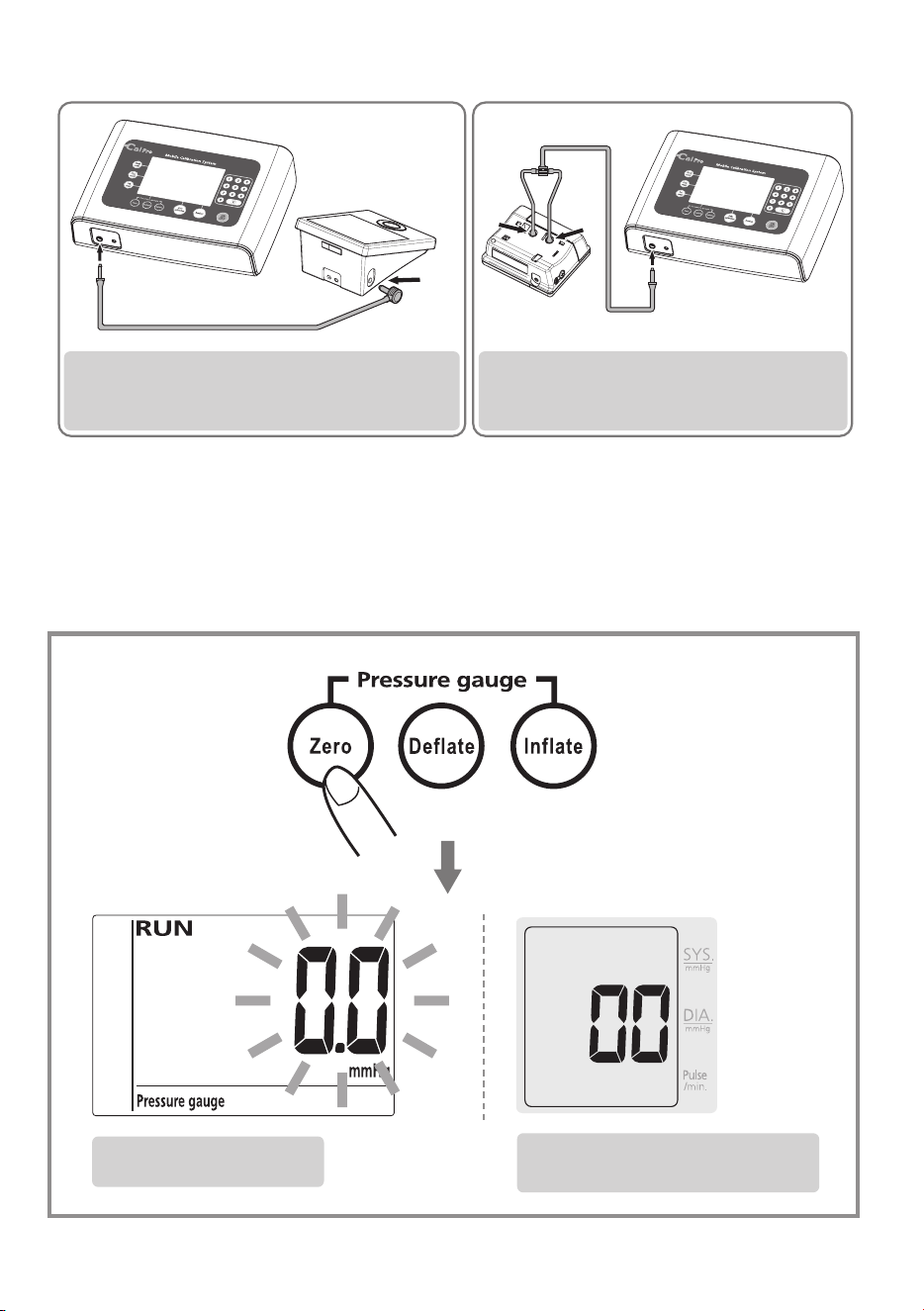
7.6: Connect the tube to both the
monitor and the calibrator (please
refer to the Connection Method of
page 24).
7.7: Press INFLATE / DEFLATE / ZERO keys
for "gauge testing".
Blood Pressure Monitor
Screen (Test Mode)
25
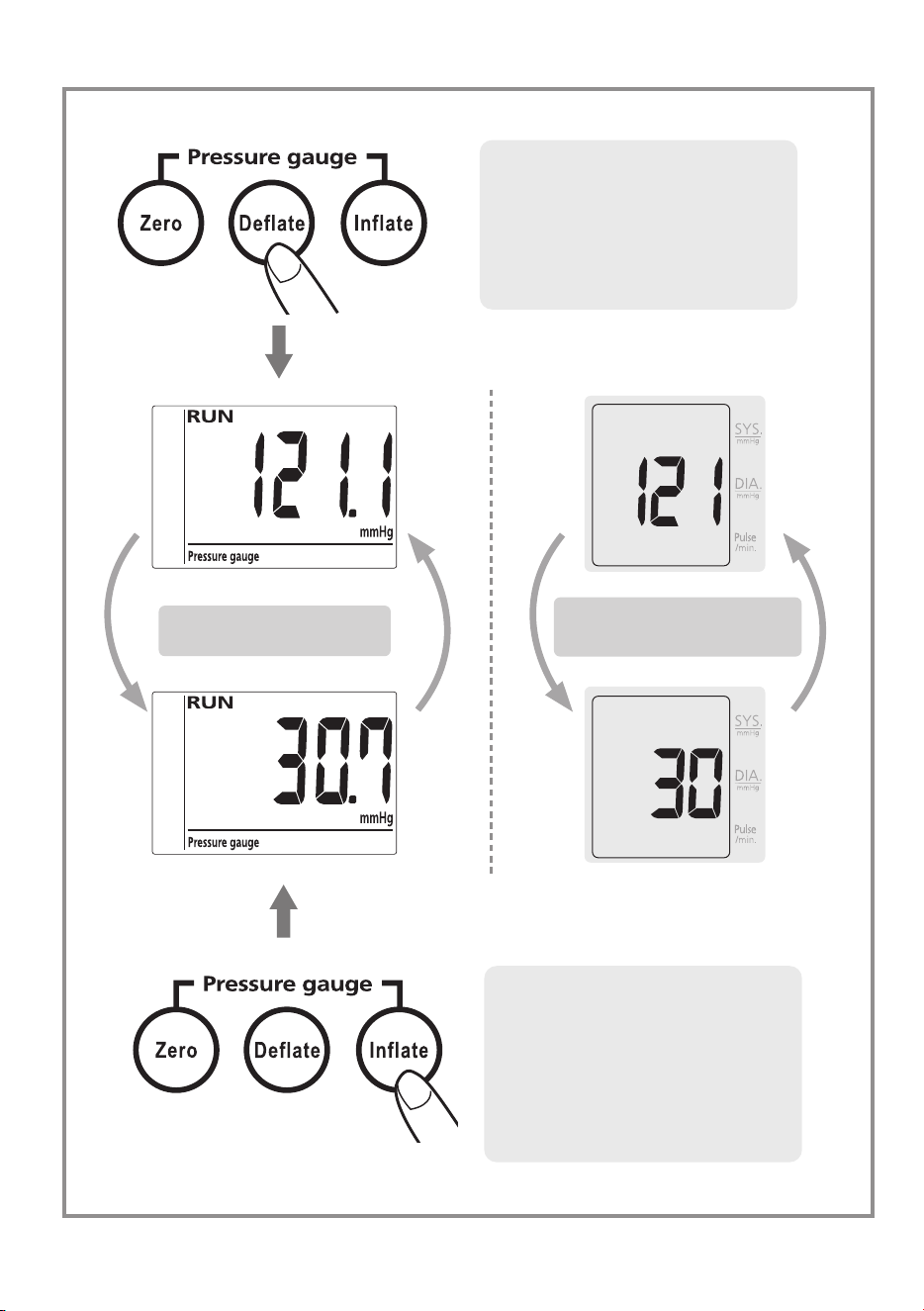
Press “Inflate” to increase the pressure, “Deflate” to decrease the
pressure, and “Zero” to rapidly deflate back to 0 mmHg. “RUN” will
appear on LCD.
Calibrator Screen
Blood Pressure Monitor
Screen (Test Mode)
Connect the Calibrator and
Upper Arm Blood Pressure Monitor
Connect the Calibrator and
Wrist Blood Pressure Monitor
26
Inflate:
the max inflate
pressure is 320 mmHg, if
inflate exceed 300 mmHg,
blood pressure monitor will
show "HH".
Deflate:
If you don't
press the deflate key, the
pressure will decrease 1
mmHg accordingly.
i
i
n
n
fl
fl
a
a
t
t
e
e
i
n
fl
a
t
e
dd
ee
flfl
aa
tt
ee
d
e
fl
a
t
e
i
i
n
n
fl
fl
a
a
t
t
e
e
i
n
fl
a
t
e
d
d
e
e
fl
fl
a
a
t
t
e
e
d
e
fl
a
t
e
i
i
n
n
flfl
aa
t
t
e
e
i
n
fl
a
t
e
dd
ee
flfl
aa
tt
ee
d
e
fl
a
t
e
i
i
n
n
fl
fl
a
a
t
t
e
e
i
n
fl
a
t
e
d
d
e
e
fl
fl
a
a
t
t
e
e
d
e
fl
a
t
e
Calibrator Screen
Blood Pressure Monitor
Screen (Test Mode)
27
Change "mmHg" to "kPa"
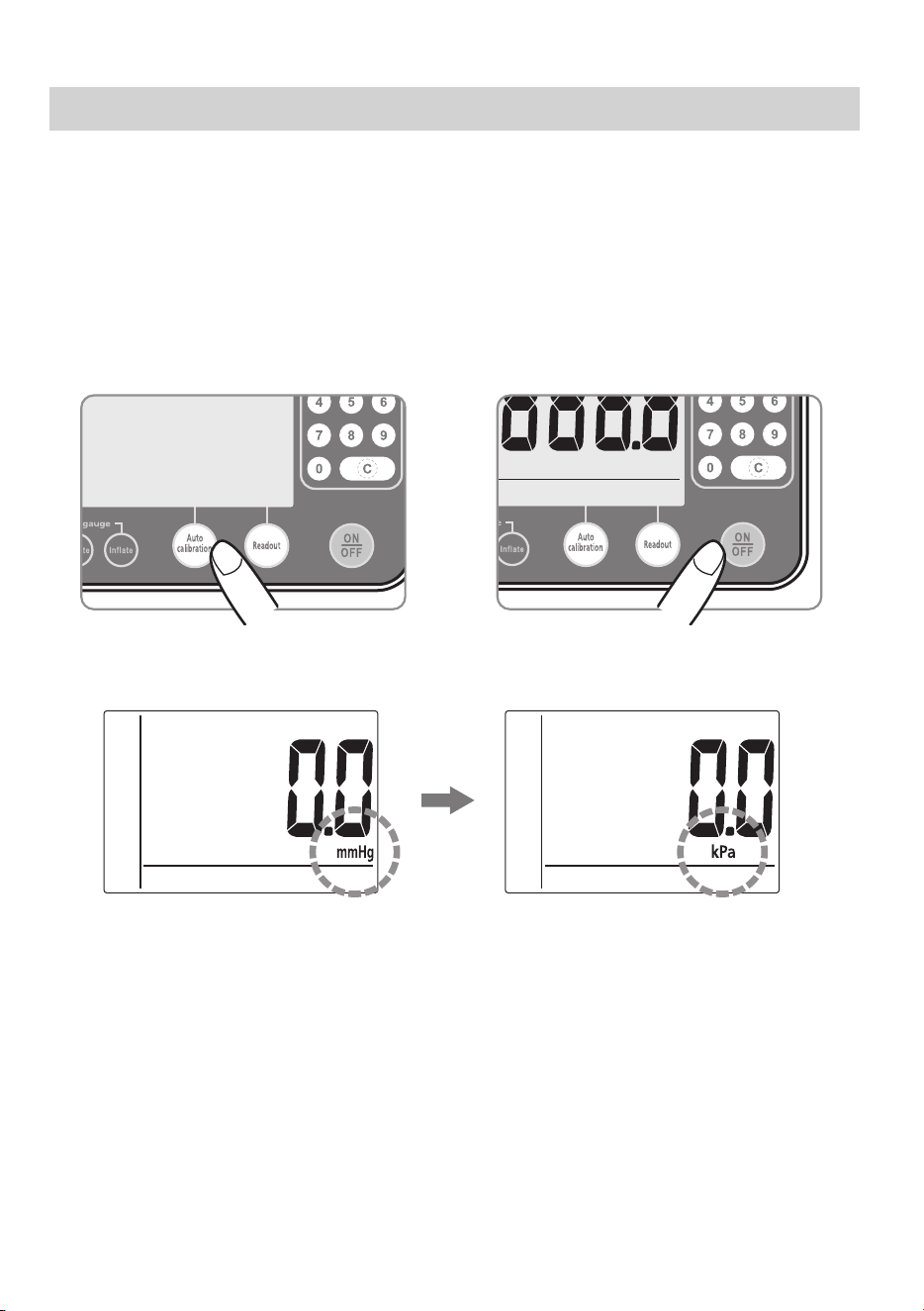
When the calibrator is off, press and hold "Auto calibration" key,
then press the "ON/OFF" key to turn on the calibrator, "mmHg" will
changed to "kPa" (release "Auto calibration" key), the calibrator will
show "kPa" on the LCD. Repeat each time, after powering off as the
calibrator default in "mmHg".
kPa mmHg
ReadoutAuto calibrationPressure gauge
Check
count
Clear
count
Set
count
+

28
Error
Messages
Root Cause Correction
FAIL
Connection Error Turn off the Blood Pressure
Monitor, disconnect and reconnect
the data link cable, turn on the
Blood Pressure Monitor and
operate again. If "FAIL" continues
to appear, return the monitor to
the manufacturer.
Data Error (the pressure
difference between the
Blood Pressure Monitor
and the calibrator is over
3mmHg)
Turn off the Blood Pressure
Monitor, disconnect and reconnect
the data link cable, turn on the
Blood Pressure Monitor and
perform the auto calibration mode
again.
ERR
Connection Error Turn off the Blood Pressure
Monitor, disconnect and reconnect
the data link cable, turn on the
Blood Pressure Monitor and
operate again. If "ERR" continues
to appear, return the calibrator to
the manufacturer.
Error Messages

29
Specifications
Pressure Sensor : Semi conductor
Ination : Pump Driven
Deation : Automatic Air Release Valve
Accuracy : ± 0.8 mmHg
Weight : 765g
Dimensions : 251(L) x 187(W) x 67(H) mm
Pressure indication Range : 0 – 327 mmHg
Power Source : Input:100-240V, 50/60Hz 400mA
Output:12V, 600mA
(Plug size: Out (-) 3.8mm, Inner (+)
1.3mm)
Operation Environment : 10˚C- 40˚C (50˚F - 104˚F);
40%-85% RH max.
Storage Environment : -10˚C- 60˚C (-14˚F - 140˚F);
10%-90% RH max.
Points of Pressure Programming
(towards Blood Pressure Monitor) : 0/300/200/100 mmHg
Points of Pressure Inspection
(towards Blood Pressure Monitor) : 0/30/60/90/120/150/180/210/240/
270/295 mmHg
* Specications are subject to change without notice.
** Adaptor: Manufacturer - DONGGUAN SHILONG FUHUA ELECTRON-
IC CO.,LTD
Model No.: UE08WCP-120060SPA
30
Safety Certifications
Rossmax’s products comply with the standard of LVD and EMC
Directire and affix the CE marking, could be placed in the market or
put into service within the internal market of the European Union (EU).
The CE mark certifies that products have met EU health, safety and
environmental requirements, which ensure consumer and workplace
safety.
To ensure continued accuracy, it is recommended that the monitor be
re-calibrated every two years. If you prefer, please send the instruments
to the certified calibration laboratory to test and verify the accuracy.
Maintenance of ROSSMAX Calibrator
We highly recommend that ROSSMAX CALIBRATOR be calibrated every
two years by your local Metrology Center.
The calibrator at the Metrology Center used to calibrate our calibrator
must have accuracy deviation of no more than +/-0.2 mmHg.
USA FCC Class B
This device complies with part 15 of the FCC Rules. Operation is subject
to the following two conditions:
1. This device may not cause harmful interference, and
2. This device must accept any interference received, including interference
that may cause undesired operation.
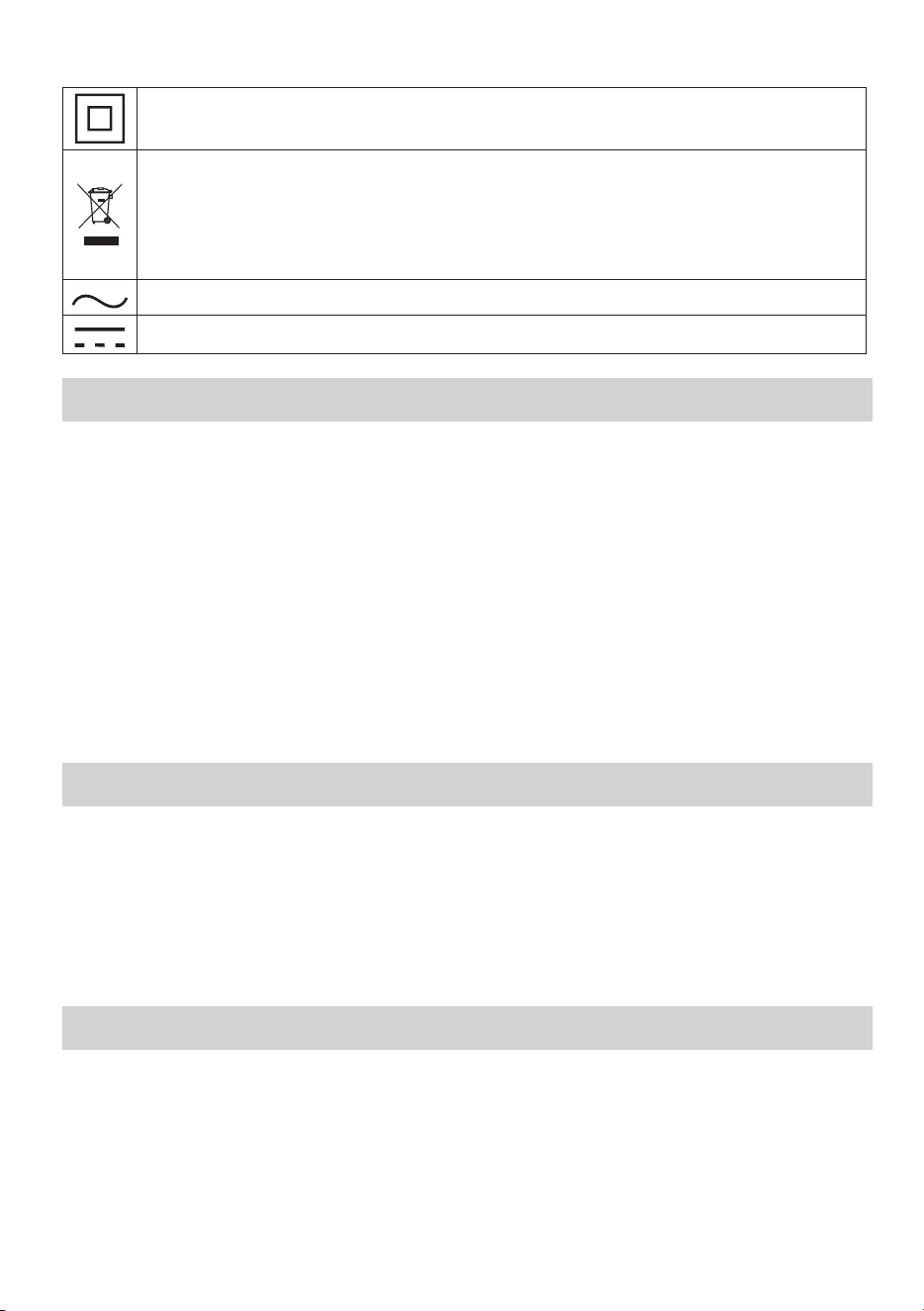
CLASS II equipment
The symbol on this product means that it's an electronic
product and following the European directive 2012/19/EU the
electronic products have to be disposed on your local recycling
centre for safe treatment.
Alternating current
Direct current

31
Warranty Card
This instrument is covered by a 2 year guarantee from the date of
purchase. The guarantee is valid only on presentation of the warranty
card completed or stamped by the seller/dealer conrming date of
purchase or the receipt. Accessories are not included. Opening or altering
the instrument invalidates the guarantee. The guarantee does not cover
damage, accidents or non-compliance with the instruction manual.
Please contact your local seller/dealer or www.rossmax.com.
Customer Name: ____________________________________________
Address: ____________________________________________________
Telephone: __________________________________________________
E-mail address: ______________________________________________
Product Information
Date of purchase: ____________________________________________
Store where purchased:
_____________________________________________________________

OBM_IB_CalPro_
EN_SW_ver2126
IN0CALPRO0000000XX
Manufacturer: Rossmax Swiss GmbH,
Widnauerstrasse 1, CH-9435 Heerbrugg, Switzerland
www.rossmax.com