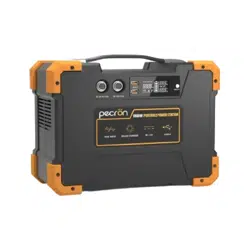
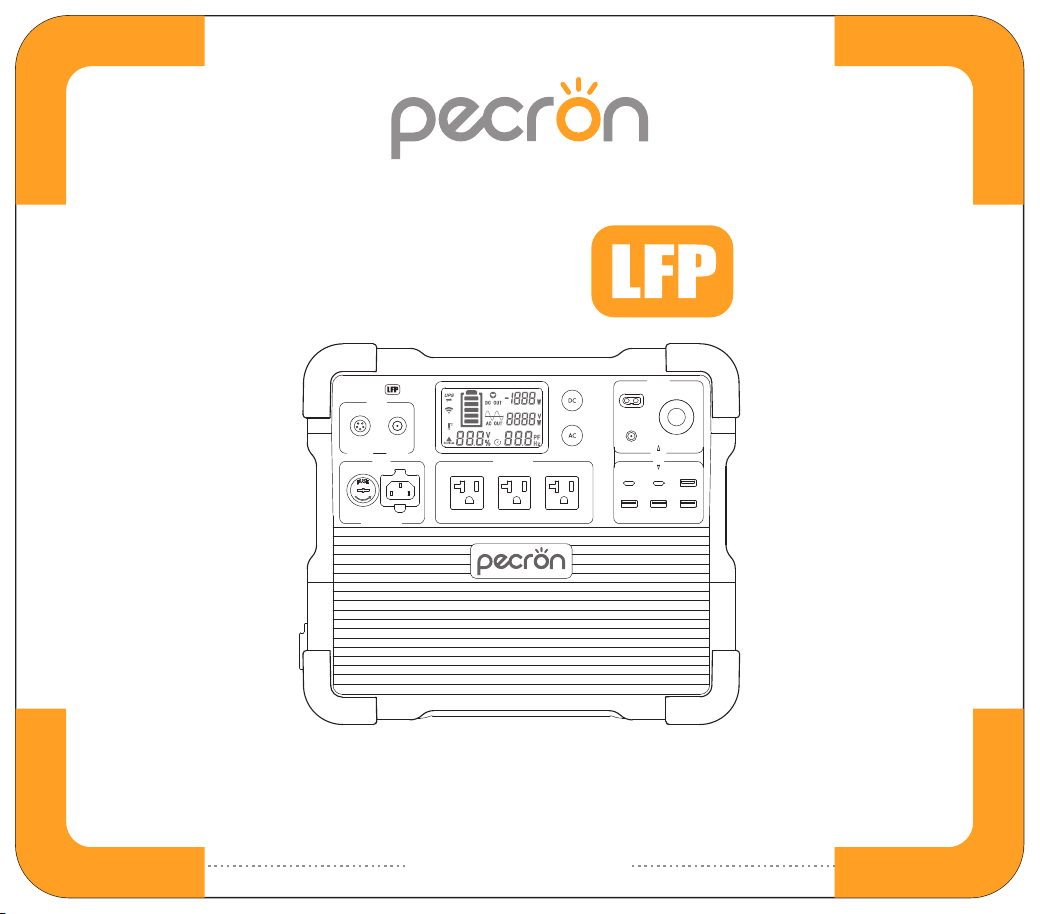
E2400
100V~120V-15A(MAX)
AC INPUT AC OUTPUT-2400W
DC OUTPUT
12V-30A(MAX)
12V-5A 12V-10A
12V-10A
USB
100W 18W 18W
18W 18W 18W
32V~95V
700W(MAX)
12V~18V
100W(MAX)
DC INPUT
E2400
Please read the user manual thoroughly before using
USER MANUAL
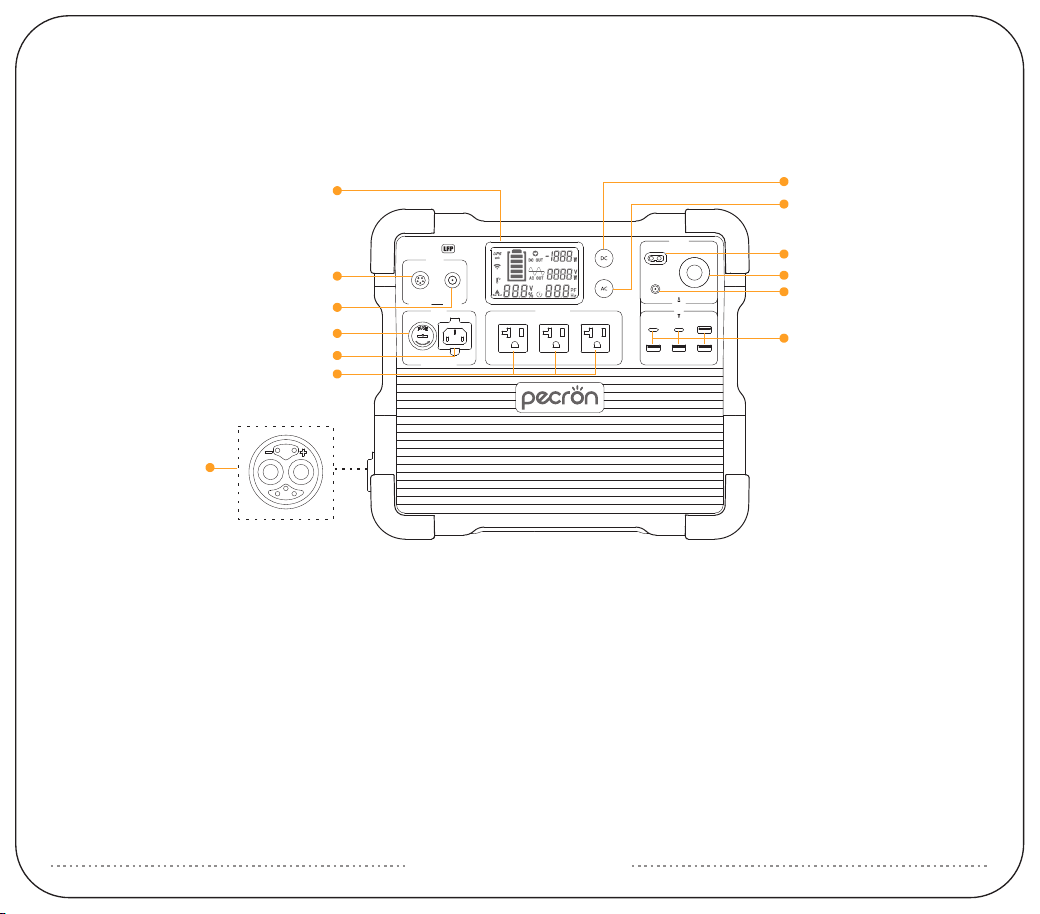
FUNCTION INTRODUCTION
①
④
⑦
⑩
⑬
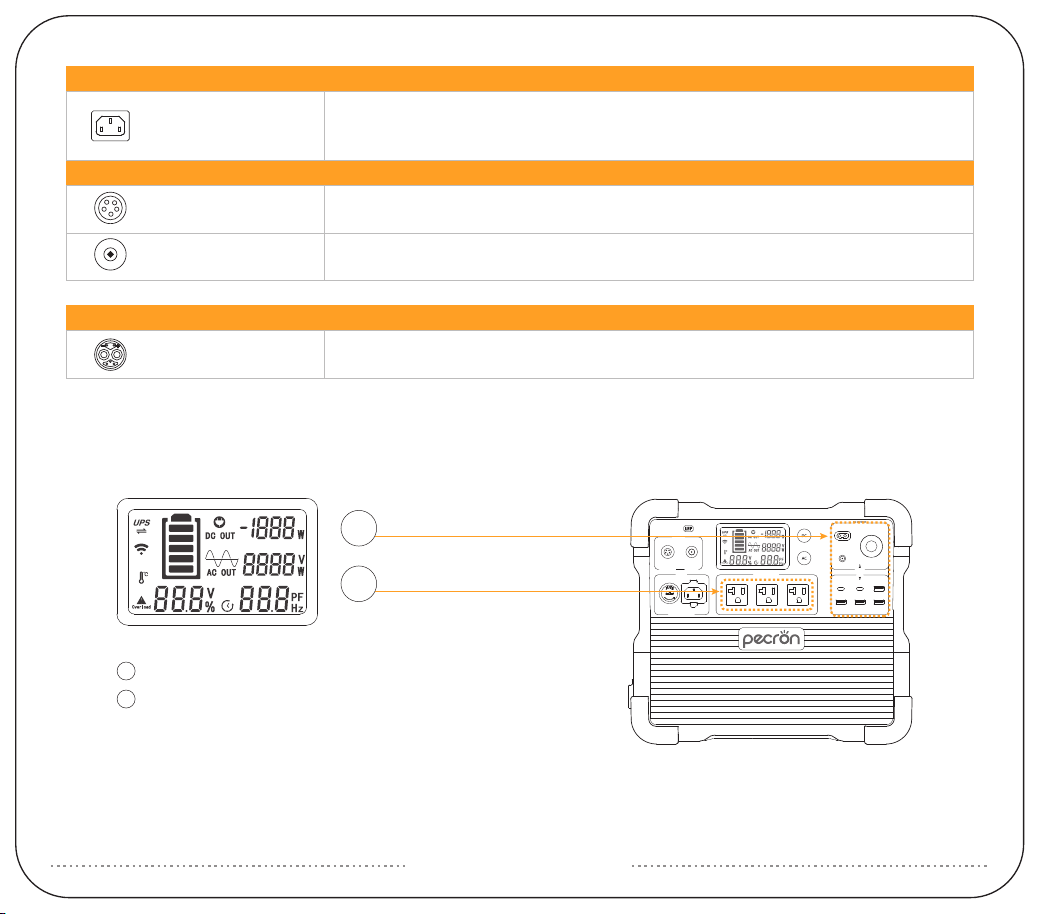
LCD Display
Fuse
DC 12V/USB Switch
DC12V Auxiliary Output
Battery Expansion Port
②
⑤
⑧
⑪
DC 32V~95V Charging Port
AC 100V~120V Input
AC 100V~120V Switch
DC12V(5525)Output
③
⑥
⑨
⑫
DC 12V~18V Charging Port
AC 100V~120V Output
DC12V XT60 Output
USB-A/USB-C Ports
E2400
100V~120V-15A(MAX)
AC INPUT AC OUTPUT-2400W
DC OUTPUT
12V-30A(MAX)
12V-5A 12V-10A
12V-10A
USB
100W 18W 18W
18W 18W 18W
32V~95V
700W(MAX)
12V~18V
100W(MAX)
DC INPUT
①
②
③
④
⑤
⑥
⑬
⑦
⑧
⑨
⑩
⑫
⑪
3 5
4
2 1
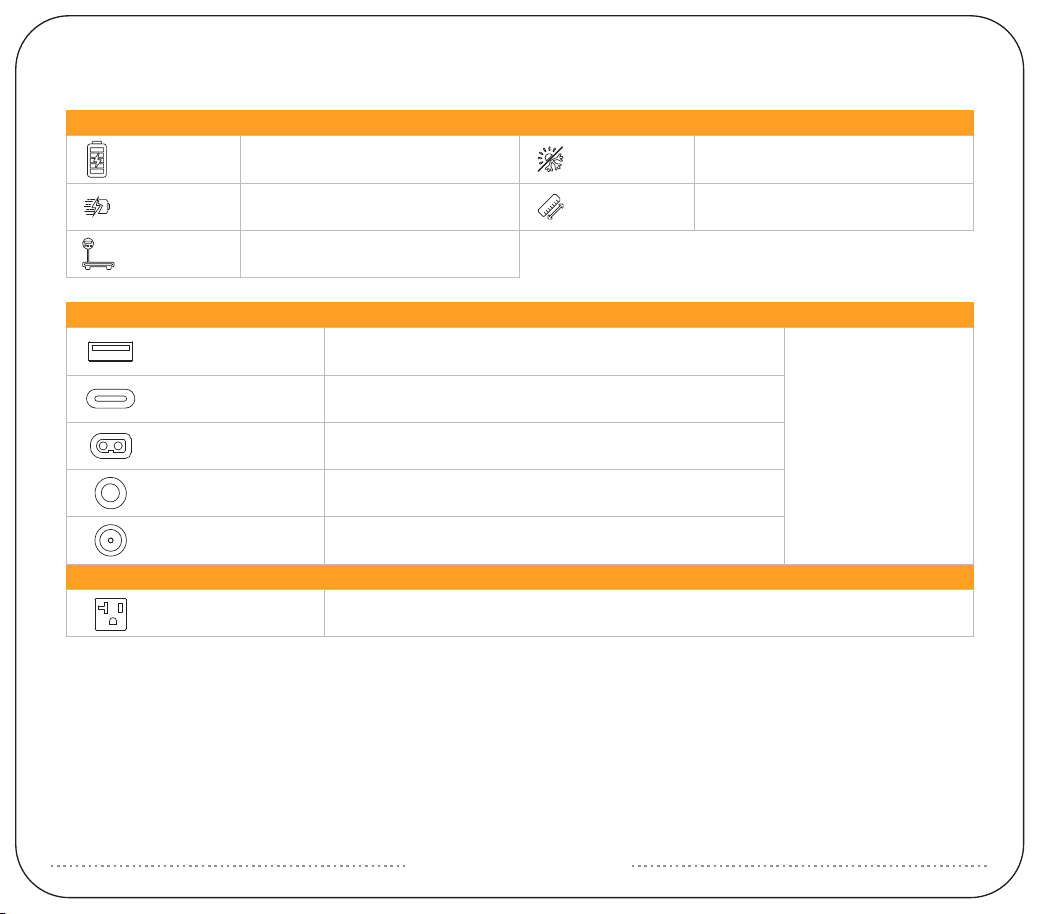
SPECIFICATIONS
Battery Type
Capacity
2048Wh(51.2V40Ah)
LiFePO4 (3500+Cycles to 80%)
BS-U20 *3
USB-A *4 (5V,9V,12V, 18W Max)*4
USB-C *2
DC 12V-10ACigar Port *1
DC 12V-30A
360W Max
XT60-F Output *1
DC 12V-5ADC 5525 Output *1
AC OUTPUT
DC OUTPUT
GENERAL INFO
Temperature
Dimension
0℃~45℃/32°F~113°F (Charging)
-20℃~45℃/-4°F~113°F (Discharging)
L14.8*W9.3*H13 in
L377*W237*H329 mm
Around 45lb
Around 20.5Kg
Net Weight
Pure sine wave 100V~120V
Rated 2400W Max
(5V,9V,12V, 18W Max)*1
(5V,9V,12V,20V, 100W Max)*1
E2400
100V~120V-15A(MAX)
AC INPUT AC OUTPUT-2400W
DC OUTPUT
12V-30A(MAX)
12V-5A 12V-10A
12V-10A
USB
100W 18W 18W
18W 18W 18W
32V~95V
700W(MAX)
12V~18V
100W(MAX)
DC INPUT
HOW TO USE THE E2400 LFP
press and hold to turn on / off DC / USB
press and hold to turn on / off AC
(Please turn off the AC function if there is no AC load on the unit)
DC
AC
AC
DC
5521 *1
MJ32 *1 Cascade with max 2 pieces of EP3000-48V
3 5
4
2 1
12V~18V 100W Max 7A Max
DC INPUT
EXTRA BATTERY PORT
AC INLET *1
GX16MF *1
AC INPUT
100Vac - 1500W Max
110Vac - 1650W Max
120Vac - 1800W Max
32V~95V 700W Max 15A Max
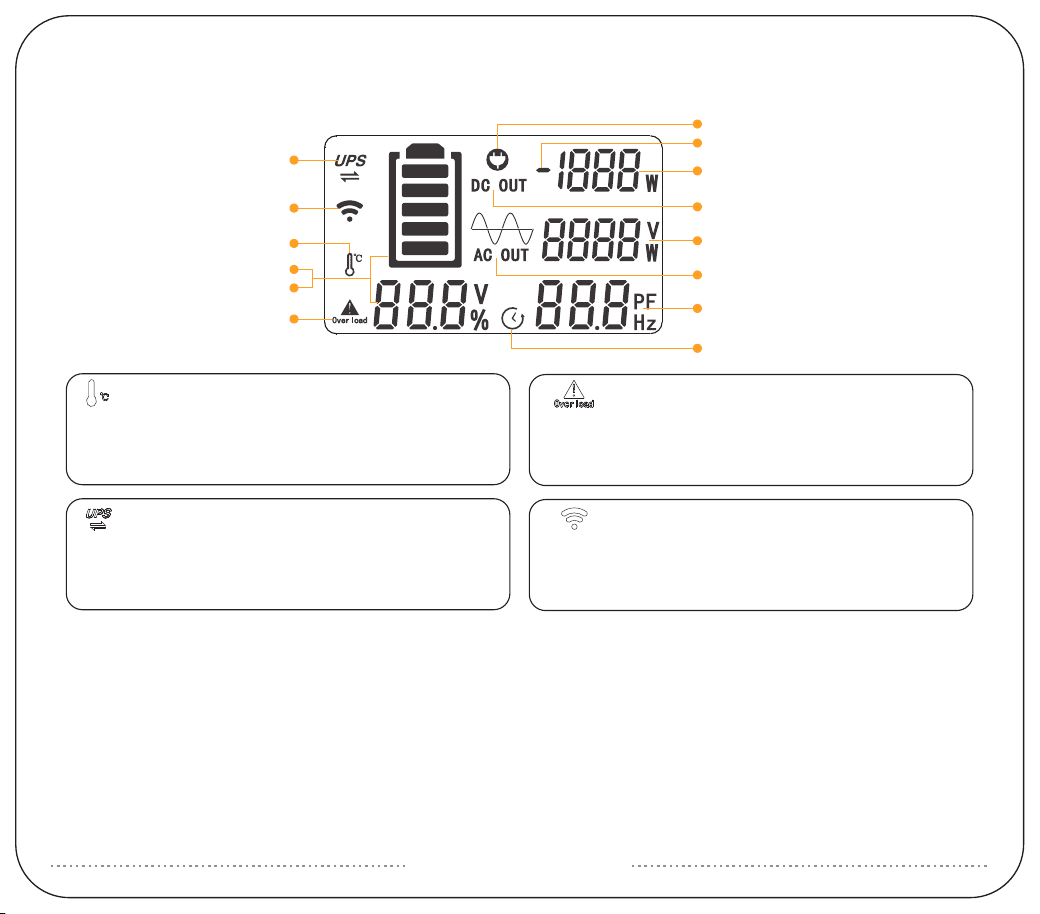
LCD SMART DISPLAY
Time Indicator
DC Out
Temperature Alarm
Battery Soc(%)
Voltage(V)
AC Overload Alarm
Charge Indicator
Discharge Indicator
Net Input/Output Wattage
AC Out
AC Output Wattage(W)/Voltage(V)
PF Value/Remaining Charging/
Discharging Time(Hrs)
UPS
Wireless connection
AC Overload Alarm Icon
E2400 LFP can power most devices with power consumption
less than 2400 watts.
If your devices exceed 2400W, The AC overload alarm indicator
will flash, The unit will stop supplying power.
Temperature Alarm Icon
The operating temperature range of E2400 LFP is -20~45°C. If it
outputs high power in a hot conditions for a long time, the high
temperature alarm icon will flash, indicating that the inverter is
overheated, and the AC output will be turned off.
Wireless function prompt
When the power station is connected to the network via WIFI,
this icon will be always on to indicate.
UPS function prompt
When the power station has AC input and the AC output is
turned on, the UPS will be turned on, and the UPS icon will
always be on to remind.
E2400
100V~120V-15A(MAX)
AC INPUT AC OUTPUT-2400W
DC OUTPUT
12V-30A(MAX)
12V-5A 12V-10A
12V-10A
USB
100W 18W 18W
18W 18W 18W
32V~95V
700W(MAX)
12V~18V
100W(MAX)
DC INPUT
E2400
100V~120V-15A(MAX)
AC INPUT AC OUTPUT-2400W
DC OUTPUT
12V-30A(MAX)
12V-5A 12V-10A
12V-10A
USB
100W 18W 18W
18W 18W 18W
32V~95V
700W(MAX)
12V~18V
100W(MAX)
DC INPUT
UPS FUNCTION
The E2400 LFP supports UPS function. It can provide the loads(such as computers, data centers, telecommunication
equipment) near-instantaneous(within 8~20ms) protection from unexpected power interruptions of the main power
supply.
Note: Not applicable to specific applications that need transfer time under 8ms, such as servers and workstations. This
UPS function only support protection for loads under 1800W(120V), we recommend that you only connect one device at
a time to avoid overload and thus result in protection failure.
PECRON is not responsible for any devices damage or loss of data resulting from failing to follow the instructions.
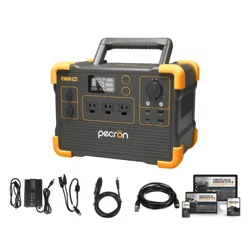
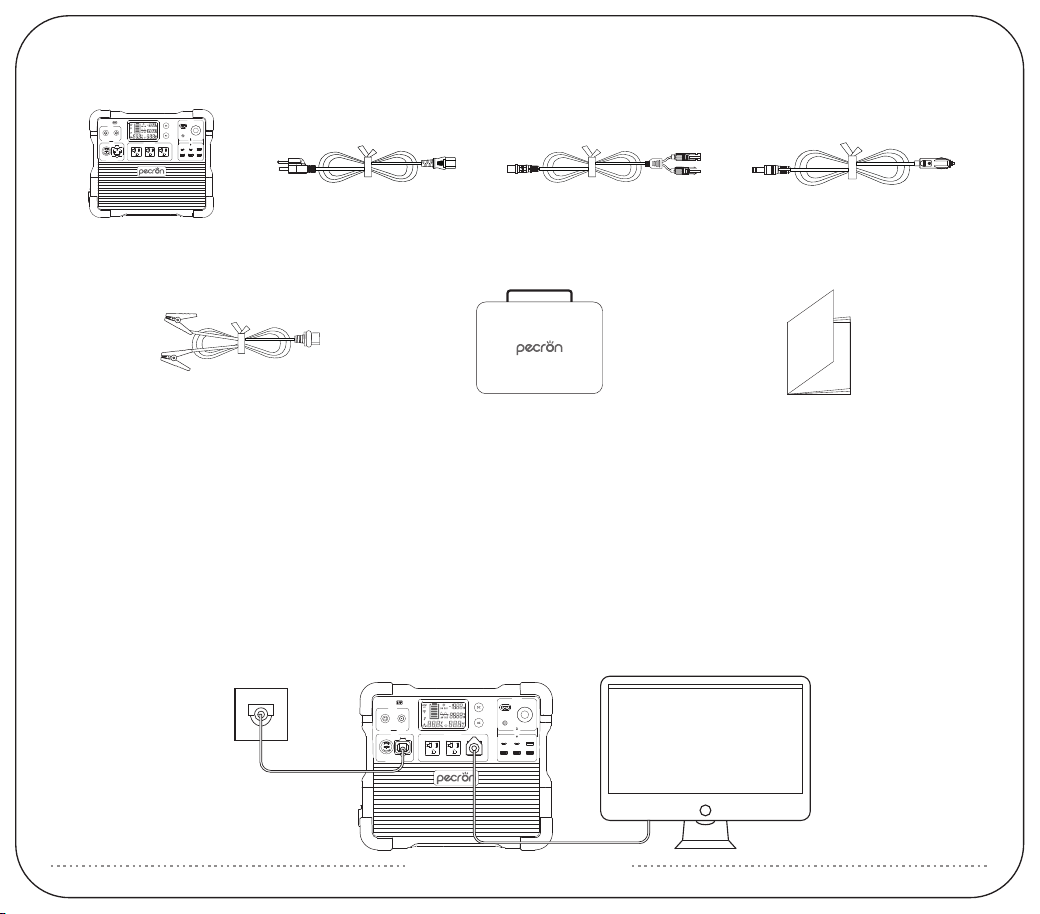
PACKING LIST
Car Charging Cable *1PECRON E2400 LFP *1 MC4 Solar Charging
Cable(LSMC4-5GX16)*1
AC Charging Cable*1
User Instruction *1Accessory Pouch *112V Alligator Clips *1
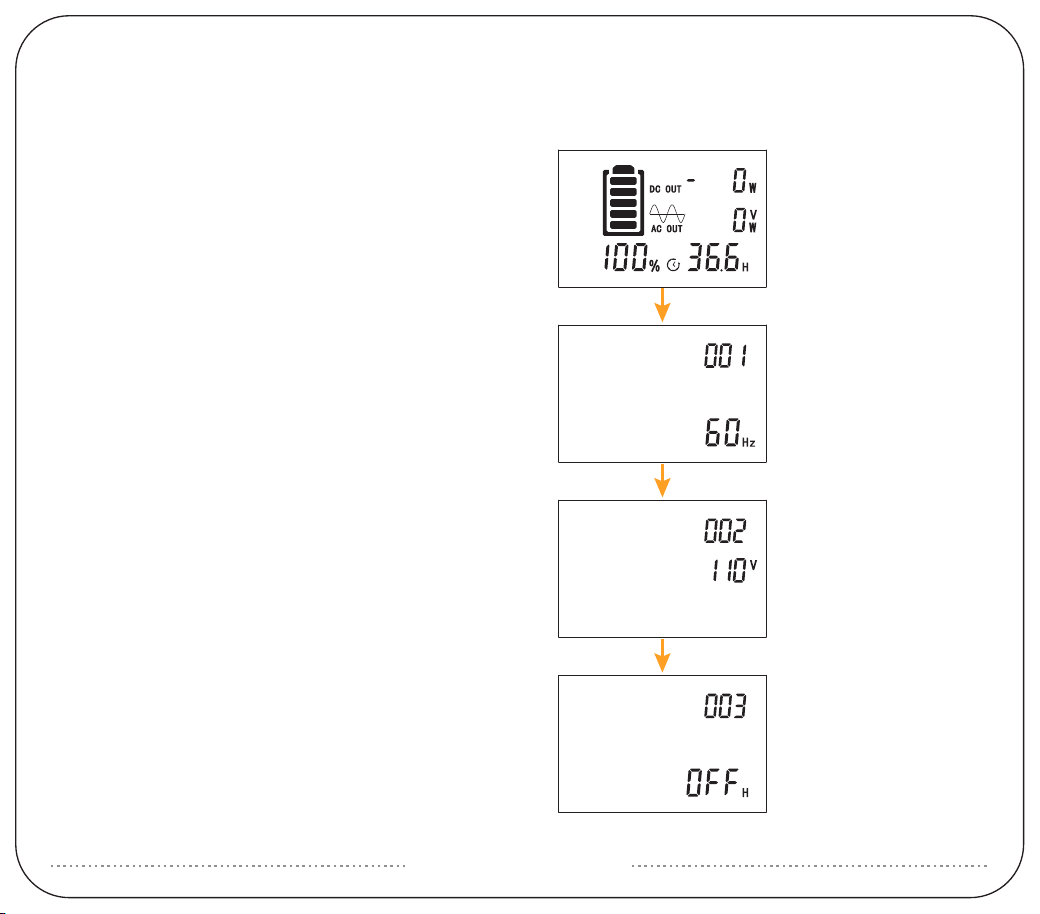
1:After powering on, long press the AC and DC switch at
the same time. The battery symbol will flash and then
please long press DC to enter into setting.
2:Item 001 is for AC output frequency.
Short press DC to set 50Hz or 60Hz.
Then short press AC to next item.
HOW TO ADJUST THE AC OUTPUT FREQUENCY VOLTAGE
AND NO-POWER AUTOMATIC SHUTDOWN TIME OF E2400 LFP.
3:Enter setting of 002, this is for AC output voltage.
Short press DC to adjust voltage.
Short press AC again to next setting.
4:Enter setting of 003, the default value is OFF. It means
the machine is without any setting about auto shutdown
time. Short press DC to set it based on needs and short
press AC to enter next step.
Special MJ32 socket can be used to cascade two EP3000-48V plus power packs.
It is strictly forbidden to use non-PECRON plus power pack, otherwise it will
damage the power supply!
After cascading the power pack successfully, the display power will show,
the percentage of the sum of the host and the power pack.
EXPANDABLE BATTERY
APP FUNCTION
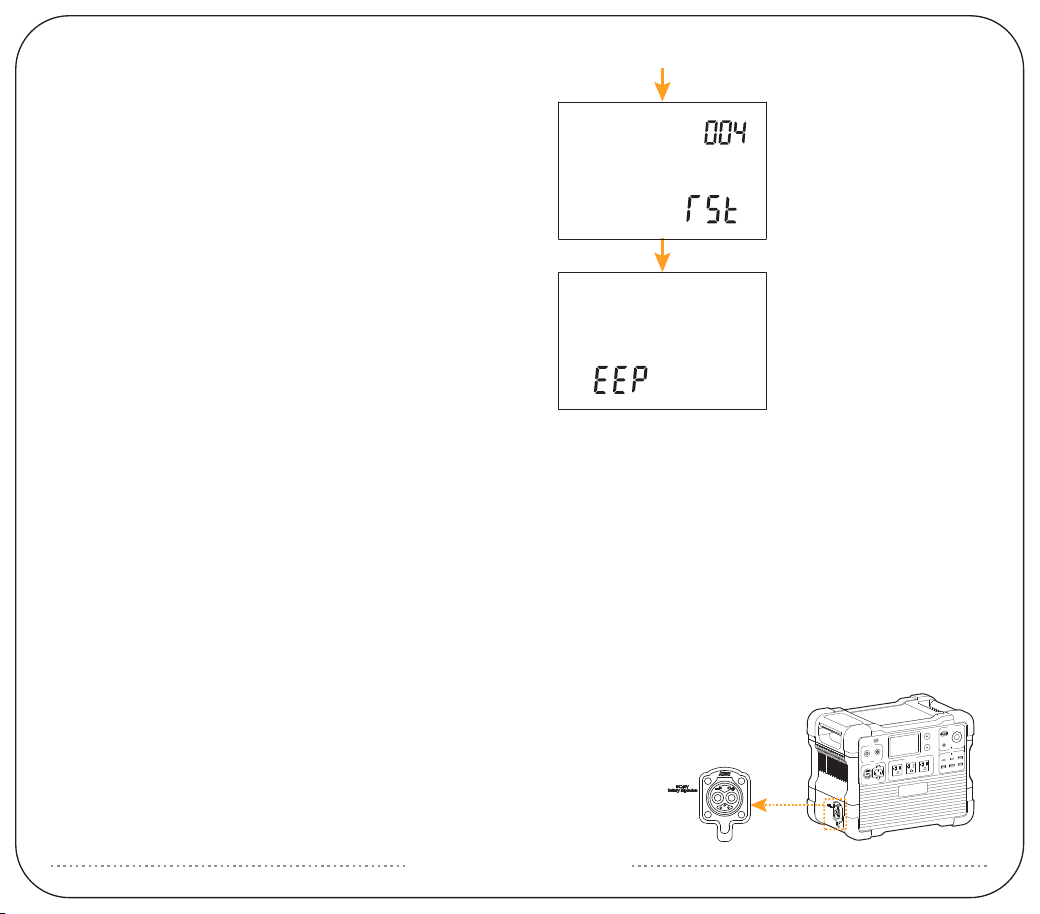
5:Enter setting of 004, it's for WIFI reset. The default is not
reset. Short press DC, the screen will show 'RST' which
means the reset command is activated.
6:Short press AC to finish setting. The display will show EEP
when the setting is successful.
You can connect to this product through the PECRON APP, viewing product information, controlling the device and
making personalized settings.
During connection, please long press and hold the DC+AC button together to enter the pairing mode.
iPhone users can search for PECRON in the Apple Store to download and use.
Android users can search for PECRON on Google Play to download and use.
E2400
100V~120V-15A(MAX)
AC INPUT AC OUTPUT-2400W
DC OUTPUT
12V-30A(MAX)
12V-5A 12V-10A
12V-10A
USB
100W 18W 18W
18W 18W 18W
32V~95V
700W(MAX)
12V~18V
100W(MAX)
DC INPUT
3 5
4
2 1
E2400
100V~120V-15A(MAX)
AC INPUT AC OUTPUT-2400W
DC OUTPUT
12V-30A(MAX)
12V-5A 12V-10A
12V-10A
USB
100W 18W 18W
18W 18W 18W
32V~95V
700W(MAX)
12V~18V
100W(MAX)
DC INPUT
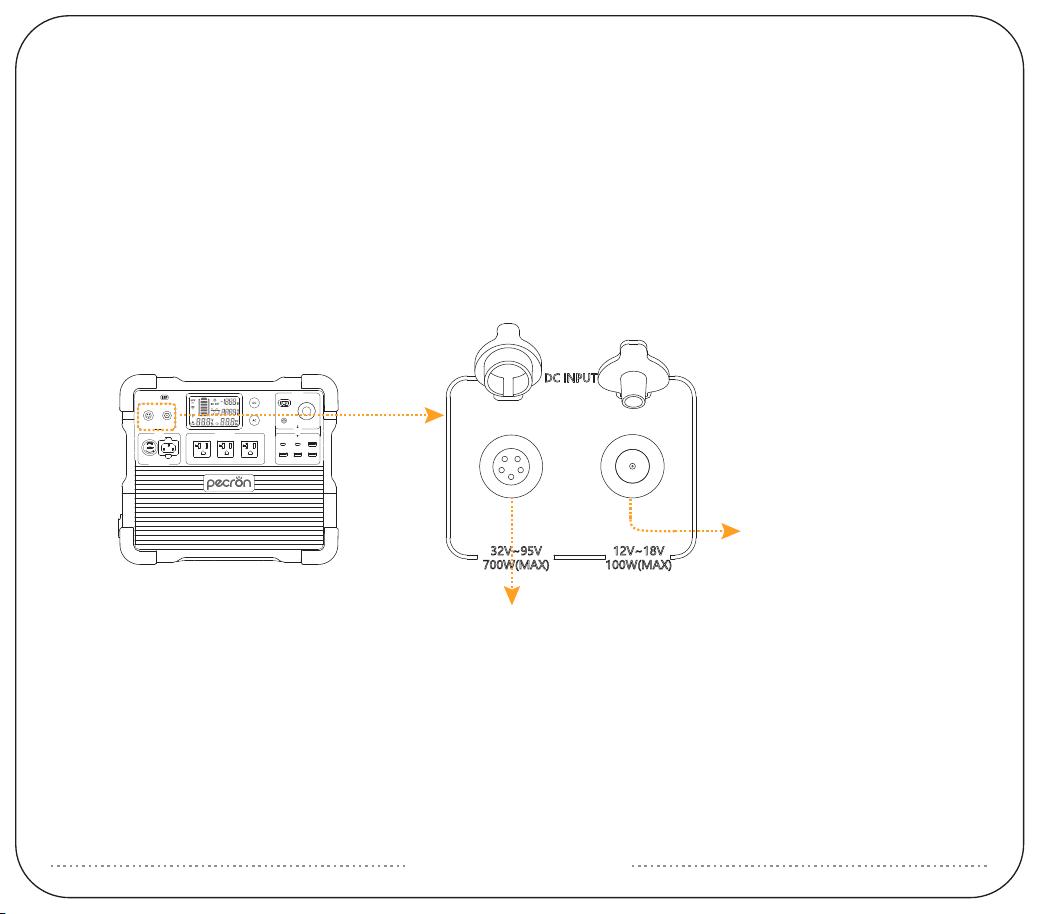
USING SOLAR PANELS TO CHARGE THE E2400 LFP
1. DC5521 Charging Port: PV/DC 12V~18V, 100W maximum; VOC(open circuit voltage) of solar panel must be less than
25V;
2. GX16MF-5 Charging Port: PV(operating voltage) range 32V~95V, 700W maximum; VOC(open circuit voltage) of solar
panel/array must be less than 95V, otherwise, it will damage the unit! Do not wire more than two 36V solar panels in
series, or more than four 18V solar panels in series.
(18V/36V stands for Vmp, the operating voltage, of the solar panel)
3. If you have any questions, feel free to contact us:[email protected]
DC5521 Charging Port:
PV12V~18V-100W Maximum Input
GX16MF-5 Charging Port:
PV32V~95V-700W Maximum Input
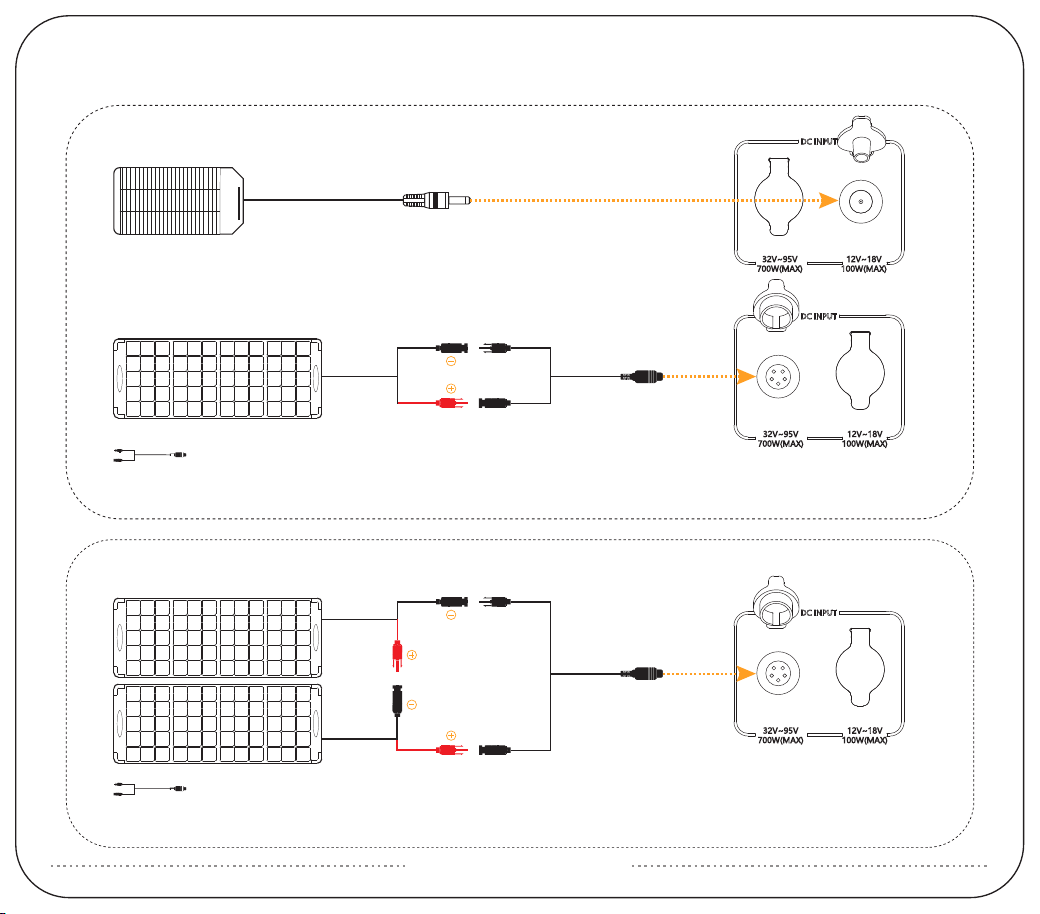
USING SOLAR PANELS TO CHARGE THE E2400 LFP
Charging the E2400 LFP with one solar panel
MC4 Solar Charging Cable*1
MC4 Solar Charging Cable*1
※ It is recommended to choose PECRON solar panels for optimal user experience! The VOC of a single solar panel should be
less than 95V, and the VMP should be greater than 32V.
Use two solar panels in series to charge the E2400 LFP
※ It is recommended to choose PECRON solar panels for optimal user experience! The VOC of a single solar panel should be
less than 48V, and the VMP should be greater than 16V.
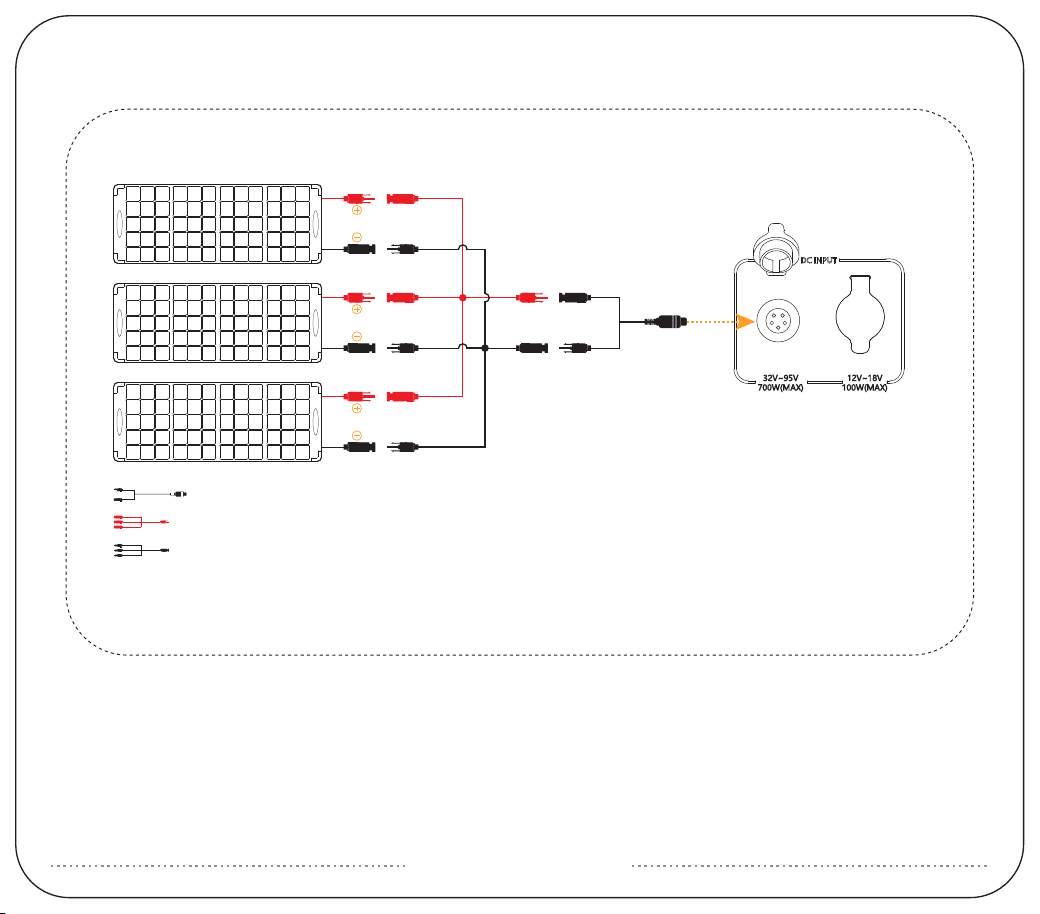
USING SOLAR PANELS TO CHARGE THE E2400 LFP
MC4 Solar Charging Cable*1
Y Branch MC4 Charging Cable(+)*1
Y Branch MC4 Charging Cable(-)*1
(NOTE:This parallel charging cable sold separately)
※ It is recommended to choose PECRON solar panels for optimal user experience! The VOC of a single solar panel should be
less than 95V, and the VMP should be greater than 32V.
Use three solar panels in parallel to charge the E2400 LFP
(Recommended to use solar panels of the same specification model to obtain the best power.)
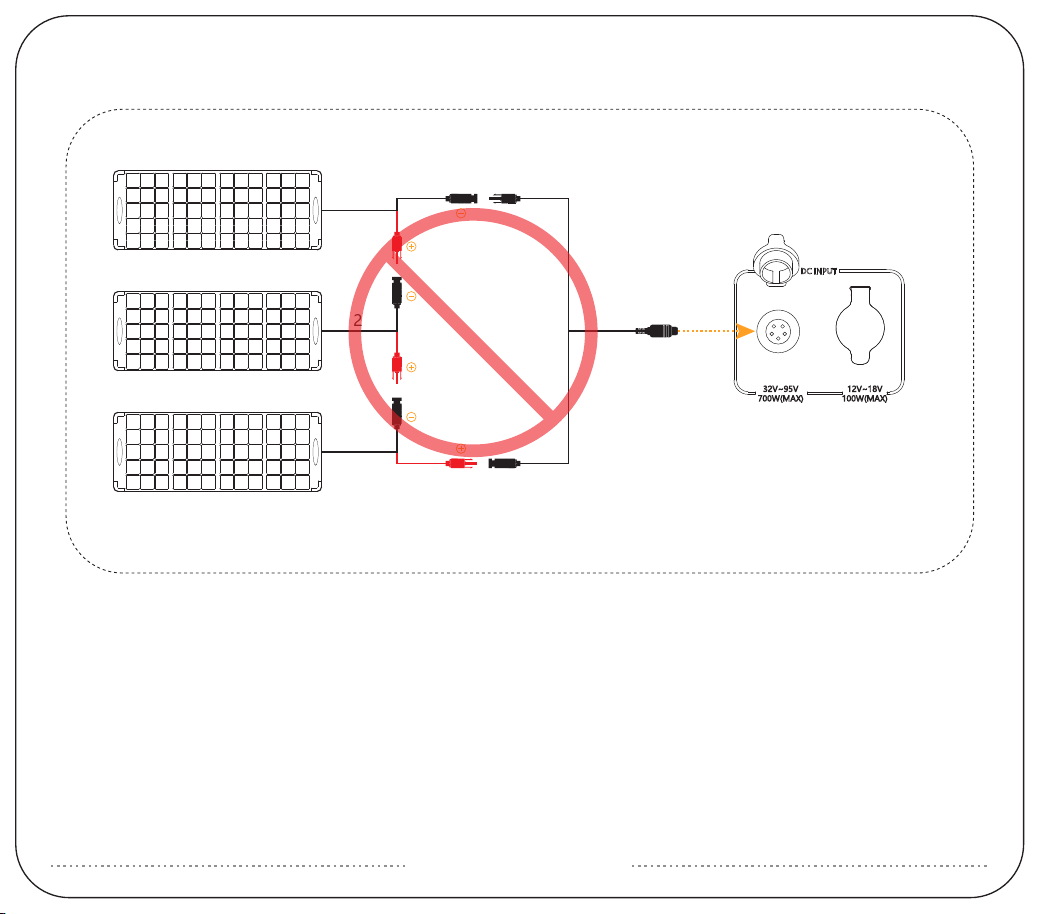
※ PV(GX16MF-5) Port Only work within 32V~95V Open Circuit voltage,exceeding 95V will damage the machine.
DO NOT WIRE THREE SOLAR PANELS IN SERIES!
32V
32V 96V
32V

Q1: What kind of battery is used in E2400 LFP? How long it can last?
A: E2400 LFP utilizes high quality UL certified automotive LiFePO4 battery, it can retain 80% of its original capacity at
3500 complete charge cycles.
Q2: What devices can E2400 LFP power?
A: Please note that the AC output port can only charge or power devices that operate at less than 2400W.
DC output port can only charge or power that operate at less than 12V-30A.
Q3: Can the E2400 LFP be used as UPS?
A: E2400 LFP supports UPS function with an automatic switchover time of 8~20ms.
Q4: How to calculate the E2400 LFP running time?
A: Running Time=Total Capacity(2048Wh) * 0.85(Depth of Discharge)/Loading Power(Watts)
Q5: Does E2400 LFP have built-in MPPT charge controller?
A: Yes, there are two independent built-in MPPT charge controllers; “5521”port supports 12~18V(Max 100W) PV
input, and “GX16MF”port supports 32~95V(Max 700W) PV input.
Q6: Can the E2400 LFP be charged while discharging?
A: Yes, It can be charged and discharged at the same time. In the non-UPS state, if uninterrupted use is required, the
average power of charging must be greater than the average power of electricity, otherwise the battery will
eventually run out and shut down.
Q7: How to store the E2400 LFP?
A: Please turn off the unit and then store it in a dry, ventilated place at normal room temperature. Do not place this
unit near water sources or a wet/moist environment. For long-term storage, it is recommended to discharge the
battery to 30% every three months and recharge it to 60% to sustain the battery life.
Q8:Other issues to be noted.
A:Pay attention to the ponit that the product is without waterproof function and prevent water getting into it.
Pay attention to ventilation and heat dissipation when using, and keep good ventilation at the air inlet and outlet of
the product.
Do not use the product in special occasions (under the mine, gas station, etc.)
FAQS

1、 Do not place the device near heat source, such as a fire or a heating furnace.
2、 Do not immerse in any liquid, or expose the unit to rain or wet conditions.
3、 Do not use the battery in a strong static electricity or electromagnetic environment.
4、 Do not disassemble or puncture the product with sharp objects in any way.
5、 Short circuits can be caused by: vermin or pests chewing through wires; water or other fluids coming into contact
with electrical wiring.
6、 It's prohibited to be used as car jump starter, only can be used to charge the car battery.
7、 Do not use accessories or parts other than those provided by PECRON. Please visit our website www.pecron.com or
reach our support team for a complete list of accessories and parts.
8、 When using this product, please strictly follow the ambient temperature for use in the user manual. If the temperature
is too high, the battery can potentially result in self-combustion and will burst into flames, which can cause
widespread damage. If the temperature is too low, the performance of the battery will be seriously degraded, and it
may even fail to meet the normal use requirements.
9、 Do not stack heavy objects on this product.
10、Do not block the air vents during use, or leave the device in a non-ventilated or dusty space.
11、Please avoid impacts, fall off, and violent vibration. Please turn off the device immediately and stop using it in the
event of major exterior impact. Please fasten the unit firmly during transportation to avoid vibration and impact.
Please read the user manual thoroughly before using this product, and keep this manual in a safe place for future
reference. Failure to follow the instructions for proper set up, use, and care for the device can increase the risk of serious
personal injury, death, or property damage. Once you use this device, you are deemed to have understood, recognized
and accepted all terms and contents of this document. The user shall be responsible for his own actions and all
consequences arising from failure to use the device in accordance with the “User Manual”, or as authorized in
PECRON's current product literature.
In compliance with laws and regulations, PECRON reserves all rights for final explanation, and to change these terms and
conditions at any time without prior notice. In the event that any revisions are made, the revised terms and conditions
shall be posted on our website immediately, please visit our website to inform yourself of any changes.
DISCLAIMER
WARNING

12、In the event of immersing the device into the water accident, please place the unit in a safe open area and keep
away from the unit until it is completely dry. The dried unit should not be reused and should be disposed of properly
according to the local regulation. If the device catches fire, use the fire extinguishing equipment in the following
recommended order: water or mist, sand, fire blanket, dry chemical, carbon dioxide fire extinguisher.
13、Please wipe it with a dry cloth to clean the surface of the device.
14、Please place this device with care to prevent the product from being damaged due to fall off. If the product is
damaged due to fall off, please turn off the unit immediately and place it in an open area, keep away from
combustibles and crowds, and dispose of in accordance with local laws and regulations.
15、Please store this device in a place out of reach of children and pets.
WEBSITE:www.pecron.com
DISPOSAL
1、When conditions permit, please be sure to completely discharge the battery of this product, and then put the product
in the designated battery recycling box. This product contains batteries. Batteries are dangerous chemicals and are
strictly prohibited from being disposed of in ordinary trash. For details, please follow local laws and regulations on
battery recycling and disposal.
2、If the battery cannot be completely discharged due to the failure of the product itself, please do not dispose of the
battery directly in the battery recycling box, and contact a professional battery recycling company for further disposal.
3、The battery will not be able to start after being over-discharged, please dispose of it according to the principle of
disposal.
EXCLUSIONS
PECRON’s warranty does not apply to:
Misused, abused, modified, damaged by accident, or used for anything other than normal consumer
use as authorized in PECRON’s current product literature.
CUSTOMER SUPPORT:[email protected]