
YRUN
WalkingPadUserManual
Downloadedfromhttps://myyrun.com/
TableofContents
ImportantSafetyInformation
ProductOverview
TechnicalSpecifications
PackageContents
AssemblyInstructions
OperationInstructions
RemoteControlGuide
AppConnection
Maintenance&Care
Troubleshooting
WarrantyInformation
ImportantSafetyInformation
⚠WARNING:Readallinstructionsbeforeusingthisequipment.Failuretofollowthesewarningsmayresult
inseriousinjury.
BeforeYouBegin
Consultyourphysicianbeforebeginninganyexerciseprogram
Keepchildrenandpetsawayfromthewalkingpadduringuse
Alwayswearappropriateathleticshoes
Neveroperatethewalkingpadbarefootorinsocks
Ensurethewalkingpadisonaflat,stablesurface
Donotexceedthemaximumuserweightlimit
Alwaysfaceforwardwhilewalking
Usehandrailswhenmountingordismounting
ElectricalSafety
Useonlytheprovidedpoweradapter
Ensurepropervoltage(110-240VAC)
Keepelectricalcomponentsawayfromwater
Unplugwhennotinuse
Donotuseextensioncords
ProductOverview
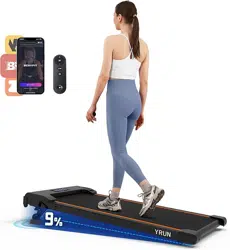
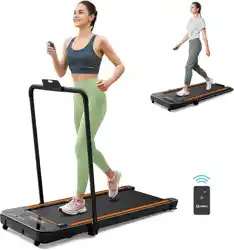
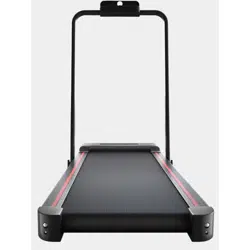
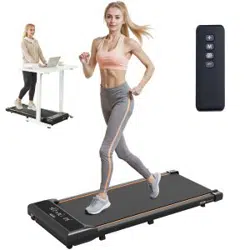
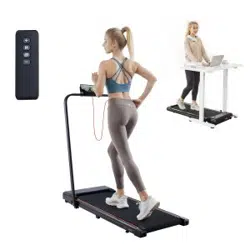
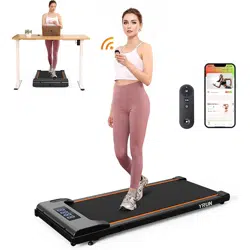
TheYRUNWalkingPadisacompact,foldabletreadmilldesignedforhomeandofficeuse.Itsspace-saving
designallowsforeasystoragewhileprovidinganeffectivewalkingworkoutexperience.
KeyFeatures
Ultra-thinfoldabledesign
Quietmotoroperation
LEDdisplaywithworkoutmetrics
Remotecontroloperation
Smartphoneappconnectivity
Non-slipwalkingsurface
Emergencystopfunction
Multiplespeedsettings
TechnicalSpecifications
Specification Details
Dimensions(Unfolded) 144×57×13cm
Dimensions(Folded) 144×57×6cm
WalkingSurface 120×42cm
MaximumUserWeight 110kg(242lbs)
SpeedRange 0.5-6.0km/h
MotorPower 1.25HP
PowerSupply 110-240VAC,50/60Hz
NoiseLevel <50dB
NetWeight 28kg
PackageContents
YRUNWalkingPad(mainunit)
Poweradapter
Remotecontrol
Usermanual
Safetykey
Lubricatingoil

Allenwrenchset
Note:Inspectallcomponentsupondelivery.Contactcustomerserviceimmediatelyifanypartsaremissing
ordamaged.
AssemblyInstructions
InitialSetup
1. Carefullyremovethewalkingpadfrompackaging
2. Placetheunitonaflat,stablesurfacewithatleast2metersofclearanceonallsides
3. Unfoldthewalkingpadbyliftingtherearsectionuntilitclicksintoplace
4. Ensurethesafetylockisproperlyengaged
5. Connectthepoweradaptertothewalkingpadandplugintowalloutlet
6. Installbatteriesintheremotecontrol(2×AAA,notincluded)
⚠Important:Thewalkingpadweighs28kg.Useproperliftingtechniquesorgetassistancewhenmoving.
OperationInstructions
GettingStarted
1. Ensurethewalkingpadisproperlyunfoldedandlocked
2. Attachthesafetykeytoyourclothingandinsertintotheconsole
3. Stepontothewalkingpadwhileholdingthesiderails
4. Pressthepowerbuttontoturnonthedisplay
5. Usethespeedcontrolstobeginwalking
DisplayFunctions
TheLEDdisplayshowsthefollowinginformation:
TIME:Workoutduration
SPEED:Currentwalkingspeed(km/h)
DISTANCE:Totaldistancecovered
CALORIES:Estimatedcaloriesburned
SpeedControl
Speedrange:0.5-6.0km/h
Use+and-buttonstoadjustspeed
Speedincreases/decreasesin0.1km/hincrements
Maximumacceleration:0.5km/hpersecond
RemoteControlGuide
RemoteControlFunctions
Power:Turnuniton/off
Start/Stop:Beginorpauseworkout
Speed+/-:Adjustwalkingspeed
Mode:Switchbetweenmanualandautomaticmodes
Programs:Accesspre-setworkoutprograms
Tip:Theremotecontrolhasarangeofapproximately3meters.Pointdirectlyatthewalkingpad'sdisplay
forbestresults.
AppConnection
SmartphoneAppSetup
1. Downloadthe"YRUNFitness"appfromyourdevice'sappstore
2. Createanaccountorlogin
3. EnableBluetoothonyoursmartphone
4. Turnonthewalkingpad
5. Opentheappandselect"ConnectDevice"
6. Chooseyourwalkingpadfromtheavailabledeviceslist
7. Followthepairinginstructions
AppFeatures
Real-timeworkouttracking
Customizableworkoutprograms
Progresshistoryandstatistics
Goalsettingandachievements
Socialsharingcapabilities
Firmwareupdates
Maintenance&Care

RegularMaintenance
Daily:Wipedownthewalkingsurfaceandhandrailswithadampcloth
Weekly:Checkallboltsandconnectionsfortightness
Monthly:Lubricatethewalkingbeltasneeded
Quarterly:Inspectthepowercordandallelectricalconnections
BeltLubrication
1. Turnoffandunplugthewalkingpad
2. Liftoneedgeofthewalkingbelt
3. Applyasmallamountoflubricatingoiltothedecksurface
4. Distributeoilevenlyacrossthewidthofthedeck
5. Runthebeltatlowspeedfor2-3minutestodistributeoil
⚠Important:Useonlytheprovidedsilicone-basedlubricant.Otheroilsmaydamagethebeltordeck.
Storage
Cleanthewalkingpadbeforestoring
Foldtheunitandstoreinadrylocation
Avoidextremetemperatures
Coverwithaprotectivesheetifstoringlong-term
Troubleshooting
CommonIssuesandSolutions
Walkingpadwon'tturnon
Checkpowerconnection
Ensuresafetykeyisproperlyinserted
Verifythepoweroutletisworking
Checkforlooseconnections
Beltslippingorjerkymovement
Checkbelttensionandadjustifnecessary
Lubricatethebeltanddeck
Ensurethewalkingpadisonalevelsurface
Checkfordebrisunderthebelt
Displaynotworking

Checkallcableconnections
Resettheunitbyunpluggingfor60seconds
Replaceremotecontrolbatteries
Contactcustomerserviceifproblempersists
Excessivenoise
Ensurethewalkingpadisonastable,levelsurface
Checkforlooseboltsorcomponents
Lubricatethebelt
Removeanydebrisfromthemotorarea
Appwon'tconnect
EnsureBluetoothisenabledonyourdevice
Restartboththeappandwalkingpad
Checkforappupdates
Clearappcacheandrestart
WarrantyInformation
WarrantyCoverage
YRUNprovidesacomprehensivewarrantyforyourwalkingpad:
Motor:2years
Frame:2years
Electronics:1year
PartsandLabor:1year
What'sCovered
Manufacturingdefects
Faultycomponentsundernormaluse
Motorandelectronicmalfunctions
Structuralframeissues
What'sNotCovered
Damagefrommisuseorabuse
Normalwearandtear
Damagefromimpropermaintenance
Accidentsornaturaldisasters
Commercialuse(residentialuseonly)
HowtoMakeaWarrantyClaim
1. ContactYRUNcustomerservice
2. Provideproofofpurchaseandserialnumber
3. Describetheissueindetail

4. Followtroubleshootingstepsifrequested
5. ArrangeforrepairorreplacementasdeterminedbyYRUN
CustomerService:
Email:[email protected]
Phone:1-800-YRUN-PAD
Hours:Monday-Friday,9AM-6PMEST
AdditionalInformation
EnvironmentalConsiderations
Operatingtemperature:10°Cto35°C(50°Fto95°F)
Storagetemperature:-10°Cto60°C(14°Fto140°F)
Humidity:20%to90%(non-condensing)
Donotuseoutdoorsorinwetconditions
DisposalInstructions
Whenthewalkingpadreachestheendofitsusefullife,pleasedisposeofitresponsibly:
Contactlocalwastemanagementforelectronicsrecycling
Removebatteriesfromremotecontrolbeforedisposal
Separatemetalandplasticcomponentswherepossible
Donotdisposeofinregularhouseholdtrash
YRUNWalkingPadManual
Version2.1|©2025YRUNFitnessEquipment
Downloadedfrom:https://myyrun.com/
Forthelatestmanualupdatesandsupport,visitourwebsite