Operating instructions
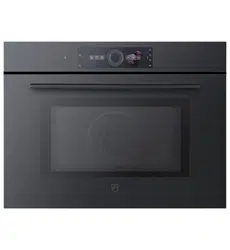
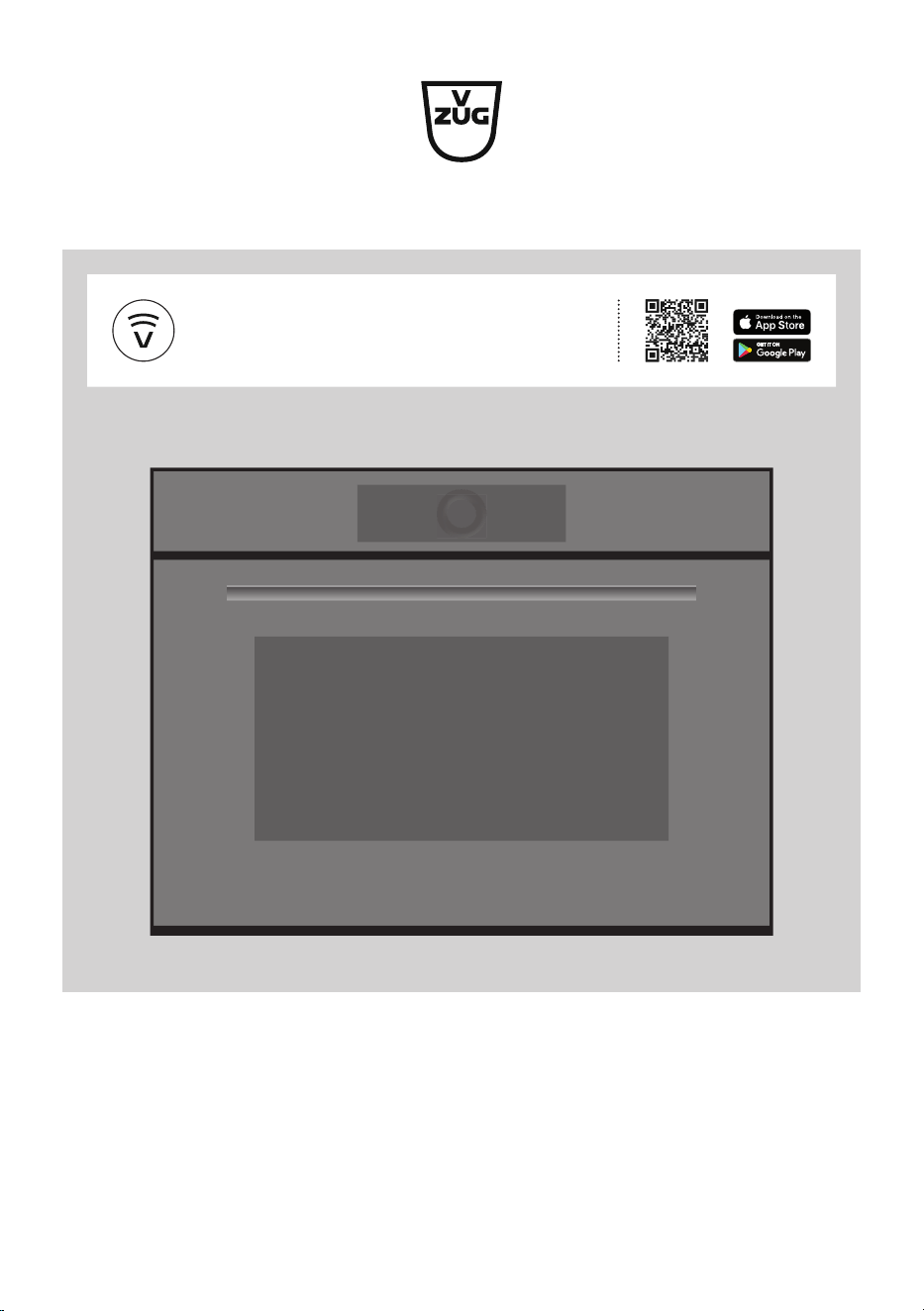
CombiMiwell V4000 45
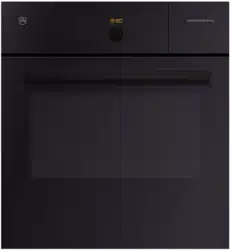
CombiMiwell V2000
38/38C
Microwave oven
V-ZUG-Home
Install the app, network your appliances and
benefit from a wide range of useful functions.

Thank you for choosing to buy one of our products. Your appliance is made to high
standards and is easy to use. Nevertheless, please take the time to read these operating
instructions in order to familiarize yourself with the appliance and get the best use out of
it.
Please follow the safety precautions.
Modifications
Text, diagrams and data correspond to the technical standard of the appliance at the
time these operating instructions went to press. The right to make technical modifications
for the purpose of the further development of the appliances is reserved.
Validity
These operating instructions apply to:
Model designation Type Size system
CombiMiwell V4000 45 CM4T-24025 60-450
CombiMiwell V2000 38 CM2T-24021 60-381
CombiMiwell V2000 38C CM2T-24022 55-381
Variations depending on the model are noted in the text.
Download updates to your appliance via V-ZUG-Home so that you are always up to
date. The latest operating instructions with the new functions incorporated can be
found here: vzug.com.
© V-ZUG Ltd, CH-6302 Zug, 2023
2

3
Table of contents
1 Safety precautions 5
1.1 Symbols used......................................................... 5
1.2 General safety precautions.................................. 5
1.3 Appliance-specific safety precautions .............. 6
1.4 Appliance installation............................................ 8
1.5 Instructions for use................................................ 8
2 Using for the first time 11
3 Appliance description 11
3.1 Construction .........................................................11
3.2 Operating and display elements.......................12
3.3 Cooking space.....................................................13
3.4 Accessories ..........................................................14
4 Operation 15
4.1 Operating the display..........................................15
4.2 Selecting and starting an application ..............16
4.3 Changing an application ....................................17
4.4 Operating time .....................................................18
4.5 Delayed start / end .............................................19
4.6 Options ..................................................................19
4.7 Setting to start later .............................................20
4.8 Checking and changing the settings...............20
4.9 Preheating.............................................................21
4.10 Application tips.....................................................21
4.11 Favourites..............................................................22
4.12 Pinning...................................................................23
4.13 Timer ......................................................................24
4.14 Illumination............................................................25
4.15 Display lock ..........................................................25
4.16 Quiet mode ...........................................................25
4.17 Time........................................................................26
4.18 Ending an application before time ...................26
4.19 End of operation ..................................................26
4.20 Switching the appliance off................................27
4.21 Appliance tips.......................................................27
5 Applications 28
5.1 Model V2000.........................................................28
5.2 Model V4000.........................................................29
5.3 More applications .................................................31
5.4 Own recipes...........................................................32
6 Microwave 34
6.1 Note on use ...........................................................34
6.2 Tips for microwave mode....................................35
6.3 Microwave operation............................................35
7 V-ZUG-Home 35
7.1 Conditions ..............................................................35
7.2 Initial set-up............................................................36
8 User settings 36
8.1 Adjusting user settings ........................................36
8.2 Language ...............................................................36
8.3 Childproof lock......................................................37
8.4 Display ....................................................................37
8.5 Signals and tones.................................................37
8.6 Individual settings .................................................37
8.7 Date and time........................................................38
8.8 V-ZUG Home .........................................................39
8.9 Appliance information ..........................................39
8.10 Factory settings.....................................................39
8.11 Customer Services ...............................................40
9 Care and maintenance 40
9.1 Cleaning the exterior............................................40
9.2 Cleaning the cooking space...............................40
9.3 Cleaning the appliance door ..............................40
9.4 Cleaning the accessories....................................40
9.5 Replacing the illumination...................................41
10 Trouble-shooting 41
10.1 Error messages.....................................................41
10.2 Other possible problems.....................................42
10.3 After a power failure.............................................42
11 Accessories 43
11.1 Accessories ...........................................................43

4
11.2 Special accessories ............................................43
12 Technical data 43
12.1 Temperature measurement ...............................43
13 Tips and tricks 44
13.1 Saving energy.......................................................44
14 Disposal 45
Index 46
15 Notes 49
16 Service & Support 51
5
1 Safety precautions
1.1 Symbols used
Unauthorized repairs could result in
unforeseen dangers for the user, for
which the manufacturer cannot ac-
cept liability. Repairs should only be
undertaken by an authorized ser-
vice technician, otherwise any sub-
sequent damage will not be
covered by the warranty.
Denotes important safety precau-
tions.
Failure to observe said precautions
can result in injury or in damage to
the appliance or fittings!
Information and precautions that
should be observed.
Information on disposal
Information about the Operating In-
structions
Remove plug from mains socket /
disconnect power supply
Insert plug into mains socket / con-
nect power supply
Do not cut off or modify mains plug
Wear protective gloves
▸ Indicates step-by-step instructions.
– Describes how the appliance reacts
to the steps taken.
▪ Indicates a list.
1.2 General safety precautions
▪ Read the operating instruc-
tions before using the appli-
ance for the first time.
▪ This appliance can be used
by children aged 8 and above
and by persons with reduced
physical, sensory or mental
capabilities, or lack of experi-
ence and/or knowledge,
provided they are supervised
or have been instructed on
the safe use of the appliance
and have understood the haz-
ards involved. Children shall
not play with the appliance.
Cleaning and user mainten-
ance shall not be undertaken
by children without supervi-
sion.
▪ If an appliance is not
equipped with a mains cable
and a plug or other means for
disconnecting from the mains
with a contact opening on
each pole complying with the
conditions of overvoltage cat-
egory III for full isolation, an
isolating device must be in-
corporated into the perman-

1 Safety precautions
6
ently installed electrical install-
ation in accordance with the
installation regulations.
▪ If the mains cable of this ap-
pliance is damaged, it must
be replaced by the manufac-
turer or its Customer Services
or a similarly qualified person
in order to avoid hazard.
1.3 Appliance-specific safety
precautions
▪ READ THE IMPORTANT
SAFETY PRECAUTIONS
CAREFULLY AND RETAIN
FOR FUTURE USE.
▪ WARNING: The appliance
and its accessible parts get
hot during use. Be careful not
to touch the heating ele-
ments. Children under 8
years of age must be kept
away from the appliance un-
less they are constantly su-
pervised.
▪ WARNING: Accessible parts
can get hot during use. Keep
young children away from the
appliance.
▪ This appliance is intended for
use in the home and similar
settings such as: in staff kit-
chens in shops, offices and
other commercial establish-
ments; in agricultural estab-
lishments; by guests in hotels,
motels and other accommod-
ation establishments; in bed
and breakfast establishments.
▪ This appliance is not intended
for use in vehicles or on
board ships or aircraft or in
rooms where there are spe-
cial conditions such as, for in-
stance, a corrosive or explos-
ive atmosphere (dust, steam
or gas) or condensing mois-
ture.
▪ To avoid overheating, the ap-
pliance must not be installed
behind a decor door.
▪ WARNING: Never heat food
or liquids in sealed containers
such as cans or bottles as
they are liable to explode due
to overpressure.
▪ Do not use aggressive or ab-
rasive cleaning agents or
sharp metal scrapers for
cleaning the glass in the ap-
pliance door, as they could
scratch the surface. This can
destroy the glass.
▪ Under no circumstances use
a steam cleaner to clean the
appliance.
▪ WARNING: For safety reas-
ons, the illumination must be
replaced by our Customer
Services.

1 Safety precautions
7
▪ WARNING: Children should
only use the appliance in a
combined operating mode
(depending on model) under
adult supervision due to the
temperatures generated.
▪ WARNING: In the event that
the door or door seals are
damaged, the cooking appli-
ance must not be used until it
has been repaired by a quali-
fied competent person.
▪ WARNING: It is hazardous for
anyone other than a qualified
competent person to carry
out any service or repair op-
eration which involves the re-
moval of a cover which gives
protection against exposure
to microwave energy.
▪ When using applications with
microwave, only use cook-
ware and containers that are
suitable for use in microwave
appliances.
▪ The appliance must be con-
stantly monitored when heat-
ing up foodstuffs in contain-
ers made from plastic or pa-
per, as they could ignite.
▪ If smoke is observed, switch
off or unplug the appliance
and keep the appliance door
closed in order to stifle any
flames.
▪ The contents of feeding
bottles and baby food jars
must be stirred or shaken
and the temperature must be
checked before consumption
in order to avoid burns and
scalds.
▪ The appliance is intended for
heating up food and bever-
ages. Drying food or clothing
and heating of warming pads,
slippers, sponges, damp
cloths and the like may result
in injury, ignition or fire.
▪ Microwave heating of bever-
ages can result in delayed
eruptive boiling (super boil-
ing), therefore care must be
taken when handling the ves-
sel.
▪ Eggs in their shell or whole
hard-boiled eggs should not
be heated in microwave appli-
ances since they may ex-
plode, even after microwave
heating has ended.
▪ Keep the appliance and the
door seals clean. Remove
any soiling as soon as pos-
sible. Otherwise the appliance
or the door seal could be-
come damaged, adversely af-
fecting the life of the appli-
ance. For detailed information
on cleaning the door seals,

1 Safety precautions
8
the cooking space and the
adjacent parts, see the «Care
and maintenance» section.
1.4 Appliance installation
▪ The appliance must be installed by
qualified personnel only.
▪ Each step must be carried out and
checked in full in the order specified.
▪ Electrical connections must be carried
out by qualified personnel in accord-
ance with the guidelines and standards
for low-voltage installations and the spe-
cifications of the local electricity supply
companies.
▪ A plug-in appliance may only be con-
nected to a socket outlet with earthing
contact, installed according to specifica-
tions. An all-pole mains isolating device
with 3 mm contact opening should be
provided in the house wiring system.
Switches, plug and socket devices, cir-
cuit breakers and fusible cut-outs which
are accessible after installation and
which have all-poles switching are per-
missible as isolating devices. Effective
earthing and separately installed neutral
and earth conductors ensure safe and
fault-free operation. After installation,
live parts and cables with basic insula-
tion must not be accessible. Check old
installations.
▪ Refer to the identification plate for in-
formation on the required mains
voltage, current type and fuse protec-
tion.
▪ All plastering, plasterboarding, wall pa-
pering and painting work is to be car-
ried out prior to installing the appliance.
▪ Efficient repairs can only be guaranteed
if it is possible to de-install the complete
appliance at any time without causing
any damage.
▪ Allow ≥45 mm niche clearance at the
back of the appliance for ventilation.
▪ For model V4000, ensure an air outlet
below the appliance of 250 cm
2
.
▪ If the appliance is installed any other
way, the results will also vary with the
changed power output.
▪ The appliance is equipped with a con-
nection cable which must be connected
to an on-site junction box. The mains
cable may not be replaced for thermo-
technical reasons.
1.5 Instructions for use
Before using for the first time
▪ The appliance must be installed and
connected to the electricity supply in
accordance with the separate installa-
tion instructions. Have a qualified fitter/
electrician carry out the necessary
work.
Correct use
▪ The appliance is designed for use in
the home for preparing food. Under no
circumstances flambé or cook food us-
ing a lot of fat in the cooking space! No
liability is assumed for any damage
caused by improper use or incorrect
handling.
▪ Never use the appliance to dry animals,
textiles, paper, etc.!
▪ Do not use the appliance as a room
heater.
▪ Any repairs, modifications or manipula-
tions to the appliance, especially any
electrically live parts, may only be car-
ried out by the manufacturer, its Cus-
tomer Services or a similarly qualified
person. Repairs if carried out incorrectly
may cause serious injury, damage to
the appliance and fittings, as well as af-
fect the functioning of the appliance. If
the appliance is not working properly or
in case a repair is needed, follow the in-
structions given in the «Service & Sup-
port» section. If required, please contact
our Customer Services.
▪ Use original spare parts only.
▪ Retain these operating instructions for
future reference.

1 Safety precautions
9
▪ The appliance corresponds to recog-
nized technology standards and the rel-
evant safety regulations. Proper use of
the appliance is essential to avoid dam-
age and accidents. Please therefore fol-
low the precautions given in these oper-
ating instructions.
▪ Do not attach magnets to the display.
▪ The appliance should only be installed
and operated in a room with an ambi-
ent temperature of between 5 °C and
35 °C.
▪ The V-ZUG-Home module operates at a
frequency band of 2.4–2.5 Ghz and has
a maximum radiated transmission
power of 20 dBm.
Note on use
▪ Never use the appliance without a
turntable.
▪ Use the childproof locking facility.
▪ If the appliance is visibly damaged, do
not use it. Contact our Customer Ser-
vices.
▪ If the appliance is not functioning prop-
erly, disconnect it from the power sup-
ply immediately.
▪ Ensure there are no foreign bodies or
pets in the cooking space before clos-
ing the appliance door.
▪ Objects that could pose a danger if the
appliance were accidentally switched
on should not be stored in the cooking
space. Do not store food or any temper-
ature-sensitive or inflammable materials,
e.g. cleaning agents, cleaning sprays, in
the cooking space.
▪ When using applications with mi-
crowave, put the food in the cooking
space before switching on the appli-
ance.
▪ Plastic and paper packaging that is not
microwave safe needs to be removed
before cooking or defrosting the food.
Ignition hazard!
▪ Do not leave the appliance unattended
when heating food in plastic or paper
containers. Ignition hazard!
▪ Always open sealed food containers be-
fore placing them in the cooking space.
Danger of explosion due to overpres-
sure!
Caution: Risk of burns!
▪ The appliance gets very hot when in
use. The appliance door also gets hot.
▪ Steam and/or hot air may escape from
the cooking space when the appliance
door is opened.
▪ The heated appliance will remain hot for
some time after it is switched off and
will cool down only slowly to room tem-
perature. Allow sufficient time for the
appliance to cool down before, for in-
stance, cleaning it.
▪ Overheated fat and oil can easily catch
fire. Heating oil in the cooking space to
sear meat is dangerous and should not
be done. Never attempt to extinguish
burning oil or fat with water. Danger of
explosion! Smother the flames with a
fire blanket. Keep doors and windows
closed.
▪ Do not pour spirits (brandy, whisky,
schnapps, etc.) over hot food. Danger
of explosion!
▪ Do not leave the appliance unattended
when drying herbs, bread, mushrooms,
etc. If the foodstuff dries out too much,
it can pose a fire hazard.
▪ If you notice smoke possibly coming
from a fire in the appliance or inside the
cooking space, keep the appliance
door closed and disconnect the appli-
ance from the mains power supply.
▪ Accessories get hot in the cooking
space. Use protective gloves or oven
cloths.
▪ Do not heat drinks that contain alcohol!

1 Safety precautions
10
▪ When heating liquids with microwaves,
place a glass rod in the vessel to pre-
vent delayed boiling (or superboiling).
With delayed boiling, boiling point is
reached without the typical steam
bubbles forming. Disturbing an open
vessel, even slightly, can cause the li-
quid to erupt. Do not use vessels with a
narrow spout.
Caution: Risk of injury!
▪ Be careful not to put fingers in the door
hinges, as there is otherwise a risk of
injury if the appliance door is moved.
Particular care should be taken when
children are around.
▪ Only leave the appliance door open in
the airing position. An open appliance
door poses a danger of tripping or in-
jury! Do not sit or rest on the appliance
door or use it as a storage surface.
Caution: Risk to life!
▪ Danger of suffocation! Keep packaging
material, e.g. plastic film and poly-
styrene, away from children. Packaging
material can be dangerous for children.
How to avoid damaging the appliance
▪ Close the appliance door carefully.
▪ Do not use objects that can rust in the
cooking space.
▪ To prevent corrosion, leave the appli-
ance door open in the airing position
until the cooking space has cooled
down.
▪ When cleaning the appliance make
sure no water gets inside it. Use a mod-
erately damp cloth. Do not spray the
outside or the inside of the appliance
with water. If water gets inside the appli-
ance, it will cause damage.
▪ The construction of the appliance may
not be changed in any way. Do not ap-
ply force to or interfere with the appli-
ance door or the control and safety
devices. The illumination may only be
replaced by our Customer Services.
▪ Take care not to damage the appliance
door, the door frame or the door
hinges.
▪ Ensure that nothing is trapped between
the appliance door and the frame.
▪ Wipe away any residual water left in the
bottom of the cooking space with a soft
cloth after the appliance has cooled
down.
2 Using for the first time
Before operating the newly installed appliance for the first time, the following steps
should be taken:
▸ Remove packaging and transport materials as well as any protective film from out of
the cooking space.
▸ Clean the cooking space and the accessories.
▸ Long touch the display.
– The appliance starts.
– Various user settings necessary for operation appear in the display one after the
other.
▸ Make the settings and confirm.
▸ Remove all the accessories from out of the cooking space.
▸ Start the initial burn-in.
If the initial burn-in step is skipped, it must be carried out manually after completing the
initial set-up.
Procedure for model V4000
▸ Heat the empty cooking space to 200 °C for about 30minutes using the operating
mode.
Procedure for model V2000
▸ Heat the empty cooking space to 200°C for about 30minutes using the operating
mode and microwave at 200 W, having already placed a porcelain bowl with about 1
litre of water on the turntable.
Burning-in removes any oily residues in the cooking space. As there is likely to be
some smoke and odour given off, we recommend ventilating the room well during
this phase.
All temperatures in these operating instructions are given in degrees Celsius (°C).
3 Appliance description
3.1 Construction
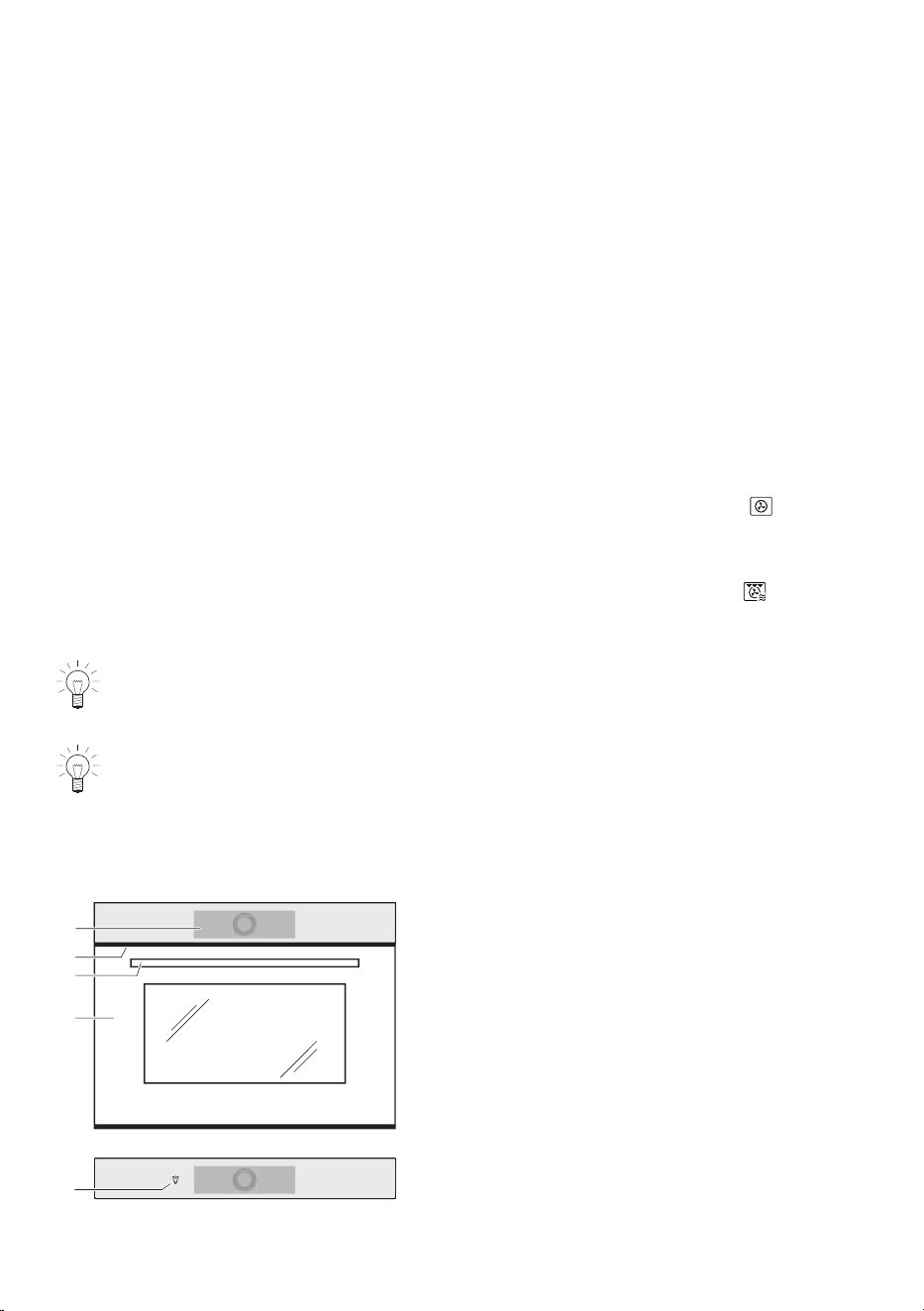
3
4
1
2
1
Operating and display elements
2
Ventilation opening
3
Door handle
4
Appliance door
5
5
V-ZUG-Home (depending on model)
11
3 Appliance description
3.2 Operating and display elements
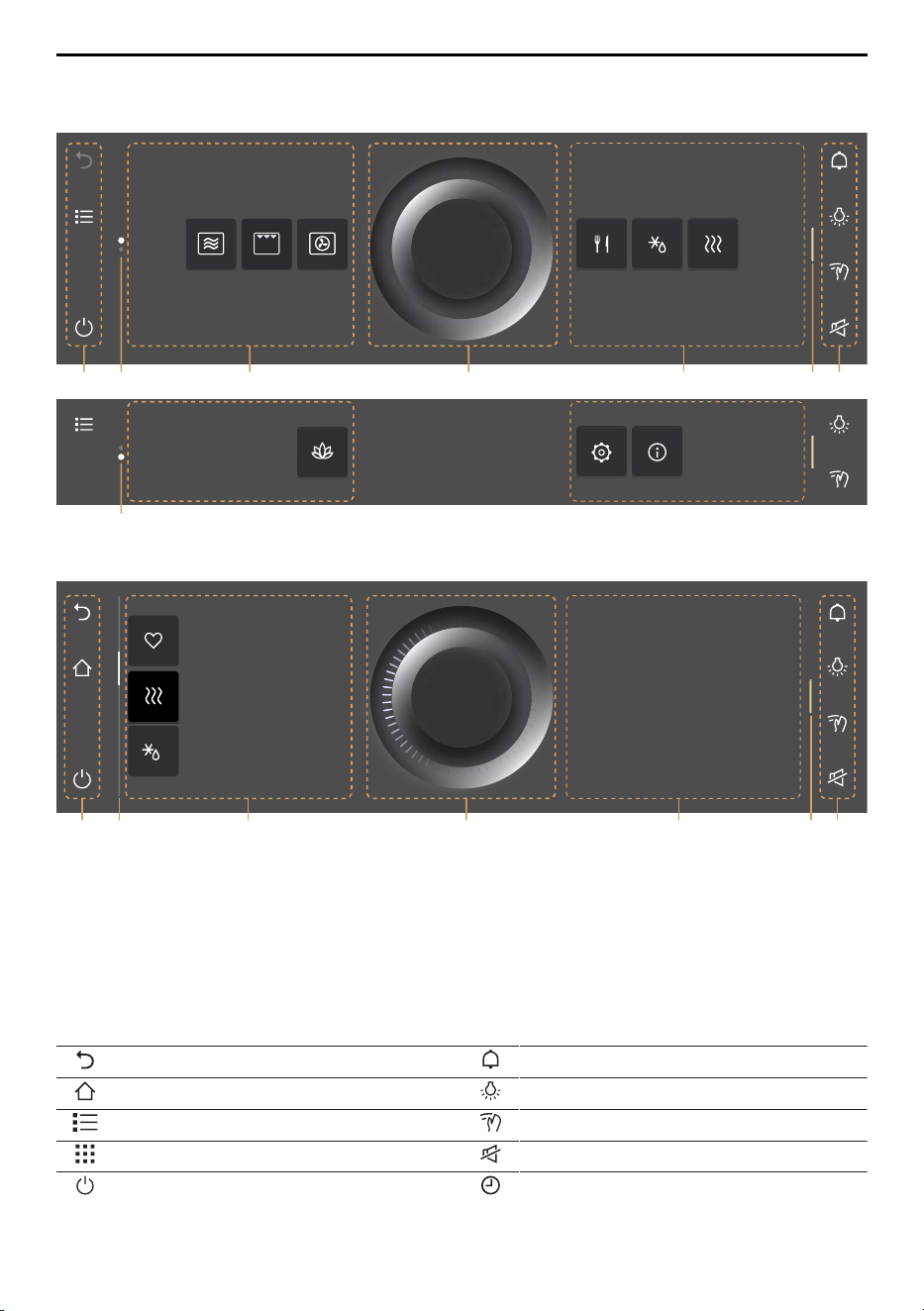
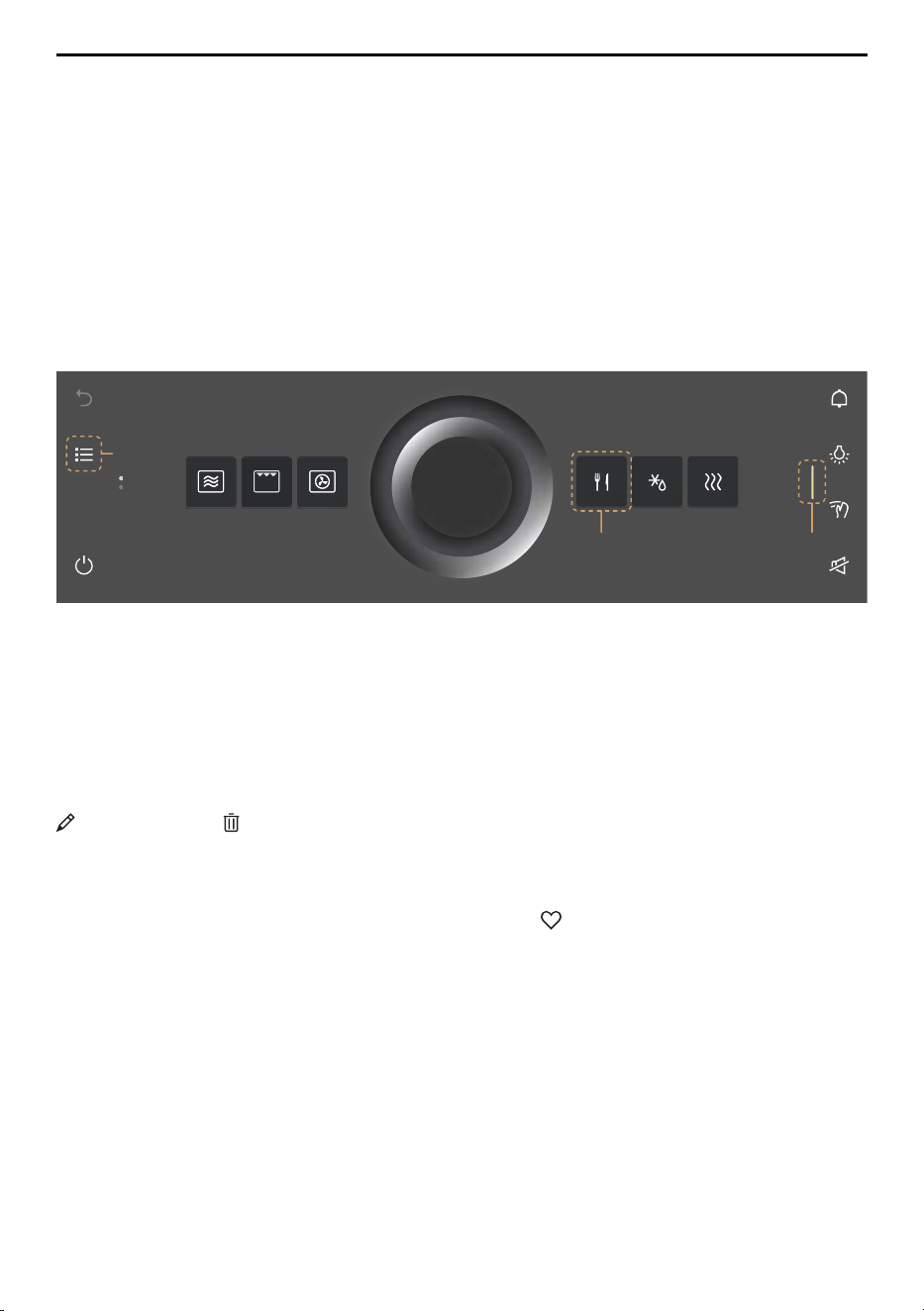
App view
1 3 5 172 3
2
List view
Here is where you can make
all key settings and
customize your appliance.
OK
Reheat
Favourite 2
Defrost
1 4 5 172 6
OK
1
Function bars with function buttons
5
CircleSlider
2
Scroll bar/position
6
Information
3
Apps
7
Bar for expanding the function bar
4
List of applications
Left function buttons Right function buttons
Step back Timer
Start screen Cooking space illumination
List view Display lock
App view Quiet mode
Switch off Clock
12
3 Appliance description
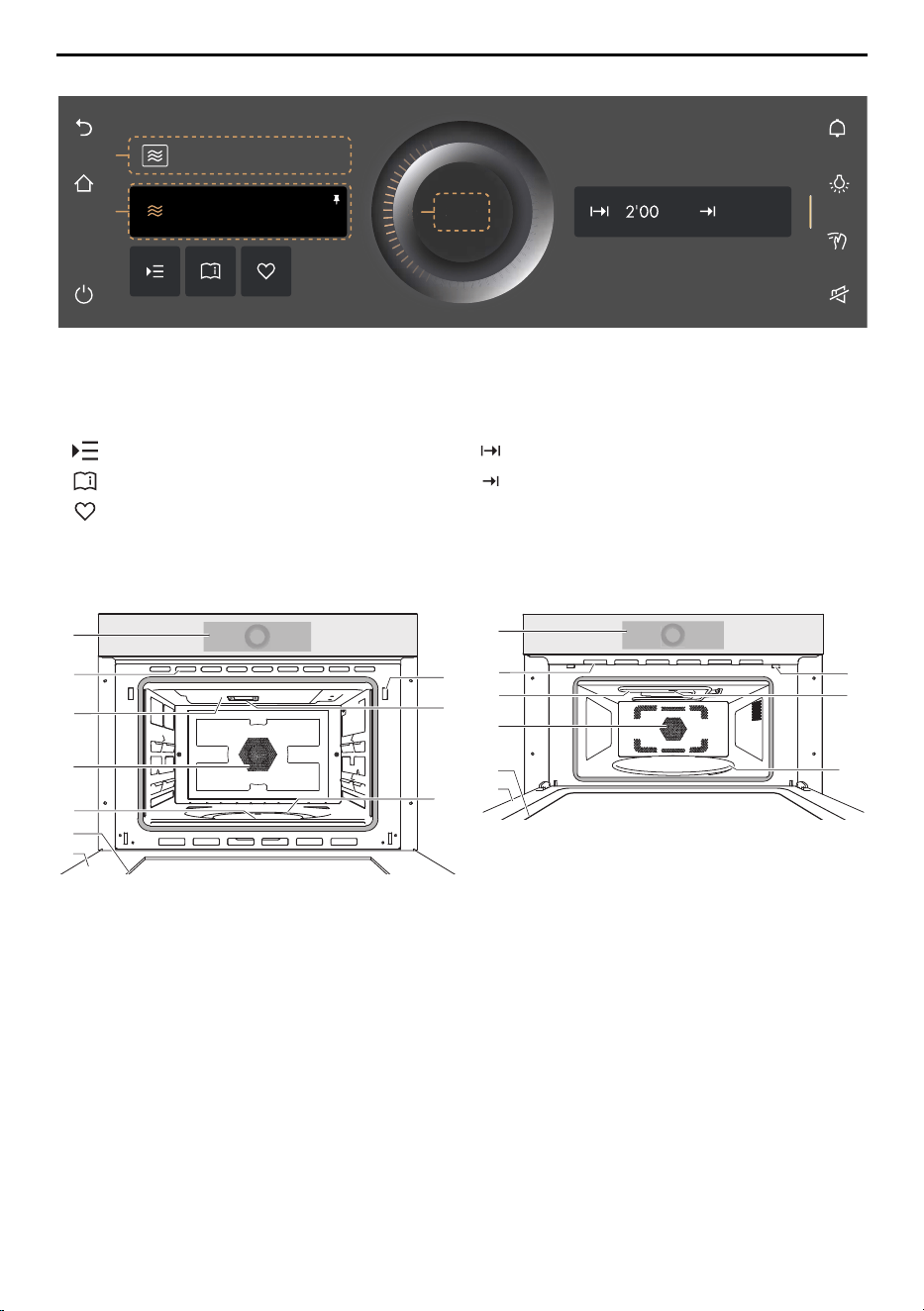
Ready to start
1
2
3
Start
Microwave
3
3
Start
13:21
500W
1
Application
3
Start operation
2
Main value
Setting options
Options Operating time
Application tips End
Favourite
3.3 Cooking space
Model V4000 Model V2000
1
4
5
3
2
6
8
9
10
7
1
4
5
2
6
7
8
9
10
1
Appliance door
6
Ventilation slots
2
Door seal
7
Operating panel with CircleSlider
3
Bottom heat
8
Door detection
4
Hot air fan
9
Microwave inlet
5
Grill
10
Turntable
13
3 Appliance description
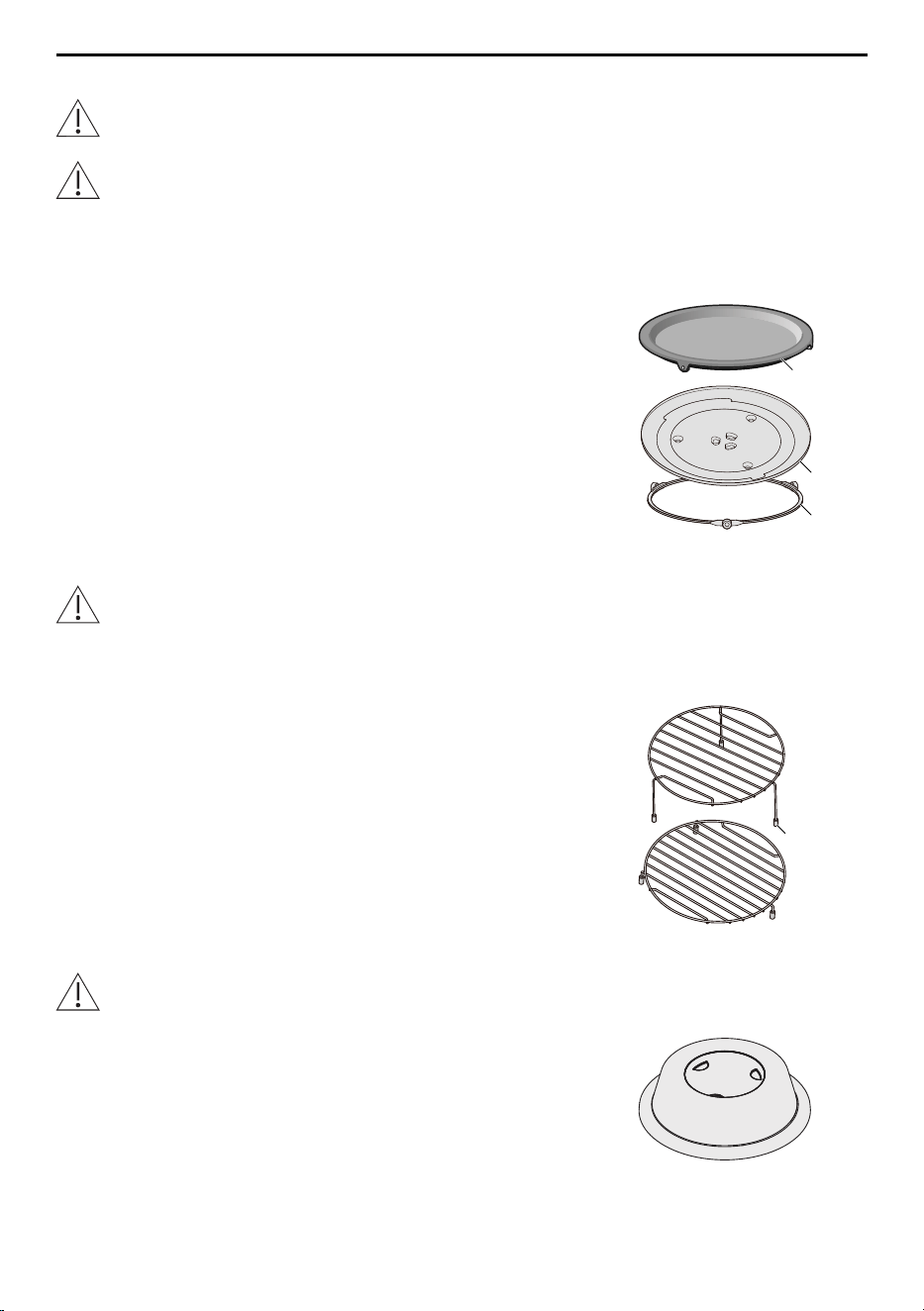
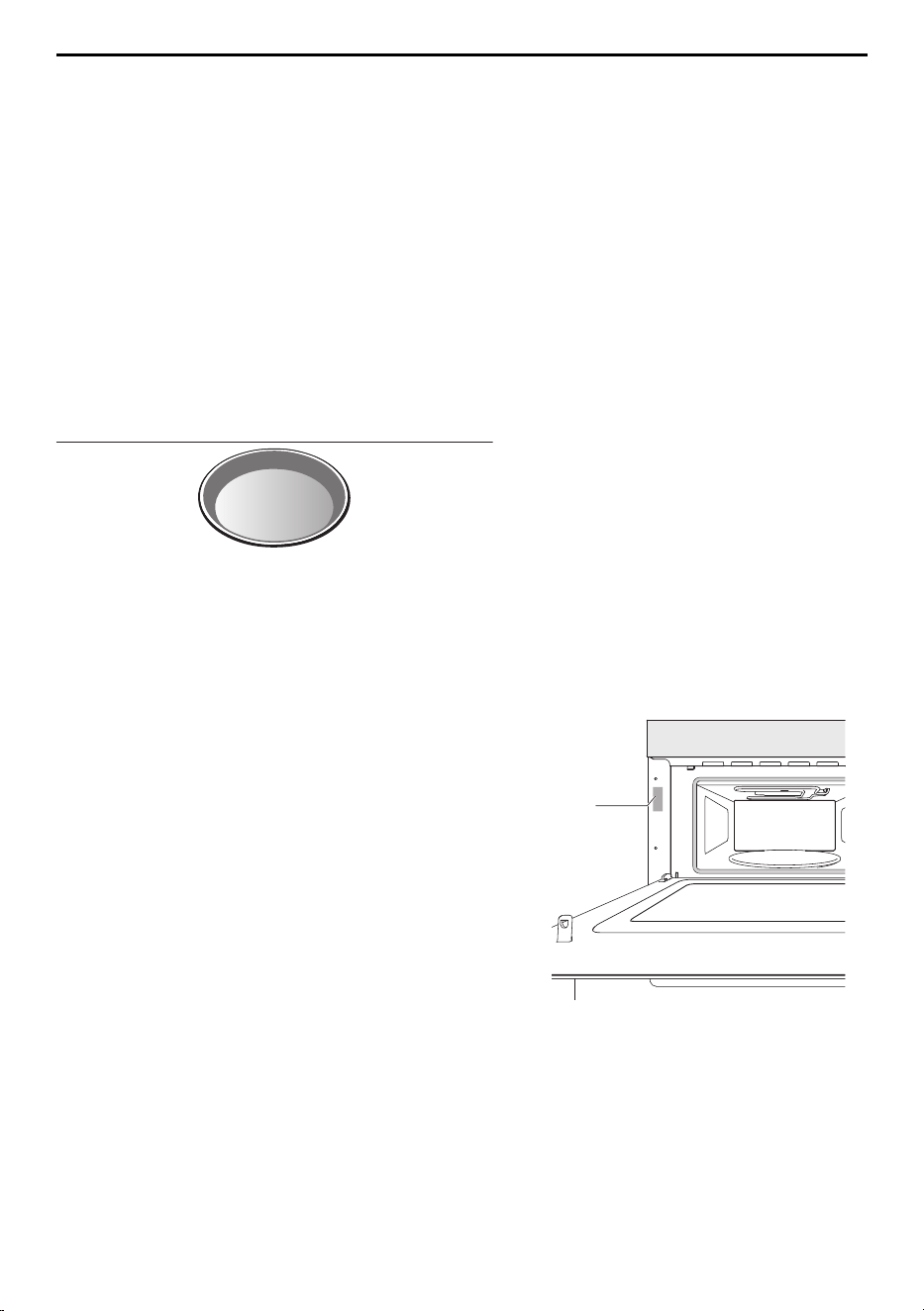
3.4 Accessories
Incorrect handling can cause damage! Do not use knives or cutting wheels on the
accessories.
Do not use any metal accessories in the microwave or combi modes.
Turntable
Enamel turntable 1, max. permissible load of 5 kg (for model V4000)
glass turntable 2 with turntable roller 3, max. permissible load of 4 kg (for model V2000).
▪ For standing the low or high wire rack on when e.g.
grilling.
▪ Serves as a base for the microwave and combi modes
used with the appropriate accessories (for model
V2000).
1
2
3
Round wire rack
Model V4000: Damage due to missing or damaged rubber feet (4)! Do not use the
round wire rack in the microwave mode or combi mode if the rubber feet (4) are
missing or damaged.
Low and high round wire rack.
▪ High wire rack for grilling flat food items.
▪ Low wire rack (for model V4000): for standing food on in
the microwave, hot air, PizzaPlus and combi modes.
4
Food cover
Use the food cover in the microwave mode only. The food cover could otherwise
melt.
▪ Prevents the food from drying out.
▪ Prevents the cooking space from becoming soiled.
▪ Shortens the cooking time.
14
4 Operation
4 Operation
4.1 Operating the display
Switching the appliance on
The appliance is operated using the display.
The clock is only visible in EcoStandby if enabled in the user settings.
▸ Long touch the display.
– The start screen appears.
Changing the start screen view
The start screen can be displayed in one of two ways: as an app view or as a list view.
The app view is the factory setting.
1
3
2
▸ To temporarily change the view, touch the 1 function button.
– The view is retained only until the display goes dark.
– The change is then discarded.
– When the display is called up again, the view set in the user settings appears.
▸ To permanently change the view, go in the user settings to «Individual settings» and
select the desired start screen view (see page 38).
Displaying quick information
The app view displays the names of the apps as well as the two favourite functions
«Rename» and «Remove».
▸ Press and hold the desired app 2.
– Quick information and the favourites function in Favourites appear above the app.
▸ Release app 2.
– Quick information disappears. In the Favourites application, Quick information
does not disappear in order that Rename or Remove can be selected.
Moving an app
The apps can be moved and reordered in the app view.
▸ Press and hold the desired app 2 and move it to change the app order.
– The apps are spread over several pages; only one app can be moved at a time.
▸ Release app 2.
– The new app order is saved.
15
4 Operation
Expanding the right function bar
The right function bar can be expanded at any time.
▸ Drag the bar 3 to the left.
– The function bar expands.
– More functions appear in the display.
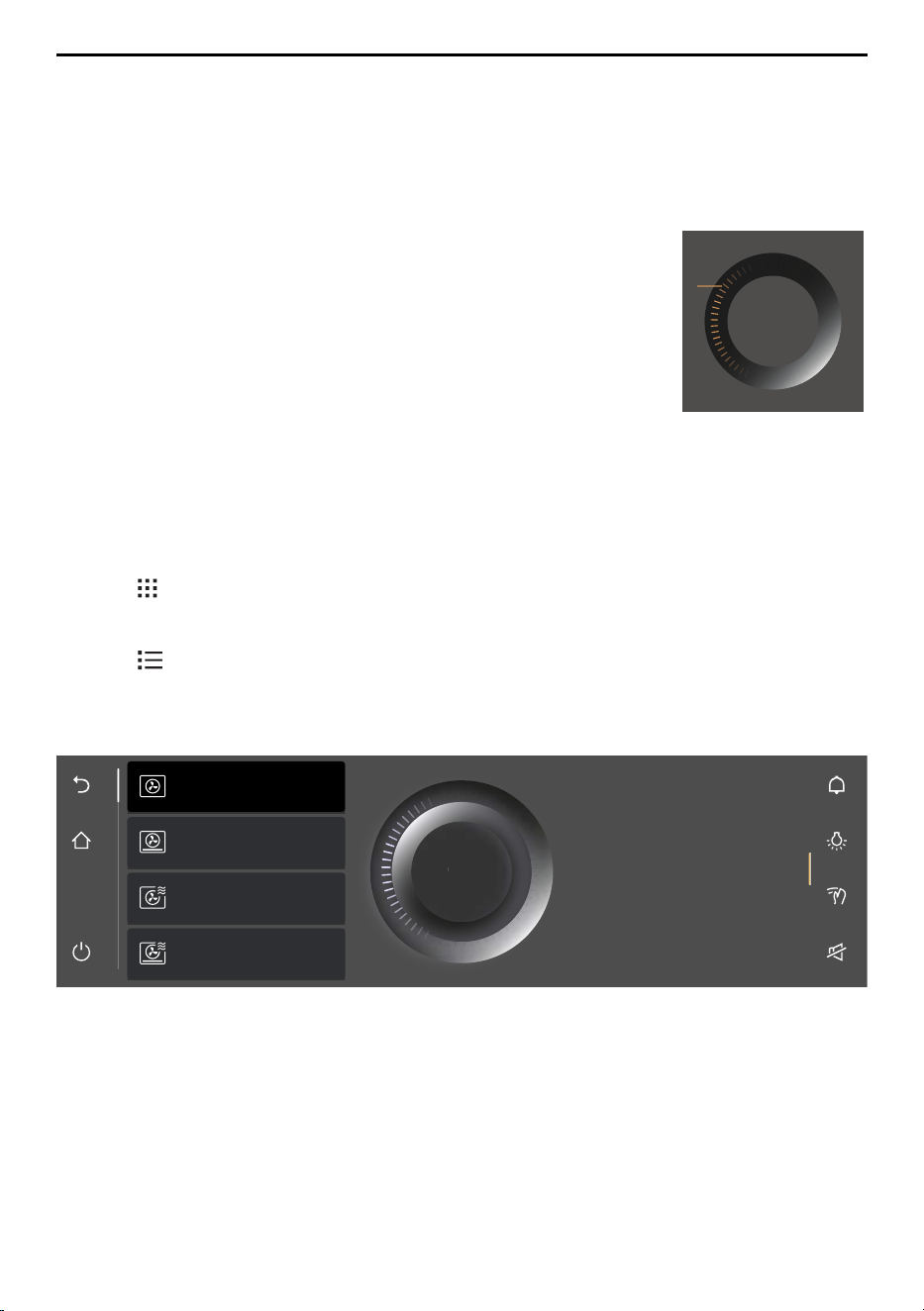
Using the CircleSlider
▸ Place your finger on the CircleSlider 4 and move it in a
circle.
▸ Release the CircleSlider 4.
– An application or a function was selected.
– The colour of the value range changes to amber.
– A value or setting was reduced, increased or adjusted.
▸ Press «Start» to start an application or a function.
Start
4
4.2 Selecting and starting an application
▸ Long touch the display.
– The start screen appears.
Selecting an application group
Either:
▸ In the app view, touch the desired application group.
– The submenu with the associated applications appears in the display.
Or:
▸ In the list view, select the desired application group using the CircleSlider or by
swiping up or down.
▸ Press «OK» or touch the application.
– The submenu with the associated applications appears in the display.
PizzaPlus with
microwave
Hot air with
microwave
PizzaPlus
Hot air
Ideal for baking cakes,
savouries and biscuits,
on several levels if needed.
OK
OK
Selecting an application
▸ Select the desired application using the CircleSlider.
– Choose an item in the list by swiping, navigating and touching it.
▸ Touch the desired application and press «OK» or touch the application again.
– The ready to start screen or another submenu with more applications appears in
the display.
16
4 Operation
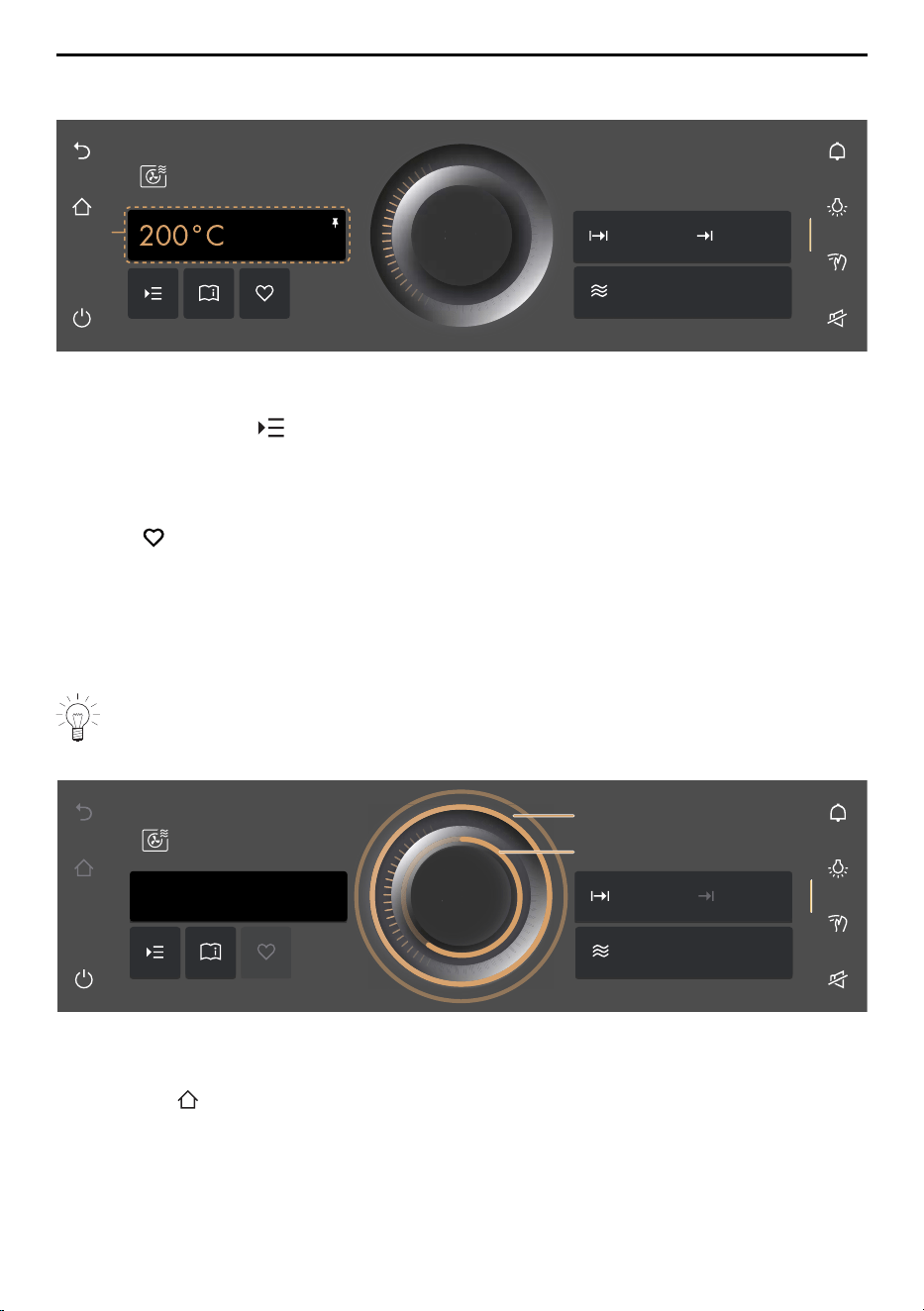
▸ If required, repeat the procedure and select the desired application until the ready to
start screen appears in the display:
1
Start
Hot air with
microwave
300W
15min
13:21
Start
Adjusting values
▸ If necessary, adjust the main value 1 using the CircleSlider.
▸ If necessary, touch and define, adjust or activate the values of other options.
Saving values
▸ Permanently save and pin the adjusted main value 1 for the selected application, if re-
quired.
▸ Touch and create a favourite, if required.
Starting an application
▸ Press «Start» to start the application.
– The pulsing circle 2 of the CircleSlider indicates that operation has started.
– The progress bar 3 in the CircleSlider shows the countdown to the time remaining
of the set application, if set.
If the «Preheat» option is enabled, the actual cooking space temperature is not dis-
played as the cooking space is heating up. The progress bar indicates the heating
status instead.
15min
13:21
300W
Stopp
Hot air with
microwave
Stopp
200°C
2
3
189°C
4.3 Changing an application
If an application has not started yet:
▸ Touch the function button.
– The start screen appears.
– A new application can be selected.
If an application is already running:
▸ Press and hold «Stop».
– The application is cancelled.
17
4 Operation
4.4 Operating time
The operating time can be set, adjusted or cancelled before or during operation. The
application ends automatically when the set duration is up.
Setting the operating time
▸ Select the desired application.
▸ In the value range, touch «Operating time».
– The colour of the value range changes to amber.
▸ Set the desired operating time using the CircleSlider.
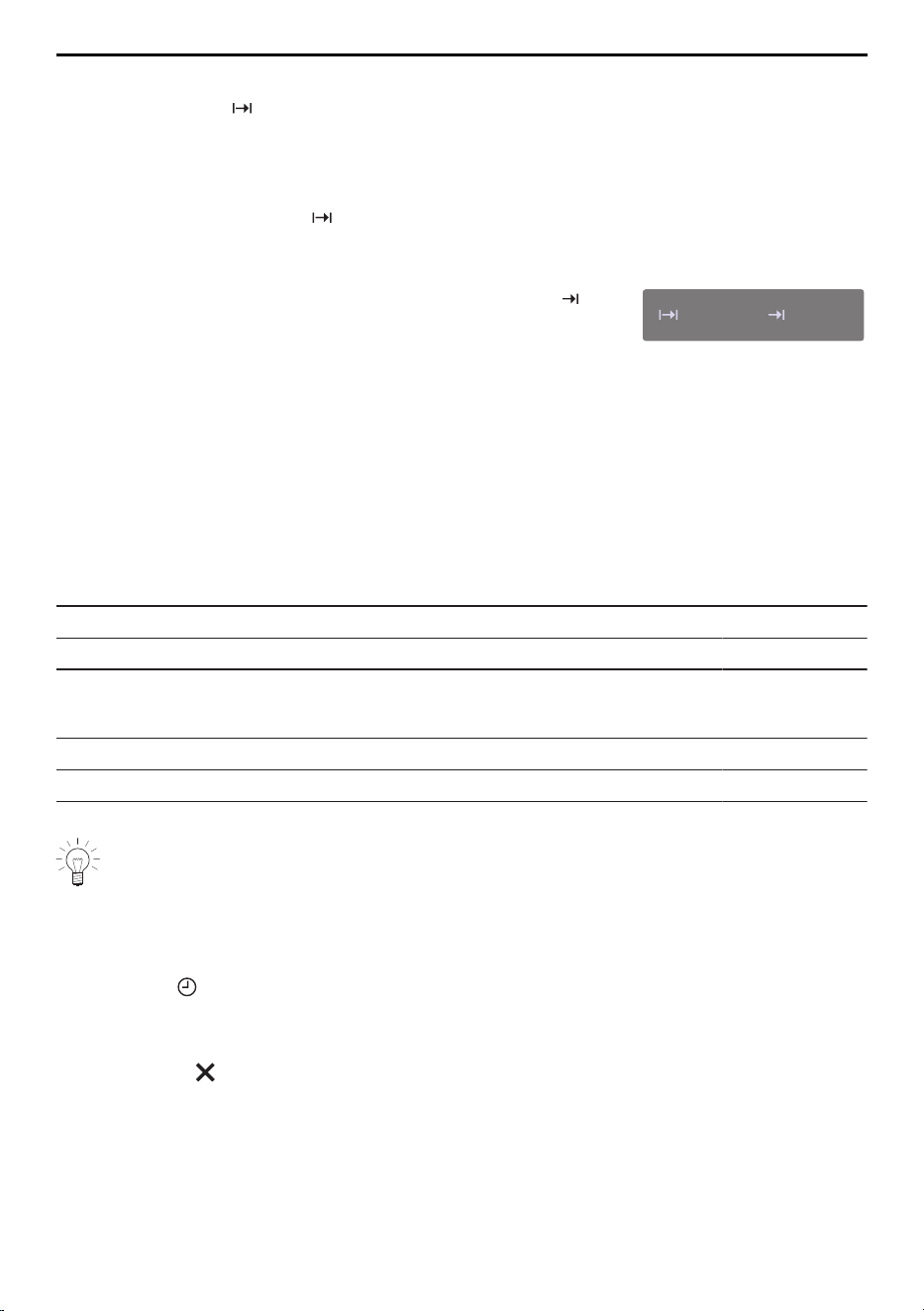
– The desired duration and the calculated end time
appear in the display:
15min
13:21
▸ Press «Start» to start the application.
– The application starts and the time remaining is displayed.
– The application ends automatically when the set duration is up.
– If subsequent steps are available for an application, these can be selected when
the set duration is up.
Microwave
An operating time must be set for all operating modes with microwave.
Setting range
Application/Function Minimum Maximum
Model V4000
Applications with microwave 10 s 30 min
Applications with hot air or grill 10 s 1 h 30 min
Application/Function Minimum Maximum
Model V2000
Applications with microwave 10 s 30 min
Hot-air grill with microwave 10 s 1 h 30 min
The operating time cannot be changed for applications with a fixed duration, such
as the Defrost bread programme.
Showing the clock during operation
The clock and operating time can be shown during operation.
▸ Expand the function bar.
▸ Touch the «Clock» function button.
– The clock and operating time are shown in the display.
Hiding the clock during operation
▸ Either touch or press «OK».
– The clock and operating time are hidden in the display.
18
4 Operation
4.5 Delayed start / end
The delayed start is activated when for the application selected both the operating time
and end are set. The appliance switches automatically on and off again at the desired
times.
Setting a delayed start
▸ Select the desired application.
▸ Set the operating time.
▸ Set further options, if required.
▸ Place the food in the cooking space.
Before setting the delayed start:
▸ in the value range, touch «End».
– The colour of the value range changes to amber.
▸ Set the desired end time using the CircleSlider.
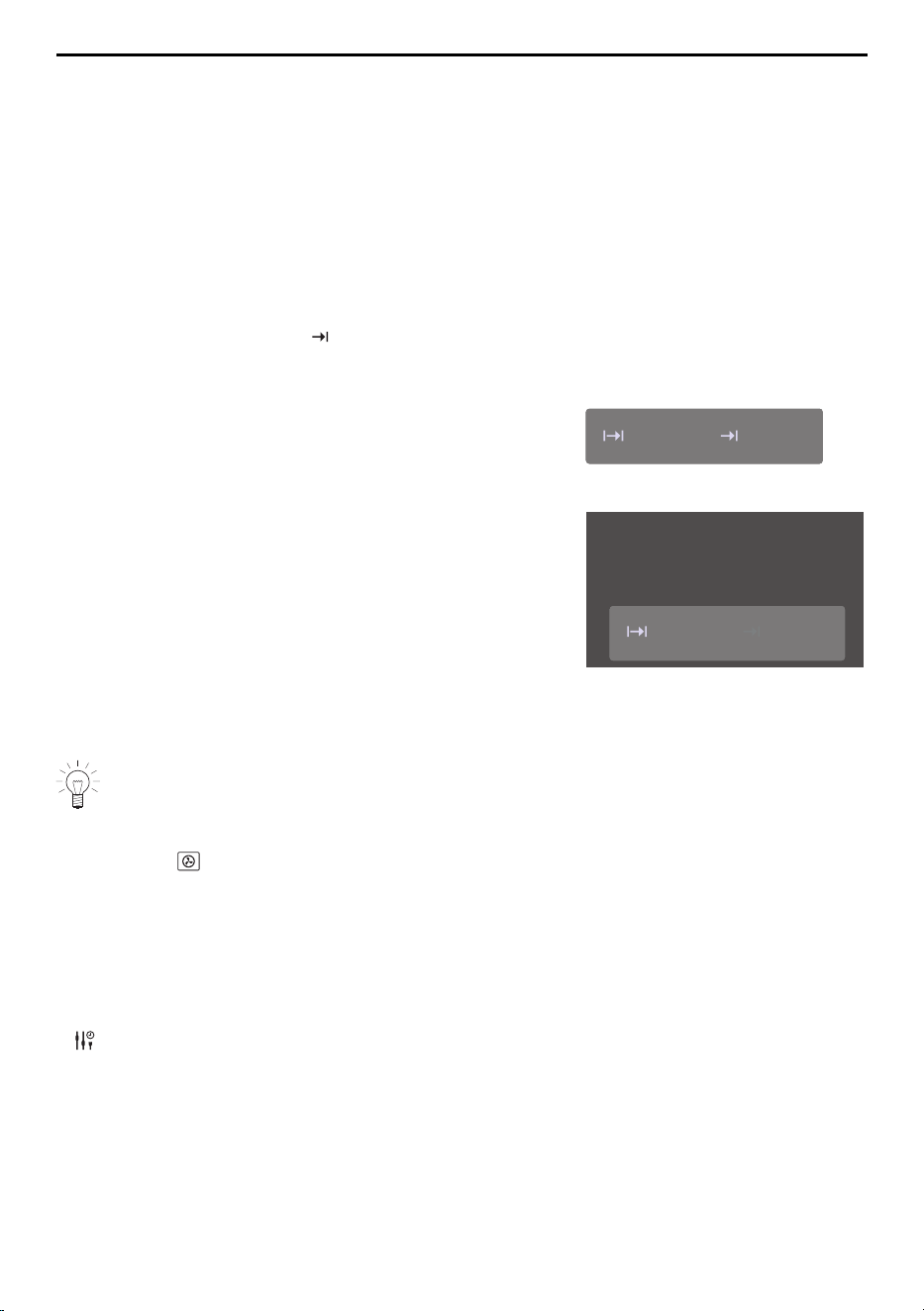
– The desired duration and the set end time ap-
pear in the display:
15min
13:21
▸ Press «Start» to start the delayed start.
– The time set or remaining to the start of opera-
tion and the end of operation appear in the dis-
play:
15min
13:21
Appliance starts in: 32min
▸ If necessary, check and change the settings.
– Any changes to the «Operating time» or «End» options cause the time remaining to
the start of operation to be recalculated.
If «Operating time» has been set, the end time cannot be set or adjusted during
operation.
Example
▸ Select the operating mode and 180 °C.
▸ At 8:00, set an operating time of 1hour and 15minutes.
▸ Set the end time at 11:30.
– The appliance switches on automatically at 10:15 and off again at 11:30.
4.6 Options
Each application offers different options. Your appliance has the following options:
Start later
Selecting and starting options
▸ Select an application from the desired application group and confirm with «OK», if re-
quired.
– The ready to start screen appears in the display.
19
4 Operation
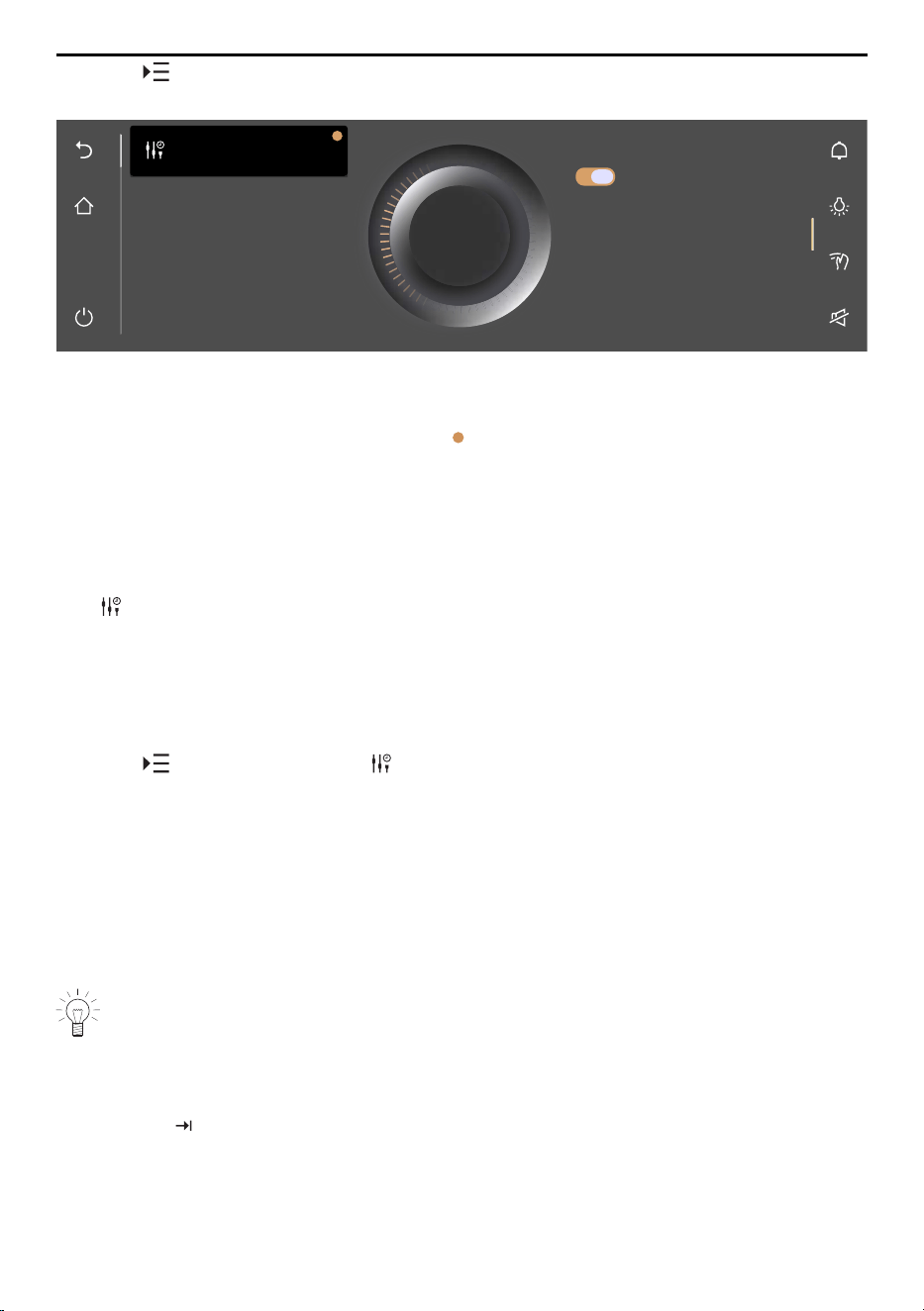
▸ Touch .
– The options menu appears in the display:
OK
This allows you to set the
appliance to start at a later
time. It retains any values
you entered and does not
switch to standby mode.
Setting to start later
Setting to start later
On
▸ Touch the desired option.
▸ In the right content pane of the display, either turn on the option with the switch or
touch the value range and set the desired value using the CircleSlider.
– Each defined option is marked with a .
▸ Confirm the setting with «OK».
– Several settings can also be confirmed at once with «OK».
– The ready to start screen appears in the display.
▸ Press «Start» to start the application.
4.7 Setting to start later
With «Start later», an application and its settings can be predefined and set to start at
a later time. The application does not start automatically, but instead only through the in-
teraction of the user. The appliance remains ready to start and does not switch back to
EcoStandby.
Setting «Start later»
▸ Select the desired application.
▸ Touch «Options» and select «Start later».
▸ Touch the «Start later» switch.
– «Start later» is turned on.
– The settings are saved for up to 36hours.
▸ Set further options, if required.
▸ Place the food in the cooking space.
Starting «Start later»
▸ Press «Start» to start the application.
– The application starts and the time remaining is displayed.
If both «End» and «Start later» have been set, the end time set is disregarded
when starting «Start later».
4.8 Checking and changing the settings
Values and settings can be changed before and during operation. An exception is setting
the end time during operation.
▸ Touch the field for the desired setting.
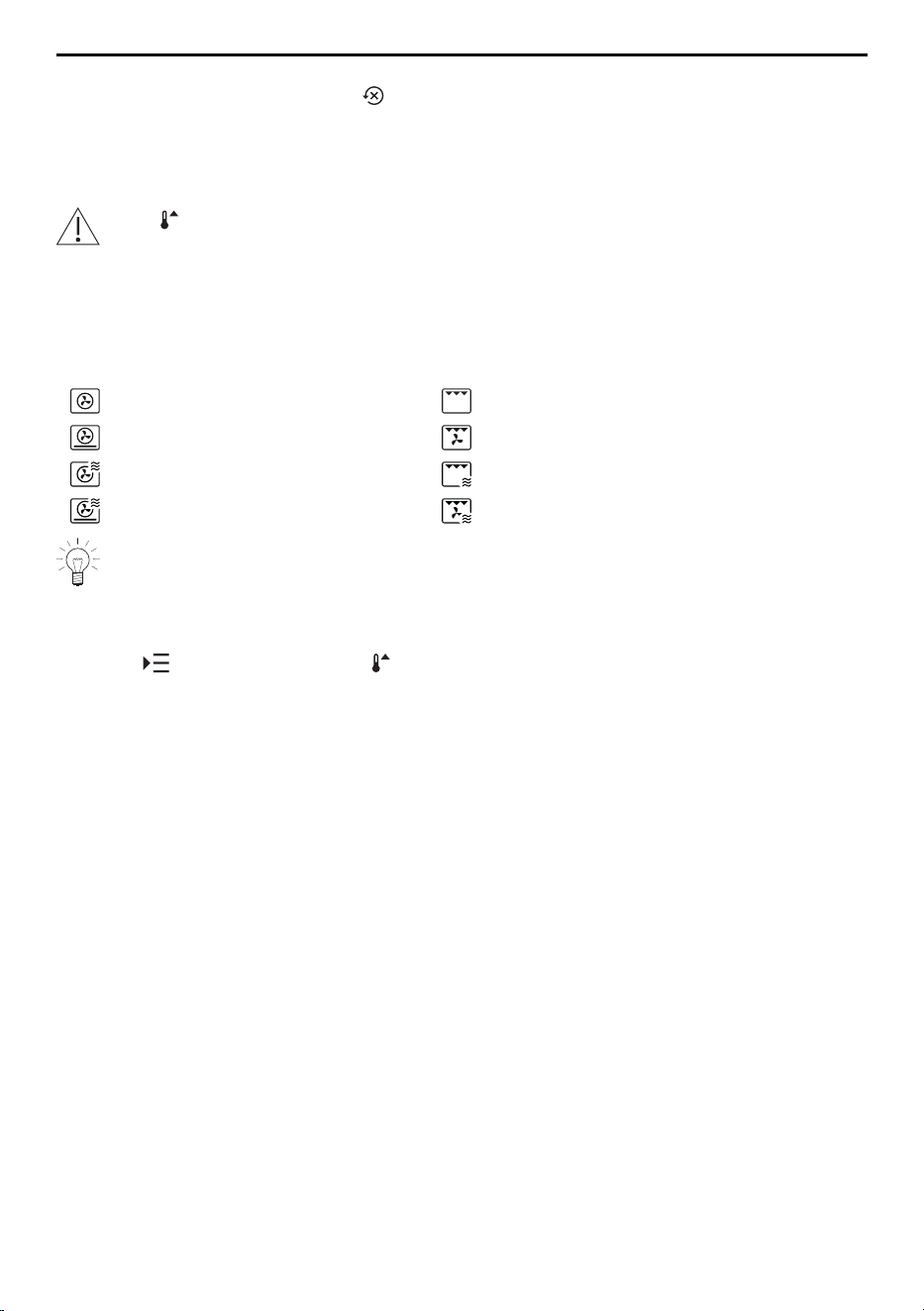
▸ To adjust or reset a value, touch the value range and adjust the value using the
CircleSlider.
20
4 Operation
– The colour of the value range changes to amber.
– The value can be reset with .
▸ To turn the option on or off, touch the switch.
▸ Confirm the setting with «OK».
4.9 Preheating
If the «Preheat» option has been turned on, do not put the food into the cooking
space until the acoustic signal is emitted and the corresponding message ap-
pears.
With Preheat, the cooking space is quickly heated up to the desired temperature.
Overview
Preheating is only possible for the following applications:
Hot air Grill
PizzaPlus Grill-forced convection
Hot air with microwave Grill with microwave
PizzaPlus with microwave Grill-forced convection with microwave
If the «Preheat» option is enabled, the microwave is always automatically deactiv-
ated during preheating.
Turning on preheating in the options
▸ Select the desired application (see page 16).
▸ Touch «Options» and select «Preheat».
▸ Touch the «Preheat» switch.
– «Preheating» is turned on.
▸ Set further options, if required (see page 19).
▸ Confirm the setting with «OK».
▸ Press «Start» to start an application requiring preheating.
– «Preheating» starts.
– The progress of «Preheating» is shown in the CircleSlider.
Introducing food
As soon as the cooking space has preheated,
– an acoustic signal is emitted and a message is displayed. If set, the operating time
does not start to run until the message has been acknowledged.
▸ Place the food in the cooking space.
▸ Close the appliance door and confirm the message with «OK».
– The application starts.
4.10 Application tips
The application tips provide helpful suggestions that range from the use of suitable ac-
cessories or cookware to tips specific to a particular application.
If the application is not yet running:
▸ Select the desired application.
– The ready to start screen appears in the display.
21
4 Operation
Showing application tips
▸ Touch «Application tips».
– Tips on the particular applications are shown.
Hiding application tips
▸ To hide tips, touch .
– The ready to start screen or the running operation appears in the display.
4.11 Favourites
Creating a favourite
Favourites can be created from all applications. And all options, with the exception of
«End», can be saved. Up to 50 favourites in total can be created.
▸ Select the desired application and adjust the values and settings.
▸ Touch «Favourites».
– The favourite names menu appears in the display together with the keyboard.
▸ Customize the favourite name using the keyboard, if required.
▸ To discard favourites, touch .
▸ To save favourites, press «OK».
– Quick information for the favourite is displayed.
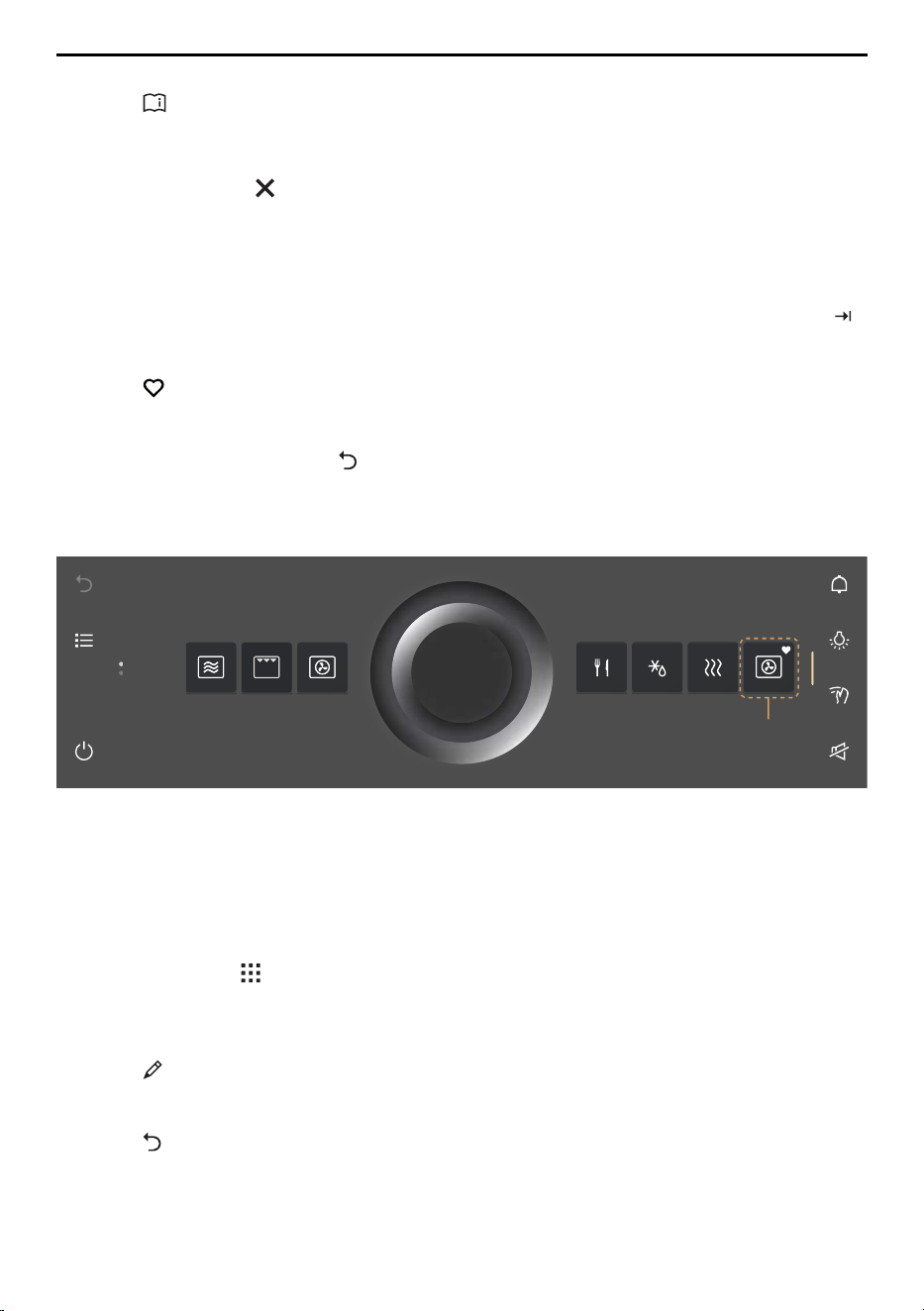
– The favourite 1 appears in the start screen as an app with a heart.
1
Changing favourites
Once a favourite has been created, it can no longer be changed.
▸ To adjust individual values or settings compared to the old favourite, create a new fa-
vourite and delete the old one if necessary.
Changing favourite names
The favourite name can only be changed in the app view.
▸ If required, touch .
– The start screen appears as an app view.
▸ Press and hold the favourite 1.
– Quick information appears above the app.
▸ Touch «Rename».
– The favourite names menu appears in the display together with the keyboard.
▸ Change the favourite name using the keyboard.
▸ Touch to keep the old favourite name.
▸ Press «OK» to save the new favourite name.
22

4 Operation
Deleting favourites
The favourite can only be deleted in the app view.
▸ If required, touch .
– The start screen appears as an app view.
▸ Press and hold the favourite 1.
– Quick information appears above the app.
▸ Touch «Clear».
– The following appears in the display: «Do you really want to clear or reset?»
▸ To keep favourites, touch «No».
▸ To delete favourites, touch «Yes».
Starting favourites
▸ In the start screen, touch favourite 1.
– The ready to start screen appears in the display.
▸ Press «Start» to start favourite 1.
4.12 Pinning
To permanently change the recommended main value for an application, it can be fixed
with a pin . A single main value is assigned to each application. Main values can be:
▪ Temperature setting
▪ Microwave power level
▪ Food entry
Pinning a main value
▸ Select the desired application.
– The ready to start screen appears in the display.
▸ Adjust the main value using the CircleSlider.
▸ Press and hold the main value.
– The colour of the pin changes to amber.
– The main value for the desired application is fixed.
– Whenever the application is called up, the pinned main value appears as a recom-
mended value.
Resetting a pinned main value
▸ In the start screen, touch an application with a pinned main value.
– The ready to start screen appears in the display.
▸ Press and hold the amber-coloured main value.
– The colour of the pin changes to white.
– The main value for the desired application is no longer fixed.
– Whenever the application is called up, the recommended default value appears.
To reset all pinned main values, go to the user setting «Pinned values» (see page
39).
23
4 Operation
4.13 Timer
The timer functions like an egg timer. It can be used independently of other functions
and applications.
Setting and starting the timer
▸ Touch the «Timer» function button in the right function bar.
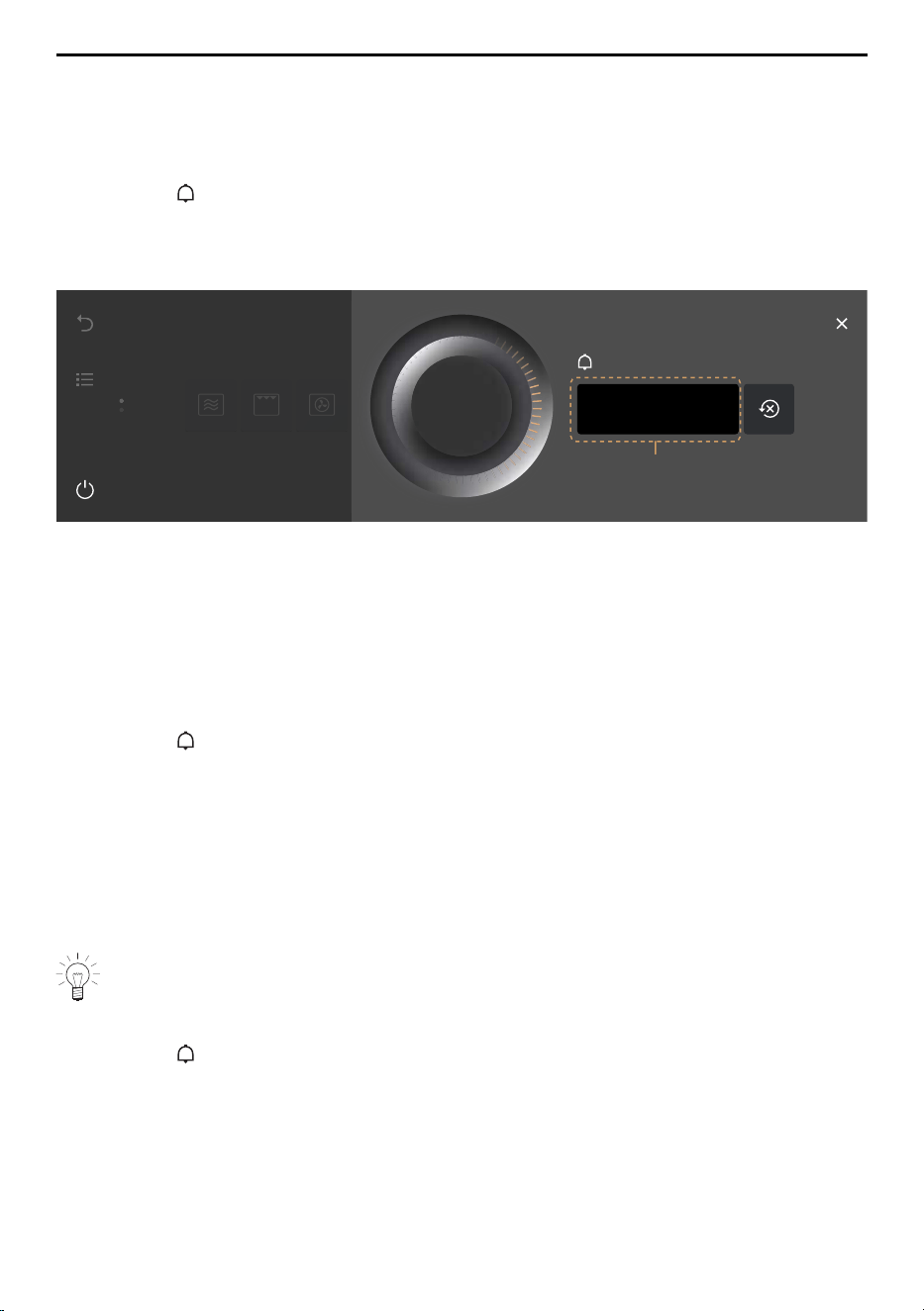
– The timer is shown in the display.
– The recommended value 1 appears in amber.
▸ Set the desired operating time using the CircleSlider.
Start
05min 00s
Timer
1
▸ Press «Start».
– The start screen appears.
– The countdown to the time remaining appears in the function bar.
When the duration is up
– an acoustic signal is emitted.
– «Timer finished» appears in the display.
▸ Press «OK» to confirm the message.
Checking and changing
▸ Touch the «Timer» function button.
– The countdown to the time remaining appears in the display.
▸ Press and hold «Stop».
– The timer is interrupted.
▸ Shorten or extend the duration of the timer using the CircleSlider.
▸ Press «OK» to confirm the shortening or extending of the duration of the timer.
– The change to the duration of the timer is saved.
– The start screen appears.
– The countdown to the time remaining appears in the display.
The next time the timer is called up, the last duration set automatically appears as
the recommended value.
Turning the timer off before time
▸ Touch the «Timer» function button.
– The countdown to the time remaining appears in the display.
▸ Press and hold «Stop».
24
4 Operation
4.14 Illumination
The cooking space illumination can be switched on and off at any time.
The cooking space illumination switches on automatically 3 minutes before the set
duration is up.
Switching the cooking space illumination on
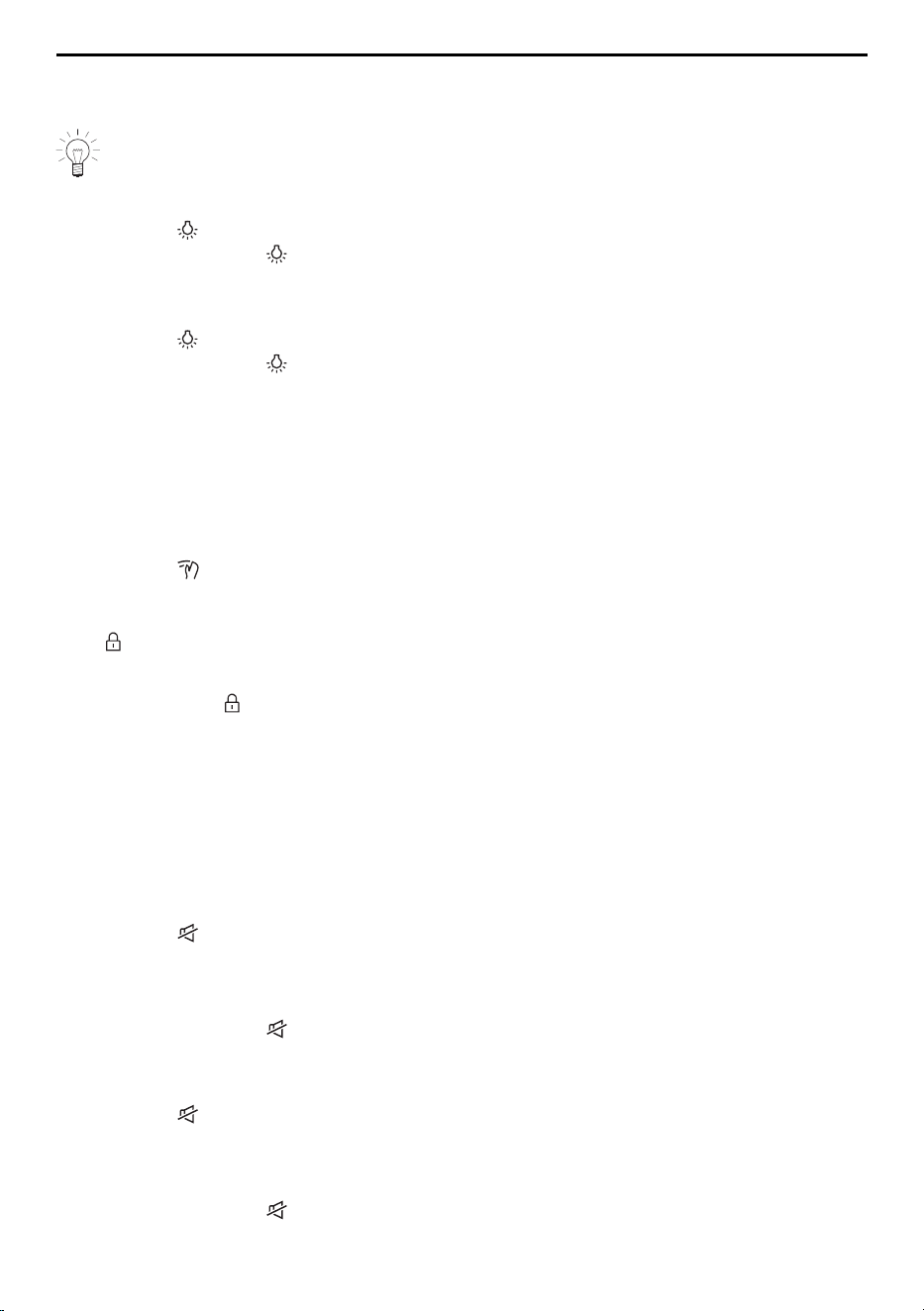
▸ Touch the «Illumination» function button.
– The colour of the function button changes to amber.
– The cooking space illumination is switched on.
Switching the cooking space illumination off
▸ Touch the «Illumination» function button.
– The colour of the function button changes to white.
– The cooking space illumination is switched off.
4.15 Display lock
This function locks the display to, for example, enable the display to be cleaned or pre-
vent accidental changes to the values. The appliance continues to operate and mes-
sages are still displayed.
Turning on the display lock
▸ Touch the «Display lock» function button.
– The following appears in the display: «Activate»
▸ Touch «Activate».
– appears in the display.
Turning off the display lock
▸ Press and hold .
– The display is unlocked.
4.16 Quiet mode
The appliance runs as quietly as possible when in quiet mode. All tones are set at the
lowest volume. The quiet mode can be turned on and off in the user settings (see page
37) as well as by using the quick access in the function bar.
Turning on the quiet mode
▸ Expand the function bar.
▸ Touch the «Quiet mode» function button.
– The quiet mode is shown in the display.
▸ Touch the «Quiet mode» switch.
– «Quiet mode» is turned on.
– The colour of the «Quiet mode» changes to amber in the function bars.
Turning off the quiet mode
▸ Expand the function bar.
▸ Touch the «Quiet mode» function button.
– The quiet mode is shown in the display.
▸ Touch the «Quiet mode» switch.
– «Quiet mode» is turned off.
– The colour of the «Quiet mode» changes to white in the function bars.
25

4 Operation
4.17 Time
The clock can be shown at any time.
Showing the clock
▸ Expand the function bar.
▸ Touch the «Clock» function button.
– The clock is shown in the display.
– If set, the operating time of an application is also shown.
Hiding the clock
▸ To hide the clock, touch .
– The clock is hidden in the display.
4.18 Ending an application before time
Applications that are running can be ended before time.
▸ Press and hold the function button.
– Any running application is ended; if turned on, the timer will remain active.
– If turned on, the display lock is deactivated.
– The appliance switches off.
4.19 End of operation
When the set duration is up or when the set target temperature is reached.
– The application ends automatically.
– An acoustic signal is emitted.
– In the display appears: «Process finished».
▸ Press «OK» to confirm the message.
– Depending on the application, the following available options are displayed:
▪ Select one of the displayed subsequent steps to continue operation with another
application.
▪ Select the function button to access the parent application menu.
▪ Select the function button to access the start screen.
▪ Press and hold the function button to switch the appliance off.
As long as the temperature in the cooking space is over 80°C,
– in the display appears: «Residual heat in the cooking space». The actual cooking
space temperature is also displayed.
Food can be kept warm with residual heat for some time. The cooling fan can con-
tinue to run.
After 3 minutes without interaction.
– The display goes dark and the appliance switches off automatically.
26

4 Operation
Removing the cooked food from the cooking space
Risk of burns!
Hot steam or hot air may escape from the cooking space when the appliance door
is opened. The accessories get hot. Use protective gloves or oven cloths.
▸ Take the food out of the cooking space when done.
▸ Any condensate or food particles in the cooking space must be completely removed.
▸ Wipe away traces of water or soiling with a soft cloth to prevent corrosion and un-
pleasant odours.
▸ Leave the appliance door open in the at-rest position until the cooking space has
cooled down and dried out.
4.20 Switching the appliance off
▸ Press and hold the function button.
– Any running application is ended; any timer that is turned on will remain active.
– If turned on, the display lock is deactivated.
– The display goes dark.
Display after switching off
Depending on the application and settings, the following is shown in the darkened dis-
play:
– The residual heat and the temperature if it is above 80°C.
4.21 Appliance tips
Appliance tips provides tips on operating the appliance by topic.
Topics
The following topics can be called up:
▪ Start screen
▪ Function bars
▪ CircleSlider
▪ App view
▪ List view
▪ List view
▪ Favourites
▪ Pinning
▪ Tips on settings / EasyCook
▪ Preheating
Calling up appliance tips
▸ In the start screen, touch .
– The appliance tips menu appears in the display.
▸ Select the desired topic.
– Information on the desired topic appears in the right content pane of the display.
27
5 Applications
5 Applications
Do not use any metal accessories in the microwave mode or combi mode with mi-
crowave.
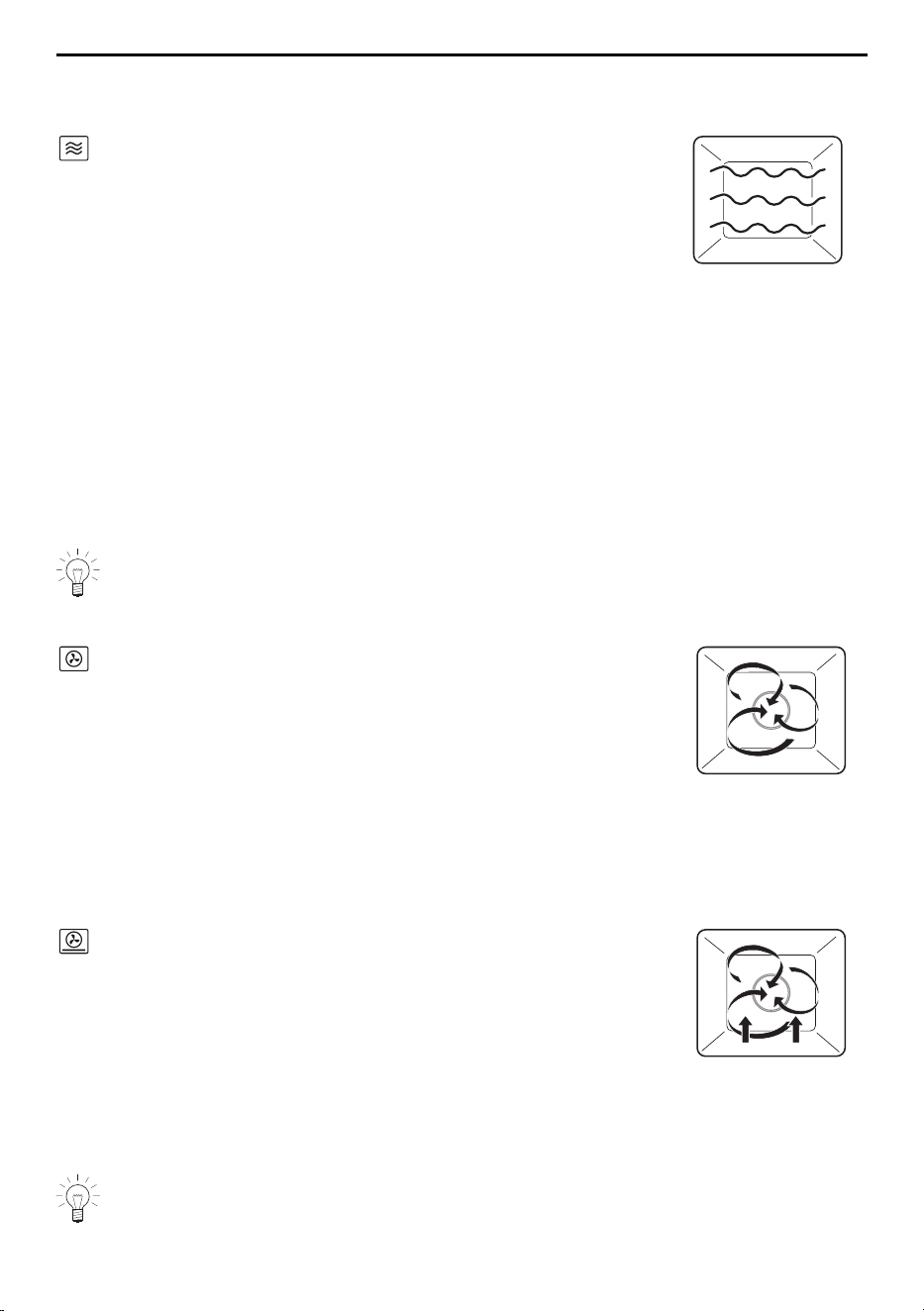
5.1 Model V2000
Microwave
Power range 100–900 W
Recommended value 500 W / 2 mins
Accessory Turntable
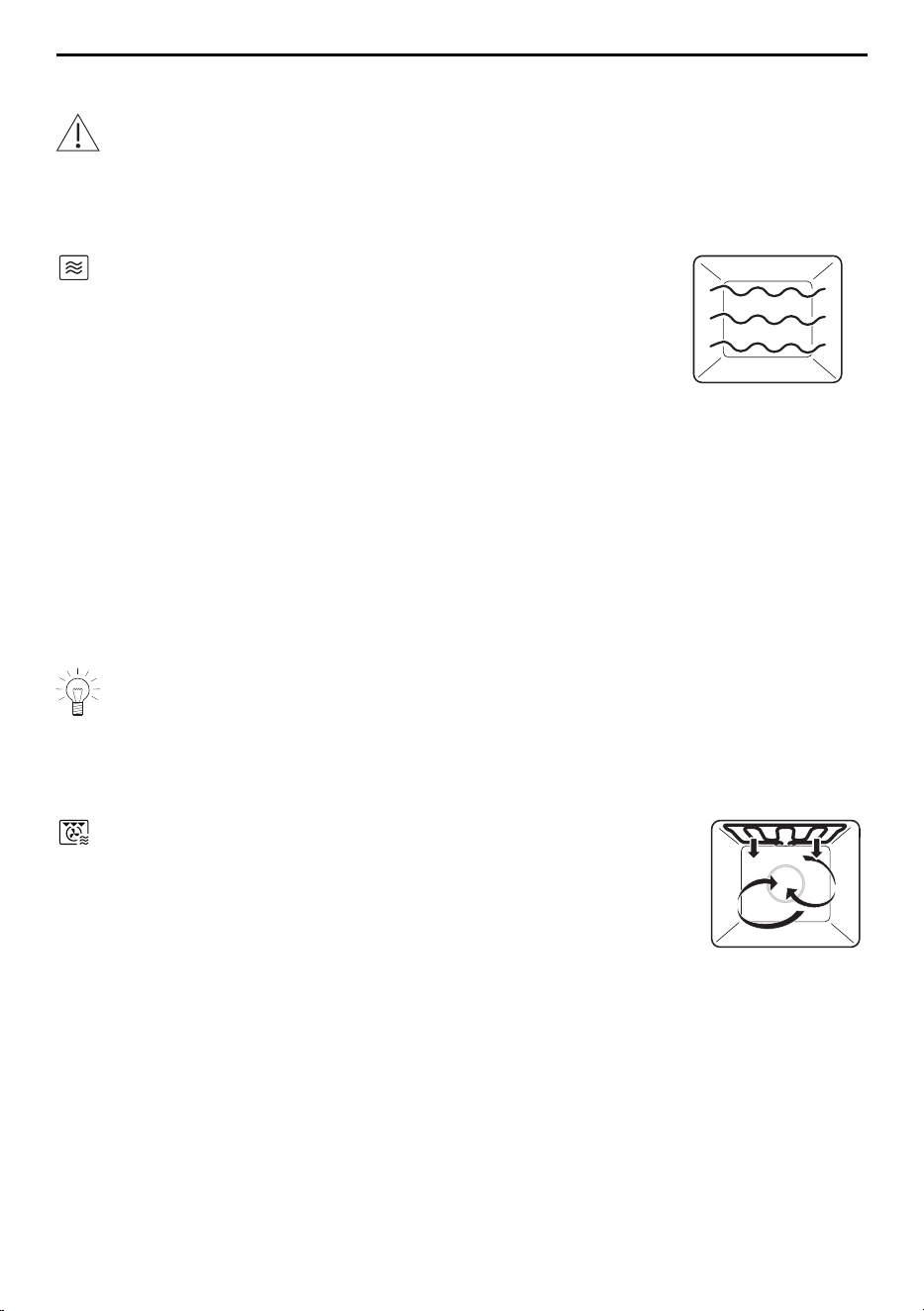
Foods and liquids are heated using microwaves.
Uses
▪ Precooked foods
▪ Frozen and convenience foods
▪ Liquids
Preparing food with a skin or peel:
▸ Prick food with a skin or peel such as potatoes, tomatoes, sausages, shell food and
the like with a fork. Otherwise, the steam that is produced will be unable to escape
and may cause the food to explode.
▸ Crack open the eggs and beat them before cooking.
▸ For fried eggs: prick the yolk before cooking
Turn or stir foods, if possible, halfway through the cooking time.
Hot-air grill with microwave combi mode
This combi mode combines the hot-air grill and microwave. The higher the liquid content
of the food, the higher the microwave power level that can be selected.
Temperature range 50–210 °C
Recommended value 180 °C
Example uses Power level
Cooking foods with fillings or gratins with
little topping/liquid
300–400 W
Cooking gratins / baked dishes with a lot of
topping/liquid
450 W
Accessory Turntable
A heating element behind the back wall of the cooking space heats up the air inside the
cooking space, which is circulated evenly.
Uses
▪ Baked, gratinated and braised dishes and cooking certain meats.
28
5 Applications
5.2 Model V4000
Microwave
Power range 100–900 W
Recommended value 500 W / 2 mins
Accessory Low wire rack
Foods and liquids are heated using microwaves.
Uses
▪ Precooked foods
▪ Frozen and convenience foods
▪ Liquids
Preparing food with a skin or peel:
▸ Prick food with a skin or peel such as potatoes, tomatoes, sausages, shell food and
the like with a fork. Otherwise, the steam that is produced will be unable to escape
and may cause the food to explode.
▸ Crack open the eggs and beat them before cooking.
▸ For fried eggs: prick the yolk before cooking
Turn or stir foods, if possible, halfway through the cooking time.
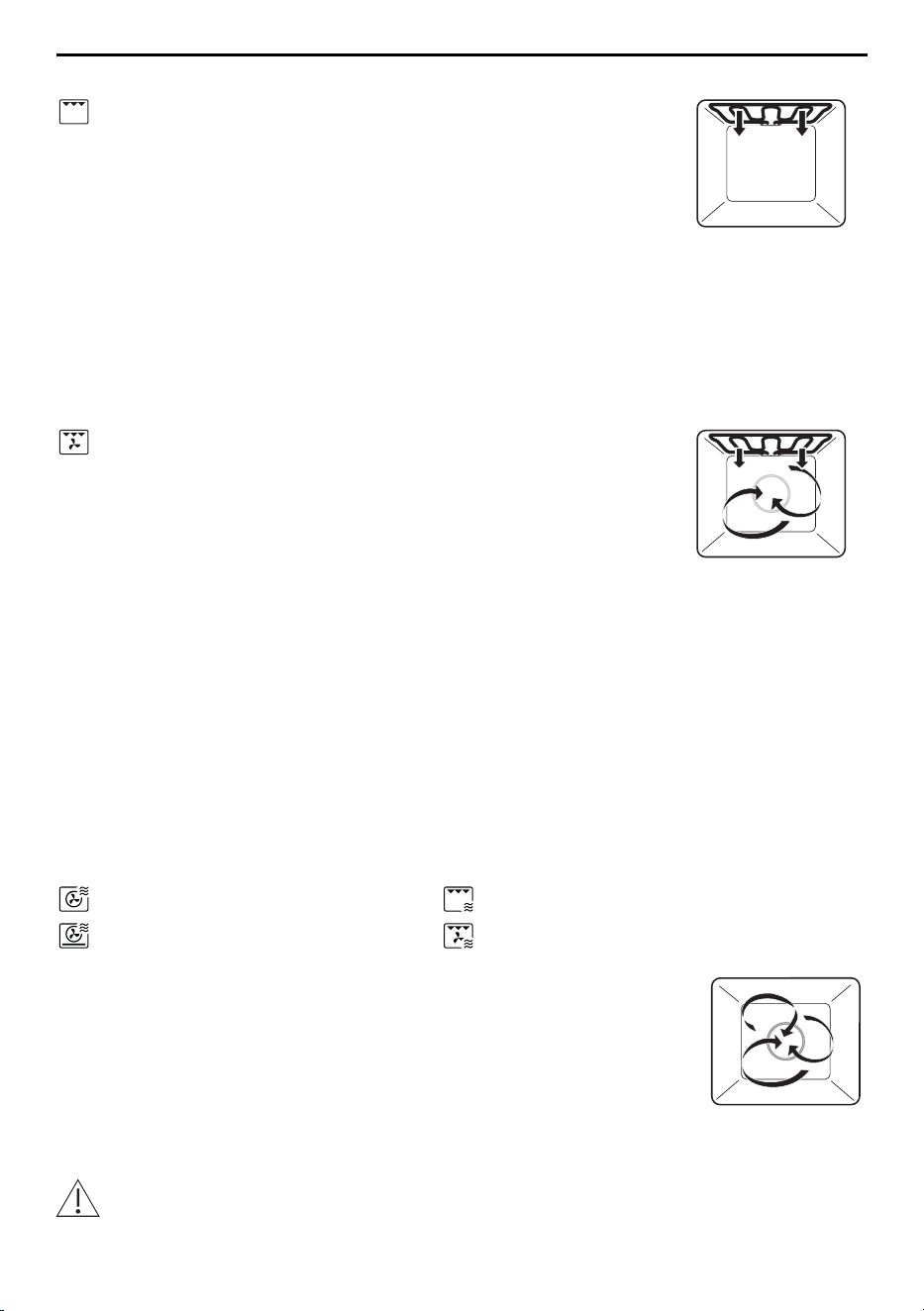
Hot air
Temperature range 50—220 °C
Recommended value 180 °C
Level Low wire rack
A heating element behind the back wall of the cooking space heats up the air inside the
cooking space, which is circulated evenly.
Uses
▪ Cakes, savouries and biscuits, bread and roasts.
PizzaPlus
Temperature range 50—220 °C
Recommended value 180 °C
Level Low wire rack
The cooking space is heated by hot air and bottom heat. The base of the food is baked
particularly intensively.
Uses
▪ Pizza, tarts and quiches.
Use a dark enamelled tray without baking paper for very crispy results.
29
5 Applications
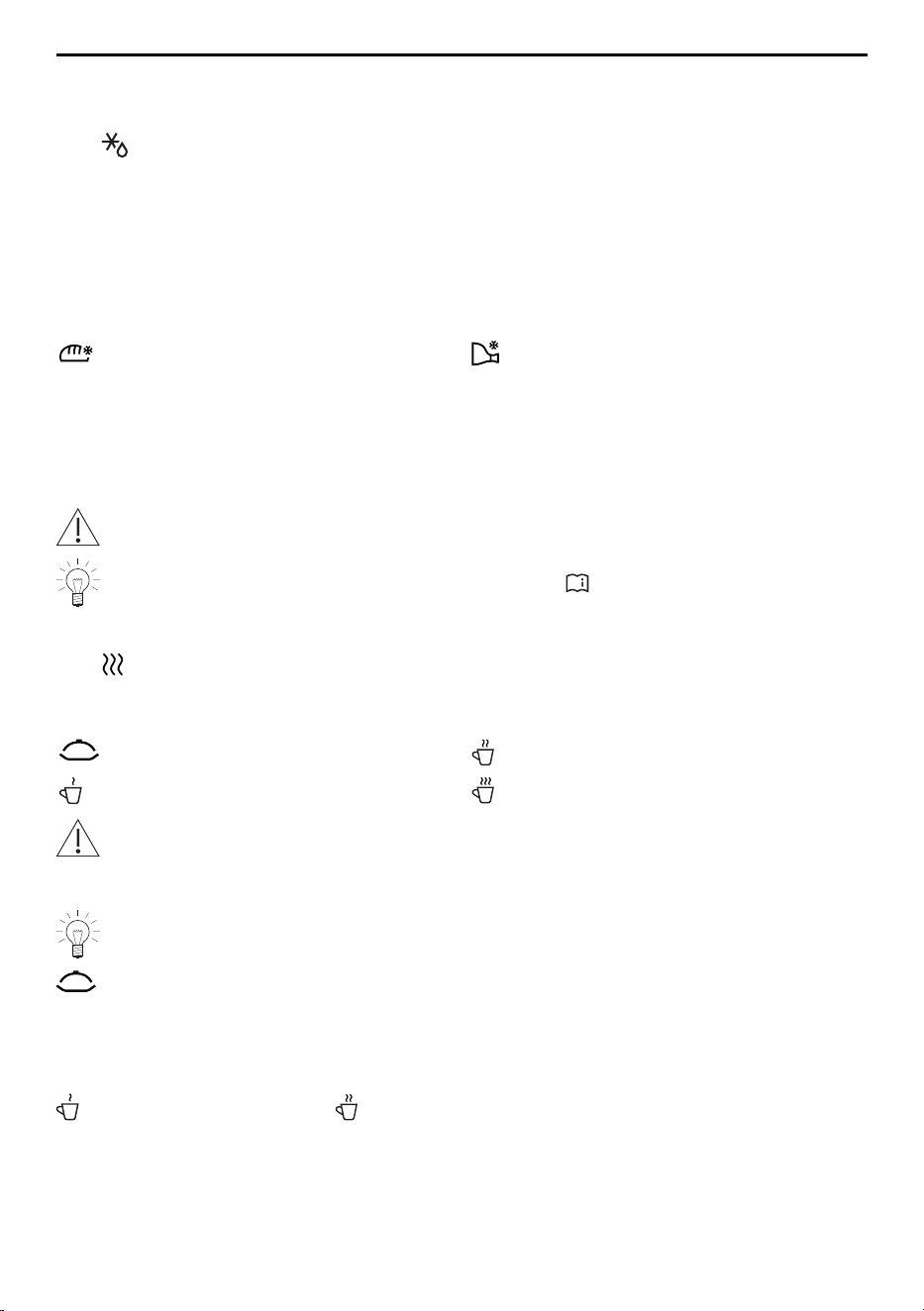
Grill
Temperature range 3 levels
Recommended value Level 3
Accessory Low or high wire rack
The cooking space is heated by the grill element.
Uses
▪ Flat food for grilling, e.g. chicken parts and sausages
▪ Gratinating
▪ Toast
▸ Place the food to be grilled directly on the high round wire shelf.
Grill-forced convection
Temperature range 50—220 °C
Recommended value 200 °C
Level Low wire rack
The cooking space is heated by the grill element. The hot air fan distributes the air
evenly in the cooking space.
Uses
▪ Whole chicken
▪ Large, bulky food for grilling
▸ Place the food to be grilled directly on the wire shelf or in porcelain or glass cook-
ware.
Combi modes
In combi mode, any operating mode can be combined with the microwave, reducing the
cooking time by around a third to a half. The higher the liquid content of the food, the
higher the microwave power level that can be selected.
Applications:
Hot air with microwave Grill with microwave
PizzaPlus with microwave Grill-forced convection with mi-
crowave
Example uses Power level
Baking cakes, braising/roasting meat 100–200 W
Cooking foods with fillings or gratins with
little topping/liquid
300–400 W
Cooking gratins / baked dishes with a lot
of topping/liquid
450 W
Accessory Low wire rack
When using combi modes, only use cookware that is microwave safe!
30
5 Applications
5.3 More applications
Defrosting
With «Defrost», various types of food can be defrosted quickly and gently with the mi-
crowave. A quantity selection from 100g to 1000g is available. After entering the de-
sired quantity, the operating time and the microwave power level are automatically adjus-
ted.
For best results, take the frozen food out of the freezer compartment and defrost immedi-
ately in the appliance. Food packaged flat rather than compact and round defrosts more
evenly.
Applications:
Defrost bread Defrost meat
For good defrosting results, it is important to choose the most suitable accessory.
Procedure for model V4000
▸ Place the low wire rack on the turntable and put the food to be defrosted on it.
Procedure for model V2000
▸ Put the food to be defrosted directly on the turntable.
Do not use any metal accessories in the microwave mode.
Useful tips on defrosting can also be found under «Application tips».
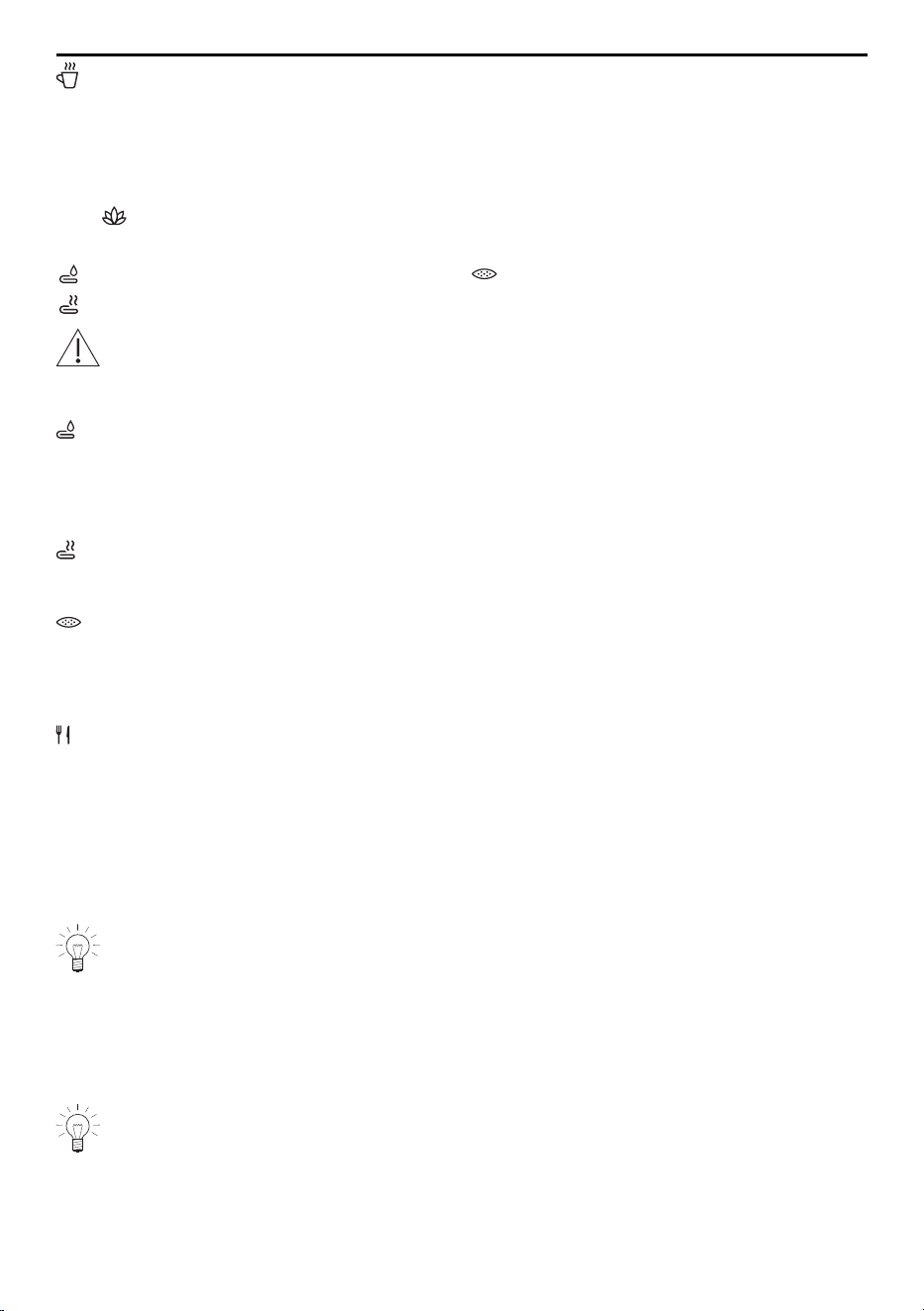
Reheating
With «Reheat», various beverages and plated meals can be warmed up or heated.
This is done through microwaves after having entered the desired quantity.
Applications:
Heat food Heat beverages
Warm up beverages Boil water
Caution hot!
Feel the temperature of the heated objects with your hand first before removing
them from the appliance.
When heating liquids with microwaves, place a teaspoon in the vessel. Do not use
vessels with a narrow spout.
«Heat food»
Before starting the application:
▸ Place food that has already been cooked on a plate or in another suitable container
and spread as evenly and flat as possible.
▸ Determine the quantity of food to be heated and enter it into the appliance.
«Warm up beverages» and «Heat beverages»
Before starting the application:
▸ Pour the beverage, e.g. milk or tea, into a cup or other suitable vessel.
▸ Determine the quantity of beverages to be warmed or heated up and enter it into the
appliance.
31
5 Applications
«Boil water»
Before starting the application:
▸ Pour water into a cup or other suitable vessel.
▸ Determine the quantity of water to be boiled and enter it into the appliance.
Wellness
With «Wellness», the following objects can be prepared for personal well-being.
Applications:
Refreshing towels Seed cushions
Hot wraps
Caution hot!
Feel the temperature of the heated objects with your hand first before placing them
on any other parts of the body.
«Refreshing towels»
Before starting the application:
▸ Wet and wring out the towels.
▸ Open or roll up the towels to the desired size and place on the low wire rack or the
turntable.
«Hot wraps»
Before starting the application:
▸ Spread the prepared towels out across the low wire rack or the turntable.
«Seed cushions»
Before starting the application:
▸ Place the cherry stone or grape seed cushions on the low wire rack or the turntable.
EasyCook
EasyCook helps you to prepare any food simply and conveniently. After choosing the
food group and food, the appliance suggests suitable applications, including settings
and accessories.
5.4 Own recipes
Up to 40 of your own favourite recipes can be created and saved. A recipe can consist
of several steps with specific applications, preheat, pauses and hold times, which run
automatically once started. You can also change and save existing recipes.
With «Preheat», the cooking space is heated to the temperature selected in the fol-
lowing step. This temperature is maintained until the food is put in and confirmed
with «OK».
With «Hold», the cooking space continues to be heated and the temperature re-
mains constant.
With «Pause», the cooking space is not heated any more and the temperature
goes down.
The availability of this function depends on the model.
32

5 Applications
Creating your own recipe
▸ Long touch the display.
– The start screen appears.
▸ Touch .
▸ Touch «Own recipes».
▸ Touch «Create recipe».
– The selection «Add step» appears.
▸ Touch «Add step».
– The selection options appear.
▸ Select desired application or «Preheat», «Pause» or «Hold» and confirm with «OK».
▸ Make the desired settings for each step.
▪ Set the temperature or temperature level.
▪ Set the operating time.
▪ Set «Preheat» if the cooking space needs to be heated up to a desired temperature.
▪ Set the microwave power level.
▸ Confirm with «OK».
▸ Create additional steps in the same way.
The maximum number of steps that can be created in an own recipe is ten.
Naming a created recipe
▸ Use the keypad to enter the name of the recipe.
▸ Confirm with «OK».
– The new recipe is now displayed in the «Own recipes» screen.
Starting a recipe
▸ Select the desired recipe and confirm with «OK».
– The settings for the recipe appear in the display.
▸ Press «Start» to start the recipe.
Changing an own recipe
Recipes that are in Own recipes can be changed.
▸ Select the required recipe.
▸ Touch .
▸ The «Edit recipe» screen appears.
Changing a step
▸ Touch the step to be changed.
▸ Make the settings and confirm with «OK».
Adding a step
▸ Touch «Add step».
▸ Make the settings and confirm with OK.
Deleting a step
▸ For the desired step, touch .
– The following appears in the display: «Are you sure you want to delete this step?»
▸ To delete the step, touch .
– The step is deleted.
33
6 Microwave
Saving a changed recipe
▸ Confirm with «OK».
▸ Give the changed recipe a name.
▪ Use the keypad to enter the name of the new recipe.
▸ Confirm with «OK».
Copying an own recipe
▸ Touch «Own recipes».
▸ Select the required recipe.
▸ Touch .
– Each existing step can now be changed.
– Extra steps can also be added.
▸ Confirm with «OK» and give a name to and save the new recipe.
Deleting your own recipe
Recipes that are in Own recipes can be deleted.
▸ Select the required recipe.
▸ Touch .
– The following appears in the display: «Are you sure you want to delete the recipe?»
▸ To delete the recipe, touch .
– The recipe is deleted.
6 Microwave
6.1 Note on use
Refer to the «Safety precautions» section.
Porcelain, ceramic and earthenware cookware have cavities which can fill with wa-
ter. Risk of cracking! Follow the manufacturers’ instructions.
Suitable for microwave and combi mode
Not suitable for microwave and combi mode
Particularly suitable for microwave mode
▪ Heat-resistant glass, e.g. Pyrex
▪ Porcelain
▪ Microwaveable plastic
▪ Silicone baking moulds
Permitted for microwave mode
▪ Aluminium packaging of convenience foods
▪ Low and high wire rack
Forbidden for microwave mode
▪ Cast iron pots
▪ Metal cookware
▪ Aluminium foil
▪ Baking trays
34
7 V-ZUG-Home
▪ Cookware with gold rim or metal decor
▪ Meat thermometer
6.2 Tips for microwave mode
Put the food in the cooking space before switching on the microwave.
If the «Preheat» option is enabled, the microwave is always automatically deactiv-
ated during preheating.
▸ Cover the food to prevent it from drying out when using the microwave-only mode.
Suitable covers include microwave food covers, glass or porcelain lids and mi-
crowaveable film.
The cooking space can become damp when using the microwave mode. To avoid un-
pleasant odours and corrosion in the cooking space, please observe the following:
▸ Cover liquid or steaming food – unless it should remain crispy.
▸ Wipe away traces of water or soiling with a soft cloth to prevent corrosion and un-
pleasant odours.
▸ To prevent damage to the appliance, leave the appliance door open in the at-rest pos-
ition at the end of cooking until the cooking space has cooled down.
6.3 Microwave operation
▸ Select and start the operating mode.
When the appliance door is opened, microwave operation is immediately interrupted.
When it is closed, microwave operation is resumed. The operating time and the mi-
crowave power level can be checked and changed during operation.
To switch the microwave off, see Aborting/ending operating mode before time.
– End of operation.
7 V-ZUG-Home
Download updates to your appliance via V-ZUG-Home so that you are always up to
date.
Hereby, V-ZUG Ltd declares that the radio equipment type is in compliance with Directive
2014/53/EU. The full text of the EU declaration of conformity is available at the following
internet address: https://www.vzug.com/gb/en/int_testinstitute_vzug
7.1 Conditions
The following conditions must be met for full use of V-ZUG-Home:
▪ Access to the internet and to Google Play
TM
Store / App Store
®
▪ Smartphone or tablet that is connected to the home network
▪ System requirements for smartphone or tablet: from Android 6.0 or from iOS 11.0
▪ WLAN/Wi-Fi that meets one of the following standards: 2.4GHz 802.11 b/g/n
Google Play
TM
is a trademark of Google Inc.
Apple and the Apple logo are trademarks of Apple Inc., registered
in the U.S. and other countries. App Store
®
is a service mark of
Apple Inc.
35

8 User settings
7.2 Initial set-up
When establishing a connection, stay close to your household appliance and have
the password for your wireless network at the ready.
Installing the app
▸ Enable bluetooth and location determination on the smartphone or tablet.
▸ Search the Google Play
TM
Store or the App Store® for «V-ZUG».
▸ Install and open the V-ZUG App.
Enabling the V-ZUG-Home mode on the appliance
▸ Set to the «Display» or «Operate and display» mode under «V-ZUG-Home» in the user
settings.
Connecting the appliance to the home network
▸ In the V-ZUG App, add the household appliance.
– A bluetooth pairing request appears in the V-ZUG App.
– A 6-digit PIN appears in the display of the household appliance.
▸ Enter the 6-digit PIN in the V-ZUG App and confirm the bluetooth pairing request.
– The name of the active WLAN/Wi-Fi appears in the V-ZUG App and then you are
prompted to enter the WLAN/Wi-Fi password.
▸ Enter the WLAN/Wi-Fi password.
– The household appliance is connected to the active WLAN/Wi-Fi connection.
Further information on V-ZUG-Home and its availability can be found at
home.vzug.com.
8 User settings
8.1 Adjusting user settings
▸ Long touch the display.
– The start screen appears.
▸ Select «User settings» and confirm with «OK», if required.
▸ Select the desired user setting.
– The main menu for the desired user setting or another submenu with more user
settings appears in the display.
▸ Make the desired setting.
– The setting is applied immediately.
▸ To exit a submenu, touch .
▸ To exit the user settings, touch .
All user settings except for the quiet mode are retained in the event of a power in-
terruption or failure.
8.2 Language
The language in the display can be changed. Different languages are available for selec-
tion.
36

8 User settings
8.3 Childproof lock
The childproof lock is to prevent children accidentally switching on the appliance.
When the childproof lock is activated, the appliance can only be operated after first en-
tering a code. The code is displayed in reverse order when unlocking.
The childproof lock is activated within 1minute of the appliance being switched
off.
8.4 Display
Colour scheme
It is possible to choose between a light or dark colour scheme for the display.
Brightness
The brightness of the display can be changed.
Background
The background of the display can be changed. Choose whether to display a solid col-
our, a texture or a texture featuring various ingredients in the background. When a tex-
ture with ingredients is selected, images of different ingredients are displayed on every
page in the app view.
8.5 Signals and tones
Quiet mode
The appliance runs as quietly as possible when in quiet mode. All tones are set at the
lowest volume. This setting is deactivated when the appliance goes into the EcoStandby
mode. The volume of the feedback tones and acoustic signals cannot be changed when
in quiet mode.
Sound worlds
The tonality of the acoustic signals and feedback tones can be changed.
Feedback tones
The volume of the feedback tones can be adjusted up or down or turned off completely.
Certain feedback tones are not muted for legal and safety reasons.
A short feedback tone is emitted when the appliance is switched off even if the set-
ting is set to «Off» (safety function).
Acoustic signals
The volume of the acoustic signals can be adjusted up or down. They cannot be turned
off.
Touch anywhere on the display or open the appliance door to stop an acoustic
signal.
8.6 Individual settings
EasyCook – dietary style
Certain foods and food groups can be deactivated so that EasyCook can be adapted to
suit a personal dietary style.
37

8 User settings
EasyCook – cuisines from around the world
Country- and region-specific foods and basic dishes along with their preparation meth-
ods can be activated as a package and added to EasyCook.
Start screen
Choose whether the applications should be displayed in the app view or the list view
when the start screen is called up.
Subsequent steps
If set to «On», subsequent steps are displayed at the end of operation. If set to «Off», op-
eration is immediately ended.
Temperature unit
The temperature can be displayed in «°C» or «°F».
▪ °C: Degrees Celsius
▪ °F: Degrees Fahrenheit
8.7 Date and time
Time synchronization
The «Internet» setting is set automatically when connecting to V-ZUG-Home. The time,
date and time zone are then synchronized directly from the app.
Date
The date can be called up and changed.
Automatic summer/winter time adjustment (CEST/ CET)
If this function is activated, the switch between Central European summer and winter time
occurs automatically. This requires that the correct date be entered in the user settings.
Time
The time can be called up and changed.
Date and time format
The time can be displayed in the European 24-hour or the US 12-hour format (a.m./
p.m.).
The date can be displayed in the DD.MM.YYYY, YYYY-MM-DD or MM/DD/YYYY format.
Time in standby
It is possible to choose between the settings «Off», «On» and «On with night mode».
Clock design
The visual appearance of the clock on the standby screen can be changed. There are
three clock faces from which to choose: «Digital», «Analogue» and «Dot».
Night mode
The night mode reduces the brightness of the time display. The start time for the night
mode is settable.
The night mode always runs 8hours.
38

8 User settings
Time synchronization
It is possible to choose between mains synchronization and real-time clock (RTC).
8.8 V-ZUG Home
Mode
It is possible to choose between «Off», «Display» and «Operate and display». To connect
the appliance to «V-ZUG-Home», «Display» or «Operate and display» must be selected.
Displaying information
Displays all relevant information for the connection.
Restarting interface
The interface can be reset if difficulties are experienced establishing a connection.
Resetting
Disconnects all connections to mobile devices.
Further information on V-ZUG-Home and its availability can be found at
home.vzug.com.
8.9 Appliance information
Identification numbers
The serial number (SN) and article number are displayed.
Version numbers
The current software versions are displayed.
Demo mode
The appliance shows the current demo mode status. The demo mode can only be
switched on and off in the service menu.
Contacting Customer Services
The contact information for our Customer Services is displayed.
8.10 Factory settings
Pinned values
Resets all pinned values.
Start screen
Resets the start screen to the app view. Favourites remain unchanged.
Favourites
Entering «OK» clears all existing favourites.
V-ZUG-Home
Disconnects all connections to mobile devices.
Factory settings
Resets the settings to the factory default state. All customized data will be lost.
39

9 Care and maintenance
8.11 Customer Services
This part of the menu is intended for service staff and is password-protected.
9 Care and maintenance
Risk of burns from hot surfaces! Allow the appliance and accessories to cool down
before cleaning. The appliance may not be used if the appliance door or door de-
tection is damaged. Inspect these parts regularly.
Only use soft cloths for cleaning. Do not use any abrasive, alkaline or acidic clean-
ing agents, metal scrapers that are sharp or scratch, steel wool, scouring pads,
etc. as these products will damage the surfaces. Scratches on the door glass can
cause the glass to break. Never use a steam cleaner to clean the appliance.
9.1 Cleaning the exterior
▸ Clean the surfaces and display with a soft cloth dampened with water and a little
washing-up liquid.
▸ Dry with a soft cloth.
▸ Remove any soiling or residues of cleaning agent immediately.
9.2 Cleaning the cooking space
Always replace the turntable and the turntable roller after cleaning.
▸ Take all the accessories out of the cooking space before cleaning.
▸ Clean the cooking space regularly and especially when food has spilled over. Immedi-
ately wipe away any grease splashes or food residues.
▸ Remove any soiling while the cooking space is still warm to the touch using a soft
cloth dampened with water and a little washing-up liquid. Wipe dry with a soft cloth.
▸ For stubborn soiling, heat up a glass of water at maximum microwave power level for
2–3minutes. The steam that is produced will soften the soiling.
▸ To eliminate unpleasant odours, heat up a glass of water and lemon juice for 2 to
3minutes at the maximum microwave power level.
9.3 Cleaning the appliance door
▸ Clean the appliance door with a soft cloth dampened with water and a little washing-
up liquid.
▸ Dry with a soft cloth.
The appliance door must not be removed for safety reasons.
9.4 Cleaning the accessories
▸ The turntable (glass or enamel) can be cleaned in the dishwasher; however, this will
affect its non-stick properties. It is recommended the turntable be cleaned by hand.
▸ Wash the turntable roller and food cover by hand only.
40
10 Trouble-shooting
9.5 Replacing the illumination
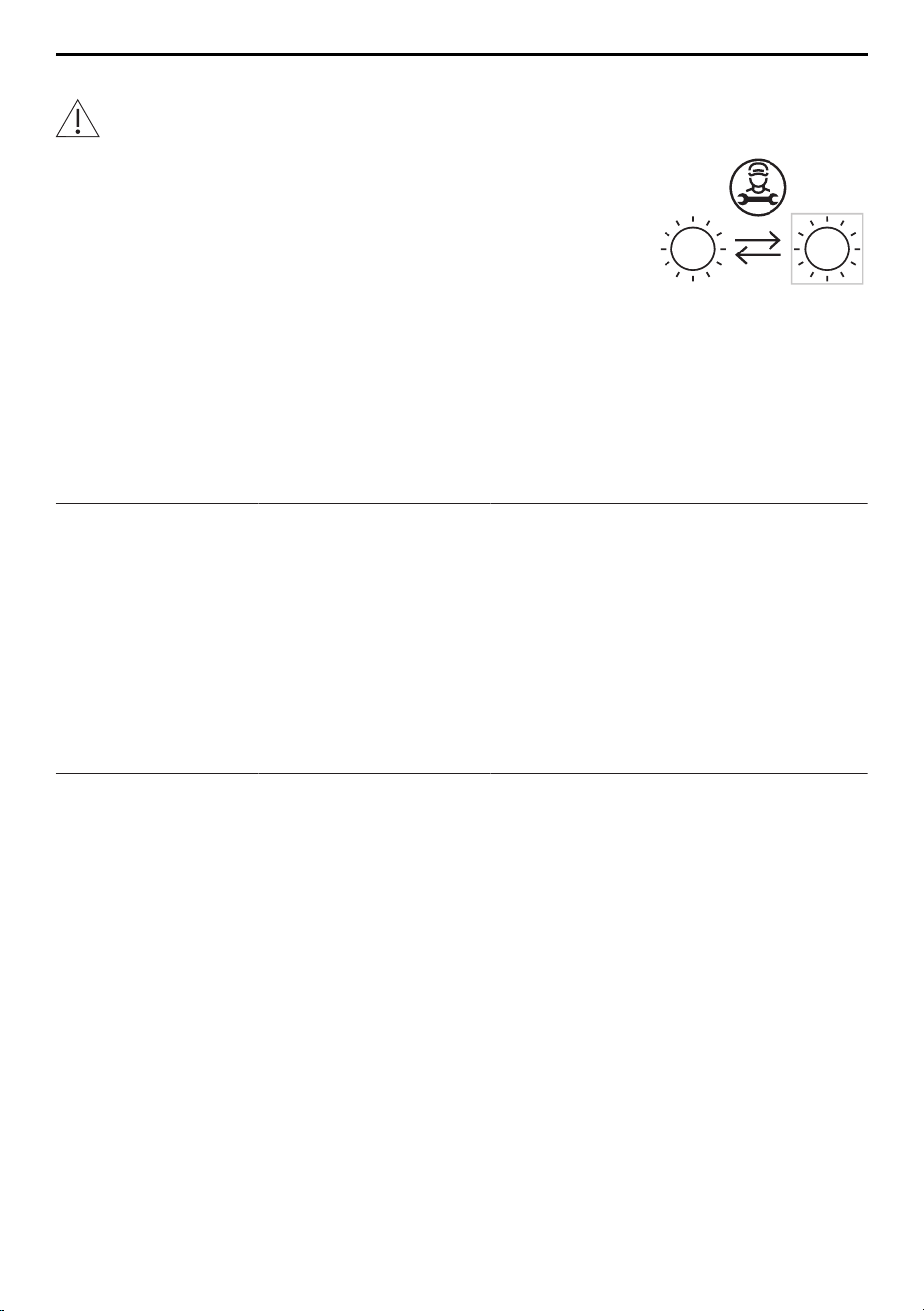
For safety reasons, the illumination must be replaced by our Customer Services.
10 Trouble-shooting
You may be able to trouble-shoot the following malfunctions yourself. If not, note down
the error message in full (message, F and E numbers) and call Customer Services.
10.1 Error messages
Message Possible cause Solution
▪ «FX/EXX» ▪ Various situations can
lead to an error mes-
sage.
▸ Acknowledge the error message by
touching «OK».
▸ Switch the power supply off for about
1 minute.
▸ Switch the power supply back on.
▸ If the error appears again, note down
the error message in full along with
the serial number (SN) of the appli-
ance.
▸ Disconnect from the power supply.
▸ Contact Customer Services.
▪ «UX/EXX» ▪ Disruption in the
power supply.
▸ Acknowledge the error message by
touching «OK».
▸ Switch the power supply off for about
1 minute.
▸ Switch the power supply back on.
▸ If the error appears again, note down
the error message in full along with
the serial number (SN) of the appli-
ance.
▸ Disconnect from the power supply.
▸ Contact Customer Services.
41

10 Trouble-shooting
10.2 Other possible problems
Problem Possible cause Solution
▪ Appliance is
not working
▪ A household fuse or
circuit breaker has
tripped.
▸ Change the fuse.
▸ Reset the circuit breaker.
▪ The fuse or circuit
breaker keeps blow-
ing.
▸ Contact Customer Services.
▪ Interruption in the
power supply.
▸ Check the power supply.
▪ Demo mode is
switched on.
The demo mode can only be switched
off with the security code.
▸ Contact Customer Services.
▪ Appliance is faulty. ▸ Contact Customer Services.
▪ Illumination is
not working
▪ Illumination is defect-
ive.
▸ Contact Customer Services.
▪ The appliance
makes noises
during opera-
tion
▪ Appliance can make
noises at any time
during operation
(switching, pumping
and fan noises).
Such noise is normal.
▪ Clock is not
running cor-
rectly
▪ Irregular mains fre-
quency
▸ Turn off the mains synchronization.
Or:
▸ Connect the appliance to the internet.
▸ The time is automatically synchron-
ized.
▪ Internal pulse gener-
ator is imprecise
when mains syn-
chronization is turned
off
▸ Contact Customer Services.
10.3 After a power failure
The user settings remain unchanged.
Brief power failure during operation
– The current operation of the appliance is cancelled.
– The following appears in the display when the appliance is switched on: «Process
was cancelled due to a power failure».
▸ Press «OK» to confirm the message.
– The start screen appears.
42
11 Accessories
Prolonged power failure
The appliance goes through its initial set-up process after a prolonged power failure.
However, only the time and date need to be reset in order to operate the appliance
again. It is not necessary to make any other settings.
11 Accessories
The accessories shown below as well as spare parts can be ordered in addition to the
scope of delivery of the appliance. Ordering spare parts is subject to charge, except in
the event of warranty claims. Please give the model designation and type of appliance
and the exact designation of the accessory or spare part when ordering parts.
11.1 Accessories
Round TopClean baking tray
For use with application without microwave
11.2 Special accessories
Information at: www.vzug.com
12 Technical data
External dimensions
▸ See installation instructions
1
Electrical connection
▸ See identification plate 1
12.1 Temperature measurement
The temperature inside the cooking space is measured when the cooking space is
empty according to an internationally accepted standard. Own measurements can be im-
precise and are not suitable for checking the accuracy of the temperature.
43

13 Tips and tricks
13 Tips and tricks
... for microwave applications
Result Solution
▪ Food is dried out. ▸ Shorten the cooking time.
▸ Reduce the microwave power level.
… for baking and roasting
Result Solution
▪ The baking or roast
looks good on the
outside but is still
doughy or raw on the
inside.
▸ Next time, set a lower temperature and lengthen the operat-
ing time.
▪ The cake collapses. ▸ Check settings in «EasyCook».
▸ Next time, set a lower temperature and lengthen the operat-
ing time.
▸ Stir the cake mixture well. When finished, bake immediately.
▸ For whisked sponges, beat the egg yolks/whites to a foam
a little longer and then carefully fold into the mixture. When
finished, bake immediately.
▸ Follow the instructions on how much baking powder to add.
Result Solution
▪ The baking has
browned unevenly.
▸ Next time, set a lower temperature and adjust the operating
time.
▸ Check settings in «EasyCook».
Some uneven browning is normal. More even browning is generally achieved at
lower temperatures.
13.1 Saving energy
▸ Avoid opening the appliance door frequently.
▸ Only switch the illumination on when needed.
▸ Use residual heat: for cooking times over 30 minutes, switch the appliance off 5–10
minutes before the end of the operating time.
Power consumption can be reduced to a minimum by selecting «Hide time» in the
user settings. Despite EcoStandby, the safety functions remain active.
44
14 Disposal
14 Disposal
14.1 Packaging
Never allow children to play with packaging material due to the danger of injury or
suffocation. Store the packaging material in a safe location or dispose of it in an
environmentally-friendly way.
14.2 Safety
Render the appliance unusable to prevent accidents caused by improper use (e.g.
through children playing):
▸ Disconnect the appliance from the mains. With a fixed appliance, this is to be carried
out by a qualified electrician. Then cut the mains cable off flush with the appliance.
14.3 Disposal
▪ The «crossed‐out wheeled bin» symbol requires the separate collection of waste
electrical and electronic equipment (WEEE). Such equipment can contain hazardous,
environmentally harmful materials.
▪ These appliances are to be handed over to a designated collection point for the recyc-
ling of electrical and electronic equipment and must not be disposed of with unsorted
household waste. And in this way, you will be helping to protect resources and the en-
vironment.
▪ For more information, please contact the local authorities.
45

Index
A
Accessories ............................................... 14, 43
Cleaning ........................................................ 40
App view..................................................... 12, 52
Appliance
Disposal......................................................... 45
Appliance door
Cleaning ........................................................ 40
Appliance information ..................................... 39
Appliance installation ......................................... 8
Application tips................................................. 21
Hiding............................................................. 22
Showing......................................................... 22
Applications with model V2000.................... 28
Applications with model V4000.................... 29
B
Before using for the first time........................... 8
Boil water........................................................... 32
C
Care and maintenance ................................... 40
CircleSlider
Reaction ........................................................ 17
Using.............................................................. 16
Cleaning............................................................. 40
Cooking space............................................. 40
Cleaning the exterior ....................................... 40
Clock .................................................................. 26
Hiding............................................................. 26
Showing......................................................... 26
Clock design..................................................... 38
Combi mode .............................................. 28, 30
Construction...................................................... 11
Contacting Customer Services...................... 39
Cooking space ................................................. 13
Cleaning ........................................................ 40
Temperature measurement ....................... 43
D
Date and time
Automatic summer/winter time adjustment
(CEST/ CET) ................................................. 38
Clock.............................................................. 38
Clock synchronization................................. 39
Date................................................................ 38
Date and time format .................................. 38
Night mode ................................................... 38
Time in standby............................................ 38
Time synchronization .................................. 38
Defrosting .......................................................... 31
Delayed start..................................................... 19
Demo mode ...................................................... 39
Display
Background .................................................. 37
Brightness ..................................................... 37
Colour scheme............................................. 37
Display lock....................................................... 25
Turning off ..................................................... 25
Turning on..................................................... 25
Disposal............................................................. 45
E
EasyCook .......................................................... 32
Electrical connection ....................................... 43
End ..................................................................... 19
External dimensions ........................................ 43
F
F and E messages .......................................... 41
Factory settings................................................ 39
Favourites...................................................... 39
Pinned values ............................................... 39
Start screen................................................... 39
V-ZUG-Home................................................. 39
Food cover........................................................ 14
Function bar............................................... 12, 52
Function buttons ................................ 12, 16, 52
G
Getting started.................................................. 15
Glass turntable ................................................. 14
Grill ..................................................................... 30
Grill-forced convection .................................... 30
H
Heat food........................................................... 31
Heat/Warm up beverages.............................. 31
Hot air ................................................................ 29
Hot wraps .......................................................... 32
Hot-air grill with microwave combi mode
..................................................................... 28
I
Identification numbers..................................... 39
Identification plate............................................ 43
Illumination .......................................... 25, 41, 42
Individual settings
EasyCook – cuisines from around the world
........................................................................ 38
EasyCook – dietary style ........................... 37
Start screen................................................... 38
Temperature unit.......................................... 38
Individuelle Einstellungen
Folgeschritte ................................................. 38
46

Index
Initial set-up ................................................... 8, 11
Instructions for use ............................................. 8
L
List view ...................................................... 12, 52
M
Malfunctions...................................................... 41
Microwave ........................................... 28, 29, 34
Cookware ...................................................... 34
Note on use .................................................. 34
Tips................................................................. 35
Microwave ovens ............................................. 44
Model designation .............................................. 2
More applications ............................................ 31
N
Notes.................................................................. 49
O
Operating and display elements............ 12, 52
Operating mode
Selecting........................................................ 16
Starting........................................................... 16
Operating time.................................................. 18
Operation........................................................... 15
Options .............................................................. 19
Other possible problems................................ 42
Own recipes...................................................... 32
Changing....................................................... 33
Copying ......................................................... 34
Creating ......................................................... 33
Deleting ......................................................... 34
P
Pinning ............................................................... 23
PizzaPlus ........................................................... 29
Power failure ..................................................... 42
Power interruption............................................ 42
Preheating ......................................................... 21
Turning on..................................................... 21
Problems ........................................................... 41
Q
Queries .............................................................. 51
Quiet mode ....................................................... 25
Turning off ..................................................... 25
Turning on..................................................... 25
R
Ready to start ................................................... 13
Refreshing towels ............................................ 32
Reheating .......................................................... 31
Round wire rack............................................... 14
S
Safety precautions
Appliance-specific ..........................................6
Before using for the first time.......................8
Correct use ......................................................8
Safety warnings
Appliance installation.....................................8
General .............................................................5
Saving energy................................................... 44
Seed cushions.................................................. 32
Service & Support............................................ 51
Service agreement........................................... 51
Settings
Changing....................................................... 20
Checking ....................................................... 20
Signals and tones
Acoustic signals........................................... 37
Feedback tones ........................................... 37
Quiet mode ................................................... 37
Sound worlds ............................................... 37
Smartphone system requirements................ 35
Spare parts ....................................................... 43
Special accessories ........................................ 43
Start later ........................................................... 20
Start screen....................................................... 15
Symbols ................................................................ 5
T
Tablet system requirements........................... 35
Technical data .................................................. 43
Timer .................................................................. 24
Tips and tricks .................................................. 44
Turntable............................................................ 14
Type....................................................................... 2
U
U and E messages.......................................... 41
Uneven browning............................................. 44
User settings..................................................... 36
Adjusting........................................................ 36
Childproof lock............................................. 37
Customer Services ...................................... 40
Date and time............................................... 38
Display ........................................................... 37
Factory settings............................................ 39
Individual settings ........................................ 37
Language ...................................................... 36
Signals and tones........................................ 37
V-ZUG-Home................................................. 39
Using for the first time..................................... 11
V
Validity................................................................... 2
Version numbers.............................................. 39
V-ZUG App........................................................ 36
47

V-ZUG-Home..................................................... 35
Displaying information ................................ 39
Mode .............................................................. 39
Resetting ....................................................... 39
Restarting interface ..................................... 39
W
Wellness ............................................................ 32
WLAN connection ............................................ 36
48

49
15 Notes

50

16 Service & Support
The «Trouble-shooting» section gives you valuable tips on how to deal with minor
malfunctions yourself, saving you the time and trouble of calling out a service tech-
nician and any cost that goes along with it.
Information on the V-ZUG warranty can be found at www.vzug.com →Service
→Warranty information. Please read this information carefully.
Please register your V-ZUG appliance straightaway:
▪ online at www.vzug.com →Service →Online warranty registration or
▪ using the enclosed registration card.
This will allow you to take advantage of the best possible support in the event of a fault
in the appliance during the guarantee period. You will require the serial number (SN) and
appliance designation to register your appliance. You will find them on the identification
plate of your appliance.
My appliance information:
SN: __________________________ Appliance: ______________________________
Please have this appliance information to hand when contacting V-ZUG. Thank you.
▸ Open the appliance door.
– The identification plate is located on the left-side panel.
Your repair order
Call the free service number 0800 850 850 to contact your nearest
V-ZUG service centre. You can arrange an on-site visit by us by phone if you wish.
General queries, accessories and service agreement
V-ZUG will be happy to help you with any general administrative or technical queries, to
accept your orders for accessories and spare parts and to inform you about our pro-
gressive service agreements. You can contact us by calling tel. +41 58 767 67 67 or by
going to our website at www.vzug.com.
51
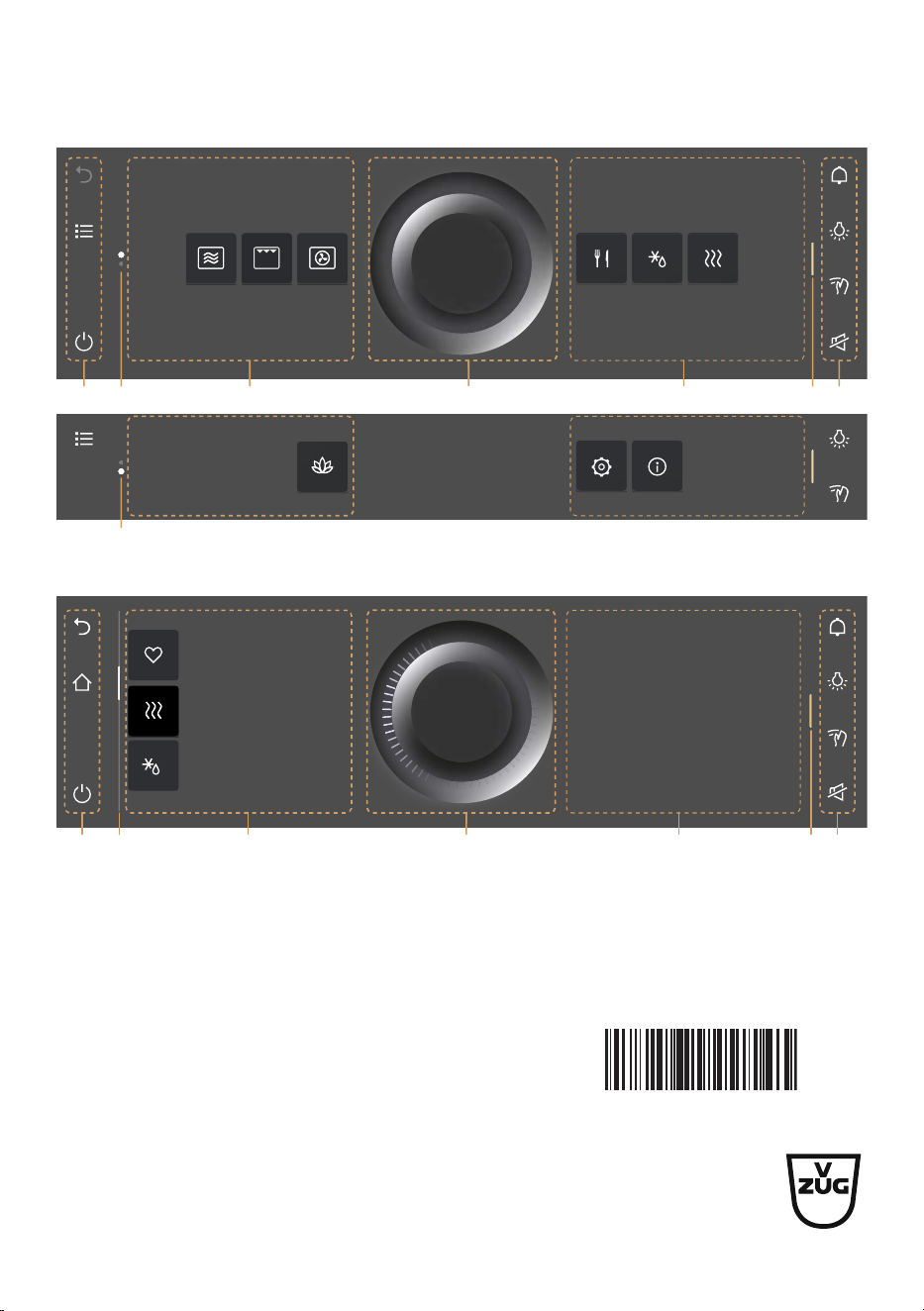
Quick instructions
App view
1 3 5 172 3
2
List view
Here is where you can make
all key settings and
customize your appliance.
OK
Reheat
Favourite 2
Defrost
1 4 5 172 6
OK
1
Function bars with function buttons
5
CircleSlider
2
Scroll bar/position
6
Information
3
Apps
7
Bar for expanding the function bar
4
List of applications
V-ZUG Ltd, Industriestrasse 66, CH-6302 Zug
Tel. +41 58 767 67 67
[email protected], www.vzug.com
Service Centre: Tel. 0800 850 850
1144886-04