
What's in the Box
Overview
Installing the Battery
Using Your Cooler
Powering On/O
Screen Guide
Connecting Your Cooler
Setting the Temperature
Powering Your Cooler
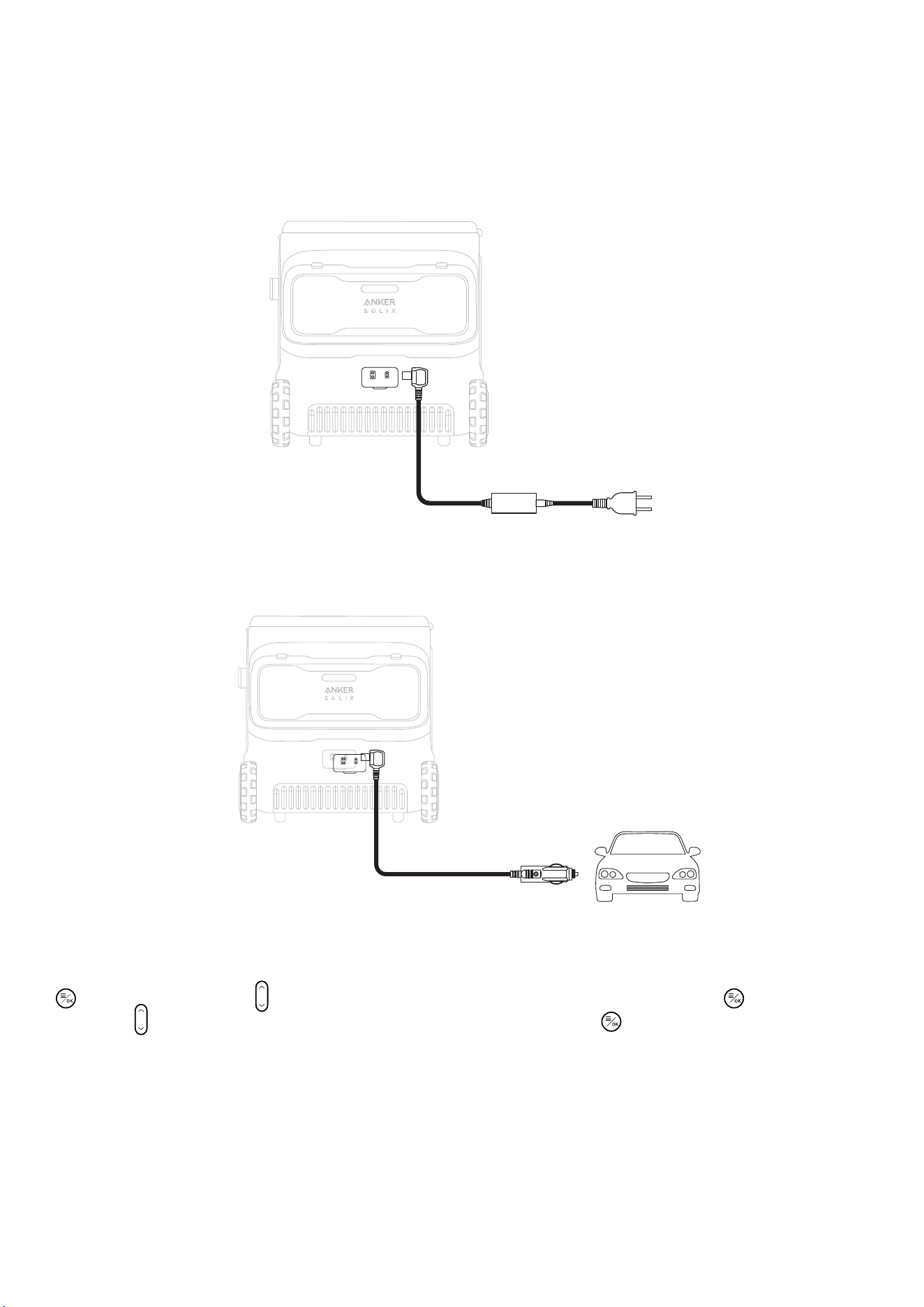
AC Powering
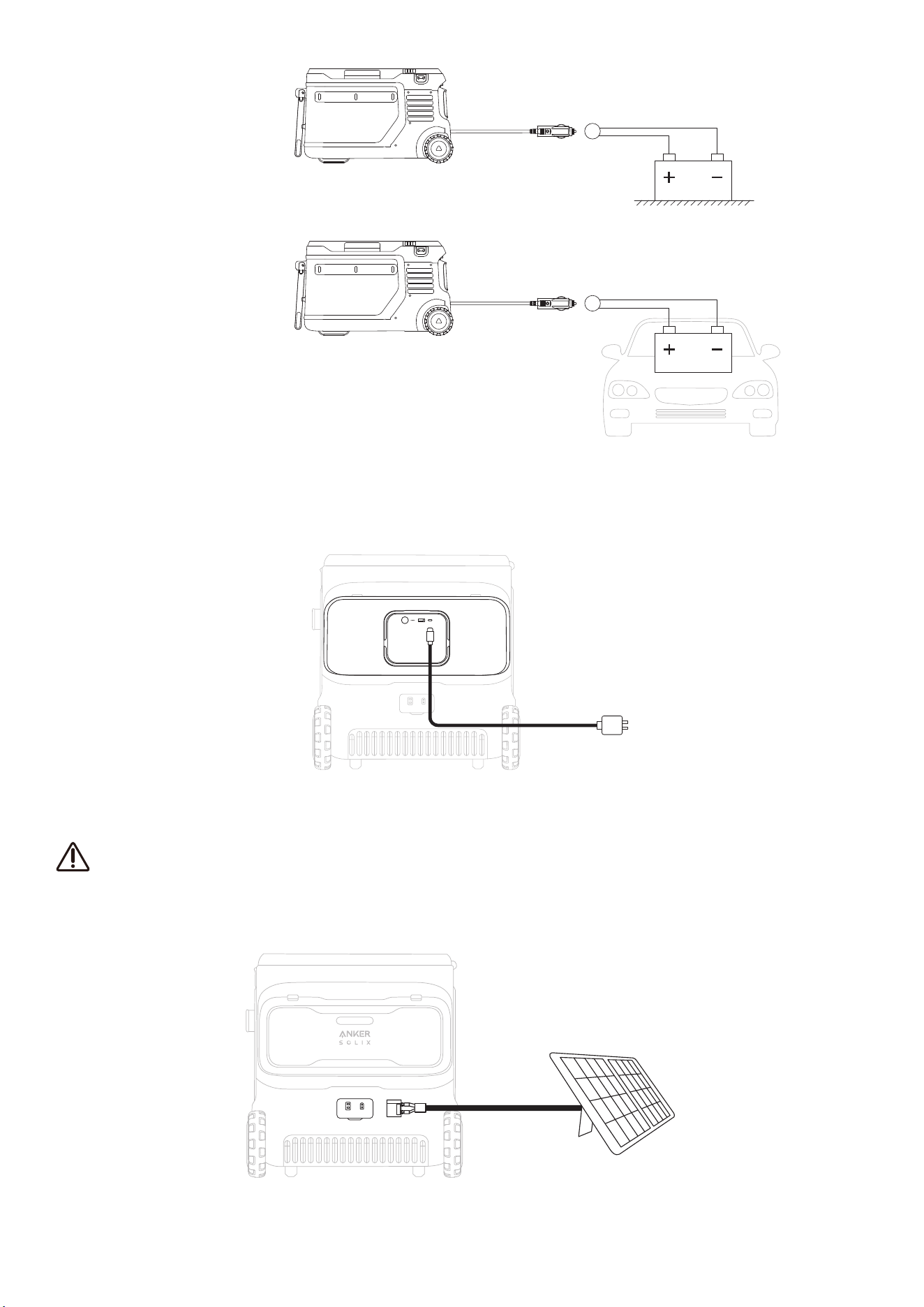
Car Powering
USB-C Powering
Solar Powering (100 W Max, 12 V-30 V)
Maintenance Best Practices
FAQ
Specifications
01
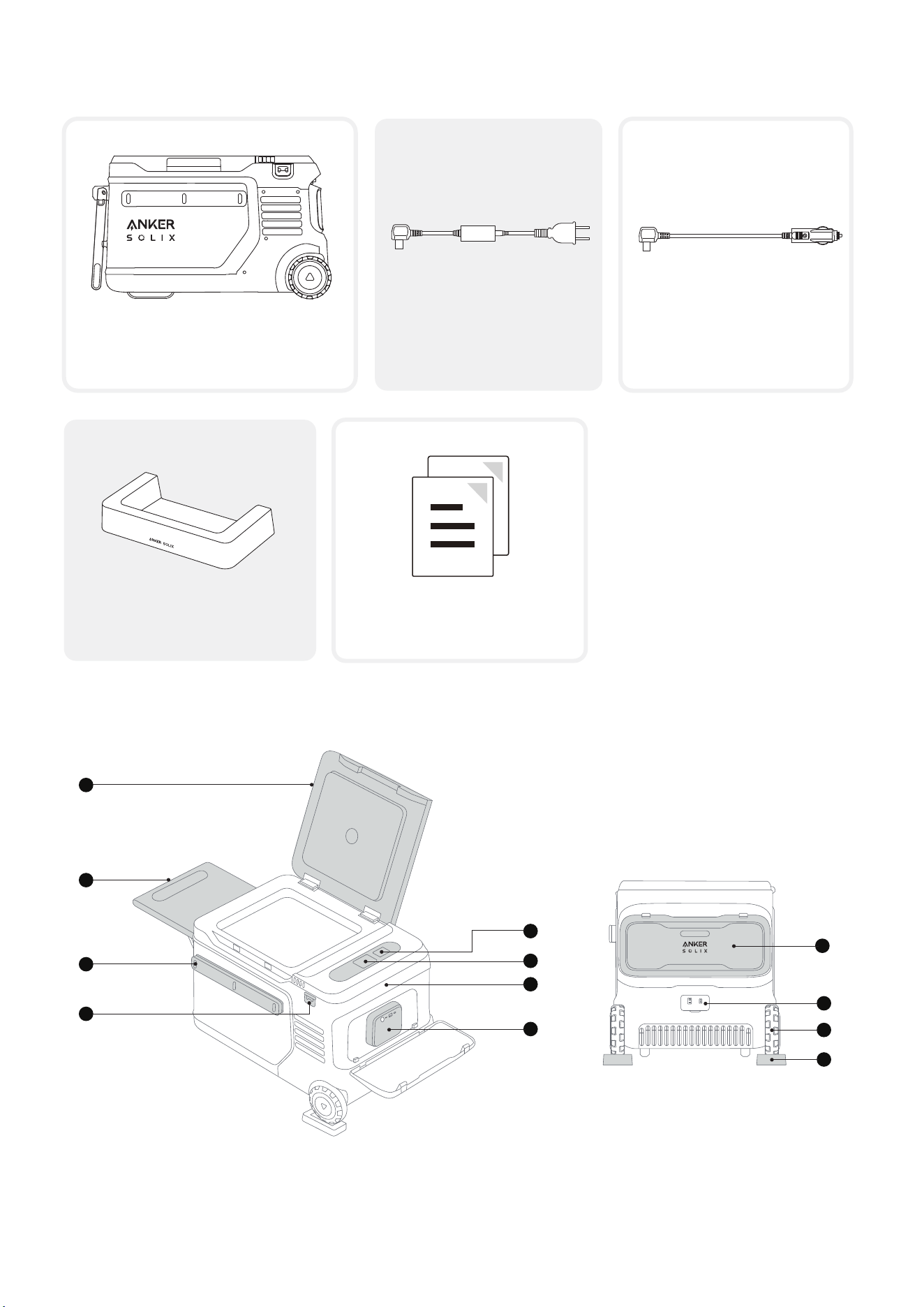
What's in the Box
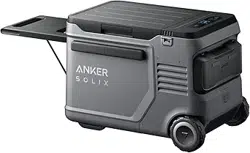
Anker SOLIX EveFrost 2 23L
Electric Cooler
AC Adapter and Charging
Cable
Wheel Holder
(×2)
Documents
Car Charging Cable
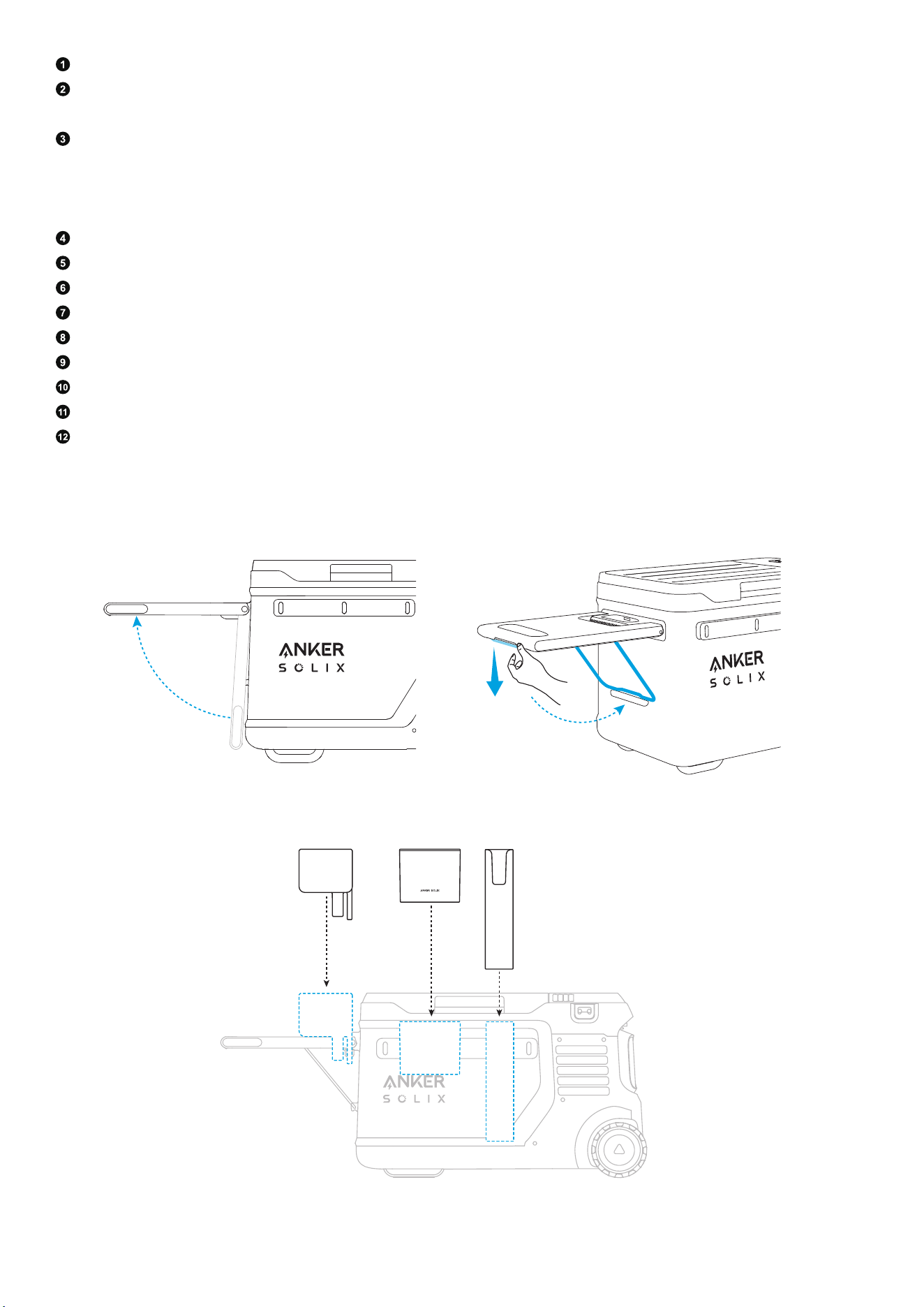
Overview
1
2
3
4
5
6
7
8
9
10
11
12
02
Cooler Cover
Tray Table*
Note: Load capacity is 30 kg (66 lb).
Bar**
Note: For accessories such as rod and knife racks, tabletops, and cups, align the protruding strip at the
back of the accessory with the notch on the bar and insert it fully. Refer to the accessory instructions for
details. Accessories can be purchased separately.
Bottle Opener
Buttons
Display
Handle
Battery
Battery Cover
Input Ports
Wheel
Wheel Holder
*Using the tray table:
1. Li the tray table.
2. Apply moderate force to release the stand, then secure it into place.
**Using the bar :
03
Installing the Battery
·
If there is already a battery in the cooler, please skip this step.
·
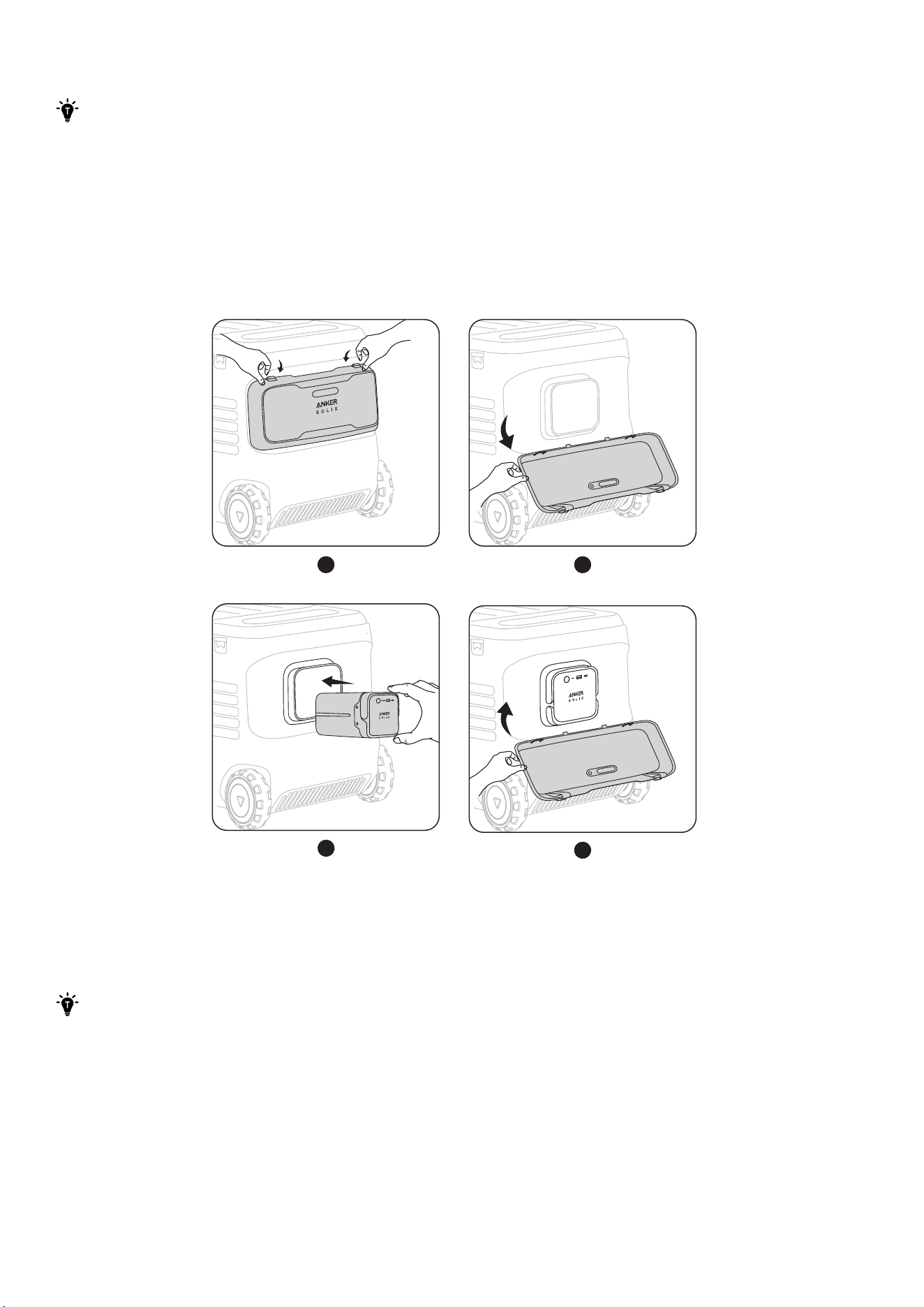
The cooler can be installed with one or two batteries. When using one battery, please install it
in the right battery compartment. Do not place any objects in the empty battery compartment
to avoid contamination of the internal battery contact pins, which could lead to poor battery
contact or a short circuit.
Open the battery cover. Place the battery inside, and you will hear a click when the installation is
successful. If the cooler is turned on, the screen will display "Battery Connected." Close the battery cover.
To remove the battery, li its handle.
1 2
3
4
Using Your Cooler
Powering On/O
·
To ensure reliable compressor operation aer long transportation, lay the cooler flat for three
hours before turning it on for the first time. Ensure the cooler is connected to the mains power
with a charger or has a battery inside before turning it on.
·
Before using the cooler for the first time, recharge it to activate.
04
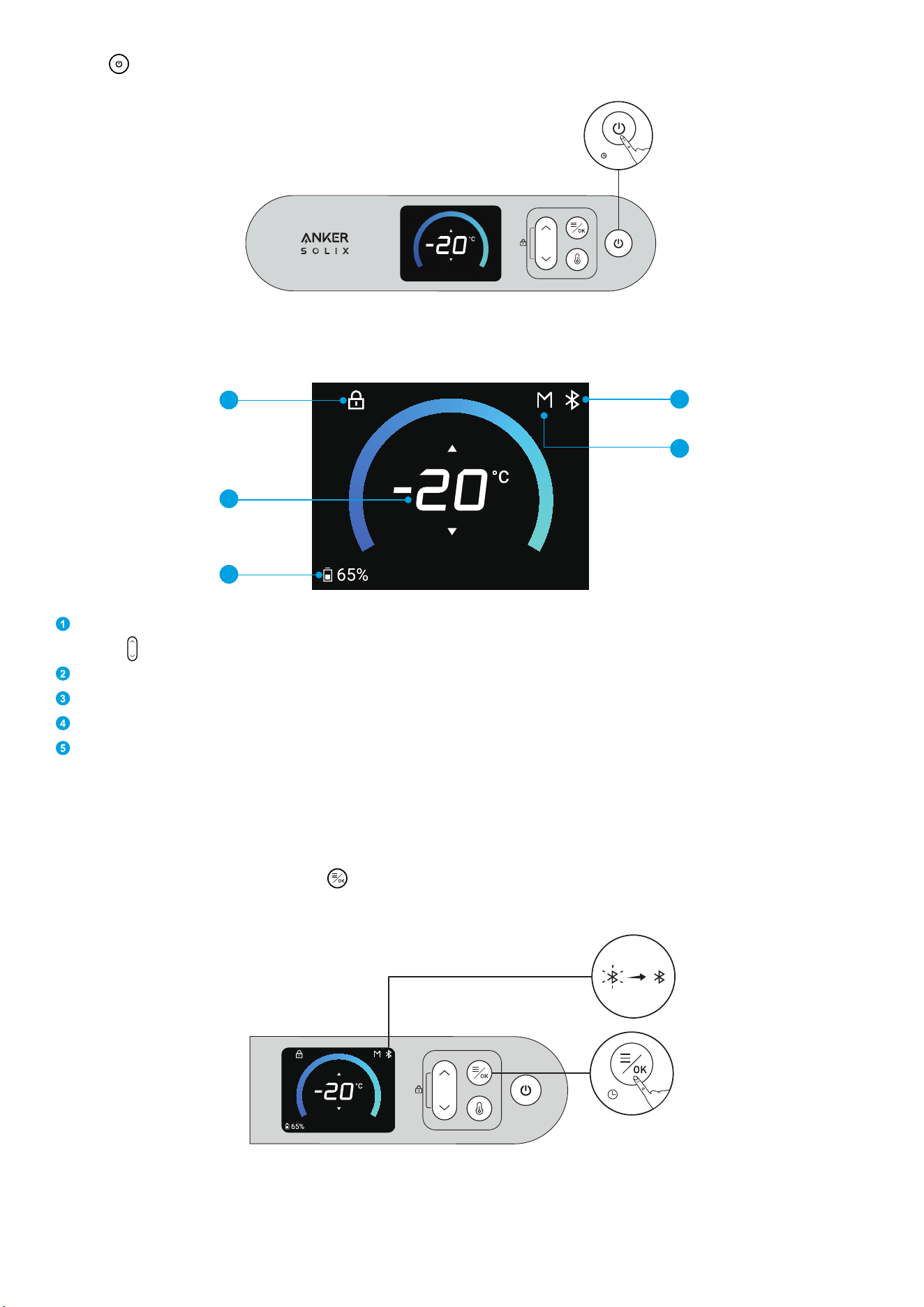
Press
< >
for 3 seconds to turn your cooler on or o.
3 s
Screen Guide
4
5
1
2
3
Child Safety Lock
Press
< >
once to turn the child safety lock on / o.
Temperature
Battery Level
Wi-Fi / Bluetooth
Protective Voltage (L / M / H)
Connecting Your Cooler
Bluetooth
The cooler will automatically connect to your phone's Bluetooth, and the icon will turn steady white. If
Bluetooth is not connected, press <
> for 2 seconds to turn on Bluetooth. The Bluetooth icon on the
screen will flash. The Bluetooth function will be turned o aer 12 hours without any connection.
2 s
05
Using the App
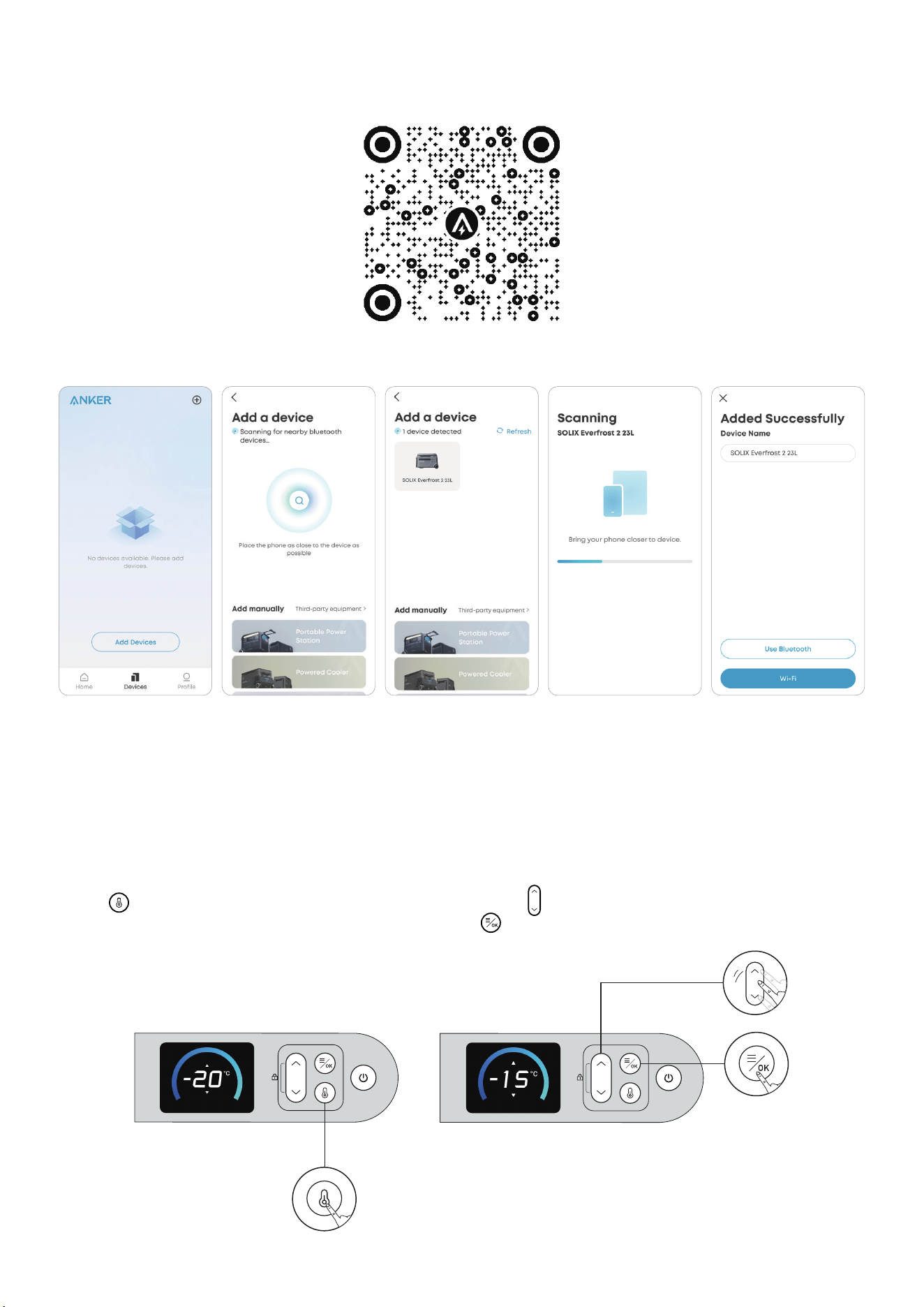
1. Connect with Wi-Fi and download the app to remotely control your cooler.
2. Add your cooler.
Installing Firmware Updates
You will receive a notification before updates are installed. Your cooler must be charging and connected
to Wi-Fi or Bluetooth to complete the update. If there is a battery in the cooler, the battery level needs to
be above 1%.
Setting the Temperature
*You can set the temperature in the app or as follows.
Press
< >
once to enter the temperature settings. Then use
< >
to adjust the temperature. Confirm the
temperature and return to the homepage by pressing
< >
.
×1
06
Powering Your Cooler
We do not recommend using multiple charging methods at the same time.
AC Powering
Power the cooler by connecting to a wall outlet with the AC charging cable.
Car Powering
Connect the cooler to a car's output port with the car charging cable.
*Car Battery Protection Grades
The cooler supports three levels of battery protection. To modify the level of battery protection, press
<
>
first, and then press
< >
to choose Protective Voltage, and confirm it by pressing
< >
. Continue
pressing
< >
to choose between "L / M / H", and confirm the level with
< >
. When the cooler is connected
to a car battery (lead-acid battery), the cooler's battery protection prevents the car battery from over-
discharging.
If your cooler does not have a battery and the car's battery voltage is lower than your cooler's set value in
that scenario, your cooler will stop working.
If the car's battery voltage reaches the recovery value needed for battery protection, the cooler will return
to the power-on/o state it was in before the protection was activated.
If the cooler has a battery and the car battery's voltage is lower than the set value for that scenario, the
cooler switches to its own battery power and does not shut down automatically.
Note: When powering the cooler via the car socket of the power station, please set the battery protection
grade to "Low" to avoid the battery protection function from being triggered by mistake.
07
Low
Medium/High
USB-C Powering
Note: The USB-C cable and charger are not included in the package.
Power the cooler by connecting the battery to a wall outlet with the USB-C cable.
Solar Powering (100 W Max, 12 V-30 V)
·
This method of powering can only be used when the battery is in the cooler.
·
To protect the compressor's lifespan, the cooler will only be powered when the battery level is at
least 5% during solar charging input.
Power the cooler by connecting the battery to a solar panel with an XT60 cable.

08
Maintenance Best Practices
·
Turn o all power before cleaning to ensure safety.
·
Clean aer disassembly and then install in reverse order. Do not use excessive force during disassembly
to avoid damaging the components.
·
Use a so cloth with a neutral detergent for wiping. Do not use scouring powder, benzene, hydrochloric
acid, hot water, coarse brushes, abrasives, or hard objects to clean the cooler, as they may damage or
corrode it.
·
Regularly clean the interior and exterior of the cooler with a damp cloth.
·
Never use running water to wash the interior and exterior of the cooler or immerse it in water.
·
To ensure that the cooler is able to ventilate and dissipate heat, the air inlet and outlet must be free of
dust and dirt.
·
Aer cleaning the cooler, check the power cord for any damage or moisture, and ensure that the plug is
not overheated. Make sure everything is in order before connecting the power supply.
·
Before connecting the power, dry the cleaned cooler with a so dry cloth or sponge. This will prevent
water or other liquids from remaining in the electrical components, which may cause electric shock or
short circuit hazards.
·
We recommend placing the cooler on a level suace for use. When the tilt angle exceeds 30°, it will
aect the normal operation of the compressor.
FAQ
1. What type of battery does the cooler use?
LFP (Lithium Iron Phosphate) battery.
2. Can the cooler be connected to the solar panel without the battery?
No. The cooler must have a battery inside when a solar panel is connected. Otherwise, the cooler will
not work.
3. Is there anything to be aware of when using the cooler for the first time?
We recommend laying the cooler flat for three hours before turning it on for the first time.
4. When there is a battery in the cooler, does the external power supply give priority to charging the
battery or supplying power to the cooler?
The external power supply will prioritize charging the cooler.
5. Can the cooler be transported for long periods?
Yes. Make sure to lay the cooler flat for three hours before turning it on aer a long transportation.
6. What's the maximum load capacity of the bar?
It's 30 kg / 66.1 lb.
7. Is it normal to have a smell when I first use the cooler?
Yes. During production, foaming agents are used for better thermal insulation. These agents leave
a slight residual smell, but it's harmless. Before using it for the first time, place the cooler in a well-
ventilated area with the cover open.

09
Specifications
Cell Capacity 288 Wh
Capacity 23 L / 24.3 qt
Size 668 × 400 × 385 mm / 26.3 × 15.7 × 15.2"
Battery Compartment 1
Temperature Range -20°C to 20°C / -4°F to 68°F
AC Input Power (Charging) 95 W Max
Solar Panel Input 12-30 V
8.2 A (100 W Max)
USB-C1 Input 5 V
3 A / 9 V
3 A / 15 V
3 A / 20 V
3 A (60 W Max)
USB-A Output 5 V
2.4 A (12 W)
USB-C1 Output 5 V
3 A / 9 V
3 A / 15 V
3 A / 20 V
3 A (60 W Max)
Discharging Temperature -20°C to 40°C / -4°F to 104°F
Charging Temperature 0°C to 40°C / 32°F to 104°F
Waterproof IPX3
Net Weight 16.8 kg / 37 lb