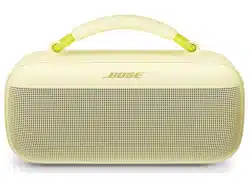
SOUNDLINK MAX PORTABLE SPEAKER
IMPORTANT SAFETY INSTRUCTIONS
2
|
ENG
Please read and keep all safety and use instructions.
Bose Corporation hereby declares that this product is in compliance with the essential requirements
and other relevant provisions of Directive 2014/53/EU and all other applicable EU directive
requirements. The complete declaration of conformity can be found at: www.Bose.com/compliancewww.Bose.com/compliance
This product conforms to all applicable Electromagnetic Compatibility Regulations 2016 and all other
applicable UK regulations. The complete declaration of conformity can be found at:
www.Bose.com/compliancewww.Bose.com/compliance
Bose Corporation hereby declares that this product is in compliance with the essential requirements per Radio
Equipment Regulations 2017 and all applicable UK regulations. The complete declaration of conformity can be
found at: www.Bose.com/compliancewww.Bose.com/compliance
Important Safety Instructions
Do not block any ventilation openings. Install in accordance with the manufacturer’s instructions.
If the speaker is exposed to salt or chlorinated water, gently rinse with fresh water following the exposure to
remove residue. Make sure the connector port is fully dried out before charging.
Only use aachments/accessories specified by the manufacturer.
Refer all servicing to qualified personnel. Servicing is required when the apparatus does not operate normally,
or has been physically damaged.
WARNINGS/CAUTIONS
Contains small parts which may be a choking hazard. Not suitable for children under age 3.
This product contains magnetic material. Consult your physician on whether this might aect your
implantable medical device.
• Keep the product away from fire and heat sources. Do NOT place naked flame sources, such as lighted
candles, on or near the product.
• Do NOT make unauthorized alterations to this product.
• Use this product only with an agency- approved LPS power supply that meets local regulatory requirements
(e.g., UL, CSA, VDE, CCC).
• The baery provided with this product may present a risk of fire, explosion or chemical burn if mishandled,
incorrectly replaced or replaced with an incorrect type.
• Do not expose products containing baeries to excessive heat (e.g. from storage in direct sunlight, fire or
the like).
• If the baery leaks, do not allow the liquid to come in contact with the skin or eyes. If contact is made, seek
medical advice.
• The product label is located on the boom of the product.
REGULATORY AND LEGAL INFORMATION
3
|
ENG
NOTE: This equipment has been tested and found to comply with the limits for a Class B digital device,
pursuant to Part 15 of the FCC Rules. These limits are designed to provide reasonable protection against
harmful interference in a residential installation. This equipment generates, uses, and can radiate radio
frequency energy and, if not installed and used in accordance with the instructions, may cause harmful
interference to radio communications. However, there is no guarantee that interference will not occur in a
particular installation. If this equipment does cause harmful interference to radio or television reception,
which can be determined by turning the equipment o and on, the user is encouraged to try to correct the
interference by one or more of the following measures:
• Reorient or relocate the receiving product or antenna.
• Increase the separation between the equipment and receiver.
• Connect the equipment into an outlet on a circuit dierent from that to which the receiver is connected.
• Consult the dealer or an experienced radio/TV techniciwan for help.
Changes or modifications not expressly approved by Bose Corporation could void the user’s authority to
operate this equipment.
This device complies with part 15 of the FCC Rules and with ISED Canada license-exempt RSS standard(s).
Operation is subject to the following two conditions: (1) This device may not cause harmful interference, and
(2) this device must accept any interference received, including interference that may cause
undesired operation.
This device complies with FCC and ISED Canada radiation exposure limits set forth for general population.
This equipment should be installed and operated with a minimum distance of 20 cm between radiator and
your body. This transmier must not be co-located or operating in conjunction with any other antenna
or transmier.
CAN ICES-3(B)/NMB-3(B)
For Europe: Frequency band of operation 2400 to 2483.5 MHz. | Maximum transmit power less than
20 dBm EIRP.
This symbol means the product must not be discarded as household waste, and should be delivered to
an appropriate collection facility for recycling. Proper disposal and recycling helps protect natural
resources, human health and the environment. For more information on disposal and recycling of this
product, contact your local municipality, disposal service, or the shop where you bought this product.
Low-power Radio-frequency Devices Technical Regulations: Without permission granted by the NCC, any
company, enterprise, or user is not allowed to change frequency, enhance transmiing power or alter original
characteristic as well as performance to a approved low power radio-frequency devices. The low power
radio-frequency devices shall not influence aircraft security and interfere legal communications; If found,
the user shall cease operating immediately until no interference is achieved. The said legal communications
means radio communications is operated in compliance with the Telecommunications Management Act. The
low power radio-frequency devices must be susceptible with the interference from legal communications or
ISM radio wave radiated devices. The low power radio-frequency devices must be susceptible with the
interference from legal communications or ISM radio wave radiated devices.
DON’T aempt to remove the rechargeable lithium-ion baery from this product. Contact your local Bose
retailer or other qualified professional for recycling and disposal.
Please dispose of used baeries properly, following local regulations. Do not incinerate.
REGULATORY AND LEGAL INFORMATION
4
|
ENG
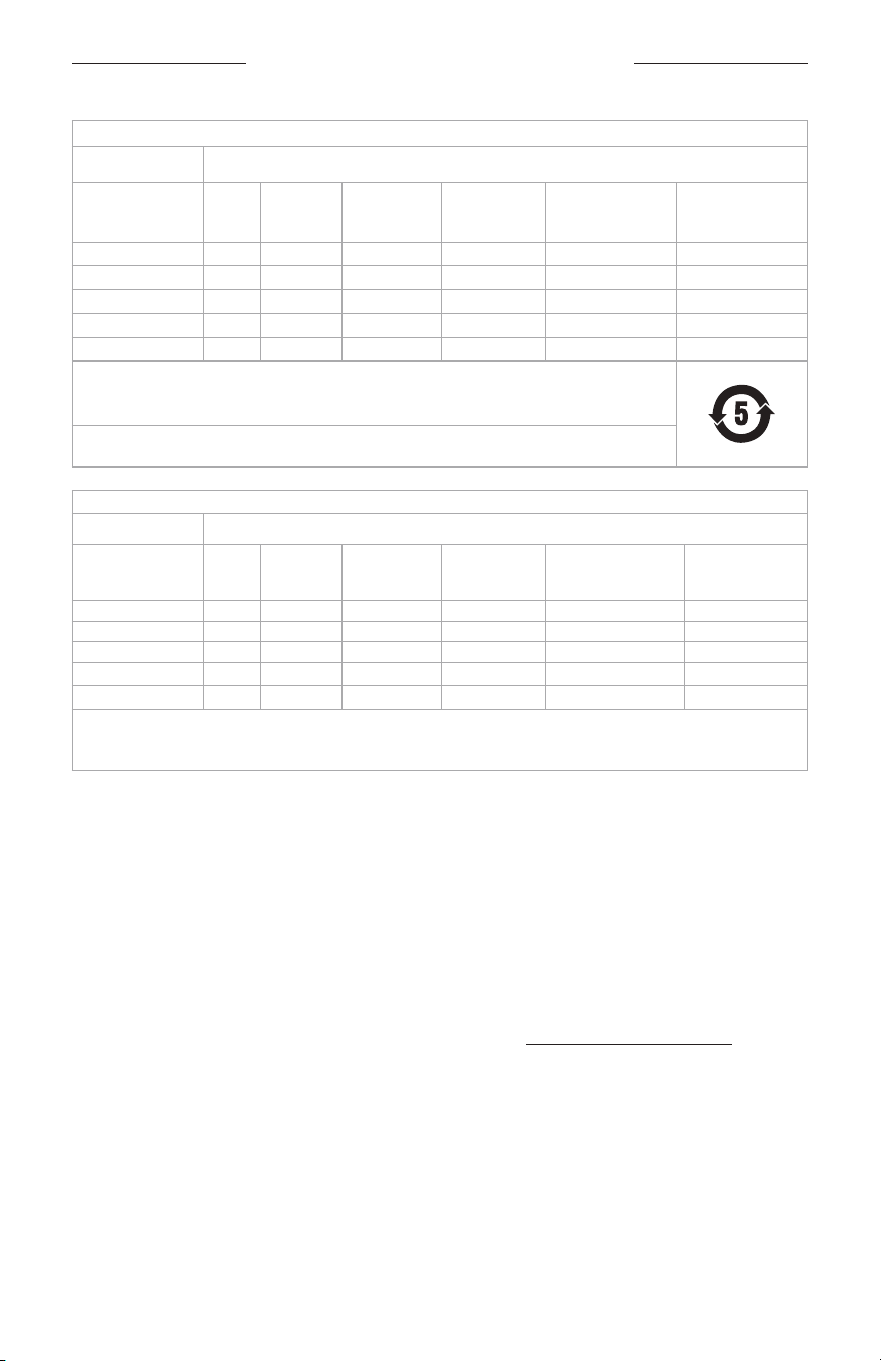
Names and Contents of Toxic or Hazardous Substances or Elements
Toxic or Hazardous Substances and Elements
Part Name
Lead
(Pb)
Mercury
(Hg)
Cadmium
(Cd)
Hexavalent
(CR(VI))
Polybrominated
Biphenyl
(PBB)
Polybrominated
diphenylether
(PBDE)
PCBs X O O O O O
Metal Parts X O O O O O
Plastic Parts O O O O O O
Speakers X O O O O O
Cables X O O O O O
This table is prepared in accordance with the provisions of SJ/T 11364.
O: Indicates that this toxic or hazardous substance contained in all of the homogeneous materials for
this part is below the limit requirement of GB/T 26572.
X: Indicates that this toxic or hazardous substance contained in at least one of the homogeneous
materials used for this part is above the limit requirement of GB/T 26572.
Equipment name: Bluetooth Speaker Type designation: 442368
Restricted substances and its chemical symbols
Unit
Lead
(Pb)
Mercury
(Hg)
Cadmium (Cd)
Hexavalent
chromium (Cr
+6
)
Polybrominated
biphenyls (PBB)
Polybrominated
diphenyl ethers
(PBDE)
PCBs —
b b b b b
Metal Parts —
b b b b b
Plastic Parts
b b b b b b
Speakers —
b b b b b
Cables —
b b b b b
Note 1: “b” indicates that the percentage content of the restricted substance does not exceed the percentage of reference
value of presence.
Note 2: The “−” indicates that the restricted substance corresponds to the exemption.
Date of Manufacture: The eighth digit in the serial number indicates the year of manufacture; “4” is 2014
or 2024.
Importers: Bose Electronics (Shanghai) Company Limited, Level 6, Tower D, No. 2337 Gudai Rd. Minhang
District, Shanghai 201100 | Bose Products B.V., Gorslaan 60, 1441 RG Purmerend, The Netherlands | Bose de
México S. de R.L. de C.V., Avenida Prado Sur #150, Piso 2, Interior 222 y 223, Colonia Lomas de Chapultepec V
Sección, Miguel Hidalgo, Ciudad de México, C.P. 11000 Phone Number: +5255 (5202) 3545 | Bose Limited (H.K.),
7F., No. 2, Sec. 3, Minsheng E. Road, Zhongshan Dist., Taipei City 10480, Phone Number: +886-2-2514 7676 |
Bose Limited, Bose House, Quayside Chatham Maritime, Chatham, Kent, ME4 4QZ, United Kingdom
Input Rating: 5/9/15/20V p, 3A Max. | Output Rating: 5V p, 3A
Model number: 442368. The CMIIT ID is located on the boom of the speaker.
This product is covered by a limited warranty from Bose, available at worldwide.Bose.com/Warrantyworldwide.Bose.com/Warranty
License Disclosures: To view the license disclosures that apply to the third-party software packages included
as components of the Bose SoundLink Max Portable Speaker, use the Bose app. You can access this
information from the Seings menu.

REGULATORY AND LEGAL INFORMATION
5
|
ENG
Apple, the Apple logo, iPad, and iPhone are trademarks of Apple Inc., registered in the U.S. and other countries.
App Store is a service mark of Apple Inc. The trademark “iPhone” is used in Japan with a license from
Aiphone K.K.
Use of the Made for Apple badge means that an accessory has been designed to connect specifically to the
Apple product(s) identified in the badge, and has been certified by the developer to meet Apple performance
standards. Apple is not responsible for the operation of this device or its compliance with safety and
regulatory standards.
The Bluetooth® word mark and logos are registered trademarks owned by Bluetooth SIG, Inc. and any use of
such marks by Bose Corporation is under license.
Android and Google Play are trademarks of Google LLC.
Snapdragon Sound is a product of Qualcomm Technologies, Inc. and/or its subsidiaries. Qualcomm,
Snapdragon and Snapdragon Sound are trademarks or registered trademarks of Qualcomm Incorporated.
Spotify is a registered trademark of Spotify AB.
USB Type-C® and USB-C® are registered trademarks of USB Implementers Forum.
Bose, the B logo, SimpleSync, and SoundLink are trademarks of Bose Corporation. | Bose Corporation
Headquarters: 1-877-230-5639 | ©2024 Bose Corporation. No part of this work may be reproduced, modified,
distributed, or otherwise used without prior wrien permission.
Please complete and retain for your records
The serial number is located on the back of the speaker. The model number is located on the boom of
the speaker.
Serial number: ___________________________________________________________________________
Model number: 442368
Please keep your receipt. Now is a good time to register your Bose product. You can easily do this by going to
worldwide.Bose.com/ProductRegistrationworldwide.Bose.com/ProductRegistration

6
|
ENG
CONTENTS
WHAT’S IN THE BOX
Contents ........................................................................................................................................................ 9
GETTING STARTED
Initial setup .................................................................................................................................................... 10
BLUETOOTH® CONNECTIONS
Connect to a device..................................................................................................................................... 12
Using your device’s Bluetooth seings .......................................................................................... 12
Using the Bose app ............................................................................................................................ 13
Reconnect to a device ................................................................................................................................ 14
Reconnect to the most recently-connected device ................................................................... 14
Reconnect to a dierent device ...................................................................................................... 14
Connect an additional device.................................................................................................................... 15
Identify connected devices ....................................................................................................................... 15
Switch between two connected devices ................................................................................................ 15
Disconnect a device .................................................................................................................................... 16
Clear the speaker device list ...................................................................................................................... 16
Android™ devices only ................................................................................................................................ 17
Connect using Fast Pair .................................................................................................................... 17
Snapdragon Sound™ technology ................................................................................................... 18
SPEAKER CONTROLS
Power on/o .................................................................................................................................................. 19
Auto-o timer...................................................................................................................................... 20
Media playback and volume ...................................................................................................................... 21
SHORTCUTS
Use your shortcut ......................................................................................................................................... 22
Change or disable your shortcut ............................................................................................................... 22

CONTENTS
7
|
ENG
SPOTIFY TAP ........................................................................................................................................... 23
BATTERY
Charge the speaker ...................................................................................................................................... 24
Charging time ...................................................................................................................................... 25
Hear the baery level ......................................................................................................................... 25
View the baery level ........................................................................................................................ 25
Charge your device ...................................................................................................................................... 26
STATUS
Power light ..................................................................................................................................................... 27
Bluetooth light .............................................................................................................................................. 28
Shortcut light ................................................................................................................................................ 28
AUX light ......................................................................................................................................................... 28
VOICE PROMPTS
Pre-installed languages .............................................................................................................................. 29
Change the language .................................................................................................................................. 29
Disable voice prompts ................................................................................................................................. 29
WIRED CONNECTION
Connect an audio cable .............................................................................................................................. 30

CONTENTS
8
|
ENG
CONNECT BOSE PRODUCTS
Link two Bose Bluetooth speakers ........................................................................................................... 31
Compatible products ......................................................................................................................... 31
Link using the product controls ....................................................................................................... 32
Switch between Stereo mode and Party mode ........................................................................... 33
Unlink the speakers ............................................................................................................................ 33
Connect to a Bose Smart Speaker or Soundbar .................................................................................... 34
Compatible products ......................................................................................................................... 34
Connect using the Bose app ............................................................................................................ 35
Connect using the product controls .............................................................................................. 36
Reconnect to a Bose Smart Speaker or Soundbar................................................................................ 36
PORTABILITY
Remove the handle ...................................................................................................................................... 37
Aach a new handle or carry strap .......................................................................................................... 38
WATER AND DUST RESISTANCE ............................................................................................... 39
CARE AND MAINTENANCE
Update the speaker ..................................................................................................................................... 40
Clean the speaker ........................................................................................................................................ 40
Store the speaker ......................................................................................................................................... 40
Replacement parts and accessories ........................................................................................................ 40
Limited warranty .......................................................................................................................................... 40
TROUBLESHOOTING
Try these solutions first ............................................................................................................................... 41
Other solutions ............................................................................................................................................. 41
Reset the speaker ........................................................................................................................................ 44
Restore the speaker ..................................................................................................................................... 45
9
|
ENG
WHAT’S IN THE BOX
CONTENTS
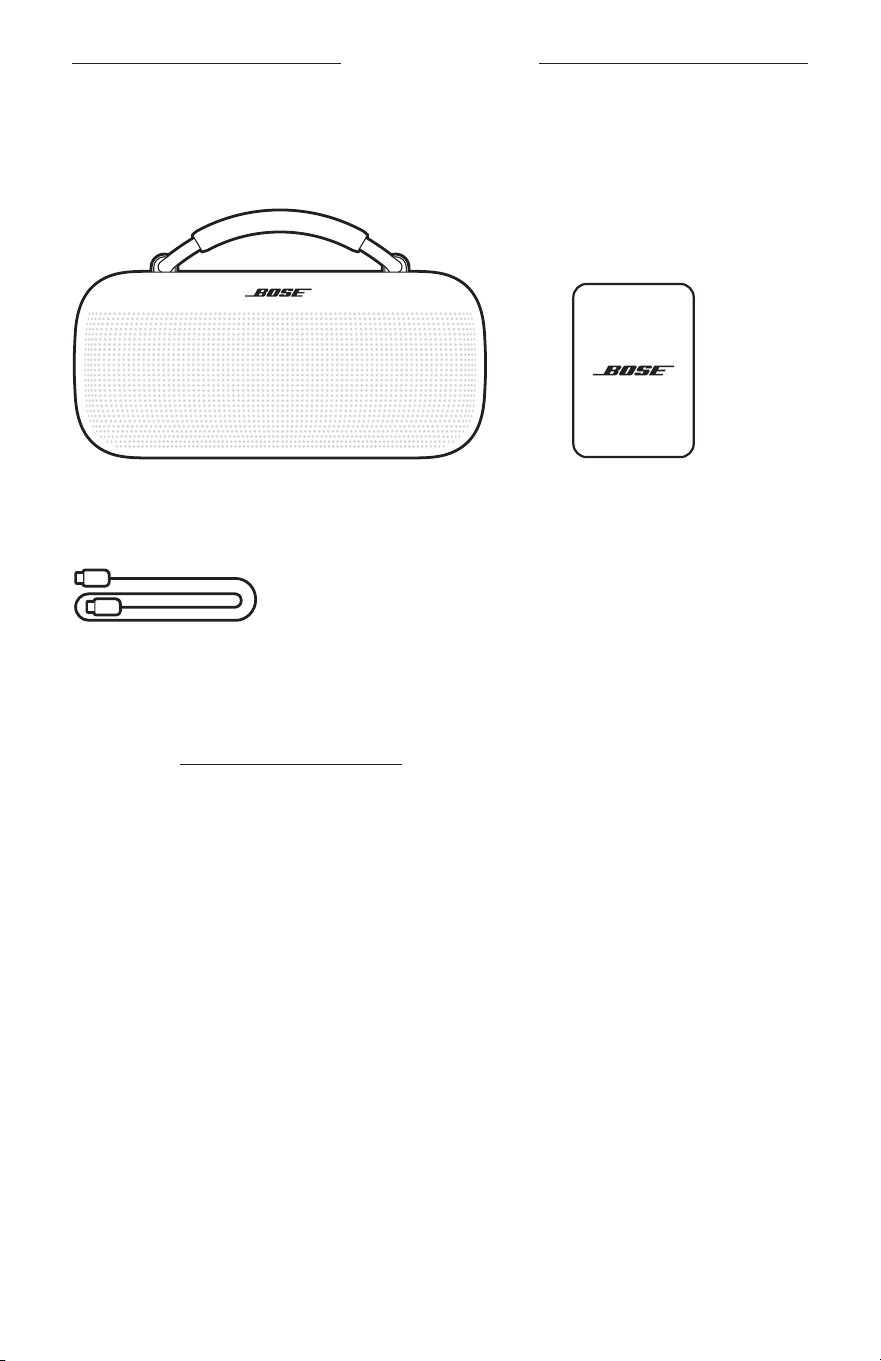
Confirm that the following parts are included:
Bose SoundLink Max Portable Speaker USB Type-C® power supply
(Not included in all regions.)
USB-C® cable
NOTE: If any part of your product appears to be missing or damaged, don’t use it.
Visit support.Bose.com/sl-maxsupport.Bose.com/sl-max for troubleshooting articles, videos, and
product repair or replacement.
10
|
ENG
GETTING STARTED
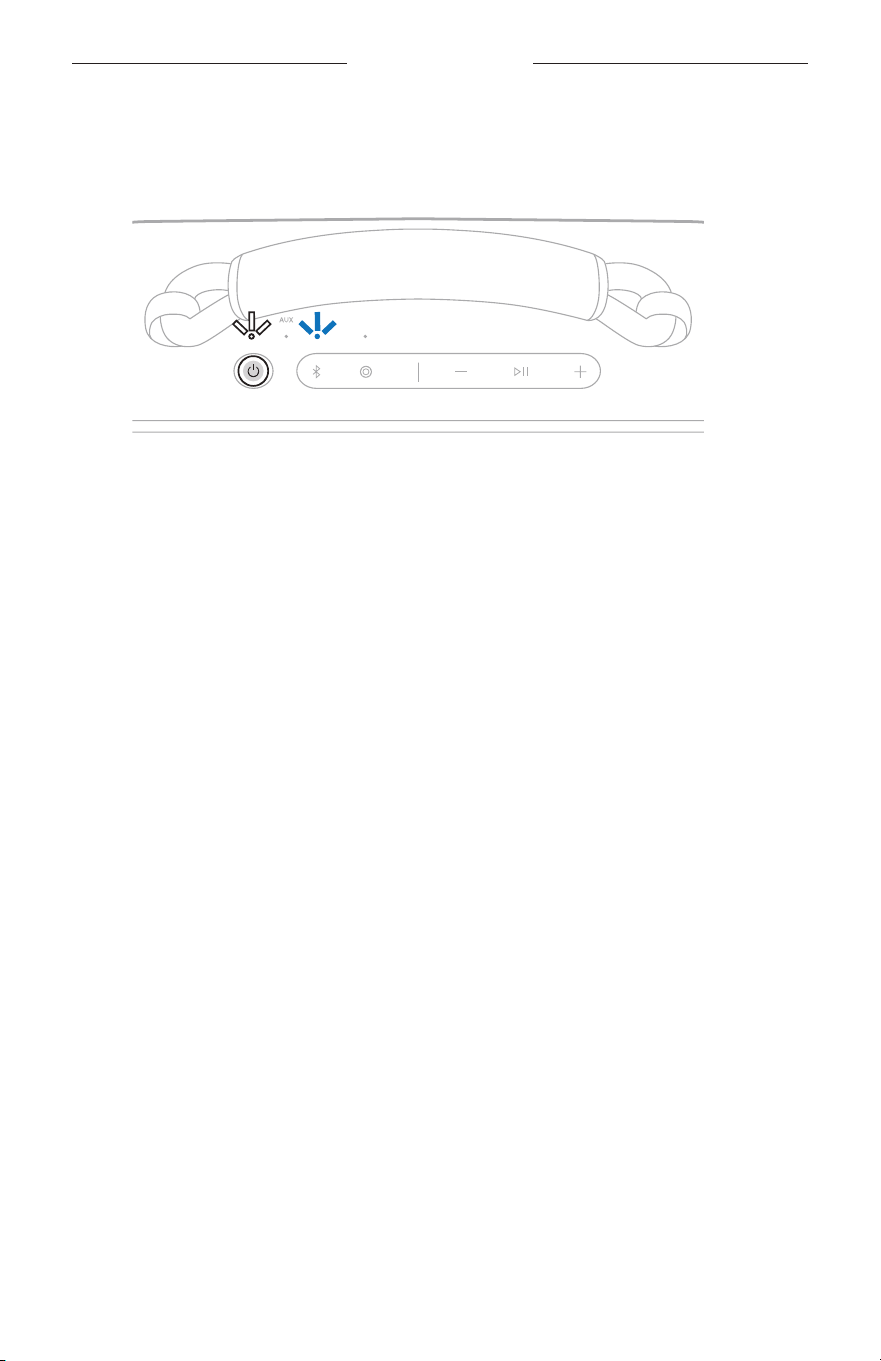
The speaker ships with a partial charge. Before using the speaker for the first time,
connect it to a power supply. The speaker doesn’t need to be fully charged, but it does
require the initial connection to activate the baery.
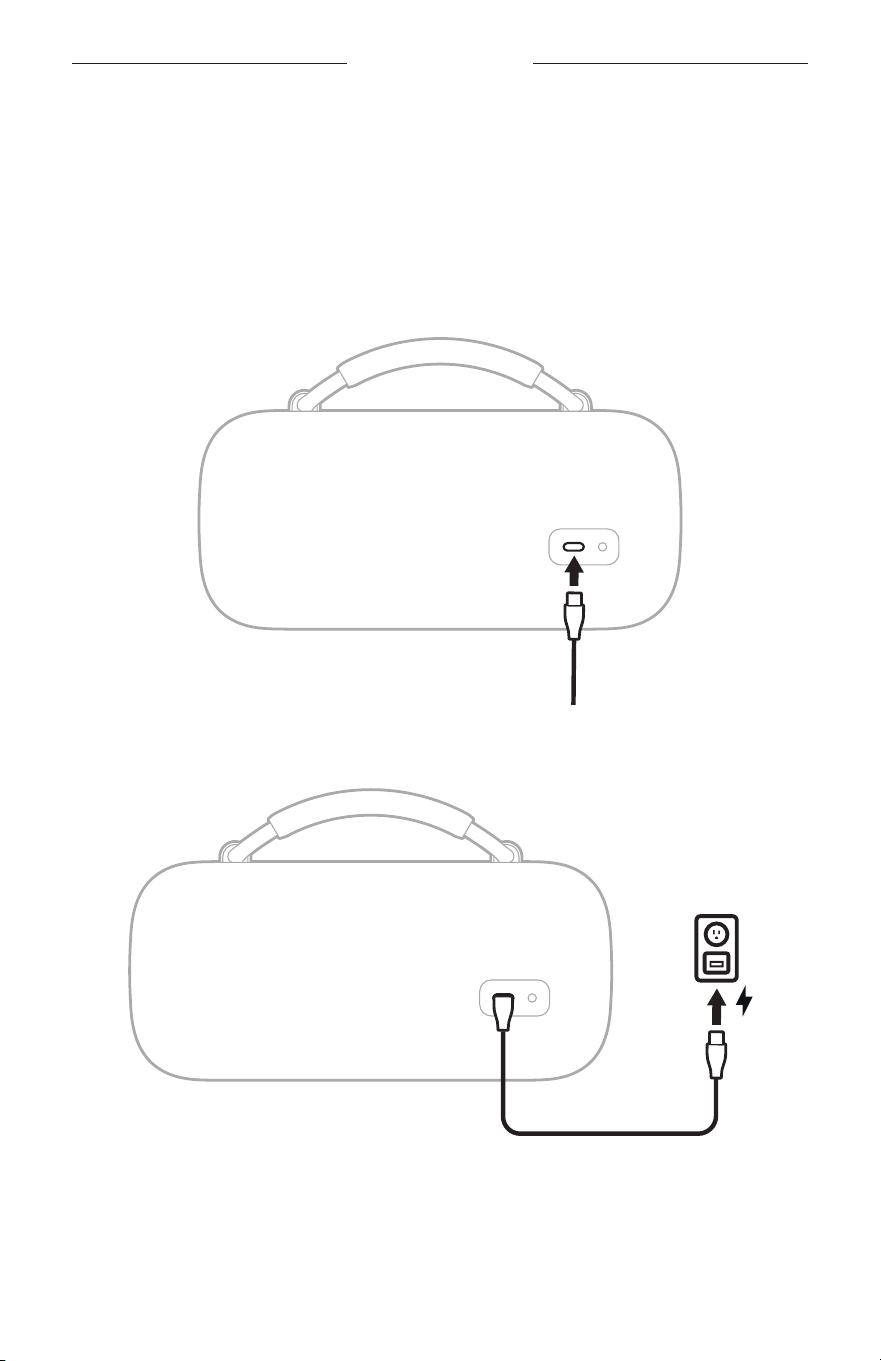
INITIAL SETUP
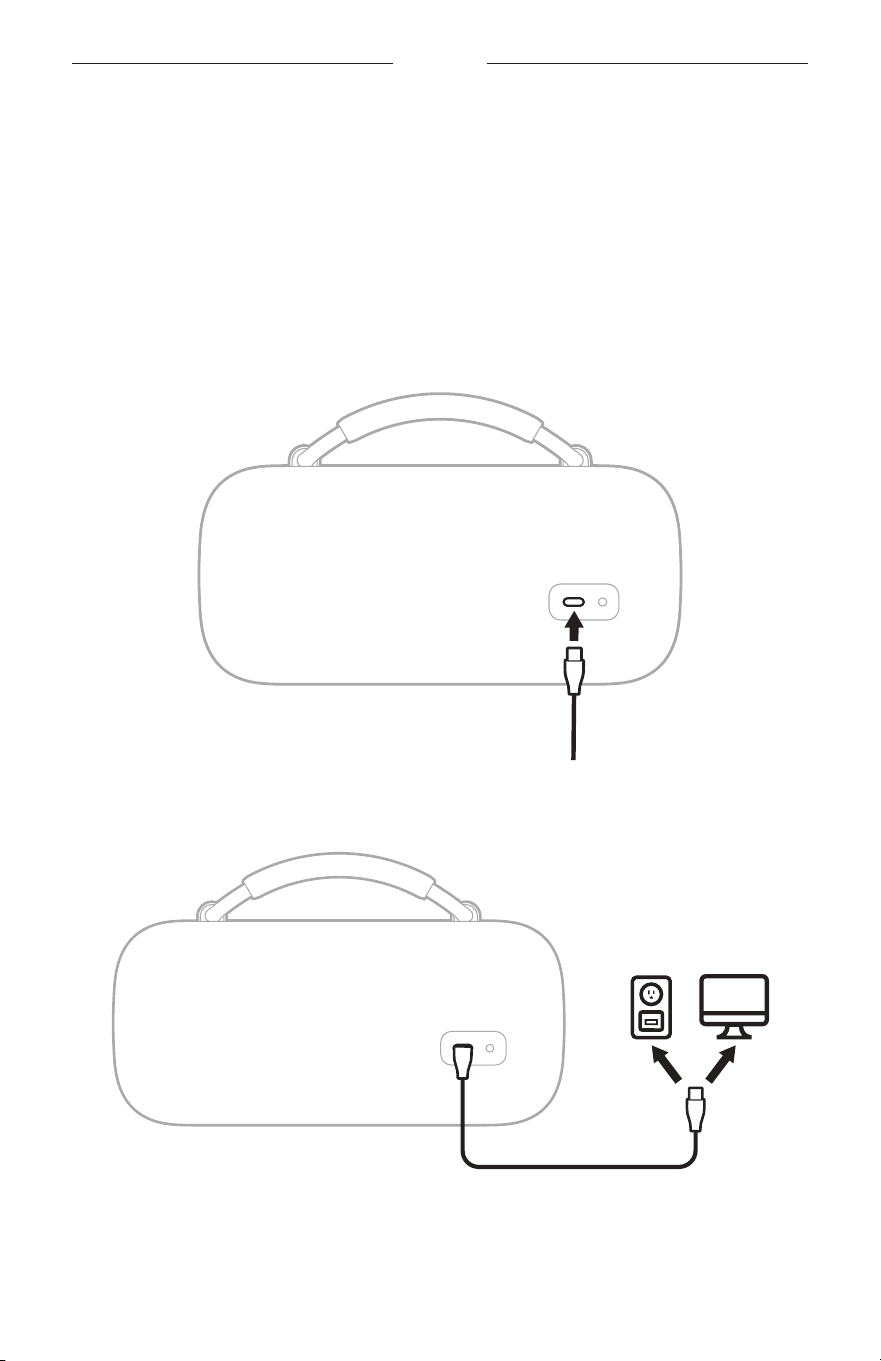
1. Connect one end of the USB-C cable to the USB-C port on the back of
the speaker.
2. Connect the other end of the cable to a USB-C power supply.
12
|
ENG
BLUETOOTH CONNECTIONS
You can store up to six devices in the speaker device list, and the speaker can be
actively connected to up to two devices at a time. You can play audio from only one
device at a time.
CONNECT TO A DEVICE
You can connect the speaker to your device using any of the following:
• Your device’s Bluetooth seings (see “Using your device’s Bluetooth seings” below)
• The Bose app (see page 13)
• Fast Pair (Android devices only) (see page 17)
Using your device’s Bluetooth settings
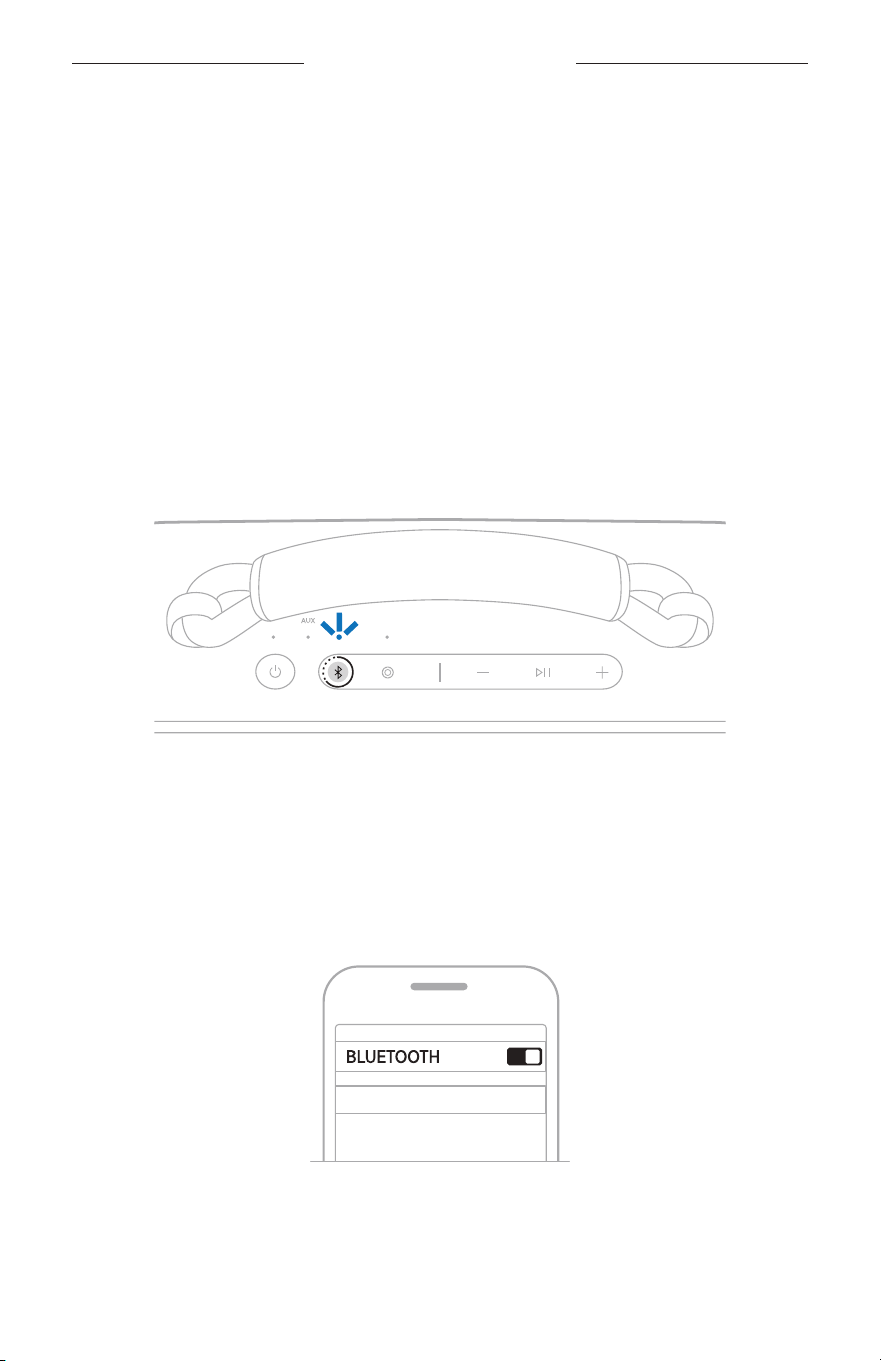
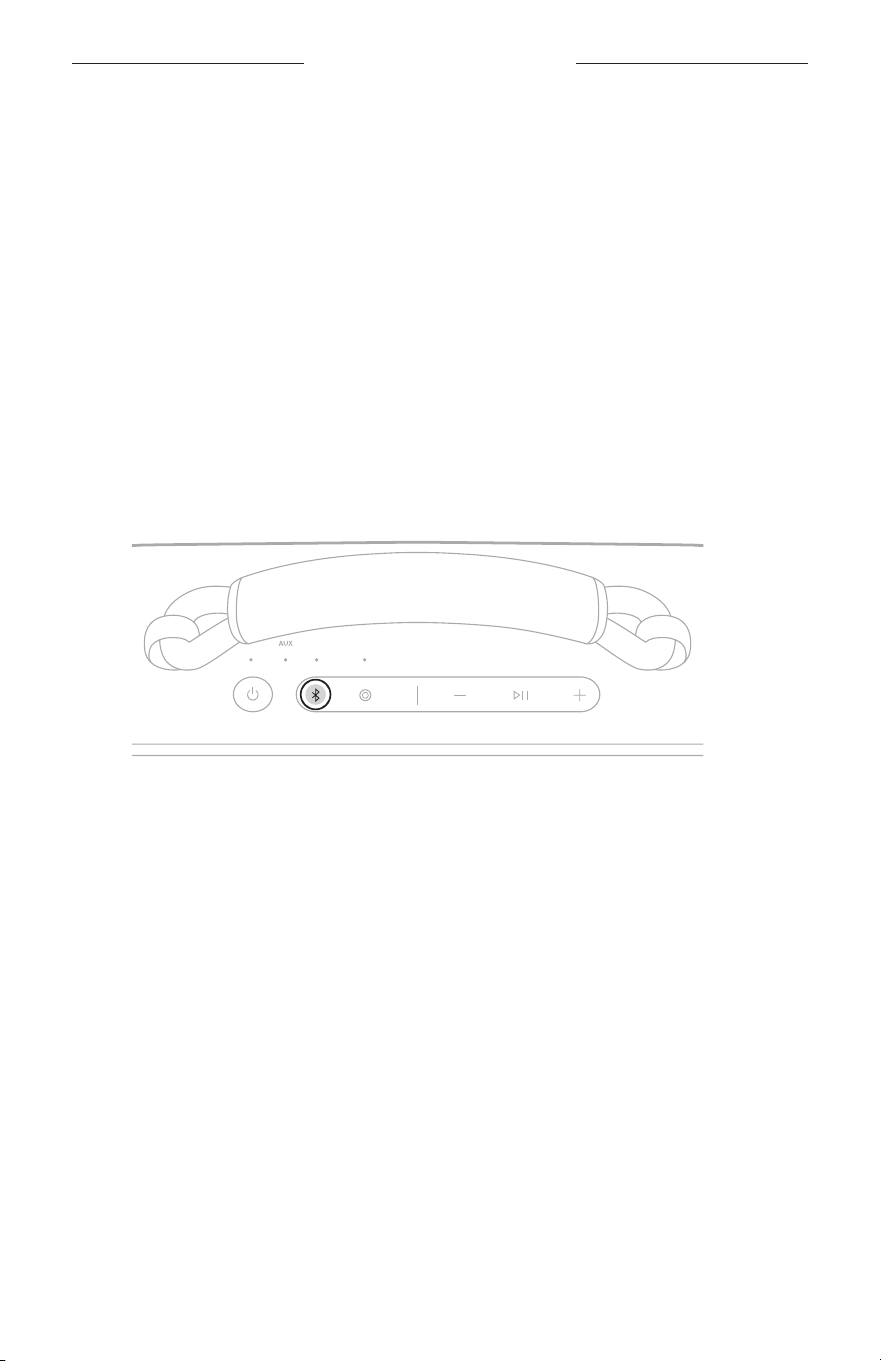
1. Press and hold the Bluetooth buon l until you hear “Ready to connect” and the
Bluetooth light slowly blinks blue.
NOTE: If a device is already connected, you hear “Ready to connect
another device.”
2. On your device, access Bluetooth seings.
3. Select the speaker from the list of available products.
NOTE: Look for the name you entered for your speaker in the Bose app. If you
didn’t name the speaker, the default name appears.
Bose SoundLink Max
The speaker appears in the list of connected products. The Bluetooth light glows
solid white (see page 28).
13
|
ENG
BLUETOOTH CONNECTIONS
Using the Bose app
The Bose app lets you set up and control the speaker from any mobile device, such as
a smartphone or tablet.
Using the app, you can manage Bluetooth connections, manage speaker seings,
adjust the audio, choose your voice prompt language, and get any future updates and
new features made available by Bose.
NOTE: If you’ve already downloaded the Bose app for another Bose product, you can
add the speaker from the product list screen.
1. On your device, download the Bose app.
BOSE
2. Follow the app instructions to add the speaker.
14
|
ENG
BLUETOOTH CONNECTIONS
RECONNECT TO A DEVICE
Reconnect to the most recently-connected device
When powered on, the speaker connects to the two most
recently-connected devices.
NOTES:
• The devices must be within range (30 ft or 9 m) and powered on.
• Make sure the Bluetooth feature is enabled on your devices.
Reconnect to a different device
NOTE: The device must be within range (30 ft or 9 m) and powered on.
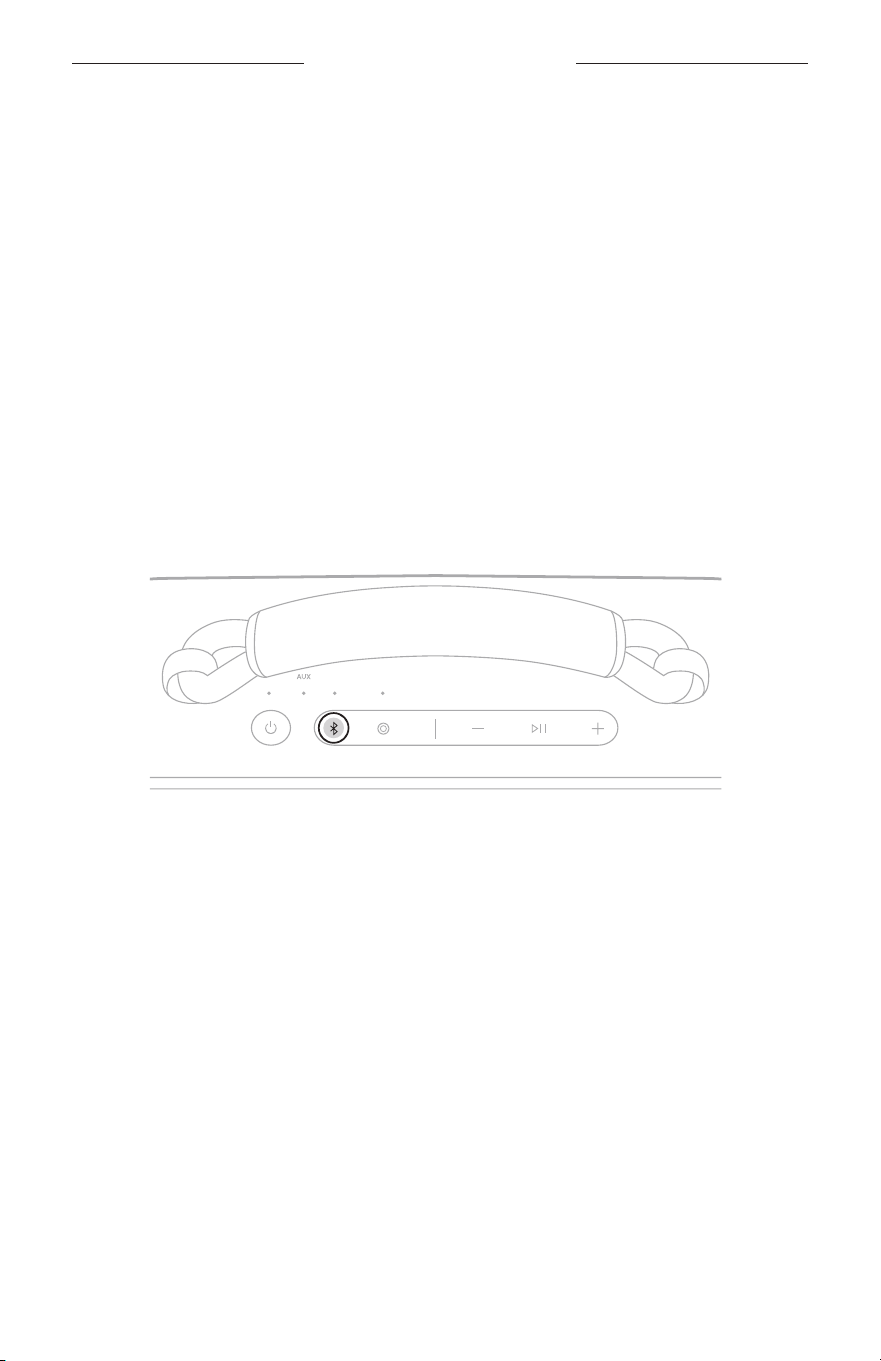
1. Press the Bluetooth buon l and release to hear which devices are
currently connected.
2. Within 2 seconds, press the Bluetooth buon l again to hear the name of the next
device in the speaker device list.
3. Repeat until you hear the correct device name.
4. Play audio on the connected device.
TIP: You can also reconnect a dierent device using the device’s Bluetooth seings
or the Bose app (see page 13).
NOTE: If two devices are already connected to the speaker, the newly-connected
device replaces the older of the two connections.
15
|
ENG
BLUETOOTH CONNECTIONS
CONNECT AN ADDITIONAL DEVICE
The speaker can be actively connected to two devices at a time
(multi-point connection).
To connect an additional device, see page 12.
NOTES:
• You can only play audio from one device at a time.
• To manage or disable the multi-point connection feature, use the Bose app. To
access this option, tap Source on the product control screen.
• Disabling the multi-point connection feature disconnects the second
connected device.
IDENTIFY CONNECTED DEVICES
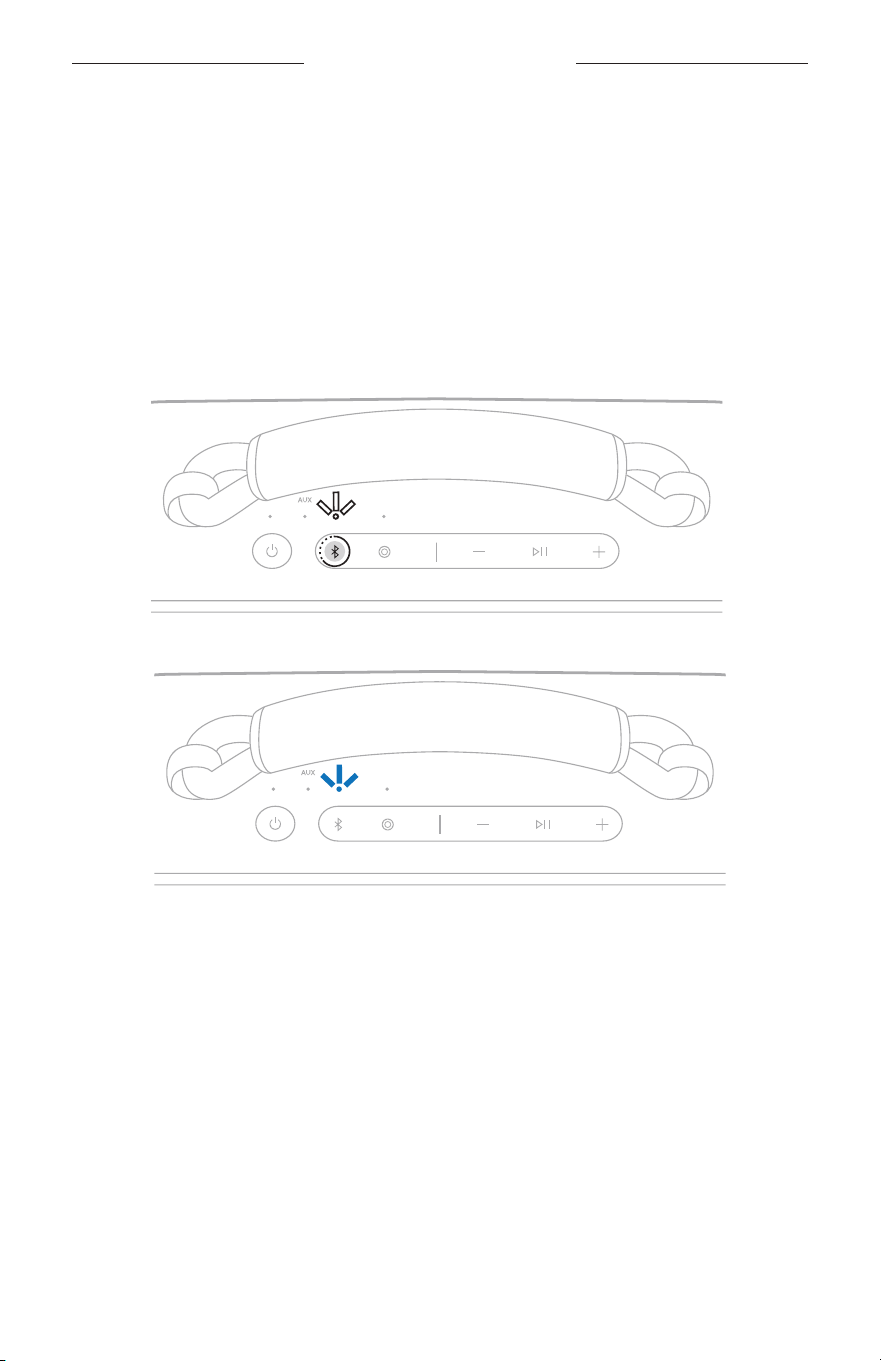
1. Press the Bluetooth buon l and release to hear which device is
currently connected.
2. Within 2 seconds, press the Bluetooth buon l again to hear the name of the next
device in the speaker device list.
SWITCH BETWEEN TWO CONNECTED DEVICES
1. Pause audio on your first device.
2. Play audio on your second device.
16
|
ENG
BLUETOOTH CONNECTIONS
DISCONNECT A DEVICE
Use the device’s Bluetooth seings or the Bose app.
NOTE: Disabling the Bluetooth feature on your device disconnects the speaker and
all other Bluetooth-connected products.
CLEAR THE SPEAKER DEVICE LIST
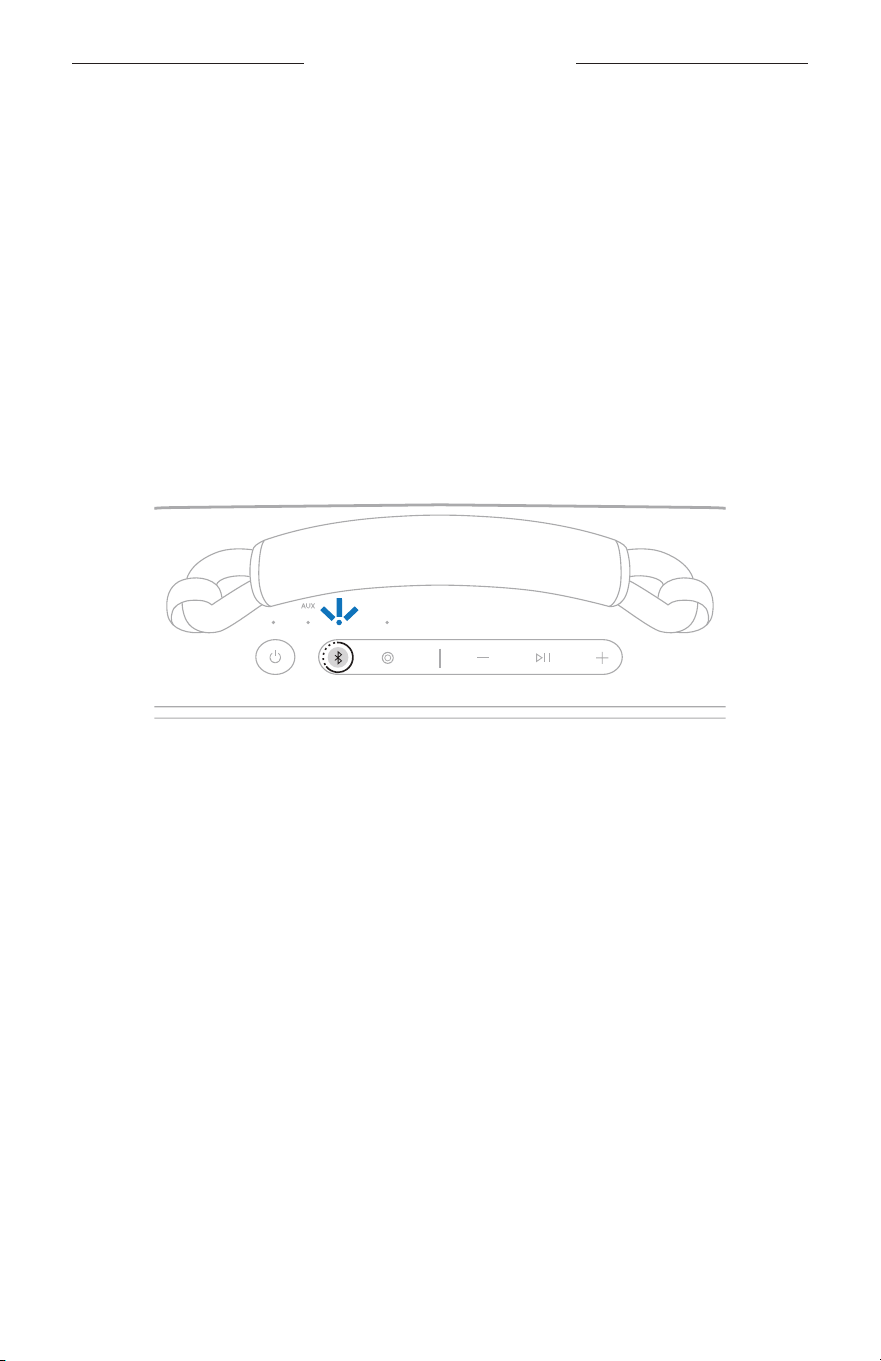
1. Press and hold the Bluetooth buon l for 15 seconds until you hear “Bluetooth
device list cleared. Ready to connect” and the Bluetooth light blinks white twice.
The Bluetooth light slowly blinks blue.
2. Delete the speaker from your device’s Bluetooth seings.
All devices are cleared, and the speaker is ready to connect (see page 12).
17
|
ENG
BLUETOOTH CONNECTIONS
ANDROID DEVICES ONLY
If you have an Android device, you can access the following additional
connection features.
Connect using Fast Pair
In one tap, the speaker enables quick, eortless Bluetooth pairing with your
Android device.
NOTES:
• To use Fast Pair, you need an Android device running Android 6.0 or higher.
• Your Android device must have the Bluetooth and Location features enabled.
1. Press and hold the Bluetooth buon l until you hear “Ready to connect” and the
Bluetooth light slowly blinks blue.
NOTE: If a device is already connected, you hear “Ready to connect
another device.”
2. Place the speaker next to your Android device.
A notification displays on your device prompting you to pair the speaker.
NOTE: If you don’t see a notification, check that notifications are enabled for the
Google Play Services app on your device.
3. Tap the notification.
Once the speaker is connected, a notification appears confirming that the
connection is complete.
NOTE: You can also tap the buon on the notification to download the Bose app
and finish seing up the speaker.

18
|
ENG
BLUETOOTH CONNECTIONS
Snapdragon Sound technology
Bose SoundLink Max Portable Speaker features Snapdragon Sound technology.
Snapdragon Sound optimizes Qualcomm® audio technologies across connected
devices to ensure the best sound quality, connection stability, and latency for your
streaming audio.
To experience Snapdragon Sound, you need a Snapdragon Sound-certified device,
such as a compatible Android device. Once you connect the speaker, your device will
automatically stream audio using the aptX Adaptive Bluetooth codec.
NOTE: To see which Snapdragon Sound features the speaker supports and check if
your device is compatible, visit: support.Bose.com/sl-maxsupport.Bose.com/sl-max
19
|
ENG
SPEAKER CONTROLS
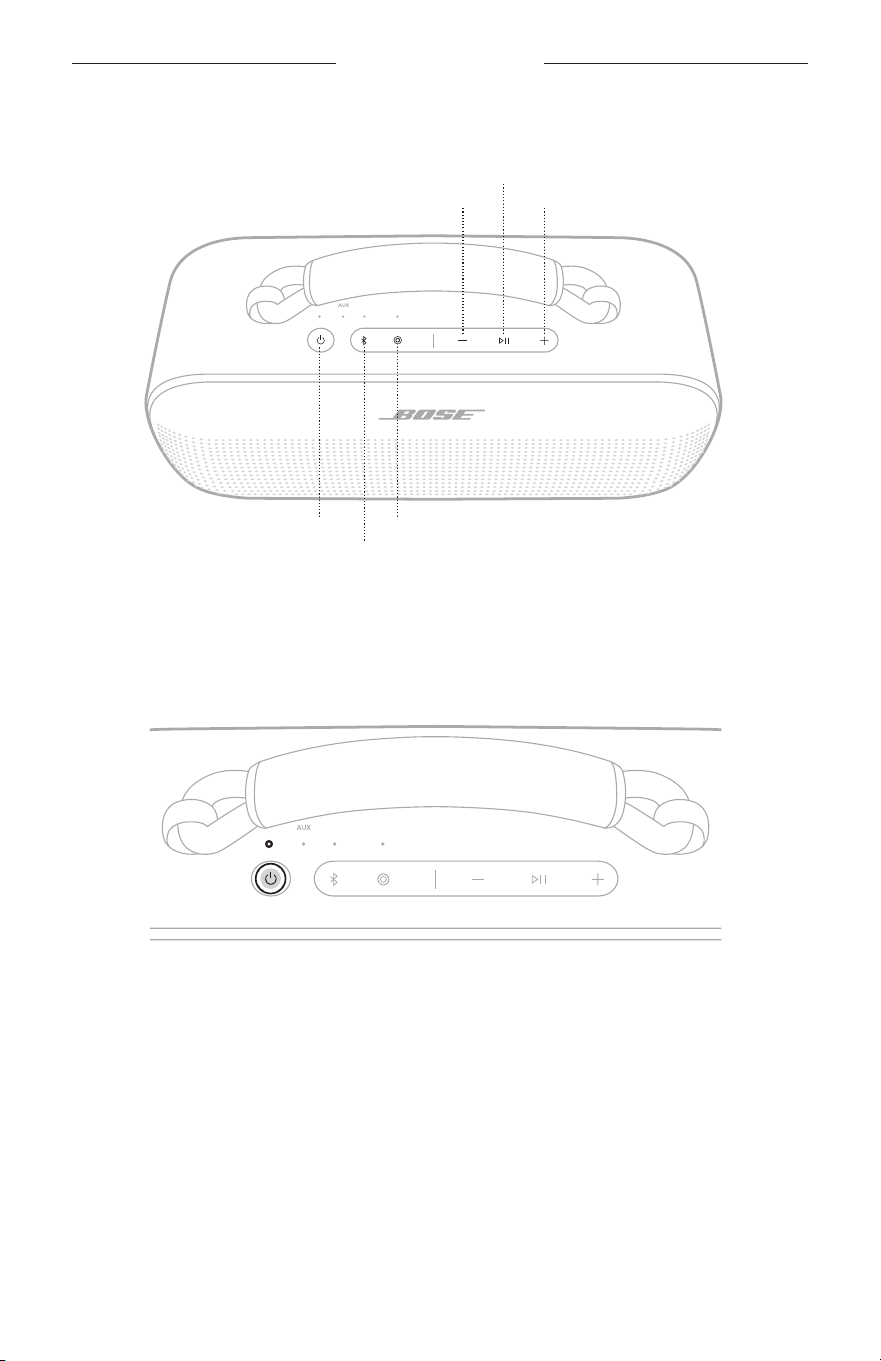
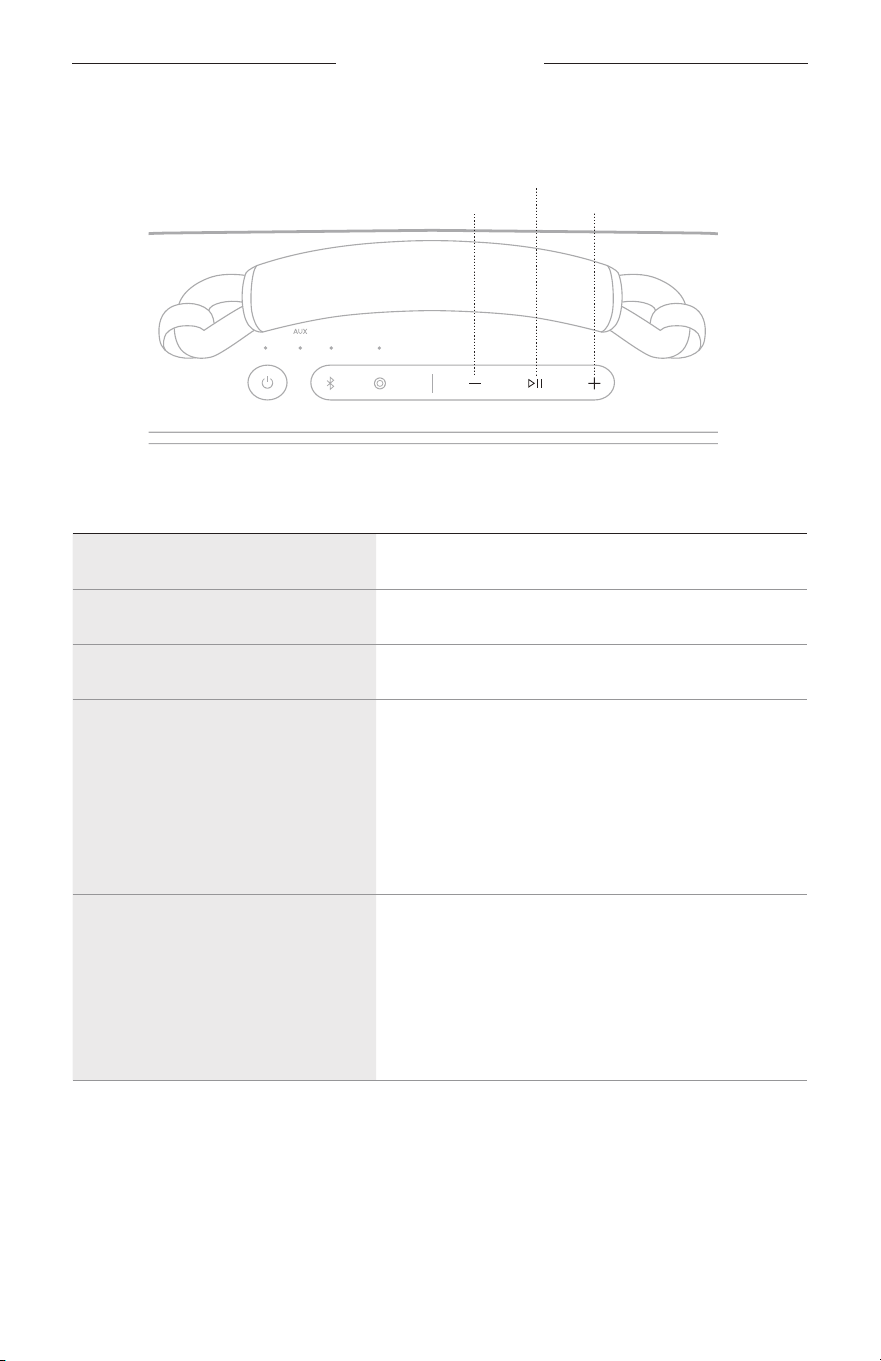
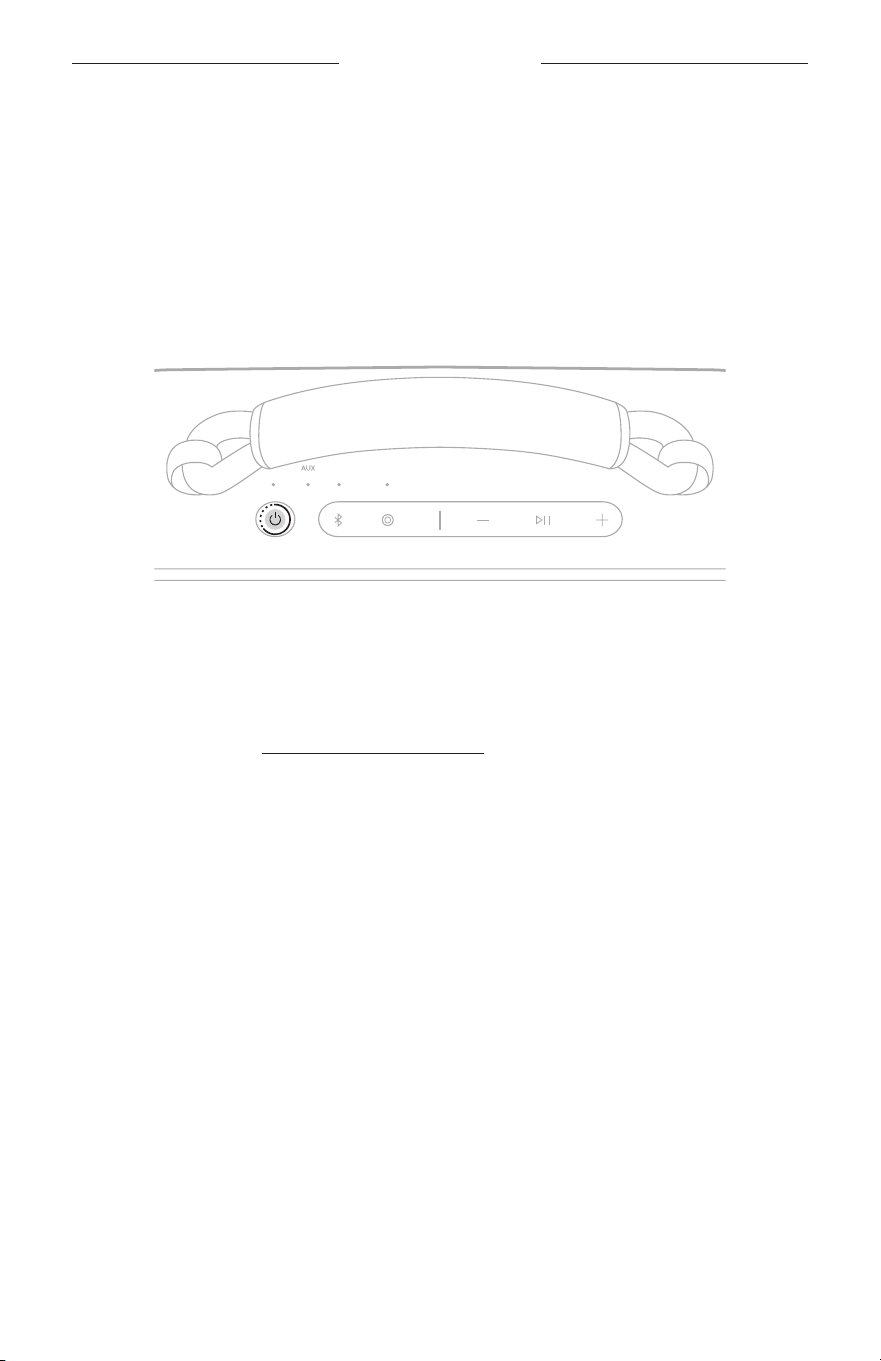
Controls are located on the top of the speaker.
Power buon
Volume down
Volume up
Bluetooth buon
Play/Pause buon
Shortcut buon
POWER ON/OFF
Press the Power buon I.
When powered on, a voice prompt announces the baery level. The Power light glows
according to the current baery level (see page 27).

20
|
ENG
SPEAKER CONTROLS
Auto-off timer
The auto-o timer conserves the baery when the speaker is operating on baery
power. The speaker switches o when audio has stopped and buons have not been
pressed for 20 minutes.
To wake the speaker, press the Power buon I or the Bluetooth buon l.
NOTE: To change the timer seing, use the Bose app. You can access this option
from the Seings menu.
Disable the auto-o timer
Press and hold the Play/Pause buon F and the Volume up buon H simultaneously.
You hear “Auto-o disabled.”
Repeat to re-enable the auto-o timer.
TIP: You can also disable the auto-o timer using the Bose app.
21
|
ENG
SPEAKER CONTROLS
MEDIA PLAYBACK AND VOLUME
Volume down
Volume up
Play/Pause buon
FUNCTION WHAT TO DO
Play/Pause Press F.
Skip forward Double-press F.
Skip backward Triple-press F.
Volume up
Press H.
NOTES:
• To quickly increase the volume, press and hold H.
• When the maximum volume is reached, the
Bluetooth light or AUX light (depending on your
source) blinks white 2 times.
Volume down
Press z.
NOTES:
• To quickly decrease the volume, press and hold z.
• When the minimum volume is reached, the
Bluetooth light or AUX light (depending on your
source) blinks white 2 times.
TIP: You can also increase or decrease the volume using the volume controls on
your device or in the Bose app. You can access this option on the product
control screen.
22
|
ENG
SHORTCUTS
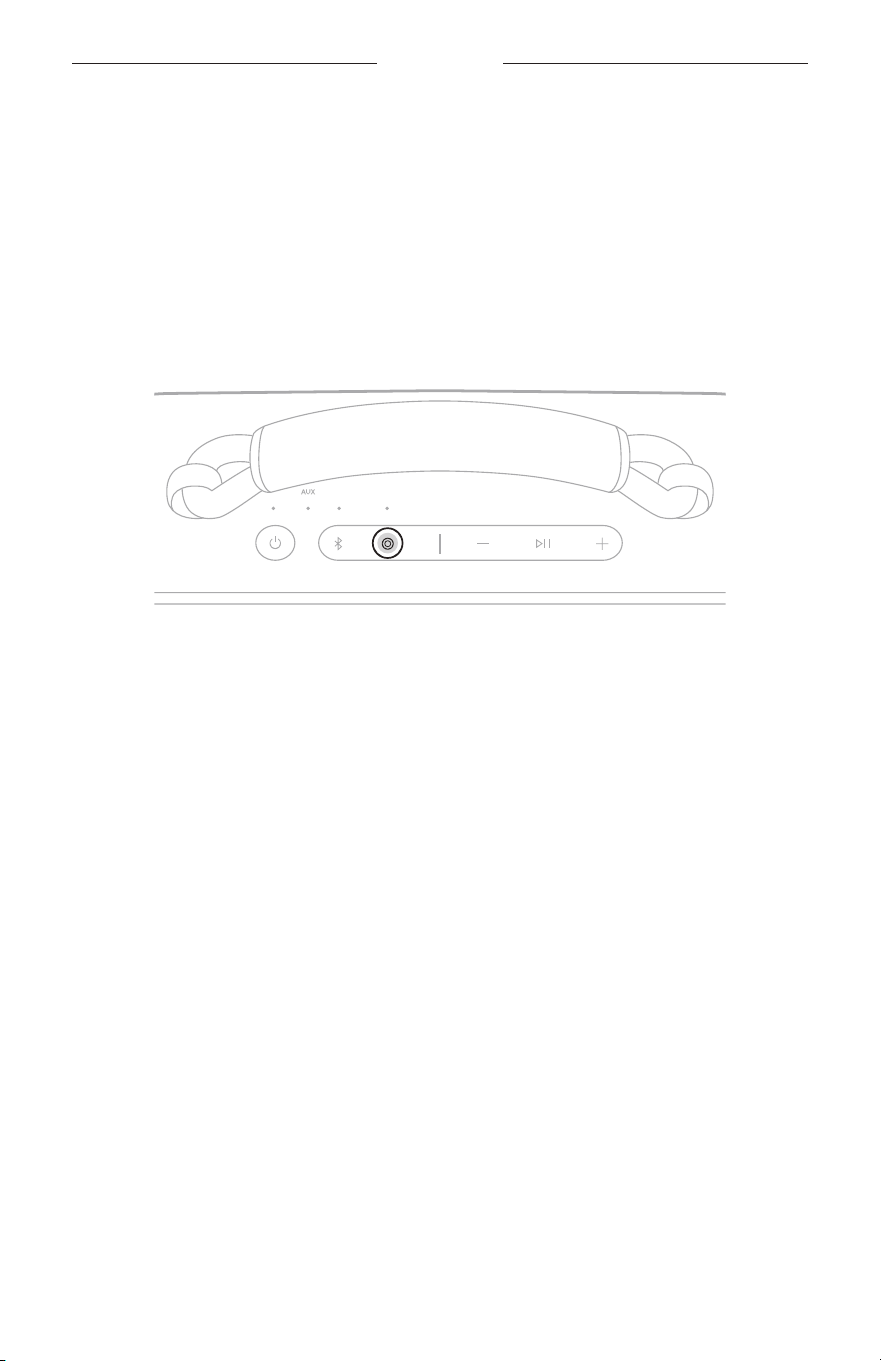
The programmable Shortcut buon E enables you to quickly and easily access one
of the following functions:
• Link two Bose Bluetooth Speakers (default) (see page 31)
• Switch to wired connection (see page 30)
• Access Spotify Tap (see page 23)
USE YOUR SHORTCUT
Press the Shortcut buon E.
CHANGE OR DISABLE YOUR SHORTCUT
To change or disable your shortcut, use the Bose app. To access this option, tap
Shortcut on the product control screen.
23
|
ENG
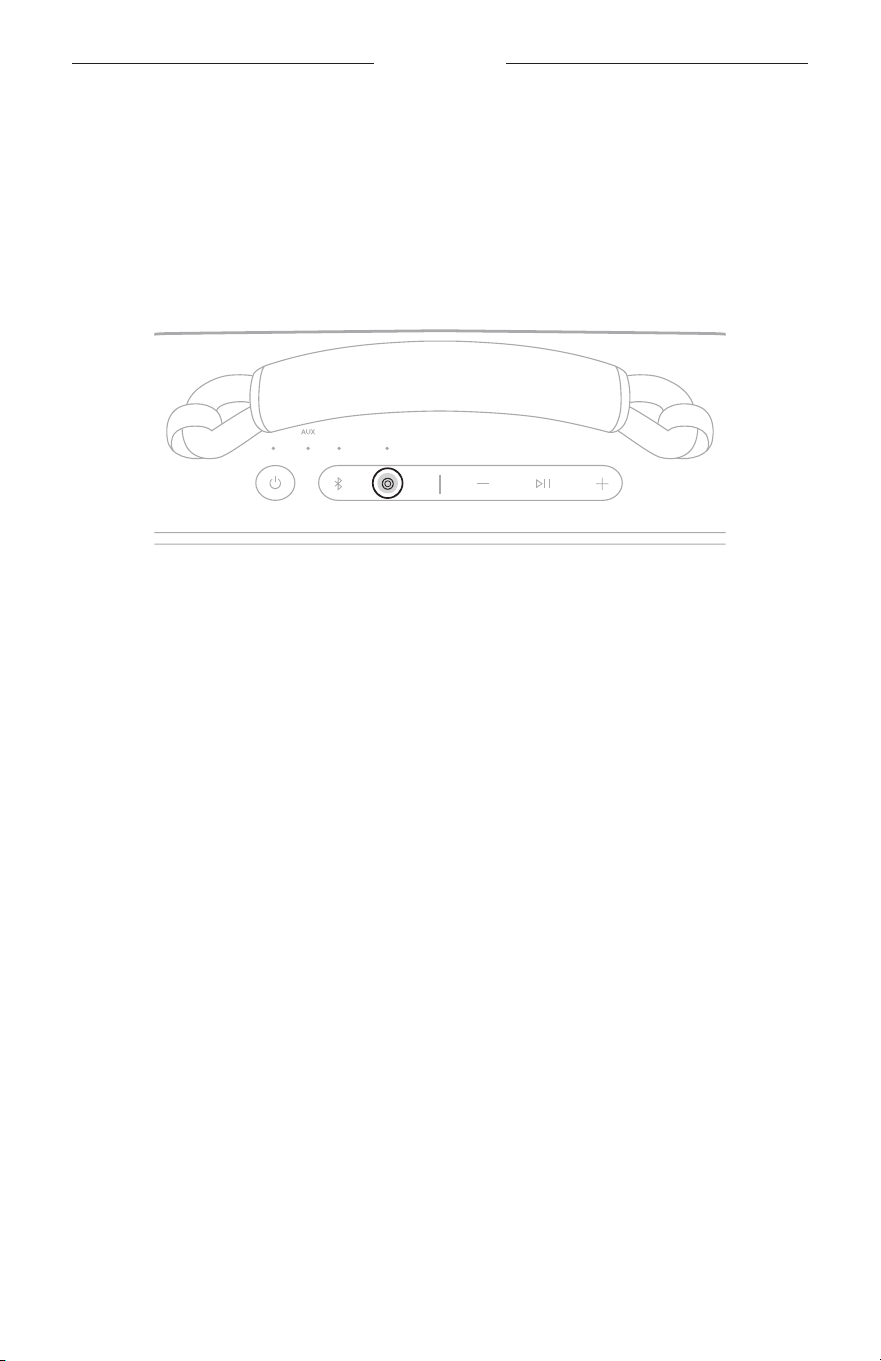
SPOTIFY TAP
Spotify Tap is music to your ears, quite literally. Get the tunes playing with a
simple gesture.
NOTE: To use Spotify Tap, it must be set as your shortcut in the Bose app and the
Spotify app must be up to date.
1. Press the Shortcut buon E to play a recommendation based on your
listening taste.
2. Press E again for the next recommendation made just for you.
24
|
ENG
BATTERY
CHARGE THE SPEAKER
CAUTION: Do not aempt to charge the speaker while the speaker is wet. Doing
so may cause damage to the speaker. The speaker is waterproof, but the
USB-C port must be fully dried out before charging. If moisture is
detected, the Power light slowly blinks white and amber (see page 27).
NOTE: Make sure you’re using the Bose-provided USB-C cable or a similar USB-C
cable providing a minimum of 5V p, 3A.
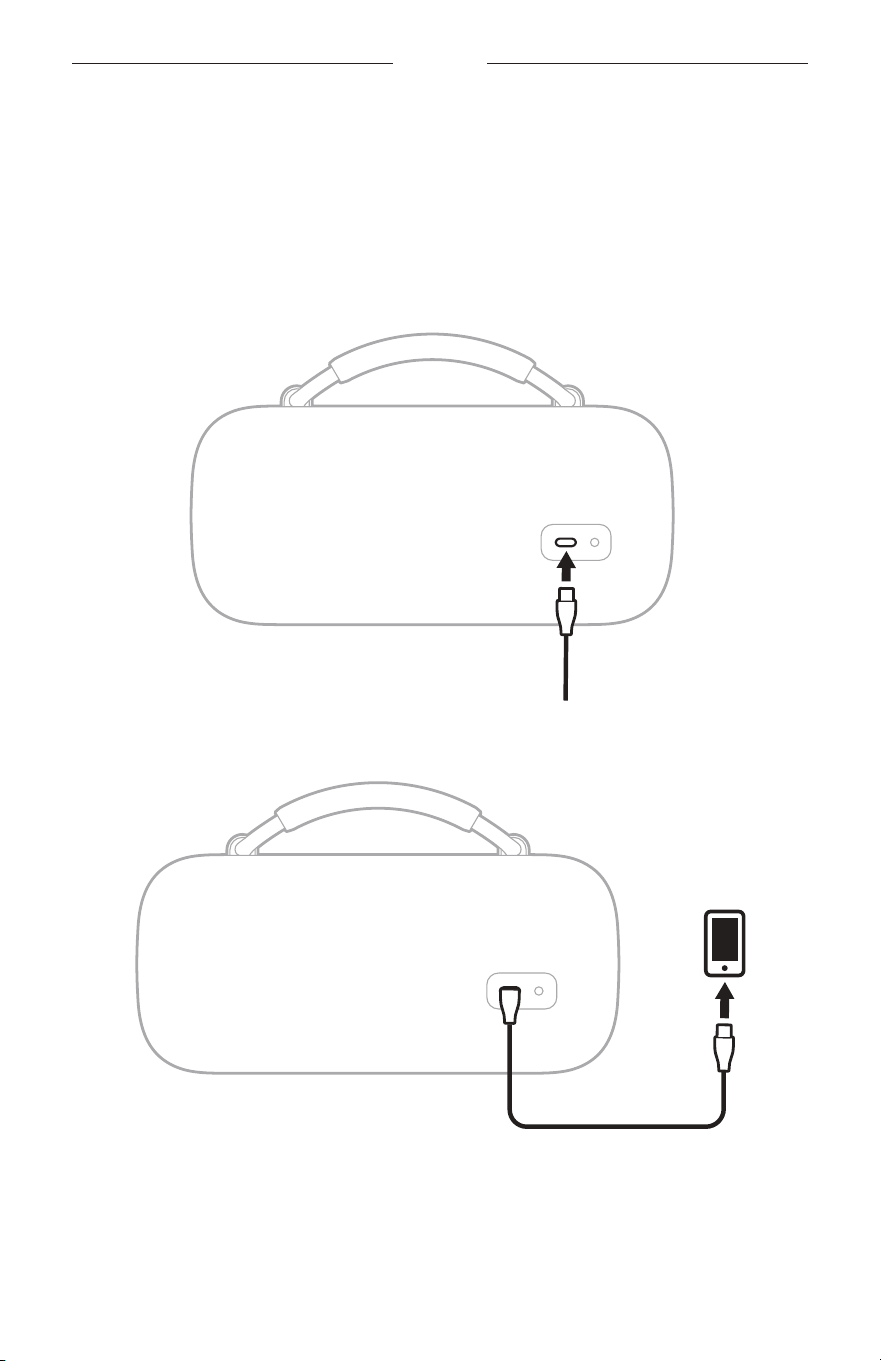
1. Connect one end of the USB-C cable to the USB-C port on the back of
the speaker.
2. Connect the other end of the cable to a power source such as a USB-C power
supply or a computer.
The Power light slowly pulses white. When the baery is fully charged, the Power
light glows solid white.

25
|
ENG
BATTERY
Charging time
Allow up to 5 hours to fully charge the baery.
1
A full charge powers the speaker up to 20 hours.
2
At maximum volume, the baery
lasts up to 3 hours.
3
Charging time and baery performance vary with the USB power supply capability,
music content, speaker volume, and if charging an external device.
Hear the battery level
Each time you power on the speaker, a voice prompt announces the baery level.
When the speaker is in use, a voice prompt announces if the baery needs to
be charged.
While using the speaker, press and hold the Power buon I until you hear a voice
prompt announce the baery level.
View the battery level
The Power light glows according to the baery level (see page 27).
TIP: You can also view the baery level using the Bose app. You can access this
option on the product control screen.
All tests conducted by Bose with production-representative Bose SoundLink Max Portable Speaker.
1 With 5V/3A (15W) USB-C capable power supply, from 0% to 100% while unit is in standby mode. Charging times will vary when
not using the recommended 15W supply.
2 Using Bluetooth A2DP audio at 65% volume and between 68° F – 77° F (20° C – 25° C), with default EQ using a mix of Top 50
Global tracks as of October 2023 and no charging of external devices. Baery performance varies with individual user
conditions such as audio content, loudness, and environmental temperature.
3 Using Bluetooth A2DP audio at 100% volume and between 68° F – 77° F (20° C – 25° C), with default EQ using a mix of Top 50
Global tracks as of October 2023 and no charging of external devices. Baery performance varies with individual user
conditions such as audio content, loudness, and environmental temperature.
26
|
ENG
BATTERY
CHARGE YOUR DEVICE
CAUTION: Do not aempt to charge your device while the speaker is wet. Doing so
may cause damage to the speaker. The speaker is waterproof, but the
USB-C port must be fully dried out before charging. If moisture is
detected, the Power light slowly blinks white and amber (see page 27).
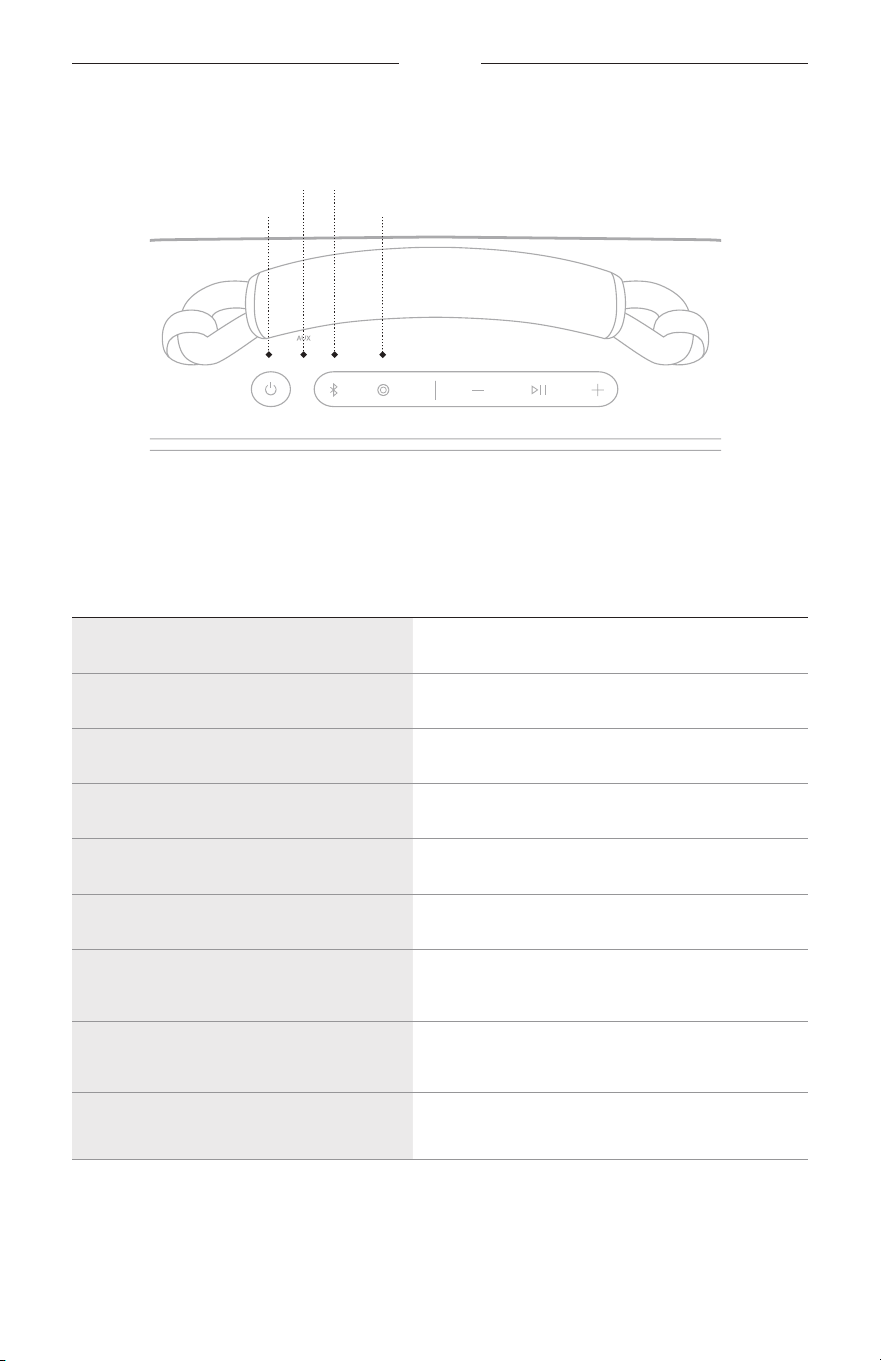
1. Connect one end of the USB-C cable to the USB-C port on the back of
the speaker.
2. Connect the other end of the cable to the USB-C port on your device.
Charging status displays on your device.
27
|
ENG
STATUS
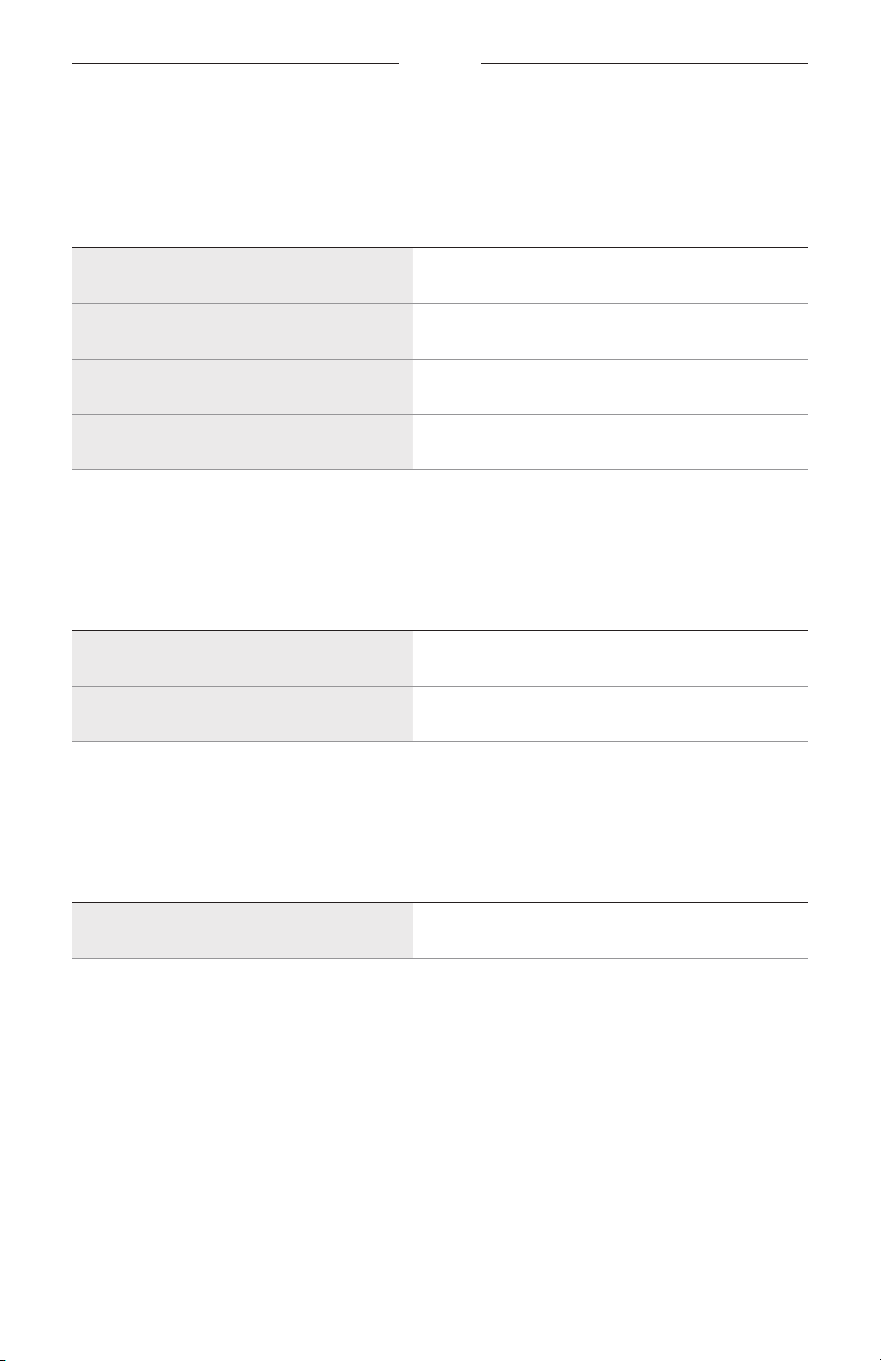
The Power, AUX, Bluetooth, and Shortcut lights are located on the top of the speaker.
Power light
AUX light
Bluetooth light
Shortcut light
POWER LIGHT
Shows the baery, charging, update, and error status.
LIGHT ACTIVITY SYSTEM STATE
Solid white Full charge
Solid amber Low charge
Blinks amber Need to charge
Slowly pulses white Charging
Blinks white 3 times (repeated) Updating software
Quickly blinks white (3 seconds) Restore complete
Slowly blinks white and amber
(alternating)
Moisture detected - fully dry the USB-C port
before charging
Blinks amber 3 times (repeated) Failed baery - contact Bose customer service
Quickly blinks white and amber
(alternating)
Error - contact Bose customer service
28
|
ENG
STATUS
BLUETOOTH LIGHT
Shows the Bluetooth connection status.
LIGHT ACTIVITY SYSTEM STATE
Slowly blinks blue Ready to connect
Quickly blinks blue Connecting
Solid white Connected
Blinks white 2 times Device list cleared
SHORTCUT LIGHT
Shows the status of speakers when linking is set as the shortcut.
LIGHT ACTIVITY SYSTEM STATE
Slowly blinks white Speakers are linking
Solid white Speakers are linked
AUX LIGHT
Shows the AUX connection status.
LIGHT ACTIVITY SYSTEM STATE
Solid white Connected
29
|
ENG
VOICE PROMPTS
Voice prompts guide you through the Bluetooth connection process, announce the
baery level, and identify connected devices.
TIP: You can easily manage voice prompts using the Bose app. Access this
option from the Seings menu.
PRE-INSTALLED LANGUAGES
The following languages are pre-installed on the speaker:
• English • German • Japanese
• Spanish • Italian • Cantonese
• French • Mandarin
CHANGE THE LANGUAGE
To change the voice prompt language, use the Bose app. You can access this option
from the Seings menu.
DISABLE VOICE PROMPTS
Press and hold the Shortcut buon E and Volume down buon z simultaneously
until you hear “Voice prompts o.”
NOTE: Repeat to re-enable voice prompts.
30
|
ENG
WIRED CONNECTION
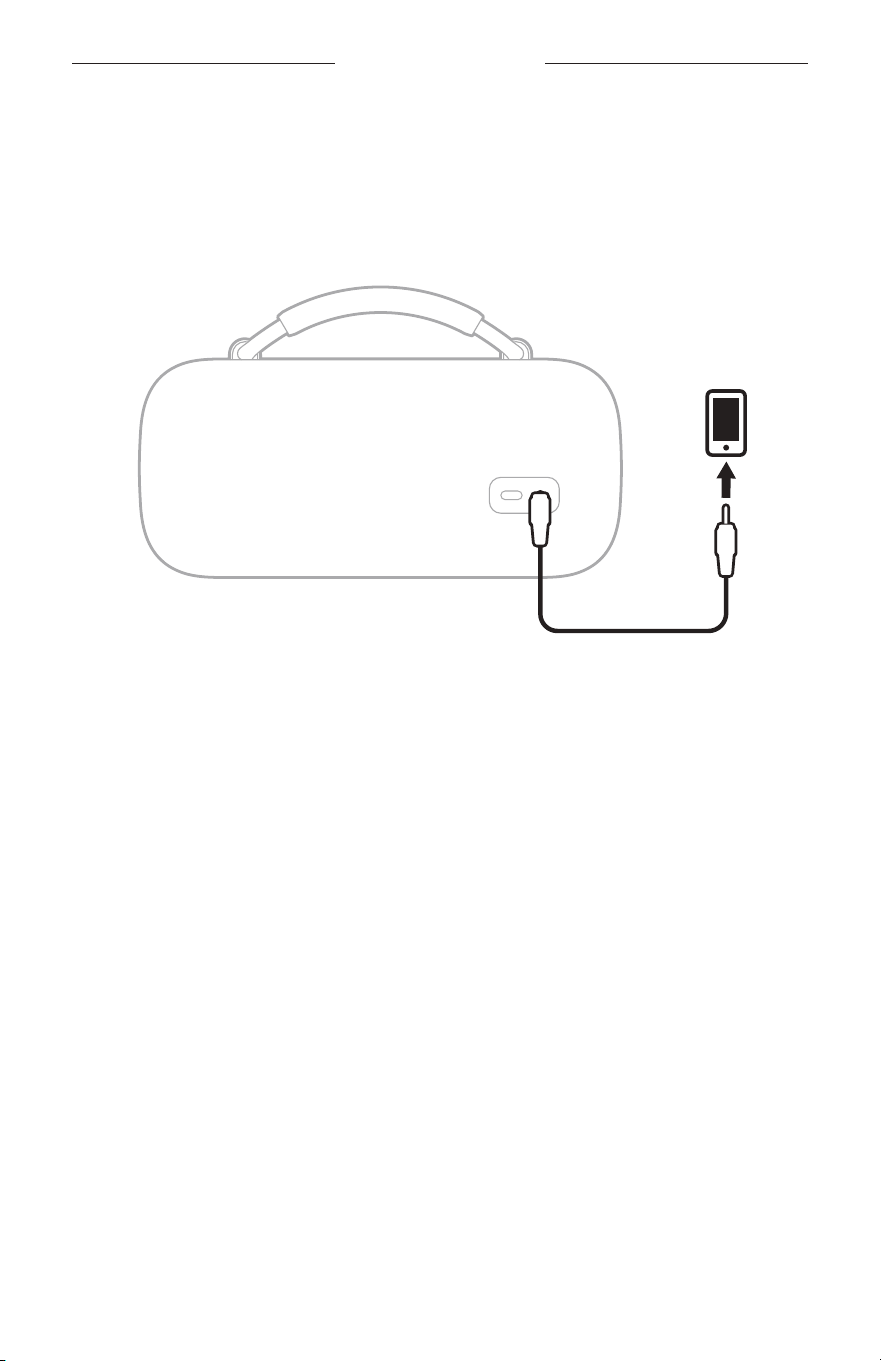
CONNECT AN AUDIO CABLE
You can connect an audio cable (not provided) to the speaker to listen to audio on
your device.
Connect one end of an audio cable to the 3.5 mm port on the back of the speaker and
the other end to the port on your device.
The AUX light glows solid white.
NOTE: To switch to a Bluetooth connection, press and hold the Bluetooth buon l.
To switch back to a wired connection, disconnect then reconnect the
audio cable.

31
|
ENG
CONNECT BOSE PRODUCTS
LINK TWO BOSE BLUETOOTH SPEAKERS
For a more immersive music experience, you can sync your Bose SoundLink Max
Portable Speaker with another compatible Bose Bluetooth speaker and play the same
audio from both speakers in Stereo mode or Party mode.
• Stereo mode (left speaker and right speaker play separately)
• Party mode (left speaker and right speaker play in unison)
NOTES:
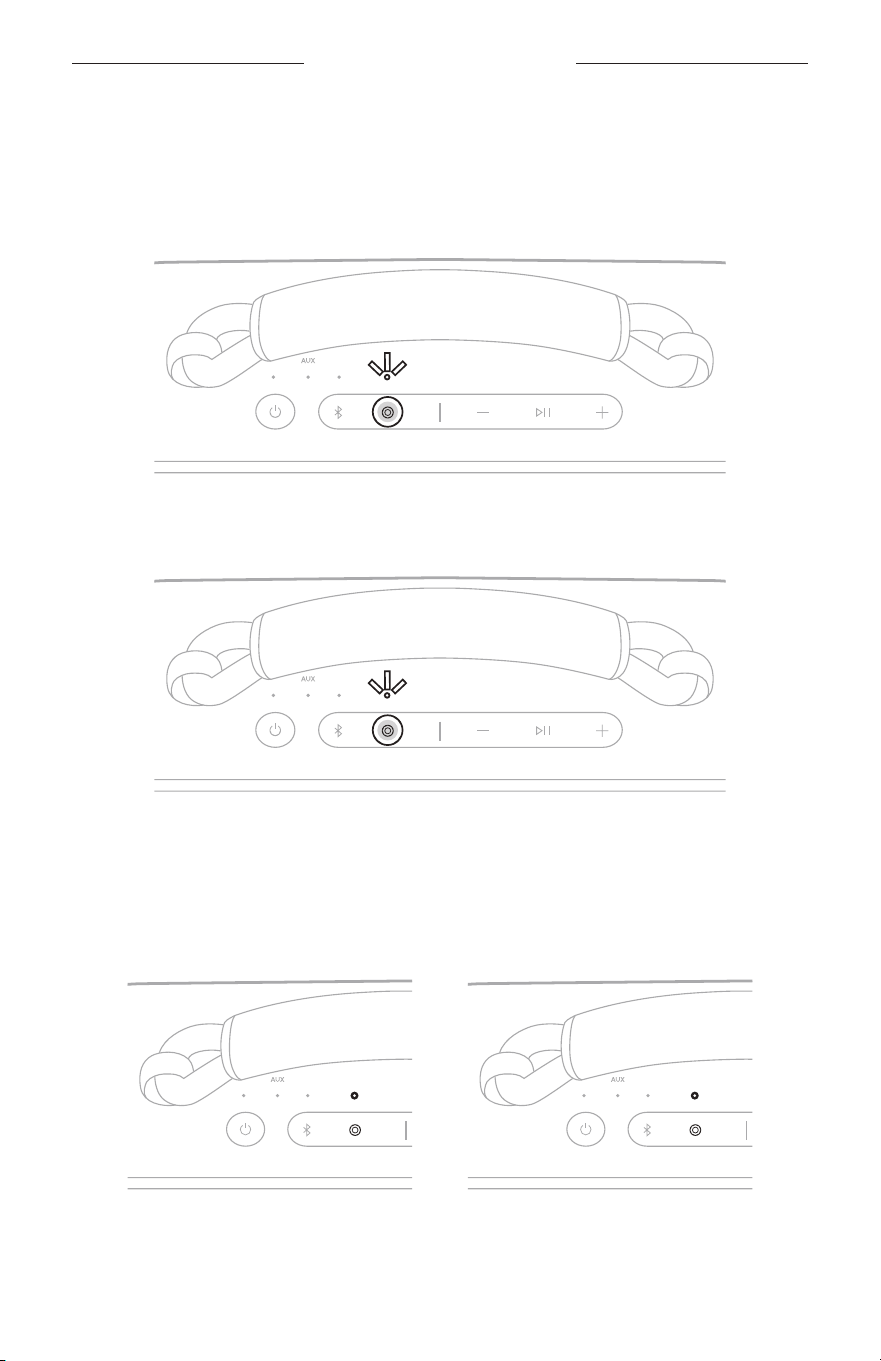
• The Shortcut buon E is set by default to link two Bose Bluetooth speakers.
• You can link to only one other speaker at a time.
• Make sure that the two speakers are within 30 ft (9 m) of each other.
• Make sure that the two speakers are within 30 ft (9 m) of the streaming device.
• For an optimal experience, position the speakers in the same room or outdoor area
with no obstructions between them. Performance may vary based on device,
distance, and environmental factors.
Compatible products
You can link the Bose SoundLink Max Portable Speaker to any Bose Bluetooth speaker
that has a Shortcut buon.
32
|
ENG
CONNECT BOSE PRODUCTS
Link using the product controls
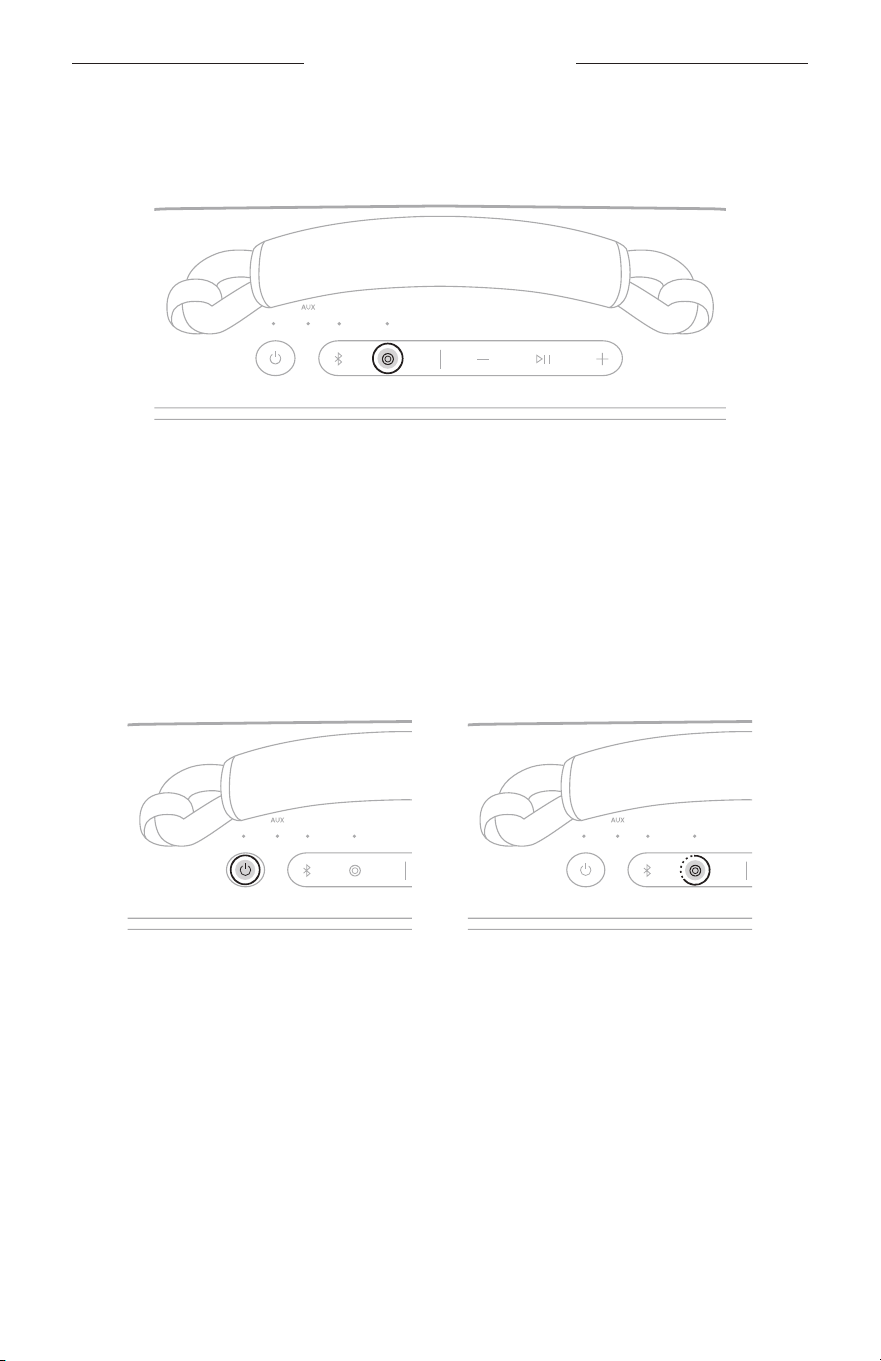
1. On the speaker, press the Shortcut buon E.
A voice prompt directs you to press the Shortcut buon on a second speaker. The
Shortcut light slowly blinks white.
2. On a second compatible Bose Bluetooth speaker, press the Shortcut buon E.
The Shortcut light slowly blinks white.
Once the two speakers are linked, a voice prompt announces the mode on both
speakers. The Shortcut light on both speakers glows solid white.
NOTE: If the speakers are the same model you hear “Stereo mode,” followed by
“Left” on the primary speaker and “Right” on the secondary speaker. If they
are dierent models, you hear “Party mode” on both speakers.
33
|
ENG
CONNECT BOSE PRODUCTS
Switch between Stereo mode and Party mode
On either speaker, press the Shortcut buon E.
A voice prompt announces the mode on each speaker.
NOTE: If the speakers are dierent models, you can only play audio in Party mode.
TIP: You can also switch between Stereo mode and Party mode using the Bose app.
You can access this option on the product control screen.
Unlink the speakers
On either speaker, press the Power buon I or press and hold the
Shortcut buon E.
A voice prompt announces the speakers are no longer linked.
TIP: You can also use the Bose app to unlink the speakers. You can access this option
on the product control screen.

34
|
ENG
CONNECT BOSE PRODUCTS
CONNECT TO A BOSE SMART SPEAKER OR SOUNDBAR
With Bose SimpleSync technology, you can connect the speaker to a Bose Smart
Speaker or Bose Smart Soundbar to listen to the same audio in two dierent rooms at
the same time.
NOTE: SimpleSync technology has a Bluetooth range of up to 30 ft (9 m). Walls and
construction materials can aect reception.
Compatible products
You can connect the speaker to any Bose Smart Speaker or Bose Smart Soundbar.
Popular compatible products include:
• Bose Smart Ultra Soundbar/Bose Ultra Soundbar
• Bose Smart Soundbar 900
• Bose Smart Soundbar 700/Bose Soundbar 700
• Bose Smart Soundbar 600
• Bose Soundbar 500
• Bose Smart Speaker 500/Bose Home Speaker 500
• Bose Home Speaker 300
• Bose Portable Smart Speaker/Bose Portable Home Speaker
New products are added periodically. For a complete list and more information, visit:
support.Bose.com/Groupssupport.Bose.com/Groups
35
|
ENG
CONNECT BOSE PRODUCTS
Connect using the Bose app
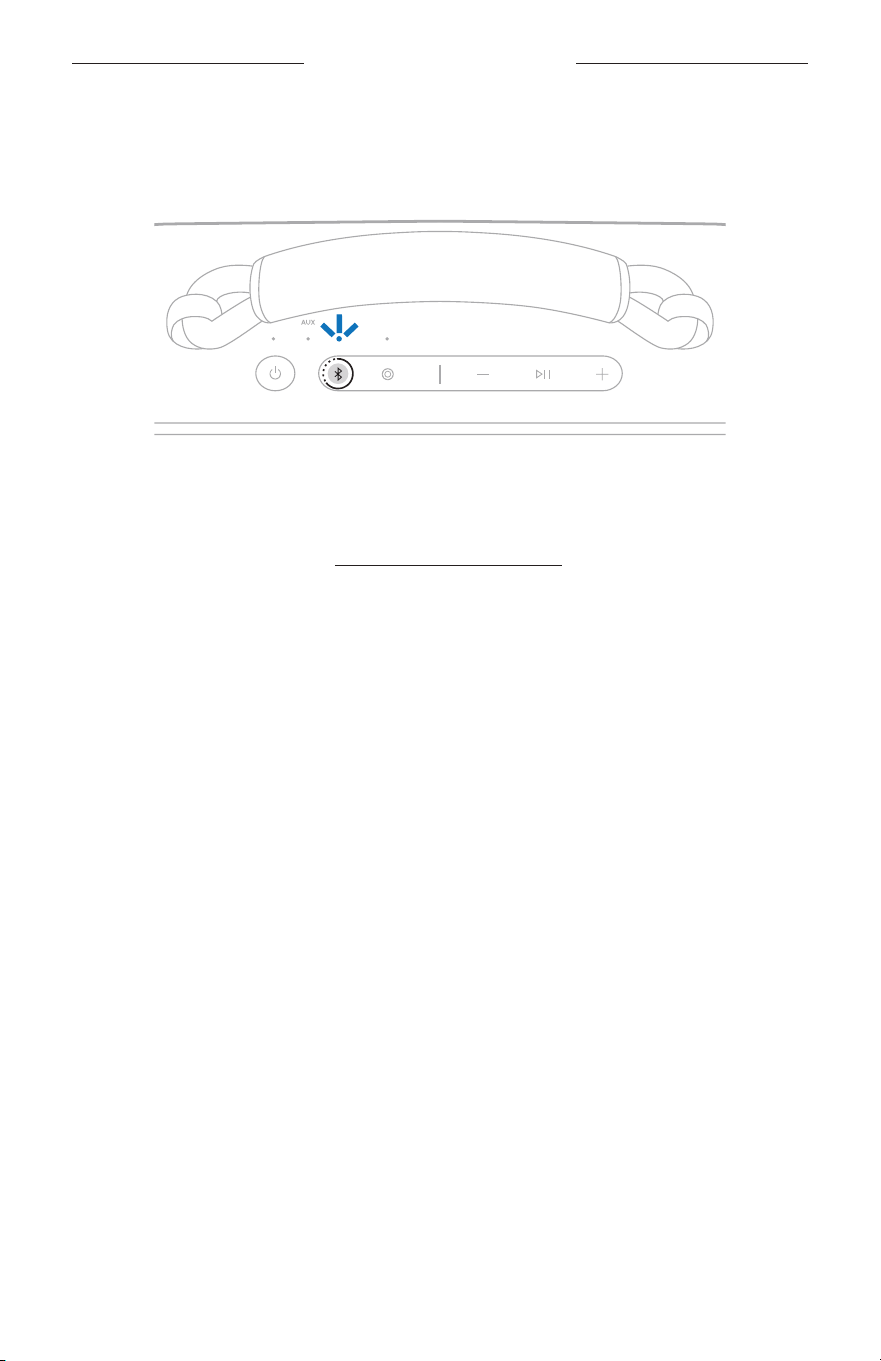
1. Press and hold the Bluetooth buon l until you hear “Ready to connect” and the
Bluetooth light slowly blinks blue.
NOTE: If a device is already connected, you hear “Ready to connect
another device.”
2. Use the Bose app to connect the speaker to a compatible Bose product.
For more information, visit: support.Bose.com/Groupssupport.Bose.com/Groups
NOTES:
• It could take up to 30 seconds to connect.
• Make sure that the speaker is within 30 ft (9 m) of your speaker or soundbar.
• You can connect the speaker to only one product at a time.
36
|
ENG
CONNECT BOSE PRODUCTS
Connect using the product controls
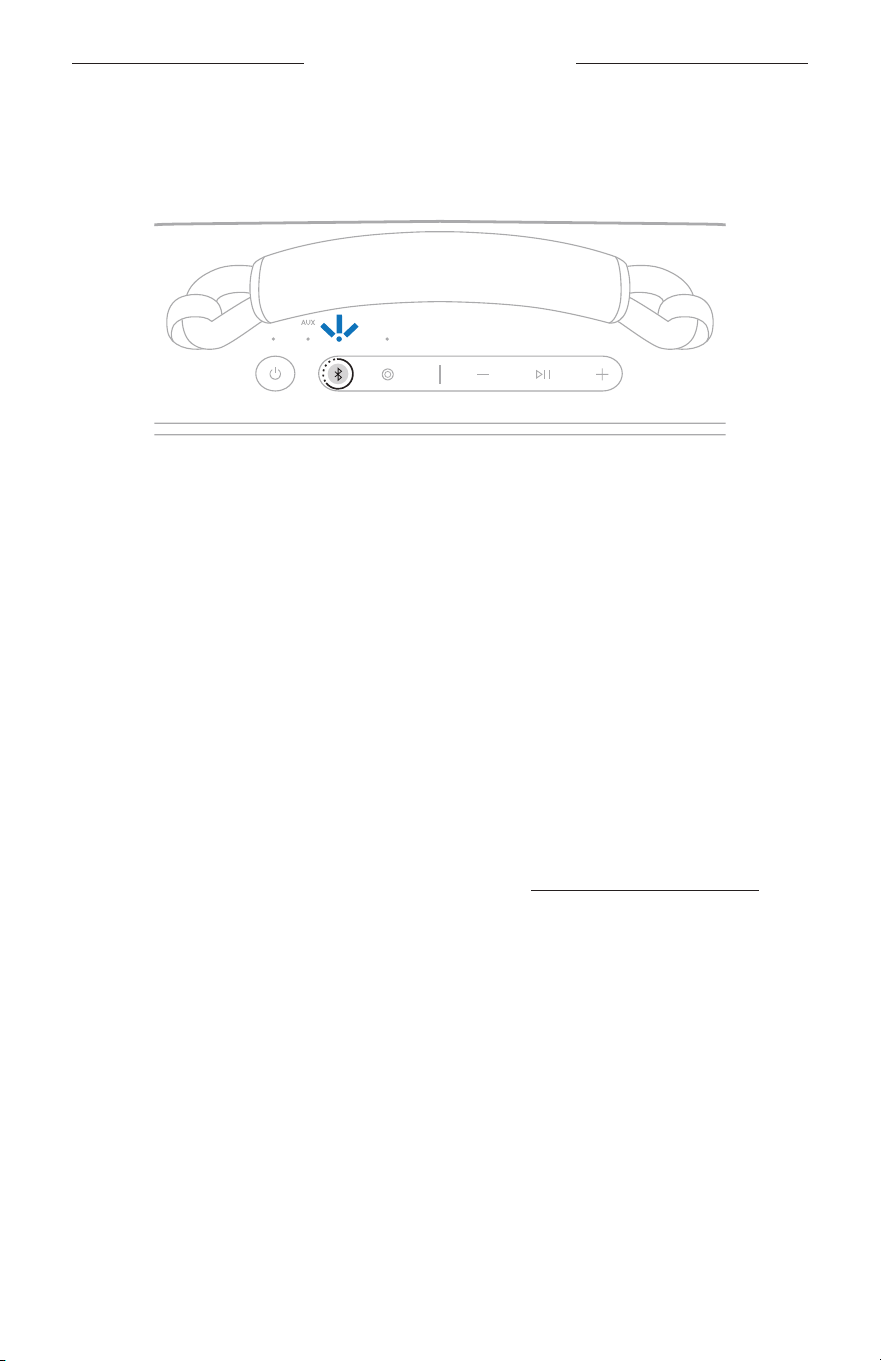
1. Press and hold the Bluetooth buon l until you hear “Ready to connect” and the
Bluetooth light slowly blinks blue.
NOTE: If a device is already connected, you hear “Ready to connect
another device.”
2. On your soundbar remote or the top of your speaker, press and hold the Bluetooth
buon until the light bar or light ring pulses blue.
The speaker connects to your soundbar or speaker, and you hear the same audio
through both devices.
NOTES:
• It could take up to 30 seconds to connect.
• Make sure that the speaker is within 30 ft (9 m) of your speaker or soundbar.
• You can connect the speaker to only one product at a time.
RECONNECT TO A BOSE SMART SPEAKER OR SOUNDBAR
Use the Bose app to reconnect the speaker to a previously-connected
compatible Bose product. For more information, visit: support.Bose.com/Groupssupport.Bose.com/Groups
NOTES:
• Your speaker or soundbar must be within range (30 ft or 9 m) and powered on.
• If the speaker doesn’t connect, see “Speaker doesn’t reconnect to a previously-
connected Bose Smart Speaker or Soundbar” on page 43.
37
|
ENG
PORTABILITY
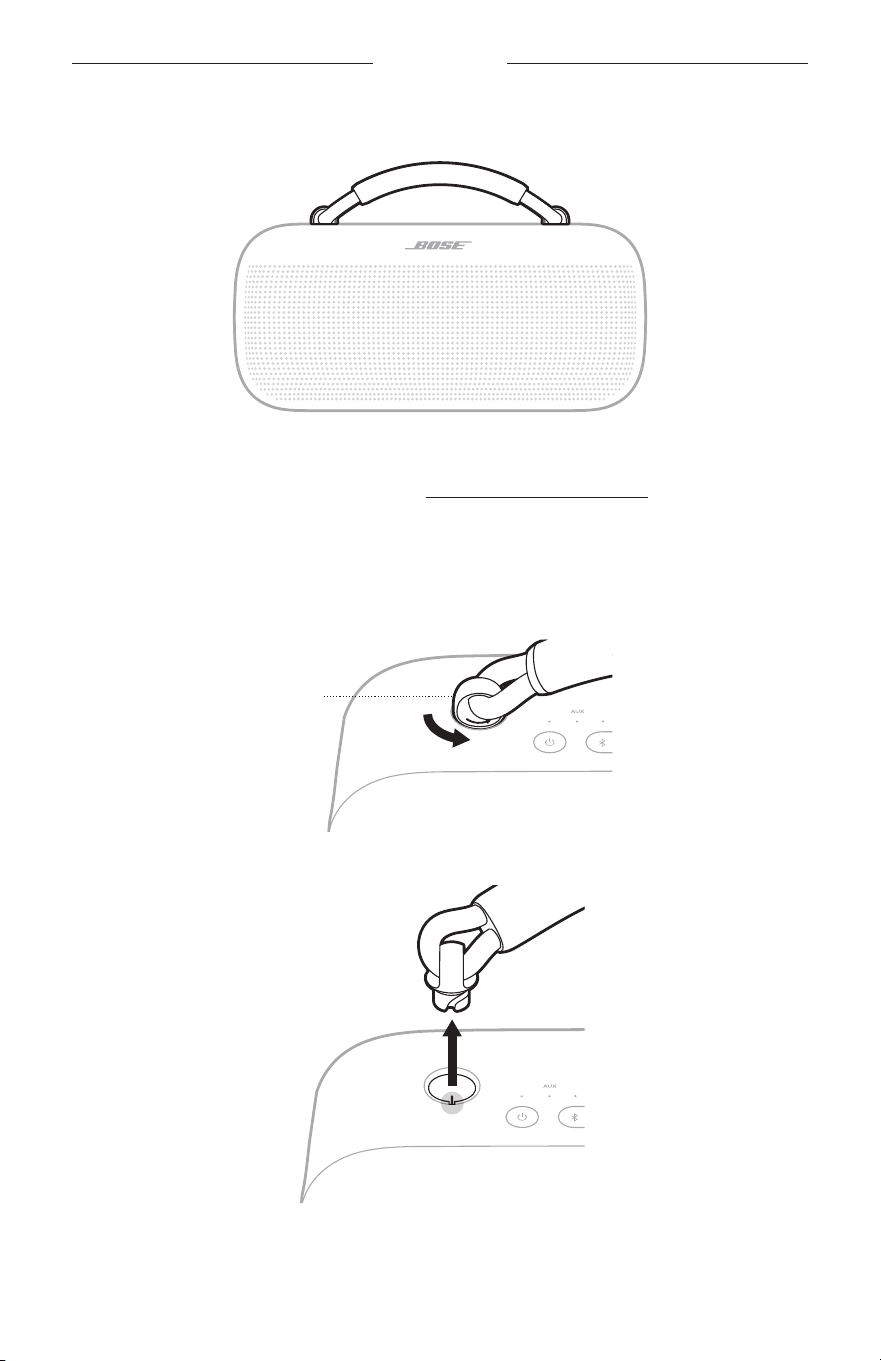
You can use the handle to easily carry the speaker.
You can also replace the handle with a new handle or carry strap.
To order these optional accessories, visit: support.Bose.com/sl-maxsupport.Bose.com/sl-max
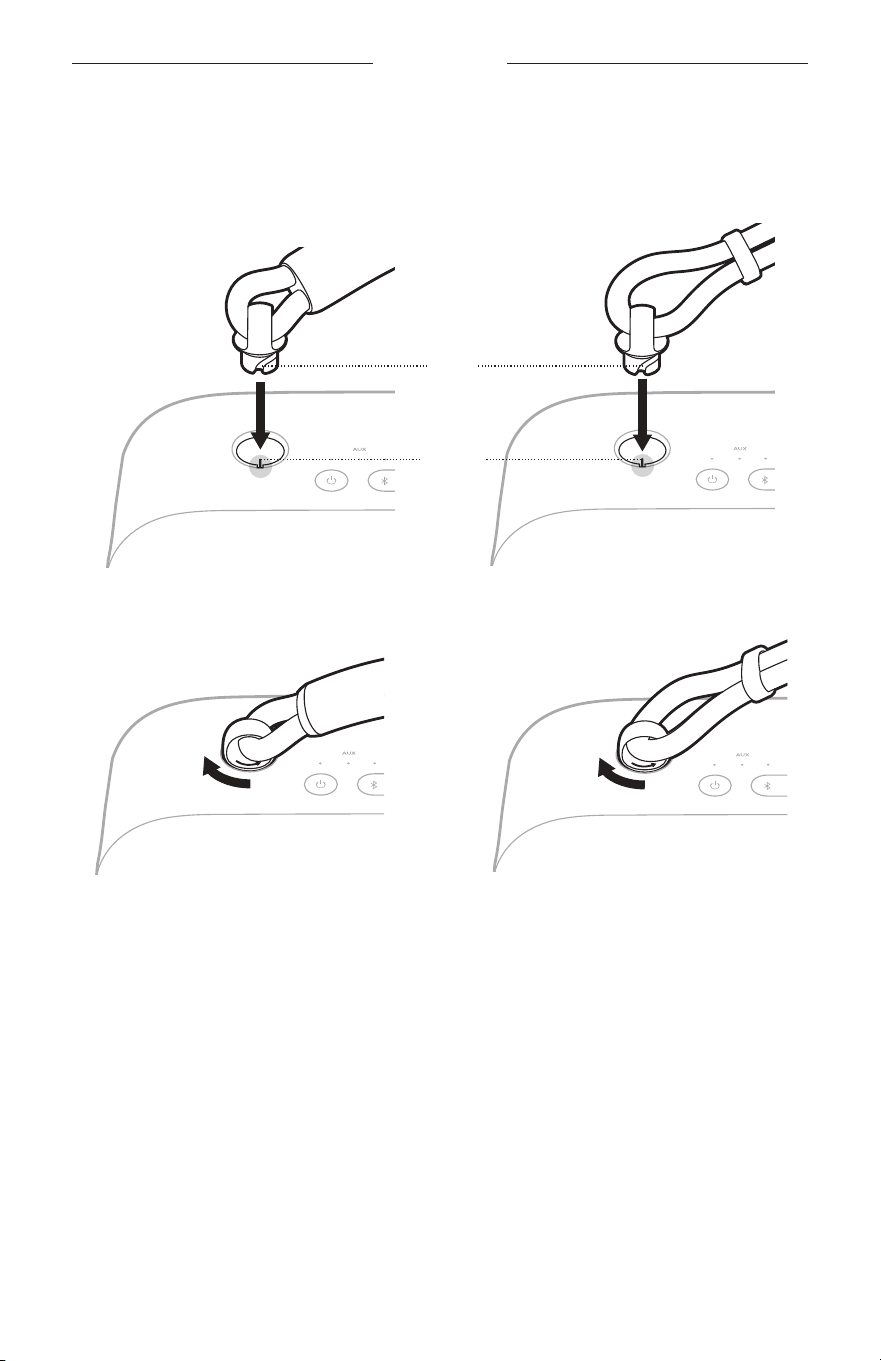
REMOVE THE HANDLE
1. Firmly turn the grommet on the end the handle to the left (counter-clockwise)
11
⁄44 turn.
Grommet
2. Lift to remove the handle from the speaker.
3. Repeat steps 1 – 2 to remove the other side of the handle.
38
|
ENG
PORTABILITY
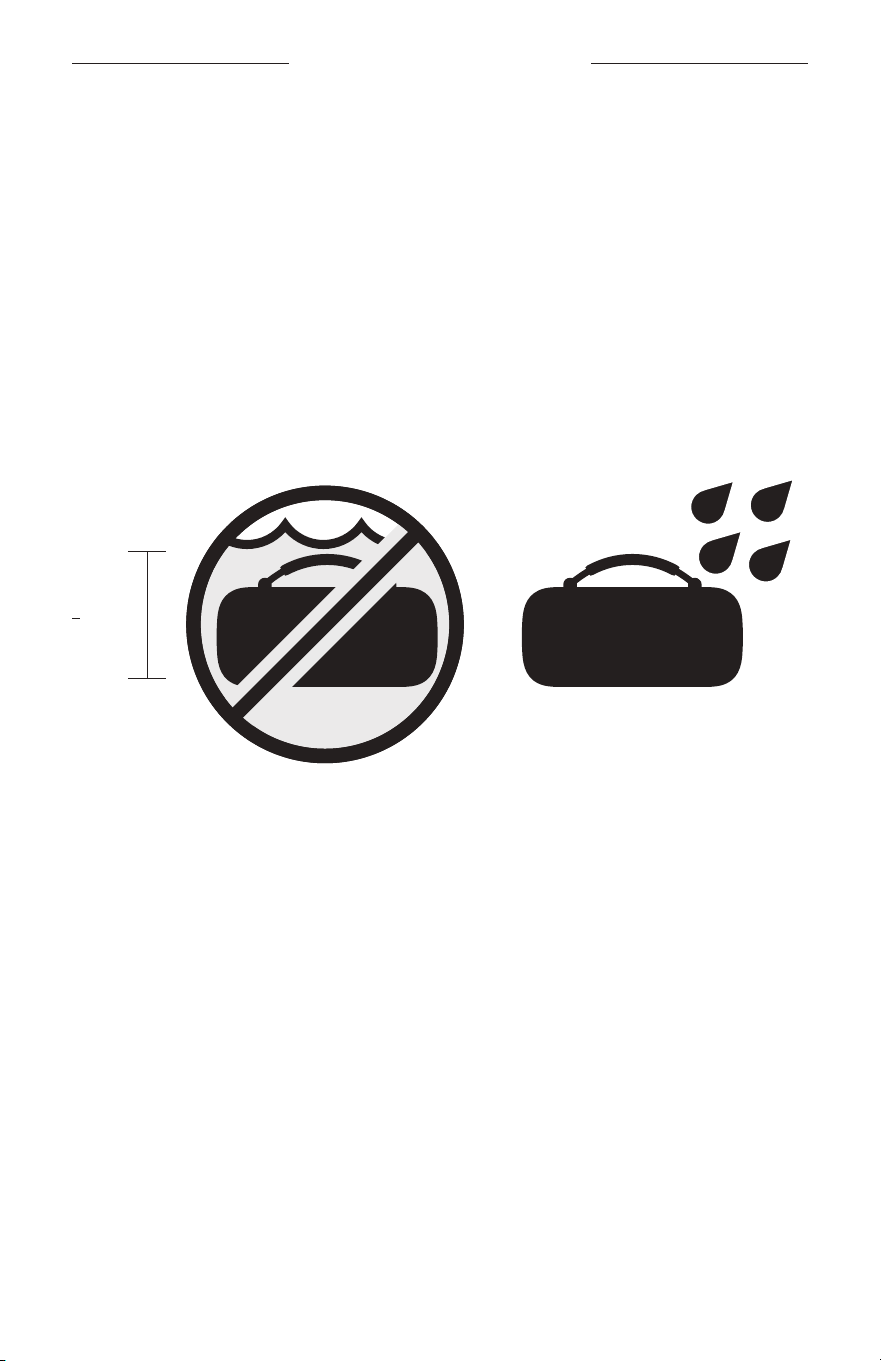
ATTACH A NEW HANDLE OR CARRY STRAP
1. Align the notches in the grommet with the contacts in the opening and place the
grommet inside the speaker.
Notch
Contact
Handle
Carry strap
2. Turn the grommet to the right (clockwise)
11
⁄4 4 turn until you feel a click.
Handle
Carry strap
3. Repeat steps 1 – 2 to aach the other side of the handle or carry strap.
39
|
ENG
WATER AND DUST RESISTANCE
The speaker is waterproof, splash resistant, and dustproof. It’s rated IP67 and IP64.
You can submerge the speaker in water for up to 30 minutes at a depth of up to
3.3 ft (1 m). It can also be used while showering and in the rain or snow.
CAUTIONS:
• Do NOT submerge this speaker in any pool of water deeper than 3.3 ft (1 m).
• Avoid playing audio while the speaker is submerged.
• If the speaker is exposed to salt or chlorinated water, gently rinse with fresh water
following the exposure to remove residue.
• Never aempt to charge the speaker or your device while the speaker is wet. Doing
so may cause damage to the speaker. The speaker is waterproof, but the USB-C
port must be fully dried out before charging. If moisture is detected, the Power light
slowly blinks white and amber (see page 27).
> 3.3 ft
(1 m)

40
|
ENG
CARE AND MAINTENANCE
UPDATE THE SPEAKER
The speaker begins updating automatically when connected to the Bose app and an
update is available. Follow the app instructions. When the update begins, the Power
light blinks white 3 times (repeated) until the update is complete.
You can also update the speaker using the Bose updater website. On your computer,
visit: btu.Bose.combtu.Bose.com and follow the on-screen instructions. When the update begins,
the Power light quickly blinks white for 10 seconds.
CLEAN THE SPEAKER
The speaker may require periodic cleaning.
• Clean the surface of the speaker with a soft, damp cloth (water only). Make sure
the USB-C port is fully dried out before charging. If moisture is detected, the Power
light slowly blinks white and amber (see page 27).
• Do not use any solvents, chemicals, or cleaning solutions containing alcohol,
ammonia, or abrasives.
• If the speaker is exposed to salt or chlorinated water, gently rinse with fresh water
following the exposure to remove residue.
STORE THE SPEAKER
When not in use, store the speaker in a cool place.
CAUTION: Do NOT store the speaker for extended periods when the baery is fully
charged or has a low charge (see page 27).
REPLACEMENT PARTS AND ACCESSORIES
Replacement parts and accessories can be ordered through Bose customer service.
Visit: support.Bose.com/sl-maxsupport.Bose.com/sl-max
LIMITED WARRANTY
The speaker is covered by a limited warranty. Visit our website at
worldwide.Bose.com/Warrantyworldwide.Bose.com/Warranty for details of the limited warranty.
To register your product, visit worldwide.Bose.com/ProductRegistrationworldwide.Bose.com/ProductRegistration for
instructions. Failure to register will not aect your limited warranty rights.
41
|
ENG
TROUBLESHOOTING
TRY THESE SOLUTIONS FIRST
If you experience problems with the speaker:
• Power the speaker o and then on again (see page 19).
• Charge the speaker (see page 24).
• Check the status lights (see page 27).
• Make sure your device supports Bluetooth connections (see page 12).
• Increase the volume on the speaker, your device, and your music app.
• Move your device closer to the speaker (30 ft or 9 m) and away from any
interference or obstructions.
• Connect another device (see page 12).
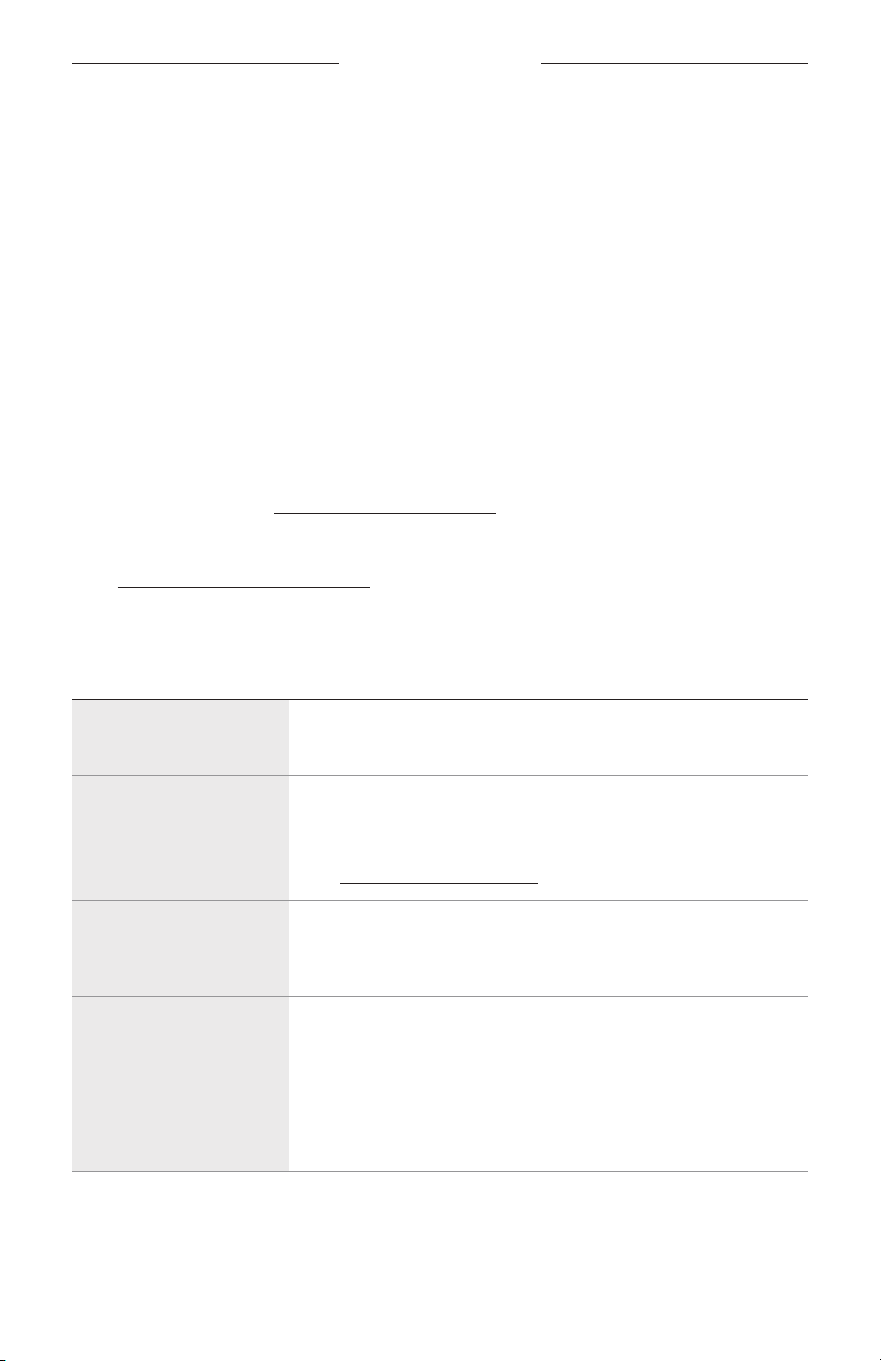
If you couldn’t resolve your issue, see the table below to identify symptoms and
solutions to common problems. You can also access troubleshooting articles, videos,
and other resources at: support.Bose.com/sl-maxsupport.Bose.com/sl-max
If you’re unable to resolve your issue, contact Bose customer service.
Visit: worldwide.Bose.com/contactworldwide.Bose.com/contact
OTHER SOLUTIONS
SYMPTOM SOLUTION
No power (battery)
Baery may be in protection mode or discharged. Connect the
speaker to a power source (see page 24).
Speaker doesn’t
connect with device
Clear the speaker device list (see page 16). Delete the speaker
from the Bluetooth list on your device, including any duplicate
listings labeled LE (Low Energy). Connect again (see page 12).
Visit: support.Bose.com/sl-maxsupport.Bose.com/sl-max to see how-to videos.
Speaker doesn’t
respond to
multi-press functions
Vary the speed of presses.
No sound
Make sure voice prompts are on using the Bose app. Press the
Bluetooth buon l and release to hear the connected device.
Make sure you’re using the correct device.
Use a dierent music source.
If two devices are connected, pause audio on the first device and
play audio on the other device.
42
|
ENG
TROUBLESHOOTING
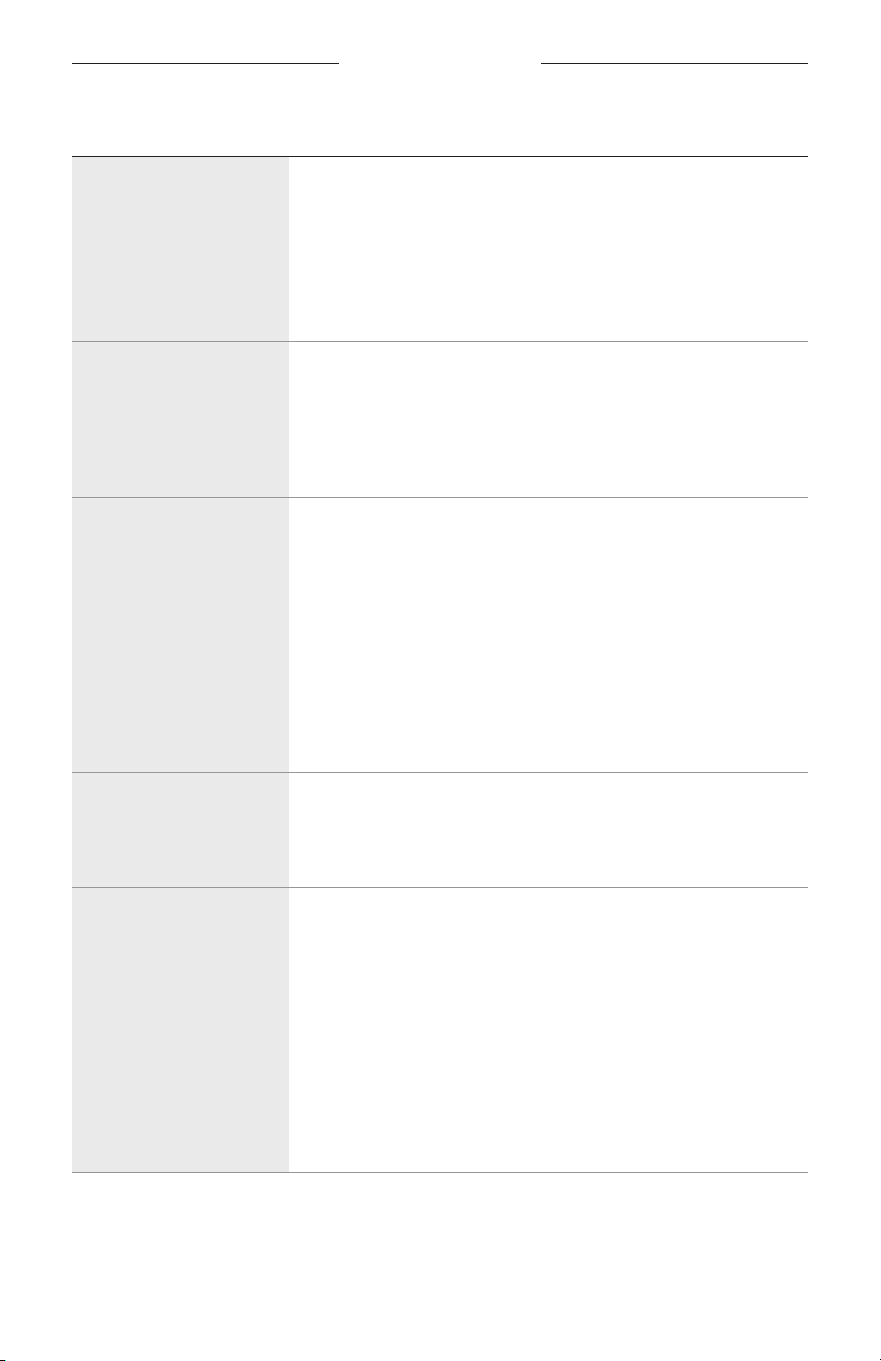
SYMPTOM SOLUTION
Poor sound quality from
device connected by
Bluetooth connection
Use a dierent music source.
If two devices are connected, disconnect the second device.
Disable any audio enhancement features on the device or
music app.
If the speaker was exposed to water, wait for the speaker to dry
and try again.
Poor sound quality from
a device connected by
an audio cable
Make sure both ends of the audio cable are secure
(see page 30).
Disable any audio enhancement features on the device or
music app.
Try another audio cable (see page 30).
No sound from a
device connected by
an audio cable
Make sure both ends of the audio cable are secure
(see page 30).
Press play on your device to make sure audio is playing.
Play audio from a dierent application or music service.
Play audio from content stored directly on your device.
Increase the volume on the speaker, then increase the volume on
your device.
Try another audio cable (see page 30).
Restart your device.
Delayed audio
Play audio from a dierent application or music service.
Close and re-open the application or music service.
Try an audio cable (see page 30).
Speaker doesn’t charge
Make sure both ends of the USB-C cable are secure
(see page 24).
Make sure you’re using the Bose-provided USB-C cable or a
similar USB-C cable providing a minimum of 5V p, 3A.
Try another charging source.
If the speaker has been exposed to high or low temperatures, let
it return to room temperature and then try charging again.
If the speaker was exposed to water, wait for the speaker to dry
and try again.
Reset the speaker (see page 44).
43
|
ENG
TROUBLESHOOTING
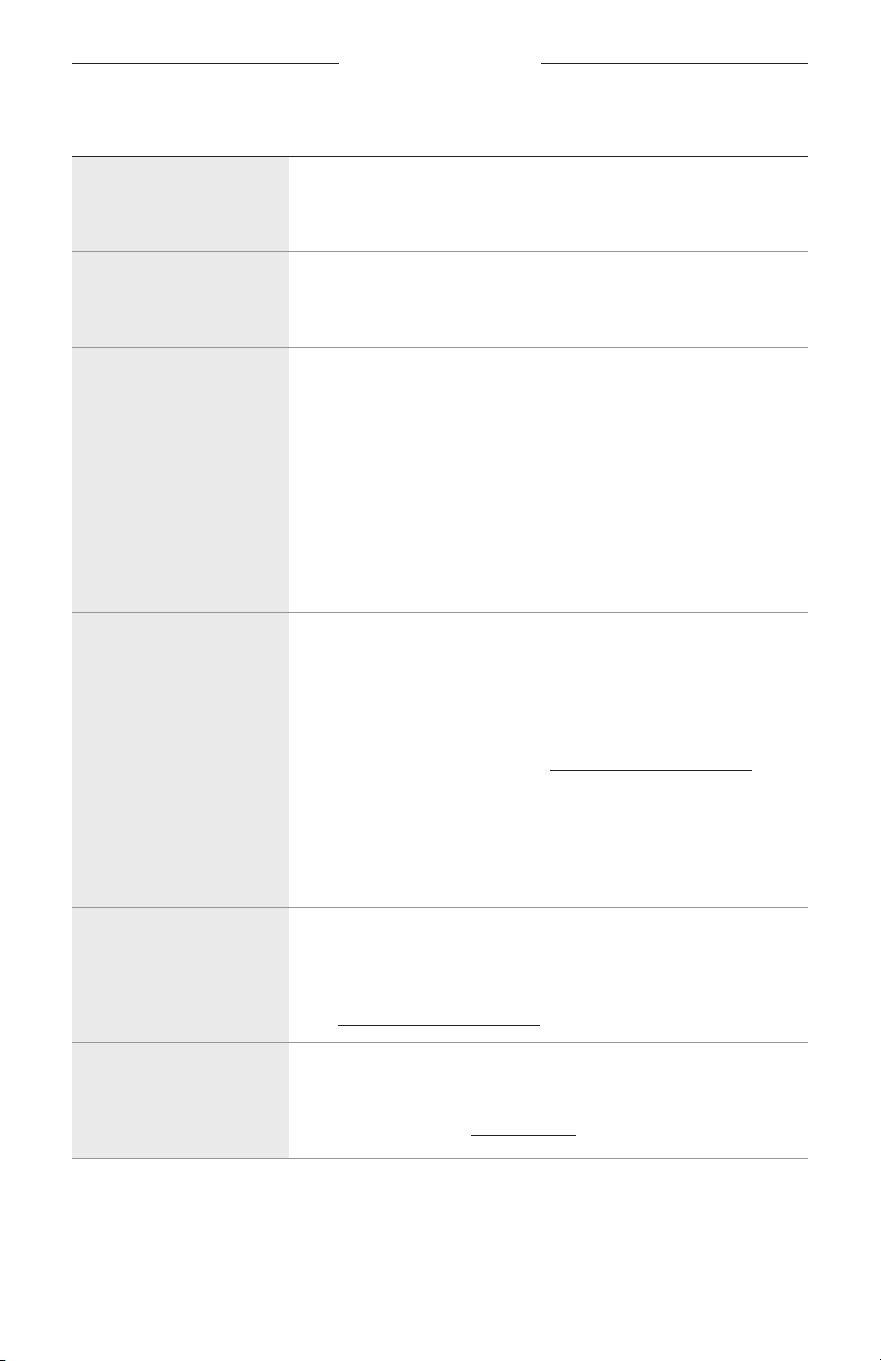
SYMPTOM SOLUTION
Speaker doesn’t
link with a Bose
Bluetooth speaker
Make sure you’re connecting to a compatible Bose Bluetooth
speaker (see page 31).
No sound when
Bose Bluetooth
speakers are linked
Make sure the primary speaker is powered on. If you power o
the primary speaker, the secondary speaker stops playing audio.
Mobile device
doesn’t charge
Make sure both ends of the USB-C cable are secure
(see page 26).
If the speaker was exposed to water, wait for the speaker to dry
and try again.
Make sure your device can receive a charge from another device.
Refer to your mobile device owner’s guide.
Disconnect the USB-C cable from the speaker and then
reconnect. If your device still doesn’t charge, disconnect the
USB-C cable from your device and reconnect. If you’re unable to
resolve your issue, refer to your device owner’s guide.
Speaker doesn’t
connect to a Bose
Smart Speaker
or Soundbar
Make sure you’re using the Bose app (see page 13).
Make sure your Bose Smart Speaker or Soundbar is running
the latest software. Use the Bose app and run available
software updates.
Make sure you’re connecting to a compatible Bose product. For a
list of compatible products, visit: support.Bose.com/Groupssupport.Bose.com/Groups
Press and hold the Bluetooth buon l until you hear “Ready to
connect” or “Ready to connect another device” and the Bluetooth
light slowly blinks blue.
Make sure that the speaker is within 30 ft (9 m) of your soundbar
or speaker.
Speaker doesn’t
reconnect to a
previously- connected
Bose Smart Speaker
or Soundbar
On the speaker, press and hold the Bluetooth buon l until the
Bluetooth light slowly blinks blue, and you hear “Ready to connect
another device.” Use the Bose app to connect the speaker to a
compatible Bose product. For more information,
visit: support.Bose.com/Groups
Delayed audio when
connected to Bose
Smart Speaker
or Soundbar
Download the Bose app (see page 13) and run available
software updates.
On a computer, check btu.Bose.combtu.Bose.com for USB updates.
44
|
ENG
TROUBLESHOOTING
RESET THE SPEAKER
If the speaker is unresponsive, you can reset it.
Reseing the speaker resets the product controls and reboots the speaker. It doesn’t
clear any device seings.
NOTE: Make sure the USB-C cable isn’t connected to the speaker.
1. Press and hold the Power buon I for up to 30 seconds until the speaker
powers o.
2. Press the Power buon I.
The Power light glows according to the baery level (see page 27).
NOTE: If you’re unable to resolve your issue, additional troubleshooting and support
is available at: support.Bose.com/sl-maxsupport.Bose.com/sl-max
45
|
ENG
TROUBLESHOOTING
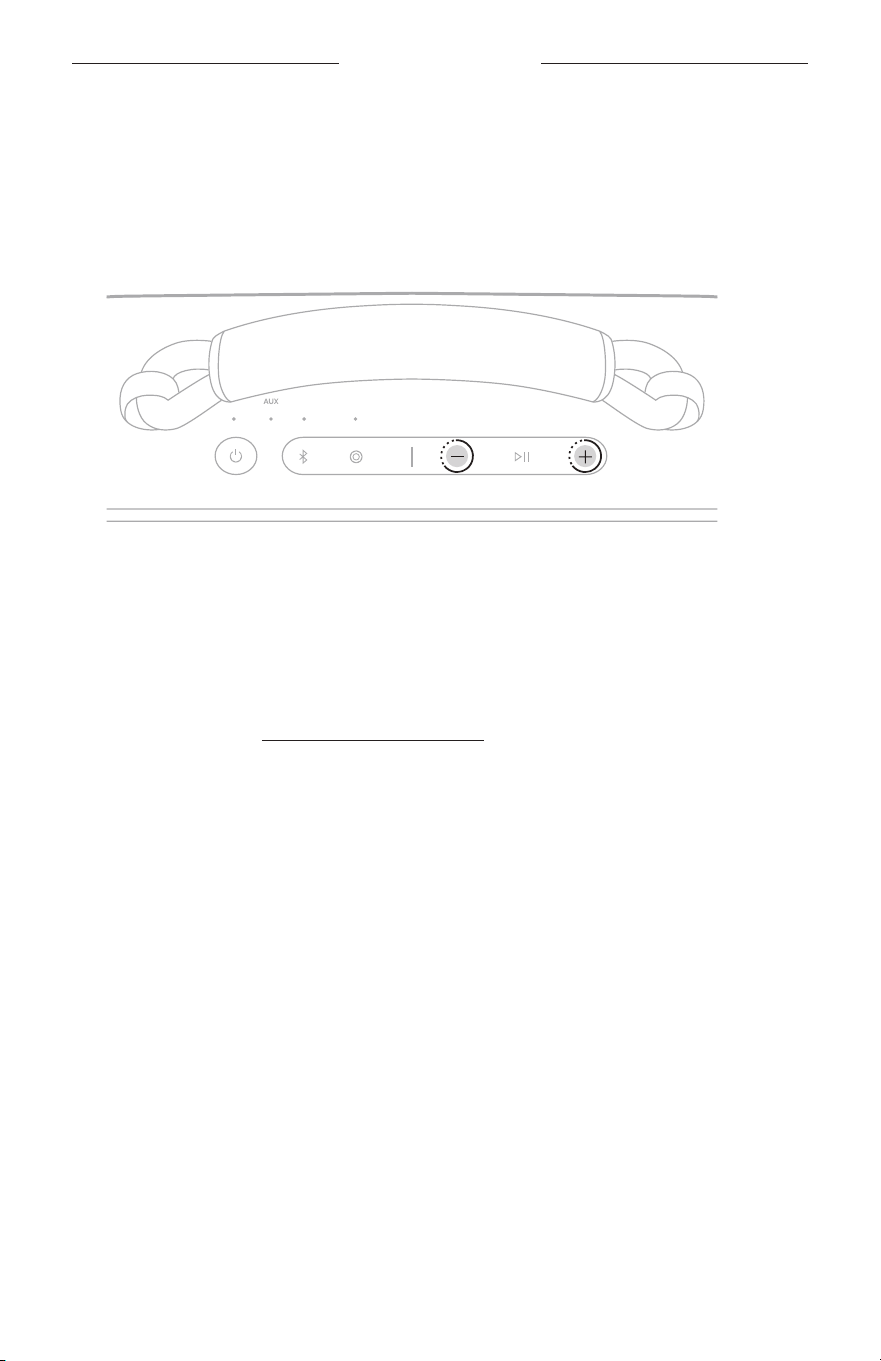
RESTORE THE SPEAKER
Factory reset clears connected devices and language seings from the speaker and
returns it to the original factory seings.
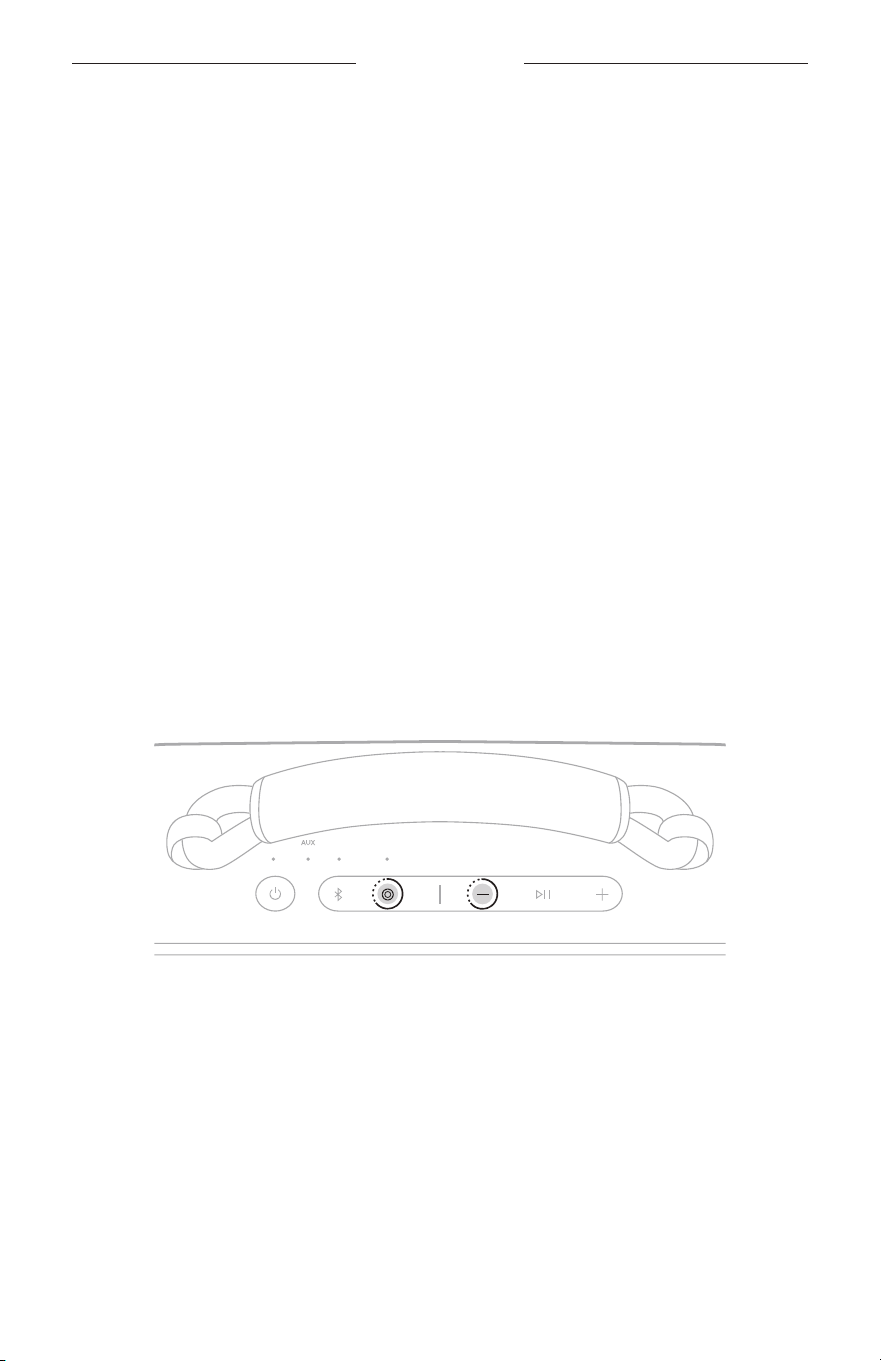
1. Press and hold the Volume up buon H and Volume down buon z for 15
seconds until the Power light quickly blinks white for 3 seconds.
The speaker powers o.
2. Press the Power buon I.
The Power light glows according to the baery level (see page 27). The
Bluetooth light slowly blinks blue, and you hear “Ready to connect.”
NOTE: If you’re unable to resolve your issue, additional troubleshooting and support
is available at: support.Bose.com/sl-maxsupport.Bose.com/sl-max

©2024 Bose Corporation, 100 The Mountain Road, Framingham, MA 01701-9168 USA
AM888545-0010 Rev. 01