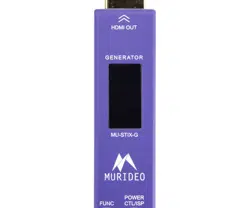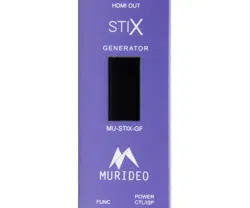

MU-STIX-GF
USER MANUAL
STIX TEST ECOSYSTEM SIGNAL GENERATOR
WITH FEMALE HDMI PORT

Page
2
of
24
MU-STIX-GF User Manual
Contents
Introduction ......................................................................................................................................................................................................... 3
Features ......................................................................................................................................................................................................... 3
Box Contents ................................................................................................................................................................................................ 3
Product Overview ............................................................................................................................................................................................ 4
Te ch ni ca l S pe ci fic at io ns ........................................................................................................................................................................ 4
MU-STIX-GF Overview ............................................................................................................................................................................ 5
Preparing For Use ........................................................................................................................................................................................... 6
Home Screen ..................................................................................................................................................................................................... 6
Main Menu ........................................................................................................................................................................................................... 7
Navigating the Menu ..................................................................................................................................................................................... 7
Timing .................................................................................................................................................................................................................... 8
Color Depth (CD) ............................................................................................................................................................................................... 8
Color Space (CSC) ........................................................................................................................................................................................... 8
HDCP ...................................................................................................................................................................................................................... 9
Pattern ................................................................................................................................................................................................................... 9
Machine Config .............................................................................................................................................................................................. 10
Return ................................................................................................................................................................................................................. 10
Screen Saver ................................................................................................................................................................................................... 10
Firmware and Control ................................................................................................................................................................................. 10
Control ................................................................................................................................................................................................................ 18
Command List ................................................................................................................................................................................................ 19
Warranty ........................................................................................................................................................................................................... 20
Obtaining Warranty Service .............................................................................................................................................................. 21
Disclaimer of Warranty ........................................................................................................................................................................ 22
Support ........................................................................................................................................................................................................ 22
Legal Notices ............................................................................................................................................................................................ 23
Page
3
of
24
MU-STIX-GF User Manual
Introduction
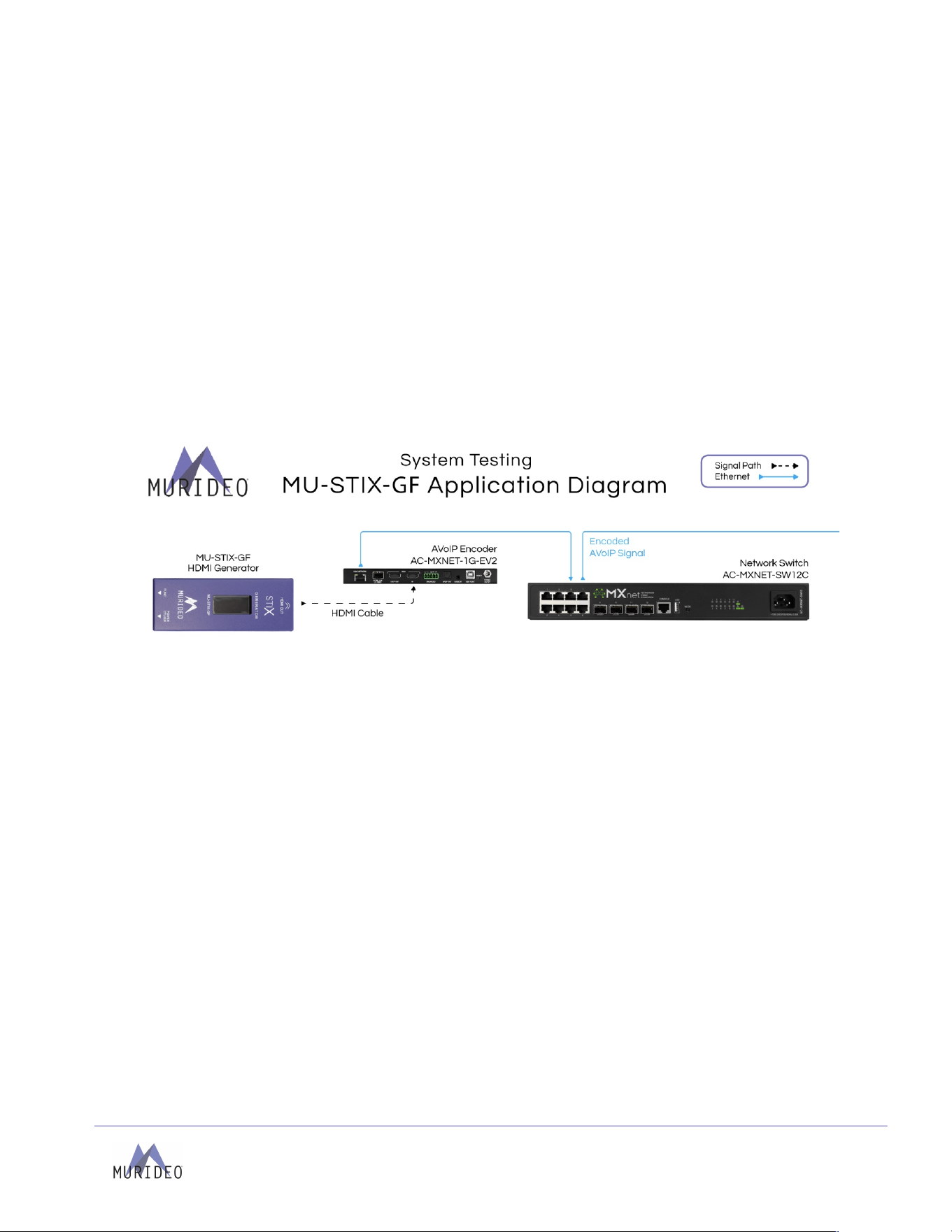
Murideo’s MU-STIX-GF is an ultra-compact HDMI 2.1 test pattern generator designed to meet the evolving
needs of professional AV integrators. With its female HDMI connector and enhanced design, this cost-
effective, user-friendly tool offers increased flexibility for validating HDMI signal paths and display
capabilities.
The STIX-GF supports both cutting-edge HDMI 2.1 (FRL) signals up to 48 Gbps and legacy HDMI (TMDS),
making it ideal for a wide range of signal scenarios. It generates video test patterns at resolution timings
from 720p/60 Hz up to 8K/30 Hz, including 4K/120 Hz. Equipped with 13 built-in test patterns and 6 preset
timing options, the STIX-GF is ready to support even the most demanding HDMI testing environments and
workflows. It can also generate 8 channels of PCM audio as 1 kHz tones at sample rates of 48 kHz, 96 kHz,
and 192 kHz, providing a reliable way to test multi-channel audio paths.
Compact and power-efficient, the STIX-GF can operate from a USB-A port on an AV receiver or display, or
through a USB Type-C connection to a mobile device. With its rugged construction and practical
enhancements, the MU-STIX-GF is the perfect tool for accurate HDMI signal generation in the field or lab.
Features
• Cost-effective HDMI 2.1b, 8K 48 Gbps (FRL) compliant generator
• Generates 720p, 1080p, 4K and 8K signal timings at 8-, 10-, and 12-bit color depths, in RGB, 4:2:2,
and 4:4:4 color spaces
• Configurable HDCP with options for versions 1.4, and 2.3 (1.4 is TDMS only) or Off.
• 13 built-in test patterns and 6 preset timing options, including pseudo-random binary sequence, a
diagnostic tool to identify transmission-related issues such as bit errors, signal attenuation, or
timing problems.
• Generates 8-Channels of PCM audio as 1 kHz tones at sample rates of 48 kHz, 96 kHz, and 192
kHz
• Low power draw allows device to be powered over USB Type-A (from AVR or display) or via USB
Type-C from mobile device.
• OLED color screen with an intuitive navigation menu
Box Contents
• (1x) Murideo MU-STIX-GF Unit
• (1x) 5’ USB Type-C to USB Type-A Cable
Page
4
of
24
MU-STIX-GF User Manual
Product Overview
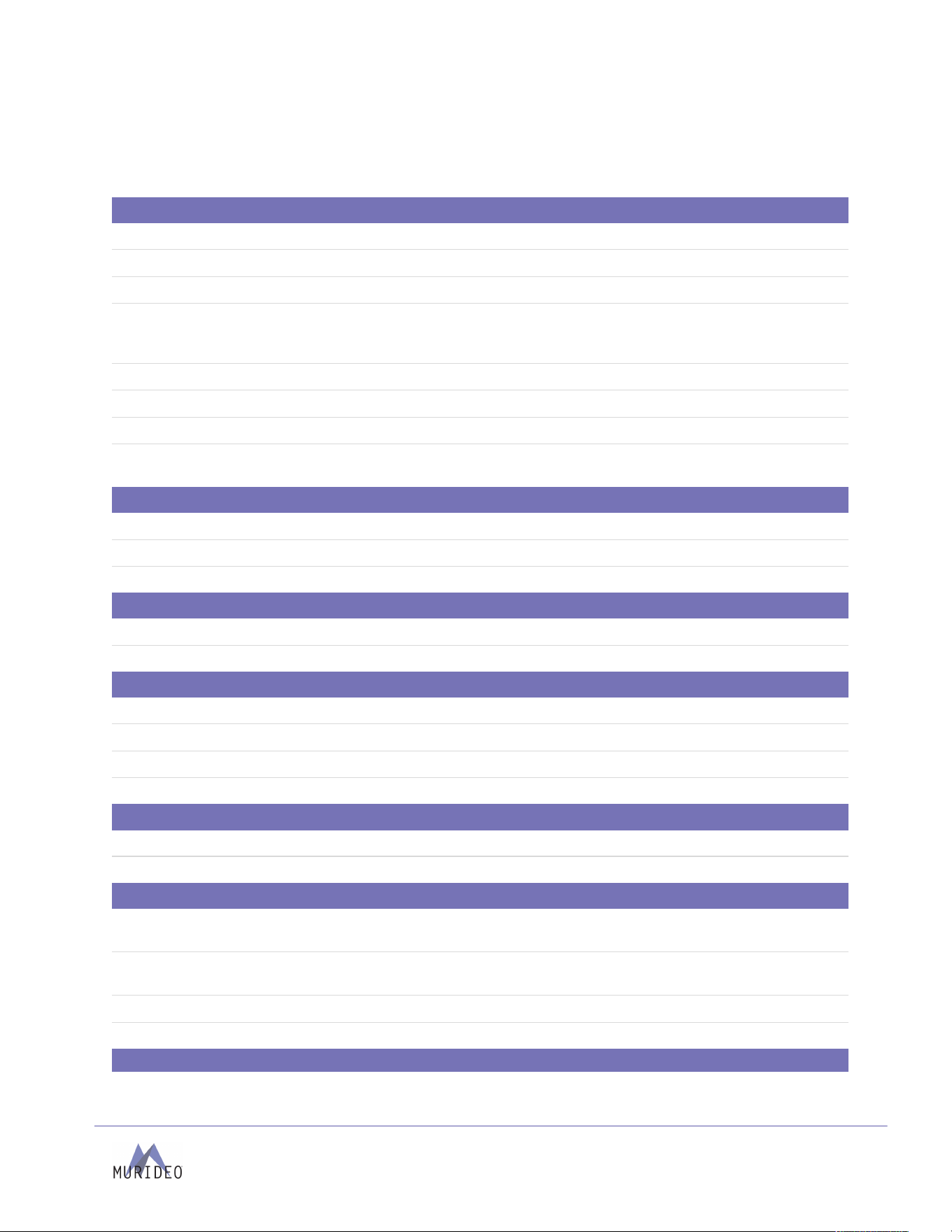
Te ch ni ca l Sp ec ifi ca ti on s
Video
HDMI Version
2.1
HDCP Version
1.4 and 2.3
HDCP ON/OFF
Yes
Resolution Timings
120 Hz - 4K
60 Hz - 4K, 1080p, 720p
30 Hz - 8K, 4K, 1080p
Video Encoding
RGB (Limited), YCbCr
Video Sampling Models
RGB 4:4:4, YUV 4:4:4, YUV 4:2:2
Color Bit Depth
12-, 10-, 8-bit
Patterns
Black, Checkbox, Stripes, Red, Green, Blue, White, White Ramp, Red Ramp,
Green Ramp, Blue Ramp, PRBS, Color Bars
Audio
Audio Channels
8-Channel (7.1)
Audio Output
8-Channel LPCM at 1kHz
Sampling Rates
48 kHz, 96 kHz, 192 kHz
Ports
HDMI
19-pin Type-A, female
Power/Firmware & Control
USB Type-C
Environmental
Operating Temperature
23° to 125°F (-5° to 51°C)
Storage Temperature
-4° to 140°F (-20° to 60°C)
Humidity Range
5% to 90% RH (No Condensation)
Cooling
Passive
Power
Power
5 VDC, 270 mA
Power Consumption
1.35 W Maximum
Physical / Dimensions
Dimensions
(Unit Length/Width/Height)
mm: 12 x 32 x 82
in: .47 x 1.26 x 3.22
Dimensions
(Packaged Length/Width/Height)
mm: 122 x 91 x 26
in: 4.80 x 3.58 x 1.02
Weight (Unit)
.09 lbs. (0.04 kg)
Weight (Packaged)
.34 lbs. (.15 kg)
*Specifications subject to change without notice. Mass & dimensions are approximate
Page
5
of
24
MU-STIX-GF User Manual
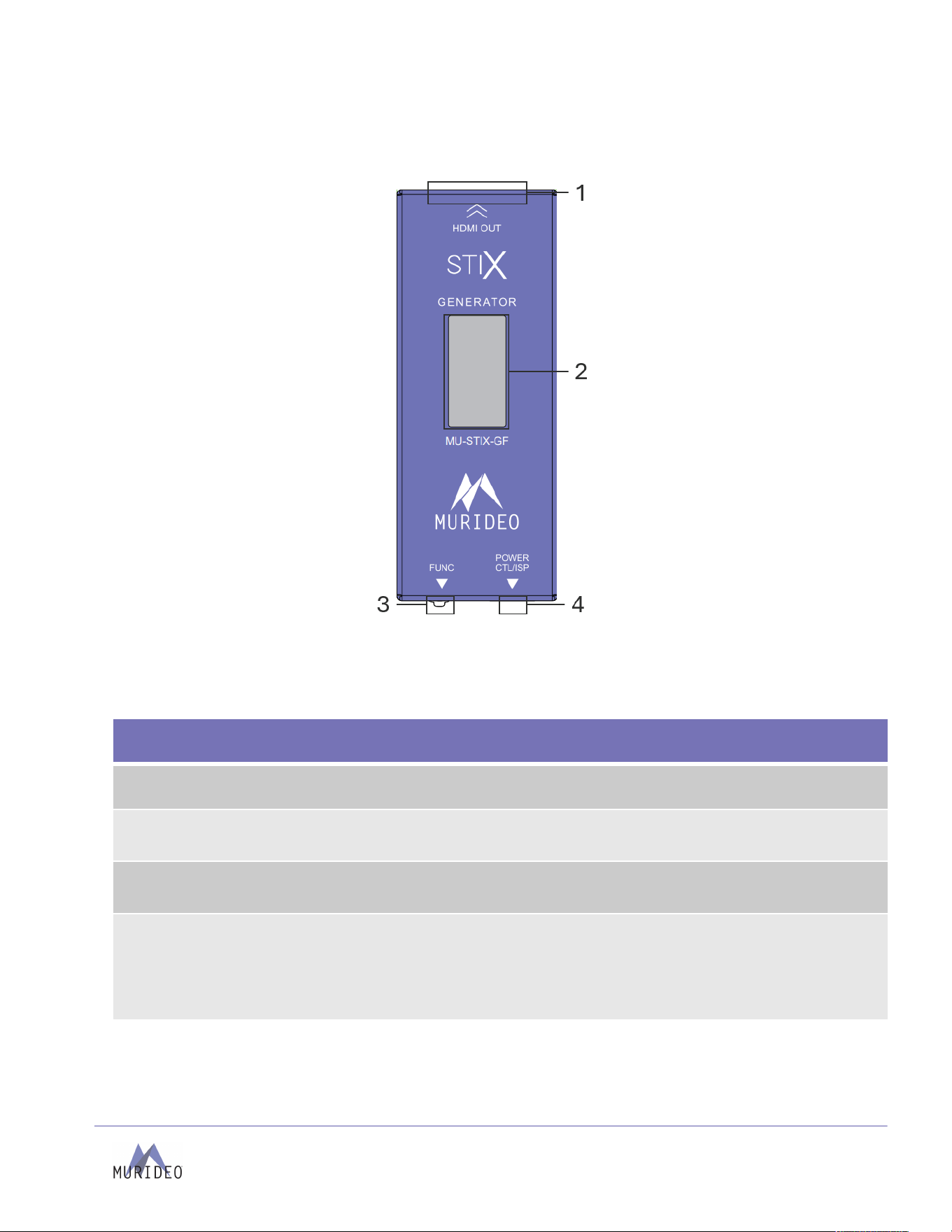
MU-STIX-GF Overview
MU-STIX-GF
1 – HDMI OUT
2 – OLED Screen
3 – Function Switch and Button
4 – USB-C Port Power, Control (CTL), In-system Programming (ISP)
Page
6
of
24
MU-STIX-GF User Manual
Preparing For Use
The Murideo STIX-GF is powered through the USB Type-C input using any standard USB power supply.
• Connect the STIX-GF to a power supply using the supplied USB cable. Any USB Type-C to C or Type-C
to A cable may be connected to the STIX-GF.
• Connect the STIX-GF to the sink device to be tested with an HDMI cable.
o Sink devices include AVRs, Displays, HDMI Matrixes, or any HDMI device with an HDMI Input.
• Signal parameters of the STIX-GF are configured manually.
o The STIX-GF does not automatically adjust its configuration to match the preferred timing
specified in the Sink device's EDID.
Home Screen
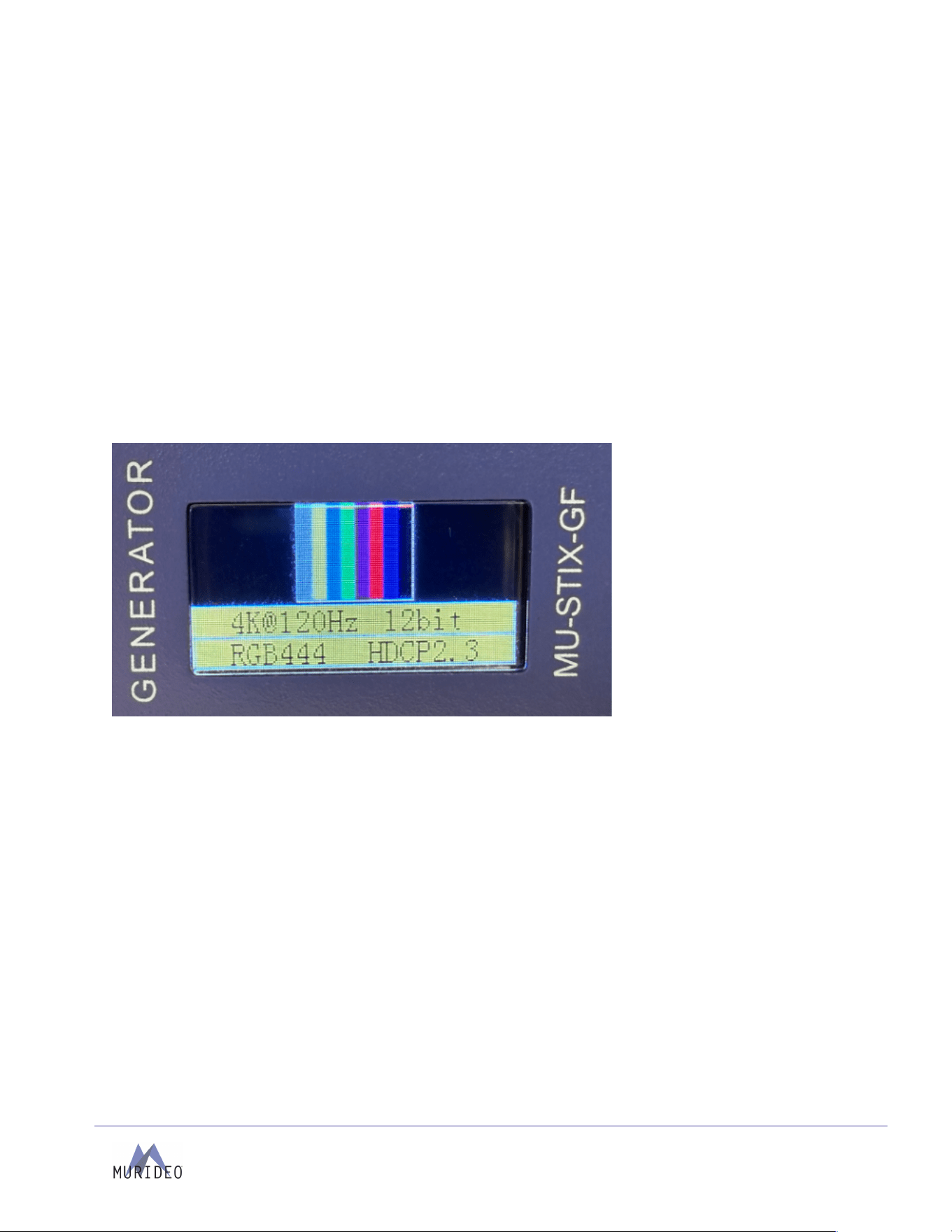
By default, the STIX-GF will power up to the Home Screen shown below:
The user can set the following 5 parameters:
1. Te st Pa t te rn
2. Resolution and Timing
3. Bit Depth
4. Color space
5. HDCP Version
By default, these values are:
1. Color Bars
2. 1080p60
3. 8 bit
4. RGB444
5. No HDCP
To a d ju s t t he se pa r am e te r s , sh or t p r es s t he f un c t io n bu tt on ( la be l ed F UN C ) .
Page
7
of
24
MU-STIX-GF User Manual
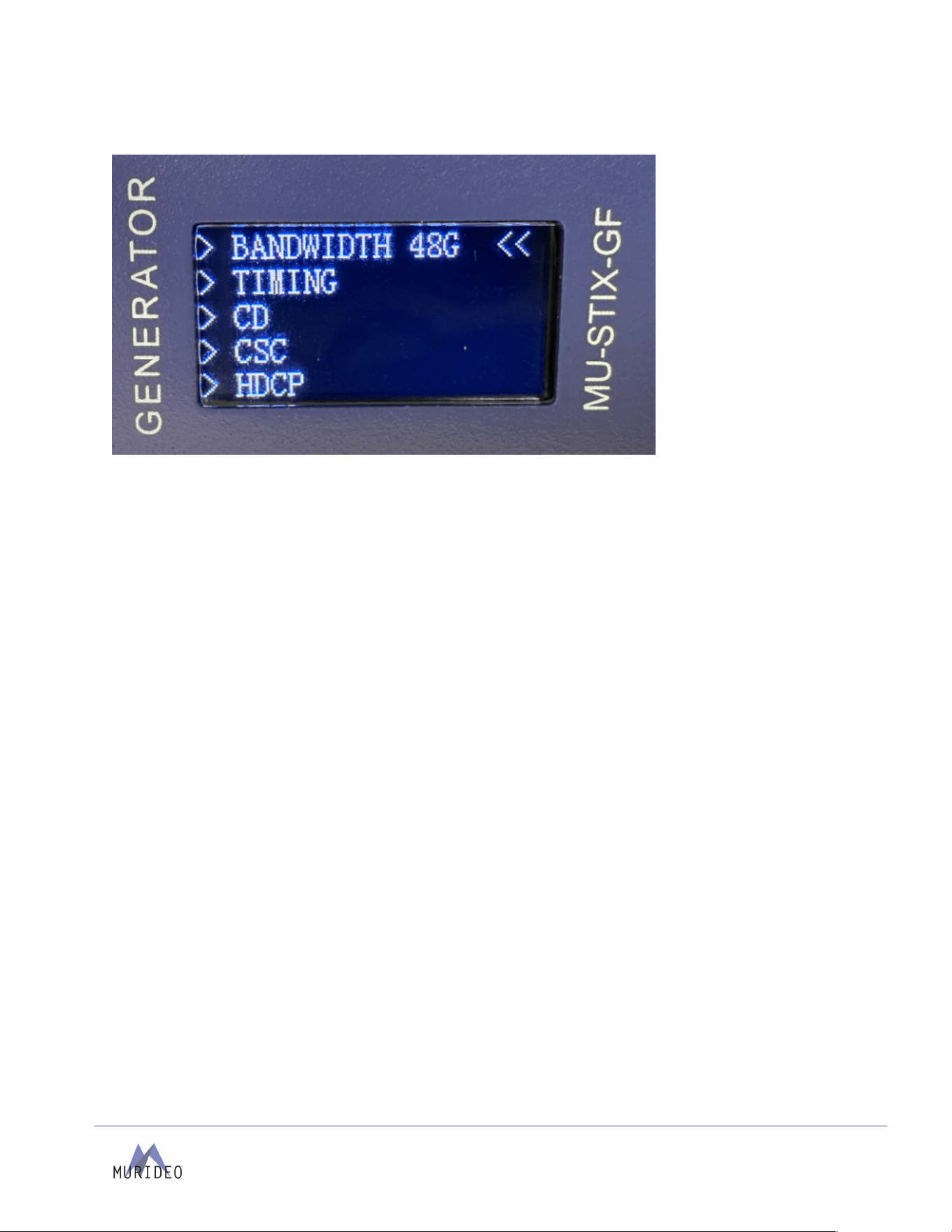
Main Menu
The main menu allows the user to select from 7 options:
1. TIMING
a. Resolution and Timing
2. CD
a. Color Depth / Bit Depth
3. CSC
a. Color space
4. HDCP
a. HDCP Version
5. PATTERN
a. Te st Pa t te rn s
6. MACHINE CONFIG
a. Resetting and Firmware Version
7. RETURN
a. Return to Home Screen
Navigating the Menu
1. To n a vi g a te th e m en u , s h o rt p re s s t he f un ct io n b ut t on t o sc ro l l t h ro ug h t he a va i la bl e o p t io ns .
Menu position is denoted by the Cursor (<<)
2. To s e le c t a m en u op t io n , p r es s a nd h ol d th e fu nc t io n bu t to n fo r 3 s ec o n ds .
3. Once a menu option is selected, the selected options sub menu will open.
4. After 10 seconds of function button inactivity, the STIX-GF will return to the home screen.
a. If the STIX-GF returns to the home screen due to inactivity, the last menu will be stored
and recalled when the function button is pressed.
b. Example: The Timing menu is active, and the menu has not been returned to the main menu,
timing out to the Home Screen. Upon a short press of the function button, the Timing Menu
will be brought up in place of the main menu.
Page
8
of
24
MU-STIX-GF User Manual
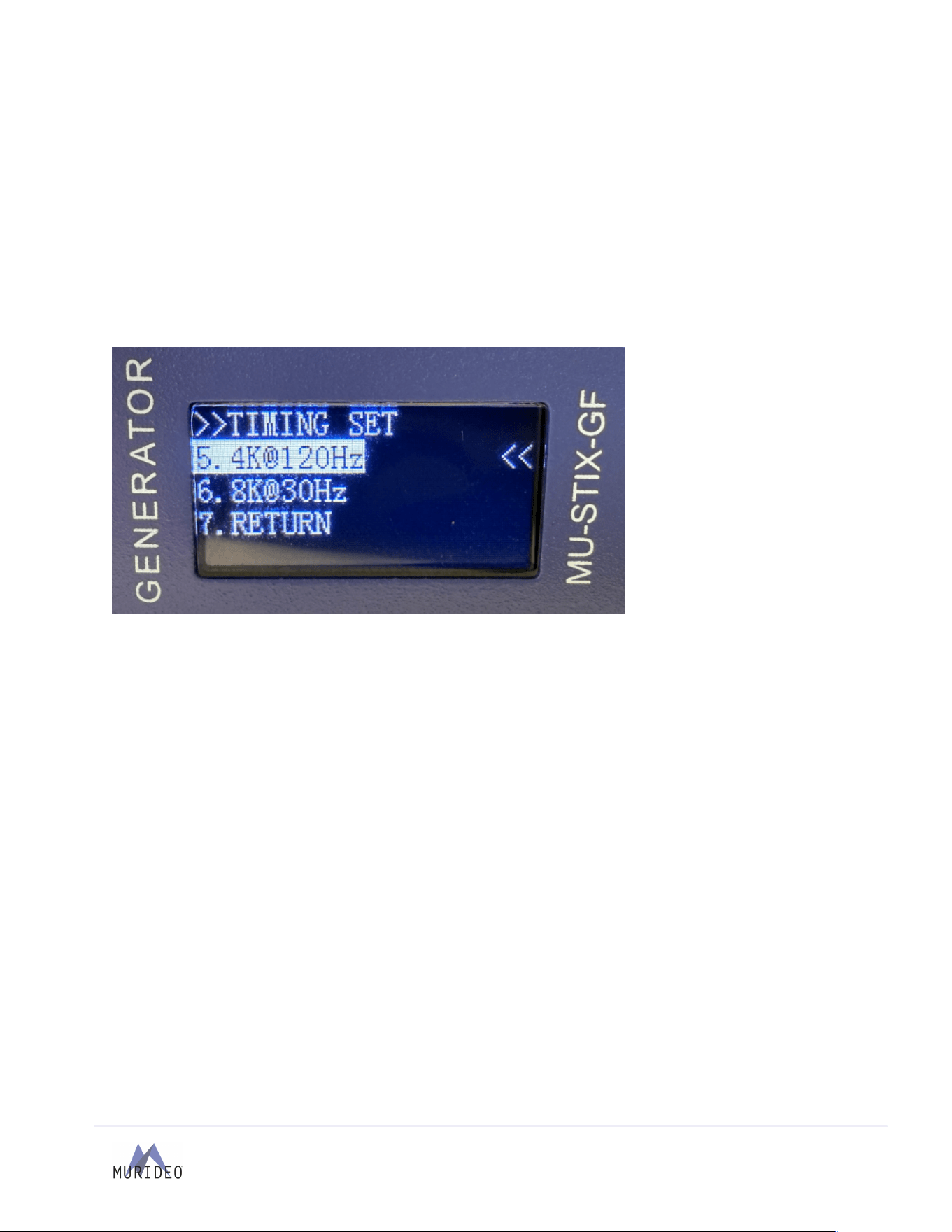
Timing
Timing consists of two elements, Resolution and Frame Rate. The STIX-GF has six combinations to
choose from:
1. 720p60
2. 1080p60
3. 4k30
4. 4k60
5. 4k120
6. 8k30
After selecting the menu option, the active selection will become highlighted.
Color Depth (CD)
Color Depth, also known as Bit Depth or Bits Per Component, adjusts the Depth of the defined Timing
Resolution and Chroma.
The STIX-GF has 3 selectable Color Depths:
1. 8 bit
2. 10 bit
3. 12 bit
After selecting the menu option, the active selection will become highlighted.
Color Space (CSC)
Color space refers to the encoding method of the video signal. The STIX-GF is capable of outputting in a
limited color space (16-235) in both RGB and YCbCr (short formed to YUV) formats.
There are three available color spaces:
1. RGB444
2. YUV444
3. YUV422
a. Limited to 8-bit Color Depth selection; transmitted at 12-bit Color Depth.
After selecting the menu option, the active selection will become highlighted.

Page
9
of
24
MU-STIX-GF User Manual
HDCP
HDCP (High-Bandwidth Digital Content Protection) is a form of digital rights management within the HDMI
video transmission. The STIX-GF can be operated with or without HDCP enabled.
Available selections include:
1. No HDCP
a. Compatible with all signals.
2. HDCP 1.4
a. Compatible with TMDS signals below 18 Gbps.
b. Incompatible with FRL Signals.
3. HDCP 2.3
a. Compatible with TMDS signals below 18 Gbps.
b. Required for all FRL Signals if HDCP encrypted.
After selecting the menu option, the active selection will become highlighted.
Pattern
In addition to testing HDMI sink devices,13 Patterns are contained in the STIX-GF consisting of solid
colors, ramps, and more. Giving the STIX-GF use for basic color checking and white balancing of displays.
Patterns Include:
1. Black
2. CHK_BOX (Checker Box)
3. STRIP (Stripes)
4. Red
5. Green
6. Blue
7. White
8. RAMP (White Ramp)
9. R_RAMP (Red Ramp)
10. G_RAMP (Green Ramp)
11. B_RAMP (Blue Ramp)
12. PRBS (Pseudorandom Binary Sequence)
13. C-BARS (Color Bars)
After selecting the menu option, the active selection will become highlighted.

Page
10
of
24
MU-STIX-GF User Manual
Machine Config
Machine Config contains the options for resetting the device to the default state or checking the current
firmware of the unit. There are two options inside this menu option:
1. MACHINE RESET
a. Resets the STIX-GF back to the default state.
b. By Default, these values are:
1. Timing
a. 1080p60
2. CD
a. 8 bit
3. CSC
a. RGB444
4. HDCP
a. No HDCP
5. PATTERN
a. Color Bars
2. MACHINE VERSION
[Insert Machine Rev Picture]
a. Version
i. The Main Build Version
b. Revision
i. The Firmware Revision of the Main Build
c. After selecting MACHINE VERSION, press and hold the function button for 3 seconds to
return to the main menu.
Return
When in a sub menu, selecting the return option will return you to the previous menu. When in the main
menu, the return option will return you to the home screen.
Screen Saver
The blank (black) screen saver will appear after 5 minutes of inactivity; during this state the STIX-GF is still
operational. Users may open the Home Screen at any time by pressing the function button. Additionally, upon
receiving serial data, the Home Screen will open.
Firmware and Control
Updating the firmware
Requirements:
- Windows PC
- USB-A or USB-C to USB-C data cable for a direct serial connection
- Firmware FWM file and Uploader
- CH340 USB Serial Driver (available on murideo.com)
Follow the steps below to update the firmware on the STIX-GF:
Page
11
of
24
MU-STIX-GF User Manual
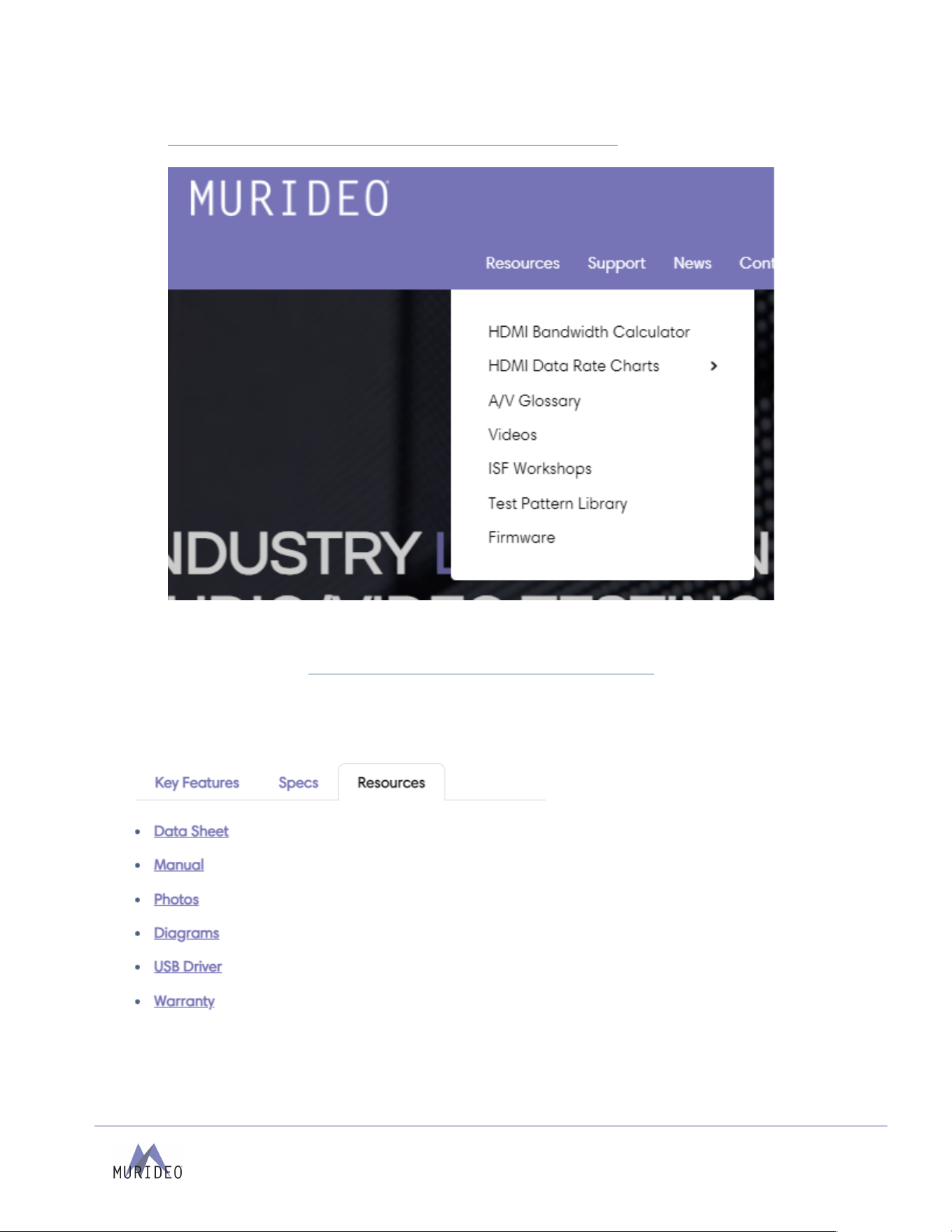
1. Find the firmware file under the Resources -> Firmware dropdown on
https://www.avproglobal.com/pages/murideo-brand-home-page
2. Connect PC directly to the USB-C CTL/USP ports on the STIX-GF using a USB -C cable.
3. Download and install the CH340 USB Serial Driver.
a. Navigate to https://www.avproglobal.com/products/mu-stix-gf
b. Click on the Resources tab.
c. Click the USB DRIVER link.
d. Download the CH340 driver to your PC.
Page
12
of
24
MU-STIX-GF User Manual
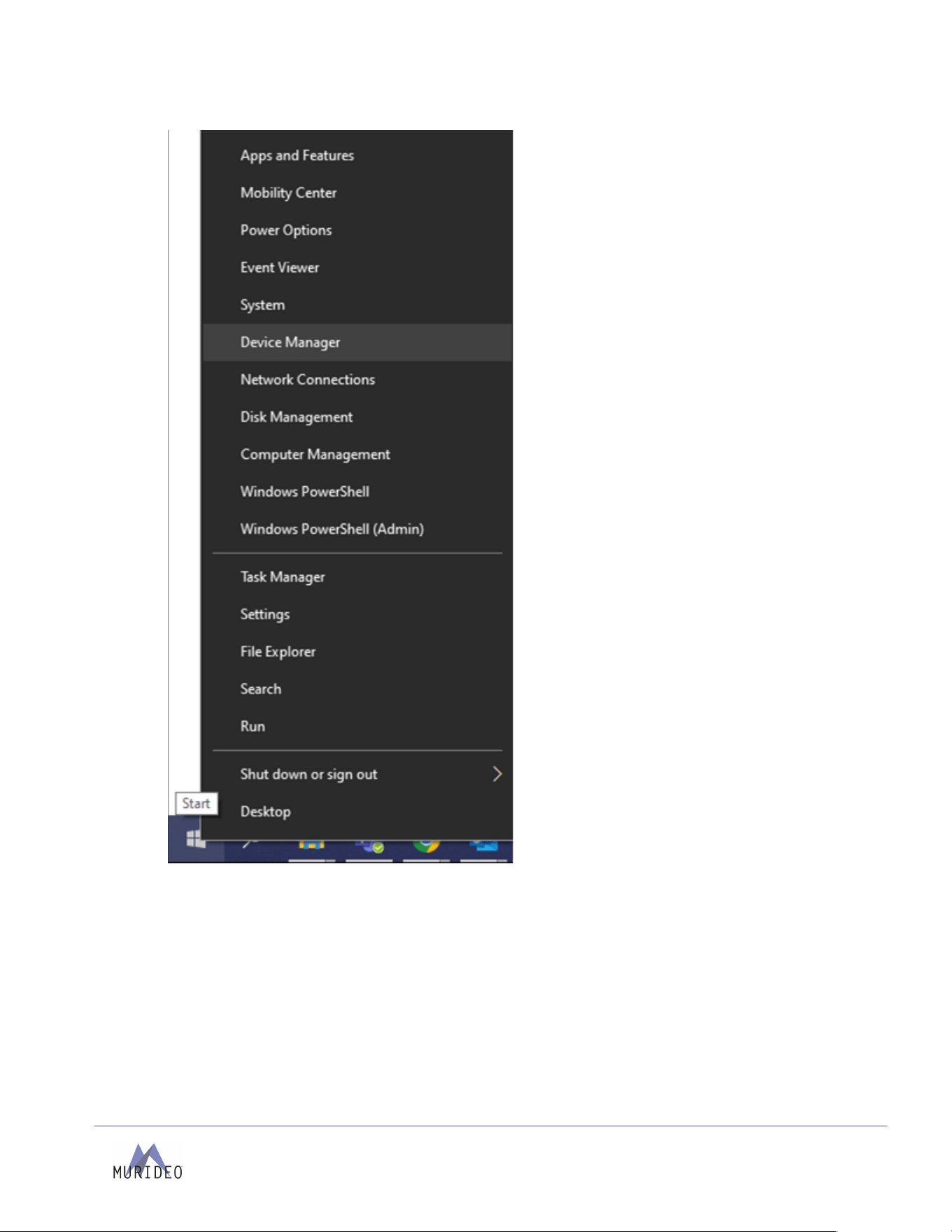
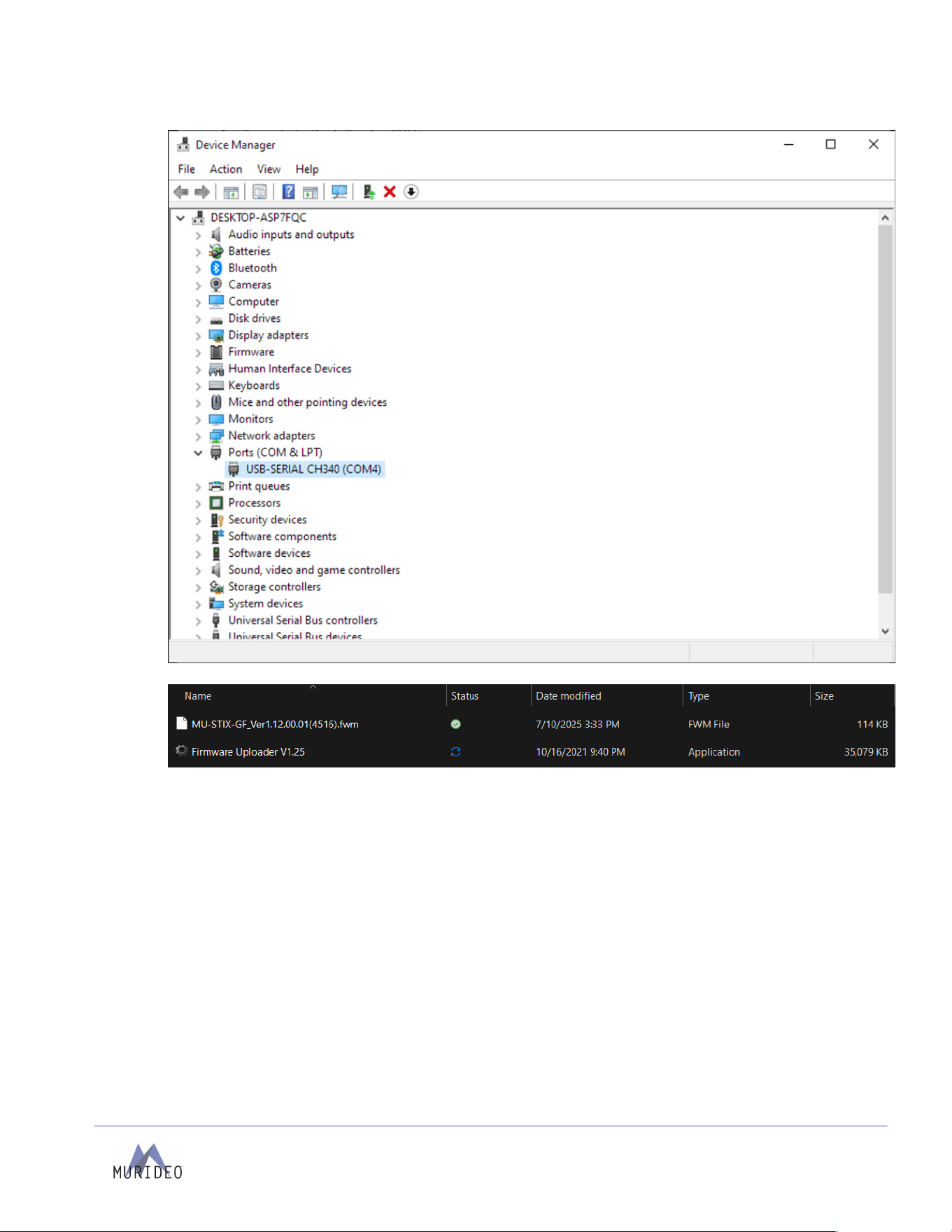
4. Right-click on the Windows Start button and select Device Manager.
Then select the Ports (COM & LPT) drop-down menu and locate the port labeled USB-SERIAL
Page
13
of
24
MU-STIX-GF User Manual
CH340 (COMX) to confirm the STIX-GF is connected to the PC.
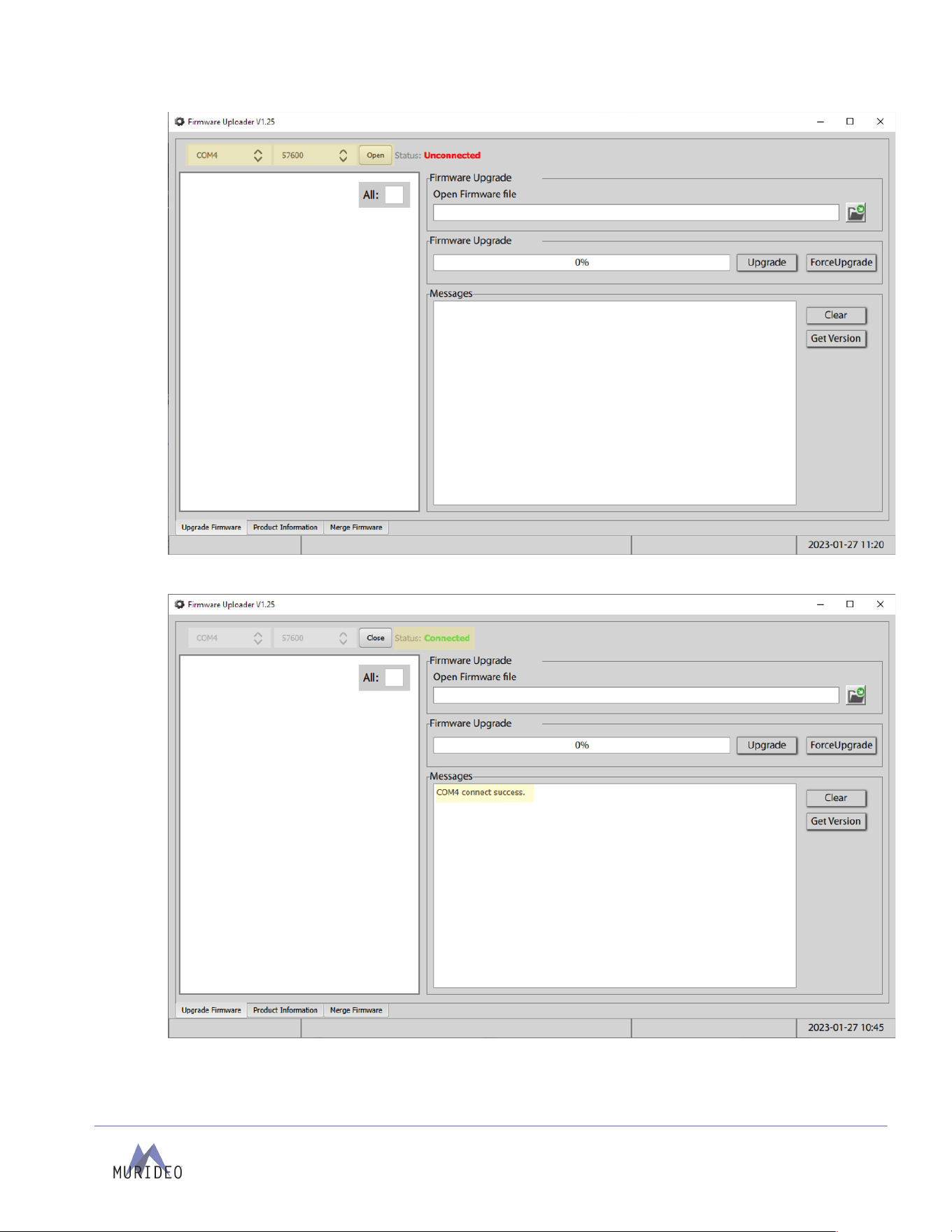
5. Open the Firmware Uploader program
Select the correct COM, Baud: 57600, and select the Open button to open the port.
Page
14
of
24
MU-STIX-GF User Manual
The Status will now show as Connected in green text with COMX connect success under
Messages.
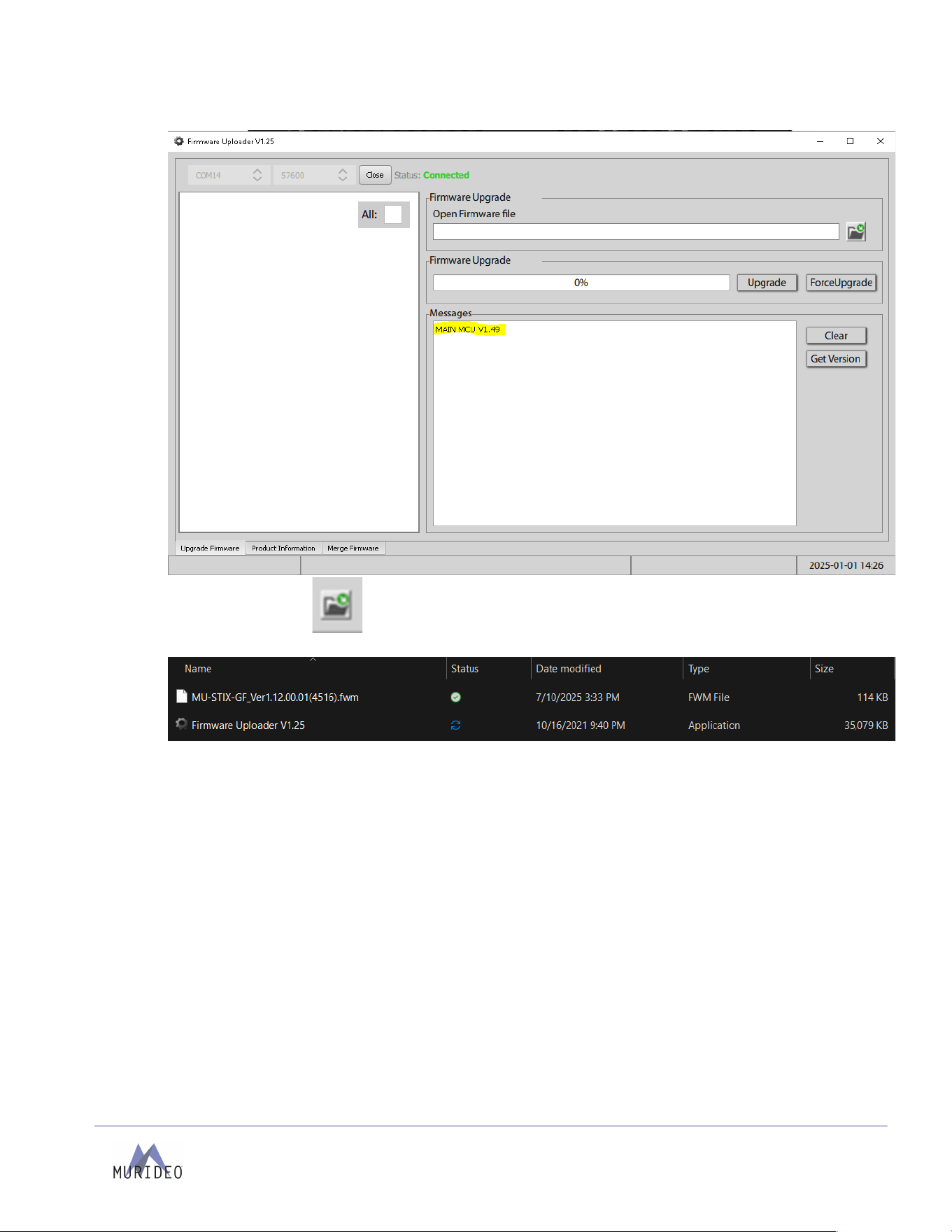
6. Select the Get Version button to see the current firmware version on the STIX-GF.
Page
15
of
24
MU-STIX-GF User Manual
Note: screenshots below is only an example and may not display the exact version.
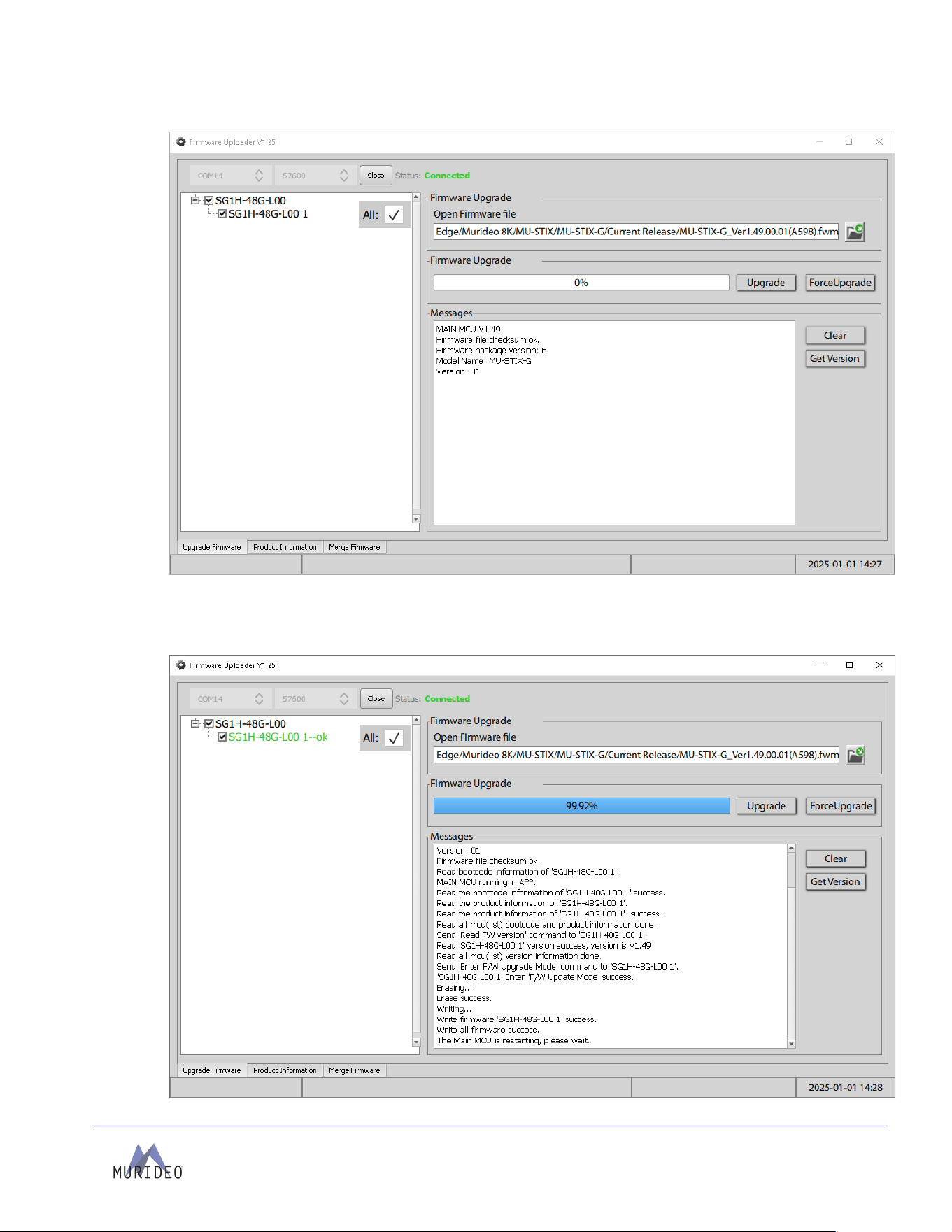
7. Select the file button to load the firmware file. Make sure to select the correct firmware file
for the device you are currently updating.
The firmware file will be loaded into the Open Firmware file field with the following information
Page
16
of
24
MU-STIX-GF User Manual
under Messages:
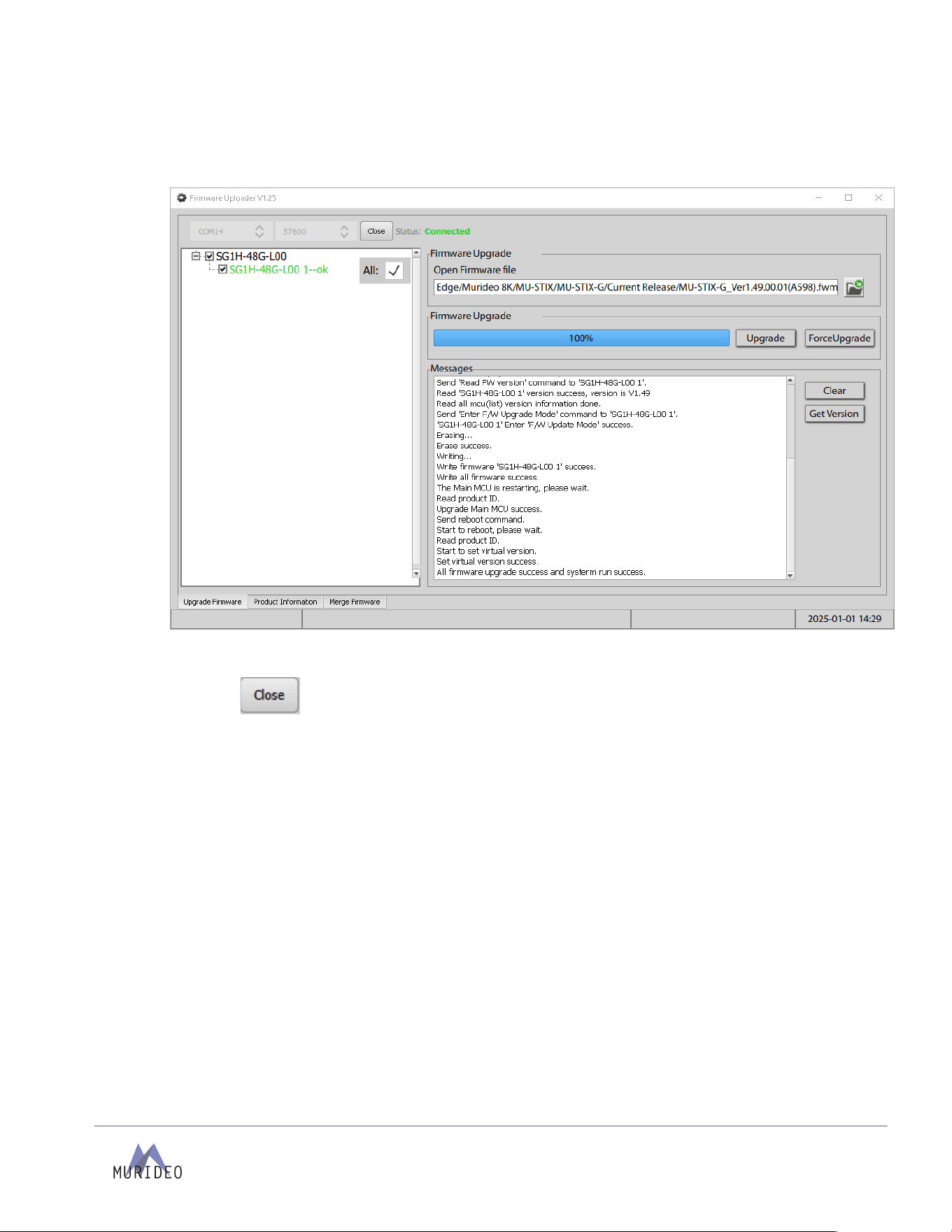
8. Select the Upgrade button to start the firmware update. The loading bar will pause at 99% for a
few seconds before automatically rebooting the unit. Do not use the ForceUpgrade button. If the
Uploader is not updating firmware for any reason, please contact Murideo Support to assist in
troubleshooting your STIX-GF.
Page
17
of
24
MU-STIX-GF User Manual
9. Once the loading bar reaches 100%, use the Get Version button again to ensure the new firmware
version is correct (note: screenshot below is only an example and may not display the exact
version).
10. Select the button to close the port, then select the X at the top-right to exit the Uploader.
The STIX-GF is now up to date on its firmware and is safe to disconnect from your PC and power.
Page
18
of
24
MU-STIX-GF User Manual
Control
The STIX-GF can be controlled through Serial communication from a USB port with serial capabilities
(COM) using the internal USB to UART adaptor. Ensure the CH340 Driver has been installed before
connecting the device.
STIX-GF Serial Port Properties
Baud Rate
57600
Data Bits
8
Stop Bits
1
Parity
None
Flow Control
None
The STIX-GF features an ASCII API; commands sent to the unit should be followed by the carriage return
control character. In the following example we will use <cr>:
USER SENT:
SET OUT1 STREAM OFF<cr>
ECHO RECEIVED:
OUT1 STREAM OFF<cr>
Page
19
of
24
MU-STIX-GF User Manual
Command List
Azz
All Commands start with Prefix System Address zz, {zz=[01-99](zz=00,broadcast address)}
H
Help
STA
Show Global System Status
SET RST
Reset to Factory Defaults
SET RBT
System Reboot
SET ADDR xx
Set System Address to xx{xx=[01~99]}
SET OUT x
STREAM ON/OFF
SET Outputx STREAM ON/OFF{x=0~1}
SET OUTx BDTy
Set Output Signal Generator Bandwidth,and set it to RGB444 {x=[0-
1](0=ALL),y=[1,2,4,5,6](1=9G,2=18G,4=32G,5=40G,6=48G)}
SET OUTx SGMTy
Set Output Signal Generator Timing {x=[0-1](0=ALL),y=[1-
6](1=720p60Hz,2=1080p60Hz,3=4K30Hz,4=4K60Hz,5=4K120Hz,6=8K30Hz)}
SET OUTx CDy
Set Output x Video Color Depth y {x=[0-1](0=ALL), y=[1-3](1=8 Bit,2=10Bit,3=12Bit)}
SET OUTx CSCy
Set Output x Video Color Space y {x=[0-1](0=ALL), y=[1-3](1=RGB,2=YUV444,3=YUV422)}
SET OUTx HDCPy
Set Output x Video HDCP Format {x=[0-1](0=ALL), y=[1-
3](1=NoHDCP,2=HDCP1.x,3=HDCP2.x)}
SET OUTx VPFy
Set Output x Video Pattern Format {x=[0-1](0=ALL), y=[1-
13](1=BLACK,2=CHECKBOARD,3=STRIP,4=RED,5=GREEN,6=BLUE)}
{(7=WHITE,8=RAMP,9=RED_RAMP,10=GREEN_RAMP,11=BLUE_RAMP,12=PRBS,13=COLOR
_BAR)}
SET OUTx ASRy
Set Output Signal Generator Audio Sampling Rate {x=[0-
1](0=ALL),y=[1,2,3](1=48K,2=96K,3=192K)}
GET ADDR
Get System Address
GET TMDS
CHECK
Check TMDS Voltage Level Is Functioning Properly
GET OUTx
STREAM
Get Outputx Stream ON/OFF Status {x=0~1}
GET OUTx BDT
Get Output x Video Bandwidth Format Status
GET OUTx SGMT
Get Output x Video Timing Format Status
GET OUTx CD
Get Output x Video Color Depth Format Status
GET OUTx CSC
Get Output x Video Color Space Format Status
GET OUTx HDCP
Get Output x Video HDCP Format Status
GET OUTx VPF
Get Output x Video Pattern Format Status
GET OUTx ASR
Get Output x Video Audio Sampling Rate Format Status
GET OUTx EDID
DATA
Get Output x EDID DATA

Page
20
of
24
MU-STIX-GF User Manual
Warranty
AVPro Global Holdings (DBA MURIDEO) offers a 2-year international limited warranty for its Murideo
products. Any product first sold to you is guaranteed to be free from defects in both components and
workmanship under regular use. The warranty period commences on the date the item ships.
Attention:
Your invoice with the date of purch ase, model number, and s erial number of the product is proof of the
date of purchase. The international Limited Warranty is applicable and shall be honored in every country
where MURIDEO or its Authorized Service Providers offer warranty service subject to the terms and
conditions provided in this international Limited Warranty Statement. Products included in this warranty:
•
Murideo SEVEN Series Generators
•
Murideo SIX Series Generators
•
Murideo SIX Series Analyzers
•
Murideo Fox & Hound Series
•
Murideo HDMI Test Monitor Series
•
Murideo GAX Series
•
Murideo STIX Series
During the warranty period, the defective hardware of Murideo products will be either repaired or
replaced with new or like-new products at Murideo's discretion. This International Limited Warranty covers
the costs of service parts and labor required to restore your product to fully functional condition.
MURIDEO will, at its discretion, repair or replace any defective products or parts covered by this
International Limited warranty with refurbished parts of the product that are equivalent to new or like new
products in both functionality and performance. A product or part repaired or replaced under this
International Limited Warranty shall be covered for the remainder of the original warranty period applying
to the product or part or for 90 days, whichever expires last. All exchanged parts and products under this
International Limited Warranty will become MURIDEO's property.

Page
21
of
24
MU-STIX-GF User Manual
Obtaining Warranty Service
Warranty service or Returned Merchandise Authorization (RMA) under this International Limited Warranty
will be honored only if claims are made within the warranty period. The process for notifications to
MURIDEO or products outside the warranty period will be the same, but charges may apply. Contact
details may be obtained on the MURIDEO website: https://www.murideo.com/
Customers are requested to perform the following actions before claiming MURIDEO product is defective:
•
Owner must notify MURIDEO, during the warranty period, in writing of the alleged defect and
allow MURIDEO a reasonable opportunity to inspect the allegedly defective product;
•
No Product may be returned without MURIDEO’s consent. The MURIDEO RMA# must accompany
all returns, and all returns must be delivered to MURIDEO within the warranty period.
•
Owner may, then at its own expense, return the allegedly defective Product, freight pre-paid and
in the original packaging, accompanied by a brief statement explaining the alleged defect to
MURIDEO;
•
If MURIDEO determines that any returned Product is not defective, or if MURIDEO determines that
the warranty does not cover the defect, MURIDEO will return the Product to the Owner at the
Owner’s expense, freight collect, and Owner agrees to pay MURIDEO reasonable cost of handling
and testing.
•
Upon determining that the returned product is defective, the Owner will need to present the
invoice showing the original purchase transaction to receive warranty service. If shipping the
product, the Owner will need to package it carefully and send it, transportation prepaid by a
traceable, insured method, to the MURIDEO Service Center. Package the product using adequate
padding material to prevent damage in transit. The original container is ideal for this purpose.
Include the RMA #, your name, return shipping address, email address, and telephone number
where you may be reached during business hours inside the shipping package with the unit. Any
replacement unit will be warranted under these Terms and Conditions for the remainder of the
original warranty period or ninety (90) days, whichever is longer. For important Aps on operating
and troubleshooting the product, refer to the user manual, which can be downloaded from our
website, http://www.murideo.com/.

Page
22
of
24
MU-STIX-GF User Manual
Disclaimer of Warranty
THIS WARRANTY IS EXPRESSED INSTEAD OF ALL OTHER WARRANTIES, EXPRESSED OR IMPLIED,
INCLUDING THE IMPLIED WARRANTY OF MERCHANTABILITY, THE IMPLIED WARRANTY OF FITNESS
FOR A PARTICULAR PURPOSE AND OF ALL OTHER OBLIGATIONS OR LIABILITIES ON MURIDEO’S
PART, AND IT NEITHER ASSUMES NOR AUTHORIZES ANY OTHER PARTY TO ASSUME FOR MURIDEO
ANY OTHER LIABILITIES. THE FOREGOING CONSTITUTES THE BUYER’S SOLE AND EXCLUSIVE
REMEDY FOR THE FURNISHING OF DEFECTIVE OR NONCONFORMING PRODUCTS AND MURIDEO
WILL NOT, IN ANY EVENT, BE LIABLE FOR COST OF SUBSTITUTE OR REPLACEMENT, COST OF
FACILITIES OR SERVICE, DOWNTIME COSTS, LOSS OF PROFITS, REVENUES OR GOODWILL, RELIANCE
DAMAGES, LOSS OF DATA, LOSS OF USE IF OR DAMAGE TO ANY ASSOCIATED EQUIPMENT, OR ANY
OTHER INDIRECT, INCIDENTAL, SPECIAL, OR CONSEQUENTIAL DAMAGES BECAUSE OF THE FACT
THAT SUCH PRODUCTS WILL HAVE BEEN DETERMINED TO BE DEFECTIVE OR NONCONFORMING.
THE RIGHTS AND OBLIGATIONS OF THE PARTIES UNDER THIS AGREEMENT SHALL NOT BE
GOVERNED BY THE PROVISIONS OF THE 1980 U.S. CONVENTION ON CONTRACTS FOR THE
INTERNATIONAL SALE OF GOODS OR THE UNITED NATIONS CONVENTION ON THE LIMITATION
PERIOD IN THE INTERNATIONAL SALE OF GOODS, AS AMENDED (COLLECTIVELY,
THE“CONVENTIONS”); RATHER, THE RIGHTS AND OBLIGATIONS OF THE PARTIES SHALL BE
GOVERNED BY THE LAWS OF THE STATE of SOUTH DAKOTA, INCLUDING ITS PROVISIONS OF THE
UNIFORM COMMERCIAL CODE, AS APPLICABLE. FOR THE AVOIDANCE OF DOUBT, THE
CONVENTIONS ARE HEREBY EXCLUDED.
This Limited Warranty gives you specific legal rights. You may also have other rights that vary from state
to state or country to country. You are advised to consult applicable state or country laws to fully
determine your rights. Some jurisdictions do not allow the exclusion or limitation of special, incidental, or
consequential damages or limitations on how long a warranty lasts, so the above exclusion and limitation
may not apply to everyone.
Support
For service and support, contact your local dealer. To find your dealer or to contact MURIDEO support, go
to: https://support.murideo.com or call +1-605-330-8491 for worldwide technical support.

Page
23
of
24
MU-STIX-GF User Manual
Legal Notices
MURIDEO® Logos are trademarks or registered trademarks of AVPro Global Holdings, Inc. in the United
States or other countries. ISF® and the ISF logo are trademarks or registered trademarks used under
license from Imaging Science Foundation, LLC. in the United States or other countries. All other
trademarks and registered trademarks are the property of their respective owners in the United States or
other countries. The absence of a trademark symbol does not constitute a waiver of Silicon Image’s
trademarks or other intellectual property rights about a product name, logo, or slogan. Limitation of
Liability MURIDEO reserves the right to refuse warranty service of products under disputable conditions.
MURIDEO also holds the right to declare the final decision on whether products are within warranty
conditions. The following actions and damages will result in voiding the limited warranty:
•
Damage caused by acts of nature, such as fire, flood, wind, earthquake, lightning, etc.
•
Damage or incompatibility caused by failure to perform a proper installation or to provide an
appropriate operational environment for the product, including but not limited to unstable
wired/wireless network connection and phone lines, insufficient grounding, external electro-
magnetic fields, direct sunlight, high humidity, and vibration.
•
Damage caused by impact with other objects, dropping, falls, spilled liquids, or submersion in
liquids.
•
Damage caused by unauthorized repair or disassembling of the product.
•
Damage caused by abuse, misuse, mishandling, or misapplication.
•
Damage caused by third-party peripherals (including but not limited to visible damages on the
motherboard or other electronic parts of the product, such as burn spots after electric discharge,
melting fusing, splitting, etc.)
•
Any unauthorized software or modification of built-in software not approved by MURIDEO.
•
The product's serial number (or serial number stickers of its parts) has been modified, removed,
blurred, or damaged.
•
Defects caused by transportation, handling, or customer abuse.

Page
24
of
24
MU-STIX-GF User Manual
Thank you for choosing MURIDEO!
Please contact us with any
questions, we are happily at your
service!
2222 E 52
nd
Street North, Sioux Falls, SD 57104
Support:
Phone: +1-877-886-5112
Email: support@avproedge.com