TMP74_v1_7/25
USER MANUAL
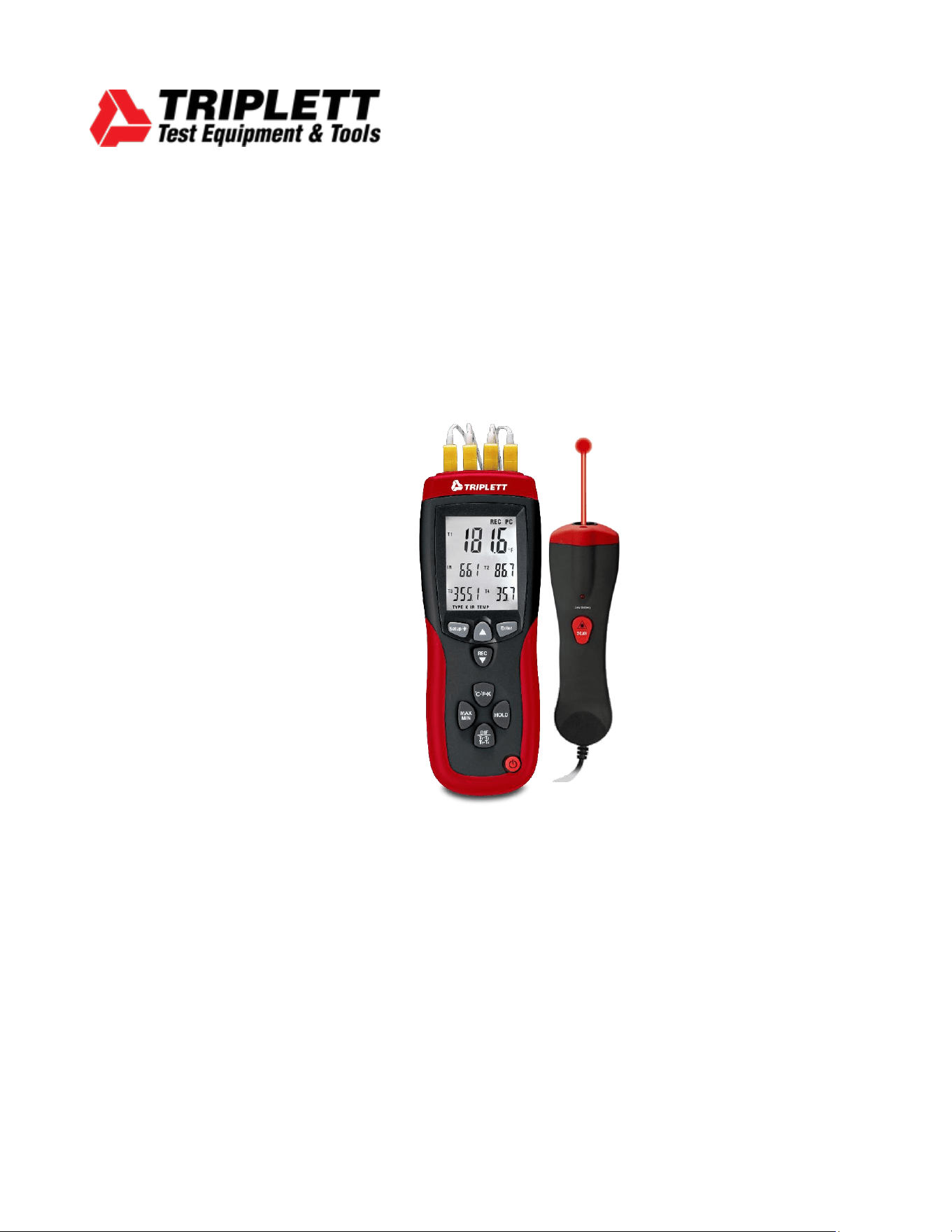
TMP74
Professional 4-Channel Thermocouple and IR Thermometer with
Datalogging
TMP74_v1_7/25 2
Introduction
Welcome, and congratulations on your purchase of the Triplett TMP74 Professional 4-
Channel Thermocouple and IR Thermometer with Datalogging. The TMP74 is a high-
performance instrument designed for accurate and responsive temperature measurement
using K-type thermocouples and an infrared (IR) sensor. Ideal for industrial, laboratory, and
field environments, the TMP74 offers advanced features including data logging, temperature
differentials, USB interface, and user-adjustable calibration.
What’s in the box:
• TMP74 Thermometer
• (4) K-Type Thermocouples
• IR Temperature Probe
• USB Cable
• (1) 9V Battery
• Protective Case
• PC Software
Stay updated:
For the most recent version of the user manual, always visit the official Triplett website:
www.triplett.com and search for TMP74.
Description
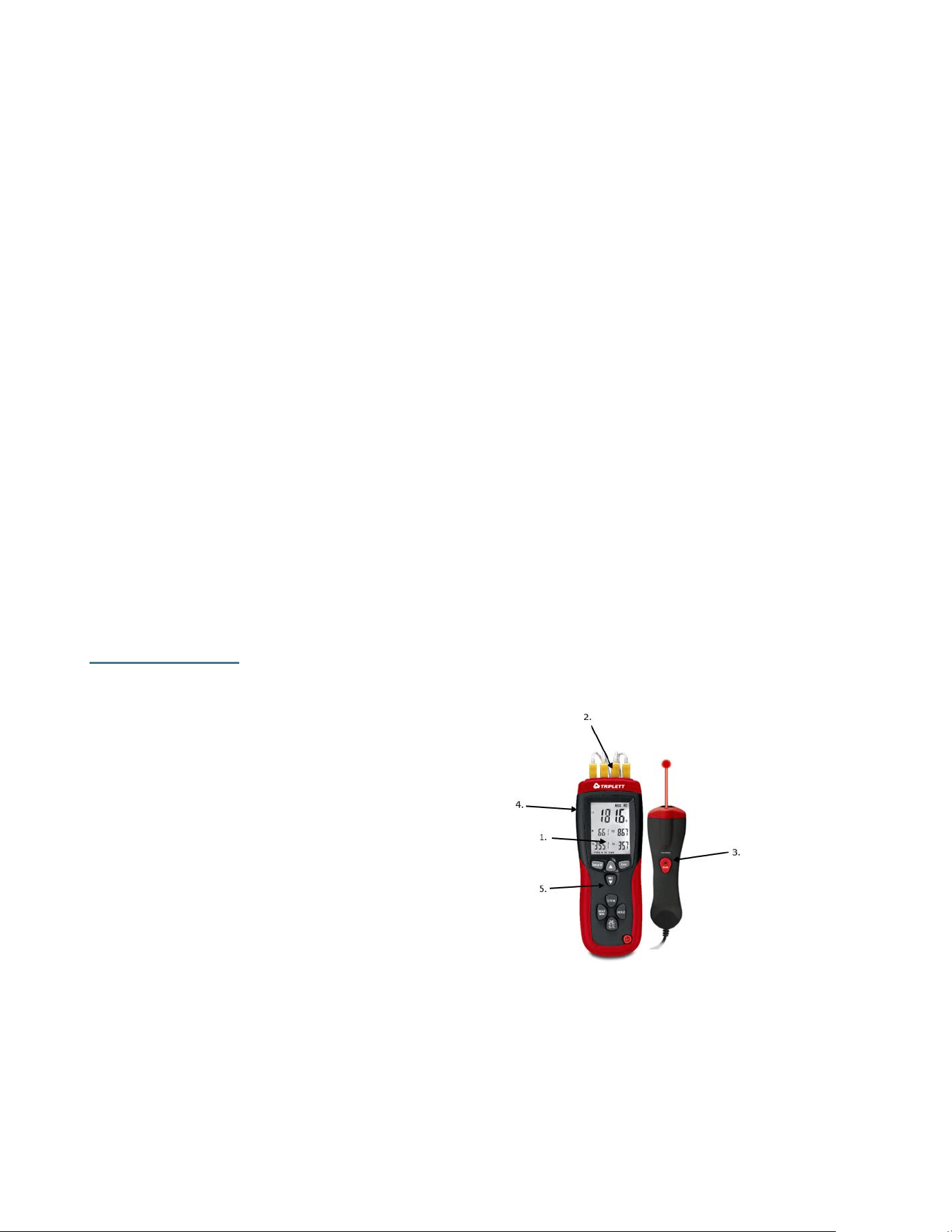
Meter Description
1. Large Backlit LCD Display
2. Thermocouple Inputs: T1, T2, T3, T4
3. IR Input Port
4. USB Interface
5. Control Buttons
TMP74_v1_7/25 3
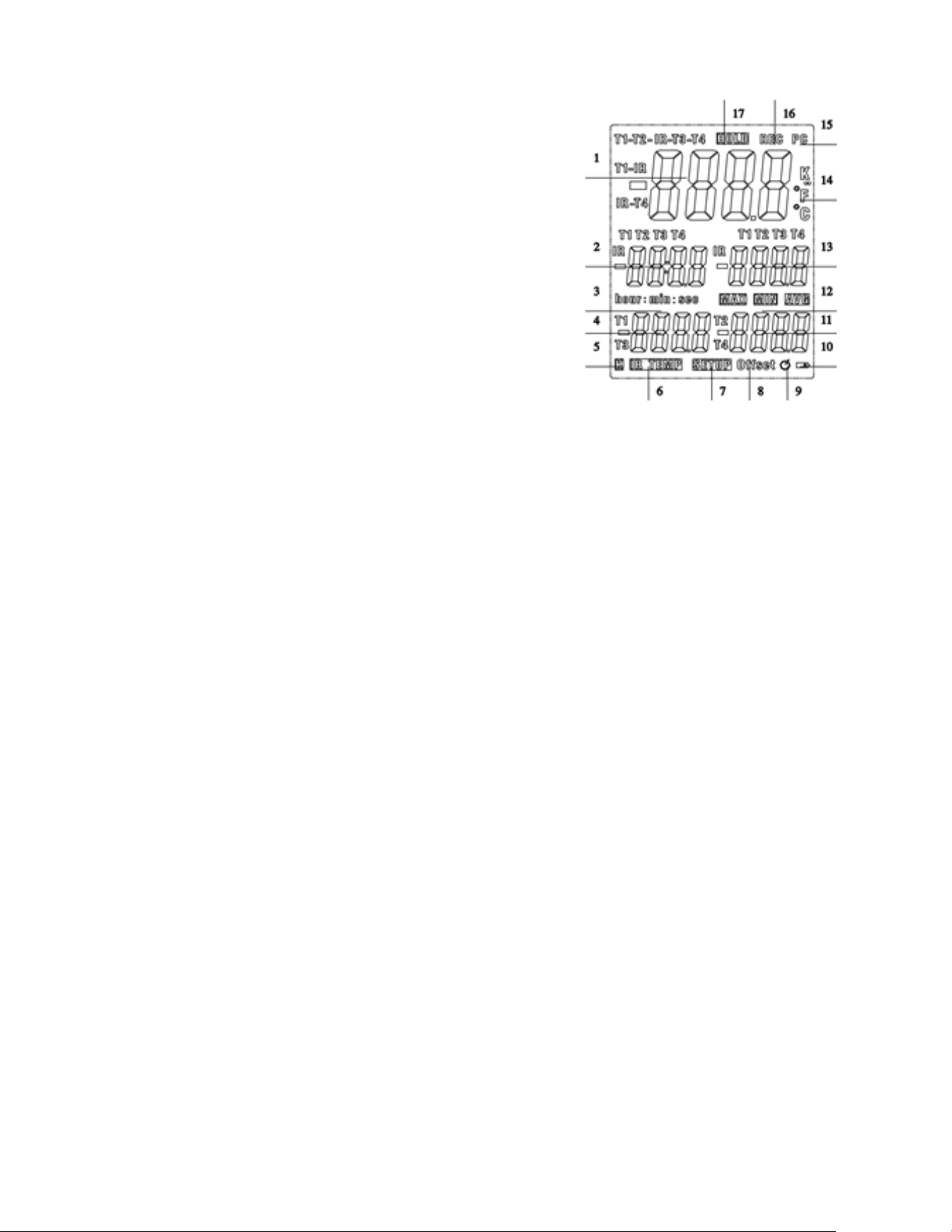
LCD Display
1. Primary Display: Shows the selected measurement
(T1, T2, T3, T4, IR, T1–T2, T1–IR, T2–IR, T3–T4, IR–T3,
or IR–T4).
2. Secondary Display: Displays real-time data from
T1, T2, T3, or T4.
3. Tertiary Display: Indicates IR temperature or
recording duration.
4. Fourth Display: Displays T1 or T3 reading.
5. Fifth Display: Displays T2 or T4 reading.
6. Timer Display: Shows elapsed time in minutes:
seconds or hours: minutes.
7. Thermocouple Type Indicator: Identies input type
for each channel.
8. IR Measurement Indicator: Displays temperature from the IR sensor.
9. Setup Mode: Icon appears when entering or exiting setup mode.
10. Oset Settings: Displays oset adjustments for T1–T4 and IR inputs.
11. Auto Power O Indicator: Shows if sleep mode is active.
12. Low Battery Indicator: Signals when battery replacement is needed.
13. MAX, MIN, AVG: Indicates maximum, minimum, and average readings.
14. Measurement Units: Displays °C, °F, or K depending on selection.
15. PC Connection Icon: Indicates USB communication is active.
16. Data Logging Icon: Shows when data is being recorded.
17. Hold Indicator: Appears when the display is frozen.
Operation
Getting Started
Operation
Power On / Off
Press the Power button to turn the device ON or OFF. If the device is logging data, the
session will stop and automatically save upon shutdown.
Connecting Probes
Plug thermocouples into T1–T4 inputs. For IR measurement, connect the IR probe into the
dedicated port. The screen will show "----" if no probe is detected.
Temperature Measurement
• Insert probes, then press Power.
• The LCD will show T1–T4 and IR temperatures as applicable.
• Allow time to stabilize after inserting probes or moving between environments.

TMP74_v1_7/25 4
Button Functions
• MODE: Toggles between MAX, MIN, AVG, and DIF (T1–T2, etc.). Requires two inputs
for DIF.
• UNITS: Switches between °C, °F, and K.
• HOLD: Freezes the displayed value.
• DIF: Activates differential view (T1–T2, T1–IR, etc.).
• BACKLIGHT/SETUP: Tap for backlight; hold 5 seconds to enter Setup mode.
• UP/DOWN: Scroll through or adjust values in Setup mode.
• REC: Starts or stops data logging.
Setup Mode
To enter Setup, hold the Backlight button for 5 seconds. Navigate using UP/DOWN.
Offset Calibration
Apply a user-defined offset to compensate for sensor error. This can be set independently for
T1–T4 and IR.
Sample Rate
Adjust data logging rate from 1 second to 60 minutes (default: 1 second).
Time Setting
Set year, month, day, hour, and minute.
Clear Memory
Navigate to "CLR" > Select "SURE YES" > Press to confirm.
Sleep Mode (Auto Power Off)
Enable or disable auto shutoff after 20 minutes of inactivity.
Data Logging
• Press REC to begin logging data. Press again to stop.
• If memory is full, "FULL" will appear. Clear memory to continue.

TMP74_v1_7/25 5
MIN, MAX, AVG
Press the MODE button to cycle through MAX, MIN, and AVG readings.
• Hold MODE for 3 seconds to exit this mode.
Differential Temperature
Press DIF to view differences between T1-T2, T1-IR, etc. Requires both channels to be
active.
Display Hold
Press HOLD to freeze the current temperature readings. Press again to release.
Alarms
• When the measured temperature exceeds the high/low thresholds, an icon and buzzer
alert.
• To silence the buzzer: Hold HOLD + press UP. Display will show "bELL ON/OFF".
• Repeat to toggle alarm sound back on.
Viewing Remaining Memory
Press BACKLIGHT, then MODE for 1 second. Remaining memory count will be displayed.
Battery Replacement
1. Turn off the device.
2. Open the battery compartment.
3. Replace with one 9V battery (NEDA 1604 / 6F22).
4. Close compartment securely.
Specifications
Feature
Description
Thermocouple Type
K-Type
Temperature Range
-328°F to 2501°F (-200°C to 1372°C)
IR Range
-22°F to 1022°F (-30°C to 550°C)
Accuracy (T > -100°C)
±0.15% reading + 1°C (1.8°F)
Accuracy (T < -100°C)
±0.5% reading + 2°C (3.6°F)
Accuracy (IR > -10°C)
±2.0% reading + 2°C (3.6°F)
Accuracy (IR < -10°C)
±5°C (9.0°F)
Dierential Temp
Yes (T1–T2, T1–IR, etc.)
Datalogging Memory
18,000 records per channel
Sampling Rate
Adjustable (1s to 60min)

TMP74_v1_7/25 6
Warranty Statement
Triplett Test Equipment offers a two-year warranty to the original purchaser of its products.
We guarantee that our products will be free from defects in workmanship and materials for
two (2) years from the purchase date.
This warranty does not cover:
▪ Products purchased from unauthorized distributors.
▪ Items that have been repaired or altered by unauthorized individuals.
▪ Damage from misuse, abuse, misapplication, negligence, or accidents.
▪ Products with altered, defaced, or removed serial numbers.
▪ Accessories, including batteries.
Copyright © 2025
Triplett www.triplett.com
Auto Power O
After 20 min inactivity
Power Supply
1 × 9V Battery
Dimensions
7.3 x 2.6 x 1.8 in (185 x 65 x 45 mm)
Weight
8.7 oz (248 g)