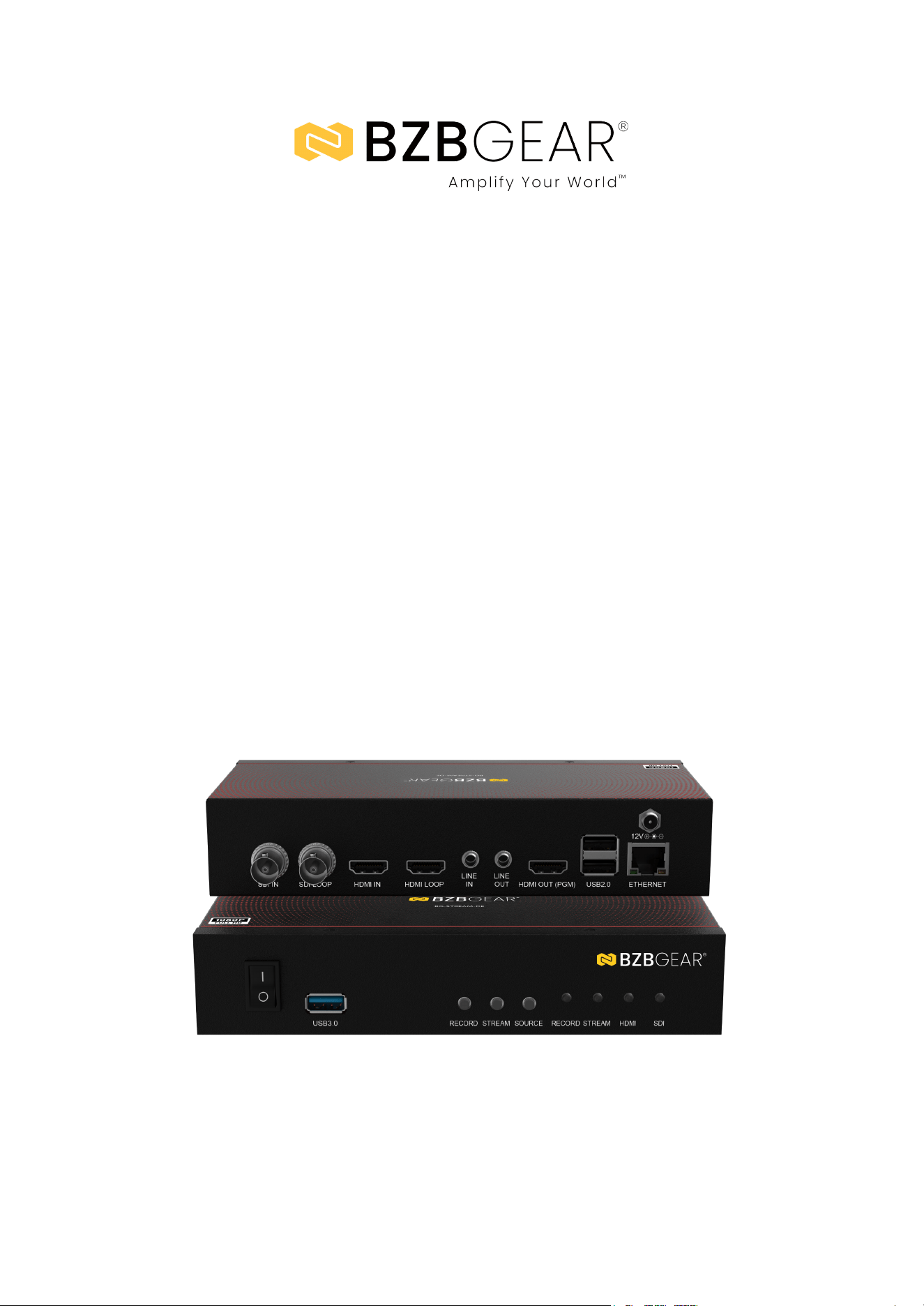
BG-STREAM-DE
1 Channel SDI/HDMI Encoder/Decoder/Recorder
with Audio/USB 3.0 for Storage
User Manual

BZBGEAR BG-STREAM-DE PRODUCT MANUAL
Address: 830 National Drive #140, Sacramento, CA 95834, USA · Tel: +1(888)499-9906 · Email: support@bzbgear.com 2

BZBGEAR BG-STREAM-DE PRODUCT MANUAL
TABLE OF CONTENTS
Statement 4
Safety Precaution 4
Introduction 5
Features 5
Packing List 5
Specifications 6
Operation Controls and Functions 7
Web UI 8
Connection Diagram 9
Troubleshooting 10
Tech Support 11
Limited Product Warranty Terms 11
Mission Statement 12
Copyright 12
Address: 830 National Drive #140, Sacramento, CA 95834, USA · Tel: +1(888)499-9906 · Email: support@bzbgear.com 3

BZBGEAR BG-STREAM-DE PRODUCT MANUAL
Statement
Please read these instructions carefully before connecting, operating, or configuring this
product. Please save this manual for future reference.
Safety Precaution
● To prevent damaging this product, avoid heavy pressure, strong vibration, or immersion
during transportation, storage, and installation.
● The housing of this product is made of organic materials. Do not expose to any liquid,
gas, or solids which may corrode the shell.
● Do not expose the product to rain or moisture.
● To prevent the risk of electric shock, do not open the case. Installation and maintenance
should only be carried out by qualified technicians.
● Do not use the product beyond the specified temperature, humidity, or power supply
specifications.
● This product does not contain parts that can be maintained or repaired by users.
Damage caused by dismantling the product without authorization from BZBGEAR is not
covered under the warranty policy.
● Installation and use of this product must strictly comply with local electrical safety
standards.
Address: 830 National Drive #140, Sacramento, CA 95834, USA · Tel: +1(888)499-9906 · Email: support@bzbgear.com 4

BZBGEAR BG-STREAM-DE PRODUCT MANUAL
Introduction
The BG-STREAM-DE provides a user-friendly experience with intuitive front-panel
controls for recording, streaming, and source selection. It supports high-speed
recording through its USB 3.0 interface, accommodating various input formats for
flexibility. The rear panel features an RJ45 port for reliable internet connectivity and
two USB 2.0 ports for peripherals like a keyboard and mouse, facilitating local
control. The device meets diverse display and recording needs with a maximum
resolution of 1080p at 60/50fps, advanced video features such as H.265/H.264/AVC
encoding, and multiple output resolutions. Its audio capabilities include AAC input
streams for high-quality sound.
The RJ45 port supports 10/100/1000Mbps Ethernet, and the device is compatible
with streaming protocols such as NDI, Dante AV-H, RTSP, RTMP, and HLS, offering
extensive streaming flexibility. Users can record in MP4, TS, and MOV formats and
utilize various streaming formats. Control options include a USB keyboard and
mouse or a comprehensive web UI for system configuration. Additionally, the device
supports firmware upgrades and features LED indicators for easy monitoring,
ensuring seamless operation in various streaming environments.
Features
● Versatile Connections: HDMI 2.0 & SDI inputs; HDMI 2.0 (PGM), HDMI & SDI
(Loop-through) outputs
● Comprehensive Audio: 3.5mm analog input & output
● Recording & Streaming: 1080p60 (MP4, TS, MOV); supports NDI, Dante AV-H, RTSP,
RTMP, HLS, SRT, TS
● Simple Network Configuration: DHCP Client support
● Control Options: Convenient control via USB keyboard/mouse and web UI
● Intuitive LED IndHardware compression in real-time mode
● Firmware upgradeable
● LED indicators for status monitoring
● Enhanced Functionality: USB 3.0 for storage
Packing List
● 1x BG-STREAM-DE
● 1x 12V DC Adapter
Address: 830 National Drive #140, Sacramento, CA 95834, USA · Tel: +1(888)499-9906 · Email: support@bzbgear.com 5
BZBGEAR BG-STREAM-DE PRODUCT MANUAL
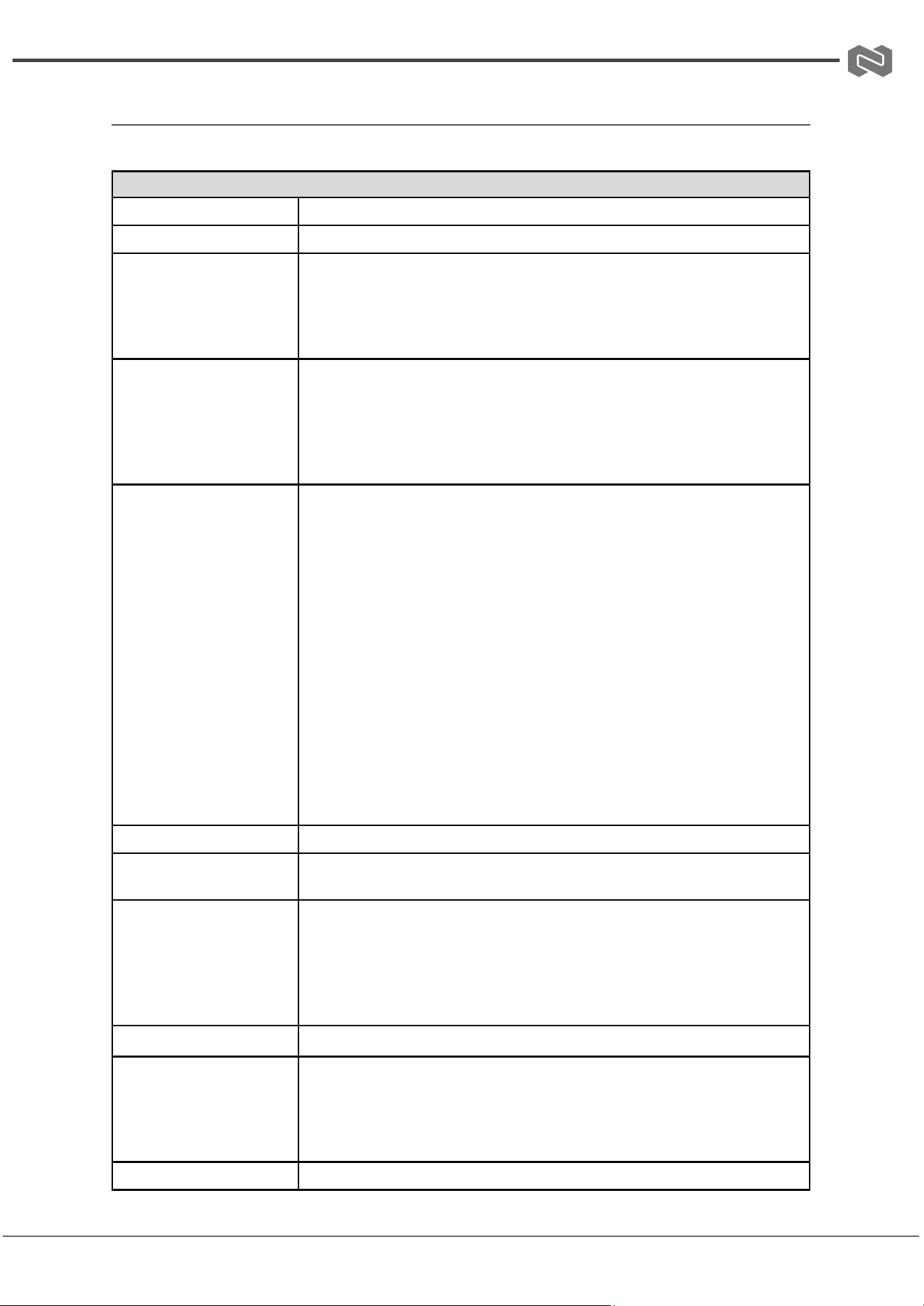
Specifications
Technical Specifications
Max FPS
1920×1080p@60/50fps
Recording Modes
Hardware Compression, Real-Time Mode
Input Interfaces
Video
● 1×HDMI
● 1×SDI
Audio
● 1×3.5 mm Phone Jack
Output Interfaces
Video
● 1×HDMI2.0 (PGM)
● 1×HDMI (Loop-through)
● 1×SDI (Loop-through)
Audio
● 1×3.5 mm Phone Jack
Video Support
H.265/H.264/AVC, Baseline/Main/High Profile
Support input / output resolutions
● 3840×2160p@60/50fps (Output only)
● 3840×2160p@30/25/24fps (Output only)
● 1920×1080p@60/50fps
● 1920×1080p@30/25/24fps
● 1920×1080i@60/50fps
● 1280×720p@60/50fps
● 1280×1024p@60fps
● 1280×960p@60fps
● 1024×768p@60fps
● 800×600p@60fps
● 640×480p@60fps
● 720×480p@60fps
● 720×576p@50fps
● 720×480i@60fps
● 720×576i@50fps
Audio Support
● Input Audio Stream: AAC
Network Features
● 1×RJ45 for 10/100/1000Mbps Ethernet
● DHCP Client
Streaming Protocols
● NDI Support ( Separate License with NDI Required )
● Dante AV-H ( Separate License with Dante AV-H Required )
● TS Over UDP ( Unicast & Multicast )
● RTSP Over HTTP/TCP/UDP ( RTSP Elementary Stream )
● RTMP ( Publish )
● HLS
Recording Formats
● MP4 / TS / MOV
Additional Features
● Web UI for System Configuration
● Firmware Upgradable
● LED Indicator
● 1×USB 3.0 Host for USB Storage
● 2×USB 2.0 (For Keyboard and mouse usage)
Dimensions (W x D x H)
8.0in x 3.9in x 1.6in [203mm x 100mm x 41mm]
Address: 830 National Drive #140, Sacramento, CA 95834, USA · Tel: +1(888)499-9906 · Email: support@bzbgear.com 6
BZBGEAR BG-STREAM-DE PRODUCT MANUAL
Operation Controls and Functions
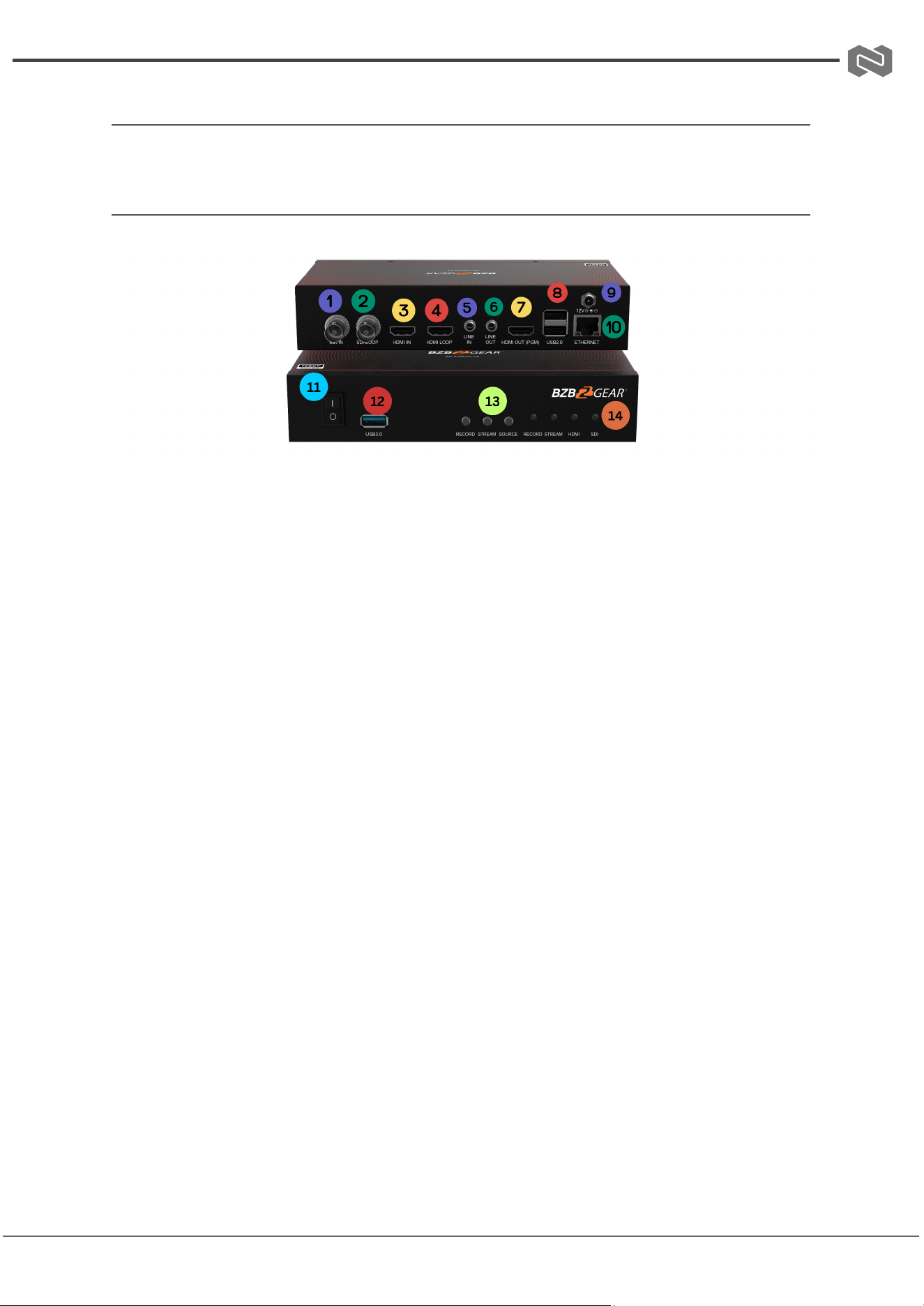
Front and Rear Panel
1. SDI In: Input for SDI Source
2. SDI Loop: Output for SDI Loop
3. HDMI In: Input for HDMI Source
4. HDMI Out: Output for HDMI Source
5. Line In: Input for Line Audio
6. Line Out: Output for Line Audio
7. HDMI Out (PGM): HDMI Program Output (Current Livestream Output)
8. USB 2.0: For Keyboard and Mouse Usage
9. DC In: 12V DC Power Input
10. Ethernet: Connects Unit to the Network for Streaming and Web GUI
11. Power Switch: Turns Unit On/Off
12. USB 3.0: Host for USB Storage
13. Record, Stream, Source Buttons: Selects Active Function
14. LED Indication Lights: Indicates Recording, Streaming, HDMI, and SDI Activity
Address: 830 National Drive #140, Sacramento, CA 95834, USA · Tel: +1(888)499-9906 · Email: support@bzbgear.com 7
BZBGEAR BG-STREAM-DE PRODUCT MANUAL
Web UI
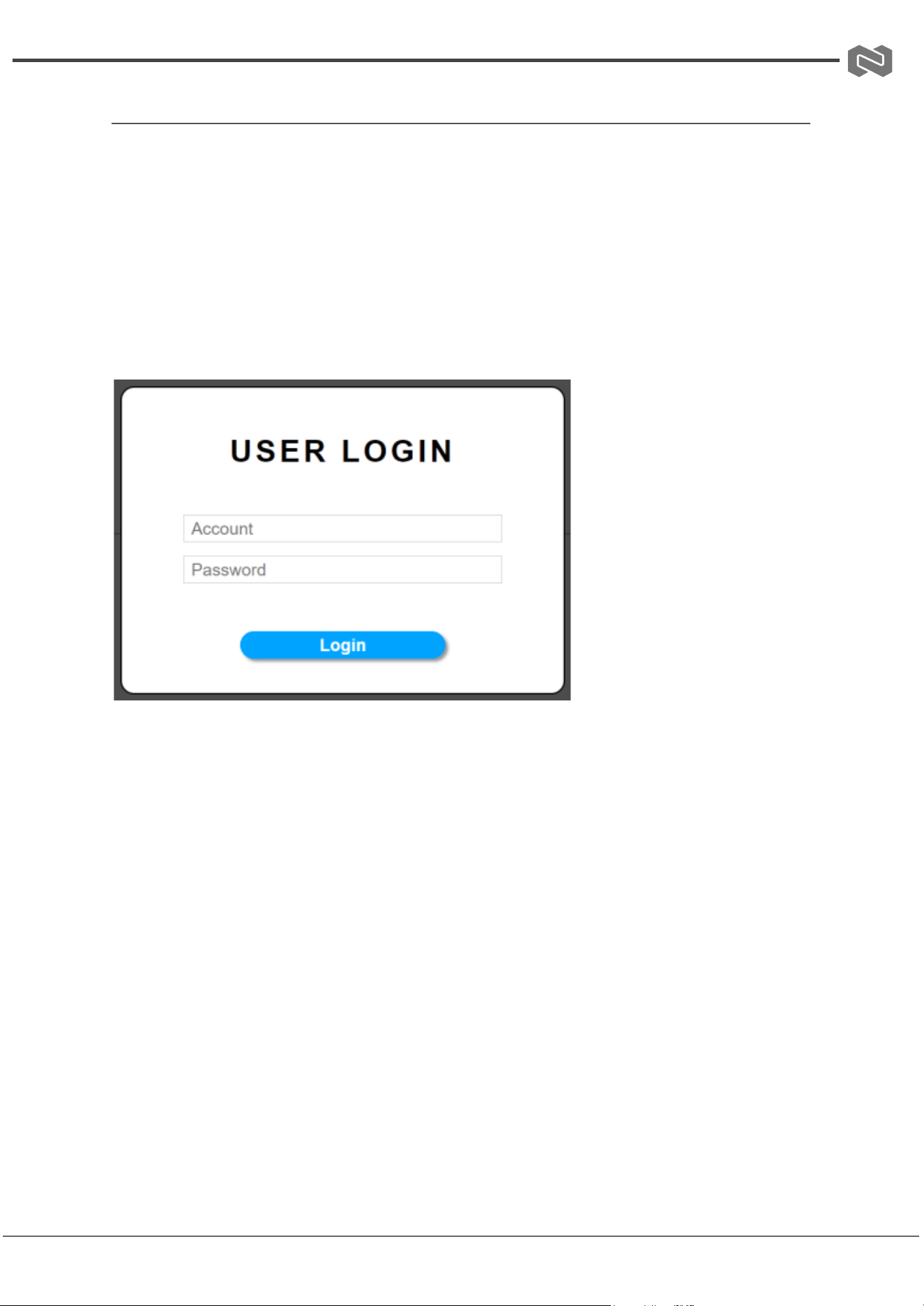
To access the BG-STREAM-E Web UI, open an IP Finder tool and search for the
device's IP address. Identify the correct IP address by matching it with the device's
MAC address, then use it to open the control interface.
The Web UI is an intuitive interface that allows users to easily control the
BG-STREAM-E from a standard PC or portable devices (e.g., Android, iPhone, iPad,
etc.), providing a more convenient and flexible control experience.
Access and Login Instructions
Username: admin
Password: 0000
Address: 830 National Drive #140, Sacramento, CA 95834, USA · Tel: +1(888)499-9906 · Email: support@bzbgear.com 8
BZBGEAR BG-STREAM-DE PRODUCT MANUAL
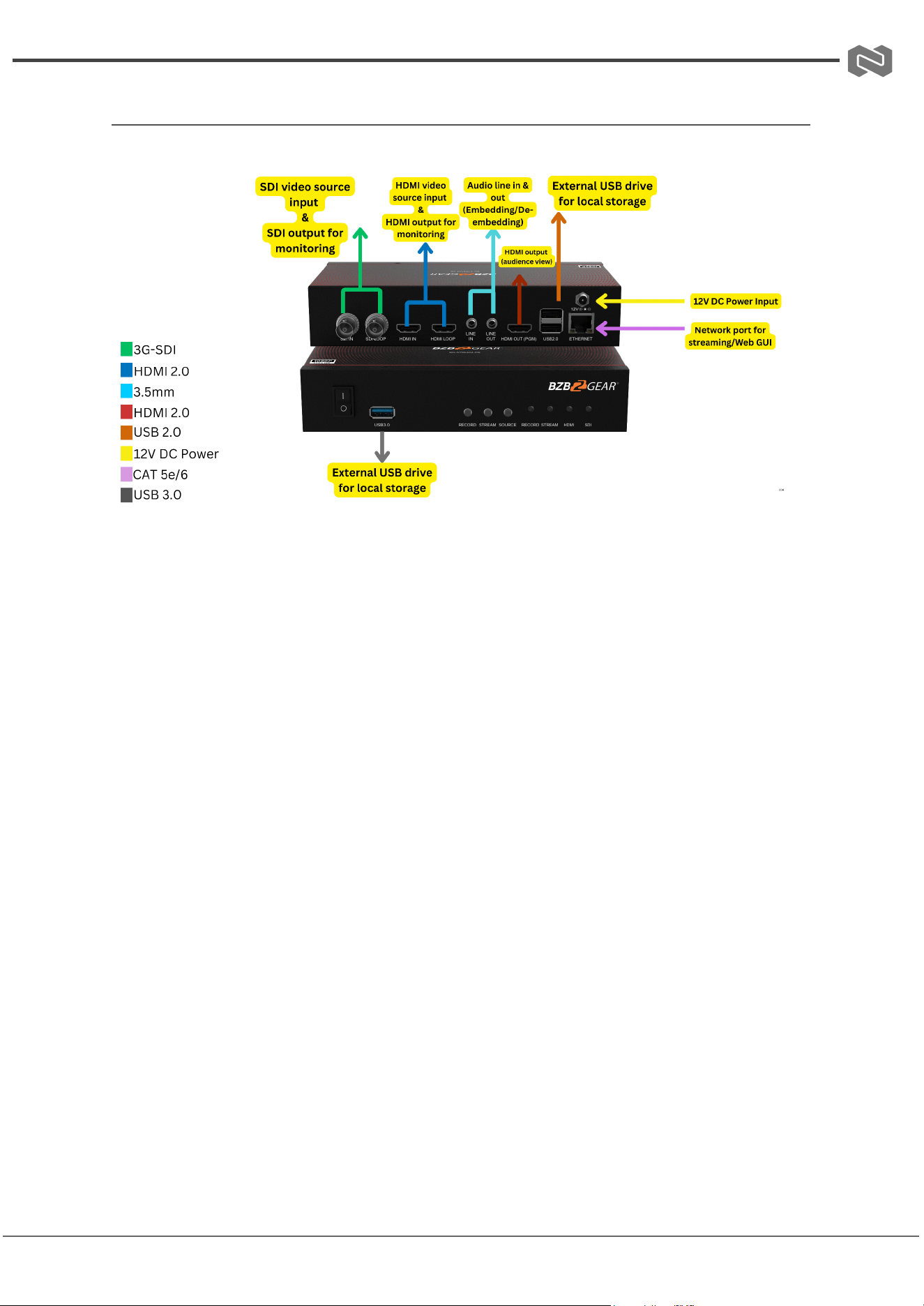
Connection Diagram
Address: 830 National Drive #140, Sacramento, CA 95834, USA · Tel: +1(888)499-9906 · Email: support@bzbgear.com 9
BZBGEAR BG-STREAM-DE PRODUCT MANUAL
Troubleshooting
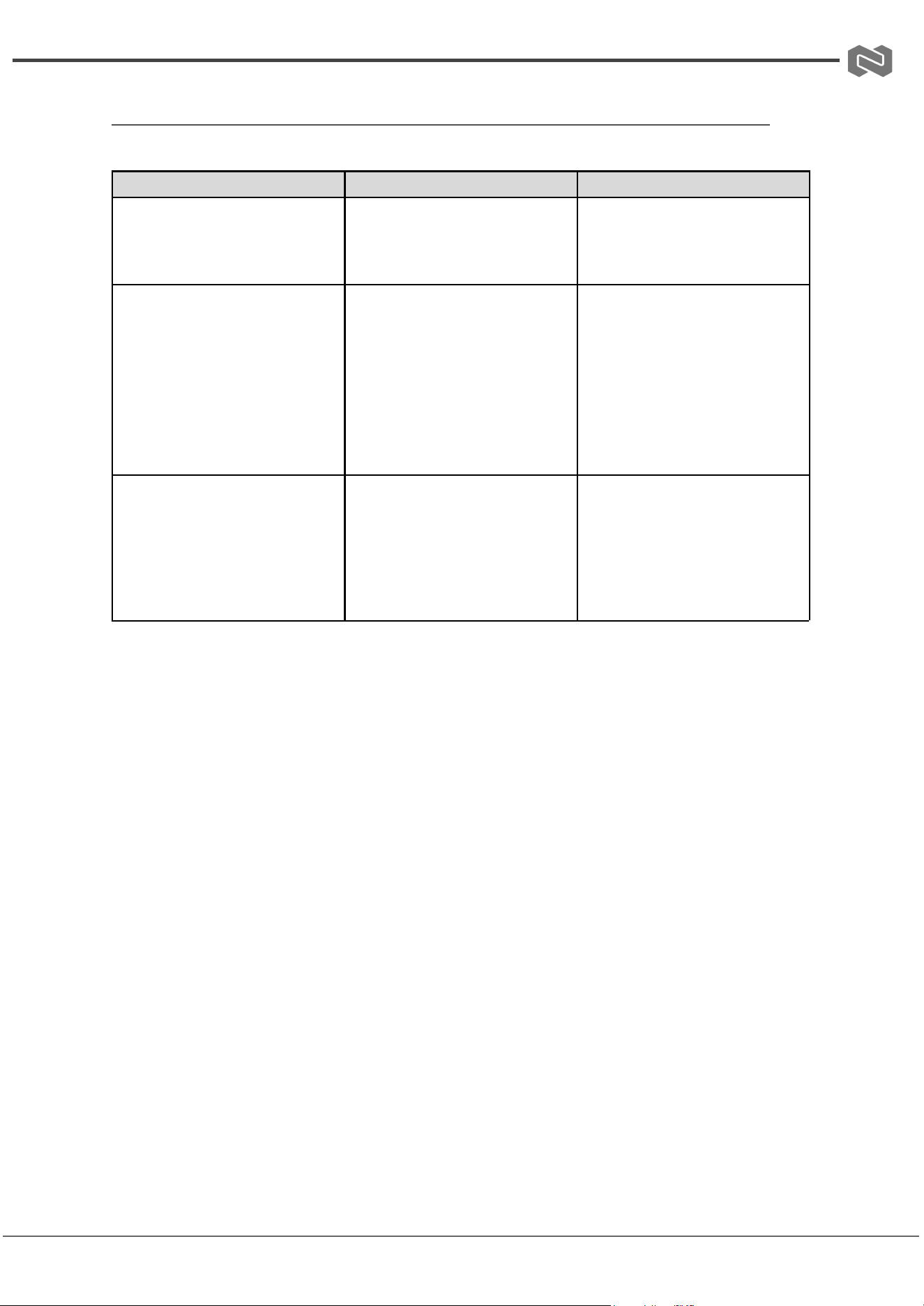
Problems
Causes
Solutions
No Power / All LED off
Power supply not connected,
connected fully, or wrong power
supply.
Check if the power supply is
connected correctly and the
output voltage value is within
recommended specifications.
No sound or sound issues
The HDMI connection is faulty,
the audio format is not
supported by the displays, or
the source player is set to
another port for audio output
Check if the HDMI cables are
connected correctly.
Check if the audio format is
supported by the display and
that a user has not changed the
supported audio format on the
player`s audio output. Ensure
output settings from the HDMI
source device as set correctly.
No picture or picture flickers
The HDMI cable may be faulty
or the category cable quality is
faulty.
Check if the HDMI
and category cable connections
are correct and undamaged.
Change to another good
working HDMI cable or category
cable (CAT6 or better cable is
recommended).
Address: 830 National Drive #140, Sacramento, CA 95834, USA · Tel: +1(888)499-9906 · Email: support@bzbgear.com 10

BZBGEAR BG-STREAM-DE PRODUCT MANUAL
Tech Support
Have technical questions? We may have answered them already!
Please visit BZBGEAR’s support page (bzbgear.com/support) for helpful information and
tips regarding our products. Here you will find our Knowledge Base
(bzbgear.com/knowledge-base) with detailed tutorials, quick start guides, and step-by-step
troubleshooting instructions. Or explore our YouTube channel, BZB TV
(youtube.com/c/BZBTVchannel), for help setting up, configuring, and other helpful how-to
videos about our gear.
Need more in-depth support? Connect with one of our technical specialists directly:
Phone
1.888.499.9906
Email
support@bzbgear.com
Live Chat
bzbgear.com
Limited Product Warranty Terms
Pro Line: 5-year warranty from the date of purchase for AV/Broadcasting products bought
on or after August 1, 2024.
Essential Line: 3-year warranty from the date of purchase for AV/Broadcasting products
bought on or after August 1, 2024.
Cables: Lifetime Limited Product Warranty.
For complete warranty information, please visit bzbgear.com/warranty.
For questions, please call 1.888.499.9906 or email support@bzbgear.com.
Address: 830 National Drive #140, Sacramento, CA 95834, USA · Tel: +1(888)499-9906 · Email: support@bzbgear.com 11

BZBGEAR BG-STREAM-DE PRODUCT MANUAL
Mission Statement
BZBGEAR is a breakthrough manufacturer of high-quality, innovative audiovisual equipment
ranging from AVoIP, professional broadcasting, conferencing, home theater, to live
streaming solutions. We pride ourselves on unparalleled customer support and services.
Our team offers system design consultation, and highly reviewed technical support for all
the products in our catalog. BZBGEAR delivers quality products designed with users in
mind.
Copyright
All the contents in this manual and its copyright are owned by BZBGEAR. No one is allowed
to imitate, copy, or translate this manual without BZBGEAR’s permission. This manual
contains no guarantee, standpoint expression or other implies in any form. Product
specification and information in this manual is for reference only and subject to change
without notice.
All rights reserved. No reproducing is allowed without acknowledgement.
Address: 830 National Drive #140, Sacramento, CA 95834, USA · Tel: +1(888)499-9906 · Email: support@bzbgear.com 12