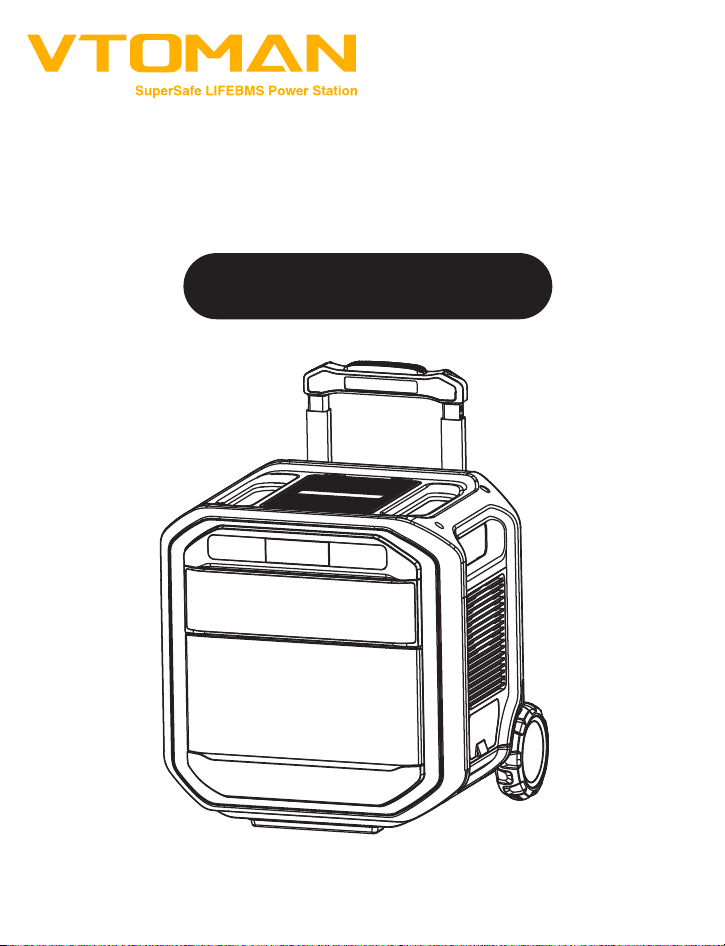
User Manual
Please read this manual carefully before use and retain it for future reference.
Model No.: PB-91
VTOMAN FlashSpeed Pro 3600


Thank you for welcoming Vtoman into your family. From our foundation,
we have focused on providing top-tier service and sustainable energy
solutions for both indoor comfort and outdoor adventures.That's why
Vtoman services are available across over 10 countries, trusted by
millions to power their homes and support their lifestyles responsibly.
Thank You for Choosing Vtoman
�

CONTENTS
1. Before You Begin
2. Safety Instructions
3. What's in the Box
4. Product Overview
(1) Interface Introduction
(2) Overview of LCD Screen
(3) Product Highlights
5. Specifications
6. Operation
(1) Powering On/Off
(2) AC/DC/USB Output Control
(3) Uninterruptible Power Supply(UPS)
7. Charging & Discharging
8. Battery Capacity Expansion
9. Maintenance
10. Troubleshooting
11. Technical Support
5
6
7
8
8-9
10
11
12
13
13
13
14
14
16
18
18
21
�

Vtoman products are designed for safety and reliability. Please carefully
read this guide for important safety information. Adhering to these
guidelines ensures the safe setup, use, and care of your device, prevent-
ing potential damage and injury.
Welcome to Vtoman! This manual is designed to help you get the most
out of your product with easy-to-follow instructions and helpful tips.
This user manual provides essential guidance on how to operate and
maintain your Vtoman unit effectively.
Using only genuine Vtoman accessories guarantees the safety and
optimal performance of your device.
The diagrams included in this manual are designed to enhance your
understanding of the assembly and operational procedures for the
Vtoman FlashSpeed Pro 3600. Please refer to these visuals while setting
up your device to ensure correct installation and operation.
Vtoman cannot be held responsible for damages resulting from the
use of non-genuine parts.
For your safety and to ensure the best experience, please read this
manual carefully before operating the device and keep it on hand for
future reference.
1.BEFORE YOU BEGIN
�

3. DO NOT Place on Unstable Surfaces: Ensure the unit is on a stable, level
surface to prevent accidents.
4. Ensure Adequate Ventilation: Operate the unit in well-ventilated and
spacious areas to avoid overheating.
5. DO NOT Modify the Unit: Never attempt to dismantle, cut, crush, punc-
ture, or otherwise tamper with the unit.
6. DO NOT Insert Objects: Avoid inserting any foreign objects into the fan,
vents, ports, or other openings of the unit.
7. NEVER Use Damaged Components: Using a damaged battery or
component can lead to leakage, fire, overheating, or explosion.
8. Use Only Approved Accessories: Ensure that only approved batteries
and accessories are used with your device to minimize the risk of fire,
explosion, and other hazards.
9. Turn Off Immediately If Malfunctioning: In the event of malfunction,
turn off the unit immediately to prevent further issues.
10. DO NOT Modify Internally: Modifications or repairs should only be
performed by qualified personnel. If repair is needed, take the unit to an
authorized service center.
11. Charge Properly for Storage: When not in use for extended periods,
power off the unit and charge it to 50-70% every 6 months.
12. Clean Carefully: Use a dry cloth to gently clean the unit.
SAVE THESE INSTRUCTIONS!
1. Operate within Specified Conditions: Always operate or store the unit
within the specified temperature range of 32°F to 131°F for charging and
-4°F to 131°F for general operation.
2. DO NOT Expose to Hazardous Conditions: Avoid exposing the unit to
fire, liquids, or other contaminants to prevent risk of fire or electric shock.
2.SAFETY INSTRUCTIONS
�
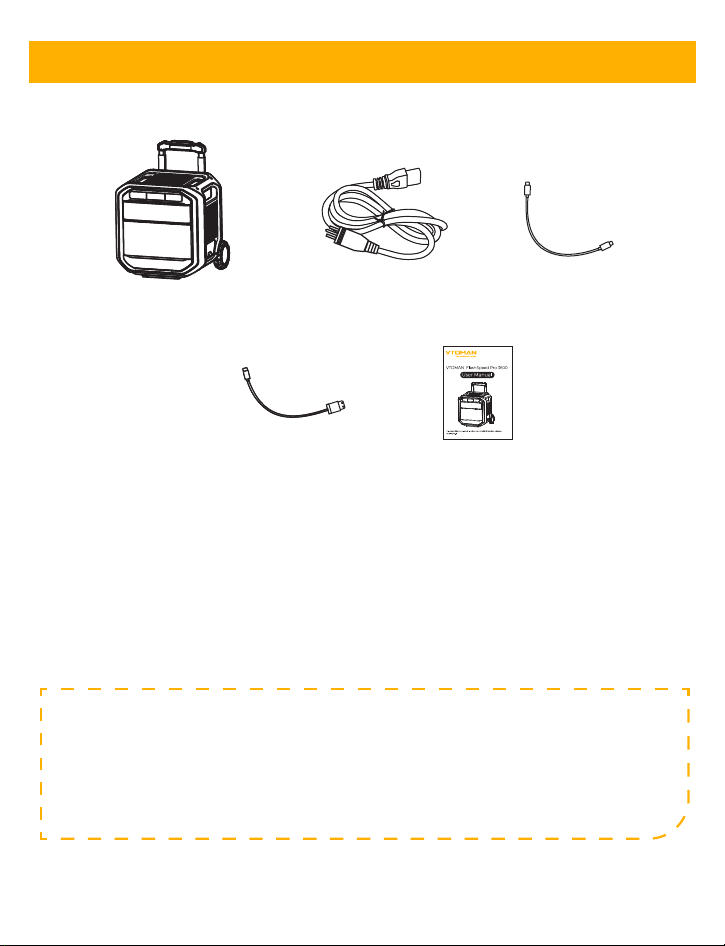
Vtoman FlashSpeed Pro 3600
Power Station
Type-C to Type-C Cable
USB-A to Type-C Cable
User Manual
AC charging cable
Standard Packaging Includes:
1. AC Charging Cable: Connects to standard AC power outlets for charging.
2. Type-C to Type-C Cable: For charging and data transfer between USB-C
compatible devices.
3. USB-A to Type-C Cable: Facilitates connections between USB-A and
USB-C ports.
Accessory Details:
Note: Accessories are specifically designed to maximize the
functionality and performance of your Vtoman FlashSpeed Pro
3600. The specifications and package contents are subject to
updates to reflect product improvements without prior notice.
3. WHAT'S IN THE BOX
�
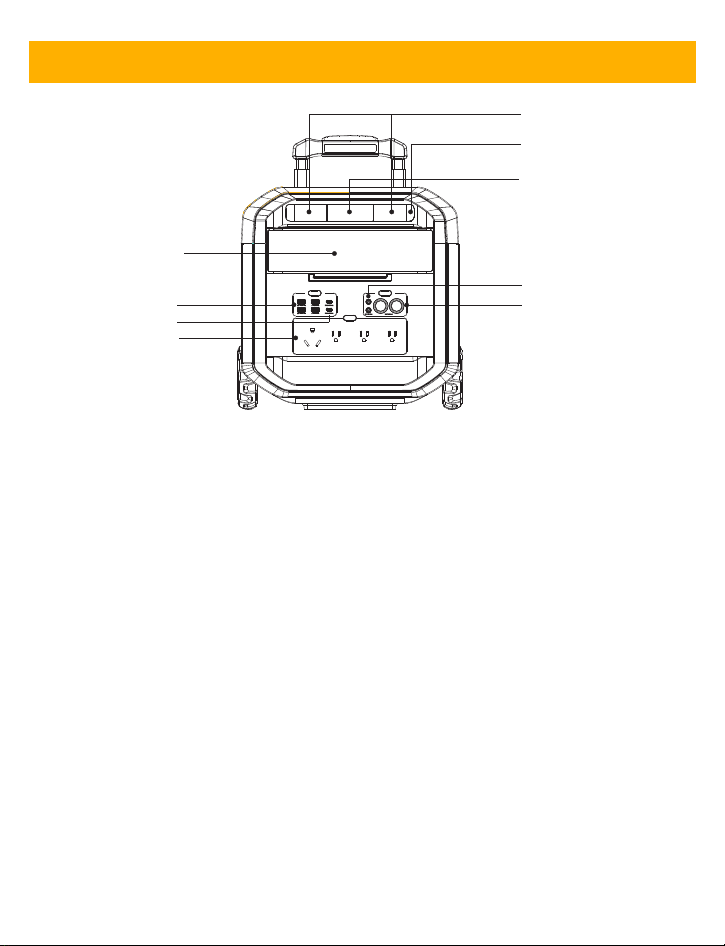
a
b
c
d
e
f
g
h
i
4. PRODUCT OVERVIEW
a.LCD Display: Shows status and settings, including battery percentage,
power output, power input,output methods, etc.
b.USB-A Ports: Standard and Quick Charge options.
c.USB-C Ports: 100W output for high-speed charging.
d.AC Outputs: Continuous power of 1x 3600W (Peak 6000W) and 3x
2200W (Peak 6000W), suitable for appliances and electronics requiring
a pure sine wave.
e.LED Light: The FlashSpeed Pro 3600 Power Station features a LED
flashlight with 3 modes.
f.LED Button: Press the LED button to turn on or off the LED light.
g.Power Button: The device powers on when this button is pressed and
powers off when it's pressed again.
h.DC5521 Output: 12V/10A for DC-powered devices.
i.Car Charing Output: 12V/10A for DC-powered devices.
(1)Interface Introduction
�
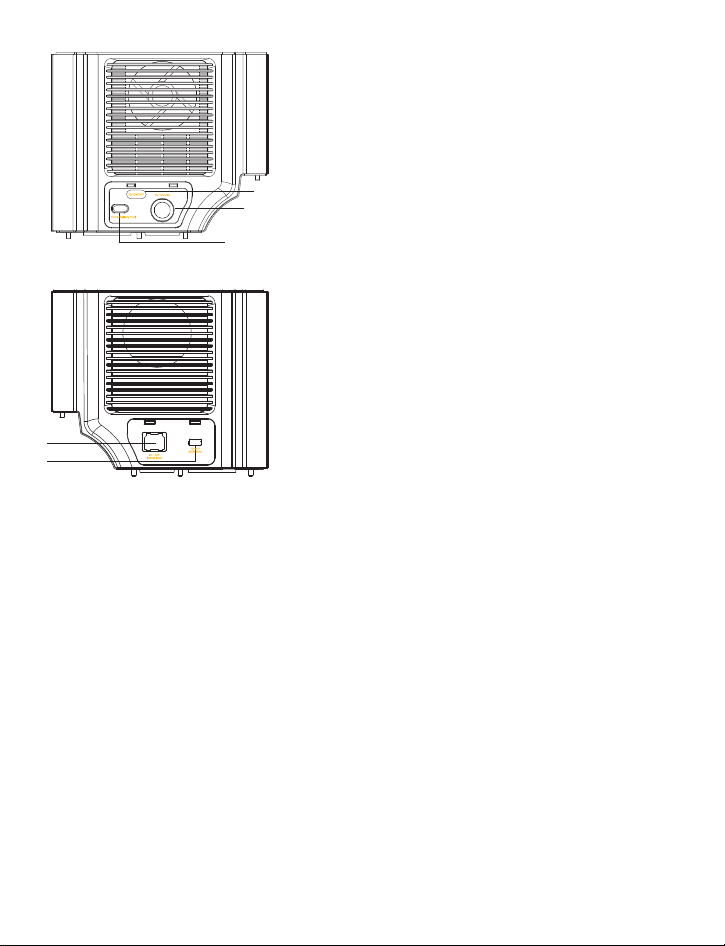
j
k
l
m
n
j.RV ON/OFF: Press the RV button to turn on
or off the RV DC output.
k.RV DC Output: 12V/25A for DC-powered
devices
l.Extra Battery Port:For connecting
additiona FlashSpeed Pro 3600 extra battery
to expand the capacity.
m.AC Input Port: For connecting AC
charging cable.
n.Anderson Input Port:Specialized for solar
input.
�
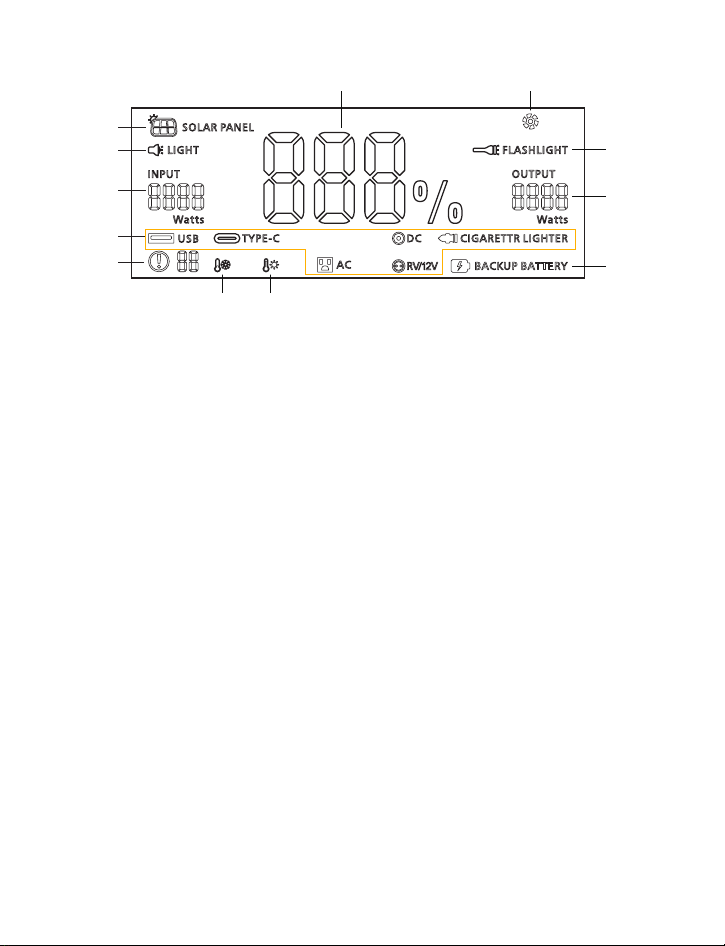
a
b
c
d
e
f
g
h
i
j
kl
(2)Overview of LCD Screen
a.Solar Charging Indicator: This icon will light up when the solar panel
is connected.
b.LED Light Indicator:The icon will light up at the same time when the
LED light is activated this.
c.Power Input (W): Shows the power in watts that the device is current-
ly receiving from external sources,useful for tracking the charging rate.
d.Output Methods: Indicates the type of output methods currently
enabled. When the icon of any output method on the display is lit,the
corresponding output ports can power your device.
e.Alarm Indicator: This icon will light up when the device is malfunc-
tioning. (This icon won't light up when the battery pack has no malfunc-
tioning)
f.Low-Temperature Alert: When this icon shows, stop using the power
station until the icon disappears.
g.High-Temperature Alert: When this icon shows, stop using the power
station and let it cool down until it disappears.
h.Backup Battery Indicator: This icon will light up when the extra
expansion battery is connected.
i.Power Output (W): Indicates the real-time power being consumed by
connected devices, displayed inwatts. This helps to manage the energy
��

usage effectively.
j.Flashlight Indicator:When the Flashlight is activated this icon will
light up at the same time.
k.Fan Indicator: This icon lights up when the fan is running.
l.Battery Percentage: Displayed at the center, it shows the remaining
battery lifeas a percentage, enabling you to track energy reserve levels
efficiently.
(3)Product Highlights
1.SUPER-FAST HOUR CHARGING:
FlashSpeed Pro 3600 powers up to 100% within 2 hours.
2.POWER 14 DEVICES SIMULTANEOUSLY:
FlashSpeed Pro 3600's diverse output ports, featuring 4*AC, 2*USB-A,
2*USB-A(QC3.0), 2*USB-C, 2*DC5521 and 2*Car outlet, let you power up
to 14 devices at once.
3.SAFETY FIRST, LIFEBMS & LFP BATTERY:
Trust VTOMAN's LIFEBMS system offering 10 layers of protection. The
durable LiFePO4 battery ensures 3000+ reliable cycles.
4.DOUBLE THE POWER:
Connect FlashSpeed Pro 3600 Extra Battery (sold separately) to double
your capacity to 5632Wh.
5.SOLAR-POWERED:
Use the sun to your advantage with FlashSpeed Pro 3600's Anderson
input port. Maximize solar recharge up to 800 watts.
6.UNINTERRUPTED POWER SUPPLY(UPS):
FlashSpeed Pro 3600 ensures continuous power to your essentials with
a switchover time of less than 20ms. No more blackouts!
��

Product Name
Battery Capacity
Battery Type
Dimensions (LxWxH)
Weight
Operating Temperature
Charging Temperature
Storage Temperature
Working Humidity
Continuous Power
Peak Power
Voltage
Frequency
USB-A Output
USB-A QC3.0 Output
USB-C PD Output
DC5521 Output
Cigarette Lighter Port
2 x 5V/2.4A, 12W Max
2 x 18W Max(QC3.0)
2 x 100W Max(Output Only)
2 x 12V/10A
2 x 12V/10A
3x2200W + 1x3600W,total 3600W
6000W
120V
60Hz
FlashSpeed Pro 3600
3096Wh
LiFePO4
378*418*581mm(14.9x16.4*22.9inches)
38 kg (83.8 lbs)
-4°F to 131°F
32°F to 131°F
-13°F to 131°F
10-90%
AC Output
DC Output
Input
Special Features
AC Input
Anderson Input
UPS Functionality
Expansion Capabilities
90-140V, up to 1800W
12-80V, up to 800W
Supported
Compatible with FlashSpeed Pro 3600 extra battery
5.SPECIFICATIONS
General
��

(1)Powering On/Off
1.Powering On: Short press the power button above the display to start the
FlashSpeed Pro 3600 power station.
2.Powering Off: Long press the power button above the display to turn off
the FlashSpeed Pro 3600 power station.
(2)AC/DC/USB Output Control
1. AC Output: Press the 'AC' button to switch the AC power output on or off.
2. DC Output: Press the 'DC' button to switch the DC power output on or
off. This controls the power supplied through the DC5521 and cigarette
lighter ports.
3.DC RV Output: Press the "RV ON/OFF" button to turn the RV DC output
on or off.
4. USB Output: Press the 'USB' button to switch the DC power output on
or off. This controls the power supplied through the USB and Type-C ports.
USB Output Features
Quick Charge USB-A (QC3.0): Up to 18W for devices supporting fast
charging.
USB-C Ports (PD): Each port delivers up to 100W, ideal for fast
charging laptops and other high-powered devices.
6.OPERATION
��
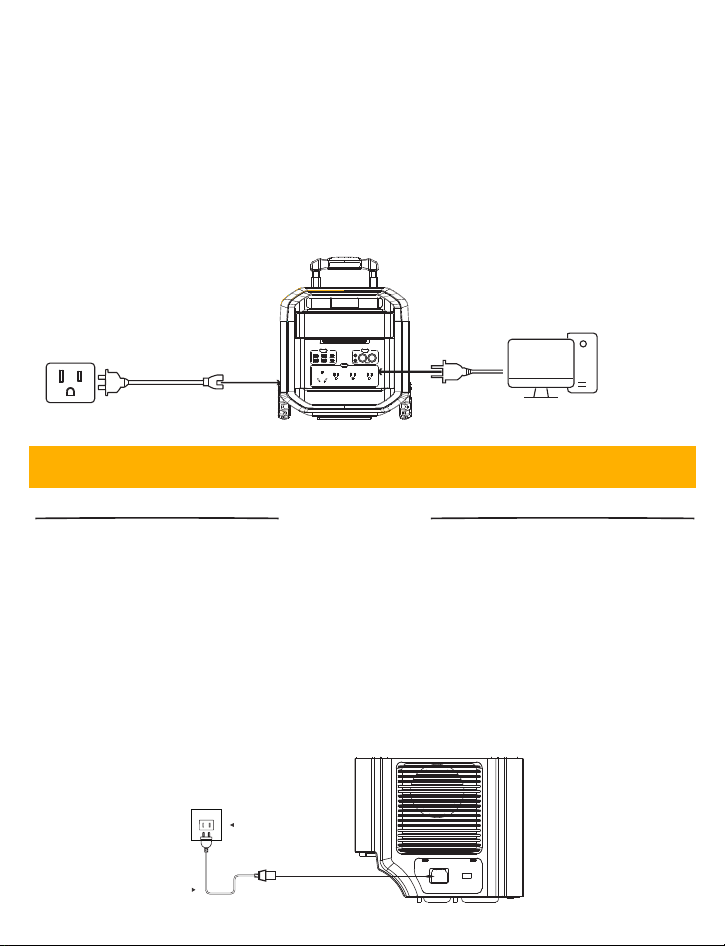
(3)Uninterruptible Power Supply(UPS)
1. FlashSpeed Pro 3600 power station features uninterruptible power
supply. With switchover time less than 20ms, it can help to ensure
uninterrupted operation for your device and protect sensitive equipment
from potential damage in the event of grid power failure.
2. To use the UPS function, just connect the power station to a wall outlet
with AC charging cable, then press the 'AC' button and connect your
devices via the AC output ports.
Wall outlet
Your device
(1)AC Charging:
1. Utilize the AC input for AC charging.
2. Use the provided AC charging cable to connect your FlashSpeed Pro
3600 to a standard AC outlet (90-140V).
3. Completing Charge: Disconnect the power station once the display
shows a full charge to avoid overcharging, preserving battery health and
efficiency.
4. Charging time: About 2 hours to 100%
Wall Outlet
AC Cable
charging
7.CHARGING & DISCHARGING
��
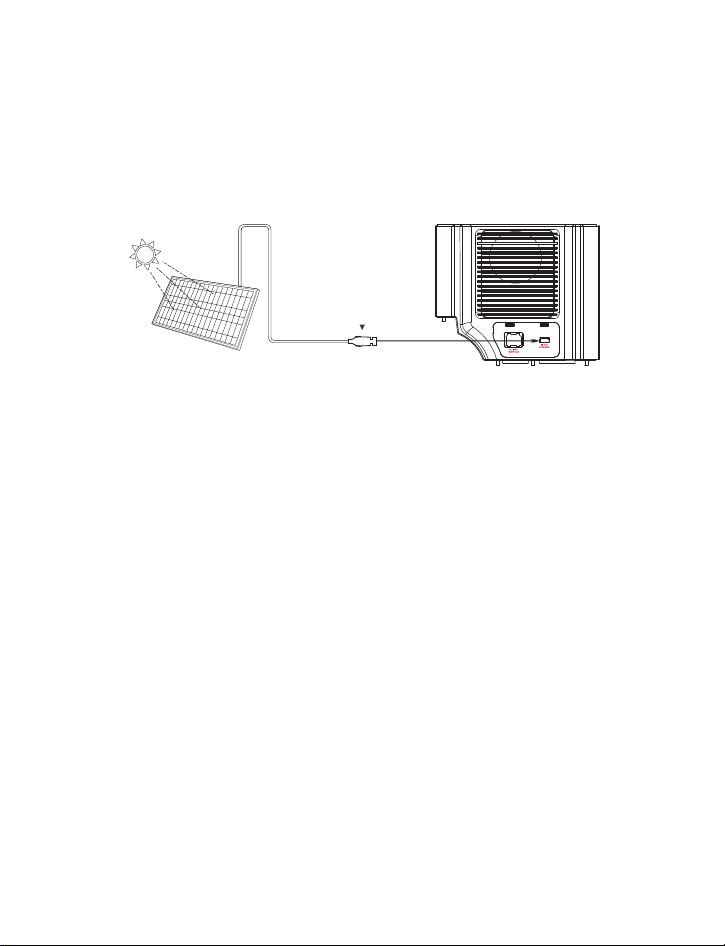
(2)Solar Charging:
1. Utilize the Anderson input input for connecting solar panels.
2. Ensure the solar panel’s open voltage is within the 12V-80V range. (It’s
recommended to use Vtoman solar panels for best charging experience.)
3. Charging time: About 5-8 hours to 80% using 800W solar panels.(It
depends on sunlight intensity.)
Anderson connector
Vtoman Solar Panel FlashSpeed Pro 3600
��

(1). Using AC Outlets:
1. Power up to 4 devices using the AC outlets with a combined load of
3600W(Peak 6000W).
2. Suitable for most of home appliances and electronic devices with rated
power below 3600W.
(2). Using DC Outputs:
1. Connect devices like car refrigerator or gadgets requiring 12V to the DC
output ports.
2. Each port supports a maximum of 10A output.
(3). Using Type-C and USB Outputs:
1. Connect devices directly to the USB-C or USB-A ports for fast charging.
2. Check device compatibility with the output specifications for voltage
and current.
Key Points to Remember:
Monitor the battery percentage to avoid power interruptions.
Regularly check the output and input watts to ensure the device
operates within safe limits.
Use the estimated time display to manage your power needs
throughout the day.
Discharging
The Vtoman FlashSpeed Pro 3600 power station not only delivers reliable
and portable power but also offers the flexibility of capacity expansion
through extra batteries. Enhance your power capabilities to support
longer operation times and higher power needs.
8.BATTTERY CAPACITY EXPANSION
��
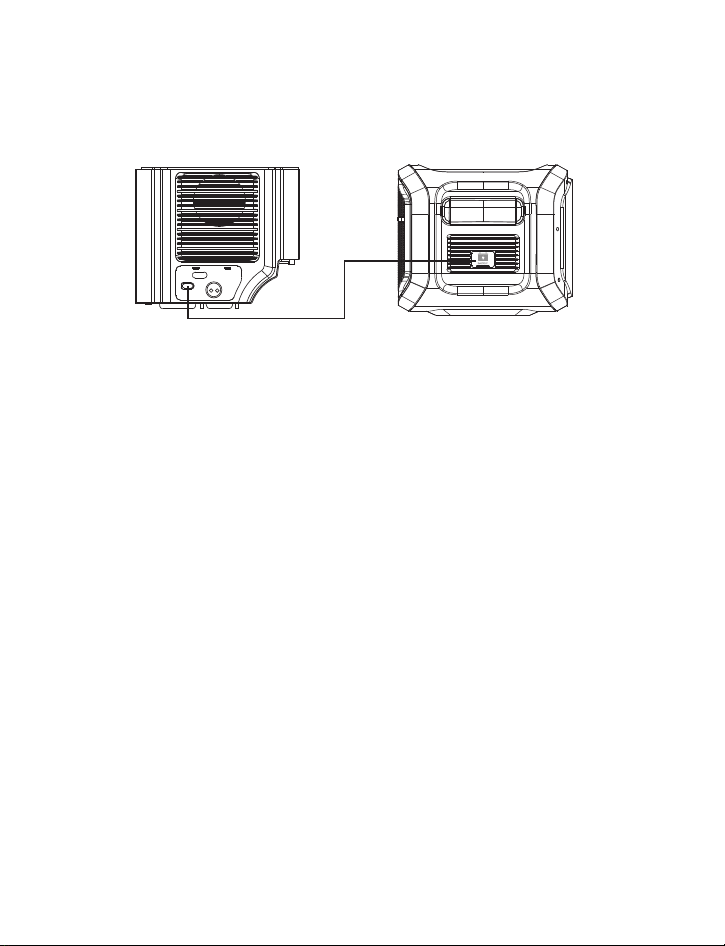
Usage Tips
1. Battery Prioritization: When connected, the power station utilizes the
extra battery first, then switches to the main unit's supply.
2. Charging Sequence: The device prioritizes charging its main battery first
before charging any connected external batteries.
Compatible Extra Battery:
1. Product Name: FlashSpeed Pro 3600 Extra Battery (Available individually)
2. Capacity: 3096Wh
3. New Combined Total Capacity: 6192Wh
Step-by-Step Connection Guide:
1. Connect the FlashSpeed Pro 3600 to the FlashSpeed Pro 3600 Extra
Battery using the CP3500 cable(Included in the package of FlashSpeed
Pro 3600 Extra Battery).
2. Attach connectors securely to ensure a stable and safe connection.
3. Power on the FlashSpeed Pro 3600. The device will automatically
detect the extra battery and adjust its power management settings to
reflect the increased capacity.
4. Verify the new capacity on the LCD display of FlashSpeed Pro 3600
power station, which will confirm successful integration.
FlashSpeed Pro 3600 Extra Battery
FlashSpeed Pro 3600
��

a.Solar Charging Indicator: This icon will light up when the solar panel
is connected.
b.LED Light Indicator:The icon will light up at the same time when the
LED light is activated this.
c.Power Input (W): Shows the power in watts that the device is current-
ly receiving from external sources,useful for tracking the charging rate.
d.Output Methods: Indicates the type of output methods currently
enabled. When the icon of any output method on the display is lit,the
corresponding output ports can power your device.
e.Alarm Indicator: This icon will light up when the device is malfunc-
tioning. (This icon won't light up when the battery pack has no malfunc-
tioning)
f.Low-Temperature Alert: When this icon shows, stop using the power
station until the icon disappears.
g.High-Temperature Alert: When this icon shows, stop using the power
station and let it cool down until it disappears.
h.Backup Battery Indicator: This icon will light up when the extra
expansion battery is connected.
i.Power Output (W): Indicates the real-time power being consumed by
connected devices, displayed inwatts. This helps to manage the energy
Battery Maintenance
1. Proper Storage: Keep the power station in a cool, dry place, away from
direct sunlight. Optimal storage temperatures range from 5°C to 20°C
(41°F to 68°F).
2. Charge Maintenance: For long-term storage, maintain the battery
charge level at approximately 50% to ensure longevity.
Regular Maintenance Checks
1. Visual Inspection: Regularly inspect the unit for signs of wear such as
cracks or leaks. Ensure that all ports are free of dust and corrosion.
2. Function Tests: Periodically turn on the power station to test its capacity
to hold and release charge efficiently.
Longevity Practices
1. Cycling the Battery: Occasionally fully discharge and then recharge the
power station to maximize battery life.
2. Avoid Extreme Conditions: Protect the device from exposure to extreme
environmental conditions to prevent premature degradation.
(1)Frequently Asked Questions
1.What devices can the FlashSpeed Pro 3600 power?
With 3600W rated power and 6000W peak power. the AC output port
can power most household appliances with a rated power less than
3600w. Before you use the AC output. we recommend that you confirm
the power of the appliances and ensure the power sum of all loaded
appliances is lower than the rated power 3600W.
9.MAINTENANCE
10.TROUBLESHOOTING GUIDE
��

2.How to know the working time for my device?
Approximate working time=3096Wh*0.85/operating power of your
device.
3.Can the FlashSpeed Pro 3600 be charged while using?
Yes, FlashSpeed Pro 3600 supports UPS(Uninterruptible Power Supply).
You can use it to power your devices while getting recharged.
4.Can the battery inside be replaceable?
No,the batteries inside of FlashSpeed Pro 3600 portable power stations
are not replaceable.
5.What kind of solar panel does FlashSpeed Pro 3600 suppport?
To charge FlashSpeed Pro 3600 through the Anderson solar input port,
the solar panels need to meet the following requirements:
1)The working voltage of solar panel is between 12V-80V;
2)The solar panel has an Anderson adapter(or converted into Anderson
connector). For example, some solar panels come with MC4 interface,
then you just need to use an MC4 to Anderson adapter cable to convert.
6. Does FlashSpeed Pro 3600 have MPPT feature?
Yes, all Vtoman power stations are built-in MPPT feature. You don't need
to get an extra MPPT controller to connect the FlashSpeed Pro 3600
power station with your solar panel.
��

(2)Common Issues and Solutions
Issue Possible Cause Solution
Battery
Won't
Charge
Improper connec-
tion or faulty power
source
Ensure the AC Charging Cable is securely
connected to both the battery and the
power source. Check for any damage to
the cable and replace if necessary.
Battery
Not
Holding
Charge
Battery
degradation
If the battery consistently fails to hold a
charge and is older, it may be nearing
the end of its lifecycle. Consider
contacting Vtoman support for a battery
health check or replacement.
Battery
Powers Off
Unexpect-
edly
Overload or
extreme
temperatures
Reduce the number of devices connected.
Ensure the battery is used and stored
within the recommended temperature
ranges. Reset the internal circuit
protection by restarting the device.
Indicator
Lights Not
Function-
ing
LED malfunction
or deeply
discharged battery
Charge the battery fully. If the LED
indicators still do not function, the LED
might be defective, and further assistance
from Vtoman support may be necessary.
Unusual
Noise or
Heat
During
Operation
Environmental
factors or device
malfunction
Operate the battery in a well-ventilated
area away from heat sources. If overheating
continues, stop using the device and
contact Vtoman support.
��

(1)Contact Information
(2)Warranty Information
For any support needs regarding the Vtoman FlashSpeed Pro 3600 Power
Station, please reach out to our dedicated customer service team. They
are ready to assist you with any queries or issues you might have.
Email: [email protected]
Support Hours: Monday through Friday, 9:00 AM to 5:00 PM EST
When contacting support, please have your product model and purchase
information handy to expedite the service process.
Warranty Coverage:
1. Duration: The FlashSpeed Pro 3600 comes with a 24-month warranty
from the date of purchase.
2. Scope: The warranty covers any defects in materials and workmanship
under normal use conditions.
3. Proof of Purchase: To activate the warranty, customers must present a
sales receipt or other documentary evidence showing the date of purchase.
Service and Support:
1. Product Replacement: Should your FlashSpeed Pro 3600 Power Station
fail due to manufacturing defects within the warranty period, Vtoman will
replace the unit at no extra cost, including shipping.
2. Money-Back Guarantee: A 30-day money-back guarantee is available for
units purchased directly from Vtoman. The product must be returned in its
original packaging and condition to qualify.
11.TECHNICAL SUPPORT
��

For more detailed information on our warranty terms, or to initiate a
warranty claim, please contact our support team directly via the email
provided. Our goal is to ensure your satisfaction and the optimal
performance of your FlashSpeed Pro 3600 Power Station throughout
its lifetime.
Exclusions:
Limitations: This warranty does not cover damages caused by
misuse, abuse, unauthorized modifications, external accidents, or
cosmetic issues.
Non-Covered Parts: Battery cells and damages resulting from
repairs conducted outside Vtoman authorized service centers are not
covered under this warranty.
��



華佳商事 株式会社
MADE IN CHINA