See reverse side for more information
3/24
BC718
User’s Manual for Biometric Safe
GETTING STARTED
1. Remove Emergency Keys from accessory package
2. To expose the Emergency Key access, remove Logo Plate
(G) screws with provided tool
3. Insert Emergency Key into key access, push and turn
counter-clockwise
4. Turn Handle (H) clockwise to open the safe
5. Continue with INSTALL BATTERIES
INSTALL BATTERIES
1. Remove Battery Compartment (B) cover
2. Insert 4 AA batteries and restore battery cover
3. Continue with FINGERPRITN REGISTRATION
FINGERPRINT REGISTRATION
IMPORTANT: The safe is in either Pre-registered mode or
Factory Default mode, test safe to determine factory settings
below
Pre-registered mode: Safe can NOT be opened with any
fingerprint(s)
Factory Default mode: Safe can be opened with ANY
fingerprint(s)
1. With the safe door open, press and release Initialization
Button (A)
2. Immediately place a finger on the Fingerprint Scanner (D)
- Hold finger still
- 1 beep will be heard recognizing the fingerprint; followed by
2 consecutive beeps
- Remove finger
- Registration is complete
Successful Registration
Registration is successful when a total of 3 beeps are heard
Unsuccessful Registration
2 short beeps will be heard; repeat registration process again
3. To register another fingerprint - repeat steps 1 – 2
4. Continue with TEST (NON) REGISTERED FINGERPRINTS
TEST (NON) REGISTERED FINGERPRINTS
1. Test multiple Non-Registered fingerprints
- Close safe door, turn Handle (H) counter-clockwise to
lock the safe
- Press and release Wake-Up Button (F)
- Place a non-registered finger on the Fingerprint Scanner (D)
- Turn Handle (H) clockwise, the door should not open
- If the door opens with a non-registered fingerprint,
registration was unsuccessful; the safe is still in Factory
Default mode
- Repeat steps under FINGERPRINT REGISTRATION, and
test multiple non-registered fingerprints
2. Test a Registered fingerprint
- With door closed, press and release Wake-Up Button (F)
- Place a registered finger on the Fingerprint Scanner (D)
- Turn Handle (H) clockwise, the door should open
- Registration was successful, if it only opened with registered
fingerprint(s)
CLOSE/OPEN SAFE DOOR
CLOSE: Close safe door, turn Handle (H) counter-clockwise to
lock the safe
OPEN: Press and release Wake-Up Button (F)
- Place a registered finger on Fingerprint Scanner (D)
- Turn Handle (H) clockwise to open the safe
BEEP SOUND OPTIONS
Beep OFF: Press and HOLD the Initialization Button (A) (20 -
30 seconds) until the Indicator Lights (E) flash green once
- RELEASE the Initialization Button
Beep ON: Press and HOLD the Initialization Button (A) (20 -
30 seconds) until the Indicator Lights (E) flash green, followed
by 1 beep
- RELEASE the Initialization Button
WARNING
- New Safe is in either Pre-registered mode or Factory
Default mode; ANY fingerprint can open the safe. Only
a successfully registered Fingerprint(s) can terminate
Factory Default mode.
- Register at least two different fingerprints and test a
few times before closing the safe door.
- Test with a non-registered fingerprint. If the safe
opens, the safe is still in Factory Default mode.
- Avoid leaving safe door open and unattended; it will
allow unauthorized individuals to add their fingerprints
and/or reprogram the safe, gaining full access to the
safe and the contents.
- Test the Emergency Keys and store them in a secure
place, NOT inside of the safe.
- To maximize the security and performance of the
safe, test registered fingerprints every 6 months.
- Initialization button cover must be restored after
every use.
- If user resets the safe to Factory Default mode: ANY
fingerprint can open the safe.
- Test and make sure the safe works properly
before mounting.
- Mount the safe before use because the safe has a
small base with a heavy door, and will tip forward if not
properly mounted.
- Keep children away from safe; they should not play
with or around the safe at anytime. Children at play
could accidentally get locked inside the safe or
accidentally pull on the safe door causing safe to tip
over if not properly mounted.
- Failure to follow these warnings could result in serious
injury or death.
Read all instructions before using this safe.
* Actual model may vary
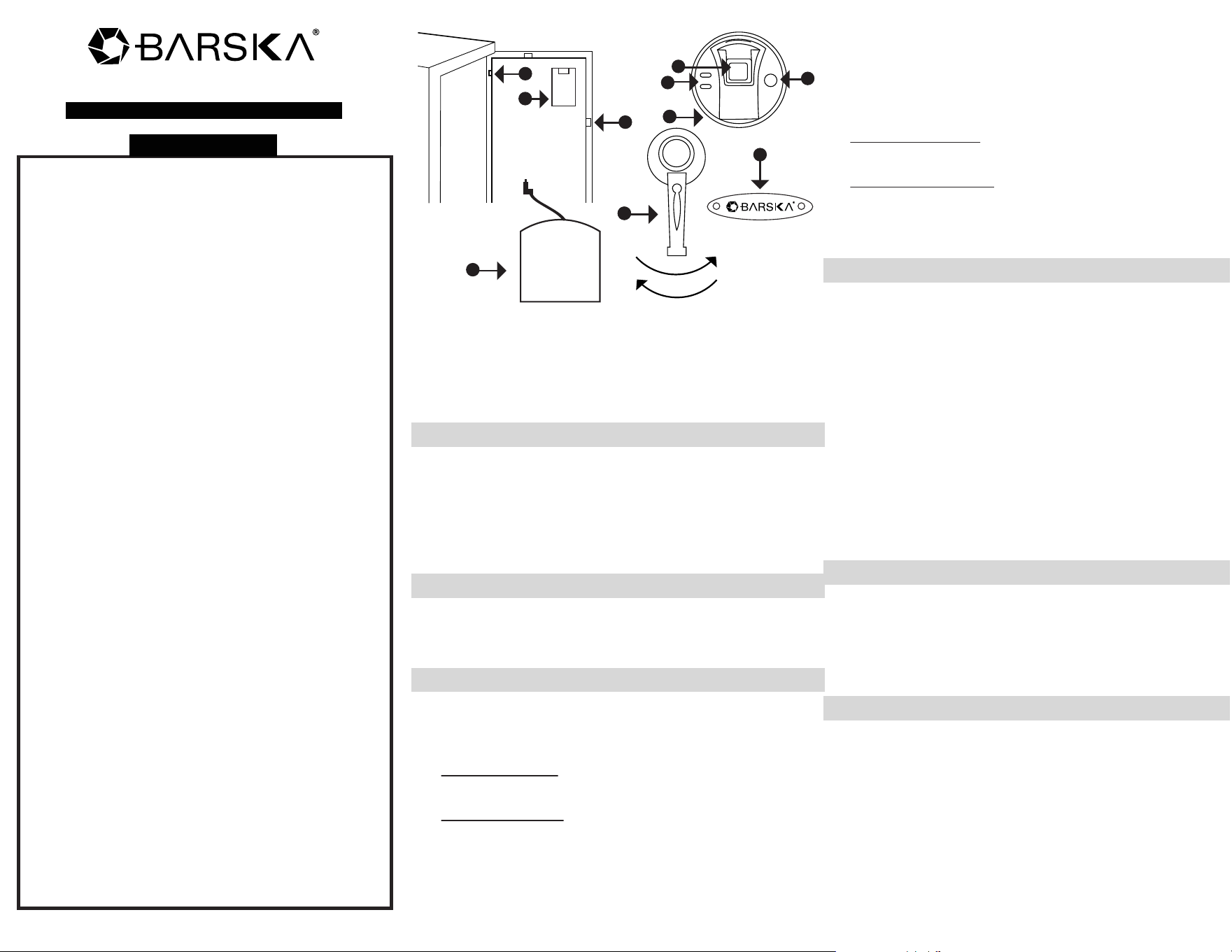
A. Initialization Button
B. Battery Compartment
C. Bolts
D. Fingerprint Scanner
E. Indicator Lights
F. Wake-Up Button
G. Logo Plate and Emergency
Key Access
H. Handle
I. External Battery Pack
(batteries not included)
J. External Battery Access
A
B
C
F
D
E
G
HH
HJ
I
L
o
c
k
U
n
l
o
c
k
OPEN SAFE WITH EMERGENCY KEY
1. To expose the Emergency Key access, remove Logo
Plate (G) screws with provided tool
2. Insert Emergency Key into key access, push and turn key
counter-clockwise, and turn Handle (H) clockwise to open
the safe
NOTE: Store Emergency Keys in a secure place, NOT inside
of the safe
OPEN SAFE WITH EXTERNAL BATTERY PACK
Use this option when internal batteries are low
1. Insert 4 AA batteries into External Battery Pack (I)
2. Plug into External Battery Access (J)
3. Press and release Wake-Up Button (F)
- Place a registered finger on Fingerprint Scanner (D)
- Turn Handle (H) clockwise to open the safe
DELETE ALL STORED FINGERPRINTS / RESET TO
FACTORY DEFAULT MODE
1. Open safe, remove Battery Compartment (B) cover and
all 4 AA batteries
2. Press and release Wake-Up Button (F) a few times until no
beeps are heard
3. Press and HOLD the Initialization Button (A)
- Re-insert batteries; on the 4th battery you will hear 1
beep, followed by 2 consecutive beeps indicating safe is
in Factory Default mode
4. RELEASE Initialization Button (A)
5. Repeat steps 1-3 if a total of 3 beeps are not heard
6. Restore Battery Compartment (B) cover
7. All fingerprints stored in the safe have been deleted
NOTE: The safe is in Factory Default mode, ANY fingerprint
can open the safe
8. Continue with FINGERPRINT REGISTRATION and TEST
(NON) REGISTERED FINGERPRINTS
LOW BATTERY WARNING
1. When the door is closed and 3 repetitive beeps are heard,
and Indicator Lights (E) flash red, it indicates the batteries
are low
2. Replace batteries immediately
- Open safe, remove Battery Compartment (B) cover and
all 4 AA batteries
- Insert 4 new AA batteries and restore Battery
Compartment (B) cover
NOTE: All registered fingerprints remain stored
CARE AND MAINTENANCE
- To maximize the security and performance of the safe, keep
Fingerprint Scanner (D) clean; use a dry cloth to remove
any smudges or prints off the Fingerprint Scanner after
each use
- Test registered fingerprints every 6 months
- Keep liquids away from the control panel. Spills on the
control panel will cause damage and possibly electric shock
- Secure safe in a proper area to prevent from falling and
causing damage or injury
- DO NOT disassemble the product. For all repairs, contact
BARSKA Customer Service
- DO NOT use chemicals or cleaning agents to clean the safe
MOUNTING INSTRUCTIONS
The safe must be mounted to a wall or floor. Be aware of the
load bearing. Failure to do so can result in personal injury and/or
damage to property. Use appropriate tools when performing
work and always use eye protection
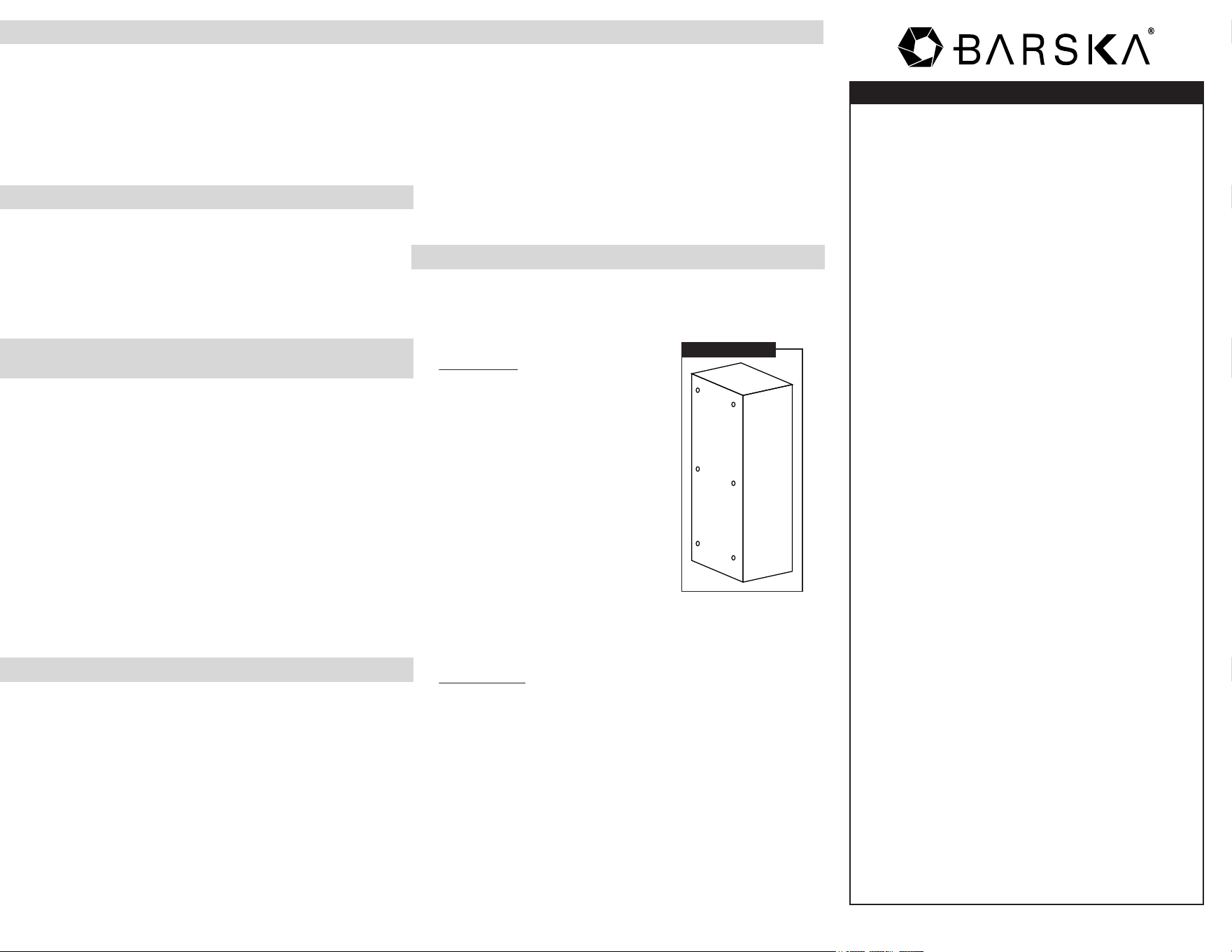
Wall Mounting
Do not mount the safe without anchoring
to the wall
- Find the studs in the wall, at your
desired location. Most studs
are 16 inches or 24 inches apart
- Check the wall for concealed wires
or pipes
- Measure the location of the pre-set drill
holes; mark their exact position onto the
wall ensuring that the studs or anything
else behind will not interfere
- Drill the appropriate size holes for the
anchors you are using
- Carefully press the anchor into the
holes at this time
- Mount the safe by running screws from inside of the safe
and securing to anchors; ensure the safe is mounted securely
Floor Mounting
- Use proper drill tools depending on the type of floor you are
mounting the safe (wood, tile, or concrete)
- Measure the location of the pre-set drill holes; mark their
exact position onto the floor
- Drill the appropriate size holes for the anchors you are using
- Carefully press the anchor into the holes at this time
- Mount the safe by running screws from inside of the safe
and securing to anchors; ensure the safe is mounted securely
Mounting Holes
* Actual model may vary
SAFE/LOCK BOX
BC767
BARSKA warrants this new safe/lock box to be free of defects
in material and/ or workmanship under normal use for a period
of twelve (12) months from the date product is purchased. This
limited warranty is delimited to repair or replacement only. This
warranty does not cover damage caused by improper
installation or maintenance. BARSKA disclaims all liability for
incidental or consequential damages resulting from misuse,
abuse, accident (such as dropping), fire, flood, service or
repairs other than those performed by BARSKA, acts of
nature, or arising out of any breach of this warranty. Altering
the product under any circumstances will automatically void
the warranty.
For service under this limited warranty, please have available
the proof of purchase and the purchase date and location as
well as a detailed description of the problem. This warranty is
not transferable and only applies to the original purchaser with
a proof of purchase from BARSKA or from an authorized
dealer. This warranty applies only to products purchased
within the United States, excluding Alaska, the Hawaiian
Islands and all U.S. territories in the Caribbean and the Pacific.
BARSKA will examine and go through troubleshooting
procedures, product repair or replacement of defective part(s)
or units with new part(s) or provide a new unit, if necessary,
during the warranty period. Reasonable shipping/handling
charges may apply and are based on Barska sole discretion.
Purchaser shall be required to prepay Shipping/handling
charges with a check or money order to BARSKA at time
product is returned. The Return Merchandise Authorization
Number (RMA#) and shipping/handling charge MUST be
obtained from BARSKA in advance of return. BARSKA shall
not be liable for damages or loss occurring during shipping.
Please visit via www.barska.com or call 909.445.8168 to
obtain the RMA#, Shipping/handling amount, and for more
information.
BARSKA reserves the right to modify or discontinue, without
prior notice to the purchaser, any model or style of the product.
BARSKA will determine, at its sole discretion, whether a
product will be repaired or replaced. BARSKA reserves the
right to discontinue or change any feature of its products at
any time. If an exact replacement or product is not available,
BARSKA reserves the right to provide a part or product that
matches as closely as possible.
LIMITATION OF REMEDIES
BARSKA disclaims any warranties, express or implied,
whether of merchantability or fitness for a particular use,
except as expressly set forth herein. The sole obligation of
BARSKA under this limited warranty shall be to repair or
replace the covered product, in accordance with the terms set
forth herein. BARSKA expressly disclaims any lost profits,
general, special, indirect or consequential damages which
may result from breach of any warranty, or arising out of the
use or inability to use any BARSKA product. Any warranties
which are implied and which cannot be disclaimed shall be
limited in duration to a term of one year from the date of
original retail purchase.
Some states do not allow the exclusion or limitation of
incidental or consequential damages or limitation on how long
an implied warranty lasts, so the above limitations and
exclusions may not apply to you.
BARSKA
855 Towne Center Drive, Pomona, CA 91767
1 YEAR LIMITED WARRANTY
Note: All information, feature, and specification displayed herein are
based on the data available at the time of publishing, thus they are
subject to change without notice. All product pictures displayed herein
are for illustration purposes only. The actual product may vary due
to different circumstances