DIRECTV GEMINI AIR
Product's Documents
Below are documents related to this product, you can read online or download:
- User Manual - (English) Read Online | Download pdf

DirectTV Gemini Air User Manual
Version 2.0 03/2023
Product manuals are intended to help customers understand the workings of the hardware devices. This product manual provides overview information of the DIRECTV Gemini Air and remote control and addresses specific functions of the devices. It is posted online at directv.com/support/userguides for customer access.
| Term | Description |
|---|---|
| OTT | Over-the-Top, the delivery of video via the Internet directly into the DIRECTV Gemini Air allowing access to services anywhere, anytime, and on any compatible device |
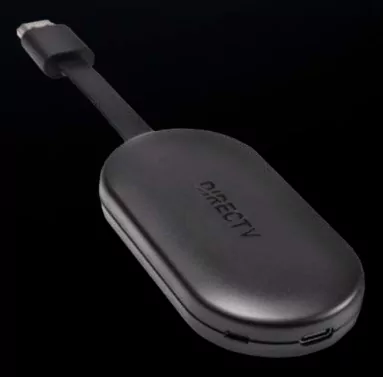
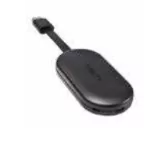
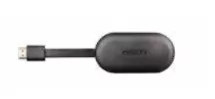
The DIRECTV Gemini Air is a game- changing, proprietary "Over- the- Top" (OTT) device that delivers video and integrated content to your TV over the Internet. It enables you to watch online videos, listen to music, use thousands of third- party apps, and play games—all on your TV.Get all the top apps and games on Google Play.The DIRECTV Gemini Air is used on its own as a standalone device (one per TV) so you don't need any other DIRECTV devices.It comes with a voice remote, so you can talk to Google Assistant to control your TV and more using your voice.
Get all the top apps and games on Google Play.
The DIRECTV Gemini Air is used on its own as a standalone device (one per TV) so you don't need any other DIRECTV devices.
It comes with a voice remote, so you can talk to Google Assistant to control your TV and more using your voice.
Gemini Air Specifications
Size and Weight (not including feet)
Height: 15mm
Width: 48mm
Depth: 95mm
NOTE: Depth with HDMI cable is 181.2 mm
Weight: 66g
Packaging
Giftbox Height: 55mm
Width: 186mm
Depth: 223mm
Weight: 0.99lb
Environmental Requirements
Operating Temperature: 32°F to 104°F to 40°C
Storage Temperature (no damage): 32°F to 150°F (0° to 66°C)
Relative Humidity: 5 - 85% noncondensing
Remote Control Support (Built-In Capability)
Bluetooth Remote Control Interface
XMP2 Ports and Interfaces
OTT Mode - 802.11ac 2.4 GHz or 5 GHz Wi- Fi
USB Type C port for Power Input
HDMI 2.1 & 1.4 / HDCP 2.3
Power
EPS21R0- 500 External PSU
AC External PSU- 100- 240v- 50/60 HZ,7.65W
Input:5.0V DC 1.5A
Active Power Consumption below 7.5W
Memory
4GB DDR Memory
32 bit LPDDR4 Interface
16GB eMMC
Video and Audio Formats
MPEG2 Dolby Audio
MPEG- 4 AVC Single or Dual Display up to 1080i60/1080p30 or UHD/4K HEVC/VPP Display HDR10 SMPTE ST 2084, ST 2086 Blu- ray Standard and HLG Support Dolby Vision HDR10+
TV Compatibility
Compatible with HD and 4K TVs with HDMI 2.1 & 1.4, HDCP 2.3, 60 Hz and capable of 4K, 1080p and 3D

Remote Control
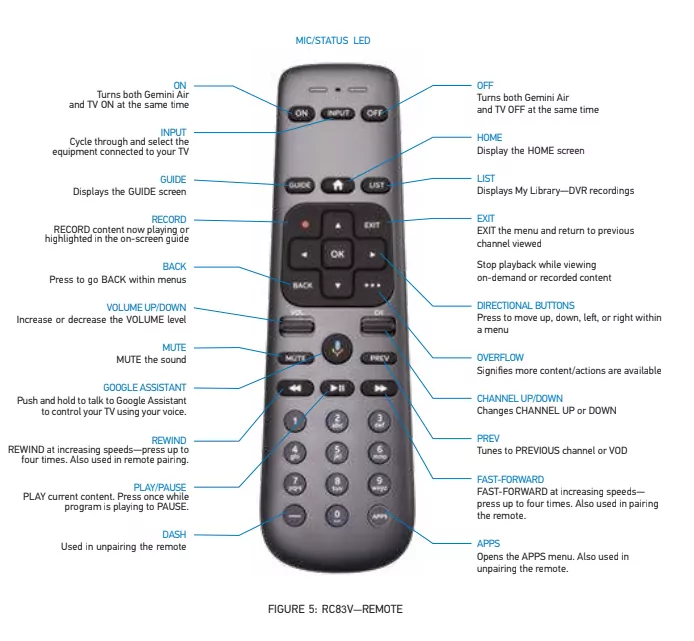
The key features of the RC83V Remote Control are:
FIGURE 5: RC83V-REMOTE
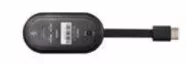
| LED State | Trigger |
|---|---|
| Solid White | ON and Network connected (with strong WiFi signal) |
| Solid Yellow | ON and Network connected with weak signal (<67dBm for 2GHz, <77dBm for 5GHz) |
| Off | No power or NGC is in standby |
| Flashing Red | No AP (router), no internet or searching for network |
| Solid Red | Insufficient power to Gemini Air -In addition to OSD |
| Red and Blue transition during boot process | • During device boot up process, it shows RED color to indicate Powering Up and doing Power verification • Then it turns Blue to indicate passing Power check and continue to boot • After system fully boots up, LED color will use White / Yellow / Flashing Red to indicate WiFi connection state |
Please take note that changes or modification not expressly approved by the party responsible for compliance could void the user's authority to operate the equipment. This device complies with Part 15 of the FCC Rules. Operation is subject to the following two conditions: (1) this device may not cause harmful interference, and (2) this device must accept any interference received, including interference that may cause undesired operation.
Responsible Party: DIRECT, INC. 2230 E. Imperial Hwy El Segundo, CA 90245 800.531.5000 Trade Name: DIRECTV
Trade Name: DIRECTV
Federal Communications Commission (FCC): This equipment complies with Part 15 of the FCC Rules.
This equipment has been tested and found to comply with the limits of a Class B digital device, pursuant to Part 15 of the FCC Rules.
These limits are designed to provide reasonable protection against harmful interference in a residential installation.
This equipment generates, uses, and can radiate radio frequency energy and, if not installed and used in accordance with the instructions, may cause harmful interference to radio communications. However, there is no guarantee that interference will not occur in a particular installation. If this equipment does cause harmful interference to radio or television reception, which can be determined by removing and applying power to the equipment, the user is encouraged to try to correct the interference by one or more of the following measures:
The user may find the following booklet, prepared by the Federal Communications Commission, helpful: "How to Identify and Resolve Radio and TV Interference Problems." This booklet is available from the U.S. Government Printing Office, Washington, DC. To meet FCC requirements, only peripherals (computer input/output devices, terminals, printers, etc.) certified to comply with Class B limits may be attached to this device. Operation with noncertified peripherals is likely to result in interference to radio and TV reception. To meet FCC requirements, shielded cables are required to connect the device to a personal computer, peripheral or other Class B- certified device.
2220 E. Imperial Hwy El Segundo, CA 90245 1- 800- 531- 5000
Trade Name: DIRECTV - Model Number: P21KW- 500 and RC83V
If your home has specially wired alarm equipment connected to the telephone line, ensure the installation of this DIRECTV Gemini Air does not disable your alarm equipment. If you have questions about what will disable alarm equipment, consult your alarm company, telephone company or a qualified installer.
DO NOT DISASSEMBLE THIS EQUIPMENT. It does not contain any user- serviceable components. We recommend the installation of an AC surge arrester in the AC outlet to which this equipment is connected. Telephone companies report that electrical surges, typically lightning transients, are very destructive to customer terminal equipment connected to AC power sources.
FCC RF Radiation Exposure StatementMPE/SAR/RF Exposure Information. This equipment complies with FCC RF radiation exposure limits set forth for an uncontrolled environment. This equipment was verified for RF exposure and found to comply with Council Recommendation 1999/519/EC and FCC OET- 65 RF exposure requirements.
WARNING: While this equipment is in operation, a separation distance of at least 20 centimeters (equal to 8 inches) must be maintained between the antenna inside the equipment and the bodies of all persons exposed to the antenna in order to meet the FCC RF exposure guidelines. Making changes to the antenna or the equipment is not permitted. Doing so may result in the equipment exceeding the FCC RF exposure guidelines. This equipment must not be co- located or operated in conjunction with any other antenna or radio transmitter.
Version 2.0 03/2023