
Technical Support and E-Warranty Certificate www.vevor.com/support
RESTAURANT PAGER
MODEL: P80
We continue to be committed to provide you tools with competitive price.
"Save Half", "Half Price" or any other similar expressions used by us only represents an
estimate of savings you might benefit from buying certain tools with us compared to the major
top brands and does not necessarily mean to cover all categories of tools offered by us. You
are kindly reminded to verify carefully when you are placing an order with us if you are
actually saving half in comparison with the top major brands.

- 1 -
MODEL: P80
Have product questions? Need technical support? Please feel free to
contact us:
Technical Support and E-Warranty Certificate
www.vevor.com/support
NEED HELP? CONTACT US!
This is the original instruction, please read all manual instructions
carefully before operating. VEVOR reserves a clear interpretation of our
user manual. The appearance of the product shall be subject to the
product you received. Please forgive us that we won't inform you again if
there are any technology or software updates on our product.
RESTAURANT PAGER
- 2 -
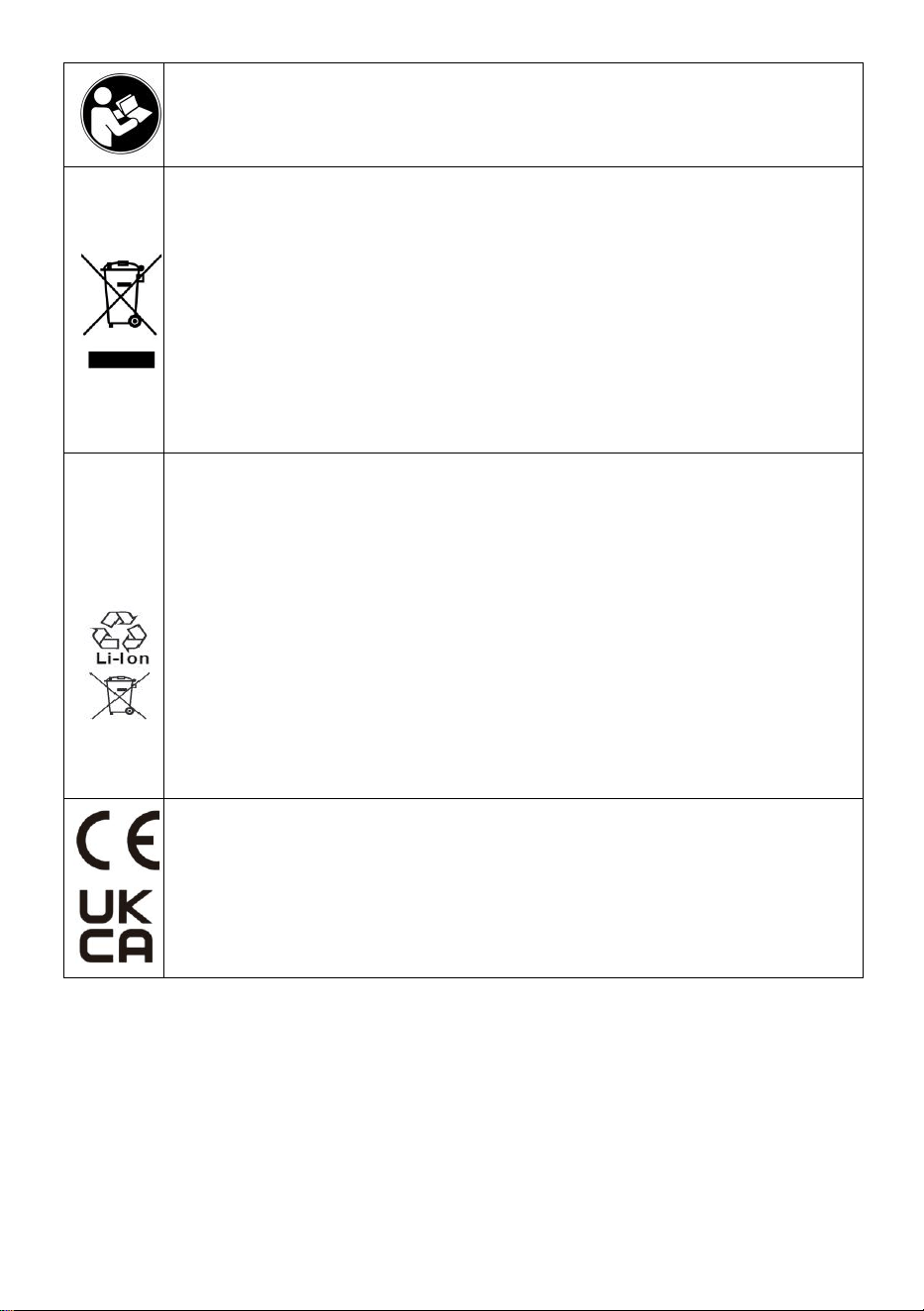
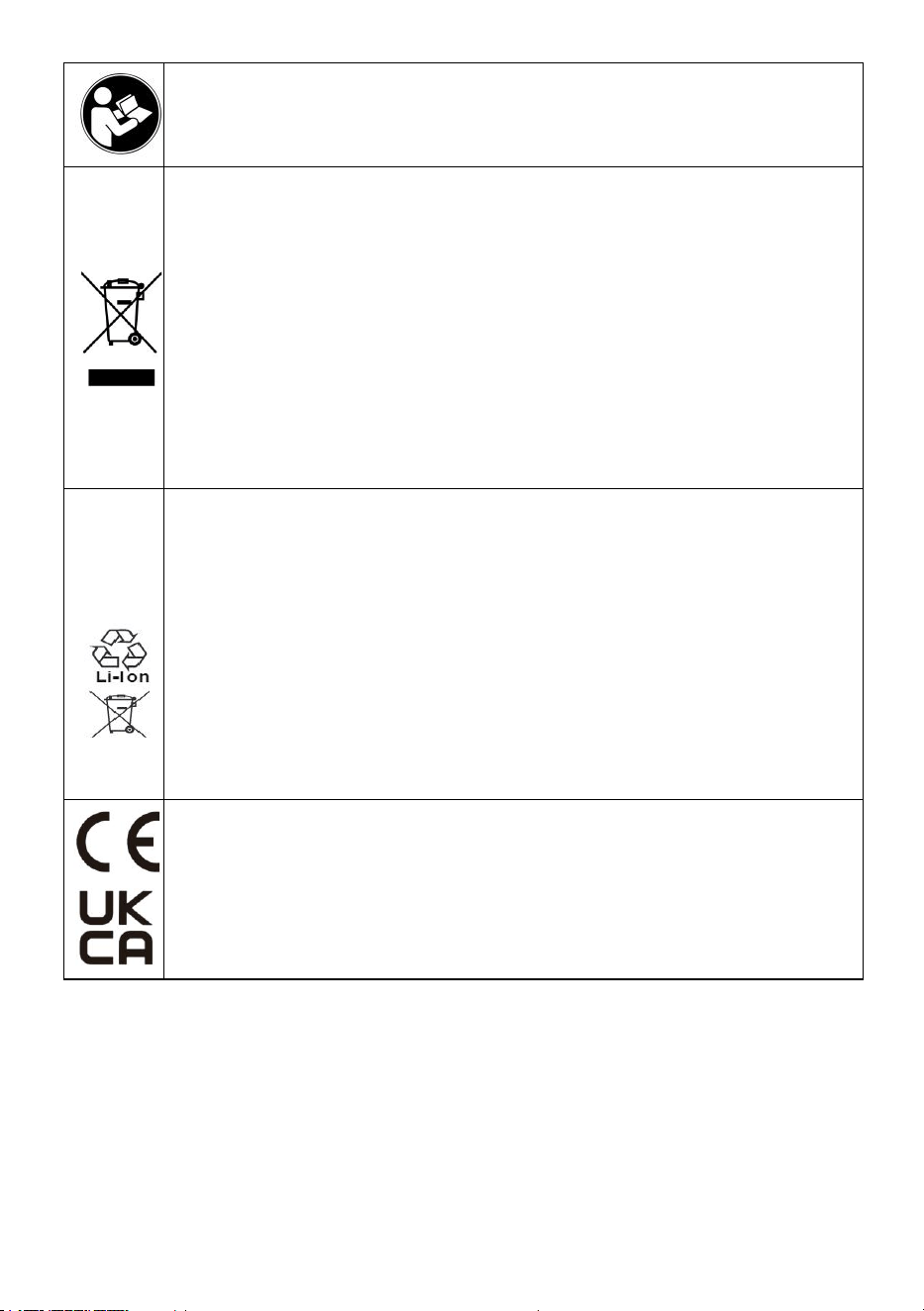
Warning-To reduce the risk of injury, user must read instructions
manual carefully.
CORRECT DISPOSAL
This product is subject to the provision of European Directive
2012/19/EC. The symbol showing a wheelie bin crossed through
indicates that the product requires separate refuse collection in the
European Union. This applies to the product and all accessories
marked with this symbol. Products marked as such may not be
discarded with normal domestic waste, but must be taken to a
collection point for recycling electrical and electronic devices
To minimize hazards to health and the environment at the end of this
product's life , laws dealing with Waste Electrical and Electronic
Equipment( WEEE)and The Waste Battery Directive require you to
dispose of this product at a suitable collection facility where it will be
sent in order to remove the batteries and for appropriate
recycling.Please contact your local authorities for more details on
recycling and safe disposal of these in your area.
Compliance is a EC & UK security certification.

- 3 -
IMPORTANT SAFEGUARDS
Thank you for using this product. In order to make sure that you can
operate the machine correctly, read this instruction carefully before
operation and keep it properly for future reference. Please be sure to read
the precautions and safety rules on this page to ensure your safe use.
This manual will outline safety warnings and precautions, operating,
maintenance and cleaning. The warnings and instructions reviewed in this
manual cannot cover all possible conditions and situations that may occur.
Caution and common sense are not built into this product, since we believe
that the uses will comply with these codes. If you have any problems,
please call us. Do not try to fix the problems yourself, or it will cause injury
or property damage.
Please read ALL the instructions before using your machine.
1. If the battery is low, please charge it in time.
2. Do not let children, minors, and pets get close to or touch the machine.
3. Do not immerse the appliance in water or any other liquid.
4. Do not disassemble the product.
5. Using any accessories or attachments that are not provided or
recommended by the manufacturer may cause injury.
6. If the machine is not to be used for a long period of time, remove the
battery, clean and cover it and store it in a dry and safe place.
7. Do not leave the product hanging over the edge of table or counter or let
it come into contact with any hot surfaces.
8. Do not place the product on or near hot air, electric burners or heaters.
9. Do not apply this unit to any other purposes than the indicated usage.
10. KEEP IT OUT OF CHILDREN'S REACH.
11. DO NOT CLEAN IT WITH ANY ABRASIVE MATERIAL.
12. Please clean it regularly, at least once a month.
13.This appliance is not intended for use by persons (including children)
with educed physical, sensory or mental capabilities, or lack of experience
or knowledge, unless they have been given supervision or instruction
concerning the use of the appliance by a person responsible for their safe.

- 4 -
FCC INFORMATION
CAUTION: Changes or modifications not expressly approved by the party
responsible for compliance could void the user's authority to operate the
equipment!
This device complies with Part 15 of the FCC Rules. Operation is subject to
the following two conditions:
1) This product may cause harmful interference.
2)This product must accept any interference received, including
interference that may cause undesired operation.
WARNING: Changes or modifications to this product not expressly
approved by the party.responsible for compliance could void the user's
authority to operate the product.
Note: This product has been tested and found to comply with the limits for
a Class B digital device pursuant to Part 15 of the FCC Rules, These limits
are designed to provide reasonable protection against harmful interference
in a residential installation.
This product generates, uses and can radiate radio frequency energy, and
if not installed and used in accordance with the instructions, may cause
harmful interference to radio communications. However, there is no
guarantee that interference will not occur in a particular installation. If this
product does cause harmful interference to radio or television
reception,which can be determined by turning the product off and on, the
user is encouraged to try to correct the interference by one or more of the
following measures.
· Reorient or relocate the receiving antenna.
· Increase the distance between the product and receiver.
· Connect the product to an outlet on a circuit different from that to which
the receiver is connected.
· Consult the dealer or an experienced radio/TV technician for assistance.
- 5 -
PRODUCT PARAMETERS
Model
P80
Working frequency
433MHZ(ASK)
Modulation
OOK AM
Power adapter In put
AC100-240V 50/60Hz
Power adapter Out Put
DC12V 2A
Pagers
24PCS
BEFORE USING
1. Before using the appliance for the first time, peel off any promotional and
packaging materials and check that the product is clean and dust-free.
2. Please dispose of all plastic bags carefully and keep them away from
children and pets.
3. Check all components provided according to the list in this manual.Make
sure you have all of the parts listed.
ENTER/EXIT SETTINGS MENU
● Enter the setting menu: Long press the [Set] key to enter the setting
menu, press the corresponding [Number] key to select the corresponding
setting option (such as 1 corresponding to F1), and then short press the
[Set] key to enter the setting;
● Exit the setting menu: Press the [Call] key to confirm and return; press
the [Set] key to cancel and return; press the [Delete] key to exit the setting.

- 6 -
PRODUCT SETTINGS
● [F1] Set base ID (1-98)
After entering the setting menu "F1", press the [Number] key to change
the base ID number.
● [F2] Set the base buzzer switch (0-1)
After entering the setting menu "F2", press the [Number] key to change
the buzzer on the base. Off setting (0: off, 1: on).
● [F3] Set the extension number (1-98)
After entering the setting menu "F3", press the [Number] key to input
1-98 numbers, and then take the phone out of the base and press the [Call]
key within 5 seconds. There will be a beep when the setting is successful.
● [F4] Set extension vibration (0-1)
Put the extension back on the base, enter the setting menu "F4", and
press the [Call] key to set all extensions to vibrate (0: off, 1: on), and a
buzzer will sound if the setting is successful.
● [F5] Set extension buzzer (0-1)
Put the extension back on the base, enter the setting menu "F5", and
press the [Call] key to set the beep for all extensions (0: off, 1: on). There
will be a beep prompt if the setting is successful.
● [F6] Set extension reminder duration (0-99)
Put the extension back on the base, enter the setting menu "F6", and
press the [Call] key to set the reminder duration for all extensions (0:
always remind). There will be a buzzer prompt if the setting is successful.
HOW TO USE
● Call extension
Use the numeric keys to enter the corresponding extension number and
press the [Call] key to call.
● Convenient calling
Press the [+ and -] keys to the corresponding number and wait for 2
seconds to automatically call.
- 7 -
● Extension shutdown
Put the extension back into the base, enter 99 on the keyboard, and
press the [Call] key to turn off the phone.
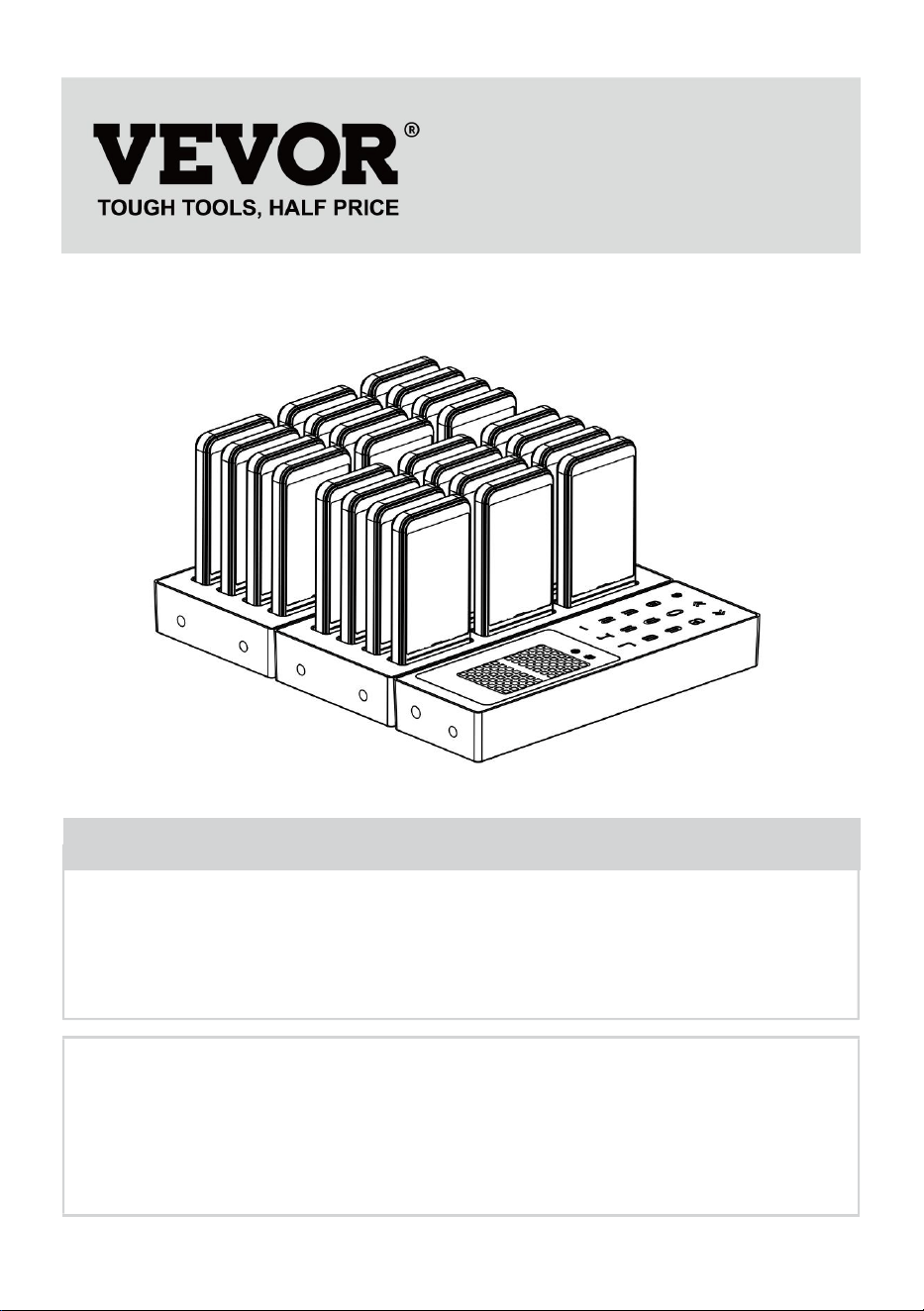
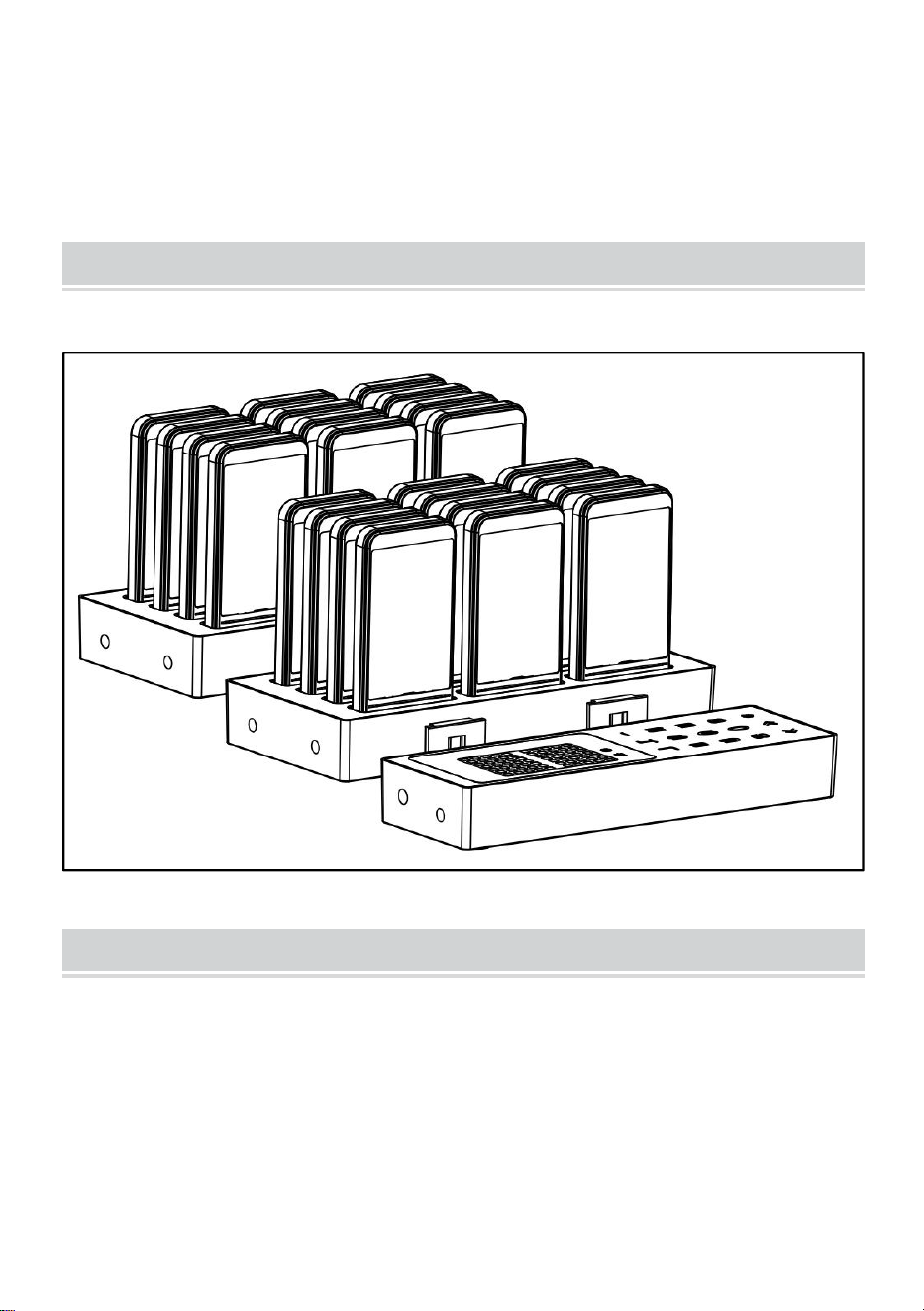
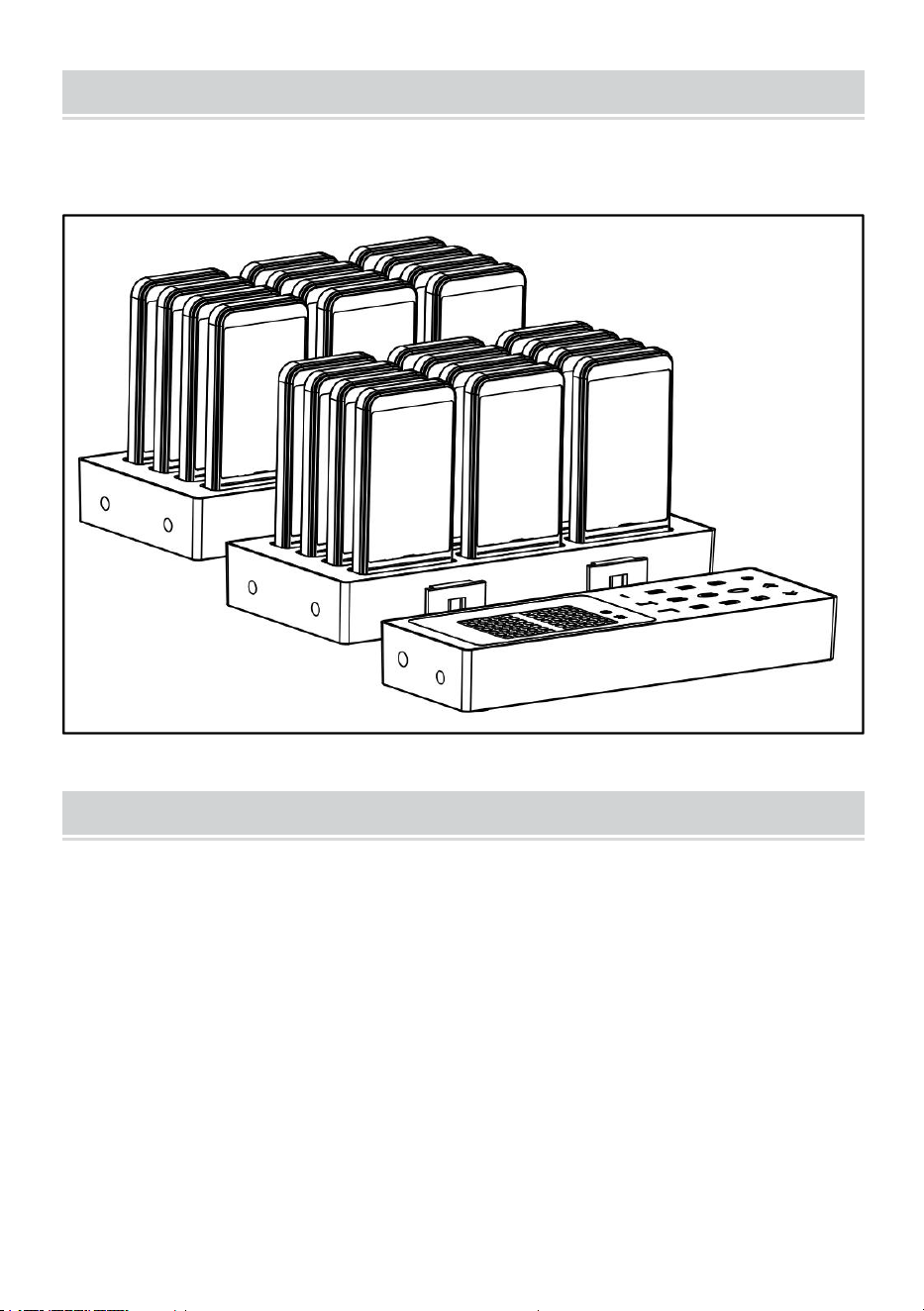
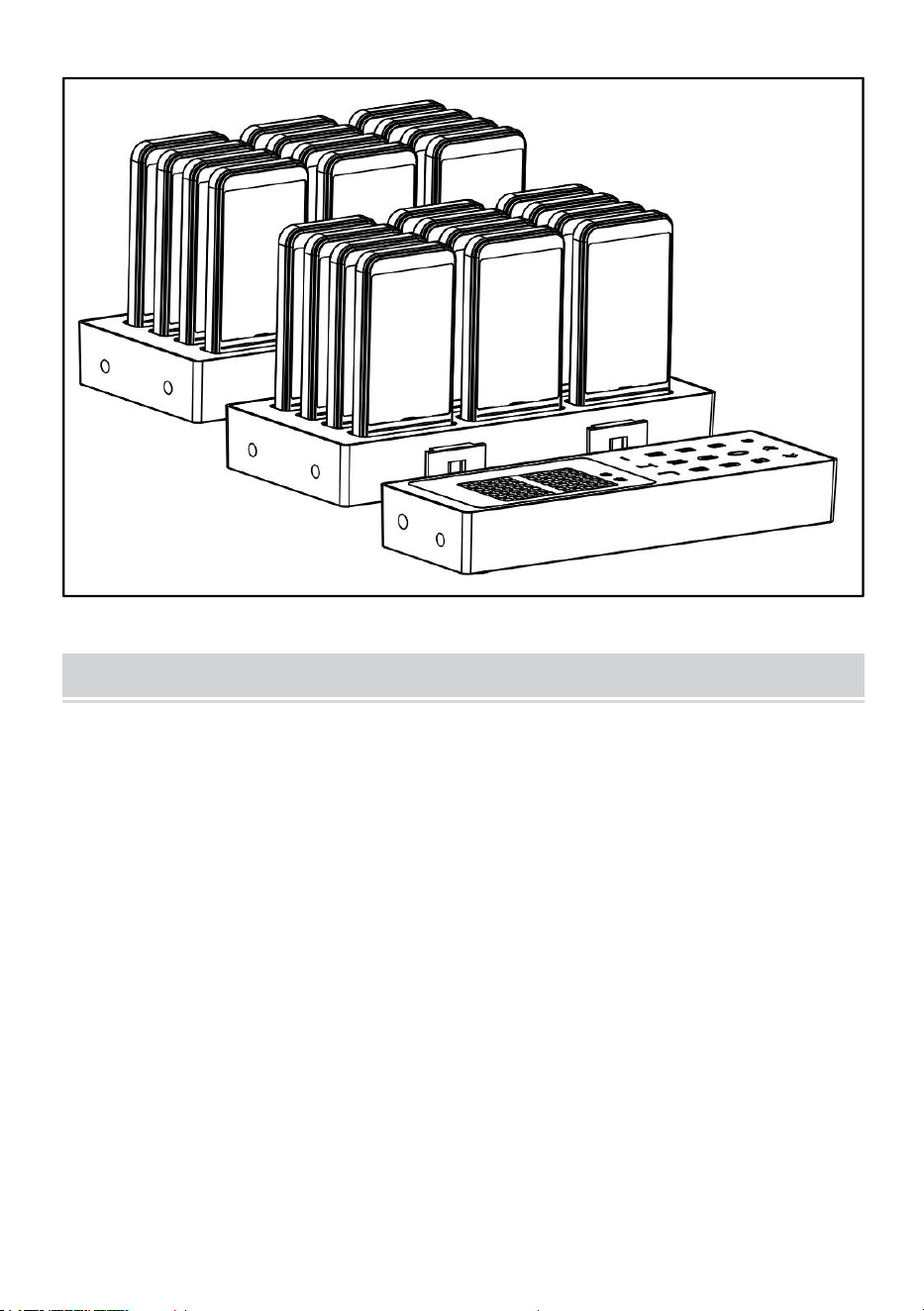
ASSEMBLING PRODUCTS
Assemble the product as shown in the picture and connect the adapter.
CLEANING AND STORAGE
1. If the machine is not to be used for a long period of time,Remove power,
clean and cover it and store it in a dry and safe place.
2. Wipe with a soft, dry cloth. Be sure to keep the product dry
3. Please put the pager and host together.

- 8 -



Techniczny Wsparcie i certyfikat gwarancji elektronicznej www.vevor.com/support
PAGER RESTAURACYJNY
MODEL: P80
We continue to be committed to provide you tools with competitive price.
"Save Half", "Half Price" or any other similar expressions used by us only represents an
estimate of savings you might benefit from buying certain tools with us compared to the major
top brands and does not necessarily mean to cover all categories of tools offered by us. You
are kindly reminded to verify carefully when you are placing an order with us if you are
actually saving half in comparison with the top major brands.

- 1 -
MODEL: P80
Have product questions? Need technical support? Please feel free to
contact us:
Technical Support and E-Warranty Certificate
www.vevor.com/support
NEED HELP? CONTACT US!
This is the original instruction, please read all manual instructions
carefully before operating. VEVOR reserves a clear interpretation of our
user manual. The appearance of the product shall be subject to the
product you received. Please forgive us that we won't inform you again if
there are any technology or software updates on our product.
RESTAURANT PAGER
- 2 -
Ostrzeżenie: Aby zmniejszyć ryzyko obrażeń, użytkownik powinien
uważnie przeczytać instrukcję obsługi.
PRAWIDŁOWA UTYLIZACJA
Ten produkt podlega postanowieniom Dyrektywy Europejskiej
2012/19/WE. Symbol przedstawiający przekreślony kosz na śmieci
na kółkach oznacza, że produkt wymaga oddzielnej zbiórki odpadów
w Unii Europejskiej. Dotyczy to produktu i wszystkich akcesoriów
oznaczonych tym symbolem. Produktów oznaczonych w ten sposób
nie można wyrzucać razem ze zwykłymi odpadami domowymi, ale
należy je oddać do punktu zbiórki w celu recyklingu urządzeń
elektrycznych i elektronicznych.
Aby zminimalizować zagrożenia dla zdrowia i środowiska po zakoń
czeniu okresu użytkowania produktu, przepisy dotyczące zużytego
sprzętu elektrycznego i elektronicznego (WEEE) oraz dyrektywa w
sprawie zużytych baterii wymagają, aby ten produkt został
przekazany do odpowiedniego punktu zbiórki, do którego zostanie on
wysłany w celu wyjęcia baterii i poddania odpowiedniemu
recyklingowi. Aby uzyskać więcej informacji na temat recyklingu i
bezpiecznej utylizacji zużytych baterii w Twojej okolicy, skontaktuj się
z lokalnymi władzami.
Compliance to certyfikat bezpieczeństwa wydany przez WE i
Wielką Brytanię.

- 3 -
IMPORTANT SAFEGUARDS
Dziękujemy za korzystanie z tego produktu . Aby mieć pewność, że
będziesz mógł prawidłowo obsługiwać maszynę, przed rozpoczęciem
użytkowania uważnie przeczytaj tę instrukcję i zachowaj ją na przyszłość .
Aby zapewnić bezpieczne korzystanie z serwisu, należy zapoznać się ze
środkami ostrożności i zasadami bezpieczeństwa zamieszczonymi na tej
stronie .
Niniejsza instrukcja zawiera ostrzeżenia i środki ostrożności dotyczące
bezpieczeństwa, obsługi, konserwacji i czyszczenia . Ostrzeżenia i
instrukcje omówione w niniejszej instrukcji nie mogą obejmować
wszystkich możliwych warunków i sytuacji, które mogą wystąpić .
Ostrożność i zdrowy rozsądek nie są wbudowane w ten produkt, ponieważ
uważamy, że użytkownicy będą przestrzegać tych kodów . W przypadku
jakichkolwiek problemów prosimy o kontakt telefoniczny . Nie próbuj
samodzielnie naprawiać problemów, ponieważ spowoduje to obrażenia lub
uszkodzenie mienia .
Przed użyciem urządzenia należy przeczytać WSZYSTKIE instrukcje .
1. Jeśli bateria jest słaba, naładuj ją w odpowiednim czasie .
2. Nie pozwalaj dzieciom, osobom niepełnoletnim i zwierzętom domowym
zbliżać się do urządzenia lub go dotykać.
3 . Nie zanurzaj urządzenia w wodzie ani innym płynie.
4. Nie rozmontowuj produktu.
5. Stosowanie akcesoriów i elementów mocujących, które nie są
dostarczone lub zalecane przez producenta, może spowodować
obrażenia.
6. Jeśli urządzenie nie będzie używane przez dłuższy czas, wyjmij
akumulator, wyczyść go, przykryj i przechowuj w suchym i bezpiecznym
miejscu.
7. Nie pozostawiaj produktu wiszącego nad krawędzią stołu lub blatu i nie
narażaj go na kontakt z gorącymi powierzchniami.

- 4 -
8. Nie umieszczaj produktu na gorącym powietrzu, palnikach elektrycznych
lub grzejnikach ani w ich pobliżu.
9. Nie należy stosować tego urządzenia do celów innych niż wskazane.
10. PRZECHOWYWAĆ W MIEJSCU NIEDOSTĘPNYM DLA DZIECI.
11. NIE CZYŚCIĆ ŻADNYMI MATERIAŁAMI ŚCIERNYMI.
12. Proszę regularnie czyścić, co najmniej raz w miesiącu .
13. Urządzenie to nie jest przeznaczone do użytku przez osoby (w tym :
dzieci) z Wykształcony fizyczny, sensoryczny lub psychiczny możliwości
lub brak doświadczenia lub wiedzy, chyba że została ona udzielona nadzór
lub instruktaż dotyczący korzystania z urządzenia przez osobę
odpowiedzialny za ich bezpieczeństwo .
FCC INFORMATION
UWAGA: Zmiany lub modyfikacje wykonane bez wyraźnej zgody strony
odpowiedzialnej za zgodność mogą spowodować unieważnienie prawa
użytkownika do korzystania ze sprzętu!
To urządzenie jest zgodne z częścią 15 przepisów FCC. Jego działanie
podlega następującym dwóm warunkom:
1) Produkt ten może powodować szkodliwe zakłócenia.
2) Produkt ten musi być odporny na wszelkie zakłócenia, w tym zakłócenia
mogące powodować niepożądane działanie.
OSTRZEŻENIE: Wszelkie zmiany lub modyfikacje tego produktu, które nie
zostały wyraźnie zatwierdzone przez stronę odpowiedzialną za zgodność,
mogą spowodować unieważnienie prawa użytkownika do korzystania z
produktu.
Uwaga: Ten produkt został przetestowany i uznany za zgodny z
ograniczeniami dla urządzeń cyfrowych klasy B zgodnie z częścią 15
przepisów FCC. Ograniczenia te mają na celu zapewnienie odpowiedniej
ochrony przed szkodliwymi zakłóceniami w instalacjach domowych.
Ten produkt generuje, wykorzystuje i może emitować energię o
częstotliwości radiowej i jeśli nie zostanie zainstalowany i używany
zgodnie z instrukcją, może powodować szkodliwe zakłócenia w
komunikacji radiowej. Nie ma jednak gwarancji, że zakłócenia nie wystąpią
w konkretnej instalacji. Jeśli ten produkt powoduje szkodliwe zakłócenia w

- 5 -
odbiorze radia lub telewizji, co można ustalić, wyłączając i włączając
produkt, zachęca się użytkownika do podjęcia próby skorygowania
zakłóceń za pomocą jednego lub kilku z następujących środków.
· Zmiana orientacji lub położenia anteny odbiorczej.
· Zwiększ odległość między produktem a odbiornikiem.
· Podłączyć produkt do gniazdka w innym obwodzie niż ten, do którego
podłączony jest odbiornik.
· Aby uzyskać pomoc, należy zwrócić się do sprzedawcy lub
doświadczonego technika radiowo-telewizyjnego.
PRODUCT PARAMETERS
Model
P80
Częstotliwość pracy
433MHz (PYTANIE)
Modulacja
OOK jestem
Wejście zasilacza
Prąd zmienny 100-240
V 50/60 Hz
Zasilacz Wyjście Wyjście
Prąd stały 12 V 2 A
Pagery
24 SZT.
BEFORE USING
1. Przed pierwszym użyciem urządzenia należy usunąć wszelkie materiały
promocyjne i opakowaniowe oraz sprawdzić, czy produkt jest czysty i
wolny od kurzu.
2. Prosimy o ostrożną utylizację plastikowych toreb i przechowywanie ich
w miejscu niedostępnym dla dzieci i zwierząt domowych.

- 6 -
3. Sprawdź wszystkie dostarczone komponenty zgodnie z listą zawartą w
niniejszej instrukcji. Upewnij się, że masz wszystkie wymienione części.
ENTER/EXIT SETTINGS MENU
● Wejście do menu ustawień: Naciśnij i przytrzymaj klawisz [Set], aby
wejść do menu ustawień, naciśnij odpowiedni klawisz [Numer], aby wybrać
odpowiednią opcję ustawienia (np. 1 odpowiada F1), a następnie krótko
naciśnij klawisz [Set], aby wejść do ustawienia;
● Wyjście z menu ustawień: Naciśnij przycisk [Zadzwoń], aby potwierdzić
i wrócić; naciśnij przycisk [Ustaw], aby anulować i wrócić; naciśnij przycisk
[Usuń], aby wyjść z ustawień.
PRODUCT SETTINGS
● [ F1 ] Ustaw identyfikator bazowy (1-98)
Po wejściu do menu ustawień „F1” naciśnij klawisz [Numer], aby zmienić
numer identyfikacyjny bazy.
● [ F 2] Ustaw przełącznik brzęczyka bazowego (0-1)
Po wejściu do menu ustawień „F2” naciśnij klawisz [Numer], aby zmień
brzęczyk na podstawie. Ustawienie wyłączone (0: wyłączone, 1:
włączone).
● [ F 3] Ustaw numer wewnętrzny (1-98)
Po wejściu do menu ustawień „F3” naciśnij klawisz [Numer], aby
wprowadzić cyfry od 1 do 98, a następnie wyjmij telefon z bazy i naciśnij
klawisz [Zadzwoń] w ciągu 5 sekund. Po pomyślnym ustawieniu usłyszysz
sygnał dźwiękowy.
● [ F 4] Ustaw wibracje rozszerzające (0-1)
Załóż przedłużacz z powrotem na podstawę, wejdź do menu ustawień „F4”
i naciśnij klawisz [Zadzwoń], aby ustawić wszystkie rozszerzenia wibrują (0:
wyłączone, 1: włączone), a jeśli ustawienie się powiedzie, rozlegnie się
sygnał dźwiękowy.
● [ F 5] Ustaw brzęczyk rozszerzenia (0-1)

- 7 -
Odłóż rozszerzenie z powrotem na bazę, wejdź do menu ustawień „F5” i
naciśnij klawisz [Call], aby ustawić sygnał dźwiękowy dla wszystkich
rozszerzeń (0: wyłączony, 1: włączony). Jeśli ustawienie się powiedzie,
pojawi się sygnał dźwiękowy.
● [ F 6] Ustaw czas trwania przypomnienia o przedłużeniu ( 0-99 )
Odłóż rozszerzenie z powrotem na bazę, wejdź do menu ustawień „F6” i
naciśnij klawisz [Call], aby ustawić czas trwania przypomnienia dla
wszystkich rozszerzeń (0: zawsze przypominaj). Jeśli ustawienie się
powiedzie, rozlegnie się sygnał dźwiękowy.
HOW TO USE
● Rozszerzenie telefoniczne
Za pomocą klawiszy numerycznych wprowadź odpowiedni numer
wewnętrzny i naciśnij klawisz [Zadzwoń], aby zadzwonić.
● Wygodne dzwonienie
Naciśnij klawisze [ + i - ], aby wybrać odpowiedni numer i odczekaj 2
sekundy, aby nawiązać automatyczne połączenie.
● Wyłączenie rozszerzenia
Włóż ponownie telefon do bazy, wprowadź 99 na klawiaturze i naciśnij
klawisz [Zadzwoń], aby wyłączyć telefon.
ASSEMBLING PRODUCTS
Złóż produkt tak jak pokazano na rysunku i podłącz adapter .
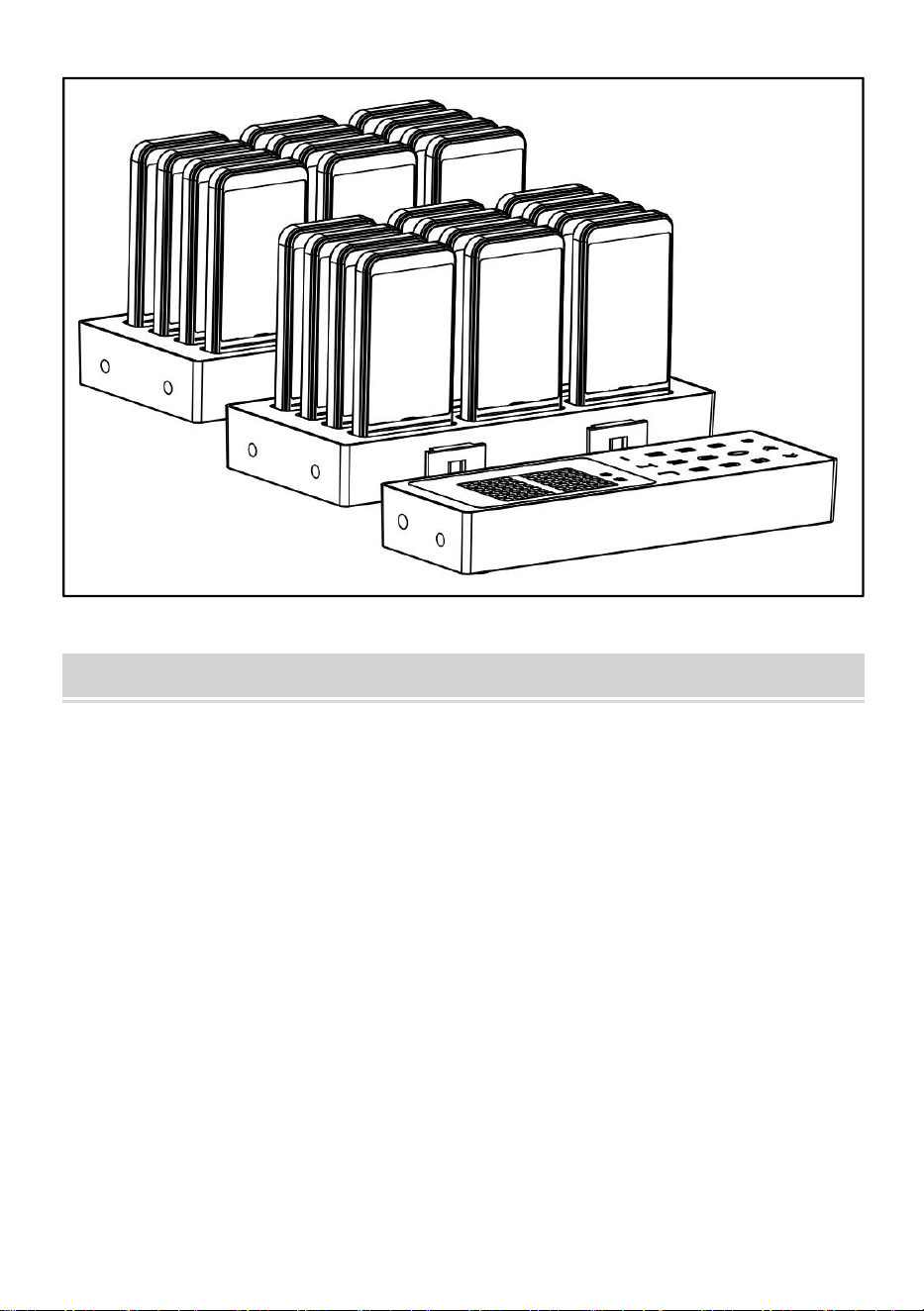
- 8 -
CLEANING AND STORAGE
1. Jeżeli urządzenie nie będzie używane przez dłuższy czas, należy
odłączyć je od zasilania, wyczyścić, przykryć i przechowywać w suchym i
bezpiecznym miejscu.
2. Przetrzyj miękką, suchą ściereczką. Upewnij się, że produkt jest suchy.
3. Proszę połączyć pager i hosta.

- 9 -



Technisch Support und E-Garantie-Zertifikat www.vevor.com/support
RESTAURANT-PAGER
MODELL: P80
We continue to be committed to provide you tools with competitive price.
"Save Half", "Half Price" or any other similar expressions used by us only represents an
estimate of savings you might benefit from buying certain tools with us compared to the major
top brands and does not necessarily mean to cover all categories of tools offered by us. You
are kindly reminded to verify carefully when you are placing an order with us if you are
actually saving half in comparison with the top major brands.

- 1 -
MODELL: P80
Have product questions? Need technical support? Please feel free to
contact us:
Technical Support and E-Warranty Certificate
www.vevor.com/support
NEED HELP? CONTACT US!
This is the original instruction, please read all manual instructions
carefully before operating. VEVOR reserves a clear interpretation of our
user manual. The appearance of the product shall be subject to the
product you received. Please forgive us that we won't inform you again if
there are any technology or software updates on our product.
RESTAURANT PAGER
- 2 -
Warnung: Um das Verletzungsrisiko zu verringern, muss der
Benutzer die Bedienungsanleitung sorgfältig lesen.
KORREKTE ENTSORGUNG
Dieses Produkt unterliegt den Bestimmungen der europäischen
Richtlinie 2012/19/EU. Das Symbol einer durchgestrichenen
Mülltonne weist darauf hin, dass das Produkt in der Europäischen
Union einer getrennten Müllentsorgung unterliegt. Dies gilt für das
Produkt und alle mit diesem Symbol gekennzeichneten Zubehörteile.
So gekennzeichnete Produkte dürfen nicht im normalen Hausmüll
entsorgt werden, sondern müssen an einer Sammelstelle für das
Recycling von elektrischen und elektronischen Geräten abgegeben
werden.
Um die Gefahren für Gesundheit und Umwelt am Ende der
Lebensdauer dieses Produkts zu minimieren, schreiben die Gesetze
zu Elektro- und Elektronik-Altgeräten (WEEE) und die
Altbatterie-Richtlinie vor, dass Sie dieses Produkt bei einer
geeigneten Sammelstelle abgeben müssen. Dorthin wird es zur
Entfernung der Batterien und zum ordnungsgemäßen Recycling
geschickt. Weitere Informationen zum Recycling und zur sicheren
Entsorgung dieser Batterien in Ihrer Gegend erhalten Sie bei Ihren
örtlichen Behörden.
Compliance ist eine Sicherheitszertifizierung der EG und des
Vereinigten Königreichs.

- 3 -
IMPORTANT SAFEGUARDS
Vielen Dank, dass Sie dieses Produkt verwenden . Um sicherzustellen,
dass Sie die Maschine richtig bedienen können, lesen Sie diese Anleitung
vor der Inbetriebnahme sorgfältig durch und bewahren Sie sie zum
späteren Nachschlagen sorgfältig auf . Bitte lesen Sie zur Gewährleistung
einer sicheren Verwendung die Vorsichtsmaßnahmen und
Sicherheitsregeln auf dieser Seite .
In diesem Handbuch werden Sicherheitswarnungen und
Vorsichtsmaßnahmen sowie Bedienung, Wartung und Reinigung
beschrieben . Die in diesem Handbuch enthaltenen Warnungen und
Anweisungen können nicht alle möglichen Bedingungen und Situationen
abdecken, die auftreten können . Vorsicht und gesunder
Menschenverstand sind bei diesem Produkt nicht angebracht, da wir
davon ausgehen, dass die Verwendung diesen Vorschriften entspricht .
Wenn Sie Probleme haben, rufen Sie uns bitte an . Versuchen Sie nicht,
die Probleme selbst zu beheben, da dies zu Verletzungen oder
Sachschäden führen kann .
Bitte lesen Sie ALLE Anweisungen, bevor Sie Ihre Maschine
verwenden .
1. Wenn der Akku schwach ist, laden Sie ihn rechtzeitig auf .
2. Lassen Sie Kinder, Jugendliche und Haustiere nicht in die Nähe der
Maschine kommen oder diese berühren.
3 . Tauchen Sie das Gerät nicht in Wasser oder andere Flüssigkeiten.
4. Das Produkt nicht zerlegen.
5. Die Verwendung von Zubehör oder Zusatzgeräten, die nicht vom
Hersteller bereitgestellt oder empfohlen werden, kann zu Verletzungen
führen.
6. Wenn die Maschine längere Zeit nicht benutzt wird, entnehmen Sie die
Batterie, reinigen und decken Sie sie ab und lagern Sie sie an einem
trockenen und sicheren Ort.

- 4 -
7. Lassen Sie das Produkt nicht über die Kante eines Tisches oder einer
Theke hängen und bringen Sie es nicht mit heißen Oberflächen in
Berührung.
8. Stellen Sie das Produkt nicht auf oder in die Nähe von heißer Luft,
elektrischen Brennern oder Heizgeräten.
9. Verwenden Sie das Gerät ausschließlich für den angegebenen Zweck.
10. Außerhalb der Reichweite von Kindern aufbewahren.
11. REINIGEN SIE ES NICHT MIT SCHLEIFENDEN MATERIALIEN.
12. Bitte reinigen Sie es regelmäßig, mindestens einmal im Monat .
13. Dieses Gerät ist nicht für den Gebrauch durch Personen
( einschließlich Kinder) mit erzogen physische, sensorische oder geistig
Fähigkeiten oder mangelnde Erfahrung oder Wissen, es sei denn, sie
wurden Aufsicht oder Einweisung in die Benutzung des Gerätes durch eine
Person für ihre Sicherheit verantwortlich .
FCC INFORMATION
ACHTUNG: Durch Änderungen oder Modifikationen, die nicht ausdrücklich
von der für die Konformität verantwortlichen Partei genehmigt wurden,
kann die Berechtigung des Benutzers zum Betrieb des Geräts erlöschen!
Dieses Gerät entspricht Teil 15 der FCC-Bestimmungen. Der Betrieb
unterliegt den folgenden zwei Bedingungen:
1) Dieses Produkt kann schädliche Störungen verursachen.
2) Dieses Produkt muss alle empfangenen Störungen tolerieren,
einschließlich Störungen, die einen unerwünschten Betrieb verursachen
können.
WARNUNG: Änderungen oder Modifikationen an diesem Produkt, die
nicht ausdrücklich von der für die Konformität verantwortlichen Partei
genehmigt wurden, können zum Erlöschen der Berechtigung des
Benutzers zum Betrieb des Produkts führen.
Hinweis: Dieses Produkt wurde getestet und entspricht den Grenzwerten
für digitale Geräte der Klasse B gemäß Teil 15 der FCC-Bestimmungen.
Diese Grenzwerte sollen einen angemessenen Schutz gegen schädliche
Störungen bei der Installation in Wohngebieten bieten.
Dieses Produkt erzeugt und verwendet Hochfrequenzenergie und kann
- 5 -
diese auch ausstrahlen. Wenn es nicht gemäß den Anweisungen installiert
und verwendet wird, kann es zu Störungen des Funkverkehrs kommen. Es
gibt jedoch keine Garantie dafür, dass bei einer bestimmten Installation
keine Störungen auftreten. Wenn dieses Produkt Störungen des Radio-
oder Fernsehempfangs verursacht (was durch Ein- und Ausschalten des
Produkts festgestellt werden kann), wird dem Benutzer empfohlen, die
Störungen durch eine oder mehrere der folgenden Maßnahmen zu
beheben.
· Empfangsantenne neu ausrichten oder verlegen.
· Vergrößern Sie den Abstand zwischen Produkt und Empfänger.
· Schließen Sie das Produkt an eine Steckdose eines anderen
Stromkreises an als den, an den der Empfänger angeschlossen ist.
· Wenden Sie sich an den Händler oder einen erfahrenen
Radio-/Fernsehtechniker.
PRODUCT PARAMETERS
Modell
P80
Arbeitsfrequenz
433 MHz (Fragen)
Modulation
OOK AM
Netzteil Eingang
AC100-240V 50/60Hz
Netzteilausgang
DC 12 V , 2 A
Pager
24 STÜCKE
BEFORE USING

- 6 -
1. Entfernen Sie vor der ersten Inbetriebnahme sämtliche Werbe- und
Verpackungsmaterialien und prüfen Sie, ob das Produkt sauber und
staubfrei ist.
2. Bitte entsorgen Sie alle Plastiktüten sorgfältig und bewahren Sie diese
außerhalb der Reichweite von Kindern und Haustieren auf.
3. Überprüfen Sie alle mitgelieferten Komponenten anhand der Liste in
diesem Handbuch. Stellen Sie sicher, dass Sie alle aufgeführten Teile
haben.
ENTER/EXIT SETTINGS MENU
● Rufen Sie das Einstellungsmenü auf: Drücken Sie lange die Taste
[Set], um das Einstellungsmenü aufzurufen, drücken Sie die
entsprechende [Ziffern]-Taste, um die entsprechende Einstellungsoption
auszuwählen (z. B. 1 entsprechend F1), und drücken Sie dann kurz die
Taste [Set], um die Einstellung aufzurufen.
● Verlassen des Einstellungsmenüs: Drücken Sie die Taste [Anrufen]
zum Bestätigen und Zurückkehren; drücken Sie die Taste [Festlegen] zum
Abbrechen und Zurückkehren; drücken Sie die Taste [Entf], um die
Einstellung zu verlassen.
PRODUCT SETTINGS
● [ F1 ] Basis-ID festlegen (1-98)
Nachdem Sie das Einstellungsmenü „F1“ aufgerufen haben, drücken Sie
die Taste [Ziffern], um die Basis-ID-Nummer zu ändern.
● [ F 2] Stellen Sie den Basis-Summerschalter ein (0-1)
Nach dem Aufrufen des Einstellungsmenüs „F2“ drücken Sie die Taste
[Ziffern], um den Summer an der Basis ändern. Aus-Einstellung (0: aus, 1:
ein).
● [ F 3] Einstellen der Nebenstellennummer (1-98)
Nachdem Sie das Einstellungsmenü „F3“ aufgerufen haben, drücken Sie
die Taste [Nummer], um die Nummern 1-98 einzugeben. Nehmen Sie dann

- 7 -
das Telefon aus der Basisstation und drücken Sie innerhalb von 5
Sekunden die Taste [Anruf]. Wenn die Einstellung erfolgreich war, ertönt
ein Piepton.
● [ F 4] Erweiterungsvibration einstellen (0-1)
Setzen Sie die Nebenstelle wieder auf die Basisstation, rufen Sie das
Einstellungsmenü „F4“ auf und drücken Sie die Taste [Anrufen], um alle
Nebenstellen auf Vibration (0: aus, 1: an) und bei erfolgreicher Einstellung
ertönt ein Summer.
● [ F 5] Nebenstellensummer einstellen (0-1)
Legen Sie die Nebenstelle wieder auf die Basisstation, rufen Sie das
Einstellungsmenü „F5“ auf und drücken Sie die Taste [Anrufen], um den
Signalton für alle Nebenstellen einzustellen (0: aus, 1: an). Wenn die
Einstellung erfolgreich war, ertönt ein Signalton.
● [ F 6] Dauer der Verlängerungserinnerung festlegen ( 0-99 )
Legen Sie die Nebenstelle wieder auf die Basisstation, rufen Sie das
Einstellungsmenü „F6“ auf und drücken Sie die Taste [Anrufen], um die
Erinnerungsdauer für alle Nebenstellen einzustellen (0: immer erinnern).
Wenn die Einstellung erfolgreich war, ertönt ein Summer.
HOW TO USE
● C alle Erweiterung
Geben Sie über die Zifferntasten die entsprechende Nebenstellennummer
ein und drücken Sie zum Anrufen die Taste [Anrufen].
● Bequem telefonieren
Drücken Sie die Tasten [ + und - ] neben der entsprechenden Nummer und
warten Sie 2 Sekunden, um den automatischen Anruf zu tätigen.
● Außerbetriebsetzung der Erweiterung
Stecken Sie die Nebenstelle wieder in die Basisstation, geben Sie 99 auf
der Tastatur ein und drücken Sie die Taste [Anrufen], um das Telefon
auszuschalten.
- 8 -
ASSEMBLING PRODUCTS
Bauen Sie das Produkt wie in der Abbildung gezeigt zusammen und
schließen Sie den Adapter an .
CLEANING AND STORAGE
1. Wenn die Maschine längere Zeit nicht verwendet wird, trennen Sie sie
vom Stromnetz, reinigen und decken Sie sie ab und lagern Sie sie an
einem trockenen und sicheren Ort.
2. Mit einem weichen, trockenen Tuch abwischen. Achten Sie darauf, das
Produkt trocken zu halten
3. Bitte fügen Sie Pager und Host zusammen.

- 9 -



Technique Certificat d'assistance et de garantie électronique
www.vevor.com/support
TÉLÉAVERTISSEUR DE RESTAURANT
MODÈLE : P80
We continue to be committed to provide you tools with competitive price.
"Save Half", "Half Price" or any other similar expressions used by us only represents an
estimate of savings you might benefit from buying certain tools with us compared to the major
top brands and does not necessarily mean to cover all categories of tools offered by us. You
are kindly reminded to verify carefully when you are placing an order with us if you are
actually saving half in comparison with the top major brands.


- 1 -
MODÈLE : P80
Have product questions? Need technical support? Please feel free to
contact us:
Technical Support and E-Warranty Certificate
www.vevor.com/support
NEED HELP? CONTACT US!
This is the original instruction, please read all manual instructions
carefully before operating. VEVOR reserves a clear interpretation of our
user manual. The appearance of the product shall be subject to the
product you received. Please forgive us that we won't inform you again if
there are any technology or software updates on our product.
RESTAURANT PAGER
- 2 -
Avertissement - Pour réduire le risque de blessure, l'utilisateur doit
lire attentivement le manuel d'instructions.
ÉLIMINATION CORRECTE
Ce produit est soumis aux dispositions de la directive européenne
2012/19/CE. Le symbole représentant une poubelle à roulettes
barrée indique que le produit doit faire l'objet d'une collecte sélective
des déchets dans l'Union européenne. Cela s'applique au produit et à
tous les accessoires marqués de ce symbole. Les produits marqués
comme tels ne peuvent pas être jetés avec les déchets ménagers
normaux, mais doivent être déposés dans un point de collecte pour le
recyclage des appareils électriques et électroniques.
Afin de minimiser les risques pour la santé et l'environnement à la fin
de la vie de ce produit, les lois relatives aux déchets d'équipements
électriques et électroniques (DEEE) et la directive sur les piles
usagées exigent que vous jetiez ce produit dans un centre de collecte
approprié où il sera envoyé afin de retirer les piles et de les recycler
de manière appropriée. Veuillez contacter vos autorités locales pour
plus de détails sur le recyclage et l'élimination sûre de ces dernières
dans votre région.
Compliance est une certification de sécurité CE et UK.

- 3 -
IMPORTANT SAFEGUARDS
Merci d'utiliser ce produit . Afin de vous assurer que vous pouvez utiliser la
machine correctement, lisez attentivement ces instructions avant
l'utilisation et conservez-les soigneusement pour référence ultérieure .
Assurez-vous de lire les précautions et les règles de sécurité sur cette
page pour garantir votre utilisation en toute sécurité .
Ce manuel décrit les avertissements et précautions de sécurité, le
fonctionnement, l'entretien et le nettoyage . Les avertissements et
instructions examinés dans ce manuel ne peuvent pas couvrir toutes les
conditions et situations possibles qui peuvent se produire . La prudence et
le bon sens ne sont pas intégrés dans ce produit, car nous pensons que
les utilisations seront conformes à ces codes . Si vous avez des problèmes,
veuillez nous appeler . N'essayez pas de résoudre les problèmes
vous-même, car cela entraînerait des blessures ou des dommages
matériels .
Veuillez lire TOUTES les instructions avant d'utiliser votre machine .
1. Si la batterie est faible, veuillez la charger à temps .
2. Ne laissez pas les enfants, les mineurs et les animaux domestiques
s'approcher ou toucher la machine.
3 . Ne pas immerger l’appareil dans l’eau ou tout autre liquide.
4. Ne démontez pas le produit.
5. L’utilisation d’accessoires ou de pièces jointes qui ne sont pas fournis ou
recommandés par le fabricant peut entraîner des blessures.
6. Si la machine ne doit pas être utilisée pendant une longue période,
retirez la batterie, nettoyez-la, couvrez-la et rangez-la dans un endroit sec
et sûr.
7. Ne laissez pas le produit pendre sur le bord d’une table ou d’un comptoir
et ne le laissez pas entrer en contact avec des surfaces chaudes.
8. Ne placez pas le produit sur ou à proximité d'appareils à air chaud, de
brûleurs électriques ou de radiateurs.
9. N'utilisez pas cet appareil à d'autres fins que celles indiquées.
10. GARDEZ-LE HORS DE PORTÉE DES ENFANTS.

- 4 -
11. NE LE NETTOYEZ PAS AVEC UN MATÉRIAU ABRASIF.
12. Veuillez le nettoyer régulièrement, au moins une fois par mois .
13 . Cet appareil n'est pas destiné à être utilisé par des personnes (y
compris enfants) avec éduqué physique, sensoriel ou mental capacités, ou
le manque d'expérience ou connaissances, à moins qu'elles n'aient été
données surveillance ou instruction concernant l'utilisation de l'appareil par
une personne responsable de leur sécurité .
FCC INFORMATION
ATTENTION : Les changements ou modifications non expressément
approuvés par la partie responsable de la conformité peuvent annuler le
droit de l'utilisateur à utiliser l'équipement !
Cet appareil est conforme à la partie 15 des règles de la FCC. Son
fonctionnement est soumis aux deux conditions suivantes :
1) Ce produit peut provoquer des interférences nuisibles.
2) Ce produit doit accepter toute interférence reçue, y compris celles qui
peuvent provoquer un fonctionnement indésirable.
AVERTISSEMENT : Les changements ou modifications apportés à ce
produit non expressément approuvés par la partie responsable de la
conformité pourraient annuler l'autorité de l'utilisateur à utiliser le produit.
Remarque : ce produit a été testé et jugé conforme aux limites d'un
appareil numérique de classe B conformément à la partie 15 des règles de
la FCC. Ces limites sont conçues pour fournir une protection raisonnable
contre les interférences nuisibles dans une installation résidentielle.
Ce produit génère, utilise et peut émettre de l'énergie radioélectrique. S'il
n'est pas installé et utilisé conformément aux instructions, il peut provoquer
des interférences nuisibles aux communications radio. Cependant, il
n'existe aucune garantie qu'aucune interférence ne se produira dans une
installation particulière. Si ce produit provoque des interférences nuisibles
à la réception radio ou télévision, ce qui peut être déterminé en éteignant
et en rallumant le produit, l'utilisateur est encouragé à essayer de corriger
l'interférence en prenant une ou plusieurs des mesures suivantes.
· Réorienter ou déplacer l’antenne de réception.
· Augmenter la distance entre le produit et le récepteur.

- 5 -
· Brancher le produit sur une prise d’un circuit différent de celui sur lequel
le récepteur est branché.
· Consultez le revendeur ou un technicien radio/TV expérimenté pour
obtenir de l’aide.
PRODUCT PARAMETERS
Modèle
P80
Fréquence de travail
433 MHz (demander)
Modulation
OOK SUIS
Adaptateur secteur Entrée
CA 100-240 V 50/60 Hz
Sortie de l'adaptateur
secteur
DC12V 2A
Téléavertisseurs
24 pièces
BEFORE USING
1. Avant d'utiliser l'appareil pour la première fois, retirez tous les matériaux
promotionnels et d'emballage et vérifiez que le produit est propre et
exempt de poussière.
2. Veuillez jeter tous les sacs en plastique avec précaution et les garder
hors de portée des enfants et des animaux domestiques.
3. Vérifiez tous les composants fournis conformément à la liste de ce
manuel. Assurez-vous d'avoir toutes les pièces répertoriées.

- 6 -
ENTER/EXIT SETTINGS MENU
● Entrez dans le menu de configuration : appuyez longuement sur la
touche [Set] pour entrer dans le menu de configuration, appuyez sur la
touche [Number] correspondante pour sélectionner l'option de
configuration correspondante (comme 1 correspondant à F1), puis
appuyez brièvement sur la touche [Set] pour entrer dans le paramètre ;
● Quitter le menu de réglage : Appuyez sur la touche [Appel] pour
confirmer et revenir ; appuyez sur la touche [Régler] pour annuler et
revenir ; appuyez sur la touche [Supprimer] pour quitter le menu de
réglage.
PRODUCT SETTINGS
● [ F1 ] Définir l'ID de base (1-98)
Après être entré dans le menu de configuration « F1 », appuyez sur la
touche [Numéro] pour modifier le numéro d'identification de base.
● [ F 2] Régler le commutateur du buzzer de base (0-1)
Après avoir accédé au menu de configuration « F2 », appuyez sur la
touche [Numéro] pour changer le buzzer sur la base. Paramètre désactivé
(0 : désactivé, 1 : activé).
● [ F 3] Définir le numéro de poste (1-98)
Après avoir accédé au menu de configuration « F3 », appuyez sur la
touche [Number] pour saisir les chiffres de 1 à 98, puis retirez le téléphone
de la base et appuyez sur la touche [Call] dans les 5 secondes. Un bip
retentit lorsque le réglage est réussi.
● [ F 4] Régler la vibration de l'extension (0-1)
Remettez l'extension sur la base, entrez dans le menu de configuration «
F4 » et appuyez sur la touche [Appel] pour configurer toutes les extensions
vibrent (0 : désactivé, 1 : activé) et un buzzer retentit si le réglage est
réussi.
● [ F 5] Régler le buzzer d'extension (0-1)
Remettez le poste sur la base, entrez dans le menu de configuration « F5 »
et appuyez sur la touche [Appel] pour régler le bip pour tous les postes (0 :

- 7 -
désactivé, 1 : activé). Un bip sonore retentit si le réglage est réussi.
● [ F 6] Définir la durée du rappel d'extension ( 0-99 )
Remettez le poste sur la base, accédez au menu de configuration « F6 » et
appuyez sur la touche [Appel] pour définir la durée de rappel pour tous les
postes (0 : toujours rappeler). Un signal sonore retentit si le réglage est
réussi.
HOW TO USE
● C toute extension
Utilisez les touches numériques pour saisir le numéro de poste
correspondant et appuyez sur la touche [Appeler] pour appeler.
● Appel pratique
Appuyez sur les touches [ + et - ] du numéro correspondant et attendez 2
secondes pour l'appel automatique.
● Arrêt de l'extension
Remettez le poste dans la base, saisissez 99 sur le clavier et appuyez sur
la touche [Appel] pour éteindre le téléphone.
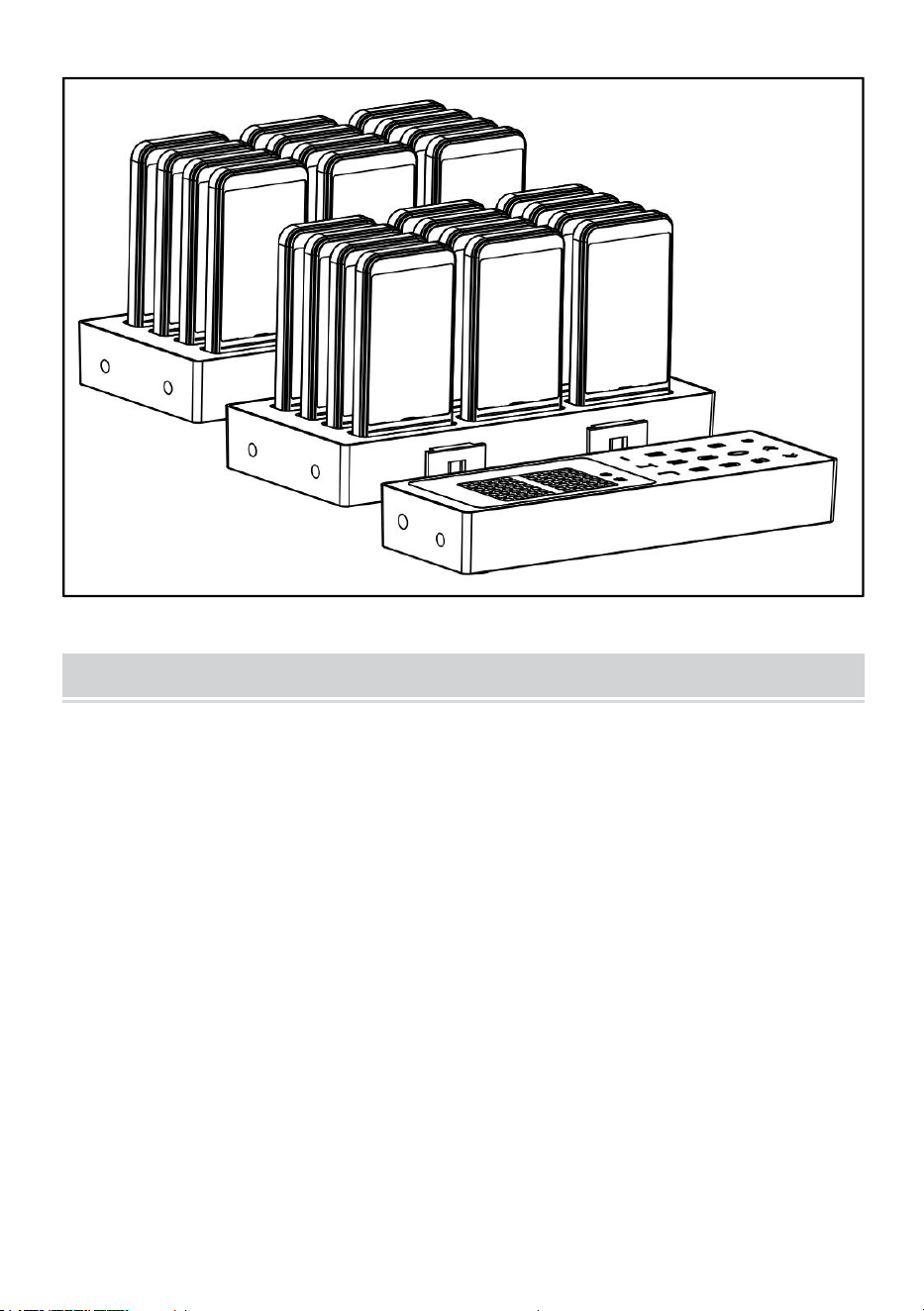
ASSEMBLING PRODUCTS
Assemblez le produit comme indiqué sur l'image et connectez
l'adaptateur .
- 8 -
CLEANING AND STORAGE
1. Si la machine ne doit pas être utilisée pendant une longue période,
coupez l'alimentation, nettoyez-la, couvrez-la et rangez-la dans un endroit
sec et sûr.
2. Essuyez avec un chiffon doux et sec. Assurez-vous de garder le produit
au sec
3. Veuillez mettre le téléavertisseur et l'hôte ensemble.

- 9 -



Technisch Ondersteuning en E-garantiecertificaat www.vevor.com/support
RESTAURANTPAGER
MODEL: P80
We continue to be committed to provide you tools with competitive price.
"Save Half", "Half Price" or any other similar expressions used by us only represents an
estimate of savings you might benefit from buying certain tools with us compared to the major
top brands and does not necessarily mean to cover all categories of tools offered by us. You
are kindly reminded to verify carefully when you are placing an order with us if you are
actually saving half in comparison with the top major brands.

- 1 -
MODEL: P80
Have product questions? Need technical support? Please feel free to
contact us:
Technical Support and E-Warranty Certificate
www.vevor.com/support
NEED HELP? CONTACT US!
This is the original instruction, please read all manual instructions
carefully before operating. VEVOR reserves a clear interpretation of our
user manual. The appearance of the product shall be subject to the
product you received. Please forgive us that we won't inform you again if
there are any technology or software updates on our product.
RESTAURANT PAGER
- 2 -
Waarschuwing : om het risico op letsel te verkleinen, moet de
gebruiker de gebruiksaanwijzing zorgvuldig lezen.
CORRECTE VERWIJDERING
Dit product is onderworpen aan de bepalingen van de Europese
richtlijn 2012/19/EG. Het symbool met een doorgestreepte afvalbak
geeft aan dat het product in de Europese Unie gescheiden
afvalinzameling vereist. Dit geldt voor het product en alle accessoires
die met dit symbool zijn gemarkeerd. Producten die als zodanig zijn
gemarkeerd, mogen niet met het normale huishoudelijke afval
worden weggegooid, maar moeten worden ingeleverd bij een
inzamelpunt voor recycling van elektrische en elektronische
apparaten.
Om de gevaren voor de gezondheid en het milieu aan het einde van
de levensduur van dit product tot een minimum te beperken, vereisen
de wetten met betrekking tot afgedankte elektrische en elektronische
apparatuur (AEEA) en de richtlijn afgedankte batterijen dat u dit
product inlevert bij een daarvoor geschikt inzamelpunt. Daar worden
de batterijen verwijderd en wordt het op de juiste manier gerecycled.
Neem contact op met uw plaatselijke autoriteiten voor meer
informatie over recycling en veilige verwijdering hiervan in uw
omgeving.
Compliance is een EG- en VK-beveiligingscertificering.

- 3 -
IMPORTANT SAFEGUARDS
Bedankt dat u dit product gebruikt . Om er zeker van te zijn dat u de
machine correct kunt bedienen, dient u deze instructies zorgvuldig door te
lezen voordat u het apparaat in gebruik neemt en deze te bewaren voor
toekomstig gebruik . Lees de voorzorgsmaatregelen en veiligheidsregels
op deze pagina zorgvuldig door om veilig gebruik te garanderen .
Deze handleiding beschrijft veiligheidswaarschuwingen en
voorzorgsmaatregelen, bediening, onderhoud en reiniging . De
waarschuwingen en instructies die in deze handleiding worden besproken,
kunnen niet alle mogelijke omstandigheden en situaties dekken die zich
kunnen voordoen . Voorzichtigheid en gezond verstand zijn niet ingebouwd
in dit product, omdat wij geloven dat het gebruik aan deze codes zal
voldoen . Als u problemen ondervindt, bel ons dan . Probeer de problemen
niet zelf op te lossen, anders kan dit letsel of schade aan eigendommen
veroorzaken .
Lees ALLE instructies voordat u uw apparaat gebruikt .
1. Als de batterij bijna leeg is, laad deze dan tijdig op .
2. Laat kinderen, minderjarigen en huisdieren niet in de buurt van het
apparaat komen of het aanraken.
3 . Dompel het apparaat niet onder in water of een andere vloeistof.
4. Haal het product niet uit elkaar.
5. Het gebruik van accessoires of hulpstukken die niet door de fabrikant
zijn meegeleverd of aanbevolen, kan letsel veroorzaken.
6. Als het apparaat gedurende een langere periode niet wordt gebruikt,
verwijder dan de accu, maak het schoon, dek het af en bewaar het op een
droge en veilige plaats.
7. Laat het product niet over de rand van een tafel of aanrecht hangen en
zorg ervoor dat het niet in contact komt met hete oppervlakken.
8. Plaats het product niet op of in de buurt van hetelucht-, elektrische
kookplaten of verwarmingstoestellen.

- 4 -
9. Gebruik dit apparaat niet voor andere doeleinden dan waarvoor het is
aangegeven.
10. HOUD HET BUITEN BEREIK VAN KINDEREN.
11. MAAK HET NIET SCHOON MET SCHURENDE MATERIALEN.
12. Maak het regelmatig schoon, minimaal één keer per maand .
13. Dit apparaat is niet bedoeld voor gebruik door personen (inclusief
kinderen) met opgevoed fysiek, zintuiglijk of mentaal capaciteiten, of
gebrek aan ervaring of kennis, tenzij ze zijn gegeven toezicht of instructie
met betrekking tot het gebruik van het apparaat door een persoon
verantwoordelijk voor hun veiligheid .
FCC INFORMATION
LET OP: Wijzigingen of aanpassingen die niet uitdrukkelijk zijn
goedgekeurd door de partij die verantwoordelijk is voor de naleving,
kunnen de bevoegdheid van de gebruiker om het apparaat te bedienen
ongeldig maken!
Dit apparaat voldoet aan Deel 15 van de FCC-regels. De werking is
onderworpen aan de volgende twee voorwaarden:
1) Dit product kan schadelijke interferentie veroorzaken.
2) Dit product moet alle ontvangen interferentie accepteren, inclusief
interferentie die ongewenste werking kan veroorzaken.
WAARSCHUWING: Wijzigingen of aanpassingen aan dit product die niet
uitdrukkelijk zijn goedgekeurd door de partij die verantwoordelijk is voor
naleving, kunnen de bevoegdheid van de gebruiker om het product te
bedienen ongeldig maken.
Let op: Dit product is getest en voldoet aan de limieten voor een digitaal
apparaat van klasse B, conform Deel 15 van de FCC-regels. Deze limieten
zijn bedoeld om redelijke bescherming te bieden tegen schadelijke
interferentie in een residentiële installatie.
Dit product genereert, gebruikt en kan radiofrequentie-energie uitstralen en
kan, indien niet geïnstalleerd en gebruikt in overeenstemming met de
instructies, schadelijke interferentie veroorzaken in radiocommunicatie. Er
is echter geen garantie dat er geen interferentie zal optreden in een
bepaalde installatie. Als dit product schadelijke interferentie veroorzaakt in

- 5 -
radio- of televisieontvangst, wat kan worden vastgesteld door het product
uit en aan te zetten, wordt de gebruiker aangemoedigd om te proberen de
interferentie te corrigeren door een of meer van de volgende maatregelen.
· Heroriënteer of verplaats de ontvangstantenne.
· Vergroot de afstand tussen het product en de ontvanger.
· Sluit het product aan op een stopcontact van een ander circuit dan
waarop de ontvanger is aangesloten.
· Raadpleeg de dealer of een ervaren radio-/tv-technicus voor hulp.
PRODUCT PARAMETERS
Model
P80
Werkfrequentie
433MHZ (VRAGEN)
Modulatie
oke ik ben
Stroomadapter Ingang
AC100-240V 50/60Hz
Stroomadapter Uitgang
DC12V 2A
Pagers
24PCS
BEFORE USING
1. Verwijder vóór het eerste gebruik alle promotie- en
verpakkingsmaterialen en controleer of het product schoon en stofvrij is.
2. Gooi alle plastic zakken zorgvuldig weg en houd ze buiten bereik van
kinderen en huisdieren.
3. Controleer alle meegeleverde componenten volgens de lijst in deze
handleiding. Zorg ervoor dat u over alle vermelde onderdelen beschikt.

- 6 -
ENTER/EXIT SETTINGS MENU
● Ga naar het instellingenmenu: Druk lang op de [Set]-toets om het
instellingenmenu te openen, druk op de overeenkomstige [Nummer]-toets
om de overeenkomstige instellingsoptie te selecteren (bijvoorbeeld 1 die
overeenkomt met F1) en druk vervolgens kort op de [Set]-toets om de
instelling te openen;
● Het instellingenmenu verlaten: Druk op de toets [Bellen] om te
bevestigen en terug te keren; druk op de toets [Instellen] om te annuleren
en terug te keren; druk op de toets [Verwijderen] om het instellingenmenu
te verlaten.
PRODUCT SETTINGS
● [ F1 ] Basis-ID instellen (1-98)
Nadat u het instellingenmenu "F1" hebt geopend, drukt u op de toets
[Nummer] om het basis-ID-nummer te wijzigen.
● [ F 2] Stel de basiszoemerschakelaar in (0-1)
Nadat u het instellingenmenu "F2" hebt geopend, drukt u op de toets
[Nummer] om verander de zoemer op het basisstation. Uit-instelling (0: uit,
1: aan).
● [ F 3] Stel het toestelnummer in (1-98)
Nadat u het instellingenmenu "F3" hebt geopend, drukt u op de toets
[Nummer] om 1-98 nummers in te voeren en haalt u de telefoon uit het
basisstation en drukt u binnen 5 seconden op de toets [Bellen]. Er klinkt
een pieptoon wanneer de instelling is gelukt.
● [ F 4] Stel de extensievibratie in (0-1)
Plaats de extensie terug op het basisstation, ga naar het instellingenmenu
"F4" en druk op de toets [Bellen] om het toestel in te stellen. alle extensies
trillen (0: uit, 1: aan) en er klinkt een zoemer als de instelling succesvol is.
● [ F 5] Stel de extensiezoemer in (0-1)
Plaats het toestel terug op het basisstation, ga naar het instellingenmenu

- 7 -
"F5" en druk op de toets [Bellen] om de pieptoon voor alle toestellen in te
stellen (0: uit, 1: aan). Er klinkt een pieptoon als de instelling succesvol is.
● [ F 6] Herinneringsduur voor verlenging instellen ( 0-99 )
Plaats de extensie terug op het basisstation, ga naar het instellingenmenu
"F6" en druk op de toets [Bellen] om de herinneringsduur voor alle
extensies in te stellen (0: altijd herinneren). Er klinkt een zoemer als de
instelling succesvol is.
HOW TO USE
● C alle extensies
Gebruik de numerieke toetsen om het overeenkomstige toestelnummer in
te voeren en druk op de [Bellen]-toets om te bellen.
● Gemakkelijk bellen
Druk op de toetsen [ + en - ] om het overeenkomstige nummer te bellen en
wacht 2 seconden totdat het nummer automatisch wordt gebeld.
● Uitbreiding afgesloten
Plaats het toestel terug in het basisstation, voer 99 in op het toetsenbord
en druk op de [Bellen]-toets om de telefoon uit te schakelen.
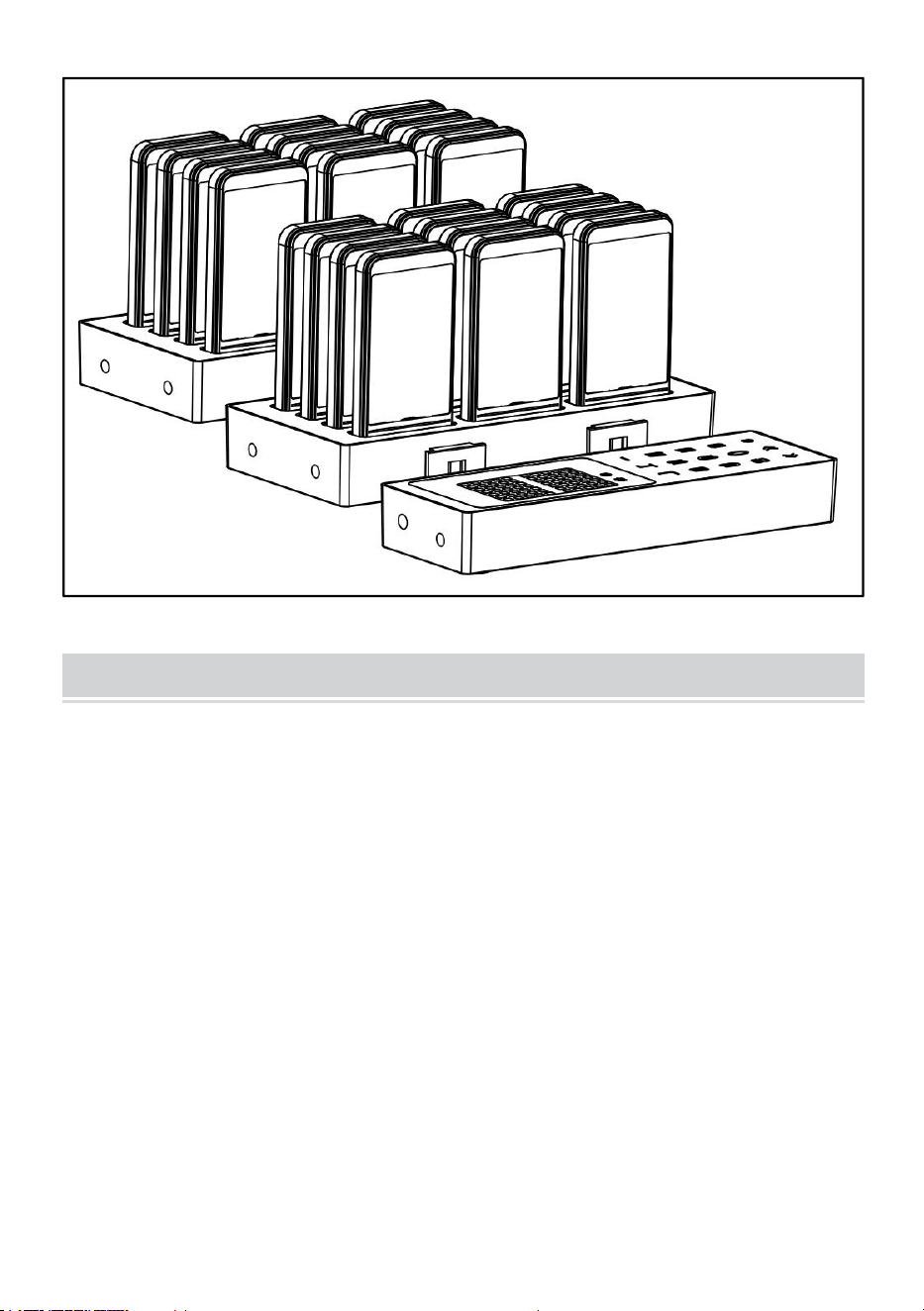
ASSEMBLING PRODUCTS
Monteer het product zoals afgebeeld en sluit de adapter aan .
- 8 -
CLEANING AND STORAGE
1. Als het apparaat gedurende een langere periode niet gebruikt wordt,
haal dan de stroom eraf, maak het schoon, dek het af en bewaar het op
een droge en veilige plaats.
2. Veeg af met een zachte, droge doek. Zorg ervoor dat het product droog
blijft
3. Sluit de pager en de host op elkaar aan.

- 9 -



Teknisk Support och e-garanticertifikat www.vevor.com/support
RESTAURANGPERSONSÖKARE
MODELL: P80
We continue to be committed to provide you tools with competitive price.
"Save Half", "Half Price" or any other similar expressions used by us only represents an
estimate of savings you might benefit from buying certain tools with us compared to the major
top brands and does not necessarily mean to cover all categories of tools offered by us. You
are kindly reminded to verify carefully when you are placing an order with us if you are
actually saving half in comparison with the top major brands.

- 1 -
MODELL: P80
Have product questions? Need technical support? Please feel free to
contact us:
Technical Support and E-Warranty Certificate
www.vevor.com/support
NEED HELP? CONTACT US!
This is the original instruction, please read all manual instructions
carefully before operating. VEVOR reserves a clear interpretation of our
user manual. The appearance of the product shall be subject to the
product you received. Please forgive us that we won't inform you again if
there are any technology or software updates on our product.
RESTAURANT PAGER
- 2 -
Varning- För att minska risken för skada måste användaren läsa
bruksanvisningen noggrant.
KORREKT AVFALLSHANTERING
Denna produkt omfattas av bestämmelserna i det europeiska
direktivet 2012/19/EC. Symbolen som visar en soptunna korsad
anger att produkten kräver separat sophämtning i EU. Detta gäller för
produkten och alla tillbehör märkta med denna symbol. Produkter
märkta som sådana får inte slängas tillsammans med vanligt
hushållsavfall, utan måste lämnas till en insamlingsplats för
återvinning av elektriska och elektroniska apparater
För att minimera risker för hälsa och miljö vid slutet av denna
produkts livslängd, kräver lagar som handlar om avfall från elektrisk
och elektronisk utrustning (WEEE) och direktivet om avfallsbatterier
att du kasserar denna produkt på en lämplig insamlingsanläggning dit
den kommer att skickas in för att ta bort batterierna och för lämplig
återvinning. Kontakta dina lokala myndigheter för mer information om
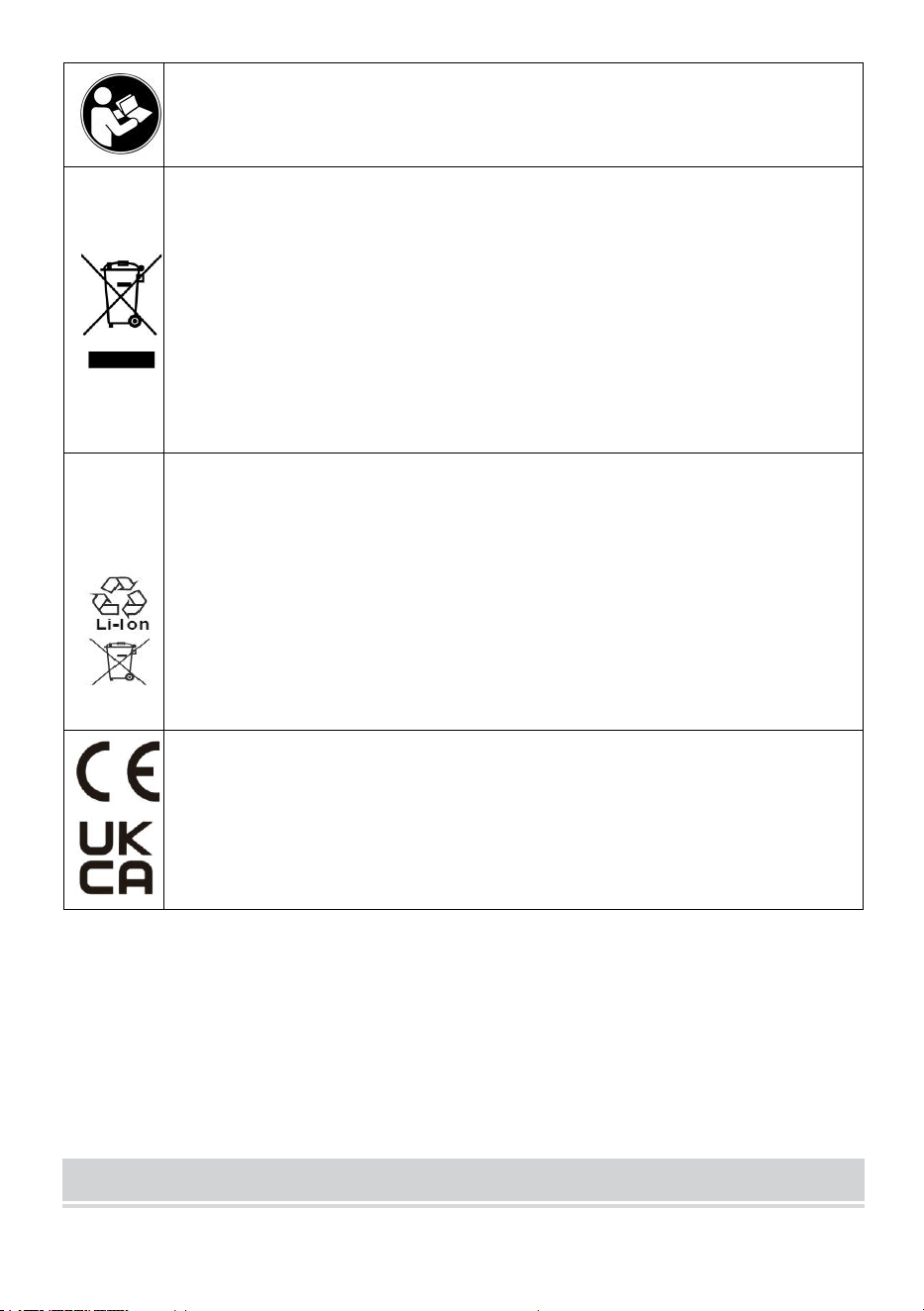
återvinning och säker kassering av dessa i ditt område.
Compliance är en säkerhetscertifiering från EG och
Storbritannien.
IMPORTANT SAFEGUARDS

- 3 -
Tack för att du använder den här produkten . För att försäkra dig om att du
kan använda maskinen korrekt, läs denna instruktion noggrant före
användning och förvara den på rätt sätt för framtida referens . Var noga
med att läsa försiktighetsåtgärderna och säkerhetsföreskrifterna på den
här sidan för att säkerställa din säker användning .
Denna handbok kommer att beskriva säkerhetsvarningar och
försiktighetsåtgärder, drift, underhåll och rengöring . Varningarna och
instruktionerna som granskas i denna handbok kan inte täcka alla möjliga
tillstånd och situationer som kan uppstå . Försiktighet och sunt förnuft är
inte inbyggt i denna produkt, eftersom vi tror att användningen kommer att
följa dessa koder . Om du har några problem, vänligen ring oss . Försök
inte åtgärda problemen själv, eftersom det kommer att orsaka person- eller
egendomsskador .
Läs ALLA instruktionerna innan du använder din maskin .
1. Om batteriet är lågt, ladda det i tid .
2. Låt inte barn, minderåriga och husdjur komma nära eller röra vid
maskinen.
3 . Sänk inte ner apparaten i vatten eller annan vätska.
4. Ta inte isär produkten.
5 . Användning av tillbehör eller tillbehör som inte tillhandahålls eller
rekommenderas av tillverkaren kan orsaka skada.
6 . Om maskinen inte ska användas under en längre tid, ta ur batteriet,
rengör och täck över det och förvara det på en torr och säker plats.
7 . Lämna inte produkten hängande över bords- eller bänkkanten och låt
den inte komma i kontakt med heta ytor.
8 . Placera inte produkten på eller nära varmluft, elektriska brännare eller
värmare.
9 . Använd inte denna enhet för andra ändamål än den angivna
användningen.
10 . FÖRVARA DEN UTOM BARN.
11 . RENGÖRA DEN INTE MED NÅGOT SLIPPANDE MATERIAL.
12 . Rengör den regelbundet, minst en gång i månaden .
13 . Denna apparat är inte avsedd att användas av personer (inklusive

- 4 -
barn) med utbildad fysiska, sensoriska eller mental förmågor, eller brist på
erfarenhet eller kunskap, om de inte har getts övervakning eller
instruktioner om en persons användning av apparaten ansvarig för deras
kassaskåp .
FCC INFORMATION
FÖRSIKTIGHET: Ändringar eller modifieringar som inte uttryckligen
godkänts av den part som ansvarar för efterlevnaden kan upphäva
användarens behörighet att använda utrustningen!
Denna enhet uppfyller del 15 av FCC-reglerna. Driften är föremål för
följande två villkor:
1) Denna produkt kan orsaka skadliga störningar.
2) Denna produkt måste acceptera alla mottagna störningar, inklusive
störningar som kan orsaka oönskad funktion.
VARNING: Ändringar eller modifieringar av denna produkt som inte
uttryckligen godkänts av den part som är ansvarig för efterlevnaden kan
upphäva användarens behörighet att använda produkten.
Obs: Denna produkt har testats och befunnits överensstämma med
gränserna för en digital enhet av klass B i enlighet med del 15 av
FCC-reglerna. Dessa gränser är utformade för att ge rimligt skydd mot
skadliga störningar i en bostadsinstallation.
Denna produkt genererar, använder och kan utstråla radiofrekvensenergi,
och om den inte installeras och används i enlighet med instruktionerna kan
den orsaka skadliga störningar på radiokommunikation. Det finns dock
ingen garanti för att störningar inte kommer att inträffa i en viss installation.
Om denna produkt orsakar skadliga störningar på radio- eller
tv-mottagning, vilket kan fastställas genom att stänga av och på produkten,
uppmanas användaren att försöka korrigera störningen med en eller flera
av följande åtgärder.
· Rikta om eller flytta mottagningsantennen.
· Öka avståndet mellan produkten och mottagaren.
· Anslut produkten till ett uttag på en annan krets än den som mottagaren
är ansluten till.
· Kontakta återförsäljaren eller en erfaren radio/TV-tekniker för hjälp.

- 5 -
PRODUCT PARAMETERS
Modell
P80
Arbetsfrekvens
433MHZ (FRÅGA)
Modulation
OKEJ AM
Strömadapter Ingång
AC100-240V 50/60Hz
Strömadapter Utgång
DC12V 2 A
Personsökare
24 st
BEFORE USING
1. Innan du använder apparaten för första gången, skala av allt reklam-
och förpackningsmaterial och kontrollera att produkten är ren och dammfri.
2. Kassera alla plastpåsar försiktigt och håll dem borta från barn och
husdjur.
3. Kontrollera alla komponenter som tillhandahålls enligt listan i denna
manual. Se till att du har alla listade delar.
ENTER/EXIT SETTINGS MENU
● Gå in i inställningsmenyn: Tryck länge på [Set]-tangenten för att gå in i
inställningsmenyn, tryck på motsvarande [Nummer]-knapp för att välja
motsvarande inställningsalternativ (som 1 som motsvarar F1), och tryck
sedan kort på [Set]-tangenten för att gå in i inställningen;

- 6 -
● Avsluta inställningsmenyn: Tryck på knappen [Ring] för att bekräfta
och återgå; tryck på [Set]-tangenten för att avbryta och återgå; tryck på
[Radera] för att avsluta inställningen.
PRODUCT SETTINGS
● [ F1 ] Ställ in bas-ID (1-98)
När du har öppnat inställningsmenyn "F1", tryck på [Nummer]-tangenten
för att ändra basens ID-nummer.
● [ F 2] Ställ in basens summeromkopplare (0-1)
Efter att ha öppnat inställningsmenyn "F2", tryck på [Nummer]-tangenten
för att byt summern på basen. Av-inställning (0: av, 1: på).
● [ F 3] Ställ in anknytningsnumret (1-98)
När du har öppnat inställningsmenyn "F3", tryck på [Nummer]-tangenten
för att mata in 1-98 nummer, och ta sedan ut telefonen ur basen och tryck
på [Ring]-tangenten inom 5 sekunder. Det hörs ett pip när inställningen är
framgångsrik.
● [ F 4] Ställ in förlängningsvibration (0-1)
Sätt tillbaka anknytningen på basen, gå in i inställningsmenyn "F4" och
tryck på [Ring]-tangenten för att ställa in alla anknytningar ska vibrera (0:
av, 1: på), och en summer ljuder om inställningen lyckas.
● [ F 5] Ställ in förlängningssummer (0-1)
Sätt tillbaka anknytningen på basen, gå in i inställningsmenyn "F5" och
tryck på [Ring]-tangenten för att ställa in ljudsignalen för alla anknytningar
(0: av, 1: på). Det kommer att höras en ljudsignal om inställningen lyckas.
● [ F 6] Ställ in varaktighet för förlängningspåminnelse ( 0-99 )
Sätt tillbaka anknytningen på basen, gå in i inställningsmenyn "F6" och
tryck på knappen [Ring] för att ställa in påminnelsens varaktighet för alla
anknytningar (0: påminn alltid). Det kommer att höras en ljudsignal om
inställningen lyckas.
HOW TO USE
● C all förlängning
- 7 -
Använd de numeriska knapparna för att ange motsvarande
anknytningsnummer och tryck på [Ring]-knappen för att ringa.
● Bekvämt att ringa
Tryck på [ + och - ]-knapparna till motsvarande nummer och vänta i 2
sekunder för att automatiskt ringa.
● Avstängning av tillägg
Sätt tillbaka anknytningen i basen, ange 99 på tangentbordet och tryck på
[Ring]-tangenten för att stänga av telefonen.
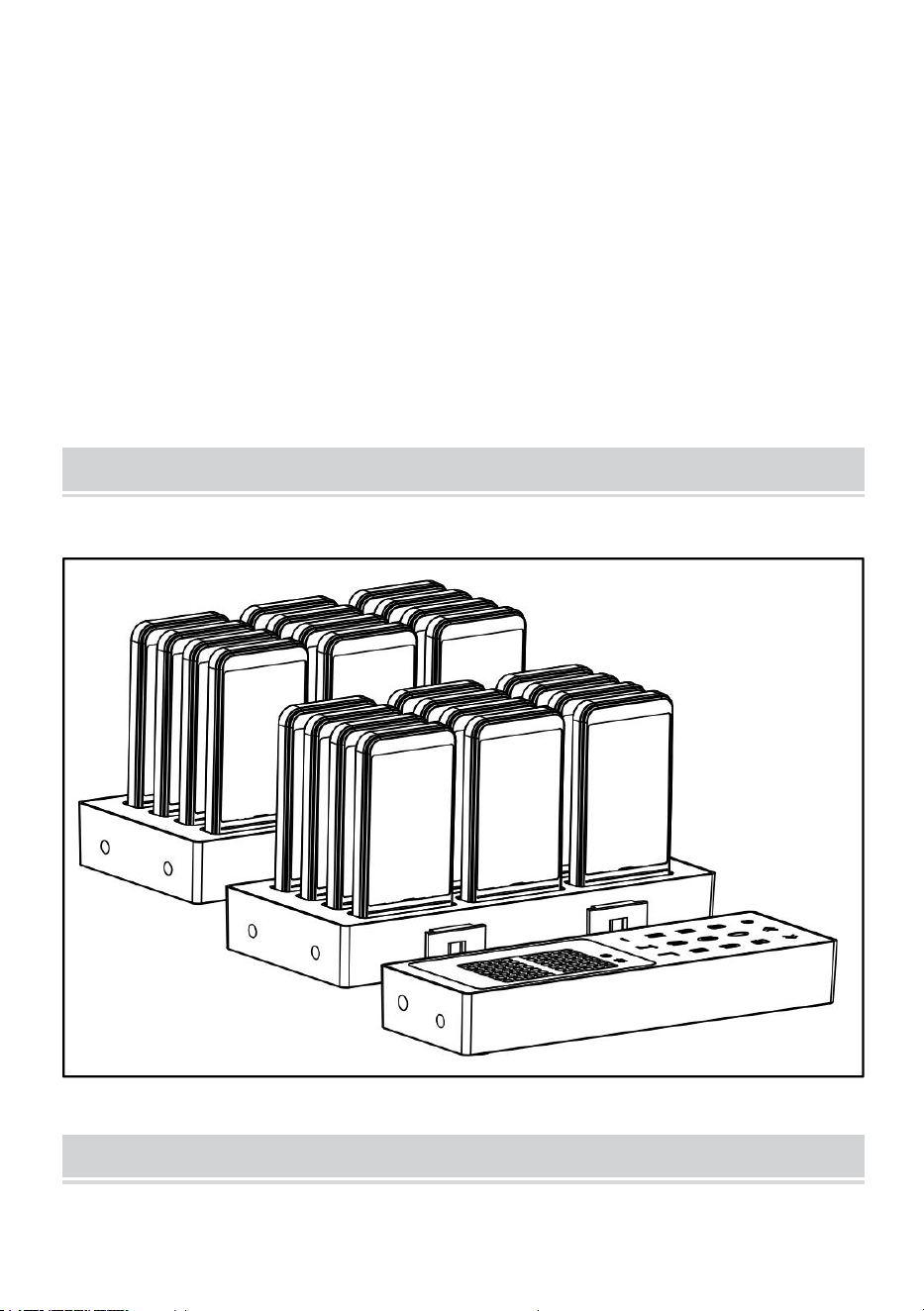
ASSEMBLING PRODUCTS
Montera produkten enligt bilden och anslut adaptern .
CLEANING AND STORAGE
1. Om maskinen inte ska användas under en längre tid, Koppla bort

- 8 -
strömmen, rengör och täck över den och förvara den på en torr och säker
plats.
2. Torka av med en mjuk, torr trasa. Se till att hålla produkten torr
3. Sätt ihop personsökaren och värden.



Técnico Soporte y certificado de garantía electrónica www.vevor.com/support
BUSCAPERSONAS DE RESTAURANTE
MODELO: P80
We continue to be committed to provide you tools with competitive price.
"Save Half", "Half Price" or any other similar expressions used by us only represents an
estimate of savings you might benefit from buying certain tools with us compared to the major
top brands and does not necessarily mean to cover all categories of tools offered by us. You
are kindly reminded to verify carefully when you are placing an order with us if you are
actually saving half in comparison with the top major brands.

- 1 -
MODELO: P80
Have product questions? Need technical support? Please feel free to
contact us:
Technical Support and E-Warranty Certificate
www.vevor.com/support
NEED HELP? CONTACT US!
This is the original instruction, please read all manual instructions
carefully before operating. VEVOR reserves a clear interpretation of our
user manual. The appearance of the product shall be subject to the
product you received. Please forgive us that we won't inform you again if
there are any technology or software updates on our product.
RESTAURANT PAGER
- 2 -
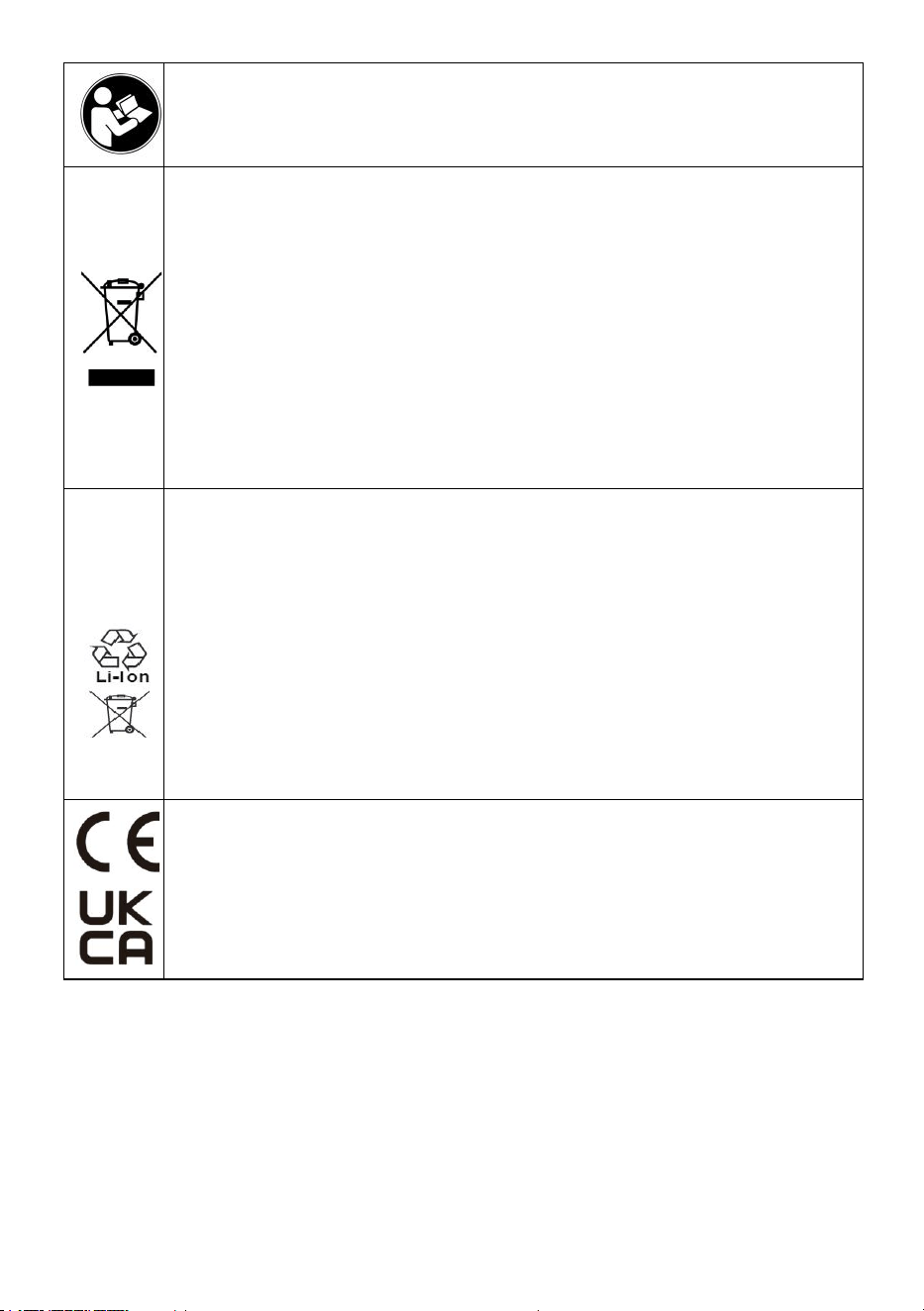
Advertencia: Para reducir el riesgo de lesiones, el usuario debe leer
atentamente el manual de instrucciones.
ELIMINACIÓN CORRECTA
Este producto está sujeto a las disposiciones de la Directiva Europea
2012/19/CE. El símbolo que muestra un contenedor de basura
tachado indica que el producto requiere una recogida selectiva de
residuos en la Unión Europea. Esto se aplica al producto y a todos
los accesorios marcados con este símbolo. Los productos marcados
como tales no pueden desecharse con los residuos domésticos
normales, sino que deben llevarse a un punto de recogida para
reciclar dispositivos eléctricos y electrónicos.
Para minimizar los riesgos para la salud y el medio ambiente al final
de la vida útil de este producto, las leyes que tratan sobre Residuos
de Equipos Eléctricos y Electrónicos (RAEE) y la Directiva sobre
Residuos de Baterías requieren que deseche este producto en un
centro de recolección adecuado donde será enviado para retirar las
baterías y reciclarlas adecuadamente. Comuníquese con las
autoridades locales para obtener más detalles sobre el reciclaje y la
eliminación segura de estas en su área.
Compliance es una certificación de seguridad de la CE y el
Reino Unido.

- 3 -
IMPORTANT SAFEGUARDS
Gracias por utilizar este producto . Para asegurarse de que puede utilizar
la máquina correctamente, lea atentamente estas instrucciones antes de
utilizarla y consérvelas en un lugar adecuado para futuras consultas .
Asegúrese de leer las precauciones y reglas de seguridad de esta página
para garantizar un uso seguro .
Este manual describe las advertencias y precauciones de seguridad,
funcionamiento, mantenimiento y limpieza . Las advertencias e
instrucciones que se revisan en este manual no pueden cubrir todas las
posibles condiciones y situaciones que pueden ocurrir . La precaución y el
sentido común no están incorporados en este producto, ya que creemos
que los usos cumplirán con estos códigos . Si tiene algún problema,
llámenos . No intente solucionar los problemas usted mismo, ya que
provocará lesiones o daños a la propiedad .
Lea TODAS las instrucciones antes de utilizar su máquina .
1. Si la batería está baja, cárguela a tiempo .
2. No permita que niños, menores y mascotas se acerquen o toquen la
máquina.
3 . No sumerja el aparato en agua ni en ningún otro líquido.
4. No desmonte el producto.
5. El uso de accesorios o complementos que no estén provistos o
recomendados por el fabricante puede causar lesiones.
6. Si no va a utilizar la máquina durante un largo periodo de tiempo, retire
la batería, límpiela, cúbrala y guárdela en un lugar seco y seguro.
7. No deje el producto colgando del borde de una mesa o mostrador ni
permita que entre en contacto con superficies calientes.
8. No coloque el producto sobre o cerca de aire caliente, quemadores
eléctricos o calentadores.
9. No utilice esta unidad para ningún otro fin que el uso indicado.
10. MANTENER FUERA DEL ALCANCE DE LOS NIÑOS.
11. NO LO LIMPIE CON NINGÚN MATERIAL ABRASIVO.
12. Límpielo periódicamente, al menos una vez al mes .

- 4 -
13. Este aparato no está diseñado para ser utilizado por personas
( incluidas niños) con educado físico, sensorial o mental capacidades, o
falta de experiencia o conocimiento, a menos que se les haya dado
supervisión o instrucción sobre el uso del aparato por parte de una
persona Responsable de su seguridad .
FCC INFORMATION
PRECAUCIÓN: ¡ Los cambios o modificaciones no aprobados
expresamente por la parte responsable del cumplimiento podrían anular la
autoridad del usuario para operar el equipo!
Este dispositivo cumple con la Parte 15 de las Normas de la FCC. Su
funcionamiento está sujeto a las dos condiciones siguientes:
1) Este producto puede causar interferencias dañinas.
2) Este producto debe aceptar cualquier interferencia recibida, incluida
aquella que pueda provocar un funcionamiento no deseado.
ADVERTENCIA: Los cambios o modificaciones a este producto no
aprobados expresamente por la parte responsable del cumplimiento
podrían anular la autoridad del usuario para operar el producto.
Nota: Este producto ha sido probado y se ha determinado que cumple con
los límites para un dispositivo digital de Clase B de conformidad con la
Parte 15 de las Normas de la FCC. Estos límites están diseñados para
brindar protección razonable contra interferencias dañinas en una
instalación residencial.
Este producto genera, utiliza y puede emitir energía de radiofrecuencia y,
si no se instala y utiliza de acuerdo con las instrucciones, puede causar
interferencias perjudiciales en las comunicaciones por radio. Sin embargo,
no existe garantía de que no se produzcan interferencias en una
instalación determinada. Si este producto causa interferencias
perjudiciales en la recepción de radio o televisión, lo que se puede
determinar encendiendo y apagando el producto, se recomienda al
usuario que intente corregir la interferencia mediante una o más de las
siguientes medidas.
· Reorientar o reubicar la antena receptora.
· Aumentar la distancia entre el producto y el receptor.

- 5 -
· Conecte el producto a una toma de corriente de un circuito diferente al
que está conectado el receptor.
· Consulte al distribuidor o a un técnico de radio/TV experimentado para
obtener ayuda.
PRODUCT PARAMETERS
Modelo
P80
Frecuencia de trabajo
433 MHz
(PREGUNTAR)
Modulación
YO SOY
Adaptador de corriente de
entrada
CA 100-240 V 50/60 Hz
Salida del adaptador de
corriente
12 V CC , 2 A
Buscapersonas
24 piezas
BEFORE USING
1. Antes de utilizar el aparato por primera vez, retire todo el material
promocional y de embalaje y compruebe que el producto esté limpio y sin
polvo.
2. Deseche todas las bolsas de plástico con cuidado y manténgalas fuera
del alcance de los niños y las mascotas.
3. Verifique todos los componentes provistos de acuerdo con la lista de
este manual. Asegúrese de tener todas las piezas enumeradas.

- 6 -
ENTER/EXIT SETTINGS MENU
● Ingresar al menú de configuración: Mantenga presionada la tecla [Set]
para ingresar al menú de configuración, presione la tecla [Número]
correspondiente para seleccionar la opción de configuración
correspondiente (como 1 correspondiente a F1) y luego presione
brevemente la tecla [Set] para ingresar a la configuración;
● Para salir del menú de configuración: Pulse la tecla [Llamar] para
confirmar y regresar; pulse la tecla [Establecer] para cancelar y regresar;
pulse la tecla [Eliminar] para salir de la configuración.
PRODUCT SETTINGS
● [ F1 ] Establecer ID de base (1-98)
Después de ingresar al menú de configuración "F1", presione la tecla
[Número] para cambiar el número de identificación base.
● [ F 2] Ajuste el interruptor del zumbador de la base (0-1)
Después de ingresar al menú de configuración "F2", presione la tecla
[Número] para cambiar el timbre de la base. Configuración de apagado (0:
apagado, 1: encendido).
● [ F 3] Establezca el número de extensión (1-98)
Después de ingresar al menú de configuración "F3", presione la tecla
[Número] para ingresar números del 1 al 98 y luego retire el teléfono de la
base y presione la tecla [Llamar] dentro de los 5 segundos. Se escuchará
un pitido cuando la configuración se haya realizado correctamente.
● [ F 4] Establecer la vibración de extensión (0-1)
Vuelva a colocar la extensión en la base, ingrese al menú de configuración
"F4" y presione la tecla [Llamar] para configurar. todas las extensiones
vibrarán (0: desactivadas, 1: activadas) y sonará un timbre si la
configuración es exitosa.
● [ F 5] Establecer timbre de extensión (0-1)
Vuelva a colocar la extensión en la base, ingrese al menú de configuración
"F5" y presione la tecla [Llamar] para configurar el pitido para todas las
extensiones (0: desactivado, 1: activado). Se escuchará un pitido si la

- 7 -
configuración es exitosa.
● [ F 6] Establecer la duración del recordatorio de extensión ( 0-99 )
Vuelva a colocar la extensión en la base, ingrese al menú de configuración
"F6" y presione la tecla [Llamar] para configurar la duración del
recordatorio para todas las extensiones (0: recordar siempre). Se
escuchará un aviso sonoro si la configuración es exitosa.
HOW TO USE
● Llamar a todas las extensiones
Utilice las teclas numéricas para ingresar el número de extensión
correspondiente y presione la tecla [Llamar] para llamar.
● Llamadas convenientes
Presione las teclas [ + y - ] al número correspondiente y espere 2
segundos para llamar automáticamente.
● Cierre de extensión
Vuelva a colocar la extensión en la base, ingrese 99 en el teclado y
presione la tecla [Llamar] para apagar el teléfono.
ASSEMBLING PRODUCTS
Ensamble el producto como se muestra en la imagen y conecte el
adaptador .
- 8 -
CLEANING AND STORAGE
1. Si la máquina no se va a utilizar durante un largo periodo de tiempo,
desconéctela, límpiela, cúbrala y guárdela en un lugar seco y seguro.
2. Limpie con un paño suave y seco. Asegúrese de mantener el producto
seco.
3. Por favor, coloque el buscapersonas y el host juntos.

- 9 -



Tecnico Supporto e certificato di garanzia elettronica www.vevor.com/support
CERCAPERSONE PER RISTORANTI
MODELLO: P80
We continue to be committed to provide you tools with competitive price.
"Save Half", "Half Price" or any other similar expressions used by us only represents an
estimate of savings you might benefit from buying certain tools with us compared to the major
top brands and does not necessarily mean to cover all categories of tools offered by us. You
are kindly reminded to verify carefully when you are placing an order with us if you are
actually saving half in comparison with the top major brands.

- 1 -
MODELLO: P80
Have product questions? Need technical support? Please feel free to
contact us:
Technical Support and E-Warranty Certificate
www.vevor.com/support
NEED HELP? CONTACT US!
This is the original instruction, please read all manual instructions
carefully before operating. VEVOR reserves a clear interpretation of our
user manual. The appearance of the product shall be subject to the
product you received. Please forgive us that we won't inform you again if
there are any technology or software updates on our product.
RESTAURANT PAGER
- 2 -
Attenzione: per ridurre il rischio di lesioni, l'utente deve leggere
attentamente il manuale di istruzioni.
SMALTIMENTO CORRETTO
Questo prodotto è soggetto alle disposizioni della Direttiva Europea
2012/19/CE. Il simbolo raffigurante un bidone della spazzatura
barrato indica che il prodotto richiede la raccolta differenziata dei rifiuti
nell'Unione Europea. Ciò si applica al prodotto e a tutti gli accessori
contrassegnati con questo simbolo. I prodotti contrassegnati come
tali non possono essere smaltiti con i normali rifiuti domestici, ma
devono essere portati in un punto di raccolta per il riciclaggio di
dispositivi elettrici ed elettronici
Per ridurre al minimo i rischi per la salute e per l'ambiente al termine
del ciclo di vita di questo prodotto, le leggi sui rifiuti di apparecchiature
elettriche ed elettroniche (RAEE) e la direttiva sulle pile esauste
impongono di smaltire questo prodotto presso un centro di raccolta
idoneo, dove verrà inviato per rimuovere le batterie e procedere al
riciclaggio appropriato. Contattare le autorità locali per maggiori
dettagli sul riciclaggio e lo smaltimento sicuro di questi prodotti nella
propria zona.
Compliance è una certificazione di sicurezza CE e UK.

- 3 -
IMPORTANT SAFEGUARDS
Grazie per aver utilizzato questo prodotto . Per essere certi di poter
utilizzare correttamente la macchina, leggere attentamente le presenti
istruzioni prima dell'uso e conservarle con cura per riferimento futuro . Per
garantire un utilizzo sicuro, assicuratevi di leggere le precauzioni e le
norme di sicurezza presenti in questa pagina .
Questo manuale descriverà le avvertenze e le precauzioni di sicurezza, il
funzionamento, la manutenzione e la pulizia . Le avvertenze e le istruzioni
esaminate in questo manuale non possono coprire tutte le possibili
condizioni e situazioni che potrebbero verificarsi . Attenzione e buon senso
non sono incorporati in questo prodotto, poiché riteniamo che gli utilizzi
saranno conformi a questi codici . In caso di problemi, chiamaci . Non
cercare di risolvere i problemi da solo, altrimenti causerai lesioni o danni
alla proprietà .
Si prega di leggere TUTTE le istruzioni prima di utilizzare la
macchina .
1. Se la batteria è scarica, caricarla in tempo .
2. Non permettere a bambini, minorenni e animali domestici di avvicinarsi o
toccare la macchina.
3 . Non immergere l'apparecchio in acqua o in altri liquidi.
4. Non smontare il prodotto.
5. L'utilizzo di accessori o dispositivi di fissaggio non forniti o consigliati dal
produttore può causare lesioni.
6. Se la macchina non deve essere utilizzata per un lungo periodo di
tempo, rimuovere la batteria, pulirla, coprirla e conservarla in un luogo
asciutto e sicuro.
7. Non lasciare il prodotto appeso al bordo del tavolo o del bancone né
farlo entrare in contatto con superfici calde.
8. Non posizionare il prodotto sopra o vicino a fonti di aria calda, fornelli
elettrici o caloriferi.
9. Non utilizzare l'unità per scopi diversi da quelli indicati.
10. TENERE IL PRODOTTO FUORI DALLA PORTATA DEI BAMBINI.

- 4 -
11. NON PULIRLO CON MATERIALE ABRASIVO.
12. Si prega di pulirlo regolarmente, almeno una volta al mese .
13. Questo apparecchio non è destinato all'uso da parte di persone (inclusi
bambini) con edotto fisico, sensoriale o mentale capacità, o mancanza di
esperienza o conoscenza, a meno che non siano state fornite supervisione
o istruzione relativa all'uso dell'apparecchio da parte di una persona
responsabili della loro sicurezza .
FCC INFORMATION
ATTENZIONE: cambiamenti o modifiche non espressamente approvati
dalla parte responsabile della conformità potrebbero invalidare il diritto
dell'utente a utilizzare l'apparecchiatura!
Questo dispositivo è conforme alla Parte 15 delle Norme FCC. Il
funzionamento è soggetto alle seguenti due condizioni:
1) Questo prodotto può causare interferenze dannose.
2) Questo prodotto deve accettare qualsiasi interferenza ricevuta,
comprese quelle che potrebbero causare un funzionamento indesiderato.
ATTENZIONE: cambiamenti o modifiche al prodotto non espressamente
approvati dalla parte responsabile della conformità potrebbero invalidare
l'autorizzazione dell'utente a utilizzare il prodotto.
Nota: questo prodotto è stato testato e ritenuto conforme ai limiti per i
dispositivi digitali di Classe B, ai sensi della Parte 15 delle Norme FCC. Tali
limiti sono concepiti per fornire una protezione ragionevole contro
interferenze dannose in un'installazione residenziale.
Questo prodotto genera, utilizza e può irradiare energia a radiofrequenza e,
se non installato e utilizzato in conformità alle istruzioni, può causare
interferenze dannose alle comunicazioni radio. Tuttavia, non vi è alcuna
garanzia che non si verifichino interferenze in una particolare installazione.
Se questo prodotto causa interferenze dannose alla ricezione radiofonica o
televisiva, il che può essere determinato accendendo e spegnendo il
prodotto, si consiglia all'utente di provare a correggere l'interferenza
tramite una o più delle seguenti misure.
· Riorientare o riposizionare l'antenna ricevente.
· Aumentare la distanza tra il prodotto e il ricevitore.

- 5 -
· Collegare il prodotto a una presa di corrente su un circuito diverso da
quello a cui è collegato il ricevitore.
· Per assistenza, consultare il rivenditore o un tecnico radio/TV esperto.
PRODUCT PARAMETERS
Modello
P80
Frequenza di lavoro
433MHZ (RICHIESTA)
Modulazione
ANCHE IO SONO
Adattatore di alimentazione
Ingresso
AC100-240V 50/60Hz
Adattatore di alimentazione
in uscita
DC12V 2A
Cercapersone
24 PZ
BEFORE USING
1. Prima di utilizzare l'apparecchio per la prima volta, rimuovere eventuali
materiali promozionali e di imballaggio e verificare che il prodotto sia pulito
e privo di polvere.
2. Si prega di smaltire con cura tutti i sacchetti di plastica e di tenerli
lontano dalla portata dei bambini e degli animali domestici.
3. Controllare tutti i componenti forniti in base all'elenco riportato nel
presente manuale. Assicurarsi di avere tutte le parti elencate.
ENTER/EXIT SETTINGS MENU

- 6 -
● Accedere al menu delle impostazioni: premere a lungo il tasto [Set]
per accedere al menu delle impostazioni, premere il tasto [Numero]
corrispondente per selezionare l'opzione di impostazione corrispondente
(ad esempio 1 corrispondente a F1), quindi premere brevemente il tasto
[Set] per accedere all'impostazione;
● Uscire dal menu delle impostazioni: premere il tasto [Chiama] per
confermare e tornare indietro; premere il tasto [Imposta] per annullare e
tornare indietro; premere il tasto [Elimina] per uscire dall'impostazione.
PRODUCT SETTINGS
● [ F1 ] Imposta ID base (1-98)
Dopo essere entrati nel menu di impostazione "F1", premere il tasto
[Numero] per modificare il numero ID base.
● [ F 2] Imposta l'interruttore del cicalino di base (0-1)
Dopo essere entrati nel menu di impostazione "F2", premere il tasto
[Numero] per cambiare il cicalino sulla base. Impostazione Off (0: spento, 1:
acceso).
● [ F 3] Imposta il numero di estensione (1-98)
Dopo essere entrati nel menu di impostazione "F3", premere il tasto
[Numero] per immettere i numeri da 1 a 98, quindi estrarre il telefono dalla
base e premere il tasto [Chiama] entro 5 secondi. Verrà emesso un
segnale acustico quando l'impostazione è riuscita.
● [ F 4] Imposta vibrazione estensione (0-1)
Riposizionare l'estensione sulla base, entrare nel menu di impostazione
"F4" e premere il tasto [Chiama] per impostare tutte le estensioni vibrano
(0: spento, 1: acceso) e un cicalino suona se l'impostazione è corretta.
● [ F 5] Imposta il cicalino di estensione (0-1)
Riposizionare l'estensione sulla base, accedere al menu di impostazione
"F5" e premere il tasto [Chiama] per impostare il segnale acustico per tutte
le estensioni (0: spento, 1: acceso). Verrà emesso un segnale acustico se
l'impostazione è riuscita.
● [ F 6] Imposta la durata del promemoria di estensione ( 0-99 )
Riposizionare l'estensione sulla base, accedere al menu di impostazione

- 7 -
"F6" e premere il tasto [Chiama] per impostare la durata del promemoria
per tutte le estensioni (0: promemoria sempre). Verrà emesso un segnale
acustico se l'impostazione è riuscita.
HOW TO USE
● Estensione chiamata
Utilizzare i tasti numerici per immettere il numero di interno corrispondente
e premere il tasto [Chiama] per chiamare.
● Chiamata comoda
Premere i tasti [ + e - ] fino al numero corrispondente e attendere 2 secondi
per la chiamata automatica.
● Chiusura dell'estensione
Riposizionare l'estensione nella base, digitare 99 sulla tastiera e premere il
tasto [Chiama] per spegnere il telefono.
ASSEMBLING PRODUCTS
Montare il prodotto come mostrato in figura e collegare l'adattatore .
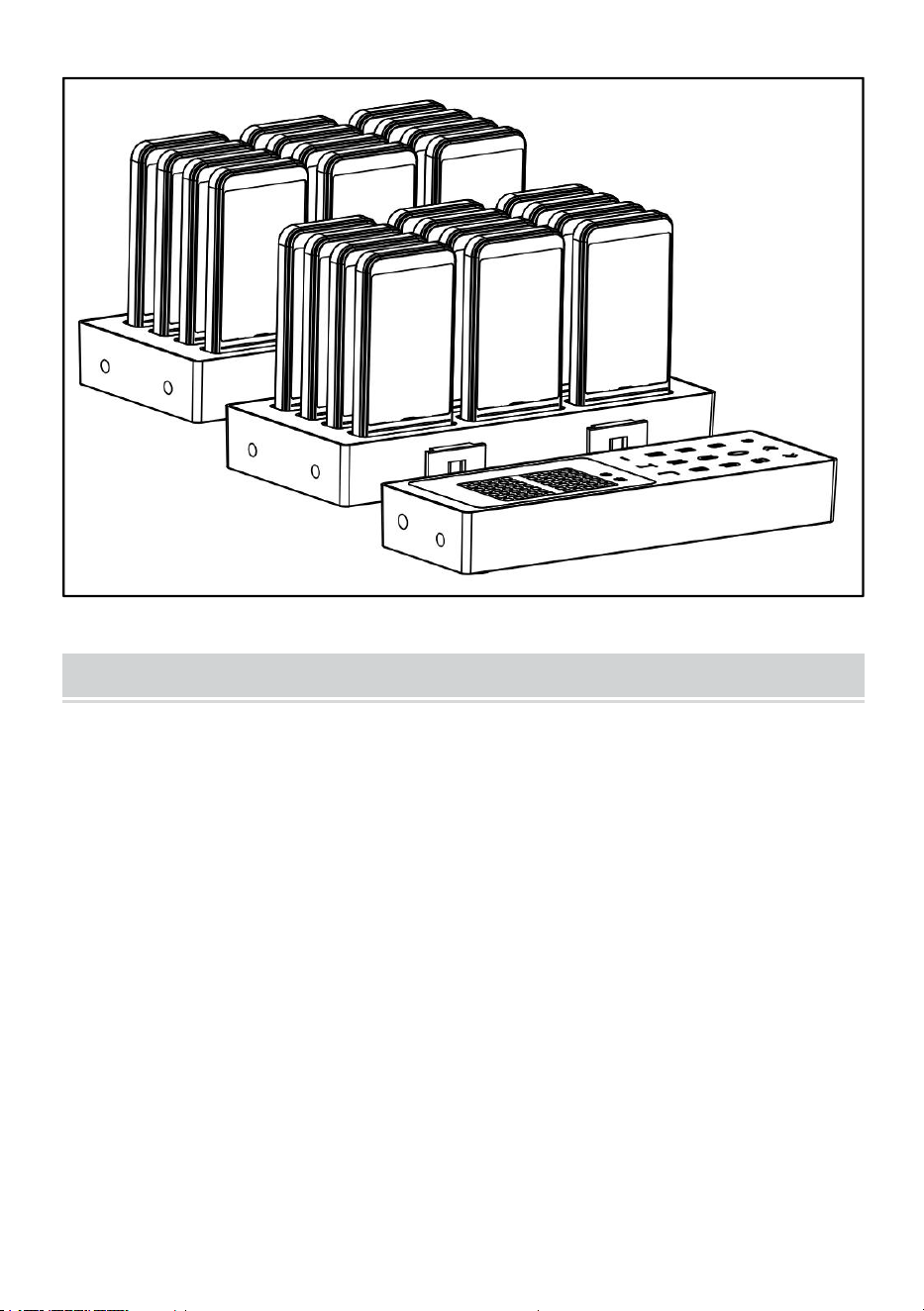
- 8 -
CLEANING AND STORAGE
1. Se si prevede di non utilizzare la macchina per un lungo periodo di
tempo, scollegarla dall'alimentazione, pulirla, coprirla e riporla in un luogo
asciutto e sicuro.
2. Pulire con un panno morbido e asciutto. Assicurarsi di mantenere il
prodotto asciutto
3. Si prega di collegare insieme il cercapersone e l'host.

- 9 -