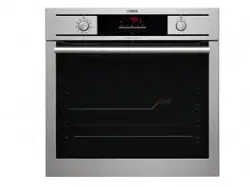

User’s Manual
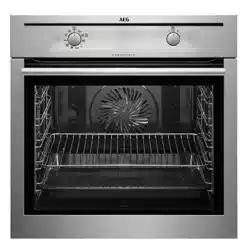
BP5023001M 24” Built-in Multi Function Oven -
User’s Manual
FOR PERFECT RESULTS
Thank you for choosing this AEG product. We have created it to give you
impeccable performance for many years, with innovative technologies that help
make life simpler – features you might not find on ordinary appliances. Please
spend a few minutes reading to get the very best from it.
ACCESSORIES AND CONSUMABLES
In the AEG webshop, you’ll find everything you need to keep all your AEG
appliances looking spotless and working perfectly. Along with a wide range of
accessories designed and built to the high quality standards you would expect,
from specialist cookware to cutlery baskets, from bottle holders to delicate
laundry bags…
Visit the webshop at:
www.aeg.com/shop
2

CONTENTS
4 Safety information
7 Product description
9 Before first use
10 Daily use
12 Clock functions
13 Using the accessories
15 Additional functions
16 Helpful hints and tips
26 Care and cleaning
30 What to do if…
31 Installation
33 Environment concerns
33 Guarantee/Customer Service
Centres
The following symbols are used in this user
manual:
Important information concerning your
personal safety and information on how to
avoid damaging the appliance.
General information and tips
Environmental information
Subject to change without notice.
Contents
3

SAFETY INFORMATION
Before the installation and use, read this manual carefully:
• For your personal safety and the safety of your property
• For the respect of the environment
• For the correct operation of the appliance.
Always keep these instructions with the appliance also if you move or sell it.
The manufacturer is not responsible if incorrect installation or use results in damage.
Children and vulnerable people safety
• This appliance can be used by children aged from 8 years and above and persons with
reduced physical, sensory or mental capabilities or lack of experience and knowledge if
they have been given supervision or instruction concerning use of the appliance in safe
way and understand the hazards involved. Children shall not play with the appliance.
• Keep all packaging away from children. There is the risk of suffocation or physical injury.
• WARNING: Keep children and animals away from the appliance when the door is open
or the appliance is in the operation, because it becomes hot. There is the risk of injury or
other permanent disability.
• If the appliance has Child Lock or Key Lock (Control Lock) function, use it. It prevents
children and animals from accidental operation of the appliance.
General safety
• Do not change the specifications of this appliance. There is the risk of injury and damage
to the appliance.
• Do not let the appliance stay unattended during operation.
• Switch off the appliance after each use.
Installation
• Only an approved electrician can install and connect the appliance. Contact an approved
service centre. This is to prevent the risks of structural damage or physical injury.
• Make sure that the appliance is not damaged because of transport. Do not connect a
damaged appliance. If necessary, contact the supplier.
• Remove all packaging, stickers and layers from the appliance before first use. Do not re-
move the rating plate. It can invalidate the guarantee.
• Make sure that the appliance is disconnected from the power supply during the installa-
tion.
• Be careful when you move the appliance. The appliance is heavy. Always use safety
gloves. Do not lift the appliance by the handle.
• The electrical installation must have an isolation device which lets you disconnect the
appliance from the mains at all poles. The isolation device must have a contact opening
width of minimum 3 mm.
• You must have correct isolation devices: line protecting cut-outs, fuses (screw type fuses
removed from the holder), earth leakage trips and contactors.
4 Safety information

• Before the installation, make sure that the kitchen cabinet has the recess dimensions ap-
plicable.
• Make sure that the appliance is installed below and adjacent safe structures.
• Keep the minimum distances to the other appliances and units.
• The appliance cannot be positioned on a base.
• Built in ovens and built in cooking surfaces are attached with special connection system.
To prevent damage to the appliance, only use an appliance with the appliances from the
same manufacturer.
Electrical connection
• The appliance must be earthed.
• Make sure that the electrical data on the rating plate agree with your domestic power
supply.
• Information on the voltage is on the rating plate.
• Always use a correctly installed shockproof socket.
• Do not use multi-way plugs, connectors and extension cables. There is the risk of fire.
• Do not replace or change the mains cable. Contact the service centre.
• Make sure not to squash or cause damage to the mains plug (if applicable) and cable
behind the appliance.
• Do not pull the mains cable to disconnect the appliance. Always pull the mains plug – if
applicable.
Use
• The appliance is only for domestic use. Do not use the appliance for commercial and in-
dustrial use.
• Only use the appliance for domestic cooking tasks. This is to prevent physical injury to
persons or prevent damage to property.
• Do not use the appliance as a work surface or storage surface.
• The interior of the appliance becomes hot during use. There is the risk of burns. Do not
touch the heating elements in the appliance. Use gloves when you insert or remove the
accessories or pots.
• Be careful when you remove or install the accessories to prevent damage to the oven
enamel.
• Always stay away from the appliance when you open the door while the appliance is in
operation. Hot steam can release. There is the risk of skin burns.
• To prevent damage or discoloration to the enamel:
– Do not put any objects directly on the appliance floor and do not cover it with alumi-
nium foil.
– Do not put water directly into the hot appliance.
– Do not keep moist dishes and food in the appliance after you finish the cooking.
• Discoloration of the enamel has no effect on the performance of the appliance so it is
not a defect in the sense of the warranty law.
• Do not apply pressure on the open door.
Safety information
5

• Always close the appliance door when you cook, even while grilling.
Care and cleaning
• Before maintenance, switch off the appliance and disconnect the appliance from the
power supply.
• Before maintenance, make sure that the appliance is cold. There is the risk of burns.
There is the risk that the glass panels can break.
• Keep the appliance clean at all times. A build-up of fats or other foodstuff can result in a
fire.
• Regular cleaning prevents the surface material from deteriorating
• Use a deep baking tray for very moist cakes to prevent that fruit juices cause stains that
can be permanent.
• For your personal safety and the safety of your property, only clean the appliance with
water and a soap. Do not use flammable products or products that can cause corrosion.
• Do not clean the appliance with steam cleaners, high-pressure cleaners, sharp objects,
abrasive cleaning agents, abrasive sponges and stain removers
• If you use an oven spray, follow the instructions from the manufacturer.
• Do not clean the glass door with abrasive cleaning agents or metal scraper. Heat resist-
ant surface of the inner glass can break and shatter.
• When the door glass panels are damaged they become weak and can break. You must
replace them. Contact the service centre.
• Be careful when you remove the door from the appliance. The door is heavy!
• Do not clean catalytic enamel (if applicable).
Risk of fire
• Open the door carefully. The use of ingredients with alcohol can cause a mixture of alco-
hol and air. There is the risk of fire.
• Do not let sparks or open flames come near the appliance when you open the door.
• Do not put flammable products or items that are wet with flammable products, and/or
fusible objects (made of plastic or aluminium) in, near or on the appliance.
Pyrolytic cleaning
WARNING!
Risk of burns.
• Keep children away from the appliance while the Pyrolytic cleaning is in operation. The
appliance becomes very hot.
• Provide good ventilation during and after each Pyrolytic cleaning.
• Remove any pets (especially birds) from the vicinity of the oven location during and after
the Pyrolytic cleaning and first use maximum temperature operation to a well ventilated
area.
• Read carefully all the instructions for Pyrolytic cleaning.
6 Safety information
Oven lamp
• The type of light bulb or halogen lamp used for this appliance is only for household ap-
pliances. Do not use it for house lighting.
• If it becomes necessary to replace the lamp, use one of the same power and specifically
designed for household appliances only.
• Disconnect the appliance from the power supply before the replacement of the oven
lamp. There is the risk of electrical shock.
Service centre
• Only an approved engineer can repair or work on the appliance. Contact an approved
service centre.
• Use only original spare parts.
Disposal of the appliance
• To prevent the risk of physical injury or damage
– Disconnect the appliance from the power supply.
– Cut off the mains cable and discard it.
– Discard the door catch. This prevents children or small animals from being closed in-
side of the appliance. There is the risk of suffocation.
PRODUCT DESCRIPTION
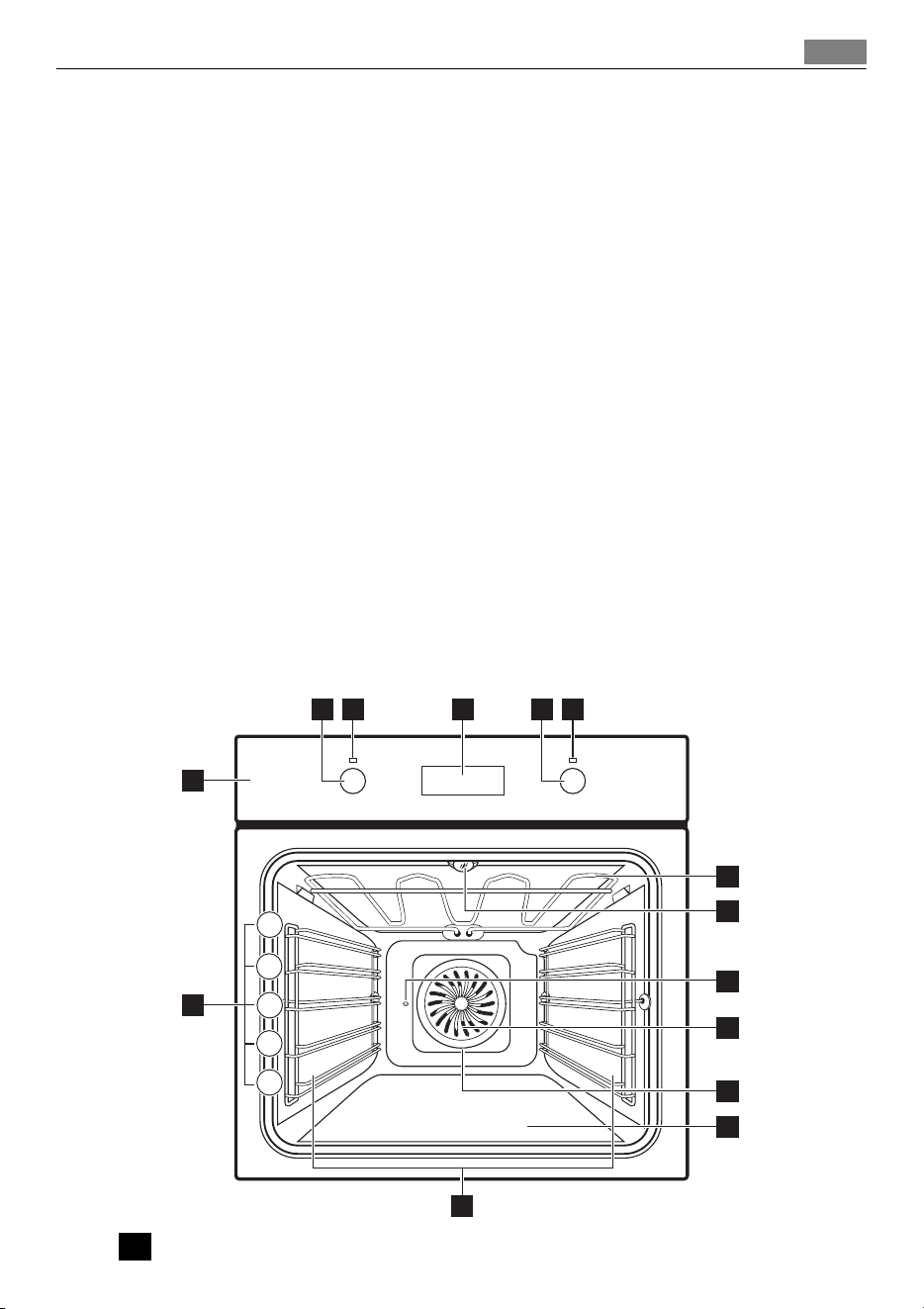
4 632 5
1
14
7
8
9
10
11
12
13
5
4
3
2
1
1
Control panel
Product description
7
2
Control knob for oven functions
3
Power lamp/symbol
4
Electronic programmer
5
Control knob for temperature
6
Power lamp
7
Heating element
8
Oven lamp
9
Turnspit hole
10
Fan
11
Rear wall heating element
12
Bottom heat
13
Shelf support, removable
14
Shelf positions
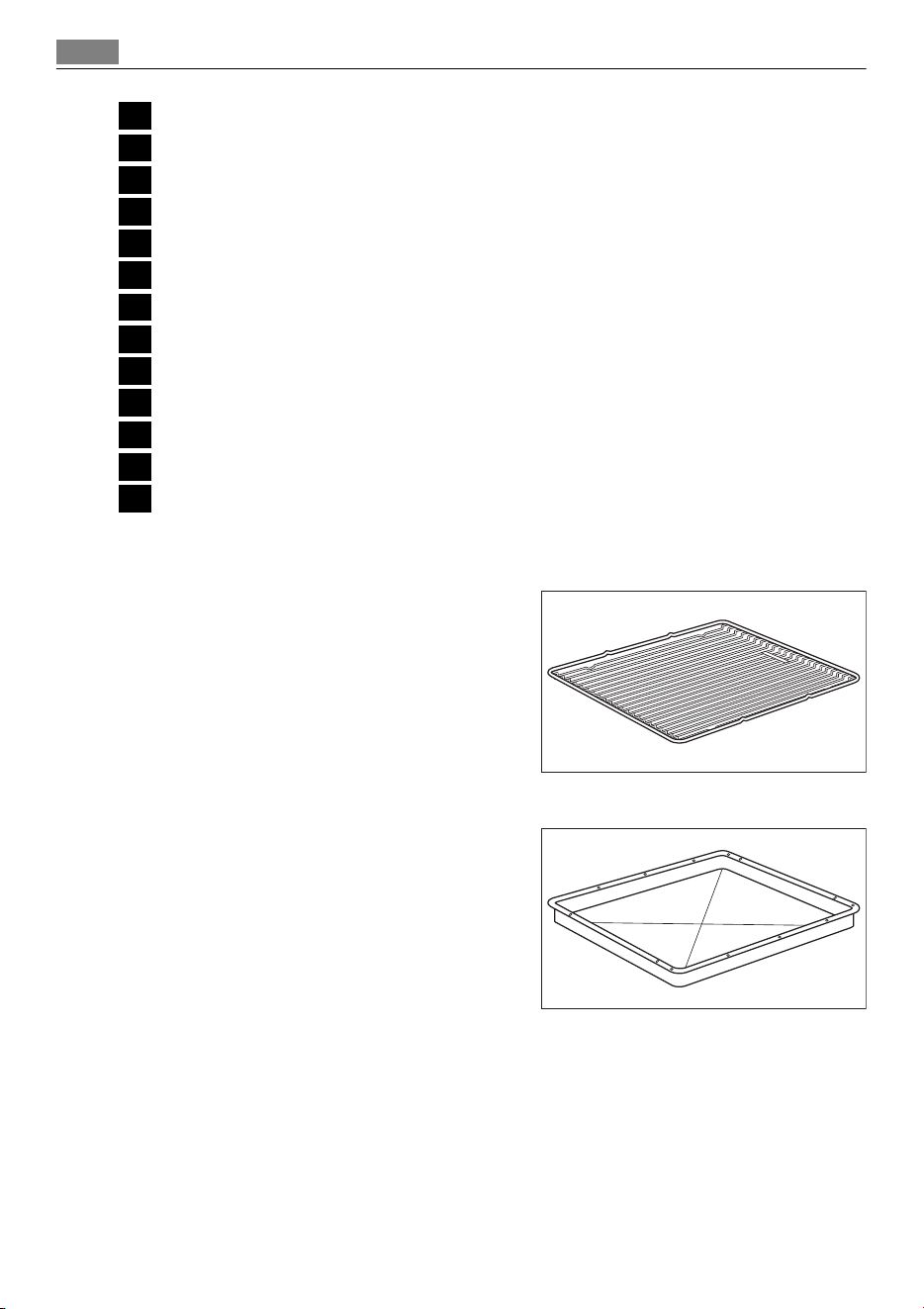
Accessories
• Wire shelf
For cookware, cake tins, roasts.
• Baking tray
For cakes and biscuits.
8 Product description
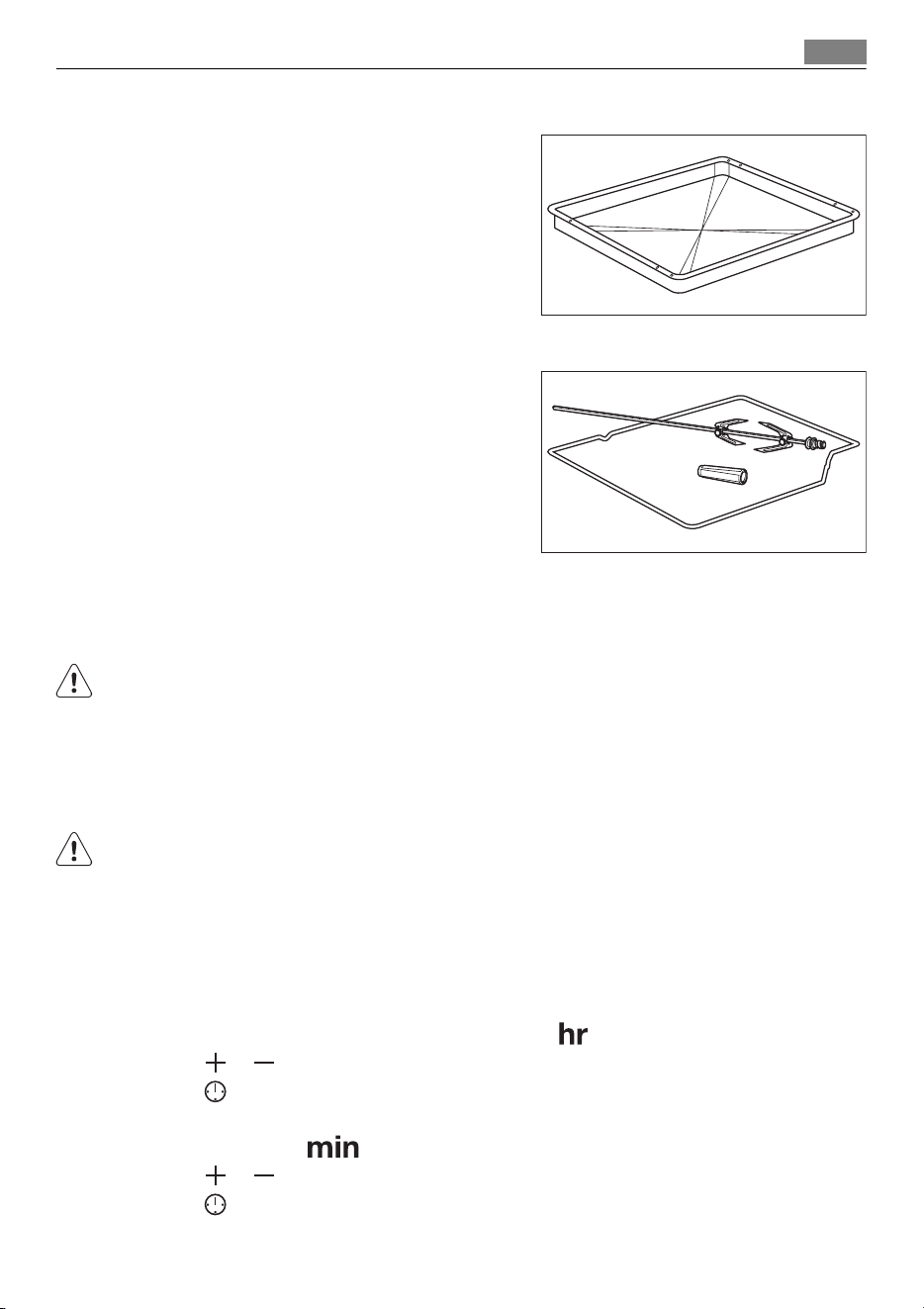
• Grill / roasting pan
To bake and roast or as pan to collect fat.
• Turnspit
For roasting larger joints of meat and poul-
try.
BEFORE FIRST USE
WARNING!
Refer to "Safety information" chapter.
Initial Cleaning
• Remove all parts from the appliance.
• Clean the appliance before first use.
Refer to chapter "Care and Cleaning".
First connection to the mains
After first connection to the mains all symbols in the display are on for some seconds. For
the subsequent few seconds the display shows software version.
Setting the time of day
After the software version goes off, the display shows and "12:00". "12" flashes.
1. Press
or to set current hour.
2. Press
to confirm (necessary only for the first setting, later new time will be saved
automatically after 5 seconds).
The display shows
and set hour. "00" flashes.
3. Press
or to set current minutes.
4. Press
to confirm (necessary only for the first setting, later new time will be saved
automatically after 5 seconds) .
Before first use 9
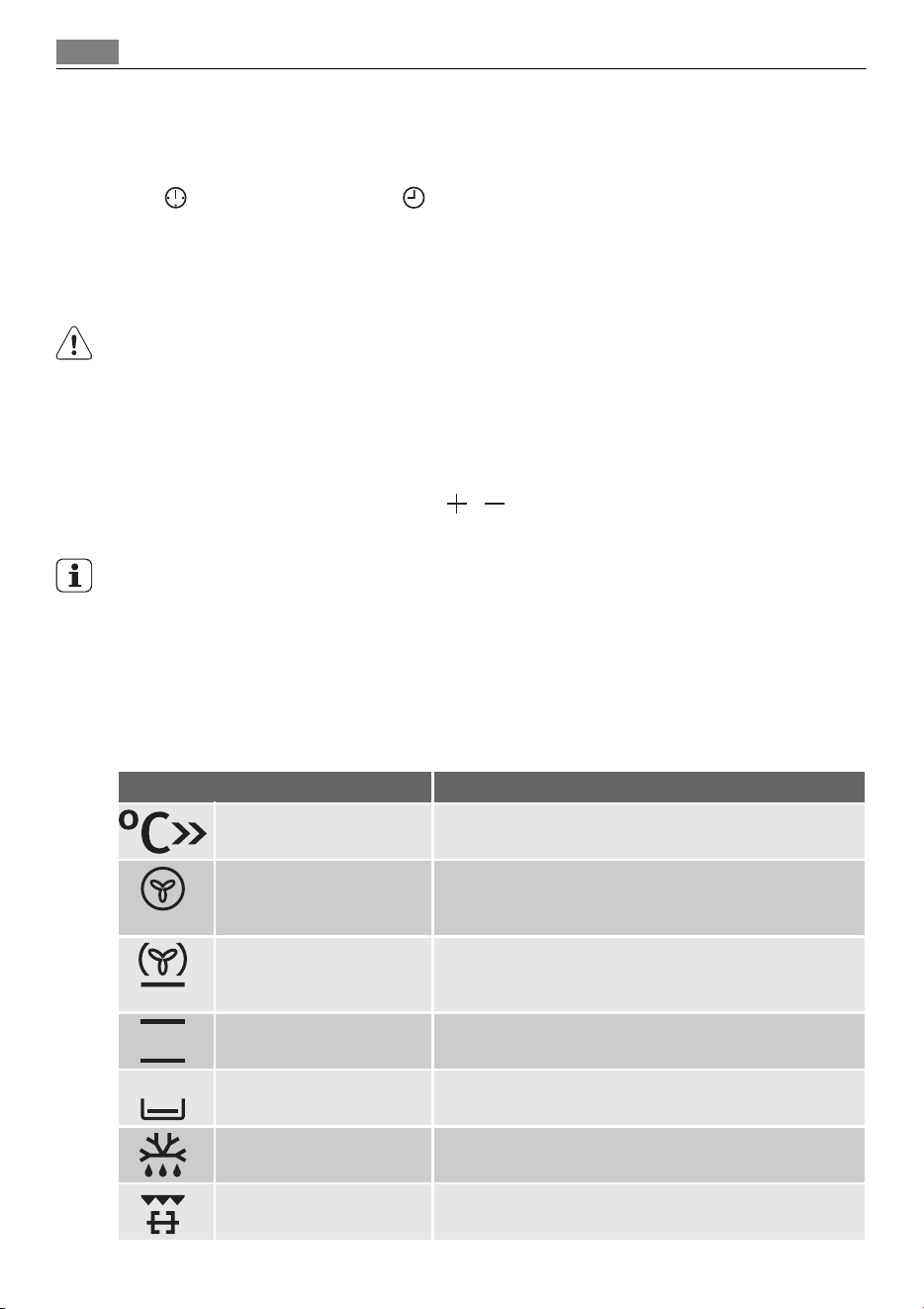
The Temperature/Time display shows new time.
Changing the time of day
You can change the time of day only if the oven is off.
Press
. The set time and symbol flash in the display. To set new time use the proce-
dure "Setting the time of day".
DAILY USE
WARNING!
Refer to "Safety information" chapter.
To use the appliance, press the control knob. The control knob comes out.
Activating and deactivating the appliance
1. Turn the oven functions control knob to select an oven function.
2. Turn the temperature control knob
/ to set a temperature.
3. To deactivate the appliance turn the oven functions control knob to off position ("0") .
Knob symbol, indicator or lamp (depends on the model - refer to the appliance
overview):
• The indicator comes on when the oven heats up.
• The lamp comes on when the appliance operates.
• The symbol shows whether the knob controls one of the cooking zones, the oven func-
tions or the temperature.
Oven Functions
Oven function Application
Fast Heat Up To decreases the heat up time.
True Fan Cooking To bake maximum on three oven levels at the same time.
Decrease the oven temperatures (70 - 100 °F) compared
with Conventional. And to dry food.
Pizza Setting To bake on one oven level food with a more intensive
browning and a crispy base. Decrease the oven tempera-
tures (70 - 100 °F) compared with Conventional
Conventional Cooking To bake and roast on one oven level.
Bottom Heat To bake cakes with crispy or crusty bases and to preserve
food
Defrost To defrost frozen food.
Grilling To grill flat food in the middle of the grill and to toast.
10 Daily use
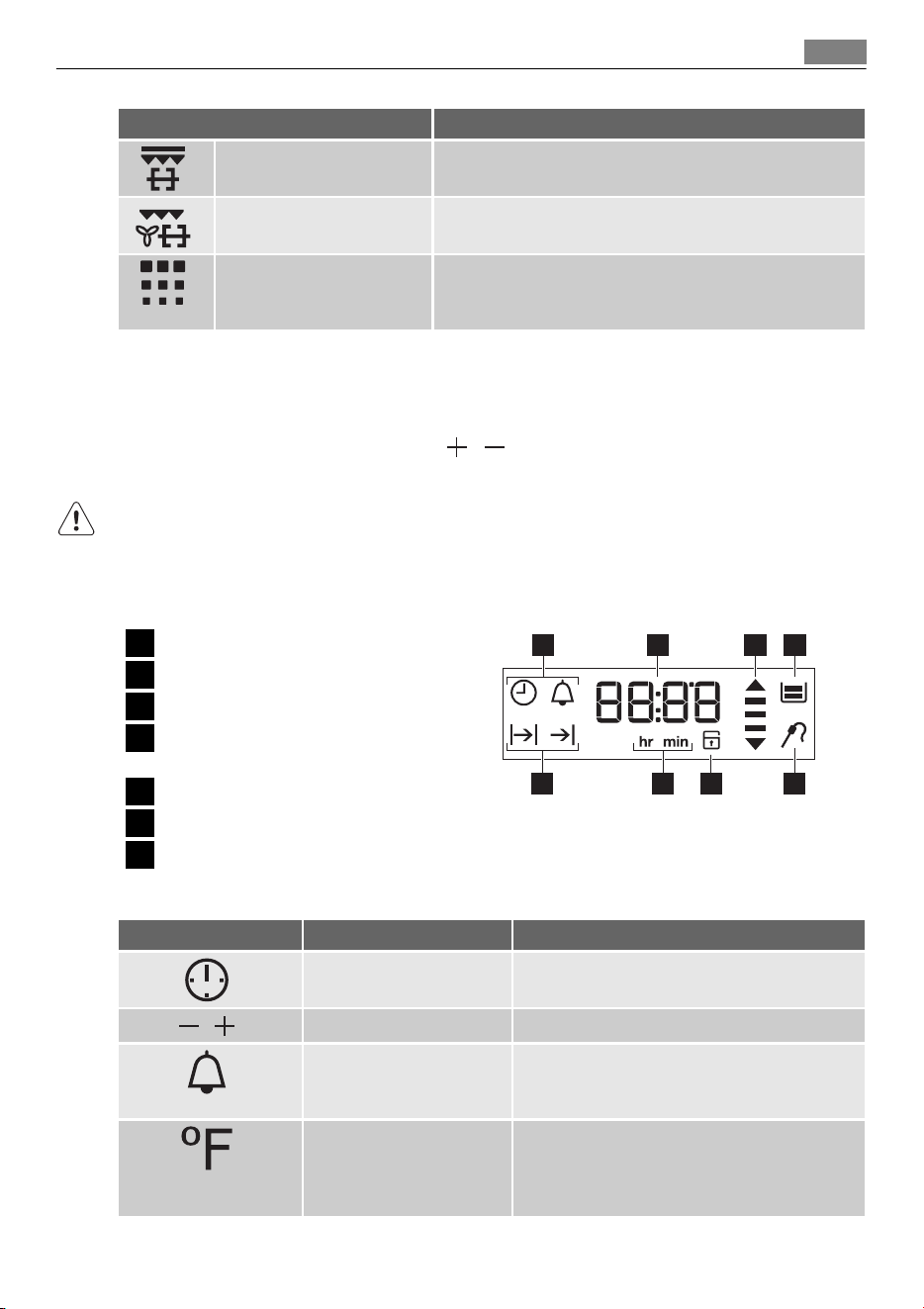
Oven function Application
Fast Grilling To grill flat food in large quantities and to toast.
Turbo Grilling To roast larger joints of meat or poultry on one level. Al-
so to gratinate and brown.
Pyro Cleaning For automatic pyrolytic cleaning of the oven. It burns off
residual dirt in the oven. The oven heats up to approxi-
mately 930 °F.
Fast heat up function
The fast heat up function decreases the heat up time.
1. Set the fast heat up function. Refer to Oven function table.
2. Turn the temperature control knob
/ to set a temperature.
3. An acoustic signal sounds when the appliance is at the set temperature.
The fast heat up function does not deactivate after the acoustic signal. You must deactivate
the function manually.
4. Set an oven function.
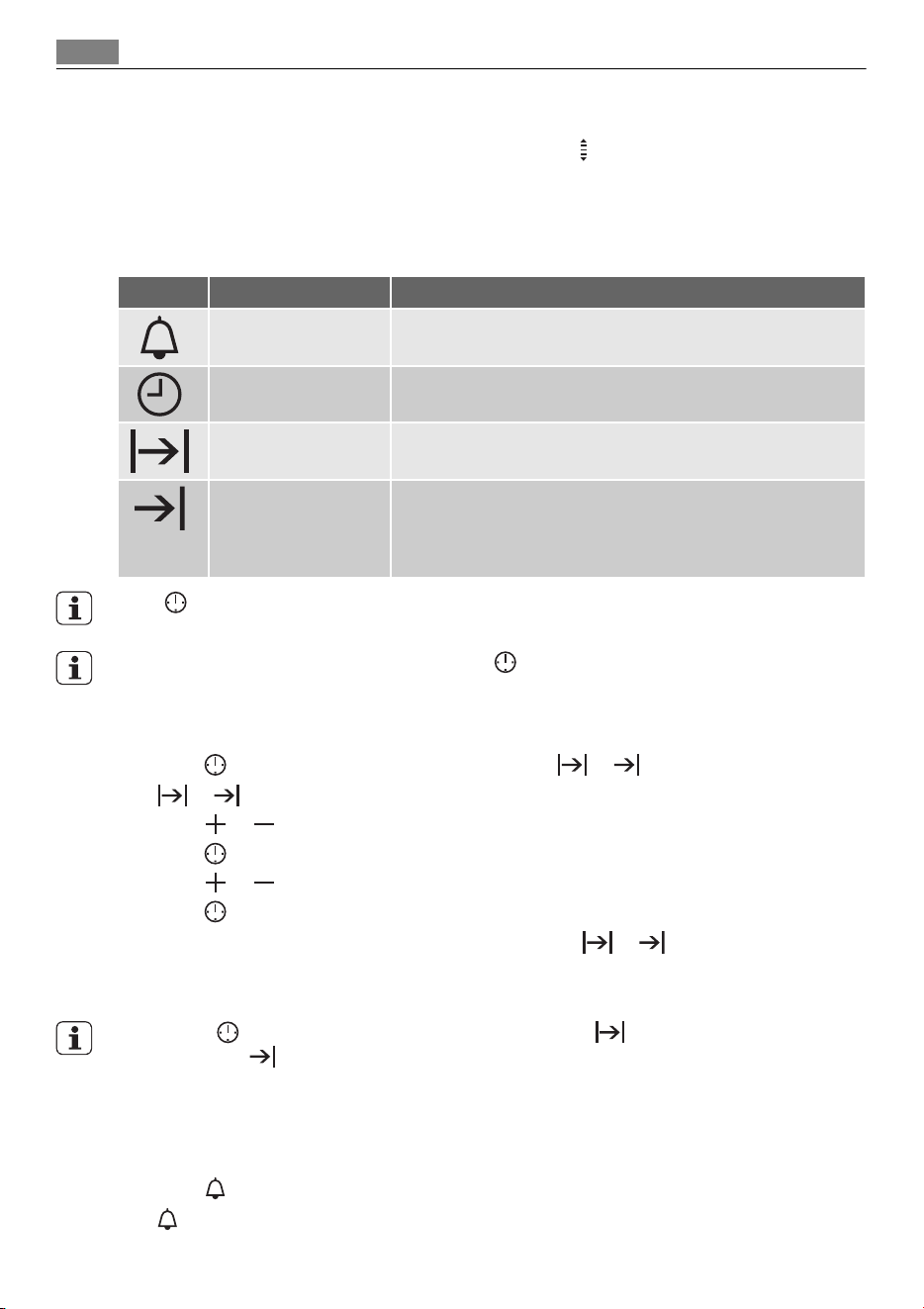
Display
1
Timer
2
Heating Up / Residual heat indicator
3
Water tank (selected models only)
4
Core temperature sensor (selected
models only)
5
Door lock (selected models only)
6
hr / min
7
Clock functions
17 2 3
4567
Buttons
Button Function Description
CLOCK To set the clock function.
,
MINUS, PLUS To set a value for time
MINUTE MINDER To set the minute minder. To switch ON/OFF
light in oven cavity, hold button more than 3
seconds
TEMPERATURE To check temperature inside the oven cavity.
To check the Core Core Temperature Sensor
temperature, when is connected (if applica-
ble). Use only when the oven function is set.
Daily use 11
Heat-up / Residual heat indicator
If you activate an oven function, the bars in the display come on one by one. The bars
show that the oven temperature increases or decrease.
CLOCK FUNCTIONS
SYMBOL FUNCTION DESCRIPTION
MINUTE MINDER Use to set a countdown time. This function has no effect on
the operation of the oven.
TIME OF DAY To set, change or control the time of day. Refer to 'Setting the
time of day'.
DURATION Use only when the oven function is set to set how long the
oven operates.
END Use only when the oven function is set to set when the oven
stops. You can use Duration and End at the same time (Time
delay), if the appliance is to be activate and deactivate auto-
matically later.
Press again and again to switch between the clock functions.
To confirm settings of the clock functions use or wait 5 seconds for an automatic con-
firmation.
Setting the DURATION or END
1. Press again and again until the display shows or .
or flashes in the display.
2. Press
or to set minutes.
3. Press
to confirm.
4. Press
or to set the necessary hour.
5. Press
to confirm.
A sound operates after the time ends for 2 minutes.
or symbol and time setting
flash in the display. The oven stops.
6. Press any button or open the oven door to stop the sound.
If you press button during setting hours for DURATION , the appliance goes to set-
ting of the END
function.
Setting the MINUTE MINDER
Use to set a countdown (maximum 23 h 59 min). This function has no effect on the opera-
tion of the oven. You can set the MINUTE MINDER at any time, also if the appliance is off.
1. Press
.
and "00" flash in the display.
12 Clock functions
2. Press or to set the MINUTE MINDER. At first the time is calculated in minutes
and seconds. When the time you set is longer than 60 minutes, the symbol
comes
on the display. The appliance now calculates the time in hours and minutes.
3. The MINUTE MINDER starts automatically after five seconds.
After 90% of the set time, an acoustic signal sounds.
Press a button to stop the signal.
4. When the set time ends, an acoustic signal sounds for two minutes. "00:00" and
flash in the display.
Press a button to stop the signal.
If you set the MINUTE MINDER when the DURATION or END function operates, the symbol
comes on in the display.
Count Up Timer
Use the Count Up Timer to monitor how long the oven operates. It is on immediately when
the oven starts to heat.
Reset the Count Up Timer: press and hold
and then the timer start to count up
again.
You can not use Count Up Timer when Duration or End is set.
USING THE ACCESSORIES
WARNING!
Refer to "Safety information" chapter.
Turnspit
WARNING!
Be careful when you use the turnspit. The forks and the spit are sharp. There is a risk of
injury.
WARNING!
Use oven gloves when you remove the turnspit. The turnspit is hot. There is a risk of burns.
1
Turnspit frame
2
Forks
3
Spit
4
Handle
1 2
4
3
Using the accessories 13
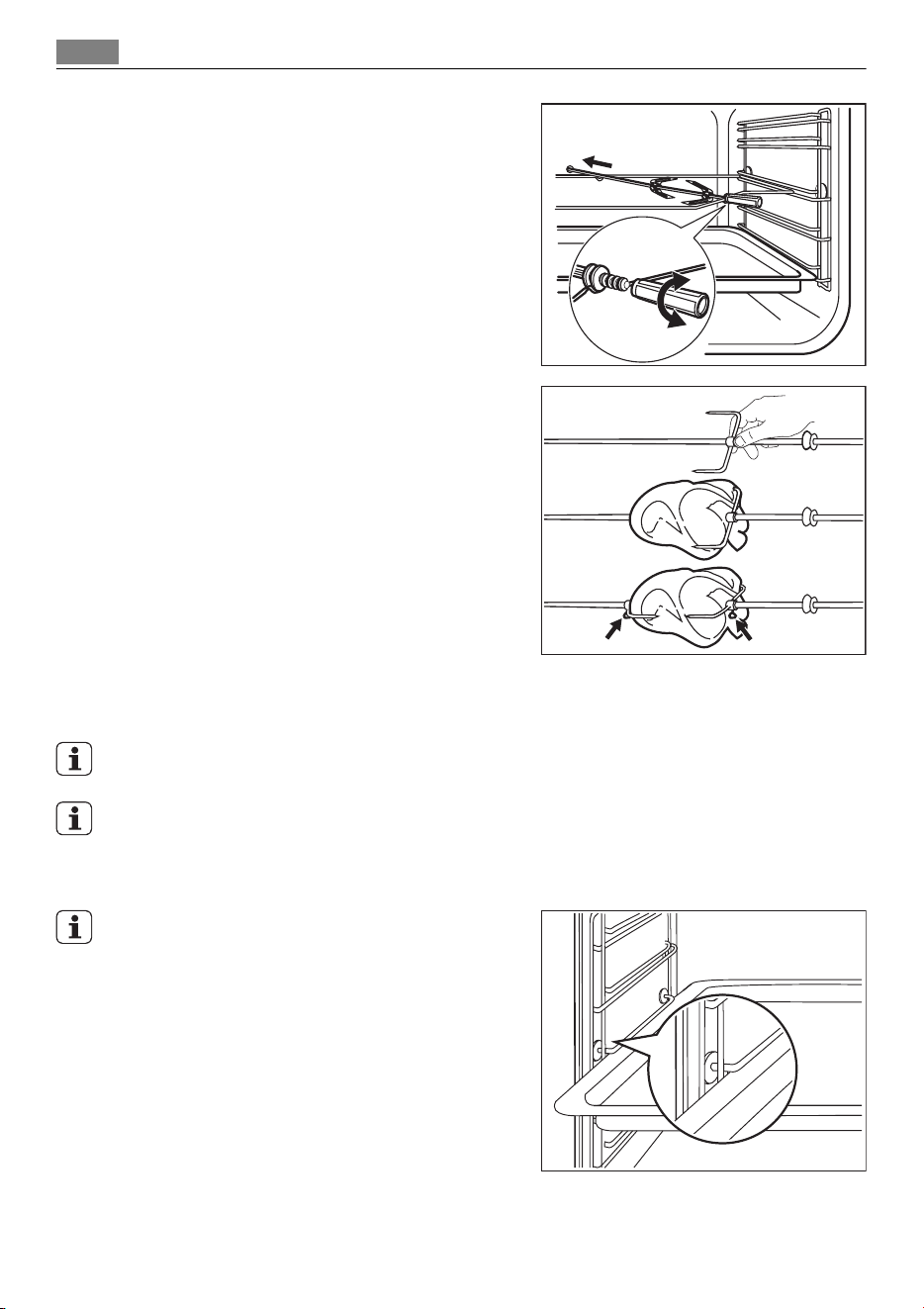
1. Put the roasting pan on the lowest shelf
position.
2. Put the spit frame on the third shelf po-
sition from the bottom.
3. Install the first fork on the spit, then put
the meat on the turnspit and install the
second fork.
4. Use the screws to tighten the forks.
5. Put the tip of the spit into the turnspit
hole. Refer to "Product description".
6. Put the front part of the spit on the
turnspit frame.
7. Remove the turnspit handle.
8. Turn the knob for the oven functions to
the turnspit position. The turnspit ro-
tates.
9. Set the necessary temperature. Refer to the cooking tables or the recipe book.
If you open the oven door, the turnspit stops.
If a clock function (Duration or End) ends and you do not deactivate the appliance, the
turnspit continues to operate for the next 10 minutes.
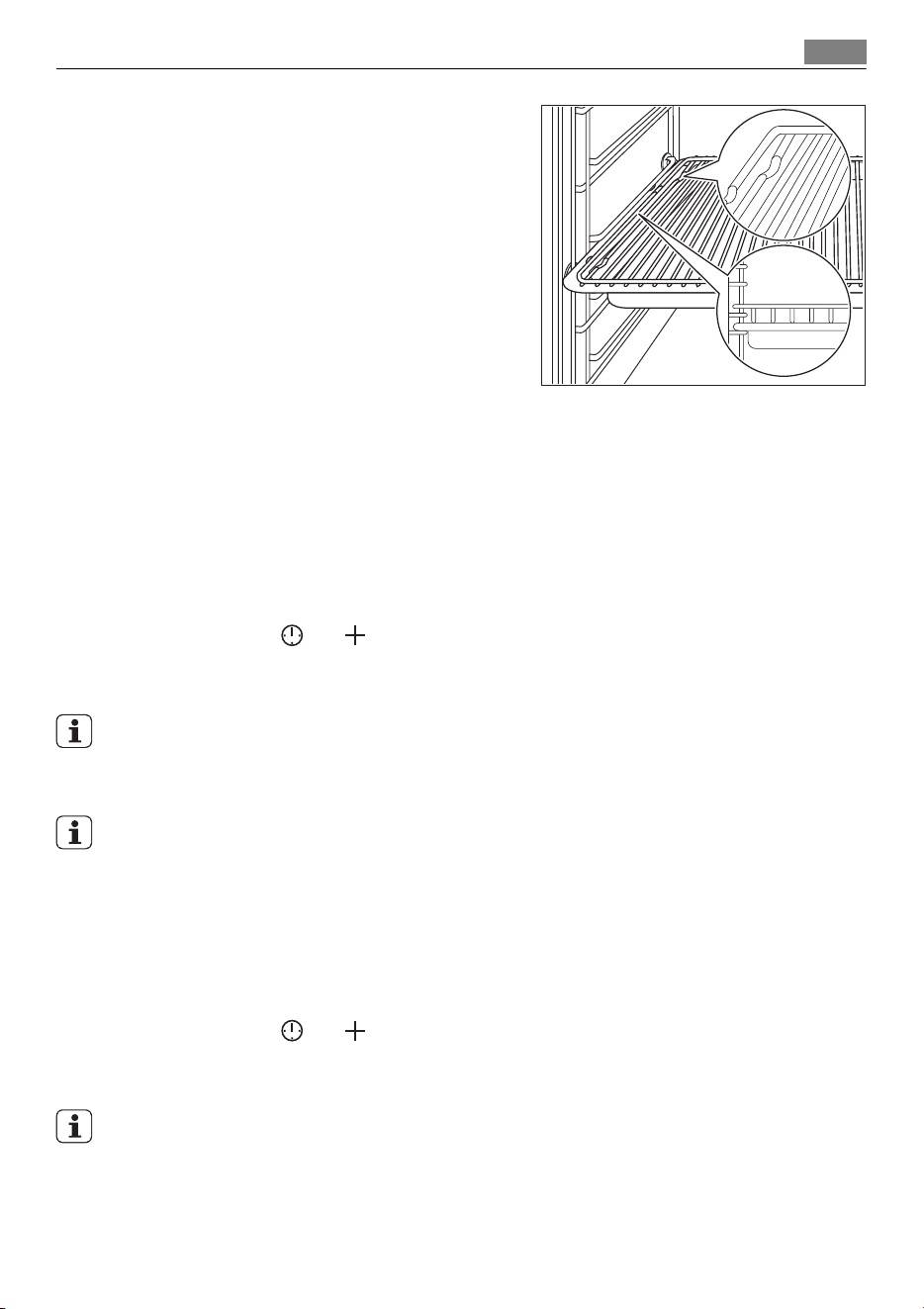
Installing the Oven Accessories
The deep pan and the wire shelf have side edges.
These edges and the shape of the guide-bars cau-
ses the anti-tilt safety for the oven accessories.
14 Using the accessories
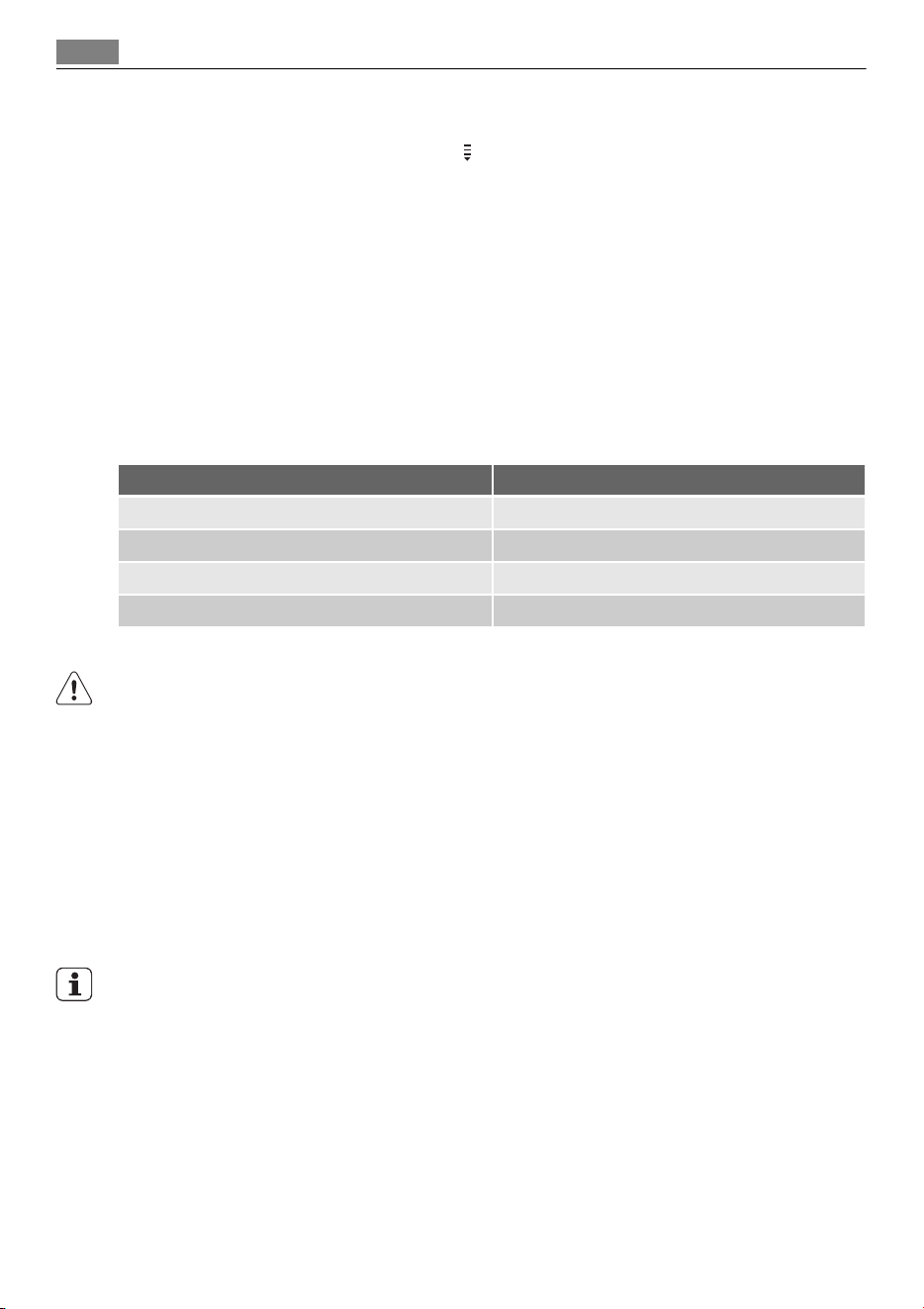
Installing the wire shelf and the deep pan to-
gether
Put the wire shelf on the deep pan. Push the deep
pan between the guide-bars of one of the oven
levels.
ADDITIONAL FUNCTIONS
Child Lock
The Child Lock prevents an accidental operation of the appliance.
Activating and deactivating the Child Lock function:
1. Do not set an oven function.
2. Press and hold
and at the same time for 2 seconds.
3. An acoustic signal sounds. SAFE comes on/goes out in the display (when you activate
or deactivate the Child Lock).
If the oven has Pyro Cleaning function, the door is locked.
SAFE comes on in the display when you turn a knob or press a button.
Control Lock
Applicable to models with Pyro Cleaning function.
The Control Lock prevents an accidental change of the oven function. You can activate the
Control Lock function only when the appliance operates.
Activating and deactivating the Control Lock function:
1. Activate the appliance.
2. Activate an oven function or setting.
3. Press and hold
and at the same time for 2 seconds.
4. An acoustic signal sounds. Loc comes on/goes out in the display (when you activate or
deactivate the Control Lock).
If the oven has Pyro Cleaning function, the door is locked.
You can deactivate the appliance when the Control lock is on. When you deactivate the
appliance, the control lock deactivates.
Loc comes on in the display when you turn a knob or press a button.
Additional functions 15
Residual heat indicator
Display shows the residual heat indicator after end of every cooking sessions when the
temperature inside oven cavity is more then 100 °F. Use Temperature knob to show the
oven temperature on the display.
Cooling fan
When the appliance operates, the cooling fan activates automatically to keep the surfaces
of the appliance cool. If you deactivate the appliance, the cooling fan can continue to oper-
ate until the appliance cools down.
Automatic switch-off
For safety reasons the appliance deactivates itself after some time:
• if an oven function is running.
• if you do not change the oven temperature.
Oven temperature Switch-off time
80 °F - 245 °F 12.5 h
250 °F - 395 °F 8.5 h
400 °F - 480 °F 5.5 h
485 °F - maximum °F 3.0 h
After an automatic switch-off, press a any button to operate the appliance again.
The Automatic switch-off works with all oven functions, except Light, Low temperature
cooking, Core Temperature Sensor, Duration, End, Time delay.
HELPFUL HINTS AND TIPS
Inner side of door
In some models on the inner side of the door you can find:
• the numbers of the shelf positions (selected models)
• information about the heating functions, recommended shelf positions and tempera-
tures for typical dishes (selected models).
The temperature and baking times in the tables are guidelines only. They depend on the
recipes, quality and quantity of the ingredients used.
Baking
General instructions
• Your new oven may bake or roast differently to the appliance you had before. Adapt your
usual settings (temperature, cooking times) and shelf positions to the values in the ta-
bles.
• With longer baking times, the oven can be switched off about 10 minutes before the end
of baking time, to use the residual heat.
16 Helpful hints and tips
When you use frozen food, the trays in the oven can twist during baking. When the
trays get cold again, the distortion will be gone.
How to use the Baking Tables
• We recommend to use the lower temperature the first time.
• If you cannot find the settings for a special recipe, look for the one that is almost the
same.
• Baking time can be extended by 10-15 minutes, if you bake cakes on more than one lev-
el.
• Cakes and pastries at different heights do not always brown equally at first. If this oc-
curs, do not change the temperature setting. The differences equalize during the baking
procedure.
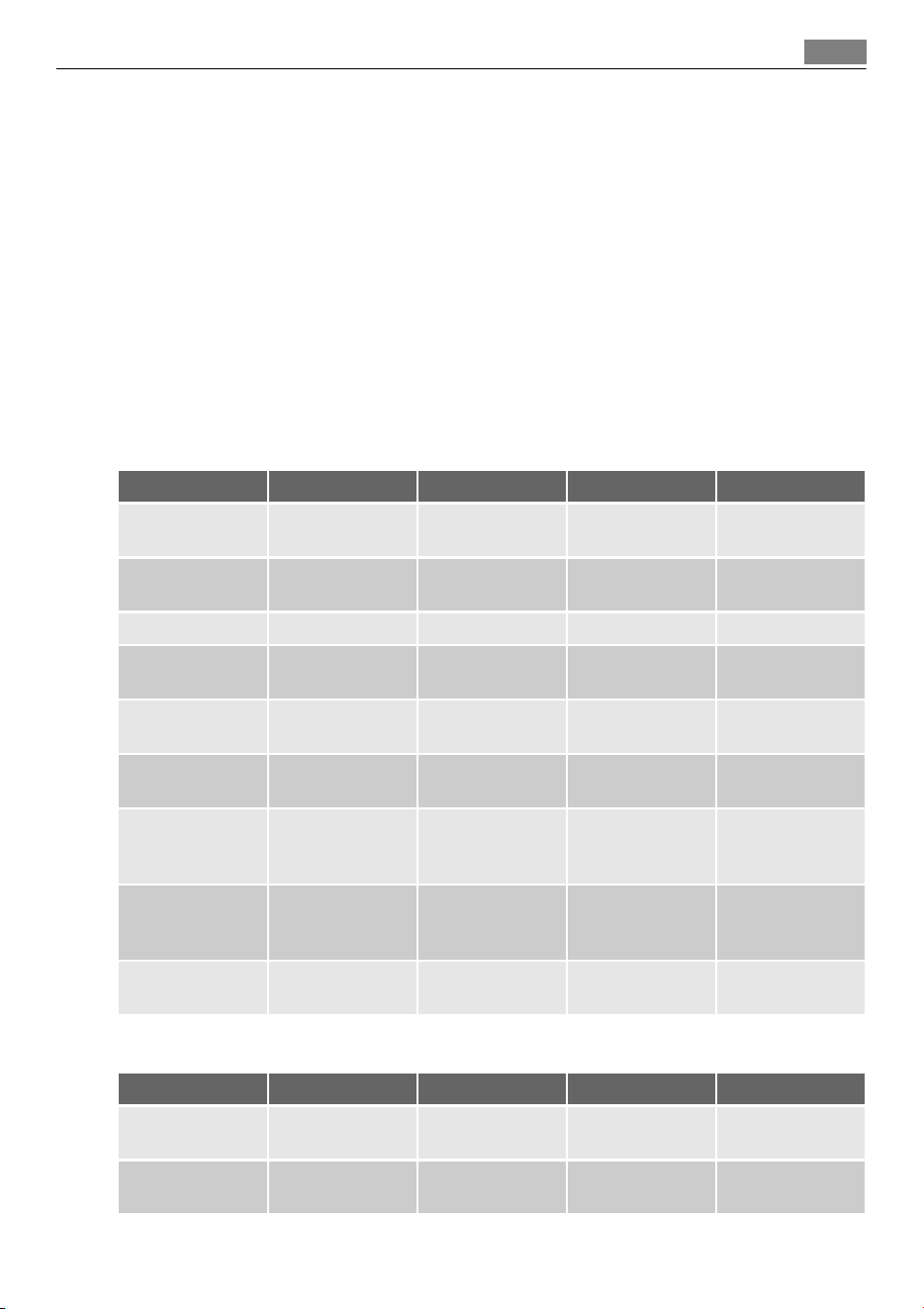
Baking on one level:
Baking in tins
Type of baking Oven function Shelf position Temperature °F Time in min.
Ring cake or brio-
che
True Fan Cooking 1 300 - 320 50 - 70
Madeira cake/
fruit cakes
True Fan Cooking 1 280 - 320 70 - 90
Sponge cake True Fan Cooking 2 280 - 300 35 - 50
Sponge cake Conventional
Cooking
2 320 35 - 50
Flan base - short
pastry
True Fan Cooking 2
340 - 360
1)
10 - 25
Flan base -
sponge mixture
True Fan Cooking 2 300 - 340 20 - 25
Apple pie (2tins
Ø20cm, diagonal-
ly off set)
True Fan Cooking 2 320 60 - 90
Apple pie (2tins
Ø20cm, diagonal-
ly off set)
Conventional
Cooking
1 360 70 - 90
Cheesecake Conventional
Cooking
1 340 - 380 60 - 90
1) Pre-heat the oven
Cakes/pastries/breads on baking trays
Type of baking Oven function Shelf position Temperature °F Time in min.
Plaited bread/
bread crown
Conventional
Cooking
3 340 - 380 30 - 40
Christmas stollen Conventional
Cooking
2
320 - 360
1)
50 - 70
Helpful hints and tips 17
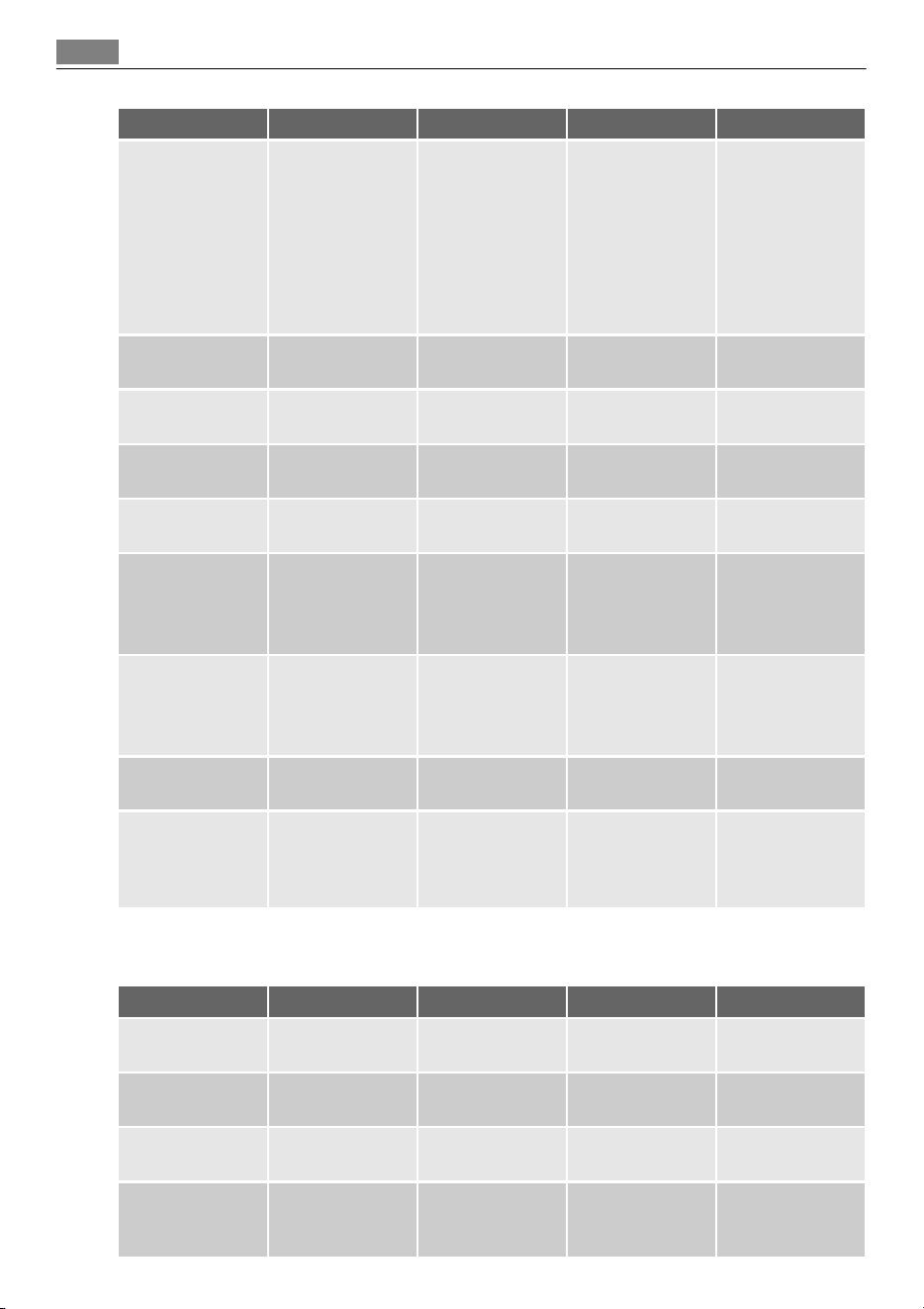
Type of baking Oven function Shelf position Temperature °F Time in min.
Bread (rye
bread):
1. First part of
baking proc-
ess.
2. Second part
of baking
process.
Conventional
Cooking
1
1.
450
1)
2. 320 - 360
1. 20
2. 30 - 60
Cream puffs/
eclairs
Conventional
Cooking
3
380 - 410
1)
20 - 35
Swiss roll Conventional
Cooking
3
360 - 400
1)
10 - 20
Cake with crum-
ble topping (dry)
True Fan Cooking 3 300 - 320 20 - 40
Buttered almond
cake/sugar cakes
Conventional
Cooking
3
380 - 410
1)
20 - 30
Fruit flans (made
with yeast dough/
sponge mixture)
2)
True Fan Cooking 3 300 35 - 55
Fruit flans (made
with yeast dough/
sponge mixture)
2)
Conventional
Cooking
3 340 35 - 55
Fruit flans made
with short pastry
True Fan Cooking 3 320 - 340 40 - 80
Yeast cakes with
delicate toppings
(e. g, quark,
cream, custard)
Conventional
Cooking
3
320 - 360
1)
40 - 80
1) Pre-heat the oven
2) Use deep pan
Biscuits
Type of baking Oven function Shelf position Temperature °F Time in min.
Short pastry bis-
cuits
True Fan Cooking 3 300 - 320 10 - 20
Short bread/ Pas-
try Stripes
True Fan Cooking 3 280 20 - 35
Short bread/ Pas-
try Stripes
Conventional
Cooking
3
320
1)
20 - 30
Biscuits made
with sponge mix-
ture
True Fan Cooking 3 300 - 320 15 - 20
18 Helpful hints and tips
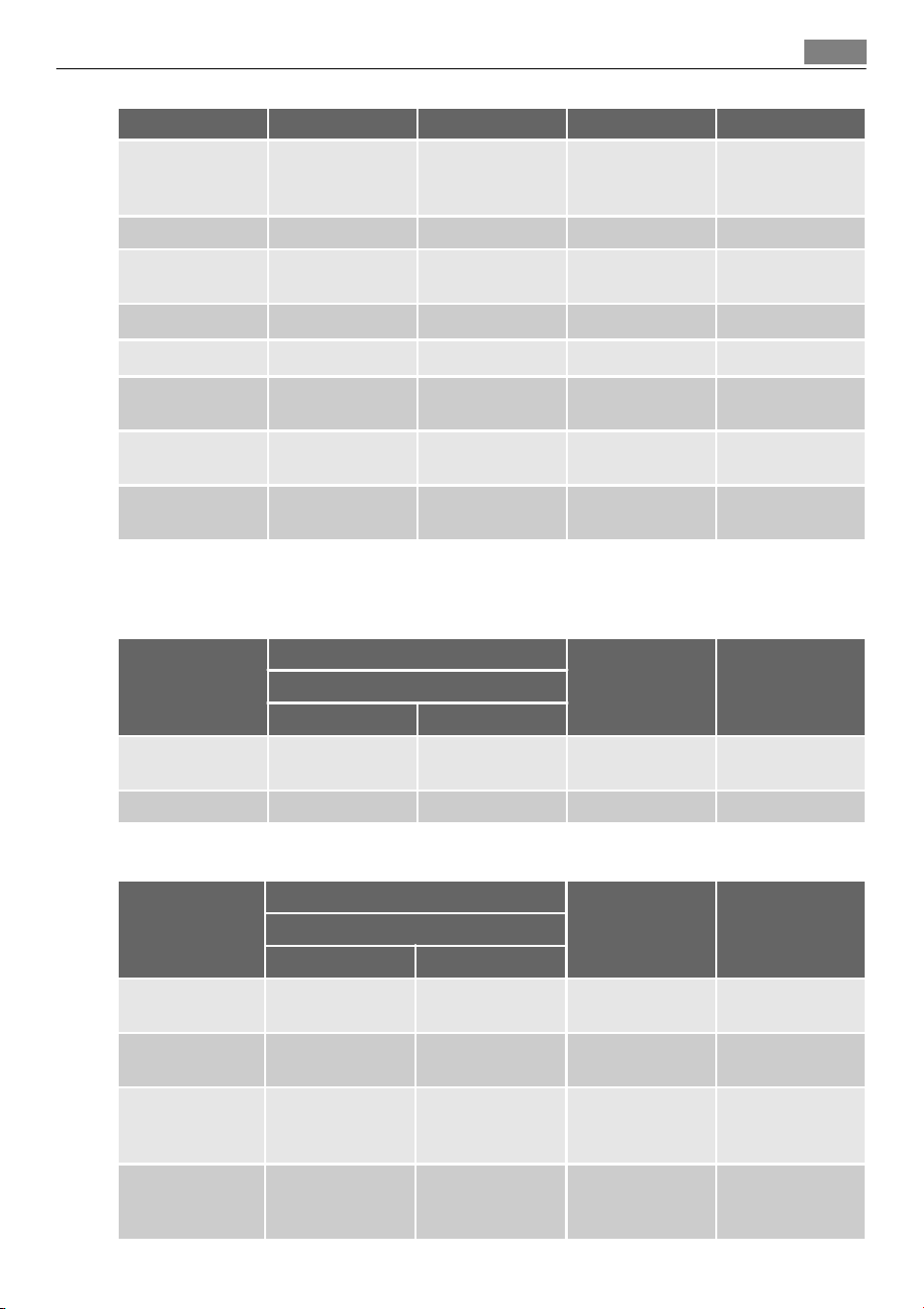
Type of baking Oven function Shelf position Temperature °F Time in min.
Pastries made
with egg white,
merungues
True Fan Cooking 3 180 - 210 120 - 150
Macaroons True Fan Cooking 3 210 - 250 30 - 50
Biscuits made
with yeast dough
True Fan Cooking 3 300 - 320 20 - 40
Puff pastries True Fan Cooking 3
340 - 360
1)
20 - 30
Rolls True Fan Cooking 3
320
1)
10 - 25
Rolls
Conventional
Cooking
3
380 - 410
1)
10 - 25
Small cakes
(20per tray)
True Fan Cooking 3
300
1)
20 - 35
Small cakes
(20per tray)
Conventional
Cooking
3
340
1)
20 - 30
1) Pre-heat the oven
Multileveled Baking
Cakes/pastries/breads on baking trays
Type of baking
True Fan Cooking
Temperature in
°F
Time in min.Shelf position
2 levels 3 levels
Cream puffs/
Eclairs
1/4 -
320 - 360
1)
25 - 45
Dry streusel cake 1/4 - 300 - 320 30 - 45
1) Pre-heat the oven
Biscuits/small cakes/pastries/rolls
Type of baking
True Fan Cooking
Temperature in
°F
Time in min.Shelf position
2 levels 3 levels
Short pastry bis-
cuits
1/4 1/3/5 300 - 320 20 - 40
Short bread/ Pas-
try Stripes
1/4 1/3/5 280 25 - 50
Biscuits made
with sponge mix-
ture
1/4 - 320 - 340 25 - 40
Biscuits made
with egg white,
meringues
1/4 - 180 - 210 130 - 170
Helpful hints and tips 19
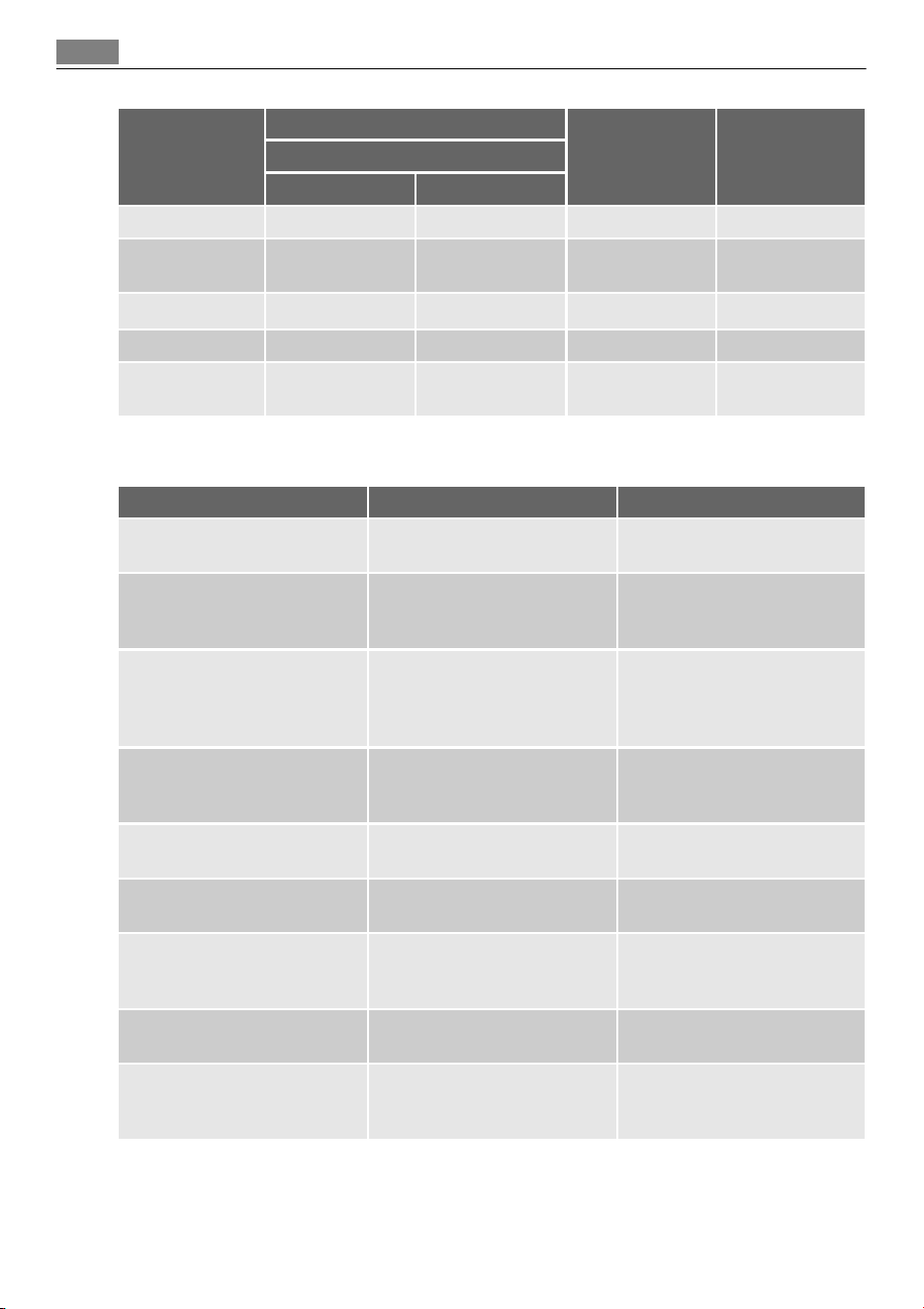
Type of baking
True Fan Cooking
Temperature in
°F
Time in min.Shelf position
2 levels 3 levels
Macaroons 1/4 - 210 - 250 40 - 80
Biscuits made
with yeast dough
1/4 - 320 - 340 30 - 60
Puff pastries 1/4 -
340 - 360
1)
30 - 50
Rolls 1/4 - 360 30 - 55
Small cakes
(20per tray)
1/4 -
300
1)
25 - 40
1) Pre-heat the oven
Tips on baking
Baking results Possible cause Remedy
The cake is not browned
enough underneath.
Wrong shelf position. Place the cake lower.
The cake sinks (becomes soggy,
lumpy, streaky).
The oven temperature is too
high.
The next time you bake set a
slightly lower oven tempera-
ture.
The cake sinks (becomes soggy,
lumpy, streaky).
The baking time is too short.
Set a longer baking time. Bak-
ing times cannot be reduced
by setting higher tempera-
tures.
The cake sinks (becomes soggy,
lumpy, streaky).
There is too much liquid in the
mixture.
Use less liquid. Pay attention to
mixing times, especially if you
use a mixing machine.
The cake is too dry.
The oven temperature is too
low.
The next time you bake set a
higher oven temperature.
The cake is too dry. The baking time is too long.
The next time you bake set a
shorter baking time.
The cake browns unevenly.
The oven temperature is too
high and the baking time is too
short.
Set a lower oven temperature
and a longer baking time.
The cake browns unevenly.
The mixture is unevenly distrib-
uted.
Spread the mixture evenly on
the baking tray.
The cake is not ready in the
baking time given.
The oven temperature is too
low.
The next time you bake set a
slightly higher oven tempera-
ture.
20 Helpful hints and tips
Bakes and gratins
Dish Oven function Shelf position Temperature °F Time in min.
Pasta bake
Conventional
Cooking
1 360 - 400 45 - 60
Lasagne
Conventional
Cooking
1 360 - 400 25 - 40
Vegetables au
gratin
1)
Turbo Grilling or
True Fan Cooking
1 320 - 340 15 - 30
Baguettes topped
with melted
cheese
Turbo Grilling or
True Fan Cooking
1 320 - 340 15 - 30
Sweet bakes
Conventional
Cooking
1 360 - 400 40 - 60
Fish bakes
Conventional
Cooking
1 360 - 400 30 - 60
Stuffed vegeta-
bles
Turbo Grilling or
True Fan Cooking
1 320 - 340 30 - 60
1) Pre-heat the oven
Roasting
Roasting dishes
• Use heat-resistant ovenware to roast (please read the instructions of the manufacturer).
• Large roasting joints can be roasted directly in the deep pan (if present) or on the wire
shelf above the deep pan.
• Roast lean meats in a roasting tin with a lid. This will keep the meat more succulent.
• All types of meat, that can be browned or have crackling, can be roasted in the roasting
tin without the lid.
Roasting with Turbo Grilling
Beef
Type of meat Quantity
Oven func-
tion
Shelf posi-
tion
Temperature
°F
Time min.
Pot roast 1-1.5 kg
Conventional
Cooking
1 450 120 - 150
Roast beef or fil-
let: rare
per cm. of
thickness
Turbo Grilling 1
380 - 400
1)
5 - 6
Roast beef or fil-
let: medium
per cm. of
thickness
Turbo Grilling 1
360 - 380
1)
6 - 8
Roast beef or fil-
let: well done
per cm. of
thickness
Turbo Grilling 1
340 - 360
1)
8 - 10
1) Pre-heat the oven
Helpful hints and tips 21
Pork
Type of meat Quantity
Oven func-
tion
Shelf posi-
tion
Temperature
°F
Time min.
Shoulder, neck,
ham joint
1-1.5 kg Turbo Grilling 1 320 - 360 90 - 120
Chop, spare rib 1-1.5 kg Turbo Grilling 1 340 - 360 60 - 90
Meat loaf 750 g-1 kg Turbo Grilling 1 320 - 340 50 - 60
Porkknuckle (pre-
cooked)
750 g-1 kg Turbo Grilling 1 300 - 340 90 - 120
Veal
Type of meat Quantity Oven func-
tion
Shelf position Temperature
°F
Time min.
Roast veal 1 kg Turbo Grilling 1 320 - 360 90 - 120
Knuckle of
veal
1.5-2 kg Turbo Grilling 1 320 - 360 120 - 150
Lamb
Type of meat Quantity Oven func-
tion
Shelf position Temperature
°F
Time min.
Leg of lamb,
roast lamb
1-1.5 kg Turbo Grilling 1 300 - 340 100 - 120
Saddle of
lamb
1-1.5 kg Turbo Grilling 1 320 - 360 40 - 60
Game
Type of meat Quantity Oven func-
tion
Shelf position Temperature
°F
Time min.
Saddle of
hare, leg of
hare
up to 1 kg Conventional
Cooking
1
450
1)
30 - 40
Saddle of ven-
ison
1.5-2 kg Conventional
Cooking
1 410 - 430 35 - 40
Haunch of
venison
1.5-2 kg Conventional
Cooking
1 360 - 400 60 - 90
1) Pre-heat the oven
Poultry
Type of meat Quantity Oven func-
tion
Shelf position Temperature
°F
Time min.
Poultry por-
tions
200-250g
each
Turbo Grilling 1 400 - 430 30 - 50
Half chicken 400-500g
each
Turbo Grilling 1 380 - 410 35 - 50
22 Helpful hints and tips
Type of meat Quantity Oven func-
tion
Shelf position Temperature
°F
Time min.
Chicken, pou-
lard
1-1.5 kg Turbo Grilling 1 380 - 410 50 - 70
Duck 1.5-2 kg Turbo Grilling 1 360 - 400 80 - 100
Goose 3.5-5 kg Turbo Grilling 1 320 - 360 120 - 180
Turkey 2.5-3.5 kg Turbo Grilling 1 320 - 360 120 - 150
Turkey 4-6 kg Turbo Grilling 1 280 - 320 150 - 240
Fish (steamed)
Type of meat Quantity Oven func-
tion
Shelf position Temperature
°F
Time min.
Whole fish 1-1.5 kg Conventional
Cooking
1 410 - 430 40 - 60
Grilling
Always grill with the maximum temperature setting.
CAUTION!
Always grill with the oven door closed.
Always pre-heat the empty oven with the grill functions for 5 minutes.
• Set the shelf in the shelf position as recommended in the grilling table.
• Always set the pan to collect the fat into the first shelf position.
• Grill only flat pieces of meat or fish.
Grilling
Food to be gril-
led
Shelf position
Temperature °F Time in min.
1st side 2nd side
Roast beef 2 410 - 450 30 - 40 30 - 40
Filet of beef 3 450 20 - 30 20 - 30
Back of pork 2 410 - 450 30 - 40 30 - 40
Back of veal 2 410 - 450 30 - 40 30 - 40
Back of lamb 3 410 - 450 25 - 35 20 - 25
Whole Fish,
500-1000g
3/4 410 - 450 15 - 30 15 - 30
Fast Grilling
Food to be grilled Shelf position
Time in min.
1st side 2nd side
Burgers 4 8 - 10 6 - 8
Helpful hints and tips 23
Food to be grilled Shelf position
Time in min.
1st side 2nd side
Pork fillet 4 10 - 12 6 - 10
Sausages 4 10 - 12 6 - 8
Fillet steaks, veal steaks 4 7 - 10 6 - 8
Toast
1)
5 1 - 3 1 - 3
Toast with topping 4 6 - 8 -
1) Pre-heat the oven
Grilling with turnspit - insert deep pan on level 1
Food to be roasted Temperature °F Time in min.
Chicken 430 - 465 70 - 90
Rolled joint for roasting 380 - 410 120 - 180
Duck 430 - 465 90 - 150
Pork knuckle 380 - 410 150 - 210
Pizza Setting
Type of baking Shelf position Temperature °F Time Min.
Pizza (thin crust)
2
400 - 450
1)2)
15 - 20
Pizza (with a lot of
topping)
2 360 - 400 20 - 30
Tarts 1 360 - 400 40 - 55
Spinach flan 1 320 - 360 45 - 60
Quiche Lorraine 1 340 - 380 45 - 55
Swiss Flan 1 340 - 380 45 - 55
Apple cake, covered 1 300 - 340 50 - 60
Vegetable pie 1 320 - 360 50 - 60
Unleavened bread
2
450 - 480
1)
10 - 20
Puff pastry flan
2
320 - 360
1)
45 - 55
Flammekuchen (Pizza-
like dish from Alsace)
2
450 - 480
1)
12 - 20
Piroggen (Russian ver-
sion of calzone)
2
360 - 400
1)
15 - 25
1) Pre-heat the oven
2) Use deep pan
Defrosting
Remove the food packaging. Put the food on a plate.
Do not cover it with a bowl or a plate. This can extend the defrost time.
Use the first oven shelf position. The one on the bottom.
24 Helpful hints and tips
Dish
Defrosting time
in min.
Further defrosting
time in min.
Comment
Chicken, 1000 g 100 - 140 20 - 30
Place the chicken on an up-
turned saucer placed on a
large plate Turn halfway
through
Meat, 1000 g 100 - 140 20 - 30 Turn halfway through
Meat, 500 g 90 - 120 20 - 30 Turn halfway through
Trout, 150 g 25 - 35 10 - 15 -
Strawberries, 300 g 30 - 40 10 - 20 -
Butter, 250 g 30 - 40 10 - 15 -
Cream, 2 x 200 g 80 - 100 10 - 15
Cream can also be whipped
when still slightly frozen in
places
Gateau, 1400 g 60 60 -
Preserving
Things to note:
• Use only preserve jars of the same dimensions available on the market.
• Do not use jars with twist-off and bayonet type lids, or metal tins.
• Use the first shelf from the bottom for this function.
• Put no more than six one-litre preserve jars on the baking tray.
• Fill the jars up to the same level and close with a clamp.
• The jars cannot touch each other.
• Put approximately 1/2 litre of water into the baking tray to give sufficient moisture in
the oven.
• When the liquid in the jars starts to simmer (after approx. 35-60 minutes with one-litre
jars), stop the oven or decrease the temperature to 220 °F (see the table).
Soft fruit
Preserve Temperature in °F
Cooking time until
simmering in min.
Continue to cook
at 220 °F in mis.
Strawberries, blueber-
ries, raspberries, ripe
gooseberries
320 - 340 35 - 45 ---
Stone fruit
Preserve Temperature in °F
Cooking time until
simmering in min.
Continue to cook
at 220°F in min.
Pears, guinces, plums 320 - 340 35 - 45 10 - 15
Helpful hints and tips 25
Vegetables
Preserve Temperature in °F
Cooking time until
simmering in min.
Continue to cook at
220°F in min.
Carrots
1)
320 - 340 50 - 60 5 - 10
Cucumbers 320 - 340 50 - 60 ---
Mixed pickels 320 - 340 50 - 60 5 - 10
Kohlrabi, peas, aspara-
gus
320 - 340 50 - 60 15 - 20
1) Leave standing in oven when switched off
Drying - True Fan Cooking
Cover the oven shelves with baking parchment.
For best results: deactivate the appliance after half the time required. Open the appliance
door and let the appliance cool down. After that finish the drying process.
Vegetables
Food to be dried
Shelf position
Temperature °F Time in hours
1 level 2 levels
Beans 3 1/4 140 - 160 6 - 8
Peppers 3 1/4 140 - 160 5 - 6
Vegetables for
sour
3 1/4 140 - 160 5 - 6
Mushrooms 3 1/4 120 - 140 6 - 8
Herbs 3 1/4 100 - 120 2 - 3
Fruit
Food to be dried
Shelf position
Temperature °F Time in hours
1 level 2 levels
Plums 3 1/4 140 - 160 8 - 10
Apricots 3 1/4 140 - 160 8 - 10
Apple slices 3 1/4 140 - 160 6 - 8
Pears 3 1/4 140 - 160 6 - 9
Information on acrylamides
Important! According to the newest scientific knowledge, if you brown food (specially the
one which contains starch), acrylamides can pose a health risk. Thus, we recommend that
you cook at the lowest temperatures and do not brown food too much.
CARE AND CLEANING
WARNING!
Refer to "Safety information" chapter.
26 Care and cleaning
Notes on cleaning:
• Clean the front of the appliance with a soft cloth with warm water and cleaning agent.
• To clean metal surfaces use a usual cleaning agent.
• Clean the appliance interior after each use. Then you can remove dirt more easily and it
does not burn on.
• Clean stubborn dirt with a special oven cleaner.
• Clean all accessories (with a soft cloth with warm water and cleaning agent) after each
use and let them dry.
• If you have nonstick accessories, do not clean them using an aggressive agents, sharp
edged objects or dishwasher. It can cause a damage to the nonstick coating.
Pyrolytic cleaning
Remove all parts from the oven.
Do not start the pyrolytic cleaning if:
• If you do not remove the shelf support or telescopic shelf runners (if supplied) - the dis-
play shows 'C1' on some models.
• if you do not close the oven door correctly- the display shows 'C3' on some models.
1. Remove the worst of the residual dirt manually.
2. Set the Pyrolytic cleaning function (refer to section "Oven functions").
3. When
flashes, press or to set the necessary procedure:
– P1 1:30 for a low degree of dirt,
– P2 2:30 for a usual degree of dirt,
After 2 seconds procedure starts.
To change length of selected procedure (P1 or P2), press to set , then press or
to set length for the pyrolytic procedure.
You can use the End function to delay start of the cleaning process.
When the oven reaches pre-set temperature, the door locks. The symbol
and the bars of
the heat indicator come up, until the door unlocks again.
During pyrolytic cleaning the lamp is off.
Cleaning reminder
To remind you that the pyrolytic cleaning is necessary the cleaning reminder symbol flashes
in the display PYR after every activating and deactivating the appliance for the next 10 sec-
onds.
The cleaning reminder goes off the display:
• after end of the pyrolytic cleaning function;
• if you use
or , when is flashing;
Shelf support
You can remove the shelf support to clean the side walls.
Care and cleaning
27
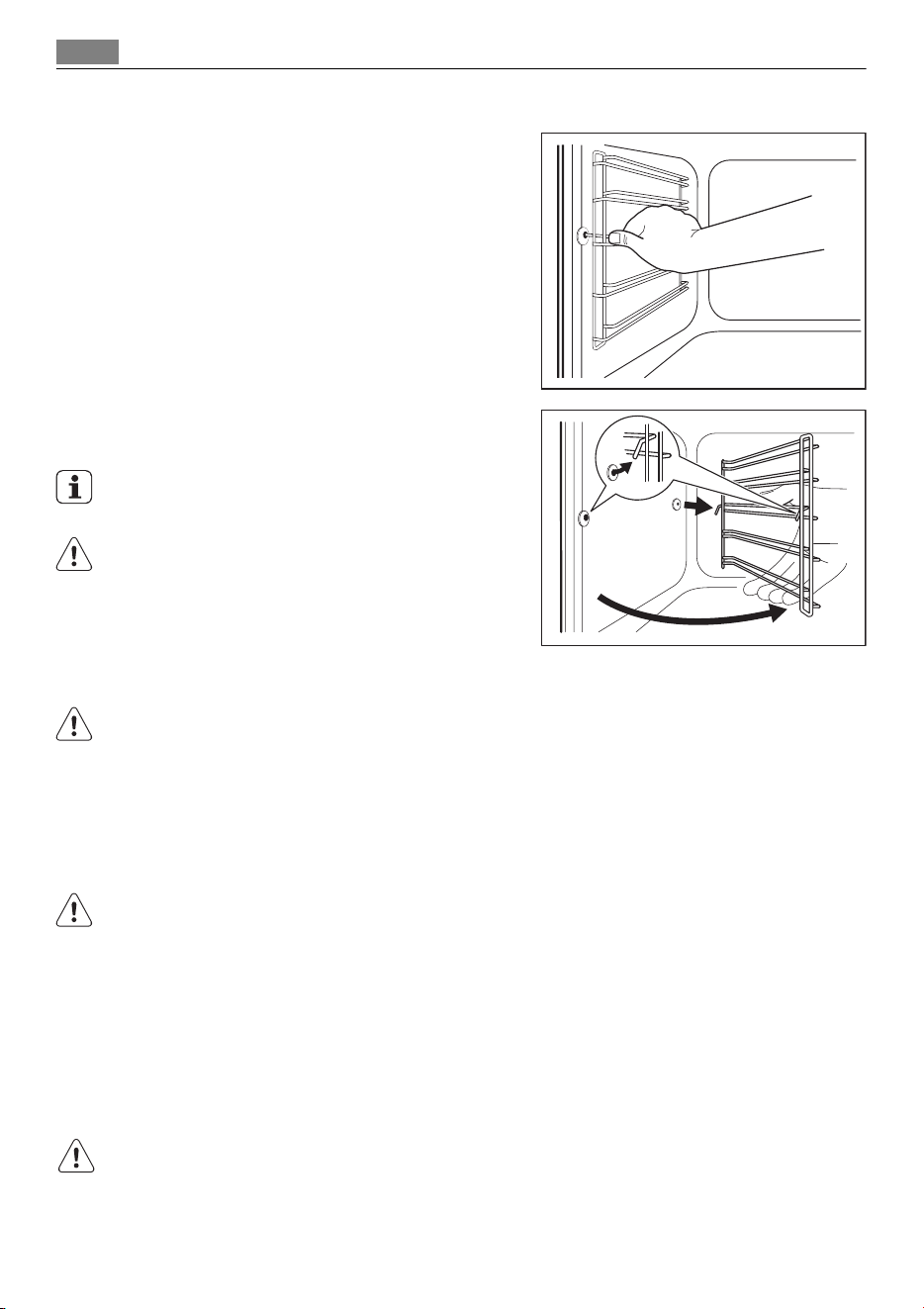
Removing the shelf support
1. Pull the front of the shelf support away
from the side wall.
2. Pull the shelf support from the back of
the side wall to remove it.
To install the shelf support follow the proce-
dure in reverse.
Valid with telescopic runners:
The retaining pins on the telescopic shelf
runners must point to the front!
Oven lamp
WARNING!
There is a risk of electrical shock.
The oven lamp and the lamp glass cover can be hot.
Before you change the oven lamp:
• Deactivate the appliance.
• Remove the fuses from the fuse box or deactivate the circuit breaker.
CAUTION!
Put a cloth on the bottom of the interior of the appliance. It prevents damage to the lamp
glass cover and the cavity.
Replacing the oven lamp:
1. You can find the lamp glass cover at the cavity ceiling.
Turn the lamp glass cover counterclockwise to remove it.
2. Clean the glass cover.
3. If necessary, replace the oven lamp with applicable 570 °F heat-resistant oven lamp.
Use the same oven lamp type.
4. Install the glass cover.
1
2
28 Care and cleaning
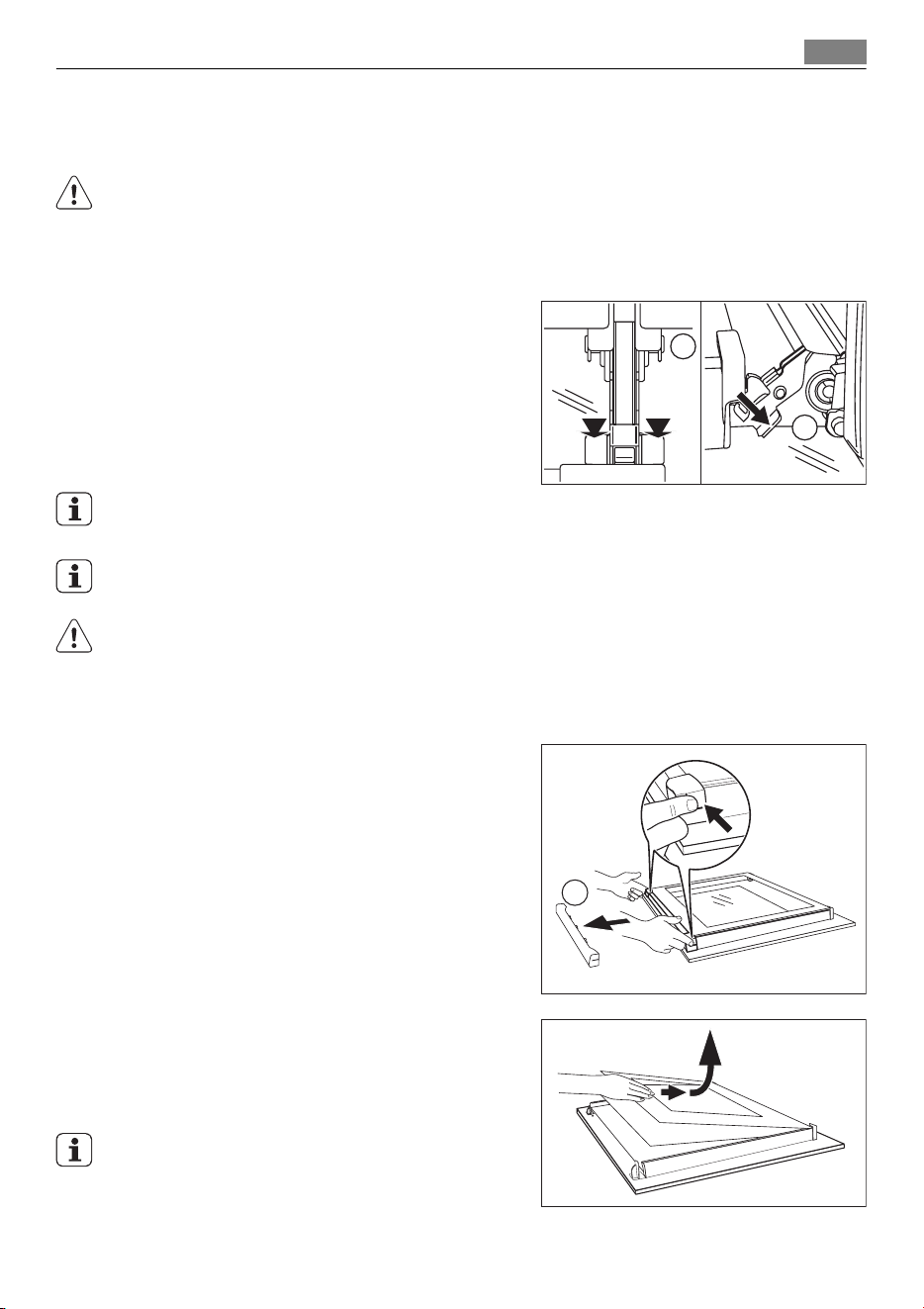
Door and glass panels
To clean the door, remove it.
CAUTION!
Be careful when you remove the door from the appliance. The door is heavy!
Removing the door
1. Open the door as far as it goes.
2. Fully press clamping levers (A) on the
two door hinges.
3. Close the door until the first position
(angle approximately 70°).
4. Hold of the door with one hand on each
side and pull it away from the at an up
angle.
To install the door follow the procedure in
reverse.
The number of glass panels if different for the different models.
CAUTION!
Put the door with the outer side down on a soft and level surface to prevent scratches.
Removing and cleaning the door glass panels
1. Remove the door.
2. Hold the door trim (B) on the top edge
of the door at the two sides and push
inwards to release the clip seal.
3. Pull the door trim to the front to re-
move it.
4. Hold the door glass panels on their top
edge one by one and pull them up out
of the guide
5. Clean the door glass panels.
To install panels follow the procedure in re-
verse. Install the smaller panel first, then the
larger.
A
A
B
Care and cleaning 29
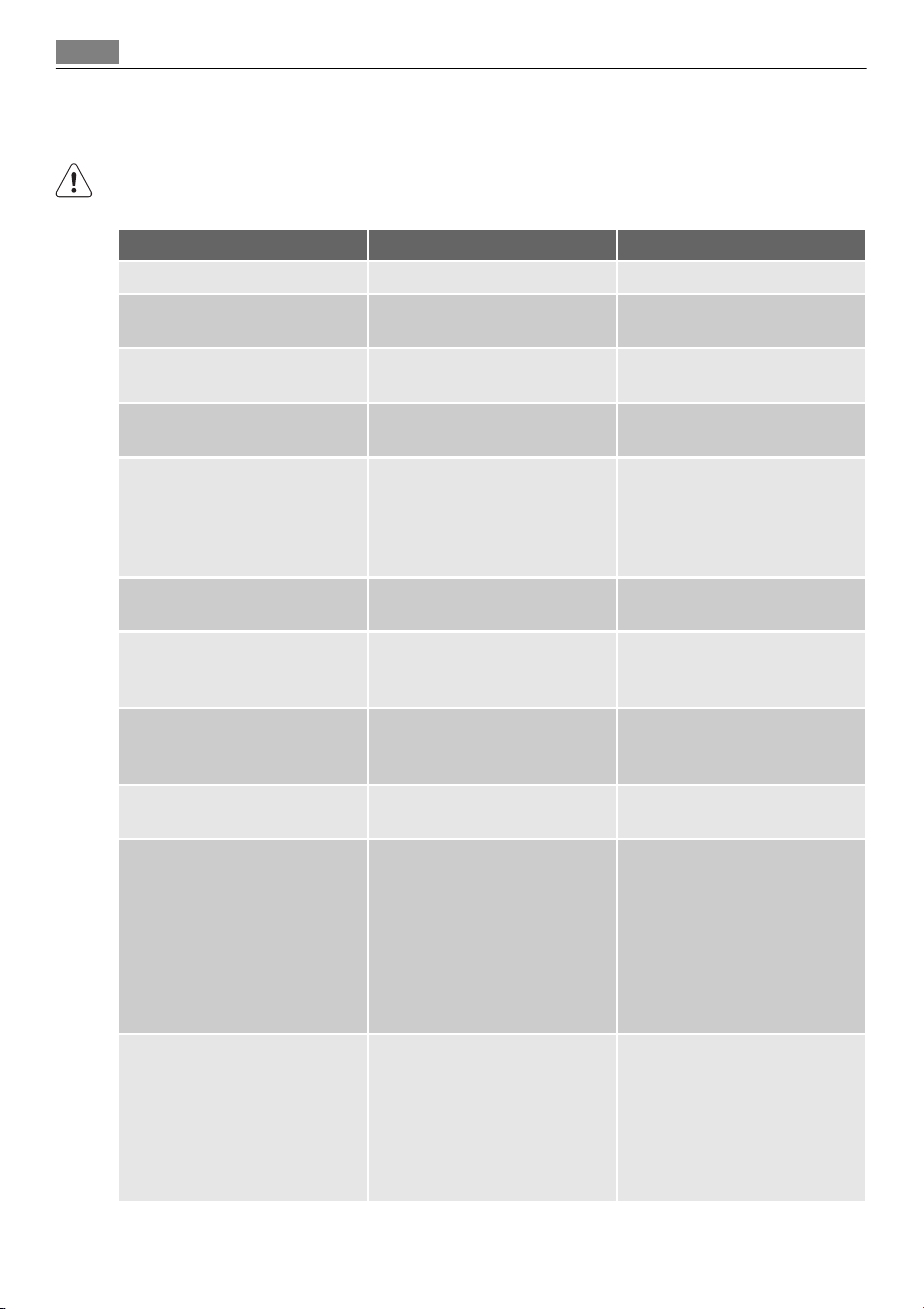
WHAT TO DO IF…
WARNING!
Refer to "Safety information" chapter.
Problem Possible cause Solution
The oven does not heat up The appliance is switched off Switch on the appliance
The oven does not heat up The clock is not set Set the clock. Refer to "Setting
the clock"
The oven does not heat up The necessary settings are not
set
Make sure, the settings are cor-
rect
The oven does not heat up The automatic cut-out is
switched on
Refer to „Automatic cut-out“
The oven does not heat up The fuse is released Make sure, if the fuse is the
cause for the malfunction. If
the fuse releases again and
again, refer to an authorized
electrician
The oven lamp does not oper-
ate
The oven lamp is defective Replace the oven lamp
The pyrolytic cleaning does not
operate (the clock display
shows „C1“)
The shelf support/telescopic
runners are not removed
Remove support/telescopic
runners
The pyrolytic cleaning does not
operate (the time display shows
„C3“)
The door is not correctly closed
or door lock is defective
Close the door correctly
The turn spit does not rotate The turn spit is not correctly
installed into the turnspit hole
Refer to "Turn spit"
The display shows F102 • The door is not closed cor-
rectly
• The door lock is defect
• Close the door correctly
• Switch off the appliance
with the house fuse or the
safety switch in the fuse box
and switch it on again
• If the display shows F102
again, refer to the Customer
Care Department
The display shows an error code
that is not in this list
There is an electronic fault • Switch off the appliance
with the house fuse or the
safety switch in the fuse box
and switch it on again
• If the display shows the er-
ror code again, refer to the
Customer Care Department
If you cannot find a solution to the problem yourself, contact your dealer or the service
centre.
30 What to do if…
The necessary data for the service centre is on the rating plate. The rating plate is on the
front frame of the appliance cavity.
We recommend that you write the data here:
Model (MOD.) .........................................
Product number (PNC) .........................................
Serial number (S.N.) .........................................
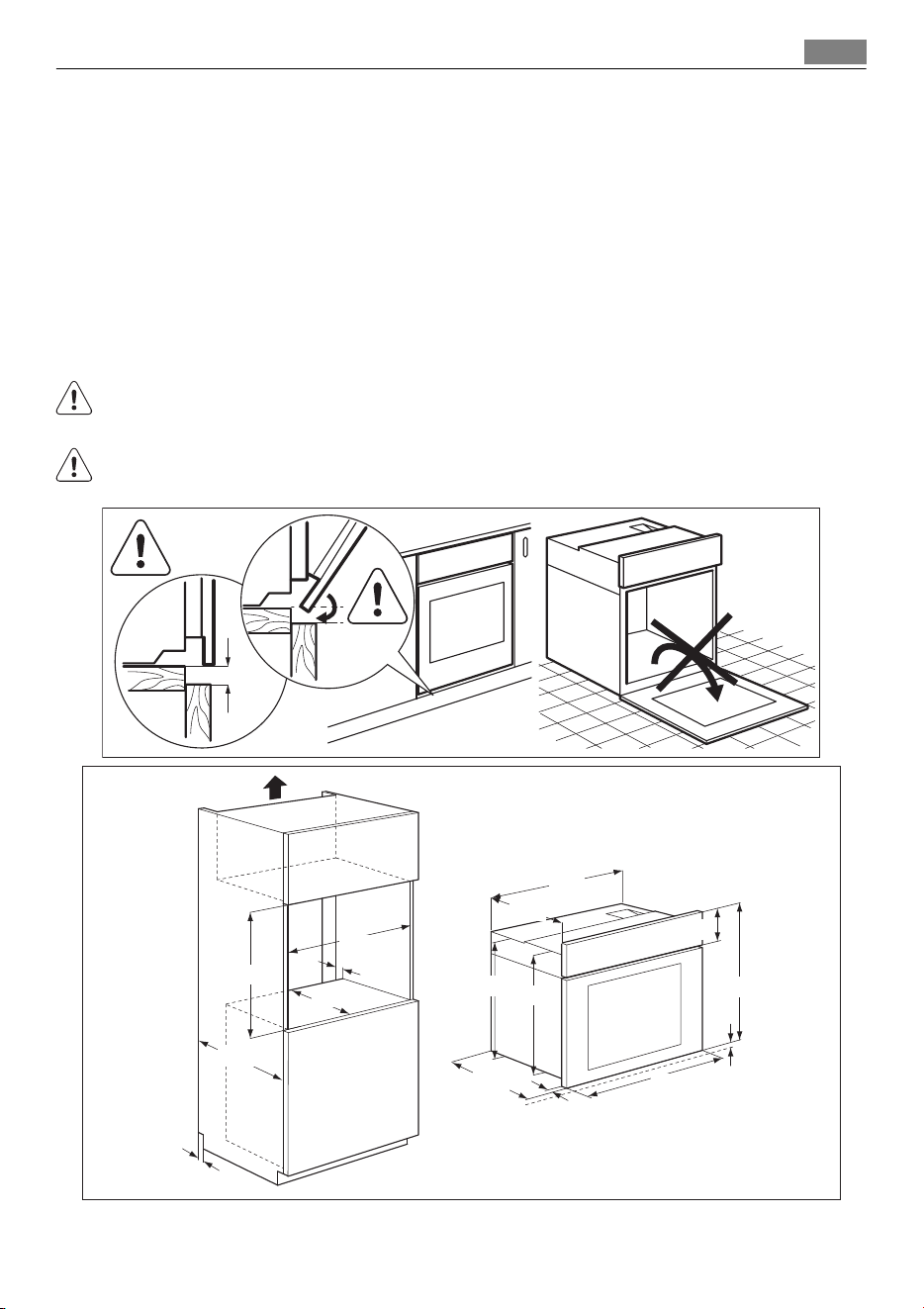
INSTALLATION
WARNING!
Refer to "Safety information" chapter.
The built-in unit must meet the stability requirements of DIN 68930.
min.
3 mm
20
30
5
21
200
590
567
579
572
547
546
594
594
114
590 min.
530 min.
560 min.
cm
2
Installation 31
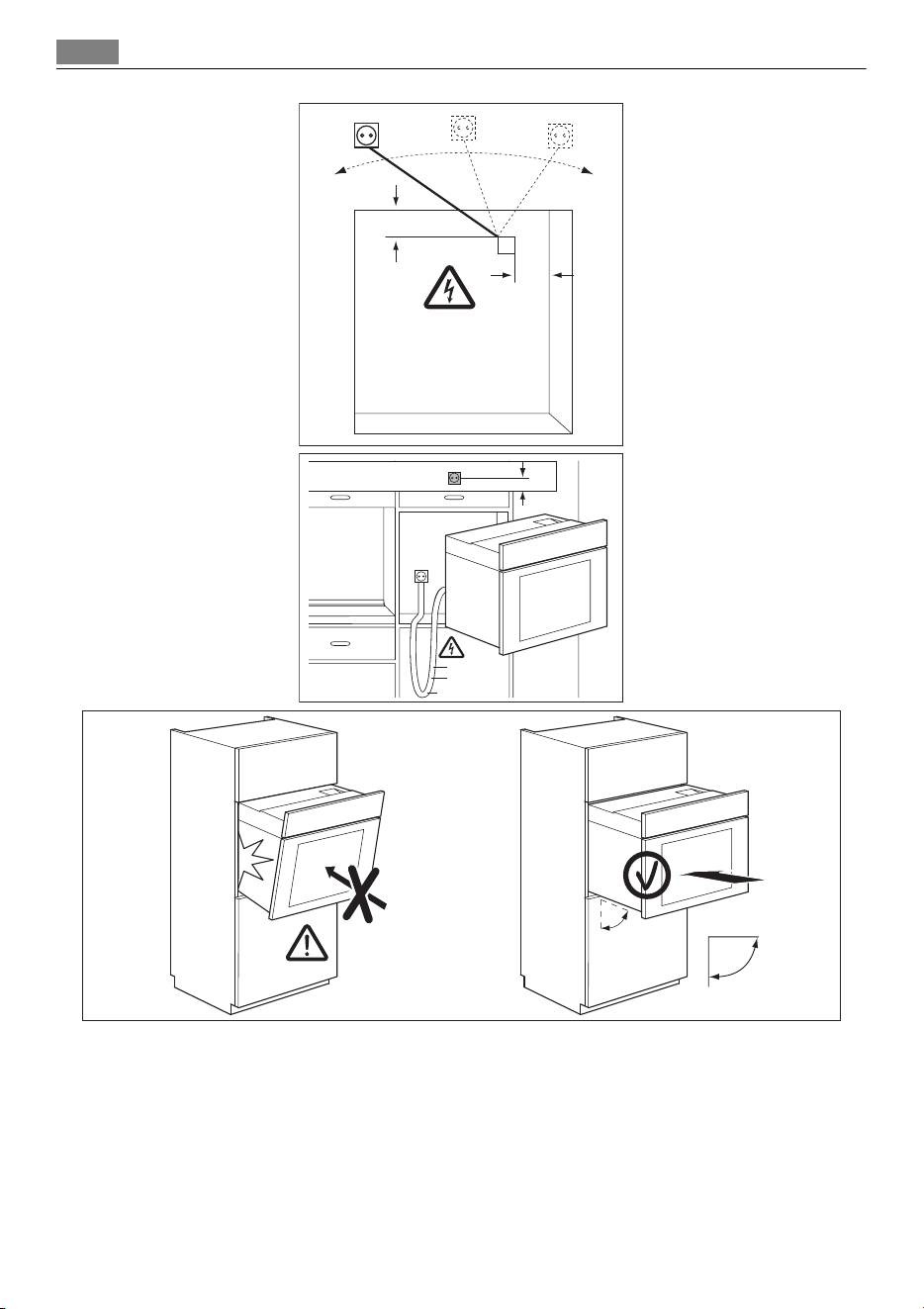
max. R1200 mm
130
140
alternativ 100
H05VV-F
H05RR-F
min. 1600 mm
90
º
32 Installation
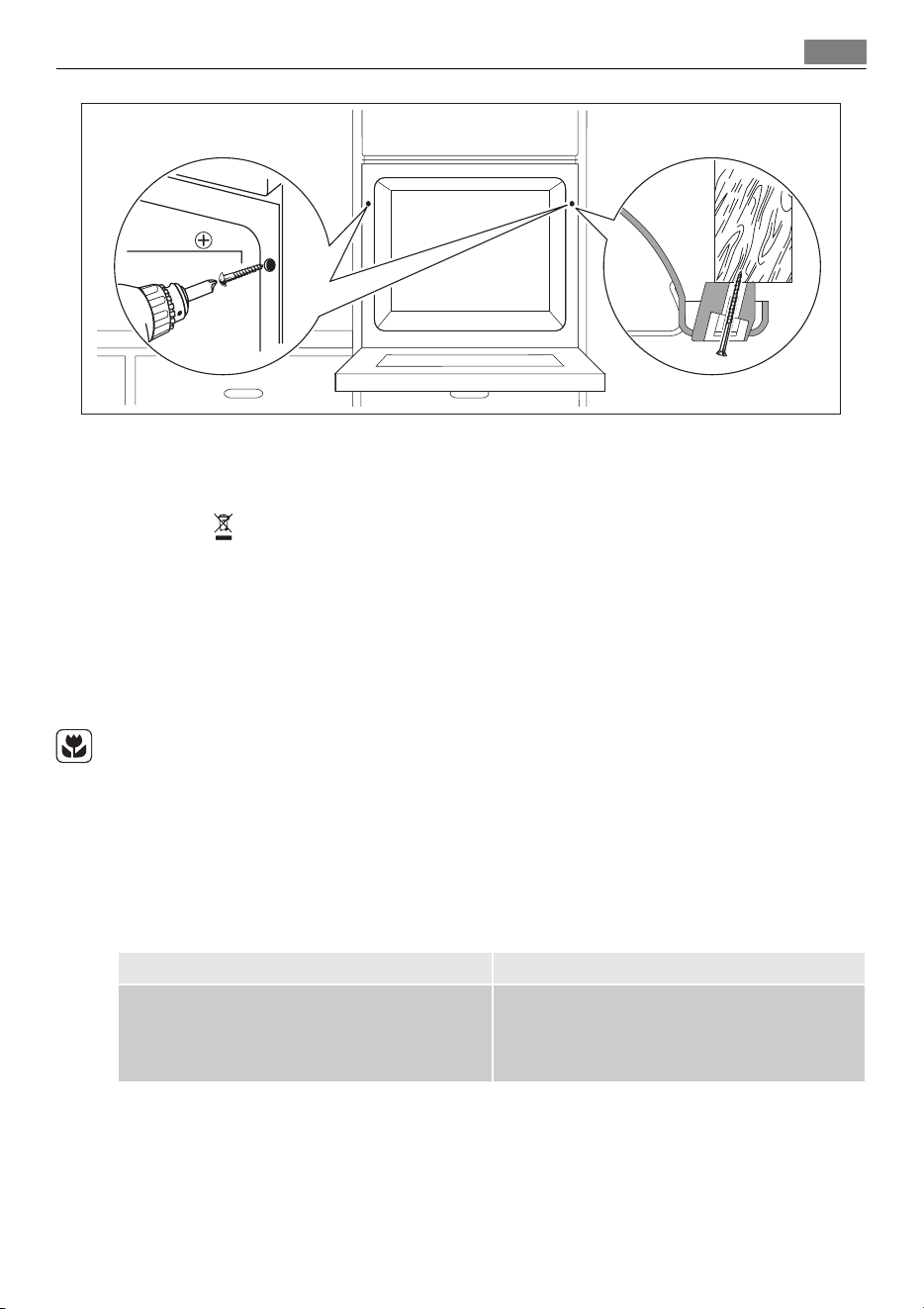
2x3,5x25
ENVIRONMENT CONCERNS
The symbol on the product or on its packaging indicates that this product may not be
treated as household waste. Instead it should be taken to the appropriate collection point
for the recycling of electrical and electronic equipment. By ensuring this product is
disposed of correctly, you will help prevent potential negative consequences for the
environment and human health, which could otherwise be caused by inappropriate waste
handling of this product. For more detailed information about recycling of this product,
please contact your local council, your household waste disposal service or the shop where
you purchased the product.
Packaging material
The packaging material is environmentally-friendly and recyclable. Plastic parts are marked
with international abbreviations such as PE, PS, etc. Dispose of the packaging material in
the containers provided for this purpose at your local waste management facility.
GUARANTEE/CUSTOMER SERVICE CENTRES
EURO-LINE APPLIANCES INC.
LENGTH OF WARRANTY EURO-LINE WILL PAY FOR:
TWO YEAR FULL WARRANTY
from original date of purchase, including parts
and labour, to the first purchaser of this appli-
ance
Replacement parts and/or labour to repair de-
fects in materials or workmanship. Service must
be provided by an authorized Euro-Line compa-
ny (unless advised otherwise).
THIS GUARANTEE DOES NOT COVER COMMERCIAL USE.
The name Euro-Line Appliances, for service matters, incorporates work performed by au-
thorized service agents or service companies.
EXCEPTIONS:
EURO-LINE APPLIANCES WILL NOT PAY FOR THE FOLLOWING SERVICE CALLS:
1. To install or correct the installation of an appliance
Environment concerns
33

2. To instruct the use of an appliance.
3. To replace house fuses, re-set circuit breakers or correct house wiring.
4. To correct house plumbing.
5. To clean drains, filters or garbage disposers.
6. To repair an appliance if it fails due to misuse or abuse.
EURO-LINE APPLIANCES WILL NOT PAY WHEN THE FOLLOWING OCCURS:
1. Damage resulting from fires, acts of God, alteration, improper installation, or installa-
tion not in accordance with local building codes.
2. Pickup or delivery of major appliances requiring service. The appliances are designed to
be repaired in the home. However, Euro-Line will not be responsible for travelling and
labour costs if the customer lives in excess of 50 km/30 miles, or if the travel time is in
excess of 30 minutes from the nearest service center. Any excess to this will not be
covered by the warranty.
In no event, will Euro-Line be responsible for incidental or consequential damages. For war-
ranty service and parts, contact EURO-PARTS. Service will be provided during normal busi-
ness hours. Should you have a service problem that is not resolved locally, contact:
For Service and Parts Contact:
EURO-PARTS, USA EURO-PARTS, CANADA EURO-LINE APPLIANCES
Tel: 1-800-561-4614
Fax: 1-519-528-5001
Tel: 1-800-678-8352
Fax: 1-519-528–5001
1-800-421-6332
Tel. Direct: 1-905-829-3980
Fax: 1-905-829-3985
User Instructions & Installation Manual
Service & Repair
To save you time and money please have the following information ready in case you have
to call for service:
• Name of the dealer from whom you purchased the appliance.
• Model number (shown on the rating plate)
• Serial number (shown on the rating plate)
• Date of purchase.
You should also retain the original purchase receipt to support any claim made under the
warranty. (We suggest you staple the receipt to this page).
If service is required, contact the Service Center:
EURO-PARTS, CANADA EURO-PARTS, USA
Tel: 1–800–678–8352
Fax: 1-519-528-5001
Tel: 1-800-561-4614
Fax: 1-519-528-5001
DISTRIBUTED BY: EURO-LINE APPLIANCES INC.
2278 SPEERS ROAD OAKVILLE, ON, CANADA L6L 2X8 1-800-421-6332
Tel: 905-829-3980
Fax: 905-829-3985
www.euro-line-appliances.com
34

Q - Warranty
AEG products are designed and built to the highest standards.
We expect your appliances to provide many years of trouble free enjoyment.
In the event of an appliance requiring attention, each appliance is covered by a 2
year warranty from the date of purchase.
Refer to warranty policy for complete terms and conditions.
Coverage is for costs of parts and labor for appliances in capital cities &
metropolitan areas. We reserve the right to charge directly for handling
expenses outside the metropolitan region.
AEG products are supported by a national service support system.
Call our customer service department for attention.
Please retain your invoice AEG to quote should you require service
assistance. This will identify your product for our priority service back-up.
Please attach your invoice to this manual for easy future reference.
AEG Canada
871 Cranberry Court
Oakville, Ontario L6L 6J7
Canada
Tel 905-829.3980
Fax 905-829.3985
email marketing@euro-line-appliances.com
For Service & Spares:
EURO-PARTS
1.800.678.8352
Important: Please record details of your purchase below and mail or fax to AEG
-----------------------------------------------------------------------------------------cut along line ------------------------------------------------------------------------------------
Na
m
e
:
TE
L
N
o
Add
r
e
ss
:
C
i
t
y
:
S
t
a
t
e
:
Z
i
p
C
od
e
:
Where
purchased:
Purchase
d
a
t
e
:
I
t
e
m
s
pu
r
c
h
a
s
e
d
:
Se
r
i
a
l
N
o
. (
s
)
:
33
AEG appliances are imported and distributed in North America by Euro-Line Appliances Inc.
For more information visit
www.euro-line-appliances.com / www.elawest.com
871 Cranberry Court
Oakville, ON L6L 6J7
Canada
Toll Free: 1.800.421.6332
Showroom: 905.829.3980
2912 West 4th Ave
Vancouver, BC V6K 1R2
Canada
Toll Free: 1.855.352-9378
Showroom: 604.235.3980