User Manual
AC
-CONVERT-HDDP
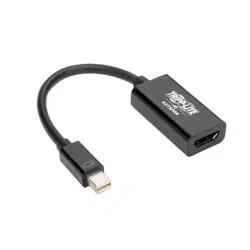
HDMI 2.0 to Displayport 1.2A Converter 1x2
AC-CONVERT-HDDP
Page 1
Release Notes:
Introduction
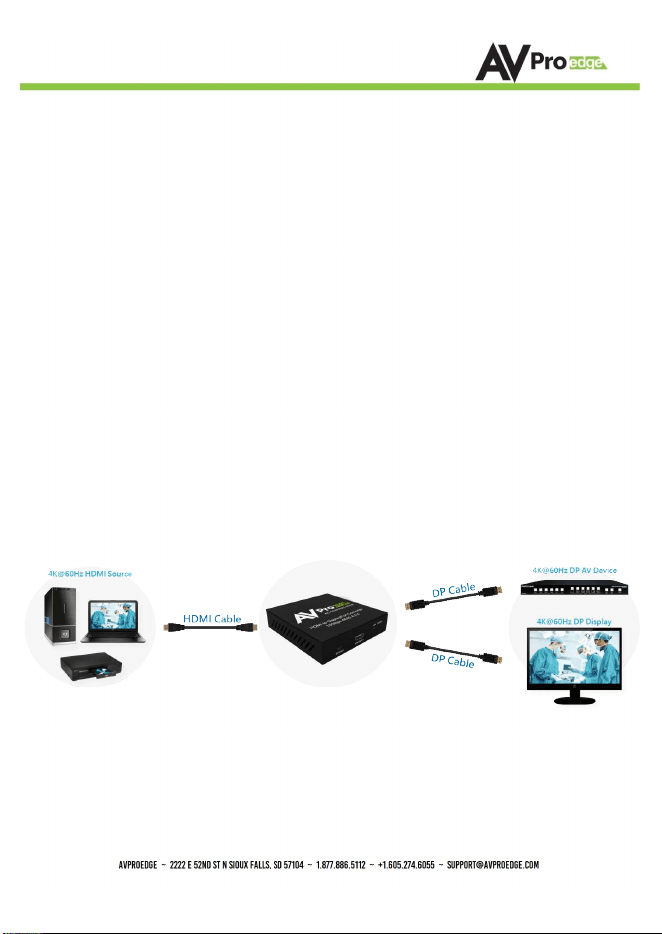
The AC-CONVERT-HDDP is a HDMI 2.0 to DisplayPort 1.2a Converter that provides one
HDMI Input and two DisplayPort Outputs.
The AC-CONVERT-HDDP supports resolutions up to 4k 60 4:4:4. It allows you to
connect an HDMI 4k 60 4:4:4 capable video source, such as Blu-ray player, PS4, X-Box,
or computer, to a DisplayPort 1.2 monitor simultaneously on two screens. It also
offers plug-and-play installation which provides a hassle-free setup without installing
any software or drivers. The system is automatically on once the supplied 12V power
supply is connected.
AC-CONVERT-HDDP
Page 2
• AC-CONVERT-HDDP HDMI to 2 DisplayPort converter x1
• Universal DC12V/2A power adapter with EU and USA standard
power plug x1
• User manual x1
What's in the box
AC-CONVERT-HDDP
Page 3
Contents
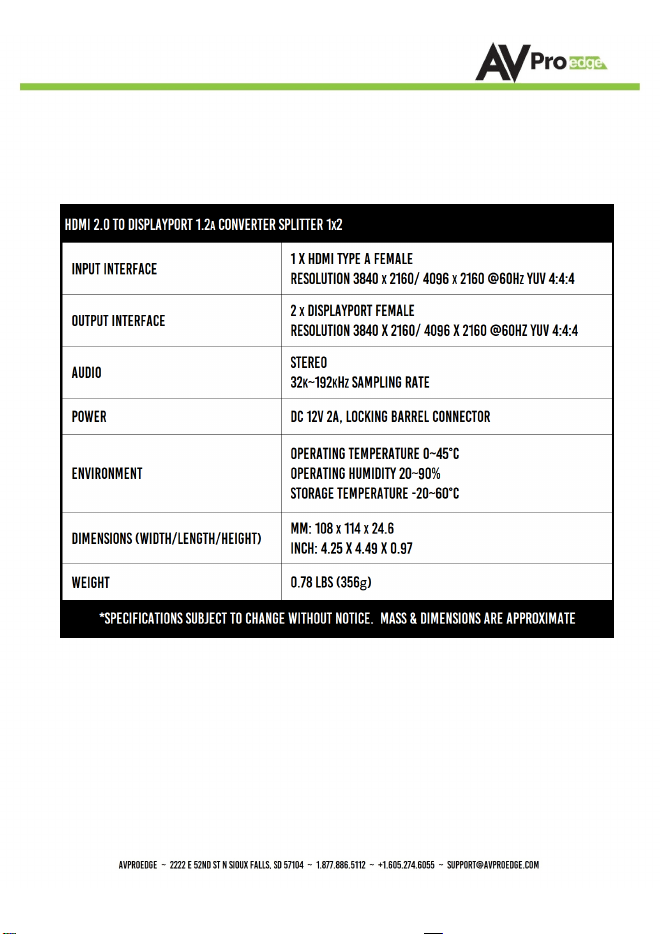
Specifications
AC-CONVERT-HDDP
Page 4
Features
• DisplayPort 1.2a & HDMI 2.0 compliant
• HDMI input supports video bandwidth up to 18Gbps
• The EDID automatically sends the complete video feedback to media
player and provides with high-resolution video quality
• HDMI Input Supports HDCP 1.4 / 2.2
• DisplayPort Output Supports HDCP 1.3
• The dual DisplayPort outputs support link rate RBR/HBR/HBR2
• Resolution up to 4Kx2K@60 4:4:4 8bits
• Stereo audio
• Firmware upgrade via USB port
• Rated current 650mA
Application
• Connects
a variety of HDMI 2.0 sources to DisplayPort 1.2 display
• HDMI
2.0 to 2-port DP 1.2a splitter
• Converts HDMI 2.0 to DP 1.2a input devices as a source of AV
AC-CONVERT-HDDP
Page 5
Product Information
Installation
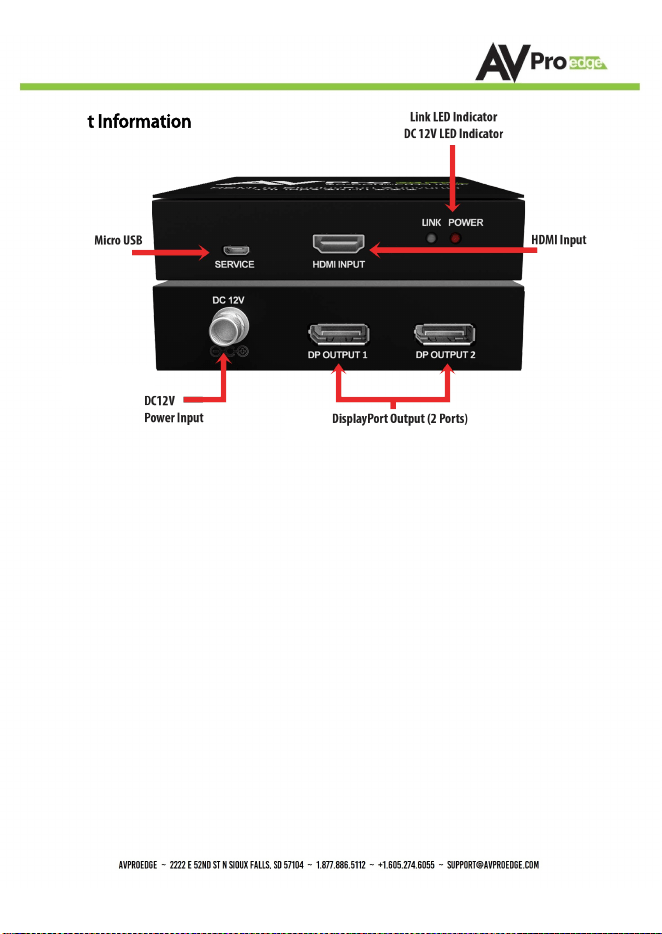
• Connect the HDMI cable to the HDMI Input port of AC-CONVERT-HDDP converter
and connect the DisplayPort cables from your displays to DisplayPort output
ports of AC-CONVERT-HDDP
• Connect the power adapter to DC jack; then the other end to an AC outlet
• Turn all the devices on and it is ready for use
* NOTE
Link LED Indicator:
− Off: No connections
− Blinking: Blue light when system is active, wait for Sink to be attached
and ready
− On: Blue light is on when the system is active and Sink EDID ready
Power LED Indicator:
− Off: Power Off
− On: Power On
AC-CONVERT-HDDP
Page 6

Damage Requiring Service
AC-CONVERT-HDDP
Page 7
• Use the power supply provided. If an alternate supply is required, check voltage,
polarity and that it has sufficient power to supply the device it's connect to.
• Do not operate these products outside the specified temperature and humidity range
given in the above specifications.
• Ensure there is adequate ventilation to allow this product to operate efficiently.
• Repair of the equipment should only be carried out by qualified professionals as these
products contain sensitive components that may be damaged by any mistreatment.
• Only use this product in a dry environment. Do not allow any liquids or harmful
chemicals to come into contact with these products.
• Clean this unit with a soft, dry cloth. Never use alcohol, paint thinner or benzene to
clean this unit.
MaintenanceMaintenance
To ensure reliable operation of this product as well as protecting the safety of any personTo ensure reliable operation of this product as well as protecting the safety of any person
using or handling this device while powered, please observe the following instructions.using or handling this device while powered, please observe the following instructions.
• Product name and model number
• Product serial number
• Details of the issue and any conditions under which the issue is occurring
• The DC power supply cord or AC adapter has been damaged
• Object or liquids have gotten into the unit
• The unit has been exposed to rain
• The unit does not operate normally or exhibits a marked change in performance
• The Unit has been dropped or the housing damaged
Support
Should you experience any problems while using this product, first, refer to the
Troubleshooting section of this manual before contacting Technical Support. When calling, the
following information should be provided:
Warranty
If your product does not work properly because of a defect in materials or workmanship,
AVProEdge (referred to as “the warrantor”) will, for the length of the period indicated
as below, (Parts/Labor (10) Years), which starts with the date of original purchase
(“Limited Warranty period”), at its option either (a) repair your product with new or
refurbished parts, or (b) replace it with a new or a refurbished product. The decision to
repair or replace will be made by the warrantor. During the “Labor” Limited Warranty
period there will be no charge for labor. During the “Parts” warranty period, there will
be no charge for parts. You must mail-in your product during the warranty period. This
Limited Warranty is extended only to the original purchaser and only covers product
purchased as new. A purchase receipt or other proof of original purchase date is required
for Limited Warranty service.
This warranty extends to products purchased directly from AVPro or an authorized dealer.
AVPro is not liable to honor this warranty if the product has been used in any application
other than that for which it was intended, has been subjected to misuse, accidental
damage, modification or improper installation procedures, unauthorized repairs or is
outside of the warranty period. Please direct any questions or issues you may have to your
local dealer before contacting AVPro.
AC-CONVERT-HDDP
Thank you for choosing AVProEdge!
Please contact us with any questions. We are happy to be
of service!
AVProEdge
2222 E 52nd St N
~ Sioux Falls, SD 57104
1-877-886-5112 ~ 605-274-6055
support@avproedge
.com