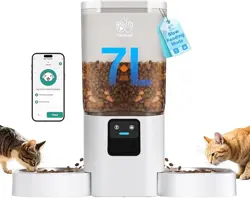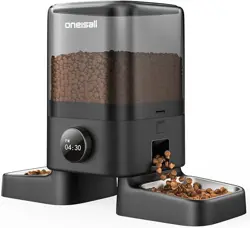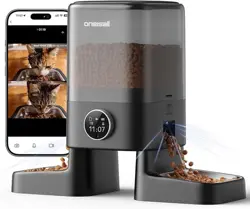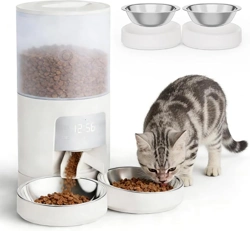

Please read this manual carefully and keep it.
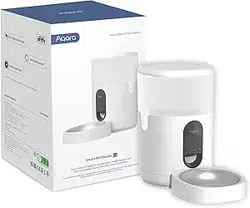
Smart Pet Feeder C1
User Manual
Aqara Smart Pet Feeder C1 01
Aqara SmarterFutterautomatC1
16
Aqara DistributeurDeCroquettesIntelligentC1
23
Aqara Mangiatoia intelligente C1
29
Comedero inteligente Aqara C1
35
42
Aqara 스마트 자동 급식기 C1
Aqara智能寵物餵食器C1
47
Умная кормушка для домашних животных Aqara C1
09
-1-
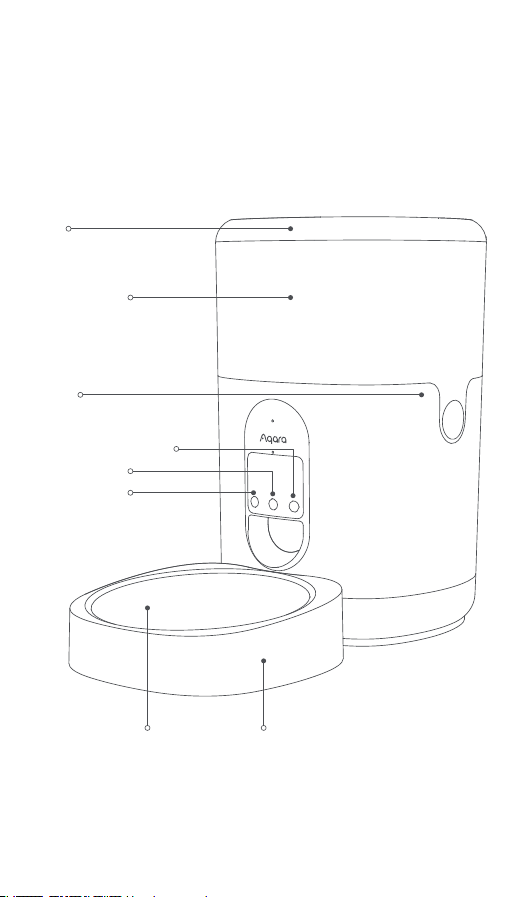
With the Aqara Smart Pet Feeder C1 equipped with Zigbee wireless
communication protocol, you can feed your pet at scheduled times
and portions by our app no matter where you are.
* An Aqara Zigbee 3.0 hub is required. Some functions require support of specific
hubs. For more details, please see: www.aqara.com/support.
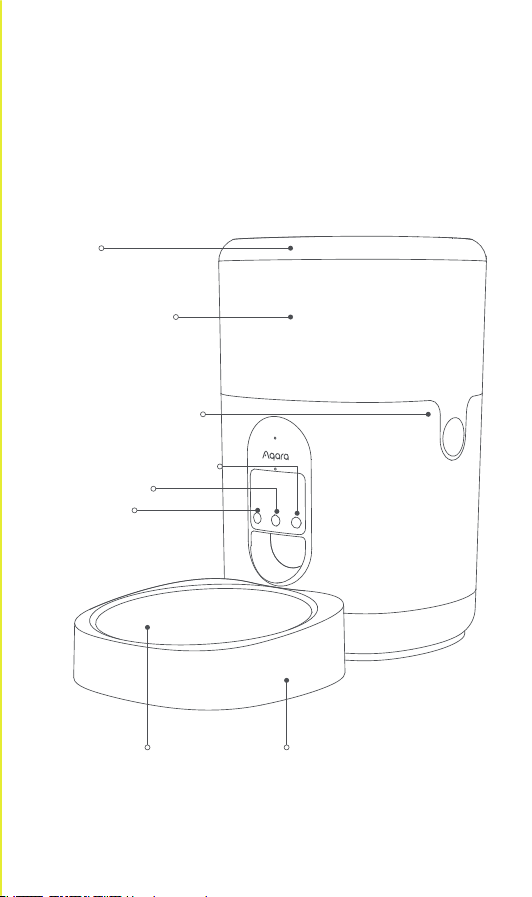
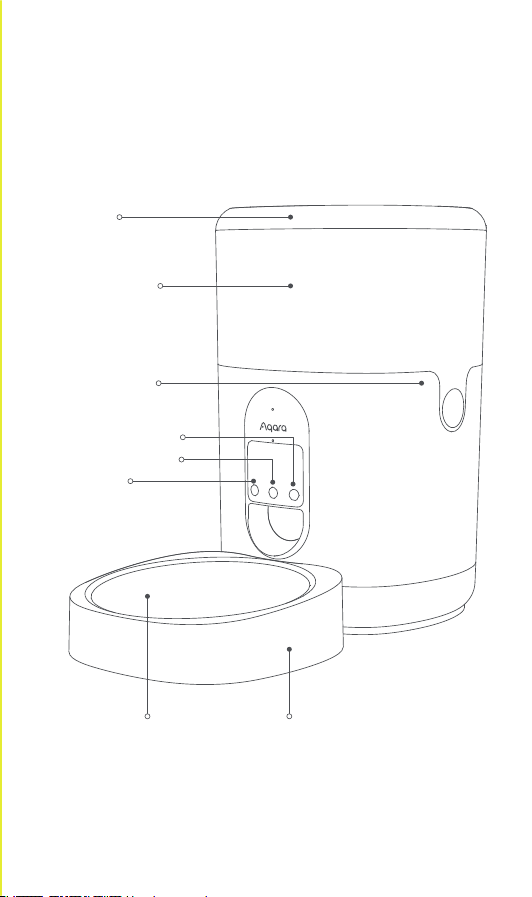
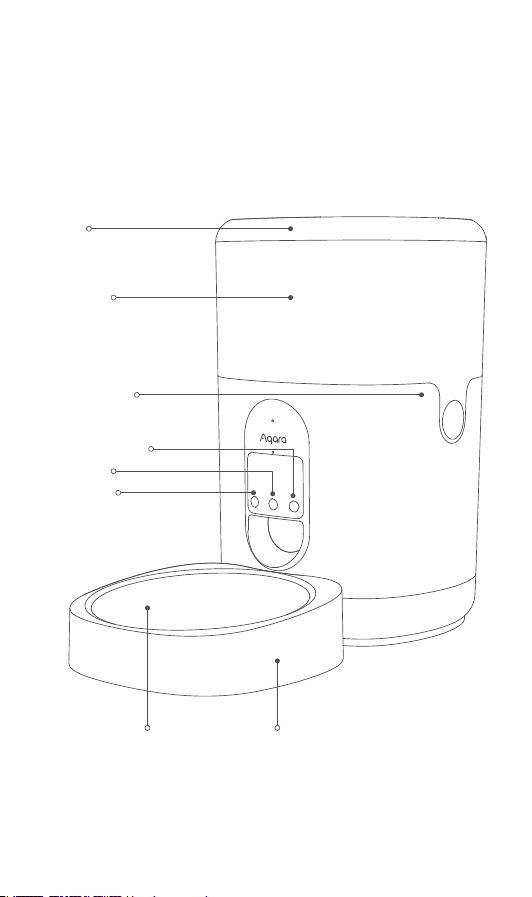
Reset button
Feed button
Voice record button
Lid
Food bucket
Food
bucket clip
Stainless
steel bowl
Plastic bowl
Product Description
-2-
1. This appliance can be used by children aged from 8 years and
above and persons with reduced physical, sensory or mental
capabilities or lack of experience and knowledge if they have been
given supervision or instruction concerning use of the appliance in
a safe way and understand the hazards involved.
2. Children shall not play with the appliance.
3. Cleaning and user maintenance shall not be made by children
without supervision.
4. It must only be supplied at safety extra low voltage corresponding
to the marking on the appliance.
Warnings
Smart Pet Feeder C1 × 1, USB Cable × 1, Stainless Steel Bowl × 1,
Plastic Bowl × 1, Desiccant × 1
What’s in the Box
1. Particle diameter of dry pet food should be limited within 2-12mm.
2. This product is designed for pet cats and small and medium-sized
dogs aged three months and older.
3. The smart pet feeder can only store dry food. It cannot store wet
food or mixing wet and dry food.
4. It is recommended to place the feeder against the wall and away
from tables, chairs and other furniture to reduce the risk of the
feeder being knocked over by the pet.
*Note:
1. A smart phone or a tablet (with iOS or Android system) that can be
connected to Wi-Fi or cellular network.
2. An Aqara hub that supports Zigbee 3.0.
3. 5V1A USB-A power supply such as a wall outlet or charging adapter.
4. Scan the QR code to download the Aqara Home app.
5. Take the desiccant out of the plastic bag and put it into the desicca-
tor slot in the lid.
6. Pour the dry pet food into the food bucket.
Preparation Before Use

-3-
Click the "..." in the upper right corner in the home page of the device
to adjust the settings of the feeding plan, child lock, etc.
Device Setting
Power Supply
1. Please use the adapter to supply power to the feeder under normal
circumstances.
2. The Smart Pet Feeder C1 can also work with dry batteries. Please
open the battery cover at the bottom and put in batteries. In case of
any power failure, the batteries can ensure the power supply.
3. Dry batteries need to be purchased separately. Three D batteries
(LR20 alkaline batteries) are required.
4. When the device is powered by dry batteries, the indicator light will
stay o to save energy, but other functions still work as usual.
1. This product requires an Aqara Zigbee 3.0 hub. Please add the hub
to the app according to the corresponding manual.
2. Click "+" in the upper right corner of the home page in the app to
enter the "Add Accessory" page. Select "Smart Pet Feeder C1" and
the hub to be connected, and follow the instructions on the app.
Hold the reset button for 5 seconds, and then the hub will be
connected.
Device Binding & Initialization
Press the clips on both sides of the food bucket, and you can take it
out to clean.
1. Dierent types of batteries or new and used batteries are not to be
mixed.
2. Insert batteries in the correct polarity as indicated in the battery
compartment.
3. Non-rechargeable batteries are not to be recharged.
4. Waste batteries should be recycled in line with the local laws and
regulations. Do not dispose of them at will to avoid pollution.
5. If the appliance is to be stored unused for a long period, the
batteries should be removed.
6. The supply terminals are not to be short-circuited.
7. Exhausted batteries are to be removed from the appliance and
safely disposed of.
*Note:
Food Bucket Cleaning

-4-
Operation
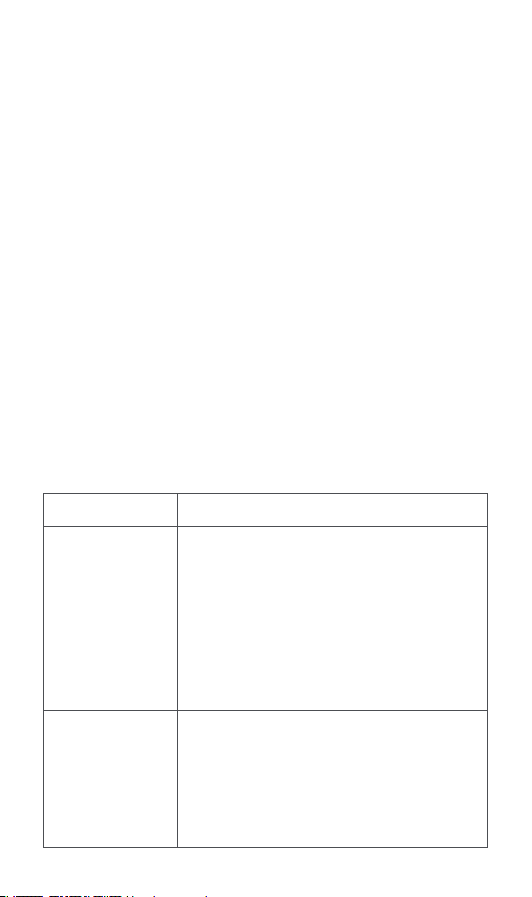
Feed once
Voice recording
Check the
binding state
The device is
restored to
factory settings &
configures
network
Steps
Click the feed button, and the feeder will give
a portion of food once. The number of
portions can be set in the app.
Note: one portion weighs about 6-10g, which
varies with the size of the food particles.
Please set the number of portions for every
feeding according to your pets' habits and the
actual weight of one portion.
Press and hold the voice record button, and
recording will start aer a "beep" sound. Press
and hold the button until you finish the
recording, and then you will hear "beep,
beep" to mark the completion of recording.
Click the reset button. If the indicator light
flashes in blue three times, the device is
connected to the network.
If the indicator light turns red for about 1
second, the device is not connected to the
network.
Press and hold the reset button for 5 seconds
until the indicator light turns blue and flashes
continuously:
the device is restored to factory settings and
is configuring network.
The configuration status will last for 30
seconds, and in this period:
a. If the user completes network configura-
tion for the device successfully via the Aqara
Home app, the indicator will stop flashing.
b. If the configuration fails, the red indicator
will flash shortly and then stop.
c. If there are no other operations, the
indicator will be o aer 30 seconds and
network access will end.
Button Operations
Note: please do not rinse the lower part of the device to avoid any
device failure.

-5-
Changes or modifications not expressly approved by the party
responsible for compliance could void the user's authority to operate
the equipment.
Note: This equipment has been tested and found to comply with the
limits for a Class B digital device, pursuant to part 15 of the FCC Rules.
These limits are designed to provide reasonable protection against
harmful interference in a residential installation. This equipment
generates, uses and can radiate radio frequency energy and, if not
installed and used in accordance with the instructions, may cause
harmful interference to radio communications. However, there is no
guarantee that interference will not occur in a particular installation.
If this equipment does cause harmful interference to radio or
television reception, which can be determined by turning the
equipment o and on, the user is encouraged to try to correct the
interference by one or more of the following measures:
—Reorient or relocate the receiving antenna.
—Increase the separation between the equipment and receiver.
—Connect the equipment into an outlet on a circuit dierent from
that to which the receiver is connected.
—Consult the dealer or an experienced radio/TV technician for help.
Federal Communications Commission (FCC) compliance statement:
1. This device complies with part 15 of the FCC Rules. Operation is
subject to the following two conditions:
(1) This device may not cause harmful interference, and
(2) this device must accept any interference received, including
interference that may cause undesired operation.
Aqara Smart Pet Feeder C1
Color: White
Model Number: PETC1-M01
(PET – Products for pets, C-Care series, M01 – First motorized
product)
Dimensions: 193×193×312 mm
Rated Current: 1A
Rated Voltage: 5V
Operating Temperature: -10~45℃ (14°F ~ 113°F)
Operating Humidity: 0-95% RH, without condensation
IC: 22635- PETC1M01
Wireless Protocol: Zigbee IEEE 802.15.4 (acts as a router/repeater)
FCC ID: 2AKIT-PETC1M01
Product Specifications

-6-
This device contains licence-exempt transmitter(s)/receiver(s) that
comply with Innovation, Science and Economic Development
Canada’s licence-exempt RSS(s). Operation is subject to the
following two conditions:
(1) This device may not cause interference.
(2) This device must accept any interference, including interference
that may cause undesired operation of the device.
This Class B digital apparatus complies with Canadian ICES‐003.
This device complies with RSS‐247 of Industry Canada. Operation
is subject to the condition that this device does not cause harmful
interference.
L'émetteur/récepteur exempt de licence contenu dans le présent
appareil est conforme aux CNR d’Innovation, Sciences et
Développement économique Canada applicables aux appareils
radio exempts de licence. L'exploitation est autorisée aux deux
conditions suivantes :
(1) L'appareil ne doit pas produire de brouillage;
(2) L'appareil doit accepter tout brouillage radioélectrique subi,
même si le brouillage est susceptible d'en compromettre le
fonctionnement.
Cet appareil numérique de la Classe B conforme à la norme
NMB‐003 du Canada.
Cet appareil est conforme à la norme RSS ‐ 247 d'Industrie Canada.
Le fonctionnement est soumis à la condition que cet appareil ne
provoque pas d'interférences nuisibles.
This equipment complies with IC radiation exposure limits set forth
for an uncontrolled environment. This equipment should be
installed and operated with minimum distance of 20 cm between
the radiator and your body. This transmitter must not be co-located
or operating in conjunction with any other antenna or transmitter.
Cet équipement est conforme aux limites d’exposition aux
rayonnements de la IC établies pour unenvironnement non contrôé.
Cet équipement doit être installé et fonctionner à au moins 20cm de
distance d’un radiateur ou de votre corps.Cet émetteur ne doit pas
être co-localisé ou fonctionner en conjonction avec une autre
IC NOTICE TO CANADIAN USERS
2. Changes or modifications not expressly approved by the party
responsible for compliance could void the user's authority to
operate the equipment.
-7-
Zigbee Operation Frequency: 2405-2480 MHz
Zigbee Maximum Output Power ≤ 13 dBm
Under normal use of condition, this equipment should be kept a
separation distance of at least 20cm between the antenna and the
body of the user.
Zigbee Warnings
This equipment complies with FCC radiation exposure limits set forth
for an uncontrolled environment. This equipment should be installed
and operated with minimum distance of 20 cm between the radiator
and your body. This transmitter must not be co-located or operating
in conjunction with any other antenna or transmitter.
RF Exposure statement
Hereby, Lumi United Technology Co., Ltd. declares that the
radio equipment type Smart Pet Feeder C1, PETC1-M01, is
in compliance with Directive 2014/53/EU. The full text of
the EU declaration of conformity is available at the following
internet address:
http://www.aqara.com/DoC/
EU Declaration of Conformity
All products bearing this symbol are waste electrical and
electronic equipment (WEEE as in directive 2012/19/EU)
which should not be mixed with unsorted household waste.
Instead, you should protect human health and the environ-
ment by handing over your waste equipment to a designated
collection point for the recycling of waste electrical and electronic
equipment, appointed by the government or local authorities.
Correct disposal and recycling will help prevent potential negative
consequences to the environment and human health. Please contact
the installer or local authorities for more information about the
location as well as terms and conditions of such collection points.
WEEE Disposal and Recycling Information
antenne ou un autre émetteur.

-8-
Online Customer Service: www.aqara.com/support
Customer Support Email: support@aqara.com
Website: www.aqara.com
Manufacturer: Lumi United Technology Co., Ltd.
Address: Room 801-804, Building 1, Chongwen Park, Nanshan iPark,
No. 3370, Liuxian Avenue, Fuguang Community, Taoyuan Residential
District, Nanshan District, Shenzhen, China
Made in China
Hereby,Lumi United Technology Co., Ltd. declares that the
radio equipment type Smart Pet Feeder C1, PETC1-M01, is in
compliance with Directive 2017 (SI 2017 No. 1206, as
amended by SI 2019 No. 696).
The full text of the UK declaration of conformity is available at the
following internet address: http://www.aqara.com/DoC/.
UK Declaration of Conformity
-9-
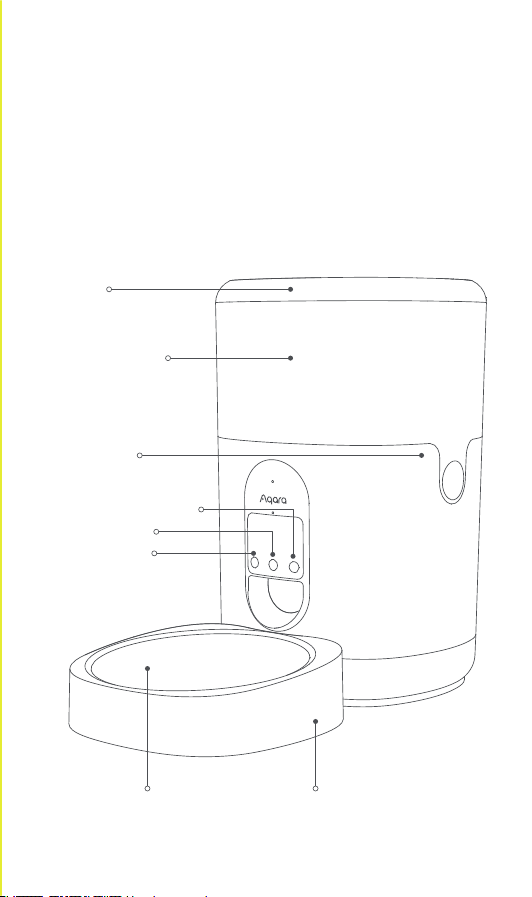
С Умной кормушкой для домашних животных Aqara C1,
оснащенной протоколом беспроводной связи Zigbee, Вы
сможете кормить Вашего питомца согласно
назначенному времени и порциям с помощью нашего
приложения, где бы Вы ни находились.
*Необходим концентратор Aqara Zigbee 3.0 Некоторые функции требуют
поддержки опре де ленных концентраторов. Более подробную информацию
см. www.aqara.com/support
Для пользователей из РФ: https://aqara.ru/support.
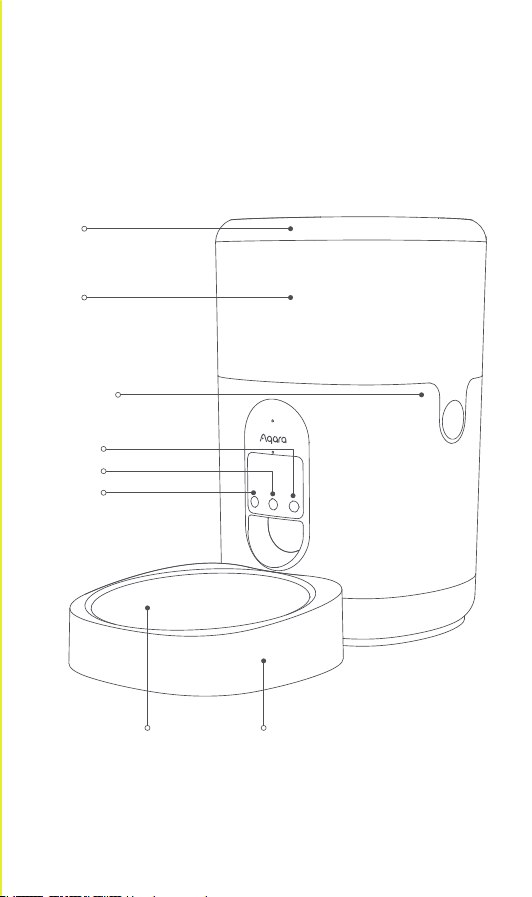
Кнопка сброса
Кнопка подачи
Кнопка записи голоса
Крышка
Ведро для корма
Зажим ведра
для корма
Чаша из нержавеющей
стали
Пластиковая чаша
Описание продукта

-10-
1. Этот прибор может использоваться детьми в возрасте от 8 лет
и старше, а также лицами с ограниченными физическими,
сенсорными или умственными способностями или с
недостатком опыта и знаний, если они находятся под
присмотром или проинструктированы относительно
безопасного использования прибора и понимают связанные с
ним опасности.
2. Дети не должны играть с прибором.
3. Дети не должны производить очистку и обслуживание
прибора без присмотра.
4. Электропитание прибора должно быть только при безопасном
сверхнизком напряжении, соответствующем маркировке на
приборе.
Предупреждения
Умная кормушка для домашних животных C1 × 1, Кабель USB × 1,
Чаша из нержавеющей стали × 1, Пластиковая чаша × 1,
Осушитель × 1
Комплектация
1. Смартфон или планшет (с системой iOS или Android), который
может быть подключен к Wi-Fi или сотовой сети.
2. Концентратор Aqara, поддерживающий Zigbee 3.0.
3. Источник питания 5V1A USB-A, например, адаптер для зарядки
мобильного телефона или иной техники.
4. Отсканируйте QR-код, чтобы загрузить приложение Aqara
Home.
5. Извлеките осушитель из пластикового пакета и поместите его в
слот осушителя в крышке.
6. Насыпьте сухой корм для домашних животных в ведро для
корма.
Подготовка перед использованием

-11-
Нажмите «...» в правом верхнем углу на главной странице
устройства, чтобы настроить параметры плана кормления,
блокировки от детей и т. д.
Настройка устройства
1. Диаметр частиц сухого корма для домашних животных не
должен превышать 2-12 мм.
2. Данный продукт предназначен для домашних кошек и собак
маленького или среднего размера в возрасте от трех месяцев и
старше.
3. В Умной кормушке для домашних животных можно хранить
только сухой корм. В ней нельзя хранить влажный корм или
смесь влажного и сухого корма.
4. Рекомендуется размещать кормушку у стены и подальше от
столов, стульев и другой мебели, чтобы уменьшить риск
опрокидывания кормушки питомцем.
*Примечание:
1. Для этого устройства необходим концентратор Aqara Zigbee 3.0
Добавьте концентратор в приложение согласно
соответствующему руководству.
2. Нажмите «+» в правом верхнем углу главной страницы
приложения, чтобы перейти на страницу «Добавить
аксессуар». Выберите «Умная кормушка для домашних
животных C1» и концентратор, который необходимо
подключить, затем следуйте инструкциям в приложении.
Удерживайте кнопку сброса на устройстве течение 5 секунд,
после чего устройство будет подключено к концентратору.
Привязка и инициализация устройства

-12-
Нажмите на зажимы с обеих сторон ведра для корма, чтобы
извлечь его для очистки.
Примечание: не промывайте нижнюю часть устройства, чтобы
избежать поломки.
Источник питания
1. Батареи разных типов либо новые и использованные батареи
нельзя использовать вместе.
2. Вставьте батарейки, соблюдая полярность, указанную в
батарейном отсеке.
3. Неперезаряжаемые батареи не подлежат перезарядке.
4. Отработанные батарейки следует у тилизировать в
соответствии с местными законами и правилами. Не
выбрасывайте их бесконтрольно во избежание загрязнения.
5. Если устройство не будет использоваться долгое время,
батареи следует извлечь.
6. Клеммы питания не должны быть короткозамкнутыми.
7. Разряженные батареи следует извлечь из устройства и
безопасно утилизировать.
Примечание:
1. В обычных условиях используйте адаптер для подачи питания
в кормушку.
2. Устройство может использовать батареи в качестве
резервного питания . Откройте крышку батарейного отсека в
нижней части и вставьте батарейки. В случае любого сбоя
питания от сети батарейки смогут обеспечить
работоспособность устройства.
3. Батарейки необходимо приобретать отдельно. Требуются три
батареи D (щелочные батареи LR20).
4. Когда устройство работает от батареек, индикатор не будет
гореть для экономии энергии, однако другие функции
продолжают работать в обычном режиме.
Очистка ведра для корма

-13-
Операция
Кормление
Запись голоса
Проверка
подключения
Сброс настроек
и подключение к
сети
Шаги
Нажмите кнопку подачи, кормушка подаст
порцию корма на один раз. Количество
порций можно установить в приложении.
Примечание: одна порция весит около 6-10
г в зависимости от размера пищевых
частиц. Устанавливайте количество порций
для каждого кормления в соответствии с
особенностями Ваших питомцев и
фактическим весом одной порции.
Нажмите и удерживайте кнопку записи
голоса, запись начнется после звукового
сигнала «бип». Нажмите и удерживайте
кнопку, пока не закончите запись, после
чего Вы услышите звук «бип-бип»,
обозначающий завершение записи.
Нажмите кнопку сброса. Когда индикатор
мигнул синим трижды, устройство
подключено к сети.
Если индикатор загорается красным
примерно на 1 секунду, устройство не
подключено к сети.
Нажмите и удерживайте кнопку сброса в
течение 5 секунд, пока индикатор не
загорится синим и непрерывно замигает:
устройство восстановилось до заводских
настроек и настраивает сеть.
Настройка будет длиться 30 секунд, и в
этот период:
a. При успешном завершении
конфигурации сети индикатор перестанет
мигать.
b. Если конфигурация не удалась, красный
индикатор кратковременно мигнет.
c. Если других операций не будет,
индикатор погаснет через 30 секунд и
доступ к сети завершится.
Операции с кнопками

-14-
1. Этот прибор - НЕ игрушка. Пожалуйста, не допускайте к нему
детей.
2. Данный прибор предназначен только дляиспользования
внутри помещений. Не используйте его во влажных средах или
на открытом воздухе.
3. Оберегайте прибор от воздействия влаги, не допускайте
попадания воды или других жидкостей на устройство.
4. Не размещайте прибор вблизи источников тепла.
5. Не помещайте прибор в закрытый корпус, если там нет
нормальной вентиляции.
6. Не пытайтесь отремонтировать прибор самостоятельно. Все
ремонтные работы должны выполняться авторизованным
специалистом.
Покидая питомца на длительное время позаботьтесь о
резервном способе его питания на случай сбоя устройства
(возможность вызова соседей, родственников и т.п.).
Этот прибор предназначен только для повышения удобства,
качества домашних развлечений и напоминания о статусе
устройства. Он не предназначен для использования в качестве
охранного оборудования для дома, здания, склада или любых
других мест. Если пользователь нарушает инструкции по
использованию прибора, производитель не несет никакой
ответственности за риски и повреждения имущества.
Умная кормушка для домашних животных Aqara C1
Цвет: Белый
Модель: PETC1-M01
(PET – Products for pets, C-Care series, M01 – First motorized
product)
Размеры: 193×193×312 мм
Номинальный ток: 1 A
Номинальное напряжение: 5 В
Рабочая температура: -10~45°C(14°F ~ 113°F)
Рабочая влажность: 0-95% относительной влажности, без
конденсации
Беспроводной протокол: Zigbee IEEE 802.15.4 (выполняет
функции маршрутизатора / ретранслятора)
Дата производства указана на упаковке
Спецификации продукта
Предупреждения

Оборудование должно быть защищено от внешних воздействий.
Допустимая температура окружающего воздуха -20° – +60°C (-4° –
140°F)
Правила и условия хранения и транспортировки
В случае обнаружения неисправности оборудования:
1. Извлеките элемент питания;
2. Обратитесь в сервисный центр для получения консультации
или ремонта оборудования
* Оборудование не нуждается в периодическом обслуживании в
течение срока службы
Клиентская онлайн-служба: www.aqara.com/support
Для пользователей из РФ: https://aqara.ru/support
Веб-сайт: www.aqara.com
Производитель: Lumi United Technology Co., Ltd.
Адрес: Офис 801-804, здание 1, парк Чонгвен, Наньшань iPark, №
3370, проспект Люсянь, микрорайон Фугуан, жилой район
Таоюань, р-н Наньшань, г. Шэньчжэнь, Китай
Сделано в Китае
Информация о мерах при неисправности
оборудования
-15-
Mit dem Aqara Smarten Futterautomat C1, der mit dem drahtlosen
Zigbee-Kommunikationsprotokoll ausgestattet ist, können Sie Ihr
Haustier zu festgelegten Zeiten und Portionen über unsere App
füttern, egal wo Sie sind.
* Ein Aqara Zigbee 3.0 Hub ist erforderlich. Einige Funktionen erfordern die
Unterstützung bestimmter Hubs. Für weitere Details siehe: www.aqara.com/sup-
port.
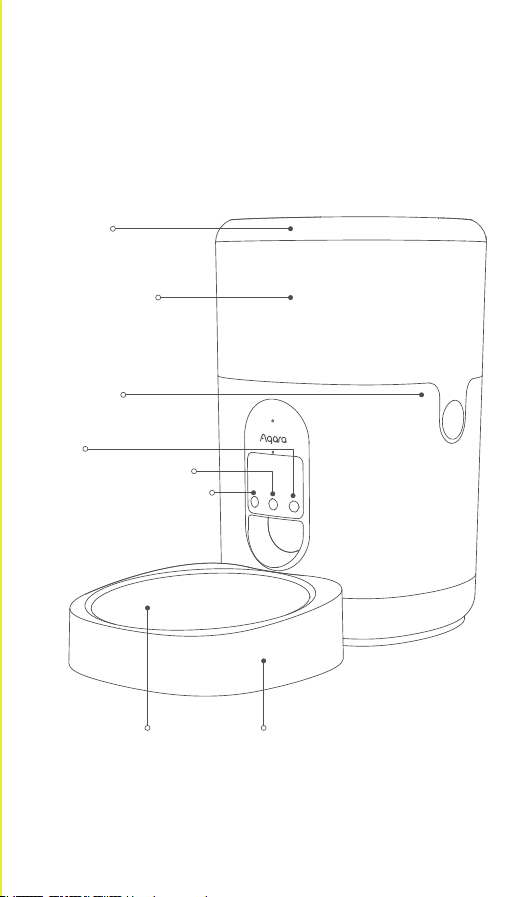
Reset-Taste
Fütterungstaste
Sprachaufzeichnungstaste
Deckel
Lebensmitteleimer
Lebensmitteleimer-Clip
Edelstahlschüssel
Kunststoschüssel
Beschreibung des Produkts
-16-

1. Dieses Gerät kann von Kindern ab 8 Jahren und darüber sowie von
Personen mit verringerten physischen, sensorischen oder
geistigen Fähigkeiten oder Mangel an Erfahrung und Wissen
benutzt werden, wenn sie beaufsichtigt oder bezüglich des
sicheren Gebrauchs des Geräts unterwiesen wurden und die
daraus resultierenden Gefahren verstehen.
2. Kinder dürfen nicht mit dem Gerät spielen.
3. Die Reinigung und Wartung durch den Benutzer darf nicht von
Kindern ohne Aufsicht durchgeführt werden.
4. Es darf nur mit Schutzkleinspannung versorgt werden, die der
Kennzeichnung auf dem Gerät entspricht.
Warnungen
Smarter Futterautomat C1 × 1, USB-Kabel × 1, Edelstahlnapf × 1,
Kunststonapf × 1, Trockenmittel ×1
Was ist in der Box?
1. Ein Smartphone oder ein Tablet (mit IOS- oder Android-System),
das mit einem Wifi- oder Mobilfunknetz verbunden werden kann.
2. Ein Aqara-Hub, der Zigbee 3.0 unterstützt
3. 5V1A USB-A-Stromversorgung, z. B. eine Steckdose oder ein
Ladeadapter
4. Scannen Sie den QR-Code, um die Aqara Home App herunterzu-
laden
5. Nehmen Sie das Trockenmittel aus dem Kunststobeutel und
setzen Sie es in den Schlitz des Exsikkators im Deckel ein.
6. Füllen Sie das trockene Tierfutter in den Futtereimer.
Vorbereitung vor der Verwendung
-17-

Klicken Sie auf der Startseite des Geräts auf „...“ in der oberen rechten
Ecke, um die Einstellungen für den Fütterungsplan, die Kindersi-
cherung usw. anzupassen.
Geräteeinstellung
1. Der Partikeldurchmesser von trockenem Tierfutter sollte zwischen
2 und 12 mm liegen.
2. Dieses Produkt ist für Hauskatzen sowie kleine und mittelgroße
Hunde ab einem Alter von drei Monaten geeignet.
3. Der Smarte Futterautomat kann nur Trockenfutter aufbewahren. Er
kann kein Nassfutter oder eine Mischung aus Nass- und Trockenfut-
ter aufbewahren.
4. Es wird empfohlen, den Futterautomaten an der Wand und nicht in
der Nähe von Tischen, Stühlen und anderen Möbeln aufzustellen,
um das Risiko zu verringern, dass der Futterautomat von Ihrem
Haustier umgestoßen wird.
*Anmerkung:
1. Dieses Produkt erfordert einen Aqara Zigbee 3.0 Hub. Bitte fügen
Sie den Hub gemäß dem entsprechenden Handbuch zur App
hinzu.
2. Klicken Sie auf „+“ in der oberen rechten Ecke der Startseite der
App, um die Seite „Zubehör hinzufügen“ aufzurufen. Wählen Sie
„Smarten Futterautomat C1“ und den Hub aus, der verbunden
werden soll, und folgen Sie den Anweisungen in der App. Halten
Sie die Reset-Taste für 5 Sekunden gedrückt, dann wird der Hub
verbunden.
Gerätebindung & Initialisierung
-18-

Drücken Sie die Clips auf beiden Seiten des Lebensmitteleimers, und
Sie können ihn zum Reinigen herausnehmen.
Hinweis: Bitte spülen Sie den unteren Teil des Geräts nicht ab, um
einen Geräteausfall zu vermeiden.
Stromversorgung
1. Verschiedene Batterietypen oder neue und gebrauchte Batterien
dürfen nicht gemischt werden.
2. Legen Sie die Batterien mit der richtigen Polarität ein, wie im
Batteriefach angegeben.
3. Nicht wiederaufladbare Batterien dürfen nicht wieder aufgeladen
werden.
4. Altbatterien sollten gemäß den örtlichen Gesetzen und
Vorschrien recycelt werden. Entsorgen Sie sie nicht nach
Belieben, um Umweltverschmutzung zu vermeiden.
5. Wenn das Gerät über einen längeren Zeitraum unbenutzt gelagert
wird, sollten die Batterien entfernt werden.
6. Die Versorgungsklemmen dürfen nicht kurzgeschlossen werden.
7. Entladene Batterien sind aus dem Gerät zu entfernen und sicher
zu entsorgen.
*Anmerkung:
1. Bitte verwenden Sie den Adapter, um den Futterautomat unter
normalen Umständen mit Strom zu versorgen
2. Der Smarten Futterautomat C1 kann auch mit Trockenbatterien
betrieben werden. Bitte önen Sie die Batterieabdeckung an der
Unterseite und legen Sie die Batterien ein. Im Falle eines
Stromausfalls können die Batterien die Energieversorgung
sicherstellen.
3. Trockenbatterien müssen separat erworben werden. Es werden
drei D-Batterien (LR20-Alkalibatterien) benötigt.
4. Wenn das Gerät mit Trockenbatterien betrieben wird, bleibt die
Anzeigeleuchte ausgeschaltet, um Energie zu sparen, aber die
anderen Funktionen funktionieren wie gewohnt.
Reinigung von Lebensmitteleimern
-19-

Operation
Einmal füttern
Sprachaufzeich-
nung
Überprüfung des
Bindungsstatus
Das Gerät wird
auf die
Werkseinstellun-
gen zurückge-
setzt und
konfiguriert das
Netzwerk
Schritte
Klicken Sie auf die Schaltfläche „Füttern“,
und der Futterautomat gibt einmalig eine
Portion Futter aus. Die Anzahl der Portionen
kann in der App eingestellt werden.
Hinweis: Eine Portion wiegt etwa 6-10 g, was
je nach Größe der Futterpartikel variiert. Bitte
legen Sie die Anzahl der Portionen für jede
Fütterung entsprechend den Gewohnheiten
Ihrer Haustiere und dem tatsächlichen
Gewicht einer Portion fest.
Halten Sie die Sprachaufnahmetaste
gedrückt, und die Aufnahme beginnt nach
einem „Piepton“. Halten Sie die Taste
gedrückt, bis Sie die Aufnahme beendet
haben. Dann hören Sie „Piep, Piep“, um den
Abschluss der Aufnahme zu markieren.
Klicken Sie auf die Reset-Taste. Wenn die
Kontrollleuchte dreimal blau blinkt, ist das
Gerät mit dem Netzwerk verbunden.
Wenn die Anzeige für etwa 1 Sekunde rot
leuchtet, ist das Gerät nicht mit dem
Netzwerk verbunden.
Halten Sie die Reset-Taste 5 Sekunden lang
gedrückt, bis die Anzeigeleuchte blau
leuchtet und kontinuierlich blinkt:
das Gerät wird auf die Werkseinstellungen
zurückgesetzt und konfiguriert das Netzwerk.
Der Konfigurationsstatus bleibt 30 Sekunden
lang bestehen, und in diesem Zeitraum:
a. Wenn der Benutzer die Netzwerkkonfigura-
tion für das Gerät über die Aqara Home App
erfolgreich abgeschlossen hat, hört die
Anzeige auf zu blinken.
b. Wenn die Konfiguration fehlschlägt, blinkt
die rote Anzeige kurz auf und bleibt dann
stehen.
c. Wenn keine weiteren Vorgänge stattfinden,
erlischt die Anzeige nach 30 Sekunden und
der Netzzugang wird beendet.
Tastenbedienung
-20-

Zigbee-Betriebsfrequenz: 2405-2480 MHz
Zigbee Maximale Ausgangsleistung ≤ 13 dBm
Bei normalem Gebrauch sollte ein Abstand von mindestens 20 cm
zwischen der Antenne und dem Körper des Benutzers eingehalten
werden.
Zigbee-Warnungen
EU-Konformitätserklärung
Aqara Smarter Futterautomat C1
Farbe: Weiß
Modellnummer: PETC1-M01
(PET – Products for pets, C-Care series, M01 – First motorized
product)
Abmessungen: 193×193×312 mm
Nennstrom: 1A
Nennspannung: 5V
Betriebstemperatur: -10~45°C (14°F ~ 113°F)
Lufeuchtigkeit im Betrieb: 0-95% RH, ohne Kondensation
Arbeitsabstand: 30 m (in geschlossenen Räumen und ohne Schutz)
Drahtloses Protokoll: Zigbee IEEE 802.15.4 (fungiert als router/re-
peater)
Produktspezifikationen
Hiermit erklärt Lumi United Technology Co.,Ltd., dass das
Funkgerät des Typs Smarten Futterautomat C1,
PETC1-M01, mit der Richtlinie 2014/53/EU konform ist. Der
vollständige Text der EU-Konformitätserklärung ist unter der
folgenden Internetadresse verfügbar:
http://www.aqara.com/DoC/
-21-

Online-Kundendienst: www.aqara.com/support
Kundenbetreuung E-Mail: [email protected]om
Website: www.aqara.com
Hersteller: Lumi United Technology Co, Ltd.
Anschri: Zimmer 801-804, Gebäude 1, Chongwen Park, Nanshan
iPark, Nr. 3370, Liuxian Avenue, Fuguang Gemeinscha, Taoyuan
Residential Distrikt, Nanshan Distrikt, Shenzhen, China
Made in China
Informationen zu Entsorgung und Recycling von
Elektro- und Elektronik-Altgeräten
Alle Produkte, die dieses Symbol tragen, sind Elektro- und
Elektronik-Altgeräte (WEEE gemäß Richtlinie 2012/19/EU), die
nicht in den unsortierten Hausmüll gegeben werden dürfen.
Stattdessen sollten Sie die menschliche Gesundheit und die
Umwelt schützen, indem Sie Ihre Altgeräte bei einer
ausgewiesenen Sammelstelle für das Recycling von Elektro- und
Elektronik-Altgeräten abgeben, die von der Regierung oder den
lokalen Behörden bestimmt wurde. Die ordnungsgemäße
Entsorgung und Wiederverwertung trägt dazu bei, mögliche
negative Folgen für die Umwelt und die menschliche Gesundheit zu
vermeiden. Bitte wenden Sie sich an den Installateur oder die
örtlichen Behörden, um weitere Informationen über den Standort
und die Bedingungen solcher Sammelstellen zu erhalten.
-22-
Avec l'Aqara DistributeurDeCroquettesIntelligentC1 équipée du
protocole de communication sans fil Zigbee, vous pouvez nourrir
votre animal à des horaires et des portions programmées par notre
application, où que vous soyez.
* Un hub Aqara Zigbee 3.0 est nécessaire. Certaines fonctions nécessitent la
prise en charge des hubs spécifiques. Pour plus de détails, veuillez consulter :
www.aqara.com/support.
Bouton de réinitialisation
Bouton d'alimentation
Bouton d'enregistrement
vocal
Couvercle
Seau alimentaire
Clip pour seau
alimentaire
Bol en acier
inoxydable
Bol en plastique
Description du produit
-23-

1. Cet appareil peut être utilisé par des enfants à partir de 8 ans et
par des personnes aux capacités physiques, sensorielles ou
mentales réduites, ou manquant d'expérience et de connaissanc-
es, s'ils ont reçu une surveillance ou des instructions concernant
l'utilisation de l'appareil en toute sécurité et s'ils comprennent les
risques encourus.
2. Les enfants ne doivent pas jouer avec l'appareil.
3. Le nettoyage et l'entretien par l'utilisateur ne doivent pas être
eectués par des enfants sans surveillance.
4. Doit être alimentée à une très basse tension de sécurité, comme
indiqué par sur l'étiquette de l'appareil.
Avertissements
DistributeurDeCroquettesIntelligentC1 × 1, Câble USB × 1, Bol en
acier inoxydable × 1, Bol en plastique × 1, Dessicant ×1
Que trouverez-vous dans la boîte ?
1. Le diamètre des particules des aliments secs pour animaux de
compagnie doit être limité à 2-12 mm.
2. Ce produit est conçu pour les chats de compagnie et les chiens de
*Remarque:
1. Un smartphone ou une tablette (avec système iOS ou Android) qui
peut être connecté au Wi-Fi ou au réseau cellulaire.
2. Un hub Aqara qui prend en charge Zigbee 3.0.
3. Une alimentation USB-A 5V1A, telle qu'une prise murale ou un
adaptateur de charge.
4. Scannez le code QR pour télécharger l'application Aqara Home.
5. Sortez le dessicant du sac plastique et mettez-le dans la fente du
dessicateur du couvercle.
6. Versez les aliments secs pour animaux de compagnie dans le seau
à nourriture.
Préparation avant l'utilisation
-24-

Cliquez sur le bouton "..." dans le coin supérieur droit de la page
d'accueil de l'appareil pour régler les paramètres du plan
d'alimentation, de la sécurité enfants, etc.
Réglage du dispositif
Alimentation électrique
1. Veuillez utiliser l'adaptateur pour alimenter le chargeur dans des
circonstances normales.
2. Le DistributeurDeCroquettesIntelligentC1 peut également
fonctionner avec des piles sèches. Ouvrez le couvercle du
compartiment à piles situé en bas de l'appareil et insérez-y des
piles. En cas de panne de courant, les piles peuvent assurer
l'alimentation électrique.
3. Les piles sèches doivent être achetées séparément. Trois piles D
(piles alcalines LR20) sont nécessaires.
4. Lorsque l'appareil est alimenté par des piles sèches, le voyant
lumineux reste éteint pour économiser de l'énergie, mais les
autres fonctions continuent de fonctionner normalement.
1. Ce produit nécessite un hub Aqara Zigbee 3.0. Veuillez ajouter le
hub à l'application conformément au manuel correspondant.
2. Cliquez sur "+" dans le coin supérieur droit de la page d'accueil de
l'application pour accéder à la page "Ajouter un accessoire".
Sélectionnez " DistributeurDeCroquettesIntelligentC1 " et le hub
à connecter, puis suivez les instructions de l'application.
Maintenez le bouton de réinitialisation pendant 5 secondes, puis le
hub sera connecté.
Liaison et Initialisation du Dispositif
petite et moyenne taille âgés de trois mois ou plus.
3. La distributeurdecroquettesintelligentpeut uniquement stocker
des aliments secs. Elle ne peut pas stocker d'aliments humides ou
mélanger des aliments humides et secs.
4. Il est recommandé de placer la mangeoire contre le mur et à l'écart
des tables, chaises et autres meubles pour réduire le risque que la
mangeoire soit renversée par l'animal.
-25-
Appuyez sur les clips de chaque côté du seau à aliments, et vous
pouvez le sortir pour le nettoyer.
Remarque : veuillez ne pas rincer la partie inférieure de l'appareil
pour éviter toute panne de l'appareil.
1. Ne pas mélanger diérents types de piles ni de piles neuves et
déchargées.
2. Insérez les piles en respectant la polarité indiquée dans le
compartiment à piles.
3. Ne pas recharger des piles non rechargeables.
4. Les piles usagées doivent être recyclées conformément aux lois et
réglementations locales. Ne les jetez pas à souhait pour éviter
toute pollution.
5. Si l'appareil doit être stocké pendant une longue période, les piles
doivent en être retirées.
6. Ne pas mettre les terminaux des piles en court-circuit.
7. Retirer les piles vides de l'appareil et les éliminez dans le respect
des réglementations.
*Remarque :
Nettoyage du seau alimentaire
Opération
Alimentation une
fois
Enregistrement
vocal
Étapes
Cliquez sur le bouton alimentation, et le
distributeur donnera une portion de
nourriture une fois. Le nombre de portions
peut être réglé dans l'application.
Remarque : une portion pèse environ 6 à 10 g,
ce qui varie en fonction de la taille des
particules de nourriture. Veuillez régler le
nombre de portions pour chaque repas en
fonction des habitudes de votre animal et du
poids réel de chaque portion.
Appuyez et maintenez le bouton d'enregis-
trement vocal, et l'enregistrement
commencera après un "bip" sonore. Appuyez
sur le bouton et maintenez-le enfoncé jusqu'à
ce que vous ayez terminé l'enregistrement,
puis vous entendrez un "bip, bip" pour
marquer la fin de l'enregistrement.
Opérations sur les boutons
-26-

Fréquence de fonctionnement de Zigbee : 2405-2480 MHz
Puissance de sortie maximale de Zigbee ≤ 13 dBm
Dans des conditions normales d'utilisation, cet équipement doit être
maintenu à une distance de séparation d'au moins 20 cm entre
l'antenne et le corps de l'utilisateur.
Avertissements Zigbee
Aqara DistributeurDeCroquettesIntelligentC1
Couleur: blanc
Numéro de modèle : PETC1-M01
(PET – Products for pets, C-Care series, M01 – First motorized product)
Dimensions : 193×193×312 mm
Courant nominal : 1A
Tension nominale : 5V
Température de fonctionnement : -10~45 ℃ (14 °F ~ 113 °F)
Humidité de fonctionnement : 0-95% RH, sans condensation
Protocole sans fil: ZigBee IEEE 802.15.4 (en tant que routeur /répéteur)
Spécifications du produit
Vérifier l'état de
la liaison
Cliquez sur le bouton de réinitialisation. Si le
voyant lumineux clignote en bleu trois fois,
l'appareil est connecté au réseau.
Si le voyant lumineux devient rouge pendant
environ 1 seconde, l'appareil n'est pas
connecté au réseau.
L'appareil est
restauré aux
paramètres
d'usine et
configure le
réseau.
Appuyez sur le bouton de réinitialisation et
maintenez-le enfoncé pendant 5 secondes
jusqu'à ce que le voyant lumineux devienne
bleu et clignote en continu :
L’appareil est restauré aux paramètres
d'usine et est en train de configurer le réseau.
L'état de configuration durera 30 secondes,
et pendant cette période :
a. Si l'utilisateur termine avec succès la
configuration du réseau pour l'appareil via
l'application Aqara Home, le voyant cessera
de clignoter.
b. Si la configuration échoue, l'indicateur
rouge clignote brièvement puis s'arrête.
c. S'il n'y a pas d'autres opérations,
l'indicateur s'éteint au bout de 30 secondes
et l'accès au réseau se termine.
-27-
Service clientèle en ligne : www.aqara.com/support
E-mail du service clientèle : support@aqara.com
Site Web: www.aqara.com
Fabricant: Lumi United Technology Co., Ltd.
Adresse : Salle 801-804, Bâtiment 1, Chongwen Park, Nanshan iPark,
No. 3370, Avenue de Liuxian, Communauté de Fuguang, District
résidentiel de Taoyuan, District de Nanshan, Shenzhen, Chine
Fabriqué en Chine
Tous les produits portant ce symbole sont des déchets
d'équipements électriques et électroniques (DEEE selon la
directive 2012/19/UE) qui ne doivent pas être mélangés aux
déchets ménagers non triés. Vous devez plutôt protéger la
santé humaine et l'environnement en remettant vos déchets
d'équipements à un point de collecte désigné pour le recyclage des
déchets d'équipements électriques et électroniques, nommé par le
gouvernement ou les autorités locales. Une élimination et un
recyclage corrects permettront d'éviter les conséquences négatives
potentielles sur l'environnement et la santé humaine. Veuillez
contacter l'installateur ou les autorités locales pour plus d'informa-
tions sur l'emplacement et les conditions de ces points de collecte.
Informations sur l'élimination et le recyclage des DEEE
Par la présente, Lumi United Technology Co., Ltd. déclare
que l'équipement radio de type DistributeurDeCroquettes
Intelligent C1, PETC1-M01, est conforme à la directive
2014/53/EU. Le texte intégral de la déclaration de conformité UE est
disponible à l'adresse internet suivante :
http://www.aqara.com/DoC/
Déclaration de conformité UE
-28-
Cet appareil et
ses accessoires
se recyclent
À DÉPOSER
EN MAGASIN
À DÉPOSER
EN DÉCHÈTERIE
OU
FRFR
Con l'Aqara Mangiatoia intelligente C1 dotata di protocollo di
comunicazione senza fili Zigbee, puoi dare da mangiare al tuo
animale domestico a orari e porzioni programmate dalla nostra app,
non importa dove ti trovi.
* È richiesto un hub Aqara Zigbee 3.0 Alcune funzioni richiedono il supporto di
hub specifici. Per maggiori dettagli, vedi: www.aqara.com/support.
Tasto Reset
Tasto di accensione
Tasto di
registrazione vocale
Coperchio
Secchio del cibo
Clip del
secchio del cibo
Ciotola in acciaio inox Ciotola di plastica
Descrizione del prodotto
1. Questo apparecchio può essere usato da bambini a partire da 8
anni e da persone con ridotte capacità fisiche, sensoriali o mentali
o con mancanza di esperienza e conoscenza, a condizione che
Avvertenze
-29-
Mangiatoia intelligente C1 × 1, cavo USB × 1, ciotola in acciaio
inossidabile × 1, ciotola in plastica × 1, essiccante × 1
Cosa c'è nella confezione?
1. Il diametro delle particelle del cibo secco per animali domestici
dovrebbe essere limitato entro 2-12mm.
2. Questo prodotto è progettato per gatti domestici e cani di piccola
e media taglia a partire dai tre mesi di età.
3. L'alimentatore intelligente per animali domestici può conservare
solo cibo secco. Non può conservare cibo umido o mescolare cibo
umido e secco.
4. Si raccomanda di posizionare l'alimentatore contro il muro e
lontano da tavoli, sedie e altri mobili per ridurre il rischio che
l'alimentatore venga rovesciato dall'animale.
*Nota:
1. Uno smartphone o un tablet (con sistema iOS o Android) che può
essere collegato alla rete Wi-Fi o cellulare.
2. Un hub Aqara che supporti Zigbee 3.0
3. Un alimentatore USB-A da 5V1A come una presa a muro o un
adattatore di ricarica
4. Scansiona il codice QR per scaricare l'app Aqara Home
5. Prendi l'essiccante dal sacchetto di plastica e mettilo nella fessura
dell'essiccatore nel coperchio.
6. Versa il cibo secco per animali domestici nel secchio del cibo.
Preparazione prima dell'uso
-30-
siano stati supervisionati o istruiti sull'uso dell'apparecchio in
modo sicuro e abbiano compreso i pericoli connessi.
2. I bambini non devono giocare con l'apparecchio.
3. La pulizia e la manutenzione dell'utente non devono essere
eettuate da bambini senza supervisione.
4. Deve essere alimentato solo ad una tensione di sicurezza
bassissima come evidenziato sull'apparecchio.

Clicca su "..." nell'angolo in alto a destra nella pagina iniziale del
dispositivo per regolare le impostazioni del piano di alimentazione,
del blocco bambini, ecc.
Impostazione del dispositivo
Alimentazione elettrica
1. Non si possono mischiare diversi tipi di batterie o batterie nuove e
usate.
2. Inserire le batterie nella polarità corretta come indicato nel vano
batterie.
3. Le batterie non ricaricabili non devono essere ricaricate.
4. Le batterie usate devono essere riciclate in linea con le leggi e i
regolamenti locali. Non smaltirle a piacimento per evitare
l'inquinamento.
5. Se non si usa l'apparecchio per un lungo periodo, le batterie
devono essere rimosse.
6. I terminali di alimentazione non devono essere cortocircuitati.
7. Le batterie scariche devono essere rimosse dall'apparecchio e
smaltite in modo sicuro.
*Nota:
1. Questo prodotto richiede un hub Aqara Zigbee 3.0. Si prega di
aggiungere l'hub all'app secondo il manuale corrispondente.
2. Fare clic su "+" nell'angolo superiore destro della pagina iniziale
dell'app per accedere alla pagina "Add Accessory". 3. Selezionare
"Mangiatoia intelligente C1" e l'hub da collegare, e seguire le
istruzioni sull'app. Tenere premuto il pulsante di reset per 5
secondi, e poi l'hub sarà collegato.
1. Si prega di utilizzare l'adattatore per alimentare l'alimentatore in
circostanze normali
2. La Mangiatoia intelligente C1 può funzionare anche con batterie a
secco. Si prega di aprire il coperchio della batteria nella parte
inferiore e mettere le batterie. In caso di mancanza di corrente, le
batterie possono garantire l'alimentazione.
3. Le batterie a secco devono essere acquistate separatamente. Sono
necessarie tre batterie D (batterie alcaline LR20).
4. Quando il dispositivo è alimentato da batterie a secco, l'indicatore
luminoso rimarrà spento per risparmiare energia, ma le altre
funzioni funzionano ancora come al solito.
Associazione e inizializzazione del dispositivo
-31-

Premere le clip su entrambi i lati del secchio per il cibo, ed è
possibile estrarlo per pulirlo.
Nota: si prega di non risciacquare la parte inferiore del dispositivo
per evitare qualsiasi guasto del dispositivo.
Operazione
Alimentare una
volta
Registrazione
vocale
Controllare lo
stato di legame
Il dispositivo
viene ripristinato
alle impostazioni
di fabbrica e
configura la rete
Fasi
Fai clic sul pulsante di alimentazione, e la
mangiatoia darà una porzione di cibo una
volta. Il numero di porzioni può essere
impostato nell'app.
Nota: una porzione pesa circa 6-10g, che varia
con la dimensione delle particelle di cibo. Si
prega di impostare il numero di porzioni per
ogni alimentazione secondo le abitudini dei
vostri animali domestici e il peso eettivo di
una porzione.
Premere e tenere premuto il pulsante di
registrazione vocale, e la registrazione
inizierà dopo un suono "bip". Tenere premuto
il pulsante finché non si finisce la registrazi-
one, e poi si sentirà "beep, beep" per segnare
il completamento della registrazione.
Tenere premuto il pulsante di ripristino per 5
secondi fino a quando la spia diventa blu e
lampeggia continuamente:
il dispositivo viene ripristinato alle
impostazioni di fabbrica e sta configurando
la rete.
Lo stato di configurazione durerà per 30
secondi, e in questo periodo:
a. Se l'utente completa con successo la
configurazione di rete del dispositivo tramite
l'app Aqara Home, l'indicatore smetterà di
lampeggiare.
b. Se la configurazione fallisce, l'indicatore
rosso lampeggerà brevemente e poi si
fermerà.
c. Se non ci sono altre operazioni,
l'indicatore si spegnerà dopo 30 secondi e
l'accesso alla rete terminerà.
Operazioni con i tasti
Pulizia del secchio per alimenti
-32-
Frequenza di funzionamento Zigbee: 2405-2480 MHz
Potenza di uscita massima Zigbee ≤ 13 dBm
In condizioni di uso normale, questa apparecchiatura dovrebbe
essere tenuta ad una distanza di separazione di almeno 20 cm tra
l'antenna e il corpo dell'utente.
Avvertenze Zigbee
Tutti i prodotti con questo simbolo sono rifiuti di apparecchi-
ature elettriche ed elettroniche (WEEE come nella direttiva
2012/19/EU) che non dovrebbero essere mescolati con i rifiuti
domestici non dierenziati. Invece, si dovrebbe proteggere la
salute umana e l'ambiente consegnando le apparecchiature di
scarto a un punto di raccolta designato per il riciclaggio dei rifiuti di
apparecchiature elettriche ed elettroniche, nominato dal governo o
dalle autorità locali. Un corretto smaltimento e riciclaggio aiuterà a
prevenire potenziali conseguenze negative per l'ambiente e la salute
Informazioni sullo smaltimento e il riciclaggio dei RAEE
Aqara Mangiatoia intelligente C1
Colore: Bianco
Numero di modello: PETC1-M01
(PET – Products for pets, C-Care series, M01 – First motorized
product)
Dimensioni: 193×193×312 mm
Corrente nominale: 1A
Tensione nominale: 5V
Temperatura operativa: -10~45℃ (14°F ~ 113°F)
Umidità di funzionamento: 0-95% RH, senza condensa
Protocollo senza fili: Zigbee IEEE 802.15.4 (funge da router/ripeti-
tore)
Specifiche del prodotto
Con la presente, Lumi United Technology Co., Ltd. dichiara
che l'apparecchiatura radio tipo Mangiatoia intelligente
C1, PETC1-M01, è conforme alla direttiva 2014/53/UE. Il
testo completo della dichiarazione di conformità UE è disponibile
al seguente indirizzo internet:
http://www.aqara.com/DoC/
Dichiarazione di conformità UE
-33-

Servizio clienti online: www.aqara.com/support
Email di assistenza clienti: support@aqara.com
Sito web: www.aqara.com
Produttore: Lumi United Technology Co., Ltd.
Indirizzo: Room 801-804, Building 1, Chongwen Park, Nanshan iPark,
No. 3370, Liuxian Avenue, Fuguang Community, Taoyuan Residential
District, Nanshan District, Shenzhen, China
Fatto in Cina
-34-
umana. Si prega di contattare l'installatore o le autorità locali per
ulteriori informazioni sull'ubicazione nonché sui termini e le
condizioni di tali punti di raccolta.
El Comedero inteligente Aqara C1 está equipado con el protocolo de
comunicación inalámbrica Zigbee, puede alimentar a su mascota en
horarios y porciones programadas mediante nuestra aplicación, sin
importar dónde se encuentre.
* Se requiere Aqara Zigbee 3.0 hub. Algunas funciones requieren soporte de hubs
específicos. Para obtener más detalles, consulte: www.aqara.com/support.
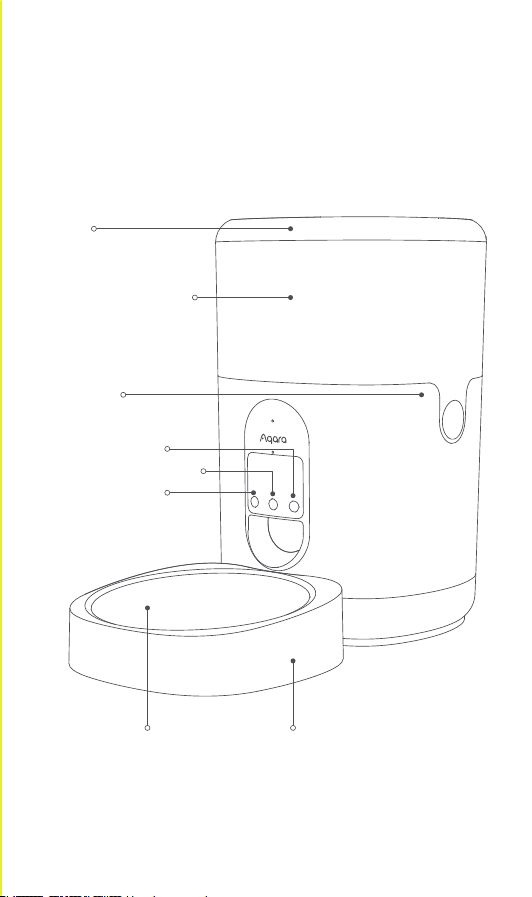
Botón de reinicio
Botón de alimentación
Botón de
grabación de voz
Tapa
Cubeta para comida
Clip para cubeta
de comida
Recipiente de
acero inoxidable
Recipiente de plástico
Descripción de producto
-35-

1. Este aparato puede ser utilizado por niños a partir de los 8 años y
por personas con capacidades físicas, sensoriales o mentales
reducidas o falta de experiencia y conocimiento si han recibido
supervisión o instrucciones sobre el uso del aparato de forma
segura y comprenden los peligros involucrados.
2. Los niños no deben jugar con el aparato.
3. La limpieza y el mantenimiento del usuario no deben ser
realizados por niños sin supervisión.
4. Únicamente debe ser alimentado en bajísima tensión de
seguridad correspondiente a la marca del aparato.
Advertencias
Comedero inteligente C1 × 1, cable USB × 1, recipiente de acero
inoxidable × 1, recipiente de plástico × 1, desecante × 1
¿Qué se incluye en la caja?
1. Un teléfono inteligente o una tableta (con sistema iOS o Android)
que se pueda conectar a una red Wi-Fi o celular.
2. Un hub Aqara compatible con Zigbee 3.0
3. Fuente de alimentación USB-A 5V1A, como un tomacorriente de
pared o un adaptador de carga
4. Escanee el código QR para descargar la aplicación Aqara Home
5. Saque el desecante de la bolsa de plástico y colóquelo en la ranura
del desecador en la tapa.
6. Vierta la comida seca para mascotas en el cubo de comida.
Preparaciones antes del uso
-36-

Haga clic en "..." en la esquina superior derecha de la página de
inicio del dispositivo para ajustar la configuración del plan de
alimentación, bloqueo infantil, etc.
Configuración de dispositivo
1. El diámetro de las partículas del alimento seco para mascotas
debe limitarse a 2-12 mm.
2. Este producto está diseñado para gatos domésticos y perros
pequeños y medianos a partir de los tres meses de edad.
3. El comedero inteligente para mascotas solo puede almacenarse
alimentos secos. No puede almacenar alimentos húmedos ni
mezclar alimentos húmedos y secos.
4. Se recomienda colocar el comedero contra la pared y lejos de
mesas, sillas y otros muebles para reducir el riesgo de que la
mascota derribe el comedero.
*Nota:
1. Este producto requiere un hub Aqara Zigbee 3.0. Agregue el hub a
la aplicación de acuerdo con el manual correspondiente.
2. Haga clic en "+" en la esquina superior derecha de la página de
inicio de la aplicación para ingresar a la página "Agregar
accesorio". Seleccione "Comedero inteligente C1" y el hub que
desea conectar, y siga las instrucciones de la aplicación. Mantenga
presionado el botón de reinicio durante 5 segundos y luego se
conectará el concentrador.
Vinculación e inicialización de dispositivos
-37-

Presione los clips en ambos lados del cubo de comida y podrá sacarlo
para limpiarlo.
Nota: no enjuague la parte inferior del dispositivo para evitar fallas en
el dispositivo.
Alimentación eléctrica
1. No se deben mezclar diferentes tipos de pilas o pilas nuevas y
usadas.
2. Inserte las pilas con la polaridad correcta como se indica en el
compartimento de las pilas.
3. Las pilas no recargables no deben recargarse.
4. Las baterías de desecho deben reciclarse de acuerdo con las leyes
y regulaciones locales. No los deseche a voluntad para evitar la
contaminación.
5. Si el aparato se va a almacenar sin usar durante un período
prolongado, se deben extraer las baterías.
6. Los terminales de alimentación no deben cortocircuitarse.
7. Las baterías agotadas deben ser extraídas del aparato y
desecharse de manera segura.
*Nota:
1. Utilice el adaptador para suministrar energía al Comedero en
circunstancias normales
2. El Comedero inteligente C1 también puede funcionar con pilas
secas. Abra la tapa de la batería en la parte inferior y coloque las
baterías. En caso de cualquier falla de energía, las baterías pueden
asegurar la fuente de alimentación.
3. Las baterías secas deben comprarse por separado. Se requieren
tres pilas D (pilas alcalinas LR20).
4. Cuando el dispositivo funciona con baterías secas, la luz
indicadora permanecerá apagada para ahorrar energía, pero otras
funciones seguirán funcionando como de costumbre.
Limpieza de cubeta de comida
-38-

Operación
Alimentar una
vez
Grabación de voz
Comprobar el
estado de enlace
El dispositivo se
restaura a la
configuración de
fábrica y
configura la red
Pasos
Haga clic en el botón de alimentación y el
Comedero le dará una porción de comida una
vez. El número de porciones se puede
configurar en la aplicación.
Nota: una porción pesa entre 6 y 10 g, lo que
varía según el tamaño de las partículas de
alimentos. Establezca el número de
porciones para cada alimentación de acuerdo
con los hábitos de sus mascotas y el peso real
de una porción.
Mantenga presionado el botón de grabación
de voz y la grabación comenzará después de
un "bip". Mantenga presionado el botón
hasta que termine la grabación y luego
escuchará un "bip, bip" para marcar la
finalización de la grabación.
Haga clic en el botón de reinicio. Si la luz
indicadora parpadea en azul tres veces, el
dispositivo está conectado a la red.
Si la luz indicadora se vuelve roja durante
aproximadamente 1 segundo, el dispositivo
no está conectado a la red.
Mantenga presionado el botón de reinicio
durante 5 segundos hasta que la luz
indicadora se vuelva azul y parpadee
continuamente:
El dispositivo se restaura a la configuración
de fábrica y se está configurando la red.
El estado de configuración tendrá una
duración de 30 segundos, y en este período:
a. Si el usuario completa la configuración de
red para el dispositivo con éxito a través de la
aplicación Aqara Home, el indicador dejará
de parpadear.
b. Si la configuración falla, el indicador rojo
parpadeará brevemente y luego se detendrá.
C. Si no hay otras operaciones, el indicador
se apagará después de 30 segundos y
finalizará el acceso a la red.
Operaciones de los botones
-39-

Frecuencia de operación Zigbee: 2405-2480 MHz
Potencia máxima de salida Zigbee ≤ 13 dBm
En condiciones normales de uso, este equipo debe mantenerse a una
distancia de separación de al menos 20 cm entre la antena y el
cuerpo del usuario.
Comedero inteligente Aqara C1
Color: blanco
Número de modelo: PETC1-M01
(PET – Products for pets, C-Care series, M01 – First motorized
product)
Dimensiones: 193×193×312 mm
Corriente nominal: 1A
Voltaje nominal: 5V
Temperatura de funcionamiento: -10~45 ℃ (14 °F ~ 113 °F)
Humedad de funcionamiento: 0-95% HR, sin condensación
Distancia de trabajo: 30 m (interiores y sin refugio)
Protocolo inalámbrico: ZigBee IEEE 802.15.4 (actuando como router /
repetidor)
Advertencia Zigbee
Por la presente, Lumi United Technology Co., Ltd. declara
que el tipo de equipo de radio Comedero inteligente C1,
PETC1-M01 cumple con la Directiva 2014/53/EU. El texto
completo de la declaración UE de conformidad está disponible en
la siguiente dirección de Internet:
http://www.aqara.com/DoC/
Declaración de Conformidad de EU
-40-

Servicio de atención al cliente en línea: www.aqara.com/support
Correo electrónico de atención al cliente: support@aqara.com
Web: www.aqara.com
Fabricante: Lumi United Technology Co., Ltd.
Dirección: Habitación 801-804, Edificio 1, Parque Chongwen,
Nanshan iPark, No. 3370, Avenida Liuxian, Comunidad Fuguang,
Distrito Residencial Taoyuan, Distrito Nanshan, Shenzhen, China
Hecho en China
Todos los productos que llevan este símbolo son residuos de
aparatos eléctricos y electrónicos (RAEE según la directiva
2012/19/UE) que no deben mezclarse con los residuos
domésticos sin clasificar. En su lugar, debe proteger la salud
humana y el medio ambiente entregando su equipo de desecho a un
punto de recolección designado para el reciclaje de equipos
eléctricos y electrónicos de desecho, designado por el gobierno o las
autoridades locales. La eliminación y el reciclaje correctos ayudarán
a prevenir posibles consecuencias negativas para el medio ambiente
y la salud humana. Comuníquese con el instalador o las autoridades
locales para obtener más información sobre la ubicación y los
términos y condiciones de dichos puntos de recolección.
Información sobre reciclaje y eliminación de RAEE
-41-
Aqara 스마트 자동 급식기 C1은 Zigbee 3.0 통신 방식으로 작동하는
반려 동물 자동 급식기로, 언제 어디서나 정해진 시간에 설정한 양의
사료를 반려 동물에게 급여할 수 있습니다.
* 본 제품을 사용하기 위해서는 Zigbee 3.0을 지원하는 아카라 스마트 허브가
필요합니다.
리셋버튼
급식버튼
음성녹음버튼
뚜껑
푸드버킷
푸드버킷클립
푸드 트레이 플라스틱 그릇
제품 소개
-42-
1. 이 기기는 8세 이상의 어린이와 신체적, 감각적 또는 정신적 능력이
떨어지거나 경험 및 지식이 부족한 분이 사용할 수 있습니다. 다만,
안전하게 기기 사용을 할 수 있도록 교육을 받고 관련 위험을 이해한
다음에 사용해야 합니다.
2. 어린아이가 기기를 가지고 놀지 않도록 주의해 주세요.
3. 보호자의 감독 없이 어린아이가 기기를 청소하거나 관리하지 않도록
주의해 주세요.
4. 장치의 표시에 해당하는 안전 초저전압에서만 공급해야 합니다.
주의사항
스마트 자동 급식기 C1× 1, USB케이블 × 1, 푸드 트레이 × 1,
플라스틱 그릇 × 1, 제습제 × 1
제품 구성
1. 2-12mm 이내의 건식 사료만 급여할 수 있습니다.
2. 건식사료 급여가 가능한 3개월 이상의 반려 동물에게 사용을
권장합니다.
3. 건식 사료만 사용할 수 있으며, 습식 사료와 함께 사용할 수 없습니다.
4. 급식기가 넘어지는 경우 위험할 수 있으므로 벽에 기대어 고정해서
사용하는 것을 권장하며 반려 동물의 안전을 위해 테이블, 의자 또는
기타 가구에서 먼 곳에 설치해 주세요.
*참고:
5. 동봉된 제습제를 뚜껑의 제습제 슬롯에 넣어 주세요.
6. 건식 사료를 사료통에 넣어 주세요.
-43-
1. Wi-Fi 또는 모바일 네트워크에 연결할 수 있는 스마트폰 또는 태블릿
기기 (iOS, Android 모두 가능)
2. Zigbee 3.0을 지원하는 아카라 스마트 허브
3. 전원 공급 장치: 5V1A USB-A 콘센트 또는 충전 어댑터
4. QR코드를 스캔하여 “아카라 홈” 앱을 다운로드 하세요.
사용 전 준비 사항

‘스마트 자동 급식기 C1’을 성공적으로 설치한 후 장치 아이콘을 눌러
우측 상단의 ‘...’를 누르시면 급여 계획, 어린이 사용 방지 등의 세부
사항을 설정할 수 있습니다.
추가 환경 설정
전원 공급 방법
1. 다른 유형의 배터리 또는 새 배터리와 사용된 배터리를 혼합하여
사용하지 마십시오.
2. 배터리 컴파트먼트에 표시된 대로 배터리를 올바른 극성으로
삽입하십시오.
3. 재충전할 수 없는 배터리는 충전시켜 주지 마십시오.
4. 환경 오염 방지를 위해 사용한 배터리는 분리하여 배출해 주세요.
5. 장치를 오랫동안 사용하지 않을 시 배터리를 제거해야 합니다.
6. 전원 공급 단자는 단락되지 않아야 합니다.
7. 방전된 배터리는 장치에서 분리하여 안전하게 폐기해야 합니다.
참고:
1. 일반적인 사용 환경에서는 전원 어댑터를 통해 급식기에 전원을
공급해 주세요.
2. 건전지를 이용하여 스마트 자동 급식기 C1을 사용할 수 있습니다.
제품 하단부의 배터리 커버를 열어 배터리를 교체해 주세요. 단,
배터리로 사용하는 경우 정전 발생 시 전원 공급을 보장할 수
없습니다.
3. 건전지는 제품에 포함되어 있지 않으며, D형 배터리(LR20) 배터리가
필요합니다.
4. 건전지로 사용하는 경우 에너지 절약을 위해 제품의 지시등이
꺼지지만 장치는 정상적으로 동작합니다.
1. 해당 제품을 사용하기 위해서는 Zigbee 3.0을 지원하는 아카라
스마트 허브가 필요합니다. 스마트 허브 설명서에 따라 허브를 앱에
추가해 주세요.
2. Aqara Home 앱 오른쪽 상단의‘+’를 눌러 ‘장치 추가’ 페이지로
이동해 주세요. ‘스마트 자동 급식기 C1’을 연결할 허브를 선택하고
앱의 안내 사항에 따라 장치를 추가해 주세요. 리셋 버튼을 5초간
누르면 허브와 연결됩니다.
장치 연결 및 초기화
-44-

사료통 양 옆의 연결부를 눌러 사료통을 분리한 후 사료통을 청소할 수
있습니다.
참고: 장치의 하단부를 물로 세척하는 경우 고장이 발생할 수 있으므로
삼가해 주세요.
기능
1회 급여하기
음성 녹음하기
연결 상태
확인하기
공장초기화 및
네트워크
설정하기
사용 방법
[급식 버튼]을 한 번 누르면 1회 급여가
가능합니다. 급여량은 앱에서 설정할 수
있습니다.
참고: 1회분의 중량은 약 6~10g으로 사료의
크기에 따라 달라질 수 있습니다. 반려 동물의
선호도와 실제 사료 중량을 확인하여 급식량을
설정해 주세요.
[음성 녹음 버튼]을 길게 누르면 ‘삐' 소리가 난
후 녹음이 시작됩니다. 손을 떼면 ‘삐, 삐' 소리와
함께 녹음이 종료되고, 최대 12초까지 녹음할 수
있습니다.
[리셋 버튼]을 누른 후 지시등이 파란색으로 세
번 깜빡거리면 장치가 정상적으로 네트워크에
연결된 것을 의미합니다.
지시등이 약 1초간 빨간색으로 켜진 경우
장치가 네트워크에 연결되어 있지 않음을
의미합니다.
지시등이 파란색으로 바뀌고 계속 깜빡거릴
때까지 리셋 버튼을 5초간 길게 눌러 주세요:
장치가 공장 초기화되고 네트워크를
설정합니다. 네트워크 설정은 30초 동안
아래와 같은 상태로 진행됩니다.
a. Aqara Home 앱에서 네트워크가
정상적으로 설정되는 경우 지시등의 깜빡임이
멈추게 됩니다.
b. 네트워크 설정에 실패하는 경우 빨간색
지시등이 짧게 깜빡이다가 꺼집니다.
다른 추가 작업이 없는 경우 30초 후 지시등이
꺼지고 네트워크 연결이 종료됩니다.
장치 사용 방법
사료통 청소하기
-45-

기기명칭:특정소출력 무선기기(무선데이터통신시스템용 무선기기)
모델명: PETC1-M01
(PET ‒ Products for pets, C-Care series, M01 ‒ First motorized
product)
제품 사이즈: 193×193×312 mm
제품 색상: 흰색
정격 전류: 1A
정격 전압: 5V
작동 온도: -10~45℃ (14°F ~ 113°F)
작동 습도: 0-95% RH, 비결로 조건
무선통신 프로토콜: Zigbee IEEE 802.15.4(라우터/중계기 사용)
제품 스펙
-46-
借助配備Zigbee無線通訊協定的Aqara智能寵物餵食器C1,無論您
身在何處,都可以通過我們的應用程序定時定量餵食寵物。
*您需要一臺Aqara Zigbee 3.0閘道。 部分功能需要由特定閘道支持。 更多詳情
請參見:www.aqara. com/support。
重置鍵
餵食鍵
錄音鍵
蓋子
糧桶
糧桶卡扣
不銹鋼食盆 塑膠食盆
產品介紹
-47-
1. 設備適用人群:8歲及以上兒童; 身體、感官或智力有缺陷或缺乏
經驗和知識的人員請在接受設備安全使用的監督或指導的情况
下使用,同時充分瞭解相關危害。
2. 嚴禁兒童玩耍該設備。
3. 嚴禁兒童在無人監督對設備進行清潔和維護。
4. 只能以符合裝置上標記的安全特低電壓供電。
警告
智能寵物餵食器C1 × 1,USB線 × 1,不銹鋼食盆 × 1,塑膠食盆
× 1,乾燥劑 × 1
產品包裝清單
1. 一臺可以連接到Wi-Fi或蜂窩網絡的智能手機或平板電腦(安裝
有iOS或Android系統)。
2. 一臺支持Zigbee 3.0的Aqara閘道。
3. 5V1A USB-A電源,如壁裝插座或充電轉接器。
4. 掃描二維碼下載Aqara Home應用程序。
5. 從塑胶袋中取出乾燥劑,將其放入頂蓋中的乾燥器槽中。
6. 將寵物乾糧倒入糧桶中。
1. 寵物乾糧粒徑應在2-12mm之間。
2. 本品專為3個月及以上的寵物貓及中小型犬而設計。
3. 智能寵物餵食器只能儲存乾糧,不能儲存濕糧或幹濕混合糧。
4. 建議將餵食器靠牆放置,遠離桌椅和其他傢俱,以减少餵食器被
寵物打翻的風險。
注:
使用前的準備
-48-

按下糧桶兩側的卡扣,即可將其取出進行清洗。
注:請勿沖洗設備下部,以免設備故障。
點擊設備主頁右上角的“�” 以調整餵食計畫、兒童鎖等的設定。
設備設定
設備供電
1. 不可混用不同型號電池或混用新舊電池。
2. 請按照電池倉中訓示的正確極性裝入電池。
3. 不可在非充電電池上充電。
4. 廢舊電池應按照當地法律法規進行回收利用,不得隨意處置,以
免污染環境。
5. 如果長期不使用裝置,應取出電池。
6. 電源接入端不得短路。
7. 用完的電池應從裝置中取出並安全處置。
注:
1. 本品需要一臺Aqara Zigbee 3.0閘道。 請按照相應手册將閘道添
加到應用程序中。
2. 點擊應用程序主頁右上角的“+”進入“添加附件”頁面。 選擇“智
能寵物餵食器C1”和待連接的閘道,並按照應用程序上的說明進
行操作。 長按重置鍵5秒以連接閘道。
1. 正常情况下,請使用轉接器向餵食器供電
2. 智能寵物餵食器C1也可使用乾電池。 請打開底部的電池蓋並安
裝電池。 當停電時,電池可以確保供電。
3. 乾電池需要單獨購買。 該設備需要三節D電池(LR20鹼性電池)。
4. 當設備由乾電池供電時,為節約能源,指示燈會熄滅,但其他功能
仍正常
設備入網&初始化
糧桶清洗
-49-

Aqara智能寵物餵食器C1
顏色:白色
型號:PETC1-M01
(PET ‒ Products for pets, C-Care series, M01 ‒ First motorized
product)
尺寸:193 × 193 × 312 mm
額定電流:1A
額定電壓:5V
工作溫度:-10~45℃ (14°F ~ 113°F)
工作濕度:0-95% RH,無需冷凝
無線協定:Zigbee IEEE 802.15.4(充當路由器/中繼器)
產品規格
操作
餵食一次
錄音
檢查綁定狀態
設備恢復到出廠
設定&配寘網絡
步驟
點擊餵食鍵,餵食器將進行一次餵食,份數為
一份。 食物份數可在應用程序中設定。
注:一份食物約重6-10g,因食物顆粒大小而
异。 請根據寵物的習慣和每份食物的實際重
量設定每次餵食的份數。
長按錄音鍵,在“嗶”聲後開始錄音,長按該鍵
直至錄音結束。 在聽到“嗶,嗶”聲時,錄音結
束。
點擊重置鍵。如果指示燈以藍色閃爍三次,則
設備已接入網路。
如果指示燈變紅約1秒,則設備尚未接入網路。
長按重置鍵5秒,直至指示燈變藍並持續閃
爍:
設備已恢復到出廠設定,且正在配寘網絡。
配寘狀態將持續30秒,在此期間:
a.如果用戶通過Aqara Home應用程序成功
完成設備的網絡配寘,指示燈將停止閃爍。
b.如果配寘失敗,紅色指示燈將短暫閃爍,然
後停止。
c.如果沒有其他操作,指示燈在30秒後熄滅,
網絡訪問結束。
按鍵操作
-50-

線上客服:www.aqara. com/support
客戶支援電子郵件: support@aqara.com
網址:www.aqara. com
製造商:深圳綠米聯創科技有限公司
地址:中國深圳市南山區桃源街道福光社區留仙大道3370號南山智
園崇文園區1號樓801- 804室
中國製造
所有帶有該符號的產品均為廢棄電器和電子設備
(2012/19/EU指令中的WEEE),不得與未分類的生活垃圾混
合。為保護人類健康和環境安全,請將您的廢棄設備交至政
府或地方部門指定的收集點,以回收廢棄電器和電子設備。
正確的處置和回收利用將有助於防止對環境和人類健康的潜在負
面影響。請聯系安裝人員或地方機构,瞭解有關收集點位置、條款和
條件的更多資訊。
WEEE處理和回收資訊
Zigbee警告
Zigbee運行頻率:2405-2480 MHz
Zigbee最大輸出功率≤13 dBm
在正常使用條件下,應將該設備置於天線與用戶至少相距20cm處。
歐盟符合性聲明
深圳綠米聯創科技有限公司特此聲明,無線電設備型智能寵物餵食
器C1(型號:PETC1-M01)符合2014/53/EU指令的規定。
瞭解歐盟符合性聲明全文,可訪問以下網址:
http://www.aqara.com/DoC/
-51-

Scatola ManualeScatola
PAP 21
Carta
RACCOLTA DIFFERENZIATA
Verifica le disposizioni del tuo Comune.
Separa le componenti e conferiscile in modo correo.
Carta Carta
PAP 20 PAP 22
Pellicola Maniglia
Plastica Plastica Plastica Plastica
PET 1 PP 5
Borsa
CPE 7
Neto
LDPE 4
PAP
22