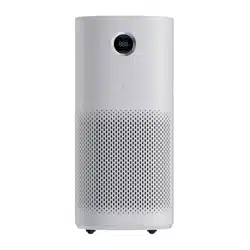

E S S E N T I A L S FOR LIFE
User
Manual
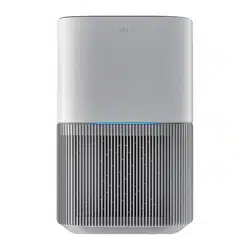
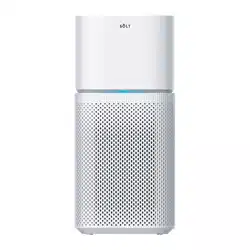
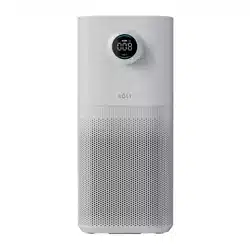
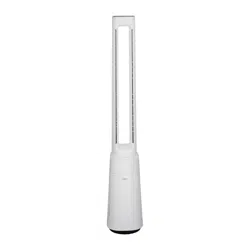
MODEL/S
GGSPA200W
GGSPA360W
GGSPA500W
GGSPA600W
V 1.4 | 0824
Air Purifier

2
Welcome
Congratulations on purchasing
your new Air Purifier!
The Sôlt brand is proudly
distributed within Australia
by Residentia Group Pty Ltd.
Please refer to the warranty card at the rear of this manual
for information regarding your product’s parts and labour
warranty, or visit us online at www.residentia.group
At Residentia Group, we are customer obsessed and our
Support Team are there to ensure you get the most out
of your appliance. Should you want to learn more about
your Air Purifier features, and importantly taking care
of your appliance when cleaning, our Support Team are
here to help.
You can use our online Support Centre at anytime by
visiting http://support.residentiagroup.com.au, or you can
contact us via calling us on 1300 11 HELP (4357).
It is important that you read through the following use and
care manual thoroughly to familiarise yourself with the
installation and operation requirements of your appliance
to ensure optimum performance.
Again, thank you for choosing an Sôlt appliance and we
look forward to being of service to you.
Kind Regards,
The Residentia Team
Residentia Group
—
Head Office.
165 Barkly Ave
Burnley
Victoria 3121
Australia
—
ACN.
600 546 656
—
Online.
residentia.group
Sôlt
—
Online.
www.solt.house
—
Instagram.
/solt.house
—
Facebook.
/solt.appliances

3
Sôlt recommends the use of original spare parts. When contacting our customer service team,
please ensure that you have the following information at hand (which can be found on your
appliances’ rating plate).
— Model Number
— Serial Number
T . 1300 11 4357 | E. support@residentiagroup.com.au
Customer Care
Contents 2 Welcome
4 General Instructions
5 Your Air Purifier
6 Assembly Instructions
7 Operating Instructions
10 Cleaning and Maintenance
15 Technical Specifications
16 Purchase Details
18 Warranty Information
4
1. If the supply cord is damaged, it must be
replaced by the manufacturer, its service agent
or similarly qualified persons in order to avoid
a hazard.
2. The appliance must be disconnected from
the supply mains before cleaning or
other maintenance.
3. This appliance can be used by children aged
from 8 years and above and persons with
reduced physical, sensory or mental capabilities
or lack of experience and knowledge if they
have been given supervision or instruction
concerning use of the appliance in a safe way
and understand the hazards involved. Children
shall not play with the appliance. Cleaning and
user maintenance shall not be made by children
without supervision.
4. Children should be supervised to ensure that
they do not play with the appliance.
5. Indoor and household use only.
6. When the appliance is not in use and before
cleaning, unplug the appliance from the outlet.
7. Please use the original filter provided by the
factory. In case of other filters, the best results
cannot be achieved.
8. Do not insert the fingers or objects into the air
inlets or air outlets to prevent the product from
physical damages or malfunction.
9. Please unplug the power cord immediately
and contact the service center in time when
the appliance suffers abnormal sound or burnt
smell or smoke.
10. Do not block the air inlets/outlets of the
appliance with any item.
11. This appliance cannot replace natural
ventilation and other appliances like the
vacuum cleaner, kitchen ventilator, etc.
12. When the appliance is working, it must be
placed on a dry, flat and stable floor, with
at least 30cm space reserved around it.
13. The mist produced by the ultrasonic
humidifier may affect the PM2.5 detection
of this appliance, and both should maintain
a certain distance.
14. To protect against the risk of electrical shock,
do not immerse the unit, cord or plug in water
or other liquid.
15. Do not place other items on top of the
appliance, and forbid sitting or standing
on this appliance.
16. Do not spray flammable substances near the
appliance;
Do not spray water directly on the appliance
or use chemical cleaners like alcohol or
hydrochloric acid, etc.;
Do not place water containers, medicines, or
flammable materials on the appliance.
17. Do not put it in a place with direct sunlight.
18. To prevent electromagnetic disturbance, the
appliance must keep a certain distance from
the TV, radio, microwave oven and others.
19. Do not disassemble or modify this appliance
without authorization to avoid accidents.
20. Do not pull the adapten cablet to move
the appliance.
21. The appliance is only to be used with the power
supply unit provided with the appliance.
22. WARNING: To reduce the risk of fire or electric
shock, do not use this fan with any solid-state
speed control device.
23. Do not operate any fan with a damaged cord
or plug. Discard fan or return to an authorized
service facility for examination and/or repair.
24. Do not run cord under carpeting. Do not
cover cord with throw rugs, runners, or similar
coverings. Do not route cord under furniture
or appliances. Arrange cord away from traffic
area and where it will not be tripped over.
The appliance must not be disposed of with regular
household waste. At the end of its service life, the
appliance must be properly delivered to a collection
point for the recycling of electrical and electronic
equipment. By Collection and recycling of old
appliances, you are making an important
contribution to the conservation of our natural
resources and provide for environmentally sound
and healthy disposal.
General Instructions
5
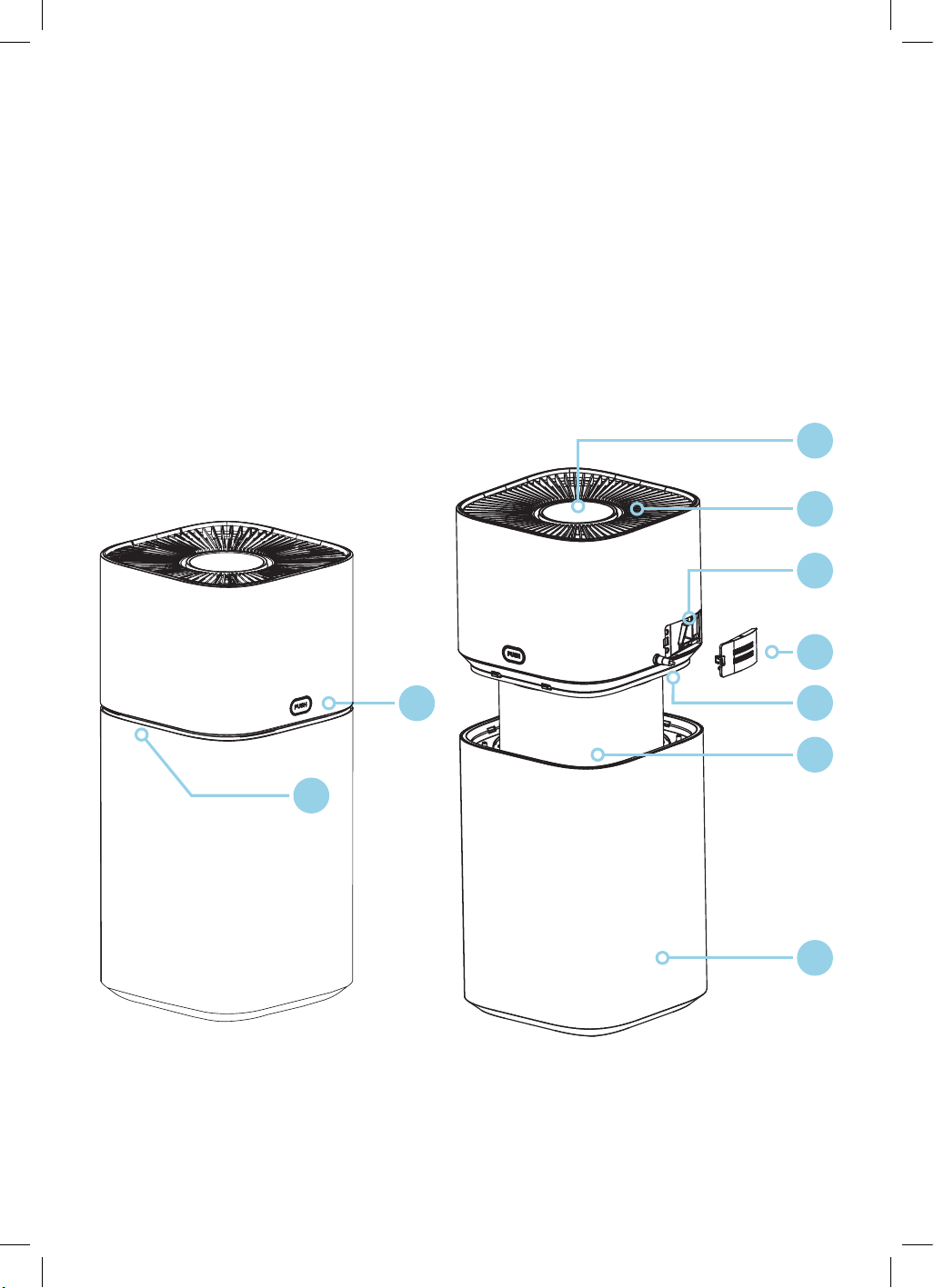
1. Air quality LED
2. Split button
3. Control panel/display screen
4. Air outlet grille
5. PM2.5 sensor
6. Back cover
7. Adapter
8. Filter assembly
9. Air inlet grille
Included by not shown:
• Power adapter
Note: The images in this user manual are for explanatory purposes only.
Your Air Purifier may appear slightly different.
PRODUCT OVERVIEW
GGSPA200W
GGSPA360W
Your Air Purifier
2
1
6
9
8
4
3
5
7
6
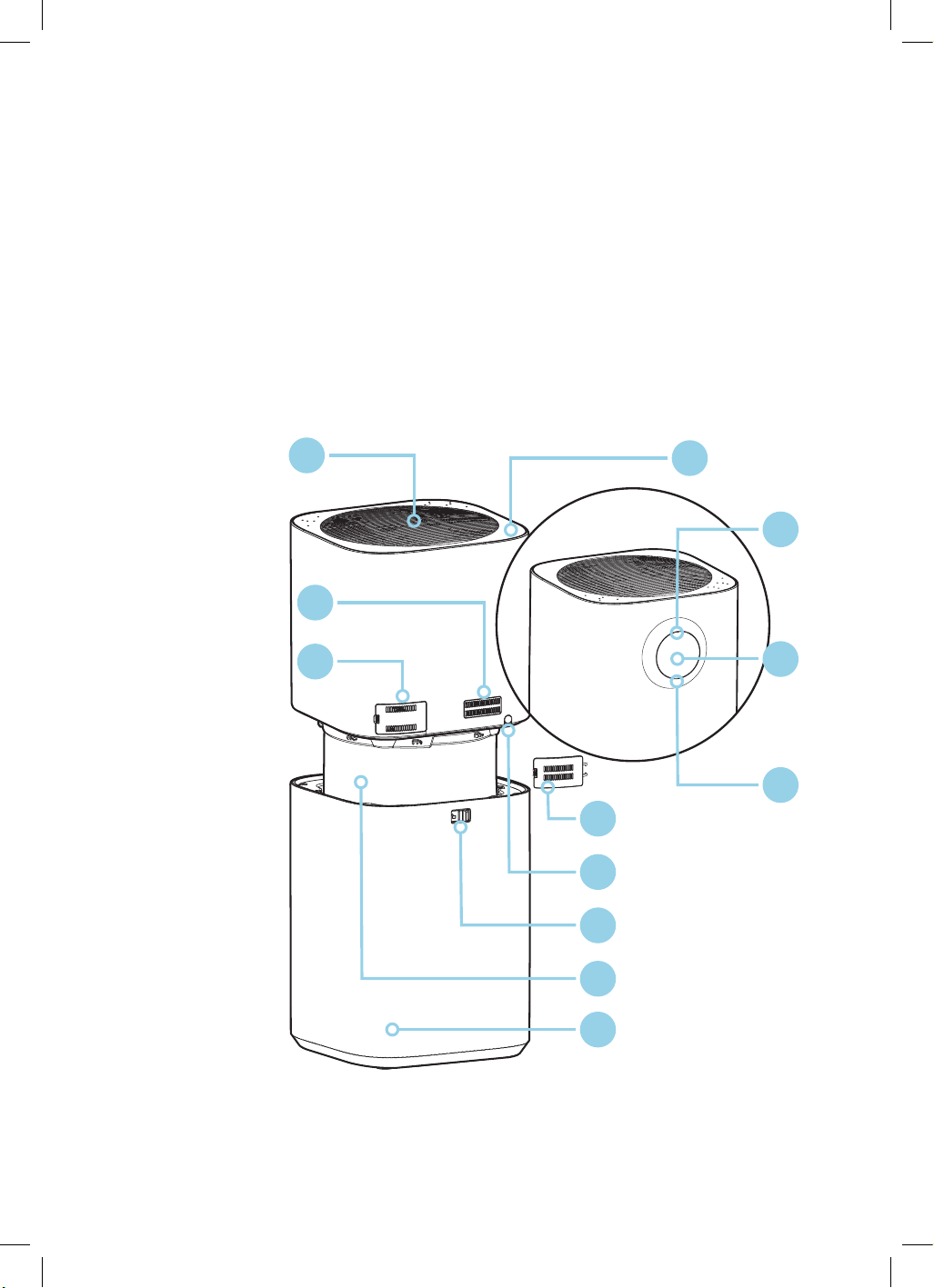
1. Air outlet grille
2. Operation keytop
3. VOC sensor
4. PM2.5 sensor
5. Air quality LED
6. Display panel
7. VOC LED
8. Back cover
9. Power cord
10. Split button
11. Filter assembly
12. Air intake grille
Included by not shown:
• Power adapter
Note: The images in this user manual are for explanatory purposes only.
Your Air Purifier may appear slightly different.
PRODUCT OVERVIEW
GGSPA500W
Your Air Purifier
1
4
3
5
7
10
9
8
11
6
2
12
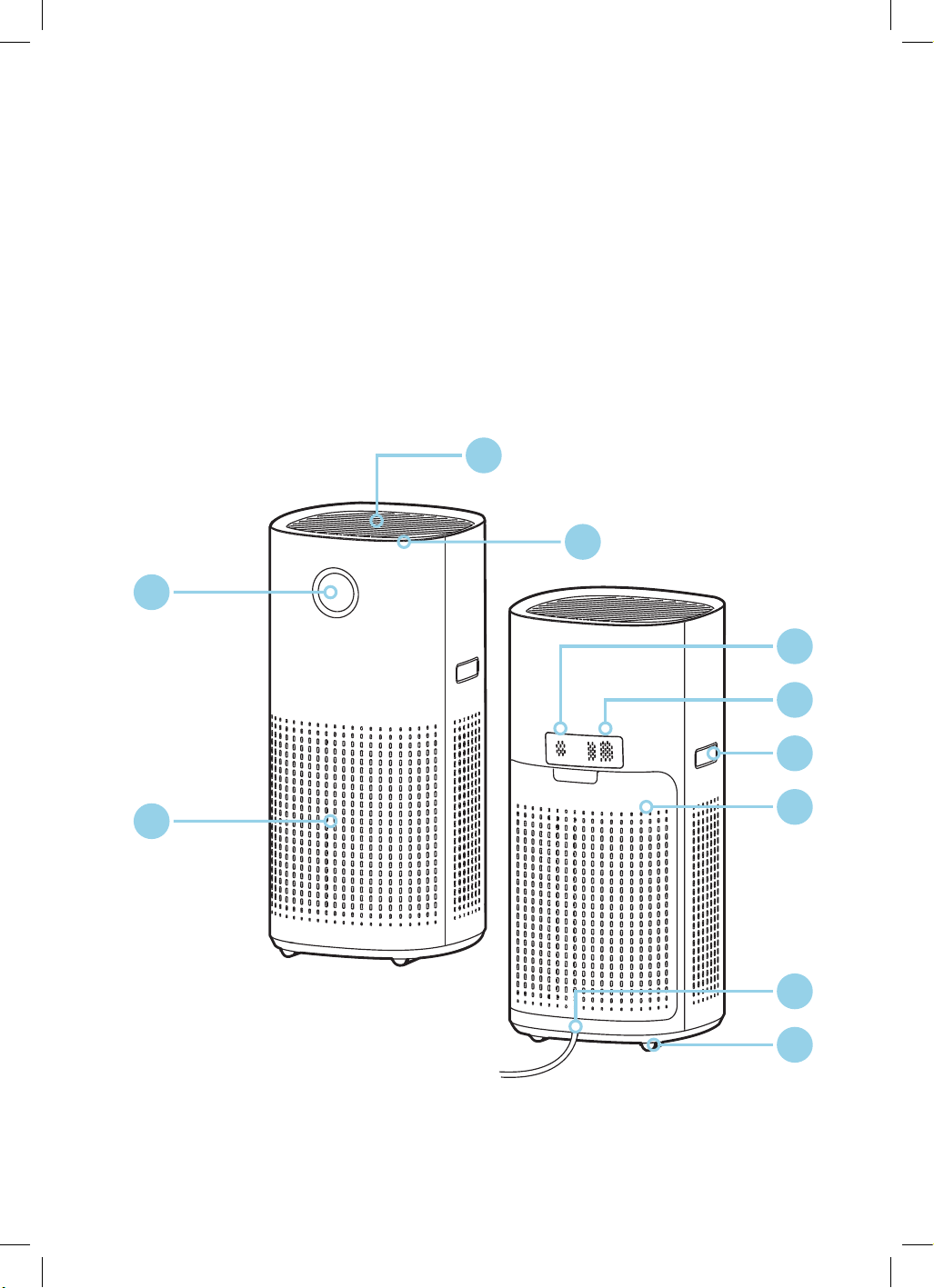
7
1. Air outlet grille
2. Operation keytop
3. Display panel
4. Air inlet
5. Odour, temperature and humidity sensor
6. PM2.5 sensor
7. Handle
8. Back cover
9. Power cord
10. Castor
Included by not shown:
• Power adapter
Note: The images in this user manual are for explanatory purposes only.
Your Air Purifier may appear slightly different.
PRODUCT OVERVIEW
GGSPA600W
Your Air Purifier
1
5
6
9
7
10
8
2
3
4
8
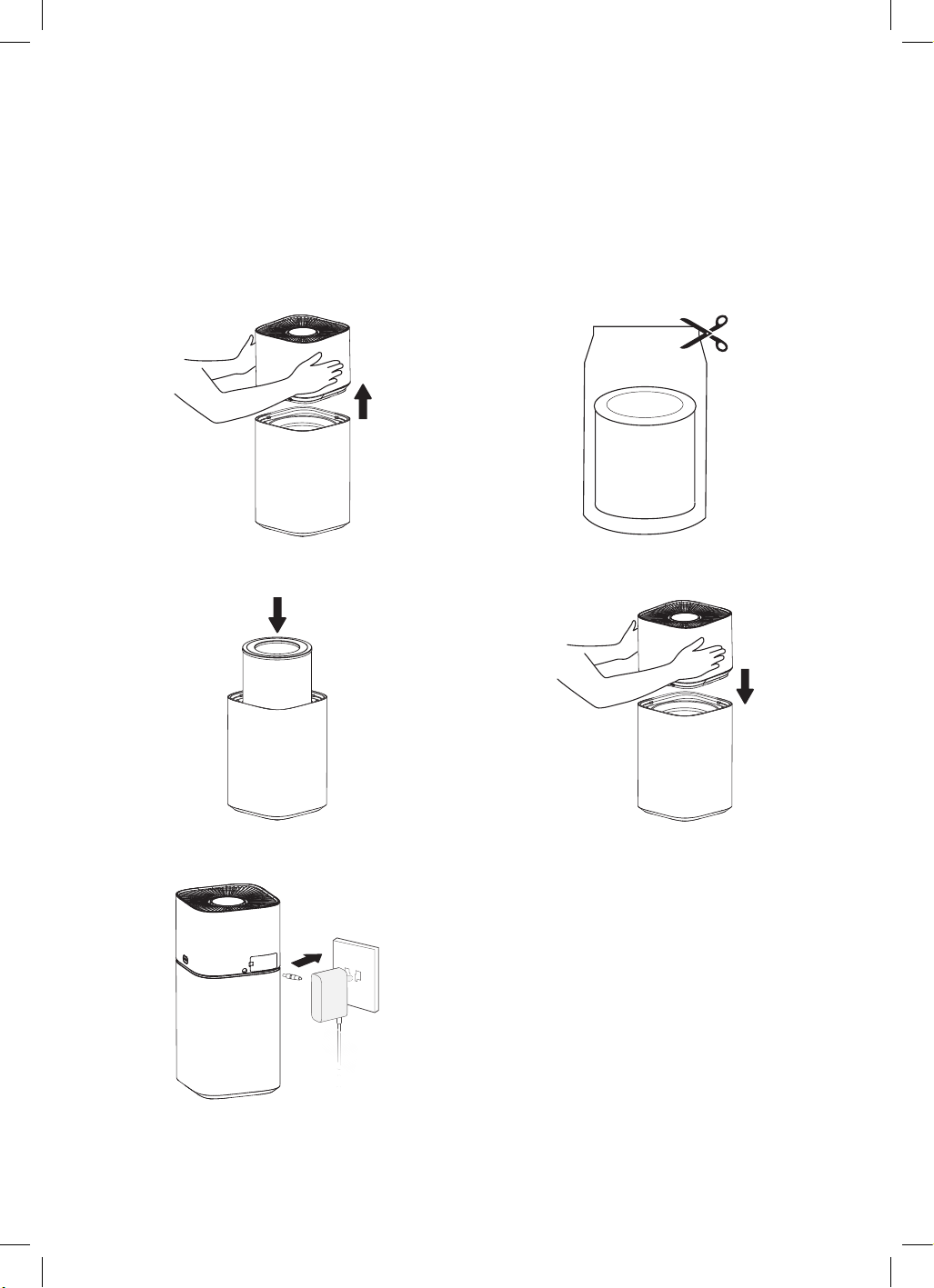
Assembly Instructions
STEP 1
Remove the base plate.
STEP 3
Install the HEPA filter.
STEP 5
Plus in adapter cable and plug into power supply.
STEP 2
Remove the protective film of the filter assembly.
STEP 4
Install the base plate
GGSPA200W
GGSPA360W
GGSPA500W
9
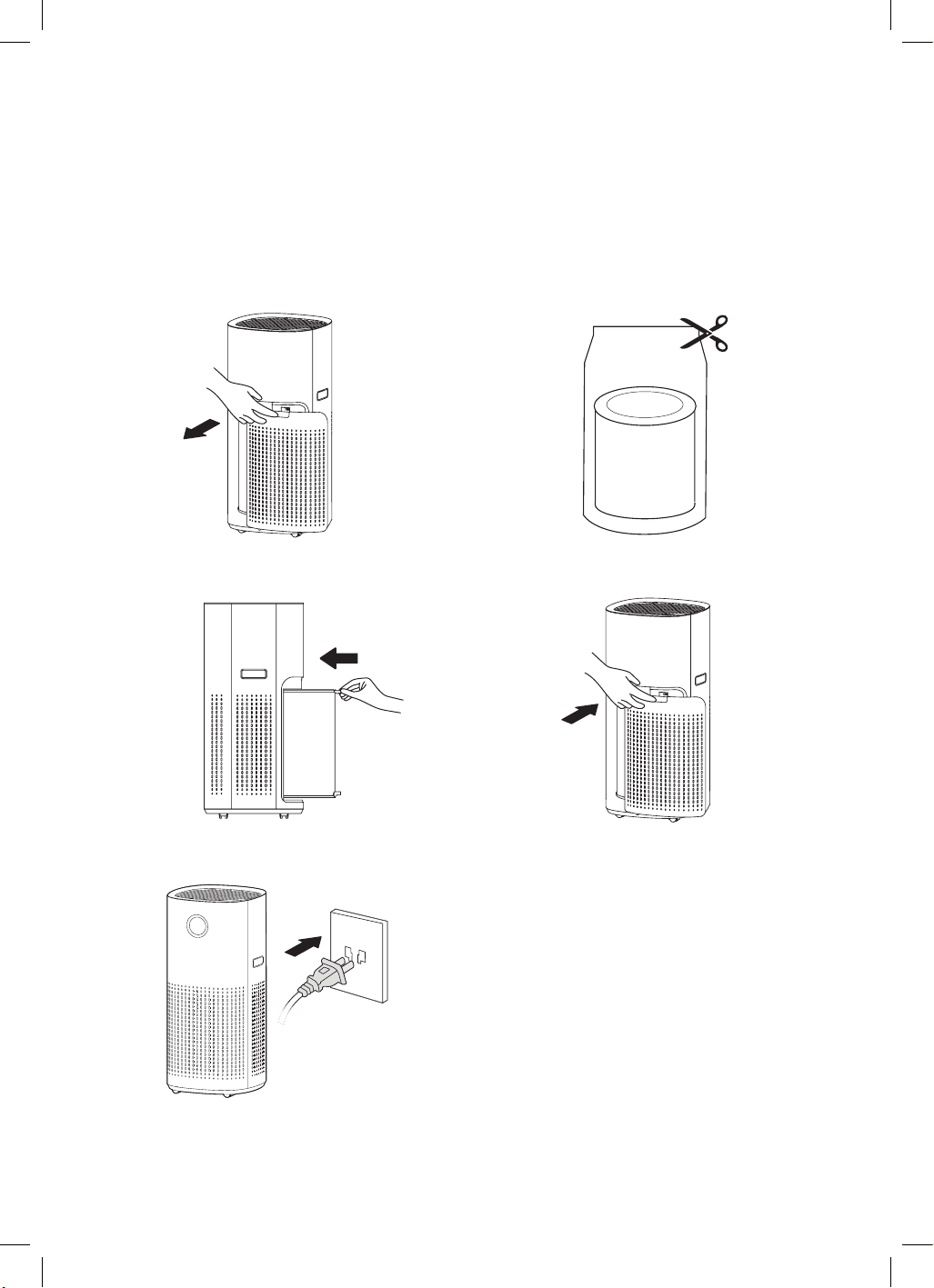
Assembly Instructions
STEP 1
Open the filter cover.
STEP 3
Install the HEPA filter.
STEP 5
Plus in adapter cable and plug into power supply.
STEP 2
Remove the internal filter from the machine.
STEP 4
Close the filter cover.
GGSPA600W
10
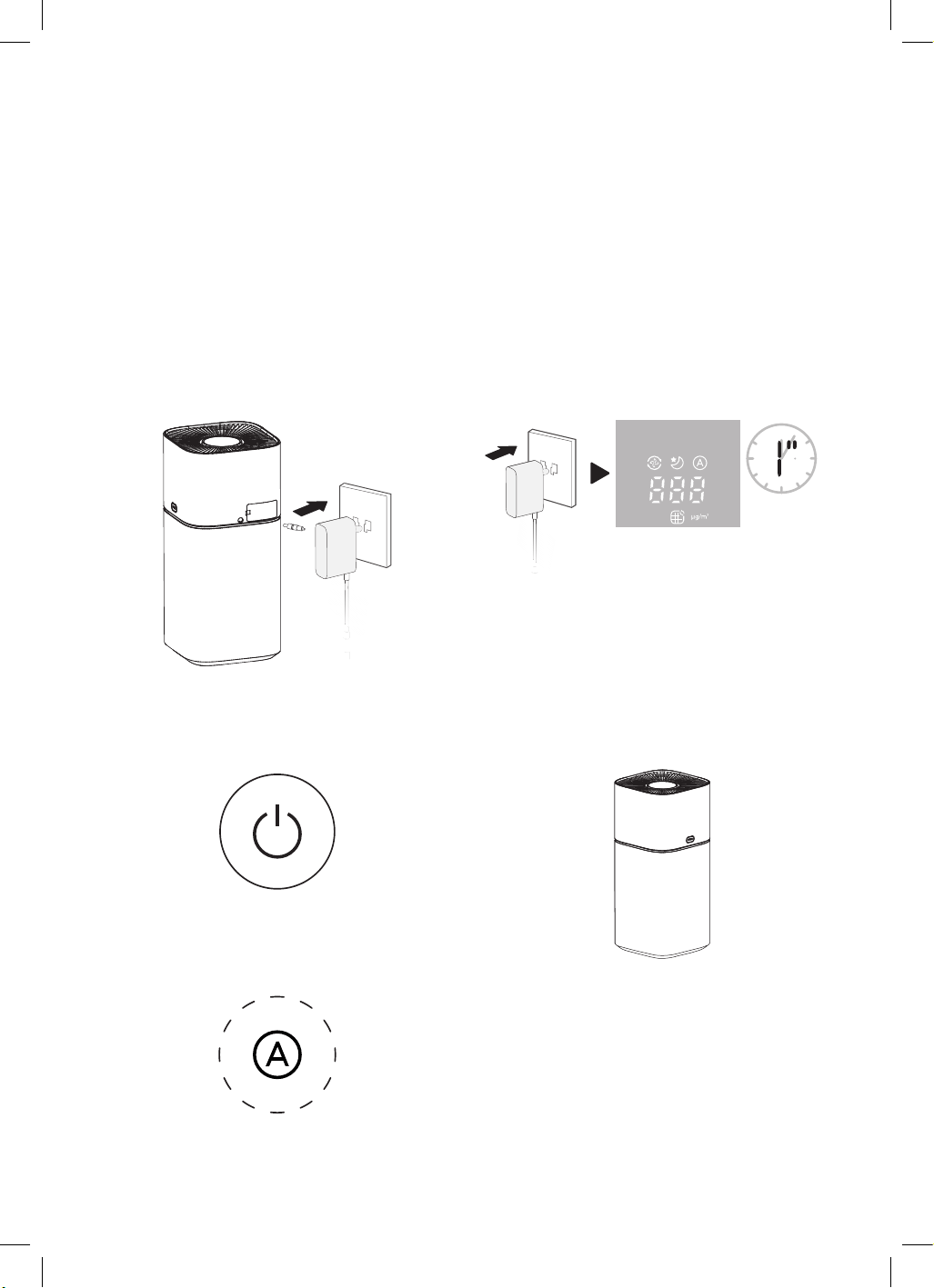
Operating Instructions
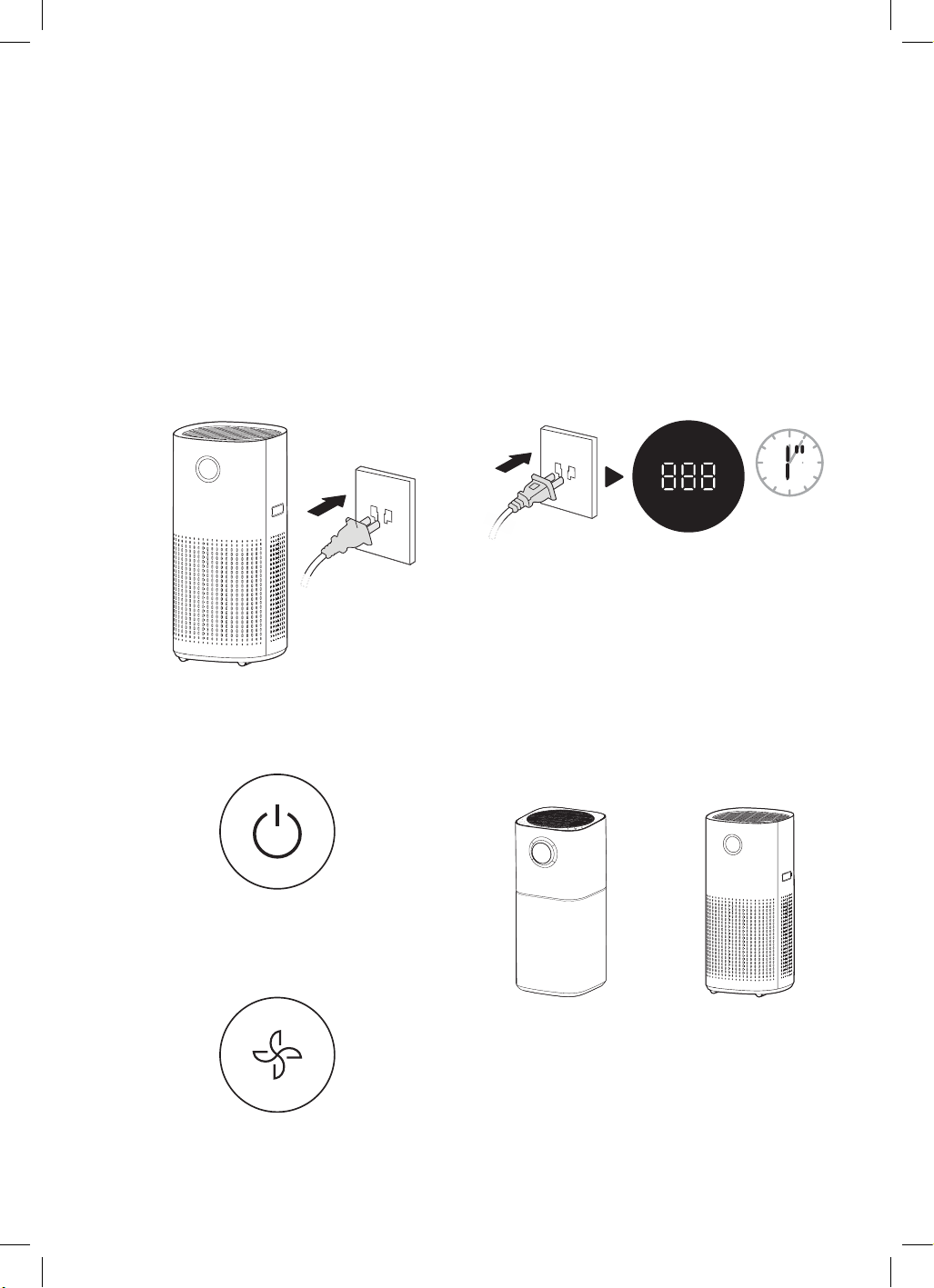
STEP 1
Plug in the power adapter and then connect it to
the power source.
STEP 3
Press the power/standby button to turn on the
standby mode.
STEP 5
The purifier will enter the auto mode after initial
power-on.
STEP 2
When powered on for the first time, the display
panel will flash for 1 second and then turn off,
entering the standby mode.
STEP 4
The particulate matter sensor enters the
preheating state. The air quality LED will turn on
after 10 seconds and enter normal operation.
NOTE
• The machine enters the working mode before the standby state every time it is switched on without
power supply.
• After an accidental power failure (e.g. power failure at home or unplugging the power cord for normal
operation) and re-powering, it automatically resumes the working state before the power failure.
Auto mode
GGSPA200W
& GGSPA360W
GGSPA200W
GGSPA360W
Flash for
1 second
11
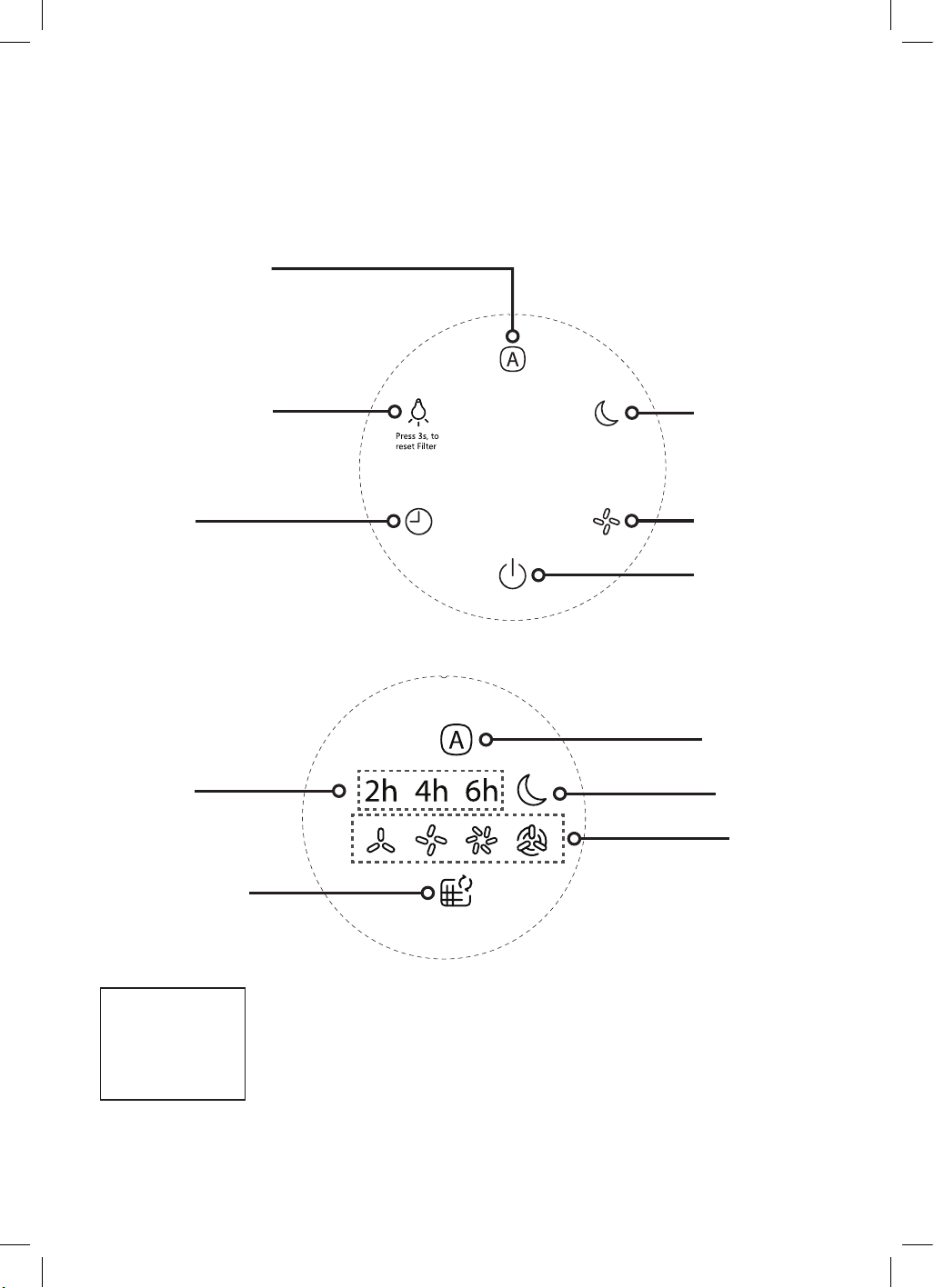
STEP 1
Plug in the power adapter and then connect it to
the power source.
STEP 3
Press the power/standby button to turn on the
standby mode.
STEP 5
The purifier will enter fan speed mode after initial
power-on.
STEP 2
When powered on for the first time, the display
panel will flash for 1 second and then turn off,
entering the standby mode.
STEP 4
The particulate matter sensor and VOC sensor
(GGSPA600W) enters the preheating state. The air
quality LED will turn on after 10 seconds and enter
normal operation.
Operating Instructions
NOTE
• The machine enters the working mode before the standby state every time it is switched on without
power supply.
• After an accidental power failure (e.g. power failure at home or unplugging the power cord for normal
operation) and re-powering, it automatically resumes the working state before the power failure.
GGSPA500W
GGSPA600W
GGSPA500W
GGSPA600W
Flash for
1 second
12
Operating Instructions (Continued)
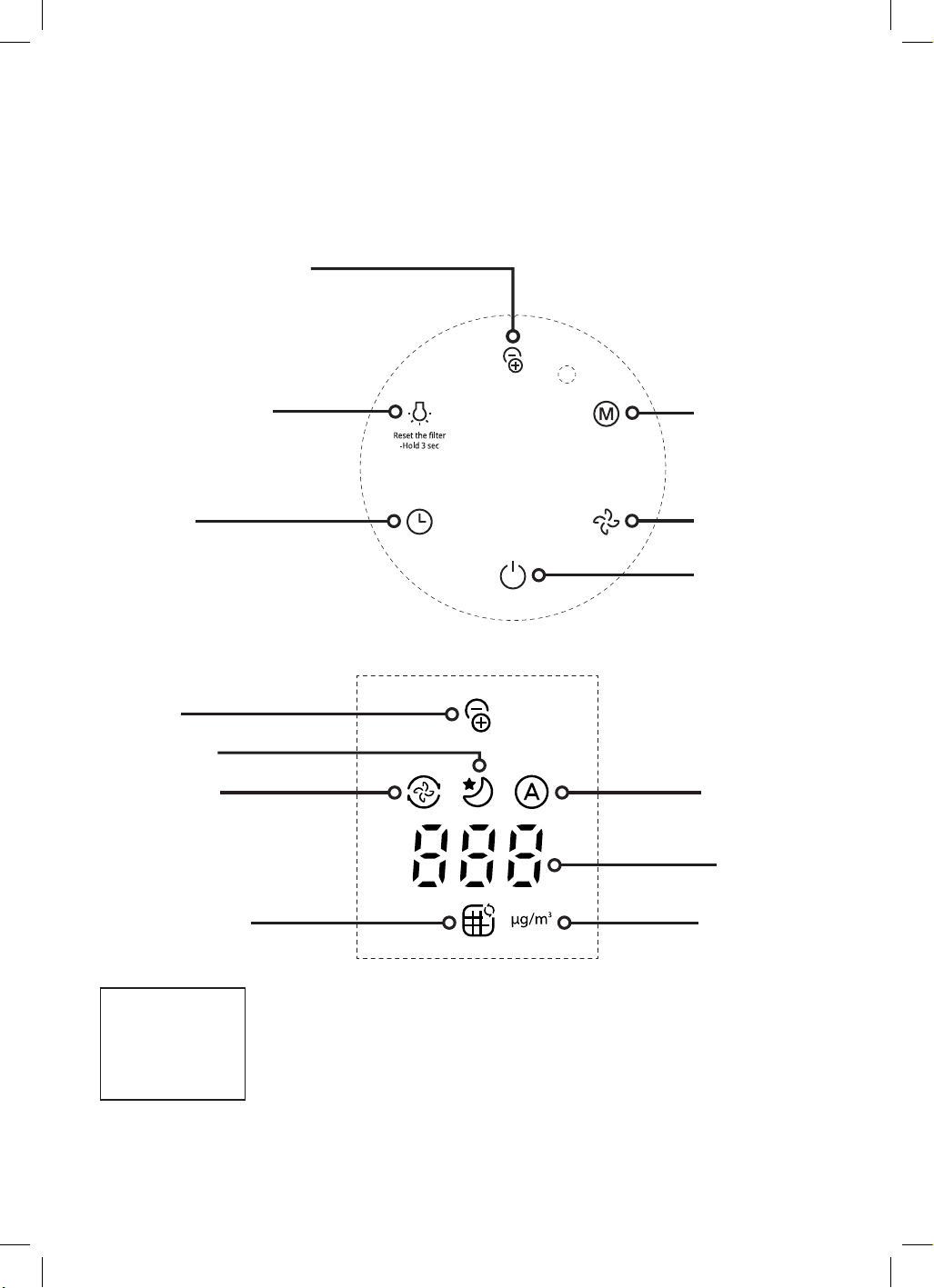
On/standby button
Automatic mode button
Speed button
Slow, medium, high
Sleep mode LED
Speed display
Timer button
Sleep mode button
Light button
Adjust button light and turn
on/off ambient lighting
GGSPA200W
CONTROL PANEL
DISPLAY PANEL
Timer button
HEPA filter
replacement prompt
Auto mode
Adjusts the wind
speed automatically
based on air quality.
Air quality LED
Blue — Excellent
Green — Good
Orange — Medium
Red — Poor
13
Air quality LED
Blue — Excellent
Green — Good
Orange — Medium
Red — Poor
Operating Instructions (Continued)
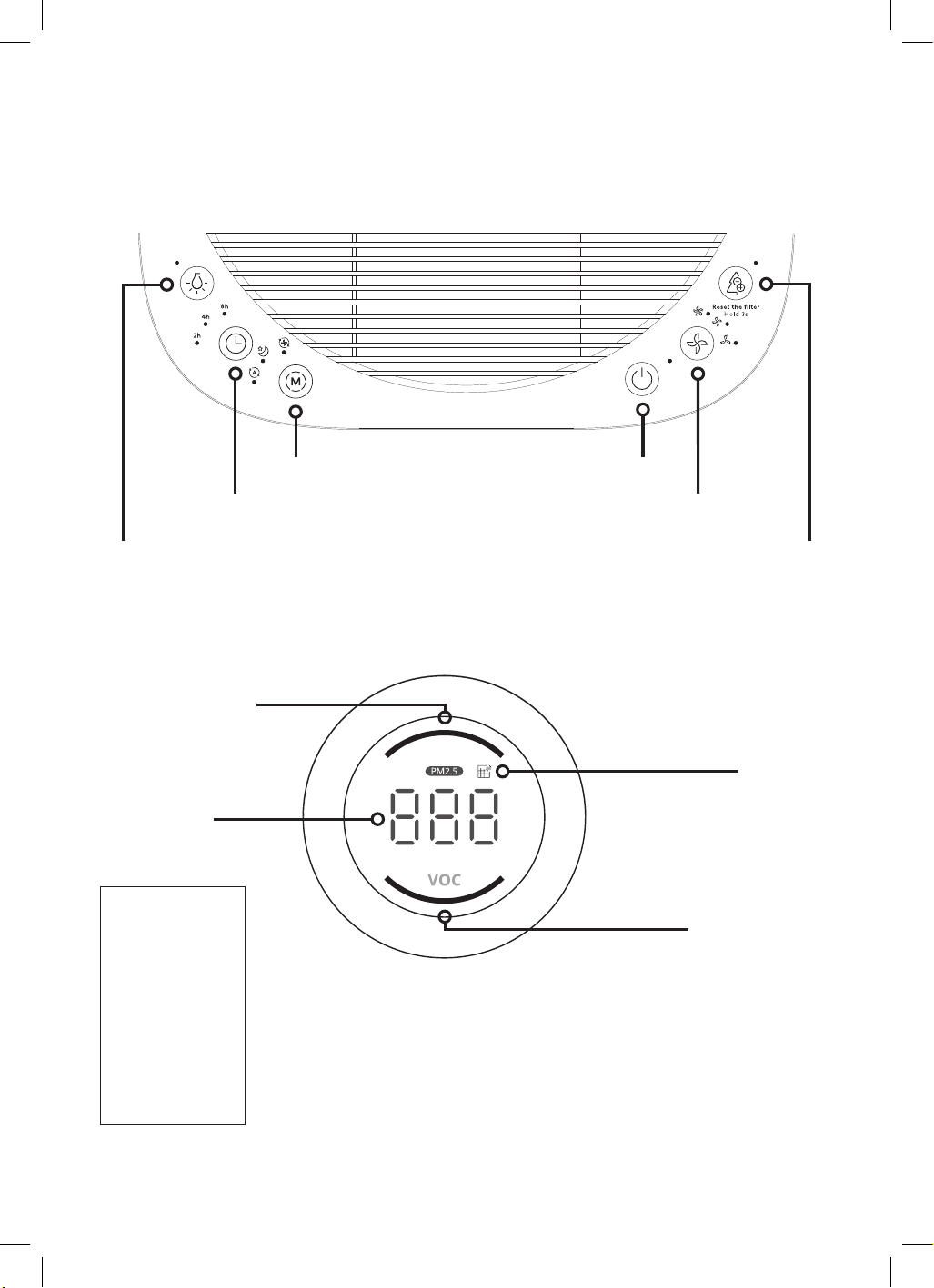
On/standby button
Ionizer function on/off button
Note: The ionizer function is
designed to neutralise harmful
substances such as airborne
mould and viruses in the air, thus
achieving air purification effects.
Speed button
level 1 to 12.
Timer button
Mode button
Extreme Speed
mode, Sleep mode,
and Auto mode.
Light button
Adjust button light and turn
on/off ambient lighting
GGSPA360W
CONTROL PANEL
Ionizer LED
Turbo Mode LED
Auto mode
Adjusts the wind
speed automatically
based on air quality.
Comprehensive
display area
The dust sensor
detects the
concentration of
particulate matter
(PM2.5) in the
air : unit.
Sleep mode LED
HEPA filter
replacement prompt
DISPLAY PANEL
14
Operating Instructions (Continued)
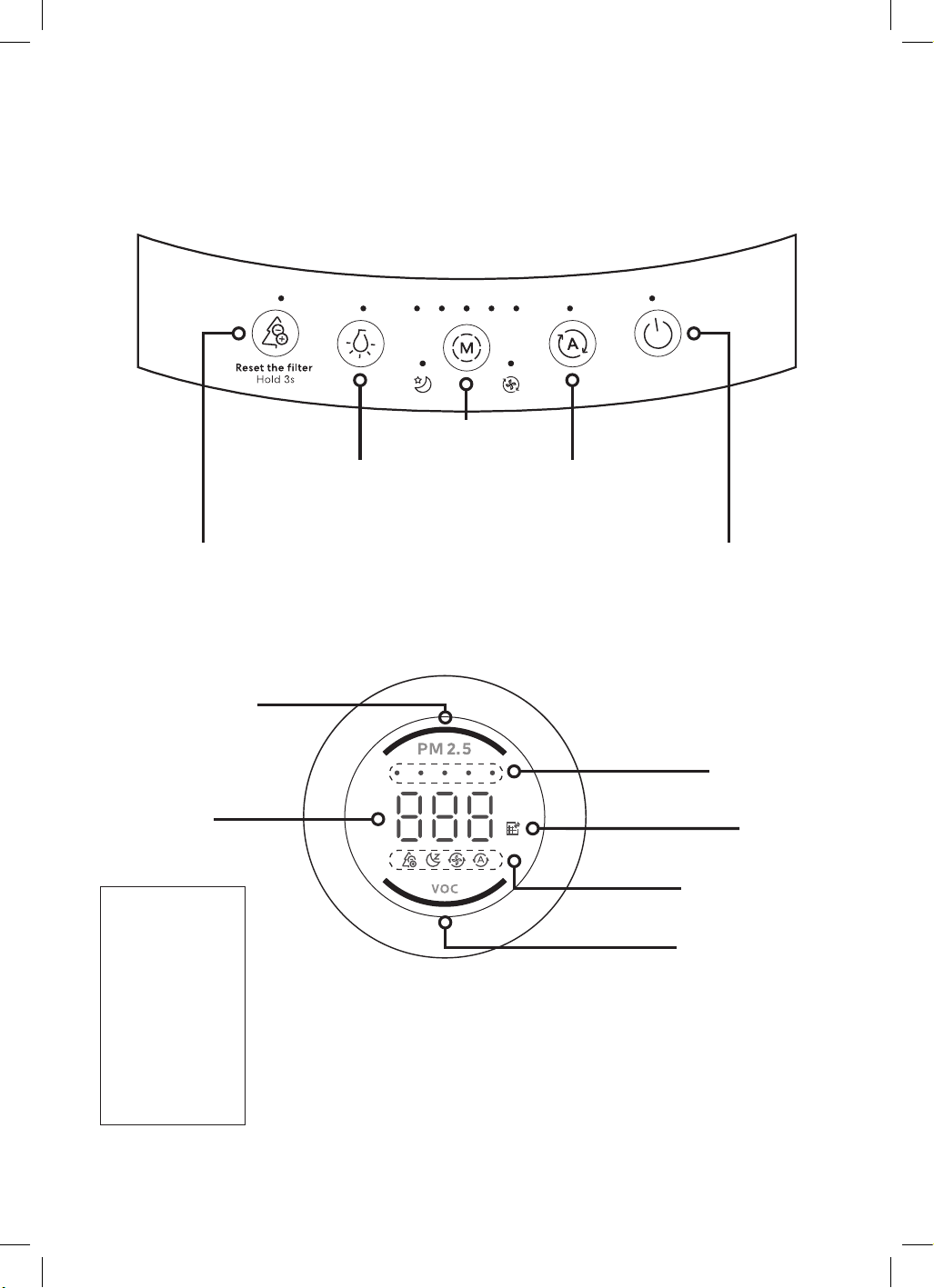
GGSPA500W
CONTROL PANEL
DISPLAY PANEL
Light button
Used for switch the light
of the purifier.
Mode button
Timer button
On/standby button
HEPA filter
replacement
prompt
Comprehensive
display area
PM2.5 Air Quality LED
Real-time monitoring
of particulate matter
concentration such as
secondhand smoke,
dust, pollen, etc
VOC Air Quality LED
Real-time monitoring
of gas concentrations
such as formaldehyde,
benzene, odours, etc.
PM2.5 Air
quality LED
Blue — Excellent
Green — Good
Orange — Medium
Red — Poor
VOC Air
quality LED
Blue — Excellent
Green — Good
Orange — Medium
Red — Poor
Ionizer function on/off button
Note: The ionizer function is designed to neutralise
harmful substances such as airborne mould and viruses
in the air, thus achieving air purification effects.
Fan Speed button
Slow, medium, high
15
Operating Instructions (Continued)
GGSPA600W
CONTROL PANEL
HEPA filter
replacement
prompt
DISPLAY PANEL
Speed mode LED
Comprehensive
display area
PM2.5 Air Quality LED
Real-time monitoring
of particulate matter
concentration such as
secondhand smoke,
dust, pollen, etc
VOC Air Quality LED
Real-time monitoring
of gas concentrations
such as formaldehyde,
benzene, odours, etc.
PM2.5 Air
quality LED
Blue — Excellent
Green — Good
Orange — Medium
Red — Poor
VOC Air
quality LED
Blue — Excellent
Green — Good
Orange — Medium
Red — Poor
Mode button
Automatic mode buttonLight button
Adjust the brightness of the
button LEDs, full brightness,
half brightness, off.
Ionizer function on/off button
Note: The ionizer function is designed to neutralise
harmful substances such as airborne mould and viruses
in the air, thus achieving air purification effects.
On/standby button
Function mode LEDs
Ionizer, Sleep mode,
Turbo mode, Auto mode

16
This page
is intentionally
left blank
17
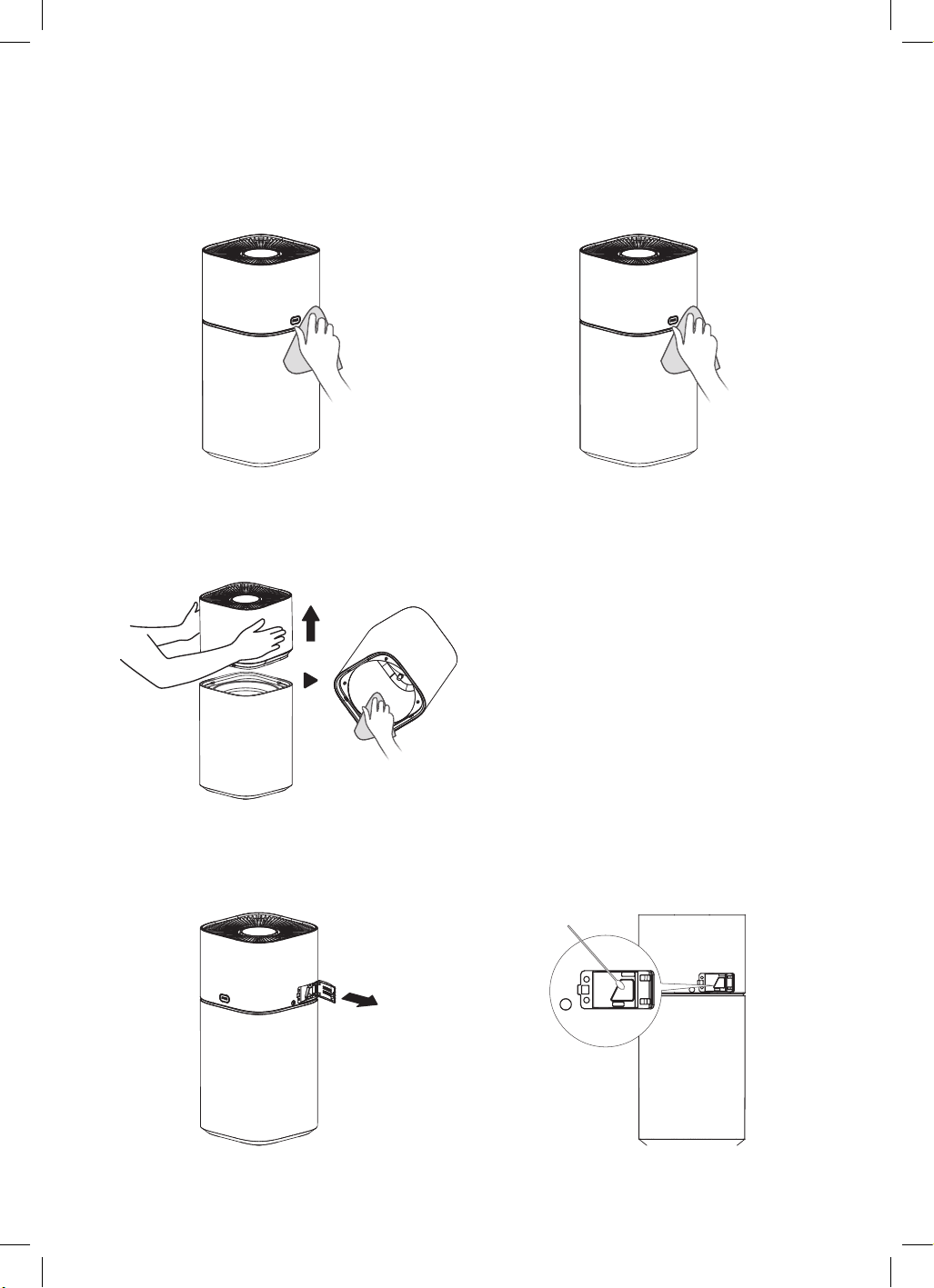
Cleaning and Maintenance
MAIN UNIT
Wipe the body with a soft towel.
BODY INTERIOR
Press the “PUSH” button on the body and lift the
upper part of the air purifier. Use a vacuum cleaner
to remove dust or wipe with a cloth
CLEANING THE DUST SENSOR
STEP 1
Open the back cover.
VENT GRILLE
Use a vacuum cleaner to remove dust or wipe with
a cloth.
STEP 2
Use a vacuum cleaner to remove dust from the
sponge inside the back cover, and then use a
cotton swab to clean the vent of the dust sensor.
18
Cleaning and Maintenance (Continued)
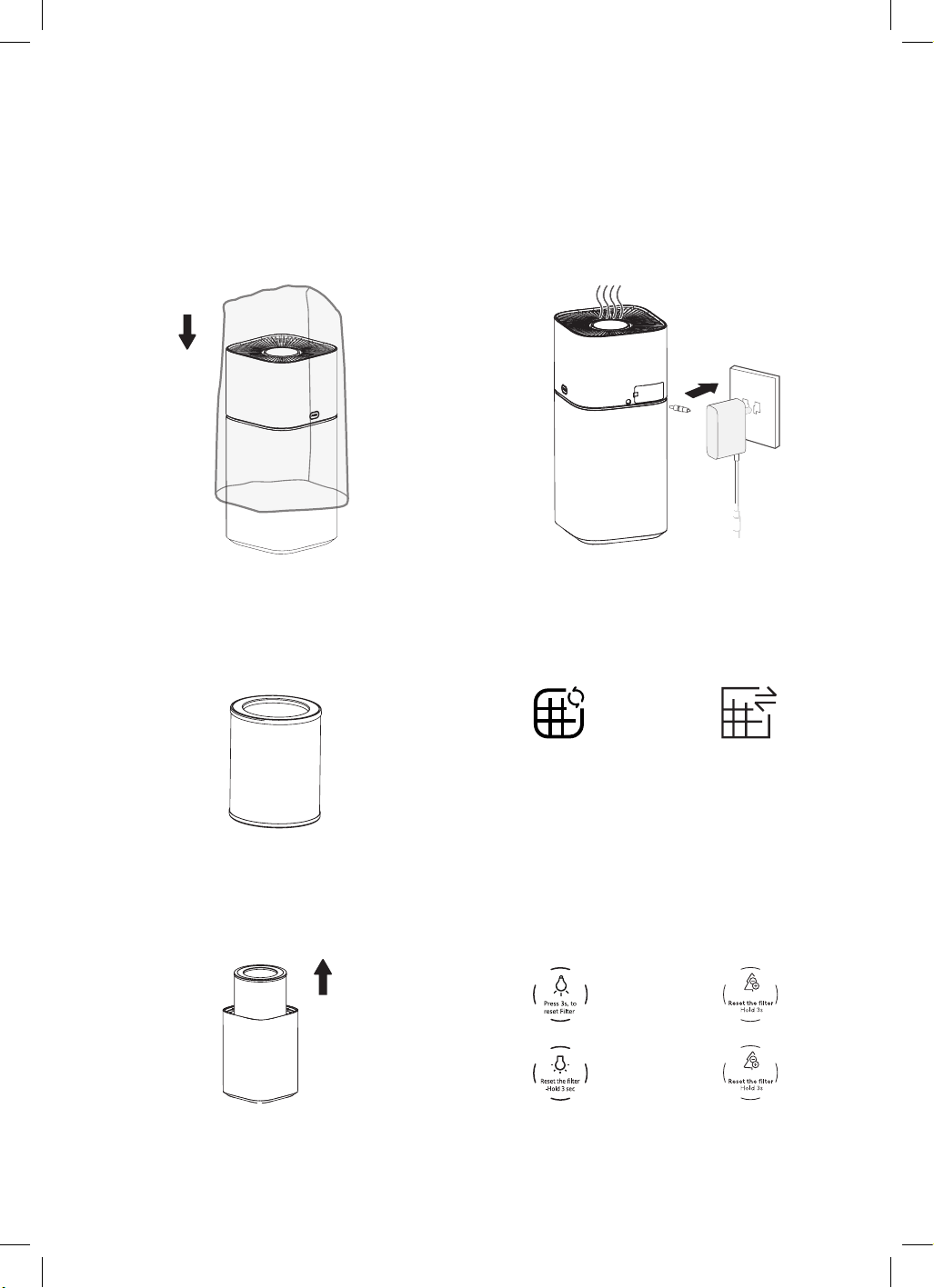
REGULAR MAINTENANCE
STEP 1
Filter model: FC-40Z2
STEP 3
Replace the old filter with a new one
STEP 2
When the filter replacement LED is ON, it indicates
that the filter needs to be replaced
STEP 4
Press and hold the light button (GGSPA200W
& GGSPA360W) or ionizer button (GGSPA500W &
GGSPA600W) for 3 sec to reset the filter. The filter
replacement LED will turn off
REPLACEMENT OF FILTER COMPONENTS
GGSPA200W
& GGSPA360W
GGSPA500W
& GGSPA600W
Ionizer button
Light button
When the air purifier is not in use for a long period
of time, it is recommended to store the entire
unit in a packaging bag to prevent dust from
contaminating the filters;
After removing the filters from the packaging bag,
it is advised to regularly run the air purifier to keep
the filters dry and prevent the growth of bacteria or
unpleasant odours;
19
Cleaning and Maintenance (Continued)
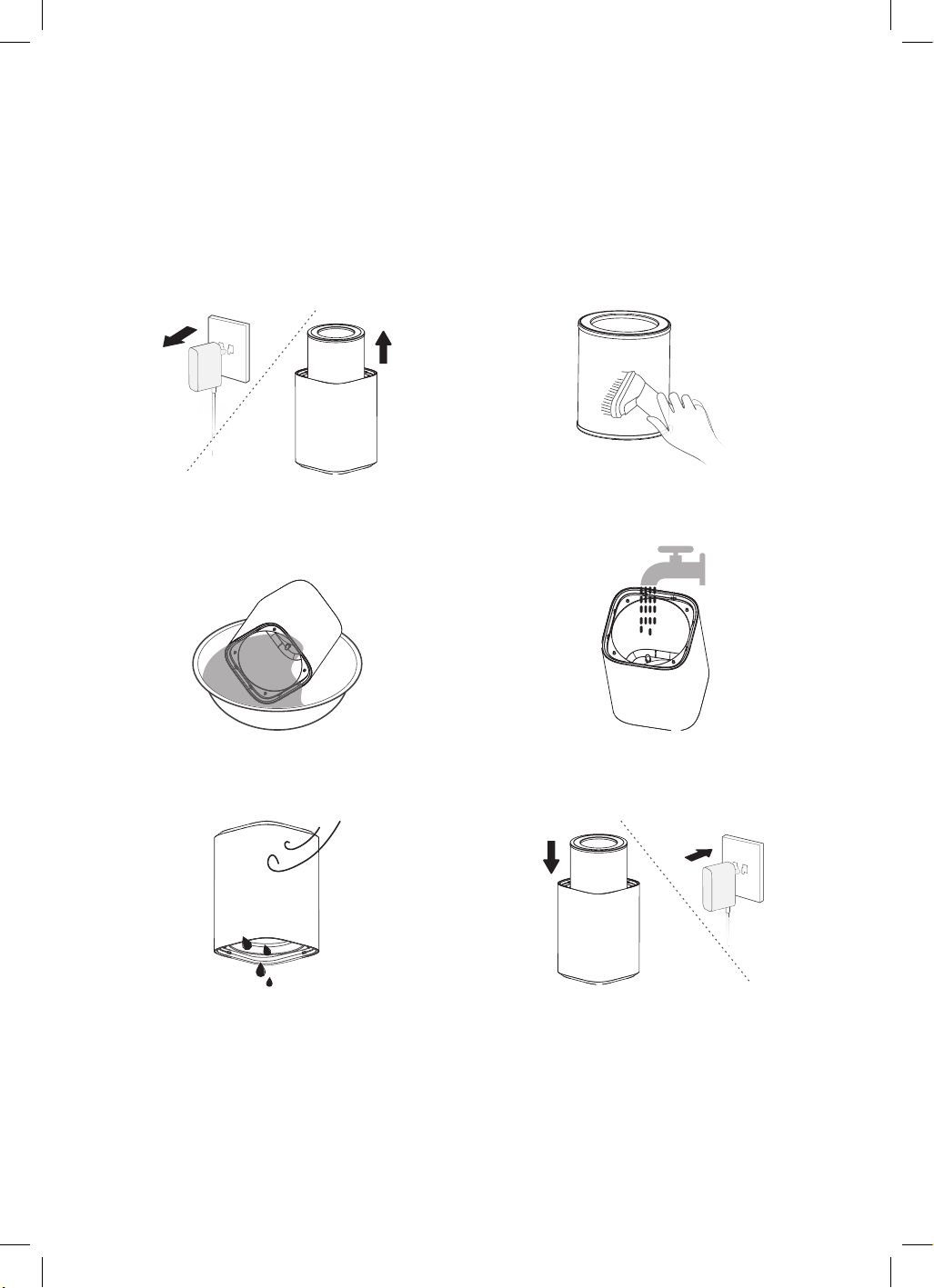
STEP 1
Unplug the air purifier and remove the filter
components.
STEP 3
Dampen the intake grilles and gently brush the
surface of the grilles with a soft bristle brush
dipped in kitchen detergent to clean off any
accumulated dust
STEP 5
Allow the inlet grilles to air dry until no liquid is
draining out;
STEP 2
Use a vacuum cleaner to remove dust or wipe with
a dry cloth.
STEP 4
Rinse the inlet grilles thoroughly with clean water
STEP 6
Install the filter components.
FILTER CLEANING AND REPLACEMENT
NOTE
Before performing any maintenance operation, please make sure to turn off the air purifier and
disconnect the power supply.
• It is recommended to clean the filters every two weeks and replace them every six months;
• Do not wash the filters with water
• When cleaning the filters, it is advisable to use a smaller, soft brush or a household vacuum cleaner
• When using a brush, brush horizontally along the filters, avoiding brushing vertically to prevent damage
to the filters
• When using a vacuum cleaner for cleaning, maintain a distance of 5-10mm between the suction inlet and
the surface of the filters to avoid damaging them
• The filters act as collectors for air pollutants, and severe pollution can accelerate the development of
unpleasant odours. The filter replacement frequency can be adjusted based on the usage environment
20
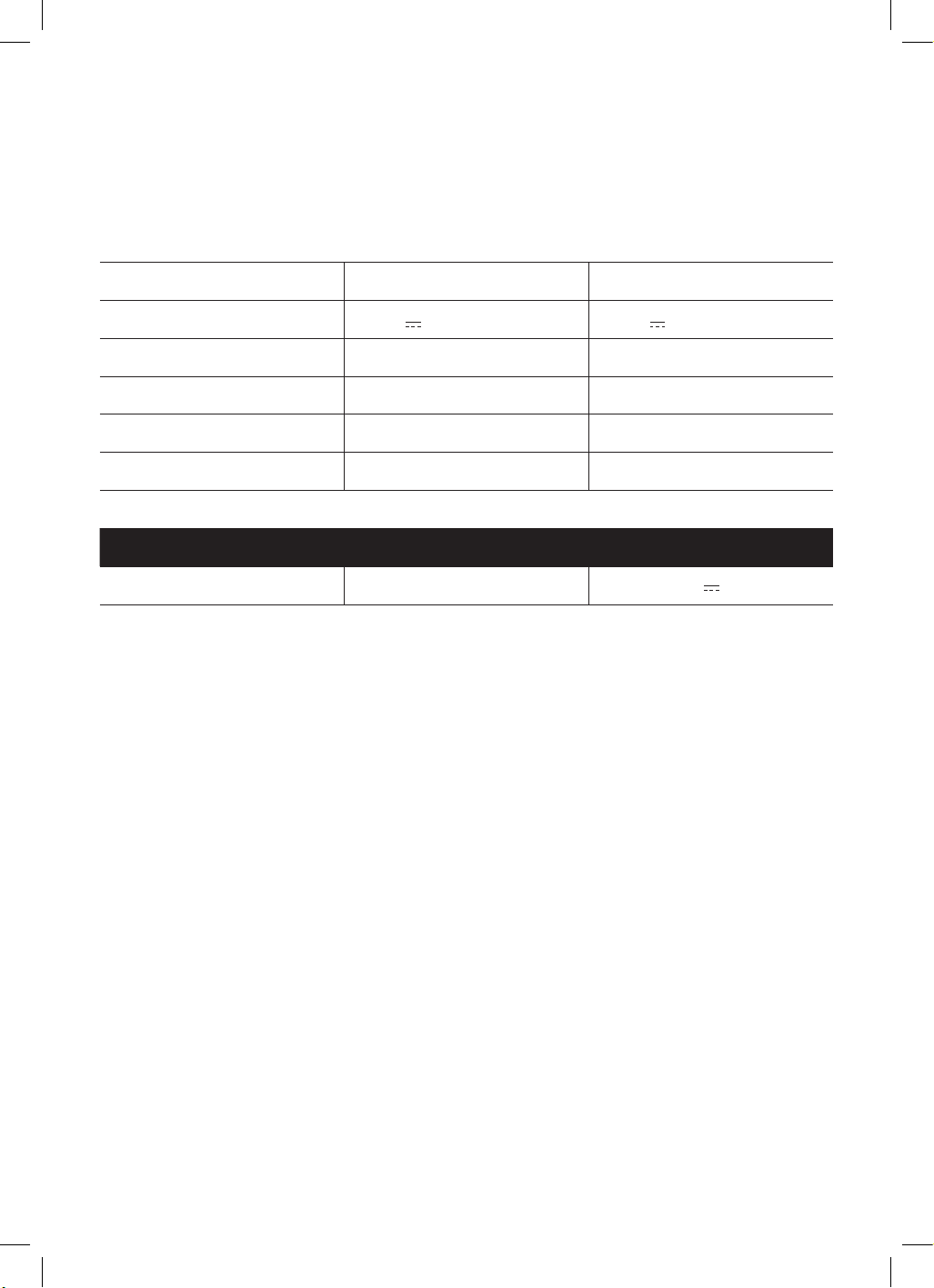
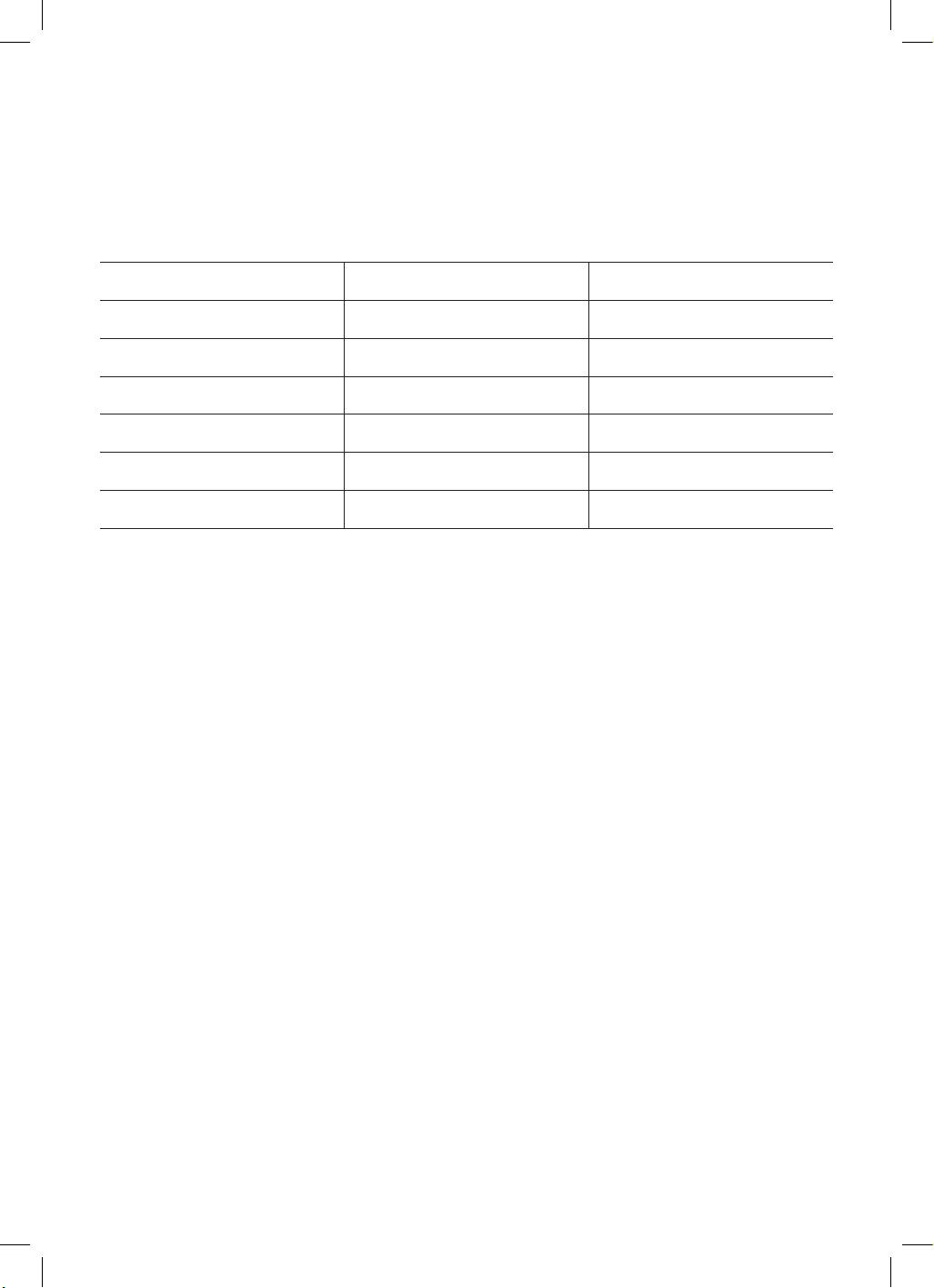
Technical Specifications
Below outlines the technical specifications for your Air Purifier.
GGSPA200W
GGSPA360W
Model GGSPA200W GGSPA360W
Operating voltage 24V 24V
Rated Power 22W 35W
CADR (particulate matter) 200
3
/h 380m
3
/h
Noise 35–65dB(A) 35–65dB(A)
Usable area 27m
2
30.6m
2
• The performance parameters listed in the table are measured at the factory and are for reference only
• Due to product improvements, the parameters may be subject to change. Please refer to the product
nameplate for the specific parameters
• The applicable area is calculated based on the theoretical value of (0.07~0.12) multiplied by the
CADR of particulate matters. However, the applicable area may vary depending on factors such as
the environmental conditions and indoor pollution levels
• Purification principle: The air purifier's fan draws in air and filters it through the built-in filter, primarily
removing dust particles (such as PM2.5) for purification purposes
Accessory Input Output
Power adapter 100/240V~ 50/60Hz 1.5A 24V 1.5A
21
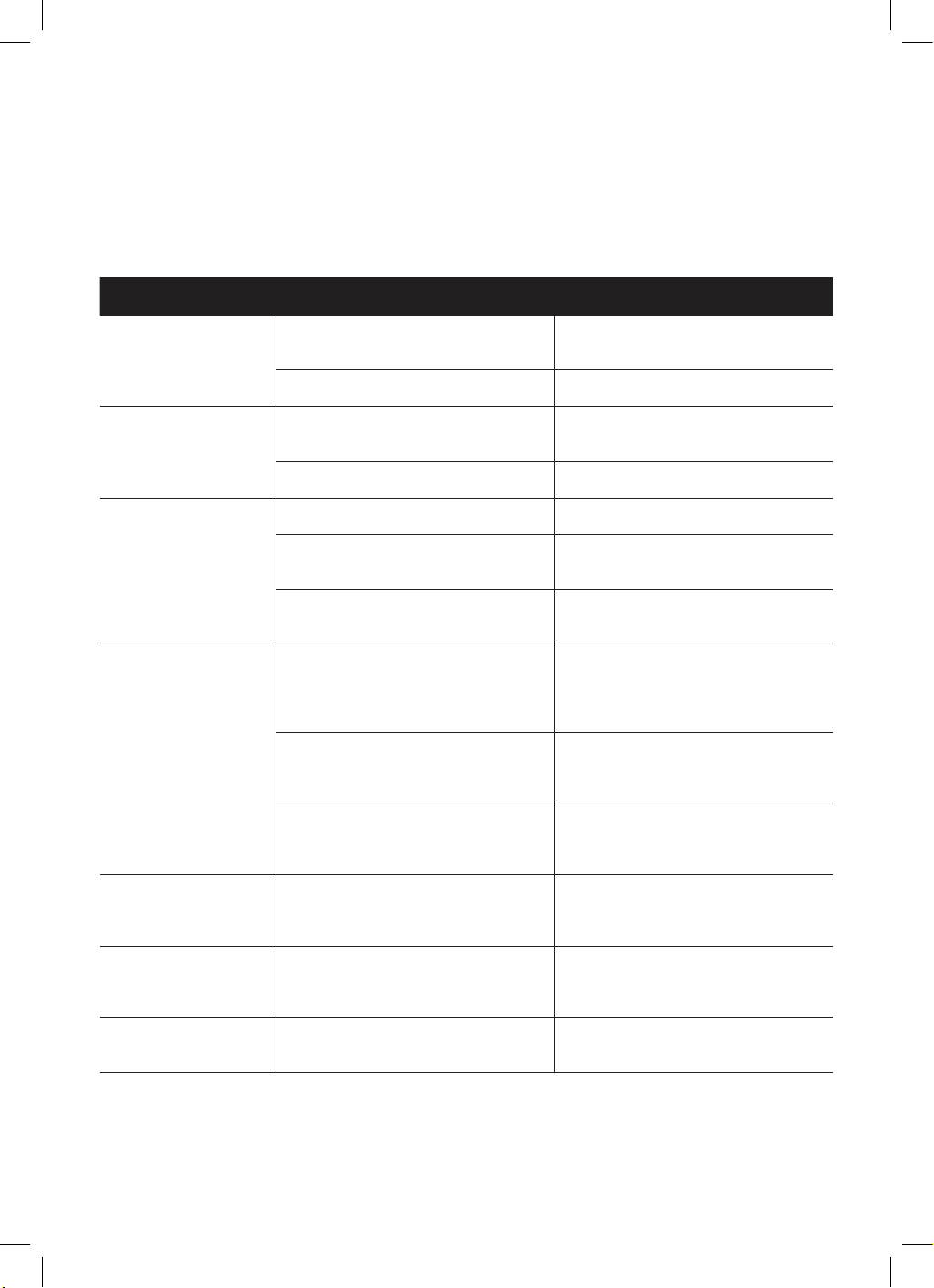
Technical Specifications
Below outlines the technical specifications for your Air Purifier.
GGSPA500W
GGSPA600W
Model GGSPA500W GGSPA600W
Operating voltage 220-240V~ 220-240V~
Frequency 50Hz 50Hz
Rated Power 50W 49W
CADR (particulate matter) 500
3
/h 600
3
/h
Noise 35–66dB(A) 35—66dB(A)
Usable area 35–60m
2
45-78m
2
• The performance parameters listed in the table are measured at the factory and are for reference only
• Due to product improvements, the parameters may be subject to change. Please refer to the product
nameplate for the specific parameters
• The applicable area is calculated based on the theoretical value of (0.07~0.12) multiplied by the
CADR of particulate matters. However, the applicable area may vary depending on factors such as
the environmental conditions and indoor pollution levels
• Purification principle: The air purifier's fan draws in air and filters it through the built-in filter, primarily
removing dust particles (such as PM2.5) for purification purposes
• VOC Detection: Primarily detects the overall concentration of volatile organic compounds, such as
formaldehyde, alcohol, benzene, carbon monoxide, sulfides, and other harmful gases. It does not
measure the actual concentration of single volatile organic gases (e.g. formaldehyde)
• PM2.5 Detection: Primarily detects particulate matter ranging from 1 to 10 micrometers, including
tobacco smoke, pollen, household dust, and other airborne particles
Sensor Sensitivity Range
• VOC Detection Method: Spray alcohol or perfume spray near the sensor and observe changes in
the sensor
• PM2.5 Detection Method: Place cigarettes or incense near the sensor and observe changes in the
sensor. (Please handle with care to avoid ash falling into the sensor, affecting detection accuracy)
22
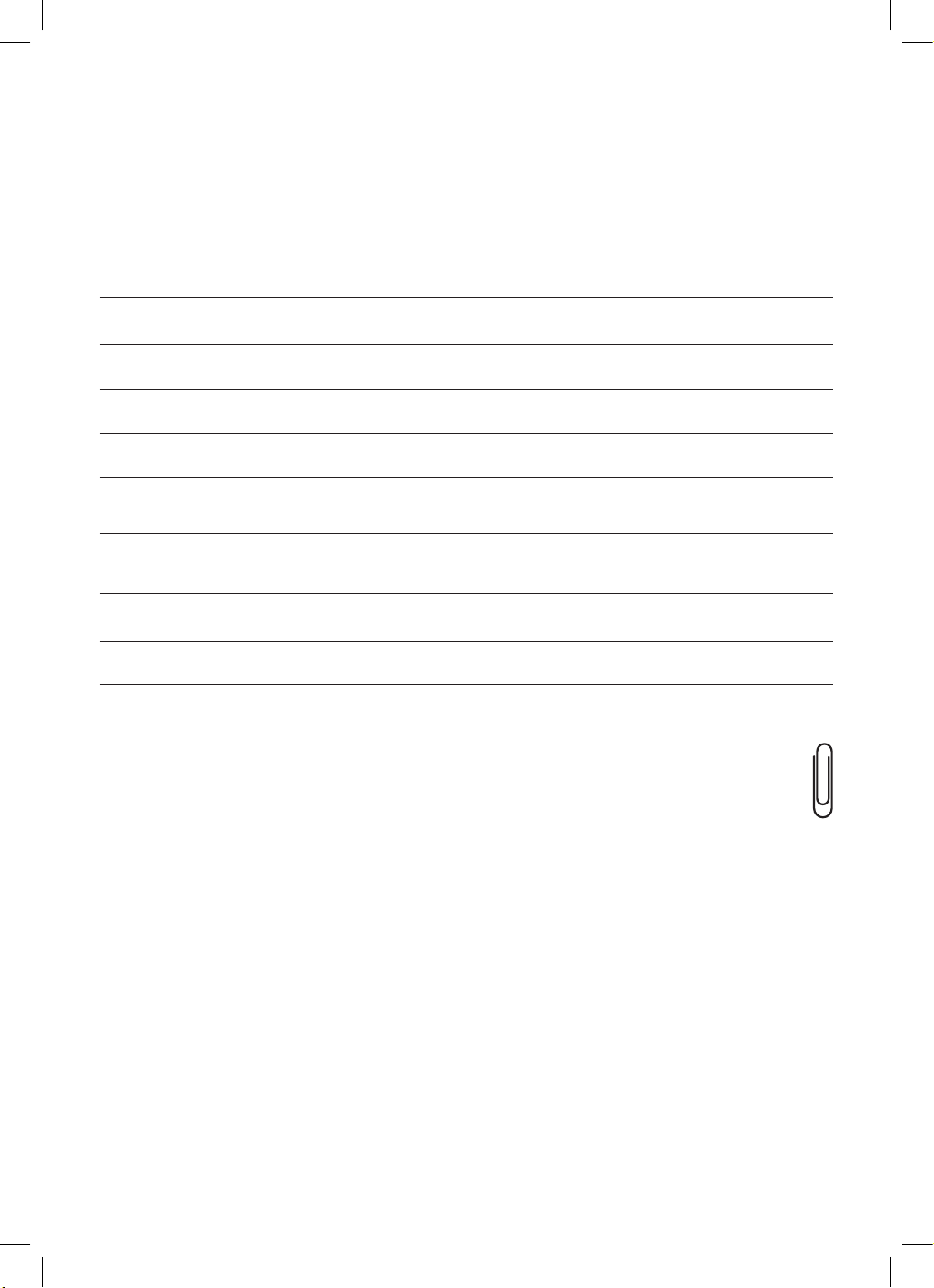
Troubleshooting Guide
GGSPA500W
GGSPA600W
Operation of your appliance can lead to errors and malfunctions. The following tables contain possible
causes and notes for resolving an error message or malfunction. It is recommended to read the table
below carefully in order to save your time and money that may cost for calling to the service center.
Problem Cause Solution
PM2.5 air quality LED
remains red when
running continuously
Room size may exceed the
purification capacity of the machine
Keep the purifier
running continuously
Filter assembly may not be installed Install the filter assembly properly
Purifier cannot work
Power cord may not be plugged
in, or of poor contact
Plug in the power cord and
ensure good contact
Power switch is not turned on Turn on the power switch
Poor smoke and
odor removal
Filter assembly may not be installed Install the filter assembly properly
Filter assembly may be past
its lifespan
Replace the filter assembly with
a new one
Air inlet may be obstructed by
foreign objects
Clear the foreign objects from
theair inlet
PM2.5 air quality LED
does not change
Sensor sensitivity may be unstable
after a period of operation; if it
remains green, the air may be clean
Wait for a few minutes after starting
operation, and blow cigarette smoke
towards the sensor; if the indicator
light changes color, it's normal
Purifier may be placed in a location
where it's difficult to detect dirt, or
sensor may be dirty
Move the purifier to a different
location, or clean the sensor
Strong indoor odours, which
may cause a decrease in
sensor sensitivity
Adjust the fan speed to high and
run for several hours to a day
Filter cleaning
LED remains on
Filter reset operation may not
have been completed after
cleaning or replacing the filter
Complete the filter reset operation
as required by the model after
cleaning or replacing the filter
Difficulties in
removing odours
and smoke
Filter assembly may still be
wrapped in packaging
Remove the packaging from
the filter assembly
Display shows “E7”
Key board and control board
communication failure
Contact after-sales service
for assistance
In case of following situations, please send for repair:
1. The machine operates abnormally or fails to operate despite trying the above methods;
2. Abnormal operation occurs due to the infiltration of external substances or water.
23
For future reference, please record the following information which can be found
on the rating plate and the date of purchase which can be found on your sales invoice.
STORE DETAILS
STORE NAME
|
ADDRESS
|
TELEPHONE
|
PURCHASE DATE
|
PRODUCT DETAILS
MODEL NO.
|
SERIAL NO.*
|
Purchase Details
Attach your receipt
to this page

24
Warranty Information
WARRANTY TERMS & CONDITIONS
AIR PURIFIER
This document sets out the terms and conditions
of the product warranties for Residentia Group
Appliances. It is an important document. Please
keep it with your proof of purchase documents in a
safe place for future reference should you require
service for your Appliance.
1. IN THIS WARRANTY
(a) ‘acceptable quality’ as referred to in clause
10 of this warranty has the same meaning
referred to in the ACL;
(b) ‘ACL’ means Trade Practices Amendment
(Australian Consumer Law) Act (No.2) 2010;
(c) ‘Appliance’ means any Residentia Group
product purchased by you accompanied by
this document;
(d) ‘ASR’ means Residentia Group authorised
service representative;
(e) ‘Residentia Group’ means Residentia Group
Pty Ltd of 165 Barkly Ave, Burnley VIC 3121,
ACN 600 546 656 in respect of Appliances
purchased in Australia;
(f ) ‘major failure’ as referred to in clause 10
of this warranty has the same meaning
referred to in the ACL and includes a
situation when an Appliance cannot be
repaired or it is uneconomic for Residentia
Group, at its discretion, to repair an
Appliance during the Warranty Period;
(g) ‘Warranty Period’ means:
(i) where the Appliance is used for
personal, domestic or household
use (i.e. normal single family use)
as set out in the instruction manual,
the Appliance is warranted against
manufacturing defects for 24
months, following the date of original
purchase of the Appliance;
(h) ‘you’ means the purchaser of the Appliance
not having purchased the Appliance for
re-sale, and ‘your’ has a corresponding
meaning.
2. This warranty only applies to Appliances
purchased and used in Australia and is in
addition to (and does not exclude, restrict,
or modify in any way) any
non-excludable statutory warranties in
Australia.
3. During the Warranty Period Residentia
Group or its ASR will, at no extra charge
if your Appliance is readily accessible for
service, without special equipment and
subject to these terms and conditions, repair
or replace any parts which it considers to be
defective. Residentia Group or its ASR may
use remanufactured parts to repair your
Appliance. You agree that any replaced
Appliances or parts become the property
of Residentia Group. This warranty does
not apply to light globes, batteries, filters or
similar perishable parts.
4. Parts and Appliances not supplied by
Residentia Group are not covered by
this warranty.

25
5. You will bear the cost of transportation,
travel and delivery of the Appliance to and
from Residentia Group or its ASR. If you
reside outside of the service area, you will
bear the cost of:
(a) travel of an authorised representative;
(b) transportation and delivery of the Appliance
to and from Residentia Group or its ASR,
in all instances, unless the Appliance is
transported by Residentia Group or its ASR,
the Appliance is transported at the owner’s
cost and risk while in transit to and from
Residentia Group or its ASR.
6. Proof of purchase is required before you can
make a claim under this warranty.
7. You may not make a claim under this
warranty unless the defect claimed
is due to faulty or defective parts or
workmanship. Residentia Group is not liable
in the following situations (which are not
exhaustive):
(a) the Appliance is damaged by:
(i) accident
(ii) misuse or abuse, including failure to
properly maintain or service
(iii) normal wear and tear
(iv) power surges, electrical storm
damage or incorrect power supply
(v) incomplete or improper installation
(vi) incorrect, improper or inappropriate
operation
(vii) insect or vermin infestation
(viii) failure to comply with any additional
instructions supplied with the
Appliance;
(b) the Appliance is modified without authority
from Residentia Group in writing;
(c) the Appliance’s serial number or warranty
seal has been removed or defaced;
(d) the Appliance was serviced or repaired by
anyone other than Residentia Group, an
authorised repairer
or ASR.
8. This warranty, the contract to which it
relates and the relationship between you
and Residentia Group are governed by the
law applicable where the Appliance was
purchased.
9. To the extent permitted by law, Residentia
Group excludes all warranties and liabilities
(other than as contained in this document)
including liability for any loss or damage
whether direct or indirect arising from your
purchase, use or non use of the Appliance.
10. For Appliances and services provided
by Residentia Group in Australia, the
Appliances come with a guarantee by
Residentia Group that cannot be excluded
under the Australian Consumer Law. You
are entitled to a replacement or refund
for a major failure and for compensation
for any other reasonably foreseeable loss
or damage. You are also entitled to have
the Appliance repaired or replaced if the
Appliance fails to be of acceptable quality
and the failure does not amount to a major
failure. The benefits to you given by this
warranty are in addition to your other rights
and remedies under a law in relation to the
Appliances or services to which the warranty
relates.
11. At all times during the Warranty Period,
Residentia Group shall, at its discretion,
determine whether repair, replacement or
refund will apply if an Appliance has a valid
warranty claim applicable to it.
12. Missing parts are not covered by warranty.
Residentia Group reserves the right to assess
each request for missing parts in a case by
case basis. Any parts that are not reported
missing in the first week after purchase will
not provide free of charge.
13. To enquire about claiming under this
warranty, please follow these steps:
(a) carefully check the operating instructions,
user manual and the terms of this warranty;
(b) have the model and serial number
of the Appliance available;
(c) have the proof of purchase (e.g. an invoice)
available;
(d) telephone the numbers shown below.
14. You accept that if you make a warranty
claim, Residentia Group and its ASR may
exchange information in relation to you
to enable Residentia Group to meet its
obligations under this warranty.
IMPORTANT
Before calling for service, please ensure that the
steps in point 13 have been followed.
Telephone contacts
► Service: Please call 1300 11 HELP (4357)
► Spare Parts: Please call 1300 11 SPARE (7727)
Our goods come with guarantees that cannot be excluded under the
Australian Consumer Law. You are entitled to a replacement or refund
for a major failure and for compensation for any other reasonably
foreseeable loss or damage. You are also entitled to have the goods
repaired or replaced if the goods fail to be of acceptable quality
and the failure does not amount to a major failure.
The Australian Consumer
Law requires the inclusion
of the following statement
with this warranty:
Warranty Information (Continued)

26
T. 1300 11 4357
E. support@residentiagroup.com.au
E S S E N T I A L S FOR LIFE
An initiative by
Residentia Group
www.solt.house