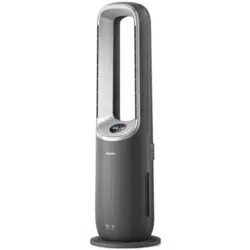

E S S E N T I A L S FOR LIFE
User
Manual
MODEL
GGSBFAP4W10W
V 1.0 | 0524
Bladeless Fan
with Air Purifier

2
Welcome Congratulations on purchasing
your new Bladeless Fan!
The Sôlt brand is proudly
distributed within Australia
by Residentia Group Pty Ltd.
Please refer to the warranty card at the rear of this manual
for information regarding your product’s parts and labour
warranty, or visit us online at www.residentia.group
At Residentia Group, we are customer obsessed and our
Support Team are there to ensure you get the most out
of your appliance. Should you want to learn more about
your Bladeless Fan features, and importantly taking care
of your appliance when cleaning, our Support Team are
here to help.
You can use our online Support Centre at anytime by
visiting http://support.residentiagroup.com.au, or you can
contact us via calling us on 1300 11 HELP (4357).
It is important that you read through the following use and
care manual thoroughly to familiarise yourself with the
installation and operation requirements of your appliance
to ensure optimum performance.
Again, thank you for choosing an Sôlt appliance and we
look forward to being of service to you.
Kind Regards,
The Residentia Team
Residentia Group
—
Head Office.
165 Barkly Ave
Burnley
Victoria 3121
Australia
—
ACN.
600 546 656
—
Online.
residentia.group
Sôlt
—
Online.
www.solt.house
—
Instagram.
/solt.house
—
Facebook.
/solt.appliances

3
Sôlt recommends the use of original spare parts. When contacting our customer service team,
please ensure that you have the following information at hand (which can be found on your
appliances’ rating plate).
— Model Number
— Serial Number
T . 1300 11 4357 | E. support@residentiagroup.com.au
Customer Care
Contents 2 Welcome
4 General Instructions
5 Your Bladeless Fan
6 Assembly Instructions
7 Operating Instructions
11 Cleaning & Maintenance
12 Troubleshooting
12 Technical Specifications
13 Purchase Details
14 Warranty Information

4
CONDITIONS OF USE
• Indoor use only.
• This appliance is intended to be used in
household and other residential type of
environments.
SAFETY INSTRUCTIONS
• Before using the appliance, carefully read the
instructions in this manual.
• The manufacturer is not responsible if an
incorrect installation and use causes injuries
and damages.
• Always keep the instructions with your
appliance for future reference.
WARNING: To prevent any damages to your
and others’ life or property, you have to follow
the safety notes.
WARNING: Risk of suffocation, injury
or permanent disability.
• When the fan was assembled, the rotor blade
guard must not be taken off anymore.
• Prior to cleaning, unplug the fan.
• The rotor guard must not be dissembled /
opened to clean the rotor blades.
• Wipe the fan enclosure and rotor blade guard
with a slightly damp cloth
• This appliance is not intended for use by
persons (including children) with reduced
physical, sensory or mental capabilities, or lack
of experience and knowledge, unless they have
been given supervision or instruction concerning
use of the appliance by a person responsible for
their safety.
• Children should be supervised to ensure that
they do not play with the appliance.
• Keep all packaging away from children.
INSTRUCTIONS FOR SAFE OPERATION
• Never insert fingers, pencils, or any other
foreign object through the grille when fan is
running.
• Disconnect fan when moving from one location
to another.
• Be sure fan is on a stable surface when
operating to avoid overturning.
• DO NOT use the fan near a window, rain may
create an electrical hazard.
• Household use only.
INSTALLATION
• Remove all the packaging.
• Do not assemble or use a damaged appliance.
• After you have assembled the Tower Fan, do
not take off the rotor blade guard anymore.
PRODUCT DISPOSAL
• Disconnect the appliance from the mains
supply.
• Cut off the mains cable and discard it.
ELECTRICAL CONNECTION
WARNING: Caution, risk of fire and electrical shock!
• This appliance has a polarized plug (one blade
is wider than the other). To reduce the risk of
electric shock, this plug is intended to fit in a
polarized outlet only one way. If the plug does
not fit fully in the outlet, reverse the plug. If it
still does not fit, contact a qualified electrician.
Do not attempt to override this safety feature.
• WARNING: To reduce the risk of fire or electric
shock, do not use this fan with any solid-state
speed control device.
• WARNING: To Reduce The Risk Of Fire,
Electric Shock Or Injury To Persons, Do Not
Use Replacement Parts That Have Not Been
Recommended By The Manufacturer (e.g. Parts
Made At Home Using A 3D Printer).
• If the supply cord is damaged, it must be
replaced by manufacturer or its service agent
or a similarly qualified person in order to avoid
a hazard.
• To protect against the risk of electrical shock, do
not immerse the unit, cord or plug in water or
other liquid.
• When the appliance is not in use and before
cleaning, unplug the appliance from the outlet.
• This product employs overload protection (fuse).
A blown fuse indicates an overload or short-
circuit situation. If the fuse blows, unplug the
product from the outlet. Replace the fuse as per
the user servicing instructions (follow product
marking for proper fuse rating) and check the
product. If the replacement fuse blows, a short-
circuit may be present and the product should
be discarded or returned to an authorised
service facility for examination or repair.
• Do not operate any fan with a damaged cord
or plug.
• Discard fan or return to an authorized service
facility for examination or repair.
• Do not run cord under carpeting. Do not
cover cord with throw rugs, runners, or similar
coverings. Do not route cord under furniture
or appliances. Arrange cord away from traffic
area and where it will not be tripped over.
• Do not leave the fan running unattended.
• Keep electrical appliances out of reach from
children or infirm persons. Do not let them use
the appliances without supervision.
• The supply cord cannot be replaced. If the cord
is damaged the Adapter should be scrapped
WARNING
Only authorised technicians can carry out repairs.
Note: Your appliance requires little maintenance.
If you are experiencing issues, do not try to resolve
the issue or fault by yourself. If you appliance
requires maintenance:
• Power off the appliance using the Power button.
• Switch off the appliance at the power outlet
and remove the plug.
• Contact our customer service team.
General Instructions
5
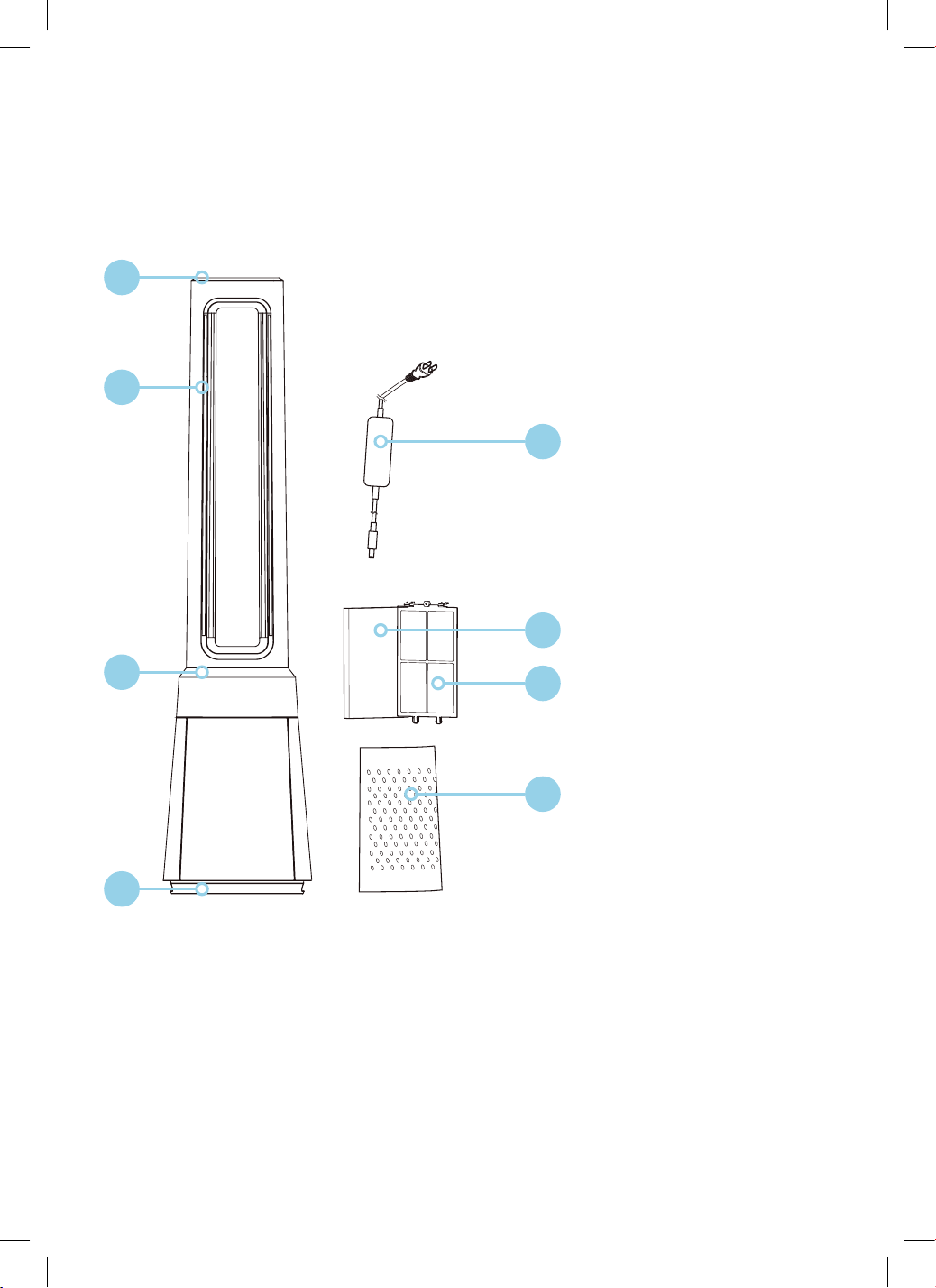
KEY
1. Top Cover
2. Air Outlet
3. Display and
Control Panel
4. Base
5. Adapter
6. HEPA Filter × 2
7. Pre-Filter × 2
8. Air Inlet Grille × 2
Included by not shown:
• Remote Control
• User Manual
• Quick Start Guide
Note:
• The images in this user manual are for explanatory purposes only.
Your Bladeless Fan may appear slightly different.
• Memory Function: When the fan is turned off or powered off, it will run in the previous state before
turning off or power off when the power is powered on again (the timer function is not memorised).
• Screen-off function: In case of no operation for 60 seconds during normal operation, the indicator
light on the body will be automatically off, but the fan will continue to operate. Press the ON/OFF
button to turn off the fan when the screen is off, and press the other button to restore display.
5
6
7
8
PRODUCT OVERVIEW
Your Bladeless Fan
1
2
3
4
6
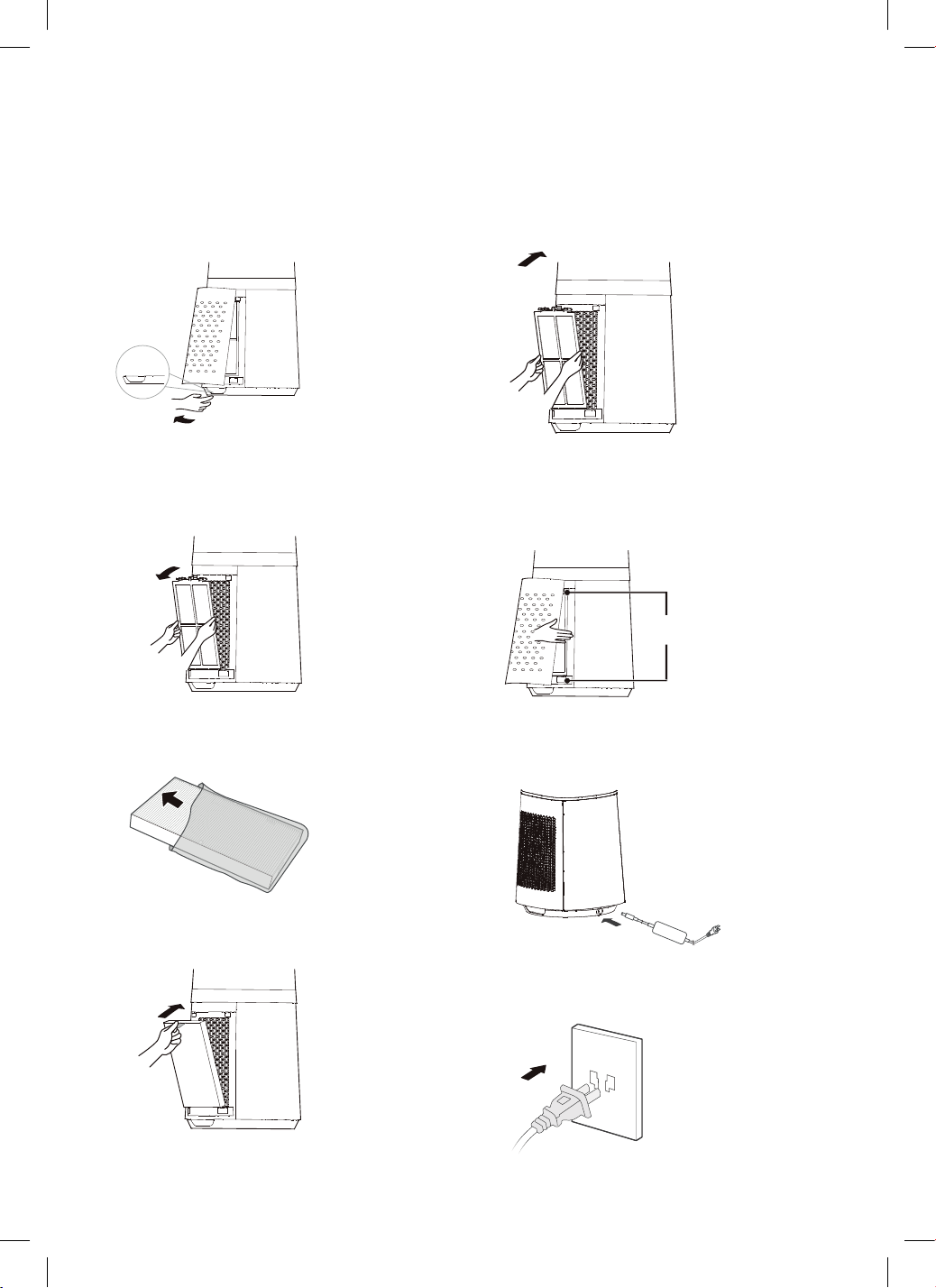
STEP 1
Take out the Bladeless Fan Body and assembly parts
from the box. Remove the Air Inlet Grille using the
buckle shown below.
STEP 2
To take out the Pre-Filter, press the raised
part on both sides to pull it outwards. Then proceed
to take out the pre-filter.
STEP 3
Remove the protective film of the filter.
STEP 4
Install the HEPA Filter.
STEP 5
Install the Pre-Filter. Align the slot
position at the bottom and buckle up
the upper U-shaped buckle.
STEP 6
Install the Air Inlet Grille. Align the upper
two buckles and press them tightly, then
press the two sides at lower part, slowly
and gently buckle the air inlet grille.
STEP 7
Install the adapter, then tighten the plug
with the socket position of the base.
STEP 8
Plug in the power supply
Assembly Instructions
07
PRODUCT INSTALLATION
1. Remove the air inlet grille. 2. Take out the pre-filter. Press the raised
part on both sides to pull it outwards
and take out the pre-filter.
3. Remove the protective film of
the filter.
4. Install the HEPA filter.
5. Install the pre-filter. Align the slot
position at the bottom and buckle up
the upper U-shaped buckle.
6. Install the air inlet grille. Align the upper
two buckles and press them tightly, then
press the two sides at lower part, slowly
and gently buckle the air inlet grille.
Buckle
Buckling
position
Installation Procedures
07
PRODUCT INSTALLATION
1. Remove the air inlet grille. 2. Take out the pre-filter. Press the raised
part on both sides to pull it outwards
and take out the pre-filter.
3. Remove the protective film of
the filter.
4. Install the HEPA filter.
5. Install the pre-filter. Align the slot
position at the bottom and buckle up
the upper U-shaped buckle.
6. Install the air inlet grille. Align the upper
two buckles and press them tightly, then
press the two sides at lower part, slowly
and gently buckle the air inlet grille.
Buckle
Buckling
position
Installation Procedures
07
PRODUCT INSTALLATION
1. Remove the air inlet grille. 2. Take out the pre-filter. Press the raised
part on both sides to pull it outwards
and take out the pre-filter.
3. Remove the protective film of
the filter.
4. Install the HEPA filter.
5. Install the pre-filter. Align the slot
position at the bottom and buckle up
the upper U-shaped buckle.
6. Install the air inlet grille. Align the upper
two buckles and press them tightly, then
press the two sides at lower part, slowly
and gently buckle the air inlet grille.
Buckle
Buckling
position
Installation Procedures
07
PRODUCT INSTALLATION
1. Remove the air inlet grille. 2. Take out the pre-filter. Press the raised
part on both sides to pull it outwards
and take out the pre-filter.
3. Remove the protective film of
the filter.
4. Install the HEPA filter.
5. Install the pre-filter. Align the slot
position at the bottom and buckle up
the upper U-shaped buckle.
6. Install the air inlet grille. Align the upper
two buckles and press them tightly, then
press the two sides at lower part, slowly
and gently buckle the air inlet grille.
Buckle
Buckling
position
Installation Procedures
07
PRODUCT INSTALLATION
1. Remove the air inlet grille. 2. Take out the pre-filter. Press the raised
part on both sides to pull it outwards
and take out the pre-filter.
3. Remove the protective film of
the filter.
4. Install the HEPA filter.
5. Install the pre-filter. Align the slot
position at the bottom and buckle up
the upper U-shaped buckle.
6. Install the air inlet grille. Align the upper
two buckles and press them tightly, then
press the two sides at lower part, slowly
and gently buckle the air inlet grille.
Buckle
Buckling
position
Installation Procedures
07
PRODUCT INSTALLATION
1. Remove the air inlet grille. 2. Take out the pre-filter. Press the raised
part on both sides to pull it outwards
and take out the pre-filter.
3. Remove the protective film of
the filter.
4. Install the HEPA filter.
5. Install the pre-filter. Align the slot
position at the bottom and buckle up
the upper U-shaped buckle.
6. Install the air inlet grille. Align the upper
two buckles and press them tightly, then
press the two sides at lower part, slowly
and gently buckle the air inlet grille.
Buckle
Buckling
position
Installation Procedures
It is recommended to clean the filter once every two weeks and replace it once every six months
(the cleaning and replacement cycle can be adjusted according to the use environment).
7. Install the adapter,Tighten the plug
with the socket position of the base.
8. Plug power supply.
NOTE
08
It is recommended to clean the filter once every two weeks and replace it once every six months
(the cleaning and replacement cycle can be adjusted according to the use environment).
7. Install the adapter,Tighten the plug
with the socket position of the base.
8. Plug power supply.
NOTE
08
7
CONTROL PANEL
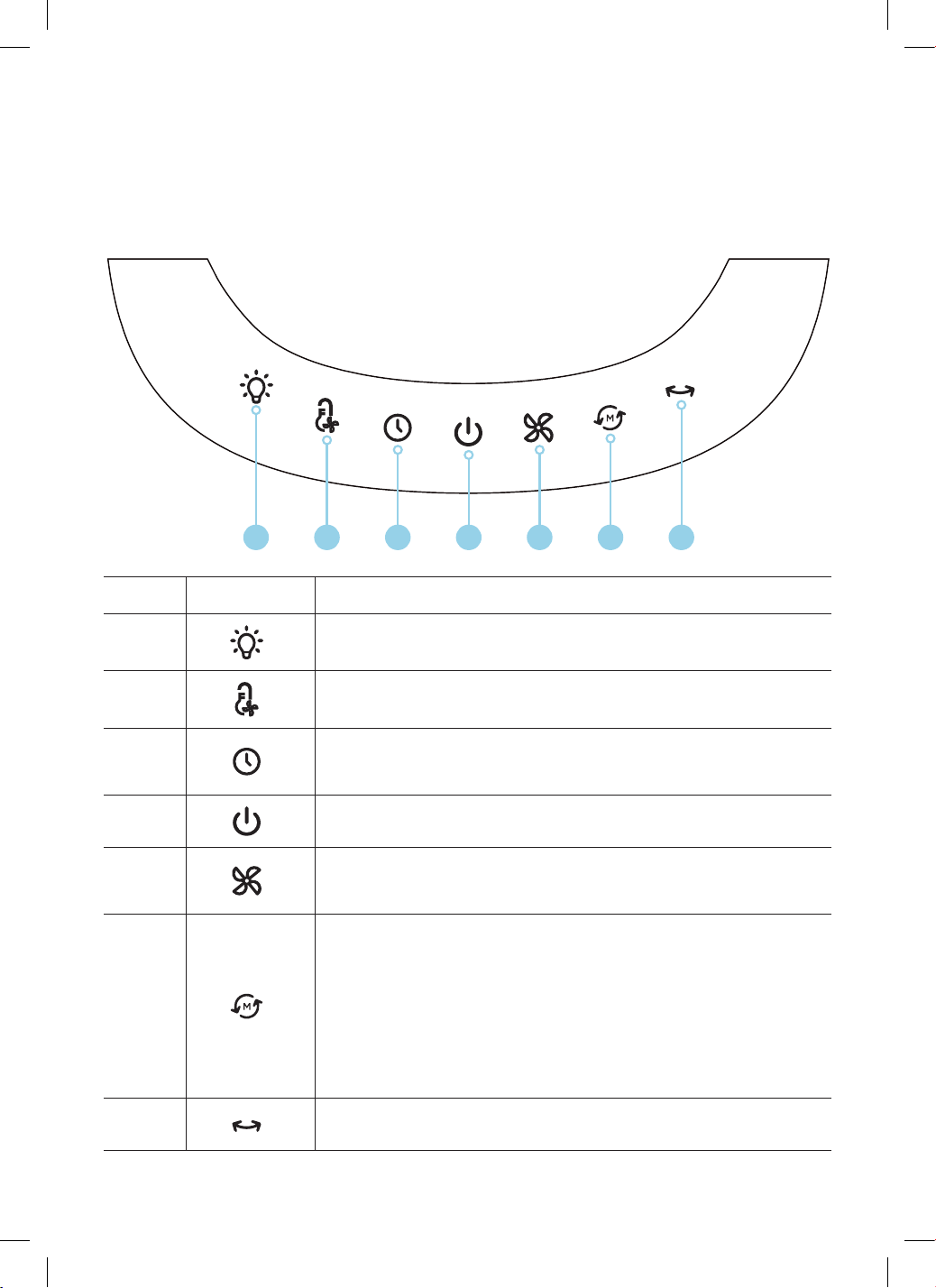
The buttons on the Control Panel body (Power, Fan Speed, Swing, Mode & Timer) are the
same functions as the corresponding buttons on the Remote Control.
Number Icon Description
1
Air Quality Light: Touch this button to turn the Air Quality Light
on and off.
2
Smart Wind: Dynamically adjusts the fan speed based on the
surrounding air temperature.
3
Timer: Press the Timer Button to program the Bladeless Fan to power off
automatically between 1–12 hours.
Note: 0h means that the timer is cancelled.
4
Power Button: This button will power the Bladeless Fan on and off.
5
Fan Speed: When the Bladeless Fan is powered on, the Fan Speed can
be set up to 10 different wind speeds. The selected Speed setting will be
displayed on the LED display.
6
Mode: Press this button to toggle between one of four mode settings:
Normal: The wind remains a constant flow.
Sleep: Choose between the 3 Sleep settings:
1. Low, constant wind speed.
2. Medium, constant wind speed which will gradually slow to a low,
constant speed.
3. High, constant wind speed which will gradually slow to a low,
constant speed.
Auto Wind: Variable wind changing with the air quality.
Baby Wind: Choose between the 2 Baby Wind settings.
7
Swing (Oscillation): Press the Swing button to toggle on and off the
oscillation mode.
Operating Instructions
1 2 3 4 5 6 7
8
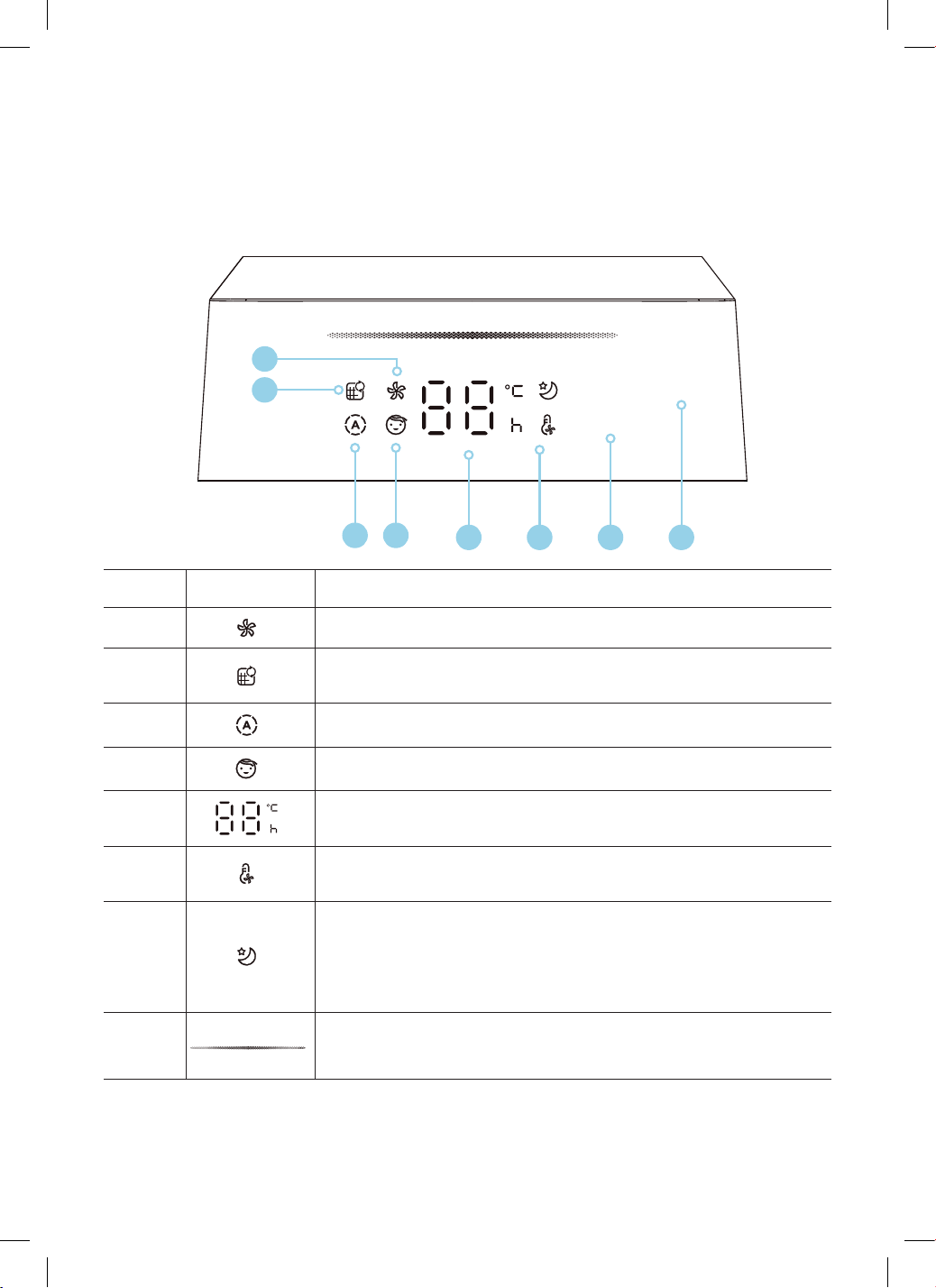
DISPLAY PANEL
Number Icon Description
1
Normal Wind Mode Indicator: The wind remains a constant flow.
2
Filter Replacement Reminder Indicator: When the icon stays on, the
filter needs to be replaced.
3
Auto Wind Indicator: Variable wind changing with the air quality.
4
Baby Wind Indicator: Choose between the 2 Baby Wind settings.
5
LED Display: Displays the wind speed level or set timer, and displays the
temperature in the wind mode.
6
Smart Wind Indicator: Dynamically adjusts the fan speed based on the
surrounding air temperature.
7
Sleep Wind Indicator: Choose between the 3 Sleep settings:
1. Low, constant wind speed.
2. Medium, constant wind speed which will gradually slow to a low,
constant speed.
3. High, constant wind speed which will gradually slow to a low,
constant speed.
8
The colour of this indicator light reflects the air quality.
As the air quality gets better, the colour of this light is red, yellow, blue
and green in turn.
Operating Instructions
1
2
43
4 5 6 7
9
AAA Battery, 1.5 V
Battery
Operating Instructions
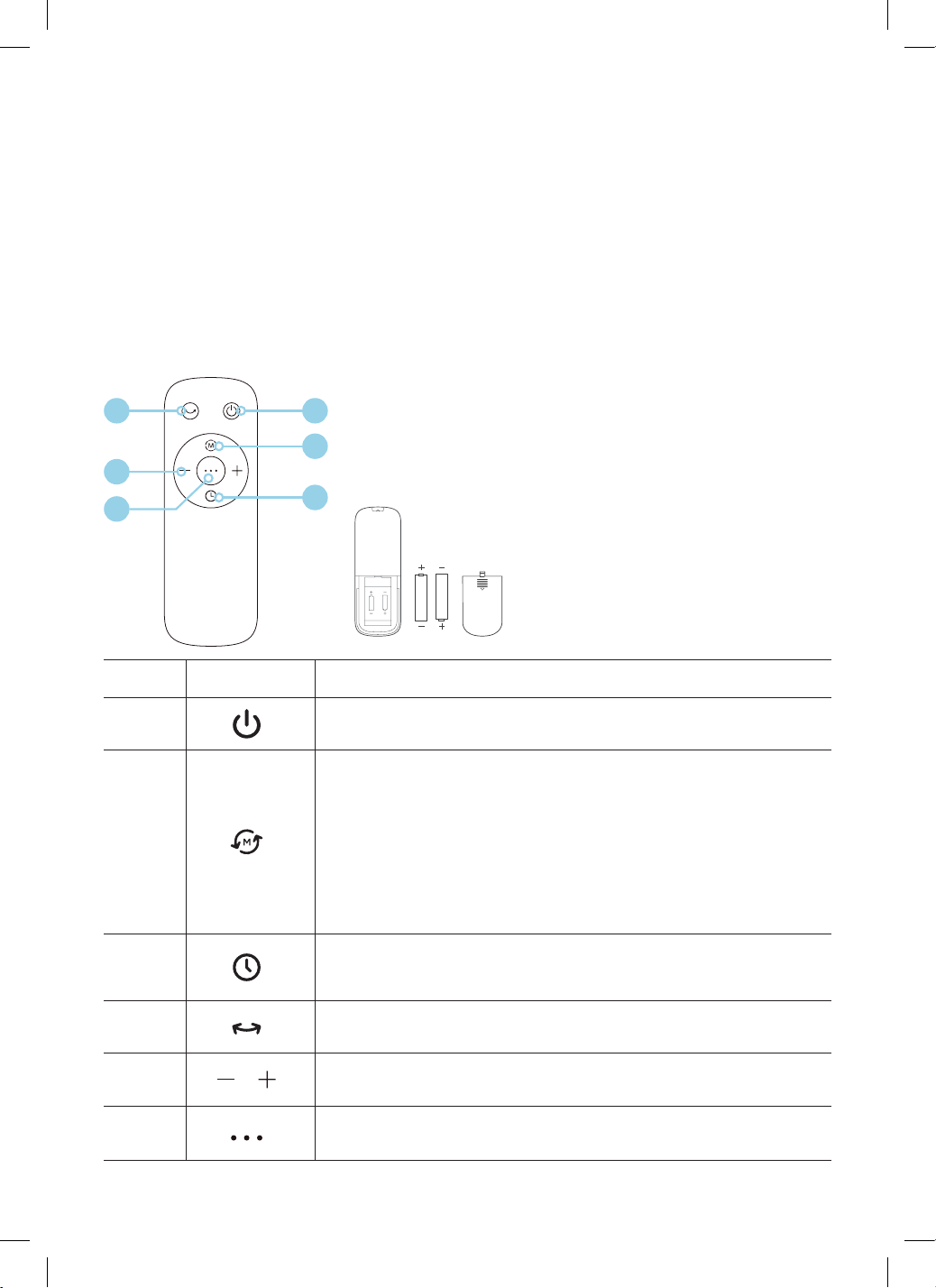
REMOTE CONTROL
Operating the Remote Control
• Point the Remote Control at the receiver on the Bladeless Fan body and press the desired
function button.
• The Remote Control will operate at distances of up to five meters and at an angle of 30 degrees.
• The batteries must be removed from the Remote Control before it is scrapped and that they are
disposed of safely.
Note: Only use manganese or alkaline “AAA” batteries.
14
5
2
2
Note:
The images in this user manual
are for explanatory purposes only.
Your Bladeless Fan and Remote Control
may appear slightly different.
Number Icon Description
1
Power Button: This button will power the Bladeless Fan on and off.
2
Mode: Press this button to toggle between one of four mode settings:
Normal: The wind remains a constant flow.
Sleep: Choose between the 3 Sleep settings:
1. Low, constant wind speed.
2. Medium, constant wind speed which will gradually slow to a low,
constant speed.
3. High, constant wind speed which will gradually slow to a low,
constant speed.
Auto Wind: Variable wind changing with the air quality.
Baby Wind: Choose between the 2 Baby Wind settings.
3
Timer: Press the Timer Button to program the Bladeless Fan to power off
automatically between 1–12 hours.
Note: 0h means that the timer is cancelled.
4
Swing (Oscillation): Press the Swing button to toggle on and off the
oscillation mode.
5
Fan Speed: Press + to increase the Fan Speed. Press - to decrease the
Fan Speed.
6
Smart Wind: Dynamically adjusts the fan speed based on the
surrounding air temperature.
6
10
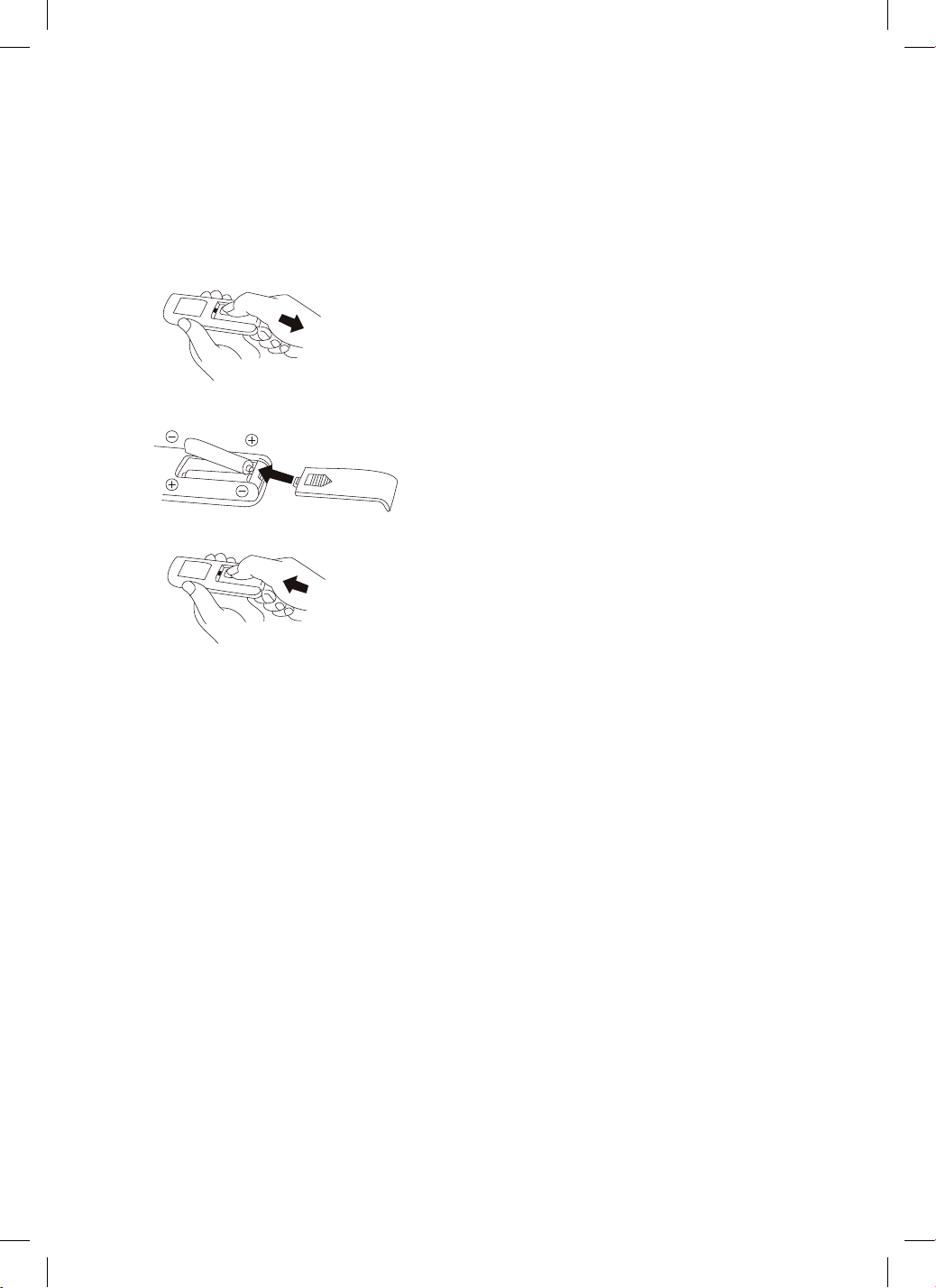
BATTERY INSTALLATION
Battery not included in the packaging
1. Slide the battery compartment cover.
2. Insert the batteries, and make sure that the batteries are placed as shown.
3. Slide back the battery cover.
Note: Use size “AAA” manganese or alkaline batteries. Do not use rechargeable batteries
BATTERY WARNING
• Do not dispose of batteries in fire. Batteries may explode or leak.
• Do not mix old and new batteries.
• Do not mix alkaline, standard (carbon-zinc) or rechargeable (nickel-cadmium) batteries.
• Non-rechargeable batteries are not to be recharged.
• Batteries are to be inserted with the correct polarity.
• Exhausted batteries are to be removed from the product.
• The batteries must be removed from the remote controller before it is scrapped and that they are
disposed of safely.
ADDITIONAL FEATURES
Intelligent memory
When the fan is turned off or powered off, it will run in the state before turning off or power off when the
power is powered on again (the timing function is not memorised).
Screen-off function
In case of no operation for 60 seconds during normal operation, the indicator light on the body will
be automatically off, but the fan will continue to operate. Press the ON/OFF button to turn off the
fan when the screen is off, and press the other button to restore display.
Operating Instructions
Battery Warning As Below
1. Do not dispose of batteries in fire, batteries may explode or leak
2. Do not mix old and new batteries.
3. Do not mix alkaline, standard (carbon-zinc) or rechargeable (nickel-cadmium) batteries.
4. Non-rechargeable batteries are not to be recharged.
5. Batteries are to be inserted with the correct polarity.
6. Exhausted batteries are to be removed from the product.
7. The batteries must be removed from the remote controller before it is scrapped and that they
are disposed of safely.
Additional Features And Maintenance
Intelligent memory
When the fan is turned off or powered off, it will run in the state before turning off or power off when
the power is powered on again (the timing function is not memorized).
Screen-off function
In case of no operation for 60 seconds during normal operation, the indicator light on the body will
be automatically off, but the fan will continue to operate. Press the ON/OFF button to turn off the
fan when the screen is off, and press the other button to restore display.
●
●
Battery not included in the packaging
1 Slide the battery compartment cover.
2 Insert the batteries, and make sure that the batteries are placed as shown in the Fig 2.
3 Slide back the battery cover.
Batteries Installation
Fig 2
Fig 1
Fig 3
Use size “AAA” manganese or alkaline batteries. Do not use rechargeable batteries.
NOTE
12
Battery Warning As Below
1. Do not dispose of batteries in fire, batteries may explode or leak
2. Do not mix old and new batteries.
3. Do not mix alkaline, standard (carbon-zinc) or rechargeable (nickel-cadmium) batteries.
4. Non-rechargeable batteries are not to be recharged.
5. Batteries are to be inserted with the correct polarity.
6. Exhausted batteries are to be removed from the product.
7. The batteries must be removed from the remote controller before it is scrapped and that they
are disposed of safely.
Additional Features And Maintenance
Intelligent memory
When the fan is turned off or powered off, it will run in the state before turning off or power off when
the power is powered on again (the timing function is not memorized).
Screen-off function
In case of no operation for 60 seconds during normal operation, the indicator light on the body will
be automatically off, but the fan will continue to operate. Press the ON/OFF button to turn off the
fan when the screen is off, and press the other button to restore display.
●
●
Battery not included in the packaging
1 Slide the battery compartment cover.
2 Insert the batteries, and make sure that the batteries are placed as shown in the Fig 2.
3 Slide back the battery cover.
Batteries Installation
Fig 2
Fig 1
Fig 3
Use size “AAA” manganese or alkaline batteries. Do not use rechargeable batteries.
NOTE
12
Battery Warning As Below
1. Do not dispose of batteries in fire, batteries may explode or leak
2. Do not mix old and new batteries.
3. Do not mix alkaline, standard (carbon-zinc) or rechargeable (nickel-cadmium) batteries.
4. Non-rechargeable batteries are not to be recharged.
5. Batteries are to be inserted with the correct polarity.
6. Exhausted batteries are to be removed from the product.
7. The batteries must be removed from the remote controller before it is scrapped and that they
are disposed of safely.
Additional Features And Maintenance
Intelligent memory
When the fan is turned off or powered off, it will run in the state before turning off or power off when
the power is powered on again (the timing function is not memorized).
Screen-off function
In case of no operation for 60 seconds during normal operation, the indicator light on the body will
be automatically off, but the fan will continue to operate. Press the ON/OFF button to turn off the
fan when the screen is off, and press the other button to restore display.
●
●
Battery not included in the packaging
1 Slide the battery compartment cover.
2 Insert the batteries, and make sure that the batteries are placed as shown in the Fig 2.
3 Slide back the battery cover.
Batteries Installation
Fig 2
Fig 1
Fig 3
Use size “AAA” manganese or alkaline batteries. Do not use rechargeable batteries.
NOTE
12
11
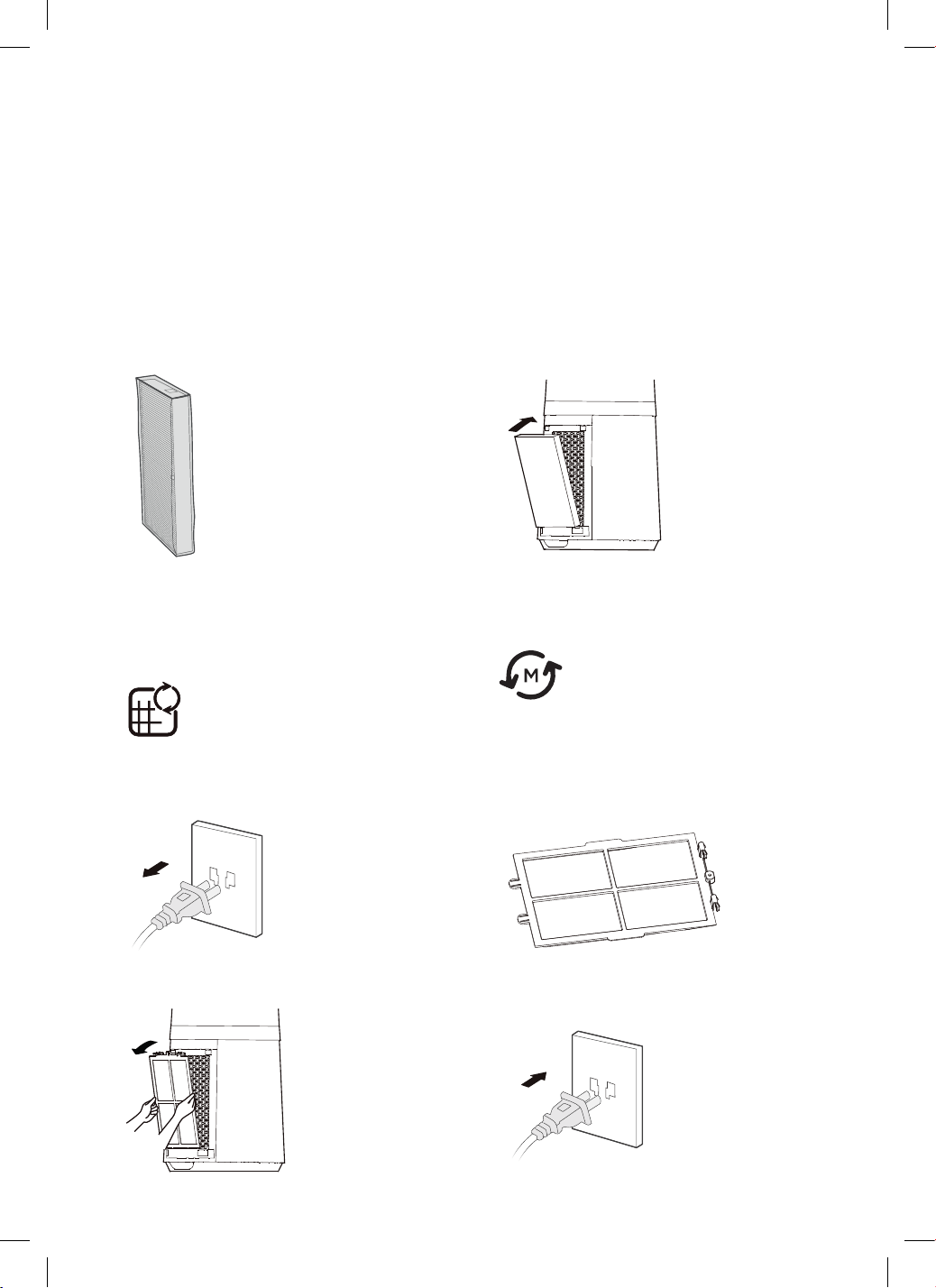
1. Filter model: FQ150CJ-2 2 (including 2 sets).
2. When the reminder indicator light for
replacement of filter is on, the display prompt
will appear reminding you to replace the filter.
If it is not replaced, the prompt will appear
during each startup.
3. Replace with a new filter.
4. Long press the mode button for 3 seconds
to turn off the indicator light for filter
replacement.
The fan requires minimal maintenance. Do not try to fix it by yourself. Refer it to qualified service
personnel if service is needed.
1. Be sure to unplug from the electrical supply source before cleaning.
2. Plastic parts should be cleaned with mild soap and a damp cloth or sponge. Thoroughly to remove
soap film with clean water.
3. Be sure not to make water or other liquid enter inside of motor.
REPLACING THE FILTERS
Cleaning & Maintenance
CLEANING AND MAINTENANCE
Filter Replacement
The fan requires minimal maintenance. Do not try to fix it by yourself. Refer it to qualified
service personnel if service is needed.
1. Be sure to unplug from the electrical supply source before cleaning.
2. Plastic parts should be cleaned with mild soap and a damp cloth or sponge. Thoroughly to
remove soap film with clean water.
3. Be sure not to make water or other liquid enter inside of motor.
1. Filter model: FQ150CJ-2 2
(including 2 sets).
2. When the indicator light for replacement
of filter is on, the prompt that reminds you
of filter replacement will appear. If it is not
replaced in time, the prompt will appear
during each startup.
3. Replace a new filter. 4. Long press the mode button for 3
seconds to turn off the indicator light for
filter replacement.
13
CLEANING AND MAINTENANCE
Filter Replacement
The fan requires minimal maintenance. Do not try to fix it by yourself. Refer it to qualified
service personnel if service is needed.
1. Be sure to unplug from the electrical supply source before cleaning.
2. Plastic parts should be cleaned with mild soap and a damp cloth or sponge. Thoroughly to
remove soap film with clean water.
3. Be sure not to make water or other liquid enter inside of motor.
1. Filter model: FQ150CJ-2 2
(including 2 sets).
2. When the indicator light for replacement
of filter is on, the prompt that reminds you
of filter replacement will appear. If it is not
replaced in time, the prompt will appear
during each startup.
3. Replace a new filter. 4. Long press the mode button for 3
seconds to turn off the indicator light for
filter replacement.
13
PRE-FILTER CLEANING
1. Unplug the power cord.
2. Take out the pre-filter.
3. Remove the dust with vacuum cleaner.
4. Install the machine in reverse order and plug
power supply.
Pre-filter Cleaning
1. Unplug the power cord. 2. Take out the pre-filter.
3. Remove the dust with vacuum cleaner. 4. Install the machine in reverse order and
plug power supply.
14
Pre-filter Cleaning
1. Unplug the power cord. 2. Take out the pre-filter.
3. Remove the dust with vacuum cleaner. 4. Install the machine in reverse order and
plug power supply.
14
Pre-filter Cleaning
1. Unplug the power cord. 2. Take out the pre-filter.
3. Remove the dust with vacuum cleaner. 4. Install the machine in reverse order and
plug power supply.
14
Pre-filter Cleaning
1. Unplug the power cord. 2. Take out the pre-filter.
3. Remove the dust with vacuum cleaner. 4. Install the machine in reverse order and
plug power supply.
14
12
Troubleshooting
Technical Specifications
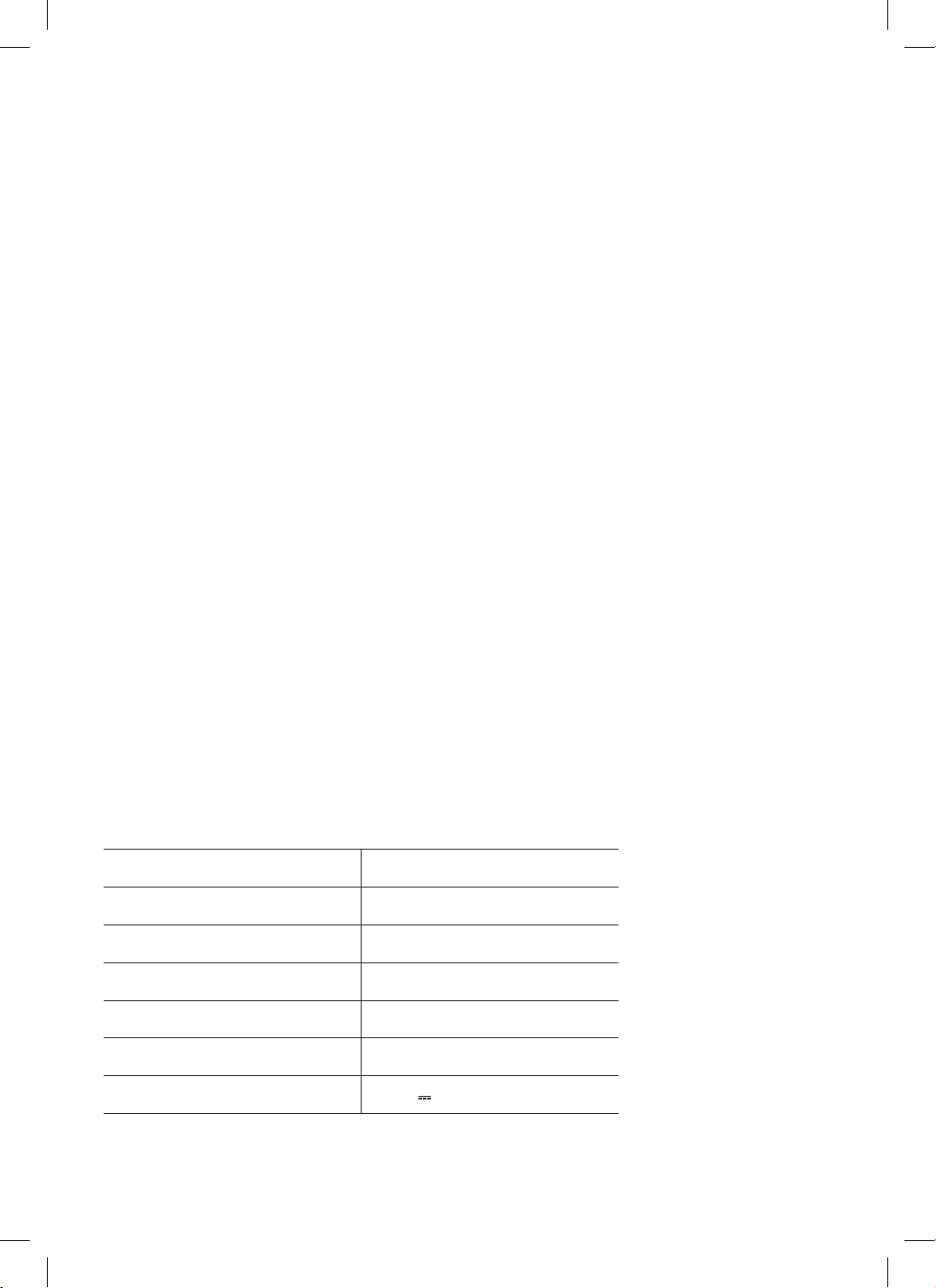
Below outlines the technical specifications for your Bladeless Fan.
Model GGSBFAP4W10W
Dimensions (W × D × H mm) 225 × 225 × 1056 mm
Net Weight 5.8kg
Voltage 100–240V~
Frequency 50/60Hz
Adapter Input 1.5A
Adapter Output 24V
1.5A
Operation of your appliance can lead to errors and malfunctions. The following contains possible causes
and notes for resolving an error message or malfunction. It is recommended to read the below carefully
in order to save your time and money that may cost for calling to the service center.
The machine does not work properly after installed
• The power cable may not be plugged in or has poor contact.
Make sure the plug is properly inserted into the socket.
• The power on the body is not turned on.
Press the Power button on the body of the fan.
The remote does not work
• The battery may need replacing.
• The remote is being used more than 5m away from the fan.
Use the remote closer to the fan and make sure it is pointing directly at the display panel.
13
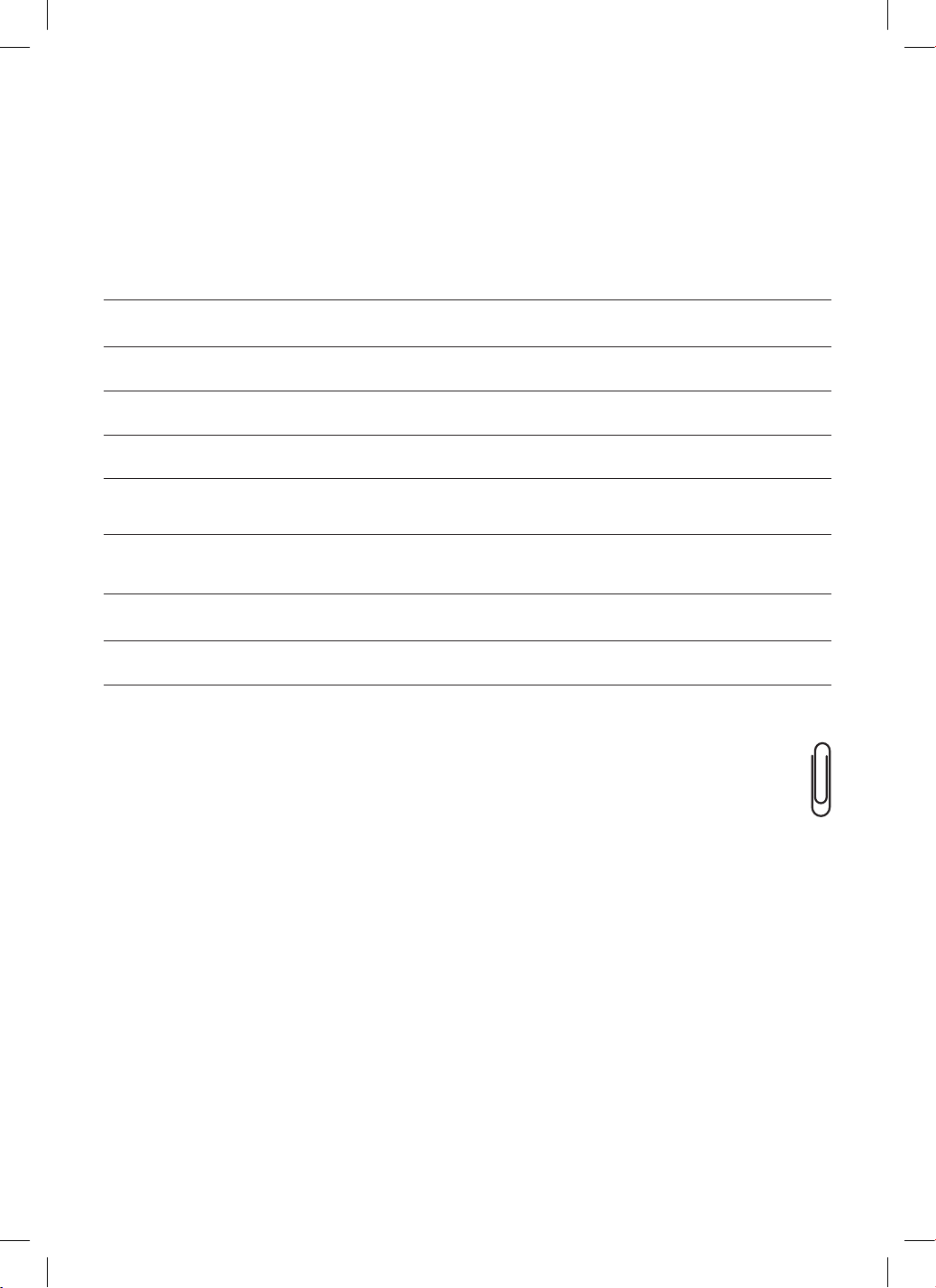
For future reference, please record the following information which can be found
on the rating plate and the date of purchase which can be found on your sales invoice.
STORE DETAILS
STORE NAME
|
ADDRESS
|
TELEPHONE
|
PURCHASE DATE
|
PRODUCT DETAILS
MODEL NO.
|
SERIAL NO.*
|
Purchase Details
Attach your receipt
to this page

14
Warranty Information
WARRANTY TERMS & CONDITIONS
BLADELESS FAN
This document sets out the terms and conditions
of the product warranties for Residentia Group
Appliances. It is an important document. Please
keep it with your proof of purchase documents in a
safe place for future reference should you require
service for your Appliance.
1. IN THIS WARRANTY
(a) ‘acceptable quality’ as referred to in clause
10 of this warranty has the same meaning
referred to in the ACL;
(b) ‘ACL’ means Trade Practices Amendment
(Australian Consumer Law) Act (No.2) 2010;
(c) ‘Appliance’ means any Residentia Group
product purchased by you accompanied by
this document;
(d) ‘ASR’ means Residentia Group authorised
service representative;
(e) ‘Residentia Group’ means Residentia Group
Pty Ltd of 165 Barkly Ave, Burnley VIC 3121,
ACN 600 546 656 in respect of Appliances
purchased in Australia;
(f ) ‘major failure’ as referred to in clause 10
of this warranty has the same meaning
referred to in the ACL and includes a
situation when an Appliance cannot be
repaired or it is uneconomic for Residentia
Group, at its discretion, to repair an
Appliance during the Warranty Period;
(g) ‘Warranty Period’ means:
(i) where the Appliance is used for
personal, domestic or household
use (i.e. normal single family use)
as set out in the instruction manual,
the Appliance is warranted against
manufacturing defects for 24
months, following the date of original
purchase of the Appliance;
(h) ‘you’ means the purchaser of the Appliance
not having purchased the Appliance for
re-sale, and ‘your’ has a corresponding
meaning.
2. This warranty only applies to Appliances
purchased and used in Australia and is in
addition to (and does not exclude, restrict,
or modify in any way) any
non-excludable statutory warranties in
Australia.
3. During the Warranty Period Residentia
Group or its ASR will, at no extra charge
if your Appliance is readily accessible for
service, without special equipment and
subject to these terms and conditions, repair
or replace any parts which it considers to be
defective. Residentia Group or its ASR may
use remanufactured parts to repair your
Appliance. You agree that any replaced
Appliances or parts become the property
of Residentia Group. This warranty does
not apply to light globes, batteries, filters or
similar perishable parts.
4. Parts and Appliances not supplied by
Residentia Group are not covered by
this warranty.

15
5. You will bear the cost of transportation,
travel and delivery of the Appliance to and
from Residentia Group or its ASR. If you
reside outside of the service area, you will
bear the cost of:
(a) travel of an authorised representative;
(b) transportation and delivery of the Appliance
to and from Residentia Group or its ASR,
in all instances, unless the Appliance is
transported by Residentia Group or its ASR,
the Appliance is transported at the owner’s
cost and risk while in transit to and from
Residentia Group or its ASR.
6. Proof of purchase is required before you can
make a claim under this warranty.
7. You may not make a claim under this
warranty unless the defect claimed
is due to faulty or defective parts or
workmanship. Residentia Group is not liable
in the following situations (which are not
exhaustive):
(a) the Appliance is damaged by:
(i) accident
(ii) misuse or abuse, including failure to
properly maintain or service
(iii) normal wear and tear
(iv) power surges, electrical storm
damage or incorrect power supply
(v) incomplete or improper installation
(vi) incorrect, improper or inappropriate
operation
(vii) insect or vermin infestation
(viii) failure to comply with any additional
instructions supplied with the
Appliance;
(b) the Appliance is modified without authority
from Residentia Group in writing;
(c) the Appliance’s serial number or warranty
seal has been removed or defaced;
(d) the Appliance was serviced or repaired by
anyone other than Residentia Group, an
authorised repairer
or ASR.
8. This warranty, the contract to which it
relates and the relationship between you
and Residentia Group are governed by the
law applicable where the Appliance was
purchased.
9. To the extent permitted by law, Residentia
Group excludes all warranties and liabilities
(other than as contained in this document)
including liability for any loss or damage
whether direct or indirect arising from your
purchase, use or non use of the Appliance.
10. For Appliances and services provided
by Residentia Group in Australia, the
Appliances come with a guarantee by
Residentia Group that cannot be excluded
under the Australian Consumer Law. You
are entitled to a replacement or refund
for a major failure and for compensation
for any other reasonably foreseeable loss
or damage. You are also entitled to have
the Appliance repaired or replaced if the
Appliance fails to be of acceptable quality
and the failure does not amount to a major
failure. The benefits to you given by this
warranty are in addition to your other rights
and remedies under a law in relation to the
Appliances or services to which the warranty
relates.
11. At all times during the Warranty Period,
Residentia Group shall, at its discretion,
determine whether repair, replacement or
refund will apply if an Appliance has a valid
warranty claim applicable to it.
12. Missing parts are not covered by warranty.
Residentia Group reserves the right to assess
each request for missing parts in a case by
case basis. Any parts that are not reported
missing in the first week after purchase will
not provide free of charge.
13. To enquire about claiming under this
warranty, please follow these steps:
(a) carefully check the operating instructions,
user manual and the terms of this warranty;
(b) have the model and serial number
of the Appliance available;
(c) have the proof of purchase (e.g. an invoice)
available;
(d) telephone the numbers shown below.
14. You accept that if you make a warranty
claim, Residentia Group and its ASR may
exchange information in relation to you
to enable Residentia Group to meet its
obligations under this warranty.
IMPORTANT
Before calling for service, please ensure that the
steps in point 13 have been followed.
Telephone contacts
► Service: Please call 1300 11 HELP (4357)
► Spare Parts: Please call 1300 11 SPARE (7727)
Our goods come with guarantees that cannot be excluded under the
Australian Consumer Law. You are entitled to a replacement or refund
for a major failure and for compensation for any other reasonably
foreseeable loss or damage. You are also entitled to have the goods
repaired or replaced if the goods fail to be of acceptable quality
and the failure does not amount to a major failure.
The Australian Consumer
Law requires the inclusion
of the following statement
with this warranty:

16
T. 1300 11 4357
E. support@residentiagroup.com.au
E S S E N T I A L S FOR LIFE
An initiative by
Residentia Group
www.solt.house