User guide
Contents
2 Activate your guarantee
3 Getting started
4 Changing your filter
4 Looking after your machine
DP05 JN.00000 PN.000000-00-00 00.00.00 VERSION NO.01

2
Thank you for choosing
to buy a Dyson personal
purifying fan.
Activate your guarantee now
We don’t stop caring about our machines once they’re yours.
Even after your guarantee has ended, we’ll still be on hand to help.
Exclusive owner benefits
Free Dyson parts and labour
Hassle-free replacement
Expert advice. Seven days a week
‘How to’ videos and helpful tips
How can we help?
Solve a problem
Get tips and guides
Learn about Dyson technology and other Dyson machines
Dyson customer care
If you have a question about your Dyson personal purifying fan,
call the Dyson Helpline with your serial number and details
of where and when you bought the machine, or contact us
through the Dyson website.
3
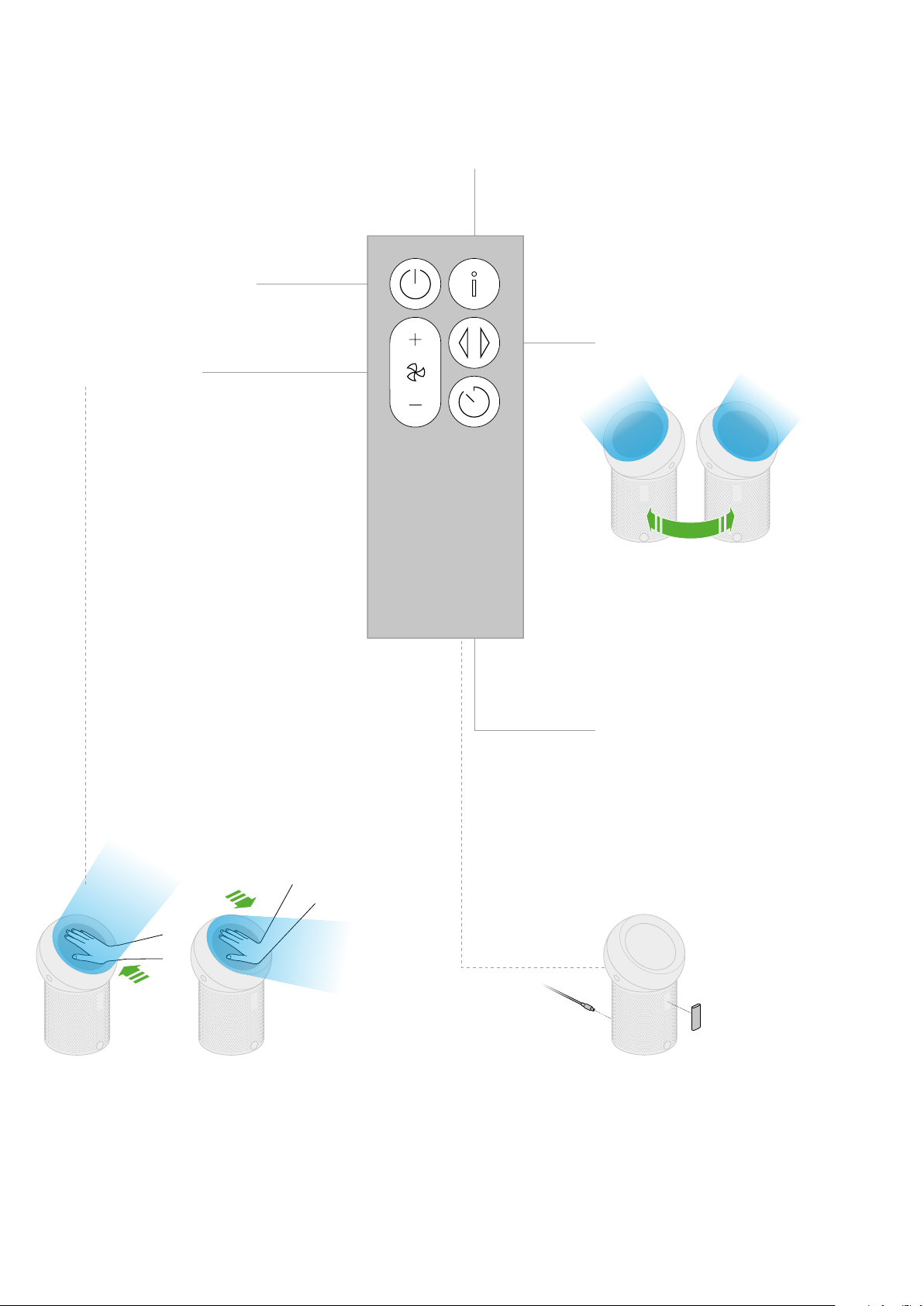
Airflow direction
To change the direction of airflow,
place your hand on the dome.
Slide the dome away from you
to move the airflow upwards.
Slide the dome towards you
to move the airflow downwards.
Your remote control can be stored, magnetically,
on the front of your Dyson personal purifying fan.
Plug in and press the power button at the back
of your machine.
Getting started
Airflow speed
Oscillation
Filter information
Power
Sleep timer
Press the Oscillation button on the remote
control to circulate the air around the room.
Press the Oscillation button again to turn
oscillation off.
Your Dyson personal purifying fan will turn off
automatically after the selected amount of time.
To set the time: press the Sleep timer button
to scroll through the time options.
4
Changing your filter
1 2 3 4
Looking after your machine
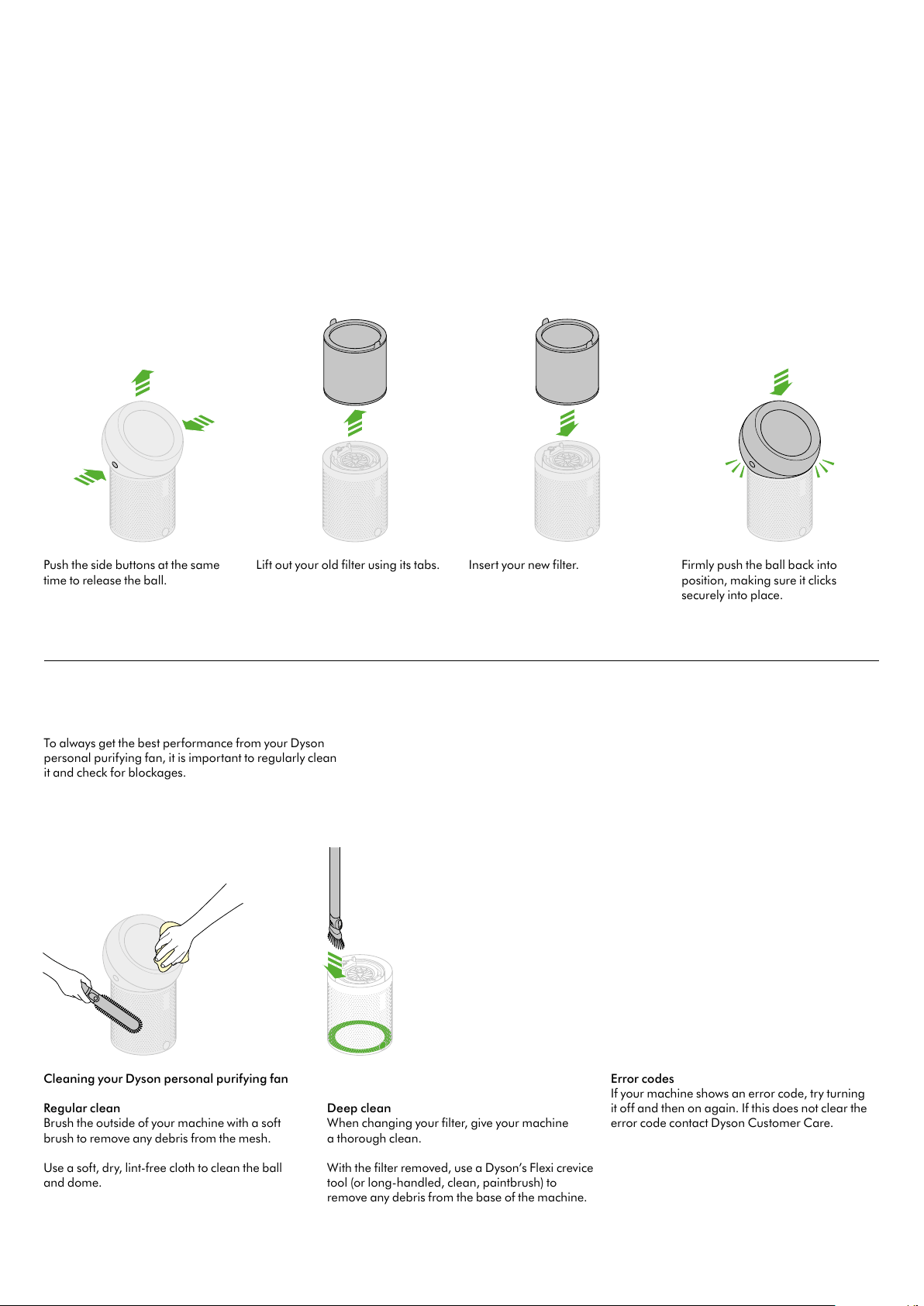
Cleaning your Dyson personal purifying fan
Regular clean
Brush the outside of your machine with a soft
brush to remove any debris from the mesh.
Use a soft, dry, lint-free cloth to clean the ball
and dome.
Deep clean
When changing your filter, give your machine
a thorough clean.
With the filter removed, use a Dyson’s Flexi crevice
tool (or long-handled, clean, paintbrush) to
remove any debris from the base of the machine.
Push the side buttons at the same
time to release the ball.
Lift out your old filter using its tabs. Insert your new filter. Firmly push the ball back into
position, making sure it clicks
securely into place.
Error codes
If your machine shows an error code, try turning
it off and then on again. If this does not clear the
error code contact Dyson Customer Care.
clickclick
To always get the best performance from your
Dyson personal purifying fan, it is important to
regularly clean it and check for blockages.
Do not use your machine without the filter in place.
To always get the best performance from your Dyson
personal purifying fan, it is important to regularly clean
it and check for blockages.