Install / Use & Care
MANUAL
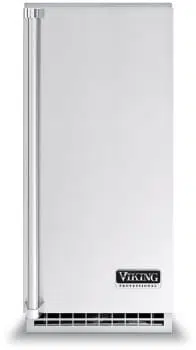
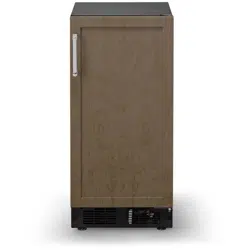
Professional Undercounter Ice Machine
FIUI5152DADA
2
NOTE
!
CAUTION
Contents:
Important Safety Instructions ..............................................2
Unpacking Your Appliance .................................................3
Installing Your Appliance .....................................................4
Cutout & Product Dimensions ..........................................14
Care and Cleaning .............................................................21
Troubleshooting .................................................................24
Warranty ............................................................................27
Important Safety Instructions
Warnings and safety instructions appearing in this
guide are not meant to cover all possible conditions and
situations that may occur. Common sense, caution, and
care must be exercised when installing, maintaining, or
operating this appliance.
Recognize Safety Symbols,
Words, and Labels.
CAUTION-Hazards or unsafe practices which could re-
sult in personal injury or property / product damage.
NOTE-Important information to help assure a problem
free installation and operation.
CONTENTS
!
WARNING
WARNING - You can be killed or seriously injured
if you do not follow these instructions.
!
WARNING
State of California Proposition 65 Warning:
This product contains one or more chemicals known
to the State of California to cause cancer.
!
WARNING
State of California Proposition 65 Warning:
This product contains one or more chemicals known
to the State of California to cause birth defects or
other reproductive harm..
Using Your Electronic Control ..........................................19
Installing the Drain Plumbing ...............................................8
Integrated Panel Dimensions ............................................16
Integrated Panel Installation ..............................................17
Door Reversal .....................................................................6
Installing the Water Supply ................................................10
Drain System Test .............................................................11
Operation of the Ice Machine.............................................12
Service Information ............................................................26
3
NOTE
!
CAUTION
XXXXXXXXXXXX
VIKING RANGE, LLC
GREENWOOD, MS 38930
!
WARNING
WARNING - Help Prevent Tragedies
Child entrapment and suffocation are not problems of
the past. Junked or abandoned refrigerators are still
dangerous - even if they sit out for "just a few hours".
If you are getting rid of your old refrigerator, please
follow the instructions below to help prevent
accidents.
Before you throw away your old refrigerator or
freezer:
• Take off the doors or remove the drawers.
• Leave the shelves in place so children may not
easily climb inside.
!
WARNING
WARNING - Dispose of the plastic bags which can
be a suffocation hazard.
!
WARNING
EXCESSIVE WEIGHT HAZARD
Use two or more people to move product.
Failure to do so can result in personal injury.
Remove Interior Packaging
Your appliance has been packed for shipment with all parts
that could be damaged by movement securely fastened.
Remove internal packing materials and any tape holding
internal components in place. The owners manual is
shipped inside the product in a plastic bag along with the
warranty registration card, and other accessory items.
Important
Keep your carton and packaging until your appliance
has been thoroughly inspected and found to be in good
condition. If there is damage, the packaging will be needed
as proof of damage in transit. Afterwards please dispose of
all items responsibly.
Note to Customer
This merchandise was carefully packed and thoroughly
inspected before leaving our plant. Responsibility for its
safe delivery was assumed by the retailer upon acceptance
of the shipment. Claims for loss or damage sustained in
transit must be made to the retailer.
DO NOT RETURN DAMAGED MERCHANDISE TO THE
MANUFACTURER - FILE THE CLAIM WITH THE
RETAILER.
If the appliance was shipped, handled, or stored in other
than an upright position for any period of time, allow the
appliance to sit upright for a period of at least 24 hours
before plugging in. This will assure oil returns to the
compressor. Plugging the appliance in immediately may
cause damage to internal parts.
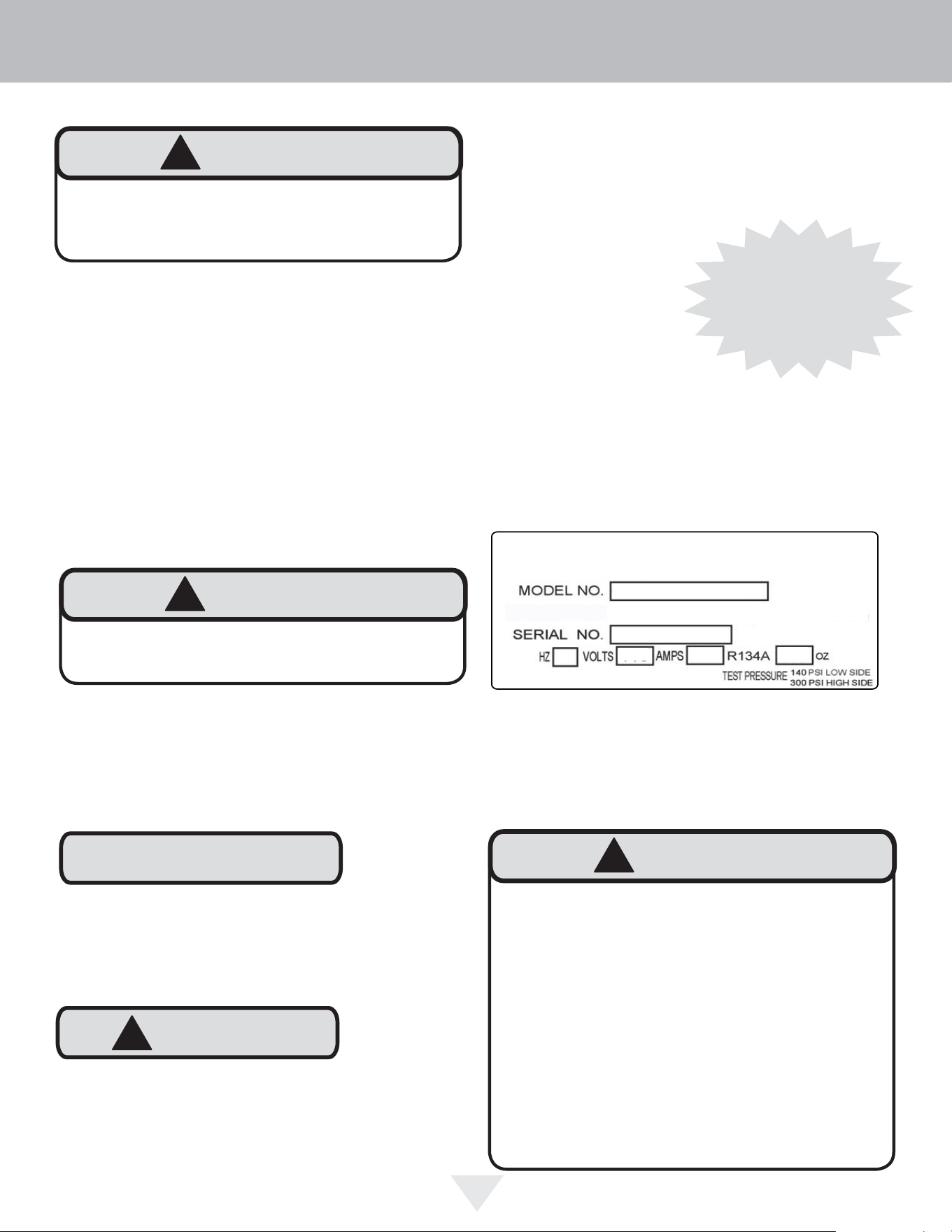
Figure 1
It is important you send in your warranty registration card
immediately after taking delivery of your appliance or you
can register online at www.vikingrange.com in the US or
brigade.ca in Canada.
The following information will be
required when registering your
appliance.
Service Number
Serial Number
Date of Purchase
Dealer’s name and address
The service number and serial number can be found on the
serial plate which is located inside the cabinet on the left
side near the top. See fi gure 1.
Warranty Registration
UNPACKING YOUR APPLIANCE
Online registration
available at
www.vikingrange.com in
the US or
brigade.ca in Canada
4
!
CAUTION
Select Location
The proper location will ensure peak performance of your
appliance. We recommend a location where the unit will
be out of direct sunlight and away from heat sources. To
ensure your product performs to specifi cations, the recom-
mended installation location temperature range is from 55
to 100°F (13 to 38°C).
Cabinet Clearance
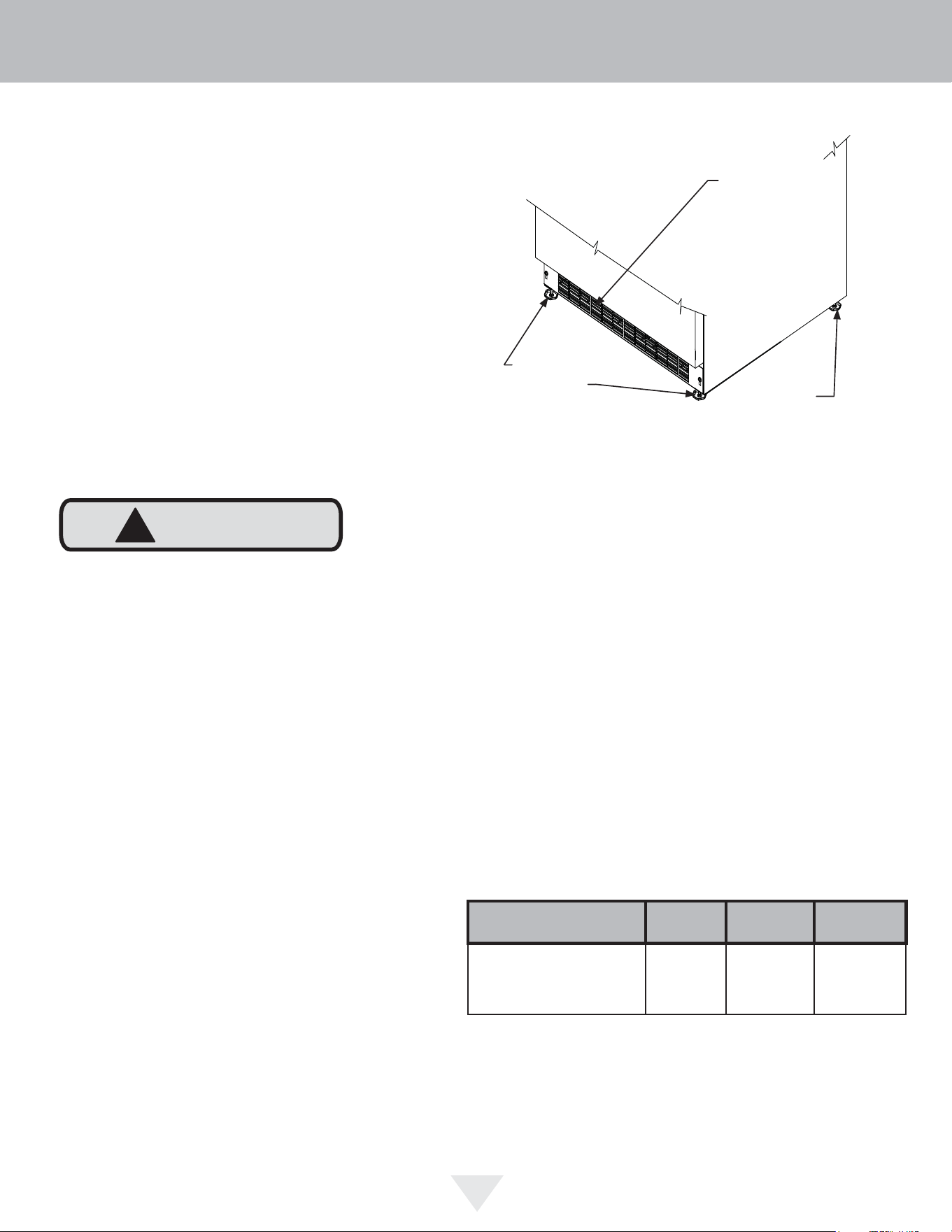
Ventilation is required from the bottom front of the appli-
ance. Keep this area open and clear of any obstructions.
Adjacent cabinets and counter top can be installed around
the appliance as long as the front grille remains unob-
structed. All Professional models with articulated hinges are
intended for built-in applications only.
Front Grille
Do not obstruct the front grille. The openings within the
front grille allow air to fl ow through the condenser heat ex-
changer. Restrictions to this air fl ow will result in increased
energy usage and loss of cooling capacity. For this reason
it is important this area to not be obstructed and the grille
openings kept clean. Viking Range, LLC does not recom-
mend the use of a custom made grille as air fl ow may be
restricted. (See Figure 2).
INSTALLING YOUR APPLIANCE
Figure 2
Front Leveling
Legs
Front Grille,
keep this area
open.
Leveling Legs
Adjustable legs at the front and rear corners of the appli-
ance should be set so the unit is fi rmly positioned on the
fl oor and level from side to side and front to back. The
overall height of your appliance may be adjusted higher (by
turning the leveling leg out, CCW) and lower (by turning the
leveling leg in, CW) dimensions as shown in Table "A".
To adjust the leveling legs, place the appliance on a solid
surface and protect the fl oor beneath the legs to avoid
scratching the fl oor. With the assistance of another person,
lean the appliance back to access the front leveling legs.
Raise or lower the legs to the required dimension by turning
the legs. Repeat this process for the rear by tilting the appli-
ance forward using caution. On a level surface check the
appliance for levelness and adjust accordingly.
The front grille screws may be loosened and the grille ad-
justed to the desired height. When adjustment is complete
tighten the two front grille screws. (See Figure 5).
Rear
Leveling
Legs
Model
Door
Style
Minimum
Height
Maximum
Height
FIUI5152
(D)
(78.7 cm)
32"
(81.3 cm)
Table A
Outdoor Installation
Do not install in a location where the ice machine will
be exposed to direct sun exposure as this may result in
unsatisfactory performance.
31"
5
NOTE
INSTALLING YOUR APPLIANCE
Figure 5
Front grille screw
Electrical Shock Hazard
• Do not use an extension cord with this appliance.
They can be hazardous and can degrade product
performance.
• This appliance should not, under any circumstanc-
es, be installed to an un-grounded electrical supply.
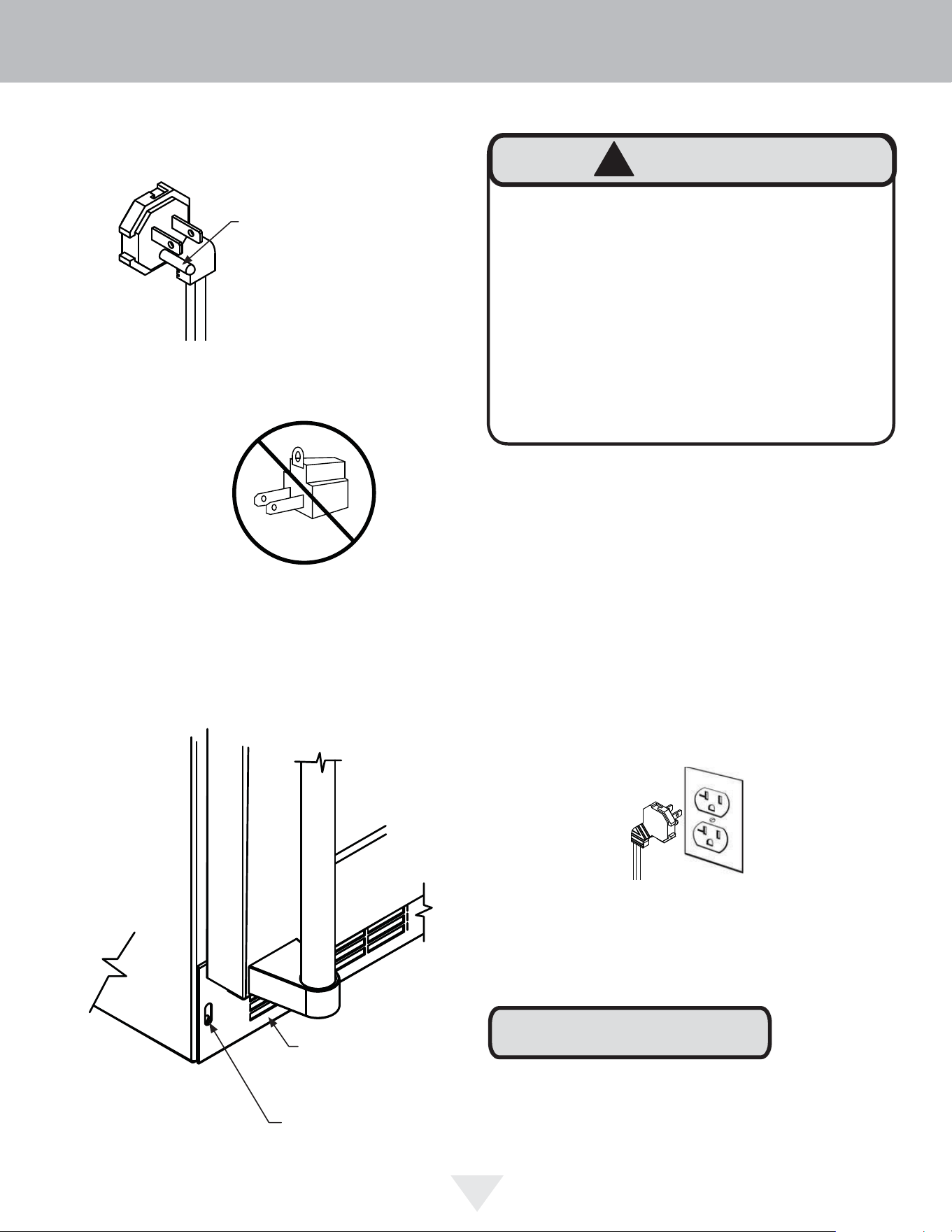
• Do not remove the grounding prong from the power
cord. (See Figure 3).
• Do not use an adapter. (See Figure 4).
• Do not splash or spray water from a hose on the
appliance. Doing so may cause an electrical shock,
which may result in severe injury or death.
!
WARNING
Front grille
Ground Fault Circuit Interrupters (GFCI) are prone to nui-
sance tripping which will cause the appliance to shut down.
GFCI’s are generally not used on circuits with power equip-
ment that must run unattended for long periods of time, un-
less required to meet local building codes and ordinances.
Electrical Connection
A grounded 115 volt, 15 amp dedicated circuit is required.
This product is factory equipped with a power supply
cord that has a three-pronged, grounded plug. It must be
plugged into a mating grounding type receptacle in accor-
dance with the National Electrical Code and applicable lo-
cal codes and ordinances (see Figure 6). If the circuit does
not have a grounding type receptacle, it is the responsibility
and obligation of the customer to provide the proper power
supply. The third ground prong should not, under any cir-
cumstances, be cut or removed.
Figure 6
Figure 3
Figure 4
Do not remove
ground prong
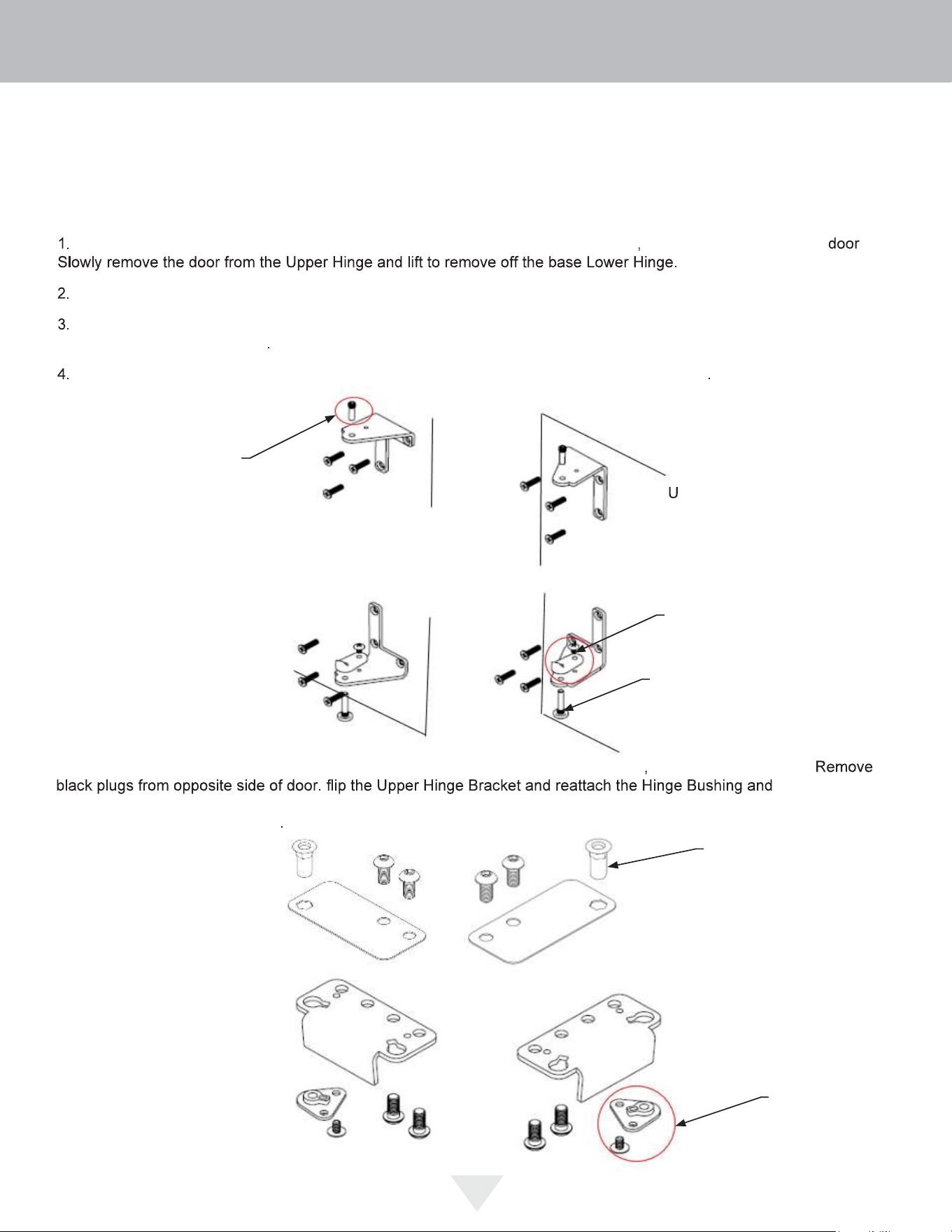
Door Reversing Instructions
Tools Needed:
• 1/8” Hex Key
• 5/32” Hex Key
• Phillips Screwdriver
Open door and remove Hinge Pin from the Upper Hinge using a 1/8” Hex Key tool making sure to steady the
Using a Phillips Screwdriver, remove the 6 screws from both the Upper and Lower Hinges and save for later steps
Once the Hinges are removed from the unit, using a Phillips Screwdriver, remove the Bushing Screw and Hinge Pin
Screw and save for later steps
On the Bottom Hinge, reattach the Bushing Screw and Hinge Pin Screw to the opposite side
Lower Hinge Bracket
(Before Reversal)
Upper Hinge Bracket
(After Reversal)
Lower Hinge Bracket
(After Reversal)
5. Using a 5/32” Hex Key, remove the Upper and Lower Hinge Brackets from the door
saving all components.
screw into place
on the opposite side of the door (where plugs were removed). Remove the Cam Closer from the Lower-Hinge Bracket
and attach it to the opposite side
Hinge Pin
Upper Right Hinge
Orientation
(Before Reversal)
Hinge Pin
Screw
Bushing
Screw
Lower Right Hinge
Orientation
(Before Reversal)
pper Left Hinge
Orientation
(After Reversal)
Upper Left Hinge
Orientation
(After Reversal)
Hinge
Bushing
Cam Closer
Upper Hinge Bracket
(Before Reversal)
6
DOOR REVERSAL
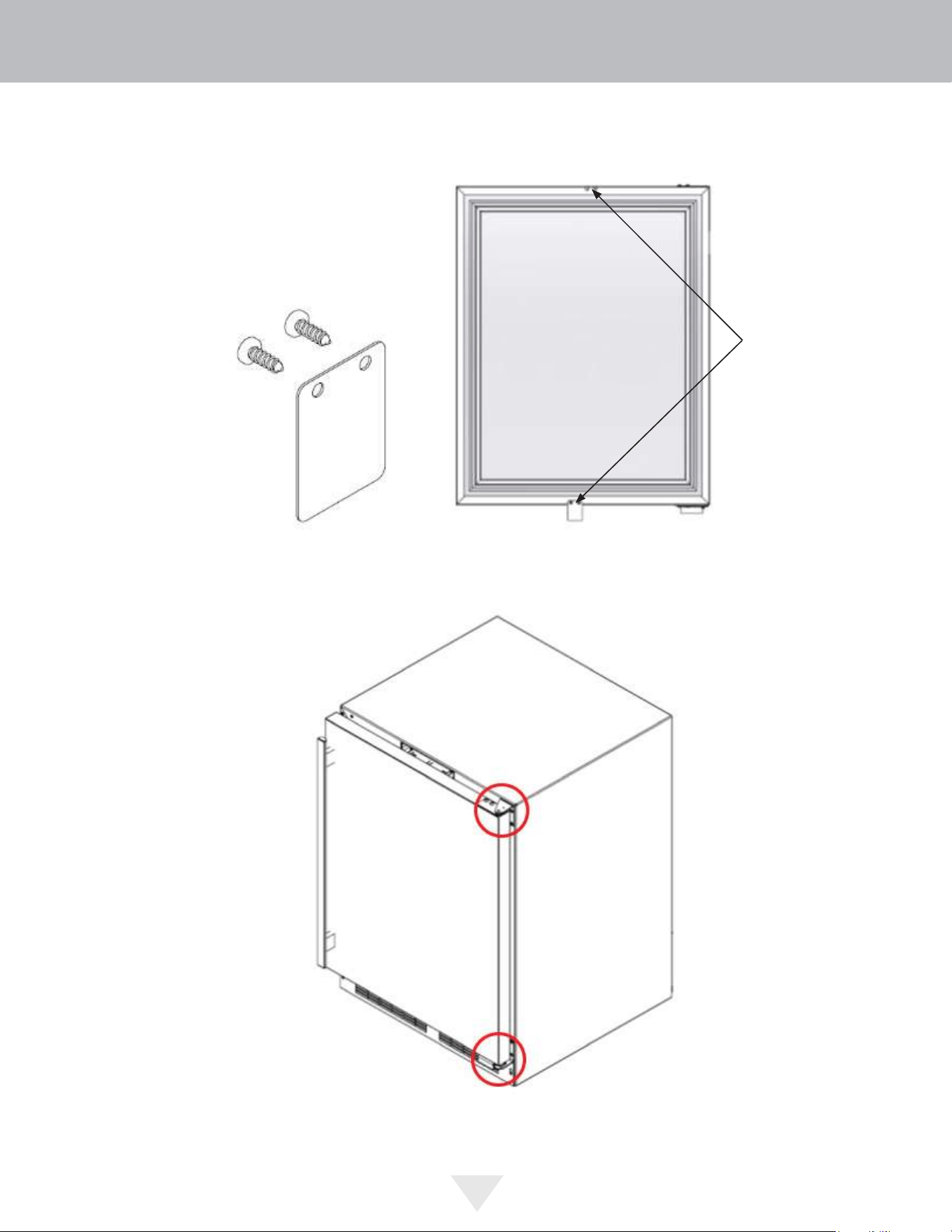
6. Remove the door switch actuator tab from the door and attach it to the opposite side
Door switch actuator tab
7. Reattach the Upper and Lower Hinges, and Hinge Brackets to opposite sides. Then install the door.
7
DOOR REVERSAL
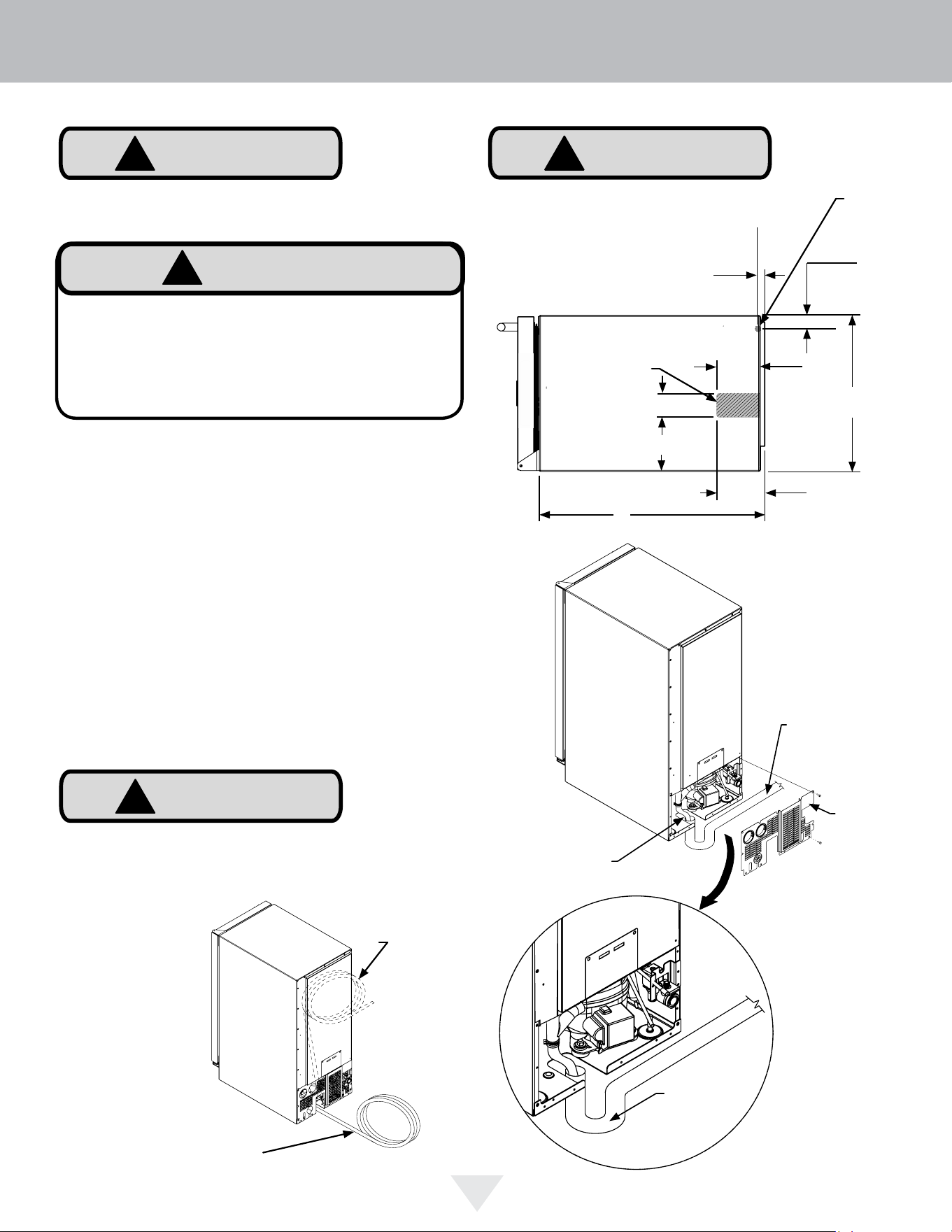
Access
panel
Drain pipe, (not
provided)
Drain tubing, cut
to length and in-
stall in the drain
C
L
C
L
14
7
⁄8"
(37.8 cm)
11
⁄16"
(17mm)
1
1
⁄4"
(3.2 cm)
4
17
⁄32"
(11.5 cm)
21
1
⁄2"
(54.6 cm)
Drain line coiled
and secured to
the back of the
unit
Uncoil the drain line, route
to an appropriate drain and
cut to the required length
Electrical Shock Hazard
Reasonable care and safe methods should be prac-
ticed. Do NOT work with energized electrical equip-
ment in a wet area. Read and follow the installation
instructions listed in this manual.
!
WARNING
!
CAUTION
Failure to use an adequate drainage system, will result in
surrounding water damage and/or poor ice production.
!
CAUTION
Observe and follow all local building codes
when installing this ice machine and drain
lines.
Water
supply
inlet
Drain access in
bottom of unit
4
3
⁄32"
(10.4 cm)
Sanitary
trap
2
1
⁄4"(5.7 cm)
5
1
⁄8" (13 cm)
Drain Plumbing
Your ice machine requires drain plumbing. If drain is above
6 inches it will require a drain pump. See optional drain
pump section below.
Gravity Drain (no drain pump):
The ice machine is shipped with the drain line installed,
coiled and secured to the back of the cabinet as shown. It
can be uncoiled, routed to an appropriate drain and cut to
length as required. Additionally there is the provision of
drain routing through the cut-out in the bottom of the unit.
A drain can be installed in this gray area with the drain line
cut to a short length and positioned into the drain as
shown, or if the ice machine is to be built-in, the drain tube
could be routed through a hole in the floor in this gray area
to a drain below.
The gravity drain line must be routed no higher than 6"
(15.2 cm) off the floor to assure proper drainage.
!
CAUTION
INSTALLING THE DRAIN PLUMBING
8
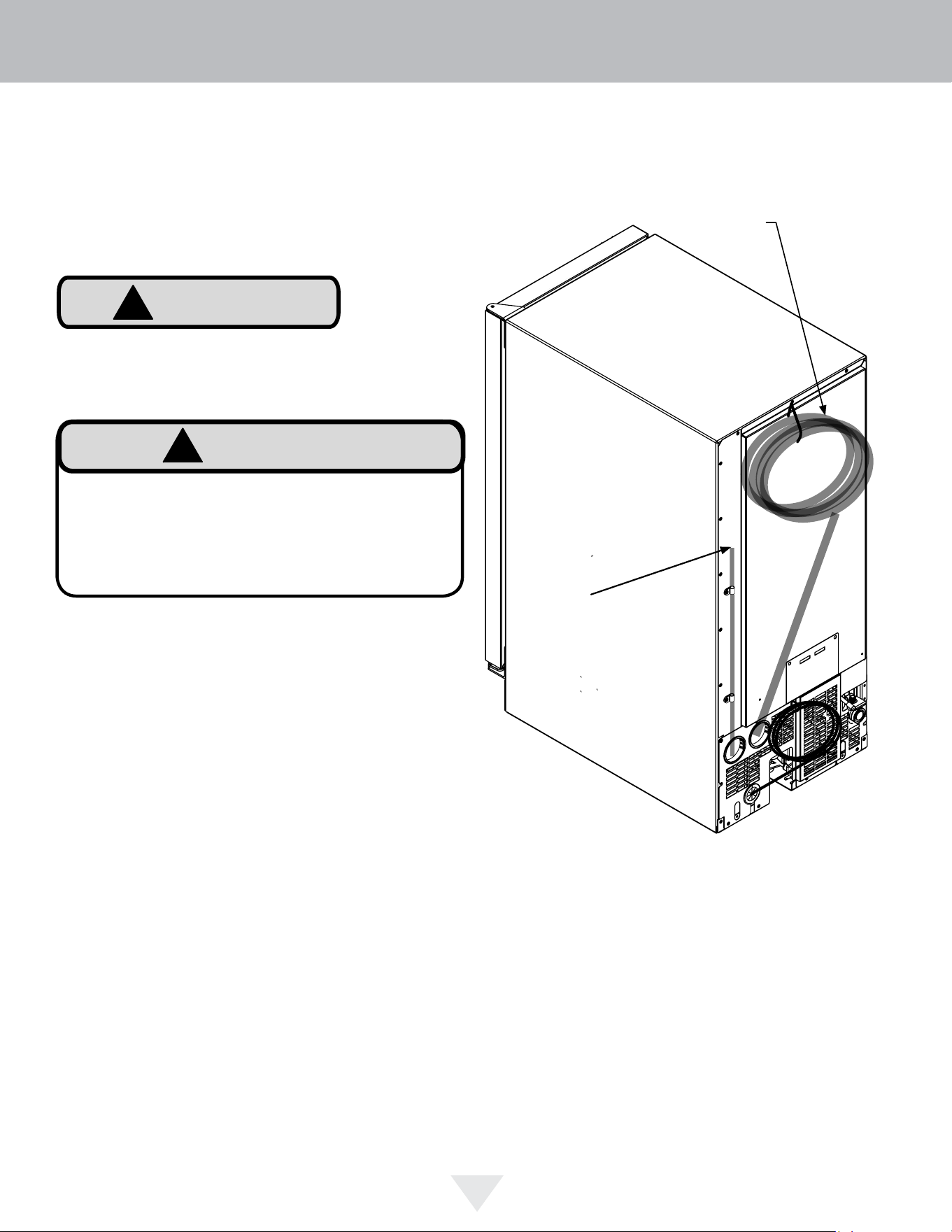
This drain pump is designed to be installed in Viking
ice machines only and approved for use with water
only.
!
CAUTION
Drain pump
vent tube.
Keep this
open to
assure air
flows freely
as water
enters
the pump
reservoir.
Drain line coiled and
secured to the back of the
cabinet. Uncoil, route to
an appropriate drain and
cut to length.
Electrical Shock Hazard
Risk of electrical shock or personal injury could occur
due to moving components, if the machine compartment
access cover is removed before unplugging the ice
machine power cord.
!
WARNING
INSTALLING THE DRAIN PLUMBING
9
Reverse osmosis, (RO), water, softened water, and de-
ionized water are not recommended as they can adversely
affect the quality and quantity of the ice.
Water
Supply
Line
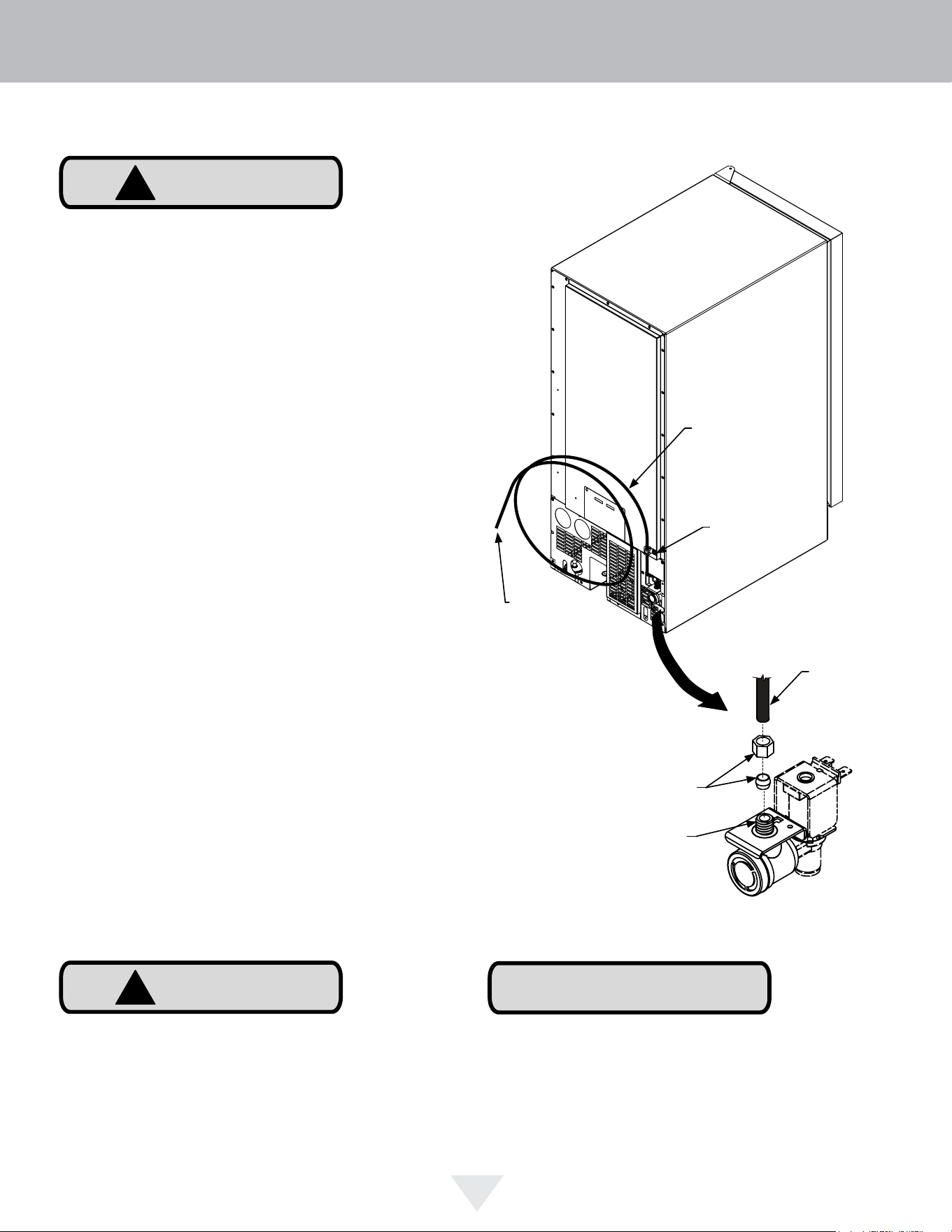
Clamp and
Screw
Back view of
ice machine
NOTE
!
CAUTION
Compression
fitting
Water
supply
line
Water supply
service loop
to shut off
valve
Water valve
inlet
Water Supply
Observe and follow all local building codes when installing
this appliance.
This ice machine must be connected to a potable cold
water supply line. delivering water pressure between a
minimum of 20 psi and a maximum of 120 psi.
Use
1
⁄4" copper tubing for your water supply which is available
at any local hardware or plumbing supply store. Route the
1
⁄4" copper tubing to suit your installation being sure not
to kink the tubing. Purchase enough copper tubing length
to allow a coil to be formed behind the unit for a "service
loop" which will allow the appliance to be pulled out from
the installation for servicing or cleaning. Connect the
copper tubing to the "top side" of a cold water pipe to
prevent the ice-maker from plugging with sediment.
A shutoff valve is recommended on the water supply line to
ease servicing the appliance. NOTE: A SELF-PIERCING
TYPE VALVE IS NOT RECOMMENDED as they are prone
to clogging with sediment which will create pressure drop
reducing the water supply to the unit.
Connect the copper tubing water supply to the water valve
inlet with a 1/4" compression nut fitting.
IMPORTANT: Secure the water supply line to the back of
the cabinet with the screw and strain relief clamp provided
in the corner of the back panel.
Make certain all connections are watertight after
installation. Form the tubing so that it will not vibrate
against the cabinet body or kink when your appliance is
moved in and out of position.
This ice machine is designed to make clear ice from the
majority of water sources on a daily basis. If your results
are unsatisfactory, your water may need to be filtered or
treated. A water specialist can recommend proper water
treatment.
!
CAUTION
To prevent water leaks:
• The water line fitting is to be used with copper tubing
only. Do not use with plastic tubing.
• Do not use any thread sealers on this water line fitting.
INSTALLING THE WATER SUPPLY
10
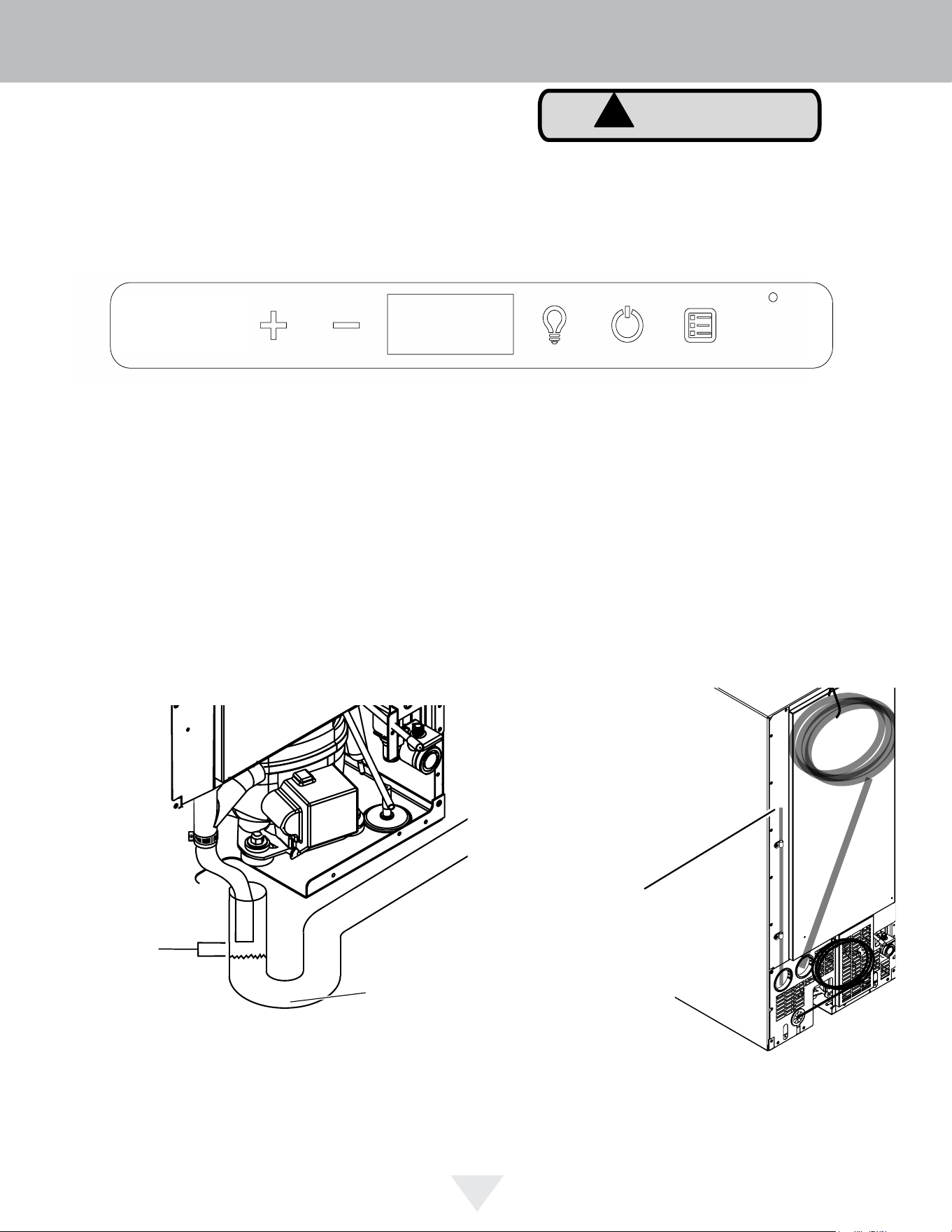
Procedure for Testing Drain System
(both gravity and drain pump models)
Drain pump models have a safety feature that will interrupt power to the unit if a high-limit condition occurs to prevent
flooding. This safety feature can be initiated by a restriction in the drain system and will continue until high-limit condition
is corrected, at which time power will be restored to the unit. Power interruption can be detected when no icons are
visible in the display area of the user interface. Once power is returned, a startup chime will sound followed by a self-
test, and "OFF" should be visible in the display area.
Drain pump vent
tube. Keep this
open to assure
air flows freely as
water enters the
pump reservoir.
Location of vent tube.
Example of an open drain.
Sanitary trap
!
CAUTION
hours
ICE
1 4 6 8
OFF CLEAN
DOOR
ECO
days
On/off Menu Delay timer Lock
Once the drain line is plumbed, perform the following:
1. Plug the ice machine into 115v power supply.
2. Place unit in the final installation location.
3. Turn the unit off via the user interface (display will indicate “OFF”). The drain pump will still be operational during off
mode if the unit has one.
4. Slowly pour 3-qts of water into the ice storage bin. All water should drain completely.
5. If water drains fully and without power interruption, the drain system has been successfully tested and further
installation of the ice machine can be continued.
6. If the water does not drain or a power interrupt occurs, check the following:
a. There are no kinks or restrictions in the drain line. (Note: Drain line needs to be cut to the required length and any
excess tubing should be removed to prevent possible restrictions).
b. Your drain line is plumbed into an open drain
c. The vent tube on the back of the unit is open
User interface display during power interruption.
7. After checking the above requirements, repeat step 4 and verify the water drains completely without power
interruption. If problems persist call a qualified service technician and/or plumber.
Air gap
between
end of
drain line
and top of
water level
DRAIN SYSTEM TEST
11
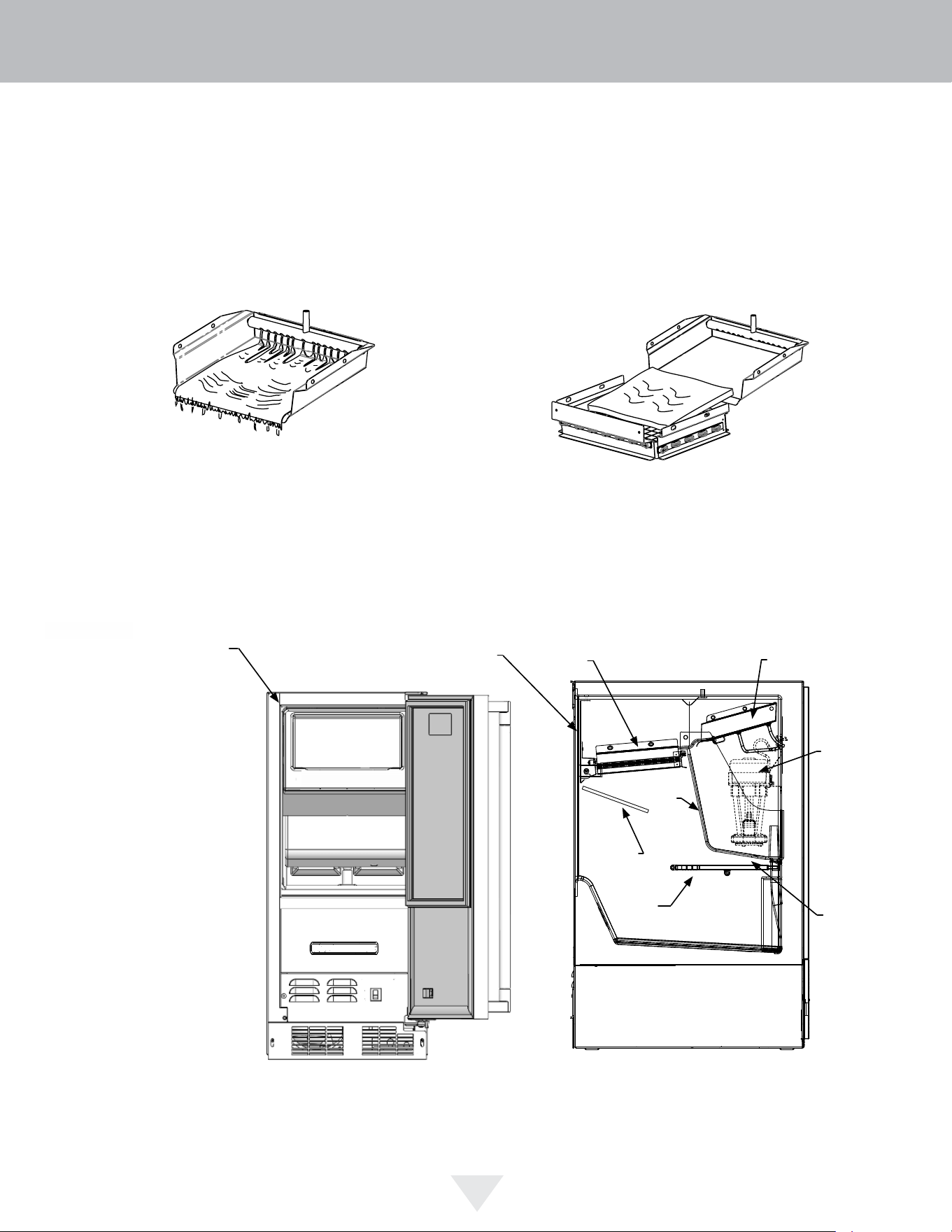
When the ice slab reaches the correct thickness, the ice
sheet is released and slides onto the grid cutter. Here, the
ice slab is cut into squares by the grid cut-ter’s heated
wires. The water containing the dissolved minerals is
drained after each freezing cycle. Fresh water enters the
machine for the next ice making cycle.
The Ice Making Process
Your ice machine is unique in how it forms ice with fraction-
al freezing to form a slab of ice that is clear and has less
dissolved solids than the water it is produced from. This is
accomplished by running water over the cold evaporator
plate which gradually freezes the water to produce the ice
slab. Pure water freezes first, leaving the dissolved solids
in the residual reservoir water to provide clear ice.
Water
reservoir
Evaporator
Circulation
Pump
Reservoir
drain plug
Front
panel
Bin Level
Sensor
Ice
Deflector
Grid Cutter
Water distributor
OPERATION OF THE ICE MACHINE
12
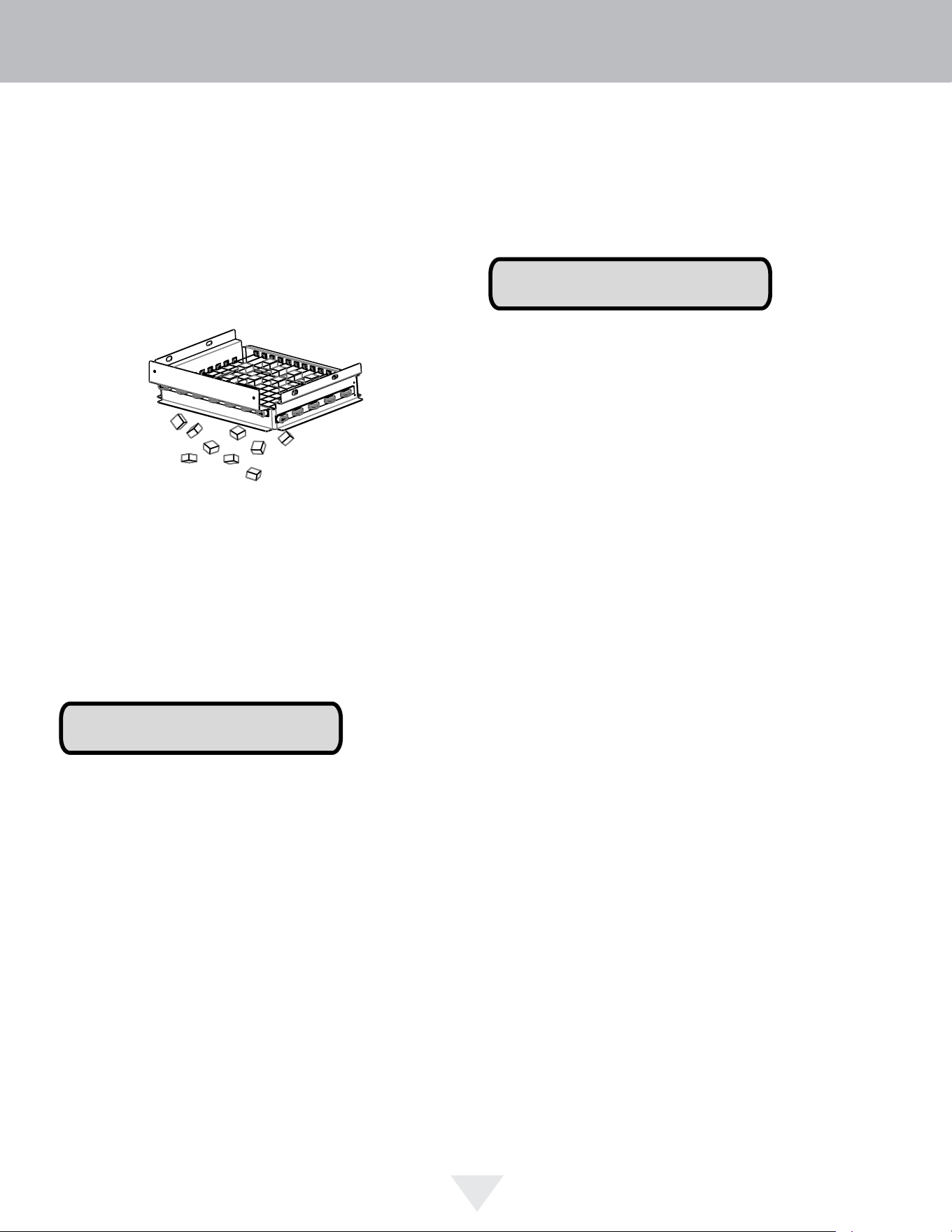
The bin level sensor is located in the ice bin, it senses
when the ice supply is low or full and starts or stops the ice
making process accordingly.
If the water supply is turned off to the ice machine be sure
to set the electronic control to the “OFF” position or remove
power to the unit.
New Sounds
The ice machine will make sounds that are different than
your household refrigerator. Because these sounds are
new to you they may be of a concern but are most likely
normal. The ice production process will make noises that
are not typical in a refrigeration product, ice falling onto
hard surfaces, water cascading across the evaporator, and
valves opening and closing. Following are some of the
sounds that you may hear:
A buzzing sound will be heard when the water valve
opens to fill the water reservoir.
A rattling noise which could be water flowing through the
water line.
A splashing sound when water is flowing over the
evaporator plate and into the water reservoir.
A "thud" when the ice slab is released from the
evaporator plate and slides onto the grid cutter.
"Clicks" when the cubes fall into the ice storage bin.
A gurgling sound which is refrigerant flowing in the ice
machine.
An air noise from the condenser fan.
Ice Production
In normal mode the ice machine will produce up to 39
pounds (17.7 kg) of clear ice in a 24-hour period when
installed in a 72°F ambient with a 55°F water supply.
“Initial” ice production and ice accumulated in the storage
bin will vary significantly. This is normal. During the first
24-hours of operation the unit will produce up to 39 lbs of
ice at the above ambient and water temperature conditions,
but when starting with an empty ice storage bin, the storage
bin may only accumulate up to 18 lbs of ice. By design,
the ice storage bin is maintained at a temperature slightly
above freezing to allow the stored ice to slowly melt, to
preserve the ice quality and clarity and assure a constant
supply of fresh ice. As ice is accumulated in the bin, the ice
production rate will overcome the ice melt and the storage
bin will fill to capacity.
NOTE
NOTE
The ice machine will keep producing ice until the ice
machine’s bin is full and will restart automatically when
ice needs to be replenished in the bin. The ice bin is
not refrigerated, and some melting will occur by design
to preserve the ice quality and clarity. Allow your ice
machine to run for 24-48 hours to accumulate ice in the ice
machine’s bin.
OPERATION OF THE ICE MACHINE
13
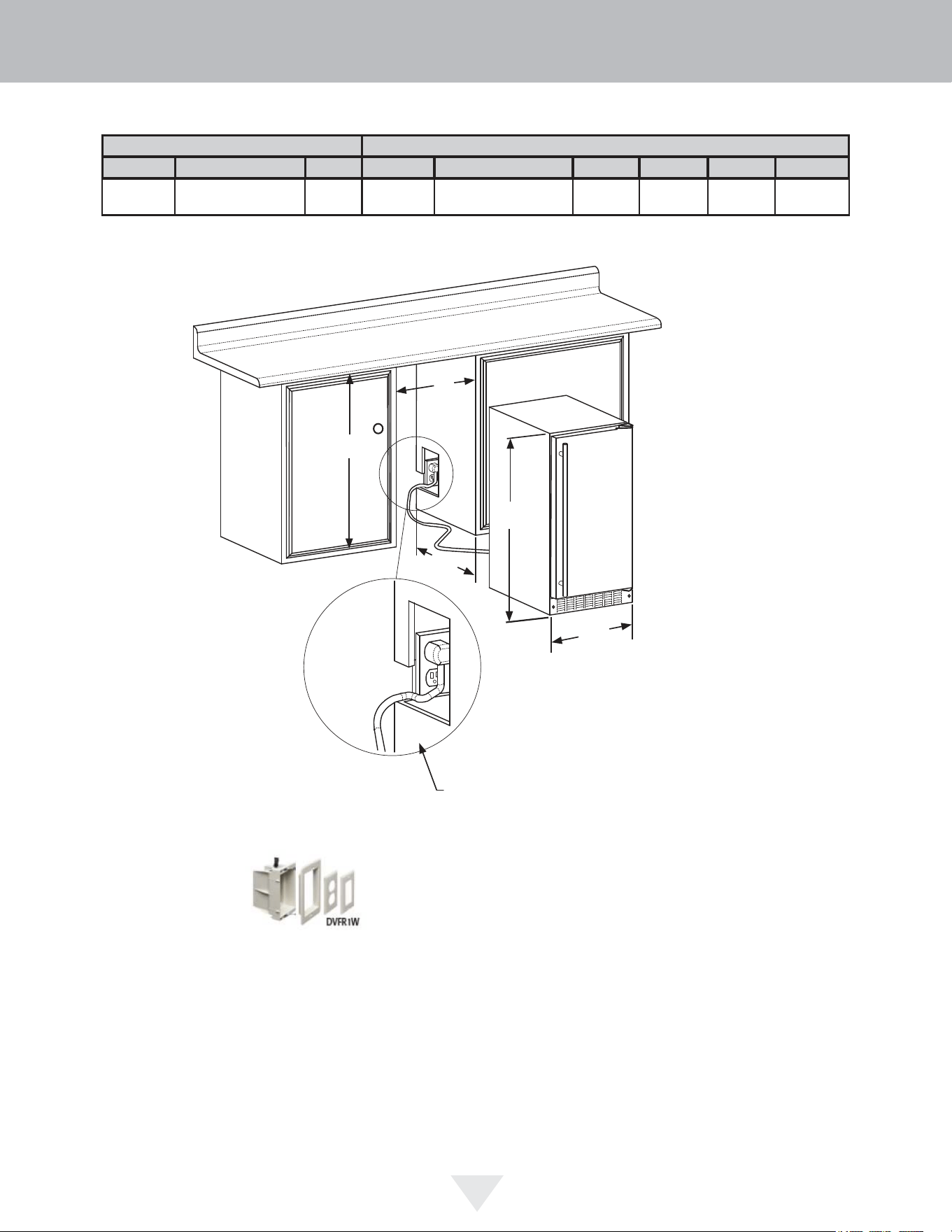
ROUGH-IN OPENING DIMENSIONS CABINET DIMENSIONS
"A" "B" "C" "D" "E" "F" "G" "H" "J"
15"
(38.1 cm)
31 1/4” to 32 1/4"
(79.4 cm to 81.9 cm)
24"
(61 cm)
14 7/8"
(37.8 cm)
31” to 32"
(78.7 cm to 81.2 cm)
22 7/8"
(58.1 cm)
-
37 3/8"
(94.9 cm)
14 1/4"
(36.2 cm)
Solid Door
Shown
"A"
"B"
"C"
"D"
"E"
If necessary, to gain clearance inside the rough-in
opening, a hole can be cut through the adjacent
cabinet and the power cord routed through this hole to
a power outlet. Another way to increase the available
opening depth is to recess the power outlet into the
rear wall to gain the thickness of the power cord plug.
Not all recessed outlet boxes will work for this applica-
tion as they are too narrow, but a recessed outlet box
equivalent to Arlington #DVFR1W is recommended for
this application.
CUTOUT AND PRODUCT DIMENSIONS
14
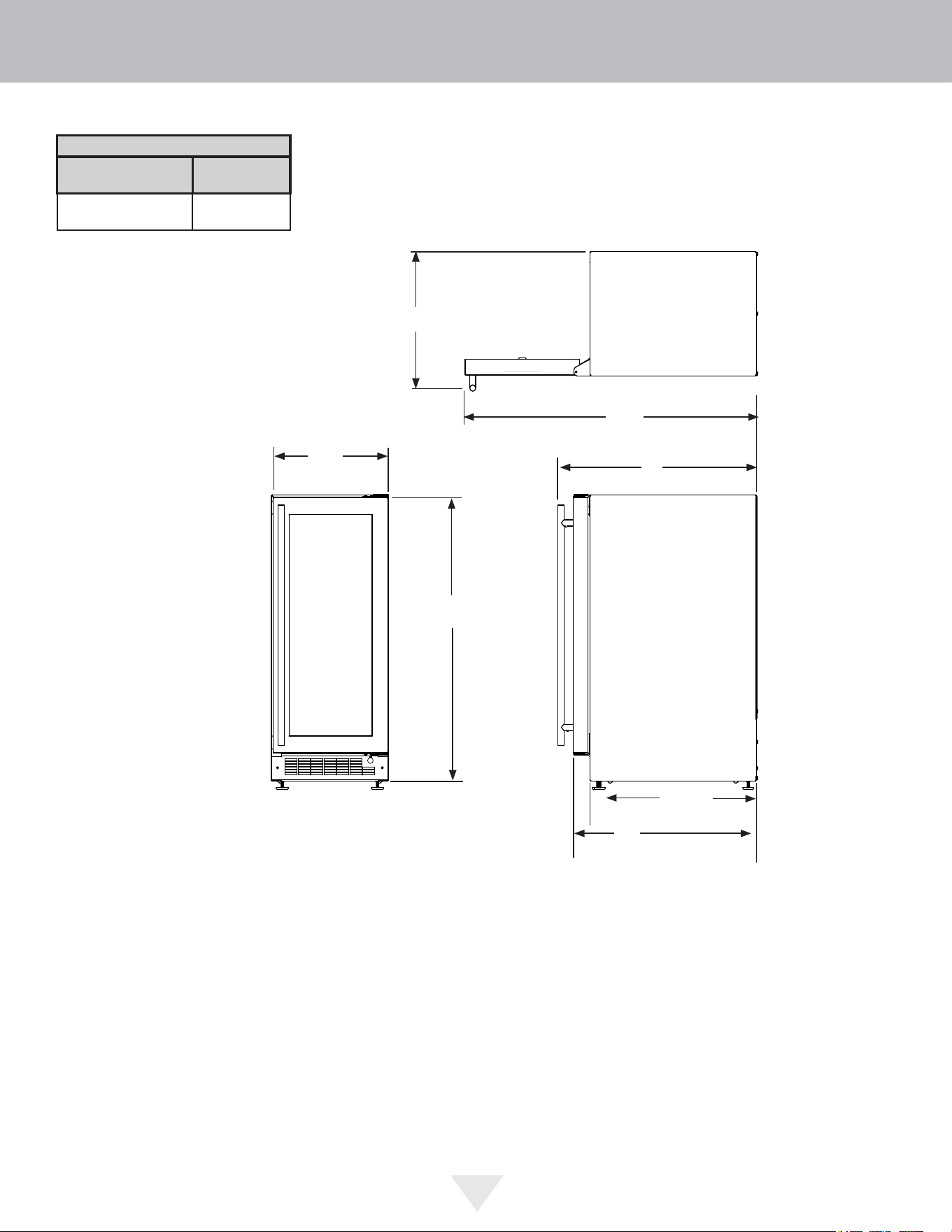
Glass Door
Shown
"F"
21
1
/2"
(54.6 cm)
"D"
"E"
"H"
"J"
"G"
PRODUCT DATA
ELECTRICAL
REQUIREMENTS #
PRODUCT
WEIGHT
115V/60Hz/15A
105 lbs
(47.6 kg)
Minimum rough-in opening required is to be larger than the
adjusted height of the cabinet.
A grounded 15 amp dedicated circuit is required. Follow all
local building codes when installing electrical and
appliance.
CUTOUT AND PRODUCT DIMENSIONS
15
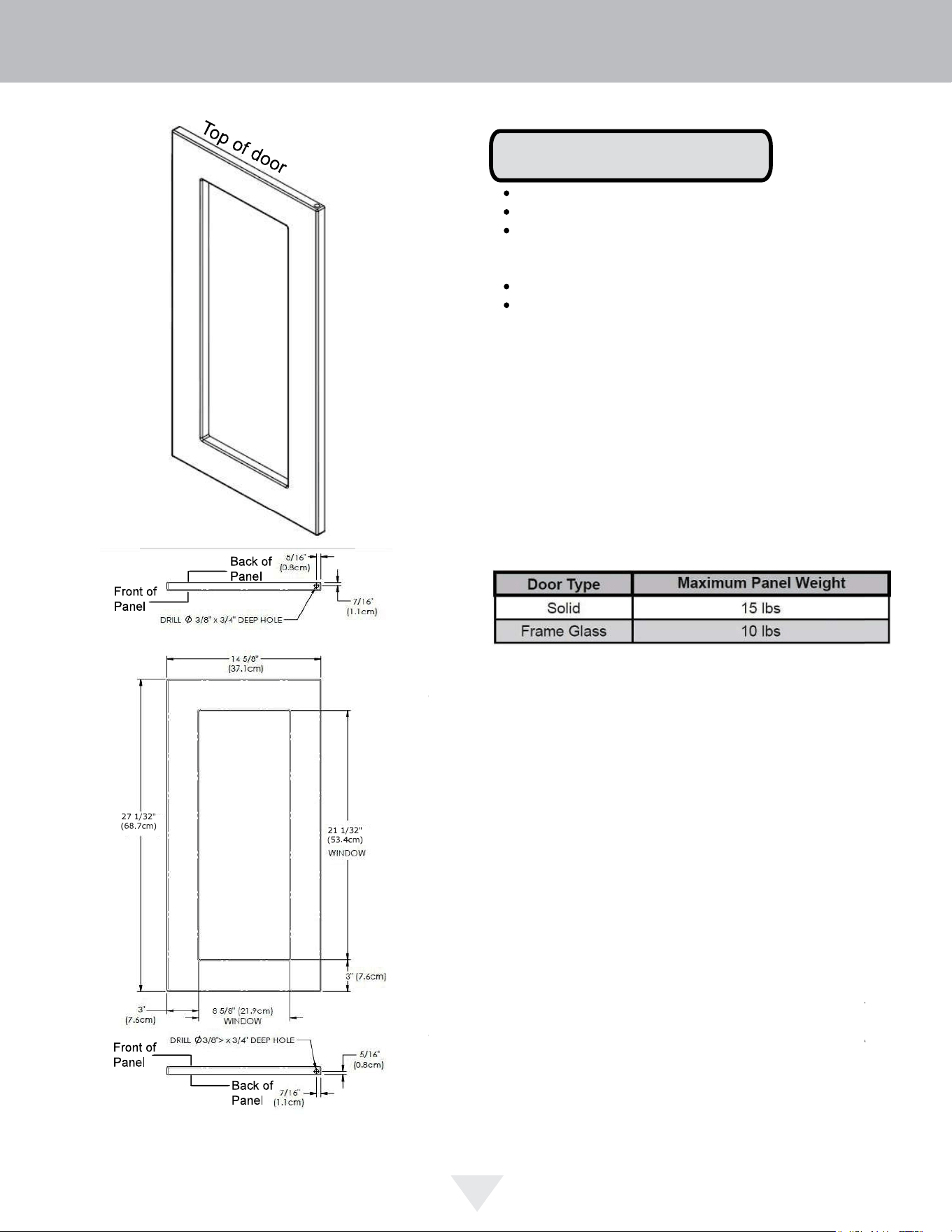
1
5
32"
(2.9 cm)
15" (38.1 cm) wide appliance
15" (38.1 cm)
Door Dimensions
NOTE
Panel thickness may be 5/8" or 3/4"
Center the unit in the 24" opening
If the hinge side of the product is pressed
against the adjacent cabinet, use a 5/8" thick
panel
The window cutout is for glass door models only
Do not use a solid door panel on a glass door
model
INTEGRATED PANEL DIMENSIONS
16
12
!
CAUTION
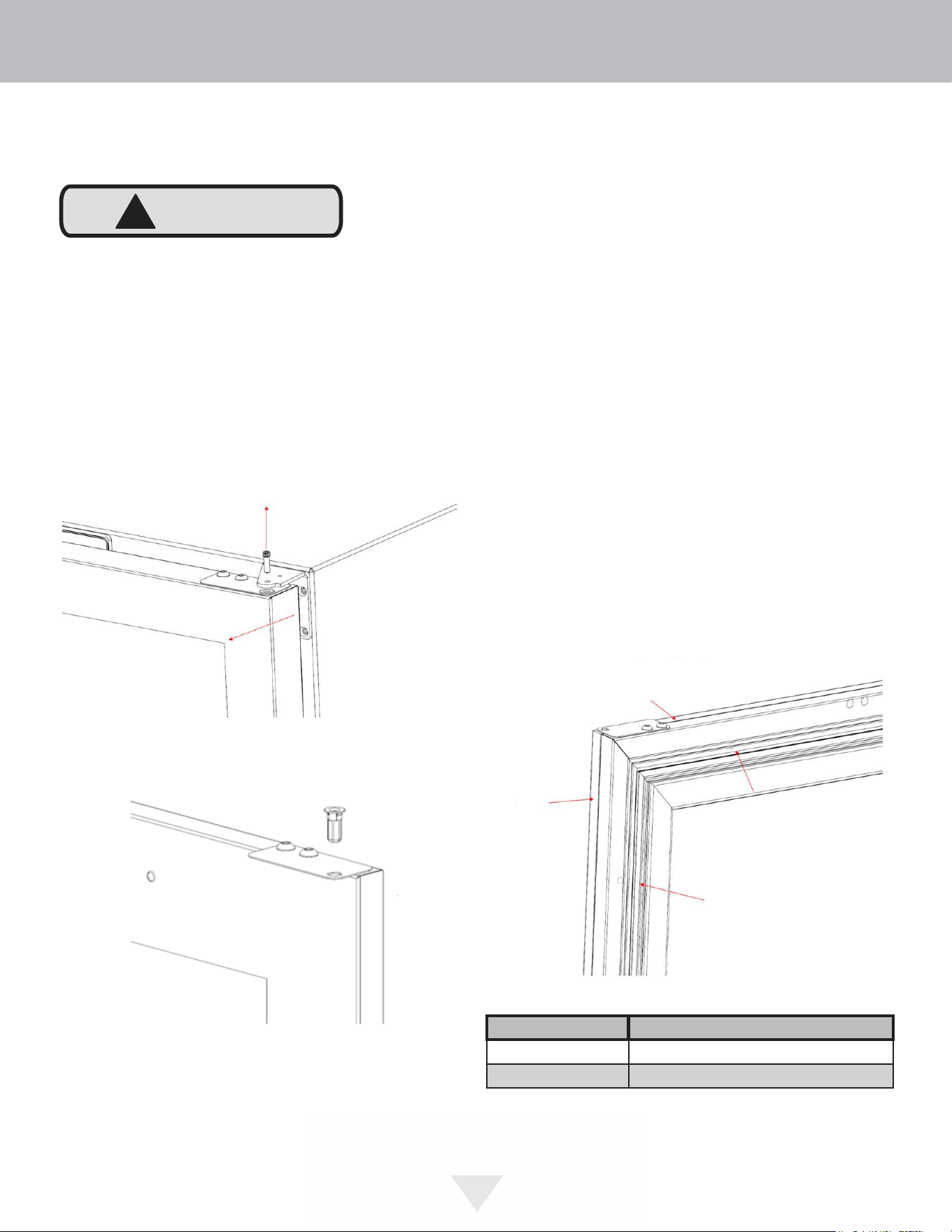
Step 1: Removing the Door and Hinges
Hold the door secure in the closed position and remove
Hinge Pin from the Upper Hinge using a 1/8” Hex Key tool.
Slowly remove the door by sliding outward away from the
cabinet and lift to remove off the Lower Hinge. If reversing
the door, remove hinges from cabinet per Door Reversal
Instructions.
Remove the hinge bushing from the adaptor plate. A new
bushing is included in the literature pack with your unit.
Cut and prepare panels according to the information
provided in the Integrated Panel Dimensions section.
It is important to use the factory provided grille that came
with the product to assure proper air flow is maintained
through the condenser. The use of a custom grille is not
recommended and will void the warranty.
Step 2: Remove the Door Gasket
With the door laying on a flat surface and starting at a
corner of the door, remove the magnetic door gasket from
the interior side of the door. Set the gasket aside on a flat
surface.
There are 10 holes in the gasket retainer extrusions (3 on
each side and 2 at the top and bottom) which are used to
fasten the panel to the front of the door. The screws are
provided in the literature pack.
Step 3: Assemble the Panel to the Door
The preferred method of attaching the panel to the door
is to clamp the panel to the door so it cannot move while
drilling the screw pilot holes. Use bar clamps or "C" clamps
with pads on the clamping surfaces that will not mar the
panel or the door. The custom panel should be flush with
the top of the door and centered along the width of the
door. Drill holes through the gasket extrusion using the 10
holes as pilot holes. Use the drill size from the chart in the
table below being careful not to drill through the front sur-
face of the panel. Fasten the panel to the door with the 10
screws provided in the literature pack. Remove the clamps
and replace the gasket in the gasket extrusion channels of
the door. Some force may be required to seat the gasket
into the channels. Be sure the gasket corners are seated
properly.
Integrated panel
flush with top of
door
Integrated panel
flush with top of
door
Holes in gasket
container
Material Type #10 Wood Screw
Hardwood
1
⁄8" (3.2 mm) Diameter. Pilot Hole
Softwood
7
⁄64 (2.8 mm) Diameter. Pilot Hole
INTEGRATED PANEL INSTALLATION
17
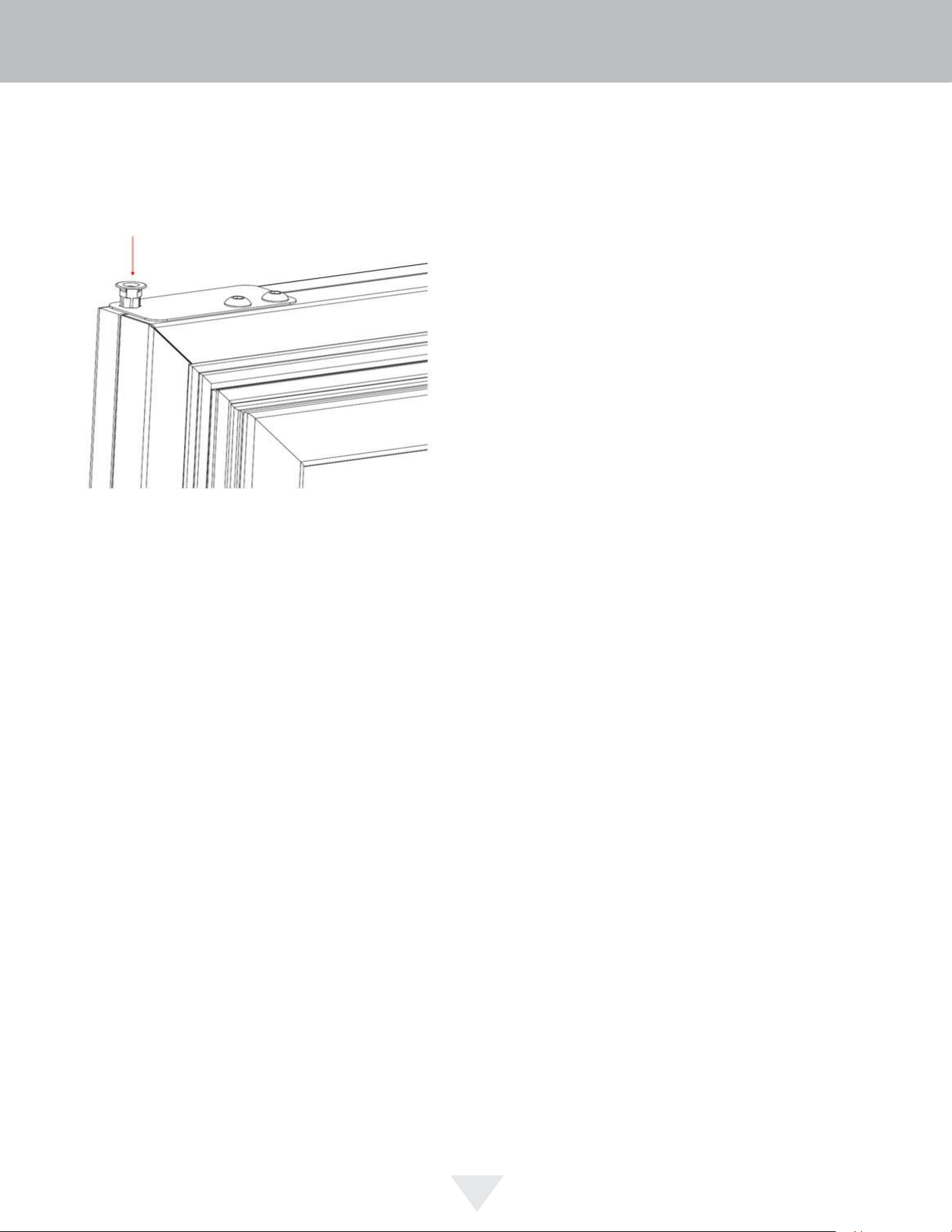
Step 4: Install the Door
If reversing the door swing, reinstall hinges per Door
Reversal Instructions. Carefully slide lower hinge bushing
over bottom hinge pin. Install the new upper hinge bushing
into adaptor plate.
Align hinge bushing with top hinge and reinstall upper hinge
pin using 1/8” Hex Key so that the pin is ush.
INTEGRATED PANEL INSTALLATION
18
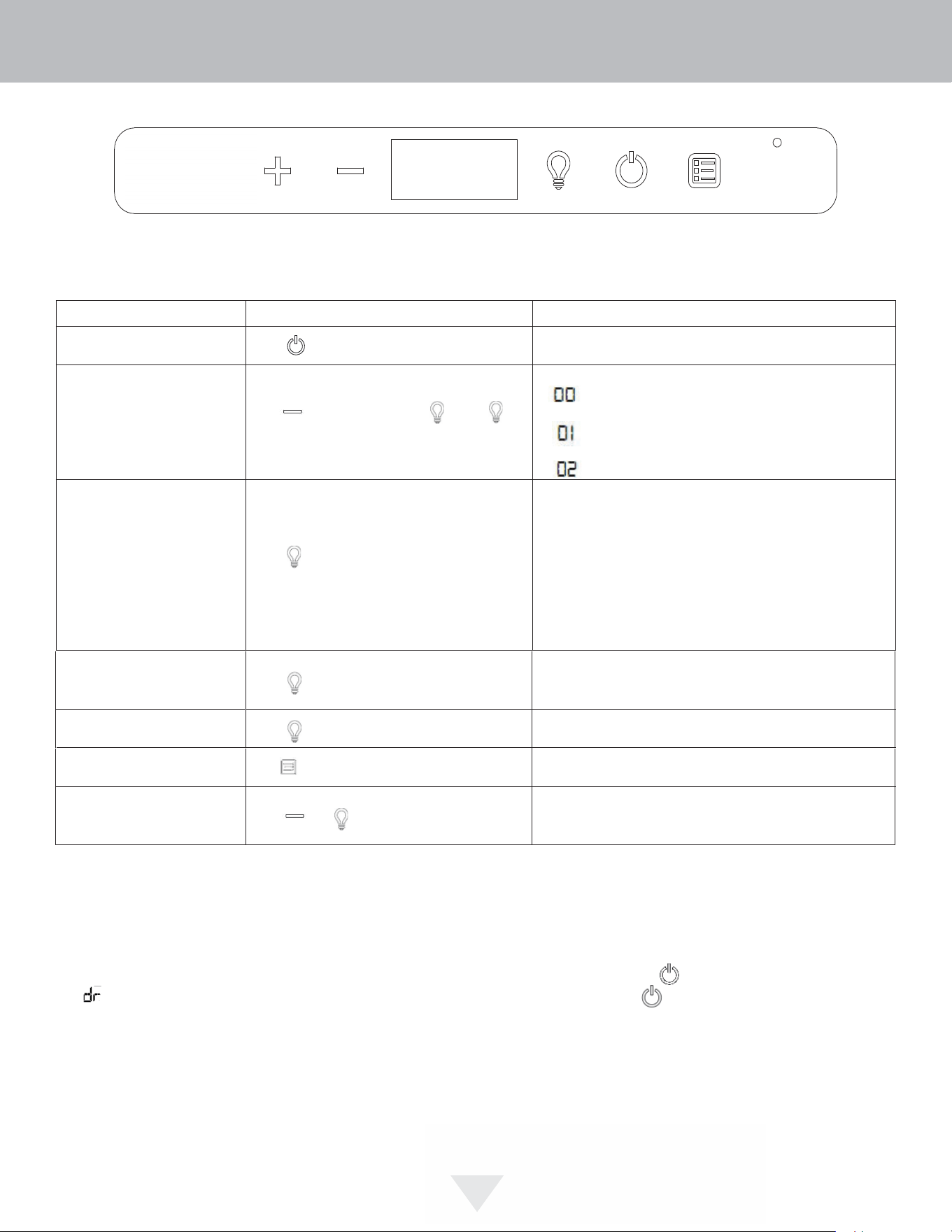
USING YOUR ELECTRONIC CONTROLS
Control Function Guide
Function Command Notes
ON/OFF Press and release. Unit will immediately turn ON or OFF.
Adjust light color
Option Open Door Closed Door
White White
Toggle interior light - Door
Closed
Press and release to toggle interior light op-
tion; press again to deactivate
Toggle depends on light color option above. ight output 50
Enable Sabbath Mode Press and hold for 5 seconds and release
The
o
F /
o
C symbol will flash briefly after 5 seconds. Interior light
and display will go dark and remain so until user resets mode -
unit continues to operate
Disable Sabbath Mode Press and release Display and interior light return to normal operation
Clean Mode Hold for 10 seconds to begin clean cycle.
Showroom Mode Hold and for 5 seconds
The
º
F /
º
C symbol will flash. Display will be lit and interior light
will function. Unit will not cool. Repeat command to return to
normal operation
Door Alert Notification
When the door is left open for more than 30 minutes:
• A tone will sound for several seconds every minute
• will appear in display
• Close door to silence alert and reset
Hold and press and release . Press
to scroll through lighting options.
BrightShield
TM
BrightShield
TM
(default) White BrightShield
TM
Unit will return to normal operation upon completion cleaning.
See "Care and Cleaning" section for more information.
First Use
Initial startup requires no adjustments. When plugged in, the unit will
begin operating under the factory default settings. If the unit was turned off
during installation, simply press and the unit will immediately switch
on. To turn the unit off, press .
USING YOUR ELECTRONIC CONTROL
19
19

BrightShield™
This model includes BrightShield™ with Vyv™ Antimicrobial Light Technology.
BrightShield™
• Kills* and prevents the growth of viruses, bacteria, fungi, yeasts, mold, and mildew
• Provides continuous antimicrobial action to keep surfaces clean
• Is approved for continuous use around people, pets, & plants
• Reduces odors caused by bacteria, fungi, yeasts, mold, and mildew
• Creates a cleaner environment for food, beverages, & ice
* Testing on a non-enveloped virus (MS2 bacteriophage) showed a 97.12% reduction in controlled laboratory testing in 8
hours on hard surfaces. Testing on SARS-CoV-2 (enveloped virus) showed a 98.45% reduction in controlled laboratory
testing in 4 hours on hard surfaces. Testing on MRSA E. coli showed 90%+ reduction in controlled laboratory testing in
24 hours on hard surfaces. Results may vary depending on the amount of light that is reaching the surfaces in the space
BrightShield™ is most effective when used continuously. Your unit is factory-set to use BrightShield™ lighting whenever
the door is closed and standard bright white when the door is open. See Control Operations sections for details and other
options.
For more information about Vyv™ Antimicrobial Light Technology visit
www.vyv.tech
20
USING YOUR ELECTRONIC CONTROLS
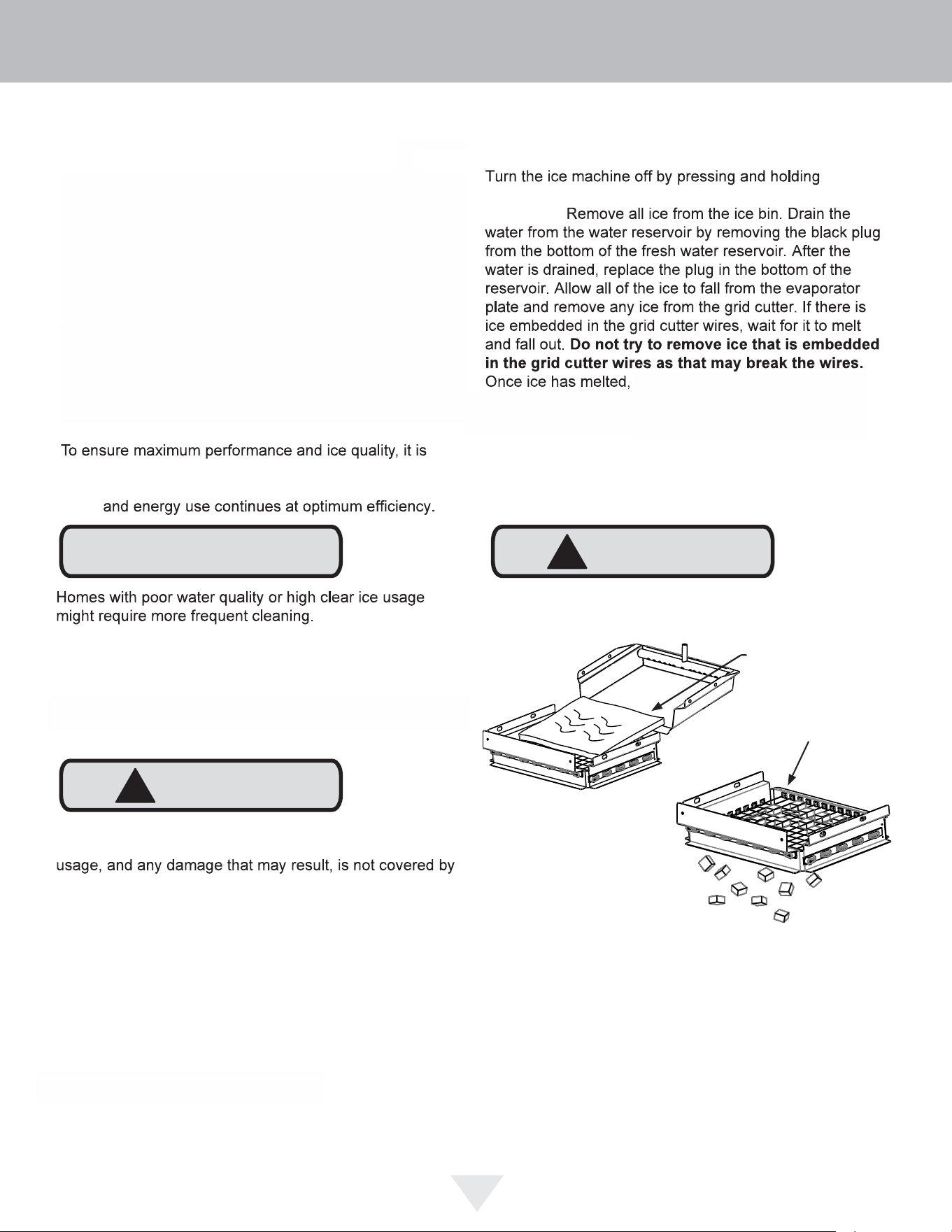
!
CAUTION
Forcing ice through the grid cutter will break the grid cutter
wires.
!
CAUTION
Remove all ice
from the evaporator
plate and grid cutter
area that is not
embedded in wires
Clean reminder:
CLEAN
NOTE
OFF
dependent on
your water source and usage. Normal ice production will
continue while the "CLEAN" reminder is displayed.
When
another
. If you choose to clean the appliance at
Clean mode:
recommended to clean your ice machine once every six
months. This simple cleaning routine will also ensure
water
Once you have your cleaner:
the
"ON/OFF" icon for 3 seconds. "OFF" will be displayed on
the control.
Use only Viking approved ice machine cleaner and follow
all label warnings and directions. Incorrect chemical
warranty.
machine is ready to be cleaned.
While cleaning is needed, UI will alternate between "CL"
and "ICE" every 3000 cycles to indicate that the unit needs
to be cleaned. Over time, mineral build-up on the cold
evaporator plate can occur which can adversely affect the
quality of your ice. This build-up is dependent on your
water source and usage. Normal ice production will
continue while the "CLEAN" reminder is displayed. The
"CL" clean reminder will reset after your ice machine has
completed the cleaning cycle and will not occur for another
3000 cycles.
CARE AND CLEANING
21
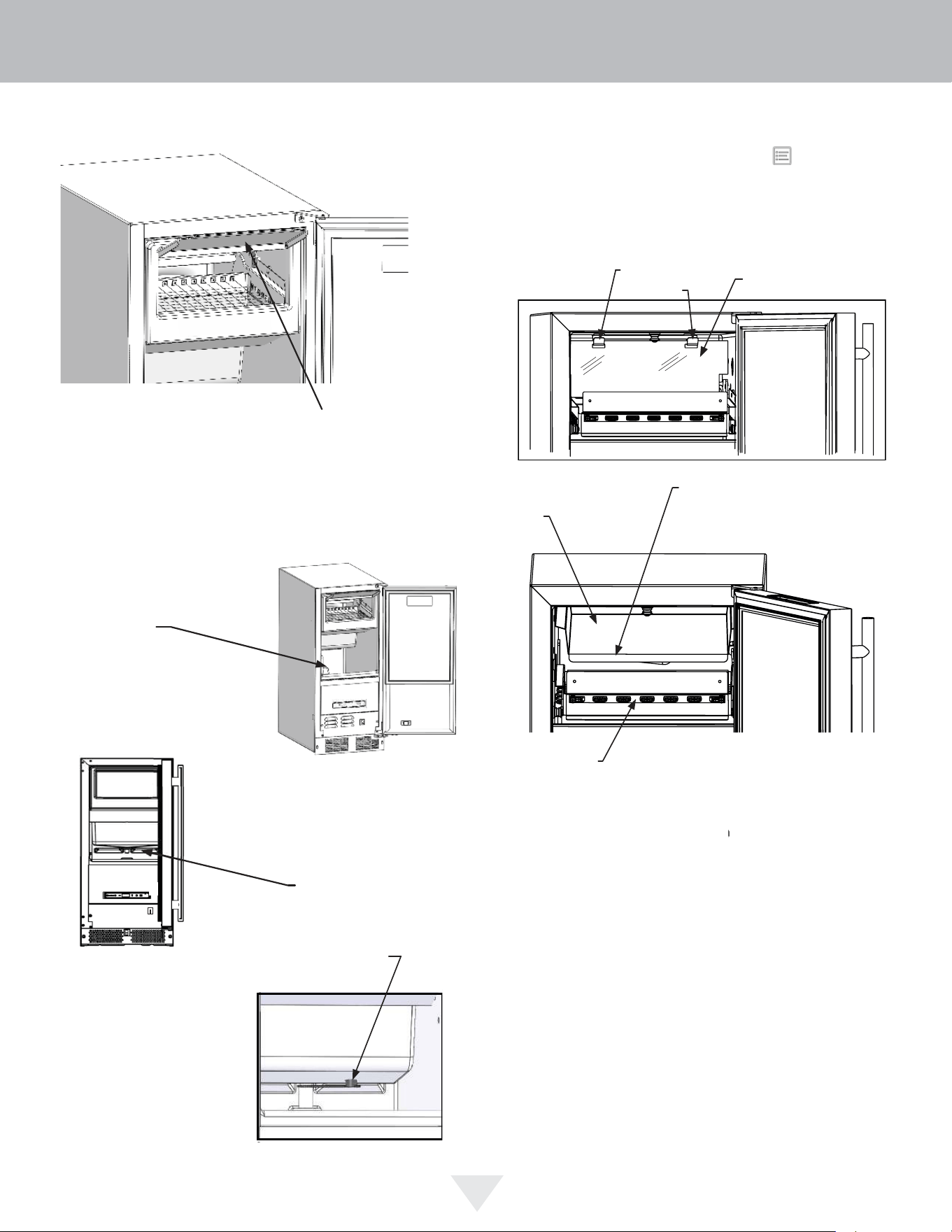
Remove all of
the ice from
the ice bin
Remove the
black reservoir
drain plug from
the bottom of
the reservoir.
Splash shield
brackets
After the cleaning cycle is completed, verify that all build-up
has been removed. If not, repeat the clean cycle procedure.
Clean inside of unit with a clean, damp rag before ice mak-
ing cycle begins.
Replace the splash shield if removed.
Clean cycle time is approximately 45 minutes.
Ice maker will automatically return to ice making once clean
cycle is complete.
Pour cleaning solution slowly
onto the front edge of evaporator
plate behind the grid cutter.
Evaporator
plate
Grid cutter
Splash shield
Lift fascia door up to ac-
cess evaporator plate
Remove ice from bin. Pull plug from the reservoir. Once
reservoir is empty, replace plug. Hold the button for
10 seconds to show "CL" on the display. Lift Fascia door
to access evaporator plate. Lift or remove splash shield to
expose evaporator plate. Using 1-3 ounces of cleaner,
pour cleaning solution slowly on evaporator plate so it
flows down into the fresh water reservoir.
CARE AND CLEANING
22
!
CAUTION
Front Grille
Be sure that nothing obstructs the required air fl ow open-
ings in front of the cabinet. At least once or twice a year,
brush or vacuum lint and dirt from the front grille area (see
page 4).
SHOCK HAZARD: Disconnect electrical power from the
appliance before cleaning with soap and water.
Cabinet
The painted cabinet can be washed with either a mild soap
and water and thoroughly rinsed with clear water. NEVER
use abrasive scouring cleaners.
Interior
Wash interior compartment with mild soap and water. Do
NOT use an abrasive cleaner, solvent, polish cleaner or
undiluted detergent.
Care of Appliance
1. Avoid leaning on the door, you may bend the door
hinges or tip the appliance.
2. Exercise caution when sweeping, vacuuming or mop-
ping near the front of the appliance. Damage to the
grille can occur.
3. Periodically clean the interior of the appliance as
needed.
4. Periodically check and/or clean the front grille as
needed.
In the Event of a Power Failure
If a power failure occurs, try to correct it as soon as pos-
sible. Minimize the number of door openings while the
power is off so as not to adversely affect the appliance's
temperature.
Light assembly replacement
All models use an LED to illuminate the interior of the ap-
pliance. This component is very reliable, but should it fail,
contact a qualifi ed service technician for replacement of the
LED.
23
CARE AND CLEANING
• Never attempt to repair or perform maintenance on
the appliance until the main electrical power has been
disconnected. Turning the appliance control "OFF"
does not remove electrical power from the unit's wiring.
• Replace all parts and panels before operating.
!
WARNING
Electrocution Hazard
Before You Call for Service
If the appliance appears to be malfunctioning, read through
this manual first. If the problem persists, check the trouble-
shooting guide below. Locate the problem in the guide and
refer to the cause and its remedy before calling for service.
The problem may be something very simple that can be
solved without a service call. However, it may be required
to contact your dealer or a qualified service technician.
Troubleshooting guide:
Ice Machine Operation
Ice machine does not operate
Is the ice machine’s power cord plugged in? Plug the
power cord into a grounded 3 prong outlet.
Is the electronic control showing the "ICE" position?
Check the control to be sure it is in the "ICE" position.
Is a fuse blown or a circuit breaker been tripped? Re-
place a blown fuse or reset a tripped circuit breaker.
Is the temperature of the room cooler than it normally
is? The minimum room temperature is 55°F (13°C). The
bin thermistor may be sensing the room temperature and
shut off before the bin is full of ice. If the room temperature
remains low the ice machine may not restart.
Is there a drain pump in the ice machine? The drain
pump is designed to temporarily shut the unit off when
large quantities of water create a high-limit condition. Wait
a few minutes as the drain pump will continue to operate
to dispose of the excess water. If there is still water in the
ice bin check the drain pump vent line and drain line for
obstructions or kinking.
The ice machine is noisy
Many sounds of an ice machine are different than your
household refrigerator. This subject is discussed on page
11, but check the following:
Do you hear water being circulated in the ice ma-
chine? This is a normal sound as water is added once
every ice making cycle.
Is there a “whoosing” sound? Make sure water is get-
ting to the ice machine. Also check to make sure the drain
plug is fully seated in the water reservoir.
Is there an ice slab caught between the evaporator
plate and the grid cutter? First check to see if the ice
machine is level. If the ice machine is level run a cleaning
cycle.
Ice Production
Little or no ice production from the ice machine
Is the electronic control set to the "ICE" position?
Check the control to be sure it is in the "ICE" position.
Is water getting to the ice machine? Make sure nothing
is restricting the water supply such as a closed water valve
or a blown fuse or tripped circuit breaker, or a kinked sup-
ply line, or low water pressure.
Has the ice machine just been started? A typical ice
production cycle can take up to 1
1
⁄2 hours. Initial start up
cycles can take longer. Check the ice machine after 24
hours for ice accumulation in the bin.
Is the reservoir drain plug in place? Check that the
reservoir drain plug is properly seated.
Is the water distributor tube restricted? Run a cleaning
cycle to clean the ice machine. Also check any filters to
make sure they are not restricted.
Is the condenser fan air ow restricted? Make sure the
grille in the front of the ice machine is open for proper air
circulation.
Is the room and/or water temperature to warm? Move
the ice machine to an area where the ambient temperature
is below 90°F (32°C) for built-in ice machines or below
100°F (38°C) for freestanding ice machines. The ice ma-
chine should not be placed next to a heat source such as
an oven. Check the cold water connection.
Is there scale build up in the ice machine? If there is
scale build up on the evaporator, the ice machine needs to
be cleaned. See “Cleaning the Ice machine”.
TROUBLESHOOTING
24
Plumbing Problems
Is the drain hose aligned over the drain? Move the ice
machine to align the drain.
Is the ice machine draining properly? Check that there
are no kinks or restrictions in the drain lines; this can
cause water to back up in the ice bin. Check that foreign
material is not blocking the ice bin drain located at the
right rear corner of the ice bin. Check the drain pump
discharge and vent line or any restrictions or kinks. Check
that the drain pump is level.
If there are plumbing issues outside of the ice machine,
they cannot be repaired by the service technician. A
qualified plumber will have to be called.
Ice Quality
Odor, grey color, or off taste in the ice
Is there mineral scale build up on the evaporator
plate? The ice machine needs cleaning. See “Cleaning
the Ice Machine”.
Is there a high mineral content in the water? The water
may need to be filtered.
Are food items being stored in the ice bin? Remove
food from the ice bin.
Unpleasant Odors may require the use of a charcoal filter
on the water supply line.
Clumps of ice
Are there clumps of ice in the bin? If the ice isn’t used
on a regular basis it will melt and form into clumps. Break
up the ice clumps with the ice scoop.
Ice cubes are too big or too small
Is there low ice consumption? Ice is slowly melting in
the ice bin which will affect the size of the cubes. This is
normal. When the ice bin needs to be replenished, cubes
will return to the regular size.
Is the ice slab releasing? Clean the evaporator. See
“Cleaning the Ice Machine”.
Is the distributor tube restricted? Check the water line
to the ice machine to make sure there are no restrictions
or kinks in the line. Check all filters to make sure they
are not restricted. Check that the water flows evenly out
of the distributor tube, if not, clean the ice machine. See
“Cleaning the Ice Machine”.
Troubleshooting the Drain Pump
If the drain pump reservoir (not the ice machine bin)
reaches overfill condition, the power to the ice machine will
be shut off.
If the ice machine is not working, check the following:
• Make sure there is power at the receptacle.
• Make sure the ice machine is turned on.
• Make sure the ice bin is not full.
Then check the drain pump:
The pump does not run:
• Make sure the pump is plugged in and there is power
to the receptacle.
• Check the inlet to the drain pump for debris and clean
as needed. Remove clamps and inlet tube from drain
pump to check for and remove debris.
• Make certain the vent line is free of kinks/sharp bends
or restrictions.
• Make certain there is enough water to activate the
drain pump. It will take at least one (1) quart (.95 liters)
of water to activate the drain pump.
The pump runs, but no water is pumped out:
• Check that the vent is clear and free of restrictions.
• Check the discharge line to make certain there are no
restrictions.
• Make sure that the discharge tubing has not exceeded
the maximum lift of eight (8) feet (2.44 meters) and the
horizontal run is not greater than twenty (20) feet (6.1
meters).
The pump runs and then quickly turns off repeatedly:
• Check to make certain the drain pump is level.
• Check that the vent is clear and free of restrictions.
The ice machine is running but not producing ice:
• Check to make sure water is not backing up in the ice
bin.
NOTE
NOTE
TROUBLESHOOTING
25

If service is required, call your authorized service agency.
Have the following information readily available:
• Model number
• Serial number
• Date purchased
• Name of dealer from whom purchased
Clearly describe the problem that you are having. If you are
unable to obtain the name of an authorized service agency,
or if you continue to have service problems, contact Viking
Range, LLC at (888) 845-4641 or write to:
VIKING RANGE, LLC
PREFERRED SERVICE
111 Front Street
Greenwood, Mississippi 38930 USA
Record the information indicated below. You will need it
if service is ever required. The serial number and model
numbers for your refrigerator are located on the upper wall,
behind the lighting:
Model No. ___________________________________
Serial No. _____________________________________
Date of Purchase ______________________________
Date Installed _________________________________
Dealer’s Name ________________________________
Address _____________________________________
__________________________________________
If service requires installation of parts, use only authorized
parts to insure protection under the warranty.
Keep this manual for future reference.
SERVICE INFORMATION
26

29
HOUSEHOLD PRODUCT WARRANTY
UNDERCOUNTER REFRIGERATOR / BEVERAGE CENTER WARRANTY
TWO YEAR FULL WARRANTY
Undercounter refrigerators / Beverage Centers and all of their component parts, except as detailed below*†, are warranted to be free from defective materials or
workmanship in normal residential use for a period of two (2) years from the date of original retail purchase. Viking Range, LLC, warrantor, agrees to repair or
replace, at its option, any part which fails or is found to be defective during the warranty period.
*FULL NINETY (90) DAY COSMETIC WARRANTY:
Product is warranted to be free from cosmetic defects in materials or workmanship (such as scratches on
stainless steel, paint/porcelain blemishes, etc.) for a period of ninety (90) days from the date of original retail purchase or closing date for new
construction, whichever period is longer. Any defects must be reported to the selling dealer within ninety (90) days from date of original retail purchase.
Viking Range, LLC uses high quality processes and materials available to produce all color finishes. However, slight color variation may be noticed because
of the inherent differences in painted parts and porcelain parts as well as differences in kitchen lighting, product locations, and other factors. Therefore,
this warranty does not apply to color variation attributable to such factors.
†FULL NINETY (90) DAY WARRANTY IN “RESIDENTIAL PLUS” APPLICATIONS: Viking products are designed and certified for residential use only. They are
not intended for use in commercial applications. Viking products should only be used in accordance to national and local codes. Viking is not
responsible for property damage or injury resulting from use in a commercial application. To support the manufacturing quality of its appliance’s Viking
will provide a full 90 day warranty for products used in “Residential Plus “applications. This “Residential Plus” warranty applies to applications where use
of the product extends beyond residential use but is in compliance with national and local code. In some jurisdictions these applications are zoned as
residential. Examples of, but not limited to, such applications covered by this warranty are bed and breakfasts, fire stations, private clubs, churches,
condominium/apartment common areas etc. Under this "Residential Plus" warranty, the product, its components and accessories are warranted to be free
from defective material or workmanship for a period of ninety (90) days from the date of original retail purchase. Viking Range, LLC, warranter, agrees to
repair or replace, at its option, any part which fails or is found to be defective during the warranty period. This warranty covers parts and labor. This
warranty excludes use of the product in all commercial locations such as restaurants, food service locations and institutional food service locations.
SIX YEAR FULL WARRANTY ON SEALED REFRIGERATION PARTS AS LISTED
Any sealed refrigeration system component, as listed below, is warranted to be free from defective materials or workmanship in normal household use during the
third through the sixth year from the date of original retail purchase. Viking Range, LLC, warranter, agrees to repair or replace, at its option, any part which fails or is
found to be defective during the warranty period.
Sealed Refrigeration System Components: Compressor, Evaporator, Condenser, Connecting Tubing, Dryer/Strainer
TWELVE YEAR LIMITED WARRANTY ON SEALED REFRIGERATION PARTS AS LISTED
Any sealed refrigeration system component, as listed above, which fails due to defective materials or workmanship in normal household use during the seventh
through the twelfth year from the date of original retail purchase will be repaired or replaced, free of charge for the part itself, with the owner paying all other costs,
including labor.
WARRANTY TERMS
This warranty extends to the original retail purchaser of the product warranted hereunder and to each transferee owner of the product during the term of the
original purchaser's warranty. the warranty is transferable by the original retail purchaser via home sale only. If a transferee owner is unable to provide proof of
purchase from the original purchaser and the product has not been previously registered, the production date of the product, located in the serial number of the
product, will serve as the effective warranty start date.
The activation date of the warranty begins from the date of original retail purchase. In the case of new product purchase via building development sales, activation
begins from the earlier date of either certificate of occupancy or 24 months from date of manufacture. Note date of manufacture is identified by serial tag on
product.
This warranty does not cover units purchased as b-stock, liquidation, salvage, seconds, refurbished, as-is, used products.
This warranty shall apply to products purchased in the United States and Canada. Products must be purchased in the country where service is requested. Warranty
service must be performed by a Viking Range LLC authorized service agency or representative. Warranty shall not apply to damage resulting from abuse, accident,
natural disaster, loss of electrical power to the product for any reason, alteration, improper installation, improper operation, or repair service of the product by
anyone other than a Viking Range LLC authorized service agency or representative. This warranty does not apply to commercial usage. Warrantor is not responsible
for consequential or incidental damage whether arising out of breach of warranty, breach of contract or otherwise. Some jurisdictions do not allow the exclusion or
limitation of incidental or consequential damages, so the above limitations do not apply to you.
Owner shall be responsible for proper installation, providing normal care and maintenance, providing proof of purchase upon request, and making the product
reasonably accessible for service. If the product or one of its component parts contains a defect or malfunction during the warranty period, after a reasonable
number of attempts by the warrantor to remedy the defects or malfunctions, the owner is entitled to either a refund or replacement, at the warrantor’s discretion of
the product or its component part or parts. Warrantor’s liability on any claim of any kind, with respect to the goods or services covered hereunder, shall in no case
exceed the price of the goods or service or part thereof which gives rise to the claim.
WARRANTY SERVICE
Under the terms of this warranty, service must be performed by a Viking Range LLC authorized service agent or representative. Service will be provided during
normal business hours Labor performed at overtime or premium rates shall not be covered by the warranty. To obtain warranty service contact Viking Range LLC
Customer Care at 1-888-845-4641. Please have model number, serial number, and date of original purchase available when calling. IMPORTANT: Retain proof of
original purchase to establish warranty period. The return of the owner registration card is not a condition of warranty coverage. You should, however, return the
owner registration card so Viking Range LLC can contact you should any question of safety arise which could affect you. Any implied warranties of merchantability
and fitness applicable to the above described burner assemblies, infrared rotisserie burners, grill grates, and stainless steel parts are limited in duration to the period
of coverage of the applicable express written limited warranties set forth above. Some jurisdictions do not allow limitations on how long an implied warranty lasts, so
the above limitations may not apply to you. This warranty gives you specific legal rights, and you may also have other rights which may vary from jurisdiction to
jurisdiction.
Specifications subject to change without notice.
27

30741
Viking Range, LLC
111 Front Street
Greenwood, Mississippi 38930 USA
(662) 455-1200
For product information,
call 1-888-(845-4641)
or visit our web site at vikingrange.com in the US
or brigade.ca in Canada
(110824)