ZHCT130AC, ZHCT136AC
User Manual
NOV25.0101
HyperCore™ Induction Cooktop
WWW.ZEPHYRONLINE.COM

2

USER MANUAL
3
Table of Contents
1. Important Safety Instructions
2. Preventing Material Damage
3. Environmental Protection and Energy-Saving
4. Induction Cooking
5. Introducing HyperCore Cooktop
6. Cooking on HyperCore
7. Cooktop Features
8. Settings and Connectivity
9. Cleaning and Maintenance
10. Disposal
11. Additional Information
12. Troubleshooting Guide
13. Customer Service
14. Product Warranty
15. Product Registration
5
10
11
12
15
16
18
21
25
27
27
28
34
36
37

4
The HyperCore Cooktop is more powerful and cooks more
eciently than most traditional appliances. Please familiarize
yourself with all warnings and instructions for use in this user
manual before using the cooktop.
You can nd the user manual, installation manual, and additional
information at: https://zephyronline.com

USER MANUAL
5
1. Important Safety
Instructions
1.1. SAFETY DEFINITIONS
WARNING: This indicates that death or serious injuries may occur as a result
of non-observance of this warning.
CAUTION: This indicates that minor or moderate injuries may occur as a result
of non-observance of this warning.
NOTICE: This indicates that damage to the appliance or property may occur
as a result of non-compliance with this advisory.
NOTE: This alerts you to important information and/or tips.
1.2. GENERAL INFORMATION
› Read this manual carefully.
› Keep the user manual, product information, and installation guide safe for
future reference or for the next owner.
› Do not connect the appliance if it has been damaged in transit.
1.3. INTENDED USE
› Only a qualied electrician may connect appliances without plugs.
› The manufacturer is not responsible for damage caused by incorrect
installation or connections.
› The appliance can only be used safely if it is correctly installed according to
the installation instructions.
› The installer is responsible for ensuring that the appliance functions properly at
its installation location.
› Only use this appliance to prepare meals and drinks, and in private households
or enclosed spaces in a residential environment.
› Only use up to an altitude of 9,842 ft (3,000 m) above sea level.
› Only use this appliance in its intended form with the ZHB13A battery attached.
The cooktop should never be used without the battery installed.

6
1.4. SAFE USE
WARNING
› Improper use of this appliance may present a risk of burns, electric shock, re,
and bodily injury. Read instructions carefully before use to reduce such risk.
Follow basic safety precautions, including those in the following pages.
› This appliance is designed for indoor use only. Do not install or operate
outdoors or in areas exposed to moisture or weather.
› Always use cookware appropriate for the surface element.
› Controls may be operated unintentionally by spills covering the control panel.
› Cookware handles should be turned inward and not extend over adjacent
surface units. To reduce the risk of burns, ignition of ammable materials, and
spillage due to unintentional contact with the utensil, the handle of a utensil
should be positioned so that it is turned inward, and does not extend over
adjacent surface units.
› Do not place metallic objects such as knives, forks, spoons, and lids on the
cooktop surface as they can get hot.
› Wear proper apparel. Secure loose garments. Loose-tting or hanging
garments should never be worn while using the appliance.
WARNING
› Never use the appliance for warming or heating the room.
WARNING
› Supervise the cooking process.
WARNING
› Each surface element has a max output of 10 kW.
› Induction heats faster than other cooking methods.
› Overheating may cause serious injury, re, damage to cookware, and damage
to cooktop.
› Do not overheat empty pots or pans.
› Use appropriate power levels suitable for your cooking.
WARNING
› Do not use induction adapters, silicone pads, silicone protectors, cloth,
spacers, or other material between the surface element and the cookware.
Usage of these materials can create unsafe high temperatures. The
temperature sensor must have direct contact with the cookware.
WARNING
› Overheating materials can cause re or burns.
› Never leave surface units unattended at high settings. Boilovers cause smoking
and greasy spillovers.
› Do not allow pans to boil dry.
› Always have a working smoke detector near the kitchen and an appropriate re
extinguisher available, nearby, and easily accessible.

USER MANUAL
7
WARNING
› Hot oil is capable of causing extreme burns and injury.
› To avoid bubbling and splattering, heat oil slowly.
› Never move a pan of hot oil, especially a deep fat fryer. Wait until it is cool.
› Spills of hot food may cause burns.
› Hold the handle of the pan when stirring or turning food. This helps prevent
spills and movement of the pan.
› Surface units may be hot, even when they are o due to residual heat.
WARNING
› Do not touch surface units or areas near units when the hot indicator is on.
Surface units may be hot even though they are dark in color. Areas near surface
units may become hot enough to cause burns due to residual heat. During and
after use, do not touch, or let clothing or other ammable materials contact
surface units or areas near units until they have had sucient time to cool.
WARNING
› Do not use water on grease res. Smother re or ame or use dry chemical or
foam-type extinguisher.
WARNING
› Flammable materials should not be stored on the appliance or near surface
units.
WARNING
› Use only dry potholders. Moist or damp potholders on hot surfaces may result
in burns from steam. Do not let potholder touch hot heating elements. Do not
use a towel or other bulky cloth.
WARNING
› If the display does not work when a cooking area is heating up, disconnect
the circuit breaker or fuse in the electrical panel. Contact customer service for
support.
WARNING
› Do not cook on a broken cooktop. If the cooktop or surface element should
break, cleaning solutions and spillovers may penetrate the broken cooktop and
create a risk of electric shock. Discontinue use and contact customer service
immediately.
1.5. RESTRICTIONS ON USER GROUP
› Appliance is not intended for use by persons (including children) with reduced
physical, sensory or mental capabilities, or lack of experience and knowledge,
unless they have been given supervision or instruction concerning use of the
appliance by a person responsible for their safety.
› Do not let children play with this appliance. Children should be supervised to
ensure that they do not play or tamper with this appliance.

8
WARNING
› Do not allow children to use this appliance unless closely supervised by an
adult. Children and pets should not be left alone or unattended in the area
where the appliance is in use.
› When children become old enough to use this appliance, it is the responsibility
of the parents or legal guardians to ensure that they are instructed in safe
practices by qualied persons.
WARNING
› Do not allow anyone to climb, stand, lean, sit, or hang on any part of the
appliance. This could damage the appliance, potentially causing severe injury.
CAUTION
› Do not store items of interest to children anywhere around the appliance.
Children climbing on the appliance to reach items could be seriously injured.
› Do not leave children alone or unattended in the area where the appliance is in
use.
› Children should never be allowed to sit or stand on any part of the appliance.
WARNING
› To avoid the risk of suocation, do not allow children to play with packaging
material.
1.6. ELECTROMAGNETIC INTERFERENCE
WARNING
› This induction cooktop generates and uses ISM frequency energy that heats
cookware by using an electromagnetic eld. It has been tested and complies
with FCC Rules for ISM equipment. See section 6.2 for additional information
regarding FCC compliance.
WARNING
› People with a pacemaker or similar medical device should exercise caution
when standing near an induction cooktop while it is in use.
› Consult your doctor or the manufacturer of the pacemaker or similar medical
device for additional information about its eects with electromagnetic elds
from an induction cooktop.
1.7. PROPER INSTALLATION AND MAINTENANCE
WARNING: PRODUCT WEIGHT
› The cooktop with the integrated battery weighs a combined ~ 160 lbs (~ 72.5
kg). Safe installation requires 2 people. Make sure to read the installation
instructions and use the accessories provided.
WARNING: POWER OFF IN EVENT OF MALFUNCTION
› In the event of a malfunction, it may be necessary to turn o the power.
› Have the installer show you the circuit breaker or fuse. Mark it for easy
reference.
› To avoid electrical shock hazard, before servicing the appliance, turn power

USER MANUAL
9
o at the service panel and lock the panel to prevent the power from being
switched on accidentally.
WARNING: PROPER INSTALLATION
› Ensure installation has been done properly - improper installation or grounding
can cause electric shock
› Only use the provided power supply cord - 120 V or 240 V cable.
› The appliance must be properly installed and grounded by a qualied
technician.
› Connect only to a properly grounded outlet or junction box.
› Refer to installation instructions for details.
WARNING: SERVICE OF PARTS
› Do not repair or replace any part of the appliance unless specically
recommended by the manufacturer in this manual.
› All other servicing should be referred to the manufacturer or authorized service
provider.
› If the power cable is damaged, it must be replaced by the manufacturer,
authorized service provider, or similar qualied persons in order to avoid
hazard.
WARNING: COOLING FANS AND REQUIRED VENTILATION GAPS
› The cooktop is equipped with cooling fans on its underside. Materials may be
sucked into the fan and compromise the cooling of the appliance or damage
the fan.
› This appliance should only be used with proper ventilation. Please review the
Installation Guide for ventilation requirements.
WARNING : BATTERY
› Do not install or use this appliance if the battery has been damaged. Signs of
damage include cracks, dents, leaking electrolytes, unusual noise, smell, or
smoke.
› Contact the re department or other required emergency response team and
evacuate the area in case of re.
WARNING: DO NOT OPERATE THE APPLIANCE IF IT IS NOT
WORKING PROPERLY, OR IF IT HAS BEEN DAMAGED
› Contact the manufacturer or an authorized service provider.
1.8. STATE OF CALIFORNIA PROPOSITION 65 WARNINGS
› This product may contain a chemical known to the State of California, which
can cause cancer or reproductive harm. Therefore, the packaging of your
product may bear the following label as required by California:
STATE OF CALIFORNIA PROPOSITION 65 WARNINGS
WARNING
Cancer and Reproductive Harm - www.P65Warnings.ca.gov

10
2. Preventing
Material Damage
CAUTION
› Do not place items on the center display.
CAUTION
› Do not place items over 480 °F (250 °C) on the cooking element, such as a hot
pan from an oven.
CAUTION
› Induction heats faster than other cooking methods.
› Overheating can damage cookware. Do not heat empty pots or pans.
› Cookware with rough bottoms can scratch the glass ceramic surface. Check
the bottom of the cookware before setting it down.
› Salt, sugar, or grains of sand can scratch the glass ceramic surface. Never use
the cooktop as a working surface or for setting things down.
› Hot cookware can cause the electronics to overheat. Never set down hot pans
and pots on the center display.
› When hard or sharp objects fall on the cooktop, they can cause damage. Do
not let hard or pointed objects fall on the cooktop.
› Do not let aluminum foil and plastic come into contact with hot cooking zones.
Do not use cooktop protective lm.
› Unsuitable cleaning agents can harm the glass ceramic surface. Refer to the
cleaning recommendations in this manual.
2.1. OVERVIEW OF THE COMMON TYPES OF DAMAGE AND HOW
TO AVOID
Here you can nd an overview of common types of damage and suggestions
on how to avoid them.
STAINS
› Cause: Boiled-over food
› How to avoid: Remove boiled-over food immediately with appropriate cleaning
agents.
› Cause: Unsuitable cleaning agents
› How to avoid: Use appropriate cleaning agents for the surface elements and
center display. See section 7.
SCRATCHES
› Cause: Salt, sugar, and sand
› How to avoid: Do not use the cooktop as a work surface or storage space.

USER MANUAL
11
› Cause: Cookware with rough bases
› How to avoid: Check the cookware.
› Cause: Unsuitable cleaning agents
› How to avoid: Do not use abrasive scrubs, abrasive sponges, or harsh cleaning
agents. Follow recommended cleaning instructions in section 7.
DISCOLORATIONS
› Cause: Unsuitable cleaning agents
› How to avoid: Follow the recommended cleaning and maintenance instructions
in section 7.
› Cause: Pot abrasion (e.g. aluminum)
› How to avoid: Lift pots and pans when moving them. Do not drag the cookware
across the surface.
BLISTERS
› Cause: Sugar, food with high sugar content
› How to avoid: Remove boiled-over food immediately with appropriate cleaning
agents. See section 7.
3. Environmental
Protection and
Energy-Saving
3.1. DISPOSAL OF PACKAGING
› Packaging materials are environmentally compatible and can be recycled and/
or composted.
› Sort the individual components by type and dispose of them separately.
3.2. SAVING ENERGY
› Tips to follow to ensure your appliance consumes less energy:
› Close cookware with a well-tting lid; cooking with a lid consumes less energy.
› Only lift the lid when necessary or use a glass lid.
› Use cookware with a solid at bottom; curved cookware bases increase energy
consumption.
› Use a cookware size that matches the amount of food you want to cook. Large
cookware with little content consumes more energy.
› Select a lower power level when suitable for cooking needs.

12
4. Induction Cooking
4.1. ADVANTAGES OF INDUCTION COOKING
› Experience unparalleled eciency and control with our state-of-the-
art induction cooktop. Unlike traditional methods, our cooktop uses
electromagnetic technology to heat your cooktop directly, oering a multitude
of benets:
› Faster speed: boil water and cook food faster than ever before.
› Energy eciency: save on utility bills with precise heat transfer.
› Easy cleaning: spills don’t burn onto the surface, making cleanup much easier.
› Responsive control: enjoy instant temperature adjustments for perfect results
every time.
› Enhanced safety: the cooking zone automatically shuts o when cookware is
removed.
› Cool-to-touch surface: the area around your cookware stays cool, reducing
accidental burns.
› Active temperature sensing: maintain precise temperature control.
4.2. COMPATIBLE COOKWARE
› Only ferromagnetic cookware is suitable for induction cooking. For example:
enameled steel cookware, induction compatible stainless steel cookware, cast
iron cookware.
› To nd out whether your cookware is suitable for induction cooking, check
whether a magnet is attracted to the base of the cookware.
PARTIALLY FERROMAGNETIC COOKWARE
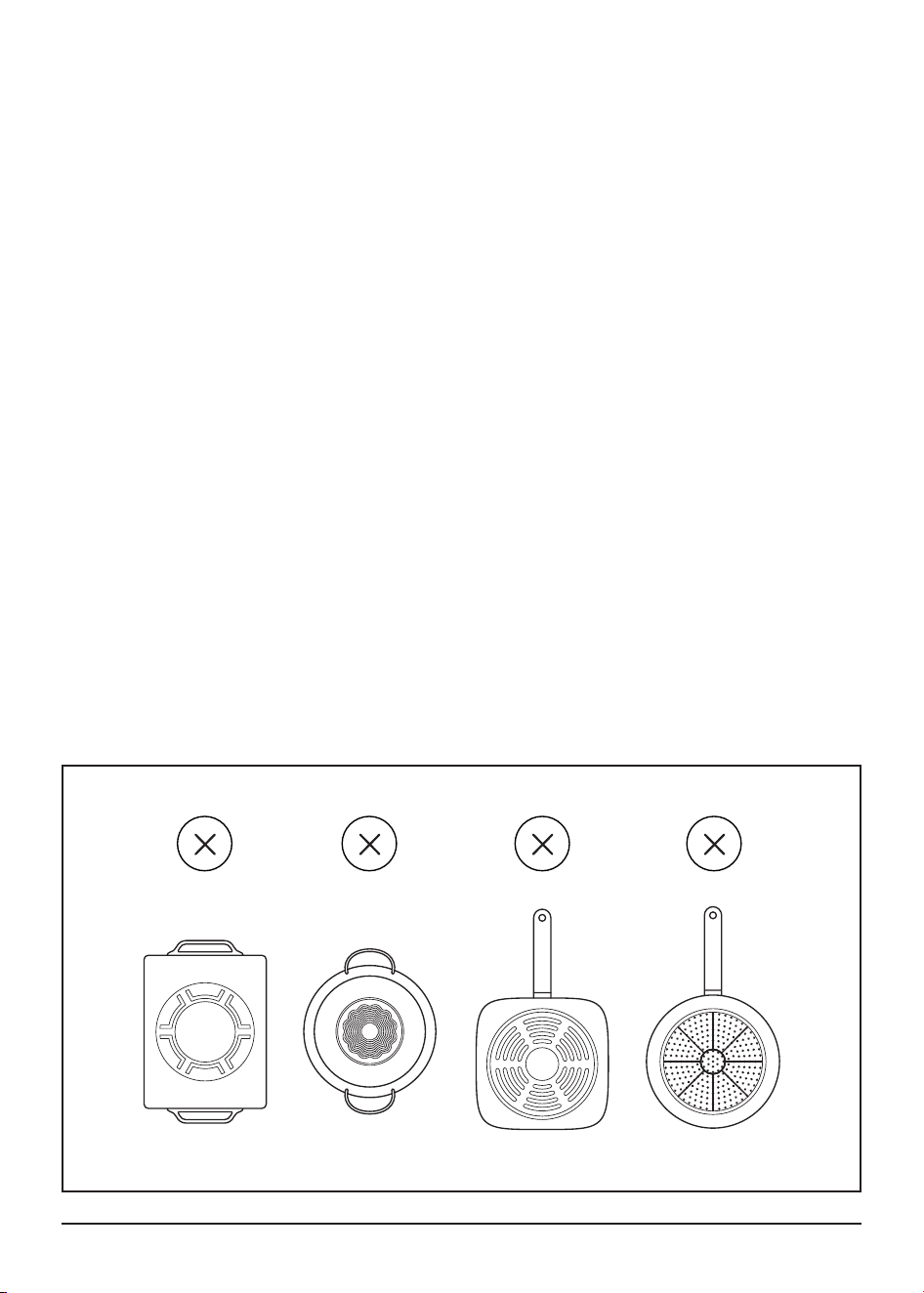
› It is strongly recommended that you do not use induction cookware that does
not have a fully ferromagnetic base.
› If the base of the cookware is only partially ferromagnetic, only the area that
is ferromagnetic will heat up. This may mean that heat will not be distributed
evenly. The non-ferromagnetic area may not heat up to a sucient temperature
for cooking. The ferromagnetic area will also be reduced if the material from
which the base of the cookware is made contains aluminum, for example. This
may mean that the cookware will not become suciently hot or even that it will
not be detected by the cooktop.
EMPTY COOKWARE OR COOKWARE WITH A THIN BASE
› Do not heat empty cookware and do not use cookware with a thin base.
› If an excessive temperature is reached, the base of the cookware may warp.
In this event, switch o the cooking zone; do not touch the cookware. If the
cooking zone no longer works after cooling down, contact customer service.
USER MANUAL
13
COOKWARE DETECTION
› The cooktop uses the temperature sensor and ferromagnetic material of
the base to automatically detect the cookware being used. The cooktop
determines that a pan is detected if the temperature sensor is depressed and
the cookware responds to a low power check.
COOKWARE SIZE AND WEIGHT
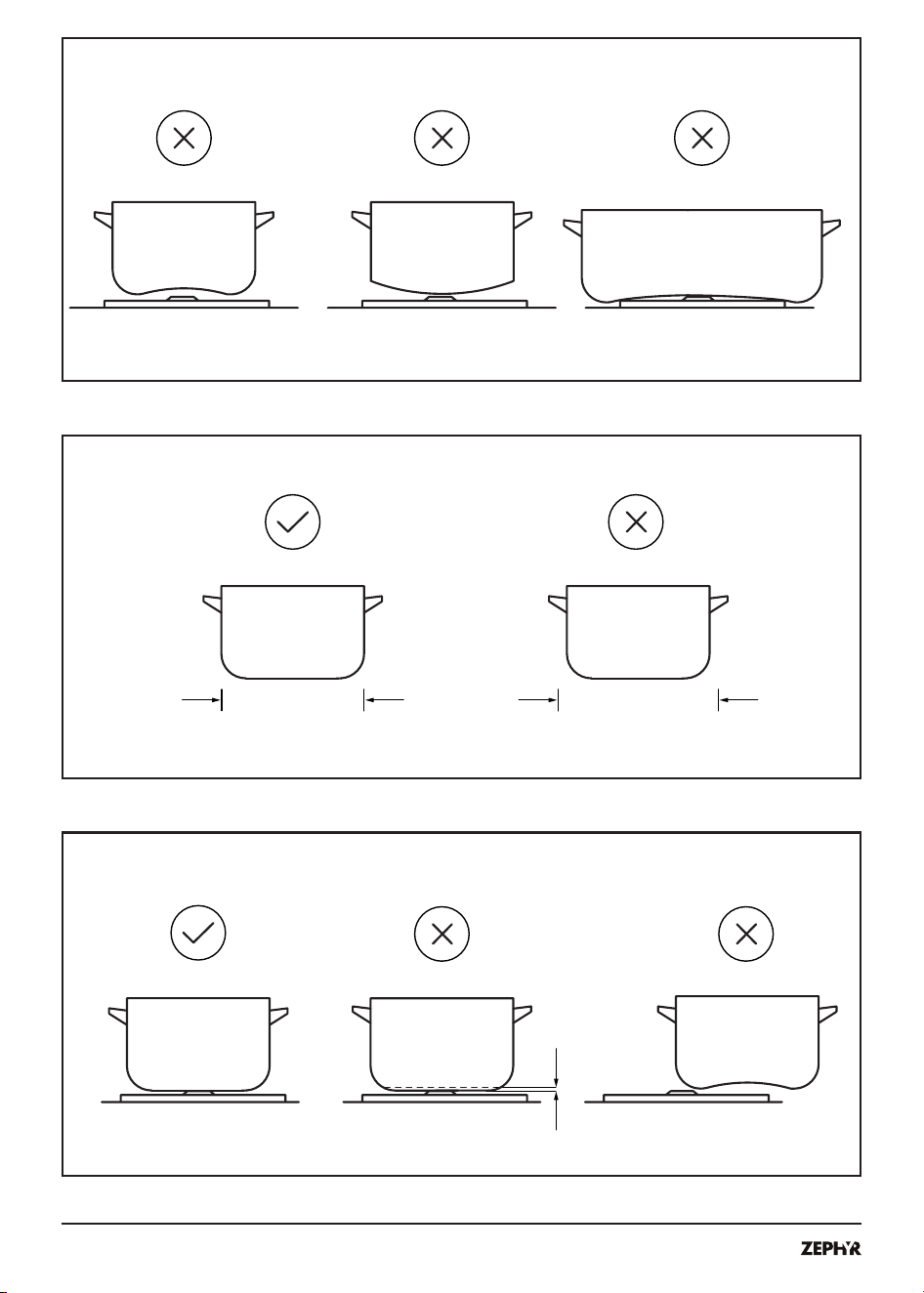
› The cookware must be large and/or heavy enough so that the temperature
sensor is depressed and the cookware sits level on the surface element.
› Cookware must touch the temperature sensor. Center the cookware on the
temperature sensor for correct temperature control.
› Cookware must have a smooth and clean bottom.
› You can use compatible cookware that is not round or is a dierent size than
the cooking element. This does not aect the functioning of the cooktop.
NOTICE
› Do not use cookware with an excessively curved base, concave or convex.
The uneven surface may cause spills and/or incorrect temperature sensing.
Do not use cookware where the base curvature covers the side of the surface
element, which may damage the LED ring.
› Cookware with a base smaller than 4 1/2” (12 cm) may not work.
› For the most even heating, the cookware base should be ≤ 10” (25 cm).
› You can use compatible cookware that is not round or is a dierent size than
the cooking element. This does not aect the functioning of the cooktop.
NOTICE
› Cookware of dierent sizes and shapes may have areas that do not heat
evenly.
14
≤ 4 1/2” (12 cm)
≤ 10” (25 cm)
USER MANUAL
15
5. Introducing
HyperCore Cooktop
5.1. COOKTOP OVERVIEW
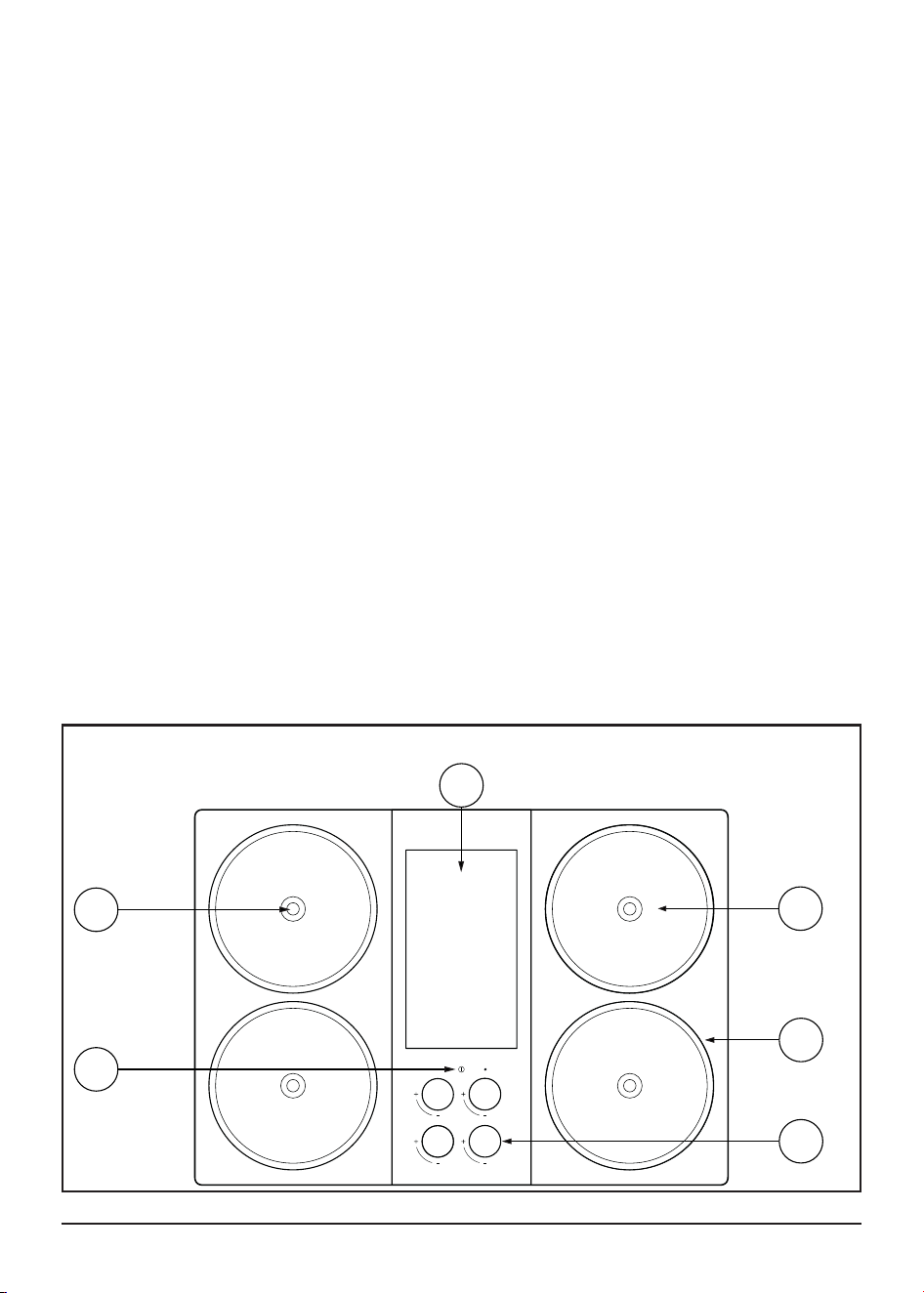
› There are 4 induction elements with temperature sensing technology. You can
place the cookware on top of any element, centering it as much as possible on
the temperature sensor. You can heat up to 4 items, one on each element, at
the same time.
CONTROL PANEL
› The central control panel features a display (1), a capacitive touch power button
(2), and 4 magnetic knobs (5).
› Each knob controls a element in the corresponding quadrant. The display is not
a touch screen.
COOKING SURFACE
› The cooktop features 4 high-performance induction elements (3), each
equipped with patented temperature control technology.
VISUAL INDICATORS
› The cooktop provides visual indicators on the display (1) and the LED element
rings (4) around each element.
Display
Power
Button
Knobs
LED Element Ring
Elements
1
2
5
4
3
Temperature
Sensor
6

16
5.2. SETUP BASICS
› When turning on your cooktop for the rst time, follow the on-screen
instructions to learn about cooking modes, set temperature units, and connect
to Wi-Fi.
› Once connected to Wi-Fi, the cooktop will check for and install the latest
software update.
› Preferences can be updated in Settings at any time.
6. Cooking on
HyperCore
6.1. POWERING ON AND OFF
TURNING ON THE COOKTOP
› Touch and hold the power button until the a wave appears. This display will
illuminate.
TURNING OFF THE COOKTOP
› Touch and hold the power button for 2 seconds until the display sleeps. The
screen will go dark and all elements will turn o.
NOTE
› When all elements are o, the cooktop will sleep after a few minutes. To wake
the cooktop, touch and hold the power button.
6.2. CONTROLLING AN ELEMENT
› Each knob is paired to an element in the corresponding quadrant.
TURNING ON AN ELEMENT
› Press the knob once, then turn the knob clockwise to activate.
TURNING OFF AN ELEMENT
Choose either of the following:
› Rotate the knob counter-clockwise until “O” appears.
› Lift the knob o the panel.
TIP
› In moments that require quick action, like a boil-over, removing the knob is
the fastest way to turn o the element.

USER MANUAL
17
6.3. SWITCHING BETWEEN TEMPERATURE AND POWER MODES
› Your HyperCore Cooktop oers two modes of cooking: Power Mode and
Temperature Mode.
› Cooking begins in Power Mode, giving you precise control of the energy
output from the element.
› To switch cooking modes, simply press the knob once. You can switch modes
at any time during cooking.
TIP
Learn more about cooking modes:
› What is Power Mode?
Control how much power an element uses, from a gentle simmer to a
roaring boil. Power Mode does not target a specic temperature. It delivers
steady energy (in Watts) to your cookware, just like traditional cooktops.
› What is Temperature Mode?
Set a target temperature, and the cooktop does the rest. Built-in sensors
monitor the temperature of the pan and automatically adjust power to
keep temperature constant. Ideal for temperature sensitive cooking tasks
like melting and frying.
TIP
Get started cooking on HyperCore:
›
See Getting Started
Guide Guide for more tips.
18
7. Cooktop Features
› HyperCore Cooktop is designed to support a seamless cooking experience.
Visual indicators and responsive control elements give you real-time feedback
as you cook.
7.1. PAN DETECTION
If no compatible induction pan is detected:
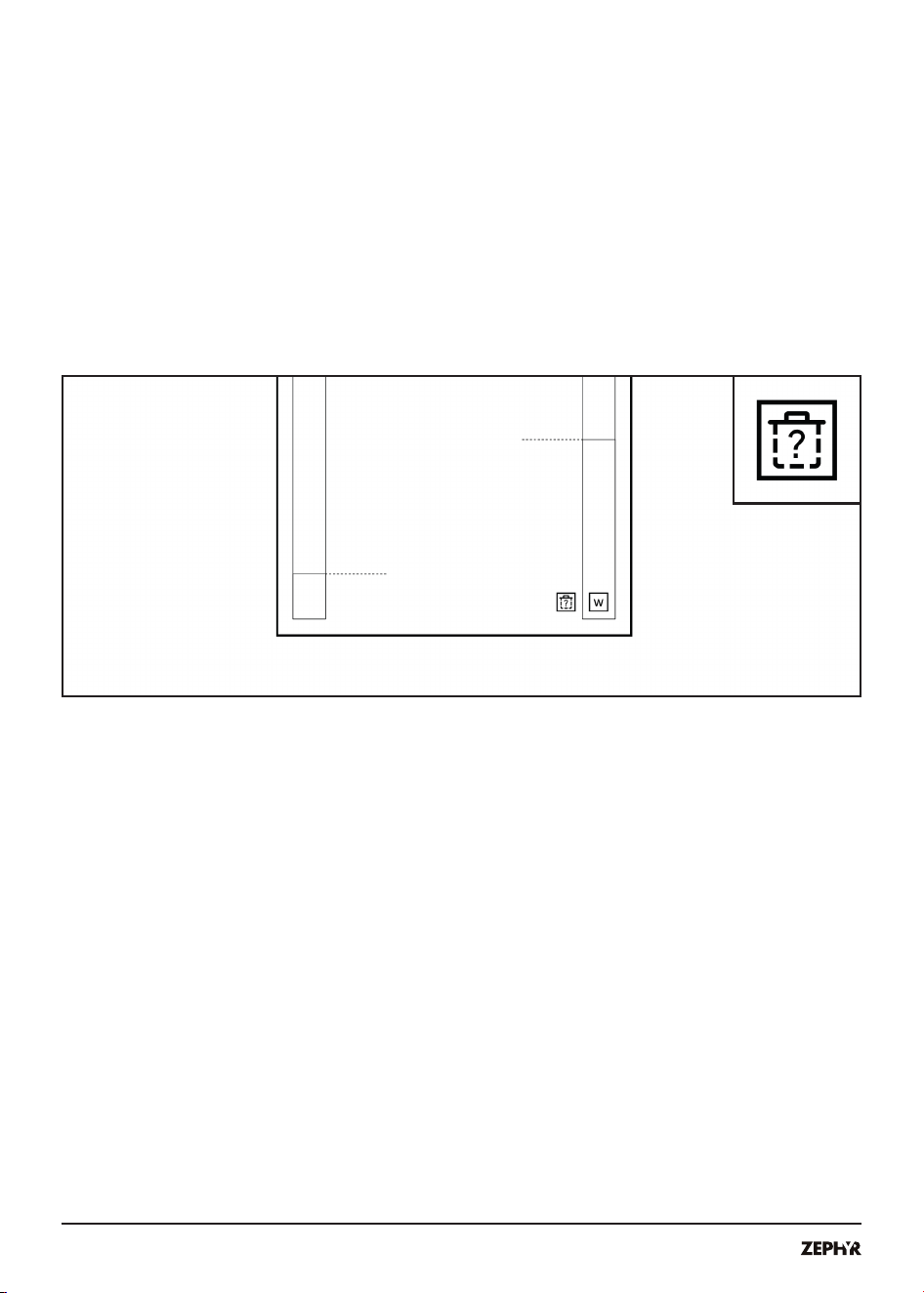
› A missing pan icon will appear on the screen for the corresponding element.
› The element will automatically turn o within 30 seconds when a pan is not
detected.
› To resume cooking, place the cookware on the element. If the element has
turned o, press and rotate the knob to restart.
7.2. RESIDUAL HEAT INDICATOR
› When an element is hot, its LED element ring illuminates orange and a residual
heat icon appears on the screen.

USER MANUAL
19
CAUTION
› Do not touch the element while this indicator is on. Even if the glass seems
cool, residual heat may still be present.
7.3. KNOB REMOVAL AND SAFETY LOCK
› Lift a knob o the panel to turn o its corresponding element.
› Remove all four knobs to limit unwanted use of the cooktop.
TIP
› Store knobs on a magnetic surface such as a range hood or refrigerator to
keep them out of reach of children or pets.
TIP
› Remove all knobs for cleaning.
7.4. ACTIVE POWER MANAGEMENT
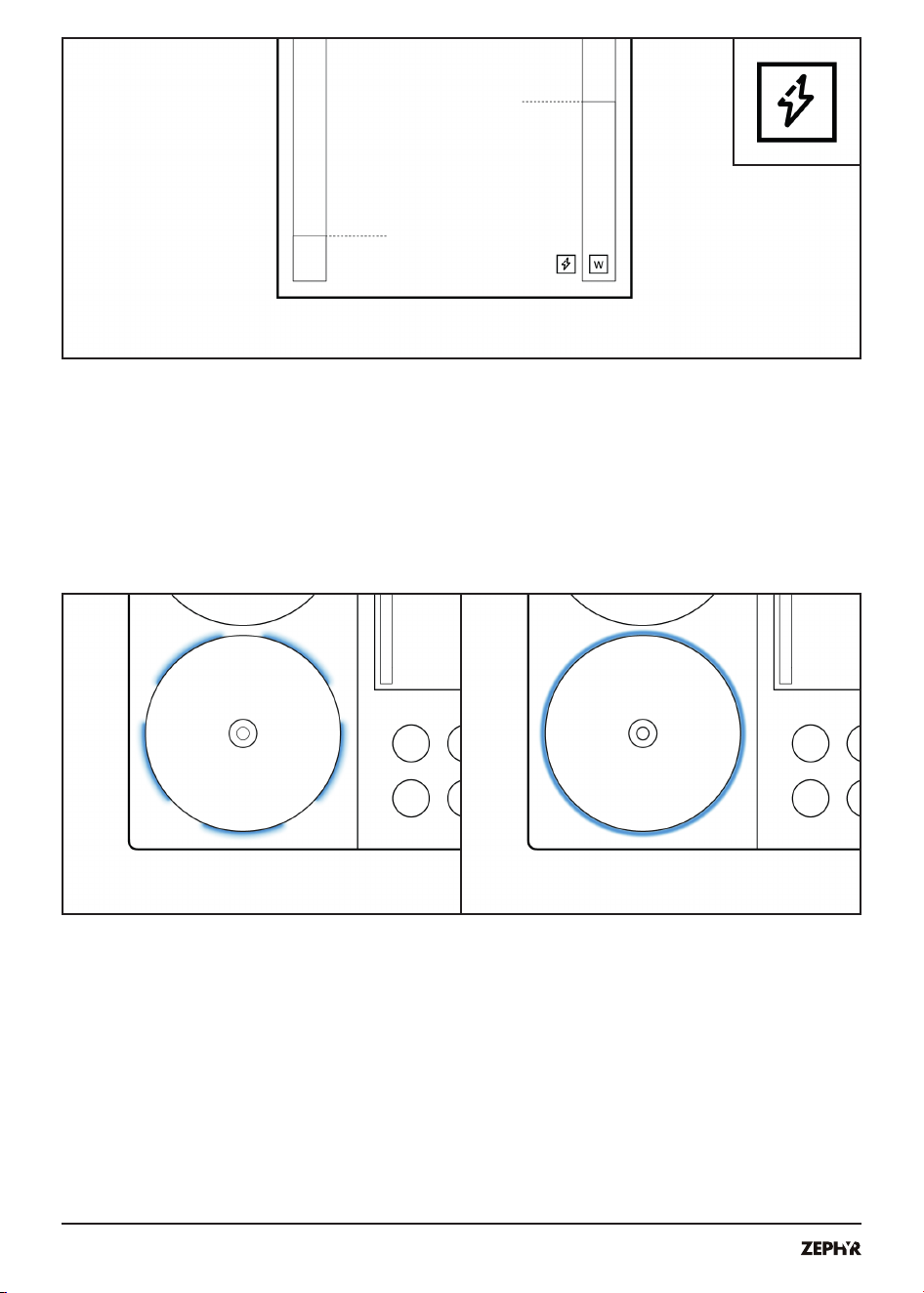
› The cooktop has a maximum power output of 10 kW per element, and a total
cooktop output of 15 kW. When using multiple elements simultaneously, power
is dynamically shared across active cooking surfaces.
NOTE
The cooktop may automatically reduce power
to an element in these situations:
› When it detects that a pan is heating unusually or may be getting too hot.
› When it notices that a pan isn’t responding in an expected way. This can
sometimes happen with very small pans, or pans with layered or bonded
bases.
› When in low battery.
› To maintain balanced performance across all elements.
20
› In these situations a power throttling icon will appear on the screen.
7.5. SYSTEM PAUSE
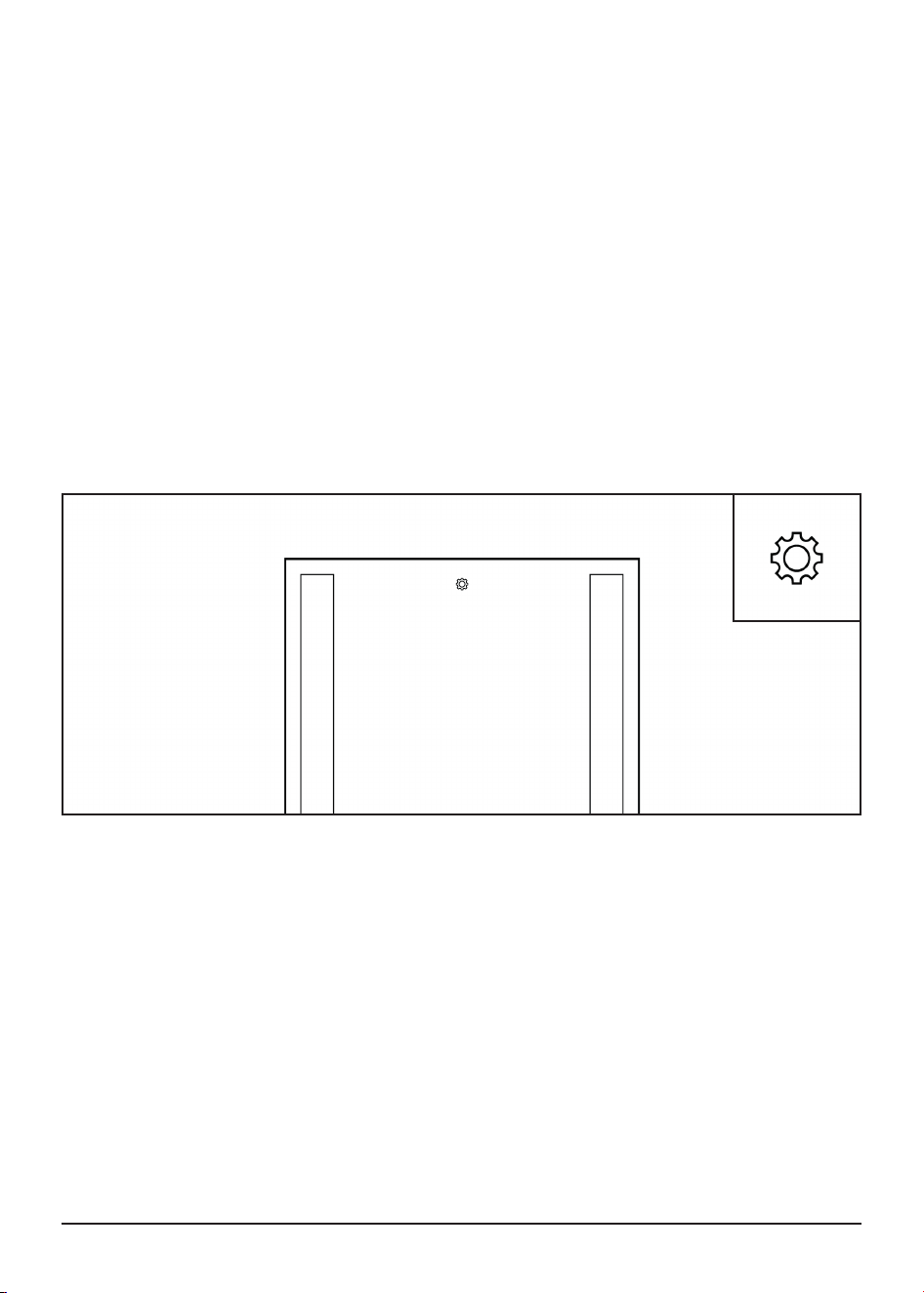
› The cooktop may pause cooking temporarily as a precautionary step. The
LED element ring will illuminate blue, alternating between a solid and dashed
animation.
USER MANUAL
21
8. Settings and
Connectivity
8.1. ACCESS SETTINGS
› To access settings, ensure all elements are o.
NOTE
› A settings icon is positioned at the top center of the cooktop.
› Press and hold any knob for 2 seconds.
› The settings menu is disabled during active cooking.
8.2. VIEW SOFTWARE VERSION AND UPDATE YOUR COOKTOP
› View the current cooktop version in the main settings page.
› Updating to the latest version keeps your data and settings unchanged
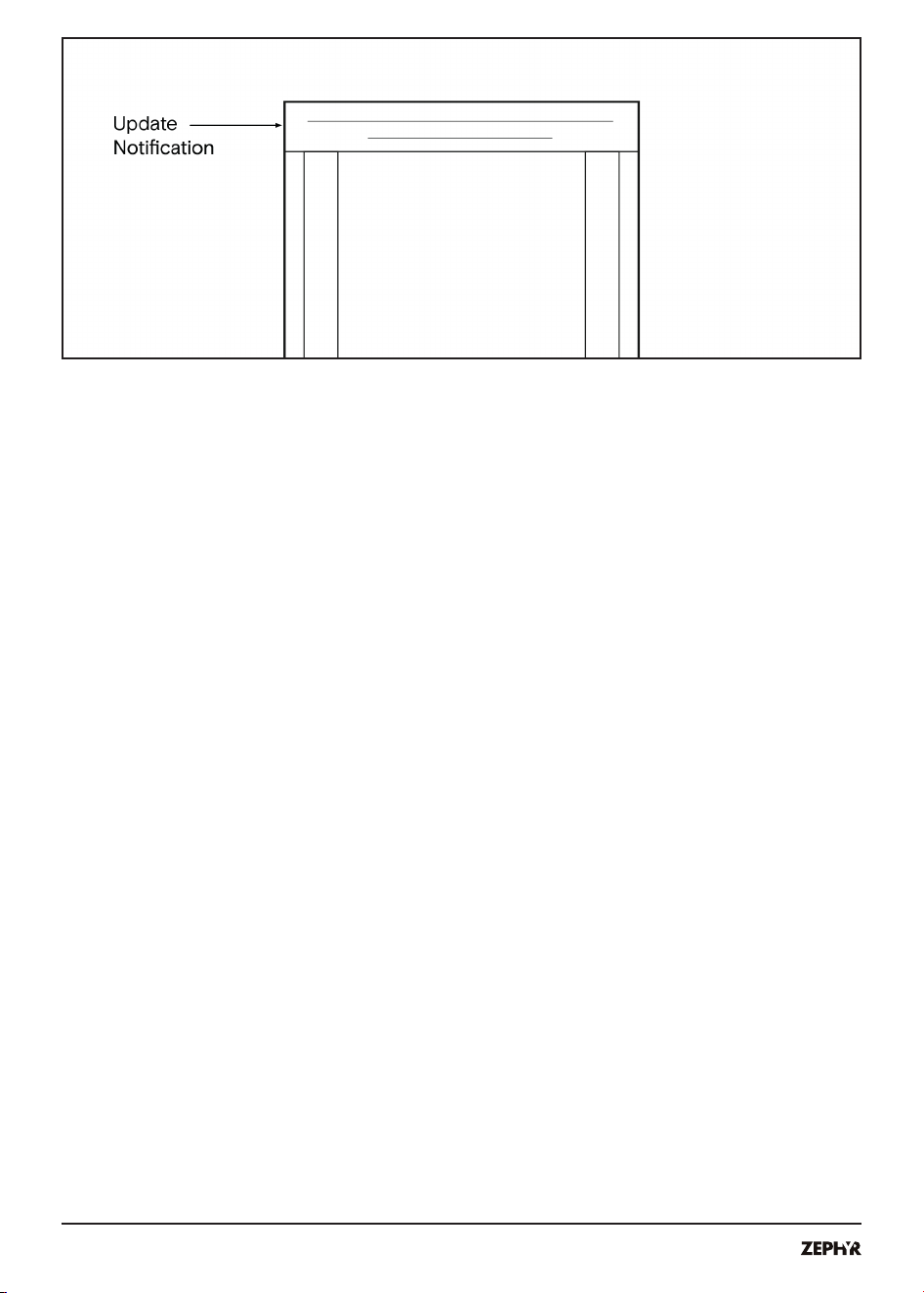
› A banner at the top of the screen will notify you when an update is available
and scheduled for installation.
UPDATE AUTOMATICALLY
› When an update is available, the cooktop automatically downloads and installs
the update overnight while connected to wall power and Wi-Fi.
22
UPDATE MANUALLY
› At any time, you can check for and install software updates.
› Go to Settings > Software.
› The screen shows the current version and whether an update is available.
8.3. VIEW OR CHANGE WI-FI CONNECTIVITY
› This cooktop is network-capable, and Wi-Fi connectivity is required. This
ensures your cooktop receives safety and performance updates. If your
cooktop is not able to conrm it has the latest software version, it will remind
you to conrm Wi-Fi connectivity.
› If the appliance is disconnected from Wi-Fi for 14 days, it will remind you to
reconnect every day. The reminder can be dismissed.
› After 30 days of being disconnected, the appliance will perform a factory reset.
You will need to go through the setup process again.
› Go to Settings > Wi-Fi
Connect to Wi-Fi using one of the following methods:
› Select your Wi-Fi network and enter the password using the on-screen
keyboard.
› Connect with QR code using your smart-phone or tablet.
NOTE
If you are having trouble connecting using the QR code, check the following:
› If VPN is enabled, disable the VPN before joining.
› Verify your phone is connected to the HyperCore Pairing network from your
phone’s Wi-Fi settings.
› If your phone asks you whether you’d like to “Use Cellular Data or Keep
Trying Wi-Fi,” select “Keep Trying Wi-Fi”
› For Android phones, turn on airplane mode before scanning QR codes.
The HyperCore Pairing QR code does not have internet connection, and
Android defaults to cellular network.

USER MANUAL
23
8.4. CHANGING COOKING TEMPERATURE UNITS
Go to Settings > Cooking Units:
› Select Fahrenheit or Celsius
8.5. ACCESS USER GUIDE, TUTORIALS, AND OTHER RESOURCES
Go to Settings > Resources to view information including:
› Tutorials.
› Installation and user guides.
› Legal and regulatory information, including warranty.
› Open source licenses.
8.6. ERASE AND RESET THE COOKTOP
Go to Settings > Erase and Reset Cooktop to erase your setting
congurations.
› When you erase your cooktop, it is restored to factory settings.
› Get information about your cooktop.
8.7. POWER AND BATTERY INFORMATION
Go to Settings > Power and Battery to see:
› Battery charge percentage.
› Battery status, charging or idle.
› Input voltage.
8.8. COOKTOP SERIAL NUMBER, IP ADDRESS, AND MORE
Go to Settings > System Information.

24
8.9. PRIVACY
› The HyperCore Cooktop is connected to the internet and collects certain
diagnostic and other information as described in our HyperCore Cooktop
Privacy Policy, including to monitor performance, troubleshoot and improve its
features. For more information, see our HyperCore Cooktop Privacy Policy at:
https://zephyronline.com/privacy-policy
8.10. FCC COMPLIANCE
› The cooktop contains transmitters:
FCC ID XPYMAYAW2A
FCC ID XPYUBX19KM01
FCC ID 2ATPO-RA-01SH
› This device complies with part 18 of the FCC Rules.
› This equipment has been tested and found to comply with the limits for a Class
B digital device, pursuant to part 15 of the FCC Rules. These limits are designed
to provide reasonable protection against harmful interference in a residential
installation. This equipment generates, uses and can radiate radio frequency
energy and, if not installed and used in accordance with the instructions,
may cause harmful interference to radio communications. However, there is
no guarantee that interference will not occur in a particular installation. If this
equipment does cause harmful interference to radio or television reception,
which can be determined by turning the equipment o and on, the user is
encouraged to try to correct the interference by one or more of the following
measures:
› Reorient or relocate the receiving antenna.
› Increase the separation between the equipment and receiver.
› Connect the equipment into an outlet on a circuit dierent from that to which
the receiver is connected.
› Consult the dealer or an experienced radio/TV technician for help.
NOTICE
› Changes or modications not approved could void your authority to use this
equipment.

USER MANUAL
25
9. Cleaning and
Maintenance
9.1. CLEANING THE COOKTOP FRAME AND CENTER DISPLAY
CAUTION
› To maintain the pristine condition of your cooktop, it is essential to use
appropriate cleaning agents:
› Use gentle cleaning agents such as dish soap with warm water.
› Use a soft cloth, soft sponge, or towel.
› Do not use harsh chemicals. Abrasive cleaners, scouring pads, or harsh
chemicals may damage the surface.
› Do not use abrasive cleaners, such as steel wool or rough sponges. This may
scratch and damage the protective coating of the metal and display glass.
› Do not use bleach, cleaners containing ammonia, strong acidic or basic
cleaners like vinegar and baking soda, strong solvents, petroleum based
cleaners, and harsh chemical cleaners.
UNSUITABLE CLEANING AGENTS:
› Glass cleaners which contain ammonia or chlorine bleach. These cleaners may
damage or permanently stain the cooktop.
› Caustic cleaners such as Easy-O
®
. These cleaners may stain the cooktop
surface.
› Abrasive cleaners.
› Metal scouring pads. These cleaners may scratch the cooktop surface and/or
leave metal marks.
› Abrasive scrub sponges such as Scotch-Brite
®
. These cleaners may scratch
the cooktop surface.
› Soap-lled scouring pads such as S.O.S.
®
. These cleaners may scratch the
cooktop surface.
› Powdery cleaners containing chlorine bleach. These cleaners may permanently
stain the cooktop surface.
› Flammable cleaners such as lighter uid or WD-40
®
.
9.2. CLEANING THE GLASS ELEMENTS
WARNING
› Do not clean when the cooking surface is hot.
› For daily cleaning:
› Ensure the cooktop is cool before cleaning.
› Wipe down with a damp cloth and mild dish soap or other recommended
cleaning agent.
› Dry thoroughly with a clean soft cloth to avoid streaks.

26
› For spills and boil-overs:
› Remove spills with a soft cloth as soon as it is cool enough and safe to do so.
› Follow with a glass cooktop cleaner to restore shine.
› For stubborn stains and debris, use a non-abrasive cooktop cleaner, Cerama-
bryte
®
, or other ceramic glass cleaners specically designed for induction
cooktops.
CAUTION
› Do not use ceramic glass cleaners on the display glass. The glass on the
display is dierent from the glass on the cooking element. Please refer to
section 9.1 for instructions on cleaning the center display.
9.3. CLEANING THE TEMPERATURE SENSORS
› To clean temperature sensors:
WARNING
› Ensure the hot indicator is o and the cooktop is cool.
CAUTION
› Do not pour water or other liquid onto the temperature sensor.
CAUTION
› Gently press down on the temperature sensor using a soft cloth. Do not force
the temperature sensor in a direction.
› While pressing the temperature sensor, gently wipe around the sensor with
your other hand. Wipe in a circle around the sensor, focusing on the lowest
point of the silicone diaphragm.
› Lightly wetting the cloth can help catch crumbs.
9.4. CLEANING THE KNOBS
› The control knobs on your appliance are removable for easy cleaning.
CAUTION
› Clean the knobs by hand using a soft cloth dampened with mild soap and
lukewarm water. Dry each knob with a soft cloth before reattaching them to the
appliance.
› Avoid using hot water.
› Do not submerge knobs in water or other liquid. Do not wash knobs under the
faucet.
› Do not clean knobs in a dishwasher or use abrasive materials and harsh
chemicals.

USER MANUAL
27
9.5. MAINTENANCE
› Perform routine cleaning after each use to maintain the cooktop’s appearance
and functionality.
› Clean your cooktop regularly. Dirt and food particles sitting on the cooktop
surface for days can harbor germs and damage the cooktop nish.
› Clean with a mild dish soap and water. Use a soft foam sponge or a microber
towel.
› Avoid all abrasive scrubbing pads such as Scotch-Brite
®
.
› Avoid all abrasive cleaning agents such as SoftScrub
®
, Bar Keepers Friend
®
.
› Avoid ammoniated products such as window cleaner, tile cleaners, etc.
› Avoid bleach.
10. Disposal
10.1. DISPOSING OF YOUR OLD APPLIANCE
› Environmentally compatible disposal allows valuable raw materials to be
recycled. Dispose of the appliance in an environmentally responsible manner.
› Information about current disposal methods can be obtained from your
specialist dealer or local authority.
11. Additional
Information
› All marks in this user manual other than the Company’s trademarks are the
trademarks of the registered owner. Inclusion of those trademarks is for
informational purposes only, and nothing herein is meant to suggest any
aliation with or endorsement by the registered trademark owner.

28
12.Troubleshooting
Guide
PROBLEM POSSIBLE CAUSE POSSIBLE SOLUTION
COOKTOP DOES NOT TURN ON
Tripped breaker Check and reset the breaker.
Power supply disconnected
Ensure the cooktop is connected to wall
power.
Battery is depleted
Connect the cooktop to wall power for 5-10
minutes before resuming normal operation.
Battery not integrated properly
Ensure battery integration matches
instructions. See page 21 in the Installation
Manual.
Cooktop not connected properly
Ensure installation matches instructions. See
page 21 in the Installation Manual.
Electronics fault Contact customer support.
WI-FI IS NOT CONNECTING
VPN is enabled on your phone Disable VPN and try again.
Phone or tablet is not updated
Ensure your phone or tablet has the latest
update.
QR scanning not enabled Enable QR code scanning in device settings.
THE COOKTOP RESPONDS IN AN UNUSUAL MANNER OR CANNOT BE OPERATED PROPERLY.
Electronics fault Contact customer support.
COOKING SHUTS OFF AUTOMATICALLY
Prevent overheating Let cooktop cool before resuming cooking.
Water or oil on the power button Wipe power button clean.
Hot cookware on display
Remove hot object. Avoid placing hot
cookware on the display.
Cookware not detected
Ensure the cookware is appropriate for
induction cooking. See page 12 in the User
Manual and learn why some pans are better
than others.
12.

USER MANUAL
29
PROBLEM POSSIBLE CAUSE POSSIBLE SOLUTION
COOKTOP TURNS OFF WHEN COOKING
Accidental power o
Wipe the power button clean. Avoid pressing
during use.
Water or oil on power button Wipe the power button clean.
SYSTEM PAUSE IS DISPLAYED
HyperCore is checking the system
No action needed. The cooktop is performing
a system check and should resolve
automatically. If the system remains paused
for more than 5 minutes, contact customer
support.
FAN NOISE
Cooling fan may automatically turn on
This is normal. There are multiple fans that
automatically turn on to cool the cooktop. Fan
noise may vary depending on power use and
internal temperature.
Cooling fan stays on after cooking or
when cooktop is o
This is normal. All induction cooktops use
cooling fans. After cooking, fans may remain
on to cool the system.
Insucient ventilation in cabinet
Airow helps cool the system. Ensure the
cooktop has sucient ventilation. See page 13
in the Installation Guide.
COOKTOP NOISE
Some noise is expected and normal.
This can include deep buzzing,
whistling, or crackling.
Cookware is empty or made of dierent
multilayer materials or used on a high
power level.
Reduce the power level for this pan. Ensure
the cookware is appropriate for induction
cooking. See page 12 in the User Manual and
learn why some pans are better than others.
Pan has a clicking noise due to power
cycling on and o. This is not a good
pan for the cooktop.
Ensure the cookware is appropriate for
induction cooking. See page 12 in the User
Manual and learn why some pans are better
than others.
Debris in cooktop fans
Ensure installation matches instructions.
Cooktop fans should not be exposed to
avoid debris entering fans. See page 13 in the
Installation Manual.

30
PROBLEM POSSIBLE CAUSE POSSIBLE SOLUTION
THE POWER LEVEL OF A COOKING ZONE IS NOT INCREASING
Cookware is not suitable for consistent
heating
› Cookware has a thin base
› Cookware is too light and does
not fully depress the temperature
sensor.
› Cookware material is less
responsive
› The base is smaller than 4.5” or
larger than 10”
› The base has an uneven surface
or embossed logo
› The base is partially
ferromagnetic
› The base is dirty
Ensure the cookware is appropriate for
induction cooking. See page 12 in the User
Manual and learn why some pans are better
than others.
Cooktop reached max output of 15 kW
across cooking surfaces
Reduce total number of active elements or
reduce power on one or more elements.
Overheating or limited airow
Let cooktop cool. Ensure the cooktop has
sucient ventilation. See page 13 in the
Installation Manual.
Cooktop detected the pan is heating
unusually or getting too hot
Reduce the power level for this pan. Ensure
the cookware is appropriate for induction
cooking.
See page 12 in the User Manual and learn why
some pans are better than others.
UNABLE TO REACH SET TEMPERATURE IN TEMPERATURE MODE
New technology
HyperCore is continuing improvements to its
temperature sensing technology.
Boiling and simmering in Temperature
Mode
Boiling and simmering are best in Power Mode
for better results.
Cookware is not suitable for consistent
heating
› Cookware has a thin base
› Cookware is too light and does
not fully depress the temperature
sensor.
› Cookware material is less
responsive
› The base is smaller than 4.5” or
larger than 10”
› The base has an uneven surface
or embossed logo
› The base is partially
ferromagnetic
› The base is dirty
Ensure the cookware is appropriate for
induction cooking. See page 12 in the User
Manual and learn why some pans are better
than others.

USER MANUAL
31
PROBLEM POSSIBLE CAUSE POSSIBLE SOLUTION
TEMPERATURE READING IS NOT ACCURATE
Cookware is not suitable for consistent
heating
› Cookware has a thin base
› Cookware is too light and does
not fully depress the temperature
sensor.
› Cookware material is less
responsive
› The base is smaller than 4.5” or
larger than 10”
› The base has an uneven surface
or embossed logo
› The base is partially
ferromagnetic
› The base is dirty
Ensure the cookware is appropriate for
induction cooking. See page 12 in the User
Manual and learn why some pans are better
than others.
There is liquid or material between the
cooking surface and the cookware
Wipe bottom of cookware and the cooking
surface clean and dry before use. Do not use
silicone pads or other material between the
cookware base and the cooking surface.
Poor contact between temperature
sensor and cookware base
Lift and replace the pan on the temperature
sensor. Sliding pans can sometimes lead to
poor contact with the temperature sensor.
Normal variability and new technology
Some temperature variability is expected. It is
normal to experience a learning curve with a
novel cooking mode. HyperCore is continuing
improvements to its temperature sensing
technology.
TEMPERATURE READING IS NOT ACCURATE
Temperature sensor is dirty or
damaged
See page 25 in the User Manual for
instructions on cleaning and maintenance of
the temperature sensor.

32
PROBLEM POSSIBLE CAUSE POSSIBLE SOLUTION
FOOD IS UNDER OR OVERCOOKED AT THE EXPECTED TEMPERATURE OR POWER SETTING
Cookware is not appropriate
- Cookware has a thin base
- Cookware is too light and does not
fully depress the temperature sensor.
- The base is smaller than 4.5” or larger
than 10”
- The base has an uneven surface or
embossed logo
- The base is partially ferromagnetic
- The base is dirty
Ensure the cookware is appropriate for
induction cooking. See page 12 in the User
Manual and learn why some pans are better
than others.
Cookware is not positioned correctly
Center the pan on the cooking surface. Lift
and replace the cookware on the cooking
surface to ensure better temperature sensor
contact.
Boiling and simmering in Temperature
Mode
Boiling
Boiling and simmering are best in Power Mode
for better results. See Getting Started Guideetting Started Guide
for more tips.
FOOD IS NOT EVENLY COOKED
Cookware is not suitable for consistent
heating
› Cookware has a thin base
› Cookware is too light and does
not fully depress the temperature
sensor.
› Cookware material is less
responsive
› The base is smaller than 4.5” or
larger than 10”
› The base has an uneven surface
or embossed logo
› The base is partially
ferromagnetic
› The base is dirty
Ensure the cookware is appropriate for
induction cooking. See page 12 in the User
Manual and learn why some pans are better
than others.
Cookware is not positioned correctly
Center the pan on the cooking surface. Lift
and replace the cookware on the cooking
surface to ensure better temperature sensor
contact.
There is liquid or material between the
cooking surface and the cookware
Wipe bottom of cookware and the cooking
surface clean and dry before use. Do not use
silicone pads or other material between the
cookware base and the cooking surface.

USER MANUAL
33
PROBLEM POSSIBLE CAUSE POSSIBLE SOLUTION
THE DISPLAY IS NOT RESPONDING OR HAS FROZEN
Unexpected software issue
1) Turn the cooktop on using the power
button.
2) If the above does not resolve the issue, wait
until the cooktop has cooled and then force
restart the cooktop. Press and hold the power
button for 10 seconds.
COOKTOP EMITS AN UNEXPECTED OR BURNT SMELL
Overheated component Contact customer support.
SCRATCHES ON THE COOKTOP SURFACE
Improper cleaning methods
Use recommended cleaning procedures. See
page 25 in the User Manual.
Wear and tear on surfaces
Use caution when moving cookware around.
Lift and place cookware. Limit dragging
cookware bases across the surface. Never put
cookware or other items on the display. Use
recommended cleaning procedures.
EXCESSIVE CONDENSATION
This is normal for induction cooking.
Energy ecient technology means that
no heat is lost to surrounding surfaces.
This results in condensation forming
on cooler surfaces when steam is
produced by cooking.
To minimize condensation:
› Use a range hood with lters installed at
an angle.
› Mount the range hood higher above the
cooktop.
› Turn your range hood on 5 minutes
before cooking and let it run for at least
5 minutes after cooking.
› Use your range hood on a lower speed
setting when boiling.
› Use the cooktop on a lower heat setting
when boiling.
› Use pot lids to stop moisture from
escaping.
› If condensation forms, wipe down
surrounding walls and cabinetry as
needed.
› Ensure the product is correctly installed
to the right specication.

34
13. Customer Service
› If you have questions on use, are unable to eliminate an issue in the appliance
yourself, or the appliance needs to be repaired, please contact our customer
service.
› With any warranty repair, we will make sure your appliance is repaired by an
authorized service provider using genuine replacement parts.
› Before calling customer service, please make a note of the model and
production number of your appliance.
› zephyronline.com/contact
13.1. NAMEPLATE LOCATION, MODEL, AND PRODUCTION NUMBER
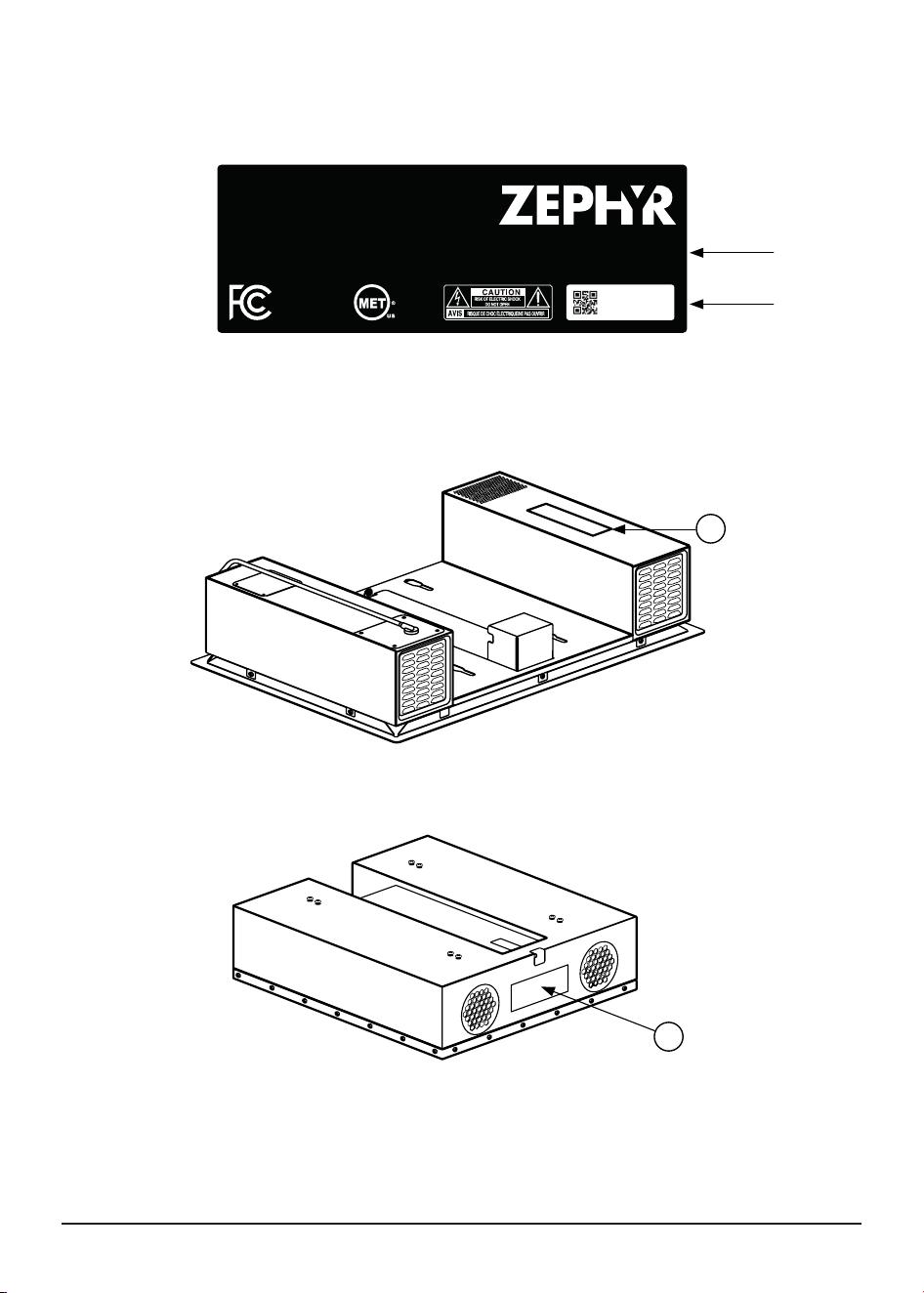
› You can nd the nameplate on the underside of the appliance. [A]
› The model and production number is on the nameplate.
› You can nd the battery information on the side of the battery pack. [B]
USER MANUAL
35
A
B
MODEL: ZHCT130AC
Designed in California, assembled in China
Electrical rating
AC only
Voltage: 120 V
Max current rating: 12.5 A
Max power rating: 1.5 kW
Voltage: 240 V
Max current rating: 8.3 A
Max OCPD rating: 30 A
Max power rating: 2 kW
Frequency: 60 Hz
contains transmitters
with
FCC ID
Wi-Fi XPYMAYAW2A
LoRa 2ATPO-RA-01SH
complies with
UL 858
E116125
101234ANZY

36
14. Product Warranty
ZEPHYRONLINE.COM
Limited Warranty
Five Year Limited Warranty for ZHB13A Battery: For five
years from the date of your original purchase of the
Products, we will provide, free of charge, the battery to
replace the one that failed due to manufacturing
defects subject to the exclusions and limitations below.
Two Year Limited Warranty for Parts: For two years from
the date of your original purchase of the Products, we
will provide, free of charge, Products or parts
(including light bulbs, if applicable) to replace those
that failed due to manufacturing defects subject to the
exclusions and limitations below. We may choose, in our
sole discretion, to repair or replace parts before we
elect to replace the Products.
Two Year Limited Warranty for Labor: For two
years from the date of your original purchase of the
Products, we will provide, free of charge, the labor cost
associated with repairing the Products or parts to
replace those that failed due to manufacturing defects
subject to the exclusions and limitations below.
To Obtain Service Under Limited Warranty: To qualify for
warranty service, you must: (a) notify us at
www.zephyronline.com/contact within 60 days of
discovering the defect;(b) give the model number and
serial number; and (c) describe the nature of any
defect in the Product or part. At the time of the request
for warranty service, you must present evidence of your
proof of purchase and proof of the original purchase
date. If we deter-mine that the warranty exclusions
listed above apply or if you fail to provide the necessary
documentation to obtain service, you will be
responsible for all shipping, travel, labor and other costs
related to the services. This warranty is not extended or
restarted upon warranty repair or replacements.
Zephyr Ventilation, LLC (referred to herein as “we” or “us”) warrants to the original consumer purchaser
(referred to herein as “you” or “your”) of Zephyr products (the “Products”) that such Products will be free from
defects in materials or workmanship as follows:
Warranty Exclusions:
This warranty covers only repair or
replacement, at our option, of defective Products or parts and
does not cover any other costs related to the Products including
but not limited to: (a) normal maintenance and service required for
the Products and consumable parts such as filters, light bulbs, fuses;
(b) any Products or parts which have been subject to freight
damage, misuse, negligence, accident, faulty installation or
installation contrary to recommended installation instructions,
improper maintenance or repair (other than by us); (c) commercial
or government use of the Products or use otherwise inconsistent with
its intended purpose; (d) natural wear of the finish of the Products or
wear caused by improper maintenance, use of corrosive and
abrasive cleaning products, pads, and oven cleaner products; (e)
chips, dents or cracks caused by abuse or misuse of the Products;
(f) service trips to your home to teach you how to use the Products;
(g) damage to the Products caused by accident, fire, floods, acts
of God; or (h) Custom installations or alterations that impact
serviceability of the Products. (I) Damage to personal property or
food spoilage from use of this product. If you are outside our service
area, additional charges may apply for shipping costs for warranty
repair at our designated service locations and for the travel cost to
have a service technician come to your home to repair, remove or
reinstall the Products. After two years from the date of your original
purchase, you are also responsible for all labor costs associated with
this warranty. All Products must be installed by a qualified
professional installer to be eligible for warranty repairs or service.
Limitations of Warranty:
OUR OBLIGATION TO REPAIR OR
REPLACE, AT OUR OPTION, SHALL BE YOUR SOLE AND EXCLUSIVE
REMEDY UNDER THIS WARRANTY. WE SHALL NOT BE LIABLE FOR
INCIDENTAL, CONSEQUENTIAL OR SPECIAL DAMAGES ARISING OUT
OF OR IN CONNECTION WITH THE USE OR PERFORMANCE OF THE
PRODUCTS. THE EXPRESS WARRANTIES IN THE PRECEDING SECTION
ARE EXCLUSIVE AND IN LIEU OF ALL OTHER EXPRESS WARRANTIES. WE
HEREBY DISCLAIM AND EXCLUDE ALL OTHER EXPRESS WARRANTIES
FOR THE PRODUCTS, AND DISCLAIM AND EXCLUDE ALL WARRANTIES
IMPLIED BY LAW, INCLUDING THOSE OF MERCHANTABILITY AND
FITNESS FOR A PARTICULAR PURPOSE. Some states or provinces do
not allow limitations on the duration of an implied warranty or the
exclusion or limitation of incidental or consequential damages, so
the above limitations or exclusions may not apply to you. To the
extent that applicable law prohibits the exclusion of implied
warranties, the duration of any applicable implied warranty is
limited to the same three-year and two-year periods described
above if permitted by applicable law. Any oral or written descrip-
tion of the Products is for the sole purpose of identifying the
Products and shall not be construed as an express warranty. Prior to
using, implementing or permitting use of the Products, you shall
determine the suitability of the Products for the intended use, and
you shall assume all risk and liability whatsoever in connection with
such determination. We reserve the right to use functionally
equivalent refurbished or reconditioned parts or Products as
warranty replacements or as part of warranty service. This warranty
is not transferable from the original purchaser and only applies to
the consumer residence where the Product was originally installed
located in the United States and Canada. This warranty is not
extended to resellers.
Please check our website for any additional product information, www.zephyronline.com
NOV25.0101
TO OBTAIN SERVICE UNDER WARRANTY OR FOR ANY SERVICE RELATED QUESTIONS
United States Customers please call: 1-888-880-8368 or contact us at: zephyronline.com/contact-us
Canada Customers please call: 1-888-812-8311 or email: [email protected]
USER MANUAL
37
15. Product
Registration
zephyronline.com | 2277 Harbor Bay Pkwy. | Alameda, CA 94520
• Ensures warranty coverage should you need service
• Ownership verification for insurance purposes
• Notification of product changes or recalls
D
D
o
o
n
n
'
'
t
t
F
F
o
o
r
r
g
g
e
e
t
t
t
t
o
o
R
R
e
e
g
g
i
i
s
s
t
t
e
e
r
r
y
y
o
o
u
u
r
r
Z
Z
e
e
p
p
h
h
y
y
r
r
P
P
r
r
o
o
d
d
u
u
c
c
t
t
!
!
Congratulations on your Zephyr purchase! Please take
a moment to register your new product.
W
W
h
h
y
y
i
i
s
s
i
i
t
t
i
i
m
m
p
p
o
o
r
r
t
t
a
a
n
n
t
t
?
?
Prompt registration helps in more ways than one:
H
H
o
o
w
w
a
a
b
b
o
o
u
u
t
t
a
a
r
r
e
e
v
v
i
i
e
e
w
w
?
?
While you’re at it, leave a review to let us know how
much you love your product.
Register
Review
qrs.ly/c7ea9sj
Search your
Zephyr
model number
in the top navigation bar
zephyronline.com/registration