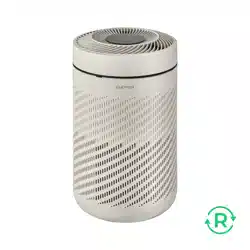
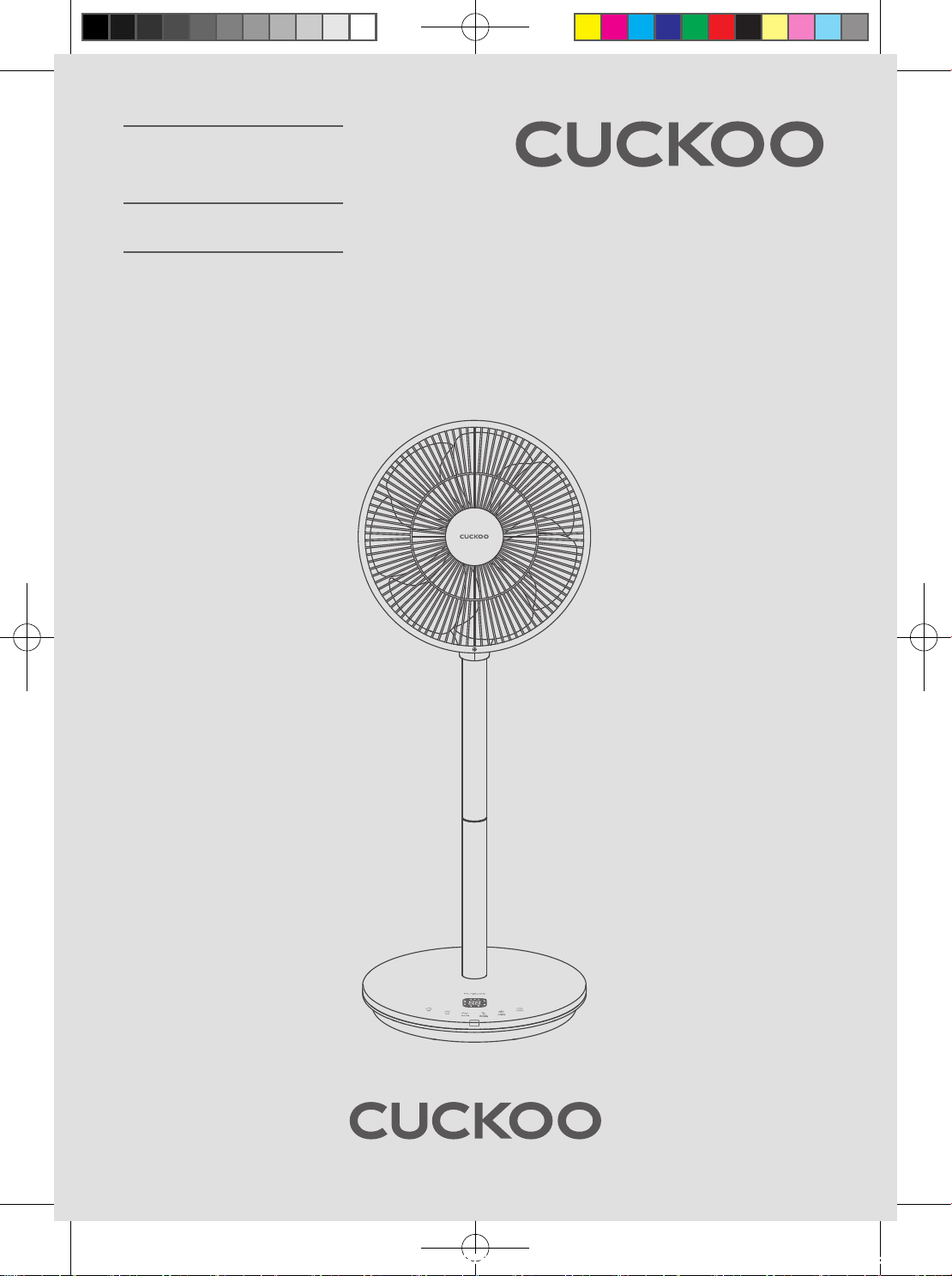
CF-AC1410WH
USER MANUAL
AIR CIRCULATOR
CF-AC1410WH(에어서큘레이터_미주향)-EN+FR.indd 1 2022. 10. 26. 오후 12:05
2
CONTENTS
Before Using
Important Safeguards 3~4
Safety Precautions 5
Parts & Accessories 6
How to Assemble / Disassemble 7
Avant d'utilizer
Avertissement de Sécurité 16~17
Précautions de Sécurité 18
Structure et nomenclature 19
Montage / Démontage 20
Service Guide
Specications 15
Guide de service
Specications 28
Operation
How to Use 8 ~ 9
Remote Control 10
How to disassemble 11 ~ 12
How to Clean & Store 13
Fonctionnement
Mode D'emploi 21 ~ 22
Télécommande 23
Démontage 24 ~ 25
Nettoyage et Stockage 26
Before Requesting Service
Troubleshooting 14
Avant de demander le service
Dépannage 27
Important Safeguards
CF-AC1410WH(에어서큘레이터_미주향)-EN+FR.indd 2 2022. 10. 26. 오후 12:05
3
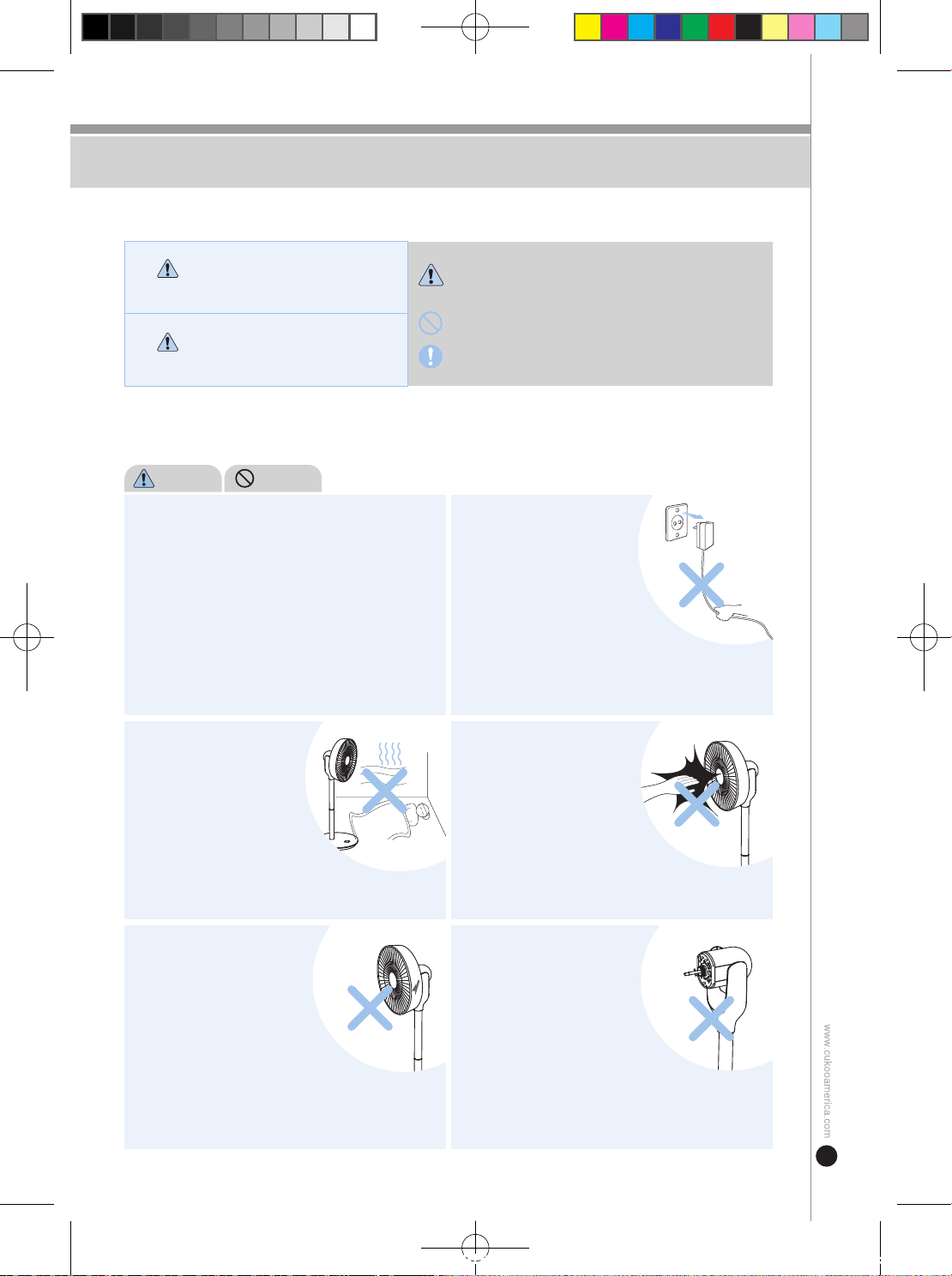
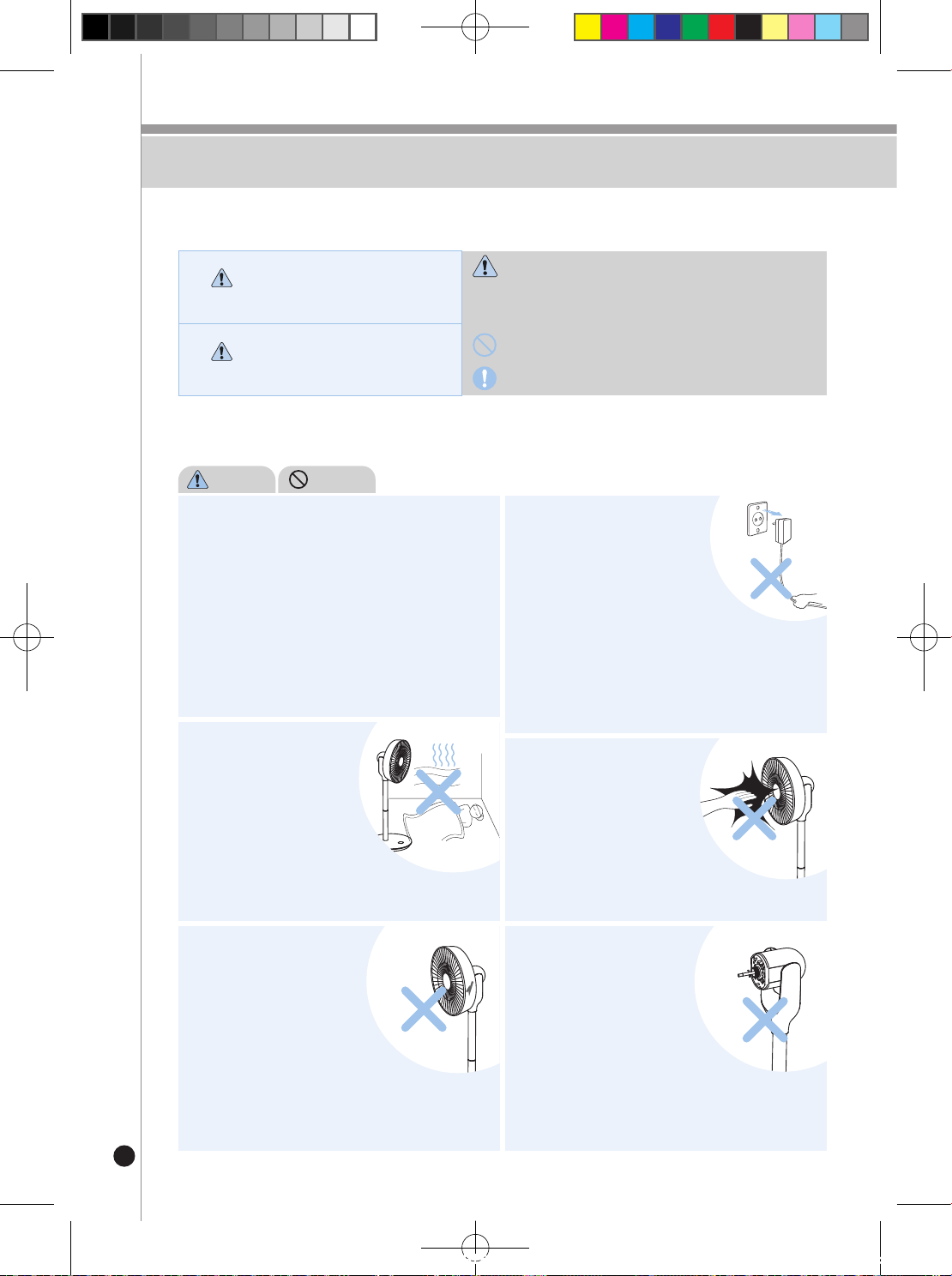
If the power plug or the power cord has been
damaged or is shaking, stop using the product and
contact the customer service center.
• If the sheath of the power cord has been stripped or damaged
due to negligent use of product, it may lead to fire
and electrocution. Please conduct frequent checks of
the status of power cord, power plug, and power outlet.
• If the power plug or the power cord is damaged, replace
the damaged part through the manufacturer, seller, or
a qualified technician to prevent potential risk.
• You must repair the product through designated service centers.
• Using the product for a prolonged
period of time may result in
hypothermia or sickness from
overexposure to air conditioning.
When you are plugging in or
pulling out the power plug,
dry off your hands and pull or
plug in by grabbing on to the
main body of the adapter.
• Pulling with excessive force may result
in power cord issues which may lead to
short circuit and electrocution.
• If the power plug or the power cord is damaged,
replace the damaged part through the manufacturer, seller,
or a qualified technician to prevent potential risk.
PROHIBIT
WARNING
Stop operating the product in
a closed space or during
sleep.
• This may result in equipment failure or
safety accidents.
Do not use the product in
the state where the blades,
safety net, or other parts of
the product have been
damaged.
Do not place your hand or
other foreign substance inside
the safety net while the
product is operating.
• The rotation may injure your fingers
and the blades may be damaged,
which may lead to other potential risks.
• Exercise special caution for children to prevent
them from placing their fingers inside the safety net.
If the product has been
disassembled, do not connect
power until the blades and
safety net have been
assembled completely.
• Safety accidents may occur if the product
is not fully assembled.
• This may result in fire, electrocution, or injury (wound).
• Please comply with the following ‘Safety Warning' to ensure safety and proper use of the product to avoid accidents or hazards.
WARNING
Potential hazardous situations
that may result in death or
serious injury if not avoided.
· This symbol is intended to alert the user about certain
conditions that may cause a hazard.
· Please read carefully the instructions to avoid danger.
· This symbol is a sign that ‘prohibits’ a certain activity.
· This symbol is a sign that ‘instructs’ a certain activity.
CAUTION
Potential hazardous situations
that may result in minor injury
if not avoided.
Important Safeguards
CF-AC1410WH(에어서큘레이터_미주향)-EN+FR.indd 3 2022. 10. 26. 오후 12:05
4
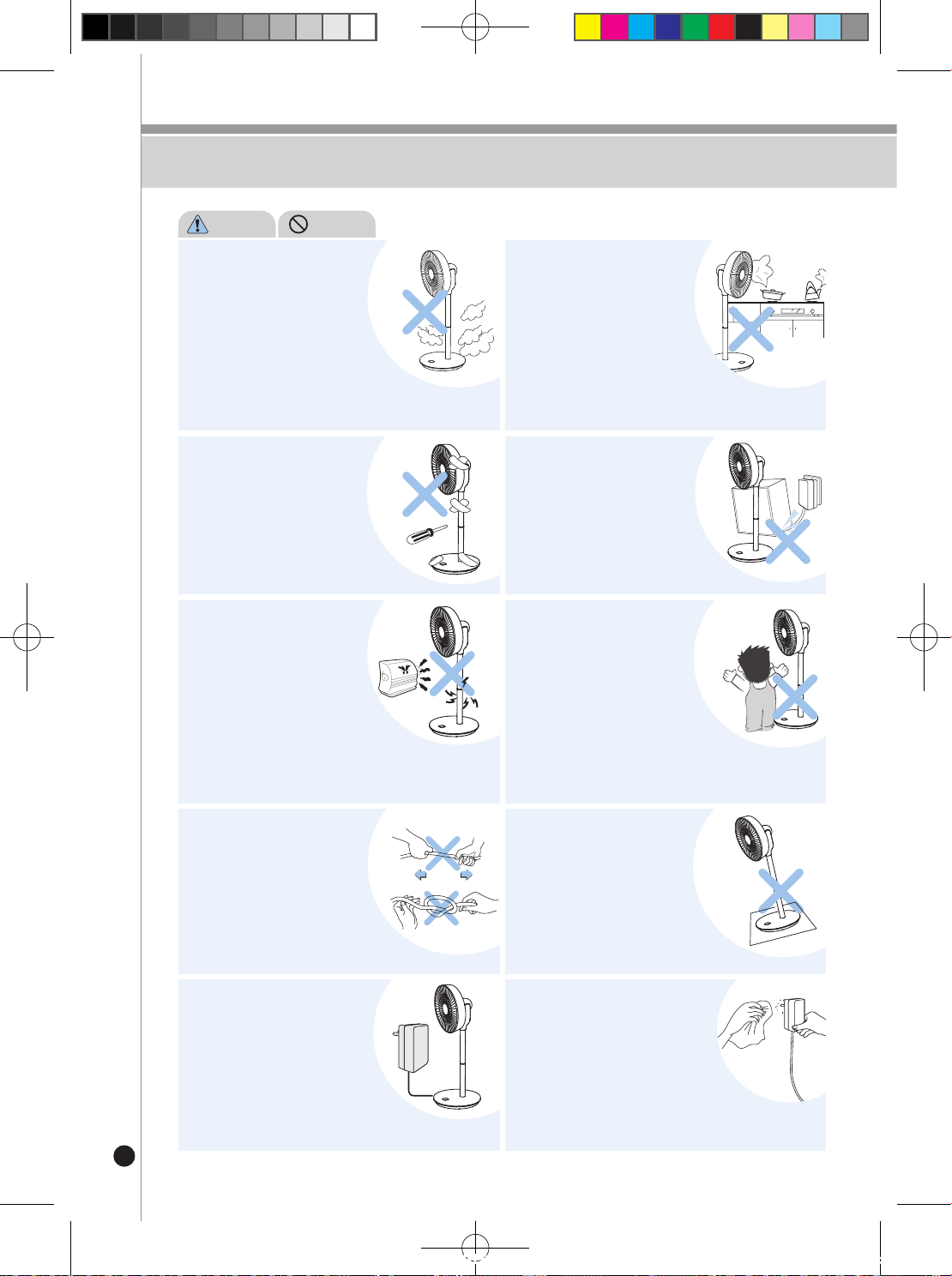
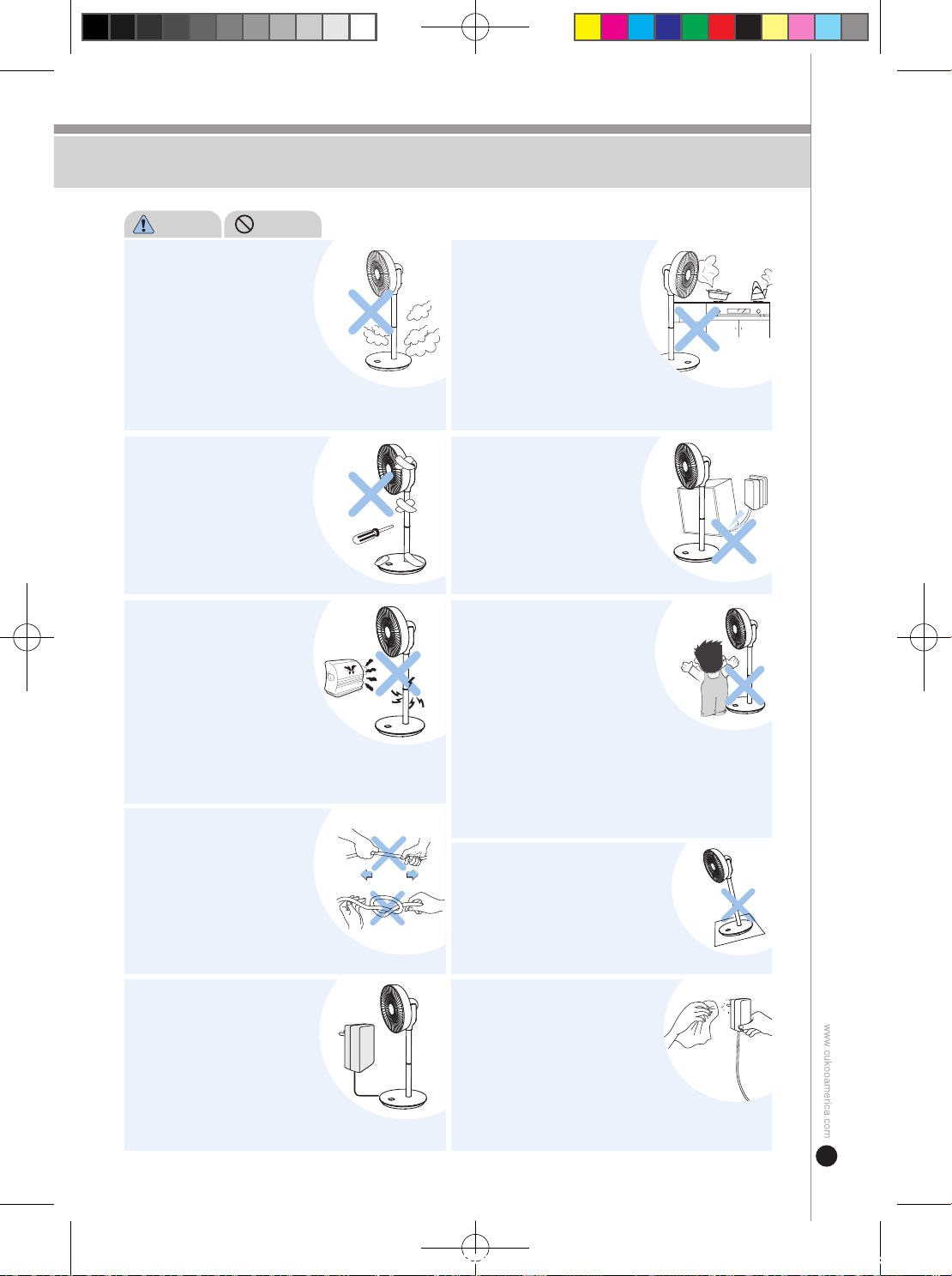
If you detect any strange noise,
odor, or smoke during use,
disconnect the power
immediately and contact
the customer service center.
• This may result in electrocution or fire.
• Contact the customer service center.
Do not use the product in
a location where chemical
substances, gas stoves,
electric heating appliances,
and other similar objects are
present.
• This may result in fire or equipment failure.
Gas leak from a gas stove turned off may especially result in
explosion upon activation of the product.
PROHIBIT
WARNING
Only the service engineer is
permitted and qualified to
disassemble or repair
the product.
• This may result in fire or electrocution
caused by melting of the power cord
sheath.
• The product may go through deformation
or discoloration.
Do not place the power cord
or the product near a heating
appliance.
Do not place a heavy object
on top of the power cord or
let the power cord get pressed
down on the floor.
• This may result in fire, electrocution,
or injury.
• Do not let children play with the device.
• This may result in fire caused by
electrocution or short circuit.
Do not excessively bend, tie,
or pull on the power cord or
the power plug.
Using an adapter with incorrect
specifications may result
in motor failure, electrocution,
fire, or safety accident.
• If the floor surface where the product
has been placed is not even or
at a slope, the product may fall over
and result in equipment failure or injury.
Use the device on a flat surface
in a dry location.
This device was not
manufactured to be operated
by a person who cannot safely
operate the device without
supervision or instruction due
to absence of physical, sensory,
or mental capacity, or lack of
experience or knowledge (including children).
If there are any foreign substances
or moisture on the power plug,
separate the power plug from
the power outlet and wipe it off
clean with dry cloth.
• This may result in fire, electrocution, or injury.
Safety Precautions
Safety Precautions
CF-AC1410WH(에어서큘레이터_미주향)-EN+FR.indd 4 2022. 10. 26. 오후 12:05
5
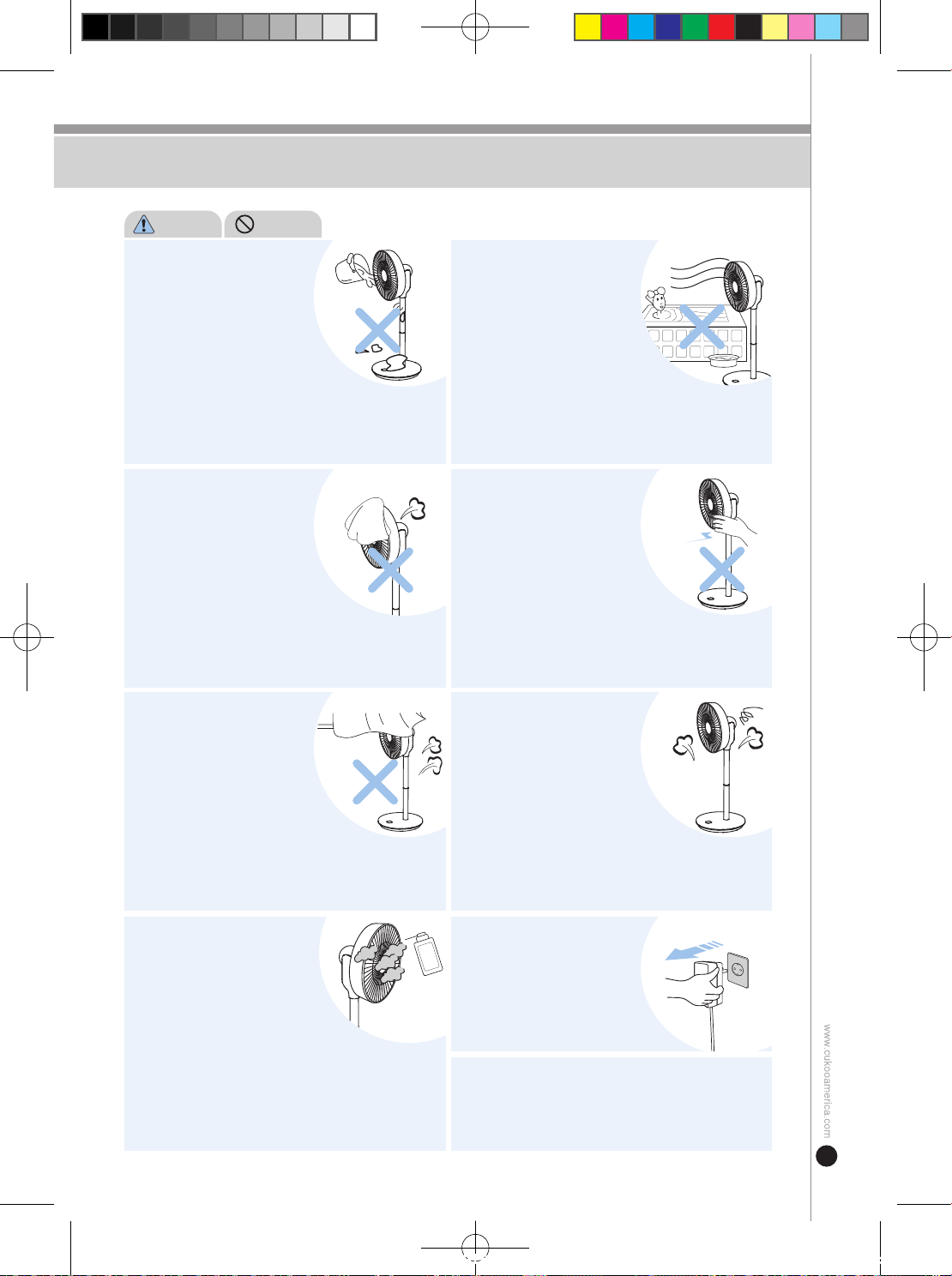
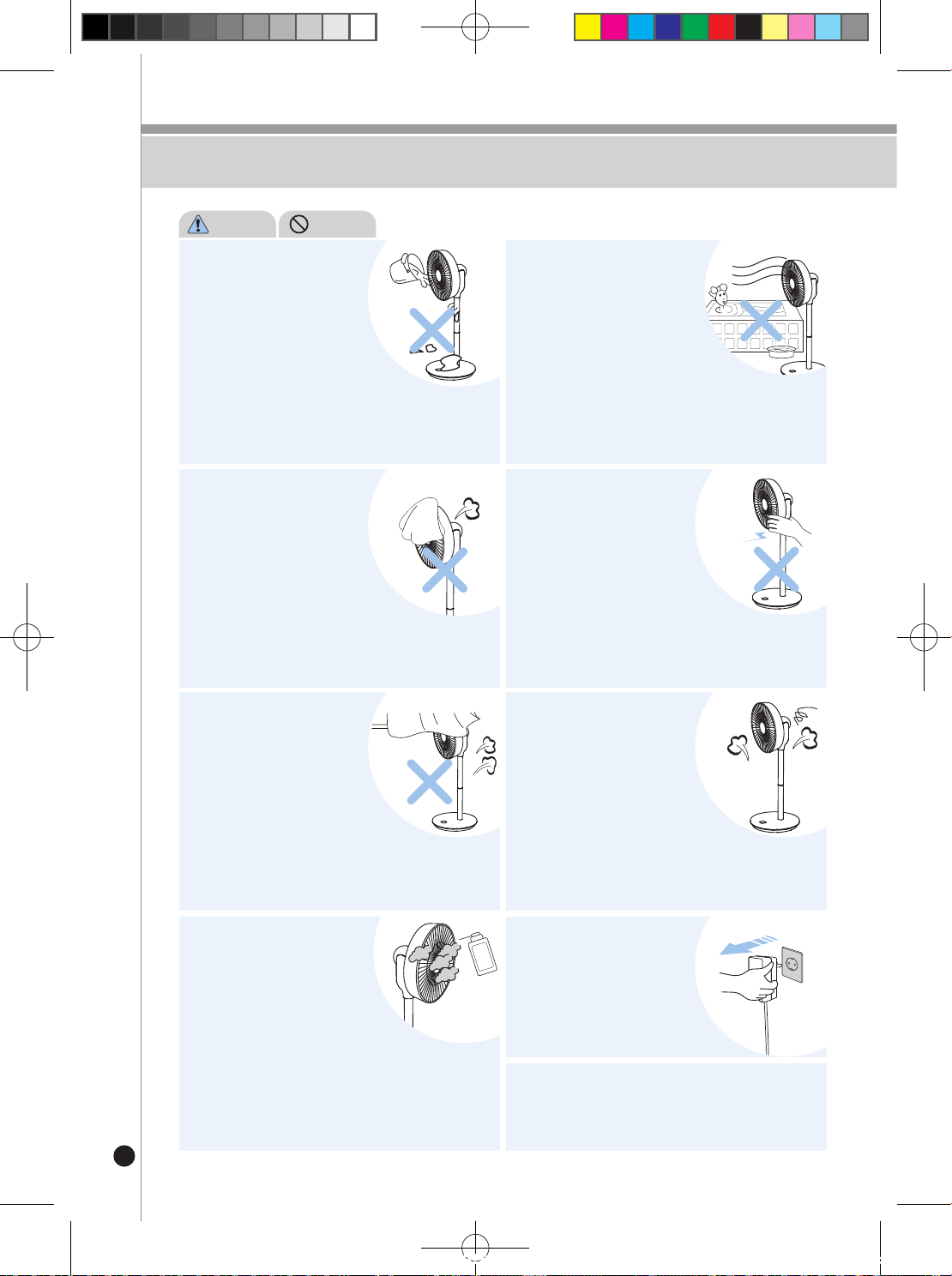
Do not let water or foreign
substances enter the main
body of the product.
• This may result in short circuit,
electrocution, or fire.
• If water or foreign substances have
entered the main body of the product,
turn the switch off on the main body,
unplug the power plug from the power outlet,
and contact the customer service center.
• This may result in short circuit,
electrocution, or fire.
PROHIBIT
WARNING
Do not place a dishcloth, towel,
etc. on top of the safety net or
motor cover while the product
is being used.
• This may result in equipment failure
or fire.
Do not forcefully turn
the rotating part of the product
when touching the product.
• This may result in equipment failure.
• This may result in injury or wound.
Do not use the product in
high-temperature (104℉),
high-humidity (humidity level
above 80%), or dusty locations.
Do not use the product near
light objects that are
susceptible to floating such as
curtains.
• This may interfere with product
operation and result in the product falling
over or equipment failure.
Do not use the product in
a location exposed to direct
sunlight or expose the product
exterior to smudges from
chemical, oil, pesticide, etc.
• This may result in deformity or discoloration
of the product.
Do not use the product if it has
broken down.
• Turn off the power switch on the main
body, unplug the power plug, and
contact the customer service center.
When you are leaving the
premises or not using the
product for a prolonged period
of time, unplug the power
adapter from the power outlet.
Do not forcibly change the direction of the fan while
the product is operating. Doing will damage
the motor.
Safety Precautions
CF-AC1410WH(에어서큘레이터_미주향)-EN+FR.indd 5 2022. 10. 26. 오후 12:05
6
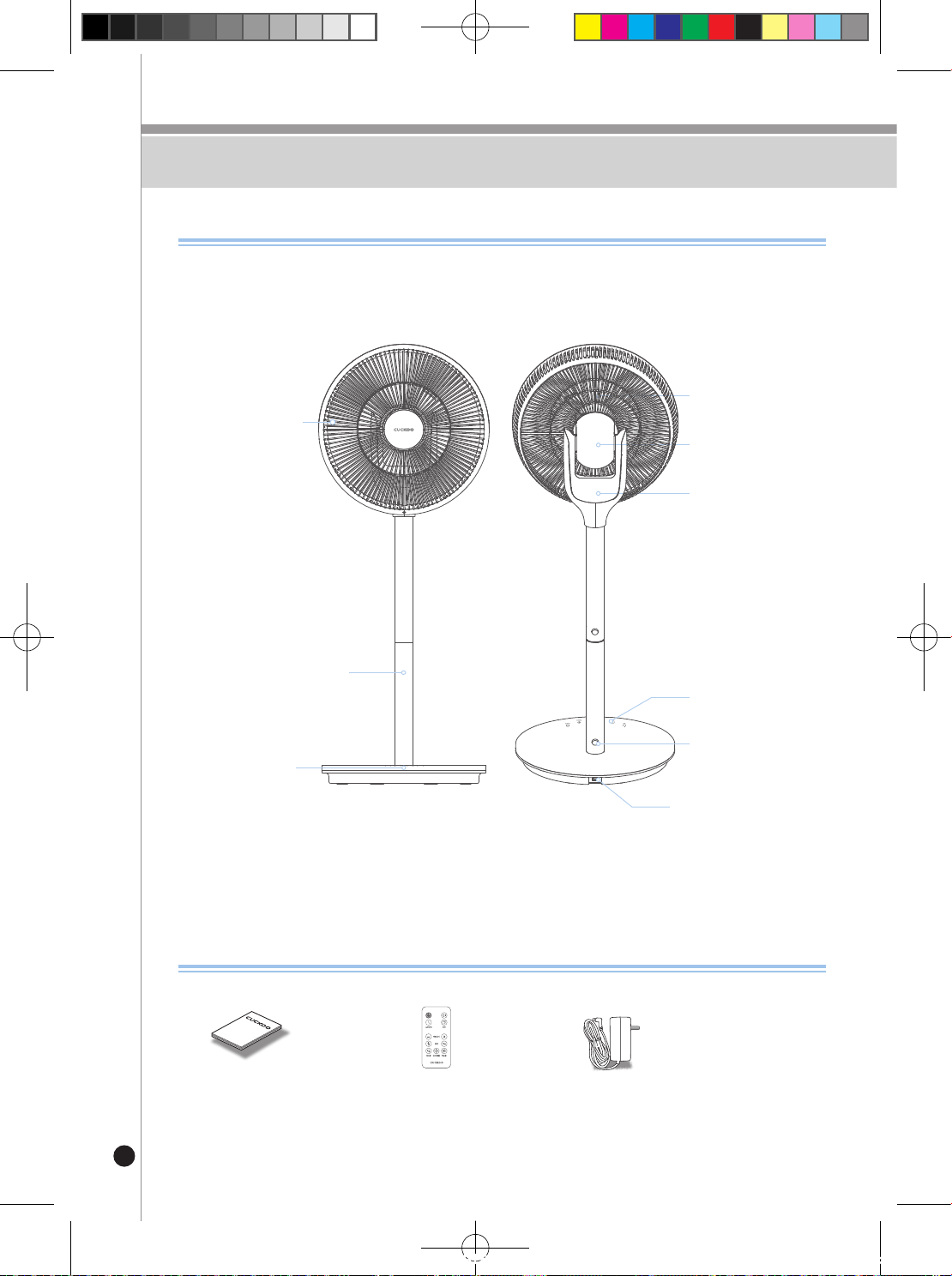
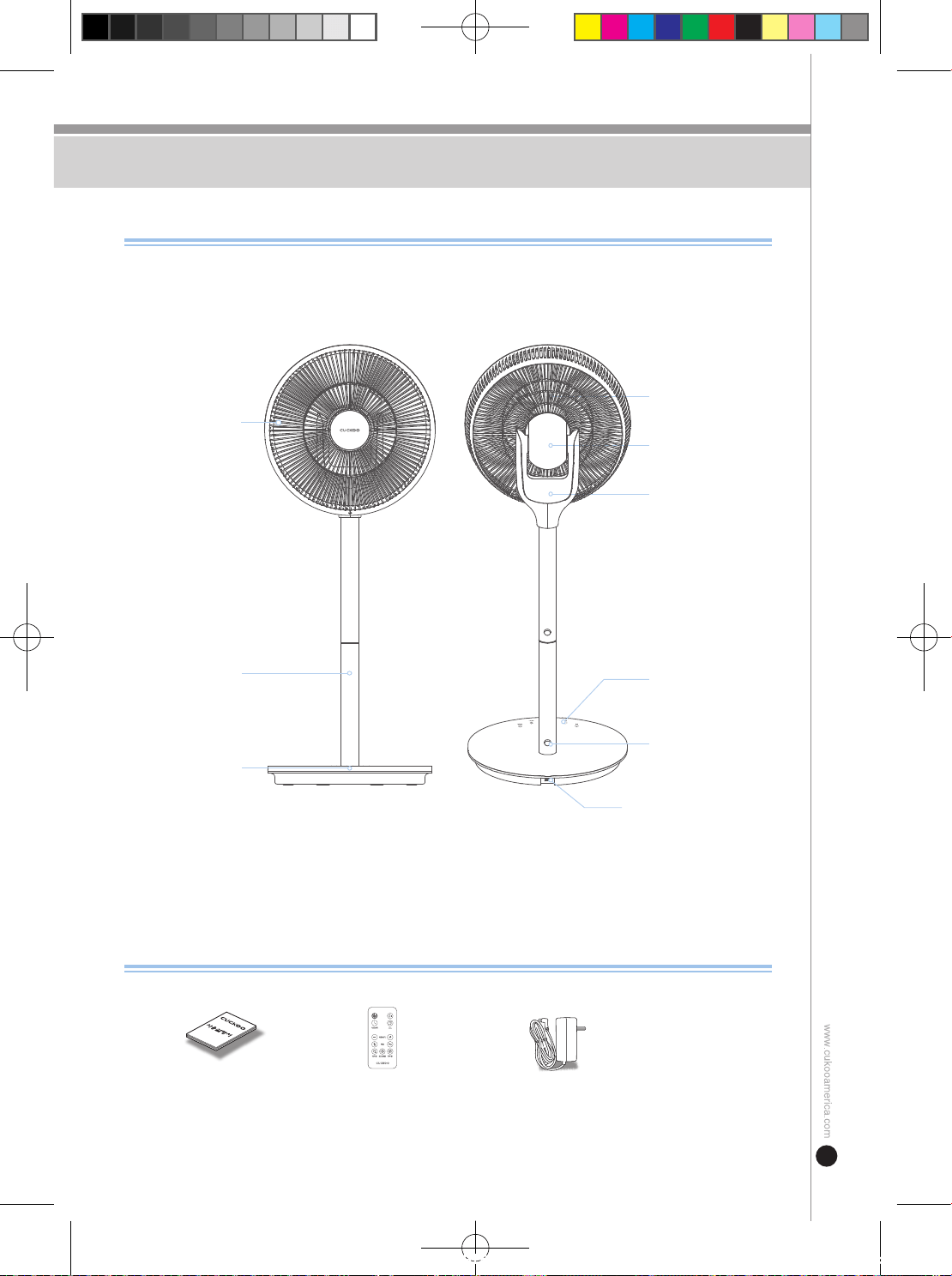
Parts
Parts & Accessories
Manual Remote Control Power Cord
Front Blade Cover
Extension Support Mount
Base
Power Cord Connector
Extension
Locking Mechanism
Motor Cover
Back Blade Cover
Upper Main Body
Control Panel
Manual
Accessories
How to Assemble / Disassemble
CF-AC1410WH(에어서큘레이터_미주향)-EN+FR.indd 6 2022. 10. 26. 오후 12:05
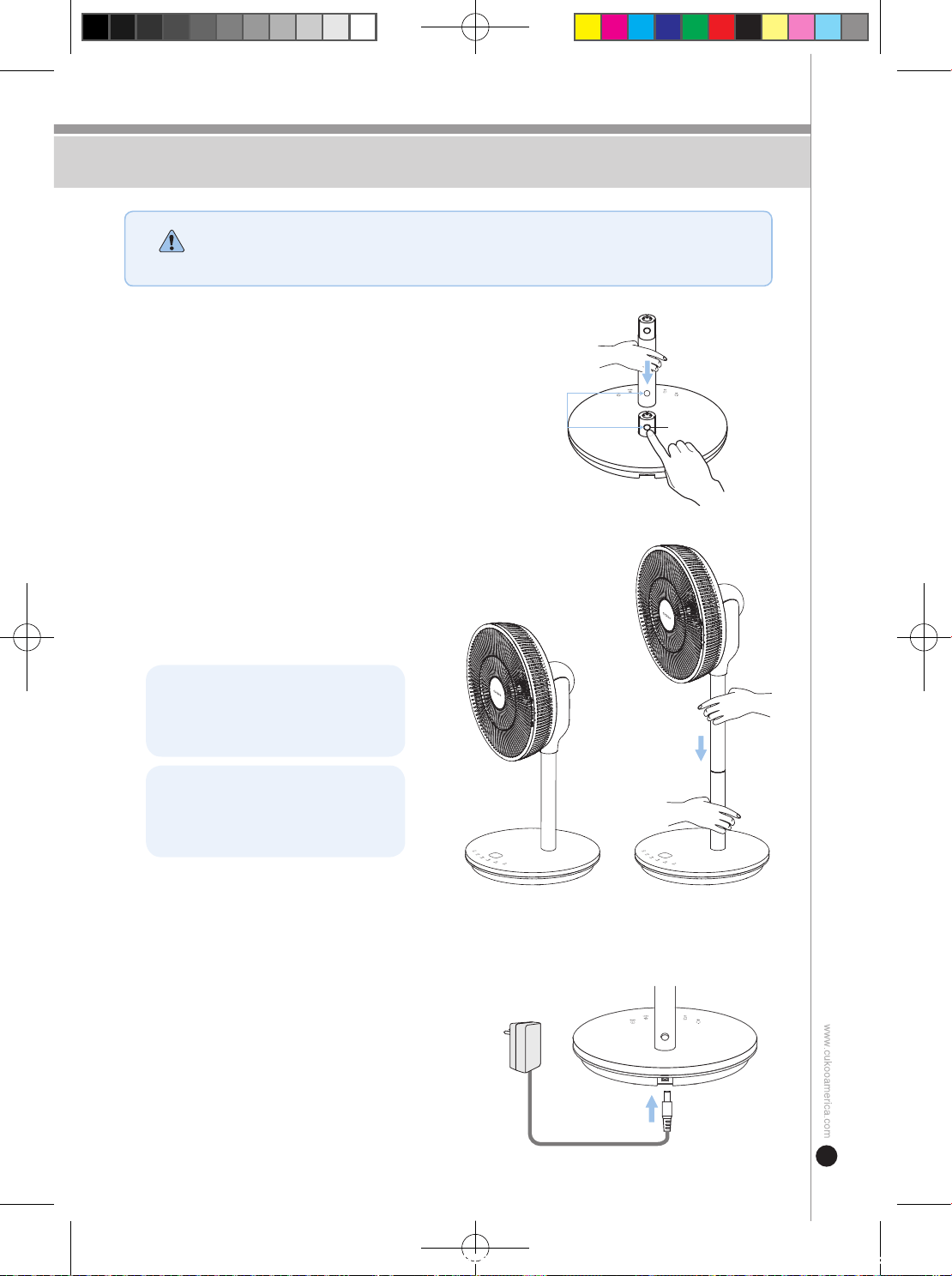
7
How to Assemble / Disassemble
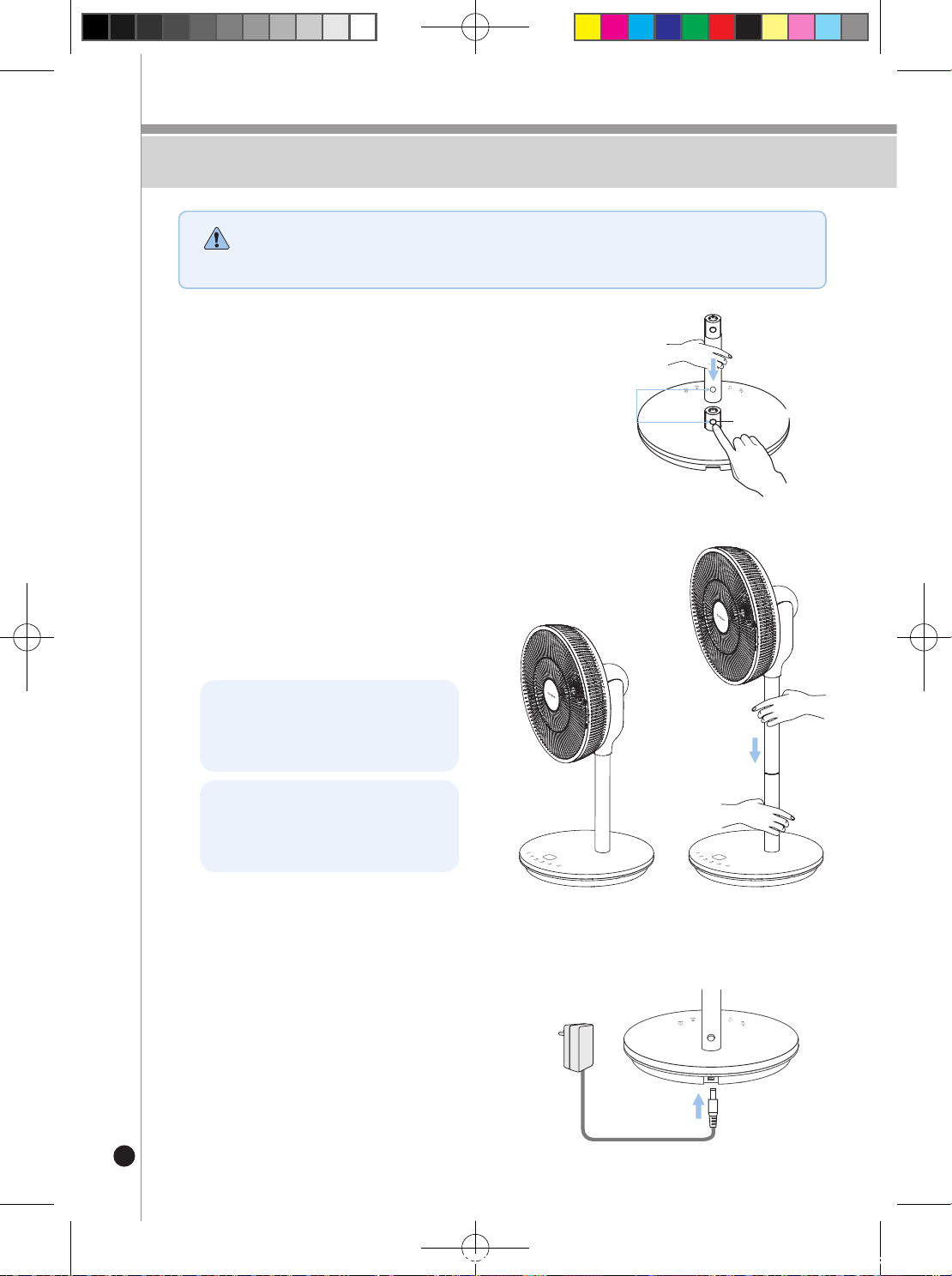
➊
Assembling the Base
Place the base on an even, stable surface.
Press the button found on the pipe in before
inserting the extension support mount.
➋
Assembling the Fan
Assemble the upper part while pressing the
interlocking button on the support mount.
Use both hands to assemble to make sure
that the product does not fall over during
assembly.
Connect the upper part to the base
if the middle support mount is not
used.
Attach the remote control to the
magnet found on the motor cover.
➌
Connecting the Power Cord
Connect the power cord to the power cord
connector found on the base of the unit.
※ This product requires an adapter during use.
• Do not attempt to assemble the product with the power cord plugged in as this may result in
electrical shock or product damage.
• Do not apply excessive force or allow the product fall over during assembly.
CAUTION
Check location
of the interlock hole
Interlocking
button
Check location
of the interlock hole
Interlocking
button
Check location
of the interlock hole
Interlocking
button
CF-AC1410WH(에어서큘레이터_미주향)-EN+FR.indd 7 2022. 10. 26. 오후 12:05
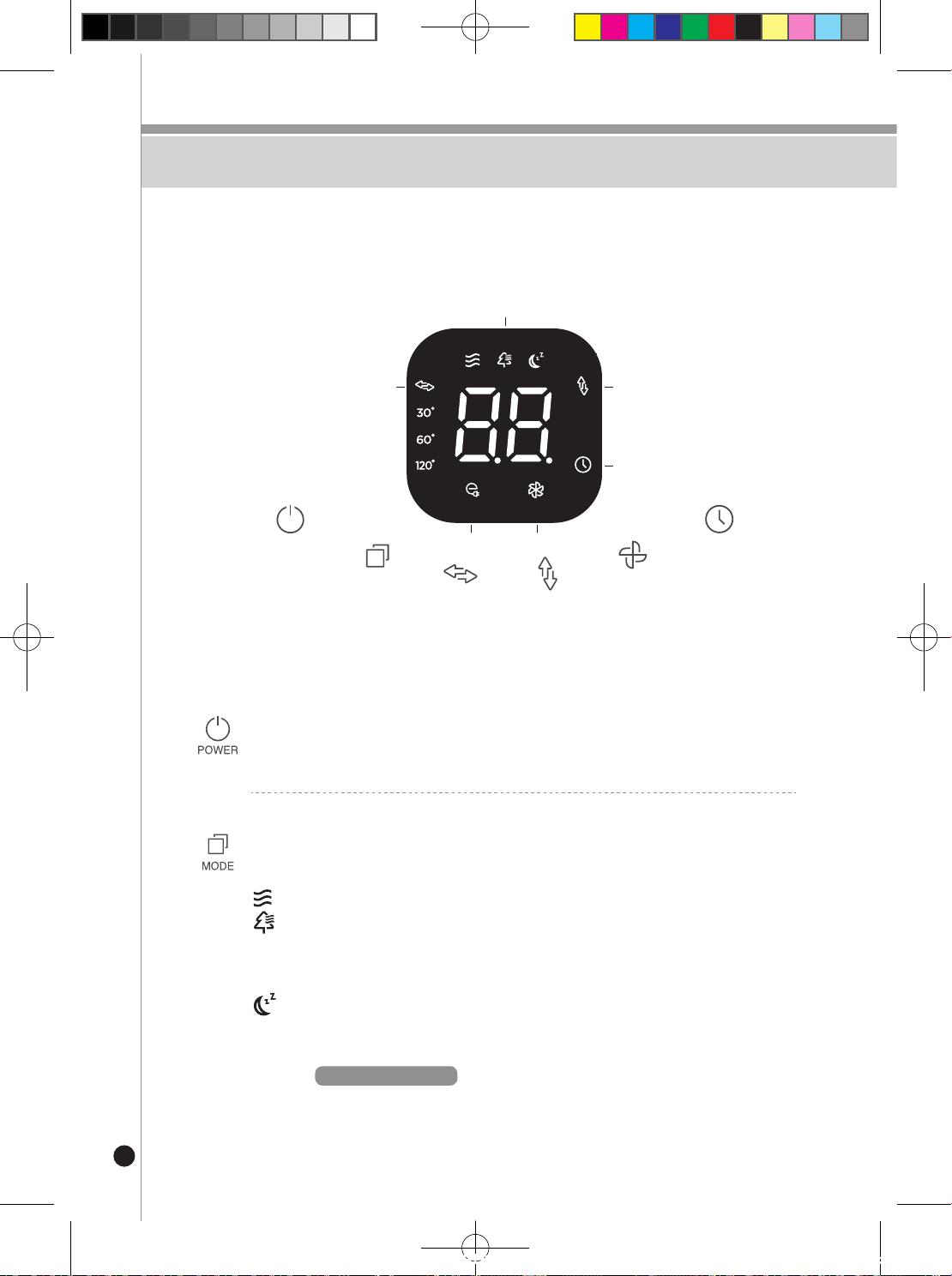
8
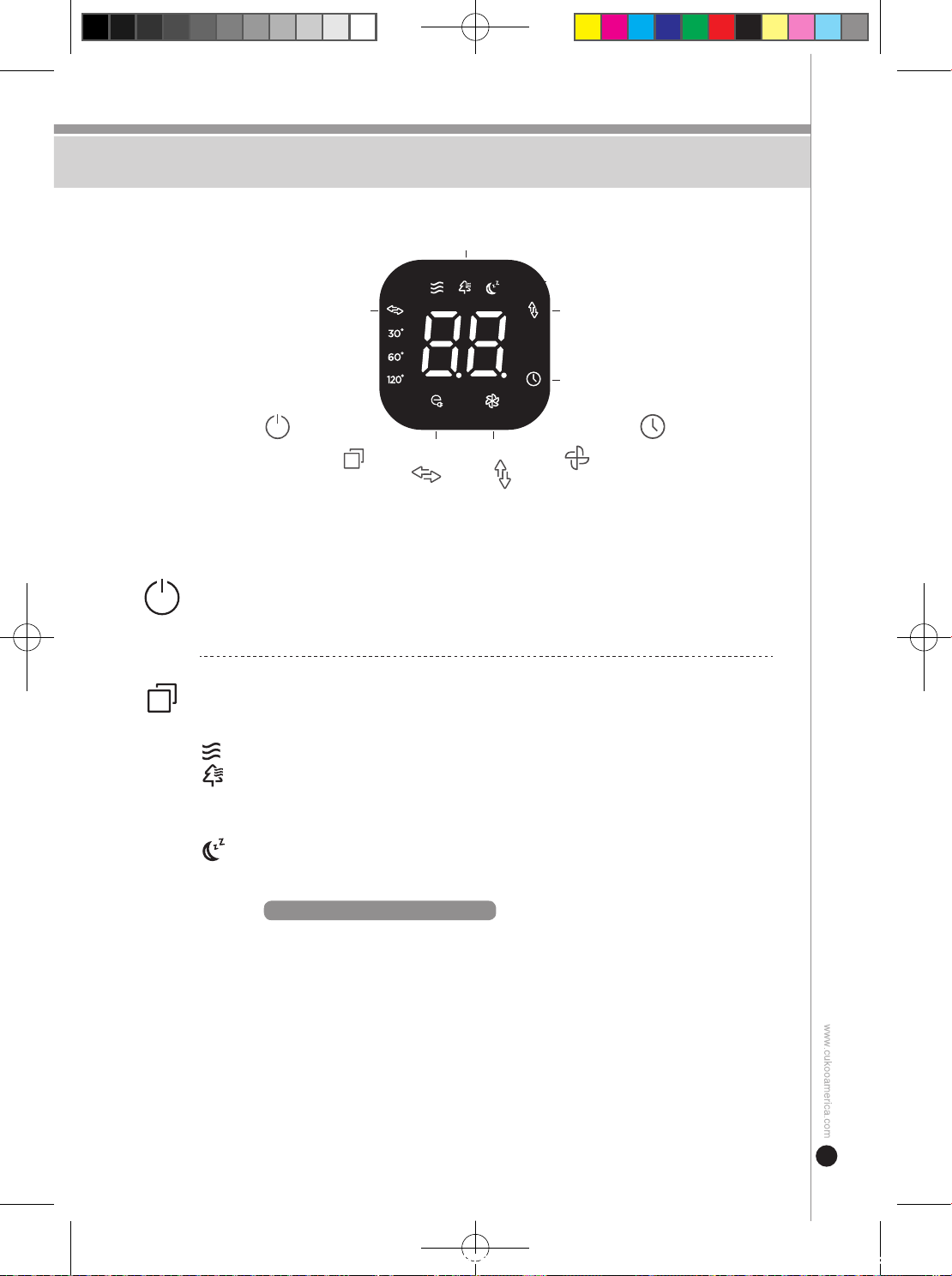
UP / DOWN RotationLEFT / RIGHT Rotation
POWER
MODE
LEFT / RIGHT
UP/ DOWN
SPEED
TIMER
3D(3 sec.)
TURBO(3 sec.)
MODE
Turbo wind
Timer
Eco wind
How to Use
ON / OFF
Press this button to power the unit on or off.
WIND MODE SELECT
Press this button to select the desired mode: (Basic
▶
Natural
▶
Sleep
▶
Eco)
Basic : Provides a consistent level of wind.
Natural : It adjusts the wind repetitively from the set wind level to the weaker level.
Sleep : The wind speed is decreased by 1 level from the set wind level to the
weaker wind level every 8 minutes and the wind level is maintained after
reaching level 1.
Ex)
When setting up Level 3
(Operation Time (per level): 8 min.)
Level 3(8 min.)
→
Level 2(8 min.)
→
Level 1(continuous operation)
How to Use
CF-AC1410WH(에어서큘레이터_미주향)-EN+FR.indd 8 2022. 10. 26. 오후 12:05
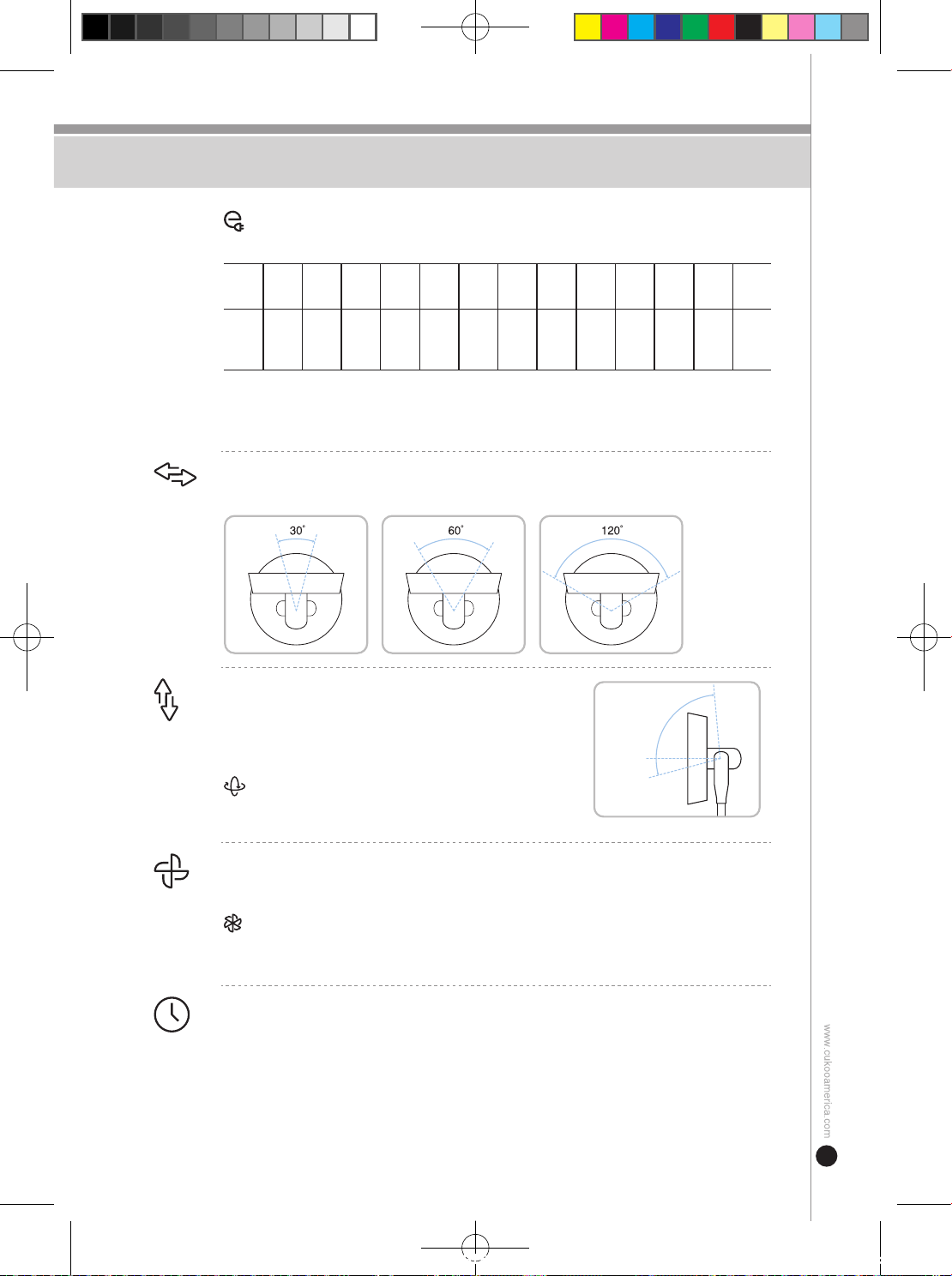
9
How to Use
Eco :
The blade speed will automatically adjust depending on the current
surrounding temperature to reduce energy consumption
Speed Stop
Level
1
Level
2
Level
3
Level
4
Level
5
Level
6
Level
7
Level
8
Level
9
Level
10
Level
11
Level
12
Indoor
temp
below
66.2℉
66.2℉
~
68℉
68℉
~
69.8℉
71.6℉
~
73.4℉
73.4℉
~
75.2℉
75.2℉
~
77℉
77℉
~
78.8℉
78.8℉
~
80.6℉
80.6℉
~
82.4℉
82.4℉
~
84.2℉
84.2℉
~
86℉
86℉
~
89.6℉
above
89.6℉
※
“00”isdisplayedandtheproductstopsoperatingbelow66.2℉,andthelevelis
displayed for each set temperature when the temperature is increasing. (Wind level may
vary depending on the deviation in temperature detection based on the surrounding
environment.)
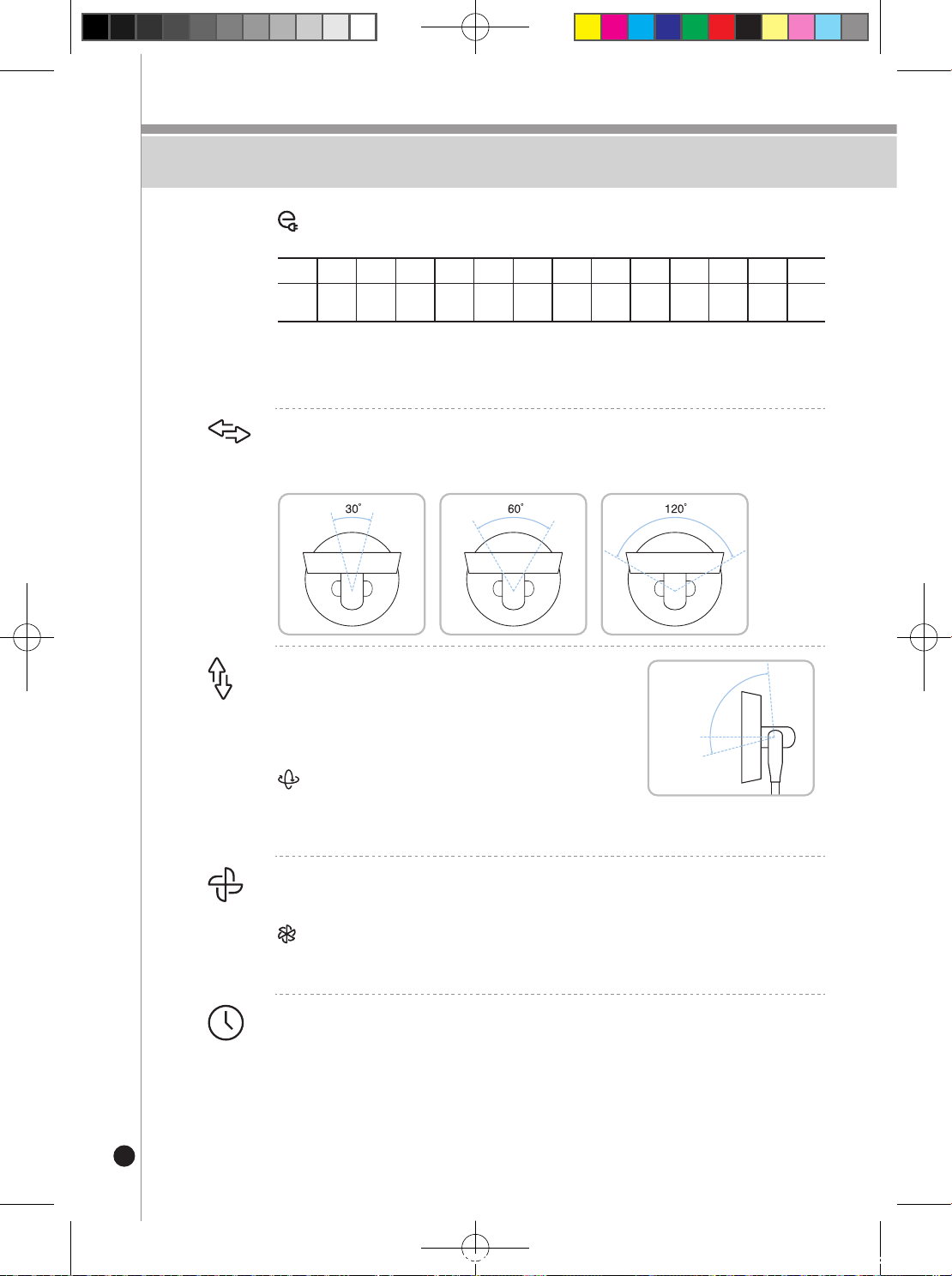
Left/Right Rotation
Pressthisbuttontocyclethroughtheavailablehorizontalpositions(30°,60°,and120°)
Up/Down Rotation
Press this button to adjust the vertical positioning of
the fan.
Upward: 85˚ / Downward: -15˚
3D Wind
Press this button for 3 seconds to have the fan
repeatedly rotate 360 degrees.
Wind Level Setting
Press this button to cycle through the available wind levels (1-12)
Turbo
Press this button for 3 seconds to initiate a powerful turbo mode. To switch back to
basicmode,pressthebuttononcemorewhileinturbomode.
Timer
Press this button to set the operation time from 30 minutes to 12 hours. Each press
will increase by 30-minute intervals (10-12 hours will increase by 1-hour intervals).
On timer:
You can press the timer button while the product is not operating to set
the time for activation and wind level.
Off timer:
You can press the timer button while the product is operating to set the
time for deactivation.
Upward
85˚
Downward-15˚
CF-AC1410WH(에어서큘레이터_미주향)-EN+FR.indd 9 2022. 10. 26. 오후 12:05
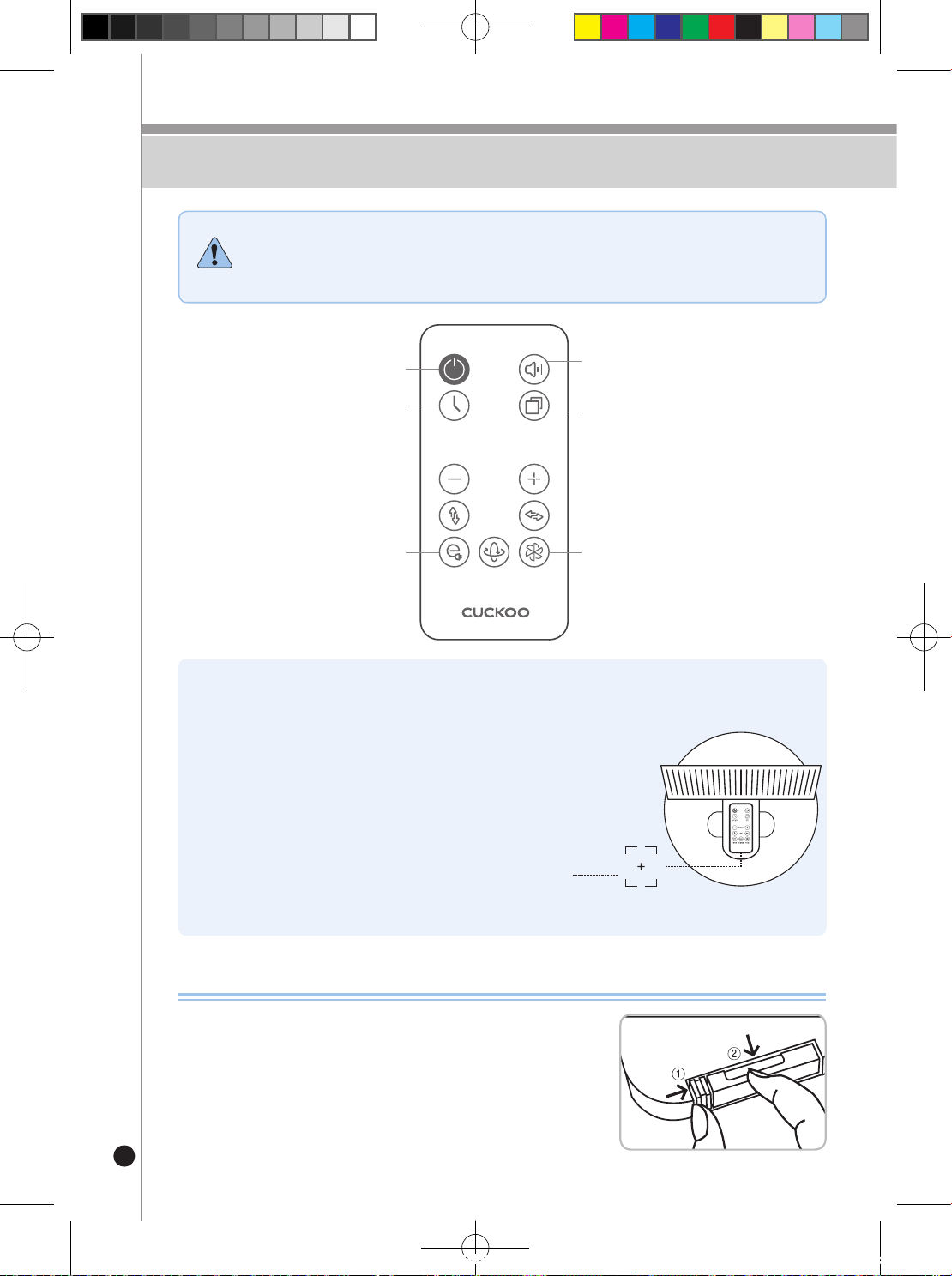
10
Remote Control
Note
1) The conguration panel getting warm during operation and after operation is due to
standby power consumption and not an equipment failure so it is safe to use.
2) Remove the battery protective film before use (there is a protective film in the
packaging).
※ Point the transmitter of the remote control towards the
receiver on the main body.
(Transmission distance: Approximately 5m from the receiver
on the main body)
※ Do not press the buttons on the remote control in
succession. This may result in malfunction.
※ Do not drop the remote control or apply excessive force.
※ Use batteries with matching specifications and store the
remote control with the batteries removed when it’s not
being used for a prolonged period of time.
※ Attach the remote control on top of the motor for storage.
(There is a built-in magnet which can attach itself to the
product.)
Location of remote control attachment
How to Replace Batteries of the Remote Control
➊
Push
①
shown in the gure to the right in the direction of the
arrow (right) and then pull
②
in the direction of the arrow to
remove the batteries.
➋
Install the batteries with the “+” area shown on top and then
push to close the lid.
➌
Battery specications: Use CR2025(3V) batteries.
POWER
(ON / OFF)
Timer
(30 Min. ~ 12 Hour)
TIMER
SPEED
ECO TURBO3D
MODE
Eco
(Detect surrounding temperature
-Automatic wind speed control)
Beep sound
(Beep sound on/off upon activation)
Turbo
MODE
POWER
(ON / OFF)
Timer
(30 Min. ~ 12 Hour)
TIMER
SPEED
ECO TURBO3D
MODE
Eco
(Detect surrounding temperature
-Automatic wind speed control)
Beep sound
(Beep sound on/off upon activation)
Turbo
MODE
CF-AC1410WH(에어서큘레이터_미주향)-EN+FR.indd 10 2022. 10. 26. 오후 12:05
11
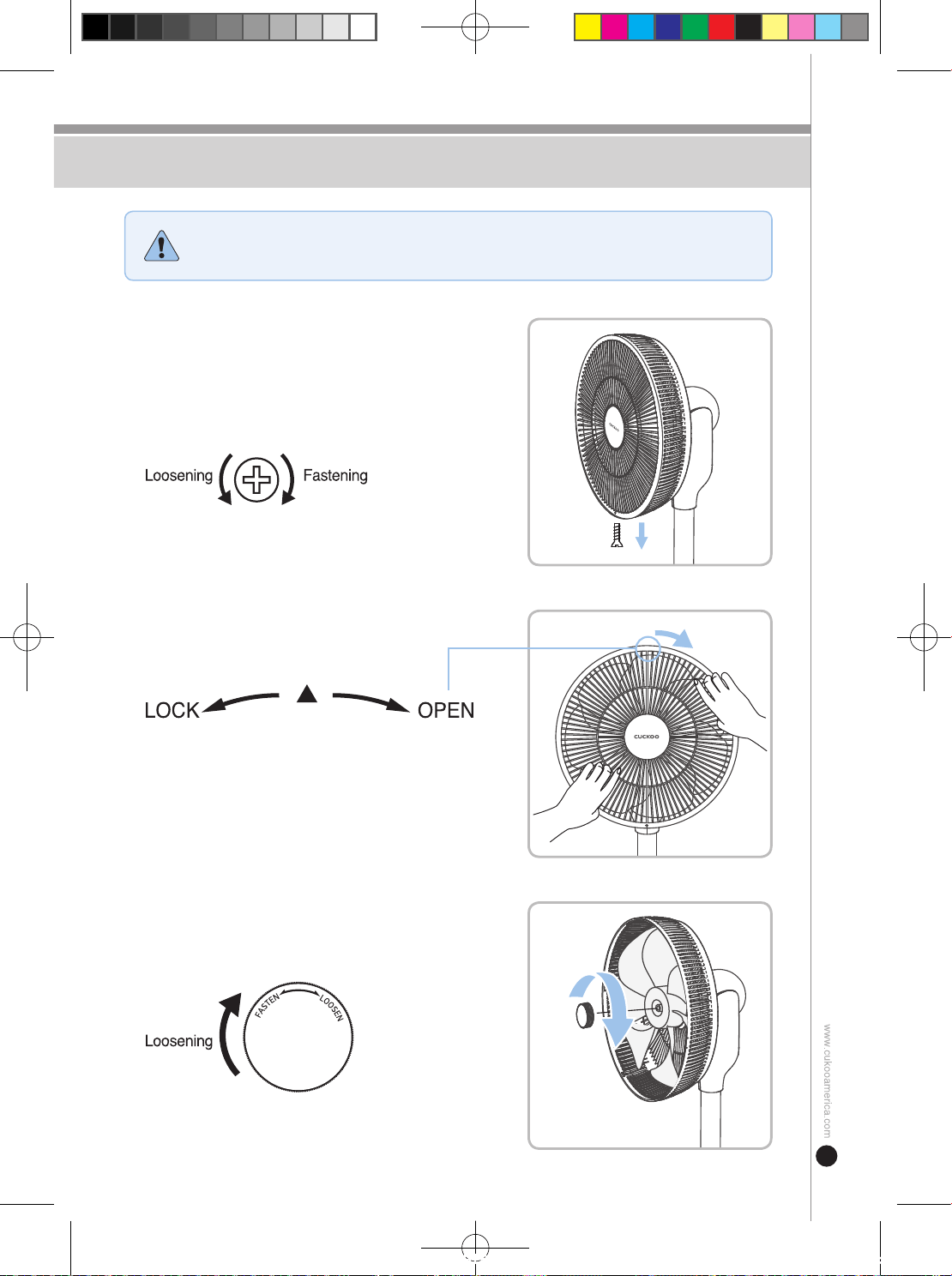
How to disassemble
CAUTION
Do not apply excessive force on the parts during disassembly.
This may result in product damage or injury.
➊
Disassemble the screws fastening the
safety net
Use a screwdriver to disassemble the screws at the
bottom of the front safety net.
Be careful not to displace the screws after disassembly.
➌
Disassembling the Blade Holder
Slightly turn the blade holder clockwise to disassemble it
from the rear net.
➋
Disassembling the Front Net
Slightly turn the front net clockwise to
disassemble it from the rear net.
During assembly:
Align the arrow shown in the figure above to face
upwards and assemble.
CF-AC1410WH(에어서큘레이터_미주향)-EN+FR.indd 11 2022. 10. 26. 오후 12:05
12
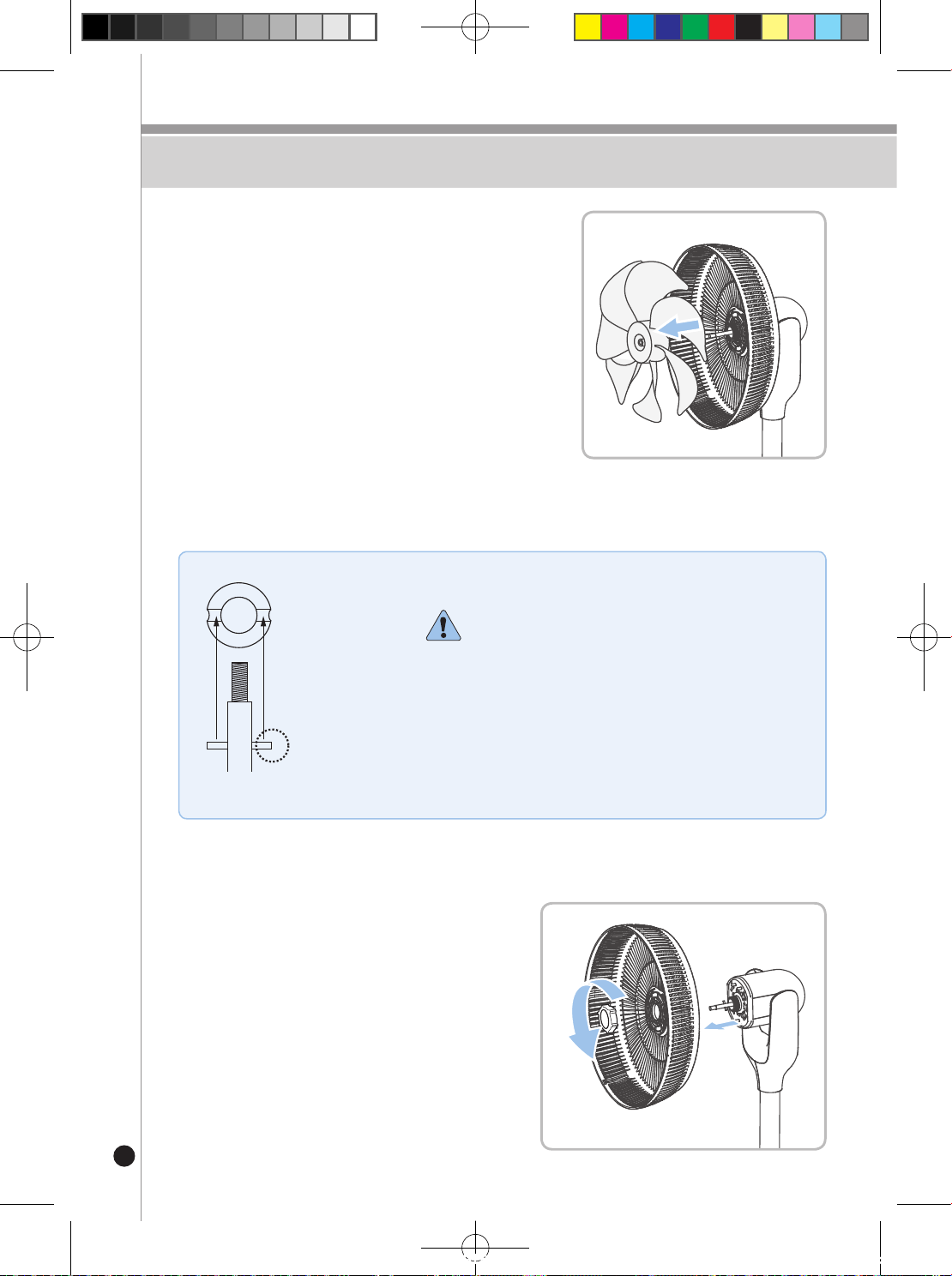
How to disassemble
Motor axis
Protruding holder
Blade (interior)
fixture hole
When assembling the blades:
When assembling the blades, align the protruding motor
axis holder and the blade (interior) holder to assemble.
Incorrect fastening may result in device damage/
destruction, or other performance issues.
➍
Disassembling the Blades
Pull the blades forward from the motor axis to
disassemble.
Wear gloves to disassemble since blades may cause
injury.
➎
Detaching the Net Holder/Rear Net
Turn the net holder counterclockwise and then
detach the rear safety net.
Motor axis
Protruding holder
Blade (interior)
fixture hole
Motor axis
Protruding holder
Blade (interior)
fixture hole
CF-AC1410WH(에어서큘레이터_미주향)-EN+FR.indd 12 2022. 10. 26. 오후 12:05
13
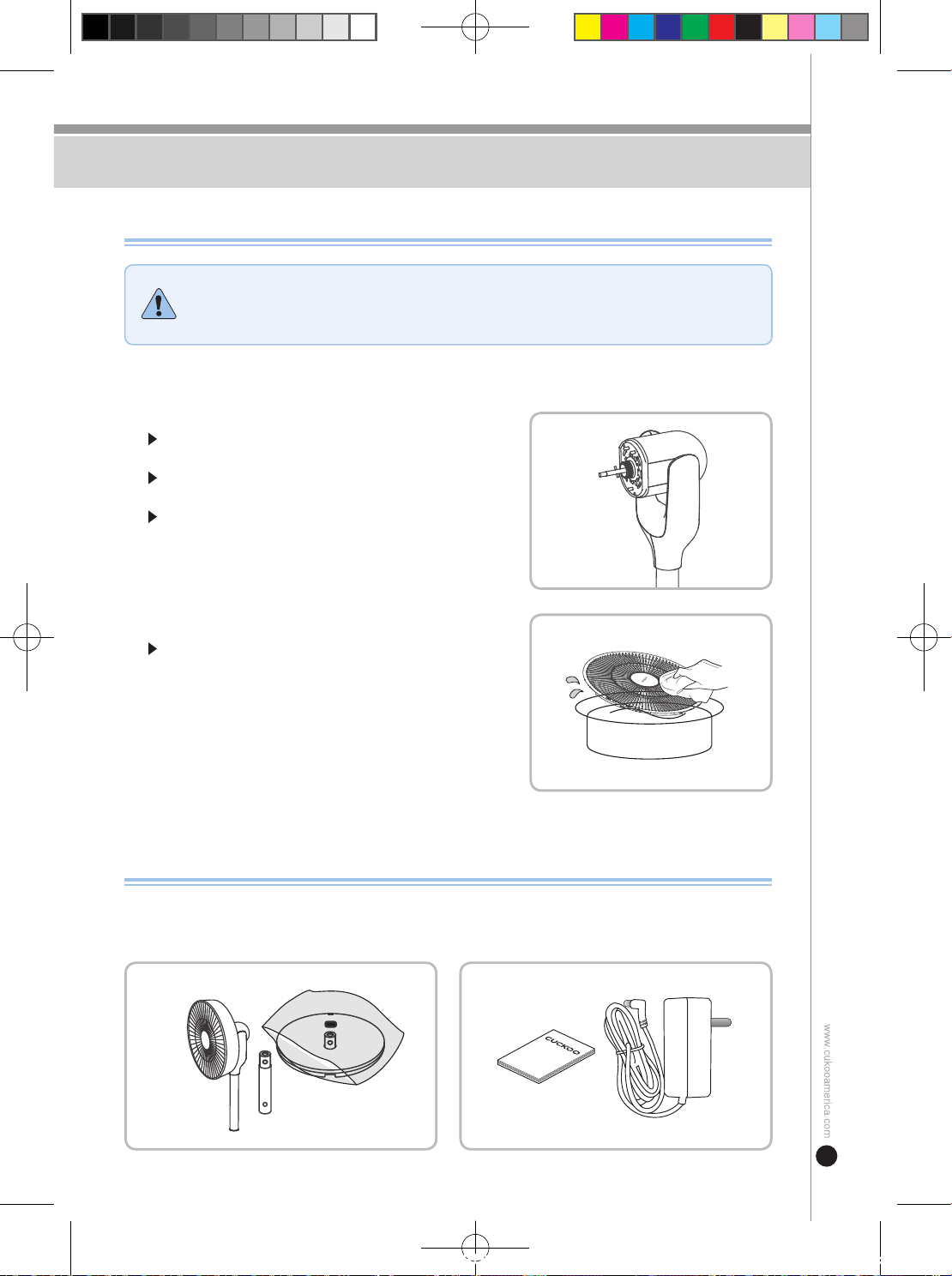
How to Clean & Store
WARNING
1) Do not allow water or moisture to get in the interior of the main body as this
may cause product damage or electrical shock.
2) Always ensure to power off the unit and unplug the power cord before
cleaning.
➊
Stand / Motor Cover
Using a soft, dry cloth, wipe all debris and dust off the
stand/motor cover.
Do not use chemicals such as thinners, benzene, and
alcohol as they will corrode the product's surface.
Do not allow the motor or the main body to come in
contact with moisture or water.
If the product will be stored for a prolonged period of time, wipe off all residue, dust, and moisture
with a soft cloth before storing.
➋
Blades / Blade Covers
Using a soft, dry cloth, wipe all debris and dust off the
blades/blade covers.
Manual
Manual
Manual
Manual
How to Store
How to Clean
CF-AC1410WH(에어서큘레이터_미주향)-EN+FR.indd 13 2022. 10. 26. 오후 12:05
14
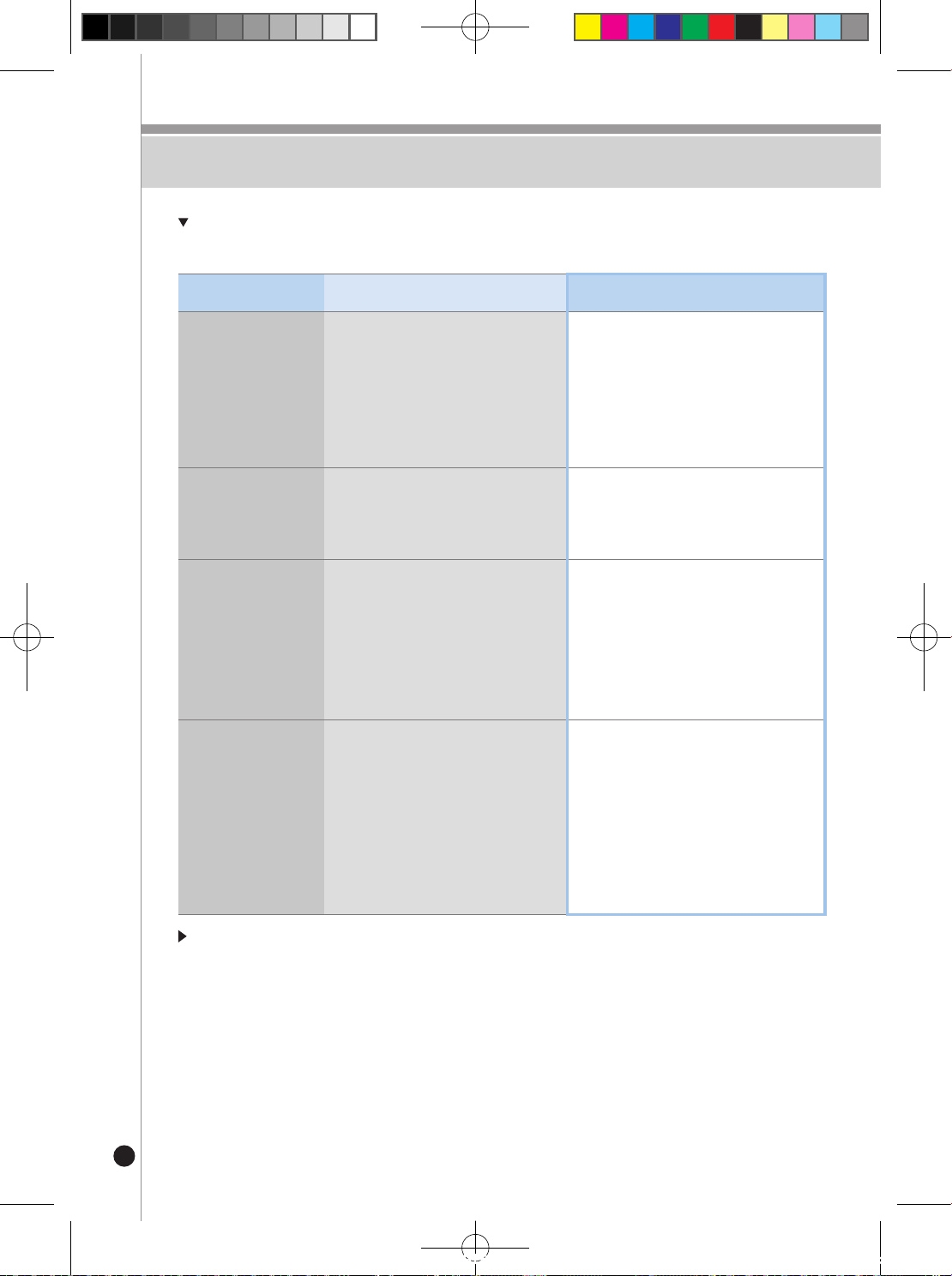
Troubleshooting
If you are running into issues while operating the appliance, refer to the below troubleshooting
chart. If the problem persists, email [email protected].
If the display window is blinking or the product is malfunctioning in a way not specified in the
examples above, contact the customer service center immediately.
Problem Possible Causes Corrective Action
The blades are not
turning.
· Is the power plug plugged into the
power outlet?
· Is the power plug connected to the
main body?
· Are the blades being obstructed?
· Is it past the time set on the timer?
· Check the connection status of the power
plug,poweroutlet,andmainbody.
· Contact the customer service center.
· Turn off the power and try again.
The fan is not rotating.
· Is there a rotation icon on the display
window?
· Is there an issue with the motor?
· Please read the manual before use.
· Please contact customer service.
There is a ‘clicking’
sound coming from
the blades.
· Are the blades and safety net
assembled correctly?
· Is the safety net by any chance
deformed and is in contact with the
blade(s)?
· Are the blade fixture bolts securely
fastened?
· Please assemble the product again in the
correct method.
· Please fasten again the blade fixture bolts.
The remote control is
not working.
· Have you installed batteries correctly
inside the remote control according to
their respective poles?
· Is there an obstruction around the
receiver on the main body?
· Is the remote control too far away from
the receiver on the main body by any
chance?
· Are the batteries depleted?
· Please check if the batteries have been
installed correctly according to their
respective poles.
· Make sure that you have secured a line of
sight with the receiver on the main body.
· Use the remote control within 5 m from the
receiver on the main body.
· Install new batteries and try again.
CF-AC1410WH(에어서큘레이터_미주향)-EN+FR.indd 14 2022. 10. 26. 오후 12:05
15
Specications
For Repair Inquiry
Appliance Name Air Circulator
Model Number CF-AC1410WH
Rated Voltage 120V / 60Hz
Adapter * Input : 100-240V~, 0.8A Max, 50/60Hz * Output : 12Vdc , 3A
Power Consumption 35W
Dimensions 15.4 (W) x 14.8 (D) x 39.4 (H) inches
Weight 9.5 lbs. (including adapter)
Prolongeduseoftheappliancemayleadtomalfunctionduetoagingofcomponentscausedbyheat,moisture,dust,etc.
Stop Using the Appliance
Please unplug the power and contact the service center.
If you experience such problems:
1
Check the troubleshoot section found on page 14 to nd a solution to your issue. If problem is not
resolved contact the service center.
2
You can feel the ow of electricity when touching the appliance.
3
The power is turned on but the appliance does not work.
4
If other abnormalities or breakdown occurs
CF-AC1410WH(에어서큘레이터_미주향)-EN+FR.indd 15 2022. 10. 26. 오후 12:05
16
Si la fiche ou le cordon d'alimentation est cassé ou
secoué, arrêtez son utilisation et contactez le
service client.
• Si le couvercle du cordon d'alimentation est décollé ou est
endommagé en raison d'une utilisation imprudente de l’appareil,
cela peut provoquer un incendie et un choc électrique ;
vérifiez donc fréquemment l'état du cordon d'alimentation,
de la fiche d'alimentation et de la prise.
• Pour éviter tout danger, faites remplacer le cordon ou la fiche
d'alimentation par un fabricant, un vendeur ou un technicien
qualifié.
• Veillez à le faire réparer dans un centre de service agréé.
• En cas de fonctionnement prolongé,
vous risquez de faire baisser la
température du corps ou de provoquer
un syndrome de climatisation.
Lorsque vous branchez ou
débranchez la fiche d'alimentation,
veillez à éliminer l'humidité de vos
mains et à tenir le boîtier de
l'adaptateur pour le brancher ou le
débrancher.
• Si vous le tirez trop fort, vous risquez de provoquer un
court-circuit ou un choc électrique en raison d'une anomalie
du cordon d'alimentation.
• Pour éviter tout danger, faites remplacer le cordon ou la
fiche d'alimentation par un fabricant, un vendeur ou un
technicien qualifié.
Interdire
AVERVE
Veillez à ne pas utiliser
l'appareil dans un endroit clos
ou pendant votre sommeil.
• Des défaillances et des accidents
de sécurité peuvent se produire.
Ne l'utilisez jamais lorsque
l'hélice ou la grille de protection
sont endommagées.
Ne mettez pas les mains ou des
substances étrangères dans la
grille de sécurité pendant le
fonctionnement de l’appareil.
• Vous risquez de vous blesser le doigt
ou de casser l’hélice à cause de sa rotation
d’où le danger.
• Assurez-vous que les enfants n'y mettent pas leur doigts.
Si l’appareil a été démonté,
ne branchez pas l'alimentation
avant d'avoir assemblé
complètement l’hélice et la
grille de protection.
• Vous risquez un accident de sécurité s'il
n'est pas entièrement assemblé.
• Cela peut provoquer un incendie, un choc électrique
et des blessures corporelles.
• Please comply with the following ‘Safety Warning' to ensure safety and proper use of the product to avoid accidents or hazards.
• This manual is classified into two types of instruction regarding 'Safety Warning': 'Warning' and 'Precaution'.
WARNING
Potential hazardous situations
that may result in death or
serious injury if not avoided.
· This symbol is intended to alert the user about certain
conditions that may cause a hazard.
· Please read carefully the instructions to avoid danger.
· This symbol is a sign that ‘prohibits’ a certain activity.
· This symbol is a sign that ‘instructs’ a certain activity.
CAUTION
Potential hazardous situations
that may result in minor injury
if not avoided.
Avertissement de Sécurité
CF-AC1410WH(에어서큘레이터_미주향)-EN+FR.indd 16 2022. 10. 26. 오후 12:05
17
Avertissement de Sécurité
Débranchez immédiatement
l'appareil et contactez le service
client en cas de bruit, d'odeur
ou de fumée pendant son
utilisation.
• Cela peut provoquer un choc électrique
et un incendie.
• Veuillez contacter le service client.
• Cela peut provoquer un incendie,
un choc électrique et des blessures corporelles.
Ne l'utilisez pas dans des
endroits où se trouvent des
produits chimiques,
des cuisinières à gaz,
des appareils de chauffage, etc.
• Cela pourrait provoquer un incendie ou une
panne. En particulier, si la cuisinière à gaz est éteinte et que
le gaz fuit, il y a un risque d'explosion pendant son utilisation.
Ne faites jamais démonter ou
réparer l’appareil par une
personne autre qu'un
technicien de maintenance.
• La gaine du cordon peut fondre et
provoquer un incendie et un choc
électrique.
• L’appareil peut être modifié ou décoloré.
Veillez à ne pas placer d'objets
lourds sur le cordon
d'alimentation ou à ne pas
appuyer le cordon contre le
fond de l'appareil.
• Cela peut provoquer un incendie,
un choc électrique et des blessures.
• Un choc électrique ou un court-circuit
peut provoquer un incendie.
Ne pliez pas ou n'attachez pas
trop fort le cordon ou la fiche
d'alimentation.
Vous risquez une panne
de moteur, un choc électrique,
un incendie et des accidents
de sécurité si vous utilisez des
adaptateurs non conformes aux
spécifications.
• Si la surface du sol où est posé l'appareil
est instable ou en pente, l'appareil peut
tomber et provoquer une panne ou des
préjudices corporels.
Utilisez l'appareil dans un endroit
plat et sec.
L'appareil n'est pas destiné
à être utilisé par des personnes
(y compris des enfants) qui
n'ont pas de capacités physiques,
sensorielles ou mentales, ou qui ne
sont pas en mesure de l'utiliser en
toute sécurité sans supervision ou instruction
en raison d'un manque d'expérience et de
connaissances.
Si la fiche d'alimentation est
tachée de substances étrangères
ou d'humidité, retirez-la de la prise
de courant et nettoyez-la
proprement avec un chiffon humide.
Éloignez le cordon
d'alimentation et l'appareil
d’autres appareils de chauffage.
• Veillez à ce que les enfants ne jouent pas avec l'appareil.
• Cela peut provoquer un incendie, un choc électrique et des
blessures corporelles.
• Cela peut provoquer un incendie,
un choc électrique et des blessures corporelles.
Interdire
AVERVE
Avertissement de Sécurité
CF-AC1410WH(에어서큘레이터_미주향)-EN+FR.indd 17 2022. 10. 26. 오후 12:05
18
Veillez à ce que de l'eau ou des
substances étrangères ne
pénètrent pas dans le boîtier
de l'appareil.
• Cela pourrait provoquer un court-circuit,
un choc électrique et un incendie.
• Si de l'eau ou des substances étrangères
pénètrent dans le boîtier, éteignez l'interrupteur
du boîtier, retirez la fiche d'alimentation de la
prise et contactez le service client.
• Cela pourrait provoquer un court-circuit,
un choc électrique et un incendie.
Ne placez pas de serviettes
ou d'essuie-mains sur la grille
de sécurité ou sur le capot du
moteur pendant son utilisation.
• Cela peut provoquer une panne ou
un incendie.
Lorsque vous touchez
l'appareil à la main,
ne forcez pas sur la partie
rotative.
• Cela entraîne une panne.
• Cela peut causer des blessures et
des préjudices corporels.
Ne pas utiliser dans des
endroits chauds (104℉),
humides (plus de 80 %
d'humidité) ou poussiéreux.
Ne l'utilisez pas à proximité
d'objets pouvant s'envoler
facilement, tels que des
rideaux.
• Cela peut perturber le fonctionnement
de l'appareil et provoquer sa chute ou
sa panne.
Veillez à ne pas utiliser
l'appareil à la lumière directe
du soleil ou à ne pas le tacher
avec des produits chimiques,
des huiles, des pesticides, etc.
• Cela entraîne une déformation de l'apparence
et une décoloration.
N'utilisez pas l'appareil en
état de panne.
• Mettez l'interrupteur d'alimentation
du boîtier sur arrêt, retirez la fiche
d'alimentation et contactez le
service client.
Débranchez l'adaptateur de
la prise si en cas d'absence
ou de non-utilisation de
longue durée.
Ne changez pas de force la direction du ventilateur
pendant que le produit fonctionne. Faire va
endommager le moteur.
• Un choc électrique ou un court-circuit
peut provoquer un incendie.
Interdire
AVERVE
Précautions de Sécurité
CF-AC1410WH(에어서큘레이터_미주향)-EN+FR.indd 18 2022. 10. 26. 오후 12:05
19
Structure et nomenclature
Structure et nomenclature
Télécommande
Grille de
protection avant
Support
d'extension
Pied de la
partie inférieure
Connecteur du
cordon d’alimentation
Bouton
d’oscillation
Capot du moteur
Grille de
protection arrière
Boîtier de la
partie supérieure
Panneau
de contrôle
Manuel de l'utilisateur cordon d'alimentation
Accessories
CF-AC1410WH(에어서큘레이터_미주향)-EN+FR.indd 19 2022. 10. 26. 오후 12:05
20
Montage / Démontage
➊
Montage de la partie inférieure
Placez le pied sur une surface stable et plane.
Appuyez et maintenez le bouton poussoir de
xation situé à l'arrière de la borne de xation
pour xer le support.
➋
Montage de la partie supérieure
Appuyez et maintenez le bouton poussoir
de fixation sur le support et fixez la partie
supérieure.
Utilisez les deux mains pour verrouiller
l'appareil an qu'il ne tombe pas.
Si le support d'extension n'est pas
utilisé, raccordez la partie supérieure
à la base.
Utilisez la télécommande en la
plaçant à l'emplacement de xation
de l'aimant du capot du moteur.
➌
Raccordement du cordon
d'alimentation (adaptateur)
Connectez le cordon d'alimentation
(adaptateur) au connecteur du cordon
d'alimentation à l'arrière du pied lorsque
l'appareil est entièrement assemblé.
※ Cet appareil est conçu uniquement pour les
adaptateurs.
• Ne pas assembler l’appareil lorsque l'adaptateur est connecté. Cela peut provoquer un
choc électrique.
• Veillez à ne pas percuter ou faire tomber l’appareil pendant le montage.
Attention
Vérifiez l'emplacement
des trous de fixation.
Bouton poussoir
de fixation
Bouton poussoir
de fixation
Vérifiez l'emplacement
des trous de fixation.
Bouton poussoir
de fixation
Bouton poussoir
de fixation
Vérifiez l'emplacement
des trous de fixation.
Bouton poussoir
de fixation
Bouton poussoir
de fixation
CF-AC1410WH(에어서큘레이터_미주향)-EN+FR.indd 20 2022. 10. 26. 오후 12:05
21
Montage / Démontage
UP / DOWN RotationLEFT / RIGHT Rotation
POWER
MODE
LEFT / RIGHT
UP/ DOWN
SPEED
TIMER
3D(3 sec.)
TURBO(3 sec.)
MODE
Turbo wind
Timer
Eco wind
Mode d'emploi
POWER
ON / OFF
Appuyezsurleboutond'alimentationpourlancerleventàlavitessepardéfautde6, et
appuyez dessus pour arrêter son fonctionnement.
MODE
WIND MODE SELECT
appuyez sur le bouton pour sélectionner le mode (Basic
▶
Natural
▶
Sleep
▶
Eco)
Vent normal : Il génère un vent constant.
Ventnaturel:Ilestrégléàrépéterduniveauduventdéniauniveauinférieur.
Modesommeil:Duniveauduventxéauniveauinférieur,lavitesseduventdiminue
d'un niveau toutes les huit minutes et reste la même lorsqu'elle atteint
le premier niveau.
Ex)
Lors de la mise en place du niveau 3
Level 3(8 min.)
→
Level 2(8 min.)
→
Level 1(fonctionnement continu)
CF-AC1410WH(에어서큘레이터_미주향)-EN+FR.indd 21 2022. 10. 26. 오후 12:05
22
Mode d'emploi
Vent écologique :
La vitesse du vent est automatiquement adaptée en fonction de la
températureactuelledelapièceanderéduirelaconsommationd'énergie.
Speed
Stop Level 1 Level 2 Level 3 Level 4 Level 5 Level 6 Level 7 Level 8 Level 9 Level 10 Level 11 Level 12
Indoor temp
below
66.2℉
66.2℉
~
68℉
68℉
~
69.8℉
71.6℉
~
73.4℉
73.4℉
~
75.2℉
75.2℉
~
77℉
77℉
~
78.8℉
78.8℉
~
80.6℉
80.6℉
~
82.4℉
82.4℉
~
84.2℉
84.2℉
~
86℉
86℉
~
89.6℉
above
89.6
※
Silatempératureestinférieureà66.2℉,ilmarque"00"ets'arrête,etlorsquelatempérature
augmente,ilfonctionneenindiquantleniveauréglépourchaquetempérature.(Lapuissance
du vent peut varier en raison des écarts de détection de la température en fonction du milieu
environnant.)
Oscillation horizontale
Appuyez sur le bouton pour régler l'angle gauche et droit. Réglage initial est de 60°.
Vouspouvezchoisirparmitroisoptions:30º/60º/120ºquis'afchentsurl'écran.
Oscillation verticale
Vous pouvez régler l'angle d’oscillation verticale en appuyant sur
le bouton.
Il peut être utilisé simultanément avec l’oscillation horizontale.
Upward:85˚/Downward:-15˚
Vent tridimensionnel
Appuyez sur le bouton pendant 3 secondes pour lancer
automatiquementuneoscillationverslehaut,lebas,lagauche
et la droite.
Réglage de la puissance du vent
Appuyez une fois sur le bouton pour régler la puissance du vent de 1 à 12.
Vent turbo
Appuyezsurleboutonpendant3secondespourpasserauventturbo.Pourledésactiver,appuyez
sur le bouton de puissance du vent pour revenir au vent normal.
Réglage de la minuterie
Appuyez une fois sur le bouton pour régler la minuterie jusqu'à 12 heures par tranche de 30
minutes.(Cependant,de10à12heures,De6-12heures,laminuterieestrégléepartranchede1
heure).
Programmer le démarrage:
Appuyez sur le bouton de la minuterie lorsque l'appareil est en arrêt
pour programmer l'heure de mise en marche et la puissance du vent.
Programmer l'arrêt:
Appuyez sur le bouton de la minuterie lorsque l'appareil est en marche pour
programmer l'heure d'arrêt.
Upward
85˚
Downward-15˚
CF-AC1410WH(에어서큘레이터_미주향)-EN+FR.indd 22 2022. 10. 26. 오후 12:05
23
Mode d'emploi
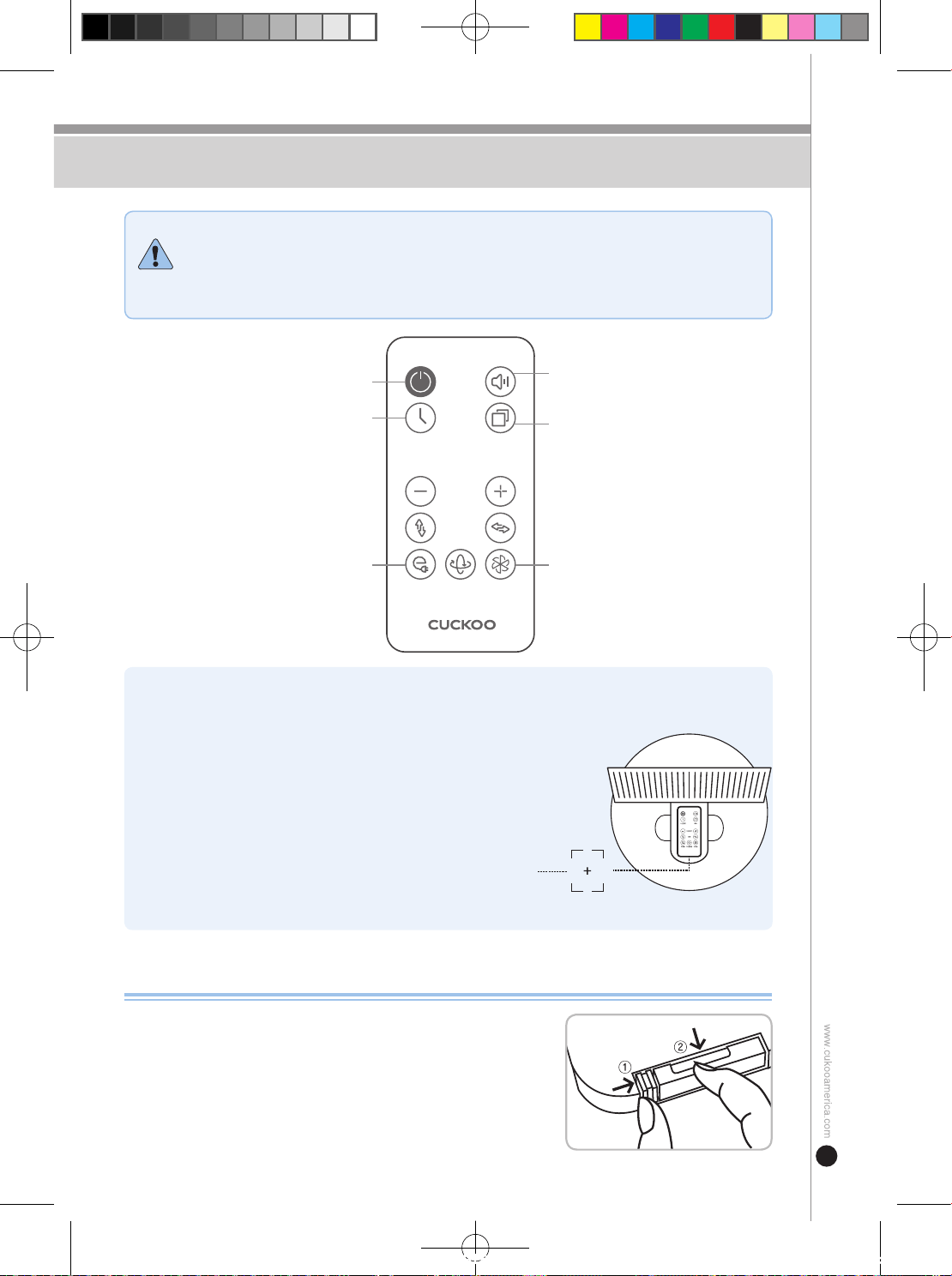
Télécommande
Attention
1) Le réchauffement du panneau de commande pendant le fonctionnement et l'arrêt
est dû à la consommation d'énergie de veille comme Micom, et ce n'est donc pas
une défaillance, vous pouvez l'utiliser en toute conance.
2) Retirez le film de protection de la batterie avant de l'utiliser (il y a un film de
protection mis lors de l'emballage).
※ L'émetteur de la télécommande doit être orienté vers le
récepteur du boîtier principal.
(Distance de réception : à environ 5 mètres du récepteur du
boîtier principal.)
※ N'appuyez pas sur les boutons de la télécommande de manière
continue. Cela peut entraîner un mauvais fonctionnement.
※ Ne faites pas tomber la télécommande et ne la soumettez pas
à un choc violent.
※ Utilisez des piles conformes aux spécifications et retirez les
piles si vous ne les utilisez pas pendant une longue période.
※ Pour ranger la télécommande, xez-la sur le dessus du capot
du moteur et rangez-la.
Elle peut être xée car elle est munie d'un aimant intégré.
Emplacement de la xation de la télécommande
Remplacer la pile de la télécommande
➊
Comme indiqué sur l'image à droite, poussez
①
en direction de
la èche (droite) et tirez
②
en direction de la èche.
➋
Insérez la pile de manière à ce qu'on puisse voir le côté + vers
le haut et poussez le couvercle pour fermer.
➌
Spécifications de la pile : Utilisez la spécification CR2025 (3V).
POWER
(ON / OFF)
Timer
(30 Min. ~ 12 Hour)
Vent écologique
(Détection de la température ambiante
-Contrôle automatique de la vitesse du vent)
MODE
Bip sonore (Activation/désactivation du
bip lors du fonctionnement)
TURBO
SPEED
ECO TURBO3D
TIMER MODE
POWER
(ON / OFF)
Timer
(30 Min. ~ 12 Hour)
Vent écologique
(Détection de la température ambiante
-Contrôle automatique de la vitesse du vent)
MODE
Bip sonore (Activation/désactivation du
bip lors du fonctionnement)
TURBO
SPEED
ECO TURBO3D
TIMER MODE
CF-AC1410WH(에어서큘레이터_미주향)-EN+FR.indd 23 2022. 10. 26. 오후 12:05
24
Démontage
Attention
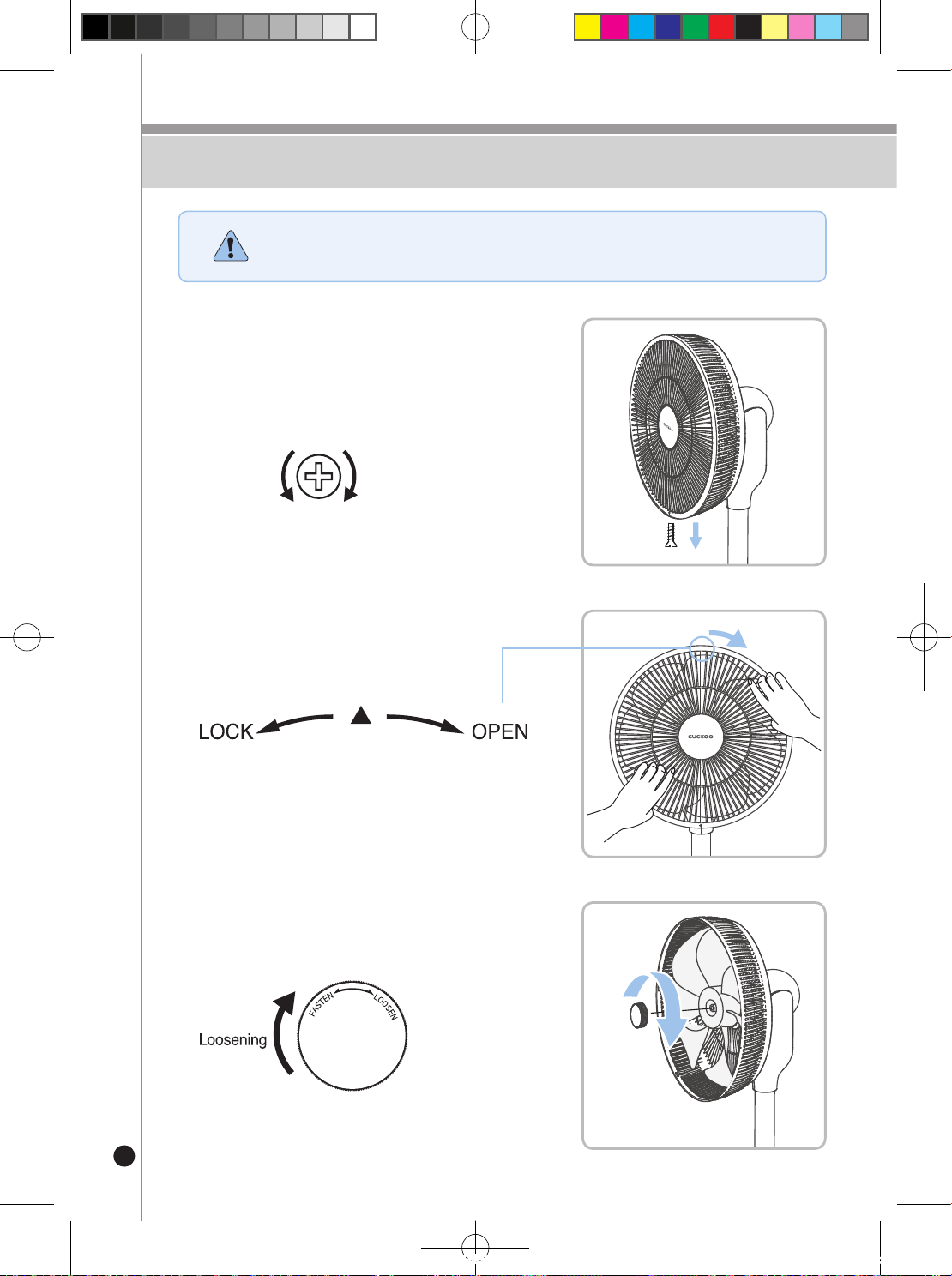
Ne forcez sur aucune des pièces lors du démontage.
Cela peut provoquer des casses et des blessures corporelles.
➊
Retirer la vis d'assemblage de la grille
de sécurité
Retirez la vis d'assemblage située au bas de la grille de
sécurité avant à l'aide d'un tournevis.
Veillez à ne pas perdre les vis après les avoir retirées.
Desserrer Serrer
➌
Retrait des xations de l'hélice
Tournez les xations de l'hélice dans le sens des aiguilles
d'une montre pour les retirer.
➋
Séparation de la grille avant
Tournez la grille avant légèrement dans
le sens des aiguilles d'une montre pour la
séparer de la grille arrière.
Lors du montage :
Placez la èche au-dessus de l'image imprimée vers le haut
et assemblez.
CF-AC1410WH(에어서큘레이터_미주향)-EN+FR.indd 24 2022. 10. 26. 오후 12:05
25
Attention
Ne forcez sur aucune des pièces lors du démontage.
Cela peut provoquer des casses et des blessures corporelles.
Démontage
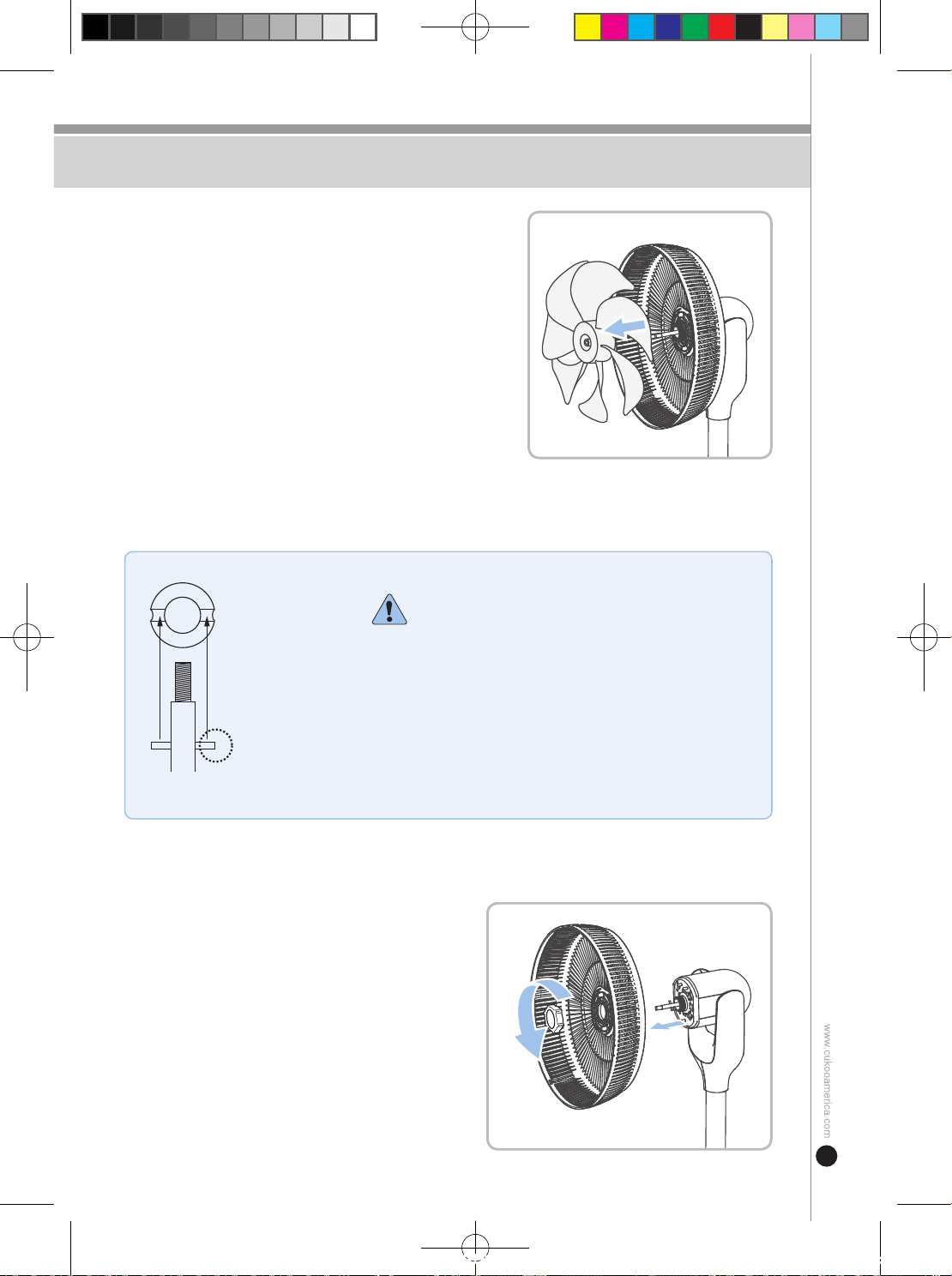
Arbre moteur
Saillie de fixation
Rainure de
retenue de l'hélice
(intérieure)
En cas de l'assemblage de l'hélice
Lors de l'assemblage de l'hélice, alignez la saillie de
xation de l'arbre moteur et la rainure de xation de l'hélice
(intérieure).
Si vous ne les xez pas correctement, vous risquez
d'endommager l'appareil et de rencontrer des problèmes
de fonctionnement.
➍
Séparation de l'hélice
Tirez l'hélice vers l'avant de l'arbre du moteur pour la
séparer.
Portez des gants avant de la retirer car vous risquez d'être
blessé par l'hélice.
➎
Retrait de la fixation de la grille /
Retrait de la grille arrière
Tournez la xation de la grille dans le sens inverse
des aiguilles d'une montre pour la retirer et retirez de
la grille de sécurité arrière.
Motor axis
Protruding holder
Blade (interior)
fixture hole
Motor axis
Protruding holder
Blade (interior)
fixture hole
CF-AC1410WH(에어서큘레이터_미주향)-EN+FR.indd 25 2022. 10. 26. 오후 12:05
26
Nettoyage et stockage
AVERVE
1) Lorsque vous nettoyez l'intérieur du boîtier principal, veillez à ne pas y mettre de
l'eau avec une douche ou de toute autre manière. Cela peut provoquer un choc
électrique.
2) Veillez à débrancher l'appareil avant de le nettoyer.
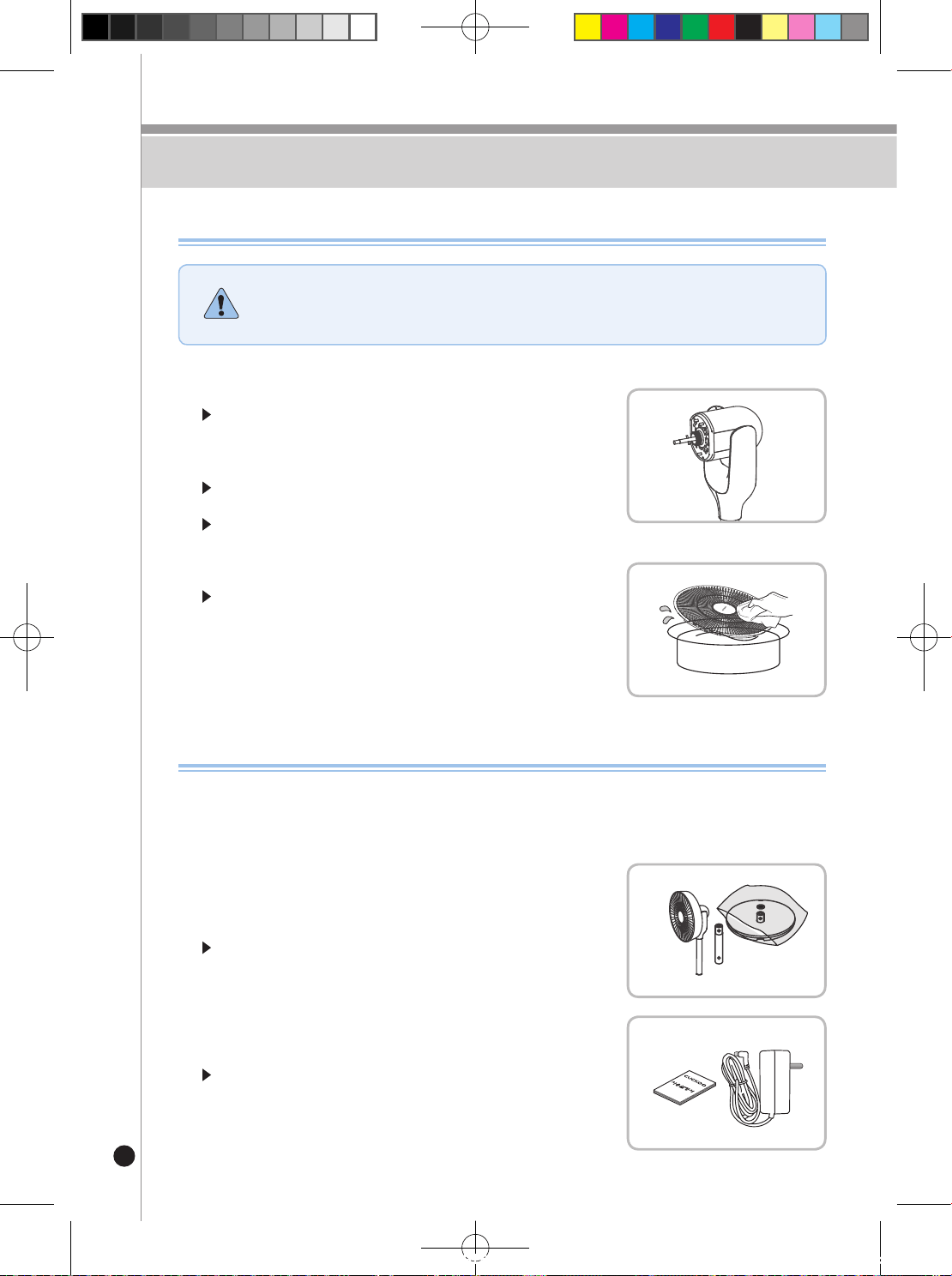
➊
Couverture du stand/moteur
Essuyez la poussière avec un chiffon doux et un détergent
neutre.
(Veillez à ce que le détergent neutre ne pénètre pas dans le
boîtier.)
N'utilisez pas d'acide, de benzène, d'alcool ou de produits
chimiques car ils corrodent la surface de l'appareil.
Veillez à ce que le moteur et le boîtier ne soient pas en contact
avec de l'eau.
➊
Pour protéger l'apparence de l'appareil, mettez-
le dans l'emballage plastique dans lequel il était
emballé au moment de l'achat.
Rangez-le dans un endroit où il y a moins d'humidité et de
poussière et conservez-le hors de portée des enfants.
Si l'appareil est stocké pendant une longue période, essuyez-le
proprement, séchez-le complètement avant de le ranger.
➋
Hélice / Grille de protection
Essuyez la poussière avec un chiffon doux et un détergent
neutre.
Si elles sont très sales, essuyez-les avec de l'eau et séchez-les
complètement pour éviter de laisser de l'humidité.
➋
Gardez le cordon d'alimentation enroulé et la
notice d’utilisation avec l'appareil.
Si la fiche d'alimentation (adaptateur) est perdue, contactez le
bureau du service client et n'utilisez pas d'autres adaptateurs de
valeur nominale différente.
Manual
Manual
Manual
Manual
Comment stocker
Comment nettoyer
CF-AC1410WH(에어서큘레이터_미주향)-EN+FR.indd 26 2022. 10. 26. 오후 12:05
27
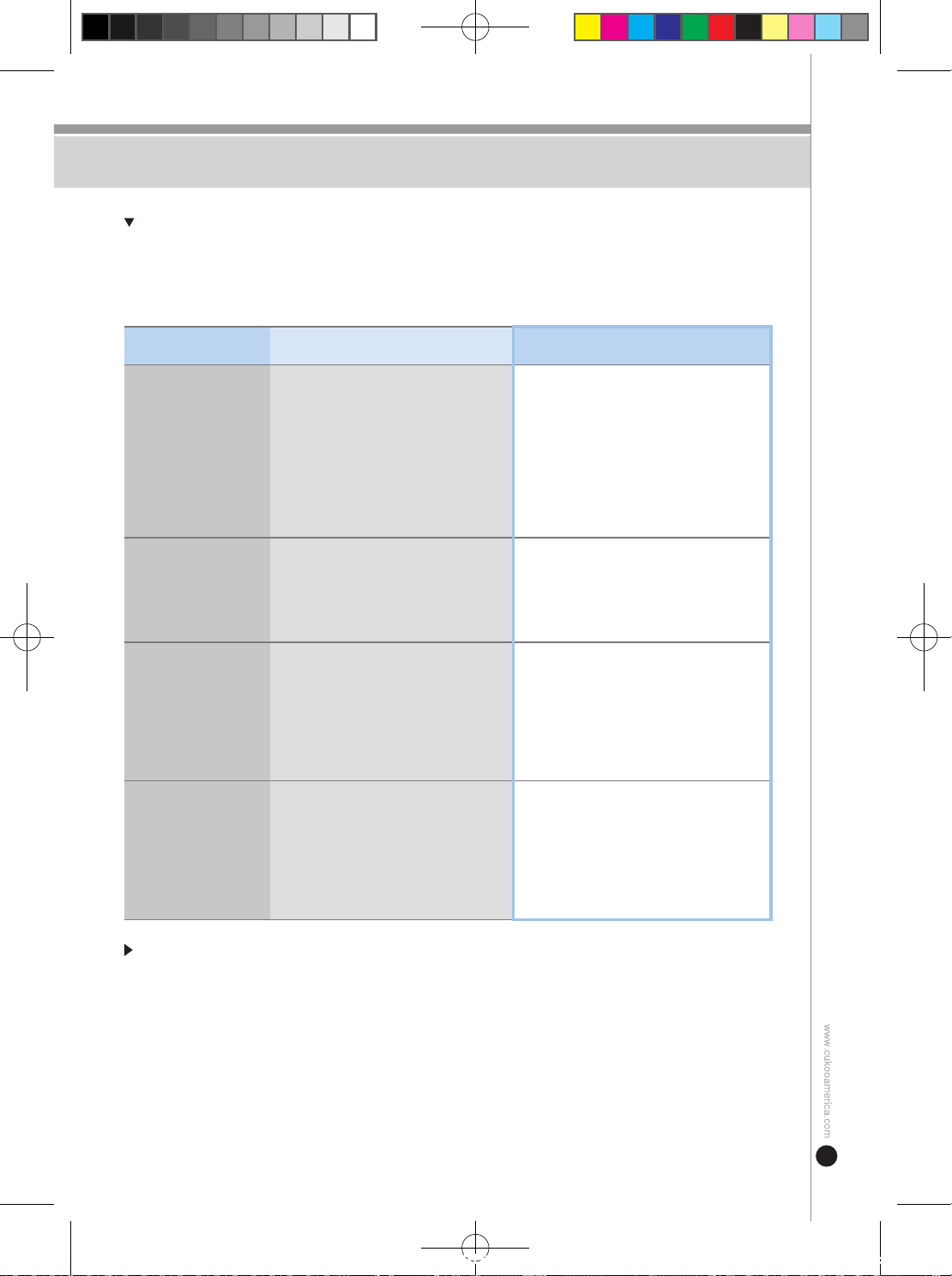
dépannage
En cas d'utilisation incorrecte, l’appareil peut ne pas fonctionner correctement, même s'il ne s'agit
pas d'une panne.
Si le fonctionnement de l’appareil est anormal, contrôlez-le selon la liste de contrôle ci-dessous
et, le cas échéant, contactez le bureau du service client.
Si le voyant clignotant ne concerne pas les questions ci-dessus ou si l’appareil fonctionne
anormalement, veuillez contacter le centre de clientèle sans délai.
problème point de contrôle Solution
L'hélice ne tourne
pas.
· La fiche d'alimentation est-elle
débranchée de la prise ?
· La fiche d'alimentation est-elle
connectée au boîtier principal ?
· La grille de sécurité n'est-elle pas
bosselée et l'hélice n'est-elle pas
coincée ?
· Le temps programmé ne s'est-il pas
écoulé ?
· Vérifiez la connexion entre la fiche
d'alimentation,lapriseetleboîtier
principal.
· Veuillez contacter le service client.
· Arrêtez l'appareil et recommencez à
l'utiliser.
Il n’oscille pas.
· Savez-vous comment le faire
fonctionner ?
· L'icône d’oscillation est-elle présente
sur la fenêtre d'affichage ?
· Y a-t-il un problème avec le moteur ?
· Apprenez à l'utiliser avant de l’utiliser.
J'entends le
claquement de
l'hélice.
· L'hélice et les grilles de sécurité sont-
elles correctement assemblées ?
· La grille de sécurité n'est-elle pas
bosselée et l'hélice n'est-elle pas
coincée ?
· L'écrou de fixation de l'hélice est-il bien
fixé ?
· Réassemblez l'appareil correctement.
· Resserrez l'écrou de fixation de l'hélice.
La télécommande ne
fonctionne pas.
· Avez-vous placé la pile de la
télécommande en respectant la polarité ?
· Le récepteur principal est-il couvert ?
· N'est-elle pas éloignée du récepteur
principal ?
· Les piles ne sont-elles pas épuisées ?
· Assurez-vous que la pile est placée selon
sa polarité.
· Faites en sorte que le récepteur de boîtier
soit visible.
· Utilisez-la à moins de 5 m du récepteur de
boîtier principal.
· Insérez une nouvelle pile et l'utilisez.
CF-AC1410WH(에어서큘레이터_미주향)-EN+FR.indd 27 2022. 10. 26. 오후 12:05
28
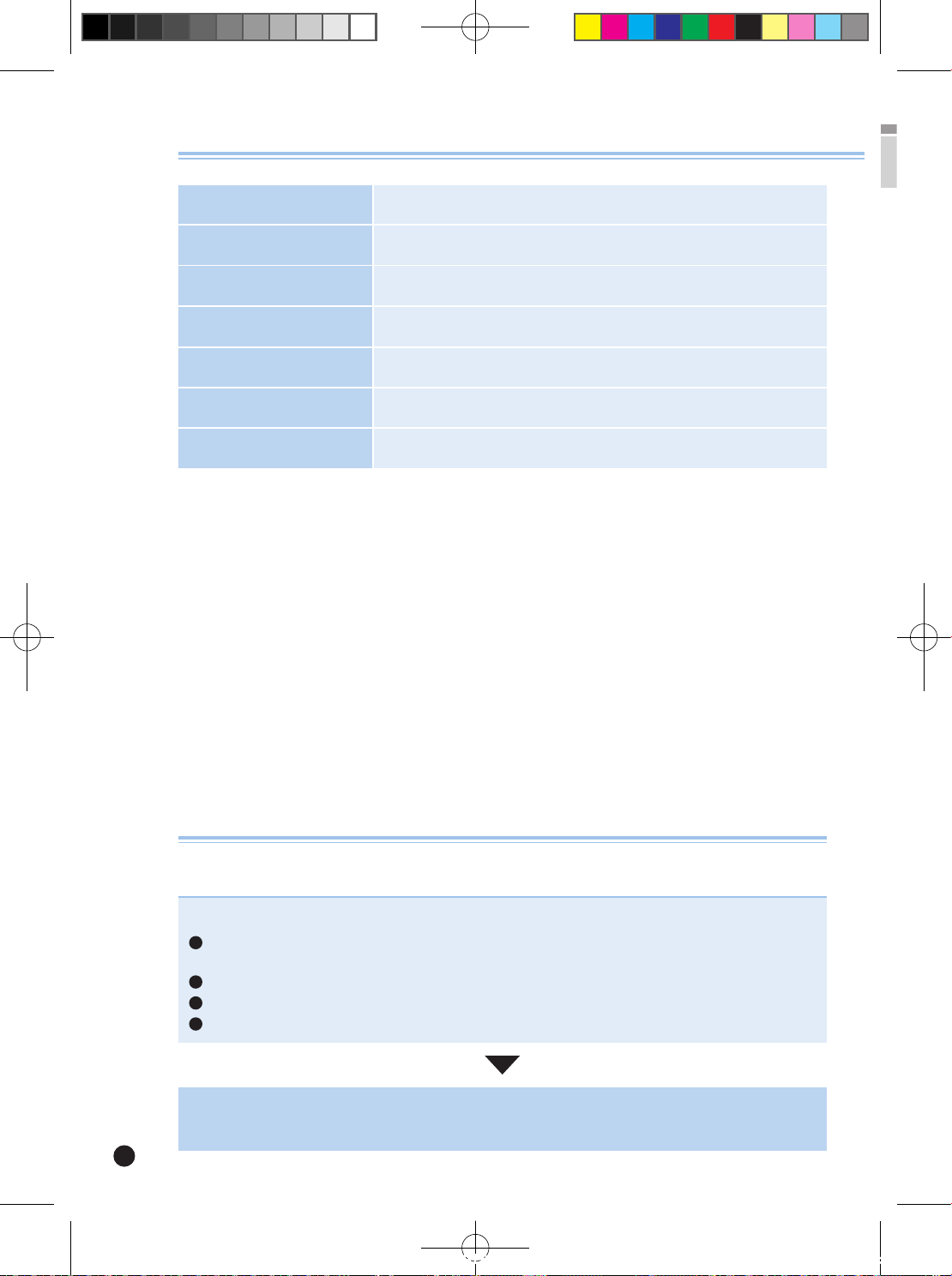
Specications
Nom de L'appareil Air Circulator
Numéro de Modèle CF-AC1410WH
Tension Nominale 120V / 60Hz
Adaptateur • Input : 100-240V~ , 0.8A Max, 50/60Hz • Output : 12Vdc , 3A
Consommation D'énergie 35W
Dimensions 15.4 (W) x 14.8 (D) x 39.4 (H) inches
Poids 9.5 lbs. (including adapter)
Demandes de réparation
L'utilisation prolongée de l'appareil peut entraîner un dysfonctionnement dû au vieillissement des composants causé par la
chaleur,l'humidité,lapoussière,etc.
Arrêtez d'utiliser l'appareil.
Veuillez débrancher l'alimentation et contacter le centre de service.
Si vous éprouvez de tels problèmes :
1
Consultez la section de dépannage trouvée à la page 29 pour trouver une solution à votre
problème. Si le problème n'est pas résolu, contactez le centre de service.
2
Vous pouvez sentir le courant électrique quand vous touchez l'appareil.
3
L'alimentation est allumée mais l'appareil ne fonctionne fonctionne pas.
4
S'il y a d'autres anomalies ou défaillances.
CF-AC1410WH(에어서큘레이터_미주향)-EN+FR.indd 28 2022. 10. 26. 오후 12:05
29
MEMO
CF-AC1410WH(에어서큘레이터_미주향)-EN+FR.indd 29 2022. 10. 26. 오후 12:05
30
MEMO
CF-AC1410WH(에어서큘레이터_미주향)-EN+FR.indd 30 2022. 10. 26. 오후 12:05
31
MEMO
CF-AC1410WH(에어서큘레이터_미주향)-EN+FR.indd 31 2022. 10. 26. 오후 12:05
CUCKOO ELECTRIC AIR CIRCULATOR
LIMITED WARRANTY
KEY Company, P&K USA TRADING CORP and CUCKOO TRADING CANADA will repair at it's option replace,
without charge, your product which proves to be defective in material or workmanship under normal use, during the
warranty period listed below from the date of original purchase. This warranty is good only to the original purchaser of
the product during the warranty period. KEY Company covers the west and central districts, P&K USA TRADING
CORP covers the east and central districts, and CUCKOO TRADING CANADA covers the whole Canada.
WARRANTY PERIOD
MODEL#
CF-AC1410WH
#LABOR
1 YEAR
PARTS
1 YEAR
HOW SERVICE IS HANDLED
- East and Central Districts
Call : 718 888 9144 / Address : 5-48 46th Rd. Long Island City, NY 11101
- West and Central Districts
Call: 323 780 8808 / Address: 1137 E 1st Street Los Angeles, CA 90033, USA
- Canada (Toronto)
Call : 647.625.1004 / Address : #8-2150 Steeles Ave W, Concord, O.N. L4K 2Y7
- Canada (Vancouver)
Call : 604 540 1004 / Address : 945 Lougheed Hwy Coquitlam BC Canada V3K 3T4
No other express warranty is applicable to this product. THE DURATION OF ANY IMPLIED WARRANTIES,
INCLUDING THE IMPLIED WARRANTY OF MERCHANTABILITY, IS LIMITED TO THE DURATION OF
THE EXPRESS WARRANTY HEREIN. CUCKOO ELECTRONICS CO.,LTD, SHALL NOT BE LIABLE FOR
THE LOSS THE USE OF THE PRODUCT, INCONVENIENCE, LOSS OR ANY OTHER DAMAGES,
DIRECT OR CONSE QUENTIAL, ARISING OUT OF THE USE OF, OR INABILITY TO USE, THIS
PRODUCT OR FOR ANY BREACH OF ANY EXPRESS OR IMPLIED WARRANTY, INCLUDING THE
IMPLIED WARRANTY OF MERCHANTABILITY APPLICABLE TO THIS PRODUCT
.
Some states do not allow the exclusion or limitation of incidental or consequential damages or limitations on
how long an implied warranty lasts : so these limitations or exclusions may apply to you. This warranty gives
you specific legal rights and you may also have other rights which vary from state to state.
THE ABOVE WARRANTY DOES NOT APPLY IN THESE CASES:
✽ To damages caused by delivery due to improper packaging.
✽ To damages from improper use of the product from the customer due to abuse, accidents, and modifications
to the original product.
✽ To issues that do not involve a defective workmanship, materials, and explanation of how to operate the
product.
Therefore, these costs are paid by the consumer. Customer assistance numbers :
To Receive Warranty Coverage : ▶ Keep a copy of purchase receipt as proof of purchase and
warranty coverage.
▶ Copy of your sales receipt must be given to receive
warranty service.
For product information, sales, customer service, replacement parts, servicing or location of
authorized service centers, please contact:
West and Central Districts
Call: 323-780-8808
Address: 1137 E. 1st St. Los Angeles,
CA 90033
Canada (Toronto)
Call : 647.625.1004
Address : #8-2150 Steeles Ave W,
Concord, O.N. L4K 2Y7
Canada (Vancouver)
Call : 604 540 1004
Address : 945 Lougheed Hwy
Coquitlam BC Canada
V3K 3T4
Parts Distributor or Sales Dealer :
East and Central Districts
Call: 718-888-9144/9143
Address: 5-48 46th RD. Long Island City,
NY 11101
CF-AC1410WH(에어서큘레이터_미주향)-EN+FR.indd 32 2022. 10. 26. 오후 12:05