10
5
10
TO USE

Do Not add too much water beyond the edge of the
porcelain inner pot, or the water will flow out during cooking.
Prior to first use, please make sure that the electrical rating of the appliance is in confor-
mity with the current electric rating.
To avoid any cracks or spoilage that may bring to the slow cooker, proper maintenance
is necessary.
DO NOT uncover the lid when in stewing, otherwise the heat will run out and more
stewing time will be needed.
Control Panel
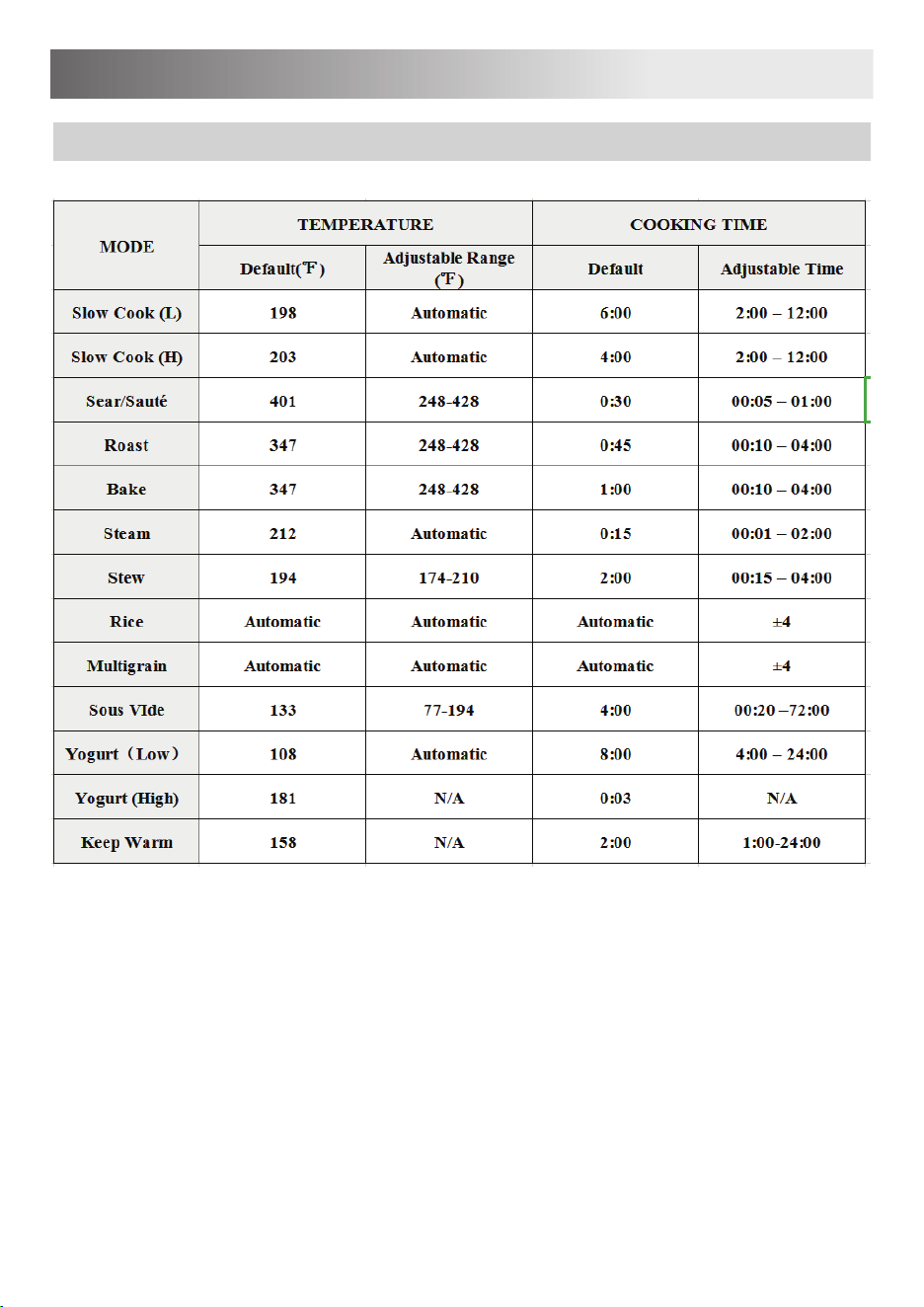
COOKING PROGRAM OPTIONS
PROGRAMS INSTRUCTION
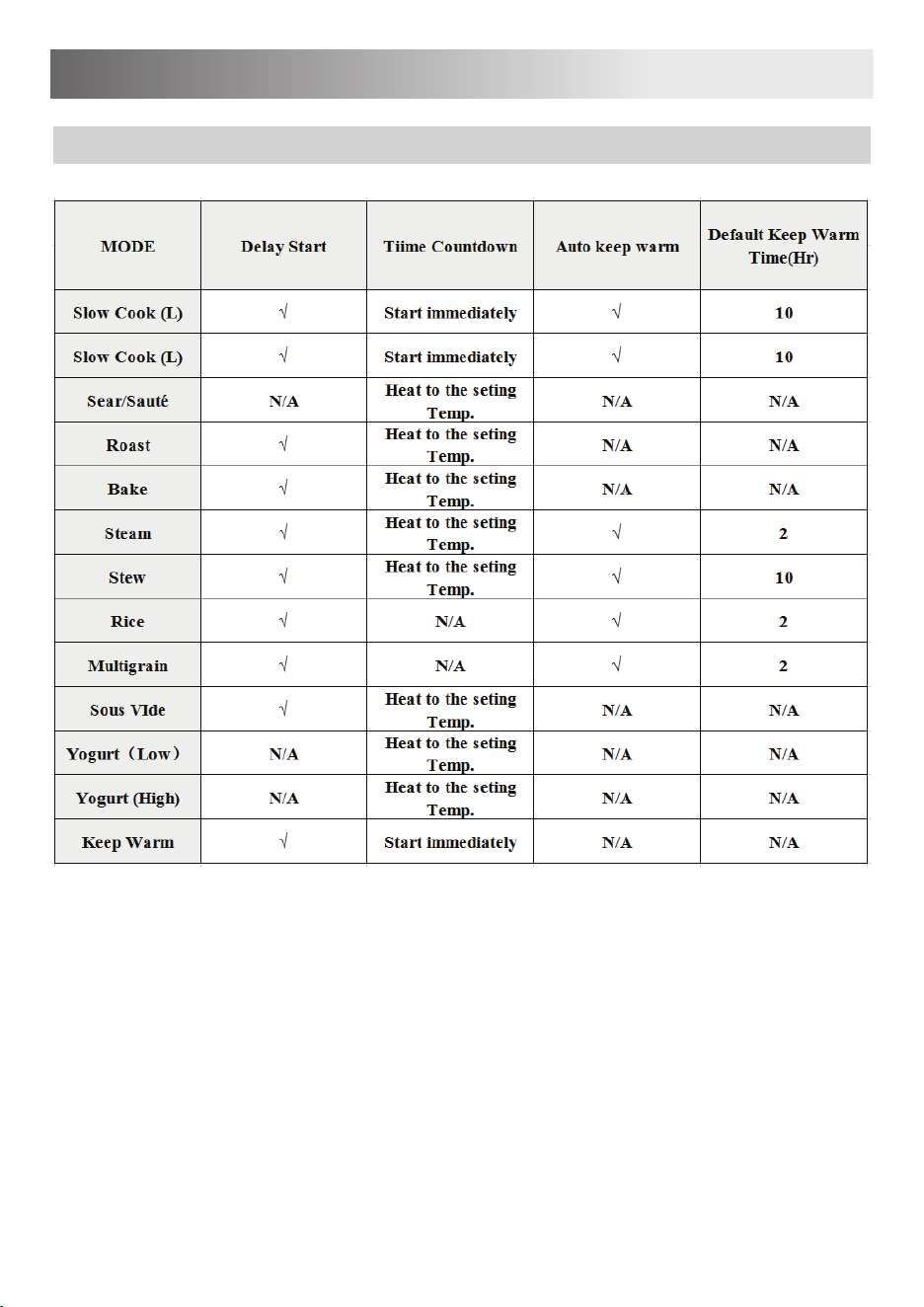
COOKING PROGRAM OPTIONS
PROGRAMS INSTRUCTION
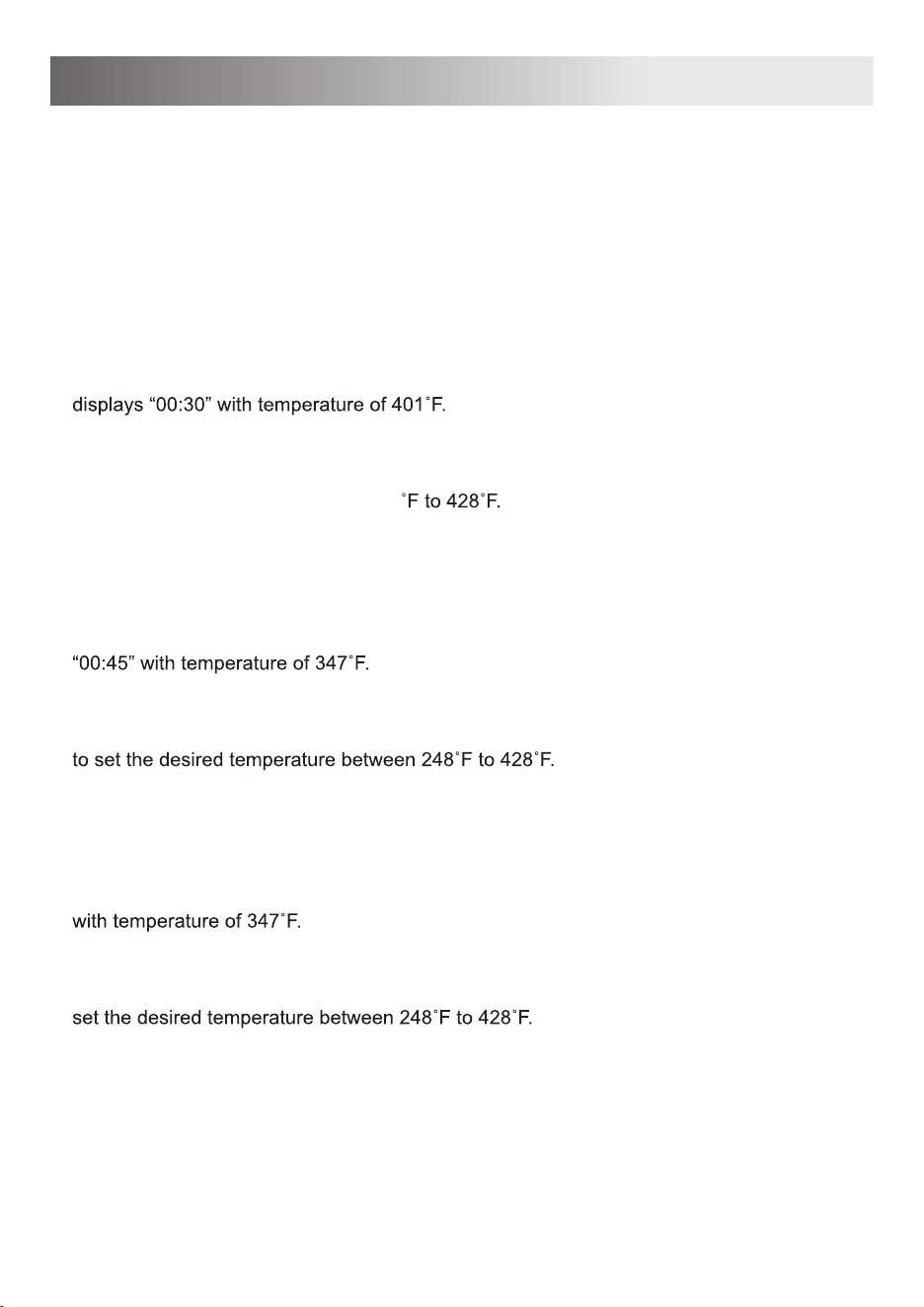
Connect the power cord to a 120V outlet. When plugged in but not in operation, the multicook-
er will remain in Standby mode and the display will show OFF. To disconnect, turn the cooker
OFF then remove plug from wall outlet.
After placing the ingredients according to the recipe guide, press the function required and if
no operation within 10 seconds, it will enter cooking state.
Sear/Sauté
1. Press the “Sear/Sauté” button, the “Sear/Sauté” indicator lights up and the default time
2. When the time display flashes, press the “+/–” button to set the desired time between
“00:05~01:00”.
3. Press the “Time/Temp” button and the temperature display flashes. Press the “+/–” to set
the desired temperature between 248
4. If no operation within 10s after setting, it will enter the cooking state. The display will count
down when the multicooker has reached target temperature.
Roast
1. Press the “Roast” button, the “Roast” indicator lights up and the default time displays
2. When the time display flashes, press the “+/–” button to set the desired time between
“00:10~04:00”.
3. Press the “Time/Temp” button and the temperature display flashes. Press the “+/–” button
4. If no operation within 10s after setting, it will enter the cooking state. The display will count
down when the multicooker has reached target temperature.
Bake
1. Press the “Bake” button, the “Bake” indicator lights up and the default time displays “01:00”
2. When the time display flashes, press the “+/–” button to set the desired time between
“00:10~04:00”.
3. Press the “Time/Temp” button and the temperature display flashes. Press the “+/–”button to
4. If no operation within 10s after setting, it will enter the cooking state. The display will count
down when the multicooker has reached target temperature.
5
Smart Programs
TO USE
Steam
1. Press the “Steam” button, the “Steam” indicator as well as the “Keep Warm” indicator light
up and the default time displays “00:15”.
2. When the time display flashes, press the “+/–” button to set the desired time between
“00:01~02:00”.
3. If no operation within 10s after setting, it will enter the cooking state. The display will
count down when the multicooker has reached target temperature. After cooking, it will
enter the keep warm state.
Stew
1. Press the “Stew” button, the “Stew” indicator as well as the “Keep Warm” indicator light up
F.
2. When the time display flashes, press the “+/–” button to set the desired time between
“00:15~04:00”.
3. Press the “Time/Temp” button and the temperature display flashes. Press the “+/–” button to
F.
4. If no operation within 10s after setting, it will enter the cooking state. The display will count
down when the multicooker has reached target temperature. After cooking, it will enter the
keep warm state.
Rice
1. Press the “Rice” button, the “Rice” indicator as well as the “Keep Warm” indicator light up
and the screen displays “Auto”.
2. Customize the time to meet different taste: Press “+/-” button to adjust the automatic time
within -4min to +4min.
3. If no operation within 10s after setting, it will enter the cooking state. After cooking, it will
enter the keep warm state.
Multigrain
1. Press the “Multigrain” button, the “Multigrain” indicator as well as the “Keep Warm” indicator
light up and the screen displays “Auto”.
2. Customize the time to meet different taste: Press “+/-” button to adjust the automatic time
within -4min to +4min.
3. If no operation within 10s after setting, it will enter the cooking state. After cooking, it will
enter the keep warm state.
6
TO USE
7
Pasteurize Milk
1. Press the “Yogurt” button, the “Yogurt” indicator lights up, the screen displays “High” and the
default time displays “00:03 boil”.
2. If no operation within 10s after setting, it will enter the cooking state. The display will count
down when the multicooker has reached target temperature. When pasteurization has
finished, the multicooker will beep and the screen will display “yogt”.
3. Allow the pasteurized milk to cool to just below 110°F / 43°C. Add starter culture and mix well.
Ferment Yogurt
1. Press the “Yogurt” button again, the screen displays “Low” and the default time displays
“08:00 yogt”.
2. When the screen displays “Low” and the time display flashes, press the “+/ –” button to set
the desired time between “04:00~24:00”.
3. If no operation within 10s after setting, it will enter the cooking state. The display will count
down when the multicooker has reached target temperature.
Slow Cook
1. Press the “Slow Cook” button, the “Slow Cook” indicator as well as “Keep Warm” indicator
light up, the screen displays “low” and the default time displays “06:00”, then press the “Slow
cook” button again, the screen displays “High”, the default time displays “04:00”.
2. When the time display flashes, press the “+/–” button to set the desired time between
“00:30~24:00”.
3. If no operation within 10s after setting, it will enter the cooking state. After cooking, it will
enter the keep warm state.
Sous Vide
1. Press the “Sous Vide” button, the display flashes, and the default time displays “04:00” with
F.
2. When the time display flashes, press the “+/ –” button to set the desired time between
“00:20~72:00”.
3. Press the “Time/Temp” button and the temperature display flashes. Press the “+ / –” button
F”.
4. If no operation within 10s after setting, it will enter the cooking state. The display will count
down when the multicooker has reached target temperature.
Yogurt
TO USE

8
Cancel Key & Standby Mode
When the multicooker is plugged in but not in operation, it will display "OFF" and enter the
standby mode. Press Cancel to stop a Smart Program at any time; the cooker will go back to
standby mode.
Keep Warm
1. Press the “Keep Warm” button, the “Keep Warm” indicator lights up and the default time
displays “02:00”.
2. Press the “+ / –” button to set the desired time between “01:00~24:00”.
3. If no operation within 10s after setting, it will enter the keep warm state.
Note:
1. “Keep Warm” indicator does not light up in Roast by default. Press the “Keep Warm” button
if you need and the “Keep Warm” indicator lights up. After cooking, it will enter the keep
warm state.
2. When setting the program and the “Keep Warm” indicator lights up by default, if the meal
does not need to be kept warm, press the “Keep Warm” button and “Keep Warm” indicator
goes out. After cooking, the product will not enter the keep warm state.
3. There is no “Keep Warm” function in some programs, like Sear/Sauté, Sous Vide, Bake and
Yogurt. When pressing the “Keep Warm” button and the indicator will not light up.
Delay Start
This function can be used with all Smart Programs with the exception of Sear/Sauté and Yogurt.
The set up time represents the start time of delay start. Then cooking starts as the countdown
shows 0; the desired cooking time and temperature need to be set before setting the delay time.
1. After program setting, press the “Delay Start’ button, the “Delay Start” indicator lights up and
the default time displays “06:00”.
2. Press the “+/ –” button to set the desired time between “00:10~24:00”.
3. If no operation within 10s after setting, it will enter the delay start state and then enter the
corresponding cooking state after delay start.
Advanced Functions
TO USE

Smart Program Reset
To reset a Smart Program back to default settings:
1. Press Cancel to ensure the multicooker is in Standby mode.
2. Press and hold the Program key for 10 seconds, until the multicooker beeps. The settings
of the selected Program will be restored to the default settings.
Full Reset
To reset all of the settings on the multicooker to default settings:
1. Press Cancel to ensure the multicooker is in Standby mode.
2. Press and hold Cancel for 10 seconds, until the multicooker beeps. All of the settings on the
multicooker will be restored to default settings.
Sound
Press Cancel to ensure the multicooker is in Standby mode.
Sound OFF: Press and hold – under Time for 5 seconds. The display will show "S OFF".
Sound ON: Press and hold + under Time for 5 seconds. The display will show "S On".
Note: Error code alerts cannot be silenced.
Temperature: Fahrenheit & Celsius
Press the Smart Programs as you need. Under Temp, press and hold the + and – keys
together for 5 seconds to toggle between °F and °C.
Memory Function & Default Reset
This product can remember your preferences within each Smart Program. This allows you to
experiment and fine-tune settings to achieve personalized cooking results. The above settings
are initial settings. When the time and temperature are changed, and the cooking process
starts, this parameter will be remembered as the default parameter for next time use.
9
TO USE
10


Made In China
HOUSEHOLD USE ONLY